Here’s How AI Will Pull Content Marketing Back From the Brink of Destruction
Hemingway tried to warn us.
“All you have to do is sit down at a typewriter and bleed.”
And bleed we shall.
Because we’ve created a monster that’s bent on ruining the content marketing that was once the saving grace in our long journey toward self-destruction.
“There is a content monster, and it’s tearing apart content marketing. Monsters are creatures that are out of control, that don’t respond to reason or logic, that just are; with no purpose.”
You know what’s even scarier?
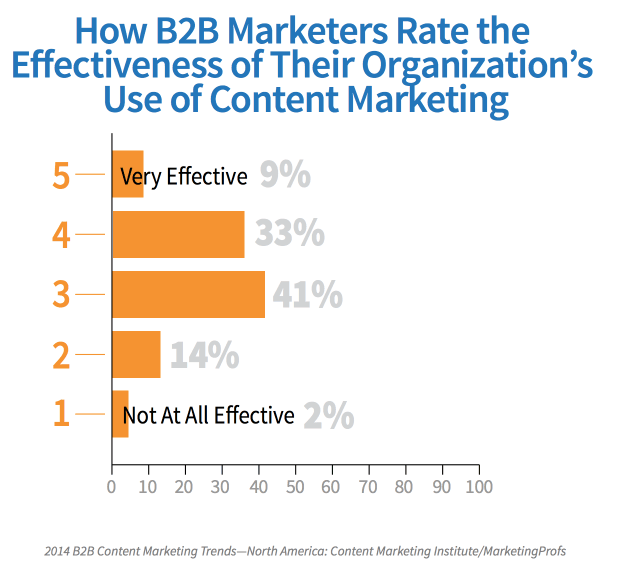
Almost everyone is doing content marketing. Yet, less than half of B2B marketers feel their efforts are performing better than “meh.”
We’ve got a once-in-a-lifetime opportunity to turn things around.
If what Seth Godin said about content marketing being the only marketing we have left is true, we’d better grab it.
Artificial intelligence is here, and it might pull content marketing back from the brink of destruction — if we’ll just let it.
When I say AI will save content marketing, you might jump at the thought of getting some of your most time-consuming tasks — like that whole writing thing — off your plate.
Not so fast.
Quality content isn’t something that can be completely automated just yet. But it can be augmented.
Some chatbots are already smart enough to put tons of relevant data at our fingertips as quickly as we’re able to make a query.
Take GrowthBot that is used by over +12K marketers today. It talks to over a dozen systems and APIs to bring some of these cool, useful features:

And yes, it is true that AI can write entire blogs. In fact, it already has. You might have read one without even knowing it.

Associated Press already uses AI to create stat-heavy sport and finance write-ups.
Engadget mixed a million words and a few rules to create a “Blogbot” that spit out a complete, though drab, tech announcement.
The rear-facing camera is a 12-megapixel unit, which is lower resolution than most sensors in this price range, but Samsung claims it takes great pictures anyway thanks to its larger pixels and fast autofocus.
Can you believe a robot wrote that? Probably.
As far as coherence and creativity, this is the outer limit for AI.
These current limitations might actually be a good thing, considering that a deluge of content isn’t exactly working.
What is working is quality. Quality content gives the reader a unique experience. Quality content meets both your objectives and theirs.
Quality content is epic.
“Content volume is important. Enterprise organizations need lots of content in many different forms and multiple channels. But quality cannot be sacrificed. To break through the clutter, content must be epic.”
— Joe Pulizzi, founder of Content Marketing Institute
Can AI create epic content? Not yet.
But it can go a long way in helping you research, edit, and maintain extremely valuable content marketing.

Remember Clippy, the paper clip the world loved to hate?
It might not have been self-aware, or all that helpful, but it heralded a future for content marketing that Vedant Misra, founder of machine-learning company Kemvi, dreams of:
“Machines will help us produce content. Machines will suggest assets to include in the content you’re making, or subsets of content to include. Executive control will remain with creators, but the ideation and production process will become increasingly automated. Think Clippy the Microsoft Office Assistant, but with a much bigger brain.”
While that dream isn’t yet fully realized, a shape is starting to form that looks a lot like a life raft rescuing us from drowning in content.
AI-enabled tools can examine trends to tell you what content each and every one of your readers wants to read. And they can tell them what to read based on their behavior and tons of other data.
But can they help develop that epic reading material from scratch?
Actually, yeah.
Take for example Atomic AI.
Once given enough data about the target audience for your story (or email, or whatever), the smart program will calculate readability to give you customized, predictive recommendations in real time.

That, of course, is only the first step.
If there’s one thing AI excels in over humankind, it’s making sense of data.
AI-enabled platforms deduce behavioral patterns from a number of inputs that would take us years to organize, much less understand.
Better yet, they can tell you how to act on this knowledge.
“By analyzing hundreds of data points about a single user (including location, demographics, device, interaction with the website, etc.), AI can display the best-fitting offers and content.”
– Content Marketing Institute
Once you have the perfectly-personalized content in hand; an intelligent system can tell you when, where, and how often you should be publishing and sharing it for maximum impact.
Then the whole cycle starts over again with smart recommendations on which topics your audience is interested in based on how they’ve interacted with your content.

The implications go well beyond simply crafting epic blog posts.
Evergage and Researchscape International found that 70 percent of organizations surveyed said email was the most important marketing channel to personalize.
Luckily for those respondents, AI makes it easier than ever to actually personalize email content based on the stuff subscribers care about.
No more yelling into the void.

User experience and conversion rate optimization can also benefit from intelligent personalization.
An AI-enabled platform allows you to serve the perfect content and products throughout a user’s experience, increasing the likelihood of a conversion while keeping the churn rate low.
AI will deliver us from crappy copy by making it obsolete.
I like to think we haven’t done things completely wrong as content marketers. Maybe we’ve done too good of a job.
Too much content with too little intelligence is crushing us under its weight.
Consumers have shown us they want extreme value. They want relevance. They expect the perfect solution at the perfect time.
They want epic content marketing.
We need a little help cutting through the chatter. The most powerful tool we have to reach epic status is AI that augments our natural skills.
Artificial intelligence isn’t replacing content marketers, it’s working alongside us.
Afterall, Hemingway told us “There is nothing to writing. All you have to do is sit down at a typewriter and bleed.”
Let’s see a machine do that.

5 Marketing Plan Examples to Help You Write Your Own
You did it.
You’ve been spearheading your organization’s content marketing efforts for a while now, and your team’s performance has convinced your boss to fully adopt content marketing.
There’s one small problem, though: your boss wants you to write and present a content marketing plan to her, but you’ve never done something like that before. You don’t even know where to start.
Fortunately, we’ve curated the best content marketing plans to help you write a concrete marketing plan that’s rooted in data and produces real results.
Read on to get inspired by some of marketing’s top content strategies.
5 Marketing Plan Examples to Help You Write Your Own
1. Shane Snow’s Marketing Plan for His Book Dream Team
A successful book launch is a prime example of data-driven content marketing. Using data to optimize your content strategy spreads more awareness for your book, gets more people to subscribe to your content, converts more subscribers into buyers, and encourages more buyers to recommend your book to their friends.
When Shane Snow started promoting his new book Dream Team, he knew he had to leverage a data-driven content strategy framework. So he chose his favorite one: the content strategy waterfall, which is defined by Economic Times as a model used to create a system with a linear and sequential approach. To get a better idea of what this means, take a look at the diagram below:
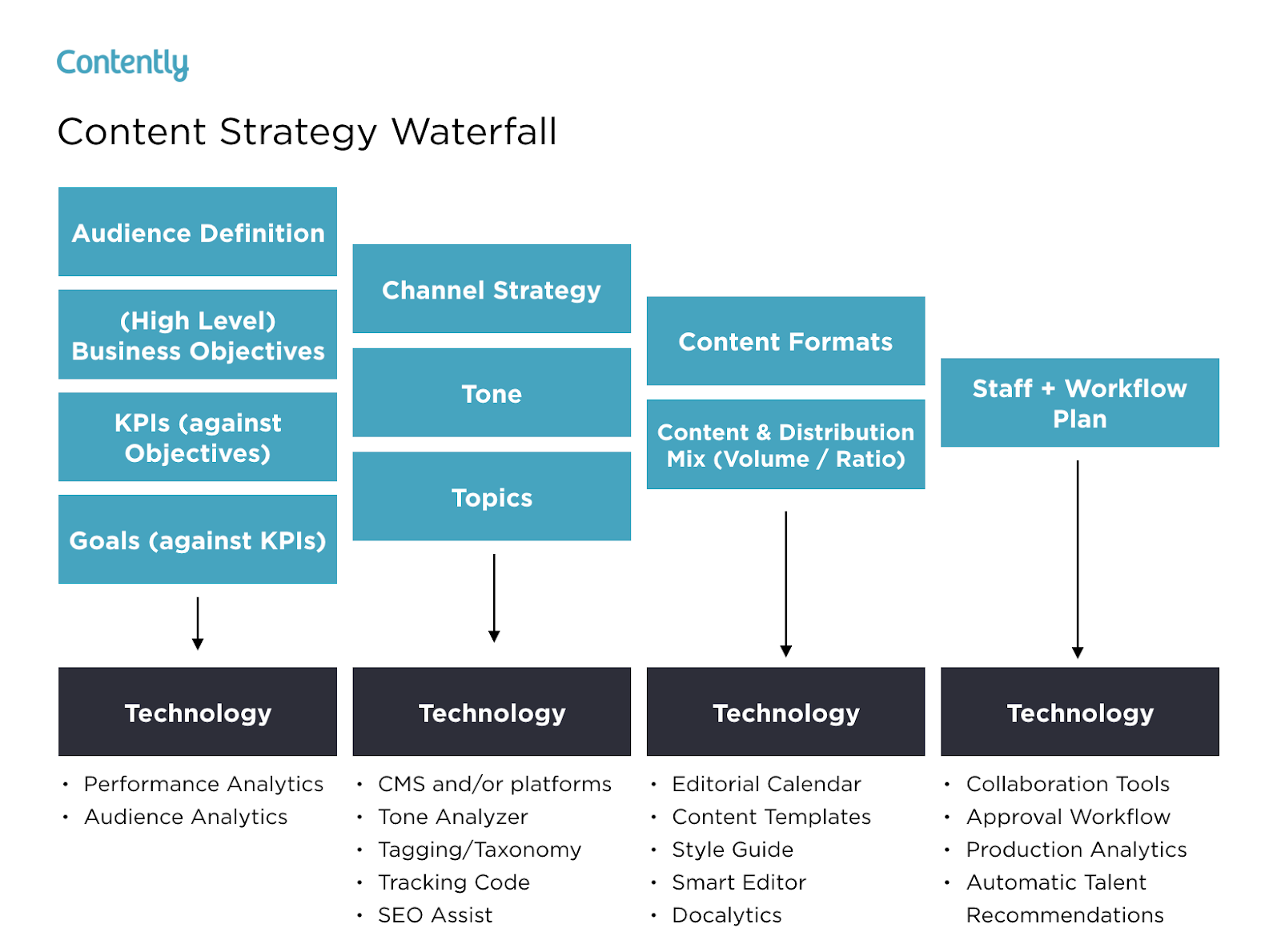
Snow wrote a blog post about how the content strategy waterfall helped him successfully launch his new book. After reading it, you can use his tactics to inform your own marketing plan. More specifically, you’ll learn how he:
- Applied his business objectives to decide which marketing metrics to track.
- Used his ultimate business goal of earning $200,000 of sales or 10,000 purchases to estimate the conversion rate of each stage of his funnel.
- Created buyer personas to determine which channels his audience would prefer to consume his content on.
- Used his average post view on each of his marketing channels to estimate how much content he had to create and how often he had to post on social media.
- Calculated how much earned and paid media could cut down the amount of content he had to create and post.
- Designed his process and workflow, built his team, and assigned members to tasks.
- Analyzed content performance metrics to refine his overall content strategy.
You can use Snow’s marketing plan to cultivate a better content strategy plan, know your audience better, and think outside the box when it comes to content promotion and distribution.
2. Buffer’s Content Marketing Strategy Template
Writing a content plan is challenging, especially if you’ve never written one before. Since only 55% of marketing teams have a documented content strategy, Buffer decided to help out the content marketing community.
By sifting through countless content marketing strategy templates and testing the best, they crafted a content marketing plan template with instructions and examples for marketers who’ve never documented their content strategy.
After reading Buffer’s marketing plan template, you’ll learn how to:
- Answer four basic questions that’ll help you form a clear executive summary.
- Set SMART content marketing goals.
- Create highly accurate audience personas by interviewing real content strategists.
- Solve your audience’s problems with your content.
- Do competitive research by analyzing your competitors’ and industry thought leaders’ content.
- Evaluate your existing content strategy by examining the topics and themes of your highest and lowest performing pieces.
- Determine which types of new content to craft, based on your team’s ability and bandwidth.
- Establish an editorial calendar.
- Develop a promotional workflow.
Buffer’s template is an incredibly thorough step-by-step guide, with examples for each section. The audience persona section, for example, has case studies of real potential audience personas like “Blogger Brian”. If you’re feeling overwhelmed by the process of creating a marketing guide, this can help ease you into it.
3. Contently’s Content Plan
Contently’s content methodology works like a flywheel. Instead of applying an entirely new strategy to each new marketing campaign, they leverage the strategy of their previous marketing campaign to drive the next one. Similar to a flywheel, their content methodology needs an initial push of energy to get the gears in motion.
What supplies this energy? Their content plan.
Contently fleshed out their entire content plan in a blog post to help marketers develop a self-sustaining marketing process. After reading it, you’ll learn how to:
- Align your content objectives and KPIs with your business goals.
- Create highly detailed buyer personas using psychographics instead of traditional demographics.
- Craft content for each stage of your marketing funnel, based off your prospects’ pain and passion points.
- Identify your most effective marketing channels.
- Discover the content topics your audience actually craves.
- Assess your organization’s need for resources.
By applying a flywheel-like strategy to your own marketing efforts, you essentially take away the burden of applying new strategies to each individual marketing campaign. Instead, your prior efforts gain momentum over time, and dispel continual energy into whatever you publish next.
4. Forbes’ Marketing Plan Template
An oldie, but a goodie — Forbes published a marketing plan template that has amassed almost four million views since late 2013. To help you sculpt a marketing roadmap with true vision, their template teaches you how to fill out the 15 key sections of a marketing plan, which are:
- Executive Summary
- Target Customers
- Unique Selling Proposition
- Pricing & Positioning Strategy
- Distribution Plan
- Your Offers
- Marketing Materials
- Promotions Strategy
- Online Marketing Strategy
- Conversion Strategy
- Joint Ventures & Partnerships
- Referral Strategy
- Strategy for Increasing Transaction Prices
- Retention Strategy
- Financial Projections
If you’re truly lost on where to start with a marketing plan, this guide can help you define your target audience, figure out how to reach them, and ensure that audience becomes loyal customers.
5. HubSpot’s Comprehensive Guide for Content Marketing Strategy
At HubSpot, we’ve built our marketing team from two business school graduates working from a coffee table to a powerhouse of over 200 employees. Along the way, we’ve learned countless lessons that’ve shaped our current content marketing strategy, so we decided to illustrate our insights in a blog post to teach marketers how to develop a successful content marketing strategy, regardless of their team’s size.
In this comprehensive guide for modern marketers, you’ll learn:
- What exactly content marketing is.
- Why your business needs a content marketing strategy.
- Who should lead your content marketing efforts.
- How to structure your content marketing team, based on your company’s size.
- How to hire the right people for each role on your team.
- What marketing tools and technology you’ll need to succeed.
- What type of content your team should create, and which employees should be responsible for creating them.
- The importance of distributing your content through search engines, social media, email, and paid ads.
- And finally, the recommended metrics each of your teams should measure and report to optimize your content marketing program.
These marketing plans serve as initial resources to get your content marketing plan started — but to truly deliver what your audience wants and needs, you’ll likely need to test some different ideas out, measure their success, and then refine your goals as you go.

How to Design a Logo [Step-by-Step Guide]
I think most of us can agree there are generic logos in the world that we easily forget, and then there are great logos that we’ll always be able to recognize (even without the brand’s name attached).
But what is it about a logo that makes you recognize it? What is it about the design that can elicit a memory or even a specific emotion?
If you’re in the process of creating a logo for your company, you’re in a unique position to make a powerful impact on how consumers perceive your brand.

Everything you do, say, and, display as part of your new business will tell your prospects more about your company’s identity. It’s vital to ensure from the beginning that you present a cohesive and clear statement regarding your company’s message.
And while a logo may seem quite simple to create, designing a great one isn’t always easy. It involves a lot of market research, a deep knowledge of your buyer personas, and thoughtful consideration of the principles of logo design. Often, designers find themselves creating many iterations of a single logo before getting it “just right.”
So, where do you even begin to design a logo? Right here. We’ve broken down the nine key steps (with a few tips thrown in) you’ll need to take to create a logo that not only you love, but your prospects will too.
How to Design a Logo for Free
- Start With Your Story
- Brainstorm Words That Describe Your Brand
- Sketch Ideas Based on These Words
- Test Your Top Sketches With Your Buyer Persona
- Refine Your Chosen Sketch
- Develop Your Logo’s Layout on a Free Design Platform
- Pick Versatile Color Options
- Choose a Font
- Ensure Scalability
How to Design a Business, Company, or Personal Logo
1. Start With Your Story
Companies are created to make money — it’s not the most poetic statement, but it’s the one you need to start with. And in order to make a profitable business, you need to be able to sell yourself just as well as your product. Marketers today tend to agree that buyers connect much more strongly to stories than they do to the basic facts of your product. What does this mean to you? There needs to be some story in your logo.
Before you even think about what this logo will look like, take some time asking yourself what the story behind your company is. When we look at Coca-Cola, we don’t see a brown, carbonated beverage — we see polar bears and thick, white script letters.
 Image via Coca-Cola
Step outside of what your company does and convey why you do it. That “why” is the root of your story, and it should come through in the color, shape, and typeface of your logo. If your logo were the title of a movie, what would it look like?
2. Brainstorm Words That Describe Your Brand
Now that you have your story, it’s time to take your logo draft from story to setting. Open Thesaurus.com and enter a term that best describes your product into the search bar.
For example, if you’re in the clothing industry, you might simply type in “clothing.” You’d be surprised by how descriptive the synonyms are that appear. You can even click these results to start new searches and dig deeper as you zero in on the words that best capture your brand.
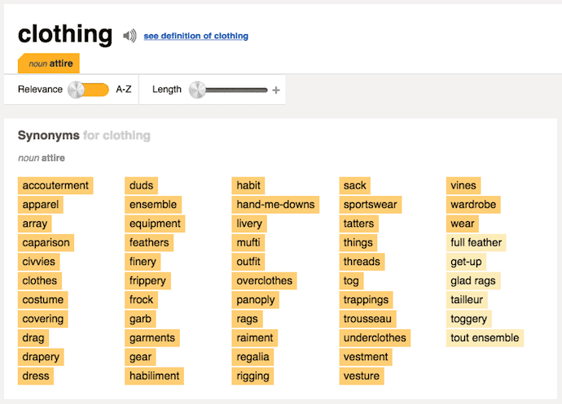 Image via Thesaurus.com
Find five to 10 words that describe not only what you do, but the why from the previous step. Each of these words can fit like pieces in a puzzle and help guide you to refining a concept.
3. Sketch Ideas Based on These Words
Armed with your why and a few keywords for direction, grab a pencil and paper and start sketching every idea that comes into your head. Allow each new concept to evolve on its own. Don’t get frustrated if the first few aren’t right — keep refining, using previous sketches to influence the outcome of new ones. You might focus these sketches on a shape, the name of your brand, or both.
As you’re sketching the concepts for your logo, keep these tips in mind:
- Keep the shape simple. If you can sketch the most symbolic components in seven seconds or less, you’re in good shape. You should absolutely avoid any popular clip-art artwork or generic symbols like a globe, star, or similar icons that people too easily identify from other places. These are easily forgotten at first glance. The more creative you are at this stage, the better your final logo. Your logo is what your consumers will remember the most. Be honest in this artwork.
- Colors can either be your best friend or your worst enemy. You need to include color with your logo, but be selective on which colors you use. Be mindful of current color trends already being used today and in your target market. As a general rule, don’t choose more than three colors. Choose a color or group of colors that will make you stand out from your competition. But please, for the love of marketing, don’t use the whole rainbow!
4. Test Your Top Sketches With Your Buyer Persona
Once you’ve got a handful of different sketches on paper, take a step back and pick the top three concepts. Don’t think too hard about this — consider the designs your eyes keep going back to, and select them to show to others.
Share these drafts with your friends, family members, and a colleague you trust. If possible, bring these sketches to someone who best fits your buyer persona — or your ideal customer profile. This gives you the most productive opinion on your artwork because it can indicate how customers will receive your brand — not just the people close to you.
Be prepared for honest feedback and don’t take any negative comments personally. These criticisms will only make your final logo better. Use their feedback to select one final concept to develop into a design.
5. Refine Your Chosen Sketch
Congratulations, you’re well on your way to having an awesome logo! Once you’ve identified a sketch to run with, it’s time to refine it and perfect the story you started with in Step 1.
To begin refining your logo, look back at the terms you identified when you first used Thesaurus.com in Step 2. Now look at your chosen sketch and ask yourself: Which terms does this sketch not yet capture? Use them to develop your sketch further, and add back the traits you liked best about the designs you didn’t end up choosing for refinement.
6. Develop Your Logo’s Layout on a Free Design Platform
Now, it’s time to get technical and turn your paper drawing into a usable digital format. To bring this design to life, you have many free design platforms available to recreate your sketch in digital format. Here are a few free solutions:
The platforms above can help you put your sketched logo in digital format, but bringing your concept to life for a business audience requires a bit of technical direction. One of the most important things to get right is the layout. Make sure all of your text and shapes are perfectly spaced and the logo itself is aligned with its surroundings.
Your logo doesn’t have to be symmetrical, but it should be aligned in different contexts. Chances are, you will encounter situations when your logo sits against different vertical and horizontal borders, and it should appear even with these surroundings no matter how you might repurpose your logo and where you might publish it.
7. Pick Versatile Color Options
Your logo’s color scheme might look great against the color of the canvas on which you designed it, but eventually, your logo will be placed on backgrounds whose colors you didn’t start with.
Let’s revisit our Coca-Cola example from Step 1. As you can see below, the company’s logo can work across any colored can it sells.
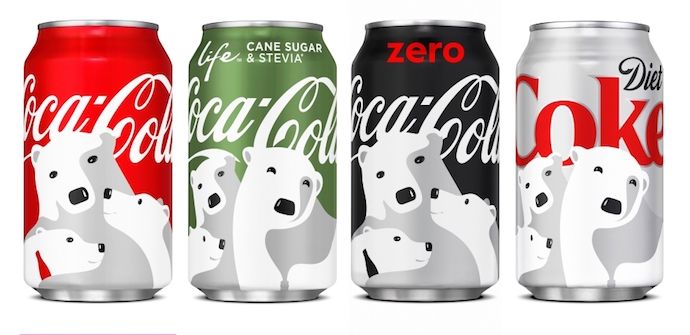 Image by Jay Moye
Always be sure to have logo color variations for both dark and light backgrounds. That might mean only having to change the color of your font. Or, in some cases, you might have to change the color of your entire logo.
Create one of each option to make sure you’re prepared when ordering promotional products that will display your logo. T-shirts, stickers, notepads, and coffee mugs are just a few of the many items for which you’ll have different color variations of your logo.
8. Choose a Font
This is the time to combine text with imagery. If you’re chosen sketch is primarily a shape or symbol, rather than text, begin to factor in the written name of your company. Consider the typeface this text will carry if your company name ever stands on its own without the symbol.
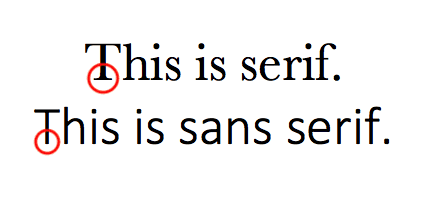
Believe it or not, your font choice can say a lot about your business. You can choose a font that’s either serif (with stems on each letter) or sans serif (no stems) — also known as classic or modern, respectively.
Stay away from generic fonts that come standard on every word processor. Some examples of generic fonts are Times New Roman, Lucida Handwriting, and Comic Sans. These fonts will only work against you and your company by making you less memorable.
9. Ensure Scalability
Logos are meant to represent your company on multiple platforms — in print, on your website, on each of your social media business pages, and across the internet as your business grows. You want a logo that can be blown up super large for a billboard, but also scaled down for screening onto the side of a pen.
Every part of your logo should be legible, regardless of the logo’s size.
Whew — still with us? We know this might seem a little overwhelming, but take it slow and don’t rush yourself. It’s better to follow the process through to completion and end with a remarkable brand than to start over a few months later due to a design error or change of heart.
Once you’ve completed your logo, how can you tell if you scored a winner? Easy: Use our Logo Grader to assess the sustainability and effectiveness of your new logo.
Co-authored by: Rachel Begg, Julie Hruska, and Britt Schwartz

YouTube Ads for Beginners: How to Launch & Optimize a YouTube Video Advertising Campaign
You’ve spent months perfecting the script, storyboarding, finding the right talent, shooting, and editing. The end result? A blockbuster brand or product video.
With all that time invested, you can’t stop at just embedding the video on a homepage or sharing it on social media and hoping someone watches.
While great content is bound to be found, it’s also important to be proactive about gaining the attention of and educating prospects and those unfamiliar with your brand. Running a series of YouTube ads is one way to make sure more of your target audience finds the video content you’ve produced.
And with new formats and tracking capabilities, you can also use this information to report on its ROI.
The thing is, advertising on YouTube is very different from running a PPC or paid social campaign. There are specific creative constraints and a ton of options for this platform, and you need a base knowledge before you even scope out your next video project to make the most of the paid possibilities.

What’s New With YouTube Advertising
In January 2017, Google announced it would make changes to AdWords to allow advertisers to reach more viewers on YouTube — especially across mobile devices, where 50% of YouTube views take place. Among the changes it rolled out, possibly the biggest announcement was that advertisers will soon be able to target viewers based on their Google search history, in addition to their viewing behaviors YouTube was already targeting.
Marketers can now target ads at people who recently searched for a certain product or service to target the video ads they’ll be served on the platform. If the content of a video ad is closely related to a search the viewer has been researching, they might be more likely to watch the entire ad or click through the ad to the website.
Keywords are relatively less expensive to target on YouTube than in traditional Google Search: Views cost an average of $0.06 per click on YouTube, compared to the average Google Search cost per click, which is estimated to be between $1-2. When YouTube targeting includes search history, it may be a more cost-effective way to target your audience with a more engaging form of content — video.
The 3 Types of YouTube Video Ads
There are three key types of video ads in which you can invest on YouTube: TrueView, Preroll, and Bumpers.
1. TrueView Ads
TrueView ads are the standard video ad type on YouTube. Advertisers only pay for TrueView ads when viewers watch or interact with their ad (for example, by clicking on a call-to-action), and videos can be easily customized to share a variety of content.
Advertisers only pay when a user watches the ad for at least 30 seconds or until the end of the video or if the viewer takes an action, such as clicking on a call-to-action. YouTube requires that skippable TrueView ads be between 12 seconds and 6 minutes in length, and that non-skippable TrueView ads be 15-20 seconds in length.
There are two types of TrueView ads with which you can optimize your YouTube channel:
Video Discovery Ads (Previously Named In-Display Ads)
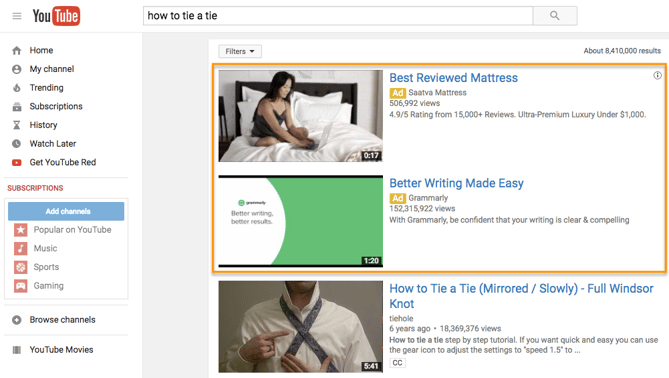
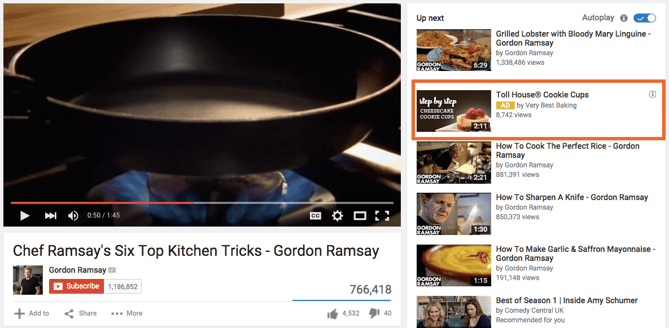
Video discovery YouTube ads show up on the YouTube homepage, search results pages, and as related videos on YouTube video watch pages.
These ads appeared after performing a YouTube search:
This display ad appears as a related video on the right-hand video sidebar:
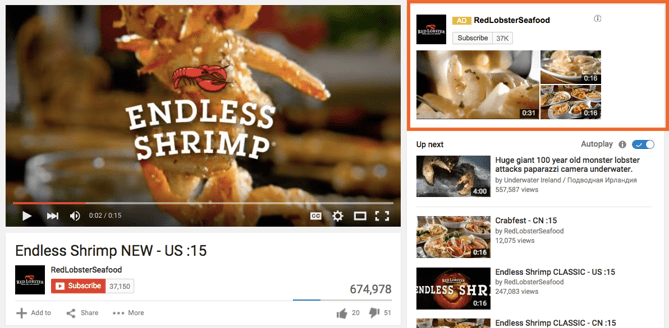
Once a user clicks on the ad, the destination video page features a spot on the right-hand column where a companion banner display ad will appear.
In-Stream Ads
TrueView in-stream ads play before someone watches the video they’ve selected on YouTube. Viewers sometimes have the option to skip the ad after watching it for five seconds. You can also make them play anywhere in the Google Display Network (GDN) — or sites that purchased Google video ad space.
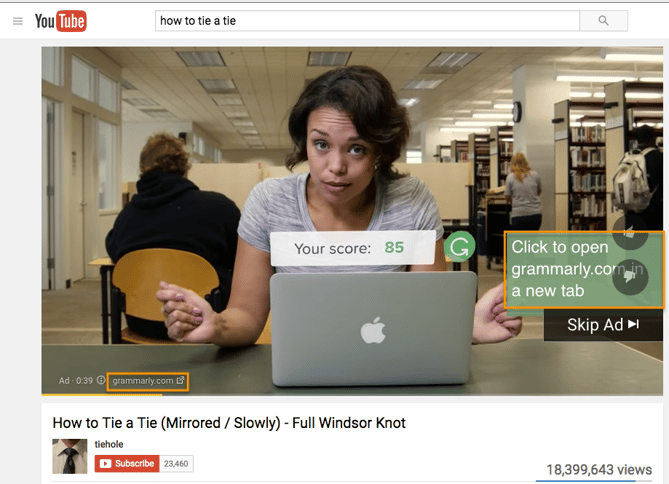
In-stream ads let marketers customize video ads with different CTAs and overlay text, as highlighted in the skippable in-stream ad example below from Grammarly.
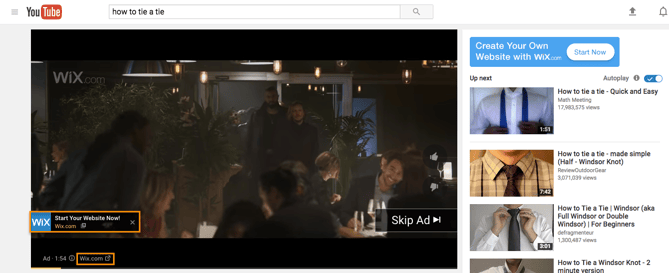
Here’s what another skippable in-stream ad from Wix looks like. In this example, there’s another CTA from Wix on top of the right-hand video menu display:
What TrueView Videos Can Include
TrueView video campaigns can include people, dialogue, and music that was retrieved with permission — or is considered royalty-free. However, it’s best not to run a standard promotional commercial. Because these videos can be skipped, you need to give your audience a reason to keep watching, and product plugs historically don’t get the views you might expect.
Instead, tell a story with the time you have in this video. People love seeing case studies of those who faced a struggle that they can empathize with. It’s a source of entertainment that makes your brand memorable and less tempting to skip.
With TrueView ads, advertisers can gain a ton of information about the performance of their ads for optimization and testing purposes.
Using AdWords, YouTube account managers can collect data on an ad’s completed views, partial views, if the video drives channel subscriptions, clickthrough rates on CTAs, views sourced from a user sharing the content, and views on the brand’s other content that can be attributed to a person initially viewing a video ad.
These actions help advertisers better understand the full value of their video ad spend and where to allocate budget to increase results.
2. Preroll Ads
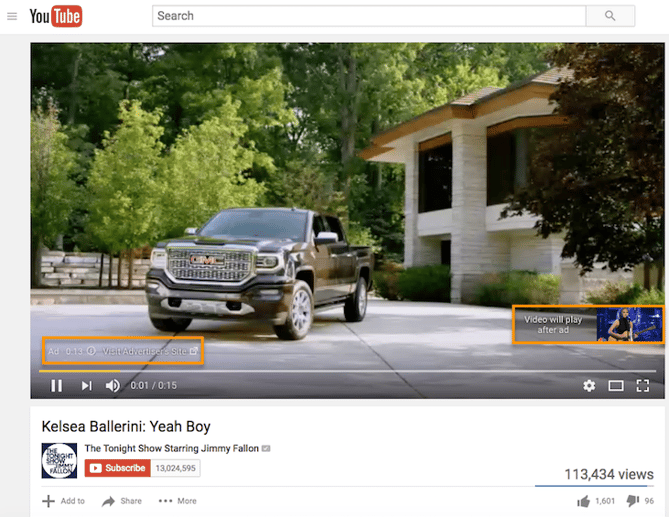
Some in-stream ads are non-skippable and can play before, mid-roll, or after the main video. These are called Preroll ads, and they can be 15 to 20 seconds in duration.
Here’s an example of a non-skippable video ad before the main content on YouTube:
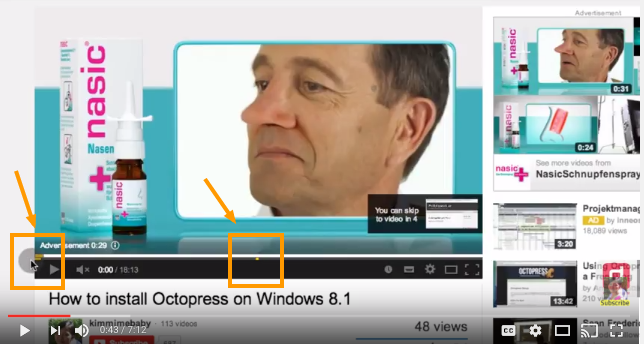
There are also non-skippable, mid-roll video ads, which appear midway through a YouTube video that’s 10 minutes or longer in length.
Source: PC Daily Tips
What Preroll Videos Can Include
Preroll ads give you just as much freedom as TrueView ads in their allotted content. You can include people, dialogue, audio, and more elements that you find best represent your brand in 15 to 20 seconds.
Because preroll ads can’t be skipped, these videos are best created with a call-to-action (CTA) so you can optimize the attention you do have from the viewer. In other words, encourage viewers to click on your ad and receive something in return. Perhaps you’ve released a new product or promoting a major event this season and are looking for signups — use this preroll ad to get those clicks.
Keep in mind YouTube sells Preroll video space on a pay-per-click (PPC) basis. Make the click worth it.
3. Bumpers
Bumpers are the third and shortest type of YouTube video ad available to you. At just six seconds per bumper, these ad spots play before a viewer’s chosen video.
Bumper video ads obviously can’t tell a good-enough story in just six seconds, but they make terrific complements to larger video campaigns on a new product launch or event. Just be sure to use this six seconds wisely, and include only the components of your brand you want your audience to remember.
How to Set Up & Launch a YouTube Video Advertising Campaign
Once you’ve created a marketing video you want to advertise on YouTube, it’s time to create your video ad campaign. (If you haven’t made a video yet, here’s how to get started with Animoto or Wistia, along with a few great examples.) Then, upload your video to YouTube.
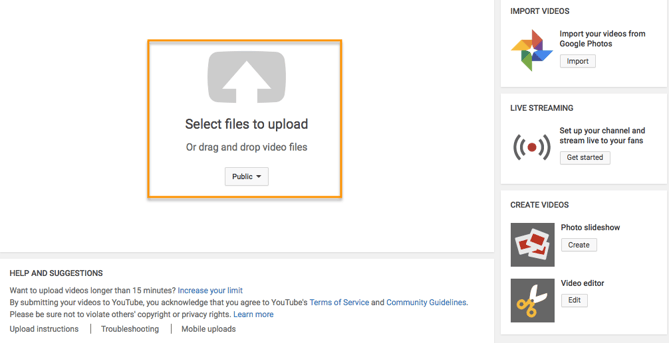
Now, you’re ready to set up your advertising campaign. First, go to your Google AdWords account to set up your campaign.
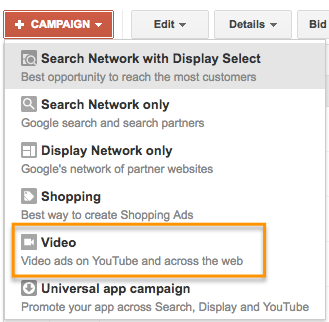
Campaign Type
Tap the drop-down menu on the right-hand side of the red “+ Campaign” button on your Google AdWords homepage and select “video.”
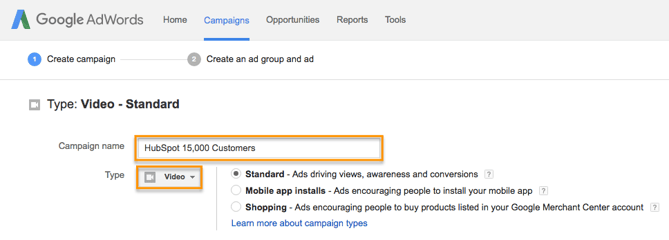
Campaign Name
Enter a name for your campaign, and make sure Video has been chosen from the Type drop-down menu.
Video Ad Format
Select “In-stream or video discovery ads” to ensure your video ad will be in TrueView format (in the style of the examples outlined above).

Budget
Set your budget per day. You can also select a delivery method — either the standard delivery, which shows ads evenly during the day, or accelerated delivery, which drives views as quickly as possible. The latter would be useful if you want to capitalize on a trend or news item relevant to your brand’s video.

Networks
Decide where you want your ad to appear.
- YouTube Search: Your video ad will appear in results for searches and will appear on the YouTube home page, channel pages, and video pages.
- YouTube Videos: This runs TrueView ads that can appear in-display ads or in-stream ads. With this option, you can choose for your video ad to appear before or around videos shown across the Google Display Network.
You should create separate campaigns for YouTube Search and YouTube Video as this will help you to better track performance metrics. These ads are served to people performing very different activities and require a different amount of commitment from the viewer, so it’s best to monitor performance separately.

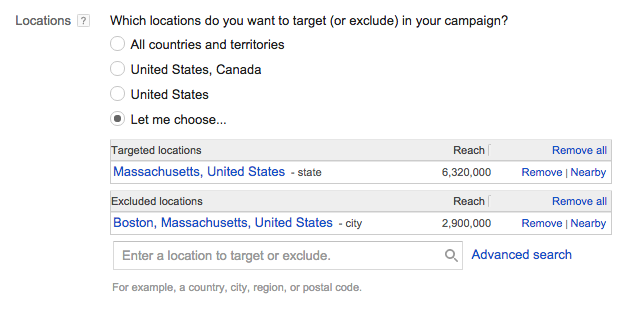
Locations
Define the location of users whom you want the ad to be shown to. You can also exclude certain locations.
Language, Device & Mobile Bidding
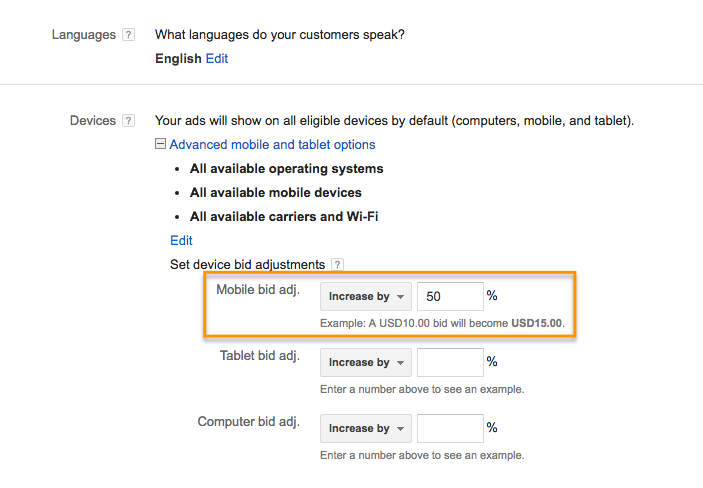
AdWords will let you specify the operating system, device, and carrier for more advanced targeting. This is especially useful for mobile app ads, and there’s an option to increase or decrease your bid based on if the video ad is shown to someone on a mobile device.
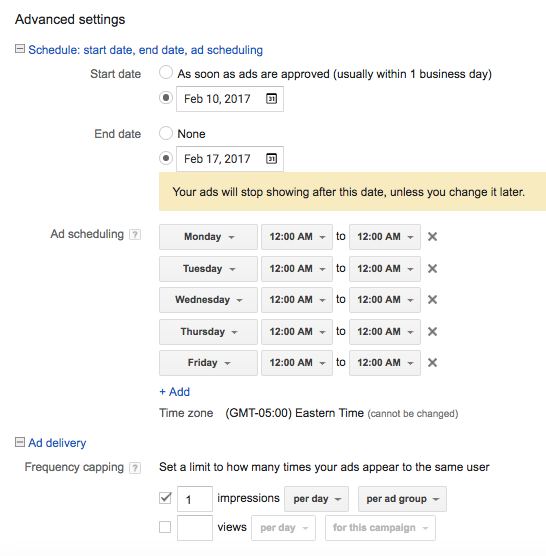
Advanced Settings
With the advanced settings section, you can set begin and end dates for your campaign, create a custom schedule for when your video ad should be shown, and limit the daily impressions and views for users. This all helps you to get the most return for your ad spend.
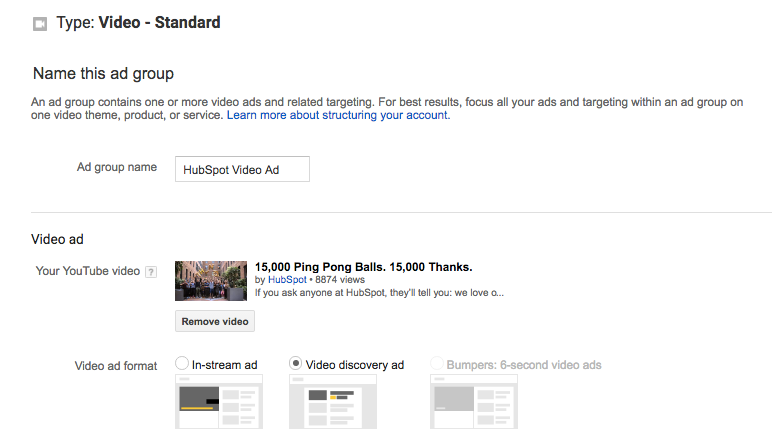
Creating the Video Ad Creative
Name your ad group, and then insert the YouTube link for the video you would like to run the ad for. You will then choose whether you want this to run as an in-stream ad or an in-display ad.
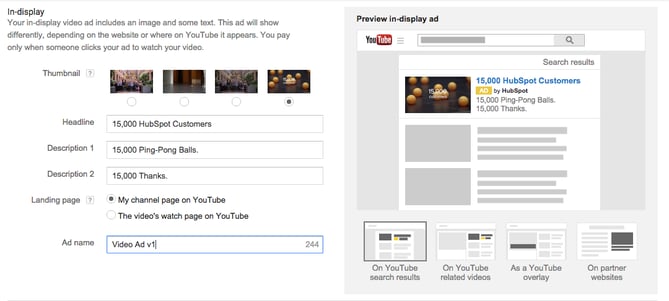
For in-display, you’ll need to include a title and short description, which is entered on two separate lines. Note: Titles are limited to 25 characters, and the description lines are limited to 35 characters each.
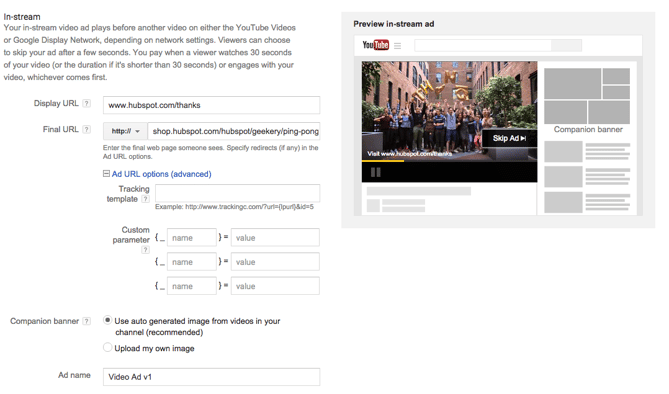
In-stream ads provide you with the option to overlap a display URL on top of the video. You should use a vanity URL that directs to another final URL to make it more memorable. You can include advanced URL tracking options. In addition, a companion banner made from images from your video will appear on the right side of the video ad.
Bidding
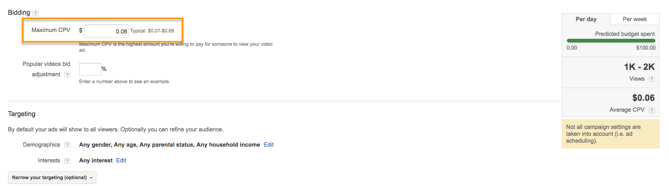
You’ll then determine the max price you will pay for each view, which you can adjust to increase the number of projected views your video may receive.
Targeting
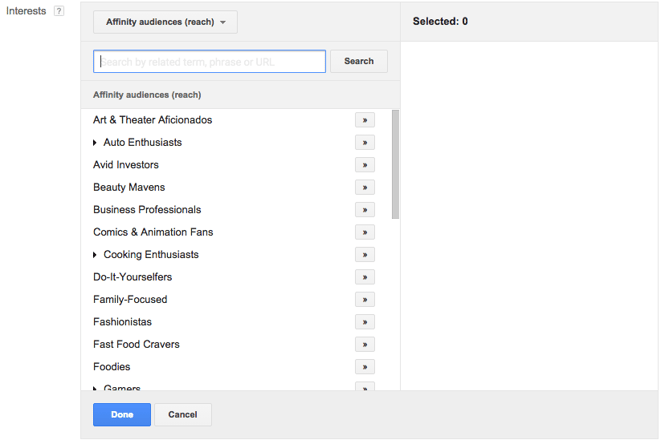
Finally, you can further define the audience you would like the video to be shown — options include gender, age, and parental status. You can also target individuals by their interests, such as beauty mavens, cooking enthusiasts, horror movie fans, etc. Try running multiple campaigns to target different groups of users to discover who is most engaged, rather than including everyone you want to target in one campaign.
Advanced Targeting
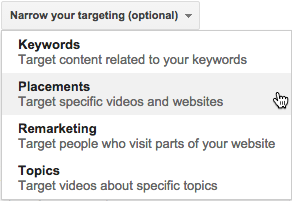
You can also target individuals by keywords, topics, or websites where you would like your video ad to appear. Keyword targeting with in-display ads can be a powerful tool for finding individuals who are looking for a visual answer to a question. Be sure to do your research, and try testing out different groups of keywords to see which leads to more views, clicks, or conversions.
Additionally, you can use AdWords video ads to remarket to people who have been in contact with your brand already. This can help you to re-engage those who are already familiar with your brand.
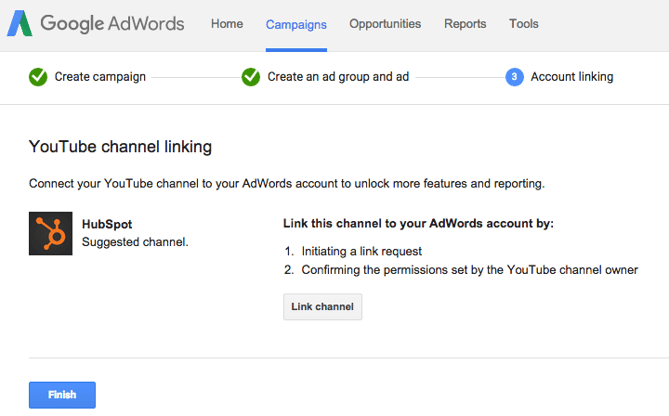
Linking Your Account
You should link your AdWords account to the YouTube channel where the video is hosted if you haven’t already. You can also click “finish” to begin running your video ad campaign.
10 Tips for Optimizing Your AdWords for Video Ads
Launching a video ad campaign is a great step, but there are some things you should set up prior to starting to pay for views to make the most of your budget and to see the highest return for your client.
1. Define your metrics and goals.
When analyzing the results, there are four main categories of metrics you can track for each video. These are located under the “column” drop-down in your campaigns interface.
Views
Under the “views” category, you can better understand what percentage of the ad people viewed and understand how the ad drove earned views or views on your brand’s other videos.

Audience
This category can be used to track likes and shares for each video ad.

Branding
The view rate should signal if the creative and message are interesting or entertaining enough for people to watch the ad. By increasing your view-through rate (VTR), you will lower your cost per view.

Conversions
Conversions will help you better understand if your ad is driving leads and returning a high ROI for your brand.

Depending on the goals for the brand, you should determine a few goals based on these metrics and formalize a plan for optimizing creative and trying different targeting criteria to improve results. Your goals should also determine the type of content you will feature in the ad — some metrics are better for branding goals and others will drive leads and conversions.
2. Track low performing placements.
If you’re running in-display ads that will appear across the Google Display Network, you can review where the ad has appeared in by navigating to Video Targeting > Placements > Where ads were shown > Display network from your Google AdWords Campaigns dashboard. Review this list to see if any particular sites are contributing to poor performance for your desired metrics. Exclude these sites from your ad campaign moving forward to increase your average CPV.
3. Use a custom thumbnail image.
Design or use a high-quality still image from the video to entice a viewer to click on your video. Remember, this image needs to be legible by users on different devices, including mobile. If your image contains a person, make sure he or she is looking into the camera. If you are featuring a product, make sure the background isn’t distracting.
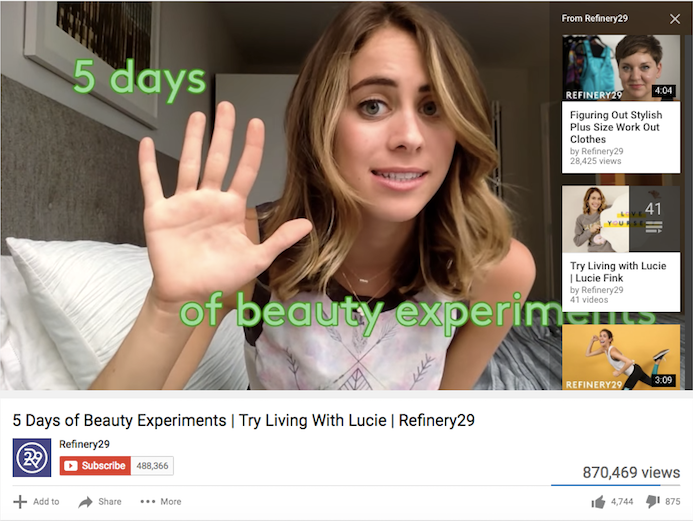
4. Drive people to buy with cards.
A YouTube card is teased with a small “i” symbol, which the viewer can click to expand. You can time this appearance so only users engaged with the video and content will see the notification.
With cards, you can feature a product related to or featured in the video to drive product purchases. You can also use cards to drive fundraising donations, traffic to a URL, or traffic to other videos as shown in the example below from Refinery29. Each format will allow you to customize the card with text, images, and other options.
5. Create calls-to-actions.
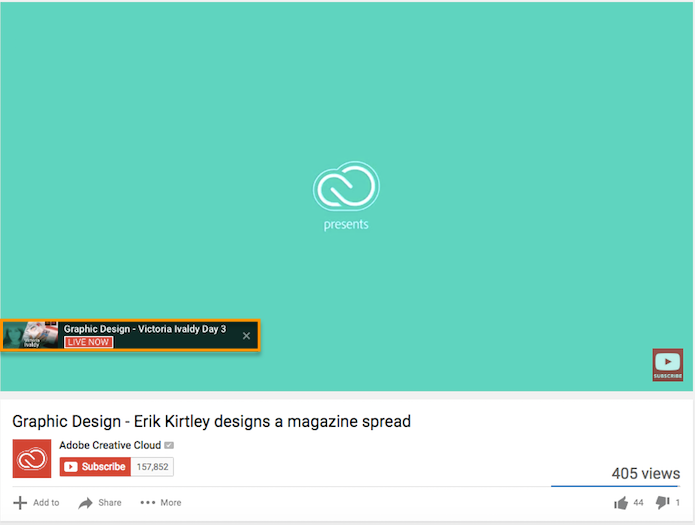
When promoting a video on YouTube, you can include call-to-action overlays that link to a URL. You could link to a landing page, product page, information page, career page … whatever you’d like. You could also send people to a favorable report or interview featuring the brand.
Adobe highlights one of its live videos using a call-to-action overlay:
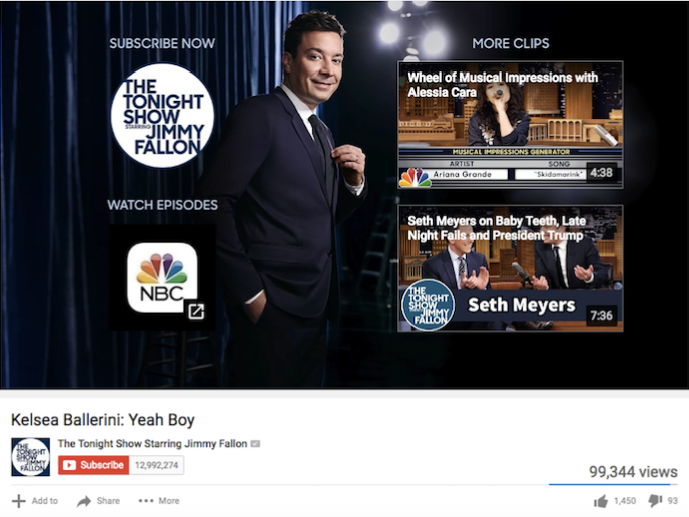
6. Create a YouTube end slate.
Create an end screen to drive subscribers to your channel, promote your social networks, or increase interest in your brand. If someone has watched a video until the end, it’s a good sign they enjoy your content and might be interested in subscribing to your channel for future updates. The Tonight Show Starring Jimmy Fallon‘s end slate uses this screen to drive subscribers and social media fans while also highlighting other interesting topics its host has featured. Once you build the image, you will be able to annotate the end screen in YouTube’s video editor.
7. Use negative remarketing.
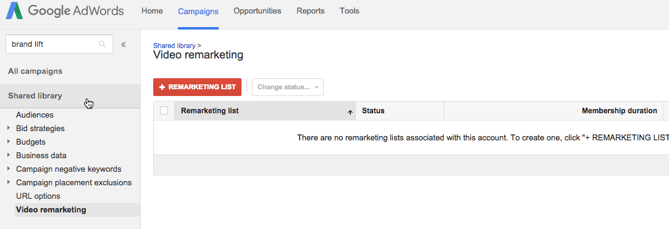
If you are running a campaign for a longer period of time and want to only attract new users to a brand, consider creating a list of people who your ad will not be shown to. When viewing your AdWords Campaign screen, select “Shared library” on the lower left sidebar. Then select “Video remarketing” and “+ Remarketing List”. You can stretch your campaign budget and target only unique users by selecting to not show your video ad to someone who has previously viewed the specific video, who has visited your YouTube channel, or shared, liked, or commented on any of your videos on your channel.
8. Use close captioning to cater to viewer’s needs and wants.
This tip applies to all YouTube videos — but it’s a general best practice that’s not followed by many brands. Include a quality video transcription you’ve generated and approved. Only user-uploaded transcriptions are indexed by Google because YouTube’s automatic captioning can be less than reliable. Depending on your target audience, you may also want to include transcriptions in various other languages. You can also offer users the option to download or visit a site page with the full transcription in your video description.
9. Qualify viewers.
Sometimes, your ad will be seen by people who have no interest in your product. Encourage them to skip the ad if the content isn’t relevant so you don’t have to pay for the view and they don’t waste their time watching irrelevant advertising.
10. Consider making your ad longer.
When it comes to TrueView ads, if the ad is under 30 seconds, you pay only if a viewer watches until the end. If the ad is longer than 30 seconds, you pay if the viewer watches it for at least 30 seconds. In both cases, you pay if the viewer interacts with your ad before it’s over. Consider this when you are coming up with ideas for content for the ad. You may want to put messaging at a certain point so uninterested viewers can skip the ad, or you might provide special offers towards the end of the video.
The Future of Video is Bright
We’ve told you before: Video content is a must-have part of your content strategy. This is even truer now that YouTube lets marketers target users based on their search histories. YouTube advertising is more targeted than ever, and it’s less competitive real estate than the world of Google Search because video content is newer to the content scene and less popular than blog posts.
Stay tuned for more from us about how to make great video ads for YouTube and social media, and where we think YouTube marketing is headed next.

15 Clever Interactive Print Ad Examples That Can Complement a Digital Campaign
This post originally appeared on Agency Post. To read more content like this, subscribe to Agency Post.
You would think print advertising is void of innovation today, but that is actually not the case.
In fact, many brands are finding new ways to merge the digital and physical world through magazine and newspaper ads.
What Is Print Advertising?
Print advertising is a form of advertising that uses physically printed media to reach potential customers. Print ads were once the standard format for creative advertising. But as more advertising dollars are allocated to digital outlets, print advertising is seen as an expensive, untrackable media format.
To give you a sense of how businesses today are incorporating print advertisements into their digital strategy, we’ve collected 15 print advertisements that’ll make you rethink the word “traditional.”
Click here to download more examples of exceptional advertising campaigns.
15 Interactive Print Advertisements That Are Still Innovative Today
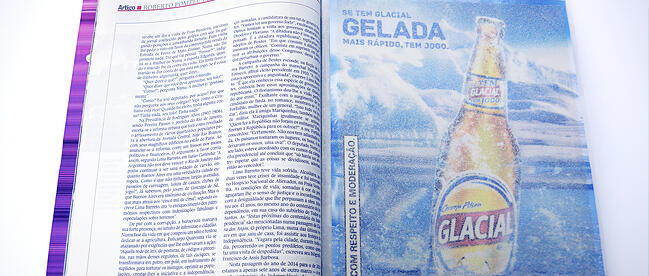
1. Glacial
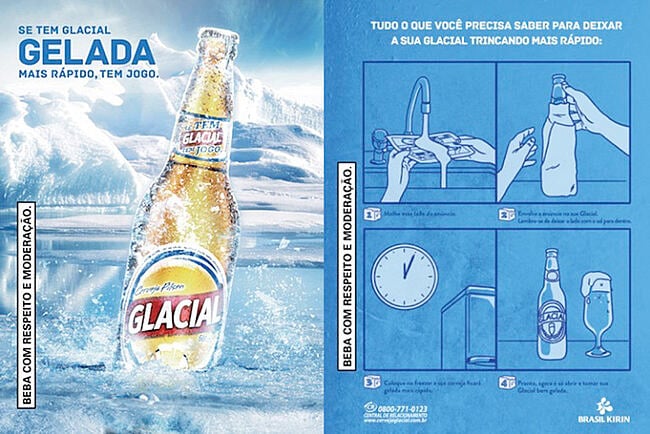
If you’ve ever wanted to speed up the beer-cooling process, you’ll understand the allure of this print ad from Glacial. You soak the ad in water, wrap it around the bottle, and put it in the freezer. The print ad was made with salt particles, which reduce the freezing point of water.
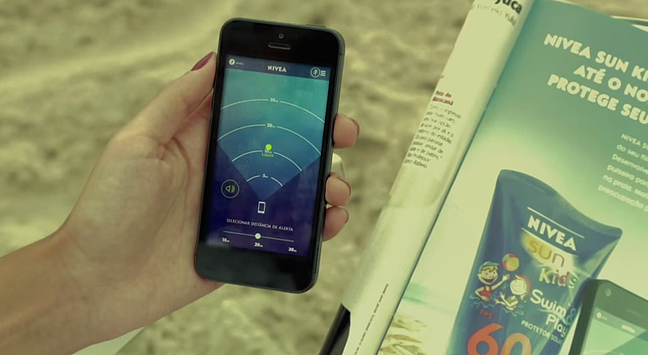
2. Nivea
This print ad won the Mobile Grand Prix at Cannes in 2014. The ad includes a wristband you could attach to your child as he runs around at the beach. The app lets you set a distance and receive alerts if the child wandered beyond the limit.
3. UTEC
UTEC, an engineering and technology university, wanted to recruit more students. Instead of placing the smiling faces of young graduates on a billboard, it created an ad that pulled moisture out of the air in Lima, Peru, which sees very little rain each year.
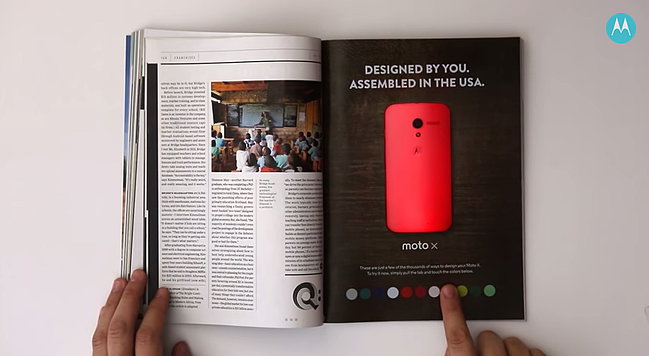
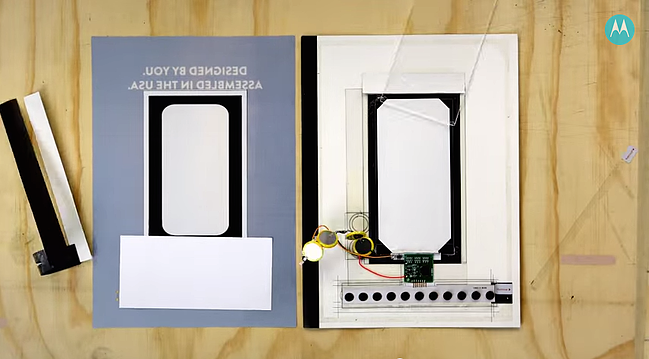
4. Motorola
The brand teamed up with Wired to promote the Moto X’s customization. People could change the color of the phone by pushing buttons.
5. Kontor Records
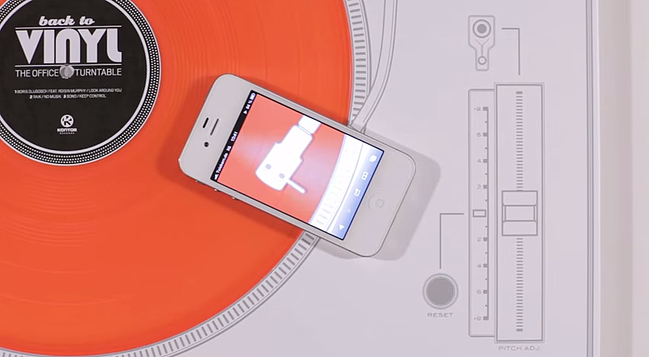
Kontor Records wanted to get the attention of creative advertising professionals. Instead of mailing out the latest CD, it sent a vinyl record via email to its mailing list with a paper turntable that could be played with an iPhone.
6. Peugot
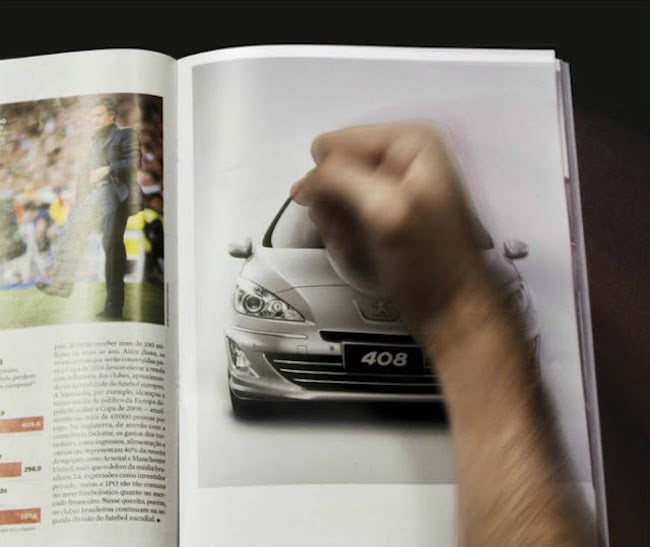
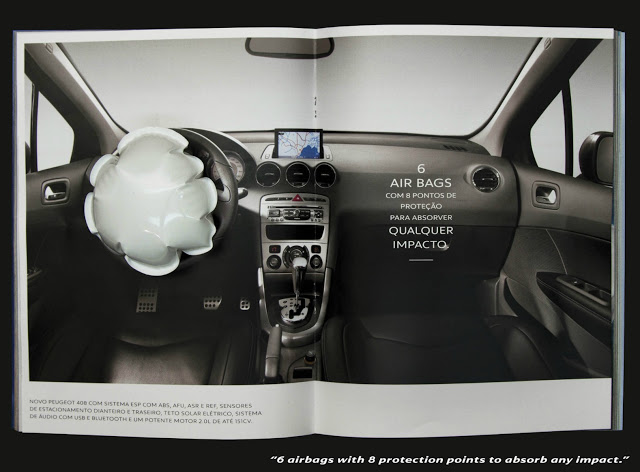
This print ad for the car brand features a one-page interactive print ad with a front view of the car that asked people to hit the ad. The spread following it included a mini air bag that inflated when hit.
7. Lexus
In 2013, Lexus released an ad that, when placed over an iPad, revealed the car in action with different backgrounds and music.
8. Lladro Lighting
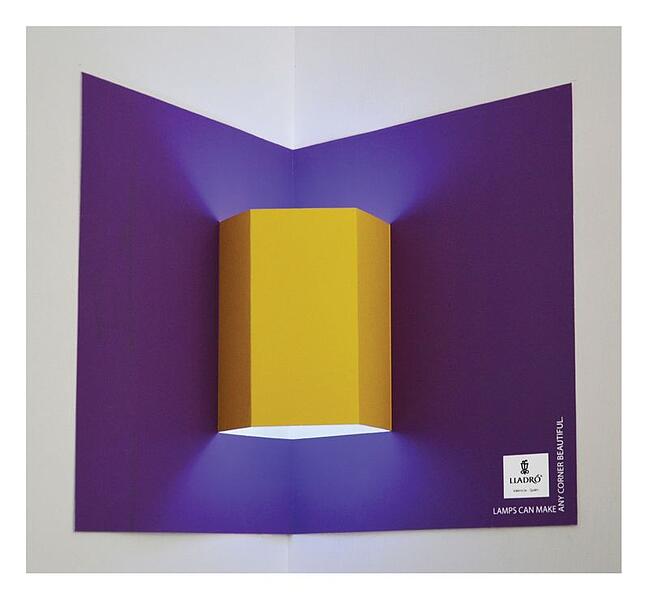
Why advertise lamps when you can give people an ad that transforms into a lamp? Lladro print ads act like a pop-up book, allowing people to create their own lamp shape by mounting the paper in a corner.

9. Ford
To show off the features of the Ford Explorer, the brand published three print ads with interactive elements. The reader could scan a QR code and then line up the phone on the ad to see the car in action.
10. Volkswagon
Volkswagon published a three-page spread so readers could take a test drive. You could download an app and can try out different features, including the “Lane Assist” mode that would cause the phone to vibrate when it got too close to one side of the road.

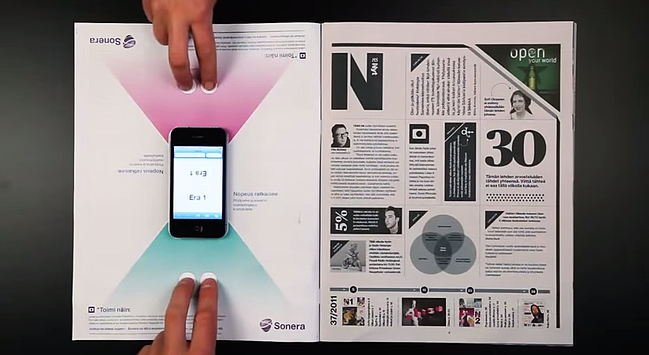
11. Sonera
The telecommunications company highlighted its 4G wireless speed with a print ad that served as the game board for an iPhone game.
12. C&A
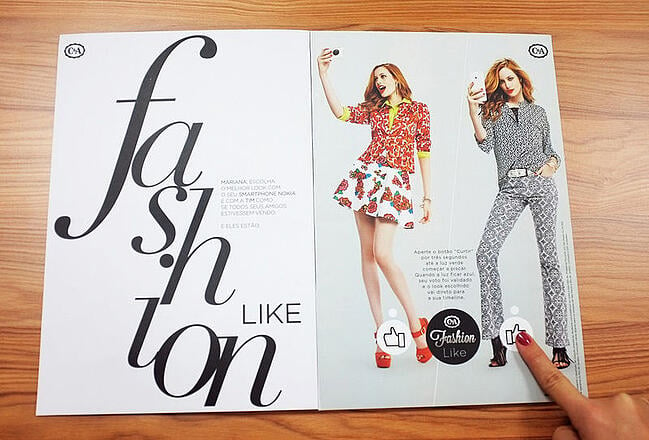
Fashion retailer C&A published a print ad in customized magazine editions that were linked to a person’s Facebook account. Readers could Like their favorite looks on Facebook by pressing the button in the ad. The data was then sent to a leaderboard in the store.
13. Nivea
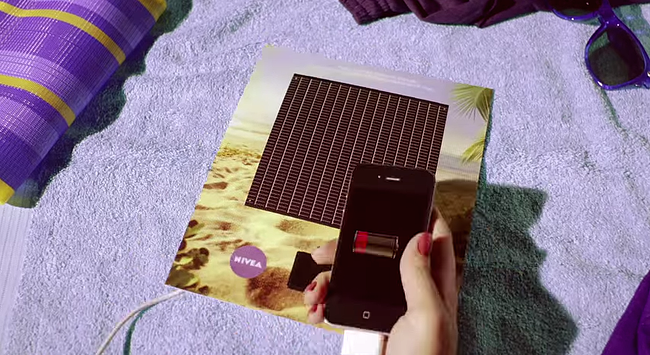
To promote its sunscreen products, Nivea created a print ad with a solar panel that could charge a cell phone.
14. Shikun & Binui Solaria
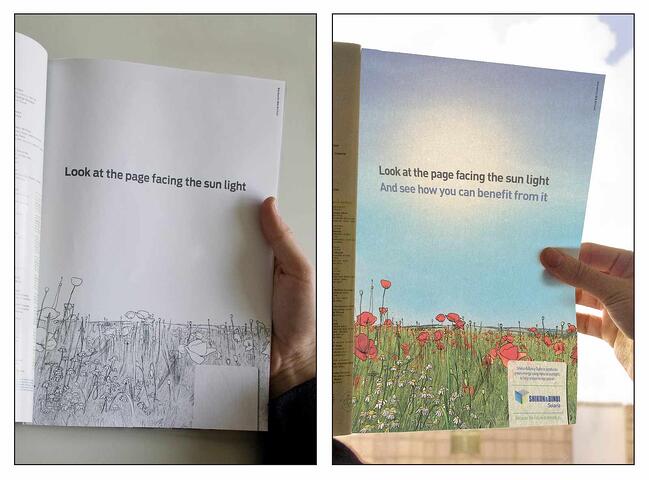
Israeli energy company launched this print ad to promote green energy. The print ad just seems like a simple black-and-white drawing. However, when you hold it up to sunlight, vibrant colors appear.
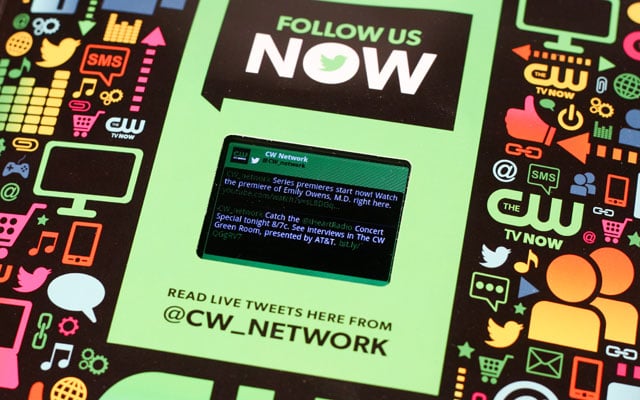
15. CW Network
The CW published this print ad in Entertainment Weekly in 2012. The ad featured a LCD screen that is updated with videos from the network and a stream of live tweets.
Digital content has been the strategy of choice for marketers for more than a decade now, but that doesn’t mean print ads are extinct. It just means brands must be much more creative with the stories they tell on paper.
Ready to revamp your approach to advertising? Try HubSpot’s ad product for free below.


This Strategy Helped the HubSpot Blog Break a Year-Long Traffic Plateau
Presiding over a 10+ year old blog has a lot of unique challenges. There are some days when it seems like we’ve covered all there is to cover, and others when it doesn’t seem like we can possibly keep up with changing trends and technologies fast enough.
From where you sit, it might seem like we’ve figured it all out — we’re one of the largest and most visited B2B blogs on the internet, we have a team of extremely talented and motivated staff writers, and we still manage to find new stories you want to read on a daily basis.
But growth doesn’t just happen — you have to work at it, and then keep working at it.
There isn’t one magical strategy that will keep your blog growing forever. Your approach needs to constantly evolve to fit your changing needs as a property.
When I joined the HubSpot Blog team in 2016, our editorial strategy looked drastically different than it does now.
About once a month, our entire team would gather in a conference room for a brainstorm session. Armed with coffee and spreadsheets full of topic pitches, we’d spend a few hours going around the room, discussing what we wanted to cover for the month. At the end of the meeting, we’d leave with a solid list of articles to get started on.
For a long time, this process served our interests well. Our team developed a keen sense of what our audience wanted to read, and an extensive knowledge of what we’d already covered. But as our property grew and our audience expanded, it became clear that something was missing.
We could no longer manage our archives and identify topic gaps (areas we haven’t yet covered on the blog) by gut feeling alone. Although we had some processes in place to pinpoint gaps and select pieces for historical optimization on an article-by-article basis, none of these methods were scalable or precise enough to keep up with what our readers were searching for — and those issues starting catching up with us.
Rediscovering our momentum meant completely changing the way we plan, write, and optimize content. In March 2018, we started to see the impact of these changes: a new all-time traffic record across our three blogs — Marketing, Sales, and Service — and a renewed sense of purpose for the future. After months of traffic plateaus and uncertainty, we know where we’re headed now — and we’re ready to share our new strategy with you.
The Blog Traffic Plateau of 2017
I won’t sugarcoat it: 2017 was a tough year to be a blogger. Between 2014 and 2016, we’d become accustomed to seeing month-over-month traffic growth without regularly switching up our strategy. When 2017 hit, that line started to flatten out, and then — even more alarming — decline. And it wasn’t just us — Unbounce, Wordstream, and WordPress all saw some form of traffic decrease in 2017.
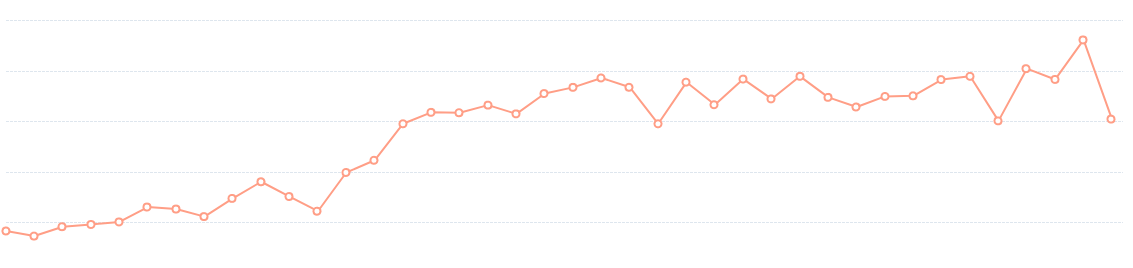
Traffic to the HubSpot Blog 2014 – 2017
To say we were confused would be an understatement. Up to this point, we thought we’d perfected the formula for sustainable traffic growth: Traffic from existing posts in organic search + new traffic from new posts = steadily increasing traffic, forever … right?
It turns out it wasn’t nearly that simple. Our usual protocol for fixing a slump — changing publishing volume, leaning into more clickable topics, historically optimizing a handful of our heavy-hitting posts — wasn’t having a significant impact. This downward trend wasn’t just a temporary dip in our numbers — it was starting to look like the new normal.
So we did what any good content marketing team would do, and cracked open our reporting dashboards to take a deeper look. Unfortunately, what we discovered after many hours of analysis and many coffees consumed wasn’t comforting. Much like the factors behind the mysterious decline of the bee population, there seemed to be multiple culprits converging to create a disaster.
We’d gone looking for a single root cause, and found several macro trends instead:
1. Social algorithms (and users) love native content.
Social media has long been a (relatively) dependable distribution channel for digital publishers, but recent algorithm changes across multiple social networks increasingly favor native content over links that take users off site. The shift makes perfect sense from the social networks’ perspectives — they want users to spend as much time as possible on their network — but it hurts publishers who depend on social traffic.
2. Conversational search is constantly improving.
Google has gotten a lot better at understanding the intent behind a specific query, and as a result, they’re able to serve up extremely relevant pieces of content to meet your exact query. This is great news if you regularly use a home assistant device, but bad news if you’re a publisher looking to capture organic traffic from multiple long-tail keywords with a single, comprehensive piece of content.
Back in 2012, a post on “The Best Interview Questions” might have appeared as a top result in searches for “great interview questions,” “interview questions to ask an interviewer,” and “what questions to ask during an interview.” But in 2018, those long-tail search queries are more likely to result in entirely different SERPs with entirely different top results. This means many of our “ultimate guides” started ranking for fewer long-tail keywords, resulting in organic traffic losses on some of our most highly-trafficked pieces.
3. Featured snippets and other on-page search features are taking a toll on CTR from SERPs.
You’re probably familiar with Google’s featured snippets: those short lists or paragraphs that appear at the top of a SERP and (usually) directly address your query. In addition to featured snippets, there are also a number of other on-page search features that push a piece of content ranking number one even further down your screen.
While these quick answers have certainly made the search experience faster for users, they’re eating our organic traffic — even on SERPs where we hold the number one organic result. People don’t have any reason to click through to a blog post (even if it’s ranking number one) if the answer they’re seeking is already on the top of the SERP. As a result, fewer users are clicking on the number one organic result. Ahrefs found that on SERPs without a featured snippet, the top result received 26% of clicks. When a featured snippet appeared on the SERP, the top result received only 19.6% of clicks.
None of these were things we could fix with a band-aid solution. These shifts called for a massive overhaul of our editorial strategy, and a completely new way of approaching blogging in general.
Our New Editorial Strategy
While these trends were scary for the future of our blog, they weren’t entirely surprising. We’d been aware for a while that future-proofing for Google algorithm changes meant restructuring our site architecture. Back in late 2016, Leslie Ye had begun the tedious and challenging work of transitioning the blog’s internal linking system into a pillar-cluster model. This move was intended to give us an organized way to understand our content gaps, and a cleaner architecture to help posts rank faster and bring in more organic traffic.
Thanks to a blog redesign project (headed up by Carly Stec) that automated this pillar-clustering process across the entire blog, our 10,000+ posts were neatly sorted into the pillar-cluster model by mid-2017. But our process for planning and writing new content hadn’t fully adjusted to work optimally within this new system. We had a much better understanding of where our content gaps were, but we weren’t filling these gaps systematically — we were still largely guessing when it came to the topics we should be writing about on a monthly basis.
We were also suffering from a lack of foresight: we weren’t planning for the search terms that would be popular a few years or even a few months into the future. This left room for other blogs and publications to capture organic green space that would be essential to our sustained growth down the line.
With this in mind, we made the decision to focus all our efforts behind stabilizing and growing our organic traffic. If our existing content was slowly but surely losing clicks to featured snippets in search, and our new content wasn’t consistently earning as much traffic from promotional channels like social, we needed to offset those losses. And that meant zeroing in on organic green space in a big way.
This led us to create three guidelines we now use to determine what net new content we create:
- Does this topic have search volume, or will have search volume in the future?
- Does it fit into our pillar-cluster model?
- Is it duplicative (is there a piece of content on this topic that already exists)?
If no one is searching for a topic, and we don’t anticipate the search demand to grow in the foreseeable future, there’s no long-term benefit in covering it. At least for our blog, posts created without a clear keyword in mind tend not to produce sustainable traffic after their first month of publication.
To rank these days, your site usually needs both depth and breadth on a topic — in other words, you need to cover a concept or subject at a high level, then dive deeper with specific, detailed posts. Using the pillar-cluster model (more on that here) makes our content much likelier to rank than if we published an individual post that targeted one or two keywords. If a blog post doesn’t fit into an existing cluster, it’s probably not worth our time and energy to write it.

As you can probably imagine, we’ve covered quite a bit of ground in our 10+ years as a blog. Some overlap is inevitable, but writing on the same exact topic more than once — even if the takeaways are ultimately different — can lead to self-competition in the SERPs. And if we’re already ranking highly for a topic, our efforts are better spent creating a piece of content for a SERP we’re not on at all instead of piling on where we already have valuable real estate.
If a topic doesn’t meet these three guidelines, we won’t create content around it. There are a few exceptions of course — The Marketing Blog’s news program (headed up by Amanda Zantal-Wiener) and thought leadership on topics we think our readers need to hear about — but for the most part, this organic-first strategy represents an enormous shift in the way we plan our editorial calendar and create content. Posts created with an organic goal in mind don’t always pay off immediately, but organic is the only type of traffic that can consistently pay off month over month.
The Editorial Process in Action
Adopting an aggressive organic-first approach required a serious mindset change for our team — one that required us to put aside our obsession (some would even say addiction) with quick wins, and instead put our primary focus on sowing seeds for the future. We weren’t going to publish a post with no strategic organic potential, even if we knew it would bring in a satisfying spike in traffic.
Ultimately, the temporary traffic from a quick-win post brought us nothing of value in the long run. To truly grow, we need to keep our eyes on the organic gaps in our pillar cluster model.
A big part of seeding for the future also means educating ourselves on emerging topics: subjects our readers aren’t too concerned with right now but that will eventually become trending search terms, like the nuts and bolts of artificial intelligence, or practical applications for blockchain. These are the technologies people will likely be searching for in droves in the future, and we want to get out ahead of the competition and position our blog as a resource right now — and earn the traffic when the search volume spikes.
So how exactly do we select which topics to cover? We’ve talked about the reasons behind our new strategy, now let’s see what this process actually looks like on a quarterly basis.
Stage One: Planning
We’ve partnered internally with our SEO team to create a blog taskforce of sorts, headed up by our former Sales Blog Editor and current Sr. SEO Strategist Aja Frost. Each quarter, Aja conducts in-depth keyword research across our three onsite blog properties (Marketing, Sales, and Service), taking into account both gaps in our existing topic clusters, and emerging topics we haven’t yet thoroughly constructed content clusters around.
The resulting quarterly report includes well over 100 post suggestions broken down by topic clusters for each blog. Here’s what our completed “Advertising” cluster looks like on the report:

Stage Two: Execution
Our Multimedia Content Strategy team handles the creation of each cluster’s pillar page (the long-form piece of content that serves as a broad, foundational resource on the subject), and the Blog team owns the production of the supporting blog articles that delve deeper into specific subtopics. Most of the articles need to be written from scratch, but in some cases, we already have a blog post in existence that just needs to be updated to include a fresher, more exhaustive take on the subject.
SEO optimization has always been a consideration for our team when writing posts, but under this new strategy, its become a top priority. Before a single word is typed on a first draft, our writers already have information from our SEO team on the keyword(s) to target, section titles (H2s) to include, and featured snippet sections to work into the copy.
Here’s an example of a typical article assignment on our editorial calendar:
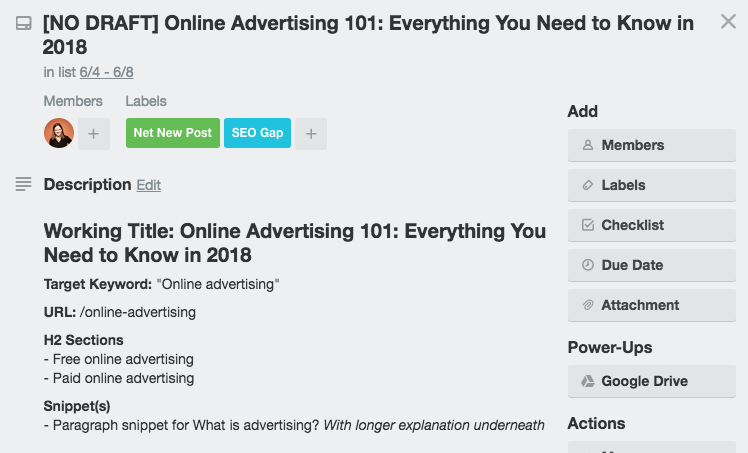
Targeting featured snippets with consistently formatted sections has removed some (but definitely not all) of the guesswork when it comes to ranking for featured snippets. Matthew Howells-Barby, HubSpot’s Director of Acquisition, has stressed that clean and consistent code is a significant factor in winning snippets.
His team created a simple code our writers can use when formatting sections of copy for paragraph or list snippets. Not only has our team started incorporating featured snippet sections into all our new posts, but we’ve also historically “snippetized” hundreds of posts from our archives to help Google surface them more frequently.
If you’re a regular reader of our blog, you’ve likely encountered these snippet boxes before:
While there’s unfortunately not a 100% guaranteed formula to win featured snippets, this method has helped our team capture more than 6,300 featured snippets as of June 2018.
In addition to optimizing our articles more intentionally for featured snippets, we’ve also adopted a more aggressive historical optimization approach in 2018. Our team has had a historical optimization strategy in place for several years now, but it’s been years since we’ve had a full-time human dedicated to making sure our existing content is performing optimally in search.
Braden Becker, a Senior Staff Writer on the Blog team, has taken on the task of monitoring the organic performance and optimization of our 10+ years worth of archives as a full-time responsibility. Each month, Braden works with our SEO team to develop an update strategy that works with the new content clusters we’re producing. He selects posts for updating largely based on their individual monthly organic traffic — “the better they’re performing, the higher the potential benefit once I optimize them,” he explains.
Stage Three: Analyze
Once a month, the Content and SEO teams meet to discuss our progress, dig into the numbers, and plan for the next few weeks. We examine organic traffic numbers across our three blog properties, report on featured snippet attainment and loss, and discuss new ways we can adapt to Google’s ever-changing algorithm.
The biggest shift in our reporting method under our new organic-first strategy has been a mental (and, I’ll say it, emotional) one. Although we still report at a monthly cadence, we’ve had to largely abandon our fixation with month-over-month growth, and instead focus on broader trends over longer periods of time.
When I first joined the Blog team, month-over-month growth was the ultimate goal. If the end-of-month traffic number beat out the previous month, we considered it a success; if that number was in the red — a lost month. No matter what, the slate was wiped clean on the first day of the next month, and we started the race all over again. This short-term mentality led us to become so focused on hitting monthly numbers, we ended up neglecting the bigger picture: our blog’s health and continued growth over time. Enter the traffic plateau of 2017.
Under our new editorial strategy, we’re more focused on seeding for the future — and that means letting go of our monthly traffic goals. An article we publish this month on “How to Create a Content Marketing Strategy for Virtual Reality” might not have a ton of search volume right now, but we’re betting it will sometime in the future. It might be many months before we see the rewards reflected in our traffic numbers, and we have to be okay with waiting, knowing we’re setting ourselves up well for the future.
As a result of this strategy, our team’s mindset has gone from “We’ll do anything to smash our monthly traffic goals” to “Stick to the plan.”
Getting out in front of future search terms and filling gaps in our existing topic cluster structure will pay off more than watching the monthly traffic numbers rise over a few well-timed, clickable posts.
What challenges is your blog facing? How are you approaching growth in 2018? Talk to us @HubSpot.

7 Expert Cover Letter Tips to Get the Job
Here’s a hard truth: your cover letter might have almost no impact on whether or not you get hired. A hiring manager might gloss over it, or not bother reading it at all.
But under certain circumstances when a recruiter is unsure if she wants to move forward with you, it counts big-time.
Cover letters are important regardless of the size of the company, but can be used differently depending on the company’s recruitment goals.
Madeline Mann, Director of People Operations at Gem HQ, says cover letters are crucial if you’re applying for a position at a small-to-medium company: “For us little guys — the companies who hire dozens instead of hundreds; the start-ups looking to change the world with team members who are equal parts talented and passionate; the tribes where each new person immediately sends ripples through the culture — we read every cover letter, and make our interview decisions based on them.”
Even if you’re applying for a position at a larger corporation, writing a cover letter is still important. Our recruiters at HubSpot have said they often use cover letters when they’re on the fence about a candidate. They use the cover letter to decide if they’ll move forward.
Claire McCarthy, a recruiter at HubSpot, says a cover letter is, “your opportunity to showcase your business acumen and written communication skills. Cover letters can just as much disqualify you as a candidate as they can sway me to move you forward.”
At the very least, as Jodi Glickman, a communications expert and author of Great on the Job, points out: “Not sending a cover letter is a sign of laziness. It’s akin to making spelling and grammar mistakes in your resume. You just don’t do it.”
Ultimately, a cover letter differentiates you from other candidates beyond the content of your resume. It can prove your enthusiasm for a company, showcase how well you’ll fit into the culture, or explain gaps in your resume.
But that’s only if you write a good cover letter. Otherwise, the cover letter wastes your time, and the hiring manager’s time. To ensure your cover letter demonstrates exactly why you’re an exceptional fit, we’ve compiled powerful tips from experts in the recruiting and career development field.
1. Address the hiring manager personally.
Claire McCarthy, a recruiter at HubSpot, says, “Specificity is key. I can spot a generic ‘fill in the blank with company name’ cover letter from a mile away.” That specificity should start early, with an appropriately addressed letter, which says, “To [Hiring Manager’s Name].”
Here are a few ways to find out who is hiring for a certain position:
- Reach out to any contacts you have at the company and see if they can tell you.
- Email or call the company, and ask who is hiring for position X.
- Do some sleuthing on LinkedIn or Google. Type in [hiring manager + company X] and see what you find.
At the very least, you’ll want to address “The Hiring Team” instead of “To whom it may concern.”
These little touches go a long way towards proving you’ve put genuine effort into this cover letter, and aren’t simply sending out generic ones to every company you find online.
2. Stand out from the start, and don’t fall back on a generic introduction.
John Lees, a UK-based career strategist and author of Knockout CV, told Harvard Business Review: “People typically write themselves into the letter with ‘I’m applying for X job that I saw in Y place.’ That’s a waste of text.”
Your cover letter introduction is your one shot to capture the hiring manager’s attention and ensure they don’t throw it away. No pressure, right?
Claire McCarthy seconds Lees’ point, explaining that as a recruiter, she already knows you want the job — it’s why you applied, isn’t it? She urges candidates to instead use the introduction as space to explain why you’re qualified.
Start off by saying something direct, dynamic, and persuasive. Lees suggests saying something like this: “Before you read any further, let me draw your attention to two reasons why you might want to hire me …” See? This sentence sets you up to share critical information the recruiter needs to read early on.
The exact contents of your introduction will vary depending on what you know of the company culture: a tech start-up, for instance, could invite a more candid or creative introduction, whereas a financial position probably deserves more stiff professionalism. You’ll need to do your research to ensure your tone fits their brand.
3. Address gaps in your resume — or risk seeming suspicious.
No one has a completely linear career path. Most employers won’t fault you for having career setbacks or gaps, but it’ll look suspicious if you’ve got a full six-months unemployment on your resume and can’t explain it.
Bart Turczynski, a career expert and editor for Uptowork.com, suggests using your cover letter as a chance to fill in those gaps in your resume that could otherwise raise an eyebrow.
Turczynski says, “use the cover letter to share what you did during that gap time. Think of any courses, [or] workshops you might have attended in that period.”
It’s likely if you don’t address it, a recruiter is going to be skeptical of your work ethic. It’s important you explain what you learned or how you pursued professional growth during an unemployment period. If you took off time to travel after college, you don’t have to hide it — own up to your own life story and explain how the opportunity to travel positioned you to be more successful, long-term.
4. Answer the three critical questions a hiring manager might ask herself.
Jenny Foss, Founder and CEO of JobJenny.com, writes three questions hiring managers will be looking to answer when they read cover letters:
- Can he or she do this job?
- Do we like him or her?
- Do we think he or she is going to fit around here?
Your resume partially answers the first question, but it doesn’t answer the second or third. When you’re up against plenty of people with similar skill sets, your cover letter needs to convince the hiring manager you’ll be the better fit than the rest of the pile.
First, do extensive research on the company’s culture. In your cover letter, you want to try to match their tone — do they come across as goofy, relaxed, fast-paced, or conservative?
For instance, if the company seems incredibly results-driven from their About Us page, you might adjust your tone to reflect how focused and disciplined you are, with points like, “Over the past year as digital marketing manager at Company A, I’ve generated $30k+ in revenue, increased organic traffic to our blog by 14% …”
However, if the company seems more playful and relaxed, you might use a tone that sounds similarly fun-loving (check out 8 Impressive Ways to Start a Cover Letter, with Examples for some ideas).
Answering Foss’s question two — whether you’re likeable — is harder to address. It’s often difficult to come across as likeable through digital correspondence, but you want to be authentic and use friendly and respectful phrases.
For instance, you could convey a general good-naturedness via email correspondence, with phrases such as, “At your earliest convenience,” “Have a great weekend” and, “I look forward to hearing from you,” etc. Stay clear of sounding pushy or frustrated, and remain humble by focusing on past achievements (“I’m a fast learner … I got two promotions in seven months”), rather than sounding boisterous (“I’ve always been smart.”).
5. Don’t waste time repeating the contents of your resume.
Wasting a recruiter’s time by repeating information already on your resume is an easy way to lose their interest — plus, it’s depleting space you could be using to convince them you’re the most qualified candidate.
Vicki Salemi, a Monster career expert, says, “Recruiters are looking for a cover letter that highlights your professional achievements, like the fact that you got promoted two times in three years, you earned a coveted award within your industry and/or you possess a unique skill set. Think of it as a ‘best-of’ roundup of your career so far.”
Notice Salemi mentioned professional achievements such as promotions or awards: while those achievements might be listed on your resume, they aren’t explained or highlighted. Use your cover letter as a chance to explain more in-depth.
For instance, your resume might say “Event planner, Two years”. But your cover letter could take it a step further: “I dealt with the nuts and bolts of the event planning process, and I have increased my leadership skills and my teamwork skills exponentially. I increased event retention and was recognized as the ‘event planner of the year’ at my company.”
See? Your cover letter lets you provide critical background details about your experiences, showcasing how you’ve learned and grown from past roles.
6. Prove your values and passions align with the company’s.
Passion is a major indicator of success, as well as long-term company loyalty. It’s often challenging to display passion in the rigid format of a resume, so your cover letter is a good opportunity to show your excitement for the position.
Madeline Mann, Director of People Operations at Gem HQ, says: “The other important ‘why’ in the cover letter is, ‘Why this company?’ It is a huge bonus in the cover letter if there is any mention of geeking out on our technology, cultural tenets, or our mission. These candidates are the ones who understand, at least on a basic level, what we are building and why it is important, and are enthusiastic about it. This gives them an edge because our small start up runs on passion and thirst for knowledge — if you don’t get excited about complex bleeding edge technology then you won’t have nearly as much fun as everyone else.”
The easiest way to prove your ability to do a good job, apart from writing a list of skills, is to show recruiters you understand the company’s bottom line and crave the opportunity to help drive success. This is more convincing if your values align with the company’s, or if you care deeply about the company’s overarching goals.
7. End with your elevator pitch.
To write your closing statement, Claire McCarthy recommends thinking of yourself as a lawyer: “You’re making a case as to why you are a qualified candidate for this position, and why the recruiter should move you forward. What’s your value prop? What will you bring to the table, and what’s going to set you apart from the pack?”
This is your chance to dig into skills or experiences that might not be obvious from your resume. With your closing statement, you want to speak confidently about how you envision your future at the company and in the position to which you’re applying. This is an opportunity to paint a picture to show the recruiter the connection between your past success at Company Y and your likely future success at her company.
Be blunt. Claire recommends saying something like this: “As the most junior rep at my Boston-based company, I worked West Coast hours and hit 125% of my annual quota in 2017, and plan to take this track record of success, and commitment to my craft to Company X’s sales team.”
Essentially, your closing statement should be your elevator pitch for why you’re best suited for the role. Take all your prior experiences and relate them in a convincing argument for how you’ll succeed next.

How to Make a Meme That Will Make People Cry (With Laughter)
Success Kid. Old Spice Man. Rage Comics. These days, memes are spreading like wildfire all over the internet, and clever marketers are jumping on the opportunity to use these viral pieces of content to their advantage.
And honestly, who doesn’t love a good meme? They’re funny, clever, and great for social sharing. As a marketer, “memejacking” — or hijacking popular memes to describe a certain situation — can be a great way to create fun, engaging marketing content that shows off your brand’s personality and likability.
And we could always use some more content. In fact, the image we used above is a memejacking just for marketers. Keep reading for more meme examples, as well as tips for how to memejack your own.

What’s a Meme?
Let’s take a step back for a second for all you marketers we lost at the mention of the word “meme.” First of all, just to keep you from sounding ignorant at your next marketing meeting or cocktail party, meme is pronounced “meem,” rather than “meemee” or “mem-ay,” as one anonymous HubSpotter here has been known to mispronounce it.
A meme is quite simply a concept, behavior, or idea that spreads, usually via the internet. Memes most commonly manifest themselves in a visual such as a picture or a video, but it can also take the form of a link, hashtag, a simple word or phrase (e.g. an intentional misspelling), or even an entire website.
Why Memejacking Is Awesome for Marketing
Memejacking for marketing is helpful for so many reasons. We’ve touched on a few of these already, but let’s elaborate.
They’re Already Viral
A concept doesn’t exactly get classified as a meme if it’s not fun, engaging, and wildly popular. That’s why memes are so great for marketing. Rather than creating something from scratch and crossing your fingers that it “goes viral,” you’re leveraging an idea that is already successful.
They Make Great Social Media Fodder
You’re aware of all the fuss about visual content lately, right? Visual content is practically made for social media sharing, and because memes are usually visually oriented, they make great fodder for your social media accounts such as Facebook, Instagram, and Pinterest.
They Attract Traffic, Likes, and Links
Because memes are so share-worthy, they’re fantastic for generating traffic and visibility to your social media accounts. Memes attract likes, repins, comments, and shares like crazy — making it more likely that your social content will gain traction in social media and spread.
And when memes are used on your own website/blog, you’ll reap the benefits of traffic and inbound links, too.
They’re Quick and Easy to Create
For inbound marketers, content creation is a daily task. Because so much of your marketing campaigns depend on content (and fresh content, at that), having some easy-to-create types of content at your disposal is a marketer’s dream come true. Memes offer just that. They’re easy and usually take little time to create.
8 Meme Examples and How to Successfully Jack a Meme
In addition to the few examples we shared in the introduction to this post, check out some of the most popular memes of the past decade to get a sense of what memes can be about. We included some captions just for marketers on the memes below …
1. Kermit: But That’s None of My Business
At just the right moment, Kermit the Frog becomes a hilarious template for passive aggression. The caption below the picture of Kermit always stays the same; it’s the subtle gripe above Kermit that makes this meme yours. The meme might help you express your audience’s typical challenges — but that’s none of my business.
2. Futurama Fry: Not Sure If
You don’t need to be a fan of the TV show, Futurama, to appreciate the look of suspicion on the face of Fry, shown above. This meme is known by its opening phrase, “Not sure if …” It allows any user to memejack the rest with a caption that describes a funny, perhaps exaggerated uncertainty among their audience.
3. Be Like Bill
 Simplicity is the source of the funny in this meme. Meet Bill, an adorable stick-figure model for the behavior you know your audience would endorse. All you have to do is describe him in three lines, all leading up to “Be Like Bill,” the last caption on every iteration of this popular meme.
4. What People Think I Do
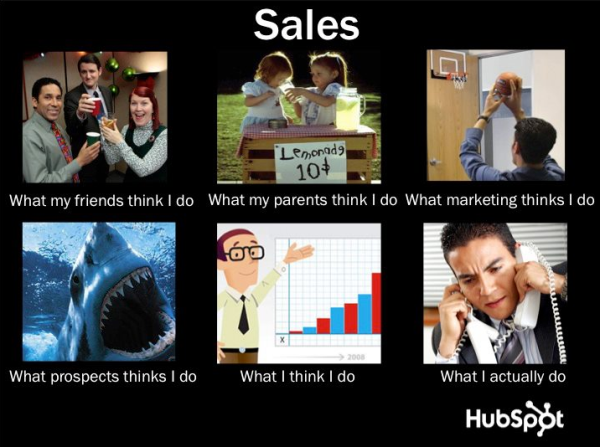
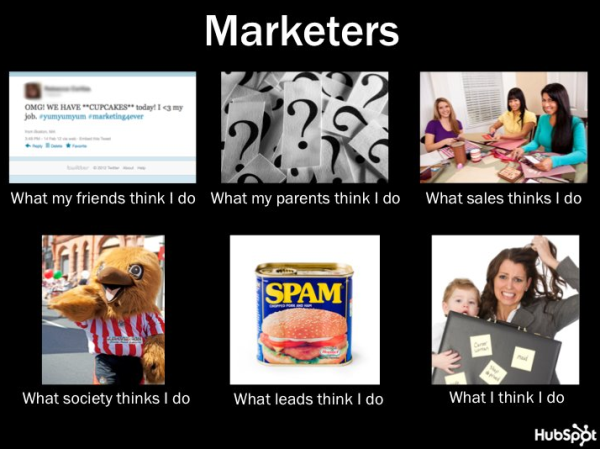
Some memes are designed to identify with the reputation struggles of your audience. The one above speaks for itself.
When HubSpot memejacked the “What People Think I Do/What I Really Do” meme for our Facebook page, our sales-themed meme generated an impressive 453 likes, 57 comments, and 256 shares, while our marketer version accumulated a whopping 460 likes, 53 comments, and 337 shares.
5. Success Kid
Success Kid is a meme that has stood the test of time. There’s no requires text on this one — it’s a template for any extreme stroke of luck you know your audience would resonate with. The caption above doubles as a true story: the smallest changes to your call to action (CTA) copy can change its appeal tremendously.
6. Buzz Lightyear: Everywhere
The characters above need no introduction, but this meme might. With his arm around Woody, Buzz Lightyear offers a gesture of optimism (or sarcasm, depending on how you play this one) for your audience. For marketers, the right lead magnets can generate more leads than you ever thought possible … Buzz’s words, not mine.
7. Boromir: One Does Not Simply
You might recognize this handsome soldier from The Lord of the Rings trilogy. But Boromir, son of Denethor, is much more than a warrior of Gondor. In the scene above from the Fellowship of the Ring, Boromir explains how “one does not simply” walk into Mordor, an evil region of Middle Earth where few have survived.
Everyone has their own version of Boromir’s grave warning. In marketing circles, Google might as well be Mordor for search engine optimization (SEO) specialists.
8. Puss in Boots: Old Spice Man
While most memes are very easy to hijack, some can be a bit more complicated if elements like video are involved. For example, DreamWorks featured its Shrek-based character, Puss in Boots playing the Old Spice Man in the above trailer to promote the 2011 movie spinoff, Puss in Boots.
However, even memes that have originated as videos have been successfully adapted into images, as evident by the Old Spice Man meme, which originated as a series of videos. But hey, if you have a talent for video and feel you can hijack that popular new video meme, go for it!
How to Make a Meme: Best Practices for Memejacking
Because memes are often very simple (like the one I created by hijacking the ‘Y U NO’ Guy meme), they’re usually simple creations. Some basic knowledge of a photo editing tool like Photoshop (or hey … even Microsoft Paint can sometimes do the trick) can come in handy when hijacking brand new memes. But you’ll find there tons of meme templates out there, like Meme Generator, quickmeme, and Make a Meme — all of which make it extremely simple to hijack popular memes.
For example, to create my meme for this post, I conducted a Google search for “Y U No Guy Meme Generator,” and came across MemeGenerator.net’s tool, enabling me to create the meme pictured at the top of this post.
Once you pick a tool you like, you can either select from the blank memes in the tool’s gallery, or upload your own. Then, you’ll have the option to customize the text on the top and bottom of the image you’ve selected.
Then, download your newly branded meme and post it on the channel of your choosing. Just be sure to add additional context if the meme is being shared alongside a larger story or campaign.
Ready to do some memejacking of your own? Here are our top memejacking tips.
Try to Jump on it Quickly
The most successful instances of memejacking for marketing occur when a meme is at its tipping point — it’s started to spread wildly, yet few have hijacked it. This is your memejacking sweet spot, since memes can start to feel old after everyone and their mother has hijacked it.
To stay ahead of the curve and stay on top of trending memes as they start cropping up, browse social bookmarking sites like Reddit or StumbleUpon, which are known to surface up-and-coming memes before more mainstream social networks like Facebook and Twitter. In fact, just staying well connected online and abreast of the latest news can keep you on top of the latest breaking memes.
Understand the Meme
Before you memejack, make sure you’re well educated about what the meme means and implies. The last thing you want to do is offend your audience or memejack something you wouldn’t have if you had fully understood the connotations of it. Luckily, the folks at Know Your Meme are usually on top of the popular memes, their histories, and their claims to fame so you can determine whether a meme is appropriate for your audience.
Ask Yourself, “Will Our Audience Appreciate It?”
To piggyback off the last point, understand that using memes will only be successful in your marketing if your audience appreciates the particular meme you’re hijacking. If your audience doesn’t have any connection to the meme, doesn’t understand it, or doesn’t think it’s funny, it doesn’t matter if it’s already been wildly popular among a general internet audience.
Make Sure it’s Relatable to Your Brand
Most importantly, make sure your memejacking isn’t at the expense of being relatable. The way you hijack your meme should have something to do with your brand, industry, etc. If it’s a stretch to create a funny meme that relates to your brand, then it’s probably not worth doing. The most successful memejacks are those that cleverly incorporate some essence of the brand — its industry, messaging, mission, slogan, etc.
Remember, posting content about subjects related to your brand often generates the most engagement. In other words, posting content unrelated to your brand — like the latest internet meme that can in no way be aligned with your brand — just isn’t going to cut it.
Be Funny/Witty/Entertaining
The most successful examples of memejacking have entertainment value, so while it’s critical to make sure your audience can relate to it, don’t aim to be serious. The tone should be funny and/or witty, so use language and copy that achieves those goals.
Align With the Original Meme’s Core Components
Make sure your memejack sticks to the original meme’s format, style, and includes the same components. Otherwise, you’ll have a memejacking #FAIL on your hands. Remember the meme above that HubSpot hijacked on our Facebook page — the ‘What People Think I Do/What I Really Do’ meme? Take another look at our ‘Marketers’ version. It appears to be missing the critical ‘What I REALLY Do’ frame, doesn’t it?
While this oversight (luckily) didn’t really affect the success of our meme, we did feel a bit silly about it when a commenter called us out on it. Whoops!
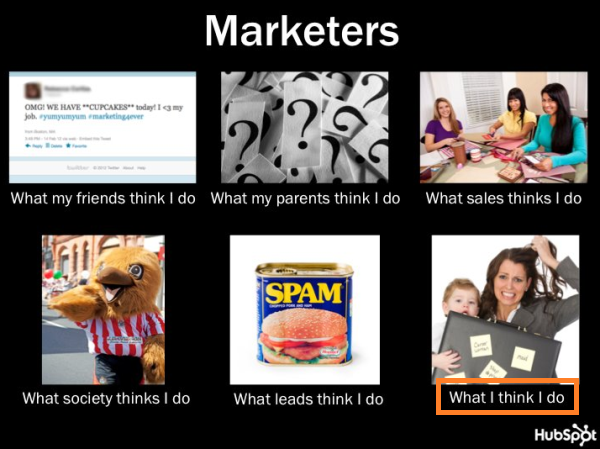
How to Spread Your Memes
Once you’ve created a meme to use in your marketing, what do you do with it? Well, as we mentioned earlier, memes make for really awesome visual content to use in your social media marketing efforts. But it doesn’t have to stop there. Here are some great ways to make the most out of your funny new meme:
1. Share it on Social Media
Plain and simple, plant your meme in prime sharing environments — social networks. Facebook, Instagram, and Pinterest are perfect social networks for memes because they’re all sites where visual content thrives. Post your meme to your Facebook and Instagram pages accompanied by a witty remark or brief description, and pin it to an appropriate pinboard on Pinterest (perhaps you can create a board dedicated to memes).
You can also share it on Twitter, in addition to other niche social networks you might have a presence on — just don’t let meme creation detract from the primary reason your audience might follow you on these more versatile channels.
2. Use it as a Visual Element in Other Website Content
Don’t just share your meme on social media. Create a blog post that presents a situation your meme reflects perfectly — just remember to still add a call-to-action to the post so you can optimize it for lead generation and convert any visitors into leads. This will also give you something to link to when you share your meme in social networks.
3. Optimize it for Social Sharing
If you do decide to put your meme on your website — either in a blog post or on another web page — be sure to optimize that page for social sharing. Make it easy for your visitors to share your meme themselves by adding social sharing buttons, particularly for visual social networks like Facebook, Instagram, and Pinterest.
This will help to extend the reach of your meme, as visitors will share it with their own personal connections in social media, getting visibility for your meme beyond your direct network.

The Top 7 Free Alternatives to Adobe Illustrator of 2018
Adobe Illustrator is a hugely popular tool for designing vector graphics, logos, icons, and more.
But when you’re a web or graphic designer with a small budget, you probably can’t afford Adobe Illustrator’s steep $239.88 pricing.
Luckily, there are plenty of top-notch free alternatives on the market, some of which even offer features unparalleled by Illustrator.
How to download Adobe Illustrator for free
If you’re interested in using Adobe Illustrator but hesitant to purchase the full version, you can try a free seven-day trial of the product first. To do this, simply go to the Adobe Illustrator product page and click “Start your free trial”.
If you’re shopping for a program that offers features comparable in quality to Adobe’s product, check out our list of the top free alternatives to Illustrator.
1. Inkscape
One of the most comparable substitutes to Adobe Illustrator, Inkscape has plenty of similar sketching, illustrating, and editing tools, including keys to move and rotate by screen pixels, bitmap tracing, color painting over objects, and edit gradients with handles. Inkscape is a quality product for pro- or semi-pro web designers working within SVG file format. It also offers an open source vector graphics package, so if you have the technical skills, you can incorporate Inkscape into your other software programs.
Platform: Mac, Windows, Linux
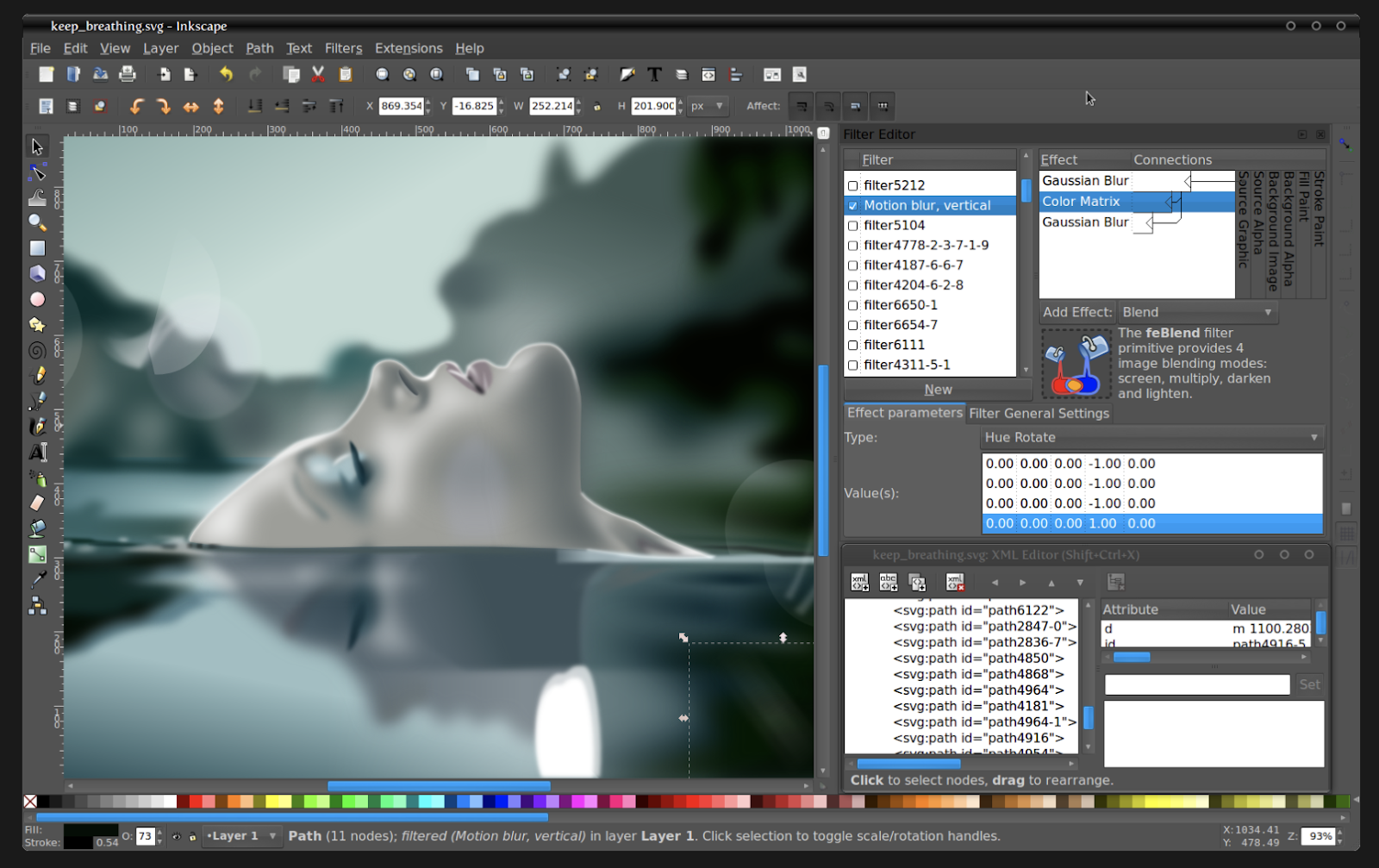
2. GIMP
GIMP, which stands for GNU Image Manipulation Program, has limited vector functions but has similar tools to Photoshop, making it an impressive image editor with powerful image manipulation options. Better still, GIMP provides options for customization and third party plug-ins, so if your image editing needs are somewhat unique, you might want to check this tool out.
Platform: Mac, Windows, Linux

3. BoxySVG
BoxySVG runs as an extension in Google Chrome, so it’s easy to store vector graphics including icons, charts, and illustrations on the web. It provides options for Google Fonts integration and has an Open Clip Art Library, as well as illustrator tools including pens, bezier curves, groups, shapes, text, and more. Ultimately, BoxySVG is simpler than Illustrator, and while this means less advanced tools, it also means a quicker and easier process for creating vector graphic files.
Platform: Mac app, Windows app, Chrome app, Web app
 Image courtesy of BoxySVG.
4. Pixlr
Pixlr offers plenty of useful features for editing, creating, and sharing creative images — while it’s less advanced in function than Illustrator, it’s cloud-based and supported on mobile, desktop, or the web. If your position requires you to work from different devices to create images, give Pixlr a try.
Platform: Windows, Mac, Web, Mobile

5. Gravit
You’ll find plenty of your basic vector-editing tools in Gravit, including pen, line, knife, slice, bezigon, gradient editor. It also has more advanced features, such as boolean operations, symbols, international text support, and more. Plus, it’s designed in a user-friendly interface and offers video tutorials. Gravit works from right within any browser, which means you can edit and export your files anywhere with wifi. It also supports cmyk rendering, so you can print quality images without downloading anything. You can also import and export files in a variety of formats including pdf, png, jpg, svg, and sketch — which makes this option more flexible than Illustrator.
Platform: Mac, Linux, Windows, Chrome, Any Browser
 Image courtesy of Gravit.
6. Affinity Designer
Affinity Designer is allegedly “built from the ground up over a five-year period … with the needs of creative professionals at its core.” With rasterizing controls, infinite zooming, a precision-engineered pen tool, automatic snapping points, colors that pop, and an extensive array of vector editing tools, this system truly compares in design and function to Illustrator. The full version is $49.99, but the trial version is free and offers plenty of the full version tools.

Platform: Mac
7. OpenOffice Draw
While not the most aesthetically pleasing platform in the bunch, OpenOffice Draw still has plenty of high-quality tools for creating posters, charts, diagrams, or graphics, including a manipulate objects tool and 3D controller tool. The system also lets you create flash versions of your design. You can use OpenOffice Draw’s clipart gallery, or create images and add it to the gallery yourself for easy future access.
 Image courtesy of OpenOffice Draw.
Platform: Windows, Linux, Mac

9 Native Advertising Examples People Actually Enjoyed Reading
In 2012, the concept of native advertising broke onto the scene. Back then, who would have predicted the deep impact of native on the world of online advertising?
Native ads have since overtaken display ads as the most popular form of digital advertising. For marketers everywhere, native ads — used on social, search, and content recommendation platforms — have become a staple item on the online advertising menu.
Clearly, native advertising hits a nerve. Over time, native ads have become more sophisticated, calling on complex design and UX principles in the never-ending grab for consumer attention.

There are so many amazing examples to choose from, so we’ve narrowed it down to nine exciting, advanced, and current native ads that we think do a great job:
9 Native Advertising Examples
1. Altran Engineering in the Financial Times
This native advertisement combines some of the best elements of digital advertising: video, a human interest story, and classy hi-tech with an Elon Musk connection.
Produced by the Altran engineering company, and published in the Industrial Tech section of the Financial Times, the above video, “Hyperloop: designing the future of transport?” tells the story of a group of students from the Technical University in Valencia, Spain who are competing in the 2018 Hyperloop Pod Competition run by Musk’s SpaceX company.
This native video ad has a palpable human component — the students and the Altran staff who are supporting them in the tough competition. This brings in its futuristic aspect — the best and the brightest working to design the fastest transport pod that will transform the future of transportation. And it’s presented as a news story, not as a promotion or ad for Altran or the SpaceX competition (although it’s actually promoting both).
Together with high production value and a compelling narrative, it’s a great example of a native video ad.
2. Land Rover — A Mini Suspense/Action Movie
Land Rover uses diverse outstanding content marketing campaigns to promote its vehicles. These native content strategies are in full form in Land Rover’s Dragon Challenge video, shown above. It’s eye-catching, slick, and suspenseful. It’s everything a native campaign can and should be.
This nail-biting ad shows the world’s first attempt to scale the stairs leading to the Heaven’s Gate landmark in China — by vehicle. In February 2018, a specially fitted Range Rover SUV successfully drove up the 999 steps to Heaven’s Gate, at a frightening angle of 45 degrees.
The native campaign perfectly captures the brand essence of Land Rover — daring, excellence, adventure, and ultimately, success. Promoted via social Land Rover’s networks, it’s much more than an ad. It’s a record-breaking event and a story of its own.
3. Eni Energy on CNN

Here’s an example of graphic, luscious storytelling, ripe with green landscapes, promoted by oil and energy conglomerate Eni. It focuses on the Green River Project in the Niger Delta, an Eni development program for farming and livestock to improve the livelihoods of local communities. The campaign is promoted with native ads on CNN.com, linking back to the Green River Project. It’s a truly impressive example of native content.
The site is designed as a story, divided into three sections: Past, Present and Future. The content is a mix of just about everything — text, imagery, audio, video, personal stories, animations, and illustrations. The complete look and feel is reflective of an environmental agency, rather than an oil company.
In this native campaign, Eni succeeds in distancing itself from the criticisms faced by energy conglomerates, and creates a brand image as a 21st-century social and environmental force for good, and a beacon of corporate responsibility.
4. Mercedes in the Washington Post

This native campaign by Mercedes is an example of smooth, clean content designed to pique interest and engage the user. The campaign is called “The rise of the superhuman,” and it focuses on various technologies that are turning people into “superhumans,” such as robotic exoskeleton suits, virtual reality in medical settings, and the Mercedes Benz E-class series that integrates the new Intelligent Drive system.
The native content above is highly interactive, featuring quiz questions and hot spots the user can click to get more information. But one of the best things about this campaign is how it effortlessly creates a connection between Mercedes and the “superhuman.” It’s reminiscent of one of the oldest native examples, the “Penalty of Leadership” ad by Cadillac, which enhanced the Cadillac image as a prestigious leader. That simple print ad, published in 1915, is credited with reviving the Cadillac brand and boosting flagging sales that plagued the company at the time.
Today’s native interactive Mercedes ad relies on the same principle — creating a powerful connection between the car and the concept of cutting-edge excellence.
5. Viral Meme on VentureBeat

Nothing beats a viral meme in terms of sheer stickiness, and it’s a great way to promote brand awareness. Recently, during the famous “Laurel or Yanny?” dispute, we saw VentureBeat take advantage of the meme in native content to promote the upcoming Transform conference on artificial intelligence and analytics. How? By using an artificial intelligence (AI) device to settle the dilemma of Laurel versus Yanny, once and for all.
VentureBeat promoted an article that briefly describes how AI was used to determine whether the stated name was Laurel or Yanny. The native article discusses some of the problems that arose, and how the engineers had to adjust the algorithms to get an accurate result.
It also opened up the issue of the limits of algorithms — which will presumably be explored at the Transform conference run by VentureBeat and scheduled to take place in August. Of course, the article opened with a clear CTA to register for the conference, including a tempting 30% discount offer. A great example of not letting a viral meme go to waste in a native campaign.
6. ‘Know Your Girls’ on AOL

Here’s a great example of native advertising used to advance a great cause. The “Know Your Girls” campaign is designed to promote breast health and breast cancer awareness among African American women in the US. Promoted natively on AOL.com, the “Know Your Girls” ad title is catchy, intriguing, a little naughty, and clearly speaks the language of the target audience.
A click leads you to an informative and well designed website that provides health resources, personal stories, and important information about risk factors, screening, and much more. The campaign is a partnership between the Susan G Komen breast cancer foundation and the Ad Council, which unites this important cause with the latest and best advertising practices. Clearly, that includes native ads.
7. Influencer Promotion on BBC.com

BBC Future is one of the BBC’s “storytelling” channels, which connects brands to audiences via sponsored stories. An interesting example is this 2017 article, which purports to show the face of the “average American politician.”
In fact, this is achieved by using technology to perform “face averaging,” creating composite images of all American politicians to derive the average face.
This technology can lead to all kinds of research and suppositions about what the average politician represents, including gender, race, republican, and democrat — all hot topics in a highly politicized time period.
The article ends with a call-to-action (CTA) to learn more about face averaging with an online tutorial on OpenCV, an open-source computer vision software. The link leads to a website, owned not by a large corporation or software giant, but to an individual entrepreneur, programmer, and blogger — Satya Mallik. In this example, we love how native advertising is accessible to small businesses and influencers, affording powerful promotion opportunities on premium websites like the BBC.
8. Colored Corn on Business Insider

One of the best native tactics is creating a story. And if the story is visual and colorful, well, that’s a huge help. Take this example of native content promoted on Business Insider.
The example above looks and feels just like a regular Business Insider article. It’s about Glass Gem Corn, a multi-colored corn variety that became a public sensation in 2012. It’s the story of one man and his search for his Native American roots that led him to develop the colored corn. And in true Business Insider fashion, the story of the rainbow corn is retold in amazing, bold, eye-catching visuals.
The article contains links to buy the seeds online from Native/SEARCH, a not-for-profit conservation company that now owns the product. So what’s in effect a product sales page is presented as a remarkable, colorful news story.
What’s most interesting about this article is the disclaimer published by Business Insider: “This article was originally published in 2013 and has been updated because the story is timeless.” It just goes to show: Evergreen content promoted natively can truly be a long-term success story.
9. KPMG on Forbes

Forbes’ BrandVoice is a platform for native advertising and sponsored content. Many brands have their own BrandVoice channel, such as Mitsubishi Heavy Industries, SAP, Deloitte, and even the government of Japan.
KPMG has taken its own native content on Forbes to the next level, with a campaign called “The Great Rewrite.”
Big and bold (just like native advertising should be), The Great Rewrite focuses on different industries and how they are being “rewritten” in a post-innovation age. The campaign look and feel is grand and ultra modern, yet easy to navigate.
It makes its point, connecting KPMG with the future of innovation, while continually adding new “chapters” about various sectors. Each chapter is packed with content, including video, featured articles, and content recommendations. This is a great example of a native campaign that, just likes its title, is rewriting the rules of native in an ongoing, ever- growing, content-rich user experience.
These days, many native ads that we see online are truly spectacular. Some are eye-catching, others are original, and yet others offer inspiration for new ways to promote compelling content and capture mindshare.
The nine examples above are by no means an exhaustive list. However, they do give a taste as to how native advertising is constantly advancing, pushing the boundaries of content and design to create new, unexpected online brand experiences.