
How to Start a Business in Australia
Embarking on a new business venture is both exciting and terrifying in equal measure. On one hand, you’ll finally be the boss; the master of your own destiny who’s pursuing success in something that you’re truly passionate about. On the other hand, you now have a laundry list of things that you need to tick off before you even start to make sure everything kicks off smoothly.
Whereas working for someone else alleviates these responsibilities, the startup owner takes on all these stresses themselves. Not only that, every country has different laws, regulations and requirements to get your business up and running. So, even if you’ve started a business in one country, you’ve still got to do a pile of research to make sure you do it properly in another.
To help you out in Australia, at least, we’ve put together a list of the main things you need to sort out when starting a business Down Under:
How to Start a Business in Australia
1. Choose your business structure.
The structure you choose for your business is very important, as it has a direct effect on things such as:
- Your level of control
- The amount of tax you need to pay
- Regulatory obligations
- Health and safety requirements in the workplace
- The level of personal liability you will incur
There are four structures on which you can build your business in Australia:
- Sole trader: This is when you register someone (usually, yourself) as the sole owner of the business. That means you’re responsible for all legal aspects of running the business, but you’re entitled to hire people to work for you.
- Company: This is a commercial business or entity that has a separate legal existence to its shareholders.
- Partnership: A Partnership is when more than one person and/or entities run a business together, but not in the form of a company.
- Trust: A Trust is an entity that is in possession of property, income, or any other assets for the benefit of a third party.

Image Source: AnyBusiness.com
You must decide on the structure of your business before you register it, as each structure entails different steps to do so. Along with this, it’s worth noting that you might change the structure of your business as it grows and evolves over time.
2. Pick a business type.
With a structure in place, you can better understand the type of business you’re likely to need. There are a myriad of business types to choose from, and some of the main types include:
- An online business
- A franchise
- Independent contractor
Every industry has a different set of legal obligations and regulatory requirements, so it’s crucial that you pick the business type that best suits your industry.
3. Apply for an Australian Business Number (ABN) and register your business name.
You can’t legally start a business in Australia unless you own an ABN. This is an 11-digit number that is unique only to your business and acts as a government identifier for the business.
Once you’ve got an ABN, you’ll be able to:
- Register your business name
- Identify your business to other entities for things like ordering goods and services or sending invoices
- Claim taxes such as Goods and Services Tax (GST)
- Avail of credits for things like energy grants
It’s best to decide on your business name before you go about creating assets like your website URL, logo or any other designs. Otherwise, you’ll need to change everything in the event that your business name changes. If you do create a business logo, it’s worth considering if you need to patent it to protect yourself from copyright infringement.
You can register your ABN and business name separately if you wish, but it’s easier to apply for both at the same time here.

Image Source: Department of Industry, Innovation & Science
4. Register your domain name.
You can only complete this step after you’ve secured your business name and ABN as it’s only possible to get a .com.au address if you’re a registered Australian business. The domain name you pick should be related to your business in some way and make it easy for prospective customers to find and recognize.
While you might have the perfect domain to go with a killer business name, you’ll still need to check that someone else hasn’t taken it already. Luckily, there are plenty of sites out there that can help you with that — here’s one of them to give you a head start.

Image Source: Instant Domain Search
Once you’ve found a domain name that isn’t taken, you can go to the .au Domain Administration Ltd (.auDA) website to find links to domain registrars and resellers. Here, you’ll get an idea of how much you’ll have to pay to secure your domain name.
4. Identify your funding source.
If you’re like the majority of new startups, cash flow will be your primary concern. You can have the best business plan in the world, but it won’t be of any use if you don’t have the money to keep the lights on while you’re getting your feet on the ground. With this, it’s important to know what resources are available to make the initial growth period a lot easier.
While there aren’t many government grants to help you start your business, there are plenty of options that are specific to each state. For example, if you’re starting a business in Adelaide, you can apply for a cool $20,000 Small Business Development Fund.

Image Source: Department of Industry, Innovation & Science
There are other grants based on:
- Taking your idea to market
- Marketing and sales
- Buying equipment
- Importing and exporting
- Employing people
Check out this page for a full list of grant types that can help fund parts of your venture.
5. Register for the correct taxes.
As the saying goes: “The only certainties in life are death and taxes.” Unfortunately, this is also true if you start a business in Australia – you absolutely must register for the correct taxes to avoid any potential legal implications. The taxes you must register for are dependent on the type of business you choose to start, with some applicable to every type and others only mandatory for certain types.
Some examples include:
- Goods and Services Tax (GST) – this is compulsory if your business has a turnover of $75,000 AUD or higher
- Pay as You Go (PAYG) withholding tax – this is required if you need to withhold an amount for tax purposes, such as paying wages or salaries
- Fringe Benefits Tax (FBT) – if you’re lucky enough to be able to provide perks like a company car to your employees, then you’ll need to register for this
You can get more details on tax types by clicking here.
With the above essentials sorted, you’re almost good to go. But, we do have one last tip for you – starting a business is a tough task that’s made a lot easier if you can find ways to save money and build a solid network of peers and partners to work with.
A great way of doing both is to set up shop in one of Australia’s many coworking spaces. You’ll save a tonne of money on office costs and also open the door to networking opportunities which can lead to other benefits down the line.
Whatever you do and wherever you decide to start your business, we wish you the very best of luck!

The Anatomy of a Perfect Instagram Profile
With 500 million daily users and more than 80 percent of Instagram accounts following a business account, it’s crucial that marketers include Instagram as a part of their social media marketing strategy.
It all starts with your Instagram profile.
Download the complete guide to using Instagram for business and marketing here.
The best Instagram profiles have a few things in common, including easily identifiable usernames, a recognizable profile picture, a steady stream of Instagram Stories and photos, an informative yet delightful bio, a link to a relevant landing page or campaign, and more.
Keep reading to learn how to customize your Instagram profile so it looks good, tells your potential followers who you are, and gives them a reason to follow and engage with you.
The Anatomy of a Perfect Instagram Profile
1. Public (Not Private) Profile
By default, your Instagram profile will be public — meaning anyone in the world can view your profile and posts on Instagram.
If you’re creating an Instagram profile for business, then that’s what you want: You want anyone to be able to view your posts and follow your brand if they want to. (Otherwise, if you keep your profile private, anyone who visits your profile won’t be able to view your photos, which could deter them from following you.)
To ensure your profile is public: Open “Options” (the gear button on iOS, or three dots on Android) and make sure “Private Account” is turned off.

2. Recognizable & Searchable @Username (i.e., Handle)
Start by making sure your username is recognizable and easily searchable, like your business name. If your business name is already taken as a username, try keeping your business name as the first part of your username so that people searching for your business are more likely to come across your account. For example, the Australian activewear line Lorna Jane uses the username @lornajaneactive.
To edit your @username: Go to your profile page and click the “Edit Profile” button to the right of your profile photo.

Next, click on the text or open space to the right of the person icon and enter your desired username.

3. A Brand-Aligned Instagram Profile Picture
Like a blind date, your profile picture is your first impression with your audience. And if you’re looking to launch an Instagram Business account, this photo is crucial to followers remembering you every time they look through their Instagram Stories feed.
For reference, keep in mind the minimum profile picture size for Instagram is 110 x 110 pixels — a perfect square. Don’t deviate too far from this minimum; staying below 200 x 200 is encouraged so users don’t see a blurry or stretched photo when visiting your profile page.
Base the content of your profile picture around your logo. This should be front and center, so your brand is expressed the same way across all of your digital channels. If you already manage other social media accounts, it’s best to have your Instagram profile picture follow suit with the profile pictures across each network.
However, consider the seasonal trends that take place over the course of the year, and don’t be afraid to alter your image temporarily to honor a monthly theme. For example, because June is Pride Month, we gave our logo a temporary color change. Here’s what it currently looks like on desktop:

4. Easily Searchable Business Name
Next, make sure to add your full business name to the “name” section of your profile. This will appear under your profile picture and under your username in search.

To edit your business name: Go to your profile page and click “Edit Profile.” Then, click on the text or open space beside the clipboard icon at the top and enter your desired business name.

5. On-Brand Profile Photo
Your profile photo is one of the first things people see when they visit your Instagram profile, as it’s displayed prominently in the top right-hand corner. It should be something easily recognizable; something that’s on-brand with your other social networks. For most companies, this will be your company logo.

Now, notice that HubSpot’s profile photo in the image above is a circle. That wasn’t our choice; Instagram actually crops your profile photo into a circle (110 pixels in diameter) when you upload it to the app.
You don’t have to create the circle image yourself. However, since you’ll have to crop your photo into a circle in the app, then ideally you’ll want to upload a square photo with your logo in the center, placed so that the corners of the photo can be cut off without a problem.
In the example below, you’ll see the corners are shaded, meaning Instagram will cut them off in the actual profile photo:

You can move that circle around or pinch-to-zoom until it’s cropped just the way you like it.
To add or change a profile photo: Go to your profile page and click “Edit Profile.” Then, tap “Edit” in the top right. (This will appear under your current profile photo if you have one.)
From there, you can import a photo from Facebook or Twitter, or choose one from your library. (We don’t recommend taking a new one on the spot.)

6. Delightful, Actionable, Informative Bio
Like your profile photo, your “bio” (i.e., the description at the top of your profile) is one of the first things visitors to your profile will see.
You have a max of 150 characters: Use them to let people know what you’re about and give them a reason to follow you. Include who you are and what you do, and be sure to add a hint of personality.

Here are a few examples for inspiration:
- WeWork: “WeWork provides you with the space, community, and services you need to make a life, not just a living.”
- Oreo: “See the world through our OREO Wonderfilled lens.”
- Califia Farms: “Crafting, concocting and cold-brewing up a delicious, plant-based future. Califia Farms Loves You Back”
- Staples: “We make it easy to #MakeMoreHappen”
You can also use this space to encourage some action, like using a certain hashtag or clicking a link in your bio. Here are two examples:
- Lorna Jane: “Welcome to the home of #ActiveLiving – be inspired to #MoveNourishBelieve EVERY DAY. Show us how you live active – tag #lornajane to be featured 💗”
- HubSpot: “All-in-one marketing & sales platform. We help businesses GROW. Follow for content, contests & more. Tag photos with #HubSpotting to get featured! ⬇️”
7. Trackable Link in Your Bio (That You Change Regularly)
One of the biggest frustrations people have with Instagram — especially businesses — is that it isn’t exactly a great platform for driving traffic away from the app to a website, a Twitter page, or somewhere else. That’s because clickable URLs aren’t allowed anywhere except the single “website” box in your bio.
That’s why you’ll want to add a link to the “website” box in your business’ Instagram bio. This makes it easy for people to go straight from Instagram to your website, blog, or a specific campaign.
One sneaky way to get people to click the link in your bio? By referring to that link in individual photo captions. Ever seen captions that say something like “Link in bio”? They’re trying to direct you to their profile page so you click the link in their bio.
Engage users by updating that URL frequently to point to your latest blog content, YouTube video, product, or offer. For example, are you running a contest, or want to increase subscribers to your blog? Just change the link, and then post a photo that mentions the new link in its caption.
To change the link in your bio: Go to your profile page and click “Edit Profile.” Then, simply insert the URL of your choosing into the URL box.

You can change the URL on your profile page as often as you’d like.
Note: I’ve read before that shortened links often get blocked by Instagram, but we haven’t had that problem at HubSpot. In fact, we recommend using shortened links that include UTM tracking codes so you can see how much of your traffic came from your Instagram page. (Learn how to create UTM codes to track your URLs here.)
Once you’ve changed the URL, simply publish a photo related to the URL with a caption that references the link in your bio. Here’s an example below, where we wrote in the caption, “FMI about Grow With HubSpot, visit the link in bio.”
8. Enabled Notifications
Before you call it a day, check your “Options” settings to make sure notifications are enabled so you can see when people share or comment on your photos. This’ll let you engage with them more quickly and easily, just like a lot of companies do on Twitter.
To enable notifications: Go to “Options” and then “Push Notification Settings.”

Select “From Everyone” for every category. (Except perhaps “Friends on Instagram,” which automatically sends a friend request to your Facebook friends who also have Instagram, and “Instagram Direct Requests,” which accepts photos sent from individual accounts. That could get a little spam.)
9. High-Quality Photos
High quality photos are a huge part of an optimized Instagram profile. When people visit your profile, chances are, the first thing they’ll do is scroll through the first ten or so photos in your feed. The quality of those photos will be a big factor in whether or not that person follows you or not. Your Twitter followers might forgive a few bad tweets, but you do not want bad photos on your Instagram account.
So, always be thinking of your Instagram photos this way: If you don’t have anything beautiful to post, don’t post anything at all.
The ingredients for a beautiful Instagram photo are threefold: an interesting and relevant subject, a well framed and well shot photo, and a solid editing job.
Ingredient #1: An Interesting & Relevant Subject
When you’re picking a subject, think about your buyer persona. What would they find interesting in a photo? Coca-Cola’s target market includes young people who value fun, friendship, and sports, for example. That’s why they post pictures of young people doing fun, adventurous things — like DJing at a concert, or snowboarding on a beautiful day. (With bottles of Coke in hand, of course.)


Image Credit: Coca-Cola Argentina
Another great way to garner Likes, comments, and followers? Make people laugh. Sometimes, funny photos are the most memorable and the most shareable.


Image Credit: Baddie Winkle; Jeremy Veach
Check out this list of 16 of the best brands on Instagram for more photo inspiration.
Ingredient #2: A Well Framed, Well Shot Photo
Don’t worry … you don’t have to have a background in photography to take really awesome Instagram photos. All you really have to do is take some time to learn the best practices, like lining up your shots, finding interesting perspectives, and taking advantage of symmetry, patterns, “leading lines,” and more.
What are these best practices? Start by reading this blog post on tips for taking great pictures on your smartphone.
Ingredient #3: A Solid Editing Job
Instagram has some basic editing capabilities, but oftentimes, they aren’t adequate to make a picture really, really great. Most of your photos should go through at least one or two other photo editing apps on your mobile phone before you open them in Instagram for the first time.
But don’t worry: Once you have the right apps downloaded, editing the photos isn’t that complicated. It just takes a little bit of practice. (Trust me, it’s well worth it.)
Start by reading this blog post for a step-by-step tutorial on editing your Instagram photos. That post will teach you how to take advantage of Instagram’s best editing tools, and it also lists the two or three essential photo editing apps you’ll need to take your photos from good to great.


For a list of more advanced editing tools, read this blog post for a list of the 11 best photo and video editing apps for mobile devices. These apps will let you do everything from sharpening specific parts of a photo to brightening certain hues to make your photo look fresher.
10. Consistent, Regular Posts
An optimized Instagram profile is an active one. Because photo quality is so important, you don’t need to worry about posting to your Instagram account multiple times a day like you do for most other social media networks. Instead, focus on creating high quality content — and then posting them at the right times for your specific audience.
To make sure you’re posting consistently, download this social media content calendar template and start planning out your Instagram posts. Over time, you’ll want to build up a backlog of photos for times of need, like the weekends or when you go on vacation.
So, what time of day is the best time to post to Instagram? Because Instagram is primarily an app for use on mobile devices, users tend to use the network all the time, any time — although research shows that many users engage with content more during off-work hours than during the workday.
The very best times to post on Instagram were Mondays and Thursdays at any time except between 3:00–4:00 p.m. for the time zone of your target persona. (For a United States audience, your best bet is to combine Eastern and Central time zones, as they represent almost 80% of the U.S. population. For audiences located outside the U.S., use whichever time zones your target audience uses.)
However, you’ll want to experiment with these to see if they work with your audience.

How to Change All Margins in Google Docs [FAQ]
You probably don’t typically alter the default margins in a Google Doc. But a marketing proposal or design project might require you to change the margins, and if you’ve never done it before, it can seem complicated.
Changing the left and right margin space is easy. You simply click and hold the small blue triangle on the left and right side of the ruler at the top of your Google Doc, and drag it to another position:
It’s important to note you must drag the blue triangle, not the rectangle right above it. The rectangle on your ruler changes a paragraph’s indentation, not the margins.
However, dragging the triangle alone alters the left and right margins. What do you do when you need to change all the margins at once? It’s an easy three step process:
1. Go to File > Page Setup…
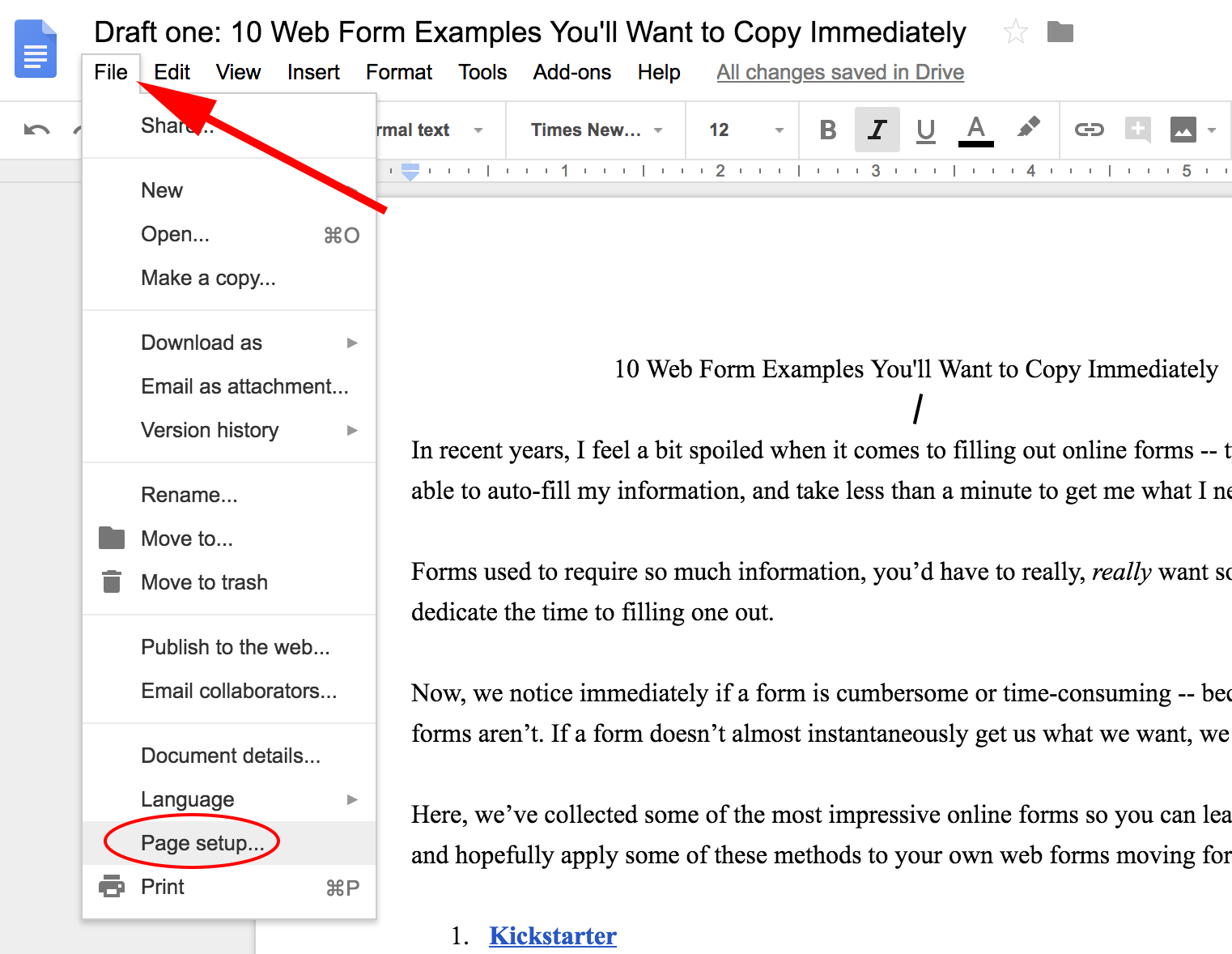
2. In the text box beside Top, Bottom, Left, Right (under Margin), type in a margin size.

3. Click “OK”. If you plan on using the margins often, you could also click “Set as default”.

And that’s it! Hopefully, this will help you create more customized Google docs to fit your needs. If you’re also interested in changing your paragraph indentations as well, check out How to Create a Hanging Indent in Google Docs.

7 Tried-and-True Strategies SaaS Businesses Are Using to Grow
Back in 2011, Marc Andreessen announced in a seminal WSJ essay that “software is eating the world.”
Seven years later, his thesis was right — software as a service (SaaS) companies have and will continue to takeover or disrupt large parts of the economy.
This change has been fueled by technology: It’s now easier and cheaper than ever to develop software, and with 4 billion people using the internet as of 2018, the potential customer base for SaaS companies is vast.
This perfect storm of rapidly lowering barriers to entry, and access to more customers, has seen software take precedence over hardware.
While technological advances have spurred software development, it’s the subscription model favored by many SaaS businesses that has transformed it into a thriving industry. SaaS companies typically charge a subscription for their product, which is delivered and stored within the cloud. The subscription business model means companies reach profitability over time and must continually provide value, otherwise their clients will become at risk of churning.

Clients often prefer being able to make smaller, monthly payments, while investors like businesses that generate predictable recurring revenue, which makes it easier to forecast and understand the business’ health.
And when it comes to business health, growth is critical to success. That’s why we’ve put together a roundup of strategies SaaS businesses can use to ramp up their lead generation efforts. Need inspiration for your own strategy? Check out the ideas below.
SaaS Marketing Strategies
1. Content Marketing
Businesses around the globe are using content marketing to build their brand, attract visitors to their website, and generate leads. A key advantage of content marketing is that it has a compounding power of return — just like a smart investment, it increases in value over time.
Importantly, content continues to drive leads, whereas other forms of marketing, like pay-per-click (PPC) advertising, will only do so for as long as you continue spending. It’s for this reason we think of content as an asset that businesses own, whereas online advertising is rented. This distinction is important for SaaS marketers to consider.
Looking for content marketing inspiration? Here are three SaaS businesses that use content to generate leads:
Dropbox
The file sharing and storage service has many types of potential customers and attracts them with targeted content at the Dropbox, Dropbox Business, Dropbox Tech, and Dropbox Developer blogs. They also host a number of webinars to communicate their credentials to prospective clients.

Intercom
Intercom’s content marketing strategy focuses on product management, design, startups, and marketing. The customer communication platform is fast becoming known for the quality of the Inside Intercom blog, podcast, and books, all of which help build their brand and drive qualified leads.

Moz
Moz has developed a reputation for its thought leadership content. They publish a blog post each day, as well as create authoritative guides, and of course, release their Whiteboard Friday videos — all of which generate leads.

While content should be a key part of your strategy it’s important not to overlook content distribution. In short, it’s no use investing in content creation if you neglect distribution. Want to learn more? Check out this post by HubSpot’s VP of Marketing, Kieran Flanagan, on why you should spend 50% of your time on distribution.
2. Product Trials
The product trial is fast becoming an important source of lead generation for the SaaS industry. Nothing beats “test driving” a product and your business should consider making a trial available via your website if you don’t already.
Trials are a particularly effective lead generation tool if you’re selling to a tech-savvy audience that want to experience the product, rather than speak with a sales rep. Product trials are typically self-serve, so you can continue to generate leads with little ongoing marketing investment.
However, it’s important to mention a few guardrails. You need to ensure people have a positive experience when trialing your product, so you should consider providing some onboarding or support, depending on the complexity of your product and your unit economics. This could be either through one-to-one calls, group webinars, automated emails, or a combination of all three.
The value of product trials is that they are a strong indicator of buyer intent. A prospect is investing their time getting to get to know your product. At HubSpot, we know that people running a trial have a higher propensity to buy — we call these folks product qualified leads (PQLs) and we track them very carefully.
The key is to strike a balance between demonstrating value without overwhelming the prospect and doing it in a light-touch and cost effective way. This requires some trial (pun intended) and error, but with ongoing optimization, product trials can become a stream of highly qualified leads.
3. Search Engine Optimization (SEO)
SEO works hand in glove with content marketing by making your content discoverable on search engines like Google, Bing, Yandex, and Baidu. You should think of SEO in two separate yet complementary categories: on-page SEO and off-page SEO.
On-Page SEO
The good news about on-page SEO is that it’s entirely within your control. You need to create content that people want to read, link to, and share, but there are also other factors to consider.
These include keyword strategy, internal linking, use of titles and descriptions, as well as page load time and UI. For a detailed look at what makes a well optimized website, check out this on-page SEO guide.
Off-Page SEO
People frequently think off-page SEO refers solely to link building, but there’s more to it than that. While links are important, it’s the quality of those links that matters. High-quality links from trusted and authoritative sites trumps quantity every time. Social media is also important, as shares and links from influential social accounts are another quality indicator.
The best way to gain links and shares is by creating a distribution strategy. HubSpot’s Director of Acquisition, Matthew Barby, gave a talk at SearchLeeds called ‘There’s more to life than “great content”‘ which explores this in more detail.
4. Referral Marketing
There’s a growing body of research that shows referrals are one of the most effective types of leads. Although referrals are typically low cost and close relatively quickly, there’s a referrals mismatch among sales and marketing, with 56% of sales reps calling referrals “very important” yet only one-third of businesses having a program in place.
There’s a lot of debate on whether or not companies should incentivize referrals. One school of thought is that you won’t generate many referrals without an incentive, while the opposing view is that if you incentivize too heavily, you may get low value quality referrals. The best advice is to test which works for your SaaS business and then optimize for that.
Before focusing on optimization, the most important part is launching your referral program. There’s software available which can power your referral program from start to finish, but at minimum we suggest you create a landing page on your website where people can make referrals.
To ensure you get quality referrals, explain what makes a good referral. This could the person’s job title, industry, or size of the company they would for. You should also clearly say if, how, and when people will get incentivized.
Marketing teams can make it easy for sales, customer success, and support teams to ask for referrals by drafting templates they can use. The most important part here is making it easy for sales reps to make the ask, and empowering them to do so.
5. Google AdWords
While inbound marketing can greatly reduce your AdWords spend, millions of people still click on search engine ads each day. If you don’t want to miss out on a portion of potential leads you should still continue to invest in PPC, especially with ads becoming more prominent in Google search results.
PPC remains popular for several reasons. It delivers targeted traffic to your website and is highly scalable, meaning you can increase or reduce spend based on the needs of the business on any given day. It also has a lot of inherent predictability — both in terms of cost and results — which appeals to CFOs or those that have traditionally controlled marketing budget.
The best advice is to run a series of tests and see what activity generates the best ROI for your business. There’s a great variation in competition between industries, but the fact remains you can generate significant levels of traffic and leads from PPC if you’re willing to pay for it.
HubSpot has launched the Ads Add-On so our customers can run inbound and paid campaigns from within the software.
6. Co-marketing
Many SaaS businesses decide to collaborate by running a co-marketing campaign with other companies that either complement their product offering, or share a similar point of view or approach to business.
There’s no hard and fast rule about co-marketing, but typically the companies involved create a piece of content, such as an ebook, host a webinar, or publish some research. The leads generated and the costs incurred are also shared by the companies participating.
Both companies have the opportunity to leverage each other’s following, and potentially reach a different audience. If both teams are aligned, co-marketing can be very effective. However, it’s important to ensure both teams are in agreement and understand expectations from the start.
By joining forces with other prominent companies, you can create a highly desirable piece of content and generate leads. Co-marketing, when executed effectively, is a cost-effective approach to generate leads, increase the reach of your brand, and demonstrate thought leadership. HubSpot frequently partners with other companies in co-marketing campaigns, such as this example of HubSpot and LinkedIn:

7. Retargeting
Regardless of whether your key conversion metric is an ebook download, online purchase, or free trial, the fact remains that most website visitors never take the action you want them to. Using retargeting (also known as remarketing) you can dramatically increase conversions by re-engaging people that left your website.
Retargeting tracks your website visitors and then displays online adverts as they visit other sites around the web. Many ecommerce sites lead the way with retargeting by offering contextual offers to lure back website visitors. Just think of the time you were looking at an item of clothing online, left the website, and then saw adverts (often with a discount) promoting that pair of jeans on your favorite websites or social media. That’s retargeting in action.
Regardless of the industry, you can (and should) use retargeting to turn hard earned website visitors into customers. And most retargeting software now enables marketers to target people beyond website visits. For example, you can launch a campaign based on events — such as opening an email or attending a webinar — while some tools let marketers target people with similar characteristics that haven’t visited your website yet.
Retargeting is a valuable tool for marketers as it gives your brand another chance to establish trust, credibility, and familiarity with website visitors. (HubSpot customers: You can leverage retargeting within the HubSpot Marketing Platform by using the AdRoll integration.)
These are tried and tested SaaS marketing strategies to help software companies grow, but as always, we recommend you test, analyze, and optimize them to see what drives the best results for your business.

15 of the Best WordPress Contact Form Plugins for 2018
Web forms are not necessarily a new technology, but they’re the gold standard for collecting leads and information from website visitors. And there are no shortage of options for WordPress contact form plugins.
That said, online form builders have come a long way since their early internet roots.
Now, depending on what software you use, you can integrate with email and marketing automation software, automatically enrich lead data with more contact properties, automatically sync touch points to your CRM, and even personalize form fields and placement based on website behavior.

There are tons of options out there, though. To demystify the selection process and help you select a tool, here are 15 WordPress form plugins.
The Best Free WordPress Form Plugins
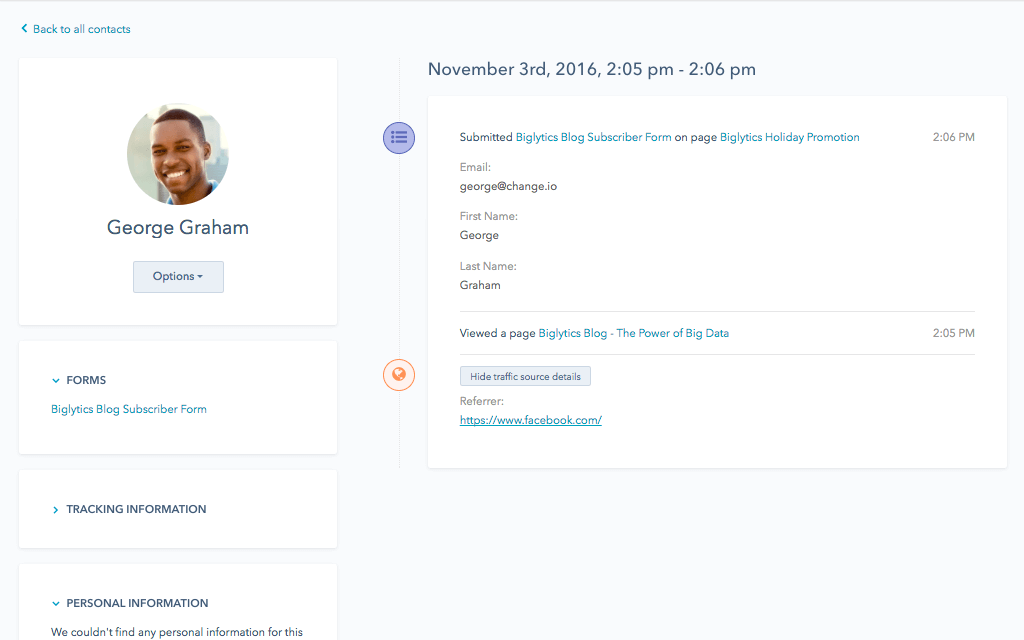
1. HubSpot – Free Marketing Plugin for WordPress
When it comes to WordPress form plugins, HubSpot’s very own plugin offers some special advantages.
First, it’s more than just your traditional form builder. It includes tools to help you convert visitors on your site, tool that help you in building an email list, generating and tracking leads, and tracking user behavior on your website.
These include a lead generation dashboard, lead capture tools like pop-ups, slide-ins, and exit intent forms, a static form builder tool, a contact database, and lead insights for the first seven days of website activity after lead capture. All these features work immediately, right out of the box, with no dev help required.
You’ve also got the benefit of a native integration with the free HubSpot CRM, so you can track and manage all of your leads’ touch points across the customer journey.
2. Gravity Forms
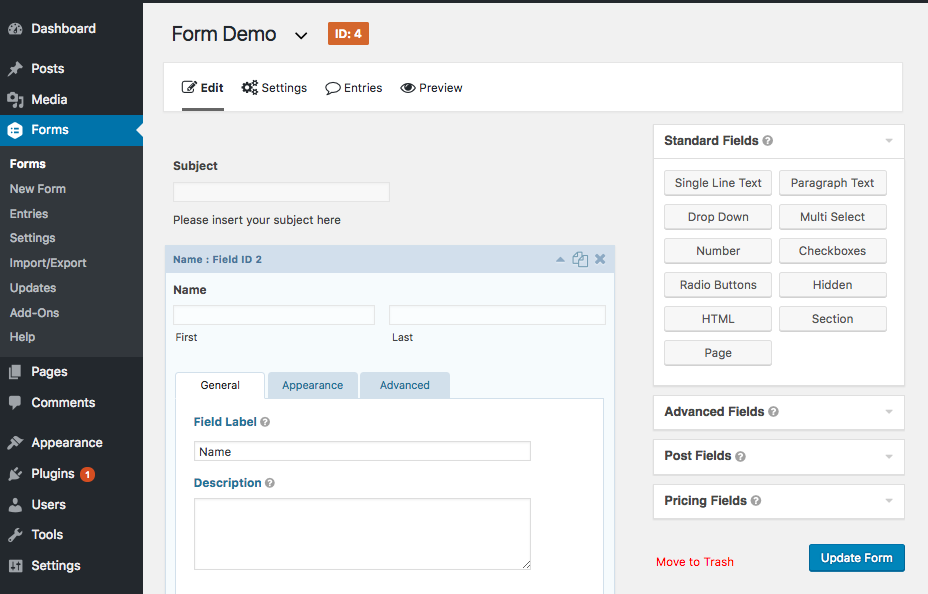
Gravity Forms is quite a powerful option for a WordPress contact form builder.
With Gravity Forms, you can build out multi-page/multi-step forms, create rules to limit which domains are acceptable on your forms (excluding gmail and competition for instance), and schedule forms to be implemented during a set time period.
In addition, they offer a deep integration library with email software, automation software like Zapier, and payment processors like Stripe and PayPal so you can accept payment with your forms.
In my experience, Gravity Forms is a bit complicated from the end-user perspective. Setting up custom integrations and even some basic design options can be somewhat difficult to set up, but if you want something highly customizable and advanced, this may be worth the effort.
3. FormCraft
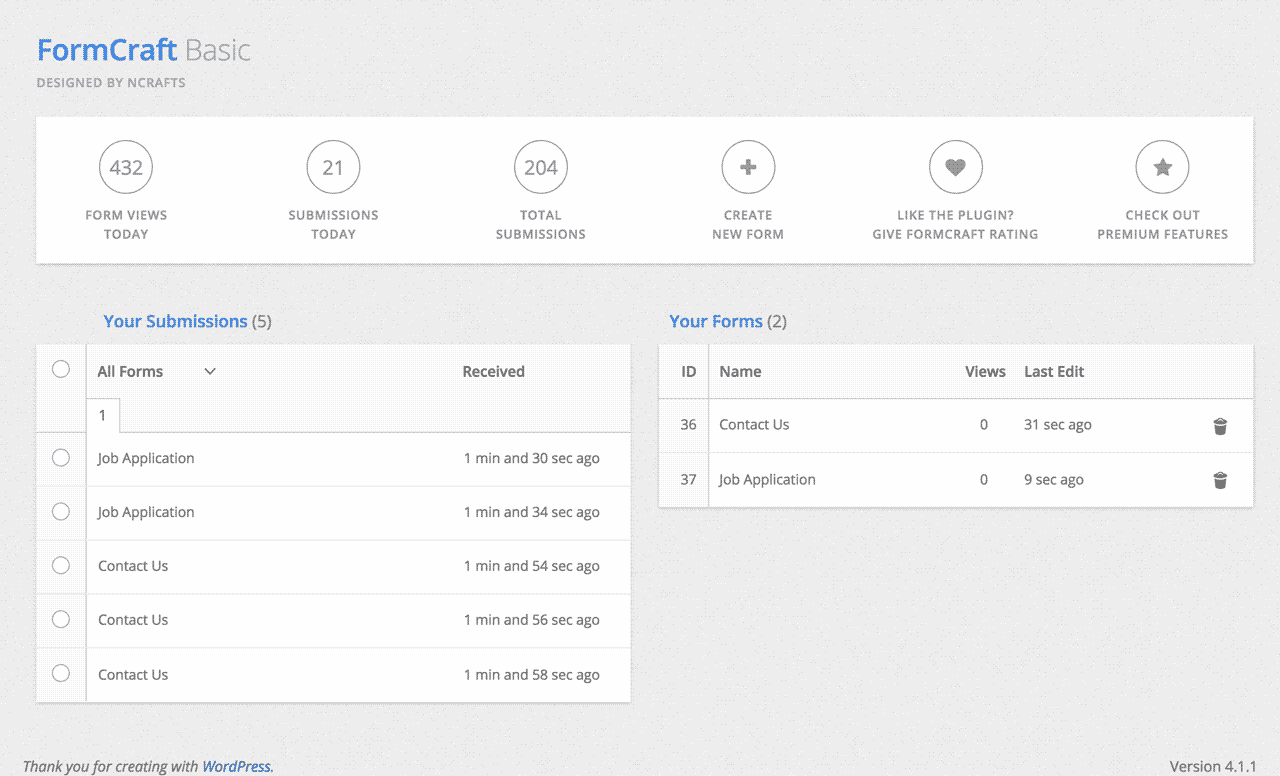
FormCraft is WordPress form plugin that focuses on ease of use and design. Basically, they make sure all the forms made with FormCraft are as stylish and beautiful, and you can make them that way with ease.
It’s responsive, somewhat customizable, and includes email notifications so you don’t need to log in to monitor your lead generation process. The premium version has a lot more features, such as conditional logic, auto-save form progress, form analytics, and more. The free version is somewhat limited, but again, it’s easy to use and makes nice looking forms.
4. Qu Form
Qu Form is another WordPress form builder that bills itself as “advanced.” It’s primarily a drag and drop editor that can build out a variety of form types, from contact us forms to billing forms.
This one comes with most features you’d want, including multi-page forms and smart branching logic, and it’s also pretty customizable on the style and design side of things (also pretty easy to do so).
Plans start at $29.
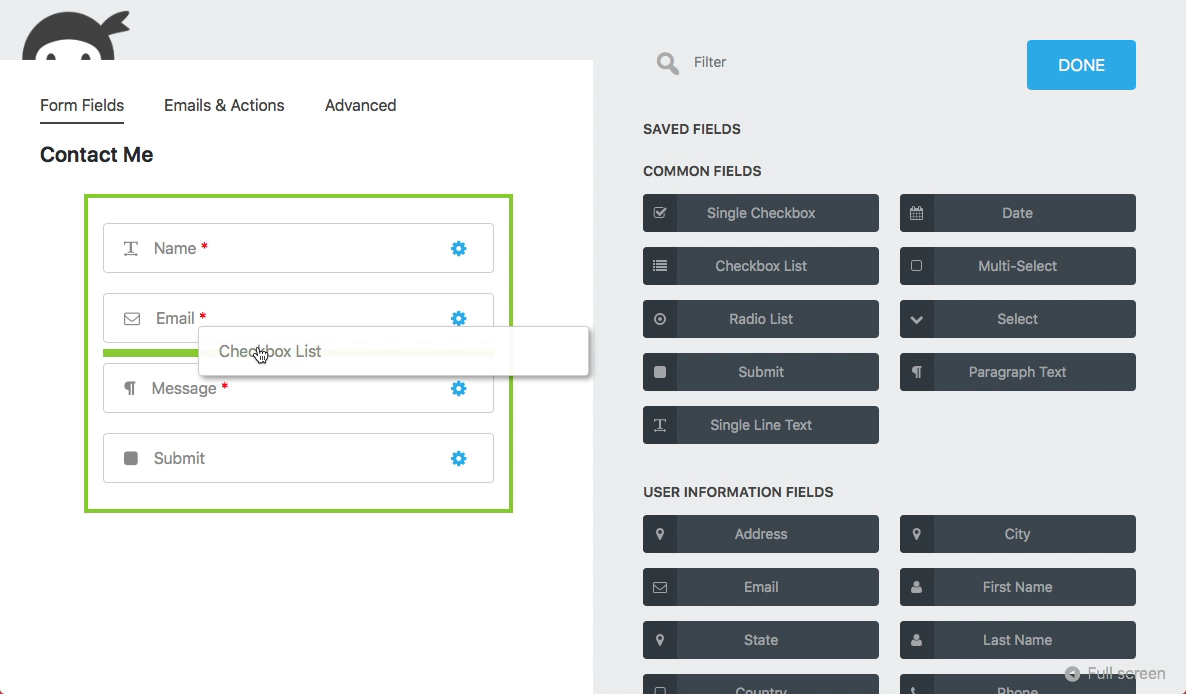
5. Ninja Forms
Ninja Forms is one of the more powerful WordPress form builders. It’s free. It’s easy to use. It’s got no limitations on form fields, forms, or submissions.
It also has several native integrations with popular email service providers as well as payment processors, so you can easily sync of your systems and automate much of the administrative process usually inherent with forms tools.
It also contains a pretty easy to use drag-and-drop editor.
6. Jetpack’s Contact Form
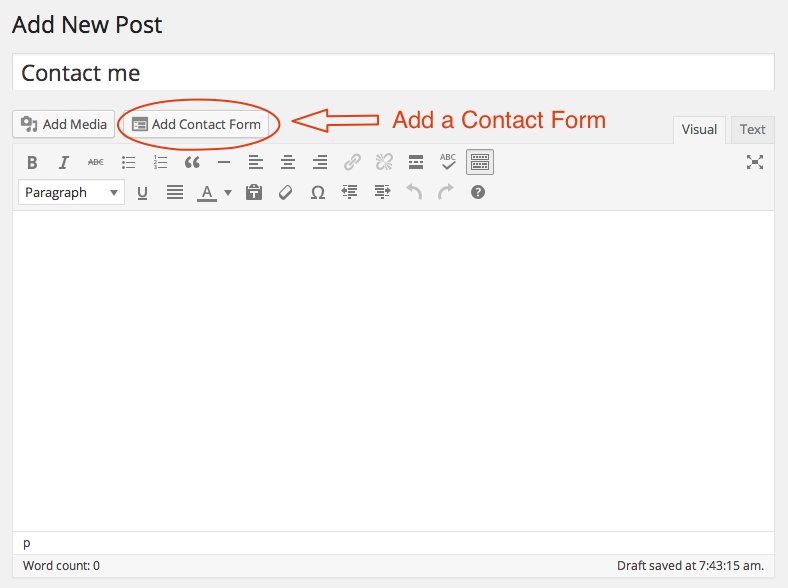
Jetpack is a popular WordPress plugin that comes with many templates. It’s actually made by Automattic, and it includes more than just a form builder. Some of its features include:
- Site stats and analytics
- Automated social media posting and scheduling in advance
- Elasticsearch-powered related content and site search
- SEO tools for Google, Bing, Twitter, Facebook, and WordPress.com
- Advertising program that includes the best of AdSense, Facebook Ads, AOL, Amazon, Google AdX, and Yahoo
- Simple PayPal payment buttons
Its WordPress contact form feature is relatively limited in scope, but if you’re already using Jetpack and just want something simple, this is a good place to start.
7. Form Maker
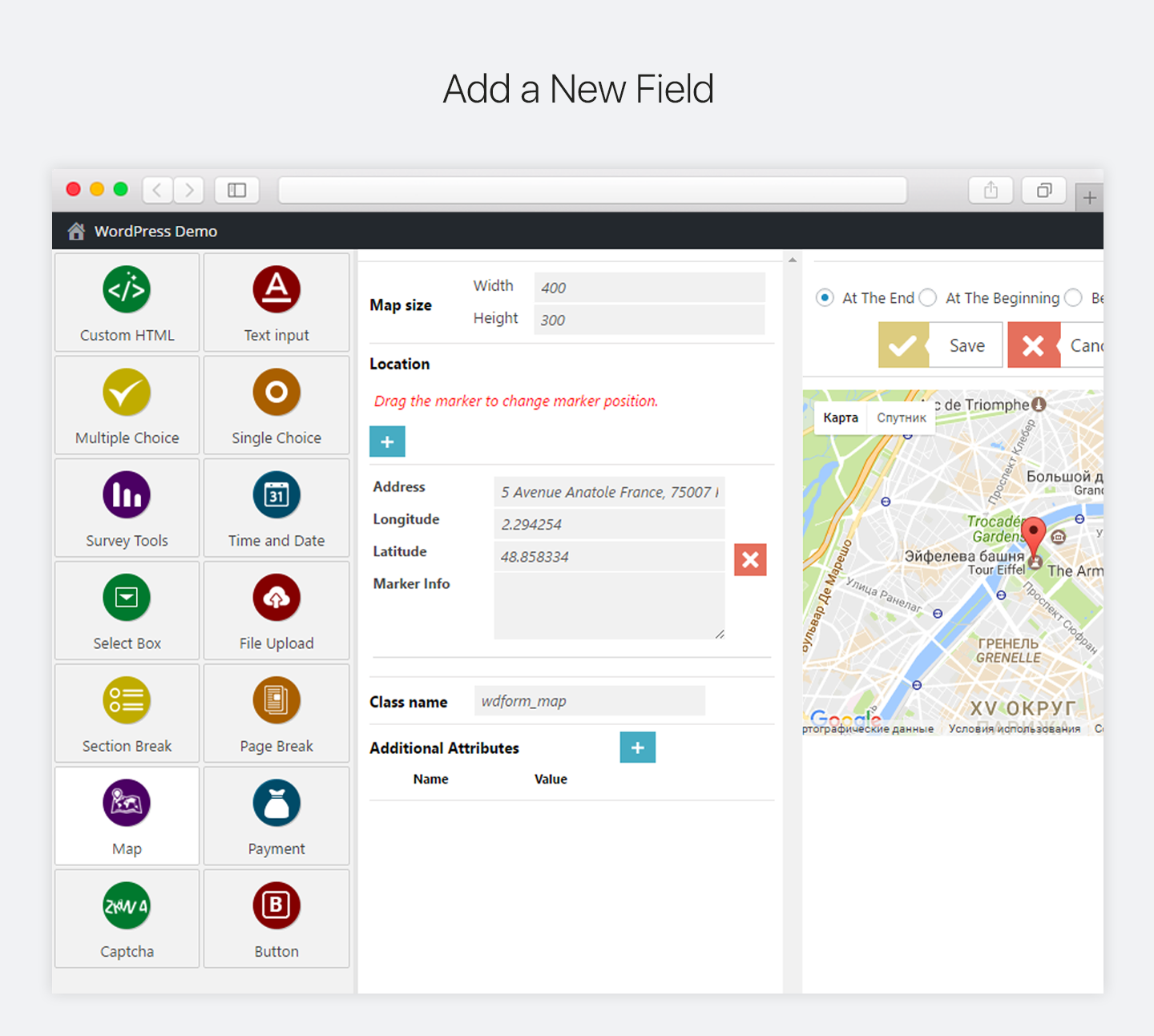
Form Maker by WebDorado is an easy to use and intuitive form builder. It has a drag and drop editor, and they have several functionalities for their forms, including questionnaires, contact forms, surveys, and quizzes.
The free version, however, is limited to seven fields. Their integrations are somewhat limited as well.
3. Contact Form 7
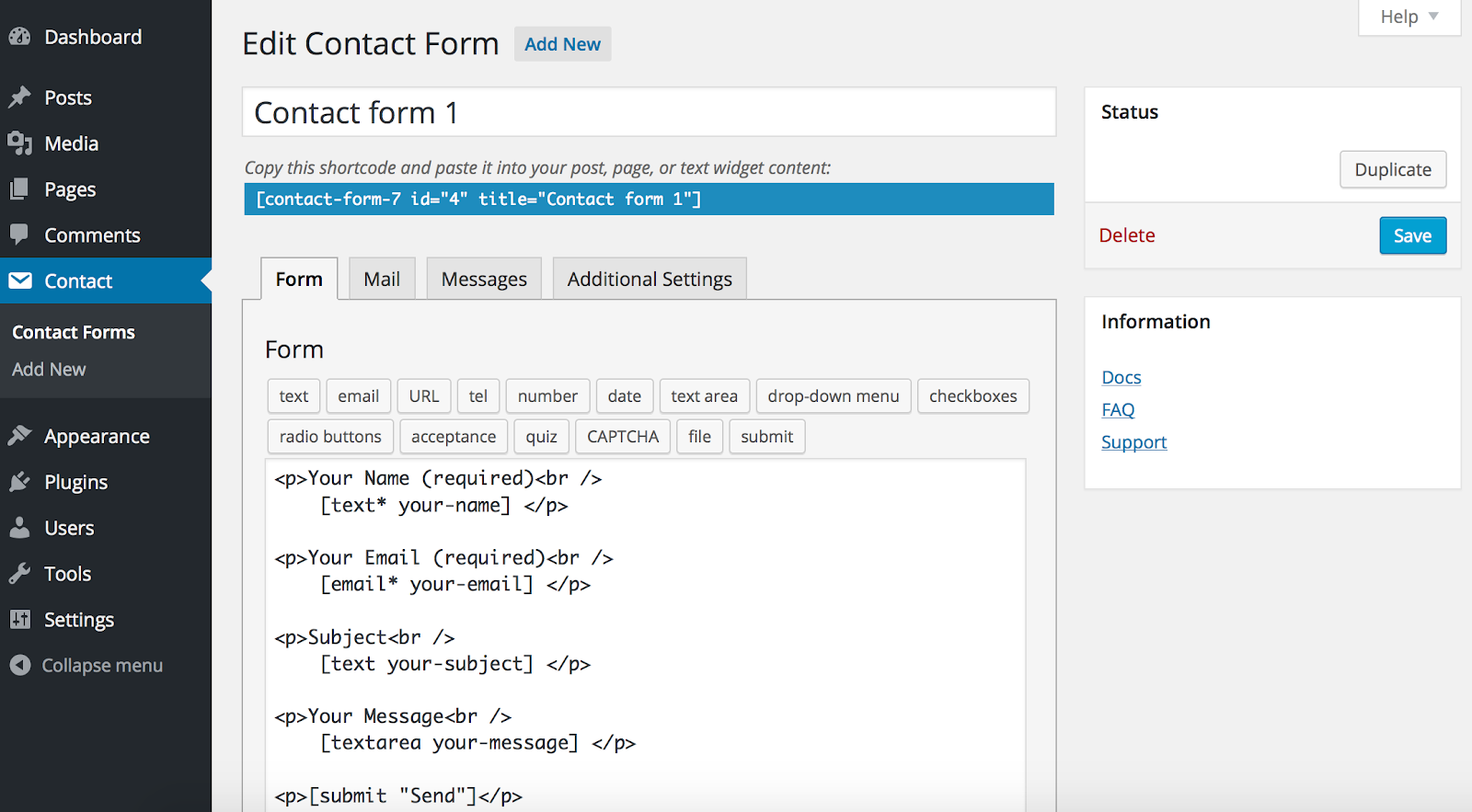
Contact Form 7 is one of the most popular WordPress form plugins. Its main focus (no surprise here) is on contact forms.
The big benefit is that it is super simple to create contact forms and deploy different forms across your site. The downside is that its use cases are limited compared to other WordPress form plugins.
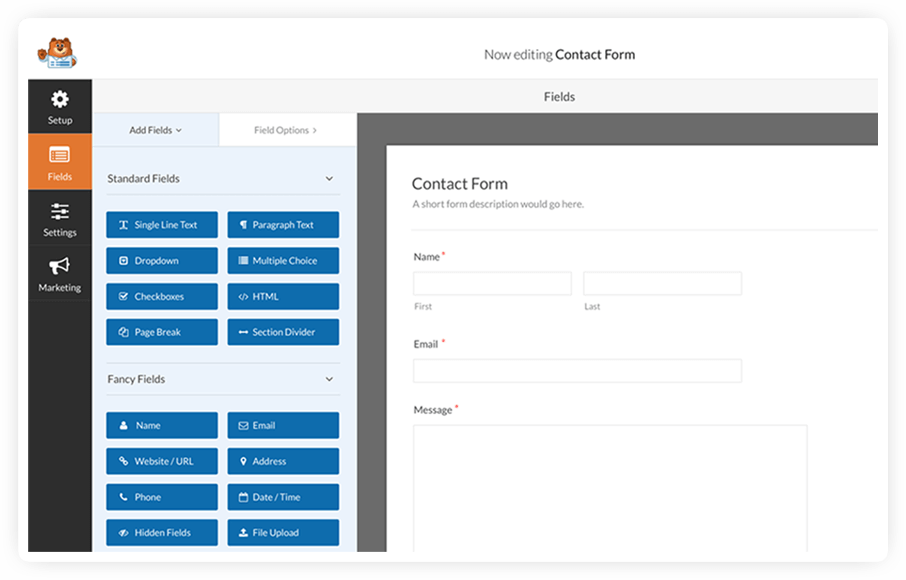
9. WP Forms
WP Forms is another widely used form builder that offers advanced branching logic, customizability, and a drag and drop editor.
They emphasize their ability to work across many use cases, and offer templates and ready to use workflows for payments, contact forms, registration, subscription, and more.
As far as I know, they don’t offer any free plans, but they’re basic plan is $49 per year.
10. eForm
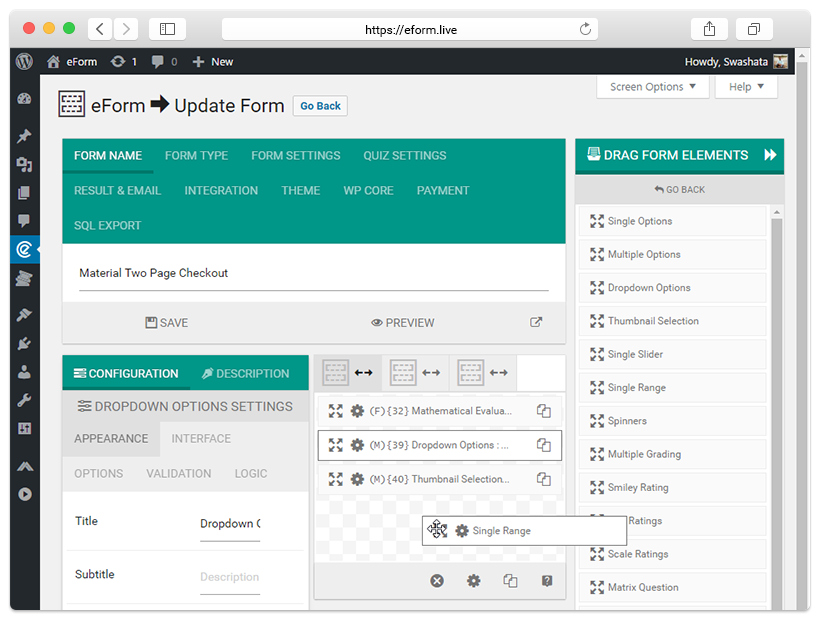
eForm, but WPQuark, is probably one of the more feature rich solutions for WordPress forms.
They have advanced implementations for most common uses cases, notably their eCommerce setup which includes full checkout and payment flows and native integrations with Stripe, PayPal, and WooCommerce.
There’s no free plan, but it starts at $38. This is a form builder if you have highly specific feature requirements and a desire to tweak things so they’re precisely the way you want them. It’s not necessarily the easiest tool to use.
11. Nex Forms
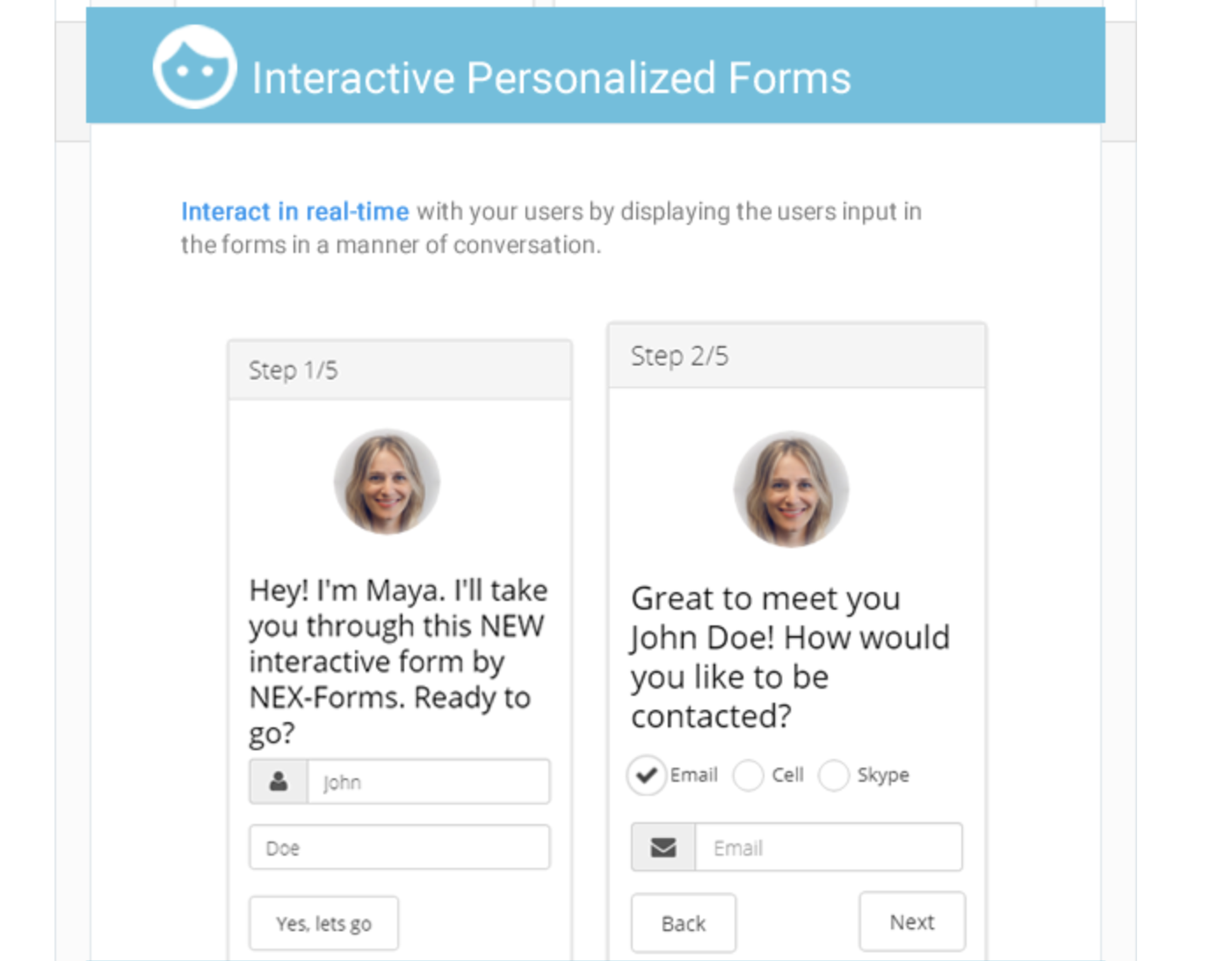
Nex Forms is a feature-rich form builder that has many interesting functions, like interactive forms, personalization, and pretty robust form analytics.
12. Visual Form Builder
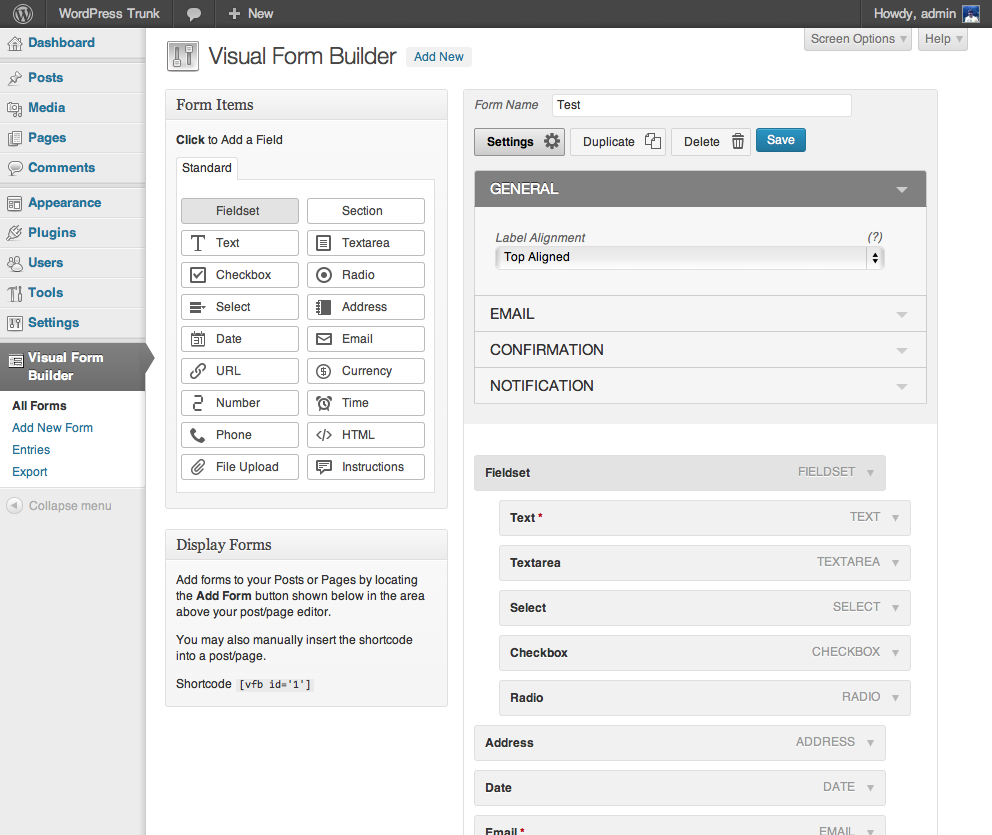
Visual Form Builder is a WordPress plugin that allows you to build and manage many different kinds of forms for your website in a single application. It’s easy to use for non-developers, and you can build a pretty nice looking form without writing any PHP, CSS, or HTML (though it doesn’t hurt if you can hack together some CSS).
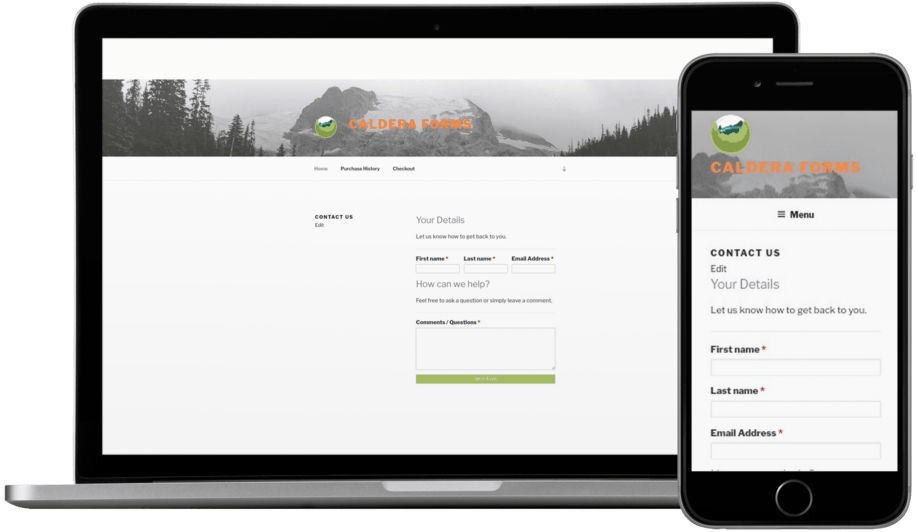
13. Caldera Form Builder
Caldera Form Builder is designed to be responsive and to have an intuitive, visual creator.
It’s got tons of native integrations as well as conditional logic and smart spam detection. There’s no free plan, though. Prices start at $14.99 per month.
14. Formidable Forms
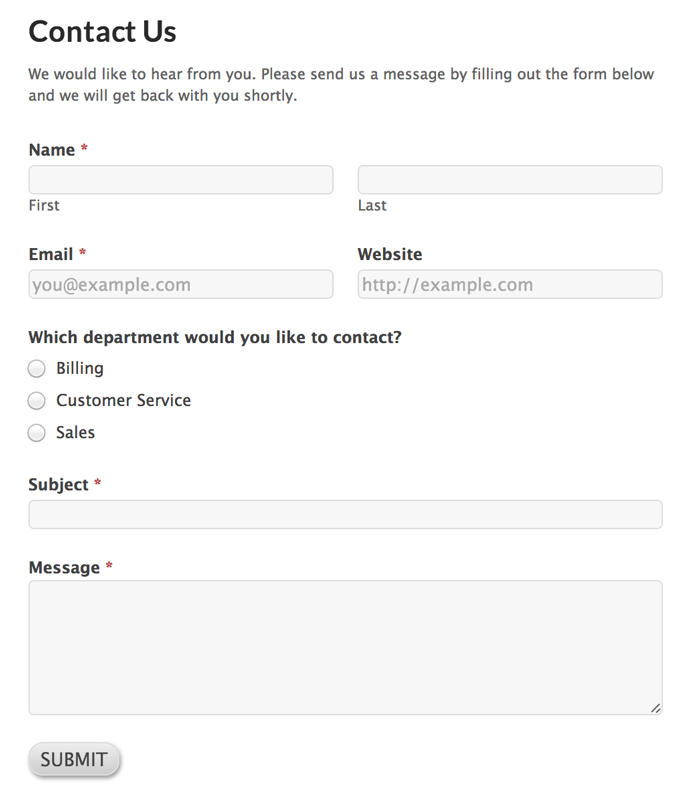
Formidable Forms prides itself on simplicity; it’s got a nice drag and drop visual editor, easy and automatic email notifications for form submissions, and all your basic pre-built form templates.
This is one of the easier tools to use and set up, but it’s a bit limited in its feature set (though to their credit, they have tons of add-ons you can download depending on what you want to do with your online form).
15. Pirate Forms
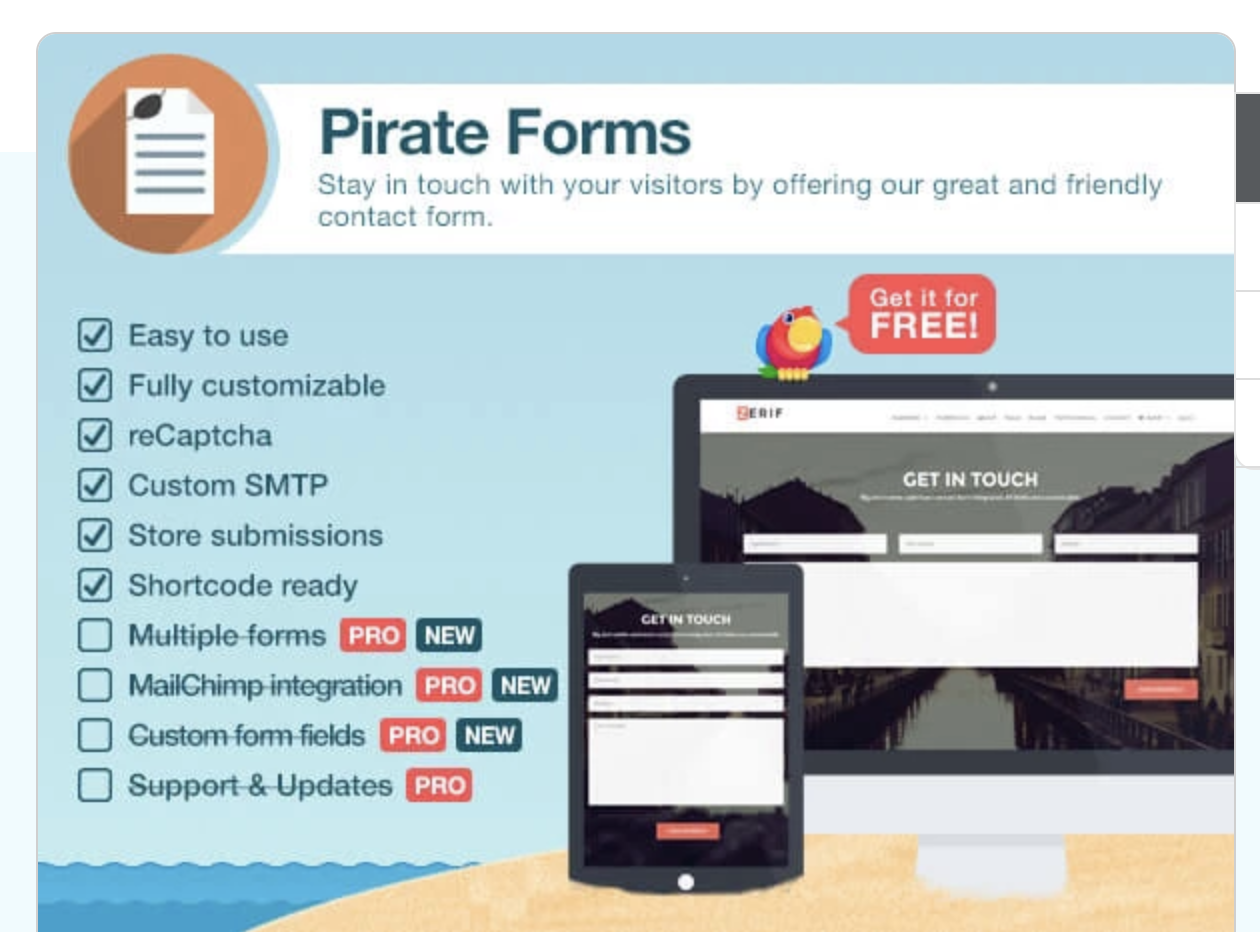
Pirate Forms is easy to set up, includes Recaptcha and SMTP, and has all the basic field properties you’d expect in a WordPress contact form.
The free version is super limited, though. To get multiple forms, or even basic integrations, you have to upgrade to pro.
The options are endless for WordPress form plugins.
The choice is ultimately up to you which one fits your personal workflow and your specific website needs. Most form builders include the basics – popular contact properties like email and name, multiple forms across your site, and some native integrations.
It just depends how simple versus customizable you want things, or if you care about things like automatically enriching your leads or analyzing their website behavior.
If you’re looking for a solution that is simple, inherently beautiful and designed with the user experience in mind, and that includes built-in lead intelligence mechanisms that sync to a free CRM, check out HubSpot’s free form builder software.

11 of the Best Free Google Sheets Templates for 2018
Whether your marketing position requires you to send invoices to clients, track website analytics, or create budget and expense reports, you’ve undoubtedly found yourself working with spreadsheets in some form.
And if you’re anything like me, those spreadsheets can feel frustratingly tedious when you’re under a time crunch.
Fortunately, Google Sheets offers 26 pre-built templates, allowing you to create reports and analyze data in spreadsheets faster and more effectively.
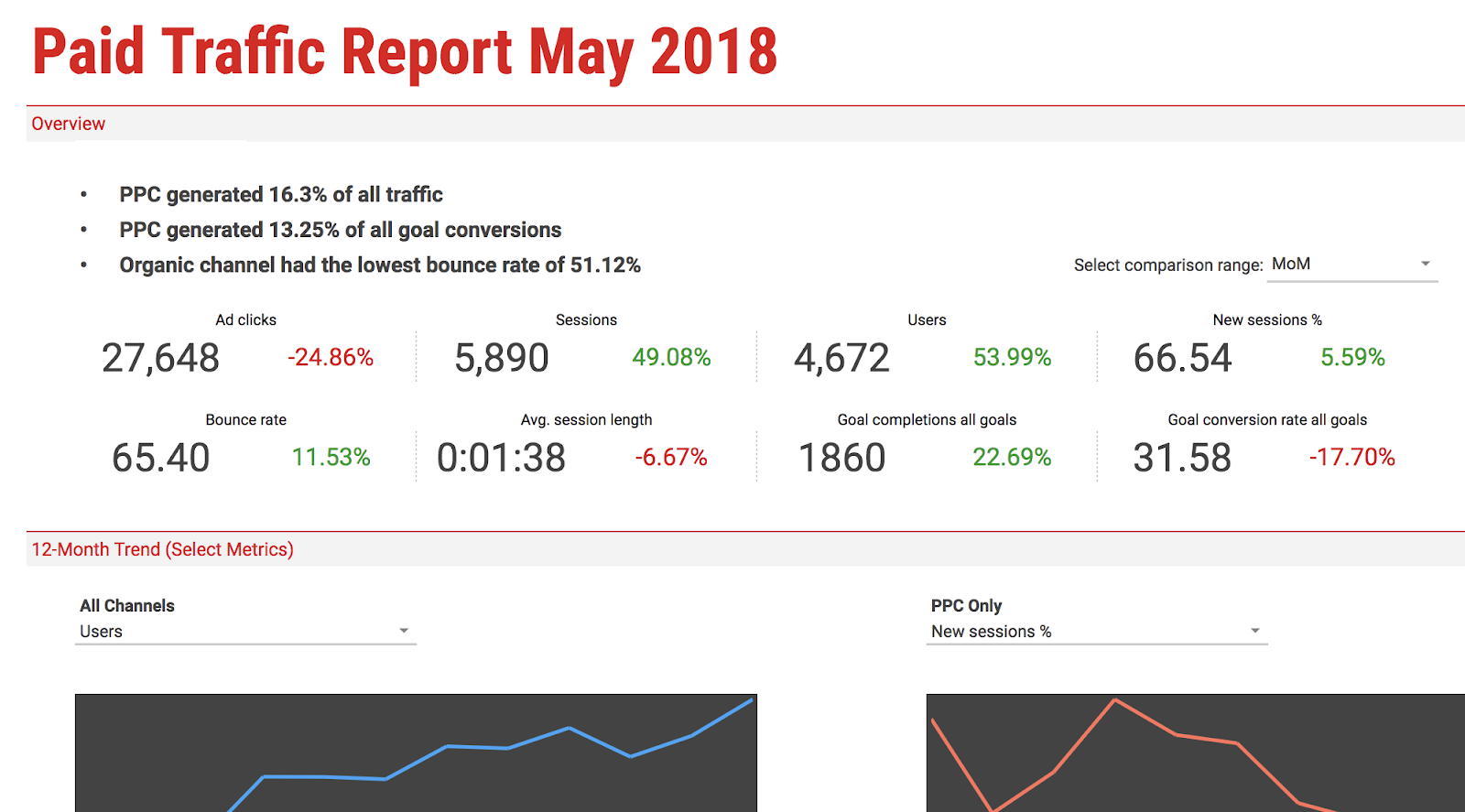
Best of all, Google Sheets templates cater to specific categories — if you click the Paid Traffic Report template, for instance, your spreadsheet is already organized into Overview, 12-month Trends, and Medium Breakdown categories. It knows what you need, and offers it without any manual input.
Here, we’ll delve into 11 of the best free Google Sheets Templates for any marketing role in 2018, so you can create better spreadsheets while saving valuable time to focus on more important things — like the data itself.
Google Sheets Templates for Finances
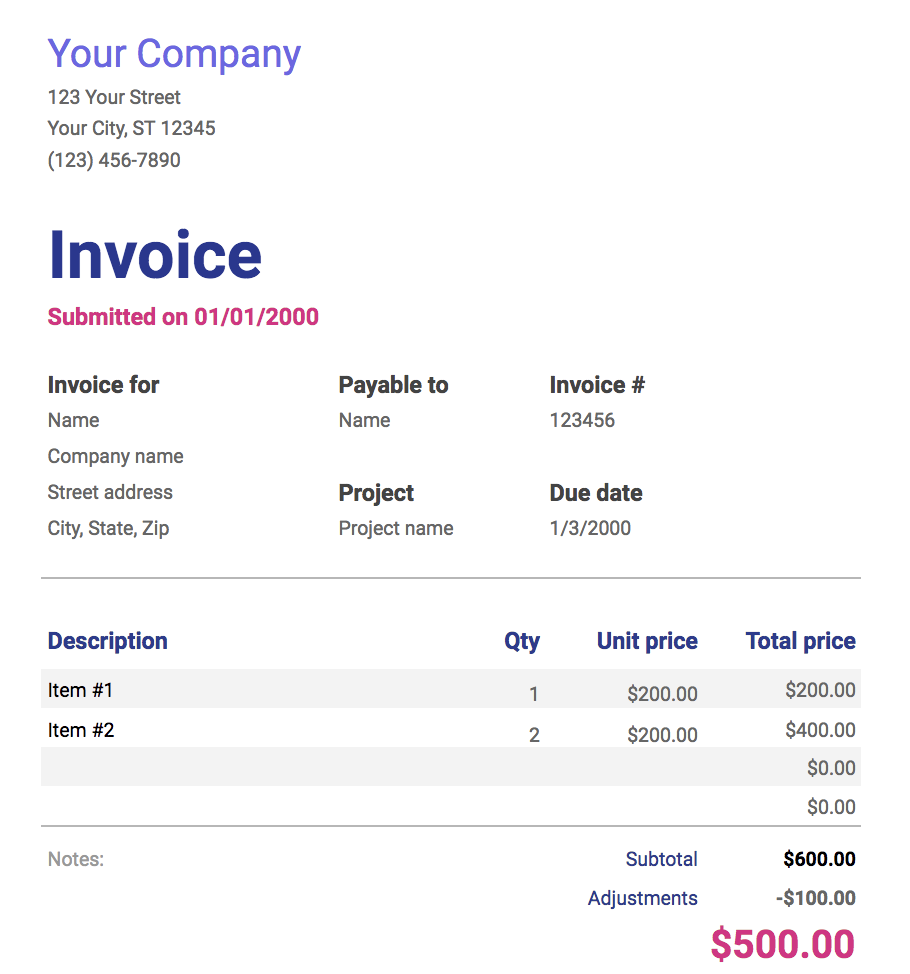
If you’re a freelancer or work for a small business, you probably use invoices to bill clients for services. This invoice template makes the process simple — it provides space for all the necessary information, and looks more professional than a plain spreadsheet. Plus, the template is customizable, so you can create a theme that aligns well with your brand image.
This template is more in-depth than it initially appears. There are tabs at the bottom — setup, income, expenses, summary — and each one includes a number of subcategories. “Expenses”, for instance, covers everything from taxes and insurance, to travel and customer acquisition. The final tab, “summary”, takes your income, subtracts your expenses, and automatically updates to display your ending balance each month. This template is a good option if your budget requires a lot of customization and has a lot of moving parts.

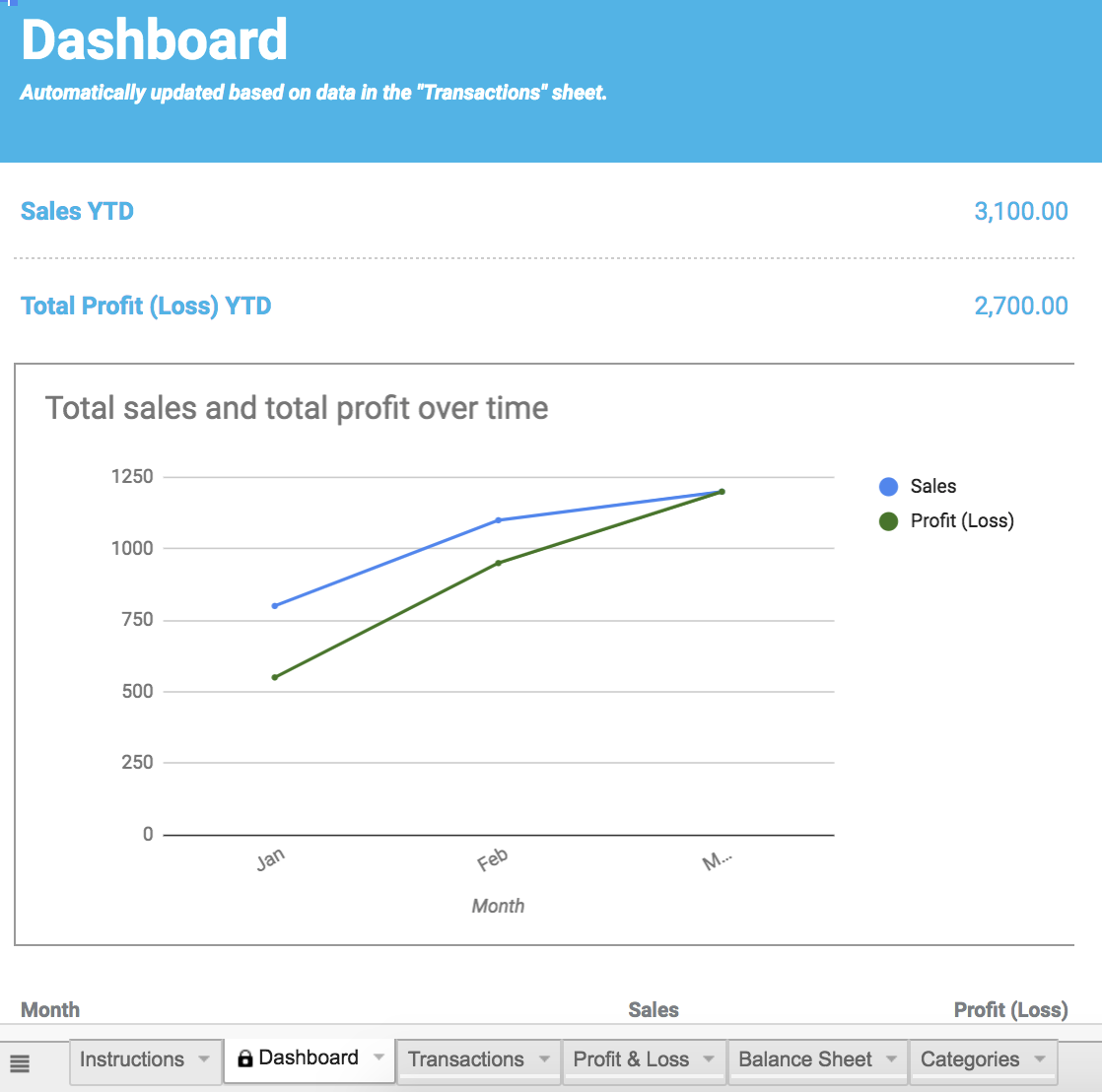
The financial statements template truly is an all-in-one resource to keep track of business transactions, profits, and losses. The “profit & loss” tab automatically summarizes revenue, costs, and expenses for the year, and can display your growth rate percentage. If you work for a small business and need to manage much of your own finances, this template offers resources and guidance to make the process easier, and less prone to human error.
Google Sheet Templates for Reporting and Analytics
If your role requires you to analyze website traffic using Google Analytics, this template is a fantastic supplemental tool to pull that data into an organized report, saving you tons of time. Better still, you can use the template with Supermetrics Google Sheets add-on to monitor and analyze data from PPC, SEO, social media, and website analytics.

5. Website Paid Traffic Report
This template makes the process of analyzing and reporting on paid traffic relatively seamless. It automatically collects data on your paid sources from Google Analytics, and provides a clean chart with important information, including PPC’s percentage of goal conversions, total traffic, and bounce rate. You can also adjust it to compare different time periods, or different channels or segments. If you’re looking for a way to demonstrate paid’s influence on your business, this is the tool to do it.
Google Sheet Templates for Customers
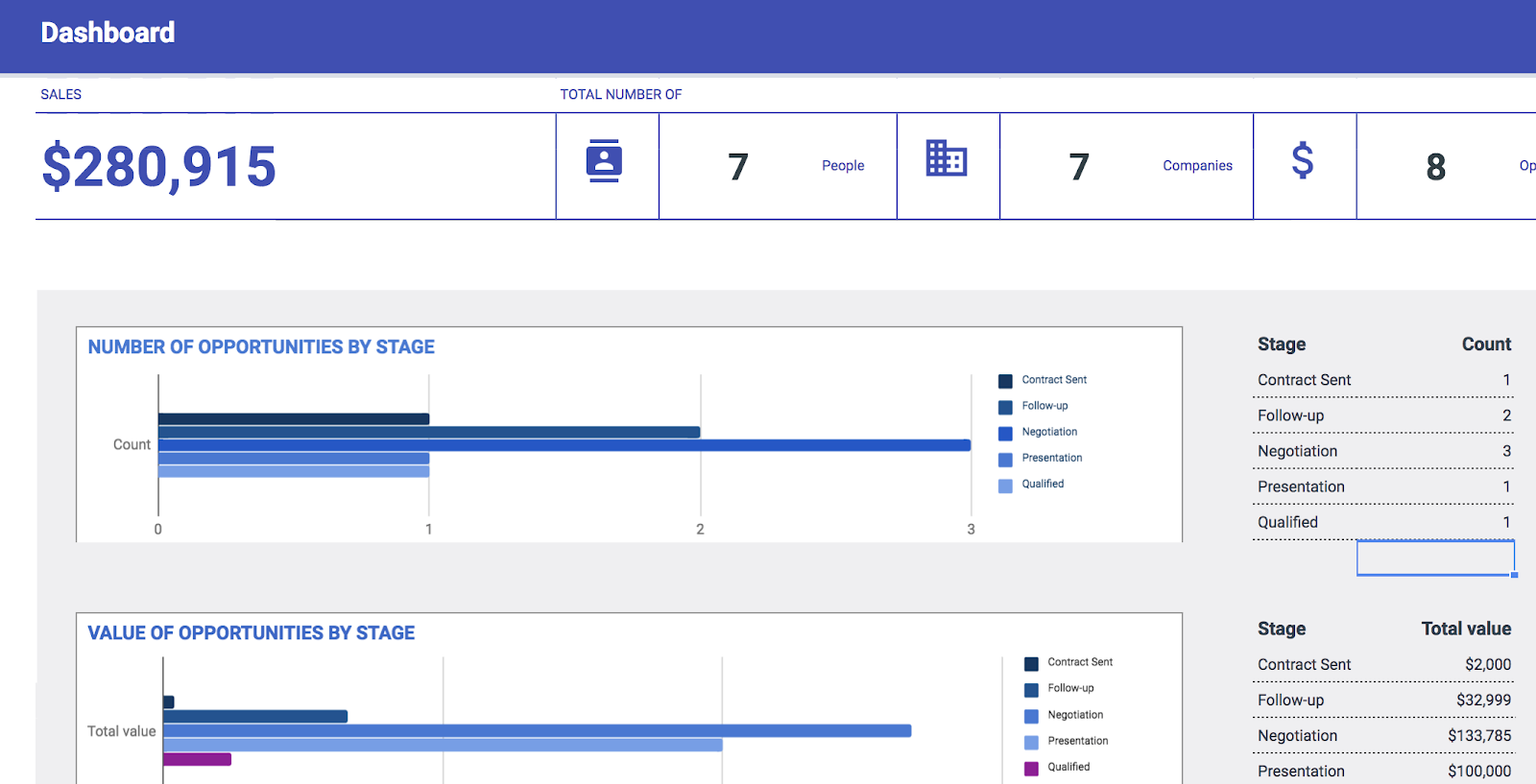
To organize your contacts and automate an effective sales and marketing process, it’s important you have a CRM — but if you’re a small company just starting out, you might not feel ready to implement a fully-established CRM with all the features. This CRM template is a great place to get your feet wet. It saves automatically so you never lose data, and the share feature allows you to work with coworkers within the CRM, which is helpful for encouraging collaboration between your sales and marketing departments.
Google Sheet Templates for Project Management
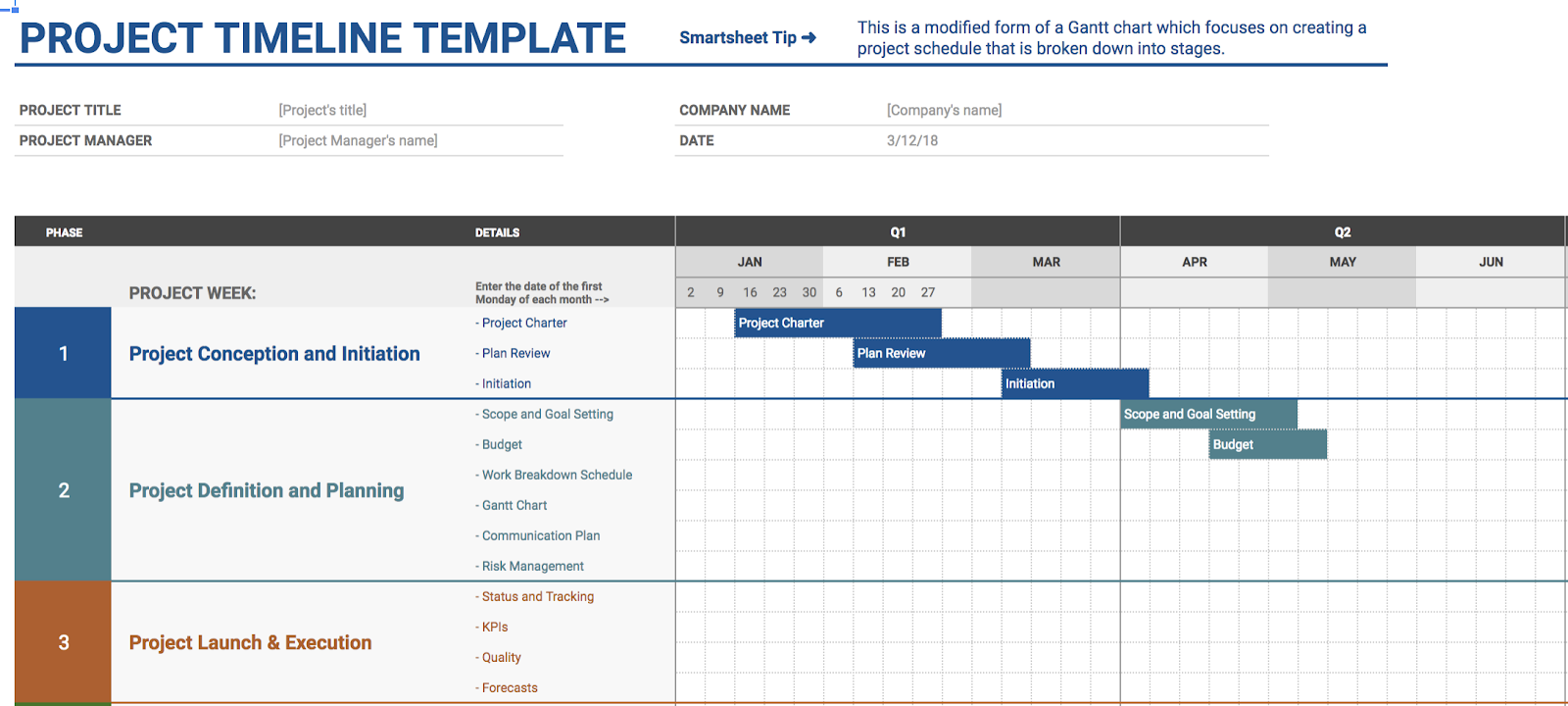
Whether this is your first major project or you’ve been managing projects for years, the project timeline template is a useful tool for organizing and implementing each project step. The template helps you visually break-up a daunting project into smaller pieces, ideally making it easier and less stressful to organize and delegate tasks.
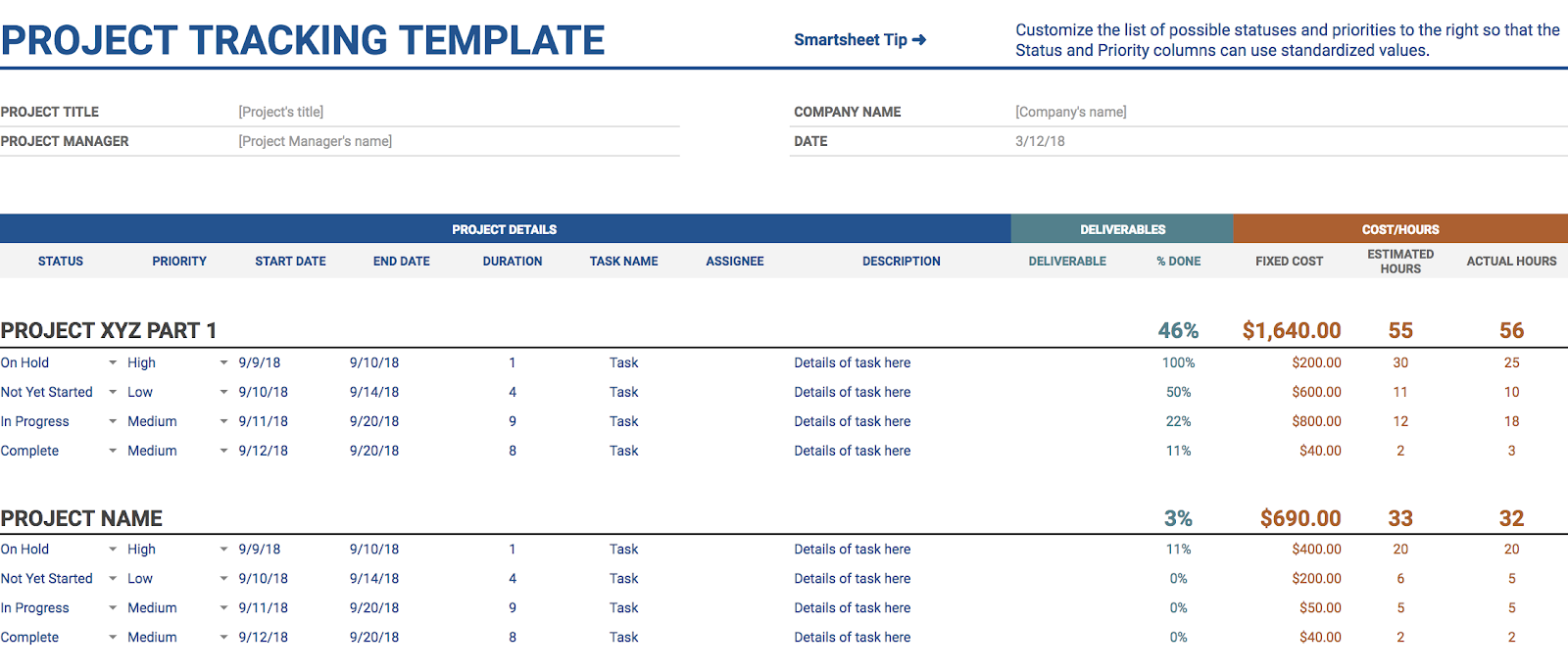
If you’re juggling a bunch of projects simultaneously, this project tracking template could become your new best friend. It enables you to organize your projects into categories by date, deliverables, status, cost, and hours — best of all, it lets you prioritize your projects. Hopefully, simply visualizing what needs to get done first will alleviate time-management stress.
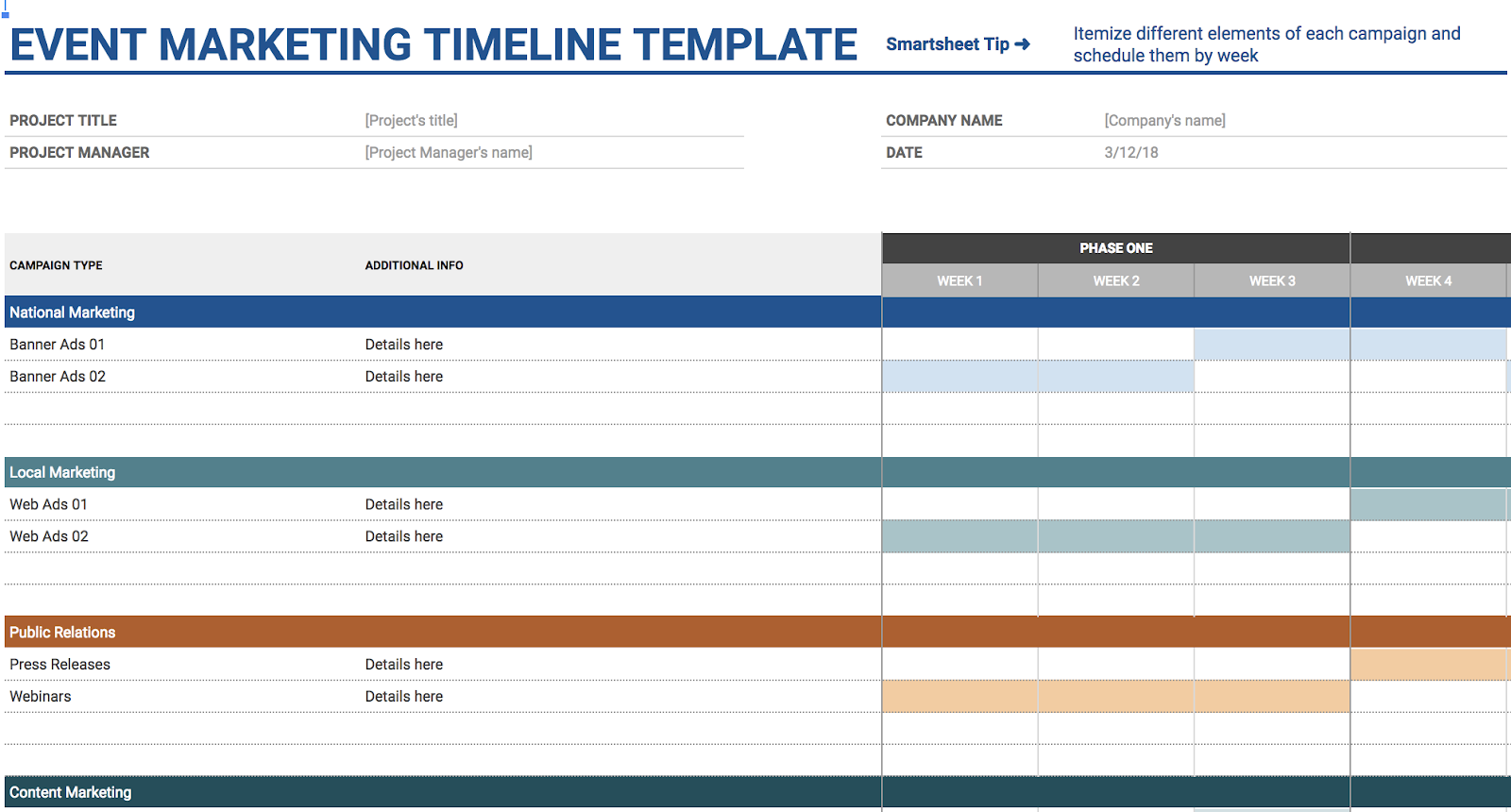
The event marketing template offers organization and structure if you’re implementing an upcoming business event or campaign. It offers categories you might’ve forgotten to consider, including local and national marketing, PR, and web, with subcategories ranging from email newsletter to impact studies. The template is already organized with all necessary categories for planning an event, reducing the time you spend on tedious manual input.
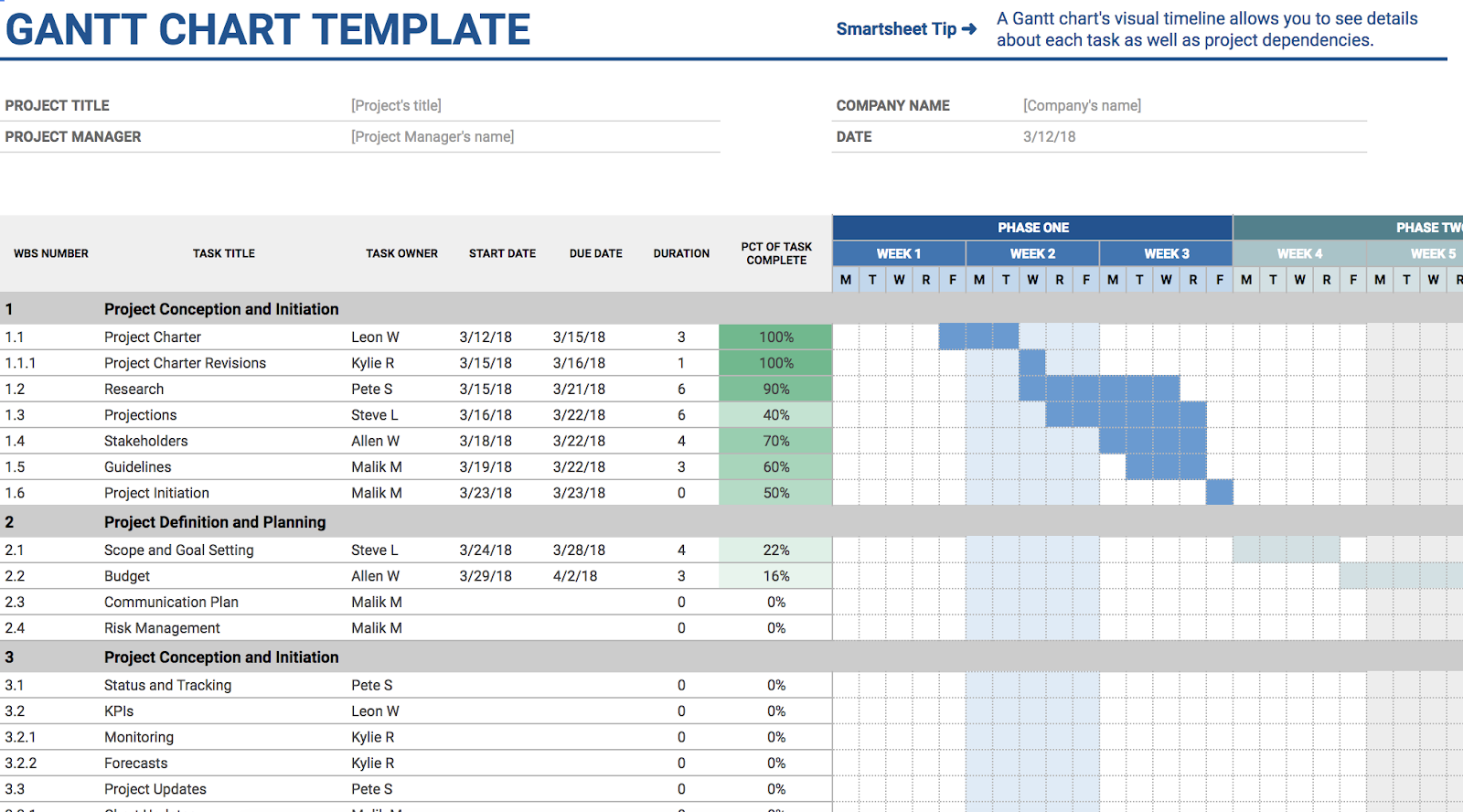
The Gantt chart template helps you alleviate any concern you might have over timing — and, when you’ve got a complex project with overlapping components, I’m willing to bet timing is one of your major concerns. Using the Gantt chart template helps you visualize all steps and delegate important tasks more efficiently — labelling the task with an owner on one chart is certainly easier than individually following up via email, and by sharing the template with coworkers, everyone is on the same page.
Google Sheet Templates for Leading a Team
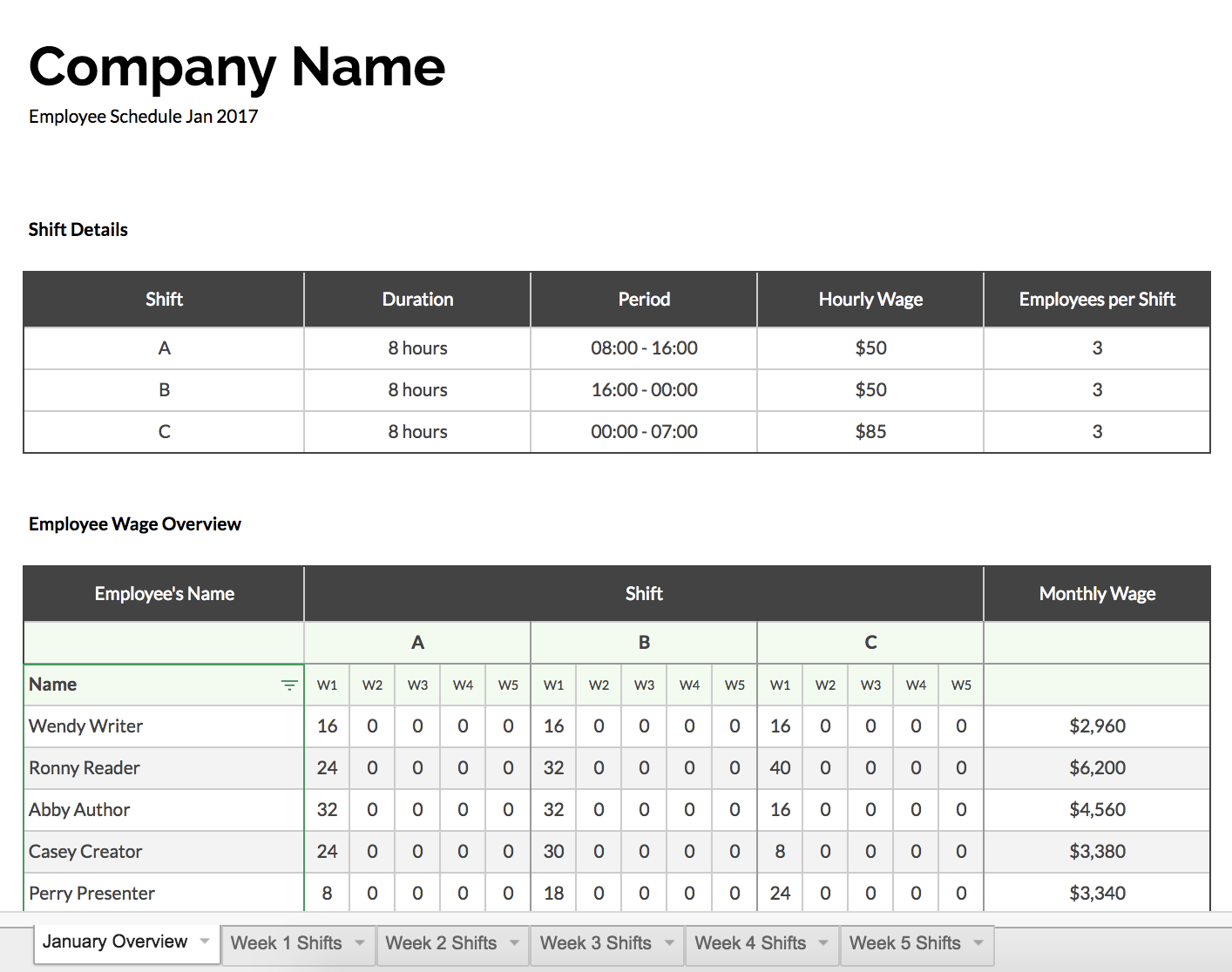
Keeping track of who works what hours, and how much each employee gets paid, can feel confusing, especially if you lead a team of part-time contractors or seasonal interns. This template includes slots for employee’s names, hours worked, and monthly wages, making your paycheck process straightforward and organized.

Decision Trees: The Simple Tool That’ll Make You a Radically Better Decision Maker
When faced with an important decision, there are a variety of informal methods you can use to visualize various outcomes and choose an action — perhaps you talk it out with a colleague, make a pros and cons list, or investigate what other leaders have done in similar situations.
Particularly when it comes to marketing, this can feel risky — what if my colleague is so attached to a new product, she doesn’t want to mention any of its shortcomings? What if my marketing team doesn’t mind office growth, but they haven’t considered how it will affect our strategy long-term?
Sometimes, you can’t make a decision properly without introducing a formal decision-making method. In cases like those, you might need a decision tree.
What is a decision tree?
A decision tree is a flowchart-style diagram to help you analyze various courses of action you might take for any given obstacle, and the consequences for each. There are three parts to a decision tree: the root node, leaf nodes, and branches. This method can help you weigh risk versus reward, and map out a course of action to follow.
The visual element of a decision tree helps you include more potential actions and outcomes than you might’ve if you just talked about it, mitigating risks of unforeseen consequences. Plus, the diagram allows you to include smaller details and create a step-by-step plan, so once you choose your path, it’s already laid out for you to follow.
Here, we’ll show you how to create a decision tree and analyze risk versus reward. We’ll also look at a few examples so you can see how other marketers have used decision trees to become better decision makers.
Decision Tree Analysis
Let’s say you’re deciding whether to advertise your new campaign on Facebook, using paid ads, or on Instagram, using influencer sponsorships.
For the sake of simplicity, we’ll assume both options appeal to your ideal demographic and make sense for your brand.
Here’s a preliminary decision tree you’d draw for your advertising campaign:
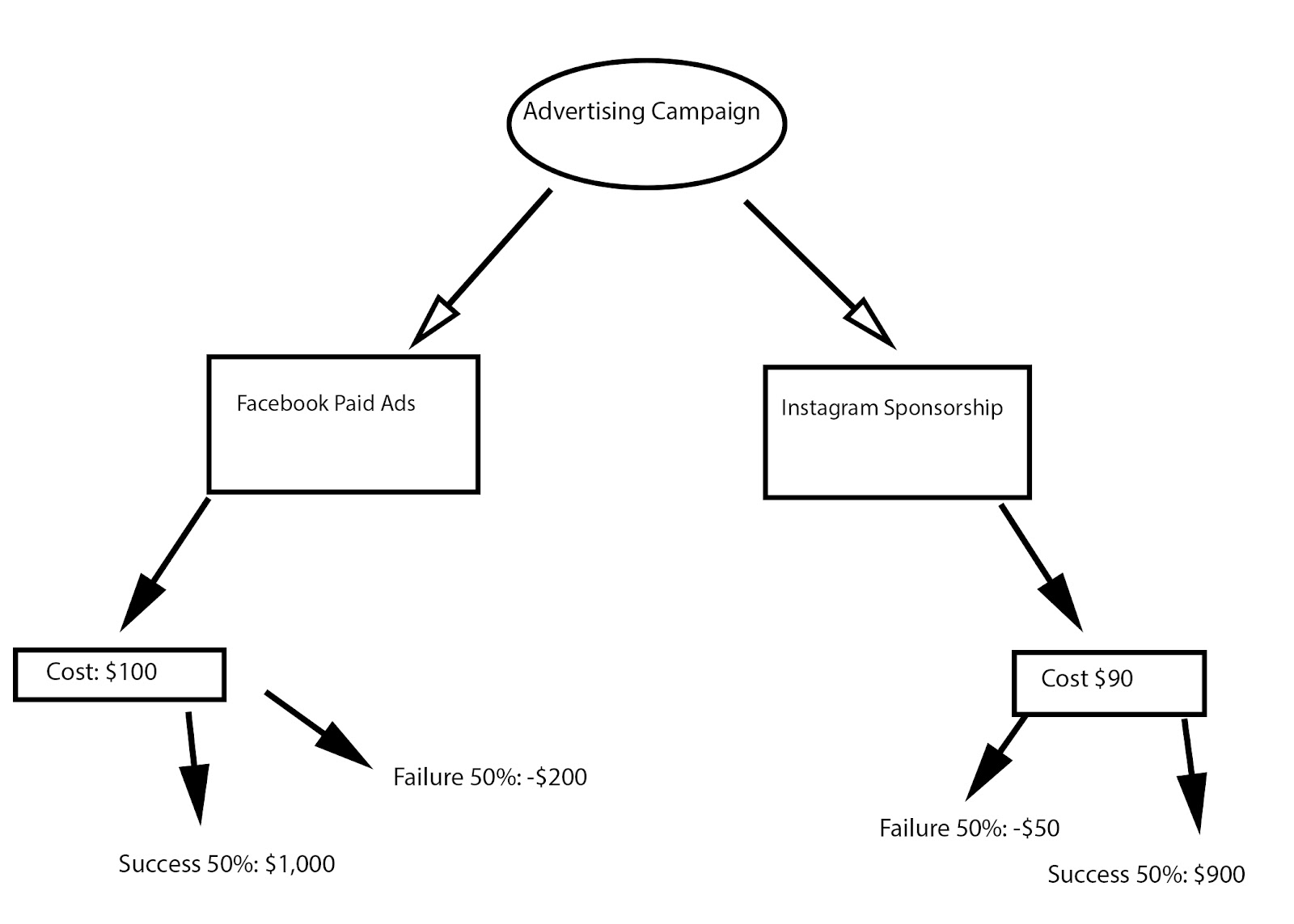
As you can see, you want to put your ultimate objective at the top — in this case, Advertising Campaign is the decision you need to make.
Next, you’ll need to draw arrows (your branches) to each potential action you could take (your leaves).
For our example, you only have two initial actions to take: Facebook Paid Ads, or Instagram Sponsorships. However, your tree might include multiple alternative options depending on the objective.
Now, you’ll want to draw branches and leaves to compare costs. If this were the final step, the decision would be obvious: Instagram costs $10 less, so you’d likely choose that.
However, that isn’t the final step. You need to figure out the odds for success versus failure. Depending on the complexity of your objective, you might examine existing data in the industry or from prior projects at your company, your team’s capabilities, budget, time-requirements, and predicted outcomes. You might also consider external circumstances that could affect success.
In the Advertising Campaign example, there’s a 50% chance of success or failure for both Facebook and Instagram. If you succeed with Facebook, your ROI is around $1,000. If you fail, you risk losing $200.
Instagram, on the other hand, has an ROI of $900. If you fail, you risk losing $50.
To evaluate risk versus reward, you need to find out Expected Value for both avenues. Here’s how you’d figure out your Expected Value: take your predicted success (50%) and multiply it by the potential amount of money earned ($1000 for Facebook). That’s 500.
Then, take your predicted chance of failure (50%) and multiply it by the amount of money lost (-$200 for Facebook). That’s -100.
Add those two numbers together. Using this formula, you’ll see Facebook’s Expected Value is 400, while Instagram’s Expected Value is 425.
With this predictive information, you should be able to make a better, more confident decision — in this case, it looks like Instagram is a better option. Even though Facebook has a higher ROI, Instagram has a higher Expected Value, and you risk losing less money.
How to create a decision tree in Excel
- Put your base decision under column A, and format cell with a bold border
- Put potential actions in column B in two different cells, diagonal to your base decision
- In column C, include potential costs or consequences of the actions you put in column B
- Go to shape tool, and draw arrow from initial decision, through action and consequence
While the Advertising Campaign example had qualitative numbers to use as indicators of risk versus reward, your decision tree might be more subjective. For instance, perhaps you’re deciding whether your small startup should merge with a bigger company. In this case, there could be math involved, but your decision tree might also include more quantitative questions, like: Does this company represent our brand values? Yes/No. Do our customers benefit from the merge? Yes/No.
To clarify this point, let’s take a look at some diverse decision tree examples.
Decision Tree Examples
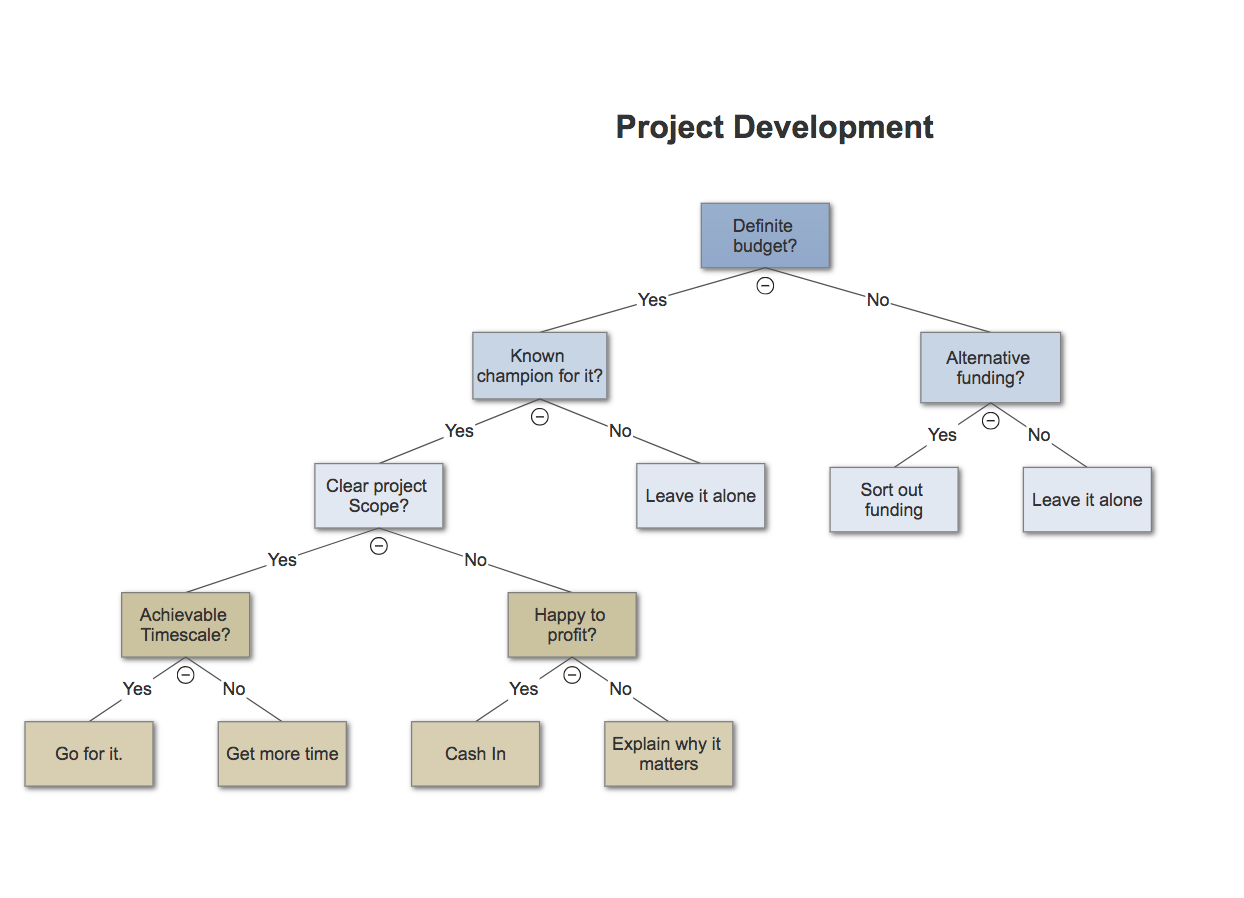
The following example is from SmartDraw, a free flowchart maker:
Example One: Project Development
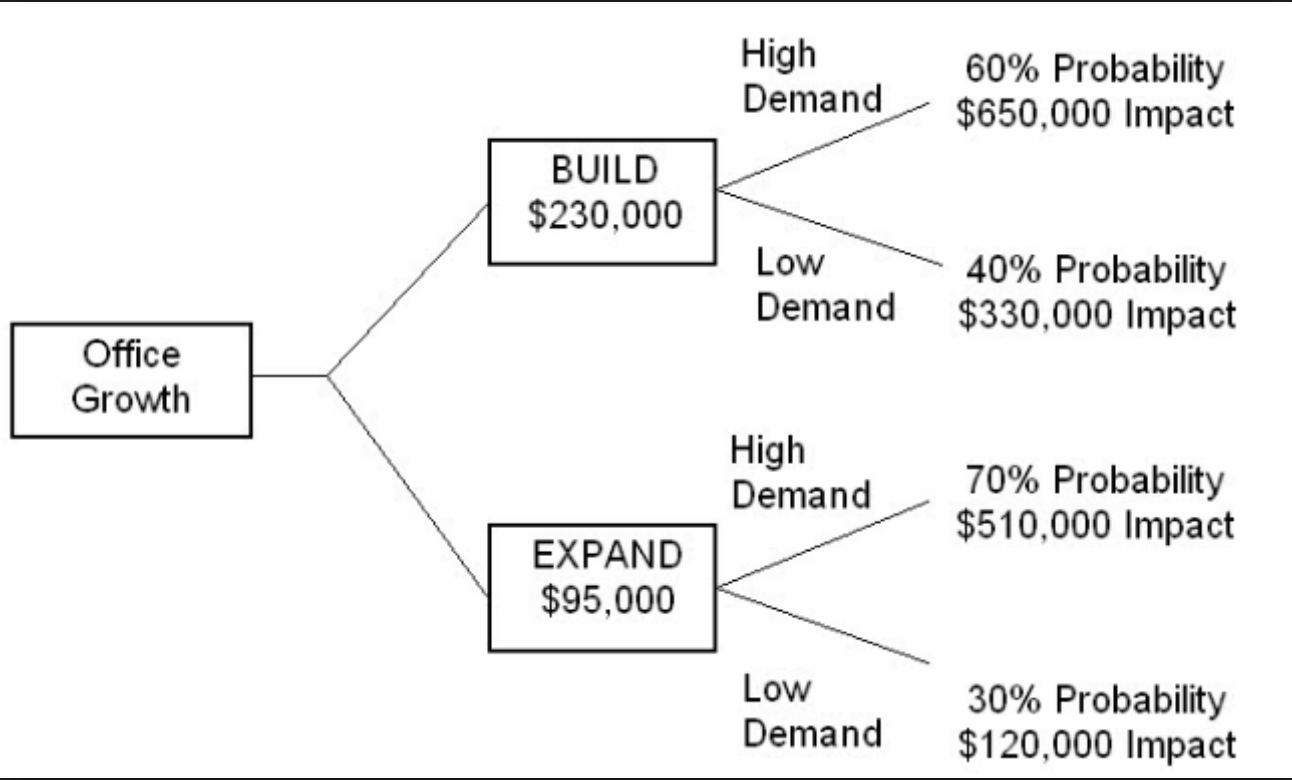
Here’s another example from Become a Certified Project Manager blog:
Example 2: Office Growth
Here’s an example from Statistics How To:
Example 3: Develop a New Product

To see more examples or use software to build your own decision tree, check out some of these resources:
- IBM SPSS Decision Trees
- LucidChart Decision Tree Software
- Zingtree Interactive Decision Tree Template
Remember, one of the best perks of a decision tree is its flexibility. By visualizing different paths you might take, you might find a course of action you hadn’t considered before, or decide to merge paths to optimize your results.

How to Write a Great Value Proposition [Infographic]
How to Write a Value Proposition
- Identify all the benefits your product offers.
- Describe what makes these benefits valuable.
- Identify your customer’s main problem.
- Connect this value to your buyer’s problem.
- Differentiate yourself as the preferred provider of this value.
Your value proposition is the core of your competitive advantage. It clearly articulates why someone would want to buy from your company instead of a competitor.
It’s also one of the most important conversion factors (learn all about conversion best practices with this free guide). A great value proposition could be the difference between losing a sale — and closing it.
So how do you actually write a value proposition that’s strong enough to lift conversion rates and sales? Below is a simple definition of a value proposition, what a value prop isn’t, and how customer value propositions differ from employee value propositions.
Then, at the bottom of this article, check out an infographic from QuickSprout, which illustrates what a great value proposition looks like and the top tactics you should keep in mind when creating it.
What Is a Value Proposition?
A value proposition isn’t just the product or service you agree to deliver to the customer — it’s the ingredient of your business that solves a problem competitors can’t.
Your value proposition is your unique identifier. Without it, people don’t have a reason to work with you over somebody else.
While your value prop should help differentiate you from the rest of the industry, keep in mind it’s not a slogan, tagline, or even a way to position yourself in the market. Those types of copy are important accessories to your brand, but your potential customers and employees don’t choose one business over the other based on a high-level mission statement.
Your value proposition goes deep into the problems you want to solve for people, and what makes you the right one for the job.
Customer Value Proposition vs. Employee Value Proposition
Although customers are your bottom line, you also need to attract staff that can help you deliver on your value proposition. This is where employee value propositions come into play.
Employee value propositions are written for the candidates you want to work for you. They touch on the internal company values that specifically benefit the people who work there. Here are some key differences between the customer value prop (CVP) and the employee value prop (EVP).
- CVPs describe a solution to a customer’s problem. EVPs describe a reward for an employee’s talents.
- CVPs explain why someone should buy from you. EVPs explain why someone should work with you.
- CVPs are about you serving the customer. EVPs are about you and the employee serving each other.
Now, compliments of QuickSprout, take a look at how great value propositions help a company grow.


Want more tips on company branding? Read 10 Cliché Marketing Taglines We Should All Stop Using.



The Top 58 Most Popular Hashtags to Get Likes and Retweets on Twitter
Recently, we analyzed millions of tweets and found that some Twitter hashtags correlate with a 1,065% increase in engagement — clearly, hashtags still matter in 2018.
More specifically, we found tweets with no hashtags averaged 1.7 interactions per tweet. Tweets that included #ico, the most popular hashtag, had an average of 19.8 interactions per tweet. That’s almost 12x higher engagement with the right hashtag.
We saw similar increases with other popular hashtags, like #medicaid, #ethereum, and #crowdfunding.
There are two possible explanations for this:
- Hashtags for popular searches like #tuesdaymotivation increase impressions per tweet. More impressions lead to more likes, replies, and retweets.
- Hashtags provide insight into content that naturally performs well. This might be true for #photography, #funny, or #pets.
To help increase engagement with potential customers on Twitter, we’ve compiled a list of the best hashtags to increase likes, retweets, and replies. Our list is by no means all-encompassing — we only covered a specific time period, and as trends change, so will popular hashtags. But the list should still provide longterm insights into general popular topics on Twitter, helping you create a more relevant content strategy.
Our Methodology
We used a dataset of tweets ranging from January 2017 to May 2018. Hashtags were only included if they occurred in a minimum of 300 tweets, by at least 100 unique accounts.
Best Hashtags to Get Likes on Twitter
First, let’s take a look at the 25 best hashtags to get likes on a tweet:
- ico
- ethereum
- crypto
- crowdfunding
- medicaid
- blackhistorymonth
- womenshistorymonth
- photography
- iwd2018
- cryptocurrency
- happyeaster
- womensday
- pressforprogress
- happybirthday
- internationalwomensday
- olympics
- pets
- friends
- piday
- worldwaterday
- funny
- contest
- starwarsday
- giveaway
- tuesdaymotivation
Some of these hashtags might surprise you — #worldwaterday, for example, doesn’t have much in common with #tuesdaymotivation, and yet both made the list.
The most popular hashtags fit into a few categories:
- Cryptocurrency: The recent rise of cryptocurrency wasn’t lost on social media — #ico, #ethereum, and #crypto occupied the top three spots. In addition, #cryptocurrency and #bitcoin were near the top of the list. It’s uncertain whether this trend will continue beyond 2018.
- History Months: #blackhistorymonth and #womenshistorymonth ranked 5th and 6th, respectively.
- Holidays/Other Days: The rest of the top 25 included #happyeaster, #happybirthday, #internationalwomensday, #piday, #worldwaterday, and #starwarsday. Also, #fathersday, #maythe4thbewithyou, and #memorialday just missed the cut.
- Contests: Social media contests, a popular way to increase engagement, are represented with #contest and #giveaway.
- Evergreen Content: Less topical but strong-performing content like #photography, #funny, and #pets also ranked.
Hopefully, the list is broad enough to help you easily incorporate one or two topics into your social media strategy — when it’s a holiday, for example, your business might do well posting Tweets relevant to that day, or if your engagement is low, you might consider creating a social media contest.

Best Hashtags to get Retweets
Some of the following hashtags overlap with our most-liked hashtags on Twitter, but others stand alone as popular for getting retweets but not necessarily for getting likes. Here’s a list of the 25 we found to be most retweeted:
- medicaid
- ico
- ethereum
- aca
- crypto
- crowdfunding
- giveaway
- contest
- blackhistorymonth
- womenshistorymonth
- cryptocurrency
- womensday
- happybirthday
- authentication
- win
- medicare
- internationalwomensday
- influencermarketing
- opioid
- healthinsurance
- qa
- funny
- womeninstem
- iwd2018
- photography
The most-retweeted list was similar to the most-liked list, but there are a few differences:
- Healthcare issues like #medicaid, #aca, #medicare, #healthinsurance, and #opioid all ranked higher.
- Contest hashtags like #giveaway, #contest, and #win also ranked higher.
There are a few possible explanations for these most retweeted hashtags. For instance, contest hashtags might rank high on the list as a result of contest creators asking for retweets instead of likes. This is probably a good strategy for smaller Twitter accounts looking to reach a new audience. However, a Twitter account with a lot of followers might see better results asking for likes, which could re-engage their existing audience.
Best Hashtags to Get Replies on Twitter
If you’re interested in engaging more meaningfully with your Twitter audience, you might benefit from the hashtags in this list. These 25 hashtags are most likely to result in a direct reply on Twitter, ideally sparking a conversation between your business and potential customers.
- merrychristmas
- giveaway
- contest
- win
- competition
- medicaid
- aca
- ethereum
- blackhistorymonth
- photography
- ff
- ico
- happybirthday
- metoo
- crypto
- womensday
- alcohol
- bitcoin
- gold
- movies
- running
- thankful
- birthday
- cryptocurrencies
- opioid
The most-replied-to hashtags are similar to our previous lists, but there are a few differences:
- #ff or Follow Friday, a popular way to get more followers on Twitter, made its first appearance.
- Similarly themed but new hashtags that ranked were #merrychristmas, #competition, #metoo, #gold, #thankful, and #birthday.
- Also making its first appearance was #alcohol. Maybe this is the Twitter equivalent of drunk-dialing?
Perhaps you might consider asking a question using one of these hashtags (“Favorite #movies?”) to increase replies from your audience. Twitter is meant to be a social platform — with these hashtags, you can hopefully elevate the conversations you’re having with your followers.
Best Twitter Hashtags for 2018
We also ran additional statistics on which hashtags performed the best from January 2018 to May 2018. Here’s the list of the 25 highest-performing hashtags for that period of time:
- crypto
- influencermarketing
- womenshistorymonth
- blackhistorymonth
- cryptocurrency
- bitcoin
- internationalwomensday
- cryptocurrencies
- java
- blockchain
- iwd2018
- competition
- pressforprogress
- influencer
- olympics
- influencers
- datascience
- fintech
- womenintech
- metoo
- deeplearning
- science
- sxsw
- fridayfeeling
- cloudsecurity
Currently, the topic cryptocurrency remains popular with #crypto, #cryptocurrency, #bitcoin, and #cryptocurrencies. However, there were a few new additions:
- #blockchain, which is the underlying technology behind bitcoin, has seen an increase in engagement. This makes sense, since Facebook, Amazon, and many others have recently made forays into using it. Blockchain also has a wide variety of possible uses, from financial applications to file sharing.
- #influencermarketing and #influencers also appear to be trending. Influencer marketing is an emerging type of marketing that focuses on using social influencers to amplify your message.
- Other rising, tech-related hashtags included #fintech, #deeplearning, #science, #cloudsecurity, and #java.
Finally, a few other top hashtags for 2018 that just missed the list include #smartcity, #python, #stem, #bots, #predictiveanalytics, #databreach, #robotics, #machinelearning, and #augmentedreality.
We don’t expect you to create quality content by stuffing your tweets with #java #womenintech and #funny — instead, we hope you can incorporate some of these hashtags into thoughtful messages you believe makes sense for your business, to encourage increased engagement with your audience.
Chris Sabanty codes stuff at HubSpot.

How to Make Competitive Intelligence Your Competitive Advantage
I stared at the sea of snow around me. White as far as the eye could reach. A blank, empty landscape.
It was exhilarating at first. No one ahead, no one tailing or overtaking me.
Unencumbered, I was completely alone.
Then I realized I was lost. What direction was I going in? Was I going in circles? Was I even on a path?
It was my first snowboarding trip in Japan and I had taken a wrong turn. And now, the beautiful landscape around me was devoid of anyone, or anything, that might give me a sense of direction.
Years later, it’s this experience that comes to mind when my friends in the startup industry complain about their competitors.
They long for a blank expanse of a market, free of competitors hurling their way forward alongside (or ahead, or behind) them. It’s an entrepreneur’s daydream: no one to stop you from speeding ahead, eyes firmly on the prize.
Of course, markets devoid of competitors are rare: if a product is worth making, the market around it won’t stay empty for long. If it does, the product probably wasn’t worth making.
Even so, the appeal remains. And that’s why we’re often told to ignore our competitors completely.
Shut them out, focus single-mindedly on your product and users: everything else will fall into place.
And it’s certainly true that an obsession with ‘the competition’ is a bad idea. When companies get tangled up in rivalries, they often miss out on more important things (while Coke and Pepsi were battling it out, they failed to cash in on the arrival of energy drinks — Red Bull is now the most popular soft drink in the world).
But do we have to choose between a blinkered focus or competitor obsession?
I don’t think so. If we can adjust our lens, the landscape around us will begin to look different. Blinkered focus can turn into a peripheral vision that is both inclusive and alive with information.
A single company — especially a startup — will naturally be limited in terms of the information it relies on. The combined knowledge of a number of companies operating in the same arena (or neighboring landscapes) is inevitably much more extensive.
And so, we can begin to view competitors as invaluable resources rather than pesky rivals.
Here’s how.
The Perks of a Busy Market
Many startups enter an already-crowded market. That’s often seen as daunting, or even deal-breakingly negative.
It’s not.
In fact, entering an unexplored arena with no context is much more daunting.
The support that comes with having competitors may not be obvious at first, but it’s real.
By their mere presence, a competitor is already helping you carve out your category, make noise, and educate your users. They are legitimizing your idea, and proving there’s a market for it.
As Joel Gascoigne, CEO of Buffer puts it:
The real problem startups have is that most people don’t know about them.
Competition can help to shine light on the market, which is often actually more useful than if you were alone.
There are cautionary tales of businesses that became ‘victims of active inertia’ — lazy on their initial strong competitor-free success — and ultimately failed. And there are other businesses that, spurred on by new competitors, kicked their complacency habit to the curb.

That’s because strong competition is the ultimate accelerator. Each individual step forward counts as a step for everyone.
Would Nike still be the king of sportswear without Adidas snapping at their trainered-heels? What would Steve Jobs’ legacy be without Bill Gates? Would Salesforce’s boom be as resounding without Oracle pushing it along?
Competition strengthens, rather than weakens, a market. Companies striving for leadership and out-servicing each other to win customers generates tons of value.
Plus, saturated markets are the most profitable. And if your business can thrive in a startup-crowded jungle, it can survive (almost) anything.
Peripheral Vision

The benefits of a competitive market aren’t reaped automatically. What you need is an all-encompassing awareness of the industry you’re in — its peaks and troughs, new players and old-timers, innovations and disasters.
This will keep you nimble and agile, particularly if, like me, you’re in a market that’s constantly shape-shifting and whizzing forward.
With peripheral vision of the big picture, you can steer fast and respond faster.
And when you adopt this frame of mind, the competitive landscape turns into a goldmine of information to guide you forward.
But how do we tap into this competitive intelligence?
It boils down to three basic steps:
- Gather data from a bunch of different websites
- Analyze the data
- Interpret the results
Of course, we do this kind of stuff all the time. The problem is, it tends to be a tedious, time-consuming process woven with endless opportunities for distraction — particularly as half of the relevant information will be buried under the noise of the internet.
And really, there are a ton of better ways we could be spending our work day.
Humans aren’t great at dealing with large datasets. Machines are.
Enter bots — clever automated systems. By linking to, and communicating with, multiple APIs (Application Programming Interfaces), machines like our new digital assistant, GrowthBot, can help us map the landscape we’re operating in.
But the potential of automation goes further than this. Our capabilities as humans are finite, and often biased. As important as it is to stay on top of our industry’s trends and transformations, we’ll never be able to know it all ourselves.
That’s because we rely on the limited amount of information we’ve come across rather than a complete knowledge of our field (which would be impossible). Plus, we can’t plug in a new server when we reach our information-processing limits.
A smart machine, however, will be able to learn literally everything there is to know about an industry and its players.
It can then summarize and present the core content back to us, bringing us as close to being all-knowing, all-seeing experts as it’s possible to be.
Reducing Trial and Error

Here’s the thing: all businesses are testing the waters for someone else.
It’s up to those who follow in their footsteps to capitalize on this.
By paying close attention, a trailing company can cleverly reap the benefits of someone else’s successes and failures.
That’s not as evil as it sounds. It’s basically common sense, or the ‘second-mover advantage’.
While the pioneer pays a steep price in creating the product category, the later entrant can learn from the experience of the pioneer, enjoying lower costs and making fewer mistakes as a result.
Imagine if Google hadn’t paid attention to the mistakes in Yahoo’s UI, or if Uber hadn’t exploited the public enthusiasm for Lyft?
Indeed, many of the world’s most successful businesses aren’t built on originality. Instead, they’re launched by entrepreneurs who simply saw a gap in an existing concept. Perhaps that gap was better branding, smarter customer service or elevated UX.
One example is the way Apple redefined and dominated the market for mobiles — a category which Motorola pioneered.
The point is, this success is built on the swift, agile following — and then improving — of an idea; not on being the first to execute it.
Similarly, you can come to a conclusion in seconds (for free) that it might have taken another business hundreds of hours and thousands of dollars to get to.
There are shortcuts everywhere when you start looking. Opportunities to reduce trial and error on the basis of someone else’s experience.
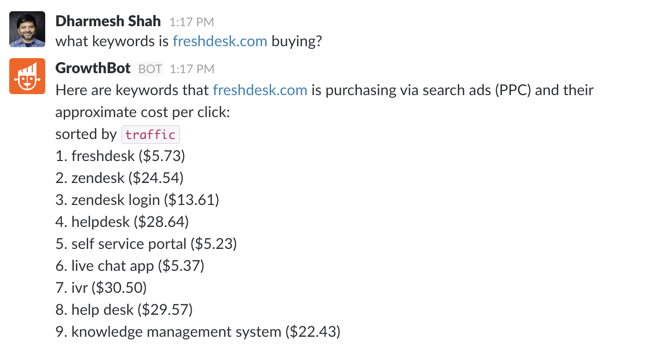
Maybe similar strategies will work for you, maybe they won’t. Either way, the more you know, the better-informed your future decisions will be.
Put simply: insights aren’t necessarily less useful when they’re second-hand.
Collective (Competitive) Intelligence
Collective intelligence within an industry is something we can all contribute to and benefit from, by pooling resources and building on what’s already been achieved.
Turning a potential battleground into a network, like in case of open-source software.
And along the road somewhere, your competitor could even become your collaborator: enter ‘coopetition’ (cooperative competition).
The big players have set the trend: Spot.IM has started using Facebook’s API, despite the fact that their goal is to keep users engaged on websites that aren’t Facebook. Apple and Microsoft joined forces on the licensing of mobile operating system features and patents. Google funded Mozilla’s Firefox. Arch-rivals Amazon and Apple teamed up to distribute Amazon’s e-books through the iPad’s Kindle app.

All these companies have the same target market, but they found that combining forces — rather than constantly trying to one-up each other — is a powerful tool.
And this mindset can be put into practice on a smaller scale, too.
As long as we’re keen to grow, improve and adapt, there will always be value in questioning the tactics of businesses besides ourselves. Maybe the answers will surprise us, maybe they will inspire change.
Businesses like ours, yes; but also unrelated businesses we simply find interesting.
So no, it’s not about an unhealthy obsession with our competitors. But it’s not about shutting out those around us to create the mirage of an empty landscape, either.
It’s about curiosity, open-mindedness, a willingness to learn from others. And with the help of today’s AI, competitive intelligence can become a competitive advantage.
