
9 Simple Ways to Optimize Your Website for Lead Generation
Optimizing your website to generate leads is a no-brainer. But it’s not as simple as throwing a “click here” button on your home page and watching the leads pour in (unfortunately).
Instead, marketers and designers need to take a more strategic approach. In this post, we’ll go over some quick ways that actually work to optimize your website for lead generation.

To understand how to optimize our website, we’ll have to first gain a basic understanding of the lead generation process. What components are at play when a casual website visitor turns into a lead? Here’s a quick overview:
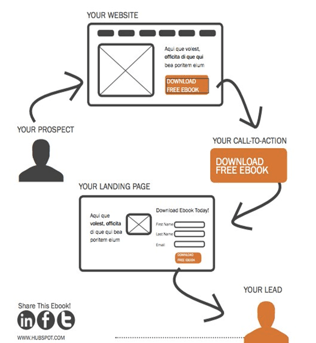
The lead generation process typically starts when a website visitor clicks on a call-to-action (CTA) located on one of your site pages or blog posts. That CTA leads them to a landing page, which includes a form used to collect the visitor’s contact information. Once the visitor fills out and submits the form, they are then led to a thank-you page. (Learn about this process in more detail in this post.)
Now that we’ve gone over the basics of lead generation, we can get down to the dirty details. Here are 10 simple ways to optimize your site for lead generation.
1. Add Forms to the Pages That Get the Most Traffic
It’s important to benchmark your current state of lead generation before you begin so you can track your success and determine the areas where you most need improvement. Some of your pages might make excellent lead generators and you don’t even realize it.
To start, conduct an audit of where most of your online traffic and outreach comes from. Here are some common places a business might get visitors:
- Email Marketing: Traffic might come from users who click through to your website from one of your emails.
- Social Media: Traffic might come from users who engage in a campaign through one of your social media profiles.
- Live Chat: Traffic might come in the form of users who reach out to your customer service team through a live chat window on your website.
- Blog Posts: Traffic might come from your highest-performing blog posts.
Once you identify where your leads are coming from, you’ll want to make sure the pages they’re landing on are doing everything they can to nurture a visitor’s interest.
For example, if, through your analytics tool, you realize most of your potential leads are clicking on inbound links to your website from your Facebook page, your next step is to update the pages they’re visiting with content that keeps them on and engaging with your website. On your most visited website pages, add longer-form content that visitors can access through forms that solicit their contact information.
2. Measure Each Lead Generator’s Performance
Test how each of your existing lead generators is contributing to your business using a tool like Website Grader, which evaluates your lead generation sources (including landing pages and CTAs) and then provides feedback on ways to improve your existing content.
You can also compare landing pages that are doing well with landing pages that aren’t doing as well. For example, let’s say that you get 1,000 visits to Landing Page A, and 10 of those people filled out the form and converted into leads. For Landing Page A, you would have a 1% conversion rate. Let’s say you have another landing page, Landing Page B, that gets 50 visitors to convert into leads for every 1,000 visits. That would be a 5% conversion rate — which is great! Your next steps could be to see how Landing Page A differs from Landing Page B, and optimize Landing Page A accordingly.
Finally, you could try running internal reports. Evaluate landing page visits, CTA clicks, and thank-you page shares to determine which offers are performing the best, and then create more like them.
3. Optimize Each Step of the Lead Generation Process
If your visitor searched “lawn care tips” and ended up on a blog post you published called, “10 Ways To Improve Your Lawn Care Regimen,” you’d better not link that blog post to an offer for a snow-clearing consultation. Make sure your offers are related to the page they’re on so you can capitalize on visitors’ interest in a particular subject.
As soon as a visitor lands on your website, you can start learning about their conversion path. This path starts when a visitor visits your site, and ends (hopefully) with them filling out a form and becoming a lead.
However, sometimes a visitor’s path doesn’t end with the desired goal. In those cases, you can optimize the conversion path.
How? Take a page out of Surety Bonds‘ book. They were struggling to convert visitors at the rate they wanted, so they decided to run an A/B split test (two versions of a landing page) with Unbounce to determine which tactics were performing better on each page. In the end, they ended up changing a link to a button, adding a form to their homepage, and asking different questions on their forms. The result? A 27% increase in lead generation.
If you want to run an A/B test on a landing page, be sure to test the three key pieces of the lead gen process:
The Calls-to-Action
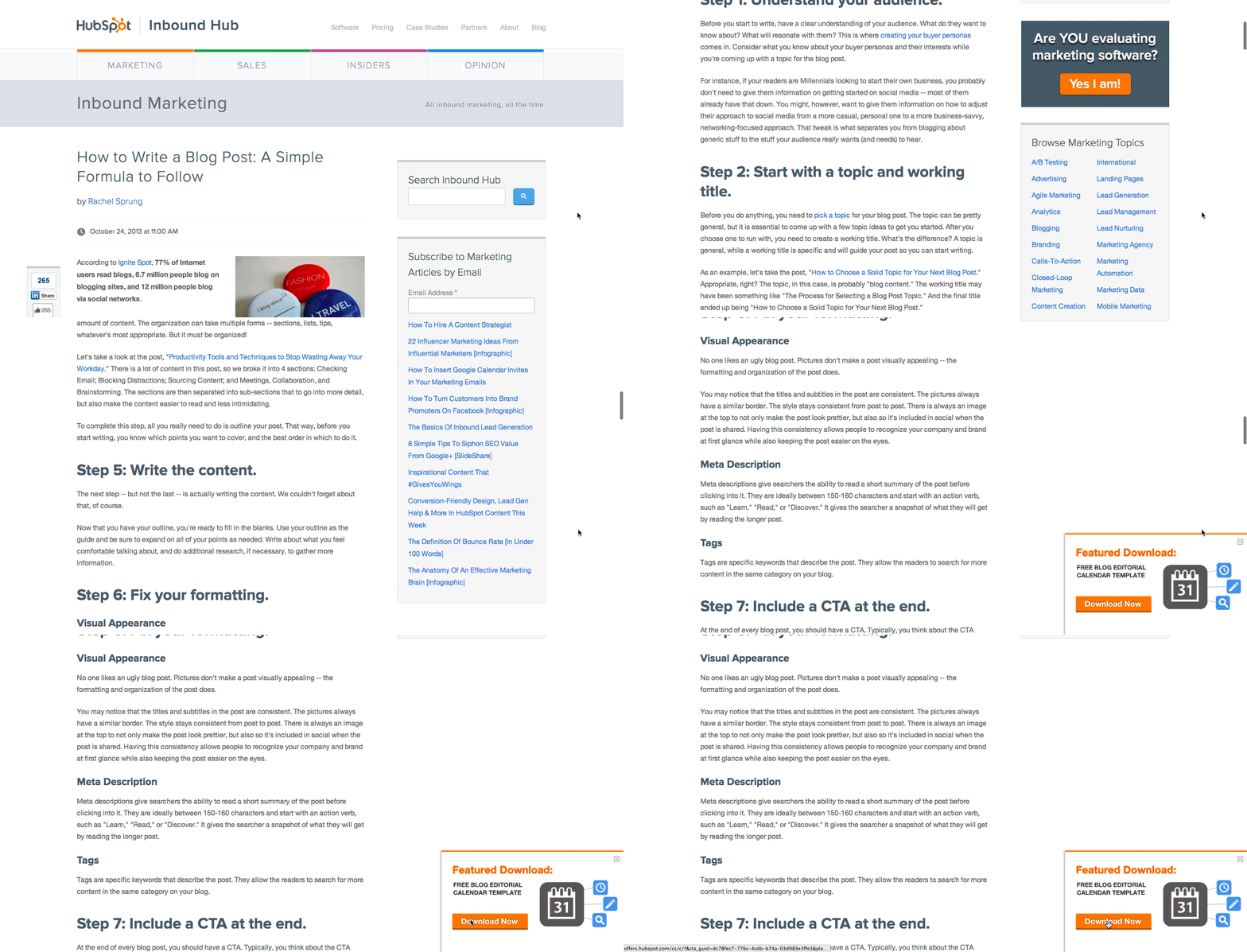
Use contrasting colors from your site. Keep it simple — and try a tool like Canva to create images easily, quickly, and for free. Read this blog post for ideas for types of calls-to-action (CTAs) you can test on your blog, like the sliding CTA you see here:
The Landing Pages
According to a HubSpot survey, companies with 30+ landing pages on their website generated 7X more leads than companies with 1 to 5 landing pages.
For inspiration, here are 15 examples of well-designed landing pages you can learn from.
The Thank-You Pages
Oftentimes, it’s the landing pages that get all the love in the lead generation process. But the thank-you page, where the visitor is led to once they submit a form on the landing page and convert into a lead, shouldn’t be overlooked.
Along with saying thank you, be sure to include a link for your new lead to actually download the offer on your thank-you page. You can also include social sharing buttons and even a form for another, related offer, as in the example below:

Bonus: The Kickback Email
Once a visitor converts into a lead and their information enters your database, you have the opportunity to send them a kickback email, i.e. a “thank-you” email.
In a study HubSpot did on engagement rates of thank you emails versus non thank you emails, kickback emails doubled the engagement rates (opens and clickthroughs) of standard marketing emails. Use kickback emails as opportunities to include super-specific CTA and encourage sharing on email and social media.
4. Start with a Basic CTA on Your Homepage
If your homepage’s design is what catches a person’s attention, the CTA is what keeps it. However, don’t bombard your visitors with an invitation to see the longest or most complex content you have.
Your homepage sits at the top of the marketing funnel, and should therefore offer either a free trial or subscription to a recurring campaign, such as a newsletter. Consider including one of the following CTAs on the front of your website:
‘Subscribe to Updates’
In general, consumers want their browsing experience to be as non-invasive as their buying experience. Oftentimes they’re not ready to make a purchase when they first find your website.
To teach them about you with no effort or commitment on their part, invite them to subscribe to an email that notifies them of industry trends and product updates. Personally follow up with the ones who opt to stay on this mailing list to gauge their interest and eventually turn them into marketing qualified leads (MQLs).
‘Try Us for Free’
Free trials and demos are a growing company’s bread and butter. They allow you to generate demand in your business and create a contact list of leads who are currently piloting your product.
On your homepage, have your product available to try for free for a limited time using a CTA and form where you can collect their names and email addresses. At the end of each active product demo, follow up with the user to see what they thought of it.
5. Offer Ebooks for Download on Specific Blog Posts
Another non-invasive way to generate interest in your business is to create blog content that promotes an ebook or whitepaper, wherein your website visitors can learn more about the same topic they just read about on your blog.
This is where lead generation meets search engine optimization (SEO).
Blog content is your way of developing the page authority needed to rank your website on Google. Organic visitors who come from Google are often more intent on finding solutions to a problem you can solve — making this form of lead generation quite valuable.
To start, conduct keyword research on a topic that’s relevant to your industry, and create a group of blog posts around this topic. Then, draft a report that delves much deeper into this topic. Package this report into a PDF that your blog readers can download using their name, company, and email address.
Using the three-part conversion path described in tip #2 above, email each person their downloaded resource, following up with them through a kickback email that retains each lead’s interest in the content you’ve provided them.
6. Develop a Live Chat Service for Your Website
Live chat services are increasing not just in their sophistication, but in how many people expect them when learning about vendors they might want to buy from. This means you could be missing out on a major lead generator.
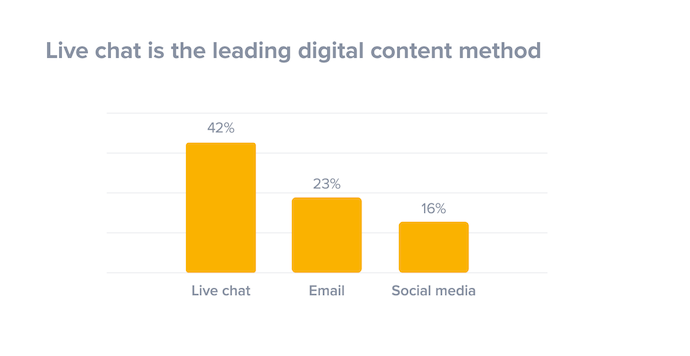 Image via SuperOffice
To generate leads though live chat, audit your website to see which pages your visitors spend most of their time on. With the right development resources, you can install a live chat tool on the pages where customers need the most assistance or information. This allows you to casually collect and log insight on their product needs while answering their questions.
Depending on who starts the chat and the questions your visitors have, you can even integrate your customer service team with your live chat feature. This ensures every website visitor has their needs addressed no matter where the conversation goes.
7. Personalize Your Calls-to-Action
Dynamic content lets you cater the experience of visiting your website to each, unique web visitor. People who land on your site will see images, buttons, and product options that are specifically tailored to their interests, the pages they’ve viewed, or items they’ve purchased before.
Better yet, personalized calls-to-action convert 42% more visitors than basic calls-to-action. In other words, dynamic content and on-page personalization helps you generate more leads.
How does it work? Here’s an example of what your homepage may look like to a stranger:
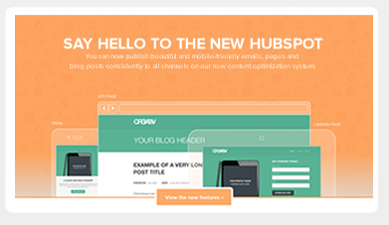
And here’s what it would look like to a customer:
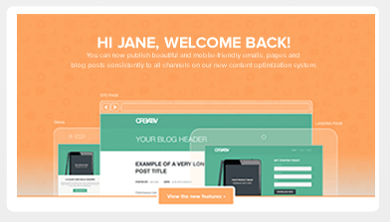
Notice the “Welcome Back” header? Visitors who see website pages that remember them from an earlier date a more inclined to stick around and start a conversation with you.
To get dynamic content (or “smart content”) on your site, you’ll need to use a tool like HubSpot’s Content Management System.
8. Test, Test, Test
We can’t stress this part of the process enough. A/B testing can do wonders for your clickthrough rates.
For example, when friendbuy tried a simple A/B test on their calls-to-action, they found a 211% improvement in clickthroughs on those calls-to-action. Something as simple as testing out the wording of your CTA, the layout of your landing page, or the images you’re using can have a huge impact, like the one friendbuy saw. (This free ebook has fantastic tips for getting started with A/B testing.)
9. Nurture Your Leads
Remember: No lead is going to magically turn into a customer. Leads are only as good as your nurturing efforts.
Place leads into a workflow once they fill out a form on your landing page so they don’t forget about you, and deliver them valuable content that matches their interest. Lead nurturing should start with relevant follow up emails that include great content. As you nurture them, learn as much as you can about them — and then tailor all future sends accordingly.
Here’s an example of a lead nurturing email:
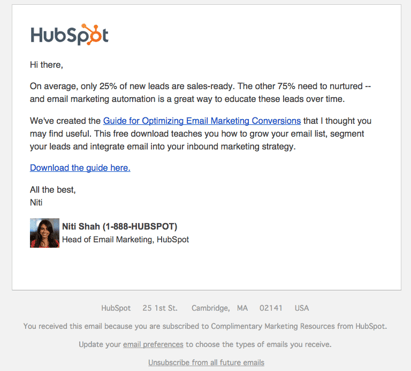
This email offers the recipient some great content, guides them down the funnel, and gets to the point. According to Forrester Research, companies that nurture their leads see 50% more sales ready leads than their non-nurturing counterparts at a 33% lower cost. So get emailing.
You depend on leads to close sales and grow your business. Using the tips above, you can take advantage of every opportunity without letting unsatisfied website visitors slip away.



How to Create Infographics in Under an Hour [15 Free Infographic Templates]
Wouldn’t it be great if creating infographics was as simple as writing regular ol’ text-based blog posts? Unfortunately, the reality is that making visual content like this usually takes a lot more time, effort, and let’s face it — skill — than the written word. Usually.
But considering the popularity and effectiveness of visual content in marketing today, you can’t just afford to throw in the towel.
That’s why we decided to take all the pain and suffering out of infographic creation. Seriously — don’t give up just yet. You, too, can create infographics that are professional-looking, high-quality, and completed in under an hour. I’m going to prove it. First things first:
Download our 15 free infographic templates here.
Then, all you have to do is provide the content to use inside them. Easy as that. In fact, I’m going to show you just how easy it is to make your own infographic by demonstrating with one of our 15 infographic templates in PowerPoint (pictured above). Then, I’ll explain exactly what I did so you get a sense of how easy it really is.
How to Create Infographics
- Collect Your Content and Relevant Data
- Choose Your Desired Infographic Template
- Download Your Template to PowerPoint
- Customize Your Infographic
- Include a Footer With Your Sources and Logo
- Add an Embed Code and Pinterest Button, and Publish It
Would you rather watch this tutorial instead of read it? Check out the video below:
How to Create Infographics for Free in Under an Hour
Step 1: Collect Your Content and Relevant Data
Your first step is to organize all the content and data you’ll use in the infographic. You can either collect third-party data or use your own original data. If you use third-party data, just be sure you properly cite your sources — just like in any other good piece of content.
To keep your infographic uncluttered by a ton of different source URLs, a great way to cite your sources is to include a simple URL at the bottom of your infographic that links to a page on your site. You can also list the individual stats used in your infographic, and their sources — such as the landing page to the full offer on which you’re basing this free infographic. I’ll show you what this citation looks like in a minute.
That way, your infographic looks clean and professional, yet people will still be able to access the sources no matter where the infographic gets shared or embedded. It may also even drive visitors back to your site.
Step 2: Choose Your Desired Infographic Template
Your next step is to choose an infographic template appropriate for representing that data. The important thing is to choose a template that specifically works for the type of data set/content you want to present. As you saw pictured above, you can download our 15 infographic templates in PowerPoint and choose whichever template you’d like. Some of your template options here include a timeline, flowchart, side-by-side comparison, and a data-driven infographic.
Step 3: Download Your Template to PowerPoint
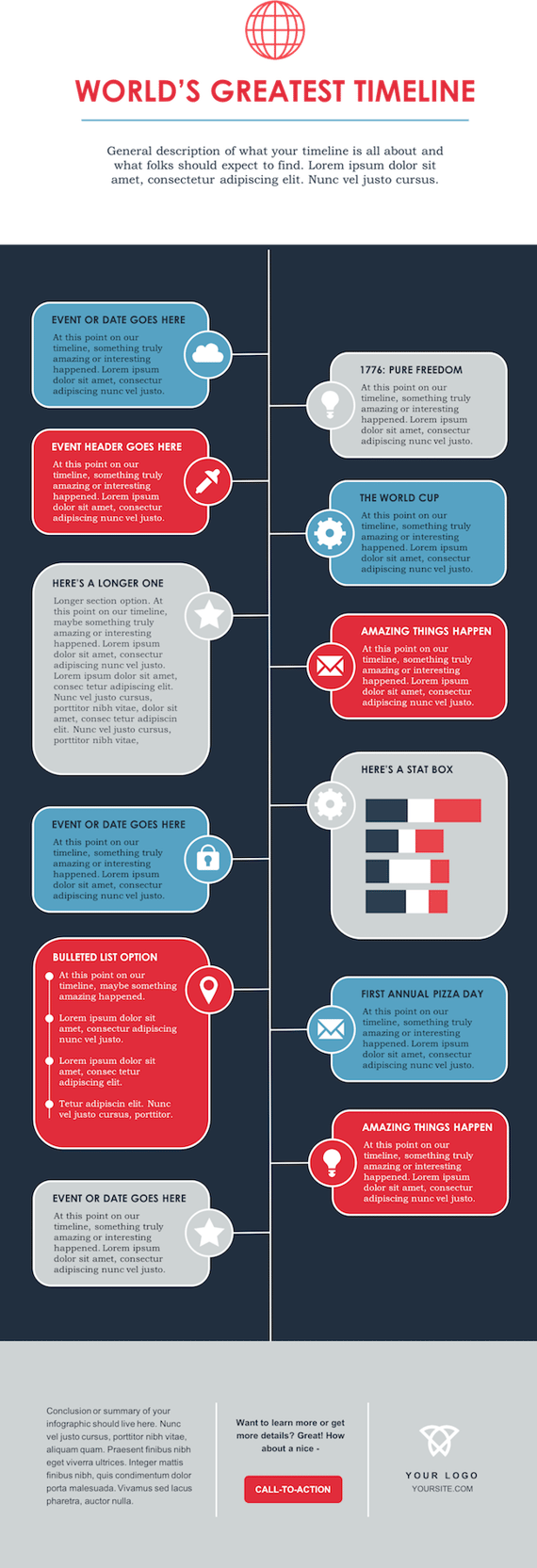
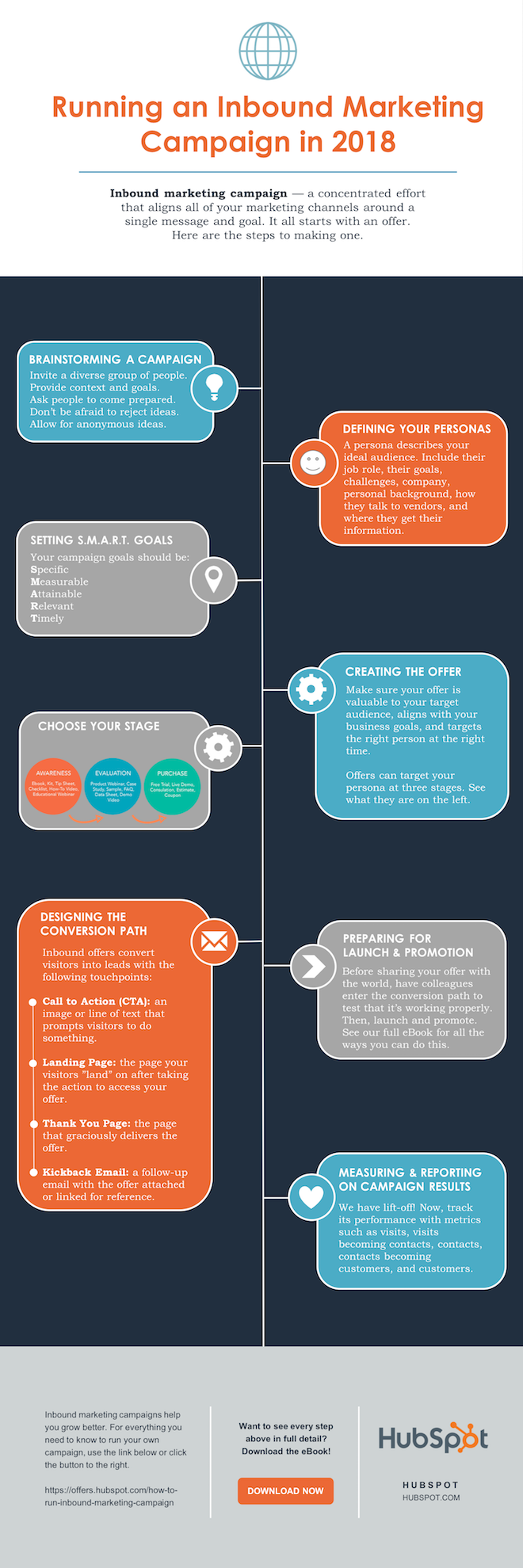
For the sake of time (remember, our mission is to create an infographic in under an hour), I’m going to create an infographic based on a compilation of steps and best practices we’ve put together in our new guide, How to Run an Inbound Marketing Campaign in 2018. For this, I’ve picked the “World’s Greatest Timeline” infographic template from our collection of infographic templates, which is helpful for my data set since it outlines each step of the campaign creation process in order.
The timeline infographic template is pictured below, and full of opportunities to make it your own:
 Step 4: Customize Your Infographic
Obviously, this is the most time-consuming part — but it’s also the most fun! Simply come up with a catchy title, plug in your data/content, and adjust your font sizes and formatting. Feel free to switch up the graphics and colors, too, so they’re relevant to your brand and the data you’re providing. For other templates, you can use the simple graphs and charts provided by PowerPoint to create things like the bar graph or the pie chart. (Note: Download our free infographic templates for a cheat sheet for using PowerPoint’s various features and tools.)
To customize the look of the infographic even more, you might add or change up the colors or font styles.
Step 5: Include a Footer With Your Sources and Logo
Finally, I included a link to my source (which can be found here), as well as the HubSpot logo so people know who created the infographic if it gets shared in social media or embedded on other websites — which is definitely something you want, since one of the main benefits of creating infographics is their shareability.
That’s it! This whole thing took me under an hour to put together — much shorter than it would’ve taken me if I’d started from scratch (not to mention more professional looking … and less expensive than hiring a designer). Here it is:

Share This Image On Your Site
<p><strong>Please include attribution to blog.hubspot.com with this graphic.</strong><br /><br /><a href=’https://ift.tt/2Hw9RZq src=’https://ift.tt/2oi2Lio’ alt=’free_infographic_template_custom-1′ width=’660px’ border=’0′ /></a></p>
Step 6: Add an Embed Code and Pinterest Button, and Publish It
The only thing left to do is to publish and promote your awesome new infographic. As I mentioned earlier, we recommend using your blog to publish it (including your list of sources), including a Pinterest button for visitors to easily “pin” your infographic on Pinterest, and create and add an embed code for visitors to share it on their own websites and blogs, as we did above.
Want more? Read How to Create Top-Notch Visual Content in PowerPoint [Tutorial].


Unriddled: Facebook in Brussels, Launch of the GDPR, and More Tech News You Need
Welcome back from a long Memorial Day weekend, and an equally long week of data security-related news that applies directly to you — and me. It’s another edition of “Unriddled,” our mid-week digest of the tech news you need to know.
Also worth noting, this is the first edition of Unriddled under GDPR, a massive European data privacy regulation that went into effect last Friday (keep reading, it’s a big deal).
It’s our Wednesday tech news roundup, and we’re breaking it down.
Unriddled: The Tech News You Need
1. Zuckerberg Grilled by Parliament
Last month, Facebook CEO Mark Zuckerberg appeared in front of Congress to discuss Facebook’s position on the recent mishandling of Facebook users’ data by the (recently liquidated) data analytics firm, Cambridge Analytica. Last week, Zuckerberg answered similar questions before the European Parliament’s Conference of Presidents in Brussels. And the roundtable was neither easy on him nor pleased with the format of his answers.
Before Zuckerberg spoke at all, each member of European Parliament (MEP) posed their questions one after the other. Their questioning lasted just over an hour, leaving Zuckerberg with roughly seven minutes to address all their concerns at once. And according to the MEPs present and those who watched online, it was not seven minutes well spent. Read the full story on this controversial hearing >>
2. Facebook Plans Privacy Options ‘Similar’ to Europe
In light of a newly launched European data privacy law — and the heat on Facebook for the misuse of its users’ data by analytics firm Cambridge Analytica — Facebook has revamped its privacy options for all users. But it’s not quite the same as the regulation that took effect across the pond last week (which we’ve unriddled for you further down this report).
Facebook’s rollout to all users was more of an alert, rather than a full teardown of its privacy policy. The alert’s main difference from Europe’s new policy is that it’s optional to read. Facebook’s rollout is merely an “interruption” to users when logging on — something they can skip if they’d like. In this way, users can passively review how Facebook stores data related to ads, their profile info, and facial recognition. Read the full story >>
3. All Past Facebook Political Ads Revealed
Earlier this month, the U.S. House of Representatives released a record of more than 3,000 political ads the Internet Research Agency (IRA) in Russia bought and ran on Facebook to influence the outcome of the 2016 U.S. Presidential Election. To demonstrate the same transparency, Facebook has now launched a public archive of every political ad ever run on the platform.
Facebook’s political ad archive produces information on each ad’s cost, target audience, and performance. However, the tool only allows users to search for ads based on the subject or person featured in the ad, rather than the ad’s date or sponsor — two things that many people are disappointed they won’t be able to see, given the thousands of ads originating from the IRA. Read the full story >>
4. GDPR Takes Effect
If you missed the General Data Protection Regulation’s (GDPR) rollout, check your inbox. Every company you’ve interacted with lately likely emailed you with updates to their privacy policies. The GDPR officially took effect on Friday, May 25th, and businesses everywhere — not just in Europe — have adjusted their terms of service to comply with the GDPR to protect customers who might live and do business in Europe.
While changes to data protection laws might connote rough road for advertisers, who depend on insight into their customers’ profiles and behaviors, some see it as a necessary measure to make their marketing content that much more respectful of the buyer’s journey. Read HubSpot CEO Brian Halligan’s recent note on GDPR >>
5. Airbnb ‘Stories’ Now Available
Beyond developments in data security, Big Tech was as eventful as always. This week, Airbnb subtly released a new feature called “Stories,” heralded as the company’s expansion from simply home rentals to a broader suite of travel services.
Facebook, Instagram, WhatsApp, and Snapchat all have similar “Stories” features that allow users to share disappearing photos and videos. Airbnb’s Stories launch will work the same way: Users can write and shoot short videos of their experiences, not just in a particular room rental, but across the city to which they’re traveling. Read the full story on Recode >>
That’s a wrap for today. Until next week, tap me on Twitter with your thoughts on the now-active GDPR and what tech news you’d like to see us cover in the future.

How to Become a More Adaptable Leader
When I was asked to write on this topic, adaptable leadership, I started shaking my head. I am not a huge fan of putting an adjective in front of leadership and making it a new thing. Let’s just call it leadership and then talk about how to be better at it, one day at a time.
If you are a leader and you don’t have the capacity to shift, change, or pivot from a plan or a position, frankly, I don’t know how long you’ll last in your role.
So, if you are an aspiring leader, this article is for you.
If you see yourself as a student of leadership, this article is for you.
If you don’t think you need to be adaptable in how you lead, you must read this.
At the heart of leadership is an inherent need to react to changes in your environment.
As we think about adaptability in leadership, we need to first understand its importance — why do we need to adapt?
Then, we need to look at some techniques that allow us to transform ourselves into leaders who can actually adapt.
Think about the situations you face everyday. Did everything go according to plan?
If you’re like me, the answer is: Of course not.
Business and the world in general is an incredibly complex system with so many different factors that affect on another. If we think it is possible to succinctly plan our day or lead our teams in the exact same way, I direct you to Mike Tyson:
“Everyone has a plan till they get punched in the mouth.”

All of those unforeseen things that occur in your day are like being punched in the mouth. So, how do we deal with this?
As former President Dwight D. Eisenhower once said:
“Plans are worthless, but planning is everything.”
If we can train ourselves to understand that plans will always change, but continue to work through planning exercises — for work we are doing and in terms of growth as leaders — we are ready to get punched in the mouth.
Here are some thoughts on how you can begin the effort of planning to allow you to be a more adaptable leader — or a leader who understands that one plus one doesn’t always equal two.
How to Be a More Adaptable Leader
Be Intent-Based and Outcome-Focused
When I was commissioned in the Army in the early 2000s, the Army’s leadership/command philosophy was Command and Control. It was very hands-on and directive, not very adaptive or flexible. As my career progressed, the Army doctrine changed to Mission Command.
Mission Command was a more intent-based and outcome-focused doctrine. Commander’s relied on their intent to drive operations, meaning they only told you the destination, the goal, not necessarily how to get there.
Trust was a huge part of this approach. It was reminiscent of how the Union won the Battle of Gettysburg.
Brigadier General Joshua Chamberlain’s regiment was told if they were overrun, the Union Army would be defeated. When Chamberlain’s regiment was basically out of ammunition, he didn’t lose his cool. He ordered one of the most heroic battlefield exploits in US History; an all-out bayonet charge.
He wasn’t told exactly what to do, rather, he was enabled and an empowered to know what to do to reach the goal.
His ability to understand the intent and outcome his commander desired not only allowed for the Union to win the day but led to Chamberlain being awarded the Congressional Medal of Honor.
Here’s what this story means for you:
Lead with the Goal
If you’re a leader, before you issue instructions or hand out tasks, take the time to think through what you actually want to achieve.
What is the intent behind the work you want done? What is the outcome you desire? Does it matter how your team attacks it?
Once you’ve identified the answers to these questions, make sure your team understands exactly what is expected of them. Hammer home that the outcome is what you care about, and the intention behind why that outcome is huge.
This will allow both you and your team to adapt and overcome the obstacles we all know you will encounter.
Leading this way is tough, though. It takes a certain mental toughness to be ok with not knowing exactly how your team is going to attack the problem set, but it’s worth it.
You will find it easier over time to do this.
If you are ensuring your intent and desired outcome are known and understood and trust in the people on your team, you will not only grow into a more adaptive leader, you will build an adaptive team.
Do this today: Identify at least one task and the intent and outcome you want that task to achieve. Write it down and delegate it to your team.
Read Team of Teams by General Stanley McChrystal, Tantum Collins, David Silverman, Chris Fussell.
Now, if you’re an aspiring leader, ensure that you understand your boss’ intent and the outcome she/he has set.
Confirm, back brief, truly understand what that is and then get after it.
This is where initiative comes in.
Don’t be the person that wants everything told to them — do this, then that, then this, etc.
If you operate this way, you will most likely become irrelevant and not grow in your career.
Do this today: Read A Message to Garcia by Elbert Hubbard and become Garcia. If you understand the intent and outcome desired, attack it like Chamberlain did with his historic bayonet charge!
Understand You’re Not the Smartest Person in the Room
When you meet with your team are you allowing yourself to learn from them?
To do this, you must enter the interaction with a growth mindset, being open to other points of view, and recognizing they may know something you don’t.
If we enter an interaction thinking our opinions and perspectives are the only ones of value, your team sees it. They get discouraged, knowing they aren’t being heard.
When this happens, you hurt the morale and overall effectiveness of the team.
In contrast, when you show your team you are capable of listening and abandoning your positions for someone else’s, you accelerate what it can accomplish.
You demonstrate that you respect your team members as experts in their positions and that trust them to bring the right ideas to the table.
This happens at IMPACT all the time.
Bob and I work on a 30,000-foot view of how to tackle something and then we bring it to our team.
More often than not, the team comes back to us with a significantly more effective approach. Then, when we adopt the ideas (in whole or in pieces), we have a team that knows they were listened to.
They own the decision and take it on at full speed.
When we make decisions and work through planning in a collaborative way, we set ourselves up for success when we have to pivot — which we know is going to happen.
By being truly open and receptive to the knowledge, ideas, and thoughts of others, you naturally become more adaptive — and in turn, your team does as well.
Practice in Action
Again, if you’re a leader, embrace that you have smart people on your team and that it is ok to not always be the smartest or best at your craft.
You’re a leader now. Your role is to lead, not be the best widget maker.
Actively listen, ask questions, and be open to others points of view. This will not make you less of a leader, it will make you a better leader.
Don’t focus on who has the best idea, simply find it and understand that you and your team must be flexible enough to make changes on the fly.
Do this today: In your next team meeting, only ask questions. Let the team get to the solution.
For future leaders, challenge assumptions, ask hard questions, and don’t be afraid to give a different point of view.
Don’t be insubordinate, but challenge your boss from the perspective of trying to find the best solution to achieve the outcome they have clearly identified.
Do this today: Speak up!
I also suggest reading Multipliers by Liz Wiseman and Mindset by Carol Dweck.
Grow a Culture that Lives in Solutions
In my past career, I had the honor of leading some of America’s best — paratroopers in the 82nd Airborne Division. If you’re looking for an example of a team that must be adaptable, I can’t find a better example.
Our main mission, we trained for airport seizure, by way of airborne assault.
(Personal note, this is one of the coolest missions in the world!)
We would go through extensive planning efforts from the individual level up to the brigade level. Commanders and troopers of all levels were involved.
We would develop great plans, but as General Eisenhower said, “Plans are worthless …”
This planning effort allowed us to live in solutions. We all knew the commander’s intent and knew the outcome we needed to achieve.
With this knowledge, everyone was able to adapt to the ever-changing situation we would encounter.
You see, there is no precision in a mass tactical airborne assault. You are being delivered to the battlefield and where you end up probably isn’t where you thought you’d be.
This is brought to life in Band of Brothers when we see how Paratroopers from the 82nd and 101st Airborne were dropped all over Normandy.
These troopers and their leaders needed to adapt and find solutions pretty much instantly rather than wallow in the misery of not being where they were “supposed” to be.
They took initiative, understood the intent, and got after it, allowing for a successful sea invasion on the beachheads of Normandy.
As Paratroopers, we had to continually reinforce and nurture the culture of the airborne community. We had to get everyone comfortable with being uncomfortable and solving for yes.
How do we attack this?
Leaders, force your teams to have hard discussions.
Talk about the elephant in the room, but ensure you are moving the conversation to a solution. As ideas of why something won’t work are brought up, ask what will work.
Set the example. Always project a sense of calm and optimism that will allow you to find a solution.
Remember, you don’t need to have the answer right away. Simply have the mindset and attitude that highlights that a solution will be found.
In your planning efforts, you’ve likely identified possible issues and potential solutions. Get back into this mindset and work on the next one.
Do this today: When presented with the next problem don’t react, respond. Ask questions that lead your team to solutions.
Future leaders, as you identify problems, don’t simply bring them to your boss. Think about a potential solution. Feel empowered to lead the assault on the problem and make it go away.
Your boss will appreciate your efforts. Even if they don’t utilize your solution, you have given them a path to the answer they need.
Do this today: Think through the issue, develop at least one course of action, and then talk to your boss.
Here are a few others books I recommend: Never Split the Difference by Chris Voss and Motivation Myth by Jeff Haden.
Plans Are Worthless
To be an effective leader, you must be adaptable. Change is going to happen daily. If you can’t adapt and remain flexible, you will struggle to achieve your goals.
By being intent-based and outcome-focused, having a growth mindset, and growing a culture that lives in solutions, you become more of an adaptable leader who will be able to attack the challenges thrown in your direction.
As an aspiring leader, take note of what your boss is doing.
If they aren’t doing these things, figure out how to bring them to the reality they that need to adapt. Work towards being an adaptable subordinate, have resilience, and, at some point, lead your team as an adaptive leader.

How to Take a Screenshot on Windows: Quick Guide
Screenshots are undeniably useful, whether you’re writing a how-to guide or putting together a training presentation for your team.
Sometimes, the simplest way to teach someone how to do something is through visual images, and in those cases, screenshots are your best bet.
But if you’re working on a PC and you’re more used to working on a Mac, it can be tricky to figure out how to take a screenshot.
Here, we’ll show you a few different ways to take screenshots on different Windows versions — best of all, our easy guide will show you how to do this in five minutes or less.
How to take a screenshot on Windows 10, Windows 8.1, Windows 7
Microsoft created a Snipping Tool specifically for capturing screenshots. There are four types of screenshots you can take with the Snipping Tool:
- Free-form snip: Capture a free-form screenshot around an object.
- Rectangular snip: Capture a rectangular screenshot around an object.
- Window snip: Capture a browser window or dialog box.
- Full-screen snip: Capture the full screen.
When you’re finished capturing a screenshot, there are a few things you can do with the image besides simply saving it:
- Annotate it: Write or draw on the screenshot by selecting “Pen” or “Highlighter” buttons. Use the “Eraser” tool to remove lines you’ve drawn.
- Remove the URL: If you’ve taken a screenshot of a browser window and saved it as an HTML, the URL automatically appears below the snip. If you don’t want this, select “Options” in your Snipping Tool, and then uncheck the “Include URL below snips (HTML only)” box. Then, click “OK”.
- Share a snip: Select the arrow next to “Send Snip”, and then select an option from the list to share your screenshot.
Now, let’s take a look at the basics of capturing a screenshot on Windows 7, 8.1, or 10.
1. Open your Snipping Tool. For Windows 7 and 10, select “Start” and type “snipping tool” into the search box, and then select the tool from the results. For Windows 8.1 and Windows RT 8.1, swipe from the right edge of your screen, select “Search” and type “snipping tool” into the search box, and select the tool from the results.
2. Within the Snipping Tool, click “Mode” and then select the kind of snip you want. Then, select the area of your screen you want to capture.
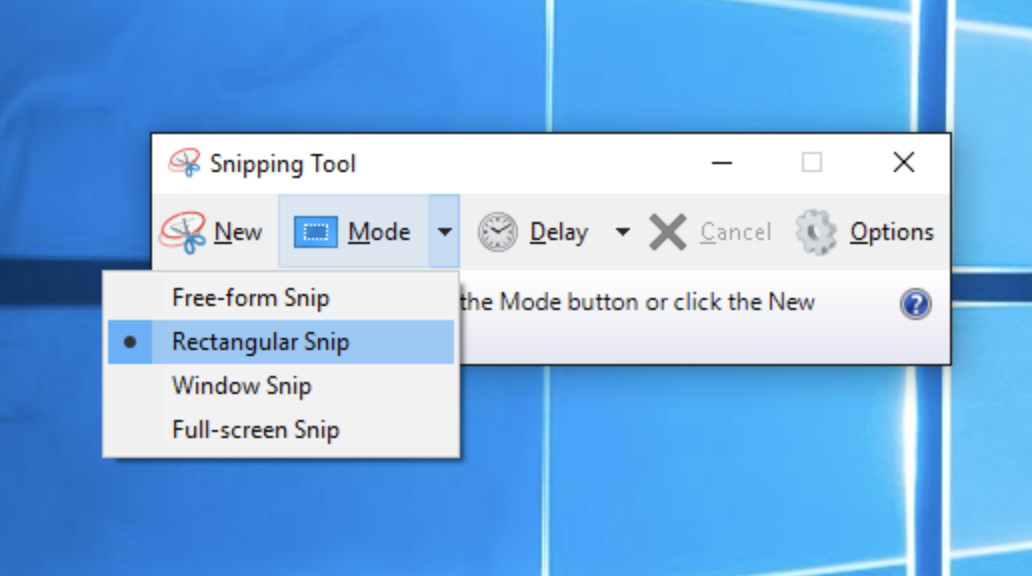
Image courtesy of Microsoft Support.
3. After you capture your snip, select the “Save Snip” button. Type a file name, location, and type, and then click “Save”.
How to take a screenshot of your active window
There’s a shortcut to the above process if you want to take a screenshot of your current active window. Just press “Alt” + “PrtScn”. Your active window will be captured, but it won’t automatically save — to do this, find the screenshot in your clipboard, open an image editor, and save it from there.
How to take a screenshot of your entire screen on Windows
If you want to take a screenshot of your entire screen and save the screenshot automatically, hit the “Windows Key” + “PrtScn”.
Your screen should dim for a moment, and then the screenshot will be saved in Pictures > Screenshots folder.

Situational Interview Questions
In an interview, let’s say I asked you, “Tell me about a time you worked through a conflict with a coworker?”
You’d probably think about a past experience, consider the lessons you learned from it, and articulate what happened and how it felt. You’d likely mention any shortcomings you had, how you’ve grown, and how you’d deal with conflict with coworkers in the future.
But let’s say I asked you a slightly different version of that question instead: “How would you handle it if you were assigned a project with a coworker, and you two had differing opinions on how to proceed?”
That changes the game a bit. To answer, you could no longer rely on any fairly familiar story about yourself.
Instead, you must use your problem-solving skills and your sense of self to answer how you’d hypothetically deal with a conflict that could arise in the future, without the advantage of hindsight. And, you’d need to think on your feet.
We previously covered behavioral interview questions like the STAR method, which asks candidates to articulate past experiences and what they learned. It’s important to use behavioral questions in an interview, but there’s another method you should integrate, as well.
Situational interview questions are largely hypothetical and can be intentionally ambiguous, such as, “How would you handle X if you … ?” or “What would you do if … ?”
Situational questions give you the opportunity to evaluate your candidate’s quick-thinking skills, while seeing how she responds to curveballs, which is critical information when deciding whether she’s qualified for the role.
Here are seven situational questions you can use when interviewing a candidate, and what you should look for in the applicant’s answer.
Situational Interview Questions to Ask Candidates, and How They Should Respond
1. How would you handle it if your team resisted a new idea you introduced?
What to look for in a good response: You’ll want a candidate to express her respect and awareness of her team’s opinions and thoughts, while also demonstrating an ability to implement initially unpopular ideas.
Ideally, the applicant would say something like this: “First, I’d work on understanding the reasoning behind my team’s resistance. Perhaps it’s because they aren’t familiar with a new system I want to put in place, and many of them are comfortable with the old way of doing things. Once I understood their point of view, I’d put together either a presentation, or a training, to show my team why my idea is a good one. I’d do this while being cognizant of their hesitation, and incorporating their doubts into my presentation. I’d also allow my team to offer anonymous feedback, so each employee felt his or her opinions could be incorporated into the new system — I’d never want it to seem like my idea was the only way. Hopefully, research or training sessions could help my team come around to the idea.”
In this case, the candidate approached the situation from a place of compassion and understanding, rather than frustration. Instead of dwelling on her team’s resistance, she wisely found appropriate ways to introduce the idea to counteract her team’s doubts. She showed that she is able to problem-solve well, even when her own ideas or reputation are at stake, and even under pressure from her team.
2. How would you handle it if your employee wasn’t meeting your expectations, or was performing below average?
What to look for in a good response: If you’re looking to fill a leadership position, you’ll need a candidate who can handle tough conversations with employees. You’ll want your candidate to express honesty and transparency with each employee, while recognizing the importance of constructive feedback.
Ideally, you’ll want the applicant to say something like this: “I’ve had this happen before, and it’s never an easy conversation. However, it’s important to provide feedback to my employees and remain transparent with them when I think they aren’t performing as well as they could. That’s my job as their manager. I’d start out with something positive about their performance, to let them know I recognize their good behavior. Then I’d point out where they’re falling short, and ask them why they think that is — most of the time, the employee is already aware of her shortcomings. Finally, I’d suggest ways to improve, to show the employee I want to be a resource to help them grow.”
With this answer, your candidate has shown a level of maturity when delivering tough feedback. You’ll want your applicant to mention the importance of feedback, and you’ll also want her to show good communication skills when dealing with issues with her employees.
3. What would you do if you were assigned to work closely with a colleague on a project, but you two just couldn’t seem to see eye-to-eye?
What to look for in a good response: This question looks for a candidate who aims to understand her colleague’s point of view. You’ll want your applicant to demonstrate flexibility and an ability to compromise. Plus, it’s simply important to get a sense for how the candidate handles conflict.
Ideally, your candidate could say something like this: “Another project manager and I were assigned a project together. I quickly saw my colleague handled follow-up and communication with the client differently than I did. I like to follow-up often and chat on the phone at various stages of the process with the client, but my colleague didn’t see the purpose in communicating with the client so frequently. Eventually, I talked with my coworker about her follow-up style versus mine. We compromised and agreed to follow up with the client every two weeks, rather than every week, to make collaboration smoother. I was glad I approached the situation head-on, and also understood and appreciated that my colleague had a different work approach.”
Undoubtedly, any applicant you interview will eventually collaborate with someone who works differently. You’ll want a candidate to show she isn’t emotional or defensive when she runs into conflict, but rather, she approaches it from a business-perspective and communicates problems when they arise.
4. What would you do if you were working hard on a project and were almost finished when the goals or priorities were changed?
What to look for in a good response: A good answer to this question depends on the role you’re looking to fill.
First, your candidate might show flexibility by mentioning she would stay up late, adjust her priorities, and manage to finish the project the way it needed to be finished. If the position for which you’re hiring is junior level or requires someone to be adaptable to unpredictable deadlines or expectations, you’ll want your applicant to show a level of flexibility.
However, if the role is more senior or if it makes more sense for the position, you might want an applicant to show she can put her foot down. Perhaps you want to see her use more problem-solving skills to analyze those priorities and decisions, and figure out ways to hit those goals without redoing the entire project.
5. How would you handle an instance of receiving criticism from a superior?
What to look for in a good response: This question enables you to assess your candidate’s ability to learn, grow, and accept mistakes. You want a candidate who uses feedback to make changes, while demonstrating emotional maturity.
Essentially, you want a candidate who’s coachable.
For instance, your applicant could say something like this: “In my last position, I often met with clients face-to-face, and I greatly enjoyed it. However, occasionally they’d call me over the phone, and in an effort to appear adaptable, I’d always speak with them immediately. My manager heard a few of those phone calls, and he eventually told me that I sounded short on the phone, and worse, I often wasn’t as prepared as I could be, because I’d been in the middle of another assignment and was caught off guard. He was completely right — I’d never considered that I could simply tell the client I’d call them back, or let the call go to voicemail. In an effort to multitask efficiently, I was actually letting my client relationships suffer. I learned from that feedback and, going forward, felt confident telling the client they’d need to set up an appointment with me even if they wanted to talk over the phone.”
Here, the candidate demonstrates she’s open to hearing feedback, appreciates it, and uses it to fuel her growth. She owned up to her mistake but didn’t dwell on it, and demonstrated an ability to adjust her own work style in response to that feedback, rather than becoming defensive or accepting the feedback but not changing her behavior.
6. What would you do if you were almost finished with a project on a tight deadline, when you realize you’d made a mistake back in the beginning that required you to start over?
What to look for in a good response: No one is perfect, and it’s good if your candidate can admit to a situation where she made a mistake that required a re-do of a project. More importantly, you’ll want an applicant who can be honest with supervisors about her mistake, rather than trying to cover it up.
You want to hire someone who looks at mistakes as opportunities to learn, rather than as embarrassing failures.
Ideally, your candidate would say something like this: “First, I’d investigate the problem and the source, and make a list of a few different solutions. If none of those solutions were possible without fully redoing the project, and if I thought the mistake might make me miss my deadline, I’d immediately approach my supervisor and let her know the situation. Particularly if the mistake is my fault, it’s important I’m honest and open about it — it’s a good learning and growth opportunity for me, and could prevent others from making that same mistake. Finally, I’d put in extra time if necessary to finish the project.”
In this example, your applicant displayed honesty, a commitment to her job and making things right, and an openness to learning from mistakes.
7. How would you handle it if you were unsatisfied by an aspect of your job?
What to look for in a good response: It’s not practical or necessary to look for a candidate who loves all aspects of her job equally. Instead, you want a candidate who demonstrates a good level of professional maturity, understands some tasks are less enjoyable than others, and appreciates the necessity of those tasks for the company’s bottom line.
For instance, you’d want your applicant to say something like this: “I love working with people, which is why I pursued a management position, but I don’t love the paperwork — does anyone? Early on, I needed to figure out how to approach stacks of paperwork so it didn’t affect the enjoyment I had for other aspects of my job. First, I took a good look at the content and realized that, while it might not be fun, it was certainly critical for ensuring my team was successful. When I could see it contributed to our department’s goal, I appreciated it more. Then, I set aside one day a week to tackle the paperwork, rather than working on bits each day. Monday morning, first thing, I’d turn off my computer and avoid distractions, and get it done. In a way, this became enjoyable in it’s own way, since it was distraction-free time.”
You want to feel confident your candidate is mature and professional and understands the importance of seemingly mundane tasks. You don’t want an applicant who says she gives projects she doesn’t enjoy to her coworkers or interns. Instead, you want a candidate who has the flexibility to figure out how to make unsatisfying tasks work for her without resenting the position long-term.

Fixed Cost: What It Is & How to Calculate It
“Business is personal — it’s the most personal thing in the world.”
These are famous words by Michael Scott from the TV show, The Office. And although this quote conflicts with the universal belief that business isn’t personal, Michael’s point of view is perfect when learning about a business’s fixed costs — or those costs that don’t change as a company grows or shrinks.
To identify and calculate your business’s fixed costs, let’s start by looking at the ones you’re already paying in your personal life. Then, we’ll explain how a business manages its own fixed costs and review some common fixed cost examples.
What Is a Fixed Cost?
Fixed costs are those costs to a business that stay the same regardless of how the business is performing. These costs are known as fixed costs to distinguish them from variable costs, which do change as the company sells more or less of its product.
Fixed Cost Formula
- Identify your building rent, website cost, and similar monthly bills.
- Consider future repeat expenses you’ll incur from equipment depreciation.
- Isolate all of these fixed costs to the business.
- Add up each of these costs for a total fixed cost (TFC).
- Identify the number of product units created in one month.
- Divide your TFC by the number of units created per month for an average fixed cost (AFC).
Consider your personal routine. As a single adult, your expenses would normally include a monthly rent or mortgage, utility bill, car payment, healthcare, commuting costs, and groceries. If you have children, this can increase variable costs like groceries, gas expenses, and healthcare.
While your variable costs increase after starting a family, your mortgage payment, utility bill, commuting costs, and car payment don’t change for as long as you’re in the same home and car. These expenses are your fixed costs because you pay the same amount no matter what changes you make to your personal routine.
In keeping with this concept, let’s say a startup ecommerce business pays for warehouse space to manage its inventory, and 10 customer service employees to manage order inquiries. It suddenly signs a customer for a recurring order that requires another five paid customer service reps. While the startup’s payroll expenses go up, the fixed cost of a warehouse stays the same.
Average Fixed Cost
Keep in mind you have to keep track of your business’s fixed costs differently than you would your own. This is where average fixed cost comes into play.
Average fixed costs are the total fixed costs paid by a company, divided by the number of units of product the company is currently making. This tells you your fixed cost per unit, giving you a sense of how much the business is guaranteed to pay each time it produces a unit of your product — before factoring in the variable costs to actually produce it.
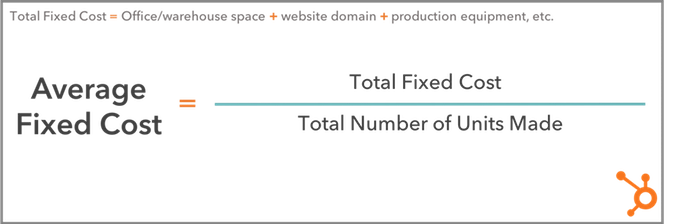
Let’s revisit the ecommerce startup example from earlier. Assume this business pays $5,000 per month for the warehouse space needed to manage its inventory, and leases two forklifts for $800 a month each. And last month, they developed 50 units of product.
The warehouse and forklift costs remain unchanged regardless of how many products they sell, giving them a total fixed cost (TFC) of $5,000 + ($800 x 2), or $6,600. By dividing its TFC by 50 — the number of units the business produced last month — the company can see its average fixed cost per unit of product. This would be $6,600 ÷ 50, or $132 per unit.
Fixed Cost Examples
So far, we’ve identified a handful of fixed cost examples since considering the costs we already pay as individuals. A home mortgage is to a lease on warehouse space, as a car payment is to a lease on a forklift.
But there are a number of fixed costs your business might incur that you rarely pay in your personal life. In fact, some variable costs to individuals are fixed costs to businesses. Here’s a master list of fixed costs for any developing company to keep in mind:
- Lease on office space: As long as your business operates in the same building, your rent cost doesn’t change.
- Utility bills: Your heating or cooling bill might fluctuate as seasons change, but it is generally not affected by business operations.
- Website hosting costs: When you register your website domain, you pay a small monthly cost that remains static despite the business you perform on that website.
- Ecommerce hosting platforms: Ecommerce platforms integrate with your website so you can conduct transactions with customers. They typically charge a low fixed cost per month.
- Lease on warehouse space: Warehouses are paid for the same way you’d pay rent on your office space. They do not change in price as you store more or fewer products inside, but can have storage and capacity limits.
- Manufacturing equipment: The equipment you need to produce your product is yours once you buy it, but it will depreciate over its useful lifetime. Depreciation can become a fixed cost if you know when you’ll have to replace your equipment each year.
- Lease on trucks for shipment: Truck leases work the same way as a car payment, and will not charge differently depending on how many shipments you make.
- Small business loans: If you’re financing a new business with a bank loan, your loan payments won’t change with your business’s performance. They are fixed for as long as you have a balance to pay on that loan.
- Property tax: Your office space’s building manager might charge you property tax, a fixed cost for as long as your business is on the property.
- Health insurance: Health insurance costs might be a variable cost to an individual if they add or remove dependents from their policy, but to a business, the recurring costs to an insurer are fixed.
Calculating your fixed costs isn’t always the most fun part of growing your business. But knowing what they are, and when you’ll pay each one, gives you the peace of mind you need to serve and delight your customers.

8 Strategies to Embrace the Future of Content Marketing
93% of B2B businesses use content marketing.
Only 5% feel that their efforts are very effective.
And an estimated 50% of all content is going completely unused.
Where did it all go wrong?
Just a few years ago, you could post 1, 2, 3, 300 blog posts on your website; furiously direct traffic to them through all your social platforms; amass zillions of inbound links; target a bunch of keywords; aaand easily rank on Google.
Controlling your message and gaining customers was (well, almost) a piece of cake.
No longer.
The halcyon years are over; as Gartner’s Hype Cycle predicted, we’re knee-deep in the trough of disillusionment.

Like the overhyped marketing channels that came before (TV spots, billboards, banner ads) content marketing peaked — then slumped.
After the huge success of a few early adopters, more and more people joined the party until the novelty disintegrated.
Resistance has built, but expectations haven’t faded — from marketers, at least. And the tighter they cling on, the less effective content marketing becomes.
So where do we go from here?
Quitting isn’t an option. Content marketing can’t be consigned to the past like those other clearly-defined tactics, because the boundaries around it are so fluid.
If content marketing is simply the strategic distribution of valuable content, then it encompasses almost all of marketing today.
And it can be as powerful as it once was.
But first, we need to understand the recent changes it has undergone, the barriers that stand in our way, and how to overcome them.
We don’t have to bin the playbook — we can rewrite it.
Here’s how.
Less is more
This one’s a no-brainer: we’re drowning in content.
Brands are generating more than ever, with one study counting a 300% increase this year compared to last.
The problem? Consumer demand for it remains static.
There’s only so much we can consume, process and share.
We still appreciate great content to the same extent, but as saturation increases, the big results are going to a proportionally smaller number of pieces.
But that’s not all.
Further analysis shows that 5% of branded content garners 90% of total consumer engagement.

And a quick search of ‘content marketing law’ confirms this is the case more or less across the board: on average, 19 out of 20 pieces gets little to no attention.
Or, if a team produced 90% less content, they would still achieve the same results.
The solution is simple. Publish less. Publish well. Publish only when you have something valuable to say.
Then, devote freed-up resources to optimizing the evergreen content you already have.
Evergreen Content
- ‘Evergreen’ content is simply content that doesn’t lose its value over time; it has no sell-by-date.
- ‘Temporal’ content only has short-term relevance.
Both have their place. Temporal content keeps things fresh and buzzy with short spikes of interest. But it’s evergreen content that generates those lovely compound returns that make content marketing valuable in the first place.

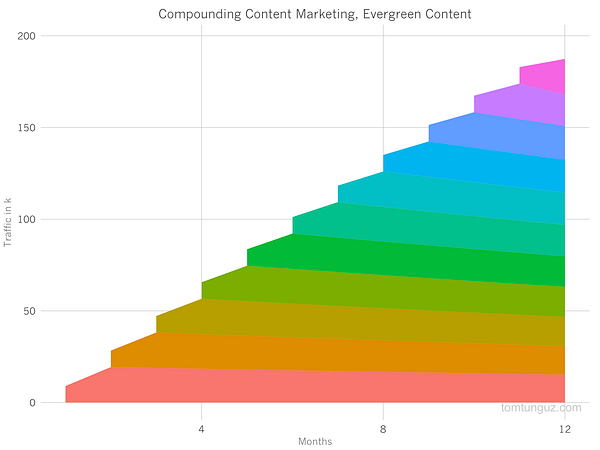
It can be tempting to try and keep up with our fast-paced online life by churning out a constant deluge of temporal content. But relying on those little bursts of interest is a) expensive, b) time-consuming and c) unsustainable — to the point of diminishing returns.
Even if a post gets a lot of initial buzz, studies show that shares don’t equal links.

Evergreen content, on the other hand, has consistently been proven to drive the biggest amount of organic traffic for the minimum amount of effort.
This isn’t an either/or; but the scales should be tipped highly in favor of evergreen over temporal.
However, evergreen content needs to be watered regularly to stay healthy. Enter historical optimization.
Historical Optimization
Historical optimization is the practice of refreshing ‘old’ (i.e. not published today) content to increase lead generation and traffic.
It helps with:
- content with high conversions but low traffic;
- content with high traffic but low conversions;
- and content that is underperforming relative to the time and resources it took to create.

By employing historical optimization, you capitalize on the existing authority and traffic a post already has.
Content should be updated to improve accuracy, freshness and comprehensiveness.
Useful areas to tweak? Titles, the quality of the copy, internal and external links, images, meta-description and CTA.
You can also ask GrowthBot for the keywords you rank for and compare them to keywords similar organizations are ranking for.
Then, content can be resurfaced as brand new (with a publication date to match — Google favors fresh content).
Distribution and Resurfacing
The distribution of content is almost as important as the content itself.
And by dedicating efforts to resurfacing existing content, you can reach the same (or a larger) audience with less effort, as well as reducing pressure on staff to keep churning out new stuff.
It’s a tactic that’s helped online publications like The Atlantic (where more than 50% of monthly traffic comes from content not produced that month) significantly raise their readership.
Resurfacing can include everything from evergreen hits, newly refurbished stories, temporal content that has found renewed relevance; or simply nuggets of information or research that continue to be useful.
It all boils down to the oft-cited definition of content marketing success: helping the right audience find the right content at the right time.
By staying abreast of the current content climate, you can evaluate if a story is worth resurfacing (or writing) in the first place; and if so, how best to distribute it.
But this relies on more than an educated guess. Smart automations like GrowthBot can help clarify what’s of interest to your target audience. Try asking it what stories are trending for a certain topic, or which posts are the most-viewed on a relevant site.
Another great way to find popular content on any topic is with Ahrefs’ Content Explorer.
Smarter SEO
Today, the top distribution channels are controlled by a small number of huge companies: specifically, Alphabet and Facebook (and everyone they own, including Google and Youtube).
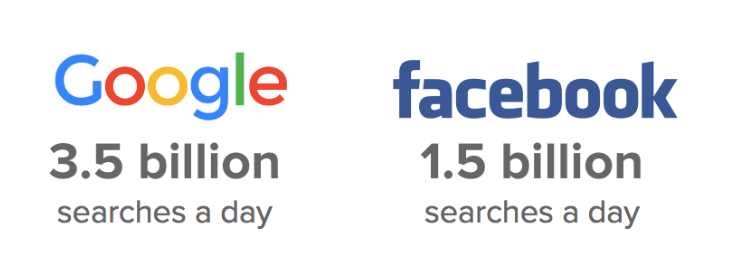
So, we’re essentially at the mercy of their algorithms — which are subject to constant change, including:
- Google’s algorithm being updated to favor ‘real experts’ on a topic (not content machines or college kids copywriting to pay their tuition fee).
- Search engines in general (including technology like Amazon Alexa) becoming more complex and sophisticated — they’re now able to understand semantically-related concepts.
- Personalized search making keyword rankings unpredictable and harder to calculate.
- Google displaying featured snippets on the SERP (search engine results page).
- Facebook updating their organic reach News Feed content with the same intent: to keep users from navigating to different sites.
These changes represent a shift in the classic function of SEO.
Obviously, the first step is to ensure your content is sufficiently engaging and educational not only to rank high in search results, but to entice readers away from the SERP.
However, that’s no longer enough.
Build Around Topics
To assert yourself as a ‘true expert’, you need to create accurately and consistently around a certain topic — not one-off content to target certain keywords.
Topic clusters have been lauded as the future of SEO and content strategy, but are widely underreported on (so now’s the time to strike!) A topic cluster is simply a group of interlinked web pages built around one ‘pillar’ page.

The pillar page and cluster pages link back to each other via the use of the same hyperlinked keyword.
When one of these pages performs well, the entire topic gets a rankings boost, leading to more visitors and a positive feedback loop traffic and conversions.
This will also improve search ranking of similar content on your site, which can even lead to you owning multiple SERP positions for a certain keyword.
Implementing topic clusters will clarify a site’s organization and architecture. It also encourages a more deliberate approach to posting.
In the past, a team would generally post for the sake of interest or topicality. With topic clusters, they can use organic gaps in an existing cluster as a strategic starting point.
Featured Snippets
Featured snippets are the high-ranking search results featured in a box below the ads on Google. In a nutshell, they’re there to answer a user’s question straightaway.
Being featured, unsurprisingly, results in tons more exposure: RKG Merkle’s Ben Goodsell noted an 677% increase in revenue from organic visitors and a 400% increase in click-throughs.

Ahrefs reports that 99.58% of featured pages already rank in top 10 of Google, so if you’re already ranking high your chances are promising.
But, as outlined in this awesome Moz guide, there are plenty of ways to optimize your content to increase its chances of getting featured, including: keyword research, on-page SEO, Twitter monitoring, structure, formatting and imagery.
It’s also important to try and answer as many similar questions possible.
You can also look for relevant existing snippets already owned by another company and try to get a mention.

Another handy feature is the ‘people also ask’ widget, which gives an insight into what Google links together. By exploring this, you can sniff out untapped content opportunities and strategize for the future.
By combining PPC with recommendation algorithms, Facebook has flippedthe digital advertising value chain upside down.
As outlined in Buffer’s report, Facebook’s new algorithm relies on three active interactions: commenting, sharing and reacting.

Adam Mosseri, Head of News Feed, explains: “Page posts that generate conversation between people will show higher in News Feed.”
But a no-go for brands is posting content that ‘baits’ customers into commenting, sharing or reacting; this will result in demotion of your content on newsfeeds.
The engagements need to be based on genuine interest, not just consumption.

The algorithm also places equal emphasis on posts that have been shared privately as well as publicly.
For most brands, reach and referral traffic from Facebook will continue to decrease; so it may be worth re-evaluating investment and resources dedicated to Facebook.
There’s no silver bullet — content needs to authentic, meaningful (and usually emotionally driven) to succeed.
Buffer’s Brian Peters summarizes: “Instead of creating content, for your brand, that people interact with, we need to start creating content, for the people, that will spark enough emotion to generate a comment or share.”
Breaking Out of Our Rut
The final barrier is our dependence on the same, worn-out methods; a strategy that worked in the past won’t necessarily continue to work.
That’s why it’s important to keep experimenting, testing and iterating with different channels and acquisition tactics.
This will help you build up a portfolio of experience to fall back on if your core strategy starts losing traction or just isn’t working.
It’s also useful in terms of tapping into new audiences or digging deeper into your target audience’s interests.
Here are some methods to try.
Conversational Marketing
Conversational marketing means having a real-time, one-to-one conversationwith a customer or lead.
According to a recent study, 90% of consumers want to use messaging to communicate with businesses. Platforms like Drift and Intercom make scaling these conversations possible.
This signals a change in the way content marketing is distributed, making the prospect of customers receiving the right content at the right time — i.e, when they’ve just asked you for it — a reality.
Alex De Simone, CEO of Avochato explains: “Machine learning technologies that enable marketers to tailor who sees a message are starting to decide what the content of conversations should be. The shift from traditional content marketing to machine-mediated conversational marketing will change the way marketers operate, empowering them to deliver better content at scale.”
Video Marketing

Experts are convinced that video, one of the fastest-growing and most in-demand channels out there, is the content marketing platform of the future.
In a world where more and more is automated, video emerges as one of the last communication channels that can’t be faked.
Don’t agree? Here are the numbers:
- Video is projected to claim more than 80% of all web traffic by 2019.
- 90% of customers report that product videos help them make purchasing decisions.
- Digital marketing expert James McQuivey estimates that a single minute of video content is the equivalent of 1.8 million words.
Sites like Simpleshow and GoAnimate are a great place to start.
Video marketing is powerful because it’s visual and auditory, making it easier for users to remember than text-based content. And when a customer remembers your video, they will also remember your brand.
Emerging Technology
Emerging technology is predicted to go mainstream over the next two years, and its widespread availability will create opportunities for marketers to optimize their content.
By 2021, early adopter brands that redesign their websites to support visual and voice search will increase digital commerce revenue by 30%.
And experts predict that AR/VR will amass $150 billion in revenue by 2020, indicating that the production of visual content will go from a ‘nice-to-have’ to a ‘must-have’.
While virtual reality still represents unexplored territory for most, its rise can serve as a reminder to keep experimenting with visual content such as interactive graphics, imagery, videos and apps.
As summarized by Ginny Mineo, you should: “Re-calibrate your strategy between compounding, recurring, and experimental content channels.”
The successful content marketers of the future will learn from the past and quickly adapt to the present.
Content marketing can transform itself by relying on selective, higher-quality content, powered by smarter research and emerging technologies.

How HubSpot Uses Blogging to Rank #1 on Google
People are hungry for immediate answers.
Luckily, it has never been easier to find the information you’re seeking via search.
A lot of marketers want to know: how does HubSpot optimize for search? I talked to our blogging team to find out, and put together a series of insider tips we’re eager to share with you. Check out the tactics below, and start maximizing organic traffic to your own blog.
How to Rank #1 on Google
1. Embrace Complex Clusters
Search algorithms are ever-evolving, and in 2018 they are as smart as ever. Search engines are now capable of recognizing connections across search queries.
This has big implications for marketers. Gone are the days when the searcher typed in simple keywords. Searches today are complex, putting the heavy lifting back on Google and other search engines to connect the dots.
For example, if you type “movie about doctor clown” into Google the first result will be the movie Patch Adams, despite the fact that there is no overlap in the search terminology. The takeaway: search engines are incredibly intuitive. Google recognizes exactly what the searcher wants without the searcher explicitly stating their question. Go ahead, try it for yourself!

At HubSpot, our blogging team realized this shifting behavior, so they altered our blog strategy to focus on topic clusters, instead of specific keywords.
To do this, they first identified what topics to prioritize. They then aligned our existing blog posts into the aforementioned clusters and generated tons of new content under those clusters. Finally, they built internal and external links at every available opportunity, creating connection points between content that share the same topic cluster. In doing so, we signal to search engines exactly how the pieces fit together. While it can be time-consuming to reorganize your content, the payoff is huge.
2. Prepare an Answer for the Target Query
Let’s use the example of Patch Adams once more. If you type “movie about doctor clown” into Google, you will see a small box with a short answer summarizing the premise of the film right below the search bar. There’s no need to click into a link to see the answer; instead, Google makes it easy to get the information on first glance. This answer box is a featured snippet. And if you’re not using your blog to optimize for featured snippets, start now.
Here’s the incentive: Google pulls the featured snippet from one of the pages that ranks on page one of the search results, but the featured snippet does not necessarily need to exist in the #1 link. This is a huge opportunity to get content that is not in the #1 spot to actually appear above the #1 spot. Want to see a live example? Search “Let’s get meta” into Google, and see for yourself.
To identify which content is good for featured snippets, Google frequently serves up answers for “Who, What, When, Where, Why and How” queries. If you think your content is addressing one of the aforementioned questions, prioritize writing a golden-nugget answer, and you may just see your content sitting right below the search bar.

Another key reason to prioritize for the featured snippet is voice search. As voice search is on trend to become 50% of all mobile searches by 2020 — a prediction by both Google and Bing — featured snippets are now being tapped as the trigger response by virtual assistants. So, as search evolves, so should you.
3. Revamp Out-of-Date Blog Posts
There are a number of benefits to creating new content like having additional pages to be indexed by search engines, providing education to your curious users, and it is a good way to stay relevant in your industry. However, as any tenured blogger knows, new posts can take a while to build up steam. In fact, it is often slightly older posts that generate a large portion of traffic because they have had time to develop authority.
One of the most effective strategies HubSpot’s blogging team implements to boost SEO was is to historically optimize our old posts. Historical optimization is the process of taking old posts and making them new again with higher-quality, refreshed content, keywords, and links. By leveraging your already existing search authority on these posts, search engines will reward your freshness, which will then lead to a surge of new visits to your content.
Do You Know How Search Engines Determine Rank?
We surveyed 295 individuals across the United States, asking the question “Do you know how search engines, like Google, rank the results you get after a search?” An astounding 48% of people answered “no.” As a marketer, you do not want to be in that 48%. If you do not evolve with SEO, you risk losing key business opportunities to maximize your brand awareness and generate leads. It is time to understand, strategize, and capitalize on invaluable SEO tactics — like blogging — that will propel your business into success in 2018 and beyond.

What Is the 80/20 Rule? How the Pareto Principle Will Supercharge Your Productivity
The other day, my friend asked me why I was buying another pair of yoga pants.
“Why do you need another? You pretty much only wear the same two, anyway.”
It was true. I have at least ten pairs of yoga pants, but there are two in particular I wear the most … for at least, let’s say, 80% of my yoga classes.
You might not know who Vilfredo Pareto is, and you might not explicitly recognize the 80/20 rule, but I have no doubt you’re already familiar with the concept.
Let’s back up. Before my yoga-pants revelation, back in the early twentieth century, Vilfredo Pareto was having a similar (albeit more consequential) realization of his own: 80% of Italy’s land was owned by only 20% of its people.
Allegedly, he recognized something similar occurring in his own garden. Pareto saw 80% of the peas from his garden came from 20% of his pea plants.
He concluded that 80% of all results, whether that be in business, economics, or gardening, derive from only 20% of the effort.
Pareto Principle definition
The Pareto Principle states that 80% of your results come from only 20% of your efforts. The principle is initially credited to Vilfredo Pareto, who noticed back in the early 1900s that 80% of Italy’s land was owned by 20% of Italy’s people. In business, for instance, this means 80% of your profits come from 20% of your sales.
This Pareto Principle, or 80/20 rule, can be seen everywhere across marketing.
If you develop marketing campaigns, you might notice that 20% of your marketing messages account for 80% of your campaign results.
If you’re leading a major marketing project, you might realize that 20% of your initial efforts on the project are responsible for 80% of the outcome.
And if you’re a financial advisor at a marketing firm, you might feel bewildered to conclude that 80% of all your business’s profits derive from 20% of your clients.
If the 80/20 rule is inevitable, shouldn’t you learn how to use it to your advantage?
Here, we’ll explore how to use the Pareto Principle to supercharge your productivity, and become more successful while drastically cutting back on your time and effort. If the majority of your success comes from 20% of your efforts, don’t you think it’s time you stop wasting that other 80%?
Examples of the Pareto Principle
Let’s start by taking a look at some examples of the Pareto Principle, to make sure you’re firm in your understanding of the concept:
In customer service, 80% of the complaints come from 20% of your customers.
In criminology, 80% of the crimes are committed by 20% of the population.
In software engineering, 80% of the program’s functionality comes from 20% of the developer’s efforts.
In the environment, 80% of the world’s pollution comes from 20% of the factories.
Essentially, you can apply the theory anywhere — even to, say, yoga pants. Another great example I like to think about is my phone: I have about 60 apps, but of those, I typically only use 20%.
Now that we’ve covered that, let’s explore how you can use the Pareto Principle to supercharge your productivity.
How to Use the 80/20 Rule to Your Advantage
The 80/20 rule says 80% of your results come from 20% of your efforts.
That isn’t to say you should come into work only one day a week, give it a fair 20% shot, and leave.
No, the Pareto Principle isn’t suggesting you work less. It has nothing to do with time. Instead, it’s indicating you need to focus your efforts, and work harder in the areas that matter most, while accepting it’s sometimes okay to let the smaller stuff slide.
How to Apply the Pareto Principle to Your Life if You Work Alone
If you’re a freelance writer, the Pareto Principle assumes 20% of your clients are responsible for 80% of your profits.
If that’s true, then you’ll want to focus your time and efforts on pleasing and developing strong relationships with those clients. Reach out to them first. If you have a long to-do list, circle your highest-paying 20%, and write articles for them before tackling your other to-do’s.
That isn’t to say you should become unprofessional, or disrespect your other clients. But if you’re feeling overwhelmed or tight on time, it might be necessary to recognize where you’re receiving most of your results (i.e., profits), and dedicate more of your time and effort to that.
Lesson one: Don’t expand a list of contacts just to have a large network. Figure out from whom you’ll benefit the most, and focus your time and energy on developing and maintaining those relationships.
Speaking of your to-do list, let’s say you have a list of ten items.
The 80/20 rule assumes that even if you spend equal time on each item, two of those items in particular will carry the bulk of the results you want.
So don’t make an equal to-do list. Instead, write a to-do list with your heavy-hitters first. Figure out which items are most likely to deliver your biggest results, and start there.
If you’re anything like me, you probably wouldn’t normally do this. I take a look at my to-do list and start with what’s easiest or quickest to accomplish.
Unfortunately, that might mean I run out of time or don’t have the energy to accomplish the tasks with the largest return on investment.
Lesson two: Tackle two or three of the biggest projects, tasks, or commitments on your to-do list first. Use your energy and time on those. Prioritize them, and recognize you’re doing so because those two or three tasks will likely give you 80% of what you want.
It goes one step further than that.
The Pareto Principle states that when you’re working for a long time on a task, like an article, you’ve likely hit most of your goal after you’ve expelled 20% of your effort, right?
That doesn’t mean you should write for 20 minutes and call it a day.
Here’s how I’d break it down. When you’re writing an article, let’s say you’re focusing on these five individual steps:
- Write the draft.
- Look for grammatical errors and add links.
- Find a good image for the draft.
- Ensure it’s formatted correctly on the website.
- Set a publish date and time.
The 80/20 rule says you’ll have the majority of your results from 20% — can you guess what that 20% is?
More than likely, writing the draft itself will give you the biggest return.
The smaller details account for only 20% of your outcome. While they’re important, they aren’t worth stressing over or wasting time on.
In economic lingo, this is known as the diminishing marginal benefit. It means the longer you work, the less power your effort will have on the final result. Quality over quantity … if you work three hours, most likely, you made the most significant progress in hour one.
Lesson three: Make a bulleted list, identifying each small task required to complete a goal. Circle or underline your 80% player, and spend the majority of your time and effort on that. The details are nice, but they aren’t the reason for most of your results.
While I used a freelance position as my example in this article, I hope you’re able to take the bolded advice and use it tangibly in whatever industry you work.
How to Apply the Pareto Principle to Your Life if You’re a Manager
Okay, so working alone and using the 80/20 rule makes sense when it’s your own tasks, your own deadlines, and your own results at risk.
What about when you’re in charge of a team?
For instance, let’s say you’re the director of a marketing team, and your team is tasked with a major project.
You know a few things: first, 20% of your team’s efforts are going to achieve 80% of your intended results.
So, let’s identify those intended results, and work backwards. If you want your project to showcase how well your SEO strategy played out on social media, collect that information first.
Take it a step further and make a list of individual tasks you’ll need to complete.
Brainstorm and recognize that 80% player. Write a list of everything you need to do to have a “perfect” project:
- Collect information.
- Format it into a graph.
- Display it on a Powerpoint slide.
- Make the design attractive.
- Designate a speaker.
- Have speaker jot down points to bring up during speech.
Now, let’s say you were suddenly told instead of three weeks, you have 24 hours to complete the project. How would that change your strategy?
You’d probably start with the biggest piece of the pie first, and say “hopefully we get to it” to everything else.
You should still do that. Work on your heavy-hitters first (in this case, collecting and formatting the information), and come back to minor details later.
Lesson one: Brainstorm with your team and identify the biggest tasks you’ll need to complete to hit the majority of your goal. Visualize as if you were short on time: what would you do first, and what would you be okay leaving behind? Start with that #1 item, and work backwards towards the smaller details later.
Now let’s apply the 80/20 rule somewhere else: 80% of the work will be completed by 20% of your employees.
While this might seem unacceptable (“Why did we hire them then?”) it’s not — it’s how the Pareto Principle works, but it’s not set in stone.
More than likely, many of your employees don’t feel the need to be part of that 20% because you have some stronger, more aggressive personalities in the room. Those people have already claimed responsibility for the biggest parts of the job. That doesn’t mean your other employees don’t want to help out.
Tackle this issue by delegating tasks fairly, or even dividing those “power players”, if you know who they are, and assigning one to each smaller group.
Encourage increased collaboration, or assign separate tasks to different people and check in with each person individually to ensure everyone feels equally responsible for their part of the equation.
Better yet, switch up who gets to contribute to that largest 20% of the equation. If the same employees on the team are always in charge of collecting the information and creating the graph, maybe spread the task out: do you have other employees who are capable of putting the information into graph form, and have you asked them if they’d like to help out?
Your employees will be encouraged to work harder if they know they’re contributing to the biggest piece of the rewards — not just the smaller details.
Lesson two: Don’t let 20% of your employees carry the team. Delegate tasks, create smaller groups, and assign those power players individually to each team. Better yet, check in individually with each employee on your team to ensure he or she feels equally responsible to reach the team’s goal, or switch up which employee gets assigned the “biggest tasks” each time your team has a project.
Remember, the numbers 20% and 80% are not exact statistics, just estimations. The point isn’t the numbers: the point is, everything in life is not created equal, and there are a few things that are weighted with far greater reward than others.
Spend your time chasing those items, and you’re likely to increase rewards while diligently cutting back on wasted time.
