
The Beginner’s Guide to Google Tag Manager
Collecting data using tools like Google Analytics is critical for expanding your business’s online reach, converting leads into customers, and optimizing a digital marketing strategy to create stronger relationships with your audience.
However, collecting data is easier said than done. Google Analytics and other similar analytics tools aid the process, but they work more effectively with the addition of tags.
Tags, in a general sense, are bits of code you embed in your website’s javascript or HTML to extract certain information.
For marketers, necessary tag information typically includes how long users visit a page on your site, form submissions, how they arrived on your site, which links they clicked, or even what products they removed from their shopping cart.
Each tag tracks something different. For instance, you might create a tag just to see how many people fill out the form on your “Contact Us” page. That tag can then send more precise information to Google Analytics, or AdWords, or another third party.
Unfortunately, manually coding tags can be a tedious and difficult process for marketers without much development or coding experience, and it’s time-consuming to fill out tickets for the IT department.
With Google Tag Manager, your whole tagging process becomes much easier. All you do is embed a code into your site pages once, and then each time you want to create a tag, Google Tag Manager codes it and embeds it for you.
What is Google Tag Manager?
Google Tag Manager is a tag management system that allows you to create and monitor tags on a user interface, without writing new code each time you want to construct a tag. You simply embed the Google Tag Manager code into each page of your website. This eliminates the manual process of creating tags, making your marketing process more efficient and precise.
Google Tag Manager does a few things: first, it allows your developers and IT department to focus on bigger-picture tasks by eliminating the burden of coding each individual marketing tag.
Second, since Google Tag Manager codes the tags for you, it significantly reduces the possibility of human error.
And third, Google Tag Manager enables your marketing department to take complete control over the tags they create and monitor. Giving your marketers full reign over their tags increases efficiency. Plus, using tags improves the accuracy of your analytics system, guaranteeing higher-quality reports and a better sense of your true online audience.
With all that said, it’s still a tool you might want to try for yourself before deciding if it’s a perfect fit — perhaps you already have a tagging system in place, or you don’t feel you need that level of organization, since your website doesn’t usually need new tags.
Google Tag Manager is free, so you can try it out virtually risk-free. Here, we’ll show you how to set up an account, how to create a new tag, how to use Google Tag Manager with your Google Analytics account, and how to embed the tool in WordPress.
After that, you can decide for yourself if it’s the right system for your business.
Google Tag Manager Tutorial: Set Up an Account
Setting up a free account is an easy two-step process, but it’s separate from any of your other Google Analytics or Gmail accounts. To ensure a painless set-up for you, we’ve recorded our process for setting up an account.
Here’s what you do:
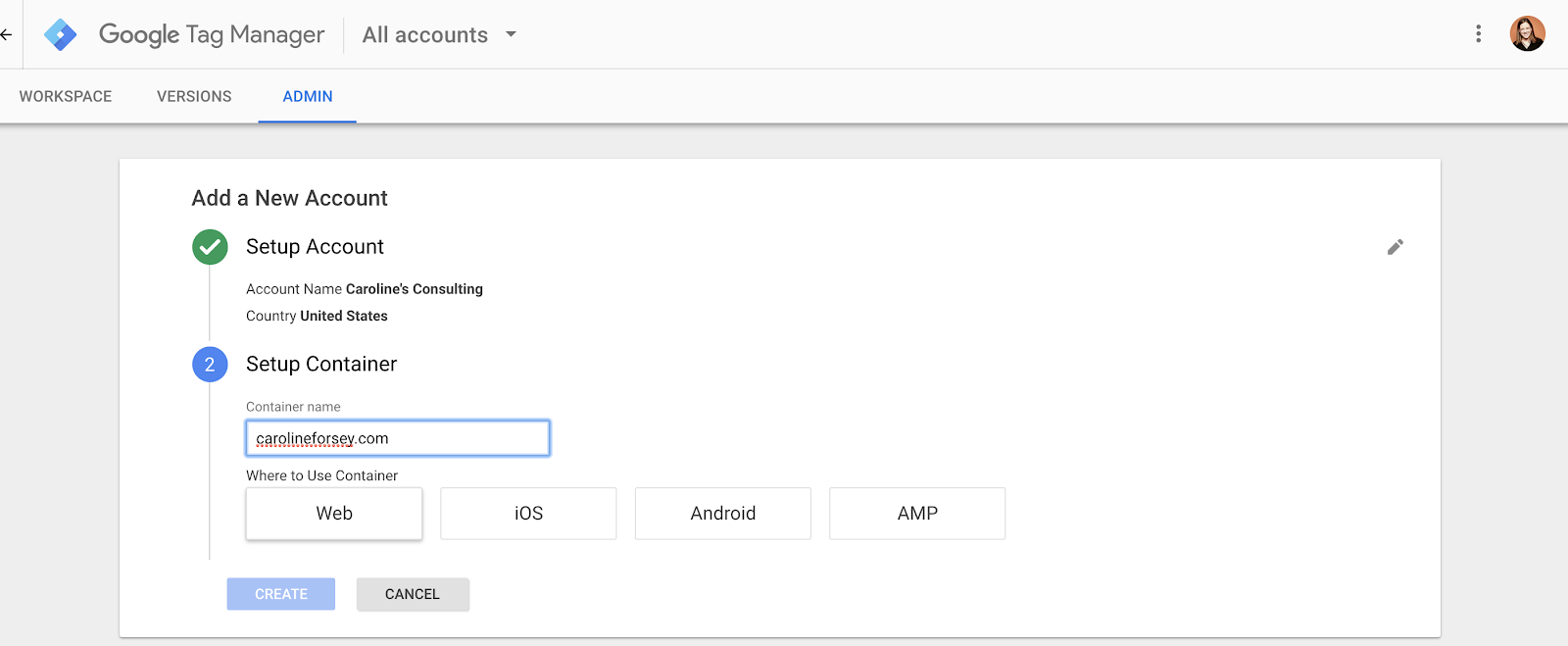
1. Go to https://www.google.com/analytics/tag-manager and click the green “Sign Up for Free” button. It will ask you to input your account name (company), country, and website URL, as well as where you want to use Google Tag (web, iOS, android, AMP). When you’re finished, click the blue “Create” button.
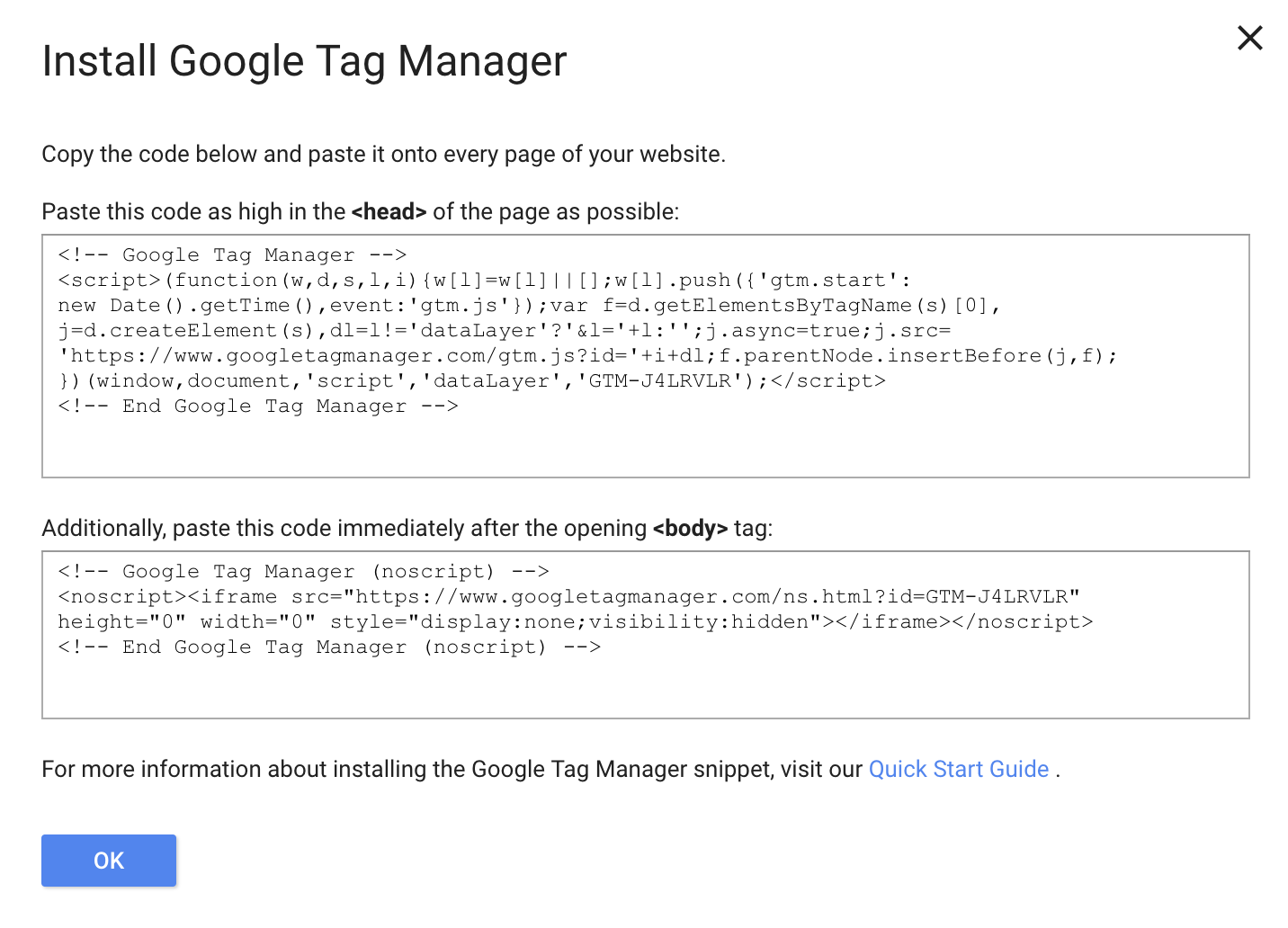
2. Next, you’ll be given codes and instructions to include one code high in the <head> of your page, and the other after the opening <body> tag. You can do this now, or apply the codes to your site later (they are accessible in your dashboard). Once you’re done, click “Ok”.
Google Tag Manager Tutorial: Set Up a Tag
Once you have a Google Tag Manager account, the first thing you’re going to want to learn is how to set up a tag.
You can create unlimited configurations of tags in Google Tag Manager.
This is helpful for creating in-depth reports on your audience’s behavior, but it can become inefficient if you don’t organize your tags properly.
Google recommends using the following naming convention: tag type – name of app – detail.
Perhaps you name one tagging configuration, “AdWords conversions – iOS – 2018-02 campaign” and then another, “Google Analytics – CTA – About Us page”.
This way, you can correctly identify and collect data related to specific campaigns or pages.
For instance, the second tag, “Google Analytics – CTA – About Us page,” tells you how well your About Us call-to-action button is performing. That information is valuable, and might be lost if you named your tags more generally, like, “CTA button”.
Now that we’ve cleared that up, let’s check out how to set up a tag:
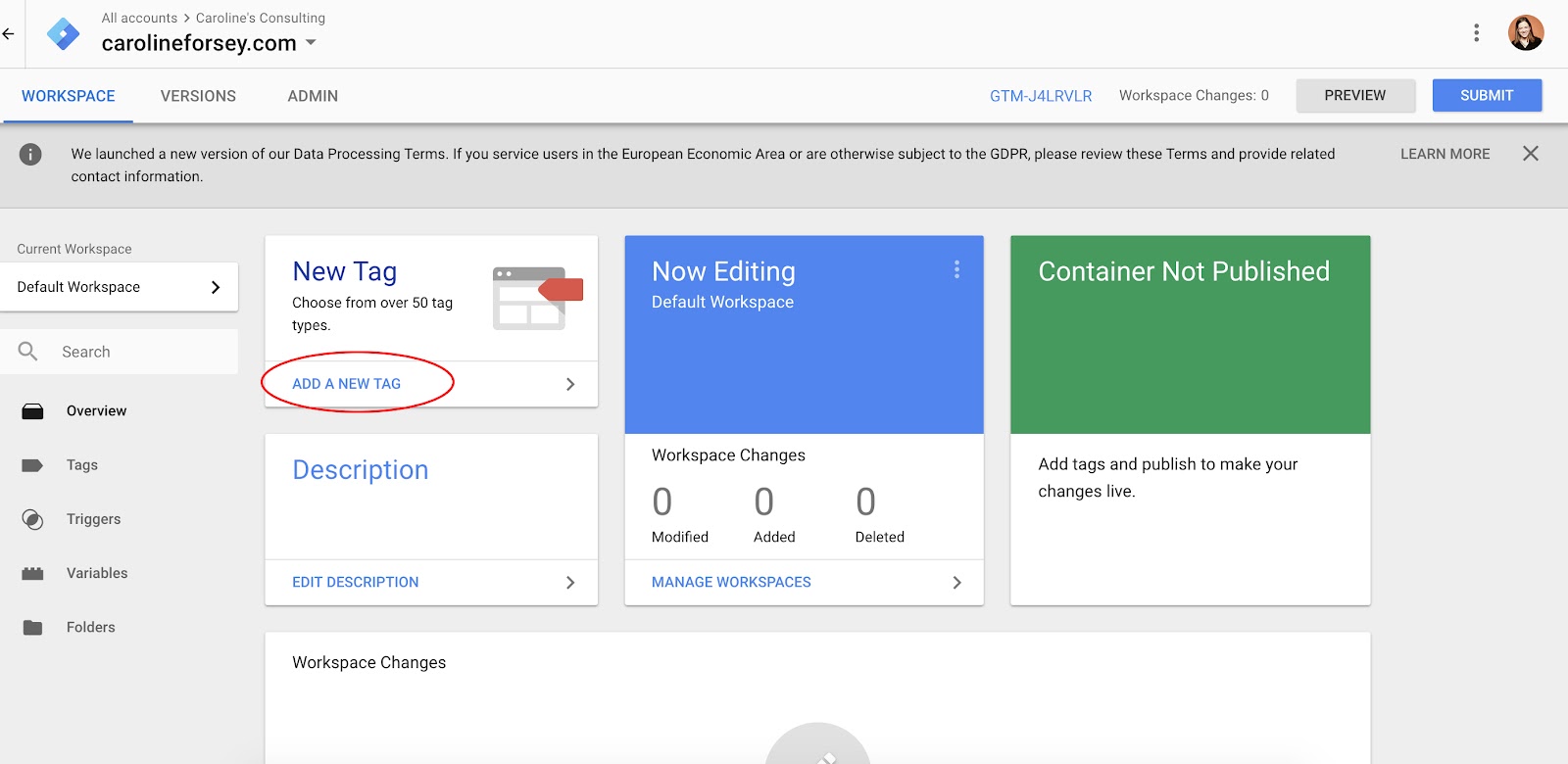
1. Within your Google Tag Manager dashboard, click the “Add a New Tag” button, circled below in red.
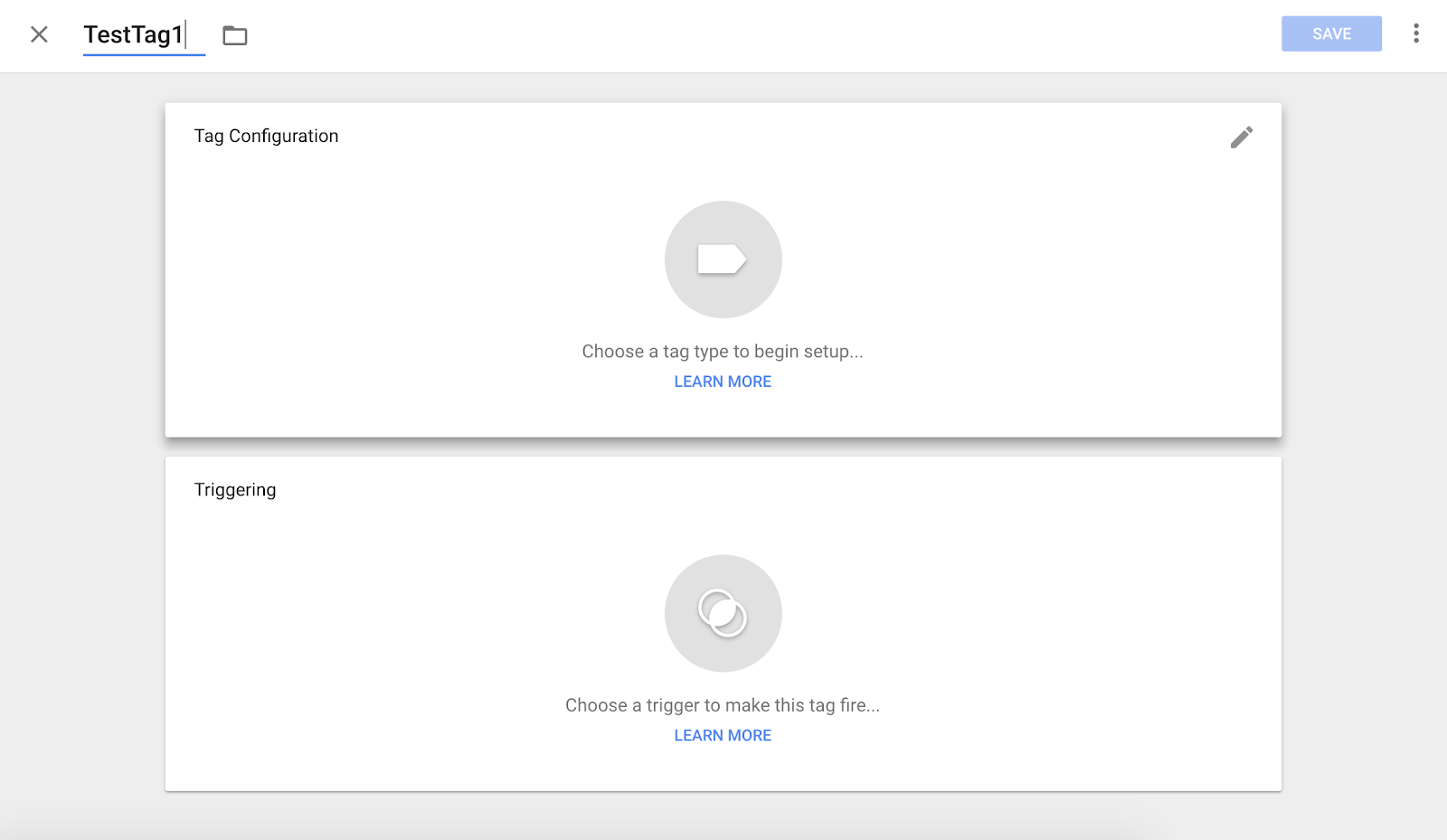
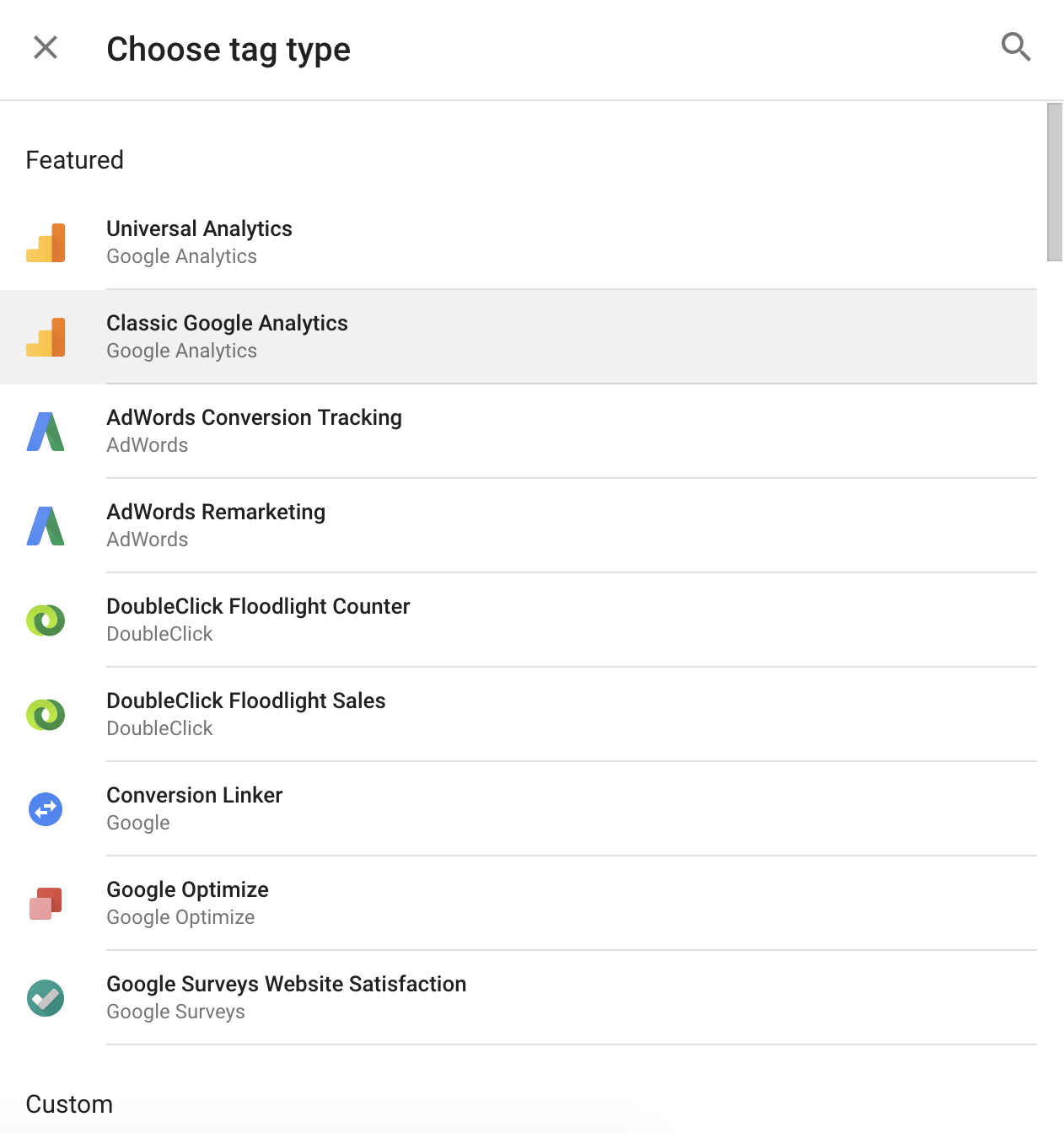
2. Title your tag, and then click anywhere in the top “Tag Configuration” box, to choose a tag type.
3. There are dozens of tag types (they are not all displayed here, and you can also customize a tag type). I chose “Classic Google Analytics”.
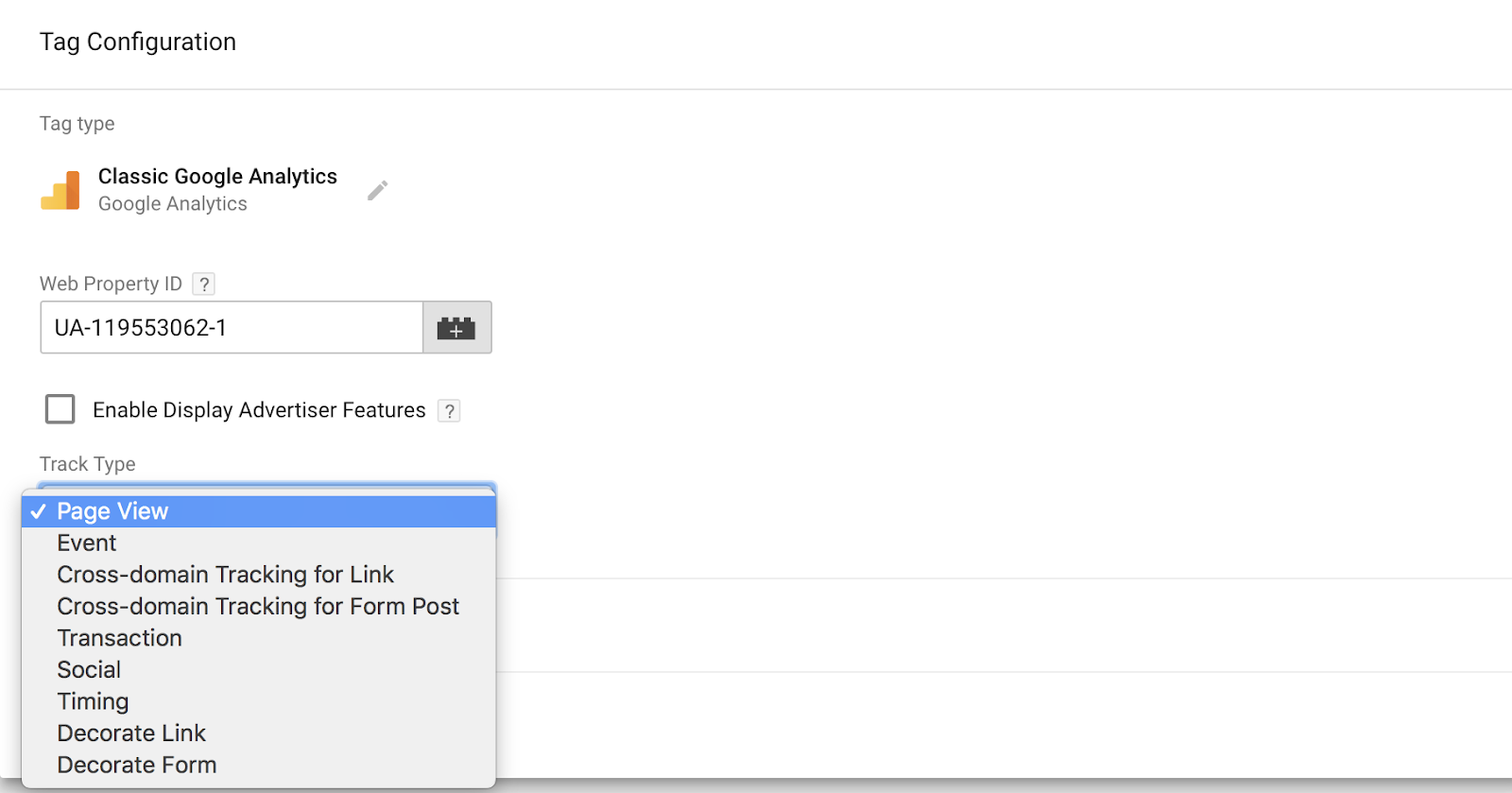
4. If you want your tag tracked in Google Analytics, the next step will be to input your Web Property ID, found in your Google Analytics account. Then, select a “Track Type”. I chose “Page View”, but there are plenty of other options.
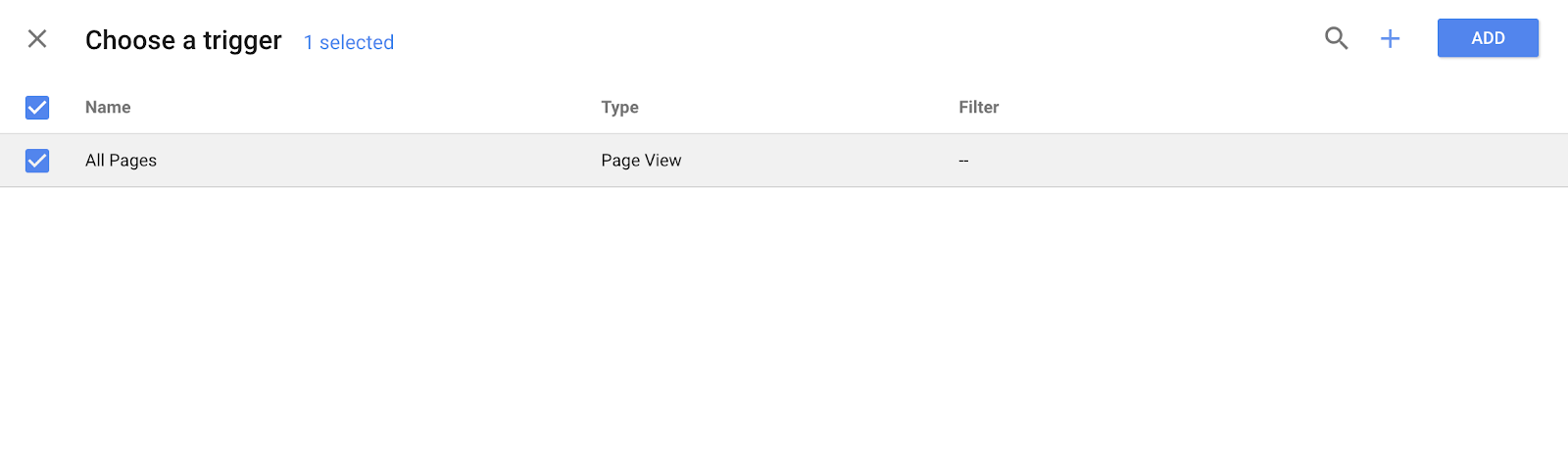
5. Next, choose a trigger (a trigger means when you want the tag recorded, i.e. “every time someone visits the page”). I chose “All Pages”, to get insights every time someone views any of my web pages, but this varies depending on your purposes.
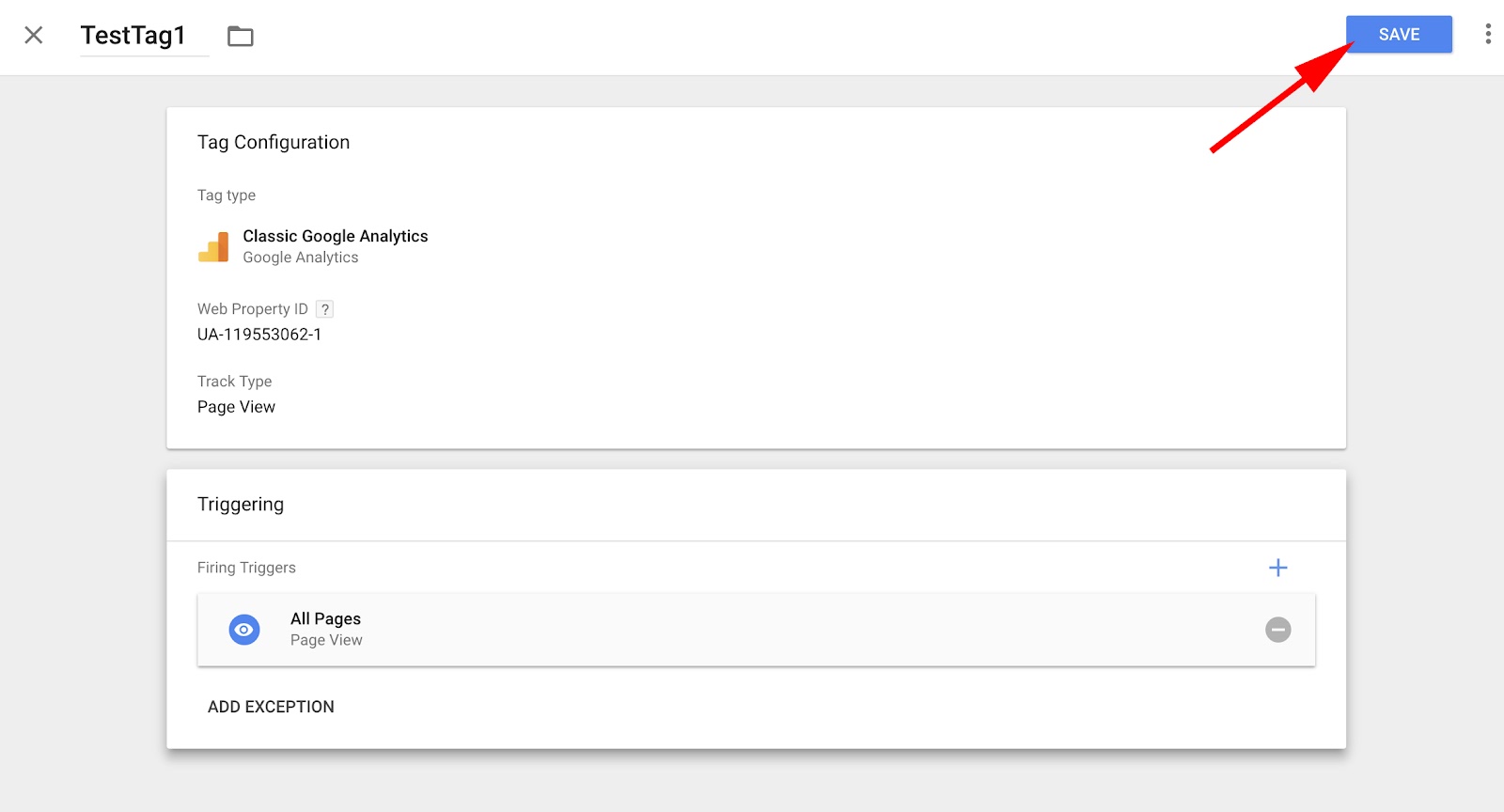
6. When you’re happy with the information in the “Tag Configuration” and “Triggering” boxes, click the blue “Save” button.
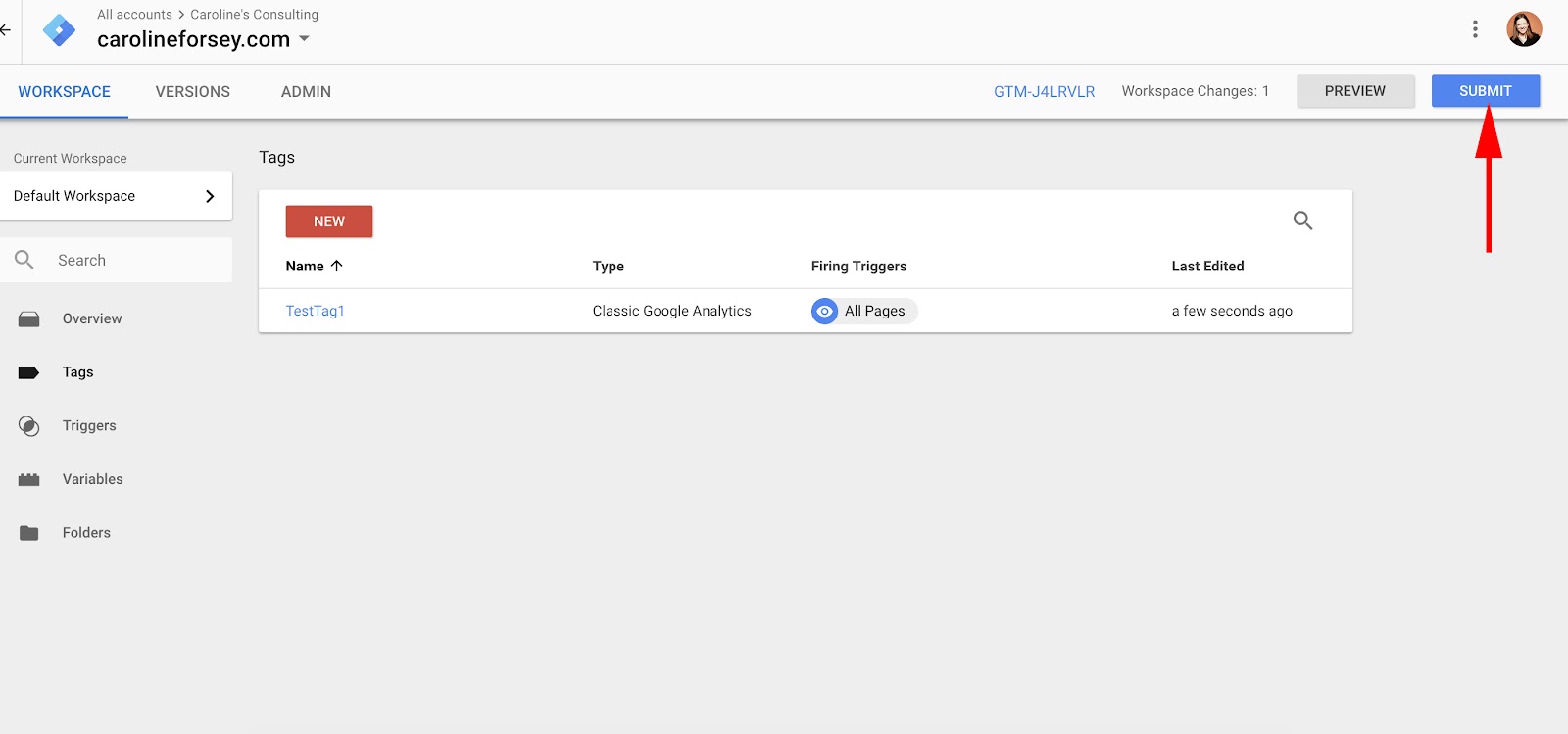
7. Next, click the blue “Submit” button. Your tag won’t work until you do so.
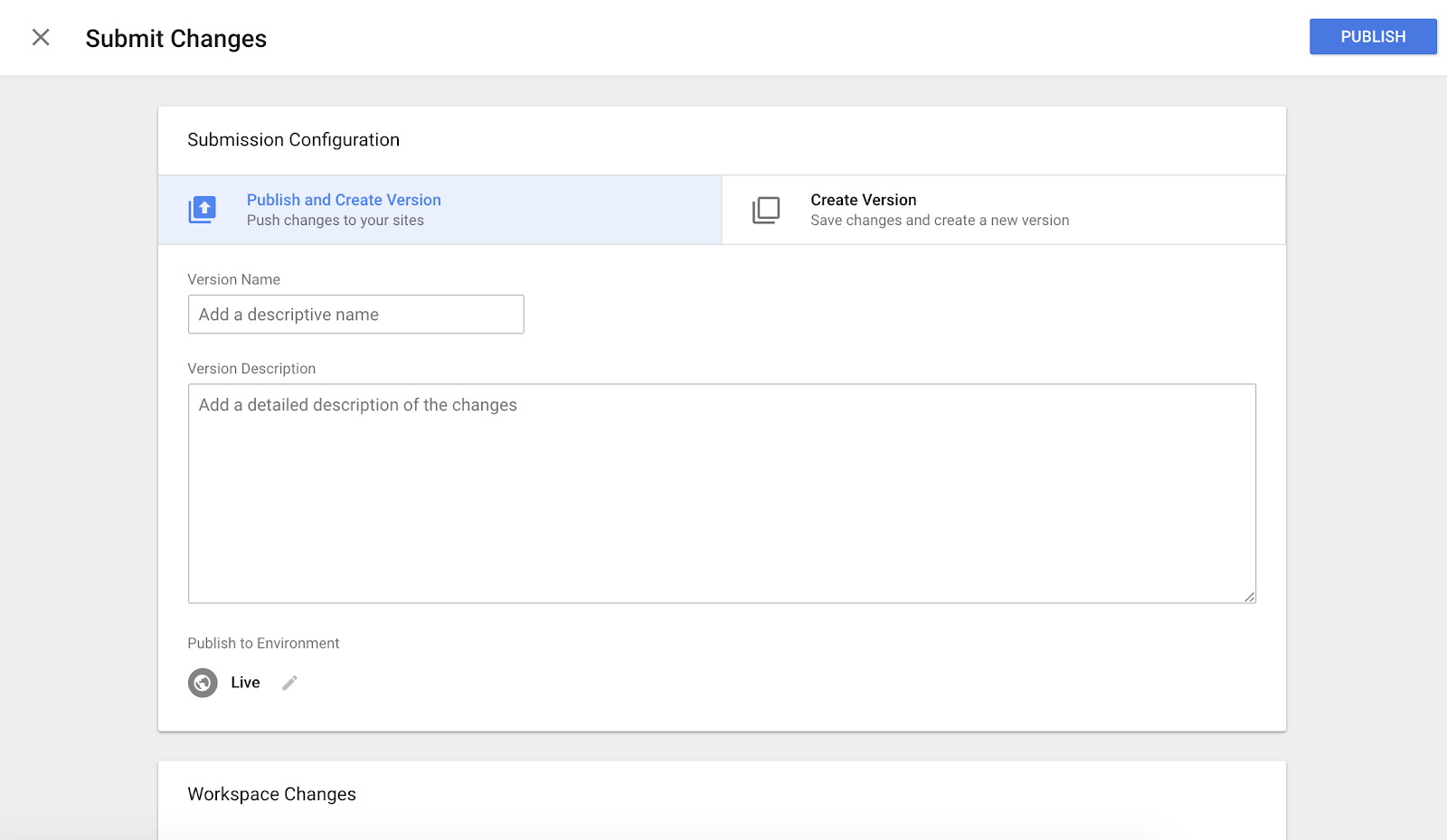
8. When you click “Submit”, you’ll be taken to this “Submission Configuration” page. There are two options: “Publish and Create Version” or “Create Version”. Since I’m ready to push the tag onto all my site pages, I selected “Publish and Create Version”, and then I pressed the blue “Publish” button in the top right.
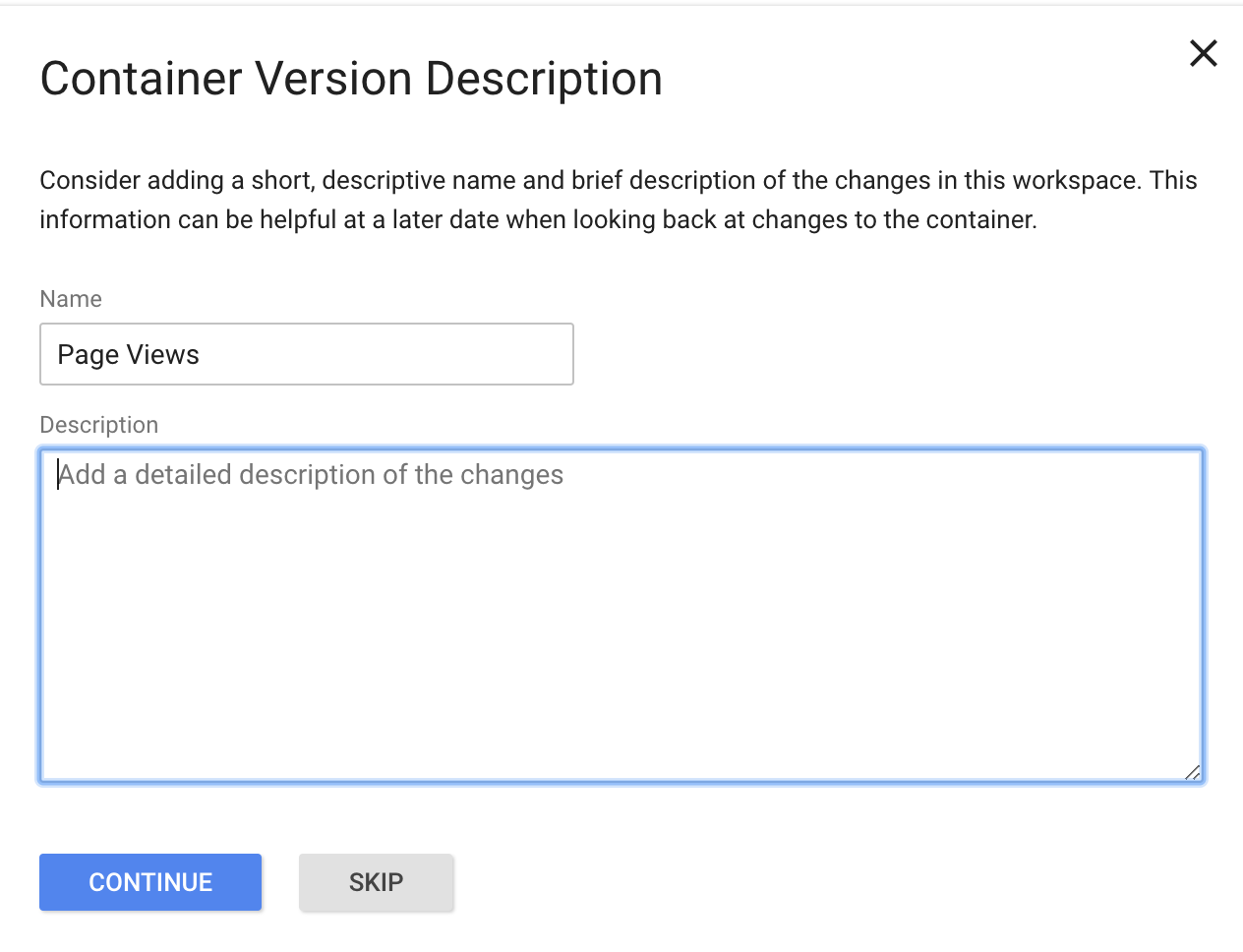
9. Finally, you’ll be shown this “Container Version Description”. To keep your tags organized, add a name and description to understand what you’re trying to record with this tag.
10. Ensure your tag appears in your “Version Summary” report.
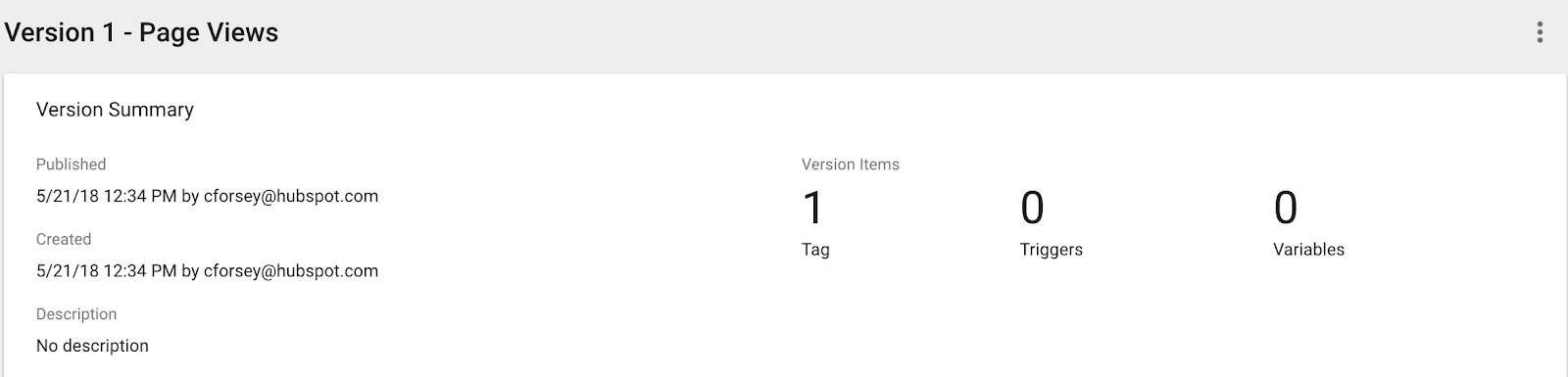
Now, you’ve successfully created your first tag.
Google Tag Manager and Google Analytics
If you want to use Google Tag Manager in conjunction with Google Analytics, there are a couple steps you need to take. However, it’s a worthwhile endeavor — embedding tags in your site will increase the precision of your Analytics reports.
First off, you’ll need to remove your GA code from your site pages. You’ll only need your Google Tag Manager tag code embedded — if you use both, it’ll just report everything twice and mess up your data.
Second, you’ll probably want to create a variable for your Google Analytics Tracking ID. A variable is a Google Tag Manager tool meant to increase your efficiency by saving additional (optional) data you provide.
If you save your GA Tracking ID as a variable, you won’t have to look it up every time you create a new tag for Google Analytics (which makes the lazy-person in me very happy).
How to Create a Variable in Google Tag Manager
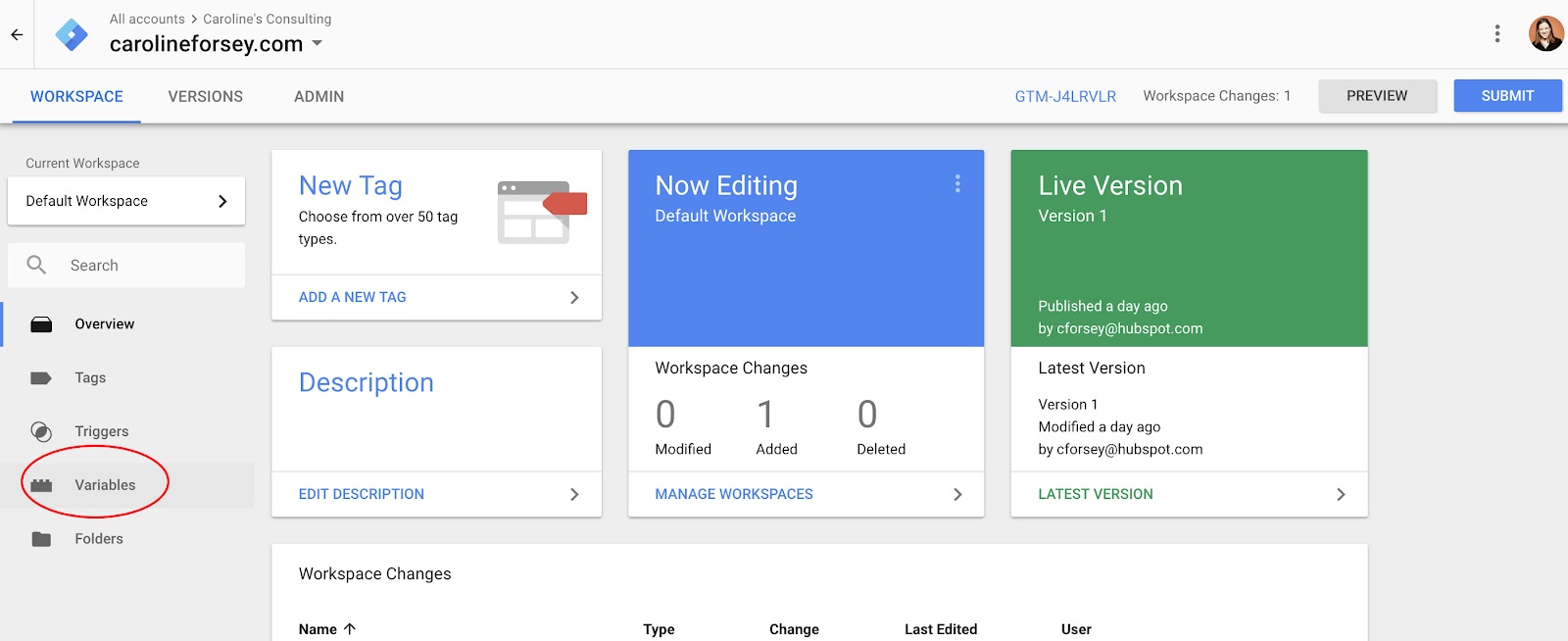
1. Click “Variables” on your Google Tag Manager homepage.
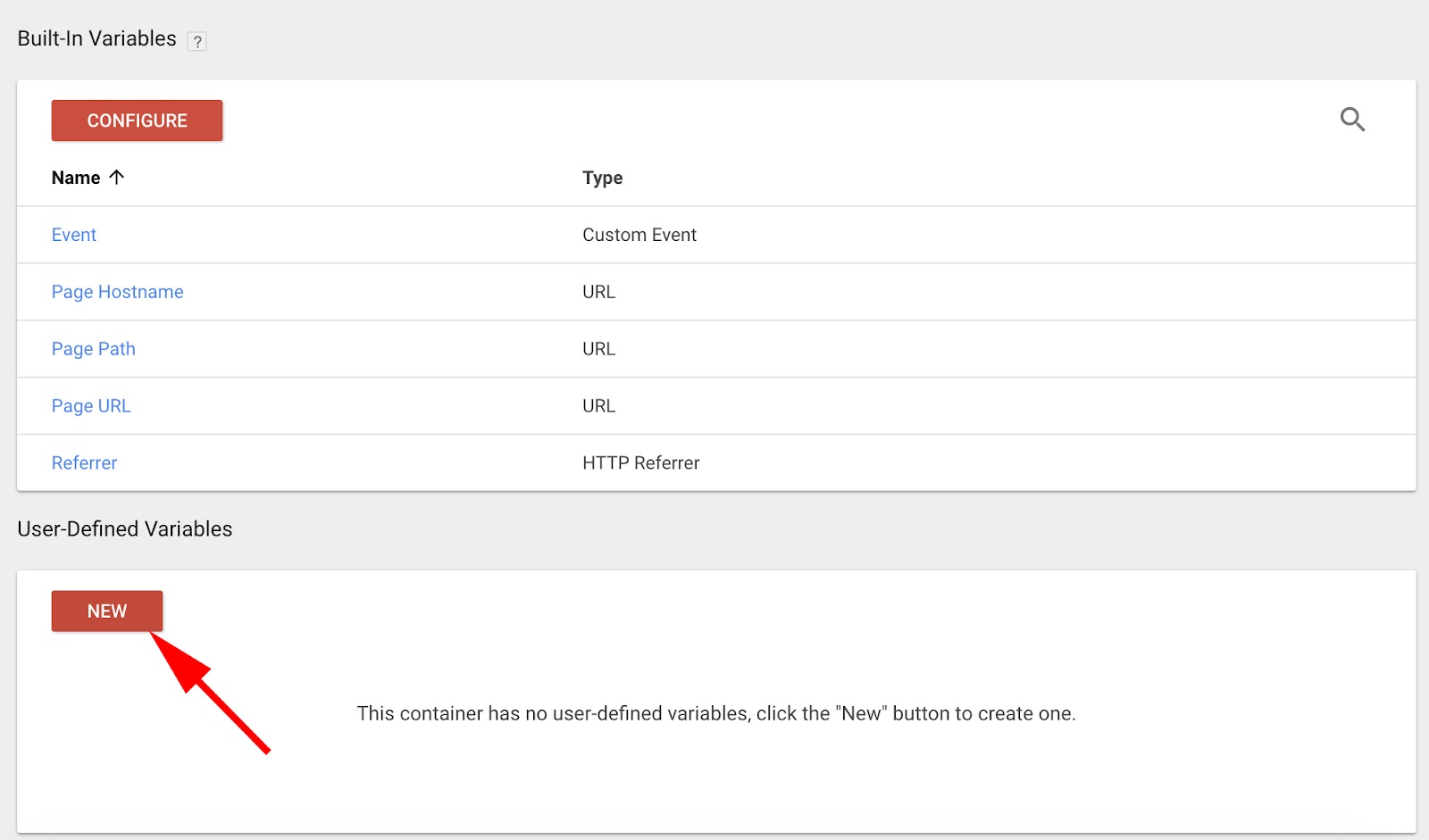
2. Under “User-Defined Variables”, click “New”.
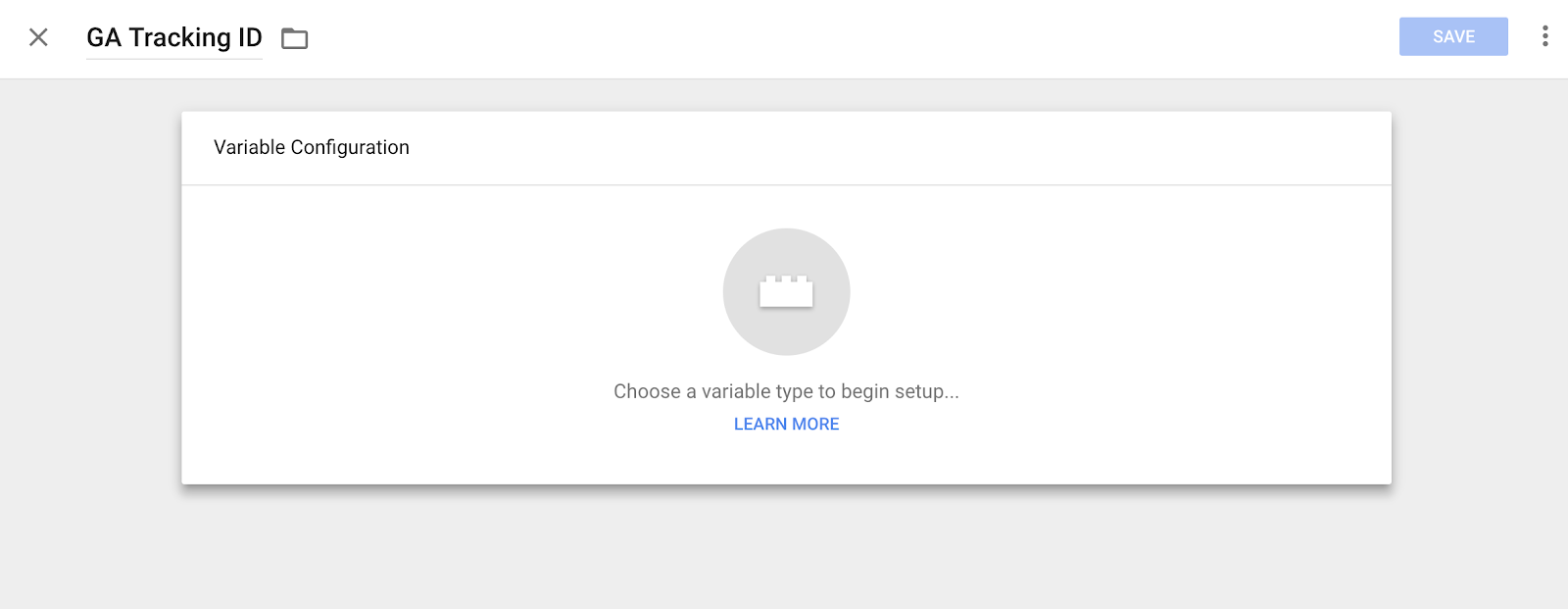
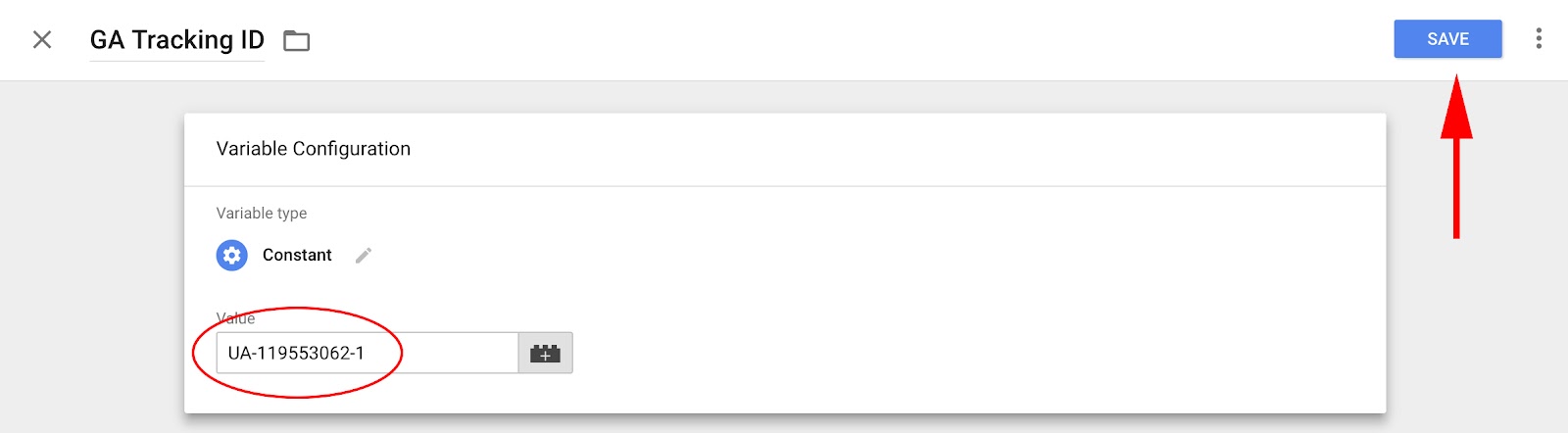
3. Name your variable — I named it “GA Tracking ID” so I’d remember. Then, click the “Variable Configuration” box.
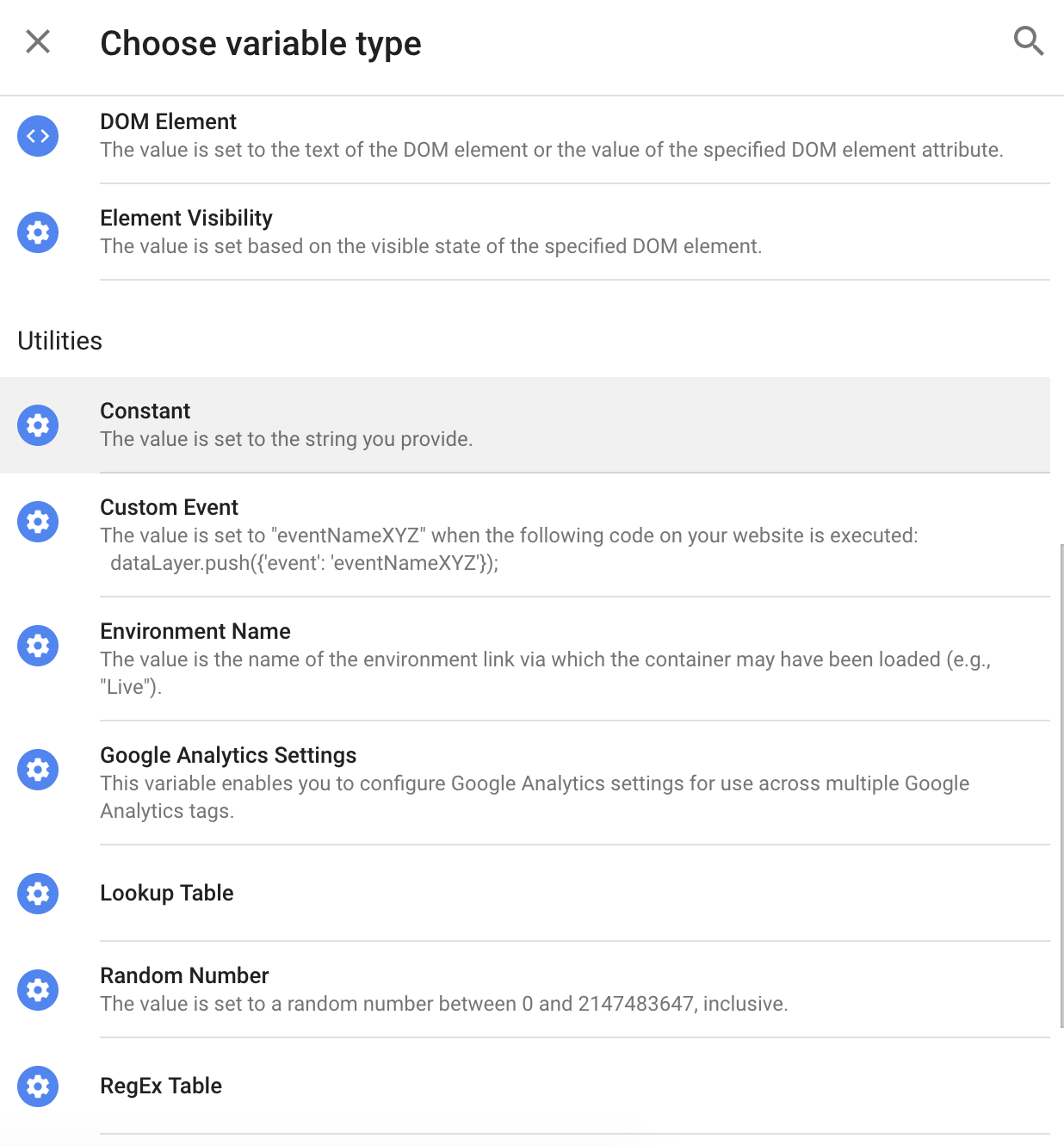
4. Choose “Constant” as your variable type, since you don’t want the ID to change for different tags.
5. Now, input your Google Analytics Tracking ID number into the “Value” box, and then select “Save” in the top right.
Next, let’s edit our “TestTag1” that we created earlier in this post, and include the new variable you just created.
How to Edit a Tag and Change its Value
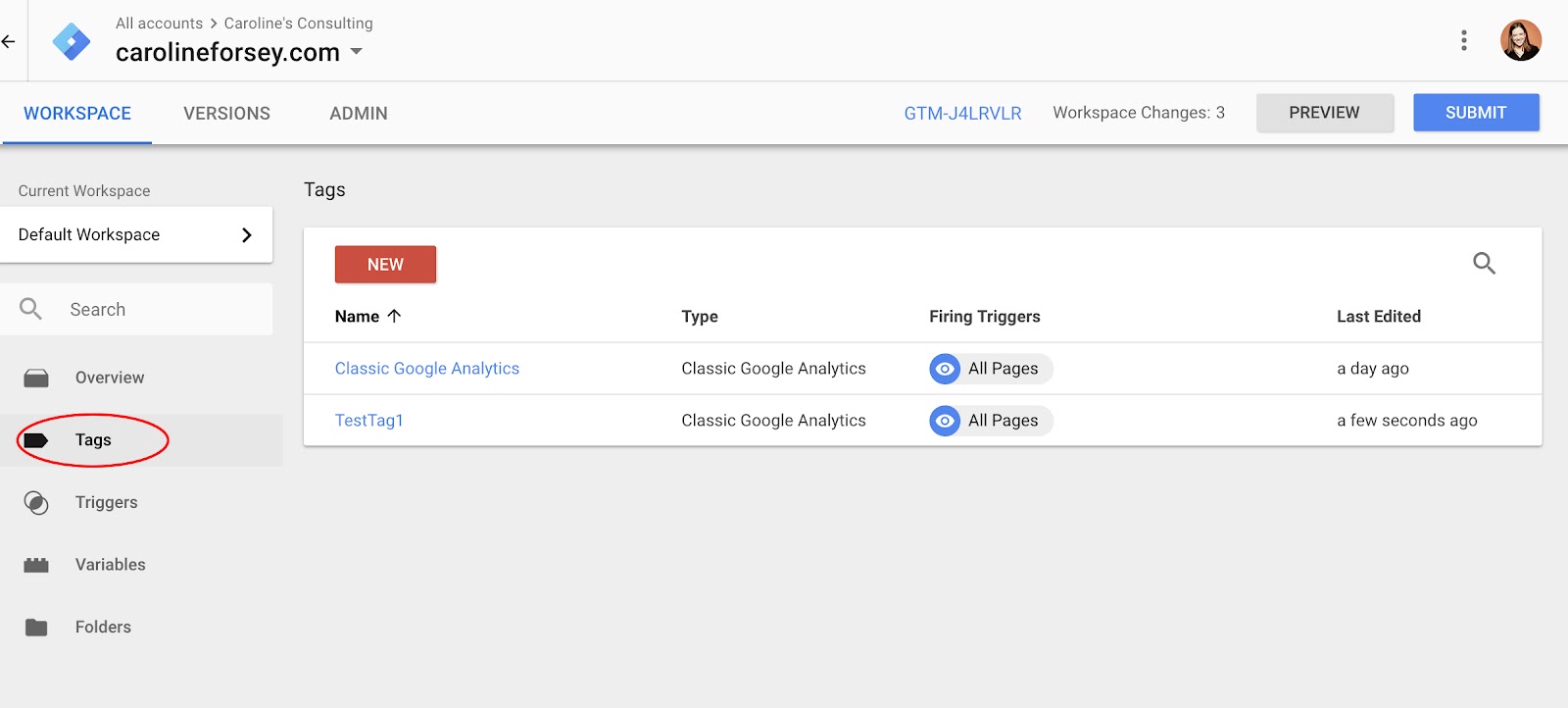
1. Back on your homepage, select “Tags” from your side bar. Click on the tag you want to edit (I clicked “TestTag1”).
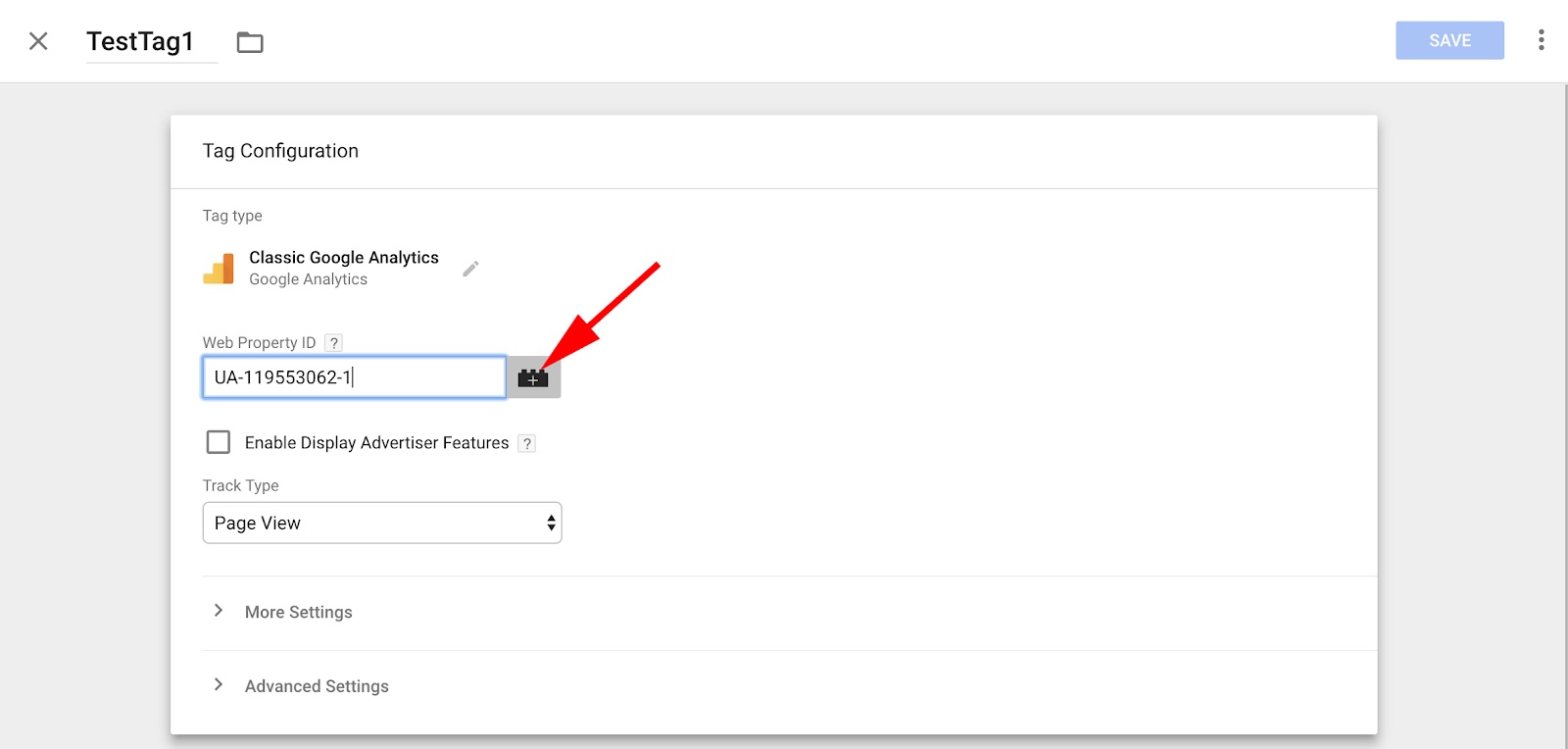
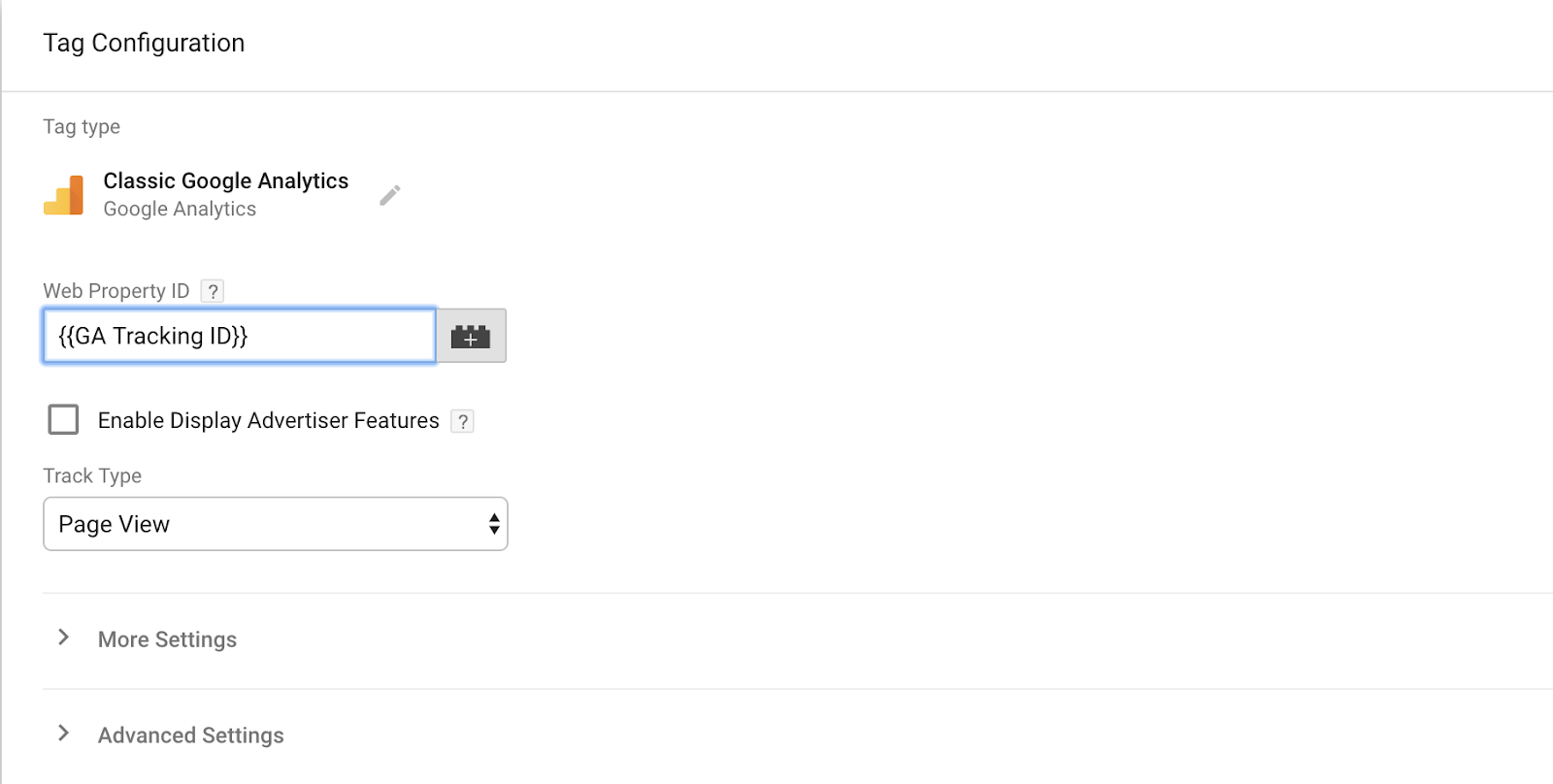
2. Click the grey “+” icon beside the “Web Property ID” box.
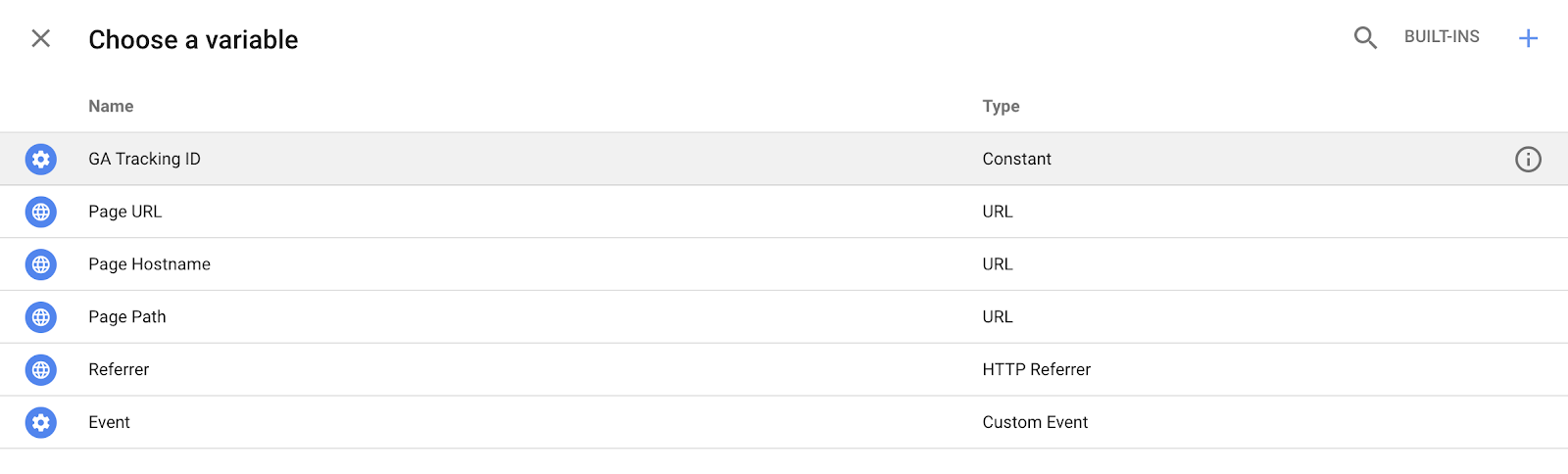
3. A “Choose a variable” box will pop up, and the first option, “GA Tracking ID”, is the variable we just created. Select that.
4. Now, your tag’s “Web Property ID” should say (or whatever you named your variable). Click save, and your tag is updated.
Google Tag Manager for WordPress
If your business uses WordPress to host its website, there’s an easy two-step process to integrate Google Tag Manager into WordPress.
There are plug-ins available if you’ve paid for a business version of WordPress, such as DuracellTomi’s Google Tag Manager.
However, if you’d rather do it manually, it’s relatively simple to do. It will only get tedious if you have a ton of different pages of your site and want to use tags on all of them — you’ll have to copy and paste a code below the <body> tag on each page.
Here’s what you do:
1. Copy the Google Tag Manager code you are given during the set-up process. If you’ve already set up your account, click the blue “Google Tag Manager” code beside “Workspace Changes” on your Google Tag Manager homepage (circled below in red). That blue code will also supply you with your specific Google Tag Manager code.
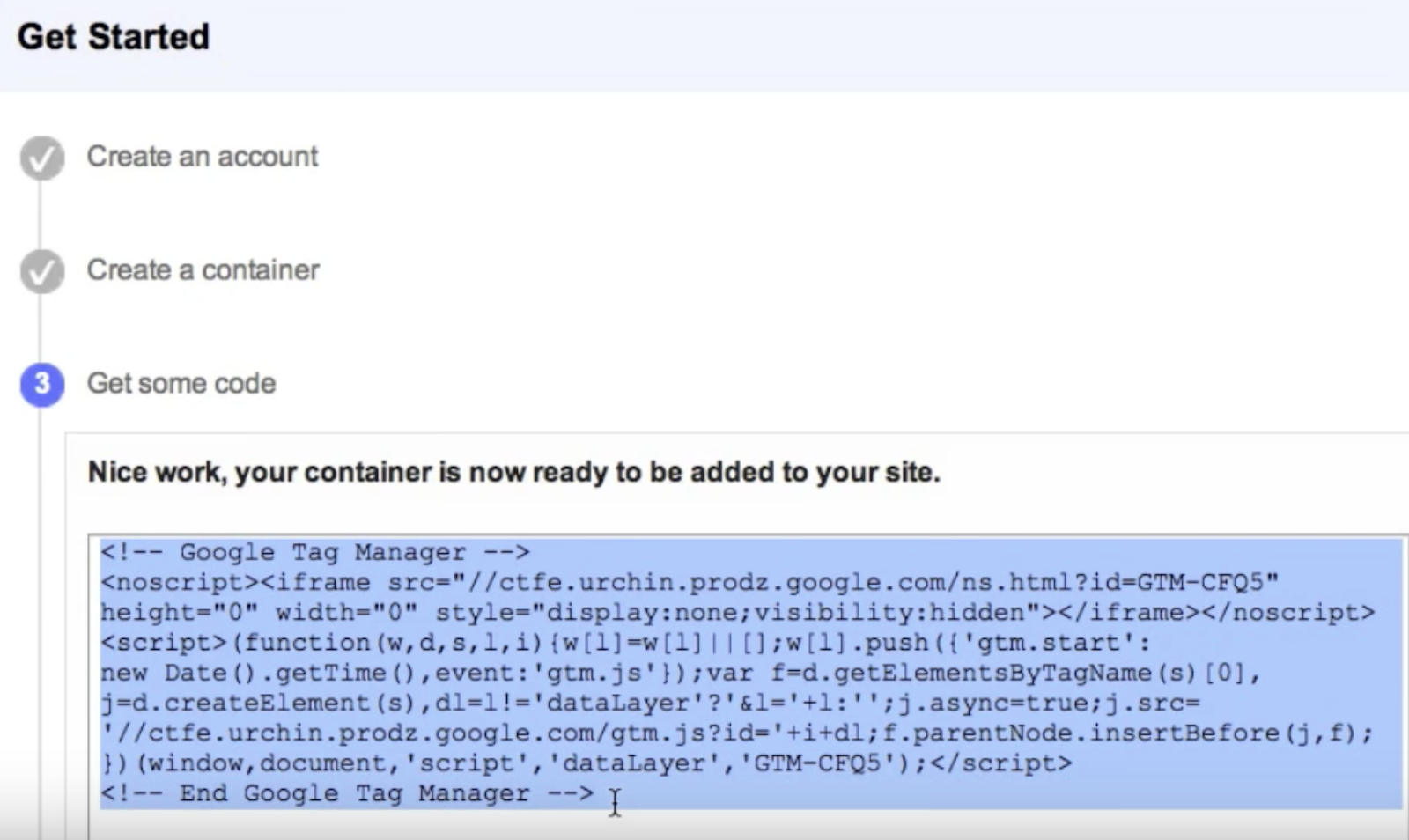
2. Now, paste that code below the <body> tag of each page on your WordPress site.
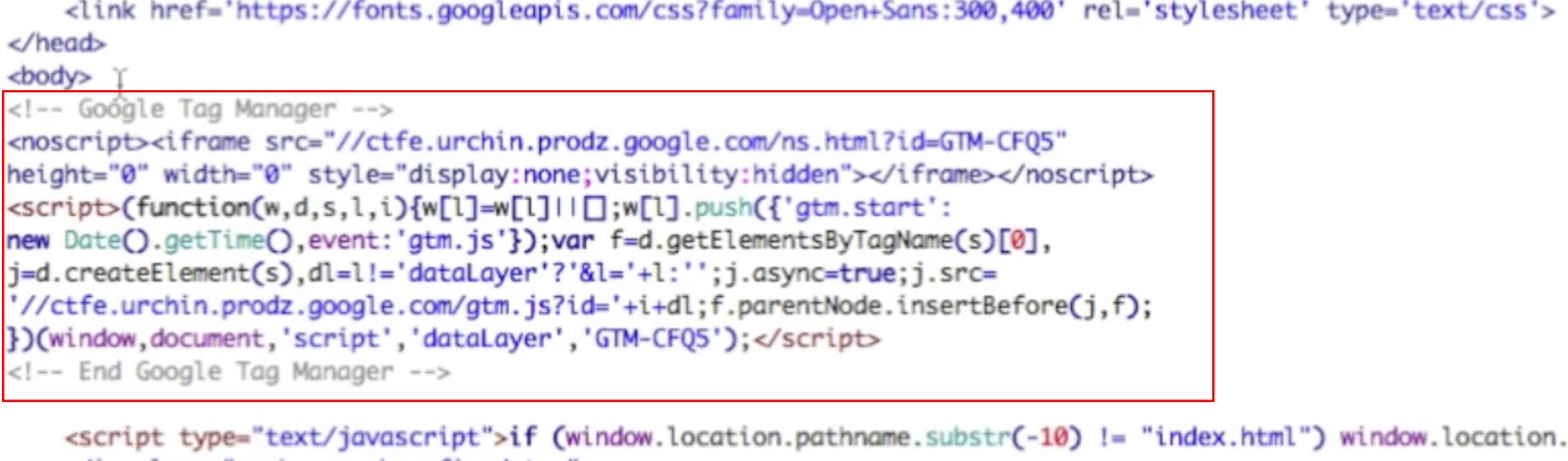
Images courtesy of WordPress.org
Now, your WordPress site is prepped for any tags you want to create within Google Tag Manager. Google Tag Manager will automatically code future tags and embed them in whichever page you’ve selected.

17 of the Best Brands on Instagram Right Now
Contrary to what your friends’ photos suggest, Instagram isn’t just a social network for selfies and brunch pics. In fact, Instagram has a whopping 700 million active monthly users as of September 2017 — the last 100 million of which joined in the prior five months.
In a world where visual content remains a crucial part of any business’ marketing strategy, Instagram marketing presents a unique opportunity to visually represent your brand, celebrate its personality, and keep it top-of-mind for all those users who scroll through their Instagram feeds every single day.
Although they’re few and far between, there are some brands out there — in every industry, and with every type of target customer — who are doing really, really well on Instagram.

Ready to get inspired? Check out this list of brands that are thriving on Instagram right now, and what about their posts sets them apart. For each of these brands, we’ve included examples of their best posts. For some of them, we’ve also included their most popular Instagram post of all time in terms of engagement (i.e. combined total of likes and comments) thanks to data from Instagram analytics and management platform Iconosquare.
Best Brands on Instagram
- Lego
- Califia Farms
- FollowMeTo
- Lorna Jane
- Letterfolk
- Apartment Therapy
- Paris Opera Ballet
- Tentsile
- Desenio
- No Your City
- Vans
- Divinity LA Bracelets
- WeWork
- Finfolk Productions
- Shiseido
- Sephora Collections
- Staples
(Psst — Want to get a stunning Instagram Story auto-magically created for your brand? Check out StoriesAds.com, a free Story generator from HubSpot and Shakr. Click here to get started.)
17 of the Best Brands on Instagram
1. Lego
Followers: 2.6M
If you’re not following Lego on Instagram, you’re missing out on some entertaining content that isn’t just product plugs for kids.
The famous plastic building block brand populates its Instagram feed with fun takes on pop culture references everyone is bound to appreciate — something many businesses can learn from on their own Instagram accounts.
While most of Lego’s posts do serve to announce the release of new Lego characters, the main value in its Instagram account is to emulate familiar social tropes in a classic Lego way. Some of them are pretty impressive, like the life-sized princess carriage below, celebrating the recent Royal Wedding of Prince Harry and Meghan Markle.

Of course Lego doubled down on the Royal Wedding craze with a Lego-style animation of the bride and groom, below …
2. Califia Farms
Followers: 100k
Califia Farms natural beverage products have some of the most attractive packaging we’ve come across. In fact, it’s so iconic that it won top honors in the global packaging design category from Beverage World Magazine.
Instagram is a perfect platform to showcase that cool, curvy bottle, and the folks at Califia don’t shy away from doing just that — most of the brand’s posts feature the beverage’s containers in some way, whether they’re the main subject of the photo, or more of an accessory in the context of the active, healthy lifestyle Califia’s buyer personas love.


Something Califia does really well on Instagram is create fun, playful videos and GIFs. Check out this one, which they used to teach viewers how to create a veggie-based penne pasta:
And this one, which is just plain fun to watch:
3. #FollowMeTo
Followers: 515k
Ever seen those photos of a woman leading a man by the hand in all different parts of the world? That pose was made famous by a couple named Murad and Natalia Osmann for their #FollowMeTo project.
Their Instagram account is a mix of stunning images of the classic #FollowMeTo pose that have been edited beautifully, as well as some really interesting behind-the-scenes photos of their world travels — including some fun photos of the “making of” the famous pose.




4. Lorna Jane
Followers: 813k
If your brand were a person, how would you describe its personality? Australian activewear company Lorna Jane has done an awesome job answering this important branding question with its Instagram content. Spend just a few seconds scrolling through these photos, and you’ll quickly be able to name the target Lorna Jane buyer: a young, sporty, twenty- or thirty-something woman who values looking good while maintaining an active lifestyle.
The images posted by Lorna Jane, which often show the brand’s clothing and accessories, as well as images of women who embody its target buyer persona, are colorful, playful, and inspirational, which is a perfect representation of the brand’s essence — in other words, its heart, soul, and spirit.




5. Letterfolk
Followers: 289k
Letterfolk is a small business run by a husband-and-wife team who create and sell beautiful, handcrafted felt letterboards. Each letterboard comes with a full set of characters so people can personalize the walls of their homes, which means endless room for creativity.
Instagram is the perfect platform for them to inspire customers and aspiring customers with real customers’ boards, as well as ideas they’ve come up with and staged themselves. Their Instagram content is funny, thought-provoking, and relatable — all recipes for shareability.


Letterfolk’s Most Engaging Post

[Click here to see the post.]
Why it’s engaging: Not only is this photo showing a funny and clever message, but it’s also very, very relatable for parents of young children — a very large audience and also one of Letterfolk’s target customers. It’s also a very taggable photo, so the comment section is rife with Instagram users mentioning their friends’ usernames so they can share in the fun.
6. Apartment Therapy
Followers: 1.5M
Apartment Therapy’s Instagram account really is a source of therapy, if you love the sight of cozy homes. If you’ve seen social media posts from Apartment Therapy before, rest assured the pictures of residences on its Instagram account are just as creative.
Two recent posts to Apartment Therapy’s Instagram feed are below. From the plant-friendly living room on the left, to the comfortable A-frame on the right, this brand gives its Instagram followers plenty of inspiration to personalize their own space and, according to its Instagram bio, “live happy, healthy lives at home.”


7. Paris Opera Ballet
Followers: 262k
The city of Paris is known for many lovely things — wine, cheese, and art are just a few. But that last one, art, is photographically captured on the Instagram account of the Paris Opera Ballet, or Ballet de l’Opera de Paris.
The account captures candid images of the ballet’s dancers during performances, rehearsals, and backstage, giving viewers an artful glimpse at what goes into the ballet’s productions. It also makes use of something called banners on Instagram, when larger photos can be divided into multiple pictures to create a tiled banner of smaller photos. (There are several apps available to pull that off, but to start, check out Tile Pic).
The way this account highlights performance venues is noteworthy, too. The third photo beneath the first two below provides an intimate shot of rehearsal, conveying a gritty behind-the-scenes feel that can generate excitement for productions.



8. Tentsile
Followers: 188k
“Stunning” is the first word that comes to mind when I scroll through Tentsile’s Instagram photos. The company sells tree tents, what they call “portable treehouses” that will “literally take your camping experience to a new level.” Their Instagram is full of shockingly beautiful scenes of their product in use in all matter of terrain: rainforests, mountains, beaches… you name it.


Tentsile’s Most Engaging Post

[Click here to see the post.]
Why it’s engaging: Contests draw engagement: It’s as simple as that. In this particular case, Tentsile used an Instagram contest as a co-marketing play with a few of their partners by asking followers to follow three partner accounts to be eligible to win. In addition to following those accounts, they also asked people to Like the photo and “tag your 3 best adventures buddies in the comments below.” That’s a great way to expand reach and do co-marketing on Instagram.
9. Desenio
Followers: 594k
Look at the colors of any well-known brand and you’ll notice that they use the same colors over and over again — in their logo, on their website, and in their social media images. Using the same colors over and over again is a great way to establish brand consistency and help consumers become familiar with your brand.
That’s what the Swedish online art print company Desenio does beautifully on their Instagram account. They use a lot of blues, greens, greys, and blacks, which evoke senses of calm, healing, luxury, and trust.


Desenio’s Most Engaging Post

[Click here to see the post.]
Why it’s engaging: At first glance, this post doesn’t seem to stick out much from Desenio’s other Instagram content. But what’s unique about it is the universally relatable subject: a really beautiful, comfortable-looking bed in a beautiful bedroom, combined with hints of life like a laptop and some munchies.
Many of the comments included exclamations of how beautiful and inspiring the setup is and how it’s the commenters’ “dream bedroom.” To increase your comment rate, follow Desenio’s lead by posting images of things and situations your followers aspire to in their own lives.
10. No Your City
Followers: 26k
The folks at No Your City produce a documentary series that captures the fascinating stories of people all over the world, but mostly in New York. The brand’s Instagram account, though, is less about these stories and more about showcasing gorgeous images from the city itself.
What we love about these photos is how closely they follow the best practices for taking great photos with your phone. Each one of No Your City’s photos seems to follow at least one of these recommendations, whether it’s focusing on a single subject, embracing negative space, playing with reflections, or finding interesting perspectives. The photos are consistently stunning, and as a result, the brand has built a solid following.


11. Vans
Followers: 11.4M
Vans is known for its stylish shoes, but the brand’s use of social media is just as stylish. Its Instagram business account is no exception.
The maker of the classic checkered slip-ons has an aggressively flashy Instagram feed, featuring both standalone product shots and action photos of people expressing themselves in their favorite Vans gear.
Vans’ Instagram account’s most unique quality is likely how much skateboarding content it has. The brand doesn’t just appeal to teenage skaters anymore, but it shows its loyalty to that lifestyle in an engaging way. Below, Vans features an Indian girl with a caption that describes her as the “only girl who regularly skateboards in her town.”

Vans’ Most Engaging Post
Why it’s engaging: Vans’ recent video, above, teases a vague but enticing partnership with Marvel Comics. This campaign alone displayed a logo that attracted not just Vans fans, but Marvel fans who likely wanted to know when they can expect new shoes with a decal of their favorite Marvel super hero. The video received more than half a million views.
12. Divinity LA Bracelets
Followers: 251k
Here’s an example of a small business performing very well on Instagram. A beaded bracelet could have any theme.


Divinity’s Most Engaging Post

Why it’s engaging: The caption reads: “Each Sea Turtle and Hatchling bracelet sold helps a Hatchling make it to the ocean.” People tagged their friends to show them the cute sea turtles, or to say “WE NEED TO SAVE THEM!”
13. WeWork
Followers: 283k
WeWork provides shared office spaces in cities and countries all over the globe — so it only makes sense that they should post a lot of photos showcasing their beautiful co-working communities. They do an amazing job photographing the spaces in ways that make followers like us wish we could jump into the photos and plop down with our laptops and a coffee.
They don’t stop at posting photos of their shared workspaces, though. WeWork uses Instagram to capture and share moments from some of the largest branded events that members (and their friends) look forward to all year, like WeWork Summer Camp. Hashtags are used to label these events — like #WWCamp — and to encourage customers to share their own photos of the spaces, using WeWork’s memorable slogan: “Do what you love.”
Our favorite is the #DogsOfWeWork hashtag. Not only is it awesome because, well, dogs … but it’s also a great way for the company to promote their laid-back culture while also inviting customers to interact with their brand on social. Near the end of each year, they actually choose the best photo submissions to the #DogsOfWeWork hashtag on Instagram and Facebook and put together a calendar for the following year.




WeWork’s Most Engaging Post
[Click here to see the post.]
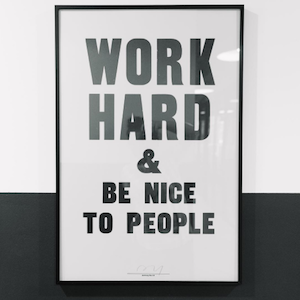
Why it’s engaging: For all their beautiful photos of people and office spaces and dogs, some of you might be surprised that their most engaging photo of all time is a picture of a simple quote. This goes to show the power of motivational quotes on Instagram, which tend to perform very well. Instagram is, after all, a platform for inspiration — and simple quotes that are inspiring and easy to digest are often welcome in a user’s feed.
Use free design tools like Canva, PicMonkey, or even PowerPoint to create these images easily.
14. Finfolk Productions
Followers: 202k
Ever wanted to be a mermaid? You can come pretty close, thanks to companies like FinFolk Productions. Believe it or not, silicone mermaid tails you can put on and swim around in are actually quite trendy in certain areas and for certain age groups — typically young girls, which is one of Instagram’s core users.
Finfolk Productions’ Instagram feed is full of beautifully shot photos that play into the mermaid fantasy by looking more like mythical art than real people.


Finfolk Productions’ Most Engaging Post

[Click here to see the post]
Why it’s engaging: One of the reasons this post was so popular is because it was accompanied by a long, heartfelt caption written by the company’s founders — which prompted an outpouring of supportive comments from their loyal followers. Here’s part of that caption, below:
Wish you could be part of our world? The good news is, you already are- just by being here! We might not always have custom silicone slots or Mythic tails readily available, but it’s only because we are busy constantly creating and making mermaid tails for every type of mermaid, in every size or color, gender or nationality … A tail is an investment of time, money, and emotions- each one is unique and beautiful, just like you.
#finfolk #finfolkproductions #thelittlemermaid #littlemermaid #ariel #partofyourworld #mermaid #mermaidtail #disney #mermaidlife #finfolkmermaid
Commenters wrote that they love the founders for their dedication to beauty and quality, that they love the designs, and that they can’t wait until they have a tail of their own. What it all comes down to, though, is brand loyalty.
15. Shiseido
Followers: 392k
Shiseido started out as Japan’s first Western-style pharmacy 140 years ago and has since developed into selling high-quality brightening and anti-aging skincare, makeup, and fragrance products.
Its company mission is to inspire a life of beauty and culture — a mission they portray beautifully through their Instagram content. If you take a look at their feed, you’ll notice they post three images at a time so the posts appear in a row pattern on their larger feed — a very clever and original way to organize their content.
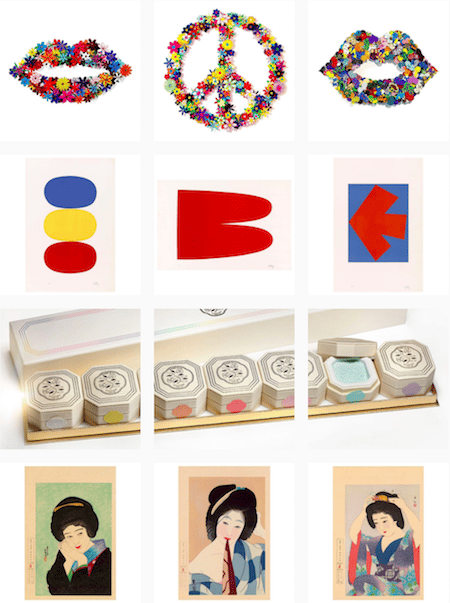
Shiseido’s Most Engaging Post
Why it’s engaging: Back in late March 2016, Instagram started rolling out the ability to upload 60-second videos — and we’ve seen some amazing Instagram videos from brands ever since, like the one above from Shiseido. This one is much shorter than a minute, but its close-up product demo above is curiously satisfying to watch.
But don’t be intimidated by highly professional Instagram videos like theirs. You can post highly engaging videos on Instagram without a huge video team or a bottomless budget. Here’s a step-by-step guide for making great videos on Instagram without breaking the bank.
16. Sephora Collections
Followers: 322k
Sephora Collections’ brand personality is playful, colorful, and feminine. It does a wonderful job of characterizing this personality in its Instagram content, using bright colors, patterns, and fun captions.
This branded Sephora account also diversifies its feed with a lot of fun Instagram video content that gives off the same playful vibes.
Sephora Collection’s Most Engaging Post
Why it’s engaging: No matter what channel you’re creating content for, real stories of real people resonate with your audience. In the video above, Sephora is promoting the hashtag, #lipstories, which spotlights the experience of real Sephora makeup user.
17. Staples
Followers: 55.2k
The folks at Staples do a lot of things right when it comes to Instagram content, but there are two that particularly grab our attention — engaging with followers by asking questions and including calls-to-action in captions, and staying true to the brand’s playful-yet-practical personality.
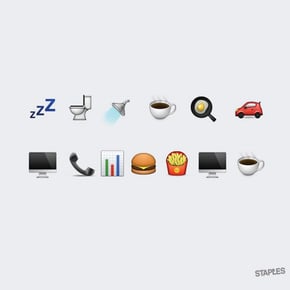
When it comes to engaging Staples’ followers, it’s all about asking questions in the photo captions. For example, check out the second photo below featuring a series of emojis — its caption reads, “That’s pretty much our day. How about yours? Tell us in emojis.” Scroll through the comments on that photo, and you’ll see followers had a lot of fun responses. The caption paired with the first photo below — the one with the cupcakes — asks users to tag someone who they want to thank.
Staples does a great job staying true to brand by posting fun photos such as the “2016” shot written in office supplies and using the #OfficeHack hashtag to engage their following.


The folks at Staples also use Instagram to post cute videos and GIFs, like the one below that shows businesses how they can use Staples supplies to create a “revamped breakroom.”
Ready to populate your Instagram Story with pics and videos that are as captivating as the content above? We believe in you — just download the free branding guide below and get to posting.


GDPR and the Right Side of History
Brian Halligan sent this note to all HubSpot employees this morning:
Yesterday, I got three emails from vendors asking me if it is okay that they keep sending me emails. I imagine you got a few as well. The irony is hard to miss.
Rather than making a sarcastic joke, though, I actually welcome these notifications. These companies are trying to get on the right side of history, complying with GDPR, the General Data Protection Regulation enacted by the European Union, which goes into effect today.
History has a way of catching up on you. Auto manufacturers fought government mandates in the 1960s to add seat belts as standard features, arguing that it would raise costs, give consumers the impression that cars are dangerous, and that safety was not a selling point with customers.
Before seat belts were a requirement, some forward thinking car companies had already made them standard features. By getting ahead of that trend, they were years ahead in making safety part of their differentiation.
One of the things I love about working at HubSpot is that our customers are all on the sharp part of that curve, on the right side of history. HubSpot customers have made how they sell just as important as what they sell. They don’t just look to grow — they look to grow better, attracting their own customers by being responsive and helpful, not by engaging in disruptive and unwelcome intrusions. They embody what it means to be Inbound.
The GDPR is a positive step for the marketing discipline at large. The GDPR is wholly consistent with the Inbound approach to business.
Some companies already distinguish themselves by being relevant, helpful and transparent: GDPR will help them refine what they have in place and grow better.
Some companies are at the other end of spectrum. They have little interest in adapting their marketing to an evolving marketplace. GDPR compliance may feel like a burdensome regulation.
And then there are all those companies in the vast middle, that were perhaps willing to become more Inbound in their marketing, but were not quite as ready or able due to competing short-term priorities. For them, GDPR-compliance may be a useful forcing function, a chance to get on the right side of marketing history. A chance to grow better.
Compliance with the GDPR, regardless of a company’s state of readiness, can be a daunting task. We can empathize. For the last few months, HubSpot has readied our company to adopt the spirit of the regulation globally.
For our customers, we’ve enhanced the HubSpot platform to enable easier compliance with the GDPR. You and your customers can read more about the product changes and deeper details on HubSpot and the GDPR here.
I’m excited for our future in a post-GDPR world. Buckle up!

Facebook Has Launched Its Political Ad Archive
Facebook today unveiled the publicly searchable archive of political ads it said it would develop in April.
The launch comes alongside new labeling requirements for all election- and issue-based ads, which includes a disclosure of who paid for them.
The History of These Changes
These latest developments come after months of efforts by Facebook to emphasize its focus on election transparency — particularly after revelations were made that the platform was weaponized by foreign actors to spread misinformation and influence the 2016 U.S. presidential election.
Earlier this month, the U.S. House Permanent Select Committee on Intelligence (HPSCI) Minority released roughly 3,400 of these ads, which ran on Facebook and Instagram leading up to the 2016 elections.
They were purchased by the Russian-based Internet Research Agency (IRA), and ran between Q2 2015 and Q3 2017.
Anyone wishing to run a political or issue-based ad must also go through an authorization process that requires submitting a government-issued ID and physical mailing address to Facebook, which the company announced in October.
Facebook later took similar measures to verify any Pages with large follow numbers — it’s unclear what that threshold is — in order to prevent the creation of fake accounts that are often responsible for publishing divisive ads and misinformation.
What the Ads and the Archive Look Like
Facebook’s officially-named “Archive of Ads With Political Content” is a searchable database of any ads of political nature, both active and inactive.
However, the archive does not contain ads that were published prior to May 7, 2018. Any ads it contains after that date will be available for up to seven years.
Rather than serving as a library of ads that can be filtered according to a date range, topic, or sponsor, users must type in keywords to find ads pertaining to a certain subject or person.
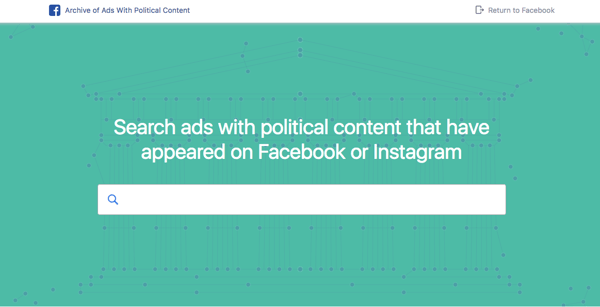
To see how it works, I started with the search term “Clinton,” where I came across at least one ad that ran without a “Paid for” label, and was therefore removed by Facebook.
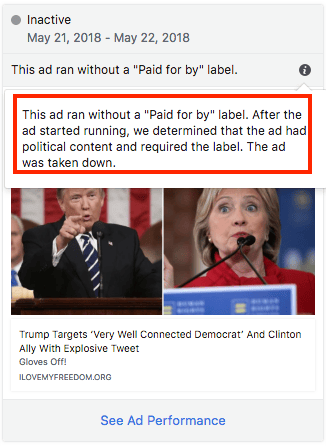
The company scans ads for political content through a combination of artificial intelligence (AI) and human intervention. In addition to the ad reviewers Facebook continues to hire, users of the site can report an unlabeled political ad, which is explained in the video below.
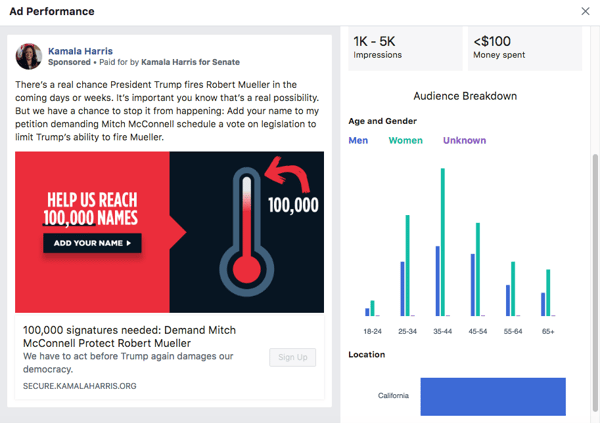
In addition to the content of the ad itself — its current status, the dates when it ran, and who paid for it — users can also view its performance, including the number of impressions it received, how much was spent on it, and a breakdown of the audience it reached.
An Imperfect System
Despite these efforts, many are taking issue with Facebook not providing even greater transparency. TechCrunch‘s Josh Constine, for example, argues that most users won’t know the details of the organization that paid for an ad — such as “BOLD PAC,” which paid for this ad — and that these labels should come with more information about the sponsor, its motivations, and donors (in the case of political candidates).
Facebook’s new labels telling you a political ad was bought by “Prosperity Action” or “Stand Up America” doesn’t immediately help. We need to know the donors and political leanings behind those. https://t.co/CwRI210Lj1
— Josh Constine (@JoshConstine)
May 24, 2018
Others, according to a formal statement from Facebook, have argued that the network should rid itself of political ads altogether, saying it was “the only sure-fire way of guarding against foreign interference.”
But in the end, the statement says, defining what constitutes “political” content was too difficult of a line to draw, which is why Facebook enacted these policies and practices, instead.
“Deciding what is or is not a political issue is inherently controversial, and not everyone will agree with our approach,” say Facebook Director of Global Politics and Government Katie Harbath and Outreach Director Steve Satterfield. “But we believe in giving legitimate campaigns a voice — while also helping to make sure that people can find out who is trying to influence their vote and why.”
But how far these new labels and requirements go to define the “why” is still up for debate. Again, the issue of a lack of information about the sponsor of an ad comes into play — especially given that Facebook rolled out a feature earlier this year to add this sort of transparency and information about news publishers.
Still, the timing makes sense. The U.S. midterm elections will take place this November, and Facebook CEO Mark Zuckerberg has faced questions about election integrity from the country’s lawmakers, as well as officials in the European Union.
Henry Franco, HubSpot’s social media editor, says “this is coming at a good time, with several global elections this year that could have huge implications for the political environment” — even if the efforts do fall short in some areas. “This is a good step towards increasing transparency into the world of political advertising on Facebook.”

Facebook to Roll Out ‘Similar’ EU Privacy Options to All Users
Facebook announced today that it will be sending all users a News Feed alert asking them to review their data and privacy options.
The alert, says Facebook, is “similar” to the one received by users in the European Union (EU), as required by the General Data Privacy Regulation (GDPR), which comes into force this Friday.
But now, Facebook users worldwide will receive an alert in their News Feeds — an “interruption,” as Facebook lightly calls it — asking them to review privacy and data controls pertaining to ads, facial recognition, and what they’ve shared on their profiles.
There’s a key difference between the alert for EU users and those located elsewhere, however: For non-EU users, reviewing these settings is optional.
Everyone globally on Facebook will get asked about their privacy settings as GDPR goes into effect. The difference for the non-GDPR folks is Facebook wont require them to look it. After interrupting twice, they get to keep using FB. https://t.co/kMT6Ihx6TP
— Sarah Frier (@sarahfrier)
May 24, 2018
As for these looming alerts, Facebook Chief Privacy Officer Erin Egan says users will receive “a customized message that puts [such] information in front of them,” such as how the company uses “data from partners” to create more personalized ads.
The message will also remind users what kind of political, religious, and relationship information they’ve elected to share on their profiles. Additionally, it will offer information on how Facebook uses face recognition — which the company claims is sometimes used to enhance privacy.
During a session with members of European Parliament (MEPs) earlier this week, Mark Zuckerberg was challenged to answer questions about Facebook’s GDPR compliance — and whether it would extend the same data privacy protections to non-EU users.
Zuckerberg has previously given mixed responses to the question of implementing GDPR-like protections on a global scale during interviews and during his U.S. congressional testimony in April. His responses ranged from agreeing with it “in spirit” to subsequently remarking, “if we are planning on running the controls for GDPR across the world … my answer [is] yes.”
This latest development is seemingly part of the recent campaign Facebook has undertaken — since March revelations that personal user data was improperly obtained and misused by voter profiling firm Cambridge Analytica — to convince users that it’s putting them back in control of their own data, and that Facebook takes their privacy seriously.
In April, for instance, the company announced it would be updating its terms of service and data policy to make it easier to understand, which Egan says will also be included in these alerts displayed to users.
“Reading through the fine print in the video, there are actually very surprises in there,” says Henry Franco, HubSpot’s social media editor. “But this update isn’t going to change the opinion of anyone who’s already made up his or her mind” — like those who have opted to delete or leave Facebook altogether, for instance.
“I think Facebook’s doing a great thing by trying to be more transparent,” he continues. “But the number one priority for the company is clearly to show lawmakers it’s capable of self-regulating.”

Facebook Business Manager: The Ultimate Guide
It’s likely you’ve heard of Facebook Business Manager, which Facebook describes as their tool to “manage ad accounts, Pages, and the people who work on them — all in one place.”
If you haven’t heard of it, or if you don’t know much about it, Facebook Business Manager is a useful tool if you have more than one ad account, if you need to track separate clients’ ads or pages and create reports for them, or if your company uses Facebook for different services related to your business.
What is Facebook Business Manager?
Facebook Business Manager is a tool to help you create, publish, monitor, and report on various business-related assets, including your business’s Facebook Pages, or your Facebook advertisements. Business Manager allows you to grant partial or full access to different employees, and assign them different roles within the platform.
Essentially, Facebook Business Manager helps your team stay organized and focused while monitoring, creating, and publishing ads, pages, and other business assets on Facebook.
Here, we’ll delve into how to create a Facebook Business Manager account, how to add your business pages, ads, and people, how to use the analytics tools in your account, and how to extract the most value from the ads manager tool.
For the purpose of keeping this article easy to follow, we’re going to assume your business is interested in using Business Manager for your own pages and ads, rather than for your client’s pages and ads.
Is Facebook Business Manager different from your Facebook account?
Facebook Business Manager isn’t tied to your personal account. You don’t need a personal Facebook account to use Facebook Business Manager, and Facebook Business Manager only shows you your business assets, including ad accounts, pages related to your business, and advertising or social media analytics. It doesn’t have a newsfeed and won’t send you notifications from your personal account.
How to Set Up Facebook Business Manager
How to set up Facebook Business Manager
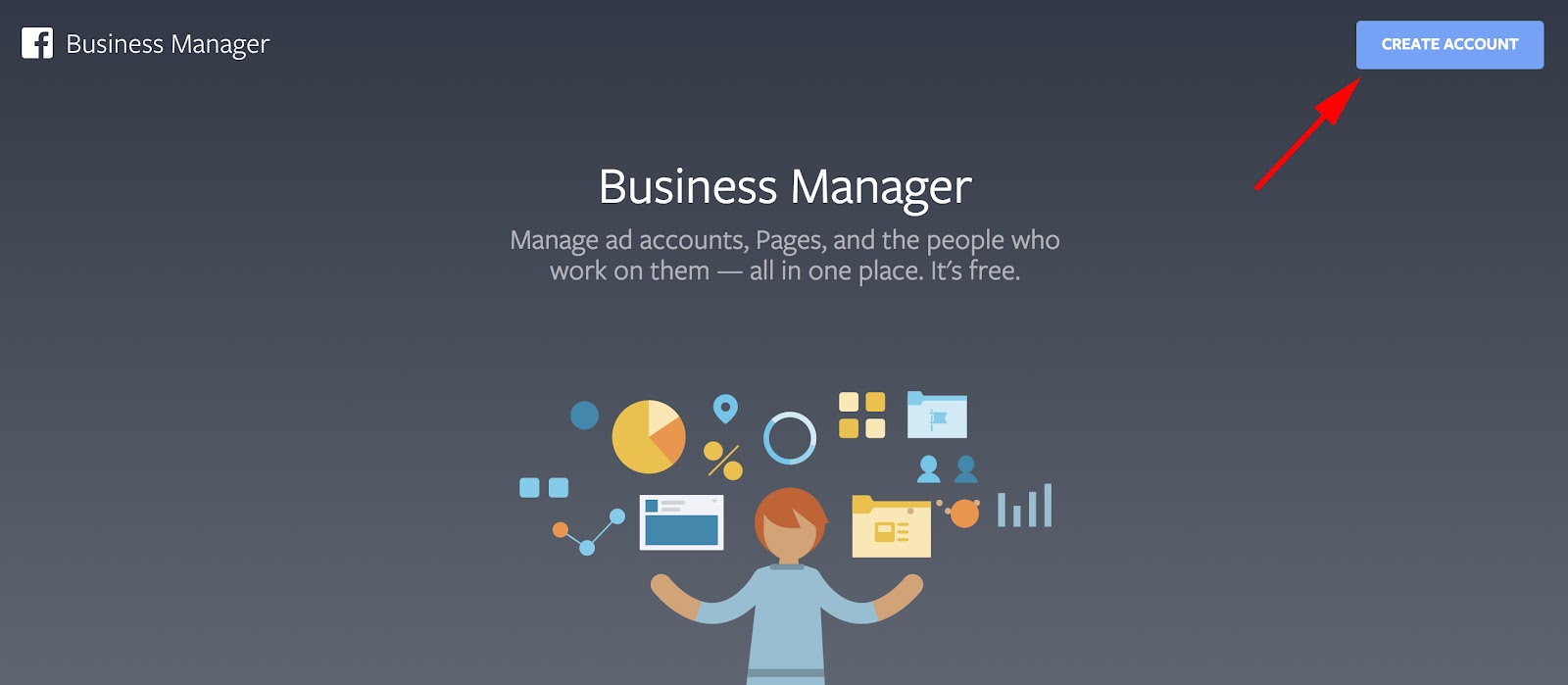
- Go to business.facebook.com and click the blue “Create Account” button in the top right corner
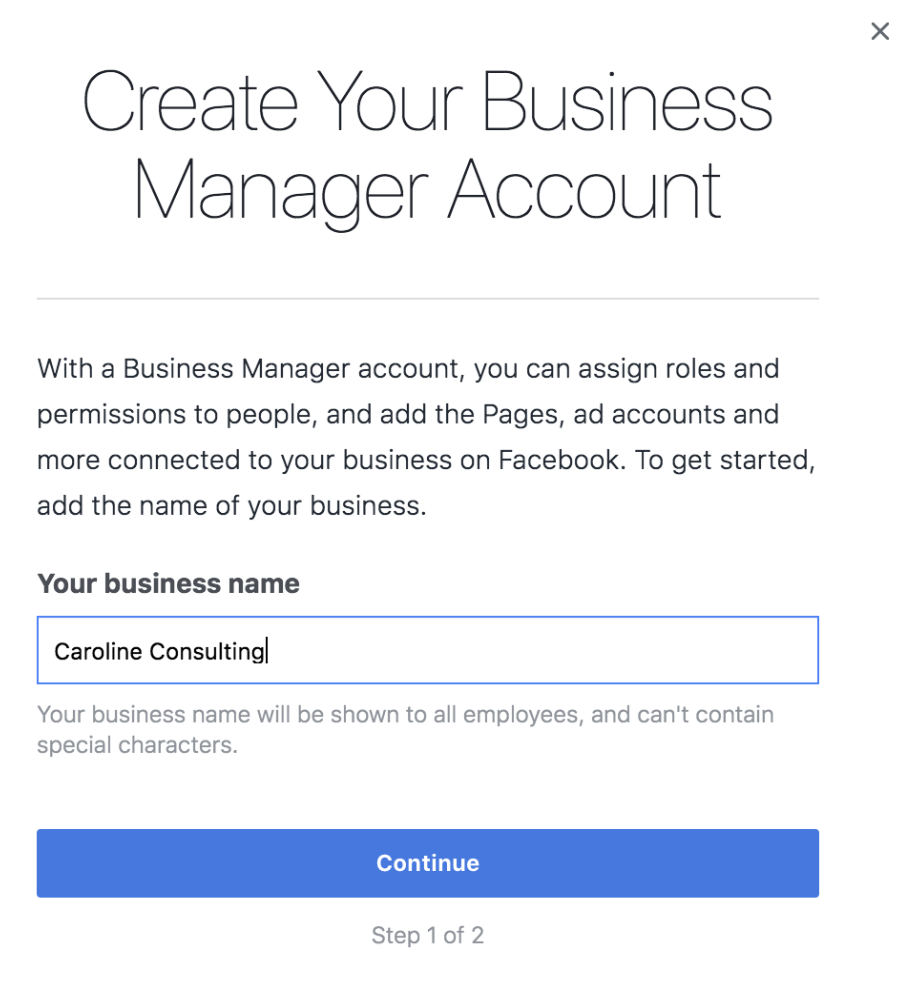
- Fill in your business name in the pop-up screen, and click “Continue”
- The pop-up screen will then ask for your email. Type it into the box, and click “Finish”
When you’re setting up your Facebook Business Manager account, it doesn’t matter whether you already have a personal Facebook account or not. The Facebook Business Manager account is a different set-up process, and simply requires your business name and email to begin. It’s an easy three-step process that took me approximately two minutes.
Here’s what you do:
1. First, go to business.facebook.com and click the blue “Create Account” button in the top right corner.
2. Next, fill in your business name in the pop-up, and click “Continue”.
3. The pop-up screen will then ask you for your email in the box. Type it into the box, and click “Finish”.
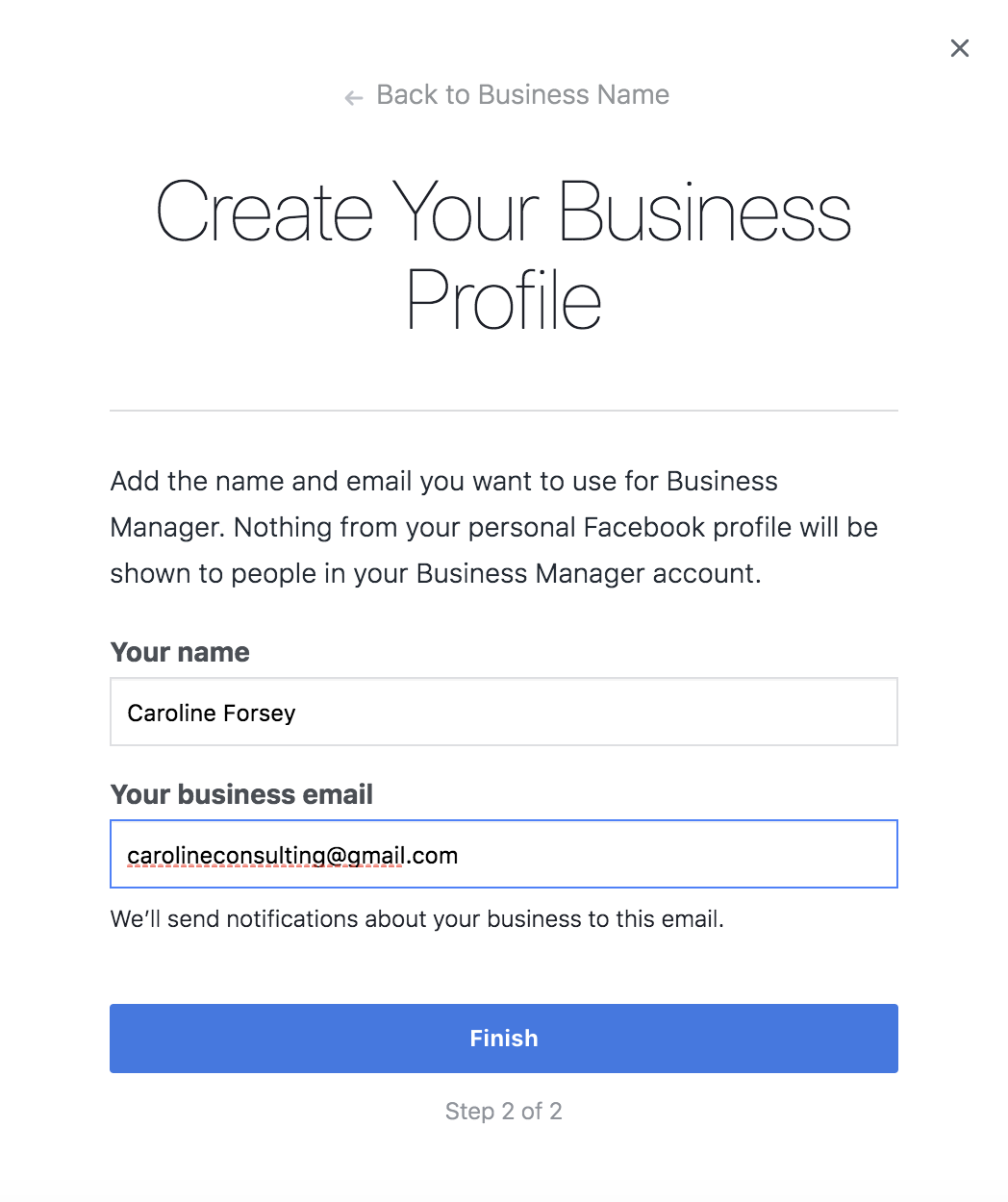
This is your Facebook Business Manager account. If it looks intimidating at first glance, don’t worry, it’s actually pretty intuitive.
Let’s delve into how to add pages and ad accounts to your Business Manager account.
How to Add Facebook Business Pages to Your Business Manager Account
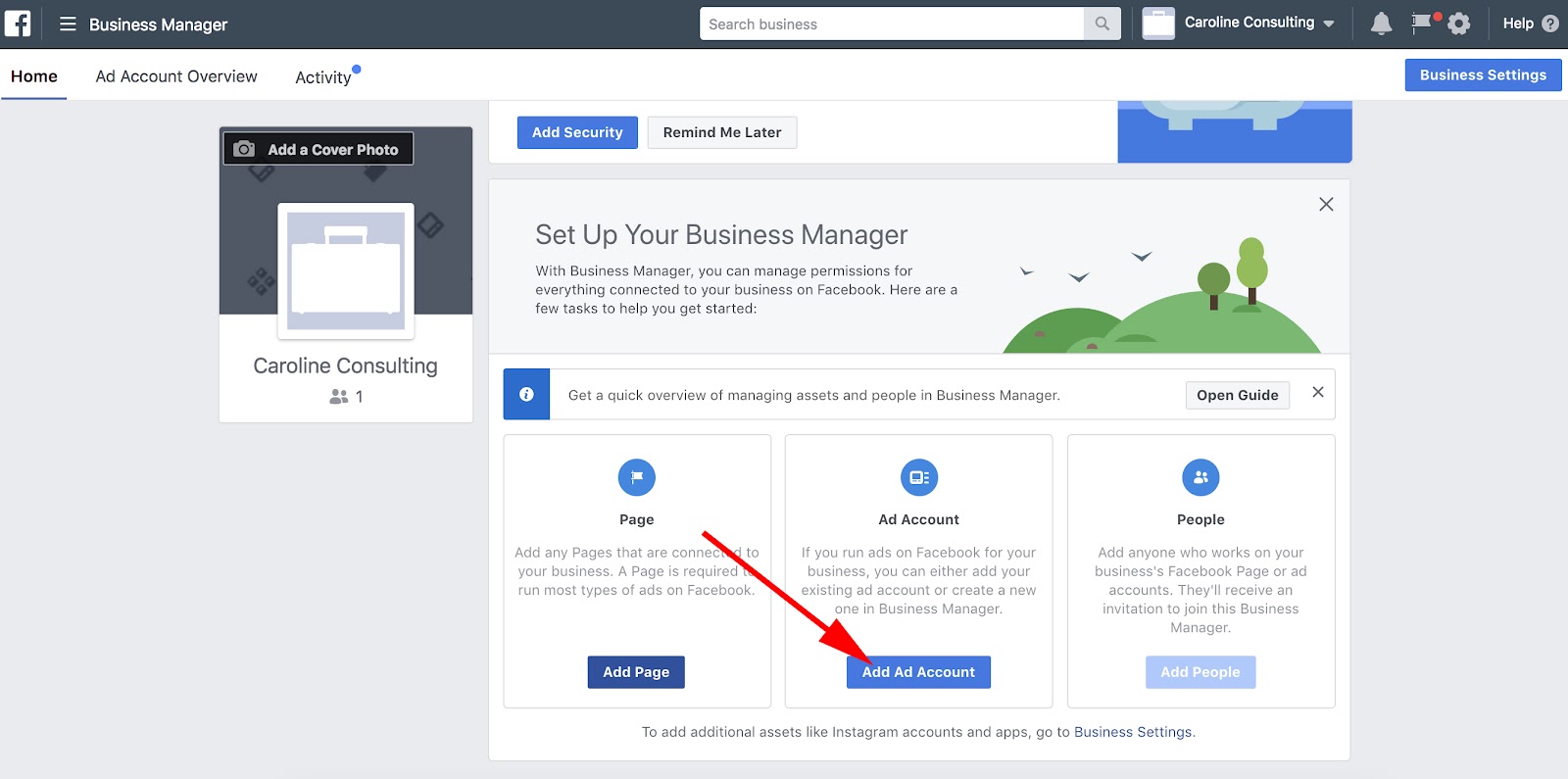
On your Facebook Business Manager homepage, you’ll immediately see the buttons to “Add Page”, “Add Ad Account” or “Add People”.
1. First, let’s click “Add Page”.
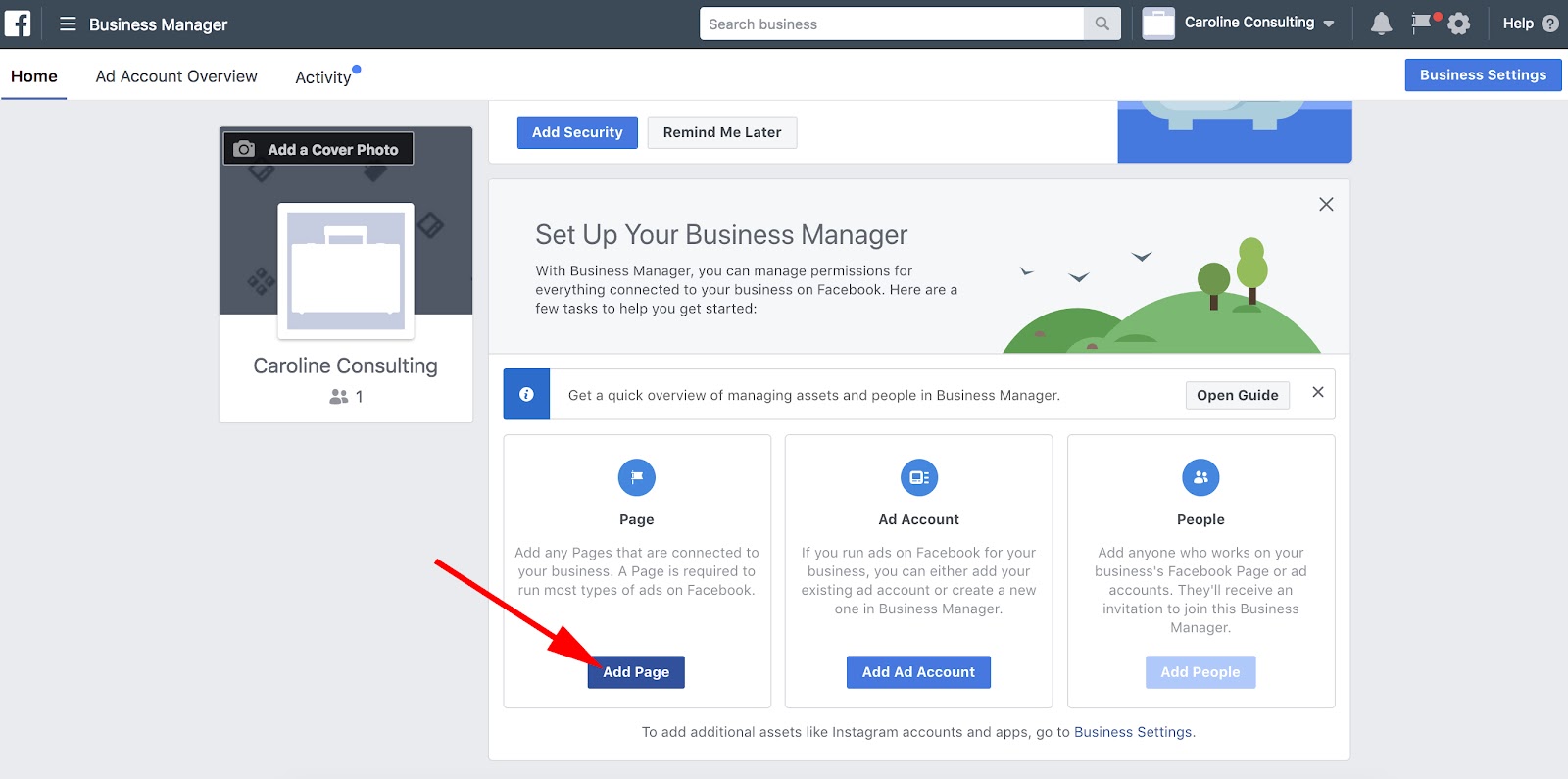
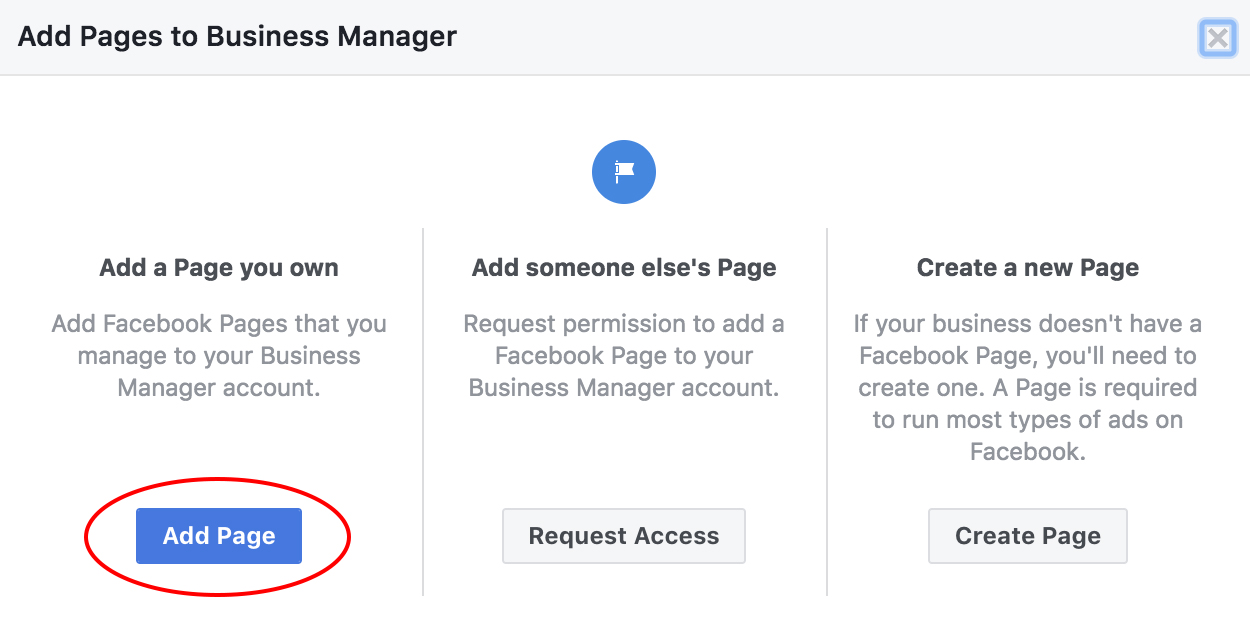
2. Click “Add Page” on the pop-up screen.
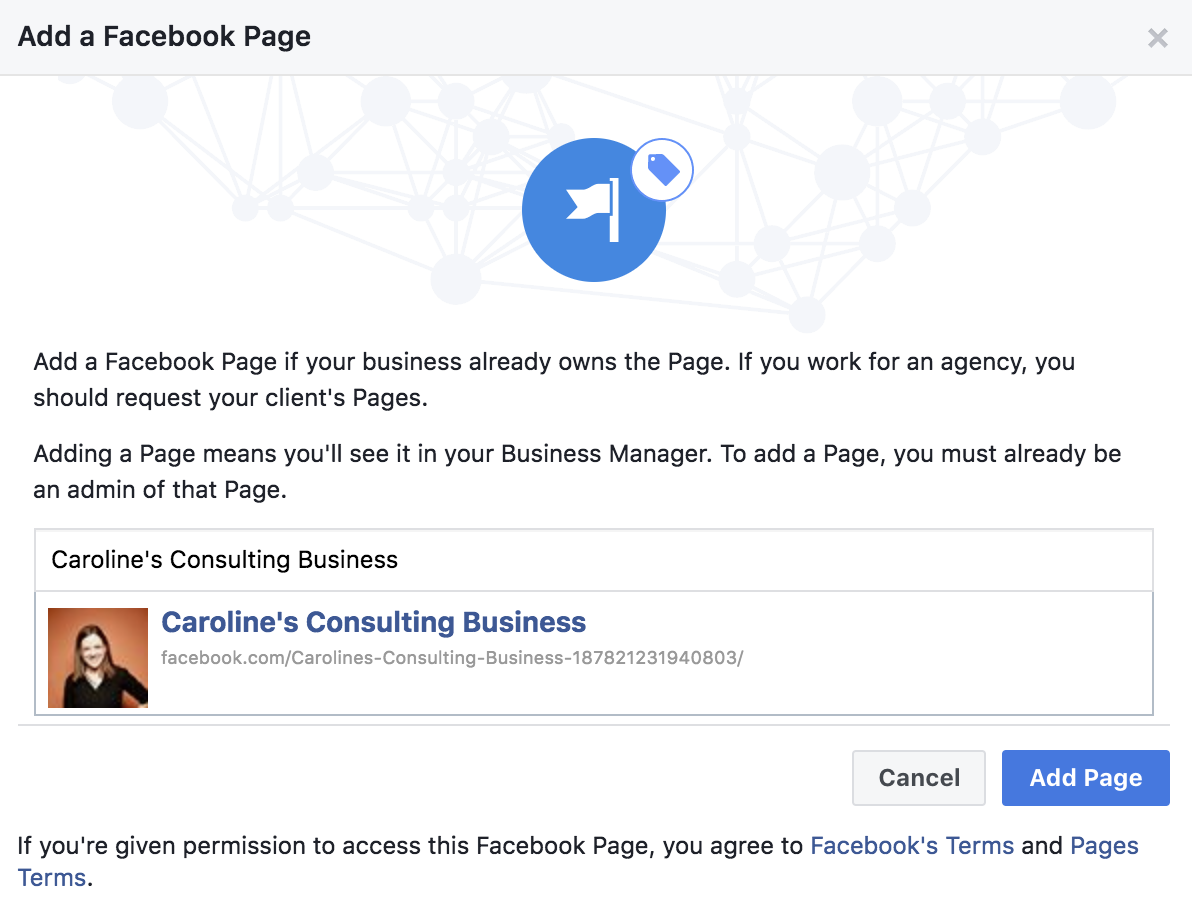
3. On the next page, type your page into the search bar. If it’s a pre-created Facebook business page, it should pop right up. Click the blue “Add Page” botton.
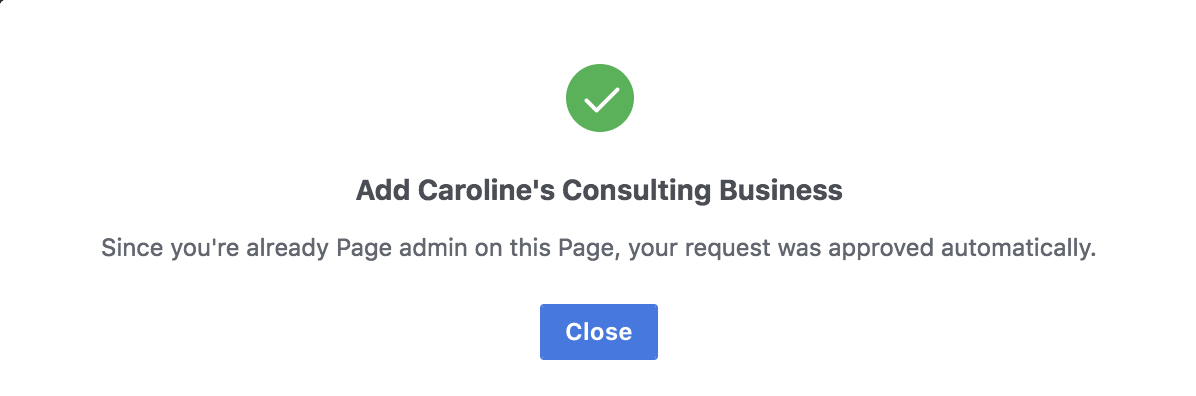
4. If you see this pop-up with a green check mark, you’re all set! Your page is successfully added.
How to Add Your Facebook Ad Accounts
Adding your Facebook ad account is an almost identical process to adding a page, but I’ll walk you through the steps here so you can see them in action.
It’s important to note you can only add one ad account at first, and then you’ll be able to add additional ad accounts once you start spending money in your first ad account.
However, you can’t host more than five ad accounts at any one time.
1. Click the blue “Add Ad Account” button on your homepage.
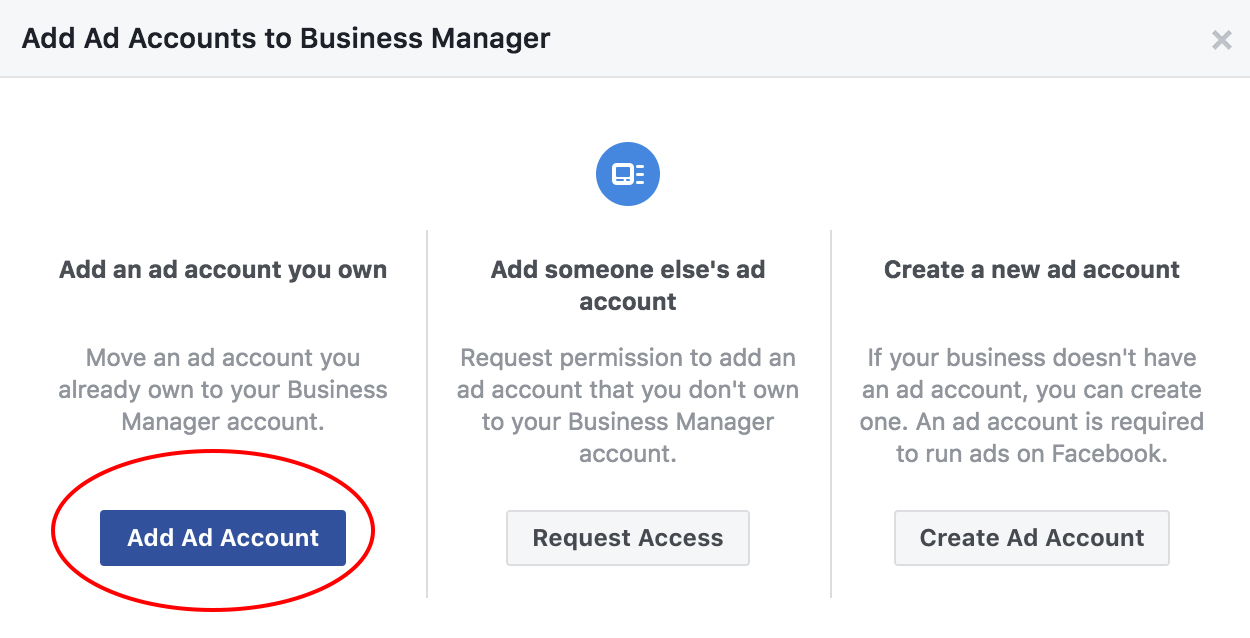
2. Select “Add Ad Account”.
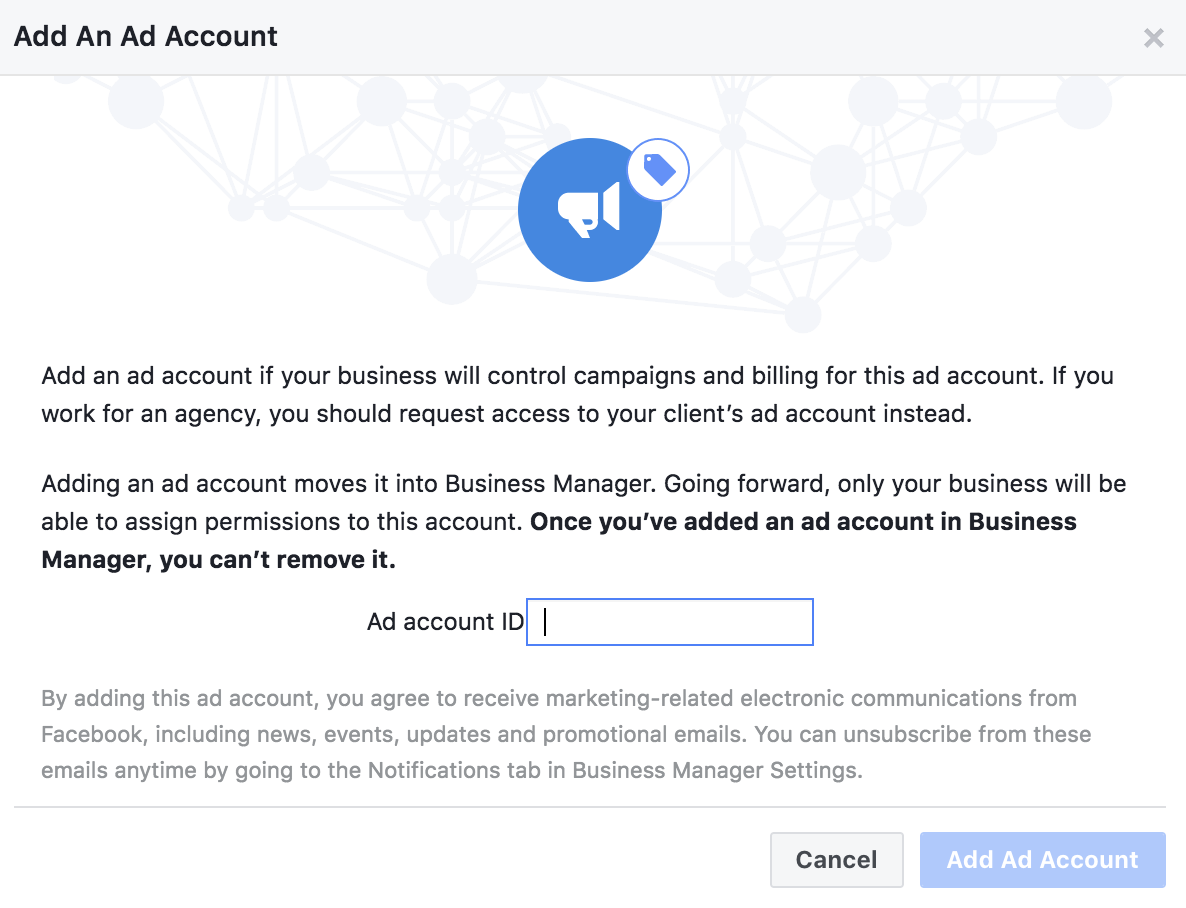
3. Enter your “Ad account ID” into the box. When you’re finished, click “Add Ad Account”.
How to Add People to Your Business Manager Account
For this example, we’ll focus on adding internal employees to your Business Manager Account, not clients or external advisors.
Adding people to your account is easy, and you can limit the amount of access each employee gets.
Limiting access to “employee only” is useful if, for instance, you want to assign one employee to handle your Instagram account and monitor those analytics, but then you want another employee on the team to handle your ad accounts and those analytics.
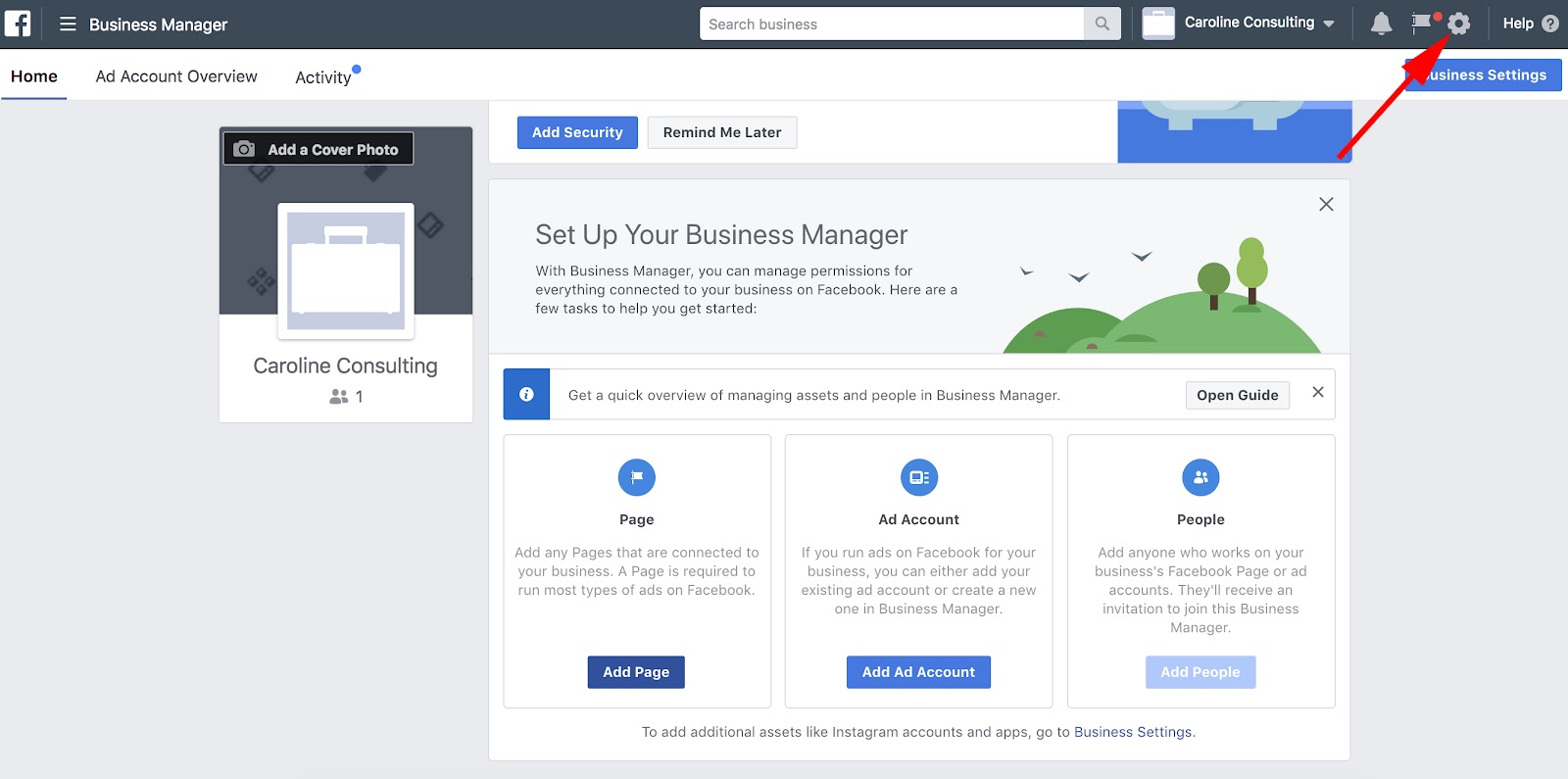
1. First, go to your “Settings” icon in the top right corner.
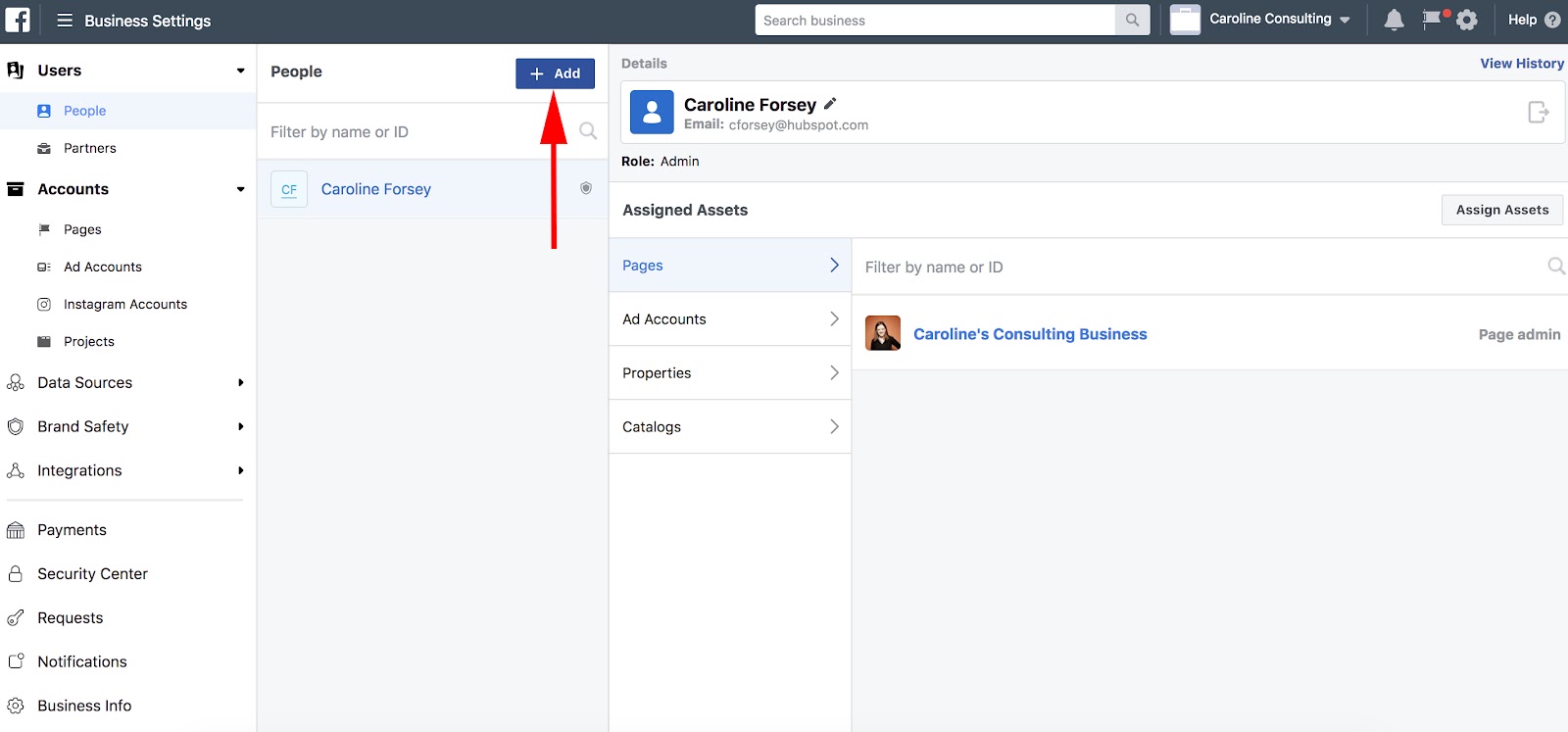
2. Next, click the blue “Add” button, highlighted below.
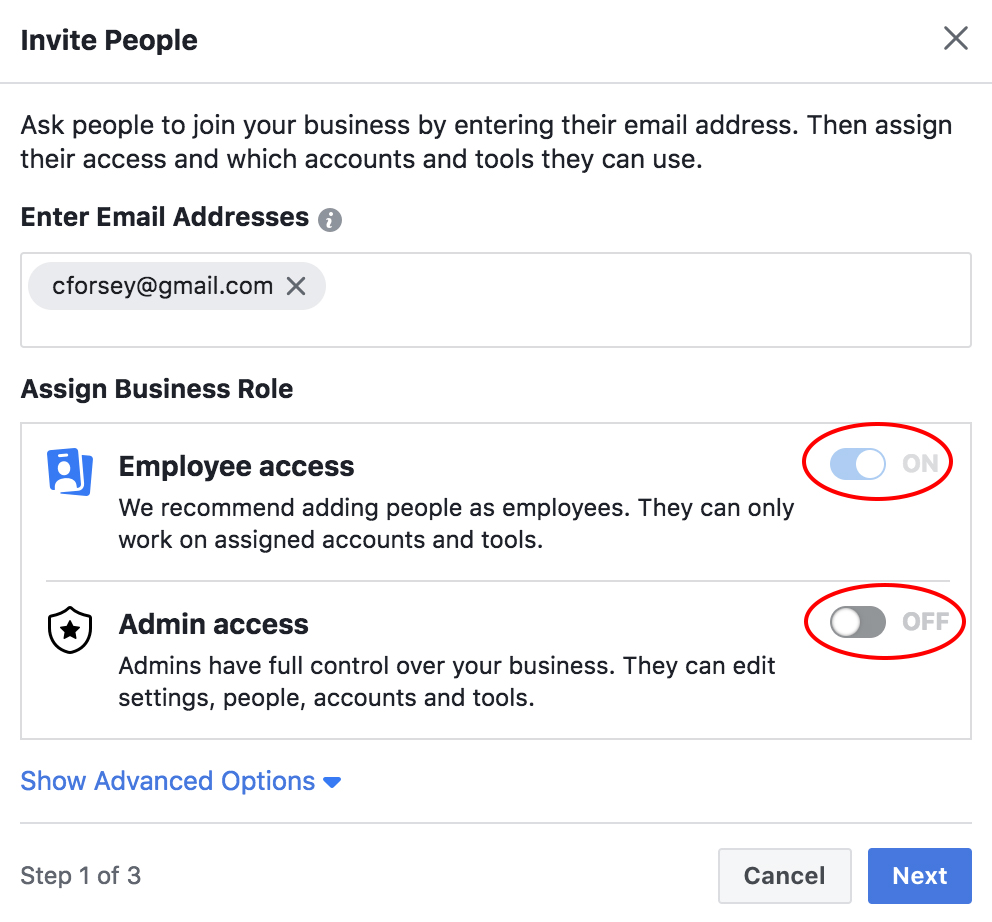
3. Type in an employee’s email address (so Facebook can send them an email with access permissions), and then select “on” for either “Employee access” or “Admin access”. Then, click “Next”.
4. Here, you have a couple different options. You can assign your employee to any of the assets on the right (Pages, Ad Accounts, or Catalogs). Then, check off the box of the Page, ad, or catalog you want them assigned to. Next, select a role for your employee (like “Page advertiser”). Once you’re satisfied, click “Invite”.
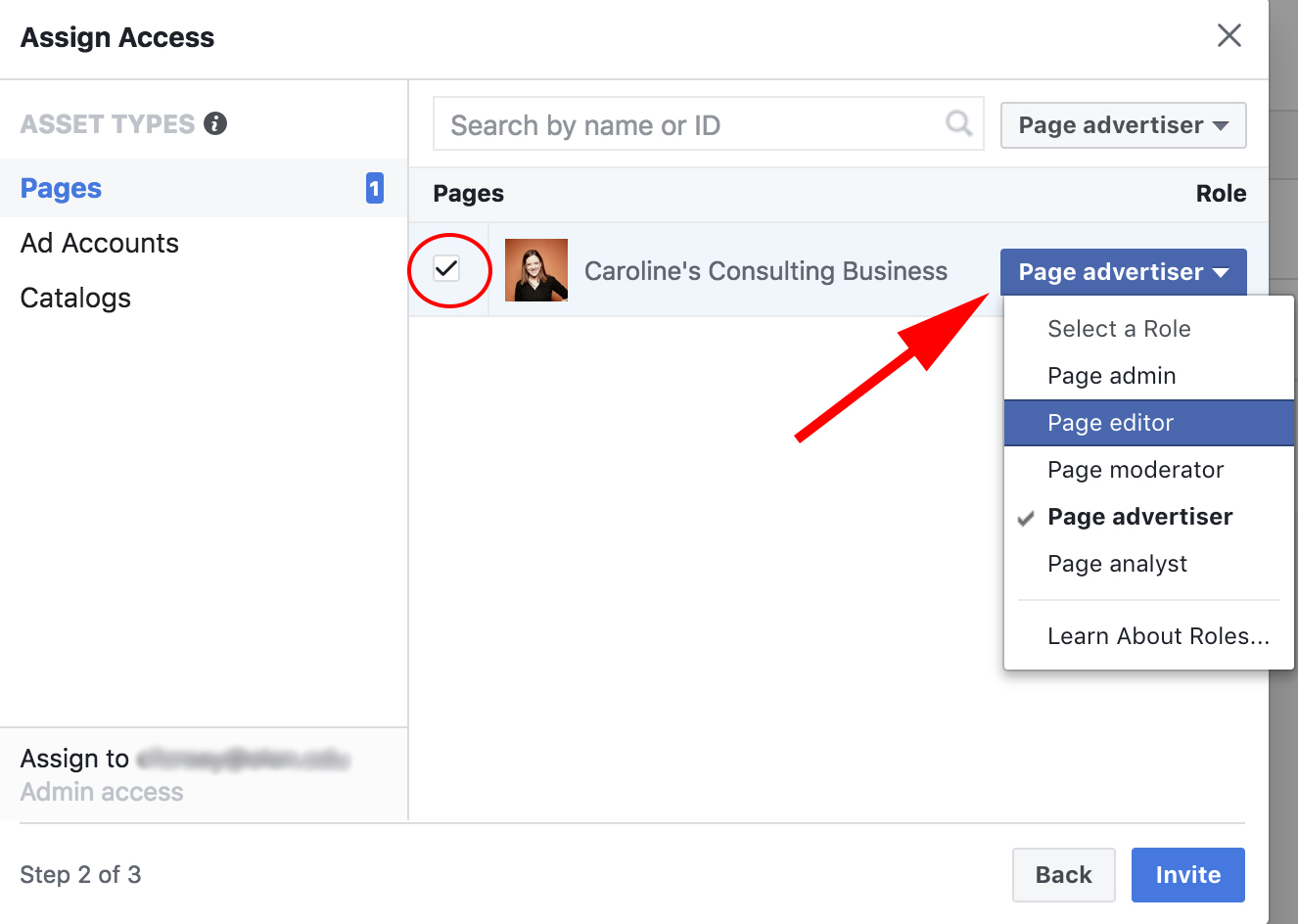
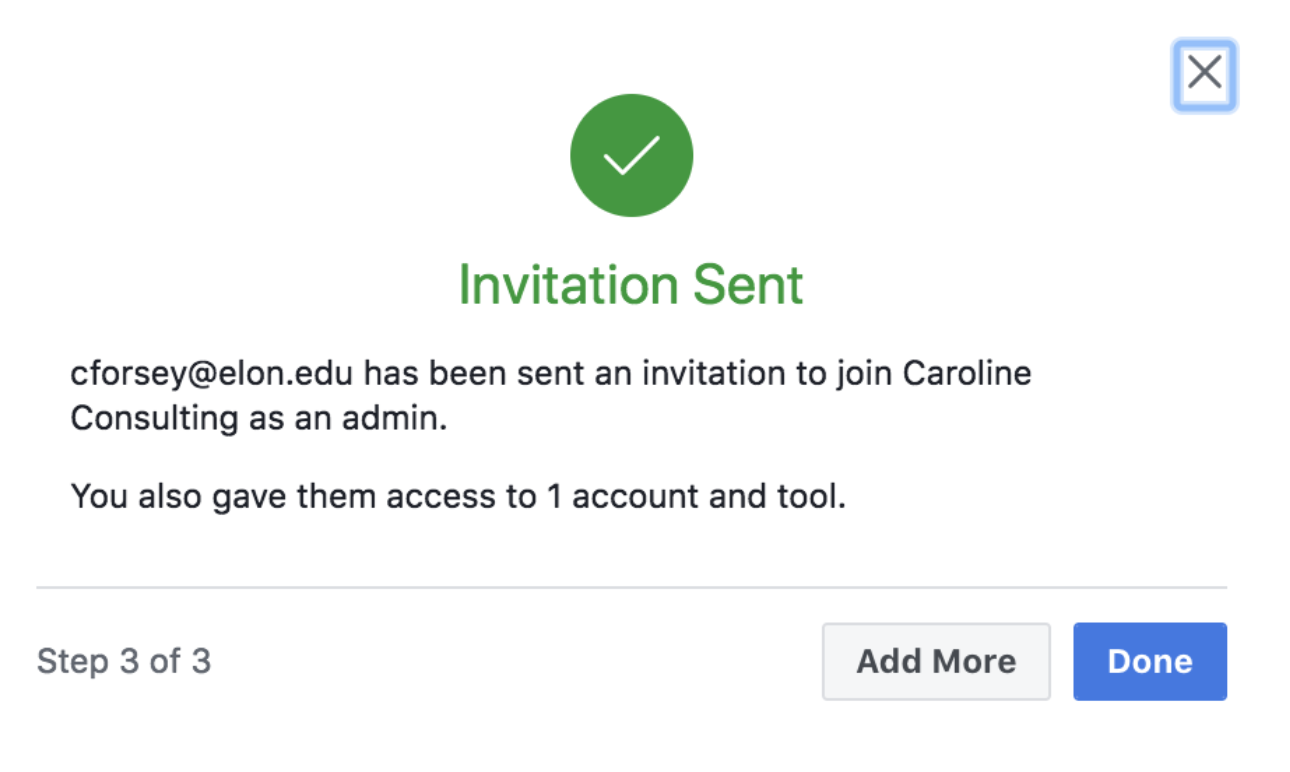
5. Now, your employee has been sent an invite, granting her permissions to 1 account and tool.
How to delete Facebook Business Manager
- Go to “Settings” in Facebook Business Manager
- Select “Business Info”
- Click “Permanently Delete Business” on right side of page
Ads Manager Tools
Now that we’re all set up, you might be curious about some of the additional benefits of creating an ad inside your Business Manager.
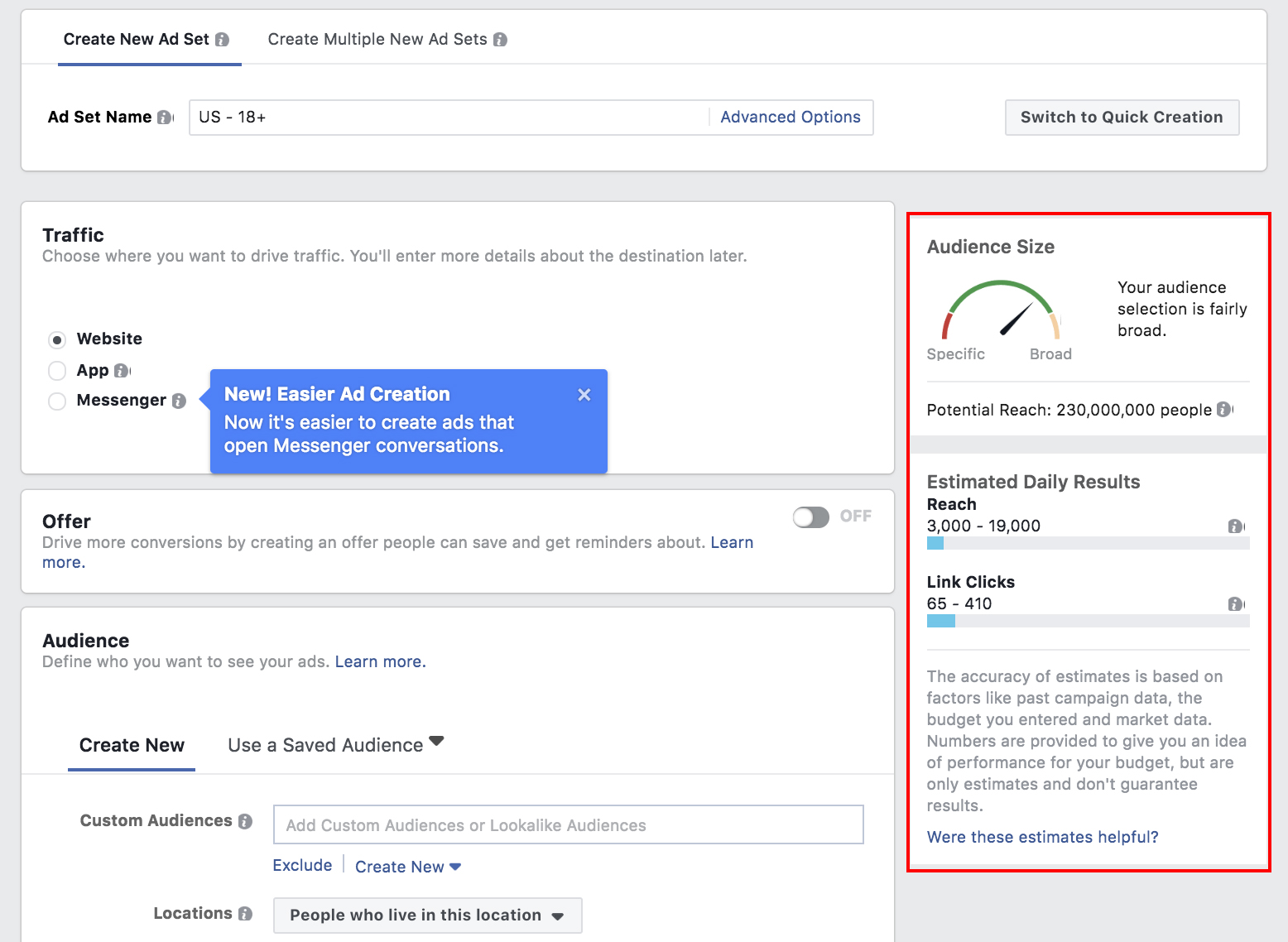
When creating an ad in Ads Manager, one of the best advantages (as you’ll soon see) is the ability to create a highly-targeted core demographic group with the “create new audience” feature.
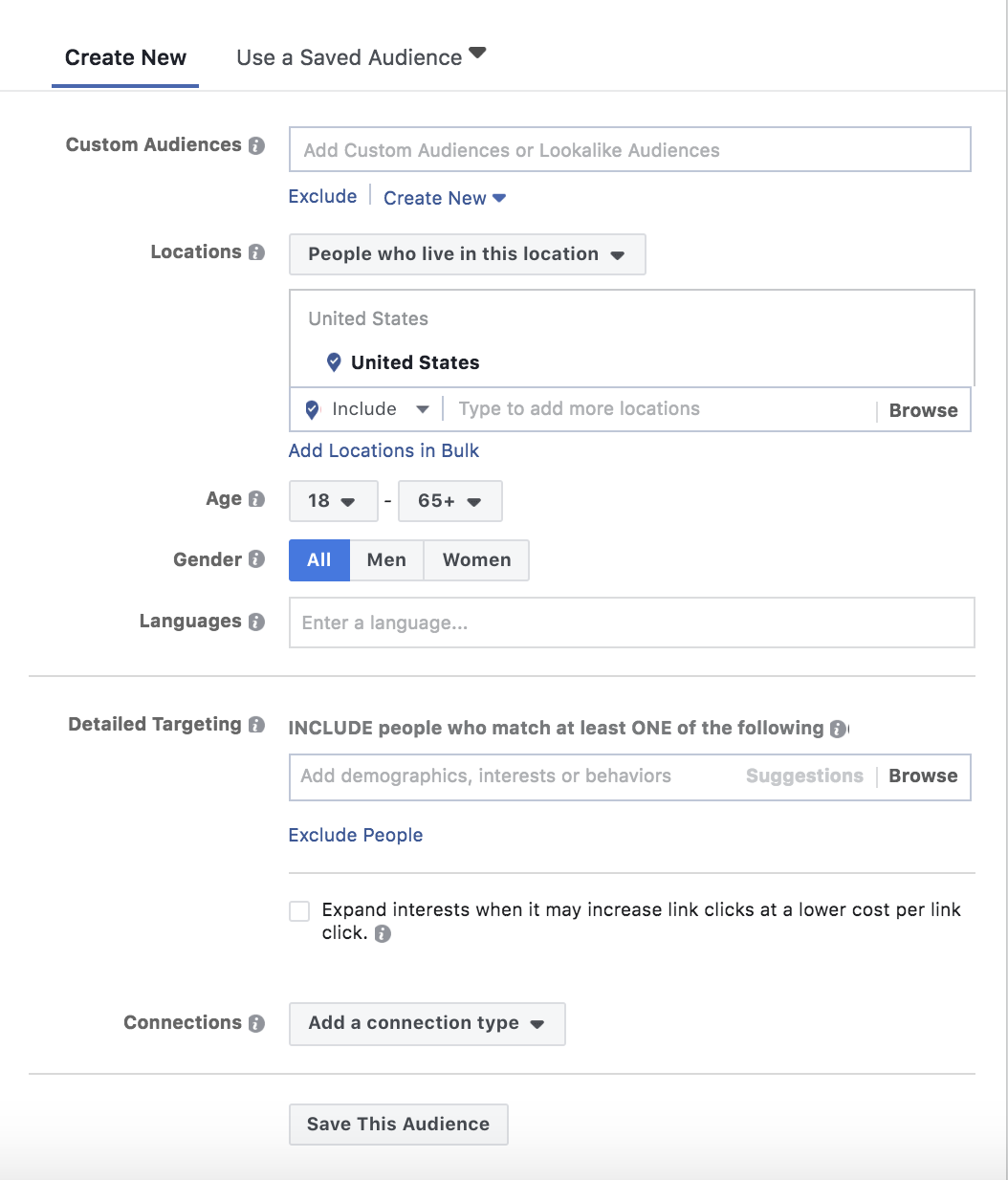
You can choose a gender, age, region, and language to reach, and even dive into specific interests you want your audience to share.
Then you’re given estimates based on your audience and budget, like how many people you’re expected to reach daily, and how many people will click your link. Those performance evaluations are critical to deciding whether to increase or decrease audience size, or whether your budget is big enough.
Here’s how to create an ad in Ad Manager:
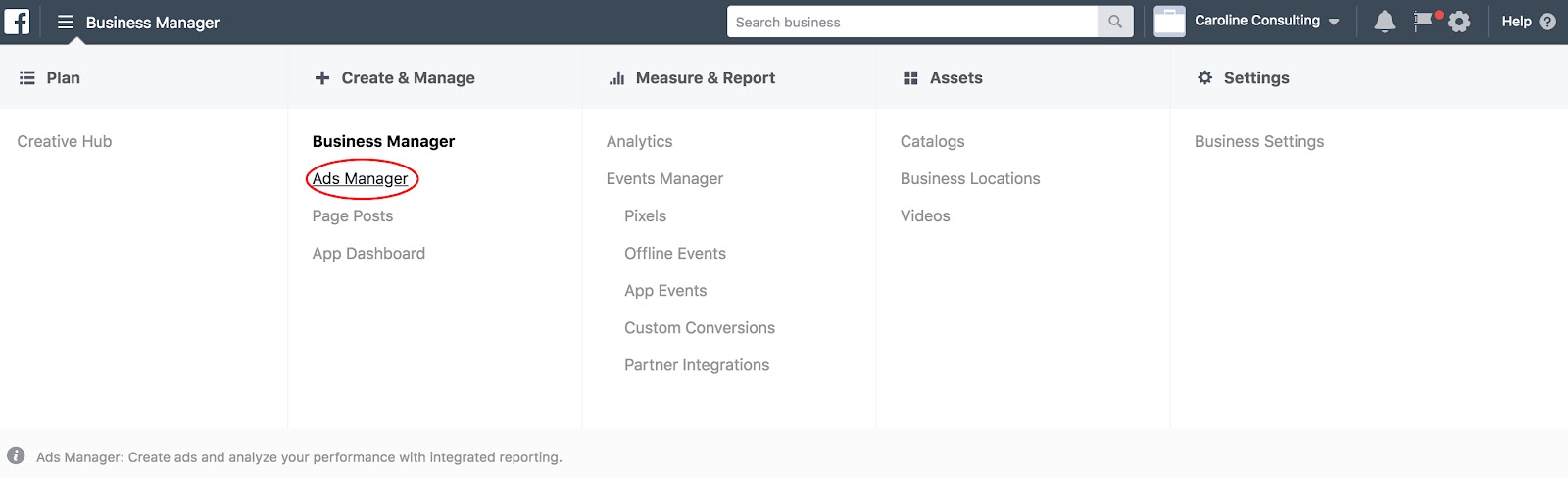
1. Click the “Business Manager” three line icon in the top left, and then select “Ads Manager”.
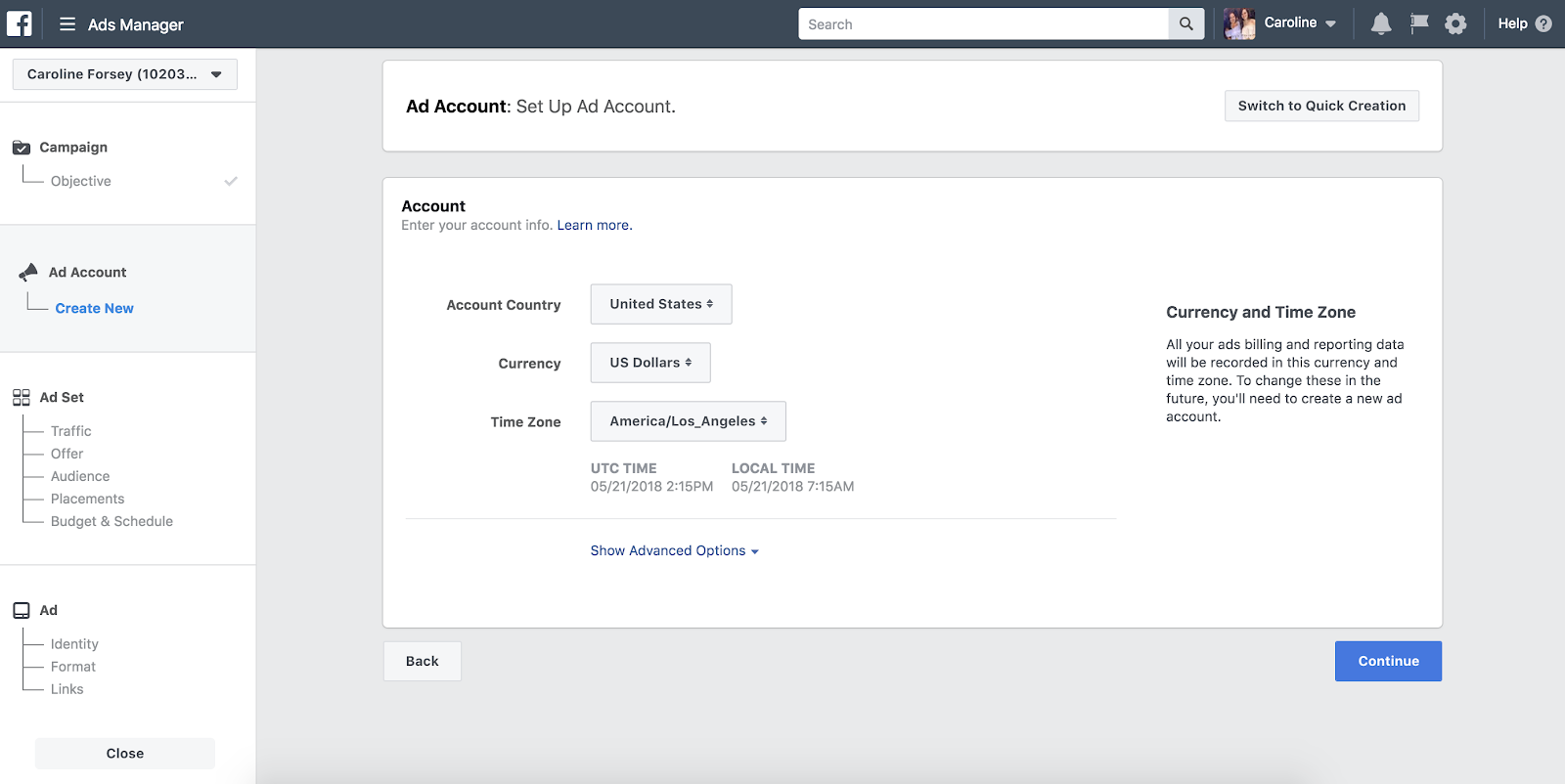
2. Select “Create New” under the “Ad Account” category on the left-hand side, and input basic information, like country, currency, and time zone for your ad. Then click “Continue”.
3. If you’ve already created an audience for another ad, you could “Use a Saved Audience”. If not, you will input information about your new desired audience here — you don’t need to include all the information, but the more you include, the more likely you are to reach your target demographic with your ad.
4. As you fill out the information, you’ll see an “Audience Size” chart on the right. This gives you estimates for how many people you might reach daily, and how many clicks you’ll get. While it’s not guranteed, it’s a good tool for evaluating whether you should narrow your audience or, if possible, increase your budget.
5. Once you’ve created an ad, you’ll find it in your Ads Manager homepage by clicking “Ads Manager” or searching facebook.com/adsmanager. Along with your ads, you’ll also find Ad Sets, Campaigns, or a general Account Overview. The Ads tab in particular provides you with analytics such as reach, impressions, cost per result, and relevance score.

Facebook Business Manager Analytics
Lastly, here’s a general overview of your “Analytics” tab and what the Analytics page looks like:
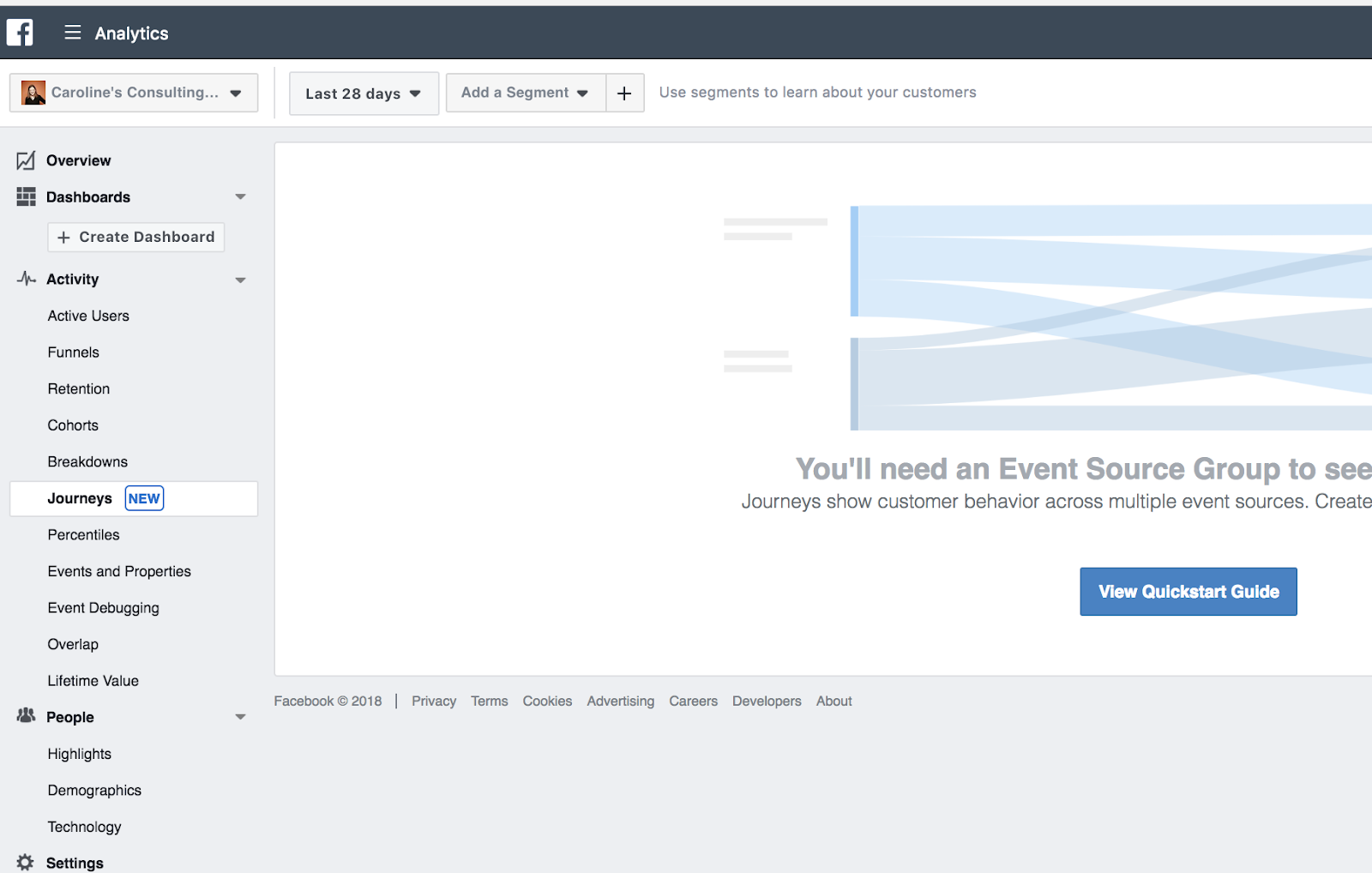
We won’t go too in-depth with analytics, since it’ll vary drastically depending on your business’s advertising goals, budget, and audience.
However, it’s important to note a few major components of Business Manager’s analytics, to ensure you understand the tool’s most impressive functions.
5 Business Manager Analytics Functions You’ll Want to Know About
- Facebook Pixel: If you install Facebook Pixel, your website can reach people with ads on Facebook after they’ve visited your site
- Split testing: Use A/B testing to figure out which ads lead to the highest conversion rate
- Conversion lift: Use this tool to ensure your ads are actually generating conversions and sales
- Mobile SDK: If your business has an app, use Mobile SDK to see what actions people are taking within your app, and use that information to improve ad campaigns across devices
- Brand lift: Find out how your ads are impacting your brand image to optimize ads for better brand awareness
Check out Facebook Business’s advertising information page to learn more about Facebook ad functions, read success stories for industry-specific businesses, and get inspiration and ideas to improve your own ads.

How to Make Quotes for Instagram: 9 Apps to Try This Year
When you come across a beautiful sight — be it a beach, a mountain, or your pet’s face — sometimes, it inspires you to think bigger about what certain sights and experiences mean.
For those moments, you might consider posting a photo on Instagram with an equally inspiring quote as the caption. But you could take it even further — and save characters — by posting the photo with the quote.
You’ve likely seen quotes on Instagram posts before, but you may never have created one for your brand’s account. Here’s a recent Instagram quote we shared here at HubSpot:
See what we mean?
Posting quote images on Instagram can diversify your content on the platform and humanize your brand a little, too. Everyone could use a motivational quote during a busy Monday morning or a slow Tuesday afternoon, so try out an Instagram quote for your next post with the help of these free apps.

9 Instagram Text Apps to Make Inspiring Quotes
1. FaceGarage
Web App

FaceGarage is a browser tool that helps you create Instagram images with quotes overlaid in just a few simple steps. You can upload an image of your own or use one of the site’s stock background images, type in your quote, adjust the font, text size, color, and formatting, and voila — you generate your image and download it to post on Instagram.
Our favorite thing about FaceGarage is the images don’t come with a watermark, so you can create more beautiful posts that don’t have a logo in the corner.
2. Canva
iOS, Android, or Web App

Image via Google Play
Canva’s many features extend beyond text-based pictures and, for that matter, social media. But the mobile app and its gorgeous pre-made templates make it perfect for Instagram quotes.
Using the Canva’s social media post setting, you can draft banners, flyers, cards, and posts of all shapes and sizes using one of hundreds of pro-level backgrounds. Of course, feel free to snap a photo on the go, as well. One you select your image, you can choose from more than 100 fonts, adjust the size and color, and publish.
3. ReciteThis
Web App

ReciteThis is another quick and easy browser tool you can use to create quotes for Instagram. Its two-step process involves selecting one of the ready-made background themes, typing in your quotation, and pressing “Create.” From there, you can upload the image to a variety of social networks (not including Instagram) or download the image to upload and post on Instagram.
The downside to ReciteThis’s ease of use is the highly visible watermark in the bottom-center of each image, but you might be able to crop it out using your phone’s photo editor before uploading to Instagram, depending on the design you choose.
4. Word Swag
iOS or Android

Image via Word Swag
Listed in iTunes’s top 100 apps in the Photo & Video category, Word Swag helps you create text images that are as edgy as the app’s name sounds. The app uses a special typing engine to create fresh quote designs based on the background picture you’re working with.
Just select (or shoot) your picture, type your quote into the app’s plain text editor, select one of nearly 50 styles, and shuffle through the diverse choices that appear. Word Swag has literally thousands of quote and image options to choose from through a handy integration from Pixabay, a free image gallery.
5. InstaQuote
iOS or Android

This free app offers a lot of options to customize your quote image, font styles, and color schemes. You can use your own photos or one of InstaQuote’s, and it allows you to automatically upload your image to Instagram so you don’t have to download it and then upload it.
The downsides to many free apps — including InstaQuote — are the prevalence of ad interruptions, and that many features are locked unless you upgrade to the paid version.
6. Text2Pic
iOS or Android

Text2Pic stands out from the crowd in a couple of ways. It has the widest variety of font style and formatting options — including 3-D and shadowing capabilities to add more effects to your text. It also auto-connects to Instagram for seamless uploading and posting on the platform.
The biggest downside we’ve noted is the inability to upload your own photo as a background image, but Text2Pic makes up for that with a ton of different background options to choose from.
7. Quotes Creator
iOS or Android

Quotes Creator has a neat feature that suggests quotes to use — including their attributions — to take the work out of creating an inspirational post for you. We also like how subtly transparent the watermark is to make it as distraction-free as possible. This is another easy-to-use app that creates quotes for Instagram in just a few simple steps — with an easy tap to upload to the platform.
Quotes Creator’s stock background options are a little cheesy, so we recommend finding your own and uploading them.
8. Quote Maker
iOS or Android

Quote Maker is another free app that tries to upsell its Pro version to unlock more background and style options, but you can always upload your own background if you feel too limited. Where Quotes Maker takes the cake is its cool font styling and effects. You could add neat decals to your brand’s name or a stamp-like effect to a company motto or mission statement.
We recommend exploring the app, but another warning — it can be glitchy if your design and editing actions get more complex. It’s best for simple images, like the one above.
9. Text on Photo Square
iOS only

Text on Photo Square is only available on iOS devices (for now), but its distinction from the rest of the pack is that users can add quotes to videos, in addition to photos. You can upload your videos and add quotes to create a neat audio and visual experience for your Instagram followers. A cool quote-video might distract from the watermark, which is admittedly one of the larger ones on this list.
Some of these apps might be worth investing in the paid version to create more unique images — without the watermarks — to post quotes on Instagram. But for now, try out these free options during the next social media holiday to see if your audience is ready to be inspired.

Every Business Has an Origin Story: A Lesson in Branding
“We’ve lost our way.”
I’ve heard this from clients countless times. And it’s no wonder people are saying this: today’s businesses have to evolve very quickly because employees rarely stay in one job for their whole careers and technology is growing so fast that it’s a constant battle to keep up with the next new thing. The stress can be overwhelming. I went through it myself at a time before Sub Rosa was what it is today.
Often the best way we inspire our clients for the future is when we connect them to the most indigenous part of themselves, to understanding why they were founded and why they are still here.
We help them reconnect by exploring their:
• Origin story: How it all began.
• Language: Your shared lexicon.
• Traditions: How you engage your community and acknowledge milestones.
• Purpose: Your reason for being.
Think about it: these are the building blocks of every thriving community. Whether in a tribe, a religion, or a corporation, these four building blocks are what provide meaning and create the connective tissue that forms a lasting foundation from which to grow.
A Tradition In Denim
At a meeting with a Levi’s executive, he told us that the company had missed a major opportunity by not participating in the “premium denim boom,” and it was now suffering both reputational and financial challenges. The “premium denim boom” had occurred when a number of high-fashion brands entered the market and began selling $200-plus pairs of jeans. During that time, Levi’s had maintained its traditional price point of around $39, and as a result, its jeans had acquired a low-end reputation and were considered less chic and no longer fashionable. The company was experiencing a significant sales slump.
We had been involved in a similar conversation not too long before with Absolut Vodka, whose management felt the company had missed out on the “premium vodka boom.” Apparently this premium boom was a phenomenon in a number of sectors. In the 1980s, Absolut was a top-shelf vodka. But in the 1990s, competitive vodka brands such as Grey Goose and Ketel One came onto the market with a more premium-priced product.
Absolut, like Levi’s, had stuck to its price point and dropped to a midtier status, losing market share to the new entrants. Ultimately Absolut found a way out of this by creating its own specialty, limited-edition lines, such as Absolut Brooklyn, created in partnership with Spike Lee, and premium-crafted versions such as Absolut Elyx, which was sourced and distilled in a manner designed to compete with other premium vodkas.
Levi’s needed a strategy to help it overcome a similar challenge. They had hired Wieden + Kennedy, a wellknown and successful advertising agency, to help rejuvenate the brand. Their campaign, which would later be known as “Go forth,” was being shot by a famous fashion photographer, and it would draw on inspirational imagery and language from well-known American authors such as Walt Whitman and Jack Kerouac. It would depict a new era of American nostalgia, and it was sure to capture attention. Levi’s wanted our help in turning that attention into action.
Our job was to make sure that once they had people’s attention, there would be have something to act upon and a real reason to care about the brand. This is the sort of integrated, complex challenge we love to solve, and we first began by focusing on the brand as we knew it. The company made denim and sold jeans (primarily) at a modest price point. They had once been the jeans of Marlon Brando and Steve McQueen and later the jeans of rock stars from the Rolling Stones to the Ramones. But somehow the company had lost its grip. We asked what had come before Brando and Jagger? Levi’s had begun making jeans in 1853. What had the company stood for then, and what was its origin story?
It’s fairly common knowledge that Levi Strauss & Company started out as a brand of pioneers. The men who had set out for the gold hiding in the uncharted lands of California during the famous Gold Rush of 1849 were known as the 49ers, and they had taken a big gamble, often risking life or death, to try to strike it rich. Those tough men needed tough jeans, and that’s what Levi Strauss produced. They had reinforced stitches and held up during hard work.
Over the coming decades, Levi’s rugged jeans continued to be a staple of the hardscrabble masses. Factory workers, laborers, farmers, and all manner of builders and fixers wore Levi’s as they headed out to work. They were the jeans that helped build America. We had to tell the story in a way that would ignite a newfound interest in the hearts and minds of new consumers and (hopefully) would bring back some customers the brand had lost along the way.
Panning for Gold
We asked ourselves, “Who are our modern-day pioneers?” After all, we’re not settling the West anymore, and many hard-labor jobs have since been shipped overseas. We wanted to find people who were embodying that spirit of progress and hard work and pull them into a new conversation, one that celebrated their sense of craft, of making things, of the integrity that comes from doing that kind of work well.
After a few weeks of development, we had created a program we called Levi’s Workshops and sent it off to Erik and his team. We admitted that what we were giving them was “only 75 percent of the plan.” The rest would have to be left open to serendipity. We knew we were going into the unknown, like the gold panners of the nineteenth century, and similarly we knew something about what we’d find but not everything. Like any good prospector, we knew to leave room for the unexpected. After all, you never know where you might strike it rich.
Together, our two teams became one unit. It didn’t take long for us to develop a working and speaking lingo, a kind of shorthand. When we said “pioneer,” we weren’t thinking of a grizzled old prospector chewing tobacco and swilling whiskey, we were imagining today’s artists, craftspeople, designers, teachers, and builders. When we said, “Go forth,” we knew we were looking for the spirit of adventure and discovery we wanted people to feel when they interacted with the brand. This shared language was built upon the origins of the brand, yet it was contemporized and translated for today. It drew our own teams closer together and became contagious throughout Levi’s organization.
Within months we were ready to open our first Levi’s Workshop in the heart of San Francisco’s Mission District, which was chosen because the neighborhood was thriving with diversity and craft. It felt like a pioneer town for new ideas.
The programming was built on collaborations with “pioneers” from the Bay Area. Right down the street from us, the writer Dave Eggers had opened his first whimsical tutoring location (themed as a pirate shop), where volunteers taught kids the value of creative writing. We partnered with them and paired the kids’ writing with artists who created original artwork for their stories. The kids got to watch the books being printed in the shop, and they were dazzled as they flipped through a book that had come to life from their story.
We brought in Alice Waters, a pioneer of California cuisine, and designed a beautiful letterpress harvest calendar that supported the work of her charity, the Edible Schoolyard Project. She hosted a small dinner in the space and signed copies for us to sell at auction, with the proceeds benefiting her cause as well as the Levi Strauss Foundation, the company’s charitable organization.
Not only did each project bring into the workshop a compelling pioneer to help create programming, but every piece of programming was designed to reach different subcultures and niche audiences in the Bay Area with authenticity.
These new traditions we were creating for the brand were building on Levi’s legacy of engaging with powerful subcultures. From gold-panning pioneers to punks on the Bowery, Levi’s has always been the uniform of the brave and status quo challenging. We built programming for the literary community, musicians, foodies, inner-city youths, and more. If you were willing to “Go forth” and try something different, we wanted you to know that Levi’s was with you.
Our work with Levi’s showed us the value of looking back to a brand’s indigenous roots and bringing thoughtful inspiration and wisdom into the present. Admittedly not every company has a brand that is more than a hundred years old, but every business does have an origin story.
Excerpted from Applied Empathy by Michael Ventura. Copyright © 2018 by Seed Communications, LLC d/b/a Sub Rosa. Excerpted with permission by Touchstone, an imprint of Simon & Schuster, Inc.
You can purchase Applied Empathy on Amazon.

Unriddled: Net Neutrality’s Second Chance, Facebook’s Dubious Breakup, and More Tech News You Need
Welcome one, welcome all, to your unofficial midweek marker: HubSpot’s Wednesday weekly tech news roundup.
Traditionally, things start to “slow down” in May. People graduate, vacations are looming, and summer beings to peek around the corner.
But it seems that within the world of tech, things aren’t showing any sign of slowing down.
And with all those pre-summer activities taking place, how can anyone be expected to keep up with all the news? Well, that’s what “Unriddled” is for: a quick rundown of each news item that grabbed our attention over the past week.
So, without further ado: Let’s break it all down. Here’s our Wednesday tech news roundup.
Unriddled: The Tech News You Need
1. Senate Passes Resolution to Overturn Net Neutrality Repeal
Last Wednesday, the U.S. Senate voted to overturn the Federal Communications Commission’s December repeal of net neutrality. The move came in the form of Senate approving a Congressional Review Act (CRA) resolution that would reverse the FCC’s decision to disband regulations of internet service providers. But it still needs to be approved by the House of Representatives — and signed into law by the president. Read more about the CRA and what would happen if it makes it through the House from Ars Technica‘s Jon Brodkin. Read full story >>
2. “Freedom From Facebook”
A group of not-for-profit organizations have launched the “Freedom From Facebook” campaign: an estimated six-figure digital ad campaign targeted toward the Federal Trade Commission with one message: Break up Facebook’s social media conglomeration. The campaign’s mission appears to be convincing the FTC to force Facebook’s portfolio companies — Instagram, WhatsApp, and Messenger — into separate, independently-operating companies. The hope is that it would allow, among other things, more balanced competition within social networking. Read more about the campaign from Axios‘s David McCabe. Read full story >>
3. Instagram Unveils Option to Mute Accounts
Instagram has finally released new tools that allow users to mute content from accounts they’re following — without unfollowing them altogether. Need a break from animal-adoption sob stories, for instance? With this new feature, users can hide posts in their feeds from said accounts, but continue following them and manually see posts on their profiles. Once an account is muted, users can unmute it at any time. The new feature arrives on the heels of news from TechCrunch that Instagram recently implemented a “you’re all caught up” feature to let users know when they’ve seen all new posts from the past 48 hours. Read Instagram’s full statement on the new mute option >>
4. Amazon Is Marketing Facial Recognition Technology to Law Enforcement
Amazon has developed facial recognition technology called “Rekognition,” according to documents obtained by the American Civil Liberties Union (ACLU), and has partnered with governments and agencies to deploy it. That, says the ACLU, could potentially violate of civil liberties and civil rights. Using artificial intelligence, the technology “can identify, track, and analyze people in real time and … quickly scan information it collects against databases featuring tens of millions of faces.” That’s according to Amazon’s own promotional messaging of Rekognitio — which the Associated Press discouraged Amazon from selling to law enforcement in an op-ed. Read the ACLU’s full story >>
5. Mark Zuckerberg (Kind Of) Testifies Before European Parliament
Members of European Parliament yesterday challenged Mark Zuckerberg with noticeably tougher questions than U.S. lawmakers did at his congressional hearings last month — but an unfortunate meeting format left most of them unanswered. Read HubSpot’s full story >>
That’s all for today. Until next week, feel free to weigh in on Twitter with your tech news questions or thoughts on what kind of events and topics you’d like covered here.

The Future Will be Tokenized: How Blockchain Will Free You to Control Your Financial Destiny
I believe in freedom.
I believe we should be able to make our own choices and shape our lives however we wish.
I long for a world without borders, racism, sexism, and barriers of any kind.
These are big dreams, but they can gain momentum with small cultural shifts. I believe blockchain is one of those shifts.
I’m passionate about emerging technologies like AI, machine learning and bots not just in a nerdy, code-centric way, but because of what they represent.
Blockchain, specifically, promotes decentralization. As someone who came of age during the 2008 global financial crisis, I watched how wealth and power can breed corruption — even if people start out with good intentions.
Ever since society began, humans have put their faith in powerful figures, like popes and kings. Eventually we realized that individuals tend to make decisions that create optimal outcomes for a small, select group of people. Revolutions occurred and democratic governments began to rise.
The shift from a single cult of personality to a group of elected decision-makers marked our desire for more inclusive societies, where different groups of people can thrive.
The invention of blockchain takes that push for inclusion to another level by decentralizing decision-making — allowing token holders to have a say in how they want society to be structured.

Whether you’re deep in the waters of cryptocurrency or you’re still confused about what these new technologies could mean for your life, I want to cover a small slice of the blockchain revolution.
Tokenization is a great way to understand the philosophy behind cryptocurrency; how it works, but also what it stands for.
This is the future that many blockchain pioneers and enthusiasts envision. Get ready for the Tokenization of Everything (TOE) — and a lot more freedom.
What is Tokenization?
In today’s financial world, everything you own is tied to your name. Maybe you have a house, a car, stocks, or cash in the bank.
In the process of tokenization, all those assets can be broken into pieces. That means you can create a stock or a single proof of ownership tied to any asset.
For example, let’s start with a long-range vision for tokenization. This is the future that I might not even see in my lifetime.
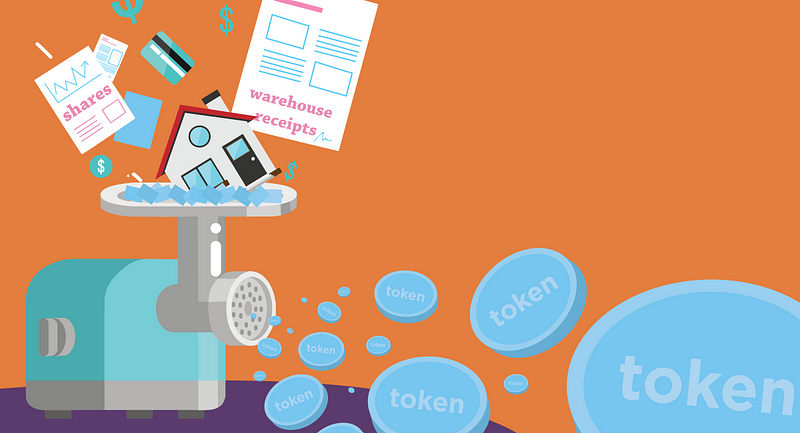
Image credit: distributedlab.com
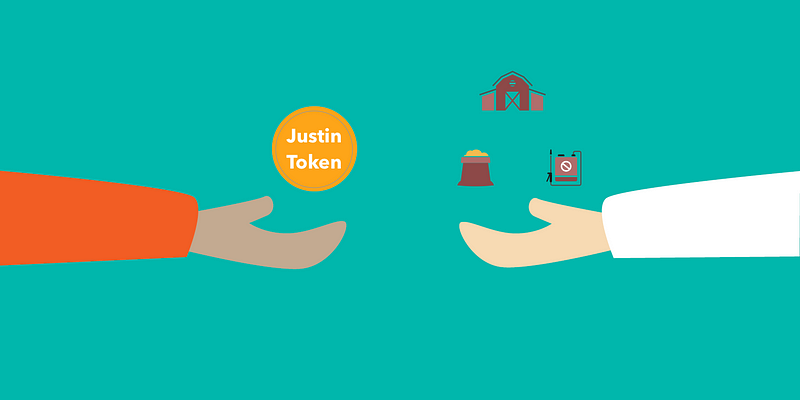
Imagine all my personal assets add up to a million dollars. Kind of a stretch, but it makes for easy math. Those combined assets could be broken into “Justin” coins that represent everything I own. If I created 100 coins or tokens, each would be worth $10,000.
The blockchain technology would allow anyone to trade their token(s) for a Justin coin. That means no banks, no financial managers, no complicated paperwork or red tape. It would be two people making a direct transaction.
The tokenization of everything imagines a world where anything can be traded. Your liquidity isn’t restricted by cash or concrete assets. Instead, it can include anything you own, and maybe even your time.
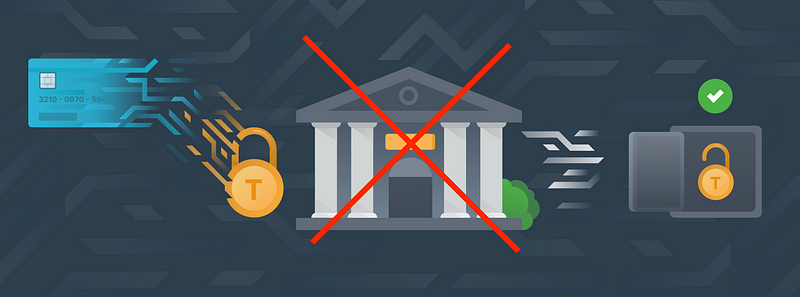
TOE removes all aspects of the middleman institution. It enables online transactions through a trusted, de-centralized system. It breaks down power and access barriers. We still have to contend with inequality in terms of assets and wealth, but no one can control how or what you trade.
The blockchain technology that powers these transactions also makes investing faster, cheaper and more secure. It liquefies assets and makes investing possible for people who have been restricted by means or geography.
Third-generation blockchain technologies like Cardano are trying to solve the big problem of operability, which means that everything is programmable, with an automated market-maker as the intermediary.
For example, imagine paying for your Starbucks order with airline miles, while the barista is paid in US dollars. That’s interoperability in action.
We’ve already watched the internet tear down gatekeeper layers in entertainment, publishing, communication, sales, and many other industries.
As we dismantle hierarchical financial systems, transaction costs go down, volumes go up, and people are more willing to trade with each other. It creates a more connected, global system.
This long-term vision also (perhaps ironically) takes us back to barter trading, which is where the concept of money first originated.
A Collection of Diverse, Personal Tokens
In the near future, blockchain could give us the ability to create multiple coins for several different assets.
Imagine you own a home worth $1 million (stay with me … this is all about that simple math).
You could again break the ownership of that home into 100 tokens worth $10,000 each. This scenario is much like creating a real estate index or trust fund to manage multiple properties. But now, you could sell partial ownership of your home with individual tokens that you create, trade and control. There’s no intermediary.
So, why would I want to sell partial ownership?
Great question. I would tokenize my home for two main reasons:
- I want to make my assets more liquid. Maybe I’m traveling, starting a business, going back to school, or investing in something I think has great value. A home token would allow me to leverage some of the value in my house without selling it outright.
- I believe my home won’t appreciate as fast as what you’re giving me in return. Maybe I’m trading my home token for your business token — and I think your business will gain value at a much faster rate than my home.
On the other side of the trade, you might want a share in my home if you believe it has better appreciation potential than your company. Our different perspectives on the asset valuation would allow us to reach a trade consensus.
If we can do all these different trades, it doesn’t matter where we live. Artificial geographic borders could break down when we don’t rely on a single entity or regime to prove our value.
For example, the global currency system determines how much our assets are worth, depending on the stability (or volatility) of our native currency and how our home country’s institutions reach consensus with other markets.
When assets are tokenized, that value is stored in a single profile with fully decentralized transaction paths.
Technology can streamline this brave new financial world.
If these scenarios feel complicated and time-consuming, I hear you. The idea of valuing your assets, making the trades, and ensuring you’re not getting duped in the process can sound more than a little overwhelming.
Again, I’m bullish about emerging tech because it has the power to help. I see a future where humans, aided by artificial intelligence, can make more efficient and effective financial decisions.
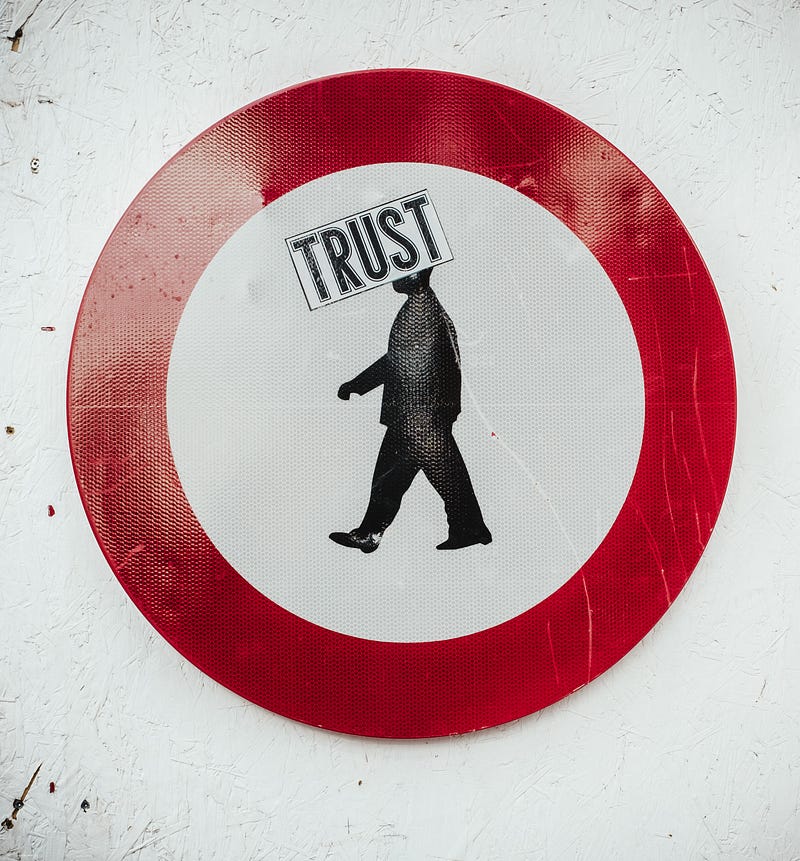
We might trust the people who currently control and manage our money — and in many cases this trust is well founded — but even “experts” don’t have all the answers.
Investment requires educated decisions. No one has a crystal ball (unless they’re conducting insider trading).
Technology won’t provide foolproof investing, but it does remove industry greed from the equation.
Running your own trades eliminates high bank and investment fees. It ensures that you’re buying a stock because you think it’s smart, not because it pays kickbacks to the broker.
You won’t question the intentions of a financial institution, because they don’t have a hand in your assets.
Let the bots do the busywork.
Chatbots are arguably today’s most relatable AI application. Most people have used Facebook Messenger or interacted with a chatbot while shopping online or asking their telecom provider about those weird mobile charges.
Currently, chatbots are built to solve a specific set of problems. We’ve builtGrowthBot, for example, to deliver marketing and sales information without leaving your task or productivity platform (such as Slack).
You can ask questions about top posts, organic site traffic, or get company overviews. And instead of switching to a web browser and getting lost in a Google spiral, you can stay focused while GrowthBot digs up the details.
Now, apply this kind of “assistant” technology to your financial life. The bot could do everything from researching investments to calculating an asset value, in real time.
Remember, the bot is not taking over. This isn’t a dystopian sci-fi plot. Instead, it’s providing the information you need to make a smart and highly personalized decision.

Then, the chatbot could actually conduct the transaction as you instruct. That means no more calls to your bro-ish financial advisor or trying to recover a lost login password.
We Still Have a Long Way to Go
I do realize that the utopian future of my dreams is a long way off — if it’s ever going to be possible.
We will still face complex, ongoing issues about who holds wealth in our society and how to level the field. I’m not naïve about these challenges, nor do I believe that technology is a magic solution.
Even cryptocurrencies are promising, but they’re still rife with problems. These are totally unregulated assets, for better and worse.
At this moment, the “worse” is an approximately 90% rate of fraud among Initial Coin Offerings (ICOs), according to the People’s Bank of China.
Yet, I’m still motivated by the possibilities. Tokenization is just a tiny example of what a more decentralized, egalitarian, and direct financial system could enable.
Technologies are ultimately just tools that we can harness to lead cultural change — and whether we’re talking AI, bots or blockchain, the code is inconsequential. What really matters is our intention.
It’s time to decide how we’ll organize our society, for hundreds of years to come.
