
How to Write a Professional Resignation Letter [Samples + Template]
Telling your boss that you’re leaving the company is never an easy conversation.
But a respectful resignation letter can mean the difference between an awkward goodbye, and a chance for a long-term professional connection.
Ideally, you’ll provide a resignation letter two weeks before you leave the company. A resignation letter lets you officially announce your termination at the company, and also provides important housekeeping information, like your last day and other details about your departure.
Arming yourself with a powerful resignation letter helps you ensure a positive conversation with your boss, and a smooth transition to your next journey.
But how do you write a good resignation letter? What should you include, and exclude?
Writing a resignation letter can feel like a daunting task, so we’ve created a professional resignation letter template to get you started, and included examples for inspiration.
How to write a professional resignation letter: template
Below is a professional resignation letter template. Remember, your letter should be brief, and only include relevant and helpful information. Don’t focus on the advantages of your next role. Instead, take the time to reflect on any appreciation you feel for the company you’re leaving behind.
Your Name
Your Address
Your City, State, Zip Code
Your Phone Number
Your Email
Date
Name
Title
Organization
Address
City, State, Zip Code
Dear Mr./Ms. Last Name:
I would like to inform you that I am resigning from my position as X for Company A, effective December 21.
I appreciate the opportunities for professional development that you have provided me over the past two years. I have enjoyed my tenure at Company A, and in particular feel honored to have been apart of such a supportive team.
If I can be of any help during this transition, please let me know. I am available to help train my replacement, and will ensure all my reports are updated before my last day of work.
Thank you again for the opportunity to work at Company A. I wish you all the best and look forward to staying in touch. You can email me at X.
Sincerely,
Your Signature (hard copy letter)
Your Typed Name
Paragraph one:
Begin your letter by stating your position, and the company — this might seem superfluous if you work at a small company and your boss knows you well, but since the letter is your official termination, it’s important to include.
Also, providing an end date in the first body paragraph is helpful, since that’s one of the first questions your employer is going to have.
Paragraph two:
Take the time to consider how you’ve grown, or what you’ve appreciated most about your time at the company. Be as specific as possible — perhaps the company provided professional development opportunities, or maybe you’ve appreciated the climate the company fostered, and the supportive atmosphere. It’s nice for your employer to receive a thank you for the time and resources she’s used to support your career growth.
If you’d like, you can include where you’re headed next, too. If you’re switching industries to pursue a passion, or going to graduate school, it might be appropriate to include. However, if you’re leaving the company for a competitor, you might feel it better to omit.
Paragraph three:
In the third paragraph, mention your willingness to make the transition easier. I’ve written, “I am available to help train my replacement, and will ensure all my reports are updated …” This sentence might look different for you; regardless of what you write, it’s impressive if you include specific details regarding how you’ll help.
Paragraph four:
Lastly, I’ve written, “You can email me at X.” This is optional, but if you truly want to keep in touch with your old employer or use her as a resource, it might be a good addition.
Resignation Letter Samples
A)
Dear Mr./Ms. Last Name:
I would like to inform you that I am resigning from my position as Data Analyst for Company A, effective January 3.
I appreciate the opportunities for professional development that you have provided me over the past four years. I have enjoyed my tenure at Company A, and feel grateful to have started my career alongside such a dedicated team.
I have accepted a teaching position in Virginia. While my experience at Company A was rewarding, I’m excited to pursue my passion for teaching.
If I can be of any help during this transition, please let me know. I am willing to help out with freelance work until you find a replacement.
Thank you again for the opportunity to work at Company A. I wish you all the best and look forward to staying in touch. You can email me at X.
Sincerely,
Caroline
B)
Dear Mr./Ms. Last Name:
Please accept this letter of resignation from my position as content creator at Company Y. My last day of employment will be June 1.
It has been a pleasure working with you and the team for the past two years. In particular, I’ve enjoyed tackling extensive copywriting projects as the business has grown. I’m so appreciative for the opportunities to develop my skills in the field, and want to thank you for all your guidance and insight. I wish your company much success.
Please let me know if you need any assistance with the transition. I look forward to staying in touch. You can call me at 123-4567.
Sincerely,
Caroline

What the Russian-Bought Facebook Ads Tell Us About Targeting
The U.S. House Permanent Select Committee on Intelligence (HPSCI) Minority yesterday released roughly 3,400 ads that ran on Facebook and Instagram leading up to the 2016 U.S. presidential elections.
The ads, which were purchased by the Russian-based Internet Research Agency (IRA), ran between Q2 2015 and Q3 2017, meaning that some of them continued to run after the election and President Trump’s January 2017 inauguration.
“There’s no question that Russia sought to weaponize social media platforms to drive a wedge between Americans, and in an attempt to sway the 2016 election,” said Representative Adam Schiff, Ranking Member of the House Permanent Select Committee on Intelligence, in a statement. “Russia sought to divide us by our race, by our country of origin, by our religion, and by our political party.”
The Nature of the Ads
We combed through as many of the ads as we could, and based on the sample we viewed prior to publishing this post, they accurately reflect Schiff’s statement.
The ads represent only a portion of what has been reviewed by the HPSCI Minority over the course of its investigation of Russian interference with U.S. electoral processes.
In addition to these ads, the Minority noted in a statement that many of these IRA-created accounts — which purchased the ads — also published 80,000 pieces of organic content, which the were exposed to an estimated 126 million American consumers.
That content was not included in what was released yesterday, and its nature remains unclear. As for the ads, the Minority states that they were exposed to over 11.4 million American Facebook and Instagram users.
The IRA-purchased ads focus on a range of issues to a somewhat superficial degree, including:
- Race
- Police Brutality
- Patriotism
- Civil Rights
- Sexual Orientation
- Immigration
- Economy
Without looking at every single ad, it’s difficult to say if a majority of them leaned to one particular political aisle. For many of the above-listed issues, there were accounts created and ads published for both sides.
On the issue of refugees, for example, each of the below pages (and the ads bought to promote them) appears to take a contrasting side — yet both were the work of the IRA.


Some of the ads contained information and images that were redacted “to protect personally-identifiable information (PII),” according to a statement released by the House Permanent Select Committee on Intelligence.
Many of the ads were also purchased to promote events falling on either side of contentious issues. In addition to certain content redactions, the Minority says it has urged Facebook to inform creators of “genuine online events” that they might have been unknowingly advertised by the IRA.
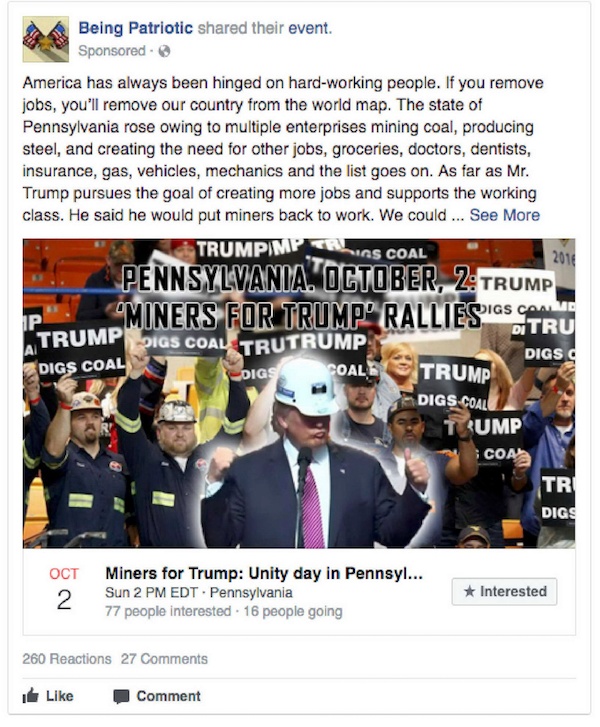

In addition to those redactions, the statement notes that Facebook notified users whose genuine online events were unwittingly promoted by the IRA.
The nature of the ads released by Congress seems to be overwhelmingly issue-based, most of them not pertaining to a certain candidate but rather emphasizing topics that are often sources of debate and divisiveness — especially during election season.
In October, Facebook introduced a verification process that would only allow authorized advertisers to run electoral ads on Facebook or Instagram — that is, ads for a specific candidate — and will also contain a “Political Ad” label.
That same process will apply to those seeking to publish issue-based ads, though at the time, Facebook did not say it would require them to be labeled. Earlier this week, however, Facebook announced that it will introduce labeling requirements for issue-based ads — a move that was perhaps anticipatory given the subsequent release of these ads.
Other ads are completely irrelevant to the most hotly contested issues during elections, such as those from an account called Memopolis, which shared meme content targeted to users who had indicated an interest in pages for Imgur and iFunny. However, even the content published by this account could be considered controversial, such as this ad that ran in June 2016.

Nonetheless, a number of ads do focus on specific political and former presidential candidates, sharpening the associations voters make between elected officials and the country’s most heated controversies. The ad below, for instance, was published in Instagram in seeming opposition to former candidate Hilary Clinton, and targeted to users whose interests include former candidate Bernie Sanders.


That targeting information is crucial — and where the ads become most complicated.
The Targeting
Alongside images of the ads themselves, the HPSCI Minority also released the following details of each ad:
- The ad’s ID number
- The text that ran with the ad
- A link to the ad’s landing page
- The age, language, and location of the ad’s target audience
- The ad’s impressions, clicks, spend, and date of creation
In April, Facebook announced that it would be creating a public, searchable archive of political ads containing similar information to the PDFs released.
What we found particularly interesting was the nature of the targeting criteria for each ad. Facebook’s targeting tools allow advertisers to build a customized audience for promoted content, based on interests, location, age range, and other demographic information.
The IRA appears to have used these tools to its advantage, targeting each one to an audience with which it thought the somewhat polarizing content would resonate the most. For instance, here’s the targeting information for the ad promoting the “Stop A.I.” page above:
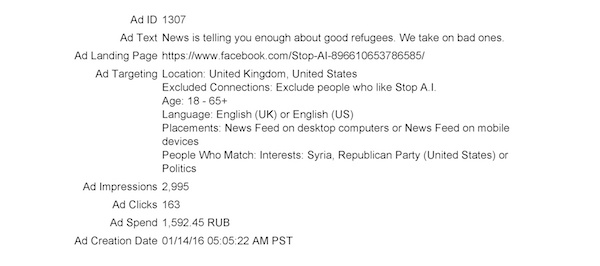
In examining each PDF release by Congress, we noticed that many ads follow a theme in when they were purchased and posted on Facebook. The one above, for instance, seems to follow a common age demographic we observed for many of the ads (18 – 65+).
We also noticed that a significant portion of the ads serve as duplicates of one another that were customized with different text or targeting information.
The following three ads, for example — which ran after Donald Trump was elected — all contain the same copy. However, each one contains different targeting information.


The first two are both targeted to users within 25 miles of Atlanta, GA, but the first one contains slightly more criteria under interests.
The third one appears to be targeted to the same interests as the first, but has a broader geographical range of the entire U.S.
By our analysis, these ads and were purchased in bulk over the course of each quarter between 2015 and 2017. The reason for that, most likely, was likely to maximize each ad’s impressions and increase the chances of sneaking through Facebook’s News Feed algorithm.
If 15 ads in a group of 20 on the same topic are intercepted by Facebook, for example, five would still be seen by Facebook users.
That could explain why the nearly 3,400 purchased ads also had such contrasting performance and impression numbers, according to the details released by the HPSCI Minority.
While some ads received more than half a million impressions, others promoting the same page — with the same copy — received zero.
The Impact, and Facebook’s Response
What’s particularly interesting — and perhaps troubling — about the nature of these ads, is the degree to which they leveraged Facebook’s already built-in targeting tools.
As far as we’ve been told, these ads weren’t necessarily strategically created or conceptualized based on information that was improperly obtained, as per the Cambridge Analytica scandal earlier this year. Instead, they were created and targeted using the same ad customization criteria available to all advertisers: age, location, interests, etcetera.
That’s likely part of the motivation behind Facebook’s new labeling and verification standards. Shortly after these documents were released by the HPSCI Minority, the social network released its own statement in which it reiterated the measures it’s taking to prevent a repeated weaponization of its platform.
“This will never be a solved problem because we’re up against determined, creative and well-funded adversaries,” the statement reads. “But we are making steady progress.”
Among these changes are updates to Facebook’s ad targeting criteria, which include the removal of about one-third of the segments used by the IRA. It is unclear what those segments are.
“The full picture is astonishing,” says HubSpot Social Media Editor Henry Franco. “It’s reassuring to see Facebook taking some steps to improve its influence on elections and politics, but it’s also clear that the platform in 2016 was an open book for manipulating popular opinion for anyone with the time, resources, and commitment to get the job done.”
That picture still has yet to come completely into focus. The U.S. Special Counsel investigation into potential election interference is ongoing, and as the HPSCI Minority, some of the content in question has yet to be seen by the public.
“We will continue to work with Facebook and other tech companies,” Schiff said in his satement, “to expose additional content, advertisements, and information as our investigation progresses.”

PR Career Guide: Public Relations Job Titles, Descriptions, & Salary
Choosing your career path is arguably the most important decision of your life. But how do you know what a job is actually like if you’ve never had any experience working it?
If you landed on this blog post, you’re probably considering a career in public relations. The work definitely appeals to you, but you’re not entirely sure it’s the right choice. What if you realize it’s not actually your passion?
To help you answer these tough questions, we created this public relations career guide that’ll describe what exactly public relations is, the different career paths you can pursue, the industry’s salaries, internships, and the disciplines a public relations degree will cover.
Read on to find out if a career in public relations is right for you.
What is Public Relations?
Public Relations can be boiled down into two main responsibilities: promoting a brand and protecting it. On the promotional side of PR, professionals help businesses or individuals develop a positive reputation with the public through various unpaid or earned forms of communication, like placements in traditional media, social media, and blogs. On the protective side of PR, they help their company or clients maintain their public reputation or defend it during crises.
PR is unique because it allows brands to build a relationship with an audience through credible sources, like trusted news outlets.
But free publicity isn’t easy to get. Since journalists need to write stories that resonate with their own audiences, public relations professionals have to account for the interests of news outlets when they develop their PR strategy.
Another challenge in public relations is protecting a company or client’s reputation in the digital age. Humans have a negativity bias, which helps us be more aware of threats, so, naturally, negative news grabs and holds our attention better than positive news. It also fuels the virality of bad news on social media and Google, so it’s crucial for PR professionals to quickly react to any negative claims about their brand and mitigate the damage.
Careers in Public Relations
Promotional Side of Public Relations
On the promotional side of PR, your main job is to convince the media to write a positive story about you through press releases, story pitches, and press conferences. You can also manage your online and local community relations, handle investor relations, and even be your brand’s spokesperson.
Here are some roles you can pursue on the promotional side of PR:
Content Creation
The content creation team usually crafts positive stories about their brand that the media relations team pitches to journalists. These stories can also pique journalists’ interest on their own, like a press release about a major company merger. A member of this team writes press materials, bylined articles for news outlets, and can even make brand awareness videos.
Media Relations
The media relations team develop and maintain relationships with journalists, so they can pitch stories to them and seek out interview opportunities for their executive team. They also track all their press, social, and blog placements and measure and report their PR campaign’s effectiveness.
Social Media Community
The social media community team tracks and manages their company or client’s image on social media. They use social listening tools to gauge the company’s public reputation, and to bolster it, they interact with their social media following, make company announcements on social media, and find social media influencers to promote their brand.
Community Relations
The community relations team makes sure their company or client lives up to their potential as a socially responsible corporation. They do this by finding ways to associate their company or client with positive community events, like sponsoring an event, donating money to an organization, or working a philanthropy event. The brand’s impact on the community gives journalists positive stories to write, which increases their number of press placements and strengthens their public reputation.
Financial Communications
At public companies, the financial communications team forges relationships with analysts and investors to improve their financial reputation. They do this by fielding all analyst, media, and investor inquiries at shareholder meetings, press conferences, and private meetings. They also write earnings reports and the investor section on their website.
Spokesperson
A spokesperson is the face of their company’s brand. They speak to the general public on behalf of their company during press conferences, make T.V. appearances, and respond to any criticism the company might face.
Protective Side of PR
The protective side of PR is smaller than the promotional side but is just as important. You can usually pursue two career paths on this side of PR: managing a brand’s reputation or managing a company crisis.
Reputation Management
The reputation management team gauges their company or client’s public reputation by monitoring brand sentiment on social media, review sites, their ratings and reviews section on Facebook, their own online communities, and the news. This information helps them identify any complaints about their brand and quickly address them through social media and other communication channels online.
Crisis Management
The crisis management team help clients or their own company deal with major catastrophes caused by human error, intervention, or even malicious intent. They mitigate the damage by releasing statements that take responsibility for the issue, crafting company-wide responses to backlash, and spreading awareness for their plan to solve their problems through paid, earned, and owned marketing channels. They also appoint an official spokesperson to respond to any criticism on behalf of their brand at press conferences and interviews.
Public Relations Salaries
Listed below are the average salaries in Public Relations. We collected this data from Glassdoor’s anonymous salary submissions, which doesn’t account for the employees’ industry, company size, or years of experience.
Entry Level
Public Relations Assistant – $36,576
Public Relations Coordinator – $42,663
Mid-Level
Public Relations Associate – $44,222
Public Relations Specialist – $53,241
Management
Public Relations Manager – $71,468
Public Relations Director – $83,343
Public Relations Internships
With over 5,000 public relations internships listed on Glassdoor right now, public relations interns are high in demand. If you land a PR internship, you’ll likely work with multiple teams and take on a broad set of responsibilities like coordinating speaking engagements and media outreach, fielding incoming media requests, drafting press releases and media lists, maintaining social media pages, analyzing media coverage and PR campaign performance, updating reporter databases, and compiling press kits and media collateral.
Public Relations Degree
If you major in public relations during college, your degree will cover three main disciplines:
1. Communications and Media: you’ll study the birth of mass media, track its historical trends, and learn how media institutions have affected society.
2. Public Relations Theory and Application: you’ll learn the fundamentals and strategic concepts of PR, and at some universities, like Boston University, you can put your knowledge to use by running PR for an actual business or organization.
3. Writing for Mass Communication: you’ll learn how to write press releases, pitch emails, and speeches. You’ll also learn how to master the AP style of writing.
In addition to these core competencies, most PR programs require you to take classes in media ethics and law, multimedia storytelling, public speaking, journalism, advertising, marketing, American history, statistics, and business writing.
If you’re not a public relations major or you want to study something else, most PR departments and firms happily hire marketing, advertising, and journalism majors.
If you go to a liberal arts school, majoring in communications or english will give you the best shot of landing a job in public relations. These disciplines will teach you how to communicate clearly and think critically, which are the skills PR professionals need — their work is both creative and analytical.

What’s FOB Shipping Point?
There’s a huge difference between ordering a couch and ordering a pizza.
Hi, I’m Captain Obvious.
Here’s a less-obvious statement: the difference between a couch and a pizza isn’t just that you can eat one of them … It’s the point at which these orders officially belong to you. You pay for your pizza when the pizza arrives, but you pay for most other product orders (like couches) long before the item reaches your doorstep.
These other orders, which cost more to sell and deliver, are what help define the term “FOB shipping point.” Let’s explain what FOB shipping point means and how it affects both the seller and the buyer.
FOB Shipping Point
FOB shipping point stands for “free on board” shipping point. This term describes product orders that are paid for at the product’s origin, which is the seller’s shipping point, as opposed to the product’s destination. FOB shipping point charges the buyer for shipping costs as soon as the seller begins shipment.

How FOB Shipping Point Affects the Seller
FOB shipping point is very common in the ecommerce industry. When ordering a couch, for example, customers typically agree to a sale at FOB shipping point. A couch costs a great deal of money up front for the business to produce and transport, especially if the business is shipping the couch far away. Customers who order this item online can’t easily assure the business they’ll be prepared to pay for it once the couch is delivered to them — so they pay up front
FOB shipping point allows the business to collect payment from the sale as soon as the couch is assembled and loaded onto the truck — protecting the business from a failed payment after the business already paid to transport the couch.
And because FOB shipping point holds the buyer responsible for freight costs (sometimes indicated by the term “FOB port”), the business can also save money in the event that the product is lost or damaged in transit. In these cases, it’s up to the customer to file a claim for reimbursement.
How FOB Shipping Point Affects the Buyer
Although FOB shipping point requires the buyer to make a financial commitment before receiving the product, it can also allow the buyer to have a product sent to their home without needing to be there when the product is delivered.
When ordering a product online, customers submit their billing information to the seller before placing their order and leaving the seller’s website. Once the seller begins shipping the item, the customer is billed for it. Depending on the product and the type of home it’s being sent to, the customer might not even need to be present to accept the package from the deliverer — the transaction has already taken place.
FOB Shipping Point vs. FOB Destination
Now, let’s talk about pizza.
Food deliveries are just one type of product that frequently isn’t a FOB shipping point sale. When customers order a pizza, it doesn’t officially become theirs until they sign the receipt shown to them by the pizza delivery driver when he/she arrives at the customer’s doorstep.
This is known as FOB destination. Rather than charging for the pizza upon its departure from the restaurant — which would be a FOB shipping point sale — the restaurant collects payment after the pizza is shipped and delivered to the customer. Customers are also not responsible for the pizza’s shipping costs under the FOB destination sale model.
Pizza delivery is a great candidate for FOB destination, because delivery costs might simply be a delivery driver’s normal paycheck. FOB destination also allows the pizza place to cook pizza and serve onsite customers more quickly, since the delivery staff is managing each transaction.
There are many businesses out there that could benefit from FOB destination sales over FOB shipping point sales. A business might use FOB destination if it finds its risk of product damage while in transit is low, and therefore the company can cover the shipping cost itself. Perhaps the business’s brand is known for free shipping.
It’s important to examine what your customer expects when they place an order. As long as the company’s delivery system supports the business and your buyers’ experience, you can focus more on the things that help you attract customers in the first place.

The True Meaning of Self-Awareness (& How to Tell If You’re Actually Self-Aware)
Self-awareness is a critical tool to help you reach higher levels of job satisfaction, become a better leader, improve relationships with colleagues, and manage your emotions better. It’s also positively correlated with higher levels of overall happiness.
And yet, as one study estimates, only 10-15% of people are truly self-aware.
Luckily, self-awareness can be practiced and cultivated — it’s not a fixed trait.
If you begin to consciously practice self-awareness, you can evaluate how your values, passions, and goals fit into your current environment and emotions — and how to align them better. You can also understand how other people view you, creating stronger, more authentic relationships with colleagues.
Self-awareness will help you become a happier and more productive employee and leader, and can help you align your current life with your passions.
Here, we’ll explore what self-awareness truly means, how to tell if you’re self-aware, and, best of all, how to improve your own self-awareness, right now.
If you’re still unconvinced that self-awareness is a valuable trait to cultivate, here’s a list of general benefits of being self-aware.
Benefits of self-awareness
- Improve skills by recognizing what you do well and what you need to improve
- Raise happiness levels by aligning your ideals with your actions
- Become a better leader by understanding how employees perceive your behavior
- Strengthen work and personal relationships by managing emotions
- Increase work motivation by seeking out your true passions
- Decrease stress by identifying emotions and lessening tasks you don’t enjoy
What is self-awareness?
Self-awareness was first defined by Shelley Duval and Robert Wicklund (1972), who proposed that, at a given moment, people can focus attention on the self or on the external environment.
Duval and Wicklund noted, “When we focus our attention on ourselves, we evaluate and compare our current behavior to our internal standards and values. We become self-conscious as objective evaluators of ourselves.“
In other words, when you focus on yourself, rather than your environment, you compare yourself with your standards of correctness. These standards of correctness specify how you ought to think, feel, and behave. They are, essentially, your values and beliefs, otherwise known as your ideals.
You feel pride or dissatisfaction depending on how well your behavior matches up with your standards of correctness. If you’re dissatisfied, you might make changes to your behavior to better align with your standards. For instance, you might note feelings of discontent in your current role, and recognize you value creativity but don’t have the opportunity to exercise that passion. That dissatisfaction could lead you to pursue other creative outlets, changing your behavior to fit your standards.
Self-awareness, then, is a fundamental tool for self-control.
Make sense? One more thing.
Tasha Eurich, a researcher and organizational psychologist, and her team of researchers came up with two categories of self-awareness, which I think are important to note: internal self-awareness, and external self-awareness.
Internal self-awareness is something I’ve already mentioned — it is how clearly you see your values, passions, and aspirations, and how well those standards fit with your environment and your reactions (which include thoughts, feelings, behaviors, strengths, and weaknesses).
Essentially, internal self-awareness is recognizing your current job doesn’t match your true passion for marketing, or feeling dissatisfied with a heated conversation you had with your colleague, which conflicts with your belief that kindness is important.
External self-awareness, on the other hand, is the ability to clearly see how other people view you. People who know how others see them are typically more empathetic. Leaders who can see how their employees view them are usually more effective, and have stronger relationships with their employees.
External self-awareness is recognizing your employee took your feedback personally because of your tone, or realizing your employees are disheartened by the data provided in your last email.
The definition of self-awareness
Self-awareness is the ability to focus on yourself and how your actions, thoughts, or emotions do or don’t align with your internal standards. If you’re highly self-aware, you can objectively evaluate yourself, manage your emotions, align your behavior with your values, and understand correctly how others perceive you.
Self-awareness test
Okay, so we’ve covered what self-awareness is, and why it’s important. Now, how are you supposed to know if you’re as self-aware as you should be?
The iNLP Center self awareness test is a quick, free online test to measure your self-awareness. Although it’s not a scientific or clinical assessment, the test was created by Mike Bundrant, who has 25 years experience as a counselor, NLP trainer (Neuro-linguistic programming, which is an approach to communication, personal development, and psychotherapy), and life coach. The test, made up of 12 multiple-choice questions, provides you with a score and interpretation of your level of self-awareness, and which areas you should focus on improving.
Additionally, consider taking a basic personality test: the results might contradict with how you view yourself, encouraging you to re-evaluate your true strengths and weaknesses.
There are other, non-standardized test ways to measure your self-awareness, too:
First, you could apply feedback analysis to your own life whenever you make important decisions. For instance, you might write down why you chose to switch departments at work, including your motivations, thoughts during the decision-making process, and what you expected would happen as a result. Then, a couple months later, check back in with your notes — what’s gone according to plan, what were you wrong about, etc.? This can provide you with a deeper understanding of how you make decisions and how you can improve the process, as well as what motivates you.
Or, write down a list of what you perceive to be your strengths and weaknesses. When you’re finished, check with someone you trust to give honest feedback: are you missing any strengths or weaknesses, or do other people perceive you differently?
Ideally, over time, you’ll use various methods to slowly gain a deeper understanding of who you are, what you want, and how those things overlap or conflict with how you behave, think, and feel.
How to become more self-aware
Once you’ve discovered how self-aware you are, you’re probably wondering how you can get better at it.
There are dozens of ways to improve and cultivate self-awareness, but here are four of the biggest to start you off.
1. Ask “What?” instead of “Why?”
When people assess their current state, emotions, and environment, they all too often ask, “Why?” Like, “Why am I feeling so sad? Why did my boss give me that feedback? Why isn’t my project going the way I’d hoped?”
Here’s why asking “Why?” is ineffective: research has shown you don’t have access to a lot of your unconscious thoughts, feelings, and motives. Odds are, you’re wrong about why you act, do, or think certain things. For instance, you might hear harsh feedback from a boss, and rationale it’s because you’re not cut out for the job, or harp on your insecurities — it’s hard for you to unbiasedly evaluate your strengths and weaknesses and come to a correct conclusion.
Plus, you don’t often factor physiological responses into the equation when you’re trying to understand your behavior. For instance, maybe you lost your temper at your employee because of low blood sugar or lack of sleep, not because you’re an unfit leader.
Research has also found people who are introspective are more likely to ruminate on negative thoughts when evaluating the self. Self-evaluation through “Why” questions could leave you feeling depressed and anxious, while being entirely unproductive.
Rather than asking “Why,” highly self-aware people ask, “What?” “What” questions are more productive, and focuses on objectives and future goals, rather than past mistakes.
For instance, let’s say you’re feeling frustrated at work. “Why am I feeling awful?” will likely only leave you feeling more depressed, forcing you to ruminate on negatives. On the other hand, “What are the situations at work making me feel bad?” guides you to recognizing factors outside your control that don’t align with your passions or goals, and helps you strategize how to fix those situations.
2. Spend Time With Yourself
It’s not easy to reflect on yourself when you’ve got the TV blaring, you’re out to dinner with friends, or you’re glued to your phone.
Give yourself the space and time necessary to self-reflect, by avoiding distractions. Try spending time reading, writing, meditating, or practicing other solo activities to connect with yourself.
Try to give yourself 30 quiet, distraction-free minutes a day.
3. Practice Mindfulness
Mindfulness allows you to be present with yourself and observe your thoughts in a non-judgmental way. What better way to become self-aware than focusing, nonjudgmentally, on you?
Mindfulness forces you to focus on yourself on purpose, in the present moment. Next time you’re feeling frustrated at work, use mindfulness to check-in with yourself: what thoughts are going through your mind? How are you feeling? Simply being present enough to acknowledge your thoughts, feelings, and emotions, will help you become more acquainted and better at recognizing them properly within yourself.
Take a look at these Mindfulness apps if you need help getting started.
4. Become a Better Listener, and Ask for Feedback
When you learn how to listen to your friends, colleagues, and managers without evaluating or judging them, you’ll become more empathetic and understand people better. Listening, by the way, isn’t the same as hearing — like mindfulness, the practice of listening takes purpose and control. Listening to the important people in your life should give you a true sense of how they perceive you.
You can translate those listening skills to yourself, too, and become better at understanding your own thoughts and emotions. Listening to others and yourself is critical to becoming self-aware.
Additionally, it’s important to ask for feedback from the people you work with, or lead. It’s impossible to have true, complete self-awareness, if you only turn inwards — gaining different perspectives on who you are will help you see a truer, more complete picture.

Happy Customers Are the Biggest Marketing Opportunity of 2018
Great marketers care deeply about copy, obsess over visuals, and pour their hearts into content. It’s this dedication to detail that drives leads, grows funnels, and inspires customers to buy.
But great marketers also know a hard truth about their work.
That ultimately, no matter how much effort goes into building and refining your marketing strategy, something else will always have a bigger impact on buyers. There is one voice that speaks louder than any blog post, captures more attention than any ad, and inspires people like no expertly crafted video ever could:
The voice of your customers.
Today, people are more informed than ever before. They have seemingly limitless options at their disposal, and unprecedented clarity into how businesses treat their customers. These changes have translated to a sharp shift in power from business to customer, and resulted in dramatically higher customer expectations. Your customers are less trusting and less patient than they’ve ever been.
Potential buyers care less about what you have to say about yourself, and more than ever about what your customers have to say about you.
No amount of time, energy, and resources poured into your marketing efforts can override the negative impact of poorly executed customer service. Providing personalized and predictive customer experiences is crucial to achieving sustainable business growth in today’s customer-centric world, and marketers will play a crucial role in this shift.

Even the best marketing is still just a starting point when it comes to building customers’ trust. Your customers have never been clearer about what they expect from your brand, and it’s time to give it to them.
The Hard Truth About Marketing
To understand just how we got here, let’s take a quick trip back in time.
The year is 2008, and you’re an inbound marketer at the top of her game. You blog three times a day, craft beautiful emails promoting your company’s latest products, and share content relevant to your marketing personas on social media.
Your marketing funnel has become a well-oiled machine, attracting new visitors to your website, converting those visitors into leads with valuable content offers, and nurturing those leads with relevant emails. Your funnel is expanding and your CEO is happy. Nothing could possibly slow your momentum.
Except one thing: everybody else starts creating content too.
The whole content space gets a lot more crowded. Overwhelmed by more content than they could ever imagine, people start filtering it out in the same way they filtered ads. They rely on friends or highly personalized search and social algorithms to surface the best content for them. Great content still breaks through, but when it does it’s usually bolstered by a strong fanbase.
You start to see a similar trend in email. The more email you send, the less interested your customers seem to be in hearing from you.
Their inboxes are crowded, their attention is limited, and each new message you send is just adding to the noise. Even when you have something important to share with your prospects or customers, it always seems to get lost in the shuffle and forgotten. Your open rates are going down, and your unsubscribe rates are going up.
Your CEO starts to have questions: Why is this happening? And more importantly, what can we do to fix it?
You know there isn’t an easy fix. Your prospects and customers are overwhelmed with too many messages on a daily basis, and the way you approach email needs to change.
Meanwhile, you notice social media isn’t the growth lever it used to be. Simply having a social media presence and regularly sharing content was enough to keep up back in 2008, but these platforms have grown increasingly complex over the years, favoring content from friends and family over those from publishers and businesses.
Social media usage is up, but it’s never been more of a challenge to break through.
Suddenly, the foundation you grew your business on doesn’t feel so solid. Shifts in technology have made it harder (and more expensive) for marketers to cut through the clutter and be heard.
It’s no surprise then that Customer Acquisition Cost (CAC) has risen by 50% over the past five years.

While both paid CAC and content CAC are increasing, paid is far outpacing content as the fastest growing way to acquire new customers. Content creation is still a reliable and inexpensive strategy for acquiring new customers, but quality matters and it can no longer stand as your only acquisition method.
Across all of these changes, the biggest pain point marketers face remains the same: How to generate enough traffic and leads for our businesses.

Happy customers are a marketer’s secret weapon for growth.
Changes to search, social, and other channels we’ve grown comfortable depending on is making it more difficult for marketers to earn and hold the attention of their target audiences. But something else is driving this change as well: customer behavior.
People today are less patient and more skeptical, and it’s never been more difficult to build trust as a marketer. In a 2018 survey, only 3% of respondents said they considered marketers to be trustworthy:

Giants like Amazon have set a new standard for customer service, and people expect that same level of convenience and personal attention no matter where they buy. We expect overnight shipping, algorithms that can read our minds, companies who know our history with them, and conversations that take place wherever we happen to be.
For companies that aren’t Amazon, that’s a lot to deliver on.
But before you decide to completely throw in the towel and look into early retirement, consider that there’s been an untapped growth opportunity hiding in plain sight this whole time:
Your customers.
Your customers have always been a part of the inbound methodology, but today, they should be at the heart of your marketing strategy.
While people today might be less interested in reading your emails, commenting on your social media posts, or downloading your ebooks, they are focused on your customer reviews. And if you think customer reviews don’t have an impact on your business, think again:
Businesses report that word-of-mouth is their single best source of referrals.

So why aren’t marketers more obsessed with their customers?
For the last decade, inbound marketers have been telling stories that demonstrate value and build lasting trust. But if those stories don’t feature your customers’ voices, you’re missing out on the biggest growth opportunity of 2018.
The stories your marketing team needs to tell now start with the people who already trust you: your customers. Every marketer should be allocating significant time to speaking with customers, and truly listening to what they have to say.
You’ll get more leverage from case studies, customer testimonials, and video interviews than you’ll ever get from a marketing-authored blog post or an email. Stop wasting the majority of your time and energy talking about your selling points, and instead amplify the best of what’s already being said.
No matter how good, nothing you can ever write or create will be as trusted, as motivating, or as influential to potential customers than what your current customers have to say about you. Marketers, maybe more than any team, should be thinking about how they can help turn more customers into active promoters — and those active promoters into content creators.
Your Marketing Funnel Doesn’t Work in a Customer-Centric World
In 2018, marketers have nearly forgotten about life after conversion. Once a lead closes as a customer, they consider it a mission accomplished, and move on to the next thing. Whether or not that customer goes on to become a promoter is largely an afterthought.

But that’s not good enough on its own anymore.
People who were once more readily delighted with content and personalization now need to see proof of happy customers before they even consider making a purchase. Every interaction your company has with a customer — from that very first website visit to their latest interaction with a customer service representative — shapes how they view your brand, and ultimately, what they tell the world about you. And your marketing strategy needs to reflect that.
So we created the flywheel, a new way of thinking about how customers interact with your business at every stage:

Because your job isn’t to close deals, it’s to open relationships. And those customer relationships are ultimately what power your business.
The customer journey doesn’t end after that first purchase. If you aren’t thinking about how you can nurture your customers into promoters, you’re missing out on the biggest marketing opportunity in years, and severely limiting your opportunities for growth.

How to Track Changes in Google Docs [FAQ]
Since it’s accessible to anyone with WiFi and a Gmail account, Google Docs is a popular option for editing and collaborating on content.
But things can get messy — when you’ve got a bunch of people making suggestions, changing sentences, or deleting paragraphs, it quickly becomes difficult to discern changes you’ve made to a document.
Fortunately, Google introduced a “Track Changes” feature with Google Docs back in 2014 to ensure easier collaboration and less delete-regret.
Here’s how to track changes you’ve made in a Google Doc:
1. Open a Google Doc document
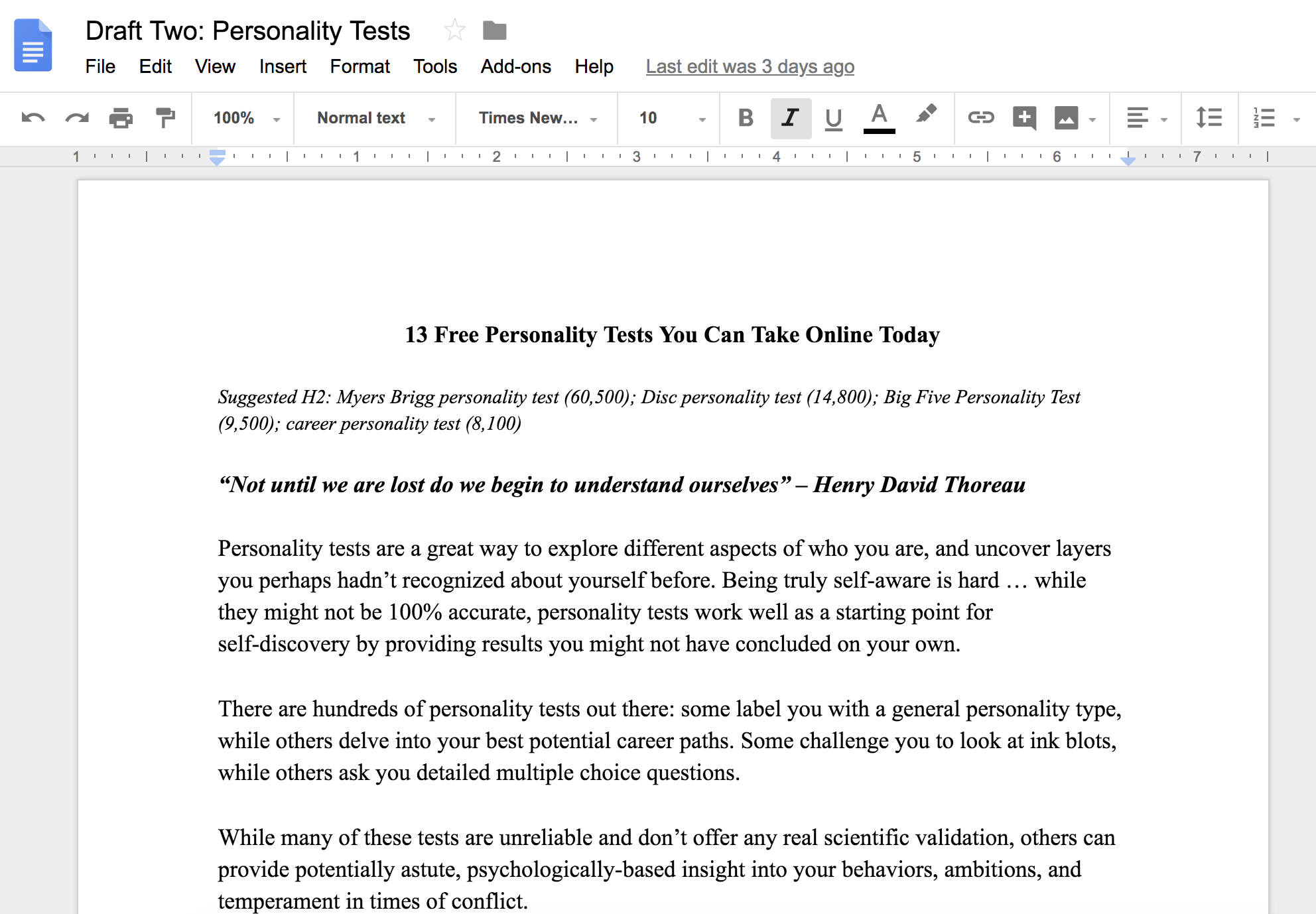
2. Go to “File” → “Version history” → “See version history”
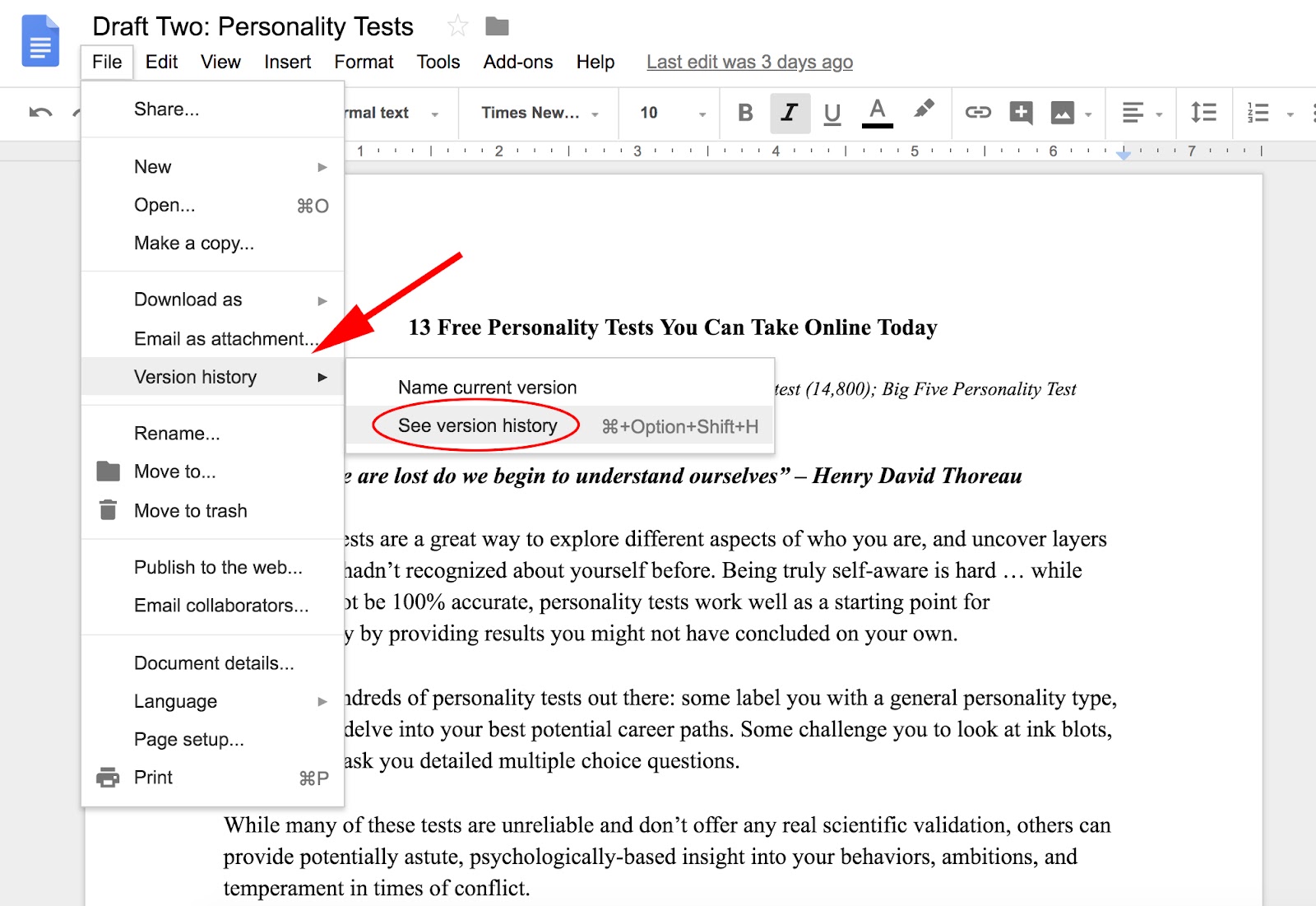
3. On the right, you can see all the earlier versions of your draft
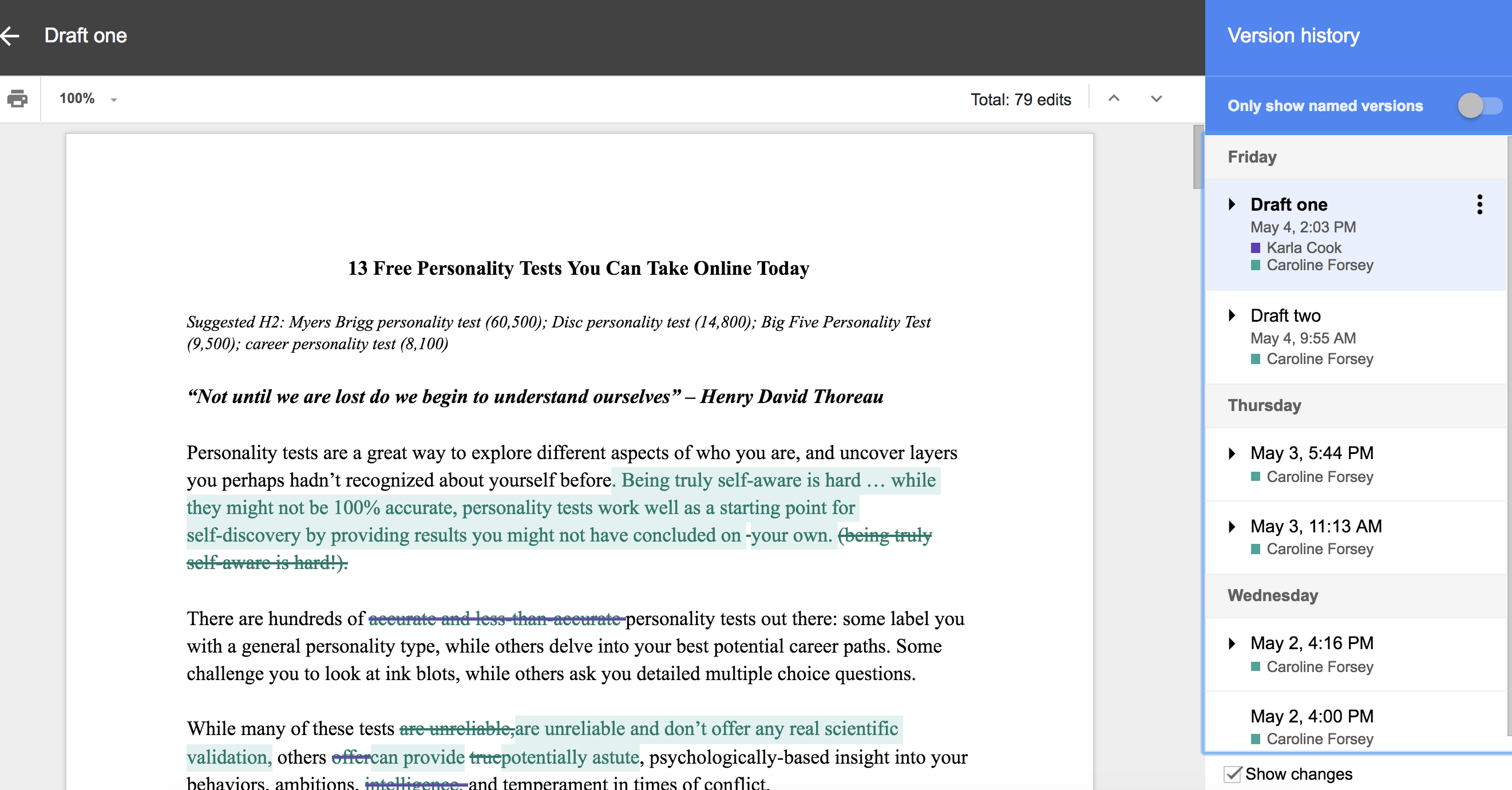
4. You can rename the earlier drafts, to make it easy to track which draft you’re looking at

5. If you prefer an earlier version of your draft and want to undo the changes you’ve made, you can click “Restore This Version”

6. As an alternative, you can also click the “Comments Thread” icon beside the “Share” button. When you click, you’ll be able to scroll through all the changes you’ve made to the document, and see comments you and your collaborators have left

And there you have it! Now you can revise, comment, and delete within a Google Doc without suffering from the fear of making an irreparable mistake. Don’t worry, it can always be tracked and restored.
If you want to learn more about Google Docs, check out our Ultimate Guide to Google Docs.

7 of the Best Professional Bio Examples We’ve Ever Seen [+ Bio Templates]
How to Write a Bio
- Create an ‘About’ page for your website or profile.
- Begin writing your bio with your first and last name.
- Mention any associated brand name you might use.
- State your current position and what you do.
- Include at least one professional accomplishment.
- Describe your values and how they inform your career.
- Briefly tell your readers who you are outside of work.
- Consider adding humor or a personal story as an extended version of your professional bio.
Is your professional bio as good as it can be?
In this article, we have seven real bio examples you should definitely compare yours to — and a series of free bio templates you can use to perfect it.
Most people don’t think about their professional bio until they’re suddenly asked to “shoot one over via email,” and have approximately one afternoon to come up with it. That’s when we scramble, and our bio ends up reading like this:
Rodney Erickson is a content marketing professional at HubSpot, an inbound marketing and sales platform that helps companies attract visitors, convert leads, and close customers. Previously, Rodney worked as a marketing manager for a tech software startup. He graduated with honors from Columbia University with a dual degree in Business Administration and Creative Writing.”
Woof, that was dull. Are you still with me? I swear, not even adding a tidbit about his cats would liven that bio up.

To be fair, in certain contexts, your professional bio does need to be more formal, like Mr. Erickson’s up there. But in many cases, writing a bio that’s readable — even conversational — is actually a really good thing. That means dropping that traditional format of listing your accomplishments like a robot and cramming as much professional-sounding jargon in there as you can.
Remember: The people reading your bio are suffering from information fatigue. If you don’t hook ’em in the first line, you’ll lose them quickly.
Alright, I know what you may be thinking … So what? It’s just a bio.
(P.S. Want to give your professional brand a boost? Take one of HubSpot Academy’s free certification courses. In just one weekend, you can add a line to your resume and bio that’s coveted by over 60,000 marketers.)

Why Good Bios Are Important for a Professional
I mean, how many people actually read professional bios, anyway?
The answer: A lot of people. More importantly, though, there’s no way to tell exactly who is reading it — and you always want it to be ready for when the right people to come across it. And when they do, you want it to catch their eye. In a good way.
You see, while your resume is only useful for when you’re actively applying for specific positions, your professional bio is much more visible. It can live on your LinkedIn profile, your company’s website, your guest blog posts, your speaker profiles, your Twitter bio, and many other places.
And, most importantly, it’s the tool that you can leverage most when you’re networking.
Bottom line? People will read your professional bio. Whether they remember it, and whether it makes them actually care about you, is a matter of how well you present yourself to your intended audience.
So, what does a top-notch professional bio look like?
Below, we’ve curated some of the best real professional bio examples we’ve ever seen on Twitter, Instagram, Facebook, and the various websites where you might describe yourself.
Check ’em out, and use them as inspiration when crafting your own.
Best Bio Examples:
- Ann Handley
- Rebecca Bollwitt
- Mark Gallion
- DJ Nexus
- Lena Axelsson
- Mark Levy
- Corey Wainwright
7 of the Best Professional Bio Examples We’ve Ever Seen
1. Ann Handley
Bio Platform: Personal Website
If you’re a marketer, you’ve likely heard of Ann Handley. Her list of credentials is lengthy, and if she really wanted to, she could go on and on and on about her accomplishments.
But when people list out all their accomplishments in their bios, they risk sounding a little egotistical. Sure, you might impress a handful of people with all those laurels, but many people who read your bio will end up feeling either intimidated or annoyed. Think about it: Is that how you want the majority of your readers to feel when they read your bio?
To minimize the egoism that comes with talking about yourself, think about how you can list out your accomplishments without sounding like you’re bragging. Ann does this really well, choosing a tone in her bio that’s more approachable.
It starts with the excerpt in the footer of her personal website. Give it a quick read, paying close attention to the opening and closing lines:

“This is Ann Handley’s website, and this is a bit of copy about her … That’s not giving you a lot of detail, is it? So read more here.” This is the kind of simple, friendly language that invites the reader in rather than shutting them out.
Follow the link and you’ll be led to a page dedicated to a fuller bio, which she’s divided into two parts: a “short version” (literally a bulleted list of key facts) and a “long version,” which includes traditional paragraphs. There’s something in there for everyone.
2. Rebecca Bollwitt
Bio platform: Instagram
Instagram is a notoriously difficult platform on which to write a good bio. Similar to Twitter, you simply don’t have room for a professional bio that includes everything about you. And because Instagram is primarily a mobile app, many viewers are reading about you passively on their mobile device.
Instagram’s limited bio space requires you to highlight just your most important qualities, and blogging icon Rebecca Bollwitt does so in her own Instagram bio in an excellent way.
Rebecca’s brand name is Miss604, and cleverly uses emojis in her Instagram bio to tell visitors exactly what makes her a valuable content creator. Take a look in the screenshot below.

Starting with a trophy emoji, Miss604 says she’s won more than 30 awards for her blogging services. I haven’t even looked at her pictures yet and the introduction of her bio has already sucked me in.
The rest of her bio follows suit, breaking up the text with an appropriate emoji and a perfect collection of nouns to tell me who she is as a person. She even links out to her husband’s Instagram account after the heart emoji (an adorable addition), and assures her followers that all of her pictures are authentically hers.
Take a lesson from Miss604, and show your personal side. Just because you’re branding yourself as a professional doesn’t mean you have to take your human being hat off. Often your most personal attributes make for the best professional bio content.
3. Mark Gallion
Bio Platform: Twitter
As a venture capitalist and an executive at several start-ups, Mark Gallion has different versions of his bio all over the internet. You can imagine some are more formal than others. But when it comes to his Twitter bio, he carefully phrased his information in a way that helps him connect with his audience — specifically, through the use of humor.

Why would he choose humor when he runs four start-ups and constantly seeks funding for them? Well, Mark’s tactic is totally intentional: it’s a lever he pulls to refresh his brand while maintaining his already impressive and established identity as an entrepreneur.
Mark leverages his Twitter bio because it’s place where he can be human. And it helps him relate to his followers and potential investors.
When crafting your own Twitter bio, consider your audience and the personal brand you’re trying to create for yourself. Use it as an opportunity to be relatable. (And check out this list of amusing Twitter bios for inspiration.)
4. DJ Nexus
Bio Platform: Facebook
This New England-based DJ has single-handedly captured the Likes of more than 2,000 people in and beyond Boston, MA. And even if you don’t listen to the type of music he produces, it’s hard not to listen to his compelling Facebook bio.
Stage-named DJ Nexus, Jamerson’s professional bio makes use of nearly every Page field inside the About tab. Right away, his audience knows which genres he plays in, where he’s from, and who else he’s worked with. The latter — under “Affiliation,” as shown in the screenshot below — is unique and seldom mentioned in professional bios today.
Our favorite part about DJ Nexus’s bio? His tagline, under “About” — “Quiet during the day. QUITE LOUD at night!” DJ Nexus tells you when he works in an awesome way. I got goosebumps just imagining a dance club he might play his music in.

DJ Nexus’s bio brilliance doesn’t stop there.
The great thing about Facebook Business Pages is that you can write as much as you want without overwhelming your Page visitors. For those who just want Jamerson’s basic info, they have the four categories shown above. For those who want to learn more about him, he tells an excellent story of his career. Here’s just a preview of his story, below:

In this story, DJ Nexus describes both when he “became known as DJ Nexus” and a company he founded shortly afterward — all before going to college. This is a terrific lesson for Facebook Businesses today: customers want to learn about you, and as Facebook increasingly becomes a place for meaningful interactions, there’s no better place to tell your story than on your Facebook Business Page.
5. Lena Axelsson
Bio Platform: Industry Website
When it all comes down to it, your professional bio is no different than any other piece of persuasive copy — no matter where it lives. One of the most common mistakes people make is thinking of it as its own beast, separate from other pieces of writing. If you think about it that way, you’re far more likely to write something painfully uninteresting.
When you sit down to write your professional bio and you’re watching that cursor blinking on the screen, think about how you would introduce a blog post. You don’t just dive right into the meat of the thing, now, do you? No. You start with an introduction.
The best bios are often concise (around 200–300 words), so you don’t have a lot of room to play around. But a single sentence that tees your reader up and provides context for the accomplishments that follow could make the rest of your bio that much more persuasive.
Take Lena Axelsson’s bio, for instance. She’s a marriage and family therapist — a job where empathy and compassion are a big part of the job description. That’s why she chooses to open her bio with a great introductory sentence: “When human beings experience trauma or severe life stressors, it is not uncommon for their lives to unravel.”

Then, she goes into why she’s passionate about her job, how she helps her clients, and how she caters her approach to each individual patient. The necessary educational information is left for the end, after the reader has been hooked.
Your bio doesn’t have to be super serious, nor does it have to start with a joke. This bio shows how you can capture your reader’s attention by being empathetic and showing how that empathy shapes a valuable professional.
6. Mark Levy
Bio Platform: Personal Website
Mark Levy is a small business owner who’s taken a more traditional approach to the professional bio on his website — but in a way that takes care to speak to his intended audience.
What we love about his bio is the way he’s set it up: On his business’ “About” page, he’s listed two biographies, which he’s labeled “Mark Levy’s Biography #1” and “Mark Levy’s Biography #2.”

Click here to see the full version.
Like Ann, Mark’s given his readers two different options. The first biography is a “short version,” which includes a combination of bullet points listing his credentials and a few short paragraphs.
The second is the “long version,” which is actually even more interesting than the first one. Why? Because it reads like a story — a compelling one, at that. In fact, it gets really funny at parts.
The second sentence of the bio reads: “He was frightened of public school, loved playing baseball and football, ran home to watch ape films on the 4:30 Movie, listened to The Jam and The Buzzcocks, and read magic trick books.”
Here’s another excerpt from the middle:

Of course, the fantastic copywriting isn’t a surprise, given that this guy wrote several books. But the conversational tone and entertaining copy let his quirky personality (and great writing skills) shine.
7. Corey Wainwright
Bio Platform: Blog Byline
Finally, we have Corey Wainwright, who’s the director of content here at HubSpot. She’s written content for HubSpot’s Marketing Blog for years, and her blog author bio has caught my eye since before I ever started working for HubSpot. (Back then, it started with, “Corey just took a cool vacation.”)
What I love most about Corey’s bio is that it’s a great example of how to deliver information about yourself without taking things too seriously. And in this context, that’s totally appropriate.
Despite having a number of impressive accomplishments under her belt, she simply doesn’t like displaying them publicly. So, she prefers making her author bio a little more “light.”
Her bio (pictured below) reads, “Corey is a Bruce Springsteen fan who does content marketing, in that order.”

It works in this particular context because, at HubSpot, our blog authors often prefer to make themselves as friendly and approachable as possible — while letting the content speak for itself.
It helps that authors’ social media accounts are located right below our names and above our pictures. For folks who really do want a list of Corey’s credentials, they can click the LinkedIn button to go to her LinkedIn page. (You can read this blog post to learn how to create social media buttons and add them to your website.)
Want more? Read How to Write a Cover Letter That Gets You the Job [Bookmarkable Template + Examples].


Unriddled: Facebook’s Big Executive Shake-Up, Microsoft Build, and More Tech News You Need
We all have a favorite time a year. For some, it’s the winter holidays. For others, it’s the entire duration of summer. And for tech nerds (including yours truly), it’s developer conference season.
This week, the season for developer conferences forged ahead, with news and product announcements coming from Microsoft, Google, and several more. But settle in: that’s far from the only tech news that emerged over the past week, as the entire sector has been quite busy lately.
It’s our Wednesday tech news roundup, and we’re breaking it down.
Unriddled: The Tech News You Need
1. Big Changes to Facebook’s Executive Org Chart
As first reported by Recode yesterday, Facebook is bringing a major shuffle to its executive org chart, with changes being made among the leadership at WhatsApp, Messenger, and the core Facebook app. Here’s a rundown of the overall changes.
First, Chris Daniels, VP of Product at Internet.org, will be coming in to lead WhatsApp, the end-to-end encrypted messaging app owned by Facebook. Right before F8 (Facebook’s developer conference) kicked off, WhatsApp CEO Jan Koum announced his departure, and Daniels will be taking his place.
Koum also left an open vacancy on Facebook’s board of directors, which will be filled by Cranemere CEO Jeff Zients.
David Marcus will transition from head of Messenger to the lead of a new, internal division dedicated to the blockchain. He will be joined by Instagram VP of product Kevin Weil. Marcus’s responsibilities will be assumed by Messenger VP of Product Stan Chudnovsky.
Head of News Feed Adam Mosseri will be taking over for Weil at Instagram. Facebook of VP of Product Management John Hegeman will assume Mosseri’s responsibilities.
Facebook’s Chief Product Officer Chris Cox, who previously oversaw only Facebook’s core app, will now be in charge of every one of the company’s portfolio apps: Messenger, Instagram, WhatsApp, and Facebook. Cox’s previous Product responsibilities will be assumed by VP of Product Management Will Cathcart.
Taking over product for Facebook’s core app is longtime Cox lieutenant, Will Cathcart. He’s been there almost 8 years, and was recently running the profiles team (the same team responsible for Facebook’s new dating service…)
— Kurt Wagner (@KurtWagner8)
May 8, 2018
Among all of these changes, Facebook has also created a team dedicated solely to privacy products, such as the Clear History feature announced at F8. According to Recode, that team will be led by Director of Product Management David Baser.
Here’s a look at the new org chart. As for its composition, we’ll let this tweet from Bloomberg‘s Sarah Frier speak for itself …
Same faces, new jobs. Many dudes. pic.twitter.com/PXaZAwK4Z0
— Sarah Frier (@sarahfrier)
May 8, 2018
… as well as this one from Cecilia Kang of The New York Times.
For the This Can’t Go Wrong File: the creators of the most popular and powerful social and tech tools online do not reflect the ethnic, gender, global diversity of its users… https://t.co/GWQM72NYQN
— CeciliaKang (@ceciliakang)
May 8, 2018
2. Tech Ethics Take Center Stage at 2018 Developer Conferences, Including Microsoft Build
This week, we’re seeing many of the higher-profile annual developer conferences wrap up, with the exception of Apple’s WWDC scheduled to take place in June. While last week we saw F8, Monday featured the opening keynote of Microsoft Build, and Google I/O kicked off yesterday with the event’s opening keynote (see our full coverage here).
But throughout these events, there seems to be an undercurrent of transparency, ethics, and the responsibility of tech companies. And although the F8 keynotes touched on these topics a bit at F8 during a discussion of AI ethics, the themes were particularly strong during the opening keynote of Microsoft Build.
“Privacy is a human right,” CEO Satya Nadella proclaimed early on, setting the tone for the remarks to follow.
Nadella went on to challenge his peers to “ask ourselves not only what computers can do, but what computers should do,” which was echoed throughout many of the product and feature reveals.
Many of these potential abilities fell under the umbrella of AI, and how related tools like transcription, translation, and dictation can be of significant service to people with disabilities.
“I’m deaf, and I work with a sign language interpreter,” said engineer Katie Sullivan from the stage. “The transcript doesn’t eliminate the need for my interpreter, but it lets me give my full attention, without having to worry about note-taking.”
But there were many other announcements made throughout the keynote, such as a new integration between Microsoft’s voice assistant, Cortana, and Amazon’s, Alexa.
Users who have one company’s hardware can now seamlessly use the voice assistant of the other — so that if, for example, someone owns an Amazon Echo but manages her calendar with Cortana, she can use the two without switching platforms.
Check out the full Day 1 keynote here.
3. Instagram Is Likely to Add a Music Sticker to Stories
Anyone with a vivid imagination has almost certainly thought at some point, “My life should have its own theme music.”
Well, now it can — by way of what you share on Instagram stories, at least. According to a scoop from TechCrunch, developer Ishan Agarwal discovered music icons and related code within the Android version of the app. This code points to the eventual reveal of a music sticker, which would allow users to add a soundtrack to any visual content they share on stories.


Source: TechCrunch
Stickers currently allow users to add things like their current location, the day of the week, or the temperature where they are to their Story photos and videos.
But musical integration is something that Instagram seems to have been working on for some time.
At F8 last week, for example, company leaders allowed an integration with Spotify that lets users share a sticker of what they’re listening to on the music streaming service.

Source: Instagram
As the TechCrunch report points out, there hasn’t quite been a seamless way to add a soundtrack to videos shared on Instagram, or most other social networks. It usually required third-party apps or editing programs, and even then, if the music had rights protecting it from being reproduced, the videos were often removed.
With licensed music streaming service integration, that problem is largely remedied. Not only that, according to the story, but it also introduces a new competitive edge.
Currently, the app musical.ly is particularly popular among those who enjoy using it to post lip-syncing videos, as it already has a music integration built in. It also offers some of the same features as Instagram, like stickers and filters.
But compare musical.ly’s 60 million monthly active users (as of November 2017) to Instagram’s 800 million — as well as its longer existence and Facebook ownership — and the imbalance becomes evident. The feature has yet to come to fruition, but when it does, its impact (if any) on musical.ly will be interesting to observe.
4. Twitter Is Testing Encrypted DMs
Encrypted messaging is a much-talked-about topic recently. Just this week, Facebook released a statement and explanation on why and how its end-to-end encryption on the WhatsApp messaging app works, pointing to its value the work of professionals like journalists (for protected conversations with sources), and use cases like a private dialogue between doctors and patients.
Messenger offers an encrypted messaging option as well, with its Secret Conversations feature, allowing participants to have an end-to-end encrypted conversation that can’t be seen by anyone else, including Facebook, the company alleges.
And while Twitter does allow things like open direct messages (DM) — in which users can send someone a private note even if that person doesn’t follow them back — it’s never offered any level of encryption for them, leaving them vulnerable to surveillance.
But now, reports TechCrunch, that could be changing. The possibility of such a feature launch came to light when another developer, Jane Manchun Wong, discovered code inside the Twitter Android application package that revealed options to start a secret conversation, as well as encryption keys.

Source: TechCrunch
In the realm of journalism, at least, the potential addition of encrypted messaging within Twitter is significant, as that’s often the first point of contact or discoverability for many reporters. What the exact nature of the feature remains to be seen, and it’s possible that Twitter will have to come to the defense of its own encrypted messaging, much like Facebook has felt compelled to do.
For instance, WhatsApp has been questioned about the use of its encrypted messaging “by bad people to do bad things,” writes Facebook Global Public Policy Lead on Security Gail Kent — especially by law enforcement officials who feel a sense of urgency to access secret conversations when a related threat might be imminent.
Part of her job, she says, is working with such officials with “valid legal requests.”
As of writing this post, there is no official release date or confirmation of an encryption feature within Twitter DMs.
What Else Is Going Down in Tech Town?
More of the Latest From Facebook
If you missed our F8 coverage last week, check out our recaps of the Day 1 and Day 2 keynotes.
During the Facebook developer conference, virtual reality — particularly Facebook’s Oculus Go headset, which was gifted to every person in attendance — was given particular attention. This indicates that the company plans to make significant investments in this technology.
Now, it’s even changed the name of its Oculus Research Lab, which will now be known as “Facebook Reality Labs,” according to a statement from the company’s Chief Scientist, Michael Abrash.
These moves all point to a desire within Facebook to more broadly associate and integrate this virtual technology — perhaps strongly affiliated with the Oculus name — with its own brand. At Oculus Connect in October, Facebook CEO Mark Zuckerberg stated a goal of having one billion people eventually using VR, but by when, exactly, remains unknown.
Payments and Appointments by Instagram
Earlier this week, some Instagram users began seeing an option to add payment methods — like a credit card — and make purchases from certain vendors within the app. Other users claimed to be able to book appointments at spas and restaurants.
The app later confirmed to The Verge that users will be able to “book services from a limited number of businesses,” through the app, citing the development as an extension of a feature first announced last spring.
(Have you come across or used this feature? If so, let us know on Twitter.)
No More Bail Bond Ads
Both Google and Facebook announced this week that they would be banning any ads for bail bonds from their respective sites, with the forming citing the exploitation of disadvantaged communities that often results from such content.
“We made this decision based on our commitment to protect our users from deceptive or harmful products,” wrote Google’s Director of Global Product Policy David Graff in a statement.
Facebook later issued its own intention to bar such ads from its own platform, with Vice President of Global Policy Management Monika Bickert telling Axios, “Advertising that is predatory doesn’t have a place on Facebook.”
That’s all for today. Until next week, feel free to weigh in on Twitter with your tech news questions or thoughts on what kind of events and topics you’d like covered here.

How to Use Google Docs Offline [FAQ]
If you’re anything like me, you probably do most of your work online.
Google Docs in particular is a fantastic tool for writing, editing, and sharing content with colleagues, enabling collaboration and teamwork on creative projects.
But there’s a downside to doing all your work online — if you suddenly board an airplane without wifi, travel to an area with limited access, or even lose power in your office, you’re suddenly left with zero access to any of your important documents.
Losing wifi shouldn’t mean calling it a day and heading home: if you set it up ahead of time (this is key), you can continue doing work even when you need to do it offline.
How to Use Google Docs Offline
- Open the Google Docs Home Screen, and click on the Menu in the top right-hand corner (the icon with three lines)

2. Click on “Settings”

3. Click on the offline cursor, and move it to the right, so it’s blue (if it’s disabled, it will appear grey). Ensure you read a “Setting up offline …” message.
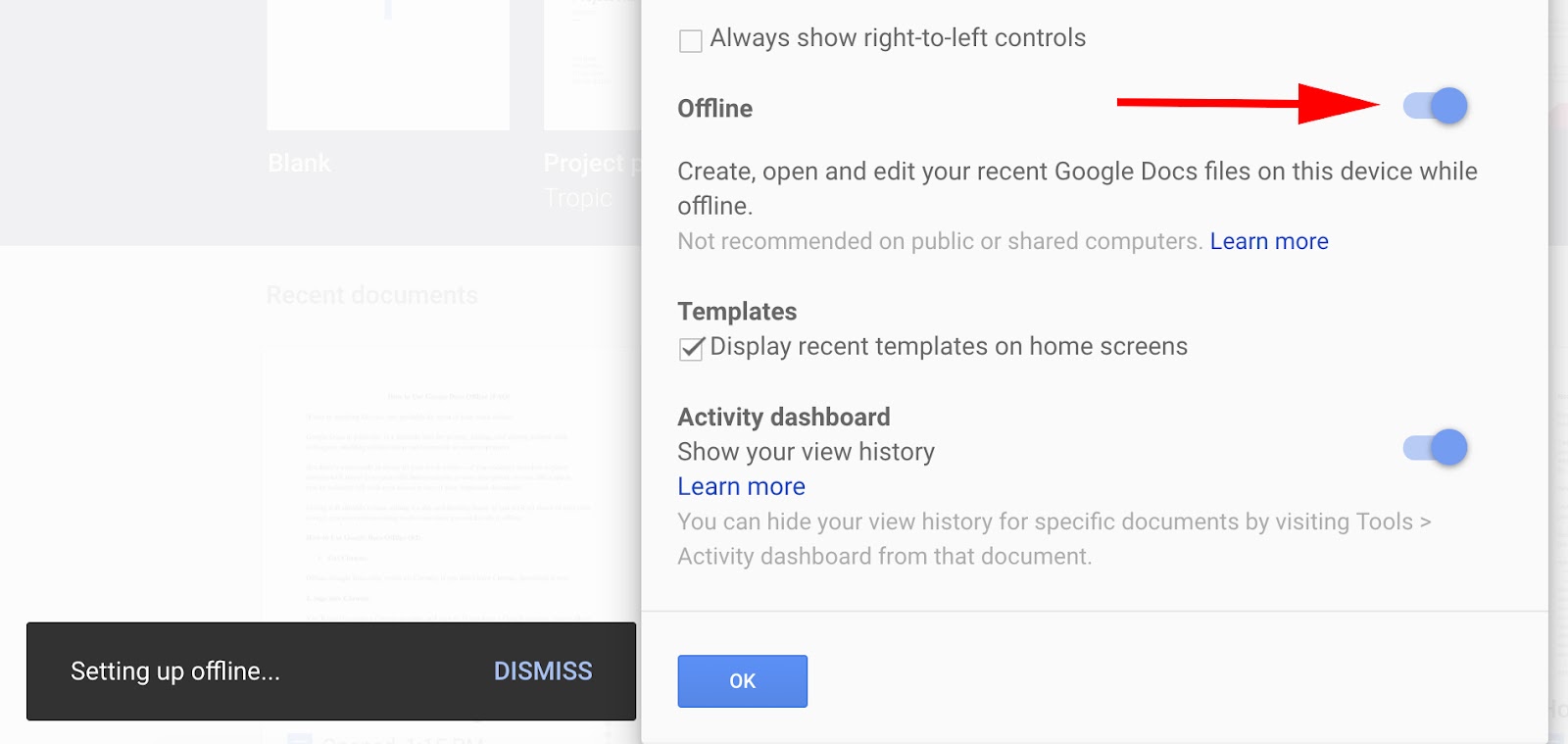
4. All set! Your Google Docs are ready for offline status.
