
The Ultimate Guide to Google My Business
What is Google My Business?
GMB is a free tool that lets you manage how your business appears on Google Search and Maps. That includes adding your business name, location, and hours; monitoring and replying to customer reviews; adding photos; learning where and how people are searching for you, and more.
If you’re just getting started with local SEO, your Google My Business listing is a great place to focus your early efforts. After all, when people search for a product or service near them, they’re usually very close to making a purchase — one in two people who conduct a local search (think “watch repair near me”) visit a store that day. So it’s important the information about your business that shows up when people search Google is as accurate, complete, and optimized as possible.
To learn how to create your Google My Business account, verify your business, and make its listing as strong as possible, read on.
- Create an account and claim your business
- Verify your business
- Optimize your listing
- Download the GMB app
- Know the difference between Google My Business, Google Places, and Google+
Is Google My Business free?
GMB is completely free to use. The only requirement for using it is that you must have some face-to-face interaction with your customers — in other words, you can’t operate 100% online.
Create a Google My Business Listing
- Step 1: Log into the Google Account you want associated with your business (or create a Google Account if you don’t already have one).
- Step 2: Go to google.com/business and select “Start now” in the top right-hand corner.
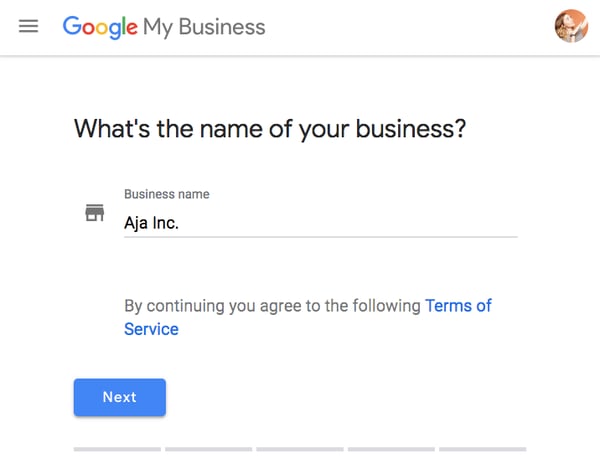
- Step 3: Enter your business name.
- Step 4: Enter your business address.
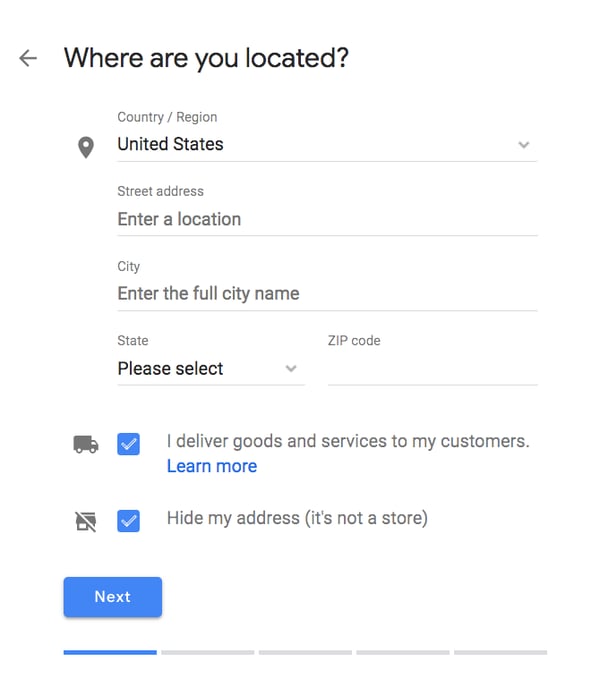
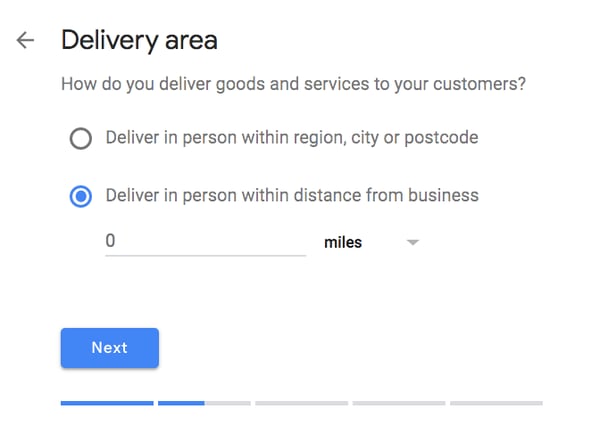
- Step 5: If you go to your customers’ locations, rather than having them come to you, check the box “I deliver goods and services to my customers.” And if you work out of your house or another address you don’t want publicly shown, Check “Hide my address (it’s not a store) Only show region.” Finally, select your Delivery area.
- Step 6: Choose your business category. Try to choose the most accurate category possible — you’re essentially telling Google which type of customers should see your business listing.
- Step 7: Add your business phone number or website.
- Step 8: Choose a verification option. If you’re not ready to verify your business yet, click “Try a different method” → “Later.”
How to Verify Your Business on Google
There are several ways to verify your GMB listing:
- By postcard
- By phone
- By email
- Instant verification
- Bulk verification
Postcard Verification
- Step 1: If you aren’t already logged into Google My Business, sign in now and choose the business you want to verify. (If you’re already logged in, you’ll be at the verification step.)
- Step 2: Make sure your business address is correct. Optional: Add a contact name — that’s who the postcard will be addressed to.
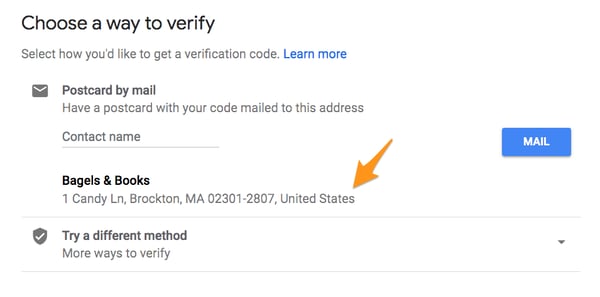
- Step 3: Click “Mail.” The postcard should reach you in five days — make sure you don’t edit your business name, address, or category (or request a new code) before it comes, because this could delay the process.
- Step 4: Once you’ve gotten the postcard, log into Google My Business. If you have more than one business location, select the location you want to verify. If you only have one, select “Verify now.”
- Step 5: In the Code field, enter the five-digit verification code on your postcard. Click “Submit.”
If your postcard never shows up, or you lose it, you can request a new code by signing into Google My Business and clicking the “Request another code” blue banner at the top of the screen.
Phone verification
Google lets some businesses verify their location by phone. If you’re eligible, you’ll see the “Verify by phone” option when you start the verification process.
- Step 1: If you aren’t already logged into Google My Business, sign in now and choose the business you want to verify. (If you’re already logged in, you’ll be at the verification step.)
- Step 2: Make sure your phone number is correct, then choose “Verify by phone.”
- Step 3: Enter the verification code from the text you receive.
Email verification
Google lets some businesses verify their location by phone. If you’re eligible, you’ll see the “Verify by email” option when you start the verification process.
- Step 1: If you aren’t already logged into Google My Business, sign in now and choose the business you want to verify. (If you’re already logged in, you’ll be at the verification step.)
- Step 2: Make sure your email address is correct, then choose “Verify by email.”
- Step 3: Go to your inbox, open the email from Google My Business, and click the verification button in the email.
Instant verification
If you’ve already verified your business with Google Search Console (a free tool that lets you manage your website’s search performance and health), you might be able to instantly verify your email.
- Step 1: Sign into Google My Business with the same account you used to verify your business with Google Search Console. (Some business categories aren’t eligible for instant verification, so if you don’t get a notification asking you to verify the listing, you’ll have to use a different verification method.)
Bulk verification
If you operate more than 10 locations for the same business — and you’re not a service business or an agency managing locations for multiple businesses — you might be eligible for bulk verification.
- Step 1: If you aren’t already logged into Google My Business, sign in now and choose a location. Click “Get verified” next to its name.
- Step 2: Click “Chain.”
- Step 3: Fill out the verification form with your business name (as well as the parent company, if applicable), country or countries where you operate, all contact names (i.e. everyone who will be using the Google My Business account), contact phone number, business manager email (someone at the business who can verify you’re a representative of that business), and the email address of your Google Account Manager.
- Step 4: Submit the verification form. It can take up to a week for Google to review and process your claim.
How to Optimize Your GMB Listing
Once you’ve verified your business, it’s time to finish fleshing out your profile.
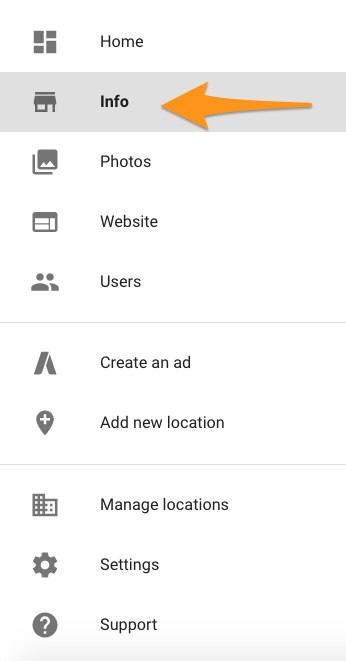
Go to the Google My Business dashboard, click the listing you’d like to work on, select “Info,” and then choose a section to fill out or update.
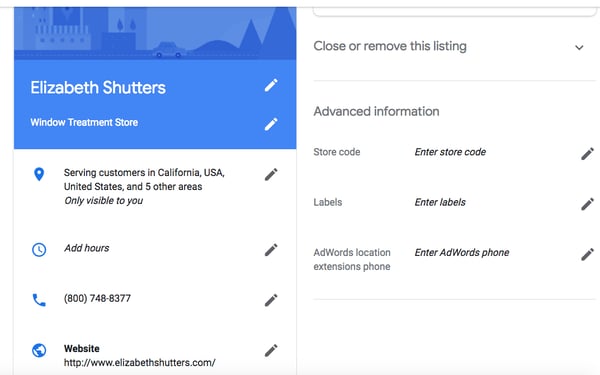
Add as much information and media as you can, including a business profile photo, the area you serve, your hours, attributes (e.g. “wheelchair accessible,” “free wifi”), the day and year you opened, and a public phone number and website URL.
Anyone can “suggest an edit” to your listing, so it’s important to A) get everything right the first time (so you don’t encourage random people to make their own changes) and B) periodically log into your GMB dashboard and make sure all the details look right.
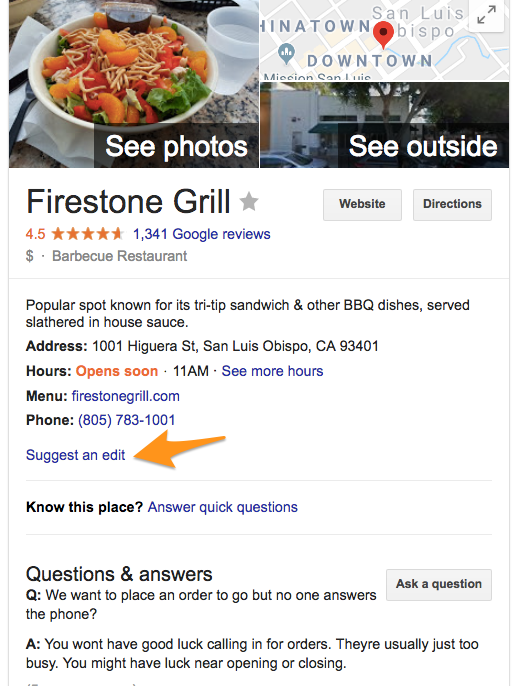
At any point in time, you can edit your business profile by logging into your GMB dashboard, clicking on “Info,” clicking the pencil next to the field you’d like to edit, making your change, and then choosing “Apply.”
Google My Business Photos
According to Google, businesses with photos see 35% more clicks to their website and 42% higher requests for driving directions in Google Maps.
Photos should be at least 720 pixels wide by 720 pixels high and JPG or PNG files.
Not sure how many pictures to add — or what they should be of?
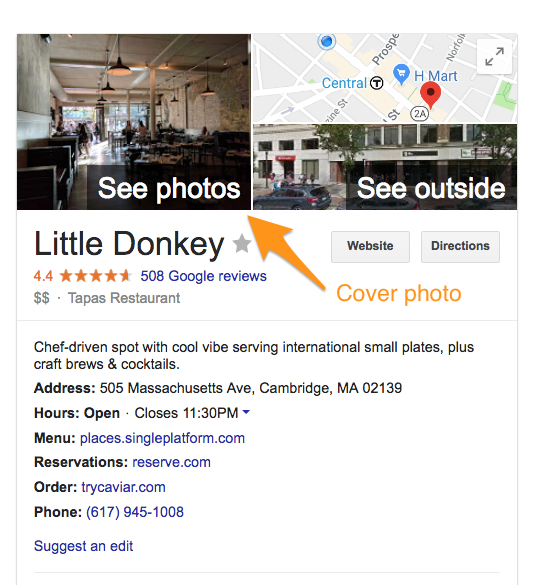
Cover photo
Your Google My Business cover photo is one of the most important, as it shows up front and center on your listing.
Profile photo
Your profile photo is what appears when you upload new photos, videos, or review responses.
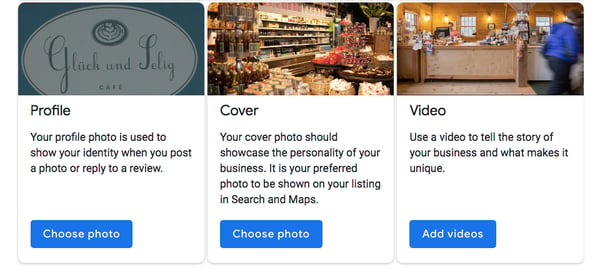
Along with your profile and cover photos, you can and should upload other pictures to make your listing more informative and engaging.
| Type | Description | Google-recommended minimum | Suggestions |
| Exterior | The outside of your business from different directions. | Three photos | Use pictures from different times of day (morning, afternoon, evening) so customers always recognize your business. |
| Interior | The inside of your business, with a focus on decor and ambiance. | Three photos | Give customers an accurate idea of what it will look like to stand or sit inside your business. |
| Product | A representation of the types of products or services you offer. | One photo per product type or service | Show the products you’re known for and make sure the photos are lit well. |
| Employees at work | “Action” shots of your employees delivering the types of services you offer. | Three | Try to capture your employees with satisfied customers. |
| Food and drink | Pictures that represent your most popular menu items. | Three | Consider hiring a food photographer — these are tricky to get right! If that’s not in the budget, use bright, even lighting (i.e. no shadows or dimness). |
| Common areas | Photos of where your customers will spend time (think a lobby or lounge). | One photo per common area | Represent the variety of amenities you offer. |
| Rooms | Pictures of your different room and suite options (if applicable). | Three | Don’t try to mislead guests — show your wallet-friendly and high-end options. |
| Team | A shot of your management team and staff. | Three | Use pictures that show your unique culture and team personality. |
Google My Business Videos
You can also add videos. Videos must be:
- 30 seconds or shorter
- 100 MB or smaller
- 720p resolution or higher
Videos can add some variety to your profile and make you stand out among other businesses in your category; however, don’t worry if you don’t have any — unlike photos, they’re not a “must have.”
Google My Business Reviews
One of the best ways to encourage future customers to leave positive reviews? Respond to current ones. Not only does leaving an appreciate response show the original reviewer you’re thankful for their support, it also makes that positive review stand out on your listing and influences people to leave their own reviews.
Here’s a sample reply to a satisfied customer:
Thank you for your business, [name]! We’re so glad you enjoyed [product, e.g. “the blueberry pie”] — it’s one of our favorites, as well. Hope to see you back at [business name] soon.
You should also respond to negative reviews to show you take them seriously and placate the unhappy buyer. But make sure you’re extremely courteous — attacking them back will only make you look unprofessional and their review more credible.
Thank you for the feedback, [name], and I’m incredibly sorry [product/experience] did not meet your expectations. [If you’ve made a change, mention it here — e.g., “We’re now double-checking orders to make sure everyone gets exactly what they asked for.”] If you’d like to come back in, we’d be happy to give you [product] on the house. In any case, thanks for your business, and I hope we can do better next time.
Google My Business App
Google My Business is also available in app form for both iOS and Android.
You can use the app to:
- Update your business hours, location, contact information, and description
- Post statuses and pictures
- View search insights
You cannot use the app to:
- Delete your business listing
- Change its settings
- Give ownership of the listing to another user
Google My Business vs. Google Places for Business vs. Google+
If you’re confused about the many names and options for managing your Google presence, you’ve got a right to be. Google Places used to be Google’s tool for owners to manage their business profiles, but it was retired in 2014. Now Google My Business is the central hub to manage how your business appears on Google Search, Maps, and Google+.
So, what’s Google+? It’s Google’s social network (the closest example is probably Facebook). You can join or start Communities — public or private groups organized around a theme, like Knitting — and follow or create Collections — think Pinterest boards.
A Google+ account for your business lets you interact with niche groups and post pictures and updates. In other words, it’s like a Facebook page for your business. You can access your Google+ account from your Google My Business dashboard (but a Google+ account isn’t necessary to have a GMB account).
Here’s the TL;DR:
Do you need a Google+ account? No — and if you’re short on time, it might be better to focus on other marketing and/or social media channels.
Do you need a Google My Business account? If you’re targeting local customers, I highly recommend it.

How to Learn Excel Online: 17 Free and Paid Resources for Excel Training
Like many marketers, I have a bit of experience with Microsoft Excel. I’ve used it to organize events, plan meals, and sort data — but I don’t have nearly the advanced knowledge I wish I did.
And thanks to those limited skills, I’m constantly subjecting myself to the tedium of updating my spreadsheets manually.
I’m well aware that I’m missing out on a world of Excel training courses that could teach me how to automate my reports and save hours of time.
When I asked even my most Excel-savvy colleagues where they picked up their knowledge, they told me things like, “I mostly learned from colleagues and friends,” or, “When I have a specific question, I ask someone or search on Google.” Fair enough. But as a beginner, I probably have a few too many Excel questions to rely on colleagues — or Google — to answer every one.

I can’t be the only one out there who wants to master the world’s most popular data analysis and visualization solution — or at least learn how to create charts and graphs that’ll impress my manager.
So in the spirit of becoming a more productive, data-driven marketer, I scoured the internet for the best online resources for learning Excel. Most of these are free, and the ones that aren’t might be worth the investment.
Take a look, bookmark your favorites, and get that much closer to working more efficiently in Excel.
How to Learn Excel for Free Online
1. Microsoft’s Excel Training Center
Price: Free
When it comes to learning a new application, why not start at the source? After all, no one knows Excel better than the people at Microsoft.
In fact, they’ve done a great job putting together the Office Training Center: A resource hub for all Microsoft Office applications and services. The training center for Excel has a whole bunch of free tutorials, videos, and guides on Windows, Mac OS, Android, iOS, and Windows Phone that cover the latest version of Excel, as well as older ones.
Once you click into a platform, you’ll find resources divided by Excel ability: For beginners (like basic math and creating a chart), intermediate users (like sorting and filtering data, conditional formatting, and VLOOKUPs), and advanced users (like pivot tables, advanced IF functions, and how to password-protect worksheets and workbooks).
Source: Microsoft
2. The Spreadsheet Page
Price: Free
Here’s a very well-organized site that’s chock full of helpful Excel tips, collected by an expert named John Walkenbach. Over the past 30 years, he’s written more than 60 Excel books for users of all levels, and around 300 articles and reviews for magazines like InfoWorld, PC World, and PC/Computing. At one point, he wrote the monthly spreadsheet column for PC World. In other words, the man knows his stuff — and he knows how to present it.
The most helpful part of his website is probably the Excel Tips tab, which has a long list of useful pointers on formatting, formulas, charts and graphics, and printing. The tips themselves include everything from working with fractions, to unlinking a pivot table from its source data, to spreadsheet protection FAQs.
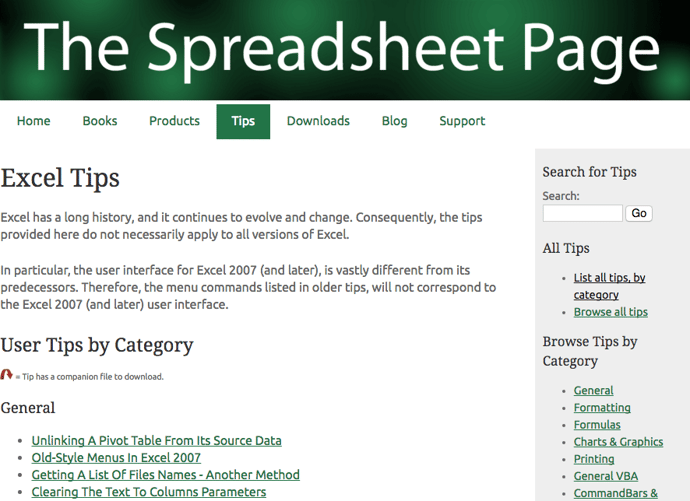
The Downloads tab is another particularly helpful section of Walkenbach’s site, where he’s added free, ungated download links to files he created, like free Excel workbooks and add-ins. For example, there’s one Excel workbook available for download that gives examples of custom number formats, which you can play with and tweak on your own time, and get familiar with them without having to start from scratch.
3. About.com’s Spreadsheets Page
Price: Free
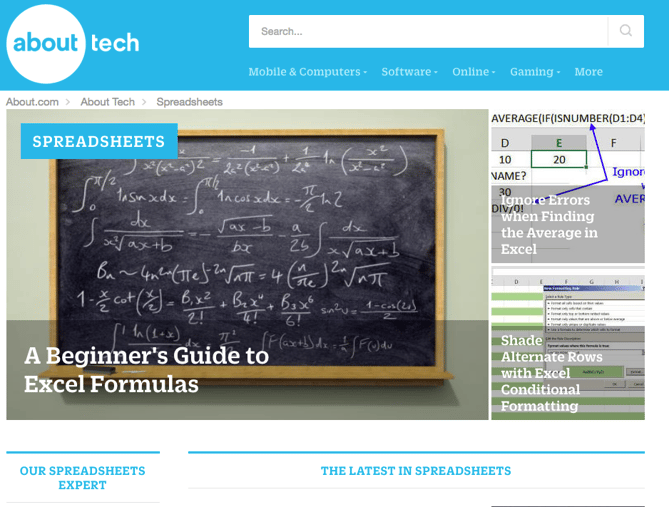
Many of you are likely familiar with the content website About.com, but did you know it has its own spreadsheets subdomain — much of which is devoted to Excel? There are likely thousands of instruction sets on that site, most of which are illustrated, how-to posts. Plus, fresh content is added regularly.
Each piece of content is categorized according to everything from formulas and formatting, to videos, tools, and templates. If you want to stay up-to-date on the latest spreadsheet news and tips, you can sign up for a free newsletter. There’s just one caveat: the site contains a good amount of ads — but if you can stand them, the content is worth it.
4. Chandoo.org
Price: Free
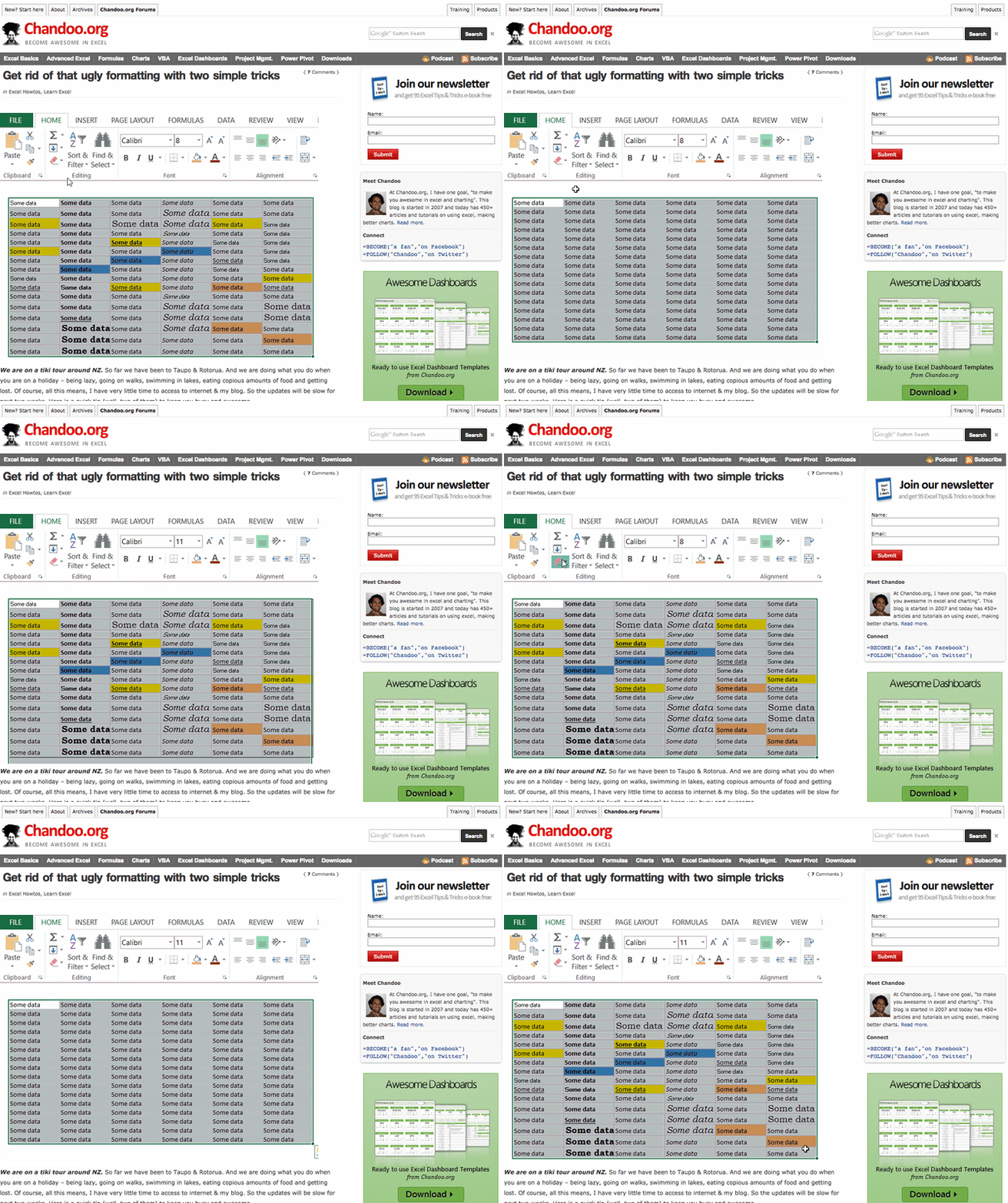
Purna “Chandoo” Duggirala, Chandoo.org‘s founder, says he has one goal: “to make you awesome at Excel and charting.” He started the blog in 2007 and, today, it contains more than 450 articles and tutorials on using Excel and making better charts. He’s built the blog as a community, citing values like humility, passion, fun, and simplicity.
He also works to make it a valuable resource for the folks for whom English is not their first language.
Most of his tips stem from forums, where people ask questions about Excel — about formulas, formatting, shortcuts, pivot tables, and so on — and anyone can answer them. Chandoo then uses some of the more helpful forum questions to create articles and tutorials.
 Source: Chandoo.org
But it’s not all so formal. For example, Chandoo once created a digital Easter egg hunt for a blog post, which included a downloadable Excel workbook containing seven hidden pandas. Readers were challenged to locate the pandas using clues, Excel techniques, and even “I-Spy” skills.
 Source: Chandoo.org
While the articles, forums, and other parts of the site are free, you can pay to join one of Chandoo’s structured training programs, like Excel School ($97 – $247), or VBA Classes ($97 – $347). Plus, there’s aways the option to buy one of his books — The VLOOKUP Book or Excel Formula Helper Ebook.
5. HubSpot Excel Reources
Price: Free
Seeing as Excel is one of the most in-demand skills for data-driven marketers — and because we want marketers like you to succeed — we’ve created some of our own educational content about Excel here at HubSpot. From free ebooks, to templates, to video tutorials, we aim to cover a wide range of Excel-relevant topics.
Here are a few of our best:
- “How to Use Excel: The Essential Training Guide for Data-Driven Marketing” (free ebook)
- “9 Excel Templates to Make Marketing Easier” (free templates)
- “How to Create a Pivot Table in Excel: A Step-by-Step Tutorial” (video & blog post)

6. MrExcel.com
Price: Free
Here’s a resource that puts we mere mortals in touch with Excel experts. MrExcel.com‘s claim to fame is its interactive message board, which is constantly monitored by its community of Excel gurus.
The board is organized according to subject, like general announcements, questions, and MrExcel.com products. When a user posts a question, a member of the MrExcel.com expert community will reply with an answer. The questions range from simplifying an Excel task, to solving urgent inquiries.
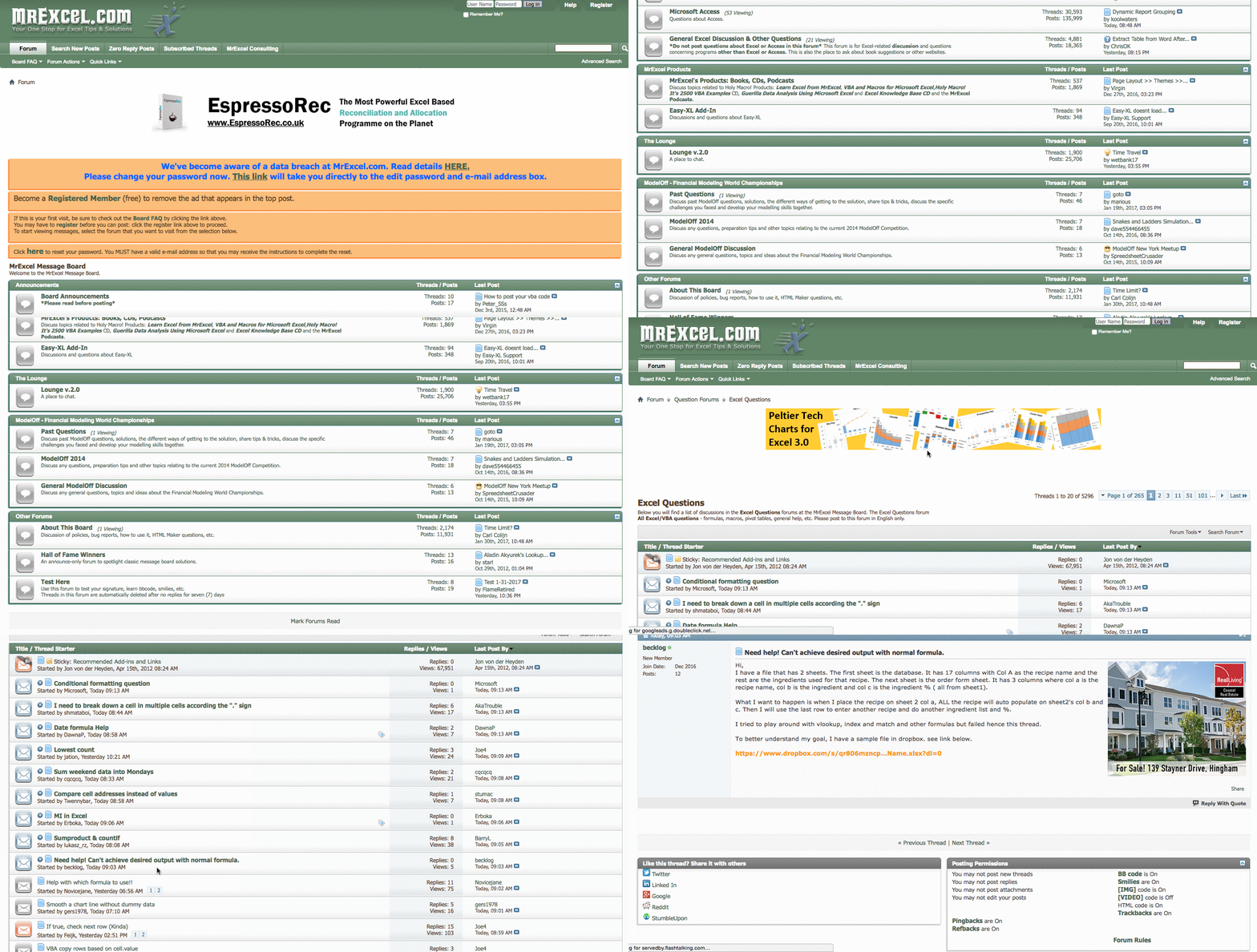
Not a native English speaker? You can ask questions in your native language.
Aside from posting questions on the message board, you can also browse Mr. Excel’s “Hot Topics” — found on the left-hand side of its homepage — which includes things like finding the cumulative sum of even or odd rows, or removing the leading zero within a text field. The site also has a library of helpful Excel books and ebooks, and if you need help with problems that are more complex, you can even hire an Excel consultant directly from the website, for a fee.
7. EdX Excel Courses
Price: Free
Here’s a budget-friendly option for those in search of a more formal course, rather than a one-off tutorial: EdX is a nonprofit that provides free education for people around the globe — with an interesting model of Excel training sessions, both timed and self-paced.
When users enroll in a course that’s marked as “Verified,” they have the option to pay a fee in exchange for an instructor-signed certificate with the institution’s logo, to verify the achievement and increase job prospects. Those fees are used to fund the courses, giving you the option to take them for free if you don’t mind foregoing the certificate.
Otherwise, there are some courses offered at a “Professional Education” level, for which the fee isn’t optional. One example is the Business and Data Analysis Skills course, offered for $60.
To help you choose the right one, each edX course includes reviews (with a rating up to five stars), and information on length and amount of effort, usually measured in hours per week. There are also details on the level of knowledge required, along with video transcripts.

8. Annielytics Video Tutorials
Price: Free
Annie Cushing, a web analytics data expert, created the Annielytics blog and YouTube channel to share her knowledge with the world. Don’t let the punny name fool you — both are chock full of really good, specific, and in-depth web analytics tips.
While the content here isn’t all Excel-related — much of it is about Google Analytics, for example — it does contain some great Excel video tutorials. Even better, they were created with marketing and web analytics in mind, so they’re directly applicable to things like marketing data reports. The Excel-specific videos can be found here, or by searching her YouTube channel for “Excel”.
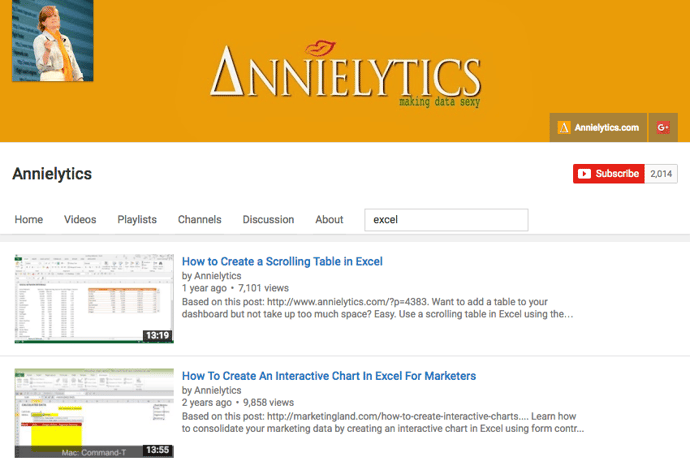
The Excel topics vary widely, from how to create interactive pivot tables, to how to add a scrolling table to your dashboard using the INDEX function. The videos also vary in length depending on topic complexity, ranging from two-and-a-half-minutes, to those over half an hour long. To give you an idea of what the videos are like, here’s one of our favorites, which covers a comprehensive overview of Excel charts:
9. Khan Academy
Price: Free
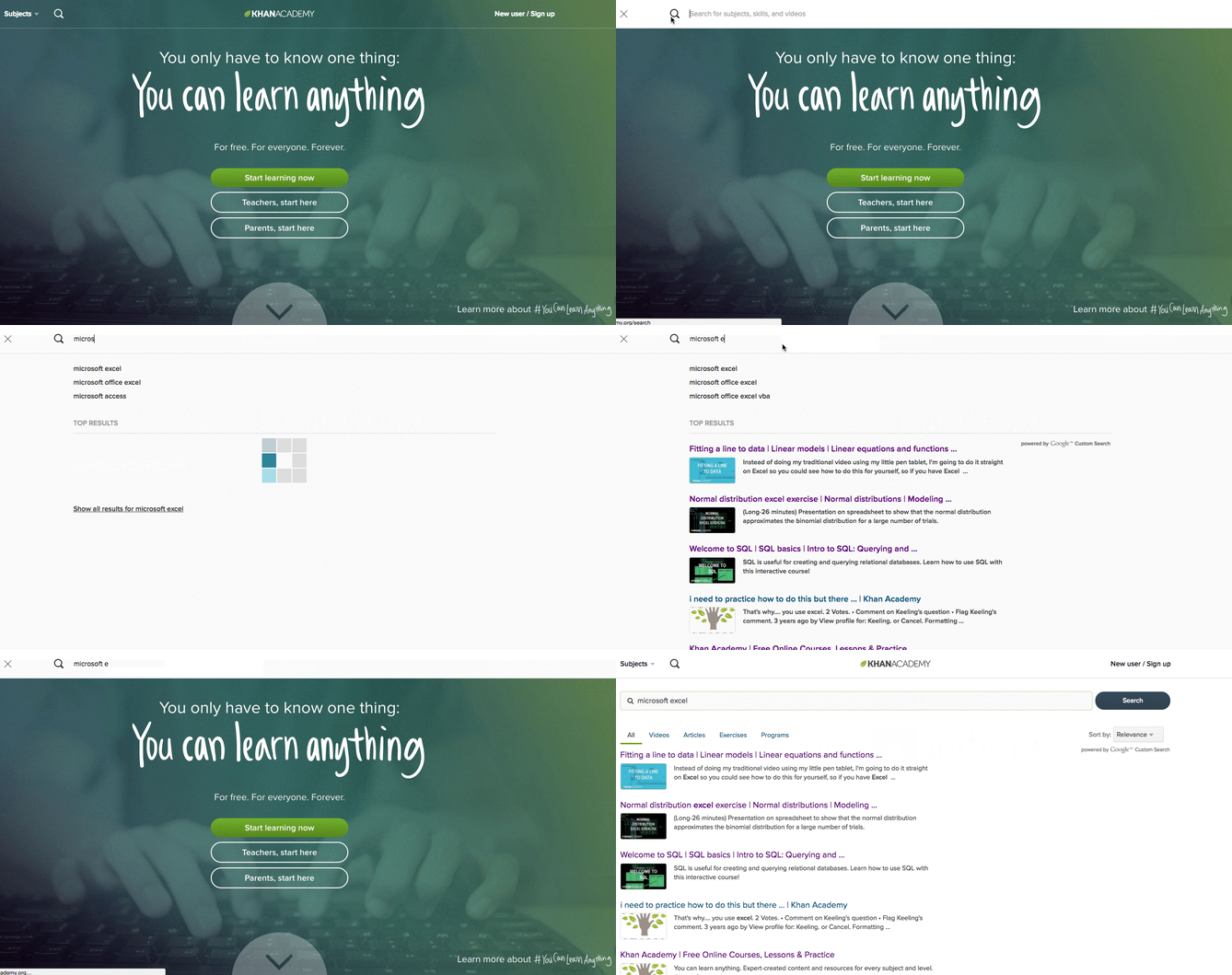
When visitors arrive at the Khan Academy website, they’re greeted with two simple but powerful lines of text: “You only have to know one thing: You can learn anything.” And from algebra to astronomy, this resource offers a plethora of free courses on, well, almost anything — for free.
That includes a few video tutorials on Excel. Most of them are part of larger, multi-installment courses on broader topics, like statistics. A general search for “Microsoft Excel” yields what might look like limited results, but they actually explain some fundamental parts of using Excel, like distributions and fitting lines to data.
How to Learn Excel With Paid Training
10. Lynda.com’s Excel Training and Tutorials
Price: Free to try | $19.99/month membership
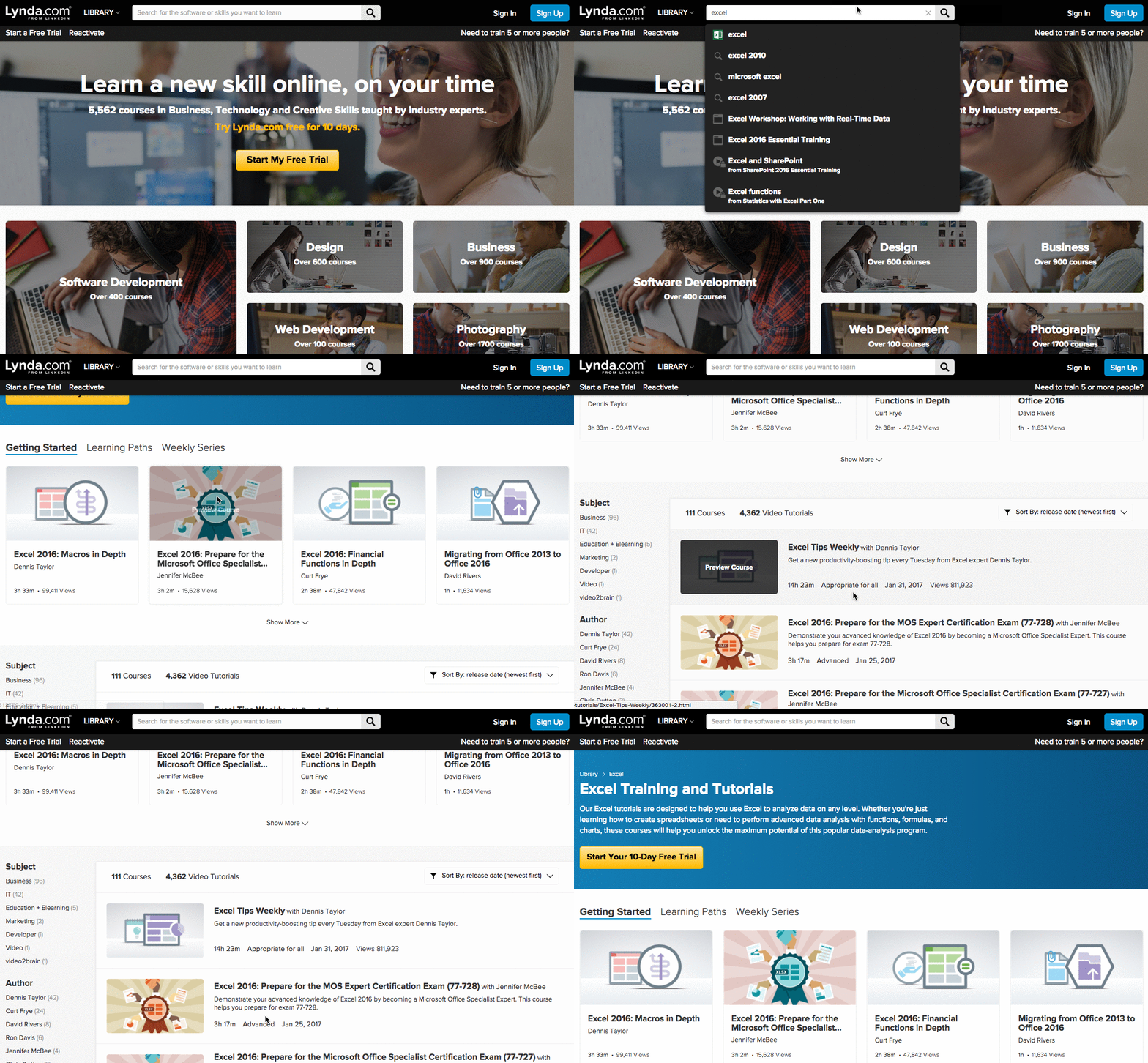
If you’re willing to invest a little cash in your Excel training, Lynda’s Excel Training and Tutorials are a worthwhile place to spend it. Members of this LinkedIn subsidiary have access to thousands of courses on business, technology, creative skills, and software that’ll help you work toward your personal and professional goals.
Included are over 100 courses on Excel, and over 4,000 video tutorials covering every version of the program, at any level of expertise. They cover a broad range of topics, from something as general as “Statistics with Excel Part One,” to more niche topics, like “Data Visualization Storytelling Essentials.”
11. Coursera
Price: $79/course
While Lynda.com asks for a monthly all-access membership fee, Coursera charges on a course-to-course basis. Partnering with top universities and organizations worldwide, the site offers online classes on a number of topics, ranging from music production to coaching skills.
There are only a few courses pertaining to Excel, but if you’re looking for one that’s on a formally academic level, they could be a good fit for you. In fact, many of the Excel-related courses come from Duke University, such as “Excel to MySQL: Analytic Techniques for Business Specialization.”
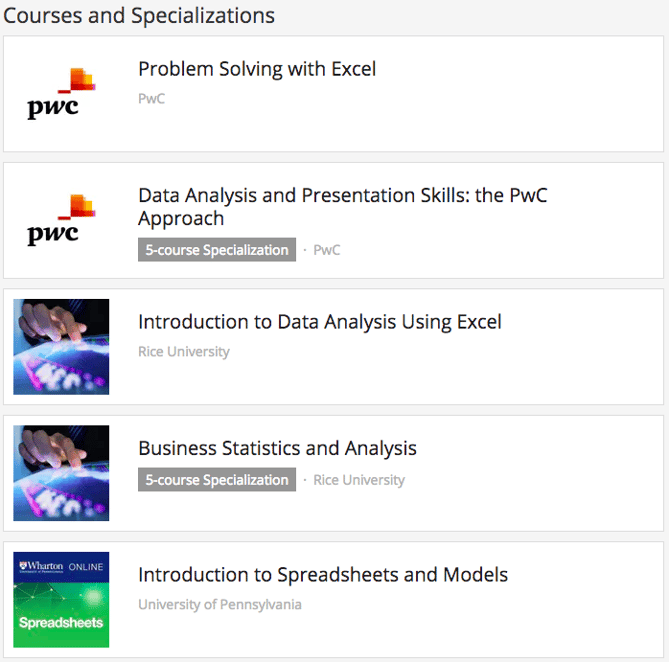
That said, these courses don’t come cheap — after all, they’re the same ones that are taught at top universities around the world. And like many real-world classes, each includes video lectures, interactive quizzes, peer-graded assessments, and the opportunity to connect with fellow students and instructors. Once you finish a course, you’ll receive formal recognition, along with an optional course certificate.
12. Udemy
Price: $10.99
If you had six hours to spare, how would you use them? “Sleep,” “clean the house,” and “bake something” are some of the things that come to the top of my mind, but try this on for size — what if you could become an Excel expert in that amount of time?
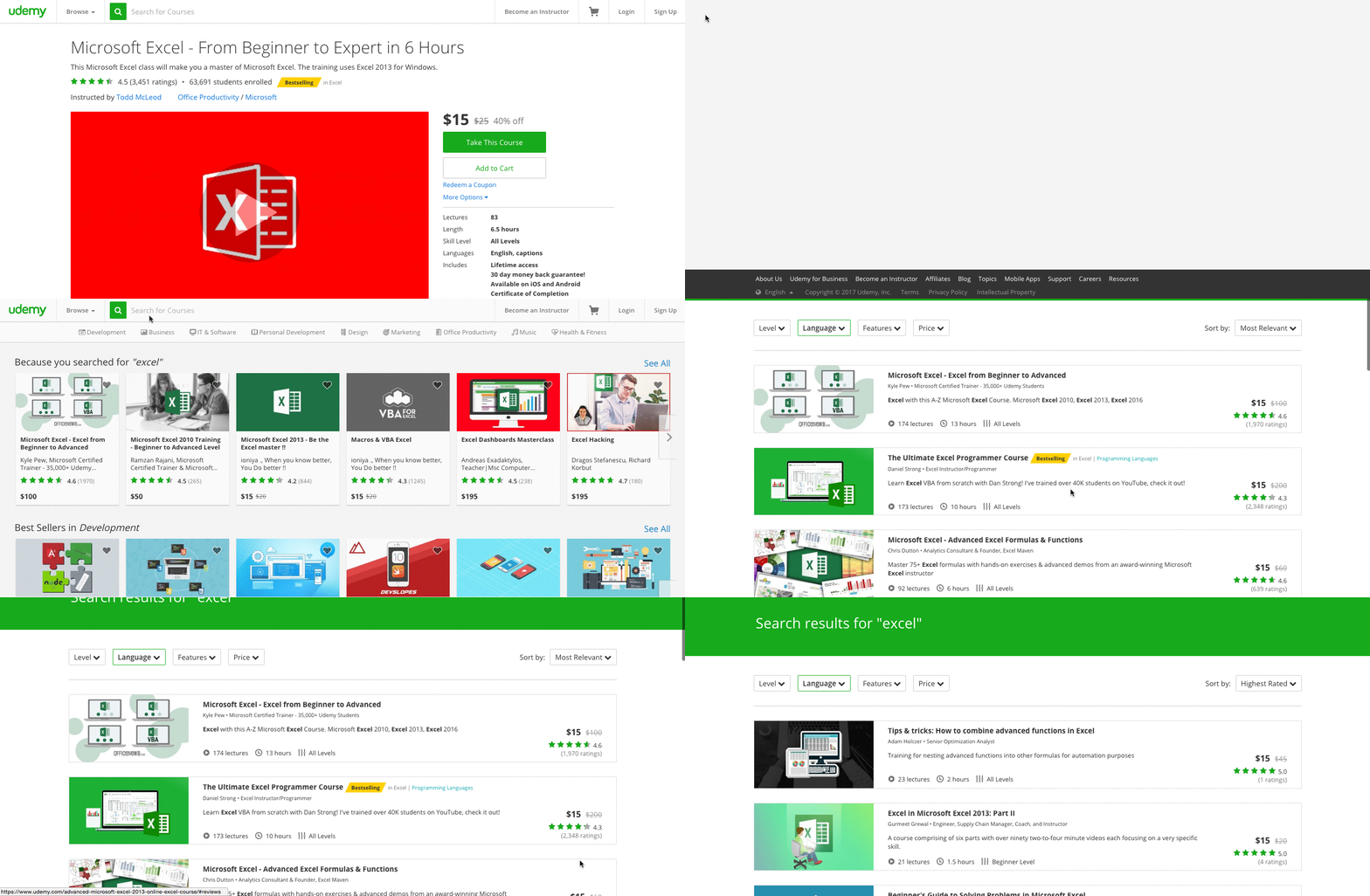
That’s what Udemy promises in its “Microsoft Excel – From Beginner to Expert in 6 Hours” course — for $10.99. Udemy is one of the most bountiful online learning resources out there, and its Excel courses certainly don’t end with that single option. In fact, when I return to the homepage, it displays several additional lessons on the topic, in case I want to explore my options.
Those options are many. In fact, just typing “Excel” into the search bar yields dozens of results, each one displaying a star rating, price, length, and level.
13. Intellezy.com
Price: Free to try | $14.95 mo.
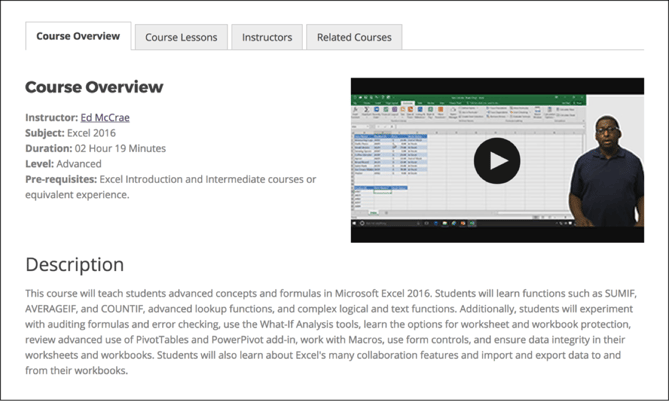
Big believers in microlearning, Intellezy’s videos fall in the three- to five-minute range. These nuggets of knowledge are organized into beginner through advanced courses, covering Excel 2007-2016 and Office365. Plus, mobile apps for iOS and Android make it easy to learn on the go.
Intellezy’s videos are really engaging. There’s always an instructor on-screen showing you what to do. And because they’re wired for face-to-face interactions, Intellezy’s instructors really hold your attention. Their courses also include assessments and exercise files so you can see how you’re doing and follow along with the instructor. You can give Intellezy a spin with a free 10-day trial.
14. Excel Everest
Price: $159
The name of this resource may look intimidating, but you’d be surprised how convenient the training is.
Excel Everest is an out-of-the-box resource that teaches you Excel while you’re in Excel. The product you buy downloads an Excel file to your computer, where you’ll open Excel and engage in walk-throughs of 41 different Excel functions right from a sample spreadsheet. Topics covered include conditional formatting, Vlookup, chart creation, and so much more.
This Excel training resource offers hundreds of exercises, along with video tutorials embedded directly in a sample Excel spreadsheet. By applying these concepts in Excel as you learn them, you’ll feel them stick with you long after you complete Excel Everest’s training.
15. Learn iT!
Price: $130/module
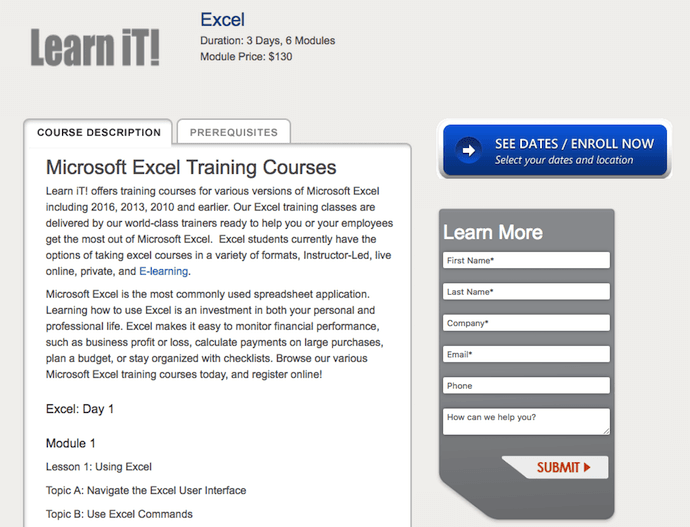
Learn iT! offers Excel training in a variety of formats and breaks every lesson down by module. It’s the best solution for Excel users who might not be receptive to just a video series or written step-by-step guide.
With Learn iT!, Excel users can select from five different courses: Pivot Tables, Intro to Data Analysis, Programming with VBA, Excel Power User, and a basic Excel course for general users. Each course states the course’s duration (in days) and the number of modules the course consists of.
The best part about Learn iT! is that you can take your selected course four different ways: an in-person instructor-led session, live online with classmates, privately in a custom-made session, or a self-paced mix of instructor-led and interactive e-learning courses.
16. LinkedIn Learning Products
Price: Free to try | $29.99 mo.
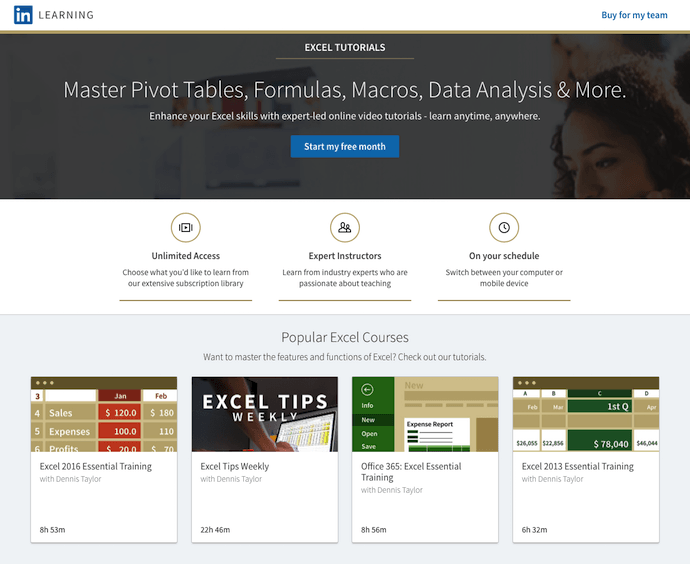
LinkedIn isn’t just for professional networking. You can also learn a ton on various business topics with the help of subject matter experts (SMEs) who host trainings on the LinkedIn Learning platform. Microsoft Excel is one such topic.
Dennis Taylor, a business consultant you can also learn from on Lynda.com, is one SME who hosts Excel training courses on LinkedIn. His courses range from six hours to 23 hours in total training time, and can be completed on your schedule.
Check out LinkedIn Learning for all available Excel courses.
17. eLearnExcel
Price: Free to try | $47/course
Not only does eLearnExcel give you eight Excel training courses to choose from, but it awards seven Excel certifications as well.
eLearnExcel makes this promise: by taking all of its Excel courses, you’ll have a skill in Excel that’s greater than 99% of Excel users today. Trusted by Microsoft itself, this suite of training products breaks down Excel’s concepts in easy, digestible video modules — allowing you to learn the Excel concepts that are most relevant to you. Courses range from 45 minutes to six hours in duration.
Seven of these courses award you a certification that corresponds with the course you took. If you complete all seven, you’re awarded an Excel Master Diploma. It’s not a bad item to put on your resume — or on your business’s website, if multiple employees enroll in eLearnExcel’s courses as part of a business subscription.
Excel in Your Field
Ready to get started? With these tools, you’ll be using Excel with little-to-no-sweat, in no time. Plus, practice makes perfect — that’s why there are so many tiered levels of courses available. Start where you can, and as you begin using more functions and commands, you can continue to expand your knowledge.
Want more Excel tips? Check out these free Excel templates.

7 of the Coolest YouTube Banners We’ve Ever Seen
When someone sends me a really great YouTube video, I always want to know who’s behind it. Was it an ad agency? A small or medium business? A B2B tech company? No matter who it was, if I’m impressed, I want to see more from the content creator. So once the video is done, I click the link to visit their profiles.
And from there, if the brand is really on top of its game, I’ll see its channel art — the horizontal banner displayed across the top of the user’s YouTube channel that, hopefully, shows a combination of good design and brand presence.
But how do they do it?
We’ve all seen design work that inspires us, but can have a bad habit of not taking it any further than that. What makes something like strong YouTube banners so great? And how can you create your own gorgeous artwork? To answer those questions, we found three excellent resources for YouTube banner templates, as well as seven creative channel banners — both old and new — that inspire us as marketers.

What Makes a Good YouTube Banner?
Responsive Dimensions
A YouTube channel banner will take on different dimensions depending on what platform is being used to view it. For example, a banner might have different dimensions when viewed on a TV, desktop, or mobile device.
Google‘s suggested YouTube banner dimensions are:
- Recommended: 2560 x 1440 px
- Minimum for upload: 2048 x 1152 px
- Minimum “safe area” where text and logos are ensured not to be cut off: 1546 x 423 px
- Maximum width: 2560 x 423 px
- File size: 4MB or smaller
The recommended resolution seems like an exorbitantly large file size. But think about how YouTube banners would appear on a 30″ smart TV or higher. With a growing number of options to view YouTube videos in this way, you’ll want to make sure your channel art is large enough to display with quality on larger screens.
Here’s a helpful visual representation of those dimensions:

Source: Google
Balanced Design
Take note of the “safe area” we alluded to in the first section. Your banner is essentially the biggest branding opportunity for when people land on your channel, so you’ll want to make sure your logo and supporting text is well-represented in the channel art. That’s why it might be best to place your company name and logo in that center space — this prevents viewer confusion if the name of the company behind the YouTube account is accidentally cut off.
If you’re not sure how to take up the entirety of a 2560 x 1440 frame, video production company MiniMatters suggests “build[ing] the image from the middle out,” putting the most important assets in the center, and going from there.
Finally, as to what to put in your banner, we like to follow a few basic rules:
- Use a high-resolution image. A pixelated or blurry banner doesn’t exactly signal that there’s high-quality video to follow.
- Keep it on-brand. While your channel art doesn’t have to be a carbon copy of your logo or tagline, it should incorporate visual elements that you want associated with your brand, like certain colors, fonts, or keywords.
- Your banner should represent what your company does in a timely fashion. For example, if you run a bakery and you’re gearing up for summer, an eye-catching banner might be a high-res photo of a brightly-colored work surface covered with flour and a rolling pin, along with accompanying text like, “April showers bring May flours.”
How to Make a YouTube Banner
“That’s just great, Amanda,” you might be thinking about these tips. “But where the heck am I supposed to get these beautiful design assets?”
You’re in luck — there are dozens of free resources for creating a great YouTube banner. Here are a few of our favorites:
- Google: Why not start with the hosting platform itself? Google has its very own channel art templates to help you get started with your banner design. (Note: Clicking this link will prompt an automatic download of the zip file containing these templates.)
- Canva: One of our go-to destinations for DIY design, Canva offers several free YouTube channel art templates that allow you to use your own art, or its library of stock photography.
- Fotor: Similar to Canva, Fotor also offers a selection of free YouTube banner templates that allow you to use both your own visual assets or its own library of images.
8 Cool YouTube Channel Art Examples
1. Death Wish Coffee Company

In 2016, Death Wish Coffee was named the winner of a small business marketing competition held by software company Intuit. The reward? A free 30-second commercial during Super Bowl 50. Since then, the self-proclaimed maker of “the world’s strongest coffee” has capitalized on that momentum by making sure its branding stays just as robust.
Its former YouTube banner banner is no exception. It’s straightforward, but also, bold. The company’s logo is displayed as the channel icon, as well as a tiled watermark that doesn’t interfere with the text display. And that message doesn’t leave any doubt about what the brand does. “World’s strongest coffee?” Okay, I’m watching.
2. Adobe Creative Cloud

Seeing as turquoise is my all-time favorite color, there might be a touch of aesthetic bias in our selection of Adobe Creative Cloud’s YouTube banner. But color can have quite an impact in marketing — shades of blue, for example, have been found to invoke feelings of trust.
This banner doesn’t just make great use of color, though. In a single photo, it connotes creativity and visual quality — two things that the Adobe Creative Cloud promises with its suite products. The person depicted seems to be creating something remarkable — an ocean inside of a balloon — with accompanying text to confirm it: “Make wow.” Plus, to learn more, social buttons are right there within the image.
3. Bon Appétit

Is anyone else hungry? It only seems right that the channel art for a food magazine like Bon Appétit should be, well, appetizing. And with a phrase that’s used as frequently as “bon appétit” — before a meal or as the title of a pop song — it’s important that folks who land on this YouTube channel know what they’re getting into.
That’s one thing that makes this banner so great. The branding is clear, from the logo icon to the iconic title text in the center of the image. Plus, the photo itself sends a signal of the type of content visitors can expect to consume — no pun intended — when they start watching the channel’s videos: All things food.
4. TauliaInc

One great thing about YouTube banners is that they can be swapped out or modified whenever you want, time permitting. That makes them especially conducive to temporary promotions or campaigns. That’s what tech company Taulia did for “P2P Superheroes”: a campaign that shows how its software can eliminate difficult, time-consuming tasks, helping everyday professionals focus more on the work that matters and turn them into superheroes.
The banner communicates two things: 1. That Taulia is in the business of P2P (“procure to pay”), and 2. the brand really celebrates procurement specialists. And by using original, cartoon-like art, Taulia is turning what could be a dry topic into something fun and engaging.
5. Refinery29

We’re big fans of showcasing the people that make your brand great. That’s one thing that Refinery29 does well, by frequently featuring its writers, editors, and content producers in its videos. As it turns out, they’ve all become quite popular personalities — which is why the brand put them front-and-center in its channel art.
Creating a banner of this nature is two-fold. First, you have to find a way to incorporate your company’s talent into video content in a way that’s engaging and appealing to your target audience. Here at HubSpot, we have our blog writers, for example, recount important information from blog posts in video and audio summaries. Then, once you’ve produced enough of that media consistently — and if it’s gaining the right kind of attention — you can use those personalities to promote your channels.
6. TripAdvisor B2B

TripAdvisor is a resource used by millions of travelers to discover and rate lodgings, restaurants, and much more information about endless destinations. But did you know it also offers B2B services for hotel and other property owners to make the most of their presence on the site?
We like to think of it as a B2B hybrid of review site Yelp and vacation rental site Airbnb. On the one hand, TripAdvisor B2B helps business owners create a profile with photos, descriptions, and other information that’s going to be helpful to travelers. But, like Yelp, it also allows them to monitor and respond to the reviews their businesses receive.
That’s represented in the YouTube banner by portraying what the site is all about — travel — but also depicts the act of visitors giving feedback on their experiences by way of rating symbols.
7. Nuvolari Lenard

The thing that stands out to us the most about this banner is its simplicity. It represents a Italian yacht design company Nuvolari Lenard, which is known for work that emulates a luxury and chic lifestyle. And while the channel art itself doesn’t portray anything specifically nautical, the use of capital letters and tiered monochrome does connote a brand that’s high-end.
Those kinds of digital aesthetics create what’s often known as aspirational marketing — the kind that symbolizes something that’s unattainable by most, but still has a vast following of people “who covet the look and feel of the brand,” as Mediaboom puts it. Can I afford a yacht? Of course not. But seeing something like this makes me want one anyway, and makes me want to consume the video content pertaining to it.
Channel Your Creativity
It’s important to note that really cool YouTube channel art is just one part of a comprehensive video content strategy. It doesn’t matter how beautiful your banner is, for example, if your channel lacks in quality video, or hasn’t added anything new in several weeks.
So, along with great design must come consistency. And as you begin to create both, you can turn to these examples for inspiration.
What are some of your favorite YouTube banners? Let us know in the comments.

How to See Word Count in Google Docs [FAQ]
Whether you’re writing a marketing report with a firm 500 word limit, or are just curious if your blog post hits your editor’s 1,000-word minimum requirement, the word count tool in Google Docs can come in handy.
It’s a simple tool to ensure your content is an appropriate length. You can use it for more than just total word count, too — you can also measure how many words you have within a section, how many characters you have, and your page count. To learn how to use word count in a Google doc, or to get a firmer understanding on what it offers, read on.
How to See Word Count in Google Docs
1. At the top of your Google Doc, click “Tools” and then select “Word Count”.
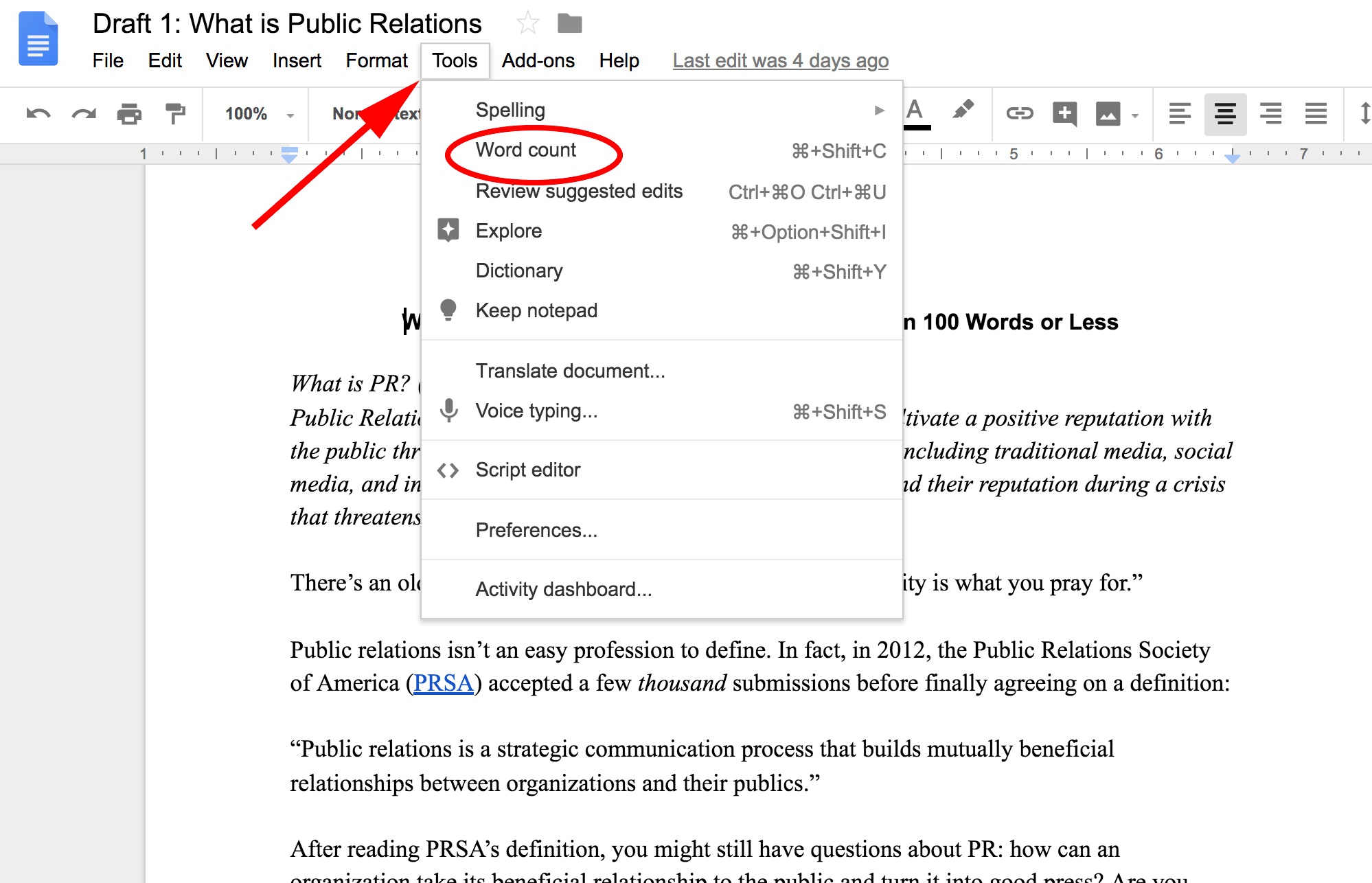
2. Here, you can see how many pages you have in your Doc (three), how many total words you have (777), how many characters you have (4992), and how many characters, excluding spaces, you have (4204). Characters are individual letters (“hey” is one word, but three characters), and typically only matters if a job or school application requires a character limit, rather than a word limit.

3. Next, let’s see how you can check the word count in a specific section. First, highlight the paragraph or section you want to measure. Below, I chose to highlight my third paragraph to get word count information on just that paragraph.
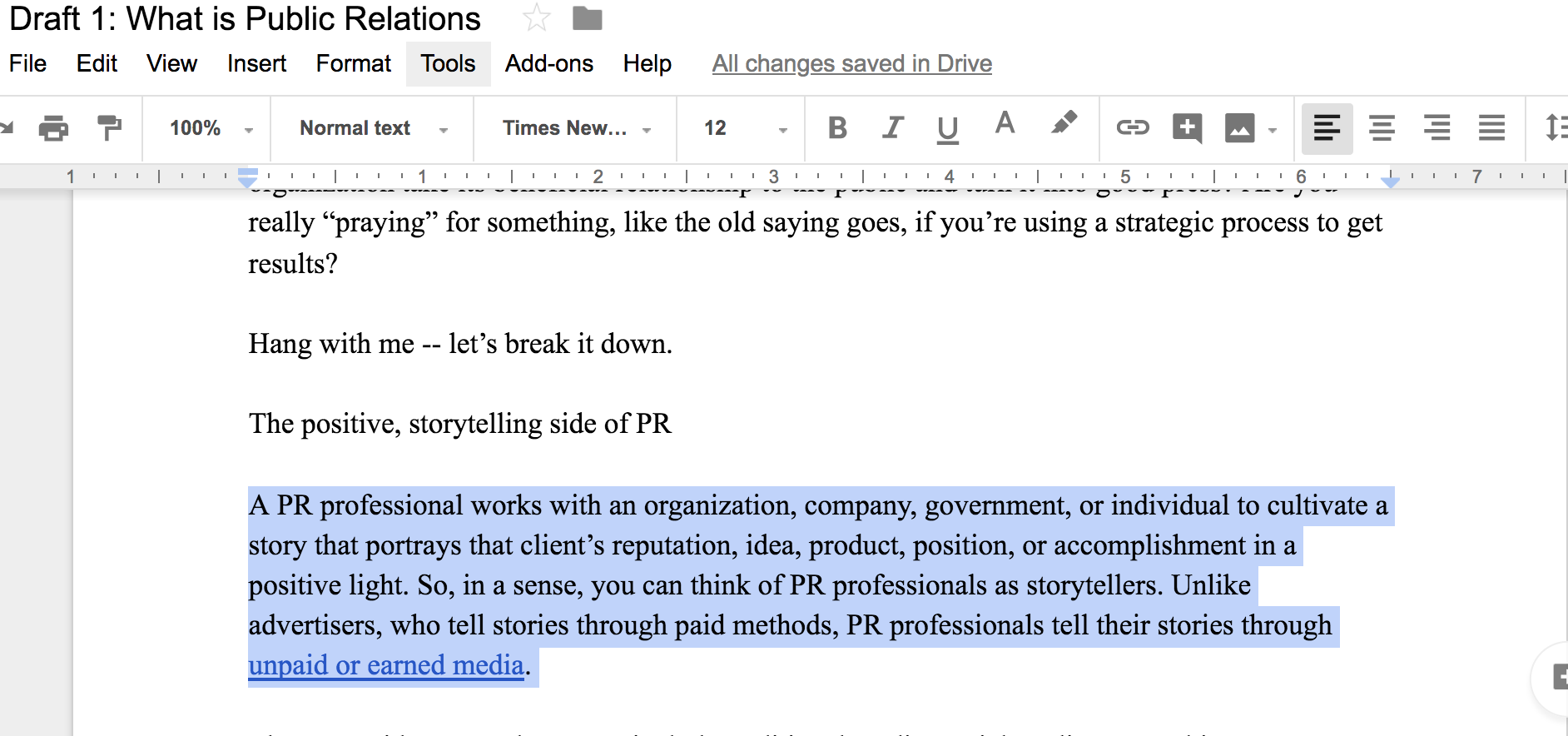
4. With a paragraph or section highlighted, click “Tools” and then “Word Count”. As you can see below, the Word Count now tells me how many words my third paragraph has compared to the entire Doc (59 out of 776), which page it’s on (1), and how many characters it has compared to the entire piece (400). This is useful if you need to cut down on word count for a specific section of your Doc.

There is also a shortcut to find your word count — click “command + Shift + C,” and it’ll pop right up.
Now, you’re equipped to measure the word count, character count, or page length of your Doc, which helps you hit word-limit or page-limit requirements. Word count is also an important tool to use when choosing your audience: 1,000 words is good for a blog audience, but 10,000 might be better as an e-book … or short novel.

The Staircase Guest Blogging Strategy
Our startup journey has proved it — guest blogging is king, queen and all the aces in content marketing. Guest blogging lets you share expertise and build authority in the industry, and the backlinks you receive to your own website helps your SERP rankings.
We started Chanty from scratch. Thanks to the staircase guest blogging strategy I’m about to share, we managed to get our monthly traffic from 0 to 5-digit numbers in less than a year.

Chanty website traffic growth
Guest blogging is nothing new. There are tons of articles sharing guest blogging best practices. There are also plenty of posts teaching you how to write for top-tier resources. However, it’s hard to find resources that guide you through the entire process — from the moment you decide to benefit from guest blogging, to actually getting published on Forbes and Entrepreneur.
Luckily, our team has completed this journey from A to Z. Just a year ago, most of our team had no idea how to write a blog post. As of today, we’ve written for well-known blogs like Foundr, GoDaddy, Search Engine Journal, SemRush, Marketo and many more. We set the bar high in the very beginning. Our grand milestone was Entrepreneur. Thanks to the staircase guest blogging strategy, my guest post for Entrepreneur was published just a few weeks ago. Now that our mission’s completed, it’s time to share our step-by-step process with you.
What is the staircase guest blogging strategy?
In a nutshell, the staircase guest blogging strategy is about writing high quality content for third-party blogs while gradually increasing the quality of the platforms you are writing for (climbing the stairs). You start by picking the low-hanging fruit and pitching the ‘reasonably popular’ blogs. The competition and the editorial calendar for these platforms isn’t too intense. Once you build a writing portfolio, you’ll be able to raise the bar higher and pitch more popular blogs with your next article. Although it sounds simple there are plenty of pitfalls along the way. Therefore, let’s go into more details.
1. Start a loveable blog
When you are a no-name company writing your very first article draft, you obviously can’t just reach out to Entrepreneur with a pitch. Although you can try your luck anyway, there’s a good chance you won’t even get a reply (I know this because the first time we reached out, we failed). However, you’ve gotta start somewhere.
When pitching a blog with a guest article, the best practice is to include examples of your work. When we sent our guest blog pitch for the first time, our writing examples were actually the posts we had written for Chanty. Luckily, starting a company blog is a breeze these days — with platforms like Medium, you don’t need to be tech savvy or even know how to operate WordPress.
If you don’t know what to write about, start with your experience. As you launch a startup, your way will be paved with many obstacles, pitfalls, and difficult decisions. Your brain quickly falls into the knowledge-consuming mode, constantly searching for answers and solutions. Therefore, you’ll definitely have a few valuable lessons to share with readers, including issues you’ve solved and obstacles your company has successfully overcome.
For example, we’ve written a few posts on our blog covering SaaS pricing models and how we got the first 100 beta testers for our product, all based exclusively on our experience. As a result, we were able to write about similar topics for third-party websites. Another example of experience-based writing I love is Groove’s “From ‘Aha’ to ‘Oh, shit’” startup blog and Grow and Convert blog.
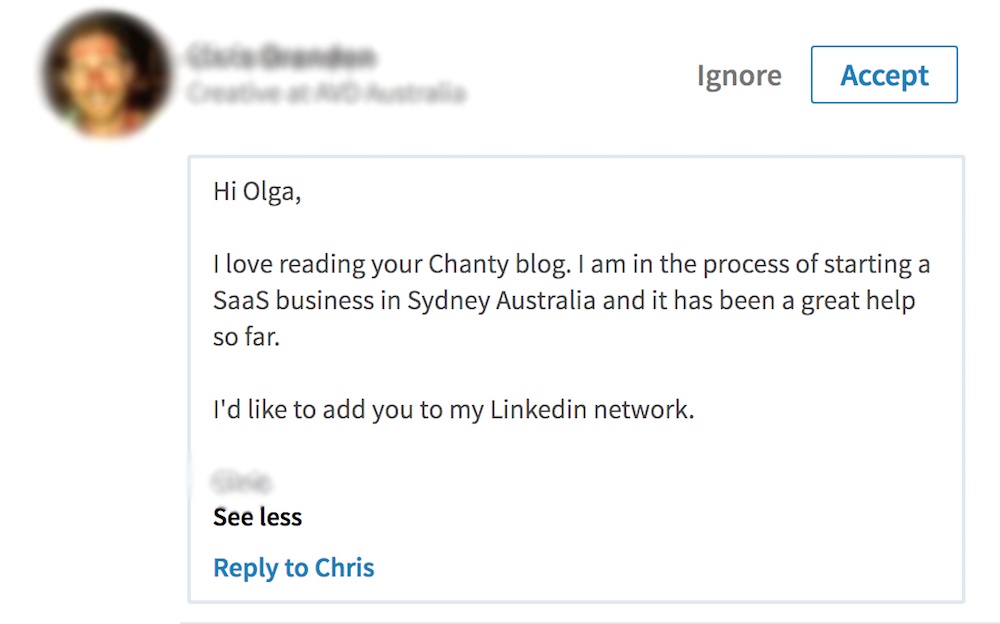
Our blog feedback from a reader
2. Put the content quality in the heart of your strategy
I must emphasize this — it’s hard to overestimate the power of content quality when it comes to climbing the guest blogging stairs. If you write some mediocre content, you’ll certainly be able to publish it on the same mediocre platforms. However, low-quality content will never let you climb to the top. With that said, how do you make sure to deliver excellent copy?
My first advice would be to analyze the leading blogs in your industry. Check out the style, tone, and voice they use. What makes their content engaging, appealing and resonating? Is it the personal experience they share? Is it the storytelling approach that makes you want to keep reading? Moreover, it wouldn’t hurt to analyze the top Google results for your target keywords. You’ll have to write content that is head and shoulders above your rivals if you decide to compete for these keywords.
It goes without saying, but you must make sure your content does not contain mistakes or typos of any kind. Run a check with Grammarly to see if your writing can improve in terms of grammar. Paste your texts into Hemingway App to make them simple to read. Speak the language of your audience. Consider their age, gender, nationality and education. If you are based in Europe (like we are) but targeting the U.S. population with your articles, little things like $9,99 rather than $9.99 could easily determine whether you are a pro or an amateur.
3. Find the low-hanging fruit
Once you have a handful of well-written blog articles to showcase your writing skills and expertise, it’s time to find the first guest blogging opportunity. There are a few ways to do this:
- Make a Google search for ‘guest blogging opportunities + keyword/industry’. You’ll find a number of articles like this one with a long list of platforms that accept guest posts.
- Make a Google search for ‘inurl:write-for-us + keyword/industry’ (e.g. inurl:write-for-us digital marketing). This will bring you directly to the writers’ guidelines page of those websites where guest writers are welcome.
Create an extensive list of all potential platforms where you can pitch a guest article. Next, I’ll show you how to check out these websites’ domain authority and traffic numbers.
4. Check the traffic and domain rating
Not all website are equal. The exposure you’ll get from an article published on a million-visits-per-month domain will be massive. However, with no previous guest blogging experience, you are unlikely to get into that boat. Therefore, let’s stay patient and take it one step at a time. You can get an idea on how popular a website is by checking the estimated traffic, as well as the domain rating. The tools you’ll need are Similar Web and Moz Rank Checker. There are browser plugins for these apps that you can download to conveniently use the tools.
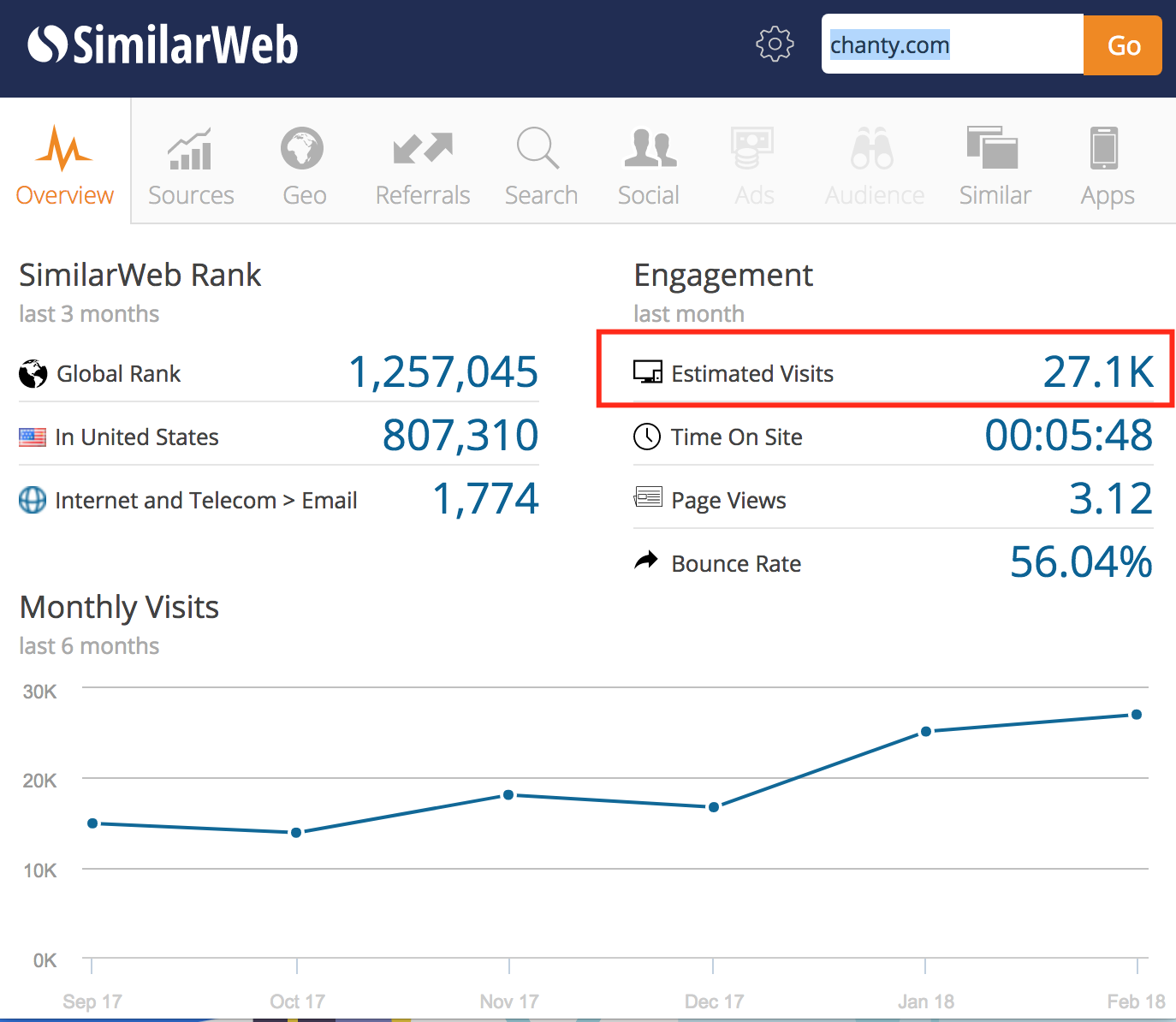
SimilarWeb Chrome extension data on website monthly traffic
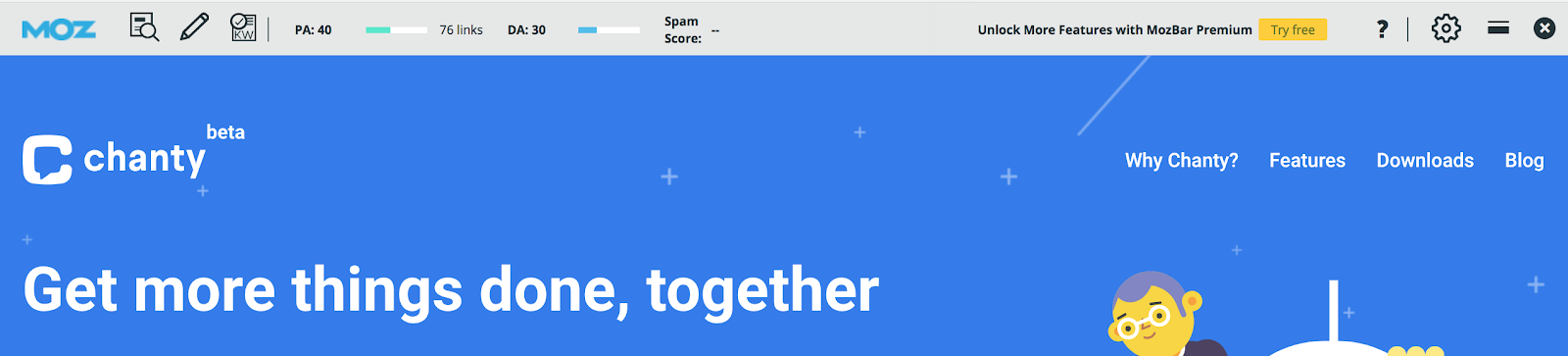
MozBar Chrome extension data on website domain and page rating
Along with other useful information, SimilarWeb shows you the estimated traffic a website gets every month. MozBar indicates the site’s domain and page authority, which predicts how well a website will rank on search engine result pages. It ranges from one to 100 with higher scores corresponding to a greater ability to rank.
At this stage, you should have a list of websites with an estimated traffic and domain authority (DA) for each platform. Make sure to check the numbers for your own website as well. Now, go through the list and highlight the best candidates for a guest blogging outreach.
At that time, our Chanty domain authority was around 10 points, so we started contacting blogs with DA around 20-40 and estimated traffic of 10K+ per month.
5. Send a good guest article pitch
Once we started accepting guest posts to Chanty’s blog, I realized what a hard life editors must live. You can’t imagine how many low-quality pitches we’ve received. At some point, we even had to close down our guest blogging submission, as we started spending too much time going through bad pitches and inferior articles. Here’s just one example of how not to pitch an editor with a guest post idea:
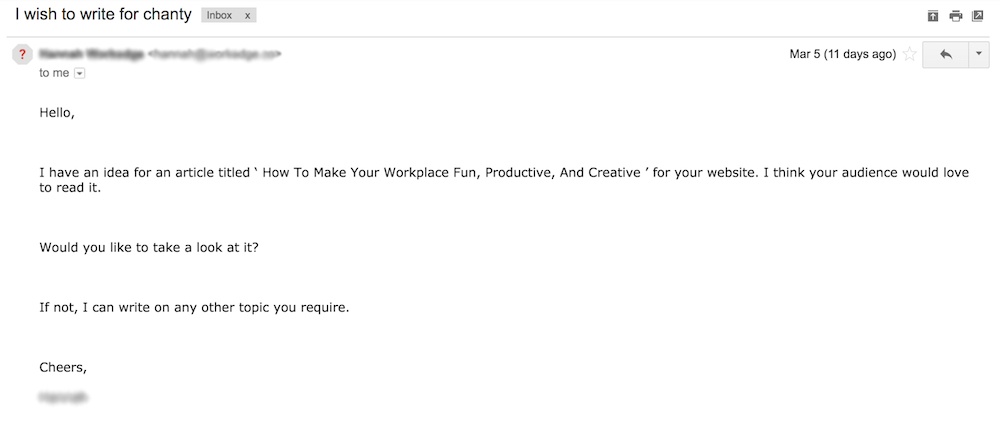
This writer doesn’t mention which company she works for, doesn’t give examples of previous work, and suggests only one topic for consideration. There’s also no image linked to that email account to see who is reaching out. Nothing in this email makes the writer look trustworthy. What happens to an outreach message like this one? Sadly, it goes straight to the trash.
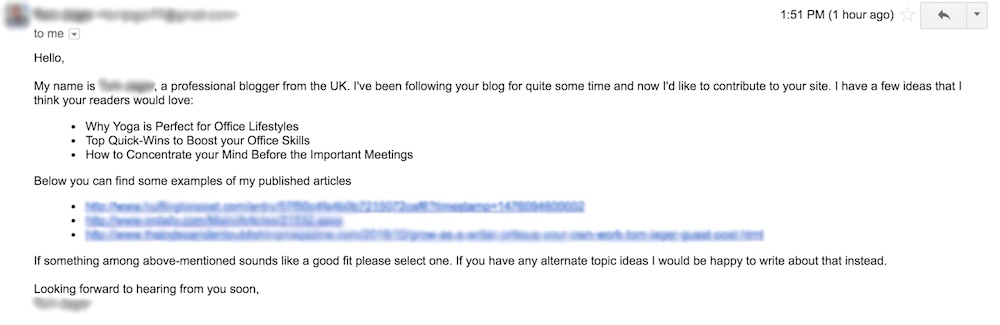
Many companies provide guest blogging guidelines that are an essential read before even sending a pitch. The key is to follow them precisely unless you want to upset an editor. Some websites require a specific form of a pitch, while others prefer to see a full article attached to the outreach email. If the blog you want to write for doesn’t go into detail on pitching requirements, follow this simple formula:
- Introduce yourself
- Make sure you have a full name and a photo next to your email
- Suggest several topics you wish to write about
- Include clickable urls to your writing examples
This should be enough to start a conversation with an editor.
Here’s an example of a good pitch:
6. Get published
Editors get a lot of guest post requests. Therefore, it might take a few follow ups from your side to ensure your message reaches the top of their inbox. Be ready to provide an outline for an article as well, since it’s a common practice for some blogs. Once you’ve agreed on the topic, make sure to specify the blog guidelines and follow them thoroughly.
Oftentimes, the article may require some editing or rewriting, especially if you are at the beginning of your writing journey. One of the guest contributors who wrote for our blog had to fix the article eight(!) times before we could accept it. However, I’d like to acknowledge this — our communication remained friendly and the writer was eager to polish the article to make it a perfect fit for our blog. Takeaway? Cooperating with an editor in a friendly and eager manner is key to a published article.
7. Raise the bar higher
Congratulations! You now have a few articles published to showcase some examples the next time you reach out to other blogs. Now, it’s time to start climbing the stairs. Go back to the list of blogs you initially put together, and take a look at the publications where SimilarWeb and MozBar numbers are a bit higher.
You can also reach out to blogs that look attractive to you as a guest blogging platform, even if you are not sure whether they accept guest posts (meaning, if there isn’t a page on their website dedicated to contributions). At this stage, our marketing team raised the bar higher and reached out to more popular blogs with MozRanking’s of 50-60 points.
Although numbers play a significant role in choosing the right website to write for, you should also trust your common sense and intuition. Sometimes, just from the way a website looks, we think: “Nah, I don’t want my article to appear here, despite all the cool numbers.” Or, it could be the opposite: “These guys are small, but they are doing a great job with their blog, and I’d love to contribute.”
8. … and higher
When you’ve published on some well-known websites, get ready for a big move. Don’t be afraid to climb the stairs even higher and pitch the top-tier blogs. However, you might want to use a slightly different strategy when outreaching extremely busy editors who get thousands of pitches every week. Usually, you’d follow the rules and send the article pitch in a form that a platform requires. However, more often than not, you don’t get a reply even after a few follow ups. This is when you should make a step back and think about getting to know your editor.
First off, find and follow the editor on Twitter or LinkedIn. See what their life is about, and what content they post. It doesn’t hurt to like, share or, even comment on their posts. Become the faithful follower of your editor so the moment you send out a pitch, your email account photo rings a bell. For example, here’s the pitch I sent to an editor at Entrepreneur.
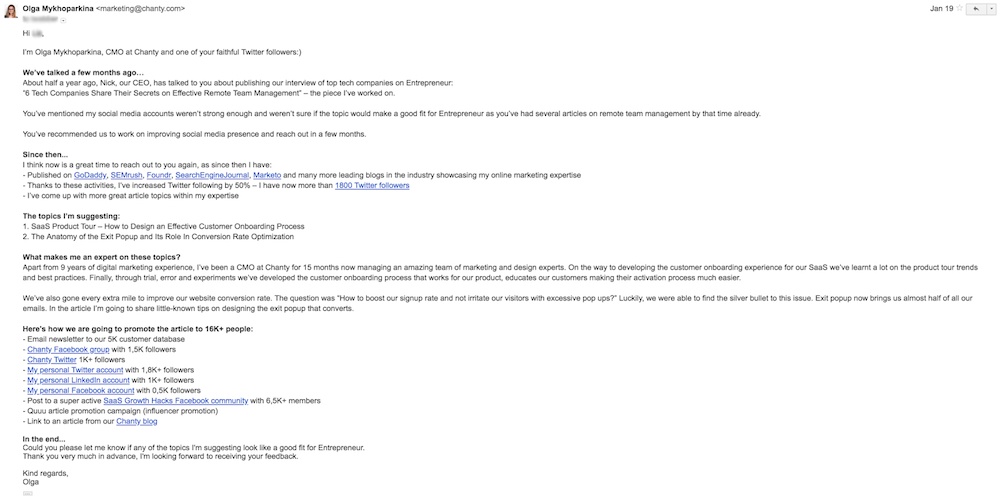
Persistence is key when it comes to top-tier platforms outreach. Despite the very detailed and personal email I wrote, it still took another three follow ups and about three weeks before I got the long-awaited “I’m interested in your article” reply.
Last words
You should always keep the content quality in mind, both when writing a guest post or an article on your company blog. The staircase guest blogging strategy is for those who have valuable insights to share with the world, not for blatantly building backlinks. It’s for those who are ready to invest their time researching topics in-depth, and reflecting their personal insights.
It’s not about hiring a $10-per-post freelancer — it’s about putting your heart into every article. At the end of the day, it’s the one and only way to get to the top-tier publications. Now, it’s your turn to make it to Entrepreneur. I’m confident you can do it. Good luck!

Facebook’s Q1 Earnings Call Reports Strong Numbers, High Hopes Despite Data Privacy Backlash
Facebook’s data privacy scandal has dominated the news these past few months. Today, the company is reporting something it’s likely more excited about.
On today’s Q1 earnings call, the Silicon Valley giant reported strong numbers for Q1 2018, with a total revenue of $11.97 billion and 1.45 billion daily active users. Both numbers outpaced estimates from Wall Street and Facebook’s slower growth in Q4 2017.
Positive Numbers Despite Negative Press
Such a positive earnings report might come as a bit of a surprise at first, on the heels of the revelation that 87 million Facebook users had their data misused by data analytics firm Cambridge Analytica — and Facebook CEO Mark Zuckerberg’s subsequent hearing before Congress earlier this month.
But these events, while significant, came late into the opening quarter of 2018, and likely had little influence on the Q1 data Facebook is seeing today.
Nonetheless, Facebook’s executive team didn’t hesitate to tackle the subject of data privacy during the live Q1 earnings call this afternoon.
“We have a responsibility to keep our community safe and secure,” Zuckerberg said at the start of the earnings report, reiterating his opening remarks to Congress during his hearing. Facebook’s Chief Operating Officer Sheryl Sandberg expanded on this sentiment later into the call, saying people should be able to control their advertising experience while using Facebook.
“At the same time,” Zuckerberg continued, “we also have a responsibility to keep moving forward.” To that end, the term that came up repeatedly during the call was “meaningful interactions.”
“This quarter, we’ve shifted from passive consumption to meaningful interaction,” Zuckerberg said.
The executive preceded Facebook CFO David Wehner’s financial report with data related to the new tools and trends the company believes will drive the future use of the Facebook platform.
While 200 million users belong to “meaningful” Facebook groups that connect users through common interests, said Zuckerberg, he expects to double the number of group users in the near future. Although 100 billion messages are sent every day between WhatsApp and Facebook Messenger, 3 billion are now using WhatsApp Business to communicate and collaborate with colleagues.
Financial Gains Abroad and in Mobile
Following the optimism of Facebook’s CEO, the CFO touched on numerous increases across the company.
Contained within the nearly $12 billion in total Q1 revenue, Wehner said, Facebook saw a $536-million increase in earnings outside of the U.S., from what he described as “international tailwinds.”
These global gains are likely to pique the interest of European advertisers who are concerned about what the upcoming General Data Protection Regulation (GDPR) could mean for the value of advertising on the Facebook platform. (More on the GDPR in just a minute.)
Wehner also reported that net income translated to $169 per share, and that the company hired 48% more people in Q1 2018 than it did in Q4 2017.
Another particularly intriguing figure is Facebook’s mobile ad revenue, which increased 16% from last year to $10.7 billion. Together with the company’s 1.45 billion users, whether or not this data indicates a promising year ahead or a high height to fall from in Q2 remains to be seen.
Questions Around the GDPR
Facebook’s executive team took a variety of questions following their earnings report, one being if the company has seen a change in user behavior or time spent on the site.
Wehner had no specific updates to how long users spend on Facebook, adding that “we’re not optimizing Facebook based on time spent” on the platform. However, he echoed Zuckerberg’s opening remark that they are observing more meaningful interactions taking place across Facebook’s tools — specifically, an increase in “certain types of sharing” and “declines in the more passive viewing of video content.”
The topic that dominated listeners’ questions, though, was the GDPR — which takes effect across Europe on May 25. Multiple people from major companies joined the Q1 earnings call to ask if the GDPR has or will change advertisers’ view of (or, perhaps, loyalty to) Facebook.
Facebook’s executives made it clear on today’s call that the company has begun rolling out GDPR’s controls to their European market. But, according to Wehner, it’s too early into the rollout to predict how advertisers will react — nor is the reaction of any one marketer the most legitimate measure of Facebook’s value as an ad-serving product.
“GDPR affects the entire online advertising industry,” Wehner said, explaining that relative performance of Facebook ads is much more important than the ad revenue of any one Facebook Business Page.
What Facebook can foresee, as stated by Zuckerberg and Sandberg, is the way in which marketers will refocus their efforts while staying on the Facebook platform.
“Messaging can be a more transactional medium than feeds [of Facebook Business Pages],” Zuckerberg said, suggesting that chatbots and similar emerging tech will allow advertisers to provide ongoing customer service through tools like Facebook Messenger and WhatsApp.
Reflecting on the quarter, Facebook is seeing some “nice experimentation” with the things that make advertisers more effective, according to Sandberg. Q1 produced impressive statistics, but Facebook’s Q2 earnings in July will show how resilient the company really is to the unsavory media attention it incurred earlier this year.

Unriddled: Instagram Data Downloads, Amazon’s Big Reveal, and More Tech News You Need
Welcome to Wednesday, and the latest edition of “Unriddled”: the HubSpot Marketing Blog’s mid-week digest of the tech news you need to know.
This week is big on news from Amazon — from Robots, to user numbers, to in-car deliveries. But that’s not the only thing happening around tech town, and we’re here to help decrypt what’s happening in this big, wide sector.
It’s our Wednesday tech news roundup, and we’re breaking it down.
Unriddled: The Tech News You Need
1. We Finally Know How Many Prime Members Amazon Has
In an annual letter written last week to shareholders, Amazon CEO Jeff Bezos disclosed a long-sought-after figure by analysts and tech writers alike: how many Prime members it has. The grand total, he wrote, has “exceeded 100 million.”
Amazon Prime is a paid subscription model (for an annual fee of $99, or $12.99 per month) offered by online retailing giant Amazon, offering such perks as free two-day delivery on many products, as well as free streaming videos and music selections. In certain regions, a membership also includes free two-hour delivery of certain items through a service called Prime Now.
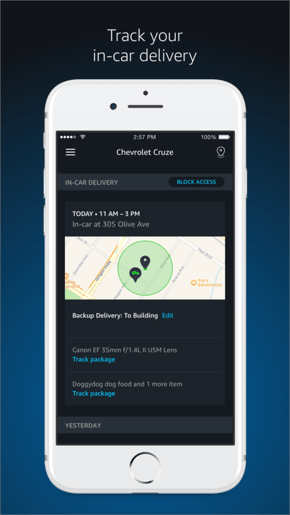
Just yesterday, Amazon announced the launch of In-Car Delivery, which allows Prime members to have Amazon packages delivered to their cars if they’re parked at home, work, or near other locations in your address book.” However, it does come with eligibility requirements, depending on the make and model of your car, and your location.

Source: Apple
Paid Prime membership numbers, as well as some of the other figures cited in Bezos’s letter, are likely to come up the company’s Q1 2018 earnings call, scheduled for this Thursday (April 26) 5:30 PM EST.
2. Instagram Will Now Let You Download Your Data
When people began downloading their Facebook data files — present company included — for many of us, things got weird.
But some, like Josh Constine of TechCrunch, wondered when other companies would follow suit — especially those owned by Facebook, like Instagram.
Yesterday, Constine reported that Instagram has officially made a personal data download available, largely because it will be required to do so by the General Data Privacy Regulation (GDPR) — which comes into force a month from today.
An Instagram spokesperson told TechCrunch that all users should be able to download their data on the network’s desktop site, but that apps across iOS and Android devices might still be rolling out.
To download your data on Instagram’s site, you must be signed in, and can then begin the download process here. When I tried it, I was prompted for an email address and told that it could take 48 hours for the data report to be fully compiled.
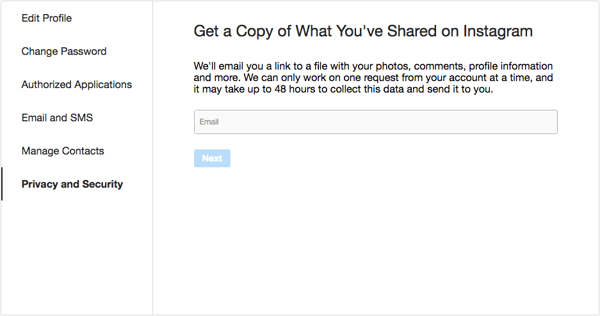
It’s worth noting that, as of writing this post, any email address could be filled in to have the data download link sent to — not just the one associated with your account. However, not only do you have to be signed into your account in order to get to that point, but when I tried it, I was also asked for my password again after entering an email address.
I also discovered that regardless of where the link is emailed, you do need to be logged into the account in question in order to download the data file.
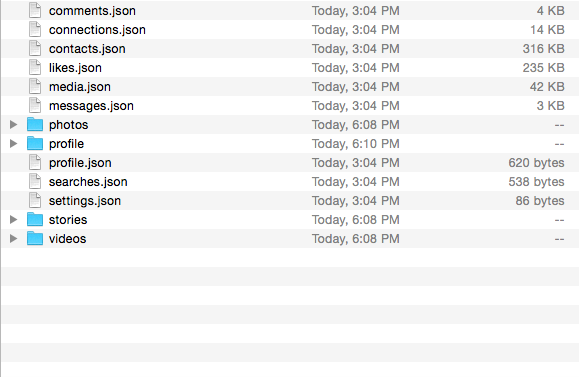
Based on my own data download, the file contains all photos, videos, and Stories uploaded to your profile, as well as the content of any direct messages.
Your direct messages, however, are all compiled within a single JSON (JavaScript Object Notation) file format — as are files containing your historical comments, likes, and searches.
3. A Big Week for Earnings Calls
In addition to Amazon’s above-mentioned Q1 2018 earnings call, several Big Tech players are expected to host their own this week.
Google’s parent company, Alphabet Inc., held its own Q1 earnings call on Monday, where it was revealed that nearly 5,000 new employees were added to its various companies’ headcounts over the last quarter alone. At the end of March, that left Alphabet with a total of 85,050 employees.
About 40% of those new hires were the result of Google’s acquisition of an engineering team from HTC to work on the company’s Android One line.
Twitter’s Q1 earnings call is also scheduled for this week, and as of the publication of this post (7:00 AM EST on Wednesday), should be underway and available for live listening on its investor relations page.
Finally, Facebook is scheduled to host its Q1 earnings call later today (5:00 PM EDT), after two days of UK Parliament hearings on its practices.
Source: Facebook
On Tuesday, Dr. Aleksandr Kogan — the Cambridge University professor behind the data-harvesting app who eventually sold personal user information to Cambridge Analytica — testified before the Digital, Culture, Media and Sport Committee. Facebook CTO Mike Schroepfer is scheduled to testify before that same committee tomorrow: the same day the U.S. House Judiciary Committee will be hosting a hearing on social media “filtering practices.”
4. Amazon Might Be Building an In-Home Robot
A report from Bloomberg says plans are underway at Amazon’s Lab126 — the company’s Silicon-Valley-based hardware research and development division — to build a “domestic robot,” under a project codenamed Vesta.
These plans are far from the first within the tech sector to build such a robot, as science fiction novels and films alike have long projected a future in which robots are practically members our families — case in point: Rosie (sometimes spelled Rosey) the Robot from animated series “The Jetsons” — with many tech companies striving to follow suit.
Robots have often been front and center at major brand keynotes at large-scale annual tech events like CES, where this year, Sony and LG were only two companies debuting their own. (LG’s robot, Cloi, malfunctioned more than once durng this presentation).
Meet Cloi — pronounced “Chloe.” #ces2018 pic.twitter.com/AvdeQq2zCc
— Amanda Zantal-Wiener (@Amanda_ZW)
January 8, 2018
Poor Dave. Dude can’t even get Cloi to answer him when he asks for a recipe. (Though I think I saw her “blink.”) #CES2018
— Amanda Zantal-Wiener (@Amanda_ZW)
January 8, 2018
Bloomberg does correctly make the case that Amazon has laid a strong foundation for building such a domestic robot — which it predicts could be a moving Alexa of sorts that would accompany users throughout their homes — citing its success with the Echo personal assistant device, which was something of a pioneer in that area.
However, the same argument could be made about Google, whose Home device has seen success since its 2016 debut. It has been speculated by some, however, that the Alphabet portfolio company could possibly be taking a loss in its hardware-building efforts, especially given the Q1 fiscal results indicating Nest — the home automation device manufacturer owned by Google — had an operating loss.
The big question for me is: if Google loses that much on thermostats, how much is it costing the company to establish itself as a maker of smart speakers, displays, and phones? https://t.co/KZcomwjkLv
— Janko Roettgers (@jank0)
April 23, 2018
And while Bloomberg says Amazon’s Vesta project has been underway for several years now, it also points to job listings on the Lab126 site showing an aggressive investment in getting such a robot built and, possibly, out to market. According to Research and Markets, consumer robot market share is expected to reach nearly $15 billion in the U.S. by 2023.
What Else Is Going Down in Tech Town?
More of the Latest From Facebook
Did Mark Zuckerberg’s answers to lawmaker questions help restore faith in Facebook? Not really, according to new data — which indicates people trust the social media giant even less since the CEO’s congressional hearings earlier this month. Read full story >>
Speaking of trust: What are social media networks doing to protect your personal information? Check out this infographic and learn how three platforms are keeping information secure. Read full story >>
Yesterday, Facebook publicly disclosed its content review policies to shed light on decisions to remove or allow certain posts. The company also plans to roll out an appeals process around these decisions. Read full story >>
That’s all for today. Until next week, feel free to weigh in on Twitter with your tech news questions or thoughts on what kind of events and topics you’d like covered here.
Featured image source: Amazon

How to Delete Your Facebook Account, Group, or Page [Easy Guide]
There are a lot of reasons you might be thinking about deleting your Facebook account — perhaps you think you spend too much time on it and want to take a social media cleanse, or maybe you and your friends have already stopped using it, so there’s no reason to keep it around.
It’s important to understand deleting your Facebook account is different from deactivating your account — once deleted, it can never be recovered.
Which means, if you’re intent on getting rid of your account for temporary detox purposes, you might want to consider alternative methods to detoxing from social media without deleting anything.
But if you’re sure you’re ready to leave the world’s most popular social media network, it’s a simple process.
Keep in mind, if you delete your Facebook, your photos and all your Facebook information will be lost forever. If you want to save that information, I’d suggest downloading a copy of it.
To download a copy of all your Facebook information, go to “Settings” and click, “Download a copy of your Facebook data,” and then, “Start My Archive.”
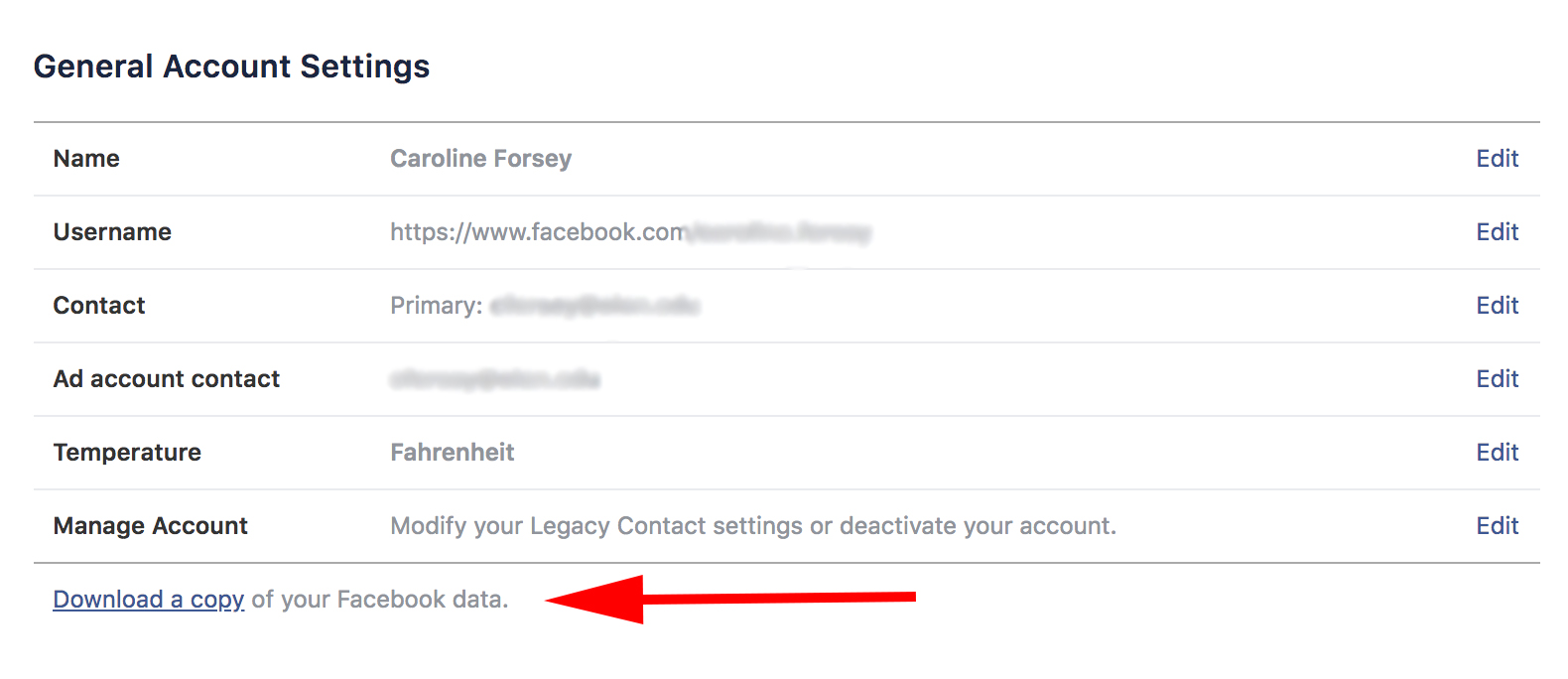
This will ensure you can still find all those awkward middle school photos, years down the road.
To find out how to delete or deactivate your Facebook account, or delete a group or page you’ve created, read on.
How to Delete or Deactivate Your Facebook Account
How to Delete Facebook
- Go to https://ift.tt/2hxTdPL
- Click “delete my account”
- Do not log back into Facebook and wait 14 days for the deletion request to complete
Once you’re sure you’re ready to delete your Facebook account permanantly, click this link. When you click the link, this message will pop up:
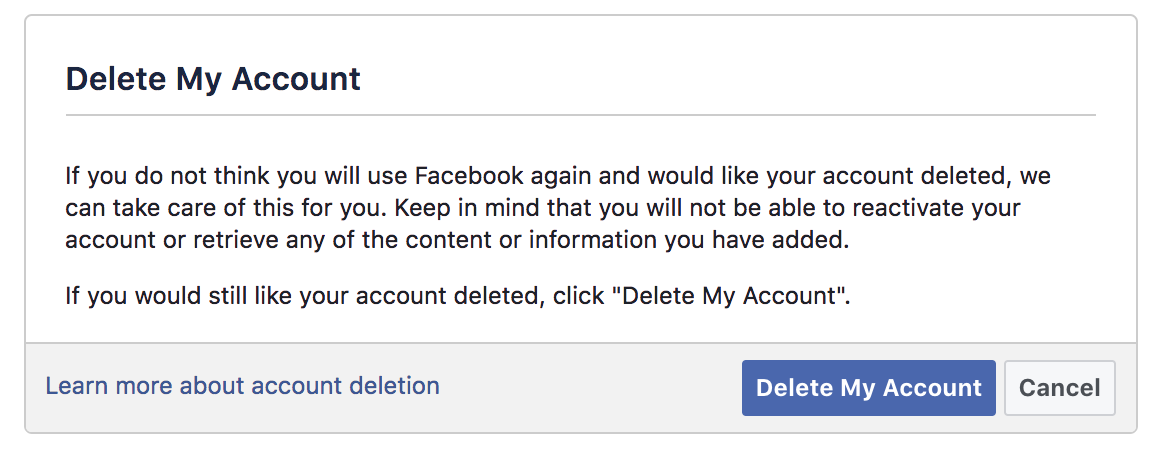
All you need to do is click “Delete My Account.”
Facebook notes it takes a few days to complete deletion after you request it, and if you log back into Facebook during that time, you’ll cancel the deletion request.
Remember, if you think there’s a chance you’ll want to reopen your Facebook account in the future, you might want to deactivate it instead of deleting it. If you deactivate your account, Facebook saves all your information, photos, and settings, and you can reactivate at any time. In the meantime, your profile will just be hidden.
How to Deactivate Facebook
- Click “Settings”
- Under General Account Settings, click “Manage Account”
- Click “Deactivate Account”
- Enter Facebook password to continue
- Choose a “reason for leaving” multiple-choice bubble, then click “Deactivate”
How to Delete Your Facebook Group
We’ve covered how to delete your account, but let’s say you don’t want to delete your whole account — you just want to delete a group you created.
Note: if you didn’t create the group but you’re an admin, you can only delete the group if the original creator leaves it.
How to delete a Facebook Group
- Go to the group you want to delete and click “Members”
- Beside each person, select “Remove from Group”
- Once you remove everyone else, choose “Leave Group” next to your name
- Click “Leave and Delete”
1. Go to the group you want to delete, and click “Members.” Click beside each person’s name, and select “Remove from Group.”
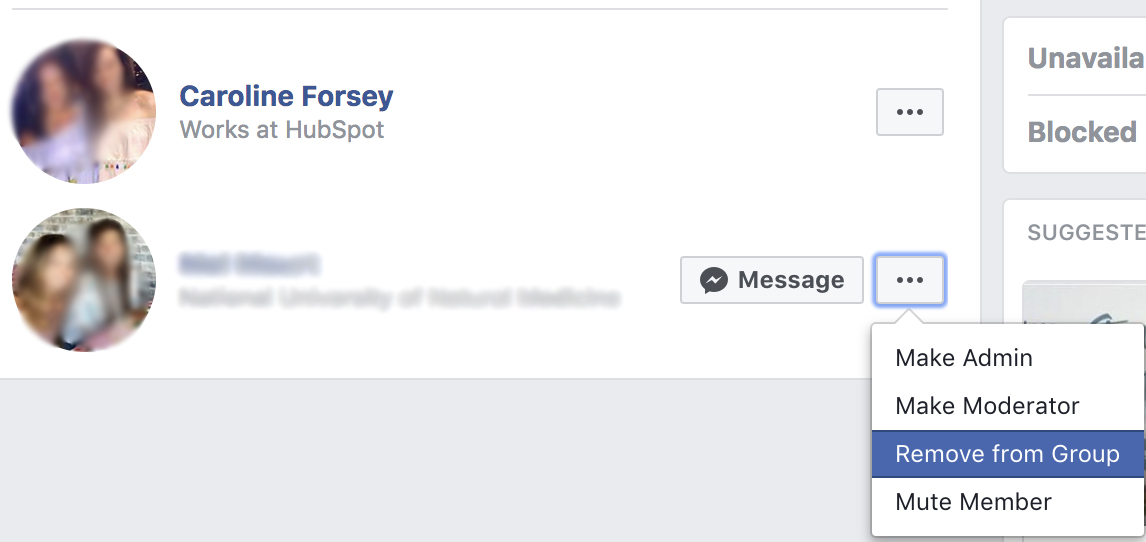
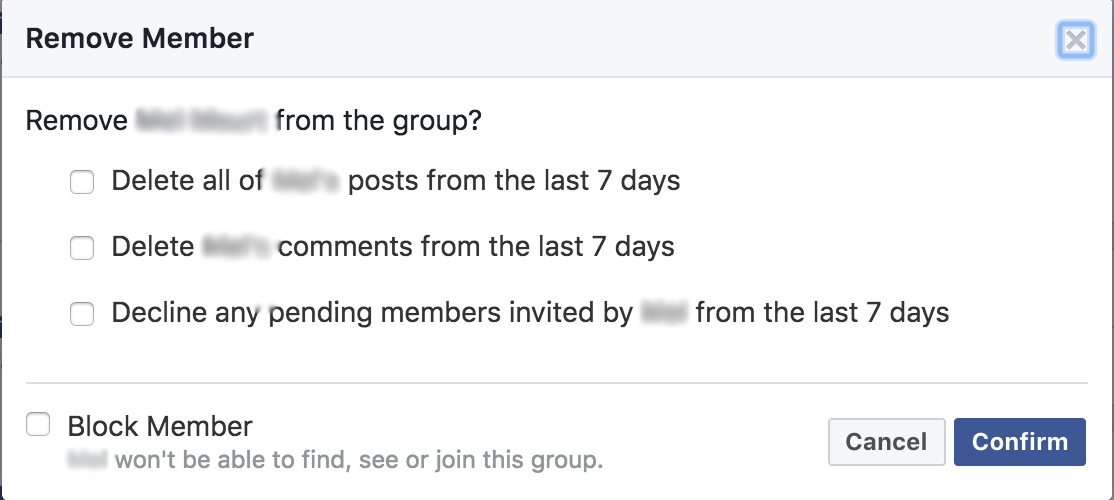
2. Once you’ve removed everyone else in the group, choose “Leave Group” next to your name.

3. Click “Leave and Delete”.
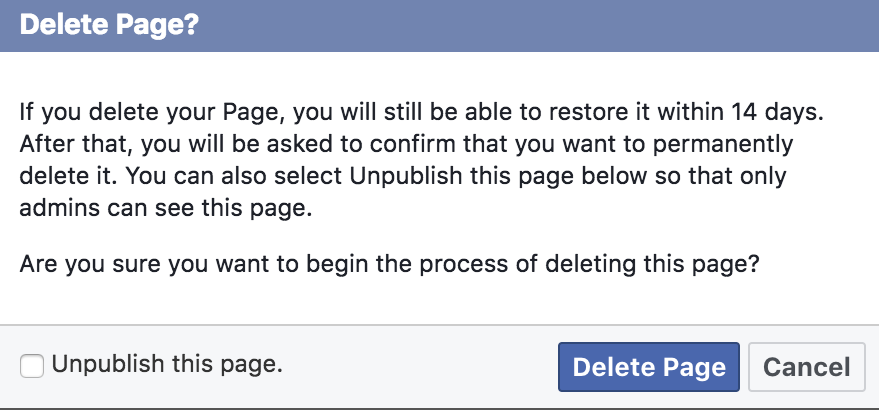
4. And voila! Your Facebook Group is gone.
How to Delete Your Facebook Page
If you created a Facebook Page for a personal business you’ve since abandoned, or an old fan Page for Justin Bieber that no longer suits your passions, there’s an easy way to delete it.
How to Delete a Facebook Page
- Go to your page and click “Settings”
- Scroll to bottom of Generals Tab and click “Remove Page”
- Click “Delete [Page]” then click “Ok”
To delete a Page, you have to be the creator of a Page — something I learned the hard way. This was the inspiration behind my very short-lived business, “Caroline’s Consulting Business.”
If you want to delete a Page you’ve created, here’s how:
1. Go to your Page, and click “Settings.”
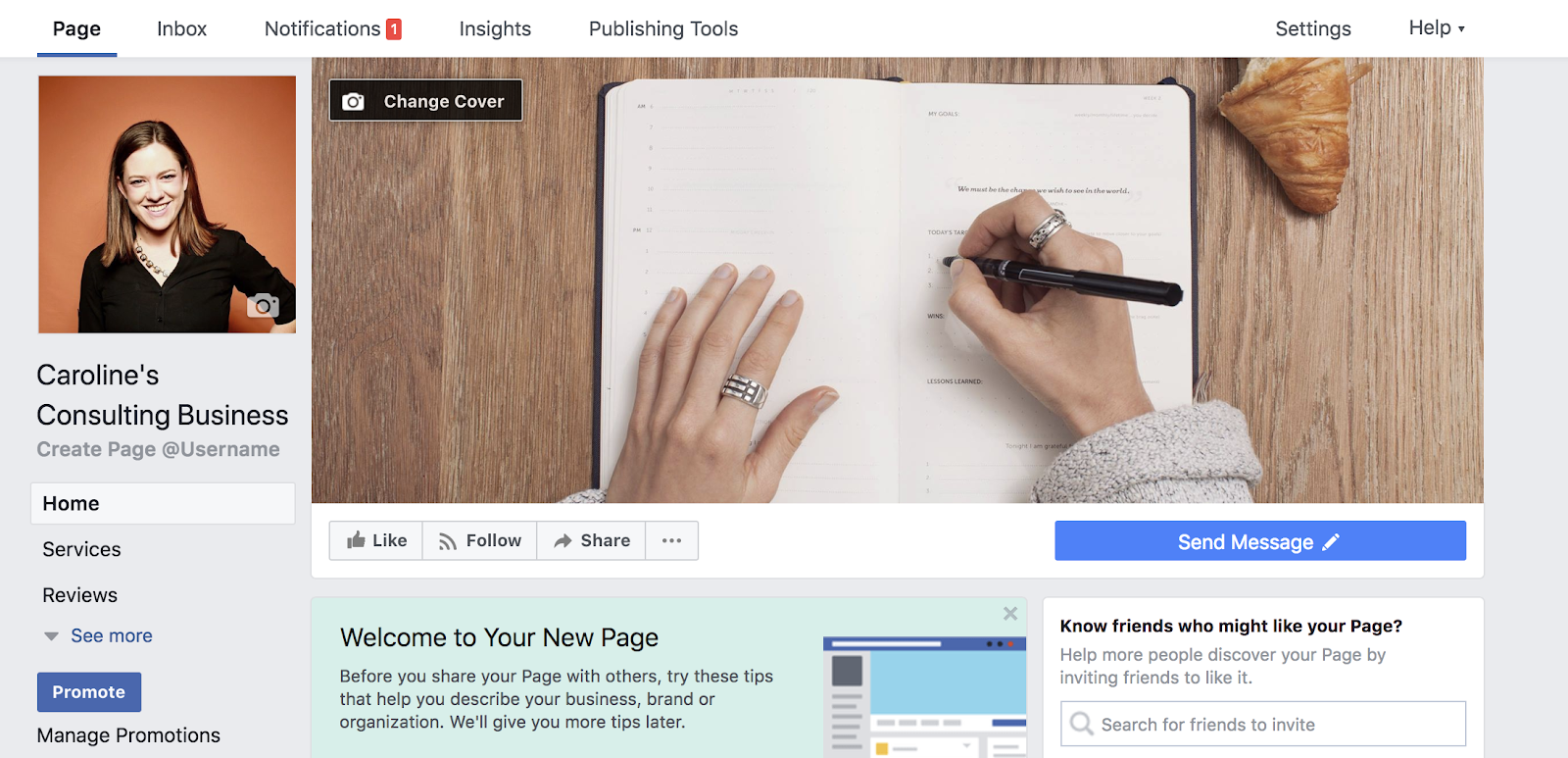
2. From the General Tabs within Settings, scroll to bottom and click “Remove Page.”
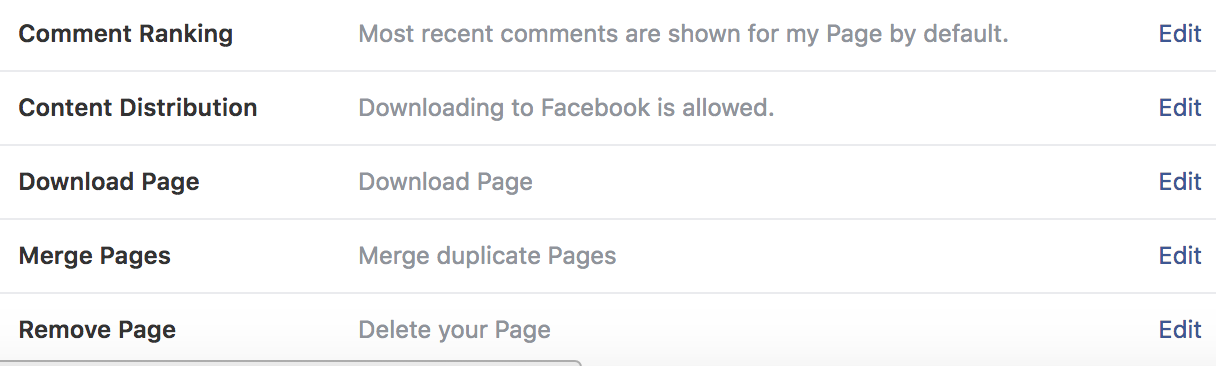
3. Click “Delete [Page Name]” then click “Ok.”
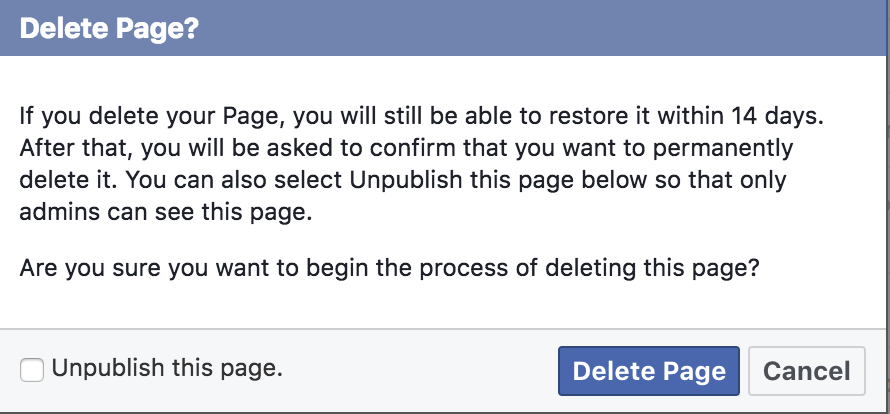
4. And that’s it! It’s important to note Facebook takes up to fourteen days to delete your Page.

The 15 Best Video Editing Apps for 2018
If you’re reading this blog post, chances are you already know you should incorporate more video content into your marketing.
But like most new strategies, you might need to prove its ROI before you get budget. And that can be tricky, because to make a great video, you need a few things — like a camera and editing software.
You might already have a high-quality camera built into your smartphone, but editing your raw footage and preparing it for publication requires a third-party mobile app. You might even need to hop on the computer for the more extensive post-production projects.
There’s a good chance you already have video editing software installed on your computer. For Windows, that’s Windows Movie Maker, and for Macs, it’s iMovie. But depending on the purpose your video is serving — and the content channel to which you’re distributing it — you may find that these options aren’t packed with enough features.
The good news: There are several free and inexpensive video editing apps and tools you can download that run the gamut from super simple to Hollywood-level powerful.
The following 15 solutions can help you make video magic — whether your video is meant for Instagram, YouTube, or a similar channel where you audience is hungry for content.
Best Video Editing Software
- Magisto
- Hyperlapse
- Wondershare FilmoraGo
- InShot
- WeVideo
- Splice
- Adobe Premiere Clip
- PicPlayPost
- Blender
- Lightworks
- Shotcut
- VSDC Free Video Editor
- Machete Video Editor Lite
- Avidemux
- HitFilm

Instagram Video Editing Apps
The following apps allow you to edit and quickly upload beautiful videos to Instagram. None of these apps are limited to Instagram, but are known for their support of this social network.
1. Magisto
Free | iOS, Android
 Source: Google Play
Video automation is here — in the form of the Magisto video editor.
Magisto allows you to make incredible videos without ever leaving your smartphone in three easy steps: First you’ll choose your video editing style (the type of story you’re telling), then you’ll choose the photos and video clips you’d like included, and lastly you’ll pick your music from Magisto’s built-in music library.
Using artificial intelligence (AI), this intuitive app helps organize your footage in a video that best delivers the message you have in mind. Why not stop at the free version? Upgrade to Premium or Professional for a small monthly fee and make longer movies with more of your own content.
2. Hyperlapse
Free | iOS only
Hyperlapse is an app created by Instagram itself that condenses videos into brief, hyper-speed videos that you can upload to Instagram or Facebook.
You can choose among a few different speeds, and the app will show you how long the hyperlapsed video will be for every speed in comparison to the length of the video in real time. (So a 40-second video in real time will become roughly a seven-second video in Hyperlapse at 6X speed.) It’s a really cool way to capture something that usually lasts a while — like a sunset or an event setup.
See what happened when I used Hyperlapse to film daybreak at 12X in the video above.
3. Wondershare FilmoraGo
Free | iOS, Android
 Source: Google Play
Wondershare Filmora (formerly Wondershare Video Editor) is the perfect option if you want to start out with basic video editing functionality with the opportunity to get more advanced as you go. The app is perfect for Instagram, but can create audience-ready videos for numerous platforms.
Filmora is available for Windows and Mac computers, whereas the company’s FilmoraGo mobile app is free to download for both iOS and Android devices.
Filmora’s “Easy Mode” strips away the complexity so you can drag and drop video clips, add some music, and produce a finished video in a matter of minutes. The FilmoraGo app has many of these features, plus an Effect Store where you can incorporate preset intros, themes, and transitions into your video creation.
Sound too good to be true? Well, you’re right: The free version of Wondershare Filmora adds a watermark to your videos that you can only remove through upgrading to their paid service.
4. InShot
Free | iOS | Android
There are the times when you just want to edit a video — no fancy collages and no splicing. For that, there’s InShot, a handy app that lets you trim, speed up, or add music and filters to video. It’s pretty fundamental, but with that comes a high ease of use. You can also add a background, if you like, though we think it’s pretty cool to have an overlap of images, like we did with the video below.
In the video above, I took a simple video of a tranquil beach scene, but enhanced it with InShot’s “warm filter” and added a fitting musical track to it — a song called “Pikake Stream,” by Kalani. (I recommend viewing the video in its entirety with headphones, especially if you’re having a stressful day.)
Free Video Editing Apps
The following tools are most versatile mobile apps of all the free software listed in this article.
5. WeVideo
Free | iOS, Android
 Source: Google Play
Cloud-based video editing software (i.e., software that you access via a browser instead of downloading directly to your hard drive) is growing more and more popular. One of the programs leading the charge is WeVideo.
WeVideo definitely offers some advanced features and functionality, including audio editing capabilities, a library of commercially licensed music, and the ability to share videos in 4K resolution. However, the free version of WeVideo isn’t without its limitations.
One major downside is that you’re only given 10GB of cloud storage. If you’re making a one-off video, this is fine. But if you’re planning to edit multiple videos, you’ll definitely need more space. The free version also puts a WeVideo watermark on your videos, which isn’t ideal.
WeVideo is also available as a desktop computer product, and comes with free and paid plans. For complete breakdown of the differences between these plans, check out WeVideo’s pricing page.
6. Splice
Free | iOS only
It only seems fitting that the makers of GoPro would also release an app that allows you — as the name suggests — to splice together different video clips on your phone to create a moving collage.
We had a lot of fun playing with this one, especially since Splice even contains a library of musical tracks that can be used as a background for your finished product. You can also use the app to trim and edit the different pieces of video, and customize transition lengths from one scene to the next.
My colleague, Amanda Zantal-Wiener, experimented with Splice by compiling the above 15-second video of her dog — using only an iPhone 6.
7. Adobe Premiere Clip
Free | iOS, Android
 Source: Google Play
Adobe’s popular video editor, Premiere, isn’t just available on your mobile device — it’s free.
Melissa Stoneburner of Examiner.com calls this app a “gateway” into the full Adobe Premiere Pro video editor for desktop, and we can see this for ourselves. Similar to Magisto (the first video editor on our list), Adobe Clip automatically sets your video to the music of your choice (using Premiere Clip’s library or your own), and offers a Freeform editor that allows you to customize your edits further after this initial audio sync.
Premiere’s equally robust video editing features help you trim, drag, and drop multiple video and image clips — right from your mobile device’s photo and video album — in the order you’d like.
Then, just add proper lighting, manipulate the speed of the video, and share your final product directly on Facebook, Twitter, or YouTube.
8. PicPlayPost
Free | iOS, Android
We’ve already covered the coolness of photo collages. But what if you could make a video collage? PicPlayPost is a simple app that lets you do exactly that. Just remember that the sound from both videos will play at the same time, so be sure they won’t clash with one another.
There are many uses for a video collage app, but my colleague, Lindsay Kolowich, particularly likes the way fitness professional Melissa Made uses it on her Instagram account. She posts video collages with her performing a workout on one side, while she explains the workout out loud on the other.
Best Video Editing Software for YouTube
Although the video editing services below do not offer mobile versions, they do offer easy-to-learn functionality at minimal cost. These apps are the best for sitting down at your computer and editing amazing video content for your YouTube channel.
9. Blender
Free | Windows, Mac, Linux
 Source: Blender
The open source program Blender is more than just a video editor: It’s a full-blown 3D animation suite, which allows for modeling, rendering, motion tracking, and more.
On the video editing side, there are a ton of features, including transitions, speed control, filters, adjustment layers, and more. There are also 32 slots available for adding video clips, audio clips, images, and effects, which means you can produce some incredibly complex video.
For the amateur video editor, all the functionality that’s available can be a bit overwhelming. But if you’re looking to produce truly professional-quality video — without having to deal with watermarks — Blender is a solid option. The best part: “You are free to use Blender for any purpose, including commercially or for education,” according to its website. For the fine print, check out its licensing info.
10. Lightworks
Free | Windows, Mac, Linux
 Source: ZDNet
Like Blender, Lightworks is definitely on the more advanced (and powerful) end of the video editing software spectrum. In fact, it’s a program that’s been used to edit some well-known and award-winning films, including Pulp Fiction, The Wolf of Wall Street, and The King’s Speech.
There are two different licenses you can choose from with Lightworks: “Free” and “Pro.” (The latter of which, as you might have guessed, requires that you cough up some cash.) The main difference between the two licenses is that the Pro version offers more features, including stereoscopic output and advanced project sharing. But the free version is still quite powerful, providing 100+ effects and supporting multicam editing.
11. Shotcut
Free | Windows, Mac, Linux
 Source: Shotcut
Shotcut is another open source video software — and it’s completely free. It’s possible to use Shotcut to create professional-looking videos, but the interface is tricky to use. Perhaps that’s because it was originally developed for the Linux platform, which looks and feels a lot different from the typical Windows or Mac UX.
With dedication — and time spent in the Shotcut frequently asked questions and how-to guide sections — it’s possible to use this software to create and export high-quality videos, completely for free.
12. VSDC Free Video Editor
Free | Windows Only
 Source: Softonic
In experienced hands, the VSDC Free Video Editor can produce some seriously professional-looking video. In addition to supporting nearly every major video format, the program offers advanced video effects, including object transformation and color correction, as well as advanced audio effects like volume correction and sound normalization. And unlike WeVideo, the VSDC Free Video Editor is truly free. You can use the program’s full feature set without having to deal with pesky watermarks.
Unfortunately, there is one catch. If you want technical support, you need to pay. (And because there is a bit of a learning curve, there’s a good chance you’ll need to.) Support for the VSDC Free Video Editor costs $9.99 for one month and $14.99 for one year.
13. Machete Video Editor Lite
Free | Windows Only
 Source: Softonic
At the simple end of the spectrum is Machete Video Editor Lite, a free program allowing you to cut, copy, and paste different sections of video. As the Machete website puts it, Video Editor Lite was “designed for quick and simple ‘slicing’ of your video files.”
The program’s intuitive interface means you won’t have to waste time shuffling through technical support documents. And because Video Editor Lite doesn’t re-encode your video files when you slice them, you don’t have to worry about losing video quality.
The main downsides to the program? It only supports the AVI and WMV video formats, and it doesn’t allow for audio editing. Still, if you have zero video editing experience and only need to make simple edits, it’s a great option.
14. Avidemux
Free | Windows, Mac, Linux
 Source: Softonic
Like Machete Video Editor Lite, Avidemux allows you to do basic video editing (no audio editing) without having to worry about loss of video quality. But Avidemux also has a few more tricks up its sleeve.
For starters, the program supports multiple video formats, including AVI, DVD, MPEG, QuickTime, and MP4. What’s more, Avidemux comes with several filters that allow you to perform a host of different functions, from flipping and rotating clips, to adding subtitles, to adjusting colors and brightness levels.
And while the learning curve for Avidemux is slightly steeper compared to Machete Video Editor Lite, the upside is that there’s an extensive Avidemux wiki that covers everything you need to know.
15. HitFilm
$99 | Windows, Mac
 Source: HitFilm
HitFilm Express is a free video editing and visual effects software — which means you can use it to add more than 180 special effects to your videos, including 3D editing.
Possibly the coolest HitFilm feature is its wealth of tutorial videos — users can practice applying special visual effects in movie tutorials based on Star Wars, Westworld, and more.
Of course, upgrading to HitFilm Pro grants access to more visual effects, better high resolution and 3D rendering, and better audio syncing between audio and video files. It costs $300, but if you’re not ready to fully invest, HitFilm Express users can purchase lower-cost expansions to use more tools in their software.
To see the complete list of differences between HitFilm Free and Pro, check out their “Compare Versions” page.
Want to learn more about video editing? Check out the best editing apps for photos.
Online video content isn’t just watched more — it’s expected more. Luckily, you have the 15 video editing tools above to help you. And the sooner you download one, the sooner you can sharpen your audio/video skills.
Grab the guide below to make the video learning curve easier.

How to Write a Business Plan: A Step-by-Step Guide [Examples + Template]
How to Write a Business Plan
- Write an executive summary.
- Describe your company and business model.
- Analyze your market’s conditions.
- Explain your product and/or service.
- Outline all operations & management roles.
- Design a marketing & sales strategy.
- Detail a financial plan with business costs, funding, and revenue projections.
- Summarize the above with an appendix.
Not all business ideas are good ones. Take my friend Eric, for example, who had the idea of a cell phone that doubles as a taser. Probably not the best product to have on the market.
A lot of people have business ideas — it’s whether these ideas are any good that really matters. That’s precisely why, if you intend to actually build a business from your idea, it’s helpful to create a business plan so you can build out your concept in detail and prove that it can really work, both logistically and financially.

What Is a Business Plan?
A business plan is a living document that maps out the details of your business. It covers what your business will sell, how it will be structured, what the market looks like, how you plan to sell your product or service, what funding you’ll need, what your financial projections are, and which permits, leases, and other documentation will be required.
At its core, a business plan helps you prove to yourself and others whether or not your business idea is worth pursuing. It’s the best way to take a step back, look at your idea holistically, and solve for issues years down the road before you start getting into the weeds.
This post covers tips for writing a business plan, followed by an outline of what to include and business plan examples. Let’s start with some basic, overarching tips before we dive in to the details.
Grab your free business plan template here and apply the practices below.
Tips for Creating a Business Plan
Narrow down what makes you different.
Before you start whipping up a business plan, think carefully about what makes your business unique first. If you’re planning to start a new athletic clothing business, for example, then you’ll need to differentiate yourself from the numerous other athletic clothing brands out there.
What makes yours stand out from the others? Are you planning to make clothing for specific sports or athletic activities, like yoga or hiking or tennis? Do you use environmentally friendly material? Does a certain percentage of your proceeds go to charity? Does your brand promote positive body image?
Remember: You’re not just selling your product or service — you’re selling a combination of product, value, and brand experience. Think through these big questions and outline them before you dive in to the nitty-gritty of your business plan research.
Keep it short.
Business plans are more short and concise nowadays than they used to be. While it might be tempting to include all the results of your market research, flesh out every single product you plan to sell, and outline exactly what your website will look like, that’s actually not helpful in the format of a business plan.
Know these details and keep them elsewhere, but exclude everything but the meat and potatoes from the business plan itself. Otherwise, you might risk losing your readers’ attention.
Format for easy skimming.
Your business plan shouldn’t just be a quick(ish) read — it should be easy to skim, too. That’s where formatting becomes particularly important. Use headers and bullet points, bold or highlight the key lines or metrics you want the reader to take away, and even attach labeled tabs to your copies (paper and digital) for easy reference.
You can (and should) change it as you go.
Keep in mind that your business plan is a living, breathing document. That means you can update your business plan as things change. For example, you might want to update it a year or two down the road if you’re about to apply for a new round of funding.
How to Write a Business Plan
Here are the key elements in a business plan template, what goes into each of them, and a sample business plan section at each step in the process.
Step 1. Executive Summary
The purpose of the executive summary is to give readers a high-level view of the company and the market before delving in to the details. (Pro Tip: Sometimes it’s helpful to write the executive summary after you’ve put together the rest of the plan so you can draw out the key takeaways more easily.)
The executive summary should be about a page long, and should cover (in 1–2 paragraphs each):
- Overview: Briefly explain what the company is, where you’ll be located, what you’ll sell, and who you’ll sell to.
- Company Profile: Briefly explain the business structure, who owns it and whatprior experience/skills they’ll bring to the table, and who the first hires might be.
- Products or Services: Briefly explain what you’ll sell.
- The Market: Briefly explain your main findings from your market analysis.
- Financial Considerations: Briefly explain how you plan to fund the business and what your financial projections are.
Example of an “Overview” section of the Executive Summary (from Bplans):
Jolly’s Java and Bakery (JJB) is a start-up coffee and bakery retail establishment located in southwest Washington. JJB expects to catch the interest of a regular loyal customer base with its broad variety of coffee and pastry products. The company plans to build a strong market position in the town, due to the partners’ industry experience and mild competitive climate in the area.
JJB aims to offer its products at a competitive price to meet the demand of the middle-to higher-income local market area residents and tourists.
Step 2. Company Description
Next, you’ll have your company description. Here’s where you have the chance to give a summary of what your company does, your mission statement, business structure and business owner details, location details, the marketplace needs that your business is trying to meet, and how your products or services actually meet those needs.
Example of a “Company Summary” section (from Bplans):
NALB Creative Center is a start up, to go into business in the summer of this year. We will offer a large variety of art and craft supplies, focusing on those items that are currently unavailable on this island. The Internet will continue to be a competitor, as artists use websites to buy familiar products. We will stock products that artists don’t necessarily have experience with. We will maintain our price comparisons to include those available on line.
We will offer classes in the use of new materials and techniques.
We will build an Artist’s Oasis tour program. We will book local Bed and Breakfasts; provide maps and guides for appropriate plein-air sites; rent easels and materials; sell paint and other supplies and ship completed work to the clients when dry.
We will expand the store into an art center including: A fine art gallery, offering original art at, or near, wholesale prices; Musical instruments/studio space; Classrooms for art/music lessons; Art/Music books; Live music/coffee bar; Do-it-Yourself crafts such as specialty T-Shirts, signs, cards, ceramics for the tourist trade.
Step 3. Market Analysis
One of the first questions to ask yourself when you’re testing your business idea is whether it has a place in the market. The market will ultimately dictate how successful your business will be. What’s your target market, and why would they be interested in buying from you?
Get specific here. For example, if you’re selling bedding, you can’t just include everyone who sleeps in a bed in your target market. You need to target a smaller group of customers first, like teenagers from middle-income families. From there, you might answer questions like: How many teenagers from middle-income families are currently in your country? What bedding do they typically need? Is the market growing or stagnant?
Include both an analysis of research that others have done, as well as primary research that you’ve collected yourself — whether by customer surveys, interviews, or other methods.
This is also where you’ll include a competitive analysis. In our example, we’d be answering the question: how many other bedding companies already have a share of the market, and who are they? Outline the strengths and weaknesses of your potential competitors, as well as strategies that will give you a competitive advantage.
Example of a “Market Analysis” summary section (from Bplans):
Green Investments has identified two distinct groups of target customers. These two groups of customers are distinguished by their household wealth. They have been grouped as customers with <$1 million and >$1 million in household wealth. The main characteristic that makes both of these groups so attractive is their desire to make a difference in the world by making investment decisions that take into account environmental factors.
The financial services industry has many different niches. Some advisors provide general investment services. Others will only offer one type of investments, maybe just mutual funds or might concentrate on bonds. Other service providers will concentrate on a specific niche like technology or socially responsible companies.
Market Segmentation
Green Investments has segmented the target market into two distinct groups. The groups can be differentiated by their difference in household wealth, households of <$1 million and >$1 million.
- <$1 million (household worth): These customers are middle class people who have a concern for the environment and are taking personal action through their choosing of stock investments based on companies with both strong economic and environmental performance records. Because these people do not have an over abundance of money they choose stocks that are of moderate risk. Generally, this group has 35%-45% of their portfolio in stocks, the remaining percentages in other types of investments.
- >$1 million (household worth): These customers are upper middle class to upper class. They have amassed over $1 million in savings and are fairly savvy investors (themselves or the people they hire). These people are generally concerned about the rate of return of their investments but also have environmental concerns.
Step 4. Products and/or Services
Here’s where you can go into detail about what you’re selling and how it benefits your customers. If you aren’t able to articulate how you’ll help your customers, then your business idea may not be a good one.
Start by describing the problem you’re solving. Then, go into how you plan to solve it and where your product or service fits into the mix. Finally, talk about the competitive landscape: What other companies are providing solutions to this particular problem, and what sets your solution apart from theirs?
Example of a “Products and Services” section (from Bplans):
AMT provides both computer products and services to make them useful to small business. We are especially focused on providing network systems and services to small and medium business. The systems include both PC-based LAN systems and minicomputer server-based systems. Our services include design and installation of network systems, training, and support.
Product and Service Description
In personal computers, we support three main lines:
1. The Super Home is our smallest and least expensive line, initially positioned by its manufacturer as a home computer. We use it mainly as a cheap workstation for small business installations. Its specifications include …[additional specifics omitted]
2. The Power User is our main up-scale line. It is our most important system for high-end home and small business main workstations, because of …. Its key strengths are …. Its specifications include ….[additional specifics omitted]
3. The Business Special is an intermediate system, used to fill the gap in the positioning. Its specifications include … [additional specifics omitted]
In peripherals, accessories and other hardware, we carry a complete line of necessary items from cables to forms to mousepads … [additional specifics omitted]
In service and support, we offer a range of walk-in or depot service, maintenance contracts and on-site guarantees. We have not had much success selling service contracts. Our networking capabilities …[additional specifics omitted]
Competitive Comparison
The only way we can hope to differentiate well is to define the vision of the company to be an information technology ally to our clients. We will not be able to compete in any effective way with the chains using boxes or products as appliances. We need to offer a real alliance.
The benefits we sell include many intangibles: confidence, reliability, knowing that somebody will be there to answer questions and help at the important times.
These are complex products, products that require serious knowledge and experience to use, and our competitors sell only the products themselves.
Unfortunately, we cannot sell the products at a higher price just because we offer services; the market has shown that it will not support that concept. We have to also sell the service and charge for it separately.
Step 5. Operations & Management
Use this section to outline your business’ unique organization and management structure (keeping in mind that you may change it later). Who will be responsible for what? How will tasks and responsibilities be assigned to each person or each team?
Includes brief bios of each team member and highlight any relevant experience and education to help make the case for why they’re the right person for the job. If you haven’t hired people for the planned roles yet, that’s OK — just make sure you identify those gaps and explain what the people in those roles will be responsible for.
Example of an “Personnel Plan” section of the Operations & Management section (from Bplans):
The labor force for DIY Wash N’ Fix will be small. It will consist of a part-time general manager to handle inter-business relationships and corporate responsibilities. In addition, DIY Wash N’ Fix will employ three certified mechanics/managers; their duties will consist of the day-to-day operation of the firm. These duties fall into two categories: managerial and operational. Managerial tasks include: scheduling, inventory control and basic bookkeeping. Safety, regulatory issues, customer service and repair advice are the operational tasks they will be responsible for.
Additionally, customer service clerks will be hired to perform the most basic tasks: customer service and custodial. DIY Wash N’ Fix will have a single general manager to coordinate all outside business activities and partnerships. The business relationships would include accounting services, legal counsel, vendors and suppliers, maintenance providers, banking services, advertising and marketing services, and investment services. Laurie Snyder will fill this general management position. She will be receiving an MBA from the University of Notre Dame in May 2001.
The daily management of the business will be left to the lead mechanic. Even though DIY Wash N’ Fix is not a full service repair shop it can be expected that some customers will attempt repairs they are not familiar with and need advice. Therefore, we intend to hire three fully certified mechanics. The mechanics will not be authorized to perform any work on a customer’s car, but they will be able to take a look at the car to evaluate the problem. To reduce our liability for repairs done incorrectly we feel only professional mechanics should give advice to customers. The primary function of the mechanics will be customer service and managerial responsibilities.
Step 6. Marketing & Sales Plan
This is where you can plan out your comprehensive marketing and sales strategies that’ll cover how you actually plan to sell your product. Before you work on your marketing and sales plan, you’ll need to have your market analysis completely fleshed out, and choose your target buyer personas, i.e., your ideal customers. (Learn how to create buyer personas here.)
On the marketing side, you’ll want to cover answers to questions like: How do you plan to penetrate the market? How will you grow your business? Which channels will you focus on for distribution? How will you communicate with your customers?
On the sales side, you’ll need to cover answers to questions like: what’s your sales strategy? What will your sales team look like, and how do you plan to grow it over time? How many sales calls will you need to make to make a sale? What’s the average price per sale? Speaking of average price per sale, here’s where you can go into your pricing strategy.
For more help with your marketing and sales strategies, go to our online guide for how to start a business and scroll to the “Marketing, Sales & Services Tips for Startups” section.
Example of a “Marketing Plan” section (from Bplans):
The Skate Zone plans to be the first amateur inline hockey facility in Miami, Florida. Due to the overwhelming growth of inline hockey throughout the United States, the company’s promotional plans are open to various media and a range of marketing communications. The following is a list of those available presently.
Public relations. Press releases are issued to both technical trade journals and major business publications such as USAHockey Inline, INLINE the skate magazine, PowerPlay, and others.
Tournaments. The Skate Zone will represent its services at championship tournaments that are held annually across the United States.
Print advertising and article publishing. The company’s print advertising program includes advertisements in The Yellow Pages, Miami Express News, The Skate Zone Mailing, school flyers, and inline hockey trade magazines.
Internet. The Skate Zone currently has a website and has received several inquiries from it. Plans are underway to upgrade it to a more professional and effective site. In the future, this is expected to be one of the company’s primary marketing channels.
Step 7. Financial Plan
Finally, outline your financial model in detail, including your start-up cost, financial projections, and a funding request if you’re pitching to investors.
Your start-up cost refers to the resources you’ll need to get your business started — and an estimate of how much each of those resources will cost. Are you leasing an office space? Do you need a computer? A phone? List out these needs and how much they’ll cost, and be honest and conservative in your estimates. The last thing you want to do is run out of money.
Once you’ve outlined your costs, you’ll need to justify them by detailing your financial projections. This is especially important if you’re looking for funding for your business. Make sure your financial model is 100% accurate for the best chance of convincing investors and loan sources to support your business.
Example of a “Financial Projections” section (from Bplans):
The following table is the projected Profit and Loss statement for Markam.

Image via Bplans
Step 8. Appendix
Finally, consider closing out your business plan with an appendix. The appendix is optional, but it’s a helpful place to include your resume and the resume(s) of your co-founder(s), as well as any permits, leases, and other legal information you want to include.
There you have it. We hope this has helped you get a better idea of what a business plan should look like. Now it’s time to turn that business idea into a reality. Good luck!

