
20 Questions to Ask When Creating Buyer Personas [Free Template]
Buyer personas are a crucial component of successful inbound marketing, particularly for the sales and marketing departments. After all, the marketing team needs to know to whom they are marketing, and the sales team needs to know to whom they are selling.
But once you sit down to craft your buyer personas, you may find yourself staring blankly at a white screen for some time, wondering where on earth you’re supposed to begin.
Download our free buyer persona template here to learn how to create buyer personas for your business.
Before you spend time and money on research, ask yourself the questions below to help you develop your personas, then use our free buyer persona template above to share your personas with the rest of your company.
Keep in mind you’ll need a content marketing strategy to reach your buyer persona. Want to learn the process? Check out HubSpot Academy’s free content marketing training resource page.
20 Buyer Persona Questions to Ask When Identifying Your Audience
Questions About Their Personal Background
1. Describe your personal demographics.
Collecting demographic information is a great place to begin drafting your personas because it’s easy to obtain and starts to paint a clearer, more personal picture of your customer. Are they married? What’s their annual household income? Where do they live? Are they male or female? How old are they? Do they have children?
2. Describe your educational background.
What level of education did they complete? Which schools did they attend, and what did they study? Get specific here. “Boston University” is better than “liberal arts college.”
3. Describe your career path.
How did they end up where they are today? Did they major in a subject that’s very similar to or very different from their current role? Has their career track been pretty traditional, or did they switch from another industry?
Questions About Their Company
4. In which industry or industries does your company work?
The answer to this question isn’t the department in which your buyer persona works, or the service he or she personally provides to his/her company. Your buyer persona’s industry is the type of service they deliver to their clients, and knowing this can help you measure your business’s impact in the markets you’re targeting.
Depending on the challenges your buyer persona faces, it might also be worth getting information on the industries your client’s business serves, not just the actual service they provide.
For example, if your client provides environmental services, their industry is just that — environmental services. But if their primary clients are schools and hospitals, a good answer to this question might ultimately be:
They are in the environmental services industry for education and medical customers.
5. What is the size of your company (revenue, employees)?
Knowing details about your persona’s company like industry, size, number of employees, and other details will especially help you when you’re building the fields for your landing page forms.
Questions About Their Role
6. What is your job role? Your title?
How long have they had this role and title? Are they an individual contributor, or do they manage other people?
7. Whom do you report to? Who reports to you?
The importance with which you should regard your buyer persona’s job and seniority level certainly depends on the product or service you’re selling.
If you’re a B2C company, you may simply consider this information as another way to better understand nuances of your persona’s life.
If you’re a B2B company, this piece of information becomes more crucial. Is your persona at a managerial or director level, and well versed in the intricacies of your industry? They’ll need less education than someone at an introductory level, who may need to loop in other decision makers before making purchasing decisions.
8. How is your job measured?
Which metric(s) is your persona responsible for? Which numbers or charts or waterfall graphs do they look at every day? This will help you determine what makes them successful, and what they might be worried about when it comes to “hitting their numbers.”
9. What does a typical day look like?
What time do they get to work and what time do they leave? What do they do when they’re most productive? What’s their “busy work” look like?
This should include both the tasks they do for their job, as well as what happens during the day outside their job. Are they spending more time at work or at home? Where would they rather be? What do they like to do for fun? Who are the people in their life that matter most? What kind of car do they drive? Which TV shows do they watch? Heck, what outfit are they wearing? Get personal here.
10. Which skills are required to do your job?
If they were hiring someone to replace them and had to write a job description of what’s actually required, what would it say? What are the ideal skills for this job, and how good is your persona at each of them? Where did they learn these skills? Did they learn them on the job, at a previous job, or by taking a course?
11. What knowledge and which tools do you use in your job?
Which applications and tools do they use every single day? Every week? Understanding what products they love (and hate) to use can help you identify commonalities in your own product (and adjust your positioning accordingly).
Questions About Their Challenges
12. What are your biggest challenges?
You’re in business because you’re solving a problem for your target audience. How does that problem affect their day-to-day life? Go into detail, and focus on the nuances that illustrate how that problem makes them feel.
For example, let’s say your company sells personal tax software directly to consumers. One of your personas may be a first-time tax preparer. What are the pain points of first-time tax preparers? They’re probably intimidated by the prospect of doing their taxes by themselves for the first time, overwhelmed by a tax code they don’t understand, and confused about where to start. These pain points differ from those of a seasoned tax preparer, whose pain points may be not knowing how to maximize the amount of their return and find creative loopholes for deductions.
Try coming up with real quotes to refer to these challenges. For example, “It’s been difficult getting company-wide adoption of new technologies in the past;” or “I don’t have time to train new employees on a million different databases and platforms.”
Questions About Their Goals
13. What are you responsible for?
This goes beyond the metric(s) they’re measured on. What’s their primary goal at work? What about their secondary goal? Knowing these will help you learn what you can do to help your persona achieve their goals and overcome their challenges.
14. What does it mean to be successful in your role?
What can you do to make your personas look good? Companies that take the time to understand what makes their personas successful will likely enjoy more effective communications from both the sales and marketing teams.
Questions About How They Learn
15. How do you learn about new information for your job?
If you’re going to market and sell to these personas, you need to understand how they consume information. Do they go online, prefer to learn in-person, or pick up newspapers and magazines? If they’re online learners, do they visit social networks? To Google? Which sources do they trust the most — friends, family, coworkers, or industry experts?
16. Which publications or blogs do you read?
In an effort to piece together how a typical day in their life runs, figure out where they regularly go to stay informed. If you know how they prefer to gather information, you can make yourself present in those spots and work on establishing credibility in those communities.
17. Which associations and social networks do you participate in?
You should be investing time and resources on social media marketing, but the question is: Which social networks should you be investing more time and resources than others? Identify the associations and social networks your buyers spend their time. Then, you can prioritize which accounts to create and which conversations to participate in.
Questions About Their Shopping Preferences
18. How do you prefer to interact with vendors?
The experience of purchasing your product should align with your persona’s expectations. What should their sales experience feel like? Is it consultative? How much time do they expect to spend with a sales person? Do they anticipate an in-person meeting, or would they rather conduct the sales process online or over the phone?
19. Do you use the internet to research vendors or products? If yes, how do you search for information?
Again, which avenues are they using to find new information? Do they search online, look at review websites, ask their friends and family, or something else?
20. Describe a recent purchase.
Why did you consider a purchase, what was the evaluation process, and how did you decide to purchase that product or service?
If you can anticipate the objections your persona will have, you can be prepared for them in the sales process and perhaps even educate them in your marketing collateral to help allay fears right away. What might make them reticent to buy from you or any other provider in your industry? Is this their first time purchasing a product or service of your kind? If not, what caused them to switch products or services?
Now What?
Once you’ve gone through this exercise and worked out any lingering questions about what makes your persona tick, browse through some stock imagery and find an actual picture to associate with your persona. Going through this exercise forces you to clarify an image of your target audience in your entire organization’s mind that will help keep your messaging consistent.
Another useful exercise is to practice being able to identify your buyer persona so you can tailor your communications. How will you know when you’re talking to this persona? Is it their job title? Something about the way they talk or carry a conversation? Their pain points? How they found your company? Once you’ve established not only who your persona is, but also how you can identify them when you encounter one or another, your employees will be able to maintain a consistent voice that is still customized to each person they talk to.
Then, use our free, downloadable persona template to organize the information you’ve gathered about your persona. Share these slides with the rest of your company so everyone can benefit from the research you’ve done and develop an in-depth understanding of the person (or people) they’re targeting every day at work.
Want to learn about some the best real buyer personas? Check out seven companies with awesome buyer personas.

Facebook Has Published Its Internal Community Standards and Will Roll out a New Appeals Process
Facebook has published its internal enforcement guidelines.
These guidelines — or community standards, as they’re also known — are designed to help human moderators decide what content should (not) be allowed on Facebook. Now, the social network wants the public to know how such decisions are made.
“We decided to publish these internal guidelines for two reasons,” wrote Facebook’s VP of Global Product Management Monica Bickert in a statement. “First, the guidelines will help people understand where we draw the line on nuanced issues.”
“Second,” the statement continues, “providing these details makes it easier for everyone, including experts in different fields, to give us feedback so that we can improve the guidelines – and the decisions we make – over time.”
Facebook’s content moderation practices have been the topic of much discussion and, at times, contention. At CEO Mark Zuckerberg’s congressional hearings earlier this month, several lawmakers asked about the removal or suppression of certain content that they believed was based on political orientation.
And later this week, the House Judiciary Committee will host yet another hearing on the “filtering practices of social media platforms,” where witnesses from Facebook, Google, and Twitter have been invited to testify — though none have confirmed their attendance.
What the Standards Look Like
According to a tally from The Verge reporter Casey Newton, the newly-released community standards total 27 pages, and are divided into six main sections:
- Violence and Criminal Behavior
- Safety
- Objectionable Content
- Integrity and Authenticity
- Respecting Intellectual Property
- Content-Related Requests
Within these sections, the guidelines delve deeper into the moderation of content that might promote or indicate things like threats to public safety, bullying, self-harm, and “coordinating harm.”
That last item is particularly salient for many, following the publication of a New York Times report last weekend on grave violence in Sri Lanka that is said ignited at least in part by misinformation spread on Facebook within the region.
According to that report, Facebook lacks the resources to combat this weaponization of its platform, due to some degree to its lack of Sinhalese-speaking moderators (one of the most common languages in which this content appears).
As promised, I wanted to briefly explain why I hope anyone who uses Facebook — in any country — will make time for our Sunday A1 story on how the newsfeed algorithm has helped to provoke a spate of violence, as we’ve reconstructed in Sri Lanka: https://t.co/hrpBSMfb4t
— Max Fisher (@Max_Fisher)
April 23, 2018
But beyond that, many sources cited in the story say that even when this violence-inciting content is reported or flagged by concerned parties on Facebook, they’re told that it doesn’t violate community standards.
Within the guidelines published today, an entire page is dedicated to “credible violence,” which includes “statements of intent to commit violence against any person, groups of people, or place (city or smaller)” — which describes much of the violence reported in the New York Times story that Facebook was allegedly used to incite.
Bickert wrote in this morning’s statement that Facebook’s Community Operations team — which has 7,500 content reviewers (and which the company has said it hopes to more than double this year) — currently oversees these reports and does so in over 40 languages.
Whether that includes Sinhalese and other languages spoken in the regions affected by the violence described in the New York Times report was not specified.
A New Appeals Process
The public disclosure of these community standards will be followed by the rollout of a new appeals project, Bickert wrote, that will allow users and publishers to contest decisions made about the removal of content they post.
To start, the statement says, appeals will become available to those whose content was “removed for nudity/sexual activity, hate speech or graphic violence.” Users whose content is taken down will be notified and provided with the option to request further review into the decision.
That review will be done by a human moderator, Bickert wrote, usually within a day. And if it’s been determined that the decision was made in error, it will be reversed and the content will be re-published.
In the weeks leading up to Zuckerberg’s congressional testimony earlier this month, Facebook released numerous statements about its policies and practices, and the changes it would be making to them. It was predicted that the motivation behind those numerous statements was to leave as little room for speculation as possible among lawmakers.
There’s some probability that this most recent statement was made, this appeals process introduced, and these standards published in anticipation of potential questions being asked at this week’s hearings.
In addition to the aforementioned House Judiciary Committee hearing on “filtering practices” tomorrow, Facebook CTO Mike Schroepfer will testify before UK Parliament’s Digital, Culture, Media and Sport Committee. (Dr. Aleksandr Kogan — the Cambridge University professor behind the data-harvesting app who eventually sold personal user information to Cambridge Analytica — testified before that same committee this morning.)
How or if this statement and the content review guidelines are raised within these events remain to be seen — but it’s important to again note that one reason for their release, according to Bickert, was to allow feedback from the public, whether it’s comprised of daily Facebook users or topical experts.
It’s possible that in the wake of Facebook’s unfolding and continuous scrutiny, all of its policies will continue to evolve.
Featured image credit: Facebook

11 of the Best Phone Interview Questions
The average job opening attracts 250 resumes, and the average interview process from start to finish can take 23 days. Phone interviews can help you determine which candidates have the critical thinking and interpersonal skills necessary for an in-person interview. When you weed out less qualified applicants right off the bat, you can narrow down your candidate pool, and limit the amount of time wasted in your search.
While a resume supplies you with general information about a person’s background, a phone interview helps you ask second-level questions to start forming a deeper, more holistic picture of a candidate’s background and skills.
But with only about thirty minutes on the phone, what questions can you ask to build good rapport with your interviewee and receive some truly insightful answers? Better yet, what can you ask to decipher whether the applicant is a good fit for your company and the role?
To help you get the most out of your phone interview process, we’ve narrowed down to eleven of the best questions to ensure you’re discovering the the best candidates to bring into the office.
Phone interview questions
- Tell me a bit about yourself?
- What attracted you to apply for this position? list item list item list item list item list item
- How would you describe your work style?
- What can you tell me that isn’t on your resume that is important for me to know about you?
- Would you rather finish something late and perfectly, or on-time and imperfectly?
- What would you say is the most important skill you’ve learned in your current role? What’s an area you’d like to improve on?
- What’s the biggest challenge you’ve faced in your current role? Tell me about it.
- Why are you leaving your job/why are you looking elsewhere?
- What’s some feedback that you’ve received that was difficult to hear, but ultimately has proven really valuable?
- If you could have dinner with three famous people who are no longer living, who would they be and why?
1. Tell me a bit about yourself?
While this question sounds really simple, it actually serves an important purpose. First, it helps put the candidate at ease — it’s an easy one, and one she should expect. Second, your interviewee will likely bring up whatever she is most excited about or proud of in relation to the role, and this will help steer the direction of your entire conversation.
Look for the candidate to list out a few skills she’s learned from prior experiences that relate directly to the role. A good candidate will incorporate some key phrases from the job description into her answer, demonstrating she’s prepared and aware of what the role entails.
2. What attracted you to apply for this position?
You want to figure out how much research she’s done, and whether her perspective of the role is accurate (if she mentions she can’t wait for creative opportunities, but this is largely an analytical role, she might not understand the position’s responsibilities). This question is also an easy way to see how genuinely interested a candidate is in your company. Look for a candidate who expresses her interest in the tasks required for the specific role, rather than more secondary benefits that come from working at your company — like the awesome snack room, or team outings
3. How would you describe your work style?
What if your interviewee says she works best in collaborative, social settings, yet the role she’s applying for requires a lot of independent work? Although this might not be a deal breaker, it’s good to know early on whether this person will be the best fit for the work style necessary to excel in this position. Hopefully, the interviewee will describe a work style that fits your requirements.
4. What can you tell me that isn’t on your resume that is important for me to know about you?
This question shows the candidate that you care about who she is as a person, beyond what a piece of paper says about her. It also encourages the candidate to avoid using her resume as a crutch, and forces her to reflect more deeply on what she views as her biggest strengths.
With this question, you’ve asked the candidate to provide just one thing, so it’s pretty likely that whatever the candidate tells you, it will be very important to her. Look for a candidate who has the confidence to reply with something she is truly passionate about — you might want to use this question as an icebreaker at the beginning of a phone interview, but you can also use it halfway through the interview if you feel the candidate’s answers are stiff and you want to uncover some deeper layers to her personality.
5. Would you rather finish something late and perfectly, or on-time and imperfectly?
A “would-you-rather” question is an opportunity for your candidate to showcase her priorities and decision-making methods. You’ll want to look for a candidate who is good at thinking on her feet, and able to respond confidently to this question — her answer isn’t as important as how she delivers it, since the question doesn’t really have an obvious right or wrong answer. Look for a candidate who can answer firmly, with good reasoning to back it up and a self-assuredness that indicates someone who can make decisions efficiently without lingering in self-doubt.
6. What would you say is the most important skill you’ve learned in your current role? What’s an area you’d like to improve on?
You already know the skills listed on her resume, but a description without a deeper explanation often isn’t enough: plenty of people can write “hard working” on a resume, but it’s more important to know how they can exemplify that. You’ll want the candidate to say something along the lines of, “In my past job, I learned a lot about SEO, but I think there’s still room for me to grow in that area. In particular I’d love to learn more about keyword research, and how I can use more advanced tactics to grow my company’s organic traffic. I’m hoping my next role will offer learning opportunities in that area.”
In her answer, she admits her content can get better, and although she’s skilled at something, there’s still room for her to grow. If you’re unsure of whether or not her skills are adept enough for the job, you can ask follow-up questions, but her initial answer is enough to demonstrate she’s flexible, willing to learn, and capable of accepting criticism.
7. What’s the biggest challenge you’ve faced in your current role? Tell me about it.
It’s not a bad sign if your candidate has faced problems in her prior position: it means she’s human. But it’s critical to know her problem-solving methods. Let’s say she mentions she once worked with a client who was difficult. Look for her to talk about how she was able to reach a mutually-benefitial compromise and learned to work with the client by adapting her own strategy. It’s important that she can demonstrate empathy for other people, rather than putting the blame on the other party. Plus, you’ll want her to tell you about her own ability to solve problems creatively and efficiently, rather than dwelling on the frustrations of the experience.
8. Why are you leaving your job/why are you looking elsewhere?
You’ll want to know why the candidate’s current job is unfulfilling, so you can evaluate how your company or position could fill the void. This also speaks to her character. If she says, “I’m leaving my current job because I don’t really like the people I work with,” this isn’t a great sign. While it may be true, it hints that she might have a tough time getting along with other people. Instead, look for a candidate who desires a more challenging role, or a position that can satisfy her job-related passions. Hopefully, this position is a better fit for her, and you can express that.
9. What’s some feedback that you’ve received that was difficult to hear, but ultimately has proven really valuable?
It won’t be easy for the candidate to relay some tough criticism to you, but it’s critical that she is mature and self-aware enough to show she can receive difficult feedback and use it constructively.
Look for a candidate who can be honest and non-judgmental about feedback she has received. You want a candidate to focus on how the criticism helped her improve — ideally, she will even say she’s grateful that the criticism taught her skills that eventually helped her grow. It’s not a good sign if applicants become defensive when asked this question, or blame the feedback-giver and refuse to take accountability. This could indicate a lack of maturity when it comes to receiving and using feedback to improve, and could be a problem for you down the road.
10. If you could have dinner with three famous people who are no longer living, who would they be and why?
This question can offer some insight into who your candidate finds inspirational, and that’s valuable information for understanding which traits she values most for personal growth. Plus, it’s a fun one to answer, and it’s likely that your applicant has thought about this before (I know I have).
Look for a candidate who can provide you with a list of influential people, with convincing reasons as to why they inspire her. The reasoning in itself isn’t that important, but you’ll want to find a candidate who can explain how and why she’s inspired by certain people and ideas, and how those philisophies have shaped her own career path.
11. What questions can I answer for you?
Opening it up for questions will let you get a read on your candidate’s concerns, but even more importantly, it shows how well prepared she is. If she doesn’t have any questions, it’s most likely because she either isn’t that passionate about the role, or believes she’s overqualified for it. You’ll want her to ask thoughtful, specific questions that prove her interest in the role. You’ll also want to see she can take questions to a deeper, more analytical level. Look for a candidate who asks unique questions to prove she’s done her homework, and also listened well during your phone conversation. For instance, if she asks a generic question you already answered in the beginning of your conversation, it might not be a great sign.

How to Audit Your Website for Improved SEO and Conversions
What Is a Website Audit?
A website audit is an examination of page performance prior to large-scale search engine optimization (SEO) or a website redesign. Auditing your website can determine whether or not it’s optimized to achieve your traffic goals, and if not, how you can improve it to increase performance.
When was the last time you gave your website a checkup?

If you’ve never before audited your website, it’s been a while since you have, or you’re planning a website redesign in the near future, use this post as your go-to website audit checklist to make sure your website is primed for maximum SEO and conversion results.
Keep in mind that in most cases, you’ll probably want to pair up with someone with a technical brain for this, whether that be someone in your in-house IT department or an outsourced party.
The Benefits of a Website Audit
Before we dive into the things you should be keeping an eye out for as you’re auditing your website, let’s review some of the benefits of doing one. Here are some of the top benefits from a marketing perspective:
Website Performance Optimization
Website audits usually evaluate a site not only for its content, but also for its technical performance.
As a result, an audit will give you a chance to inspect the robustness of your website’s technical framework and infrastructure, assess how friendly your website is to search engines, and determine how easy it is for users to navigate and intuitively find content on your website.
Search Engine Optimization
By conducting a website audit, you’ll be able to identify any missed SEO opportunities and remedy any misguided or poorly executed SEO pitfalls (e.g. keyword stuffing, exact match anchor text links, etc.) throughout the content of your website.
It will also allow you to re-focus your SEO efforts on users first and search engines second. This will safeguard you from constantly chasing changes to search ranking algorithms, meaning you won’t be applying misguided practices just to show up in the top of the search engine results pages (SERPs).
Conversion Rate Optimization
Thirdly, website audits enable you re-evaluate the effectiveness of your website in terms of lead generation and conversion. As a result, you’ll be able to spot any previously overlooked opportunities to convert visitors into leads so you can add relevant CTAs, as well as identify deficiencies in your landing pages so you can optimize them to boost conversions.
As you can see, assessing both the content and technical aspects of your website will open up opportunities to drastically improve the traffic and conversions your website generates.
The 4 Assessments to Make When Auditing Your Website
Let’s talk about how to pursue each of the three benefits above, and what you should specifically be checking for in this four-part website audit.
But first, enter your website into HubSpot’s Website Grader — this will give you a general overview of your website’s strengths so you can gauge your focus on each of the assessments that follow in this article.
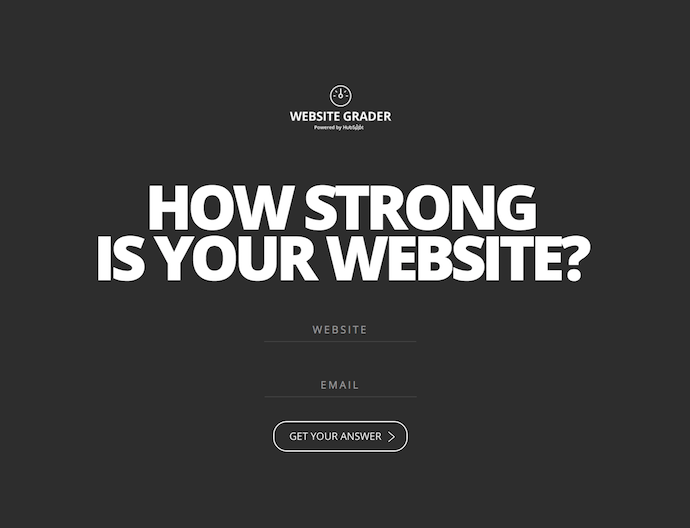
How’d you do? Got an idea of which website audit benefits you need the most? Here we go.
1. Website Performance Assessment
In the first part of your website audit, you should be focusing on how users navigate your website — from your homepage, to blog posts, to landing pages, and any related content in between.
Make a list of the pages on your website and ask yourself the following questions to evaluate them for optimization opportunities:
Is Your Website Optimized for Maximum Usability?
The more visitors you can attract to your website, the more opportunities you’ll have to generate leads and, ultimately, customers. But only if your website performs well.
As I’m sure you can imagine, just having a website does not guarantee results. As part of determining the overall efficiency of your website, your audit should check to make sure your site is designed with your visitors in mind. The design and overall navigability of your website should correspond with what a person would come to the site to seek out, such as more information on a business-related topic, resources, product/pricing information, testimonials, etc. This will largely depend on your individual business.
The main goal here is to make it easy for people to get to the information they’re looking for. As a result, you’ll likely see conversion rates improve on their own.
To audit your website for usability, consider the following:
- Are all the main value propositions of our business easily accessible via our main navigations/menu items?
- Do we have a simple yet intuitive website design and page layout? Make sure pages aren’t too cluttered; littered with ads, CTAs, or links; or void of internal links altogether.
- Are your conversion paths and/or shopping cart or checkout processes intuitive? Are there a ton of distractions along the way that could be creating friction for your site visitors?
You might also consider doing some user testing with members of your target audience to ensure you’re effectively surfacing the content they’re looking for, and that they find it easy to navigate to the parts of your website they’re interested in.
How Is Your Website’s Overall Speed?
Are there excessive page sizes and/or long page load and server response times? Does your site go down frequently? Site speed can be impacted when image files are too large or HTML and CSS needs to be cleaned up, all of which can drastically improve your site speed.
Ultimately, fast-loading and optimized pages will lead to higher visitor engagement, retention, and conversions. To quickly check a web page’s load time, download MozBar, a toolbar by Moz that you can attach to your browser for simple page analysis every time you visit a website.
2. SEO Assessment
Optimizing the performance of your website is crucial to holding onto visitors, but the above question isn’t the only one you should be asking. You should also audit the content you’re publishing to ensure it’s actually solving your visitors’ problems.
Is Your Website Content High Quality?
As you evaluate your content for quality, think about it from your target audience’s perspective. Did this information leave me satisfied? Did it answer all of my questions? Does it give me all the resources relevant to this topic? Do I know what to do next?
Keep in mind quality content should appeal to the interests, needs, and problems of your buyer personas; be interesting and well-written, provide valuable, thorough and detailed information about a particular topic; and leave the reader with next steps (such as calls-to-action, links to resources, etc.).
If you’re still not sure if your content is high quality, evaluate it with this checklist:” How to Tell if Your Marketing Content Is Actually Valuable.”
Is Your Website Search Engine Optimized?
Make sure all your web pages are following on-page SEO best practices. To audit your content for on-page SEO, conduct a keyword analysis in which you do the following:
- Consult your analytics to review keyword performance. Which keywords are giving you the biggest gains in traffic and leads?
- Assess how well you’re factoring keyword performance into your content strategy. How much relevant content are you adding to your website to target those keywords?
- Review basic on-page SEO elements like URLs, page titles, meta description, and copy. Make sure keywords are included where relevant.
To help you conduct an on-page SEO audit of your content, read the “Step-by-Step Guide to Flawless On-Page SEO,” which also includes a free downloadable on-page SEO template to keep you on track.
3. Conversion Rate Assessment
While high-quality, search engine optimized content is a great way to boost your traffic numbers, it’s what happens once those visitors are on your website that really counts. Unless of course, you don’t care about conversions (ha!).
Is Your Website Optimized for Lead Generation and Conversions?
This is where optimized calls-to-action (CTAs), marketing offers, and landing pages play a major role in the performance of your website. Not only do they offer you opportunities to capture visitors’ information so you can follow up with leads, but they also keep your visitors engaged with your content and your brand.
To audit your website for maximum conversion potential, ask yourself the following questions:
- How many marketing offers do I have in my content arsenal to gate behind landing pages?
- Do I have a variety of marketing offers that appeal to all my different buyer personas?
- Do I have any landing pages/conversion forms on my website to begin with?
- How optimized are those landing pages?
- Do I have conversion opportunities for visitors in varying stages of the funnel?
- Am I using calls-to-action effectively? Am I missing opportunities to include calls-to-action on various pages of my website?
To learn more about CTA selection, check out our post, ” How to Select the Right CTA for Every Page on Your Website.”
4. Technical Assessment
Once you’ve addressed the three primary goals of a website audit, it’s time to loop in a developer or someone from your IT department for a technical evaluation. You could also hire an outside agency — just be sure to do your homework first.
Keep in mind that there may be some carry-over from the three assessments above — website performance, SEO, and conversion rate. The technical evaluation, however, addresses all three to maximize the user experience (UX).
Here’s what you should be looking for in the technical assessment stage of your website audit …
Is Your Website Design Responsive?
Does your website have a responsive design? Meaning, is it a mobile-friendly website? The usage of smartphones to access the internet is only growing. As of 2017, mobile devices account for half of all web page views worldwide. As a result, websites must be compatible with that growing demand.
For more on mobile compatibility, check out our “Ultimate Cheat Sheet for Mastering Mobile Marketing.”
Is Your Website Error Message Free?
Are response code errors popping up all over your website where there shouldn’t be any? Calling out 302-, 404-, and 500-level response codes can be useful to tell users that something’s wrong.
However, having this happen is also an indication that someone isn’t cleaning up broken links and, as a result, leading users to dead ends. Find those error messages and clean up your broken links. Tools like Google’s Webmaster Tools or Xenu’s Link Sleuth can be very helpful for this.
Are Your Website URLs Optimized?
Does your site have URLs of excessive length due to keyword stuffing? Do they contain session IDs and/or include tons of dynamic parameters? In some cases, these URLs are difficult for search engines to index and result in lower clickthrough rates from search results.
Learn more about SEO-friendly URL syntax practices in this helpful post from Search Engine Land.
Does Your Website Have Too Much Flash or JavaScript?
Identify areas of your navigation that are entirely Flash or JavaScript. Search engines have challenges reading and accessing these, which could prevent your site from getting indexed.
Furthermore, these elements present problems from a usability perspective. Visitors are often looking for a very specific piece of information when visiting your site; if they have to sit through a 10-second visual introduction before they can find your hours of operation, you’re going to have a pretty frustrated visitor on your hands.
Is Your Site Structure Optimized for Search Engines?
We already talked about site structure as it relates to accessing content and usability for users, but it’s also important to make sure your site structure is optimal for search engines. If pages on your site are not internally linked to from other pages on your site, those pages are less likely to be indexed.
Learn more about effective site structure for SEO in this Moz article.
Are You Defining How Your Web Pages Are Crawled and Indexed by Search Engines?
This can be done through various methods that include everything from robots files and tags, to sitemaps. These measures are a way for you to guide search engines toward your website’s most useful content.
Robots Files or Tags
The robots meta tag lets you utilize a granular, page-specific approach to controlling how an individual page should be indexed and served to users in search results. These tags should sit in the <head> section of a given page.
The robots.txt file, on the other hand, is a text file that allows you to specify how you would like your site to be crawled. Before crawling a website, search engine crawlers will generally request the robots.txt file from a server. Within the robots.txt file, you can include sections for specific (or all) crawlers with instructions (“directives”) that let them know which parts should or should not be crawled.
Public and XML Sitemaps
Your website should also have public and XML Sitemap files. The public sitemap is one that users can access to review the pages of your site, like the index of a book.
The XML Sitemap is for search engines to review pages that get added to your site, all in one place. The usual location of a sitemap.xml file is https://ift.tt/2kf16Lq. The XML Sitemap is something every website should have; it offers an opportunity to tell Google and the other search engines what pages on your site you want to be crawled and indexed.
While search engines don’t guarantee they will abide by your sitemap, anecdotal evidence has proven time and time again that XML Sitemaps help provide insurance that your pages are found, and found faster — especially if your sitemap(s) dynamically update your new web pages.
Are You Defining Canonicalization of Content?
The canonicalization of your website content is the final major technical consideration to make. To gain more control over how your URLs appear in search results, and to minimize issues related to duplicate content, it’s recommended that you pick a canonical (preferred) URL as the preferred version of the page.
You can indicate your preference to Google in a number of ways. One such way is to set the Canonical Tag (rel=”canonical”) in an HTTP header of a page. Be sure to have someone check that the Canonical Tag is properly implemented across the site by making sure it points to the correct page, and that every page doesn’t point to the homepage.
It’s important to establish an audit framework early on. Ask yourself questions ideally centered around gauging “How am I doing?” These questions may also include things like, “How does this compare to others, especially my competitors?”
Website audits aren’t easy, especially if you’re not totally tech-savvy. For additional resources, check out this article by Distilled, which highlights a list of tools to use as you conduct your technical audit; as well as this complete site audit checklist by SEER.
I also recommend passing the Google Webmaster’s Guide along to anyone implementing this kind of work.


45% of People Trust Facebook Even Less After the Zuckerberg Hearings [New Data]
Facebook CEO Mark Zuckerberg’s testimony before U.S. lawmakers earlier this month seems to have done little to restore trust in the company.
According to a HubSpot survey of 300 U.S. internet users, only 12% of people trust Facebook more than they did before Zuckerberg’s congressional hearings.
In fact, the results indicate that nearly half of the respondents (45%) trust Facebook even less than they did before the testimony, with 28% reporting that they have “much less” faith in the company now.
Just under half of the respondents (43%) report that their trust in Facebook has stayed the same.

While the extent to which the respondents viewed the hearings isn’t immediately clear, these findings do align with recent data from Blind, an anonymous workplace app for tech company employees.
After the Zuckerberg hearings, Blind app users were asked if they’ve deleted Facebook since original revelations about the misuse of personal data by consulting firm Cambridge Analytica. We previously reported on an earlier Blind survey indicating that 31% of tech workers said they would delete Facebook.
According to this most recent survey, however, 13.7% of Blind app users said they did, in fact, delete Facebook, with 23.6% reporting that they restricted their privacy settings.

Source: Blind
“Trust was a recurring theme at these hearings, so it’s no surprise that trust in the company has taken a hit in the days and weeks since Zuckerberg’s testimony,” says Henry Franco, HubSpot’s social campaign strategy associate. “Regardless of where they stood on the political spectrum, most Senators and Representatives seemed to agree that Facebook had its work cut out for it in winning back its users’ trust, and even Zuckerberg seemed to recognize as much.”
Prior to the hearings, HubSpot conducted research on the general levels of trust in a number of well-known brands — both within tech and other consumer sectors — and their CEOs. In that survey of 2,319 consumers in the U.S. and UK, Facebook ranked third-to-last in trust among 13 brands, with 27% of respondents calling the company trustworthy.

When asked the same question about CEOs, Zuckerberg ranked fifth-to-last, with 20% of respondents identifying him as trustworthy.

What’s interesting about these findings is that the tech industry itself doesn’t appear to be highly lacking consumer trust — at least prior to the hearings, that is. The top-ranking companies are Netflix, Amazon, and Microsoft, with over half of survey respondents indicating that they find the brands trustworthy.
Where there’s less faith, it seems, is in the leadership. Even though 57% of respondents would describe Amazon as trustworthy, only 37% would say the same of its CEO, Jeff Bezos.
That could at least partially explain why Zuckerberg’s hearings did no favors for public trust in Facebook. Given that faith in some executives is already less than that in the brands they lead, it makes sense that his testimony — which left many questions largely unanswered — would chip away at Facebook’s brand trust rather than bolster it, especially in the wake of an existing scandal.
The hearings didn’t end there, however. Tomorrow, Dr. Aleksandr Kogan — the Cambridge University professor behind the data-harvesting app who eventually sold personal user information to Cambridge Analytica — will testify before UK Parliament’s Digital, Culture, Media and Sport Committee.
On Thursday, Facebook CTO Mike Schroepfer will also testify before that committee, despite Zuckerberg’s presence being requested by Members of Parliament more than once.
That same day, in the U.S., the House Judiciary Committee will hold a hearing on the “filtering practices of social media platforms.” Representatives from Facebook, Google, and Twitter have been invited to testify, though none have yet confirmed.
How or if these events will continue to shape consumer trust in social media remains to be seen — though earning that trust, it seems, is a long-tail game.
“To win back trust, they’re going to need time, a grand gesture, some period without making any serious mistakes,” says Franco. “Or some combination of the three.”
Featured image credit: “Yesterday’s news & waiting for today’s news to show up. Facebook: Transparency and Use of Consumer Data hearing, Rayburn House Office Building, Washington DC” by Lorie Shaull, used under CC BY / Cropped from original

7 Cover Letter Examples That Got Something Right
Let’s face it: A job search is, typically, anything but fun.
It’s almost as if it carries its own five stages of grief. At first, there’s denial of its demoralizing nature. Then comes the anger over either radio silence or rejection from prospective employers. Of course, there’s bargaining — “I promise to never complain about work again, if I can find a new job!”
That’s often followed by depression, and the idea that one is simply just unhireable. Then, there’s acceptance: “This is awful, but I have to keep trying, anyway.”
But we have good news. It is possible to have a little fun with your job search — and maybe even make yourself a better candidate in the process. The magic, it turns out, could be in your cover letter.
It may be true that only 26% of recruiters have deemed cover letters important, but that doesn’t mean yours has to contribute to that statistic. In fact, it might be that cover letters are deemed insignificant because so few of them stand out. Here’s an opportunity for you to exercise your creativity at the earliest stage of the recruitment process.
Personalization, after all, goes beyond replacing the title and company name in each letter you send to recruiters. 
What does that look like in practice, and how can you make your cover letter stand out? We found six examples from job seekers who decided to do things a bit differently.
Note: Some of these cover letters contain real company names and NSFW language that we’ve covered up.
7 Creative Cover Letter Examples
1. The Short-and-Sweet Cover Letter
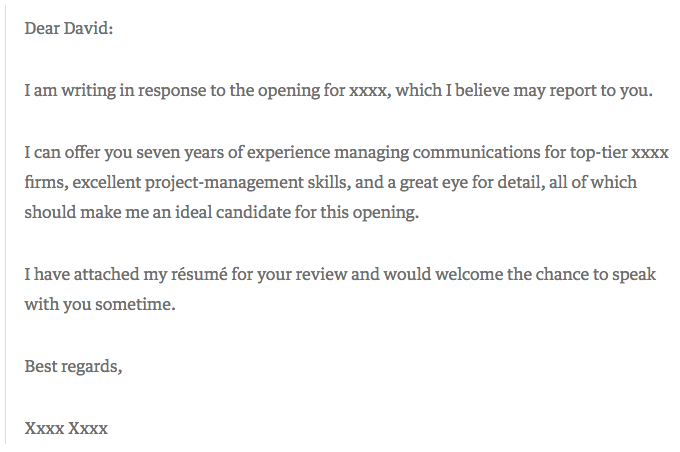
In 2009, David Silverman penned an article for Harvard Business Review titled, “The Best Cover Letter I Ever Received.” That letter contained three complete sentences, as follows:
Source: Harvard Business Review
One might argue that this particular letter is less than outstanding. It’s brief, to say the least, and the author doesn’t go into a ton of detail about what makes him or her qualified for the job in question. But that’s what Silverman likes about it — the fact that the applicant only included the pieces of information that would matter the most to the recipient.
“The writer of this letter took the time to think through what would be relevant to me,” writes Silverman. “Instead of scattering lots of facts in hopes that one was relevant, the candidate offered up an opinion as to which experiences I should focus on.”
When you apply for a job, start by determining two things:
- Who might oversee the role — that’s often included in the description, under “reports to.” Address your letter to that individual.
- Figure out what problems this role is meant to solve for that person. Then, concisely phrase in your cover letter how and why your experience can and will resolve those problems.
The key here is research — by looking into who you’ll be reporting to and learning more about that person’s leadership style, you’ll be better prepared to tailor your cover letter to focus on how you provide solutions for her. Not sure how to learn more about a leader’s personality? Check out any content she shares on social media, or use Growthbot’s Personality Profile feature.
2. The Brutally Honest Cover Letter
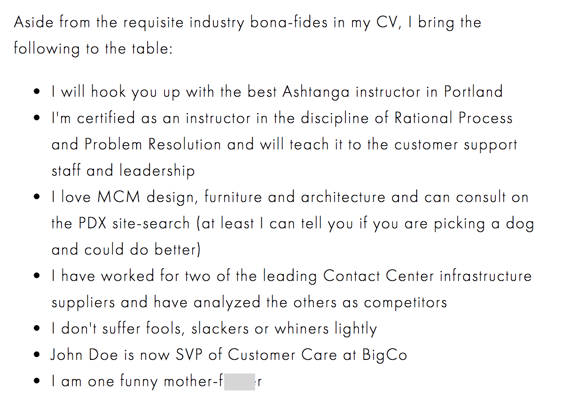
Then, there are the occasions when your future boss might appreciate honesty — in its purest form. Livestream CEO Jesse Hertzberg, by his own admission, is one of those people, which might be why he called this example “the best cover letter” (which he received while he was with Squarespace):
Source: Title Needed
As Hertzberg says in the blog post elaborating on this excerpt — it’s not appropriate for every job or company. But if you happen to be sure that the corporate culture of this prospective employer gets a kick out of a complete lack of filter, then there’s a chance that the hiring manager might appreciate your candor.
“Remember that I’m reading these all day long,” Hertzberg writes. “You need to quickly convince me I should keep reading. You need to stand out.”
3. The Cover Letter That Explains ‘Why,’ Not Just ‘How’
We’ve already covered the importance of addressing how you’ll best execute a certain role in your cover letter. But there’s another question you might want to answer: Why the heck do you want to work here?
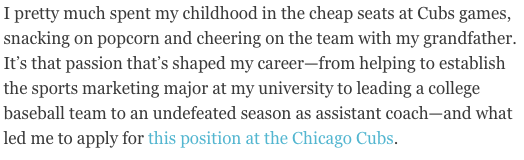
The Muse, a career guidance site, says that it’s often best to lead with the why — especially if it makes a good story. We advise against blathering on and on, but a brief tale that illuminates your desire to work for that particular employer can really make you stand out.
Source: The Muse
Here’s another instance of the power of personalization. The author of this cover letter clearly has a passion for this prospective employer — the Chicago Cubs — and if she’s lying about it, well, that probably would eventually be revealed in an interview.
Make sure your story is nonfiction, and relatable according to each job. While we love a good tale of childhood baseball games, an introduction like this one probably wouldn’t be fitting in a cover letter for, say, a software company. But a story of how the hours you spent playing with DOS games as a kid led to your passion for coding? Sure, we’d find that fitting.
If you’re really passionate about a particular job opening, think about where that deep interest is rooted. Then, tell your hiring manager about it in a few sentences.
4. The Straw (Wo)man Cover Letter
When I was in the throes of my own job search and reached one of the later stages, a friend said to me, “For the next job you apply for, you should just submit a picture of yourself a stick figure that somehow represents you working there.”
Et voilà:
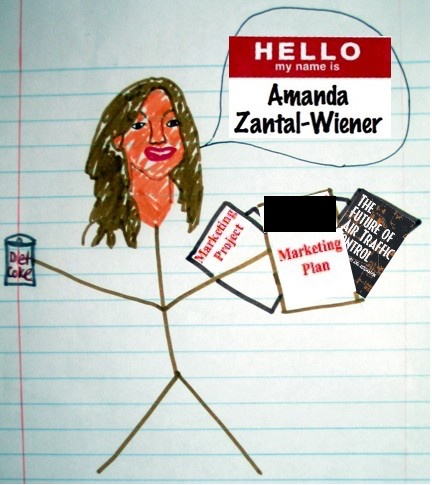
I never did end up working for the recipient of this particular piece of art, but it did result in an interview. Again, be careful where you send a cover letter like this one — if it doesn’t match the company’s culture, it might be interpreted as you not taking the opportunity seriously.
Be sure to pair it with a little bit of explanatory text, too. For example, when I submitted this picture-as-a-cover letter, I also wrote, “Perhaps I took the ‘sense of humor’ alluded to in your job description a bit too seriously.”
5. The Overconfident Cover Letter
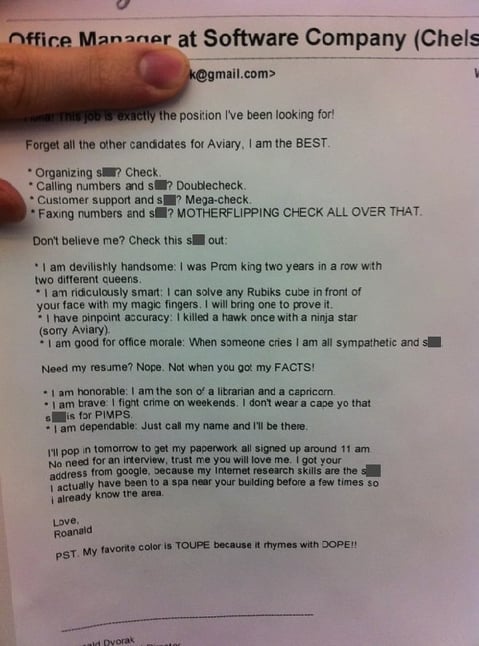
I’ll admit that I considered leaving out this example. It’s rife with profanity, vanity, and arrogance. But maybe, in some settings, that’s the right way to do a cover letter.
A few years ago, Huffington Post published this note as an example of how to “get noticed” and “get hired for your dream job”:
Source: Huffington Post
Here’s the thing: if the Aviary cited in this letter is the same Aviary I researched upon discovering it, then, well, I’m not sure this tone was the best approach. I read the company’s blog and looked at the careers site, and neither one indicates that the culture encourages this — or lowercasing proper nouns like “Google,” for which I personally cannot forgive the applicant …
However, Aviary was acquired by Adobe in 2014, and this letter was written in 2011. So while it’s possible that the brand was a bit more relaxed at that time, we wouldn’t suggest submitting a letter with that tone to the company today. That’s not to say it would go unappreciated elsewhere — Doug Kessler frequently discusses the marketers and brands that value colorful language, for example.
The point is, this example further illustrates the importance of research. Make sure you understand the culture of the company to which you’re applying before you send a completely unfiltered cover letter — if you don’t, there’s a good chance it’ll completely miss the mark.
6. The Interactive Cover Letter
When designer Rachel McBee applied for a job with the Denver Broncos, she didn’t just write a personalized cover letter — she designed an entire digital, interactive microsite:
Source: Rachel McBee
This cover letter — if you can even call it that — checks off all of the boxes we’ve discussed here in a remarkable way. It concisely addresses and organizes what many hiring managers hope to see in any cover letter: how her skills lend themselves to the role, why she wants the job, and how to contact her.
She even includes a “traditional” body of text at the bottom, with a form that allows the reader to easily get in touch with her.
7. The ‘We’re Meant for Each Other’ Cover Letter
This last cover letter example is a special one because it was submitted to us here at HubSpot. What does the letter do well? It makes a connection with us before we’ve even met the letter’s author.

“Content Marketing Certified” indicates the applicant has taken the content marketing certification course in our HubSpot Academy (you can take the same course here). Our “records” indicate he/she did indeed give an interview with us before — and was a HubSpot customer.
The cover letter sang references to a relationship we didn’t even know we had with the candidate.
The letter ends with a charming pitch for why, despite him/her not getting hired previously, our interests complement each other this time around.
(Yes, the applicant was hired).
Take Cover
We’d like to add a sixth stage to the job search: experimentation.
In today’s competitive landscape, it’s so easy to feel defeated, less-than-good-enough, or like giving up your job search. But don’t let the process become so monotonous. Have fun discovering the qualitative data we’ve discussed here — then, have even more by getting creative with your cover letter composition.
We certainly can’t guarantee that every prospective employer will respond positively — or at all — to even the most unique, compelling cover letter. But the one that’s right for you will. That’s why it’s important not to copy these examples. That defeats the purpose of personalization.
So get creative. And, by the way — we’re hiring.

10 Pro Tips for Running an Effective PR Campaign
A PR campaign can have a long-lasting impact on your brand’s reputation and public image. But it must be well-planned.
An effective PR campaign is more than just a press release on a new product or a fundraiser to raise brand awareness. To create a remarkably effective PR campaign, you need to take some big extra steps.
If done right, your PR campaign can attract national (and positive) media attention, boost sales drastically, and create a positive relationship between your company and the public for years to come. To help you reach these heights with your next PR campaign, we’ve compiled ten effective tips.
What Is a PR campaign?
A public relations campaign has a clear objective, such as raising awareness of a product, informing the public of company news, reaching a larger audience, or improving the brand’s reputation. It uses strategic messaging to communicate with one’s audience and successfully reach this objective.
10 Pro Tips for Running an Effective PR Campaign
Before Releasing Your Message
1. Set a Goal, its Limitations, and Metric of Success:
It’s important to start with a big-picture goal. What do you hope to achieve with your campaign? Do you want to reach a new audience? Do you want to boost sales on a product? Do you want to build a positive relationship with the public?
Once you’ve chosen a big-picture goal, narrow it down further — for which product in particular do you want to boost sales? For what do you want your brand to be known? Take into account how big your budget is and whether there should be a deadline. By laying a campaign roadmap, you’re giving yourself a focused metric to measure your success.
2. Know Your Audience
Before you can choose how you want to deliver your PR message, you must decide who you want to receive it. Take the time to establish which customer persona you want this campaign to reach. For instance, if you’re targeting families, you might want to create a campaign that expresses a family-first message, or demonstrates why the brand cares how its product affects loved ones.
3. Choose the Right Platform
Once you’ve decided on a target persona, you’ll want to choose your preferred platform for delivering your message — for instance, does your ideal audience prefer TV or radio? A press release or a press conference? This information will help you strategize everything else.
4. Find Your Creative Angle
No one says you can’t run a successful campaign on small news, like a company award, but your story must be interesting to the public. Luckily, every story has a creative angle. Look at it from the public’s point of view. Why should they care? If your business just won the award, “Best Cycle Studio in Brooklyn,” ask yourself what about this award is important to your customers. The right editorial hook is often what makes someone want to learn more. For example, “We Won Best Cycle Studio in Brooklyn, Beating Out Big-Names like Soul Cycle, Only 6-Months After Opening.”
5. Write an Exceptional Press Release
If you want journalists to help you, you need to help them. Rather than writing a press release like a promotion, i.e. “Our New Phone Is Now Available,” write one with a strong news angle: “One Local Cell Phone Shop Hopes to Compete with Apple’s iPhone.” See the difference? The first press release option is really just an advertisement. The second option is a story. Include relevant quotes from employees or industry leaders, and include all the necessary information a journalist might need.
6. Distribute Wisely
Once you’ve figured out your newsworthy angle, distribute to media publications that are relevant to your industry. You can even send the story to local TV or radio stations. It’s imperative you’ve done your research on media companies by visiting their website and seeing how much your industry influences the publication’s news stream. Remember, media outlets don’t care that you’re opening a new Italian restaurant — but they do care about an interesting story, like, “Convenient meals for large families is an untapped market in [this city], and a new Italian restaurant is heeding this demand.”
7. Build Relationships with Journalists
While this is a more long-term approach, you can certainly start building relationships with journalists during your campaign. Instead of sending your story to a generic news desk, identify the names of journalists who most often write about topics related to your industry. Email, call, or even try reaching out to specific reporters via their Twitter handle with your story, so you can begin building a long-term relationship with someone who might be willing to write about your company again in the future.
After Releasing Your Message
8. Link Building
Once your story begins spreading throughout the media, it’s critical that you take advantage of the traction you’re getting for a long-term boost to your website’s domain authority.
First, check out Fresh Web Explorer and Google News — with Google News, you can even set up an alert for your company so you don’t need to check the press manually. Whenever you see your company or campaign mentioned, send an email to the journalist who wrote the article, or the publication itself. Here’s what you can say:
“Hello,
I hope you’re well. I’ve just finished reading one of your articles entitled [insert title here] — an interesting and enjoyable read!
I’ve noticed during the article you mentioned [insert campaign or company name here]. I was wondering if you could add a link to [insert link here]. Hopefully this will give your readers additional information if they wish to research them further.
Let me know if you can help!
Kind regards,
John Smith”
By phrasing this as a benefit to the publication’s readers, you’re giving the journalist a good incentive to add a link back to your site.
9. Social Shares
Similar to link building, asking media outlets who published your article to share it on their social channels is an effective method to attract a large audience to your campaign. For instance, if your story is picked up by Cosmopolitan, why not try to reach some of their 2.2 million Instagram followers?
Since social media moves fast, you’ll want to email a publication immediately when your story goes live to ask if their social media manager might be willing to share it while it’s still fresh.
10. Write a Company Blog Post
If your campaign is successful, you’ll likely see an increase in visits to your website. Capitalize on this increased traffic by writing your own blog post, detailing the same information you wrote in your press release. This will enable your business to provide relevant information to people who want to learn more about your campaign and the services you provide.
PR Campaign Examples
Now, let’s take a look at some PR campaigns that crushed it using the steps above.
1. Burger King called attention to National Bullying Prevention Month by staging two different types of “bullying” and seeing which one bystanders cared more about. Check out this creative and moving analogy in the video below (full disclosure, I teared up a bit). It’s clear Burger King did its research on Bullying Prevention Month’s target audience, and delivered the campaign’s message on the platform best-suited for the high school demographic.
2. When a company makes brand changes, users often end up feeling frustrated, particularly when they don’t understand the reason for the change. When Airbnb launched its new “the Bélo” logo, some Airbnb’s users were critical of the change. To combat criticism, the company produced a video explaining the story behind the new logo, and even created a “custom experience” so Airbnb users could personalize their own Bélo logos.
To alleviate frustration further, Airbnb’s corporate CEO, Brian Chesky, sent a webinar to active users explaining the purpose behind the logo change. This is an effective strategy for building stronger relationships with an audience, who will likely support your brand more if they feel properly informed of big decisions. Plus, Airbnb turned their company news into a story that interested media outlets by affiliating the new logo with a bigger message.
3.AXA, a French multinational insurance firm, needed to spread awareness to Chinese parents that wearing seatbelts is necessary for their children’s safety. To do this, AXA produced a video and education program involving various schools throughout the country. Over six-months, more than 125,000 children and parents learned about seatbelt safety in one of these education programs. After the campaign, a study showed 77% positively linked AXA with the citizenship campaign, and consumers considering AXA insurance increased from 25% to 34%. See? PR can make money! This campaign exemplifies a PR strategy that established a goal, spreading seatbelt-safety awareness, and determined specific metrics to report its level of success.
4. Before the #IceBucketChallenge, I barely ever heard anyone talk about ALS. In an attempt to use PR to spread awareness, the ALS association created the #IceBucketChallenge, which instructed one person to record a video of themselves dumping a bucket of ice over their head and then nominate three friends to do the same through social media. It became remarkably viral — several celebrities, including Facebook CEO Mark Zuckerberg, participated, and it spread rapidly via social media. In 2013, ALS association’s campaign raised about $2.8 million in donations; in 2017, the year of the #IceBucketChallenge campaign, the ALS association raised over $100 million. The ALS association determined an effective platform to deliver their message, and also chose an incredibly creative angle for optimal virality.
5. In 2003, Dove chose to use real women in its advertisements rather than using stick-thin models to sell Dove products, and called its PR campaign, “Campaign for Real Beauty.” The brand produced the campaign with an advertisement featuring six ordinary women in their underwear– which was unprecedented and thus a creative angle to take. The campaign helped Dove improve its brand reputation by drawing attention to their unprecedented ads, and boosted sales by 700%.
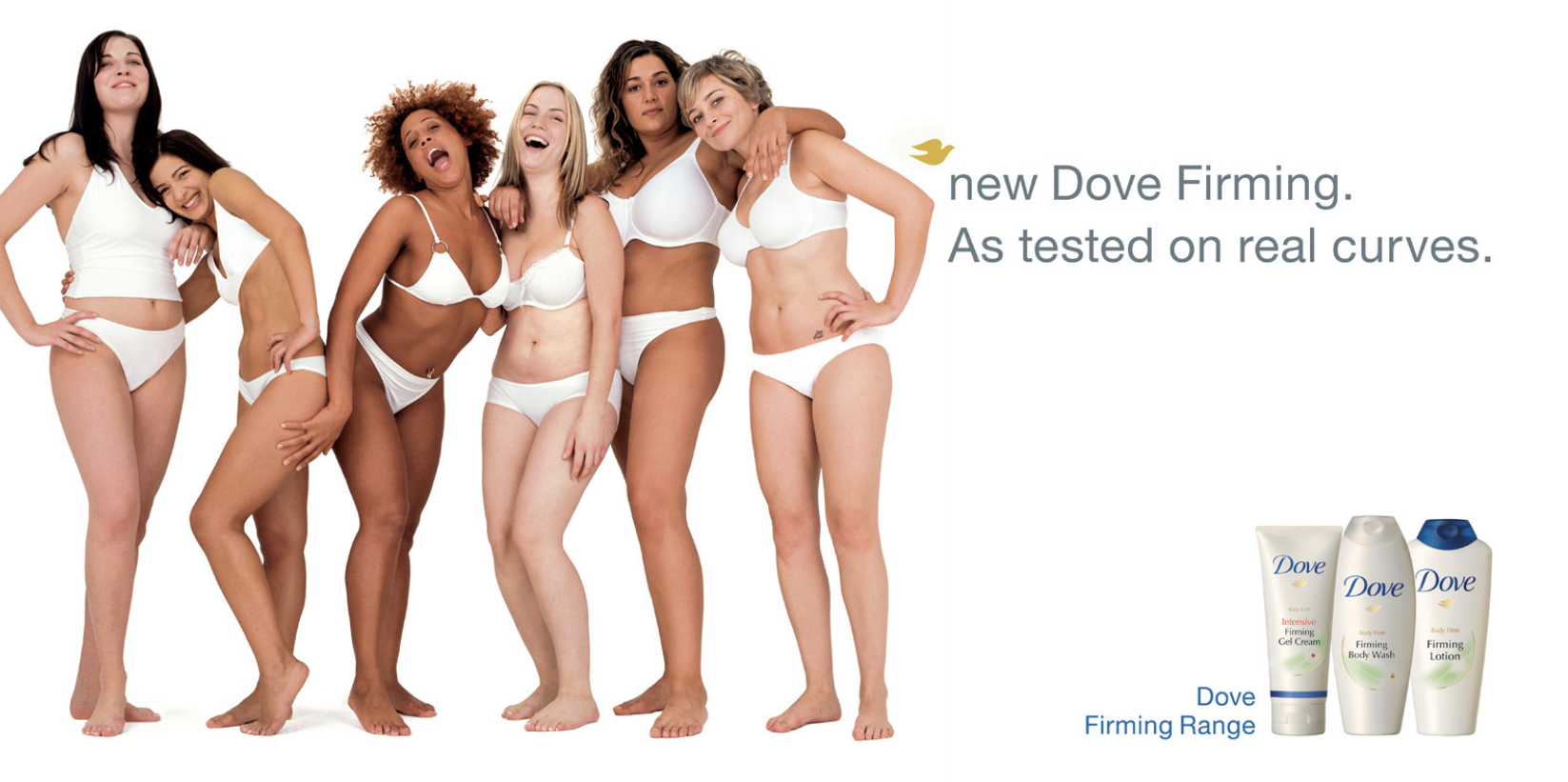
Image credit to Dove Real Beauty Campaign.

How Long Should Your Videos Be? Ideal Lengths for Facebook, Instagram, Twitter, and YouTube [Infographic]
When a video pops up on your Facebook feed, what do you usually do first? My guess is that you take a peek at its length, ponder whether it’s worth your time, and let that thought process influence whether or not you press play.
Once you do actually press play, how many times have you abandoned the video just a few seconds in and scrolled down to the next post? I know I have. I don’t finish half the Facebook videos I start.
It seems impossible to hold people’s attention nowadays. Phones buzz with distracting notifications and promise instant gratification, tempting people to check their screens every five minutes. This has diminished the human attention span so much, some studies claim it’s now shorter than a goldfish’s.
Video marketers know we lack patience. So they’re starting to tailor content for our dwindling attention spans. In fact, 56% of all videos published in the last year are less than 2 minutes long.
But marketers must innovate further because users expect different video lengths on different platforms. Odds are, they’re more willing to watch a 2-minute long video on YouTube than on Twitter.
If you don’t customize video length for each platform, then you’re not fully catering to your audience. Sooner or later, the attention they give to your brand will wither away.
That’s why we decided to create this handy, bookmarkable infographic about the optimal video length for the most popular video channels. To help you better engage your audience on Instagram, Twitter, Facebook, and YouTube, we extracted insights from HubSpot’s own social and YouTube data, and combined it with existing research in the area.
We also provided a video example for each channel, if you ever need some inspiration.
So check out the infographic below and start creating optimized videos for these four native video platforms!
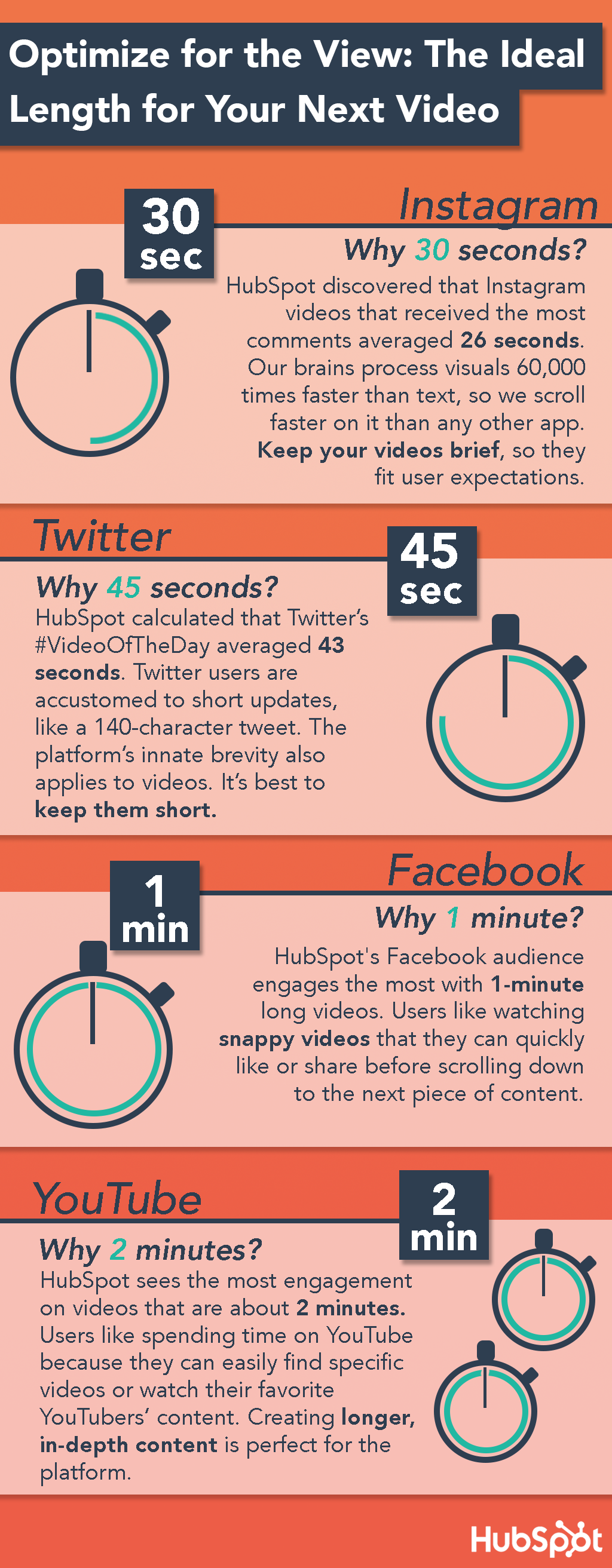
HubSpot Video Examples for Facebook, Instagram, Twitter, and YouTube
Instagram: State of Inbound (30 Seconds)
There’s a lot of speculation around how long Instagram videos can be in general — especially since the company is known to change the maximum. Currently, they cap out at 60 seconds.
The original State of Inbound video on YouTube is two and half minutes long. How long should the Instagram video be? We cut this one down to 30 seconds for this platform so it would meet our audience’s time length expectations.
You might wonder how a video that’s one-fifth the length of the original version could successfully promote our annual research report. Well, it’s because our audience couldn’t keep their eyes off such a clear, concise, and dynamic video.
Viewers who watch the first 3 seconds of a video are most likely to finish it, so we made sure our video hooked them with a vivid first frame.
After that, we held our audience’s attention by constantly cutting to new frames and animating the video’s graphics. The voiceover and subtitles also conveyed the video’s main takeaway well.
Twitter: Summer Startup (~45 Seconds)
Imagine winning $100,000 + mentoring from @JaySimons (@Atlassian), @PattyMccord1 (@netflix), @dharmesh (@HubSpot)? Enter on Facebook now 👉 pic.twitter.com/kI1yF3oUkE
— HubSpot (@HubSpot)
June 27, 2017
Our Summer Startup video on Facebook is 1 minute long. But we cut it down to 44 seconds on Twitter — a tad shorter than the optimal length of Twitter videos, according to our research.
This video resonated with our audience because they felt a personal connection to each of the faces we presented. People respond well to the human face. It captures their attention, builds familiarity and trust, and evokes emotion.
And since enthusiasm is contagious, the thrilled faces we showcased injected a lot of excitement into our viewers.
Facebook: Monthly Social Media Round Up: April Edition (60 Seconds)
When we analyzed our Facebook data, we discovered our audience engages the most with videos right under 1 minute. So we decided to cap most of our Facebook videos at around 60 seconds.
We also discovered that 95% of viewers watch our videos on mute. This meant we needed to ensure they understood each video’s key point without hearing a single word.
We crafted a lot of our Facebook videos like the one you just saw because the subtitles clearly communicate the video’s insights while the visuals provide context and absorb our viewers’ attention.
YouTube: Topic Clusters: The Next Evolution of Content Strategy (2 Minutes)
On YouTube, our audience engages the most with videos right under two minutes. So we try to keep them around 120 seconds.
That might not seem like enough time to dig into a substantial topic, but think about how long YouTube videos should be to cover a concept that would take a blog post 1,000 words to explain.
The 2-minute video above does just that, complimenting an article that might take the average blog visitor 10 minutes to read. This saves our audience time and heaves a mental load off of their shoulders.
Short but potent videos aren’t just a recording of yourself reading a script, though. Since the human brain can process visuals 60,000 times faster than text, you need to leverage dynamic graphics and visual storytelling so your audience can quickly grasp your message. If you don’t, your video will elapse the optimal length and wilt your viewers’ attention.

20 of the Best Free Stock Photo Sites to Use in 2018
Best Websites for Stock Photography
- Negative Space
- Death to Stock
- Picjumbo
- Stokpic
- Kaboompics
- Startup Stock Photos
- Freerange
- LibreShot
- Fancy Crave
- Unsplash
- StockSnap.io
- SplitShire
- Life of Pix
- HubSpot
- Pexels
- Gratisography
- Jay Mantri
- ISO Republic
- New Old Stock
- Pixabay
I got the image above for free on Unsplash.
Yet for some reason, many publishers continue to push out cheap (and usually cheesy) stock photography to serve as a representation of their brand.
The truth is, high-quality stock photos don’t have to come hand-in-hand with a hassle or high price tag. To prove it, we’ve compiled a list of 20 awesome resources for free, high-quality stock images for websites, blogs, and similar online properties.
From enviable office spaces to stunning scenery, we’re certain you’ll find exactly what you’re looking for with the help of this roundup.
(HubSpot customers, get access to 60,000 totally free Shutterstock photos right within your portal by clicking here.)
20 of the Best Free Stock Photo Websites for Royalty-Free Images
1. Negative Space

Negative Space offers up new free stock photos every week. All of its photos are shared without copyright restrictions, meaning you’re free to use them however you please.
From architecture to technology, Negative Space’s continuously growing collection of images is one you’ll find yourself tapping into again and again. The best part? It’s easy to filter through the gallery of photos, which are sortable by category, copy space position, and color.
Click here to view the full license details.
2. Death to Stock

When founders and photographers, Allie and David, noticed how challenging it was for businesses, bloggers, and creatives to find free high-quality images that fit their “vibe and tribe,” they stepped in.
As a result, Death to Stock was born. Simply submit your email and enjoy a new batch of photos delivered to your inbox every month.
If you do have some extra budget to spend, Death to Stock also offers a Premium membership for $15/month or $180/year. The cool part about the paid membership is that a percentage of the profit is used to fund photography trips and other creative projects to keep the resource moving forward.
Click here to view the full license details.
3. Picjumbo

Need free images for your next website design or blog post? Look no further than picjumbo.
With new photos added daily, there is a wide selection of high-quality images to fit a variety of different topics.
The photographer, Vicktor, also offers unique paid packages for bloggers, designers, and agencies (starting at $10/month), as well as a handy plugin for Photoshop and Sketch for just $7.99.
Click here to view the full license details.
4. Stokpic

Photographer Ed Gregory generously dishes up 10 new photos every two weeks that you can use on your website, as part of a template, in an ad, and … well, pretty much anywhere.
You can check out his latest 100 pictures here, or browse through categories like landscapes, people, and technology until you find the perfect fit.
Click here to view the full license details.
5. Kaboompics

Karolina, a web designer from Poland, is the creative eye behind this awesome resource for high-quality photos. From fashion to food to landscapes, her images cover a variety of different scenarios. And users have the freedom to use them for anything they’d like — commercial or not.
While there are no formal attribution requirements, Karolina does ask that you include photo credit with a link back to the site when possible. This request will help her grow the website, and in turn, provide even more awesome photos for everyone to use.
Click here to view the full license details.
6. Startup Stock Photos

“Take ’em, these things are free. Go. Make something.”
With a Twitter tagline like this, it’s tough not to scoop up what Startup Stock Photos has to offer.
While the name is specific to startups, there are plenty of professional options to use no matter what industry you’re operating within.
Click here to view the full license details.
7. Freerange

All of the photos on the Freerange website come from a pool of both in-house photographers, as well as a growing community of external contributors.
Not only is there a lot to choose from, but the photos are good quality, too: “Images provided directly (in-house) by Freerange Stock originate one of two ways. They are either digitally photographed on Canon DSLR cameras or they are a high resolution (4000 dpi) Nikon scan of an original 35mm slide,” according to the site’s ‘About Us’ section.
Click here to view the full license details.
8. LibreShot

Photographer and SEO Consultant Martin Vorel is the creative force behind the stunning photos available on this site.
From crisp architectural shots to vibrant florals, Vorel’s collection of photos contains some of the most unique selections we’ve come across.
Click here to view the full license details.
9. Fancy Crave

Not only are the photos on Fancy Crave free of copyright restrictions, but they’re also pretty remarkable. (Can’t you practically taste those green grapes?)
All the photographer asks is that you never advertise the photographs as your own, and provide attribution when and if you can.
With two new photos uploaded daily to keep things feeling fresh, this is a bookmark-worthy resource for great photos if we’ve ever seen one.
Click here to view the full license details.
10. Unsplash

Unsplash serves up 10 new “do whatever you want” photos every 10 days.
What we love most about this resource is the uniqueness of the photos. With pages upon pages to choose from, you won’t run into any cheesy, “Smiling Boss Shaking Hands With Male Employee” shots.
Not to mention, every photo published on Unsplash is licensed under Creative Commons Zero, which provides users with the freedom to copy, modify, distribute, and use all of the photos without permissions or attribution.
Click here to view the full license details.
11. StockSnap.io

StockSnap.io proudly claims that it’s “not your typical crappy stock photo site.” And we couldn’t agree more.
In fact, its selection is so interesting and versatile that it’s almost too easy to “fall down the rabbit hole” and come to fifty-something scrolls later.
Click here to view the full license details.
12. SplitShire

SplitShire offers a ton of awesome free photos for you to use without commercial restrictions. Powered by Italian photographer Daniel Nanescu, all of the images available on the website are “made with love” — and it shows.
From stunning portraits to sleek work stations, we’ve got a feeling you won’t have any trouble finding the perfect photo for your next project or blog post.
Click here to view the full license details.
13. Life of Pix

Brought to you by Leeroy Advertising Agency in Montreal (and its network of talented photographers), Life of Pix is home to some awesome high-resolution photos.
All of the images are donated to the public domain, and are available for personal and commercial use.
As if that wasn’t enough, Life of Pix also has a counterpart, Life of Vids. According to its website, Life of Vids serves up free footage videos, clips, and loops, weekly. Like the images, the video content contains no copyright restrictions, and can be easily downloaded on its Vimeo account.
Click here to view the full license details.
14. Pexels

These photos are carefully handpicked from a variety of free image sources to ensure that you’re getting only the best of the best.
All of the photos that make the cut are under the Creative Commons Zero license, meaning that they are free for personal and commercial use with no attribution required. And thanks to its search functionality, turning up the right photo for your next project is super easy.
Click here to view the full license details.
15. HubSpot

You didn’t think we’d leave you hanging, did you?
When we noticed there was a shortage of high-quality free stock photos available to marketers and creatives, we decided to whip up some of our own.
Check out the following collections to get your fix:
16. Gratisography

With new photos added weekly, Gratisography is another awesome website serving up high-resolution photos covered under the Creative Commons Zero license.
All of the photos are taken by Ryan McGuire, a “whimsically creative visual artist, based in Ithaca, NY.” And while these photos are a bit more quirky (we’re talking everything from monster feet slippers to Vespas to bananas), they are entirely usable for the right project.
Click here to view the full license details.
17. Jay Mantri

Designer Jay Mantri has built up an impressive gallery of professional, quality images just for you and me … and everyone else.
If I had to describe Mantri’s photos in one word, it’d be “scenic.” But don’t just take my word for it. Go see for yourself.
Click here to view the full license details.
18. ISO Republic

ISO’s Republic’s mission is to “provide high-quality images to be used by designers, developers, bloggers, marketers, and social media teams.”
And all it takes is one quick scan of the website to know that it is succeeding in doing just that. (So much so that it’s hard to believe the images are free)
For those looking for access to more exclusive free photos, ISO Republic invites you to sign up for its email list and receive photos right to your inbox.
Click here to view the full license details.
19. New Old Stock

Who can resist a good black and white photo?
This collection of vintage photos comes from the public archive via Flickr Commons. According to the website, the photos are free of any known copyright restrictions.
That said, while it’s likely that they are safe to use for things like blog posts and hero images, you’ll want to read up on the rights and usage below before you use them for any type of commercial project.
Click here to view the full license details.
20. Pixabay

Pixabay serves as a repository for a ton of quality photos that released under Creative Commons CC0 into the public domain. The site is clean and intuitive, making it easy to navigate your way through the 780K+ free photos, vectors, and illustrations.
The main search bar even allows you to filter your query down by factors like media type, orientation, color, and minimum dimensions.
Click here to view the full license details.



Here’s the Information You’re Probably Giving Social Media Networks, and How They Protect It
People have questions about the security of our digital data.
That ranges broadly, whether it’s passwords, online banking information, or what we do on social media. And more than ever, people are asking, “How is my information protected?”
In order to understand that, it seems, it’s important to first take a closer look at the information users might provide to social networks in the first place. That’s been a topic of growing interest in the wake of the Facebook Cambridge Analytica revelation, and new details, questions, and announcements that have since emerged.
To help make sense of it — and not just when it comes to Facebook, but also how these things work on networks like Twitter and LinkedIn — Varonis created an infographic to break down the type of information users typically provide to these social media platforms, and what each one had already been doing to keep data secure.
Some things have changed in a very short period of time. Facebook, for instance, has announced a slew of new protections and policies over the past month, and further modifications are anticipated from a number of platforms as we count down the days leading up to the General Data Privacy Regulation (GDPR) coming into force in May.
But it’s still interesting to have a look at just how much information we share, and what different networks have been doing in the way of safety until now.


