
What is Public Relations? The Definition of PR in 100 Words or Less
What is PR?
Public Relations professionals help a business or individual cultivate a positive reputation with the public through various unpaid or earned communications, including traditional media, social media, and in-person engagements. They also help clients defend their reputation during a crisis that threatens their credibility.
There’s an old saying: “Advertising is what you pay for; publicity is what you pray for.”
Public relations isn’t an easy profession to define. In fact, in 2012, the Public Relations Society of America (PRSA) accepted a few thousand submissions before finally agreeing on a definition:
“Public relations is a strategic communication process that builds mutually beneficial relationships between organizations and their publics.”
After reading PRSA’s definition, you might still have questions about PR: how can an organization take its beneficial relationship to the public and turn it into good press? Are you really “praying” for something, like the old saying goes, if you’re using a strategic process to get results?
Hang with me — let’s break it down.
The positive, storytelling side of PR
A PR professional works with an organization, company, government, or individual to cultivate a story that portrays that client’s reputation, idea, product, position, or accomplishment in a positive light. So, in a sense, you can think of PR professionals as storytellers. Unlike advertisers, who tell stories through paid methods, PR professionals tell their stories through unpaid or earned media.
These unpaid or earned avenues include traditional media, social media, or speaking engagements — which are especially effective opportunities for reaching the general public. Keep in mind that a PR professional isn’t just trying to reach a paying customer … she’s trying to reach everyone.
Hopefully, this is a digestible definition of PR. If you’re still unsure of how PR looks in the real world, let’s explore some examples.
Let’s say you work for a small interior design company, and your business just won an award: “Best Interior Design Company in Chicago.” A PR specialist might ask a reporter to write a story about this accomplishment to spread the news to the public.
Along with building a credible reputation for your interior design business, the PR professional is also helping the public receive relevant information about this accolade. If I’m a consumer looking for an interior designer, this announcement could help me, too.
Public relations extends to government, too. PR professionals can execute political campaigns or explain a government’s new policy to the public. In this case, you can see how PR professionals work to maintain a healthy and productive relationship between their client (the government), and the general public, who have a right to hear about new policies.
The negative, damage-control side of PR
PR isn’t just used for positive storytelling. It’s also used to mitigate any damage that could weaken a client’s reputation.
In the early 1980s, numerous bottles of Johnson & Johnson’s Tylenol product were laced with cyanide by an unknown person, killing seven people. This led to widespread panic and could have resulted in the end of Tylenol products.
Johnson & Johnson took aggressive PR measures to mitigate the damage: first, the company pulled all of its Tylenol products off the shelves and issued a national statement warning consumers not to purchase or use Tylenol. Then, Johnson & Johnson created a new tamper-resistant seal, and instructed 2,000 sales personnel to deliver presentations to the medical community to reintroduce these new, safer Tylenol bottles.
This effective PR strategy saved Johnson & Johnson’s reputation, as well as their product — in fact, Tylenol shares climbed back up to 24 percent just six weeks after the cyanide crisis.
In the case of Johnson & Johnson, a simple advertising campaign wouldn’t have worked. Instead, PR was necessary: PR professionals were able to spread a story that portrayed Johnson & Johnson as a company that puts consumers ahead of profit. Along with mitigating damage to Johnson & Johnson’s reputation, PR was used to save more people from consuming cyanide-laced Tylenol, and then used to inform the public that Tylenol was safe again. A win-win-win.
In these examples, you can see PR professionals are adept at handling a wide variety of both good and bad circumstances, and must address these events so the public and client can maintain a beneficial relationship. PR specialists also play a role in advising management on the best policy decisions or actions to take, and conducting programs, such as fundraising or networking events, to help the public understand the organization’s goals.
PR isn’t just used to influence a story after it happens — it’s also used to write that story in the first place.

How to Use VLOOKUP in Excel 2013 and 2016 [Video Tutorial Included]
This post is an excerpt from the video series 4 Essential Microsoft Excel Skills Every Marketer Should Learn. If you want to become a master of the almighty spreadsheet, watch the full video series here.
I know, I know … “VLOOKUP function” sounds like the geekiest, most complicated thing ever.
But trust me: as was the case with pivot tables, Microsoft Excel’s VLOOKUP function is easier to use than you think. What’s more, it is incredibly powerful, and is definitely something you want to have in your arsenal of analytical weapons.
So, what does VLOOKUP do, exactly? Here’s the simple explanation: The VLOOKUP function searches for a specific value in your data, and once it identifies that value, it can find — and display — some other piece of information that’s associated with that value.
VLOOKUP Example
You could use the VLOOKUP formula to transfer revenue data from a separate spreadsheet and match it with the appropriate customer based on a common identifier like customer ID or email address. In this example, VLOOKUP enables you to easily see revenue by customer without searching, copying, and pasting for each individual cell.
In practical terms, this means you can take the revenue data from your second spreadsheet and integrate it with the customer data in your first spreadsheet in order to reveal the bigger picture about your business’s performance.
Below, you’ll see a five-step guide to performing this VLOOKUP example, followed by a video tutorial for using VLOOKUP to organize a list of blog posts.
How Does VLOOKUP Work?
The secret to how VLOOKUP works? Unique identifiers.
A unique identifier is a piece of information that both of your data sources share, and — as its name implies — it is unique (i.e. the identifier is only associated with one record in your database). Unique identifiers include product codes, stock keeping units (SKUs), and customer contacts.
Since HubSpot and most CRMs both use email addresses to uniquely identify the contacts in their databases, HubSpot customers can use “email address” as their unique identifier to execute a VLOOKUP.
Steps to Using VLOOKUP in Excel
Take the VLOOKUP example above. Let’s say you’re looking through your HubSpot data and are checking out which of your site pages your contacts have viewed. You’re also paying attention to whether or not any of those contacts have converted into customers.
Then it hits you: In addition to knowing which of those contacts have closed, you want to know how much MRR (monthly recurring revenue) each of them brings in. That way, you can tie your revenue back to your site pages and do some analysis to see which pages are having the biggest impact on your bottom line.
There’s only one problem: Your MRR data lives in your CRM. And while you could manually look up each and every contact in your CRM to find their MRR, and then manually match those values to their corresponding contacts in your HubSpot data, the whole process would be ridiculously time-consuming and impractical.
That’s where the VLOOKUP function comes in. For your reference, here’s what a VLOOKUP function looks like:
VLOOKUP(lookup_value , table_array , col_index_num , range_lookup)
In the steps below, we’ll assign the right value to each of these components, using customer names as our unique identifier to find the MRR of each customer.
Step 1: Identify a Column of Cells You’d Like to Fill With New Data
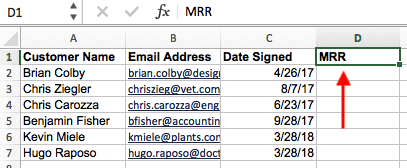
If this data is coming from a pivot table made in Excel, copy the data into a new spreadsheet so the VLOOKUP function can freely read this data.
Then, label a column next to the cells you want more information on with a proper title in the top cell, such as “MRR,” for monthly recurring revenue. This new column is where the data you’re fetching will go.
Step 2: Select ‘Function’ (Fx) > VLOOKUP and Enter Your Starting Cell
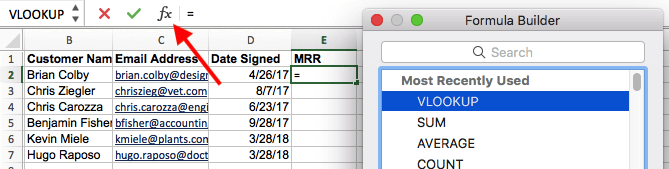
To the left of the text bar above your spreadsheet, you’ll see a small function icon that looks like a script “Fx.” Click on the first empty cell beneath your column title and then click this function icon.
Select “VLOOKUP” from the list of options that appears, and then re-click the cell you’ve highlighted and enter the cell you’re trying to find a match for. In this case, it’s A2. You’ll start migrating your new data into E2, since this cell represents the MRR of the customer name listed in A2.
Step 3: Enter the Table Array and Column Number You’re Searching Through

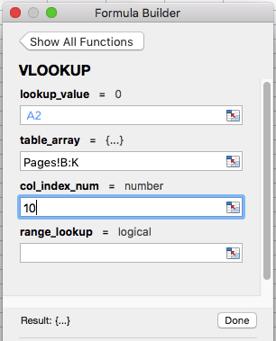
Then, next to the “table array” field, enter the range of cells you’d like to search and the sheet where these cells are located. The VLOOKUP form will help you fetch the correct page.
Beneath this field, you’ll also enter the “column index number” of the table array you’re searching through. For example, if you’re focusing on columns B through K (notated “B:K” when entered in the “table array” field), but the specific values you want are in column K, you’ll enter “10” in the “column index number” field, since column K is the 10th column from the left.
Step 4: Enter Your Range Lookup

In contexts like monthly revenue, you want to find exact matches from the table you’re searching through. To do this, enter ‘FALSE’ in the “range lookup” field. This tells Excel you want to find only the exact revenue associated with each sales contact.
Step 5: Click ‘Done’ (or ‘Enter’) and Fill Your New Column
In order to officially bring in the values you want into your new column from Step 1, click “Done” (or “Enter,” depending on your version of Excel) after filling the “range lookup” field. This will populate your first cell. You might take this opportunity to look in the other spreadsheet to make sure this was the correct value.
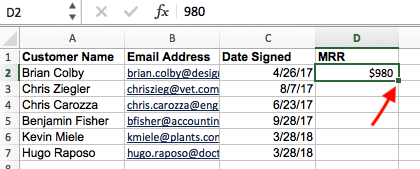
If so, populate the rest of the new column with each subsequent value by clicking the first filled cell, then clicking the tiny square that appears on the bottom-right corner of this cell. Done! All your values should appear.
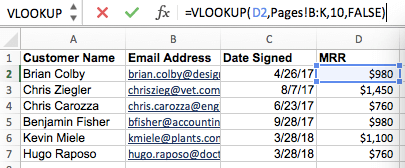
Alright, enough explanation: let’s see another example of the VLOOKUP in action!
In the video below, we’re taking the pivot table we made in video #2, pasting the values into a new sheet, and using it as an example report. We then use the VLOOKUP function to match blog post authors (from our second data source) to their corresponding post titles. In this instance, we’re using post title as our unique identifier.
Author’s note: Keep in mind there are many different versions of Excel, so what you see in the video above might not always match up exactly with what you’ll see in your version. That’s why we encourage you to download the written instructions and demo data so you can follow along.
Download demo data | Download instructions (Mac) | Download instructions (PC)
Want to learn to do more in Excel? Download the full video series, 4 Essential Microsoft Excel Skills Every Marketer Should Learn.


Are You Marketing Effectively Across Generational Lines? [New Data]
You’ve heard it from us before:
- “The way consumers prefer to access content has changed.”
- “We’re seeing a fundamental shift in the way we market and sell products.”
- “Buyers are no longer okay with outbound emails and cold calls. Instead, marketers need to create and deliver content that meets the consumer where they already are.”
While all of those things are true, you may want to know which preferences have changed and how to meet consumers where they already are, right?
After all, not all consumers have the same preferences. Marketing is not a one-sized-fits-all-solution.
Our HubSpot Research team knows that marketers need more information on what consumers want. But we also know that not all consumers have the same preferences. That’s why every year our Research team surveys consumers from all over the world to collect original data on content consumption preferences.
What stood out this year is this: while the average consumer preferences might show certain trends, you need to get granular with your data if you want to truly understand how different segments of consumers interact. Namely, consumers in different age groups have vastly different preferences when it comes to consuming, accessing, and discover content.
For example, millennials, an age group which roughly spans 18 to 34, aren’t just buying sneakers and gadgets anymore. Increasingly, millennials comprise a cohort of people purchasing homes, baby clothing, and B2B software. And their strong preference for video, social, and mobile-first content has implications for marketers working across an expanding array of industries.
Are you marketing effectively to different age demographics? Let’s dig in and find out.
Mobile First
For years, we’ve heard hype about mobile taking over desktop in traffic and search. But is the increase in mobile usage because everyone is using mobile more, or is it really just that certain age groups are?
Below, you can see the breakdown of device usage by age. Overall, mobile usage beats out desktop by only 5%, but when you break the data down by age group, the differences are clearer: it’s not everyone, it’s young people.

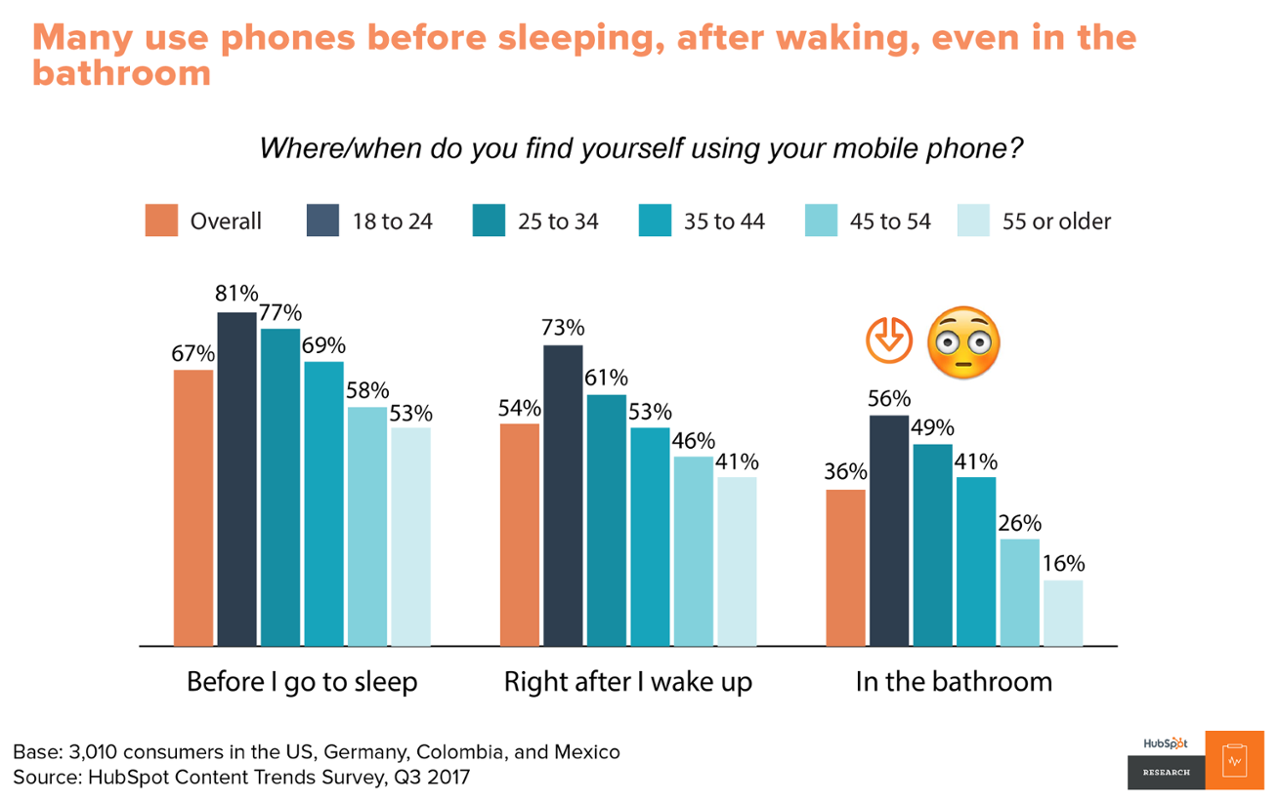
Mobile phones are an integral part of modern life. Consumers aren’t just using their phones to browse the internet when they’re commuting or on the go. Many admit they use their phones before they sleep, after they wake up, and even in the bathroom throughout the day.
Delivery and Discovery
What about accessing content? How do age groups differ in the way that they access or search for content?
Unsurprisingly, consumers in all age groups go to Google and Facebook to catch up on news and lifestyle stories. However, this is true even more so for younger age groups, while older age groups are still more likely to access stories via publication websites, mobile notifications, and email newsletters.

Format Preferences
What about your content creation efforts?
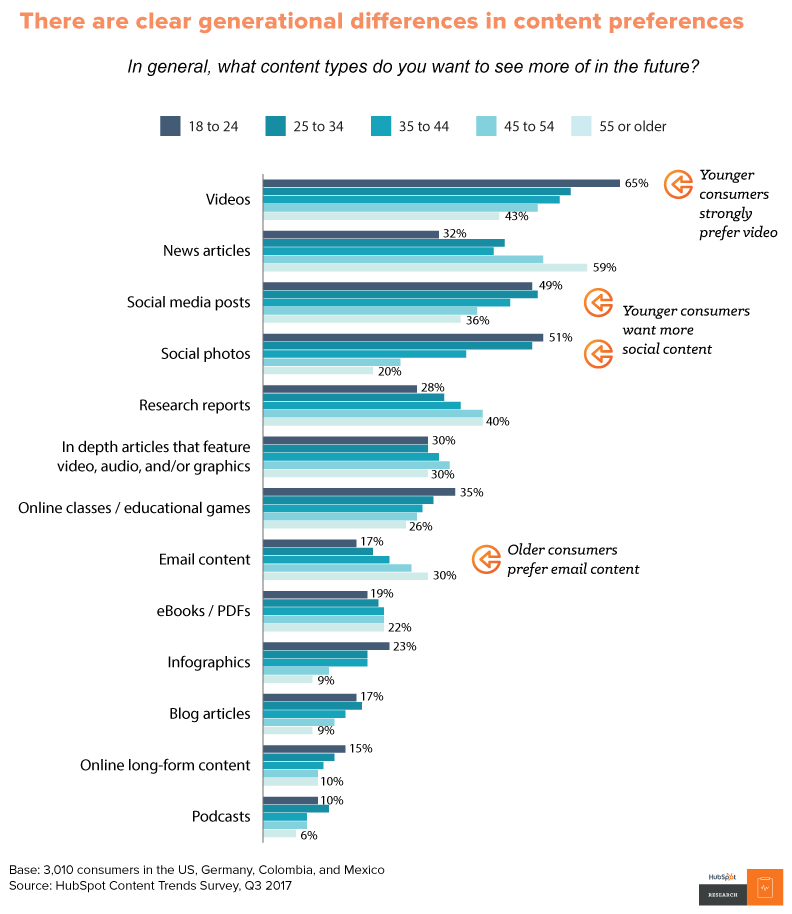
HubSpot Research also found clear differences in the content formats age groups prefer to access. Namely, millennial respondents show the strongest preference for video and social content.
In contrast, Gen X and Boomers prefer more news articles, research reports, and email content. Most traditional written content teams still have interested readers, they just might have more interetested readers in the older age brackets.
The Death of Email
Lots of brands, including HubSpot, have been discussing whether email is “dead.” While we think email is still a valuable channel when used wisely, that’s not to say every audience wants to see more email over other channels. Millennials want to see more videos from brands they support and far fewer want to see emails.
Meanwhile, more Gen Xers want emails/newsletters from a brand than any other type of content.

Content consumption preferences have changed over time.
However, much of that change has to do with what different age groups are used to consuming. As millennials get older, we’ll very naturally see a shift towards their content consumption preferences. Remember, though, This is true for every new generation. Marketers have to adjust their marketing patterns to the way consumers buy, sell, and consume.
We’ve talked through some of the main trends by age group, but what about other trends? What about ad creative preferences, geographic differences, and ways of audience engagement?
HubSpot and Ceros recently teamed up to create a fully-interactive guide on the most important Content Marketing secrets of 2018. In it, you can unlock additional data we haven’t yet covered in this blog post. Click here to unlock 10 Content Marketing Secrets Every Marketer Should Know in 2018.


How to Calculate Your Business’s Break Even Point
You’ve heard the term “break even.” It’s a popular way to describe a time when you spent exactly as much money as you made. “We gambled $200 at the casino and won $200, so we broke even.”
But in a business context, it’s not that simple.
Your break even point doesn’t just happen in Vegas, and needs to be constantly recalculated for you to turn a profit in the long term. Here’s how to find it.
Find Your Contribution Margin
Recently, I explained how a business calculates its contribution margin — the amount (ideally in the form of a percentage) that your revenue from sales exceeds your variable costs to develop the product. There are two reasons you should care about this figure.
First, your contribution margin deliberately leaves out your operating costs so you can see exactly how profitable your product is. For example, while software and website costs to an ecommerce clothing business don’t directly contribute to the business’s product (the clothing), the cost its thread vendor charges does. The business omits the first cost because it only wants to see how profitable its clothing is against what it pays to produce it.
The second reason contribution margin is so important? You need it to calculate your break even point.
Although operating costs are irrelevant when assessing a product’s profitability, they’re critical when assessing your business’s profitability. These costs, also called fixed costs, factor back into your books when calculating your profit margin — your total profitability after all business expenses paid. And in order to achieve a high profit margin, you first need to know when you’ll break even.
Break Even Point
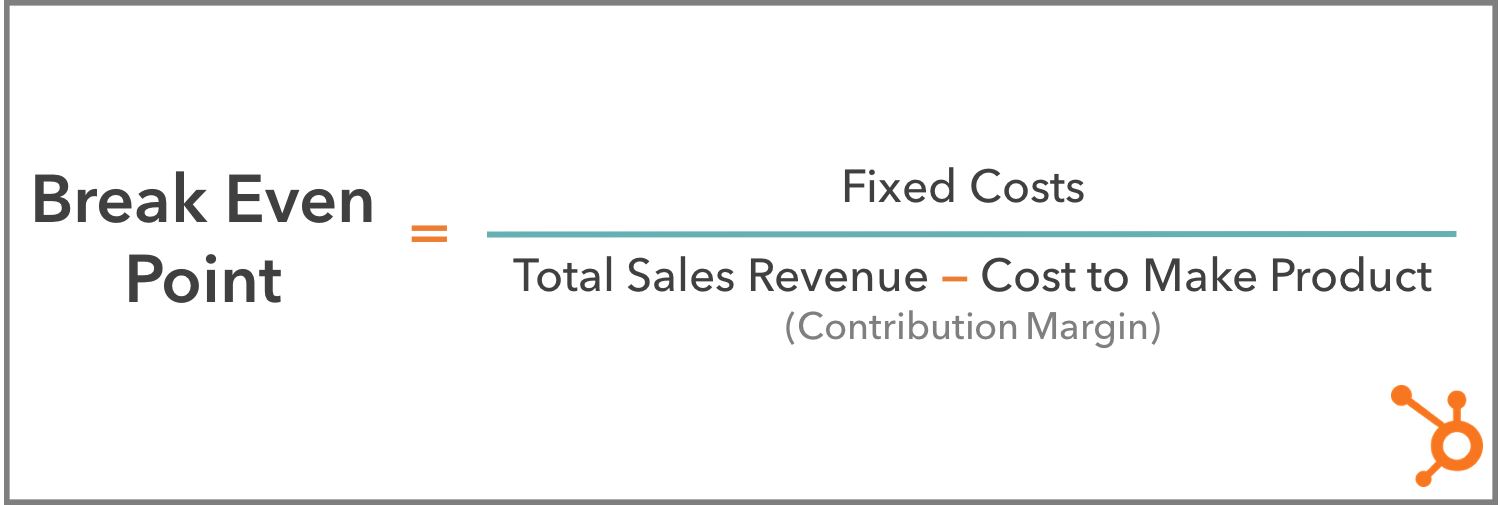
A business’s break even point indicates when total revenue from sales will be equal to total costs to the business. As a formula, your break even point is your fixed costs divided by your contribution margin, and the final number can be used as a recurring metric by the business to predict profitability.
Keep in mind that a break even point isn’t a finish line. Breaking even is an exciting milestone for a growing business, but the break even point indicates when the business’s revenue will be equal to its costs — not when it is. Businesses run the equation described above multiple times a year, eventually surpassing their break even point and (hopefully) becoming profitable.
So why is this number recalculated all the time? Once you “break even,” aren’t you officially on the road to profitability? Yes and no. If you were to calculate your break even point according to yearly revenue, yearly fixed costs, and yearly contribution margin, then yes, you’d get a number that is more representative of the business’s profitability since you’re considering a full year of activity. And once you break even, you wouldn’t have to track your break even point as often.
But there are shorter-term break even points that reset on a weekly, monthly, or quarterly basis to guide you as you strive to reach your end-of-year (EOY) break even point.
For example, if fixed costs such as your monthly office rent total $3000, and your product has a contribution margin of $250 per unit, you’d have to sell 12 units of your product by the end of the month to break even for that month. See how I came up with this number below:
The following month, you’re back to square one, as you’re on the hook for $3000 worth of bills for next month and need to sell another 12 products to, once again, break even for that period of time.
Set Goals to Become Profitable
Luckily, as a business grows, it won’t have to meet these incremental break even points in order to declare itself profitable by EOY. The business’s monthly revenue can even come up short of a month’s fixed costs, but break even or declare the business profitable at the end of the year.
How? With seasonal fluctuations in sales, you might fall short one month but become super busy during a holiday and make up for it. Perhaps you host a flash sale that reduces revenue in the short term but develops brand loyalty that brings in long-term customers, and a more steady revenue stream. Just be sure you calculate your break even point first before running a sale or discount so you can set appropriate goals for the sale itself. Houston, we have a profit.
Now it’s time for you to calculate your business’s break even point … How’d you do? Did you plug your sales figures into the formula above and get a scary number? Don’t sweat it — that’s why these incremental break even points are so helpful to a growing business.
If you’re discouraged by how much work you’d have to do to break even by the end of the year, shorten the time period of your break even point. By setting a goal to break even every week or month right now, you can set yourself up to break even after larger stretches of time later.

Facebook Might Be Dealing With More Data Misuse — This Time, From Javascript Trackers
Just as Facebook is starting to recover from last week’s Congressional hearings with its CEO and releases statements on how it uses offsite user data, a new research report has emerged that may indicate another case of misused data.
This time, the culprit might be the “login with Facebook” API and the third-party JavaScript trackers embedded on websites that use it. First reported by Freedom to Tinker and TechCrunch, it seems that these trackers can be exploited to collect data like a user’s data including name, email address, age range, gender, locale, and profile photo — to the extent of the information the user provided when it used this tool to log into the website.
As the name suggests, webmasters embed third-party JavaScript to, well, track user behavior on their sites — things like how far someone scrolls down or where they clicked.
It can help digital marketers, for example, “figure out what works and what doesn’t,” says HubSpot Director of Web Development Dmitry Shamis, “and optimize your site as a result.”
Tools like “login with Facebook” are designed to save new users time when creating a new account or enrolling in a website for the first time, by automatically populating fields (name, email address, et cetera) with information provided on their Facebook accounts, rather than requiring them to fill them in manually.
Many sites allow users to log in with Google in a similar capacity.
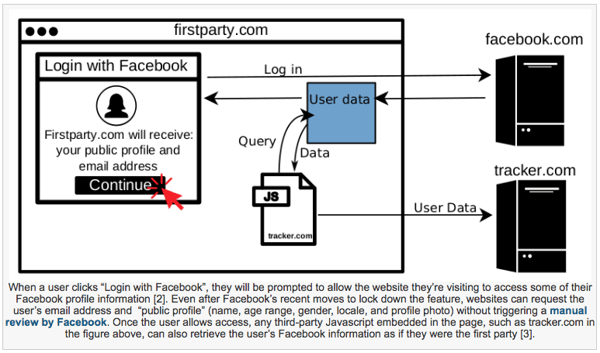
But now, it seems, vulnerabilities have been discovered in this system. In addition to granting the website or service in which the user is enrolling access to his or her data, third party javascript trackers embedded on that same site also receive access to the same data during the login process.
Here’s an from Freedom to Tinker that visually explains how something like this works:
Source: Freedom to Tinker
What we haven’t determined yet is how these trackers use the data once it’s obtained. However, within the list of “offending” trackers discovered by Freedom to Tinker, it appears that the parent companies that manufacture them also offer “publisher monetization services based on collected user data,” according to TechCrunch.
That could suggest a situation similar to the Cambridge Analytica one, in which an app developer collected personal data from users who opted into downloading it — but then, improperly sold it to the data analytics firm.
But it doesn’t stop there — Freedom to Tinker discovered a second vulnerability. On some sites, after users log in with Facebook, it seems that some third-party trackers use that data to “deanonymize users for targeted advertising,” which means that it can use login information to personally identify users, which is a privacy breach and typically not something that users agree to.
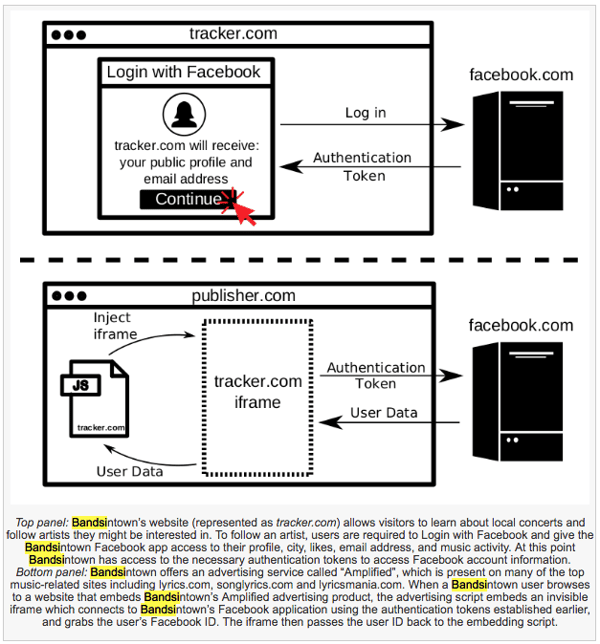
This happened with the site BandsInTown (possibly among others), which alerts people when the musicians they like are playing shows nearby. Logging in with Facebook helps BandsInTown track their favorite artists and let them know when they go on tour.
But as it turns out, there was yet another third-party tracker embedded in BandsInTown’s iframe — an HTML document that is embedded inside another, such document on a website — which personally identified users logging in with Facebook, presumably for advertising purposes.
Source: Freedom to Tinker
After reaching out BandsInTown about the issue, Freedom to Tinker says it was told by the site that the flaw has been addressed and repaired.
And while Freedom to Tinker is sure to point out that these vulnerabilities are not the result of flaws within the login with Facebook tool — and is rather due to what the site describes as a “lack of security boundaries between the first-party and third-party scripts” on the affected sites — Facebook is certain to experience some blowback as a result of its user data once again being compromised.
When TechCrunch reached out to Facebook, it didn’t receive a response being told that the social network was investigating the issue.
“This couldn’t come at a more inconvenient time for Facebook,” says Henry Franco, HubSpot’s social campaign strategy associate. “You can’t help but get the idea that a lifetime of shortcuts is finally catching up, putting the company on the defensive at a time when it needs all the wins it can get.”
On top of that, Franco says, “I’m sure there will be more bad news as the company does a full audit of app developers on the heels of the Cambridge Analytica revelation.”
HubSpot Product Lead Daria Marmer agrees that this report will only complicate things for Facebook — as it not only has to make sure its own site is secure, but also needs to “police others on the web.”
That might require playing catchup with sites that already have a method and operation for doing so, Marmer says. “Google does a good job of this: letting website owners know if their sites are insecure or getting attacked.”
“As interconnected as today’s systems are, it’s easier than ever to create unintended side effects,” says Ryan Stinson, HubSpot’s manager of security engineering. “Events like these call for an even more heightened awareness of people’s privacy needs, and taking a privacy-first approach to service.”
This is an ongoing situation that continues to unfold as we await comment from Facebook and its aforementioned app audit is underway.

Unriddled: Apple Keeps Coming for Google News, a Live Video Push for Twitter, and More Tech News You Need
Welcome to Wednesday, and the latest edition of “Unriddled”: the HubSpot Marketing Blog’s mid-week digest of the tech news you need to know.
Sorry we missed you last week — we were in Washington, D.C. for Mark Zuckerberg’s congressional hearings. (Feel like catching up? Check out our coverage here.)
This week, we continue to wade through the very crowded pool of tech news items to help you decrypt what’s happening in this vast, often complex sector. And believe it or not: Once again, it’s not all about Facebook this week.
It’s our Wednesday tech news roundup, and we’re breaking it down.
Unriddled: The Tech News You Need
1. Apple Could Be Launching a Subscription News Service
Less than a month after Google announced its “Subscribe With Google” service for news publishers, Bloomberg is reporting that Apple could be launching its own subscription news service.
The story follows Apple’s March acquisition of Texture: a digital magazine app through which users can subscribe to a selection of more than 200 magazines for a flat fee of $9.99 a month. While this tool might sound familiar, its model is actually different from Apple’s discontinued Newsstand app, which provided a central place for iOS users to individually subscribe to and read content from a number of publications.
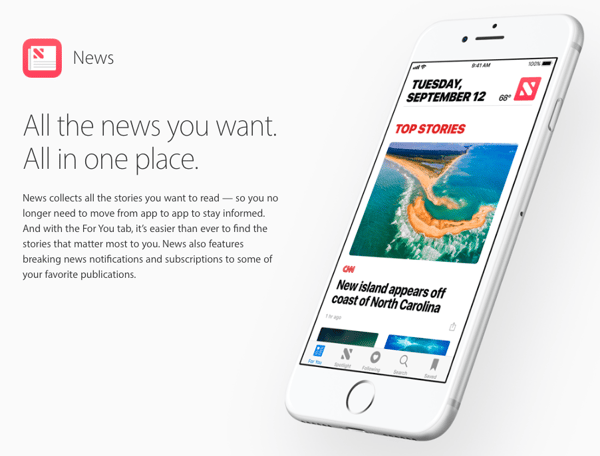
Now, the iPhone manufacturer offers what’s looking to be the more simplified Apple News, which aggregates news stories from publishers that a given user chooses to follow in a single place. And paired with the Texture acquisition, some are predicting that Apple could launch its own news subscription service modeled after Texture.
Source: Apple
Rather than providing a central place where users can individually subscribe to a number of outlets, it seems, Apple could be moving in the direction of offering an original flat-rate subscription service that allows users to access unlimited content from the publications offered on this platform. Those publishers would receive a cut of the subscription revenue.
Bloomberg reports that this new model could launch within the next year.
It comes on the heels of Google’s own announcement that it will be building a news subscription model of its own, though it differs from Apple’s expected service in a few ways.
Instead of providing an aggregation app where users can subscribe to content from a number of outlets for a single, monthly fee, Google says it’s working to make it easier for users to manage and pay for individual subscriptions through their Google accounts. That way, they can read premium content across any device on which they’re signed into Google, without having to get through a paywall every time they click to read articles.
As for publishers, Google says, this new feature will help supply them with better analytics and tools to identify and convert potential subscribers.

Source: Google
2. Twitter’s Big Push for Live Video
If you’ve recently opened the Twitter app during a major event — like last week’s Congressional hearings with Mark Zuckerberg, for example — you might have noticed the option to watch it live right from the app.
After Digiday reporter Kerry Flynn tweeted the discovery of this feature, Matt Navarra (formerly of TheNextWeb) noted that Twitter might be experimenting with the display of a live video “carousel” front-and-center of the app.
Twitter is now highlighting live videos at the top of your Home tab in a carousel https://t.co/8HA0lhQJKu
— Matt Navarra (@MattNavarra)
April 17, 2018
As Flynn noted, it’s somewhat reminiscent of the earliest days of Facebook Live, when the social network wanted to make sure users were aware of the feature by visually promoting live video content within the app.
But for Twitter, it has more to do with the promotion of Periscope: the live video streaming app that Twitter acquired in 2015. But since then, despite its best efforts, Twitter’s live video capabilities — along with the Periscope branding — could be described as lackluster. Other platforms often took the spotlight for live streaming, including Facebook and YouTube Live, with Twitter sometimes serving as an afterthought for watching events in real time.
That’s not for a lack of promotional efforts by Twitter, as is well known by those who receive its frequent email notifications of live sporting events that will be streamed on the network. On its blog, too, Twitter often tries to play up the experience of a live event (such as the Academy Awards) on its platform.
But what Flynn identified as the “mobile integration” of these capabilities is still somewhat new — and its success is to be determined.
3. A New QR Code Feature for Facebook Page Admins
In late March, rumors emerged that Instagram was testing a feature similar to Snapchat’s Snapcodes feature, which allows users to scan codes to find profiles or content on the app. Instagram’s version was rumored to be called Nametag, and would give content creators a similar method of discoverability by letting prospective followers scan a visual QR-like code (on print or other materials) that would lead to their profiles.
Now, it appears that Facebook has rolled out such a feature — first discovered by computer scientist Jane Manchun Wong — for Page administrators, who can now print a QR code for followers to either Like the Page, check in to its physical location, or take action on an offer.
Right now, it appears that the feature appears under “Publishing Tools” on the Page admin dashboard.
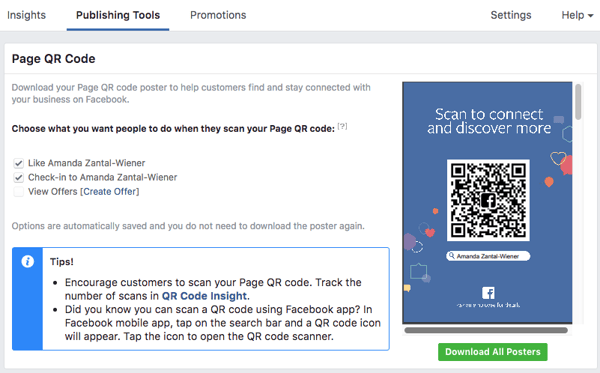
It also comes with insights that can help admins track how many times the QR Code has been scanned — though it’s not clear if any further analytics are provided beyond scans.
Nametag is yet to be confirmed (though Instagram did roll out a new “Focus” setting within its Stories service last week), and its launch could be contingent on the success of Page QR Codes.
4. And Now: Dogs in Slow Motion
Okay, so this item isn’t exactly hard-hitting news — but it is adorable. And in the midst of stories about data leaks and competition, sometimes, the mood calls for a slow-motion video of a dog drying itself off after a swim.
That’s what sites like The Dodo and BuzzFeed have often been used for — and now, both brands have partnered to create content promoting the Super Slow-mo features available on the Samsung Galaxy S9 and S9+ mobile devices.
“Partnering with BuzzFeed and The Dodo is a natural fit,” said Younghee Lee, CMO and Executive Vice President of Samsung Electronics in a statement, “and a great way to showcase how consumers can make everyday moments epic by using the Galaxy S9 and S9+’s Super Slow-mo camera.”
Beyond that, the story really speaks for itself — so without further ado, here’s that video.
What Else Is Going Down in Tech Town?
More of the Latest From Facebook
With 10 hours of testimony behind us, it was understandably hard to keep tabs on last week’s Congressional hearings with Mark Zuckerberg. Luckily, we recapped each day of the proceedings — as well as an overview of what we still want to know.
On Tuesday, Zuckerberg testified before a joint hearing held by the Senate Judiciary and Commerce, Science, and Transportation Committees, where there were some key, recurring themes among the lawmakers’ many (and often repetitive) questions. Read full story >>
At Wednesday’s hearing before the House Energy and Commerce Committee, the questions were a bit more challenging for Zuckerberg to answer and slightly more detailed in nature. That might have been the result of inquiries from House lawmakers that represent more niche constituencies — or simply the byproduct of better preparation. Read full story >>
And even after 10 hours of hearings, there were still things left largely unanswered by Zuckerberg and Facebook alike. Wired counted 43 outstanding items on which Zuckerberg promised lawmakers answers at a later date, and since then, Facebook has only publicly commented on one item in detail: how it collects data on browsing behavior outside of the network. By the end of the week, here’s what we still wanted to know. Read full story >>
Meanwhile, Facebook also released a statement earlier this morning outline some of the steps it’s taking toward GDPR compliance. Read full story >>
That’s all for today. Until next week, feel free to weigh in on Twitter to ask us your tech news questions, or to let us know what kind of events and topics you’d like us to cover.

Facebook Outlines Moves Toward GDPR Compliance
At 1:00 AM Eastern Standard Time on Wednesday, Facebook published an announcement outlining some of the ways it plans to advance toward the General Data Privacy Regulation (GDPR), which comes into force next month.
Last week, during Congressional hearings with the company’s CEO, Mark Zuckerberg, lawmakers asked about Facebook’s compliance with the GDPR and whether or not the same rules and regulations would be offered to users in the U.S.
Zuckerberg gave mixed answers over the course of the hearings (as well as the weeks leading up to it), with Representative Jan Schakowsky of Illinois finally stating that a U.S. version would be far from “an exact replica” of European regulations.
This morning’s announcement — penned by Chief Privacy Officer Erin Egan and Deputy General Counsel Ashlie Beringer — could be said to reinforce Representative Schakowsky’s assessment, as it doesn’t outline the GDPR’s requirements and rather explains new privacy options that will be rolled out to everyone.
Within the statement, Egan and Beringer write that, “while the substance of our data policy is the same globally, people in the EU will see specific details relevant only to people who live there, like how to contact our Data Protection Officer under GDPR,” but don’t go much further in terms of explaining the protections that are offered to users in the EU, versus elsewhere.
And while Facebook did recently rewrite its terms of service and data policy to make them clearer, according to this announcement, not much has changed for U.S.-based users since.
In this morning’s statement, Egan and Beringer write that “there is nothing different about the controls and protections we offer around the world.” However, the text later points to contrasting rules for teen users in the EU versus those in places where the GDPR doesn’t apply.
For the former, “teens will see a less personalized version of Facebook with restricted sharing and less relevant ads until they get permission from a parent or guardian to use all aspects of Facebook.”
But elsewhere — “even where the law doesn’t require this,” the statement says — “we’ll ask every teen if they want to see ads based on data from partners and whether they want to include personal information in their profiles.”
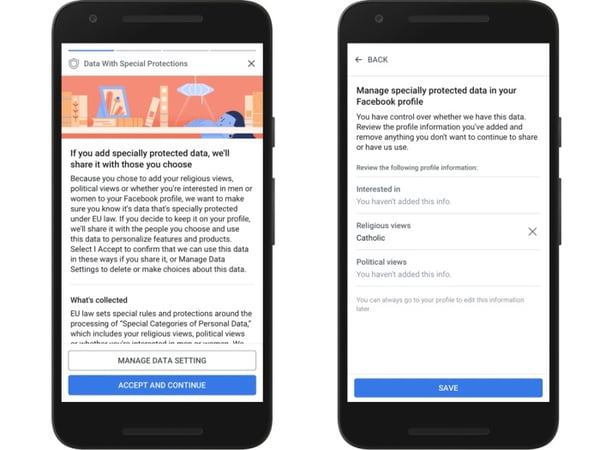
In other words, in certain parts of the EU (where the GDPR will come into force), users aged 13-15 will need express consent from a parent or guardian to allow the display of ads “based on data from partners” — which can include things like religious beliefs, political views, or other items that the person’s profile has deemed him or her “interested in.”
Source: Facebook
It’s the type of data that another announcement made yesterday by Facebook explains — the kind that the social network might collect and maintain based on someone’s browsing activity off of the site, which according to Zuckerberg’s remarks last week is synthesized to determine what types of ads might be the most relevant.
But the statement suggests that this parental consent requirement in the EU doesn’t apply in the U.S. — again, with the remarks indicating that where the law doesn’t require it, teens themselves will only be asked if they want to see such ads, without requiring adult permission.
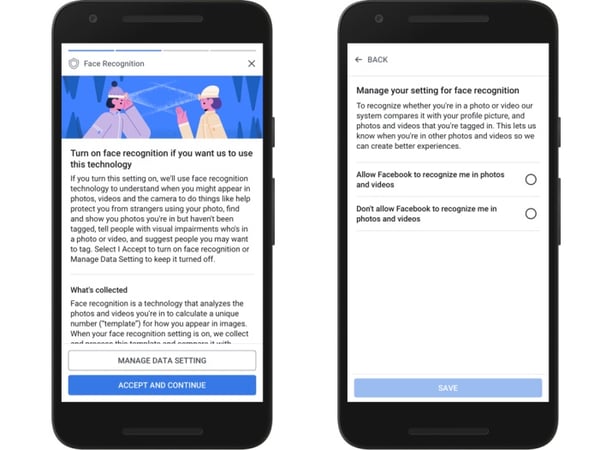
There are similar discrepancies in the way it describes rules and options around facial recognition. While Egan and Beringer write that “people in the EU and Canada [will have] the choice to turn on face recognition,” for users elsewhere, they only note that “using face recognition is entirely optional for anyone on Facebook.”
Source: Facebook
That suggests Facebook users in the EU and Canada could be proactively asked to opt into face recognition in order to use, whereas users elsewhere will have to go into their settings to change this preference (which can be done so here).
Otherwise, this morning’s announcement mostly reaffirms what Facebook has said in recent weeks it will change. In addition to revised tools to help users more easily download, delete, or export their personal data — which “are available globally, although [Facebook] designed them to comply with GDPR” — users will be asked to review and choose if they want this data to be used to influence the ads they see, and if they want information they’ve chosen to share on their profiles about religion or politics to be shared with advertisers.
As for timing, Egan and Beringer write that EU-based users will begin seeing these changes and requests to review options in the weeks leading up to the GDPR coming into force on May 25.
Users elsewhere will see their versions “on a slightly later schedule,” the statement says, “in the ways that make the most sense for other regions.”
To reiterate, it doesn’t appear that this announcement explains anything terribly new, or in much greater detail than Facebook has provided in the past. In fact, shortly after it was made, TechCrunch published “a flaw-by-flay guide” to the changes outlined in this statement.
Whether or not Facebook provides any further clarity on the new options available to EU users versus elsewhere — or if equally strict regulations are introduced to users in the U.S. and worldwide — remains to be seen.
But given Zuckerberg’s historically ambiguous responses to questions about the latter, it could be quite some time before –if ever — further light is shed on these topics.

How to Buy Instagram Likes (And Why It’s a Bad Idea)
Instagram’s new algorithm uses engagement as the most important metric to determine a post’s popularity. Essentially, the more likes and comments your posts get, the more your posts will be seen by a larger audience.
The importance of engagement is why it doesn’t surprise me that buying likes might seem like a tempting option. It’s just not a good one.
There’s no denying that likes are critical to the success of your Instagram account. For instance, let’s say you work for a smoothie shop and want to post a delicious smoothie recipe on Instagram to attract the engagement of a health-conscious audience.
If your healthy smoothie post gets a ton of likes, it’ll have a better chance of competing with other top posts with similar hashtags, and might even appear on Instagram’s Explore page. The Explore page, which you can find on Instagram by clicking on the magnifying-glass symbol, is a compilation of posts you’ve liked and posts liked by accounts with which you often interact. Since the Explore page shows users posts their followers like, it’s an effective way for your business to reach a new audience.
But while having a bunch of likes is valuable, it’s only a productive marketing strategy if you’ve achieved them organically.
Buying Instagram likes might seem like a good method to increase engagement, but it’s actually a dangerous tactic that can do quite the opposite, decreasing your engagement and destroying your brand’s reputation.
Read on to find out the two ways users currently buy Instagram likes, and how taking either road can poke holes in your marketing strategy.
How to Buy Instagram Likes
There are two types of services you can use to buy likes on Instagram. The first type of service sells likes from fake accounts. The second type of service sells Instagram bots, which then follow real accounts and like other people’s posts for you (with the expectation that these people will then follow and like your posts, in return).
There are numerous companies out there that offer one of these services. I’m here to warn you about them all. Let’s dive into both services and see why they’re so unsafe.
1. Buy Instagram Likes from Fake Accounts
The first method, paying a service to get likes from fake accounts, is a ineffective and risky option. Since these accounts are fake, you won’t receive engagement in the form of comments, and if your real followers see you have a post with 1,000 likes but only two comments, they’re going to feel distrustful of your account’s authenticity. Even worse, fake accounts will never turn into real customers. The likes you receive from fraudulent accounts are invalid signs of customer loyalty, and won’t help you measure your post’s true performance.
If your real audience discovers some of your likes are from bogus accounts (which is easy to recognize, if these fake accounts don’t have profile pictures or posts of their own), your business could seem cheap or insincere. As a consumer, I don’t want to purchase from your business if your marketing tactics are shady. Plus, if I see your followers are fake, I’m going to assume you don’t sell high-quality products — if you don’t believe in the quality of your brand enough to attract real people, why should I?
Ultimately, these fake followers can’t buy your product or endorse you in real life, which doesn’t set your business up for long-term success.
Here’s an example of pricing for a service, Likeservice24, that offers fake-account likes in bulk:
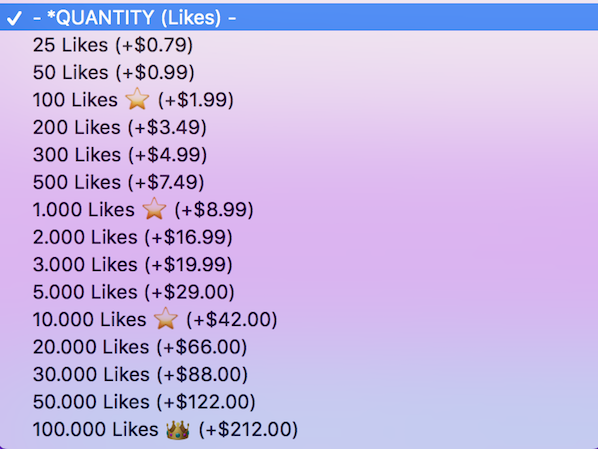
You can see the pricing is fair ($66 for 20,000 likes), but, in the long haul, it’s not a sustainable or reputable marketing tactic.
2. Buy Instagram Bots to Follow Other People’s Accounts
There’s an unwritten “I follow you, you follow me” rule that exists on Instagram, which basically means if someone follows me, I feel obligated to follow them in return. Many people feel the same way when following other accounts on Twitter. And it’s the premise of this second method.
With this service, you’re essentially buying a bot to follow other people’s accounts, with the hope that these accounts will follow and like your posts in return. The bot basically acts as an invisible minion, following accounts from your profile and liking and commenting on posts as if it were you.
After these Instagram bots follow a bunch of accounts, they’ll eventually unfollow them, to ensure you have a better follow-to-follower ratio.
This method shares the same risky and long-term complications as the buying likes from fake accounts tactic, but there are additional dangers to using a bot. For one, the bot only knows how to “auto comment” and “auto like.” Your bot, acting as you, is not a real person and can’t understand various nuances that exist in language, which could lead to PR-related misshaps when you realize your bot engages with an account that posts inappropriate content.
For instance, the bot might start liking any posts with hashtags that you’ve programmed it to like. This could cause your bot to like irrelevant posts that don’t support your brand’s values, or even hateful accounts that post content your customers would find offensive.
Even worse, if the bot is “auto commenting” for you, it might misconstrue a post’s intent: for instance, if the word “happy” is in someone’s post about their beloved pet who recently passed away, the bot might comment, “That’s awesome, congrats!”
Below is an example of a service, Instazood, that provides bots for as little as $10. (Low price, high risk, am I right?)
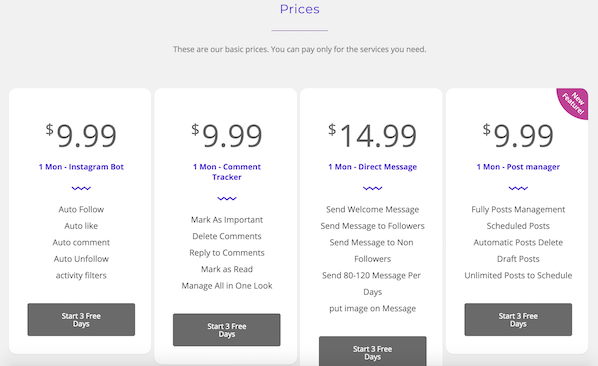
There are other services to buy Instagram likes, but ultimately, you shouldn’t trust a bot or fake accounts to receive authentic engagement.
The Three Biggest Reasons Buying Instagram Likes is a Bad Idea
Besides the hazards I just mentioned, there are three big-picture problems with buying Instagram likes regardless of the service.
First, Instagram might deactivate your account if they suspect you’re not using honest methods to build a following and attract engagement. Since 2014, Instagram has been hunting for and deactivating millions of fake accounts on Instagram, and paying for likes goes against Instagram’s Community Guidelines. They want their platform to remain a place for authentic connections, and so should you.
Second, it’s not a sustainable marketing strategy: ultimately, your long-term goals should revolve around creating deep, meaningful relationships with your audience, turning this audience into real-life customers, and creating a customer service process to ensure these customers become brand advocates.
None of these outputs will come to fruition if your likes are from fake accounts.
Lastly, buying Instagram likes can actually hurt your engagement ratio. Instagram doesn’t measure how many likes each post gets. Rather, it measures how many likes each post gets in relation to how many followers you have.
This means if your posts start receiving 10,000 likes, but you only have 1,000 followers, your posts are going to be seen by fewer people, and are less likely to get discovered.
Here’s a graph from InfluencerDB to illustrate the like-to-follower ratio:
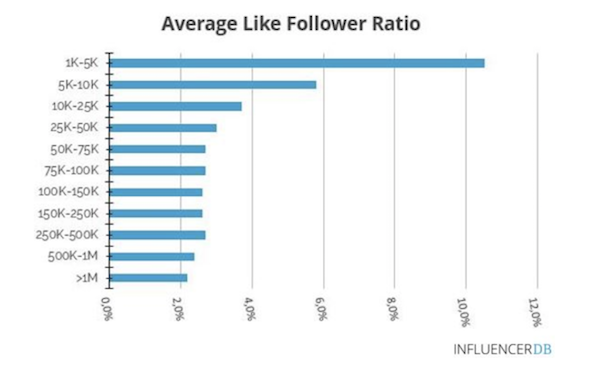
Ultimately, buying likes in an effort to increase engagement can actually decrease engagement, destroying the one thing you’re trying to get. Ironic, I know. So skip the shady shortcut to social media marketing, and use a more long-term but sustainable plan for attracting organic likes from real people. After all, those real people are the only ones who can become real customers.

The Ultimate Guide to Marketing Interview Questions From HubSpot’s CMO
Alright, everyone: I’m about to let you in on a few of my best-kept interviewing secrets.
In this post, I’ll uncover real questions I use when interviewing candidates for inbound marketing positions and the answers I’m looking for.
These questions are meant to assess candidates not only for their marketing talent, but also for who they are as people.

Keep in mind that the best candidates aren’t just qualified to do the job you’re trying to hire them for. You want to look for people who are also passionate about marketing, fit with your culture, and show potential for growth at your company.
Here’s a quick look into my interview approach, followed by 14 excellent interview questions I recommend adapting for your industry and hiring needs.
My Interview Approach
During interviews, I put a lot of stake into each candidate as an individual. My goal is always to find someone amazing who also has great long-term potential, no matter where they are in their career.
To uncover this, I like to ask questions that get at the core of who they are, how they think about things specifically, and how they’ve gotten things done in the real world. I then balance these questions with case-style questions, which usually involve a hypothetical business situation, because they give the candidate an opportunity to show how they think about and work on problems.
Below is a list of 14 questions that make for an effective marketing job interview, the majority of which I’ve asked candidates with whom I’ve personally gotten to meet.
Keep in mind that I don’t ask all of these questions during a single interview. In fact, one case-style question can evolve into a discussion lasting anywhere from 10 to 30 minutes, so I often only have time to cover two or three questions during one session.
I also don’t limit these questions to the position levels you’ll see in each section below. This list is just one reasonable way to organize your job interviews based on the average experience of an intern, coordinator, manager, and director. Depending on the candidate and the needs of the role, a question to a marketing manager candidate might be a good question to ask a marketing coordinator candidate as well.
Before the interview starts, carefully choose the questions you want to use based on the person’s role and background. For an inbound marketing generalist, you could ask any or all of these questions. For someone with a more specific role on a larger inbound marketing team, like a blogger, you could focus only on the questions about blogging and content creation.
14 Interview Questions to Ask Marketing Job Candidates
Case-Style Interview Questions
1. “Draw a funnel on the whiteboard showing 10,000 visitors, 500 leads, 50 opportunities, and 10 new customers (or any other numbers you think are interesting). Now, pretend you’re the CMO for the company, and you have to decide what your marketing team should do to improve on these metrics. Which areas of the funnel would you focus on, and what would you do differently to change these results?”
The Follow-Up: The follow-up here is simply pushing on the candidate’s answers. Typically, they’ll pick one part of the funnel to focus on. (And if they don’t, I like to push them to do just that.)
Once they pick one area, I ask them follow-up questions like: “Which tactics would you think about changing?,” “What have you done in your past role that’s worked?,” “Do you think our company has any unique advantages to get some leverage out of that stage of the funnel?” I don’t just want them to tell me to “improve the visitor to lead conversion rate” — they need to tell me how.
If I have time, I’ll tell them to pretend they’ve implemented their ideas, and I’ll ask them to go back through the whole funnel and explain how they think each of those initial metrics have changed.
What to Look For: Everyone on the marketing team needs to be able to understand how to think about and optimize the funnel. Here’s where you assess their thought process, whether they have an intuitive sense of what good and bad conversion rates are, and whether they understand how the funnel steps are connected.
You’ll also gain some insight into whether they understand which different tactics you can use at each step to improve that particular step. (For example, if they say the lead-to-opportunity conversion rate is bad, the right answer is not to write more blog articles.)
2. “We have two potential designs for the homepage of our website, but we don’t know which one to use. The CEO likes one, and the COO likes another. Half the company likes one, and the other half of the company likes the other. Which one should we use?”
The Follow-Up: This type of question should elicit a ton of questions from the candidate, like who the target audience for the homepage is. If it doesn’t, then they’re either making up their answer or don’t have enough knowledge to address the situation. Follow up by answering their questions with hypotheticals and seeing how they work through the problem.
If they do pick one side or the other and give you a reason, ask them what the goals are for the homepage. Then, ask them how they’d determine which homepage meets those goals best. From there, tell them that Homepage A performed well based on one of the criteria, and Homepage B performed well based on another one of the criteria. This way, you can assess how they make choices when it’s not possible to get data that’s 100% conclusive, and they have to choose between two, imperfect variations.
What to Look For: While it might seem like this question is all about design, what you’re really doing is understanding how candidates approach a conflict of interest. Do they care what each of these people think, or do they go to the data for their answers, such as through A/B testing, user testing, and customer interviews. The best candidates introduce logic and marketing methodology into their answers, while removing opinions. I also like when candidates say you should be constantly tweaking and improving the homepage, rather than always doing a complete redesign every nine or 18 months.
3. “Let’s say you have an Excel spreadsheet with 10,000 leads from a few months back — long enough that those leads’ sales cycle has passed. The file contains information about each lead, like their industry, title, company size, and what they did to become a lead (like downloading an ebook). Also in the file is whether they closed as a customer and how much their order was for. Can you use this information to create a lead score? How would you do it?”
Note: I often start this question by simply asking, “How should you create a lead score?” This is how I sort out the people who don’t take a data-driven approach. Folks who answer, “You create a lead score by talking to the sales team and then assigning five or ten points to each of the criteria they say they want” are actually wrong. That is not a data-driven approach to lead scoring, and it is way too simplistic to work effectively in most cases.
The Follow-Up: Most people will answer by talking about “looking at the data” and “sorting the data.” Push them to tell you how they’d do that in Excel (or another program if they prefer something else). It’s not practical to just “look” at the data when you have 10,000 rows — you need to use statistical analysis.
They also might zone in on one factor, perhaps industry, all alone. If they do that, you should ask them what they would say if the small companies in one industry are good leads, but the big companies in another industry are also good leads? Basically, just keep pushing them until they’re at a loss for what to do next.
What to Look For: This case-style question is meant to test a candidate’s quantitative abilities, and I’d only ask it for people applying for certain marketing roles (like operations). Here, I’m trying to figure out how the candidate thinks about analyzing data and what their sophistication level is around data.
Most people don’t get very far and are either unwilling or unable to look at more than one variable at a time, or understand how to analyze a lot of data in a simple way. At a minimum, you want to find candidates who:
- Look at the leads who closed in one group and compare them to the leads who did not close
- Look at multiple variables at a time
- Use statistical functions in Excel or another program to do that, like summary tables, pivot tables, and so on
If you find someone who starts making a coherent argument about why you might want to use logistic regression, factor or cluster analysis, actuarial science, or stochastic modeling to figure this out … refer them to me.
Marketing Internship Interview Questions
4. “What is one of your hobbies? How do you do it?”
This question will help you assess a candidate’s ability to explain a concept they know intimately to someone who isn’t as familiar with it. If their hobby is training for a marathon, ask them what advice they’d give you if you woke up one day deciding you wanted to train for a marathon. Are they able to communicate it clearly?
One candidate taught me how to make tagliatelle, which is hand-cut Italian pasta. She gave me the full run-down on how you make the noodles, how you form them and cut them, and which ingredients go into the sauce. She relayed the step-by-step process to me in a way that was very clear and understandable. I felt like I could’ve gone home and made tagliatelle myself. Not only did this tell me she knows how to convey information clearly, but it also gave me insight into her personality and interests.
5. “What brands do you like or follow on social media and why?”
This is another casual but useful question, as it can tell you both about a candidate’s personal interests and how they perceive marketing content on social media. The best answers go further than which companies a candidate likes buying from — they indicate why he or she trusts certain companies, what about their content strategy appeals to the candidate, and what specifically about those companies the candidate looks up to (and maybe wants to emulate in their own work).
If you need a candidate to elaborate, follow up by asking them to describe a post from a brand they like or follow, and what made that post so memorable to them.
Marketing Coordinator Interview Questions
6. “What do you read, and how do you consume information?”
Marketing is changing constantly at a rapid pace — so anyone in a marketing role needs to know how to stay on top of and adapt to these changes. Do they know where to look for industry news? Are they familiar with and subscribed to top marketing blogs? What do they do when they see a change has taken place, like when Google updates their algorithm?
7. “What’s an example of a lead-generating campaign you’d be excited to work on here?”
Not every marketing campaign you run generates the same type or quality of leads. This is what makes this question so interesting. It’s a chance for you to see how a marketing candidate thinks about the buyer’s journey and what that journey should look like in your company.
If you do pose this question to a candidate, don’t expect him or her to know exactly how your business generates its leads. The ideal answer simply demonstrates an awareness of your customer and perhaps some on-the-spot brainstorming the candidate might be asked to participate in while on the job.
Expect follow-up questions from the interviewee, too, especially if you pose this question to a more experienced candidate. For example, they might ask how qualified the leads should be, or how leads are scored as a result of this hypothetical campaign. The specific parameters matter less than the follow-up question itself — a positive sign of an analytical marketer.
8. “What are three components of a successful inbound or digital marketing strategy?”
There’s no “right” answer to this question — a digital marketing strategy thrives on more than three things — but certain answers show the candidate is up to date on how businesses attract and delight their customers today.
“A Facebook page,” for instance, isn’t a wrong answer, but it doesn’t give you context around how a business would use this page in their marketing strategy. Here are a few sample answers to this interview question that are on the right track:
- A blog with calls to action (CTAs), landing pages for website visitors to download more content, and a defined social media strategy.
- An SEO strategy, website chat, and an analytics tool to track campaign performance.
- Buyer personas, a Marketing and Sales Service Level Agreement, and a customer success strategy.
You won’t learn everything about a candidate from just these terms and phrases. But you should listen for them as the candidate responds — and expect more sophisticated answers if you pose this question to managers or directors.
Ultimately, the value you place on each of these inbound marketing components will depend on how important they are to your business and what the candidate would focus on as your employee. Before asking this question to anyone you interview, talk to your team and define your marketing strategy. Otherwise, you won’t have an accurate measure on which to evaluate a candidate’s answer.
Interview Questions for Marketing Manager
9. “Why do you love marketing?”
Or, “Which aspects of our business are you passionate about?” You want to hire someone who’s both qualified and has the desire to do the work. Otherwise, why would they work for you instead of the company next door?
Part of their answer will lie in their body language and enthusiasm. The other part will lie in how concrete their answer is. Get at the details by asking a follow-up question, like: “Let’s say you’re at home, kicking around, and doing something related to marketing. What is it that you’re doing?” Perhaps they’re reading their five favorite marketing sites, or analyzing traffic patterns of websites for fun, or writing in their personal blog, or optimizing their LinkedIn profile. Whatever it is, you want to be sure they’re deeply passionate about the subject matter you’d hire them for.
10. “Between videos, ebooks, blog articles, photos, podcasts, webinars, SlideShare, Facebook, Twitter, LinkedIn, and Pinterest … there’s a lot of potential content our team should produce for inbound marketing. How do we do it all?”
The wisest candidates know you should not do it all, but rather, you should start with the content that’s most important to your prospects and customers. They should also have a plan for talking to customers and prospects by way of interviews or surveys to figure out which social networks they use and which types of content they prefer.
11. “Let’s pretend we have very convincing data that shows none of our potential customers use social media. Should we still do it? Why?”
Look for candidates who understand that being successful in social media is important even if your customers aren’t there today. Here are a few reasons qualified candidates might cite:
- Your customers will be there in the future, so you should get started now.
- You’ll gain industry clout. After all, journalists and influencers in your industry are probably using social media — and it’s important for them to follow you even if they don’t ever become customers.
- Social media activity impacts your organic search presence, helping your content rank higher in search engines.
- You’ll have more control over your online presence.
- Your competitors are likely using social media.
- It may cost less to generate customers via social media.
Marketing Director Interview Questions
12. “We have a new product coming out in three months. What would you do to launch it?”
This’ll show you how well a candidate understands all the different tactics of inbound marketing and how to tie them together into a holistic plan. It’ll also give you insight into how creative they are and whether they can come up with new and interesting ways to do marketing.
13. “Our CEO wants you to evaluate our blog. What would you say?”
Before giving you an answer, the best candidates will come back and ask you about the blog’s metrics, how many leads and customers it generates, what the goals are for it, how much you’re investing in it, and so on. This is also a great way to test whether they actually prepared for the interview by reading your blog.
14. “What’s the main relationship between marketing and sales?”
The relationship between Marketing and Sales is known for its unrest (Sales wants better leads from Marketing, and Marketing wants Sales to close more, faster).
Similar to question #8, there’s no right answer here, but there are answers you should listen for. “Marketers are the lead generators and salespeople are the lead closers” isn’t necessarily wrong, but the candidate who ends his/her answer here might not be someone who can align both departments around a single, unified approach.
The best answers describe the responsibilities that Sales and Marketing have to each other, and the duties each commits to as part of this partnership. They have a plan for forging consensus on what makes leads marketing-qualified versus sales-qualified, creating a shared Service Level Agreement with agreed-upon metrics, and using content at different points in the marketing and sales funnel to turn strangers into customers.
The Candidate’s Follow-Up
Most candidates know to follow up with each of their interviewers in the form of a thank-you note or email. But part of my assessment is the depth at which candidates follow up with me.
The most impressive follow-ups are the thoughtful ones, where candidates call upon details of our discussion to show they’re really engaged in the interview process. Perhaps they did more concrete thinking about a specific question I asked, and they send a long email including research on a question they don’t think they nailed. Many times, they’ll send me a light strategy document with ideas and/or research on something we talked about. These candidates tend to stand out.
Well, the cat’s out of the bag. You’ll have to use these marketing interview questions as a basis to create your own, similar questions that are relevant to your industry and hiring needs. Good luck, and happy hiring!


Mark Zuckerberg Left 43 Questions Unanswered Last Week. Here’s What Facebook Has Since Told the Public.
In the midst and aftermath of last week’s Congressional hearings with Mark Zuckerberg, people have been questioning the preparedness of those involved.
Was Mark Zuckerberg well-equipped to answer lawmaker questions? And were Senators and Representatives alike prepared to ask the right ones?
One thing is for sure: There were several questions that Zuckerberg couldn’t answer in the hearing room, which he promised lawmakers either he or his team would respond to at a later time. According to Wired, there were 43 of these items in total, which reporter Brian Barrett compiled here.
In the days since the hearings, Zuckerberg and his fellow executives at Facebook have been fairly mum, with the exception of a “Hard Questions” post written by Product Management Director David Baser on the ways and degree to which Facebook collects data on user behavior off the network.
Some questions around that topic did arise last week from Senator Roger Wicker and Representative Jerry McNerney, among others.
On Tuesday’s Senate joint committee hearing, Senator Wicker was one of the first to broach the topic of if and how Facebook tracks a user’s browsing activity — even for those who are logged out of the network or without an account, which was one of the many outstanding items Zuckerberg said he’d have to check and have his team answer at a later time.

Source: Wired
At Wednesday’s House Energy and Commerce Committee hearing, Representative Jerry McNerney asked whether — and why — browsing data is or is not included in a Facebook user’s downloaded data file.
The answer, we eventually learned, was no: browsing data is not included in a downloaded personal data file, which Zuckerberg later confirmed in the form of a correction after a break.
Zuckerberg asks to issue another correction to something he said early, saying that weblogs are NOT in “download your information” and are only kept temporarily to measure what ad topics a user might be interested in. Those topics appear in the data download.
— Amanda Zantal-Wiener (@Amanda_ZW)
April 11, 2018
The “web logs,” in this case, are the logs of browsing activity that Representative McNerney previously asked about. And since then, a great deal of information has emerged on how, exactly, this data is captured and maintained by Facebook.
And while Zuckerberg made promises to answer a range of questions, yesterday’s post from Baser answers a small subset of those marked as outstanding by Wired — many of which could already be answered by existing information found throughout Facebook’s various product pages. During Wednesday’s hearing, Alex Kantrowitz of Buzzfeed went into detail about it.
Okay, I’ll answer some of the questions, using Facebook’s website!
— Alex Kantrowitz (@Kantrowitz)
April 11, 2018
Here’s a closer look at the additional detail Baser provided in Monday’s post.
What Facebook Has Told the Public Since Last Week’s Hearings
The Nature of the Post
It’s important to reiterate the fact that much of the information provided in Baser’s post already existed on various Facebook product pages. The decision to categorize it within Facebook’s “Hard Questions” series, which the company describes as one “that addresses the impact of our products on society,” was at minimum interesting.
As Casey Newton of the Verge noted on Twitter (and later in a post of his own), this question shouldn’t have been one of the more difficult ones to answer. And even if it was, why did answering it require such a long, text-heavy explanation — especially after Zuckerberg’s numerous and repeated hearing remarks stressing the importance of making Facebook’s policies easier to understand?
Especially given all the talk of making things easier to understand at last week’s hearings
— Amanda Zantal-Wiener (@Amanda_ZW)
April 16, 2018
In the course of covering last week’s event, I touched a bit on what exactly Representative McNerney was asking about and some of the ways in which that tracking manifests itself across the web. Baser didn’t provide a ton of new information in his post, but did shed more light on the details of it.
But one term that Baser seemingly refused to use in his explanation was: “shadow profiles.” And once we get through the major points of his post, I’ll explain why that’s important.
A Summary of Facebook’s Web Behavior Tracking
To see the full detail of this tracking, I’d recommend reading Baser’s full post here. In the meantime, I’ve outlined a summary of what Facebook collects, and how.
To start, there are four major tools that Facebook uses for this type of tracking:
1. Social Plugins
These are the “Like” and “Share” buttons you might see on a site that allows you to Like or comment on something like a news story — which uses a plugin that uses Facebook’s tools, rather than the site having to build its own comment or reaction section.
As Baser explains, when a user interacts with these tools on another website, Facebook uses “your IP address, browser/operating system information, and the address of the website or app you’re using to make these features work,” since that’s required to display the tools in the right language according to the geographical location it detects, as one example.
2. Facebook Login
You might have come across certain websites or apps that, instead of requiring you fill out an entire form with several fields to log in or join, allow you to join in one or two clicks by doing so with your Facebook profile. You might also recall seeing a secondary message pop up alerting you what information doing so would allow the website to see, which is related to what initially set off the sequence of events that led to the misuse of personal Facebook data by analytics firm Cambridge Analytica.
3. Facebook Analytics
This product works similarly to several other tools designed to help webmasters and marketers track the behavior of people who visit their websites — like what drove them there, where they’re located, and how long they stayed on the page. As Baser was sure to point out in his post, Google Analytics works in a similar capacity.
But in order for Facebook Analytics to work, Baser explains, it requires Facebook to gather certain tracking tools like “cookies and other identifiers” to help determine which website visitors are also Facebook users — which helps developers and webmasters gain supplemental demographic data from their profiles, like age and gender. And while this wasn’t spelled out in his post, Baser makes it sound as though this information isn’t personally identifiable when provided in this way, saying it’s “aggregated.”
4. Facebook Ads and Measurement Tools
These tools, Baser explains, help webmasters and developers display ads on Facebook and beyond, by showing them what people interested in their content might be doing online beyond Facebook, and to measure conversion from Facebook ads to actions like websites visits.
This is one place where the Facebook Pixel comes in, which was almost a point of contention during Wednesday’s House hearing. Essentially, the Pixel is a piece of code advertisers can ad to sites that measures how many users are engaging with their ads across any number of devices that person might use. It works, Baser says, “without us sharing anyone’s personal information.”
But the Pixel has to work with the aforementioned cookies, as well as what Baser calls “device identifiers” to see if the person engaging with a Facebook ad displayed outside of the network even has a profile.
“If they don’t, we can show an ad encouraging them to sign up for Facebook,” he wrote. “If they do, we’ll show them ads from the same advertisers that are targeting them on Facebook. We can also use the fact that they visited a site or app to show them an ad from that business — or a similar one — back on Facebook.”
This might be one of the most important things Baser noted in his post.
What’s Still Unanswered
Shadow Profiles
To reiterate: When a Facebook user engages with these tools outside the network, it can help personalize ads and other content displayed in his or her News Feed.
But here’s the clincher: Even if that person is logged out of Facebook at the time of engaging with elsewhere-displayed content, the tools track the behaviors, so it can later determine what he or she sees after logging back in. That’s one of the key items Newton pointed out in his post, and a tool Baser says helps Facebook in “improving our products and services.”
This logged-out browsing activity tracking is a core building block behind the concept of a shadow profile, which, to reiterate, is not a term Baser used in his explainer. A shadow profile is essentially the Facebook presence the company builds for you prior to joining based on the online behavior data it has tracked through these tools, so that when you do create a profile, it can easily recommend Pages to Like or friends to add.
Antonio García Martínez of Wired — who once worked for Facebook — confirmed this during Wednesday’s hearing on Twitter, noting that beyond the security and personalization purposes Baser identified in his post, Facebook tracks this information for “growth.”
When a user signs up for FB the first time, their friend recommendations will be remarkably good. Their entire friend network will essentially already be there.
Remember those phone contact list opt-ins when you installed the app?
— Antonio García Martínez (@antoniogm)
April 11, 2018
Opting Out
Baser concluded his post by going into the many controls Facebook users have over their data — like turning off ad customization and being able to choose what’s displayed in the News Feed. In fact, he wrote that users can completely opt out of personalized ads that have been created and displayed based on information Facebook receives from other websites and apps.
But if you read the statement carefully, you’ll see Baser said nothing about the ability to opt out of having their browsing behavior tracked, or their weblogs being collected.
And again, as Zuckerberg noted during the hearings, these weblogs don’t appear in a user’s downloaded data file — nor did Baser indicate they would be included in the future. Instead, what’s displayed in this file are the “ad topics” Facebook deems to be of interest to a given user based on the browsing behavior it tracks.
So, why is that? And does Facebook have any plans to change it?
To me, those are some of the “hard questions” Facebook might consider answering.
Whether or not the company will respond to these outstanding queries in a public capacity remains to be seen. I do not believe last week’s hearings will serve as the last instance in which Facebook executives are called upon by lawmakers, nor do I think any sustainable regulation or legislative action will result from those sessions alone.
But, as the demand for further transparency continues — and the days until the General Data Privacy Regulation (GDPR) comes into force next month dwindle — I’m curious to see to what degree Facebook responds to it. And if it does, I’ll let you know.
Featured image credit: Facebook
