
12 Google Sheets Add-Ons to Streamline Reporting
Google Sheets can be used for a lot more than just storing and organizing your data. With the right add-ons, you can streamline your reporting process, collect big-picture data predictions and analysis, and even send emails — all from your spreadsheets.
Before we dive into the 12 Google Sheet add-ons, here’s a brief overview on how to download a Google Sheets add-on:
1. Open new or existing google spreadsheet
2. Click add ons in navigation bar → “get add ons”
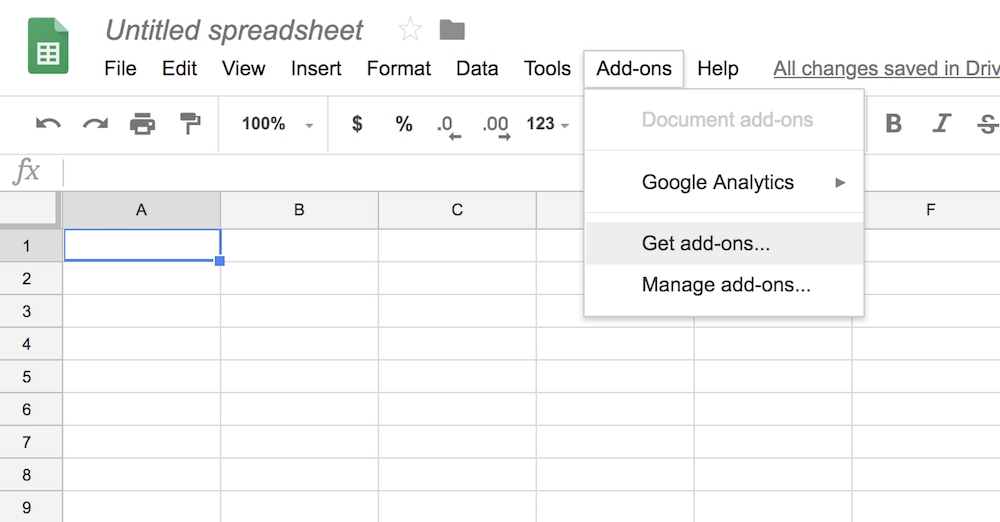
3. Hover over an add-on and click “free” button
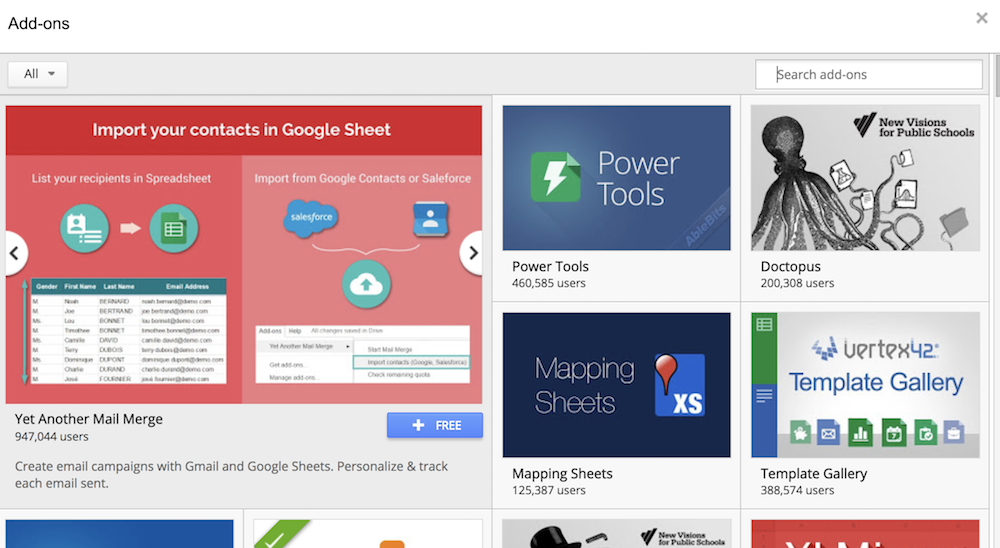
4. In the pop-up window, sign into your google account and click “allow”
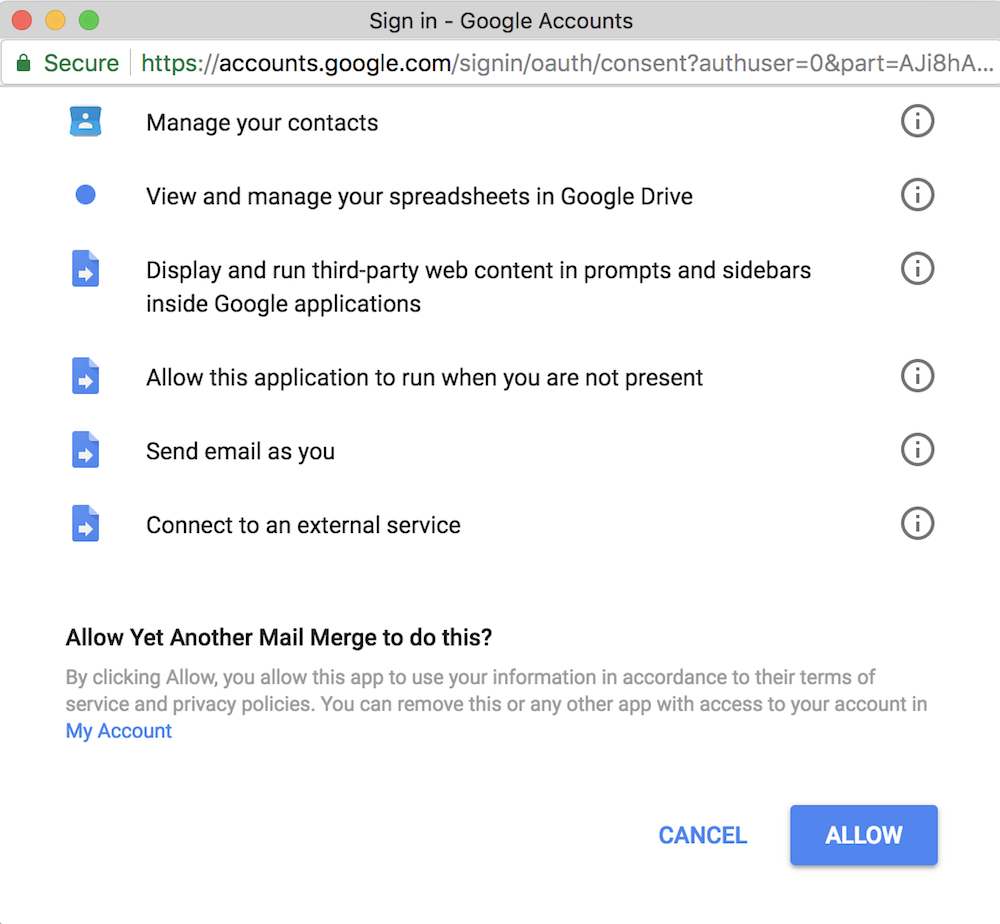
4. The add-on is automatically installed
5. To manage or remove add-ons, click “manage add-ons”
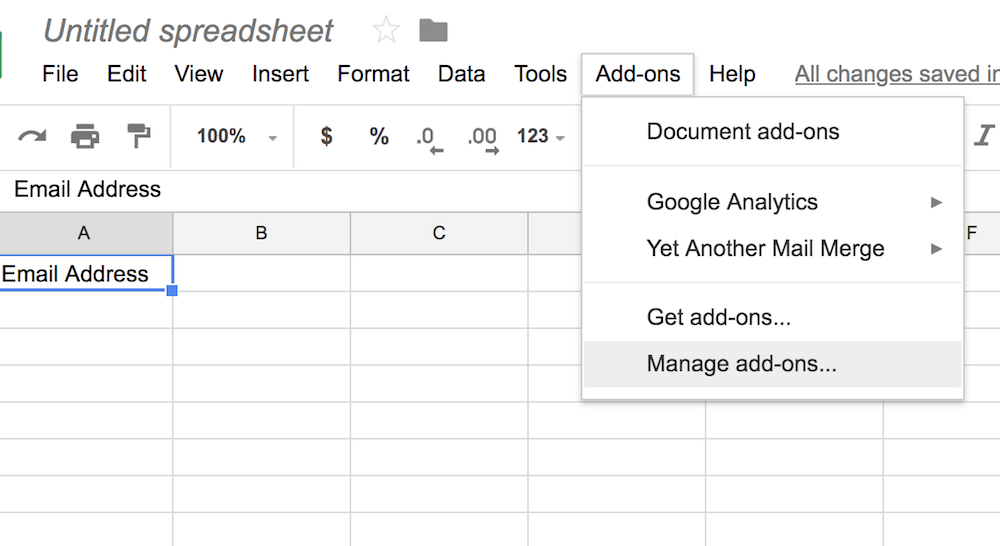
6. If you want to remove the add-on, click the green “manage” button, and then “remove”
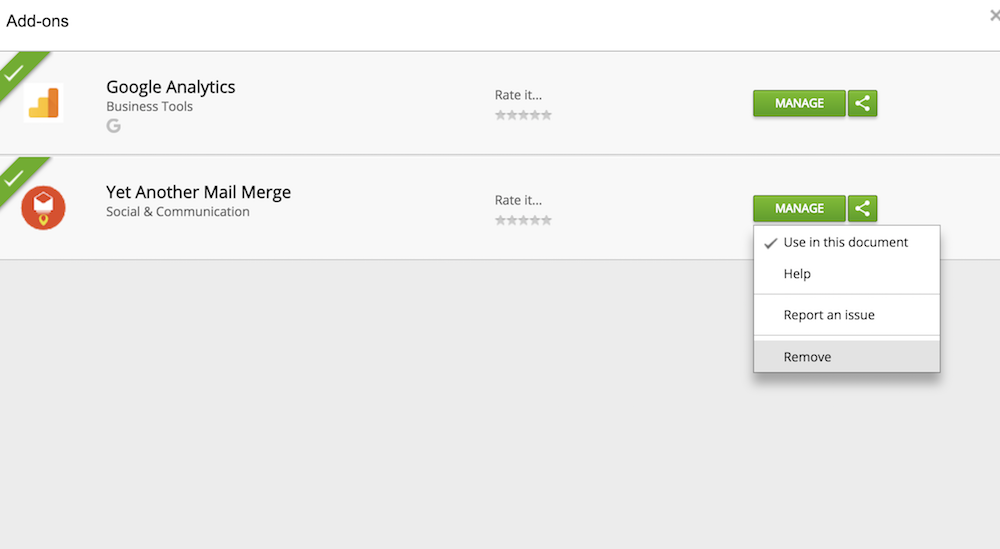
Important note: You’ll only see these add-ons on a desktop, they don’t work on mobile. Also, most add-ons work for both Chrome and Safari, but some are only designed for Chrome.
Now that we’ve got that covered, here are 12 Google Sheet add-ons that can streamline your entire reporting process.
1.autoCrat: When you’ve finalized a spreadsheet and want to send it to someone else, this add-on enables you to merge your spreadsheet data into a document and email your data as either an attachment. Autocrat can also mass-generate personalized documents.
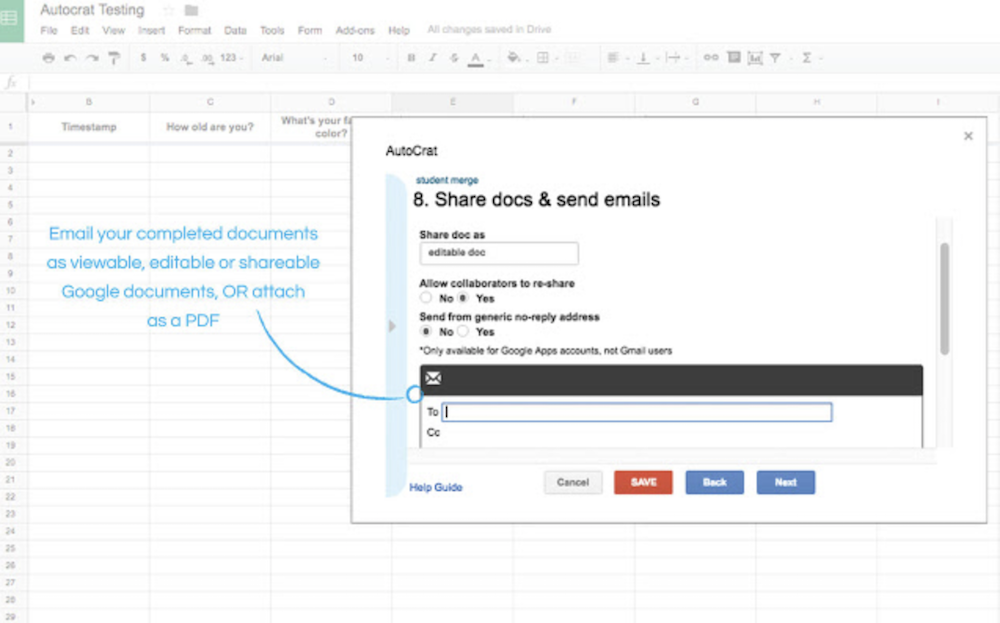
Image credit to autoCrat add-on.
2.Yet Another Mail Merge: This tool automates email campaigns, tracks emails, and lets you personalize emails for specific contact groups. To do this, you simply import your contacts into a spreadsheet, and choose a Google email template. You can send one generic email to all your contacts, or customize emails for different contact segments.
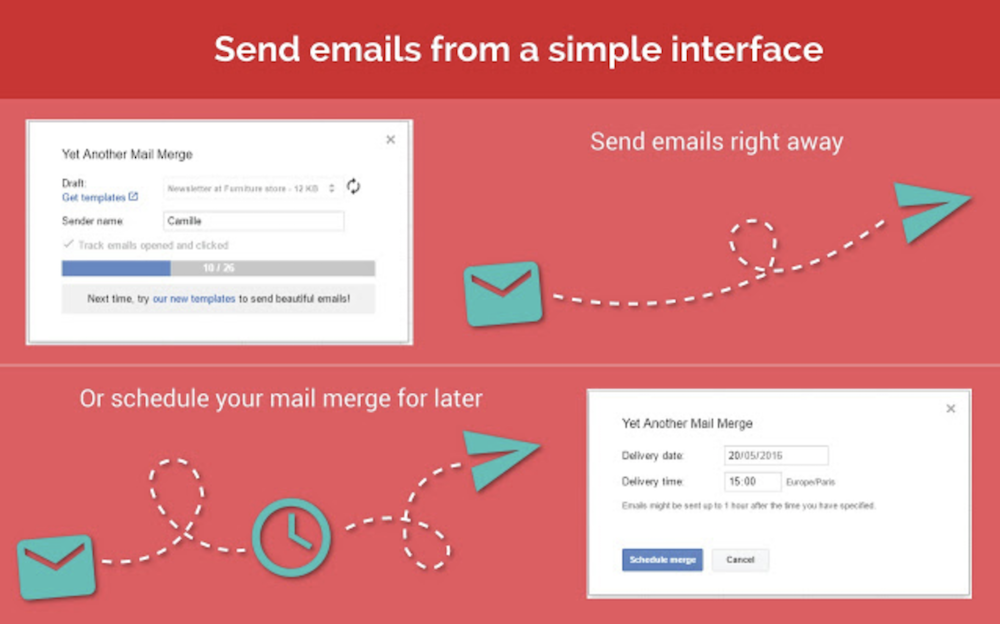
Image credit to Yet Another Mail Merge add-on.
3.Gmail Scheduler: Gmail Scheduler allows you to schedule emails for later. After writing your email in Gmail and saving it as a draft, your spreadsheet will automatically send the email at the appropriately allotted time.
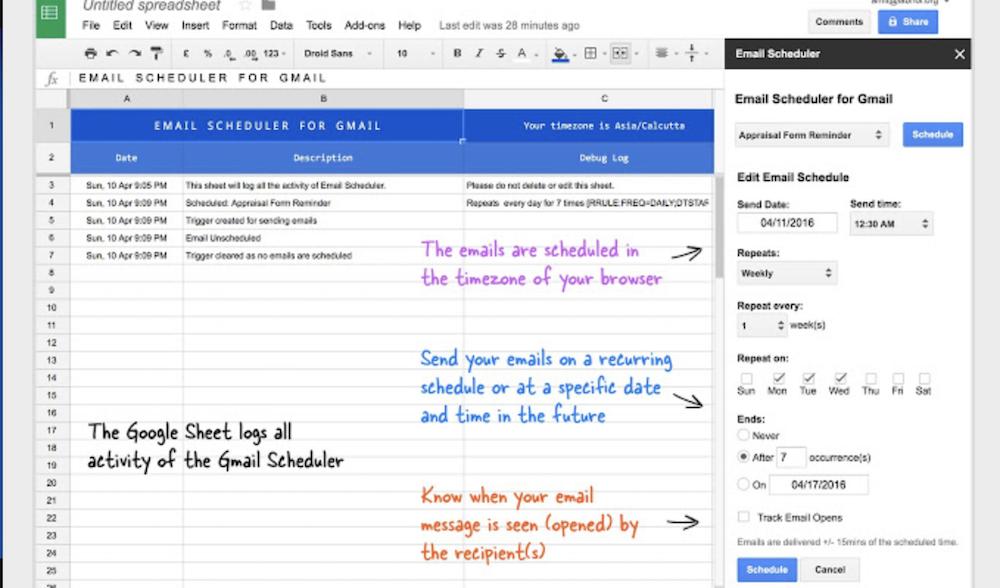
Image credit to Gmail Scheduler add-on.
Organization:
4. Document Studio: If your data is spread out across spreadsheets, Excel sheets, Google Form Responses, and CSV files, this add-on makes it possible to combine all your miscellaneous information into one clean document. Among other things, Document Studio assists you in creating highly sophisticated marketing pitches or business letters. It’s your choice whether you want your final document in PDF format, Google Sheets, Docs, or Slides, Microsoft Powerpoint, Word, or Excel, HTML or Plain text, or an ePub eBook.
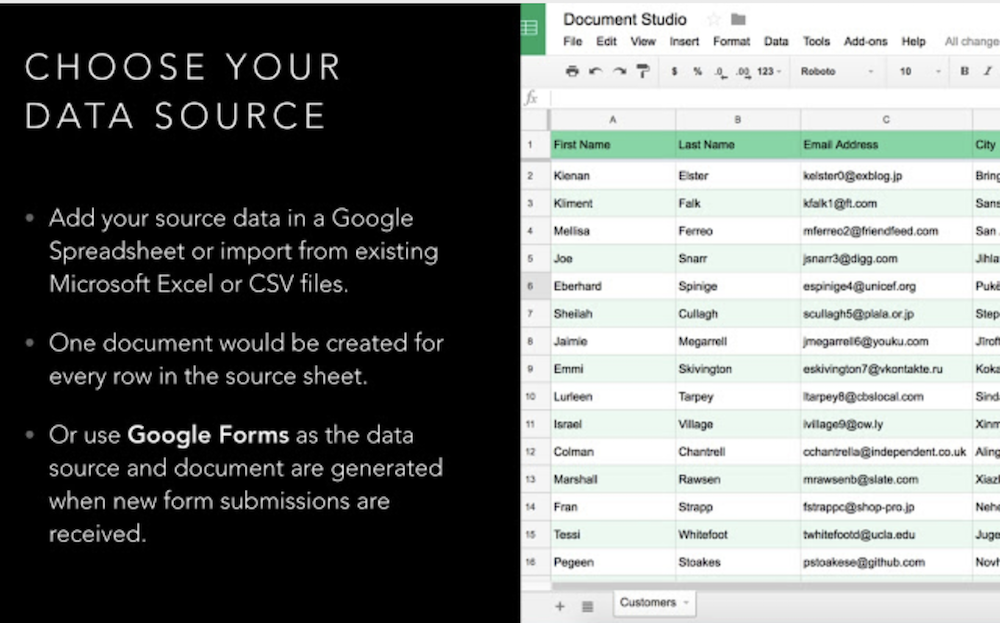
Image credit to Document Studio add-on.
5. Power Tools: Power Tools is a useful all-in-one service to cleanup data, reformat it, combine sheets, split columns, customize formulas, and more. If there’s one service in Power Tools you use a lot, you can even save it as a favorite. The add-on also automates mundane tasks, like adding or removing text by position.
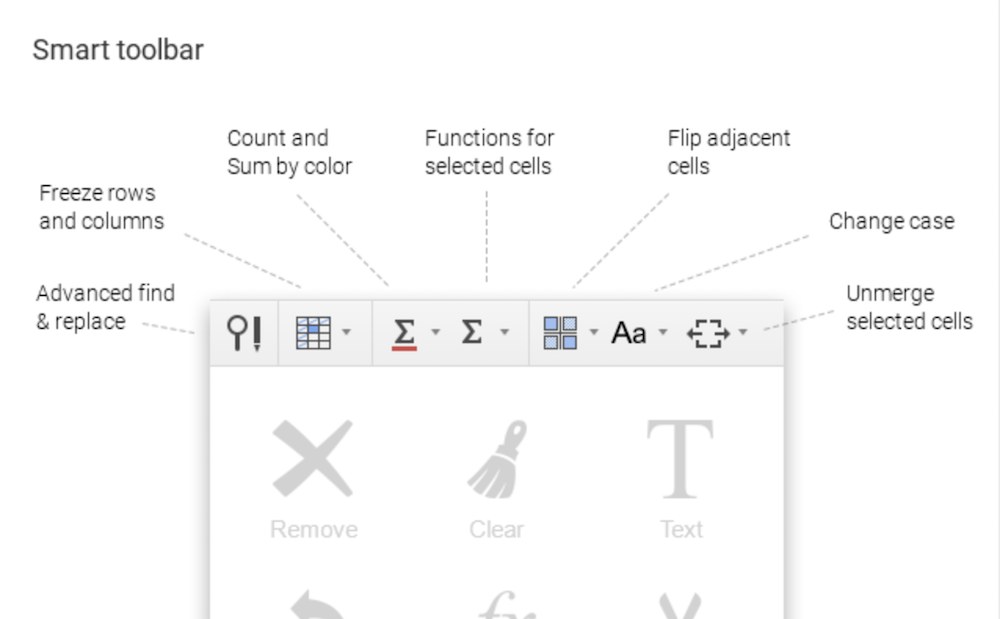
Image credit to Power Tools add-on.
Visuals:
6. Table Styles: If you want to use your spreadsheets for presentation purposes, Table Styles helps you achieve a sleek style. With Table Styles, you’re able to add custom or predefined styles, fonts, borders, and colors to your sheet. If you were presenting a spreadsheet at a marketing conference with company data, for example, you could use your company colors for a professional look.
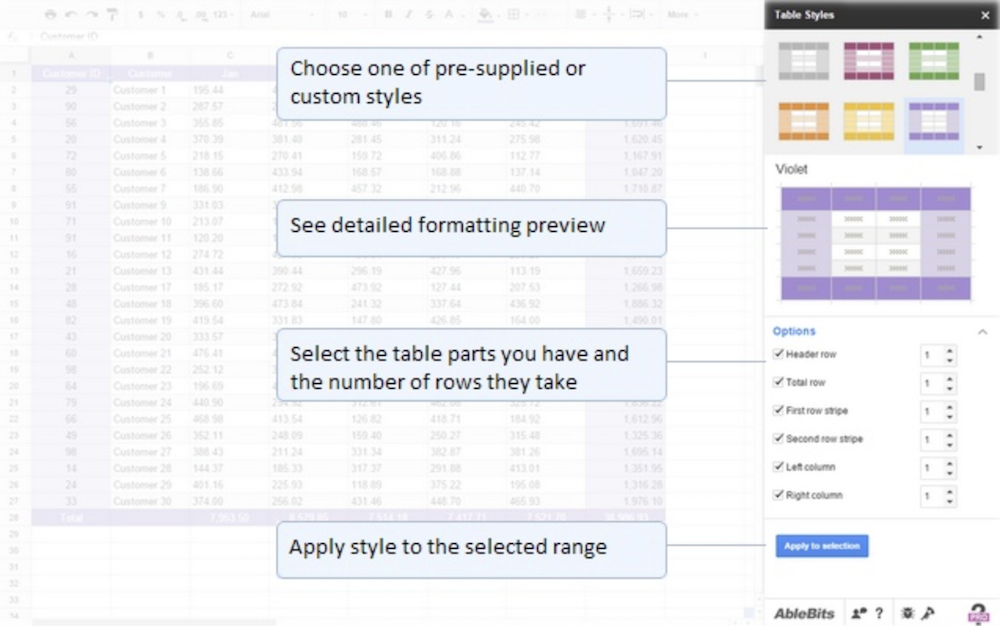
Image credit to Table Styles add-on.
7. Awesome Table: This add-on gives you the option of viewing or analyzing data in other visual forms. Awesome Table transforms your data into charts, maps, cards, visual tables, or other custom interfaces.
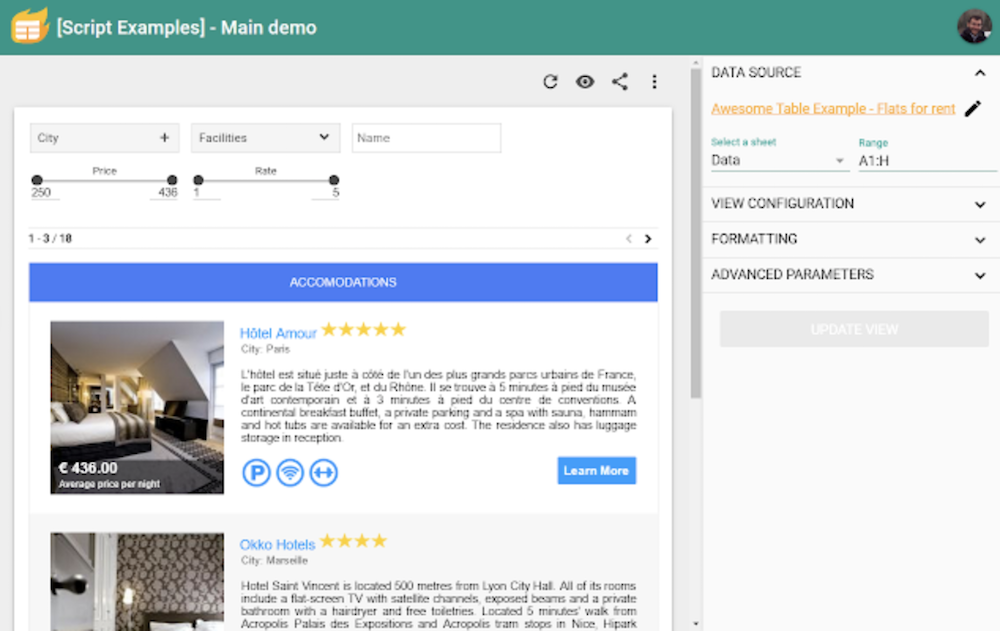
Image credit to Awesome Table add-on.
Data Analysis, Calculations, Predictions:
8. Solver: Solver helps you maximize profits, minimize costs, and deal with budget allocation, which is particularly useful if you’re in charge of budgeting multiple marketing campaigns at once. Solver can calculate and model your data, and provide solution optimization, as well.
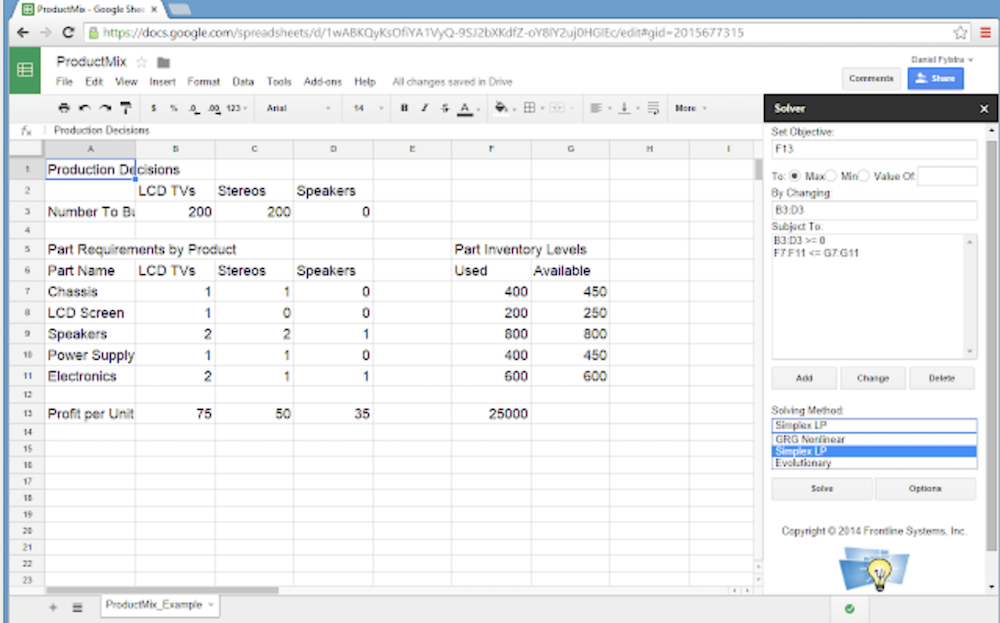
Image credit to Solver add-on.
9. BigML: Conceiving predictions with your data is often tricky, time-consuming, and inefficient. This add-on solves that problem by extracting value from your known data and filling the blank cells in each data row with predictions. It also assigns confidence levels to predictions, and populates lead score values.
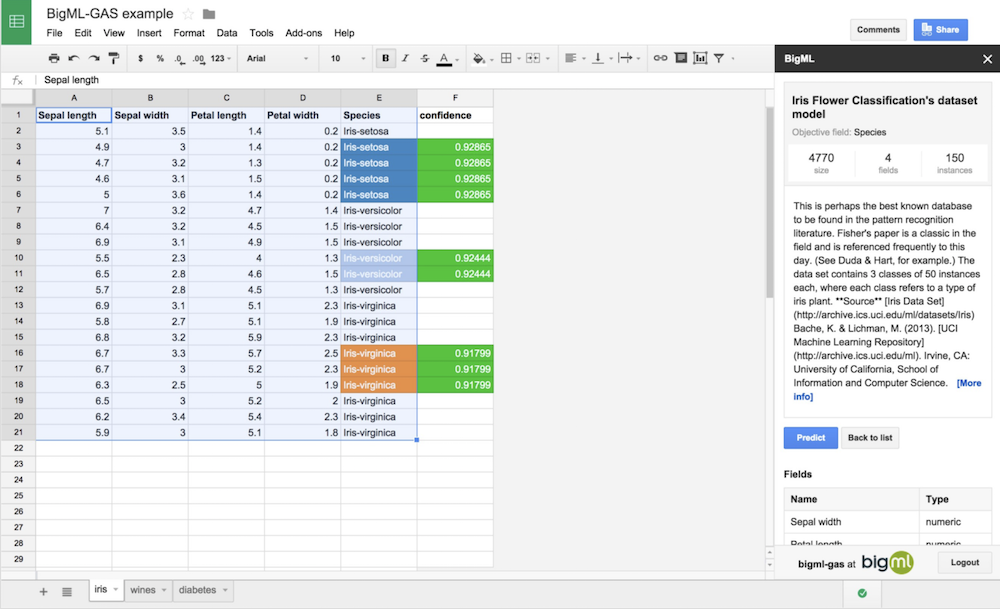
Image credit to BigML.com.
10. AdStage: If you’re employing paid marketing strategies, this tool incorporates your paid marketing performance data directly into your spreadsheet. It provides tools for A/B testing, so you can determine your top-performing campaigns or ads. It also enables you to gather cross-network SEM data in one table, and more.
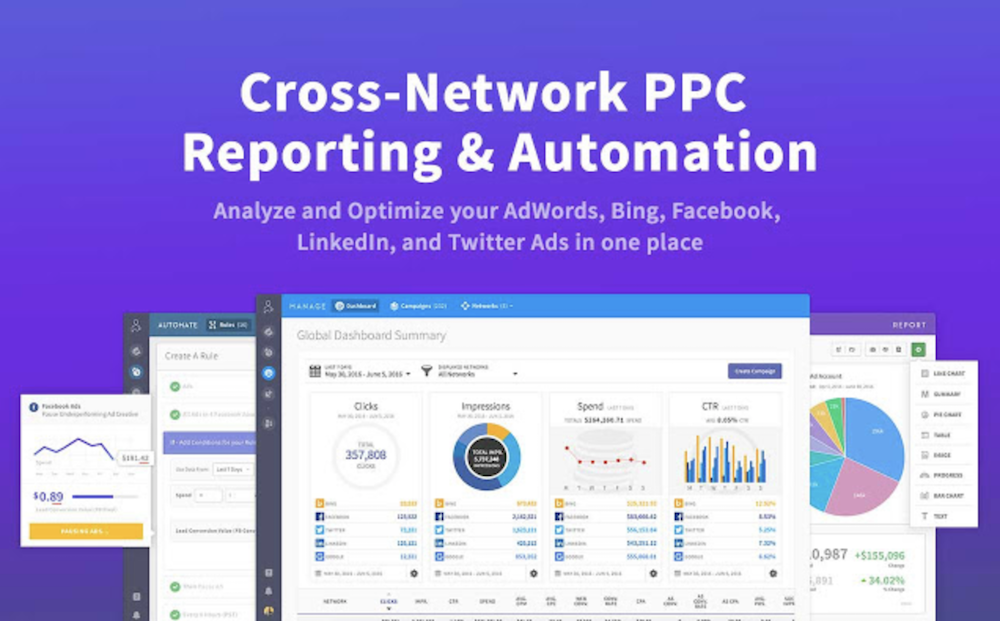
Image credit to AdStage add-on.
Publishing and Sharing:
11. AppSheet: Building a new mobile app has never been easier — this add-on allows you to fill your spreadsheet with data including contacts, products, inventory, property, and anything else you want tracked, and then automatically converts that data into your new mobile app. If you’re interested in creating a custom app to distribute to employees or customers, AppSheet works effectively within minutes.
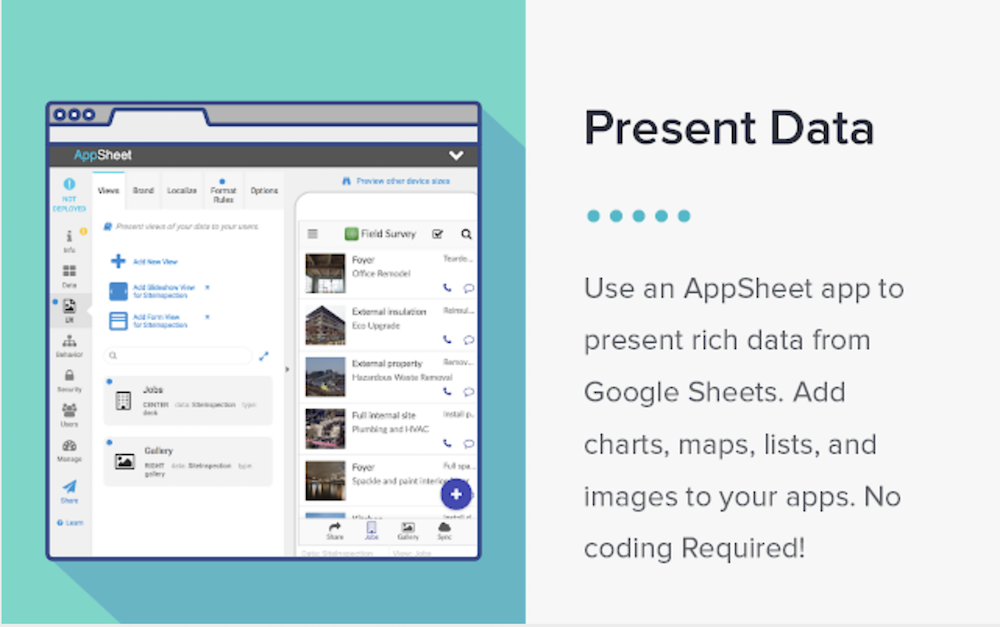
Image credit to AppSheet.com.
12. MarkdownTableMaker: If you’d prefer seeing your data in a Markdown table, this add-on converts your spreadsheet (or individual columns) into Markdown. You’re also able to save the Markdown conversion to Google Drive, or copy and paste it anywhere else you want.
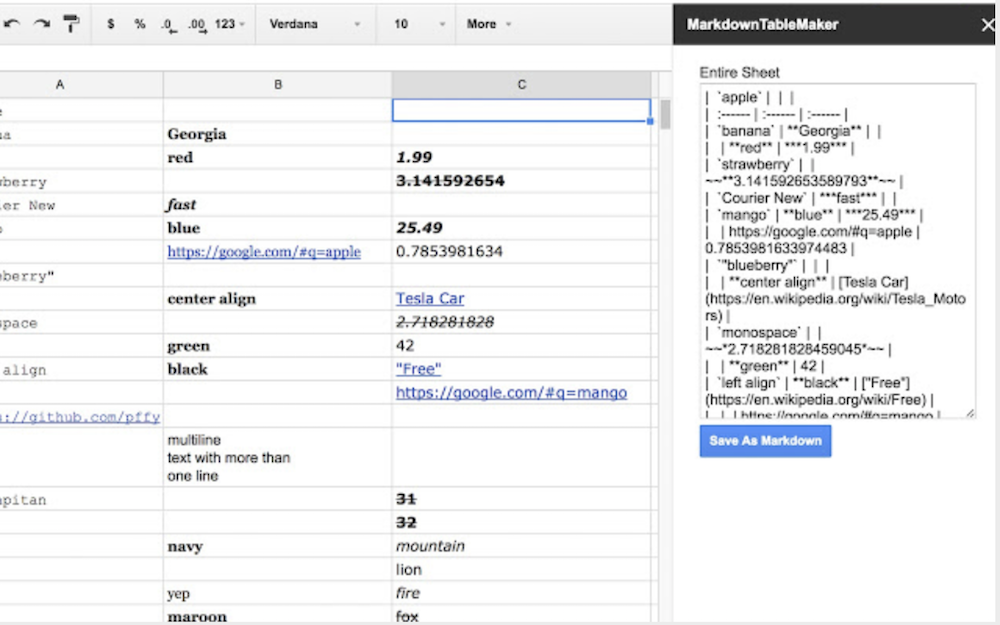
Image credit to MarkdownTableMaker add-on.

The Best Editing Apps for Photos
By now, it’s clear that creating great visual content is critical for marketers — and that’s especially true on social media.
As of 2017, Instagram has doubled its monthly active user base in the last two years, which means a lot more people are viewing and sharing photos in 2018. Plus, visual content is 40X more likely to get shared on social media than other types.
In other words, people like to be shown, not told — and in turn, they share.
For that reason, it’s important for marketers to know how to create compelling photos for their business’ social networks and blogs. And while it can be worth putting the investment of time and money into photo editing software on your computer, many of us are exclusively using our phones to take pictures and could stand to edit them without uploading them to a desktop. That’s especially true when you’re posting in real time, like at an event. Luckily, there are numerous great inexpensive and free photo editing apps out there for mobile devices — some of them even cost just a few bucks. But which apps are the best?
Check out our short list of 12 apps below — organized by apps that are compatible with both iOS and Android, apps offered just for the iPhone, and apps designed to edit face-focused photos.
Inexpensive and Free Photo Editing Apps for iOS and Android
1. Afterlight
$0.99 | iOS | Android | Windows
There was a time when I was a bit more old-school in my photo editing. I counted on Instagram tools alone, sometimes combining them with the “enhance” feature on my phone’s Photos app. Then, I learned about Afterlight — a somewhat rudimentary tool, but one that has all the features you need to do a basic photo edit.
From controlling the color tones, to adjusting exposure and brightness, to rotating and straightening a photo, it has everything you need for lighting or color fixes. It also contains 74 filters, including a Fusion feature that lets you mix tools, filters, and textures to create your own personal look. Into frames? Afterlight has a whopping 128 to choose from, boasting a perfect pairing with Instagram.
My favorite tools, though, have to be the ones for Brightness and Shadows. Some pictures do well with a decrease in shadows and increase in brightness for cleaner, fresher look. But flipping those around can also create a more mysterious, nighttime feel — That’s what I did with this photo of tree ornaments.


2. VSCO Cam
Free | iOS | Android
Over the past few years, VSCO Cam has become a highly popular photo editing app for mobile. While it does boast a wider set of editing tools than most other editing apps, its main claim to fame is its filters.
These filters have a softer, more authentic look that resembles real film, compared to the over-saturated looks of many Instagram filters. Plus, it’s great for when you need to edit a photo on the fly. Simply upload the photo to VSCO Cam, slap on one of the great filters — I used C1 below — and call it a day. (There are more filters available for purchase, too.)


3. Photoshop Express
Free | iOS | Android
Believe it or not, Adobe Photoshop isn’t just for your computer. Adobe Photoshop Express puts most of what people love about Adobe’s popular photo editing program in their pockets — lighting, color, and sharpness options included.
Photoshop Express is especially useful for making photo collages — something the app’s developers likely highlighted for mobile users who want to share many photos at once on Facebook or Instagram. The app’s “Decorate” setting even allows you to annotate your photo with digital stickers before saving and posting directly on social media.
Although this photo editor makes Photoshop’s best features easily accessible, keep in mind it does carry the natural limitations of a mobile app. Specifically, you can only upload JPG files smaller than 16 megapixels (MP).
Nonetheless, what it does on a smaller platform is still super impressive. You should also try similar Adobe photo editing apps such as Adobe Lightroom and Adobe Capture.
Here’s how Photoshop Express helps you choose different collage orientations for multiple photos:

4. Snapseed
Free | iOS | Android
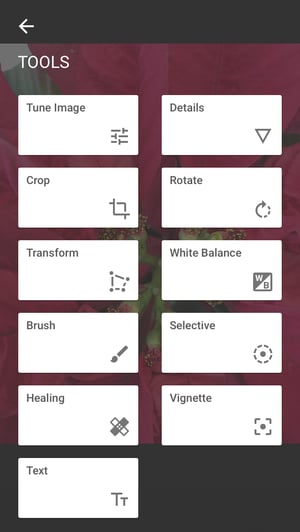
Snapseed is another app that’s great for basic image enhancements. It’s got all the classic adjustment tools, such as tuning, cropping, and straightening. Plus, its sharpening tool is one of the best we’ve seen — it really does enhance a photo’s detail, without making it look grainy, like many other photo sharpening adjusters out there.
But what makes this tool particularly unique is its “Selective Adjust” tool. It allows you to pinpoint an area in a photo and adjust the brightness, contrast, and saturation of that single point. So if you want viewers to focus on a certain part of your photo — say, the buds in the center of a plant — then you can make the buds more vivid.
Want more help with Snapseed? Google, the maker of the app, created a dedicated support page with tips and instructions.

5. SKRWT
$0.99 | iOS | Android
Ever taken a picture of something straight-on — a doorway, a building, your food — and found the perspective was just a little bit askew or tilted? The SKRWT app lets you adjust the perspective of your photos to make the lines look clean and square.
Have a look at what I was able to do with a simple window shot.
Before:

After:

At first, the “before” image doesn’t look that skewed, but seeing the “after” version really shows what a difference symmetry can make. If it bugs you to see a photo that’s slightly at an angle, then this app is well worth the dollar.
6. Live Collage
Free | iOS | Android
Collages made on Photoshop Express can be great, whether it’s to show a comparison (like a before-and-after series), or to highlight multiple photos from the same event or theme. But our favorite photo collage app is Live Collage, mostly because of its wide variety of layouts. It contains several options for photo organization, both classic and fun, with interesting and colorful backgrounds. Plus, you can add customized text in different fonts, colors, and sizes.
If you’re strapped for time, there are basic photo editing options within the app, too, making it a handy one-stop shop.


7. Foodie
Free | iOS | Android
If you’re anything like I am, your personal social media feeds are loaded with images of food. It’s no wonder that food-specific apps are coming out of the woodwork to make photos look even more delectable.
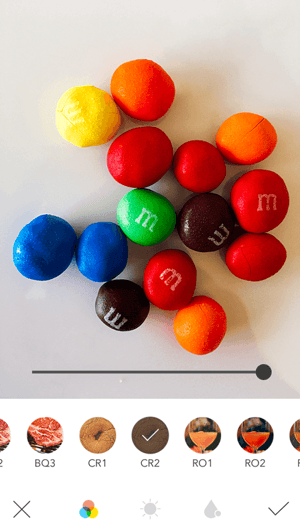
Called out by Bustle for taking “food pictures to some next level gorgeous,” Foodie uses more than 30 filters and other editing features to turn what might otherwise be a humdrum snack into a visual feast.
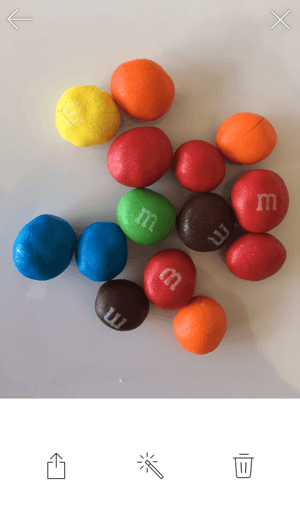
When I applied the CR2 filter to a photo of chocolate candy, this was the result:
Best Photo Editing Apps for iPhone
8. Camera+
$2.99 | iOS only
With the highest price tag on the list, you have to wonder what makes Camera+ so special. When it was first released, Lifehacker called it “The Best Camera App for iPhone,” with TIME writing, “If the iPhone’s standard camera is like a digital point-and-shoot, the Camera+ app is like a high-quality SLR lens.”
While the app has many of the classic photo editing tools like color tints, retro effects, and crops, there are a few gems that make it unique. First is its image stabilizer, which helps you capture the sharpest photos possible before you even take a picture. It also lets you zoom in up to 6X, which can really up the quality of your shot if you’re trying to hone in on something far away.
Finally, its Clarity filter is what The Wall Street Journal‘s Kevin Sintumuang calls its “secret sauce — it adds pro-camera crispness to almost any shot.” I’d have to agree — just check out how it enhanced this photo of my dog.


9. Mextures
$0.99 | iOS only
Mextures is one of the more advanced apps on this list — and its crown jewel is layer-based editing. That allows users to stack different adjustment layers on top of each other, moving and editing them individually, allowing for nearly limitless creativity. You can also apply multiple filters, textures, and blending models to the same photo to create a really unique look. If you find an editing formula you really like, you can save it to apply to other photos later, or even share it with your friends.
Here’s what happened when I took a simple photo of candlesticks on a white background only and applied three enhancements — Waterfront overlay, Bokeh Baby Overlay, and the Color Dodge blending mode.


10. Enlight
$3.99 | iOS only
I’ll just say how I feel: This app is incredible.
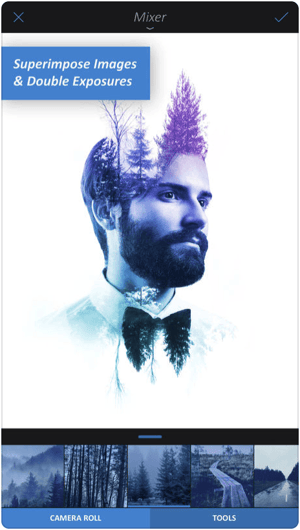
Winner of the Apple Design Award in 2017, Enlight will change the way you see even the most ordinary picture the next time you open your iPhone camera. Among its 10 different photo editing features, the app’s Photo Mixer allows you to blend multiple photos together — or combine a photo with text — for a super artistic result.
According to Les Shu of Digital Trends, Enlight is “a powerful Photoshop-like app, minus the steep learning curve.”
Check out a stunning example of what the app’s Photo Mixer can do below.
Best Face Editing Apps
11. Facetune
$3.99 on iOS | $5.99 on Android
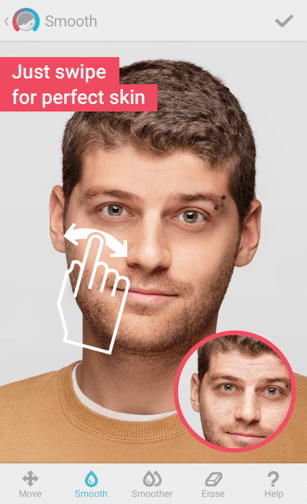
Never take a selfie you don’t like again. Facetune is considered the top photo app in more than 120 countries, allowing you to make up for unflattering mobile photos with professional-level corrections to numerous facial features.
The app offers eight different types of corrections and enhancements to a person’s face in a given photo — including to the hair, eyes, skin, and smile. Taking a new professional headshot? I highly recommend you touch it up in the Facetune app before adding the photo to your LinkedIn profile (not that I don’t think you’re beautiful already).
Here’s just one example of a skin tone correction done with Facetune, making all the difference:
12. Visage Makeup Editor
Free | iOS | Android
Disclaimer: There’s absolutely nothing wrong with under-eye circles. We all have them, and we sometimes wear them like medals. (We do, however, take issue with and don’t recommend a lack of sleep.)
That said, when it comes to sharing photos of ourselves on social media, vanity sometimes enters the picture. Sound familiar? There’s an app for that.
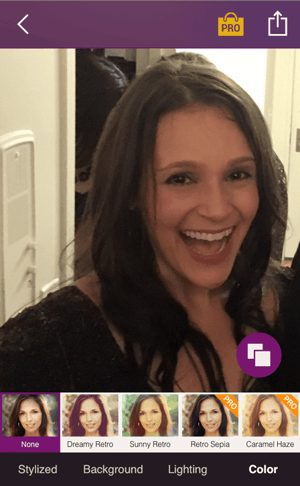
We like the Visage makeup editor, which instantly retouches photos and lets you add some special effects, like a “Pop Art Style” filter that can make your selfie look slightly Warhol-esque. The app comes equipped with some interesting backgrounds, as well as lighting and color features, with more available for purchase.
The only drawback? The free version is a bit ad-heavy, and unless you upgrade to pro, your finished product will be stuck with a branded hashtag at the bottom.
Now Comes the Fun Part
See how easy it is to create and share visual content? Of course, mastering these apps will require a bit of practice, but if you’re unsure where to start, just look around you — that’s what we did when we tried each of them.
Think about your marketing goals for this year. Then, ask yourself what kind of photos will help you accomplish them. From there, you can pick and choose the best apps from this list.
So start getting visual. We can’t wait to see what you create.


16 Video Metrics Your Boss Actually Cares About
Conventional wisdom tells us that views, especially three-seconds ones, are a vanity metric. But Facebook tracks them for a good reason.
In 2016, they analyzed their users’ video consumption data and discovered that 45% of people who watch the first three seconds of a video will keep watching it for at least 30 seconds. Facebook’s study suggests that views are a good indicator of how well your video’s hook performed. But views also have drawbacks, like not being able to tell you who your audience is or whether your video resonates with your audience.
That’s why we created this list of YouTube and Facebook video metrics that’ll shed light on the things your boss actually cares about, like how much your audience engages with your video, what video topics they crave, and how video affects your website’s performance. Read on to learn more.
16 Video Metrics Your Boss Actually Cares About
1. Watch Time
Watch time is the total amount of time viewers have spent watching your video. It measures how long your viewers engage with your video. YouTube accounts for watch time, not views, when they rank videos for search and feature videos in the related section, so you should try to engage your viewer with a compelling story for as long as possible.
2. Average View Duration
Average view duration is the total watch time of your video divided by the total number of video plays, including replays. It measures how long your viewers watch your video, on average. Average view duration is a powerful metric because it reveals your audience’s video length preference. For instance, if your 45 second videos keep getting a 30 second average view duration, you might want to cut those videos down by 15 seconds.
3. Average Completion Rate
Average completion rate is the percent of each video your audience watches. This metric measures your video’s ability to hold attention. Facebook uses average completion rate to rank videos in users’ news feed, so it’s crucial for your Facebook videos to engage viewers from start to finish.
4) Audience Retention
Audience retention shows you the percentage of your audience that keeps watching a video as it plays from beginning to end. Facebook and YouTube will display your video’s audience retention on a graph, like the one below:
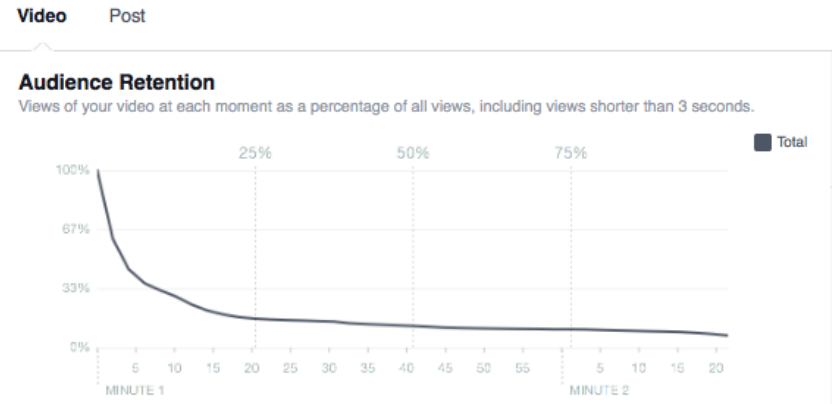
Image Credit: Facebook
Drops in the retention curve help you understand when your audience stops watching your video. If there’s a sudden drop off at a certain point in your video, you should analyze what’s happening at that specific time. You’ll learn what’s causing viewers to bounce, like a certain part or previous parts of the video not piquing their interest.
In addition to displaying your video’s audience retention, YouTube will display your video’s relative retention, which compares your video’s ability to retain viewers to all YouTube videos of similar length.
5. Re-watches
Re-watches are the amount of times your audience watches your entire video or specific parts of your video again. If a lot of people are re-watching a certain part of your video, which the orange part of the graph below represents, they’re probably interested in the topic your video is covering during that moment. And by using re-watches to determine which topics resonate with your audience, you can refine your video strategy by making videos about these topics.
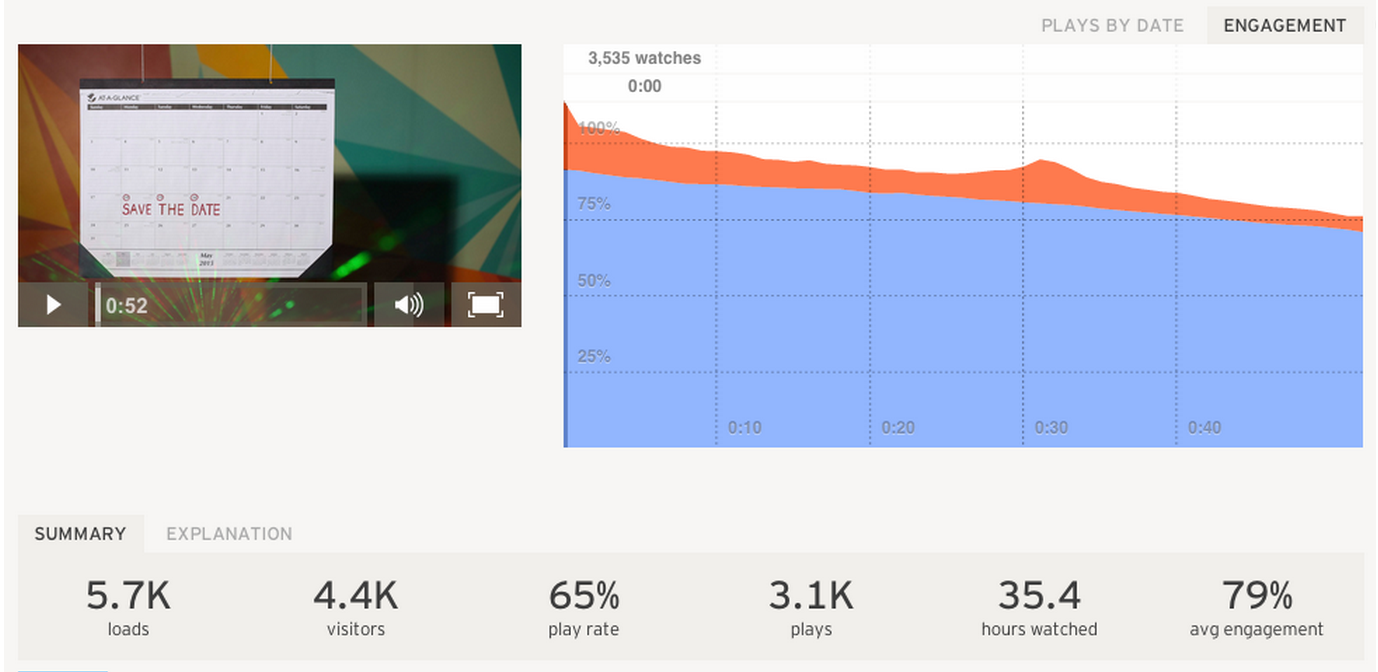
Image Credit: Harvard Business Review
6. Click-Through-Rate
Click-Through-Rate measures how well your video encourages viewers to take a desired action. If your CTR is low, consider altering your call-to-action’s placement in your video. Audience retention graphs show that most people don’t watch videos all the way through, so you could place your CTA at the beginning or middle of your video. Or you could also make your video more engaging, so more viewers reach the CTA at the end of your video. Leaving your CTA at the end could produce more clicks than moving it to the middle or beginning because viewers who watch your video all the way through are more likely to take an action than someone who just clicked play.
7. Engagement
According to Facebook, likes, comments, and shares are the best measure of how well a video resonated with your audience. Engagement is also one of the most important factors in boosting your video’s organic reach — if a video resonates well with part of your audience, then Facebook concludes that it’ll resonate with the rest of your audience.
Engagement provides marketers with valuable qualitative data too. Comments can show you the emotional affect your video had on your viewers. Do they seem inspired? Or are they angry you covered a controversial topic? This data can help you decide which video topics to focus on in the future.
Social shares can paint a clearer picture of your audience’s brand affinity and loyalty. This metric measures how much your audience values your content and brand. It also builds your brand’s credibility. Since people share content that confirms their ideal self-persona, people who share your video are willing to show their community that they trust and support your brand.
Social sharing is also one of the best forms of word-of-mouth marketing. According to Facebook, 48% of all video watch time can be attributed to social sharing.
8. Negative Feedback
On Facebook, negative feedback is how often people hide your video, report it as inappropriate, or unlike your page after watching it. The videos with the highest amount of negative feedback can help you nix ineffective topics from your content mix.
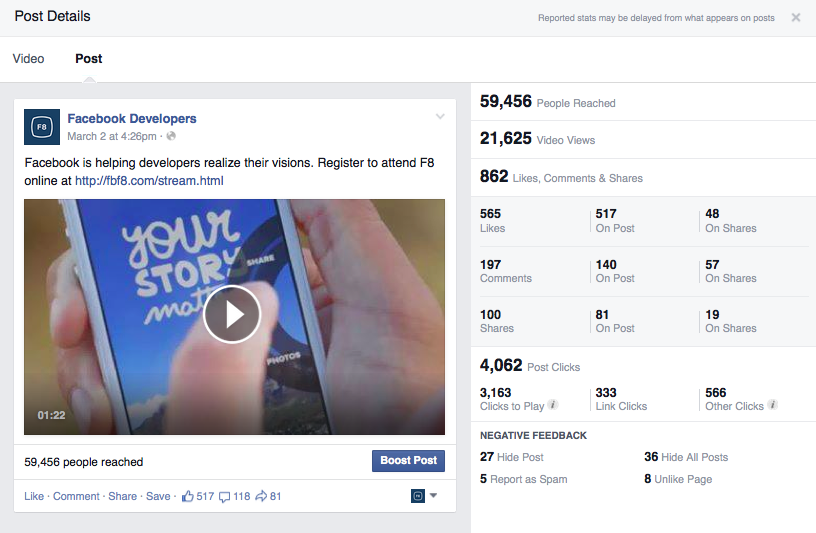
Image Credit: Facebook
9. Subscriber and Fan Growth
YouTube’s subscriber report will show you which videos gain or lose subscribers, the geographic location of your gained or lost subscribers, and the dates that users subscribe or unsubscribe from your channel. This data is valuable because it can inform your video strategy tremendously. You’ll learn what topics resonate with your subscribers the most and where to target new subscribers.
Subscribers are important to your channel because YouTube will send them notifications about your new videos and feature your videos on their homepage. This means they’ll see your videos more frequently, which will help you generate more views. Subscribers also tend to watch your videos longer than non subscribers, so the more subscribers you have, the more watch time your videos will collect, and the more likely they’ll rank on search and be featured in the related section.
On Facebook, you can see how each of your videos influences your page’s fan growth. This’ll help you determine which video topics resonate with your viewers the most.
10. Top Location & Audience
Your Facebook videos’ top location and audience will help you flesh out your personas and target more precisely when you want to boost your videos. This data helps you discover your most loyal, engaged Facebook audience.
For instance, if your top audience is male, age 35-44, and your top location is Missouri, you can target this audience with future videos, which will grow your Facebook following and boost your videos’ engagement and organic reach.
11. Peak Live Viewers
Peak live viewers shows you when the highest number of viewers were watching your Facebook live video. If a video’s live peak is early, then drops off, the beginning of your video might not be that engaging, leading to your viewers’ drop off. This data will help you adjust accordingly for your next live video stream.
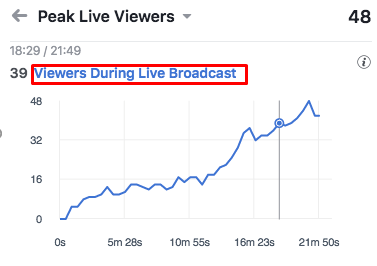
Image Credit: Sprout Social
12. Reactions
Facebook will display a distribution of your audience’s reactions during your live video streams. This lets you determine the emotions each part of your video evoked, revealing which topics evoke which emotions and leading you toward a more data-driven live video strategy.
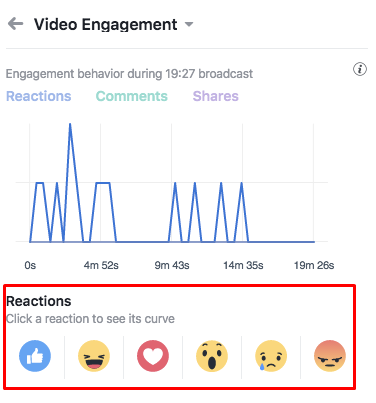
Image Credit: Sprout Social
13. Play Rate
Play rate is how many people play your video divided by the number of people who visit the page that hosts your video. If the page’s play rate is low, your video probably isn’t relevant to the topic of your page. A low play rate can also illuminate other problems with your marketing, like your copy not being able to entice visitors to watch your video, the video not being embedded in the right place on the page, or your visitors preferring text over videos when they learn.
14. Bounce Rate
A webpage’s bounce rate is the percentage of people who land on it, but then leave without going to other pages. On your website, most videos should guide your visitors to click on a CTA or explore other pages, like a visitor watching a video on the product page and then navigating to the pricing page. If your videos make your prospects leave your website entirely, then they’re probably not engaging or enticing enough.
15. Conversion Rate
Your video’s conversion rate measures how well your video persuaded viewers to convert into a lead or a customer. You should test whether videos increase or decrease your landing or product pages’ conversion rates. If they do, this means video does a better job of conveying information and evoking excitement in your prospects than text does.
16. Who Watches Your Video
When you can track which contacts in your database are watching certain videos on your website, it gives you a lot of context on what their pain points are and how you can solve for them. Your marketing team can send them content related to the video topics they watch, and your sales team will know exactly how to help them. You can also move these contacts down your inbound funnel. If a prospect just watched a case study video, you can send them a product overview video the next day.

What is a Facebook Pixel? [Easy Guide]
Two months ago, Mark Zuckerberg wrote a Facebook status that struck fear in marketers all over the world. He announced the social media giant will overhaul its algorithm once again to give users more opportunities to engage with their friends and family — Facebook’s original purpose — and less with brands, flattening their organic reach more than ever before.
The social network’s algorithm update will move tectonic plates in the Facebook marketing world. And to sustain engagement on the platform, brands will have to create Facebook groups, prioritize live video, and spend more money on Facebook ads.
Marketers will encounter a steep learning curve and high barriers to success when they first start creating Facebook groups and more live videos because these tactics are still relatively new to the digital marketing community. But they’ll see much better, faster results when they increase their Facebook advertisement budget. The platform has always offered the best social advertising tools, like the Facebook pixel.
The Facebook pixel is powerful because it shows you how successful your Facebook advertising campaigns actually are and helps you reach new, relevant audiences. And if you want to optimize your Facebook advertising strategy, we recommend taking advantage of it. Read on to learn what exactly a Facebook pixel is, its capabilities, and how to create one today.
What is a Facebook Pixel?
A Facebook pixel is an analytics tool that measures the effectiveness of your Facebook advertising. By installing it into your website, you can truly gauge your ads’ performance because the pixel can track every visitors’ interactions on your website after they click on your ad.
When someone clicks through to your website from an ad and takes an action, like completing a purchase, your Facebook pixel will trigger and report the action in Facebook Ads manager. This allows you to see if they completed the desired action of the ad like buying a product or filling out a landing page — all on Facebook.
The Facebook pixel gives you deep insight into your marketing strategy because it measures your ad’s conversion rate, not just its click-through rate. This adds another layer of analytics that paint a clear picture of your buyer’s journey from ad to purchase. For instance, if one of your ads’ click through-rate is high, but the conversion rate is low, then your ad creative and landing page probably aren’t aligned.
You can also use website visitor and customer data collected from your Facebook pixel to refine your distribution strategy in several ways.
Optimization
Your Facebook pixel helps you bid specifically for conversions on Facebook. After collecting enough Facebook lead and customer data, Facebook will only show your ads to users who are most likely to convert or buy something from your website.
Remarketing
You can set up remarketing campaigns to past customers who’ve converted through a Facebook ad or users who have visited your website or certain web pages by clicking through one of your Facebook ads.
Create lookalike audiences
Once your pixel tracks a minimum of 100 conversions, you can create a lookalike audience of your website visitors and past customers on Facebook and advertise to them.
What Actions Can a Facebook Pixel Track?
When someone takes an action on your website after clicking on an ad, your Facebook pixel records it as an event. Facebook can track 9 of them:
- View content – Track key page views (article, landing page, product page)
- Search – Track searches on your website (product searches)
- Add to cart – Track when items are added to cart
- Add to wishlist – Track when items are added to wishlist
- Initiate checkout – Track when people enter your checkout flow
- Add payment info – Track when people add payment information during the checkout flow
- Make purchase – Track purchases or checkout flow completions (landing on purchase confirmation page)
- Lead – Track when someone becomes a lead (form submission, sign up for trial)
- Complete registration – Track when someone completes a registration form (complete subscription, sign up for a service)
How to Create a Facebook Pixel
On February 15, 2017, Facebook combined the conversion tracking pixel and the custom audience pixel into one Facebook pixel, which means they no longer support the old conversion tracking pixel for ad creation. If you installed a conversion tracking pixel before then, you need to install the new Facebook pixel. Here’s how you do it:
Step 1) Open Facebook Ads Manager.
Step 2) Click on the hamburger icon and click Pixels, which is under the Measure & Report tab.
Step 3) Click Create a Pixel
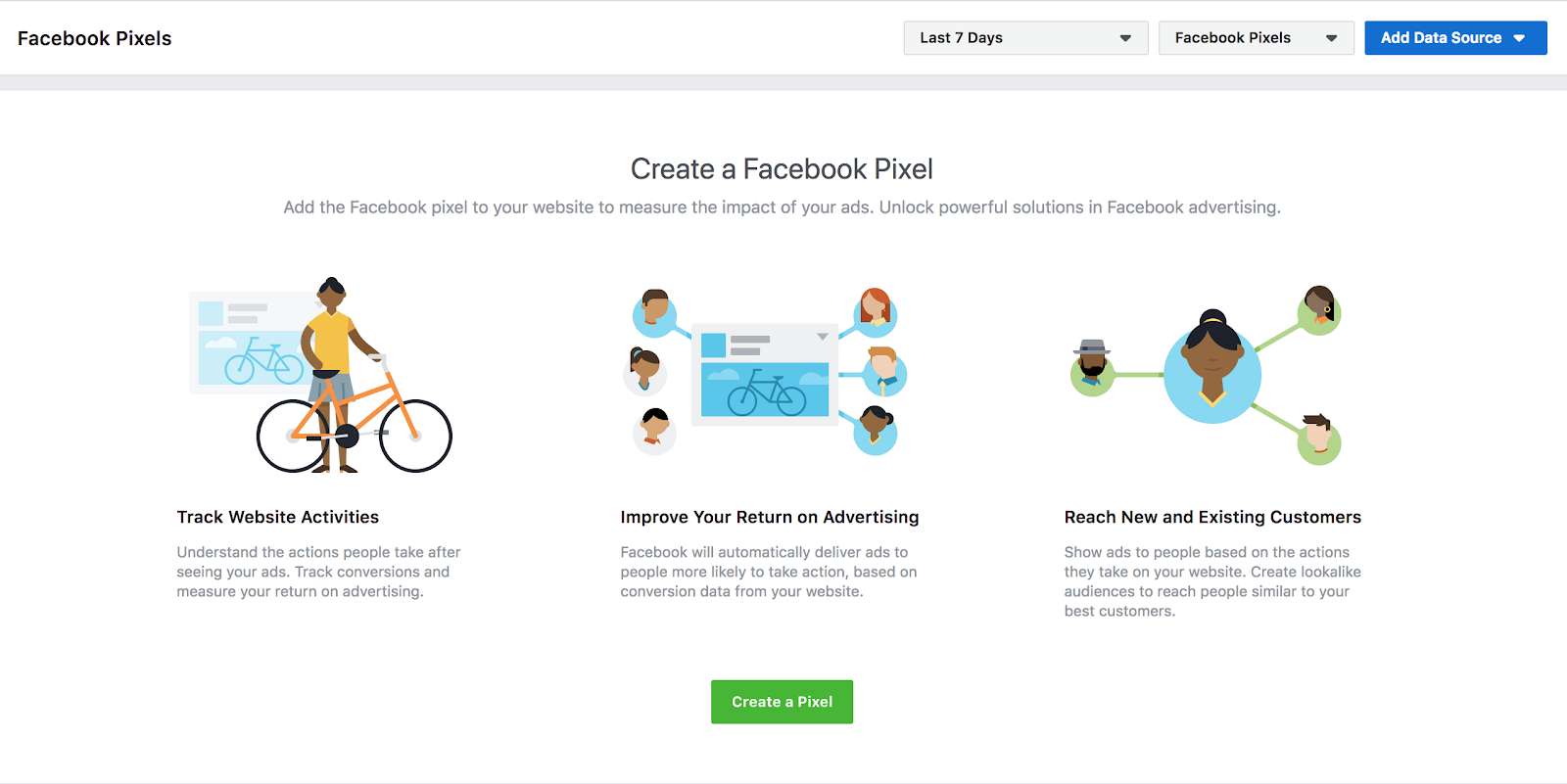
Step 4) Name Your Pixel
How to Install a Facebook Pixel Into Your Website
Step 1) Install the pixel’s code into your website’s header.
To install a Facebook Pixel into your website, you have three options:
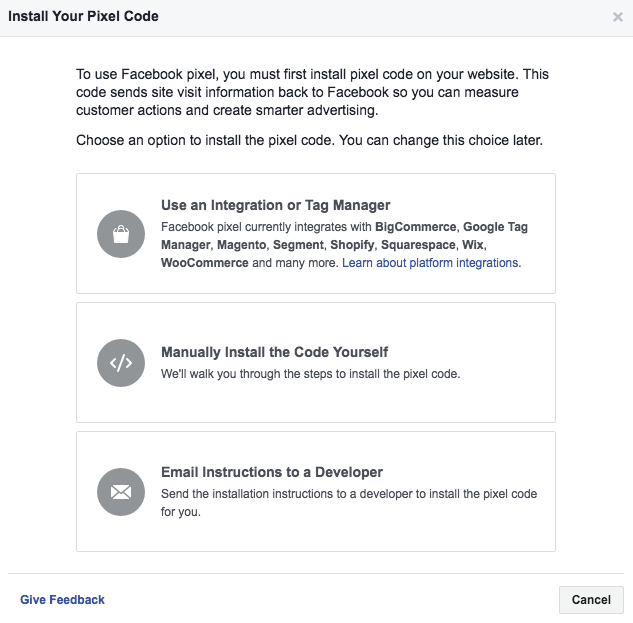
Option 1: Use a Facebook website partner to install your pixel.
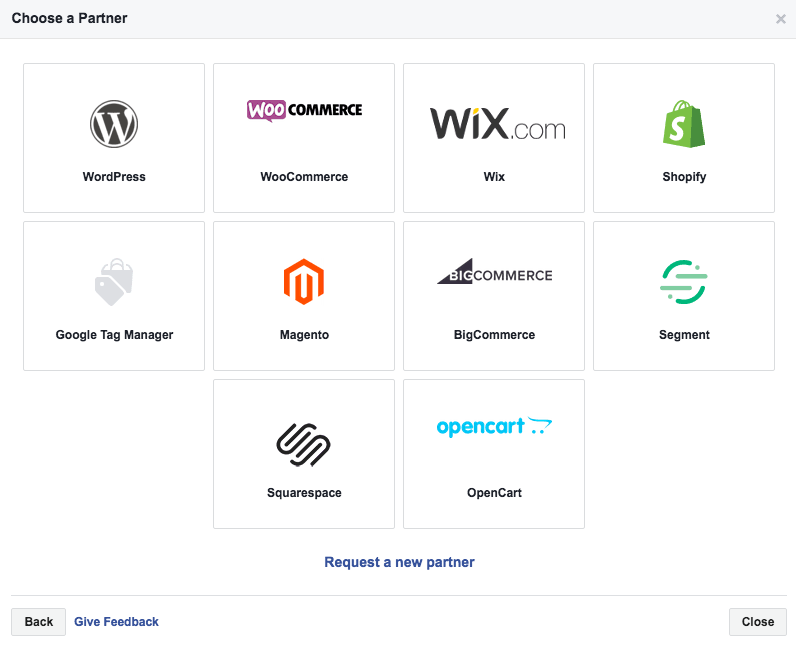
If you host your website on the platforms above, you can quickly install your pixel and check if it works by following Facebook’s instructions.
Option 2: Manually install the pixel.
You can install your pixel and check if it works by following Facebook’s instructions below.
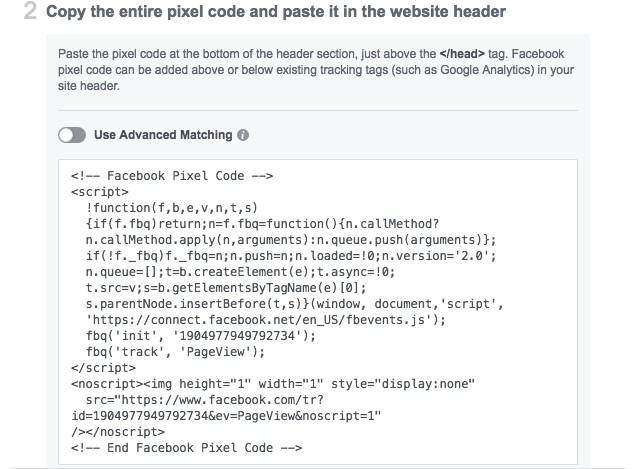
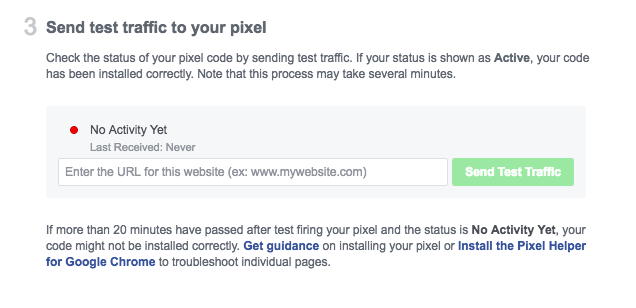
Option 3: Email pixel installation instructions to one of your developers.
Installing a Facebook pixel should be a piece of cake for your software engineers.
Step 2) Track the events that matter most to your business.
To track the most important actions users take on your website, you need to add code to specific web pages. It will tell Facebook when someone has triggered an event on those pages.
To add events to individual web pages, follow the instructions below:
- Click Pixels, which is under the Measure & Report tab.
- Click Set Up Pixel.
- Click Manually Install the Code Yourself.
- Click Continue.
- Click Install Events.
- Toggle the event you’d like to track.
- Choose Track Event on Page Load or Track Event on Inline Action
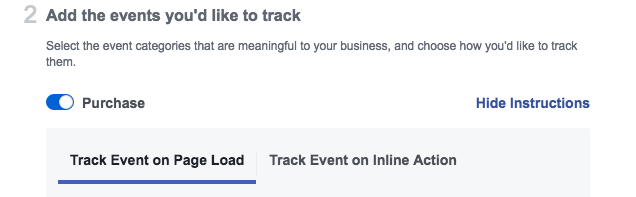
If landing on a certain webpage triggers an event, like someone landing on a Thank You page after filling out a lead generation form, choose the Track Event on Page Load option.
If an event can only be triggered by someone clicking a call-to-action, like the add to wishlist button, choose the Track Event on Inline action option.
8. Add event parameters, like Conversion Value or Currency, to give certain events a concrete value.
9. Place code on webpage.
For page load events, copy and paste the code right below the closing header section of the web page. This will usually be just after the opening <body> tag.
For inline action events, copy and paste the code between script tags next to the call-to-action you’re tracking.
Step 3) Make sure your pixel actually works.
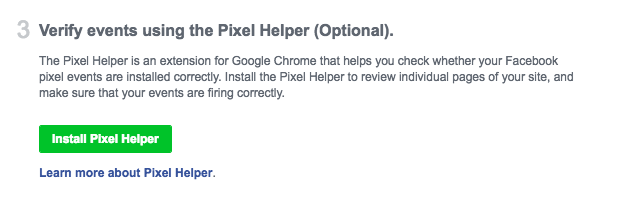
If you have Google Chrome, you can install the Pixel Helper extension to check if your pixel is accurately tracking events.

After 10 Hours of Questions for Mark Zuckerberg, Here’s What I Still Want to Know
Having grown up in the Washington, D.C. metropolitan area, I can say with confidence that April is one of the months with which I most fondly remember the region.
The cherry blossoms are in full bloom. And when I was a wee lass, before the Washington Nationals came to fruition, April also meant that the Baltimore Orioles were kicking off the baseball season at Camden Park.
This week marked one of my first visits back to D.C. during the month of April since I was an undergrad. Things felt different. My parents live in Florida now. Penn Quarter has completely transformed, as has its neighboring Capitol Hill, where my work brought me for the week. The city has become very expensive.
And despite spending my days in the trenches of the tech industry and the businesses that comprise it, somehow, visiting Washington, D.C. as Congress played host to one of Silicon Valley’s highest-profile CEOs felt, in a word, odd.

Over the course of two days, my colleague, HubSpot’s Social Campaign Strategy Associate Henry Franco, and I spent no fewer than ten hours sitting in on Mark Zuckerberg’s congressional hearings, as he answered questions from Senators on Tuesday and Representatives on Wednesday.
There was a mixed response to these questions and Zuckerberg’s answers alike. Were the lawmakers properly prepared for and informed about these events? Was Zuckerberg? And was 10 hours really enough to get to the bottom of the data privacy and other issues the Facebook CEO was invited to Capitol Hill to speak on?
What makes this situation — Mark Zuckerberg’s congressional testimony and the events leading up to it — so complex is that it cannot be boiled down to a single issue. Instead, it’s comprised of many issues, each of which have many sides. Should Facebook be regulated? Should it stand alone in this regulation? What would that regulation look like? And for all its talk: How likely is it that such federal regulation will actually come into force in the U.S.?
And those are only a few of the questions I have. The irony, of course, is not lost on me that a week of hearings intended to respond to lawmaker inquiry — as well as the public it represents — has only led to more questions.
Here’s a deeper look at some of the more crucial of them.
Will there be regulation?
As I noted in yesterday’s recap of Zuckerberg’s House Energy and Commerce Committee hearing, the topic of regulation drew a stark party line on which Representatives fell staunchly one side or the other. Representative Jan Schakowsky of Illinois firmly stated that Facebook’s “self-regulation simply does not work.” Representative Chris Collins of New York called her remarks “aggressive” and “out of bounds,” adding that when he was asked if he agreed with the idea of regulating Facebook, “I said no.”
Regulation seems a point of contention among lawmakers, and not just when it comes to Facebook, especially in the context of the European Union’s General Data Privacy Regulation (GDPR) coming into force next month. It reflects an era in which consumer demands for data protection are growing, with the latest turn of events concerning Facebook being only one of the more recent examples.
Throughout the hearings — and in the weeks leading up to them — Zuckerberg was asked numerous times for his stance on the GDPR, though he hasn’t fully spoken to his complete stance on it. In an interview with Reuters, he said he agrees with it “in spirit.” In a call with members of the press last week, he remarked, “if we are planning on running the controls for GDPR across the world … my answer [is] yes.” And on Tuesday’s Senate hearing, he noted that he believes it “get[s] some things right.”
Sen. Graham: “Why should we let you self-regulate?”
ZUCK: Senator, I’m not opposed to regulation.
Graham: Do you think the Europeans got it right?
ZUCK: I think … they … get things right …— Amanda Zantal-Wiener (@Amanda_ZW)
April 10, 2018
But when it comes to Facebook extending GDPR-like protections to global Facebook users, including those in the U.S., Zuckerberg has given wavering and at times contradictory answers. Rep. Schakowsky pressed him on this yesterday, noting that it sounded as though Zuckerberg’s version would be far from “an exact replica” of European regulations.
It reflects a historical corporate resistance to regulation in the U.S., with many consumers long holding that it lags behind the E.U. in terms of transparency and what is disclosed to consumers. (As a non-tech example, throughout most of Europe, food companies are required to label genetically modified products, whereas in the U.S., similar legislation has struggled to pass.)
Which raises the initial question here: Will there be regulation? With the public, along with some lawmakers, calling for increased data protection globally, it leaves us at a watershed moment in the relationship between consumers and the businesses they use.
“This is proof to me that self-regulation simply does not work,” she says, pointing to the Secure and Protect Americans’ Data Act: https://t.co/7nzQGcIhQ9
— Amanda Zantal-Wiener (@Amanda_ZW)
April 11, 2018
But there’s also the ongoing discussion of how well-equipped lawmakers are to regulate a company with the reach and breadth of Facebook’s. (At certain points in the hearings, for instance, Zuckerberg was questioned about Facebook’s possible monopoly.) As I noted earlier, questions from committee members left the impression that they were either ill-prepared for Zuckerberg’s testimony, or simply uninformed about the tech industry as it currently stands.
That was particularly true at Tuesday’s hearing, where much of the discourse from Senators suggested a broad lack of understanding of online platforms and where data becomes involved with them.
If that misunderstanding is as widespread throughout Congress as some have suggested, the timing of regulation and the swiftness with which it could be passed comes into question. And it may require further information and testimony — not just from Zuckerberg and Facebook.
That brings me to another key point.
Why Facebook?
On my way back to Boston after the hearings, a friend texted me to ask how my visit went and what the hearings were like. And then, he made a joke about it.
“I wish there had been this much congressional outrage when Equifax was hacked,” he said. “Although, in fairness, Facebook allowed strangers to see my vacation photos and the bands that I like, while Equifax only lost highly sensitive financial information that could ruin people’s lives.”
Even if my friend’s comments were meant to be funny, they did bring up an interesting question: Why Facebook?
Of course, there are some ways to answer that question that are more obvious than others. Facebook experienced the highest-profile weaponization of its platform, after all, for several purposes: alleged election interference, the spread if misinformation and divisive content, and — as was raised numerous times by Representatives on Wednesday — ads for opioids and other controlled substances.
Zuckerberg says that if people flag these ads, Facebook will “look at them as fast as we can” and “take [them] down if they violate our policies.”
— Amanda Zantal-Wiener (@Amanda_ZW)
April 11, 2018
It brings up Facebook’s (and, by default, Zuckerberg’s) siloed spotlight in the wake of user privacy and data collection, and how it could possibly be abused. Here’s what we do know: Zuckerberg confirmed that app developer Aleksandr Kogan sold the user data he obtained to outlets beyond Cambridge Analytica (one being a firm called Eunoia Technologies), and that Zuckerberg’s own data was one the 87 million accounts jeopardized.
But we also have reason to believe that Facebook isn’t alone in the volume and breadth of user data it possesses.
To start, have a look at this lengthy but comprehensive Twitter thread from self-described privacy consultant Dylan Curran, who goes into detail about the depth of information that Google possesses on users.
Want to freak yourself out? I’m gonna show just how much of your information the likes of Facebook and Google store about you without you even realising it
— Dylan Curran (@iamdylancurran)
March 24, 2018
We also know that this isn’t just about data privacy, including where Facebook and the week’s hearing are concerned. It’s also about the weaponization of online platforms, which are not limited to Facebook, to spread misinformation and divisive content.
Other tech giants have come under fire for falling victim to that. Twitter, for its part, has even submitted a request for proposals to measure the health of its network and how to fix its many problems. And on more than one occasion, Google and YouTube have both been accused of failing to quickly remove false news content during major events.
So, I’ll pose the question again: Why Facebook, and Facebook alone?

Zuckerberg listens to opening remarks from House Energy and Commerce Committee Chairman Greg Walden on April 11, 2018. | Amanda Zantal-Wiener
There may not ever be an answer to the question that satisfies everyone. But as I noted in yesterday’s recap, before any firm, sustainable outcomes can result from these ongoing issues, I suspect more hearings will take place. After all, before this week’s events, some lawmakers also wanted to include the CEOs of Google and Twitter in the questioning.
“I realize the issues we’re discussing today aren’t just issues for Facebook,” says Zuckerberg. “I’m ready to take your questions.”
— Amanda Zantal-Wiener (@Amanda_ZW)
April 10, 2018
On top of that, time constraints played a major role in this week’s hearings, with Senators being limited to five minutes of questioning each on Tuesday, and Representatives to four minutes each on Wednesday. For that reason, it may not come as a surprise if Zuckerberg is also asked to appear for an additional round of questioning — perhaps involuntarily on future occasions.
Furthermore, an FBI investigation into overall election interference is still underway, for which Zuckerberg said in Tuesday’s hearing someone from Facebook was questioned. It seems that I’m not the only one who still has questions, and as I wrote yesterday: The testimony, it seems, is far from over.
If Facebook truly puts community before advertising revenue, what will happen?
In his full written testimony for the House Energy and Commerce Committee, Zuckerberg concluded with a sentiment and promise that would be alluded to throughout the hearings:
“My top priority has always been our social mission of connecting people, building community and bringing the world closer together. Advertisers and developers will never take priority over that as long as I’m running Facebook.”
Which poses the question: If that’s true, and Facebook continues to move away from the “platform before participants” mentality, as HubSpot VP of Marketing Jon Dick put it — what happens to the businesses who have come to rely on it?
After all, it was something that Zuckerberg repeated throughout the week: Facebook does not sell data. Rather, advertisers build targeted ads on the platform based on the data that Facebook possesses on user behavior and preferences.
That data, Zuckerberg was sure to remind lawmakers, was largely comprised of information that users had to opt-in to providing when they joined the network (such as Page and post Likes) and could not be personally identifiable when used properly.
There was also a time when Facebook partnered with other firms, such as Experian and Acxiom, to provide advertisers with supplemental data that could be synthesized in tandem with Facebook’s own aforementioned data, helping to match (or target) promoted content to the most relevant audiences. But in the weeks leading up to the hearings, Facebook shuttered that program.
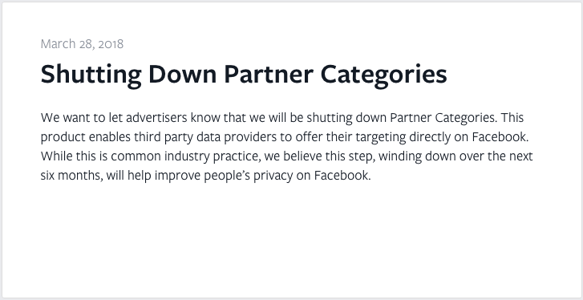
Source: Facebook
For its own part, Zuckerberg has suggested that were it not for this model, Facebook’s livelihood could certainly become compromised. In 2017, for instance, advertiser-related income made up 98% of its global revenue — which many expect to take a hit if the network truly makes good on its promise to de-prioritize advertiser content, or if it continues to limit targeted ad capabilities.
Rep. Loebsack asks if it’s possible for Facebook to exist without collecting and using personal data. Zuckerberg: WE DON’T SELL DATA. But Loebsack pushes back and asks if it would exist without *sharing* data. Zuckerberg implies that it might not.
— Amanda Zantal-Wiener (@Amanda_ZW)
April 11, 2018
But what didn’t come up nearly as much throughout the hearings was the impact that these changes could have on the advertisers themselves — the good actors who don’t weaponize Facebook, but have come to depend on it to build and reach an optimized audience.
That concept actually revisits the topic of regulation, and what it could look like when applied to Facebook. As I already covered, if such regulation does come to fruition, there’s a fair chance that it won’t only apply to Facebook, but could also extend to the tech industry in general. That could cause a major ripple effect in the way all online companies conduct business, and the way consumers and advertisers alike can use them.
Even if the implications of regulation are massively widespread, it might not be an entirely negative thing. As Zuckerberg and lawmakers were both sure to remind us this week, the issues at-hand are fundamentally about trust. And further restrictions — or at least rules around how Facebook can manage and allow advertising — could potentially lead to a larger degree of consumer trust on how, exactly, advertisers reach them.
In other words — Facebook moving away from the “platform before participants” mentality might not be entirely bad for advertisers, many of whom are all too familiar with pressure to grow which leads to equal pressure and temptation to use short-cuts or overly aggressive tactics for reaching customers.
The better alternative, perhaps, comes in the form of promoted content that is at least more personalized, which Zuckerberg spoke to this week. Facebook users would prefer an ad that’s relevant, he maintained throughout the hearings, than non-ad content that isn’t relevant at all.
Zuckerberg adds: “It would impact our revenue somewhat, too,” but he doesn’t seem to want to dwell on that
— Amanda Zantal-Wiener (@Amanda_ZW)
April 11, 2018
“This is still all due to the misalignment in economic incentives,” said HubSpot Marketing Fellow Sam Mallikarjunan — adding that Facebook’s recently-announced data abuse bounty could help, “since even if firms like Cambridge Analytica still abuse openings like that, individual potentially malicious actors may find it more profitable to report privacy vulnerabilities rather than exploit them.”
That profitability aspect, Mallikarjunan said, will always be core to the degree of Facebook’s self-regulation. “Until Facebook designs a system where spamming is less profitable than creating a good experience for users — what search engines and e-mail inboxes have done — this will continue to be an issue.”
But, at this point, much of this is a hypothesis. We still don’t know what regulation would look like, if it even came to be, and we don’t know how many additional changes Facebook is going to make to the way it collects, uses, or retains this data — or to the way advertisers can best leverage the platform.
And, we don’t know if this visit was his last to Capitol Hill — though I think not.
We still don’t know what leaders at Google, YouTube, and Twitter have to say — or if they’ll be asked by lawmakers for their input.
And we still don’t know who else will be held accountable, and to what degree, as these issues continue to be discussed — like Kogan, Cambridge Analytica, or Eunoia, to name a few.
Most of all — we don’t know if we will ever come to learn more about these lingering questions.
But if we do — I’ll let you know.

Casper, Warby Parker, & Dollar Shave Club: How Direct-to-Consumer Brands Are Changing Ecommerce Forever
Direct-to-consumer companies cater to people’s desire for simplicity. They eliminate the hassle of researching brands and choosing from hundreds of options, making shopping practically effortless. D2C brands manufacture, market, and distribute their own products without using middlemen, which enables them to reduce costs, interact directly with consumers, and provide a seamless start-to-finish buyer’s experience.
For consumers, the easy buying process is typically the distinguishing factor when choosing D2C over a traditional shop.
Take a look at this customer review for D2C mattress company, Casper. Despite this customer’s dissatisfaction with his mattress, he still gave the company five stars:

Ultimately, Casper’s efficient delivery process and adept customer service impressed the consumer so much that he gave the company five stars — even though the product didn’t work out for him. This “painless experience” he describes, which is especially attainable for D2C businesses, is ultimately what makes these companies so popular in 2018.
What is direct-to-consumer marketing?
Direct-to-consumer marketing is the act of a company marketing directly to their consumer. This direct relationship can occur through methods like social media, YouTube, or podcasts, but not through TV, billboards, or magazine advertisements.
Creating innovative marketing campaigns is a necessity for D2C companies, many of which are up against some big-name competitors: Dollar Shave Club, for example, is up against Gillette razors, and Warby Parker’s eyeglasses compete with brands like Luxottica.
The benefits of D2C marketing are clear: through this direct relationship, these companies are creating strong relationships between consumers and their brand, understanding their consumers better, and reaching a more specific, appropriate audience.
We’ve examined six D2C companies to see how they’ve executed one-of-a-kind marketing campaigns. Whether you work for a D2C company or not, there are plenty of tangible marketing practices you can still try out for yourself.
What is the direct-to-consumer model?
Direct-to-consumer ecommerce companies manufacture, market, and distribute their products without the help of middlemen. By controlling the start-to-finish buyer’s process, D2C companies reduce costs and have the advantage of engaging directly with consumers. D2C companies typically ship directly to consumers, partner with retail locations, or open pop-up shops to distribute their products.
Direct-to-consumer examples in action:
1. Casper
Shopping for mattresses is an overwhelming experience: besides feeling like goldilocks with the “soft, plush, semi-firm, firm” options, you’re also forced to contemplate price, size, and whether you want memory foam, gel, or hybrid.
Casper, a mattress company founded in 2014, prevents this frustrating process by providing one, perfect-for-anyone mattress. Since Casper’s primary goal is to differentiate themselves from traditional mattress companies, they opt to use non-traditional marketing methods.
Casper focuses their marketing efforts in two places: New York City and Los Angeles. In New York, they’ve used MTA stations to post cheerful advertisements. They set up a satellite office in L.A., and have leveraged Hollywood connections and social media influencers. Kylie Jenner, for instance, posted a picture of herself on a Casper mattress and doubled Casper’s net sales.
Casper didn’t fight to stand out in the traditional mattress industry. Instead, they used urban spaces to reach their target, millennial audience, and social media influencers to display their brand as trendy and unique.

2. Warby Parker
Warby Parker eliminates the hassle of shopping for eyeglasses by sending you multiple pairs and letting consumers return the ones they don’t like. The convenience of choosing eyeglasses in your own home is Warby Parker’s biggest selling point.
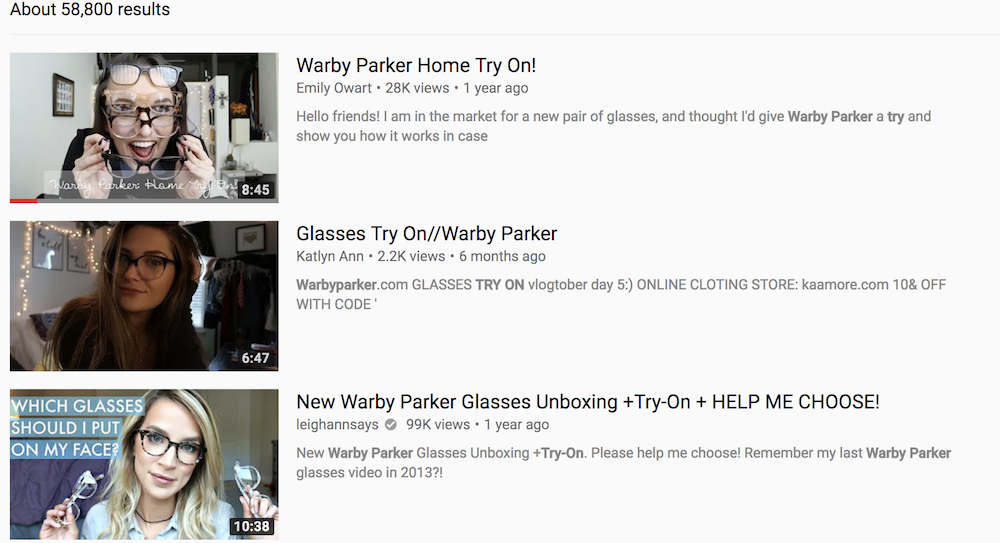
Warby Parker knew their customers were already taking pictures and videos of their glasses to send to friends for advice, so they started asking customers to post their images on social media with the hashtag #warbyhometryon … as a reward for posting, Warby Parker pairs those customers with one of their online personal stylists. Today, 22,630 people use the Warby Parker hashtag on Instagram.
The company also pays YouTube influencers to post videos of themselves trying different Warby Parker glasses on. The tactic is popular — there are currently 58,800 results on YouTube for “warby parker try on.” More importantly, encouraging people to share their home try-on experiences on social media also makes consumers more likely to buy. Warby Parker found that customers who shared content online were 50% more likely to make the purchase.
The #Warbyhometryon marketing campaign succeeded by encouraging customers to promote something they were already doing — taking photos and videos of themselves trying on eyeglasses — on social media, a platform Warby knew could reach their millennial audience.
3. Dollar Shave Club
No one can guarantee that a video will go viral. But it doesn’t hurt to have a strategy in place.
Dollar Shave Club, which sells — you guessed it — razors (among other bathroom essentials), launched their ecommerce company with a 1:33 minute video. Their video is wacky and memorable, with dance numbers, shaving babies, and a guy named Mike traipsing around a warehouse and making proclamations like, “Are the blades any good? No … Our blades are f**ing great.”
The video was a huge success: in the first three months it received 4.75 million views, and within the first two days of the company’s launch, 12,000 people had already signed up for Dollar Shave Club razors.
The video doesn’t come across like an advertisement, it seems like a funny video your brother’s goofy friend made in his garage, which probably explains why so many people sent it to friends and shared it on social media. But Dollar Shave Club didn’t rely on organic reach alone to promote their launch video.
Before promoting their video, Dollar Shave Club reached out to tech publications to let them know when it was going live, sent publications early access to the video, edited a shorter version to run on late-night TV, and spent $10,000 promoting it on social media, among other things. They didn’t just reach out to any tech publications, either — they focused on media properties already reaching the male demographic they wanted to target, like Thrillist and Uncrate.
Maybe it’s not feasible to aim for a viral video, but it is possible to create great content and use your money and efforts to market it to the right demographic. Hopefully, your audience will do the hard work from there.
4. Julep
Julep, a monthly customizable subscription beauty box, released a female empowerment video called, “Throw Anything at Me.” The video features a woman putting on Julep makeup and then tackling issues related to women’s rights. On Julep’s website, the ad is described as a “celebration, a rallying cry, championing every woman’s innate power.”
Along with the ad, Julep made a related video game, called “Throw Anything at Me,” so consumers could act like the female in the video and release their frustrations while having fun.
There are plenty of subscription beauty boxes out there. To differentiate themselves, Julep didn’t advertise what they were — they advertised what they stood for.
5. Cards Against Humanity
Cards Against Humanity, a sarcastic and offensive card game founded in 2011 by high school friends and geared towards millennials, understands their audience well. And, if you know your audience well, you can break the rules.
For instance, in 2013, Cards Against Humanity sold their product for $5 more on Black Friday, and sales went up. In 2015, they sold nothing for $5 … and received $71,000 from consumers. In 2016, they dug a hole in the ground and filled it back up, for $100,000.
I don’t know about you, but selling nothing sure seems like breaking the rules to me.
This strategy wouldn’t work for most companies, but it worked for Cards Against Humanity. The company knew their audience would appreciate their sense of humor, and, more than just appreciating it, they’d pay for it.
I’m not saying it’s a good idea to sell nothing. I’m saying it’s good to remember it’s okay to employ some ridiculous stunts if you trust your audience will get it.

6. Blue Apron
Blue Apron sources healthy, local food, and ships that food with ready-to-use recipes straight to consumer’s doors, so they can make healthy meals easily.
The company deals with a lot of competition nowadays from other subscription meal services, including Amazon, HelloFresh, Green Chef, and Plated.
As a result of this competition, Blue Apron’s biggest challenge has been explaining how their product stands out from the rest.
In 2015, Blue Apron reached out to popular food bloggers like Naomi of Love Taza and Anne of Fannetastic Food, as well as social media influencers, and asked these industry leaders to explain in-depth what Blue Apron was. This is generally an effective strategy, as food bloggers and social media influencers have already gained the trust of their audience.
Blue Apron then took it a step further, sponsoring their content on podcasts like Gimlet Media and The No Sleep Podcast. The company recognized podcasts as a worthwhile investment: almost 50 million people ages 13 and up listen to podcasts, but more than a third of the top 100 iTunes podcasts have no ads at all. With plenty of supply and little demand, Blue Apron’s sponsored content could stand out from the rest.
Employing social media influencers and bloggers to promote their brand, and sponsoring ads on podcasts, paid off: In 2015, Blue Apron sales increased 500%.
Blue Apron separated themselves from the competition by using industry influencers to reach an engaged audience, and promoting their content on appropriate (and less-crowded) platforms like podcasts.


How to Edit a PDF [Easy Guide]
If you regularly send PDF files over the internet, the guide below will make your life a lot easier.
PDF, short for portable document format, is a type of digital file that allows you to send content that is readable by other users regardless of what software they use to view the file. And in order for PDFs to adapt to various viewing platforms, the file’s text and images can’t easily be modified once packaged into a PDF.
But it’s not impossible.
Whether you use a Mac or Windows computer, there are tools available to you for editing the text and graphics within a document that has already been converted into a PDF. You can even do this online, as well as convert PDFs back into Microsoft Word documents to edit your content in its original, editable format.
Here are five ways to edit a PDF using Adobe Acrobat, or one of several online editing tools available to you today, on a Mac or Windows computer.
How to Edit a PDF
- Open Adobe Acrobat.
- In the top navigation, select File > Open …
- Select your PDF file from the document window.
- When your file opens, select “Edit PDF” in the right-hand toolbar.
- To edit text, first place your cursor on the text you’d like to edit.
- Edit your text using the “Format” options at the top of the right-hand toolbar.
- To edit images, first place your cursor on the image you’d like to edit.
- Modify your image using the “Objects” options below the text options from step 6.
Note: These instructions apply to Acrobat X and Acrobat XI, Adobe’s 10th and 11th editions. Earlier Acrobat products require you to select “Edit Text & Images” under the “Tools” option on the far right of your top navigation. See Acrobat’s current editing pane below, with “Edit PDF” on the right:
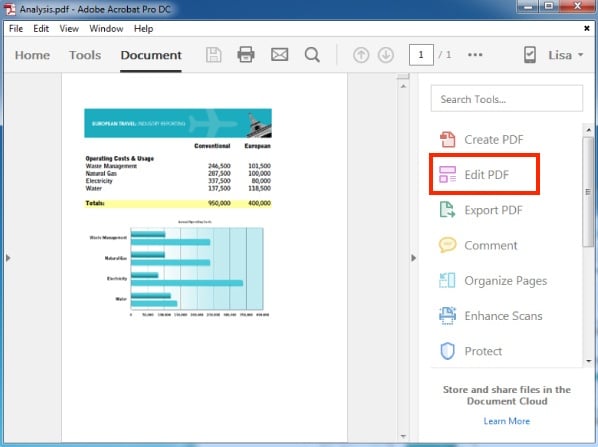 Image via Adobe
As you can see from the instructions above, you need to install the program, Adobe Acrobat. Don’t worry, it’s compatible with both Mac and Windows computers. However, not every version of Acrobat allows you to edit existing text once you open your document in this program.
Adobe categorizes its software under Acrobat Standard and Acrobat Pro. The company offers the following three editions in both product lines: Acrobat X, Acrobat XI, and Acrobat DC.
According to Adobe, the editions below allow for basic text and content editing, as well as the ability to export your document into Microsoft Word:
- Acrobat XI Standard
- Acrobat Standard DC
- Acrobat XI Pro
- Acrobat Pro DC
Acrobat Pro DC and Acrobat Standard DC offer a host of other editing capabilities that Acrobat XI does not offer — such as automatic spell-check, advanced photo editing, and editing from an iPad.
Although Acrobat is one of the most popular ways to edit PDF files, it’s not the only method. Read on to learn how to edit PDFs using other hardware and software beyond Adobe’s suite of products.
How to Edit a PDF Online
- Identify the website of an online PDF editor, such as Sejda.
- Drag or upload your PDF to the website’s homepage.
- Wait for your document to appear.
- From the top or side toolbar, select the type of edit or addition you’d like to make.
- Place your cursor on the area of your document you’d like to modify, and start editing.
- To edit existing text in Sejda, select “Text” from the toolbar, and place your cursor over the text you’d like to edit.
- Save your changes and download your edited PDF.
The hassle of needing an expensive program like Adobe to edit such a common file type hasn’t gone unnoticed, and there are numerous online tools you can now use for free to edit your PDF. But that also means there isn’t one universal set of directions to edit on each website available to you.
Step 6 in the above instructions is literally based on a tool called Sejda, one of the few free websites out there that lets you edit existing text — as well as add new content on top of the original.
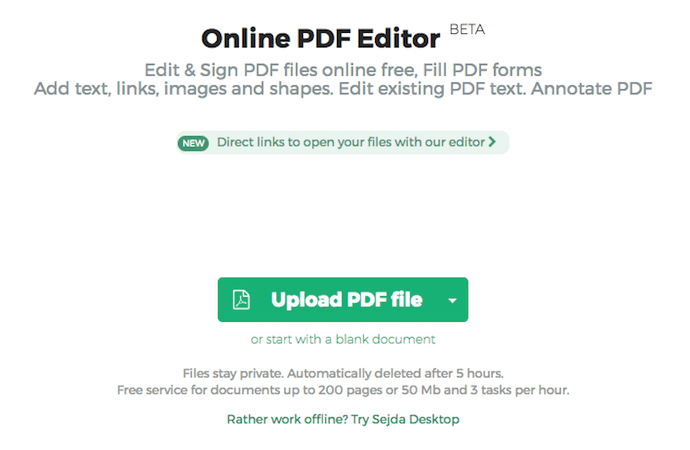
The image above shows you Sejda’s home page, where you can upload your PDF for editing. The image below shows you Sejda’s editing toolbar, and you’ll see a similar menu of options in many online PDF editors you try.
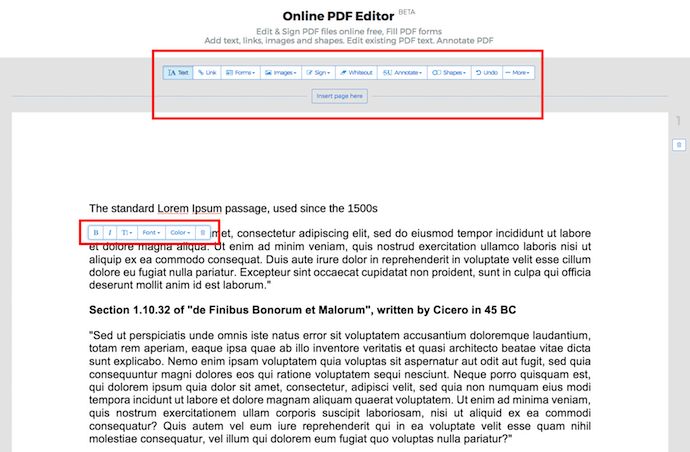
Most other PDF editing websites equip you with just a manual content eraser and new text/image boxes you can drag and drop anywhere on the page.
Here are a few other online editing tools:
- FormSwift: Add new content and even an e-signature.
- PDFescape: Add new content and start a new PDF from scratch.
- Smallpdf: Add new content, as well as save PDFs to platforms like Google Drive, Dropbox, and even Microsoft Word (more on this feature in a minute).
The tool that suits your PDF will depend on what specifically you’re looking to edit and the file size of your document. For example, because Sejda can’t accept PDFs larger than 50 megabytes (MB), check the size of your document and identify an editing tool that is compatible with your PDF.
You might also compress your PDF to under 50 MB so it works with Sejda (true to its name, Smallpdf can shrink your PDF’s file size for you).
How to Edit a PDF on a Mac
- Double-click on your PDF file to open it.
- Highlight all the existing text and copy it to your clipboard.
- To extract an image from this PDF, hold down Command + Shift + 4.
- Click and drag your cursor to fit the frame of the image you’d like to extract, then release.
- Ensure these images have saved to your desktop.
- Open your Mac’s Pages app and paste the text from your clipboard into a blank document.
- Edit this text, leaving spaces open to reinsert any missing images.
- Drag any extracted images that saved to your desktop into your Pages document.
- Move and format your images and text as needed.
- Save your edited file as a PDF.
If you want to edit a PDF using just the features that come natively on a Mac computer, follow the steps above. Just be sure to repeat Steps 3 and 4 for each image you want to extract from your original PDF — this is a unique function to Mac computers, and each extraction will take a screenshot of your image, saved to your desktop.
Do you plan on editing PDFs regularly? The above steps might be a bit time-consuming. Behold, PDF Expert:
PDF Expert is a free downloadable program built for Macs that allows you to open and edit PDF content right from the original PDF. You don’t have to migrate your text to a new document and take image screenshots the way you would in the 10 steps above.
As with editing PDFs online, the option that’s best for you depends on how much editing you plan on doing.
How to Edit a PDF With Windows
Windows computers can’t extract images as easily as Mac computers can, so you might be more dependent on third-party software to edit PDFs with Windows.
Keep in mind Acrobat — as well as the online tools mentioned earlier — all work for Windows, so by now, you’ve already learned how to edit PDFs on a Windows operating system.
Want a free tool tailored specifically to Windows? May your thirst for exclusivity be quenched: You can also download PDF Viewer Plus, a program offered only in the Microsoft store. The app is free to download and works just as easily as PDF Expert does on Macs.
How to Edit a PDF in Word
- Open Adobe Acrobat.
- In the top navigation, select File > Open …
- Select your PDF file from the document window.
- When your file opens, select “Export PDF” in the right-hand toolbar.
- Select “Microsoft Word” as your export destination.
- Click Export.
- Edit your content as needed, then select File > Save As …
- Select PDF in the File Format dropdown menu, then click Save.
Based on the various approaches to editing a PDF throughout this guide, you can predict by now that there’s probably more than one way to edit your PDF in Microsoft Word. And you’re right.
The first way brings you back into Adobe Acrobat, where instead of editing your PDF within Acrobat, you’ll export the file into Word (make sure you have Word installed on your computer). Remember, as stated earlier in this article, you can only do this in Acrobat XI and Acrobat DC — using either Adobe’s Standard or Pro edition.
Another way is to explore an online PDF editor. One editor that also allows you to edit in Word we already mentioned: Smallpdf. In this version of Smallpdf, you’ll upload your document and follow the prompts on the website to convert into and save your PDF as a Word document. See an image of this process below: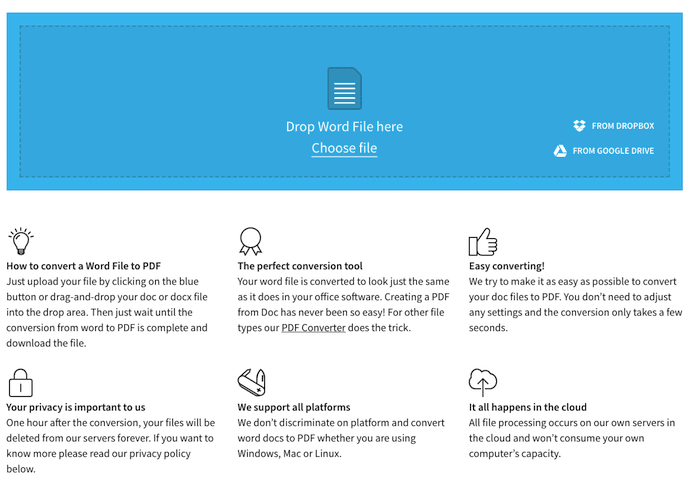
Then, you can open your file in Microsoft Word, make your desired edits, and save as a new PDF the same way you would in Steps 7 and 8 outlined above.
Who knew there were so many options for editing everyone’s favorite portable file? Go now, and amend your PDF, no matter what your platform and editing needs might be.

New Questions for Mark Zuckerberg Emerge at House Energy and Commerce Hearing
It was day two on Capitol Hill for Mark Zuckerberg today, as the Facebook CEO faced questionable tougher questions from Representatives on topics that weren’t covered in yesterday’s Senate hearing/
Today’s hearing, titled “Facebook: Transparency and Use of Consumer Data,” saw different issues broached by lawmakers that, much of the time, specifically reflected the concerns of their constituents.
Whereas yesterday’s questions from Senators seemed, at times, general and repetitive — and often had already been answered by statements made by both Zuckerberg and other Facebook executives in the weeks leading up to the hearing. These included, among other items, Facebook’s origins (Zuckerberg’s dorm room), the use of user data (it’s not sold, Zuckerberg repeatedly emphasized), and the possibility of regulation.

And while some of today’s questions did include or touch upon those points, the concerns seemed a bit more niche and nature — and sometimes showed evidence of greater comprehension and preparation of the many issues that Facebook is dealing with, and has gone through in the past.
The hearing lasted just over five hours, covering a great deal of ground. No time to read? Check out this video digest — or read on to learn about some key takeaways.
Content Review
Since it was first revealed that Facebook was weaponized by foreign actors to spread misinformation and divisive content intended to influence the 2016 U.S. presidential election, the company has rolled out a number of changes designed to both proactively prevent the presence of such bad actors on the site, as well as better identifying and removing the harmful content they might publish.
Most recently, these changes include better efforts around the transparency of ads, for example, to help provide greater context who pays for them and why it’s being displayed for a given user. On top of that, users can also flag content that they deem inappropriate or in violation of Facebook’s policies.
But many of the representatives who questioned Zuckerberg today — as well as their constituents, they said — believe that this system is flawed.
That’s manifested in several ways, such as users reporting content in violation of Facebook’s policies that remains intact despite numerous flags. Representative Gus Bilirakis shared one example of his constituents taking this action around some content, noting that it wasn’t until his office intervened that it was ultimately removed.
Zuckerberg blamed that instance on an “enforcement error” on the part of the content reviewer responsible for that particular item.
Rep. Bilirakis says his constituents reported content in violation of Facebook policies numerous times to no avail, and that the content remained intact before his office became involved. Zuckerberg says that the person “reviewing it probably made an enforcement error.”
— Amanda Zantal-Wiener (@Amanda_ZW)
April 11, 2018
But representatives pressed Zuckerberg on this topic and the questions it brings up about Facebook’s overall take on accountability. Representative Bill Johnson asked how those who make these mistakes — like missing content that should be flagged as inappropriate or inaccurately flagging content as such that isn’t actually in violation — are held responsible.
Asking if anyone at Facebook has ever been fired over these mistakes, Zuckerberg answered, “I’m sure we have.”
But as Johnson’s question suggests, mistakes in content review both ways. In addition to missing content that should be flagged, many representatives aired their grievances with Facebook’s removal of ads and brands from its platform that, while controversial, may not have necessarily been in direct conflict of its policies.
Most notably among the grievances aired by some representatives was Facebook’s censoring of video personality duo Diamond and Silk, who received a message from Facebook last week describing their content as “unsafe to the community.” And while many representatives cited the censoring of Diamond and Silk of one of Facebook’s more salient examples of censuring content creators without a full explanation, Representative Billy Long was particularly glib — holding up a photo of the pair and asking Zuckerberg just what, exactly, was dangerous about it.
“Nothing is unsafe about that,” Zuckerberg answered.
Rep. Long holds up a photo of Diamond and Silk, saying that they’re his constituents and want to know what’s dangerous about that photo. Zuckerberg says he doesn’t seem anything dangerous about that photo. Long tells him to “save your ship.” pic.twitter.com/1wTTBKRQ2p
— Amanda Zantal-Wiener (@Amanda_ZW)
April 11, 2018
But in terms of content that should be flagged and yet seems to appear in abundance on Facebook, representatives seemed gravely concerned with ads for drugs, pointing specifically to the U.S. opioid crisis that they say these ads aggravate.
Many of them asked Zuckerberg if these drugs are sold on Facebook, and after being answered no, pressed him for a better explanation as to why ads for them continued to appear throughout the site anyway — ads that, it seems, are in violation of Facebook policies.
And Zuckerberg had no better answer for why these ads and posts still exist other than FB is working on AI tools. https://t.co/x8dxRojFvw
— Steve Kovach (@stevekovach)
April 11, 2018
Zuckerberg was unable to directly answer this question, often defaulting to explaining how the ads review process works and blaming a lack of finely-tuned AI tools for not being able to identify and remove this content more efficiently. At yesterday’s Senate hearing, Zuckerberg also pointed to AI tools as crucial to the company’s efforts to remove much of the negative information in question, like hate speech or propaganda.
Far-Reaching Data Collection
Today’s hearing marked a pivotal moment for Zuckerberg’s time in DC. At one point, he admitted that he was one of the 87 million users whose data was compromised or improperly obtained by Cambridge Analytica.
Facebook CEO Zuckerberg admits his own data was shared by Cambridge Analytica https://t.co/b0KXm8kuUn pic.twitter.com/HnLWGh6oVd
— Reuters Top News (@Reuters)
April 11, 2018
Many representatives had more questions — in addition to those from yesterday’s Senate hearing — about the detailed nature of the data collected and used by Facebook. Again, many lawmakers wanted to know what happens to a user’s data after he or she deletes a Facebook account, and what could happen to it if it came into the possession of a third party before leaving the platform.
With regard to the third parties, Zuckerberg reiterated Facebook’s ongoing investigation and audit of any and all apps that ever collected user data, to determine which still have personally identifiable information (PII) in their possession and of that data was sold or improperly obtained to other parties.
But representatives also had questions about the tracking of internet users when they’re not using Facebook, asking if their activity is monitored or recorded by the company when browsing other sites outside of the social network.
Castor is pushing hard Facebook’s tracking, naming the many pieces of information collected. Zuckerberg seems to be getting frustrated with the question, attempting to explain user control and changes made to policies. Castor is having none of it and frequently interjects. pic.twitter.com/JlJgM91oso
— Amanda Zantal-Wiener (@Amanda_ZW)
April 11, 2018
Eventually, Zuckerberg did admit that Facebook collects some data on user activity elsewhere on the web, even if they aren’t signed into Facebook. Many sites, for example, have Facebook tools installed that allow users to “Like” the content by way of the traditional Facebook method, even if they aren’t logged into or users of the platform.
As for how many pages have this feature — or use Pixel, Facebook’s embeddable code that can be used to measure ad campaign conversions — Zuckerberg couldn’t provide a specific number.
In those cases, he said, some data is collected on those users for what he called “security purposes,” but didn’t go into specifics. (It’s worth noting here that each Representative was only allotted four minutes for questioning, often leaving them unable to push Zuckerberg for more information.)
“In general we collect data on people who are not signed up for Facebook for security purposes,” Zuckerberg said a few minutes ago. What security purposes? How else is that data used? Do those users know that FB has the info and can they delete it?
— Deepa Seetharaman (@dseetharaman)
April 11, 2018
But some Representatives had questions about the full extent of Facebook’s user tracking activity throughout the web, and not just on its own site. Representative Jerry McNerney, for example, noted that when members of his staff downloaded their data files, it didn’t include browsing history or non-Facebook online activity.
Rep. McNerney: “I’m a mathematician.” Goes on to ask if he can download his Facebook information, and notes that browsing history wasn’t included in the data downloads of his staff. Zuckerberg confirms that data files don’t include browsing history.
— Amanda Zantal-Wiener (@Amanda_ZW)
April 11, 2018
Zuckerberg explained why in the form of a statement correction he issued late in the hearing’s proceedings. Weblogs, he said — the logs of tracked user activity — are not included in the “download your information” files and are only kept temporarily, to measure what ad topics a user might be interested in. Those ad topics appear in the data download.
Regulation (Again)
Although it didn’t come up quite as much as it did in yesterday’s Senate hearing, several representatives broached the topic of regulation. Representative Fred Upton was one of the first to bring it up, asking Zuckerberg that if Facebook were to be federally regulated, what kind of regulation would he want?
In short, Zuckerberg answered that there are many “things that need to be thought through very carefully [before] we think about what [policies] to put in place.”
But when regulation was brought up, it demonstrated a fairly stark party line on which Representatives somewhat staunchly remain on either side. Representative Jan Schakowsky was particularly vocal about her desire for regulation, reading off a list of Zuckerberg’s apologies for errors in judgment dating back to 2003 (a similar list was published by the Washington Post prior to the hearings), stating: “This is proof to me that self-regulation simply does not work.”
“This is proof to me that self-regulation simply does not work,” she says, pointing to the Secure and Protect Americans’ Data Act: https://t.co/7nzQGcIhQ9
— Amanda Zantal-Wiener (@Amanda_ZW)
April 11, 2018
Schakowsky was also quick to point out that, judging from Zuckerberg’s responses to his questions about the General Data Privacy Regulation (GDPR), which comes into force next month, it doesn’t seem like the Facebook version of self-regulation on data privacy would be “an exact replica” of the looming E.U. laws.
It brought up a remark Zuckerberg made during yesterday’s Senate hearings, where when asked if he thinks the E.U. got data privacy “right,” hesitantly answered, “I think they get some things right.”
Representative Scott Peters today asked Zuckerberg to elaborate on that — and explain what he thinks the GDPR gets right, and what it gets wrong. And while Zuckerberg said he thinks the European regulations will generally be “very positive” for internet users, he would need more time to think about what they might be getting wrong.
Rep. Peters: “What do you think the Europeans got right? What did they get wrong?”
Zuckerberg: “I think the GDPR, in general, is going to be a very positive thing for the internet.” As for what they got wrong, “I think I need to think about that more.”— Amanda Zantal-Wiener (@Amanda_ZW)
April 11, 2018
Toward the end of the hearing, another representative revisited Schakowsky’s remarks — specifically, her question, “Who is going to protect us from Facebook?” Representative Chris Collins claimed the question was “aggressive” and “out of bounds,” going on to say that when asked if he agreed with the idea of regulating Facebook, “I said no.”
Sen. Collins called the question from an Illinois representative, “Who is going to protect us from Facebook?” both “aggressive” and “out of bounds,” going on to say that he “said no” to more regulation, then congratulated Zuckerberg on his testimony today
— Amanda Zantal-Wiener (@Amanda_ZW)
April 11, 2018
At the end of the day, several questions still remain unanswered, many of which Zuckerberg was unable to come up with responses to in the course of the hearing, which Representative Debbie Dingell was quick to point out.
Rep. Dingell us naming a number of other questions Zuckerberg couldn’t answer today, and things he didn’t know over the past four hours. She’s also bringing up the Facebook Pixel, which DOES track some non-Facebook online activity.
— Amanda Zantal-Wiener (@Amanda_ZW)
April 11, 2018
But Wait. There’s More.
But even where Zuckerberg did provide responses beyond “I don’t know,” or “I’m not aware” — which were frequently followed with responses to have his team follow up in writing — many of the key issues brought up over the course of the past two days remain in limbo.
For example, it still isn’t entirely clear just who, if anyone, is improperly in possession of Facebook user data. And we still aren’t sure if or how Facebook will further revise its terms and policies to give users the control and clarity Zuckerberg so vehemently said in these hearings he wants users to have.
But above all, what’s yet to be determined is the outcome of these hearings: and to what extent, if any, this questioning and testimony will have a lasting impact and lead to any sort of stricter guidelines for Facebook — and its Big Tech cohorts — including government regulation.
Before that can happen, I suspect more hearings need to take place. Before this week’s events took place, there was word of wishes among lawmakers to have the CEOs of Google and Twitter appear before Congress, as well. And what was made clear in today’s hearing especially is that, despite its massive reach, Facebook is hardly alone in confusing and sometimes questionable data practices.
I would not be surprised if Zuckerberg is asked to appear before Congress again — if for no other reason, to undergo further questioning not just about data privacy, but about its possible role in influencing the 2016 U.S. presidential election. An FBI investigation into overall election interference is still underway, for which Zuckerberg said in yesterday’s hearing someone from Facebook was questioned. The testimony, it seems, is far from over.
And as it continues to unfold — for Facebook and beyond — I’ll be watching. In the meantime, I, along with my esteemed colleagues, will continue to think about all of these possible repercussions impact the marketing industry and the people who use Facebook, among other social media tools, in their lines of work.
Want more? Check out my Twitter feed from the week’s events.

How to Write a Cover Letter for an Internship [Examples & Template]
Writing a cover letter can feel like a daunting task, particularly if you don’t have a lot of “real world” experience. Fortunately, a cover letter is actually an exceptional chance to explain how your extracurriculars or classes taught you leadership and time management skills.
To really stand out, it’s important to personalize your cover letter for each internship application. You shouldn’t use your cover letter as a chance to reiterate your whole resume. This is your chance to pick out a few keywords from the position description, and dive into examples showing how you’ve exibited these skills.
We’ve created an internship cover letter template to provide some initial structure and inspiration, but we don’t expect this template to be one-size-fits-all. Ideally, you’ll supplement our template with your own creativity and flair.
Formatting
There are different formats you can use when writing cover letters, but you can’t go wrong with the following business letter format. Regardless of the format you choose to follow, it’s critical you proofread, use formal terms such as “Dear” and “Sincerely,” and lean towards a professional tone whenever possible.
Your Name
Your Address
Your City, State, Zip Code
Cell: 555-555-5555
Email: name@email.com
Date
Department
Company
Street
City, State Zip
Dear X, (try to find hiring manager’s name… if you can’t, you can put “Dear [Company A] Hiring Committee”)
[Paragraph One]
[Body Paragraphs]
[Closing Paragraph]
Sincerely,
(*leave four spaces for your signature, then type your name underneath the four spaces)
Caroline Forsey
Paragraph One:
In the first paragraph, explain how you heard about the company or position, and if you know anyone at the company, mention them here. Next, express your own interest in the company or position and explain briefly how it relates to your own passions. Introduce yourself in this paragraph, writing your name, your education level, your major, and your interests.
Paragraph Two and Three:
Scan the internship position description and pick out a few qualities you think apply to you — just don’t choose all the descriptors mentioned (it will appear disingenuous and make your cover letter too long). For instance, if I see a company is looking for someone who’s “outgoing, organized, hardworking, and willing to take criticism,” I would pick those that describe me best and focus on providing examples in the body of my cover letter.
Mentioning the traits directly in your cover letter shows you’ve read the position description, and makes your cover letter more scannable. If the hiring manager is looking for someone with content skills, she might scan your cover letter looking for the words that indicate experience with content.
Finally, brainstorm a few compelling examples to show how you embody the most important characteristics. Don’t just write, “I have excellent customer service skills.” You need to prove it. Support your claim by writing, “Last summer, I worked at as an orientation leader at my college, serving as a resource for incoming students and their parents. This experience strengthened my customer service skills.”
Even if you don’t have a lot of (or any) job experience, think about highlighting skills you’ve gained from extracurriculars, volunteer experience, or even passion projects (e.g.: “my passion for dance led me to becoming a volunteer dance teacher, which helped me develop as a leader”).
Closing:
If the internship application does not specify “please do not contact,” you might choose to conclude by specifying how you will follow up, such as, “I will call next week to see if my qualifications are a match,” or, “I am eager to meet with you to discuss this opportunity, and am available for an interview at a mutually convenient time.” Conclude by thanking the hiring manager for taking the time to consider you, and end on a positive, confident note, such as, “I look forward to speaking with you soon.”
Sample Cover Letters
Option A)
Caroline Forsey
1 Hireme Road
Boston, MA, 20813
Cell: 555-555-5555
Email: cforsey@hireme.com
April 15, 2018
Event Planning Department — Internship Program
Company A
35 Recruiting St.
Boston, MA, 29174
Dear Internship Coordinator,
At the suggestion of John Smith, a senior marketer at Company A, I am submitting my resume for the Event Coordinator internship position. I am a junior at Elon University, pursuing a bachelor’s degree in Sport and Event Management, and am passionate about event planning. I am thrilled to hear about Company A’s Event Coordinator internship program, and feel my experiences and skills would be an excellent match for your organization.
As an executive member of the Student Union Board at Elon, I am in charge of organizing, promoting, and implementing multiple school-related social activities per week, while being challenged to design new events. I work cohesively with a diverse team made up of students and faculty, and I also foster relationships with novelty companies.
My experience as an Orientation Leader has further prepared me for this internship. It was essential that I remain positive, outgoing, and energized during move-in day and act as a liaison between new students, families, and faculty in a fast-paced and demanding environment. I was expected to maintain a highly professional customer service ethic while interacting with families and new students.
My Elon University experiences, executive board membership, and orientation leadership role have prepared me to be successful in the Event Coordinator internship program. Thank you for your time and consideration. I look forward to the opportunity to discuss how I can add value to Company A.
Sincerely,
(handwritten signature)
Caroline Forsey
Option B)
Caroline Forsey
1 Hireme Road
Boston, MA, 20813
Cell: 555-555-5555
Email: cforsey@hireme.com
April 15, 2018
Marketing Department — Internship Program
Company A
35 Recruiting St.
Boston, MA, 29174
Dear Internship Coordinator,
I am a passionate, creative, and driven Elon University student with leadership and event planning experience, as well as strong communication skills. I am seeking opportunities to showcase my writing abilities in a challenging and stimulating environment. My skills and experiences will enable me to deliver successful results as a digital marketing intern for Company B.
Please allow me to highlight my key skills:
- Prior experience writing blog posts and press releases for marketing objectives
- Strong communication skills and ability to adopt voice for diverse audiences and varying purposes
- Efficient in managing multiple projects with fast moving deadlines through organization and time-management skills
- A firm understanding of grammar rules and how to write effectively
- Experience in leadership positions, both as Student Union Board executive leader and as an Elon Orientation Leader
- Proven ability to form positive relationships with people from around the globe, exhibited by my internship experience in China last summer
- Experience organizing, promoting, and implementing social events
- Proficient in Microsoft Office, Adobe Creative Suite (InDesign, Photoshop, and Premiere), and social media platforms
In closing, I look forward to the opportunity to discuss how I can be an asset to Company B. I will call next week to see if you agree that my qualifications are a match for the position. Thank you for your time and consideration.
Sincerely,
(handwritten signature)
Caroline Forsey

Contribution Margin Explained in 200 Words (& How to Calculate It)
When you first start a business, you’re laser-focused on the quality of your product — polish the idea, build it, rebuild it, test it, go to market.
Money doesn’t matter much yet. You might have initial funding, but all of it goes to research and development.
But when that product begins to sell, and funding turns into revenue, you have more bookkeeping to do so the business can remain profitable as it serves more customers. A common financial figure that successful businesses must calculate is their profit margin: the amount that a business’s revenue from sales exceeds its total costs to actually run the business.
A more specific figure, which is especially important when pricing new products, is contribution margin. Here’s a simple definition:
Your Contribution Margin Per Unit in Under 200 Words
Your contribution margin is the amount that your revenue from one sale exceeds, or is exceeded by, the costs you paid to develop that one sold unit. These costs are called variable costs, and they vary as your business makes more products. So, if you spend $50 to make one unit of your product, and you sell that one unit for $75, your contribution margin is $25 ($75 minus $50).
As an equation: contribution margin = revenue from 1 unit – variable cost to make 1 unit.
Contribution margins differ from profit margins in that contribution margins only take into account the variable costs of developing your product, excluding the fixed costs a business pays to stay in operation.
For example, a variable cost to a software company might be storage space on the cloud, and a fixed cost would be a lease on office space. The cost to host customer data on the cloud can change as new customers are signed, but the company pays the same rent to the building manager regardless of how many customers it loses or gains.
Easy enough, right?
Contribution Margin Ratio
As a business develops new goods and services, contribution margins expressed as a dollar amount aren’t super helpful in determining how much each product contributes to the business’s bottom line. In these cases, it’s important to convert the contribution margin to a figure that better represents an individual product’s value to the company. This is where the contribution margin ratio comes in.
Contribution Margin Ratio
The contribution margin (CM) ratio is equal to total sales revenue minus variable costs to the business, divided by total sales revenue. Expressed as a percent, it is the portion of total sales revenue that became profit after deducting the cost to develop each individual product sold.
This percentage can help determine how a certain product compares to the rest of a company’s offerings, in terms of its profitability.
Take our original $50 product example: If your CM was $25, and you sold the item for $75, your CM ratio would be roughly 33.3%, since $25 is 33.3% of $75 — your total revenue from that sale. What if you developed another product that cost $110 to make and sold for $150? Your CM would be $150 minus $110, or $40 — higher than the CM of your first product. So it’s a more valuable product, right?
Not necessarily. Just because your second product netted more revenue than your first doesn’t mean it’s a more profitable item.
According to the definition and formula above, your CM ratio for your second item is $40 divided by $150, or 26.7% (lower than your first product’s 33.3%). This means your second product brings in more revenue than your first product, but isn’t as profitable because of the high variable cost to make it.
While repricing your product can make you more profitable, don’t try to increase your profit margin or contribution margin through accounting alone. Investigate the market and talk to your audience. Find out what your customers are asking for — you’d be surprised by how much they’d pay for a service you might easily be able to develop.
