
A Quick Primer on Google’s Search Engine Results Page (SERP)
In simplified terms, a SERP (which stands for Search Engine Results Page) contains two types of content: organic and paid results.
In an effort to make the user search experience easier and more direct, Google created SERP features, on-page content that gives users answers to their queries without requiring them to click into an organic result. Although on-page SERP features are optimal for the user, they can make it harder for marketers to get noticed in organic search results, even when they’re ranking #1.
Search engines are smarter today than ever before. A few years ago, a search for “pizza” would result in a predictable mixture of restaurant websites, directories, review sites like YELP, and blog posts about the top pizza places in Boston.
Today, here’s what you get when you search “pizza”:
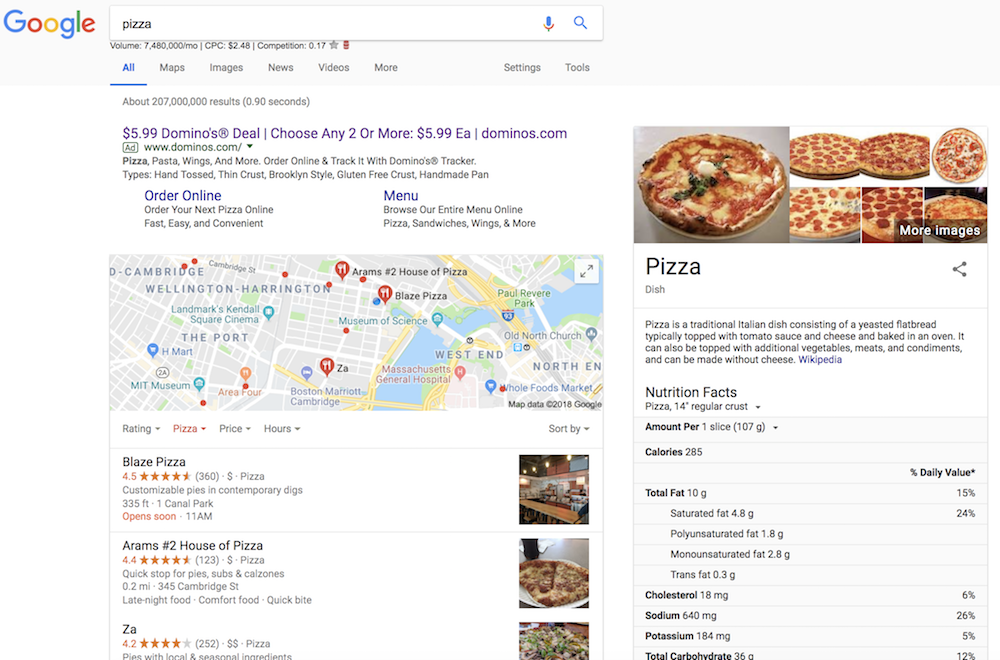
As you can see, the SERP first displays an advertisement, a map with nearby pizza restaurants, and a card pulled from Wikipedia containing pizza’s nutritional information. This content all appears higher and more prominently on the page than any organic results, so even Pizza Hut, which ranks #1 organically, is hidden below the SERP features.
What Does SERP Stand For?
SERP stands for Search Engine Results Page. A SERP is the web page you see when you search for something on Google. Each SERP is unique, even for the same keywords, because search engines are customized for each user. A SERP typically contains organic and paid results, but nowadays it also has featured snippets, images, videos, and location-specific results.
As a marketer, it’s essential to stay up-to-date with new SERP features. Ranking #1 organically doesn’t provide as much visibility as it used to, so it’s imperative for marketers to take full advantage of Google SERP tools to learn how they can rank higher.
There’s a marketing joke that goes something like this: “Where’s the best place to hide a dead body? Page two of Google.” Nowadays, a good place to hide a dead body is actually anywhere below these SERP features. Here’s how you can keep up.
SERP Features
- Rich Snippets
- Paid Results
- Universal Results
- Local SERP
- Vertical Search
- Knowledge Graph data
- Miscellaneous
Rich Snippets:

A rich snippet contains more information than a normal snippet does, including pictures, reviews, or customer ratings. You can recognize a rich snippet as any organic search result that provides more information than the title of the page, the URL, and the metadescription. Site operators can add structured data markup to their HTML to help search engines understand their website and optimize for a rich snippet. The Starbucks app, for example, includes customer ratings and pricing within the search description.
Paid Results:
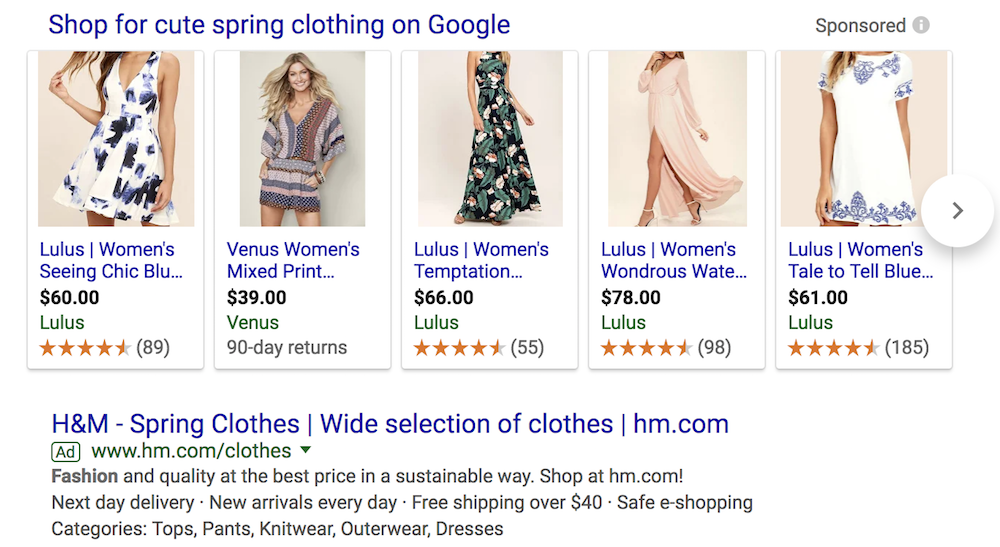
Paid results are the ads and sponsored posts that appear at the very top of the SERP. Google differentiates paid from organic by providing a sponsored or ad label, as you can see below, or by boxing it off in a separate area of the page or using another visual cue.
Universal Results:
Universal results are Google’s method of incorporating results from its other vertical columns, like Google Images and Google News, into the search results. A common example of universal results are Google’s featured snippets, which deliver an answer in a box at the top of the page, so users ideally don’t have to click into any organic results. Image results and news results are other examples.
Local SERP:
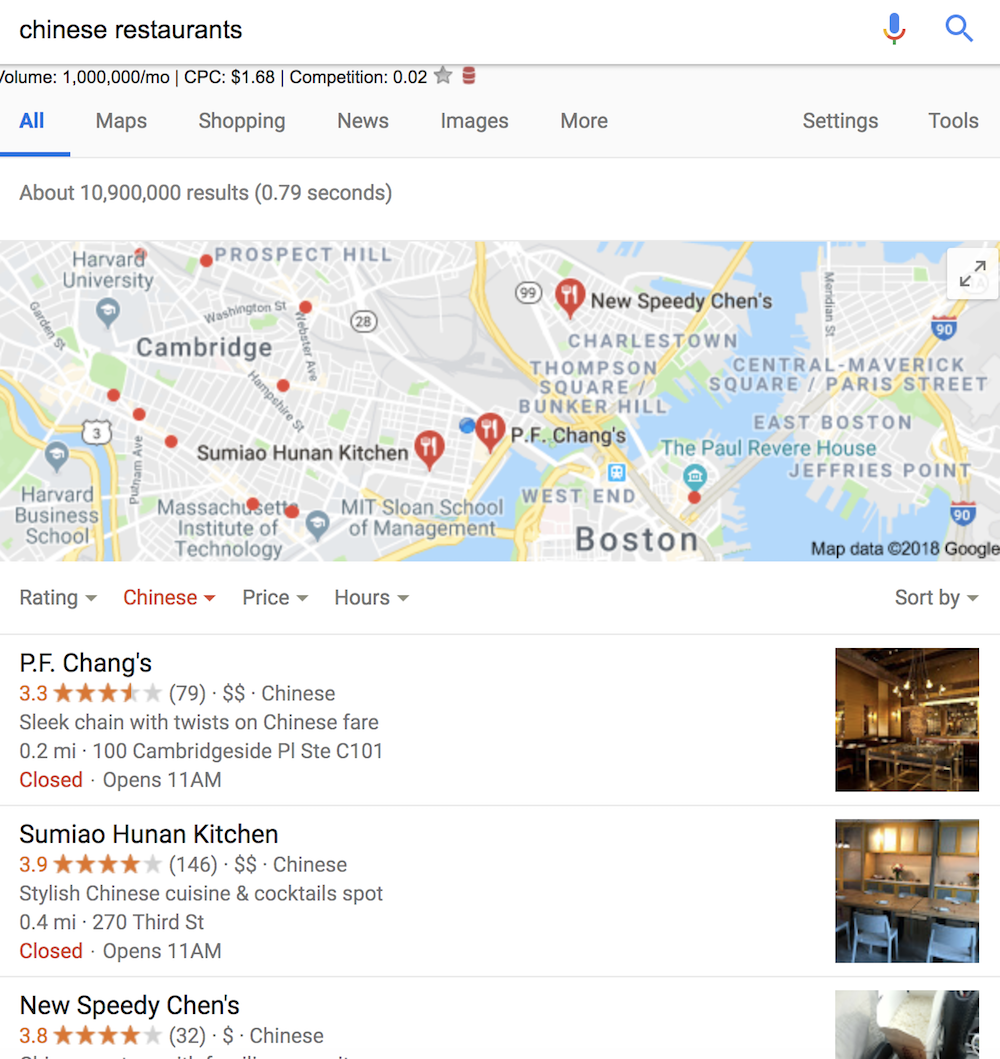
Local SERPs appear any time your search intent implicitly relates to location. For example, if you type in “restaurants”, “gas station”, or the name of a specific product sold in stores, Google will surface locations near you that match your query, and show you exactly where you can find them on a map.
Vertical Search: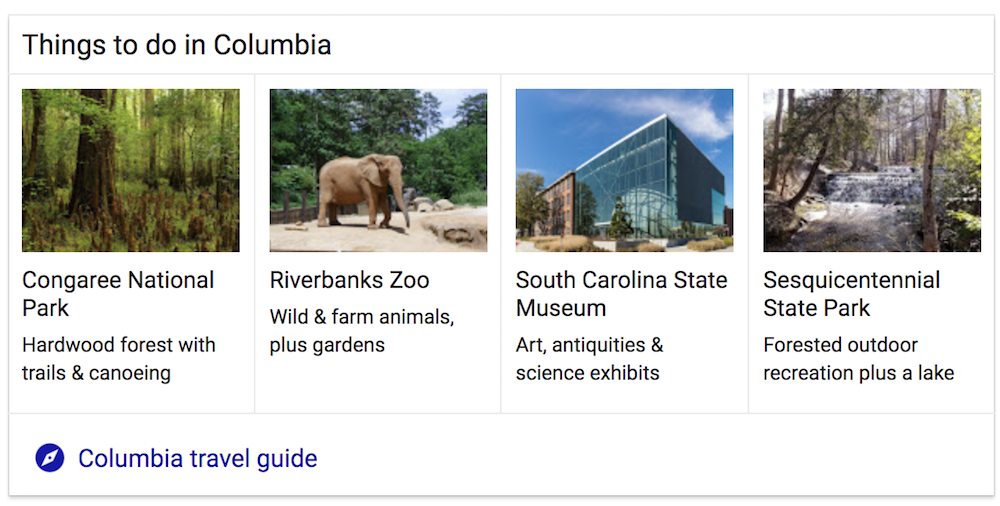
Vertical search is the box that appears at the top of the page when your search requires Google to pull from other categories, like images, news, or video. Typically, vertical search relates to topical searches like geographical regions — for example, when you search “Columbia, South Carolina,” Google delivers a “Things to do in Columbia” box, along with a “Columbia in the News” box.
Knowledge Graph data:
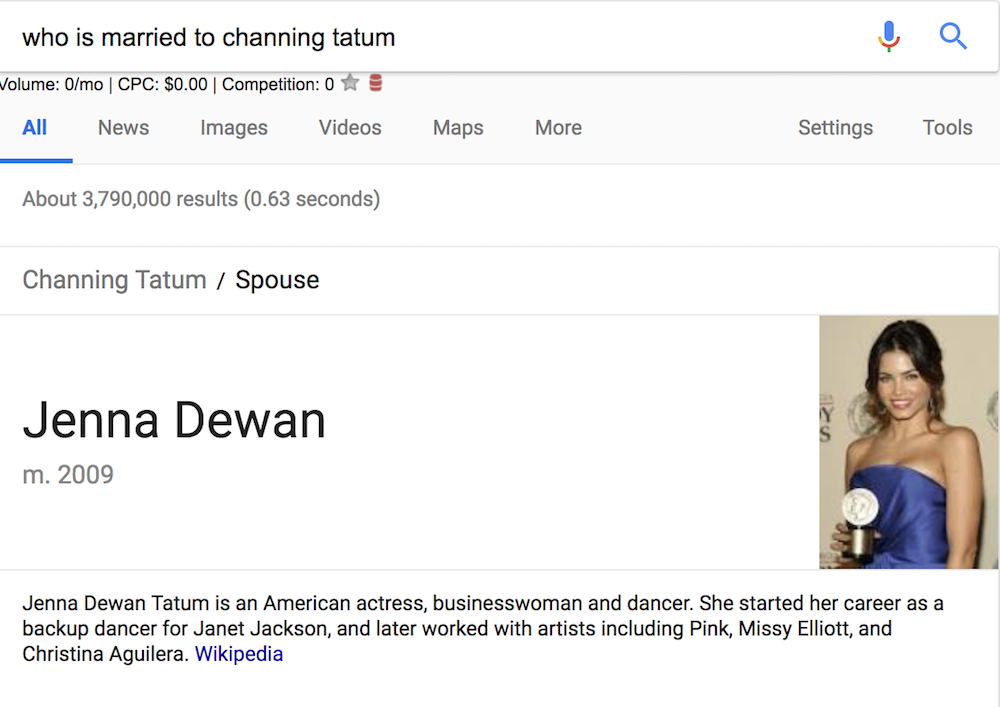
When your search likely only has one answer — “what’s the weather”, for example, or “who is married to Channing Tatum” — Google will surface a Knowledge Graph: a box that pulls the answer to your query directly from an organic result and into a box at the top of the page.
Google SERP Tools
Now that you have a sense of the different SERP features, you’re probably wondering how you can rank higher in SERP … and, ideally, how you can capture a feature like local SERP or universal results. Here are some of our favorite tools to help you evaluate your current standing in SERP, compare keyword ranking to competitors, and ultimately figure out how to rank higher:
1. WhatsMySerp
WhatsMySerp provides advanced SEO tools to scan and analyze your rankings for different keywords, as well as your overall website ranking on SERP. This tool allows you to search for up to 25 keywords at once, making it ideal for a quick-and-dirty overview of how your site is ranking in search engines.
Price: Free
2. RankWatch
RankWatch provides an in-depth analysis of your URLs, backlinks, keywords, and other SEO elements. The tool also conducts comparative analysis on your competitor’s websites and the number of keywords they are ranking for, so you can strategize how to outrank other businesses in search results.
Price: $29/month
3. MozPro
It’s good to know how you rank both nationally and locally for keywords, but it’s undoubtedly more helpful to get actionable data and insights on how to improve. Moz Pro offers strategic advice on ranking higher, a major benefit to the tool. It also crawls your own site code to find technical issues, which will help search engines understand your site and help you rank higher.
Price: $99/month
4. SerpBook
If you’re an SEO expert in charge of handling clients’ rankings, SerpBook is a useful organizational tool for assigning groups of keywords to individual clients, scheduling which reports you want sent to which clients, and enabling clients to log into your account and check their ratings.
Price: $30/month
5. Moz Local
With 61% of local searches resulting in a purchase, it’s important to ensure your business is optimized for local SEO. Moz Local scours 15 sources, including Google and Facebook, to check out how your business ranks locally. Similar to Moz Pro, Moz Local offers actionable advice for fixing incomplete or inconsistent listings.
Price: Free
6. SemRush
SemRush helps you compete for SERP features including featured snippets, local SEO, Knowledge Graph data, and Google News by figuring out which keywords your competitors are ranking for within these SERP features.
Price: $99.95/month
7. SerpWatcher
SerpWatcher is an easy all-in-one dashboard that delivers an overview of your SERP performance. Even better, you can create a list of custom keywords and track data on those alone, so you’re not overwhelmed by data you’re not interested in. SerpWatcher handily emails you whenever your keywords enter or leave page one of search engines.
Price: $29.90/month

17 Google Marketing Tools You Should Be Using
How to Market on Google
- Use Google My Business (GMB) and claim free ad space for your business.
- Improve your website’s SEO using Google Search Console.
- Buy ads on Google through Google Adwords.
- Host your website’s videos on YouTube, the largest video community in the world.
You may have heard of this little thing called Google. You know, where 3.5 billion searches for information are made per day?
But Google is more than just a search engine. So much more.
In fact, there are numerous Google business tools in addition to its search engine that can be hugely valuable if you’re a marketer.

So, we decided to round up a list of the most essential Google marketing tools at your disposal so you can be sure your business is taking full advantage of all Google has to offer.
17 Helpful Google Marketing Tools for Business
1. Google My Business
Want to get yourself some free advertising on Google? I kid you not — it’s a real thing.
All you have to do is claim your Google My Business listing (formerly known as Google Places), and your business can get featured in the search results (as well as in Google Maps) for local searches like the one pictured below. Check it out — all the businesses within the red call-out in the screenshot below are local Google My Business results for the search “mexican restaurant, boston.”
Best of all, unlike Google AdWords (which we’ll touch on later), none of those businesses paid for their positions in these local results.

If you haven’t already claimed your Google My Business listing, follow the simple steps in this blog post to get your listing up and running. Keep in mind that as Google walks you through the setup of your listing, you’ll automatically create a Google+ Page for your business as well, which leads us to our second Google marketing tool …
2. Google+ Business Pages
With the death of Google Authorship and the elimination of Google +1s from search results, the jury is out about the importance of maintaining an active Google+ Business Page these days if you’re not a local business. That said, given Google’s massive empire, we think it behooves all businesses to play it safe and create a Google+ Page, even if you only update it every so often. To create a page, get started here.
But if you’re a local business, setting up and maintaining a Google+ Page goes hand in hand with your Google My Business listing (see above), making Google+ even more critical for you. And considering your Google My Business listing will include a link to your business’ Google+ Page, it’s important to take some extra time to make your page the best it can be.
Learn more about how to optimize your Google+ Page in this free ebook, and you can check out HubSpot’s own Google+ Page here.

Last, if your audience is active on Google+, it may be smart to add the Google +1 share button to your website — particularly to articles on your blog. Google uses social signals as a ranking factor, so making it easy for your website visitors to share your content on Google+ can help your content rank better in search. To learn how to create Google +1 buttons, check out this post.
HubSpot customers can easily add the Google +1 button to their blog within the HubSpot Marketing Platform.
3. Google Webmaster Tools
Want better insight into how healthy your website is in the eyes of Google? Just set up a Google Webmaster Tools account. Google Webmaster Tools will alert you to any red flags that could prevent your site from getting found in search results, and help you analyze your existing search traffic so you can understand how visitors are currently finding you.
Here’s an overview of how Google Webmaster Tools can help you optimize your website, straight from the horse’s mouth …
4. Google Suite: Docs, Sheets, Slides, and Forms
Collaborating on a project with other marketers on your team? Google Suite is a collection of some great collaboration tools you can use in place of typical software on your desktop. Here they are:
- Google Docs for Word documents.
- Google Sheets for Excel spreadsheets
- Google Slides for PowerPoint presentations
- Google Forms for easily collecting simple survey responses
Consider using them to share and collaborate on marketing data analyses, ebook or blog post drafts, marketing or SlideShare presentations, or surveys and polls. Projects save automatically and can also be accessed across devices with a quick download of a mobile app.
Grab this free guide to learn how Google Suite can benefit your marketing campaigns.

5. Google AdWords
If you want to give your organic efforts to rank in search a bit of a jumpstart, it might make sense to dabble in Google AdWords, Google’s pay-per-click (PPC) product. If you have yet to try it, here’s how it works:
You create ads that target specific keywords related to your business, and your ads appear above or to the right of organic search results on Google when people search for these keywords (see screenshot below). The cost your ads depend on the competitiveness of the keyword you’re targeting, but you only pay if visitors actually click on your ad.
For more resources about how to do PPC effectively, check out our PPC Marketing Hub here.

Keep in mind that AdWords can quickly become an expensive marketing tool, and unlike organic search, it offers quick wins rather than longer-term, lasting (and free) results. That said, if used smartly, PPC can help you plan your organic search strategy.
By testing different keyword variations using PPC, you can quickly figure out which keyword will send you quality traffic. You can then use this knowledge to target your organic search engine optimization and content creation efforts. This leads us to tool number five …
6. Google AdWords Keyword Planner
If you’re looking to boost your organic SEO, you’ll want to do some keyword research first and foremost. Keyword research helps you identify keywords to target as you’re creating blog and website content, focusing your SEO and content creation efforts so you can get found by the right searchers.
The Google AdWords Keyword Planner, though a tool meant to help you plan your AdWords campaigns, can also help you search for new keyword ideas and suggestions to help you with your organic keyword research as well. Keep in mind you will need to set up an AdWords account to use the Keyword Planner, but that doesn’t mean you actually have to create an ad.

If you’re a HubSpot customer, our Keywords App has keyword research tools built right in. The app provides keyword suggestions based on relevancy, monthly search volume, and difficulty.
7. DoubleClick Search by Google
If Google AdWords helps you decide which keywords to target, DoubleClick Search is the other half of your search engine marketing (SEM) strategy.
DoubleClick is a suite of products by Google to help advertisers make and measure their ads so that they target the right spaces online. Its Search tool’s purpose is to “close the loop” on their marketing efforts between search and display, so that both advertising channels are complementing each other. The tool helps you understand which keywords to target given your audience, and how this market’s search behavior is changing in real time.
8. Google Trends
In addition to the Google AdWords Keyword Planner, Google Trends can be a great tool for helping you make smarter keyword choices. It enables you to evaluate the popularity of certain terms, compare them against other keyword variations, analyze how their popularity varies over time and in different regions/languages, and shows related keywords, which can be helpful in getting new keyword suggestions.
Trying to decide between two keyword variations for your latest blog post title? Do a quick comparison in Google Trends to see which one is getting searched more often:

Google Trends can also help you identify trending topics, news, and content, which may be helpful for spotting opportunities to newsjack … but more on that in number 10.
9. Google Drive
Google Drive is Google’s free online storage service, allowing users up to 15 GB of free storage in the cloud for files like photos, documents, designs, videos, etc. Trying to send a large image or PowerPoint file to others on your team? Google Drive allows you to share your files or folders with others, making collaboration easy and reducing the headache of too-large email attachments.

10. Google Alerts
Google Alerts enables you to monitor the web for mentions of specific keywords or phrases. Once set up, you’ll receive either email alerts or results via RSS whenever these phrases have been mentioned online. For instance, you can sign up to get notified whenever someone mentions your company, products, executives, or your competition.
This PR tool is a great way to stay on top of your business’ online reputation and react to online mentions of your brand in a timely manner.

11. Google News
Newsjacking, or capitalizing on the popularity of a news story to amplify your sales and marketing success, is a great way to piggyback off the success of a news story that is already getting traction. If you’re interested in taking advantage of newsjacking in your marketing content strategy, use Google News to search for and identify news relevant to your industry with good newsjacking potential.
To learn more about newsjacking and how to integrate it into your content strategy, check out our “Complete Guide to Newsjacking.”
12. Google Voice
In an era when people use their phones to surf the web, it’s only natural that we use the web to manage our phone conversations as well. Google Voice , albeit only available in the U.S., allows you to do just that — making it easy to manage multiple phone lines, create personalized voicemail messages depending on who’s calling, and easily transcribe voicemail messages.
This also allows you to measure how useful a phone number is on your website. If you include this number on a Contact Us page, for instance, you can gain insight into the needs and behavior of users who visit your site.
To learn more about the various features available with Google Voice, check out Google’s support documentation, and watch the video overview below.
13. Google Calendar
Being organized is key to being a productive marketer — especially if you’re wearing multiple hats. Enter Google Calendar, an easy way to organize your day, keep track of meetings, and share your schedule with others. Things get even more efficient if your business uses Google Apps for Work so your colleagues can automatically use Google Calendar to book conference rooms and check coworkers’ meeting availability.
But when it comes to marketing, Google Calendar can also be a great tool for setting up an editorial calendar to organize your blog and other marketing content, which can be shared among content contributors both internally and externally.
For inspiration in setting up your own editorial calendar, check out our free Blog Editorial Calendar Template as well as this post for setting up your editorial calendar in Google Calendar.
HubSpot customers can easily set up an editorial calendar that’s integrated with their blog and other HubSpot Marketing Platform apps within the HubSpot software.

14. Google Analytics
How many of your website visitors are brand new versus returning? How long are people spending on your site? Does it have a high bounce rate?
All of these important analytical questions can be answered by Google Analytics, Google’s free website analytics product. Google Analytics can give you smarter insight into your website traffic and help you understand how people are finding and navigating your site.

That said, website analytics is definitely not a replacement for marketing analytics (here’s the difference). You’ll still need integrated marketing analytics software like HubSpot’s to help you measure your entire marketing funnel and track your visitors all the way through to becoming leads and customers — the metrics by which marketers are ultimately measured.
15. Google FeedBurner
Want to grow your reach? Then you should be allowing your visitors to subscribe to your website content, particularly your blog, using feeds. By setting up a Google FeedBurner account, your site visitors can subscribe to your content and receive regular updates via their web browsers, RSS readers, or email. And considering subscribers are extremely critical to the growth and reach of a business blog, offering subscription options for your content isn’t something you want to overlook.
HubSpot customers can get RSS feeds (as well as email subscription features) for their blogs right out of the box.
16. YouTube
That’s right! YouTube has been a Google product since 2006, and considering the fact that YouTube’s more than 1 billion users watch hundreds of millions of hours on YouTube and generate billions of views every day, video marketers can’t afford to ignore it as a powerful marketing tool.
So if you haven’t already, create a YouTube channel for your business here. Then check out HubSpot’s own YouTube channel here.
17. Google AdSense
If you do manage a YouTube channel, don’t forget Google Adsense.
AdSense is the perfect tool for marketers who manage and create content for a growing internet property, but don’t know how to make money off of it. If you apply to YouTube’s Partner Program and host ads on your videos, you’re actually required to have an AdSense account.
The tool connects your web property with a network of advertisers who are looking to host ads on channels that appeal to their audience. So, if you manage a blog, website, or video channel that matches the audience of an active advertiser, AdSense will place their ad on your property, bill the advertiser, and pay you for hosting it.
Not everyone needs every Google tool on this list, but even the most basic products — when used the right way — can make a business leaner, smarter, and more efficient when communicating to its customers.
Learn how to Google Suite can make your next marketing campaign run more smoothly.


Your Biggest Office Space Productivity Killers and How to Avoid Them
We found the number one productivity killer in the workplace, and contrary to what you might think, it isn’t social media, hallway gossip sessions, or Friday’s happy hour.
It’s your work space.
About 70 percent of U.S. offices use an open environment, including big Tech companies like Apple and Google. But just because Apple’s doing it doesn’t mean you should.
An open office is rumored to increase collaboration, encourage a good work culture, and decrease costs by accommodating more employees in less space. But in some situations, it can actually be less cost-effective than paying for private employee offices.
To explore how office space and office design affects employee productivity, Commercial Cafe conducted a nationwide survey of 2,107 U.S.-based, full-time employees from across industries.
Read on to find out the biggest dilemmas in open office spaces and how you can solve them without a major redesign.
Problem #1: Open Office Space Doesn’t Always Increase Collaboration
There’s a well-intentioned but not always accurate argument that open office spaces (meaning, no cubicles or walls, just one big space where everyone shares a table, etc.) increase collaboration.
Here’s the problem: it might increase collaboration to some degree, but it also might increase debates about last night’s episode of The Bachelor, conversations about the best Ben and Jerry’s ice cream flavors … in other words, distractions.
Not everyone is a fan of the open layouts: “Employees are now stuck in open-office floor plans they hate and cause them to resent their loud-talking neighbors more than want to collaborate with them,” wrote Digiday.
An open floor plan doesn’t just encourage collaboration — it can also fosters frustration and confrontation. It’s important to remember everybody works differently. Your introverted employees might need silence to work through their thoughts, while your extroverts need to talk through their problems out loud. People’s individual work preferences can’t efficiently co-exist in one space, which is why options are necessary.
Problem #2: Open Office Space and Cubicles Could Make Employees Unhappy
42.76% of respondents said a private office is their ideal work environment, and 23% chose their home office.
With more people working remote nowadays, this might surprise you. Despite the comforts of a home work environment, many people still want to come to the office. They just want their privacy.
In comparison, only about 10% of respondents chose open spaces as their ideal work environment, and less than 5% said they prefer working in a cubicle.
Ioana Neamt of Commercial Cafe explains it this way: “Every individual yearns for control, and in an open-office layout that’s usually difficult to attain, as everything is shared: the space, the lighting, the temperature, the noise level, even one’s time.”
People are more likely to be unhappy in office spaces where external circumstances distract them from getting their work done, and they don’t have the power to avoid those distractions.
Problem #3: Open Office Space Can Reduce Productivity
Open offices are not always the most cost-effective option. In fact, they can even diminish employee productivity. You might be able to fit 25 people in one open space, but of those, about 14 of them won’t always be able to deliver their best results.
Open offices can increase employee stress levels, and your employees might also end up taking more sick leave.
Essentially, employees might become too distracted by the things going on around them to get much done, and this consequently leads to stress. They don’t have the luxury of closing their office door and immersing themselves in their work.
The Good News …
Before we get to solutions, it’s critical I mention that although 18% of Commercial Cafe’s respondents are unhappy with their open office space, they are nonetheless content enough to stay at the company. Even though people prefer privacy, there are other factors that play into work satisfaction.
Those other work satisfaction factors are powerful. 64% of respondents said they definitely won’t quit their jobs because of their office layout, and 30% said they probably won’t quit.
While office space is important, it’s really just one way to incentivize happiness and productivity. If you have an open office space and don’t have the budget to redesign, you’re in luck.
Here are our proposed solutions to increase productivity in your office space — at least, the solutions that don’t require a construction company or furniture store.
Solution #1: Allow for a More Flexible Remote Policy
As long as your employees’ roles permit this, there’s really no reason you shouldn’t be flexible with your remote work policy, particularly if your office has limited privacy options.
If your employees are more productive in the solitude of their home office, why not let them work there?
More companies are allowing employees to work remote, and some are even building completely remote teams. If you’re worried about diminishing relationships among employees, try creating more team bonding events. Your employees will probably like one another more if they have the option to interact when they’re not knee-deep in a stressful work project.
Solution #2: Let Employees Personalize Something
Employees working in generic open floor spaces report the highest levels of emotional exhaustion. But the same can’t be said for personalized open floor space.
Researchers correctly suspected that low-privacy employees could regain a sense of control and ownership if they were able to personalize a space. The researchers found employees’ level of emotional exhaustion is mitigated if they are surrounded by personal items.
Essentially, people are more comfortable when they feel like they own space, but this space doesn’t have to be a full office. Offering lockers, a table, a chair, or a designated team meeting spot can help employees feel more comfortable in the open office.
Remember how you used to get really stressed when someone took your usual seat at lunch in high school? Yeah, it’s like that.
Solution #3: Build Privacy or Quiet Centers
If you don’t have the money to redesign your office space and build private offices, that’s okay. Employees can make do with private spaces or meeting rooms.
If you do have the means to build new private spaces, many companies are investing in privacy centers, including Google, which created high-tech nap pods.
You could dedicate meeting rooms or even unused private offices for employees to use. If this won’t work with your space, consider simply designating areas of your office, like a couch near the coffee station, as a minimal interruption zone.
As an employer, it’s important to be empathetic towards different work preferences and remain flexible. No two employees are going to be the same: the guy to your left might wish music was blasting through the speakers, while the guy on your right gets distracted by the coffee machine noises. By providing privacy options, you’re offering helpful and productive alternatives to create an ideal workplace for everyone.

The Best Advice for Agencies in 2018: 15 Experts Weigh In
Running an agency is hard. There are daily growth challenges that need to be overcome. Luckily, you’re not the only one coming up against these problems. We spoke with agency thought leaders and experts about a number of these problems in our monthly webinar series.
The HubSpot Agency Expert Webinar Series is a great opportunity for agency owners to learn from thought leaders in the agency space. This monthly webinar series focuses on a variety of topics from agency growth to brand building to sourcing top talent and winning new clients.
To help start you off the on the right foot, we’ve compiled agency expert advice from 15 different thought leaders and agency experts. If you want to watch any of the webinars in full, you can find them all here.
The Best Advice for Agencies in 2018
1. Michael Gass, Author of Fuel Lines, emphasizes on the fact that a clear plan and positioning strategy are good growth hacks for a successful agency business.

“Three things a new business director needs for success – Create a plan, develop a process and have a positioning strategy” (Click to Tweet)
2. Lee Frederiksen, Managing Partner at Hinge Marketing, talks about the importance of brand building, reputation and visibility in the market for getting referrals from top clients.

“8/10 of professional services buyers say they would refer their providers based on good experience and reputation but 81.5% of firms have received a referral from people they have not worked with” (Click to Tweet)
3. Aleyda Solis, International SEO Consultant, advises agency business owners to focus on using best SEO practices to stay on top of their game in the digital world.

“Always prioritize your topics/ terms/ keyword targets not only just based on volume, relevance, competition and seasonality but also their potential profitability towards the business.” (Click to Tweet)
4. David C. Baker, Principal at Recourses Inc., advises marketers to refrain from making business mistakes which can ruin the agency’s reputation in the market.

“Don’t chase growth without understanding the implications of it” (Click to Tweet)
5. Brian Regienczuk, CEO & Co-Founder of Agency Spotter, in this Marketing Trends Report 2018, talks about how agency owners should be aware of seasonal services and how agency selection and search has changed over the years.

“In 2018, the top 5 marketing trends are Direct Marketing, Email Marketing, Search SEO/PPC, Inbound Marketing, and Healthcare Marketing” (Click to Tweet)
6. Peter Levitan, President at Peter Levitan & Co., says that a smarter pitch is very powerful at fetching more clients.

“Pitching your agency is always good since it is an indication that your agency is healthy and exciting, your new business program is working well and makes more profits” (Click to Tweet)
7. Jody Sutter, Owner of The Sutter Company, emphasizes the power of storytelling for attracting more prospects.

“Always choose the right message, have an organising principle and create an emotional connection” (Click to Tweet)
8. Olivia F. Scott, President at Omerge Alliances, talks about best product positioning strategies for building the desired client base.

“The best way for agencies to position themselves in this digital age is to understand their brand, service offering, past client experience and deliverables” (Click to Tweet)
9. Sharon Toerek, Principal at Toerek Law, speaks about how new agency models can cause legal issues for business owners.

“The best legal tools that agencies can include in their work models are Non Disclosure Agreements, Agreements for Freelancers, Collective Participant Agreements, Client Service Agreements, Data Protection Policies, Software-use and originality policies for dealing with remote work issues” (Click to Tweet)
10. Don Beehler, Principal at ABC&D Communications, advises business owners on how to craft a PR strategy to drive new business.

“The quickest path to increasing awareness and credibility is to become a trusted source for the news media and bloggers” (Click to Tweet)
“Identifying the right PR tools to accelerate the process is very vital. Good examples are Help A Reporter Out(HARO), RadioGuestList.com, BloggerLinkUp.com and Google Alerts” (Click to Tweet)
11. John Gleason, Founder & President of A Better View Strategic Consulting, talks about best client practices and behaviors that agency must adapt to engage and win more clients.

“Clients rely on agencies to accelerate their scalability, provide innovative solutions, add value, solve complexities, speed up processes” (Click to Tweet)
12. Kyle Racki, CEO at Proposify, advises marketers on how to increase lead generation and close rates.

“The best working model for lead generation for agencies come via word-of-mouth, inbound marketing, outbound sales and partner referrals like HubSpot” (Click to Tweet)
13. Drew McLellan, CEO of Agency Management Institute, emphasizes on key mistakes which agency owners make which reduces profitability.

“Many agencies struggle with their pricing strategy, it’s not about the dollar amount put on the prices but how the pricing options are presented to the clients” (Click to Tweet)
14. Pete Sena, Founder & CCO of Digital Surgeons, discusses the importance of creating an internal culture of content for driving marketing and business development.

“An internal culture of content will drive awareness, increase revenue and level up teams in their learning process” (Click to Tweet)
15. Doug Kessler, Creative Director at Velocity Partners, talks about the unique concept of honest marketing and its benefits towards building a better brand.

“Total honesty surprises and delights customers, signals confidence, builds trust and attracts ideal prospects” (Click to Tweet)
In this digital age, running and growing your agency is a tricky business. The HubSpot Agency Expert Webinar Series gives business owners an opportunity to soak up fresh ideas from industry thought leaders and experts to identify new growth opportunities for achieving long-term business success.
Register for the HubSpot Agency Expert Webinar Series to find out more about the strategies that have worked well for leading agency experts and thought leaders.


7 Creative Content Ideas You’ll Want to Steal for Your Ecommerce Website
Big brands realize they need so much more than a picture and description to sell products. They’re all about selling a lifestyle, and that means bigger, better content is needed to engage shoppers.
If you’re not sure what that looks like, or how you can use creative content in your ecommerce website, we have seven spectacular examples for you from real ecommerce campaigns.
Ecommerce Content Ideas
- REI: Native How-To Content
- Target: User-Made Instagram Posts
- GoPro: User-Made Video Content
- Burberry: Musical Influencers
- Best Buy: Product Tutorials
- Lane Bryant: Video Models
- Woot.com: Entertaining Product Copy
1. REI: Expert Advice
Content Idea: Native How-To Content
Recreational Equipment Inc. (REI) is one of the most popular camping and outdoor sports retailers in North America. No, its lifestyle blog isn’t the difference-maker for them — it’s how the business natively builds this content into the shopping experience.
The company sorts its products by type of outing, and includes expert advice on each product as a resource in the dropdown menu so you’re learning as you buy. Browsing climbing shoes? There’s how-to content linked to the bottom right for you to learn which shoes you need and even how to use your carabiners once you hit the mountain.

Check out this guide for even more ecommerce content ideas.
2. Target: Finds
Content Idea: User-Made Instagram Posts
The power of social is real, and Target knows it. That’s why they have their Finds page, with information about the most popular items their customers have posted to their Instagram Story. At a glance, buyers can see what others are in love with at the moment, and that “Insta” proof goes a long way toward prompting a conversion.

3. The GoPro Channel
Content Idea: User-Made Video Content
Like Target, GroPro has a huge following of self-motivated content creators too. But while Target’s customers take to Instagram to show off their purchases, GoPro’s fans are uploading some of the coolest action videos on YouTube — all from the perspective of GoPro’s famous Hero camera.
The company engages its users to collaborate and even republish their video content to the GoPro YouTube channel — as well as GoPro.com. When your customers shoot video for you, using your product, it’d be foolish not to turn it into an ecommerce content strategy.

4. Burberry: Acoustic Series
Content Idea: Musical Influencers
Music is the universal language. Kudos to Burberry for speaking to all through their Acoustic series. Not only do they entertain and delight page visitors with the sweet sounds of popular musicians, but they also get a lot more credibility for their brand. After all, every artist who agreed to perform for the acoustic series was pretty much saying “Burberry’s cool in my book.” And that’s hard to ignore.

5. Best Buy: Buying Guides
Content Idea: Product Tutorials
You can’t think about tech-based ecommerce without thinking about Best Buy. This consumer electronics giant nurtures its website visitors through “Buying Guides,” allowing users to start with a tech tutorial before entering the product’s purchase page. The company educates users gradually with calls to action (CTAs) carefully placed throughout each web guide.

6. Lane Bryant: Video Models
Content Idea: Video Product Demos
Most consumers’ pet peeve would be receiving a product and finding out it just doesn’t look the same in real life. Video is a great way to show buyers what they’re really getting. Lane Bryant has put video to work within product descriptions, showing what the clothes look like while in motion. It’s information buyers need before they make a final decision.

7. Woot.com: Product Descriptions
Content Idea: Entertaining Product Copy
Using a bit of creativity with something as simple as your product descriptions can really add some excitement to an otherwise run-of-the-mill ecommerce site. Woot.com is well known for their silly product descriptions from some of the most creative copywriters in the business. Even the smallest injection of humor can bring visitors back every day with hopes of seeing something new and different.

Which of these creative content ideas would work for your ecommerce company? Have you put some of the ideas into practice in the past? We’d love to know what brings you results, so let us know in the comments.



Facebook Is Rewriting Its Terms of Service and Wants the Public to Weigh In
Facebook released a statement today outlining its rewritten terms of service with the goal of more clearly explaining how user data is collected and used.
The written statement, penned by Chief Privacy Officer Erin Egan and Deputy General Counsel Ashlie Beringer, makes two things clear early on:
“We’re not asking for new rights to collect, use or share your data on Facebook. We’re also not changing any of the privacy choices you’ve made in the past.”
Instead, they write, these changes are designed to provide greater clarity around Facebook’s terms of service by rewriting them in more comprehensive, simplified language that’s easier to comprehend.
The same goes for the data policy, which dictates what kind of data Facebook collects and how it’s used in all its products, including Messenger and Instagram.
The statement emphasizes a “one company” stipulation to these rewritten terms and policies, noting that Facebook also owns WhatsApp and Oculus, across which services, infrastructure, and information are all shared. “Your experience isn’t changing with any of these products,” it reads.
Here’s a look at some of the crucial items users can expect in the rewritten terms and policies.
New Features and Tools
Some of Facebook’s more recently-introduced features, like Marketplace and the ability to start fundraisers, might be cause for a particularly high level of confusion. Those features have launched in the time since Facebook updated these terms and data policies — as well as Live and 360-degree video capabilities — so these documents are said to more clearly inform users on terms surrounding these newer elements.
Personalized Experience
Here’s where the data privacy piece plays a particularly large part. As Facebook has been wont to remind us, part of the reason why it collects the high degree of data it does is to help customize each user’s experience with the app based on what that dictate says he or she wants to see.
These revised terms and policies, the statement says, have been rewritten to better explain how that works — as well as why Facebook thinks its necessary to collect it for a personalized experience, like customizing which ads, posts, and suggested friends or Pages appear for each user.
What We Share
This item is another big-ticket one, especially in light of the ongoing fallout Facebook has experienced since it was first revealed that analytics and profiling firm Cambridge Analytica allegedly wrongly obtained and abused personal user data.
The statement emphasizes: “We will never sell your information to anyone.” That, along with the restrictions that Facebook imposes to help keep user data secure is more clearly outlined in the rewritten terms and policies, as well as how partners can use or share data.
Device Information
The data that Facebook collects from the devices people use to access its site and products recently came front-of-mind for many when Ars Technica published a report alleging that the company was tracking and recording both phone calls made and SMS messages exchanged on Android devices that had Facebook apps installed.
According to the statement, Facebook “respects” each mobile device settings to adjust what the app can or cannot access. But in addition to that, the terms and policies will now have greater clarity around what details, specifically, are collected from a user’s device when he or she grants the app permission to sync contacts, for example, in Messenger.
TechCrunch, which appears to be the first outlet to report on some of these changes, published an article earlier today that elaborates on what the device data collection entails. According to that report, it includes information like the type of device being used, its operating system, and the name of your internet service provider, among others.
What This Might Mean
These revised terms and policies arrive on the same day that the U.S. House Energy and Commerce Committee confirmed that Facebook CEO Mark Zuckerberg will be testifying before Congress on April 11. “It almost looks like Facebook is getting all of its ducks in a row in preparation for any future scrutiny, whether it’s Zuckerberg’s congressional testimony or potential legislation on how data is handled, managed, or shared,” says Henry Franco, HubSpot’s social campaign strategy associate.
But he emphasizes users to remember that the policies aren’t changing (yet) — and that, for now, the only modification is the way they’re written and explained, perhaps so that they don’t leave as much room for interpretation if questioned (by Congress, for instance).
“Which is fair, considering it doesn’t seem Facebook has done a ton wrong,” says Franco, “and it’s more that it’s failed to monitor the content on its platform as much as people might have wanted.”
But that opens the situation to even further debate, Franco argues, as to just how much responsibility should ultimately fall on Facebook alone.
“Should people inherently be able to take everything they read with a grain of salt and think critically?” Franco asks. “Is it the job of the government or tech companies to monitor what we see? Is one or the other a slippery slope?”
As a reminder, the public has seven days to provide feedback on these changes. We’ll continue to monitor the situation as it unfolds.

Confirmed: Mark Zuckerberg to Appear Before Congress April 11
Today, the House Energy and Commerce Committee confirmed that Facebook CEO Mark Zuckerberg will indeed testify in front of the congressional committee on April 11.
His testimony is rooted in the ongoing controversy over Facebook’s handling of its users’ data, which became the subject of global news after it was revealed that personal information was mistreated by data consulting firm, Cambridge Analytica.
Facebook’s Removal of Fake Accounts by the IRA
Recent action by Facebook, however, is sure to influence the content of Zuckerberg’s hearing — most notably its removal of more than 270 fake Facebook pages and accounts managed by the Internet Research Agency (IRA).
This Russian firm is suspected to have influenced a number of foreign political elections, including the 2016 U.S. Presidential election.
“Since [2016], we have improved our techniques to prevent nation states from interfering in foreign elections,” Zuckerberg wrote on Facebook yesterday. “There have been a number of important elections since then where [our new artificial intelligence tools] have been successfully deployed.”
The Silicon Valley giant cited countries like France and Germany as governments with which his team worked to remove the IRA’s Facebook presence in these communities.
Awaiting a Position on Europe’s New Privacy Law
But these examples could prove to work against him in Congress. According to Reuters, Zuckerberg agreed “in spirit” to a new law in the European Union that will renovate online privacy standards across Europe. He did not reveal Facebook’s goals on this front for the rest of the world.
That law is the General Data Protection Regulation (GDPR), the most significant update to the continent’s privacy policies in the last three decades — making the CEO’s lack of comment on its benefit to Facebook’s global user base a likely topic of conversation on April 11.
But Facebook is admittedly not the only Big Tech in the Bay Area to stay silent on the topic of the EU’s data privacy laws. Google and its parent company, Alphabet Inc., are two others that have not taken a stance on how this law might be able to support global users.
The Consequences on Facebook
Why the hesitation? One possibility is that the GDPR could limit Facebook’s revenue from ads if advertisers feel they can’t use certain user data to target customers’ News Feeds as accurately.
But the damage done by people leaving the platform entirely could be a greater hit to the company if it doesn’t take a position on its global markets soon. Zuckerberg did clarify that many of the tools belonging to the GDPR are already available to all Facebook users — so these risks are likely top of mind for the young executive.
Nonetheless, Washington is both grateful and eagerly anticipating Zuckerberg’s appearance before the House of Representatives next week.
“This hearing will be an important opportunity to shed light on critical consumer data privacy issues and help all Americans better understand what happens to their personal information online,” said Committee Chairman Greg Walden and Ranking Member Frank Pallone, Jr. “We appreciate Mr. Zuckerberg’s willingness to testify before the committee, and we look forward to him answering our questions on April 11th.”
We’ll be reporting on this ongoing story up to and after the hearing on Wednesday.

11 Free Resume Templates You Can Customize in Microsoft Word
No matter what industry you work in (or your experience level in that industry), a plain, black-and-white resume written in Times New Roman font can actually weaken a job application.
But just because resumes have gotten more creative doesn’t mean you need special design software to make your application stand out. On the contrary, writing your resume in good old Microsoft Word is still the perfect way to develop your personal brand, while also communicating your experience and career goals.
Of course, if you’re already employed full-time, it’s hard to find the time to apply to a new job opportunity, let alone update your resume to reflect your qualifications. Luckily, there are numerous publishers out there who’ve created incredible resume templates for quick editing and formatting in Word.
To keep you from hunting the internet for the resume templates that are both free and compatible with MS Word, we’ve listed 11 options below for you to customize with your own information right now. Some of them come with variations so you can pick your favorite design.
They’re so nice, you won’t believe they open up in Microsoft Word once you download them.
11 Resume Templates You Can Customize in Word
1. Modern Chronological Resume Template
We’ll start with a simple one. This resume template is available from Microsoft itself, and it’s one of many free templates the company has prepared for those who depend on Microsoft Office tools to create content. Yes, it is written in Times New Roman — don’t freak out. Designs like this can borrow an old-school typeface and still impress recruiters with a clean layout and subtle use of color. You can also change the font if you wish (and the same goes for every template in our list).
Download this template here.

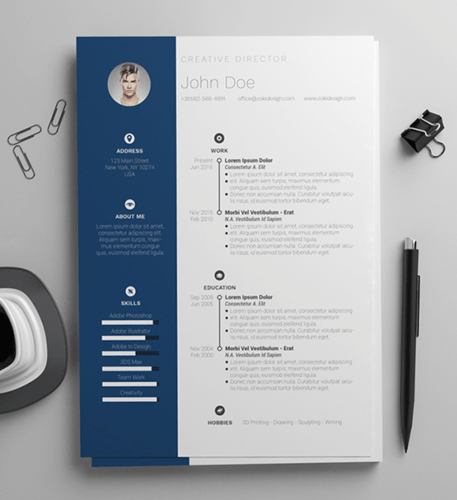
2. Simple and Clean Resume Template
This template is the perfect balance of creative and modest — best for the professional who wants to seem casual, thoughtful, but not over the top. Not only does it feature a space for a headshot on the top-left, but you can customize the color of that entire panel. Created by Zoki Design, the resume template also comes with a matching cover letter template.
Download the entire set here.
3. Urban Development Resume Template
The illustration on the top-left of this template shows who the designers at Hloom had in mind for this resume: civil engineers. But because it’s a Word document, that graphic is easy to edit and replace with an image that represents your line of work. Are you an analytics buff? Design a clever bar or line graph icon and place it next to your name in blue (or whatever color you’d like!).
This template is available for download here.

4. Info Pop Resume Template
This one, also from Hloom, gives you exactly what the name suggests: ample space for the info you need, with headers that pop just enough to get your employer’s attention. Although the template fits a ton of text, its soft color palate prevents the document from seeming overwhelming.
Download it here.

5. Neat and Confident Resume Template
Similar to the Simple and Clean template in #2, this resume design by Nowpixelse communicates a truly professional tone. The template’s muted colors work very well with the side panel layered over the top header.
Download and customize to your liking here.

6. Smart and Professional Resume Template
This is another sharp template that offers a basic but confident design for any professional. The warm-colored panel on the right-hand side is pre-formatted for a written profile, where you can write a summary of your background or a form letter to each employer. Just be sure to personalize this messaging to each new recipient so it works for the job you’re applying to. This template is available on Freesumes, and is free to users once they share the page to Facebook or Twitter.
Download it here.

7. Timeline-Style Resume Template
Hloom’s Timeline template is a super simple but creative way to tell your story. You can convey your progression through various jobs you’ve held on one side of the vertical line, and more static elements of your background — such as skills and education — on the other.
Download it here.

8. Fresh Resume Template
This is perhaps the most imaginative of all the Word-based resume templates on this list — with both a skills meter and a comic headshot. The template was designed by Venkata Naresh and comes with 12 different versions of the design you see below. Have you created a Bitmoji of yourself? Do you think your employer would find it creative? Match the template and add it as your photo.
Download the entire resume set here.

9. Goldenrod Resume Template
This template, also offered on Freesumes, dares to use yellow as the dominant color — but doesn’t sacrifice professionalism in the process. The document anchors the education section to a thick, bright banner across the bottom, but you can likely change this to a skills section with some simple editing in Microsoft Word.
Download the template here.

10. Resume Template With Personal Endorsements
This resume template has quite a flashy header — no photography pun intended — but it’s not just for photographers. What makes this resume unique is the space for references on the lower right-hand side. Does your field need others to vouch for your experience? This resume gives you room for three solid recommendations.
Download the template here.

11. Creative Resume Template
The last one on our list was designed by the stationery experts at MOO and is offered for download by Microsoft. Simple but vibrant, this template hugs the text with an artistic header and footer — great for recent graduates who need to fill empty space on the page.
Download it here.

Remember, once you’ve finished personalizing your resume, you’re not ready to submit an application yet. To ensure your resume’s format stays the same for everyone who receives it, save the document as a PDF. Best case scenario? Even the hiring manager won’t believe your resume came from Word.

Unriddled: “Alexa, Make a Donation,” and More Tech News You Need
Welcome one, welcome all to Wednesday — the day that marks not just the week’s halfway point, but another edition of “Unriddled”: the HubSpot Marketing Blog’s mid-week digest of the tech news you need to know.
This week, we continue to wade through the very crowded pool of tech news items to help you decrypt what’s happening in this vast, often complex sector. And, get this: It’s not all about Facebook.
It’s our Wednesday tech news roundup, and we’re breaking it down.
Unriddled: The Tech News You Need
1. An IRA Purge From Facebook
Yesterday afternoon, Facebook Chief Security Officer Alex Stamos issued a statement indicating that the company had removed 70 Facebook and 65 Instagram accounts, in addition to 138 Facebook Pages, that were controlled by the Russia-based Internet Research Agency (IRA). The announcement noted that many of these Pages ran ads that have also been removed from Facebook.
Roughly 95% of the Pages with content were in Russian, indicating that these pages were targeted toward Russia residents or people who speak the language in neighboring nations.
According to Stamos, the decision to remove these Pages had little to do with the content itself — and everything to do with the fact that they were controlled by the IRA, which “has repeatedly used complex networks of inauthentic accounts to deceive and manipulate people who use Facebook, including before, during and after the 2016 U.S. presidential elections,” he wrote. “It’s why we don’t want them on Facebook.”
Users can expect a further explanation from Facebook in the coming weeks, Stamos said. The company is looking to update its Help Center so people can find out if they liked any of these Pages.
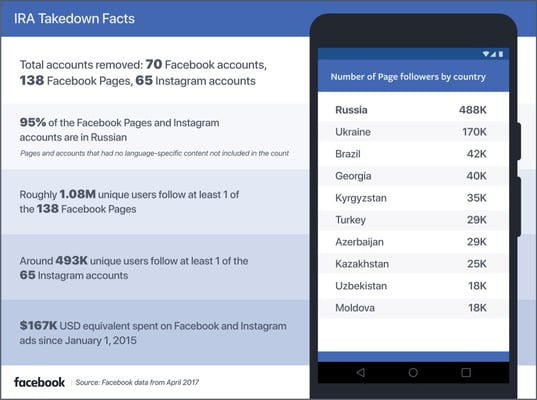
Source: Facebook
2. “Alexa, Make a Donation”
On Monday, it was revealed that Amazon Echo Users can now donate to 40 charities through Amazon Pay: a service, much like Apple Pay or Google Pay, that lets people use payment methods already associated stored in their Amazon accounts to purchase goods and services — and now, to make donations.
To make donations through Alexa, users need to have such a valid payment method set up in their Amazon accounts, and have voice purchasing enabled. And in order to prevent others from making unwanted donations, users can set up a four-digit voice confirmation code, which can be done through the voice purchasing settings.
It’s an interesting new feature for Amazon, and not the first that allows shoppers to use its technology to make charitable donations. In 2013, the company launched Amazon Smile, which lets users pick a charity that will receive 0.5% of what they pay for certain, eligible products.
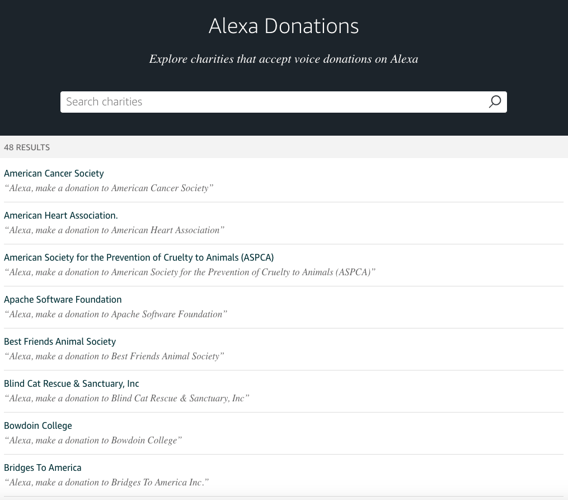
Source: Amazon
But with the introduction of this Alexa skill, it allows users to make more spontaneous or impromptu donations just through an Alexa command — without reaching for their wallets or filling in several information fields.
To that end, organizations that receive donations through Alexa will also receive the user’s name, address, and email address, but not his or her credit card information. So, while there’s a chance that you’ll receive follow-up communication from the organization you donated to, the payment information itself is supposed to be secure.
3. Data Leaks Abound
Facebook wants to make one thing clear to users: The ongoing situation with Cambridge Analytica was not a data leak. Rather, it was the misuse of data — collected by an app developer as was allowed by Facebook at the time — by an analytics and profiling firm that never should have obtained information in the first place.
Keep that distinction in mind — because over the past several days, more than one consumer platform has experienced actual data leaks.
MyFitnessPal
One of them was MyFitnessPal: a free online calorie tracking site that’s owned by fitness apparel company Under Armour, which announced last week that the site had experienced a data beach impacting up to 150 million accounts. The data did not include information like Social Security or credit card numbers, according to the company’s statement, but was instead limited to things like usernames, email addresses, and hashed passwords (the kind that’s encrypted with something called bcrypt).
Panera
The second was a data leak from fast-casual restaurant chain Panera that included information like customer names, email and mailing addresses, dates of birth, and the last four digits of their credit card numbers. And according to information security blogger Brian Krebs, Panera knew of this leak for eight months before it addressed it.
It all began in August 2017 when security researcher Dylan Houlihan alerted Panera that customer data was leaking from its site — which according to emails supplied to Krebs, led to Panera’s director of information security Mike Gustavison largely writing off the report as a scam. And despite Gustavison verifying the problem soon thereafter and saying the company was working on a fix, eight months later, Houlihan discovered that the site was not only continuing to leak data, but that the estimated seven million jeopardized customer records could also be easily indexed and crawled by automated tools.
Since Krebs first reported the leak on Monday, Panera has issued statements indicating that it has fixed the problem — but several sources have said that the “fix” barely goes beyond requiring a valid user login to view these records (whereas before, anyone with the correct link to them could view them). Others have also reported that they have reason to believe more than seven million customer records have been exposed, and that Panera’s corporate client records may have also been affected.
Grindr
Finally, it was revealed by BuzzFeed earlier this week that dating app Grindr has been sharing personal user data with such third-party research firms — which included personal medical test results that users have the option of sharing on their profiles. Again, this incident is not to be confused with a data leak. Rather than this information being unintentionally exposed, the app says that this information is intentionally shared with research firms (namely, Apptimize and Localytics) to help improve the user experience.
According to the report, all of a user’s personal profile information is shared with these firms, which can include test results, if the user chooses to include it in his or profile. And while Grindr says this information is shared only with research partners and should, therefore, be secure, the news has left many wondering how easily that information could be abused if there was a data breach and it fell into the wrong hands.
Grindr has since issued a statement to BuzzFeed indicating that it will stop sharing medical test information from user profiles with these third-party firms — while also calling the negative response “a misunderstanding of technology,” according to the app’s Chief Security Officer Bryce Case, by the people who were unhappy to learn of this activity.
Why This Is Important
Okay, so, we clearly have a lot to learn from these three incidents — all in light of the fairly recent Facebook and Cambridge Analytica data news.
I’ll start with Grindr. While it’s possible that users did misunderstand the extent and intention of this data sharing, the point is: There was an outcry. To accuse this unhappy audience of “misunderstanding” how it works can easily (and understandably) be deemed as insulting. For any marketers who curious as to how they might want to handle a situation like this one, should they become responsible for responding to it, I would suggest explaining the situation clearly and in a non-condescending manner if you believe your audience might misunderstand the situation. But try to avoid labeling it as such, and instead, focus on a resolution.
And you might be thinking, “There’s very little chance that I’ll find myself in that situation.” But think twice: With the General Data Protection Regulation (GDPR) coming into force next month (check out our primer here), it might soon apply to you more than you think. Don’t feel bad — our research shows that only 42% of marketers feel that they’re even somewhat prepared for the GDPR.
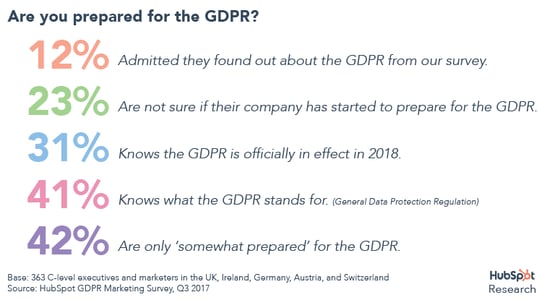
Plus, the noticeable volume of data- and privacy-related issues making headlines within the past year (we haven’t forgotten about you, Equifax) shows just how much more vulnerable businesses might be to these types of issues than they’re aware. Long story short: If you haven’t done one already, now might be a good time for a security checkup, to make sure you know how your (and your customers’) data is protected, and who exactly has access to it.
4. Apple Chips
Bloomberg reported this week that Apple will begin using its own chips in Mac devices as soon as 2020, rather than using the Intel processors it’s long relied on in the buildout of its computers. It’s a project reportedly known internally as “Kalamata”: one that illustrates another step toward making the Apple branded ecosystem iron-clad.
In February, I wrote about how this ecosystem can sometimes create a restrictive user experience, especially when it comes to Apple’s smart home speaker, the HomePod. In my experience, limiting the device’s music streaming options to Apple Music rendered the HomePod somewhat useless to those who use services like Spotify (which, side note, officially became listed on the New York Stock Exchange as SPOT yesterday) or Pandora.
But processor chips are different, and introduce a new type of vertical integration for Apple. While much of the company’s hardware — like the iPhone and Apple Watch, for example — runs on its own, internally-designed processors, its computers still rely on chips from Intel, often slowing down production due to the reliance on major pieces from external companies.
It’s not exactly welcome news for Intel, whose stock price dropped when this information was revealed — though it does appear to have slightly rebounded as of writing this post.
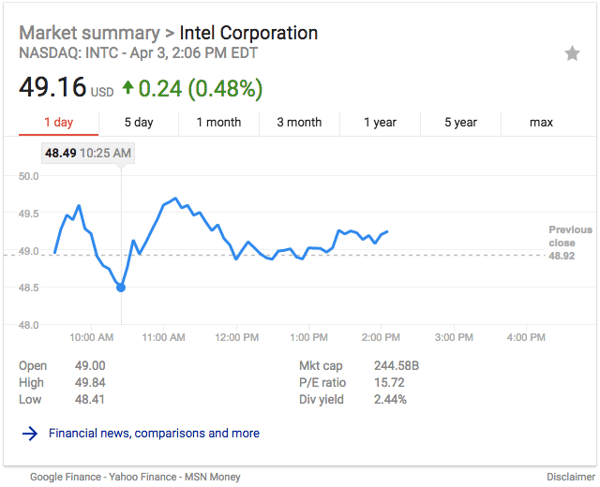
Source: Google
Apple certainly isn’t alone in its desire to create a product ecosystem that’s somewhat indestructible as a result of brand loyalty. Google, for its part, is building a growing portfolio of branded products, including mobile devices and computers, like Chromebooks, which currently run on Intel processing.
But this move has many — present company included — wondering if Google will be the next to vertically integrate machine processing capabilities. After all, Google and Apple have been known to become more than a bit competitive when it comes to similar products and capabilities (see: last fall’s #MadeByGoogle event) — so should Google follow suit, it wouldn’t exactly come as a surprise.
What Else Is Going Down in Tech Town?
More of the Latest From Facebook
On top of the ongoing data-related scrutiny Facebook is already receiving, the social media network is now coming under fire for archiving videos — like deleted multiple takes — that users thought had been removed, but were instead stored in personal data files, as per New York Magazine. A company spokesperson told TechCrunch that this happened because of “a bug,” and that the videos probably weren’t seen by the public.
Facebook has continued to respond to the fallout from allegations that personal user data was misused by analytics and profiling firm Cambridge Analytica, with announcements made last week that the company would be limiting the data available to advertisers on its platform. Meanwhile, new data shows that 31% of tech workers said they would delete Facebook.
In light of this data misuse, many are asking if or how Facebook will extend rules and practices required by the GDPR to U.S. users. In an interview with Reuters, Facebook CEO Mark Zuckerberg did not make that clear, though he did say that the social network is working on an internal “law” or version of the GDPR that would apply globally to all users. When asked which parts of the European regulation that would include, he answered, “We’re still nailing down details on this, but it should directionally be, in spirit, the whole thing.”
The company also announced last week its action plan to prevent the future weaponization of its platform to influence elections, outlining a four-tiered approach to protecting election security. Yesterday, that was followed by an announcement that Facebook will roll out changes to provide greater context around stories appearing in the News Feed. Read full story >>
Google Also Had a Busy Month
While Facebook was dominating many tech news headlines in March, Google was quietly having a busy month of its own. Learn more about these latest developments in this month’s edition of “What You Missed in Google.” Read full story >>
More (Unconfirmed) Changes From Instagram
Last week, we reported on changes that visual-content-sharing app Instagram would be making to its algorithm, with the possible introduction of a “New Posts” feature and more. Now, it seems that the company has made abrupt, unannounced changes to the way developers can use the app’s API to access data, with some losing access to it completely. Read full story >>
It’s a Dark, Pivotal Time for Autonomous Vehicles
Following recent fatal accidents involving both Uber and Tesla self-driving cars, the autonomous vehicle sector is going through a somewhat dark, but important phase. California has responded with new regulations imposed by its Department of Motor Vehicles, Arizona’s governor suspended Uber’s self-driving cars from its roads, and many other manufacturers have voluntarily paused its testing of these vehicles. But what does it all mean for the future of this crucial, highly-scrutinized industry? Recode’s Johana Bhuiyan breaks these issues down, and the implications they could have for the future of self-driving. Read full story >>
That’s all for today. Until next week, feel free to weigh in on Twitter to ask us your tech news questions, or to let us know what kind of events and topics you’d like us to cover.

Marketing to Gen Z: What Everyone Over the Age of 30 Ought to Know
You might assume young people don’t hear what you have to say, but they do — they just choose not to listen. Because a filter isn’t just for Instagram. The up-and-coming generation filters everything in the world around them because they have to, and that includes your marketing messages.
I admit it. I’m guilty of making assumptions about Gen Z. I think back to my own adolescence and casually project my experience onto them, but I’m wrong. The world is different now.
When I scrutinize the decisions young people make online every day, I’m surprised by what is revealed.
If you want to reach Gen Z, you’re going to have to rethink some of your marketing strategies. Here, we’ll explore the various ways you can shift your marketing tactics to appeal to a Gen Z audience.
Digital natives have a different perspective.
How many technology devices are you surrounded by right now? They’re everywhere, like a supply of digital oxygen. It’s all young people have ever known. Yet, in some ways, growing up with the internet is not that different from growing up without it.
Kids have to deal with hate on and offline. They see things they can’t un-see. At the same time, they’re trying to figure out what feels safe and how to navigate trust.
It’s tough.
But the difference is, everything is amplified online.
Hundreds of thousands of people lurk in your digital space, littering it with messages from their own agendas. Offline, you can go hide. Online, it takes willpower to put your hands to your ears and deliberately shut out the noise. Filtering becomes a lifeline.
If you want to reach Gen Z, you better have a convincing reason for them to let you in.
Your purpose is key.
A recent study from Google found that teenagers want brands to be “a representation of their values, their expectations of themselves and their peers.”
If they adopt the brand, what does it say about them as a person?
Are they part of something cool?
“When I think ‘cool’ I imagine companies that do great things for customers/employees or beautiful/unusual products.” ~ Female, 17, It’s Lit report
Gen Z use brands to help shape their world.
Take a look at YouTube. Teens love it, but it’s also one of the Top 100 brands in the world. YouTube’s mission? To “give everyone a voice” and “show them the world.”
According to YouTube, there are “four essential freedoms” that define who they are:
1. Freedom of Expression
We believe people should be able to speak freely, share opinions, foster open dialogue, and that creative freedom leads to new voices, formats and possibilities.
2. Freedom of Information
We believe everyone should have easy, open access to information and that video is a powerful force for education, building understanding, and documenting world events, big and small.
3. Freedom of Opportunity
We believe everyone should have a chance to be discovered, build a business and succeed on their own terms, and that people—not gatekeepers—decide what’s popular.
4. Freedom to Belong
We believe everyone should be able to find communities of support, break down barriers, transcend borders and come together around shared interests and passions.
Do teenagers seek out a video hosting platform, or do they want to connect with people who express creative freedom, share information, want them to be successful, and share their passions?
There are loads of alternatives to YouTube (who knew?). But teenagers aren’t looking for a more stable platform or a superior layout. They want to hang out in the place they feel they belong. Their choice of platform points to where that is.
How to communicate more effectively
Be careful of your words, for your words become your actions. Be careful of your actions, for your actions become your habits. Be careful of your habits, for your habits become your character. Be careful of your character, for your character becomes your destiny. — Chinese proverb, unknown author
In our emotionally-charged existence, and for every generation, words hold power. Words are part of what pushes us in one direction over another, influencing our moods.
In the Google study mentioned above, a few clear themes emerge. It seems the most popular brands all share the same outlook when marketing to Gen Z.
Here are three quick tips to instantly adopt their approach:
1. Speak human
When Apple promotes their watch, you’ll notice they don’t talk about time. They talk about freedom:
- “Answer a call from your surfboard.”
- “Stream your favorite songs on your run.”
- “Run your day. Right from your wrist.”
Think about how it feels to use a product or service and lead with that, rather than focusing on how the technology works. Nobody cares about that. Not when they’re about to ride the biggest wave, or listen to a song that reminds them of someone special.
2. Use inclusive language
YouTube wants to “give everyone a voice.”
Apple has “a watch for everyone.”
Spotify has “music for everyone.”
Whilst those who grew up writing letters to pen pals worry that technology drives us apart, young people appear to respond best when it brings people together. Celebrate the good in this community spirit because it’s this bond that counts when technology inevitably changes and moves on.
3. Show, Don’t Tell
Cold and inflexible brands are a turn-off for youngsters. They’re on the lookout for a more meaningful exchange. Like this one, described by Starbucks on their About page:
“It happens millions of times each week – a customer receives a drink from a Starbucks barista – but each interaction is unique.
It’s just a moment in time – just one hand reaching over the counter to present a cup to another outstretched hand.
But it’s a connection.
We make sure everything we do honors that connection – from our commitment to the highest quality coffee in the world, to the way we engage with our customers and communities to do business responsibly.”
Any brand can make a promise.
But Gen Z wants to see you keep it.
So to further delight people on the other side of the counter, Starbucks teamed up with Powermat.
They do away with “dependency on cumbersome cables” in celebration of freedom – something we already know makes teenagers froth with delight.
Mobile charging points in-store mean the young can roam free without fear of being disconnected from their friends and family. This is Starbucks’ way of “honoring the connection,” but, in less flowery terms, is simply a case of knowing what your younger clientele wants (me too, to be fair), and finding a way to make it happen. We know it’s the basis of all good marketing, but the most successful brands live by what they say.
Don’t hide your extra-curricular activities from your audience. If you do something besides sell coffee, include it in your marketing message. It gives young people an extra rope to swing from.
The Meaning Behind the Brand
According to a study by The National Retail Federation and IBM, young people are more inclined to follow brands that support a cause. They’re “more serious about this” than any other generation, so being able to communicate a strong sense of purpose should be top of your list.
“What do you plan on contributing to our future?” they demand to know.
Young people don’t want to hear brands say they’ll do better.
They want to see them do better, or the brand will be filtered out.
Companies have to stop treating customers like lab rats thinking, ‘how can we just get a click,’ and then stalking them around the internet endlessly with no shame. – Adam Kleinberg, CEO of Traction
Great companies are adopting smarter strategies than this.
Do better by doing your research.
It doesn’t matter who you’re marketing to: regardless of the age group, product, or location, words have always had the most impact when they echo what your listeners need to hear.
Nobody ever says jargon out loud (besides maybe that one deluded salesperson). People talk about things in a totally human way.
Consider cosmetics. I knew about make-up before I learned joined-up writing. Older buyers have been looking for a miracle cure for wrinkles for an eternity, yet marketers still don’t know how to sell them the solution. Andrea Leigh, a former category manager at Amazon, advises people to stop with the marketing spiel.
They’re not searching for “glowing, radiant skin” or “look younger in seven days,” which is the type of copy most brands put on their product detail pages on Amazon. Customers are searching based on needs – wrinkles, dark spots, acne, etc. – Andrea Leigh, former category manager at Amazon
Perhaps the younger generation are turned off from this kind of marketing, as well.
Gen Z wants you to get to know them a little better before they’ll turn your way to listen.
Start with a quick analysis.
If you want to know how young people respond to a brand, you’ve only got to ask.
- Find out why they make the decisions they do
- Recognize all the other things that influence their lives
- Know where they hang out online and why
- Consider why they do things the way they do, rather than absent-mindedly watch behavior
The result is being able to think more like the customer and less like a marketer.
This web copy for the Domino’s Easy Order service is evidence they did their research — they know who they’re talking to: “Setting up your Easy Order means I have your favorite order at the ready. All it needs is one click from you. Handy for when you’re exhausted from killing it at the gym, re-inventing the wheel or in the unlikely case that you are just CBA typing.” I bet from this one clip alone you can pinpoint three people you know who fit their target market.
Sharpen up your dialogue.
If you don’t want to be shunned by a younger audience, do things their way:
– Set up a survey on your website to ask about their experience.
– Interview real customers to find out what they’re thinking. (I’m sure an incentive wouldn’t go amiss – a voucher for their time or a gadget they can remember you by.)
The point is not to get a series of answers you can throw into a spreadsheet and forget about. You want answers that uncover emotions. Find out how young people feel about the brand. Because if they’re not convinced by the cause or are indifferent to the idea, it’s time to do better.
Give young people a reason to listen.
Only then might you be so bold as to suggest they try something new.
