Here’s What Facebook Says It’s Doing to Protect Election Security
Earlier today, members of Facebook’s staff held a small press event with a status update on efforts to prevent its platform from being weaponized to influence major national events like elections.
Last year, Facebook came under fire when it was revealed that it had been weaponized by foreign actors to spread misinformation and divisive content in hopes of influencing the 2016 U.S. presidential election.
Facebook published a transcript of today’s remarks, where VP of Product Management Guy Rosen indicated the network would be focusing on four core areas of election protections:
- “Combating foreign interference”
- “Removing fake accounts”
- “Increasing ads transparency”
- “Reducing the spread of false news”
Here’s a look at the work Facebook says it’s doing in each area.
1. “Removing Fake Accounts”
This might be the most complex and far-reaching area where Facebook will be putting new efforts into place. In order to remove fake accounts, Facebook’s Chief Security Officer Alex Stamos explained, the network will have to identify fake identities and audiences alongside false narratives and facts.
Doing so begins by identifying motives, which boils down to three main areas: influencing public debate, money, and what the “classic internet ‘troll,'” Stamos said.
Fake accounts motivated by the first item on the list range from what Stamos called “ideologically motivated groups” to state intelligence agencies, whose target audiences could exist within their own countries or others.
The second motivator, money, is the most common one. Many times, these bad actors stand to financially profit by driving traffic to their sites — even if it means, speculatively, doing so by linking to false or divisive content.
Countering that, Stamos said, will require decreasing the account’s profits by increasing its operational costs — which is how Facebook has previously curbed activity from spammers. Facebook has made similar efforts in the past to penalize content with “clickbait” link titles that don’t necessarily lead to quality or genuine content.
These motivations can vary or even be combined according to the event the actor is trying to influence. That’s why Stamos said Facebook will be enlisting the help of external experts who are familiar with the various geographical or cultural factors that could play a role in what different actors are trying to accomplish.
2. “Combating Foreign Interference”
Samidh Chakrabarti, a product manager at Facebook, spoke on how proactive measures to combat bad actors of foreign origin relate to some of the efforts to combat fake accounts — which, he said, is one of the most common ways such bad actors “hide”.
At this point, Chakrabarti explained, Facebook blocks “millions” of fake accounts on a daily basis as they’re being created, which can help stop them before they can create and distribute content. Machine learning is said to play a major role here, which has been trained to identify suspect activity without having scan actual content.
Previously, members of the Facebook community were responsible for reporting what looked like suspicious activity, especially anything that might pertain to an election. Now, Chakrabarti said, Facebook will deploy an “investigative tool” that proactively looks for this kind of activity, like the creation of Pages with foreign origin that are sharing misinformation. Once these Pages are identified, they are sent to Facebook’s security team for a manual review to determine if Community Standards or Terms of Service have been violated.
The efforts here appear to be two-fold: machine learning capabilities that stop the creation of these pages before they can distribute content, as well as technology that seeks out existing Pages engaging in such activity. For the latter, Chakrabarti said the manual process is quick, though he didn’t provide a specific average time frame.
These tools were utilized as recently as last December during a special Senate race in the state of Alabama, when efforts to identify foreign interference led to the discovery of politically-focused bad actors based in Macedonia, who seemed to be spreading misinformation leading up to that election. They were later blocked from Facebook.
3. “Increasing Ads Transparency”
Part of the effort to remove fake accounts also plays into actions that will verify the authenticity of the ads that accounts want to post.
That will include a new feature called View Ads, which has been tested in Canada and will be rolled out globally this summer. As the name suggests, it allows users to view any ads the Page is running under its “About” section.
The summer rollout will come in the months leading up to the 2018 U.S. midterm elections — and prior to that, said Product Management Director Rob Leathern, a new ad review and verification process will begin, which will require all Page admins to submit government-issued IDs and provide a physical mailing address before they can publish any promoted content.
That way, Facebook can confirm the physical location and identification of advertisers, in part by physically mailing a letter to the address provided with an access code that can only be used by that specific admin for that particular Page. In addition to this process, advertisers must declare which, if any, candidate, organization, or business they represent.
And once the verification process is complete, Leathern explained, ads pertaining to an election will be clearly labeled as such in both Facebook and Instagram feeds, including the individual, business, or organization that paid for it.
And this summer, he said, Facebook will unveil a public ad history archive that contains any such content with a political label. Each entry will include details like the amount spent on the ad, as well as the number of impressions it received and demographic information about the audience it reached. The archive will keep this information for up to four years after the ad ran.
4. “Reducing the Spread of False News”
Finally, Product Manager Tessa Lyons spoke to Facebook’s effort to curb the spread of such misinformation as false news, which will largely be powered by partnerships with fact-checkers.
To determine which content needs to be fact-checked, Lyons said, the platform will use various “signals” that include reports from Facebook users themselves. From there, fact-checkers can rate a story as false — and if they do, its ranking in the News Feed will be dropped, which leads to an average of 80% fewer views.
Anyone who’s shared the story in the past will be warned about this fact-check, as will anyone who tries to share it in the future — and if it does appear in someone’s News Feed, it will be displayed with information from those who fact-checked it. That information will help to teach a machine learning module to identify these stories quicker, without human intervention.
These efforts will apply to text, photos, and videos — and will also play into efforts to increase ad transparency and combat fake accounts. Any Page that habitually shares false news, Lyons said, will face reduced distribution, and lose its advertising and monetization privileges, “stopping them from reaching, growing, or profiting from their audience.”
Currently, Facebook has fact-checking partners in six countries, including the U.S., where the platform has joined forces with Associated Press reporters to identify misinformation and false news relating to the country’s upcoming elections, whether local, state, or federal. These reporters will also be tasked with disproving false claims made by such stories.
Lyons noted that these efforts are “a place to start.”
“Like any company that’s had a PR crisis, Facebook is trying to take control of and own the misinformation narrative,” said HubSpot Social Campaign Strategy Associate Henry Franco. “It looks like the company is taking some pretty serious steps to address it, too, both in terms of identifying and prohibiting bad actors.”
But as Lyons remarked — it’s a start. “What remains to be seen,” Franco said, “is whether it’s enough to earn back the trust of users.”

Facebook Will Limit Data Available to Advertisers
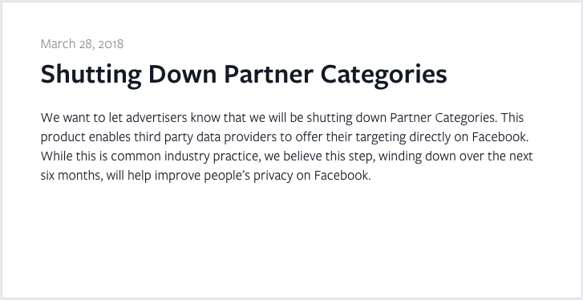
Facebook announced yesterday that it will be shuttering Partner Categories: the product that allows third-party data providers to supplement advertisers with targeting information directly through Facebook.
In the announcement, Facebook noted that “this is common industry practice,” but will still shutter the product to “help improve people’s privacy on Facebook.”
Source: Facebook
For Facebook and marketers alike, the announcement is what ProPublica reporter Julia Angwin called “a big deal.” Here’s what’s going on — and why it matters.
Where Facebook Advertisers Get Their Data
Prior to these recent changes, advertisers on Facebook had a few primary sources of user data that they could use for targeting purposes, including data that Facebook itself has from what users provide on their profiles, as well as their activity on the network. It’s not entirely unlike what’s available in your downloadable Facebook data archive file, which I wrote about here.
That data could be used in combination with other sources of information that the advertiser might have on its own, like email contacts or survey responses.
Finally, there are the third-party data providers, which are the ones Facebook has severed ties with. These companies possess and provide advertisers with data that are often based on non-social-media activities, like shopping history and income — which is part of what Angwin and her team discovered when ProPublica started investigating the breadth of Facebook user data in 2016.
We also found that 600 of the 29,000 categories Facebook offered to advertisers were from data brokers. They were extremely specific and often financial, such as income between $100k and $125k or frequent shopper at dollar stores. /6https://t.co/S4Yo2nEa1T
— Julia Angwin (@JuliaAngwin)
March 29, 2018
The data from these providers are often synthesized in tandem with information that Facebook has from user profiles, helping to match (or target) promoted content to the most relevant audiences. It’s a powerful combination that could be at least partially responsible for Facebook’s growth as a valuable advertising platform — to the point where 98% of its 2017 global revenue was rooted in advertising.
And again, as Facebook said itself, these practices are not limited to Facebook advertisers, and are frequently promoted as a value-add by some of the larger data providers involved, like Experian and Acxiom. The latter calls it a “data package” that can help advertisers “accurately identify relevant audiences for all of your media campaigns.”
It’s no secret, then, that providing these services is a source of revenue for the data providers, too. According to the Wall Street Journal, Acxiom stands to lose $25 million in fiscal 2019 revenue and profit. And while it seems possible for advertisers to still independently enlist these third-party services, a barrier to access is now in place that was previously removed by direct data availability through Facebook.
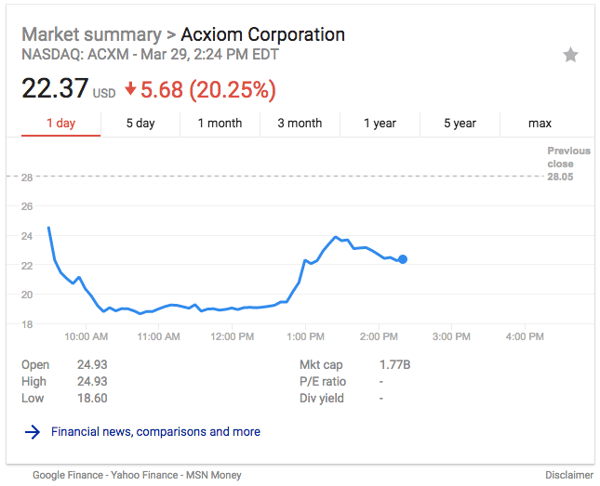
Acxiom’s stock price at 2:25 PM EDT March 29, within 24 hours of Facebook’s announcement. Source: Google
What This Means for Marketers
But how much do advertisers stand to lose from these changes? Well, that depends who you ask. When I first tweeted this news after it broke last night, one of my followers suggested that he’d be losing a major source of information for his work.
Of course that’s the targeting foundation of all my current campaigns…
— Scott DeRuyter (@SDMad)
March 29, 2018
The extent of the setback to marketers and advertisers also depends on the industry — those who depend on a consumer’s shopping habits and history, for example, could potentially lose out by not having access to detailed, third-party data on it.
But keep in mind that Facebook has quite the cache of user data entirely on its own. Remember that downloadable data file I alluded to earlier? Have another look.
The file shows that Facebook possesses a decent — if not confusing — amount of information on users’ interests and activities. And where that data really comes into play for most advertisers is in its own ad-targeting platform.
That doesn’t necessarily reveal individual user data, but it allows advertisers to customize promoted content audiences based on it — interests, location, and so forth. Here’s a page from my own file with some of the “interest” data Facebook uses to help target ads:
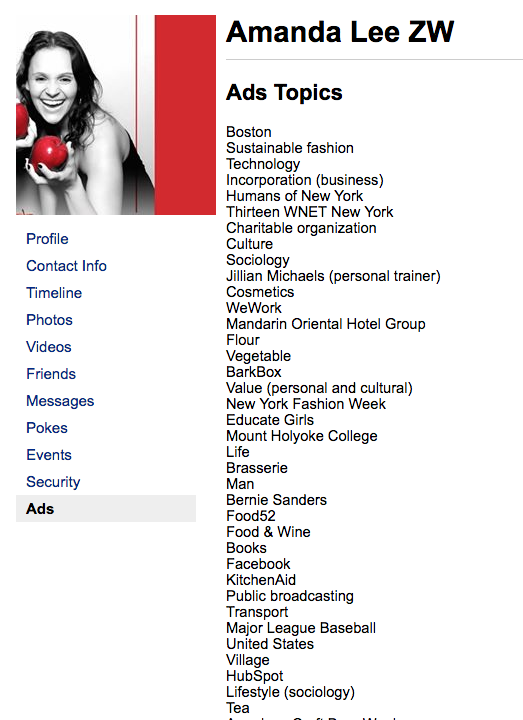
That data isn’t exactly minuscule, and some advertisers could still be able to effectively reach audiences with it. “The reality is that Facebook’s targeting tools are so powerful,” says Henry Franco, HubSpot’s Social Campaign Strategy Associate, “some analysts think this change won’t make much of a difference in overall targeting capabilities.”
Why Is Facebook Doing This?
Here’s the thing about the user data in Facebook’s possession (the kind that’s used within its own targeting tools): Most people don’t really want advertisers to have direct access to that information in a way that attaches it to specific people.
Instead, it seems, the widespread preference is for it to be anonymous and general enough that, for example, an advertiser can target Boston-based women in a certain age bracket who are interested in KitchenAid and BarkBox — but not be able to do is know who, specifically, the women are within that targeted audience.
That’s part of what got Facebook into this situation in the first place. Previous policies allowed third parties like app developers and academics to access user data for things like research purposes — but prohibited them from transferring that information to others. But when it came to light that one app developer may have violated that policy by supplementing data analytics firm Cambridge Analytica with that information, the social network began making changes to the availability of and policy clarity around user data.
The suspension of direct access within Facebook to data from third-party providers is just the latest in a series of changes. “More than anything else, it looks like Facebook is trying to clean up its act in the wake of the recent data scandal involving Cambridge Analytica,” says Franco. “While this change might be a little reactive, it’s a step in the right direction for a company of Facebook’s stature.”
Facebook isn’t alone in its recent onslaught of privacy and other policy changes. Companies ranging from Apple to Venmo have also been notifying users of modifications, at least partly in response to the heightened scrutiny of Facebook and some of its Big Tech counterparts. (In addition to Facebook CEO Mark Zuckerberg, chief executives from Twitter and Google have also been asked to testify before Congress in the wake of these ongoing events.)
Wow, Apple with the timely shade in OS update form. pic.twitter.com/YL34i4DKnn
— M.G. Siegler (@mgsiegler)
March 29, 2018
But it may not be entirely in response to this particular situation. On May 25, which is less than two months away, the General Data Privacy Regulation (GDPR) comes into force and will impact the way organizations obtain, store, manage or process the personal data of EU citizens — which some believe is also behind these recent policy changes and notifications.
But all things considered, this is likely not the last policy change expected from Facebook. And as the story continues to unfold, I’ll be monitoring it. Questions? Feel free to weigh in on Twitter.

14 Ways to Get Free Advertising for Your Business
When you work at a small business with a limited budget, it’s not really possible to shell out $340,000 for a 30-second TV commercial, or $10,000 for an email marketing campaign.
It can be frustrating when your budget dictates how many people your business can reach.
Surprisingly, there are a lot of free ways to supplement your paid advertising efforts. By incorporating free advertising tactics into your strategy, you can remove some nonessential costs and dedicate your budget to deeper, more longterm plays.
In fact, we suggest some of these methods regardless of your budget.
To help you spread the word about your business without breaking the bank, we’ve compiled 14 ways to get advertising for free.
Ways to Get Free Advertising
- Use Google My Business to Optimize for Local Search
- Check Out Yext
- Write Guest Posts for Other Blogs
- Answer Quora Questions
- Publish Content on LinkedIn
- Offer to Do Interviews on other Business’s Podcasts
- Promote Your Website on Your Email Signature
- Send Email Newsletters
- Network at In-Person Events
- Speak at an Event
- Do a Free Product Giveaway or Contest
- Put Up Brochures or Flyers
- Create YouTube Videos
- Take Advantage of Your Partnerships
1. Use Google My Business to Optimize for Local Search
One of the most powerful free ways to advertise your business is through Google My Business, which enables companies to manage their presence on Google Search and Google Maps. The tool can bolster your rankings in local search results. Ranking high in local search shows you’re a legitimate and relevant company: you wouldn’t rank #1 in Google for “pizza places near me” if you’d closed down six months ago. Plus, if you rank high in local search, more consumers will choose your business over a competitor’s. In today’s fast-paced world, convenience is key.
2. Check Out Yext
The more places your business is listed online, the better your chances of showing up in search results, and the easier it is for potential customers to find you. To ensure great local SEO, the details of your listings on every website and online directory need to match up. For instance, if your website lists your company’s new phone number, but Yelp lists your old one, this inconsistency could hurt your SEO. Yext scans the web to find every place your business is listed, so you can tweak your listings to guarantee accuracy.
3. Write Guest Posts for Other Blogs
There are a few major advantages to guest posting for a well-established blog. You can benefit from connecting to that blog’s audience, and you can also start establishing yourself as a thought leader in your industry. Since guest posting on a popular blog allows you access to an established audience and high domain authority, this practice can sometimes be more beneficial than posting to your own blog. Plus, you can link back to your own website from your article, giving you an inbound link that boosts your domain authority and can increase your own website’s ranking in search engines.
4. Answer Quora Questions
Writing content for Quora can expose your business to a large audience: TechCrunch reported that some of Quora’s active contributors receive more than 30,000 monthly views. Besides the large built-in audience, your business can answer direct questions from prospective customers. This lets you interact with high-quality potential leads and establish yourself as an expert in the subjects that matter most in your industry.
5. Publish Content on LinkedIn
LinkedIn is an platform to connect with professionals, which is why it’s also a great place to share business-related content. LinkedIn’s blogging platform lets you demonstrate your expertise within your industry. Your connections and other LinkedIn members will engage with your posts and share them, doing the free promotion for you. With almost half of all social media traffic coming to B2B company sites from LinkedIn, it’s a missed opportunity if you don’t publish and promote content on LinkedIn.
6. Offer to Do Interviews on other Business’s Podcasts
To figure out which platforms your team should priortize, it’s important to diversify your promotion platforms to discover where your audience is already consuming content. Some of your audience might prefer listening to podcasts over reading articles. To reach those people, contact a few businesses with podcasts and pitch interview ideas.
7. Promote Your Website on Your Email Signature
With all the emails you send every day, it’s a shame if you aren’t taking advantage of the promotional potential of your email signature. Your email signature can also be unexpected property to promote a sale, contest, event, or even a new blog post. Add a link to your business’ website on your Facebook, Twitter, and Instagram profiles, as well.
8. Send Email Newsletters
An email newsletter can be a useful vehicle to promote content, share business-related news, and build deeper relationships with both potential and existing customers. There are plenty of free tools out there that assist you in designing, sending, and optimizing your newsletter. With the right time investment, an email newsletter can be the perfect place to share quality content with leads and potential consumers, establishing your brand as helpful and informative.
9. Network at In-Person Events
Connecting with fellow professionals at industry networking events is a great opportunity to meet potential consumers in a place where they are eager to discuss your business. The niche topics of networking events ensures you’re meeting high-qualified leads. For example, a “Best Technology Startups of 2018” event will primarily be filled with participants who are interested in technology and startups. Particularly for small businesses looking to make their first connections, networking is a chance to get your name out there, meet potential partners, and find opportunities for growth. Plus, it’ll keep you up-to-date on trends in your industry.
10. Speak at an Event
Similar to networking, speaking at an event about a topic related to your industry is another way to exhibit your expertise. Giving a thought-provoking and powerful speech will draw attention to you and, by association, your business, which can increase brand awareness and prove your business is qualified to tackle consumer’s challenges. To start, brainstorm different topics and volunteer at various upcoming networking events and trade association conventions. If you’re afraid of public speaking (don’t worry, a lot of us are), you could enroll in a local Toastmasters chapter to improve your game.
11. Do a Free Product Giveaway or Contest
A product giveaway or contest is an easy way to incentivize new viewers to check out and subscribe to your social media channels or website. Plus, handing out inexpensive branded products like t-shirts or mugs is a good way to spread your brand name. Word of mouth is alive and well — and a little swag can go a long way.
12. Put Up Brochures or Flyers
Putting up brochures or flyers in local libraries, coffee shops, and businesses is a unique way to market to offline locations where people spend a good deal of their time. You can create free brochures and flyers on PowerPoint. Depending on your industry, it might even help you reach an ideal clientele: if you’re a physical therapist, for example, perhaps you could hand out brochures to local gyms or nearby hospitals.
13. Create YouTube Videos
YouTube has more than a billion active users, which accounts for almost one-third of everyone on the internet. Plus, 59% of executives — i.e. decision makers — go to videos before written content. Creating engaging and informative YouTube videos is one of the most efficient ways to sell your brand. If done right, your YouTube videos will entertain viewers enough to seek out your website.
14. Take Advantage of Your Partnerships
Partnerships are an opportunity to offer supplementary services that you don’t provide. For example, a web design company and a copywriting agency might choose to partner together, so when a client requires written content for her web pages, the web design company can offer copywriting services from their partner. This increases consumer satisfaction, and it also provides exceptional advertising opportunities. When your partner’s consumers need your services, your partner will point them in your direction.

An Introduction to Black Hat SEO
What is Black Hat SEO?
Black hat SEO is a practice against search engine guidelines, used to get a site ranking higher in search results. These unethical tactics don’t solve for the searcher and often end in a penalty from search engines. Black hat techniques include keyword stuffing, cloaking, and using private link networks.
Appearing in search results is vital for business growth, but there’s a right and wrong way of doing search engine optimization. The dark art of black hat SEO is the wrong way. Black hat SEO seeks to game search engine algorithms, rather than solve for the user. Instead of earning the right to rank highly on search engine results pages black hat SEO uses shady tactics to get you there. Sustained use of black hat SEO techniques is likely to damage your presence in search engines rather than improve it.
If you are new to the search space, the purpose of search engines like Google is to provide the best results when someone completes a search. They want people to have a great search experience and ensure the results they provide do not include spam. They do this automatically through algorithms or manual actions that aim to recognize and penalize those engaging in black hat SEO.
Search engine algorithms have gotten more sophisticated over time, which is why you should avoid black hat SEO at all costs. White hat SEO is a much better method of doing search engine optimization. It’s a more ethical approach that abides by the terms and guidelines set out by search engines. White hat SEO consists of creating quality content and a better overall user experience for people visiting your site.
Black Hat SEO vs. White Hat SEO
Black hat SEO goes against the guidelines set by search engines and manipulates them to gain higher rankings. It can lead to being wiped completely from search results or gaining a lower position. White hat SEO is a more ethical way of doing SEO by creating quality content and a good user experience.
This article will explain what black hat SEO techniques involve so you can make sure to avoid them when devising your organic search strategy.
Black Hat Techniques in SEO
Keyword Stuffing
Keyword stuffing refers to the practice of filling your content with irrelevant keywords in an attempt to manipulate where the page ranks on search results pages. Adding multiple variations of keywords where they add no value creates a bad experience for users. It may also cause your page to rank for irrelevant queries.
Google explains keyword stuffing as:
- Lists of phone numbers without substantial added value.
- Blocks of text listing cities and states a web page is trying to rank for
- Repeating the same words or phrases so often that it sounds unnatural.
Here’s an example of keyword stuffing for a website selling outbound marketing software:
“We are in the business of selling outbound marketing software. Outbound marketing software is what we sell. If you are thinking of getting outbound marketing software get in touch with one of our outbound marketing software consultants.”
I think you’ll agree, that sounds like a broken record. It’s pretty easy to spot and Google will be able to tell that the content sounds unnatural.
You may have heard the joke “an SEO copywriter walks into a bar, grill, pub, public house, Irish, bartender, drinks, beer, wine, liquor…”. This joke is about keyword stuffing and it is another perfect example of the practice. The words are all similar to each other, but they are of no value as they don’t even string up a sentence.
You can do keyword research to find out what people are searching for but overusing these keywords in your content is not a good idea. Rather than filling your content with irrelevant keywords, concentrate on creating useful content that focuses on topics over keywords.
Cloaking
Cloaking involves showing one piece of content to users and a different piece of content to search engines. Websites practicing black hat SEO will do this in order to make content rank for a variety of terms irrelevant to their content. Spam websites will often do this to try and avoid a search engine bot finding out the spam content they serve to users.
Tailoring your content to different groups of users is acceptable. For example, you might shrink the size of your website when someone visits from a mobile device. You might also change the language of a page based on the country someone is visiting from. A publisher like Forbes or Inc might change the ads that appear on a page in order to fund their content. These examples are completely acceptable. As long as you are not just changing the content that appears for search engine crawlers.
While there is no hard and fast rule to determine what’s acceptable and what’s not, my best advice is to ask yourself, does what you intend to do solve for the user? If it does, then it’s acceptable. You should treat search engine bots that crawl your site the same as any other user.
If you are curious to find out how Google sees your website you can use the fetch as Google tool and compare this to what users see.
Sneaky Redirects
A redirect involves sending someone to a different URL than the one they initially clicked. Black hat SEO uses redirects outside of the purpose they are intended for. Along the same lines as cloaking, this might include redirecting a search engine crawler to one page and all other users to another page.
Another example is redirecting a highly authoritative page with lots of backlinks into another irrelevant page, just to boost its position in search results. A 301 redirect passes the majority of authority from one page to another. This means someone practicing black hat SEO could use redirects solely for the purpose of manipulating search results.
Redirects should only be used for the purpose they were designed. This might be in the event you change website domain or consolidate two pieces of content. It’s also acceptable to use JavaScript to redirect users on some occasions. Take for example, LinkedIn redirecting you to someone’s full profile when you are logged in, rather than show you the public version of a users profile when you are logged out. Sneaky redirects, on the other hand, should be avoided. They violate the guidelines of search engines such as Google and Yandex.
Poor Quality Content
Poor quality content that’s of no value to the searcher is also a common practice in black hat SEO. This includes content scraped from another website either by a bot or a person. At one point search engines like Google weren’t good at recognizing content that had been copied from other websites. The Google Panda update in 2011 resolved this issue. Many sites with duplicate content took an instant hit in search rankings. Since then, Google has gotten much better at recognizing duplicate and low-quality content.
Adding invisible keywords to your content is also a prohibited practice. Some websites that engage in black hat SEO do this by making the text the same color as the page background. This means the page may appear in search results for those invisible keywords, even though there’s no visible content about them on the page. When a user clicks on the result thinking it’s going to be about the topic they searched for, they don’t find any of the content they were looking for as the keywords are invisible. If you’re solving for the user, there should be no need to hide content on your website.
The “bait and switch” is another black hat means of misleading search engines. This involves creating content surrounding a topic you want to rank for. Once the page is ranking in results for this topic, the content is swapped out for something else. This creates a negative experience for searchers as the content they click-through to see no longer exists. These practices trick users and search engines and they are not a good way to do SEO.
Writing original, quality content is an important part of white hat SEO. Not only is it required to avoid a penalty from search engines, it will also set your website apart. Creating high-quality content builds trust with your target audience and turns visitors into customers.
Paid Links
Search engines like Google strictly ban the buying and selling of links. They state on their website that “any links intended to manipulate PageRank or a site’s ranking in Google search results may be considered part of a link scheme and a violation of Google’s Webmaster Guidelines.” This includes sending a website free products in exchange for links. If you’re not sure of what’s an acceptable exchange, Matt Cutts, the former head of Google’s webspam team recommends looking at FTC guidelines.
You should avoid paying any other site to link to your content. Google asks users to tell them about instances of people buying or selling links. They state they will penalize both buyer and seller of links once the practice is detected.
If you’re reading this having purchased links without realizing this is a black hat SEO tactic, you should have them removed as soon as possible. You can also use the disavow links tool if you can’t get webmasters to remove the links.This tells Google to disregard the paid links when calculating your Pagerank.
Abusing Structured Data/Rich Snippets
Structured data is also known as rich snippets and schema. It allows you to change how your content is displayed on search engine results pages. It makes your content stand out from competitors and also gives you more real estate on results pages. You can add structured data to a page displaying a podcast, recipe, book among other products and services. Reviews schema markup is probably one of the most popular types of structured data.
Black hat SEO involves providing inaccurate information in structured data to fool search engines and users. For example, someone practicing blackhat SEO might award themselves five stars from a fake review site and add structured data so they stand out on search results pages. This is a very risky practice as search engines like Google encourage users to report websites misusing structured data.

This should not put you off marking up truthful, accurate information on your web pages. In fact, I highly recommend adding structured data the white hat way. We added review markup to HubSpot product pages and saw a 10% increase in clicks to those pages.
You have nothing to worry about, if you provide truthful information that is helpful to users. Google has documented the rules around adding structured data to your website and also have a helpful tool for testing your structured data.
Blog Comment Spam
As the name suggests, this black hat technique involves including a link to your website in blog comments. This practice happens less often nowadays as search engines like Google updated their algorithm to discount any links in blog comments. Most authoritative blogs now make links in blog comments nofollow by default. This means search engines like Google do not follow the link nor does it the link pass any authority.
Despite the decline in the number of people engaging in the practice, you’ll still find a bunch of people on Fiverr advertising blog commenting services. Blog commenting, with links to your website is a spammy way of getting links to your website and we highly recommend avoiding the practice.
If you own a publication, forum or community that allows comments you need to take care to ensure that your comments section can’t be spammed by either bots or people. Search engines like Google will demote or completely remove pages containing spam from the search results. Using anti-spam tools like Google’s free reCAPTCHA tool is one way to mitigate the risk of spam user generated content.
Link Farms
A link farm is a website or a collection of websites developed solely for the purpose of link building. Each website links out to the site or sites they want to rank higher on search engines. Search engines rank websites by looking at the number of links that point to the website, among other factors. Black hat SEO exploits this by using link farms to inflate the number of backlinks a particular site has.
Link farms often have low-quality content and lots of links. The links normally contain the keyword they want the site to rank for in the anchor text. Search engines like Google can easily detect link farms and using them should be avoided. Instead, you should use white hat SEO tactics like creating amazing content, graphs, data, interviews or any other content that allows you to acquire backlinks naturally over time.
Private Blog Networks
A private blog network (PBN) is a bunch of authoritative websites used solely for link building. They are similar to link farms in that they both aim to exaggerate the number of links pointing to a website. Each PBN site links to the site they want to boost in the search results but do not link to each other.

Black Hat SEOs wanting to build a private network will normally buy expired domains that have already built up authority. They’ll write content similar to what already existed on the domain before it expired and add links to their own site. They hope that search engines won’t notice they’re controlling a network of websites and rank their main website mucher higher in the search results.
Search engines have gotten clever at spotting PBNs and your site could be hit with a severe penalty if you are using PBNs to improve your search presence. Rather than put effort into spinning up fake websites focus on creating quality content under your own domain. Keeping your content under one roof means your site will be highly authoritative as everyone will link to the one domain.
Examples of Black Hat SEO
Groupon’s Bait and Switch
Groupon was accused of doing a bait and switch by San Francisco Comprehensive Tours. The tour company ran a one of promotion with Groupon but the voucher website continued to advertise the promotion on Google long after it had ended. When searchers clicked on Groupon’s page there was no discount to be found as the content had been swapped out. This bait and switch happened in a PPC advertisement but they often happen on organic results too.
J.C. Penney’s Black Hat Links
J.C. Penney ranked at the top of search results for a vast number of keywords from “skinny jeans” to “home decor”. The retailer’s exceptional performance in search results was perfectly timed around the holiday season. This outstanding performance in search results was thanks to black hat SEO link building techniques that slipped under Google’s radar.
Just over 2,000 backlinks were discovered by Doug Pierce. These links contained anchor text with the very keywords J.C. Penney wanted to rank for on search engines. Many of the links were found on websites of no relevance to J.C. Penney. The topics of these websites ranged from casinos to cars. J.C. Penney claimed no responsibility for the links that were found in an interview with the New York Times.
Google confirmed the actions of J.C. Penney went against their webmaster guidelines and revealed that they also had violated webmaster guidelines on three previous occasions. J.C. Penney received a Google penalty that saw them drop down close to seventy positions on Google for terms such as “living room furniture.”
Sprint’s User Generated Spam
In 2013 a user called Redleg x3 posted on Google’s Webmaster Central forum explaining Sprint got a notification from Google warning of user-generated spam on their website. Google’s Matt Cutts commented on the thread saying he could see the majority of spam had been removed from the website. He explained the company should “…try to catch the spam a little faster or see if there are some ways to make it a bit harder for the spammers to post a large amount of messages on the community pages.”
Forbes Selling Links
Someone appearing to be from Forbes posted on the Google Webmaster Central forum seeking help with a link violation notice. The notice asked Forbes to remove unnatural links from their site’s content.
Google’s Matt Cutts commented in the thread that he had confirmed multiple times that paid links that pass PageRank. Cutts recommended that Forbes remove the paid links that pass PageRank to have the penalty reversed. TechCrunch reported that Forbes began to remove the paid links back in 2011 after receiving the penalty.
Google Chrome’s Paid Link
Even Google messes up their own SEO from time to time. On one occasion they included a follow link in a sponsored post about Google Chrome. This falls under black hat SEO as the link was included as part of sponsored content that was paid for by the company. The Google webspam team applied a penalty to www.google.com/chrome, reducing its Pagerank for a period of sixty days. The black mark against Google Chrome caused them to drop in position on search results for the term “browser”.
Why You Should Avoid Black Hat SEO
While black hat SEO is not illegal, it does violate webmaster guidelines set out by search engines. In other words, it’s still against the rules. This means if you engage in black hat SEO, you must be willing to get hit with a nasty penalty as punishment. Getting a penalty from search engines will cause your website to drop down in the search results or worse, it could be removed completely. This means your website will gain less traffic and ultimately, fewer customers.
Search engines have gotten better and better at spotting black hat SEO techniques. Nowadays getting caught for practicing black hat SEO is pretty much unavoidable. Black hat SEO does not solve for the searcher nor does it solve for the search engine. While you may see short-term gains from black hat SEO over time search engines will pick up on your black hat ways damaging your presence in search.
The Blurred Lines of Grey Hat SEO
You won’t find grey hat SEO in the middle of a Robin Thicke song, but you will find it somewhere in the middle of black and white hat SEO. If there’s an SEO tactic you find hard to categorize as black or white hat SEO, then it’s probably a grey hat technique.
What is Grey Hat SEO?
Grey hat SEO consists of slightly shady SEO tactics. While they are not against search engines prohibited practices, they are slightly unethical and could be banned in the future.
Grey hat SEO threads close to the line of black hat SEO. Grey hat tactics are normally not listed in webmaster guidelines as prohibited practices but they are a little dubious. Many grey hat practices have become black hat practices over time, once search engines found out about them.
How To Avoid Black Hat SEO
There’s no doubt black hat SEO is a risky business that’s not worth engaging in. Here are best practices to avoid black hat SEO:
- Treat the searcher and search engines the same way. Avoid “cloaking” or tricking search engine crawlers by redirecting them to another page. You should always focus your efforts on solving for the searcher and create a great user experience from search engine to site.
- Write only good quality original content that avoids keyword stuffing. Never scrape, duplicate or reword content that belongs to others. Google’s content guidelines and our content creation kit may be helpful.
- Abide by the rules when adding structured data to your website. Ensure any schema markup you add is accurate and not misleading to users.
- Never buy or sell links and remember, it’s not just money that’s considered a black hat exchange. Providing free products in exchange for links is also prohibited. If you are unsure if an exchange might be unethical lean on the FTC endorsement guidelines and consult this detailed blog post about paid links from Google.
- Avoid setting up a private blog network for the purpose of getting links. Differentiate your website and content so people link to you naturally rather than fake it till you make it. That never ends well.
- Stay up to date on webmaster guidelines so you can avoid black hat tactics prohibited by search engines. Here are the webmaster guidelines for Google, Yahoo and Yandex.
Don’t make your next search “how do I get rid of a Google penalty?” If you need to question whether something is black hat or not, it probably is. A white hat SEO strategy is a much better approach to search engine optimization. In the long run, it will pay dividends and you can sleep at night knowing you’ll never see a dip in your rankings due to a nasty penalty. So for the love of search engines, never do black hat SEO. After all, they are the ones that keeping us SEOs in the business.

What is Ecommerce? [Quick Guide]
Ecommerce, short for “electronic commerce,” is the process of buying and selling physical or electronic items online.
In 2018, ecommerce is more popular than ever before. For many people, it has replaced brick-and-mortar stores as the preferred way to shop. Mobile devices have greatly contributed to the rise of ecommerce: it’s estimated that mobile will account for 70% of all ecommerce traffic by the end of this year alone.
Social media sites like Facebook have further helped ecommerce gain popularity. Facebook reported an advertising revenue of $9.16 billion in the second quarter of 2017 (which is a 47% increase since the second quarter of 2016), and 87% of Facebook’s overall advertising revenue comes from mobile devices. As social media sites merge with ecommerce platforms like Shopify, more people will begin integrating ecommerce into their daily shopping habits.
Ecommerce isn’t going anywhere, and it’s only going to keep getting bigger: According to Digital Commerce 360, ecommerce will account for 17% of all retail sales by 2022.
What is ecommerce?
Ecommerce is short for “electronic commerce,” and is any business or commercial transaction conducted electronically. Ecommerce is most well-known as the process of buying and selling physical or electronic items online. Examples include online retail shopping, auction sites like eBay, trading goods and services between corporations, and online banking.
Types of Ecommerce
There are three primary types of ecommerce transactions:
- Business to Business (B2B), in which one business sells directly to another business.
- Business to Consumer (B2C), in which a business sells directly to consumers.
- Consumer to Consumer (C2C), in which one consumer is selling to another via auction or social media (eBay and Craigslist are good examples of this, but so is Facebook marketplace).
Although online shopping is the most obvious form of ecommerce, online banking is technically also considered ecommerce.
Benefits of Ecommerce
Ecommerce is beneficial for businesses in a few major ways: it can reduce costs by limiting the expenses of owning and running a physical store. It’s faster and more convenient than most traditional business transactions, and it can reach consumers in areas where geographical barriers would have prevented the expansion of physical retail locations.
Investing in ecommerce can also increase revenue: it allows businesses to reach more customers than physical locations alone, and also has big potential to influence more in-store purchases.
For consumers, ecommerce reduces costs by offering you more options. For example, if you go to Best Buy, you must pay Best Buy prices for a TV. Online, you can compare Best Buy TV costs to Target TV costs, or you can check out identical TV brands on eBay, Craigslist, Facebook Marketplace, and countless other sites. Essentially, ecommerce lets you compare prices with the entire world, rather than just your geographical region, which can afford you the luxury of choosing the best brand for your budget.
As ecommerce evolves, it’s important to keep an eye on ecommerce trends. Even if you’re a brick-and-mortar shop, you can still benefit from learning about ecommerce, since ecommerce is a good indicator of what consumers expect and want from their shopping experience.

Facebook Is Updating Its Privacy Tools. Here’s a Look at What to Expect.
Facebook announced this morning that it will roll out changes to its privacy tools to make them clearer and easier to find.
The announcement, penned by Facebook’s VP and Chief Privacy Officer Erin Egan and VP/Deputy General Counsel Ashlie Beringer, led with an acknowledgment of how confusing the privacy tools were previously — with a claim that the new updates “have been in the works for some time” but were prompted by “the events of the past several days.”
Those events, of course, refer to the fallout Facebook has experienced from the alleged spread and misuse of personal user data from analytics firm Cambridge Analytica.
These changes will be made “in the coming weeks,” the announcement said — and when I re-downloaded the Facebook mobile app (the latest version available on iOS after the announcement was published), I didn’t see the updates described and illustrated in this morning’s statement.
That said, here’s what Facebook says we can expect.
1. “Controls That Are Easier to Find and Use”
According to Egan and Beringer’s announcement, the settings menu has been redesigned on the Facebook mobile app to help make controls easier to find. Previously, account (and other) settings were distributed among 20 different pages — but now, Facebook says, they’ll be accessible from one place.
Here’s a before-and-after snapshot:
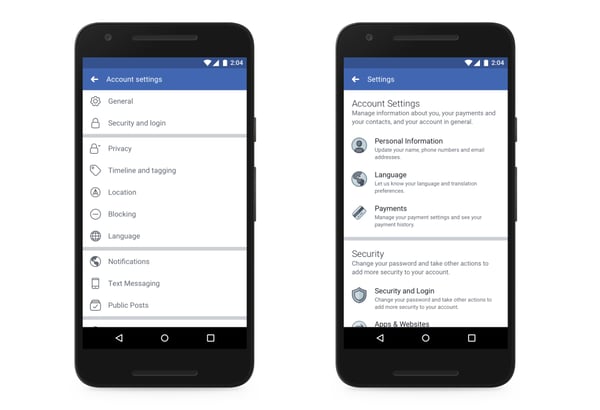
Source: Facebook
Again, when I tried to access my own account and privacy settings, I didn’t see any changes. Here’s what mine looked like:
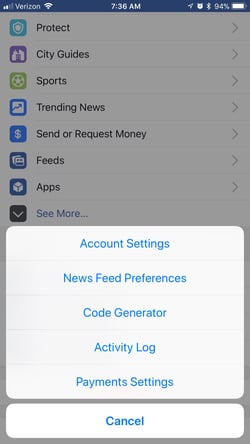
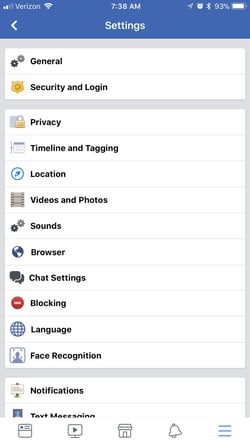
Additionally, the statement says, Facebook has “cleaned up outdated settings so it’s clear what information can and can’t be shared with apps.”
2. “New Privacy Shortcuts Menu”
There’s been a “privacy shortcuts” menu on the Facebook mobile app for a while now, but according to the statement, users can expect major changes.
Here’s what they look like now, on my app:
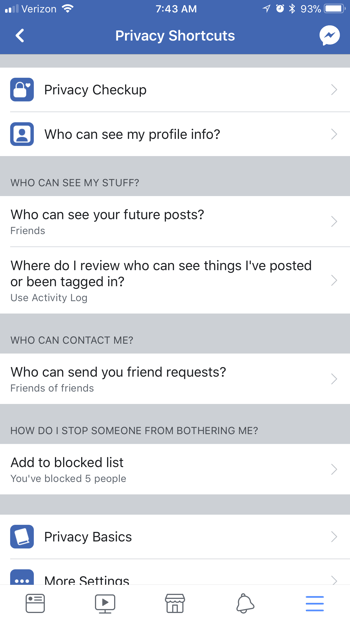
With the updates, however, these shortcuts should be “clearer, more visual, and easy-to-find.” They’ll include capabilities like adding such protections as two-factor authentication for more secure logins — that’s the message you receive when you log in from a new device and have to confirm if it’s actually you.
The shortcuts will also include personal information controls that allow users to review what they’ve shared, and delete it if they want to — including posts shared or reacted to, friend requests sent, and Facebook search history.
The privacy shortcuts will also include ad controls, allowing users to manage the data used by Facebook to determine which ads to show you. However, in the announcement, users are directed to the platform’s ad preferences for an explanation of how ads work.
Finally, the new privacy shortcuts will include user management of who sees their Facebook posts and profile.
These features and controls are not entirely new, but the gist of the statement is that they should now be easier for users to access and change.
3. “Tools to Find, Download and Delete Your Facebook Data”
Facebook’s new privacy tools will also introduce something called “Access Your Information,” which Egan and Beringer describe as “a secure way for people to access and manage their information” — things like their posts, search history, and the various other treasures that can be found in your data file.
Access Your Information will also allow users to delete anything from their timelines and profiles that they no longer want on Facebook — with, we can only assume and hope, with greater ease.
It’ll also be easier to download said data file, according to the announcement — with the option to “move it to another service,” which could be faced with trepidation by many users, given the current scrutiny around personal data ending up in the hands of others. Again, here’s some of what that data file includes, and what happened when I downloaded mine.
Looking ahead, Facebook has a great deal of ground to cover in terms of re-earning user trust, especially when considering recent data from a Reuters/Ipsos poll indicating that it falls short when compared to some of its Big Tech counterparts.
The thesis of Facebook’s communication in the days following these data misuse allegations is that it’s open to change and transparency — even if that means losing revenue and having to bow to the regulation it’s seemingly worked to avoid.
Mark Zuckerberg is reported to be testifying before Congress — specifically, the House Energy and Commerce, which Politico expects to take place as soon as April 12 — and the company postponed plans to debut a suite of hardware products at its F8 developer conference in May (though it does say it still plans to eventually release them).
I’ll be monitoring the situation as it continues to unfold. Questions? Feel free to weigh in on Twitter.
Featured image credit: Facebook

Unriddled: New Data on Trust in Facebook, Product Announcements from Apple, and More Tech News You Need
Welcome one, welcome all to Wednesday — the day that marks not just the week’s halfway point, but another edition of “Unriddled”: the HubSpot Marketing Blog’s mid-week digest of the tech news you need to know.
This week, we continue to wade through the very crowded pool of tech news items to help you decrypt what’s happening in this vast, often complex sector.
It’s our Wednesday tech news roundup, and we’re breaking it down.
Unriddled: The Tech News You Need
1. A New Poll Shows Americans Trust Facebook Less Than Its Big Tech Counterparts
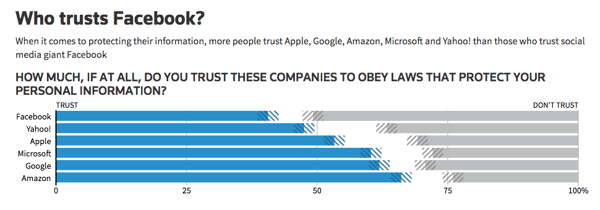
In the midst of ongoing backlash from the alleged misuse of personal user data, Facebook is earning less trust from Americans than other key players in the Big Tech space, according to a recent Reuters/Ipsos poll.
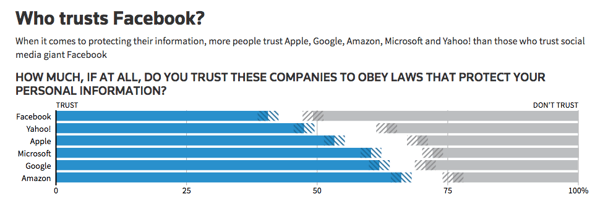
When asked how much they trust a selection of tech companies to obey data privacy protection laws, 41% of Americans say they trust Facebook, while 51% do not.
Out of the same set of respondents, 66% say they trust Amazon to obey data privacy protection laws, while 62% trust Google. The audience was also asked the same question about Microsoft (60% trust), Apple (53%), and Yahoo (48%).
Source: Reuters
The poll results, which were released on Sunday, came shortly before the Federal Trade Commission (FTC) confirmed it will be conducting a non-public investigation into Facebook’s privacy practices. It’s not the social network’s first run-in with this particular federal agency — in 2011, it also had to settle FTC charges after failing to make good on several promises regarding user privacy.
2. Facebook, Meanwhile, Continues to Make News Feed Changes: This Time, With Local News
Facebook announced yesterday it would continue to prioritize local news in users’ News Feeds: a change that was first announced in January, while being tested in six U.S. cities.
Now, according to yesterday’s announcement, the change will be rolling out “in all countries, in all languages.”
The statement, written by Facebook’s Head of News Product Alex Hardiman and Head of News Partnerships Campbell Brown, notes these changes to the News Feed algorithm will allow users to see more news “from local sources covering their current city and other cities they may care about.”
According to the initial January pilot, a “local” news source is defined by the number of clicks its links receive by users in a certain geographic area. That means, for a user in a given region, stories from these sources are more likely to appear higher in the News Feed if you follow their Pages, or your friends share content from them.
But with this update, the scope of “local” is a bit more flexible — and now, “we’ll consider a publisher as local to multiple cities if the people in those cities are more likely than the people outside of those cities to read articles from the publisher’s domain,” write Hardiman and Brown.
These changes appear to be part of Facebook’s ongoing efforts to emphasize personal-network-focused content in the News Feed. That overarching change to the algorithm was also first announced in January, following initial revelations the network had been weaponized to spread misinformation and divisive content to influence the 2016 U.S. presidential election.
3. Uber Is Exiting Southeast Asia
In an email to the company’s Southwest Asia staff, Uber CEO Dara Khosrowshahi confirmed that the ride-hailing app would be exiting that region, and selling its shares to its largest competitor there: Grab.
Grab, which describes itself as “O2O mobile platform” (online-to-offline), currently operates across six countries in the region, including Singapore and Thailand. For Uber, this is not the first major international market exit of this nature — in China, one of its largest geographical competitors, Didi, acquired Uber’s business in that country in 2016. And in Europe, Uber merged with Russian competitor Yandex.Taxi last July, ceasing its operations there.
“One of the potential dangers of our global strategy is that we take on too many battles across too many fronts and with too many competitors,” wrote Khosrowshahi. “This transaction now puts us in a position to compete with real focus and weight in the core markets where we operate.”
Partnering with #grab to create the market leader and bet on @AnthonyPY_Tan and team. Huge thanks to teamUber to get us here and good result for our shareholders and partners. https://t.co/c1ANSp9qjH
— dara khosrowshahi (@dkhos)
March 26, 2018
To some, those “core markets” are the U.S. and Europe, where SoftBank — Uber’s largest shareholder following a $9.3 billion investment in January — has verbally stressed it wants the company to focus its efforts.
The deal with Grab will leave Uber with a 27.5% stake in what Khosrowshahi called “the combined company,” where roughly 500 Uber employees will be working once the transition is complete.
The news comes on the heels of a fatal incident involving one of Uber’s self-driving cars in Arizona last week, which has led to the suspension of autonomous vehicle testing by several manufacturers — including, according to Recode‘s Johana Bhuiyan, Toyota and Nvidia.
4. Twitter Has Officially Banned Cryptocurrency Ads
Following rumors it might join its counterparts at Facebook and Google, Twitter has officially banned ads pertaining to cryptocurrency.
According to Reuters, the new policies will prohibit ads pertaining to both cryptocurrency sales, as well as initial coin offerings (ICO). The rules are said to have rolled out yesterday — and the following appears on Twitter’s Restricted Content Policies for financial services:
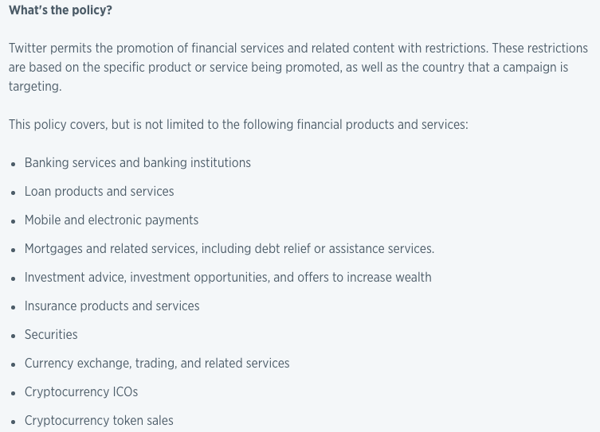
The announcement comes among suspicions that Twitter, as well as Facebook and Google, might be facing government regulation that it has seemingly sought to avoid. Following recent allegations that personal Facebook user data was misused by bad actors, the CEOs of all three companies have been invited to testify before the U.S. Senate Judiciary Committee (Zuckerberg has been asked to appear before two additional congressional committees, as well, and there are reports he has agreed), raising questions about the potential of a federal gatekeeping role in the area of user privacy.
It’s also worth noting that the General Data Privacy Regulation (GDPR) comes into force this May, which concerns the personal data of EU citizens — leaving many wondering if a U.S. version might be on the horizon.
5. Apple Unveiled An “Affordable” iPad for Students
At a press event in Chicago yesterday, Apple announced it would be selling a new 9.7-inch iPad at a lower price point with a certain audience in mind: students. The product unveil came ahead of the company’s June World Wide Developers Conference.
In keeping with the theme of education — the event was held at Chicago’s Lane Tech high school — Apple also announced the iPad will be available for $299 for students and schools, compared to $329 for other consumers. It’s also designed to work with Apple Pencil: a digital wand that allows users to draw and write on the device screens as they might with a pen.
Before this announcement, the Apple Pencil was only supported by the (pricier) iPad Pro, and wasn’t included. Instead, it had to be purchased separately for $99.

Source: Apple
With this newest product release, the Apple Pencil still has to be purchased separately, but it’s available at a lower price point for students and schools at $89 (the price point for other consumers is $99). That makes the total combined product cost just shy of $400, or more if users also choose to purchase a keyboard.
Compare that to the very first Chromebook tablet, which was unveiled the day before Apple’s event, and is also priced at $329 — and according to Google’s official announcement, it comes with a stylus — a similar digital pen — inside the package.
It’s also being positioned as a product particularly fitting for the education sector, with the benefits to students outlined in the product launch announcement, including the tablet’s augmented reality (AR) capabilities that will allow students to simulate such experiences as looking “into the eye of a miniature Category 5 hurricane or … a strand of DNA.”

Source: Google
Promotion around Apple’s new iPad also emphasizes its “immersive AR experiences” that allow students to simulate activities like dissections.
What Else Is Going Down in Tech Town?
No Smart Speaker from Facebook … For Now
Facebook has reportedly shelved its plans to unveil an AI-powered smart speaker at its May 2018 F8 developer conference. The plans, and their undefined postponement, come among the growing scrutiny and backlash from the alleged misuse of Facebook personal user data by third-party bad actors. Read full story >>
Facebook Knows a Lot About Me
What, exactly, does Cambridge Analytica know about me — and what does it mean for Facebook and its users? To find out, I downloaded my Facebook data, and it got very weird, very quickly. Here’s what it contains, and what it all means. Read full story >>
It Looks Like Zuckerberg Will Testify
Yesterday, unconfirmed reports Mark Zuckerberg will testify before Congress were swirling, aligning closely with the announcement he will not agree to requests to do so from Damian Collins, the U.K. Parliament’s media committee chair (Facebook says Chief Technology Officer, Mike Schroepfer, or Chief Product Officer, Chris Cox would appear instead). Zuckerberg has been invited to appear by three congressional committees, but it is not yet clear which he will answer to. Read full story >>
Changes From Instagram
Since Instagram changed its algorithm to stray from chronological order in 2016, some users have been displeased. Last week, the app announced that could change, with the possible introduction of a “New Posts” feature and more. The announcement came among rumors the app would be emulating more Snapchat-like features, including code scanning. Read full story >>
Why Are We So Infatuated With Bots?
Bots are not a new concept. But, as they permeate pop culture, customer service, and more, our obsession with them grows. So, why are we so intrigued by them? Read full story >>
That’s all for today. Until next week, feel free to weigh in on Twitter to ask us your tech news questions, or to let us know what kind of events and topics you’d like us to cover.

7 of the Best Free Apps for Startups to Kickstart Growth
Chances are, at this very moment, you have more then one application open on your computer or phone.
The question today is not if you should use tools, but which ones should you be using. There’s no shortage of options. With over 5,300 marketing tools alone, how does someone choose the best solution? In the age of convenience, a long list of tools can feel more like an inconvenience than an advantage. Before investing time in yet another new application, businesses want to understand what their competitors are using and what’s relevant to a company of their size and industry.
Perhaps most importantly, how does the proposed application compliment and integrate with my other tried-and-true tools? Ignoring that question is costly with 82% of marketers and salespeople losing up to an hour a day managing siloed tools.
Startups in particular are short on time, money, and resources, which makes the question of connectivity a vital one. The right integration should give employees time back in their day to focus on what’s important — doing their job.
At HubSpot, we have thousands of startup customers that integrate tools into HubSpot to help their company grow. We looked at the most commonly used free integrations leveraged by our startup customers, and compiled a list of the most popular free tools in use.
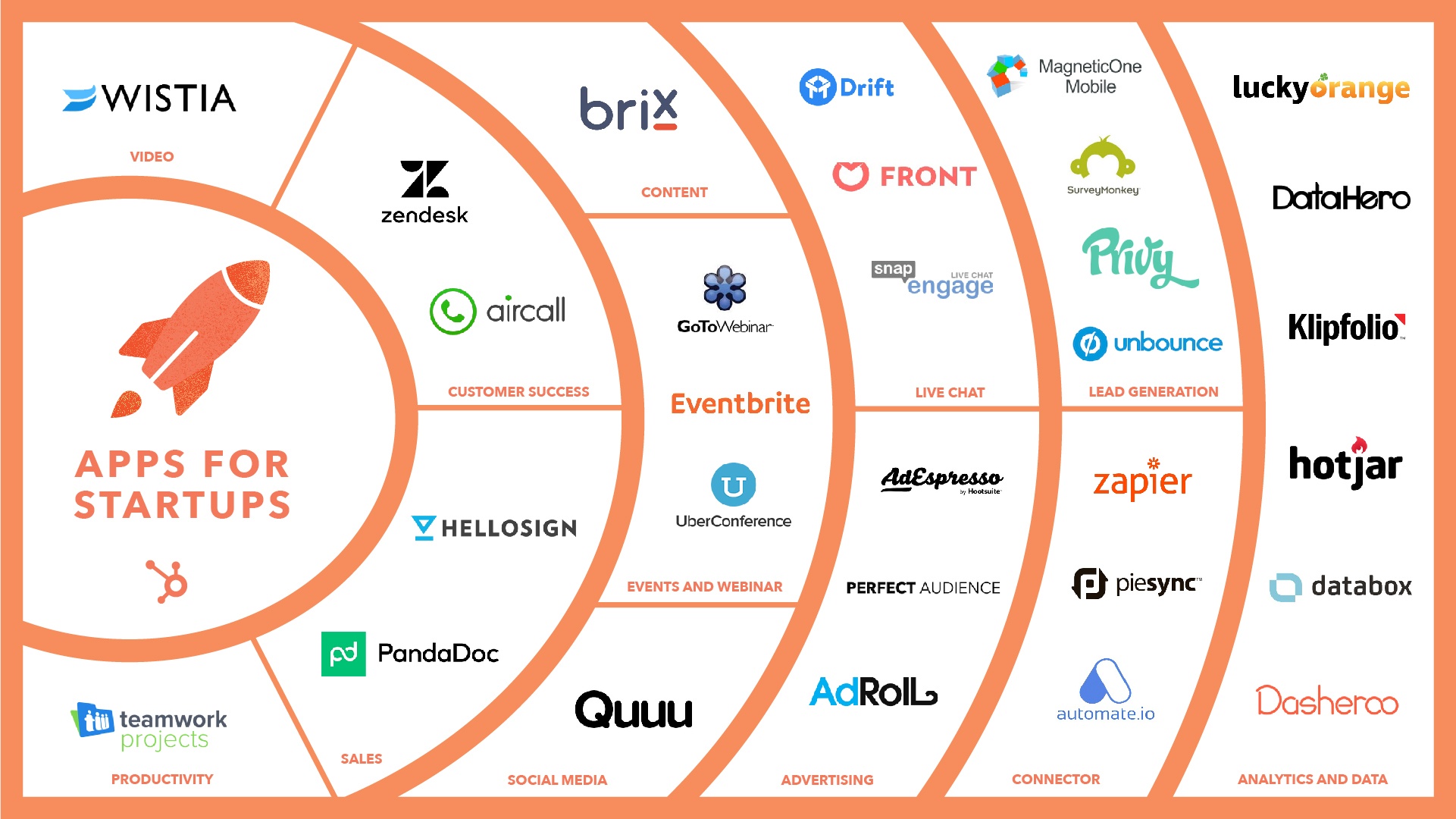
7 Free Apps for Startups to Help Kickstart Growth
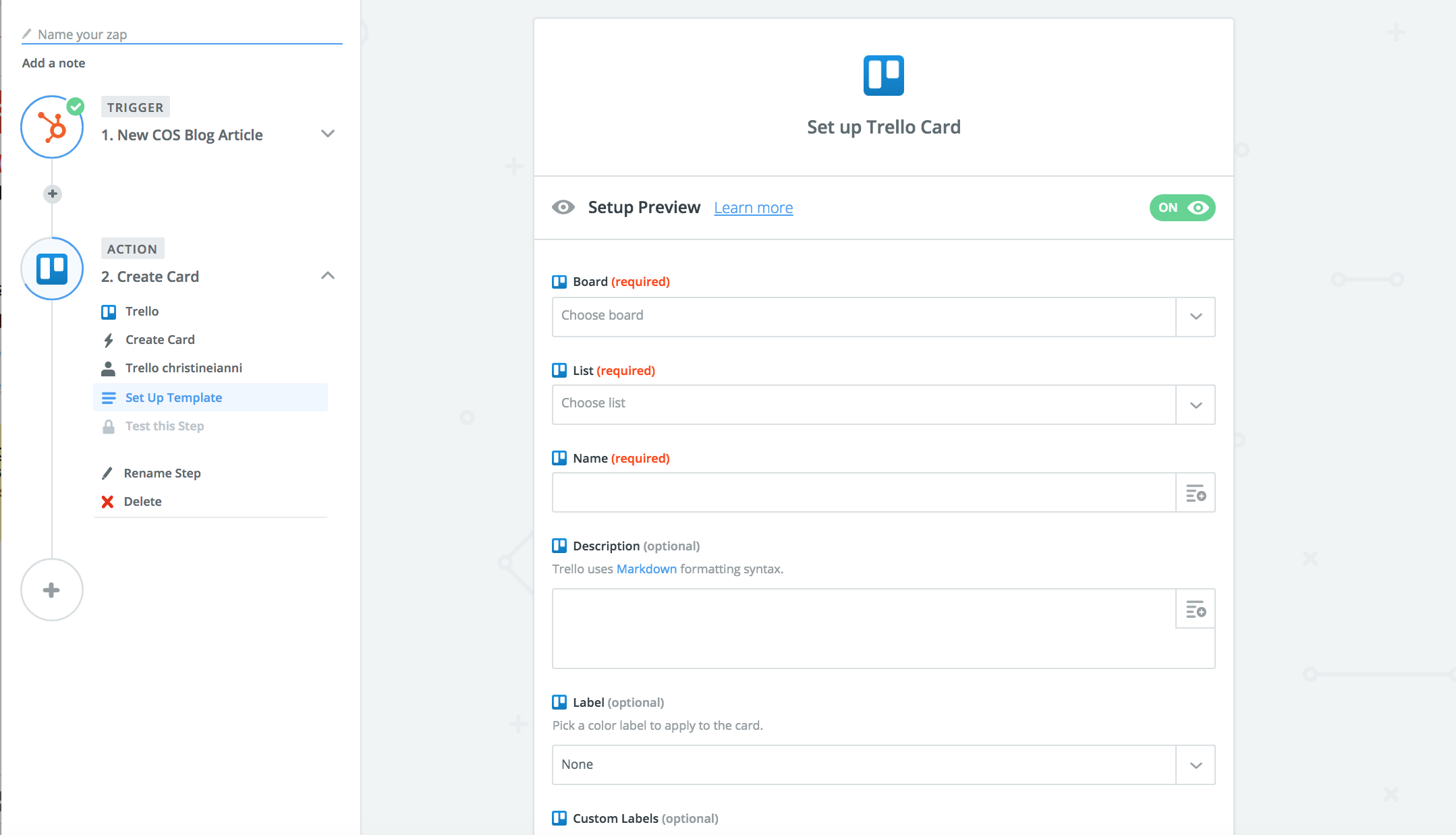
1) Automate Your Workflow with Zapier.
Zapier allows you to automate your workflow by connecting all your favorite apps. With over a thousand tools to choose from plus customizable triggers and actions, it’s easy to automate manual processes in your daily work.
How you could use it: Keep all the your contacts and leads in one system by setting up “Zaps” to automatically sync contacts to keep your email lists up-to-date.
“Zapier enables us to distribute HubSpot data seamlessly between all of our systems and build in-house processes that just were not possible for us before. It’s amazing how much company time and money you can save with something that just takes a couple of minutes to build.” – Stefan Milev, CMO, Taylor & Hart
2) Survey Customers with Surveymonkey
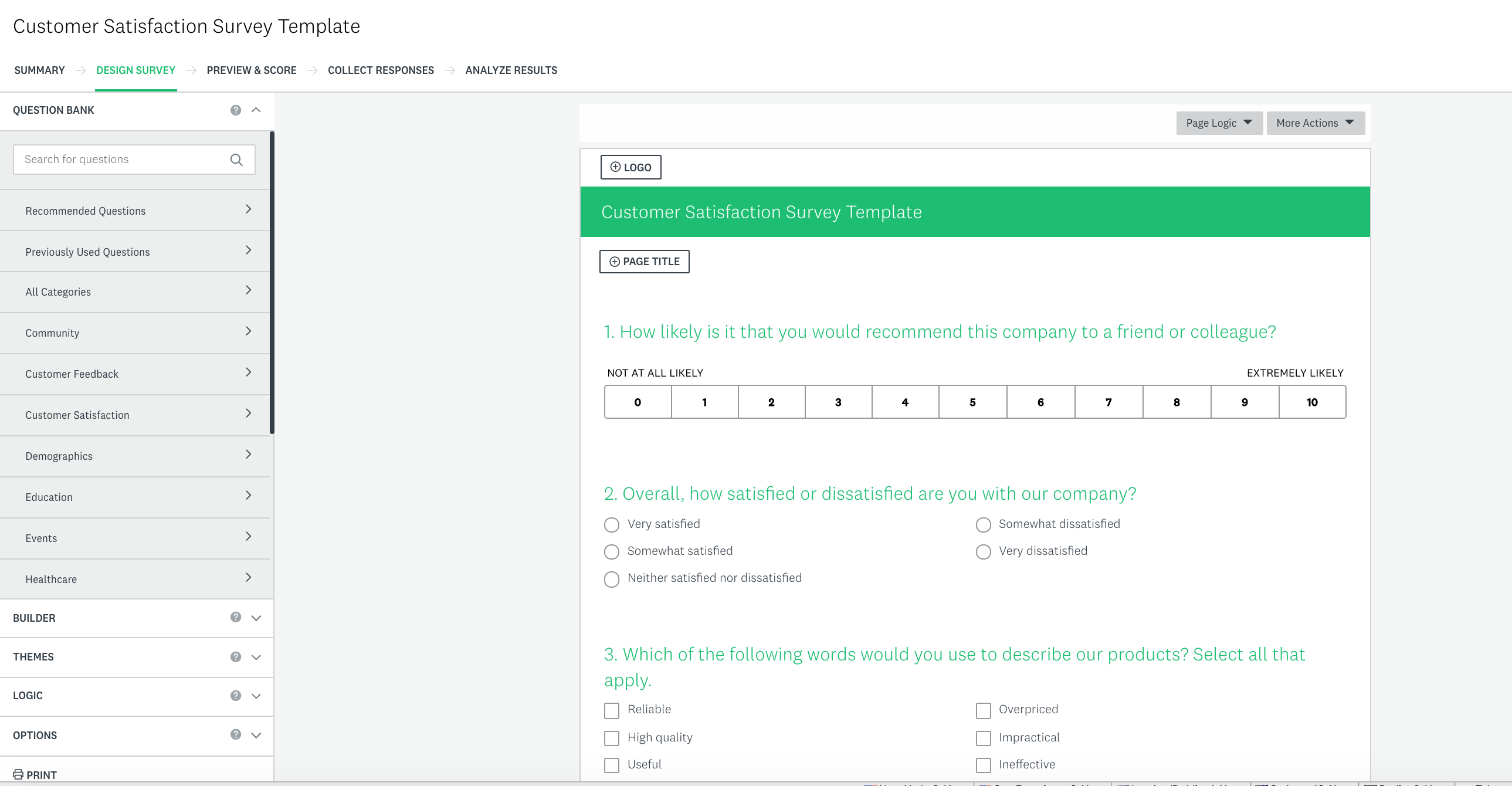
Create and send surveys to gauge customer sentiment and action responses at scale. Don’t know where to start? Leverage popular survey templates with survey scientist approved questions.
How you could use it: Create a survey to understand customer satisfaction by leveraging a template for Net Promoter Score or a Customer Satisfaction Survey. Action auto-synced survey responses in HubSpot by setting up a workflow to evangelize promoters and re-engage or follow up with detractors.
“We use SurveyMonkey to send automated client satisfaction surveys. Each response is tied to the client’s contact record in HubSpot, making it extremely easy to track, analyze, and trigger different marketing workflows depending on the survey results.” Ricardo Garcia-Amaya,Co-founder & CEO at VOIQ
3) Hold virtual meetings with UberConference.
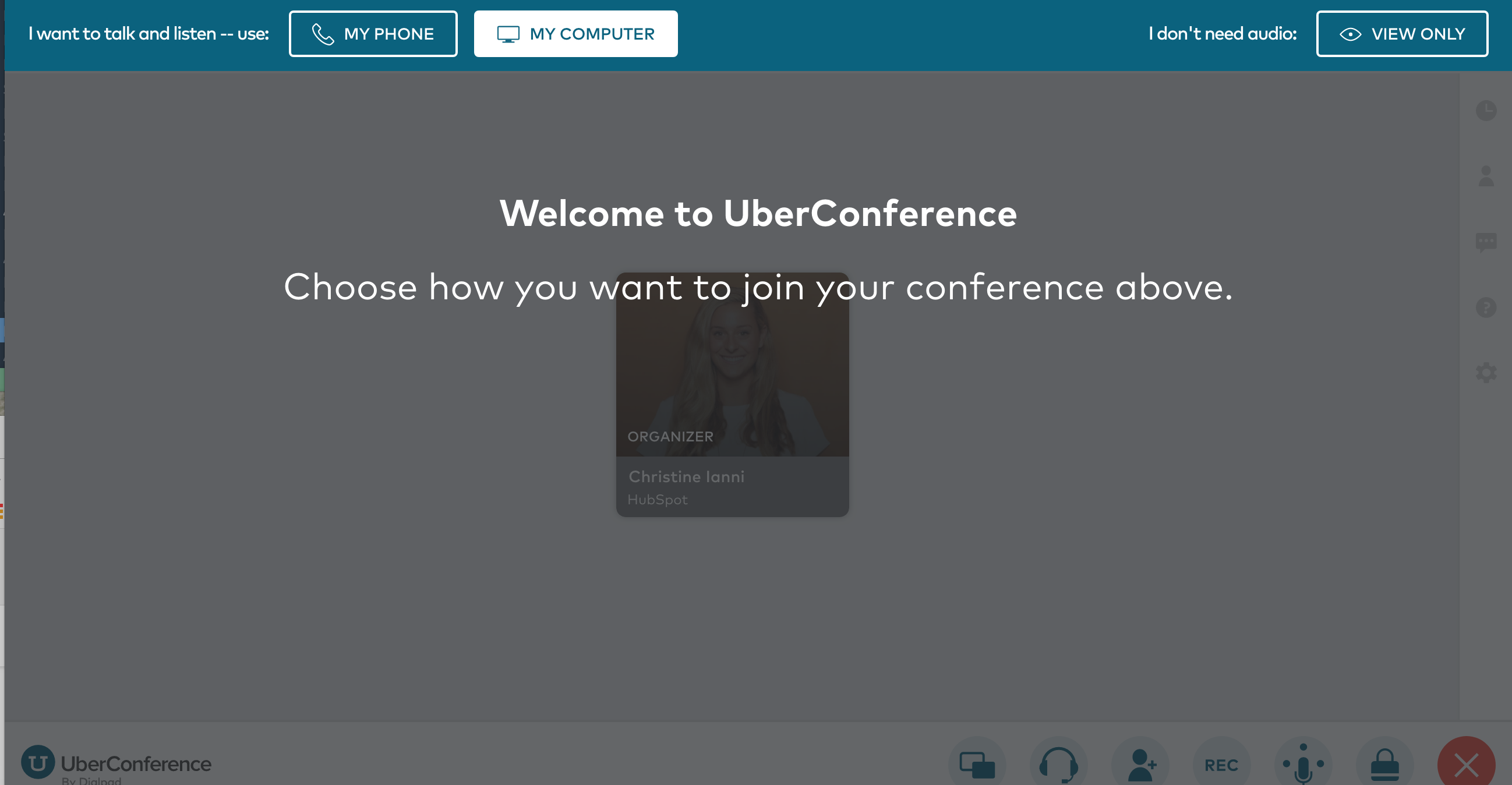
Schedule virtual meetings to speak directly with prospects or customers right from within HubSpot. Keep record of past conversations with notes on the contact timeline.
How you could use it: Save time by scheduling an afternoon of prospect meetings in advance and get reminders to your phone or email before your call. No need to look up call information ahead of each call as it’s sent straight to your phone or email, so you can dial in at your convenience.
4) Manage events with Eventbrite.
Create, manage, and market free events. Bonus: use Eventbrite to search for events in your industry for inspiration.
How you could use it: Set up a regional prospect event. See how your contacts have engaged with your company in the past, and use it to make an impact in person. After the event, create lists and workflows based on information synced from Eventbrite to re-engage no shows and turn attendees into customers.
“The integration with Eventbrite is smooth and simple, and great for follow-up and lead nurturing after events. I can highly recommend it.” – Chris Schack Noesgarrd, CCO at Adapto Technologies
5) See How Visitors Interact with Your Site with Hotjar.
Understand how visitors interact with your site without having them fill out a form or get on a call. Leverage heat maps and visitor recordings to see what people do and care about on your site — and where you need to improve.
How you can use it: Understand visitor behavior on your most important site pages to improve important conversion points. See how your site performs and use engagement data to help with your site structure.
“We love how easy it is with HotJar to visualize the data with their site heat map and overlay. As they say, a picture is worth a thousand words – or in this case data points.” – Sarnen Steinbarth, Founder/CEO at TurboTenant
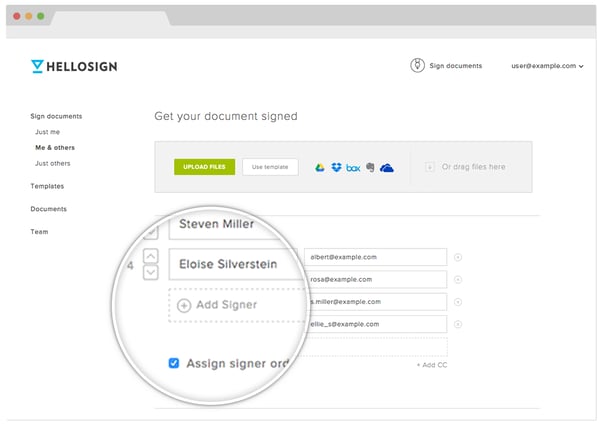
6) Deliver and Collect eSignatures with HelloSign.
Easily create and manage contracts from one place to close deals faster. Request signatures, autofill contact information, and track status. View signature status and last view to know when to follow up with leads.
How you can use it: Sign, sync, and deliver contract with an average turnaround time of 44 minutes. Manage all of your contracts easily from one place. Sort documents by signature status or last view in order to time reach-out.
7) Track progress and share reports with Databox.
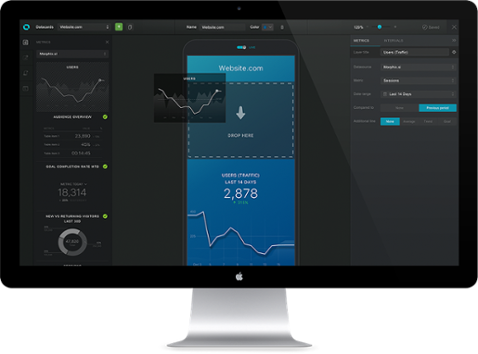
Access all of your business key performance indicators on one shareable dashboard automatically delivered to any device. Eliminate the collection process of compiling reports and formatting charts from multiple systems and data sources by creating an all-in-one dashboard. Leverage one of Databox’s 100 reporting templates to deliver meaningful insights to your team.
How you could use it: Get a daily scorecard on how your business is performing with topline metrics delivered in a beautifully customized report to your mobile, desktop, TV display, Apple Watch or Slack channels. Schedule weekly reports for your team for a quick health-check on their key performance indicators.
Want to kickstart growth? Arm yourself with the right tools. Start by adding these 7 apps for startups to your repertoire — it might be the difference from moving from a startup to a scaleup.
What are your go-to tools?

Facebook Won’t Unveil a Smart Speaker This Spring
Facebook has reportedly suspended its plans to debut a new smart speaker at its annual F8 developer conference in May. The decision comes amidst ongoing scrutiny and backlash from the alleged misuse of its users’ personal data by analytics firm Cambridge Analytica.
The postponement, first reported by Bloomberg, comes at a time when user trust in Facebook is comparatively low next to trust in some of its Big Tech counterparts like Google and Amazon. Have a look at this poll data from Reuters:
Source: Reuters
Given that the public, as well as lawmakers, is already questioning the extent of how personal data is shared and used by Facebook, it almost seems like an obvious decision to hold off on plans to unveil smart home devices.
Such devices are said to always be “listening” to its users — take, for example, the fact that they must be prompted by verbal cues (e.g., “Alexa” or “okay, Google”), indicating that they must always be monitoring for audible cues. The Amazon Echo, for instance, recently made headlines for misinterpreting these cues with creepy, unprompted laughing.
Facebook’s plans to build these devices was also first reported by Bloomberg last August, when the social media company’s CEO Mark Zuckerberg announced an intent to launch hardware products for video chat from its Building 8 program, like a large screen and a smart camera. A major purpose of these products, it was said, was to “help farflung people feel like they’re in the same room.”
Those plans also included the smart home speaker in question, which would be equipped with Facebook’s own version of a voice assistant.
The branding around that assistant would be clear, though its Messenger platform previously used something called M: an AI assistant that picked up on verbiage cues from your conversations to figure out what you might need, like ordering food or sending someone a sticker related to such sentiments as “good morning.” Facebook discontinued M earlier this year.
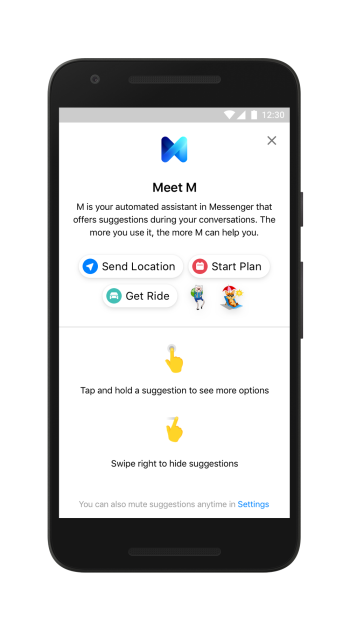
Source: Facebook
According to the Bloomberg report, Facebook does still plan to launch products later this year. Originally, the new hardware was expected to ship in the fall, but now the target launch date is unclear.
Facebook does hold an annual event in the fall: Oculus Connect. However, that gathering is traditionally focused almost wholly on virtual reality.
It raises questions about what will be discussed at this year’s F8 conference, where many expect Zuckerberg and other Facebook executives to speak to the role of user privacy in the company’s future plans.
Facebook is also not the only one with plans to release new voice assistant technology this year. Rumors have been circulating about Spotify’s development of a smart speaker, and Samsung is also said to be releasing such a device this year powered by its own voice assistant, Bixby.
I spy @Spotify laying the foundation for a smart speaker… pic.twitter.com/n1slxIFUNA
— Hunter Owens (@owens)
March 14, 2018
In the weeks leading up to F8, scheduled to take place May 1-2, I’ll be keeping an eye on this story. Questions? Feel free to weigh in on Twitter.

How to Add a Link to Your Instagram Bio
Every social network makes it clear how to put a link in your bio on their platform — except Instagram.
Twitter lets you tag other handles in your bio. LinkedIn gives you the ability to link yourself to your employer’s official page. Facebook allows you to tag a number of different businesses, interest pages, and people in your “About” section, so you can let friends know who you work for, what brands you like, your alma mater, your relationship status, and so on.
What about Instagram?
Until recently, Instagram didn’t give you a ton of space to brand your profile with hashtags and profile handles — you could only link to their respective pages in photo captions.
Websites were the only types of links you could put in your bio (hence the common phrase “link in bio” by Instagram users who were promoting something).
But Instagram recently gifted us two new features: linkable profiles and hashtags, right in your bio. You can now add them alongside the link to your website.
How to Add a Link to Your Instagram Bio
- Open your Instagram mobile app.
- Visit your profile by tapping the person icon on the bottom right.
- Tap “Edit Profile” at the top of the screen.
- Write a custom description in 150 characters or less.
- Add a brief link to your website in the form of yourdomain.com.
- Add links to other profiles by tapping “@” followed by the profile’s handle.
- Add hashtags by tapping “#” followed by the hashtag you associate with.
- Tap “Done” to save your bio.
Note: The instructions above apply to the latest version of Instagram — 37.0 on iOS. You can also edit your bio on Instagram’s website by navigating to your profile and clicking “Edit Profile” next to your name.
On the screen to the left, below, you can see how Instagram suggests popular hashtags as you edit the bio text field, just like it would when you add a hashtag to a picture’s caption. On the screen to the right, you’ll see the profile of a person who uses hashtags, profile links, and websites in her bio.
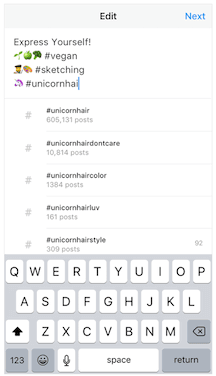
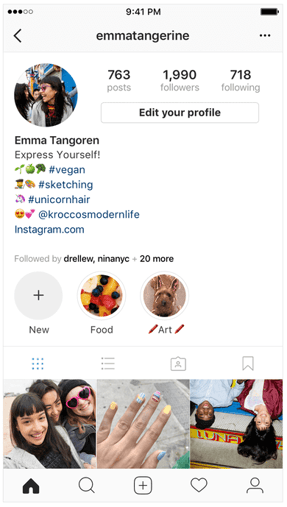 Images via Newsweek
Things have changed at Instagram as of late, and you now have options to link to other pages you identify with right beneath your Instagram profile picture. But keep in mind that users who don’t want their profile tagged in others’ bios can opt to untag themselves.
It’s best to reserve this space for the accounts you know would agree with the association you’re making.