Mark Zuckerberg Will Testify Before Congress, According to Reports
According to a report from cable news network CNN earlier today, Facebook CEO Mark Zuckerberg has decided to testify before U.S. Congress amid growing concerns over user privacy.
As of publishing this post, Facebook has not confirmed these reports — but it comes after Zuckerberg expressed in several recent interviews a somewhat uncharacteristic willingness to testify before lawmakers.
It is also unclear which congressional committee Zuckerberg will appear before. In addition to the Senate Judiciary Committee, the House Energy and Commerce Committee has also asked him to testify, and members of the House Energy and Commerce Committee have voiced an interest in questioning him.
Zuckerberg has declined, however, to agree to requests from Damian Collins, the U.K. Parliament’s media committee chair, to appear for questioning. Instead, Facebook says, the company’s Chief Technology Officer, Mike Schroepfer, or Chief Product Officer, Chris Cox, would make the appearance.
Facebook has been under heightened scrutiny since revelations that it was weaponized by foreign agents to spread misinformation and divisive content to help influence the 2016 U.S. presidential elections. The recent pressure to appear before Congress, however, is largely the result of allegations that personal user data was misused by analytics firm Cambridge Analytica.
Since then, authorities and users alike have been taking a closer look at Facebook’s privacy policies, as well as the details of what sort of data the social network has allowed third parties to collect.
Zuckerberg’s verbal willingness to appear and testify before authorities has many wondering if Facebook — along with its Big Tech counterparts like Google and Twitter — will finally relent on its fight against government regulation. The events are taking place on the heels of the General Data Privacy Regulation (GDPR) coming into force this May, which concerns the personal data of EU citizens.
This is a developing story that I’ll monitoring as it unfolds. Questions? Feel free to weigh in on Twitter.

59 Female Marketing and Growth Experts You Should be Following
Last week, one of my colleagues stumbled across a list of marketing influencers and shared it in our team’s Slack channel. It didn’t take long for someone to comment that barely one-fourth of the experts featured in the article were women.
These types of influencer round-ups are all over the web, but very few of them highlight more than a small handful of female leaders. This lack of inclusion is nothing new, but it got us thinking: Why not put together a list of awesome female influencers to inspire future, more inclusive round-up posts?
So here it is: a list of powerful influencers in the growth and marketing space who just so happen to be women. We hope this inspires you to recognize more women in your influencer posts, and expand your social networks beyond the expected sphere of male founders.
Before we jump in, it’s important to note that this list is by no means exhaustive. These influencers were suggested by members of our team, and we encourage you to keep the conversation going on Twitter. Tweet at us to share a female leader — big or small — who inspires you.
59 Female Marketing & Growth Influencers To Follow
1. Tiffany Da Silva @Bellastone
Tiffany is a growth marketing consultant, international speaker, and founder of Flowjo.co.
2. Christina Rice @CRicePR
Christina is the founder of LuxeLife Media Inc., and was the Director of Public Relations for global fashion brand, Akademiks.
3. Joanna Wiebe @Copyhackers
Joanna is co-founder of Airstory, the creator of Copy Hackers, and and has optimized copy for companies like Intuit, BT, Tesco, Crazy Egg, and MetaLab.
4. Majora Carter @majoracarter
Majora is CEO of Majora Carter Group, and CEO of Startup Box. In 2010, Fast Company named Majora one of the 100 most creative people in business.
5. Crystal Washington @Cryswashington
Crystal is a technology marketing strategist, professional speaker, and author of two books, One Tech Action and The Social Media Why. Her clients include Fortune 500 companies like Microsoft, Berkshire Hathaway, and General Electric.
6. Claire Suellentrop @ClaireSuellen
Claire is a co-founder and Chief Marketing Officer of Userlist.io, the founder of Love Your Customers, and co-host of Forget the Funnel. She was also the Director of Marketing at Calendly.
7. Joanna Lord @JoannaLord
Joanna is Chief Marketing Officer of ClassPass, a tech advisor, and blogger at Entrepreneur.com, MarketingLand.com, and JoannaLord.com.
8. Bozoma Saint John @Badassboz
Bozoma is the Chief Brand Officer at Uber. She was also Head of Global Consumer Marketing for Apple Music and iTunes.
9. Annie Cushing @AnnieCushing
Annie is the founder of Annielytics, a boutique marketing agency that specializes in web analytics, data visualization, and SEO.
10. Janet Choi @Lethargarian
Janet is the Director of Marketing at Customer.io, a curator at A Song A Day, and has written for publications including 99U, Fast Company, The Next Web, Business Insider, and Lifehacker.
11. Jes Kirkwood @Jeskirkwood
Jes is the founder and Managing Director at marketHER.org, and helps drive organic growth for B2B tech companies, including InVision and Contently.
12. Val Geisler @Lovevalgeisler
Val is a email strategist and copywriter, and helps B2C businesses focused on MRR increase conversions through email. She has been featured in the Huffington Post, Fast Company, and Teachable.
13. Eliana Murillo @Eliana_Murillo
Eliana is the founder and Head of Multicultural Marketing at Google. She is also a member of Nielsen’s Multicultural External Advisory Council and co-chair of the Hispanic/Latino Advisory Council.
14. Nichole Elizabeth @NikkiElizDemere
Nichole is in charge of Community Growth at Zest.is, and is also co-founder and Community Manager at SaaS.community.
15. Alex Hisaka @Alexhisaka
Alex is the Senior Manager, Global Content Marketing, LinkedIn. IBM named her one of seven women who are reshaping digital marketing, and TopRank Marketing included her on its 2017 list of “50 Influential Women in Digital Marketing.”
16. Purna Virji @Purnavirji
Purna is the Senior Manager of Global Engagement at Microsoft, a keynote speaker, and a columnist for Search Engine Land and Moz. She was ranked by PPC Hero in 2016 as the #1 Most Influential PPC expert in the world.
17. Jessica Meher @Jessicameher
Jessica is the VP of Marketing at Notarize, Inc., a startup advisor and mentor, speaker, author, and founder of Girl Capital.
18. Kimberly Bryant @6Gems
Kimberly is the founder and Executive Director of Black Girls Code.
19. Henneke Duistermaat @HennekeD
Henneke is the founder of Enchanting Marketing, the author of two books about writing and blogging, and a regular contributor to marketing blogs like KISSmetrics and Copyblogger.
20. Keesa Schreane @KeesaCamille
Keesa is the executive producer and host of the You’ve Been Served podcast, and manages global content marketing for Thomson Reuters.
21. Jade Phillips @Lifeofaworkgirl
Jade is the blogger behind The Life of a Working Girl, a contributing writer for We are Social Media, and the founder of #BizGalz.
22. Rita Cidre @Ritacidre
Rita is the founder of Anda Pa’l and a marketer, author, and designer. She was also the Marketing Director at Zillow.
23. Hila Qu @HilaQu
Hila is VP Retention and Experiments at Acorns. She was also a PM Growth professional at Growthhackers, and won the 2017 Hero Award and the 2016 Einstein Award.
24. Ginny Mineo @Ginnymineo
Ginny is the Director of Platform at NextView Ventures.
25. Anum Hussain @Anum
Anum is the co-founder of Acciyo, co-authored the book, Twitter for Dummies, and represents Rough Draft Venture’s presence at MIT Sloan. She won BetaBoston’s 25 Under 25 in 2015.
26. Laura Weidman Powers @Laurawp
Laura is the co-founder and CEO of Code2040. She was also a Senior Policy Advisor for the White House Office of Science and Technology Policy.
27. Ellie Mirman @Ellieeille
Ellie is the Chief Marketing Officer at Crayon. She was also the VP of Marketing at Toast.
28. Meghan Keaney Anderson @Meghkeaney
Meghan is the VP of Marketing at HubSpot, and the host of The Growth Show. Meghan is also an advisor at Evertrue, Help Scout and United Way.
29. Amrita Gurney @AmritaGurney
Amrita is the VP of Marketing at CrowdRiff.
30. Stella Garber @Startupstella
Stella is a Product Marketing Lead for Trello, and was previously VP of Marketing at Trello.
31. Gigi Rodgers @RodgersGigi
Gigi is a Marketing Content Manager at Strikingly, a weekly Inbound.org contributor, and a Social Media Content Creator.
32. Mathilde Collin @Collinmathilde
Mathilde is co-founder and CEO of Front App, which is currently used by Tesla, Cisco, Dropbox, and Inside.com, as well as thousands of other customers.
33. Andrea Hill @Afhill
Andrea is the founder of Frameplay Consulting LLC, and an Innovation Consultant at Frameplay.
34. Yael Kochman @Yaelkochman
Yael is the partner and CEO of Re:Tech, a speaker, and a blogger. She was also Head of Content and Inbound Marketing at Mapp Digital.
35. Beverly Jackson @BevJack
Beverly is the VP of Social Strategy at MGM Resorts International. She was also the Head of Social Marketing at Yahoo, and delivered record-breaking digital and social engagement results for the 54th Grammy Awards.
36. Dyan Khor @DyanKhor
Dyan is a Growth Marketing Manager at LevelUp, as well as a Venture Coach at IDEA: Northeastern University’s Venture Accelerator.
37. Luvvie Ajayi @iLuvvit
Luvvie wrote the New York Time’s bestseller, I’m Judging You. She has also spoken at Google and curated Essence’s Woke 100 list.
38. Michelle Kim @Michellejeank
Michelle is Vice President of Marketing at Amplitude Analytics. She was also the Director of Demand Generation at Okta.
39. Alicia Shiu @AliciaShiu
Alicia is the Growth Marketing Manager at Amplitude Analytics.
40. Sheryl Schultz @Sherylschultz
Sheryl is the founder of CabinetM, and a career startup marketer. She’s also the Board Director for The Capital Network.
41. LaSandra Brill @LaSandraBrill
LaSandra is the Head of Integrated Digital Marketing at NVIDIA. She’s been named top 50 Influential Digital Marketers by Top Rank Marketing Blog, and Top 40 Digital Strategists by Online Marketing Institute.
42. Shama Hyder @Shama
Shama is the founder and CEO of Zen Media, a keynote speaker, a bestselling author, and a media correspondent. She was voted Top 30 Under 30 by Inc. Magazine and Forbes.
43. Kathryn Finney @KathrynFinney
Kathryn is the founder and Managing Director of digitalundivided (DID). She received the Champion of Change Award from the White House and was featured in Marie Claire’s 10 Women to Watch.
44. Veronica Byrnes @Veronicabyrnes
Veronica is the Manager of Consumer Experience, Digital Marketing at The J.M. Smucker Company. She was also the Account Director at Brand Networks.
45. Pam Didner @PamDidner
Pam is a marketing consultant, keynote speaker, and author. Her work has appeared in publications including the Guardian, the Huffington Post, Content Marketing Institute, and others, and she wrote the book Global Content Marketing.
46. Marie Haynes @Marie_Haynes
Marie owns Marie Haynes Consulting Inc. She’s also a contributor to Search Engine Watch and Moz, and a regular speaker at Pubcon, SMX, and other conferences.
47. Joy Hawkins @JoyanneHawkins
Joy Hawkins is the owner of Sterling Sky, a Google Top Contributor, and often speaks at various search engine marketing conferences such as SMX & LocalU.
48. Melissa James
Melissa is the President and CEO of The Tech Connection, founder of Black Tech Boston Meetup, and founder of the Inclusive Innovation Leadership Conference.
49. Aleyda Solis @Aleyda
Aleyda is an international SEO consultant, speaker, and author. She has written for Search Engine Land, State of Digital, and Moz, and is the author of the SEO book, SEO. Las Claves Esenciales.
50. Laura Lippay @Lauralippay
Laura is an SEO consultant, and has worked with brands including Red Bull, several Microsoft, Yahoo and AOL entertainment and lifestyle properties, Netflix, Icelandair, Nylon Magazine and others.
51. Ann Smarty @Seosmarty
Ann is the founder of MyBlogU.com, and is a freelance SEO consultant.
52. Emily Grossman @Goutaste
Emily Grossman is the Director of App Strategy at MobileMoxie, and has spoken about mobile application marketing at national and international conferences.
53. Julie Joyce @JulieJoyce
Julie is the owner and Director of Operations at Link Fish Media, and one of the founding members of the SEO Chicks blog.
54. Rhea Drysdale @Rhea
Rhea Drysdale is the Chief Executive Officer of Outspoken Media. She has also worked in-house with a startup, Fortune 1000, and multi-channel retailer.
55. Amanda Spann @Amandaspann
Amanda is the founder of Happii, and a marketing consultant who specializes in product launch campaigns for new and emerging brands. She was voted Business Insider’s 30 under 30 Women in Technology.
56. Ada Chen Rekhi @Adachen
Ada is the founder and COO at Notejoy, as well as a startup advisor.
57. Adelyn Zhou @Adelynzhou
Adelyn is co-founder and Head of Marketing at TOPBOTS, a growth advisor, and a contributor at Forbes.
58. Mari Smith @MariSmith
Mari Smith is a social media consultant, keynote speaker, co-author of Facebook Marketing: An Hour a Day, author of The New Relationship Marketing, and contributor at Social Media Examiner. Forbes named her one of the Top 10 Social Media Power Influencers four years in a row.
59. Gina Gotthilf @Ginag
Gina is VP of Growth and Marketing at Duolingo, and founder of Global Ginga.

7 AI Tools to Help You Grow Your Blog
OK, you get it. Artificial intelligence is kind of a big deal. It’s a huge buzzword in the marketing community. People talk about how it’ll change the world daily. And you can’t throw a rock without hitting a company with AI in the name these days.
But what about real world uses for AI? Where do marketers start using AI to solve actual problems they have? All the speculation and theory is interesting. But at the end of the day, we marketers have KPIs and business goals to hit.
Don’t worry, we got you covered. Let’s start with a common marketing challenge:
You want to get more people to read your blog posts. More people reading means more opportunities to convert those readers into prospects. More prospects means more opportunities to sell. More sales equal happy executives, which equal happy marketers.
Turns out, there are AI tools that can help you get more readers in several different ways. And they can help you starting right now.
Write Better Posts
Better posts equal more engaged readers. Period. But it’s not always easy to improve your writing or your team’s writing quickly. AI is here to help. Grammarly is a tool that uses AI to recommend better writing. It can tell you what grammar mistakes you’ve made and how to fix them. It can also offer powerful recommendations to improve your tone and style.
The result is writing that captures attention. For an individual blog writer, it’s a critical tool to stay at the top of your game. For teams, it can transform the quality and effectiveness of your entire blog.
Blog About What People Want to Read
You can write the world’s best post, but it doesn’t matter if it’s on a topic your audience doesn’t care about. How do you find compelling and popular blog topics?
There are a few AI-powered tools that can help with this, too.
Crayon uses AI to give you intelligence on what competitors are doing online. The tool analyzes over 100 different types of data online from seven million sources. It tracks changes to competitor websites over time. And it uses AI to display the most meaningful insights from competitor activity.
These insights reveal much about a company’s messaging and content strategy. That gives smart marketers lots of material for their own blogging. You can determine what topics matter most to audiences and where gaps exist to fill with your own content.
You might also combine Crayon with HubSpot’s Content Strategy tool. The Content Strategy tool uses AI to help marketers discover new content ideas. You’ll get suggestions on topic clusters to pursue. You can also determine which opportunities are worth spending time writing about.
Together, these two AI tools offer powerful topic generation capabilities. You might actually find yourself with too many great topics to write about.
Engage Readers More
Your existing readers may love your content. But how often are they consuming more than one post per session? Are they served fresh content before they leave your site? Most importantly, are they served additional content they actually care about?
Personalization is key to engage readers and keep them coming back for more.
An AI tool called Uberflip can help you do it better. Uberflip uses AI to catalog the topics you’ve written about. The tool then recommends content to visitors based on what they’ve already read on your site.
It’s a scalable way to make sure every blog reader stays on-site longer and reads more.
Find More Readers for Your Blog
Aside from creating great content, how do you find more readers? One way is by going to where they congregate online. A tool called Pathmatics can point you in the right direction. Pathmatics uses AI to show you digital advertising information for hundreds of brands.
You can see how much a brand has spent on ads. You can also see what ads it runs. Most importantly for our purposes, you can see where the brand advertisers. This information can tell you where audiences like yours hang out online.
For instance, you could use Pathmatics to see where your competitors advertise most. From there, pick top industry sites that may align with the blogging you do. Voila! You have some good ideas on who to pitch for your guest posting strategy.
Scale Your Blogging and Create More Posts
The more good content you can publish, the more eyeballs you’ll get on your blog. After all, you’re giving more people the ability to find, share, and link to your blog.
But this requires you to scale blogging. And that’s no easy task, especially for a large organization.
If you’re an enterprise looking to scale your blogging, Acrolinx is worth a look.
Acrolinx uses AI that reads and analyzes your content. Then, it uses what it learns to make sure everyone follows brand standards and guidelines. No matter how many writers you have across the world, they’ll stay on the same page. All posts are on-brand and follow your style criteria exactly. That frees up a lot of time normally spent tweaking, formatting, and editing for consistency. That time can then be used for more high-quality blogging.
Another tool for enterprises looking to scale is BrightEdge. BrightEdge’s suite of AI-first products make content production a lot easier.
On one hand, the company’s solution automates production tasks. Say goodbye to tedious things like adding header tags, cross-linking, and optimization.
On the other, BrightEdge will tell you which types of content may perform well for your brand. That saves you a ton of time, and increases confidence in the ROI of blogging efforts. BrightEdge can also recommend ways to rank your content and keep readers engaged.
After all, you can’t get more readers if executives shut down your blogging because it doesn’t work.
For more actionable advice on how to use AI in your marketing, subscribe to the Marketing AI Institute. We regularly publish expert advice and case studies on how AI can supercharge your marketing.

What is Ecommerce? [Quick Guide]
Ecommerce, short for “electronic commerce,” is the process of buying and selling physical or electronic items online.
In 2018, ecommerce is more popular than ever before. For many people, it has replaced brick-and-mortar stores as the preferred way to shop. Mobile devices have greatly contributed to the rise of ecommerce: it’s estimated that mobile will account for 70% of all ecommerce traffic by the end of this year alone.
Social media sites like Facebook have further helped ecommerce gain popularity. Facebook reported an advertising revenue of $9.16 billion in the second quarter of 2017 (which is a 47% increase since the second quarter of 2016), and 87% of Facebook’s overall advertising revenue comes from mobile devices. As social media sites merge with ecommerce platforms like Shopify, more people will begin integrating ecommerce into their daily shopping habits.
Ecommerce isn’t going anywhere, and it’s only going to keep getting bigger: According to Digital Commerce 360, ecommerce will account for 17% of all retail sales by 2022.
What is ecommerce?
Ecommerce is short for “electronic commerce,” and is any business or commercial transaction conducted electronically. Ecommerce is most well-known as the process of buying and selling physical or electronic items online. Examples include online retail shopping, auction sites like eBay, trading goods and services between corporations, and online banking.
Types of Ecommerce
There are three primary types of ecommerce transactions:
- Business to Business (B2B), in which one business sells directly to another business.
- Business to Consumer (B2C), in which a business sells directly to consumers.
- Consumer to Consumer (C2C), in which one consumer is selling to another via auction or social media (eBay and Craigslist are good examples of this, but so is Facebook marketplace).
Although online shopping is the most obvious form of ecommerce, online banking is technically also considered ecommerce.
Benefits of Ecommerce
Ecommerce is beneficial for businesses in a few major ways: it can reduce costs by limiting the expenses of owning and running a physical store. It’s faster and more convenient than most traditional business transactions, and it can reach consumers in areas where geographical barriers would have prevented the expansion of physical retail locations.
Investing in ecommerce can also increase revenue: it allows businesses to reach more customers than physical locations alone, and also has big potential to influence more in-store purchases.
For consumers, ecommerce reduces costs by offering you more options. For example, if you go to Best Buy, you must pay Best Buy prices for a TV. Online, you can compare Best Buy TV costs to Target TV costs, or you can check out identical TV brands on eBay, Craigslist, Facebook Marketplace, and countless other sites. Essentially, ecommerce lets you compare prices with the entire world, rather than just your geographical region, which can afford you the luxury of choosing the best brand for your budget.
As ecommerce evolves, it’s important to keep an eye on ecommerce trends. Even if you’re a brick-and-mortar shop, you can still benefit from learning about ecommerce, since ecommerce is a good indicator of what consumers expect and want from their shopping experience.

The Top 12 SEO Tools of 2018
There’s nothing quite like a sudden Google algorithm update to leave marketers feeling equal parts confused and concerned. It seems like they wait for you to get all of your ducks in a row and then unleash an update that makes your efforts instantly obsolete.
Sure, they’re pretty open about that fact that they’re doing this for everyone’s own good — each algorithm tweak brings us one step closer to more relevant search results, after all. However, there is still some secrecy behind exactly how Google evaluates a website and ultimately determines which sites to show for which search queries.
That said, there are a number of tools out there — some free, some paid — that help you to look at your own site the way that Google sees it.
These tools are critical to your organic search strategy because they allow you to focus on the elements of your site that Google deems important. In this post, we’ll walk through 10 such tools that all help you run a site analysis like a marketer … and a Google bot!
SEO Monitoring Tools
- Google’s Webmaster Tools
- SEMrush
- HubSpot’s Website Grader
- Check My Links
- BuzzStream
- Moz’s Pro Tools
- UpCity’s SEO Report Card
- Woorank
- Screaming Frog’s SEO Spider
- Found’s SEO Audit Tool
- Remove’em
- Varvy’s SEO Overview Tool
12 SEO Monitoring and Keyword Tools for 2018
1. Google’s Webmaster Tools
Cost: Free
Purpose: Site Analysis
Perhaps the best way to understand the way Google sees your site is to ask Google. Google’s Webmaster Tools are novice-friendly resources that explain the fundamentals of Google search.
For example, Google’s Fetch as Google tool allows you to see a particular URL as Google sees it, which is critical when troubleshooting for poor SEO performance. The information returned can help you modify the page in question for better results, and can even help you isolate problematic code when you believe your site’s been hacked.

Another great feature of Google Webmaster Tools is PageSpeed Insights. This SEO tool measures the performance of both your desktop and mobile site in terms of speed. With mobile search queries surpassing desktop searches, page speed is becoming increasingly important to businesses that want to hold on to their visitors.
“PageSpeed Insights evaluates how well a page follows common performance best practices and computes a score from 1-100 that estimates its performance headroom,” according to Google Developers. That score can be Good, as in 80 or above; Medium, as in 60 to 79; or Low, as in 0 to 59.
2. SEMrush
Cost: Free
Purpose: Keyword Research
SEMrush is a super elaborate dashboard that reports on the performance of domains as a whole and their specific pages. The website offers numerous toolkits, one of which is an SEO toolkit.
Below is one of the toolkit’s flagship features, allowing you to plug in a website page to see for what keywords it’s ranking, what the page’s rank is for that keyword, the keyword’s monthly search volume, and more.

The rest of the SEO toolkit allows you to compare your page performance to competition, analyze backlinks from other websites to your site (also known as link building), research appropriate keywords, and take advantage of similar on-page SEO opportunities.
3. HubSpot’s Website Grader
Cost: Free
Purpose: Site Analysis
Back in 2007, HubSpot released a tool called Website Grader that helped businesses uncover search engine optimization opportunities. Because a lot has changed since then, the company has released a new and improved version of the tool.

Website Grader is an online tool that generates personalized reports based on the following key metrics:
- Performance. The tool will analyze your site’s page size, requests, speed, and similar key SEO metrics.
- Mobile Readiness. The tool will see if your website is mobile-friendly in terms of responsiveness and viewport settings.
- SEO. The tool will determine if your website is easy to find — both by humans and bots. This determination will take factors like page titles and meta descriptions into consideration.
- Security. The tool will look for things like an SSL certificate. This serves as a way to prove to visitors that your site is both authentic and safe for contact information submissions.
All you need is your website URL and an email address to get started. Simply plug in your information and you can expect a score (1-100) as well as a detailed report in a matter of seconds.
Aside from Website Grader, HubSpot also has a handful of paid SEO tools to help you better direct your efforts.
For example, within the HubSpot Blogging App, users will find as-you-type SEO suggestions. This helpful inclusion serves as a checklist for content creators of all skill levels. HubSpot customers also have access to the Page Performance App, Sources Report, and the Keyword App. The HubSpot Marketing Platform will provide you with the tools you need to research keywords, monitor their performance, track organic search growth, and diagnose pages that may not be fully optimized.
4. Check My Links
Cost: Free
Purpose: Link Optimization
To ensure that your links on a webpage — whether external or internal — actually work, consider Check My Links.
This broken-link checker makes it easy for a publisher or editor to make corrections before a page is live. Think about a site like Wikipedia, for example. The Wikipedia page for the term “marketing” contains a whopping 711 links. Not only was Check My Links able to detect this number in a matter of seconds, but it also found (and highlighted) seven broken links.

The tool highlights all the good links in green, and those that are broken in red, making it easy to spot the ones that don’t work or are no longer active.
5. BuzzStream
Cost: Free 14-day trial, then paid plans from $24/mo
Purpose: Link Building
BuzzStream might be the most inexpensive way to manage your outreach to the people who can provide inbound links to your website.
Although backlinks to your website are critical to ranking well on Google, the outreach you do while link building can feel a lot like cold calling. BuzzStream makes it easy to research the appropriate people, come up with effective email messages, and track who’s accepted each link request. Your link building queue looks like this:
 Image via BuzzStream
BuzzStream helps you identify candidates for outreach based on their industry and how engaged they are across various social networks — so you know who will be most receptive to your backlink request and boost your ranking on Google.
6. Moz’s Pro Tools
Cost: Free 30-day trial, then paid plans from $99/mo
Purpose: Site Analysis
The Moz Pro subscription serves as an all-in-one tool for increasing your business’ search ranking. Moz’s collection of research tools provides subscribers with the resources they need to identify SEO opportunities, track growth, build reports, and optimize their overall efforts.
For example, the Crawl Test tool employs Moz’s own web crawler, RogerBot, to analyze up to 3,000 links on a given URL. Once completed, users then receive an email report that details the data for each page the site links to.
 Image via Moz
This is super helpful if you’re looking to identify “crawlability” factors, such as duplicate content and redirects that could be influencing your SEO performance.
7. UpCity’s SEO Report Card
Cost: Free
Purpose: Share of Voice
SEO Report Card by UpCity lets you analyze your website to determine how it stacks up against your competitors.

In exchange for a bit of your contact information, SEO Report Card will serve up a report that covers the following:
- Rank Analysis. A snapshot of where your website ranks on Google, Yahoo!, and Bing. Your ranking is based on the main keyword you select when putting information in to build the report.
- Link Building. A detailed account of the number of websites that link back to your site.
- On-Site Analysis. A look at how successful you were in incorporating your main keyword throughout your site.
- Website Accessibility. A section focused on your site’s load time and ease of accessibility for crawlers.
- Trust Metrics. An overview of your site’s level of trust or authority.
- Current Indexing. An indication of how many of your site pages have been indexed.
8. Woorank
Cost: Free 14-day trial, then $49/mo for a Pro Plan or $149/mo for a Premium Plan
Purpose: Site Analysis
Woorank‘s in-depth site analysis helps marketers reveal opportunities for optimization and improvement. This analysis takes into account the performance of existing SEO initiatives, social media, usability, and more.

Each report is divided into eight sections:
- Marketing Checklist
- SEO
- Mobile
- Usability
- Technologies
- Social
- Local
- Visitors
Spanning across 70+ metrics, it would be hard — if not impossible — to not uncover opportunities for improvement.
As a bonus, Woorank makes it easy for users to download their reviews as branded PDFs. This makes company-wide distribution and presentation more streamlined than ever.
9. Screaming Frog’s SEO Spider
Cost: The LITE version is free (with limitations*), and the paid plan is $160/year
Purpose: Site Analysis
The Screaming Frog SEO Spider is a search marketer’s best friend.
Designed specifically for the SEO-minded, this program crawls the websites you specify, examining the URLs for common SEO issues. This program simplifies and expedites an otherwise time-consuming process — especially for larger websites. It could take hours or days to manually evaluate the same URLs.
Take a closer look at how it works:
The Java program is fairly intuitive, with easy-to-navigate tabs. Additionally, you can export any or all of the data into Excel for further analysis. So say you’re using Optify, Moz, or RavenSEO to monitor your links or rankings for specific keywords — you could simply create a .csv file from your spreadsheet, make a few adjustments for the proper formatting, and upload it to those tools.
*Pricing limitations include: You can only scan 500 URLs per website, and you don’t have full access to configuration options and source code features. To remove these limitations, users can purchase a 12-month license for around $160/year.
10. Found’s SEO Audit Tool
Cost: Free
Purpose: Site Analysis
Want to rise above your competitors on search engine results pages?
(Who doesn’t?)
The SEO Audit Tool by Found is an easy-to-use tool for marketers looking to identify (and solve) common SEO errors on a website.

Simply enter your URL and receive an instant automated SEO audit of your site. Found’s SEO Audit Tool is broken down into three main parts:
- Technical issues. This reports on factors like domain canonicalization and XML sitemaps.
- Content issues. This focuses on influential factors like keywords and meta data.
- External link analysis. This aims to evaluate the quantity and quality of external links.
Similar to Woorank, once you run a report, the tool makes it easy for you to download the results as a PDF to be easily shared within your organization.
11. Remove’em
Cost: $249 per domain or a subscription option starting at $99/mo
Purpose: Link Building
Have you ever purchased links? Spammed the comments section on a string of blogs using the same message and link? If so, we’ll forgive your bad judgment just this once … but Google won’t.
Artificial or unnatural links have the potential to seriously hurt your search ranking. To clean them up, check out Remove’em:
This helpful tool scans your backlink profile and turns up a list of contact information for the links and domains you’ll need to reach out to for removal. Alternatively, the tool also allows you to export the list if you wish to disavow them using Google’s tool. (Essentially, this tool tells Google not to take these links into account when crawling your site.)
12. Varvy’s SEO Overview Tool
Cost: Free
Purpose: Site Analysis
This SEO auditing tool provides users with information regarding their domain strength, links, image SEO, social counts and mentions, page/technical SEO, page speed, and more.
The comprehensive report is prepared in less than a minute, and dives deep into different aspects of your website’s performance. You’ll notice that the tool employs green checks, red Xs, and yellow exclamation points to denote the severity of the issue.
One the our favorite features is the detailed image overview:

This section of the report focuses on the strength of the images your website employs by analyzing the alt text. If you’re using too many words, missing alt text, or the alt text appears weak, the tool will notify you so that you can make any necessary changes.
Getting Started
You’ll never get a look behind the Google curtain to learn everything they know (or don’t know) about your site. But by leveraging SEO best practices and getting the most out of tools like those listed here, you can greatly increase the chances that your website will show up in response to the right search queries.

19 Awesome SEO Blogs and Websites You’ll Want to Bookmark
Search engine optimization (SEO) standards are constantly changing. Like social media, email marketing, and emerging technologies such as artificial intelligence (AI), search engines are improving the way in which they deliver results to users every day.
To do this, they’re focusing on things like localization, page authority, click-through rate, and even searches that come from voice assistants like Amazon Alexa and Google Assistant.

As a marketer, it is critical to keep up with all of this news. Here’s our reading list of the best SEO blogs on the internet today to help you become a better marketer.
1. The Moz Blog
Moz has become the gold standard for SEO solutions and how-to articles. The Moz Blog’s team of contributors offers an article per day to help expand your knowledge of search marketing.
2. Neil Patel
Neil Patel and his team of talented marketers break marketing news from every end of the spectrum — SEO being one of them. And their videos are just as intriguing as their blog posts.
3. Search Engine Land
Search Engine Land is one of the best search engine blogs for in-depth news and analysis of the search marketing industry.
4. Search Engine Journal
From link building to the latest algorithm changes from Google, Search Engine Journal covers news and tactics related to the search engine marketing industry.
5. Search Engine Roundtable
For detailed discussion and explanations of the fine details of search engine marketing, Search Engine Roundtable has you covered.
6. SEMrush Blog
SEMrush’s blog is on the cutting edge of today’s SEO trends, offering advice on SEO through a variety of lenses — from app development, to social media, to voice search.
7. SEO Book
For reviews of the newest SEO tools to analysis of search engine changes, check out SEO Book.
8. Tubular Insights
Tubular Insights is a resource for marketers looking to learn more about online video’s impact on on search engine marketing.
9. Yoast
Yoast is a training and website integration for those who want to learn how to optimize their website. Its blog covers tactics for improving SEO as well as user experience.
10. Biznology
This blog discusses many SEO-related issues, but has recently focused on content marketing and its connection to SEO.
11. DailySEOBlog
Are you a fan of sites that provide a tip per day? This might be the blog for you, offering tips and tricks to help support your search engine optimization strategy.
12. Distilled Blog
The team at Distilled provides insights and musings across digital marketing, using SEO as the vehicle for that conversation.
13. GeoLocalSEO
If local and mobile search is your interest, the GeoLocalSEO blog is a resource you should check out for tips and tricks related to the local and mobile search industry.
14. Google Webmaster Central Blog
When working in the search marketing industry, you must know what the search engines are doing. Google’s Webmaster Blog gives search marketers insights into the changes and updates to Google.
15. John Battelle’s Search Blog
A co-founder of WIRED Magazine and a search engine marketing pioneer, Battelle’s musings cover search and much more.
16. Content Marketing Institute
Content marketing is critical to SEO success. The Content Marketing Institute (CMI) is a hub for content marketers to learn and share insight on SEO, storytelling, social media, and more.
17. SEO Copywriting
Copy is a critical part of SEO success. This blog goes into more detail than most about the best practices of SEO copywriting.
18. Search Engine Watch
This multi-author blog was recommended by several readers and covers a wide variety of search marketing issues.
19. SEO by the Sea
Founded by longtime marketer Bill Slawski, this SEO outlet digs deep into search engines’ own records to give you some of the meatiest news and analysis on the latest ranking criteria.
Find a headline you like? Bookmark a few of these blogs and get out ahead of your industry — your content is counting on you.

I Downloaded My Facebook Data and It Got Weird Fast
When I found out that I could download my entire Facebook data file, the first thing I felt was “fear.”
How far does it go back? What does it contain? Who has access to it? Will it make me feel old?
The idea popped into my head among mounting headlines around the alleged misuse of personal Facebook user data by analytics firm Cambridge Analytics. I wanted to know what, exactly, those potentially in possession of my data might know about me — so despite the trepidation, I downloaded it anyway.
The results were not, exactly, encouraging.
This file had everything — I mean, everything — from personal contact records that I don’t even have stored on my iPhone anymore, to every single image I had sent someone over Messenger. As the title suggests: Things got weird, fast.
And if you’re understandably hesitant about downloading your own data, or just considering it, here’s what you can expect — and what the results mean.
I Downloaded My Facebook Data and Things Got Weird
A Snapshot
When you first download a copy of your data archive and unzip it the compressed file (here’s a quick how-to), it’ll look something like this:
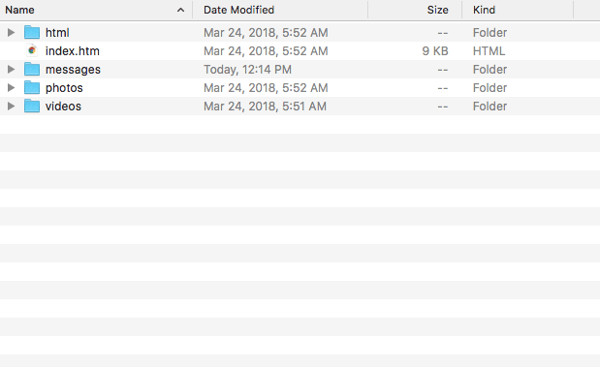
Open the general “index.htm,” and you’ll see a quick snapshot of all the data available on you, ranging from your general profile to advertisers who have your contact information. Here’s what the “profile” section of mine looks like, with a few sections removed for the sake of — this old thing — privacy.
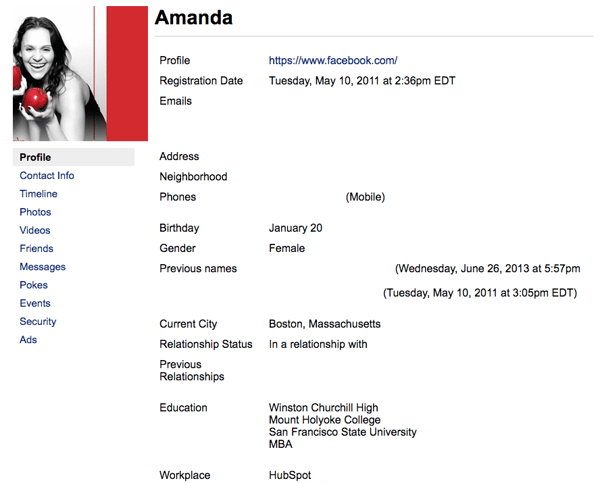
Granted, what was available on this page was largely information I voluntarily supplied to Facebook by way of putting it on my profile, like where I went to school or my birthday.
But it was in the other sections and file folders where things started to get weird — and where I started wondering what potential advertisers or others might be doing with it.
The “Ads” Section
The “Ads” section of my data index file largely consists of an exhaustive list of ad topics that would be of interest to me. Some of them made sense, as they were brands whose Pages I already Liked.
But some of the topics were downright irrelevant and, therefore, befuddling — like “fishing bait” and “organic compound.”
But there was also a section for advertisers with my contact information, many of whom were brands and musical artists whose Pages I hadn’t Liked.
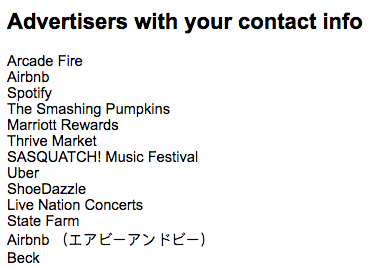
I had to wonder, why do the Smashing Pumpkins and Beck have my contact information? I hadn’t listened to either, really, since my first year of college when — at risk of dating myself — Facebook didn’t exist yet.
It raises questions about just how accessible this information is, and how widespread the availability of our data might be. While likely an especially bad actor, I’m inclined to believe that Cambridge Analytica isn’t alone in the way it allegedly synthesized Facebook user data to get to the root of what sort of promoted content and messaging would resonate most with people.
It’s also unclear how to selectively remove that data, if at all — which could be a valuable next step for Facebook, says HubSpot Product Lead Daria Marmer.
“Facebook now needs to take the next step and make data deletion from its platform as easy as data access,” she explains. “After all, shouldn’t it be at least as easy to remove your history/personal information as it is for advertisers to access it?”
Messenger Records
That became particularly salient when I discovered that my Facebook data includes a transcript of every Messenger interaction I’ve had, replete with any photo or video files I may have shared in those conversations.
Again, this might not be new. In an April 2014 earnings call, Facebook CEO Mark Zuckerberg noted that as part of the social network’s ongoing efforts to personalize any content seen by a given user, it would take “a couple of different approaches towards more private content as well.”
In the context of the full remarks, it would appear that Zuckerberg was referring to content promotion in these private conversations — namely, those taking place on Messenger and WhatsApp (also owned by Facebook).
Recently, it seems that those plans are increasingly coming to fruition, by way of in-app ads on Messenger (see below image) and the proposed Messenger Broadcast feature.
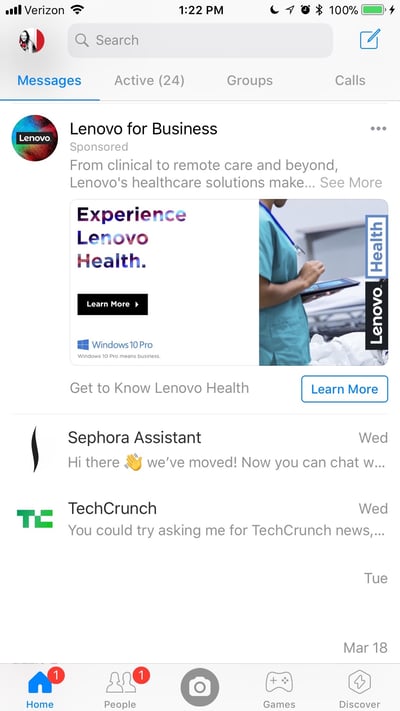
At the time, Facebook COO Sheryl Sandberg positioned these efforts as going strictly toward displaying Facebook content that users would be “genuinely happy to see.”
But to this day, and among recent events, it remains unclear as to what data is, was, or would be used to help target the “private content” Zuckerberg alluded to — though some believe that any user data authorization, including the kind that eventually led to the alleged misuse by Cambridge Analytica, would include Messenger data and files, too.
This personal revelation comes among recent allegations that, on Android devices, Facebook may have been scraping data on calls made and text messages sent from users’ mobile devices — through the device itself, not the Messenger platform. Here’s what that logged activity looked like for one Android user who discovered this record in his own data file:
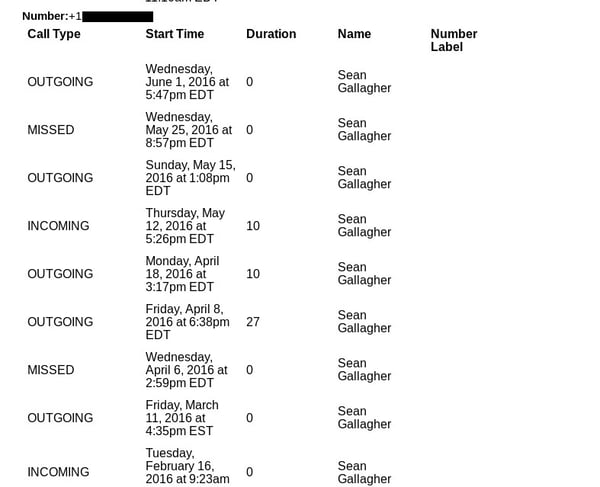
Source: Ars Technica
Facebook’s response to this allegation is that users must explicitly opt-into allowing Messenger to access contacts and, it seems, log call and text activity. According to a statement published Sunday:
“When you sign up for Messenger or Facebook Lite on Android, or log into Messenger on an Android device, you are given the option to continuously upload your contacts as well as your call and text history. For Messenger, you can either turn it on, choose ‘learn more’ or ‘not now’.”
But according to Ars Technica writer and editor Sean Gallagher, that’s not the experience shared by all Android Users.
Even though he never installed Messenger on the Android devices he’s used, Gallagher says that after installing Facebook on his Nexus tablet and Blackphone 2 in 2015, his own archive includes call data from between 2015 and 2016. That’s after, he says, never receiving “an explicit message requesting access to phone call and SMS data.”
Where We Go From Here
If nothing else, it seems that no one is quite sure how, exactly, personal Facebook user data is being leveraged, whose possession it might be in, and how much information those who have it might be privy to.
“Tech companies have access to an insane amount of our data — you can even see for yourself on Facebook and Google exactly what they collect,” says Henry Franco, HubSpot’s social campaign strategy associate. “My guess is there are a ton of Cambridge Analyticas out there, and people would be horrified to realize how many companies are using their data to gently nudge their decision-making processes.”
Which is why Facebook’s own investigations might not be enough.
After several days of silence on the initial Cambridge Analytica data misuse allegations, Zuckerberg finally issued a statement on the matter last Thursday, and has been on an active interview and apology circuit since.
Case in point: full-page mea culpa ads in the Sunday editions of the New York Times, Washington Post, and Observer (which is published by Guardian, an outlet Facebook threatened to sue before it first reported on the Cambridge Analytica scandal).
Facebook took out full page ads in the NYT, WSJ, WashPost, and 6 UK papers today https://t.co/kMA822kTpU pic.twitter.com/CUEYwyWuTT
— Brian Stelter (@brianstelter)
March 25, 2018
But there have been a few key, repetitive themes underlying Zuckerberg’s remarks. The first is an emphasis on the words “I’m sorry,” which were notably absent from his official written statement released last week.
The second is Zuckerberg’s suggested willingness to appear before lawmakers and other authorities to testify on user data and privacy — if, as he told Recode, he’s “the person who has the most knowledge on it.”
And since the Federal Trade Commission confirmed today that it is non-publicly investigating Facebook among its “substantial concerns about the privacy practices,” Zuckerberg should be prepared to testify — especially since he’s been called upon to do so by members of the Senate Judiciary Committee (along with the CEOs of Google and Twitter).
Statement by the Acting Director of @FTC’s Bureau of Consumer Protection regarding reported concerns about @Facebook‘s #privacy practices: https://t.co/n0eMCspNzO pic.twitter.com/WTjXz0YTGR
— FTC (@FTC)
March 26, 2018
It all leads to an increasingly likely outcome: that Facebook and its Big Tech counterparts will have to bow to the external regulation that it’s been visibly dodging for quite some time.
After allegations first came to light that Facebook was weaponized by foreign agents to influence the 2016 U.S. presidential election, for example, many wondered if the network instituted its own onslaught of new rules to avoid facing those from lawmakers.
Zuckerberg says he’s not entirely opposed to that outcome, saying in an interview with CNN last week that “I’m not sure we shouldn’t be regulated.” But if that is the end result, Facebook likely won’t be alone in facing that new level of oversight, as implied by the aforementioned invitation to appear before lawmakers alongside executives from Google and Twitter.
And where such regulation is going to have the greatest ripple effect, says HubSpot Director of Strategic Partnerships Kevin Raheja, is advertising.
“Facebook, Twitter, and Google will be subjected to, and also adjust to the regulations, likely at the expense of some revenue,” he says. “They will likely have to be selective with advertisers, particularly politically-charged messaging … not just to protect users, but also their own integrity and their own perceptions.”
The timing also closely aligns with the GDPR coming into force in May. “With Zuckerberg being asked to testify in front of Congress,” says Franco, “one could wonder if we’ll see similar data regulation in the U.S.”
This is a developing story that I’ll monitoring as it unfolds. Questions? Feel free to weigh in on Twitter.

10 Universal Writing Rules from The Onion’s Founding Editor
“If you want to create a great piece of writing, you have to be in total control of the reader’s experience,” said Scott Dikkers, The Onion’s founding editor and longest-serving editor-in-chief.
Dikkers held the position from 1988 to 1999, then from 2005 to 2008, and again from 2011 to 2013. He’s also a screenwriter and a #1 New York Times best selling author with more than twenty books to his name.
During his tenure, The Onion evolved from a local print magazine in Madison, Wisconsin, into a satirical juggernaut. Today, it’s a globally renowned media house with nearly 20 million social followers and over 10 million monthly visitors.
We were speaking over the phone. I was interviewing Scott to better understand his approach to writing, the process he uses to engage and connect with readers.
“The reader is a puppet and the writer is pulling the strings,” said Dikkers.
“The writer’s job is to manipulate the reader’s emotions, to push their buttons — and if you don’t know what you’re doing, you’re never going to succeed, whether you’re writing satire or anything else.”
Needless to say, if anybody knows how to write great content — content that readers can’t help but to consume, share, and come back to again and again — it’s Scott Dikkers. He grew The Onion from a seed in the dirt to a brand that commands attention around the world.
This article is about the writing principles that enabled his success.
Scott Dikkers, On Writing
The Onion is a humor publication. Its content is satire. That is, the jokes have something to say about the world, about society, politics, and people with power.
Over the years, Dikkers has punched up and published thousands of articles that have made readers laugh — and think. And like any professional editor, he’s maintained his standards by following a set of guidelines.
In his book, How to Write Funny, Scott details his process, explaining how to create hilarious writing at an elite level. And while some of his techniques are specific to crafting jokes, many are also applicable to any writing discipline.
Dikkers and other talented humorists are playing by the same engagement rules as are copywriters and content marketers.
In other words, the tenants of humor writing are transferable to lead-gen articles and columns, landing pages and emails, web pages, video scripts, and speeches.
Because every writer’s goal is identical: control the reader’s experience.
When you have control, you have leverage to deliver the message in an engaging and compelling way, a way that sells. And whether you’re selling a product or a service, a belief system or a joke, following these writing principles will help you reliably hook, engage, and compel readers.
Ready for a master class? Let’s dive in …
1. Concept is king.
“What’s going to make your content stand out?”
For a long time, The Onion was a physical weekly newspaper distributed for free on the street. So, in the early days — before anyone cared enough about the brand to seek it out — the success of every issue hinged on the strength of its headline.
“I knew we had to grab people’s attention with the concept, the headline,” said Dikkers. “I knew we had to put the joke first so that people were laughing before they even picked up the paper.”
Decades later, the internet has only reinforced this principle.
“We live in an attention economy where there are billions of online articles to read,” said Dikkers. “But when the headline really speaks to you — when it addresses a personal problem or promises to answer a burning question — you’re going to click it. You’re going to read that article.
“Your concept — and I would equate that with your headline or title — is the flag you’re raising, it’s the shingle on your door. And if it’s not a good concept or the right concept, then you’re sunk before you’ve even written a word.”
How do you know what the “right” concept is? Start with your target audience:
What pleasures are they seeking?
What pains are they trying to assuage?
2. The key to quality is quantity.
“Basically, 95% of everything we create is garbage.”
When The Onion grew to about six or seven staff writers, each one was expected to bring 20 headlines to a weekly brainstorming meeting.
“We quickly realized that the quality of our ideas increased with the number of ideas people brought in,” said Dikkers. “When you have six high-performing comedy writers coming up with 20 ideas each, you’re gonna walk away with a dozen headlines that are just solid, I mean really funny — and that practice is still in use at The Onion.”
Today’s team examines several hundred headlines every week, picking only a dozen or so for publication. Late-night talk shows follow the same strategy: selecting their best monologue jokes from a place of abundance.
“This is how professionals work,” said Dikkers, “because they understand that most of what they write is dreck.”
3. Omit needless words.
“The shorter the better.”
Superfluous words take up space, slow down the reader, and dilute the message.
“Any time I edit a joke, I look for ways to reduce,” said Dikkers. “Cutting even a single syllable can make the joke punchier, better.
“But this applies to all kinds of writing because when you trim the fat, you get to the core of your message. And sometimes, after you’ve cut everything, you could realize that you weren’t really saying anything at all — and while that realization might be sad, it’s also very valuable.
“Because if you don’t have a message, why are you writing in the first place?”
4. Ruffle some feathers.
“This is how your message will stand the test of time.”
Satire is divided into a couple categories, which are based on two ancient Roman satirists: Juvenal and Horace.
Horatian satire, generally, is not offensive. It’s acceptable to all strata of society because it’s relatively gentle and light-hearted, designed to amuse people and get a laugh. It’s foolish and innocent and superficial, like a court jester.
Juvenalian satire, on the other hand, pushes buttons. It addresses perceived social evils, poking holes in the status quo. It defends the marginalized and speaks truth to power. It’s bitter and dangerous and important, like 1984.
“Thing is, Horatian satire isn’t really remembered because it’s toothless,” said Dikkers. “It might get a lot of laughs today but it’s not going to live in our cultural memory. Only satire that angers or offends people will be remembered.”
What is your content’s message? What’s your goal?
5. Don’t fall in love.
“Kill your darlings.”
If you get so attached to an idea (e.g., a headline; a turn of phrase) that you’re unwilling to 1) hear feedback on it and 2) move onto something new, then you’re “in love.”
This happens a lot, especially to new writers with a small body of work. After all, the less work you have to your name, the more weight each new idea holds.
“When a writer has just one idea, it causes their soul to feel crushed when someone critiques that idea in a way that makes them doubt it,” said Dikkers. “They link that idea with their personality and, in turn, take any feedback as a personal slight against them.”
Avoid falling in love with any one idea. It’s unproductive, a distraction that’ll keep you from giving the audience what they want or need.
Serve your readers, not yourself.
6. Be specific.
“Detail almost always makes writing better.”
Specificity doesn’t necessarily call for verbosity. Instead, it demands clarity: crisp imagery that uses one or more of the five senses to paint a mental picture.
The Catcher in the Rye, for example, is saturated with specificity:
He came over and stood right in my light. “Hey,” I said. “I’ve read this sentence about twenty times since you came in.”
Notice how Salinger gives the reader incredible context — how he illustrates a clear physical and metaphysical image — using only a handful of words.
“Whether you’re writing humor or anything else, the same rule applies: use specific detail,” said Dikkers. “These little pieces of specific detail are critical because they help the author paint a picture that enables the reader to feel an emotion.”
And almost all writers should strive to conjure an emotional response, as it’ll compel people to take action: to laugh, to hit the like button, to take out their credit card and make a purchase.
7. Proofread.
“It’s a mode of conveying professionalism.”
Mistakes, even little ones, set something off in an editor’s brain — and it’s never anything good.
“When it comes to submitting — because many people get jobs in comedy by submitting a packet of jokes or sketches — you might’ve done all the hard work of learning how to write comedy and you’re perfect for the job,” explained Dikkers, “but if you don’t take the time to proofread it for grammar and spelling and syntax, there are plenty of other qualified, hilarious people who will. And they’ll get hired.
“Proofing your work is an easy way to increase your chances of achieving your goal, whether that’s connecting with readers or getting a life-changing job.”
8. Show, don’t tell.
“You’re going to be so much more effective at engaging an audience if you do.”
This concept can tie a knot in your brain because, as a writer, all you do is “tell” the reader things, right? How can you “show” people something by merely using black letters on a white page?
“It’s easy to say, ‘Bob is mean,’” said Dikkers. “That’s telling. You’re telling the reader what the character’s traits are. But if you show the character’s traits, it’s so much more engaging for the reader. So, instead, you’d say, ‘Bob just stabbed a baby through the heart!’”
Using an example, analogy, or any number of literary devices is just a better way to communicate information. It paints an image that conjures a feeling, an emotion — and that’s what readers want.
“If you want to write engaging content,” said Dikkers, “you need to take one step back, hide your message, and instead just show what you think and feel. Let the audience get there on their own.”
9. Make it accessible.
“Your writing needs to be understandable to just about every level of reader.”
If your writing is too dense, too complicated or confusing, most people won’t read it. As a writer, the onus is on you to compel people to read.
“Your work needs to reference things that people can understand without caveats or prerequisites,” said Dikkers. “It should be an easy-on ramp to the superhighway of your writing.”
Authorial intent, or the need to interpret the underlying meaning of an author’s work, has no place in the attention economy. As a 21st century writer, your priority is to ensure the audience understands you — and if they don’t, it’s your job to think, How can I make this more clear?
10. Know your joke and make sure the reader knows your joke.
“Always be in control.”
When you give a speech, you’re supposed to say what you’re going to talk about, then you talk about it, and then, at the end, you tell the audience what you talked about. In other words, be explicit. Make sure your point is unambiguous.
Of course, this principle applies to all writing.
“As a humor writer, you have to know your joke’s subtext,” said Dikkers. “You have to know what funny filters you’re using to elucidate that subtext and how you’re organizing your joke to make sure the audience is laughing at the right thing and time.
“You need to control as much of the experience as possible in order to make it all work.”
This is also true for copywriters and columnist, novelists, screenwriters, and playwrights. In fact, writers in every discipline must understand their topic, their audience, and the purpose behind their work.
Without that information, the puppeteer is pulling strings in the dark.
“Here’s the thing, Eddie,” said Scott.
I turned up the volume on my phone.
“Readers want to know they’re in the hands of a master who is going to manipulate them,” he said, “the way Spielberg does in his movies. He takes you on a ride, through the highs and lows.
“Audiences love that. Readers love that. They want to be taken for that ride.”
Want more world-class writing advice from Scott Dikkers? Click HERE to preview his book, How to Write Funny, one of the best writing manuals I’ve ever read.

The Ultimate Guide to Instagram Filters
Instagram isn’t a new platform, but it changes so often, sometimes it’s hard to keep up.
You might have some questions: how can I add the new geofilters feature to my Instagram Story? Can I use my Snapchat filters on my Instagram pictures? What’s up with this new update — how do I even apply a filter anymore?
Whether you’re an Instagram pro and stuck on choosing the best filter, or an Instagram beginner and not sure how to even apply a filter, you’re in luck. Here, we’ve covered everything from the most popular filters in the U.S., to how to use Instagram filters and even how to use a Snapchat filter on Instagram. Get ready to take your Instagram images to the next level.
Most Popular Filters
There’s a reason most of us turn to our friends to ask, “Which filter should I use?”
With 25 Instagram filter options, it can be tough to choose one. A filter can change the whole mood of an image, and it can even lead to more likes and comments. So wouldn’t it be helpful to know which filters the majority of the U.S. likes best?
Luckily for you, Canva recently analyzed the filters of over one million Instagram photos to figure out which filters are most popular.
Next time you’re in decision-paralysis over an Instagram filter, take a look at this list of the top eight Instagram filters below.
What are the most popular filters on Instagram?
- Clarendon
- Gingham
- Juno
- Lark
- Mayfair
- Sierra
- Valencia
- Walden
1. Clarendon

2. Gingham

3. Juno

4. Lark

5. Mayfair

6. Sierra

7. Valencia

8. Walden

How to Use Instagram Filters?
Using Instagram filters is relatively simple. After opening the app and either taking a picture or uploading your own, tap “next” and then tap the filter you wish to apply. You can also adjust the filter’s strength by tapping the filter again. When you’re happy with your filter, click “done.”
To use Instagram filters, open the app and either take a picture or upload a picture (or video) from your camera roll.

Tap next, and then tap the filter you want to apply.

If you want to adjust the filter’s strength, tap the filter again.

Click done when you’re happy with your filter.
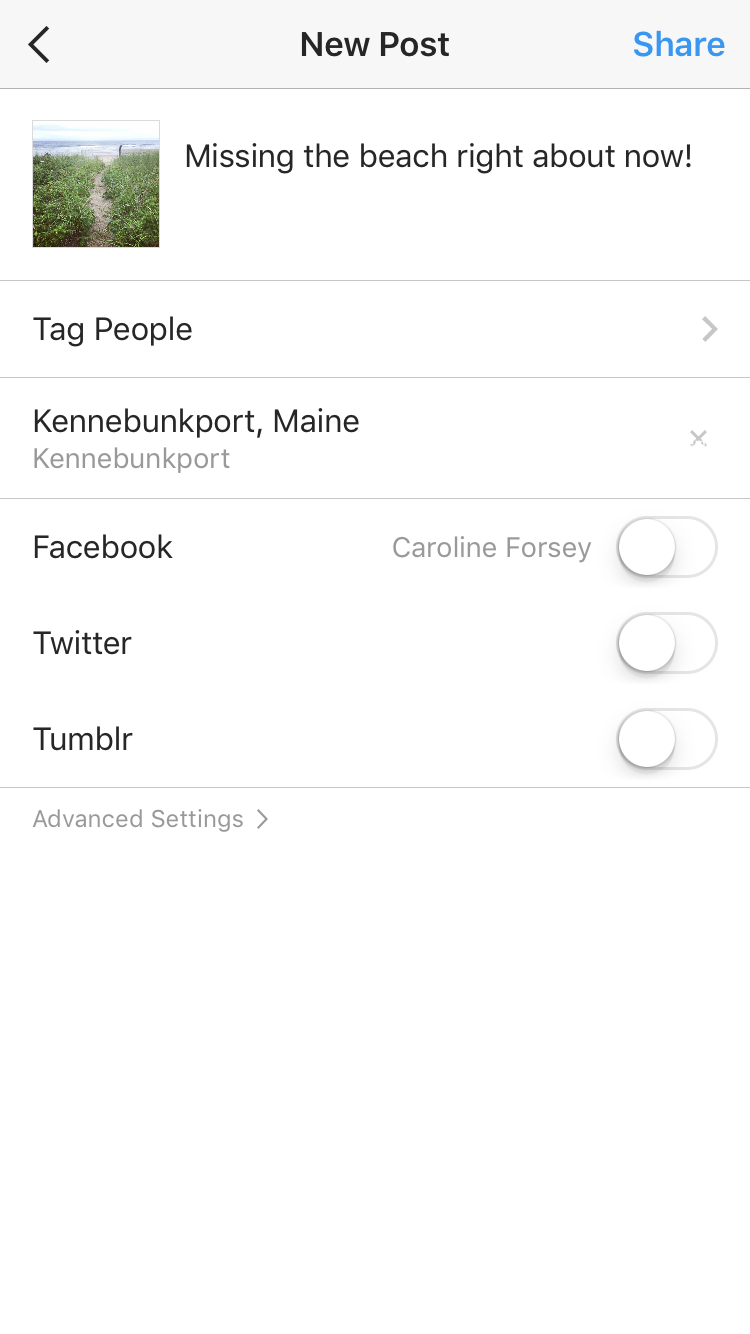 On the next page, you can add captions, tag people, or add locations. When you’re ready, click share in the top right corner.

How to Use Snapchat Filters on Instagram
But what about when you want to use a filter outside of Instagram’s options? Snapchat offers a whole different array of filters, including face filters and animated filters. If you want to show your Instagram audience your goofiest Snapchat puppy-dog face, you’re in luck. Here’s how.
How can I use a Snapchat filter on Instagram?
Add Snapchat filters to your image in the Snapchat app, and then tap the download/save button in the bottom left hand corner. This Snaptchat-filtered image is now saved to your phone’s camera roll. Open the Instagram app and either post the image to your feed, or to Instagram Stories.
When you post a picture to your Instagram story, have you ever been frustrated you can’t add a fun geofilter to the image like you can on Snapchat? Recently, Instagram released its own version of Snapchat’s geofilters, called Instagram “Geostickers.” Right now, Geostickers are only available in New York City and Jakarta, Indonesia, so if you live in one of those places, here’s how you can use the new Geosticker feature.
How to use Instagram Geofilters
Instagram Geostickers are currently only available in New York City and Jakarta, Indonesia. If you’re in one of those cities, take or upload a photo to your Instagram Story, and then swipe up to reveal your Geostickers, Instagram’s version of Geofilters.

The 17 Best Resume Templates for Every Type of Professional
While an eye-catching resume alone probably won’t land you your dream gig, it doesn’t hurt to put a little extra effort into how you present yourself on paper.
The right resume design speaks to your individual skills and personality, and can propel your application to the top of the stack. But finding a cool design that also fits your professional identity can be a major hassle — and applying for jobs is already hard enough.
We’ve scoured the web for some of the best resume templates to help you stand out in a sea of Times New Roman and crowded copy.

You’ll want to steal each and every one of these creative resume templates — and the good news is: You can! These generous designers have made their work available for free download. Read on to check them out and find a great fit for your next job application.
We’ve organized them by the type of candidate they’re best for.
The 17 Best Resume Templates for Every Type of Professional
Best for Creatives
These templates emphasize the design, color, and typography skills that creatives need to show from the get-go.
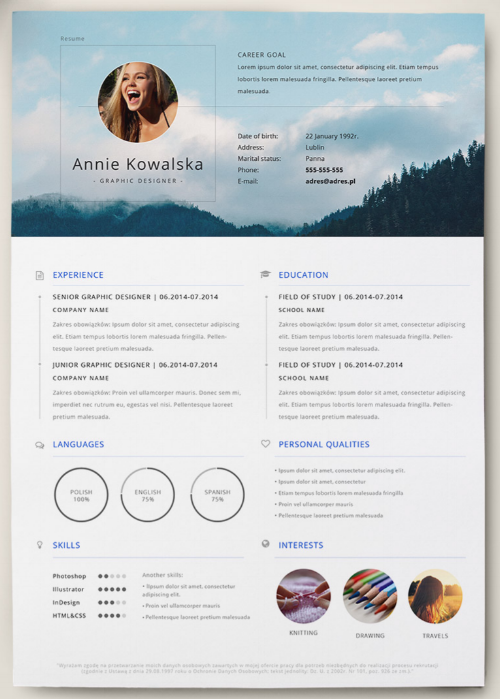
1. Resume Template with a Photo Background
This template from Polish designer Patryk Korycki is perfect for photographers, graphic designers, and other creatives looking to showcase a sample of their best work. The template can be downloaded here for free.
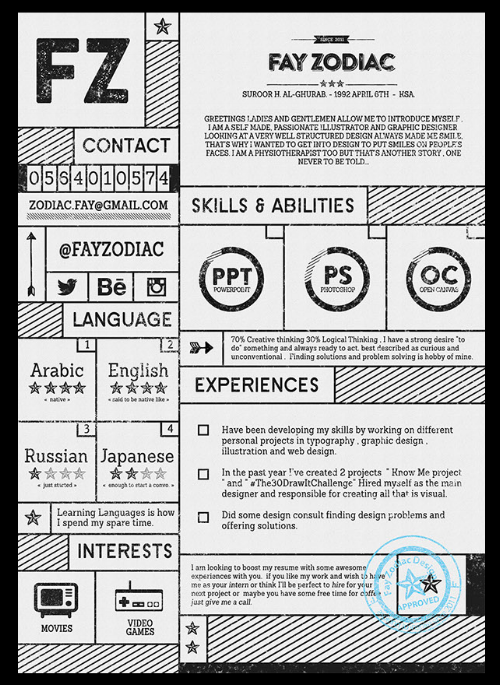
2. Monochromatic and Retro Resume Template
This design from freelancer Fay Zodiac is a whimsical take on traditional resumes. The retro typography adds a playful element, while the boxy layout keeps everything from looking too busy or crowded. You can download this resume design here for free.
3. Vibrant and Visual Resume Template
Alessia Curcio, a Copenhagen-based designer, gives us a perfect example of how to incorporate kaleidoscopic color without going over the top. Infographic-inspired elements help clearly display work experience and skills with minimal text. Download Curcio’s free template here.

4. Infographic Style Resume Template
Created by digital art director and freelance designer Fernando Báez, this unique, infographic-inspired resume template helps you organize your work experience and skills into a minimal visual layout. Báez has made the template available for free download here.

Best for Freelancers
These templates emphasize the headshot photo for freelancers who might not meet their employers in person, and need substantial text space and a visual to offer something memorable.
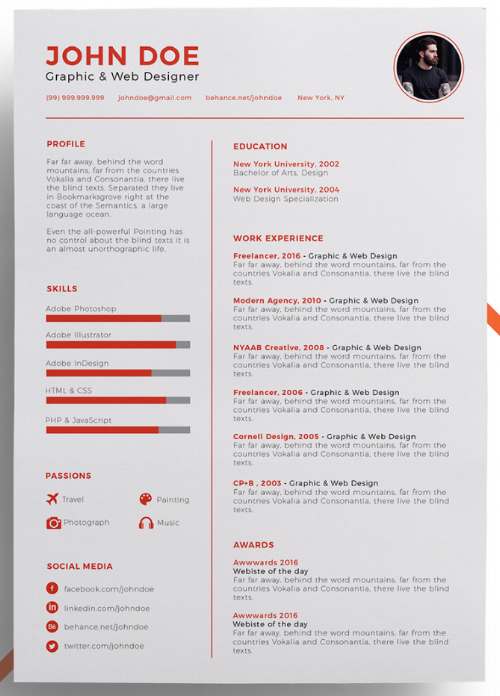
5. Resume Template with a Simple Color Accent
Adding color to a resume might seem intimidating at first — especially if you’re applying to a more traditional workplace — but a few sophisticated pops of color can add some interest without compromising on professionalism. This template from designer Eduardo Ogawa uses bright accents to spice up the traditional layout. You can download it for free here.
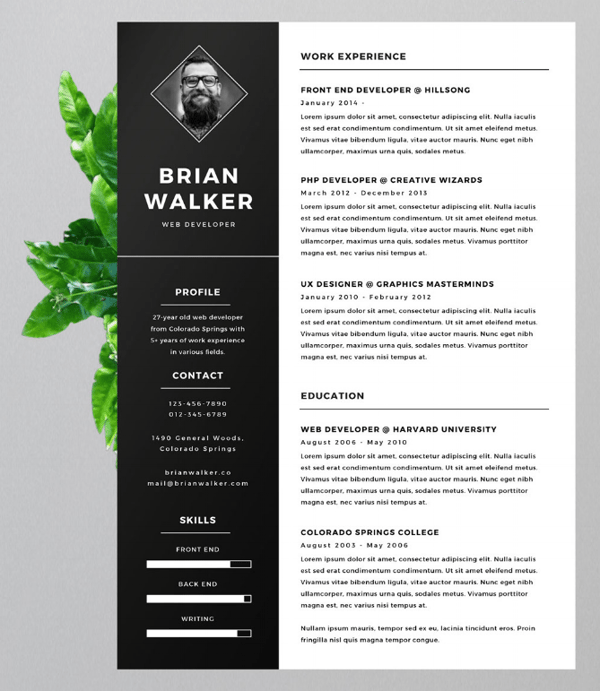
6. Bold Classic Resume Template
If you’re looking for a more traditional resume template that still makes a bold impression, check out this creation from Finish designer Mats-Peter Forss. The template includes space for a headshot, and is available for free download here.
7. Resume Template with Pops of Primary Colors
Proof that color can be professional, this template boasts a compact, sophisticated layout and bright, colorful accents. It also has room for a substantial summary. Designer David Gómez actually uses this resume template himself, and he’s been generous enough to share it for free download here.
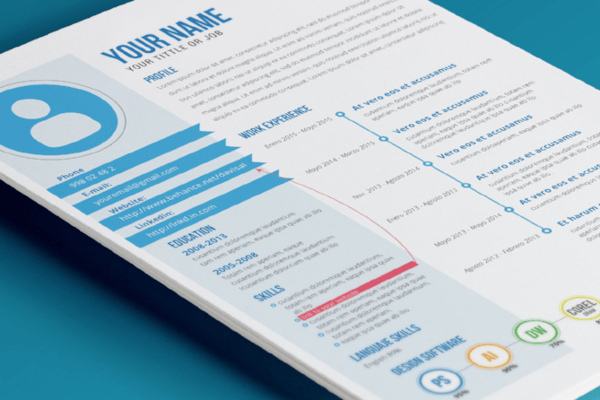
Best for Recent Graduates
These templates make great use of empty space — perfect for students who are still building experience — through eye-catching designs that help these candidates make a splash in their industry.
8. Graphic and Adventurous Resume Template
This is not a resume template for wallflowers. The folks at Createer whipped up this daring design as part of a free resume template pack, which you can check out here.
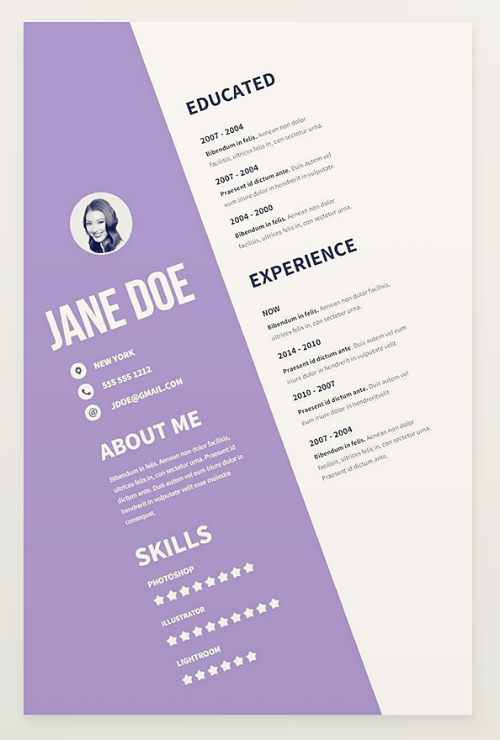
9. Resume Template with an Unexpected Format
If you want to really stand out in a crowded applicant pool, then this resume is definitely for you. Graphic designer and freelance photographer Paolo Pettigiani created this bold template for his own professional use, but has made it available for free download here.
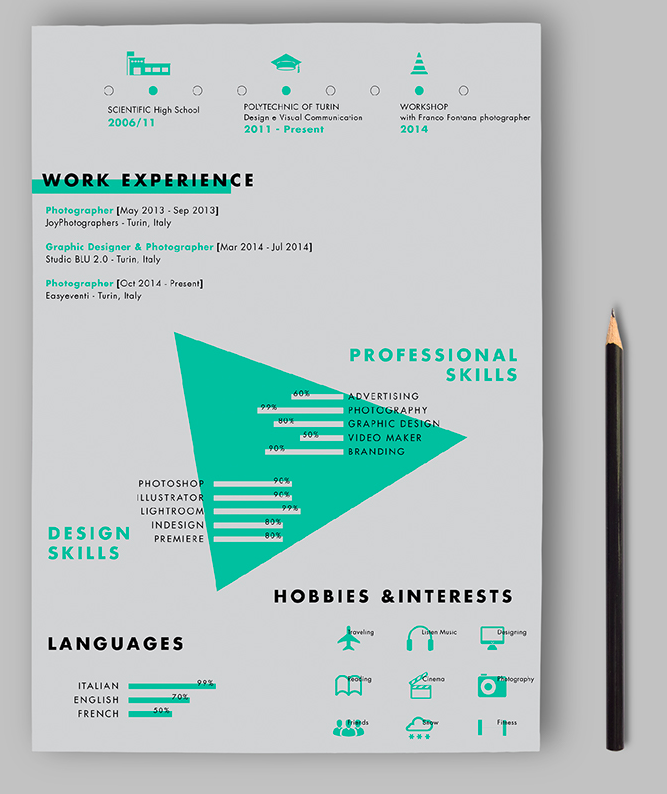
10. Center-Aligned Resume Template
If you want to mix up your resume format without going too crazy, try a center-aligned layout, like this clean, modern design by Zohan Habib. The custom icons and colored border add a nice creative touch. This template is available for free download here.
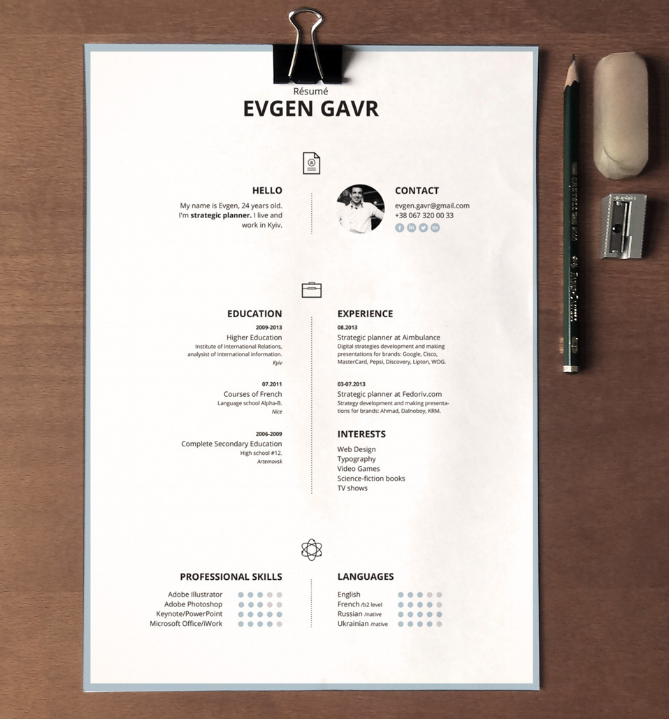
Best for Executive/Upper-Level Professionals
These templates offer ample real estate for candidates to express their deep experience in the plain but formal manner that many employers expect.
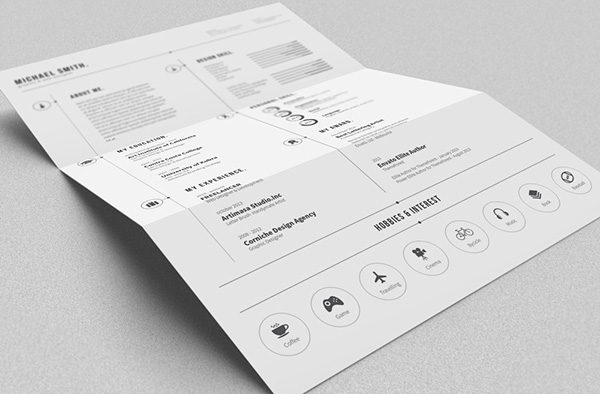
11. Black and White Resume Template
Running low on colored ink? Check out this minimal black and white template from editorial designer Bro Luthfi. The simple design is anything but boring, and includes a set of custom icons to add some visual interest. You can download the free template here.
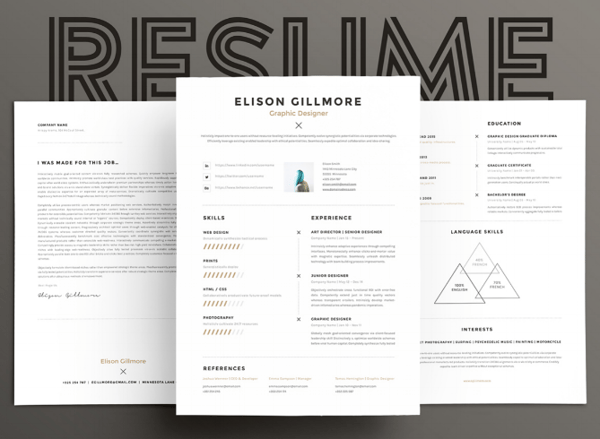
12. Clean and Modern Resume Template
Your resume is really your first impression with a potential employer, and this template design from the team at GoaShape is modern without being too edgy. The template pack includes a two-page resume layout and cover letter design, and can be downloaded for free here.
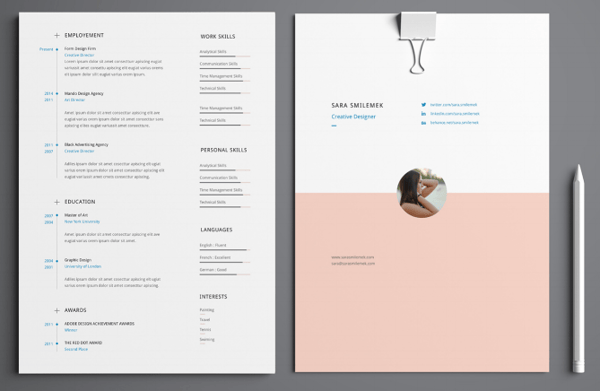
13. Resume Template with Subtle Color Scheme
Beirut-based designer Wassim Awadallah serves up a simple, two-page resume template for more advanced professionals. Displaying the headshot and contact information on the cover leaves plenty of room on the second page to document all your career highlights and accomplishments. Download the template for free here.
Best for People Changing Careers
These templates help those who are changing industries organize their experience by skill, rather than employer. Sections can be customized to the candidate who needs to show how his/her background can transfer.
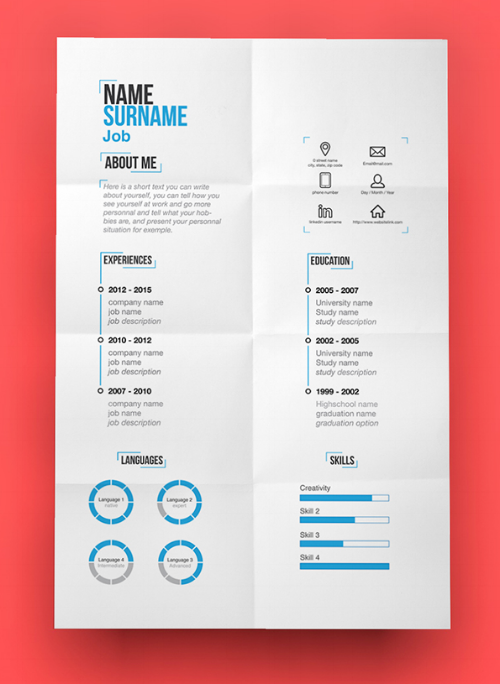
14. Resume Template with an Organized Use of Space
When you’re trying to crunch years of work experience and a laundry list of skills onto a single sheet of paper, things tend to get crowded quickly. This template from designer Tina Von Helsinki invites you to simplify. The distinct sections highlight different aspects of your qualifications — eliminating anything extraneous and putting the focus on what matters to your potential employers the most. Download the template here.
15. Playful and Professional Resume Template
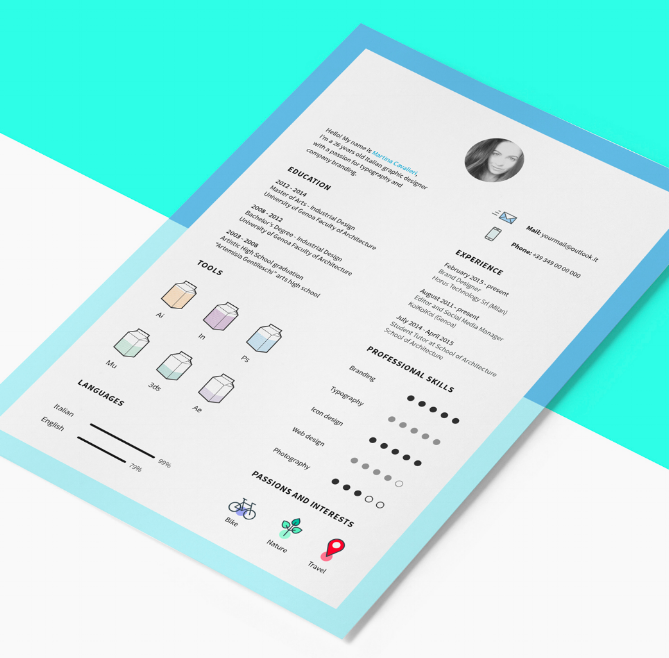
Italian designer Martina Cavalieri created this resume template with a set of 16 custom icons to highlight your interests and skills. The modern layout is anchored by a bold two-toned border: just enough color to help your resume stand out in the pile. Cavalieri offers this template for free download here.
Best for Hardcore Marketers
We couldn’t help ourselves. Although every template in this blog post can work for marketers, the templates below are perfect for those who love to brand themselves.
16. Heavy Header Resume Template
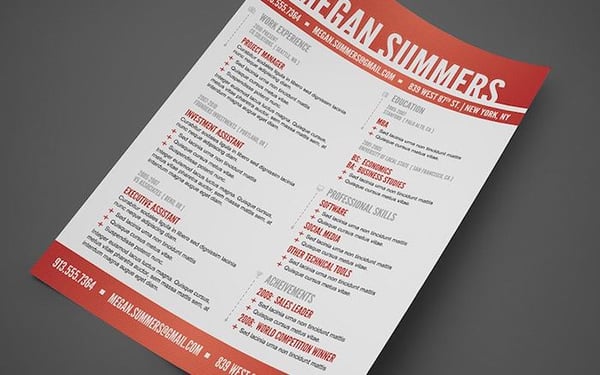
“Hey, you!” That’s what I think of when I see this flashy yet classy template. Made by designer Mike Bradshaw, the resume features a variety of sections without seeming too cluttered. Long first or last names might look overwhelming with this header, but it certainly does a good job conveying a breadth of information. Download it for free here.
17. Profile Style Resume Template
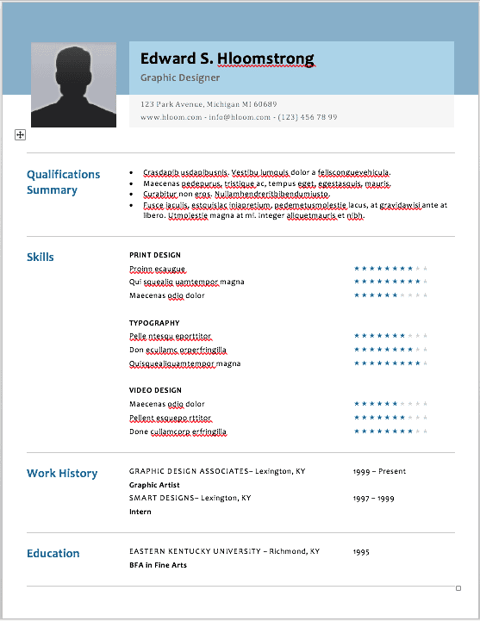
This last resume was actually designed by the company, Hloom, and is rather plain. But there’s something so familiar about it: The resume header looks like a Facebook profile! While Hloom suggests the lengthy skills section could make this template appealing to the IT industry, we think it is equally perfect for digital marketers — especially those who work in social media. Download it for free here.
Didn’t find the design you were looking for? We bet you’ll find an awesome template in this free resume template pack.