
Twitter CEO Live Streams Answers About the Social Network’s Health
Last week, Twitter CEO Jack Dorsey announced the company is soliciting applications from people who’d like to help study Twitter’s health as a platform for conversation.
Or should we say, #health.
Today, the CEO took to Periscope — Twitter’s live streaming video app — with a mobile panel of himself and three of his colleagues who are in charge of the health of the social network.
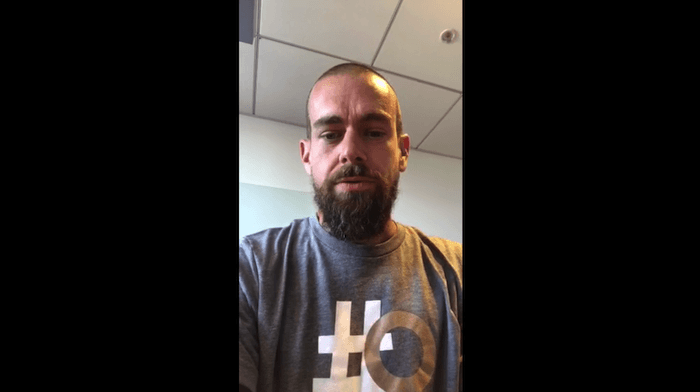
This team included:
- Vijaya Gadde, Head of Legal, Policy, Trust & Safety.
- David Gasca, Head of Product Health
- Del Harvey, Head of Trust and Safety
- Jack Dorsey, Chief Executive Officer
“All of us are a little bit nervous, so give us a little bit of time to find our groove,” a candid Dorsey said before handing the device to Gasca.
David Gasca: How They’ll Measure Twitter’s Health
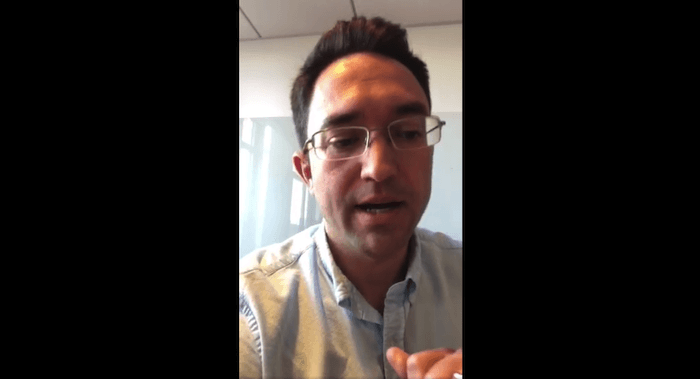
The Product Health lead opened by explaining that they intend to examine the health of the platform “in such a way that is public and accountable,” but also goes beyond simple metrics such as how much engagement certain tweets get from their users.
Gasca stated their efforts were at least partly inspired by research released by Cortico, a not-for-profit that suggested a few basic ingredients of healthy dialogue on social media.
However, according to Gasca, the “density” of certain networks within Twitter, as well as the idea of “social capital” may also play a part in their research.
In that spirit, Gasca said they’re looking for new approaches — both professional and academic — to address what he admitted is a legitimate problem across the Twittersphere. People can submit proposals by April 13 via this blog post, after which time Twitter will contact a set of “semifinalists” for more detail on their proposals.
Vijaya Gadde: Navigating Personal Biases Within the Company

Gadde took the first question from a live viewer who asked if all four employees on the Periscope identify as liberals — and if so, how that might create bias when they scrutinize political commentary on Twitter.
“This is true not just of [many Twitter employees], but of the industry, and of Silicon Valley,” she responded. But, Gadde said, impartiality has always been a priority within Twitter. “We are very much accused of censorship and bias … and it’s important to understand how … the engineers and the teams working on our algorithms may be biased as well.”
This is likely top of mind for many at the company, following an ex-Twitter employee who reportedly deleted President Trump’s Twitter account shortly before leaving the company.
Gadde admitted “everyone has bias” and that they’re using this as motivation to come up with a healthy way forward.
Del Harvey: The Role Health Plays to Future Company Policy

Late into the stream, a question was posed to Del Harvey asking if the concept of health itself should be used as a framework for Twitter’s policies moving forward.
“We’re looking at this … overarching, holistic view of health on the platform,” she explained. “But that’s not the only way we’re going to be continuing to measure our success.”
Still, Harvey said an initiative around Twitter’s health can help reveal necessary connections between business policies, similar to how certain departments can become siloed from one another in the organization. Trademark violations, for example, may have a more visible relationship to intellectual property violations when seen through the lens of product health.
Harvey and Dorsey also heavily covered their treatment of parody accounts, many of which have been shut down for reasons related to their messaging — but are also considered important to the culture of the social network.
“We believe [these parody accounts] add an enormous amount to Twitter, and that’s something we always want to protect,” said Dorsey. Regarding these accounts’ involvement in inflammatory speech, the CEO suggested new types of account verification might come into play as well to ensure that “people know [a certain parody account] is meant to be entertaining.”
The 45-minute Periscope covered numerous other questions from viewers, all of which are sure to play a part in Twitter’s planned study. See the recording of the live stream from Jack Dorsey’s tweet.
Will there be more panels like this one? Dorsey confirms there will be, alluding to “future Periscopes” where he’ll introduce more Twitter staff to speak on this important subject.

How Do You Optimize for Voice Search? Our Experts Weigh In
When Backlinko released its analysis of 10,000 Google Home voice queries — we were fascinated.
After all, we do spend a good chunk of time around here thinking, talking, and writing about voice search. Heck — I even filled my home with three different smart speakers to see which one worked best. And when it comes to the future of SEO, I believe that voice search will only continue to play a fundamental role in how we not only seek and consume information, but also, how Google ranks and surfaces it.
So, the question remains: As this horizon continues to evolve and shift, how — oh, how — can sites be optimized for voice search?
That’s what Backlinko set out to answer when it conducted this study. Using what the team believed to be 11 potential ranking factors — things like PageSpeed, Schema markups, and the enabling of SSL — founder Brian Dean reported key takeaways on the most significantly factors of voice search SEO.
Now, our experts have weighed in on what we have found to be the most compelling of those findings.
Our Experts Weigh In: Key Findings on Voice Search Ranking Research
1. Page Speed
“PageSpeed appears to play a major role in voice search SEO. The average voice search result page loads in 4.6 seconds (52% faster than the average page).” – Backlinko study
What Our Experts Say: Victor Pan, Head of SEO
When it came to page speed, our SEO experts actually believe it might not play a major role in voice search optimization. “PageSpeed is probably not a [direct] factor in voice search,” says Pan. “But sites that are well-optimized for user experience tend to rank highly, and voice search results tend to come from top-ranking results.”
That said, it would be interesting to conduct further research to determine if these same faster-loading sites — the ones that receive better voice search rankings — also have higher search engine results page [SERP] rankings. “Drawing conclusions without proper experimental setup is something our industry tends to do,” admits Pan, “though I’m for faster sites, all the time.”
2. HTTPS and SSL
“HTTPS websites dominate Google’s voice search results. In fact, 70.4% of Google Home result pages are secured with HTTPS.” – Backlinko study
What Our Experts Say
Each night, Moz tracks the most significant SERP features and ranking factors in its MozCast Feature Graph — and, as of writing this post, HTTPS results (sites with enabled SSL, or the Secure Sockets Layer technology that encrypts your website connection so hackers can’t intercept your data) accounted for 79.8%.
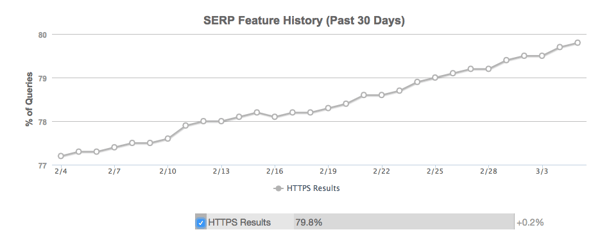
Source: Moz
In other words, Pan explains, Moz tracks the SERP for 10,000 keywords, nightly — and of all the sites ranking for those 10,000 keywords, within the top 10 results, 79.8% of them are HTTPS.
“If we believe in Mozcast’s keyword sampling methodology, 70.4% of Google Home results pages being in HTTPS discovered during Backlinko’s research is actually on the low side,” says Pan, especially when you consider “not all of those queries tested by Moz necessarily lead to voice search results.”
So, when you compare Backlinko’s voice search HTTPS results figure (70.4%) with Moz’s (79.8%), it actually suggests HTTPS is not a ranking signal for voice search, Pan explains.
“If it was,” he says, “the number from Backlinko would be higher than the average reported by Moz.”
3. Answer Length
“Google prefers short, concise answers to voice search queries. The typical voice search result is only 29 words in length.” – Backlinko study
What Our Experts Say: Matthew Howells-Barby, Director of Acquisition
“This makes a lot of sense to me,” says Barby. “Google is likely taking a very similar approach to sourcing voice responses as it does to Featured Snippets.”
That was the same conclusion we drew when it was announced Google would soon be incorporating more than one Featured Snippet in the SERP for more complex queries.
And that display of more Featured Snippets in the SERP could indicate a higher barrier to earning clicks, especially if the snippets answer the query sufficiently enough the user doesn’t need to look — or click — any further.
Marketers, for their part, would benefit from preparing for that outcome. “Content creators should be adding voice-ready — and featured-snippet-ready — snippets into their content,” Barby explains, “to make it as easy as possible for Google to surface the answer they need.”
4. Schema Markups
“Schema may not play a key role in voice search rankings. 36.4% of voice search results come from pages that use Schema (which is only slightly higher than the worldwide average of 31.3%).” – Backlinko study
What Our Experts Say
Here’s another finding that doesn’t come as a shock to Barby.
“Similarly to the length of answers being pulled into voice responses, the lack of reliance on Schema markup doesn’t surprise me,” he says.
He points to a recent HubSpot study that found the same thing to be true for Featured Snippets.
“It seems like Google prefers to rely on its AI to surface the right result,” he says, “rather than the creators of content.”
5. Authoritative Domains
“Authoritative domains tend to produce voice search results significantly more than non-authoritative domains. In fact, the mean Ahrefs Domain Rating of a Google Home result is 76.8.” – Backlinko study
What Our Experts Say
For reference, the Ahrefs Domain Rating measures “the strength of a target website’s total backlink profile (in terms of its size and quality)” on a scale of 0-100.
That scale is what Ahrefs calls “logarithmic,” which means the room for growth between Domain Ratings of 77 and 78 is much larger than one between 27 and 28. So, the higher the Domain Rating, the more difficult it becomes to gain another point or two.
The reason behind this high Domain Rating of Google Home result pages is smart speakers like this one only provide one answer to your question, rather than the SERP’s list of several.
“This means that Google needs to be extremely confident that they’re giving you accurate information,” the Backlinko report explains. “And to help ensure accuracy, the voice search algorithm may rely on domain authority over page authority.”
But that doesn’t mean small businesses who are still building backlinks and authority should give up on optimizing for voice search, Pan says.
“As someone who worked on SEO for the Fortune 500 companies, these large companies simply had the budget and talent to spend millions in content creation,” he says. “I suspect that sheer quantity of content — which is helpful for users — leads others to link to these big brands they trust.”
That doesn’t mean those brands are authoritative in their domain, per se, says Pan — and that the wider-spread brand recognition might be behind this “advantage in winning voice search,” he explains, which “is what’s causing the average voice search result to have a high Ahrefs Domain Rating.”
6. Social Sharing
“Content with high levels of social engagement tends to perform well in voice search. In fact, the average voice search result has 1,199 Facebook shares and 44 Tweets.” – Backlinko study
What Our Experts Say
“I think that this is a classic case of simple correlation,” says Barby. “Google doesn’t use social shares to rank content. They’ll use social shares to improve crawling — just share a link on Twitter to see that — but not to determine authority.”
“The reality is that most content that gets large volumes of backlinks tend to also get large volumes of social shares,” he continues. “The backlinks will be the element that is moving the needle for ranking is search — not the social shares.”
7. Linguistic Simplicity
“Simple, easy-to-read content may help with voice search SEO. The average Google voice search result is written at a 9th grade level.” – Backlinko study
What Our Experts Say: Padraig O’Connor, Associate SEO Marketing Manager
When we prompt voice assistants to answer a question, we don’t exactly expect (or want) to be read a novel in response. That’s why Google Home, for example, often reads excerpts — or snippets — best summarizing the answer, then leaves a link to the full page in its corresponding app.
It would make sense, then, that Google Home selects the most concise answers that are easiest to read and hear, to allow for optimal listening comprehension. “Simple and easy-to-read content is ideal for voice search,” says O’Connor.
It goes back to the idea of growth within the idea of conversational marketing: the type that uses natural language to engage with users, even if there isn’t an actual human being responding to queries.
“Most people converse in a language that’s easy to understand,” O’Connor adds. “Google wants to do the same with the searcher at the other end of Google Home.”
To address that, he recommends marketers write copy accordingly. “Marketers should ensure that their content is written in a language similar to the way people converse and search.”
8. Title Optimization
“We found that very few voice search results had the exact query in their title tag. Therefore, creating individual pages for each voice search query doesn’t appear to be an effective voice search SEO strategy.” – Backlinko study
What Our Experts Say
“At HubSpot, we’ve found that optimizing existing content for new Google SERP features is much more effective than creating a net new piece of content,” O’Connor says. “Our best advice to publishers is to tailor their existing content for voice search, rather than create brand-new articles for voice search alone.”
You might be familiar with HubSpot’s historical optimization project, in which the type of work O’Connor describes is done internally. But he cautions against optimizing for a single type of search. While voice queries might be rising in popularity and volume, many still use other methods of discovering information.
“Ultimately, you want to solve for all types of search,” he says, “be it desktop, mobile, or voice — and not pigeonhole yourself to one particular type.”
9. Parallels Between Desktop and Voice Search Results
“Content that ranks highly in desktop search is also very likely to appear as a voice search answer. In fact, approximately 75% of voice search results rank in the top 3 for that query.” – Backlinko study
What Our Experts Say
Aha! So, O’Connor was right. Even though we expect to see a continued increase in voice queries, desktop still matters.
It goes back to what I noted earlier about the simplicity of any query answer that comes in the form of an excerpt or snippet. That’s one of the things Google has used to determine how to float and rank results: the combination of quality and relevance, even if it means displaying more than one Featured Snippet in the SERP.
As for Barby, these findings don’t come as a surprise.
“Ultimately, Google is still going to be relying on its core ranking factors to determine which of the many relevant results it should surface as the voice result,” he says. “The big difference in voice search is that there’s no longer a ‘page 1 of Google’ — it’s one simple result or nothing.”
10. The Featured Snippet: Full Circle
“Appearing in a Featured Snippet may help you rank in voice search. 40.7% of all voice search answers came from a Featured Snippet.” – Backlinko study
What Our Experts Say: Brittany Chin, Growth Marketer
Backlinko’s discovery of a correlation between the Featured Snippet and voice search responses is somewhat similar to its findings on positive outcomes for brevity and listening comprehension. As I noted before: That’s why Google Home, for example, will often read an excerpt — or snippet — that best summarizes the answer, and then leaves a link to the full page in its corresponding app.
Chin’s research corresponds to this finding. “In a majority of cases, Featured Snippets are there to answer question-based queries in the SERP,” she says. “Google is trying to surface the best and most direct answer to the question right within the results page, which is the same thing it’s trying to do with a question-based voice query — but only get one shot at the answer.”
Chin also notes the goals of the Featured Snippets and voice queries are essentially one in the same: “to answer a question.”
“As for Marketers and SMBs,” she continues, “the strategy for both is fairly similar –continue creating helpful content that answers your audience’s questions in a simple and understandable way.”
Featured image credit: “Google Home device in front of closed blinds” by NDB Photos, used under CC BY / Cropped from original

How Does the Instagram Algorithm Work?
To understand how Instagram’s algorithm works, it’s important to consider the purpose behind it: the algorithm aims to delight you. If it doesn’t show you interesting and engaging content, you’ll exit the app.
The algorithm needs to keep you scrolling.
How does the Instagram Algorithm work?
When deciding how high your post should show up in someone else’s feed, the Instagram algorithm measures how quickly your post attracts engagement, and evaluates the relationship between your account and your audience’s accounts. Engagement on prior posts, direct shares, and even Instagram Stories can also affect where your post shows up in a feed.
Prior to 2016, Instagram’s algorithm was pretty straightforward: posts were ordered chronologically, regardless of engagement. If I posted a picture of a vanilla latte 10 minutes after my friend posted a picture of her engagement ring, my picture showed up first.
But in March 2016, Instagram implemented a major change to the algorithm, pivoting away from the chronological feed and moving towards an experience based more on user engagement They explained, “People miss, on average, 70 percent of their feeds. As Instagram has grown, it has become harder to keep up with all the photos and videos people share. This means you often don’t see the posts you might care about the most.”
The chronological algorithm couldn’t ensure you’d be continuously delighted. To keep you engaged, the algorithm started to take into account factors like which accounts you like best, which posts you engage with the most, and which posts were attracting the most likes and comments from your friends.
To help you better understand how Instagram’s current algorithm selects posts to display at the top of your feed, let’s take a look at the specific factors taken into account. Hopefully, this information will equip you to deliver higher-quality, more visible Instagram posts.
It’s All About Engagement
First off, let’s take a look at what happens the moment you post a picture on Instagram. Why do some of your posts stay at the top of your audience’s feeds for hours, while others, seemingly identical in quality, disappear from everyone’s feeds within minutes?
The answer is engagement.
How Instagram’s Algorithm Uses Engagement to Evaluate How Many People See Your Post:
- When you first post a picture, it’s shown to a small percentage of your audience.
- Instagram measures how quickly that photo is engaged with, commented on, and liked.
- Instagram will compare the engagement your picture is getting to other posts you’ve shared at similar times and days. For example, is this Monday 10 a.m. post getting more or less traffic than last Monday’s 10 a.m. post? It would be unfair of Instagram to assume your post is less popular if it compared your post to another one you posted at a more popular time of day, so it compares similar times to ensure accuracy when it’s evaluating the quality of your post’s engagement.
- If your photo is attracting a lot of engagement, Instagram will show it to a higher percentage of your audience, and maybe even surface it on the Explorer Pages.
- If your post continues to attract a lot of engagement, your photo will stay at the top of your audience’s news feeds and reach more people.
- If your photo doesn’t attract a lot of engagement initially, it will get pushed further down the page, and less of your audience will see it.
Relationships Play a Big Role
Now that we’ve explored how Instagram’s algorithm uses engagement to determine what percentage of your overall audience sees a post, let’s examine the factors that influence the order in which posts appear on a user’s feed.
Not only is this good to know from a business’s perspective, but it’s also interesting to know as a user. If you think you’re suddenly seeing too much of one person or one company on your feed, here’s why:
The Five Factors Instagram’s Algorithm Evaluates When Deciding How High Your Post Will be on Someone’s Feed:
- Your relationship with the person. If you regularly comment and like a person’s posts, Instagram will understand you have a stronger relationship with this person, and will make sure you keep seeing this person’s posts.
- Timing. Although your feed isn’t quite chronological, for reasons like “relationships,” it still wants to show you new and relevant posts; it won’t just keep showing you your best friend’s posts from three weeks ago.
- Likes and comments. Although Instagram does not want the algorithm to become a popularity contest, it will consider how many likes and comments a picture has when deciding what to show you.
- Direct shares. If you’re sending posts to your friend, it’s a sign you really like those posts, so Instagram will show you more in the future.
- Profile searches. If you search for someone’s profile, Instagram has a clue that you want to see this person’s posts.
How to Get Your Posts Shown Higher on Your Audience’s Instagram Feeds
We’ve covered how Instagram’s algorithm works and which factors Instagram considers when deciding which posts to show you. Finally, let’s take this information and explore how you can use it to get your posts higher on your audience’s Instagram feed.
Tips for Getting Your Posts Shown Higher on Instagram:
- Post your pictures when you know your audience is on Instagram (try using Squarelovin to figure out when your audience is most active).
- If you have a business account on Instagram, check out your Instagram Insights page to see which of your posts are most popular. This is a good indicator of which types of posts you should replicate, and even which time of day attracts most engagement.
- Create “human” posts your audience will enjoy and get value from. Instead of creating an advertisment for your business, consider what your audience will engage with.
- Make Instagram Stories. Instagram takes note of this engagment, too (for example, if someone replays your story, comments or shares it, or votes on a poll, your business could show up in his feed next time).
There you have it! A full rundown of how Instagram’s algorithm works, which factors Instagram considers most important, and how to take all that information and use it to promote your brand in a stronger, better, more engaging way.

How to Know if You’ve Been Hit With a Google Penalty (And How to Fix It)
Every marketer has a story about getting penalized by Google.
Although many websites have evidently been punished (not just by big algorithmic updates, but also by one of the 400,000 tiny manual actions Google takes), the average marketer or webmaster hasn’t noticed when they have. According to Kissmetrics, only 5% of penalized websites are submitting a reconsideration request every month to recover their rankings.
What Is a Google Penalty?
A Google penalty is a punishment against a website whose content conflicts with the marketing practices enforced by Google. This penalty can come as a result of an update to Google’s ranking algorithm, or a manual review that suggests a web page used “black hat” SEO tactics.
Since we’re all reliant on search engines for traffic, we have to stay informed of the latest algorithm updates — and make changes if we’re subject to a Google penalty. Not only is it good practice to keep abreast of the latest patches, but it gives you a competitive advantage if you can optimize your content faster than other web domains.
Thankfully, there are plenty of tools and insights out there to help even the busiest marketer watch out for these silent traffic killers. Keep reading to learn about the latest Google search criteria, a handy Google penalty checker, and how to know if you have a Google penalty against your website.
Step 1: Review These Recent Google Algorithmic Updates
Google has a 15-year history of updating its algorithm, not just to reward the internet’s best content, but to deliver the most appropriate content for a given search query. For a glimpse of this intruiguing timeline, check out this infographic that breaks down the history of algorithm updates.
Below are some of the most recent and significant updates to keep in mind if you think your content is getting hit with a Google penalty:
Panda (2011)
There were updates before Panda, but this was the first massive pain in the neck for websites. Its purpose: to crack down on websites containing poor/error-laden content, excessive ads, and possibly primitive design.
This was rolled out in stages, and released its last patch in July 2015.
Secure Update: (2014)
As website hacking becomes more sophisticated and people are more aware of the risks, it is important to assuage those doubts by motivating webmasters to invest in SSL security, which affords domains the “HTTPS” at the beginning of the URL (as opposed to “HTTP”). This is critical if you require personal and financial details from your online visitors.
If not, Google may intercept a user with an “are you sure?” page if he or she clicks on an unsecured search result.
Mobilegeddon (2015)
Preference is given to websites that are “responsive” in design — or scalable to mobile devices. Unsurprisingly, having a website that is readable and navigable on a handheld device as well as desktop is preferred by visitors.
This update sounds more aggressive than Pengiun and Panda, but it’s super helpful to publishers who put mobile first.
Penguin 4.0 (2016)
Penguin first launched in 2012 as a way to combat genuine spam rather than sites that are legitimate but poorly made. Penalties focused on keyword stuffing, cloaking, link building … basically, any method you’ve heard of referred to as “black hat.”
As of 2016, its fourth version punishes bad links instead of the entire site — helping rehabilitate web domains that might still have good intentions behind them.
Intrusive Interstitial Penalty (2017)
Google opened 2017 by doubling down on its commitment to mobile. This update punishes websites with interstitial ads and other pop-out content that can hinder a page’s functionality on a mobile device.
Not every ad-heavy website will suffer, but those that severely affect the user experience can be the next to lose their rank.
These updates are not one-offs. They are reinforced every year to keep up with copyright violations, unwanted content campaigns, and similar black-hat techniques — and to make sure their searchers are increasingly satisfied with their results.
Step 2: Audit Your Website for These Black Hat SEO Failures
I know you don’t have time to examine every manual action Google has ever performed. I also know if you’re reading this, you probably want your users to have a good user experience.
With that in mind, here’s a brief list of things that might cause low website traffic due to a manual action Google took to further enforce its search criteria. Any one of these could help you determine if you have a Google penalty against your website:
- The majority of your content contains pop-out ads.
- Your content is keyword-stuffed.
- You have short-form content, often unedited for quality and errors.
- You haven’t localized site content that caters to global visitors.
- You’ve engaged in bad link-building practices to increase page authority:
- “Cloaking” keywords across your page so users can’t see them.
- Buying excessive backlinks to your website.
- Your content has inherited backlinks from adult, gambling, or otherwise low-quality pages.
- Your website doesn’t have a legitimate security certificate (HTTPS).
- You’ve republished content from other websites without permission.
- Your website has a high load time or poor appearance on mobile devices.
Step 3: Find Out If You Have a Ranking Problem
First of all, diagnosing the issue is key. Without knowing what Google penalty you’ve been hit with, you can’t optimize against it. Back in October 2014, for example, most people thought they were dealing with a Penguin update, but it was in fact an extended Panda update.
Here are a few tips to help you properly diagnose the issue:
Use a penalty indicator tool to find out what’s happened to your website in the past, and if you have yet to recover from it.
A fast and simple tool to drop this knowledge bomb on you is this succinctly titled Website Penalty Indicator.
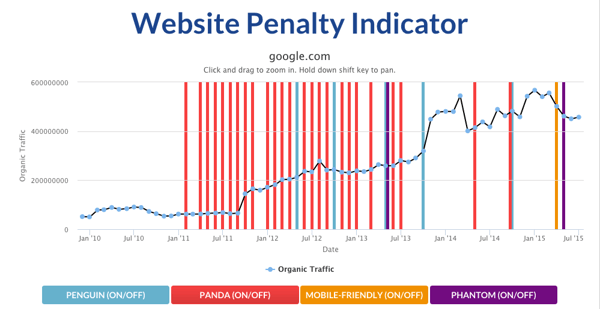
This Google penalty checker from FEInternational can show you which of the major Google penalties hit you and at what point they reached your website. (Of course, to be cheeky, I tried out “www.google.com” to see what would happen.)
However, you’ll notice that this tool focuses on the most significant algorithm changes, and not all of the little manual ones in between. To examine those updates, you’ll need to follow the next step.
Use tools like SEMrush to find out if you’ve been penalized by one of Google’s updates.
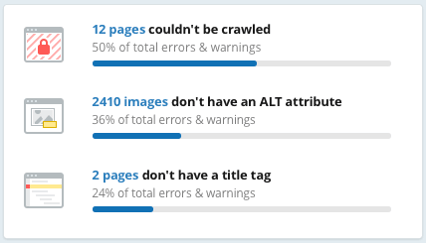
By using tools like SEMrush, you can perform a complete site audit and check how your position has changed in SERPs, check your backlinks, and analyze your content.
Step 4: Identify the Google Penalties to Optimize Against
This section was contributed by Elena Terenteva, Content Strategist at SEMrush.
The best thing you can do for your website is to avoid penalties in the first place. Website owners who break SEO rules risk manual penalties or being seriously harmed by algorithm updates. When a website is hit with a penalty, it’s more than likely due to one of the following reasons:
- A lack of knowledge on behalf of the SEO specialist
- A purposeful violation of basic SEO principles
- The use of various black-hat techniques
But if you have been hit by a penalty, how you’ll figure out the root cause will depend on what kind of penalty it is.
If a website gets a manual penalty, the owner will be notified through Google Webmaster Tools and receive a letter explaining the reasons for its failure. This means the website owner will at least have an idea of how to recover and can begin working on the suggested changes.
If your website is hit by an algorithm change, the situation becomes slightly more difficult. You need to find a correlation between Google’s last actions and your website’s losses.
Don’t forget that website position and traffic losses can be caused by general problems and may have nothing to do with algorithmic changes. If you do find that you were harmed by a specific algorithm change, get all the information you can about that update so you can start to resolve the issue.
Of course, all of us want to avoid being hit by a penalty in the first place. If you want to be prepared, I recommend consistently running SEO audits. Here are a few things you can do:
- Remove or disavow unnatural or spammy links manually.
- Be sure that your anchor text is diversified.
- Get rid of all duplicate content.
- Create non-keyword-stuffed, quality content.
- Keep an eye on UX.
You can also see some of these tips for avoiding a penalty visualized in this infographic.
Remember that the best strategy is to avoid penalties before Google even crawls your content. SEO isn’t just about trying something new. It’s about constantly monitoring the success of your historical efforts.
Although avoiding penalties may seem like building a house of cards that may collapse at any minute … well, that’s kinda the way it is! That’s why it’s important to ensure that your website is up-to-date, helpful, and trustworthy.


4 Signs You’ve Found an Informed Candidate
In the search for top talent, every recruiter prefers an informed candidate. Why? Informed candidates make the hiring process easier by asking smarter questions, doing the necessary research on the company, and tailoring their expectations to the role they’re applying for.
So how can these job-seeking unicorns be spotted? Here are a number of indicators that will show you that you have an informed candidate in your application pipeline — for more, download the Ultimate Screening Checklist.
1. They Came as a Referral
Every year, employee referrals top the list as a source of new talent for employers — in 2016, 30 percent of all hires were a result of employee referrals, according to the Society for Human Resource Management.
This is no accident: employee referrals are one of the most reliable sources for informed candidates. One reason for this is that your employees share your goal in wanting to recommend a good candidate — it makes them look good, brings in their friend or acquaintance to the company and sometimes even gives them a bonus for a successful referral.
In addition, referred candidates are often better informed because they have a friend who can fill them in on the ins and outs of the company, both before the interview and during the onboarding process. Referred candidates also save hiring time in the long run: multiple studies have shown that referred candidates have a higher retention rate — a 2015 study in the Quarterly Journal of Economics showed that in high-tech jobs, referred candidates are 26 percent less likely to quit.
2. Their Resume Is Tailored to the Job Description
In today’s digitized job application process, candidates can send out a flurry of job applications with just a few clicks of a button. High-quality candidates, however, will spend time tailoring their resume to fit the company and the specific job description. One place to look for this is in the candidate’s statement or objective section.
Statements that are bland and can apply to any job show a lack of thoughtfulness, while a statement that clearly is aligned with the goals of the company and the role that is being asked for is a clear sign you have an informed candidate on your hands. In addition, the presence of relevant industry keywords shows that they are familiar with the industry and know how to use the terminology.
3. They Understand the Role
Having an understanding of the role that they’ve applied to saves time for both the candidate and the employer. The applicant’s resume and cover letter, as well as the questions they ask during the interview, are the best places to see that they have thought about how their experience qualifies them for each specific aspect of the role. At the same time, it is your duty as an employer to follow best practices for writing a job description, and make the duties and expectations for the role as clear as possible.
4. They Ask Intelligent Questions
Before coming in for an interview, any competent candidate should have done their research on the company — if they have, it will likely show in the questions they ask you. Asking informed questions shows that they have both invested time in bulking up their knowledge of the company and getting to know the company on a deeper level. Bonus points if they bring up recent company news or product developments!

Unriddled: The Tech News You Need, Explained
Hello, everyone. Welcome to Wednesday.
Allow us to introduce “Unriddled” — the HubSpot Marketing Blog’s mid-week digest of the tech news you need to know.
This week, we’ve got stories from Google, Amazon, Instagram, and more. So when the volume of stories of these has you asking, “Hold up. What just happened?” we’re here to break it down.
It’s tech news: explained.
Unriddled: The Tech News You Need
1. Finally: An iMessage Extension for the Google iOS App
Google announced this week that the iOS Google app will now support an iMessage extension: the horizontal list of icons that allows users to integrate app functionalities with messages sent from iOS devices.
The integration, which is currently only available in the U.S., allows users to share locations, general search results, GIF images, videos, and local business listings in messages — even to those who don’t use iOS devices.
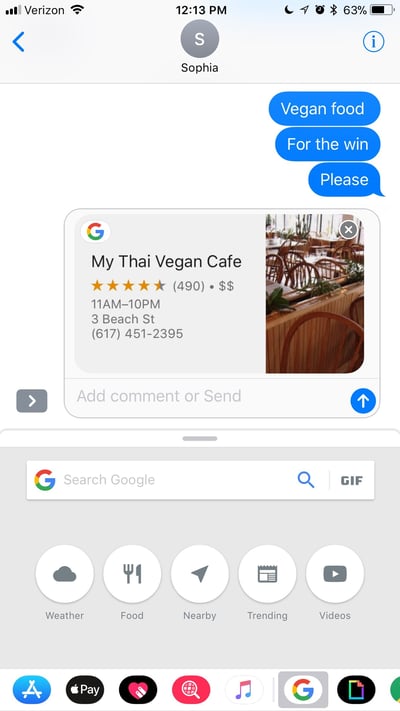
In addition to those capabilities, the new integration with iOS also allows users to drag-and-drop text, images, and links between the Google app and others, like iMessage or Notes.
For example, according to the official announcement, to share something like an article you’re reading on the Google app, all you have to do is tap and hold the link to drag it into iMessage — though our team had trouble getting that function to work properly.
It’s a move among what some might describe as a contentious relationship between Google and Apple, with the two often appearing to one-up each other with product releases and announcements. The integration is a welcome feature for iOS users, and for those who are watching the competition between Google and Amazon play out in a less-than-user friendly way — more on that in a bit.
2. Google Has Sold Zagat
Google’s 2011 purchase of Zagat, the legacy restaurant review guide, was one of the search engine giant’s first forays into the realm of local businesses and the ratings of them.
Yesterday, it was announced that Google would be selling Zagat to The Infatuation, an online restaurant review site that, in a sense of irony, has claimed that it will bring back the print editions of Zagat guides — which were discontinued last year.
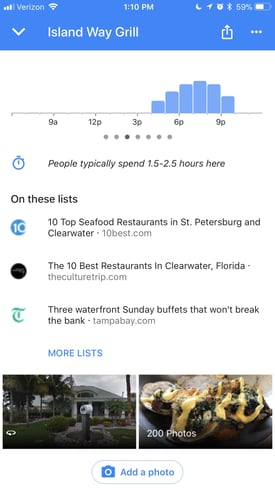
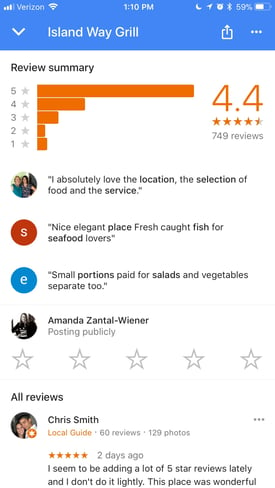
It’s a move that practically indicates that Google has grown out of a need for a separately-branded restaurant review system, as its own version seems to have taken shape on Google Maps and Google for Business listings.
When users tap on a restaurant listing on Google Maps, for example, they can read reviews left by other Google users, and see third-party reviews and list rankings that were pulled into the business listing.
Google originally purchased Zagat for $151 million. The purchase price for The Infatuation has not been disclosed.
3. Instagram Could Soon Be Unveiling Its Own Portrait Mode
For those who did not care to spend upwards of $800 for a mobile device with built-in “portrait mode,” take heart: Instagram may soon be unveiling its own feature with the same capabilities.
As first reported by TechCrunch, Instagram could be launching an in-app Portrait Mode imminently — which means that even if you didn’t opt for the phone that’s equipped with Portrait Mode for selfies, Instagram can provide similar technology for you.
But it’s not exactly new. According to these reports, the setting has actually existed within Instagram’s code for some time, and was discovered when a member of the TechCrunch team was picking apart the app’s APK (which stands for Android Application Package: essentially an .exe file, but for Android devices).

Source: TechCrunch
What’s not clear is how users can execute this feature now, before (and if) it’s officially released. But it’s a nod to a trend on behalf of many social media networks that emphasize a native content experience — one that allows users to capture, share, and engage with content without leaving that particular channel.
This move could be headed in that direction — allowing users to capture portrait-quality photos and selfies within Instagram, and without having to re-upload them to the app after taking them on their respective device cameras.
4.Reddit Admits It Was Used to Spread Election-Related Propaganda
In a public letter penned by CEO Steve Huffman, Reddit admitted to learning that Russian propaganda was shared by “thousands” of users on its network during the 2016 U.S. presidential election — most of them unknowingly.
While Facebook, Twitter, YouTube, and Google have continued to face scrutiny for the weaponization of their own networks to spread misinformation, Huffman wrote that Reddit’s involvement wasn’t so much about ads. Rather, it was about (largely American) users sharing this type of content — “content from accounts we suspect are of Russian origin or content linking directly to known propaganda domains” — without realizing where it originated. That’s also the case when Reddit users share content of the same nature that was originally posted on Twitter — the kind of issue that Huffman described as “indirect propaganda … the most complex.”
Using the example of Twitter account @TEN_GOP, which is now known to be of Russian origin, he explained that tweets from that account “were amplified by thousands of Reddit users.”
Huffman concluded the letter by noting that Reddit would be “cooperating with congressional inquiries,” though the nature of those inquiries is not immediately clear.
As of writing this post, Reddit has not been publicly asked to testify before any congressional committees, or submit any materials and evidence.
The full text of Huffman’s letter follows.
In response to recent reports about the integrity of Reddit, I’d like to share our thinking. from
r/announcements
5. Amazon Isn’t Going to Sell Nest Products Anymore
Last week, when Amazon announced its acquisition of Ring — which manufactures things like connected doorbells and in-home cameras — many felt a storm coming. Amazon would be entering the smart home realm, and other players in the market would likely experience a ripple effect.
Among them would be Google, the parent company of Nest: a smart home company that produces, among other things, connected doorbells, in-home cameras, thermostats, outdoor cameras, and smoke detectors. Not long after the Ring acquisition was announced, Amazon claimed it would no longer carry or sell Nest products.
It’s a power play by Amazon that has been described as “dumb” and “anti-consumer,” and has some wondering if it violates antitrust laws, though that seems unlikely to most an anti-regulation administration.
But attempts to edge out competition is not exactly a new move for Amazon, as it continues to foray (often by way of acquisition) into a growing number of new sectors, like grocery, healthcare, and now smart home. But it’s not the first, either, as Google has previously taken similar actions, like disallowing YouTube videos from playing on certain Amazon devices.
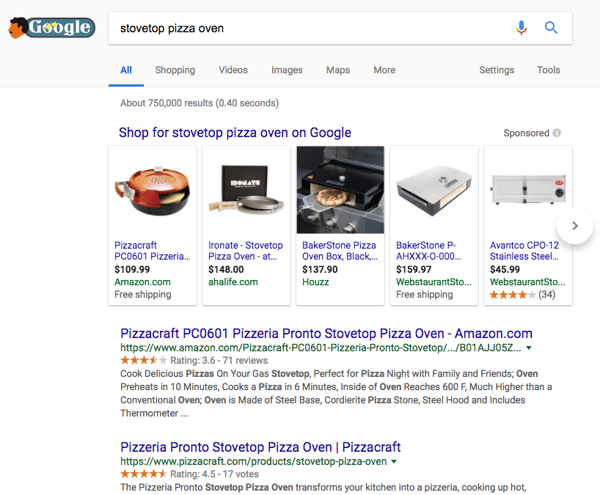
It should be interesting to see how this plays out search-wise, given Google’s origins as a search engine. Currently, Google includes listings from Amazon in its shopping results on the SERP — but considering recent events, it won’t come as a particularly big surprise if that changes.
Other News You May Have Missed
What You Missed Last Month in Google. Being that it’s a shorter month, February seems to have flown by. A lot happened in the world of tech, much of the news coming from Google. We’ve put together another list of the major highlights. Read More »
You Can Apply for Jobs on Facebook Now. Facebook announced a new feature that will allow Facebook business Pages to post jobs and manage applications on its platform. In more than 40 countries, administrators will be able to create job listings directly from their Pages, where they’ll appear throughout Facebook like any other post or ad would: the Page itself, followers’ News Feeds, and Marketplace — as well as Facebook’s new “Jobs” dashboard. Read More »
Facebook Ended Its Explore Feed Experiment. Back in October, Facebook introduced a new initiative to put Page content in a separate feed from content within a user’s personal network. It was one of the first efforts from Facebook to shift its emphasis from advertisers to users — and it would live under what the social media channel called the Explore Feed. Facebook ended that initiative — which Head of News Feed, Adam Mosseri, called “a trial response to consistent feedback” in the official announcement. Read More »
A Disaster Waiting to Happen? Businesses Could Send You Ads on Messenger. In November 2017, Facebook began internally testing Messenger Broadcast: a service for businesses that allows them to send marketing content to users, without building a bot. Last week, the social media platform announced that Messenger Broadcast would be available for testing to select Page administrators in the U.S., Mexico, and Thailand. Read More »
If You Think Twitter Is Unhealthy, You Can Now Apply to Study It. In a series of tweets, Twitter CEO Jack Dorsey announced that the social network would be enlisting the help of outside experts to determine the relative health of Twitter. This likely comes as a result of users who increasingly engage in negative, often hateful conversation on the platform. Read More »
That’s all for today. Until next week, feel free to weigh in on Twitter to ask me your tech news questions, or to let me know what kind of news you’d like us to cover.

5 Tips for Giving Constructive Feedback to a Writer
“I’m not comfortable putting my name on this.”
I received this comment once from a colleague at a previous employer, responding to an article I wrote for him under his byline. But when I dug in, I found that his issue with the piece were a few small errors that were easy to fix. Sweeping remarks like “I don’t like it” were common at that job, and they often arrived with little direction by the author for how to revise.
This criticism was so disheartening, there came a point where I’d actively avoid writing for certain people because of how they expressed their feedback.
The reason my colleague’s comment struck a nerve with me isn’t because I’m a delicate flower who can’t take being told my work is insufficient. It’s because it wasn’t constructive. Feedback to a writer needs to — among other things — highlight the first draft’s specific flaws, its strengths (however few there might be) and the goals of the assignment. Otherwise, the writer has no incentive or means to improve.
This was a guidepost for me when I worked as a content editor, and being on the other side of the writer-editor relationship showed me just how valuable good feedback can be to a writer’s motivation and final product. The problem is, even if your intentions are good, feedback can still come across as aggressive or confusing to a writer if it’s not delivered, packaged, or expressed correctly.
Whether you’re reviewing the work of a ghostwriter, freelance writer, or even a direct coworker, here are five tips I’ve picked up as both a writer and editor on giving constructive feedback to the people who create content for you.
1. Comment on the Good Qualities First
I can attest to how tempting it is to end a business relationship with those who only mention what you did wrong. Harvard Business School found a similar trend: In a study of 300 U.S.-based employees, a person was 44% more likely to disassociate from a colleague who gave them feedback that was more negative than the recipient’s self-evaluation.
So, how do you call out the bad parts of someone’s work without sounding like a jerk? Start with the good parts. Introducing feedback on a piece of content with what it does well accomplishes three things for the writer:
- It fuels their motivation to approach revisions and new assignments.
- It gives them a vantage point for where their work fell short.
- It tells them what’s working and what they should keep doing.
If you struggle to find strengths in a writer’s first draft, don’t be afraid to broaden the subject of your praise. For example, if an article on search engine optimization (SEO) is full of advice based on an outdated version of Google’s algorithm, clarify that the writer was right to include such a thorough variety of SEO tactics, as this will make the final article that much more valuable.
2. Call Out a Recurring Mistake Right Away
As a copy editor, I had a bad habit of waiting 10 articles before telling a writer about a mistake they kept making. It was just easier fixing it myself instead of sending it back to them — so easy that I eventually forgot I’d already fixed these things in previous content. Unfortunately, this became exhausting, and when I finally informed a writer of an error, it didn’t go over well.
Don’t follow younger Braden’s example.
No matter how easy it is in the short term for you to correct chronic flaws in a writer’s work, you’ll eventually want them to learn the right way of doing it in the first place. But when you wait multiple occurrences before flagging the issue, you can cause a lot of confusion. “Why now?” The writer might ask you. “Do you have a new style guide that enforces this?” An awkward “er … not exactly” is sure to follow.
In addition, failing to call out issues in their work right away compromises their trust in your feedback. If you want a writer to listen to your feedback, you need to be honest about their mistakes, 100% of the time.
If you notice a recurring error in a writer’s work, address it on-sight. This solves the problem before it becomes a habit and makes the writer more attentive to the guidelines of their assignment.
3. Provide a Style Guide or Cheat Sheet
Speaking of guidelines, give your writer some. Even if the only editorial parameters you have in place are the Associated Press (AP) Stylebook or the Chicago Manual of Style, make sure this material is in your writer’s hands.
Stylebooks enable your writer to refer to this material instead of reaching out to you every time they’re unsure of something. It also allows you to back up any constructive feedback they might be skeptical of directly via official directions they already have in their possession.
Does your writer’s assignment call for project guidelines that are more complex or specific than AP or Chicago style? Package these heavier guidelines into a PDF ebook that you can distribute to new content creators as they join your ranks (get some ebook design templates here). Here’s one idea:
Use these templates as way to organize the company-specific editorial issues and questions you know will come up frequently.

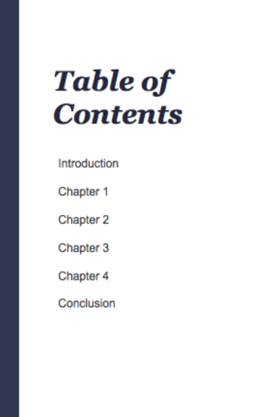
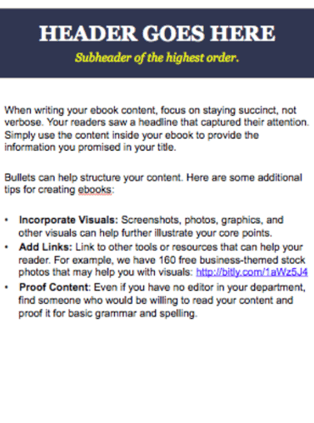
Here are a few ideas of what you might include in such a guide:
- Target audience. Who’s your intended readership? Outline your target buyer persona here so your writers can make sure everything they create benefits this person.
- Product info. How should writers refer to your products or services? Details could range from spelling, to capitalization, to which writing topics are associated with which products — ensuring any calls to action are directed toward the right conversion paths.
- Competition. Who are your competitors? List each one, and detail how you prefer they be referred to (or not).
- Tone. What tone should your writers take in their writing? Company blogs need to distinguish themselves by talking in a way that resonates with their audience. You might compare your tone to a real-life figure and their style of speech to make a tone guideline more concrete. Perhaps they’re especially formal — or somewhat snarky.
In addition, take this opportunity to include company exceptions to either the AP or Chicago style guides. Professional writers tend to base their writing style on one of these stylebooks, so use this as a benchmark for your writers as they create content, but don’t hesitate to include exceptions as you see fit.
For example, AP’s stylebook forbids use of the oxford comma (the last comma in a list of three or more items), but you might decide you prefer having it throughout your website. Note exceptions like these in your cheat sheet.
4. Include Edits With Your Revision Requests
Which YouTube video would you rather watch: Someone describing how to play guitar, or someone holding a guitar and demonstrating each chord? The latter, right?
The same goes for feedback on writing. When pointing out a weakness in the text, offer a sample fix.
For example: Let’s say you’re reviewing a post that links out to various sources, but none of those hyperlinks use the name of the source as their anchor text — a policy of yours in this hypothetical situation. Don’t just describe the issue the way I just did; call out the problem and then fix it for them in a comment once or twice so they know what you mean.
According to Moz, “anchor text” is the clickable word or phrase attached to a hyperlink (see what I did there?).
Going out of way your way to suggest a fix not only gives the writer context for the errors you’ve identified and help correcting them, but it also shows you’re genuinely interested in seeing a successful final draft — to the point where you’ll put in some sweat and effort of your own.
5. Supplement Written Feedback With a Verbal Introduction
When I was a freelance writer for an SEO agency, I had minimal contact with the editor, and that made it difficult for me to find encouragement in the tone of their written comments. By contrast, I regularly met my editor in person while writing for an environmental company and I was always motivated to execute on each request for revision.
Calling or video-chatting a new freelancer — or even an in-house hire you won’t meet with regularly — is more important to a working relationship that you might think. Doing so for a new writer establishes a rapport and shorthand that can go a long way toward the writer’s cooperation and understanding as you begin to assign more work to them.
It also makes them more comfortable calling or approaching you if they’re unsure about a piece they’re working on. This can prevent long periods of email tag and ensure both parties stay on task.
After receiving a first submission from a new freelancer, for example, try this:
- Put aside time to talk it over with them in person or on a video-conferencing platform that allows you to share your computer screen.
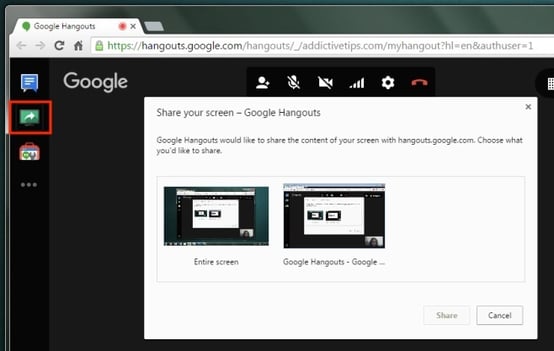
- If you have a Gmail account, Google makes it easy to share your screen on a Google Hangout video chat. See the screenshot below; the red square to the left shows the “share your screen” option — then you select the screen you’d like to share with the writer to the right.
- Chat for a few minutes about work history and other personal topics.
- Then, share your screen with them so they can see your markup of their submission.
- Casually chat through your feedback on the document line by line, regularly pausing for questions or checks in understanding.
Setting the table like this can present you with opportunities to bring your writer’s professional background into your feedback so they better understand your criticisms. Are they also a photographer? Consider how you might translate editorial issues related to clarity and subtext — things that are relevant to photographs as well — for someone who you learn works in more than one medium. It pays serious dividends throughout your business relationship, I promise.
Writers can be quite attached to their words, which means it’s critical that you pick yours carefully. At the same time, even great feedback can lack a few critical ingredients for it to truly benefit a writer. What did you think of this article? Tell me on Twitter (I can take it).

Why the ‘Pivot to Video’ Is Dangerous for Publishers
When I read that the average American spends five-and-a-half hours per day watching video content, I scoffed. Between video explainers on Facebook, Game of Thrones, and Netflix, that average is closer to my daily minimum time spent watching videos.
After all, 2017 is “the year of video” — why shouldn’t people consume more videos, and why shouldn’t creators make more?
As it turns out, there is such a thing as too much video. Publishers like MTV News, which laid off most of its editorial crew last year to focus on video; and Vox Media, which scaled back its video team this year, have seen how hazardous a “pivot to video” can be.


No, not that kind of pivot. I’m talking about the “pivot to video.”
What is pivoting to video? It’s not changing seats on the couch to get a better view — it’s the latest example of marketers and content creators being so eager to adopt a new platform or medium that they ruin it.
What Is a Pivot to Video?
Pivot to video (verb): To decrease or entirely shutter written editorial operations to focus on creating more video content
Synonyms: restructuring, reorganizing, refocusing
If this sounds like a joke … well, the dictionary definition is kind of a joke. But “pivoting to video” consists of publications deciding to focus so entirely on video that entire writing and editorial staff are laid off completely.
It started with MTV News.
You might not be surpised to hear this — after all, the word “television” makes up two of the three letters in MTV. But after an organizational restructuring at MTV in 2015, long-form editorial and video content about politics, culture, and social issues helped improve the network’s ratings and engagement on web properties. MTV News staffed its team with content creators who produced documentary-style videos and 4,000-6,000-word long-form written pieces — most of whom were let go in June of this year, when MTV News “pivoted” to create more short-form music and entertainment video over long-form editorial pieces.
Twitter was flooded with tweets from former employees announcing their newfound employment status, friends calling for publishers to hire them, and content creators from all media decrying — and defending — the strategic pivot.
I’ve been laid off by @MTVNews. I’ll miss seeing my brilliant, talented colleagues, and I look forward to continuing my career elsewhere.
— Jamil Smith (@JamilSmith)
June 28, 2017
.@MTVNews I’m a fan of video. I work in video. But behind strong video, you also need strong storytellers. https://t.co/LBgJZpi9mw
— Traci Lee (@traciglee)
June 28, 2017
I’ve been in digital media for 12 years. One thing I’ve learned is that nobody wants to read anything over 1,000 words. MTV is more proof.
— Andy Gray (@AndyGray35)
June 28, 2017
But the pivot didn’t stop there.
Over the past year thus far, several major publishers have pivoted, structured, reorganized, and refocused on creating video content — at the cost of writers’ and editors’ jobs. Sports Illustrated, Fox Sports, Vice, and HuffPost have all focused efforts on creating short-form video content — and all have laid off writers and editors. One publication — Vocativ — laid off its entire editorial staff “to focus exclusively on video content.”
In fact, “pivoting to video” has become such a ubiquitous term in the digital space that it’s become a joke in and of itself.
Quit doing this. No one wants video. We all read faster than people talk, it eats up data, and you can’t watch video on the toilet at work. https://t.co/cctmoHKiwz
— Peter Lynn (@Peter_Lynn)
July 21, 2017
the WH communications department is pivoting to video
— Gideon Resnick (@GideonResnick)
July 31, 2017
How’s that video push working out for everyone? – Vox Media Lays Off 50 Staffers, or 5% of Workforce https://t.co/wha3GyOVjo via @variety
— Merrill Barr (@MerrillBarr)
February 21, 2018
Fast-forward to this year (no pun intended): Facebook announces it will reduce brand and publisher content on its users’ news feeds, and Vox Media lays off 50 video producers across Racked, Curbed, SB Nation, and other online properties in its portfolio.
With respect to social media, snarky tweets from within the industry aren’t the only reason to take your foot off the video gas pedal. There are a few big reasons a complete pivot to video is ill-advised. Keep reading — I’ll explain.
The Reason People Pivot to Video
Let’s call a spade a spade — publishers are pivoting to video to make money.
In the age of pre-roll and mid-roll advertising, it’s harder to ignore a video ad when it’s the only thing standing between you and a video you want to watch. Ads are easier to ignore when they live in the side margins and on top of written long-form articles, so publishers might see a greater opportunity to make money from placing video ads over video content.
And the biggest piece of the digital advertising pie now goes not to advertisers or publishers — but to Facebook and Google. So it’s understandable that media companies and publications are doing whatever they can to drive ROI on the content they produce.
But the pivot to video isn’t happening at random — these strategic reorganizations are also a nod to the growing popularity of video content, which we can’t deny — nor would we want to.
We’ve blogged at length about video being engaging, in-demand, and a smart way for brands to diversify content and connect with audiences in new ways. And making videos is smart — it just shouldn’t be the only content your brand produces.
It’s true that videos are growing in popularity — your audience wants to see videos, videos drive results for your business, and videos are an extremely favorable medium across different social media platforms. It’s also true that the human attention span is waning. But this doesn’t mean you should send your editorial staff packing. You don’t need to “pivot to video” to develop a smart video strategy as part of your content production engine — and we’ll show you how.
What to Keep in Mind When Pivoting to Video
1. People Like to Read
Setting aside for a moment the fact that the written word has been in existence for several thousand years (thank you, Flinstone family), the popularity of video content and written content aren’t mutually exclusive. In fact, audiences want more written content and more videos — so can’t we all just get along?
In 2017, we learned that roughly half of consumers want to see more video content — but almost the same amount also wanted to see more news articles.
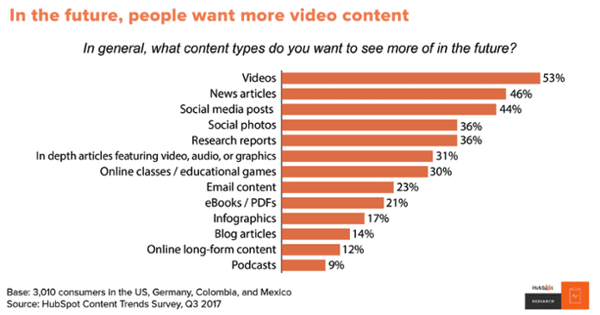
But in a new HubSpot Research survey released in February 2018, we learned that the popularity of video content is increasing — especially among people 18 to 24 years old. What’s a marketer to do?
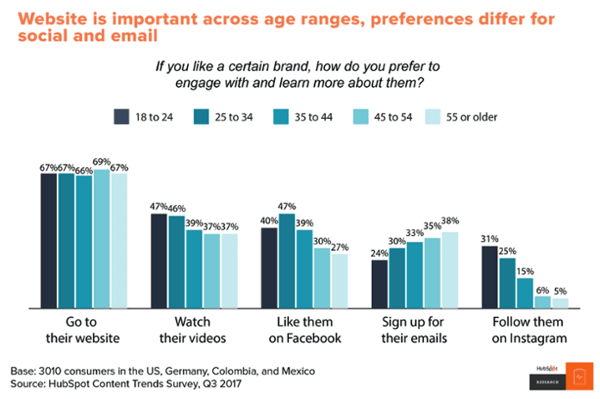
Content consumption preferences are always changing, and they vary across different age groups, content formats, and subject matter. There are some cases when the written word is a better way to share information than video content — especially as people are still browsing a business’s website (and the written content included on it) more than purely video.
In some cases, audiences don’t want videos at all. For example, in the United States, NiemanLab found that video isn’t growing as rapidly as one might think.
In fact, roughly half of those surveyed didn’t watch any online news videos — and more than two-thirds said they consumed most news in text format. Most video being consumed was short and sweet and entertaining — leaving plenty of room at the table for written content consumption, too.
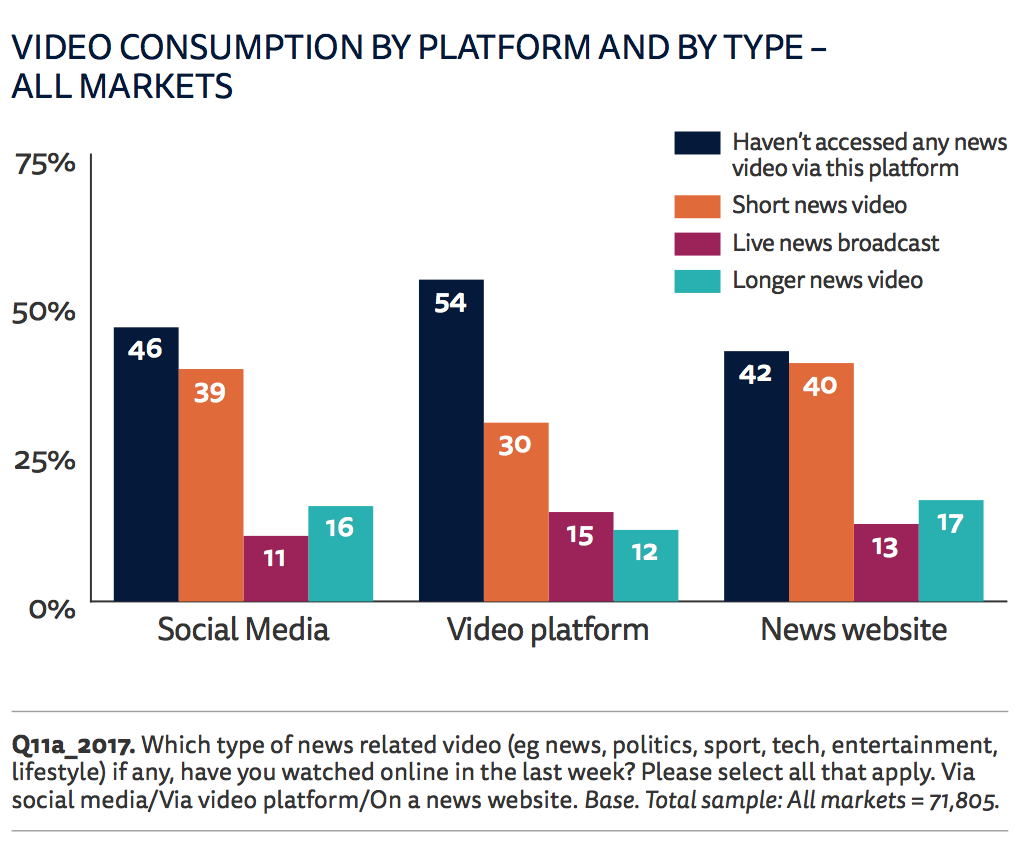
So, people are watching videos, but they’re also consuming a lot of text content, too. How should publishers and content producers address the diversifying content preferences of audiences?
The Solution
Make great videos and write great articles. In fact, ideally, you should be writing articles and reports, and then incorporating videos and other multimedia elements into them. Give the people what they want — which is written, visual, and audio content.
Think about how your audience wants to learn. According to the survey above, people are more interested in consuming in-depth news information by reading it, whereas they might be more interested in watching shorter, more consumable video content. While a video might be a good fit for briefly explaining a complicated topic, it might not be the best fit for a detailed breakdown of SEO best practices — like in these examples.
If you don’t know the answer to this question, ask your audience. If you’re not sure about your industry or audience’s preferences, ask them. Using an email newsletter or a Twitter poll, ask questions like, “What would you most like us to produce a video about?” or “Do you prefer written or visual explainers?” to figure out where to get started.
The answer to the question of what types of content your audience prefers is an evolving one — and one that we constantly experiment with here at HubSpot. Read about how we’re changing up our social media video strategy in this blog post.
2. Videos Are Hard to Make
Videos are hard to make — and it shows.
The internet is populated with far too many slideshows and photos set to music that are masquerading as videos — like this one:
Videos like these don’t offer the viewer much more value than reading a story would, but publishers keep making them — presumably because they get more clicks on social media than an article would.
I don’t know about you, but I find these videos extremely annoying — they either autoplay when I open an article, or I click them to learn more and get no additional information out of them.
Instead, publishers and brands should be striving to make great videos — which are driven by great stories. You need good storytelling to create a compelling video, and — guess what? That will require the writing of a script or outline beforehand, and writers and editors can be of tremendous value there.
Additionally, if you remember our finding above, audiences don’t just want one thing — they want it all. Consumers want multimedia articles, in-depth research reports, blog posts, and entertaining videos. There’s plenty of room for cross-collaboration between writers, editors, and video producers to create excellent content that solves for constantly-changing consumer preferences.
The Solution
Before implementing a video strategy, invest in resources to do it well, and experiment with creating different videos for different segments of your audience.
This means taking the time (and resources) to invest in video equipment, filming, and editing software, and freelancers or new employees who can make videos — more specifically, who can make videos well.
By investing in video content up front, you’ll ensure that your entire content production team is firing on all cylinders and creating video content that can both eventually rank in search results, and generate millions of views organically — not just as an ad.
3. Videos Are Tough to Distribute
With the exception of a few major publications — with content production budgets in the millions — it’s hard to crack the code of not only how to make great videos, but how to monetize them and use them to drive leads, customers, and revenue.
That’s partly because digital video is such a new content medium, and content creators are figuring out how to make great videos (see above). It’s also because Google search ranking factors and social media algorithms change so frequently, it’s hard to nail getting videos surfaced and seen by people on different platforms. Facebook’s shift to a more friends- and family-oriented news feed this year is a testament to this, and outlets like Vox Media know it all too well.
Plus, now that more people are jumping on the video content creation bandwagon, search engines and social networks are getting saturated with more videos to compete against.
So you might think that video creation is the hard part, but that’s just the beginning. It takes concerted effort for videos to rank in YouTube and Google search results, or to rack up thousands and millions of views on Instagram and Facebook. And even if you do everything right, there could be a reason your audience doesn’t want to watch your videos: They might not want to turn up the volume, they might be running low on their monthly data plan, or hey — they could even be sitting on the toilet.
People have their preferences, and our recent survey above, we know consumers want to see video content alongside in-depth news articles and research content — and that they want to watch videos on social media. People stream millions of hours of video content across social platforms every day, but these popular social videos might not generate leads at the speed a growing business needs.
The Solution
We suggest creating multimedia content that serves a variety of purposes on a variety of different platforms. For example, keyword-specific blog posts and YouTube videos might quickly rank in Google and YouTube searches, to help drive visitors to landing pages and lead forms that help brands start selling. On the other hand, entertaining, short-form videos on Facebook and Instagram will help spread a brand’s message and attract more people to a website down the line.
If you’re just getting started with video marketing, consider the type of video you should make first. Use them to help guide visitors along your marketing funnel — alongside written content and offers to capture lead information.
Make specific types of videos for specific platforms in the same way you would for different types of written content. That way, the videos you create will have specific goals in mind — for example, video views, video view rate, or website clicks — that you can measure and iterate on.
Videos achieve outcomes on social media that written content might not, and written content can achieve search engine rankings that videos might not. The best scenario is to create both types of content — along with multimedia content — to meet audiences’ ever-changing preferences, and to attract visitors and leads throughout the marketing funnel.

Images: Tumblr, HubSpot Research, NiemanLab


9 Email Marketing Habits It Pays to Break
Before you break any email marketing habits or best practices, it’s important to first understand why they work.
Once you’ve mastered basic email content creation, you’ll be in a better position to experiment and test certain components of your strategy. In today’s ultra-competitive email landscape, you need to perform tests in order to find out what drives your specific recipients to open, read, and click.
While the right content and design are necessary components for email success, running tests will help you understand how to stand out in your readers’ inboxes. And to understand what to test, it’s helpful to revisit your current strategies and consider which email habits might be appropriate to mix up, or break altogether.
In this post, we’ll explore a number of commonly overlooked email habits you should start breaking and experimenting with to find the best strategy for your company.
9 Email Marketing Habits It Pays to Break
1. You Always Use the Same Sender Name
How to Break It: Get Friendly With Your “From” Name
While it’s helpful to set certain expectations with your email recipients, don’t limit yourself to only sending messages from your company name, or from one team member. Experimenting with “friendly froms” can increase open rates. For example, instead of simply sending an email from the name of your company, you might provide an employee’s name, such as “Tim at Awesome.com”
But before you go crazy, always ensure your email activities do not violate the CAN-SPAM act. Your froms should not be false or misleading. However, there are ways your organization can make adjustments that delight your recipients.
Chubbies, a men’s fashion company with over 1.5 million Facebook followers, is well-known for getting creative with their from names. While their approach is very specific to their organization’s tone, style, and audience, you can look to them for inspiration.
One study found that while Chubbies’ messages had slightly lower inbox placement rates, their “fun and unusual friendly forms” saw higher read rates and lower “delete without reading” rates.
Here’s an example of how Chubbies gets creative with the friendly from:
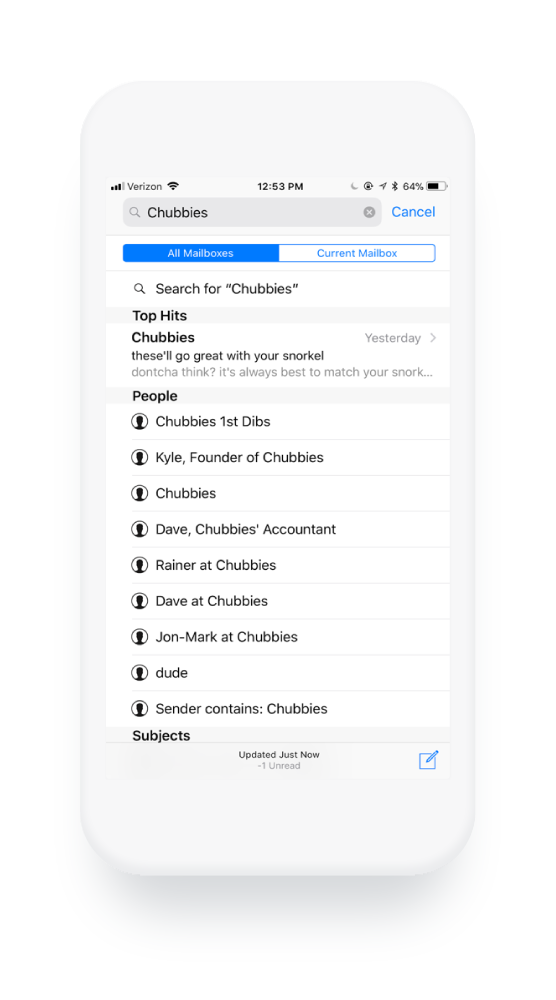
Chubbies also makes sure their fun “friendly” from names go with their subject lines and preview text.
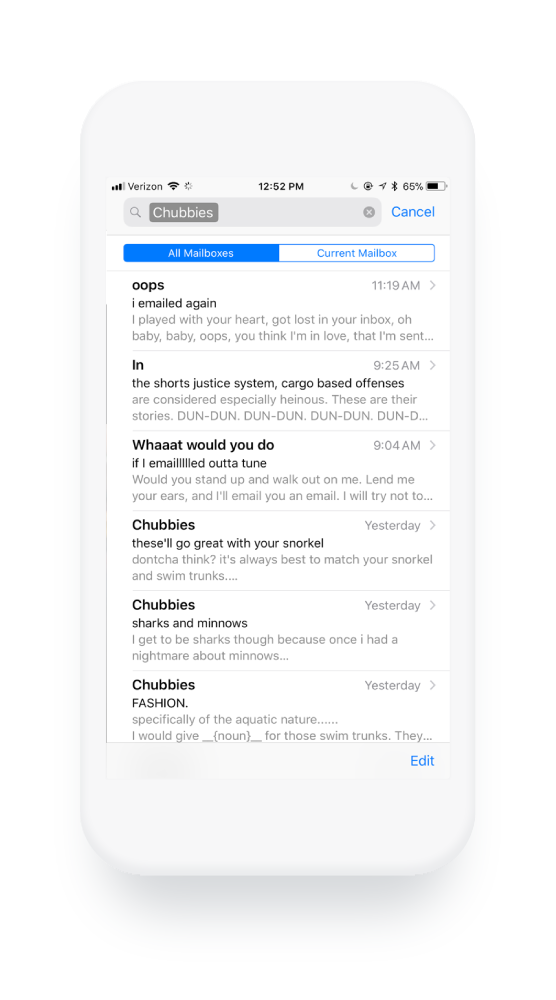
This synchronization allows them to use every space available to them in your inbox to grab your attention and make a lasting impression. Again, before testing strategies like this yourself, consult with a law professional about the CAN-SPAM act to ensure you’re not in violation.
2. You Treat Your Subject Line Too Literally
How to Break It: Write Copy That Visually Stands Out
Consumers are inundated with emails all day long, which means your subject line is the one factor that will get someone to open your message.
Consider the following example:
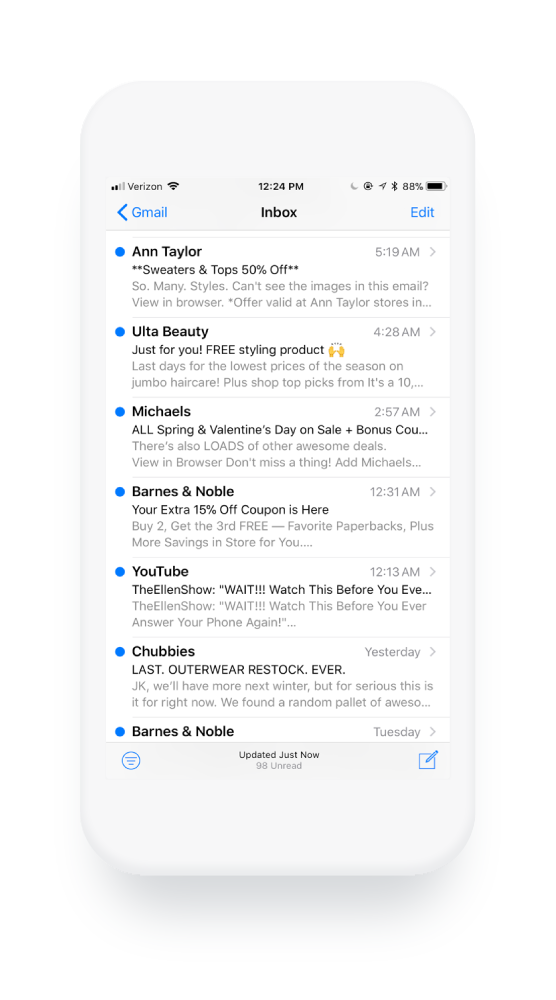
What stands out? Caps lock text? Numbers? The use of an emoji? Personalization? Humor? White space?
To catch someone’s attention as they scroll through their unread messages, it’s important to consider how your subject line appears next to others visually.
While your subject line text should reflect the contents of your message and match your organization’s tone and style, it’s important to use this space as creatively as possible. Test small tweaks with your audience to see if anything helps grab their attention.
3. Your Preview Text Is Auto-Populated
How to Break It: Use That Hot Preview Text Real Estate
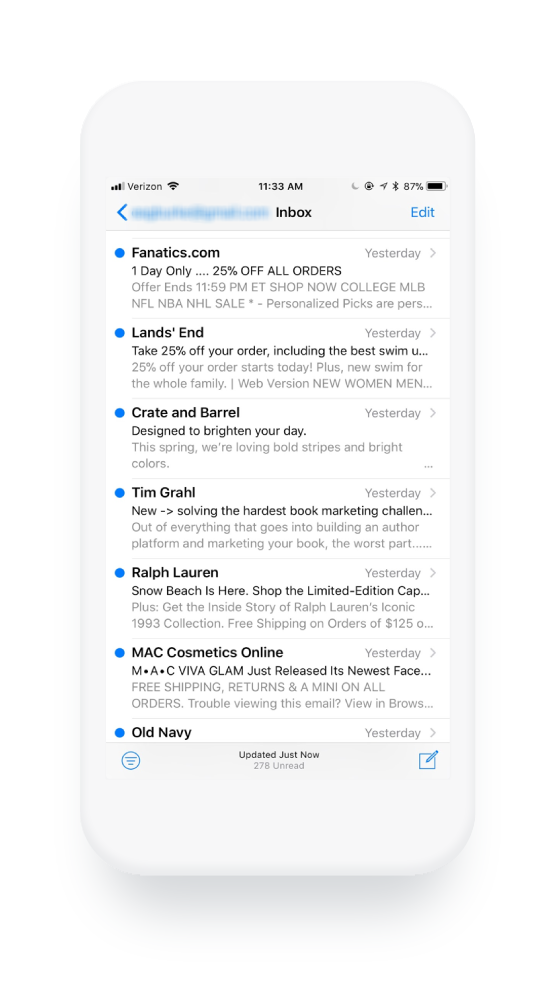
If your email client supports preview text, also known as pre-header text, you can optimize it for every email you send. Allowing this text to auto-populate is a lost opportunity to grab attention or delight your recipients.
Though it takes some code, the use of this space will help you stand out from others who do not go to the same lengths to make theirs unique.
Experiment with clever, related text, like how Chubbies does in the example above, or try using just a few words to create more white space.
In the example below, Crate and Barrel writes preview text that is an extension of their subject line and creates eye-catching white space.
And in the following example, the Skimm uses their preview text to address a previous technical error in a light-hearted manner.
4. Your Copy Is So Professional It’s Boring
How to Break It: Develop a Distinct Tone of Voice
Your organization’s tone of voice can be one of your biggest differentiators. Whether you use a certain style of humor or strive to sound as academic as possible, a well-crafted voice allows readers to connect with your organization on a human-to-human level.
In a time when technological advancement has us fondly looking to the past and remembering more intimate times, businesses can struggle to both scale and maintain the “humanness” of a mom-and pop-shop.
Your tone can help you combat that struggle. The answer is having a personality.
According to one of Chubbies’ four founders, Tom, they thought, “Everything’s a little too serious in men’s fashion.” To stand out and attract people to their brand, he says, “We wrote our emails like we were writing to our friends.”
In a podcast interview by Smart Passive Income, he advised organizations to think about their own brand as a unique person.
“Think about it like a person with a personality. More often than not, that personality is going to be yours—as the business owner, as the person who’s going to be writing or creating this content. Write about the things you care about, write about the things that have an emotional connection with you, and that’s where you’ll start to find kernels. We were not knocking it out of the park every time we wrote but because we were passionate about it, it enabled us to keep testing and keep driving.”
When you approach your communication under this lens, you’re bound to create content that doesn’t just deliver a message, but also forms a connection.
5. Your CTA Is Literal
How to Break It: Get Creative With Button Copy
Every inch of your email is an opportunity and each word should be intentional, especially the areas that ask your readers to take an action.
Here a few favorite examples of ways to get clever and entice your reader to click. Today’s consumer is well aware of the fact that you’re trying to lead them to a desired action. With that in mind, you might experiment with your call to action copy and use each “click here” spot as a chance to delight.
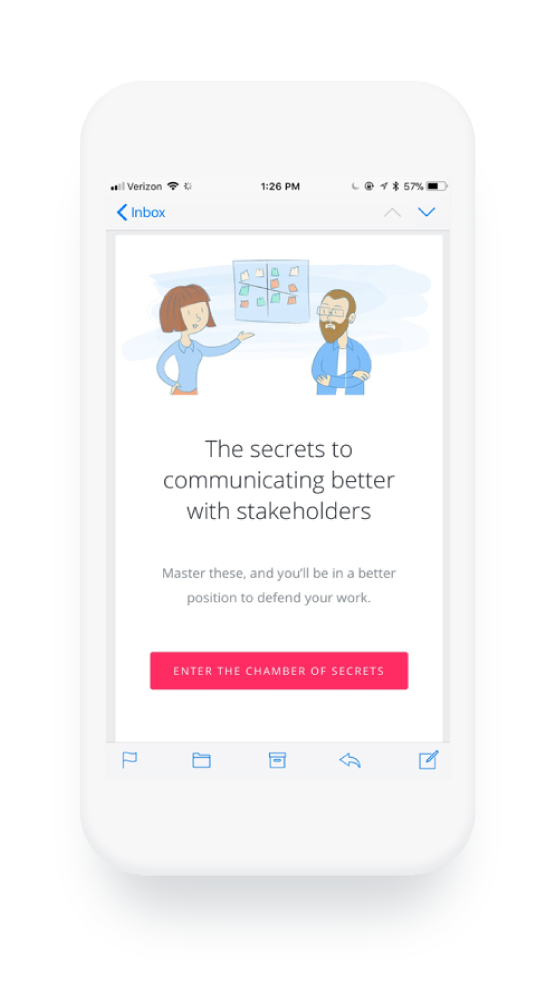
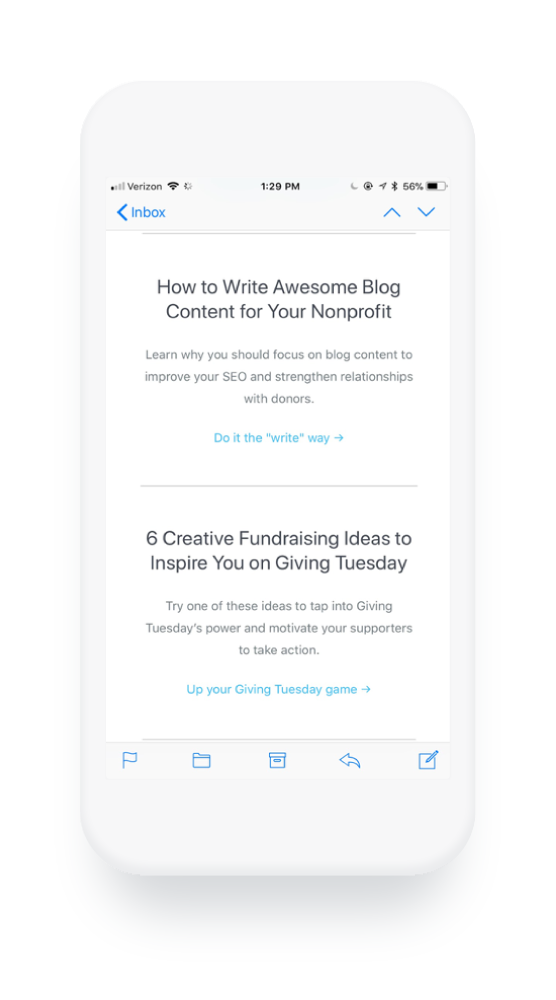
InVision uses witty copy and bright colors to catch the eye and entice their readers to click.
Classy, an online fundraising platform for nonprofits, similarly uses the CTA as an opportunity to be more playful with their copy and create a memorable experience for their blog subscribers.
6. You Keep It Short and Sweet
How to Break It: Experiment With Length
The Skimm’s 6 million email subscribers prove that emails don’t always have to be short and sweet, or highly visual to be successful. While some data points to ideally having relatively short email copy, the Skimm’s emails can get quite long (though they are broken into sections for digestibility). And while they don’t typically include very many visual components, they focus on making one thing very easy for the reader. Sharing.

In this example alone, there are nine opportunities to share the email with a friend or colleague. Which leads us to our next habit:
7. You’re Focused on Content
How to Break It: Consider How Design Feeds Growth
If content is King, design is Queen.
Your content could be strong and interesting, but if your design doesn’t include the ability to easily share your message, you’re holding your content back. According to Bernadette Jiwa, author of Marketing: A Love Story, “Growth hacking is really the practice of creating and leveraging word-of-mouth with intention.”
She continues, “Growth hackers optimize their business to acquire new customers by first delighting one customer and then making it easy for that customer to share the store with friends.”
You work hard to ensure your content delights—don’t send it off to die in the bowels of your clientele’ inboxes. Incorporate tools that give your email the legs it needs to grow.
8. You Use Personas to Make Assumptions
How to Break It: Demonstrate Intimacy
As marketers, we have to make assumptions. We can’t possibly know each of our audience members intimately. While segmentation and building personas is important to delivering relevant content, today’s consumers are expecting you to more about them than ever.
If you can’t demonstrate intimacy, you’re going to fall short. If marketers aren’t using segmentation by now, they’re at least aware of the tactic and how other organizations benefit from it. While developing personas and lists to send more personalized messages is a step in the right direction, we can take action to further personalize our content and show readers we’re paying attention—and that we’re listening.
Consider what data you might share with your readers to develop a sense of intimacy or help them learn about their own behaviors.
For example, Spotify uses data to demonstrate how well they know their users. These unique messages feel “one-of-a-kind” because they are. Each user receives a message with personalized data and insights around their own actions.
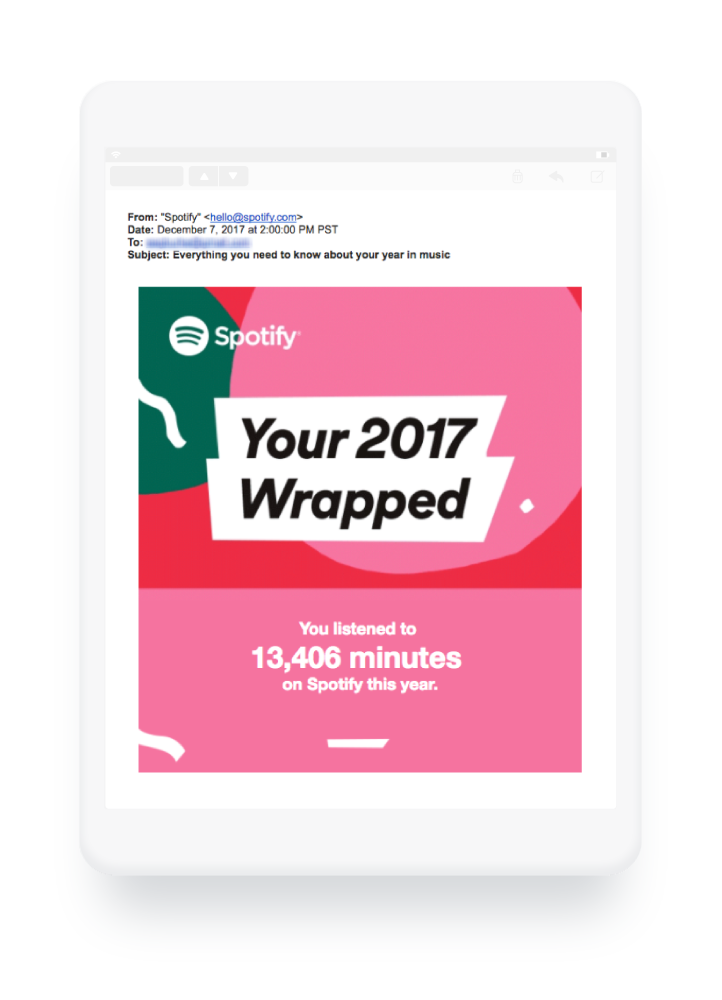
9. You Talk Too Much About Yourself
How to Break It: Send an Email, Just Because
It can be easy for messaging to get a little out of balance. After all, your marketing efforts are intended to make your audience aware of the value of your products and/or services. But to become a brand that people identify with in a meaningful way, you need to do more than just keep them updated on your latest deals and features.
You need to add value to each person’s life. Develop a cadence for connecting over something unrelated to your sales efforts, but very related to your organization’s core values and culture.
This will help you to grow a following of like-minded individuals passionate about who you are and how you make them feel, not just what you’re selling.
For example, Spotify sends messages to let their users know about upcoming concerts in their area:
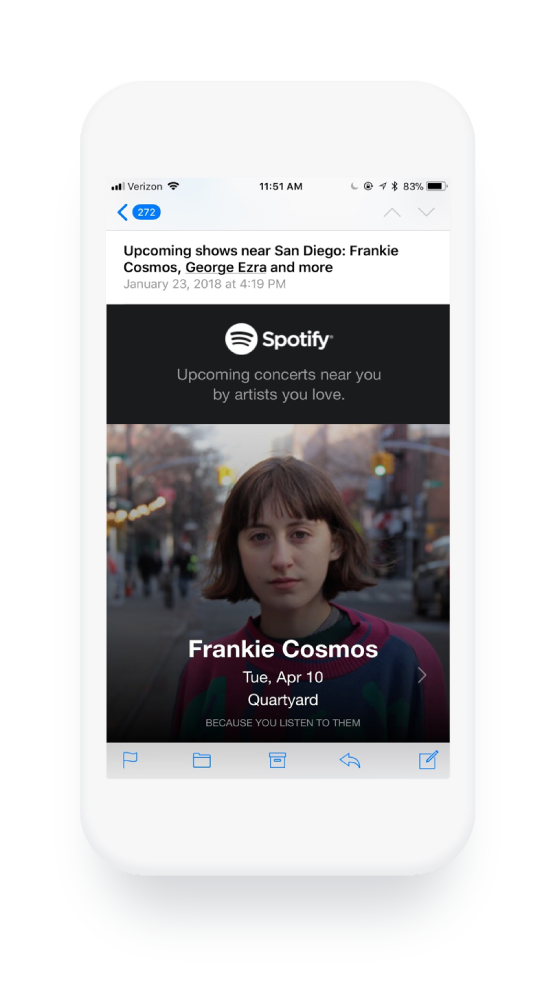
Additionally, Chubbies sends a “Weekender” email every Friday that doesn’t include links to products. Instead, they round up fun and entertaining bits of information purely aimed at providing a laugh. This fits right into their culture and core values, as indicated by the statement on their website, “We believe in the weekend.”
According to Kyle, one of their founders, “It’s all about all the wild stuff in the world and what you should be doing this coming weekend. And the purpose of it is to send you into the weekend. It doesn’t drive sales. It’s for nothing but creating a valuable experience with our customers. And we’ve done that every Friday for six years. That’s part of how we build a real relationship with our customers.”
Ready to Switch Things Up?
While best practices emerge for a reason, if you’re not regularly experimenting in this competitive communications landscape, your efforts will soon appear stale and your growth, stagnant. Build time into your team’s workflows to reassess your current best practices regularly to allow for ample creativity.

A Disaster Waiting to Happen? Businesses Could Send You Ads on Messenger
In November 2017, Facebook began internally testing Messenger Broadcast: a service for businesses that allows them to send marketing content to users, without building a bot.
Last week, the social media platform announced that Messenger Broadcast would be available for testing to select Page administrators in the U.S., Mexico, and Thailand.
While several businesses have been using Messenger as a customer service communication method, that’s been largely restricted to those who can build bots: software that simulates a conversation with humans on messaging platforms. Many Messenger users see them when they first reach out to a brand with a question or when they execute a task.

But despite these functionalities, which are still emerging, Messenger is still in somewhat early stages of use as a direct method of broadcasting promotional content from Pages to users.
As with any new feature, there are pros and cons.
The Pros
At first glance, this feature seems beneficial to small-to-midsize businesses (SMBs) that might not have the in-house coding talent or budgets to build bots. That limits the way these brands can interact with users on Messenger, as any communication they receive requires a manual response.
With Messenger Broadcast, however, businesses facing this issue can use a fairly comprehensive messaging setup — which appears to be similar to creating a promoted post on a Facebook Page — to compose a title and text, add visuals, and create a call-to-action for the message recipients.
And, similar to promoted posts or ads, Page administrators can also target recipients according to interests.
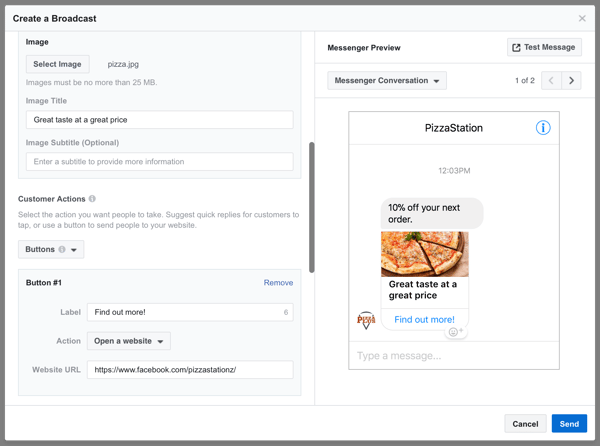
Source: TechCrunch
According to TechCrunch, Messenger Broadcast is free for businesses to use — for now. Prior to the recent display of ads, Facebook had not outwardly monetized the platform, despite a user base of 1.6 billion.
Broadcast might provide another method for doing so — and if its trial is successful, Facebook could begin tiering charges for Pages according to targeted audience size.
The news comes at a time when many SMBs are experiencing some frustration with Facebook due to a declined reach following the channel’s algorithm changes surfacing less Page content.
But “by building tools like Broadcast into Messenger that allow SMBs to better communicate with their customers,” says Dylan Sellberg, HubSpot’s associate product manager for messaging, “Facebook has a shot at earning back the good graces of this massive market.”
That’s especially true for those who are already working with limited resources, for whom “building chatbots is a technical skill far out of the realm of possibility,” Sellberg continues. “Creating basic experiences on Messenger that solve for a specific use-case, like customer support or disseminating popular information, is something businesses can lean into. After all, they’ve been executing on this playbook via email for decades.”
It’s that likening to email, however, that causes concerns about Broadcast. Between the display ads — and the potential to receive messages from Pages — some wonder if the introduction of promotional content on Messenger defeats the purpose of Facebook’s algorithm change to emphasize friends-and-family content.
“This is reminiscent of Facebook’s 2012 experiment where anyone could message anyone else for as little as $1 and as much as $100 for Zuckerberg himself,” says Daria Marmer, HubSpot’s product lead. “That failed, I think, because it was totally outbound — users didn’t have to show any interest in the message or who it was coming from.”
And while Marmer recognizes the doubts around this latest feature, she says it’s different than the discontinued Messenger experiment of 2012. For starters, Page administrators can only send this content to users who have proactively reached out to them on the platform before.
“This time, Facebook is taking a more of an inbound approach in letting businesses message only customers who had previously interacted with them,” she explains. “I think this inbound strategy will work both for Facebook as a revenue stream, and for marketers, who will be able to use Messenger as a better converting channel than email.”
Sellberg, for his part, also understands the concerns — but also believes the protocol to disallow businesses from cold-messaging users could make a better user experience.
“Many will look at Broadcast and say that it will create a poor, spam-filled, end-user experience,” he says. “But I think this is an opportunity for businesses to create high-quality, end-user communication — something that stands out and really delights.”
The Cons
Not everyone is quite so excited about Messenger Broadcast.
As someone who personally uses Messenger more than Facebook itself — primarily to avoid rogue content from Pages and individuals to whom I’m not particularly attached — I certainly understand the concern that Messenger could morph into a new-school email inbox, of sorts.
Even the protective protocols — the ones dictating Page administrators can only send this contact to users who have already messaged them — are not entirely different from email opt-in rules.
What’s more, it isn’t entirely clear how users can “unsubscribe” from Broadcast messages, though it could be as simple as the options to mute conversations with or notifications from Pages that are already available.
Some believe we are, in a way, “going back to square one” in terms of best practices for creating and sharing content.
“If Facebook doesn’t teach people how to make valuable, non-intrusive experiences” with the introduction of Messenger Broadcast, says HubSpot Conversational Marketing Manager Connor Cirillo, “this is a disaster waiting to happen.”
That’s where the analogy to opting into emails becomes particularly salient. While users, in this case, have expressed some level of interest in communicating with the business by messaging it in the first place, that doesn’t mean the future communication — like a Broadcast — will be contextual or valuable to that user (or group of users, since the option allows sending the Broadcast to multiple users at once).
“Messaging is intimate. As businesses, we have to respect that,” says Cirillio. “If a brand doesn’t know how to chat with someone, and only knows how to talk at them, users will get turned off.”
Which means, Cirillo explains, even if a user initiates communication with a Page, what it does in response might not necessarily make for a delightful experience if the content of the message isn’t relevant or helpful.
“Just because I asked the pizza place when it’s open,” he says, “doesn’t mean I want untargeted coupons blasted at me.”
It’s About Quality Content … Again
When both sides of the argument are evaluated, the key takeaway on Messenger Broadcast is essentially the same as it is for any new medium of this kind: Content that’s high-quality, relevant to the user, and helpful is the most likely to succeed. Even with the cons in mind, if brands using this service can figure that out — they’re more likely to see better results.
And that, says Sellberg, might serve as a barrier to entry for brands who aren’t quite ready to use this feature — for the business and the user alike.
“Plainly, I don’t think marketers who haven’t leveraged Messenger at all will not use this tool,” he explains. “However, even if they do, they can only Broadcast to those who have messaged them first,” which could minimize the intrusive nature of any messages they send.
Because the feature is in its earliest stages, how or if this ultimately plays out has yet to be determined.
As always, feel free to weigh in with thoughts or questions on Twitter.
