
Stop Measuring These Vanity Metrics in Your Marketing Campaign
There is without a doubt no shortage of data for each action you take in your marketing campaigns, nor is there a lack of tools to help you measure them. The problem is, some metrics aren’t as important as they look.
They stick out right in front of your face as soon as you log into your analytics tool, puking an “up-and-to-the-right” graph in your face.
What Are Vanity Metrics?
Vanity metrics include data such as social media followers, page views, subscribers, and other flashy analytics that are satisfying on paper, but don’t move the needle for your business goals. They deliver positive reporting, but no context for future marketing decisions — something actionable metrics can do.
Beware of vanity metrics. Instead of getting caught up in the low-hanging fruit, ask yourself: “What does this graph mean? Should I continue doing something, increase the time or money I spend on a certain channel, or even stop doing something altogether?”
The obvious metrics won’t tell you this — you’ve got to dig deeper. Here are five vanity metrics you should stop obsessing over and the actionable metrics you should track instead.
1. Facebook Fans
Did you know engagement rates for branded Facebook Pages have declined by more than 20% since last year? The more companies post content on Facebook, the more newsfeeds need to share their space and the less users see and consume.
So, regardless of how many people have clicked “Like” once they’re on your brand’s Page, the vast majority of them never return to the Page itself and never see the content in their newsfeeds.
An Actionable Metric: Engagement Rate
Instead, use Facebook Insights, Facebook’s free analytics tool, to check which posts generate the highest level of engagement. The higher the level of engagement, the higher your EdgeRank score (EdgeRank is kind of like SEO for Facebook newsfeeds).
Impressions are helpful as well, as they tell you which content is actually being seen by your fans. This can give you insight into which content is being shared with other people and actually appearing on users’ newsfeeds. Think about the content and conversations that have the highest engagement and impressions, and come up with a plan for how you can replicate it.
2. Twitter Followers
On Twitter, it really shouldn’t be about the number of followers you have. People typically follow random accounts for reasons unrelated to their actual interest in them. Many users, for example, follow you because they want you to follow them in return — and if you don’t, you often lose that follow days later.
Here are a couple of things to consider about your Twitter followers:
- Who is engaging? Add a “+” to the end of any bit.ly link or check our free tool, WhoTweetedMe.com, to see who retweets your content and identify influential followers.
- What do your followers talk about? Use Cadmus to check out their most shared links.
An Actionable Metric: Competitor Followers
With FollowerWonk, you can compare your Twitter followers to those of your competitors. If there are people following them who aren’t following you, those are prospects you aren’t connecting with, and possibly even money left on the floor.
See what types of content these competitor followers engage with to see if there are important conversations happening in your industry that you should take part in. You might even reach out to these followers and demonstrate the value of following you, too.
3. Blog Post Page Views
This indicates you’ve established yourself as a thought leader and have created great content — both good first steps in an inbound marketing plan. But page views don’t indicate where these views are coming from, if they answer a reader’s questions, or even how long he or she spent on that page.
Actionable Metrics: Bounce Rate, Social Shares
Bounce rate is the percentage of people who visit one page on your website and leave without clicking further into the site. In other words: high bounce rate = bad. Keep readers’ attention with a good call-to-action (CTA), as well as links to other content and other parts of your site. A declining bounce rate is a great metric to report because it suggests your blog is growing in its interest to your visitors.
Search is social. Search engines like Bing and Google now consider tweets and Facebook shares in their algorithms. How many individual page viewers are also sharing your content on their social networks is a more accurate signal of long-term SEO benefits from a popular blog post.
4. Email Open Rate
Your open rate is:

Open rate is a reasonable metric to track to check the effectiveness of your email’s subject line and timing. However, there are technical limitations because many email clients have to load images to count as an open, and many users have images turned off by default. Track this, but don’t obsess.
An Actionable Metric: Click-Through Rate
Focus on one CTA in your email that draws users to your site, and measure your click-throughs on those links. A high click-through rate (CTR) for an email campaign that invites users to download something on your website, for example, tells you the email has lead-generating power.
5. Number of Subscribers/Product Users
It’s simple enough to track how many people have converted into a trial user, or agreed to receive your newsletter. But are people actually consuming your product and content? Often this product demo or email goes unused or unseen.
Actionable Metrics: Active Users, Path to Conversion
Instead, track how many users return to use your product each day. These are called active users. In Google Analytics, metrics like visitor loyalty and visitor recency are helpful, depending on your product. As for ecommerce, measure repeat customers and retention. Zappos, which will close in on $1 billion in revenue this year, gets 75% of its sales from repeat customers.
In addition, track which pages and content drew in leads that converted to qualified contacts or even customers — as well as what actions those leads took on your website before they converted. You can track this information a few ways, such as adding tracking links to your CTAs so you can see where a user came from as they move through the conversion path. Rinse, lather, repeat.
Of course, don’t just throw all of these vanity metrics out at once. Before you add or erase certain data from your marketing analytics reports, make sure you and your team have defined your goals and the data points you’ll use to measure whether or not you’re achieving them.

No, You’re Not Getting a Facebook Dislike Button (Yet)
If you use Facebook, you’re likely no stranger to the widespread clamor for a “dislike” button.
It’s not like Facebook has ignored the cry for such a reaction option. In 2016, the social media channel rolled out five new Reactions buttons: Love, Haha, Wow, Angry, and Sad — the last of two are, well, more specific versions of disliking something.
But none of them was a simple thumbs-down reaction — and when users once again learned that Facebook was rolling out a “downvote” option, there was a fleeting moment of hope for “dislike” reaction enthusiasts.
Let’s make one thing clear right away: You’re not getting a dislike button.
A New Way to Curb Abusive Comments
Instead, Facebook confirmed to TechCrunch last week, the social media channel is testing an option that would allow users to downvote comments on posts that they deem inappropriate. Think of it as a very quick, one-step way to report and flag an inappropriate comment with a single click.
Right now, the feature is available to quite a limited subset: It’s only being tested on public Page content, and only a small portion of users in U.S. can even see the feature.
But when you consider other recent changes Facebook has made to its algorithm — like those to boost public Page posts that receives a high quantity of genuine user engagement — the feature makes sense. Not only does it help to crowdsource the flagging of spammy, inauthentic interaction, but it’s also an extension of Facebook’s request of users to help spot fake news content.
“It looks like Facebook is doing this for the same reason it made an algorithm change: to figure out what content people like,” says Henry Franco, a HubSpot social campaign strategy associate.
Franco also points out Facebook’s recent first-ever earnings report of user decline, with eMarketer estimating that about 2.8 million of those lost users are under 25.
That’s just one source of motivation for Facebook to work toward better engagement, especially among certain age demographics.
The Timing Makes Sense
It’s a move that comes among months of scrutiny from the alleged weaponization of its site to promote content that interfered with the 2016 U.S. presidential election.
So not only does that satisfy an “end goal of maximizing time on site and user retention,” says Franco — it also plays an important role in public Page content that might spark controversy.
“Most of the time,” says HubSpot Principal Marketing Manager Marcus Andrews, a feature like this one is most applicable to “big public comment threads on current events or polarizing news topics … where some users are just trying to make jokes, antagonize others, or just simply be mean.”
The downvoting option, says Andrews, provides a seamless way for users to quickly take action to curb engagement of that nature.
“Facebook wants to give users a way to identify that,” he explains, “and have some recourse to show it in these big threads.”
Reminder: It’s Not a “Dislike” Button
As Facebook experiments with this new feature, Franco is quick to remind users that the downvote featue is not a dislike reaction option.
Not only is not a reaction feature, he points out, but it could also help to grand a degree of anonymity to the person flagging a given comment.
“This looks very different than a dislike button,” Franco says. “This change helps Facebook identify content that users don’t want to see, and I’m not sure that the person you’re interacting with will know they’ve been downvoted.”
That possibility, however, is not without its flaws.
“The possible downside here is that this might just reinforce groupthink,” Franco explains. “If everyone in the group disagrees with an idea, that doesn’t necessarily make the idea wrong, but it may be hidden nonetheless.”
I’ll be keeping an eye on this feature as it continues to be tested. As always, feel free to weigh in with your take or questions on Twitter.

Tesla in Space and Uber in Court. It’s Your Monday Morning Briefing.
Hello, everyone. Welcome to Monday.
I need coffee. You need coffee. And we all could use a little refresher on what happened in tech last week — and where that leaves us as we kick off the week ahead.
Without further ado, here are our top three picks for the biggest stories that emerged last week.
Tesla in Space and Uber in Court: Your Monday Morning Briefing
1. The (Mostly Successful) SpaceX Falcon Heavy Launch
The SpaceX Falcon Heavy — what has come to be known as one the most powerful rockets in history — had a successful launch last week from Cape Canaveral, Florida without any major issues (like an explosion) or significant malfunctions.
Aboard the rocket was SpaceX CEO Elon Musk’s own Tesla vehicle — to many, an especially fancy, expensive, and eco-friendly sports car, which is currently in orbit with a mannequin “space man” along for the ride.
The event didn’t go off entirely without a hitch. While the itself is impressive — considering the Falcon Heavy’s high bandwidth for cargo (140,000 pounds, which is about 2X the capacity of any other functioning rocket in history) and high engine capacity (27 of them) — some things didn’t go as planned.
First, the ship’s middle core didn’t meet the drone ship on which it was supposed to land, missing the destination by about 300 feet and falling into the ocean, instead.
Later that week, it was reported the rocket carrying the Tesla and “space man” overshot its path, projecting past the orbital path of Mars and deeper into the Solar System than intended — though astronomer Jonathan McDowell predicts it could come in contact with Mars around 2020.
2. Uber and Waymo’s Day in Court
On what would have been day five of a long, ugly trial, Uber settled a lawsuit out-of-court with Waymo, the company accusing the ride-hailing giant of stealing its self-driving trade secrets.
The terms of the settlement dictate Uber will pay Alphabet (Google and Waymo’s parent company) 0.34% of a late stock offering — about $245 million in equity.
The settlement was announced in a statement penned by Uber CEO Dara Khosrowshahi, who assumed the role last September. In it, he referred to Alphabet as “partners” and “important investors in Uber,” and apologized to members of Uber’s Advanced Technologies Group for the distraction from their work.
However, Khosrowshahi denied any belief that Uber did, in fact, play a part in the theft of trade secrets from Waymo.
“We do not believe that any trade secrets made their way from Waymo to Uber,” he wrote, “nor do we believe that Uber has used any of Waymo’s proprietary information in its self-driving technology.”
Opening arguments began last Monday, after nearly a year of ugly accusations and back-and-forth drama involving delayed trial start dates and more. In October, the HubSpot Marketing Blog broke down the history of the trial.
A major player in the trial is Anthony Levandowski, a former Google employee accused of stealing myriad documents from his former employer and bringing them to Uber.
Levandowski left Google to work on his own self-driving startup, Otto, which was acquired by Uber. Levandowski no longer works for either.
It’s a long, sordid history — one summarized by dozens of outlets leading up to the trial. To review the gripping play-by-play, I recommend following transportation writers Johana Bhuiyan, Biz Carson, and Kate Conger on Twitter.
What intrigues me is how messy things have already become in this fairly new sector of technology. Legal contention over trade secrets isn’t a new concept, but a trial of this gravity happening this early in the lifespan of autonomous vehicle development does, at a minimum, give me pause.
Not only does everyone seem to want in on it — companies ranging from Apple to more “traditional” brands like GM have made significant investments in developing self-driving cars — but those involved are extremely protective of what they create.
We’ll keep an eye on how the lawsuit and its outcome impacts the self-driving sector moving forward — and the evolving legislation around it.
3. The Apple HomePod’s Arrival Is Met With Mixed Reviews
Finally, in the latest entrance of major players into the voice assistant market, Apple shipped its HomePod: a home speaker that pairs personal assistant capabilities (in the form of the brand’s own Siri) with music broadcasting.
In fact, Apple boasts the coupling of Siri’s AI with Apple Music technology — the brand’s latest generation of iTunes — helps it learn each user’s tastes and preference in songs, artists, and genres.
But there’s a catch: The HomePod only integrates with Apple Music.
Early reviews of the HomePod pointed out its unparalleled sound quality, which only goes so far if, say, you’re accustomed to Spotify or Pandora.
I’ll be writing more about the HomePod later this week and how it stacks up against other major voice assistant devices. But in the meantime, I’ll wax philosophical on its fate.
Are there enough Apple Music enthusiasts to help it outsell its counterparts from Amazon and Google? (The Wall Street Journal, for one, says Apple Music’s user numbers might soon surpass Spotify’s).
Or will Apple see more of us who are simply too committed to our current streaming music services to make the switch to its speaker?
Time will tell.
That’s all for today. Have a great week.

The 8 Best Movies to Inspire Modern Marketers
Most people watch movies to escape the real world, especially as a way to unwind after work. But some of the best movies can actually inspire us to be better at our jobs.
Watching movies is a refreshing, if unconventional way to reflect on your career and learn something new about yourself, so we’ve curated a list of the best movies for modern marketers. We hope they inspire you and help you grow.
8 of the Best Movies for Modern Marketers
1. The Social Network
The Social Network tells the gripping origin story of a website that moved tectonic plates in the digital marketing world — Facebook. As a marketer, it’s fascinating to get an inside look at what inspired the creation of Facebook, the founders’ thought processes when they built it, the steps they took to develop it, and all the ups and downs Facebook experienced as it evolved into the social media giant it is today. From its humble yet promising beginnings to its rapid growth, The Social Network shows you that Facebook’s rise to tech stardom wasn’t void of any obstacles.
2. Moneyball
In 2002, the Oakland A’s won the most games in baseball, highlighted by a 20 game winning streak that broke an American League record. They also had the third lowest payroll in the Major Leagues. In an industry dominated by teams with enormous payrolls, how did the A’s become the best in baseball?
They made data-driven decisions.
Moneyball recounts the beginnings of an analytical approach to winning baseball that is the status-quo today. The A’s swapped the instinctual, traditional way of scouting players for one of the most unconventional routes at the time. By signing cheap, undervalued players based on metrics that signaled success to only the A’s and no one else, they got the maximum bang for their buck for each dollar spent.
In this sense, baseball and marketing have a lot in common. Before data drove key decision making, intuition did. Then, when a few brave trailblazers nominated data as its replacement, a tidal wave of backlash came crashing down on them. But data proved itself worthy, and it has become the most crucial component in the decision-making process for both industries.
3. Up in the Air
Nowadays, it seems like everybody strives for a more balanced life. But not Ryan Bingham, George Clooney’s character in Up in the Air. Ryan works for an HR consultancy firm that helps companies conduct layoffs. He flies almost every day to fire his client’s employees, so he doesn’t have a permanent address or a family. And he absolutely loves it. Ryan believes that relationships with people and things aren’t worth it — they’re too taxing. He even gives motivational speeches to get people to follow his life mantra.
But when Ryan starts a casual relationship with a fellow frequent flyer, mentors a new hire who constantly challenges his values, and experiences some heavy moments with them both, he starts to question his life philosophy.
Up in the Air reminds us that hard work and dedication can take you to great heights. But your most memorable moments in life will always revolve around your loved ones, not your career.
4. Steve Jobs
Steve Jobs, the man behind Apple, was arguably the most visionary product designer and marketer of our generation. In his biographical film, Steve Jobs’ notorious personality is always on full display. The movie delves into the complex reasoning for Jobs’ poorly made psyche, which provokes sympathy for Jobs despite his ruthless treatment of his diligent employees, meticulous micromanagement, and bitter coldness towards his loved ones. And, more importantly, you learn how much he impacted Apple, technology, and the world as we know it today.
5. Thank You For Smoking
Nick Naylor, a slick tobacco lobbyist, has a talent for persuasion. Throughout the movie, you watch in disbelief as he cleverly defends the tobacco industry in classrooms, on T.V. shows, and even at a Senate hearing. Some people might think Thank You For Smoking is just an advertisement for cigarettes. But its core message is a lot more complex than that. The movie illustrates how knowing how to spin a product the right way can convince anyone that it’s good for you, even if it can kill you. And that’s the encouraging yet dangerous part of marketing: people want to trust other people and they want to be swayed. That’s the human condition.
6. The Founder
The Founder tells the story of Ray Kroc, a 52-year old milkshake machine salesman who discovers McDonald’s, a small yet remarkably efficient burger joint, and transforms it into the largest fast food empire in the world. But even though Kroc’s grit and determination to catapult McDonald’s into the chain restaurant hall-of-fame is admirable, his broken moral compass and conniving methods are despicable. Throughout the movie, you learn the McDonald’s empire is built upon a heap of controversial business moves. It makes you question where you yourself should draw the line between doing whatever you can to fulfill your dreams, and being morally good.
7. The Pursuit of Happyness
Chris Gardner has one of the most inspirational life stories out there. While watching his biographical film, you experience the euphoric highs and heartbreaking lows of his life as a homeless, unpaid intern raising a 5-year old son on his own. But his ambition, perseverance, and love for his son ultimately drive him towards success, giving this movie a very happy ending.
8. The Joneses
The Joneses’ are the perfect family. They’re good looking, charming, and have the perfect life. Too bad it’s all fake. They’re actually a group of professional salespeople who leverage their influence to promote products to their community. You haven’t seen influencer marketing until you’ve watched this movie.

The 10 Most Watched YouTube Ads of 2017 (And the Agencies Behind Them)
Most pre-roll ads on YouTube are something to be endured, muted, and skipped immediately after the mandatory five seconds have passed. It’s nothing personal — people just want to get to their video.
So how can advertisers create branded videos that users actually want to watch?
For an ad to be sought out and consumed willingly on YouTube, it needs to stand out as an enjoyable, compulsively shareable story. It can’t just be a typical advertisement — it needs to compete for attention with viral, non-branded content.
To better understand what YouTube users want in a watchable online ad, let’s take a look back at what worked in 2017.
Google released a list of the top 10 most watched ads on YouTube from 2017, and we’ve compiled them here to inspire your next digital ad campaign. All advertisers and marketers should be taking notes: These are the online ads people actually wanted to watch in 2017.
The 10 Most Watched YouTube Ads of 2017
- Samsung India Service (SVC)
- Clash Royale: The Last Second
- Ping Pong Trick Shots 3 | Dude Perfect
- Miss Dior — The new Eau de Parfum
- Budweiser 2017 Super Bowl Commercial | Born The Hard Way
- 2017 Kia Niro | ‘Hero’s Journey’ Starring Melissa McCarthy
- adidas Originals | ORIGINAL is never finished
- iPhone 7 | The Rock x Siri Dominate the Day
- Levi’s “Circles” Commercial
- Mr. Clean 2017 Super Bowl Commercial | Cleaner of Your Dreams
The 10 Most Watched YouTube Ads of 2017
1. Samsung India Service (SVC)
150.3M views
Samsung India crushed it with this beautiful short story, called “We’ll Take Care of You Wherever You Are.” The company used it to promote its customer service expansion across rural India last year. Created by the agency, Cheil, it spans four minutes and collected 150 million views for its multinational appeal.
The ad follows a Samsung van through a cumbersome rural drive to answer a service call at a small Indian home. Who the driver meets inside is exactly what made me cry watching this viral sensation:
2. Clash Royale: The Last Second
110.7M views
This zany, offbeat, and yet still universally appealing mobile game developer won the fifth-most watched YouTube ad of 2016. It’s now back with the same agency partner, Barton F. Graf, and a suspensful 50-second spot that garnered nearly triple the views of its clip from the previous year.
The ad for Clash Royale, a multiplayer mobile game, opens with a three-second countdown and a pink-haired archer releasing an arrow into a battleground. What happens in “the last second”? Well, you’ll just have to see for yourself:
3. Ping Pong Trick Shots 3 | Dude Perfect
90.6M views
If you’ve never seen Dude Perfect, you’re missing out. This group of friends’ homemade clips of sports tricks spawned one of the most successful independent YouTube channels in history — so successful, in fact, that food brands like Ruffles and Oreo have partnered with them to advertise on their videos.
What started as a series of trick basketball shots (some of which are literally in the Guinness Book of World Records) is now a goldmine of addicting content promoting popular snack foods via awesome trick shots.
Their latest? Dude Perfect and the Oreo Dunk Challenge — using nothing but ping pong balls:
4. Miss Dior – The new Eau de Parfum
43.0M views
Number four on YouTube’s list is an empowering ad for Dior’s newest women’s perfume, Miss Dior. Created by the production company, Iconoclast, it’s another installment of actor Natalie Portman’s longstanding work with the Dior brand. This ad is just too powerful to not watch.
The ad, set to the tune of “Chandelier” by Sia, focuses on love and the diverse emotions with which the modern woman can express it — something Natalie Portman sees “reflected in the duality of the fragrance.” Check it out below:
5. Budweiser 2017 Super Bowl Commercial | Born The Hard Way
28.5M views
Budweiser has an expectedly large presence in the ad space of every Super Bowl. In 2017, that presence became unforgettable. Working with Anomaly, a New York-based ad agency, America’s beloved beer-maker blew the doors off with the unexpected story of the company’s founding.
The ad introduces us to a young man immigrating from Germany to an unwelcoming American community. Who he ends up befriending is, well — I won’t spoil it for you:
6. 2017 Kia Niro | ‘Hero’s Journey’ Starring Melissa McCarthy
25.9 views
Coming in at number six is the most hilarious of the most watched YouTube ads of 2017, starring a lovable and heroic Melissa McCarthy. Made by the agency, David&Goliath, the commercial is classic McCarthy in an unusually slapstick video for one of Kia’s newest sedans.
McCarthy plays herself in “Hero’s Journey,” but with hopeless loyalty to a few too many world causes. The ad originally debuted during the 2017 Super Bowl, along with an artificial intelligence chatbot called NiroBot that viewers could interact with through Facebook Messenger during the game.
See why Kia focused on social responsibility in this amusing but compelling spot:
7. adidas Originals | ORIGINAL is never finished
25.4 views
There’s something mesmerizing about this obscure commercial for the adidas Originals line of shoes. Colorful, aggressive, raw — I can’t seem to put my finger on it. But in partnership with the agency, Johannes Leonardo, it continues the brand’s “ORIGINAL is never finished” series, celebrating originality in perhaps the most stylish YouTube ad of 2017.
Set to the rising sound of Frank Sinatra’s song, “My Way,” the ad takes you on a ride where moment-to-moment, there’s no telling what’ll come next. See if you can spot the Snoop Dogg cameo in this cool piece:
(Note: adidas’s “ORIGINAL is never finished” ad for 2018 has already surpassed the view count of its 2017 predecessor! Watch it now.)
8. iPhone 7 | The Rock x Siri Dominate the Day
25.3 views
“Siri, show me that crazy Apple commercial featuring Dwayne ‘The Rock’ Johnson.” If she doesn’t give you the video below, she’s probably just shy — Apple’s artificial intelligence (AI)-based voice assistant is as much a star of the ad as Johnson is. This clip was the brainchild of the agency, TBWA, and grossed more than 25 million views by the end of 2017 having debuted just last summer.
Apple ultimately cut the ad into three smaller commercials to promote the iPhone 7’s launch (no pun intended, as part of the clip takes The Rock and his new hardware to space).
TBWA calls itself “The Disruption Company,” and it’s no mystery why with this flashy plug for the sleek smartphone. Watch it here:
9. Levi’s ‘Circles’ Commercial
22.3 views
Levi’s is celebrating more than excellent dancers in this fun commercial for everyone’s favorite jeans, and it only becomes clearer as the ad progresses. The clip showcases as many styles of jeans as it does cultures of the people dancing in them, making this not only one of the most watched ads of 2017, but also one of the most heartwarming.
Said FCB West, Levi’s agency partner, “Different cultures, religions and groups all share dance as a common unifier, and when we come together to celebrate, we all dance in a circle — a forum for connections and individual self-expression.”
See how that idea manifests in this catchy spot:
10. Mr. Clean 2017 Super Bowl Ad | Cleaner of Your Dreams
17.6 views
Knowing what I know of the animated Mr. Clean, this ad made me laugh. The man in the famous white muscle shirt never looked so endearing while mopping hardwood floor before … Kudos to Leo Burnett, the agency behind this charming Super Bowl commercial.
Within seconds of this animated head-turner squeezing out the sponge, he likely became every man’s new marriage coach. As they say at the end of this one, you gotta’ love a man who cleans. See why below:
As YouTube continues to release these greatest hits lists every year, the content we’re forced to sit through before our video plays will become the videos we actively seek out. Learn how to delight your customers with sweet video content below.


Future-Proofing for Growth in the Age of AI
AI is all the rage on tech websites, but it can still seem like a pretty obscure, inaccessible tactic for B2B companies.
The hype and expectations of AI are astronomical, yet the actual business impact it can have on B2B companies at this moment is still relatively uncertain. However, one thing I can assure you is that AI technology is advancing faster than most of us will ever be able to keep up with.
Preparing a foundation for AI now will end up paying dividends down the road.
Here, I’ll focus on two things that will play a critical role in obtaining a competitive edge with AI both now and in the future: simplifying your internal tech landscape, and advancing your team’s ability to handle more cognitive work that will arise through AI augmenting growth.
Before you go ahead and jump into laying out an AI roadmap, it’s important to first consider your overall business strategy. Setting out an AI roadmap without first truly understanding where you want to go or what you’re trying to do will lead to many more complications down the road.
Establish an overarching strategy.
Strategy means different things to different people, and laying out a solid plan that everyone can work off will be an important first step. When trying to come up with a plan to capture and/or create market value, you’ll get many different perspectives and a lot of disagreement. Coming up with a broad strategy that each key department can agree on will start building a strong foundation to launch off of.
When it comes to finding areas where AI can have a large impact, ask yourself the following questions:
- What are your vulnerabilities?
- How would other startups disrupt you?
- What areas would they specifically target?
Try this exercise: assemble a team to envision how your company could potentially fail in five years. Think about the worst case scenario, and imagine what would have protected you from getting to that dire point. This can be an effective way of building a solid strategy that will open up room for innovation driven by AI.
Next, look at your internal processes and key interdependencies from both a technological and interdepartmental standpoint. This is where most organizations tend to get over complicated. The key here is to strive for simplicity. This will be important when it comes to quickly adopting cutting edge technology in a way that will give you a competitive edge over other companies.
What does simplicity look like? Try for something that every department can understand, not just IT. AI will play a role in every area of the organization, so having processes and a technology landscape that people can grasp will make it easier for AI adoption when the time comes.
Train your entire org on the basics of this interconnected infrastructure, and then offer opportunities for theoretical innovation from each department. Ask for ideas, solution providers, ways to simplify tasks, ideas for removing inefficiencies and increasing productivity. Have a reoccurring feedback loop where you can gather up-to-date information on what your departments feel will help them exceed. People will be much more forthcoming when they have a good understanding of how the organization operates and what could be needed/impactful.
Building out a tech landscape that everyone can understand at a basic level will be difficult, but this is critical to opening up opportunity for innovation in every part of the org. When evaluating software and platforms, think hard on how these technologies align your departments (or further divide). For example, getting several departments on one platform will allow for much easier AI adoption in the future.
While most AI tech coming out right now will be very specific to the department, there will certainly be more aggregated platform plays in the future. Adopting AI onto one of your existing platforms (that covers three to four departments) and works by one set of internal rules will be much easier than trying to layer AI onto individual departmental platforms that are siloed throughout the org and all have different sets of rules. Think about it from a language perspective — getting four countries with different languages to unite will be much more difficult than four countries with the same language.
Technology and process universalization throughout the org will go a long way when it comes to not only adopting next-gen AI technology, but training your people on how to effectively use it.
These changes will also help streamline more effective communication and allocation — an area AI will play a massive role in. Examples of AI augmenting human capabilities could look like the following:
- an employee engaging an internal bot to find critical information to their job
- a sales person rapidly creating custom/personalized content for a specific prospect assisted by AI
- a content strategist figuring out exactly what topics will drive the most traffic from AI tech
- a new hire being guided through a custom onboarding program assisted by AI
Allocation of internal resources and information will most likely be one of the biggest pieces of low hanging fruit you can seize with current AI technology. Many companies have the expectation that AI will enable their workforce through increased productivity and allocation of information and resources. This is where I want to shift away from tech simplification and look towards what will most likely be the most important aspect of AI adoption: training your people.
Your team is the key to capturing growth via AI.
Creating an overarching strategy that effectively ties in all departments with a simplified tech infrastructure is a great start. Having everyone from each department understand those interdependencies while embedding a constant loop of communication will allow for more ideas on innovation (many of which will be driven by AI). The next step is preparing your team so that they’re not just ready to come up with theoretical innovations — they’re ready to drive them.
If you thought things were going to get a bit easier with AI coming in to handle all of our menial tasks, I’m afraid you’re vastly mistaken. Sure, the fluff of our daily jobs will likely start to fade away. Tasks that once used minimal brain power will soon fall under your AI counterparts, as they’re the easiest to process. However, with that, the demand for humans to consistently perform higher cognitive tasks will vastly increase. Try creating a more interconnected culture where people are working on all sorts of different challenges, even outside of the department they work for.
Here’s a few ideas you could try with your team:
- Regularly meet to discuss organizational challenges you face as a leader.
- Ask for feedback on how other areas of the organization could run more effectively.
- Create micro-leadership opportunities for people on your team to do things that normally wouldn’t fall under their job scope
- Promote more content consumption and create opportunities to apply what they’re learning via special projects
- Push your team to regularly network with other departments and promote career opportunities throughout the overall organization
It’s up to you to properly enable your team for this dramatic shift where the business value of emotional intelligence will skyrocket. By adopting both a culture and organizational framework that allow individuals to initiate innovation and change, you’re taking the first step in making this happen.

Are Webinars Dead? How to Make a Webinar that Works in 2018
As an acquisition marketer, I hear questions like this all the time: “Is the PDF dead? Is the webinar dead now too? How should we continue generating leads for our sales team while continuing to innovate on the content formats we produce and gate behind a form?”
It’s 2018, and the way our prospects and customers find and consume content has certainly changed. While I would love to say that there’s one new, highly optimal content format that all marketers should use for lead generation instead of older formats, I can’t — it’s a little more complicated than that. Instead, I’ll make a bold claim: webinars aren’t dead, and neither is the PDF ebook.
What has changed, however, is a saturation of mediocre PDF ebooks, webinars, and other forms of gated content available online. So while webinars aren’t dead, that doesn’t mean marketers should continue running the same, tired playbook.
Luckily, HubSpot and GoToWebinar teamed up to bring you the ultimate guide, “How to Produce Webinars Your Sales Reps and Prospects Will Love.”
Make sure you’re following these steps to create an effective webinar that works in 2018.
Webinars Drive Sales
According to InsideSales.com, 73% of marketing and sales leaders say webinars are one of the best ways to generate quality leads. Why?
- They are highly engaging. According to GoToWebinar, the average webinar attendee viewing time is 61 minutes.
- They work across the entire customer journey. From thought-leadership panel discussions to weekly live demos, webinars are a dynamic and effective way to move prospects down the funnel from awareness to closed deal and beyond.
- They generate high-quality leads for Sales. Webinars come with a ton of information about your prospects you can use to identify high-quality, sales-ready leads. With each webinar registrant, you can collect lead and engagement data your sales team can use to initiate personalized outreach.
How to Make a Webinar in 2018
Convinced that webinars are still a relevant acquisition strategy in 2018? Follow these steps to create an effective webinar.
1. Leverage Your Sales Team for Content Topic Ideas
When it comes to building a successful webinar strategy, it comes down to sales and marketing alignment. If the marketing team is creating content that isn’t helping their sales conversations, it won’t be a successful effort for driving high-quality leads to sales.
Luckily, you have experts at your disposal for coming up with content ideas that will actually compliment and aid the sales conversation: the reps themselves.
Instead of guessing what your sales team might want a webinar to be focused on, ask them. Get reps’ buy-in for a webinar before you plan it. Set up a meeting to discover new content ideas and to find out what pain points they need to help solve. This will go a long way for ensuring sales’ follow up with registrants is seamless once the webinar is over.
2. Nail Your Promotion Strategy
Once you’ve come up with relevant content topics for your webinar, its your job as marketers to get that webinar in front of as many eyes as possible. With webinars, it’s not just about generating initial excitement; you have to build excitement and encourage engagement once the webinar goes live. Here are a few tips for doing both:
- Try your hand at Co-marketing. One of the best ways to get new expertise, generate interest for a piece of content, and expand the reach of a campaign is to run a co-marketing webinar. Instead of running a webinar with speakers internally, try working with another company that’s going after a similar buyer persona and bring their expertise into the conversation. Doing so creates more interesting content and gives you the opportunity to get your webinar in front of another company’s established audience.
- Create automated email reminders under each sales rep’s name that will be sent to prospects who have been invited but not yet registered.
- Create manual email templates reps can send in their one-on-one communication with prospects.
- Set up an automated email to notify reps when one of their prospects has registered for your webinar. This will help them engage and close those prospects done the road.
- Once you’ve gotten registrants, that doesn’t mean they’ll show up. After all, if you promote a webinar 1-2 weeks in advance, a portion of your registrants are likely to forget when the live date comes around. Remember to send out reminder emails the day before and day-of the live event so ensure a high live attendance rate.
3. Don’t Just Stick to a PowerPoint and Talking Head
The format of slides with a person speaking on screen has been done time after time. Don’t feel the need to stick to the script — literally. Instead, think about ways to mix up how the information in your webinar is presented:
- At HubSpot, we’ve found unscripted, discussion-style webinars to be quite effective at engaging our audience. In many of our live events, we’ve foregone the slides completely and instead brought two speakers together and had a host ask live questions on air. It’s effective for both encouraging Twitter participation via a hashtag and keeping the content conversational, but informative.
- Try building a webinar around your prospects’ questions. Send a call for questions to be answered live on-air. This will help build engagement and excitement for what’s to come. Hopefully, the people asking questions will be more likely to show up day-of too.
- You can also use a landing page, like this, that includes a voting feature for people to upvote they’re top questions. This will also help your prioritize the material your audience is most interested in.
4. Deliver Necessary Information to Sales
A huge part of the pre and post-webinar process is making sure the right information gets delivered to sales. That’s why GoToWebinar and HubSpot recommend creating one webinar hub that’s easily accessible by sales with the following information:
- On-demand recordings of all webinars.
- A calendar with past and future webinars.
- Documentation that details the webinars goals, title, target persona, funnel stage, key points, speakers and logistics.
- Promotional and follow-up emails.
- Collection of graphic and text CTAs sales reps can drop into their communications.
- Mechanism to collect suggestions from sales reps for new topic suggestions and general feedback.
Once the webinar is done, however, it’s time to make sure the sales reps are ready to close those leads. Send a follow up email to your reps and include the following information:
- Leads who registered
- Leads who attended
- Leads who registered but didn’t attend
- Leads who never registered
- New SQL leads from post-webinar lead scores
- Any other relevant webinar data
- Send email templates sales can use to send to leads based on their webinar behavior. Include other relevant content they can use to continue to nurture leads in the coming weeks.
Putting the extra effort in will go a long way toward making sure the webinar is a success from both a sales and marketing standpoint.
It’s All About Alignment
Webinars as a marketing tool aren’t dead. But they’re also not just an effective marketing tool; they’re also effective sales tools – but only if your sales team has the information, content, and tools to use them to move prospects down the funnel and close deals.
However, creating the kind of alignment you need to make this all a success isn’t easy. That’s why HubSpot and GotoWebinar created this ultimate guide for creating a successful webinar in 2018 and included a checklist to guide you through pre, ongoing, and post webinar communications.


FAQ This! What Is PGP?
We live in an age where it seems like privacy comes at a premium.
It feels like the number of headlines we see about data breaches, for example, come at a higher (and troubling) frequency every year.
Many of us wonder what we need to do to protect ourselves. Freeze our credit? Use a different password for every last online shopping site, bank account, and other logins?
And what about email encryption?
The stakes become higher when something like PGP becomes necessary to protect one’s identity during the exchange of sensitive information.
But what is PGP? What is it used for, and why do people use it at all?
Read on to find out.
What is PGP?
PGP, which stands for “Pretty Good Privacy,” is a type of encryption for emails that must be protected from being read by anyone other than the intended recipient. PGP is used both to encrypt and decrypt email, and as a tool to verify the sender and the content itself.
1. How does PGP work?
PGP is built on what’s called a public key system, in which a recipient has a publicly-known key — essentially a very long number — that senders use to encrypt emails they receive. In order to decrypt these emails, the recipient must have her own private key linked to the public one. Only the recipient knows the private key, which protects the privacy of the message.
For example, let’s say someone wants to privately email a tip to a journalist. The journalist might have a public key the sender could use to encrypt and safely send the tip to her. Once the email is encrypted, it becomes ciphertext, which is text that, well, needs to be deciphered.
Once the ciphertext is transmitted, the journalist uses her own, private key to decrypt it.

Source: Bitcoin Not Bombs
There are two types of key encryption: symmetric and asymmetric.
In symmetric encryption, there is no public key. There is only one private key used for both encryption and decryption. Many consider this type of encryption to be risky, because anyone who deciphers the single key can read what’s supposed to be a secure message. It’s like having someone else find out your password — only the stakes are much higher and it’s much harder to change that “password.”
Asymmetric encryption is what I described earlier in the post. There are two keys: a public and private one, which are each different but linked values.
2. How do I get a PGP key?
PGP encryption is available through different types of software. There are many available, but one of the highest-cited options is GNU Privacy Guard (GPG), a free cryptographic software that can manage keys and encrypt files and emails.
Once you select your software, you’ll need to generate a new PGP certificate — a brand new public key with additional verification information (like your name and email address) to confirm you are on the receiving end of that key.
If you’ve created a public key and want to share that key with others, you have several directories to choose from. MIT Key Server and PGP Global Directory, for example, allow people to find your key without approaching you — important for those trying to maintain the highest level of privacy.
A caveat, however: You probably won’t be able to delete your public key from these directories.
3. How do I encrypt a message with PGP?
In order to send an encrypted email, you’ll need to download software that allows you to send encrypted messages. GPG is one option, but another is Enigmail, which is an add-on specifically for the Thunderbird email client.
In GPG, you can create encrypted emails within the software with various encryption options. PGP is one example, and is activated with the program’s “security method indicator.”
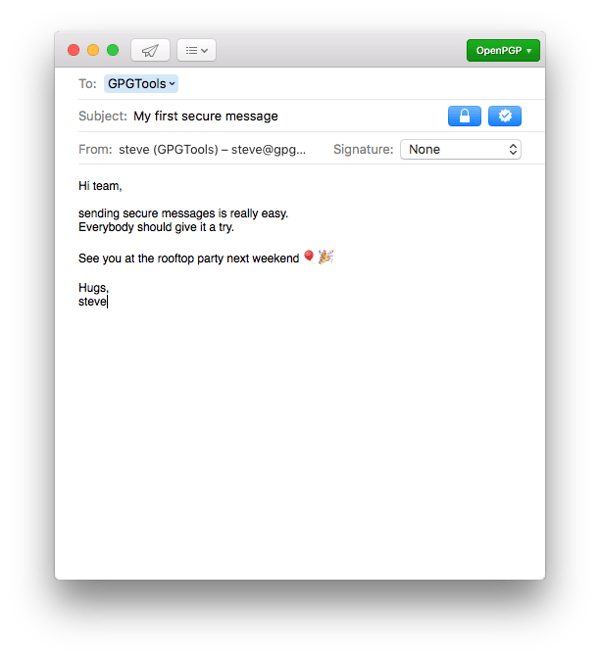
Source: GPGTools
4. Why is PGP used?
Although PGP still widely applies to encrypted emails, the rise in popularity and talk of cryptocurrency could explain why you might have seen the term more than usual recently.
Some Bitcoin trading platforms use PGP to help secure user accounts like Kraken. It’s largely used to protect sensitive information involved with financial transactions, especially those that are still emerging — and to prevent cryptocurrency from being stolen.
In many ways, PGP can be viewed as a intensive version of what we do to protect our private information, like financial data and health records.
However, this level of encryption becomes particularly valuable when identity protection comes into play during sensitive transactions.

How Does Facebook Stories Stack Up to Snapchat?
If you can’t beat ‘em, join ‘em.
This is a lesson Facebook has perfected over the last year as it continues to launch products to compete with Snapchat, the app it tried and failed to purchase back in 2013.
The battle over the disappearing social media story continued recently with the launch of Facebook Stories — a feature that replaced Facebook Messenger Day late last year. But is this Facebook Stories update competing with or even being used in the same way as its competitors?
Snapchat vs. Facebook
Perhaps the biggest advantage Facebook Stories has over Snapchat is number of users. While Snapchat has 187 million daily active users, Messenger alone has one billion users worldwide. Snap Inc. cited Instagram Stories as a primary reason for slowed Snapchat user growth in its S-1 filing to go public in February 2017.
Snapchat still holds some advantages of its own as the veteran of disappearing picture texts. In this post, we’ll cover what Facebook Stories is all about, how to use it, and how this still young feature is changing the ephemeral messaging competition between Snapchat and Facebook.
Snapchat to Facebook: “I’m sorry that you’re so jealous of me, but I can’t help it that I’m popular.” Our team weighs in — listen below:
What Is Facebook Stories?
Facebook Stories was, at one time, a separate website Facebook hosted to share actual stories of members who were using the social network in inspiring ways.
The company has since reassigned the title to a function that lets users curate a slideshow of photos and videos that’s visible to their friends for 24 hours before it disappears. The rollout of Messenger Day began as a part of Messenger, Facebook’s standalone messaging app used by more than one billion people worldwide.
The shift to Facebook Stories continues to share user content through this app, but users can also access their friends’ latest Stories from the top of their Newsfeed — as shown in the image three paragraphs down.
Messenger’s in-app camera lets users add text, drawings, stickers, emojis, filters, and lenses to photos and videos before adding them to their “Day” (hence the original “Messenger Day”) or sending them to individual friends or groups. Here’s what Stories users can tailor images to look like with the camera:
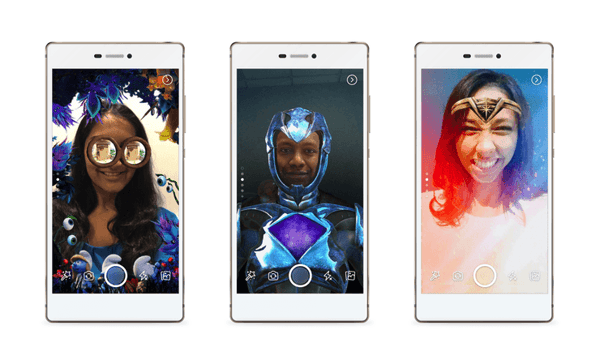
Image via Bustle
Before you learn how to use Facebook Stories, here’s the lowdown on what it’s all about and how it’s similar to other ephemeral messaging apps and products out there.
How It’s Similar to Other Apps
Like Snapchat Stories and WhatsApp Status, Facebook Stories displays users’ ephemeral messages in a line of circular profile pictures you can click and view individually, or “Watch All” in a row. However, it is much more consistent with the interface of its subsidiary, Instagram, over its competitors.
Here’s a side-by-side comparison of what they look like:
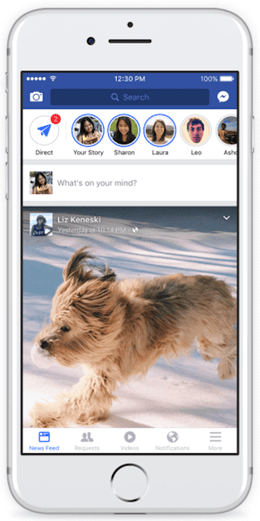
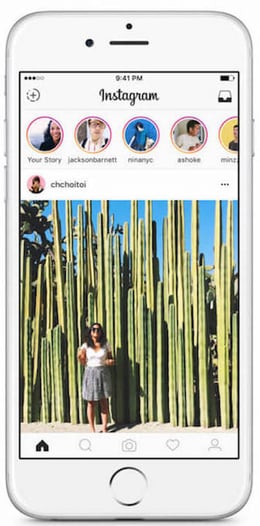
Pretty similar, right? The distinguishing factor is that unread stories display horizontally along the top, rather than vertically down the left side.
The cameras for each of these apps and features have different lens and filter styles, but for the most part, photo editing abilities are remarkably similar as well. Facebook, Snapchat, Whatsapp Status, and Instagram let users send disappearing messages privately to individuals and groups, in addition to sharing on their Story, Status, or Day.
Now, let’s dive into how Facebook Stories is different from these other players.
How It Differs From Other Apps
What’s the one thing that sets Facebook apart from social networks like Snapchat? The size of its user base. I’ll get into the implications of this in just a minute.
Another difference between Facebook Stories and similar products is its intended use. While Snapchat and Instagram stories are focused on sharing what you’re up to in the moment, Facebook has positioned Facebook Stories as a way to make plans with friends and communicate about getting together.
In the original blog post announcement of Messenger Day, Messenger’s Head of Product, Stan Chudnovsky, said users can post images to their Days to “show what they’re doing, how they’re feeling and to invite friends to join them for activities.”
Here’s a video of the impetus behind Facebook Messenger Day, and how they company envisions Facebook Stories changing the way people communicate to make plans:
Now that you know what Facebook Stories is and what it’s for, here’s a step-by-step guide for how to use it.
How to Use Facebook Stories
- Update your Messenger app for iOS or Android.
- Navigate to the App Store on iOS devices or Google Play on Android devices and make sure you’re using the latest version of Facebook Messenger.
- Open your Messenger app and tap the circular camera button in the bottom-center part of the menu.
- Take a photo, record a video by pressing and holding the capture button, or turn the camera to face you to snap a selfie.
- Add art, effects, emojis, and text to your photos and videos by tapping the smiley face, sticky note, and squiggle icons. Tap “Aa” to add text and caption your image.
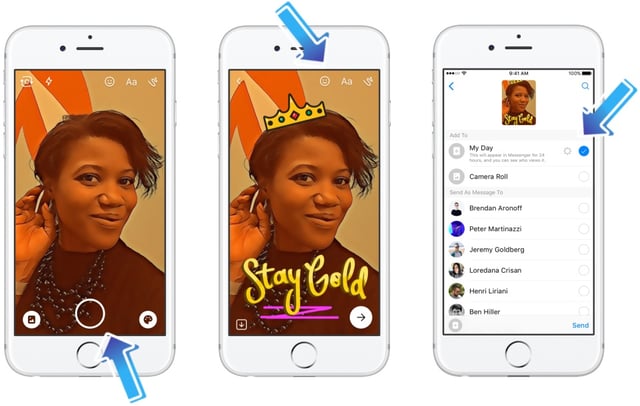
Image via Facebook
Once you’ve created your finished product, tap the arrow in the lower right-hand corner of your screen.
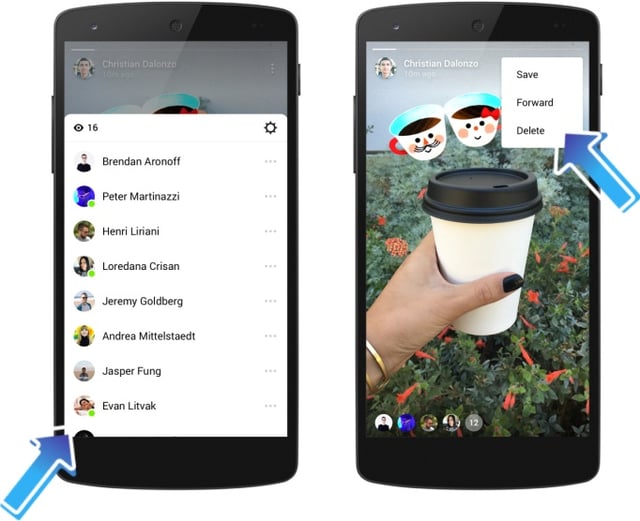
From there, you can choose to send your image to one friend, a group of friends, or post it to your Day. You can also save it to your camera roll by tapping the download icon in the lower left-hand corner of your screen.
Source: Facebook
You can also add photos or videos to your Day after you’ve already sent them to individual friends or groups. Within a direct or group message, tap “Add to your day” under the image to, you guessed it, add it to your Day.
Does Facebook Stories Stack Up to Snapchat?
At this point, it’s no secret (in fact, it’s become a running joke) that Facebook is trying to replicate and dominate Snapchat’s parent company, Snap Inc.’s, success. And so far, it looks doable. The Snapchat vs. Facebook showdown is a story of user base vs. user engagement, and the outcome of this social media arms race is being watched closely.
To recap: Facebook started adding filters to the Messenger camera back in the summer of 2016. Facebook-owned Instagram launched a near-exact replica of Snapchat Stories, called Instagram Stories, in August 2016. And in December 2016, Facebook unveiled a new in-app camera in Messenger, featuring lenses, more filters, stickers, and drawing abilities.
If you look at what photos and videos look like across the different apps and features, you’ll see a lot of similarities, like the ones we outlined above. But there are a few key differences, too.
As I mentioned at the beginning of this post, Facebook Stories’ user base is much larger than that of Snapchat, with more than one billion daily active users versus Snapchat’s 187 million as of the end of 2017.
Snapchat attributes much of its slowed growth to Instagram Stories, according to its S-1 filing to go public last year, and there may be some truth to that as well.
For users, Instagram Stories arguably presents a better experience than Snapchat because video and photo ads aren’t shown between Stories as users scroll through their list of friends. This might prompt users to move over to Instagram to view Stories uninterrupted.
For marketers, Facebook and Instagram provide more detailed and more easily accessible analytics for understanding the reach and engagement of ephemeral content than Snapchat. Snapchat’s only metrics for Stories are the number of views and screenshots, and these numbers must be recorded in 24 hours before the content disappears.
… Or Will Snapchat’s Engagement Rates Win the Day?
One common theme among Snap Inc.’s competitors is that all were copies of the original, innovative Snapchat product: an app for sending messages that disappear. And as it turns out, that’s a very sticky idea.
Snapchat was a first mover in the ephemeral messaging space, and its devoted user base spends an average of 30 minutes on the app every day. Additionally, a huge portion of its user base is concentrated in the 18-34-year-old age range, and they could become bigger sources of revenue as time progresses.
I asked HubSpot Social Media Manager Marissa Emanuele what she thought about Facebook’s original Messenger Day announcement upon its launch in early 2017, and she noted that Facebook’s huge user base could be a disadvantage, too.
“The big advantage Snapchat has is that it’s highly curated with only the people you care about,” Emanuele said. “I’m friends on Facebook with somebody I met once in college and my neighbor from when I was a kid. I don’t really want to see what they’re doing every day, and I don’t think they want to see what I’m doing, either.
“I believe the only way that Facebook Messenger Day will be successful is if they have a much more curated version, where users could build lists of people they wanted to hear from,” she concluded.
Emanuele’s point? The massive size of Facebook networks — something Facebook Stories is still on the hook for — contrasts with how curated and one-to-one Snapchat is. Users might be more interested in sharing authentic content with a select few than with an enormous number.
What’s Next for Facebook?
The takeaway for marketers? Experiment with where your audience likes to consume ephemeral content. If you have a highly engaged audience that you communicate with on Facebook, especially on Facebook Messenger, then experiment with Facebook Stories. On the other hand, it could be worth engaging with audiences on Facebook, Snapchat, and Instagram if you have different active audiences on different platforms.
What’s more, companies are starting to use messaging apps to communicate with customers. Creating content on Facebook Messenger could create a more unified communication approach to customers if you’re already serving them there.
Whichever ephemeral app is your favorite, download the Facebook Messenger update and experiment. We’ll keep you posted on new developments in the competition heating up between Facebook and Snapchat. In the meantime, we have guides for marketers on how to use Facebook and Snapchat if you need help getting started.

What are Google and Justin Timberlake Up To?
I don’t know about you, but when I hear the name “Justin Timberlake,” I instinctively roll my eyes.
And while that sentiment may have caused 90% of you to bounce from this page, please, hear me out: This post is about Google more than it is about him.
It all started when my colleague, HubSpot’s Director of Acquisition Matt Barby, pointed out that a Google search for Justin Timberlake would display the following within the search engine results page (SERP):
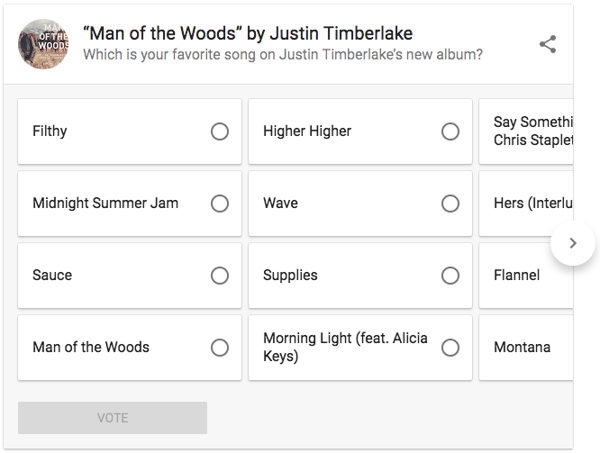
Naturally, I had questions. First, why isn’t “none of them” an option? But more important — what is Google up to? Why is the search engine polling searchers on their favorite new Justin Timberlake songs?
The answer: Data.
What are Google and Justin Timberlake Up To?
Google Wants in on the Data Game
My colleague Kevin Raheja, HubSpot’s director of strategic partnerships, was one of the first to chime in when I began asking questions.
“Think about all the data Facebook has on users,” he told me. “Google is trying to make a play at some of that consumer data.”
Have a look at the search volume for Timberlake’s name over the past 30 days:
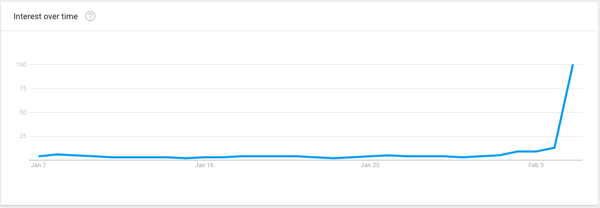
Source: Google Trends
If Google does want to begin experimenting with data collection on consumer preferences — in the same way, to Raheja’s point, Facebook has gradually done since its inception — it makes sense to do so by leveraging a high-volume, timely search query. Timberlake is already a rather popular figure, and his name is currently a trending search topic (love it or hate it, people are still talking about his Super Bowl LII halftime show).
But What Data Is Google Trying to Collect, and Why?
There are many reasons why someone might be searching for “Justin Timberlake” in the first place — to learn about tour dates, find videos, re-watch his halftime show performances, or to reminisce about his previous hairstyle choices.
But if you’re searching for Justin Timberlake, chances are, it’s because you have an interest in something about him.
That search query alone already tells Google something about your preferences as a consumer — especially if you use Chrome as your preferred browser and are signed into it through your Google account, which can connect your search history to your Google profile.
If that’s the case, Google now knows that you’re interested in Justin Timberlake — and if you engage with new interactive SERP features like the favorite track poll we discovered today, that tells Google even more about your consumer preferences, like the fact that you even have a favorite track from his new album at all.
“I didn’t vote because I only liked one album he did back when I was in college, and think he’s good on ‘Saturday Night Live’,” explains Raheja, to illustrate his own level of engagement with this SERP content. “But I imagine most people who vote are fans. Knowing which Google users are, in fact, Justin Timberlake fans can theoretically help Google deliver more personalized ads, based on that consumer preference data.”
(Too bad there wasn’t an option for “none” — I can only begin to imagine what that would tell Google about my own preferences.)
So, Is Google in Cahoots With Justin Timberlake?
I had to ask: Is this something on which Google collaborated with Timberlake’s team? Could it simply boil down to little more than a publicity stunt?
“I doubt it,” Raheja told me. “My guess is that it’s not sponsored and that there’s an intent to collect data,” based on a search query that’s already trending.
However, it is possible — likely, even — that we’ll see more interactive SERP content like this from Google in the future, including some that’s sponsored.
That could be something that Google is test-driving with this Justin Timberlake poll, to see if there’s potential for sponsored polls from artists and businesses.
But first, Google has to scale these consumer polls, says Raheja — which are, at least in these early stages, “designed to be engaging and collect data for Google.”
Google isn’t necessarily the only beneficiary, however. Consumers potentially have something to gain from this kind of feature.
“For a consumer, it seems fun and innocent to tell Google what your favorite Justin Timberlake song is,” Raheja explains. “Once they warm up to that idea a bit more, I could see consumers voting on things that deliver feedback to businesses or advertisers.”
Even in that case, though, consumers would be submitting some level of data as a byproduct of participating in such polls — and allowing advertisers to gain information on their preferences, or segment them into audience categories.
Google has yet to comment on the feature.
As always, feel free to weigh in with thoughts or questions on Twitter.
