
Self-Driving Cars Have Landed at #CES2018, and Marketers Really Need to Pay Attention
Here I am, on my fourth day at CES 2018, and man — there has been a lot of content on emerging technologies.
If I’m being completely honest, it’s been an interesting challenge to figure out which topics would be the most helpful to those of you reading. Emerging trends? Check. Brand loyalty and connected ecosystems? Check. Self-driving cars? But, of course.
Hold up. What? What does autonomous vehicle driving technology have to do with the broader world of marketer?
As it turns out — the answer to that question is, “A lot.”
Here’s why.
Why Self-Driving Cars Matter to Your Business
Emerging Tech Is Changing the Landscape for Marketers — Fast
First of all, autonomous vehicle technology is a shining example of how quickly and significantly emerging technology can disrupt an entire industry.
As the Consumer Technology Association informed us earlier this week, much of the in-vehicle technology that will become more prevalent with the rise of self-driving cars accounts for one of the top trends for 2018, with a forecasted revenue of $15.9 billion.
On top of that, it’s predicted that driverless cars have the potential to save 1.2 million lives per year from traffic accidents, and 157 hours of commute time per person every year, according to Intel CEO Brian Krzanich’s opening keynote on Monday night.
Where marketers enter the picture, however, is where the rise of this technology causes a ripple effect on other industries.
“We’re shifting from a transportation model that is built on the private car ownership model to a transportation-as-a-service model,” says Mike Blasky, Media Relations Specialist at AAA Northern California, Nevada & Utah (which recently launched the first driverless shuttle in the U.S.), to one that could leave businesses within private car ownership — such as auto dealerships and the like — nearly obsolete.
Source: AAA
But fear not. Blasky also believes that it will generate greater opportunities for marketers.
The Self-Driving Opportunity for Marketers
That could come, for example, in the form of something like a subscription to a transportation-as-a-service provider. Even if autonomous vehicles completely penetrate the market, it doesn’t equate to accessibility — meaning that those who can’t afford to own such a vehicle will have to rely on self-driving ride-sharing companies.
Let’s say, for example, “you subscribe to a Lyft, and you always get a Starbucks at 8:30 am before work,” says Blasky. “Nearby coffee companies would love to pitch you coffee deals … and they’ll have access to that data” on every user’s commute.
That might raise some questions about user and rider privacy. As marketers begin to shift away from email and move toward other promotional content models — like ride-sharing “infotainment systems,” as Blasky calls them — they’ll also need to explore the new model of letting users opt-out.
But should marketers become privy to this data on user behavior and preferences, it does, in fact, create new areas of opportunity, just as Blasky suggested.
There are the self-driving vehicles themselves serving as a content distribution channel (e.g., sending a user a branded or personalized briefing during her ride), as well as the opportunity for businesses to create and offer the aforementioned promotions based on each user’s riding habits.
How Businesses Are Already Adapting
In fact, that’s quite parallel to what AAA itself is doing, Blasky says. “Our club recognizes consumers’ changing habits, which is a reason we launched GIG Car Share in Oakland and Berkeley last year” — which is a one-way car share program that doesn’t require users to return the vehicle to a designated spot.
But remember this: AAA’s long-held model of emergency roadside service relies heavily on private car ownership model. And as we move away from that, the organization is adapting to the shift by identifying new opportunities with a brand fit.
That’s not to say, however, that the need for something like emergency service will be diminished with the permeation of autonomous vehicles — it’s just that the process of alerting the necessary parties that it’s needed will be digitized, and hopefully, become more seamless and efficient.
We wrote a bit earlier this week about how LG is using AI to help its home appliances proactively detect and repair potential problems before they happen. Here, a similar opportunity exists for something like vehicular safety and maintenance.
In fact, AAA Northern California Nevada & Utah (NCNU) today announced its partnership with Torc Robotics to develop safety criteria for self-driving cars. Like so many of the other emerging technologies we’ve heard about this week, this program begins with a machine learning program to collect data Torc’s self-driving system Asimov, and use it to train autonomous vehicles how to react to various traffic issues.
(CES 2018 attendees looking to learn more about this should check out tomorrow’s session on Developing Safety Criteria for Self-Driving Cars.)
There’s also the idea of partnering with autonomous driving service providers to deliver products — much in the way that Toyota announced on Monday it would be doing so with Uber to create a fleet of driverless shuttles with to deliver goods from Amazon and Pizza Hut, among others.
Source: Toyota
The Key Takeaway
I know that I harp a lot on the importance of marketers staying ahead of the curve on emerging trends. And if you’re getting sick of hearing me emphasize it, that’s understandable — but also, I’ll continue to do so.
Self-driving technology, as we’ve seen, is an area I really want you to pay attention to, and begin thinking of the ways your business — regardless of the industry — could not only be impacted by it, but could also use it as an opportunity. How can use it as a content distribution channel? What types of content could you potentially create for in-vehicle experiences? What sort of promotions could you create based on predicted user and rider behavior?
The possibilities are great. And, as always, I’m open to your take on them. Feel free to reach out to me with your thoughts and questions on Twitter — and to see more insights and announcements from CES 2018.
Featured image credit: Torc
Data Is Cooler Than You Think. Here’s What Marketers Need to Know About It Today.
It’s my third day here at CES, and today marks the opening of the 2018 event to the public. Last night marked the end of the event’s two major media days, which concluded with a keynote from Intel.
To say the least, it was … interesting.
The keynote was titled “How Data Is Shaping Innovation of the Future,” and advertised as a deep dive into how data is necessary — and profoundly powerful — to continue the growth and innovation of AI.
But it took a while to actually get to the meat of the event. Things kicked off with a performance from what was labeled a “data-only band” called the Algorithm & Blues, which I can only describe as a very bizarre, well-funded production of air-guitar and drumming. And apparently, I wasn’t alone in that impression.
Somebody thought this was a good idea… http://pic.twitter.com/OyzYTz0Ygn
— Frederic Lardinois (@fredericl)
January 9, 2018
But after roughly 20 minutes of this bizarre performance, Intel CEO Brian Krzanich took the stage and wasted no time addressing Meltdown and Spectre — a 20-year-old security flaw discovered last week in Intel chips — noting that 90% of the updates needed to resolve the issue have already been shipped, and that the rest will be ready by the end of the month.
And that was it.
Trying to tie together the concepts of data and AI and bring them full-circle is a tall order, and Intel may not have been up to the challenge. Dieter Bohn of The Verge may have put it best:
” … that story about translating space into data into experiences got a little lost. It’s a difficult, cerebral thing to try to convey, and Intel didn’t quite pull it off.”
But there were dots to be connected — especially when it comes to the fundamental takeaways for marketers that I was able to derive from last night’s event.
Here are some of the key conclusions I came away with.
Why Data Is More Important to Marketing Than Ever
1. Data is what powers AI.
Artificial intelligence (AI) is, in my humble opinion, one of the most important and rapidly-growing frontiers in technology. Take machine learning, for example. It’s what allows us, including marketers, to observe, learn, and make conclusions on audience behaviors and preferences … thanks to the ability of a machine to process the data related to these items much more efficiently than humans can do alone.
Source: Intel
And, there’s a good chance that you might be working with a massive amount of data in this type of situation. As AI-enabled technology allows us to both capture and synthesize it in an increasingly seamless way, we’re able to make more advances in a shorter amount of time.
For the marketer, those advances often come in the form of creating a remarkable and unique user experience.
2. In order to create a truly immersive user experience, we need data.
When it comes to the AI-analyzed data that can be leveraged to create an immersive user experience, I like to shift to the realm of virtual reality. That’s where Intel demonstrated the greatest use cases during its keynote, and it’s another emerging — but incredibly important and valuable — area of technology.
While there was a heavy emphasis on sports- and athletic-event-related experiences last night, the takeaways and technologies shown are more widely applicable than that. Take, for example, Intel’s multi-camera (each of which is equipped with multiple lenses) system that captures so many different perspectives of an event that it allows the user, as Krzanich put it, to “select the best seat in the house, every time.”
It’s a theme that echoed throughout the CES media days, and reminded me of remarks made by NVIDIA’s Jensen Huang at a press conference less than 24 hours earlier:
“Virtual reality SHOULD be the largest sport — because virtual reality can be ANY sport.” #CES2018
— Amanda Zantal-Wiener (@Amanda_ZW)
January 8, 2018
What’s an alternative name, though, for those perspectives that are being captured to create such an immersive experience? You guessed it: data.
To get a bit more technical about it, that type of data capture is powered in part by something called voxels: pixels that are placed into a three-dimensional space, adding depth to whatever is being recorded. And when you use that type of technology to build upon a multi-camera and multi-lens system, said Krzanich, “you’re recording everything.”
To put that massive amount of information in context, this type of capture often requires data creation at a rate of 3TB/minute. That’s the equivalent, Krzanich claimed, of producing all of the content of the Library of Congress in the first quarter of a football game.
3. Data-powered experiences allow marketers to show (instead of tell).
When I was live-tweeting this keynote last night, I made fun of myself for “ranting” a bit about the above. But there’s a point — and we’ve finally arrived at it.
Marketers are often challenged with communicating a product or service in a captivating way that reaches precisely the right audience. And sometimes, those products or services are profoundly difficult to describe, or — on the surface at least — kind of boring.
That’s where this immersive data and perspective capture becomes so valuable. Marketers are frequently tasked with proactively answering questions. How does your stuff work? How does it fix things? Why do — and should — your customers come to you?
With a difficult-to-describe product or service, answering those questions with words alone is, simply put, really hard. But now, the data-powered VR technology covered at this keynote can be used to show people the answer, rather than just telling them.
Source: Intel
Now, you can show people how your stuff works. You can insert them into a virtual experience that immersively demonstrates how you solve problems. As Krzanich put it — marketers are now empowered to create “a perspective that nobody else can provide.”
Cool, huh?
As always, I’m open to your take on these insights. Feel free to reach out to me with your thoughts and questions on Twitter, or follow along for my latest coverage of CES 2018.
Featured image source: Intel
The Tax Bill Has Passed. Do You Know How It Will Impact Your Business?
When the Tax Cuts and Jobs Act — better known, generally, as “the tax bill” — was signed into law on December 22, 2017, there was a broad spectrum of reaction.
Many people were worried. Even more were angry. A small percentage were pleased — and most of all, it seemed, the public was somewhat confused.
How exactly would this impact day-to-day life — and for businesses, operations, and practices? Would we pay more? Less? Just how much will this change the way we do things?
And one place where that confusion is especially widespread, it seems, is within the small to midsize business (SMB) community.
HubSpot Research surveyed 1,046 SMB owners and VP-level leaders in the U.S. to learn more about their impressions of the tax bill — how prepared they are for it, how well they understand its impact, and who they think has the most to gain or lose from it.
Our findings are below.
About the Tax Cuts and Jobs Act
According to the official, Congress.gov summary of the tax bill, it “amends the Internal Revenue Code (IRC) to reduce tax rates and modify policies, credits, and deductions for individuals and businesses.”
According to an analysis from the Tax Policy Center, however, “higher income households receive larger average tax cuts as a percentage of after-tax income, with the largest cuts as a share of income going to taxpayers in the 95th to 99th percentiles of the income distribution.”
In other words, the highest-income households (and businesses) are expected to receive the highest reductions.
This information, understandably, could be disconcerting to SMBs. If the highest-income or largest businesses stand to benefit the most from the bill, how does that impact the smaller ones?
However, this post is not intended to be a deep-dive into the implications of the tax bill for SMBs — rather, it’s an examination of the overall reactions, sentiments, and expectations experienced by SMBs. We will be monitoring any additional modifications as the bill actually goes into effect for the fiscal year 2018.
How Prepared Are SMBs for the Tax Bill? The Questions We Asked
- How well do you understand the tax bill’s potential financial impact on your business?
- Do you think the tax bill’s financial impact will benefit or harm your business?
- Do you think the tax bill will benefit or harm your employees?
- What kind of businesses do you think will benefit the most from the tax bill?
- Do you account for legislation or regulations when it comes to your business’s financial planning, budgets, and hiring goals?
- Does the passage of the tax bill change any of your business plans for the near future?
- Do you think your business will be prepared for the changes the tax bill will implement once they go into effect?
1. How well do you understand the tax bill’s potential financial impact on your business?
Our research found that 88.5% of SMB leaders don’t know the full impact of the tax bill. That comprises a fairly even split between those who have some idea of its financial impact, and those who simply don’t know what the impact will be.
2. Do you think the tax bill’s financial impact will benefit or harm your business?
The highest number of respondents indicated that they don’t know whether the bill will financially benefit or harm your business, but that group amounted to less than half of the audience surveyed — about 30%.
Meanwhile, there was a somewhat even split between those who believe the bill’s financial impact will benefit their businesses (18.6%) and those who believe it will harm them (19.4%).
3. Do you think the tax bill will benefit or harm your employees?
Again, we found that several respondents simply aren’t aware of how the tax bill will benefit or harm their businesses — about 34%.
Overall, however, a greater number of respondents generally believe that the tax bill will negatively affect their employees (32.2%) than those who believe it could benefit them (22.6%).
4. What kind of businesses do you think will benefit the most from the tax bill?
Our research somewhat overwhelming found that the majority of respondents view the tax bill as a boon for large businesses, with over half (63.7%) responding that they believe this sector will reap the greatest reward.
5. Do you account for legislation or regulations when it comes to your business’s financial planning, budgets, and hiring goals?
Typically, our research found, SMB leaders don’t factor legislation or regulation into their business planning, with just about half responding as such.
While some respondents occasionally account for it (36.5%), an even smaller number indicate that they always do (12.6%).
6. Does the passage of the tax bill change any of your business plans for the near future?
The lack of certainty around the tax bill’s impact, it seems, is largely resulting in inaction among SMB leaders, with 66.6% indicating that they will not change any business plans as a result.
Just under a quarter say they’ll reign in spending and hiring efforts, while roughly 10% actually plan to increase their expenditures.
7. Do you think your business will be prepared for the changes the tax bill will implement once they go into effect?
Finally, most SMB leaders (51.3%) believe that they, at least on some level, will be prepared for any changes to their tax and benefits liabilities resulting from the tax bill when it takes effect.
And despite being unclear on its full impact, less than a quarter (23.4%) believe that they won’t be prepared.
We’ll be monitoring the situation as it unfolds, and watching the tax bill’s impact on all businesses as it takes effect.
As always, I’m open to your take on the matter — feel free to reach out to me with your thoughts and questions on Twitter.
At #CES2018, Lessons Emerge on Brand Loyalty and a Connected Ecosystem
Today marks the second Media Day of CES 2018, and to kick things off, LG debuted a number of new technologies at this morning’s press conference.
As one might expect, the announcements leaned quite heavily toward Smart Home, with LG’s ecosystem boasting a suite of abilities — many of them AI-powered. There’s the “Smart Service” feature, for instance: the technology that detects potential problems with appliances (like your washer or dryer) and proactively notifies the service center, often fixing the issue before the user even knows there is one.
It was reminiscent, for me, of many of the announcements made in October at the Samsung Developer Conference — the idea of a unified ecosystem (LG’s is called ThinQ) that’s powered by machine learning solutions, all on an open platform. One of the differentiating factors announced today, for example, is LG’s connectivity among home, car, and office: the type of technology that allows, for example, your refrigerator to send a message to your car notifying you if you need to go to the grocery store.
But as I was busy live-tweeting and day-dreaming about filling my home with these oh-so-smart devices, I noticed this:
A fundamental problem with #CES gadget thinking: All our things talk to each other! You just have to learn our new language and use it exclusively in your home. https://t.co/pFCQOqKItA
— Geoffrey A. Fowler (@geoffreyfowler)
January 8, 2018
The flaw, Fowler points out, is the thinking that most consumers exclusively equip their homes with appliances from a single brand. It proposes a world, for example, where you don’t have GE appliances in your kitchen and a Samsung TV (such as yours truly) — you have one, single brand filling your home with everything.
LG did note that users will be able to control IoT devices manufactured by other brands from your refrigerator panel. But there enters the concept of practicality — how often are you in standing directly in front of your fridge when you need to, for example, remotely control any other given device in your home?
Which leads me to another question: Just how far will consumers go when it comes to brand loyalty?
When it comes to the marketer’s job, there are two key takeaways here. The first is to determine how — and to begin, if — your brand is equipped to build such an ecosystem, regardless of your industry. Are your products and services connected to complement each other and work in synergy to enhance the customer or user experience?
But building a branded ecosystem with the customer in mind is a double-edged sword. Is built in a way, for example, that if the products and services are fragmented — for example, the customer has bought into one piece of the ecosystem, but not the whole thing — the user experience is somehow diminished?
As marketers begin to build upon and work to stay ahead of these emerging trends and technologies — the Internet of Things, voice search, and growing AI-powered capabilities — these are crucial questions to ask until they are answered in a way that, without a doubt, only enhances the user experience, even if they don’t or can’t buy into an entire ecosystem.
That’s not to say I discourage this type of connected thinking — in fact, I still recommend at least thinking about the ways brands and marketers can build a suite of products and services with complementary connectivity at this sort. But as I often emphasize: Do so with the user in mind.
As always, I’m open to your take. Feel free to reach out to me with your thoughts and questions on Twitter — and to see more insights and announcements from CES 2018.
Featured image credit: LG
6 Expert B2B Instagram Tips for 2018
With more than 800 million monthly users, Instagram is a force to be reckoned with. If you’re a B2B brand, you might think the hype isn’t relevant to you — but in 2018, it most certainly is.
As it stands, there are thousands of brands and a number of high-profile B2B organizations using Instagram to drive brand awareness, engage with their audience, and ultimately, to attract new customers.
To inspire you to take your Instagram game to the next level this year, our team at The B2B Marketing Lab wanted to share some concise, actionable tips you can put into practice right away.
1. Use authentic, real-time user-generated content.
Forget stock photography and staged promotional pictures — it’s time to go real-time. On Instagram, your prospects and leads want authentic content that offers a personal glimpse into your company’s culture and product offerings.
Real-time content, such as live video/live streaming, is unfiltered and 100% you. It adds a much-needed human element to B2B businesses, and helps you form a genuine connection with your audience and potential customers. Extremely professional-looking content can often feel cold and dispassionate — your customers want to know there are real people and real stories behind the branding.
2. Go fast, and mix it up.
Instagram makes it incredibly easy for you to post photos or videos on your phone directly through its application. Just fire the application up, press the add button and select the photo or video you want to upload — it’s that simple.
The advantage of this is that you don’t have to spend ages creating content. You can upload a variety of content wherever, whenever, without much pre-planning or editing required. Different types of content will not only attract and appeal to different members of your audience, but also show different sides to your business. No one wants to just look at images or just quotes on Instagram all day now, do they?
3. Get involved in your niche.
Stop looking through the window at what’s going on inside. Join the party.
Just like any other social media channel, it’s important that you not only post content to your feed, but also partake in the wider conversation. Don’t just post images and videos, reply to your community when they leave a response. Take the time to check out other Instagram profiles, have a browse, like some content and maybe leave a friendly comment here and there.
If you take the time to engage with others, they’re more likely to take the time to engage with you.
4. Make the most of the link in your bio.
While Instagram doesn’t let you link to websites within the captions of posts, you can include one in your bio. You can include up to 150 characters in your Instagram bio — including a link. Your bio is the perfect real estate for a link to your latest blog post or offers. You can also use tools such as Linktree to create a custom link that includes a page with more links, allowing you to share up to five links and get the most out of your bio link!
Alternatively, Instagram Stories are a great way of including links with your content. However, stories only last for 24 hours — this is a limitation, but also a fantastic tool for you to provide real-time offers and value.
5. Tell a story with every single post.
On Instagram, the businesses that tell the most interesting stories build the largest audiences. If you want to attract people to your business and get them to engage with you, you need consistent visual storytelling that cuts through all the noise on Instagram.
Don’t limit your focus to your general photo and video feed. Instagram’s Stories feature allows you to create a slideshow or montage of photo or video. When strung together, tell a story and provide your audience with a more personal experience.
6. Stay away from vanity metrics.
Vanity metrics don’t tell the whole story. While an increase in clicks and likes are beneficial, they don’t tell you if the right people are actually interested your content. Instead, look for indicators of real engagement, such as people commenting on your posts and new followers in your niche. These two metrics give a better indication of how well you are performing and how much exposure your business is actually getting.
Take the time to consider Instagram.
While it has predominantly been used by B2C brands up to this point, it holds great potential for B2B businesses when utilized correctly — and with the points above in mind!
Here Are the 7 Top Tech Trends to Watch in 2018, According to CES
Media Day 1 of CES 2018 kicked off in Las Vegas today, with press events on lifestyle tech and presentations from exhibitors on what’s to come in tech in the foreseeable — and at times, somewhat distant — future.
But on a higher level, core industry trends and patterns were presented today at the 2018 Tech Trends to Watch session, given by the Consumer Technology Association’s (CTA) senior manager of market research Lesley Rohrbaugh, as well as senior director of market research Steve Koenig.
I’ll be here all week to bring you the latest announcements from this year’s sessions and events — but here’s a look at the trends I anticipate hearing — and learning — all about.
2018 Tech Trends to Watch
1. 5G
5G is a type of wireless technology that you may have heard about in recent headlines — such as Verizon selecting Samsung as the provider for its 5G commercial launch.
The reason why it’s such a big deal is that it will result in higher wireless speeds, capacities, and lower latency — which generally means that there will be far fewer delays or “technical hesitancies” in some of the things it powers, like wireless VR or autonomous vehicles.
That benefit is two-fold. Not only does it enrich a user experience when it comes to something like AR or VR with higher data rates, but it’s also practical for safety, which is where the latency piece comes in. As Koenig explains, one of the key pieces of autonomous driving technology safety is the ability for it to independently make operational decisions — quickly, and perhaps more seamlessly than a human driver could.
But just how fast is 5G? During the presentation, the example of a two-hour movie download was used. On a 3G network, for example, that would take 26 hours. On 4G, it would be lowered to six minutes. But on 5G, it’s lowered to 3.6 seconds.
2. Artificial Intelligence
We’ve talked a lot about this one, and it came up in some of the major press events of 2017.
A considerable amount of attention will be paid, it seems to the role of AI in digital personal assistants.This plays into the smart home sector, with AI technology like deep and machine learning lending itself to the ability to recognize user preferences and behavioral patterns.
Smart speakers, for example, were named as some of the heaviest hitters in the CTA’s Consumer Tech Industry Forecast, with a predicted revenue of $3.8 billion (an increase of 93%), and 43.6 million units sold (+60%).
It also plays a major part in autonomous driving capabilities, especially when it comes to sensory perception (like objects in the vehicle’s path), data processing, and action. That, too, was a key piece in the industry forecast, with $15.9 billion revenue predicted — a 6% growth.
What’s next? The two key things to come identified were conversations with context — like machines carrying on conversations with humans with better natural language processing, to make it more like the way we speak to each other — and the ability to build trust and reducing bias. The latter comes into play, for example, to help AI systems better explain why it makes certain recommendations to its users.
3. Robotics
Robotics, in this context, seemed to play the biggest role in consumer electronics — which seems fitting, seeing as CES is largely about the newest technology in that sector.
The speakers seemed to take a particular interest in Kuri, a robot that was described as a “family friend” that can “capture life’s moments automatically using face recognition.” It’s a bit nostalgic of the Google Clips photo technology announced last fall, which boasts allowing users to spend more time in the moment, rather than taking the perfect picture, with similar recognition technology.
The event also shed light on Honda’s robots, which are engineered around what it calls its “3E Philosophy,” built on the pillars of empowerment, experience, and empathy. It reflected a pattern of working to incorporate more empathy into robotics — like Kuri, these would be moving, speaking computers with feelings.
4. Voice: The Fourth Sales Channel
The CTA’s research has shown that one in four shoppers used voice assistants in their holiday shopping during the 2017 season.
Here’s an area where marketers can use the rise in smart speaker sales (and the anticipated continued growth to their advantage. Voice assistance and technology is becoming a greater part of a brand’s identity — an area of opportunity for those who have not yet begun to leverage it as such.
So, how can marketers do that? I recommend looking into ways to merge your brand with voice assistants and see how you can create content exclusively for that medium — for example, something like building a custom, branded skill for Amazon Echo.
5. Facal Recognition on the Go
From the iPhone X Face ID technology to your car being able to recognize your eyes and nose, our faces are playing a greater role in helping our devices recognize us and capture our preferences — anytime, anywhere.
And, it seems, we’re becoming more comfortable with it. According to the CTA’s research, users have a growing amount of trust in this technology being used for such personal data as medical information.
That’s reflected in the anticipated uptick in in-vehicle technology — revenues this year are predicted to reach $15.9 billion, which is a 6% increase.
Source: CTA
6. Virtual Reality
VR isn’t exactly a new trend, but what we’ll be keeping our eyes on is the newest use cases for it. Content, it’s predicted, is where the most noticeable change and evolution will take place, especially when it comes to creating immersive experiences for brand awareness.
Where once this technology was almost exclusively used to tell a story for the purpose of entertainment, businesses and organizations are now presented with an opportunity to leverage VR for commercial purposes — like shopping, for example, or a deeper look inside what helps a business run and create its products or services.
Augmented Reality (AR) is further working its way into the B2C space, as we enter the era of what was called “AR for all.” There have been several consumer-oriented use cases from brands like Ikea and Wayfair — using the technology for things like home decor — as well as demonstrations on how it enhances a gaming experience from both Apple and Google.
But AR first made a name for itself in the B2B sector — largely for purposes related to trade shows and enhancing information delivery to analysts. And as it continues to grow its presence within the consumer sector, I don’t anticipate it leaving B2B behind. As the technology improves, many of the purposes it was originally used for will also continue to evolve, presenting an opportunity for business-facing marketers.
7. Smart Cities
From self-driving pizza delivery vehicles (seriously — this is a thing) to environment and energy usage, smart cities are where society and technology intersect.
While Smart Cities is still a new enough concept that its role in marketing remains fairly open-ended, it does present an opportunity for brands looking to increase their roles in the community — especially where technology is concerned.
One of the best cases for the growth of Smart Cities, for example, is how it will work to bolster public safety and services — something that cannot happen without the cooperation of the market, organizations, and regional leadership.
By exploring where their own organizations fit into the ecosystem of a Smart Cities, marketers can work their way ahead of the curve in playing a larger role in what remains an emerging trend.
There you have it — seven of the top 2018 tech trends, which I anticipate hearing about this most this week. As always, I’m open to your take on these emerging technologies. Feel free to reach out to me with your thoughts and questions on Twitter.
11 New Year’s Resolutions You Should Actually Keep
If you’re anything like I am, you have mixed feelings about New Year’s resolutions.
It seems like a natural time to make important changes. It’s like a universal pressing of the “reset” button. Maybe that’s why 41% of Americans make New Year’s resolutions in the first place. But here’s the thing — only 9.2% of us are successful in achieving them.
We suspect it has something to do with the nature of the resolutions themselves — which seem, much to our joy, to be evolving. Lasy year, for instance, we reported that according to a study by the University of Scranton’s Journal of Clinical Psychology, the top 10 resolutions of 2015 included things like losing weight and falling in love.
And while this year’s top 10 resolutions, according to a survey conducted by the Statistic Brain Research Institute, are similar — “self improvements,” “find the love of my life” — we noticed a new one on the list: “Learn something new on my own.”
Why do we love that resolution so much? Because it’s something that can help you become better at what you do every day.
That’s the challenge we posted last year: to come up with and stick to professional New Year’s resolutions — things that will make you more creative, productive, and generally more content at work.
Short on ideas? Here are 11 of ours to help you get started, along with resources to help you actually accomplish them.
11 Good New Year’s Resolutions for Marketers
1. Designate an electronics-free zone.
Why?
Our bodies are smarter than you might think. They’re trained to respond to light and dark, which according to the National Sleep Foundation send us important signals, like the time of day. Those signals also aid our bodies in adjusting our circadian rhythms — that’s the handy 24-hour physiological cycle that helps us fall asleep at night and wake up in the morning.
All of that is pretty cool … until screens are added to the equation. Our brains recognize the brightness from phones, computer monitors, and even TVs as external light, which sends the signal that we should be awake. That’s why it’s harder for so many of us to fall asleep when we’re exposed to too much screen time at night. The verdict? Put the devices down before bed.
How?
At INBOUND 2013, Arianna Huffington — who later went on to pen The Sleep Revolution — gave some great advice regarding the sleep/screen conundrum: Ban electronics from your bedroom for good.
“I never take devices to bed,” she said. “iPads, iPhones, Blackberries — I don’t charge them near my bed, because I feel it’s imperative to be able to have uninterrupted renewal time.”
This habit is a tough one to break, and it’s one that I’ve personally been working on for years. So if you like to watch movies or shows on your computer before bed, for example, I can relate — these are the mindless things that help us unwind at the end of the day. Luckily, there are solutions to help you resolve the problem for good, some of which might still allow you to indulge in your evening TV viewing.
Helpful Resources
We’d encourage you to ditch the electronics completely before bed. Instead, try reading, journaling, or maybe even a few minutes of yoga. And if you absolutely cannot part with your electronics:
- Try downloading a desktop app that reduces your screen’s blue light as the day progresses — that’s the kind emitted from most electronics and is often cited as the culprit for sleep loss. We recommend f.lux, which adjusts your screen’s blue light depending on the time of day, or the similar filter from PC Sun Screen.
- Plus, the latest iPhone OS now comes with a “night shift” mode, which accomplishes the same thing after sunset.
2. Write something every day.
Why?
Sadly, the decreasing quality of writing in the U.S. has been making headlines for a while now. And people want to become better writers — they just have trouble investing the necessary time.
But it’s an important skill. And if you’re going to be blogging regularly — which we recommend you do — the writing needs to be good.
If you want to become a better writer, then you need to write a lot. The way to improve that skill is the same way you’d approach any other — with practice.
It’s the same advice we give to people who want to blog more consistently (another worthy New Year’s resolution) which is to treat it like working out. You’ve got to do it consistently to see great results. After all, you can’t just publish a blog once every few months and expect to rack up views, leads, and customers. The same goes for your overall writing skills.
How?
To start, get into the habit of writing on a daily basis. Neil Patel suggests writing for at least 30 minutes every workday, skipping the weekends. Remember the advice we just gave to journal before bed, instead of looking at a screen? Here’s a great way to put that time to use.
And even if you don’t identify as a writer, pick a question — something from a customer, a friend, or a topic that’s always piqued your curiosity — and write something about it. Or, just write nonsense. It’s the habit of writing regularly that’s important, especially in the beginning.
Helpful Resources
When we encourage people to write more, one of the most common objections is, “I have nothing to say.” We profoundly disagree, and thought that these tools might help to generate some ideas:
- Daily Page: Emails you a writing prompt every morning, and you have the rest of the day to write your response. Once you’ve written your response to the prompt, you can either share it or keep it private.
- 750 Words: Encourages you to write 750 words per day about anything you want. It gamifies writing by giving you points for writing at all, for writing 750 words or more, and for writing on a consistent basis.
- Twords: Calls itself “the app that nudges you to write.” It notifies you when you haven’t written in a while so you can keep yourself accountable — and even gives you the option to connect with others who will help you stay on track.
3. Keep up with Google.
Why?
Google likes to make changes to its algorithm as much as certain pop singers like to change boyfriends. But all of them are made to improve user experience, which is a good thing — it helps searchers discover the best content for what they’re seeking.
This year, we challenge you to really keep up with those changes. That doesn’t just mean staying on top of news about the latest changes. It also means keeping your content at the highest quality to make Google’s algorithm happy, which means more people will be able to find you. Win-win.
How?
Consider reorganizing your content library into content clusters since SEO is evolving to favor topics over keywords, according to Matthew Barby, global head of growth and SEO at HubSpot. That will help you harness more search traffic, because you’ll have a larger pool of relevant keywords and phrases to be discovered.
In general, it’s a good idea to regularly revisit and refresh your content strategy, too. Not only does it prevent your content from getting stale, but it also helps you to keep up with what people are searching for, which in turn will help you keep pace with Google.
Helpful Resources
- Topics Over Keywords: A Simple Framework for More Effective Content Creation
- What Is a Pillar Page? (And Why It Matters For Your SEO Strategy)
- “Why Did My SEO Ranking Drop?” How to Find and Fix Falling Blog Posts Before It’s Too Late
- HubSpot Academy SEO
4. Improve your design skills.
Why?
In case you haven’t heard, visual content is a pretty big deal in marketing. For one thing, it’s 40X more likely to be shared on social media. Plus, when a relevant image is paired with information, people retain 55% more of that information after three days.
But quality visual content goes beyond a Google image search or stock photography. At the same time, however, not everyone has an ample design budget. For that reason, we believe that 2017 is the year for you to master some design skills. That will allow you to create the content yourself — or, if you do have a bigger budget, learn to better communicate with contractors and agencies that create it for you.
How?
These days, learning a new skill has become its own industry. Never before have there been so many online resources — many of which are either free or relatively inexpensive — to self-educate. And many of them are available outside of the classroom, like on YouTube how-to videos, Coursera, or Khan Academy.
If your company has something like a tuition reimbursement program, here’s a great opportunity to take advantage of that benefit. Many community colleges offer design courses, some of which are taught in the evenings. Do a local search for these classes in your area, and find out what’s available — it might not be too late to enroll for the next semester.
Helpful Resources
- The Science Behind Design: 8 Psychology Principles to Apply to Your Next Project
- 9 Principles of Mobile Web Design
- The Rebel’s Guide to Design: 16 Rules You Can (And Should) Break [SlideShare]
- The Non-Designer’s Essential Glossary of Web Design Terms
5. Take breaks.
Why?
Despite 90% of employers encouraging breaks, it seems that only 45% of us are okay with taking them.
So what’s with the other 55%? It turns out that we’re too guilty to leave our desks for prolonged breaks — we’re afraid that it’ll make us look less productive, or take away time that could be used to get work done.
But it turns out that the opposite is true. In fact, the top 10% most productive employees take 17-minute breaks for every 52 minutes of work they put in. There’s tremendous value in breaks, and we could all stand to benefit from them.
How?
When we’re “in the zone,” so to speak, it’s easy to forget to come up for air. That’s why I take the advice of that top 10%, and actually put reminders in my calendar to take a 17-minute break every 52 minutes.
During those 17 minutes, I completely step away from work — no email, no work-related calls, and whenever possible, no sneak peeks at my phone. And during those 52 minutes of work? That’s your time for hyper focus. Close those tabs that you have open to check social media — unless you’re using it for work, that is — and remind yourself that there’s a break coming.
Helpful Resources
- The Art of Turning Off: 7 Ways To Do Your Best Work (By Forgetting About Work)
- The BreakTime App
- “I Tried These Productivity Hacks for a Month So You Wouldn’t Have To”
6. Listen to one podcast per week.
Why?
Podcasting is a thriving mini-industry. It’s no wonder — listening to podcasts is a great way to learn something new without it being a direct skill you are mastering.
That’s true from an early age, which is why many teachers are also incorporating podcasts into their lesson plans. In fact, one English teacher found that assigning the Serial podcast to his students helped them pay more attention to the written word. While listening to any given episode, he reported that their eyes became affixed to its written transcript. In other words, it seemed the auditory version of a story aided their ability to process accompanying written content.
And maybe that’s why the popularity of podcast-based lesson plans increased by a whopping 650% in 2015 — the year after Serial first launched. It’s not just that podcasts themselves are tremendously informative (which they are). As it turns out, they might even enhance your skills in other areas, too.
How?
A simple app download can go a long way when you’re aiming to discover more valuable podcasts. We particularly like Stitcher, which catalogs over 65,000 podcasts and allows you to curate your own listening collection, depending on your subject interests. Whether you’re looking to become a better marketer or a better cook, chances are, there’s a podcast out there that can help.
Helpful Resources
- Weird Work: A Podcast About People With Weird Jobs
- 7 of the Most Interesting Podcast Episodes About Productivity We’ve Ever Heard
- 10 of the Best Podcasts About Business and Management
7. Ask for help.
Why?
Back in 2014, Care.com took a survey of working mothers that was quite eye-opening. Among the more surprising findings was one about the concept of asking for help — something that 29% of respondents felt guilty about doing, especially when it came to things at home.
At the same time, however, 79% also felt like they were falling behind at work, and 75% saw an overall reduction in stress when they did enlist help.
These numbers go beyond working mothers, however. It seems that there’s an epidemic of fear when it comes to asking for help at work. Many of us sense that asking questions about an assignment, for example, will make us look like we weren’t paying attention, or aren’t as smart as our peers thought. But when we don’t ask questions, we’re actually setting ourselves up for failure, by forcing completion of a task without all of the necessary information.
How?
This resolution is one that actually begins with management. On my very first day at HubSpot, my boss said something to me that I will never forget: “I’ll help you with whatever you ask me for help with. The most successful people ask for help when they need it!”
If you’re a manager, think about how often your team is asking for your help. If you’re not receiving a lot of questions, you might want to send a similar message. By setting that tone, your team is aware that it’s okay if they don’t know everything.
And on the flip side, don’t be afraid to ask for help. It’s more likely than not that the person you need it from is happy to answer your questions.
Helpful Resources
- 10 Hard Truths About Management No One Tells You
- How to Be an Amazing Mentor: 12 Ways to Make a Positive Impact on Others
- How to Find a Great Mentor at Any Stage of Your Career
8. Embrace emerging technology.
Why?
This year, we’ve written a lot about types of technology that, from the top-down, are still emerging — things like artificial intelligence, the internet of things, and virtual/augmented reality.
When we cover this technology, we like to think about trends that were emerging only a few years ago that ultimately left those who ignored them far behind in their marketing strategies. After all, social media was once an emerging trend — imagine what happened to those who wrote it off as merely shiny and new.
That’s why we constantly encourage marketers to not only embrace emerging technology, but to also truly invest the resources to learn about them and adapt their marketing strategies accordingly.
How?
You can always tune in here, as we bring you our take on the latest in these topics. But beyond that, we encourage you to approach the type of content that scares you, and that you might unconsciously stray from because the subject matter seems overwhelming. (Hey, we’ve all been there — present company included.)
In the meantime, check out some of what we’ve already covered below.
Helpful Resources
- What is the Internet of Things? (And Why You Should Care — A Lot)
- FAQ This! Why Should I Care About Amazon AI?
- 5 VR Marketing Examples That You’ll Want to Steal for 2018
9. Use your vacation time.
Why?
Believe it or not, there’s a phenomenon out there known as “vacation shaming” — the act of being made to feel guilty about going on vacation by managers, colleagues, or ourselves. No wonder 47% of us feel shame or guilt at work for taking time off — it’s mostly because we’re afraid it’ll make us look less dedicated.
That’s actually not how it works at all. It turns out that taking time off actually makes us more productive. In fact, in regions where people tend to take more vacation — like Brazil and Sweden, where paid time off is mandatory — employees tend to bring greater urgency to their work. That’s probably because, according to the Harvard Business Review, “spending less time at your desk forces you to waste less time.” Makes sense, doesn’t it?
How?
Vacation aiding productivity echoes the research done about how breaks help us at work. The biggest requirement is planning. Have a look at your calendar, and figure out when you’ll be the busiest. Are there certain weeks when you’ll have a little more time to get ahead? Those are good pre-vacation weeks, since they’ll allow you to increase your output before you head out.
Here’s where that resolution to ask for help can be put to use, too. In addition to planning your own workload, ask the same of your colleagues. If there are certain weeks when they’re able to fill in on your behalf, that might be a good time for you to plan a vacation. But that goes both ways — make sure they’re aware of when you’re available to pitch in, too.
Helpful Resources
- How to Get Caught Up on Email After Vacation: 9 Helpful Tips
- A Workaholic’s Guide to Relaxing on Vacation [Infographic]
- The Best Out-of-Office Messages We Could Find
10. Read more.
Why?
The most successful people never stop learning. There’s a reason why 70% of adults in professional or managerial roles continue their education — it’s one of the best ways to keep up with industry trends, learn from experts, and get the creative juices flowing.
One of the best ways to do that outside of a classroom is to read what others are writing about. Reading more might even help you become a better writer, and exploring external content helps you to gain different perspectives of vital issues, whether they’re of personal or professional interest.
How?
The tough thing is, since there’s so much content out there, you have to be discerning to find the really good stuff. To start, three places where content quality stays high are Harvard Business Review, the New York Times, and Slate. (Don’t be afraid to pay for top-tier content, by the way. There’s a reason it costs money, and it’s often well worth it.)
You’ll want to spend time reading more niche or industry-specific content, too. To make it easier to read them all, look for applications that let you read all your favorites all in one place, like Feedly.
Helpful Resources
- ThinkGrowth.org: Stories, insights, & ideas to help you and your business grow
- 4 Science-Backed Reasons to Read More (Even If You’re Busy)
- Do People Still Read?
11. Move to the next level of your career.
Why?
“Next” can mean different things for different people — changing your title, getting more responsibilities, gaining more authority in your industry, or starting your own business. Whatever it is, start now — it could take longer than the next year to fully accomplish it.
Don’t let that scare you out of it, though. If you don’t start moving forward now, it’s easy to keep putting it off. Even if you’re happy in your current professional situation, we’ve outlined many reasons in this post to continue learning, or at least add to your success with new goals and accomplishments.
How?
When it comes to big, life-changing moves, planning is fundamental. If your goal is really monstrous, try breaking it into a year-over-year plan, and using the first year’s plan as the basis for your resolutions.
But if you’re simply looking to grow and accomplish more, there are smaller steps that you can take this year. Jumping on opportunities to share your skills with others, for example, can enhance your career, especially if you do so through public speaking engagements. These aren’t just beneficial for your audience — they provide a great way to present yourself as an expert, increase your visibility both online and offline, and build your personal brand. Plus, getting your name out there in the context of your job is beneficial for your company, too.
Talk with your manager about opportunities your company can introduce, like local meet-ups or conferences. You could also get in touch with a university and offer a guest lecture — after all, there’s something very rewarding about inspiring future talent.
Helpful Resources
- How to Figure Out the Next Step in Your Career [Quiz]
- How to Talk to Your Boss About Your Career Path
- 15 Uncomfortable Things That Will Make You More Successful
Show Your Resolve
There you have it. New Year’s resolutions don’t have to be quite so flighty, or involve gyms and special diets. They can help you become a better employee, and to continue learning and improving, no matter where you are in your career.
That said, do what works for you. We wouldn’t expect anyone to try to tackle all of these resolutions. Depending on where you are in life, some might be more feasible and practical than others. Think about your priorities, and choose from there.
From our team to yours, Happy New Year. We can’t wait to hear about how you put these resolutions to work.
How HubSpot’s Pricing Page Redesign Increased MQL Conversions by 165% & Free Sign-Ups by 89%
A few months ago during INBOUND 2017, we launched a complete redesign of HubSpot’s website pricing page. Not because it hadn’t been redesigned in a few years (it hadn’t), but because we saw a big conversion opportunity from a page that had a lot of untapped potential.
And boy, did it pay off. Not only did we increase the number of MQLs the page generated by 165%, but we also increased sign-ups for our free products by 89%.
It’s no small feat to increase free product sign-ups while also increasing the number of people who raise their hand and say they want to talk to our sales team about our premium products. But I’m not really here to brag about numbers (though I’d be lying if I said I wasn’t even a little bit proud). I’m here to talk about process.
A redesign of a website’s pricing page is typically a huge undertaking that involves a lot of company stakeholders. For us, those stakeholders were web strategy (my team), product marketing, sales operations, legal, pricing and packaging, and localization. And when you have that many opinions involved, it’s easy to cave in and make compromises that A) dilute the overall quality of the work you’re doing, and B) detract from the original goals of your redesign.
So keep reading if you want to learn more about our research behind the redesign, our goals, how we made sure we stuck to those goals during a months-long redesign process with multiple stakeholders, and why we changed what we did.
Before and After
You can check out how the old page looked via the Wayback Machine here, and you can find the new page here. Or just take a look at the quick snapshot below …
Before
After
The Goals of the Redesign
The pricing page has always stood out to my team as being rife with opportunity. Up until this redesign, it had been built primarily as a sales enablement tool. While that’s not necessarily a bad thing, it’s also important to note that the pricing page is the second most visited page on our website — second only to our homepage. As a result, the pricing page generates a lot of really broad traffic from visitors who, compared to the sales reps the page was originally optimized for, have much less knowledge of our products.
This meant we had been neglecting to optimize the page for its primary user: the website visitor. As a result, the pricing page was converting visitors at a poor rate, and given the hefty amount of traffic it generates every month, we hypothesized that we were leaving a whole lot of conversations on the table. So our goals were twofold.
- Optimize for conversions. Our pricing page should either drive visitors to sign up for a free product or contact our sales team.
- Create a positive user experience. Pricing should be presented in a way that is both transparent and easy for users to understand.
The Research Behind the Design
The new pricing page was launched near the end of September, but we started conducting research to lay the groundwork for the redesign way back in May, and let me tell you: It was extensive. In fact, pretty much every decision we made about every aspect of the redesign — the copy, the layout, the user experience, the design, the conversion events — all of it had roots in some aspect of our research.
Defining Guardrails and Omissions
We compiled our goals and the findings of our research into a slide deck that defined specific guardrails and omissions for the redesign based on the insights we uncovered through our research and discovery phase.
We shared this deck with all the page’s key stakeholders and asked them to sign off on the plan before we got started. This gave us a document to refer back to throughout the redesign process to ensure we were staying true to our goals and sticking to our guardrails.
Here’s a look at the different types of research we conducted and how its insights led to specific changes on the pricing page.
1. Qualitative Data
First, we analyzed the performance of the existing pricing page from a traffic and conversion perspective.
From this, we learned that people on the pricing page preferred to pick up the phone and give us a call, which led to our decision to feature the sales phone number more prominently in the new design.
We also learned that pricing page users were actively clicking between the pricing for our different products (the Marketing Hub, the Sales Hub, and HubSpot CRM), so we made the navigation between products even more prominent so users could move freely from one product’s pricing to another’s.
2. Pre-Testing of Calls-to-Action (CTAs)
In the months leading up to the redesign, we also did some A/B testing to inform our pricing page’s conversion strategy. Historically, the CTAs for the paid products on our pricing page had always linked to our contact sales landing page. But those CTAs had a really poor conversion rate, so we tested them against a demo CTA that led to our demo landing page instead.
While the demo CTAs generated a higher volume of conversions, the data showed that the contact sales CTAs would ultimately result in more customers (due to the higher close rate of contact sales conversions). This informed our decision to keep that contact sales conversion on the new page.
To inform our CTA copy decisions, we ran an additional CTA copy test (“Contact Sales” vs. “Talk to Sales”) and saw a 46% increase in clickthrough rate with the use of the “Talk to Sales” copy, which we therefore implemented in the redesign.
3. Chat Transcripts
We also reviewed transcripts of the chat conversations that were happening on the pricing page to determine the common questions users were asking while they were on the page.
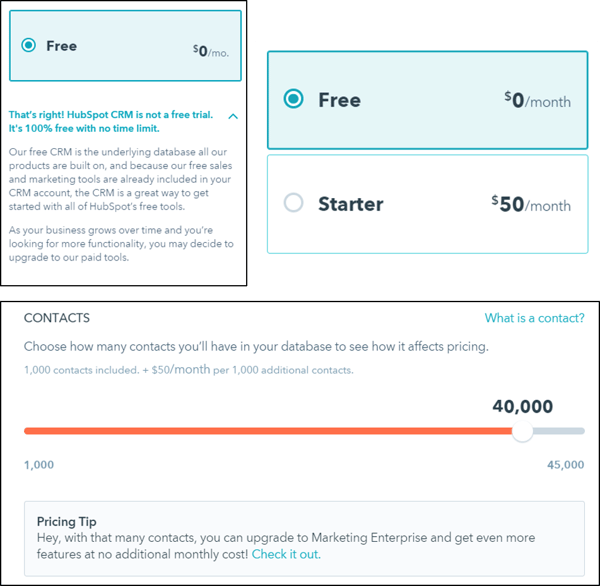
From this, we learned that people were often skeptical that the CRM was truly free, which led to our decision to incorporate copy on the CRM pricing page to directly address that concern.
We also learned that people were confused by the contact tier pricing for the Marketing Hub, so we incorporated a slider that shows users how purchasing additional contacts directly impacts their pricing, and also added a tooltip to explain to users what “contacts” are.
Lastly, we learned that because we had only been displaying pricing for our Marketing Basic, Professional, and Enterprise plans on our main pricing page (with pricing for our free and Starter plans living on an entirely separate, fairly hidden page), the $200 Marketing Basic price tag gave a lot of visitors sticker shock. This supported our decision to incorporate pricing for our free and Starter plans (and sign-up CTAs for our free marketing tools) into the core pricing page to prevent users from disqualifying themselves based on cost alone, and from getting scared away before getting started with our software.
4. Interviews With HubSpot Sales Managers & Reps
Knowing that the pricing page is still an important tool for our sales team, we interviewed sales managers and reps alike to gather their feedback on the old pricing page — what they liked and didn’t like, what was working for and against them, and what other opportunities they saw for the upcoming redesign.
From this, we learned that we weren’t putting enough emphasis on the customer support we have — and that customers see it as just as valuable as any other software feature. This led to our decision to include customer support in the page’s feature grid, and to dedicate an entire section of the page to highlighting our various customer support options for paying customers.
We also learned that pricing page users need help determining which particular plan is right for them, and that we should make pricing transparent enough for users to understand what they get with each plan, but also intricate enough that users need diagnostic and prescriptive help from a sales rep. So we updated the copy for the descriptions that go along with each plan to help users more easily self-identify which one is right for them. We also used the copy positioned next to the the sales phone number to communicate to users that the best way to determine the right plan is to talk to a salesperson directly.
5. Qualitative User Testing
Furthermore, we conducted user testing on the old pricing page to understand what was already working, and where it fell short.
In addition to further validating insights from some of our other forms of research (e.g. the sticker shock of the Marketing Hub, the confusing contact tier pricing, the oversight of not featuring our customer support services more prominently, users’ difficulty in determining which plan is right for them, and the need for the easy navigation between pricing for different products), we also learned about the elements of the old pricing page that were particularly important to users: transparent pricing, a pricing calculator component, and the ability to easily compare plans.
In addition, we learned that users were having a difficult time comparing the value between different plans, and we discovered that the page’s cognitive load was high. In other words, there was too much information on the page for users to process at once, and they were suffering from information overload.
This led to our decisions to use expandable modules on certain parts of the page to reduce cognitive load, and to redesign the feature comparison table into something that A) was simplified and more easily digestible, and B) made it easier for users to compare the value between plans — the feature grid we have today.
6. Competitive Analysis
Pulling primarily from the Montclare SAAS 250 list of the most successful SAAS companies, we also spent time gathering examples of other companies’ pricing pages, analyzed the pros and cons of each approach, and drew inspiration from the pieces we liked.
This helped us validate that the new SKU/plan navigation we were planning to implement (to enable users to easily toggle between pricing plans and compare the available features) was a smart direction.
7. Building for a Scalable Future
My team keeps testing road maps for many of the core, heavy-hitting pages on our website. Here, we document all the tests we’d like to run and the insights from research we’ve done to come up with those testing ideas — all organized into a timeline of what we should test first.
So as part of the redesign, we sat down with HubSpot Chief Strategy Officer Brad Coffey so we could design a pricing page that would easily scale with, adapt to, and align with our potential business strategy.
Evaluating the Results of the Redesign
After the redesigned page went live, we repeated a lot of the research above to check in on how the new page was performing.
We’ve already mentioned that the redesign led to 165% more hand-raisers and 89% more free users in the month after the redesign (9/27/17 – 10/24/17) compared to the month prior (8/29/17 – 9/25/17), but we also conducted user testing and solicited feedback from our sales team on the new design. Here’s a summary of the feedback we gathered and the ways we’re acting on it.
Feedback From User Testing
From user testing, we learned that the new pricing page design is strong — users intuitively use much of the design, and it’s easy for them to understand what they’d be getting from each pricing plan.
Users also commented that the conversion events on the page seemed well-balanced and not intrusive. They said the CTAs throughout the page to talk to Sales, call us, and chat with us weren’t overly aggressive; they were actually helpful!
We also identified some room for improvement, and learned that there were some small design and copy tweaks we could implement to improve the user experience even further still, which we’ve been following up on.
Feedback From the Sales Team
In addition to users, we also solicited feedback from our sales team, who identified a few updates we could make to the design to make our pricing even more transparent and user-friendly to prospects.
As a result, for example, we made the pricing page URL dynamic so it changes based on a user’s selections in the pricing calculator. This made it much easier for sales reps to share specific pricing configurations with prospects, who could in turn share those configurations with other decision-makers in their company.
Design Based on Insights
Our redesign wasn’t successful by chance, and none of the changes we made were made on a whim. All of the decisions we made (the copy, the layout, the user experience, the design, the conversion events) were strategic and deliberate, rooted in insights we learned from some aspect of our research.
The lesson is this: When you test and design based on insights you’ve learned from real research, that’s how you generate real results.
So if you’re considering a redesign, make sure there is a real, data-backed reason for doing it, and do your due diligence to identify which parts of your design are failing (and why) so you know exactly what to fix and how to fix it. Redesigns are a time-consuming, and often expensive, undertaking, so you’ll want to do your best to make sure the results were worth the effort.
What is Deep Learning? Here’s Everything Marketers Need to Know
The machines are here.
You may have heard rumors about artificial intelligence (AI) potentially taking over our jobs. And the question is: Should you be concerned?
In my opinion, we should be excited.
AI — especially “deep learning” technology — brings new opportunities and innovation in the way digital marketing, sales, and customer support are handled.
But what is deep learning? How does it work? And how can it be applied to marketing and sales in your company?
What Is Deep Learning?
Deep learning is a discipline within AI that uses algorithms mimicking the human brain. Deep learning algorithms use neural networks to learn a certain task. Neural networks consist of interconnected neurons that process data in both the human brain and computers.
Neural Networks in Advertising
Let’s assume we are an online car dealership, and we want to use real-time bidding (RTB) as a mechanism to buy ad space for our product on other websites — for retargeting purposes.
RTB is an automated process that takes place in a short time frame of under 100 milliseconds. When a user visits a website, an advertiser is alerted, and a series of actions determines whether or not that advertiser bids for an ad display. Have a look at the image below:
Source: Periscopix
In RTB, we use software to decide if we want to bid for a certain ad — the software will make a decision by predicting how likely the website visitor is to buy one of our products. We call that “buying propensity.”
In this instance, we’ll use deep learning to make this prediction. That means our RTB software will use a neural network to predict the buying propensity.
The neural network inside our RTB software consists of neurons and the connections between them. The neural network on the above image has only a handful of neurons. In reality, a digital neural network has thousands — or even millions — of neurons and connections.
In this scenario, we want to find out if a certain website visitor is likely to buy a car, and if we should pay for an ad to target her. The result will depend on the interests and actions of the website visitor.
To predict the buying propensity, we first choose several “features” that are key to defining this person’s digital behavior. In our example, those features will consists of which of the following four web pages were visited:
- Pricing.
- Car Configurator.
- Specifications.
- Financing.
Those features will influence the output of our neural network — or, essentially, our conclusion. That output can have one of two values:
- The website visitor is interested in the product, or “ready to buy.” Conclusion: We should display an ad.
- The website visitor is not interested in the product, or “not ready.” Conclusion: Do not show an ad.
How the Neural Network Functions
Let’s have a closer look:
For each input, we use “0” or “1”.
“1” means the user has visited the webpage. The neurons in the middle will add the values of their connected neurons using weights — or, more simply put, they define the importance of each visited webpage.
This process continues from left to right, until we reach the “output” neurons — “ready to buy” or “not ready,” as per our earlier list.
The higher the value of the output, the higher the probability that this output is the correct one — or the more accurately the network predicts the user’s behavior.
In this example, a website visitor looked at the Pricing and Car Configurator pages, but she skipped Specifications and Financing. Using the numerical system above, we get a “score” of 0.7, which means that there is a 70% chance this user is “ready to buy” our product.
So, if we look at our original formula, that score indicates the conclusion that we should buy the RTB ad placement.
Training of the Neural Network
Now that we know how a neural network functions, let’s have a look at how to make sure our output neurons are calculated correctly, in order to make the right decision.
The challenge is to come up with the correct “weight” factors for all the connections inside the neural network, which is why it needs to be trained.
In this context, “training” means that we feed the neural network data from multiple website visitors — things like visitor features (which web pages users have visited), as well as indicators of their eventual purchase decisions from us (which are labeled as “yes” or “no”).
The neural network processes all these data, adjusting the weights of each neuron until the neural network makes appropriate calculations for each person within the training data. Once that step is complete is done, the weights are fixed, and the neural network is can more accurately predict the outcome for new website visitors.
The Future of Deep Learning
Democratization of AI
AI is quickly finding its way into marketing tools that we use every day. Take, for example, the AI-powered Chatbot builder by Motion.ai (part of HubSpot), which allows you to easily create and publish your own chatbot.
Another example is Dialogflow, a platform from Google that lets you build a chatbot for your company or service.
It certainly doesn’t stop there. AI can assist with the setup of advertising campaigns, hyper-personalize emails, optimize lead scoring, categorize and escalate customer issues, and actually help you with anything that requires data processing or orchestration.
Deep learning can be applied in any area of digital marketing, provided that you have a sufficient amount of “training” data. The challenge is typically to extract data from your various marketing tools — that’s where data integration platforms like Blendr.io will be crucial in connecting your data silos when you start experimenting with deep learning and AI.
The Future: AI … That Builds New AI
Google explains that the process of designing neural networks often takes a significant amount of time for development and experimentation, because all of the neural network layers have to be crafted by people. That’s why Google invented AutoML: AI that can build new and better AI algorithms.
Imagine what that type of technology can bring to something like marketing automation, for example. The AI will be able to build additional, customized AI algorithms that will learn and automatically optimize nurturing campaigns, for example.
Though deep learning may sound complicated, it’s a process that, much of the time, boils down to math. Neural networks “learn” in a manner similar to humans: by viewing many examples, and discovering the commonalities among them.
Once the neural network is trained, it can perform complex tasks and a certain level of reasoning. Deep learning and AI can be integrated into many aspects of digital marketing and sales automation. The machines are not coming — they are already here.
How to Create a YouTube Channel
If you’re reading this article, then I probably don’t need to tell you that video content accounts for over 74% of all online traffic, or that over five billion YouTube videos are watched every single day. You’re clever. You already know that YouTube is an important content tool, and you’re ready to start leveraging video for your own business.
This article will cover everything you need to know about creating a YouTube channel, so you can start uploading your own videos and growing your audience today.
How to Create a YouTube Channel
1. Create a Google account (if you don’t already have one).
To watch, share, create, and comment on YouTube content, you’ll need a Google account.
If You Don’t Already Have a Google Account
Go to youtube.com and click “sign in” in the upper right-hand corner. From there, you’ll be taken to a Google sign-in page. Click “more options”:
Then, click “create account”:
From there, you’ll be asked to follow a few steps to create a Google account. Once you’ve completed them, proceed with the steps below.
If You Do Already Have a Google Account
Go to youtube.com and click “sign in” in the upper right-hand corner. From there, you’ll be taken to the same Google sign-in page above. If you have multiple Google accounts, be sure to select the one you want to be associated with the YouTube channel.
2. Optimize your channel with brand details.
Once you’re set up with and signed into your YouTube account, it’s time to create a channel. Back at youtube.com, click your user icon in the upper right-hand corner. You’ll see a drop-down menu, where you’ll want to click “settings.”
From there, you’ll be taken to your account overview. Under “additional features,” click “create a new channel.”
The first step is to create a Brand Account. It can be whatever name you want, and doesn’t have to be the same name that you used to create your Google account — but we do recommend that it reflects the brand the YouTube Channel will represent.
After you enter the Brand Account name, you might be asked to verify the account via text message or voice call. If that happens, enter the code you receive from the option you choose.
Once you’ve verified your Brand Account, you’ll be taken to the dashboard for your channel. Now, it’s time to start customizing it.
3. Customize your channel.
There are two elements of customization for a new YouTube channel: descriptive details, and visuals.
Descriptive Details
From your channel dashboard, click “customize channel.”
We’ll start with the fundamental details about your channel. After you click “customize channel,” you’ll be taken to your basic channel page, where you’ll see a cogwheel on the right.
Click that, then click on the section that says “advanced settings.”
Here’s where you’ll enter some basic information about your channel, like the country where it’s based, as well as optimize it for discoverability by adding keywords that describe what it’s about and selecting whether or not you want it to appear as a recommended channel on other account pages. It’s also within these settings that you can link an AdWords account, add a Google Analytics property tracking ID and make advertising selections.
Next, you’ll want to add your channel description and links. Back on your channel customization dashboard, click on the “About” tab.
There, you’ll be asked to fill in such details as a channel description, which you can optimize for discoverability — more on that later — as well as contact information, and links to your website and social media channels. Up to five links can overlay your channel art, meaning that the banner on your profile page will contain icons for the links you choose to overlay on this list.
For example, if you wanted to overlay your banner with a link to your Facebook Page, it might look like this:
Your channel art is part of your channel’s customization, which we’ll move onto next.
Visuals
When it comes to creating and adding channel art, Google has a plethora of resources for content owners, from a gallery of images to image editing tools.
One of the trickiest parts of channel art is creating a responsive banner that matches dimensions for various user experiences, like desktop, mobile, or TV. Luckily, Google has this handy image that represents the best dimension for each viewing platform …
Source: Google
… as well as this concise video explainer:
Need a little inspiration? Check out this post with some of the best YouTube banners we’ve found.
You’ll also want to upload your profile photo. If your channel is linked to a Brand Account, as is the example we’ve used in this step, then you’ll need to update this image in the “about me” section of your Google account. Note that this rule also applies to your channel name when using a Brand Account.
When you click “change” under your profile icon, you might see this message:
Click “edit,” and you’ll be taken to this page, where you can edit your Brand Account information, including your profile photo (which will be displayed on your YouTube channel).
We recommend choosing an image with dimensions of 800 x 800 pixels.
Next, it’s time to add your channel art, like a banner image. Back on your channel customization dashboard, you’ll see
Cover art dimensions on mobile and more, best tips (), etc …
4. Add videos and optimize them for search.
Optimizing your channel for discoverability is just the beginning. Once you start adding videos, you’ll want to optimize them for search, which in turn helps users discover your video.
But this goes beyond giving your videos accurate, clear, and concise titles — though that is important. Below, we describe some of the most important things to optimize on YouTube. (For a fully comprehensive post on YouTube SEO, visit this post.)
Title
When we search for videos, one of the first things that our eyes are drawn to is the title. That’s often what determines whether or not the viewer will click to watch your video, so the title should not only be compelling, but also, clear and concise.
Description
This should be limited to 1,000 characters — and remember that your viewer came here to watch a video, not to read a lot of text. Plus, YouTube only displays the first two or three lines of text, which comes to about 100 characters, so front-load the description with the most important information.
Tags
Using tags doesn’t just let viewers know what your video is about — they inform YouTube, too, which uses tags “to understand the content and context of your video,” according to Backlinko. That way, YouTube can associate your video with similar videos, which can broaden your content’s reach. But approach with caution — just as with your title, don’t use misleading tags because they might get you more views — in fact, Google might penalize you for that.
Category
Choosing a category is another way to group your video with similar content on YouTube — but that might not be as simple as it sounds. YouTube’s Creator Academy suggests that marketers “think about what is working well for each category” you’re considering by answering questions like:
- Who are the top creators within the category? What are they known for, and what do they do well?
- Are there any patterns between the audiences of similar channels within a given category?
- Do the videos within a similar category have share qualities like production value, length, or format?
That’s it — you’ve officially not only created a YouTube channel, but now also know how to optimize its content for discoverability. For more information on how to best leverage YouTube for marketing, check our entire collection of resources.