
3 Ways Working a Job You Hate Can Benefit Your Career
“We’ll miss you, Cliff.” said Andy, my manager. His face looked long when he was sad. We were both working for a company that just experienced a major product failure, and, unfortunately, it prompted a massive round of layoffs. Since I was just an intern, Andy left the decision to leave or stay up to me.
I decided to leave.
“I’ll miss you guys, too,” I replied. “Thanks again for the opportunity. Let me know what you end up doing after all this chaos dies down.” We both shook hands. “Will do,” he responded. “Keep in touch, Cliff.”
After I packed up my things and said goodbye to the remaining employees, I headed out the office and into the elevator.
As soon as the doors closed, a feeling of liberation washed over me. I let out a booming “Yes!”, followed by a triumphant fist pump. I was finally out of that place. I had dreaded going to work everyday. At the same time, though, I felt a little regretful.
I realized I had essentially just wasted two months of precious internship experience. The company had fired their entire marketing team a week before I started, so I was the only marketer in the office. There was no one to learn from, and I barely had anything to do. Half my time was dedicated to playing ping pong and watching office drama escalate on Slack. Amusing for sure, but not really beneficial for my skillset.
My colleagues jokingly called me “CMO Intern”, but I didn’t think it was funny. If I was the only marketer at the company, who was going to mentor me? And how was I going to develop my skills? It was one of the most frustrating few months of my life.
But even after the pang of regret I felt walking out, I would do it all over again. I’m glad I accepted that internship. I didn’t gain the valuable marketing experience I was expecting, but I did walk away with some surprising career lessons. And without them, I wouldn’t be where I am now, working a job I love
If you currently have a job you’re not too fond of, don’t beat yourself up. We’ve all been there. It hurts, but your suffering will help you figure out what you actually want from your career.
A lot of times, working a job you hate can actually lead you to the one you love. Read on to find out how.
3 Ways Having a Job You Hate Can Benefit Your Career
1) You’ll figure out what you like to do — and what you don’t like to do.
There are a lot of variables that influence your satisfaction at work. And sometimes, you won’t discover what you actually like doing until you figure out what you really don’t like doing.
If you can identify your favorite and least favorite aspects about your current job, you’ll know exactly what to look for in your next job. Ask yourself the following questions to learn more about your personal work preferences:
Do you like your role/department? If you just jumped into a new role or department and you realize you aren’t really enjoying it, then it might be worth exploring different career path entirely. You should also reflect on your favorite aspects about your previous and current jobs, and pursue opportunities that let you do those things.
Is the company too big or too small? -Do you find solace in the financial stability and stockpile of benefits an enterprise company provides? Or do you prefer the passion and hustle it takes to build a startup? Or maybe you favor a blend of the two, at a medium-sized company? If you feel like your current company doesn’t have enough resources to support your growth, then maybe a bigger company is better for you. If your company isn’t challenging you enough, then you could pursue opportunities at a smaller company, where you’ll get more responsibility.
Are you genuinely interested in your company’s industry? When you write blog posts about your company’s industry all day, it’s a lot more enjoyable if you actually like learning about the subject matter (trust me on this one). Work becomes a chore when these topics don’t pique your interest. Whether you work in marketing, sales, product, engineering, or support, if you’re not excited about your company’s industry, it’s tough to stay engaged and satisfied at work. Try pursuing a job in an industry that you’re passionate about, even if it means taking a lesser role or making a lateral move.
Do you feel supported by the company’s culture? Does work run your life? Is the office cliquey? Do people appreciate your work, or does your manager take all of the credit? If you don’t like these things (most people don’t), then you’re better off at a company that treats their employees well. Use Glassdoor to read a company’s employee reviews and evaluate their culture.
2) You’ll learn to appreciate your worth.
When you work for a sub-optimal company, team, or manager, you’ll notice they either don’t give you fulfilling work or don’t know how to leverage your skill set to its full potential. This makes you feel misunderstood or undervalued, and work becomes incredibly frustrating.
But their neglect also teaches you how to gauge your professional value. It helps you recognize your needs and capabilities. By honing your self-awareness, you can determine whether upcoming job opportunities are worth it or not and trade up for the best fit job in the future.
3) You’ll learn how to persevere through tough times — and appreciate the good times even more.
A lot of times, getting better at your passion requires you to do the challenging things instead of the enjoyable things, like polishing a blog post in lieu of a post-work gathering.
In your career, you’ll encounter times where you absolutely hate your job. But if you can persevere and produce results in a less-than-ideal situation, then you’ll enhance your work ethic and truly crush it when your morale is much higher in an ideal situation.
A couple of years ago, I camped out in Florida’s Everglades for nine days, where I paddled over 100 miles through alligator infested waters and only ate dehydrated food.
When my trip ended, I was so grateful to be back in civilization (and safe from alligators). I almost forgot what living in a city was like. But the thing I looked forward to the most was eating a real meal. My friends and I all agreed we would stop at the first restaurant we saw, so when we spotted a Subway, we immediately halted. I ordered a chicken bacon ranch sub, and it was one of the best meals I’ve ever had. I ate another one later that day too.
Losing access to everyday things like normal food, electricity, and community has made me incredibly grateful for them.And I try not to take them for granted anymore, which makes me happier in life. This phenomenon can also happen when your current job situation is less than ideal. You’ll be grateful for the privileges you might not have anymore, and when you exchange that dreaded job for your dream one, you definitely won’t take its perks for granted, enhancing your gratitude, happiness, and performance at work.
A job you hate doesn’t have to be a waste of time.
It’s inevitable, at some point in our lives, we’ll all have a job that we hate. But if you can view this experience as a life lesson and discover what you actually want out of your career, then there’s a good chance the job you hate will eventually lead you to the one you love.
65 Photoshop Shortcuts to Help You Edit Photos Like a Pro [Bookmarkable]
Have you ever accidentally wasted an entire day in Photoshop?
I have. It’s not like you start out aimlessly. You have a simple goal in mind, like cropping a photo, improving the resolution, or changing the size of the canvas. But then, you look at how many options there are — and trying to figure out which buttons to press to execute a single task suddenly turns into an attempt to solve The Riddle of the Sphinx.
Wouldn’t it be nice if you could just press a button, and magically, do what you wanted to do? Well, we’ve got good news for you: It turns out there are a wealth of Photoshop shortcuts that pretty much work just that way.
By pressing a few keys on your computer keyboard at the same time, you can select tools, manipulate images and layers, and even make adjustments to your project’s canvas. But if we’re being honest, if you’re just starting out with the software, there might be far too many Photoshop shortcuts to remember them all. That’s why we created this guide — for you to bookmark and return to next time your design project leaves you stumped.
Note: All of these shortcuts can be accessed on PC and Mac, but sometimes, they’re different on each operating system. We’ve included both types below, and in the cases where they might be different, Mac instructions appear in italicized parentheses. Also, in these formulas, the plus sign (+) is present only to represent the combination of key commands. On occasion, it might be part of the command itself, like when you press the plus sign to zoom into a part of an image, but otherwise, don’t press the plus sign between commands.
65 Photoshop Shortcuts to Save You Time
Getting Set Up
You’d think setting up your content in Photoshop would be second nature. But sometimes, the shortcuts to change the background size, or zoom into your project aren’t what you think. Here are some of the most crucial fundamental shortcuts to know:
1) Control + Alt + i (Command + Option + i ) = Change the image size.
2) Control + Alt + c (Command + Option + c ) = Change canvas size.
3) Control + + (Command + + ) = Zoom in.
4) Control + – (Command + – ) = Zoom out.
Control + ‘ (Command + ‘ ) = Show or hide the grid, the automatically-generated horizontal and vertical lines that help align objects to the canvas.
Choosing the Right Tools
These shortcuts will activate different groups of tools, like “Lasso,” “Brush,” or “Spot Healing Brush.” Within these tools, though, there are different functions. Under the “Magic Wand” tool group, for example, you have the option to execute a new selection or add and subtract from a current one.
Each one of these tools has a keyboard shortcut, and we’ve outlined some of them below.
5) v = Pointer, a.k.a. Move Tool
6) w = Magic Wand
7) m = Rectangular Marquee, a.k.a. the Select Tool
8) l = Lasso
9) i = Eyedropper
10) c = Crop
11) e = Eraser
12) u = Rectangle
13) t = Horizontal Type
14) b = Brush
15) y = History Brush
16) j = Spot Healing Brush
17) g = Gradient
18) a = Path Selection
19) h = Hand
20) r = Rotate View
21) p = Pen
22) s = Clone Stamp
23) o = Dodge
24) z = Zoom Tool
25) d = Default Foreground and Background Colors
26) x = Switch Foreground and Background Colors
27) q = Edit in Quick Mask Mode
28) x = Change Screen Mode
Using the Brush Tool
With the brush settings, you can change the size, shape, and transparency of your brush strokes to achieve a number of different visual effects. To use these keyboard shortcuts, first select the Brush tool by pressing b.
29) , or . = Select previous or next brush style.
30) Shift + , or . = Select first or last brush style used.
31) Caps Lock or Shift + Caps Lock (Caps Lock) = Display precise crosshair for brushes.
32) Shift + Alt + p (Shift + Option + p) = Toggle airbrush option.
Using the Marquee Tool (for Slicing/Selecting)
When used correctly, the marquee tool will let you select individual elements, entire graphics, and determine what is copied, cut, and pasted into your graphics.
To use these keyboard shortcuts, first select the Marquee tool by pressing m.
33) Control (Command) = Toggle between Slice tool and Slice Selection tool.
34) Shift + drag = Draw square slice.
35) Alt + drag (Option + drag) = Draw from center outward.
36) Shift + alt + drag (Shift + option + drag) = Draw square slice from center outward.
37) Spacebar + drag = Reposition the slice while creating the slice.
Using Different Blending Options
Blending options include a number of features to enhance the look of your graphic. You can always choose a blending option by going to the top menu bar, under Layer > Layer Style > Blending Options. Or, you can double-click any layer to bring up the options for that particular layer.
Once you open blending options, you can use keyboard shortcuts to select them without moving your mouse. To use the shortcuts, select the Move tool (“v“), and then select the layer you’d like to use the blending options on. Below are some of the most popular modes.
38) Shift + + or – = Cycle through blending modes.
39) Shift + Alt + n (Shift + Option + n) = Normal mode
40) Shift + Alt + i (Shift + Option + i) = Dissolve
41) Shift + Alt + k (Shift + Option + k) = Darken
42) Shift + Alt + g (Shift + Option + g) = Lighten
43) Shift + Alt + m (Shift + Option + m) = Multiply
44) Shift + Alt + o (Shift + Option + o) = Overlay
45) Shift + Alt + u (Shift + Option + u) = Hue
46) Shift + Alt + t (Shift + Option + t) = Saturation
47) Shift + Alt + y (Shift + Option + y) = Luminosity
For more niche blending shortcuts, check out these tips from Adobe.
Manipulating Layers & Objects
If you want to modify an object or get complex with multiple layers, here are some shortcuts you might like to know:
48) Control + a (Command + a ) = Select all objects
49) Control + d (Command + d ) = Deselect all objects
50) Shift + Control + i (Shift + Command + i ) = Select the inverse of the selected objects
51) Control + Alt + a (Command + Option + a) = Select all layers
52) Control + Shift + E (Command + Shift + e) = Merge all layers
53) Alt + . (Option + .) = Select top layer
54) Alt + , (Option + ,) = Select bottom layer
Note: In shortcuts 55-57, the brackets ([ ]) are the keystrokes in the command, and “OR” refers to the actual word — as in, press one bracket OR the other, not the letters “o” and “r.”
55) Alt + [ OR ] (Option + [ OR ]) = Select next layer down or up
56) Control + [ OR ] (Command + [ OR ]) = Move target layer down or up
57) Control + Shift + [ OR ] (Command + Shift + [ OR ]) = Move layer to the bottom or top
58) Shift + Control + n (Shift + Command + n) = Create a new layer
59) Control + g (Command + g) = Group selected layers
60) Control + Shift + g (Command + Shift + g) = Ungroup selected layers
61) Control + e (Command + e) = Merge and flatten selected layers
62) Control + Shift + Alt + e (Command + Shift + Option + e) = Combine all layers into a new layer on top of the other layers. Note: This step gets you one, combined layer, with all elements of that layer in separate layers below — which is different than a traditional merge-and-flatten layers command.
63) Control + t (Command + t) = Transform your object, which includes resizing and rotating
And Finally — Save Your Work for Later
Congratulations — you’ve finished working on your project, and now, you want to share it with the world. Save time saving your project by using these simple shortcuts:
64) Control + Shift + s (Command + Shift + s) = Save your work as …
65) Control + Shift + Alt + s (Command + Shift + Option + s) = Save for web and devices
How to Get Started With LinkedIn’s New Website Demographics
I don’t know about you, but I have an odd fascination with LinkedIn’s “Who’s Viewed Your Profile” feature.
There’s a natural curiosity about who’s checking it out, and why. A fan of my writing? My manager? An ex-boyfriend who’s feeling remorseful as a result of seeing all the great things I’m doing with my life?
Regardless of my own profile viewers, the fact remains that LinkedIn has always served as an interesting platform to digitally network, share information, recruit, and advertise.
It’s that last part where one of the newest developments have taken place. LinkedIn has provided helpful insights and ad tracking for some time now, allowing advertisers to view details about the composition of who this promoted content has reached. But now, LinkedIn has developed new tools for marketers who want to see that same information about the users visiting their websites.
Ladies and gentlemen, I’d like to introduce you to LinkedIn’s Website Demographics.
What Is LinkedIn’s Website Demographics?
LinkedIn’s Website Demographics is a free tool that allows advertisers to monitor and analyze which LinkedIn users are visiting their websites. In other words, it sheds light on which types of professionals are visiting the site, to help you better target content and ad campaigns. It filters this audience according to eight criteria:
- Job title
- Industry
- Job seniority
- Job function
- Company
- Company size
- Location
- Country
Getting Started With LinkedIn’s Website Demographics
1. Make sure you have a LinkedIn Ads account.
Website Demographics are only available to those who already have a LinkedIn Ads account. If you don’t have one, check out this beginner’s guide to setting up and running LinkedIn Ad campaigns.
2. Generate your Insight Tag and add it to your Website.
Once you’ve established an Ads account, go to your Campaign Manager, and click “Website Demographics.”
If you haven’t previously set up Website Demographics, you’ll receive this message prompting you to set up an Insight Tag:
The Insight Tag is essentially a short blurb of JavaScript code that allows Website Demographics to track visitors to a page, as well as conversion and analytics that are crucial when evaluating the performance of a LinkedIn ad campaign. In other words, without it, Website Demographics won’t be able to track any visitor behavior or insights.
Copy and paste this code, and it to every page on your domain. According to LinkedIn, the optimal placement for the code is right before the end of the <body> tag, in the global footer.
Once the code has been added to your web pages, add your domain (or domains, if you added it to multiple pages) to the area to the right of the code, where it says “Domains,” as per the image above.
LinkedIn will have to verify that the tag has been added to these URLs correctly, which could take up to 24 hours, but once that’s done, each URL will have the word “verified” next to its name in the domain list.
Be careful: According to LinkedIn, domains must not include “www” when you’re adding them.
3. Build your audience.
Once your Insight Tag has been added and all associated domains have been verified, you’ll need to create a website audience. Don’t let the name of this step fool you — rather than customizing the desired composition of your audience, you’ll actually just be segmenting different URLs for which you want to analyze visitors.
It’ll look like this:
Source: Distilled
For example, you might want to drive a different audience to a specific landing page than you do to a certain blog post. That’s where segmenting audience analytics becomes helpful.
You’ll need a minimum of 300 LinkedIn members to visit a given domain that you’re tracking — until you do, there won’t be any data available in the Website Demographics section of your Campaign Manager. How long that takes really varies — it depends on each page’s average traffic.
4. Monitor and analyze the data.
According to Distilled, “LinkedIn developed and released Website Demographics because it anticipates that with this new information, companies will be more likely to spend on their platform.” That makes sense — the demographics available to track within this new tool match the same targeting criteria available for LinkedIn Ad campaigns.
That said, the purpose may also be to help LinkedIn advertisers spend more effectively. Let’s say, for example, that prior to setting up your Website Demographics, you already have a LinkedIn Ads campaign running. Once you’re able to capture more detailed data on which types of users are visiting your web pages — according to job title, industry, and more — you’ll be able to see if that information aligns. Does the Website Demographics match the targeted audience criteria you used in your Ad campaign? If not, you now have the data to better inform your audience targeting.
The best part is that this information isn’t restricted to your promotion efforts within LinkedIn. Now, you’re newly equipped with details about the actual human beings visiting your website (with respect to member privacy, says the platform). And while every social media channel has its own trends and patterns of users, having these insights can help you gain a better idea of who’s clicking, and why they might be seeking information from your brand.
I’ll be keeping an eye on the results as more advertisers begin to use and track the results of this tool, but as always, feel free to reach out on Twitter to share your own experience with it.
Brainstorming: You’re Doing It Wrong [Video]
7 Phrases That Indicate You Might Be in a Toxic Work Environment
It’s a situation familiar to many of us: That moment when something just feels off.
You have a less-than-great feeling about your work environment, and then, someone utters a phrase that gives you a sinking feeling.
It’s a feeling that makes that “off” sensation feel even worse — a feeling that makes you think, “Hmm. Maybe it’s not me.”
That’s the feeling that indicates you might be in a toxic work environment.
But how can you be sure, exactly? What do these signaling phrases sound like?
We collected the seven that we’ve heard the most — outside of HubSpot, of course — and compiled this list to help you figure out if your instincts are correct.
7 Phrases That Indicate You Might Be in a Toxic Work Environment
1. “You won’t believe how late it was when I left the office last night.”
When you work hard, it’s no surprise that you might occasionally have to stay at the office past your typical “quitting time” — like when you’re on the verge of launching a new product, campaign, or event.
But when you hear about colleagues doing this regularly — especially when they speak boastfully about it — that’s a sign that there might be something not-quite-right with the workplace culture, and its approach to work-life balance.
Take a survey conducted by Staples, for example. It showed that 55% of employees feel like they can’t leave their desks for a break. Sure, 86% also said that these breaks would actually help their productivity — and yet, more than half are hesitant to take them.
So what’s stopping us?
When we hear our peers, colleagues, and managers habitually speaking of late nights at work and industrious weekends — the opposite of taking time to breathe and recharge — it sends the message that it’s expected of everyone, perhaps even implying that breaks and time offline are discouraged. And that, in a word, is unhealthy.
In situations like these, it helps to ask for clarifying information. If there’s a colleague you trust, or if you have a good relationship with your manager, try asking if these hours are expected, or if it might be possible to disconnect on a given evening and weekend for a special event. It might turn out that this lack of work-life balance is not encouraged, and that what you’ve been hearing is the exception — not the rule.
2. “I would love to help you, but … “
I’ll never forget something my boss told me on my first day at HubSpot. “To help you be more successful, I’ll help you with whatever you ask me for help with. The most successful people ask for help when they need it!”
I wish everyone’s managers and teams led with that sentiment. After all, as human beings, we’re already disinclined to ask for help — so when we do and that request is met with a “but,” it’s not exactly going to encourage us to ask for support in the future.
In these instances, I’ve found that it helps to lead by doing — even if this vocabulary or behavior is coming from someone who works above you. Many times, these phrases reflect someone feeling overwhelmed, in which case, it can be beneficial for you to proactively offer help. By actively displaying behavior that discourages a mentality of, “That’s not my job,” you may inspire others to take a similar approach.
3. “Thanks, that was my idea.”
This one, for me, might be the worst phrase on the list. Is there anything worse than someone else being given credit for something you did — and then, that person accepting it without mentioning your role in the accomplishment?
That’s one of the top signaling behaviors of a toxic work environment. It somewhat aligns with the tendency to have the negative parts of your performance pointed out, with little-to-no mention of the positives. When someone — whether it’s a colleague or a manager — takes credit for things that he didn’t accomplish alone (or at all), it can further reinforce a detraction from the things you’re doing well at work.
While it may not result in a sustainable resolution — and can be very difficult to do — it can help to be honest about the situation with the person from whom this behavior is coming. Try saying something like, “I was surprised by your response to the praise received for Project X. While I felt that I contributed a lot to that work, it sounds like your perception may have been different. Do you have any suggestions for how I can improve my contributions?”
That way, you’re not pointing it out in a way that comes from a defensive or finger-pointing manner. Plus, the response you receive to this conversation may indicate just how toxic the situation is. If, for example, the person didn’t even realize his error but retroactively recognizes it, you can work together to change that behavior.
4. “Oh, I can’t even remember the last time I took a real vacation.”
Have you ever heard the term “vacation shaming”?
It’s exactly what it sounds like.
According to research from Alamo Rent A Car, 47% of workers feel shame or guilt at work for taking time off — and 28% are reluctant to do it at all, fearing that they’ll appear less dedicated to their work.
This phrase is similar to the first one we listed about working late, or not taking breaks. When the people around us at work brag about burning the candle at both ends, it reinforces the idea that that behavior is rewarded and that, therefore, we should be doing the same.
But ultimately, that approach is detrimental. In fact, the top 10% most productive employees using business time-tracking software DeskTime have been found to take 17-minute breaks for every 52 minutes of work they put in.
In other words — time off improves the quality of our work. A work environment that dictates otherwise gives us pause.
5. “That’s not my fault.”
Okay, so maybe it’s not phrased exactly this way, but here’s the point: the blame game is never a good sign.
When someone appears to be unable to admit their role or accountability in things going wrong, it can instill fear in those around them — fear that they might be expected to accept blame in a situation for which they didn’t actually do anything wrong.
And while studies show that many employers believe up to 50% of their respective workforces are comprised of unaccountable individuals, we’ve got news: Managers are responsible for being accountable, too, and for leading by example with it.
In order to create a culture of accountability and eradicate the blame game, it’s important to begin by exhibiting that behavior yourself. You could write an entire book on accountability at work, for example, and if you don’t practice it yourself, no one will take that directive seriously.
If this is new territory for you, start by asking what role you may have had in a less-than-desirable situation — and if the answer if something other than what you want to hear, take a moment to consider the feedback you’ve received, before reacting defensively.
6. “I’m sick (again).”
If all of the above phrases pointed to a single underlying result it would be: stress.
When you’re facing a wave of discouragement to take time off, work reasonable hours, or have confidence in your performance, your lifestyle can start to suffer. You might not allow sufficient time to eat healthy foods, work out, or sleep. And when you combine those factors, the typical result is getting sick.
Before my life at HubSpot, I once worked for a very small company where, every week, at least one employee was sick. And while I didn’t recognize it at the time, I know now that it was a sign of a toxic work environment. It might be normal for there to be an outbreak of a cold during a seasonal change or, say, flu season. But if people in your work environment are regularly and frequently falling ill, it’s a sign that their immunity has suffered — that can stem from an unhealthy lifestyle, which is easy to fall into when the aforementioned items abound.
7. “Where are you going?”
I’ll cut right to the chase. According to a study performed by researchers at Indiana University‘s Kelley School of Business, employees working under a micromanaging boss have a higher mortality rate.
I wish I were making that up. But, seeing as we’ve already discussed the impact of stress and a lack of workplace flexibility on the ability to maintain a healthy lifestyle — it doesn’t exactly come as a surprise, then, that those working in these conditions die younger than their peers who are allowed more independence and balance in their jobs.
Micromanaging is typically a sign of distrust. Constantly tracking your team’s behavior and disallowing autonomy communicates that you have little faith in its ability to succeed, which can result in a lack of confidence and motivation brought to tasks and responsibilities.
If you find yourself in this type of situation — on either side of it — look to the results for next steps. Is your team’s performance lacking? If so, and your manager exhibits this type of behavior, it could be helpful to have a conversation about how this approach is negatively impacting your performance.
For the other way around, look inward. Ask your team how you can help, and if stepping away might boost productivity.
FAQ This! Why Should I Care About Amazon AI?
The past three months, it seems, have been a nonstop parade of major tech events and the new product announcements that come with them.
One of the latest was last week’s AWS re:Invent, where Amazon announced a new suite of AI-enabled technology designed with businesses in mind.
And while these new products, features, and tools come with a host of opportunities for the developers, marketers, and others who plan to use them, they also raise a few questions. What are they designed to do? How can they help you? How do they work?
There’s also one less-official question that occurred to me as I learned of these developments. Is Amazon trying to creep into Google’s territory?
Let’s take a look at some of these AI announcements from AWS re:Invent and dig deeper into just what they mean.
What’s Amazon Web Services Doing With AI?
1. What Is AWS Re:INVENT?
AWS re:Invent is what Amazon describes as “a learning conference” produced by Amazon Web Services — that’s what AWS stands for. The intended audience is what it calls the “the global cloud computing community,” but the event features content for anyone who wants to learn how cloud technology can help grow and scale a business. From AdTech, to content delivery, to the internet of things, the conference ranges in learning opportunities from keynotes to certification sessions.
2. What Were the Major AI Capabilities Announced at AWS Re:INVENT 2017?
While a handful of new capabilities were unveiled by AWS, there are four that I’d like to focus on (with a bit of teaser text below on what each one is capable of doing):
- Comprehend: text analysis for a variety of content formats
- DeepLens: a wireless, artificially intelligent video camera with newly enhanced object recognition
- Transcribe: speech recognition technology to convert the spoken word to text
- Translate: what it sounds like — advanced text translation technology
If some of these sound familiar — or seem reminiscent of similar capabilities previously made somewhat famous by a certain search engine giant — chances are, it’s because they are familiar. I’ll delve deeper into this below, but many of these capabilities reflect those for which Google has been known to be a leader, especially in the realm of translation. After all, who could forget this jaunty promotional video on the topic?
3. What is What Is Deep Learning vs. Machine Learning?
The reason why I want to establish the difference between these two technologies (and what they are, in the first place) is that most of these capabilities use one or both.
Machine learning essentially describes the ability of a machine to learn things — habits, language, behaviors, and patterns, to name a few — without having been programmed to do so, or pre-loaded with that knowledge. It doesn’t describe artificial intelligence in entirety, but rather, is one very important AI capability.
Deep learning is a type of machine learning — and is a bit trickier to explain. Basically, it takes the next (big) step in that it’s designed to imitate the way the human brain works by way of something called neural networks. In our brains, we have biological neural networks in which the action of one neuron creates a series of subsequent actions that ultimately result in our different behaviors.
In technology, artificial neural networks seek to replicate that phenomenon by becoming “trained” to comprehend data based on a certain set of criteria. One of the more notable examples of deep learning in practice is in image recognition, in which neural networks are able to recognize different data patterns or cues to learn what, for example, a cat looks like.
4. What Is Amazon Comprehend?
Amazon Comprehend uses something called natural language processing (NLP) to better understand and determine the meaning within text. It’s an instance of machine learning, in which the technology learns how to comprehend — if you will — and process language as it was intended by the human being speaking or writing it.
Comprehend performs this capability with a series of steps:
- Identify the language.
- Pick out the phrases that most strongly indicate what the text is about — things like names of people, companies, places, or important events.
- Use those phrases to determine if the sentiment of the text is positive or negative.
- File that set of text according to its topic within a collection of subjects it has already organized based on patterns it’s observed.
So, how does this technology apply to the real world? Well, it’s particularly helpful in an instance of, say, analyzing written customer feedback. By feeding these comments to an API like Comprehend, marketers can use this technology to synthesize data from their audiences to determine something like thematic areas of improvement.
5. What Is DeepLens?
Simply put, DeepLens is a high definition video camera that was designed with developers in mind. It was built with deep learning capabilities and what AWS Chief Evangelist Jeff Barr describes as “pre-trained models for image detection and recognition.”
In other words, it’s a very smart camera: one that can recognize objects, faces, motions, and creatures (e.g., a dog from a cat). And while that’s very cool — not to mention, somewhat reminiscent of the recently-announced Google Clips camera — there’s a reason why it could prove so helpful to businesses.
To start, DeepLens comes with a number of “templates,” or recognition technologies that users can build upon for their own projects. Object and action recognition, for example, can help to more seamlessly create something like product tutorials or demonstrations, by developing a system or algorithm that learns to recognize how the two are paired for different outcomes.
For example, if you’re demonstrating how a certain cooking appliance can be applied to different scenarios, it seems that DeepLens can be utilized in building a system to recognize the appliance itself (like a standing mixer), the actions the user can take with it (like mixing cake batter), and the resulting outcome (a delicious cake).
Source: Amazon Web Services
6. What Is Amazon Transcribe?
Anyone with a journalism background is more than familiar with the headache joy of transcribing spoken interviews. We want to get it just right, be sure not to misquote the interviewee, and communicate what was said in the right context.
If only, back in my earliest days of reporting, there were advanced transcription services available to the common writer.
But now, there’s Transcribe: an AWS service that uses machine learning technologies to recognize the spoken word and transcribe it into text.
While the function itself is fairly intuitive, the benefits might not be. So let’s lay out two instances where technology like this can be applied to a marketer’s world:
- Interview transcription. I already covered this a few paragraphs earlier, but let’s say you’re writing up a blog post that requires quotes from a spoken interview. This technology eliminates the time-consuming step of transcribing what was said, and leaves you instead with all of the text from that conversation, allowing you to pick and choose the quotes you want to incorporate.
- Video transcription. Accessibility is no longer optional. It’s important to provide a way for individuals who are hearing impaired to be able to consume and enjoy your video content, even without the audio. Transcribing what is said in the video by way of full paragraphs or subtitles allows them to do so — and, it allows those who simply prefer to watch videos without sound to be able to absorb the content, as well.
These are only two of the more prominent examples of how such technology could be applied, but there are many more, from transcribing podcasts, to documenting notes from an important meeting.
7. What Is Amazon Translate?
This development might be my favorite.
Around here, we talk a great deal about approaching marketing with a global mindset. While I might use JetBlue as a remarkable example of marketing, it might not resonate as much with audiences in countries where this airline doesn’t operate.
To put it simply, the internet is a global, international destination. The people reading your content might not regularly engage with the same brands you do, and they might not speak the same language.
That’s why a growing number of developers and marketers are building a multilingual web presence — one where their online properties and content can be seamlessly viewed in the language preferred by the user. It’s a trend that, as HubSpot’s own global presence continues to grow, I take inordinate glee in seeing.
It’s also why I love seeing tools become available that make it easier to approach marketing with a “global first” mindset. Translate is one such tool: a service that uses machine learning to more naturally translate text from one language to another.
Here’s a look at how it worked when translating a French paragraph to English:
Source: Amazon Web Services
So, here’s the million-dollar question: Is Amazon creeping into Google’s territory?
Maybe.
It’s not the definitive answer I hoped to have, but in these early release days, it might be too soon to tell. While most of Google’s headline-making AI developments are largely consumer-centric (like the previous example of Clips), it is true that the company has been working on its own stack of machine learning capabilities for businesses. Look no further than Google.ai, for example, where the mission is to bring “the benefits of AI to everyone” — including, I assume, marketers.
This is only the beginning.
What are you most excited about? What confuses or scares you, and what fills you with delight? Feel free to weigh in with your thoughts on these AWS AI developments on Twitter, or let me know if you have a question about it.
5 VR Marketing Examples That You’ll Want to Steal for 2018
The holidays are coming, and I’m feeling cheerful.
So, I’ll do you a solid: I won’t lecture you on the importance of incorporating virtual reality into your 2018 marketing strategy.
But, in the spirit of giving, I will share the following fun facts:
- By 2020, the economic impact of virtual and augmented reality is predicted to reach $29.5 billion.
- By the end of 2017, the combined total of VR software and hardware from Sony, Oculus, HTC, and others is predicted to reach 5.1 million units. That’s over a 75% increase from 2016.
- By 2020, the number of VR headsets sold is predicted to reach 82 million — a 1507% increase from 2017 predicted totals.
In other words: Yeah, VR marketing is a thing you need to think about.
And if you’re seeking inspiration, look no further. Here are five of our favorite VR marketing campaigns.
5 VR Marketing Examples to Inspire Your 2018 Strategy
1. Key Technology: VERYX Food Sorting
Key Technology, a manufacturer and designer of food processing systems, created a Virtual Reality demo that would allow attendees of the Pack Expo food packaging trade show to experience a detailed, hands-on look at how the company’s VERYX digital food sorting platform works. It was part of a comprehensive B2B campaign to grow brand awareness among a target audience of food manufacturers, and VR gave participants a highly unique look at what exactly the process looks like inside of the machine.
While this 360° video doesn’t completely replicate the experience, it does indicate the differentiating way brands within such B2B industries as manufacturing can leverage VR to immersively demonstrate their sophisticated technologies and capabilities.
2. Defy Ventures and Within: Step To The Line
When I attended Oculus Connect in October, the most memorable experience for me was, by far, the event’s VR For Good exhibit: a showcase of creative work that used Oculus and VR technology for social- and mission-focused ventures.
One such example of that work was Step To The Line: A short film (that was immersively viewed on a VR headset) documenting the lives of inmates at California maximum-security prisons. It was created by Within, a VR storytelling production company, in partnership with Defy Ventures, an entrepreneurship and development program for men, women, and youth who are currently or were formerly incarcerated.
With this unique watching experience, viewers were able to uniquely see what life is like within the walls of these correctional facilities, from the yard, to the cells, to the conversations that take place there.
3. Limbic Life: Project VITALICS
For far too many people, injuries, age, and disease can diminish mobility and equilibrium to the point where walking ranges from extremely painful to nearly impossible.
That’s why the folks at Limbic Life created the Limbic Chair, in partnership with the VITALICS research being conducted by RehaClinic. Pairing this special chair with a Gear VR headset allows users to more intuitively move their bodies (thanks to the chair’s combined neuroscience-based and ergonomic design) while virtually experiencing day-to-day experiences with a rehabilitative use of their hands and legs.
While the research is still underway and no definitive conclusions have been drawn, I had the opportunity to use the chair at the 2017 Samsung Developer Conference and speak with the chair’s creator, Dr. Patrik Künzler.
“Patients enjoy being in the chair and the freedom of movement it allows. They enjoy VR a lot, especially the flying games,” he told Samsung Business Insights. And not only can the VR technology help them physically heal, but it also contributes to emotional rehabilitation.
“When they get up from the chair,” Künzler said, “they’re in a good mood and feel happy.”
Learn more about the conceptualization behind the Limbic Chair from Künzler’s TEDxZurich talk below.
4. Lowes: Holoroom How To
Anyone who’s gone through the existential angst of being a first-time buyer knows the unfathomable power of paperwork and finances to undermine the fun of designing or decorating a new home.
That is, until you walk into one of 19 Lowes stores that features the Holoroom How To VR experience.
If you’re lucky enough to have any money leftover to pay a professional to renovate your home, well, good for you. But for the rest of us, the next stop is the world of do-it-yourself (DIY) home improvement, which comes with its own hefty dose of stress.
That’s why Lowes decided to step in and help out homeowners — or recreational DIY enthusiasts — with a virtual skills-training clinic that uses HTC Vive headsets that guides participants through a visual, educational experience on the how-to of home improvement.
5. Boursin: The Sensorium
I’ll be honest. I recently pledged to give up dairy — okay, 48 hours ago — and I already miss cheese, a lot.
You can imagine my glee, then, when I discovered that cheese brand Boursin once created a VR experience to take users on a multi-sensory journey through a refrigerator to shed light on its products’ flavor profiles, food pairings, and recipe ideas.
The goal: to raise awareness among U.K. consumers of Boursin’s distinct taste and product selection.
While the VR installment was part of a live experiential marketing campaign, the rest of us can get a taste — pun intended — of the virtual experience via this YouTube video.
How to Reclaim an Unproductive Day in 6 Steps
Click. Click. Click.
Tick-tock. Tick-tock. Tick-tock.
That’s the sound of an unproductive day passing by. It’s the sound of any day, Monday through Friday, going to waste — where despite your best intentions, you just can’t seem to get moving, or get stuff done.
It happens to all of us. Seriously.
But what’s an otherwise industrious person to do when these days unexpectedly fall upon us? We’ve got some ideas — six of ’em, in fact.
How to Reclaim an Unproductive Day in 6 Steps
1) Remember what’s in store when you’re done with your tasks.
Truth time: Sometimes, I bribe myself.
I know how silly it sounds, but it’s true. If there’s a task that I’ve been putting off, but there’s also something else I’ve been looking forward to doing, I’ll bribe myself with the latter to get the former done.
Case in point: I had a rather big piece of writing to complete over the summer, and as the clock was running out on my deadline, I was having trouble getting started. At the same time, my best friend and I were heading to Las Vegas in a few weeks, and I was really looking forward to planning the trip.
“Okay, self,” I thought. “You get a draft done today, and tonight, you can start planning your Vegas trip.”
It doesn’t even have to be something that’s a big deal, like planning a vacation. My colleague, HubSpot Senior Growth Marketing Manager Niti Shah, once told me that she pays herself in cookies and mozzarella sticks for completed tasks.
The point is, it’s okay to reward yourself for progress. Just make sure the reward matches the work completed, and that you’re not treating yourself to a week in Hawaii for sending an email.
2) Take a break.
This one is an oldy-but-goody. According to data collected by DeskTime, the top 10% most productive employees take 17-minute breaks for every 52 minutes of work they put in. And during those periods, they use hyperfocus: No work during breaks (that includes email), and no distractions during the work time.
I often liken this tip to boxing training. When I used to box, I had a trainer who would have me throw non-stop punches for three-minute intervals, with one-minute breaks in between. If you haven’t tried it, three minutes is a long time for that kind of exercise, which makes the one-minute rest period especially important for your heart rate and muscle recovery.
In my experience, the mind works in a similar way. An hour spent on a task or a project that requires deep thinking, creativity, or number-crunching is, to me, the equivalent of a three-minute, high-intensity boxing interval. You need the recovery period. So next time you feel like your brain just can’t quite throw that left hook, take a minute, and let your “intellectual heart rate” return to normal.
3) Work on something completely unrelated to your to-do list.
When I was visiting my parents for Thanksgiving — which happened to overlap with the writing of this blog post — my mom asked me if I could help her troubleshoot an issue on her laptop.
It was the last thing I wanted, or thought I had time to do. It was a short week. I was taking a day off. I had a long list of things to do, and I was already taking longer to get through it than I had hoped. But it was my mom, after all, so of course, I helped.
By the time we were done figuring out the problem, for some reason, I felt reinvigorated. I had a new motivation to finish my tasks, and finish them quickly. Sure, I had taken a “break,” in some sense — but I had also redirected my brain to another task. My mind was still being put to use, but for something completely unrelated to my to-do list.
If you’re feeling stuck, use your brain for something else. Maybe there’s a colleague who you’ve been meaning to get back to on an unrelated project, or maybe you just need to do a quick online puzzle. Keeping your mind active while giving it a break from the dredge of your to-do list might leave you feeling re-energized and ready to hit the ground running, wherever you left off.
4) Deny the “delete” key.
Writer’s block, amirite?
If you work in marketing, there’s a chance that, at some point, your job requires you to write something. And we know — that’s not easy, even when you do it every day. And much of the time, it’s getting the words down that’s the hardest part, whether it’s getting a composition started, or getting the sentences to sound right.
STOP. That second part, about getting it to sound right? Forget it.
For way too many of us, our perfectionism is a pitfall to productivity. We write, stop, delete, re-write, and repeat the process until 45 minutes have gone by and we’ve written one sentence.
“I’d even say to ignore the ‘delete’ key on your first draft,” HubSpot Sales Blog Editor Aja Frost once advised.
You heard it here: Deleting is not your friend. Just form a sentence — any sentence relevant to your topic — and keep going.
5) Make plans.
Remember what I said about bribing yourself? Well, sometimes, you might have to invent said bribe to get yourself motivated.
Here’s another tale of writing something that I had been putting off. (I’m not a slacker — I swear.) At about 4:00 PM one afternoon, I thought to myself, “I really, really need to get this done before I leave.” So, I texted a friend and asked if she wanted to meet for happy hour at 6:00.
Boom. Instant deadline.
The thing is, it was a self-imposed deadline — one that was established by plans to do something fun. If I had just set a timer for two hours, for example, it may not have been as effective. But because cutoff time was motivated by something recreational, I really wanted to get my task done.
A word of caution, however: Do not — I repeat, do not rush through your work and turn in something with poor quality just for the sake of getting it done. Once your task is complete, let it marinate overnight, then come back to it with a new perspective the next day.
6) Do the thing you dread the most — even if it’s the only thing you accomplish today.
We’ve all had that long list of tasks that contains one, glaring item that seems like moving a boulder up a hill. Except, you dread facing that boulder so much that it causes a bit of “productivity paralysis,” and in the process of putting off that one item, you end up putting off everything else on the list, too.
What? Am I the only one who’s wasted an entire morning looking at real estate listings instead of addressing what I needed to get done?
That’s when you need to face the boulder, because it’s still going to be there, no matter how many homes you fantasize about buying. And once that one, dreaded task is complete, the rest of the items on your list probably pale in comparison — and you might be so energized by getting the biggest one done, that since you’re already on a roll, you feel newly motivated to get everything else done.
10 of the Best Ads from November: Elves, Llamas, and a Business Cat
If you think November is too early to be dreaming of sugarplum fairies and hanging the stockings with care, then consider this your official warning: this post is heavy on the holiday cheer.
To everyone else, hello. November brought us a delightful crop of festive ads, including the much-anticipated annual Christmas spot from UK retailer John Lewis — which dependably goes viral every year. Other highlights include a modern day #Cinderella story, a pack of friendly llamas, and a snowed-in dinner with strangers.
So grab a cup of hot chocolate, crank up Mariah Carey’s timeless 1994 album Merry Christmas, and let’s unapologetically indulge in some much-needed holiday spirit.
10 of the Best Ads from November
1) Samsung
An apartment building’s thoughtful concierge goes above and beyond to ensure his tennants feel festive when they arrive home — no matter what holiday they’re celebrating.
Set to Ella Fitzgerald’s “Give a Little, Get a Little,” the 60-second spot was produced by London based agency adam&eveDBB.
2) Waitrose
After getting unexpectedly snowed into a busy pub, a group of strangers make the most of the situation and hold an elaborate holiday feast. The ad for the British supermarket chain was inspired by true events, and produced by adam&eveDDB.
3) Volkswagen
Another adam&eveDDB-produced ad, “Born Confident” follows a rebellious (and absolutely adorable) young ram as he intimidates other farm animals. The production team used custom 3D software to develop a character that struck just the right balance of cute and realistic.
4) John Lewis
Brits love the annual Christmas spot from John Lewis — like, really love it. The ads always seem to strike the perfect balance of childhood whimsy and heartache (and the adorable animated creatures that usually take on a starring role don’t hurt either).
The 2017 spot follows a similar formula: a little boy befriends the delightful, non-scary monster under his bed, and spends his nights playing with him. Naturally, there’s a lovely twist at the end that just might make you shed a few tears at your desk — I certainly did.
5) Heathrow
Last year, Heathrow Airport introduced us to a snuggly pair of traveling teddy bears (they appeared as #6 of our November ad round-up last year). This holiday season, they’re sharing the backstory of how the diminutive bears — named Doris and Edward Bair — first met, and spoiler alert: it’s very adorable.
The two-minute short, produced by Havas London, follows the couple from their first meeting in the 1960s (on a plane, of course).
6) Cost Plus World Market
Here’s a pro marketing tip: when in doubt, cute animals and children generally perform well in ads. In this extended spot for Cost Plus World Market, produced by barrettSF, a young boy rehearsing for his big Christmas recital finds a perfect practice audience in the form of a friendly, attentive herd of llamas.
7) ZTE Axon M
To promote their new dual-screen smartphone, ZTE worked with Energy BBDO to bring together two inherently incompatible things: productivity and cat videos. To illustrate how cat videos and business simply don’t mix, we’re introduced to Business Cat, a cat who, well, is not very good at business. You get it.
“One screen for business, another for cat videos,” the voiceover declares — right after Business Cat knocks over a fresh coffee and blinks apathetically at the screen.
8) BMO
If I told you to picture a startup founder, who do you see?
This ad series from BMO Bank of Montreal gently exposes our unconscious biases when it comes to women in leadership roles traditionally held by men. Using unisex names and some clever twists, the ads play right into our expectations of what a leader looks like, and then show us the women hiding in plain sight. Developed by FCB Canada, the ads were produced by a predominantly female team led by Chief Creative Officer Nancy Crimi-Lamanna.
9) Debenhams
Have you ever thought, if Cinderella had a smartphone, that story probably would have been a lot shorter?
That’s pretty much the plot of Debenhams’s Christmas ad, a modern day retelling of the classic fairytale featuring hashtags and a voice-over by Ewan McGregor. Produced by J. Walter Thompson London, the ad follows a pair of star-crossed lovers as they attempt to reconnect after a chance meeting with some help from the internet.
10) Argos
In this cinematic ad for Argos, a particularly dedicated elf realizes a toy shipment is missing a special gift — and goes to great lengths to make sure it makes it to the intended child.
8 of the Biggest Marketing Mistakes We’ve Ever Seen
Everyone makes mistakes. Even (especially?) marketers. Usually, we learn from them and move on with our lives, maybe escaping with just a touch of public shaming. But what happens to those companies that make mistakes on a much greater scale and cost their company millions in clout or (gulp) dollars?
They go down in history as the biggest marketing mistakes of our time. It’s hard to move on when you’re being cited as the example of what not to do, huh?
We looked into the biggest mistakes from many popular brands — but glossed similar instances of faux pas from smaller companies, because, well, we don’t want to hurt the up-and-comers.
Keep reading for a little entertainment, and some reminders of what you should never do to ensure you don’t repeat these mistakes yourself.
8 Legendary Marketing Mistakes to Avoid Replicating at All Costs
1) Guerilla Marketing Without Due Diligence
In 2007, Cartoon Network launched a guerrilla marketing campaign in which it set up LED signs in various places throughout cities to promote one of their cartoons.
A resident in Boston, however, thought the devices were bombs and called the police. This turned into a terrorism scare, resulting in the shut-down of many public transportation lines, bridges, and roads.
The problem cost the head of Cartoon Network his job, and the broadcasting company $2 million in compensation for the emergency response team.
This campaign is a symptom of thinking in a silo — marketers must always be aware of current events and public sentiment when crafting campaigns. Most people, particularly city dwellers, are on high alert for signs of something fishy. I guess you can say hindsight is 20/20, but large-scale guerrilla marketing campaigns of this nature should really consider all possible outcomes before launch.
2) Tone Deaf Tweets
In early 2011, a tweet was sent out from Kenneth Cole’s Twitter account trying to promote their new spring collection. No big deal, right? Except when it’s offensive, insensitive, and offends millions of people. The tweet was a poor play on the political turmoil happening at the time in Egypt:
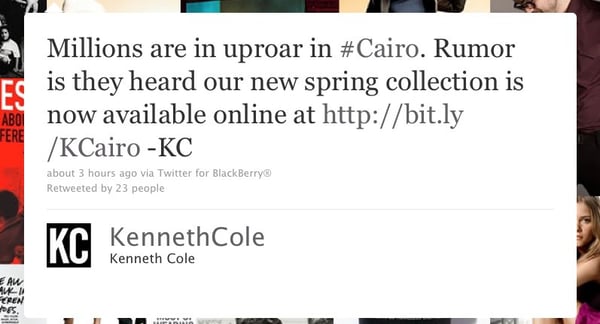
The tweet came from the Kenneth Cole corporate Twitter account — actually, from the chairman himself, as indicated by the “KC” in the tweet.
The company received negative feedback immediately, and they soon took the tweet down in response and apologized to anyone offended by the tweet. The lesson social media marketers can learn from this awful mistake is that humor doesn’t work if you’re newsjacking something contentious.
3) Lackluster New Logos
In October 2010, Gap launched a new logo in an attempt to be more modern. Guess how long that lasted?

Source: Vanity Fair
A whopping two days.
Gap quickly put the old logo back into place after unbelievable backlash from the public.
Gap, known for everyday basics, tried to redo their image to appeal to a more hip crowd. Unfortunately, the brand didn’t understand who its target market is — the people who want the basics and aren’t interested in trendy styles. Its loyal customers felt that Gap was changing their image for the worse, and lost a connection with the brand.
Gap was also unsuccessful at attracting the younger, trendy generation with the redesign (albeit, only a two-day redesign), resulting in a failure on two fronts with this new logo.
While it wasn’t so awful for Gap to pursue a logo redesign, the lesson is simply to stay in touch with your buyer personas so you can ensure your new design reflects them. Marketers focus a lot on metrics — for good reasons — but never underestimate your audience’s feelings towards your brand. They’re harder to quantify, sure, but boy will people speak out when their sensibilities are offended.
4) Losing Sight of Loyal Customers
In 2011, Netflix had a $16 billion market value with its mail-order rental. But then, the brand decided to enter the digital streaming market with a brand called “Qwikster,” an easy alternative to mail order DVDs.
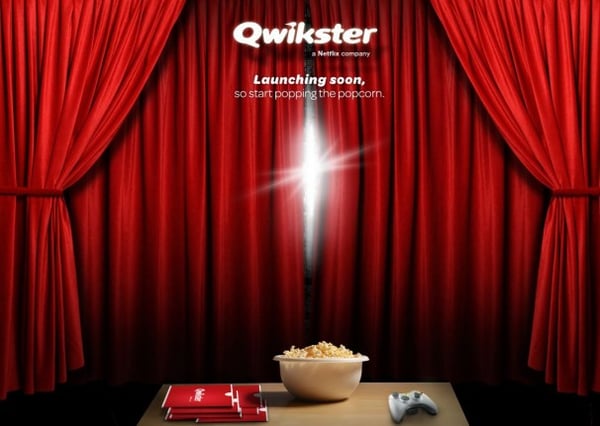
Source: Idea Lemon
Unfortunately, splitting the company between Netflix’s mail-order DVDs and Qwikster’s DVD streaming made things more complicated — not to mention, it resulted in a 60% price increase for those who wanted both services.
Even worse, current customers weren’t grandfathered into the new price structure at the old rate, causing serious negativity amidst all the general confusion. Plus, the Qwikster Twitter handle was already owned by someone else: a pot smoker who discussed boredom, smoking, and partying.
According to CNET, the company lost 800,000 subscribers and its stock price dropped 77% in four months.
Businesses need to remain agile and fast-moving to stay relevant, but make sure you communicate those changes to your audience clearly before making them. Oh, and don’t forget to show gratitude to your current customers, instead of giving them the short end of the stick.
5) Being Too Speedy With Sends
In December 2011, the New York Times sent an email to people who recently canceled their subscriptions asking them to reconsider, and giving them a discount to sweeten the deal.
Sounds like a good idea to get a customer back, right?
Too bad an employee accidentally sent it to 8 million subscribers — instead of the list of 300 that it was meant for. Whoops.

Source: Daily Beast
Subscribers instantly assumed that the email was spam as a result of hackers. Some were even mad that they weren’t getting the same discount as a loyal customer.
Of course, employees responded immediately apologizing and telling people it was an unfortunate human error.
Still, this type of mistake is every email marketer’s nightmare, and it serves as a much-needed reminder to always double check your list before clicking ‘Send’ on any campaign!
6) Promising Free Stuff — and Running out of It
Timothy’s Coffee did what many brands have done to increase social media reach: offer a coupon or free sample for following them on social media.
Unfortunately, Timothy’s offered more than it could deliver, depleting its supply of free K-cup packs after only three days.
Get this: It wasn’t until two weeks later that Timothy’s sent out a message saying that coupons and samples were issued on a first-come, first-serve basis. Talk about too little, too late.
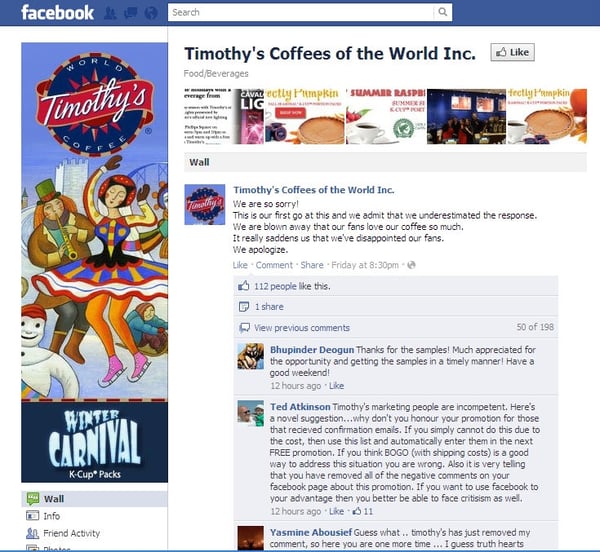
Source: Sparker Strategy Group
Despite an apology video and the potential for receiving a free coupon in the mail, Timothy’s is still trying to recover from the fan backlash on social media.
When running a contest on social media, don’t underestimate the impact of your offer — especially if it’s meant to grow reach.
Think about it: If your contest works — and you’re designing a contest based on the premise that it will work, I hope — your reach will get bigger with each new participant. If you can’t actually back up your end of the contest bargain, all that new reach will be used to hurt your brand, instead of singing its praises.
7) Fixing Something That Isn’t Broken
In 1985, Coca-Cola tried to introduce a new, sweeter version of their beverage to combat its (then) new competitor: Pepsi.
Those of us who were around at the time remember the Pepsi commercials boasting that, in blind taste tests, people preferred its taste over Coke’s.
Coke, for its part, felt the need to regain market share with a new recipe. So, how did that turn out?
Not well. Public response was so negative, in fact, that people were actually hoarding the old Coke flavor, and selling it on the black-market for grossly inflated prices.
Why were people so upset? Coke’s brand embodied classic American traditions — so, Coke drinkers didn’t want a new flavor. They wanted that classic beverage whose secret recipe was guarded under lock and key in Georgia.
Finally, after retiring the “New Coke” recipe, sales of the old classic — actually renamed “Coca-Cola Classic” to make it extra clear to consumers — rose significantly.
So, what do we take away from this marketing mistake? Learn what your customers want before spending time and money on a top-secret product or service change.
8) Getting Lost in Translation
Coke wasn’t the only major beverage to blunder, though. When Pepsi expanded its market to China, it launched with the slogan, “Pepsi brings you back to life.”
What the brand didn’t realize, however, is that the phrase actually translated to, “Pepsi brings your ancestors back from the grave.”

Source: Glantz Design
Okay, maybe this mistake is kind of funny. But, when you’re a brand that’s working toward major international expansion, a mistake like this one might not exactly have you in stitches.
If you’re launching a new market, be sure to do some cultural research. And please — ask native speakers of the language what your slogan actually means.
