6 Tactics to Boost Ecommerce Sales [Without Discounting]
Admittedly, when I opened my Etsy shop last year, I half-expected the sales to pour in naturally. In reality, opening an online store is half the battle — you also need a solid strategy for generating ecommerce sales.
The same is true for ecommerce veterans. If you’ve been in the game for a while, you’ve likely weathered periods of slumps or plateaus. When this happens, it’s essential to refresh your strategy with more effective ways to sell.

Here, we’ll cover six tactics to build awareness, entice buyers, and boost sales.
1. A/B Testing
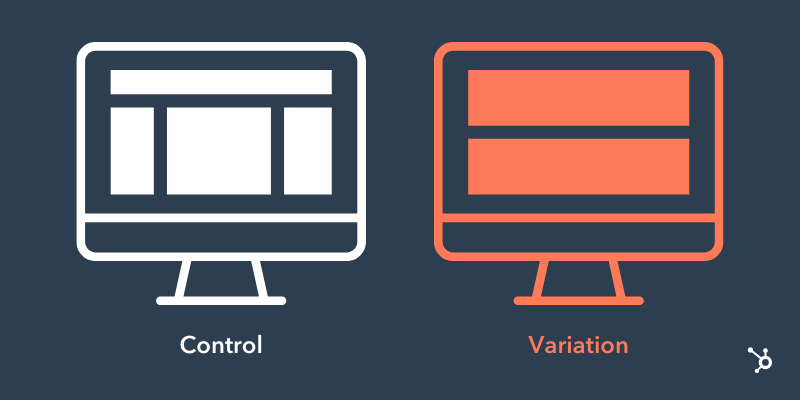
Absolutely every aspect of your site could be tested for improvement — including images, headlines, product descriptions, and even the overall design.
Specifically, look out for these two areas:
- Mobile optimization: Sales on mobile devices exceeded 360 billion in 2021, a 15% increase YOY. To entice mobile shoppers, having a website that’s responsive and quick to load is a must.
- UX experience: Have you ever visited a website with too many popups? Or one with a messy checkout process? A great user experience is frictionless — one where the user can arrive at your website, browse around, and complete a purchase with ease.
Even if you think you’re already doing well with your current website collateral, there’s always room to A/B test your content.
Pro Tip
Before you start changing everything on your website to see what works, stop and create a battle plan. If you change everything at once, you won’t know what’s effective and what’s not. Plan two weeks for each change so you can gather enough data to make a decision.
Then, start with one component at a time. You could test something every two weeks and still find room for improvement years down the road.
2. Build an Email List
Did you know email generates $42 for every $1 spent, which is an astounding 4,200% ROI?
Email can help you achieve a number of things — promote sales, keep in touch with customers, market your products, and ultimately generate more sales.
The problem? You need people to email.
An email list is a group of users who have given you permission to send them relevant content. To build that list, you need several ways for people to opt in. For example, you could create a website popup, or add an opt-in button at checkout.
Don’t be discouraged if you only have a few people on your list to start. It can take some time to build.
Pro Tip
Only 3% of marketing emails have an open rate above 50%. While this stat is jarring, it also shines a spotlight on subject lines — and how to craft compelling, clickable ones.
According to a 2022 HubSpot Blog survey, subject lines that pique readers’ curiosity receive the highest open rate, followed by promotional emails. By front-loading your subject line with a compelling hook — that can only be read if opened or clicked — your audience is likely to become intrigued and want more.
3. Trust Signals
Since your buyers can’t see, touch, or try on your product, you need to build trust another way. A popular — and relatively easy — way to do this is with customer reviews.
Think about it — have you ever made a purchase without looking at the reviews first? Or hesitated when a product had no reviews?
If you don’t have many reviews yet, no need to worry. As you work to get those numbers up, focus on other ways you can build trust — such as showing clear pictures of your products from different angles, providing 3D videos, and even product demos.
Pro Tip
Power up your trust signals with testimonials. Unlike reviews, these typically involve broader statements about your brand rather than a specific product.
We recommend reaching out to customers from your email list, since this is where your most loyal customers live. Then, display the testimonials in multiple spots — and on multiple pages — of your website to get the most mileage.
4. Heat Mapping
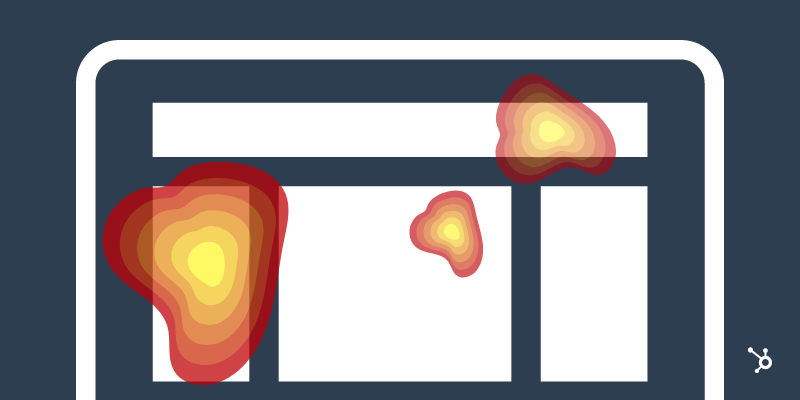
What if you could track the parts of your website where buyers hung out for a while? Would that help you provide better information for the next time they stop by?
With heat mapping, you can keep an eye on the pieces of your website that visitors really love. Tools like Hotjar pull together your website’s scrolling and clicking information to give you a full picture of what your buyers want to see and buy.
You can also track where your visitors come from and how long they hang around. In other words, if you use your social media for marketing, you can discover how many clicked on your offer and how long they stayed.
Pro Tip
The most effective way to leverage heat maps is to analyze the pages that influence your website’s conversion rate the most: your home page, landing pages, and high-conversion blog posts.
For instance, you could look at your home page and see if visitors hover on certain sections or click any CTAs. Use the info to optimize your site.
5. Exit CTAs

Shopping cart abandonment is a frustrating reality for ecommerce owners. While not everyone who visits your site is ready to convert, it’s essential to engage them anyway.
Sometimes users just need a little nudge to return to their cart either through remarketing or a quick email reminder. For instance, check out this friendly reminder from Vera Bradley.
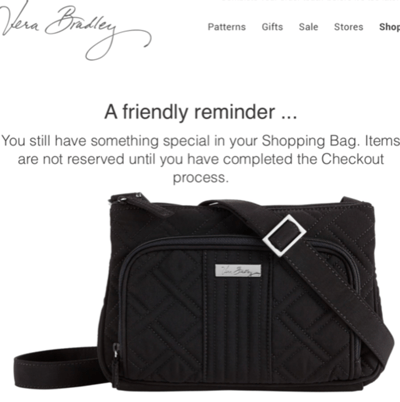
If customers still don’t budge, you can try an exit call-to-action (CTA) for last-minute lead generation. Some sites generate a popup the moment a customer enters the site. An exit CTA instead pops up just before customers bounce and offers something enticing such as exclusive offers.
Pro Tip
Cart abandonment software can help you create emails and track them. Some offer customizable options, while others are more focused on making sure the emails get sent.
Most offer a sliding scale price, so you only pay for what you use. Check out a complete list of software in this helpful article.
6. Social Media
Are you using social media to the best of your ability? What if you could keep an eye on what people are saying about your company and your products on all your social media outlets? With HubSpot’s social inbox, you can.
You’ll receive a notice any time you’re mentioned, which then gives you the opportunity to follow up, start conversations with followers, and potentially attract them to your website.
Use this feature to provide stellar customer service when buyers have a complaint, or simply answer questions when visitors ask.
Pro Tip
If you really want to have some fun, respond to even the most ridiculous of mentions with your own special brand of humor. Your customers will love you — and maybe check out your products.
If you’re unsure of your brand’s voice — or want to refine it —check out this guide.
Back To You
Sales are the lifeblood of any ecommerce business. As you can see, there are many ways to convert leads beyond discounting. Some of these tactics can deliver quick results, while others set you up for long-term success.

Email Personalization: 23 of the Best Personalized Email Examples
You put an app on your phone, but haven’t used it in a week, and you’re about to delete it from your phone. Then an email arrives that shows you how the app solves a problem you’ve been struggling with. Email personalization saves the day.
A 2022 McKinsey report says that 71% of consumers expect companies to offer personalized communication. 76% get frustrated when it doesn’t happen.

Ramping up your email marketing to stand out and get the results you want can be tough. But there’s a strategy that less than 30% of marketers are using.
Let’s talk about email personalization and check out some personalized email examples.
Email personalization is more than a strategy. It’s a way to connect one-on-one with each person that reaches out to learn about your business.
This process helps email marketers create emails that appeal to each individual on their email list. And they can do it without having to draft a separate email for each person.
According to Experian, 78% of customers are more aware of how businesses are using their data. So, personalization is more convenient for marketers, but how do customers feel about it?
Why is email personalization important?
Email personalization is a wildly effective strategy. Segmentation of email campaigns alone can increase revenue by up to 760%.
And while subscribers want to know more about how companies are using their data, 59% of customers trust businesses using AI to personalize their experience. Because of this high level of comfort, email personalization is an excellent investment when it’s done right.
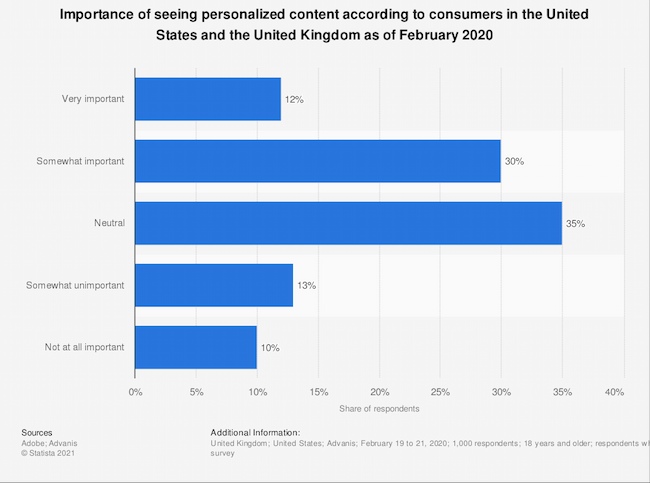
According to Statista, 42% of consumers feel that personalization is somewhat or very important. And 67% have used personal recommendations when shopping for products.
If you want to improve engagement and revenue for your business, the best time to start personalizing your emails is now.
Email Personalization Strategies
Most of the posts you see on social media are just for you. These platforms encourage you to spend more time on their platforms using algorithms that notice what you like and give you more of it.
The average person spends 147 minutes on social media each day. This can lead them to expect all their online experiences will feel personal.
Until marketing automation, businesses found it difficult to personalize emails. But today it’s possible to create unique emails for every subscriber and to show them what appeals to their personal interests.
Email personalization can make every email an offer that’s just for them.
But creating personalized emails is tougher than it looks. Besides the challenge of designing an email that connects and appeals to subscribers, personalization requires some technical know-how.
It’s not unusual for an email marketing manager to design a great email. But some of these emails never get sent because of API, email marketing platform, and other challenges.
So, before you start personalizing your emails, check out these strategies.
1. Build a list you can segment.
Creating a great email list is about more than getting attention from new subscribers. Each form, email, and interaction is an opportunity to collect segmentation data.
Collect useful information.
As you build each email form, think about the data that you can collect and how it can help segment subscribers later.
For example, a form with a single box for subscriber names can make personalizing tough. New sign-ups may add their first name, but they could also add a business name, their last name, or leave this field blank.
That means you won’t be able to personalize emails with subscribers’ first names without creating errors. Nothing says impersonal like an email that starts with “Hi jcl89@hotmail.”
At the same time, you want to make an email sign-up form that’s quick and easy to fill out.
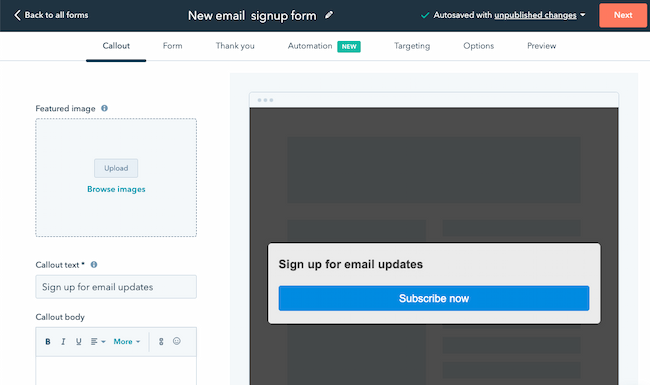
Think about how you want to collect personal and business names in advance. Then you can choose the best way to personalize for each segment.
Other useful information to collect when users subscribe could include:
- Location
- A quick yes or no survey
- Email frequency preferences
- Demographics like age, company position, or location
- Psychographics like personality types, income level, or goals
Create surveys and interactive emails.
As you email new subscribers, use interactive elements to segment users based on their interests.
Use link tracking to help you organize your email lists. Link tracking can tell you when a subscriber clicks a link in your email. You can use this data to quickly respond and connect with a prospect, or use this data to segment your list later on.
Another way to collect more data for segmentation is through surveys. A survey can help you collect personal information to refine your messaging to contacts. It can also make it easier to understand their top questions and concerns early in the buyer journey.
This article includes some segmentation ideas and how you can work them into your emails.
Use integrations.
Another way that you use data to segment your users is to connect your email marketing tool to your CRM. Integrations with your email marketing tool can also offer real-time insights. This data can help you send targeted emails based on what your contacts are doing online.
The goal is to track user behavior that can help you target communications. The amount of data a platform can collect can be a little overwhelming, so instead of grabbing a ton of data that you can’t use, create a plan.
Think about the emails that will be interesting and useful to your customers. Next, think about how you can use data insights to personalize your emails in a way that makes them even more valuable.
For example, instead of offering the same sale to every subscriber, use data to personalize your discount emails.
Try offering a discount to every person that bought your most popular product in the last few months to encourage them to buy again.
Some other data you might want to collect and use to personalize your email:
- Buying habits
- Mobile vs. desktop
- Engagement, like email opens and clicks
2. Align emails with the buyer’s journey.
The most effective emails contain the right information at the right time. That means finding a way to welcome new subscribers that’s personal, then keeping them engaged until they become loyal brand promoters.
So, start with strong brand personas and outline your ideal buyer journey. Next, use email personalization to send automated emails that support and enhance your customer experience.
Build automated email sequences for each stage in the buyer journey.
Most companies send emails from a few different departments. This might include:
- An eager sales team that wants to connect
- A marketing team wooing customers with upsells
- Customer service agents responding to questions
To make sure that every person on your email list gets what they need when they need it, you’ll want to create targeted workflows and sequences.
Start with a welcome sequence. This might be a one-on-one email from a trusted member of your team or a bright graphic welcome that connects to the reason your latest contact signed up.
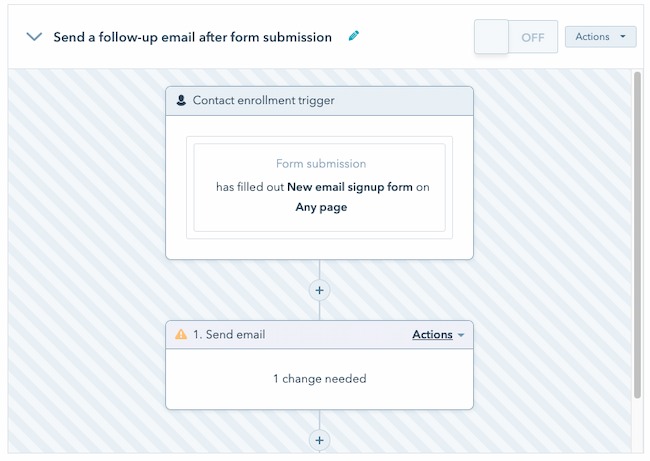
It’s also a good idea to offer extra products and services based on past purchases through email. When using this strategy, try to focus on customers who have made more than one purchase.
The more data you have, the more likely you will steer customers toward items they really want. Otherwise, these personal recommendations can start to feel decidedly impersonal.
Make recommendations about the customer, not about which product you want to sell more of.
Other useful sequences and workflows you can build and personalize include:
- New product announcements
- Outreach when a contact goes inactive
- Campaigns based on subscriber activity, like attending a webinar
- Status alerts, like a flight change or change in product availability
Trigger personalized emails at important moments.
Use personal emails to highlight the moments when your subscribers expect an email. To stand out, you’ll also want to celebrate moments where your customer has reached a personal goal.
Product engagement moments are key. If a customer has used your meditation app every day this week or they’ve logged in to a food diary app for three days in a row, it’s a great time to send an email.
Triggered emails are a way to show that the moments that are important to them are important to you too.
Use behavior triggers.
It’s easy to focus on the beginning and end of your relationship with an email contact, but most of the real action happens in the middle. You can use this moment in the buyer journey for emails that trigger with an action.
Trigger emails are a way to connect with your subscribers at the right time. For example, Instagram sends you an email when they haven’t seen you log in for a while.
A triggered email sends after a specific event or interaction. When an email aligns with their actions and priorities, it feels more useful and personal than an email blast.
Potential behavior triggers for email include:
- Event registration
- Loyalty membership
- Canceling or changing an appointment
- Changing contact or profile information
- Cart abandonment
- Product page exit
- Shipping cost exit
An important note: Use triggers to creatively let your subscribers know you’re paying attention, but keep it chill. It can be uncomfortable for some users to know their actions are being tracked online.
Add subscriber tags to further segment subscribers based on their actions.
It’s easy to focus on the beginning of a subscriber’s email journey. But ideally, an email subscription is a long-term relationship that deepens over time. Tags can help you continue to send subscribers the right messaging as their interests and needs change.
Tagging subscribers when they complete a specific action is a great way to segment your audience. You can use dynamic tags to quickly send subscribers a useful message based on what they are doing now, not what they thought they would do when they first subscribed.
3. Design emails with personalization in mind.
If it’s done well, email can deliver $33 ROI for each dollar you spend.
So, build trust with every email. Don’t accidentally spam their subscribers with discounts, new products, and pressure to buy. Instead, focus on your subscribers and the value you’re giving them each time you hit send.
Write personalized subject lines.
Email personalization isn’t just calling subscribers by name. It’s using data to make every one of your subscribers feel special.
Write your subject lines and emails like you’re writing an email to a friend. This approach can make your language feel more natural. It can also make the added personalization feel more authentic. Take a look at these subject line examples if you need inspiration.
Send emails from a person, not just a brand.
Send emails from a person, not a brand. A real name and face in the “from” field of an email let subscribers know the face behind the message. It makes each email feel more personal, like a conversation instead of a transaction.
You can also try adding a personalized P.S. at the end of an email. A personal postscript is a quick way to add a personal touch to emails. It shows subscribers that you want to connect with them as a person, not just a prospect.
Create email campaigns for unique segments of your email list.
Use data insights to study and anticipate customer needs. Then create unique emails that address those needs. This might mean creating an email course, directing them to help center resources, or sending surveys that ask for their opinion.
Dynamic content in emails can let you send different codes and email content to different subscribers.
Try to use data to inform your messaging. At the same time, don’t add sensitive personal information directly.
For example, if you’re personalizing an email for your high-income segment, don’t plug in the income level they shared on a form or survey. Instead, you try adding a section with top-tier or exclusive products.
Use images to personalize emails.
Images and GIFs can make an email more exciting and interesting. Besides making subscribers more aware of your brand and story, images are a great way to get the attention of readers who don’t read the messages in their inboxes.
Image personalization is an effective strategy for emails too. A company that sees its logo in your B2B email is more likely to pay more attention to what you have to say. A shopper looking for a personalized pillow may be more likely to buy if they see a custom graphic they’ve used on your site before.
Send limited-time unique email offers.
One of the best ways (source) to get a subscriber to act is to create urgency. For example, if a shopper abandons their cart before clicking “Buy now” an email with a limited time discount could inspire them to make that purchase.
Schedule emails at the right time.
Start with your buyer personas and their habits to decide the best time to send emails. And don’t forget to keep location in mind.
Let’s say your new subscriber opens emails first thing in the morning, you might set their email to send at 8 am. But what if they live in a time zone where they’re eating lunch just as you wake up for the day? You might miss the best time for that contact to read your email.
Segmenting contacts by location can help you send your emails at the right time to every subscriber.
Start A/B testing.
Compelling email personalization is in the details. Email marketing seems simple, but some variables can impact the experience.
A/B testing is an effective way to gauge how your subscribers respond to your emails. For the most useful insights, test only one variable at a time. If you test too many email features at the same time it will be difficult to understand what is and isn’t working.
Do some research if you’ve never run marketing experiments like this before.
4. Make the next steps clear and easy.
You can create a great user experience by thinking about the full user journey, not just crafting a perfect personalized email.
Shorten the conversion path with relevant links.
When your email tells subscribers to click a link, that link needs to deliver. For example, if an item sells out and that product and link are in the highlight of your email, it will only frustrate your customers.
Have links in mind before you start writing and designing. Check each link you plan to include to make sure it’s current. Then create a message that sells the content in that link.
Clicking a link doesn’t seem like a big deal. But the increased rate of phishing scams can lead subscribers to second guess engaging with your emails.
Keep this perspective in mind. It will help you draft emails that foster relationships with your email list and avoid making emails that feel like clickbait.
Create targeted landing pages.
If you’re building custom landing pages for your emails, make sure that your email and landing page designs work together. Think about creating unique landing pages for each segment. Then focus your landing page message on the information that’s most important to that group of people.
Personalized Email Examples You Can’t Help but Click
1. OpenTable
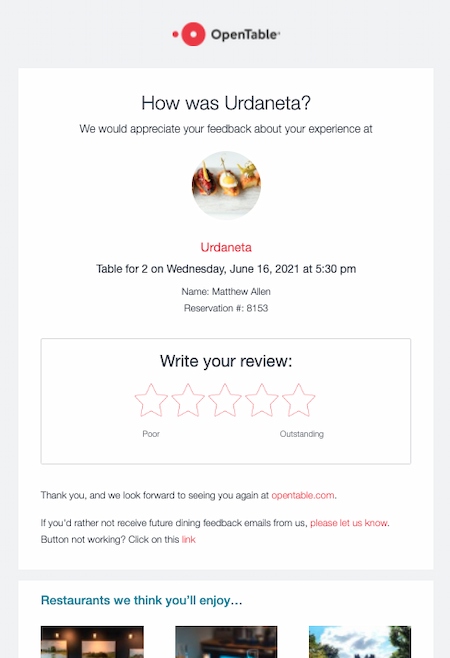
Why email examples like this work: Not only does this email make it easy to make reservations online, but it also remembers favorite restaurants. This helps users discover new places to eat based on reviews and reservation behavior.
One way OpenTable encourages users to leave reviews is by sending emails with a personalized subject line. Then, they ask the diners’ to review their most recent restaurant experience.
These reviews give OpenTable an idea of which restaurant recommendations are user favorites, which makes the reservation process easier for their users.
2. Alaska Airlines
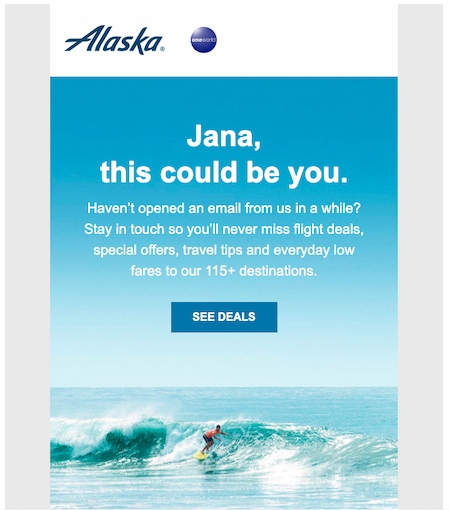
Why email examples like this work: This email effectively pulls a frequent traveler (me) back in with a check-in email. It reminds me of what I’m not doing (opening emails). Next, it encourages me to loop back in with an image of something I might rather be doing (surfing at the beach).
This email also has a button marked “Deals.” It’s a great strategy to offer something special from your brand when a user stops engaging. It could give your audience the motivation they need to take action and make a purchase.
3. The Hustle
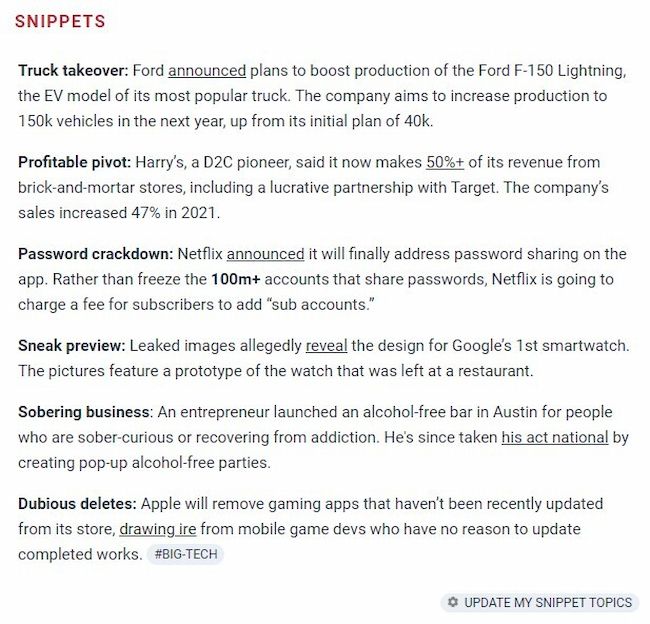
Why this email example works: The Hustle has a “Snippets” section in their newsletter. Each email includes a curated list of articles highlighting topics the subscriber picked when they signed up.
This user’s chosen topics are Big Tech and The Hustle Picks, so the snippet section updates with those topics in mind. This makes each email feel like it’s just for them, instead of a general list of what’s new.
If you feel like this would work for your subscribers too, set up workflows that remind subscribers how to continue taking advantage of these specially-tailored messages.
4. Spotify
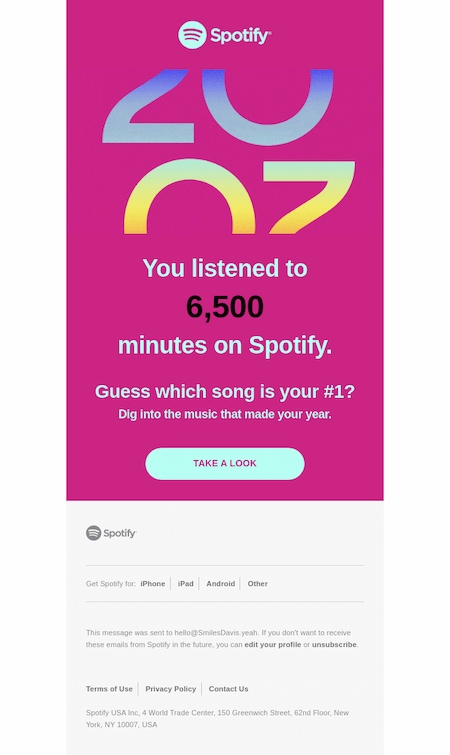
Why email examples like this work: Spotify’s Year in Review emails and in-platform messaging are a highlight for subscribers. Music has a strong emotional impact. Spotify uses this to remind this what their last year looked like in music, just before the new year begins.
The copy in this email from Spotify is particularly effective because it frames the personalization in a way that makes the recipient feel like they’re getting a reward for their usage. Phrases like “Guess which song is your #1?” lend themselves to a sense of exclusivity — making the user feel important.
Again, this push helps to confirm that the user is actively using the streaming service, and is continuously reminded of the value.
5. LinkedIn
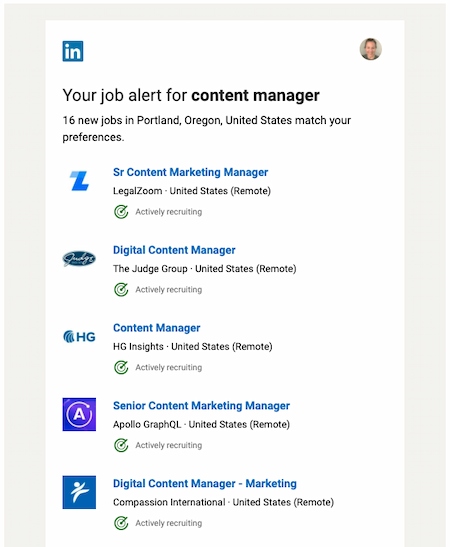
Why this email personalization example works: When I was actively applying for jobs. I often used LinkedIn for my search. Each day, LinkedIn sent me a roundup of jobs it thought would pique my interest.
While some of the listings were more applicable than others, all of them were clickable.
Did you catch that? Clickable. And even if none of these jobs piqued my interest, I had a network of professional connections who might have considered them, driving even more traffic to LinkedIn’s website.
6. Be My Eyes
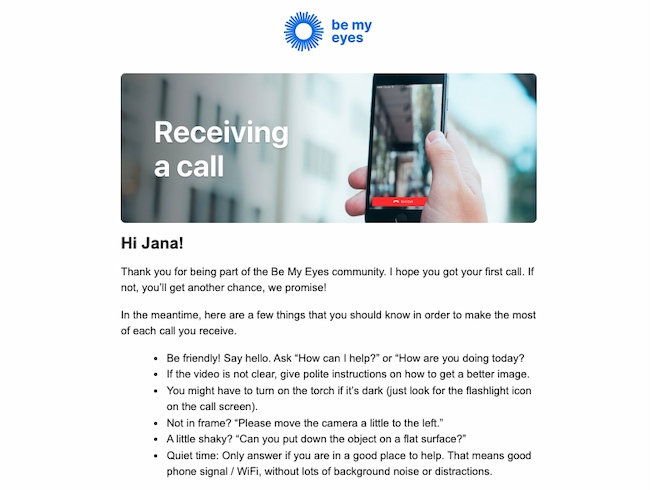
Why this email example works: Why this email example works: Be My Eyes is an app that helps blind and low-vision users borrow the sight of over 1.5 million volunteers. This email triggers after a user has their first volunteer call. Then, it goes into detail on how they can solve common problems.
This email has a lot of text, but it’s broken into bullets to make it easy and quick to read.
The timing of this email makes a simple process even easier and makes first-time volunteers feel more comfortable helping.
7. American Eagle
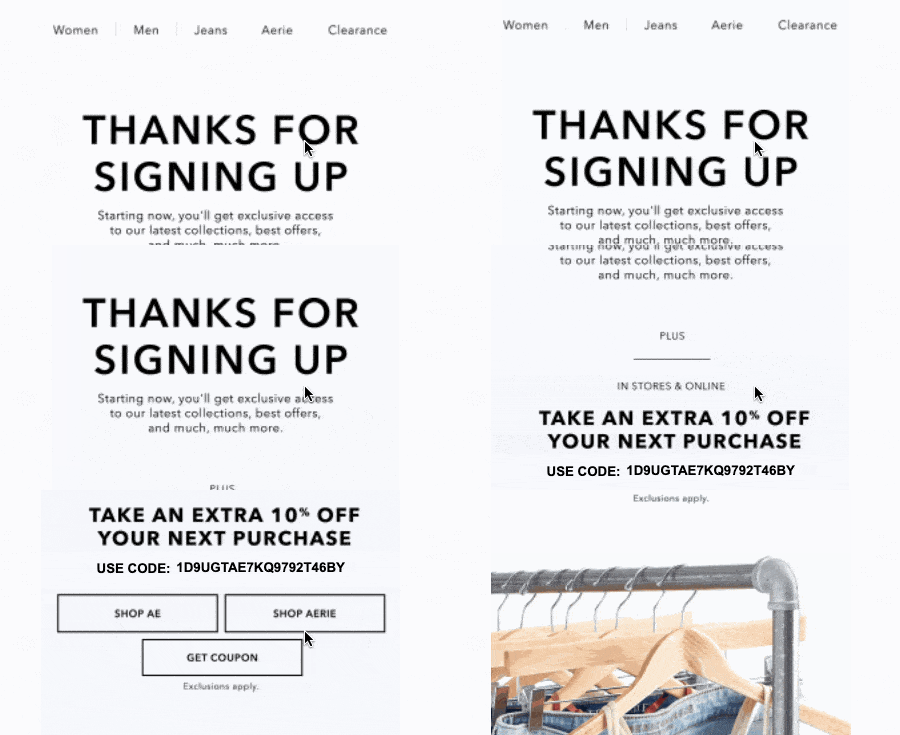
Why email examples like this work: This email begins with an enticing subject line: “You’re in. Here’s your exclusive code.”
The email is short and clear, highlighting a custom offer and an image GIF highlighting their most popular products.
In a more complicated or image-heavy email, that discount code could be easy to miss. But this email personalization is simple and quick to read, which makes it easy to see the unique discount code that the subject line calls out.
8. Ticketmaster
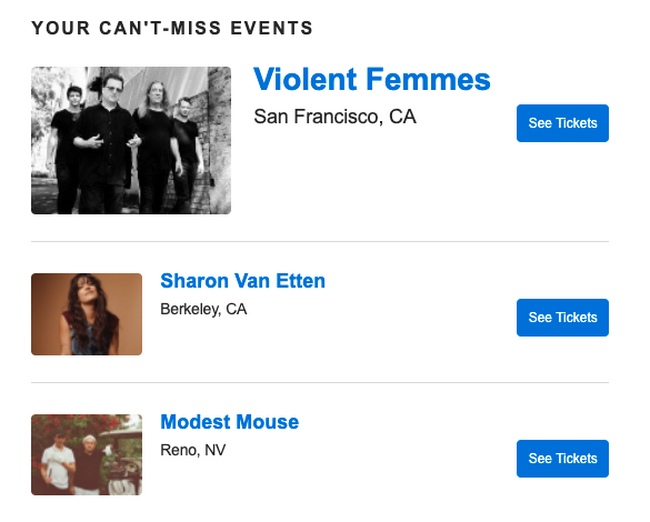
Why email examples like this work: This email is a great example of how to use location information to offer a customized email experience. In the email, Ticketmaster makes it easy for me to quickly visualize what’s headed to my area and when. This lowers the barrier between me and the point of purchase.
This type of personalization could be super useful for a company looking to deliver more relevant messages to international leads or existing customers.
If you’re using HubSpot’s free email marketing software, you can use a contact’s location to personalize your messages like this campaign.
9. Getaway

Why this email example works: This email triggers after a stay at one of Getaway’s unique locations. It includes a reminder to book another visit soon.
The first image is a slideshow that highlights the best features of a Getaway cabin. The second image shows a punch card with two nights punched out. This makes it easy to see how many more nights it will take to stay for free.
This email also includes a referral link to share for an extra discount, offering value to both Getaway and their customers.
10. TikTok

Why email personalization examples like this work: After following one of his favorite chefs on TikTok, Matthew received this email from the social network with suggestions for similar accounts to follow.
What’s more, the suggestions were super relevant.
When companies have as much data as TikTok does, they usually go one of two ways with personalization: They totally nail it, or they have too much data to sift out what’s important. This is an example of accurately identifying what Matthew would care about, and delivering it to him.
11. Savage X Fenty
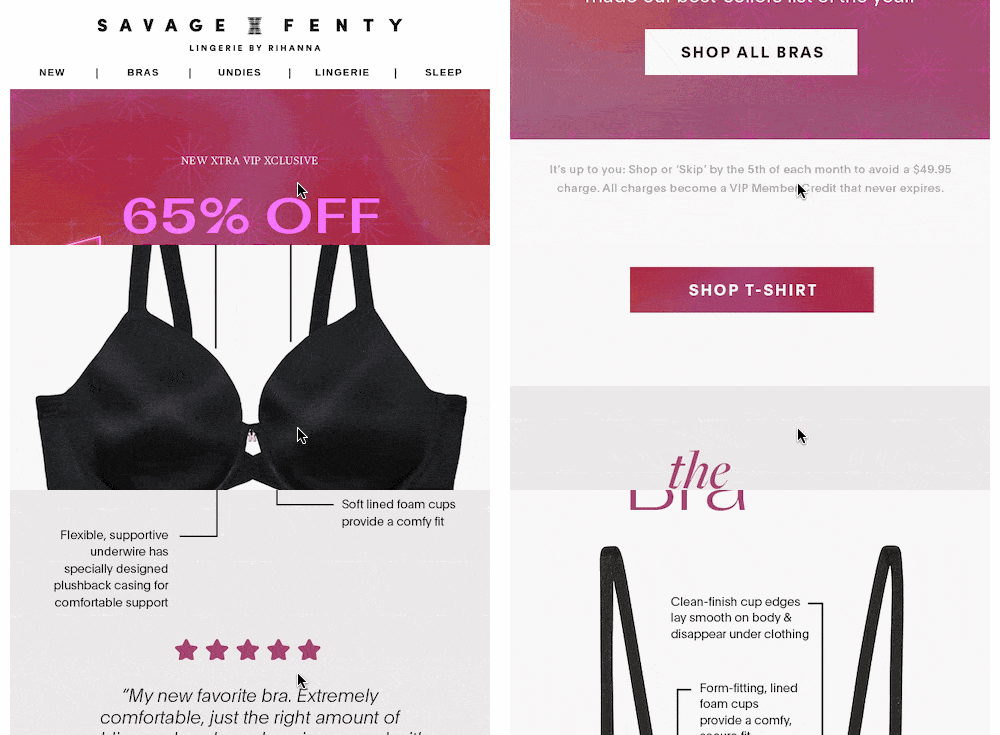
Why this email example works: This email starts with a bold discount graphic. The message clearly states that the inspiration for every discount was customer feedback and requests.
Then it features easy-to-see and attractive images of their top products, with extra text that shares why each bra is a popular pick.
Each highlighted product also includes a testimonial. This adds to the feeling that these products have the customer in mind.
12. Ancestry
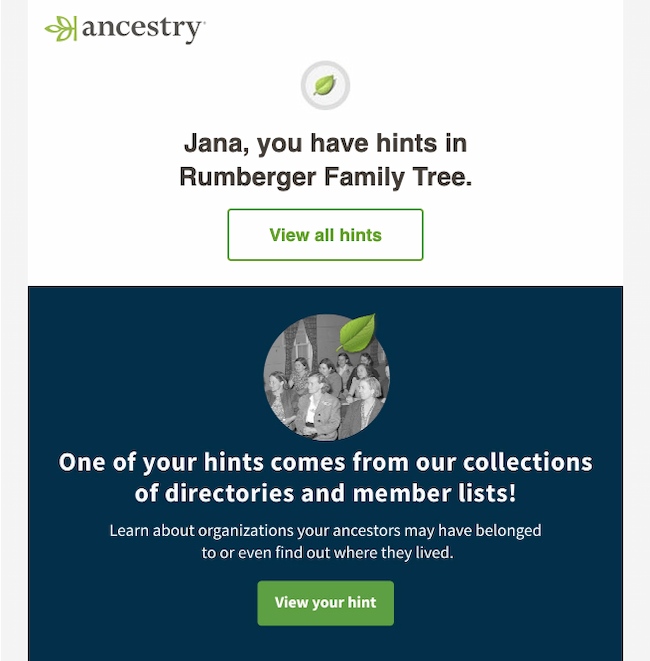
Why this email example works: Ancestry pulls users back in with an email that hints about new information in the family tree.
It personalizes both first and last names in different parts of the email, so the personalization feels more authentic.
The email includes personal hints and extra details to lure users to spend more time on the site.
13. Free Prints
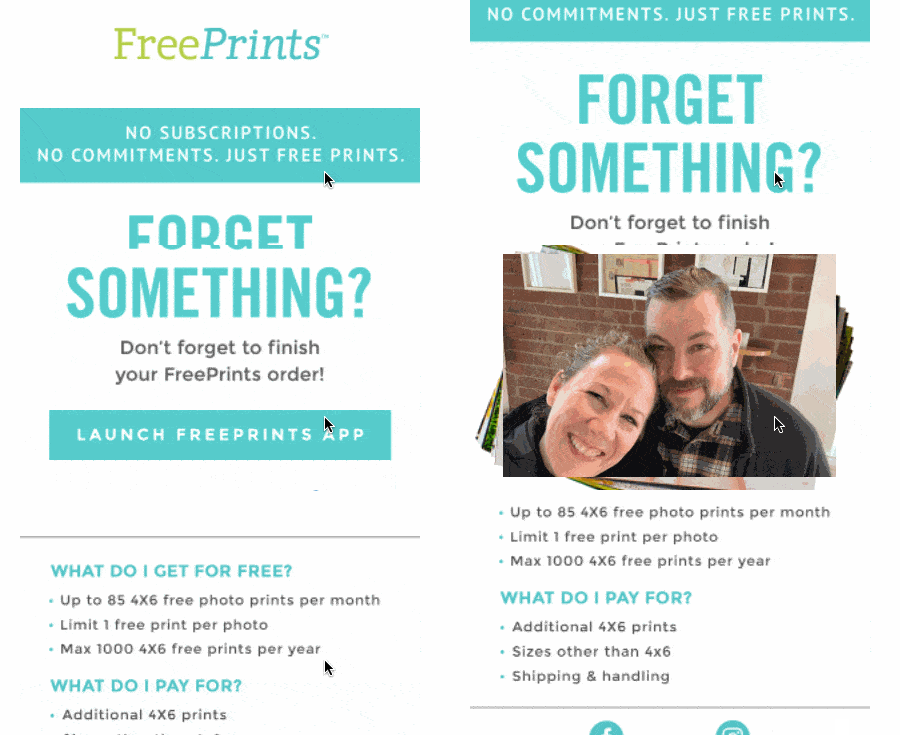
Why email examples like this work: This email has a simple message and clearly states the value of their service. The big wow in this email is the personalized image. It pulls a picture from their app to drive another purchase.
If you want to boost the word-of-mouth influence behind your product or service, this is a great example of how personalization can help propel your message.
14. Bunch
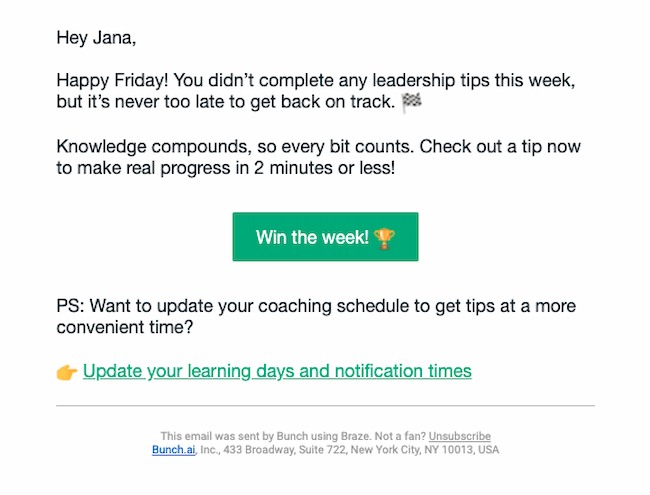
Why this email example works: This quick and peppy reminder to get back into an app shows that Bunch is using data-driven strategies to engage users. They’re anticipating the most likely reason I’m not logging in, calling out a common issue, and offering a solution. It also gives me a chance to update my reminders.
This isn’t the only effective way to use platform data. This strategy could apply to many marketing materials — ebooks, webinars, and blog articles, to name a few.
For example, if you find that someone downloaded an ebook on social media tips, you may want to set up a workflow to trigger a follow-up email that suggests they check out your social media guide on SlideShare.
15. Etsy
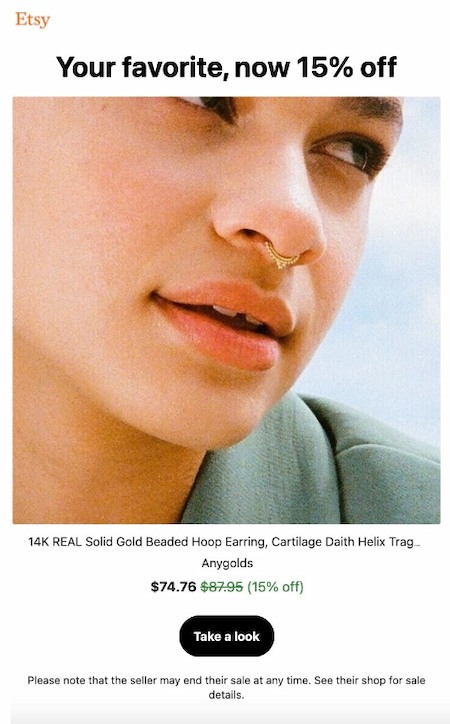
Why email examples like this work: This email shows a product from a merchant Ivelisse has bought from before. The headline “Your Favorite” reminds her that this is a product she’s seen and liked before.
Etsy’s email also offers a discount, with the original price crossed out, and the discount offer is in green instead of black. This makes the offer easier to see but it’s still pleasing to the eye.
It serves as a great example of how to use a contact’s search behavior to re-engage them with your company, and hopefully move them closer to a sale.
16. Voicebox
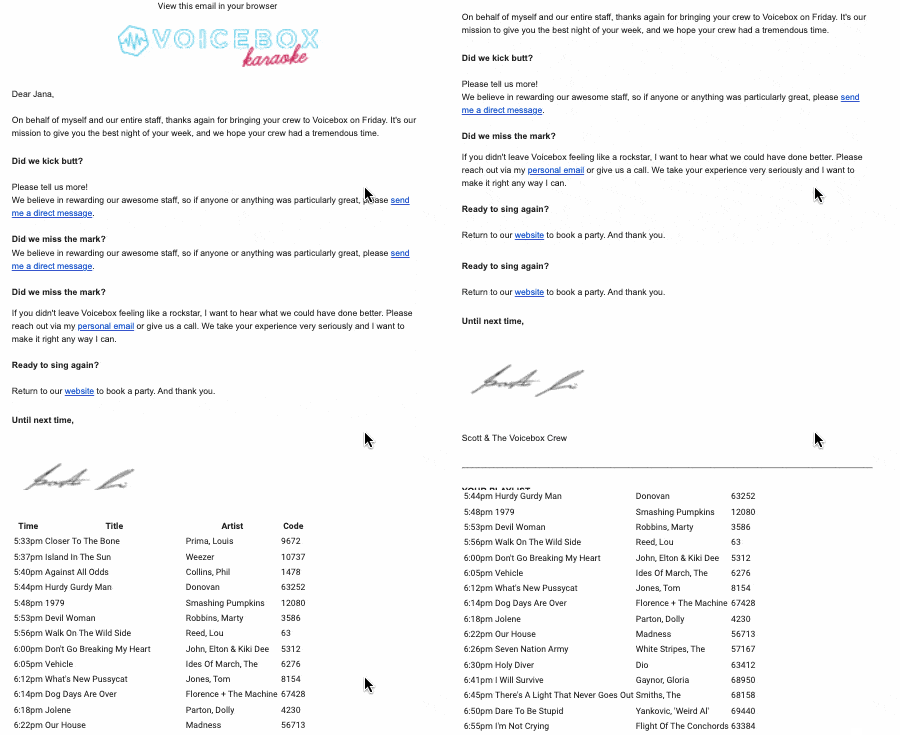
Why this email personalization example works: Voicebox adds to the post-karaoke experience by adding a personal playlist. They want to know if you had fun, ask for your feedback if you had any issues, and remind you to visit again soon.
Even better, the email ends by reminding you exactly what you sang during your session. The list has a lot of detail, which brings you right back to the moment you were singing.
It’s just the right amount of inspiration to get you to book a session to sing again.
17. Experian
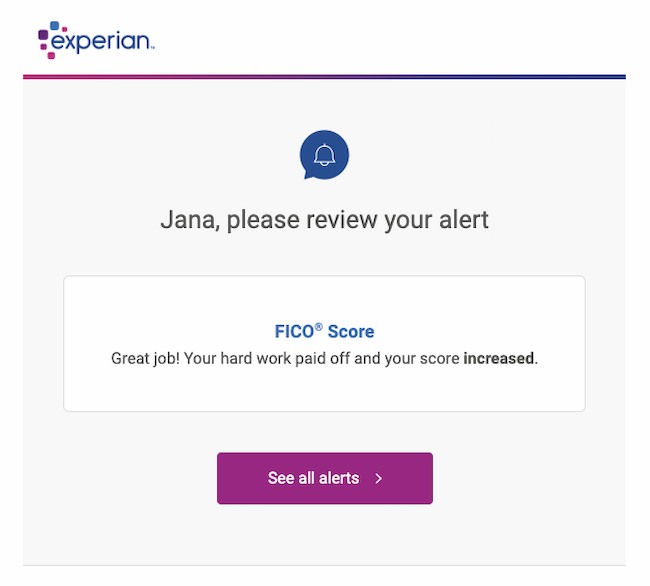
Why this email example works: Fear isn’t a fun emotion, but it is a motivator. This email offers an alert with positive feedback about my credit score, but it also hints that there could be other less friendly messages in their portal that I should check, just in case. This gets me to click and engage with their services.
What I love most about the email is its simplicity. It offers up a single topic, which is enough to interest the recipient without overwhelming them. Plus, the copy is quick, friendly, and clear.
18. Happyfeed
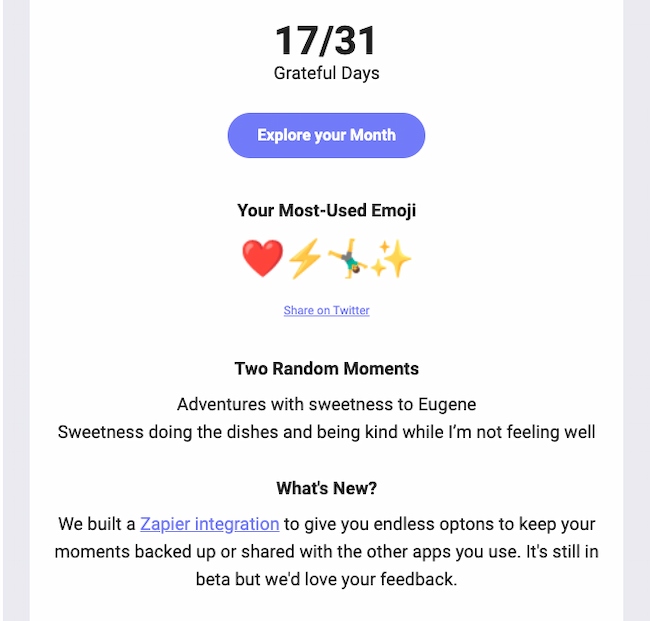
Why this email example works: Happyfeed is a gratitude journal app for users to record three things they are grateful for each day. This monthly recap email grabs data from the app to remind me of some of my best moments from the past month.
They also remind me how active I was on the app, and include extra offers and new features. This is a great way to reinforce the value of a product while also offering reasons a user should upgrade or spend more time using a product.
They also ask for my feedback, reinforcing the message that my opinion is important to them.
19. Google Maps
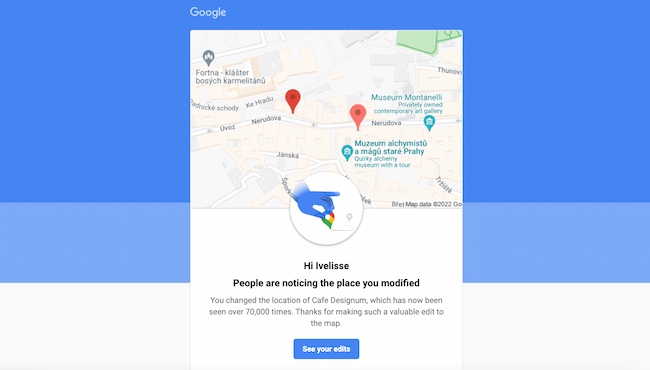
Why email examples like this work: This email from Google lets Ivelisse know that people like the update she added. It also includes a personalized image of the edited map, so it reminds her of the update quickly and easily.
This email reminds her that updating reviews and locations on Google Maps makes a difference. That’s a powerful motivator to keep making updates.
20. Sephora
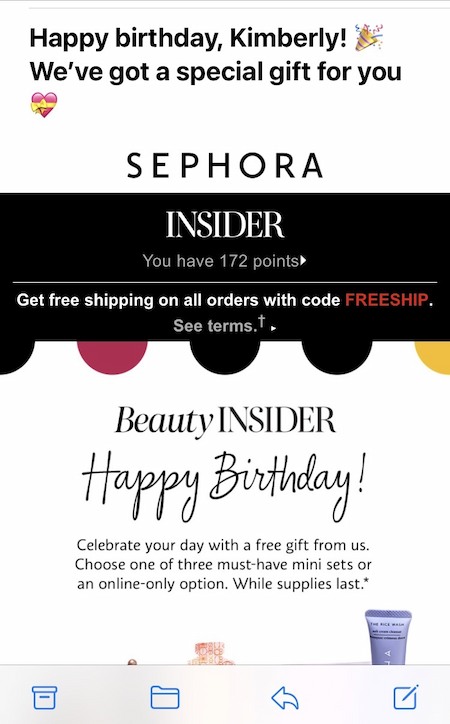
Why email examples like this work: Sephora used this personalized email to give Kimberly a free gift and a reminder to buy, with a birthday greeting to boot.
That’s a great way for brands to achieve customer reactivation — by using a fixed date, like a birthday or anniversary, to remind people what it was that they loved about your business in the first place.
If you’re a HubSpot customer, this is an easy email to copy for your contacts through fixed date or property-based workflows. It allows you to base your workflow on a calendar or contact property date. This makes it easy to send anniversary emails, digital birthday cards, renewal reminders, and more.
21. Reddit
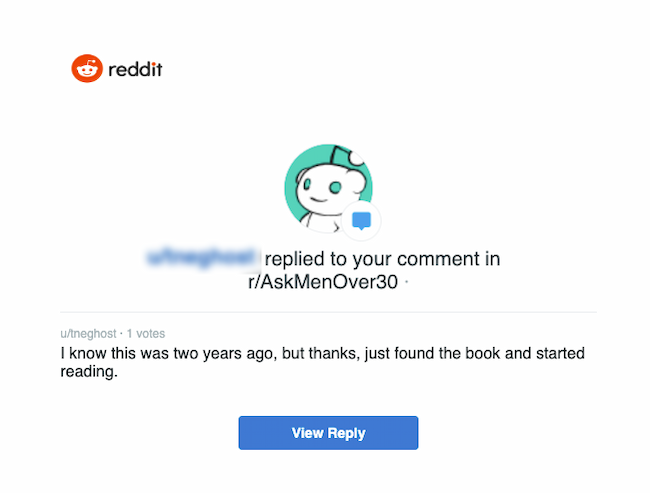
Why email examples like this work: Reddit’s mission is to build community. This personalized email shows this user that other members of this subreddit appreciate their comments.
This simple email tells the commenter that their opinion is valuable and that they should keep participating. This leads to clicking from the email back into Reddit.
22. Alex Mill
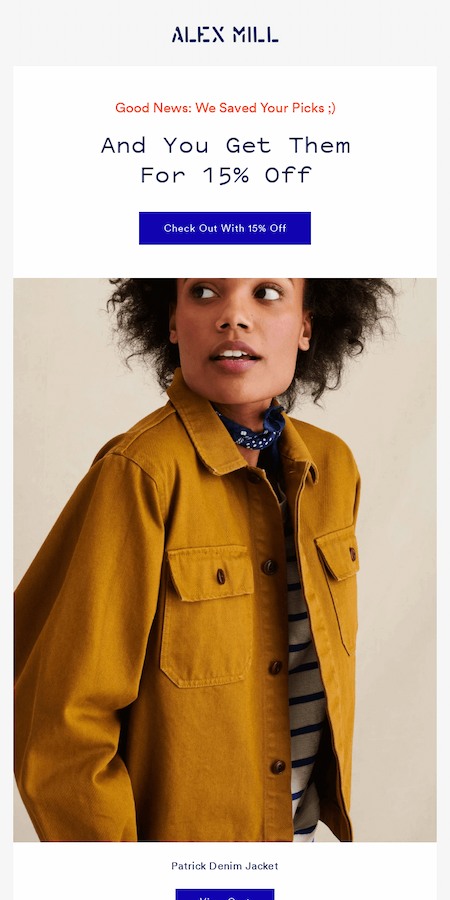
Why this email personalization example works: There are a lot of reasons to abandon an online shopping cart. Sometimes you still want to buy, but it’s hard to find that perfect item again online. Enter this email from Alex Mill.
It quickly gets to the point, letting you know they saved the items in your cart and are offering them at a discount. And the big gorgeous image also helps remind you of the quality of their products.
23. Teachable

Why this email example works: There’s a thing about conferences and summits. They’re valuable. They help you gain knowledge and become an expert.
This personalized email lets conference attendees know what they might have missed and other available learning opportunities. It also outlines a discount offer and makes the offer deadline clear and easy to understand.
HubSpot Professional and Enterprise customers: You can create Smart CTAs like these in your own emails with your HubSpot CTA tool.
Let’s Get Personal
It’s never been easier to personalize your messaging. With an integrated CRM and email marketing software like HubSpot, you can keep track of all your customer data and use it to tailor your flow.
It may seem like a big undertaking, but by observing, understanding, and investing in the behavior of your customers, you can help to make sure that they’ll stay customers. So start getting personal — and keep growing.
Editor’s Note: This post was originally published in February 2013 and has been updated for freshness, accuracy, and comprehensiveness.

Visual Identity Systems: What They Are & Why They Matter
When we build a brand, we build an experience that reflects a purpose. Visual identity is a huge part of this brand experience. Colors, graphics, and fonts turn brand concepts into visual identities that can be recognized.
Once a brand is established, it needs to become a recognizable identity that the external world can perceive. This recognition comes with consistency, and achieving that consistency requires a strong visual identity system.

To create a visual identity system, you need all the visual elements that the brand has. The visual identity system’s basics are a strong brand guide and its implementation tasks. The ultimate goal of this system is to turn all the brand assets into principles that all the content team can follow to make sure that the online presence is aligned with the original brand concept.
Visual Identity System Benefits
A visual identity system is a way to make things easier, help people achieve a manageable and effective workload, and avoid mistakes. These mistakes can take place when there is no clear guidance about how to achieve excellent work results.
Putting systems in place turns complex processes into easy-to-understand steps that increase efficiency.
An effective visual identity system will help an organization:
- Improve the outcome of their content creation process.
- Avoid mistakes related to misunderstanding what the brand entails.
- Make collaboration between teams easy.
- Create complex strategies with a strong foundation that can help implement them.
How To Create a Visual Identity System
Step 1: Develop the Brand Identity
A visual identity system starts with what we know as the brand image. This includes the logo, fonts, and brand colors. Ideally, you’ll have these in a brand guide already, but if you don’t you should develop them in this step.
Step 2: Create a Mood Board
Mood boards are similar to visual identity systems in the sense that they depict far more than a logo and color scheme. Mood boards go a step further in displaying photographs, video, and even audio or scents to get a well-rounded feel for a brand.
Mood boards are curated content (i.e. not developed in house at a company or organization) and are not public. They’re strictly helpful in gaining inspiration and feedback from stakeholders about what the official visual identity system might look like once it’s finished.
Step 3: Get Feedback
Sounds simple enough, right? But this can be a step in the process that you revisit several times before settling on the perfect draft of your visual identity system.
Rather than creating proprietary content for your visual identity system every time you get new feedback, use your modo board from the step above to relay your vision. Once you get buy-in, you’re ready to put together your own visual identity system.
Step 4: Include Guidelines
In order for a visual identity system to work well, it’s important to include guidelines for using each element. These guidelines answer specific questions “How do designers create new content without breaking the consistency?” and “How does a website developer understand what the website should look like?”
There are, for example, types of content where a logo is not the best option to add, so designers can opt for a word mark or simplified logo instead.
It’s important to be very specific and particular with the guidelines so that there is little confusion and designers can develop discernment about best practices for using the visual identity system.
Once you have them in place, it’s time to add guidelines for each element. There are several ways you can structure this, but here are a couple of common ones:
- Dedicate a page to each element and include guidelines on the same page as the element.
- Include your brand guide at the beginning of the visual identity system document and add guidelines toward the end.
- Add an FAQ sheet explaining the guidelines for each element.
- Add samples of do’s and don’ts so the team sees real-world examples of the guidelines in action.
Visual Identity System Basics
If you want to build your visual identity system to make your brand stand out from the crowd, here are some best practices that can help you avoid common mistakes and achieve great results.
Know your message.
Know your message, purpose, and how you want to talk to your audience. Visual identity system basics need a strong foundation to succeed. Think about those values you want to share and the misconceptions you want to avoid at all costs. Create a schedule that prioritizes your main goals and allows you to create results aligned with your values.
Knowing what you want to communicate will help you build a message that is not only profitable but also aligns with your values.
Have a strong theoretical background.
Do you know that psychology studies the foundations of the relationship between colors and feelings? Have you noticed that a message can be read as scary or romantic based on your font? If you have this information, you can shape how people visually perceive your brand.
Psychology tells us a lot about colors and how they can affect people’s perception of our brands. If you don’t know much about this, maybe it is time for you to start diving into some research work.
Create an effective system.
Create an effective but scalable system so it can be upgraded based on your brand and business needs. The main goal of any system is to make things easier. That should be on top of every requirement that comes along the way.
Visual identity system examples are successful if they show the potential to scale without losing their efficiency.
Be specific.
Be as specific as possible, as this will make you avoid mistakes and the unnecessary back and forth between team members. Choosing details like the stock photos that suit the brand can make the difference.
Making things clear can be incredibly helpful for new team members who don’t have the brand background needed to understand the virtual identity system basics by themselves.
Create an Amazing Visual Identity System
Building a system is a concept that sounds more technical and specialized, which makes it hard to start. But, the truth is, even if you have just a bunch of tasks together, you’re already building the first steps towards your system creation. You’re close to the goal.
Systems can make everything easier, even if you start small with many questions. You will learn the details along the way.
Have you created a strong visual identity system? If you haven’t, today is the day to start.


How Consumers Prefer to Interact With Brands [HubSpot Blog Survey]
All customers have different communication preferences regarding the brands they like. Some may want to call a company to learn more about what it offers, while others may initiate a conversation with a chatbot.
As your goal is to create a customer experience that speaks to customer needs, you want to know which channels they prefer. 
Read on to discover new HubSpot Blog insight about customer communication preferences with their favorite businesses.
Customer Communication Preference Statistics
How Customers Prefer to Learn About Products
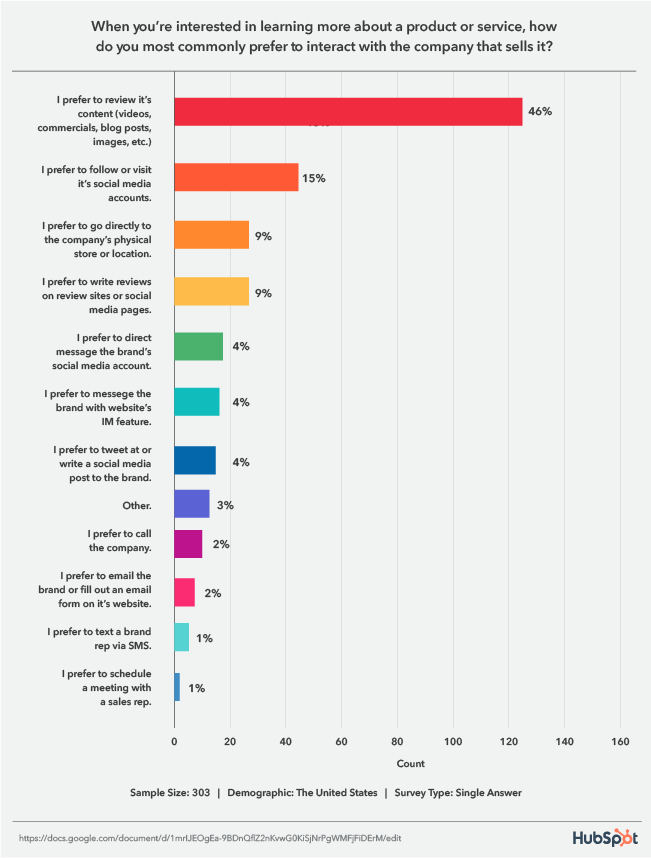
A HubSpot Blog survey asked respondents how they prefer to interact with companies when looking for information about a product or service.
46% said they prefer to review its content (videos, commercials, blog posts, images, etc.), 15% follow or visit its social media accounts, and 9% go to the company’s physical store and read reviews on review sites or social media pages.
1. Reviewing Content
Audiences overwhelmingly prefer to review the content your business puts out, so it’s essential to speak to this desire in your marketing strategy by creating the useful content your audiences are looking for.
With this tip, it’s important to also be aware of the channels your audiences use the most so you can meet them on their preferred mediums. For example, Gen Z spends most of their time on YouTube, and 47% research products they’re interested in on the platform, followed by Instagram, Snapchat, then TikTok.
2. Social Media
When it comes to social media, 56% of consumers are influenced by posts shared by friends and family for sourcing ideas. In addition, 54% of Gen Z shoppers and 58% of millennials agree that social platforms are better than online searches for finding new products.
3. Reading Reviews
When it comes to reading reviews, a 2021 Stackla report found that UGC, which reviews are a type of, is 8.7 times more impactful than influencer content and 6.6 times more than branded content. 56% of people have also reported leaving an eCommerce store without purchasing because the site didn’t contain any customer reviews or photos.
How Customers Prefer to Communicate with a Company
When reaching out to a company online, survey respondents preferred to message a human representative from your business (45%).
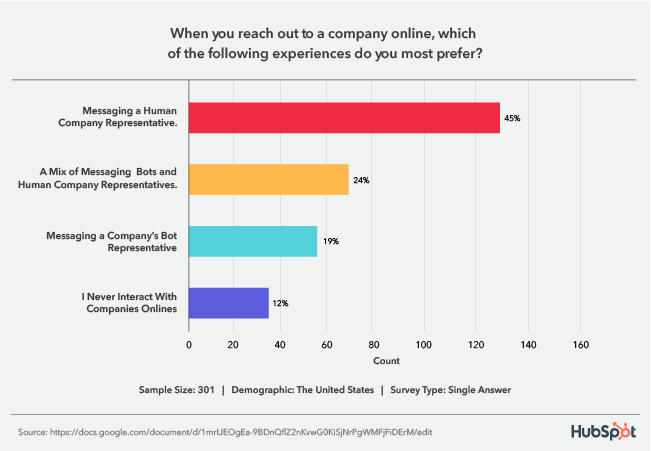
This is a crucial statistic to be aware of considering the rise of chatbots. While the AI-powered tool is undoubtedly helpful, customers are letting us know that they don’t want you to shift your entire messaging strategy to revolve around an automated tool.
However, the second-highest preference is for a mix of chatbots and human representatives. So, even though customers want to talk to a person, you can combine both tools in your strategy. When you leverage a mix of the two, aim to have bots complement the human experience. For example, a bot can initiate a conversation and collect information to transfer the customer to an agent most equipped to provide a solution.
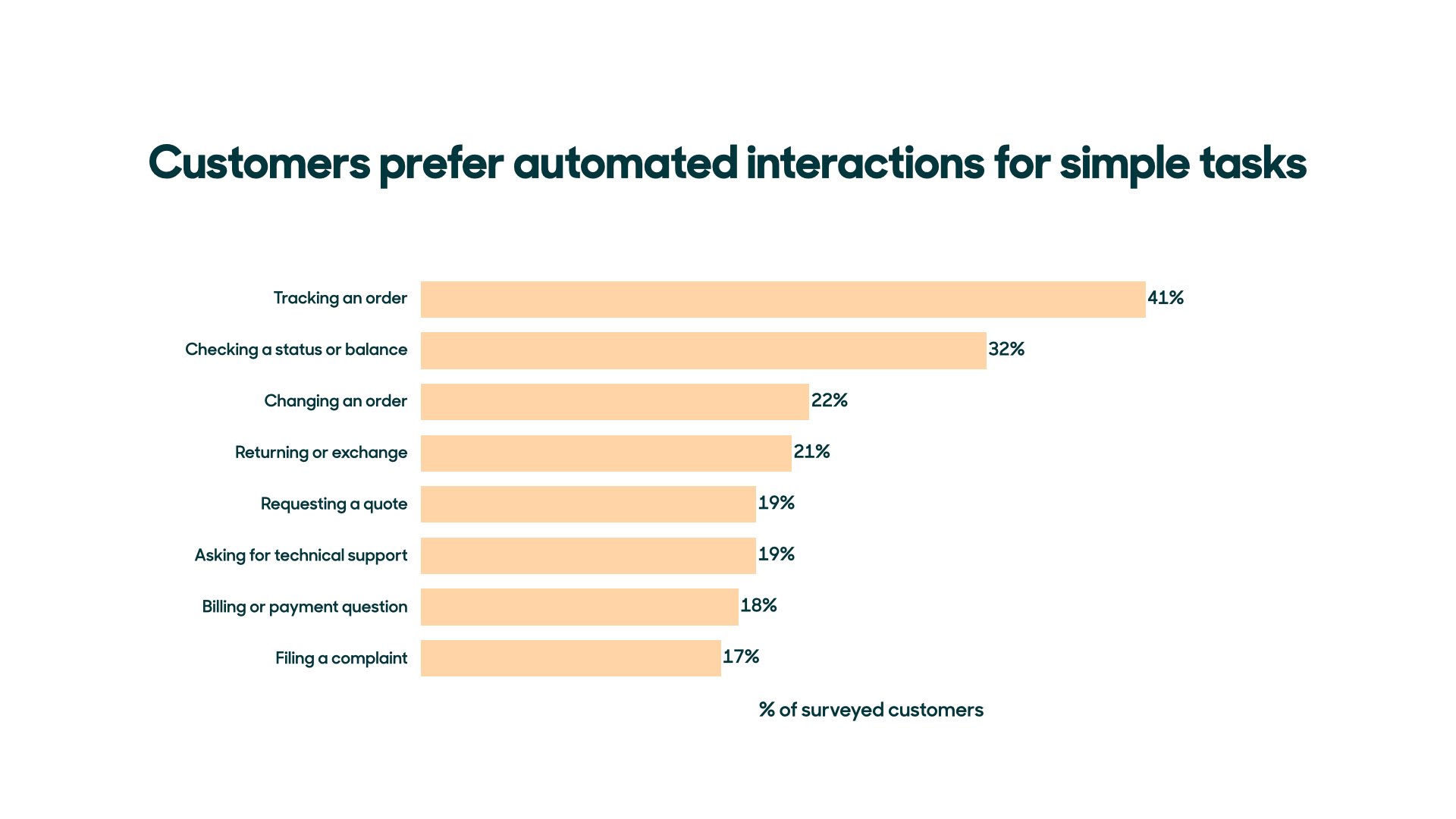
Customers are also okay with simply using chatbots for routine and simple tasks, like order tracking, checking status or balance, or changing an order.
Looking Ahead
As a business, it’s important to match the ways you sell with the ways people want to buy. Leverage the insight from this HubSpot Blog survey to ensure you’re speaking to current customer desires and meeting them on their preferred channels.


8 Easy Social Media Marketing Tips for Introverts [+Best Apps]
Social media marketing isn’t easy, and it’s even more challenging for introverts.
Up to 50 percent of people consider themselves introverts. Sometimes considered antisocial, the truth is that many introverts enjoy social activities but find them exhausting — where an extrovert might gain energy from being in a big crowd, introverts need time to recover and recharge.

For introverted entrepreneurs and small business owners, this poses a challenge: With social media a key component in brand building, how do they manage the demands of social interaction with the need to take care of their own mental health?
In this piece, we’ll offer eight easy tips to help improve your social media marketing (without losing your sanity) and four great apps to help you get the job done.
Social Media Tips for Introverts
1. Create a social calendar.
It’s easy for introverts to get overwhelmed with the sheer number of social posts, replies, and activities required to build a personal or business brand. But given that these connections are critical to boost your public profile and help drive new career opportunities, they can’t be ignored.
Best bet? Start by creating a social calendar that maps out what you’re going to post, where, and when to help make sense of social media efforts. Using a calendar also gives you more opportunity to be socially spontaneous if you’ve got the energy, since your posts are already penciled into your calendar.
Not sure where to get started? Check out HubSpot’s Social Media Content Calendar Template.
2. Pick and choose your people.
The great thing about social media is how it offers connections to so many people — and the terrible thing about social media is that it offers connections to so many people.
This is the case for many introverts; what starts as a great way to connect turns into a continual avalanche of opinions and ideas that’s hard to navigate and even harder to manage. As a result, it’s worth regularly assessing your social media feeds and curating who you follow. While you don’t want to create an echo chamber that cuts off your ability to build brands outside narrow circles, there’s nothing wrong with being choosy about who you follow and why.
3. Schedule social posts.
Despite best efforts, you’ll still get overwhelmed from time to time. That’s OK — and it’s important to take a break and recharge your batteries. The challenge? While introverts are resting up, they’re often still worried about what they’re missing on social media.
To help solve this problem, opt for an app that lets you schedule social posts at the time of your choosing. That way, you can confidently take breaks knowing that you’re still delivering content.
4. Find a matching platform.
Facebook is great for larger conversations, LinkedIn works well to connect with specific people, Twitter offers space for quick-fire interactions, and Instagram is all about images.
Chances are, you have a preference: Maybe you like the quieter atmosphere of LinkedIn, or maybe posting pictures makes it easier to feel connected with your audience. While it’s important to keep your social avenues open, there’s nothing wrong with investing more time in the platform that best suits your style, since you’ll be more productive over time.
5. Curate your content.
Not everything needs to be posted on social media. While sharing details about yourself and your life can help grow a social following and in turn bolster your business efforts, you need to draw a line between personal and professional posting.
In practice, this means deciding what content you post and what you keep private. There’s no right answer here — the key is setting boundaries that work for you so that you feel comfortable about what you’re sharing and secure in what you keep to yourself.
6. Track your social media metrics.
Social media metrics help you see what’s working and what isn’t, and come with the benefit of letting you take a break from people. Rather than reaching out to see why connections haven’t engaged with your brand or aren’t viewing your content, leverage data tracking and analytics tools to see where you’re losing interest. These metrics help you build out a better strategy and let you do it in peace and quiet.
7. Opt for one-on-one interactions.
Introverts are often incredibly engaging and social — when it comes to one-on-one interactions. Consider a party with hundreds of people all having a good time. Many introverts will seek out a single individual or small group and set up camp, rather than trying to mingle.
This approach also works for social media. As people make comments on your posts, consider reaching out with a direct message to strike up a conversation. These one-on-one conversations can let you shine socially without the need to navigate multiple interactions simultaneously.
8. Hire help as needed.
If social media marketing simply isn’t in your wheelhouse, consider hiring help. The complex and evolving nature of social platforms has created a market for social specialists capable of directly targeting your key audience segments and curating your social calendar. In much the same way that you might hire an accountant to manage your business finances, you can now tap social media expertise to streamline the process.
Best Social Media Apps for Introverts
1. Google Analytics
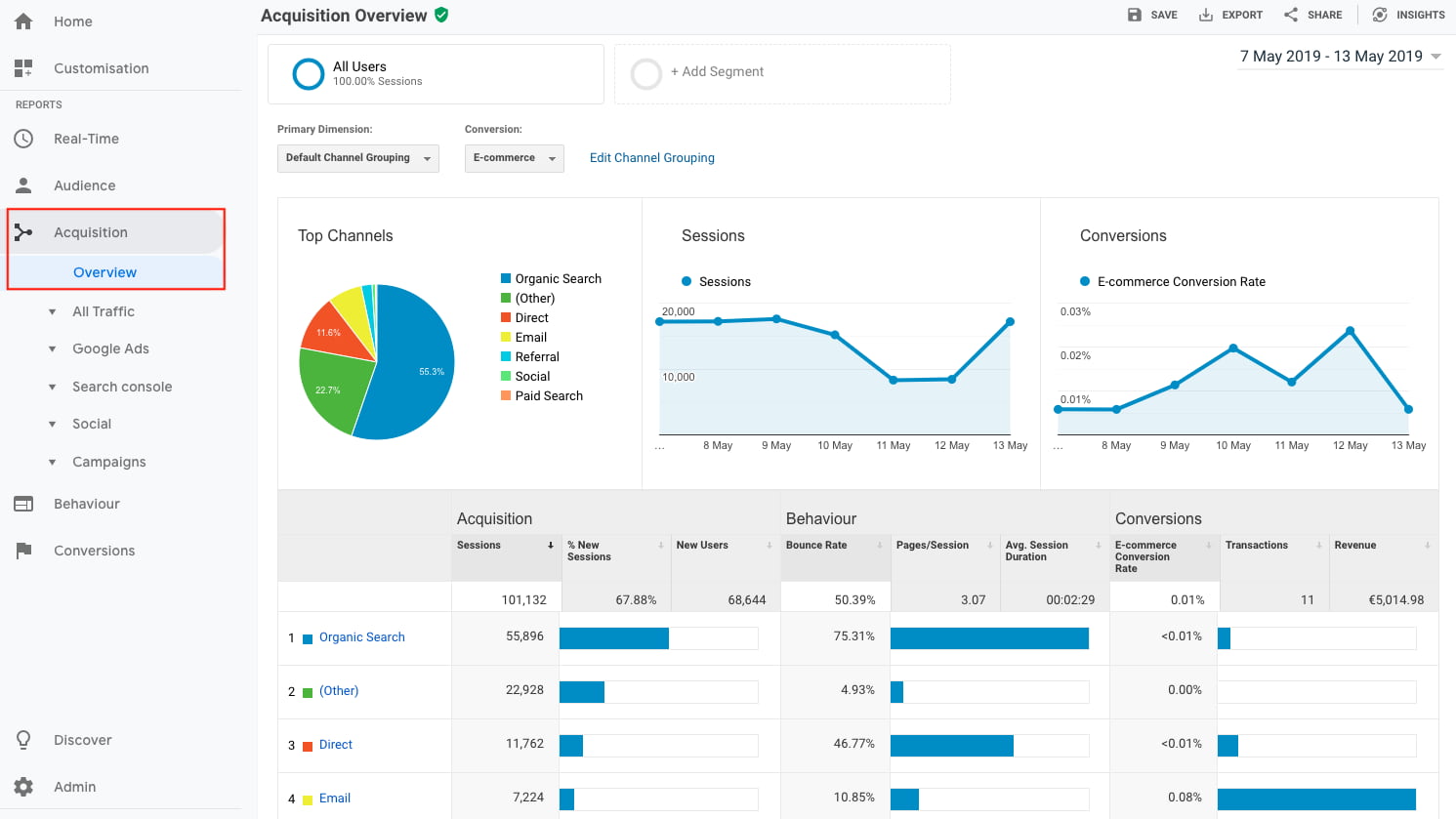
When it comes to metrics, you can’t go wrong with Google Analytics. The app lets you track which of your posts have been shared and on which platform, in turn helping you develop a more focused social media strategy.
You can also use Google Analytics to identify potential weak points in your current efforts. Are there certain platforms where you’re not reaching engagement goals? Are specific post types outperforming others? This data sets the stage for better interactions.
2. Buffer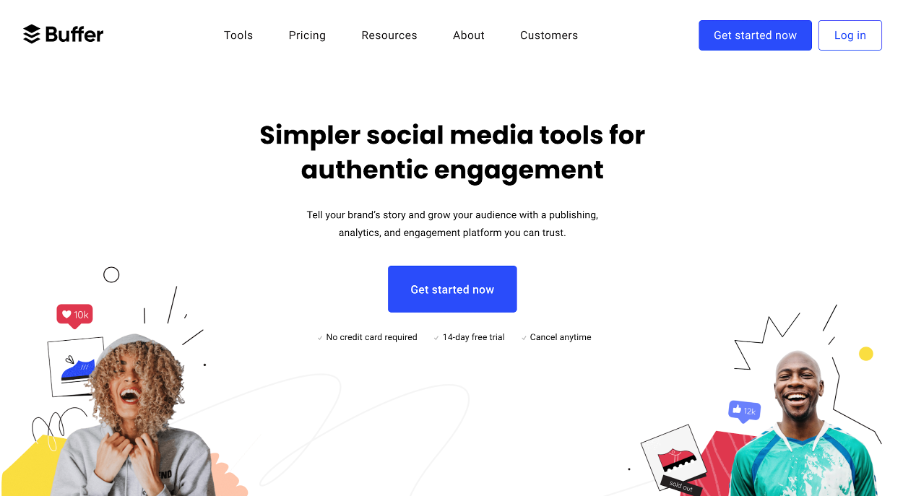
Buffer lets you easily evaluate social media performance, schedule posts, and respond to comments ASAP.
With just a few clicks, you can schedule posts on the platform you prefer at the time of your choosing, freeing up your time to create new campaigns or build new content. Using labels and hotkeys, meanwhile, you can quickly pinpoint comments on your posts that need immediate attention so you don’t miss a customer concern or a new connection opportunity.
3. Adobe Creative Cloud Express
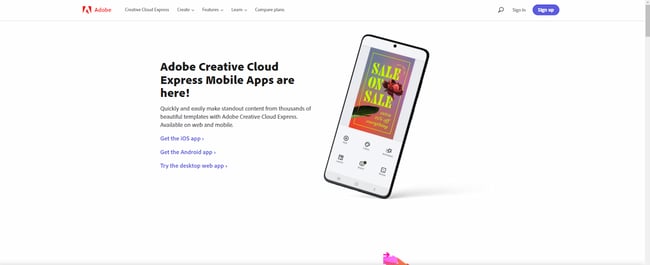 Formerly Adobe Spark, Creative Cloud Express provides the power of pictures with thousands of pre-built content templates. Easily make standout graphics, logos, and photo collages to showcase your brand or highlight your mission, and then posts these images on the platform of your choice.
Available for iOS, Android, and for desktops, you get full access to the app for 14 days for free — after that, you’ll need a Creative Cloud subscription.
5. REP
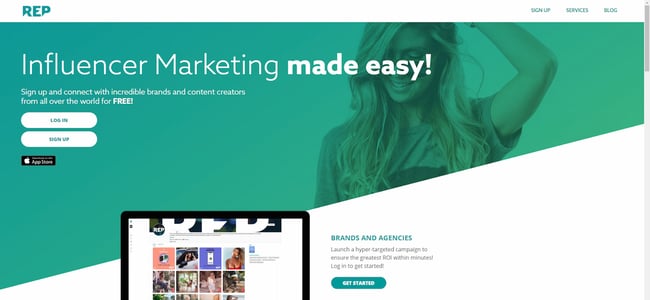 Love the impact of influencer marketing, but don’t like the idea of cold-calling influencers to work with you? REP has you covered. This influencer marketplace lets you post job opportunities, connect with potential influencers, and negotiate terms, all from the app.
It’s a great choice for introverts who want to leverage the power of social media but want to keep the number of uncomfortable interactions to a minimum.
Solving for Social Media Marketing Stress
There’s no way around it: Introverts will always find social media stressful. But it’s still a powerful tool in your arsenal, and with the right approach, it’s possible to strike a balance between building a public presence and protecting your private life.
Best bet? Prioritize where and what you want to post, and make sure to take regular breaks. Push yourself to do better, but recognize that introversion isn’t a problem to solve but rather a different approach that lets you cultivate more direct and in-depth, one-on-one connections.
Editor’s note: This post was originally published in April 2009 and has been updated for comprehensiveness.

The Best Fonts for Your Resume in 2022, According to HubSpot Recruiters
Studies have shown recruiters typically scan a resume for only about six seconds before making a decision on whether an applicant is fit for a role.
With only six seconds to demonstrate your qualifications for a position, every detail counts – including the font you use. The question is, what are the best resume fonts to pass the six-second scan?

We asked HubSpot recruiters to reveal the seven best fonts for your resume as well as what they consider in terms of design in general, so your resume can stand out in the pile.
- Best Fonts for Resumes
- Does your resume font even matter?
- Worst Fonts for Resumes
- Ideal Resume Font Sizes
Featured Resource: 12 Free Resume Templates
With only six seconds to demonstrate your qualifications for a position, every detail counts. To evoke a sense of style, professionalism, and uniqueness, it’s critical you put effort and consideration into your font choice.
When speaking with recruiters, it quickly became clear that classic fonts are still the best options.
“I’m a big fan of the ‘classics’ for resumes – Times New Roman, Arial, Calibri, Helvetica, and Cambria. I’m a little old school, but I think they are the cleanest and exude professionalism,” said Johanna Fleming, a former senior recruiter at HubSpot.
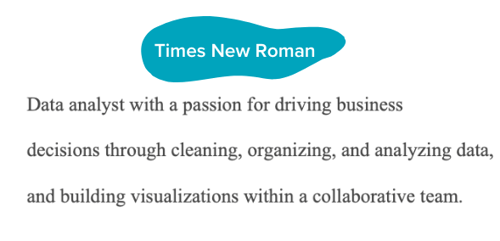
Riley Kundtz, former senior MBA campus recruiter at HubSpot, agreed.
“I find the classic formatting and Times font to be helpful when reading a dense resume from an experienced MBA candidate.”
Times New Roman has become a bit controversial lately. It was the go-to font for many years, but lately, some are opting against it.
“For me, it’s all about legibility and cleanliness – I prefer sans-serif fonts like Helvetica over serif fonts like Times New Roman,” said technical recruiter at HubSpot, Glory Montes. “Overall, I would just stay away from a font like Times New Roman, it’s overused and reminds me of long nights writing course papers in college.”
One font that’s similar to Times is Georgia, it’s a bit wider making it easier to read. In fact, it’s the font used by The New York Times.
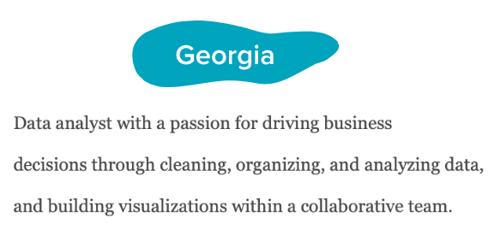
Paulina Valdez Franco, executive recruiter at HubSpot, agrees with this take.
“My two favorite fonts are Helvetica, if you’re looking for a clean and classic look, and Georgia, if you’re going after a more modern and fun look,” she said. “The latter is also designed to read well on screens.”
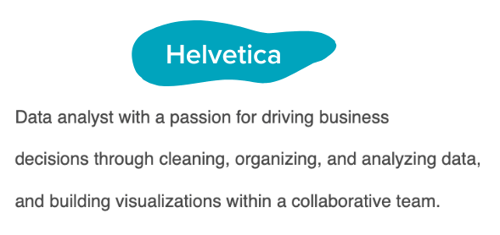
Helvetica is widely used in the advertising industry and works equally well for text-heavy pages and documents.
A lesser-known font that’s a great option for your resume is Garamond, recommended by our current team lead of engineering recruiting at HubSpot, Rich Lapham.
“Recruiters have an idea of the skills they are looking for on a resume, so if you try a new style or format, it can be tougher for recruiters to find the information they are looking for,” he said. “Keep it clean and simple.”
Franco added that Arial and Calibri are great choices if you want to play it safe.
Bridget LeMon, global emerging talent and university recruiting manager at HubSpot, echoes this.
“It’s totally acceptable – and becoming more common – for candidates to stray away from the resume norms of Times New Roman and Calibri,” she said. “Avenir Next and Muna are two great options if you are looking to break the status quo.”
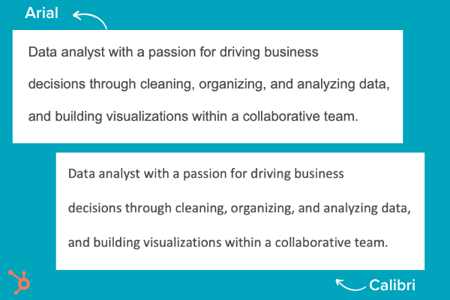
Ultimately, you’ll want to consider the position for which you’re applying when you’re choosing a font. To Montes’ point, certain more creative roles might benefit from a more unique font than Times New Roman.
Does your resume font even matter?
Most recruiters I spoke with were hesitant to even offer a font at all. Instead, they focus on the content.
“I typically don’t pay too much attention to font,” said Heta Patel former HubSpot recruiter. “I’m more concerned about whether the resume is formatted in a clean way – submitting a PDF is helpful with this, so your formatting doesn’t shift.”
Sales Recruiting Manager Kelsey Freedman agreed.
“Honestly, I don’t care much about the font of a resume, as long as it’s clear and in PDF format. I typically only review a resume for 20 to 30 seconds, so a traditional font is good. I would advise avoiding script font or bubble font, or something distracting like that.”
Ultimately, and as expected, your content still matters most. However, a clean, clear font will help avoid any irritability you might cause a recruiter with a distracting, messy design.
“What I get most excited about is the content. Depending on the role, I look to see that candidates are sharing direct and compelling snapshots of their work,” said Ashley Hodder, a global recruiting manager at HubSpot. “I look for indicators that show data orientation, autonomy, and thoughtfulness about business impact.”
Worst Resume Fonts
While some recruiters may not have suggestions for the best fonts to use, many can agree on some of the worst ones.
“Anything that is cursive, or too bubbly, is too hard to read. For instance, I’d stay clear of Comic Sans,” says Holly Peterson, team lead for UX recruiting HubSpot.
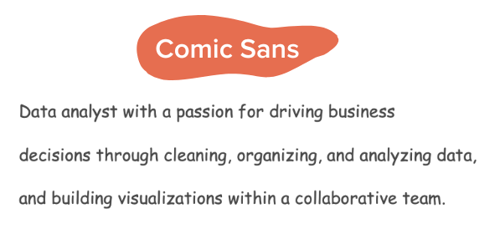
Another font type to avoid is Script.
With text-heavy documents, Script and any of its derivatives make things hard to read because they’re meant to look like they’re written by hand. 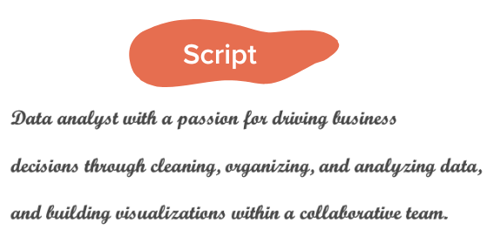
They’re generally used in hand lettering and calligraphy for artistic projects and shouldn’t be present anywhere near your resume.
Ideal Resume Font Size
When asked about which font size is best, Fleming said 12 is ideal. Most recruiters would agree.
Your text should be large enough to read comfortably without straining but small enough that there’s space to include all the key elements, such as an objective, contact information, skills, and experience.
Where you can go larger are for headings for your name and section titles.
If the font you chose is particularly wide, you can scale down to 10.5 – never going below it.
The key takeaway is that make your resume as clear and easy-to-read as possible, which means keeping the font size around 12, sticking to classic fonts with modern twists, and forsaking your favorite script font.
Editor’s note: This post was originally published in November 2018 and has been updated for comprehensiveness.

18 Best Free Microsoft Excel Templates for Marketing & Sales
Many of us can recall a time in high school when we were sitting in math class and thinking, “When am I ever going to use this stuff in the real world?” And then we suddenly find ourselves in the real world, only to realize that numbers do play a pivotal role in what we do — especially in digital marketing.

The trouble is, many Excel templates and spreadsheets are riddled with numbers and formulas that aren’t all that inviting. Making them from scratch can be especially intimidating. While we won’t argue with that, we will say that the advantages of leveraging Excel’s functionality to organize information and streamline tasks are unparalleled.
To help those of you looking for a way to sharpen your skills, we’ve put together a detailed list of ways you can start using Excel to simplify your marketing tasks. Complete with templates, these suggestions will have you making strides in no time. Know what’s even better? You can download a kit of Excel templates in one fell swoop.
Microsoft Excel has many capabilities. It stores data and has tools for data analysis. It performs calculations and allows you to use code for automation. And while many recognize it as a tool for calculating numbers and figures, it’s more than that.
There is a learning curve when using Excel, and it takes time to master its many uses. Outside of calculations, the spreadsheet allows you to create social media schedules, editorial calendars, campaign trackers, and more. And instead of subjecting yourself to trial-and-error processes that would certainly waste time, you can use the following marketing templates to expedite your company’s success in marketing, sales, and project management.
Marketing Excel Templates
1. Marketing Budget Template
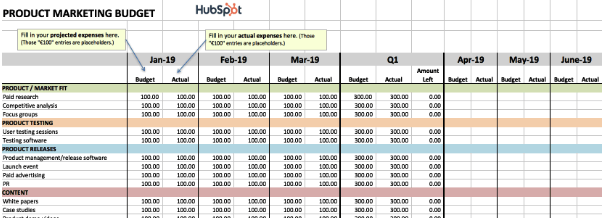
While marketing budgets vary from business to business, the need for structure and a clear sense of alignment between your goals and your spending is critical across the board. To ensure your preparedness for unanticipated costs, you must allocate your budget thoughtfully and correctly. You will also need to keep tabs on how closely you’re sticking to your projected expenses.
If you want to avoid a mess at the end of the month or quarter, take a look at this collection of 8 marketing budget templates designed to help you better organize your marketing spend. From product marketing and website redesign to content marketing and events, these templates serve as a guide for marketers to visualize and track their expenses to avoid overspending.
The collection also contains a master marketing budget template that will help you generate a high-level visualization of your marketing budget on a month-by-month and quarterly basis.
2. Marketing Dashboard for Excel
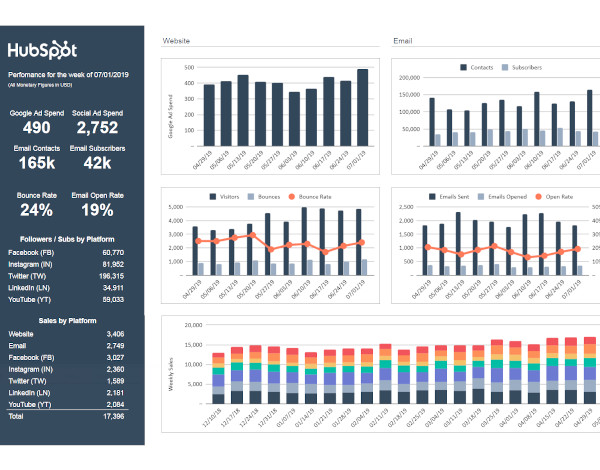
There is no shortage of data to monitor when it comes to marketing, and if it feels like you’re getting too far in the weeds or missing essential details when it gets too granular, a marketing tracker like the above dashboard can help.
This particular tool allows you to enter metrics by campaign to auto-populate visual and easy-to-read charts. As a result, you can visualize the effectiveness of spending and activity across multiple initiatives.
3. Monthly Marketing Reporting Template
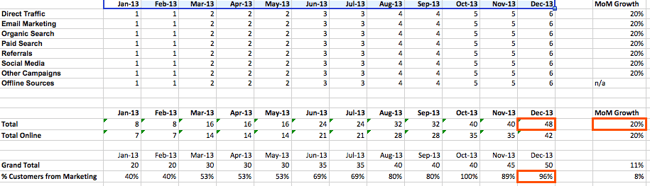
Is there a feeling sweeter than hitting all of your goals for the month? How about communicating your success to your boss? Excel spreadsheets can prepare comprehensive reports of your marketing metrics to send to your boss. There’s no need to work from scratch. (After all, you’ve already worked so hard this month.)
To simplify your reporting, check out these monthly marketing metrics templates and the corresponding PowerPoint template. Each month, you can update them quickly and easily to reflect your monthly visits, leads, customers, and conversion rates. From there, you’ll have everything you need to track and report on which channels are performing best. Every boss loves to see ROI, so you can’t go wrong with these templates.
4. SMART Goal Matrix
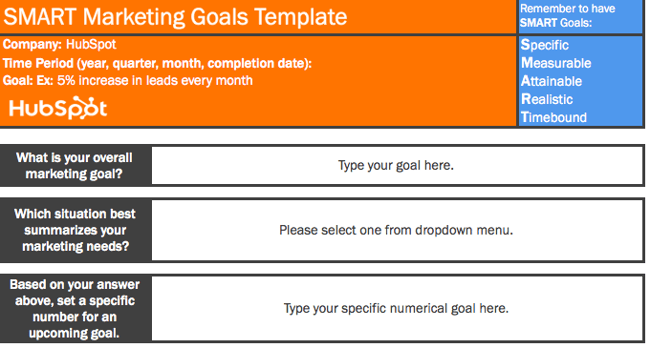
Whether you’re planning for a new year, quarter, or month, defining a clear set of goals is critical for driving the direction of your marketing efforts and priorities.
Sometimes, you might need help not only setting marketing objectives but achieving them. Start with these SMART goal planning templates. Rooted in specificity, measurability, attainability, relevancy, and timeliness, these templates will help you set your team up for success. They will also provide you with a tool for identifying your most prominent marketing needs.
5. On-Page SEO Template
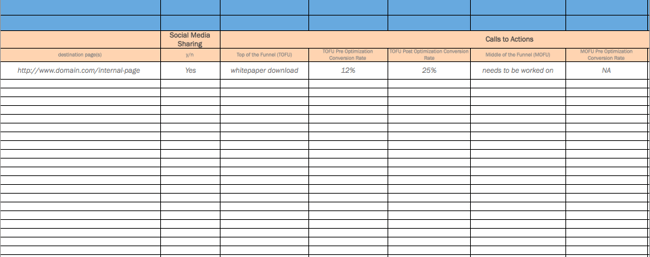
When it comes to SEO, there’s a lot for marketers to remember to see results. In other words, there is a lot for marketers to forget. With search engines evolving and algorithm changes turning your existing strategy on its head, it’s easy to feel overwhelmed and push off revamping your SEO strategy. However, SEO should never be an afterthought.
If you’re looking for the light at the end of the tunnel, pull up this handy SEO template created in Excel. Designed to make the process of managing your SEO efforts a whole lot easier, marketers can use this template to guide their strategy step-by-step or pass it off to their webmaster to serve as a helpful guide. It focuses on keywords and SEO best practices, while providing tips and tricks to identify nuances and increase productivity.
6. Google Ads Campaign Tracker
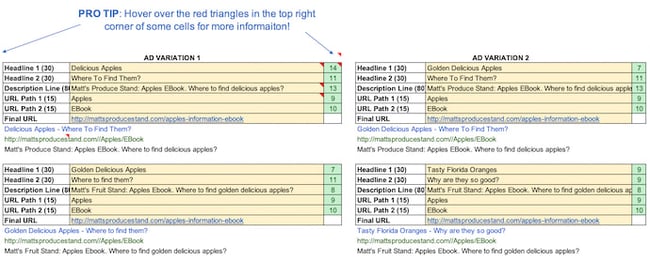
If you’re doing your Google Ads campaigns right, they probably aren’t “walks in the park.” That’s because, to get the most bang for your buck, you set up multiple campaigns with multiple ad groups. You also have variations of your campaigns — all with different content. Not only that, but you’re (hopefully) also keeping track of those campaigns to determine which ones to shut off, add more money to, or tweak.
Sounds like a lot to keep track of, right? But take a deep breath. This Google Ads tracking template is a marketing campaign template that can keep you on top of your Google Ads game. It’ll help you catch mistakes and implement best practices across all the different campaigns and ad groups you’re running — for the top, middle, and bottom of the funnel. It’s a perfect complement to that SEO template you’ve started using.
7. Lead Scoring & Tracking Template
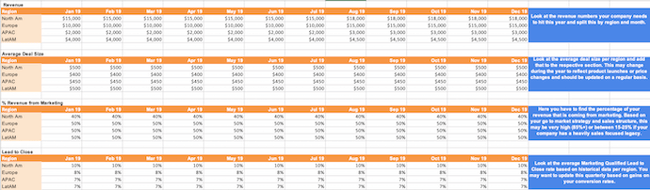
It’s no secret that sales and marketing have a pretty rocky relationship history. Sales might think marketing isn’t generating enough leads, while marketing might think their sales representatives aren’t capitalizing on the leads they’re sending over. When it comes down to it, finger-pointing doesn’t grow a business.
To better align your sales and marketing teams, turn to this template for creating a service-level agreement (SLA). Generally speaking, an SLA is a contract that defines the sales department’s expectations for marketing leads (both quantity and quality), and the expectations marketing has for how sales will act on qualified leads.
With this customizable SLA template in your toolbox, you’ll have the information you need to reduce tension and define a concrete monthly lead generation goal. You’ll also be able to track and measure the success of specific lead generation channels and keep close tabs on your current sales close rates.
8. Leads and Traffic Goal Calculator
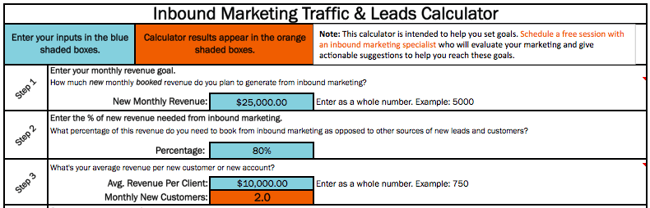
You have to set a leads goal, but you don’t know where to start. Once you finally figure that out, you have to determine how much traffic you need to hit that goal, but you’re not sure what approach to take there, either.
It sounds like you could use a hand in calculating your leads and traffic goals. Luckily, there’s an Excel template for that. You won’t have to sort through these numbers on your own. This template will take care of the math and give you a clear picture of what you need to accomplish to achieve your traffic and leads goals. It will also ensure the health of your inbound marketing strategy.
9. Essential KPI Tracker
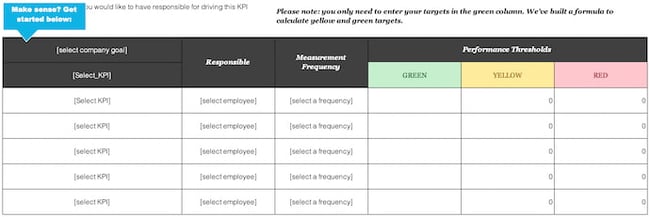
If you’re a fan of the monthly metrics template (item #3 on this list), you might want to grab a copy of this template as well. The essential KPI tracker, shown above, takes the metrics your marketing team has agreed to track and describes them in more detail.
KPI stands for “key performance indicator.” They’re your most important metrics, each with a unique purpose and place in your marketing strategy. Using this template, you can assign specific employees to each KPI, define the frequency at which you’ll monitor each KPI’s performance, and assign each KPI a color that reflects the quality of that KPI’s performance.
If one of your KPIs is organic traffic, for example, you can set up your template such that 100 page views per month are red (poor performance), 500 page views per month are yellow (stable performance), and 1000 page views per month are green (great performance).
Sales Excel Templates
1. eCommerce Planning Kit
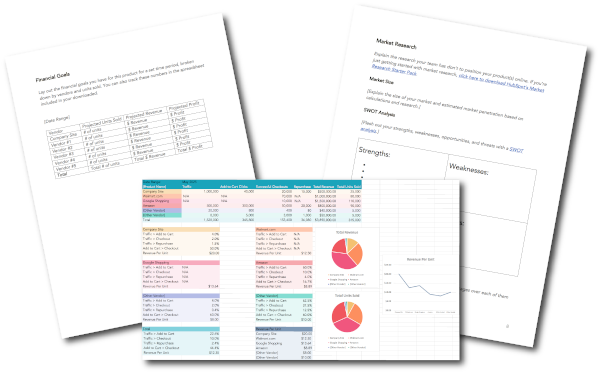
E-commerce stores come with many moving parts. Planning ahead can save you time and heartache later.
This kit includes a marketing plan that guides you through market research, target market, channels and vendors, and more. Once your e-commerce store is live and running, you can use the conversion template to track performance across vendors and platforms where products are listed to give you a holistic view of your efforts.
2. Prospect List Template
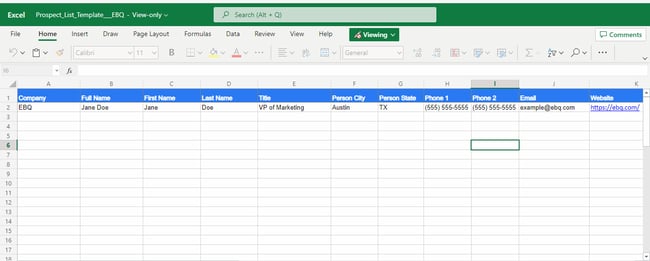 In a business, the most important people are your customer or client base. Although your current customers constantly need to be nurtured, focusing on your prospect list is also essential.
A prospect is a person, business, or organization that might be interested in your products or services. It could be someone who has shown interest or someone who could benefit from your company. A prospect list allows you to focus on the potential customers that you should nurture similarly to your current customers.
The information needed to build a prospect list is elementary. Start building this list with the person’s name, title and company, location, and contact information. Additional information could include their industry, employee size, company description, and pain points.
Once you’ve used a template like this one, you’re ready to upgrade to a CRM, which stores the same information in a more user-friendly format.
3. Sales Forecasting Template
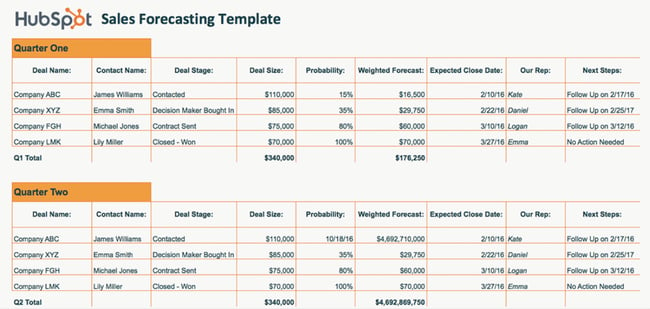
Sales forecasting is similar to weather forecasting. Without the proper tools, it’s impossible to get an accurate idea of what’s ahead. While a meteorologist might use Doppler radars and satellite data for their predictions, your business can use the above sales forecasting template.
Sales forecasting helps with business planning, budgeting, and risk management. Overall, it helps strengthen the strategy that you build for your company. Using this template will help you track business sales, accurately predict your sales revenue, and plan for future growth.
Sales forecasting is challenging, but this spreadsheet formula makes the process easier.
3. Sales Metrics Calculator Template
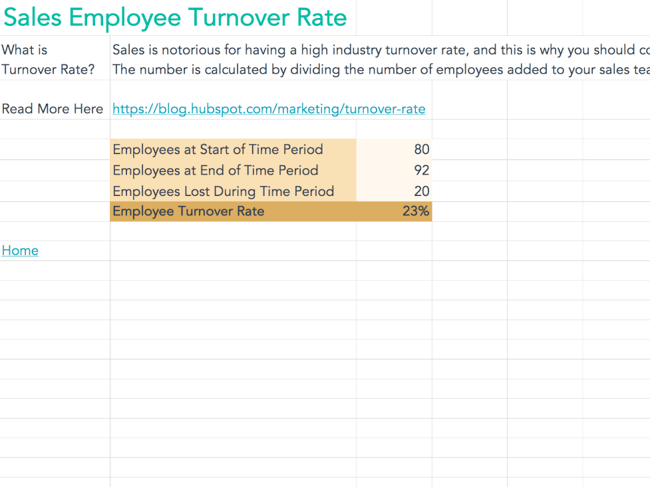
Sales are complex. Once you add sales metrics into the picture, the complications increase. There are many numbers and figures to calculate, track, record, and document. This interactive Excel spreadsheet will help you get the job done.
Not only does this template help you keep track of sales, but it keeps track of your salespeople as well. With the sales metrics calculator template, you can calculate customer retention rate, win rates, product revenue, employee turnover rate, and more.
Project Management Excel Templates
1. Social Media Posting Schedule
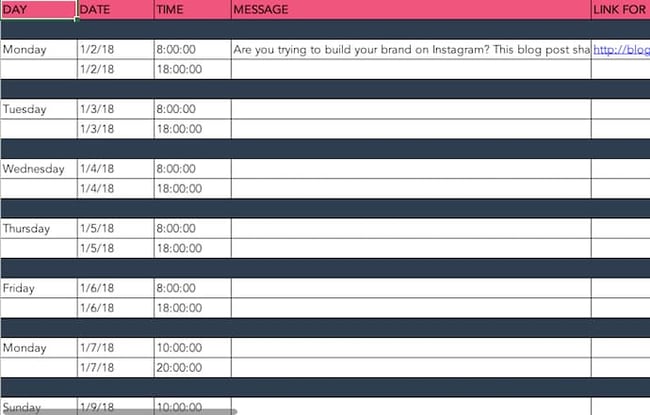
You might already use a social media scheduler to manage and publish your posts every week, but you still need a place to draft your social copy and decide which posts will go to which social networks.
And because most social media schedulers allow you to upload social post copy in bulk from a spreadsheet, it’s best if you have an Excel template designed for this purpose. With that in mind, we created the Excel template shown above.
This social media posting schedule allows you to draft each social post — the time it will post, the message you want to publish, and any link you want to accompany your message (blog post, registration page, an ebook landing page, etc).
Once you’ve drafted all of your social posts for the week, month, or quarter, you can sort them by social network and upload your Excel file into your social media platform of choice.
2. Blog Editorial Calendar
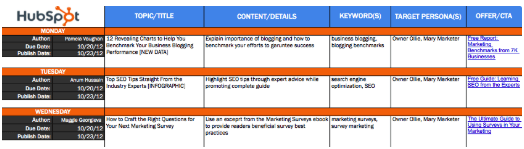
Blogging plays a significant role in your ability to attract visitors and leads to your website. But managing a blog is one of those responsibilities that’s easier said than done.
Whether you’re struggling with ideation, consistency, or simply just lacking organization, an editorial calendar can often serve as the solution you need to refocus your blogging efforts and generate even more traffic and leads from your content. Visualizing the blog posts you plan to publish in a given week or month makes it easier to define overarching themes, keep track of ideas, manage contributions, and prioritize strategic distribution.
Use this editorial calendar template as the starting point for keeping track of all of your business’ content. It’ll help you be more mindful of topic selection, buyer personas, keyword inclusions, and CTA alignment.
3. WIP Template
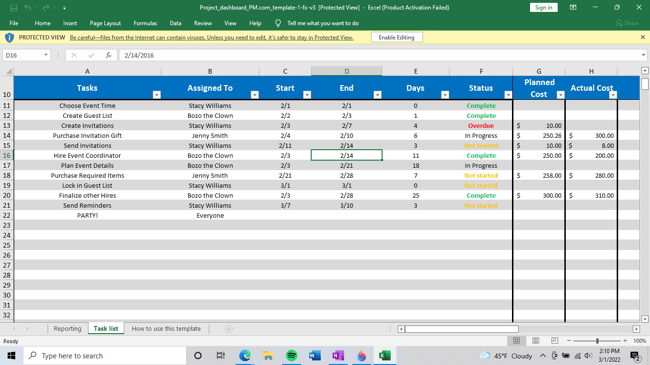 How do you keep track of the day-to-day progress of your company, especially when there are people, tasks, and timelines to monitor? A WIP (work-in-progress) template is essential to keeping track. If you’re not ready to commit to a project management software like HubSpot Projects, you can still manage your projects and processes with a spreadsheet.
This template provides you with a project overview that makes tracking easier than ever. The WIP template from Project Manager tracks tasks, time, costs, and workload. It also allows your team to change the work view (task list, spreadsheet, calendar) based on preference. With this template, you get all the data you need to monitor the life cycle and progress of your projects.
4. Social Media Content Calendar
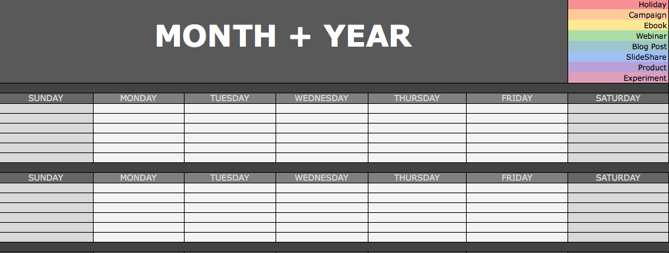
Since you’re probably generating tons of clicks from your Google Ads campaigns and writing amazing content thanks to your blogging editorial calendar, you’ll need some help figuring out how to spread the love on social media. We’ve got just the thing.
The social media calendar template is the perfect resource for helping you scale and streamline your social media marketing. When you use Excel to break out separate worksheets for each social network you’re using, you’ll be able to keep a repository of content ideas, so you’re never struck by writer’s block and always have something to post.
It’s also worth mentioning that marketing calendar Excel templates come in handy when using Twitter, as it can count your characters to help you write tweets that stay within the 280-character limit.
5. Product Launch Plan
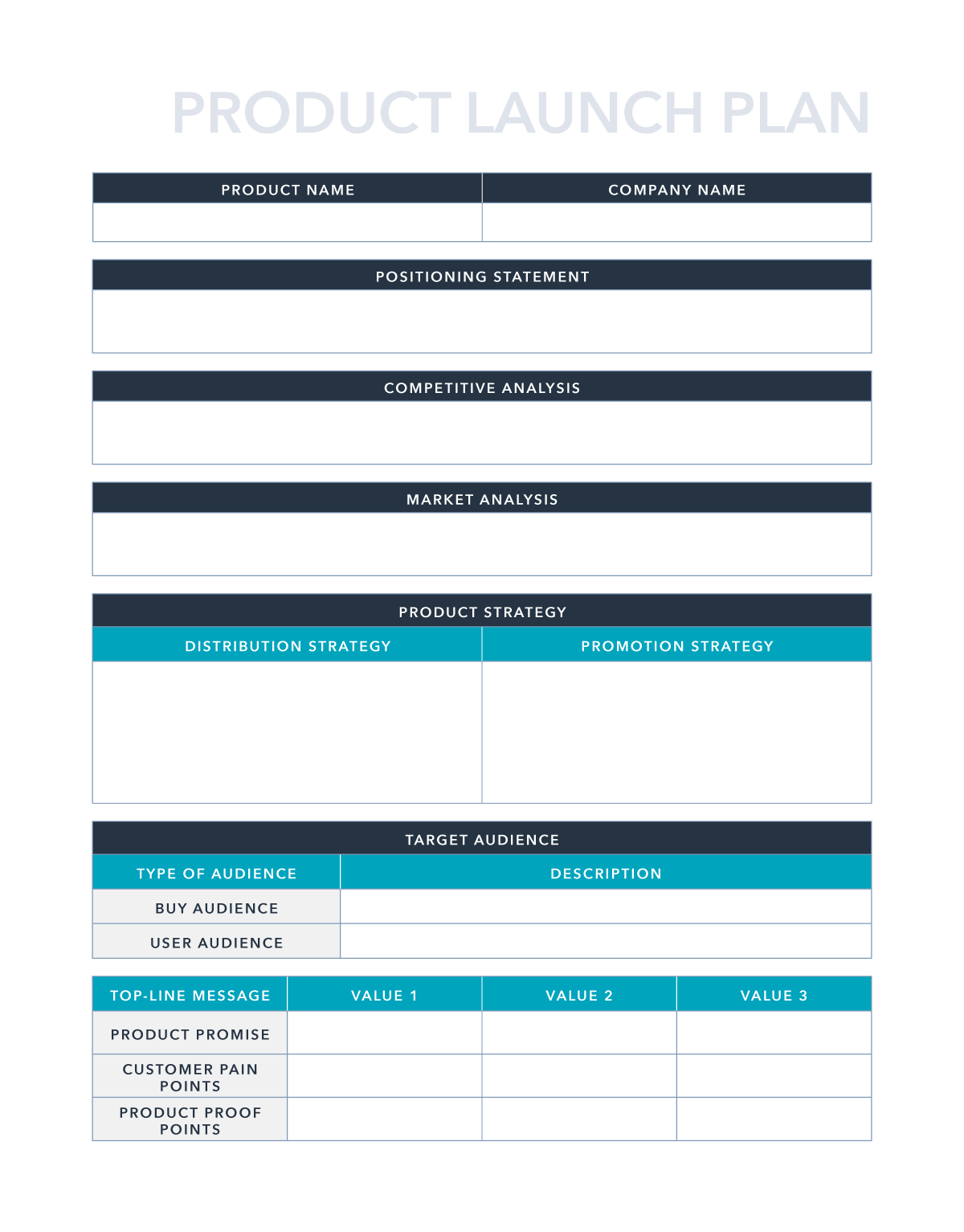
A well-executed product launch can be a key differentiator for successful marketing and early adoption. The right plan can give you clarity and purpose as you move forward and announce the new product’s existence to your customers and prospects.
This product launch plan can help you organize your thoughts around competitive analysis, positioning, and product strategy. It even goes so far as to help you brainstorm pains, proof points, and key messaging for campaigns.
Excel your marketing process.
Data is any marketer’s friend. Even though spreadsheets seem like they’ve been around forever, Microsoft Excel has so many capabilities that still make it an amazing resource for displaying, organizing, analyzing, and parsing data. With a little bit of Excel magic, you can streamline your workflow and arrive at some a-ha moments from data insights.
Editor’s note: This post was originally published in March 2019 and has been updated for comprehensiveness.

10 Signs It’s Time to Pull the Plug on Your Marketing Campaign
Have you ever gone to see a movie that got worse as you watched it, but you couldn’t leave because of the money you paid to see it? Or have you ever worked on a project that was clearly not going to solve your problem, but you just continued working on it?
Psychology refers to these examples as escalation of commitment and sunk cost theory, where we continue to do something without value because of the effort or cost we’ve already put into them.

In the marketing world, pulling the plug on a campaign can be extremely difficult, especially when you and your team have put a lot of work into it. But sometimes, it’s for the best. In this post, we explain 10 signs it might be time to pull the plug on your marketing campaign.
10 Signs It’s Time to Stop Your Marketing Campaign
No two campaigns are the same, but these ten signs indicate that it’s time to stop a marketing campaign.
1. If you’re not getting enough value
How do you know whether a marketing campaign is giving you enough value? Well, ask yourself:
- Are you going to break even on the money you’ve spent?
- Does the cost far exceed the value you’ll get?
If the numbers don’t add up, it might be time to stop the campaign.
2. If you’ve given enough time
Marketing campaigns require patience. Sometimes, you might not even see the results from certain campaigns in months.
However, if your marketing campaign takes way longer to generate positive results when compared to other campaigns of its kind, then it’s time to pull the plug.
3. Your optimizations don’t change anything
Suppose, in a bid to save a campaign, you begin to optimize different elements but still don’t notice any improvements; then, you should end the campaign.
You’d be better off spending your time and resources on other campaigns or revenue-generating activities.
4. It’s cheaper to stop now
If you’ll save more time and money by pulling the plug now rather than later, then that’s a sign the campaign needs to end right away!
5. When you’ve tried your best
If you and the team have tried all methods and tricks in the book to no avail, then it might be time to resign and move on with some pride left.
6. If you’re getting negative results
You know it’s time to pull the plug on your campaign if your weekly reports mostly contain red downward arrows instead of the green upward arrows
7. If other campaigns are working
You’re likely running more than one campaign at the same time. If you notice that all of your other campaigns generate the results you want, it’d be smart to drop the underperforming campaigns.
8. When your campaign sends the wrong message
Even the most well-meaning marketing campaign can get a ton of backlash from the public. Whenever a campaign is met with such a negative response, it’s best to unplug the campaign and go back to the drawing board to whip up a new one.
9. You’re getting the wrong clients
You should consider stopping your campaign if you’re engaging the wrong audience and attracting not-so-ideal clients.
For instance, if your goal is to get giant corporations, but you’re inundated with SMEs, then you should have a hard look at your campaign.
10. You’re missing timelines
When creating a campaign, you should tie results to a specific timeline. If you find that you and your team are consistently having difficulties sticking to a campaign’s timeline, then you might need to pull the plug.
What to Expect When Your Marketing Campaign Ends
Here are some things a business should expect when it stops an effective marketing campaign:
- A drop in the number of leads and acquisitions
- Lower impressions on social media
- A decrease in search traffic
- Inability to maintain growth
Therefore, if you have to stop a marketing campaign, you should have a backup plan in place. Have another campaign ready to go as soon as you stop an unsuccessful campaign.
Ready to Pull the Plug?
Although successful marketing campaigns usually take time to mature, it’s essential to know when you’re wasting valuable time and resources.
If the campaign’s cost exceeds its value, attracting the wrong clientele, or downright losing money you’ll never recoup, then it’s time to stop the marketing campaign. With the insights provided in this article, you should be able to determine whether to pull the plug or not.
Editor’s note: This post was originally published in June 2011 and has been updated for comprehensiveness.

Professional Invoice Design: 26 Samples & Templates to Inspire You
While your invoices might not be a front-facing part of your business, it doesn’t mean they should be plain and boring. To help you get a sense of the design possibilities, we put together a collection of impressive invoice examples that may inspire you to rethink your current design.

But first, let’s review how to design an invoice in the section below.
How to Design an Invoice
You don’t need to be an expert to create professionally designed invoices. In fact, you can use invoice templates to get started. However, you need to know a bit about the structure of an invoice so that it’s functional and ensures you receive your payments on time.
1. Decide on your invoice format.
Start by choosing the format you want to use for your invoice. Popular formats include: print, PDF, Google Docs, Word, and Excel. Each one has its pros and cons, but it’s a great idea to use multiple formats.
For example, creating all of your invoices in excel can help you move quickly if your deliverables are the same for each pay period — simply copy and paste from one tab to the other. Then, you can save each pay period’s invoice as a PDF to send it to your client easily via email.
Once you’ve chosen your format, add the important details to your invoice.
2. Add essential information.
Every invoice you create should include the following information:
Your details: Your name, company name, address, telephone number, and email address.
Client details: Your client’s address, company name, telephone number, and email address.
Pro Tip: Add the department name and the contact person’s name if you’re working with a large organization.
List of services: Make a list of all the services you’re charging the client for.
Payment terms, due date, and methods: How would you like your clients to pay you? Bank transfer? PayPal? Check? Make it clear in your invoice. You should also make the payment’s due date clear.
3. Add your company’s branding.
Your client likely works with several vendors, contractors, and freelancers. Make it easy for them to recognize your invoice at first glance by adding your branding to it.
Include your logo and brand colors as well as your typeface or font. Including images adds some flair that can liven up a traditional bland invoice.
Now that you know how to design an invoice, let’s take a look at these best practices in action on the invoice design templates and examples below.
Invoice Design Templates and Examples
We’ve put together a collection of impressive invoice designs and templates that may inspire you to rethink your current invoice design. Many of them are free to download and customize.
1. Basic Invoice
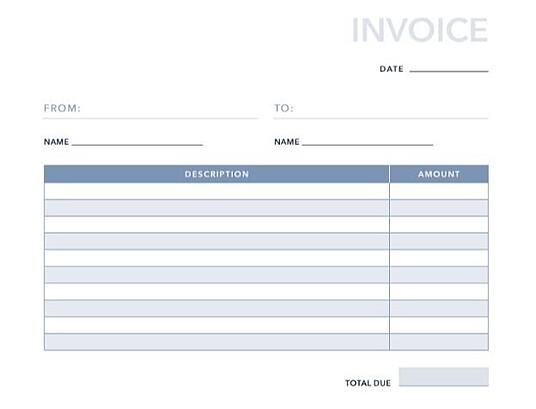
No frills, just business. This basic invoice template, developed here at HubSpot, provides all the necessities that your client’s accounts payable team will need to pay you on time. This template offers space for your name, your client’s name, invoice date, and rows for up to 10 itemized services. You can add more rows as needed.
Pro Tip: For basic invoices like this one, keep your branding simple. A logo and muted brand colors will work well here.
2. Blank Invoice
This blank invoice template is similar to the basic invoice template, but this one is specifically for products. You also have room to include a detailed breakdown of the cost of each product, including tax and shipping fees.
Pro Tip: Use this template for larger businesses that order your products for a specific department. That way, if you decide to sell to a different department in the same company, you can keep their invoices separate.
3. Commercial Invoice
Are you selling a variety of products and services? The commercial invoice above might be just what you need. This template allows space for product origin, manufacturing origin, discounts offered to your client, and more.
Pro Tip: Use the notes section of this invoice template to keep track of any agreements or special circumstances for the invoice. Your client and your bookkeeper will appreciate the context for price adjustments.
4. Blue Service Invoice
This monochrome, service-based invoice template allows you to include multiple services and how much each one costs your client.There’ plenty of space for your logo in the top right corner and you can customize the colors to suit your branding.
Pro Tip: Include invoice numbers to each invoice so you can keep track of how many you’ve sent in a given time period.
5. Green Shipping Invoice
Dedicated to shipping-based services, this vibrant invoice template is perfect for transactions that involve the transportation of goods. You can include the quantity of the products you sold, the price for each one, and incorporate taxes as well.
Pro Tip: Add a column for shipping costs if the price to ship is different for each product.
6. Orange Standard
This standard invoice template opens in Microsoft Word which makes it easy to edit. You can insert your logo in the top-right hand corner and add additional rows to match how many services you provided your customer.
Pro Tip: Wrap the text in each description row so that you can add additional details about each service.
7. Blue Minimal Standard
The minimalist template shown above takes the guesswork out of invoicing services. Using the large “Notes” tile in the center of the document, you can put the focus on the nuances of your services. That way, it’s clear why you charged your client the price you did.
Pro Tip: Add an item number column to the description and price table so you can organize your notes by which service description they correspond to.
8. Black and White Shipping Invoice
Sometimes, a basic grayscale invoice template fits the bill. That’s exactly what this invoice template offers. It’s perfect for shipping invoices, but it can be customized for products and ecommerce goods as well.
Pro Tip: For an invoice this simple, adding your brand colors and logo isn’t necessary. As long as you include your name and contact information, that will suffice for this template.
9. Amir Hossain

If you’re looking for a way to push your brand forward even in your invoice template, try this one. With heavy geometric designs that can be swapped with your brand colors, your invoice will be equal parts brand and finance.
You’ll also get clearly defined fields where you can enter a list of services you want to receive payment for, alongside your payment info.
Pro Tip: Use this template for digital invoices so you don’t have to print full pages of color.
10. Minimalist Invoice
Contrary to the template above, this design takes a minimalist approach to invoices. Whether you’re using it for personal or business use, this template allows you to assign customer IDs that help you quickly find the recipient of the invoice.
Pro Tip: Use a CRM to track and store client IDs so you can save past invoices for your records in an organized way.
11. Fabio Basile
Business in the front. Party in the back. This double-sided invoice sample offers an interesting twist on an otherwise standard invoice design. The “handcrafted for” language on the design side is a special touch which you can customize for each client you work with.
Pro Tip: Personalization can go a long way, even on an invoice. Take the time to thank your client, offer a relevant statistic, or share a motivational quote on the invoice for some added flair.
12. Front and Center
Put your final price to the client “front and center” using this invoice template by Ari Krzyzek. The document makes excellent use of contrast in font color, allowing the red price to pop against the thIn black text surrounding it.
Pro Tip: Don’t shy away from this type of template if the cost of your services seems high. Strategically pricing your work can give you the confidence to put that price boldly on your invoice.
13. JPWTemplates
This is a more specific template sample focused on billing for services — in this case: photography. This invoice uses an actual photograph in the header to highlight the quality of the services being provided. It’s a clever idea you can leverage for multiple services such as graphic design, illustration, interior design, and so on.
Pro Tip: If you want to personalize your invoice further, you can use a photo or design from the customer’s specific project to give it a custom look and feel.
14. Classic Designs
Here’s an example of a straightforward invoice design that details all of the critical invoice criteria — contact information, itemized purchases, payment information, and more. The design leverages pops of red to call out key pieces of information to make the statement feel less overwhelming.
Pro Tip: Due to the detail and layout of this invoice template, it works well for project-based work like professional services.
15. Bold Stationary
This invoice sample uses a split design to divide contact information and payment information. The design is free of any distractions or fancy elements, yet it still feels carefully designed.
Pro Tip: If your business is a bit more traditional, try customizing this template for your brand.
16. Novomatic
This invoice sample uses various shades of yellow to chunk out different parts of the invoice into digestible sections, but you can choose your own colors if you’d prefer. The footer of the statement points customers towards the company’s social media channels so you and the client can stay connected long after the invoice is paid.
Pro Tip: Even though your invoice may be the last “deliverable” your client sees from you, adding your social media channels can be a way to encourage repeat business with past clients.
17. Yellow Minimalist
There’s something about yellow that makes a document friendlier. Vibrant but unaggressive, this template emphasizes your price in large font on the bottom-right hand corner. With a yellow border like this, you can ensure it doesn’t get forgotten in a pile of other white sheets of paper on your client’s desk.
Pro Tip: Use this invoice template for hard-copy invoices. And don’t forget to set aside some additional budget for the color printing.
18. Victory
This invoice template offers space for a logo on the bottom-left hand corner, rather than the top, for professionals who want to make it clear right away that this document is a bill to be paid (hence “INVOICE” listed on the top-right hand corner). The invoice’s midsection allows the sender to include a thorough description of each service provided — a helpful billing format if your business spanned multiple projects over a long period.
Pro Tip: If you have additional items to add to the invoice, make the rows in the table thinner to fit everything on one page.
19. Soft Banner
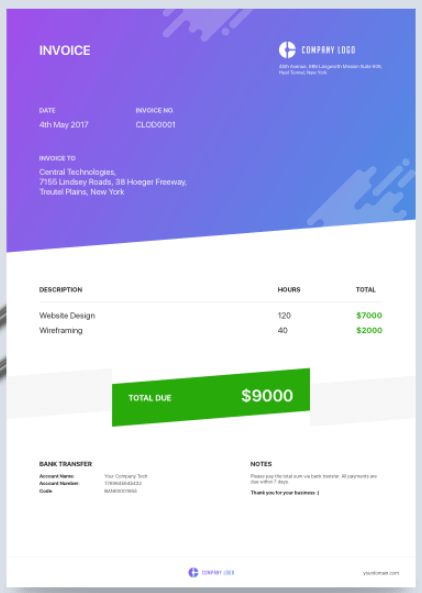
Professional designers, here’s an invoice concept just for you. Showing your clients a colorful, brand-aligned invoice is a surefire way to get them to remember you and rehire you for future projects.
Pro Tip: In this design, the centered price banner uses a soft green background to make steep costs look a bit less frightening to the customer.
20. Classic Design
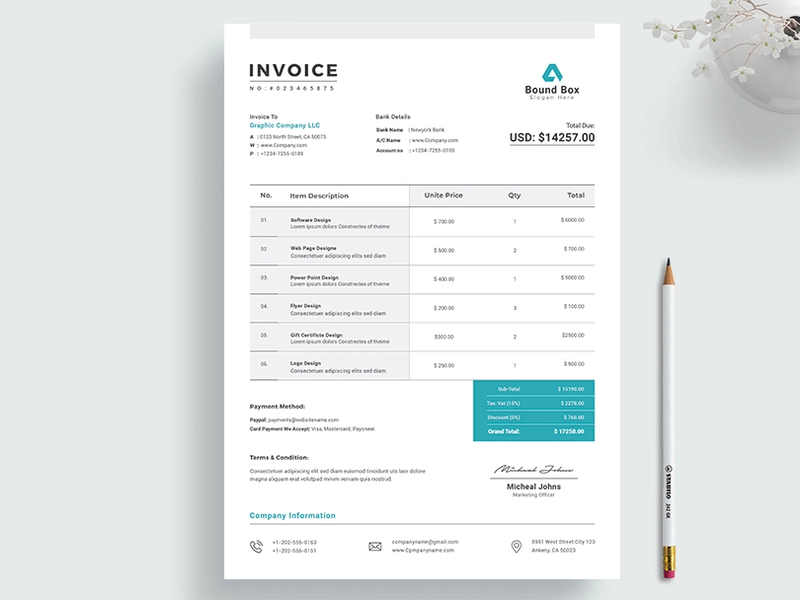
Here’s another elegant invoice template to serve as inspiration for your own. The template is simple and quickly highlights how much clients are expected to pay for a product or service.
Pro Tip: You can insert the “terms and conditions” of your contract in this template so you can remind customers what they signed up for when choosing your business. After all, they might be confused why you’re charging them a certain fee and may want to review the terms and conditions of their contract before reaching out for help.
21. Martin Ehrlich
One look at this invoice design from Martin Ehrlich tells you that it’s built with photographers or visual creatives in mind. This template comes with plenty of white spaces that make it easy to scan and identify the essential details like the supplier’s name, amount due, and the different services offered.
Pro Tip: Use this template for digital invoices only so you don’t use an entire cartridge of black ink to print a physical copy.
22. Invoice by ThemeDivisers
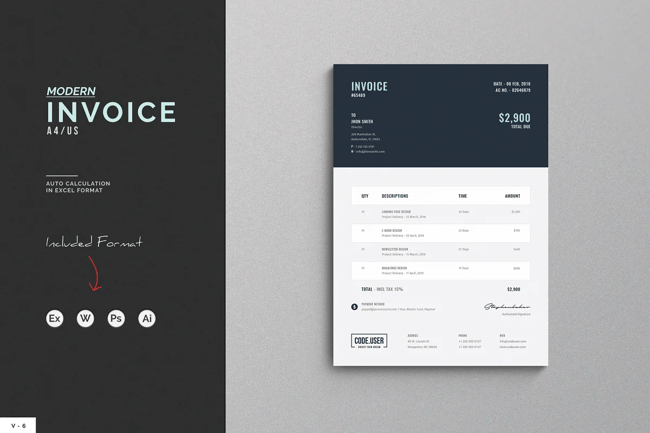
It’s hard for clients to miss how much they owe you with this invoice template, thanks to the amount’s bold description at the top of the invoice.
Below the “total payment” is a breakdown of the services rendered, along with your contact information as well as your branding.
23. Invoice Template by Guuver
Your invoice doesn’t need to have a white background, and this template from Guuver is a perfect example. The template’s slightly pink background and distinct blue font — both of which are customizable — are sure to leave a lasting impression on your client’s mind.
Pro Tip: Switch up the colors to a monochrome look for a sleek and modern design.
24. Clean Word Corporate Invoice
This invoice template adds a modern and elegant look to the otherwise dull templates that are standard in the corporate world. You can use the template on MS Word and make adjustments directly in the template.
Pro Tip: Use the condensed “terms and conditions” section of this invoice template to share any stipulations regarding invoice payments like late fees and contingency fees.
25. Invoice Template by Ariodsgn
How would you like an invoice that looks like a resume? This template from Ariodsgn is the right mix of creative, modern, and professional. Perfect for making a positive first impression on your customers.
Pro Tip: For contractors who are working in a typical staff or advisor role, try out this template and make a resume to match. This continuity will keep your personal brand front and center with your client.
26. Retro Invoice
Take your clients back to the ’80s with this retro invoice design. Although old-fashioned, the focus of this template remains on passing across a clear message regarding your payment information to clients.
Pro Tip: if your brand is in line with this retro theme, print your invoice on special paper and send it in a unique envelope to seal the deal.
How to Write an Invoice
Want to make your own invoice? We’ve got you covered.
Check out HubSpot’s Invoice Template Generator to create a professional invoice PDF in just a few clicks. Here’s how to use it:
Step 1: Click
this page to visit the Invoice Template Generator.
Step 2: Click the dotted square on the top-right hand corner of the template to upload an image file of your logo. Or, drag and drop this image file into the square.
Step 3: Use the circular wrench/paintbrush icon to the left of the template to change the invoice’s color scheme.
Step 4: Hover your cursor over the “Item Description” section to “Add More” rows if you’re billing your client for more than one product or service.
Step 5: Hover your cursor over each individual field to customize details such as invoice number, company name, item quantity, and relevant notes to the recipient.

Step 6: When you’ve finished customizing your invoice, click “Download Now” just below the template. Your invoice will download as a PDF.
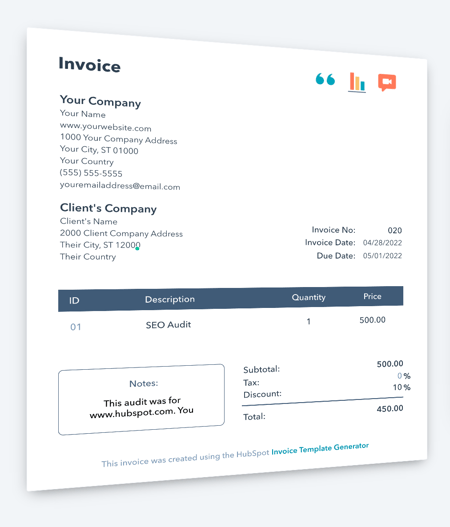
You can also download ten other invoice templates that you can customize to meet your needs, whether you’re a freelancer or a large corporation.
At the end of the day, invoices should tell clients how much they owe, what they’re paying for, and what date they need to pay by. If you’re having trouble designing an invoice, or just want to shake things up, choose one of the pre-made templates above and get started with redesigning your invoices today.
Editor’s note: This post was originally published in February 2019 and has been updated for comprehensiveness.

Social Media PR: 6 Tactics to Improve Your Social Public Relations
Compared with public relations, social media is the new, cool kid on the block, and since the early 2000s has become a significant means of communication between brands and their audience.
These days, PR departments, regardless of the brand or organization, go to social media first to spread the latest information about services and products and gain the broadest coverage.

By aligning social media and PR, brands can boost engagement and keep customers aware of the latest developments.
In this article, you’ll see six tactics to help improve your social media public relations. We’ll also see examples of brands that have used some of these tactics.
How has Social Media Changed Public Relations?
Social media has completely changed the PR landscape. Press release has ceded the throne to the much younger, much more persuasive heir: social media.
Communication
Brands can now use different channels to communicate with consumers through social media. Whether through engaging posts on Facebook, Reels on Instagram, or Tweets on Twitter, brands can develop a personality that resonates with consumers and form a personal connection with their audience.
Unlike traditional PR methods, for example, press releases, social media allows consumers to interact with their favorite brands. This two-way communication street can be a massive advantage for brands that know how to use it.
Influencing
Social media has allowed ordinary people to become influencers who can help brands promote products and services to specific audiences.
Brands can now work with bloggers, vloggers, experts, and more to create impactful PR campaigns.
Instead of creating the content by itself, a brand can leverage the creative powers of these influencers. Influencers with a large following are highly sought-after for obvious reasons. However, it’s vital to look past the follower count to see whether the influencer is suitable for the brand.
24/7 Cycle
The internet never sleeps, which allows PR professionals to deliver news at any time, safe in the assurance that the message will reach consumers.
However, while the ability to reach consumers at any time is excellent, it also has its drawbacks in that PR messages have a shorter lifespan in the consumer’s memory.
Consumers are in an endless mill of information, which challenges PR professionals to keep up. Bad reviews and news travel very quickly, so PR agents have to be proactive and nip such problems in the bud before it escalates.
How to Use Social Media for PR
How much does the typical PR campaign cost? $10000? $100000? $1000? You can get a PR campaign for these prices and even less — it only really matters how effective the campaign is.
So, how can you use social media for PR regardless of how much you’re spending? Here are some valuable tips to help you.
1. Add social share buttons to your message.
A super-easy way to use social media for PR is to add social sharing buttons to your message. For example, if you have a press release, you can add social sharing buttons to Facebook, Twitter, and other social media platforms.
Adding these buttons allows consumers to share your press releases and do some of the legwork for you.
Additionally, you can embed social media links within the press release. It drives traffic and increases engagement.
2. Work with influencers.
One of the best ways to create PR for your brand is to partner with an influencer.
When choosing an influencer to become a brand ambassador, look for more than follower counts. You should want authentic coverage that hits on a personal note with actual people.
An influencer or ambassador must share, or even create, relatable, emotional, and personal content. The right influencer for your brand is just as concerned about delivering the content right for their audience as they are about doing good work for you (and getting the check).
Furthermore, when you cultivate an audience of people who genuinely love what you’re doing, you’re building a pool of loyal, engaged brand ambassadors who’ll stick with you not just because you’re paying them but because they truly feel connected to your product and are honored to be ambassadors with the brand.
3. Be consistent.
To get the best from using social media for PR, you need to be consistent. This consistency includes showing up with regular posts and interacting with consumers as soon as possible.
It also involves being consistent with your brand voice and tone. By being relatable, helpful, and valuable, you can build a social media presence that boosts your reputation.
4. Be proactive.
Adulation from social media is fickle, and those that praise you today can quickly turn on you and ‘cancel’ your brand.
Therefore, you must have a proactive crisis management system to handle the flames when they come. PR teams should take advantage of the ability to reply instantly and tackle crises as soon as they arise.
4. Create good relationships with the media.
PR professionals have always realized how meaningful a good relationship with media outlets and journalists can be. So, cultivate a good relationship with these essential parts of the industry. Having a good relationship with them will increase the chances of getting positive press with the right outlets.
You can kick off the relationship by sharing necessary, practical, and valuable information to extend conversations.
A note of warning: Spamming media houses, journalists, and even influencers with pitches and press releases can come off as annoying and disrespectful. Be professional and have some self-respect.
5. Take advantage of hashtags.
Hashtags are used on almost all social media channels, and you can use this tool to boost your PR campaign.
Hashtags offer the following advantages:
- Let you monitor the consumer conversation
- Engage your audience
- Direct the audience to the right content
Social Media Public Relations Campaign Examples
1. LEGO
Hashtags can transform your PR campaign on social media, and LEGO is an excellent example of a brand that has used and still uses it.
The #RebuildTheWorld hashtag has been used for many years now to relate enjoyable, uplifting, and exciting stories about the brand.
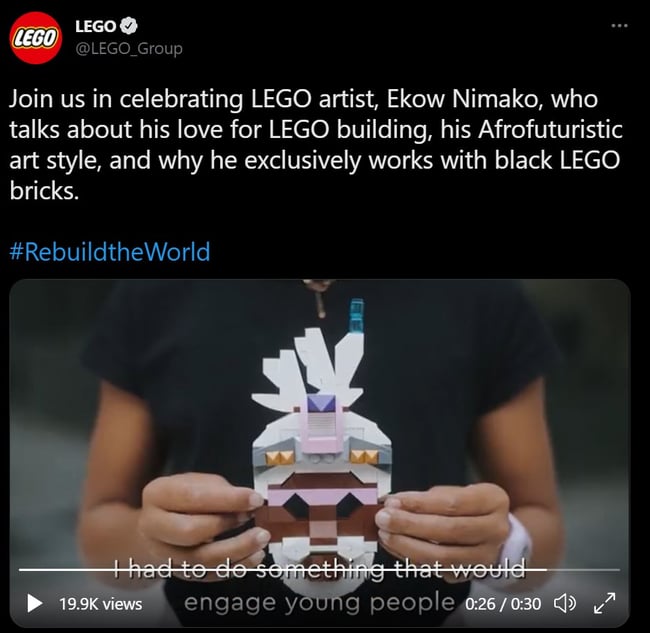
2. Axis Bank
Social media is a powerful means brands and companies use to release the latest information. Incorporating social media into press releases is an excellent way to run a PR campaign.
Axis Bank used this method to good effect recently.

3. Foundation
Today, many brands use social media to spread the word about their products and services. The brand feels more human and personal by getting C-level employees and other lower-level employees to talk about a brands’ products and services.
Foundation is a popular marketing agency with C-level employees who tweet and often write about its services.
Bridge The Gap Between Your Social Media and Public Relations
Gone are the days when dropping a press release and sending emails were all the PR department had to do to inform customers. Now, customers expect more from organizations and brands.
Using social media and your PR campaigns can improve customer engagement and build the positive press.
Editor’s note: This post was originally published in July 2016 and has been updated for comprehensiveness.