
Yesterday’s Apple Event Was as Bananas as We Expected
When it comes to product-centric events and announcements, advance leaks and rumors are nothing new for Apple. But something about this round was different. The pre-emptive reveals came with more detail, more clamor, and — at least for us — more excitement.
“This,” we thought, “is going to be completely bonkers.”
For the most part, our expectations were accurate. Most of the rumored product announcements, names, and price points turned out to be correct, and yes — the seats at the brand new Steve Jobs Theatre were as plush and comfortable as promised (more on that later).
But in case you didn’t have time to attend or stream the two-hour event, fear not — we covered it for you. Behold: Here’s what you missed.
The Apple Event Was Totally About the iPhone 10th Anniversary
The Venue
Part of the anticipation leading up to September 12, 2017 was the fact that it was the inaugural event for Apple’s Steve Jobs Theater. The morning kicked off with a tribute to its namesake, in the form of his voice speaking on the heart and mission of Apple, and one line of text displayed on a large-screen black backdrop: “Welcome to the Steve Jobs Theater”.
Watch Apple’s moving tribute to Steve Jobs at the start of the iPhone X event. http://pic.twitter.com/dhrYjVsxal
— Recode (@Recode)
September 13, 2017
“I love hearing his voice,” were the opening remarks of Apple CEO Tim Cook. “We dedicate this theater to Steve, because we love him, and because he loved days like this.”
The theater is merely one segment of the much larger landscape of Apple Park: an allegedly billion-dollar investment to make into a reality what is said to be an age-old vision of Jobs himself. Even the theater’s leather seats were said to be valued at $14,000, and according to this tweet from TechCrunch, that came with quite to ROI.
The seats were said to cost somewhere around $14,000 a piece. They feel like it. My buttocks are cupped by their supple flesh #AppleEvent http://pic.twitter.com/hPbwze6v7t
— TechCrunch (@TechCrunch)
September 12, 2017
It’s as if the venue was a preview to the commemorative nature of the event in its entirety. Sure, new products and features were announced with vim and vigor, but not without credit where credit — according to Apple — was due. Be it Jobs himself, customers, or the technology that served as a foundation for what was unveiled, there was an undertone of “what came before it” to everything that was showcased.
And it began with a place so many of us know well: The Apple Store … but with a new name.
Retail
The first major player to take the stage after Cook was Angela Ahrendts, Apple’s SVP of retail. Gone are the days of the Apple “store,” she said — instead, these flagship retail locations will be known as “town squares,” with locations slated for New York’s 5th Avenue, Paris, Milan, and Chicago’s Magnificent Mile.
The in-store experience is also getting an upgrade, including a new initiative called Today in Apple, which will provide workshops and other hands-on ways for customers to learn how to use Apple products to pursue their passions. A big part of it, of course, is the idea of creating a live community rooted in a love for the brand — a sentiment that aligns with the neighborhood-esque naming (and what we anticipate to be design) theme of the new retail presence.
This summer, Today in Apple launches at retail locations, focused on community, workshops. #AppleEvent http://pic.twitter.com/cQ8HVEY4IU
— CNET (@CNET)
September 12, 2017
Apple Watch
Once upon a time — no pun intended — a watch served the purpose of letting its wearer know if she was late for a meeting. After yesterday, there are no two ways about it: Watches are high-end items that are used to make a statement, help you maintain a healthy lifestyle, or in the most extreme cases, alert you to a potentially life-threatening situation.
The Series 3, which is the latest generation of the Apple Watch — now the “number one watch in the world,” according to the announcement — has completely redefined the concept of a watch. The more expensive version (priced at $399) has cellular connectivity, allowing you to make and receive calls on the same number you use for your phone, assuming it’s an Apple device. Not only that, but it comes with streaming music capabilities, boasting its ability to let users go for a run and leave their phones at home.
But the Series 3 also comes with a new emphasis on health and wellness, most notably on heart health. Using the new Heart Rate app, Apple says it will collect and synthesize heart rate data from users to not only compile its Heart Rate Study, but also to alert users when something appears to be irregular. For the moment, however, the Series 3 has a built-in feature to let users know when their heart rates elevate while at rest — what one reporter relatably joked as “blogger mode.”
“This is what we at apple call ‘blogger mode'” https://t.co/SKjKd7y0o5
— ಠ_ಠ (@MikeIsaac)
September 12, 2017
What’s interesting is that the casing for the Series 3 is about the same size as the Series 2, which is quite impressive, considering all of its capabilities. Here’s Apple COO Jeff Williams breaking it all down:
Apple TV
There was less buzz around Apple TV leading up to the event, which was reflected in the announcements today. The biggest unveiling to come from this category is the introduction of Apple TV 4K, which boils down to image quality and viewing experience. Yahoo! correspondent JP Mangalindan concisely described why it matters:
Cue’s talking about why we should care about 4K images. Long story, short: It’s sharper and more colorful. #AppleEvent
— JP Mangalindan (@JPManga)
September 12, 2017
One other pivotal Apple TV announcement was that it will now come with live sports, which might signal to some a further decline in the need for cable television — keep in mind, live sports coverage has been available digitally/via live stream for a while now through Twitter and other platforms.
I’ll be honest: At this point, it seemed like no one was really too concerned with Apple TV, and was itching to get to the iPhone announcements — at least, I was. Keep in mind that 2017 marks the 10-year anniversary of the original iPhone debut (Seriously? How has an entire decade gone by since then?), and many of us anticipated that the event would pay some level of tribute to that chronological landmark. Whether or not that would take form as product, we weren’t sure — but in the end, it did, and it was, as they say, “Some next-level sh*t.”
The Main Event: iPhone Announcements
iPhone 8 & iPhone 8 Plus
I know. I know — you want to hear about the iPhone X. We’ll get to that, but first, we have to talk about the iPhone 8 and 8 Plus. (Notice, by the way, how Apple conveniently skipped a “9” edition.)
The iPhone 8 models aren’t exactly anything to sniff at. Pricing starts at $699 — an even higher point than what most people thought was a stratospheric price tag for Google’s inaugural Pixel — and the phones come with some impressive new features, mostly in the realms of display and augmented reality (AR). Plus, its speakers have improved volume capabilities.
As for the improved visual features, that credit goes to its new retina displays, it was said at the event — what Apple calls “3D touch tech” is built into these models for True Tone display. The camera, too, is vastly improved from previous editions, with a 12-megapixel sensor that offers better image stabilization. In one of the sample photos shown at the event, the image quality was so precise that the photographer’s reflection could be seen in the subject’s eye. Even cooler: The new camera app has machine learning facial recognition capabilities, so that lighting can be adjusted according to individual facial features.
Source: The Verge
Then, there are the AR features, which will undoubtedly bring joy to gamers. Apple has been trying to make a pretty big deal about its ARKit developer tools and resources, which its website describes as “a new framework that allows you to [take] apps beyond the screen, freeing them to interact with the real world in entirely new ways.” Think Pokémon GO, but much, much more sophisticated and realistic.
Two representatives from Directive Games took the stage to demonstrate what was an impressive and — if we’re being honest — downright cool look at how ARKit technology will manifest itself in the new iPhone’s features. Have a look:
Source: The Verge
But what really brought glee to charger-forgetters everywhere was the introduction of wireless iPhone charger capabilities. A new flat charging mat — which didn’t come with any release or availability date information, other than “next year” — will be powered by Qi technology, and is promised to work universally across all of your latest-generation Apple devices. If that technology sounds familiar, that might be because it’s been supported by Samsung devices for some time now, and you may have seen something similar in certain shops like Starbucks: a flat, circular feature built into some sort of surface that claims to be able to charge your mobile device. (Personally, I’ve never been able to get it to work, but if you’ve had any success, please report back.)
iPhone X
Imagine: It’s the future. You live in a world where your phone not only has wirelessly charging and eerily realistic AR capabilities, but also has no home button. It’s a world where your phone — not to mention, your stored payment information — is unlocked by looking at it, and emojis are now “Animojis”: animated characters that reflect your facial expressions and can speak on your behalf.
Yes, it was quite a morning, if for no other reason than that the audience being treated to Apple SVP of Software Engineering Craig Federighi making animal noises to demonstrate that last feature.
Face ID
But really, for anyone else who grew up watching shows like “Star Trek,” this was really something. It was clear that Apple has invested hours upon hours into technology like Face ID — which, unfortunately, malfunctioned when Federighi tried to demonstrate it.
That moment aside, the explanation behind how this technology came to fruition — and how it was tested over, and over, and over again to ensure its security — might perhaps be what sets Apple apart as a leader in the realm of mobile technology. How does it work? With the TrueDepth camera system, which we’ll let Apple’s official statement explain:
“The IR image and dot pattern are pushed through neural networks to create a mathematical model of your face and send the data to the secure enclave to confirm a match, while adapting to physical changes in appearance over time. All saved facial information is protected by the secure enclave to keep data extremely secure, while all of the processing is done on-device and not in the cloud to protect user privacy. Face ID only unlocks iPhone X when customers look at it and is designed to prevent spoofing by photos or masks.”
Face ID is also designed to adapt to any temporary changes to the way your face might be presented — things like growing a beard, cutting your hair, or wearing a hat. And yes, there is a one in 1,000,000 chance that someone else’s face can unlock your phone. That’s a fairly small chance, and it’s worth noting that the team behind Face ID even enlisted the help of Hollywood makeup artists create myriad, life-like masks to test and perfect the feature.
Setting up Face ID is similar to the way current iPhone users do so with Touch ID — by pressing your thumb at a variety of angles to get the device to recognize only your unique fingerprint. Think of this new iPhone X method as an angular facial recognition setup process.
Source: TechCrunch
To be clear, Face ID will replace Touch ID, leaving some to wonder how to unlock your phone, should Face ID malfunction. Given that users have the option of opting out of Face ID, there must be an alternative, and from the looks of Federighi’s experience, there might the option to enter a numerical passcode, which is what users are prompted to do when Touch ID doesn’t work on current iPhone models.
For many, Face ID raises concerns of privacy and security, especially since it can be easily attached to the user’s payment information. Apple has stated that personal facial recognition data won’t be sent to the cloud — more detail can be found about that in the iOS security white paper.
Everything Else
The iPhone X will boast some pretty cutting-edge features — as juvenile as it might seem, it is pretty compelling to see technology that makes an emoji speak with the exact dictation and facial movement as yours — but the Face ID demonstrations and explanations took up the majority of the iPhone X time slot.
Like the iPhone 8 models, it will come with wireless charging capabilities, as well as even better camera features, like a zero shudder lag that results in high-quality photos of moving subjects. It comes with a “super retina display,” as well as battery life that lasts two hours longer than the iPhone 7. And, of course, it comes with an equally heavyweight-class price tag: iPhone X models start at $999, are available for pre-order on October 27, and will ship starting November 2.
But we couldn’t leave you with a classic, goosebump-inducing Apple promo video. So enjoy — and if you end up getting your hands one one of these fancy new devices, let us know how it goes.
Source: Apple
Featured image: Apple
How to Structure Your Editorial Calendar in the Age of the Topic Cluster Content Model
Here on the HubSpot blog, we’ve been writing content for a long time — more than 10 years.
And for much of that time, our strategy for determining our editorial calendar has stayed the same: We’ve identified keywords we want to rank for in search, written a blog post about it, and moved onto the next one.
And for a while, that strategy has worked for us, and we were able to start ranking for competitive keywords in search engine results pages (SERPs). But eventually, after years and years of creating content in this same vein, our blog became cluttered, it was tougher for searchers to find the exact answer to questions they asked — and our URLs started to compete with one another.
After all, how many different ways are there to write about Instagram? In our case, the answer is … a whole lot of ways.
Enter topic clusters, a new way to organize your website infrastructure that helps you rank higher in SERPs and provide a more organized user experience to your visitors. In this blog post, we’ll review topic clusters and how you can use them to organize your editorial calendar.
What are Topic Clusters?
Topic clusters are a way to organize a site infrastructure so content about a particular topic is grouped together — and anchored by a pillar page (more on that next).
Remember the old blog structure I described? It involved a ton of blog posts — but resulted in a disorganized experience for someone trying to search for information on your site:
Topic clusters focus on — you guessed it — topics over keywords. Instead of simply choosing particular long-tail keywords to write and optimize a blog post about to try to rank in search, this model more intentionally organizes a site architecture into topic groups.
In this new structure, each topic has a pillar page that broadly covers the main points about a given topic, and that pillar page links out to blog posts that target those long-tail keywords that are related to the pillar page’s topic. Here’s what it looks like in action:
What Is a Pillar Page?
A pillar page is the basis on which a topic cluster is built. It covers all aspects of a particular topic on a single page, with room for more in-depth coverage in more detailed cluster blog posts that hyperlink back to the pillar page.
If you check out the structure of the more organized site above, these are the basic components:
The pillar page is at the center of the topic cluster, and it shares links with supporting blog posts that deep-dive into specific aspects of the broader topic.
For example, on the HubSpot domain, we have an Instagram marketing pillar page. It’s a broad topic, so the pillar page is lengthy and provides an overview of every aspect of the topic. Here are some of the details it covers:
Then, further down on the pillar page, the content contains hyperlinks to blog posts that dive deeper into particular aspects — like Instagram caption tips and details about the algorithm.
You can see one of those blog posts here — which links back to the pillar page above.
Structuring your blog content this way helps more of your blog posts and web pages rank in search, and it provides a reader experience that makes sense — they can start at the pillar page and dive deeper into particular aspects, or they can start with a blog post and go back to the pillar page to learn the basics.
So, how do you get started with turning your editorial strategy on its head and optimizing your entire blog for this new structure? That’s next.
How to Structure Your Editorial Calendar to Optimize for Search
1) Identify topics.
This might be how you choose blog posts already, or it might be totally new — but the first step in this process is focusing on topics, and not keywords. At least at first.
Decide on topics by using your buyer persona research skills — identify your audience and what they’re searching for, and determine how broad to make your pillar page. In our case, “social media” was too broad of a topic, but “Instagram marketing” is sufficient to create a pillar page and 20-30 related blog posts.
2) Choose (or create) a pillar page.
Depending on how extensively (or not) you’ve already covered a particular topic on your blog, you might already have the content you need to create a pillar page — or, you might need to start from scratch.
HubSpot Senior Content Strategist Leslie Ye, who took up the lion’s share of reorganizing the HubSpot Sales Blog into topic clusters, suggests asking the following questions to determine if a blog post can serve as a pillar page:
“Would this page answer every question the reader who searched X keyword had, AND is it broad enough to be an umbrella for 20-30 posts?”
Ye’s rule of thumb is: If a blog post is targeting one particular, narrow long-tail keyword, it can’t be a pillar page. But, if it explores many aspects of a broad topic more generally, it could serve as your pillar page.
Take your list of topics determined in Step One, audit your content to decide which blog posts can serve as pillar pages, and note content gaps where you need to create new pillar pages (which you can read more about here.)
3) Identify keywords.
Once you’ve nailed down your topics and your pillar pages, now it’s time to start focusing on keywords. Conduct keyword research related to each topic to identify keywords and terms that dive into aspects of your broader topic in greater detail.
These keywords will serve as the main focus of blog posts that will make up your topic cluster — and link back to the main pillar page.
Remember the example above? Where “Instagram marketing” is the topic that makes up the cluster, “Instagram captions” is a more narrow keyword that we wrote a blog post about within the topic cluster.
4) Start writing.
You know how to do this part — get to writing.
Organize your editorial calendar by identifying content gaps in your topic clusters, and filling them out as quickly and efficiently as possible. The faster you write and publish blog posts that answer all questions about your topic, the higher these clusters will rank in search.
I might suggest working on a few different clusters at once, so you can keep your recent blog posts varied and interesting for your readers — instead of publishing several consecutive blog posts within the same topic.
5) Add internal links.
Before pressing publish, make sure you’ve leveraged internal links to spread the SEO wealth amongst all of your pillar pages and blog posts. Make sure that your pillar page links out to cluster blog posts — for example, the Instagram marketing pillar page links out to the Instagram captions blog post.
Then, make sure the cluster’s more specific blog posts link back to the pillar page — using the anchor text of the broad topic to help the pillar page rank higher in search. For example, in the Instagram captions blog post, it links back to the Instagram marketing pillar page — with the words “Instagram marketing” hyperlinked:
If you’re confused, don’t worry — this model is new to us, too. Luckily, HubSpot’s new Content Strategy tool can do the work for you. Dive into the in-depth guide to using Content Strategy to take your SEO to the next level, or watch this video to learn more about the principles:
How to Use Workplace Email Most Effectively
**Sets alarm for 6am, checks email, goes to bed**
**Wakes up to sound of alarm, turns off alarm, checks email**
Does this routine sound familiar? I can’t be the only one that is nearly attached at the hip to my phone, checking email constantly. For over a decade now, email has been only of the top forms of communication for businesses.
Of course, as time and the workplace itself evolves, there’s an increasing amount of internal communication options. There are apps like Slack, for example, and many people still prefer the good, old-fashioned method of having a conversation in person. But as these methods for interacting grow in number, it also becomes a bit trickier to remember the right “etiquette” for all of them.
But email hasn’t exactly become a thing of the past — yet — it’s just that many of us have forgotten the right way to use it, at least in the workplace. That’s why it’s as important as ever to make good, effective use of it, which means maintaining some basic do’s and don’ts.
As you’ll see from the list below, effective email communication means that it needs to be both relevant and appropriate, depending on its subject and importance. Read on to see the full list.
How to Use Workplace Email Most Effectively
The Do’s
1) Personalize.
No matter whether it’s an internal email to your best friend/co-worker, or a message full of important information to a client, you should always get in the habit of addressing that person appropriately. A good rule of thumb is to address this person as you would in conversation, whether by first name or more formally.
2) Adapt.
By that, I mean: Know your recipient. Study any past emails this person has sent, recognize her tone or writing style, and adapt to that. If her emails are historically short and straight to the point, it might just mean that she’s extremely busy. In that case, try and be concise in your response emails.
3) Always check before clicking “send.”
This point might be the ultimate “do” when emailing. One of the worst feelings is clicking “send,” only to realize that you missed something, didn’t attach a document, or misspelled something (and hey — we’ve all been there). Pro tip: To avoid these mishaps, don’t put the email address in the “to” line until you’ve had a chance to double-check the message.
4) Keep messages short.
There’s no point in fluffing an email with extraneous details — rather, get straight to the point. An email that could double as a novella is not time-effective for the both sender or recipient. We’ll leave it at that.
5) Keep your inbox clean.
We know you’re out there — the folks with unopened emails that number in the triple digits (or worse). When I imagine a horror movie that’s set in a work environment, the vision of hundreds of unopened emails makes me want to sink into the couch and cover my eyes with a blanket. Clean your inbox, break up folders for different clients, and work toward diminishing the stress that can result from seeing big numbers next to your inbox button.
6) Check your email on your time.
In other words: Don’t get caught in the trap o checking your email every few minutes. One of the biggest momentum killers is getting in the habit of checking your email frequently, pausing what you’re working on, and having to reset your focus.
At Revenue River Marketing, we aim to check our email a total of 3-4 times each day, unless it’s necessary to spend more time on it because of something urgent. That practice helps us stay engaged with content creation and client deliverables.
7) Remember that some things are better kept to yourself.
“Oh, you just got back from your buddy’s bachelor party in Las Vegas? Oh, you want to email me and recount the details of it that should probably never surface more than once in your life?”
Stop right there. Receiving emails that fit this discription through your workplace email address is not a good idea.
That’s not to say that your employer is monitoring your emails — although, some might have the right to do so — and maybe you work for a company that wouldn’t necessary frown upon a rambunctious trip to Las Vegas. But here’s a place where common sense is best practiced — some experiences are better left remembered via personal email.
8) Use Zoom and Slack as alternatives.
Across the board, many companies are implementing video conferencing tools like Zoom, for a number of reasons. Not only do they support a global workforce, but also, it provides an alternative to email that can help clarify important connotations that are sometimes lost over email.
Instant messaging apps like Slack, too, are also growing in popularity — not only can they help you get quicker answers from your colleagues, but also, it helps to isolate email as a more formal method of communication.
That said, it’s easy for instant messaging conversations to stray from work topics — but we’re all human, and sometimes, that means sending your colleague the occasional funny GIF image. But, it still helps to reduce email clutter by sending an informal note that doesn’t need to be communicated over email.
The Don’ts
1) Abbrv8 — I mean, abbreviate.
Although we aren’t ranking these tips, this one is might top the list of don’ts. Remember, no matter how laid back your workplace might be, it’s still a professional setting. You might not want to get into the habit of signing emails with things like, “thx,” “lol,” or “c u @ wrk l8r,” only to mindlessly send an email to a client with similar vernamular. Here’s a helpful resource to make sure abbreviations NEVER happen: The Slang Translator
2) !!!!!!!!!
Ah yes, another one that gives me chills every time I see it: the exclamation point. Because I am a visual person, I see the overuse of exclamation points — or the dreaded “caps lock email” — as yelling. Other people might, too. If used excessively, the exclamation point can give false expectations and look unprofessional. There is a right time for an exclamation point, but before you think about holding your fingers down on the “Shift” “1” keys, think about the context in which your email may be received.
3) 🙂 or 🙁
This may just be me, but does anyone else get a little cringe when you see a smiley/sad face in an email? In a professional setting, much like abbreviating, it gives off the vibe of being a bit too laid back. Keep it professional, and leave out the emoticons.
4) Send the one-word “okay” or “thanks” response.
Not to counter the point above, but while keeping messages short is ideal — sending the dreaded, non-descriptive one-word email is not. Sometimes, people need a detailed answer. Something like content that’s ready for edits, for example, can’t be answered with a simple “okay”, so give the sender the courtesy of the answer or closure they need.
5) Use the reply-all button at will.
There comes a time in every marketer’s life at which she realizes that the “reply-all” is rarely necessary. If you haven’t learned that lesson yet, allow this post serve as it.
Replying-all to the email includes multiple people who likely don’t need to be looped in on every single response in the chain. Reply only to the people who need to see your response — their inboxes will thank you.
6) Email if you’re burnt out.
It’s 11:30 a.m. — almost lunch time — and you can practically hear your stomach yelling your name for food. Or, better yet, you just surfaced from your computer screen after writing several blog posts in a row, and your eyes are all but glazed over. But then you remember that you need to send a work email; one that requires serious thought, and wonder, “Should I just get this over with now?”
No.
Take a deep breath, stand up, take a lap, and get some water. There are so many instances where an important email should wait — based on your current level of patience or stress. After you take a break, determine if you feel level-headed enough to send a clear and thought-out email.
Let’s face it: We’ve all broken at least one of these rules. But next time you find yourself tempted to repeat it, take a step back from the keyboard — and think about this list.
6 Ways Your Bedtime Routine Is Wrecking Your Work
Last night, I began to read an excellent novel right before I went to bed. The plot twists! The engaging dialogue! The cliffhangers! It was a great read. But when I finally went to put the book down two hours later, I was completely wired and nowhere near sleep, and I wasn’t too productive the next day.
I always thought it was a good habit to read before bed. Was I wrong?
Kind of. I had failed to take my own advice — to do something mindless before bed — and had instead remained engaged in something that was mentally stimulating, instead of something that helped me wind down. Stress is stress, whether its source is work or a fictional heroine who won’t leave her unfaithful husband. And that stress is responsible for 33% of adults losing sleep.
But my story shows that external stressors aren’t always to blame. Sometimes, our own routines are getting in the way of our productivity, especially when it comes time to settle in for the evening. It’s not easy, but with a little recognition and behavior modification, your bedtime routine can go from wrecking your work, to enhancing your productivity.
You’re Not Sleeping Enough, and Your Bedtime Routine Could be to Blame
As you may have guessed, we are faced with a sleep deprivation epidemic — 34.8% of U.S. adults sleep less than the recommended minimum of seven hours each night. And it’s getting expensive. In the U.S., the lack of productivity caused by sleep loss costs employers as much as $411 billion a year.
Less than seven hours in one night is what the CDC calls “short sleep”: a term we’ll use throughout this post. Among such side effects as high blood pressure and diabetes, short sleep can also lead to “frequent mental distress.” In other words, it can really mess up our work, and life in general.
On top of that, short sleep is linked to a higher probability of obesity, probably due to its correlation with poor eating habits. When you’re sleep-deprived, you’re more likely to mindlessly eat or make less-than-healthy food choices. But we also eat poorly when we’re stressed, and when we’re stressed, we don’t sleep well. All of these behaviors are linked and, ultimately, are leading to this epidemic of exhaustion.
That network of cause-and-effect does more than illustrate that you’re probably not sleeping enough. It shows the complexity behind why you’re not sleeping enough, which is where your bedtime routine comes in. So let’s explore some of the “why”s. Once you’re aware of them, you can fix them.
6 Reasons Why Your Bedtime Routine Is Wrecking Your Productivity
1) You’re eating a bunch of crap (and probably too late in the day).
In addition to short sleep causing bad eating habits, the same thing works in reverse — diets high in saturated fat and carbohydrates, for example, have been linked to lower sleep quality. Plus, our tolerance for glucose decreases later in the day, so eating late at night can also throw off our circadian rhythm, the biological sleep-and-wake pattern of humans.
But willpower is hard — and as my colleague Mike Rehahan once told me, it depletes as the day progresses. So, the later it gets, the more tempted we are to indulge in comfort food that we don’t have to cook ourselves. After a long, tired day, it’s a recipe — no pun intended — for disaster. You’re not just more likely to indulge. You also risk depriving yourself of quality sleep, creating a vicious cycle of exhaustion.
Here’s where planning ahead can tremendously help. When the weekend rolls around, all we really want to do is watch Netflix and shop online. But setting aside two hours on Sunday afternoon to cook meals for the week can help preserve your willpower on those late nights.
2) Sleep isn’t in your schedule.
When our days are already so overbooked, it seems ridiculous to schedule something like sleeping. But it’s called a routine for a reason — “setting a pattern of going to bed at the same time each night and rising at the same time each morning,” according to the CDC, is key to sleeping well.
Last year, I shared a technique I use called time blocking. It’s the formal term for my habit of creating calendar events for everything — getting dressed, working out, and feeding my dog. But when I realized that I was slipping into the bad habit of being liberal with my bedtime, I knew that I would need to schedule time to turn off my electronics, too.
When I asked my team to share the bedtime habits that mess with their productivity, HubSpot Director of Marketing Emma Brudner replied, “Falling into the rabbit hole of the internet for hours.”
She’s not alone — I have a bad habit of turning a simple search for a carbonara recipe into an hours-long research session on the culinary arts. And when that happens, my desired bedtime falls to the wayside.
That said, too much screen time before has other impacts on sleep quality, which we’ll discuss later. But scheduling a time to unplug can prevent those evening hours from wasting away. Depending on your bedtime, try programming a recurring calendar event to shut down two hours before you actually want to get to sleep for Monday through Wednesday. As it becomes habitual, start adding additional nights.
3) You’re planning your next work day at home.
I’m a big believer in the separation of home and office. Even when I work from home, I have a special space set aside to attend to my tasks — every other area is an off-limits, no-work zone.
That accomplishes two things. First, it helps to keep certain distractions out of sight while I’m working. And when I’m not, having a something like a designated “weekend chair” keeps me from checking work email when I should be recharging — as 50% of us are wont to do.
That’s why I also believe that all work-related tasks, including planning for the next day, should be limited to designated work spaces only. Thinking about that seemingly endless schedule can cause some anxiety, which you don’t want to bring into a place that’s designated for personal time — especially at a time of day when you’re supposed to be winding down.
It might mean staying at the office a bit later, but planning your next day at a designated workspace can help maintain your home and sleeping areas as a stress-free sanctuary. Try it tonight — chances are, you’ll be glad you left your work at work.
4) You’re putting off morning stuff until the morning.
We know — when else would you do morning things?
But my colleague, Sophia Bernazzani, stresses the value of getting certain morning tasks done in advance, and she suggests taking “15 minutes to lay out your outfit, pack your lunch, and prep your coffee” the night before.
If you’re not a morning person, she explains, “decision-making abilities are limited — so you should save them for work.” So, completing these items ahead of time not only gives you the peace of mind of having them done — but also, it frees up a bit of time in the morning to sleep more, work out, or meditate, which is shown to lower stress levels by 31% and increase energy throughout the day by 28%.
5) You’re ignoring your tension.
We have instincts for a reason — we’re built to instinctively seek out the things that will help us survive. Those are represented in Maslow’s hierarchy of needs, which includes sleep at its baseline.

Source: Wikimedia Commons

When we ignore our instincts, things start to go haywire because we’re essentially fighting biology. And when we ignore our instinct to sleep — by reading “just one more” chapter, or watching “just one more” episode — it can lead to even more tension over the fact that we’re losing sleep.
It’s very meta, but stressing over a loss of sleep will only make you less likely to fall asleep, since — say it with me — stress causes sleep loss.
But when you can’t get that stress off your mind, write it down. It makes sense that journaling before bed has shown to improve sleep quality — it gives your troublesome thoughts somewhere else to “live,” rather than being mentally recycled when you’re trying to quiet your mind.
6) You’re looking at screens.
We’re starting to feel a bit like a bunch of broken records with this one — yes, we harp away about ditching the screens before bed. And yet, nearly half of us continue to use our smartphones before bed.
But if you’re getting as sick of reading about it as we are of nagging about it, here’s a quick rundown, courtesy of Harvard:
- Blue light is the kind emitted from most electronics.
- It’s often cited as the culprit for sleep loss, because it sends a signal to your brain that daylight is present.
- That — like so many of the behaviors we’ve listed here — causes disorder to your circadian rhythm. When your brain thinks there’s daylight, it also thinks it’s time to wake up, not go to bed.
Seriously. Put the screens away before bed.
And if you absolutely must look at your screen close to bedtime, consider investing in an app that will adjust its blue light depending on the time of day, like f.lux or PC SunScreen.
Give It a Rest
Our cultural sleep deprivation might make things look a bit bleak. It’s causing us to be grossly underproductive, which is causing our collective employers to lose a lot of money. Not only that, but it’s making us sick.
But we hope this post emphasizes that it doesn’t have to be that way, and that our bad bedtime habits can be modified. Don’t try to tackle all of these things at once — start with the one that’s easiest for you to change, and once you master it, slowly work your way through the list.
Consider the fact that people who sleep six hours or less each night lose about six days worth of productivity each year. When you feel tempted to stay up late, ask yourself, “What could I do with six extra days?” Let yourself dream — it’ll be worth it.
Blog SEO: How to Search Engine Optimize Your Blog Content
Search engine optimization is incredibly important for marketers. When you optimize your web pages — including your blog posts — you’re making your website more visible to people who are looking for keywords associated with your brand, product, or service via search engines like Google.
But it can be a pretty tricky tactic to master with Google’s copious algorithm updates.
How do you know what matters and what doesn’t? What are today’s blog SEO best practices, and what’s considered “old-school”? How on earth can you keep it all straight?
We understand confusion is a common issue facing inbound marketers — and we want to help. In this post, we’ll cover how to optimize your blog posts for the keywords you care about, along with a few other optimization tactics you should keep in mind.
Note that this list doesn’t cover every single SEO tactic under the sun. Rather, these tips are meant to get you started with improving SEO for your blog in particular.
SEO can be confusing. Listen as HubSpot’s own Matt Barby and Victor Pan clear things up:
HubSpot customers: If you want to see specific SEO optimization tips for your individual blog posts, click the chart icon on the far left side of the blog editor when you’re working on the post to access the SEO Optimization screen.
If you’re not a customer, you can use these tips as a sort of checklist as you blog.
(Want to learn more about content creation, strategy, and promotion? Sign up here to be the first in line for our new Content Marketing Certification course.)
How to Search Engine Optimize Your Blog Content
1) Focus on 1–2 long-tail keywords.
Optimizing your blog posts for keywords is not about incorporating as many keywords into your posts as possible. Turns out that’ll actually hurt your SEO because search engines will think you’re keyword stuffing (i.e., including your keywords as much as possible with the sole purpose of gaining ranking in organic search).
But that’s not cool with search engines, nor does it make for a very good reader experience. Instead, you should use keywords in your content in a way that doesn’t feel unnatural or forced.
A good rule of thumb is to focus on one or two keywords per blog post. This’ll help keep you focused on a goal for your post. While you can use more than one keyword in a single post, keep the focus of the post narrow enough to allow you to spend time actually optimizing for just one or two keywords.
Using long-tail keywords may be more efficient to this end, since website visitors searching long-tail terms will often be more qualified. In other words, you’ll bring in the right type of traffic — visitors who convert — by using long-tail keywords.
2) Include these 1–2 keywords in specific parts of your post.
Now that you’ve got your one or two keywords, it’s time to incorporate them into your blog post. Where are the best parts of your posts to include these terms so you rank high in search results?
There are four essential places where you should try to include your keywords: headline, headers and body, URL, and meta description.
Title
The title (i.e., headline) of your blog post will be a search engine’s and reader’s first step in determining the relevancy of your content, so including a keyword here is vital.
Be sure to include your keyword within the first 65 characters of your headline, which is just about where Google cuts it off on search engine results pages (SERPs). Technically, Google measures by pixel width, not character count, and it recently increased the pixel width for organic search results from approximately 500 pixels to approximately 600 pixels, which translates into around 65 characters.
Long title? When you have a lengthy headline, it’s a good idea to get your keyword in the beginning since it might be cut off in SERPs towards the end, which can take a toll on your post’s perceived relevancy. In the example below, we had a long title that went over 65 characters, so we front-loaded it with the keyword we were trying to rank for: “on-page SEO.”
Headers & Body
Mention your keyword at a normal cadence throughout the body of your post and in the headers. That means including your keywords in your copy, but only in a natural, reader-friendly way. Don’t go overboard at the risk of being penalized for keyword stuffing. Before you start writing a new blog post, you’ll probably think about how to incorporate your keywords into your post. That’s a smart idea, but it shouldn’t be your only focus, nor even your primary focus.
Whenever you create content, your primary focus should be on what matters to your audience, not how many times you can include a keyword or keyword phrase in that content. Focus on being helpful and answering whatever question your customer might have asked to arrive on your post. Do that, and you’ll usually find you naturally optimize for important keywords, anyway.
URL
Search engines also look to your URL to figure out what your post is about, and it’s one of the first things it’ll crawl on a page. You have a huge opportunity to optimize your URLs on every post you publish, as every post lives on its own unique URL — so make sure you include your one to two keywords in it.
In the example below, we created the URL using the long-tail keyword we were trying to rank for: “email marketing examples.”
Meta Description
Later in this post, we’ll dive into explaining meta descriptions. Your meta description is meant to give search engines and readers information about your blog post’s content — so be certain to use your long-tail term so Google and your audience are clear on your post’s content. At the same time, keep in mind that the copy matters a great deal for click rates — the more engaging, the better.
3) Make sure your blog is mobile-friendly.
It’s been some time since Google revealed that more people use the search engine on their mobile phones than on desktop. And for all those valuable search queries being done on mobile, Google displays the mobile-friendly results first. This is yet another example of Google heavily favoring mobile-friendly websites, which has been true ever since the algorithm was updated to do so in April 2015.
While responsive design and mobile-friendly websites have always been important for user experience, they’re becoming more and more important for SEO as well. So if you haven’t been focusing on improving your mobile experience, you’d better prioritize it now, or your search rankings could suffer.
(HubSpot customers: Breathe easy. All content created on HubSpot’s platform is automatically responsive to mobile devices.)
If your website uses responsive design, your blog pages will only have one URL instead of two different ones — for desktop and mobile, respectively. This helps your post’s SEO because any inbound links that come back to your site won’t be divided between the separate URLs. Any SEO power you gain from these links will be centralized, helping Google more easily recognize your post’s value and rank it accordingly.
Pro tip: What search engines value is constantly changing. Be sure you’re keeping on top of these changes by subscribing to Google’s official blog.
4) Optimize the meta description.
To review, a meta description is the additional text that appears in SERPs that lets readers know what the link is about. The meta description gives searchers information they need to determine whether or not your content is what they’re looking for, and ultimately helps them decide if they’ll click or not.
In addition to being reader-friendly (compelling and relevant), your meta description should include the long-tail keyword you are trying to rank for, because if we’re doing blogging right, that keyword is representative of the contents of your post.
In the example above, I searched for “newsletter examples.” The term is bolded in the meta description — helping readers make the connection between their search term and the result — and the copy “get inspired” catches attention and compels clicks.
Note: Nowadays, it’s not guaranteed that your meta description is always pulled into SERPs as it once was. More and more, Google has been pulling in other parts of your blog post that includes the keywords searched, presumably to give searchers optimal context around how the result matches their specific query.
Let me show you what I mean. Below is an example of two different search queries delivering two different snippets of text on Google SERPs. The first is a result of the query “no index no follow,” and pulls in the original meta description:
The second is a result of the query “noindex nofollow,” and pulls in the first instance of these specific keywords coming up in the body of the blog post:
While there’s not much you can do to influence what text gets pulled in, you should continue to optimize your post for readability (see above). By creating reader-friendly content with natural keyword inclusion, you’ll make it easier for Google to prove your post’s relevancy in SERPs for you.
5) Optimize your images.
Blog posts shouldn’t only contain text — you should also include images that help explain your content. But search engines don’t just look for images. Rather, they look for images with alt text.
Because search engines can’t “see” images the same way humans can, an image’s alt text tells them what an image is about — which ultimately helps those images be found in search. Alt text also makes for a better user experience, as it’ll display inside the image container when an image can’t be found or displayed, and can also improve accessibility for people with poor vision who are using screen readers.
Technically, alt text is an attribute that can be added to an image tag in HTML. Here’s what a complete image tag might look like (bolding added for emphasis):
<img class=”wt-blog__normal-image” src=”image.jpg” alt=”image-description” title=”image tooltip”>
Adding keywords to your alt text may seem minor — and it isn’t going to impact your search rankings as much as other things on this list. But it is worth the extra minute it takes to change the name from “IMG23940” to something accurate and descriptive, like “puppies-playing-in-basket:”
Read this blog post to learn more on-page SEO tips for keyword optimizing the most critical parts of your website.
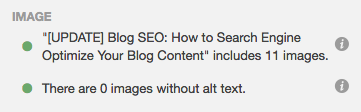
HubSpot customers: The SEO Panel will recognize whether or not you have optimized your images. Though these elements are not as important as some other optimizations, they’re still necessary (not to mention easy to add).
6) Don’t use too many similar topic tags.
Topic tags can help organize your blog content, but if you overuse them, they can actually be harmful. If you have too many similar tags, you may get penalized by search engines for having duplicate content.
Think of it this way: When you create a topic tag, you also create a new site page where the content from those topic tags will appear. If you use too many similar tags for the same content, it then appears to search engines as if you’re showing the content multiple times throughout your website. For example, topic tags like “blogging,” “blog,” and “blog posts” are too similar to one another to be used on the same post.
If you’re worried that your current blog posts have too many similar tags, take some time in the near future to clear them up. Choose about 15–25 topic tags that you think are important to your blog and that aren’t too similar to each other, and then only tag your posts with those keywords. That way, you won’t have to worry about duplicate content.
7) Use URL structures that help your visitors.
The URL structure of your web pages (which are different from the specific URLs of your posts) should make it easy for your visitors to understand the structure of your website and the content they’re about to see. Search engines favor web page URLs that make it easier for them and website visitors to understand the content on the page.
This differentiation is baked into the HubSpot blogs’ respective URL structures. If I decided to go to the Marketing section from this main page, I would be taken to the URL http://ift.tt/19PNGaV. If we want to read the Sales section, all we have to do is change where it says “marketing” in the URL to “sales”: http://ift.tt/19WtlCB. This URL structure helps me understand that “/marketing” and “/sales” are smaller sections within the larger blog.
What if there’s a specific article we want to read — perhaps “How to Do Keyword Research: A Beginner’s Guide”? Its URL structure — http://ift.tt/1l5bKLb — denotes that it’s an article from the Marketing section of the blog.
In this way, URL structure acts as a categorization system for readers, letting them know where they are on the website and how to access new site pages. Search engines appreciate this, as it makes it easier for them to identify exactly what information searchers will access on different parts of your blog or website.
Get more best practices for URL structure from Moz here.
8) Link internally when possible.
Inbound links to your content help show search engines the validity or relevancy of your content. The same goes for linking internally to other pages on your website. If you’ve written about a topic that’s mentioned in your blog post on another blog post, ebook, or web page, it’s a best practice to link to that page.
You might’ve noticed that I’ve been doing that from time to time throughout this blog post when I think it’s helpful for our readers. Not only will internal linking help keep visitors on your website, but it also surfaces your other relevant and authoritative pages to search engines.
HubSpot customers: The SEO Panel automatically suggests linking to other internal resources on your website. Think of it as solving for your SEO while also helping your visitors get more information from your content.
If you’re looking for more internal links to add to your post but aren’t sure which would be relevant, you can click “Explore some internal links you might use in this post” for a list of recommendations.
9) Use Google’s Search Console.
Google’s free Search Console contains a section called the Search Analytics Report. This report helps you analyze clicks from Google Search, and it’s useful to determine which keywords people are using to find your blog content. Learn how to use it by reading this blog post written by my colleague Matthew Barby and by reading Google’s official support page here.
If you’re interested in optimizing your best-performing older blog posts for traffic and leads like we’ve been doing since 2015, this tool can help identify low-hanging fruit.
A lot of content marketers struggle with optimizing their blog posts for search. The truth is, your blog posts won’t start ranking immediately. It takes time to build up search authority. But when you publish blog posts frequently and consistently optimize them for search while maintaining a reader-friendly experience, you’ll reap the rewards in the form of traffic and leads long-term.
10) Use Topic Clusters.
The way most blogs are currently structured (including our own blogs, until very recently), bloggers and SEOs have worked to create individual blog posts that rank for specific keywords. The result is disorganized, and hard for the user to find the exact information he or she needs. It also results in your own URLs competing against one another in search engine rankings when you produce multiple blog posts about similar topics. Here’s what our blog architecture used to look like using this old playbook:
Now, in order to rank in search and best answer the new types of queries searchers are submitting, the solution is to use the topic cluster model: Choose the broad topics you want to rank for, then create content based on specific keywords related to that topic that all link to each other, to create broader search engine authority. Using this model, this is what our blog infrastructure looks like now — with specific topics surrounded by blog posts related to the topic, connected to other URLs in the cluster via hyperlinks:
This model uses a more deliberate site architecture to organize and link URLs together to help more pages on your site rank in Google — and to help searchers find information on your site more easily. This architecture consists of three components — pillar content, cluster content, and hyperlinks:
5 Pillar Page Examples to Get You Started With Your Own
Earlier this year, a handful of my extremely bright and capable colleagues compiled a report on topic clusters: a method using a single pillar page as the main hub of content for a given topic. All of your content assets related to that topic link back to the pillar page — and to each other.
Cool, huh?
But it’s not just a nice, clean way of organizing content that brings glee to the most Type A of marketers (read: yours truly). It also keeps Google happy. As it turns out, the search engine giant has changed its algorithm to favor topic-based content, making pillar pages a requirement for content marketers who want to maintain a high SERP ranking.
Let’s dive in — read on.
What Is a Pillar Page?
My colleague, Sophia Bernazzani, does an excellent job of summarizing pillar pages (and comparing them to HubSpot Marketing Blog’s own previous method of topic organization) in her post on the subject here. As the previous paragraphs suggest, she says:
“A pillar page is the basis on which a topic cluster is built. A pillar page covers all aspects of the topic on a single page, with room for more in-depth reporting in more detailed cluster blog posts that hyperlink back to the pillar page. Pillar pages broadly cover a particular topic, and cluster content should address a specific keyword related to that topic in-depth.”
What’s more, however, is that the idea of a pillar page is to cover broad content in a way that is highly linkable itself — that is, external sites would link to it as a canonical resource for the topic. So, to put it into visual terms, here’s what our blog architecture used to look like using this old playbook:
This is where the search ranking piece comes in: the topic cluster model. Using topics you want to rank for, create content based on specific keywords related to that topic that are inter-(hyper)linked — that can support efforts for greater search engine authority. Here’s what our blog infrastructure looks like now using that model:
See how the site architecture is more deliberate in this model? The visual above shows how it organizes content assets together to help searchers more easily find information within your domain.
It has three main components:
- Pillar content (your pillar page)
- Cluster content
- Hyperlinks
Okay, you get it — pillar pages are both nice and important for SEO. After all, on average, a page that ranks #1 in Google will also rank well for around 1,000 other related keywords. But what are they supposed to look like? Are aesthetics important? How do you organize all of your content assets on a pillar page?
Actions speak louder than words — says the writer — which is why we sought answers to those questions by way of pillar page examples that do an excellent job of organizing and linking to content assets.
5 Great Examples of Pillar Pages
1) Typeform: Brand Awareness
At first glance, it’s hard to ignore the positively inbound-y nature Typeform’s Brand Awareness pillar page. It was built to inform, and lives up to its tagline: “Nearly everything you need to know.”
Not only is it aesthetically pleasing — the color palette is, somehow, at once both soothing and bold — but it’s quite easy to navigate. The table of contents appears immediately, and once you begin to consume the content, it’s clear, comprehensive, and quotable. Notice how the information is interjected with CTAs to tweet various stand-out quotes:
And while there are several links throughout the pillar page, the vast majority of them don’t link to other Typeform content assets. In fact, it’s not until toward the end of the pillar page that those links to other Typeform pages begin to appear, and even them, they’re used sparingly, and typically used to support points and direct readers to solutions.
2) Matthew Barby: Customer Acquisition Strategies
HubSpot’s Global Head of Growth and SEO, Matthew Barby, is no stranger to the HubSpot Marketing Blog, or the people who comprise its team. We regularly quote him here, and frequently pester him with our own questions. Naturally, his website is a go-to resource for marketers who want to learn about SEO — and it includes an exemplary pillar page on customer acquisition strategies.
Similarly to the Typeform example, there’s a noticeable shortage of promotional hyperlinks within the first section of the page. In fact, as you scroll down the page, you’ll also see that links to Barby’s other content assets are both tastefully and seamlessly inserted between large pieces of tactical information.
But these links are supplemental and relevant, and there aren’t tons of them — all of them direct the user to Barby’s tools on the topic at hand, which is customer acquisition. Instead of bombarding the user with numerous in-text links, well-designed CTAs are used to allow readers to click to learn about these tools.
3) The Atlantic: Population Healthier
Pillar pages are also an excellent way to organize and create sponsored content with a co-marketing partner. Case in point: The Atlantic partnered with athenahealth to compile a report (and pillar page) on healthcare in the U.S.
The content is absolutely bananas — in the absolutely best way possible. It begins with a story about a historical building in the Massachusetts town of Lowell, which forays into a full-blown interactive, animated, and highly information report about the state of healthcare coverage in cities like this one as the user scrolls down. But the entire time, there’s a helpful plus-sign along the left side of the page that, when clicked on, presents a table of contents.
Here, links to additional content found on theatlantic.com are a bit more prevalent than the previous example — but remember, this pillar page was created to support sponsored content. Therefore, it presents an organized, non-intrusive way of linking to this sponsored (but still informative) content that relates back to the central topic of healthcare in the U.S.
The Atlantic achieves that by placing well-designed, but noticeable links at the end of each section, which match the visual theme that precede them — such as with the link to “The Culture Wars” content in the example above.
4) ProfitWell: SaaS DNA Project
We love content that makes good use of examples to point out best practices — just have a look at what we’re doing in this post. But in a move similar to Typeform’s in its Brand Awareness pillar page, ProfitWell’s pillar page on “The Anatomy of a SaaS Marketing Site” incorporates plenty of “in-the-while” instances of both what to do when it comes to SaaS marketing content — and what not to do.
Building that sort of information into a pillar page — or any content, for that matter — preemptively answers the question of, “I know what I’m supposed to do. But what should I avoid at all costs?”
Once again, there’s a noticeable lack of link inundation here. Within each chapter, a visual CTA lingers along the right-hand side of the page that allows users to download the full Anatomy of a Saas Marketing Site guide, as well as a single click-to-tweet option for one line of quotable text from the section. It’s a no muss, no fuss approach that fits in well with a text-heavy site, which doesn’t distract from the main content.
5) GoodUI: Evidence
We’re absolutely delighted by the concept of “Easter eggs” — those little hidden, puzzle-like treasures on the internet that turn up cool tricks or nuggets of information. And to us, GoodUI’s “Evidence” pillar page is one big Easter egg.
The page consists of data — or “evidence” — from multiple A/B tests that have uncovered patterns for higher conversions. Clicking on any data point throughout the page will direct the viewer to an expanded, detailed view of the test leading to that information. It’s a treasure trove of eye-catching, compelling experiment results.
Within that sub-content, there’s a CTA at the bottom of each dedicated test section to share your own test, providing the reader with an opportunity to contribute her own content and findings to an already impressive plethora of information.
Want to learn more? Check out the video below.
7 Social Media Fails to Avoid in 2017
Chances are you’ve witnessed a social media fail sometime in the past year. It usually results from a sense of urgency, or a miscommunication that ignores common sense, all for the sake of gaining attention.
It’s true: Follow just a bit of poorly-advised posting on social media, and you, too, can create your very own brand fail in a matter of minutes.
Many brands are over-concerned with posting frequency and speed, and not concerned enough with tactics that ensure quality and proper context. A single spur-of-the-moment tweet can cause irreparable damage. And even after it’s deleted, the examples below show that content on social media never truly dies — so make sure you have a plan in place that establishes clear boundaries and best practices.
As proof, here are seven of the worst social media fails you might ever come across.
7 Social Media Fails to Avoid in 2017
1) Meet-And-Greet, but Don’t Touch
Humor is a wonderful thing, especially on social media. A funny meme, GIF image, or video can reap a wealth of positive interactions. It’s common practice for celebrities to produce goodwill online by sharing one-on-one experiences with fans — meet-and-greets, and surprise appearances, for example, all have the potential to go viral. Unfortunately, the viral effect doesn’t always have the end-result you might wish for.
It doesn’t get much more uncomfortable than Avril Lavigne’s now infamous meet-and-greet photo session. Fans paid almost $400 for a chance to meet their idol before finding out there were some serious restrictions on their experience: no touching allowed. That meant no hugging, wrapping arms around each other, or anything else that tends to make celebrity meet-and-greet photos warm and cozy.
The pictures, as they say, are worth a thousand awkward words.
2) Rhode Island or Iceland?
Good intentions fell flat for the Rhode Island Commerce Corporation in 2016, when it made one grave error in a $5 million promotional video — and used footage not of the great state itself, but instead, of Iceland.
The mistake went viral and gained far more attention than an Iceland-free version of the promotion would have, but it wasn’t exactly the type of publicity we imagine the bureau of tourism was hoping for.
Thanks to the social media skills of Rhode Island Governor Gina Raimondo, you can enjoy your very own private viewing of this social media fail.
Help tell Rhode Island’s story by sharing our new brand video #weareRI https://t.co/alIIcZ2DIghttps://t.co/qh3YtF0q0s
— Gina Raimondo (@GovRaimondo)
March 29, 2016
3) Ten Cents off Your Next Playstation
In 2015, Amazon created #PrimeDay as its own corporate version of a Cyber Monday. Unfortunately, at that point, many of the discounts and offerings didn’t quite live up to consumer expectations — and the hashtag went viral for all the wrong reasons.
One kicker came when Amazon offered a whopping $0.10 discount on the Sony PlayStation 4 Console. It didn’t take long for #PrimeDayFail to start trending on Twitter.
Damn been waiting for the PS4 to go down 10 cents 😩 #AmazonPrimeDay http://pic.twitter.com/eIiThMX9IT
— lupe (@cherryyyybomb)
July 15, 2015
4) #bendgate
Any time a brand winds up with a trending hashtag that includes the word “gate” in it, you know there’s trouble.
In 2014, Apple released the iPhone 6 with great fanfare, with one of the most aggressively highlighted features being that the phone wouldn’t bend under pressure in, say, your back pocket.
In a video that now has more than 69 million views, Unbox Therapy squashed Apple’s claims by demonstrating how easy it was to bend the iPhone 6. Once the damage was done there was no going back. A war of words promptly took place between avid Apple fans and detractors, garnering even more attention on social media.
5) How to Turn a Fail into a Win
Robots aren’t always smarter. In 2014, a Google bot mistakenly attributed an offensive slogan to U.K.-based bakery, Greggs. Hilarity — to some, at least, ensued when Greggs’ Digital Brand Manager, Neil Knowles, turned a potential brand disaster into a monumental win.
Thanks to the clever back-and-forth between Knowles and the Google team, and the massive publicity garnered by the exchange, Google’s original error wound up being one of the best things to ever happen to Greggs.
Hey @GoogleUK, fix it and they’re yours!!! #FixGreggs http://pic.twitter.com/d5Ub7qtrLG
— Greggs (@GreggsOfficial)
August 19, 2014
6) Coca-Cola vs. Russia and Ukraine
If you’re going to create a huge promotion that displays a giant map of Russia, it’s generally a good idea to make sure that map is accurate. Or, better yet: When in doubt, don’t show a map.
Coca-Cola received massive backlash from Russian citizens when it posted a promotional branded image made to look like a map of Russia — which left out Crimea. In response, many consumers took to Twitter to post images of themselved pouring Coke into their toilets, leaving a trending impression.
Then, in response to the backlash, Coca-Cola published an updated map that included Crimea — which was promptly bombarded by outcries from Ukrainian citizens, due to tensions resulting from Russia’s annexation of Crimea in 2014.
Lesson learned: Don’t publish original content that’s inaccurate, and has the potential to be highly (and globally) controversial.
Source: The Guardian
7) A Giraffe for Ghana
Sometimes, all it takes to avoid a social media fail is a simple Google search.
During the 2014 World Cup game between the USA and Ghana, Delta sent out a congratulatory tweet to the U.S. soccer team. The tweet included an image of the Statue of Liberty with a “2” representing the U.S. score, and a giraffe with a “1” that was meant to represent team Ghana’s score.
There was one tall problem: Ghana doesn’t have giraffes. Of course, Twitter users jumped all over that one.
PHOTO: Delta Airlines thinks there are giraffes in Ghana. There aren’t. http://t.co/9VsWsCfQSe http://pic.twitter.com/pGMJ6p0ljA
— theScore (@theScore)
June 17, 2014
Just remember: It’s always best to take extra time to conduct some easy research, and avoid social media gaffes — no pun intended — like this one.
Wrapping Things Up
You might have noticed a pattern in some of the “fail” examples. Twitter is not to be trifled with. Once something goes viral it lives on forever. The best way to avoid a social media brand fail is to establish a meticulous social media management approach. This allows you to control the types of content you post and the messaging your brand communicates with.
Regardless of how small your audience is or how innocent something might seem, there’s always a reason to quality-check before posting.
How to Develop a Content Strategy: A Start-to-Finish Guide
Whether you’re just starting out with content marketing or you’ve been using the same approach for a while, it never hurts to revisit your content strategy plan — to make sure it’s up-to-date, innovative, and strong.
After all, you’ve got more competition than ever. According to the Content Marketing Institute, 70% of B2B marketers surveyed say they are creating more content this year than they did in 2016.
The first step to getting a leg up on the competition is to have a solid, smart content marketing plan in place. If you’re having trouble planning for the upcoming year or need some fresh ideas to include in your plan, read on.
In this post, we’ll dive into why your business needs a content marketing plan and the exact steps you will need to take to create one.
What is Content Strategy?
In short, your content strategy is the piece of your marketing plan and development that refers to the management of pretty much any tangible media that you create and own — written, visual, downloadable — you get the picture.
You may have heard how important content creation is, but as we’ll get into throughout this post, it needs to have a well-planned purpose. When you develop a content strategy, there are some key things to consider:
- Who you’re creating it for
- The problem it’s going to solve for that audience
- How it will be unique
- The formats you’ll focus on
- The channels where it will be published
- How you will schedule and manage creation and publication
Why Do Marketers Need to Create a Content Marketing Strategy?
Content marketing helps businesses prepare and plan for reliable and cost-effective sources of website traffic and new leads. Think about it — if you can create just one blog post that gets a steady amount of organic traffic, an embedded link to an ebook or free tool will continue generating leads for you as time goes on.
The reliable source of traffic and leads from your evergreen content will give you the flexibility to experiment with other marketing tactics to generate revenue, such as sponsored content, social media advertising, and distributed content. Plus, your content will not only help attract leads — it will also help educate your target prospects and generate awareness for your brand.
Now, let’s dive in to learn the specifics of how to create a content marketing plan.
7 Steps for Creating a Content Marketing Strategy
1) Define your goal.
What’s your aim for developing a content marketing plan? Why do you want to produce content and create a content marketing plan? Know your goals before you begin planning, and you’ll have an easier time determining what’s best for your strategy. (Want help figuring out the right goals? Download this goal planning template.)
2) Conduct persona research.
To develop a successful plan, you need to clearly define your content’s target audience — also known as your buyer persona.
This is especially important for those who are starting out or are new to marketing. By knowing your target audience, you can produce more relevant and valuable content that they’ll want to read and convert on.
If you’re an experienced marketer, your target may have changed. Do you want to target a new group of people or expand your current target market? Do you want to keep the same target audience? Revisiting your audience parameters by conducting market research each year is crucial to growing your audience.
3) Run a content audit.
Most people start out with blog posts, but if you want to venture out and try producing other content pieces, consider which ones you want to make. For instance, if you’ve been doing weekly blog posts for the past year, creating an ebook that distills all your blog posts into one ultimate guide would be a one way to offer information in a different format. We’ll go over several different types of content you can use further down on the list.
If you’ve been in business for a while, review your content marketing efforts and the results from it in the last year. Figure out what you can do differently in the upcoming year and set new goals to reach. (Pro tip: Now is a great time to align your team’s goals with the rest of your organization’s goals.)
4) Determine a content management system.
Have a system in place where you can manage your content. A few vital parts of content management include content creation, content publication, and content analytics.
If you’re a HubSpot customer, you can plan, produce, publish, and measure your results all in one place using HubSpot software. Other content management system options include CoSchedule and WordPress (although we can’t speak to the full range of capabilities of these sites).
5) Brainstorm content ideas.
Now, it’s time to start coming up with ideas for your next content project. Here are some tools to get the wheels turning:
- HubSpot’s Website Grader: HubSpot’s Website Grader is a great tool to use when you want to see where you’re at with your marketing. From your blogging efforts to your social media marketing, Website Grader grades vital areas of your marketing and sends you a detailed report to help you optimize and improve each area. With this tool, you can figure out how to make your website more SEO-friendly and discover new content ideas.
- What To Write: Get your mind gears going with What To Write’s unique content idea generator. This tool asks you questions that will help jumpstart your brainstorming. It also generates several blog post ideas for you after you’ve completed the questions, so you can use those ideas in your content marketing plan.
- HubSpot’s Blog Topic Generator: Get blog post ideas for an entire year with HubSpot’s Blog Topic Generator. All you need to do is enter general topics or terms you’d like to write about, and this content idea generator does all the work for you.
- Feedly: This popular RSS feed is a wonderful way to keep track of trendy topics in your industry and find content ideas at the same time.
- BuzzSumo: Discover popular content and content ideas at BuzzSumo. BuzzSumo uses social media shares to determine if a piece of content is popular and well-liked, so this information will help you see which content ideas will do well.
- Content Forest: Content Forest offers free tools, which include KeywordKiwi and ContentIdeator. These tools will help you find popular content from your competitors, effective keywords to use in your content, and great content ideas all in one spot.
- Blog Post Headline Analyzer: CoSchedule’s tool analyzes headlines and titles and provides feedback on length, word choice, grammar, and keyword search volume. If you have an idea in mind, run a few title options through the Headline Analyzer to see how you could make it stronger, and to move your idea further along in the brainstorming process.
6) Determine which types of content you want to create.
There are a variety of options out there for content you can create. Here are some of the most popular content formats marketers are creating and tools and templates to get you started.
Blog posts
If you haven’t already noticed, you’re currently perusing a blog post. Blog posts live on a website and should be published regularly in order to attract new visitors. Posts should provide valuable content for your audience that makes them inclined to share posts on social media and across other websites. We recommend that blog posts be between 1,000 and 2,000 words in length, but experiment to see if your audience prefers longer or shorter reads.
Check out our free templates for writing great how-to, listicle, curation, SlideShare presentation, and newsjacking posts on your own blog.
Ebooks
Ebooks are lead generation tools that potential customers can download after submitting a lead form with their contact information. They’re typically longer, more in-depth, and published less frequently than blog posts, which are written to attract visitors to a website. Ebooks are the next step in the inbound marketing process: After reading a blog post (such as this one), visitors might want more content from an ebook and submit their contact information to learn more valuable information for their business. In turn, the business producing the ebook has a new lead for the sales team to contact.
Templates
Templates are a handy content format to try because they generate leads for you while providing tremendous value to your audience. When you provide your audience with template tools to save them time and help them succeed, they’re more likely to keep engaging with your content in the future.
Infographics
Infographics can organize and visualize data in a more compelling way than words alone. These are great content formats to use if you’re trying to share a lot of data in a way that is clear and easy to understand.
If you’re ready to get started, get our templates for creating beautiful infographics in less than an hour.
Videos
Videos are a highly engaging content medium that are shareable across social media platforms and websites alike. Videos require a bigger investment of time and resources than written content, but as visual marketing increases in popularity — after all, it’s 40X more likely to get shared on social media than other types of content — it’s a medium worth experimenting with.
Podcasts
Starting a podcast will help audiences find your brand if they don’t have time or interest in reading content every day. The number of podcast listeners is growing — in 2016, an estimated 57 million people listened to podcasts each month. If you have interesting people to interview or conversations to host, consider podcasting as another content format to experiment with.
Here’s our comprehensive guide to starting a podcast.
External Content
Once you’ve been regularly publishing content on your own site for a while, it might be time to start thinking about distributing your content on other sites. This could entail a few things:
- Publishing website content on social media sites, such as LinkedIn
- Repurposing content into new formats and publishing them on your blog or social media sites
- Creating original content specifically for external sites, such as Medium
And speaking of Medium, if you’re considering that platform, check out our insights from our first year of publishing original content on ThinkGrowth.org.
When you’re ready for more ideas, there are a plethora of different content types to diversify your website. Check them out below:
7) Publish and manage your content.
Your marketing plan should go beyond the types of content you’ll create — it should also cover you’ll organize your content. With the help of an editorial calendar, you’ll be on the right track for publishing a well-balanced and diverse content library on your website. Then, create a social media content calendar so you can promote and manage your content on other sites.
Many of the ideas you think of will be evergreen — they’re just as relevant months from now as they are today. That being said, you shouldn’t ignore timely topics either. While they may not be the bulk of your editorial calendar, they can help you generate spikes of traffic.
Most people count on incorporating popular holidays such as New Year’s and Thanksgiving in their marketing efforts, but you don’t have to limit yourself to these important marketing dates. If there are niche holidays that might appeal to your audience, it could be worth publishing content on your blog or on social media. HubSpot Staff Writer Sophia Bernazzani compiled this ultimate list of social media holidays — keep an eye on it when you’re planning your calendar.
Ready to Get Started?
We know this is a lot of information, but the work has just begun. It takes time, organization, and creativity to grow a successful content marketing strategy. From building the foundation of your content marketing plan to adding tools to better manage your content, setting up your strategy for the new year won’t be a hassle if you follow the steps and explore the resources here. For additional guidance, use HubSpot’s Marketing Plan Generator to create a 12-month strategy in just a few minutes.
Happy creating.
Facebook Is Seriously Cracking Down on Fake Accounts and Ad Spend
Following its April 2017 white paper investigating the potential misuse of its platform, Facebook announced yesterday that it would be instituting new efforts to detect and block content — and accompanying ad spends — from fake accounts.
It’s the latest result of investigations into potential use of the social network during the 2016 U.S. presidential election to interfere with voter outlooks and decisions. As the official statement points out, “these are serious claims,” and Facebook has been reviewing a number of activities on its site to aid a broader investigation — and among them is all ad spend between June 2015 and May 2017.
The findings: During that time, a total ad spend of approximately $100,000 — which was associated with about 3,000 ads — was discovered to be connected to about 470 “fake” accounts and Pages — essentially, those that violated Facebook’s policies and weren’t associated with an official brand or organization. What’s more, the managers behind these Pages were found to be interlinked, and based in Russia.
But this isn’t a political post.
Rather, to us, this news is a major signifier of the effectiveness of social media advertising, as well as a reinforcement of its presence in our lives. The average user spends anywhere between 35 and 50 minutes on Facebook per day. That much exposure is often equated to many eyes on a given brand, cause, or organization by advertisers — but in addition to forming a strategy behind that ad content, this latest development shows that it also requires some advanced planning of knowing where it might appear.
“I think it’s telling that people who wanted to influence the election took to Facebook. It was clear to them it’s the best way to influence the most people,” says Marcus Andrews, a product marketing manager at HubSpot. “Ads aren’t at fault here — the manipulative humans who abuse them are.”
What does that mean for marketers? Let’s go over what we know.
What Facebook’s Latest Information Operations Announcement Means
What We Know
For many months now, Facebook has been emphasizing its efforts to prevent and reduce the use of its platform to distribute fake accounts and misinformation. Some are rooted in laws that, as a business, Facebook must follow to aid in high-level investigations, while others are the result of “protecting the integrity of civic discourse,” as the statement reads, that require advertisers to follow certain rules. One major step in that path to purely authentic information sharing is the banning of Pages that are found to repeatedly distribute and promote fake news on Facebook.
But part of those efforts have to be preventative — which means implementing technology and practices to keep accounts that engage in this sort of activity from being created and able to advertise in the first place. That means creating ways to determine the nature and intention to figure out if Page meets that criteria as soon as it’s created. The answer to that, Facebook largely believes, lies in automation and other digital improvements. Among them, the statement outlines:
- “applying machine learning to help limit spam and reduce the posts people see that link to low-quality web pages;
- adopting new ways to fight against disguising the true destination of an ad or post, or the real content of the destination page, in order to bypass Facebook’s review processes;
- reducing the influence of spammers and deprioritizing the links they share more frequently than regular sharers;
- reducing stories from sources that consistently post clickbait headlines that withhold and exaggerate information;
- and blocking Pages from advertising if they repeatedly share stories marked as false.”
It’s a fairly comprehensive action plan — but it does bring up a few connotations for content creators.
Why It Matters
When I alerted my colleague, Senior Director of Marketing Ryan Bonnici, he was immediately reminded of an incident from earlier this year when heavy-hitting brands began to pull their ads from YouTube, resulting in a loss of roughly $25 billion in ad revenue for the video sharing platform. The motivation behind it? The ads were appearing in the pre-roll for videos from content creators with which these brands wanted no affiliation — the types of content creators, it seems, Facebook is attempting to keep off its channel.
That series of events resulted in a promise from Google — which owns YouTube — to implement better procedures for ensuring that advertisers had more control over where their content appears. However, according to Bonnici, the reverse has always been an option. “YouTube allows big brands to pick and choose whose ads appear before their videos,” meaning that if you wanted your ad to appear in the pre-roll of content created by someone with a name as big as Coca-Cola’s, for example, you could do so … if you spent enough.
However, on Facebook, that isn’t the case. Visual content created exclusively on and for that platform doesn’t come with a pre-roll — not yet, anyway — leaving less concern from brands around the possibility of negative content appearing on their Pages.
There’s also the matter of the fact that social networks are, at the end of the day, businesses for profit. Anyone, for the most part — minus those that don’t get through Facebook’s new and in-progress filters — can create an account and advertise on these platforms. Higher-profile brands, of course, have more to lose by not following proper protocol. “But smaller ad accounts,” notes Bonnici, “are more difficult to manage” and have less at stake, in terms of a bottom line, when it comes to the content they create and promote. In essence, it’s easier for them to slip through the cracks, and we can’t imagine that Facebook has an easy road ahead in its efforts to diminish actions in violation of its policies.
For marketers that are concerned about what these developments mean for them, we have a few words of advice: Know where your ad spend is going, and know where your content might appear. When you create a targeted social media promotion or advertising strategy, keep these rules and past experiences shared by other advertisers — even if unintentional by the platform — in mind.
As for our own internal marketers, the move from Facebook hardly comes as surprise. “Facebook has spent much of this year cracking down on inauthentic and low-quality content,” says HubSpot Staff Writer Sophia Bernazzani. “Mark Zuckerberg said himself he wants to take stock of the impact of Facebook, ever since reports and allegations surfaced of the app swaying crucial opinions. It’s a positive sign that his team is taking journalistic integrity not just as a social network — but as a news outlet — seriously.”
We’ll be keeping an eye on the investigation as it unfolds.
What is SEO in 2017? How It’s Changed, and Where We Are Now
As marketers, we’ve gotten quite good at evolving our playbooks when it comes to SEO. But the changes we’ve seen to this point are nothing compared to what’s coming next.
We’re no longer in the “early stages” of a new era of search — we’re here, now, witnessing new trends and best practices unfold in real time.
First, it was an era tied closely to patterns such as mobile, social, and voice search, among other things. But many marketers are past the point of being on the cutting-edge of those patterns, and want to know, “What now?”
Now, we also have topic clusters and messaging apps. Make no mistake: Mobile, social, and voice search are still major players in the SEO game. Prior to their entrance onto the landscape, SEO predominantly revolved around browser-based search engines. More precisely, it’s been linked directly to Google. That’s where all the search activity has been. That’s where content consumption has historically started.
But now, new universes of search are taking shape outside of the browser window. In many of them, the rules for optimization have yet to be defined — but why does that matter to marketers? Well, in a nutshell, changes in the way people search indicate changes in the way they discover your content. They’re using new keywords and shaping queries in different ways; e.g., what may have once been a query for “Boston restaurant” might now look more like, “Where should I eat tonight?”
Let’s dive back into these four search patterns that are changing the face of SEO.
What is SEO?
Despite these changes, SEO still stands for “search engine optimization” — for marketers, the “optimization” part is what requires agility. Google defines the strategy as “the process of maximizing the number of visitors to a particular website by ensuring that the site appears high on the list of results returned by a search engine.” And while that, to some extent, remains true, we’ve widened the circle around the search engine results page (SERP). Of course, keep your eye on your ranking, but also, look farther out on the horizon.
You’ve likely heard the word “organic” associated with SEO. That’s because, when done properly, your content should be a natural result of search engine queries for the topic at hand.
Sound good? Great. Let’s have a look at some of the new ways users are organically discovering this content.
What SEO Looks Like Now: Four Patterns to Consider
1) Mobile Search
Here’s a fascinating little tidbit that changes everything. We all know the lion’s share of web usage has moved from desktop to mobile devices. At last count, 71% of U.S. internet use took place on mobile. It’s a figure, somehow equally astounding and obvious, that once led expert Benedict Evans to nudge, “We should stop talking about ‘mobile’ internet and ‘desktop’ internet. It’s like talking about ‘colour’ TV, as opposed to black and white TV.”
“Mobile is the internet,” he declares.
Now, that would be change enough, but the fascinating little tidbit I’m talking about? That’s still to come. According to Flurry Insights, it turns out that 92% of the time we spend on phones is spent in apps. So, if internet activity is growing on mobile, and mobile activity is predominantly spent in apps, what does that mean for search engines?
Source: Flurry Insights
Over the years, user experience improvements have been made to app searches — which was somewhat inevitable, as Spotlight search as the sole option for searching within apps (and, in some cases, even bypassing Google to bring you some web results) wasn’t a sustainable solution.
Let’s have a look at how the search capabilities within these apps themselves have also evolved — there are certainly repercussions for marketers there, too. Once thought of strictly for GPS capabilities, map apps are now being used as geographical search engines in-and-of themselves. Google Maps is a prime example — consider all of the information now contained in a single business listing.
So, we’re beyond the initial days of SEO for apps and the content within them. Messaging apps also play a vital role there — we’ll get to that in a bit.
2) Social Search
Something has been happening on our favorite social channels. Over the last few years, platforms like Facebook, Instagram, and Snapchat have all released features that collectively signify a massive shift in the priorities of social channels: to make it just as easy — if not, easier — to search for content as it is to search for people and brands.
It’s an interesting move for a number of reasons, one of which is to see the role of connections and influencers in search results. For example, have a look at some of my content suggestions from Instagram:
As a rule, I don’t follow a ton of celebrities on Instagram — unless, of course, you count certain famed dachsunds — and yet, Instagram curated a collection of images from them that it algorithmically believed I would want to see. It’s an indication that optimizing for social channels is an entirely different game than optimizing for Google — one that takes into account a user’s behavior within an app, such as likes, tagged locations, and accounts followed. The far-right photo in the second row, for example, is from the account of an influencer based in Milwaukee, where I happen to spend a significant amount of time.
The second search-related change on social has to do with how these channels are beginning to treat content. We call them social “channels” because these sites have historically been a pass-through for businesses and publications — a way to promote content and get viewers back to your websites. But consider recent changes within Facebook, however, designed to keep viewers on their sites and in their apps, with no pass-through — e.g., Instant Articles, which contain the full article within the Facebook app rather than requiring a clickthrough.
Social media has long been considered a powerful channel through which visitors find content on your website. These less-than-subtle changes, however, are reshaping the face of content discovery. And as content becomes more decentralized away from the website, optimization of that content will likely continue to change, too.
3) Voice Search & Personal Assistants
In the last few years, we’ve been introduced to Siri, Google Now, Cortana, and Alexa — voice-activated personal assistants created by Apple, Google, Microsoft, and Amazon, respectively. The emergence of voice-activated personal assistants has run alongside the rapid development of connected devices beyond the desktop computer or smart phone. Everything from watches to scales, home speakers to lights are now connected to the internet and its never-ending sea of information. As our access to the internet has diversified, so has our search behavior. How so? Let’s take a look.
- Natural language: Each morning, explains HubSpot Vice President of Marketing Meghan Anderson, “I get up, stagger to the coffee pot and utter the phrase: ‘Alexa, what’s new?’, and Amazon’s Alexa — which is based on a speaker on my countertop — dutifully answers: ‘Here’s Meghan’s Flash Briefing.’ She then plays news and weather relevant to me and my location. I don’t structure the search query. I don’t use keywords. Alexa is smart enough to associate natural language with a request.”
- Expanded search windows: Because of the prevalence of connected devices, we’re no longer only searching when seated at our desks or in a convenient place for typing on our phones. With a vocal command (read: “Hey, Siri”) or push of a button, search can happen anywhere, at any time, just by asking our devices, “How do I quickly remove soy sauce from a white shirt?” Just saying. In any case, this development influences both the volume of the searches we’re conducting, and their composition.
- Context and history: Unlike browser search engines which still rely heavily on the expressed search terms, personal assistant searches pull upon the searcher’s history and context. If I’ve ordered dog food before, Alexa pulls in the exact brand from past orders and asks me if I’d like to re-order it. If I have a flight leaving at 6 p.m., Google Home will let me know if it’s delayed, or if traffic is particularly bad and I need to leave early. These searches — if you can even call them all that — remove a step, or several, from the research and get me to the point of action more quickly.
#Alexa, be more human
– via @benfoxrubin @CNET #voicefirst #AI #bot
cc @BrianRoemmele @JimMarous @SpirosMargarishttps://t.co/EJlT2x6upj http://pic.twitter.com/3TBeqlS0Xc— Theo (@psb_dc)
August 30, 2017
When the internet is suddenly all around you, it becomes more and more common to discard your keyboard and directly ask the universe for what you want. This changes the structure of these queries. What you want may be less specific and structured than traditional search queries. Take our restaurant example from earlier — it means that marketers need to optimize for queries like, “What should I do tonight?” as opposed to structured searches like, “Best Sydney Area Restaurants.”
4) Messaging Apps
Simply put, people shop and buy in a world of immediacy — and, for that reason, messaging is how they communicate. Think about the last time you actually called someone to make plans. As for myself, I can’t actually remember it.
That’s only one reason why messaging apps have grown in usage and popularity — whether it’s Facebook Messenger, on-site chat, or bots through a number of platforms, including social media and Slack. Buyers ask questions and get a quick response, which can be enabled by this technology.
It’s also a sign of the growing number of methods for users to seek an immediate answer when they need information. That means brands need to optimize their content and copy to respond to these queries to address this sort of omnipresence of communication options: on-site, in-app, and messaging. Plus, it’s just another example of how people are going to expect solutions when they use natural language — which means that marketers need to build out messaging platforms, like bots, to be able to provide conversational answers that actually provide the answer the user needs.
One of our favorite examples here is Pegg, a financial assistant designed for startups and small businesses. Pegg’s bot, HelloPegg, embodies the principle that, in this capacity, chatbots don’t necessarily need to be loquacious — they just have served the purpose solving real problems from real people with the same (or better) ability as a human.
And to Top It All off, We’ve Got Topic Clusters
Topic clusters are a foundation of content strategy that my colleague, Matthew Barby, once described as “enabl[ing] a deeper coverage across a range of core topic areas, whilst creating an efficient information architecture in the process. That sounds more complex than it is in reality. What I’m saying here is that through aligning sets of web pages into topic clusters, you can manage the internal linking between each more efficiently and also provide a better user experience for visitors.”
This video explains it nicely:
But why do topic clusters matter?
With each of these trends — mobile, voice, messaging, and social — the common theme has been, “the way people structure their searches will be different.” We’re approaching a point where users will stop using disjointed long-tail queries, and will just ask questions, without context, whenever they need an answer.
Thankfully, topic clusters can shift your search strategy to something more topic-based, where — in a world where to get found, marketers need to consider how people are actually searching — can help you structure and build messaging with natural language, based on these topics and the input data around them.
Changes in behavior always precede changes in strategy. The point of drawing attention to these new search patterns is not to raise alarms — rather, it’s to raise eyebrows. While the future is uncertain, one thing is clear: The world of search is not ending, it’s expanding. And expanding worlds call out for exploration.
Editor’s Note: A version of this post titled, “Why You Won’t Recognize SEO in 5 Years” was published in 2016 and syndicated by third-party outlets. This updated version explores how those trends have been shaped in 2017.