
The Anatomy of a Perfect Blog Post
Even though we all are crunched for time, spouting off a mediocre blog post for the sake of hitting a deadline isn’t worth it. Considering our audiences have access to countless other articles, it’s unlikely that they’d settle for a half-baked attempt.
We get it, though: It can be difficult to keep track of all the right blog components when you’ve got a full plate of projects. There’s a lot to remember when crafting a solid blog post — which means there’s also a lot to forget.
To make sure nothing slips through the cracks and every one of your blog posts is both comprehensive and useful to your readers, we’ve created a rundown of everything you need to remember when you start writing. Bookmark this blog post, and make sure you’ve completed this checklist the next time you press “publish.”
How to Write a Perfect Blog Post
1) Headline
Every great blog post starts with a headline that grabs the reader’s attention, and compels them to click and keep reading to learn more. Internet readers have very short attention spans — around eight seconds in length — and the headline is one of the critical first elements that help readers decide if they want to click and stay on your site. In fact, 60% of readers don’t read past the headline, which presents a big opportunity. Here’s how to write a great headline:
Brainstorm a Working Title
Start with a working title in mind and brainstorm how to make the angle as interesting as possible. This is the phase of blogging where you start with a general topic and narrow down exactly what you want to write about that topic.
For example, if I want to write about the topic of “blogging,” I need to come up with a more specific working title first. And those working titles depend on the format of my blog post. Whether you’re writing a listicle, an explainer article, or a how-to guide, brainstorm a few titles to guide your research. Here are a few ideas:
- The Guide to Business Blogging
- How to Get Started with Blogging
- 10 B2B Blogging Strategies We Love (and Why)
Once you have an angle you want to pursue, it’s time for keyword research.
Conduct Keyword Research
Keyword research will help you create a headline that will perform well on search engine results pages (SERPs). Your headline is one of many factors Google considers when ranking results on SERPs, and an optimized title will help people find the information they need more easily.
Tools like Google’s Keyword Planner, SEMrush, and HubSpot’s keywords tool can help you determine exactly which terms people are searching for, and which will be easier or more difficult for your new blog post to rank for.
“Blogging” is a broad search term, and when I dropped it into SEMrush, more than 75,000 keyword results were returned. We recommend targeting long-tail keywords that are more specific to the exact audience you’re targeting — which you can learn more about by creating buyer personas.
When I searched for “business blogging,” on the other hand, I found keywords with lower search volume, but would be more specifically targeted to the audience I’m trying to reach.
Once you’ve nailed the keyword you’re targeting, you can create your final title, as well as your headers (more on that later). For the purposes of this example, I chose, “The Definitive Guide to Business Blogging.”
Craft a Title
When it comes to the art of the perfect blog post, we’ve done some analysis and looked at how our own titles have performed. Here are the consistent principles we found:
- The ideal blog post title length is 60 characters.
- Headlines between 8 and 12 words are shared most often on Twitter.
- Headlines between 12 and 14 words are liked most often on Facebook.
We also found that headlines ending with a bracketed clarification — for example, “The Definitive Guide to Business Blogging [New Data]” — performed 38% better than titles without that clarification.
If you’re having trouble trimming down the length of a title, run it through SEOmofo and Twitter to see how the title will appear on SERPs and when it’s shared on social media.
2) Meta Description
The meta description doesn’t live on your blog post — it lives somewhere different that’s just as important.
The meta description refers to the HTML attribute that explains the contents of a given web page. Basically, it’s a short description you see on a SERP to “preview” what the page is about. Check it out below:
The headline, URL, and meta description work together to convince searchers to click on a link to read the entire blog post, so you’ll want to put thought into what to write for this piece of your blog post, too.
In our analysis, we found the ideal meta description length is under 155 characters.
3) Featured Image
Featured images usually sit at the top of a blog post and are another element to draw readers in to learn more. The image should reflect what the story is about, intrigue readers, or provoke them. It shouldn’t be too literal or obvious, and it can simply be aesthetically pleasing, too.
Here’s an example of one of our featured images. It features a mobile phone and a bright yellow color — fitting, considering I was writing about Snapchat:
Make sure you choose featured images that you’re legally able to edit and distribute. Here are some of our suggestions:
4) Introduction
The introduction needs to quickly hook your reader and convince her to read the rest of your blog post. It also has to let the reader know what your post is about, so she knows what she’s getting. Nobody likes clickbait, so you want to make sure your post is about what the headline says it is.
Whether your approach is humor, interesting and surprising facts, or asking a question, find a way to make the first lines of your blog posts as attention-grabbing as possible. Write an introduction that would make you want to keep reading an article — a quick few paragraphs to draw the reader in and let him know what he’s about to read.
Here’s an introduction my colleague, HubSpot Staff Writer Aja Frost, wrote that does this effectively:
Frost uses a cliffhanger approach here — and now I want to read more to learn about how hard it is to be an entrepreneur. For more introduction inspiration outside of HubSpot Blogs, I recommend reading posts on Medium and Buffer.
5) Sub-Headers
Sub-headers are another on-page SEO element that helps your blog post to rank in Google Search. Sub-headers organize and break up your blog post into different sections to signal to Google (and your reader) what the post will cover.
Sub-headers should be written with H2 tags or smaller — never H1 tags, which signal a title. Use sub-headers to split up sections of your blog post — making sure to integrate the keywords you’re using this post to target.
In this particular post, I’m targeting the keywords “perfect blog post,” which I’ve used in my title and the first sub-header.
6) Body
The meat of your blog post — separated by various sub-headers, of course — is where your readers will undoubtedly derive the most value. In our analysis, the ideal blog post length is roughly 2,100 words, but that will vary depending on your topic. Medium found that posts that took seven minutes to read earned the most engagement and attention, and serpIQ found that most of the top-10 Google results are between 2,032 and 2,416 words.
7) Data
Whenever it’s possible to use data and numbers, do so. Numbers written as numerals (23) instead of words (twenty-three) have been shown to attract reader attention when they quickly scan what they’re reading online. Additionally, numbers represent facts — which are unimpeachable and most trusted by your readers.
If you’re using numbers or data in your blog post, add [Data] or [Research] to your headline for additional impact, as we discussed earlier in the post.
8) Multimedia Elements
We’ve told you a few times that your reader is having trouble staying focused, so wherever it’s possible to use multimedia content to break up the blog post and re-engage your reader, add images, videos, audio recordings, and social media posts. Changing up the format of your blog post will provide additional value to your reader while making sure their eyes are focused on what they’re reading and seeing.
Works, huh?
9) Conclusion
When you’re ready to wrap up and sign off, make sure to let your reader know the article is closing. Your conclusion doesn’t need to be lengthy, but it should serve to recap the blog post the reader just finished and provide more resources and guidance, if wanted. More on that next.
10) Call to Action
Finish your conclusion with a meaningful call to action (CTA) for your reader — whether it’s advice, a content offer, or a link to another related blog post. Use the last lines of your post to leave the reader feeling like he or she learned something from you — and like there’s even more to learn from you, creating the desire to click a link or CTA image and read more.
For more ideas on how to write a killer blog post, learn from our analysis of 175,000 B2B and B2C blog posts.
What’s your go-to blueprint for a blog post? Share with us in the comments below.
10 Jobs Artificial Intelligence Will Replace (and 10 That Are Safe)
The other day at work, my colleague, HubSpot Marketing Director Ryan Bonnici, sent around a link on Slack — to a website called “Will Robots Take My Job?”
We were thrilled to learn marketing managers had only a 1.4% chance of our jobs being automated or replaced by robots and artificial intelligence. And although I breathed a sigh of relief that writing has only a 3.8% chance of being automated, it made me think about job roles that weren’t so lucky.
If you think job disruption by AI is limited to the assembly lines, think again: AI is doing a better job than humans at some aspects of sales and marketing, too.
Artificial Intelligence Disruption is Already Happening
AI can analyze sales calls far faster than any sales manager could — in fact, it would take 9 years of nonstop sales call analysis for a human being to compete, and that’s if they didn’t take vacation or sleep. And AI is already being used to develop marketers’ content strategies and email marketing playbooks — it’s only a matter of time before it plays a bigger role in the process.
HubSpot co-founder and CTO Dharmesh Shah has a more positive outlook on the future of AI — in fact, he thinks bots and AI will make us better at our jobs and more secure in our careers, not the other way around.
The truth probably lies halfway between these camps — in many cases, AI will serve to make our jobs easier and will make us more effective and data-driven. But the fact remains that some jobs will be replaced by machines — it’s the essence of any industrial or technological revolution. The good news is; some jobs won’t be strictly replaced — they just might be adjusted to account for new technologies’ “careers.”
Based on the landmark 2013 study that inspired “Will Robots Take My Job?” we’ve rounded up some of the marketing and sales roles most likely to be replaced by robots, bots, and AI in the next few years. This study analyzes the likely probability that a job will be replaced by automation and computerization — based primarily on the level of routine a job has and the specialized training and social intelligence required to complete it. It’s not an exhaustive list, but it gives you an idea of what your life could look like in a few years.
10 Careers AI Will Replace (and 10 That Are Safe)
Most Likely to Be Replaced
1) Telemarketers
Likelihood: 99%
Why: You probably already receive robo-calls on behalf of various products and services, and career growth in the telemarketing space is expected to decline by 3% by the year 2024. This is largely in part because of the requirements to be successful: Unlike other sales roles, telemarketers don’t require a high level of social, or emotional, intelligence to be successful. Think about it — are you likely to purchase from a telemarketer? Conversion rates for direct telephone sales are typically less than 10%, making this role a ripe opportunity to be automated.
2) Bookkeeping clerks
Likelihood: 98%
Why: Jobs in this role are expected to decline 8% by 2024, and it’s no surprise why — most bookkeeping is becoming automated, if it hasn’t been already. QuickBooks, FreshBooks, and Microsoft Office already offer software that does the bookkeeping for you that’s much more affordable than a person’s salary, so it’s no surprise this job has such a high probability.
3) Compensation and Benefits Managers
Likelihood: 96%
Why: This one is surprising because the job growth is supposed to increase 7% by 2024. But just because there’s demand doesn’t make you safe from automation. As companies grow in size — especially across multinational markets — a human and paper-based system can present more hurdles, time delays, and costs. Automated benefits systems can save time and effort for providing benefits to large numbers of employees, and companies like Ultipro and Workday are already being widely adopted.
4) Receptionists
Likelihood: 96%
Why: Pam predicted this back on The Office, but in case you’re not a fan, automated phone and scheduling systems can replace a lot of the traditional receptionist role — especially at modern technology companies that don’t have office-wide phone systems or multinational corporations.
5) Couriers
Likelihood: 94%
Why: Couriers and delivery people are already being replaced by drones and robots, so it’s only a matter of time until this space is dominated by automation altogether. At the same time, this space is expected to grow by 5% by 2024, so it might not happen as quickly as you think.
6) Proofreaders
Likelihood: 84%
Why: Proofreading software is everywhere — and we use it a lot here at HubSpot. From Microsoft Word’s simple spelling and grammar check to Grammarly and Hemingway App, there are a lot of technologies out there that make it easy to self-check your own writing.
7) Computer Support Specialists
Likelihood: 65%
Why: The field is projected to grow 12% by 2024, but with so much content on the internet with instructions, step-by-step guides, and hacks out there, it’s no surprise companies will rely more heavily on bots and automation to answer support questions from employees and customers in the future.
8) Market Research Analysts
Likelihood: 61%
Why: Market research analysts play an incredibly important role in the development of messaging, content, and products, but automated AI and surveys can compile this information more and more easily. GrowthBot, for example, can conduct market research on nearby businesses and competitors with a simple Slack command.
9) Advertising Salespeople
Likelihood: 54%
Why: As advertising shifts away from print and TV and towards web and social media landscapes, people simply don’t need to be managing those sales for marketers who want to buy ad space. More social media platforms are making it easy for people to buy space through free application program interfaces (APIs) and self-serve ad marketplaces to remove the salesperson and make it faster and easier for users to make money — and that’s reflected in the projected 3% decline in the industry.
10) Retail Salespeople
Likelihood: 92%
Why: If you’ve visited a mall, car dealership, or furniture store lately, you might not have been assisted by a salesperson at all from start to finish. Companies are democratizing the shopping experience with features like self-checkout, and the modern buyer is much more internet-savvy and more likely to do internet research and make a buying decision on their own.
Most Likely to Be Safe (For Now)
1) Human Resources Managers
Likelihood: 0.55%
Why Not: It’s kind of in the name — but your company’s Human Resources department will likely always need a human at the helm to manage interpersonal conflict with the help of non-cognitive and reasoning skills. The field is projected to grow 9% by 2024 as companies grow and need more robust structures for supporting and helping employees.
2) Sales Managers
Likelihood: 1.3%
Why Not: Sales managers need a high level of emotional intelligence to hit their quotas each month, network and collaborate with customers, and motivate and encourage the larger sales team. Managers also have to analyze data and interpret trends, and the high levels of intelligence required — plus the constant need to adapt to new situations — makes this role safe from automation.
3) Marketing Managers
Likelihood: 1.4%
Why Not: Marketing managers have to interpret data, monitor trends, oversee campaigns, and create content. They also have to nimbly adapt and respond to changes and feedback from the rest of the company and customers, making this another human-forward career AI isn’t quite ready to replicate.
4) Public Relations Managers
Likelihood: 1.5%
Why Not: Successful PR managers rely on a network of relationships and contacts to procure press placements and buzz for the companies they represent, making this another completely safe role. PR managers who have to raise awareness around an issue or mission need a particularly human touch to raise funds or get people to participate in a campaign, too — and jobs are expected to grow 7% by 2024.
5) Chief Executives
Likelihood: 1.5%
Why Not: It’s nearly impossible to automate leadership — after all, it’s hard enough to teach it. Chief executives have to inform broad strategy, represent companies’ missions and objectives, and motivate huge teams of people working for them. Companies may answer to stakeholders and boards of directors, who likely wouldn’t want a robot giving them an earnings report, either.
6) Event Planners
Likelihood: 3.7%
Why Not: Event planning is a growing field, and if you ask anyone on our events team here at HubSpot, whether you’re planning an event for employees, customers, or an industry event with tens of thousands of attendees, the planning process has many, many moving parts involved. Planners have to coordinate and negotiate with vendors, contractors, and freelancers to make things come together, and the organizational and people skills involved will make this another near-impossible role to automate.
7) Writers
Likelihood: 3.8%
Why Not: (I breathed a sigh of relief on this one.) Writers have to ideate, create, and produce original written material. AIs can do some of this with title suggestions, writing prompts, and automated social media messages, but blog posts, books, movies, and plays will likely be written by humans for the foreseeable future.
8) Software Developers
Likelihood: 4.2%
Why Not: Software engineering and development is hard enough for human beings to do, and the time and skill investment needed to create applications, software, and websites will be tough to replicate — especially since developers need to execute perfectly to create great products for customers. The field is expected to grow by 19% by 2024, so if you’re a software developer, you’re sitting pretty for now.
9) Editors
Likelihood: 5.5%
Why Not: While some of the load can be lifted from editors with the automated proofreading technology mentioned previously, editors have to review writers’ submission for clarity, accuracy, comprehensiveness, and originality. While there is some software that can spot-check for clarity and scan for plagiarism, the editor role must be carried out by a human in order to read work as another human would.
10) Graphic Designers
Likelihood: 8.2%
Why Not: Although there are some AIs taking small (and somewhat creepy) steps in the graphic design space, graphic design is both artistic and technical, making it an ideal role for a human being to carry out. Like writing, all work needs to be original and created to the client’s wishes, so graphic design needs to be created with a human artist and editor all-in-one.
To learn more about how you can keep working with AI to improve your work and optimize efficiency, read our research report here.
What jobs do you think will be replaced by AI? Share with us in the comments below.
YouTube SEO: How to Optimize Videos for YouTube Search
When I was just a wee lass and HubSpot was first starting to make a name for itself, inbound marketing was a brand new idea. Marketers were learning that they couldn’t just publish a high volume of content — it also had to be high-quality and optimized in ways that made it as discoverable as possible through search engines.
And once upon a time, that content was largely limited to the written word. Eleven years later, that’s no longer the case — a comprehensive content strategy includes written work like blogs and ebooks, as well as media like podcasts, visual assets, and videos.
That last part — video — continues to be on the rise. According to the 2017 State of Inbound, marketers named video as a huge disruptor. “I mostly write content right now,” one respondent said, “but I’m afraid it may begin to diminish more and more with video.”
And with the rise of other content formats comes the need to optimize them for search. One increasingly important place to do that is on YouTube, which is a video distribution website used by the masses (HubSpot included).
But how does that work? What are the steps you need to take to optimize your YouTube channel for search? We’ve outlined some major tips below. And if you’re short on time, no problem — check out the video summary here.
7 YouTube Search Optimization Tips
1) Title
When we search for videos, one of the first things that our eyes are drawn to is the title. That’s often what determines whether or not the viewer will click to watch your video, so the title should not only be compelling, but also, clear and concise.
It also helps if the title closely matches what the viewer is searching for. Research conducted by Backlinko found that videos with an exact keyword match in the title have a slight advantage over those that don’t. Here’s a linear representation of those findings:
Source: Backlinko
So while “using your target keyword in your title may help you rank for that term,” report author Brian Dean explains, “the relationship between keyword-rich video titles and rankings is” weak, at best.
Finally, make sure to keep your title fairly short — HubSpot Content Strategist Alicia Collins recommends limiting it to 60 characters to help keep it from getting cut off in results pages.
2) Description
First things first: According to Google, the official character limit for YouTube video descriptions is 1,000 characters. And while it’s okay to use all of that space, remember that your viewer most likely came here to watch a video, not to read a story.
If you do choose to write a longer description, keep in mind that YouTube only displays the first two or three lines of text — that amounts to about 100 characters. After that point, viewers have to click “show more” to see the full description. That’s why we suggest front-loading the description with the most important information, like CTAs or crucial links.
As for optimizing the video itself, it doesn’t hurt to add a transcript of the video, especially for those who have to watch it without volume. That said, Backlinko’s research also found no correlation between descriptions that were optimized for a certain keyword and the rankings for that term.
Source: Backlinko
Dean is careful not to discourage including a transcript. “An optimized description helps you show up in the suggested videos sidebar,” he writes, “which is a significant source of views for most channels.”
3) Tags
YouTube’s official Creator Academy suggests using tags to let viewers know what your video is about. But you’re not just informing your viewers — you’re also informing YouTube itself. Dean explains that the platform uses tags “to understand the content and context of your video.”
That way, YouTube figures out how to associate your video with similar videos, which can broaden your content’s reach. But choose your tags widely. Don’t use an irrelevant tag because you think it’ll get you more views — in fact, Google might penalize you for that. And similar to your description, lead with the most important keywords, including a good mix of those that are common and more long-tail (as in, those that answer a question like “how do I?”).
4) Category
Once you upload a video, you can categorize it under “Advanced settings.” Choosing a category is another way to group your video with similar content on YouTube.
It might not be as simple as it looks. In fact, YouTube’s Creator Academy suggests that marketers go through a comprehensive process to determine which category each video belongs in. It’s helpful, the guide writes, “to think about what is working well for each category” you’re considering by answering questions like:
- Who are the top creators within the category? What are they known for, and what do they do well?
- Are there any patterns between the audiences of similar channels within a given category?
- Do the videos within a similar category have share qualities like production value, length, or format?
5) Thumbnail
Your video thumbnail is the main image viewers see when scrolling through a list of video results. Along with the video’s title, that thumbnail sends a signal to the viewer about the video’s content, so it can impact the number of clicks and views your video receives.
While you can always pick one of the thumbnail options auto-generated by YouTube, we highly recommend uploading a custom thumbnail. The Creator Academy reports that “90% of the best performing videos on YouTube have custom thumbnails,” recommending the use of images that are 1280×720 pixels — representing a 16:9 ratio — that are saved as 2MB or smaller .jpg, .gif, .bmp, or .png files. If you follow those parameters, it can help to ensure that your thumbnail appears with equally high quality across multiple viewing platforms.
It’s important to note that your YouTube account has to be verified in order to upload a custom thumbnail image. To do that, visit youtube.com/verify and follow the instructions listed there.
6) SRT Files (Subtitles & Closed Captions)
Like much of the other text we’ve discussed here, subtitles and closed captions can boost YouTube search optimization by highlighting important keywords.
In order to add subtitles or closed captions to your video, you’ll have to upload a supported text transcript or timed subtitles file. For the former, you can also directly enter transcript text for a video so that it auto-syncs with the video.
Adding subtitles follows a similar process, however, you can limit the amount of text you want displayed. For either, head to your video manager then click on “Videos” under “Video Manager.” Find the video you want to add subtitles or closed captioning to, and click the drop-down arrow next to the edit button. Then, choose “Subtitles/CC.” You can then select how you’d like to add subtitles or closed captioning.
Google has provided great instructions on how to do that here, as well as in the video below.
7) Cards and End Screens
Cards
When you’re watching a video, have you ever seen a small white, circular icon with an “i” in the center appear in the corner, or a translucent bar of text asking you to subscribe? Those are Cards, which Creator Academy describes as “preformatted notifications that appear on desktop and mobile which you can set up to promote your brand and other videos on your channel.”
Source: Google
You can add up to five cards to a single video, and there are six types:
- Channel cards that direct viewers to another channel.
- Donation cards to encourage fundraising on behalf of U.S. nonprofit organizations.
- Fan funding to ask your viewers to help support the creation of your video content.
- Link cards, which direct viewers to an external site, approved crowdfunding platform, or an approved merchandise selling platform.
- Poll cards, which pose a question to viewers and allow them to vote for a response.
- Video or playlist cards, which link to other YouTube content of this kind.
For detailed steps on adding a card to your video, follow these official steps from Google, or check out the video below.
End Screens
End screens display similar information as cards, but as you may have guessed, they don’t display until a video is over, and are a bit more visually detailed in nature. A good example is the overlay with a book image and a visual link to view more on the video below:
Source: Jamie Oliver on YouTube
There are a number of detailed instructions for adding end screens depending on what kind of platform you want to design them for, as well as different types of content allowed for them by YouTube. Google outlines the details for how to optimize for all of those considerations here.
It’s important to note that YouTube is always testing end screens to try to optimize the viewer experience, so there are times when “your end screen, as designated by you, may not appear.” Take these factors into account as you decide between using either cards or end screens.
It’s Worth It to Optimize
These factors may seem a bit complicated and time-consuming, but remember: The time people spend watching YouTube on their TV has more than doubled year over year. There’s an audience to be discovered there, and when you optimize for YouTube, your chances of being discovered increase.
Of course, it all begins with good content, so make sure your viewers have something high-quality and relevant to watch when they find you.
How have you optimized for YouTube search? Let us know in the comments.
What Makes Content Go Viral? 3 Experts Weigh In
When was the last time you created something online that went viral?
Whether you’re new to content marketing or are a viral content maven, you probably know that it can be nearly impossible to predict which tweet or video or meme might go viral. Often, it feels like virality is just completely random.
We asked three content marketing experts to weigh in on what they think makes some content super-popular while other content goes straight to the internet graveyard.
Drawing from their own knowledge and experience, they share their perspectives below. Learn what they think sets viral content apart.
What Makes Content Go Viral?
We all have opinions on what types of content go viral: a soundless social video, a data-backed explainer, a perfectly timed newsjack. But no matter the format, it ultimately comes down to emotion. Does the story make you feel enraged, inspired, understood? With everything you create you have to ask: If this scrolled by on my newsfeed, would I care? If the answer is no, it’s not worth it. Your online content habits are your own best judge.
— Megan Conley, Content Marketing Strategist at HubSpot
When creating new content, seriously ask yourself two questions: “Why would anyone share this?” and “Will this help someone better express themselves?” If you can’t answer either of these questions, that content has no chance at going viral. People share content that strikes an emotional chord with them. Your job is to identify and articulate that emotion-driving element.
— Nadya Khoja, Director of Marketing at Venngage
There are two interdependent sides to the notion of viral content. On the human side, when a piece of content excites its audience, triggering an emotional response, to the point that they can’t help but to share it. In other words, it’s “remarkable” content. From the engineering side, social technologies measure engagement, map it over time down to the millisecond, and then surface content deemed high quality to get more impressions and even more engagement. The interplay between those two mechanisms is what makes content go viral.
— Eric Peters, Growth Marketer at HubSpot Academy
Get more expert insights about creating viral content in our upcoming live video master class, 12 Principles of Viral Content.
May Social Media News: The Fight Over the Disappearing Message Continues
In life, there are a few certainties: death, taxes, and Facebook.
This month, we’ve seen the competition continue to heat up between Facebook, Instagram, and Snapchat over how to create the most engaging and marketable disappearing message.
Instagram and Snapchat continue to innovate — and copy each other — to win when it comes to user base and engagement. Instagram Stories have millions more users than Snapchat, but Snapchat has the advantage of entrenchment with millennials. In fact, 35% and 46% of Snapchat users can’t be reached on Facebook or Instagram, respectively.
Snapchat versus Instagram isn’t all that’s new in the social media world this month. The list isn’t exhaustive, but you can expect to learn the major highlights — what was launched, what changed, and what these stories could mean for marketers.
13 of the Biggest Social Media News Stories This Month
Snapchat News
1) Snapchat launched new features.
Snapchat launched a ton of brand-new features this month to innovate in the face of heightened competition from Instagram and Facebook. Here’s a rundown of what’s new in the app:
Sponsored world lenses: Last month, Snapchat launched World Lenses, which let users add augmented reality (AR) elements to their Snaps. Now, brands can get in on the action by buying AR ads users can get creative with. Adweek notes Warner Brothers, Dunkin’ Donuts, and Netflix are the first brands to purchase these elements, so keep an eye out for them in your app.
Magic Eraser: (No, not the cleaning sponge.) Snapchat’s new Magic Eraser lets users erase elements from Snaps with the click of a button. Here are before-and-after shots of the same Snap — one of which I used the Magic Eraser on. It’s not perfect, but it does the trick for a quick edit on the go:
Custom Stories: Users can now create Snapchat Stories that are viewable only for a certain group of friends. Custom Stories can also be further customized with Geofences, which limit Story viewing to a specific location. Here’s the demo video from Snapchat:
Now that Snapchat is part of a company in fierce competition with much larger social media apps, it’s doing all it can to be at the cutting-edge of innovation to keep users engaged on the app. There’s no telling when, but we can be almost completely assured a version of these new capabilities will be rolled out on Instagram soon.
2) Snapchat launched Instagram-inspired features.
This isn’t to say Snapchat is completely innocent: It’s also launched a couple features that might look familiar to fans of Instagram Stories. Here are the features that were “inspired” by Instagram and Instagram Stories:
Looping videos: Inspired by Instagram’s Boomerang, Snapchat now lets users create looping videos that play infinitely — instead of expiring and needing to be replayed after the maximum length of 10 seconds. The sender has to make this option available when editing a Snap, and if it’s enabled, the viewer doesn’t send a notification they’ve replayed a Snap.
Self-serve ads manager: This isn’t strictly Instagram-inspired, but the rollout of a self-serve Snapchat ads manager is a nod to its desire to maintain and grow its user base among smaller brands, too. This will make it easier for brands without the budget of Coca-Cola or Walmart to advertise on Snapchat — and without having to go through a sales team to do it.
3) Snap Inc. hosted its first earnings call as a public company.
Snap Inc., the parent company of Snapchat, hosted its first earnings call for investors since its initial public offering (IPO) back in March. Here are a few of the highlights we gleaned with the help of The Motley Fool:
Snap Inc. raised $3.4 billion last quarter. That’s the largest social media IPO since Twitter’s back in November 2013.
Snap Inc. experienced slowed daily active user (DAU) growth. DAUs are growing 36% year over year, but Snapchat added only 8 million more DAUs in its first quarter as a public company — missing analysts’ target growth of 9-10 million users. User growth is highly concentrated in North America and Europe, which will make it tough to grow at the pace needed to keep up with the competition.
Snap Inc. invested heavily in research and development, and increased its engineer headcount by 260%. This further reinforces our previous notes about the competition heating up — facing increased pressure from Instagram and Facebook, Snapchat is trying to innovate and create new things as quickly as possible.
Revenue decreased and losses increased — making its path to profitability even longer. Snap Inc. is spending so much on R&D, and the ads business is in still in such a nascent stage, that analysts don’t predict Snap’s profitability anytime soon.
TL;DR: Snap Inc. is growing slower than anticipated. It’s responding to increased competition by hiring like crazy to innovate and roll out new, differentiating features, but it will need to expand worldwide to keep growing its user base.
Instagram News
4) Instagram launched a new feature.
Instagram (which is owned by Facebook) launched a new feature for Instagram Stories, its own Snapchat-inspired answer to the ephemeral messaging craze. Here’s what’s brand-new with Instagram this month:
Archive option: Users are starting to archive Instagram posts — instead of deleting altogether. For whatever reason, if you want to hide a post from view, you can now archive it, where you can view it privately or restore it to your feed if you change your mind. This change hasn’t been rolled out to my app yet, so it’s safe to say it’s still in a testing phase, but stay tuned.
5) Instagram launched Snapchat-inspired features.
Like Snapchat, Instagram lifted a few features from the playbook of its biggest competitor. Here are a few of Snapchat’s greatest hits, now living within Instagram Stories:
Face filters: In a move that’s possibly the biggest Snapchat ripoff (er, we mean, “inspiration”) yet, Instagram unveiled face filters for the front-facing camera. Like Snapchat Lenses, users can add augmented reality filters and masks to their selfies to make them silly and fun. Here’s what a few of them look like in action:
Source: Instagram
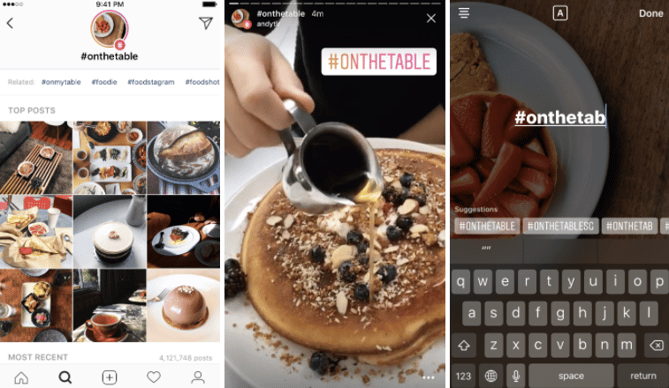
Location and Hashtag Stories: In a nod to Snapchat’s Story Search, Location and Hashtag Stories let users search to see what other users are posting about. You can now search content across cities and hashtags used — the one differentiator between Snapchat’s search feature launched earlier this year. Here’s what it looks like in action:
 Source: Instagram
With these two changes in place, there isn’t much left that’s proprietarily different about Snapchat over Instagram, so it might start coming down to user preference. Instagram has been advertising on the platform longer than Snapchat — plus, verified brands can add links to posts on Instagram Stories — which might continue the wave of brands and publishers that are choosing Instagram for their ephemeral messaging needs.
Facebook News
6) Facebook updated the News Feed algorithm.
Facebook has made more adjustment to its News Feed algorithm this month. Here are the biggest changes to how Facebook adjusts what you see when you log in every day:
Facebook will further downgrade publishers that publish clickbait headlines. The algorithm will now start downgrading posts based on individual instances of clickbait and based on a Page’s past history of being clickbaity (if that’s a word yet). Additionally, posts will be downgraded in the News Feed if the headline overexaggerates the content in the link itself — a nuance that signals a deepened commitment to its position as a news site.
Facebook will downgrade links to sites that provide a low-quality experience or are inundated with disruptive ads. This means pages that post links to sites that offer “little substantive content” or disruptive, “malicious” ads will be downgraded in the News Feed and may be ineligible to be promoted on Facebook.
TL;DR: Don’t publish clickbait and don’t link to low-quality sites when you post for your brand on Facebook for maximum reach and exposure in the News Feed.
7) Facebook is testing joint notifications across Facebook, Messenger, and Instagram.
Facebook wants to make it easier than ever for its users to stay within its apps by launching joint notifications for Messenger and Instagram within Facebook notifications. In a statement to CNET, Facebook said it was running a “very small test” of this feature — here’s what it will look like if it’s rolled out everywhere:
Source: CNET
8) Facebook Live launches — now with friends.
Facebook Live launched something new, too. Now, users can go live with another Facebook friend in a shared screen. This could make interviews easier conduct via Facebook Live, a highly engaging content format on the platform, or it could be a fun way to connect with friends. Either way, it looks like Google Hangouts and FaceTime on the News Feed:
9) Facebook inked a deal with Major League Baseball to livestream games.
Facebook made a deal with Major League Baseball (MLB) to livestream 20 free games this summer — roughly one per week. This is a clear nod to Twitter’s dominance in livestreaming — the app broadcasts pro football, hockey, baseball, and basketball games, as well as live news coverage that attracts millions of viewers. You can watch the live stream of the first MLB game on Facebook here.
We’ll see if viewers gravitate toward Facebook and away from Twitter to watch baseball for free this summer — we’ll keep you posted. (And I’d be remiss if I didn’t encourage you to root for the Boston Red Sox.)
10) Facebook announced it will hire 3,000 Facebook Live monitors.
In response to growing backlash against the lack of oversight over Facebook Live videos depicting violent crimes, Facebook announced it would start the process of hiring 3,000 people specifically to monitor live video content. In a Facebook post, CEO and co-founder Mark Zuckerberg said monitors will serve to get people help if they need it and remove offensive content from the platform.
It’s unclear how effective these monitors will be — and Facebook certainly can’t prevent violence in the first place — but Zuckerberg cited the fast prevention of a suicide mentioned on a live broadcast, so we’re cautiously optimistic this will decrease violent incidents on the platform.
Twitter News
11) #NuggsforCarter set a new record for the most retweets ever.
It started as an innocent question — Carter Wilkerson wanted to know how many retweets would be a high enough achievement to earn a lifetime supply of free chicken nuggets from Wendy’s.
HELP ME PLEASE. A MAN NEEDS HIS NUGGS http://pic.twitter.com/4SrfHmEMo3
— Carter Wilkerson (@carterjwm)
April 6, 2017
When the Wendy’s social media team gave him a number, Wilkerson made it his mission. And although he hasn’t hit 18 million retweets yet, he hit another milestone: This month, his tweet dethroned comedian Ellen Degeneres’ infamous Oscar selfie to become the most retweeted ever on Twitter.
If only Bradley’s arm was longer. Best photo ever. #oscars http://pic.twitter.com/C9U5NOtGap
— Ellen DeGeneres (@TheEllenShow)
March 3, 2014
12) Co-founder Biz Stone returned to Twitter.
After selling visual search engine Jelly to Pinterest earlier this year, Twitter co-founder Biz Stone announced in a Medium post that he was returning to Twitter to focus on company culture, team morale, and people operations. Twitter has experienced a lot of executive turnover in recent years — in addition to intense scrutiny over abuse and dissemination of fake news on the platform — so a morale boost is coming at a good time for Twitter.
13) Rihanna and Lupita Nyong’o inked a movie deal — based on a tweet.
This news might be the best of all, depending on your music and film tastes: Hollywood might see its first film that originated thanks to a simple tweet.
Actress Lupita Nyong’o and musician Rihanna were spotted sitting together at a Paris Fashion Week runway, and someone tweeted a photo of them that spawned into a discussion — looping in director Ava Duvernay — of creating a heist movie together.
Rihanna looks like she scams rich white men and lupita is the computer smart best friend that helps plan the scans https://t.co/PhWs1xd3nj
— kateria 🌸 (@1800SADGAL)
April 18, 2017
I’m down if you are @rihanna https://t.co/vwHBWeCbFZ
— Lupita Nyong’o (@Lupita_Nyongo)
April 21, 2017
I’m in Pit’z https://t.co/Kz0o3lBEmL
— Rihanna (@rihanna)
April 23, 2017
@MikelleStreet @rihanna Lights set. Camera’s up. Ready to call action for these #queens. 👑 http://pic.twitter.com/NVgqpFeTnu
— Ava DuVernay (@ava)
April 24, 2017
No word yet on when this inevitable blockbuster is coming out, but Netflix bought the rights to it — making it what might possibly be the most 2017 movie of all time.
Did we miss any big social media stories? Share with us in the comments below.
How to Communicate Effectively at Work With Your Boss
Do you feel like you and your boss are on the same page most days of the week?
If you nodded “yes” emphatically, that’s fantastic. But many readers might have a different opinion. In fact, a recent HubSpot survey revealed that while 70% of executives might reflect positively on their team’s marketing strategy, only 50% of individual contributors agree.
As a marketer, it’s imperative to communicate effectively with your boss to avoid this executive divide. I wanted to create communication rules that all marketers can follow, so I went straight to the source for some answers and talked to my own boss.
I interviewed Rick Kranz about effective communication with his marketing team. He has more than 30 years of business management experience and was more than willing to share his opinions with us. Read on for his thoughts and key takeaways about communication strategies between managers and employees.
8 Rules for Communicating With Your Boss
1) Start with the bottom line.
I asked Kranz what he thinks is the most effective way for your marketing team to talk to you.
Start with the bottom line. When you speak in hyperbole you end up telling a story that eventually gets to the bottom line. Start with, ‘we are getting 50 more leads and here is why…’ and avoid, ‘So I ran an email campaign and a PPC campaign and had HUGE success. We are now getting 50 more leads.’ When you start with the bottom line, I am in a position to then ask appropriate questions like, ‘How did that happen?’”
What does this mean?
Don’t beat around the bush. Your boss is a busy person and you need to respect that. Give her the point of your discussion first, then go backward if questions are proposed. This will keep your communication streamlined and focused.
2) Speak in numbers.
I asked Kranz if he prefers the bottom line to be in numerical or qualitative data, and if he prefers to hear about the bottom line or have a document or graph to guide the information.
I prefer numbers over words. A lot of CEOs are numbers-driven. Visual data is much quicker to digest, so if information can be visual, please make it so. If you give us a spreadsheet, we’re happy, but if you give us a paragraph to read, it can be left open to interpretation.”
What does this mean?
Numbers are powerful because they can communicate success (or problems) at a glance. Use them to your advantage when communicating with your boss — numerical data speaks for itself.
3) Schedule when you communicate with your boss.
Next, I asked Kranz if he prefers discussions with his marketing team to be scheduled in advance.
It’s best to schedule a meeting with me. That way, I can plan for our discussion and focus. You don’t want my mind to be elsewhere, and if our discussion isn’t scheduled, then you’re most likely going to end up interrupting my workload, which is inefficient for both of us.”
What does this mean?
We all can attest to the fact that writing back and forth via email can get messy, so try not to fill your boss’s inbox with email after email from you.
Instead, schedule meetings with your boss to avoid messy lines of email communication and walk-in office interruptions. This will help streamline your communications and save valuable time.
4) Establish the that you have certain “rights” to communication.
I asked Kranz if he limits the number of employees that he communicates with directly.
Right now, I speak directly with everyone at our agency because there is only a handful of us, and that’s how our business model works. At companies I have been a part of in the past, with more than 50 employees, I would scale down my communications to about seven people. There isn’t a rule for it, it was just more effective that way.”
What does this mean?
Do you have the right to speak with your boss? Of course — we all have that right. But that doesn’t always make for effective communication.
If you have concerns you want to address with your boss, but you’re not the main point of contact with her, you should bring your concerns to your direct supervisor. This person will address your concerns with you, or take it up the food chain to your boss.
5) Communicate the anticipated results and next steps of your plans to your boss.
Next, we chatted about how Kranz wants to discuss future plans and goals with employees.
Always be able to tell me where we are, where we’re going, and how we’re going to get there. If we’re at point B and you want to get us to point A, then tell me how you plan to do that, and what will happen once that step occurs. Communicate the results of your plan and what the next steps are that I can help you with.”
What does this mean?
Communicate your plans effectively by addressing what the plan is, what the results will be and what the next steps are. If you bring these talking points to the table, you’ll be organized, and your plan will be well spoken for.
6) Bring problems to your boss’s attention right away.
If a problem emerges, Kranz wants his team to bring it to him right away.
Come find me in person, because the problem needs to be addressed right away. Sending an email can delay my response time and doesn’t put us in a good position for a problem-solving discussion. Additionally, it’s smart to always bring at least one solution to the table. Never give me a problem without a solution, because then you’re just passing the buck.”
What does this mean?
Don’t skulk away when a problem pops up or a mistake occurs. Respond to it proactively, and don’t keep your boss in the dark. Communicate your own proposed solutions when you present the problem so you and your boss have a basis to start a problem-solving conversation.
7) There’s a right time and place to promote your achievements.
I asked Kranz how he prefers achievements and success be brought to his attention by direct reports.
In a successful business, things are going well on a regular basis. If someone were to tell you every time something good happened, you would have someone running into your office all the time, because good news makes your business run. In my opinion, a monthly review of results would be best. It’s easier to digest these results as a report, too. During the review of results, your achievements should be highlighted. Weekly meetings are another good place for everyone to discuss their recent achievements.”
What does this mean?
We all love to brag about what we do well, but there’s a time and place to do it. Your work will speak for itself if you’re bringing in the type of results your boss is looking for. Then, you can get on your podium and share your achievements when you present reports to your boss or allocate time for success stories at the end of a meeting.
8) All business-related topics are noteworthy.
Kranz doesn’t believe there are any topics that would hinder effective communication between an employee and his or her boss.
There’s nothing my team shouldn’t come to me with. We want to hear about how the team is working together and how your work environment is, so anything is open for discussion.”
What does this mean:
Speak to your boss about business topics that concern you, or any particular success-related stories. Communicating feedback on what is going on in your business environment is an effective way for your boss to see a full picture of the company from someone else’s perspective, so don’t hold back.
Communication Is a Two-Way Street
Effective communication with your boss starts with you. You need to approach it a certain way for the conversation to be as productive as possible, so you can minimize the divide between executive and individual contributor perceptions across companies. To learn more about the global state of marketing and sales industries, download the 2017 State of Inbound report today.
What are your strategies for communication effectively with your boss at work? Share with us in the comments below.
Editor’s Note: This post was originally published in June 2014 and has been updated for accuracy and comprehensiveness.
7 Leadership Resources for Any Stage of Your Career
Learning some things in life is relatively straightforward. Take knitting, for example — that’s typically as simple as procuring some yarn and needles and searching for a how-to video on getting started. Sure, your work might look a little haphazard at first, but the steps are fairly intuitive.
Learning to lead others, on the other hand, isn’t so linear.
There’s always the option to pick up a leadership book or turn to articles on the topic to get started, but a start is all it will be. You’ve got to read, listen, ask questions, put things into practice, make mistakes, and course-correct — only then, you might be at a “good enough” level.
But everyone has to start somewhere, and if you’re looking to embark on a leadership development path, you might also be looking for some of the best materials to help you along the journey. We’ve got you covered — below are some of our favorite podcasts, tools, tips, and resources to become a better leader.
7 Leadership Resources for Marketers
1) Podcasts
Source: NPR
Depending on the day, one method of consuming information might be better than another. If you take the train into work and the ride is quieter than usual one morning, for example, it might be a great day to catch up on a leadership book. But if you drive, and traffic is particularly bad, it’s probably better (not to mention, safer) to listen to a podcast episode about leadership than to read a book about it.
That’s one of the reasons why we consistently keep a few leadership podcasts downloaded and ready to listen to. Here are three of our favorites:
TED Radio Hour
Around here, we love a good TED talk. But trying to pick just one out of volumes of valuable presentations is as tricky as trying to pick one thing to watch on Netflix, am I right? That’s what makes the TED Radio Hour podcast so valuable. It takes some of the most intriguing TED talk topics — like big data, making our work more meaningful, or even forgiveness — and builds episodes based on them.
The Growth Show
Hosted by HubSpot’s VP of Marketing Meghan Keaney Anderson and CMO Kipp Bodnar, The Growth Show is an exploration of all things relating to business growth. Anderson and Bodnar take turns at the helm, welcoming guests to talk about the good, the bad, and the ugly sides of growth. From stories of epic failure to the even better recovery that followed it, Anderson and Bodnar interview guests who share some of the most intriguing organizational, cultural, conceptual, and team insights.
StartUp
As the name suggests, this product is a self-described “podcast about what it’s really like to get a business off the ground.” And no matter where you are in your career, there are still leadership lessons to be learned from entrepreneurs or beginners, especially if you need a back-to-basics reminder of how to get started. Plus, the topics — like balancing business and family life, or stories about inventors — are just plain interesting and provide solid fodder to get your wheels turning in the morning.
2) Public Speaking Help
Public speaking isn’t exactly a requirement for being a strong leader, but as you progress in your career, it might become part of your job (think: presenting at large team meetings or to a board), and it’s a skill that can help set you apart from the pack.
But if public speaking sounds like a worse experience than undergoing a root canal, then there’s a chance you’ve wished for a formula to make it as simple as possible. That’s why we love speaking.io — it’s a near one-stop-shop for public speaking tips. Upon arriving at the site, it appears to be an unconventional resource collection for the five major steps of presenting:
- Plan out your talk.
- Design and build your slides.
- Prep for the big day.
- Deliver and do your thing.
- React and reflect on what just happened.
Plus, if you want newer, more detailed tips and information, the site also contains a blog with advice on things like using images, sharing presentations online, and dealing with nervousness.
3) Books (On the Stuff They Don’t Teach You in Business School)
Source: brenebrown.com
Sometimes, it feels like we have to master everything to be a leader. We have to learn how to manage projects, delegate tasks, and analyze outcomes. But then, there are the leadership lessons that don’t always get the biggest headlines, like learning to be empathetic, accountable, and how to embrace vulnerability.
That last one, while a scary word, is something that we’ve found some of the most exceptional leaders do. That’s why we love Daring Greatly: How the Courage to Be Vulnerable Transforms the Way We Live, Love, Parent, and Lead by Brené Brown. “When we shut ourselves off from vulnerability,” she writes, “we distance ourselves from the experiences that bring purpose and meaning to our lives.”
This book, in particular, dives into years of research on why vulnerability can be an asset to leaders. After all, taking risks requires some degree of becoming vulnerable, and strong leaders know when to take calculated risks. But that doesn’t just apply to work — Brown’s work also explores how that vulnerability can be an advantage in other areas of life.
4) The Radical Candor Framework
Think about the hardest piece of feedback you’ve ever gotten. Chances are, it was tough to hear, but you were ultimately better off because of it.
That’s exactly what happened to Kim Scott. After an important presentation, Scott’s boss, Sheryl Sandberg — yes, the one who wrote Lean In — had some feedback. Harsh feedback. The kind of feedback that stings. But because Scott knew that Sandberg was coming from a compassionate place when giving the feedback, Scott accepted it, moved on, and became better.
Scott took this pivotal interaction and used it to develop a framework for giving better feedback at work — the kind that embraces brutal honesty delivered with profound empathy. It’s worthy advice for leaders at any point in their respective careers.
Fun fact: We once had the pleasure of hosting Kim Scott on The Growth Show. If you’re interested in hearing more about her perspective on leadership, check out her episode below.
5) Real-time Feedback
Speaking of feedback, did that last resource make you crave receiving some yourself? After all, authentic, constructive criticism is an excellent supplement to the advice doled out by books, blogs, podcasts, and frameworks. Enter CareerLark: a Slack bot that helps you seek out on-the-fly “micro-feedback” on the skills you want to improve.
Here’s how it works. In the example provided by CareerLark’s product explanation, an employee wants to get feedback on his weekly analytics updates. Using the Slack bot, he can ping his boss to get real-time feedback on how he’s doing. She’ll then receive a message like this one:
From there, Monica can either answer using one of the emojis provided, or send a more detailed response, as per below:
Micro-feedback in real-time? Great for your skill development — and, it can provide your boss with good practice in providing concise commentary.
6) Advice From Real People
Sometimes, using a Slack bot to get advice just doesn’t cut it. We all need feedback from a real human being, and on occasion, it can be the most enlightening to get it from someone outside your company or industry.
So when you’re looking to step outside your “bubble” for input, here are a few apps that can help.
Real Talk
By The Learning Partnership, a Canadian advocacy organization for public education, the Real Talk App (available on iOS and Android) provides “unfiltered” advice from a broad range of professionals at various career stages — everyone from sound designers to freelance creatives. These individuals answer questions that many of us have as we begin to explore different work options, like whether or not advanced education is worth the money, or how you can make a career change.
Officehours
Sometimes, it can be tough to figure out who to turn to for advice. That’s what makes apps like Officehours so valuable — this one, in particular, helps you find an expert (or “advisor”) for 10 minutes of free one-on-one advice.
The advisors appear to hold a broad range of expertise, from design to entrepreneurship, data science and more. Check out the video below to learn more:
Mara Mentor
If you’re a budding entrepreneur struggling to find a mentor in your industry, check out this tool — it was designed to provide an “exchange of ideas, guidance, learning and connecting with like-minded people.”
Not only does Mara Mentor (available for iOS and Android) offer a platform for connecting professionals and entrepreneurs with mentors, but also, it provides industry news and a digital networking platform that connects you with other entrepreneurs to share knowledge and experiences. Plus, it’s global — so no matter where you are, you can connect with others for professional support.
7) Online Courses
We’ll admit that many of the sources on this list largely pertain to management, communication, and finding a mentor. But that’s not that only way to advance or make changes in your career. Sometimes, it’s about becoming really, really good at a certain thing that your job requires — or something that the job you want requires. And for that to happen, you just need to hunker down and learn it.
An online course can be a great way to do that. Finding the right class depends on the skill you want to develop, but here are a few places we recommend for getting started, especially when it comes to marketing-related skills.
HubSpot Academy
If you want a deep dive into some of the most important aspects of marketing today, check out the HubSpot Academy. One of the most popular resources available there is our free Inbound Certification.
Designlab
Want to improve or sharpen your design skills? Check out Designlab. You’ll be given real assignments to build your knowledge — and a mentor to help you through each one.
Codeacademy
More free stuff? You bet. In fact, you can learn to code for free with Codecademy, which is a particularly helpful resource if you learn best by doing — lessons are taught by way of both instruction and hands-on experience.
Lynda
Okay, so this one isn’t free — subscriptions start at $19.99/month — but if there’s a professional skill you want to advance, chances are, Lynda has a course for it. Created by LinkedIn, it offers classes in everything from Excel, to audio production, to software development.
What’s Next?
So, let’s say you’ve taken full advantage of the resources above. You’ve learned a lot and even gained some introspection. But if you’re still stuck, fear not — we’ve all been there.
If you’re at a loss for what kinds of skills you want to develop, or if you’ve realized that you’re not sure you even want to be a leader in your particular field, then there’s a chance you just might not be sure what to do next. That’s why we created The Next Five: a free assessment that can help you identify the next step in your career.
And because many of us dread the question, “Where do you see yourself in five years?” — or simply can’t answer it — this resource comes with even more processes to come up with a response on your own time. Because the only thing better than general, yet valuable leadership resources, are those tailored to your specific situation.
What are some of the most helpful leadership resources you’ve found? Let us know in the comments.
How to Turn Your Marketing Team Into Your Agency’s Best R&D Department
Every time I try a new recipe for a dish at a party, I try a little sample before I serve it to my guests — and not just because I’m always hungry (which I am). I do it because I would never want to serve something new to my guests that I can’t be sure actually tastes good.
How can I confidently stand there and say to my friends and family, “Go ahead and try it! You’ll love it!” when I have no idea what it’s really like?
I bet you probably do this with new recipes, too. But if your agency doesn’t use a similar process when it introduces new products or services to clients, you could be leaving them with a bad taste in their mouths.
If you’re going to sell your clients on something new, you’ve got to have a solid understanding of how it works, how well you can deliver it, and what the impact on the clients will be. You can’t confidently recommend a product or service to your clients if you don’t know what it’s like. And what’s the best way to find out?
You’ve got to give it a try.
How to Turn Marketing Into R&D
Most agencies don’t have the luxury of devoting an entire department purely to research and development. My agency sure doesn’t. What we do have is a marketing team that’s equipped to test potential new services internally before we make the decision to release them to clients.
A perfect example of this in action is Influence & Co.’s first venture into creating full-length books. One of our core services is helping turn leaders into consistent content creators, and over time, we started noticing a trend of clients asking if we could help them take the next step and write and publish their own books.
Without trying it first, we couldn’t answer that question truthfully. So we decided to test a process for writing a book on my co-founder, John Hall. The end result, “Top of Mind,” was published by McGraw-Hill and released in April.
By asking ourselves some important questions and detailing a plan in our documented content marketing strategy, we were able to transform our marketing team into a one-of-a-kind R&D department — and it’s already changed how we market and introduce new services to clients.
To turn marketing into a testing machine and create your agency’s own R&D team, start by asking yourself the following questions:
1) What exactly are we testing?
This first step seems intuitive, but you might be surprised by how easy it is to jump into an exciting idea before nailing down exactly what your goals are. Are you testing a potential process for a brand-new service offering? Maybe you’re testing your team’s capacity?
When we set out to write our first book, our test was to determine whether our current content marketing teams had the skill sets required to produce it. The main goal was to learn whether we had the ability to create a book efficiently enough to make a profit and to explore how that process actually works.
This understanding of what you’re testing and why brings your marketing and leadership teams together and keeps them focused on your goals. With that foundation, marketing can begin transitioning into R&D to answer those driving questions.
2) How will we measure the success of our test?
Just like you shouldn’t begin a content marketing program without matching your key metrics to goals, you shouldn’t start a test without understanding how you’ll measure its success.
For my agency, because our goal was to test whether we could efficiently and profitably create a book with our current team, we measured success by tracking how many hours each team member spent on the project. We also recorded details of the exact process we used so we’d understand how much it cost and what might need to change to make it work better for a client.
Success was measured by whether we could create and publish an awesome book and do so within a timeline and budget we thought clients would agree to.
3) What will expanding this test to clients look like?
Imagine that your new R&D team tested this service, measured its results, and found that it achieved the goals set out from the beginning. Congratulations! Your next step, then, would be to go ahead and roll out this service offering to all clients, right?
Not yet.
When you test a new service internally, your team should constantly ask itself, “What would make this different for a client?” “How would a client respond differently than we do as the internal client?” and “What works better or worse for an external client?”
These kinds of questions will help your team avoid a stalling phase in which your test worked internally but you’re unsure what to do next. Instead, you’ll be able to expand this test to its next phase: select client testing.
This is critical because your R&D team will behave differently from your normal clients. Once you’re confident in your test and in your decision to move forward, consider rolling it out at a major discount to one client as a beta tester. This will help your team understand how actual clients interact with your new service and processes before you spend resources introducing it to every one of them.
Setting Up Your R&D and Client Services Teams for Success
Your marketing-team-turned-R&D-department will get into a groove after it’s got a test or two under its belt, and specific processes will evolve with each one. Still, there are a couple of best practices you should follow each time to set up your teams for continued success:
Track your time carefully.
Regardless of your specific test goals, you need to know how much time you’re spending and what you’re investing in this research for two big reasons: to understand how much it costs your agency to test new services and to get an idea of what to charge your clients.
Be transparent with clients.
When we signed on our first client to expand the book test, we told him directly that we’ve successfully completed one so far but that he’d only be the second project. We set up a system for collecting feedback and offered him a discount. Disguising your test as a totally normal full-fledged service won’t help your agency or your clients. Everyone needs to be clear that this is still a test so that expectations are realistic.
Introducing new services to your clients and trying out a new recipe aren’t exactly the same. But by giving your marketing team the resources and support to transform into your own R&D team, you might discover that the ideas and approaches that make testing successful aren’t all that different. So before you encourage clients to try your latest service, give it a try yourself.
7 of the Coolest YouTube Banners We’ve Ever Seen
When someone sends me a really great YouTube video, I always want to know who’s behind it. Was it an ad agency? A small or medium business? A B2B tech company? No matter who it was, if I’m impressed, I want to see more from the content creator. So once the video is done, I click the link to visit their profiles.
And from there, if the brand is really on top of its game, I’ll see its channel art — the horizontal banner displayed across the top of the user’s YouTube channel that, hopefully, shows a combination of good design and brand presence.
But how do they do it?
We’ve all seen design work that inspires us, but can have a bad habit of not taking it any further than that. What makes something like a strong YouTube banner so great? And how can you create your own gorgeous channel art? To answer those questions, we found seven of our favorites that inspire us, and explain why we love them.
What Makes a Good YouTube Banner?
Dimensions
A YouTube channel banner will take on different dimensions, depending on what platform is being used to view it. For example, a banner might have different dimensions when viewed on a TV, desktop, or mobile device.
For the sake of display consistency, then, Google suggests going with an image that’s 2560 x 1440 px. It also sets the following guidelines:
- Minimum dimension for upload: 2048 x 1152 px
- Minimum “safe area” where text and logos are ensured not to be cut off : 1546 x 423 px
- Maximum width: 2560 x 423 px
- File size: 4MB or smaller
Here’s a helpful visual representation of those dimensions:
Source: Google
Design
Let’s start with a note about where dimensions and design intersect. You might think that 2560 x 1440 px — Google’s suggested dimensions we mentioned earlier — seems like an exorbitantly large file size. But think about how your image would appear on a 30″ smart TV or higher. With a growing number of options to view YouTube videos in this way, you’ll want to make sure your channel art is large enough to display with quality on larger screens.
Also, take note of the “safe area” we alluded to in the first section. Your banner is essentially the biggest branding opportunity for when people land on your channel, so you’ll want to make sure that it’s well-represented in the channel art. That’s why it might be best to make sure your company name and logo are placed in that space — to make sure they don’t get cut off and cause the viewer confusion as to who’s behind the video content on the page.
If you’re not sure how to take up the entirety of a 2560 x 1440 frame, video production company MiniMatters suggests “build[ing] the image from the middle out,” putting the most important assets in the center, and going from there.
Finally, as to what to put in your banner, we like to follow a few basic rules:
- Use a high-resolution image. A pixelated or blurry banner doesn’t exactly signal that there’s high-quality video to follow.
- Keep it on-brand. While your channel art doesn’t have to be a carbon copy of your logo or tagline, it should incorporate visual elements that you want associated with your brand, like certain colors, fonts, or keywords.
- Your banner should represent what your company does in a timely fashion. For example, if you run a bakery and you’re gearing up for summer, an eye-catching banner might be a high-res photo of a brightly-colored work surface covered with flour and a rolling pin, along with accompanying text like, “April showers bring May flours.”
How to Make a YouTube Banner
“That’s just great, Amanda,” you might be thinking about these tips. “But where the heck am I supposed to get these beautiful design assets?”
Well, you’re in luck — it turns out that there are dozens of free resources for creating a great YouTube banner. Here are a few of our favorites:
- Google: Why not start with the hosting platform itself? Google has its very own channel art templates to help you get started with your banner design. (Note: Clicking this link will prompt an automatic download of the zip file containing these templates.)
- Canva: One of our go-to destinations for DIY design, Canva offers several free YouTube channel art templates that allow you to use your own art, or its library of stock photography.
- Fotor: Similar to Canva, Fotor also offers a selection of free templates that allow you to use both your own visual assets or its own library of images.
8 Cool YouTube Channel Art Examples
1) Death Wish Coffee Company
In 2016, Death Wish Coffee was named the winner of a small business marketing competition held by software company Intuit. The reward? A free 30-second commercial during Super Bowl 50. Since then, the self-proclaimed maker of “the world’s strongest coffee” has capitalized on that momentum by making sure its branding stays just as robust.
Its YouTube banner is no exception. It’s straightforward, but also, bold. The company’s logo is displayed as the channel icon, as well as a tiled watermark that doesn’t interfere with the text display. And that message doesn’t leave any doubt about what the brand does. “World’s strongest coffee?” Okay, I’m watching.
2) Adobe Creative Cloud
Seeing as turquoise is my all-time favorite color, there might be a touch of aesthetic bias in our selection of Adobe Creative Cloud’s YouTube banner. But color can have quite an impact in marketing — shades of blue, for example, have been found to invoke feelings of trust.
This banner doesn’t just make great use of color, though. In a single photo, it connotes creativity and visual quality — two things that the Adobe Creative Cloud promises with its suite products. The person depicted seems to be creating something remarkable — an ocean inside of a balloon — with accompanying text to confirm it: “Make wow.” Plus, to learn more, social buttons are right there within the image.
3) Bon Appétit
Is anyone else hungry? It only seems right that the channel art for a food magazine like Bon Appétit should be, well, appetizing. And with a phrase that’s used as frequently as “bon appétit” — before a meal or as the title of a pop song — it’s important that folks who land on this YouTube channel know what they’re getting into.
That’s one thing that makes this banner so great. The branding is clear, from the logo icon to the iconic title text in the center of the image. Plus, the photo itself sends a signal of the type of content visitors can expect to consume — no pun intended — when they start watching the channel’s videos: All things food.
4) TauliaInc
One great thing about YouTube banners is that they can be swapped out or modified whenever you want, time permitting. That makes them especially conducive to temporary promotions or campaigns. That’s what tech company Taulia did for “P2P Superheroes”: a campaign that shows how its software can eliminate difficult, time-consuming tasks, helping everyday professionals focus more on the work that matters and turn them into superheroes.
The banner communicates two things: 1) That Taulia is in the business of P2P (“procure to pay”), and 2) the brand really celebrates procurement specialists. And by using original, cartoon-like art, Taulia is turning what could be a dry topic into something fun and engaging.
5) Refinery29
We’re big fans of showcasing the people that make your brand great. That’s one thing that Refinery29 does well, by frequently featuring its writers, editors, and content producers in its videos. As it turns out, they’ve all become quite popular personalities — which is why the brand put them front-and-center in its channel art.
Creating a banner of this nature is two-fold. First, you have to find a way to incorporate your company’s talent into video content in a way that’s engaging and appealing to your target audience. Here at HubSpot, we have our blog writers, for example, recount important information from blog posts in video and audio summaries. Then, once you’ve produced enough of that media consistently — and if it’s gaining the right kind of attention — you can use those personalities to promote your channels.
6) TripAdvisor B2B
TripAdvisor is a resource used by millions of travelers to discover and rate lodgings, restaurants, and much more information about endless destinations. But did you know it also offers B2B services for hotel and other property owners to make the most of their presence on the site?
We like to think of it as a B2B hybrid of review site Yelp and vacation rental site Airbnb. On the one hand, TripAdvisor B2B helps business owners create a profile with photos, descriptions, and other information that’s going to be helpful to travelers. But, like Yelp, it also allows them to monitor and respond to the reviews their businesses receive.
That’s represented in the YouTube banner by portraying what the site is all about — travel — but also depicts the act of visitors giving feedback on their experiences by way of rating symbols.
7) Nuvolari Lenard
The thing that stands out to us the most about this banner is its simplicity. It represents a Italian yacht design company Nuvolari Lenard, which is known for work that emulates a luxury and chic lifestyle. And while the channel art itself doesn’t portray anything specifically nautical, the use of capital letters and tiered monochrome does connote a brand that’s high-end.
Those kinds of digital aesthetics create what’s often known as aspirational marketing — the kind that symbolizes something that’s unattainable by most, but still has a vast following of people “who covet the look and feel of the brand,” as Mediaboom puts it. Can I afford a yacht? Of course not. But seeing something like this makes me want one anyway, and makes me want to consume the video content pertaining to it.
Channel Your Creativity
It’s important to note that really cool YouTube channel art is just one part of a comprehensive video content strategy. It doesn’t matter how beautiful your banner is, for example, if your channel lacks in quality video, or hasn’t added anything new in several weeks.
So, along with great design must come consistency. And as you begin to create both, you can turn to these examples for inspiration.
What are some of your favorite YouTube banners? Let us know in the comments.
How to Host an Instagram Takeover in 7 Easy Steps
Influencer marketing is a trendy topic these days, but it doesn’t require a lot of work or a ton of money to harness the power of influencers on your brand’s social media channels.
One of the lowest-effort and most organic ways to work with another person or brand to advance your marketing goals is by hosting an Instagram takeover.
Not sure what we’re talking about? Instagram takeovers involve a person or brand posting on your Instagram channel to give followers a peek at new and unique content from another perspective. Here’s an example of our friends at WeWork taking over our Instagram account:
In this post, we’ll dive into how to host your own Instagram takeover to drive engagement, brand awareness, and more positive outcomes for your brand.
What’s an Instagram Takeover?
Instagram takeovers consist of one user taking over another Instagram account temporarily and sharing original content with their audience. Takeovers usually take place between influencer and brand Instagram accounts within the same industries or geographic locations. For example, here’s a post from a one-day Instagram takeover when we hosted Wistia on HubSpot’s Instagram and Instagram Stories:
Other types of Instagram takeovers can include:
- Employee takeovers
- Customer or community member takeovers
- Event takeovers
- Product or offer promotions
Instagram takeovers are mutually beneficial for the guest Instagrammer and the host account. The host can bring valuable new content to their followers without having to create it themselves, and the guest is able to reach an entirely new audience by posting on another account. Plus, Instagram takeovers help cultivate good-faith relationships between influencers that can create inroads for future collaboration and cross-promotion.
Now, let’s dive into how to get started with your Instagram takeover.
How to Host an Instagram Takeover
1) Choose what you want to accomplish.
It’s important to determine what you want to get out of an Instagram takeover before choosing a guest and executing. Ideally, your Instagram takeover will achieve multiple positive results, but choosing a primary goal of the campaign will help determine which type of guest to invite.
Instagram takeover goals could include:
- Increasing brand awareness. This can be measured by the number of new followers of the Instagram account as a result of the takeover.
- Promoting a product, event, or offer. This can be measured by the number of event registrations, offer redemptions, or lead form submissions as a result of the takeover.
- Driving engagement within the Instagram community. This can be measured by the number of likes, comments, video and Story views, and link clicks as a result of the takeover.
2) Pick your guest Instagrammer.
Determining the goals of your Instagram takeover will help you decide who to choose to host it. For example, we wanted to increase brand awareness and promote working at HubSpot, so we hosted a takeover by our recruiting team on our Instagram Story:
But we don’t always do employee takeovers. There are a few types of guest Instagrammers you can invite to create content for your takeover:
- Influencers within your industry
- Employees at your company
- Community members or customers
Now, this isn’t to say that these Instagram takeover guests can only accomplish one of the goals we outlined in the previous section. But generally speaking, we recommend choosing your guest with the most effective strategy in mind.
- Influencers will draw their audience of followers to your Instagram with their endorsement of your brand, so they’re the best fit if your primary goal is to increase brand awareness by growing followers.
- Employees will attract interest from their friends and colleagues who want a behind-the-scenes look at what they do at work every day. They’re the best fit if your primary goal is to drive engagement on Instagram.
- Community members and customers will post enthusiastically about your brand and show the value of your product. They’re the best fit if your primary goal is to promote a product, event, offer, sign-up, or download.
Again, these goals aren’t mutually exclusive. Ideally, the content your guest creates will be highly engaging, shareable, and compelling to the viewer.
3) Decide on the content format and takeover logistics.
Once you’ve figured out what you want to accomplish and who will host your takeover, it’s time to nail down the specifics of how the takeover will run. Below are our suggestions of questions to answer when you meet with your takeover host:
- When are you hosting the Instagram takeover? Will it last one day, or one week?
- Who will manage the account? Will the guest get access to your Instagram credentials, or will they send you content and captions to post on their behalf?
- How many times per day will you post takeover content? If you have an optimal publishing schedule in mind, what times per day will the host need to post?
- What hashtags will be used? Will you create a custom hashtag to promote the takeover? Is there a maximum amount of hashtags you want the guest to use in any given caption?
- Which types of content will be shared during the takeover? Will the guest post photos, videos, Instagram Stories, or live videos? Will they post a combination of these formats?
- How will both the guest and the host promote the takeover on Instagram? Will you agree to promotion on Instagram or other channels leading up to the event?
- Are there any guardrails? Is there anything the guest shouldn’t record or mention over the course of the takeover?
Once the details of the takeover are nailed down, decide how you’ll measure success over the course of the event.
4) Determine metrics to track during the takeover.
Depending on the goals of your Instagram takeover, some of these metrics will be more important than others. Below are the metrics we recommend tracking over the course of your takeover:
- # of new followers
- # of likes
- # of comments
- # of mentions
- # of direct messages
- # of Instagram Story views
- # of live video viewers
- # of Instagram Story clicks
- # of offer redemptions/app downloads (if you promote a landing page)
- # of attendees or sign-ups (if you promote an event)
- Total social referral traffic to your website
Qualitative metrics to keep track of could also include positive comments on Instagram.
5) Promote the takeover across multiple platforms.
Once you’ve figured out the details of your Instagram takeover, it’s time to start getting people excited about it.
Start promoting your upcoming Instagram takeover within a day or two before the event. If there are any contests, giveaways, or other incentives for people to follow along, make those clear in your promotions.
Promote the takeover on Instagram — especially if the takeover is happening within Instagram Stories or Instagram Live, and you want to drive visitors to view those spots within the app.
Promote the takeover on other social media channels to get as many eyes on your campaign as possible — especially if your brand’s Instagram account isn’t as developed or engaged as other channels.
Here’s how we promoted an employee Instagram takeover last year:
And here’s how the employee promoted it on her Twitter handle:
INSTAGRAM TAKEOVER FOR @HUBSPOT TOMORROW. BE THERE. #insta https://t.co/0gQxYa4K4P http://pic.twitter.com/JFthjtZKON
— Katherine Boyarsky (@katboyarsky)
February 24, 2016
The host and the guest should promote the takeover on a few of their channels leading up to the event to get both audiences as engaged and excited as possible.
6) Launch the takeover.
On the day of the takeover, it’s all systems go.
Make sure you have one team member monitoring comments and one team member uploading content to Instagram (if applicable). You can now upload content from desktop computers in addition to the mobile app to make the process easier from the office.
Throughout the day, cross-promote content that the guest is posting on their channels to help draw new people to your own Instagram takeover event.
Make sure to communicate when the takeover is starting and ending. Note in captions when the first and last posts are happening so viewers aren’t confused or abruptly left in the lurch, wondering if there’s more content forthcoming.
7) Analyze the results.
Once the takeover is over, analyze how it performed, and use those learnings to determine how (or if) you’ll do your next takeover differently. Here are some questions to ask in your post-mortem analysis:
- Did we achieve our goal? Did you earn more Instagram followers, achieve high levels of engagement, or get visitors to sign up for your offer?
- Did we achieve secondary goals? Did the takeover result in other net benefits for your brand and your business?
- Was the takeover worthwhile? Did it save you time and energy creating your own content, or did it create extra work? Did it drive a push of traffic and engagement, or did numbers remain mostly the same?
Even if the takeover doesn’t drive hard numbers for your business’s bottom line, takeovers are authentic and real, and they provide an inside look at an aspect of your brand or community followers don’t normally see. Social media is about being social, so pay attention to qualitative feedback, too. If commenters respond positively to the takeover, take their feedback and use it for ideating future Instagram campaigns.
Now that you’re armed with a simple checklist for launching your takeover, follow up with us if our suggestions bring you success. For more ideas on how to drive results for your brand, follow us on Instagram, and download our guide to Instagram for business here.
Has your brand ever hosted an Instagram takeover? Share with us in the comments below.