
The Character Count Guide for Blog Posts, Videos, Tweets & More
When it comes to writing text for your blog and social media posts, many marketers wonder, “But what’s the character limit?” It’s never a simple question — sometimes, it’s answered by parameters established by certain channels. And on other occasions, it’s more a question of what’s ideal.
For example, you probably know the character limit for a tweet is 140, but did you know that the ideal length is actually less than that? (Hold tight — we’ll explain why.)While we’ve written before about optimizing your actual content, we thought it would be helpful to gather the numbers of character limits — both enforced and ideal — for different online channels, all in one place.
Below, you’ll find a more detailed guide to character limits and ideal character counts for posts on your blog, Facebook, Twitter, LinkedIn, Instagram, SnapChat, and YouTube.
The Length & Character Count for Everything on the Internet
1) Blog Posts
Source: Medium
Quick reference:
- Post length: 2100 words
- Title: Under 60 characters
- Meta Description: Under 155 characters
Post Body
When it comes to the length of blog posts, there are a few different items to consider. For example:
- According to Medium, posts with an average read time of seven minutes captured the most attention.
- The average reading speed of native English-speaking adults remains commonly cited as 300 words per minute, according to research conducted in 1990.
- At that reading rate, the ideal post length is 2100 words.
- That aligns with research previously conducted by serpIQ, which indicated that, on average, the top 10 results for most Google searches are between 2,032 and 2,416 words.
That means that this ideal word count can address goals around both readability and SEO. But that’s just the actual body of the post. Plus, when we looked at our own blog on organic traffic, we found that the sweet spot was 2,250–2,500 words.
But that’s just the post body — let’s have a look at the other areas of text that comprise a full blog post.
Title
The length of your title depends on your goals, and where it will appear.
Let’s start with SEO. Do you want this post to rank really well in search? It turns out, that often has to do with the dimensions of each entry on a search engine results page (SERP). For Google, titles of search results are usually contained at a length of 600 pixels — which Moz measures as being able to display the first 50-60 characters of a title tag. So, if you don’t want your title to get cut off in the search results, it might be best to keep it under 60 characters. But when in doubt, you can double-check the length of your meta description and title tags with this handy tool from SEOmofo, or you can use Moz’s title tag preview tool.
Then, there’s optimizing your title for social sharing. On Twitter, for example, consider that each tweet has a limit of 140 characters — however, if you include an image, that doesn’t count toward the limit. But consider that even the average shortened URL takes up about 23 characters — that leaves you with about 116 characters left for the title and any accompanying text.
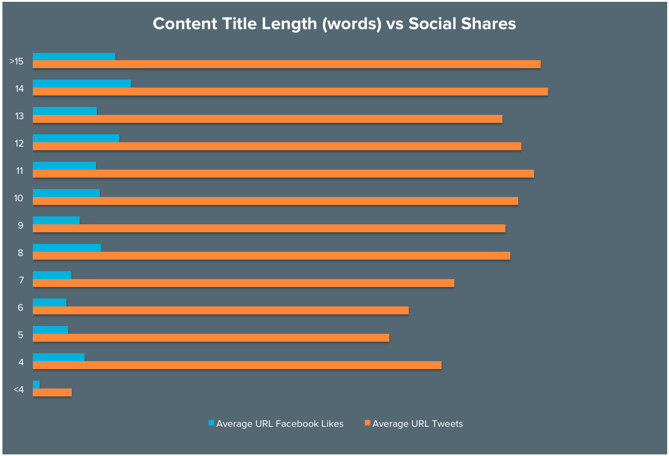
In our own analysis at HubSpot, we found that headlines between 8–12 words in length got the most Twitter shares on average, while headlines with either 12 or 14 words got the most Facebook Likes.
Meta Description
A meta description refers to the HTML attribute that explains the contents of a given webpage. It’s the short description you see on a SERP to “preview” what the page is about.
Moz notes that Google seems to cut off most meta descriptions — which are sometimes called snippets — after roughly two lines of text — though there’s some conjecture that, like title tags, it’s actually based on pixel count. In any case, it amounts to about 160 characters, though this particular outlet recommends keeping it at 155.
Again, you can double-check the length of your meta description and title tags with this handy tool from SEOmofo.
2) Facebook
Quick reference:
- Status updates: 63,206-character maximum | Ideal length is 40 characters
- Video: 120-minute maximum | Ideal length is two minutes
Status Updates
Facebook’s character limit on status updates is 63,206. However, that’s far from ideal, says HubSpot Social Media Marketing Manager Chelsea Hunersen. “The social gurus will throw around the number 40 characters. That data seems to be backed up by BuzzSumo’s ranking of HubSpot’s own Facebook Page.“
But why 40, specifically? “Ideally,” Hunersen says, “you’ll want to use the copy in a status update to provide context for whatever you’re linking to.” That said, she notes, the copy of the status update itself isn’t as important as the copy in the meta title or meta description that gets pulled in when you insert a link into your post. That’s right — social media posts have their own meta data too.
“Often, people look at the image of the article and then directly down at the meta title and meta description for context clues,” she explains. “A lot of people don’t realize you can change those.”
Even on Facebook, it’s still best to keep your meta title to fewer than 60 characters, and to 155 for meta descriptions. There are some resources available to those familiar with coding that let you play around with social media metadata character counts, like these templates. But unless you’re a developer, we recommend keeping it short and sweet.
Video
While Facebook allows a maximum of 120 minutes for videos, we wouldn’t advise posting anything that long, unless you’re doing a special, social-media-only screening of a full-length film.
According to research conducted by Wistia, two minutes is the “sweet spot” — even a minute longer than that shows a significant drop in viewership. “Engagement is steady up to [two] minutes, meaning that a 90-second video will hold a viewer’s attention as much as a 30-second video, the research reads,” so “if you’re making short videos, you don’t need to stress about the difference of a few seconds. Just keep it under [two] minutes.”
Source: Wistia
However, optimal length can vary depending on the topic. “If you produce something as catchy as BuzzFeed and Refinery29 are putting out there, it can be up to five minutes long,” says Hunersen.
Regardless of the length of your video, Hunersen reminds us that all Facebook videos start without sound, meaning users have to make a conscious decision to stop scrolling through their feeds and unmute the video. Facebook videos should be visually compelling from the get-to, make sense without sound, and be engaging enough to encourage the user to stop and watch.
3) Twitter
Quick reference:
- Tweets: 140-character maximum
- Does not include images, videos, polls, or quotes tweets
- Ideal length is 120-130 characters
- Hashtags: No more than two
- Videos: Maximum length is two minutes and 20 seconds
Length of Tweets
Marketers everywhere rejoiced when Twitter finally eased up on its character count parameters, and such media as images, videos, and polls, as well as quoted tweets, ceased counting toward its 140-character limit.
Still, the “Quote Tweet” feature remains available, providing even greater character-saving measures. That happens when you press the rotating arrow icon to retweet a post, and then add a comment in the text box provided. You’ve still got 140 characters all to yourself to comment.
Ideal Length Overall
Like so much of what we’ve covered, it seems that when it comes to the overall length of a tweet, aim for short and sweet. (See what we did there?) That’s resonated in research conducted by social media scientist Dan Zarrella, who found that tweets with 120-130 characters showed the highest click-through rate (CTR):
Source: Buffer
The same goes for hashtags. While they can technically be any length up to 140 characters, remember that people will want to accompany the hashtag with other copy. Short hashtags are always better. Ideally, your hashtags should be under 11 characters — shorter if you can.
Also, in a single tweet, stick to one or two hashtags, and definitely don’t go over three. Buddy Media found that all tweets with hashtags get double the engagement metrics than tweets without any. But tweets that kept the hashtags to a minimum — one or two — have a 21% higher engagement than tweets with three or more.
Source: Buffer
Videos
You can post a video on Twitter by importing a video or recording it using the Twitter app. In any case, the maximum video length is two minutes and 20 seconds.
4) LinkedIn
Profiles
Here’s a handy list of some of LinkedIn’s most important profile character maximums, according to Andy Foote:
- Professional headline: 120
- Summary: 2,000
- Position title: 100
- Position description: 2,000 (200 character minimum)
- Status Update: 600 characters — however, Foote also notes that, “if you select to also post on Twitter from LinkedIn, only the first 140 characters will show on your Twitter post.”
Original Content
With LinkedIn’s publishing platform, users can now compose and share original written content with their networks, or publicly. Of course, that comes with its own character counts, according to Foote:
- Post headline: 100
- Post body: 40,000
5) Instagram
Quick reference:
- Bio: 150-character maximum
- Hashtags: Maximum of 30
- Captions: Ideal length is under 125 characters
Since Instagram is, first and foremost, a platform for sharing photos and videos, the primary focus is typically your visual content. However, it’s always helpful to provide some context, and let users know what they’re looking at.
Given that, here are some helpful character counts for the text you include with your visual content:
Captions
While Instagram doesn’t seem to specify a maximum total number of caption characters, it does note that, within users’ feeds, the caption is cut off after the first three lines. For that reason, it’s advised to limit captions to 125 characters. However, don’t leave out important information just for the sake of keeping your entire caption visible. Instead, frontload it with crucial details and calls-to-action, leaving any hashtags, @mentions, or extraneous information for the end.
As for Instagram Stories, there doesn’t seem to be a ton of detail on character limits there, either. However, because the text overlays the visual content — which is the focus — don’t obscure too much of the photo or video with a caption.
6) Snapchat
Quick reference:
- Character limit: 80 per post
Speaking of not obscuring visual content — that brings us to Snapchat.
Instagram Stories was, many believe, an effort to emulate the features of Snapchat, to create an opportunity for users to share quickly-disappearing photos and videos. And again, because the focus here is on the visual, you’ll want to prevent distracting viewers from it with too much text.
According to Teen Vogue, Snapchat’s character limit is 80 per post, which is more than double its previous 31-character limit. And, if you’re looking for more guidance, just look to this particular app’s name, and remember the “snap” element of it — a word that implies brevity — and try not to ramble. Here’s a great example of how SXSW uses its captions efficiently:
7) YouTube
Here we have yet another network that’s focused on visual content, leading some to incorrectly assume that accompanying text — like titles and descriptions — don’t matter as much.
That’s not entirely false — as a video-hosting platform, YouTube should primarily be used to showcase a brand’s quality videos. However, like any other visual content, it needs context. People need to know what they’re watching, who it’s from, and why it matters.
Unfortunately, YouTube doesn’t appear to provide any specific parameters over its character counts — except for your channel description, which according to the official help site is limited to 1,000 characters. But other than that, it seems that the only guideline available is the alert display that lets you know, “Your [title or description] is too long,” if you’ve entered too much text in either of those fields.
In this case, we would advise taking the same approach as adding text to support your visuals on Instagram and Snapchat. Like the former, a video’s description is cut off after the first line or two, so frontload the most important descriptors and CTAs, leaving extra details for the end.
Show Your Character
As you set out to determine the length of your text, regardless of the platform, remember to do so with the user in mind. Many of these channel-mandated character limits are established for that reason — to keep audiences from getting bored or overwhelmed.
Like anything else in marketing, however, it’s never an exact science, despite the best data. We encourage you to follow these guidelines, but don’t be afraid to experiment if they don’t always work. Test different amounts of text within your various channels, and keep track of how each post performs. From there, you can make decisions about which types of content, as well as its accompanying titles and descriptions, are the most well-received from your audience.
How do you approach text with different online channels? Let us know in the comments.
This post was originally published in January 2016 and has been updated for accuracy and comprehensiveness.
6 Business Challenges Every Small Business Struggles With (And How to Fix Them)
In the first few years of business, small companies come up against a lot of different challenges. Some are harder than others to overcome — and according to the U.S. Bureau of Labor Statistics, about 20% of small businesses fail by the end of their first year. By the end of their fifth year, 50% go under; and by the tenth year, that number rises to 80%.
With survival rates like that, it’s easy to understand why folks face the first few years of business with trepidation. But in fact, many common business problems and challenges are actually fixable, from difficulty finding customers, generating leads, and building an email list, all the way to hiring the right people and balancing quality and growth. Many times, you’ll find you need to take a step back, take the time to understand the pain points you’re feeling, and re-think your strategy.
Here are six challenges every small business faces, along with some tactical advice about how to fix them. (And if one of the challenges you’re facing is growing your email lists and generating leads, then be sure to save your seat for our live workshop that’s taking place on Thursday, April 27 at 1:00 P.M. EST.)
6 Small Business Problems & How to Fix Them
1) Finding Customers
This first one isn’t just a small business problem. The marketers at well-known companies like Apple and Toyota and McDonald’s don’t just sit around waiting for the leads to come in: Even the biggest, most successful companies have people working hard every single day to find new customers.
But for small businesses that aren’t a household name, finding customers can be particularly difficult. For example, there seem to be so many channels you can choose to focus on … how do you know what to prioritize and where to allocate resources?
How to Fix It:
Finding customers starts with figuring how who your ideal customer actually is. Spraying and praying doesn’t work for anybody — you need to make sure you’re spreading the word to the right people.
Craft an idea of what your target customers look like, what they do, where they spend time online by building your buyer personas. (Here are some free buyer persona templates to get you started.) Creating very specific ones can dramatically improve your business results. Once you’ve built your buyer personas, you can start creating content and getting in front of your target customers in the places they spend time online and with the messages that they care about.
2) Hiring Talented People
Hiring is often one of the biggest challenges for small businesses, especially since small business executives tend to feel under-resourced to begin with. Hiring new employees is a big deal and a complex process, and the cost of onboarding is an average of over $4,000 per new employee for most companies. And if you don’t hire well, employee turnover can be very, very expensive.
But, as CEO of 2020 On-site Optometry Howard Bernstein said in our panel on how to start a business, it’s impossible to know everything yourself. That’s why finding and hiring the right people — and the people who are really excited about what you’re doing — matters.
How to Fix It:
It’s easy to hire with a short-term mindset: send out a job description, screen applicants, and make a decision. But because of the high costs of hiring right, it’s important to invest a significant amount of time in the hiring process. Don’t settle for good employees when you can find great ones, even if it takes longer. It’s the great employees that will help your company get to the next level.
Just like you create buyer personas for your customers, create candidate personas for your job candidates. Your personas should be different for each new role that you’re hiring for, but will share some underlying traits around company culture.
Next, take ownership of attracting candidates to your company’s brand and make them interested in learning more. This will help you build a recruiting pipeline that will give hiring the same predictability as sales. Then, turn those leads into applicants.
3) Spreading Brand Awareness
It can sometimes seem like today’s biggest brands seemed to have popped up out of nowhere. How did they become a household name? How did they grow that quickly? Can your business grow like that, too?
Of course, most of these companies’ hard work, failures, and rejections happened behind the scenes. But there are strategies for spreading the word about your brand and building a great reputation that you can start right away.
How to Fix It:
There are many ways to spread brand awareness, but the three I’ll touch on here are PR, co-marketing, and blogging.
- PR: Public relations is less about paying for a spot in a news blog, and more about focusing your voice and finding your place in the market. I recommend reading this great post from FirstRound Capital on what startups and small businesses often get wrong about PR, which also includes some great, tactical tips on how to figure out who’s covering your industry, building relationships, and working with reporters. You can also download our free public relations kit to learn how to maximize your public relations efforts with inbound marketing and social media.
- Co-marketing: Partnering with another brand will help you inherit some of their image and reputation and create brand evangelists outside your circle. It’s a fantastic way to gain a large volume of new contacts alongside your organic marketing efforts. You can read our ebook on how to get started with co-marketing for more helpful information.
- Blogging: Running a consistently high-quality blog will also help you build brand awareness. Not only does a blog help drive traffic to your website and convert that traffic into leads, but it also helps you establish authority in your industry and trust among your prospects. Many people find out about HubSpot because of our blog posts. It’ll also help you build an email list, which brings us to our next point …
4) Building an Email List
As if it isn’t hard enough to build an email list, did you know your email marketing database degrades by about 22.5% every year? That means you have to increase your email list by almost a quarter to just maintain it, never mind grow it. It’s the marketing team’s job to find ways to constantly add fresh, new email contacts to your lists.
But what many people call “building an email list” is actually buying an email list — and buying an email list is never a good idea. I repeat: Never a good idea. Not only will your email deliverability and IP reputation be harmed, but it’s also a waste of money. If your current strategy is to buy or rent email lists, then it’s time to regroup and find better places to put those resources.
How to Fix It:
Instead of buying or renting lists, build opt-in email lists. An opt-in email list is made up of subscribers who voluntarily give you their email address so you can send them emails. One great way to build an opt-in list is by creating great blog content and making it easy for people to subscribe — which, at the same time, will help you increase your online presence, build up search authority, and create evangelists from your content.
[Example of a subscribe CTA on Help Scout’s blog.]
You can also revive older lists that you think are mostly decayed by creating an engaging opt-in message and sending it to your old list encouraging contacts who wish to re-opt-in and promising to remove all contacts who don’t respond.
To learn more strategies and tips, register here for our live workshop on growing your email subscribers.
5) Lead Generation
Another problem most small businesses share is lead generation — specifically, generating enough leads to keep the sales team happy. If that sounds like you, you’re not alone: Only 1 in 10 marketers feel their lead generation campaigns are effective.
But generating leads that are both high quantity and high quality is a marketing team’s most important objective. A successful lead generation engine is what turns website visitors into prospective customers and keeps the funnel full of sales prospects while you sleep.
[Lead generation is part of the “convert” stage of the inbound methodology.]
How to Fix It:
To make the lead generation process work for your business, you need to first optimize your existing website for leads. Your website is the most important tool you have for turning prospects into customers. Look through your website and ask yourself:
- Do each of your webpages clearly guide visitors to take action, or do they leave them wondering what to do next?
- Do you use a tool that automatically pulls the submissions from your forms and puts them into your contact database, like HubSpot’s free lead generation tool?
- Are you creating custom landing pages for every single campaign that you run?
- Do you have lead generation CTAs on each of your blog posts? (Do you have a blog at all?)
Prioritize the most popular pages on your website first. Most businesses have a few, specific pages that bring in the majority of their traffic — often the homepage, “About” page, “Contact Us” page, and maybe one or two of your most popular blog posts. Read this blog post to learn how to figure out which pages to prioritize, and how to optimize them.
Finally, be sure to take advantage of free lead management software. Affording marketing in general is a big challenge in and of itself, so finding and implementing the most robust free marketing tools can be a game changer. HubSpot Marketing Free, for example, has features like a form-scraping tool that scrapes any pre-existing forms you have on your website and adds those contacts to your existing contact database. It also lets you new pop-ups, hello bars, or slide-ins — called “lead flows” — that’ll help you turn website visitors into leads immediately.
6) Balancing Quality and Growth
“There’s this mix of building scalability early, versus doing what you have to do to get it all done,” Nick Rellas, co-founder and CEO of Drizly, told our panel of startup executives about starting his own business.
This is a tricky one, especially since every situation is different. You’ll see this problem arise in all areas of business: in product development, in marketing and content creation, in hiring, and so on. For example, many business executives will push growth at all costs. But if you grow your company too quickly, you’ll find yourself having to hire quickly. This can overwhelm your experienced team members because it takes a while to train people. And if you don’t train people well, it can end up backfiring.
How to Fix It:
Unfortunately, there’s no perfect answer here. “Depending where you are in your business’ lifecycle,” says Rellas, “the scale will tip one way or the other, but I do think you need both at different times.”
What it comes down to is not obsessing over every detail, but obsessing over the right details. Obsessing over product perfection, for example, might not be as important as obsessing over customer service. It’s better to put your fears aside and launch a product that isn’t perfect because you can always update and improve it. After all, once your products are in the hands of your customers, you can learn much more quickly what’s working and what isn’t.
Obsessing over customer service, however, is worth the extra effort. Amazon CEO Jeff Bezos puts it well in his 2016 letter to shareholders: “There are many ways to center a business. You can be competitor focused, you can be product focused, you can be technology focused, you can be business model focused, and there are more. But in my view, obsessive customer focus is by far the most protective of Day 1 vitality.” (“Day 1” is what he refers to as a period of growth and innovation, whereas “Day 2” is stasis, irrelevance, and slow demise.)
While these are just a few of the many business challenges facing small businesses every day, there are many others out there. Are there other challenges your small business is facing that you want to bring up? Share with us in the comments below — and don’t forget to share your ideas for solutions, too!
How We Grew Our Organic Traffic by 43% Without Publishing a Single New Blog Post
Today I’m going to show you how we boosted our organic traffic by 43% over a 3 month period.
The best part is, we did it without publishing any new content, spending any more money on marketing or adding any additional resources to our team.
We call the strategy, The Mission Week, and I will tell you exactly how we do it.
But First, a Little Story …
I am the founder of small business-focused job board called Proven.
In October of 2015, we made the difficult decision to completely forgo building a sales team and focus all our efforts instead on acquiring customers via content marketing and SEO.
We knew that given the price point of our product, it was not economically viable for us to have people make sales calls. We needed a lower cost solution to bringing in new customers.
This led us to seeking a content marketing and SEO strategy.
Like many companies new to blogging, we rushed into it full steam, cranking out tons of new posts. We started to realize that this was a doomed strategy. We had hundreds of posts, but were barely moving the needle on our overall traffic. We figured we could only get a traffic boost as long as we were creating new content.
In early 2016, we started to learn a lot more about content promotion and link building. This led to a number of content successes, like ranking in the top 5 on Google for the search term“job board”, but after a while, this growth started to tail off.
Our content promotion was unfocused, lacked clear goals, and as a result, great pieces of content were not ranking well.
Finally, this all changed when our amazing Director of Marketing, Caileen Kehayas, invented The Mission Week.
What is a Mission Week?
Our Mission Weeks consist of choosing one piece of content that’s under performing and everyone on the team focuses their promotional efforts only on this piece of content.
We gamify the process by assigning points to different types of promotional activities.
For example, sending an outreach email might get you 1 point, you can earn 2 points for broken link building and 5 points for writing a guest blog that links to the article. Each person must accumulate 20 points to complete their mission for the week.
Regardless of your role in our company, you can participate. If you aren’t comfortable writing articles, you can earn points through outreach emails, discovering linking opportunities or responding to relevant questions on Quora.
As part of the promotion, we will do minor content updates and perhaps update the title and meta tags of the article.
The weekly point goal is small enough that it doesn’t take up so much time that it becomes overwhelming. Team members can easily earn enough points without compromising their regular workloads.
Involving everyone at Proven — even those outside of the marketing team — helps create more dynamic and diverse supporting content. We all have different backgrounds and skill sets, and everyone is focused on promoting the same piece of content. With everyone participating, it’s a great opportunity for team building across different departments.
A Mission Week Case Study
In January 2016 we published an article called How to Interview: The Definitive Guide. After being live for 10 months on our blog, it never cracked the top 10 for Google search results for any high value set of keywords.
We chose this article back in late October as our first Mission Week.
This article now ranks 5th on Google for “how to interview”, and has 49 backlinks from 27 domains.
So, how did we do it?
Resource Link Building
Each participant was awarded 1 point for an outreach email sent to a site that was linking to similar content. Primarily, we use a resource link building strategy that I wrote about previously.
During this week, each person on the team sent an average of 18.5 outreach emails to sites linking to similar content.
To research 15 to 20 different possible sites and send them an email doesn’t take up too much of a person’s week. However, if someone was left doing all this outreach on their own, it becomes a huge tedious job that eats up a large portion of their week.
Guest Blogging
Each participant was awarded 5 points for writing an article that contained a link to this blog post.
During this week, our team produced 7 related articles that our Director of Marketing helped publish to different sites.
Again, writing one support piece is not too bad, but writing 7 is completely unreasonable for our small team.
Content Updates
We updated the title of the article to How to Interview Job Candidates (The Definitive Guide), because adding brackets to your title can help increase CTR on Google. We also updated the introduction and gave the design of the page a bit of a face lift.
All of these things help to improve CTR, bounce rate and dwell time, which are all ranking factors for Google.
Social Promotion
As part of the mission, we schedule promotion of the article on Twitter, LinkedIn, Facebook and Google+. We typically schedule up to 8 tweets for a single article, changing up the text and hashtags we use. If one tweet is performing really well, we will re-use it again and again on different days and different times.
Quora Answers
Each participant was awarded 2 points for finding and answering a relevant Quora question. Although these are no-follow links, it does help to create brand awareness, referral traffic, and authority in the industry.
During the week, we had one team member answer 5 questions on Quora.
Results
As mentioned, this article now ranks 5th on Google and went from delivering close to zero organic traffic to now being one of our top performing pieces.
We’ve seen consistent movement in our Google rankings for every subject of a Mission Week thus far. Following the same process outlined above, we did a Mission Week for this article about job ads.
We now rank 2nd on Google for ”job advertisements” ahead of industry giants like Indeed and CareerBuilder.
Organizing Our Missions
Each week, our marketing director chooses the article with the most SEO potential that is under performing.
She puts together a document outlining the following:
- Article title
- Article URL
- The keywords we are targeting
- Current rankings for those keywords
- Suggestions for supporting article topics
- Search suggestions for finding sites that may link to us
Separately, we track in a shared spreadsheet all the outreach emails we send so that we don’t accidentally email the same person. This is also good for historical reference because it’s sometimes worth revisiting and following up with any outreach emails that get sent.
Transforming The Way We Promote Content
Mission Weeks have completely transformed the way we actively promote our content. Prior to having the Mission Weeks, we used a lot of the same promotional strategies, but it was not focused and many team members didn’t have clearly defined weekly goals to work towards.
Now, every week, everyone knows exactly what they need to accomplish. Marketing, engineering, customer support and the executives of Proven all participate, driving towards the same goal of accumulating 20 points. We brag to one another over Slack when we complete our missions or land a new link, which is typically followed by a barrage of GIFs.
Not only has The Mission Week process grown our organic traffic, it’s increased our new customers significantly in a short period of time.
I strongly encourage you to give it a try. You can play with the point system and weekly goal based on the needs and resources of your company.
Would you consider running a Mission Week at your company? Share your thoughts in the comments.
7 Steps to Documenting a Content Marketing Strategy That Works
I already know what you’re thinking. You saw the words content marketing and strategy together in the headline and thought, “Oh, cool, another article telling me how important it is to have and actually write down my strategy — just what I need.”
Don’t worry, that’s not what this is.
You already know that having and documenting your strategy is important because you’ve probably read the same reports and case studies that my team and I have read. But there’s a pretty big difference between knowing you should do something and knowing how to do it — which might explain why 89 percent of B2B marketers use content, yet only 37 percent have documented strategies.
The marketing team at Influence & Co. spent the last couple months of 2016 carefully researching, planning, and creating a content marketing strategy for this year. What follows is an exploration of exactly which elements our team determined a successful plan must include to drive results, empowering you to create your own documented content strategy.
How to Document Your Content Marketing Strategy
Part of what makes a documented strategy so powerful is that every person on your team — from your content creators to your senior-level directors and everyone in between — can see what, why, and how your company is communicating.
This alignment makes it easier to get buy-in, crowdsource content, and pull employees into the distribution process, and it makes your efforts stronger because it extends your reach beyond the marketing team.
For your strategy to be helpful to your whole company and not just your immediate marketing team members, it has to address a few major questions, like:
- Why are we utilizing content marketing as a strategy?
- Who are we trying to reach with our content?
- What are we hoping to accomplish?
- How does this fit into our overall marketing strategy?
- How will we measure success?
If you start with these questions in mind, the actual pieces of your strategy should come easily. In fact, each of the following components of your strategy should help you clearly answer those questions, align your team, and hold you accountable. Here are seven key elements your content marketing strategy must include:
1) Overall Mission
Before you get too far into the weeds, ask yourself, “What’s the real reason we’re investing in content?” And if the answer is anything close to “Well, we just know we should be doing content,” stop immediately and spend more time thinking about why you’re making this critical, valuable, and time-consuming investment in the first place.
If you do have a well-thought-out answer, write it down. Are you preparing to use content so your marketing team can generate leads and attract new customers? Are you trying to build brand awareness and credibility?
No matter your reason for investing in content marketing, it needs to take a prominent place at the beginning of your strategy; that overall mission will guide the rest of your document and keep your team on track when it’s time to execute.
2) Target Audience Personas
You may have included some general ideas about your audience members when you outlined your mission, and while that’s a helpful place to start, it’s not nearly detailed enough to start creating content for them.
Before you craft any content or develop any distribution plan, you have to know who you’re trying to reach. You aren’t creating content for the general public, you’re creating it to attract specific individuals who can contribute to your company’s goals.
You need to research and create detailed audience personas. If your personas inform the content you create, your content will do a much better job of speaking to the exact audience you’re targeting.
3) Content Mix Plan
Once you know why you’re creating content and for whom, you can determine what type to create. Depending on what your marketing funnel looks like, you’ll need a couple different types: content that educates and engages prospects at the top of the funnel and encourages them to learn more, as well as content for the bottom of the funnel that answers very specific questions and addresses objections to working with you.
That content can take any number of forms, from guest-contributed articles on online publications to blog posts, white papers, email campaigns, sales enablement materials, and more. What’s especially important here is thinking through the variety of earned, owned, and paid media you’ll need to keep prospects moving through this funnel.
4) Content Creation Process
You could follow each of the above steps exactly and still fall flat on your face when it’s time to actually put pen to paper. Creating content of your own and turning your company leaders into content creators takes time and effort.
So before you dig into executing your content plan, determine which processes, workflows, and resources make the most sense for your team. Perhaps taking advantage of content creation tools will make your job easier, or partnering with an agency to help may be a better solution.
5) Editorial Calendar
Consistency is key in content marketing. It’s your opportunity to build trust with your audience members, nurture them, and become a resource for them. Once you know what kinds of content you need to create, it’s time to develop a calendar or schedule to make sure you deliver.
Your editorial calendar should detail how often you need to publish to keep your audience engaged and when you’ll distribute your published pieces. Mapping out your target deadlines for different pieces will keep your process on track.
6) Distribution Plan
Distribution is all about getting your content to the right people at the right time. That can mean publishing articles in publications your target audience members are already reading, using a paid distribution plan on social to attract readers to your white paper, or simply including your content in your email newsletters.
Your distribution plan should be part of your documented strategy because knowing where and how you plan to distribute your content informs the type of content you create, how often you do it, and which processes you utilize. It’s a key part of your content marketing strategy, so don’t start executing the strategy until you’ve thought it through.
7) ROI Calculator
Remember when you identified your overall mission at the beginning of this document? You need to identify from the beginning how you’re going to measure success with this campaign, and now’s your chance to match metrics to your goals to gauge how well your content is helping to achieve that mission.
Set some benchmarks you want to hit concerning traffic to your website, leads generated, or opportunities created through content, and set up a plan for tracking this using anything from your own modest spreadsheets to a robust software package.
If this documented strategy seems like a lot, that’s because it is. Nobody said that content marketing was simple, but it’s well worth the investment, especially when you set yourself up for success. And with these seven must-have elements detailed in your documented content strategy, your team will be off to a fantastic start.
8 How-To Videos We Love (and Why)
Have you ever learned how to do something with the help of an internet search?
The answer is most likely a resounding “yes.” Most recently, I taught myself how to fold a fitted sheet with a helpful video from homemaker extraordinaire and friend of Snoop Dogg Martha Stewart.
Videos are an especially compelling way to learn how to do something online because, well, the video shows you exactly how to do it. I’m not alone here, either — 4X as many customers would prefer to watch a video about a product, rather than read about it. So if you’re among the many marketers producing more video content this year, there could be a lot of value in making videos specifically for those in your audience who are trying to learn how to do something, too.
In this post, we’ll explore just how popular these searches are on YouTube and what you can learn from eight how-to videos about how to make great teaching videos of your own.
How-To Video Searches Are Popular
How-to searches are incredibly popular. Think about just in your own life for a moment, and reconsider my question at the beginning of this blog post.
As it turns out, 91% of smartphone users consult their various devices seeking help completing a task. But these searches aren’t all happening on Google. People are searching for videos to learn how to do things on YouTube.
According to Think With Google, how-to searches are increasing 70% year-over-year on YouTube, and more than 100 million hours of how-to videos were watched in North America alone in recent years.
8 How-To Videos on YouTube to Learn From
1) How to Fold a Fitted Sheet
You may recognize the title of this how-to video — it’s the one I mentioned earlier in this very blog post. Are you always gets stymied when putting away fitted sheets on laundry day like me?
What I love about this video is how it showcases personality. It’s a simple how-to video of humans demonstrating how to do something, without any animations or high tech features, but it’s still extremely effective at teaching the viewer. Stewart and her guests make jokes about how hard it is to fold the sheet — Stewart even joking that her inability to do so led to her divorce — and they show the viewer how easy it is to get tripped up in the process. Stewart and her guests also have empathy for the viewer and show exactly how to avoid pitfalls along the way.
Takeaway for marketers: If you want to create a how-to video “hosted” by a real, live human, make sure they act like a human. Videos are an easy way for brands to showcase personality, so put yourself in the shoes of your viewer, and infuse humor, sincerity, and empathy into your instructions. If the concept you’re explaining is complicated, tell the viewer that. If you had no idea how to use your product at first, share that. Speaking like a human — instead of reading off a script like a robot — will make your video memorable, effective, and enjoyable, too.
2) How to Cook Perfect Pasta
Tasty on BuzzFeed shares cooking and recipe videos that frequently go viral on YouTube and other social media and reach millions of people every month. But this video isn’t one of Tasty’s trademark recipe videos — it’s one of several how-to videos that break down common or difficult cooking skills step-by-step.
In this video, Tasty uses hyperlapse to speed up the cooking demonstration and get the viewer the information they need as quickly as possible. This fast-paced filming style is eye-catching if it starts auto-playing in a social media feed, too. Tasty chose a smart how-to search term, too — there’s a ton of search volume around the phrase “how to cook pasta.”
Takeaway for marketers: Viewers prefer YouTube videos on the shorter side, so sped-up hyperlapse filming helps conserve time and creates a neat visual effect. Work backward and conduct keyword research to learn what terms your audience is searching for to find a topic to make your video about.
3) How to Escape Quicksand
Evidently, Princess Buttercup’s tragic fall into quicksand in The Princess Bride wouldn’t have been quite as terrifying in real life.
In this how-to video, Tech Insider uses captions and animations to break down a complicated concept. I wasn’t exactly searching for information on how to escape quicksand when I found this video, but the unique subject matter made me instantly click, intrigued. What’s more, the sound isn’t required — although it does add dramatic effect — which might make people more likely to click and watch all the way through, since many social media videos are watched on mute.
Takeaway for marketers: Your how-to videos don’t necessarily need to be about a dry topic related to your industry. If you create a fascinating piece of content that goes viral, you’ll generate interest in your brand that way. Animations and captions help to show — rather than explain — trickier concepts like quicksand, so consider these visual elements for high-level explanations. And if there’s a way to make your videos volume-agnostic, do so. Some videos will require narration or other sounds, but the visual elements mentioned previously could do the talking for you.
4) How to Blow Out Curly Hair
Anyone who’s ever gotten a blowout knows that it can be expensive and time-consuming to have it professionally done.
So Bustle cleverly made a how-to video that teaches viewers how to DIY and save money — a motivating factor behind many how-to online searches, I suspect. This video is also short, which MiniMatters suggests for enticing viewers to watch videos all the way through. YouTube counts a view as once a video has been watched for approximately 30 seconds, so viewers with short attention spans might be more likely to stick around for that long if they see a video is shorter, like this one.
Takeaway for marketers: Almost everybody wants to save money where they can, so think about ways your how-to video could help viewers do that when brainstorming topics. When filming, try to keep videos as short as possible to attract viewers and keep them watching all the way through to steadily increase your number of YouTube views.
5) How to Add a Friend to a Group
In this short and sweet how-to demonstration video, Facebook infuses humor to provide context for the topic it unpacks. It gives the viewer a chuckle, and research shows that content that elicits strong positive feelings makes the material more memorable and sticky.
Takeaway for marketers: Don’t be afraid to be humorous and silly in your videos — even if it’s a little dorky, like in this example. It helps place the lesson your video teaches in context for your viewer and shows off the more personable side of your brand.
6) How to Asana: Planning with Asana calendar
Asana cleverly brands its how-to video series as “How to Asana,” and all of the videos in the series feature a consistent theme. All of the videos in this series are under two minutes in length, are hosted by the same person, and feature an eye-popping yellow background. The meat of the video consists of a screencast of someone using the Asana calendar tool, but these branding details bring life to what would otherwise be a rather boring video.
Takeaway for marketers: If you’re thinking about creating a how-to video series, take the extra time to make it memorable and recognizable. These efforts will make videos look more professional and will make viewers want to keep tuning in for more helpful videos if they know they can expect more.
7) How to Create an Animated GIF in Photoshop
Who else here loves GIFs? That’s right — everyone loves GIFs.
But before I watched the video above, I had no idea how easy it was to make my own. That’s the ideal reaction to a how-to video, by the way — “that was so easy.”
Adobe’s how-to video is a great example of a software demonstration video because it zooms in on only the necessary information. Instead of confusing the viewer by showing the entire Photoshop interface, the video features magnified animations of only the buttons and tools they need to accomplish the task at hand.
Takeaway for marketers: If you’re making a technology demonstration how-to video, consider how it will appear to any first-time product users watching. Try to minimize any confusion by only filming elements of the technology needed for your video so viewers can follow along on their devices.
8) How to Increase Your Facebook Reach and Outsmart the Algorithm
You might be hesitant to create videos to explain a complicated subject matter, but that could actually be the most effective medium to help your audience understand something.
In this video, my colleague Megan Conley breaks down the many nuances of Facebook’s News Feed algorithm in a clear and concise manner. Then, graphics, animations, and screencasts supplement what she talks about with data visualizations to make the stats and figures more memorable for the viewer. Finally, the video ends with helpful next steps viewers can take to solve the problem outlined in the video. The video isn’t about how to use HubSpot software at all — it’s only in the business of helping people get better results.
Takeaway for marketers: The most compelling how-to video might be one that doesn’t mention your product at all. Think about what questions your audience might be asking and establish your brand as a thought leader with helpful videos that don’t end with a sales pitch.
How to Make How-To Videos
Now that you have inspiration from real-life B2B and B2C brand videos, start thinking about how you could create helpful content for your audience.
Create buyer personas and use these to inform your strategy. What types of questions does your audience ask about your product? What questions do they ask about your industry? What problems does your product solve that you could demonstrate in a video? Use tools like Google Trends and HubSpot’s Keywords tool to learn more about the types of searches your audience is conducting and what content you could create to answer those questions.
What’s the best how-to video you’ve ever seen? Share with us in the comments below.
Is an MBA Worth the Money?
Here on the HubSpot Marketing Blog, I haven’t exactly made it a secret that I went to business school. It was an experience that provided two years’ worth of fodder, lessons learned, and other actionables that I like to share here.
But there’s one question I have yet to answer, at least in this venue, about the time spent earning my MBA: Was it worth it?
It’s a question I considered even before I began applying to different business schools, and one in which I’m certainly not alone. When I asked my colleagues if any of them had experienced the great “Should I get my MBA?” debate, there was a clamor of responses. Many of us — all marketing professionals — had experienced the same decision-making process, which made us realize how many other marketers out there must be going through the same thing.
While the topic seems to be eternally up for debate, we agree that there are instances when people should, in fact, go for an MBA — but it’s important to have a clear idea of what those circumstances are, and if they really apply to you. And if they don’t, fear not: There are alternatives. We’ve outlined the factors that do make an MBA worth the investment — and the other things you can do until that day arrives.
When an MBA Is Worth the Money
1) When you know exactly what you want out of it.
Before I began studying for the GMAT — the required admission exam for most MBA programs — I spent about five years deciding whether or not to apply to business school. I had a lot of questions, many of which were shared by my colleague, Mimi An, when she was faced with the same decision. For her, she told me:
The biggest things to consider were if I was at a place where I couldn’t progress further in my career, if I wanted to change function or industry, if I wanted to move, and what exactly I wanted out of the degree. I couldn’t answer the last question. In fact, the answer was ‘no’ to most of my questions. I could still progress. I did not want to change function. I did not want to move. I didn’t know what I expected to get out of it.”
According to Investopedia, the average cost of an MBA is $140,000 — and $260,000 if you’re not working or earning any income while you’re in school. Think of it this way: Would you spend that much on a luxury car or new condo if you weren’t sure why you were buying it? That’s a big chunk of change to spend on something that you aren’t certain is going to benefit you in some way.
Of course, for many people, the answer to those questions is overwhelmingly “yes” — in fact, they were for me. At the time, I wasn’t progressing in my career and I wanted to move, which are two fundamental reasons why I ultimately made the decision to go to business school. But not everyone will have the same responses to those important questions, nor do they come easily to anyone — so be sure to put sufficient time into them.
2) When your work isn’t teaching you what you need to grow.
There’s an important point that An made in her quote above — how much room for growth you have in your current career trajectory, whether that means you’re able to progress in your current job, or do it elsewhere.
If you’re not getting the right learning opportunities in your current workplace, but you’re also short on some of the skills to progress in another role or company, it might be time to think about getting an advanced degree. It’s what Jim O’Neill, HubSpot’s chief information officer, realized early in his career here, when he was also considering leaving to pursue an MBA.
“I couldn’t get it out of my head that I’d be giving up more by leaving the company at that stage than I’d ever be able to learn in business school,” he said. “And while I still might want a graduate degree someday, I was lucky to stay, learn, and grow over the following six years.”
But again — everyone’s experience is different. When O’Neill was contemplating this decision, HubSpot happened to be scaling up, which forced him to learn a lot of crucial business lessons as a byproduct of being in the throes of a company’s earliest stages. Not everyone will be in that same position, and some people will have to seek the lessons O’Neill learned elsewhere.
Depending on the program you choose, an MBA could be the best place to gain this knowledge. So when you’re making this decision, carefully evaluate where you are in your career, and how much you can learn on your current trajectory without an advanced degree.
3) When you actually have the time to dedicate to it.
During my first semester of business school, I was working full-time while also completing my coursework. Granted, most of my classes were at night, which on the surface seems like a convenient arrangement. But as any student will tell you, your academic work extends far beyond the hours you spend in the classroom. There are exams to study for, papers to write, and group projects to complete.
In other words, if you add that to your current professional workload — your nights and weekends are pretty much toast. At least, that was my experience.
That may seem like a sacrifice you’re willing to make, but think about it, in the context of the previous points. Even if you’re certain of your reasons for pursuing an MBA, do you really have the time to dedicate to it? Will you also be able to sufficiently take care of yourself, and spend enough time with loved ones to maintain a measurable level of mental health?
It’s easy to think that the answers to those questions are “yes” — in fact, I told myself that I would have plenty of time to work out between classes or before work in the morning, and to cook healthy meals ahead of time on the weekends. And while that was sometimes true, it required extremely strict time management, and left precious little time to actually relax.
My colleague, Karla Cook — who’s working full-time while pursuing her master’s degree — agrees. “I tell people the only reason they should work full-time while pursuing a graduate degree is if they get offered an opportunity that falls in the ‘dream job’ category,” she explains. “If that’s not the case, then it’s probably not worth completely killing yourself over, because you will have no free time.”
But the good news is, it’s temporary. Business school doesn’t last forever — though it might seem like that while you’re going through it. But before you seriously consider going through this kind of program, have a clear idea of what’s going to make it “worth it” to you. Having that goal in mind gives you something tangible to keep you motivated during these stressful periods.
4) … And when you have the money saved.
They say that “time is money” — and just as you must be sure you’re willing to sacrifice the former, you also have to make certain that you have the latter. Remember those aforementioned dollar figures we cited about the true cost of an MBA? File this point under deciding what will make the degree “worth it,” with “it” being the hundreds of thousands of dollars that your degree will likely cost.
When you’re deciding whether or not to go to business school, ask yourself if you can afford to take on student loan debt. If you’ve just bought a house, paid for a wedding, expanded your family, or bought a car — the answer might be “no,” unless you happen to have a lot of liquid funds at your disposal.
That said, loans aren’t the only answer. You should also see what other resources might be available to you, like scholarships or fellowships, some of which might even be available through the school you end up attending.
When you begin selecting which programs you’ll apply to, explore their respective policies on merit-based financial aid — that’s the kind that you don’t usually have to repay. There are several guides to external merit scholarships available to MBA students, as well, like this one from GoGrad.org.
5) When the program’s career resources will actually help you.
At risk of sounding like a broken record, this point also speaks to the idea of what will make an MBA program “worth it.” Again, everyone’s priorities are different, but if you’re going to business school with the hope of advancing your career with a new employer, make sure the school you choose has the right resources to support your job search.
This factor is one that institutions know prospective students take seriously. In the Graduate Management Admission Council’s Alumni Perspectives Survey Report 2017, 91% of respondents indicated that they found their MBAs to be “professionally rewarding,” and many schools feel a lot of pressure to uphold that significant figure for their own students. For that reason, many graduate students have found advertised career services to sometimes be a bit embellished. Cook echoes that sentiment, and says she’s come across many graduate programs that lack “any useful career benefits,” despite what they claim.
In my own MBA experience, those services weren’t exactly embellished, but they were removed from the university’s budget after I had committed to the program. That wasn’t entirely negative — experiences like those can teach some students crucial lessons on networking and other valuable job search skills. Evaluate the resources available to you through a very fine lens, and consider how much of a priority they are in selecting a business school.
6) When your employer will cover your tuition.
This one seems a bit obvious, but it requires some reading between the lines, so to speak. If your employer will reimburse your MBA tuition, it might seem like a proverbial no-brainer to take advantage of that benefit. But understand what will be required if you do.
First, understand that you’ll most likely have to pay taxes on any amount of reimbursement you receive over $5,250. Also, some employers require you to stay with the company for a certain amount of time upon completion of your degree as a condition of receiving this benefit. Once again — ask yourself what your reasons are for pursuing an MBA. If they include progressing your career in a new work environment, taking a route that requires you to stay with the same employer for at least two years after you graduate might not be the most optimal one.
You might notice that many of these considerations work in tandem. For example, the point above about tuition reimbursement from your employer could be countered by having enough money saved to invest in the degree yourself, or being in a position to use student loans. That’s why we encourage you to spend ample time thinking about all of these factors — getting an MBA isn’t a minor decision.
When an MBA Is Not Worth the Money
1) When you should get a different degree.
Maybe — just maybe — you’ve decided against getting an MBA because it’s simply not the right degree for your career trajectory, or for what you’re hoping to do. If you’re looking to specialize in corporate communications, for example, it might be worthwhile to look into graduate programs that specialize in it, and have the catered career resources to support it.
That idea re-emphasizes the importance of knowing exactly what you’re hoping to gain from an MBA. When you outline your goals, compare them to the standard coursework required of an MBA, and see if they align. If not, it might be time to look into a different academic concentration.
2) When you can work for an emerging or early-stage business.
Remember O’Neill’s great story of how much he learned from sticking with a company that was scaling up — in lieu of pursuing an MBA? As we mentioned earlier, working with a company in its earliest stages often forces its employees, whether they like it or not, to learn a ton of business fundamentals.
In a valuable MBA program, you should learn such fundamentals as managing budgets, personnel, projects, and — when the company really begins to take off — scaling it to keep up with that growth. Sounds a lot like the type of thing that managers have to learn with a new, emerging business, doesn’t it? If that’s the type of work and knowledge you crave, it could be time to look for job opportunities with a company in these early stages.
3) When you can use individual courses to gain the skills you’re missing.
When I was in business school, I was fortunate enough to have some truly great professors. But I also learned something else — without naming names, I realized that while many academic instructors are experts in their respective fields, that doesn’t mean they excel when it comes to teaching.
That meant, for certain subjects, I sometimes had to seek outside resources to supplement classroom teachings — most notably, Khan Academy, an online provider of free classes and courses. I found out about it through a classmate in a particularly difficult class, and once I started using it for that particular topic, I saw how much knowledge the site has to offer.
And while I wasn’t about to abandon my MBA to self-teach via this resource alone, it did make me realize that, for individual areas and skills, sites like these can be a tremendous help to those who aren’t ready to pursue a full degree, but want to improve their professional credentials. And Khan Academy — despite offering a plethora of courses on subjects ranging from economics to art history — is hardly the only resource of this kind. Our favorites include Coursera, edX, HubSpot Academy, Lynda, and Udemy. Even better, some of these sites, like Coursera, actually offer classes taught by faculty of some top-tier schools, including Stanford.
To B-School, or Not to B-School
Deciding whether or not to pursue your MBA is a pretty big decision — it can be a significant investment of both time and money. But, for many, it’s worth it. And now, you have a checklist to help make that decision just a little bit easier.
And as for me — the verdict is in. My MBA was worth it. In the thick of my coursework, I did sometimes question, “Why am I doing this?” Plus, I agree that there are many times when the investment just isn’t necessary. But in the end, I remain very happy with my decision to go to business school. I got to experience living in a new city, gain new skills, and figure out what I don’t want to do, which, to me, is a milestone in one’s career progression.
All in all, I think of it as a very productive use of my time — and I want it to be for you, too. You’ll make the right decision. But please, don’t make it in a hurry.
What are your thoughts on pursuing an MBA? Let us know in the comments.
Type A vs. Type B: Does Personality Type Matter at Work?
We begin with a cast of two characters. One is organized, ambitious, competitive, and sometimes a little impatient. The other is laid-back, collaborative, creative and, sometimes, a little messy.
Do you identify with one more than the other?
Many of us already identify as either a “Type A” or “Type B” personality. Or, maybe you see yourself as a hybrid of both — like those of us who schedule our time and manage to-do lists like maniacs, but can’t recall the last time we made our beds.
Here’s how the two types tend to break down, according to the American Psychological Association:
- Type A: “A complex pattern of behaviors and emotions that includes excessive emphasis on competition, aggression, impatience, and hostility.”
- Type B: “As compared to Type A behavior pattern, a less competitive, less aggressive, less hostile pattern of behavior and emotion.”
But if you’re anything like me, you might be thinking, “Well, that seems a bit restrictive.” That’s why we’re going to dive a bit deeper into each one. But first — let’s have a little fun.
Type A vs. Type B Personalities
Before we get into the nitty-gritty of these personality types, check out this infographic to see if there’s one with which you identify more than the other:
While the options above might be generally easy to associate with either Type A vs. Type B workplace personalities, you may have found yourself identifying with a little bit of both. And that’s normal — it’s hard to check off all the boxes for one category.
It’s a visual, very informal representation of the A/B personality test — take it with a grain of salt, since it doesn’t even begin to scratch the surface of the original version of this assessment. That began in the 1960s, when researchers David C. Jenkins, Stephen Zyzanski, and Ray Rosenmen sought a way to measure the correlation between certain behaviors and coronary heart disease.
That study lead to the development of the Jenkins Activity Survey (JAS): a multiple-choice questionnaire that was distributed for use among psychology professionals in 1979. Today, many A/B personality tests are adaptations of the JAS, like this one — designed primarily for university students — available through UNC Charlotte’s Department of Psychology.
Source: UNC Department of Psychology
Today, it’s hardly the only personality inventory of its kind, and almost seems a bit antiquated. In the last few decades, we’ve seen more complex assessments emerge, like the Myers-Briggs Type Indicator® (MBTI®), DiSC, and Thomas-Kilmann Conflict Mode Instrument (TKI®). Sure, we might still make general references to it — for example, I’ve lost count of the number of times each day I declare how Type A I am — it seems like the classic A/B dichotomy isn’t sufficient enough to comprehensively measure someone’s personality anymore.
It poses the question: Is there still room for the old fashioned Type A vs. Type B labels in the workplace? Or are they, as a reliable measure of personality, defunct? And in the end, do all of these elaborate assessments and profiles really just lead to Types A and B?
Does the A/B Personality Construct Have a Place in the Office?
The fact that many people identify with characteristics ascribed to both Type A and Type B — depending on the context — is why these more elaborate personality inventories were created. For example, DiSC is a test that assesses someone’s personality based on four behavioral drivers:
- Dominance
- Influence
- Conscientiousness
- Steadiness
Someone who scores high in steadiness, for example, tends to be friendly, empathetic, and places a lot of importance on being well liked and avoiding risk. That might sound a bit like Type B, right?
Someone who scores high in influence, on the other hand, tends to be outgoing, spontaneous, enthusiastic, unfocused, and optimistic. But wait — those also sounds like Type B traits.
But despite both steadiness and influence erring more toward the Type B side, each sounds like it has a pretty distinct character, working style, and approach to collaboration. See? As we said — that’s why these more detailed personality profiles exist.
Now, let’s take a look at someone who scores high in conscientiousness. This person tends to:
- Be a data-driven problem solver.
- Work deliberately and at a conservative pace.
- Want to be correct and accurate.
- Communicate in a more non-verbal manner.
So which bucket does this person fall into: Type A, or Type B?
The value that this person places on accuracy might scream, “Type A!” But the conservative pace might lean a bit more toward Type B. It’s more difficult to place this one into a single category — again, that’s where a more detailed personality inventory becomes particularly useful.
How Much Does “A” or “B” Really Matter?
When we’re able to categorize things, it gives us the impression that we can better understand our surroundings. It’s human nature — the A/B personality constructs, like many other identifying “buckets,” likely exist because of our instinctive compulsion and desire to identify the unknown.
But much of the time, these categories leave out important details. After all, if you don’t fit neatly into one bucket, what are you supposed to do?
Good news — that doesn’t really matter.
What does matter, however, is how you operate in and respond to day-to-day workplace scenarios. Which systems help you stay organized? How many unread emails do you feel comfortable having in your inbox? How far in advance do you care to plan out your lunch?
Answering those questions can help you identify and align your priorities, and ultimately determine which factors are going to help you be most successful and productive at work.
So While There’s No Need to Be “A” Or “B” …
… it might be helpful to look into some of the newer, more detailed personality inventories. Many of them, like the DiSC, are designed to help you gain more honest insight into the questions above — the ones that help you shed light on how you approach deadlines and collaborate, for example. Having that information can help you better prepare for team projects and high-pressure scenarios, and self-identity detrimental behaviors of which you might not have been previously aware.
So, while there’s no need to pressure yourself to uphold one personality type or the other — whether it’s Type A or Type B, introvert or extrovert, ENTJ or ENJF — it’s important to know what’s going to help you do your best work.
Do you think understanding formal personality types are important at work? Let us know in the comments.
This post was originally published in July 2015 and has been updated for accuracy and comprehensiveness.
How the Modern Viewer (& Cupcakes) Transformed Saturday Night Live
Disclaimer: I love Saturday Night Live.
Actually, that’s a huge understatement. I grew up watching SNL, some of my role models are SNL veterans, and I regularly abandon Saturday night plans so I can watch the show live.
So you can imagine my joy when SNL started going digital. After almost 40 years on the air, SNL began publishing clips from the show on NBC.com and YouTube, where videos racked up millions of views and changed how the show was watched. And since the introduction of more social media platforms, SNL has only gotten more innovative and creative with its approach to sharing comedy with the world. The current season of SNL, Season 42, is the most-watched in 24 years.
To pay homage to the Spartan Cheerleaders, the Ladies of SNL, and too many impressions to count, we’re doing a deep-dive into how SNL is evolving its strategy to suit the modern viewer. The show still airs on Saturday nights at 11:30 p.m. at 30 Rockefeller Center, but SNL is also diversifying how, where, and when you can watch its hilarious skits and stellar musical performances.
How SNL Is Diversifying Content
Pre-Produced Skits for Watching (and Rewatching) Online
Does anyone else remember the iconic “Lazy Sunday” rap that went viral online and kicked off the career of The Lonely Island?
That video was SNL’s second Digital Short ever, and it was released back in 2005.
“Lazy Sunday” was released the same year a little video hosting site called YouTube hit the social media scene. And although NBCUniversal only released SNL clips on its own website at the time, the rapid proliferation of pirated recordings of “Lazy Sunday” across YouTube is partly credited for YouTube’s growth — and the popularity of the digital short format on SNL. “Lazy Sunday” was watched more than 5 million times on YouTube in the first few days after it aired.
Since then, SNL has produced more digital shorts in addition to its trademark live skits — pre-produced videos that aren’t performed live but are still aired with the audience’s live reactions. Check out its recent music video about a high school theater production’s cast party:
Since the dawn of internet video in the early 2000s, SNL has leaned more heavily on creating these pre-produced music videos and commercial parodies that lend more easily to watching and rewatching online. These videos have higher production value than the live skits, confront topical political and cultural references head-on, and have made up close to one-third of the show’s lineup since “Lazy Sunday” premiered.
These videos perform incredibly well on YouTube — check out the pre-produced “Undercover Boss” parody series episode that earned almost 22 million views below:
Source: YouTube
When an episode of SNL airs, NBCUniversal publishes the full episode and all of the skits and performances on its own website. Then, it publishes the most popular videos on YouTube, where some go on to achieve viral status. And although viewers can’t watch the complete episodes on YouTube, the modern accessibility of SNL online has helped the show maintain topical relevance and popularity.
Takeaway for marketers: SNL teaches marketers to pay attention to what their audience is doing and to cater to them. During the 2016 U.S. presidential election cycle, for example, SNL’s YouTube channel grew 48% — a nod to the impact of catering to viewer preferences on video metrics. Live sketches and improvisation will always be the bread and butter of SNL, but it also leans on quality pre-produced videos, a distributed content strategy, and what’s happening in the world to guide its editorial strategy.
Original Skits on Snapchat
In 2016, NBCUniversal made a deal with Snapchat that it would begin creating original content for the ephemeral messaging platform. And in February 2017, SNL produced its first original skit for Snapchat.
Source: Saturday Night Live via Snapchat
We’re not clear yet how many skits will be produced exclusively for Snapchat. We do know the skits are available for 48 hours after the air of the show on the Snapchat Discover tab, accessed by swiping left twice on the Snapchat home screen. SNL is expanding its distributed content strategy to include even newer platforms and audiences, and it will be fascinating to see how many of SNL’s 11 million viewers will consume its Snapchat content, too.
Takeaway for marketers: SNL teaches marketers not to stay entrenched in comfortable, usual channels for publishing and to experiment with new platforms and formats, such as ephemeral content on Snapchat. Try posting disappearing content stories on Snapchat, Instagram, or Facebook Messenger to see if you can engage your audience with new content.
Behind-the-Scenes on Instagram
SNL’s Instagram is another must-follow for any sketch comedy superfan. Not only does SNL use Instagram to post short clips from sketches to drive viewers to its YouTube channel, but it posts fun, behind-the-scenes looks at rehearsals, costume changes, and performances that you’d only see if you were backstage.
Everyone likes to feel like they’re in on a secret — after all, FOMO is a powerful marketing tool. These behind-the-scenes images help foster a sense of community between SNL and its viewers, and it gives viewers an incentive for following along — they get the inside scoop on their TV show.
In a recent Instagram post, SNL promoted its series of behind-the-scenes videos, “Creating Saturday Night Live,” available only on YouTube. Videos like these are for fans who want to learn more about the hair and makeup process that transforms cast members from presidents to aliens and back again, and other behind-the-scenes secrets.
Takeaway for marketers: SNL uses its Instagram to promote and repurpose content from the show, but it also creates original content to appeal to fans on a more intimate level. Marketers can duplicate this approach to drive engagement on different social channels by pushing for urgency. Publish content that’s exclusive to social media, offer a contest if viewers follow your Instagram Story, and use recording features like disappearing and looped videos to repurpose video content into something more engaging and easily consumable for social media users.
“Weekend Update” on Thursdays
SNL fans and political news junkies alike rejoiced when NBCUniversal announced “Weekend Update,” a popular comedic news segment on SNL, would air four episodes during Thursday night prime time TV during the summer of 2017 when SNL is normally off the air.
Source: Vulture
“Weekend Update” covers topical news stories — primarily politics — during its short segments near the end of the SNL broadcast. No matter where you stand in regard to the current political climate, the numbers don’t lie: SNL sketches about the 2016 presidential race and President Donald Trump’s administration are the show’s most popular. In fact, the two most-watched videos on SNL’s YouTube channel are related to the President, and sketches like these are credited with garnering over 1.2 billion views and 1 million engagements. “Weekend Update” segments are particularly popular too, regularly racking up millions of views on YouTube.
Source: YouTube
So it should come as no surprise that NBCUniversal and SNL are interested in keeping the comedy-news momentum going during the show’s hiatus.
Takeaway for marketers: This lesson teaches marketers to pay close attention to the performance of content campaigns and adjust their strategy accordingly. If a campaign performs well, analyze it to find out what works, and replicate it. It’s always a good idea to double down on what’s working of find ways to repurpose top-performing content. This could be a great strategy for broadcasting live videos on social media or creating compelling ephemeral stories, too.
And live from New York …
For one of the longest-running TV shows on the air, Saturday Night Live has proved itself to be one of the most innovative, too. Perhaps the biggest lesson marketers can take away from SNL’s evolution into a multi-platform comedy giant is to not be afraid of experimenting. While it’s too soon to tell how some of these initiatives are performing, the numbers speak for themselves: SNL is in the midst of its biggest season of the 21st century.
By embracing a distributed content strategy and adapting its creative process to viewer preferences and cultural trends, it’s achieved a level of popularity and viewership most marketers would envy. Experimenting with new types of video and adapting content to new social media strategies will be key to marketers’ success in the future, whether they market products, software, or sketch comedy.
Are there other TV shows with a strong social media presence? Share with us in the comments below.
Brain Typing & Skin Hearing: Everything You Need to Know About Facebook’s 2017 F8 Conference
Since its launch in 2004, Facebook has been the leader of social media innovation and change. We’ve seen Facebook change the way we talk, text, share, and connect around the world.
Today, Facebook is no longer an option for marketers. Globally, almost 2 billion people use Facebook, and more than 1 billion people use Messenger. What’s more, over 1 billion users log onto Facebook every day. People go to Facebook for news and content consumption more than ever, and they use Facebook to connect with brands and publishers, as well as their friends and family.
Simply put, if you’re not using Facebook for advertising, video marketing, and content sharing, you’re behind the curve.
Each year since 2007, Facebook has hosted Facebook F8, its annual Developers Conference. This event is when Facebook typically announces new products and innovations marketers and developers can use to connect in different ways. In this post, we’ve rounded up some of the biggest announcements from F8 2017 and major themes marketers should pay attention to as Facebook continues to evolve.
What is F8?
F8 is the Facebook Developers Conference. F8 2017 was held on Tuesday, April 18th and Wednesday, April 19th, and it included numerous announcements about new products, new features, and future initiatives Facebook would be working on. Although it’s titled for developers, previous F8’s have included product announcements and demos that are meaningful for social media marketers, too. Facebook also announces changes to other platforms and products it owns during F8, most notably on Messenger, Instagram, and WhatsApp.
In previous years, Facebook used F8 to announce products and features as ubiquitous as the launch of Facebook Live, Messenger bots, Instant Articles, and the mobile Like button, among others. It’s hard to imagine Facebook without these things now, right?
Where is Facebook now?
For the purposes of this blog post, it’s valuable to quickly recap some of the major changes that have taken place since F8 2016 — because a lot has changed. If you’re caught up to speed, skip ahead to the latest announcements from F8 2017.
Facebook Journalism Project
In January 2017, Facebook launched the Facebook Journalism Project to identify and prevent the proliferation of fraudulent content (“fake news”) on the platform. Additionally, the Facebook Journalism Project entails Facebook creating more tools for media publishers to analyze content performance and continuing to improve Instant Articles.
News Feed
In June 2016, Facebook adjusted its algorithm to display content from users’ family and friends first in the News Feed — ahead of content from publishers and Pages. Publishers now have to think more creatively about how to generate engagement and reach on the platform.
Live Video
Facebook Live was announced at F8 2016, and since then, it’s exploded in popularity. In fact, Facebook learned that users were spending 3X more time watching Facebook Live videos than traditional videos, so it adjusted the News Feed algorithm again to give Facebook Live videos more News Feed real estate. Additionally, Facebook Pages can now broadcast live from desktop computers in addition to mobile devices.
Facebook also launched Instagram Live in November 2016. It’s different from Facebook Live in that live Instagram videos disappear once the broadcast ends. But like Facebook Live, Instagram pages that are broadcasting live get first priority at the top of the Instagram feed.
Ephemeral Messaging
Facebook has borrowed a significant amount of “inspiration” from Snapchat since F8 2016. Facebook has replicated Snapchat’s key feature — ephemeral, or disappearing, photos and videos — on Instagram, WhatsApp, Messenger, and on Facebook itself. At the time of F8 2017, more people are using Instagram Stories than the entire Snapchat app, so it will be interesting to see the moves Facebook and Snapchat make to keep competing next.
Now that we’re all caught up to speed, let’s dive into some of the biggest announcements from F8 2017.
The Biggest Announcements from F8 2017
At the start of his keynote address, Facebook co-founder and CEO Mark Zuckerberg declared that the 10-year plan for Facebook was made up of three endeavors: augmented and virtual reality, artificial intelligence, and connectivity. Let’s dive into product announcements and future projections from F8 2017.
Augmented & Virtual Reality
One of Facebook’s biggest pushes at F8 was improvement upon reality with the help of augmented reality (AR) and virtual reality (VR).
For those of you who might be confused on the difference (don’t worry, so were we):
Augmented reality is a real-world view superimposed with technologically-generated images, sounds, and other effects. Recent examples of augmented reality include Pokémon GO and Snapchat’s world lenses:
Virtual reality consists of digitally-simulated three-dimensional images that people can interact with by means of headsets and wearable sensors. Recent VR use cases include video gaming and experiential marketing.
Here’s how Facebook plans to invest in AR and VR in the coming year:
1) Camera Effects Platform
Facebook is taking its camera to the next level and creating the “first augmented reality platform.” Within the camera on Facebook and Messenger, users can already add filters, frames, drawings, and emojis, but Facebook wants to take it even further.
Frames Studio
The Facebook Frames Studio lets anyone design custom frames to surround their profile pictures or other pictures taken with the Facebook camera. You can create custom frames for events and communities or make public frames for anyone on Facebook to use. Here’s a draft of a frame I made featuring the HubSpot sprocket. It’s very basic (I’m a writer, not an artist), but you get the idea — you can add any art or effects to a frame that you’d like.
AR Studio
The Facebook AR Studio helps create augmented reality elements Facebook users can incorporate into their photos and videos. Think 3-D images and responsive masks — Zuckerberg’s example was filling an office with 3-D Skittles. Developers can create different camera effects that respond to movement, geography, and surrounding objects. This feature is currently in beta, but developers can apply to start experimenting and creating now.
Check out a few examples:
Source: Facebook AR Studio
2) Facebook Spaces
On the VR side of things, Facebook Spaces is a new virtual reality app where users can hang out with their friends — in full VR — with the help of the Oculus Rift VR headset. For now, it’s only launching in beta, but the idea is that users can interact with their friends in Facebook Spaces the same way they would in person. It goes to show you how heavily Facebook is investing in VR.
Discover how detailed and advanced some of the movements are in its explainer video here:
3) AR Glasses
They haven’t arrived yet, but during the second day of F8 2017, Facebook’s Chief Scientist of Oculus Research Michael Abrash said fully AR glasses were on the Facebook horizon. He envisioned glasses that improve vision and hearing, bolster intelligence, and are socially acceptable enough to become ubiquitous. So far, Google and Snap Inc. have created wearable glasses cameras — with varying degrees of success — so we’ll keep you posted on any Facebook glasses developments.
4) 360-Degree Camera
Facebook announced new Surround 360 technology that will allow users to film highly immersive 360-degree videos with “six degrees of freedom.” The circular camera allows videographers to rotate the camera viewfinder like a person’s head would to film in full 360-degree capabilities. Here’s what the two cameras look like:
Source: Facebook
Below is our video recap from the first day at F8, featuring most of these AR and VR announcements:
Connectivity
In his opening keynote, Zuckerberg also prioritized Facebook’s commitment to helping the world connect online — by means of Facebook, of course. Facebook plans to do this with Terragraph technology; here’s the scoop.
6) Terragraph
Facebook is testing its Terragraph technology to increase data accessibility and transfer speeds around the world. It’s set new records in data transfer speeds and is testing a citywide mesh millimeter-wave data transfer system in San Jose, California. Technology like Terragraph helps more people get online with the help of their smartphones, so while there isn’t a direct takeaway for digital marketers here, it’s neat to see Facebook helping get more people online.
Artificial Intelligence
Facebook’s camera platform — for Facebook, Messenger, and Instagram — is now “AI-infused.” This means it can understand facial expressions, surroundings, and movement, as well as understand and annotate videos.
Facebook’s new Camera Effects Platform gives developers the tools to use AI for more creative photography and video recording. It’s also partnering with companies like Amazon and Microsoft to run AI algorithms on mobile phones.
7) Building 8
Building 8, Facebook’s research team dedicated to creating social-first consumer products, is working on silent speech communications projects that will let users type 100 words per minute — with their brains. (That’s 5X faster than the average smartphone user can type.) Building 8 is also creating hardware and software so users can hear information — with their skin.
These projects are still works in progress, but the announcements remind all of us that AI isn’t right around the corner — it’s now. Read more about how AI could change your job in a recent HubSpot Research report.
Messenger
Over 1.2 billion people use Facebook Messenger, but the platform isn’t just for humans. There are over 100,000 monthly active Messenger bots, and they’re changing the way businesses communicate with prospects and customers. Facebook reported at F8 that 2 billion messages are sent between people and businesses each month. To that end, it’s created new tools and features to make it easier for Messenger users and businesses to get in touch on the platform.
8) New Facebook Messenger Features
Below are some of the biggest Messenger announcements marketers should take note of. You’ll notice that most of these changes are designed around getting users to spend more time in Messenger:
- A Discover tab on the Messenger home screen so users can easily search for bots that will point them in the right direction
- Messenger Codes, which users can scan with the Messenger Camera to easily connect with businesses
- Messenger’s AI assistant, M, can suggest ordering food from delivery.com when users are talking to friends and bring up getting dinner, for example. (Creepy, or delicious? Both?)
- More bots for playing games
- Smart Replies, which allow businesses to let bots automatically respond to frequently asked questions submitted via Messenger
Below is our video recap of the second day at F8, which centered heavily on these big announcements from Building 8:
Key Takeaways from F8 2017
Facebook vs. Snap Inc.
Facebook has been copying Snapchat features, and now it wants to take those features and do them bigger — and better — than its competitor. Coincidentally (or maybe not), Snapchat announced AR world lenses on the first day of F8. To me, the two cameras appear to be neck-in-neck in terms of capabilities. Facebook and its respective platforms claim significantly more users than Snapchat, so keep your eyes peeled for a race to innovate between these two social media titans.
All About AR, VR & AI
If you’re daunted by the idea of buying more equipment, taking more photos, and making even more videos, don’t rush to experiment with a bunch of new tools and technologies all at once. Start small — maybe by creating a custom frame in the Frames Studio — and add AR elements to photos you share on Facebook to see if your audience responds positively. If you can’t determine good use cases for experimenting with AR or VR, don’t waste your time and resources, but keep an eye out for events or settings in which these new technologies could be a good fit for your audience on Facebook.
No News for Publishers
Most conspicuous to me was the lack of mention of publishers on Facebook. It doesn’t appear that much is changing when it comes to the News Feed algorithm or Facebook Instant Articles anytime soon, which could be meaningful for marketers. It could be that Facebook will start prioritizing AR and VR visual content in the News Feed over links and status updates — much like how Facebook Live videos are now prioritized. As always, we’ll keep you posted on any algorithmic changes that could impact your organic Facebook performance.
Until next year …
We know this is a lot of information, and it isn’t immediately clear how, if at all, these innovations will change the way marketers use Facebook. When it comes to new technology and social media innovation, our advice is usually this: Experiment with any and all new technology. If your audience engages with it, keep going. If they ignore it, don’t try to force it.
In the meantime, we’ll keep you posted on more news from Facebook and our suggestions for how to keep tailoring your approach to Facebook marketing. And since F8 didn’t make much mention of Instagram, we wanted to launch a product of our own: We partnered with Shakr to create StoriesAds.com, where marketers can automatically create vertical videos tailored for the Instagram Stories platform. Try creating an engaging Instagram video — in under two minutes — today. No video skills required.
What were your impressions of F8 2017? Share with us in the comments below.
The Beginner’s Guide to Retargeting Campaigns [Free Ebook]
If you’ve heard of retargeting and think it’s a strategy you want to invest more in, you’re in good company.
According to a study by AdRoll, almost 90% of marketers are planning to increase or maintain their retargeting spend in the next year. Although it’s a popular tactic for marketers, if you’re new to retargeting, it can be tough to know how to get started.
In this article, we’ll cover the basics of retargeting and the ROI, lead generation, and lead conversion benefits it can bring to your marketing efforts.
The following is an excerpt from The Beginner’s Guide to Retargeting, a free guide we created with the experts at Perfect Audience. If you’d like to access the full guide, click here.
In the old days of advertising, the name of the game was reach and frequency. Brands preferred mass media vehicles like television and radio because they were the easiest means to reach large audiences and build brand awareness.
Obviously, this meant the most effective advertising campaigns were dominated by the biggest brands with the largest marketing budgets.
Now, the reach and frequency model has been turned on its head. Increased media fragmentation and new tools for reaching people — like retargeting — have evened the playing field.
Even the smallest mom-and-pop-shop has opportunities to get in front of their target audience and drive awareness at a faster clip than some of the largest brands.

What Is Retargeting & Why Is It Beneficial?
If you were to look at your conversion funnel, how often would you find that a first-time visitor visited your website, viewed a product, and then made a purchase all on that first visit? Chances are you’d be lucky if you saw that behavior once.
Making a sale is a process. Studies have shown that up to 98% of your visitors leave your website without converting. Another study on the conversion funnel by Google found that oftentimes, it takes several steps for a user to go from visit to conversion, and it’s actually not uncommon for a visitor to take more than 30 steps before making a purchase!
Retargeting helps you tackle this problem head on. It allows you to target and serve ads only to people who’ve previously visited your website, used your mobile app, or in some cases, visited and bought something from a physical retail location. This means you can be very strategic and efficient about who you’re reaching and where you’re spending your marketing budget.
Retargeting provides two primary benefits: It maximizes ROI and keeps you in front of prospects.
Marketers don’t often think of retargeting as a brand-building tool, but this represents a huge missed opportunity. One of the greatest benefits retargeting offers is that it keeps your brand front and center with a targeted audience.
Sometimes you might do this to try to drive a direct response, as we outlined in the section above. Other times, though, it also gives you an opportunity to build up your brand’s familiarity with your target audience and increase the likelihood of a future indirect action like a Google search or an organic site visit.
These indirect effects can be significant. In fact, comScore found that retargeting campaigns led to a 1046% increase in branded search and a 726% lift in site visitation after four weeks of retargeted ad exposure.
It’s a powerful direct response tactic that maximizes ROI.
In the environment of conversion funnel chaos mentioned above, no other advertising tactic offers the return that retargeting does. Retargeting offers the most direct and effective means to:
- Reconnect with your highest value targets — people who’ve previously expressed interest in your offerings
- Recapture their attention with an effective, compelling message
- Move them further down the sales funnel
Ready to learn how to implement your own retargeting? Download your free guide here.