
Easter Eggs: 10 of the Internet’s Best Hidden Gems
Sometimes, it seems like the internet is full of tedium — waiting for a page to load, juggling different passwords, and trying to find the perfect GIF image to describe your mood. But luckily, it’s also full of really cool nuggets, thanks to the clever developers who make it their mission to put the curiosity and fun back into our daily routines. What’s another name for those? Easter eggs.
Easter eggs are hidden gems, features, or moments of surprise buried within software and throughout the internet. They’re designed to catch you off guard and make you smile — if you can find them.
But why would you hide these fun, delightful gems? And since Easter eggs typically don’t add much functionally to the software or site, why bother taking the time to code them in? A few years ago, HubSpot’s VP of Marketing, Meghan Anderson, asked a few of our colleagues for their opinions on the matter. And while she found that you’ll get a different answer from every person you ask, most answers boil down to the same motive: “for the fun of it.”
Mike Champion, Tech Lead at HubSpot
“Adding an Easter egg can be a fun diversion when writing challenging code … and it’ll hopefully amuse some people, too.”
Eric Peters, Senior Growth Marketing Manager at HubSpot Academy
“Easter eggs are fun to build and fun to find, because they reward users that care enough to find and get excited about them. They create this feeling of being an insider with the application or company, which can be incredibly valuable in terms of brand loyalty and engagement.”
Laura Fitton, Inbound Marketing Evangelist at HubSpot
“I feel like Easter eggs are part of the ‘developer’ personality. These are very smart people who love solving puzzles, and the intricacies of their work isn’t ever fully appreciated by most of the customers using their product. So by hiding an Easter egg, they can reward the customers who do take that extra initiative to really dig in and appreciate the software — and what goes into making it.”
Go No Further if You Like Surprises
Sharing these gems feels a bit like revealing the secret to a magic trick. After all, half the fun surrounding Easter eggs comes from the hunt for them. So, if you like to be caught off guard, it’s completely okay to stop reading now. Instead, you might want to watch this video of three dogs playing. After all, we don’t want to leave you empty-handed.
10 of the Internet’s Best Easter Eggs
Easter egg hunting is a little easier if you’ve got a map. With some help from co-workers, Reddit, Little Big Details, Quora, and other sites, I’ve compiled a starter map for you, complete with some of the best hidden features out there.
1) BuzzFeed
Truth be told, I actually enjoy the occasional quiz that determines, say, which generation I belong to based on my favorite pizza toppings. It’s the type of content for which BuzzFeed has earned a reputation, though it does also feature some legitimate news items and narrative journalism.
But scrolling through BuzzFeed’s home page sometimes feels like falling through a bottomless well — except, there is an end. And if you make it there, you’re in for a little treat:
It’s the music video for the 1991 hit single “End of the Road,” by Boyz II Men. It’s linguistically fitting — after all, you have reached the end of the proverbial BuzzFeed road by making it all the way to the bottom of the homepage. Plus, it’s a particularly fun surprise for those of us with an affinity for 90s music.
2) Google
It’s been a long time since Google was “just” a search engine. But for those who want to have a bit of fun with its search feature, you’re in luck — Google’s developers have a sense of humor.
To start, look at what happens when you enter the query, “<blink>”:
The word “blink” actually blinks in all of the search results. It’s a sneaky, cheap thrill for those of us who are easily amused.
3) Google Maps
Google’s antics hardly end there. And while it didn’t take long for this easter egg to become discovered (and widely talked about), it’s still a pretty cool online treat. For April Fool’s Day 2017, Google Maps allowed users to turn its maps platform into a game of Ms. PAC-MAN:
While the feature may have been intended as an April Fool’s joke, as of the following Monday, it was still present on Google Maps — and the top search results for “Google Maps Ms. PAC-MAN” mostly covered ways to remove it. Full disclosure: This marketer, personally, quite loves the feature, and plans to waste plenty of her free time on it.
4) Google Chrome
Does this dinosaur look familiar?
Chrome browser users might recognize him from a lack of internet connection. But now, there’s actually reason to rejoice when Chrome can’t connect. Even if you’re offline, when you land on that screen, watch what happens when you press the spacebar:
Well, I know what I’m doing next time the in-flight Wi-Fi isn’t working. And, good news for those who need more reason to procrastinate: Someone took the liberty to create the T-Rex Runner game page, so you can play any time. Plus, Android users can download the game here.
5) Spotify
There are some pieces of pop culture that, it seems, will never fade away. Many of them fall into the realm of science fiction films, like the Star Wars franchise. These days, whenever a new film in the series is released, it seems like everyone wants to be a part of it.
That includes the music streaming app Spotify. Watch what happens to the play bar at the bottom when The Force Awakens soundtrack begins playing:
It turns into a famed lightsaber — the laser sword used by many Star Wars characters. May the force be with you, indeed.
6) Facebook
Here’s a good one for those of us who are nostalgic for the earliest days of internet chat. In your Facebook language settings, there’s a bevy of options — everything from English to Svenska. And at first glance, it looks like Facebook seems to have done away with such non-sequiturs as “upside-down” and “pirate.” But those options are actually just masked as alternative “English” variations. Have a look:
And what’s not shown here is the search bar, which when set to “pirate” displays the text, “Scour fer scallywags ports ‘n’ various sundries.”
Also mixed into the global options is Leet, which is defined by Google as “an informal language or code used on the Internet, in which standard letters are often replaced by numerals or special characters.” 4w350m3 — that’s Leet for, “Awesome.”
7) Google (Again)
If you’re familiar with the Muppets, chances are you’ve at least heard of the Swedish Chef character, who’s known to end his intro song with the words, “Bork, bork, bork!” Google has taken that phenomenon and incorporated it into its own language settings. Yes — “Bork, bork, bork!” is a language option. Here’s what Google’s homepage looks like after selecting that as your preferred language:
Feloong loocky? Excellent. Try your hand at Google’s other language options, which — like Facebook — include Pirate and Klingon.
8) Black Acre Brewing
Are you the type of person who loves the randomness of the internet more than anything else? If that’s the case, visit Black Acre Brewing’s website, and click “I am under 21.”
Um. Okay. If you’re not old enough to drink, you are old enough to watch He-Man sing the 1992 4 Non Blondes hit single “What’s Up?”
9) HEMA
To some of us, there are fewer things more fun than online shopping. The only thing that might make it more entertaining might be watching the catalogue items come to life and interact with each other. In fact, the folks behind Dutch retail site HEMA had the same thought, and created a trick product page for that very purpose. Bump the mug, and watch the catastrophe that ensues:
Oops.
10) Google (Last Time, We Promise)
I’ll admit it — I’ve never quite bothered with Google’s “I’m Feeling Lucky” button below the search bar because, well, I always seem to forget that it’s there. But it seems that I’ve been missing out on a little trick. If you hover your mouse over the button — without typing anything into the search box first — the text will spin like a slot machine into other options, like “I’m Feeling Hungry,” or “I’m Feeling Stellar.” Clicking on one will bring you to a topic-specific page:
Happy Hunting
For the sake of my productivity — and your own — I’ll stop there. But that’s hardly a comprehensive list of the internet’s Easter eggs. There are countless more out there to find, so we’ll leave the rest of the hunt up to you. Let the search begin.
What are some of the best internet Easter eggs you’ve found? Let us know in the comments.
Editor’s Note: This post was originally published in November 2013 and has been updated for accuracy and comprehensiveness.
Easy as 🍰: How to Boost Engagement with Emoji Push Notifications
One night, I re-wrote an entire Sublime song in emojis.
Yes, seriously.
I can’t remember what prompted me — maybe I was just bored. But I spent a few hours and spelled out Sublime’s “What I Got” in its entirety with the tiny images.
Here’s a snippet of the song:
Ridiculous, maybe. But there are also lessons here:
- Emojis are fun and relatable — everyone can understand them.
- Emojis can convey a lot more than words — especially when you’re not face-to-face with your audience.
- When used correctly, emojis can make you feel something, whether that’s excitement, recognition, or happiness (🙌 ).
Here at Leanplum, we were eager to explore how emojis can help mobile marketers communicate with users in a more personalized fashion. After all, we all use emojis every day — in our texts to friends, work emails, social media posts, and so on.
But what happens when a marketer sends an emoji?
To find out, our data science team analyzed 2.6 billion push notifications containing emojis. We looked at every facet of engagement — opens, conversions, retention. And we found some interesting results.
We crunched the numbers to create a data-backed guide to using emojis, designed for mobile marketers.
Why Do We Love Emojis?
For one, emojis are great for conveying tone, facial expression, emotion — and in my case, even song. When you have a conversation with a friend face-to-face, it’s easy to express sarcasm. But on the internet, it’s a little tougher.
According to scientists, when a person sees an emoji in a message, their brain lights up the same way as when they see a human face. The brain recognizes emojis as nonverbal information, and as a result, emojis are then processed as emotions. Emojis have the power to change the mood of the reader.
If someone sends 🤘, 🙌 , or 😂 in a push notification, it will spark the warm-and-fuzzies in whoever reads the notification. Naturally, more people will want to click on something that makes them feel good.
In our data, we found that the library of emojis that marketers can use has increased in size by 108%. This makes sense, considering hundreds of new emojis were added just last year. Now, it’s easier than ever to find an emoji that relates to you, and even looks like you.
The list of new emojis includes some of our all-time favorites, like the rainbow flag 🏳️🌈 , a David Bowie tribute👨🏼🎤 , and new options for genders, races, and diverse family representation .
With this in mind, emoji use has increased dramatically across most communication channels, including advertising, social media, email, and mobile push notifications. Let’s take a look.
How Emojis Have Evolved on Each Channel
Emojis in Advertising
There’s absolutely no shortage of advertising that contains emojis. A quick Google search for “best emoji advertising” turns up over 70 million results.
Brands can play a powerful role in how emojis are perceived by the public. Take Taco Bell, which started a petition signed by thousands of people and resulted in the creation of the highly requested taco emoji. Or Dove, which created its own set of emojis that depicted people with curly hair — a contrast to the default emojis that all have straight hair.
The emoji trend in media has spread far and wide. This year, I spotted an emoji in a Super Bowl commercial. And the word is, there’s an upcoming film called “Emoji Movie” due out later this year.
One of my favorite emoji advertisements was a love story run by Pepsi. A man created signs depicting emojis to express how he felt about his partner and asked for her hand in marriage. This ad could have been run in any country. Love isn’t the only universal language at play here — emojis are, too.
Emojis in Social Media
Emoji usage has exploded across social media as well. Just check out this real-time tracker of emoji use on Twitter. Emojis are used every second, in astounding numbers.
Instagram and Twitter aren’t the only social channels seeing a rise in emoji use. In February 2016, Facebook revamped its “like” button to include emoji reactions. People have since been able to share how they feel about a particular post, without using any words.
Emoji usage in social media has risen, and engagement with emoji posts has seen a similar climb. According to Social Media Today:
- On Twitter, emojis result in 25.4% more engagement.
- On Facebook, emojis result in 57% more likes, 33% more comments, and 33% more shares.
- On Instagram, nearly 50% of all comments and captions contain emojis.
For a real-life example, check out Bud Light. The company tweeted an American flag comprised purely of emojis for the 4th of July, and it received nearly 140,000 retweets.
The takeaway for marketers: Love for emojis has increased use across all platforms. It’s a critical factor in garnering more brand engagement across media platforms.
Emojis in Email
How do emojis impact email open rates? 64% of people say they open an email due to its subject line. Naturally, emojis must have an impact on that.
In a study, myclever Agency found that 56% of brands saw an increase in open rates when email subject lines included emojis. Furthermore, there was also a higher clickthrough rate — meaning recipients were engaging with more emails due to emojis.
To help you get the best of your email campaigns, check out this list of popular subject line emojis. Here’s a sneak peak below:
The image details the iOS, Android, and Outlook emojis, so you understand what your message looks like across all platforms and devices.
Emojis in Push Notifications
To analyze how this trend carries over from other channels, we tracked the year-over-year increase of emoji usage in push notifications in our own report here at Leanplum.
We learned that between 2015 and 2016, emoji usage in push notifications rose 163%.
Emojis are a popular medium with which to communicate with users — wherever those communications may live. But beyond popularity and novelty, how do emojis impact your bottom-line KPIs?
Improving Metrics With Emoji Push Notifications
It turns out, emojis can do a lot to improve mobile marketing outcomes.
Emojis Drive 🏋️ Push Notification Opens by 85%
First, we analyzed the open rates of push notifications that contained emojis vs. push notifications that did not contain emojis. It turns out, there was a significant difference.
Push notifications with emojis saw an 85% increase in open rates.
For mobile apps, this is huge. Push notifications can engage new users, or users who’ve fallen dormant using the app, and lure them back in. Add an emoji to your messaging, and you might be able to reach almost twice as many users. 💘
Emojis Boost 🚀 Conversions by 9%
Emojis can also have a direct impact on calls-to-action (CTA).
Mobilityware, a mobile gaming company that develops addictive card and casino hits, wanted to understand the impact of emojis in its messaging campaigns. It set up an A/B test via a push notification, offering players the chance to collect bonus chips. In the test, one notification included an emoji, the other did not.
The push notification that contained an emoji saw a 9% bump in users who clicked the CTA.
Emojis Increase ⬆️ Day 2 Retention by 28%
Yet another app ran an experiment with emoji push notifications that we analyzed in our report. For US users on Android smartphones, the day two retention rate increased by 28%.
This growth illustrates a huge win during a critical point in the user cycle to ensure continued app adoption.
When users engage with your app from the beginning, they’re more likely to stick around. In fact, we’ve found that if you can increase retention during the first 10 days after install, you can increase retention for the entire first month.
Emojis Outperform 🎭 Images by 9%
Finally, emoji engagement extends beyond push notifications to other forms of messaging, too.
Canva is a drag-and-drop design app that helps anyone make beautiful graphics. It ran a messaging A/B test that pitted emojis against images. Half its audience received an in-app message with text and an emoji; the other half text and an image.
The result from our analysis: the emoji variant outperformed the image version by 9%.
Do More With Your Emojis
Mobile brands should continue to experiment with emojis in all their messaging, from push to in-app and email. The sky’s the limit 🌤 when it comes to emoji engagement.
To get started, check out our infographic below. It lists 25 emoji power⚡️ words to consider using in your next push notification. Each of these emojis had an above-average open rate. These high-performing emojis can help you boost your push notification engagement and conversion rates.
To get more juicy emoji data, download the full report from Leanplum, “Winning App ❤️ (& 💸) With Emojis.”
Have you experimented with emojis in your marketing messaging? Share with us in the comments below. 😉
Content Creation Workshop Roadshow | 7,000+ Miles in 100 Days
I’ve always been obsessed with content – how its message has the ability to inspire,
educate, motivate, and drive people to take action, whatever that action may be. Early on in my career – dating back to 2010 when Google Analytics still let you view keywords that led to organic website visits – I sold enterprise-level search engine marketing services for a small startup in my hometown of Charlottesville, VA. I loved it. Not only did I learn the ins and outs of how search engines operate, but most importantly, I noticed a trend that seemed to plague the majority of folks I talked to: people had issues creating valuable content on a consistent basis. This poses an obvious issue to those who aspire to be found online through non-paid search, as you need content to be successful.
Once I learned this, I was hooked. It became my life’s mission to help people effectively tell their brand’s story in a way that attracted and engaged their ideal audience. This led to me managing content strategy for a range of companies over the course of five years, from small businesses to Fortune 100 companies. I had failures, I had successes, but most importantly, I learned a lot and developed an understanding of how to start and grow an efficient and effective content process.
To keep it short: tactics come and go, but having a foundation is what will get you through the ups and downs of being a successful content marketer.
Currently, I’m the Content Professor for the HubSpot Academy. This is a perfect position for me as I’m able to spend the majority of my time digging deeper into research and performing tests to solve this fundamental issue that plagues many business – creating valuable content on a consistent basis. It should go without saying that I’m very passionate about what I do.
Over the past year, I’ve:
- had countless hours of content marketing conversations with anyone interested in the subject
- created and launched HubSpot’s Content Marketing Certification
- created a beginner’s guide to applying content marketing to your business
- hosted various content creation training sessions
- performed multiple tests to learn more about what works, what doesn’t, and why when it comes to content creation.
And while there’s a lot that still needs to be done on this front, I’ve reached a milestone in this journey and one that is a significant step in the right direction.
I’ve identified a content creation process that helps small to large businesses across many different industries make sense of short-term content tasks (i.e. blogging, videos, etc.) that have the ability to grow into long-term content goals (i.e. business-aligned content that completes a successful buyer’s journey experience for your buyer persona(s)).
How do I know this? Well, I’ve been working with businesses that span many different industries – I even put my lifestyle brand, Wild We Wander, through the process. If you produce or manage content, then this process can bring value to your business.
In an effort to educate and inspire the world to create more effective content, I’m heading out on the road with my wife, Ariele, in our Airstream and DIY truck camper to travel 7,000+ miles over the next 100 days to perform a series of transformation workshops at various HubSpot User Groups across America. I’ll also be meeting up with content marketers along the travel path to continue developing a solution for creating an effective content strategy (#neversettle #alwaysbelearning), which is the subject of my INBOUND Training Day on September 25, 2017.
Click here to learn more about and register for the content creation workshop.
If you’re curious and want a tour of our full-time adventure fleet, then check out the video below.
I’ll be documenting the journey on twitter using #unboundinbounder. Why this hashtag? Content and I share the same passion – being unbound and without limit. If you have any content advice, questions, inspiration, etc., then please join the conversation using the hashtag – we’re all in this together.
Ramble on!
19 Statistics About Millennials Marketers Should Know [Infographic]
Millennials, or people between the ages of 18 and 34, make up the largest population group in the United States. There are more than 75 million millennials in total, and that number is projected to increased to more than 81 million by 2036. Additionally, this age group is the most active and engaged across social media platforms.
So it should come as no surprise that marketers are eager to learn more about how to capture millennials’ attention, time, and spending dollars.
Buzz Marketing Group, an agency dedicated to marketing to this demographic, surveyed millennials to learn more about their content consumption, purchasing, and social media habits. Among other surprising statistics, 83% of respondents said they like when brands take a public stand on issues they feel strongly about, and 28% reported they went on “digital diets,” or breaks from technology, every month. Read more about millennial media and purchasing habits in this infographic from Adweek.
What Do Snapchat Emojis Mean?
There are hundreds of emojis available on iOS and Android mobile device keyboards. Everything from tacos to national flags to artists is represented in cartoon emoji form.
But let’s be real here: Most of us just use the same few emojis over and over.
If you know me, you know I love two things more than anything: cats and sleeping. So it’s fitting that the two emojis I use most often in my texting keyboard are:
Another thing you may already know about me is that I love using Snapchat. So when emojis started popping up in my list of chats with friends in the app, I needed to get to the bottom of it.
In this post, we’ll dive into the history of Snapchat emojis and what they all mean. Bear in mind that these emojis vary slightly across iOS and Android devices, so we’ve written out what the faces look like, too.
What Do Snapchat Emojis Indicate?
Snapchat emojis track the activity and behaviors between Snapchat users and their friends. The frequency, timing, and pattern of your Snapchat interactions with other users will determine which emojis, if any, appear in your list of Snapchat chats.
Not sure what I mean? Check out my list of Snapchats, along with a few different emojis you might see in your own app. To access this page, open up your Snapchat app, and swipe right.
When Snapchat was first created, the app used to show who users’ best friends were publicly (best friends are the users they sent the most Snaps back and forth with). You can imagine why users took issue with this. Can you imagine the awkwardness of finding your best friend or significant other was best friends on Snapchat with somebody else?
So in 2015, Snapchat (now Snap. Inc) axed this feature in the name of user privacy and hid the lists of other users’ best friends — to more outraged reactions. Snap Inc. CEO Evan Spiegel has said that the app will bring back public best friends, but so far, that hasn’t happened.
In the meantime, the friend emojis we decode below have replaced the list of best friends — and provide greater detail. Now, there are more insights into how users interact with friends — you just need to know how these behaviors are represented in the app.
Let’s dive into understanding your Snapchat contacts list better. And remember: These emojis are only visible to you.
What Do Snapchat Emojis Mean?
1) Smiley Face Emoji on Snapchat
What it means: This user is one of your best friends on Snapchat. You frequently send Snaps back and forth to each other.
2) Yellow Heart Emoji on Snapchat
What it means: This user is your #1 best friend. You send the most Snaps to this user, and they send the most Snaps to you.
3) Smirking Face Emoji on Snapchat
What it means: You’re one of this user’s best friends, but they aren’t one of your best friends. They send you more Snaps than you send them.
3) Grimacing Face Emoji on Snapchat
What it means: Your #1 best friend is their #1 best friend, too. You both send lots of Snaps to the same user.
4) Sunglasses Face Emoji on Snapchat
What it means: One of your best friends is one of their best friends. You send a lot of Snaps to someone they also send a lot of Snaps to.
6) Red Heart Emoji on Snapchat
What it means: You’ve been #1 best friends (yellow heart status) with this user for two weeks in a row.
7) Pink Hearts Emoji on Snapchat
What it means: You’ve been #1 best friends with this user for two months in a row.
8) Fire Emoji on Snapchat
What it means: You and this user are on a Snapstreak — you’ve been sending each other Snaps for several days in a row. The number of days you’ve been on a Snapstreak will appear next to the fire emoji.
9) 100 Emoji on Snapchat
What it means: You’ve been on a Snapstreak with this user for 100 days in a row.
10) Hourglass Emoji on Snapchat
What it means: Your Snapstreak with this user will end if you don’t send them a Snap very soon. You can send them a Snap or a Chat to keep it going.
11) Baby Emoji on Snapchat
What it means: You and this user have recently added each other as Snapchat friends.
12) Gold Star Emoji on Snapchat
What it means: Someone has replayed this user’s Snap within the past 24 hours.
13) Gold Sparkles Emoji on Snapchat

What it means: You’re in a Snapchat Group Chat with this user. Learn how to start a Snapchat Group in this article.
14) Birthday Cake Emoji on Snapchat
What it means: Today is this user’s birthday. This emoji will only appear if the user indicated their date of birth in their Account information. Learn how to add your birthday to your account in this article.
How to Customize Snapchat Emojis
If these emojis aren’t speaking to you, you can change them within your Snapchat account. For example, your best friends could be represented by a pizza slice instead of a yellow heart if you really love pizza (and your friends, I suppose). Here’s how it’s done:
1) Open up your Snapchat app and swipe down. You’ll see your profile screen and Snapcode.
2) Tap the Settings gear in the upper right-hand corner.
3) Select “Manage” under the “Additional Services” menu.
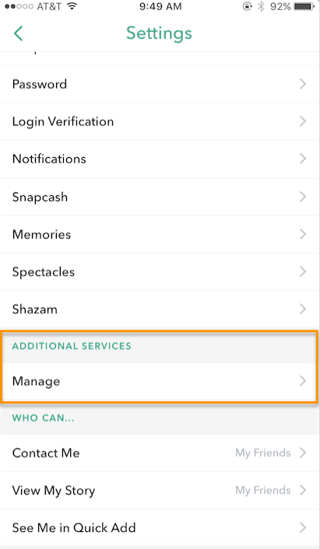
4) Select “Friend Emojis.”
5) From there, you can tap into each signifier and choose a new emoji to represent what it means.
Source: Snapchat Support
And there you have it. We’ll keep this post updated with new developments in the world of Snapchat emojis. In the meantime, keep snapping to see how your emojis change, and let us know how long your longest snap streak is.
What’s your greatest Snapchat emoji achievement? Share with us in the comments below.
6 Questions to Ask Before Hiring a Freelance Graphic Designer
Hiring the wrong freelance graphic designer can make or break your brand or marketing objectives. A designer that can’t complete projects on time, lacks the ability to adapt to your brand aesthetic, or has never taken on the type of work you’re doing could cause you to lose business.
Regardless of the type of project you’re hiring a designer for, it’s important to make sure you’re bringing in the right person for the job. Pose these six questions to each candidate before making a hire.
6 Freelance Designer Interview Questions
1) What motivated you to apply for this project?
This question can reveal a lot about whether the graphic designer you’re interviewing is genuinely interested in your company and what they’ll be working on. If they aren’t, it’ll show in the final product — and that’s a losing situation for everyone.
Ask questions that gauge their knowledge of your business and goals, and observe how well their skills and interests align. You want a graphic designer who fundamentally understands what you are building and why it’s important. Ideally, they’ll already be familiar with your company or will have interacted with you as a customer in the past.
2) What is your workload like?
There’s a big difference between the level of attention you’ll get from your freelance designer if you’re providing a significant portion of their income versus sending them a small project here and there.
Before committing to a contract, set clear expectations around your requirements. Will you need closer to five or 40 hours of their time each week? Find out how booked up they are with other clients and if it’s realistic for them to take on your project given your expectations and their other commitments.
3) Can you describe your design aesthetic?
A critical factor to consider when hiring a graphic designer is whether their work aligns with the overall design aesthetic you envision for your project.
If the designer you’re considering has a portfolio full of edgy, hand-illustrated black-and-white cartoon characters, they might not be the best fit to work with a mature brand that wants to appear authoritative. It’s a good idea to look through the designer’s work to get a sense of whether their aesthetic jibes with your vision before getting too far into the interview process, but be sure to ask this question regardless.
4) What is your design process like?
The graphic designer you’re considering should be able to articulate a clear path to achieving your desired results. An inability to do so could mean they don’t have enough experience to suit your needs.
For example, here’s how veteran graphic designer Ian Paget of Logo Geek kicks off a project with a new client: “I start my design process by creating a list of goals that can be used as a tick-list to refer to during the design phase and when selecting the best solution. We cover areas such as the brand’s story, values, competition and target audience.”
Having a well-defined, agreed upon design process like this is key to the success of the designer-client relationship.
5) How would your other clients describe working with you?
When a graphic designer has a page of their portfolio website dedicated to testimonials or keeps an offline copy of positive reviews they’ve received from past clients, it tells you their customers are happy with their results and willing to publicly vouch for them. If they don’t offer to share, just ask.
However, if they’re unable to produce a few positive testimonials, that’s might be an indication they are unable to sustain good client relationships or produce quality results. Tread lightly.
6) Do you have a blog?
Graphic designers who have a blog and actively take steps to showcase their domain expertise are more likely to bring additional value, advice, and experience to the table –beyond the deliverables you’ve agreed upon. The right graphic designer with an active social media following or established personal brand can help create more than just a new style for your company; they can become a worthy advocate, too.
As for who should be asking the questions: If your graphic designer will be working hand-in-hand with other members of your content team such as writers and marketers, it’s essential these stakeholders have a say during the interview process. Aside from being able to weigh in on whether they like the designer’s work or not, your other team members’ inputs are valuable for a few reasons: they will have a close pulse on anticipating the timing for upcoming projects, an understanding of the deliverables, and will likely be the ones interacting most with the designer on a day-to-day basis.
These six questions will ensure you come out of the interview with a clear sense of whether the graphic designer candidate is right for the job. When you and the person you hire are on the same page, you’ll cultivate a better rapport and get mutually beneficial results.
The Decline of Organic Facebook Reach & How to Outsmart the Algorithm
If you’ve been managing a Facebook Page over the past few years, you’ve likely noticed a drop in how many of your fans have been viewing and interacting with your organic posts. This decline in organic Facebook reach came to a head in 2014, when marketers started picking up on (and complaining about) the situation in droves, prompting a response from Facebook’s VP of Advertising Technology, Brian Boland.
“Over the past few months, I’ve read articles and answered questions from many people who are concerned about declines in organic reach for their Facebook Pages,” Boland wrote in June of 2014.
He continued, “My colleagues and I at Facebook understand that this has been a pain point for many businesses, and we’re committed to helping you understand what’s driving this change … “
The two main reasons Boland cited for the organic reach decline? First, there’s simply too much content being published on Facebook, making visibility in the News Feed increasingly competitive. Second, Facebook is deliberately trying to show people the content that is most relevant to them, as opposed to surfacing all the content available.
The good news in all of this is that there’s a lot you can do to counteract these changes, like being more selective about what you publish, paying attention to when you publish, and putting money behind your posts (a.k.a. “boosting” them).
Download our free Facebook guide here for more tips on maximizing your Facebook reach.
Before we dive deeper into how you can improve your Facebook Page’s organic reach, let’s explore exactly what happened during the Great Organic Reach Decline of 2014, and how Facebook decides what content gets surfaced nowadays.
How (And Why) Facebook Reach Has Declined Over Time
Facebook defines organic reachas “how many people you can reach for free on Facebook by posting to your Page.” Prior to 2012, that number used to be much, much higher than it is now.
From the moment “Fan Pages” launched in 2007, anyone could create a Page for their company or organization, start collecting fans, and post unlimited messages to their fan bases with the assumption that they would see those messages. But when 2012 rolled around, Page managers learned that only a fraction of their Facebook fans — 16% on average — were seeing their Page posts in their News Feeds. And that fraction has only gotten smaller and smaller since.
A study from Edgerank Checker found that between February 2012 and March 2014, organic reach for the average Facebook Page dropped from 16% to 6.5%. Research from Social@Ogilvy, meanwhile, suggests that for Pages with more than 500,000 Likes, organic reach could be as low as 2%.
Based on the figures above, that means a Page with 10,000 fans could expect just 650 of them to actually see that Page’s posts in their News Feeds. For a Page with 1 million fans, about 20,000 would end up seeing posts (based on the 2% figure).
SocialFlow analyzed over 3,000 posts by publishers on Facebook and found that organic reach dropped 42% between January and May 2016.
Then, later in 2016, Facebook adjusted its News Feed algorithm again — to further prioritize content from friends and family over Pages. In the blog post announcing the algorithm change, Facebook Engineering Director Lars Backstrom warned that Pages could anticipate a dip in organic reach — which could leave reach lower than that earlier 2% estimate, in some cases.
After this algorithm adjustment, SocialFlow adjusted the decline in organic reach — which had dropped further. Between January and July 2016, publishers saw a 52% decline in organic reach on Facebook.
Fewer people seeing your Page’s organic posts on Facebook means fewer clicks, comments, and shares. And having fewer of those interactions means fewer conversions, leads, and customers. Understandably, this has annoyed the crap out of many a Facebook Page manager. So why would Facebook decide to decrease organic post visibility in the first place?
We already touched on Facebook’s official response to this question in the introduction: There are simply too many Pages producing too much content for too many fans, which means competition for visibility on the News Feed is high. What’s more, Facebook is trying to make sure people are only seeing the best content — the stuff that is relevant to them.
Some publishers have cracked the code when it comes to engagement on Facebook: by publishing and broadcasting video. (And we’ll get into that later in the post.) But many in the marketing world suspect that Facebook had (and still has) an ulterior motive: to get people to start spending more on ads.
More Money = More Reach
As Facebook has evolved into more of a paid marketing platform than an organic one, Page managers are realizing they’re now expected to pay for ads yet again to reach those newly acquired Fans, even if those Fans have seemingly elected to see a brand’s posts by liking their Page in the first place.
In a 2014 interview with Digiday, James Del (who was the head of now-defunct Gawker’s content studio at the time) summed up the general sentiment:
Facebook may be pulling off one of the most lucrative grifts of all time; first, they convinced brands they needed to purchase all their Fans and Likes — even though everyone knows you can’t buy love; then, Facebook continues to charge those same brands money to speak to the Fans they just bought.”
Of course, Facebook has denied that this is the case. Boland even had a section in his 2014 organic reach update post titled, “Is organic reach dropping because Facebook is trying to make more money?” Boland’s response:
No. Our goal is always to provide the best experience for the people that use Facebook. We believe that delivering the best experiences for people also benefits the businesses that use Facebook. If people are more active and engaged with stories that appear in News Feed, they are also more likely to be active and engaged with content from businesses.”
From Facebook’s perspective, it’s simply not an ideal user experience to flood the News Feed with posts just because a Page has lots of Likes and is publishing prolifically.
Nowadays, Facebook is encouraging marketers to look at their fan bases as a way to make paid advertising more effective rather than using it as a free broadcast channel. Additionally, Facebook says you should assume organic reach will eventually arrive at zero. So, if you really want to reach your target audience on Facebook, you’ll need to supplement your organic efforts with some paid advertising.
Additionally, Facebook advises marketers to expect things to keep changing, and often times for the better. Facebook has never been stagnant in terms of innovation, so no marketer can figure out a formula and then stick with it forever.
That being said, knowing how Facebook currently surfaces organic content in the News Feed can be helpful for understanding the broader Facebook marketing ecosystem.
How Facebook’s News Feed Algorithm Works
When Facebook first launched News Feed back in 2006, the algorithm was pretty basic. Different post formats were assigned different point values — so a post with just text might be worth one point, while a post with a link in it might be worth two points, and so on. By multiplying the post format point value by the number of people interacting with a given post, Facebook could generate a ranking system for determining the order in which posts would appear.
As the years rolled on, the News Feed algorithm evolved to factor in the recency of posts, as well as the relationship between the person doing the posting and the person interacting with said post. This iteration of the algorithm was known as EdgeRank. But in 2011, Facebook abandoned EdgeRank for a more complex algorithm that incorporates machine learning.
That machine learning-based algorithm is what’s responsible for surfacing content on your News Feed today. Unlike its predecessors, which assigned generic point values to post formats, the current algorithm adapts to individual user preferences. So, for example, if you never, ever, interact with photos in your News Feed, Facebook’s algorithm will pick up on that and show you fewer photos over time.
On the other side of the coin, Facebook has identified for marketers the content formats that drive engagement and sharing — native and live videos. Facebook ranks live videos higher in the News Feed, as well as videos with higher watch and completion rates and videos that are clicked on or unmuted as signals of viewer interest.
Ultimately, there are thousands of factors that inform Facebook’s algorithm, which range from using trigger words that indicate important events (e.g., “congratulations”) to whether or not you’ve actually clicked a link in a post before liking it.
Facebook’s end goal here is to have its algorithm match News Feed content to the individual needs and interests of each and every user. As Facebook’s Chief Product Officer, Chris Cox, told Time in a 2015 interview:
If you could rate everything that happened on Earth today that was published anywhere by any of your friends, any of your family, any news source…and then pick the 10 that were the most meaningful to know today, that would be a really cool service for us to build. That is really what we aspire to have News Feed become.”
How to Deal With Declining Organic Reach
Now that you’ve got a better understanding of how Facebook surfaces content, let’s explore some tips for dealing with the decline in organic Page reach.
1) Be more selective about what you post.
Marketers have to switch gears from untargeted, frequent publishing to targeted, selective publishing. The goal is no longer to spray and pray — it’s to get as much interaction from a single post as possible. Each post published to a brand Page can be targeted to a specific audience regardless of whether or not it’s sponsored, which may improve overall interaction with that post among other people who are likely to find it more interesting and relevant.
2) Remind your Fans they can go to Pages Feed on the left sidebar of their News Feed to see content from Pages they’ve Liked.
3) Educate your super fans that they can update their notification settings from your Page.
4) Encourage fans to engage with your posts when they do see them, so they see more of them.
This can be as simple as adding a reminder to “Please Like and share” at the end of your posts.
5) Share engaging videos on Facebook.
Videos on Facebook are engaging and make visitors more likely to stop, watch, and maybe even unmute when they spot them in the News Feed. Use videos with captions, animations, and engaging visuals to draw in Facebook users’ attention.
According to a recent study by quintly, native Facebook videos have an 186% higher engagement rate and are shared more than 1000% more than videos linked to from other hosting sites. Take the extra steps to publish videos for the platforms you’re promoting them on for best results — distribute your content on Facebook, YouTube, and other social platforms you’re trying to leverage.
6) Broadcast on Facebook Live.
If you’re not already doing so, start broadcasting on Facebook Live. Users spend 3X more time watching live broadcasts than traditional videos on the platform, so start experimenting with live content if you’re concerned about your organic reach. Advertise what you’re doing on different platforms to generate buzz, broadcast for several minutes (at least) to help your broadcast get surfaced in the News Feed, and share authentic, behind-the-scenes content to attract and interest your viewers.
To learn more about Facebook Live broadcasting strategies, check out our free guide.
7) Re-allocate your time and effort toward your owned assets.
Since the only constant with Facebook (and the larger digital media landscape) is change, it’s always safest to focus on the digital channels you entirely own and control — your website and blog. Spend the vast majority of your effort creating content (blog posts and long-form content such as ebooks, case studies, or videos) that will continue to garner inbound traffic, leads, and customers long after they’re first created. If you have time and budget, share those assets to Facebook for additional reach.
8) Start treating Facebook like a paid ad platform.
If you’re going to pay-to-play, get your targeting right. Once you’ve built an audience of relevant fans, focus on advertising the content assets you’ve created — blog posts, ebooks, etc. — and use ads to amplify them to targeted users. Remember: It’s likely only a matter of time before organic reach hits zero, so you might as well hone your paid strategy now, which brings me to one final recommendation …
9) If you do advertise, go beyond the basics.
Facebook’s targeting capabilities have gotten considerably better over the past few years. You can now pay to reach your ideal persona based on demographics, interests, web behavior, and more. Additionally, there are a bunch of tools and features that can help you maximize the effectiveness of your campaigns, including:
- Conversion Tracking: Track the actions of site visitors after viewing your Facebook ad.
- Custom Audiences: Target Facebook ads based on your email list.
- Lookalike Audiences: Target Facebook users similar to your customers.
- Audience Insights: Learn about your existing Facebook audience to better target your ads.
- Website Custom Audiences: Target Facebook users who have visited your website before.
- Facebook Exchange: Place retargeted ads on Facebook for users who’ve visited a certain product or service page on your site.
- Lots of Customizable Reporting: Create reports based on metrics that matter most for your business.
To learn more about how you can improve your Facebook Page’s reach, check out our free guide: How to Attract Customers with Facebook.
What are your thoughts and experiences with Facebook’s organic reach decline? How have you adjusted your inbound marketing strategy accordingly?
Editor’s Note: This post was originally published in June 2014 and has been updated and for freshness, accuracy, and comprehensiveness.
Clip Art Through the Years: A Nostalgic Look Back
When I was growing up, it was a pretty big deal to have a computer with an operating system other than DOS. If you had an Apple, or even a computer with Windows, your house was the place to be. Not only were you likely to have the coolest games, but also, you probably had access to clip art libraries, which made for hours of entertainment — for me, at least.
Today, it’s hard to imagine a world where you can’t procure an image just by searching for it online. When I was in school, the only way to include a picture in a book report, for example, was with enough luck to find what I was looking for in a magazine. Clip art opened up a whole new world of visuals for academic assignments — not to mention, the newsletters that my childhood, future-writer self liked to put together for fun.
But today, clip art has become a bit of a thing of the past, at least since Microsoft retired its version in 2014. That’s an important distinction — clip art isn’t limited to Microsoft, and actually had several predecessors before it found its way into the likes of Word and PowerPoint.
And maybe its retirement was for the best — when I think back to some of its more popular images, they would look positively antiquated today. But where did clip art come from, anyway? Today, we’re honoring its legacy with a trip through time.
The History of Clip Art
The 1980s
Source: Computer History Museum
It all began with the idea to create a digital library of images. That was made possible by a program called VCN ExecuVision, a presentation program created in 1983 for IBM personal computers. Think of it as a primitive version of PowerPoint. But the $400 software didn’t come with these image libraries — instead, they were available on separate floppy disks that had to be purchased for $90 each.
But despite this seemingly trailblazing effort on behalf of IBM, it was really Apple who may have emerged as a leader in the digital image space, at least around the early-to-mid 1980s. That’s partially due to the 1984 development of MacPaint, which was released alongside Apple’s word processing program, MacWrite. As the story goes, they were the only two applications pre-installed on this historic Macintosh 128K.
But what made MacPaint so important was its role as the first program that allowed users to manipulate bitmap images: The “simple line art,” according to The Atlantic, that comprised “early electronic clip art.”
Source: DigiBarn
Not long after that, however, the T/Maker Company collaborated with Apple to develop another word processing program, WriteNow. While it’s not clear if that particular program came equipped with its own image library, the same company began producing and selling groups of bitmap images under a new name: ClickArt.
Source: Vetusware
The 1990s
Source: MakeUseOf
By the mid-1990s, T/Maker was the largest distributor of unlicensed images, with a library of roughly half a million in 1995. Microsoft took note of ClickArt’s success, and thought to eliminate the extra step of having to install additional software to access artwork. So in 1996, Microsoft Word 6.0 came equipped with 82 clip art images — a miniscule amount compared to the 120,515 files available on openclipart.org today.
And yet, Microsoft became the brand most strongly identified with the idea of clip art, despite its predecessors having laid much of the groundwork. That could be because its in-app nature — across the entire Microsoft Office Suite — made adding art to documents and presentations a groundbreakingly seamless process.
The Early 2000s
Source: Wayback Machine
By August 2000, at least 41% of U.S. households had computers with internet access, indicating that people were using it more and more for consuming information and media. And like so many other things — books, for one — clip art was becoming available for purchase online via sites like clipart.com, which is still in existence, but today looks a bit different than its 1996 counterpart above.
And while clip art isn’t exactly one of those things that we think of as having suffered “death by download” — like books, music, and movies — the ability to procure images online made something like Microsoft’s in-app feature obsolete.
Clip Art’s (Semi) Retirement
In December 2014, Microsoft announced that it would be doing away with any in-app art libraries.
“The Office.com Clip Art and image library has closed shop,” the statement read.
Instead, users would now have to use either images from their own devices, or those found through Bing Image Search, where they’re now automatically sent when searching for art within Microsoft apps — step-by-step directions can be found here.
The announcement, for many, read as the end of an era. What would become of cartoonish images of urban landscapes, or out-of-date business travelers with flip phones? As it turns out, if that’s what you’re looking for, you might be in luck.
Clip Art in 2017 and Beyond
For those who need a fix of this kind of old-school imagery, not all hope is lost. There are still plenty of resources out there to find these pictures, including the aforementioned sites openclipart.org and clipart.com. Plus, as The Atlantic so astutely points out, if you search Bing images for “clip art,” you might find some of those fittingly nostalgic results:
And perhaps this version of clip art isn’t really gone for good — after all, NPR once noted Microsoft’s penchant for revitalizing its older pieces of technology, like Clippy.
In any case, clip art has certainly taken many forms over the years — and we’re curious to see what shape, if any, it takes in the future.
Which clip art images make you the most nostalgic? Let us know in the comments.
6 Websites Every Growth Hacker Should Bookmark
I’ll start by saying this: I am officially obsessed with growth hacking these days.
I never thought of myself as a growth marketer, let alone a growth hacker. Maybe that’s because it’s a somewhat new concept — or a new name for a classic concept, at least. But as a content creator, I’ve learned how imperative it is to know how to grow any sort of property, whether it’s a blog, a podcast, or a brand.
That might be what I love the most about the HubSpot Growth Stack, for example. It was built with the idea that every marketer stands to benefit from understanding how growth hacking works. But where do you learn this stuff?
A Google search for “growth hacking” yields a plethora of results. But as the term gains more popularity, filtering the results for the best resources becomes more difficult. Fear not — we combed through these sites and narrowed them down to six of the most comprehensive resources. So start reading, and get ready to grow.
6 Websites Every Growth Hacker Should Bookmark
1) GrowthHackers
Let’s start with the obvious. When you want to learn how to grow, the URL “growthhackers.com” seems like a natural place to start. Its founder and CEO, Sean Ellis, was pretty much a “growth hacker” before that label was really a thing — since 2008, he’s served in interim growth roles at companies like Eventbrite and Dropbox, helping them scale in their early stages.
GrowthHackers is a community of resources and experts that “helps teams unlock their company’s full growth potential.” And it’s within that community section of the site where the greatest wealth of knowledge lives. From a forum of growth-related posts, to a section on growth case studies, to the Growth University, this destination is one of the most comprehensive growth hacking resources available online.
2) KISSmetrics
KISSmetrics is one of the leading analytics platforms that marketers use to obtain the data they need to grow. But beyond the product itself, the company provides a plethora of resources for growth hackers; for example, its blog and series of webinars.
The blog might be one of our favorites. Its entries are a mix of tactical content and great stories, like this one about how Calendly pulled off double-digit growth. Plus, if you’re looking for fundamental knowledge about any area of growth, KISSmetrics has organized these types of blog posts into collective academy guides. If you’re just getting started, we recommend checking out this catalogue of entries synthesized for the “The Basics of Analytics.”
3) Quick Sprout
Quick Sprout is largely the work of Neil Patel — a name with which anyone even remotely involved with digital marketing is familiar. We like to call him a “growth rockstar” — he founded the aforementioned KISSmetrics shortly after graduating from CSU Fullerton.
On Quick Sprout, Patel does growth consulting work and leads an online “university” on growing website traffic. It’s also home to one of his many valuable blogs, where he provides tips on conversion, marketing tech, and more. For a handy growth marketing crash course, check out this post on “How to Become an Innovative Growth Hacker in One Month.”
4) Coelevate
Brian Balfour is another growth expert who cut his teeth in the startup sector. In fact, he’s been known to quote the words of investor Paul Graham: “Startups = Growth.” And on Coelevate, he frequently pens essays about many topics under this umbrella, like “10 Reasons Why Companies Fail At Growth” and “Traction vs Growth.”
Balfour speaks with a unique skill set. In addition to serving as the co-founder of startups like Viximo and Boundless Learning — which were both acquired — he also worked in venture capital (VC) as an entrepreneur-in-residence. He views growth from the perspective of both the entrepreneur and the investor. In addition to his words on Coelevate, you can follow his insights on the blog for Reforge, his growth program creation business.
5) Andrewchen.co
Since its 2009 founding, one thing has been certain about Uber: It’s experienced unequivocal brand growth. And it’s the kind of growth that can only be achieved with the right scale, which experts like Andrew Chen are brought on board to oversee.
And in addition to serving as Uber’s head of rider growth, Chen continues to share insights on his own website, Andrewchen.co. His knowledge stems from his experience, much like Balfour, as both an entrepreneur-in-residence in the VC sector, and as what he calls an “entrepreneur-out-of-residence” — in both capacities, he’s helped to grow early-stage businesses like Barkbox and Tinder.
6) OkDork
Noah Kagan, the person behind growth blog OkDork, is one of those folks who’s so accomplished that we have to ask, “How many lives have you had?” Today, Kagan’s day job is “Chief Sumo” with the Sumo Group, the maker of tools to help companies grow website traffic. It’s the latest in a string of product launches and marketing successes he’s experienced, with brands ranging from Facebook to Mint.
Kagan calls OkDork a guide to “marketing, business musings, online communities and other things to kill time while you are at work.” That community part is key. He invites readers to participate, comment, and exchange thoughts. And since its December 2016 debut, his podcast, “Noah Kagan Presents,” also calls OKDork home. Check out “The 5 am Challenge” — it happens to be one of this early riser’s favorite episodes.
Continual Growth
“Growth” can be a little bit of a big, scary term at first. Building and scaling a product or service from scratch might seem like something that requires the help of an expert, or a large team. But as these sites show — that’s not the case. With the right approach, resources, and amount of experimentation, you can become a self-taught growth hacker.
From online communities to the HubSpot Growth Stack, you’ll be well on your way. But be patient — you might have to use a combination of these resources and go back to them as you work your way through projects. That’s why we suggest you bookmark all of these sites. Growth takes time, but it’s more than possible.
What are your go-to growth hacking websites? Let us know in the comments.
The Beginner’s Guide to Email Marketing [Free Ebook]
Companies often list email as one of their most powerful marketing channels. With email usage worldwide projected to reach 3 billion users by 2020, businesses simply have to continue using email marketing to reach their audiences if they want to scale quickly.
But anyone who’s tried email marketing knows it’s not as simple as quickly drafting a message and hitting the “send” button. You have to build a healthy email list, make sure you’re complying with CAN-SPAM regulations, segment your lists so you’re delivering the right messages to the right people, create different types of emails for all different situations, design attractive and on-brand emails, analyze results … is your head spinning yet?
Yes, effective email marketing takes time, effort, and strategy, but it’s something you can learn and implement quickly. We’ve creating a new guide to help you do just that: The Beginner’s Guide to Email Marketing.
This email marketing beginner’s guide will take you step-by-step through how to get started with email marketing, starting at the very beginning. It covers:
- Email marketing best practices;
- How to grow a healthy email list;
- How to save time using email automation;
- The different types of marketing emails (with examples);
- The most important email metrics to measure (with formulas);
- An email A/B testing checklist.
This guide will give you all the information you need to start a successful email campaign on your own. So download our free ebook,The Beginner’s Guide to Email Marketing, and you’ll find that you don’t need to be a seasoned email marketing expert to see a positive ROI in a short amount of time.