
3 Traits That Separate the Best Leaders from Average Ones
The best leaders seem to possess an elusive mix of qualities that resist precise categorization.
It feels like every week there’s a new study or book discussing what the best leaders do and don’t do, but what if there was a more data-driven approach to identifying pivotal indicators of successful leadership?
New data from Russell Reynolds Associates and Hogan Assessment Systems sheds some light on what separates the best leaders from average ones. By analyzing interviews, resumes, and multiple personality assessment questionnaires, researchers constructed in-depth psychometric profiles of 200 CEOs from around the world. They then validated the trends in an additional sample of 700 CEOs from Hogan’s global database.
The final results, published in Harvard Business Review, reveal three major indicators of successful CEOs. Although there is no single perfect profile of a successful leader, the following qualities are usually associated with high-performing chief executives. Check them out below to see where you stand.
3 Successful Leadership Indicators
1) They have a strong sense of purpose, passion, and urgency.
The worst thing a CEO can do, according to a related study on CEO transitions by McKinsey & Company, is “sit on their hands.” The best CEOs move swiftly and decisively towards their personal and professional goals, never losing sight of their organization’s core purpose or wavering in their desire for change.
Let’s break these specific qualities down to examine each individually:
Purpose
Think of purpose like an internal compass, guiding a leader’s actions and keeping them focused on the big picture objectives that impact their organization’s bottom line. The best leaders have an innate ability to understand how different components of their organizations contribute to long term goals, and they’re comfortable taking ownership of those larger missions.
Passion
How do you measure passion? It’s tricky, but researchers found that leaders who worked towards their organizational goals with intensity and genuine excitement were more successful overall.
Passion keeps leaders personally invested in the success of their organizations. It helps foster a profound sense of ownership over the changes they initiate, and motivates them to nurture those initiatives with enthusiasm and conviction.
Urgency
Researchers found that urgency often manifested in successful CEOs as impatience and a consistent eagerness to drive progress. Most quality leaders are experts at mobilizing their teams, but the very best leaders are driven by a constant and deeply personal need to move things forward and seek new developments.
They aren’t satisfied with moving slowly or with too much caution — they understand the importance of staying nimble and pushing their organizations towards transformative change. It’s important to note, however, that the best leaders don’t just make unreasonably impulsive decisions — they take measured risks to move their organizations into the future and keep ahead of the competition.
2) They know how to sift through information and find the most important parts.
Leaders are responsible for managing potentially overwhelming amounts of information on a daily basis. Their responsibilities are broad and widely varied, requiring them to simultaneously oversee a number of initiatives and projects without losing focus on their organization’s core objectives.
With so many moving parts to keep track of, leaders need to make tough decisions about what to prioritize. And this requires an innate ability to sift through information and make firm, confident choices about how to move their organizations forward.
The most successful leaders have an elevated capacity to “separate the signal from the noise,” as the Russell Reynolds Associates study summarized it. “Great CEOs have a ‘nose’ for what are the most significant issues, challenges, threats, and opportunities facing an organization,” Dean Stamoulis, the leader of Russell Reynolds Associates, wrote in Harvard Business Review.
While it might seem like it sometimes, successful leaders don’t exactly have a psychic power that enables them to make the best decisions — but they do know how to examine many different sources of information and make clear, largely independent decisions they can proudly stand behind. The best leaders navigate the complex demands of their roles with a heightened decisiveness that sets them apart from the pack.
3) They are humble, always learning, and master collaborators.
This might conflict with the conventional view of the chief executive as an extroverted and wildly independent commander, but the Russell Reynolds Associates study found that these leadership qualities were related to favorable organizational results.
The best leaders are more than capable of acting independently, but they are self-aware enough to know that they can’t possibly know or do everything. To compensate for the gaps in their knowledge, they aren’t afraid to turn to advisors and employees to seek new ideas and points of view. They are constantly in pursuit of the best new ideas, and they don’t care if those ideas come from themselves or from someone else.
Coupled with this open mindedness is a desire to always be absorbing new information, honing new skills, and bettering their own abilities through constant learning. The best leaders are not content to operate solely on what they currently know — they recognize that the demands of their position are always changing, and they need to better themselves to keep their organizations successful.
So what does constant learning look like? It’s more than just reading new books and listening to podcasts. The most successful leaders learn from the people around them by engaging with projects at every level and surrounding themselves with people who aren’t afraid to challenge even their most closely held ideas.
It’s this consistent intellectual immersion that keep leaders on their toes, forcing them to reevaluate, defend, and question what they know.
What traits do you look for in a leader?
17 of the Best Tools to Find and Interview Remote Candidates
You don’t know it yet, but you need Kelsey.
She’s an ideal fit, the right mix of smarts and experience, temperament and personality. She’s the missing link your department has been looking for, needing. Thankfully, the need is mutual. Kelsey is looking for a job.
Unfortunately, you don’t know Kelsey exists because she lives 1,691 miles away. And you probably never will because, right now, there’s a room full of candidates sitting outside your office, eager to impress in a face-to-face interview.
You’d hire one of them before spending the time and money to source long-distance talent, right? It’s more convenient, after all. Not to mention less expensive, less risky. Kelsey can’t compete with that local, in-person pool … right?
Wrong. There’s a trove of online tools designed to help you easily find and confidently hire Kelsey. You just need to start using them.
17 Tools to Find & Interview Remote Candidates
If you’re not sourcing talent outside of your zip code, then that’s too bad because your competitors are. They’re using a variety of tools that streamline how they find and connect with candidates, specifically knowledge workers.
Most of these tools fall under one of three categories:
- Basic video conferencing tools, which create authentic connections.
- Applicant tracking systems, which automate the recruitment process.
- Technical assessment platforms, which test critical knowledge and skills.
Let’s take a closer look …
Basic Video Conferencing Tools
I live in Chicago. My three nephews live in Maryland. Physically, we’re hundreds of miles apart. But that reality, somehow, melts away as soon as my sister picks up my FaceTime call. That’s when the boys rush in from every direction, vying for their piece of on-screen real estate, giggling through their gap-toothed smiles.
It’s a wonderful experience, warm and personal. It feels real, like I’m there with them.
That’s what makes video calls so potent and powerful: They help us forget we’re not in-person. They cut through the distance. They put Kelsey on the same plane as all those in-person candidates.
Use these tools to achieve an authentic connection with anyone, regardless of how many miles separate you:
1) Google Hangouts
Google Hangouts is available to anyone with a Google account. Beautiful, simple, and intuitive, the Hangouts icon has become a standard fixture on desktops around the world. Your candidate will have it.
Price: Free.
2) Skype
Skype is proven. In addition to video chats, it can also be used to place high-quality global calls.
Price: Free. The “Business” plan, however, runs around $2 per user per month.
3) Spark Hire
Spark Hire is like Google Hangouts or Skype, except you don’t have to be present during the interview. The tool lets candidates record their video answers on their own time, while you’re off in another meeting, or eating lunch, or sleeping.
You can then watch and evaluate on your time, when you’re ready.
Price: $99 a month will get you started.
4) VidCruiter
VidCruiter can display your logo in the corner of the screen during a video interview, giving the process a professional, official veneer. The platform offers a variety of similar customizations that are simple to test and apply.
Price: Tailored to each customer, true to the platform itself.
Applicant Tracking Systems
Hiring only one person can be a long, involved process. Hiring many people, all at once, successfully, can be impossible. There are too many boxes to check, too many tasks to juggle. You’d need a team to make the process efficient and economical … or would you?
An applicant tracking system, or ATS, is software that helps managers and recruiters streamline the hiring process by digitizing and automating essential hiring functions, like scheduling interviews or performing background checks.
An ATS can also be programed to crawl resumes and find great-fit candidates, like Kelsey. This will save you time and energy. There is no doubt it’s a valuable tool, especially if you’re hiring several positions at once.
Curious? Here’s our list of standout platforms:
5) Jobvite
Jobvite, like any ATS, does a lot. It’s a CRM. It performs crisp video interviews. It also sports a highly customizable interface that’ll give candidates an honest representation of your brand as they carve through the interview process.
Price: $500 per month for less than 100 employees plus a $1500 ‘activation charge’ (which includes training).
6) Betterteam
Betterteam can automatically write your job ad for you. It can then post that ad to more than a hundred popular job boards and sites, like Glassdoor, Monster, CareerBuilder, and LinkedIn.
Want to add a job board to your website? Betterteam lets you do that, too. No coding skills necessary.
Price: Free to start.
7) HireVue
HireVue uses predictive analytics and machine learning to determine, for example, if an applicant will turnover quickly, among other invaluable tidbits. Also, if you’re having trouble configuring one of the platform’s many features, HireVue’s paramount customer service will help you get back on your feet.
Price: The “On-Site” package will run you $499 — $899 for unlimited interviews per location. There are also “Recorded” and “Live” packages.
8) Homerun
Homerun lets you set up a dedicated career site that you can easily tailor to perfectly reflect your brand and culture: Control every image and word, every font and color and form.
Unlike other platforms, Homerun lets companies categorically be themselves, a quality candidates will always recognize, even if they’re 1,691 miles away.
Price: €19 per active job opening per month, which is the “Pay For What You Use” plan.
9) Hyrell
Hyrell has all the bells and whistles you’d expect from an ATS: Easy interview scheduling, seamless communication features, job board posting, stellar account management, responsive technical support. Except Hyrell is optimized for franchise-based businesses.
Price: Ranges between $200 – $800 per month. There’s also an “Enterprise” package.
10) Lever
Lever helps companies source, interview, and hire “top-tier” talent, people who may not even be job hunting at the moment.
Price: You’ll have to contact Lever to get a custom quote, which, depending on the features, typically falls between $300 and $3,000.
11) LinkedIn Recruiter
LinkedIn Recruiter leverages the network’s more than 400 million users — along with premium features, like InMail and analytics tools — to help you find the ideal person. You can also source from anywhere with Recruiter Mobile, a convenient app.
Price: It’s $899.99 per month for the “Corporate” plan. The “Lite” version comes in at $239.99 per month.
12) Newton
Newton uses smart, decision-assistance tools to help small- and medium-sized organizations manage every stage of the hiring process. The platform also has a baked-in compliance feature that helps protect employers against fines and lawsuits.
Price: The basic package will run you $399.99 per month.
13) Proven
Proven streamlines the hiring process for small businesses, letting you post a job ad to more than a hundred popular job board sites, then categorize your responses into buckets for quick, convenient reference.
Price: Your first job ad is free. After that, you can pay-as-you-go for about $10 a pop.
The Technical Assessment Platforms
Kelsey, by the way, is a coder. A very good one, in fact. Based on her experience, you have every reason to believe her. But you can’t know for sure until you test her … live.
You could fly her in and go through the expensive motions: Airfare, lunch, hotel. Or you can send her a link and watch her work, in real time on your screen, as she takes your test remotely. The latter is easy thanks to these platforms:
14) CoderPad
CoderPad lets you watch engineers code in real-time. It supports over 20 languages, including C/C++, Swift, Java, Ruby, and Python. The platform also allows you to playback an interview, stroke-for-stroke, so you can show others involved in the selection process.
Price: You’ll pay $50 per month for a “Personal” account, which allows one user to conduct a maximum of 20 monthly interviews. The cost goes up from there.
15) HackerRank
HackerRank is rooted in crowdsourced coding competitions called CodeChallenges, which you can post directly on your career page to attract candidates. You can also use the platform to run a CodeSprint, which brings thousands of programmers together to compete in the same competitions.
This process lets the best talent organically rise to the surface.
Price: You’ll have to speak with sales after your 14-day free trial is up.
16) Interview Zen
Interview Zen lets you create open-ended coding interviews that are as unique and role-specific as necessary. Here’s an example from the site:
Write a program that prints the numbers from 1 to 100. But for multiples of three print “Fizz” instead of the number and for the multiples of five print “Buzz”. For numbers which are multiples of both three and five print “FizzBuzz”.
Price: Free.
17) Codility
Codility, like the other tools on this list, will help you source, screen, and interview technical talent. But the platform’s insightful and objective assessment scores help non-technical recruiters make more informed decisions.
Price: Single users pay $159 monthly. Equipping multiple users, however, will require a conversation.
“Hi, Kelsey,” you say, “how was your flight?”
“It was quick and easy, thank you for asking,” she says, smiling. “It’s so nice to finally meet you in person.”
You smile back, eager to make her an offer.
“I know,” you say, “it feels like I already know you.”
What are your favorite tools for finding and interviewing remote talent? Share them in the comments below.
How to Calculate Your Lead Generation Goals [Free Calculator]
To hit revenue and growth goals, your company needs customers. To get customers in an inbound world, your marketing team is responsible for generating leads and funneling them over to your sales team. The question is … how many leads?
When your boss asks you what your lead goal is, don’t just pull an answer out of thin air. Your projections need to be based on math and rooted in your company’s larger goals. That’s where our new lead goal calculator comes in.
To make it easier for marketers like you to set your lead goals for the month, we created a calculator template in Google Sheets and Excel that will calculate exactly how many leads your inbound marketing efforts need to drive each month for your sales organization to hit their numbers and your company to meet its growth goals. With just a few quick inputs, like monthly revenue goal and average deal size, this template will do all the math for you.
You can download the Lead Goal Calculator here. It’ll help you:
- Calculate the number of leads you need to hit your revenue goals.
- Measure current sales close rates.
- Assign dollar values to each of your major lead sources.
- Track monthly lead generation by channel.
- Commit to a monthly lead goal.
You can also use this template to experiment. For example, try changing the conversion rates and just see how your lead goals go down or up accordingly.
Ready to start calculating your lead goals for next month? Download our Lead Goal Calculator today.
6 Phrases that Kill Your Credibility with Clients
Establishing credibility isn’t just about asserting your intelligence or expertise.
Real credibility comes from a careful balance of trust, empathy, and good judgment. And it needs to be attentively nurtured throughout your client relationships.
To help you avoid unintentionally damaging your credibility, we’ve compiled a list of six seemingly harmless phrases that can undermine your credibility and communicate to the client that you aren’t fully on their team. Are you guilty of using any of these?
6 Phrases that Kill Your Credibility with Clients
1) “This tactic is guaranteed to boost your conversion rate by 60%.”
Avoid exaggerating or overselling the successes of your services — your clients can smell insincerity a mile away, and it’s sure to turn them off. Presenting them with inflated numbers or unrealistic claims won’t boost your credibility, it will make them question whether you can provide any honest value to their business.
Remember: there’s confidence, and then there’s just plain bragging. Your clients only care about your past successes in the context of how they can directly provide value now, so avoid reading off a laundry list of accomplishments or stats. It can come across as self-serving and out of touch with the client’s specific needs.
Even if you’re not overtly exaggerating, be sure to cut out lofty words like “guaranteed,” or “absolutely.” These can come across as deceptive and pushy, and fail to communicate what your agency can actually do.
Focus on explaining the genuine value of your agency’s services. If you highlight a few proven strengths, rather than a showy list of claims, your client will be more likely trust your expertise.
2) “Sorry I couldn’t get that to you by Wednesday — something came up.”
When your actions don’t align with your words, you end up falling into what Prasad Kaipa calls a “Credibility Gap.”
Avoiding the Credibility Gap starts with setting realistic expectations and time lines on projects, and keeping an open line of communication to alert your clients if anything goes wrong or takes an unexpected turn.
Kaipa explains to Harvard Business Review that the best way to set realistic expectations is to be more aware of what you’re promising. He recommends checking in with yourself regularly and asking, “Am I saying something that implies a promise? What are the odds I can or will actually follow through? How can I articulate my ideas and concerns in such a way as to not raise false expectations?”
If you realize too late that a deadline isn’t feasible, don’t freak out. It’s not unusual for unanticipated issues to arise during the course of a project, but as long as you remain transparent and clearly communicate the issues to your clients, your credibility isn’t likely to suffer.
3) “We call this marketing approach ‘Infrared Magical Marketing Synthesis,’ or IMMS.”
Credibility requires clear and accessible communication, and nothing undermines this more than an overuse of jargon or acronyms. Overcomplicated words and insider phrases don’t help you connect with your client — they create barriers.
People often unknowingly fall back on jargon when they want to sound clever or informed, but in reality, it can end up hurting your credibility much more than it helps.
When you rely too heavily on jargon to convey information, it can diminish the meaning of your message and cause unnecessary confusion. Even worse, it has the potential to isolate your client and make them feel like an outsider in your discussions. Using too much jargon can also come across as evasive — like you’re unwilling or incapable of giving clients a simple, straightforward answer.
Before meeting with a client, comb through your presentation and eliminate any jargon-heavy words or acronyms that don’t actively contribute to your message. Your clients will appreciate the directness of your communication style, and will likely be more receptive to what you have to say.
4) “Although the numbers look bad now, this tactic has actually worked for many of our other clients.”
Ignoring or glossing over factual evidence in favor of selective, anecdotal evidence isn’t just a rhetorical fallacy, it’s also a major credibility killer.
The client hired you because you have expertise they think can benefit their business, and that means admitting when an approach isn’t performing as well as planned and pivoting towards something with more potential. When you scrounge around for evidence that supports a not-so-great approach as a way to salvage it, you end up falling victim to confirmation bias.
Confirmation bias occurs when you interpret all evidence — even ambiguous or anecdotal evidence — as confirmation of your preexisting beliefs. This can cause you to problematically overlook alternative possibilities that could benefit the client more than the current approach. In other words, you get so focused on pushing a particular strategy that you fail to see any real evidence against it.
The best way to avoid confirmation bias and keep your credibility intact is to focus on new evidence as objectively as possible, and prove the value of your work through clear reporting. If you’re scrambling to justify a particular tactic, it’s might be time to let it go, rather than damage your credibility attempting to defend it.
5) “I just don’t think that approach is going to work.”
Anyone who’s ever worked in a people-facing role knows how challenging it can be to always see eye-to-eye with clients — especially when you feel like you’re caught in a cycle of endless revisions that never seem to make them happy. You want to make sure your professional opinion is properly asserted, but it’s important to know when to step back defer to your client’s judgment.
If you get in the habit of shooting down your client’s input or ideas, they’ll start to think you haven’t taken the time to fully consider their point of view. Pushing back without proper justification can make you seem reactive and unthoughtful — and that undermines your credibility.
One of the best ways to establish your expertise and make your client feel comfortable and respected is to know when you don’t have the best answer, and let your client make the final call.
6) “Does that make sense?”
This seemingly innocuous phrase has the potential to be so damaging to your credibility that Jerry Weissman, a leading corporate presentations coach, has written a whole article on it in Harvard Business Review.
When you follow up a presentation or assertion with, “Does that make sense?” it has two negative implications, according to Weissman:
- Uncertainty on the part of the speaker about the accuracy or credibility of the content.
- Doubt about the ability of the audience to comprehend or appreciate the content.
Not only does this phrase make it seem like you’re unsure what you’re talking about, it also calls into question the competence of your client — which isn’t a great way to build a positive relationship.
Weissman recommends a switch to “Do you have any questions?” to avoid the negative connotations of this phrase. It’s a simple switch that can save your credibility from taking a hit at your next client meeting.
What phrases do you avoid using with clients? Let us know in the comments.
42 Visual Content Marketing Statistics You Should Know in 2017
At the end of every year, we like to read through some of the major reports on inbound marketing, content marketing, social media, and online behavior.
It’s amazing how fast things can change in 12 short months — and 2016 was certainly no exception.
This year, we’ve seen the importance of visual content emphasized by the changes that occurred across almost every major social network, including Facebook, Snapchat, Instagram, and Twitter. At the same time, videos have become powerful tools for brands looking to communicate more easily with their readers.
To help you keep pace with these trends, let’s take a look at some marketing statistics that demonstrate the impact visual content has on reach, engagement, and sales. The stats are categorized by General Visual Content, Video, Emerging Visual Marketing, Infographics, and Social Media.
(Want to learn more about content creation, strategy, and promotion? Take our free Content Marketing Certification course.)
42 Stats You Should Know About Visual Content Marketing in 2017
General Visual Content Statistics
1) 37% of marketers said visual marketing was the most important form of content for their business, second only to blogging (38%). Tweet (Source)
2) 74% of social media marketers use visual assets in their social media marketing, ahead of blogs (68%) and videos (60%). Tweet (Source)
3) When people hear information, they’re likely to remember only 10% of that information three days later. However, if a relevant image is paired with that same information, people retained 65% of the information three days later. Tweet (Source)
4) B2C marketers place greater importance on visual content than B2B marketers. Tweet (Source)
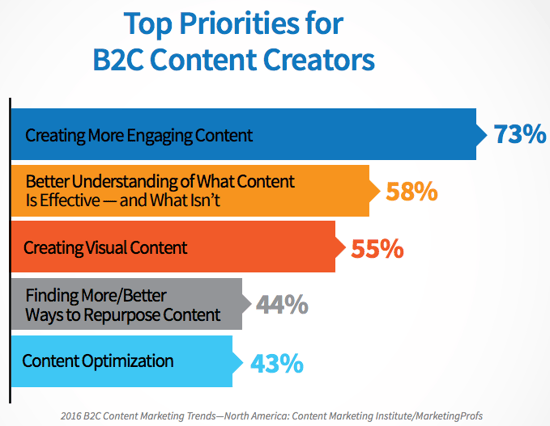
5) 51% of B2B marketers prioritized creating visual content assets in 2016. Tweet (Source)
Source: Content Marketing Institute
Video Marketing Statistics
6) By 2017, video content will represent 74% of all internet traffic. Tweet (Source)
7) Cisco projects that global internet traffic from videos will make up 80% of all internet traffic by 2019. Tweet (Source)
8) 76.5% of marketers and small business owners in an Animoto survey who have used video marketing say it had a direct impact on their business. Tweet (Source)
9) 34% of B2C marketers say pre-produced video will be critical to content marketing success in 2017. Tweet (Source)
10) 4X as many consumers would prefer to watch a video about a product than to read about it. Tweet (Source)
11) More than 60% of marketers and small business owners said they planned to increase investment in video marketing in 2017. Tweet (Source)
12) 62% of B2B marketers rated videos as an effective content marketing tactic in 2016. Tweet (Source)
13) Using the word “video” in an email subject line boosts open rates by 19% and clickthrough rates by 65%. Tweet (Source)
14) In a 2016 HubSpot survey, 43% of consumers wanted to see more video content in 2016. Tweet (Source)
Source: HubSpot Research
Emerging Visual Marketing Trends
15) In 2016, 14% of marketers used live video. Tweet (Source)
16) Facebook users spend 3X more time watching live videos than traditional videos. Tweet (Source)
17) 51% of all video plays are on mobile devices — this growth represents a 15% increase from 2015 and a 203% increase from 2014. Tweet (Source)
Source: Ooyala
18) Videos under five minutes in length account for 55% of total video consumption time on smartphones. Tweet (Source)
19) Magnifyre found that 29% more people viewed a 360-degree video than the same video in traditional format. Tweet (Source)
20) 85% of adults consume content on multiple devices at the same time. Tweet (Source)
Infographic Stats
21) Eye-tracking studies show internet readers pay close attention to information-carrying images. In fact, when the images are relevant, readers spend more time looking at the images than they do reading text on the page. Tweet (Source)
22) Infographics are “liked” and shared on social media 3X more than other any other type of content. Tweet (Source)
Source: MassPlanner
23) Infographics were the B2B content marketing tactic with the biggest increase in use, from 2015 to 2016, up from 50% to 58%. Tweet (Source)
24) People following directions with text and illustrations do 323% better than people following directions without illustrations. Tweet (Source)
Source: NeoMam
Social Media Stats
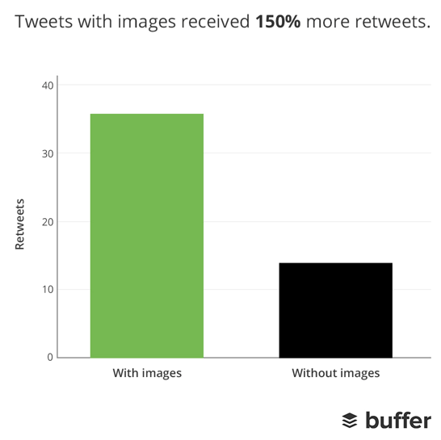
25) Tweets with images receive 150% more retweets than tweets without images. Tweet (Source)
Source: Buffer
26) In an analysis of over 1 million articles, BuzzSumo found that articles with an image once every 75-100 words received double the social media shares as articles with fewer images. Tweet (Source)
27) Facebook posts with images see 2.3X more engagement than those without images. Tweet (Source)
Source: BuzzSumo
28) The equivalent of 110 years of live video is watched on Periscope every day. Tweet (Source)
Source: Periscope
29) There were more than 500 million Instagram users in June 2016. Tweet (Source)
30) 55% of marketers chose Facebook as their most important social media platform. Tweet (Source)
31) 85% of videos on Facebook are watched without sound. Tweet (Source)
32) Facebook users watch 8 billion videos per day. Tweet (Source)
33) Snapchat users watch 10 billion videos per day. Tweet (Source)
34) Snapchat users share 9,000 photos per second. Tweet (Source)
35) Organic engagement on Facebook more than doubled in 2015, while organic engagement on Instagram almost halved. Tweet (Source)
Source: Forrester Research
36) Organic Facebook engagement is highest on posts with videos (13.9%) and photos (13.7%). Tweet (Source)
37) Snapchat had 150 million daily active users in June 2016 — up from 110 million in December 2016. Tweet (Source)
38) 44% of online women use Pinterest, compared to 16% of online men. Tweet (Source)
Source: Pew Research Center
39) Shopify users referred by Pinterest spend an average of $80 compared to the Facebook referral average of $40. Tweet (Source)
Source: Jeff Bullas
40) Over 80% of pins are re-pins compared to 1.4% of tweets retweeted. Tweet (Source)
41) YouTube reaches more 18+-year-olds during prime-time viewing hours than any cable TV network. Tweet (Source)
42) Half of YouTube subscribers between the ages of 18 and 34 would drop whatever they were doing to watch a new video from their favorite channel. Tweet (Source)
How do you plan to incorporate more visual and interactive content into your 2017 marketing strategy? Share with us in the comments.
Editor’s Note: This post was originally published in January 2015 and has been updated for accuracy and comprehensiveness.
57 Experts on How to Handle Negative Feedback [Infographic]
Most people don’t relish the thought of receiving negative feedback about their work, but that doesn’t mean it can’t be highly beneficial.
In fact, in a survey of nearly 1,000 employees, Zenger/Folkman found that more than half preferred corrective feedback over praise, and 72% believed that their performance would improve with the help of constructive criticism.
Feedback can be beneficial to improving your work, but there are definitely right and wrong ways to deliver and receive that feedback.
To get to the root of it, the folks at Venngage conducted a survey of 57 INBOUND 2016 speakers from a variety of organizations and industries. They asked these experts how they handled negative feedback from their particular stakeholders, such as customers, readers, managers, and peers.
Check out the infographic to see which strategies you can apply to your career.
13 Gmail Plugins That Make Client Communication Easier
How much time do you spend on email each week?
According to a recent survey from Adobe, the average American professional spends about six hours a day checking email — that’s 30 hours during the work week.
That’s a lot of time spent on unbillable tasks that could be spent focusing on work that meets the goals of your paying clients.
Getting bogged down by your inbox is especially problematic in agencies where account managers and other client-facing employees must deal with managing requests from a number of different clients who are all considered priorities.
When you communicate with your clients primarily over email, it’s easy for important messages and tasks to get lost in the seemingly constant shuffle. Your inbox can quickly become an unmanageable time sink.
You could use a project management tool to reduce the amount of email clutter created from projects. But you could also better optimize how you use email, prioritize requests, manage communication from your inbox.
Check out these 13 Gmail plugins and apps to start improving how you use email to communicate and collaborate with clients.
13 Tools to Improve Client Communication & Collaboration Through Email
1) SaneBox
SaneBox weeds out unimportant emails after examining your inbox content and history, surfacing only the communications you want to priortize. You can train the tool by moving miscategorized emails to your inbox to make it even smarter.
The tool also provides features for setting notifications for when people don’t reply to a message, unsubscribing from unwanted newsletters, and snoozing emails you want to deal with later.
Price: Snack plan for $7/month for annual contract, Lunch plan for $12/month for annual contract, Dinner plan for $36/month for annual contract
2) Just Not Sorry
Communicating with clients in a direct, assertive manner is easier said than done. This plugin helps you write more confident emails by scanning your messages for extraneous words that undermine your tone, e.g., “Sorry,” “Just,” or “I think.”
When you use a word or phrase in an email that could potentially weaken your positioning, the app highlights it and explains specifically how it could make you seem less confident and proficient.
Price: Free
3) Mailburn
This iPhone app upgrades the user interface of your email client by displaying emails as chat dialogues. It also separates newsletters from emails from people in your inbox, and provides an option for you to unsubscribe to irrelevant communications with one swipe — perfect for decluttering your inbox. The app works with both Gmail and Outlook.
Price: Free
4) HubSpot Sales
HubSpot Sales is a free email tracking tool that allows you to see when a client or prospect has opened an email — basically, you’ll be able to tell if your email got lost in the client’s inbox or if she’s actually ignoring it.
The plugin also highlights key contact information about the person you are emailing, such as links to their social profiles, so you can gather intel on what the person is interested in or recent events in their professional life and personalize your messages. With HubSpot Sales pro, you can create up to 1,000 templates and track the performance of your sent emails and content.
Price: Free, Sales Pro is $50/user/month
5) Yanado
You don’t want to be controlled by your inbox, but it’s also the place where many of your important task items and communication about these items are located.
This plugin brings your to-do list to your inbox to make prioritizing and organization more streamlined. There’s no need to hop from your email to your to-do list to your project management tool and back. It’s all there in one straightforward interface.
Price: Free plan for one user, Startup plan $6/user/month for up to 100 users, Premium plan $15/user/month up to 1000 users, Enterprise plan pricing available upon request
6) Snapmail
Snapmail is perfect for when you need to send a vendor or a client password details and other sensitive information, but you don’t want it to sit in their inbox and potentially cause a security risk. You simply select the Snapmail button, and any text emails will be encrypted. Once your recipient opens the email, she will have 60 seconds to record the content before it’s gone for good.
Price: Free
7) Unroll.me
To focus only on the really important emails — like those from your clients — it’s a good practice to unsubscribe from the email newsletters that are no longer relevant or those that you’ve been mysteriously added to.
With Unroll.me, you can easily view your subscription lists and unsubscribe from them with one-click. You can also choose to “roll up” your subscriptions into a digest email to reduce email clutter and distractions throughout the day.
Price: Free
8) Todoist
This app allows you to instantly convert messages in your Gmail or Outlook inbox into tasks for your to-do list, and automatically syncs across all of your devices. You can also assign tasks to other members of your team, collaborate on tasks, and set deadlines and reminders to stay on track.
When you install the plugin for Gmail, it creates a tab to access your to-do list within your inbox, so you don’t have to download another program to view your list.
Price: Basic is Free, Premium (for individuals) is $28.99/year, Business (for teams) is $28.99/year/per user
9) Batched
It takes 16 minutes to refocus after handling an email, and on average, employees check their email 36 times per hour. How can you get anything productive done with a tool that constantly distracts you?
Batched lets you control when emails reach your inbox, which is especially useful when you need to focus and get a project out before a deadline. Basically, the tool filters emails under a specific label in your Gmail account. At times that you have selected (such as every hour or at 9 a.m., 2 p.m., and 4:30 p.m.), those emails are moved to your inbox. You always have access to any important incoming emails, but you can stem the habit of checking email out of curiousity that something important has arrived.
Price: Free
10) Grammarly
You need your clients to trust you, and building trust is all about proving to your client that you’re an expert in your field. And experts don’t forget about grammar. They know the that only amateurs (not amatures) dash off an email without clicking spellcheck.
Grammarly works wherever you’re writing online — email, in a project management system, or a blogging platform — and makes sure that your credibility remains in tact by double-checking your work.
Price: Free basic plan, Premium plan available on monthly basis for $29.95/month, quarterly basis for $19.98/month, and annual basis for $11.66/month
11) Checker Plus
If you want to know when you’ve received an important email from a client or manager without constantly opening up Gmail, this app allows you to set up Chrome notifications for important conversations, ensuring you never miss an important message.
The app also allows you to go on “Do Not Disturb” mode when you’re trying to get work done, and lets you mark unimportant messages as “Read” without even opening up Gmail.
Price: Free
12) KeyRocket
This plugin teaches you how to use all of Gmail’s built-in hotkeys so you can more efficiently manage your inbox with fewer clicks.
When you take an action in Gmail that could have been accomplished via a hotkey action (e.g., composing a new message), KeyRocket triggers a simple notification that lets you know the hotkey option you could have used.
Price: Free
13) Google Dictionary
We all stumble across a word, phrase, or reference we don’t quite understand every once in a while. This plugin lets you double click on any word in an email and instantly look up the meaning or Wikipedia explanation — without having to leave the compose window.
Price: Free
What plugins, extensions, and apps make communicating with your clients easier? Let us know in the comments below.
Editor’s Note: This post was originally published in April 2016 and has been updated for freshness, accuracy, and comprehensiveness.
Fonts & Feelings: Does Typography Connote Emotions?
Think about your favorite book for a moment. How did it make you feel when you read it? Is that part of what made it such a compelling story?
My favorite book series is Harry Potter, and apart from the awesomeness that is a magical boarding school, the font in which it was published may have influenced my affection for the series.
You see, visual elements are just as important as the words on a web page or blog post. And fonts serve as a visual marketing tool for publishers to leverage when compiling their story. The font you choose ultimately plays a hand in conveying the message you want to send your readers.
In this post, we’ll explore how fonts can influence reader emotion and how marketers can use this information in their content.
Fonts vs. Typefaces: What’s the Difference?
“Font” and “typeface” are two terms that are often incorrectly used interchangeably.
A font is one particular weight and style of a larger typeface. Typefaces are categories comprised of many different fonts. For example, Serif is a typeface, and Times New Roman is a font that is part of the Serif family.
There are a variety of different typefaces and fonts. Here’s a quick rundown:
Serif
Serif fonts are identifiable by the small lines on the edges of letters (called serifs) that make the font easier to read in print.
Fonts in the Serif typeface include Times New Roman, Georgia, and Book Antiqua.
Sans Serif
Sans serif font letters don’t have a serif attached to them, so they display more clearly on websites.
Fonts in the Sans serif typeface include Arial, Verdana, and Helvetica.
Here’s a diagram of the difference between Serif and Sans Serif:
Source: CreativeBloq
Script
Fonts in the Script typeface are meant to imitate the fluidity of human handwriting.
Fonts in the Script typeface include Comic Sans, Kristen, and Lucida.
Here’s an example of Kristen below:
Source: FontsPlace
Modern or Display
The modern typeface is characterized by variance between thin and thick bold lines in the lettering.
Fonts in the Modern typeface include Impact, Rockwell, and Agency.
Here’s an example of the Impact font:
Source: FontCo
Monospaced
Monospaced fonts have larger spaces between each letter and were designed to look like text was written using a typewriter.
Fonts in the Monospaced typeface include Courier, Consolas, and Monaco.
Here’s what Courier looks like:
Source: PrePressure
These different typefaces and fonts are widely used across the internet, and research has been conducted about the impact of fonts on communication and overall perception. Let’s dive into the data and see if you agree with their findings.
Which Fonts Connote Which Emotions?
Wichita State University’s Software Usability Research Laboratory conducted a survey in 2006 to determine if different fonts had different emotions and personalities associated with them.
In the survey, they asked more than 500 participants about their perceptions of a variety of different fonts across the typefaces outlined above. The fonts that respondents answered questions about were:
Source: UsabilityNews
Different uses of each font were evaluated in the survey, such as emails, letters, spreadsheets, web pages, headlines, and news articles.
Respondents were then asked to assign personalities and emotions to each font, and the results were organized according to personality factors that the different fonts shared most frequently. The fonts within specific typefaces ended up grouping together, as you can see in the diagram below:
Source: UsabilityNews
The study then produced a detailed breakdown of the fonts most commonly associated with both positive and negative emotions and personality traits. The results are intriguing:
- Serif fonts were rated as “stable,” “practical,” and “mature.”
- Sans serif fonts didn’t receive any particularly positive or negative personality associations.
- Script fonts were perceived as “feminine,” “funny,” and “casual.”
- Modern fonts were categorized as “masculine,” “assertive,” and “coarse.”
- Monospaced fonts were called “dull,” “plain,” and “unimaginative.”
Here’s the full breakdown of the top three fonts for each emotion and personality trait in the survey:
Source: UsabilityNews
While that study provided some interesting insight around the way people view specific fonts, there are numerous other studies and theories that point to why certain fonts connote specific emotions.
For example, in a 2014 study, medical patients received the same set of at-home care instructions in different fonts, and the harder-to-read fonts made patients think the tasks were harder to do. This is an example of cognitive fluency, a theory that posits when our brains have difficulty processing information, the task at hand appear more challenging.
Similarly, a 2008 study, in which participants were presented exercise instructions in hard-to-read fonts, revealed that the challenging font choice made the task seem to require more time to achieve.
The lesson? Based on cognitive fluency, if something is easy to read, it also seems easy to do.
But that’s not all. The semantic memory associated with fonts also influences how readers feel about the fonts and the content they’re reading. For example, the Helvetica font is used on United States tax and Internal Revenue Service forms, which influences how the font is perceived — depending on their experience with the federal tax system.
All of this is to say that there are numerous theories surrounding the psychology and emotional response to different fonts. In marketing specifically, fonts can capture your audience’s attention and help reinforce your brand’s messaging, so let’s dive into some actionable takeaways for content marketers getting ready to type.
3 Takeaways for Selecting Fonts to Use in Your Marketing
1) Choose fonts strategically by focusing on readability and legibility.
Creative Bloq created an infographic that outlines many factors to consider when choosing fonts for different projects, and they found a few trends in which fonts are widely used specifically among blogs:
- 20% of blogs use Georgia (Serif) for header text
- 10% of blogs use
(Sans serif) for header text
- 10% of blogs use
- 20% of blogs use Arial (Sans serif) for blog body copy
- 10% of blogs use Helvetica (Sans serif) for blog body copy
Sans serif fonts are particularly clear to readers: Without the serifs on the lettering, Sans serif fonts like Arial are easy to read even on small screens, where users are spending a lot of time online these days.
Based on the research, fonts on your web pages and blog posts should be clear and easy-to-read. In fact, the simpler the better — that way, articles will be readable on a variety of different screen sizes, and your content won’t be associated with difficulty or inconvenience. Below, you can see that The Atlantic publishes articles in Proxima Nova, a Sans serif font that is one of the most popular fonts among internet publications.
Source: The Atlantic & Fount
2) Use typography that communicates to visitors who you’re looking for.
If your goals include attracting a broad audience to your website, use typography that makes your content as universal and accessible as possible.
On the other hand, if your content is meant to communicate particular emotions and messaging, you can communicate that with your font choices.
For example, childish, playful fonts like those in the Script typeface may be the right fit for children’s clothing websites. Below, you can see that a Serif font was the right choice for Pottermore — it makes readers remember the classic Serif font used in the Harry Potter books themselves.
Source: Pottermore & Fount
3) Remember: Things seem easier to do when they’re easier to read.
Make sure that fonts for your calls-to-action, headlines, and landing pages are bold, clear, and motivate site visitors to fulfill the task you want them to with your content. Here at HubSpot, we used a clear Sans serif font for our homepage and calls-to-action to make the information crystal clear to site visitors.
The visual elements on a web page are just as important as the content you’re writing about, so experiment with different fonts that send the right message and elicit the feelings you want from your audience. When you’re ready to start typing, read more about how to choose typography and text layout on our blog.
What’s your favorite font to use for blog posts, landing pages, and calls-to-action? Share with us in the comments below.
2016 End-of-Year Recap [Video]
2016 brought change the marketing industry in many ways — from powerful innovations to continuously evolving mediums.
But digital marketers know that change happens frequently in our industry, and adaptability is key to continue driving results in the face of burgeoning trends, growing social networks, and new, advanced technology.
Now that we’ve rung in the New Year here at HubSpot, we wanted to remember the biggest changes that happened in the world of marketing in 2016. From Peach’s rise and fall, to the launch of Facebook Live, to Google’s latest algorithm update, there’s a lot to cover. That’s why we made a short video — sound not required, of course — to review it all.
From all of us at HubSpot, Happy New Year! Thanks for sticking with us through all the change. Now let’s keep the 2017 conversation going by sharing this video on social media.
What was your favorite social media moment of 2016? Share with us in the comments below.
How to Build Self-Confidence After a Bad Month: 8 Helpful Tips
When you’ve had a really bad day, the last thing you want to do is spend the night figuring out how to rebuild for the next.
Now, imagine if it were an entire month. Your energy is sapped. You might even feel defeated. And the last thing you feel is confident. Getting up and trying again seems like an ordeal — one that requires a lot more effort than you feel like making. But you have to.
When we’ve experienced a prolonged period of negative events, one of the biggest challenges is regaining your personal morale to go back and give it another shot. That’s true of dating, and it’s true of negative fallbacks at work. We’re here to discuss the latter — and we’ve got some ideas for how you can get your professional groove back.
So if you’ve had a tough month and you’re not feeling so positive, chin up — we’ve got a whole collection of tips to get you back on your feet.
8 Tips for Rebuilding Self-Confidence After a Bad Month
1) Talk to your manager.
We are a society that’s afraid of looking weak, and it has a bad impact on our behavior. It makes 29% of us reluctant to ask for help at home, and 40% of us afraid to be nice at work — because we fear that people will take advantage of us.
It makes sense, then, that many of us are afraid to ask for help at work for fear of looking foolish or ill-informed. Not only can that lead to making mistakes in the first place, but it can also leave you without the necessary information to avoid them in the future.
Let your boss know that you recognize where things have fallen short, and ask for specific feedback. Chances are, your manager will appreciate your proactive attitude about mistakes.
2) Ask what “bad” means to you, compared to reality.
“I’m my own worst critic.” It’s something that many of us say, since we expect perfection from ourselves, which starts at an alarmingly young age. In one study of children in Singapore, researchers found that 60% scored remarkably high on “self-criticalness,” with 78% scoring high in “socially prescribed perfectionism.” And more than half — 59% — were reported to have both.
Yikes. With such a perfectionism epidemic, we wouldn’t be surprised if you’re perceiving your “bad” month to be worse than it actually was.
That’s another place where talking to someone else about it — like your manager — can help to put things into perspective. Personally, I have a tendency to assume the absolute worst about everything, especially when it comes to mistakes at work.
But as soon as I bring it up with a colleague or my boss, one of three things usually happen:
- It turns out to be a first-time mistake that everyone makes.
- It’s easy to fix.
- It’s really not that big of a deal.
When we’re so focused on being perfect, we tend to view mistakes as — at worse — fireable offenses. If that’s the assumption you make with every typo, missed deadline, or other mistake, your confidence is going to take a huge hit.
Instead, when a “crisis” occurs, try your best to step back and put it into perspective. How bad is it, really? Are you completely powerless to it, or is there something you can do to address it now? Once you’ve fully evaluated the problem — which should only require about five minutes of deep breath and de-escalation from your panic — gaining the confidence to tackle the issue might be easier than it first looked.
3) Don’t turn failure into a self-fulfilling prophecy.
As we covered above, many of us allow our perfectionism to manifest as an overreaction to mistakes. If that’s how we constantly behave in the face of performance that doesn’t meet our own standards, could we start habitually expecting failure from ourselves?
Yes. That’s because 70% of us suffer from something called Imposter Syndrome — the sense that, no matter how much we’ve achieved, we don’t belong in a leadership position or deserve the success of having gotten there. And according to recent research, going through life feeling like an imposter can cause us to bring less confidence (and therefore, less quality) to our work, turning it into a self-fulfilling prophecy.
It’s easy to discount our success as undeserving, and to easily dismiss our hard work. But if we keep sending those messages to ourselves, we’ll start to accept them as truth and it’ll reflect in our work.
However, the opposite is also true — which psychologist Amy Cuddy touched on in her wildly popular TEDGlobal talk. Since then, she’s continued her research on the power of “faking it until you become it.” That’s when we send ourselves the opposite message of failure, instead reaffirming our power, success, and worth. That approach to work can achieve a reverse self-fulfilling process, in which we learn to believe in our success, instead of feeling like we’re imposters.
Check out this helpful visual guide that explains how body language can help beat Imposter Syndrome. Even by assuming a certain stance, we can instill confidence in ourselves.
4) Evaluate how engaged you are at work.
There’s a problem in the U.S. workplace. Many people don’t really want to be there, as evidenced by the fact that only 34.2% of people are actually engaged at work. In short, that means we just don’t care. And when we don’t care, our work suffers — how can we bring quality to something for which we have so little passion?
If you feel that disengaged at work, you have a few options. First, you can speak with your manager — again. Chances are, he or she has noticed your work is suffering, and if you’re able to honestly explain why, that might lead to a productive conversation about the direction of your career. From there, it all depends on how that discussion ends. If your manager isn’t receptive, then it might be time to consider a career change.
5) Formulate a plan for how you’ll avoid another bad month.
Sometimes, there are months in which you really did screw up. It’s okay — we’ve all been there, which we’ll get to later.
The important thing is that you recognize what went wrong, and that you know how you’re going to prevent it from happening again. When I worked in event planning, we did that for every engagement. We kicked off every project by outlining every possible problem that could arise, but unexpected issues still came up. When they did, we documented all of them and, after the event, formulated a plan to avoid them in the future.
That strategy isn’t limited to events, and most workplace mistakes can be treated the same way. As soon as they’ve been resolved, record them and consider sharing them with your team — that’s the best way to ensure that they don’t happen again.
6) Know that failure is not uncommon.
‘Tis a lesson you should heed:
Try, try again.
If at first you don’t succeed,
Try, try again.”
William Edward Hickson
Not too long ago, two researchers in Texas performed a study on the failure rate of new businesses. Between 1990 and 2011, they found that 92% of the 2.4 million retail businesses that opened during that period also closed during the same span of time. Among the businesses that closed, 25% did so after one year, and 50% closed after two. Roughly 75% of them were owned by first-time entrepreneurs, and 71% percent of the failed business owners didn’t bother trying again.
That last figure is a shame, since the same study also found that the 29% of business owners who decided to try again were more likely to be successful on subsequent tries.
Two things about this study stand out to us:
- The commonality and high rate of failure.
- The success rate of people who try again.
To the first point, don’t feel isolated in your failure. And as long as you’re acknowledging that making mistakes — and maybe even failing — happen to almost everyone, don’t give up, either. As the numbers show, you likely have more to lose by not trying again.
7) Evaluate what you can control.
When things are going so well, it’s easy for us to stop taking care of ourselves. That could be why 39% of adults indulge in unhealthy food when they’re stressed.
While an occasional treat is fine, treating chronic stress with poor nutrition or a lack of exercise will only make matters worse. And here’s the thing — those are parts of your life that you can control. It’s easy to feel like stressful work situations spiral beyond a solution that you can reach on your own. But self-care? You’ve got this.
Much of the time, constant business travel is blamed for an unhealthy lifestyle, but we’ve got some tips to keep that in check, too — many of which can also be applied to a busy life at home. Plus, what you eat plays a vital role in your productivity. Check out my colleague Lindsay Kolowich’s guidelines for eating to get more done.
8) Take a break.
Here’s a thought. Could you be making more mistakes than usual because you’re burned out?
In Germany, for example, 24% of employees report feeling burned out. When we’re feeling such a high level of stress from overworking, it achieves the opposite of getting more done — it actually starts to negatively impact our cognitive function. We start to get forgetful, make mindless errors, and might even have stronger emotional responses to negative situations.
In other words, you need a break. Guilt can get in the way of that — after all, 55% of us feel bad about leaving our desks just for a breather, and 47% of us are ashamed of taking time off. But the longer we let that trend continue, the closer we get to complete burnout, and the more likely our work is to suffer as a result.
Seriously — take a break. And maybe even put that vacation time to use. When you come back, you’ll have a renewed perspective that can help you tackle your goals.
Starting to Rebuild
Feel better?
We certainly hope so. As you begin to regain your confidence after a bad month — or making the effort to do so — take your time. Evaluate your priorities, and see which of these tips best fits in with them. Don’t try to tackle them all at once, or else you might end up feeling overwhelmed, which would defeat the purpose.
Here’s to the new year ahead. Best of luck — we know you’ve got this.
What do you do to rebuild confidence after a bad month? Let us know in the comments.