
Conversion Rate Optimization (CRO): 8 Ways To Get Started
Today, most marketing teams are focused on driving traffic toward websites in hopes that this traffic then converts into qualified leads for sales reps to close. But that’s only half the battle.
Getting more out of existing traffic and leads (versus entirely new traffic) can propel companies toward long-term, sustainable growth. That’s where conversion rate optimization (CRO) comes in.
In this guide, you’ll learn about the power of CRO, why your business should focus on improving your conversion rate, and how to get started.
CRO is achieved through content enhancements, split testing, and workflow improvements. Conversion rate optimization results in highly-qualified leads, increased revenue, and lower acquisition costs.

What is a conversion rate?
A conversion rate is the percentage of visitors who complete a desired action, like completing a web form, signing up for a service, or purchasing a product.
A high conversion rate means your website is well-designed, formatted effectively, and appealing to your target audience. A low conversion rate could be the result of a variety of factors related to either website performance or design.
Slow load times, a broken form, or copy that doesn’t convey the value of the offer are common reasons for a poor conversion rate.
What is a good conversion rate?
A “good” conversion rate depends on your industry, niche, goals, traffic channel, and audience demographics, among other factors.
In the second quarter of 2022, 2.3% of visits to e-commerce websites in the United States converted to purchases. However, online shopper conversion rates in Great Britain rose to over 4%.
If your conversion rate is lower than you’d like — maybe it’s below average in your industry, or lower than your top competitors, or simply underperforming against your own goals — then it’s time to optimize.
Conversions can happen all over your website: on your homepage, pricing page, blog, landing pages, and more. To maximize the potential of converting website visitors into paying customers, you should optimize each location.
Before we take a look at the benefits of CRO, let’s walk through how to calculate your site’s conversion rate.
That way, you’ll have a better understanding of how much time and resources to invest in a CRO strategy.
How to Calculate Conversion Rate
Conversion rate is calculated by dividing the number of conversions by the number of visitors and multiplying that number by 100 to get a percentage.
%208%20Ways%20To%20Get%20Started-2.png?width=650&name=Conversion%20Rate%20Optimization%20(CRO)%208%20Ways%20To%20Get%20Started-2.png)
As long as you know how you’re defining a conversion, then calculating your conversion rate is easy. You just plug in two values and multiply by 100.
Let’s say you’re defining a conversion as a newsletter opt-in, and you have an opt-in form on every single page of your website.
In that case, you’d divide the total number of newsletter form submissions by the total number of website visitors and multiply it by 100. So if you had 500 submissions and 20,000 visitors last quarter, then your conversion rate would be 2.5%.
You can repeat this process for every conversion opportunity on your site. Just make sure to only count the number of visitors on the webpages where the offer is listed.
For example, if you want to calculate the conversion rate of your ebook offer, then you’d divide the total number of downloads by the number of people who visited web pages where the ebook offer is listed.
Alternatively, you can calculate your website’s overall conversion rate by dividing the total number of conversions for every conversion opportunity on your site by the total number of visitors on your site.
CRO and SEO
Search engine optimization is the process of improving your website’s visibility on search engine results pages (SERPs) in order to boost organic traffic and sales.
And as mentioned before, CRO focuses on improving your website’s performance to turn visitors into customers and boost conversions. Both CRO and SEO have the end goal of increasing sales — just different approaches.
Ultimately, you set your brand up for success when you optimize your website to be more visible on popular search platforms and when you improve your website’s functionality to encourage conversions.
Where to Implement a CRO Strategy
Here are four areas of your website that have the potential to largely benefit from conversion rate optimization.
1. Homepage
Homepages are prime candidates for CRO. In addition to making a first impression on visitors, the homepage is also an opportunity to retain those visitors and guide them further into your website.
You can do this by emphasizing links to product information, offering a free signup button, or even incorporating a chatbot that solicits questions from visitors at any point during their browsing experience.
2. Pricing Page
A website’s pricing page can be the make-or-break point for many website visitors.
CRO can help a pricing page convert visitors into customers by modifying the pricing intervals (e.g. price-per-year vs. price-per-month), describing the product features associated with each price, including a phone number for visitors to call for a price quote, or adding a simple pop-up form.
Hotjar, for example, added a simple email opt-in popup form on its pricing page and got over 400 new leads in just three weeks.
%208%20Ways%20To%20Get%20Started.png?width=624&height=320&name=Conversion%20Rate%20Optimization%20(CRO)%208%20Ways%20To%20Get%20Started.png)
3. Blog
A blog is a massive conversion opportunity for a website. In addition to publishing thoughtful and helpful content about your industry, a blog can use CRO to convert readers into leads.
This process often includes adding calls-to-action (CTA) throughout an article or inviting readers to learn more about a topic by submitting their email address in exchange for an ebook or industry report.
4. Landing Pages
Since landing pages are inherently designed for people to take an action, it makes sense that they have the highest average conversion rate of all signup forms at 23%.
An event landing page, for example, can be optimized with a video of last year’s event to encourage visitors to register this year. A landing page that’s offering a free resource can be optimized with preview content from that resource to encourage visitors to download it.
Now that you know where you can optimize for conversions, you may be wondering how you know when your business is ready to start the process.
CRO Formulas
The short answer: CRO is important for any business online. That’s because, no matter how established or large your company is, you want to convert your website visitors into qualified leads, customers, and brand advocates — and you want to do so in the most effective, impactful, and reliable way.
With conversion rate optimization, you’ll get more out of your existing website traffic while ensuring you’re targeting qualified leads.
Although this is a straightforward concept, setting a conversion goal isn’t as easy as saying, “This page converted 50 people this month, so we want to convert 100 people next month.”
Featured resource: 8-Week Conversion Rate Optimization Planner
%208%20Ways%20To%20Get%20Started-1.png?width=624&height=404&name=Conversion%20Rate%20Optimization%20(CRO)%208%20Ways%20To%20Get%20Started-1.png)
You don’t just want 50 more conversions from a webpage. Instead, you want 50 more conversions for every X amount of people who visit it. (This is your conversion rate — the percentage of people who convert on your website based on how many people have touched it).
To provide a better understanding of where you stand at any point in time in regard to conversion rate, here are three commonly-used formulas your business can use to understand, analyze, and improve.
CRO Calculation 1: Conversion Rate
As we mentioned earlier, to calculate conversion rate, you must divide your number of conversions (or leads generated) by your number of visitors (or web traffic), and then multiply that number by 100 to get the percentage.
Leads Generated ÷ Website Traffic x 100 = Conversion Rate %
CRO Calculation 2: Number of Net New Customers
To calculate your number of net new customers, you’ll want to divide your net revenue goal by your average sales price.
New Revenue Goal ÷ Average Sales Price = Number of New Customers
CRO Calculation 3: Lead Goal
And lastly, to calculate your lead goal, take your number of new customers and divide it by your lead-to-customer close rate (which is your total number of leads divided by total number of customers) percentage.
Number of New Customers ÷ Lead-to-Customer Close Rate % = Lead Goal
Here’s an example of these formulas in action:
If your website has 10,000 visitors per month that generate 100 leads — and subsequently, 10 customers each month — the website visitor-to-lead conversion rate would be 1%.
What if you wanted to generate 20 customers each month?
You could try to get 20,000 visitors to your website and hope that the quality of your traffic doesn’t decrease — although, that’s a risk you’ll likely want to avoid.
Rather, you could obtain more leads from your existing traffic by optimizing your conversion rate. This is less risky and is more likely to produce better results for your bottom line.
For instance, if you increase your conversion rate from 1% to 2%, you’d double your leads and your customers. The following table is proof of this — you can see the positive impact that results from increasing your website’s conversion rate:
|
COMPANY |
A |
B |
C |
|
Monthly Site Traffic |
10,000 |
10,000 |
10,000 |
|
Conversion Rate |
1% |
2% |
3% |
|
Leads Generated |
100 |
200 |
300 |
|
New Customers |
10 |
20 |
30 |
Notice the drastic increases in the number of leads generated and net new customers when you boost your conversion rate.
Not only that, but it’s clear that generating more website traffic isn’t necessarily the right approach when trying to improve your conversion rate — in fact, this chart shows you that you can grow your business substantially without increasing traffic at all.
Hard to believe? Think about this way: Pretend you were trying to fill up a leaky bucket. If you pour more water into the bucket, you won’t fix the root cause of the issue — instead, you’ll end up with a lot of water that’s wasted (not to mention, a bucket that will never fill up all the way).
Are you ready to take the first steps toward CRO at your company? Review the strategies below and start experimenting.
Conversion Rate Optimization Strategies
Here are some applicable conversion rate optimization marketing strategies to test and implement at your company.
1. Create text-based CTAs within blog posts.
While it’s considered a best practice to include CTAs in a blog post, they sometimes fail to entice visitors to take your desired course of action. Why?
Banner blindness is a real phenomenon related to people becoming accustomed to ignoring banner-like information on websites. This lack of attention coupled with the fact site visitors don’t always read all the way to the bottom of a blog post (rather, they “snack” on content), means a different approach is required.
That’s where the text-based CTA comes in handy. Here at HubSpot, we ran a test with text-based CTAs — a standalone line of text linked to a landing page and styled as an H3 or an H4 — to see if they would convert more traffic into leads than regular CTAs located at the bottom of a web page.
In HubSpot’s limited test of 10 blog posts, regular end-of-post banner CTAs contributed an average of just 6% of leads that the blog posts generated, whereas up to 93% of a post’s leads came from the anchor-text CTA alone.
2. Add lead flows on your blog.
A lead flow is another conversion rate optimization element you can include on your site. Lead flows are high-converting pop-ups designed to attract attention and offer value.
You can select from a slide-in box, drop-down banner, or pop-up box, depending on your offer. We experimented with the slide-in box on the HubSpot Blog back in 2016 and it achieved a 192% higher clickthrough rate and 27% more submissions than a regular CTA at the bottom of a blog post.
3. Run tests on your landing pages.
Landing pages are an important part of the modern marketer’s toolkit and, as mentioned earlier, integral to conversion rate optimization.
That’s because a landing page is where a website visitor becomes a lead or an existing lead engages more deeply with your brand. To optimize a landing page, run A/B tests to identify your best design and content features for audience members.
For instance, with A/B testing you can quickly and easily test different versions of your website copy, content offers, images, form questions, and web pages to determine what your target audience and leads respond to best. You might see that a page or a form is too long and hinders conversions.
Thanks to A/B testing, China Expat Health was able to increase their lead conversion rate by 79%. One of the most impactful changes was swapping out the headline “Health Insurance in China” for “Save Up to 32% on Your Health Insurance in China,” which immediately conveyed a value proposition to visitors. This proposition was then supported by customer testimonials.
Get everything you need to start effectively A/B Testing your website today.
4. Help leads become MQLs.
Sometimes visitors want to get right down to business, skip parts of the typical buyer’s journey, and immediately speak with a sales rep (rather than be nurtured).
There are specific actions you should encourage these high-intent visitors to complete so they can easily become marketing qualified leads (MQLs) — and they can take action through a combination of thoughtfully designed web pages, compelling and clear copy, and smart CTAs.
For instance, at HubSpot, we discovered that visitors who sign up for product demos convert at higher rates than visitors who sign up for free product trials. So, we optimized our website and conversion paths for people booking demos or meetings with a sales rep.
Admittedly, this depends on your product and sales process, but our best advice is to run a series of tests to find out what generates the most customers. Then, optimize for that process. The key here is to look for ways to remove friction from your sales process.
5. Build workflows to enable your team.
There are a number of automated workflows you can create to enable your team with the help of marketing automation software.
For example, with marketing automation, it’s possible to send automatic emails with workflows. Then, leads can book meetings with reps in one click. Meanwhile, reps receive notifications when leads take high-intent actions such as view the pricing page on your website.
Or, if you work in ecommerce, you can send an email to people who abandon their shopping cart as a reminder.
According to research from Moosend, abandoned cart emails can be very effective. They have a high open rate of 45%. Of the emails that are opened, 21% are clicked. Half of the people who clicked make a purchase.
Here’s an example of an abandoned cart email by the Dollar Shave Club.
%208%20Ways%20To%20Get%20Started.jpeg?width=300&name=Conversion%20Rate%20Optimization%20(CRO)%208%20Ways%20To%20Get%20Started.jpeg)
6. Add messages to high-converting web pages.
Use live chat software to chat with your website visitors in real time and offer support and guidance as needed.
To increase conversions, add these messaging features to your high-performing web pages — such as your pricing and product pages — so leads get the information they want in real-time.
You can also make your messaging and chatbots action-based. For example, if someone has spent more than a minute on the page, you may want to automatically offer to help and answer any questions they may have (again, a live chat tool, like HubSpot, makes this easy).
7. Optimize high-performing blog posts.
Again, publishing blog articles opens the door to a big opportunity for conversions. Even more so if you already have existing blog content on your site — in fact, at HubSpot, the majority of our monthly blog views and leads come from posts published over a month ago.
To get started optimizing your blog content, identify your posts with the highest levels of web traffic but low conversion rates. (Possible causes of this issue may be related to SEO, the content offer you are promoting, or your CTA.)
In one instance, we at HubSpot added an inbound press release template offer to a blog post about press releases — as a result, we saw conversions for that post increase by 240%.
Additionally, look at your blog posts with high conversion rates. You want to drive more qualified website traffic to those posts and you can do so by optimizing the content for the search engine results page (SERP) or updating it as needed to ensure it’s fresh and relevant.
8. Leverage retargeting to re-engage website visitors.
It doesn’t matter what your key conversion metric is: The cold, hard truth is that most people on your website don’t take the action you want them to. By leveraging retargeting on Facebook and other platforms, you can re-engage people who left your website.
Retargeting works by tracking visitors to your website and serving them online ads as they visit other sites around the web. This is particularly impactful when you retarget people who visited your highest-converting web pages.
The normal inbound rules still apply here — you need well-crafted copy, engaging visuals, and a compelling offer for retargeting to work.
Take United’s retargeting campaign for example. Using insights from previous ad campaigns, United focused on reaching people who had viewed their ads and were already considering booking a vacation. To this select audience, they promoted a 15-second video ending in a call-to-action.
If viewers felt inspired enough to book their vacation, all they had to do was click on the CTA to be taken straight to the United website.
This proved to be a huge success. In just one month, 52% of conversions attributed to YouTube were click-through conversions directly from the ad.
(If you’re a HubSpot customer, take a look at how the AdRoll integration can improve your conversion efforts.)
Now, let’s talk about how you can get started with CRO at your company.
Expert Tips: How to Improve Conversion Rate Optimization
HubSpot’s Content Growth Team Manager Pamela Bumphas some helpful tips marketers should know to boost conversion rate optimization.
For one, marketers should leverage heat mapping.
“Take advantage of a heat mapping and scroll mapping tool to get a better understanding of user behavior on your web pages,” she said. “These tools can provide insights that help you identify optimization and testing opportunities.”
Speaking of tests, Hinton says to base your tests on insights and not hunches.
“Past experiments, user research, chat transcripts, and website/conversion analytics are all great sources for helpful insights that could inform future, successful tests.
And remember A/B testing won’t tell you the “why” behind visitors’ behaviors.
“Consider supplementing your CRO test data with qualitative user testing if you’re trying to understand visitors’ comprehension of your content,” Hinton said, “or their motivations for converting (or not converting).”
Marketers should also be mobile-first when it comes to web content.
“Keep chunks of copy brief and consider how content renders differently on mobile devices when designing pages,” Hinton suggests.
And while it’s good to be knowledgeable about CRO best practices, Hinton says it’s important to remember that what works for one business may not work for all.
How to Get Started with Conversion Rate Optimization (CRO)
Maybe you’re wondering, “Where do I start with CRO?”
Enter: PIE framework. Before starting a CRO project, prioritize your efforts by ranking each element on Potential, Importance, and Ease.
Use the PIE framework to answer the following questions for every strategy outlined in the previous section. Then, assign a score between one and 10 (one being the lowest and 10 being the highest) to each strategy.
- How much total improvement can this project offer?
- How valuable will this improvement be?
- How complicated or difficult will it be to implement this improvement?
Once you’ve assigned a score for each strategy, add up the numbers and divide the total by three — this gives a score that shows what project will have the greatest impact. Then, work on the projects with the highest scores first.
The PIE framework isn’t perfect, but it’s easy to understand, systematic, and offers a starting point for CRO collaboration and communication among colleagues.
We’ve covered a lot about conversion rate optimization, but not everything. If you still have questions, then check out the answers to some of the most frequently asked questions below.
What is the purpose of conversion rate optimization?
The purpose of conversion rate optimization (CRO) is to improve the likelihood of visitors taking a desired action on a webpage.
What is a CRO strategy?
A CRO strategy is designed to convert more of your visitors into paying customers.
While each CRO strategy will vary company by company, the general steps will not. You have to identify key metrics and your target audience. Then you have to collect user feedback and other data to decide what you’re going to test.
Finally, you’ll run A/B tests to improve different pages and parts of your site for conversion.
What are CRO tools?
CRO tools are designed to simplify or automate the process of optimizing your conversion rate. They might help with lead capture, research, analytics, mouse tracking and heat maps, feedback, or running experiments.
Begin Using CRO
There are many best practices out there when it comes to CRO but, ultimately, you need to find out what your customers respond to, and what drives results for your business.
Keep these three follow-up actions in mind when getting started with CRO today:
- Use the three formulas to start the CRO conversation.
- Experiment with CRO strategies to discover what works for your business.
- Leverage the PIE framework to help prioritize your strategy.
Editor’s note: This post was originally published in January 2019 and has been updated for comprehensiveness.

How to Gain Your First (or Next) 1,000 Instagram Followers – 30 Tips
Gaining more followers on Instagram is key to successfully scaling your marketing efforts on the platform. But how do you increase followers on Instagram, especially if you have fewer than a thousand?
![New Data: Instagram Engagement Report [Free Download]](https://no-cache.hubspot.com/cta/default/53/9294dd33-9827-4b39-8fc2-b7fbece7fdb9.png)
It’s no secret that opportunities are continuing to grow on Instagram for Business. Approximately 90% of Instagram’s 1 billion active monthly users follow a business account on the platform, and there are more than 200 million business accounts.
But here’s the deal: Unless you’re famous, it’s really hard to amass a huge following on Instagram without some hard work. It’s especially difficult if you’re a small business using Instagram marketing to gain more clients. How do you even get started?
Luckily, you can do a few things right away to collect at least 1,000 quality followers for your personal or professional Instagram account. It’s all about knowing where to invest your time and effort. In this post, we’ll discuss a few strategies to help you gain those followers, from creating a follow-worthy Instagram profile to using contests and staying true to your brand.
Before you think about optimizing your Instagram profile, it’s essential to gather the tools and resources you need to hit the ground running.
To get more followers on Instagram, you’ll need to post consistently over time while using best practices. If you’re new to Instagram marketing, this can be challenging. For that reason, we’ll first cover some general tools to help you level up, then go into actionable tips once you’ve set up and optimized your account.
Even if you’ve never tried your hand at Instagram marketing, and even if you don’t have a team of content creators, you can grow your Instagram account with the right tools. With that said, let’s jump right in.
1. Use a social media content calendar to plan your Instagram posts ahead of time.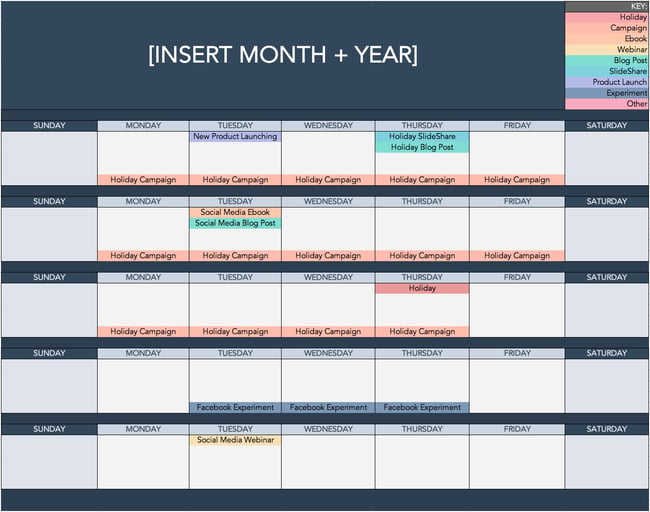
Download a Free Content Calendar to Grow Your Instagram Followers
Most of the work of increasing your Instagram followers happens before you open the app. For one, you must plan to publish new Instagram posts consistently, and even though it’s tempting to post when inspiration strikes, it’s essential to find a rhythm that helps you capitalize on trends. Not to mention it will also help you nurture a community that will expect specific posts from you at a specific time.
Consistently planning, writing, and publishing Instagram posts will require an exceptional level of organization. For that reason, we recommend using a social media content calendar to plan your posting schedule ahead of time.
Here are some resources you can use to jumpstart your Instagram content creation process:
- What to Post on Instagram: Photo & Video Ideas to Spark Inspiration
- Best Instagram Captions: Good, Cool, Funny, & Cute
- How to Plan Your Instagram Posts [+ Free Instagram Planning Templates]
2. Use a social media management tool to schedule your posts in advance.
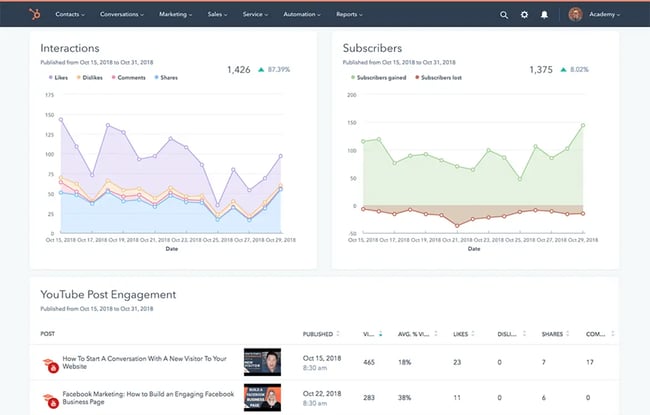 Get Started with HubSpot’s Social Media Tool
A social media management tool will help you post consistently without the extra work of logging into Instagram each time. If you’re serious about increasing your Instagram following while minimizing work, then you want to schedule your posts using a tool and then let the software do the rest.
Instagram has a wide variety of post types, from the traditional square photos to Stories to the more recent Reels. This wide variety gives us a lot of options for growing our followers, but can be daunting or overwhelming without a tool to help. You can always post manually, but scheduling your posts in advance can help you leverage these content formats more effectively.
Here are more articles to help you choose the right tool and learn how to schedule Instagram posts:
- Best Social Media Management Tools
- Scheduling Instagram Posts: Absolutely Everything You Need to Know
- When Is the Best Time to Post on Instagram?
3. Download an Instagram for Business kit with templates and how-tos.
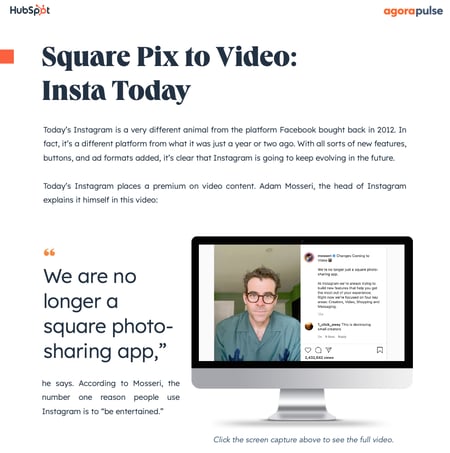 Download a Free Kit to Help You Grow Your Instagram Profile
A series of templates and how-to guides are an essential addition to your Instagram growth toolbox. HubSpot’s kit will allow you to expedite content creation and stay on top of Instagram’s latest trends, including its recent shift from static photos to short videos.
Having this on hand is helpful especially if you’re new to Instagram content creation, or don’t know how and where to start. At this point, you should also arm yourself with tips and tricks for Instagram. Here are a few articles to help you out:
- Instagram Features, Hacks, & Tips Everyone Should Know About
- Free Instagram Post Templates for Your Brand
4. Make your account into a business profile.
While you could technically grow using just a personal profile, we recommend turning your account into an Instagram business profile, or starting one anew. This will give you access to Instagram Insights, which will allow you to understand how quickly your following is growing and how well your strategy is working.
Even if you only plan to become an independent content creator, you should still consider operating your account as if it were a business.
To switch from a personal to a business account, take the following steps:
- On the Instagram app, go to your profile.
- Tap the Menu hamburger button on the upper right-hand corner.
- Tap Settings on the pop-up.
- Tap Account.
- At the bottom, tap Switch to professional account.
You’ll then have the option to switch entirely to a business account or to stay as a professional account.
5. Customize your Instagram for Business profile.
Next, customize your Instagram profile to make it look good. Tell your potential followers who you are, and give them a reason to follow you.
How? Start by making sure your username is recognizable and easily searchable – like your business name. In the example below, The Journal Shop uses the username @thejournalshop.
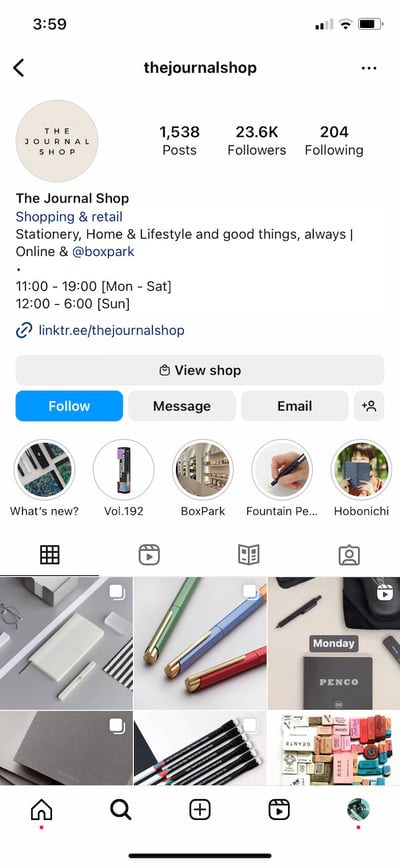
If your business name is already taken, try keeping your business name as the first part of your username so that people searching for your business are more likely to come across you. For example, the Australian activewear line Lorna Jane uses the username @lornajaneactive.
Below are more Instagram profile optimization tips.
Step 1. Choose a profile picture that’s on-brand with your other social networks, like your company logo.
Step 2. Fill your bio with delightful, actionable, and information about your brand. Information like this lets people know what you’re about and gives them a reason to follow you. Include who you are and what you do, and be sure to add a hint of personality.
Here are a few examples for inspiration:
- @cheekbonebeauty: “Less waste. Ethical and safe ingredients.”
- @oreo: “Playful moments from your favorite cookie.”
- @mrsbrittanyhennessy: “Helping Influencers go beyond #sponcon and create sustainable businesses.”
- @CalifiaFarms: “Something different, something better. Let us show you what plants can do.”
- @coragedolls: “Elevating, educating, & encouraging girls of color to be unstoppable with dolls that finally look like her.”
Step 3. Add a link tree to your bio to make it easy for people to go straight from Instagram to your other platforms if they want to. The space allotted for URLs is precious real estate. When you receive 10,000 followers, you can add links to your Instagram Stories.
Until then, your bio is the only place within Instagram where you can place clickable links, so use it wisely (ever heard the line “link in bio”?). We recommend using a shortened, customized Bitly link to make it more clickable.
Step 4. Enable notifications so you can see when people share or comment on your photos. This’ll let you engage with them more quickly — just like a lot of companies do on Twitter. To enable notifications, go to “Options” and then “Push Notification Settings.” Select “From Everyone” for every category.
A word to the wise: We don’t recommend you link your Instagram account to Twitter and Facebook (or other social media platforms) for automatic posts. Because every platform caters to a different audience and requires different types of posts.
6. Designate an experienced content creator.
Just like there should be one (maybe two) people managing your other social media accounts, there should only be one or two people managing your Instagram account.
If possible, choose someone with experience on the platform who will “get” it — and be sure they stay updated on all new features Instagram has to offer from Reels to Instagram Shopping.
That said, you can also learn how to become a content creator for Instagram by learning how to become a digital creator, downloading content creation templates, and pursuing an Instagram Marketing certification.
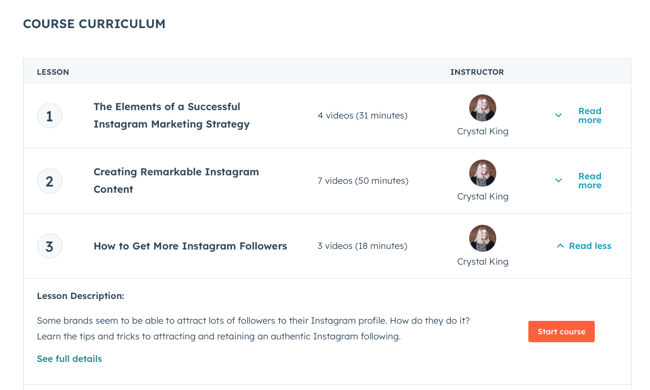
Learn How to Increase Followers with HubSpot’s Free Instagram Marketing Course
Alternatively, you can hire freelance content creators from marketplaces such as:
As to what gets specifically posted: You’ll have a lot of freedom if you’re an entrepreneur or solo professional. If you work for a large organization, you might find that a lot of people want a say in what’s posted. That’s when an organized social media request form or guidelines document comes in handy.
This document should inform people how to request a post on your Instagram account, when to post it, what the value of the post is, and why your company should post it.
7. Follow photography and editing best practices.
On Instagram, post quality matters. A lot. Your Twitter followers might forgive a few bad tweets, but a bad photo on Instagram is a big no-no.
Fortunately, you don’t have to take a photography course to be a good Instagram poster — nor do you have to practice for weeks before you start. But you should get familiar with basic photography tips and photo editing apps.
Photography Best Practices
Since Instagram is a mobile app, chances are, some content you post to Instagram will be taken on your mobile device. That’s expected.
If your budget allows, consider investing in professional photography for your Instagram photos, as that will elevate your profile. Otherwise, a smartphone and a few editing apps will do.
- Focus on one subject at a time.
- Embrace negative space.
- Find interesting perspectives.
- Look for symmetry.
- Capture small details.
- Make your followers laugh.
Edit photos before you post.
Instagram has some basic editing capabilities, but oftentimes, they aren’t adequate to make visuals really great.
Most of your photos should go through at least one or two photo editing apps on your mobile phone before you open them on Instagram. Some options include:
Create an Instagram theme.
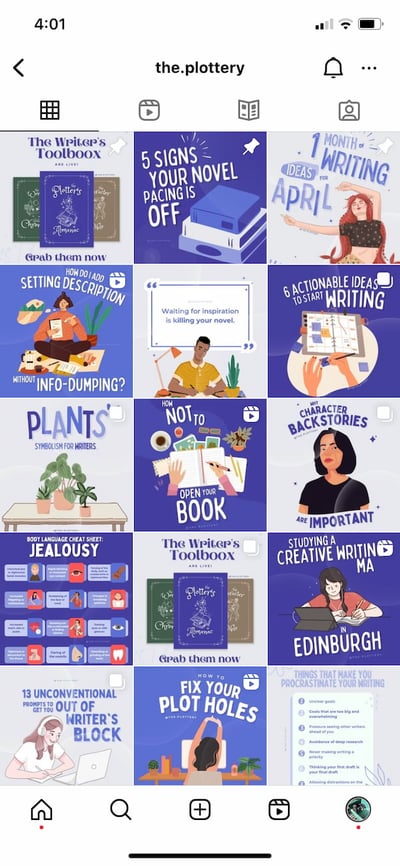
Additionally, consider creating a cohesive Instagram theme across your feed, so anyone visiting your account for the first time can get a sense of your brand. The below example from the @the.plottery uses similar typography and purple colors all throughout.
8. Adhere to a regular posting schedule.
Once you’ve created and optimized your profile, have someone managing it, and have your creative assets ready, it’s time to start posting. We’ve already shared some resources to get started, but it’s worth going it over again, because posting consistently is what will have the largest impact on your follower count.
It’s a good idea to have a solid number of great posts up — maybe 15 or so — before you start engaging people and working down this list. That way, when people visit your profile, they’ll see a full screen of photos and will know you’ll post great content regularly.
If you haven’t already, download this social media content calendar template and plan out your posts. It’s best to build a backlog of content ready a few days or weeks ahead of the publishing date.
This will ensure you always have content during holidays, vacations, and even creative blocks.
Keep your target persona in mind as you plan out your posting schedule, as that can drastically impact your posting timing and frequency — especially if you’re targeting an audience in a different time zone. (Download this free template for creating buyer personas if you don’t have a few already.)
Optimizing your schedule for your specific audience might take time and experimentation.
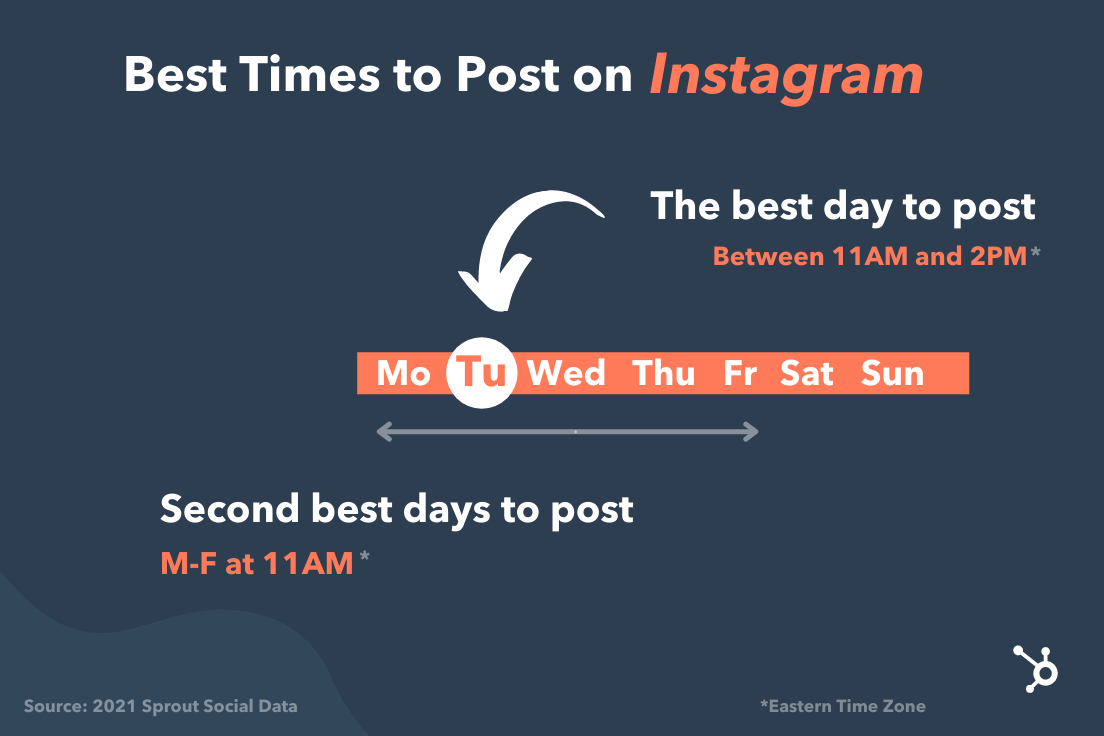
Experiment with these times and days to see what works with your audience. You may find that your target users are most active and engaged at different times.
9. Allow outside contributors to curate your content.
Although it’s best to have only one or two people manning your account, one or two people can’t be everywhere at once taking photos. What about that fun sushi night the engineers had last night? Or the event your head of sales spoke at earlier this week?
There’s a whole breadth of content you’ll want to post to Instagram, and more often than not, one person won’t be able to keep track of it all.
One solution? Create a system where you can curate photos and content from members of your team.
There are a few ways to do this. The first option is to create a specific email address for employees to send their photos, short videos, memes, hyper-lapses, and so on.
Encourage people to add a descriptive subject line so you can easily sort through the content they’re sending. While this doesn’t seem like the smoothest way to curate photos, it’s actually the easiest for the people sending you photos — and the easier you can make it for them to send content, the more content you’ll get.
If your team shares a Box or Dropbox account, you could also create a shared folder where people can automatically drop their photos and videos.
10. Use a consistent, platform-specific brand voice.
Photos and videos might be the most important part of your Instagram posts, but captions, comments, and other text should never be an afterthought. If you’re building a brand on Instagram or have more than one Instagram manager, consider developing a consistent voice that humanizes your brand.
This shows potential followers that you are credible and relatable, rather than formal or intimidating.
When developing a voice, you should keep the platform and your audience in mind.
For example, many influencers and prominent accounts on Instagram have a very casual voice and style but remain professional and on-brand. Once you’ve got your voice down, make sure it stays consistent and natural in your captions, comments, messages, and your bio.
11. Write engaging, shareable captions.
Captions are an essential part of your post — the icing on the cake if you will. Consistently great captions can do wonders for humanizing your brand, winning over followers, and making your content more shareable — thereby giving you more exposure.
Here are a few things you might see in a winning Instagram caption:
- Clever or witty comments
- Calls to action
- Relevant emojis
- Hashtags
Clever or Witty Comments
Some brands and influencers have used clever or witty captions, or even audience-appropriate jokes to further humanize themselves on Instagram.
My colleague Kelly Hendrickson, HubSpot’s social media team manager, says that she loves Netflix’s account and sub-accounts, particularly because of the post captions.

“They have such a clear brand voice, and you laugh along with them. They’re in on the joke, just like one of your friends,” she says.
Netflix’s voice is casual, trendy, and humorous while still staying on brand.
In the post above, the caption is funny, authentic, and relatable.
Calls to Action
Another way to increase the shareability of your caption and engage your followers is to ask questions or have some sort of call-to-action in the captions of your photos.
For example, you might write, “Double-tap if you find this funny,” or “share your story in the comments.”
In the example below, we asked followers of the HubSpot Instagram account to drop a tip on measuring social media ROI:

Relevant Emojis
Adding just a few relevant emojis can add even more personality to your posts. It could also make them even more noticeable on an Instagram feed. Many content creators and brands include witty text with relevant emojis to make the post pop. For instance, @ugarteaurelia uses taco emojis to highlight the topic of her post (tacos, of course).

Along with the three items listed above, you’ll also want to include hashtags.
12. Optimize posts with relevant hashtags.
On Instagram, a hashtag ties conversations from different users who wouldn’t already be connected into a single stream. If you use relevant Instagram hashtags, your posts will gain exposure to a wider audience and help you become discoverable to potential customers.
The key to using hashtags effectively is to be selective and use them sparingly. Try to limit the number of hashtags per caption to around three. Similarly, don’t use “like for like” hashtags, like #like4like or #like4likes.
This is a shortcut tactic that’ll only leave you with low-quality followers.
To find the hashtags your audience might be using, do a little research on relevant hashtags in your niche or industry. The easiest way to do this research is in the Instagram app itself, in the Explore tab (i.e., the magnifying glass icon).
When you search for one hashtag, it’ll show you a list of related hashtags at the top of your screen.
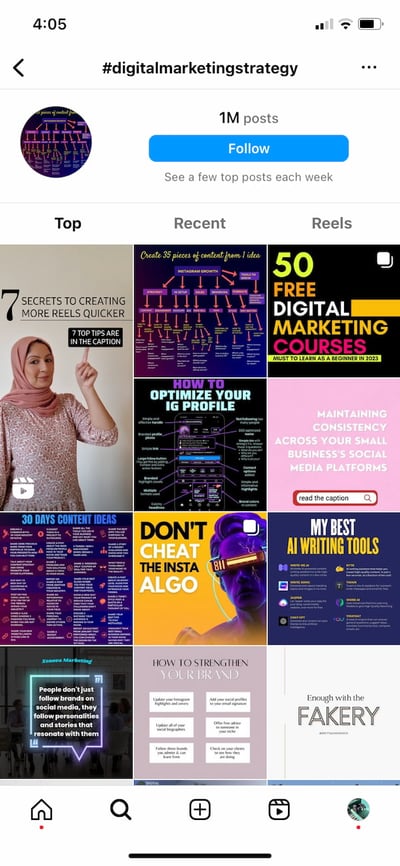
For example, when I search for #digitalmarketingstrategy on Instagram, it shows me relevant hashtags like #digitalmarketingexpert, #digitalmarketing, and so on.
To help relate to your followers on a personal level, you might consider hopping on hashtag trends like #tbt (“Throwback Thursday”), #MotivationMonday, #TransformationTuesday, or other trending hashtags.
Once you build up a following, you can try creating your own hashtags — like your company name or a slogan that applies to your content. This is a great way to build up your brand on the platform and build a more cohesive presence.
13. Lean into trending content formats.
With the arrival of TikTok on the social media scene, short-form videos have become one of the most effective content formats on social media.
In fact, according to a HubSpot Blog survey, 85% of marketers who use short-form videos find them to be the most effective content format. And 95% of marketers who leverage short-form videos plan to increase their investment or continue investing the same amount in the following year.
That’s why it’s important to lean into trending content formats. After TikTok, Instagram came out with IG Reels, and this feature is a great way to post funny, relatable content.
When Instagram comes out with new tools, like IG Reels, don’t be afraid to use those features because they can help you gain Instagram followers.
14. Post content your followers want to see.
To gain your first 1,000 followers on Instagram, it’s important to know who your audience is. Once you’ve created your Instagram account, you should take note of which posts perform best.
Is it interactive content, behind-the-scenes stories, funny and relatable posts, or something else? When you have a general idea of what performs best, continue to create that type of content.
Additionally, Instagram has many tools and features you can use: IG Reels, Instagram Stories, Instagram Live, Highlights, etc. Begin by posting several types of content formats and see which one does best. Then, come up with a strategy and master that one tool. Doing so will help you create content your followers want to see and gain new followers.
15. Promote your Instagram.
Like the old adage about a tree falling in a forest, if you start an Instagram account without promoting it, is the account even real yet? Well, yes. But, you’ll have fewer followers.
One of the best ways to gain followers is to promote your Instagram account. Embed posts in your blogs, post on your other social media platforms, and share social links in your email newsletters. A great way to gain followers on one platform is to ask current followers on other platforms if they want to follow you somewhere else as well.
Additionally, to promote your Instagram, it’s important to get started with Instagram promotions and ads. This will help you reach a wider audience. I know it might seem like ads are only effective for selling certain products, but I’ve followed several business accounts because of a sponsored post I saw.
Here are a few articles to get you started:
- A Step-by-Step Guide to Advertising on Instagram
- The Guide to Instagram Ad Costs
- Instagram Ad Specs & Sizes: an Updated Guide
- The Ultimate Guide to Instagram Stories Ads
16. Engage with users through follows, likes, and comments.
Instagram is very much a community, and one great way to get involved in that community is to find people who post pictures that interest you, follow their accounts and interact with their content. It’s the most natural way to draw attention to your own Instagram account.
This accomplishes two things: for one, when they get the notification that you’ve followed them, there’s a good chance they’ll check out your profile. This goes back to the importance of having great content on your account before you start reaching out to others.
Secondly, it means you’ll be seeing their recent posts in your feed, so you can Like and interact with them if you choose to.
As you build a following, celebrate your followers by responding to and pinning their comments, and even reposting their posts for user-generated content.
17. Cross-promote with influencers and brands with similar audiences.
Once you build rapport with the folks behind accounts with similar audiences to your own, consider collaborating with them.
Partnering with Instagram influencers and brands helps with discoverability, reach, and social proof.
For instance, influencer @lavishlyjackie posted a sponsored video with Olive Ateliers. The vintage shopping brand then used the video in their collateral.

With this partnership, both accounts can expand their reach and gain new followers. It’s a win-win. However, be sure to create content that seems natural and makes sense for your brands and collective audience.
18. Run Instagram contests to encourage engagement.
Another great way to expand your reach while increasing engagement with your photos is to run an Instagram contest or giveaway. As part of your contest, you can ask users to follow your account, like, and/or comment on the post to be eligible to win.
I mean, come on. Who doesn’t love winning free stuff?
You can also add a user-generated content (UGC) element to the contest, too, where people post a photo of their own and use a specific hashtag.
19. Explore Instagram Stories’ interactive features.
Instagram has always given brands the platform to share beautiful, curated photos to represent their companies.
However, with the introduction of ephemeral Instagram Stories, brands can also share on-the-fly, behind-the-scenes looks for 24 hours that may not be as polished as a published photo, but give your brand more personality on the platform.
Just look at how Snapchat exploded a few years ago. Once platforms like Instagram and Facebook introduced similar features, it made those apps more valuable and interesting in the eyes of users. Although Snapchat pioneered this feature, Instagram Stories now has over 500 million daily users.
Along with sharing video clips and static images through Instagram Stories, users can also use polls, event reminders, and the “Ask a Question,” tool to gain more engagement and learn more about their audiences.
Once a user is verified or has over 10,000 followers, they can even include a link to a webpage within a story.
How Brands Can Use Instagram Stories
Instagram Stories disappear after 24 hours unless they are marked as a “Story Highlight.”
Highlighted stories will show up at the top of your profile between the photo feed and your bio.
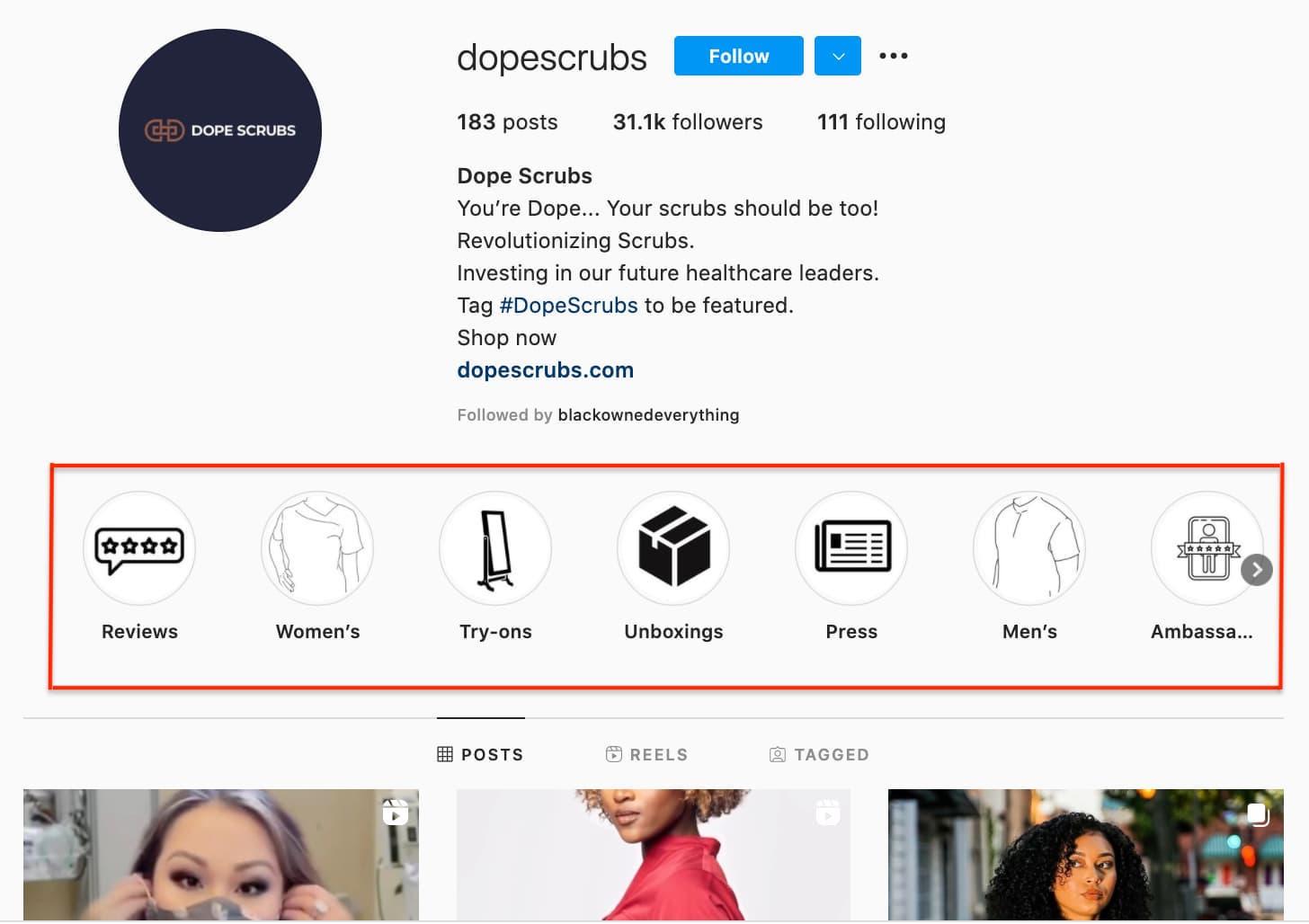
Here are a few other brands we recommend following to see what they’re sharing:
Dana Shultz (@minimalistbaker) publishes easy vegan and gluten-free recipes on her blog. Her Stories feature neat how-to videos of her making breakfast and testing out new recipes in her kitchen. The behind-the-scenes aspect of her Stories provides a lot of human context for her blog’s brand, and everybody loves a good how-to video.
Casper publishes quirky Instagram content to advertise their mattresses — without overtly doing so. The main theme of their content? Staying in is better than going out (because you can stay in and lay on a comfy Casper mattress, naturally).
They’ve even created a gallery for followers to use as backdrops for their Snapchat and Instagram stories to make it look like they’re out at a party when in reality, they’re laying in bed.
One of their latest Instagram Stories featured someone watching “The Sopranos” in bed, with the caption: “Who needs plans when you have five more seasons?”
This video supports Casper’s campaign to stay in bed with a very real look at what millions of people do when they’re hanging out at home.
Here are our tips for using Instagram Stories for your brand:
- Whether it’s funny, sad, or unique, be authentic. Your photo gallery is where content can be perfect and polished. Instagram Stories are for the raw, unscripted, and unretouched. Use Stories to share the other side of your brand that followers might not be able to see elsewhere. Do you have a dog-friendly office? Is your team trying out the latest challenge? Start filming to showcase the more human side of your brand.
- Go behind the scenes. These are by far our favorite types of content for ephemeral video sharing. Show followers what goes into the planning of an event or the launching of a product, and make it fun. Your followers want to feel included and in the know. You could also use Stories to cultivate a brand loyalty program that only rewards people who check out your content.
20. Use the Instagram Live feature.
Instagram also lets users record and share Live videos, another content format that’s proven to be hugely popular on other social networks. What’s unique about Live videos on Instagram? They disappear when users stop filming.
This authentic, bi-directional experience lets brands share unscripted, raw moments with their audience to incorporate human elements into a social media platform that’s highly edited and polished in its traditional use.
Since the Live feature launched, Instagram has added even more features that may enable further engagement or interactions from viewers, such as:
- Request feature to go live with the live account
- Pinned comment
- Q&A box
- Up to four accounts on Live at a time
- Filters
Live video is a growing trend across a variety of social media platforms, so if something interesting is happening, start rolling. Whether it’s an event, a team birthday party, or behind-the-scenes footage, your devoted followers want to see what you’re up to.
And if you want to make it even more interesting, you could collaborate with an influencer or another brand to host a Live. With people that your audience is interested in, you can promote this Live event, and then host it on your profile.
Promoting this type of event will help you tap into someone else’s audience while interacting and engaging with your followers by answering their questions and talking to them during the Live.
21. Share your profile link on your website and social media channels.
Have a website? Newsletter? YouTube channel? Make sure you include a link to your Instagram on every single platform.
The first place you’ll want to make sure to add an Instagram badge is your website, specifically your footer and “About Us” page.
Here’s what the badge could look like:

If your brand has brick-and-mortar locations, put out a good ol’ print call-to-action letting people know you have an Instagram account and encouraging them to follow you. You can also place them on your business cards. You might even offer a discount code for doing so.
Also, be sure to promote your Instagram account on your other digital platforms. Chances are, the folks who already follow you on Facebook and Twitter will also follow you on Instagram without much prodding.
Let those followers know you’re on Instagram and encourage them to follow you there.

In this example, wine company The McBride Sisters encouraged their email subscribers to follow them on Instagram with a simple CTA: “Join the community.”
22. Post user-generated content.
Similar to cross-promotion, brands can publish user-generated content to show appreciation for existing customers and generate social proof at the same time.
If I see a regular person endorsing a product on Instagram, I’m more likely to believe they really like the product.
The same is true for most consumers. That’s why sites like Yelp are so popular.
Ultimately, user-generated content can be an excellent strategy when trying to increase brand awareness and trust in your products or services.
For instance, Bevel reposted a video from blogger Rickey Scott using and recommending their products to their 600+ followers.
Posting Scott using Bevel is a smart move.
Firstly, the product is designed with black men in mind. Having Scott, who is part of the brand’s target demographic, recommend the product serves as the social proof the brand wants.
Furthermore, part of Scott’s audience will likely fall within Bevel’s target audience. Simply put, the two brands have similar audiences and brands that align well, which is why it’s a good opportunity for Bevel to promote Scott’s content.
23. Diversify your audience to resonate with different types of users.
As your followers grow, it can be tricky to identify what content types will resonate with them. With this in mind, divide your audience into sub-groups and target your content to various demographics.
For instance, if you have 200K followers, those followers probably come from different regions of the world, have different interests and hobbies, and likely have different careers. Rather than post all-encompassing content that will satisfy all your followers at once, conduct some analytics research to separate them into smaller sub-groups.
Take Starbucks as a good example of this. Starbucks has millions of followers. There’s no way the global coffee brand can post content to satisfy millions of people at once — and it doesn’t try to.
Instead, Starbucks regularly posts more exclusive content geared towards particular groups, such as this post they published showing a typical work day at a Starbucks location:

This post won’t appeal to the majority of Starbucks followers who don’t work from home, but that’s OK.
You don’t always need to post content to please everyone. Instead, demonstrate your company’s ability to connect and engage with sub-groups and post what aligns with your own brand’s values.
Creating a work-friendly atmosphere is something that matters to Starbucks, so by posting about coffee shop work days, they’re doing more to demonstrate their values than they are appealing to everyone. Which is kind of the point, isn’t it?
24. Apply for a verification badge.
When an account on Instagram is verified, it has a blue dot, called a badge, next to the username. When another user comes across this profile or finds the verified username in search, the blue dot confirms to them that the account is the business, individual, or brand that it’s claiming to be. Author @angiethomas has one such badge.
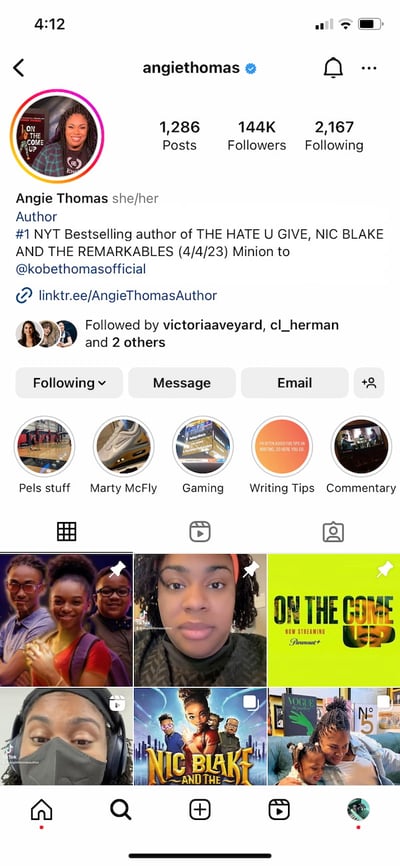
While Instagram has a list of eligibility requirements for the badge, the platform does allow users to apply for one. You can learn more about that process on Instagram’s Help Center.
25. Create your own filters and badges.
When it’s time to promote a new product or feature, creating your own filters, stickers, or badges can help you reach a new audience. You can learn how to create your own filter or sticker to jazz up your Instagram Stories.
The best way to do this is to use these on highly shareable posts that followers will want to add to their own Stories. This way, you’ll reach their audiences and your users will promote your page for you.
26. Tag relevant users.
Another way to gain more followers on Instagram is to tag relevant users in your posts. Your posts will then show up in that person’s tagged posts, and anyone who looks through there will find your page (and hopefully, follow).
However, it’s important that you only tag people who are in the photo, or relevant to the photo. For example, many times, influencers tag the clothing or makeup brands they wore in a photo.
27. Post content that’s meant to be re-shared.
Each post on your Instagram should have a purpose. It could be to generate likes, comments, engagement, shares, etc. However, you can’t expect followers to re-share content just for the heck of it. There needs to be a reason.
Because of this, reverse engineer your Instagram posts. Think, “What type of content would my audience re-share?” Then, create that content. It could be a quote, a meme, an infographic, statistics, etc.
To gain new followers, you should post content that’s meant to be re-shared, so that when others do re-share it on their own Instagram Stories and tag you, their audience will find you and follow you.
28. Get on the Instagram Explore page.
Getting on the Instagram Explore page is easier said than done. We get that. However, creating posts that are aimed at getting on the Explore page means you’ll be creating easily shareable and trendy content.
Think about viral trends and create a video that your audience might engage with. Additionally, use hashtags and tag other users and brands in those posts.
Instagram’s Explore Page algorithm also seems to grab content that has more engagement, especially if said engagement happens in the first few hours of posting. In Instagram’s case, quality is better than quantity, and getting interaction from influential users (i.e. having a higher follower count) is one of the best ways to do it.
29. Share educational content with Instagram carousels.
Similar to creating content that’s meant to be re-shared, you can also create educational content in the form of Instagram carousel posts. Instagram carousels have become a popular way to educate audiences on an idea or topic.
Think about what you can educate your audience on and then create a simple Instagram carousel post with an engaging title that entices users to click on the post.
With this type of content, you can share the post on your Stories, and then hopefully other users will be compelled by the content to share on their Stories as well.
30. Host an Instagram account takeover.
When you’re collaborating with influencers and other brands, think about hosting an Instagram account takeover. You can have an influencer take over your Stories for the day, and promote this on their own Stories.
Then, you’ll get their followers to follow along with the Stories and hopefully follow your account.
Additionally, you can ask an influencer or brand if you can take over their Stories, and interact with their audience as a way to promote your own account.
Quality Over Quantity Still Matters
Ultimately, it’s important to focus less on the number of followers you have, and more on the quality of content you create. Your audience will grow naturally if you put effort and time into creating engaging, informative, or inspirational content without worrying about “quick fixes” for boosts in followers.
You want to play the long game on Instagram, and that starts with focusing on what you can control: the quality of the content you produce, the messages you promote, and the brand you build.
Editor’s note: This post was originally published in February 2016 and has been updated for comprehensiveness.

How to Write a Great Value Proposition [7 Top Examples + Template]
Your company’s value proposition is the core of your competitive advantage. It clearly articulates why someone would want to buy from your company instead of a competitor.
So how do you actually write a value proposition statement that’s strong enough to lift conversion rates and sales? In this article, you’ll learn the definition of a value proposition, what a value prop isn’t, examples of some of the best value props we’ve seen, and tactics to create amazing value props.

We’ll cover:
- What is a value proposition?
- Value Proposition vs Mission Statement (vs Others)
- Elements of a Value Proposition
- How to Write a Value Proposition
- How to Create a Value Proposition Canvas
- Value Proposition Templates
- Value Proposition Examples
- Value Proposition Canvas Examples
- Tactics to Develop an Effective Value Proposition
- Let’s summarize: What makes a good value prop?
Value propositions are one of the most important conversion factors. A great value proposition could be the difference between losing a sale — and closing it.
For that reason, it’s important to create one that accurately represents your products and services and makes it clear why you’re the best choice. However, writing it from scratch is hard. Download our templates below so you can follow along with the rest of the post.
Your value proposition is a unique identifier for your business. Without it, buyers won’t have a reason to purchase what you sell. They may even choose a competitor simply because that business communicates its value proposition clearly in its marketing campaigns and sales process.
That said, you might think: Isn’t my value prop interchangeable with, say, my slogan?
Nope. It’s easy to confuse your value proposition with other similar brand assets, such as your mission statement, slogan, or tagline. We break down the differences below.
Value Proposition vs Mission Statement
Your value proposition details what you offer customers and why they should choose you, while a mission statement details your objective as an organization. While the two can have points in common, a value prop is more product- and service-oriented while a mission statement is more goal-oriented.
Here are two examples for HubSpot and our CRM platform:
Value Proposition: “An easy-to-use CRM.”
Mission Statement: “To help businesses grow better.”
Value Proposition vs Slogan
A slogan is a short, catchy statement that brands use in marketing campaigns to sell a specific product. While your value proposition wouldn’t necessarily go in an ad (at least, not usually), a slogan would. The most important thing to note is that a company can have different slogans for different campaigns or products.
Here are two examples from De Beers Group:
Value Proposition: “Exquisite diamonds, world-class designs, breathtaking jewelry.”
Slogan: “A diamond is forever.”
Value Proposition vs Tagline
A tagline is a short statement that embodies a certain aspect of your brand or business. While a value proposition is more concrete, a tagline can represent a concept or idea that your business stands for. Most businesses have only one tagline that is instantly recognizable and connected to their brand.
Here’s an example from Apple:
Value Proposition: “The best experiences. Only on Apple.”
Tagline: “Think Different.”
Value Proposition vs Mission Statement vs Slogan vs Tagline
Now, let’s look at an example of a business that has all four: Nike. Remember that slogans can differ depending on the campaign.
Value Proposition: “Customizable performance or lifestyle sneakers with unique colorways and materials.”
Mission Statement: “To bring inspiration and innovation to every athlete in the world.”
Slogan: “Twice the guts. Double the glory.”
Tagline: “Just do it.”
TLDR; While your value prop should help differentiate you from the rest of the industry, keep in mind it’s not a slogan, tagline, or mission statement. Those types of copy are important accessories to your brand, but your potential customers and employees don’t choose one business over the other solely based on these elements.
Your value proposition goes deep into the problems you want to solve for buyers, and what makes your product or service the perfect solution.
Elements of a Value Proposition
Your value proposition will most often appear on your website. While you can include it on marketing campaigns and brochures, the most visible place is your home page and, if you’d like, your product pages.
There are three main elements of a value proposition: the headline, the subheadline, and a visual element.
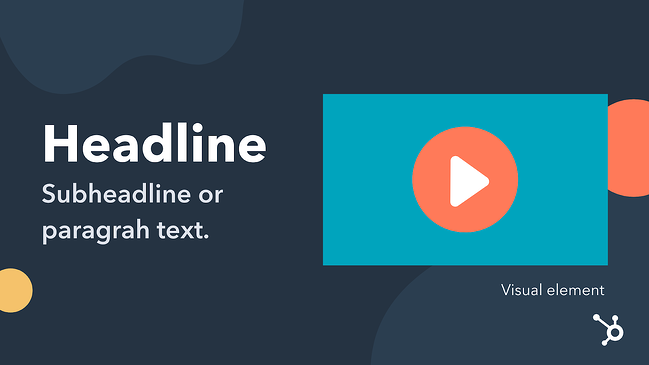
Headline
The headline of your value proposition describes the benefit the customer will receive as a result of making a purchase from your business. The headline can be creative and catchy, but it should be clear and concise, first and foremost.
Subheadline or Paragraph
The subheadline or paragraph should explain in detail what your company offers, who it serves, and why. In this section, you can elaborate on the information in the headline.
Visual Element
In some cases, a video, infographic, or image may convey your value proposition better than words alone can. Enhance your message with these visual elements to capture your audience’s attention.
To better visualize these tools, here are a couple templates to follow when formatting a value proposition.
Step 1: Identify your customer’s main problem.
While this will require some upfront research, you can get a head start on this aspect of the value proposition by speaking with different members of your team. Customer service reps, marketing specialists, and salespeople can fill in the gaps about what problems your customers are looking to solve by using your product or service.
For example, let’s say your business sells tax software on a subscription basis and automated templates are included in the software package. Your ideal customer is looking for an affordable and user-friendly way to access complicated tax documents for their business. In this example, your business’s offerings could be the solution they need.
Step 2: Identify all the benefits your products offer.
This step can be as simple as listing out every product you sell and describing its primary benefit. The benefit should be concise and focused on a single customer need.
In our tax software example, you’d list each tax template, explain the benefit it provides, and why a customer would need it.
Step 3: Describe what makes these benefits valuable.
Next, add another sentence that explains why this benefit matters to the customer.
Using the same example above, the value would be that customers have affordable tax documentation at their fingertips — something that would normally cost them thousands of dollars.
Step 4: Connect this value to your buyer’s problem.
Next, pair the buyer’s problem to the elements that make your product or service valuable. Do they align? If so, you’re ready to refine your value proposition to differentiate your offerings from the competition. If they don’t align, repeat the steps above until you find a valid buyer need and a viable solution your business offers to meet that need.
There are three templates we think do an excellent job of connecting value to buyer pain points:
Step 5: Differentiate yourself as the preferred provider of this value.
Finally, polish your value proposition to make it unique. Is there a specific customer service offering your business provides that others don’t? Do you offer any additional services that other companies charge for? These elements can help differentiate your value proposition from competitors while keeping the focus on the buyer’s needs.
Step 6: Use a template to help you brainstorm.
Once you understand the first five steps, you can easily implement them into value proposition templates.
Steve Blank Method
Instead of focusing on the features themselves, Blank saw the need to emphasize the benefits derived from the features in a simple sentence. By following this formula you’ll connect the target market and their pain points to the solution:
“We help (X) do (Y) by doing (Z)”
Geoff Moore Method
Moore provides a template that’s more specific in identifying the industry categories alongside the benefits customers value. This makes a more clear value proposition formula as follows:
“For [target customer] who [needs or wants X], our [product/service] is [category of industry] that [benefits]”
Harvard Business School Method
According to HBS a value proposition is executed best when it answers the following questions:
- “What is my brand offering?”
- “What job does the customer hire my brand to do?”
- “What companies and products compete with my brand to do this job for the customer?”
- “What sets my brand apart from competitors?”
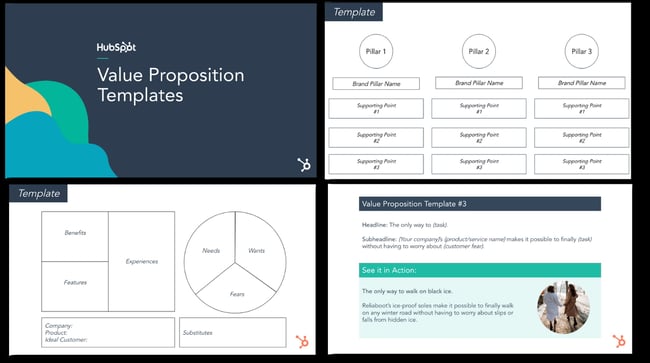
HubSpot Value Proposition Templates
HubSpot offers 15 free templates to help you brainstorm the perfect value proposition for your brand. Not only can they help you hone in on your business’s core values, but they can also give you a boost when working on your actual statement.
Some questions you will ask yourself when using the HubSpot templates include:
- “Why do you do what you do?”
- “How do you do what you do?”
- “What do you do for your customers?”
Now, before you write the statement itself, it’s important to create a value proposition canvas.
Taking these three elements into consideration, you’ll be able to make your own after you build a value proposition canvas.
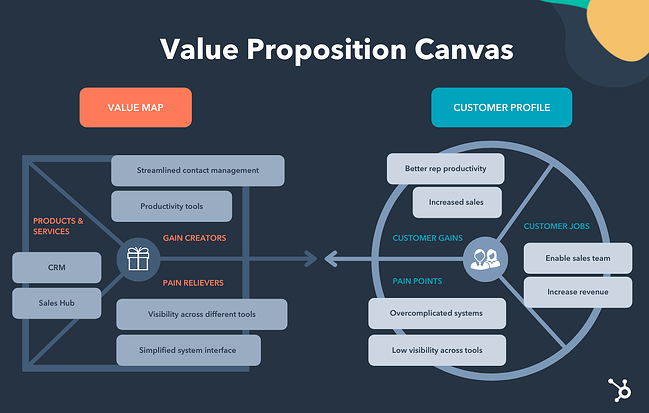
Value Proposition Canvas
A value proposition canvas is a visual tool that helps you position your business’s product or service around your customers’ needs. The goal of the value proposition canvas is to identify how your business provides value within the market. You can use one when introducing a new offer into the market or when enhancing an existing one.
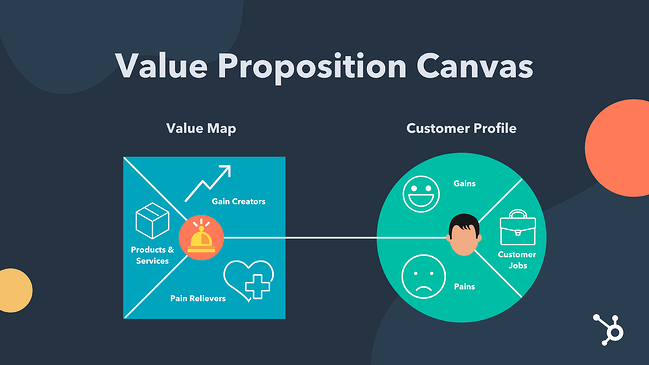
The value proposition canvas is made up of two major components: the customer profile and the value map.
Here’s how to make one:
Step 1: Create a customer profile to represent your target buyer.
The customer profile makes up the first half of the value proposition canvas. When performing this exercise, you’ll want to start with this section first so that their wants and needs can influence the overall value proposition canvas.
The customer profile consists of three areas:
Customer Jobs
What is the task your customer needs to complete or the problem they’re trying to solve with your product or service? The answer to this question sums up the “customer job” or the purpose of your product or service in the eyes of the customer.
Customer Expectations
“Expectations” are also referred to as “gains” — in other words, what your customer is hoping to gain from doing business with you. No matter what you sell, your ideal customer will have an expectation of what that product or service will do for them. In this section, you’ll use research to explain what your customers expect from you in order to purchase your product.
Customer Pain Points
As your customer completes their “customer job,” what pains do they experience? Do they take any risks while they do the customer’s job? Do they experience any negative emotions? These pain points should be considered so that you include the most helpful products and services on the value map side of the value proposition canvas.
Step 2: Create a value map for your products and services.
In this section of the value proposition canvas, three specific sectors help describe what the business offers to the customer.
Gain Creators
These are features your products or services have that make the customer happy. Think creatively about the elements of happiness your customers experience. Consider their financial and social goals as well as their psychographics.
Pain Relievers
In the section above, we discussed customer pains. This section will define exactly how your business will help them overcome those pain points.
Products & Services
While this section won’t list every single product or service your company offers, it should include the ones that will create the most gain and alleviate the most pains for your customers.
Step 3: Determine value proposition-customer fit.
Once you’ve completed the value proposition canvas exercise, the next step will be to determine how your value proposition fits within the customer profile. To do this, you’ll use a ranking process that prioritizes products and services based on how well they address the customer profile.
All together, your value proposition canvas should look like this:
Next up, let’s go over some templates you can use when you’re creating your value proposition and publishing it on your website.
Value Proposition Templates
We’ve crafted 15 templates to help you create an amazing value proposition for your brand — and pairing each of them with an example of how they may look for a real business.
This offer has all the tools you need to craft a value proposition that precisely communicates your brand to users and stakeholders, including:
- 10 value proposition writing templates
- 1 value proposition canvas template
- 1 mission statement brainstorm template
- 1 vision statement brainstorm template
- 1 competitive analysis template
- 1 brand hierarchy template
Click here to download these free value proposition templates for your business.
Now that we’ve reviewed the elements, visual tools, and templates — let’s look at some brand examples that effectively identify and satisfy its customer needs.
Because value propositions are typically internal information and rarely stated publicly, finding a value proposition example to model yours after can be difficult. We’ve taken the liberty of using the value proposition canvas and applying it to some successful companies that have been recognized by the American Customer Satisfaction Index (ASCI).
In these examples, you’ll see real-world instances of customer gains and pains aligned with well-known products and services offered by these companies.
1. HubSpot: “An easy-to-use CRM.”
Headline: “An easy-to-use CRM.”
Subheadline/Paragraph: “HubSpot’s CRM platform has all the tools and integrations you need for marketing, sales, content management, and customer service.”
Visual Element:
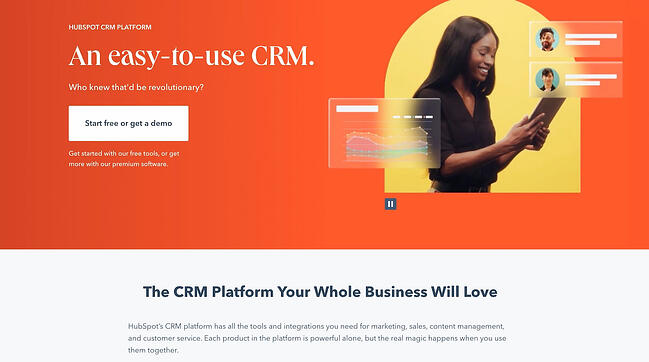
Most companies can benefit from using a CRM — even freelance businesses and small family-owned firms. The problem is that most systems are expensive, over-complicated and cobbled together, creating challenges for businesses as they grow.
HubSpot’s value proposition aims to target active CRM users who are tired of handling over-complicated systems, and beginners who are intimidated by legacy options. These users want a system that makes growth easier, not harder.
While each product in HubSpot’s CRM platform can be used individually, the true benefit comes from using each hub in tandem. Instead of having to deal with incompatible software and productivity tools, you can manage all your marketing, sales, content, and customer service needs in one place. To that end, the product’s value proposition emphasizes its ease-of-use and ability to synchronize different teams across the business.
The brand includes an image of a smiling woman to show what it would be like to use the product in your team (hint: it’s so easy, it’ll make you smile).
2. FedEx: “Manage your Home Deliveries”
Headline: “Manage Your Home Deliveries”
Subheadline/Paragraph: Sending and receiving packages is convenient and safe for individuals who want to ship ideas and innovations across the globe.
Visual Element:
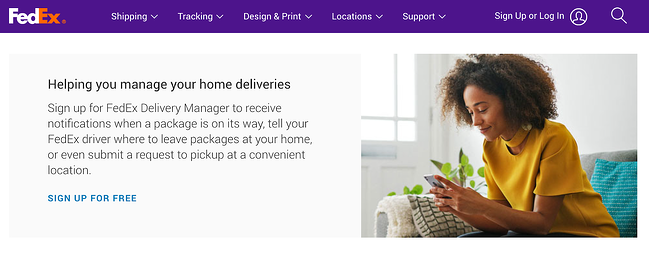
If you own a business, shipping and packaging products is likely a significant part of your operations, but it can be a time-consuming, labor-intensive, and plain inconvenient process. If you’re a consumer, you’ve likely experienced driving to a shipping office to get your package after a missed delivery. Both of these are significant pain points for FedEx’s target customers.
With FedEx, you can opt to receive notifications about your package’s delivery status, provide instructions on how to deliver packages to your home, or even request to pick up at a different location.
Shipping packages with FedEx is just as easy as receiving them. All you have to do is create a shipping label on FedEx’s website, choose which shipping service you’d like to use, and then drop your package off. Even if there isn’t a FedEx office nearby, you can still drop off at national retailers like Walgreens, Dollar General, OfficeMax, and Walmart.
FedEx’s value proposition makes it clear that it will make managing your deliveries much, much easier — whether you’re a business or a consumer.
3. LG SIGNATURE: “State-of-the-art Living Experience”
Headline: “State-of-the-art Living Experience”
Subheadline/Paragraph: LG SIGNATURE delivers an innovative product design that creates an exceptional living experience for people who want to achieve a state-of-the-art living experience.
Visual Element:

The right home appliances can make your at-home experience easy and hassle-free — or it can quickly create headaches with low power efficiency and outdated features. In its value proposition, LG SIGNATURE targets customers who are willing to spend just a little more on the right appliance in exchange for a comfortable, hassle-free, and luxurious experience.
LG SIGNATURE isn’t your typical appliance brand. It doesn’t want to sell you a bunch of products you don’t need with unnecessary features you won’t use. Instead, it’s dedicated to crafting premium products that are functional, user-friendly, and aesthetically pleasing.
Even the imagery helps you imagine what your life would be like after purchasing an LG SIGNATURE appliance. Instead of having to replace obsolete appliances every few years, you can enjoy innovative, long lasting products.
4. Subaru: “The most adventurous, most reliable, safest, best Subaru Outback ever.”
Headline: “The most adventurous, most reliable, safest, best Subaru Outback ever.”
Subheadline/Paragraph: The 2022 Subaru Outback takes drivers to the most adventurous places in style with the most advanced safety technology.
Visual Element:
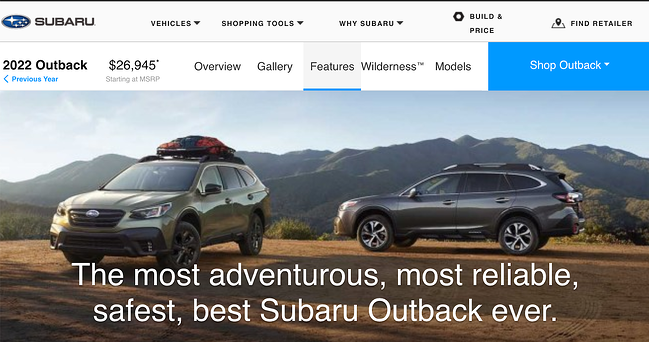
Subaru knows that its target audience uses its Outback SUVs for outdoor adventures. Rather than designing a vehicle solely for utility, Subaru made the 2022 Outback attractive and spacious enough for everyday use as well as reliable and sturdy enough for all terrain and weather conditions.
So in its value proposition, it makes it clear that the Outback will help its drivers go off the road safely and in style. If I were a potential Subaru customer, I’d know exactly what I’m getting from the headline alone. That’s why it’s so important to think about your wording, because it’s likely the first thing potential buyers will see.
5. Samsung: “Get Ready to Unfold Your World”
Headline: “Get Ready to Unfold Your World”
Subheadline/Paragraph: This is everything you’d want in a premium, durable, 5G smartphone. Then we made it unfold — revealing a massive screen so you can watch, work and play like never before.
Visual Element:

In its value proposition, Samsung effectively targets its most tech-savvy segment by front-lining its most innovative design to date: a foldable phone that can double as a mini-tablet. Even more, it solves a common pain point for some customers: owning both a tablet and a mobile device can feel unnecessary, so why not get the best of both worlds?
The Galaxy Z Fold4 attracts customers by promising a lightweight, durable smartphone with an ultra powerful processor.
Some of its premium features include hands-free video capabilities, a large screen that’s perfect for multitasking, and an advanced camera that’s perfect for taking pictures at night. The phone is also crafted with high quality materials that help protect it from water damage, scrapes, and scratches. Plus, its unique design will appeal to anyone who appreciates cutting-edge technology.
6. Imperfect Foods: “Groceries that help you fight food waste”
Headline: “Groceries that help you fight food waste”
Subheadline: “Sustainably sourced, affordable, and conveniently delivered to your door.”
Visual Element:
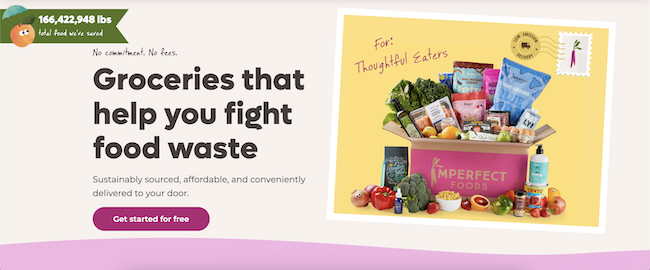
Whether you’re shopping for an entire family or just yourself, grocery shopping can be a major pain.
Planning out all your meals for the week can be overwhelming and time-consuming, especially if you’re trying to ensure no food goes to waste. Even if you do successfully create the perfect shopping list, finding the time to go to the store can also be a challenge.
In its value proposition, Imperfect Foods offers a sustainable alternative to traditional grocery shopping. Unlike other delivery services, Imperfect Foods’ grocery selections solely consists of food that would have otherwise been discarded due to minor cosmetic and physical imperfections.
Imperfect Foods’ website design further communicates its commitment to reducing food waste with its badge counting how many pounds of food it has saved.
The company also appeals to customers’ sustainability concerns by delivering to neighborhoods in one trip to reduce CO2 emissions and only using recycled packaging.
7. Hulu – “All The TV You Love”
Headline: “All The TV You Love”
Subheadline: “What full seasons of exclusively streaming series, current-season episodes, hit movies, Hulu Originals, kids shows, and more.”
Visual Element:
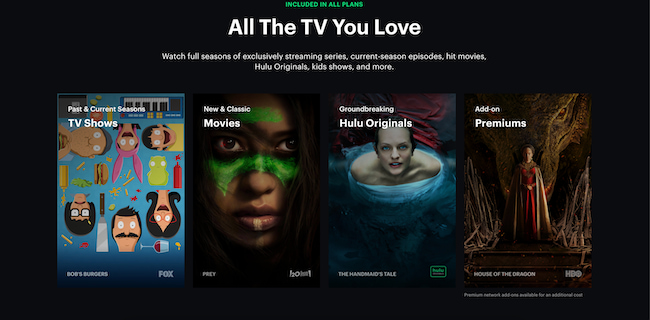
In July 2022, streaming services outperformed cable and broadcast TV for the first time ever. However, as streaming becomes more and more popular, customers are at risk of getting fatigued by the overwhelming amount of on-demand content to choose from.
Hulu’s value proposition aims to target TV consumers who are tired of having to pay for multiple streaming services in order to have access to all the content they want to watch. Each Hulu subscriber gets access to a vast catalog of exclusive series, popular movies, original content, and more.
One of the ways Hulu makes good on its promise of providing “all the TV you love” is by offering subscription bundles with ESPN+ and Disney+, which can save consumers money if they were to subscribe to each service separately. Hulu also has premium network add-ons that give users access to even more content without having to leave the platform.
Samsung’s value proposition for its foldable mobile device is smart, well-targeted, and visually stunning.
You’ve seen some brilliant value proposition examples, now let’s review some examples of value proposition canvases.
1. HubSpot Value Proposition Canvas
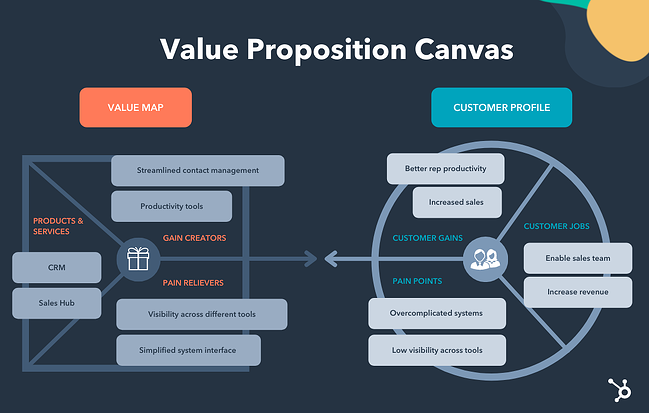
Customer Profile
- Customer Jobs: HubSpot customers need to effectively enable their sales teams to do their best work while avoiding complicated workflows.
- Gains: Customers want to increase their sales rep productivity levels and boost sales.
- Pains: There are plenty of CRM options, but they’re often over complicated and create silos.
Value Map
- Gain Creators: The HubSpot CRM platform offers streamlined contact management software and productivity tools that will help sales teams do their best work.
- Pain Relievers: The user-friendly interface and unified platform offers ease-of-use and high visibility across systems.
- Products & Services: The HubSpot CRM platform includes Sales Hub, an enterprise-level sales software that’s simple yet powerful enough to cater to the needs of businesses small and large.
2. FedEx Value Proposition Canvas
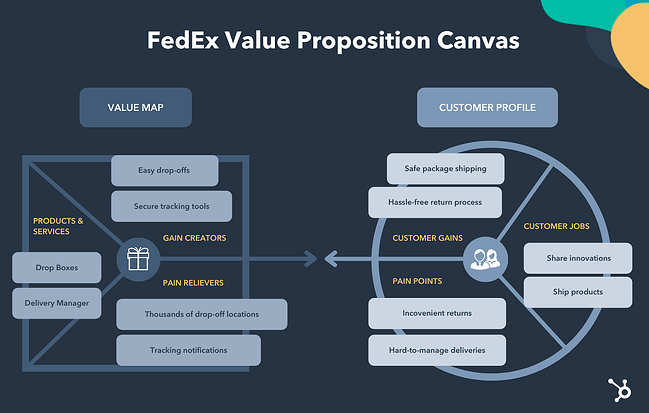
Customer Profile
- Customer Jobs: FedEx customers want to share ideas and innovations with other individuals by shipping goods around the world.
- Gains: Customers want a hassle-free way to return online orders and are looking for a safe and secure way to receive their packages.
- Pains: Returning a package at a FedEx shipping center can be inconvenient, and managing home deliveries can be a hassle.
Value Map
- Gain Creators: Customers can drop off their FedEx packages at places they shop most like Walgreens or Dollar General, and have peace of mind knowing where their package is at all times.
- Pain Relievers: Thousands of FedEx drop-off locations across the country, receive notifications when a package is en route and inform the driver where to leave the package.
- Products & Services: FedEx Drop Box locations make returning packages convenient, and the FedEx Delivery Manager reroutes or reschedules deliveries to work with the customer’s schedule.
3. LG Value Proposition Canvas
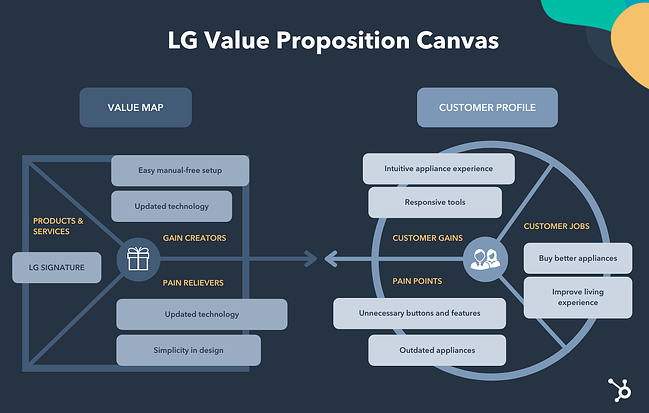
Customer Profile
- Customer Jobs: LG customers want simple, yet innovative technology that helps them achieve a state-of-the-art living experience.
- Gains: Customers have an intuitive and responsive experience with each appliance they interact with inside their homes.
- Pains: There are too many unnecessary buttons and features on appliances that get in the way of a simple living experience.
Value Map
- Gain Creators: Customers can use technology to enhance their home experience without needing to read a manual.
- Pain Relievers: LG offers a simple design that focuses on the user and their lifestyle.
- Products & Services: LG SIGNATURE delivers an innovative product design that creates an exceptional living experience.
4. Subaru Value Proposition Canvas
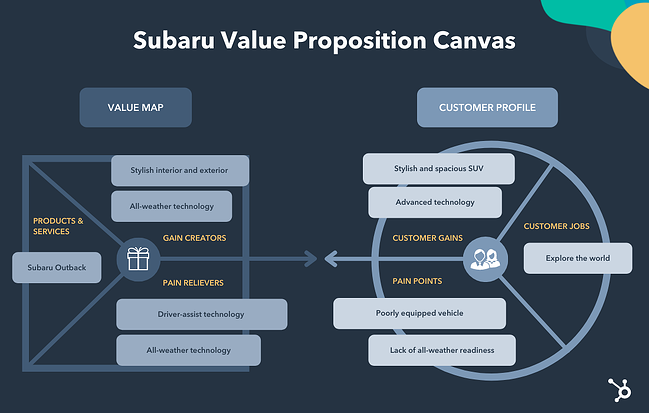
Customer Profile
- Customer Jobs: Subaru customers want to explore the world’s most adventurous places in a reliable and safe vehicle.
- Gains: Customers want to explore the land in a stylish and spacious SUV and look for advanced technological elements in their vehicles that enhance performance and safety.
- Pains: The safest vehicles are not the most visually appealing, and some SUVs aren’t equipped for all-weather or all-terrain environments.
Value Map
- Gain Creators: Subarus have a stylish exterior and interior with ample ground clearance that protects the vehicle against damage from the environment and advanced technology to reduce crashes and make long road trips safer.
- Pain Relievers: Subarus have a rugged blacked-out trim for style and protection, 9.5-inch ground clearance for better stability and performance, and driver-assist technology that helps drivers see better, prevent crashes, manage cruise control, and brake automatically in emergency situations.
- Products & Services: The 2022 Subaru Outback with standard eyesight assist technology, automatic pre-collision braking, adaptive cruise control, and lane-centering.
5. Samsung Value Proposition Canvas
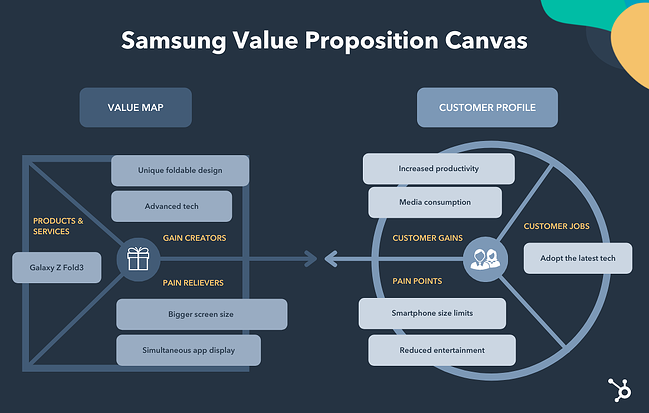
Customer Profile
- Customer Jobs: Samsung customers are tech-savvy and follow the latest trends, driven by efficiency and aspirational lifestyles.
- Gains: Customers want an all-in-one way to enjoy media, work productively, and have a fun experience all in the palm of their hands.
- Pains: Common smartphones have size limitations that strain entertainment viewing, gameplay, and work capabilities.
Value Map
- Gain Creators: Samsung offers a unique and expansive design with capabilities beyond that of an average smartphone, offering the most advanced technology to help customers perform tasks to fulfill work and play.
- Pain Relievers: Samsung provides a smartphone that displays content in tablet-like viewing and displays up to three apps simultaneously.
- Products & Services: The Galaxy Z Fold3 5G folding 6.2-inch smartphone with dynamic AMOLED 2X screens, ultra-thin glass with S Penfold edition, and super-strong lightweight armor aluminum frame.
6. Imperfect Foods Value Proposition Canvas
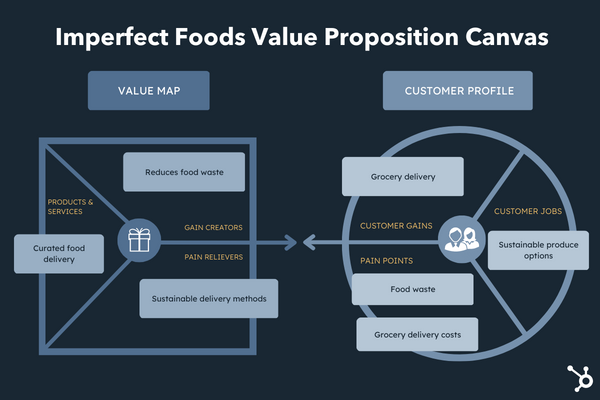
Customer Profile
- Customer Jobs: Imperfect Foods customers want a simple and sustainable option for buying fresh produce.
- Gains: Customers prefer to have their groceries delivered rather than going to the store each week.
- Pains: Produce can go to waste easily, and grocery delivery is expensive.
Value Map
- Gain Creators: Imperfect Foods sources and delivers food that would have otherwise been wasted because of minor imperfections.
- Pain Relievers: Waste is minimized by delivering area groceries in one trip and recycling packing.
- Products & Services: Imperfect Foods curated food selection includes produce, pantry staples, dairy products, snacks, plant-based foods, meat, and wellness products.
7. Hulu Value Proposition Canvas
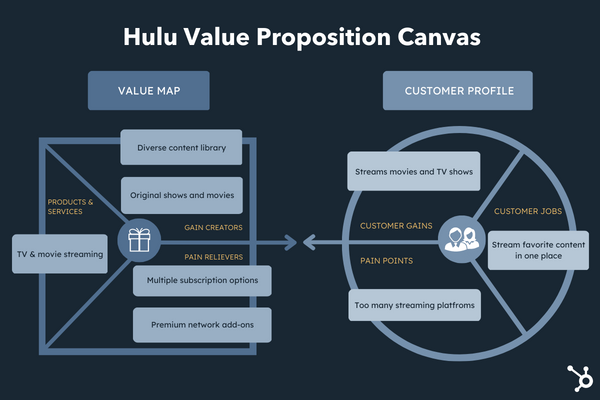
Customer Profile
- Customer Jobs: Hulu customers are overwhelmed by the amount of video streaming options and want a platform that has all of their favorite shows and movies in one place.
- Gains: Customers primarily watch movies and TV shows via streaming services.
- Pains: There is an abundance of streaming platforms, and customers can easily get overwhelmed with the amount of TV and movie options.
Value Map
- Gain Creators: Hulu’s streaming library features full seasons of exclusive series, popular movies, original content, and more.
- Pain Relievers: The different subscription plans and premium network add-ons allow customers to curate their streaming experience to their tastes and can help minimize the amount of services they subscribe to.
- Products & Services: All subscription plans include access to Hulu’s streaming library, new episodes the day after they air, and ability to stream on different devices.
1. Conduct research to determine the value proposition of your competitors.
Because your value proposition is the differentiating factor between your business and the competition, it’s important to research the propositions of your closest competitors. You can use the value proposition canvas in this post to determine how each company meets the needs of your buyer persona.
Be honest here — it’s tempting to focus on the areas in which your competition doesn’t excel, but you’ll have a better idea of where your product or service fits within the market if you key in on your competitors’ strengths.
2. Explain the value of your products and services.
You’re probably familiar with outlining the features and benefits of your product and service offerings. This tactic takes that concept a step further. By matching the benefits of your offerings to specific values that your customers have, you’ll be able to align what your business provides with what your customers need.
3. Describe the benefits your ideal customer will experience when they choose your product or service over the competition.
When crafting this part of your value proposition, include details about how your product or service will benefit the customer and use examples where you can. Videos, photos, and live demonstrations are all effective ways to illustrate your value proposition because they show the customer exactly what they can expect from your business.
4. Develop a unique value proposition for each buyer persona you serve.
Ideally, you’ll be focusing your marketing efforts on a specific target audience. You’ll also find that this audience will have different needs based on their buying behaviors. Buyer personas can help you segment your larger audience into groups of customers with similar desires, goals, pain points, and buying behaviors. As a result, you’ll need a unique value proposition for each persona. Different products and services you offer may solve certain customer pain points better than others, so developing a value proposition for each persona will better serve each one.
5. Test your value proposition with your audience using various marketing channels.
Each of these tactics will likely be developed internally by your team which means you’ll want to validate your work with your target audience. Your value proposition will be communicated through various marketing channels like your website, social media accounts, video, audio, and in person. Test your proposition with members of your audience (both existing customers and non-customers) using each of these channels. Tools like UserTesting can help you streamline this feedback process so that you can implement changes quickly to finalize your value proposition.
We know the makings of a value proposition, so how can you make it a good one? Here’s the last three tips we have for you.
What makes a good value proposition?
Clear Language
Your value proposition should aim to address a primary customer need. This limited focus helps keep your value proposition clear and easy to understand. With just one main idea to comprehend, your audience will be able to quickly decide whether or not your product or service will be the best solution for them.
Specific Outcomes
Next, you’ll want to communicate the specific outcomes your customer can expect to receive from your product or service. Will they save time? Demonstrate how. Will their workflow become more manageable? Show a before and after workflow diagram. The specific outcomes will be critical components of your value proposition as they’ll exemplify exactly how your customers will use your solution to solve their problems.
Points of Differentiation
Not only are your potential customers evaluating your business’s offerings based on their own needs, but they’re also comparing what you offer against competitors. As a result, your value proposition will need to include detailed points of differentiation. These key points will help customers understand exactly what sets your company apart.
Compose a Remarkable Value Proposition
The factors that influence a potential customer to become a loyal customer are limited. Whether your industry has a lot of opportunities to differentiate (like retail) or virtually no unique identifiers (like dairy), you’ll find that a value proposition will help you understand your ideal customer and position your business as the best solution for their needs. Use the tactics, tips, framework, and examples in this post to craft your unique value proposition.
Editor’s note: This post was originally published in June 2018 and has been updated for comprehensiveness.

The Ultimate Guide to Freelancing
Independence, flexibility, and unlimited financial potential — these are all inviting parts of a freelancing lifestyle.
This is especially attractive for employees who want more from their workplace. But, there’s still some mystery surrounding the enigmatic career choice.

As a freelancer, how do you make money? Where do you find work or jobs? How do you figure out what to do? What about insurance and benefits?
These questions are what typically stop people from pursuing a full-time freelance career. Keep reading for the answers to these questions and more, with expert insights from professional freelancers. You can also jump to the section you’re looking for:
Over 60 million Americans freelance, including 46% of millennials and 43% of Gen Z workers. Also, based on economic trends, over 90 million workers will be freelancing by 2028.
Types of Freelancing
By freelancing, millions of talented people build their own businesses and find a bit more freedom in their day-to-day careers. Let’s review the different types of freelancing and the roles that exist in today’s marketplace.
| Industry | freelance opportunities |
|
Administrative Small businesses — and even other freelancers — always need help with administrative tasks. These organizations often hire any or all of these freelance administrative services. |
|
|
App Development Mobile apps are often as important as websites. Because of that, there are multiple freelance app development opportunities. |
|
|
Consulting Some businesses need help with strategy and planning (instead of creating deliverables). That’s where these freelance consulting roles come into play. |
|
|
E-Learning E-learning has both popularity and business impact, especially for remote teams. Companies that want to offer an e-learning aspect but can’t afford or aren’t interested in building a dedicated e-learning team may benefit from e-learning freelancers. |
|
|
Graphic Design Graphic design is a critical piece of every organization’s branding. Many companies choose to hire out these freelance graphic design services to help develop their brand or marketing assets. |
|
|
Miscellaneous New freelance opportunities pop up almost daily. These types of freelancing don’t quite fall into any of the other categories on this list. |
|
|
Photography Whether for a business, publication, or wedding, photography is always needed. Photography freelancers typically specialize in one of the following photography niches. |
|
|
Videography Videographers capture and deliver a highly visual experience for an audience. Because videography is such a specialized field, many companies opt to outsource these freelance videography services. |
|
|
Web Design Web designers create attractive website designs for your audience. Here are some of the common freelance web design roles. |
|
|
Web Development Web developers work with the behind-the-scenes coding and structure that supports the web design. Here are some freelance web development roles. |
|
|
Writing This freelance gig has grown exponentially in the last few years. Freelance writing opportunities include: |
|
With so many components and specializations, it’s no surprise that freelance marketing is a popular gig. As a freelance marketer, you could pursue roles like:
- SEO specialist
- Publicist
- Email marketer
- Social media marketer
- Ecommerce manager
- Product marketer or manager
- Content marketer, strategist, or director
Now that you know all the freelancing possibilities, it’s time to figure out if freelancing is the best fit for you.
Is freelancing right for you?
Here are a few questions to ask yourself if you think you may want to be a freelancer.
Why do you want to freelance?
Are you looking for a more flexible schedule, or are you merely trying to escape your dreaded commute? Do you want to expand your professional horizon, or are you simply bored at work?
Pursuing freelancing for the wrong reasons will make it hard to keep going when the going gets tough.
There are no right or wrong answers, but it’s important to find what’s best for you, your family, and your career goals.
To give you some perspective, here are some answers from fellow freelancers on why they decided to take the leap:
Can you afford to freelance?
A freelance career holds the promise of a higher salary and unlimited income potential. According to ZipRecruiter, the average annual salary for freelancers is $68,924. But salaries vary by industry, role, and experience. And it’s not likely you’ll see that income right away.
The first few months (or years) of freelancing may mean sacrificing income. It takes time to set up your business, establish yourself, and find clients.
Are you comfortable with being uncomfortable?
Freelancing can be extremely uncomfortable. You won’t always know where your next paycheck is coming from and you’ll probably get rejected more times than you can count.
These thoughts and feelings are normal, so think of them as growing pains. After all, if it’s not challenging you, it’s not changing you.
Next, let’s talk about what kind of work you’d do as a freelancer. This step is another common roadblock for folks who want to freelance. Many aspiring freelancers aren’t sure what to do at first. The answer can be simple, it just may take a couple of questions to draw it out.
What are your talents?
This four-word question can decide a lot for you. What are you skilled at? What do others ask you to do for them?
Notice that I didn’t ask, “What are you an expert at?” Experts are rare, and all you need to decide right now is whether you’re willing to become an expert.
What brings you joy?
This question doesn’t always apply. While there will be days and times that you simply don’t want to work, there’s usually one skill set or profession that brings you joy.
What makes you feel good to accomplish? What are you proud to share with friends and family? This is probably what you’ll excel at as a freelancer.
The Pros and Cons of Freelancing
Regardless of fit or type of work, there are benefits and drawbacks to a career as a freelancer.
Advantages of Freelancing
You’re the boss.
You choose your schedule, rates, and which clients or jobs you want to take. If you feel like working in your pajamas, you can. If you want to take a three-week vacation, you can — it’s completely up to you.
You could pay less in taxes.
Freelancers can take advantage of more tax deductions on meals, travel, and more. Federal and state taxes aren’t withheld from each paycheck. Freelancers pay the IRS directly instead.
You (can) make more money. Freelancing is high risk, high reward. Your salary is whatever you want it to be. It all comes down to how much you charge and how often you want to work.
You have a better work-life balance.
Instead of commuting every day, you can stroll to your local coffee shop or take an hour to work out whenever you want. Freelancing doesn’t have to resemble a typical 9-to-5.
Disadvantages of Freelancing
You’re the boss.
Yes, I said this twice. When freelancing, you have to make all the decisions and do all the work, from client sourcing to marketing your marketing. You’re not just an employee of a business, you are the business.
You have to organize your own benefits, taxes, and accounting.
Freelancers don’t have employers to manage bookkeeping, cash flow, benefits, and taxes. They have to do it themselves with the help of tools or guides. And some of these expenses, like health insurance, are more expensive than through a traditional employer.
If you don’t work, you don’t make money. Sure, you can take a three-week vacation, but you may not make any money while you’re gone.
As a freelancer, your time is money. Spend it unwisely, and you could be giving up valuable income.
Instability can interrupt your work-life balance.
There are a lot of unknowns with freelancing, the biggest being where your next paycheck might come from. This instability can cancel out any work-life balance achieved through freelancing. For some, having stability and predictability in your career is worth a long commute or an unfavorable schedule.
The biggest motivations for freelancing are flexibility, freedom, and earning potential. And the biggest barriers are income predictability, finding work, and benefits.
If you’re not sure if freelancing is for you, you’re not alone. But according to 2022 Fiverr research, 73% of U.S. workers plan to freelance in 2023. If you’re one of the many, you’ll want to learn how to be the best freelancer possible.
How to Run a Freelance Business
The following sections touch on everything you need to know to start a freelance career, from branding to clients to making and managing your money. This will help limit the unknowns and equip you with plenty of knowledge as you pursue freelancing.
The information and recommendations in this article came from real freelancers across the world (including some HubSpot employees with freelance experience). It also includes real anecdotes and examples that will shed some light on what it’s like to be self-employed.
1. Getting Started as a Freelancer
Before you dive into completing jobs and making money, you need to set up your business. You need to know exactly what you’re doing and how you’re branding yourself.
This won’t only attract clients, but it’ll also offer direction when you feel stumped or at a loss for why you’re freelancing. Here are a few things you should know to make sure your freelance business survives in the long run.
Building a Brand
A personal brand is valuable when establishing authority as a freelancer. It also creates a long-lasting impression with clients. Whether you use a design tool like Canva or outsource your branding to an agency, personal branding should be one of the first things on your to-do list.
Business Name
Along with a memorable logo, your personal brand should also include a business name. You can brand your business after your own name or a third-party name.
Website
Another element of your personal brand is your online identity. This typically includes a dedicated website and social media accounts where you can display your logo and business name, portfolio, testimonials, and services. Every freelancer should have a website, especially if they work with clients remotely.
It’s good practice to match your website domain and social media handles to the name of your business.
For example, say you’re a freelance marketer, and your business name is Phoebe Promotion, your website could be phoebepromotion.com and your social media handle could be @phoebepromotion. Congruity makes it easier for potential clients to search and find you online.
As for a website, platforms like HubSpot, WordPress, and Wix make it easier than ever to create and design a professional-looking site. These platforms also offer templates that you can use to display your work, like writing or design samples.
If you opt out of a dedicated portfolio site (which we’ll discuss below), these themes make it easy to integrate your sampled works into your website.
Social Media
Your social media accounts should also reflect your personal branding. Every platform has its own benefits and purpose, so don’t fret that you’ll need to be active on all of them.
For example, Twitter is good for sharing your portfolio and connecting with peers and potential clients. LinkedIn is great for publishing a live resume and making valuable professional connections. Facebook is handy for joining groups of like-minded people, and Instagram is valuable for publishing videos and photography.
There are other places that should reflect your personal brand, too. If you do local work or attend network events, business cards are a great tool to carry with you. Sites like Vistaprint or Moo help you easily create gorgeous print material. Your brand should also be on your proposals, invoices, contracts, and any other materials that go to clients.
Why is personal branding so important? A clean, consistent brand communicates authority and professionalism to anyone looking at your business. This one step will help you establish yourself as a trustworthy freelancer.
Creating a Portfolio
Whether you’re a freelance writer, designer, or web developer, a portfolio of your work speaks volumes to potential clients. Strong copy and testimonials can help sell your services. But portfolios feature your work in action, helping your clients envision your skills working for them.
Portfolios also save you precious time by letting clients know if you’re a fit for what they’re looking for before they book an initial call.
Should you include all your work in your portfolio? No. The work in your portfolio should be your best and show diversity in your skills and clientele.
Common ways of showcasing your portfolio are Dropbox, Google Drive, or links on your website. Here are some third-party portfolio sites you can use to feature your work:
- Contently — for writers, journalists, and content creators
- PortfolioBox — for designers, photographers, artists, and more
- CarbonMade — for illustrators, animators, architects, and more
- Behance — for graphic designers, illustrators, UI/UX, and more
- Journo Portfolio — for journalists and writers
2. Starting a Freelance Business
So, you’ve got a brand and a book of work to show potential clients. What else do you need to legitimize your business? Keep reading to learn more about establishing your business and setting yourself up for success.
Registering Your Business
Freelancers have some flexibility around the legal and financial structure of their business. Some freelancers remain sole proprietors and opt to receive 1099s and work from a personal bank account. Others register their business as an LLC to open a bank account and further protect their assets.
The decision is completely up to you. The only difference is that registering your business will likely cost you a fee. This article dives into the specifics of how and why you might want to register your freelance business as a limited liability company (LLC).
Setting Up Your Workspace
You’re set up online, now where are you going to work? Your physical workspace can massively impact your productivity, focus, and motivation. Keep this top of mind when considering your jump to freelancing.
Many freelancers choose to work out of their homes, whether for convenience, cost, or to be closer to family. A home office is ideal for work-life balance, but the dinner table, bed, and couch are also options. This article dives into how to create a home office that works.
These tips can also help you stay focused while working from home.
If it’s not realistic for you to work at home, don’t fret. Many of today’s work environments are remote and freelance-friendly. If you’re interested in co-working space, many cities have local co-working spaces that allow you to use shared desks, studios, and kitchens. These spaces also offer a place to network with freelancers and potential clients.
If you don’t have the budget for co-working space, find your nearest coffee shop, cafe, or library. Whatever space you choose, make sure it’s free of distractions and offers favorable work conditions.
3. How to Find Freelance Jobs
When you start your freelance career, most of your day-to-day will involve looking for jobs and marketing yourself. It will take time to establish your skills and services and become well-known by clients.
Until then, you’ll need to put a ton of work into applying to gigs, contacting potential clients, and just getting your name out there.
Inform your friends, family, and professional network of your freelance business.
Even if they don’t need a freelancer, your name might come to mind if they’re asked if they know someone. The more people who know about your business, the more people who can refer you.
Join freelance job sites.
Freelance job sites give you access to open jobs and projects posted by clients. They also bolster your name and your business name by giving you another online space to promote your services.
Here are some common job sites on which you can establish a presence and check out some open gigs:
Join industry or location-specific freelance communities.
This will help you create a network of colleagues and freelancer friends as well as expose you to open gigs and potential clients. It might seem counterintuitive to make nice with your competition, but it can actually help your business. In fact, three out of my first five jobs came from another freelancer who couldn’t complete them all themself.
Inform your friends, family, and professional network of your freelance business.
Even if they don’t need a freelancer, your name might come to mind if they’re asked if they know someone. The more people who know about your business, the more people who can refer you.
Stay active on social media, like LinkedIn.
Follow and connect with freelancers, influencers, and potential clients on Twitter and LinkedIn. Engage with their posts by asking questions or sharing content with your network. I know multiple freelancers who landed work with an editor or project manager just because they liked what they had to say on social media.
Negotiate full or part-time jobs to freelance.
Your best freelance client could be someone you’re already working with. To shift an existing relationship to freelance, the key is negotiation.
Before broaching the subject, put together a clear proposal that communicates your rates and the value you can offer as a freelancer. Once a client accepts your proposal, be sure to get the terms of your agreement in writing. This can protect your relationship if needs change over time.
Contact companies you want to work with.
For this bold and direct approach, contact managers, directors, and editors at companies where you want to work. Share your availability and your website to stay top-of-mind when work comes up.
This outreach also shows clients that you’re proactive and take initiative when needed.
Establish authority in your niche.
Attend industry events (like INBOUND), teach a local course, or lead a seminar or webinar. One freelancer I know tutors writing students at her local library. Will any of her high-school-aged clients hire her? Probably not, but it still builds awareness of their business while helping others and challenging them to fine-tune their skills.
Work for free.
If you’re a writer, pitch articles to publications like Entrepreneur, Fast Company, or Inc. to build your portfolio and get bylines.
If you’re a designer, offer your work to a nonprofit for free to create goodwill and associate your work with a real client.
Note: Working for free is a controversial topic. Once you’re established, don’t hesitate to charge what you’re worth.
Ask for referrals and testimonials.
Reviews don’t have to come from paying clients. Anyone in your personal or professional network you’ve worked with can testify to your skills and work ethic. Consider professors, past employers or colleagues, or mentors. Ask for reviews on LinkedIn and copy them to your website.
Word of mouth.
Word-of-mouth referrals get a lot of buzz in freelance circles. It takes time to build a reputation with your clients that will lead them to share your skills with their network. But you can start the process with your first freelance assignment.
First, make a habit of submitting consistently excellent work on time. Then, find ways to track and thank your clients who spread the word about your services. This list of project management tools is a useful place to start your tracking efforts.
Say yes!
The best way to consistently attract work is to market yourself and your services. Marketing yourself extends beyond applying for specific gigs or reaching out to clients.
Promote your business as a whole and establish a presence on social media, publications, search engines, and more. Most of this work happens with little to no pay but more than pays off in the long run.
As you establish yourself as a freelancer, keep your mind open to new opportunities. You never know what could lead to a client or job.
![Freelancing quote: “[The best decision I made as a freelancer was when] I went through a period of saying yes to everyone that asked for help. It wasn't until I started to respect my expertise that others seemed to, too (minus the example from above...). It's easy to fall into that trap, but if you don't appreciate your time and talent, neither will anyone else.” — Lauren G., PR and Prose, Amsterdam](https://blog.hubspot.com/hs-fs/hubfs/freelancing-quote-lauren.png?width=650&height=250&name=freelancing-quote-lauren.png)
4. How to Set Freelance Rates
You’ve established the foundation of your business. Now this section will equip you to set your freelance rates.
Setting rates and determining fees may be the hardest part of freelancing. It can be awkward to talk about money and setting rates for your services can be tricky. What are you worth? What if your clients don’t agree?
Setting and negotiating rates can feel quite personal, but the key to discussing money comfortably is to take feelings and opinions out of it. Instead, use an economic approach to determine your rates, the same way a business owner prices their products.
![Freelancing quote: “[It’s all about] knowing your worth. It's so hard to see yourself as a commodity, but that's what freelancing is. You're selling your skills as a service. How do you put a price on that? In the beginning, this is truly a hard thing to grasp. But with experience and speaking to peers, you slowly start to figure that out.” — Karine B., The Letter K, Canada](https://blog.hubspot.com/hs-fs/hubfs/freelancing-quote-karine.png?width=650&height=250&name=freelancing-quote-karine.png)
Here are a few popular strategies freelancers use to set their rates. You can also use a combination of the three.
Cost-Plus Pricing
Cost-plus pricing is determining how much it’ll cost you to complete a project and tacking on 10-30% as profit. This pricing model is best for artists and freelancers who use physical material and know the cost of completing a project or service.
For writers, designers, and developers, this model might be tough to calculate, unless you’re counting your time as the primary cost.
Market Rate Pricing
Market rate pricing involves taking a look at market averages and deciding your rates based on those around you.
To calculate your prices based on market rates, take a look at your industry, location, and competitors with similar experience.
Keep in mind, as a novice freelance marketer, you don’t want to compare your rates to a marketer with 10+ years’ experience, even if you live in the same area.
Here’s a list of average rates per industry:
Value-Based Pricing
Another pricing approach is to base your rates on what you believe your work is worth. This means that your pricing will differ slightly depending on what client you’re working with and what kind of work you’re creating.
For example, creating a commercial for a Fortune 500 company may hold more value than a video for a local coffee shop, so you’d likely charge more for the former. That’s not to say one company has more value than the other. But it allows you to take what they can afford and the potential impact of the project into consideration.
How often should I charge clients?
Some freelancers charge by the hour, while some charge per project (or per word for writers). Base this decision on the type of work you’re doing and what you’re most comfortable with.
Hourly fees ensure you’re paid for all your time, while a fixed price guarantees you’ll make a specific amount. Pay by the hour puts emphasis on the value of your time, while fixed pricing puts more emphasis on the value you’re delivering your client.
Should I publish my freelancing rates on my website?
Again, this comes down to what you’re most comfortable with. Some freelancers opt to publish their prices to create a perception of value. This approach helps weed out clients who can’t afford your services.
Other freelancers withhold that information to get clients on the phone. Keeping your prices private also allows you to change prices when need be.
![Freelancing quote: “I publish [my rates]. It means that people can get an idea of what I charge before they contact me, which makes everyone a lot more comfortable with the pricing conversation at the end. My rates are based on surveys of my peers and what people at my level of experience charge.” — Angela R., Australia](https://blog.hubspot.com/hs-fs/hubfs/freelancing-quote-angela.png?width=650&height=250&name=freelancing-quote-angela.png)
5. Managing Freelance Jobs and Clients
Freelancing means that you’re in charge. You create your schedule, you set your deadlines, and you pick up the slack when things go wrong.
The best way to prevent problems (and impress your clients while you’re at it) is to have a solid project management process in place. Not only will this help you approach each project with assurance and organization, but it’ll also communicate professionalism to your clients.
![Freelancing quote: "I'm a huge fan of over-organization so I use tools to get myself organized and get stuff done so I can get paid faster. Using [tools] also gives clients a great impression that you've got it together and takes the pain out of choosing to work with you!" — Owen W., British Columbia](https://blog.hubspot.com/hs-fs/hubfs/freelancing-quote-owen.png?width=650&height=250&name=freelancing-quote-owen.png)
The first step to managing your projects with ease is establishing a place to record deadlines, meetings, events, and important dates. This could be on your calendar, bullet journal, or online planner.
Beyond your calendar, it helps to use a project management or to-do list tool (or a combination of some) to help you stay on track and hit deadlines. From a HubSpot poll of over 80 freelancers, here’s a list of the top five platforms they use to manage their freelance work:
- Trello (used by 28%)
- Asana (used by 17%)
- Google Docs
- Basecamp
- Toggl
Lastly, figure out how you’d like to communicate project information and updates to your clients.
As for how often you’ll communicate with them, that’s also up to you. It’ll likely take some time and practice to figure out.
Remember, as a freelancer you not only need to create amazing work but also please your clients, as clients lead to referrals — which leads to more work.
Here are a few more tips for working with clients:
Set expectations early.
From the moment you begin working with a new client, make sure no question goes unanswered. Be proactive in setting expectations for projects, your personal availability, deadlines, and payment.
If you feel like you’re providing too much information, you’re likely providing just enough.
Put it on paper.
Whether you’re connecting with clients over email, phone, or Slack, make sure all decisions and expectations show up in official documents. This includes proposals, contracts, and invoices. This creates legitimacy for your freelance business. It also creates official documentation if things go awry.
Watch out for client “red flags.”
If a client starts asking questions about availability and payment that make you uncomfortable, listen to your instincts and consider whether you want to work with them. It’s OK to say no.
Questions like “Will you be available any time I call?” or “If I don’t like it, do I still have to pay?” are examples of red flags and might mean that the client isn’t a good fit for your business.
6. Getting Paid for Freelance Work
Money, money, money. We all need it, but not everyone has to manage it as meticulously as freelancers do.
When it comes to money, setting your rates is only half the battle. The other half involves billing, getting paid, and managing your freelancing financials.
The process of billing and receiving money can be uncomfortable, but it keeps your business alive and allows you to maintain your freelance lifestyle. Thankfully, technology has made it easier than ever.
Use a tool for financial management.
With the right tools, it’s easy for today’s independent workers to manage their finances within a single platform.
Here’s a list of the top four financial management tools per recommendations from over 80 freelancers:
- Wave (13%)
- Quickbooks (10%)
- Freshbooks (10%)
- Xero
These tools can help you upgrade from spreadsheets to invoicing, processing payments by direct deposit, and more. These tools also make it easy to add taxes and fees or handle reminders for clients who missed a deadline for payment.
And speaking of payments — one important thing to know about freelancing is that sometimes clients don’t want to pay (or they don’t pay at all).
There are some measures that can help if this happens. At the same time, you’ll want to follow these invoicing best practices to minimize this risk.
Bill at least half upfront.
It’s not uncommon to ask for at least 50% down before starting work. This is a show of good faith from your client and offers some funding upfront so you can get to work.
Be clear on your invoice.
Spell out all your pricing, due dates, and payment terms on your invoice. Leave nothing to chance. You never know when a client will try to wiggle out of what they owe you.
Bill promptly, based on your terms.
If you say you’re going to bill weekly, bill weekly. If you say you’re going to bill five days post-project, then do so. Be true to your word. It shows professionalism and trustworthiness, and it keeps your clients from silently backing out of what they owe.
Offer multiple payment options.
The tools mentioned above can process multiple forms of digital payment, but it’s also good practice to offer to accept payment in other formats too.
Be sure your business address or P.O. Box is prominent on your invoice so that clients can send you a check if need be. Accepting all forms of payment leaves no room for your client to say, “Sorry, I just can’t pay.”
7. How to Pay Taxes as a Freelancer
First, congratulations on the income you’re making as a freelancer. Your next step, well before tax time, is to talk to a tax professional.
Tax laws and procedures vary by country, state, and sometimes county, so you’ll want to cover the details with an expert.
Until then, these common tips can help you prepare for your first tax season as a freelancer.
Put taxes aside after every payment.
It’s good practice to “pretend” taxes are being removed from each invoice you receive, as an employer does. If you’re freelancing in the United States, it’s a good idea to set aside at least 30% of your income to cover taxes.
Besides income tax, this will need to cover a 15.3% self-employment tax as well as any state or local taxes.
Look at different business types as your business grows.
While most freelancers file taxes as sole proprietors, you may want to look at other business structures as your income grows. Different business types can have a positive impact on your tax obligations, liability, and more.
Keep clear and easy-to-find records.
The easier it is to locate forms, invoices, and receipts, the simpler it will be to complete your taxes. These records can also help you continue investing in yourself and your business with the possibility of deductions for:
- Workplace expenses
- Continuing education
- Credit card interest
- Health insurance
- Mileage and travel expenses
- Software
Think about paying quarterly taxes.
Some freelancers find it best to make quarterly tax payments, so you may want to take a look at that option.
Instead of paying one large sum each April, you’ll pay an estimated tax amount each quarter. This relieves your bank account of a massive withdrawal and helps you avoid any late fees or potential interest payments.
8. More Not-So-Fun Freelance Stuff
When you’re working for an employer they take care of a lot of stuff besides taxes — including benefits and retirement.
You can set up your own benefits and retirement, but it takes some extra research. Check out the need-to-know details below.
Setting Up Insurance
Company-sponsored benefits are important, especially for folks with families and chronic health issues.
If you have a spouse or domestic partner, take a look at their insurance options. This is the most ideal avenue, as company-sponsored benefits are usually less expensive than direct options through insurance providers. Even if your partner has to pay a little more to upgrade to an employee plus partner or employee plus family plan, it could be worth it.
If you don’t have a partner or they can’t include you in their benefits package, don’t fret. There are several plans and providers that cater to freelancers and self-employed people.
Check out these resources below:
Investing in Retirement
You don’t need an employer to set up a 401(k) or IRA. Freelancers and self-employed folks have many of the same options as those who work for a company, such as the Roth IRA, SEP IRA, or self-employed 401(k). This article by Fidelity breaks down which account might be best for you and how to get started.
As a freelancer, I started a Roth IRA and set up direct deposits into the account. I did this directly through my personal wealth manager, but there are plenty of tools and platforms that can help you.
Regardless of how you plan to invest in retirement, always start as early as possible and stay consistent with your deposits. Your future self will thank you.
9. Staying Connected as a Freelancer
Freelancing can be a lonely career choice. In fact, when talking in-depth with over 20 freelancers, most said the most difficult part of being a freelancer is how lonely and isolating it can be.
But this shouldn’t stop you from pursuing a freelance career — it should simply prepare you to put in a little more work socially.
If you’re not going into an office anymore, you may find yourself spending more time alone or that you talk to yourself more often — or that may just be me.
Either way, freelancing means stepping outside your comfort zone. You may need to work hard to build relationships and join communities — just like you’d do at work.
Meeting others can help you stay connected and up-to-date on new jobs and freelancing trends. Here are a few ways you can stay connected and keep learning as a freelancer.
Take an Online Course
Taking an online course is a fantastic way to inexpensively learn a new skill while connecting with a new network of people.
Some courses are free, and others offer certifications to increase your credibility. Online courses are a great asset to a budding freelance business and are much, much more manageable than going back to college.
Here’s a list of courses recommended by the 80+ freelancers we surveyed:
Writing Courses
- HubSpot’s Content Marketing Certification
- Copywriting for Creatives
- 10x Emails
- ConversionXL
- Copyhackers’ Copy School
![Freelance marketing quote: “[The best decision I ever made was] joining the first iteration of The Copywriter Mastermind. It leveled up my business in so many ways. We're still together as a group today, and our Slack is my #1 go-to for business advice, client management, and copy review.” — Lianna P., Punchline Conversion Copy, New Orleans](https://blog.hubspot.com/hs-fs/hubfs/freelancing-quote-lianna.png?width=650&height=250&name=freelancing-quote-lianna.png)
Design Courses
Marketing Courses
Business Operations Courses
Freelance Marketing Courses
Coding and Analytics Courses
Along with these courses, you can also check out dedicated course websites. Platforms like Udemy and Treehouse offer hundreds of free and paid courses that cover a range of topics and specialties.
For more resources, check out HubSpot Academy for Freelancers.
Find a Mentor
When I started freelancing, finding a mentor was the best thing I did for my business. I didn’t need help writing — I needed help figuring out how to write for other people and make money doing it.
My mentor showed me exactly how to be a freelancer, including how to find business, pitch myself, set my rates, and more. Without her, I wouldn’t have started out so strongly with my freelance business.
Not only did she equip me with all the tools and confidence I needed to dive in, but she also passed along a few jobs that she couldn’t take herself.
The process of finding a mentor, coach, or consultant isn’t the same for everyone. You may find a mentor in your local community or hire a mentor for help. Depending on your budget, industry, expertise, and location, you might take a coaching course or connect with a local consultant.
Join a Freelance Community
Whether you’re working from the heart of New York City or middle-of-nowhere New Mexico, today’s technology makes it easy to stay connected to other freelancers. From social media to dedicated forums, there are plenty of ways to join communities, build a network, and make friends.
Sites like Freelancers Union offer memberships that offer resources and access to communities of freelancers around the world.
As for social media, there are plenty of freelancer Facebook groups you can join and engage with. Some groups give work, while others simply offer a place to chat and ask questions. If you’re on Slack, you can also hop into a freelancer Slack community.
Lastly, don’t shy away from your local freelance network. Nothing quite beats a face-to-face meeting or conversation over a cup of coffee. Organizations like Creative Mornings or local co-working spaces put on networking events and get-togethers that allow you to meet other freelancers in your area. These opportunities offer human interaction in an otherwise majorly digital lifestyle.
How to Be a Successful Freelancer
Now that you have a foundation for your new freelance business, it’s time to refine your strategies. Over time, you’ll start to learn where you need to develop and when you excel.
These tips can help you focus on the most important details from the start.
1. Find a niche.
While it can seem like the broader your skills are the more likely you are to find freelance clients, the opposite is often true. Employers are often looking for a freelancer that understands their unique industry and challenges. Find the right niche and you’re more likely to offer real value.
For example, popular freelance writing niches include finance, real estate, education, and wellness.
To choose your niche, begin with your personal interests and your professional experience. The places where these overlap could be your best niche. Other ways to find your niche include:
- Trying different industries and specialties
- Market research
- Looking at top-paying niches
- Following your passion
2. Do some competitive analysis.
As you launch your freelance business, you might need to do some competitive research.
Learning from the strategies of top freelancers in your industry can help you understand what clients are looking for. It can also help you improve your marketing, proposals, and more.
This strategy can also help you find gaps that you can fill in your industry. Use these free competitive analysis templates to research your competitors for insights.
Free resource: Competitive Analysis Templates
3. Track your time.
There are many free time tracking apps for freelancers. These can help you track your billable time for projects. When you’re the boss, you don’t need to track your time. But even if you only track your time with your first few clients, time-tracking tools can help you see how much time each task actually takes.
They can also help you better budget and prioritize your time and can offer reminders to take breaks to avoid burnout.
4. Keep developing new skills.
As you develop your freelance business, continued education can keep your skills relevant. This habit can also open up new client opportunities.
Massive Open Online Courses (MOOCs) are a great way to build new competencies. For example, freelance marketing changes constantly. This list of over 40 free online marketing classes can help you build skills in the areas you want to develop.
Popular skills that can be useful for any freelancer include:
- Data science
- Cybersecurity
- Coding
- Video production
- Sound editing
- Content writing
5. Create and stick to personal deadlines.
Working independently is exciting, but it can also get overwhelming. If your clients have flexible deadlines, it’s easy to get in the habit of putting off projects until the last minute. This means a lot of wasted time and lost chances for extra income.
So, instead of relying on client deadlines to stay on task, break your deliverables into smaller projects and set a deadline for each one.
It’s also a good idea to use tools and templates to organize ongoing projects. For example, social media content can be tough to organize because of the volume and variety of content. But this social media content calendar template makes it easy to see the big picture at a glance. At the same time, it creates space to plan for the details needed to meet client expectations.
It’s also a good idea to give yourself rewards for meeting deadlines to stay motivated.
6. Communicate your value.
Promoting yourself as a freelancer can feel uncomfortable to some people. If this is you, there are a few ways to sidestep those awkward feelings and build excitement for your freelance business.
As you develop a reputation with clients, you can let their appreciation speak for you. Until then, there are a few authentic and easy ways to share your value as a freelancer.
First, focus on results. Track analytics for every project so you have data-driven stats to share in your freelance marketing.
Next, use templates to help jumpstart your promotions. For example, these professional bio examples and templates can help you create a freelance bio that covers everything your prospective clients need to know.
Finally, let your personality shine. Your likes and dislikes, sense of humor, and aesthetics will show up while you’re working with clients. Including what you love in your promotions lets your clients know who you are and what a joy it is to work with you.
7. Ask top clients for testimonials.
As your freelance business grows, don’t forget to keep asking for feedback and testimonials. This query can sometimes feel awkward, but there are a few ways you can make asking for testimonials feel fun and easy.
First, ask if you have permission to use texts, chats, or other digital conversations as a testimonial. You can also ask to draft a summary of feedback and ask your client to edit your copy.
Testimonial exchanges or follow-up forms are great approaches too. Check out this post for a free template and more suggestions.
8. Create a blog.
Your first marketing plan may not include a blog, but it’s a great investment for long-term results. Whether you use your blog to highlight relevant industry keywords or emphasize your personality, it’s a smart way to promote yourself as a freelancer.
Check out these resources for tips on how to create a powerful blog, craft a blog post, and more.
9. Start freelancing on the side.
If you’re not sure whether you can reach your goals by freelancing, but you’re excited about the possibility, take the first step.
Many freelancers begin their businesses while working another job. If you begin your freelance business with a reliable income stream you’ll have time to find the right niche, clients, and more, without too much risk.
You can use this time to test your skills and interest in freelancing, then decide on the goals you want to reach before you freelance full-time.
If this sounds appealing to you, be sure to check your employer’s policies on freelancing. You want to be sure you’re able to balance your new responsibilities before making a big investment.
Make Freelance Marketing Part of Your Bright Future
This ultimate guide to freelancing covers the many steps that go into this massive career move. But don’t get discouraged or overwhelmed.
In fact, freelancing is a pretty straightforward process. Once you answer questions about your personal brand, where to work, where to find jobs, and staying connected, there’s just one more question. Are you ready to take the leap?
Editor’s note: This post was originally published in July 2018 and has been updated for comprehensiveness.

Using Human-Centered Design to Create Better Products (with Examples)
To understand human-centered design, let’s start with what it isn’t.
Imagine you work at a gaming design company, and one day your boss comes to you and says, “Teenagers these days — they need to get off their phones. Let’s design a crossword-puzzle board game for teenagers — they’d welcome the opportunity to get offline.”
Your boss has good intentions, but his intentions don’t match your consumer’s reality. His idea isn’t empathetic towards a teenager’s passions, and it isn’t a solution that fits their wants and needs.

Now, let’s look at a real example of human-centered design: meal subscription boxes.
Take HelloFresh, founded in 2011 by Dominik Richter, Thomas Griesel, and Jessica Nilsson. The company delivers a box of fresh food to your door, with easy recipes included. The founders recognized that people have trouble finding time to shop for groceries and struggle to create healthy, affordable meals — they came up with a solution to both problems.
Unlike your boss in the first example, the HelloFresh founders didn’t develop an idea unrelated to real consumer needs. Instead, they recognized a struggle someone was facing and then worked to invent a solution. In this way, it’s arguable that human-centered design is a safer and more trustworthy approach to problem-solving.
Whether your role requires you to pitch ideas in marketing meetings or design the products your company sells, it’s critical you know the process of human-centered design. By putting your consumer at the forefront of your creative process, you ensure each product you create and distribute is a true, long-term solution to your consumer’s needs. If done correctly, you’ll gain a much more reliable and loyal customer base.
Now that we’ve covered the importance of human-centered design, let’s dive into the various stages of a human-centered design process and look at some examples so you feel confident implementing the strategy for yourself.
Human-centered Design Process
IDEO — the global design firm behind Apple’s first computer mouse, the Palm Pilot, in 1998, and more — came up with three phases for the human-centered design process, which has helped them create such successful and long-lasting products.
The three phases of the human-centered design process are inspiration, ideation, and implementation.
Phase One: Inspiration.
The inspiration stage requires true on-the-ground research. You’ll need to engage directly with your target audience to understand their biggest problems and pain points. It’s important to research your target audience. You want to find out: what makes your consumer happy? What makes them frustrated? What do they do first in the morning? How do they devour content? What takes up most of their time?
Essentially, you want to see from their point of view.
There are a few different methods you could use to research your audience. For instance, you might send out surveys to customers via email or create a survey submission form on one of your web pages. If you find it difficult to get people to fill out the survey, you might offer incentives — 10% off their next purchase or a ticket for a raffle contest with a giveaway prize.
You could facilitate a focus group if you don’t feel comfortable with surveys.
If you often interact with consumers on the phone or email, you might hear about issues they’re having organically.
If you’re still unsure which direction to take, check out 19 Tools & Resources for Conducting Market Research for more ideas.
Once you’ve done your market research, list with your team all the trivial and major problems with which your consumer struggles (within your skill set or products, of course). Consider the biggest hassles your consumer faces and how your products could get better to solve those issues.
Phase Two: Ideation.
Like the HelloFresh founders, your team must envision a future that doesn’t exist yet. Now that you know what problems your consumer faces, what solutions could help them become better, happier, and more productive?
The ideation stage is your “no such thing as a bad idea” brainstorming session. It requires you and your colleagues to create and tweak a long list. Take good ideas, and make them better. Refine and tweak them. Imagine all the different ways you could solve a customer’s problem, big and small.
When you’re confident you have a realistic, human-centered idea to solve for a customer’s needs, you’ll need to envision how a product could solve that solution.
Let’s use our HelloFresh example to see this stage more clearly. In Phase Two, Ideation, you’ve already recognized that people don’t have time to grocery shop and want healthy meals (that was Phase One). In this step, you’ve made a long list of potential solutions, i.e., “YouTube tutorials to create healthy meals? Write a cookbook? Pay for someone to come into your home and cook for you? Pay for a truck to deliver healthy food to your door?”
Ultimately, your team has decided — aha! We’ll create a meal subscription service.
Now, you want to prototype and test this product on your ideal persona.
Remember, the whole premise behind human-centered design is digging into your consumer’s actual needs and providing a solution to those needs. If you receive feedback on limitations of your product, don’t get dejected — get inspired. That feedback is exactly what you need to ensure your product will gain long-term traction with your target consumer base.
Phase Three: Implementation.
So you’ve created and tested a prototype of your product, collected feedback, and seem ready for release to a wider audience.
Now, it’s time to market your product. Ultimately, you’ll want to imagine yourself in your consumer’s shoes and then market to them from that point of view: How would I like to learn about this product if I were them?
Since your product revolves around your consumer’s struggles, you’ll want to develop an effective marketing strategy to spread the word about your product as a long-term solution to a real struggle.
You also might want to consider partnering with other businesses who offer similar solutions or share an audience with similar problems. By partnering with a business, you’re able to offer the user more of an all-in-one solution.
Human-centered Design Examples
1. Colgate Toothbrush
Colgate-Palmolive’s toothbrush, Acti-Brush, was innovative in the 1990s, but since then, competitor toothbrushes have surpassed Colgate’s on the market. Colgate-Palmolive hired Altitude, a design consulting firm focused on human-centered designs, to create a new toothbrush model.
The Altitude team extensively researched the audience and then developed the Motion, a new, slimmer, high-powered toothbrush with oscillating heads and an arcing neck. The entire product, from superficial features to performance, centered around one critical question: will this serve our user’s needs? Ultimately, the Motion successfully solved a user’s problem — needing a slender toothbrush that could still deliver on performance — the industry hadn’t previously addressed.

2. Spotify
Remember the days of paying $1.99 for one song, or hanging around the aisles of Walmart, searching for your favorite album?
I’d argue that one of the most impressive displays of human-centered design is Spotify — a product that showed me my prior method for purchasing music was a problem before I even recognized it as one.
Spotify succeeded by empathizing with their users’ struggle to pay for music from disparate sources and created a solution we could all embrace. Thanks to Spotify, users can get all their music in one place for one monthly fee. I’m willing to pay more for that kind of tailored, customized, helpful service.
3. Fitbit
Before handy fitness trackers, we’d have to estimate how many calories we burned in a day and find the inherent motivation to be more active (which, as we all know, is an untrustworthy source).
The invention of products like Fitbit is undeniably human-centered. The inventors of fitness trackers recognized people’s challenges with tracking and maintaining fitness goals and provided a useful long-term solution. The product works with the user in mind by telling the user how many calories she burned and urging her to exercise more.
4. Venmo
Venmo is another example of a product that solved a problem before most people realized it was one. I personally didn’t see how cumbersome exchanging money was until Venmo provided a solution.
The founders of Venmo, Andrew Kortina and Iqram Magdon-Ismail, stumbled across the idea of Venmo only when they encountered the problem. They went to New York City, and Iqram forgot his wallet. Andrew paid for everything, and at the end of the trip, Iqram wrote him a check.
During that exchange of money, they thought, “Why is this still the best way of exchanging money? Why can’t we do this on our phones?”
The Venmo founders needed to solve a problem they encountered and build a solution from which other people could also benefit.

Feeling Inspired?
Hopefully, these examples confirm the usefulness of human-centered design for creating long-lasting and innovative products. You’re now ready to tackle your creative process from a new angle — the human angle.


6 Marketing AI Predictions to Watch in 2023
AI has gone mainstream, and it’s slowly creeping into the day-to-day lives of marketers.
Although this technology is still in its early stages, it’s already changing how we work. With the help of AI-powered tools, marketers can automate a variety of tasks, from drafting email subject lines to scaling entire marketing campaigns.
If you’re curious about where AI is going — and how you can leverage it — we’ve listed six AI predictions to watch in 2023.
![Free Guide: How to Use AI in Content Marketing [Download Now]](https://no-cache.hubspot.com/cta/default/53/3e25e192-30c3-40c1-a7da-a4d054c9e157.png)
1. AI will give content marketers a significant lift.
Sure, artificial intelligence isn’t close to writing the next New York Times best seller. But it can streamline many content marketing tasks. Specifically, it can give marketers a lift in the writing process.
For example, picture a content marketer stuck in the content ideation stage. Instead of waiting for inspiration to strike, she inputs a prompt into an AI chatbot — such as, “Provide a few blog ideas about TikTok marketing” — and receives a list of ideas to get the ball rolling.
AI tools — like ChatGPT, Jasper, and HubSpot’s content assistant — can also do much of the legwork when it comes to research. These tools use complex algorithms to gather, analyze, and interpret information from across the web, identifying patterns and trends in a matter of seconds.
For example, suppose you need to write a video script to promote a product. To get started, you paste hundreds of customer reviews into an AI chatbot and ask it to summarize the key takeaways. Then, you use its output as a rough draft. In the end, you have a new ad highlighting everything your customers love about the product — and you did it in a fraction of the time.
Ultimately, we predict that AI will assist content marketers by executing tedious, repetitive tasks — like coming up with ideas, writing rough drafts, and summarizing large amounts of data.
2. Consumers will demand more personalization, and AI can make it happen.
78% of marketers say personalization has a “strong” or “extremely strong” impact on customer relationships.
While it was once extremely hard to create these experiences with older marketing techniques and technology, AI has opened the door for more pinpointed personalization opportunities.
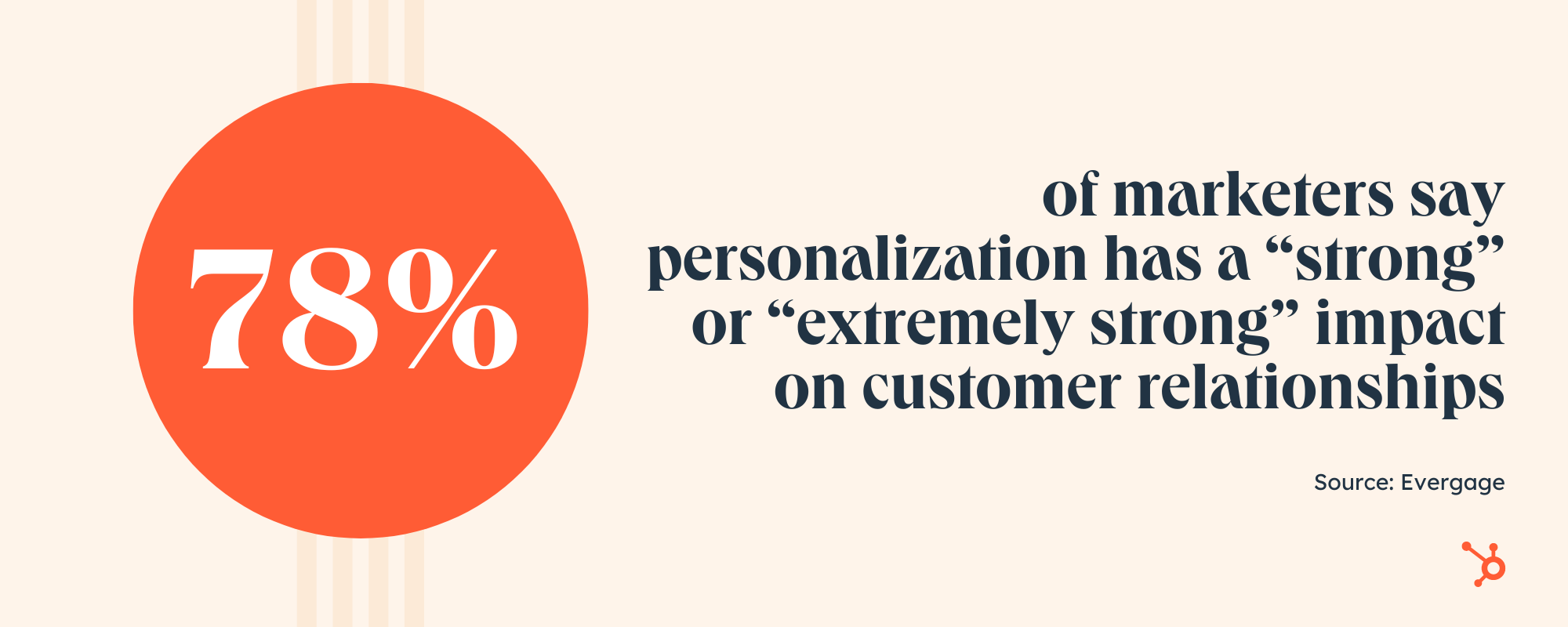
Right now, AI is primarily used to help us “get things done,” but it has the power to help marketers scale faster, personalize more, and find target audiences easily.
We’re already seeing heavy AI personalization in the marketing industry. For example, many tools allow brands to send marketing emails with names and personalized information based on contact list information. In retail, consumers regularly get emails or e-commerce recommendations for certain products based on what they’ve recently viewed or purchased.
With evolving technology and our ability to capture data on prospects and customers, it’s not shocking to think that AI-based personalization trend will grow stronger in the near future. In 2023 specifically, expect AI to be used more and more to create solid one-to-one personalization.
3. We’ll see an influx of mediocre content generated by AI.
Because AI can churn out content at lightning speeds, some marketers may ramp up their content demands too quickly. As a result, we’ll see an influx of AI-generated content that’s far from perfect.
This leads to an important point: AI is better left for the first draft, not the last. For example, AI-written content may look flawless on the surface, but it lacks critical human elements, like humor, empathy, and cultural context.
Copying and pasting it’s output into your marketing isn’t enough. You need to add your own brand voice and perspective.
On top of that, generative AI works with limited data, so the information it uses may be outdated, incorrect, or even biased. To get around this, marketers must put guardrails in place to maintain quality.
4. Companies will embrace “Responsible AI.”
To state the obvious, AI systems rely on data to make decisions. This data comes from various places, including social media posts, online databases, public records, and general online activity (e.g., posting a review on Yelp).
While this process seems harmless enough, it can reveal a lot about a person’s life. What’s more, consumers may not be aware that their information is being used to make decisions that can affect them.
Currently, companies are expected to self-regulate when it comes to using AI. But as privacy concerns continue to mount, we predict more companies will implement their own AI guidelines.
.png?width=2000&height=850&name=What%20is%20RAI%20(2).png)
For example, Microsoft has developed its own Responsible AI Standard which relies on six principles: fairness, reliability and safety, privacy and security, inclusiveness, transparency, and accountability.
Ultimately, data is the fuel for most AI systems. The problem? If consumers don’t trust AI, they’ll keep a safe distance. Therefore, accountability and transparency from companies will go a long way in 2023.
5. AI will become a secret weapon for SEO strategists.
We predict SEO strategists will reap huge benefits from AI in the coming year, thanks to its ability to automate time-consuming tasks.
This type of self-driving technology can identify relevant keywords, conduct competitive analysis, and optimize webpages, such as fixing broken links, duplicate content, and incomplete meta descriptions.
For example, Campbell’s Soup uses AI-powered SEO automation to compress 75,000 images in a single day. This allows the brand to rank on page one of SERPs for 4,000 keywords within a few weeks.
The best part? AI is helping human SEO marketers rather than making their jobs obsolete. AI technology allows SEO experts to get results that aren’t possible without machines. Not worrying about a mountain of SEO-related tasks frees them up to work on more intensive projects.
Because it benefits web traffic and results, expect the investment into AI-powered SEO tools to grow.
6. AI will fit more naturally into the daily lives of marketers.
AI is already having a huge impact on the marketing industry. That said, many marketers are still exploring AI and its potential.
Those who embrace this technology — and integrate it into their workflow— can maintain a competitive edge while saving time in the process.
As AI tools get more user-friendly, eventually they’ll becoming so natural to your work that you don’t notice it. As John McCarthy, one of the fathers of AI, once said, “As soon as it works, no one calls it AI anymore.”
Back to You
It’s 2023, and AI has gone mainstream. There’s no denying its potential to transform a variety of industries, and marketing is no exception. It can help companies create more, scale faster, and build more personalized experiences. But to pull it off, marketers must stay agile as they embrace and innovate with AI.


17 Best Free Website Builders to Check Out in 2023 [+Pros & Cons]
Today, 27% of small businesses don’t have a website. In today’s digital world that’s a huge mistake. What’s holding them back? The top reasons are cost and lack of technical know-how.
In today’s digital world, having a business website isn’t an option — it’s a must. Luckily, there are many free website builders that make the process easy. We’ve compiled 17 of the best options. They offer robust functionality like SEO benefits, mobile optimization, and professional-looking templates.

These builders are the next best thing if you’re on a tight budget. Better yet? Most of the free website builders have paid options if you need additional features as your business grows.
1. HubSpot Drag-and-Drop Website Builder
Get started with HubSpot’s free drag-and-drop builder!
Designing a beautifully branded website doesn’t have to be complicated. If you’re taking the DIY route to create your own website and don’t have coding experience, consider HubSpot’s drag-and-drop website builder inside CMS Hub.
It comes with everything you need to build a website, including content management system (CMS) tools, themes and templates, security features, and a built-in content delivery network (CDN) to ensure pages load quickly.
HubSpot’s builder also connects easily with HubSpot CRM. That lets you integrate contact forms, live chat requests, and more. This website solution is ideal for businesses already using HubSpot’s CRM tool. It’s also excellent if you’d like to start using a website builder that includes marketing, sales, and service software already built-in.
As a result, you’ll be able to easily expand the functionality of your website and keep readers and visitors engaged. If you would like to monetize your audience, build a subscriber list, or increase form submissions, HubSpot’s website builder offers all the tools you need without requiring external integrations.
Whether you run a small business or are starting a blog, CMS Hub allows you attract, engage, and delight your audience — all while keeping the learning curve extremely low with its intuitive drag-and-drop page builder.
Core Features
- CMS tools
- Themes and templates
- Built-in security features (malware scanning, website monitoring, and web application firewall)
- Free SSL certificate
- Ability to connect to a custom domain
Advantages
- Includes web hosting
- Personalization (thanks to HubSpot’s CRM)
- Security
- Responsive themes and templates
Disadvantages
- The free version displays HubSpot’s branding
- You’ll need to learn HuBL (HubSpot’s templating language) to build custom modules and coded templates
Pricing: A limited free plan is available. The premium CMS plans with additional features start at $23 a month when billed annually.
What we love: HubSpot’s website builder connects seamlessly with HubSpot CRM, allowing you to easily integrate your favorite marketing tools with your website.
Brands Using HubSpot
2. Wix
With over 200 million users, Wix is one of the most popular free website builders. The easy-to-use, fully-hosted platform offers an easy drag-and-drop editor, an extensive collection of apps, and professional-looking templates.
Wix can even propose a design for your site using its Artificial Design Intelligence (ADI) software, Editor X.
Core Features
- A drag-and-drop editor
- A large collection of apps and templates
- Analytics and reporting
Advantages
- Easy to use
- Large collection of apps and templates
- Optimized for mobile
Disadvantages
- The free version displays ads
- The premium plans are pricey when compared to others on this list
- The only way to change templates is by creating a new site and transferring your premium plan to it
Pricing: A limited free plan is available. Premium plans start at $16 a month when billed annually.
What we love: Wix’s ADI software can help you develop a fully functional website in no time. We like that the ADI software can suggest a website’s text, fonts, colors, and more.
Brands Using Wix
3. WordPress.com
.jpg?width=650&height=294&name=free-website-builder-wordpress%20(1).jpg)
WordPress is the world’s most popular free website builder, with a 43% market share in the content management space. When building websites with WordPress, you have two options: WordPress.org and WordPress.com.
WordPress.org lets you download WordPress’s open-source software so you can build and customize a website to fit your needs. However, there are a few caveats.
Not only will you need a domain name and hosting before you get the website going (which comes at a cost), but you’ll also need to learn how to maintain and keep the website secure on your own.
In contrast, WordPress.com is much more beginner-friendly. It’s a fully-hosted free website-building service offered by Automattic that uses the WordPress framework to provide a smooth website creation experience.
The only downside is that the free version is far less customizable than WordPress.org. For instance, you can’t customize plugins, and domain names are limited to [yourname].wordpress.com.
Still, WordPress.com’s free version empowers you to create visually stunning websites, blogs, and landing pages using the Classic Editor or the powerful new Gutenberg block-based editor.
Besides that, you can add assets like contact forms, videos, and embedded content to WordPress pages using plugins, an add-on feature compatible with WordPress but usually managed by another company.
For example, HubSpot offers a WordPress marketing plugin that lets you capture contacts through WordPress and track them in HubSpot’s free CRM.
Core Features
- Large collection of themes and plugins
- Mobile-friendly and optimized for SEO
- Managed website hosting and security
Advantages
- Customizable
- Flexible
- Mobile and desktop apps available
Disadvantages
- The free version displays ads
- More limitations compared to WordPress.org
- Although intuitive, it’s more difficult to learn than other drag-and-drop builders
Pricing: A limited free plan is available. Premium plans start at $16 a month when billed annually.
What we love: WordPress.com easily integrates third-party apps and widgets, including HubSpot’s WordPress marketing plugin.
Brands Using WordPress.com
4. Elementor Website Builder
While WordPress makes site building beginner-friendly, WordPress page builders make refining your website and achieving your dream design easier.
Trusted by over 5,000,000 users, Elementor is a no-code drag-and-drop page builder that’s a great option for getting a customized WordPress site off the ground quickly. Choose from hundreds of mobile-optimized page templates without worrying about the underlying code.
Core Features
- Drag-and-drop builder
- Live editing
- A large library of mobile-responsive templates
- Multiple partners build templates and add-ons for Elementor (e.g., Astra)
Advantages
- Beginner-friendly
- Live editing
- Third-party integrations
Disadvantages
- Limited functionality on the free plan
- Compatibility issues with some plugins and themes
Pricing: A limited free plan is available. Premium plans start at $49 a year (without hosting).
What we love: With Elementor, you do not have to be a pro to edit your site. Live editing makes adding a quick update or changing your website a breeze.
Brands Using Elementor
5. Webnode
With over 40 million users, Webnode is one of the more popular website builder tools for a good reason. It’s affordable, easy to use, and supports multilingual websites — up to 20 different languages.
Webnode is perfect for personal, professional, and small business websites, as it supports ecommerce stores.
Core Features
- Pre-designed templates
- Ecommerce support
- Mobile-ready
Advantages
- Multilingual support
- Mobile-responsive pages
- Backup and restore features
Disadvantages
- Webnode doesn’t come with a built-in app store, making it more complicated to add extra functionality to the website
- Limited customization options
- Limited blog and ecommerce functionality
Pricing: A limited free plan is available. Premium plans start at $3.90 a month when billed annually.
What we love: We appreciate Webnode supports multiple languages. This makes it possible to expand your strategy to include non-English speaking markets.
Brands Using Webnode
6. Jimdo
.jpg?width=650&height=371&name=free-website-builder-jimdo%20(1).jpg)
Founded in 2007, Jimdo is a German-based company that provides AI-powered website builder tools for independent small businesses. The builder, Dolphin, asks users questions and suggests designs based on their answers.
If you’re curious about what these AI-powered designs look like, Jimdo showcases a few examples on its page.
With 500 MB of space, you’ll likely have more than enough space to build your site, and it even provides HTTPS/SSL encryption, meaning your visitor’s information will be kept safe. Plus, you can integrate your site seamlessly with social media accounts.
Jimdo is also an excellent option for international companies because it lets you create mobile-optimized websites in over nine languages.
Core Features
- AI-powered website builder
- SSL encryption
- GDPR-compliant
- Mobile app available
Advantages
- Easy to use
- Mobile-responsive
- Fast load speeds
Disadvantages
- Limited range of available features
- Few design options
Pricing: A limited free plan is available. Premium plans start at $9 a month when billed annually.
What we love: We love Jimbo’s AI-powered website builder. The AI questionnaire and suggestions are helpful for users who may not know exactly what they want out of their website.
Brands Using Jimdo
7. Mozello
Mozello has all the basic features you need to build a website: a drag-and-drop editor, template library, and ecommerce functionality. One of the biggest selling points for Mozello is that the builder allows you to create a multilingual site for free.
You can check samples of websites built on Mozello on its portfolio page.
Core Features
- Drag-and-drop website builder
- Template library
Advantages
- Easy to use
- Support for multilingual websites
- Ecommerce functionality
Disadvantages
- The drag-and-drop builder isn’t as intuitive as some others on this list.
- Limited design customization
- The free version displays ads
Pricing: A limited free plan is available. Premium plans start at $8 a month when billed annually.
What we love: Mozello is an ecommerce-friendly website builder. Use Mozello to turn your website into a digital storefront.
Brands Using Mozello
8. Yola
Founded in 2007, Yola is a free website builder built to eliminate the hassle of creating a website.
It comes with a drag-and-drop builder, hundreds of customizable and mobile-optimized templates, and pre-designed blocks that allow you to create all kinds of websites — even online shops.
Core Features
- A drag-and-drop website builder
- Free customizable templates
- Support for multilingual websites
Advantages
- Ecommerce features available
- Social selling features
- Mobile-optimized
Disadvantages
- No blogging feature
- The free version displays ads
- Navigation and design limitations
Pricing: A limited free plan is available. Premium plans start at $4 a month when billed annually.
What we love: We love that Yola takes the stress out of building a website. Yola features many customizable templates that make building a website a piece of cake.
Brands Using Yola
9. Weebly
Weebly is an open-source software-as-a-service (SaaS) solution that offers web hosting, domain registration, web design, and ecommerce functions. Weebly is great for businesses and startups.
For a free website builder, Weebly’s particularly flexible. It’s compatible with every device and platform and easy to use.
Like Wix, Weebly has drag-and-drop functionality, an integrated CMS solution, and hand-coded HTML files. The in-house editor comes with SEO tools and Google Analytics.
Core Features
- Drag-and-drop editor
- Integrated CMS solution
- Free SSL certificate
- SEO tools
- Analytics and reporting
Advantages
- Helpful SEO resource tools
- Good selection of paid and free apps in the app center
- The free plan has ecommerce functionality
Disadvantages
- Limited choice of themes
- The free and basic paid plans display ads
- Limited SEO functionality
Pricing: A limited free plan is available. Premium plans start at $6 a month when billed annually.
What we love: Weebly features many helpful SEO tools and resources to get you started with an SEO strategy. Build upon Weebly’s SEO tools to boost your website rankings in Google and other search engines.
Brands Using Weebly
10. Webflow
.jpg?width=650&height=325&name=free-website-builder-webflow%20(1).jpg)
While most of the other builders in this list are for people without a ton of coding knowledge, Webflow specifically targets advanced users, designers, and agencies that require a solution that gives them more design freedom than traditional website builders.
Although it’s a complex tool, Webflow tries to make it as easy as possible to get your business online. Webflow has a robust set of resources to help you — including blog posts, forums, and FAQ sections. You can also explore a library of websites built on Webflow that you can check for reference.
Core Features
- A drag-and-drop website builder
- Widgets to add features like maps and media
- Third-party integrations
Advantages
- Offers complete control over your site’s design
- Drag-and-drop what-you-see-is-what-you-get (WYSIWYG) builder
- Responsive interface
Disadvantages
- After building a website on Webflow, you need to transfer it to a content management system
- Requires some knowledge of HTML and CSS to access full features
- It has a complex free and paid plan structure
- You need to sign up for both a Site and Workspace plan
Pricing: A limited free plan is available. Premium plans start at $12 a month when billed annually.
What we love: While we do love that many free website builders appeal to those without coding knowledge, we appreciate that Webflow targets more advanced users. Advanced users on Webflow can completely customize their web pages to their desired aesthetics.
Brands Using Webflow
11. Ucraft
Ucraft is one of the more advanced and generous website builders on the list. Like the others, it has a drag-and-drop editor, a good selection of templates, and supports ecommerce functionality.
However, Ucraft stands out because it lets you connect an existing custom domain name with its free plan. It also comes with an SSL certificate and unlimited storage. Ucraft’s portfolio page shows sample websites built by its clients.
Core Features
- A drag-and-drop editor
- Free hosting
- Ecommerce functionality
Advantages
- Allows you to connect an existing domain name for free
- Decent selection of free templates
- Includes SSL and unlimited storage on free plans
Disadvantages
- Sporadic loading issues and bugs
- It has a steeper learning curve than most website builders on this list
Pricing: A limited free plan is available. Premium plans start at $10 a month when billed annually.
What we love: We love Ucraft allows users to connect existing custom domains to its free plan. This will potentially save users money in the long run.
Brands Using Ucraft
12. SITE123
.jpg?width=650&height=385&name=Site123%20(1).jpg)
True to its name, SITE123 lets you build a website in as easy as one, two, and three steps. After setting it up with a one-click installation wizard, you can customize your SITE123 website with a free library of images, graphics, and templates.
Moreover, SITE123 offers web hosting, domain registration, and 250 MB of storage space, so you won’t feel pressured to switch to a paid plan.
Core Features
- Free hosting and domain
- Mobile-responsive design
- Free image and icons library
Advantages
- Easy to use
- Multilingual support
- 24/7 tech support
Disadvantages
- No drag-and-drop function
- Limited storage on the free plan
- Lacks advanced customization features
Pricing: A limited free plan is available. Premium plans start at $5.80 a month when billed annually.
What we love: SITE123 is truly a simple website builder. We love that this website builder is easy to use and appeals to users that want a website without all the extra bells and whistles.
Brands Using SITE123
13. Strikingly
.jpg?width=650&height=341&name=Strikingly%20(1).jpg)
Launched in 2012, Strikingly is one of the newer website builder tools on the list. It helps users build websites with no programming skills required. Strikingly sets itself apart from competitors by specializing in single-page websites such as portfolios, event pages, or landing pages.
The free plan includes unlimited free sites, a modest 5 GB monthly bandwidth, 500MB storage, and a branded domain.
Core Features
- A library of mobile-optimized templates
- Ecommerce tools
- Analytics
Advantages
- An affordable option for those who want to create multiple sites
- Best for creating single-page websites
- Responsive support team
Disadvantages
- No drag-and-drop function
- Limited SEO functionality
Pricing: A limited free plan is available. Premium plans start at $8 a month when billed annually.
What we love: Strikingly is a great option if you are looking to build a landing page for your product or service.
Brands Using Strikingly
14. GoDaddy
While GoDaddy is a brand synonymous with affordable web hosting and domains, it’s expanded its offerings to include an all-in-one website builder tool for beginners and small business owners that have purchased hosting and domains.
The website builder is basic, but it has everything you need to build a functional website. That includes a drag-and-drop editor, simple and clean templates, an SSL certificate, and social media tools.
Core Features
- A drag-and-drop website builder
- Marketing and analytics dashboard
- 24/7 customer support
Advantages
- All-in-one solution
- Easy to use
- Mobile-optimized
- Fast page load speeds
Disadvantages
- Limited SEO features
- Limited app store features
- Having your own web hosting and domain carries an initial cost
Pricing: A limited free plan is available, and you can upgrade features at your own pace. Premium plans start at $9.99 a month when billed annually.
What we love: GoDaddy is the full package for those wishing to create a website. Not only does GoDaddy offer a website builder, but also domains and web hosting.
Brands Using GoDaddy
15. Appy Pie Website
Appy Pie’s website builder has a drag-and-drop interface that allows you to create well-designed, highly functional, and professional websites without any coding skills or programming knowledge.
All the websites created using Appy Pie website builder are lightweight, fast, and secure to ensure a better user experience and complete customer satisfaction. And since they consume low data, all Appy Pie websites can deliver content without any internet connectivity.
Appy Pie has a ton of ready-to-use templates, design themes, and a visual library to make it easy for users to develop websites at competitive prices.
In addition, the Appy Pie Website Builder also provides a rich library of frequently asked questions and video tutorials. You can easily tackle most of the issues without them having to call customer support.
Core Features
- A no-code website development tool
- Thousands of pre-built templates and designs
- Cross-platform accessibility
Advantages
- Scalability
- Reusability
- Integrability
Disadvantages
- No advanced settings for pro users
- Dependence on external services
- Closed development code
Pricing: A limited free plan is available. Premium plans start at $18 a month
What we love: Appy Pie provides users with many ready-to-use templates, designs, and a visual library. Using the templates and designs, users can create a website that stands out among the competition.
Brands Using Appy Pie Website
16. MailChimp
.jpg?width=650&height=299&name=free-website-builder-mailchimp%20(1).jpg)
MailChimp is no longer just an email marketing tool. Now, MailChimp is your one-stop shop for all things marketing, including building your free basic website.
If you’re familiar with MailChimp’s interface for email marketing, you might recognize the same interface functions in their website builder. MailChimp’s website builder features a drag-and-drop interface, meaning you can quickly design your website to match your preferred aesthetics.
Core Features
- A drag-and-drop editor
- SEO ready
- Email marketing integration
Advantages
- No ads on the free website plan
- Marketing tools
- Ready for ecommerce
Disadvantages:
- Limited free plan
- No ads on your website
- No templates on the free plan
Pricing: A limited free plan is available. The Standard Plan, recommended by MailChimp, starts at $20 a month.
What we love: Users of MailChimp’s email marketing service can easily integrate email marketing into the MailChimp website.
Brands Using MailChimp
17. WebStarts
.jpg?width=650&height=341&name=free-website-builder-webstarts%20(1).jpg)
Don’t let WebStarts’ somewhat odd homepage fool you. Webstarts is a promising, and more importantly free, website builder with plenty of live support to get you started.
WebStarts does not require the user to have any knowledge of coding or HTML experience. While there is a learning curve, its drag-and-drop interface allows users to create a website that is all their own.
This website builder comes with everything you’ll need to get your website up and running, including apps for form builders, calendars, music playlists, maps, SEO, and more.
Core Features
- Mobile ready
- Automatic domain setup
- Online store
Advantages
- Live customer support
- An unlimited number of websites
- Lots of templates to choose from
Disadvantages
- No access to third-party widgets
- Learning curve to use the editor
- No custom domain for the free plan
Pricing: A limited free plan is available. The Pro Plus Plan starts at $14 a month.
What we love: WebStart users do not have to build their website alone, especially if they have questions or need technical assistance. We appreciate WebStart offering live support to its customers.
Brands Using Appy Pie Website
Website Builder Features You Need
Choosing a website builder tool is easier when you know what you’re looking for. Here are the features to look out for.
1. Themes and Templates
The above drag-and-drop themes are available in CMS Hub — sign up for free.
Having an assortment of fully customizable themes and templates on the website builder’s theme marketplaces makes it easier for users to change their site’s look.
In that sense, website builders should have theme options that cater to specific niches so users don’t waste time creating new templates from scratch. For example, the website builders on our list have options for blogs, portfolios, ecommerce websites, and more.
Templates should be pre-structured and pre-populated with images, text, and other elements commonly found on websites. For example, every site needs a home page, about page, and contact page. All you need to do is pick one and replace the sample content with your own.
Themes and templates should be easy to customize — with multiple options for backgrounds, layouts, fonts, and colors.
2. Media (Video, Photo, Audio, and Graphics)
Solely having text on your website can be monotonous, so including different forms of media helps break up text and can help information stick. Fill out your website with highly engaging multimedia content and graphics to support vital information and engage users.
You can easily bring your website to life using visual aids and mediums like stock photos, vector images, background images, stock video footage, sound effects, and video editing templates. There are tons of websites that provide media resources that are free to use for content. Freepik is a well-known website that provides illustrations and images.
Many sites also incorporate icons into their sites like within the call-to-actions and resources sections. Flaticon is a great source of icons.
Using these resources will transform your website into something memorable and visually appealing, while also providing a user-friendly experience.
Some website builders offer more robust media capabilities, with multiple gallery layouts, customization options, and editing features.
3. WYSIWYG Editor
Besides an assortment of themes and templates, the best website builder tools make it easy for users to customize their websites with drag-and-drop tools and what-you-see-is-what-you-get (WYSIWYG) editors.
There’s no need to learn how to code when you can update your site in a few clicks. Simply drag and drop elements to the page and see the changes implemented to your website immediately.
4. Malware Scanning
Security is a top consideration when choosing a website builder.
Security features vary depending on the website builder tool you select, but consider it a keeper if it offers malware scanning. Automated malware scanning allows you to address threats before they progress into something catastrophic.
5. Web Application Firewall (WAF)
A web application firewall (WAF) is another must-have security feature.
WAFs sit between your web server and the internet to protect your website from common attacks. You’ll be able to avoid SQL injections and cross-site scripting (XSS) by filtering, monitoring, and blocking malicious traffic from entering the network.
WAFs can come in the form of software-as-a-service (SaaS), and you can customize them to meet your website’s unique needs.
6. Content Delivery Network (CDN)
Besides site security, you should also consider optimizing for page speed. After all, it affects everything from customer experience to conversions and revenue.
According to Portent, a site that loads in one second has a conversion rate 5x higher than a site that loads in 10 seconds.
There are many ways to improve page speed, and a content delivery network (CDN) is one way to do so. CDNs store heavy and static content on distributed servers located worldwide and load the cached content from a location nearest to the user to speed up its delivery.
7. Web Hosting
What good are website builders when they can’t get your website online?
Some solutions only offer website builder tools to make your site. You have to pay separately for web hosting services to get your site online.
The best website builders make it convenient to start websites by offering web hosting. Free website builders offer limited bandwidth and storage just for personal use. You can upgrade to shared, dedicated, or managed hosting for an additional fee.
8. Storage
Web hosting works by providing two services: bandwidth and disk space (or storage).
Most free website builders offer ample (limited) storage for a beginner site but require you to purchase additional storage should you need it.
9. Blogs
People often confuse websites and blogs with each other — they’re similar but not the same.
A blog is a type of website that contains information about different topics. They’re often updated with new articles or posts, while websites only receive updates when needed. In a nutshell, all blogs are websites, but not all websites are or have blogs.
Organizations build websites for different reasons: to sell, showcase a portfolio, or inform — and for those reasons, a blog can be helpful.
Blogs can help your website by:
- Increasing visibility through SEO.
- Generating new leads.
- Building trust and loyalty.
- Creating brand awareness.
Most free website builders come with basic blogging tools and post creation and comment management features.
10. SEO Capabilities
According to BrightEdge, 53% of traffic comes from organic search. If you want to bring in more traffic and views, your website needs to be search engine-optimized.
Most website builders help with technical SEO by offering free SSL certificates and supporting schema markup and XML sitemaps. They also support on-page SEO by allowing you to enter and modify URLs, meta tags, and image alt attributes.
11. Customer Support
While using website builder tools, you’ll likely run into a problem you can’t troubleshoot. That’s where customer support comes in.
Customer support assists you with anything you need help with — technical, sales, billing, payments, or experiences. Depending on the website builder, assistance can come in any (or a mix) of the following channels:
- FAQs.
- Chatbot support.
- Live support.
- A knowledge base.
- Video tutorials.
The best website builders keep a mix of channels and answer inquiries promptly.
12. Ecommerce Capabilities
Are you planning on selling physical or digital products in the future? Consider choosing a website builder with ecommerce capabilities.
There are dedicated ecommerce website builders, but these are often paid solutions with robust functionality such as apps for payment and shipping.
Free website builders often integrate with a third-party ecommerce application or support a simple built-in store.
13. Third-party Integrations
There’s nothing worse than realizing your existing tech stack doesn’t work with the website builder you chose. Thus, it’s crucial to consider whether a website builder allows third-party integrations.
Your website builder should integrate with external tools, such as email marketing, ecommerce, and social software.
14. Analytics and Reporting
Your website builder should also have an analytics and reporting function to measure important metrics like the site’s popular pages, bounce rate, average duration per visit, and more.
Alternatively, you can track your website metrics in an analytics and reporting tool. When you bring your web analytics together with other key funnel metrics like trials or activation rate onto a dashboard, you give everyone on your team the ability to explore your data and uncover insights.
Picking Your Website Builder
There you have it! Since most of these website builders are free, try out a couple if you’re unsure of the best fit. In particular, take note of what you really want to get out of your site to ensure your needs will be met by one of these builders.
Editor’s Note: This post was originally published in November 2018 but has been updated for comprehensiveness.

22 of the Best Examples of Beautiful Blog Design
According to a recent survey, 70% of customers rely on expert and insider advice. That’s right — that means most people trust bloggers more than celebrities, journalists, or politicians.
But how do you get people to fall in love with your blog in the first place? (Aside from remarkable content, of course.)
Well, just as your website homepage is like the front door to your business, your blog’s design — much like a welcome mat — is the front door to your business blog.
![Download Now: How to Start a Successful Blog [Free Guide]](https://no-cache.hubspot.com/cta/default/53/79c9c1d7-e329-46a2-9095-7ebf693a17f9.png)
If you’re not attracting people visually, how will you get them to take the next steps to actually read (and, hopefully, subscribe to) your content? Once you’re done creating quality content, you still have the challenge of presenting it in a way that clearly dictates what your blog is about.
Images, text, and links need to be shown off just right — otherwise, readers might abandon your content, if it’s not showcased in a way that’s appealing, easy to follow, and generates more interest.
That’s why we’ve compiled some examples of blog homepages to get you on the right track to designing the perfect blog for your readers. Check ’em out, below.
Inspiring Examples of Beautiful Blog Homepage Design
1. Help Scout
Sometimes, the best blog designs are also the simplest. Help Scout, makers of customer service software, uses a unique but minimalist design on its blog that we love — it limits copy and visuals and embraces negative space.
What we particularly like about this blog is its use of featured images for all posts, including the “Most Recent Posts” section that highlights recent or particularly popular entries. These images catch the readers’ eye and signal what the post is about. And it works — everything about this blog’s design says clean and readable.
2. Microsoft Work & Life
Full disclosure: We’ve totally gushed over Microsoft’s microsites before. We can’t help it — what better way to revitalize an old-school brand than with a blog that boasts beautiful, interactive, and inspiring branded content? Plus, the square images in the layout of these stories are reminiscent of the Microsoft logo. This helps it achieve valuable brand consistency.
Microsoft Work & Life is also a prime example of how a business blog can be a major asset for an overall rebrand. In recent years, Microsoft has worked to humanize its brand, largely in response to a rivalry with Apple.
The “Work & Life” microsite has a simple tagline — “Learn how we’re helping people stay connected, engaged and productive — at work, at school, at home and at play.” It’s the softer side of Microsoft, so to speak.
When you’re trying to convey a certain brand message, you can use your blog to communicate it — both aesthetically and content-wise.
3. Pando
An important aspect of a well-designed blog is a consistent color scheme and style. After all, 80% of consumers say that color boosts their recognition of a brand.
It’s interesting to see how color consistency can unify the more diversified elements of design. Pando, a blog that explores the startup cycle, incorporates a set palette of colors — orange, green, pale blue, lavender, and deep yellow — in several sections of its site. These colors appear in the background, highlight bars, and certain areas of text.
But it also uses several different fonts — all of which manage to look seamless when tied together by a cohesive color scheme.
4. Design Milk
Design Milk, an online contemporary design outlet, uses a simple layout to highlight its posts. If the arrow beside “Read” at the top left points down, you can scroll through featured images and teaser text for a variety of articles. If the arrow beside “Read” points up, you see a perfect showcase of blog topics and highlighted posts.
That’s an internal link strategy, which helps to encourage readers to stay on the site longer.
The social icons at the top of each post are a pleasant addition to the overall look and feel of the site. They’re easy to spot and make it easy to share Design Milk’s content. (And to learn more about adding social buttons to your blog, check out this post.)
5. Fubiz

Fubiz, an art and design blog, is an example of a really sleek design that also includes some cool personalization.
The blog’s homepage makes it easy for readers to side-scroll through “The Highlights.” Below that is the Creativity Finder, where visitors can choose their persona — from “Art Lover” to “Freelance” — location, and the type of content they’re looking for. From there, readers can browse content specifically catered to them.
We can’t help but love the images, too. Each featured image has a distinct style. By using the design to highlight these powerful photographs, Fubiz is able to visually attract visitors to its content.
For a similar look, check out the CMS Hub theme collection on the Envato marketplace.
6. Webdesigner Depot
With a name like “Webdesigner Depot,” it’s no wonder that this design news site is visually appealing.
One thing that we particularly like is the responsive images on each individual post. The subtle motion of the image as readers scroll over a range of articles helps catch visitors’ eyes.
And check out the effective use of the featured image to highlight the most recent article. This approach pulls the viewer immediately into the blog’s most recent content.
What’s more, the color scheme, background, and fonts are all consistent — which keeps this blog looking professional, but still distinct from the basic blog templates you might be used to seeing.
7. Mashable
I mean, just look at that header image — bold colors, recognizable gadgets, and contrasting text. It absolutely catches the reader’s eye — no pun intended.
Mashable breaks its content into three noticeable sections on the homepage:
- New posts get attention with a large featured image and three highlighted blocks.
- Posts for each section get attention with a featured image at the top of two to three columns with a short list of headlines underneath.
- Then “Trending” posts show up to the right, with bold text on top of a shadow box graphic.
This multi-pronged approach to displaying content can help readers decide which kind of news matters to them the most. They can quickly choose between attention-grabbing top stories, the hottest posts, or stories on the topic they’re most interested in.
The “Related Stories” that end each post are also a great feature to connect readers to more of the content they’re looking for.
8. Brit + Co
Everything about the Brit + Co homepage says clean, warm, and welcoming. It’s free of clutter, making the content more digestible, and the layout is extremely organized.
We dig the seasonality of the site, too — from avocado jack-o’-lanterns on the first of October to dinner recipes for Valentine’s Day. Adorable, and replete with colorful, fun photos to illustrate each story’s content.
The subtle “This Week’s Stories” header also serves as a nice way to promote popular content, without being too in-your-face about it. Plus, with such great visuals, we took note of the nod to Pinterest. That icon is important to include when your blog incorporates so much attractive imagery.
9. Tesco Food Love Stories
We love the colorful, consistent design of Tesco Food Love Stories, from British grocery chain Tesco.
Remember how we keep harping away at brand consistency? Check out the way this brand naturally incorporates the logo into its photography and featured video.
What Tesco has achieved is a great balance of simplicity and boldness. The layout is minimal, but not dull. Warm and welcoming shades underscore each content highlight and recipe, and the photos add dashes of colors throughout the site. It’s a great example of how the right imagery can achieve an appealing “less-is-more” appearance, especially if that fits in with your overall brand concept.
10. HubSpot
HubSpot’s blog finds a way to pack a lot of exciting content into the page while still being easy on the eyes. Notice that, above the fold, it features one blog post with a large image, title, and call-to-action to read more. The featured image is unique to the brand with an appealing combination of photography and graphics to draw the eye.
To the right, there’s a list of top posts to engage readers with the wide variety of content on the blog. This makes it easy for readers to connect with HubSpot or learn more.
Plus, there’s that consistency again. As you keep scrolling down the page, each section is visually consistent no matter what topic, podcast, video, or blog post you’re looking for. Using this strategy can help you build brand trust.
11. I Love Typography
If you’re into design, you understand the power of fonts. The right font can make words sing on a web page, while the wrong choice can be a hard-to-read mess. So, a blog that features hundreds of fonts has to get creative with blog design.
I Love Typography gets the balance just right with a clean and simple design. Three vertical columns separate blog themes and top posts from the most recent additions to the blog. Meanwhile, it dedicates the right side column to highlighted blog features. This section features fun clickable graphics (like that sweet cassette tape) that balance the bright colors and shapes that dominate the posts on the left-hand side of the blog.
If you’re creating a blog for the first time, this is a smart approach to borrow from. You can also check out these tips on starting a successful blog.
12. 500px
The photography blog, 500px, leads with one featured article and a big, bold, high-definition photo to draw the reader in. That makes it pretty clear what the blog is about — it boasts valuable content on photography with gripping photography.
Plus, how cool is it that the social links are right there, obviously displayed above the fold? They keep readers engaged with the content and make it easy to share the photography. Plus content with images gets more than double the engagement on Facebook as posts without images do.
13. Wired
The more topics you have on your blog, the more chaotic the experience can be for your readers. That’s why we like the refreshing simplicity of Wired’s blog design.
Depending on the size of your screen there could be eight or more headlines above the fold alone, but this design is still easy to scan and dig in.
Every post includes a featured image to draw you in. Then, striking font choices make it quick to understand the category, author, and headline for each post at a glance.
If your blog started simple and you’re having a hard time making it work as it grows, this blog is great inspiration for a redesign. You can also use this workbook for redesigning your blog website.
14. Golde
Golde is another blog that uses images for great communication. Using the brand name as a starting point for its blog “The Golden Hour,” Golde makes a featured image the focus of each blog post.
Then, the gorgeous photography uses yellow and green tones in each photograph. This creates a consistent, warm, and appealing feel to draw you into each blog post.
Once you click on a post, this blog makes perfect use of the space below the text to highlight products, recipes, and other useful resources.
15. Recode
Ads are a useful way for many blogs to generate income. Many small businesses offer a blog to highlight their products and services. At the same time, other standalone blogs can struggle to balance design with the need to monetize their content.
Recode features the latest tech news using an asymmetrical grid structure. Bold thumbnail images paired with headline text align with larger images with overlaid text in all caps.
This variety of approaches to image and text make it easy for viewers to scan and choose the post they want to read. The layout includes some animation too and this adds excitement to the blog layout.
Besides being a great user experience, this design lets the blog weave in ads that aren’t distracting to the eyes. At the same time, they also don’t blend in with the organic content, letting Recode create an authentic experience for its readers.
16. Pluralsight

This blog is a great reminder that blog designs don’t have to get super fancy.
Notice the bold title at the top and center of the page. Then the featured illustration at the top uses a bright background and simple white-on-black text. That bold brand presence stays constant throughout the company’s blog.
The clean fonts, for example, match the logo and stay in line with the brand’s clear, informative voice. And the grid structure and headers for each section make it easy to understand what you can find on the blog.
We also like the easily-navigable archive links at the top and how easy it is to see the blog archive with minimal scrolling.
17. Crayon
Many blogs want to show readers a little bit of everything they offer. But depth can be just as enticing to readers as breadth. If you want your visitors to dive into what your blog writers have to say, this blog design gives them an easy choice — just start reading.
With an extended teaser in the header, the focus above-the-fold for the Crayon blog is the latest blog post. As a reader scrolls down, they’ll find a grid with more content from the blog.
We also like the color coding by topic, which makes it easy to locate blogs of interest at a glance. You can see more text-forward blog design examples here.
18. Black Travelbox
To clear up any confusion, Black Travelbox doesn’t make suitcases. It makes personal care products for travel. But the company has done a great job of connecting its portable balms, conditioners, and more with the joy of travel.
Plus, the folks at this company’s “Travel and Slay” blog know a thing or two about brand consistency across channels. The blog has a simple color scheme and matching fonts help to create a unified user experience from the shop to general content. At the same time, it throws in bold, colorful images to catch readers’ attention.
Visit the website and have a scroll — we think it’s pretty cool how the images vary, but each blog entry highlights a different “travel crush.” Then, it packs each post with bright photographs, smart interviews, and joyful stories.
19. Pixelgrade
Pixelgrade is a design studio that creates stunning WordPress themes for creative people and small businesses. Their blog page does a great job of highlighting one of their most recent or popular blog posts, alongside a clear call-to-action and a short excerpt.
What I like best is that the design of the page is 100% in line with their brand. If you like the design of their blog, chances are you’ll also want to try one of their smart and beautifully-designed WordPress themes.
For more WordPress blog design ideas, check out this post about WordPress themes for bloggers.
20. BarkPost
We kind of like dogs here at HubSpot. So when a blog dedicated to life as a dog owner came across our radar, it got our attention.
BarkPost, the blog of canine subscription box company BarkBox, is a great example of design for many reasons. First, look at the big fun font in every header — it’s quick and easy to read, even from a mobile device.
Adorable images make the posts for each topic noticeable, too — and, of course, all in the brand-matching, trustworthy blue.
We also like that BarkPost draws attention to its sister companies. Whether you’re interested in doggie dental care or the best food for your pup, this fun blog design makes it easy for dog parents and lovers alike to find the latest news and resources.
21. Goodwill Industries International
Who says nonprofit organizations can’t blog? Nay, they should. Check out this ultimate nonprofit marketing guide to make yours great.
In this example, Goodwill’s clean, colorful navigation (again — the trustworthy blue) draws the reader to the important elements of this blog.
The posts are also neatly positioned and easily accessible to readers. And, visitors can pick the type of information that matters to them the most by choosing a topic from the simple buttons in the graphic above the fold.
Finally, we love the emphasis on personal stories on the Goodwill blog. This design has long-form teasers that lead readers into this organization’s programs. This approach makes it easy to learn why so many people chose to support Goodwill.
22. Springly
Keeping the nonprofit blogging train going is Springly, which makes excellent use of a simple grid format by highlighting the greatest resources of most nonprofits — dedicated people.
This blog has a simplistic design with concise text and a clear color palette for nonprofits looking for useful resources.
Each article card features the first name and picture of the author, shining the spotlight on its contributors. It also shows how long it will take to read the post.
Placing time and people at the forefront aligns with what most nonprofits focus on. This approach makes the blog more valuable to those who are most likely to contribute and use it.
Still looking for more inspiration and ideas? Click here to check out over 70 more examples of website blogs, homepages, and landing page designs.
Use These Blog Design Examples to Build Your Best Blog
Creating a beautiful blog isn’t just about looks. If you want your readers to really fall in love, the design of your blog should match the needs and expectations of your users. What’s most important to them? And what does your blog offer that no one else can?
Don’t just skim through these inspiring blog designs. Use them as a springboard to imagine how your blog can both connect with your audience and improve your blog design. Then, watch your readership grow.
Editor’s note: This post was originally published in 2013 and has been updated for comprehensiveness.

Sitemaps: What They Are, How to Create One & Submit it to Google
Sitemaps are one of SEO’s oldies but goodies.
In fact, they’re one of the most important elements of SEO, because they help Google and other search engines find the pages on your website.
Not to mention they also help you rank better, because Google is able to locate new pages and identify updates to old pages much more quickly.
In a nutshell: you can’t live without ’em.
I’ve often heard that they can feel overwhelming and quite technical to understand.
But don’t let the frustration of their technicality make you throw your computer out the window — I’ve got your back!
I will show you what sitemaps are, how to create one, how to submit them to Google, and all the essential best practices.
![→ Download Now: SEO Starter Pack [Free Kit]](https://no-cache.hubspot.com/cta/default/53/1d7211ac-7b1b-4405-b940-54b8acedb26e.png)
What is a sitemap?
To start off with the basics, a sitemap is a file that provides information about the pages, videos, images, and other files on your website. It’s important for various reasons, including:
- Acting as a roadmap for Google and other search engines to find and better understand your content.
- Leading search engines through your website to crawl and index the essential pages.
- Helping search identify when new pages and updates to old pages are available.
- Helping search engines find alternate language versions of your page.
But before I go further, you must know that there are two types of sitemap formats: HTML and XML. Here’s the basic difference:
HTML sitemaps: This is more like your content sitemap that users can see and use to navigate your site. They’re also commonly referred to as your “website archive.” Some marketers view HTML sitemaps as outdated or even entirely unnecessary.
XML sitemaps: This is the sitemap that’s purely used for indexing and crawling your website and is manually submitted. It’s the more modern form of handling how all your content is stored across your website.
While HTML sitemaps might help users find pages on your site, as John Mueller said, your internal linking should take care of that anyways. So the focus from an SEO perspective should be on XML sitemaps.
Types of Sitemaps
From these two types of sitemaps described above, there are also subsections within them. I’ll now go over these in more detail.
1. Page Sitemap
A page sitemap or regular sitemap improves the indexations of pages and posts. For sites that are not image-focused or video-focused, like photography and videography sites, a page sitemap can also include the images and videos on each page.
A page sitemap without an image would look like this:
<?xml version=”1.0″ encoding=”utf-8″?>
<urlset xmlns=”https://ift.tt/lSqxnoR” >
<url>
<loc>https://ift.tt/CKwix5a>
<lastmod>2020-09-17</lastmod>
<changefreq>daily</changefreq>
<priority>0.9</priority>
</url>
</urlset>
Include your URLs in <loc> tags. <lastmod> indicates when the page was last edited. <changefreq> indicates how often the page is edited and <priority> indicates how important the page is to other pages on the website as a whole. You can take a look at Sitemaps XML format for more information on these parameters.
2. Video Sitemap
An XML video sitemap is similar to a page sitemap, but of course focuses largely on video content, which means they are only necessary if videos are critical to your business. If they aren’t, save your crawl budget (the finite amount of crawlable pages and resources across your site) and add the video link to your page sitemap.
But if you do need a video sitemap, it would look like this:
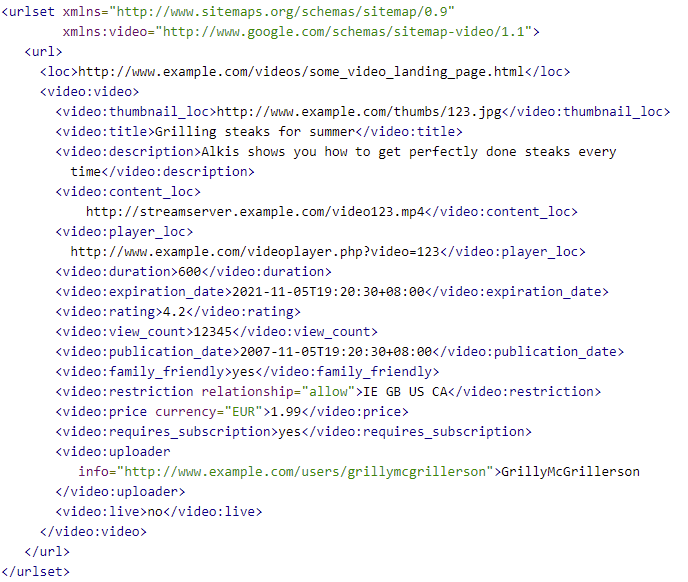
Note: This is what a video sitemap looks like. Implement it only if videos are critical to your business.
3. News Sitemap
If you publish news and want to get those news articles featured on top stories and Google News, you need a news sitemap. There’s a crucial rule here: do not include articles that were published longer than the last two days in the file.
Google News sitemaps aren’t favored in regular ranking results, so make sure you only add news articles. Also, they do not support image links, so Google recommends you use structured data to specify your article thumbnail.
4. Image Sitemap
Like the video sitemaps, image sitemaps are only necessary if images are critical to your business, such as a photography or stock photo site. If they aren’t, you can leave them in your page sitemap and mark them up with the image object schema, and they will be crawled along with the page content/URL.
If you believe an image sitemap is needed, it will look like this:
<?xml version=”1.0″ encoding=”utf-8″?>
<urlset xmlns=”https://ift.tt/lSqxnoR” xmlns:image=”https://ift.tt/JyQRWCT” >
<url>
<loc>https://ift.tt/CKwix5a>
<image:image>
<image:loc>https://ift.tt/shGc1Sz>
</image:image>
<image:image>
<image:loc>https://ift.tt/jZ6KcT2>
</image:image>
</url>
</urlset>
5. Sitemap Index
There are a few limitations you’ll want to keep in mind for sitemaps:
- Having too many URLs will only lead to no indexation of some of your pages.
- All sitemaps, except the news sitemap, should have a maximum of 50,000 URLs.
- News sitemaps should have a maximum of 1000 URLs.
- A sitemap should be a maximum of 50MB in uncompressed file size.
As a result of those limitations, you might need to have more than one sitemap. When you use more than one sitemap file, you need an index file that lists all of those sitemaps. It’s the index file that you submit in Google Search Console and Bing Webmaster Tools. That file should look like this:
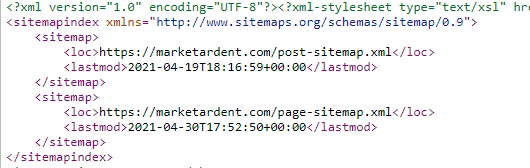
Build a Sitemap With HubSpot’s Free CMS
You can easily make a sitemap using HubSpot’s free CMS. After building your sitemap, you can easily make edits as needed.
- Create a new menu
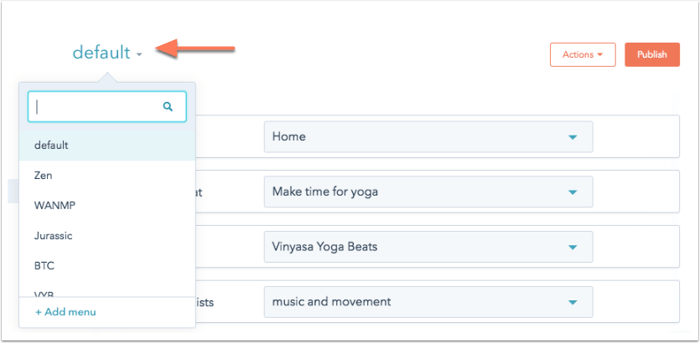
Image Source: HubSpot
- Add child pages to a menu
Image Source: HubSpot
- Create a secondary menu
Image Source: HubSpot
- View revisions to your menu
Image Source: HubSpot
For more information, visit this how-to guide.
XML Sitemap Example
So far, you have seen each sitemap’s structure. Most websites will only need the page sitemap that includes the images on each page. That looks like this:
Sitemap Priorities
Adding priorities to your sitemap is one of the things many people do to differentiate between how important different pages are, but Google’s Gary Illyes mentioned that Google ignores these priorities. In his exact words:
Generally speaking, as long as you are honest about when your content was actually modified, include it in your sitemap so that Google and other search engines know to re-crawl the modified page and index the new content.
How to Create a Sitemap
In this section, I will show you how to create a sitemap without using any generator or plugin. If your website is on WordPress or you’d rather use a generator (which makes this easy), skip to the next section.
These are the exact steps to follow to create a sitemap manually:
1. Decide which pages on your site should be crawled by Google, and determine the canonical version of each page.
Canonical versions are necessary when you have duplicate pages. For example, suppose you serve an international community and have pages for each location with the same language and content, like example.com/us/page and example.com/ca/page for US and Canada visitors, respectively.
In that case, it’s important that you point to the original, which might be example.com/page or one of the two as the canonical. If you’d like to learn more about how this works, this post explains canonicalization in depth.
Furthermore, do not include URLs that are blocked by robots.txt files, require a login to access, or are password-protected, as search bots can’t crawl them. You’ll only get coverage errors in GSC if you add them.
2. Determine if you need more than one sitemap.
Several websites use separate files for pages, posts, and categories. Remember that if you have more than 50,000 URLs, you need multiple sitemaps.
3. Code all your URLs in XML tags to look like the type of sitemap you want to create.
This page explains how to use XML tags in further detail.
4. If you have multiple sitemap files, create a sitemap index file and include the links to the individual sitemaps you created.
This one is already described in the section titled “Sitemap Index”.
Sitemap Generators
Most of us marketers do not have a web development background, so we can’t code to save our lives. If the thought of manually crafting a sitemap gives you a headache, use a sitemap generator and save yourself 12 days of looking through complex coding.
There are several sitemap generators that you can use:
- TechnicalSEO by Merkle has one where you can upload a CSV file with your URLs. It’s especially great if you have different language versions of your pages (hreflang tags).If your website is custom-coded and is not on any CMS or builder that generates a sitemap, you need to use a generator like TechnicalSEO.
- Screaming Frog SEO Spider also has one that I like to use with simple custom-built sites. In Screaming Frog, ensure you are using the spider mode. You can do that by clicking on “Mode” and selecting “spider”. Then type the URL of your home page and let it crawl. When it’s done, click on “Sitemaps.”
For clarification on how to use Screaming Frog, take a look at the image below:
In order to save the XML file to your computer, tick all the options that matter to your site and click on “export”. Then, upload that file to your server in the root directory.
Both tools do not automatically update the sitemap file. Some tools do but are premium, so you pay for the service.
However, you won’t need to deal with any of the above if your website is on WordPress or an ecommerce platform like Shopify.
For WordPress sites, Yoast and Rank Math are popular SEO plugins that generate sitemaps and update them when you edit your posts and pages and Shopify even generates sitemaps automatically.
How to Submit Your Sitemap to Google
The best way to submit your sitemap to Google is through Google Search Console (GSC). There are other ways and additional steps as well, but I will start with GSC, because it’s the most common method.
Follow these steps:
1. Go to Google Search Console and click on “sitemap.”
2. Type your sitemap URL and click Submit. If you have multiple sitemaps with a sitemap index file, you only need to type the URL for the index file.
As an alternative, if you haven’t submitted it to GSC, there is another way to let Google know you have one by adding this line in your robots.txt:
Sitemap: https://ift.tt/hLrHRCO
But of course the URL here with the one you actually have. And if you have an index file, include only your index file here.
If (for some weird reason) you aren’t using GSC, use the ping service to let Google know it should crawl your file. To do that, type the URL below in your browser:
https://ift.tt/j2TQFW5
Replace https://ift.tt/Tro27jq with your sitemap URL.
And it’s done!
Sitemap Best Practices
Now that you understand the importance of sitemaps, how they work, and your options for submitting them, let’s make sure the final one you create is in tip-top shape by following these best practices.
1. Use tools to generate automatic sitemaps.
Manually creating and updating an XML sitemap will cost you a lot of time (and is unnecessarily complex). To save time so you can focus on other things like your next Netflix binge, it’s best to use an automatic sitemap generator.
The ones mentioned for WordPress above come with that feature for free. For custom-built sites, you will have to pay, but in my opinion it’s absolutely something worth paying for.
2. Do regular sitemap maintenance checks and updates.
All parts of SEO are an ongoing effort, so check your sitemaps regularly. Search console does an excellent job of letting you know if your submitted URLs have issues with crawling or indexing.
Check the ‘Coverage’ section in GSC regularly and update your site or sitemap when there are errors. The great thing about this is that it tells you what the exact error is with suggestions on how to fix it.
You can also use Screaming Frog for sitemap maintenance. After crawling your website or sitemap URL, check the response code tab for 404 or 5xx errors.
If you are using an automatic sitemap generator tool or plugin, update it when updates are available. Furthermore, periodically view the sitemap by going to your sitemap URL and checking if any page is missing or the last updated time is incorrect.
3. Prioritize high-quality pages in your sitemap.
Although Google no longer pays attention to the priority tag (or so they say), you can still add it because there’s more than Google out there (yes, as an SEO I will admit it). Bing might pay attention to that tag, so it’s still good practice to prioritize high-quality pages in your sitemap.
Sitemap priority shows which pages to crawl and index faster, so you can set priorities using values ranging from 0.00 to 1.00. But make sure not to use the same value for all pages or else Google won’t be able to tell which is most important.
For values, you can go with something like this:
- Homepage – 1.00
- Main landing pages – 0.90
- Other landing pages – 0.85
- Main links on navigation bar – 0.80
- Other pages on site – 0.75
- Top articles/blog posts like hub pages – 0.80
- Blog category pages – 0.75
- Other posts – 0.64
4. Include only canonical versions of URLs in your sitemap.
Your sitemap should only contain URLs that you want search engines to index. That means if a URL points to another as its canonical version, you shouldn’t include it, as it’s a statement to Google and other search engines that you don’t wish for that URL to be indexed.
Ignoring that and including that URL in your sitemap provides conflicting information to Google. The unintended URL might get indexed, or you will get coverage errors in GSC. So, only include the canonical versions, so you can consolidate your position in search engine results.
5. Split up your large sitemaps.
I mentioned this above already that you need to split your sitemap into multiple files if it exceeds 50MB or has more than 50,000 URLs. Never submit large XML files to Google, otherwise some of your URLs will not be indexed – and you know well that every URL matters!
One quick tip here is to save each file with easy to understand names (for you) like page_sitemap1.xml and page_sitemap2.xml.
And with that, I wish you happy sitemapping!

What Is Demand Generation? [FAQs]
If you ask 10 different B2B marketers what “demand generation” means, you’ll get 10 different answers.
Unfortunately, there are a lot of misconceptions about demand generation in B2B marketing.
In this guide, we’ll clear up the confusion. You’ll get an updated definition of demand generation, along with the components of a successful demand generation strategy.
And finally, you’ll learn why demand generation is not the same as lead generation.

What is demand generation?
Demand generation captures the umbrella of marketing programs that get customers excited about your company’s product and services without trying to explicitly sell to them.
Demand generation programs can help your organization reach new markets, promote new product features, build consumer buzz, generate PR, and re-engage existing customers.
Essentially, demand generation is a long-term, education-focused marketing strategy that prioritizes reaching and engaging “out of market” buyers.
The ultimate goal of B2B demand generation is remaining top of mind while your potential customers are not in a buying cycle — so that whenever the need arises, your product or service is immediately considered for purchase.
What makes demand generation a distinct concept from other customer acquisition tactics is a commitment to long-term customer relationships and a strategic mindset.
Why is demand generation different than lead generation?
Demand generation marketing is about educating your audience with no expectation in return. Meanwhile, lead generation is optimized for capturing contact information – but prematurely pushes non-solution seeking people to sales automation workflows, which is highly ineffective.
Why are most lead generation strategies unsuccessful?
Let’s explore six reasons most lead generation strategies can be unsuccessful.
- Misaligned to the modern day buyer’s journey. Gartner research reveals that B2B buyers only spend 17% of their time talking to sales — yet most lead generation efforts are geared toward ushering prospects into a sales conversation.
- Destroys the morale of sales teams. Since most MQLs by definition are not in a buying cycle, you are exposing SDRs to mental harm by generating large volumes of uninterested leads.
- Creates a hostile environment between sales & marketing. Where the classic conflict of “marketing is sending us garbage leads” and “sales can’t close deals” results in tremendous inefficiency.
- Damages brand perception among research-stage buyers. These are buyers that may eventually request a demo when they are motivated and ready to speak to sales.
- Gating content generates top of the funnel leads. Types of content like white papers, webinars, case studies and free tools primarily collects the contact information of uninterested buyers (MQL).
- Over-reliance on lead scoring and lead nurturing. With this method, marketing teams are placing a bet on their ability to use behavioral data and intent signals to predict the right sales triggers.
Gated Content: Bad Practices versus Good Practices
Is gated content an acceptable lead generation tool for demand generation?
Let’s start by looking at the biggest drawbacks of gated content:
- Lack of page views and traffic.
- No SEO benefit or boost
- The form deters people from downloading content
- No brand visibility
But if you’re going to march-on with gated content, it should be done for ABM warm-up, and not direct response sales follow up.
The Role of Inbound Marketing in B2B Demand Generation
Inbound marketing is a key component of any high-performing demand generation campaign. However, this is no longer about content calendars or the AIDA framework.
Instead, it’s about alignment with sales to properly respond to a buyer’s intent to purchase (declared intent), while orchestrating and facilitating the desired purchasing experience.
Today, with inbound marketing, you are either capturing demand or creating demand.
Let’s explore what that means.
Demand Capturing: Intent Channels and Content Examples
- Demand Capture Examples — Top Email Marketing Services, Best ETL Tools, Identity Protection Companies, ERP Integration Tools, etc.
- Verticalized Demand Capture — CRM for Real Estate, SEO for Startups, QA Metrics for Software Testing, VoIP for Enterprise, etc.
- SEO – Bottom of funnel demand generation strategy – this can be summarized as content marketing that creates blogs and landing pages for purchase-intent keywords.
- PPC – Bidding on commercial intent keywords to attract your target audience while they are solution narrowing.
- CRO – Conversion rate optimization, a practice by which marketers run testing programs to increase conversion rates against high intent website traffic.
- Review Websites – G2, TrustRadius and Gartner. Anywhere your buyer personas go to read in-depth peer reviews and ratings of your brand, products and services.
- Affiliates & Aggregators – PCMag, US News, Business.com, TechRadar, etc.
- Intent Data Providers – Bombora, 6Sense, DemandBase, etc.
Demand Creation: Education Channels and Content Types
- Social Media Platforms: LinkedIn, Twitter, Facebook, TikTok.
- Influencer Marketing: Brand awareness or product launch campaigns with relevant influencers in your niche.
- Email Marketing: Newsletters, content promo, nurture sequences and event invites.
- Online Communities: The Hustle, Sales Hacker, Demand Curve, etc.
- Offline Media: Direct mail, NYC subway ads, etc.
- Offsite Channels: Guest posts, press and thought leadership.
- Audio Channels: Podcasts, interviews, radio advertising.
- Video: YouTube, LinkedIn, Vimeo, Wistia, Loom, etc.
- Events: Webinars, live hangouts, virtual conferences.
- Conferences: INBOUND, SaaStr, Dreamforce, etc.
- Forums: Reddit, Quora, Slack, Discord.
- Brand search volume
- Your brand vs. competitor brand search volume
- Organic traffic to high intent website pages
- Direct traffic (people type your website URL into the browser)
- Entrances and engagement on your feature / solutions pages
- Referral traffic from other relevant websites and social platforms
- Assisted conversions: pages consumed “on the path” to becoming a conversion.
- Website traffic to conversion rate (declared intent)
- Qualified demo to sales opportunity rate
- Proposal sent to closed/won rate
- Average deal size
- Sales pipeline velocity
- Cost per acquisition (CPA)
- Customer lifetime value (CLV)
The Role of Sales in B2B Demand Generation
Rewind to five years ago and ask anyone about demand generation — they’d tell you it was marketers disguised as salespeople running lead generation tactics via marketing automation.
And that’s because marketing used to be a service organization to sales, until B2B executives realized that marketing should be a strategic partner — not an order-taker.
Today, outbound-focused demand generation is not about high-volume cold outreach with automated follow-up sequences. Instead, it’s about ABM (account-based marketing), the inverted marketing funnel.
Instead of a top-down inbound marketing approach, ABM is a bottom-up marketing strategy that collaborates with sales to engage with high-quality leads and target accounts during complex B2B sales cycles.
Revenue teams have learned that full-funnel marketing with a hybrid mix of inbound, outbound, and lifecycle marketing is the right balance for a high-performing demand generation program.
Metrics and KPIs for Measuring Success
Your demand generation marketing efforts should be guided by a north star: lead quality.
In addition to understanding key SaaS metrics, these are important questions to ask:
- Which channels are driving highly qualified leads?
- Which lead types most often convert into qualified sales pipeline?
- What percentage of our opportunities convert into paying customers?
- What percentage of our paying customers stick around long enough to become profitable?
- Which marketing channels are driving opportunities with the best LTV?
- How do we generate more qualified opportunities from the best channels?
- How do we champion full-funnel pipeline visibility?
- How do we hold sales accountable for working the leads properly?
- How can we develop an effective feedback loop between marketing & sales?
Leading indicators: example metrics
- Brand search volume
- Your brand vs. competitor brand search volume
- Organic traffic to high intent website pages
- Direct traffic (people type your website URL into the browser)
- Entrances and engagement on your feature / solutions pages
- Referral traffic from other relevant websites and social platforms
Lagging indicators: example metrics
- Assisted conversions: pages consumed “on the path” to becoming a conversion.
- Website traffic to conversion rate (declared intent)
- Qualified demo to sales opportunity rate
- Proposal sent to closed/won rate
- Average deal size
- Sales pipeline velocity
- Cost per acquisition (CPA)
- Customer lifetime value (CLV)
Declared Intent vs. Assumed Intent
Digital marketing has evolved away from direct response, lead generation focused marketing campaigns to a more holistic approach that covers brand awareness, demand nurturing, and demand capturing across the entire sales funnel.
With this in mind, it’s worthwhile to think about the CTA buttons on your website — and what constitutes declared intent vs. assumed intent.
Run a “declared intent audit” to check if assumed intent leads are being treated as declared intent. If yes, that’s a clear misalignment of sales experience and buyer expectations..
This is the decisive test which confirms if your marketing team truly understands the customer journey — a critical component of any demand generation program.
Once you’re acquainted with your buyers’ needs and can anticipate marketing trends, you can fuel your marketing programs with enhanced levels of personalization.
Marketing automation software will help you run A/B tests, choose the right content, and customize timing for each of your marketing campaigns and customer segments.
To begin with your demand gen strategy, get to know your customers and conduct qualitative research through user feedback and conversations. If you’re struggling to understand your prospects’ needs, pick up the phone and ask.
The success of demand generation stems from your ability to connect with target customers. All you need to get started is a point of reference.

