12 Great Examples That Prove the Power of Repurposing Content
Stagnant organic traffic is the last thing you want to see when reviewing metrics, but it’s an issue that every marketer deals with at some point.
Those dips and plateaus in traffic can come from industry changes, how your audience digests content, the amount (and quality) of new content you’re producing, or how relevant your older content is.
Sometimes, all your content needs is a little refreshing and repurposing to keep your audience interested. So to inspire your repurposing efforts, I put together some benefits and examples below. Check ’em out.
Why You Should Repurpose Content
One of my favorite tidbits of advice about content marketing comes from Social Triggers founder Derek Halpern, in a post on why bloggers fail.
“You don’t have to create content day in and day out. You just have to work on getting the content you already have in the hands of more people,” Halpern explains.
And that’s the main idea behind repurposing content: Take something you’ve created, put a new spin on it, and give it new life.
Aside from the fact that the hard work is already done, here are a few other benefits for repurposing content:
Reaching New Audiences
When you first publish a piece of content, the performance might be average. However, over time, it gains traction and does a little better. When you repurpose that content in a new format and/or update it, you can reach new audience segments that otherwise may have never found it.
Reinforcing Your Message
When discussing the merits of repurposing content, Kevan Lee of Buffer points out that repetition is important with marketing. Marketing’s Rule of Seven states that buyers need to hear your message approximately seven times before they will close the deal.
Rather than covering a topic once and letting it disappear into the archives, repurpose your articles to consistently deliver your message to your audience. This works great if you’re starting with high-value, authoritative content. It makes it easier to find unique ways to reinforce your message.
Improved Organic Visibility
Organic search still provides the majority of site traffic. One study from BrightEdge found that organic search holds a 51% share among traffic sources. If that’s accurate, then repurposing optimized content in various formats can give you a significant lift in organic visibility and traffic.
Publishing a variety of content gives you more access to search real estate for targeted queries. If you publish your content on other sites, then you’ll also (sometimes) have the benefit of backlinks.
How to Choose Content for Repurposing
Chances are, you already have extensive archives of content on your blog. You might even have a lot of off-site content like guest posts that you can leverage.
Instead of getting bogged down with sorting through content individually to find the popular stuff, just go to your analytics. Look at specific metrics to easily sort and rank your content to find the top posts. I recommend paying attention to views, time on site, and social engagement, but you can also simplify the process by ranking content based on the total number of views and how it has declined over time.
For ranking both internal and external content, I also try to include factors such as the amount of post engagement and the quantity of shares.
Something to keep in mind while sorting: Don’t just base it on popularity. A post may have less engagement or traffic than your #1 piece of content, but if it can be updated with valuable data or leveraged around new trends to improve visibility, then it still might be a winner.
12 Examples of Strategic Content Repurposing
1) Joe Pulizzi’s Epic Content Marketing Book
In 2013, Content Marketing Institute founder Joe Pulizzi had committed to publishing another book, Epic Content Marketing, but he struggled to find time to write it.
He needed 25 chapters at about 2,000 words each to complete his book. Every week, he produced content that was relevant to the chapters of his book for LinkedIn and the blog at Content Marketing Institute. As the deadline for the book neared, Joe was able to utilize those blog posts to fulfill all of his content obligations — including the new book.
2) Jay Baer: Short Videos into Multiple Content Pieces
Jay Baer, founder of Convince and Convert, creates three-minute informational videos on a variety of topics — from business to social media. To maximize the reach of this content, his team repurposes his video content into a variety of formats and content pieces to publish on his site. These include:
- iTunes audio podcasts
- Blog content for the Convince and Convert website
- Blog content for the Jay Today website
- LinkedIn Pulse posts
- Posts on Medium
- Promotions through various social channels
3) Copyblogger: Leveraging Slide Decks
Copyblogger’s teams are well-known for the high-quality content they produce on the subjects of copywriting, content marketing, and engaging audiences through the power of words. They’re also no stranger to the power of repurposing content. They took one blog post, The 3-Step Journey of a Remarkable Piece of Content and transformed it into a SlideShare.
That SlideShare presentation has earned 38K+ views to date.
4) Ben Hardy/Goinswriter: Expanding to New Platforms
Ben started blogging in May of 2015 with the goal of growing his audience. He knew having a large readership would help him connect with a traditional publisher, so he began posting on his own blog and repurposed that content on Medium.
Some of his content went viral on Medium, generating a massive surge in traffic back to his site. He added a call-to-action to his Medium articles to opt-in and subscribe to his blog, and within 6 months, he grew his subscriber list from 0 to 20,000.
5) Videofruit: Repurposing Content to Drive a New Product
Launching a new product can be a challenge, and creating an entirely new product is even more difficult. But Bryan Harris simplified the launch of new products with content marketing.
Pulling from his most popular posts, he compiled data that revealed the needs and interests of his followers in order to develop a new product they would be most likely to purchase. The result: He banked $10,000 within 24 hours of launch.
6) Internet Business Mastery: Creating Audio Blogs to Boost Downloads
Jeremy and Jason host the Internet Business Mastery podcast, but they also have individual blogs to maintain. They decided to run an experiment where they read and recorded their more popular blogs and then uploaded them to their podcast. Those audio blogs saw 60-100% more downloads than their featured podcasts.
7) ProBlogger: From Blog to Ebook
Darren Rowse, founder of ProBlogger, received a lot of positive feedback on his series, “31 Days to Build a Better Blog.” To streamline the content and monetize it, Rowse packaged the series into an ebook and started selling it for $29.99. Even years after the initial launch, the book is still available, and it’s even bought and used as material in online courses.
8) Matthew Woodward: Driving Subscribers with LinkedIn
In 2015, SEO professional Matthew Woodward started using LinkedIn as a publishing platform to expand his audience reach. His strategy included repurposing previous content that had been featured and creating follow-up articles to his popular content. By recycling just a few of his popular posts, he quickly snagged over 300 new subscribers at a 76.15% conversion rate.
9) Matthew Barby: To the Frontpage of BuzzFeed
Matthew Barby, head of growth at HubSpot, managed to make it to the frontpage of BuzzFeed not once, but twice. Rather than creating brand-new content, he repurposed content into a listicle featuring high protein vegetarian recipes. With a little paid social boost, he got the attention of editors and scored over 140,000 views.
10) Backlinko: Boosting Organic Traffic
Brian Dean of Backlinko received a great case study from a user, but instead of promoting it on its own, he added it to an older post and promoted that updated content to his social followers and subscribers. With a simple update and a quick promotion, that old post saw a 111.37% increase in organic traffic.
11) Moz: Whiteboard Fridays
The team over at Moz consistently creates Whiteboard Friday videos to provide visual demonstration and engagement to their audience. Those videos are distributed individually, but they’re also turned into blog posts with video transcriptions. That’s a perfect recipe for optimization and organic traffic.
12) Buffer: The “No New Content” Challenge
The Buffer team rolled out a brief experiment in 2015 to see what would happen if they stopped producing new content and only repurposed/refreshed their existing content. This strategy involved repurposing two to three new pieces each week for one month. At the end of the experiment, organic search traffic grew over 4%. New SlideShare presentations nabbed almost 200,000 views, and one Medium post captured 2,888 views and made it into the Top 20 for a day.
Write Less, Promote More
There are tremendous benefits to repurposing content, and it’s an easy way to fill the gaps of your content schedule because most of the work has already been done.
Go back through your data, find your best-performing content, and transform it into something new that will lift your organic traffic and leads. Take a cue from all the successful examples I’ve listed here — it’s a lot easier than you think.
How have you repurposed content before? What kind of results did you see from your efforts? Share your story with me in the comments below.
How To Create Successful Content in Any Industry: Benchmarks Set by 342 Marketing Campaigns
Even with all of the resources available for content strategy and amplification, we know there’s no magic formula for making content go viral.
And while many businesses aren’t trying to compete with celebrity gossip in the virality arena, they are looking for links and conversions to drive their goals forward. In other words, getting a lot of eyes on your content is key.
Easier said than done, right?
When it comes to creating content that drives shares and views, tapping into your niche can boast valuable benefits for brands. This is because successful content looks different across all industries — what takes off in the automotive industry might flop in the world of tech.
Average Social Share Benchmarks by Vertical
Setting realistic expectations and understanding the target audience can help content in any vertical meet specific goals, including earning high volumes of links and social shares.
After analyzing what factors drive content engagement, my team at Fractl returned to the same 342 content marketing campaigns to further dissect the data by vertical in a new study.
While the average campaign received 90 placements and 11,832 social shares, those numbers shifted dramatically when broken down by 15 common content verticals.
Source: Fractl
Content Elements To Earn Links & Social Shares in 15 Niche Industries
The chart above helps illustrate a more realistic picture of expectations, but what does it take to create top-performing content specific to each vertical? Here are a few key factors we pulled from the data:
- Curating data from social media was a common element for several verticals’ top performing campaigns, including Education, Politics, Sex & Relationships, and Travel.
- As far as visual assets, interactive components were common among top campaigns in the Business & Finance, Education, and Drugs & Alcohol verticals.
- Comparison and rankings were especially helpful for earning social shares in the Health & Fitness, Travel, and Tech verticals.
Check out the flipbook below illustrating what elements drove the most social shares and placements for nearly 350 campaigns in each of the 15 verticals:
What challenges or success have you had creating and promoting niche content in a specific vertical? Share your experiences in the comments below.
The Anatomy of a Lead-Generating Website
Your website is the most important tool you have for turning prospects into customers.
There are plenty of ways to increase the number of people visiting your site, but unless you convert these visitors into leads, you won’t be able to ultimately get new customers. As a result, your business won’t be able to grow at a healthy rate.
That’s why it’s so important to design your website with lead generation top-of-mind.
Think about what your website looks like in its current state. Do each of your webpages clearly guide visitors to take action, or does they leave them wondering what to do next? Do you use a tool that automatically pulls the submissions from your forms and puts them into your contact database? Are you creating custom landing pages for every single campaign that you run? Do you have lead generation CTAs on each of your blog posts? (Do you have a blog at all?)
If you’re starting to think hard about the opportunities you have to increase conversion on your site, you’ve come to the right place.
In this post, we’ll cover the most critical components of a website optimized for lead generation. You’ll find useful tips in here whether you’re coming from a startup generating leads from scratch, or from a well-established business looking to tighten up your website to increase conversions.
The Anatomy of a Lead-Generating Website
1) Lead generation forms
Forms are the crux of any business’ lead generation efforts. Without them, you won’t be able to get contact information that your site visitors actually opt in to give you. The opting in part is important: When people voluntarily hand over their information by filling out a form, they’re actively showing interest in your business, your products, or your content. These leads are valuable because they’re more likely to turn into customers down the road.
Embedding lead generation forms directly on your website makes it easy for visitors to convert into leads. If you’re a HubSpot customer, you can create forms right in HubSpot and either add them to your webpages or embed them elsewhere. Non-HubSpot customers can turn to form-embedding tools like Contact Form 7, JetPack, or Google Forms.
Although landing pages are the most popular places to put lead generation forms, you can embed them anywhere you’d like on your site. Here are a few examples of forms from different businesses that have with different goals, starting with OfficeVibe’s homepage:
On AdmitHub’s homepage, they’ve embedded a form for a demo request:

The folks at American Songwriter embedded a subscribe form in the footer of their website:
Below is the form on ChoiceScreening’s “Contact Us” page. You’ll notice it’s relatively long, but for a business that runs background checks of all kinds, the form fields are likely necessary to help organize inquiries.
When you’re thinking about how long your forms should be, consider whether you’d rather have more inquiries coming in, or higher quality inquiries coming in. As long as you have other, easier avenues for folks to contact you, a longer form can be okay for some businesses.
2) A form scraping tool
Once you’ve created and embedded your forms, how are you going to collect and track submissions? You’ll need a tool that scrapes your forms, meaning it automatically captures the form submissions on your website and puts them into your contact database.
By consolidating your leads in one place, it’ll be much easier for you to follow up with those leads — whether it’s by sending them lead nurturing emails, tracking their future behavior on your website, or some other action.
We recommend using our free Collected Forms tool, part of HubSpot Marketing Free. Collected Forms enables you to detect form submissions on your website as they come in — even if the forms are not built with HubSpot. Then, it’ll put those submissions right into your contacts database.
3) Primary and secondary calls-to-action on every page
When people go to a website, they’re usually trying to take some action. Sometimes, they know what that action is — like when you’re looking for a coffee grinder to buy for your spouse’s birthday and you plan to make a purchase as soon as you find one that’s good enough. Other times, visitors simply don’t know what they want to do on a website and they’re just there to browse or research.
It’s your job to guide these people forward in their research and/or buying process through calls-to-action (CTAs). Remember, your website exists to compel visitors to dig deeper into your business and offerings and move them further down the funnel. CTAs tell them what to do next so they don’t feel lost or overwhelmed. In this way, CTAs turn your homepage into a lead-generating machine.
You’ll want to create multiple CTAs for your site that speak to different parts of the buying funnel. But it’s important to have a primary CTA — one that exists above the fold of your site pages, sticks out from the others, and leads people to do the #1 thing you want them to do on each page.
What that CTA leads to will depend on your end goal. What do you want your site visitors to do most — do you want them to sign up? Create an account? Request a demo? Defining what a “lead” means to you will make your analytics goals much clearer and will help you build a more intuitive funnel.
Here are two examples of webpages that effectively use primary CTAs to direct visitors to the next logical step. The first is Mint’s homepage, where you’ll notice the free sign-up CTA immediately draws your eye:
Here’s another example from FreshBooks’ homepage:
Common CTA examples include “Free Trial,” “Schedule a Demo,” “Buy Now,” or “Learn More.” (Here are 30 examples of great CTAs for more inspiration.)
4) Gated offers on landing pages
We already went over the importance of embedding forms on your website in a more general sense, but landing pages deserve a section of their own. Landing pages are the hub of your lead generation efforts — which is why every marketing campaign you run and every offer you create should be tied to a custom landing page.
The more landing pages you have, the more opportunities you have to convert site visitors into leads. There’s also a huge SEO benefit to having more landing pages, which can have an impact even before visitors land on your site.
There are many elements that a top-notch landing page needs, from design to form length to navigation, share buttons, social proof, and so on. If you’re looking for detailed information on building well-designed landing pages that are optimized for lead conversion, here are a few helpful resources:
- 7 Key Design Tips for High-Converting Landing Pages (blog post)
- How to Optimize Landing Pages for Conversions (free ebook)
- 16 of the Best Landing Page Examples You Need to See (blog post)
- How Long Should Your Landing Page Forms Be? (blog post)
Below is a great example of a landing page from WebDAM. While it’s a solid example overall, the form might be the best part — especially the little icons in front of the text that refer to the information needed to complete it.
If you’re looking for ideas for valuable content to put behind those landing pages, read this list of 23 lead generation content ideas to start you off.
5) Pop-up forms
I know, I know. “Pop-ups” can sound like a dirty word nowadays. Inbound marketers everywhere are asking themselves whether they should be using pop-up forms — and the short answer is yes, as long as you use them in an inbound-y way.
To do that, you’ll want to make sure you’re:
- Offering something valuable and relevant so they add to your website visitors’ experience, rather than interrupting it;
- Timing their appearance so they’re triggered by certain actions or time spent on a page in a way that feels natural and not interruptive;
- Using language that’s actionable and human;
- Not ruining the mobile experience.
In addition to embedded forms and traditional call-to-action buttons, you’ll also want to pick and choose pages on your website where you can place pop-up forms, which we call lead flows here at HubSpot. There are a few different types of lead flows you can choose from: welcome mats, overlay modals (which is what most people think of when they hear the term “pop-up”), banners, and slide-in boxes:
Here’s an example of a banner on Basecamp’s homepage, which appears when you scroll a certain percentage of the way down the page:
This overlay modal from Aquaspresso’s blog offers blog readers an avenue toward their paid products in a way that’s helpful (providing a discount):
If you’re looking for a good free tool to get started with pop-up forms, we’d recommend you try HubSpot Marketing Free. We built the Lead Flows feature within this free tool to help marketers generate more leads across their entire website without sacrificing the user experience.
6) Intuitive design and thoughtful CTA placement
The point of your website is to guide site visitors toward the actions you want them to take. Your conversion efforts will be far more compelling when assets are easy to find and are built with a reader-centric mindset. Think about how you can use layout, CTA placement, whitespace, colors, fonts, and other supporting elements to clearly communicate your value proposition, help visitors find specific information easily, and build trust.
Most importantly, you’ll want to make sure your webpages — especially your most popular ones, like your homepage — are designed beautifully, intuitively, and with lead generation in mind. In other words, you’ll want to direct your visitors’ attention to the areas of the page that will convert them into leads.
For example, according to an eye tracking study, a website reader’s natural eye path starts in the upper left-hand corner of a website and moves on from there in an F-pattern. To take advantage of this pattern, you may want to place your most important calls-to-action somewhere within that F-pattern. (Read this blog post to learn more about designing webpages for lead generation.)
In the example below, the business’ name is in the top left, followed by the horizontal navigation bar placed on the top, and a primary call-to-action (by #4) in the second row.
Image Credit: Envato Studio
7) A blog with lead-generating CTAs
If you don’t have a business blog or aren’t using it consistently, then you’re missing out on a huge traffic- and lead-driving engine. There are many business benefits to blogging, which not only include helping drive traffic to your website, but also converting traffic into leads for your business. Just like every blog post you write is another indexed page, each post is a new opportunity to generate new leads. And thanks to the compounding value of blog posts over time, every post you write will drive value for you in the form of traffic and leads not just when you first publish it, but for years to come.
Here at HubSpot, our blog is responsible for a significant percentage of our marketing team’s incoming leads — and 76% of our monthly blog views come from posts published prior to the current month.
But in order to generate leads from your blog, you can’t just write, hit “publish,” and call it a day. You’ll need to add a lead-generating call-to-action to every blog post that points to free content gated behind a landing page (see #4). To help you create these long-form offers more easily without worrying about the design component, try downloading these 386+ free content creation templates for ebooks, infographics, and other offers.
Once you create lead-generating offers, promote them by blogging about subject matters related to them, and then put CTAs that lead to the asset’s landing page on every one of those blog posts.
8) Social proof and other trust-builders
In order for a site visitor to turn into a lead, they need to hand over some personal information — their name, their email address, and maybe even their phone number or company name. Why would they give that information to you unless they felt some sort of trust in your brand and what you’re offering them?
That’s where establishing credibility comes in. If you want to earn people’s trust enough to compel them to opt in to your emails or otherwise put their personal information into your database, you’re going to need to prove yourself somehow — especially to people who don’t know who you are quite yet. The most meaningful form of advertising is recommendations from others, and it can have a big impact on conversion rates.
There are many ways to establish credibility on your website. One effective way to show trustworthiness is by adding social proof — like customer testimonials, case studies, and prominent client logos — as well as trust seals to your site.
- Customer testimonials are quotes from real customers you can place on landing pages, your homepage, and anywhere else on your website. Place these quotes below forms, and be sure to include a photo, name, company, and job title. Here’s a great example from Codecademy’s homepage:
- Case studies are full-fledged customer stories, either written or in video. They’re longer and more detailed than customer testimonials, and often include success metrics and positive results. You can learn more on how to create compelling case studies here.
- Prominent client logos are when a business places the logos of some of their more well-known clients on their homepage or elsewhere on their website to show them off. According to ConversionXL, logos from prominent clients tend to be memorable to site visitors.
- Trust seals are symbols that reassure site visitors that their sensitive information is secure with the company they’re giving it to. (Read this post to learn more about adding trust seals to your website.)
There you have it. Now, these are by no means the only components of a website that can or should be optimized for lead generation. But this guide will help you get started with the fundamental components you’ll need to generate more and higher quality leads.
And although we’ve gone over some overarching best practices, remember that you’ll need to continuously test and tweak your site to optimize it for leads based on your own, unique audience. If you aren’t doing that already or want to learn more about optimization, read this post to learn about A/B testing your website in more detail.
What else makes up a lead-generating website? Share with us in the comments.
The Science Behind a Happier Commute [Infographic]
Here’s what you definitely shouldn’t do the next time you’re stuck in traffic on your way to work: calculate just how much time you spend commuting to and from the office.
Seriously, don’t do it. The realization that you spend weeks of your life behind the wheel (or choice of public transport) could just be enough to ruin the rest of your day.
But what if your commute didn’t automatically have to be the worst part of your day? The people at job search website Adzuna put together an infographic that claims to have the answers — backed by science — to a happier commute. Check out the tips below.
The Free Growth Tools I Recommend For Modern Businesses to Grow & Scale

If you’re growing a company, chances are you’re challenged with choosing the right tools to help you grow.
Both at HubSpot and at other businesses I’ve helped advise, I’ve seen marketing and sales teams experiment with all sorts of different tools they’ve hoped would drive growth. Some of these tools did help the team grow. Others slowed growth down or blocked it altogether. At HubSpot, we’ve seen opportunities to build new growth tools for marketing and sales teams and we’ve worked hard to fill those gaps.
One of the most important lessons I’ve taken away from growing businesses is that most growth problems come not from ideas, but from execution. You might have a growth-driven team, a great vision, and the dedication to achieve your lofty goals. But having those things isn’t enough to actually grow.
To execute on your strategy, you’re going to need a powerful set of tools that leverage every stage of the customer experience, from the first point of contact, through the sales and marketing process, and over the lifetime of the customer.
The foundation of a strong growth stack starts with the following:
- A CRM system that serves as the foundation for all the other growth tools you’re using, which is where all of your customer data is stored.
- A marketing platform to attract the right people, convert them as leads, and communicate with them through the purchase process and once they’re a customer.
- A sales platform that helps your sales team identify the right people, connect with them, and close them as customers.
Some companies are in the position to implement a growth stack right off the bat and then enhance and customize it with the right collection of integrated tools. Others need to start with free tools and build to a full growth stack over time. (Note: There is a free version of the HubSpot Growth Stack.)
For those companies just getting started, here is my shortlist of the best free growth tools for modern businesses. The list comprises a blend of free HubSpot tools and those from other companies that we’ve used and recommend.
The 11 Free Growth Tools I Recommend
A Free CRM
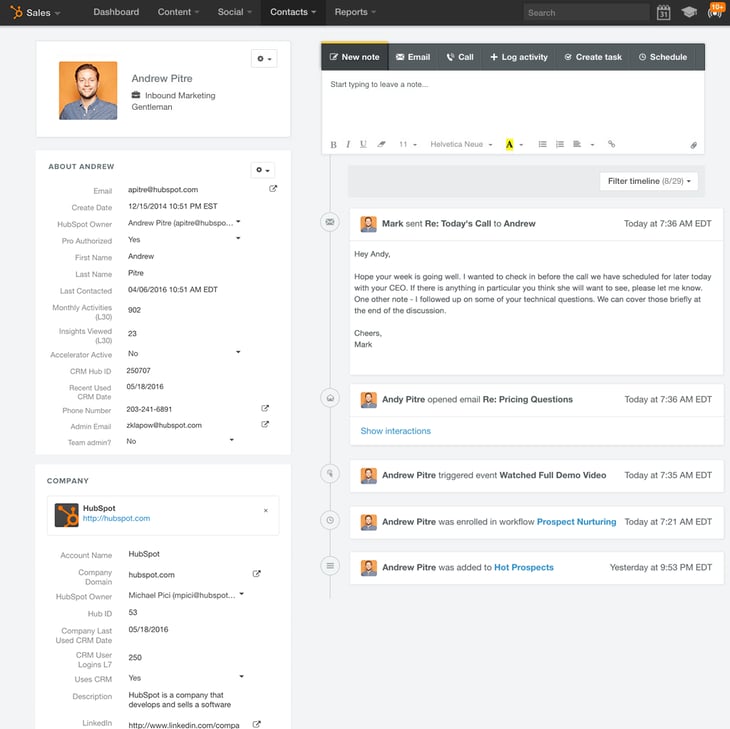
1) HubSpot CRM
You can’t build a skyscraper without a solid foundation. A CRM (Customer Relationship Management tool) is just that — it acts as the base layer of growth where all your business functions’ information is organized and can be easily analyzed. In all honesty, it’s impossible to grow and scale your business without a CRM.
Your CRM is the software that sits at the core of your digital system. It tracks every interaction your sales team has, stores all your marketing leads and customer data, and improves communication across your organization. The more you grow, the more important this becomes.
The problem is, most traditional CRM systems are hard to implement and use — especially for small to medium-sized businesses (SMBs) with limited time and resources. Sales teams have trouble adopting them internally, and you can bet that doesn’t help your business grow whatsoever. If you’re looking for a clean and intuitive CRM that’ll make your sales reps more efficient — regardless of their experience levels — I’m very proud of the free CRM our team at HubSpot has built.
Free Growth Tools for Marketing
2) Trello
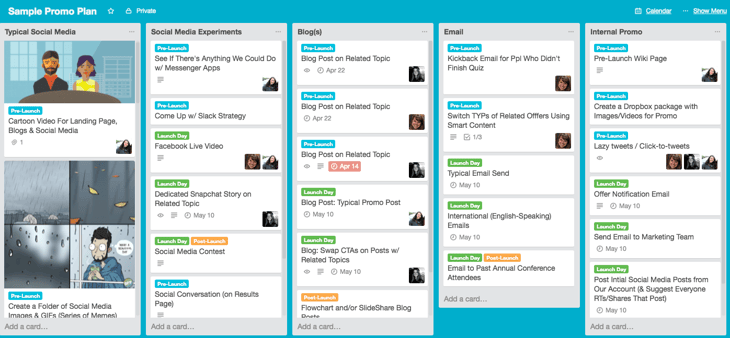
I’m a big fan of visualizing progress. Growth teams tend to have a lot of ideas, a lot of projects, and a lot of experiments going on at the same time. We’ve found Trello to be the best tool for tracking that progress. Each idea, project, and experiment can live on its own card, which teams can use to take notes, assign tasks, set due dates, and so on.
Here’s a real example: Our VP of Marketing Kieran Flanagan uses it to track, from start to finish, all the experiments his growth team runs. What’s especially remarkable is that his team members are located in various parts of the US and Europe, but with Trello they’re able to stay organized and effective, and make a big impact on business growth.
3) Hotjar Heat Maps & Visitor Recordings
Data beats intuition. You can’t really know what your audience wants without getting inside the heads of the people who already regularly visit your site to find out why they visit your site, and Hotjar’s tools are perfect for just that.
These guys are on the cutting edge of helping people figure out what drives people to different parts of their website. They’re making it possible for people to build and grow their website in a way that actually resonates with people. We actually just launched an integration with Hotjar that shows Hotjar poll responses in HubSpot users’ contact timelines.
The Heat Maps and Visitor Recordings are my favorite parts of the tool, though, and here’s why: They visualize what people are doing when they get to your site by showing clicks, taps, and scrolling behavior. This is so important for a business because each of these actions shows what people do and care about on your site. It’ll also help you find the biggest opportunities for improvement and testing. (And you should always be testing.)
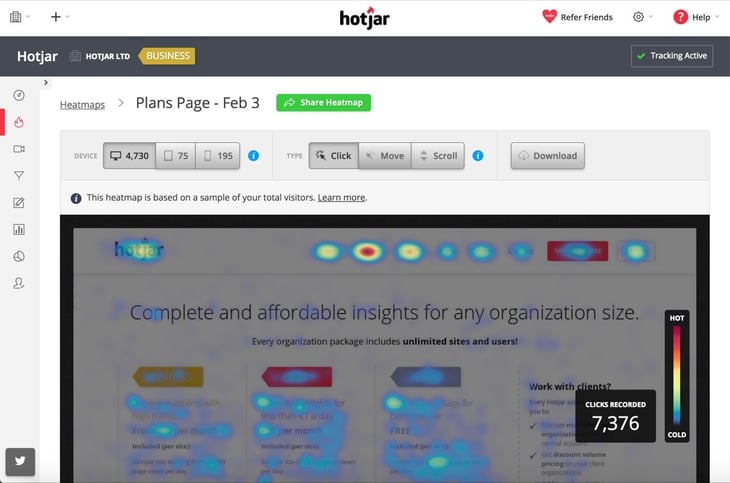
Image Credit: Hotjar
4) Google Keyword Planner
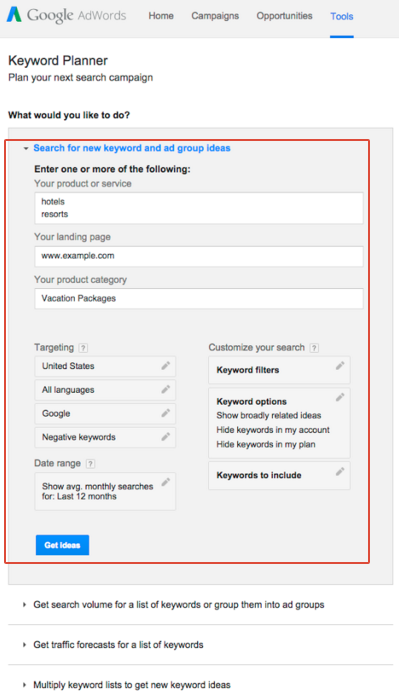
Search Engine Optimization (SEO) is key to growing traffic, which is a big driver of business growth in the online age. Simply put, you need to do it, and you need to do it well. If you want more people to find you on Google, you’ll need a keyword tool to help you prioritize which keywords to focus on.
There are a few good keyword tools out there, but Google Keyword Planner is a great starting point for narrowing down the right keywords, gauging competition around each one, and learning how many people are searching for them.
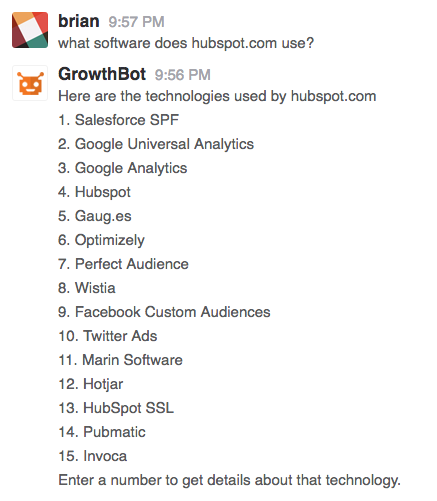
5) GrowthBot
Bots are pretty freaking cool, and there’s business value to them too — they can make simple processes more efficient, giving your team time back in your day and helping you intelligently answer questions around your business. I could not be more excited about bots. That’s why I spent a lot of time this year building a chatbot for growth professionals called GrowthBot. I originally started building it because I wanted it myself, but others have told me they find it helpful, too.
So how does it work? By connecting to a variety of marketing systems (like HubSpot, Google Analytics, and more), GrowthBot is able to give you more convenient access to information you already otherwise have, and give you access to information you didn’t know you had. In the first case, you could ask it the question, “How was organic traffic last month?” and it’ll tell you. In the second case, you might ask it, “Which public SaaS companies are using HubSpot?” or “Which PPC keywords is uber.com buying?” and it’ll spit back the answer in just a few seconds.
6) HubSpot Marketing Free’s Lead Flows
A big mistake I see growing marketing teams making is spending all their time driving traffic to their website, but not turning that traffic into leads. Problem is, if you’re not learning about the people who are showing interest in your business, you’re leaving critical lead and sales numbers on the table.
To help you take a page that gets a good amount of traffic and turn that traffic into leads, some really smart folks created a feature within HubSpot’s new free marketing tool called Lead Flows. Lead Flows are unobtrusive widgets — pop-ups, dropdown banners, slide-ins — that you can add to any of your website pages. Best part is that they involve no technical setup or coding whatsoever, so you can set them up in minutes (seriously, minutes) without having to make changes to your existing site. Let us know what you think of Lead Flows on Product Hunt.

7) Buffer
There’s a lot you can do with social without spending any money. Social media is an amplifier. It takes time, but if you build a following, it is a great way to take that awesome content you’re producing and spreading it further and wider.
For social media marketing on all the major networks, Buffer is a great place to start. It connects your business’ Twitter, Facebook, LinkedIn, Instagram, and Google+ accounts in a single platform and lets you share text, links, photos, and videos, either immediately or to schedule for later.

Image Credit: Buffer
8) Canva
Tools that make creating visual content easier are important for growth, especially for a business with limited design resources. Being able to create great images in a short amount of time will help make your website, your emails, your social media posts, and every other marketing asset more engaging and attractive to your audience. Simply put, better visuals = more engagement = more traffic = business growth.
Canva makes it easy and fast for people who aren’t designers by trade (like me, as my team knows well) to create visual content quickly.

Image Credit: Entrepreneur’s Organization
Free Growth Tools for Sales
9) join.me Free Conference Calls & Screen Sharing
The easier you make it for your sales team to interact with leads and prospects, the better they’ll be at closing customers, which you most definitely need if you want to grow your business. join.me isn’t software — all your reps have to do to start a call is open up the desktop or mobile app or log in online.
There are a lot of meetings tools out there, but this one is one of the fastest, most reliable, most intuitive, and easiest to use. And if you use HubSpot’s free CRM, you can start a join.me meeting directly from your contact timeline.
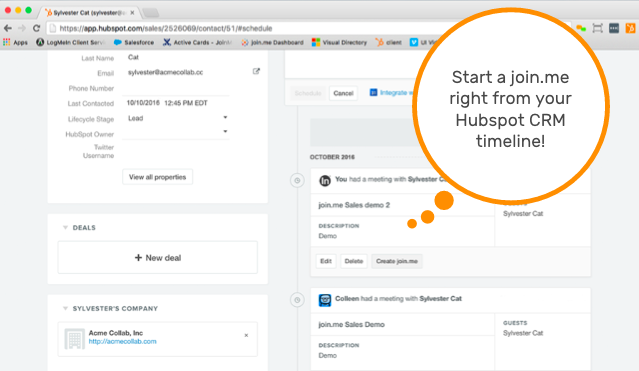
Image Credit: join.me
10) HubSpot Sales Templates
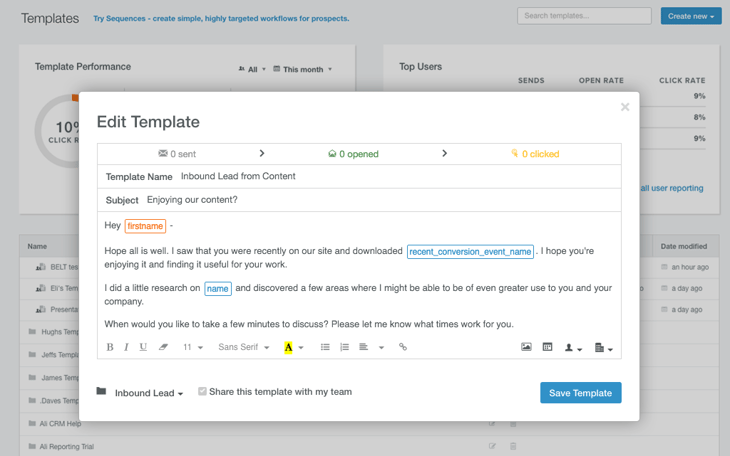
Your sales reps are probably wasting a lot of time writing the same emails over, and over, and over again. There’s a lot of value in streamlining the emailing process while still making sure sales reps are sending high-quality emails. If your sales reps can get their hands on personalized email templates, that’ll save hundreds of hours over the long term. Templates, a feature of HubSpot Sales, lets you access personalized email templates for free from within your inbox.
What makes this tool particularly powerful for sales teams is that you can build a shared library of templates everyone can use. You can also aggregate data on how often emails with certain templates get opened or clicked, which helps you hone in on the approaches worth sharing.
11) HubSpot Sales Email Open Tracking & Notifications
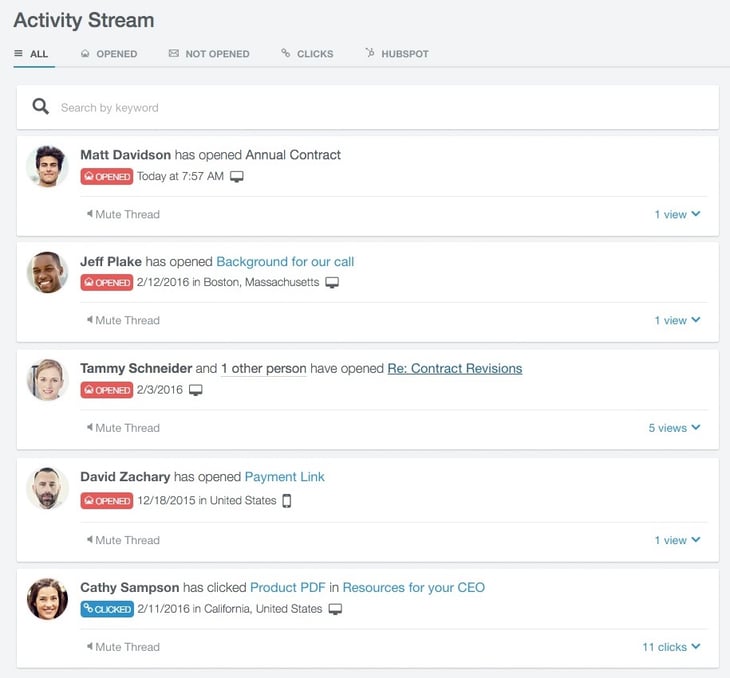
This is one of my favorite email tools, not just for sales teams, but for personal use. It sends instant desktop notifications when the emails you send get opened. You’ll see who opened the email, at what time, on which device, and where they were located when they opened it. If you want to look at all your notifications, or all your notifications on a specific email, then you can view the full history in a stream.
This list of free tools is a starting point for those looking to grow from startup into sustainable. Down the road, you’ll want to integrate your growth tools together into a true growth stack. For those looking to take the next step, we’ve mapped out our version of a complete growth stack over on Product Hunt. Take a look and let our engineers know what you think.


10 Nonprofit Twitter Accounts Doing it Right

Twitter remains a keystone of any social media strategy. Used well, it can help your organization understand how potential members are finding content that interests them and attract the right kind of followers to your account.
To whet your appetite a bit, here’s some examples we love.
Nonprofits Who Rock at Twitter
1) The Stroke Association
The first thing you’ll notice on the Stroke Association’s Twitter page is that it’s making great use of its hero image space. It includes a moving image there, as most nonprofits do. But it also includes a clear mission statement and call-to-action (CTA). This group isn’t letting a bit of Twitter real estate go to waste.
The stream itself has a great mix of educational resources about stroke treatments, personal stories, and compelling CTAs to participate in their action campaigns.

2) National Forests Foundation
Well, it’s the National Forests Foundation – so they’re primed to have a steady stream of gorgeous pics and videos. A rough guestimate says about 90% of their posts include an image. The foundation also retweets images tweeted out by other forest associations, which is always a good way to share the Twitter love.
They use their pinned post to keep a donation CTA front and center. The foundation includes other CTAs in the stream, like a CTA to sign up for its newsletter. Yet they keep the number of CTA tweets low relative to the volume of their travel and educational tweets.
Ten Things That Might Surprise You About Elk https://t.co/HA7oMfTul2 http://pic.twitter.com/QRxXmiJ4Q9
— National Forest Fdn. (@NationalForests)
October 25, 2016
3) American Heart Association
The AHA does user generated content (UGC) really well. It’s created a branded hashtag (#LifeIsWhy), that it promotes right in its Twitter bio along with a CTA for people to share their stories. It also runs more focused UGC campaigns, such as partnering with the American Stroke Association to post a variety of different “fill in the blank” tweets.
It also actively participates with related organizations on Twitter to encourage and share UGC, like retweeting questions and answers for a heart healthy foodie Twitter chat.
Fill in the blank below and then develop your own stroke hero story at https://t.co/3YBx2Pctyp #WSD16 http://pic.twitter.com/hMIyjaeRXK
— American Heart Assoc (@American_Heart)
October 24, 2016
4) National Education Association
The NEA stream includes a wide variety of CTAs promoting webinars on one of its signature issues. Each CTA tweet is different with its own unique visual and copy, which is a great way to heavily promote an action or campaign without the organization’s stream lacking visual interest or coming off as singularly promotional.
Teacher Evaluation 101: Tips for a Successful Classroom Observation Webinar TONIGHT 7 PM ET https://t.co/NriJ50wSNY #ntchat
— NEA (@NEAToday)
October 27, 2016
As a native publisher of content, virtually every tweet on NPQ’s stream is a link back to its own website. Yet it does an effective job of sharing its own content without coming off as self-promotional. It helps that the content in the magazine is squarely focused on the issues that interest its target market.
How can a nonprofit make a bad media situation worse? By not following a crisis #communications plan https://t.co/6Nm84vGjYp
— Nonprofit Quarterly (@npquarterly)
October 28, 2016
6) Charity:Water
With 1.51 million followers, this organization has to be doing a lot right. Its Twitter stream is filled with strong, perfectly sized images of the people they help with Tweets sharing a bit about each one’s story. The organization also makes good use of relevant hashtags created by others to share its message and support its cause, like with the #GlobalHandwashingDay hashtag.
Charity:Water also uses Twitter’s Alert system to send out emergency or other time-sensitive information to people who sign up to receive them. Twitter has a number of tools groups can use to extend their Twitter account’s purpose and influence. This organization doesn’t overlook them.
7) NOAA’s Ocean Service
This organization is also making good use of Twitter’s range of tools. It got creative with Twitter surveys and uses them to post ocean-related trivia questions instead. It also uses hashtags well, like tweeting out gorgeous ocean images each #TravelTuesday and promoting its own #OceanFactFriday.
Actually, this is just one of the NOAA’s (National Oceanic and Atmospheric Administration) Twitter accounts. NOAA set up different Twitter accounts for different sub-departments and areas of focus, such as Clean Coasts, Fisheries, and using sharing technology and best practices to protect coastlines. This is an effective way to gain followers with a specific interest who may not want to follow a more general interest account. The Ocean Service Twitter account does a great job of retweeting its sibling accounts and provide the more generalized experience for those who do want it.
Naturally occurring oil seeps are the largest source of oil entering the world ocean! Details: https://t.co/IY5rigtrfX #OceanFactFriday http://pic.twitter.com/AzHebpAmFw
— NOAA’s Ocean Service (@noaaocean)
October 21, 2016
8) Code.org
This organization, dedicated to encouraging the study of computer sciences for everyone, is also one of the few we saw taking advantage of a using pinned tweet. Instead of a donation CTA, its pinned tweet shares a short video that introduces the group, its mission, and its team.
Its stream offers many people and organizations thanks for their contributions to Code’s mission. It also shares a lot of content from others showing how coding and technology continue to advance and improve our world. Sharing other people’s content is a requisite for being a good Twitizen, and Code does it well by staying on point.
We started with the Hour of Code, but a lot has changed. Meet our team and see the impact of our first 3 years! https://t.co/dYPKrEBmNY
— Code.org (@codeorg)
September 8, 2016
9) Pencils of Promise
Most Twitter users have gotten the “use images” memo. Some still do it better than others, and we’ve shared some create accounts here that use quality, optimized images exceptionally well. Pencils of Promise has a good, image-rich stream, including using auto-run video (without automatic audio, thank you very much!) and GIFs.
To stand out in a world of Twitter visuals, the organization makes generous use of uncommon emojis. While the pencil emoji is its favorite, for obvious reasons, it also gets creative with emoji streams that bring attention to and reinforce its tweets.
We’re promoting gender equality by providing education for all. Because let’s face it. Who runs the world? 🙋 #DayoftheGirl http://pic.twitter.com/DR8OebZgf6
— Pencils of Promise (@PencilsOfPromis)
October 11, 2016
10) Dallas Museum of Art
The DMA has a good mix of Twitter stream content, from promoting events, sharing photos of kids having fun at museum workshops, and sharing fun content about artists. All great stuff for a museum.

Where this Twitter account really shines is how well it’s integrating its other digital properties into its Twitter account. It’s Twitter profile photo is actually a branded Snapchat logo, and it includes its Snapchat handle in its Twitter bio. The DMA’s Twitter hero image is dedicated to promoting the museum’s mobile app.
It’s Your Turn
Hope these accounts offered some inspiration for creative ways you can boost your own organization’s Twitter profile. You’ll find some more ideas and checklists on how to get more followers and market insight from Twitter in this 3-piece kit we developed with Twitter.


63 Stats & Tips to Help You Become a Better Twitter User [Infographic]

Although Twitter’s growth rate has slowed down over the past year, it’s still one of the most popular — and powerful — social media networks around. It has 313 million active users, 79% of accounts outside of the United States.
With reach like that, businesses around the world are smart to continue using and innovating on Twitter — and adapting to the way people use it. Nowadays, 82% of active Twitter users log on using the mobile app rather than logging on via desktop. Just under 63% of U.S. Twitter users get their news on Twitter. And, impressively, Twitter’s paid ad engagement grew 208% from 2015 to 2016.
How else are people using Twitter nowadays? How are businesses using Twitter? How does the network impact people’s purchasing decisions, and how do promoted tweets boost offline sales? And does it change how connected people feel to a brand?
For answers to these questions and more, check out the infographic below from WebpageFX. It includes some great research and insights into user behavior and how Twitter affects businesses. Keep scrolling, and you’ll find some great, practical tips on the best times to tweet, what to tweet, and how to optimize your Twitter profile. (And for more ideas on how and what to tweet — including 12 tweet templates to get you started — check out this post.)




3 Core Sales Support Services Your Agency Needs To Offer

According to 2016 data from Econsultancy, only 22% of businesses are satisfied with their lead to customer conversion rates.
That’s bad news for a marketing agencies with retainer clients. How many times has your agency generated the agreed amount of high quality leads, but still lost clients because the client’s sales team didn’t close those leads?
When your clients don’t see a visible revenue return on marketing efforts, they might begin to view agency retainers as unnecessary spend. 
Offering sales support services in addition to more traditional content strategy helps agencies deliver tangible ROI to their clients throughout the sales funnel. In fact, sales enablement services are often so effective, agencies are able to increase client retainers.
To improve client retention and ROI, there are three core sales support packages every agency can offer: sales and marketing alignment, CRM implementation, and sales enablement. Read on to learn how to start implementing these services at your agency.
3 Sales Support Services to Offer Clients
1) Sales & Marketing Alignment
Businesses with tightly aligned sales and marketing teams generate on average 208% more revenue from marketing than companies with disjointed teams. But if strong relationships between sales and marketing departments are so important, why are they so hard to achieve?
Here two service offerings that agencies can implement to better align their clients’ marketing and sales departments:
Define a Common Language
The first step to aligning any sales and marketing organization is to develop a common understanding of the client’s ideal customers: buyer personas. Marketing needs to target the same individuals that sales wants to prioritize.
When developing a client’s buyer personas, conduct interviews with key stakeholders on both marketing and sales as well as the client’s current customers. Make sure both teams agree on the target demographics, pain points, values and goals for every persona.
Once sales and marketing agree on a set of ideal buyer personas, take time to clarify — and revise, if necessary — the client’s marketing and sales funnels. Establish a definition for marketing qualified leads (MQLs) — leads that are ready to pass from marketing to sales — and specify a clear handoff plan for these contacts.
Create an SLA Between Marketing and Sales
Once both teams are speaking the same language, it’s time to create a sales and marketing service level agreement (SLA). An SLA is an agreement between marketing and sales where marketing commits to generating a specific number of leads (or MQLs), and sales agrees to specific follow-up procedures for those leads.
Crafting a meaningful SLA requires an understanding the historic lead-to-customer ratios, the current sales team’s capacity, and the percentage of total revenue for which marketing will be held responsible. More details on calculating a SLA agreement between marketing and sales can be found here.
To remain relevant, SLAs should be revised at least every 6 months. By regularly updating your client’s SLA, you can account for factors like new product offerings, time of year, and new sales headcount. From a technology standpoint, agencies can also build custom SLA reports and dashboards in a client’s CRM.
2) CRM Implementation
A 2014 study by Nucleus Research found that for every $1 spent on customer relationship management (CRM) software, a company saw a $8.76 increase in revenue. Yet, less than half the 140K respondents to the 2016 State of Inbound report use any CRM software. That means agencies have a major opportunity to increase their value proposition by offering CRM implementation services.
Technical complexity and a lack of resources (employees and time) for the initial setup are common blockers to CRM adoption — this is where your agency comes in.
Initial CRM Setup
Setting up a CRM for a client requires a complete understanding of their sales process. Conduct interviews with individuals at every level of the sales organization to clarify what information is important to each cohort, and then customize the CRM’s contacts, companies, and deals stages/objects to fit these needs.
Perhaps the biggest anxiety for clients is losing important historical data during the transfer to a new CRM. You can ease these concerns by being transparent with clients about the steps to importing their data into the new system.
Once a client’s historical information has been successfully uploaded into the CRM, the final step is making this information relevant and accessible to every individual in the sales organization. To do this your agency should build:
- Custom lead views for sales reps.
- Pipeline forecasting dashboards that help managers anticipate monthly revenue.
- Rep productivity reports for that show managers:
- Lead work rate – The percent of marketing leads touched by sales.
- Lead response time – The time it takes a sales rep to reachout to new leads.
- Total volume of leads worked per rap – The total number of leads worked.
- Opportunity to customer rate – The percent of deals that close into customers.
Building these custom features into your client’s CRM leads perfectly into an ongoing retainer-based offering of CRM maintenance. If you’re looking for a free CRM to get clients started, you can try out HubSpot’s free CRM here.
Ongoing CRM Maintenance
With so many sales reps and managers working within the CRM daily, it’s easy for things to get cluttered — fast. Custom objects, new deal stages, and a slew of unique reports can clog the system and make it difficult for employees to find exactly what they are looking for, quickly.
At large corporations, CRM audits are typically run in-house by a sales operations team. However, many small and medium size businesses don’t have dedicated operations departments. This a huge opportunity for marketing agencies to swoop in for a retainer-based service offering for CRM maintenance.
3) Sales Enablement
Imagine a world where a marketer creates a landing page on Monday. On Tuesday morning, a sales rep walks into work with four calls already booked on their calendar from prospects who viewed that landing page. That world is today.
Automate Sales Prospecting with Meetings Links
Numerous applications now enable prospects to book time directly on sales reps’ calendars. Your agency can easily run a content audit of the client’s well-trafficked, bottom-of-funnel existing web pages, and find opportunities to allow direct bookings with sales.
On pages likely to attract eager buyers — for example, the pricing page or a ‘Contact Us’ page (see the example screen shot below) — replace existing CTA buttons with a link to a sales reps calendar.
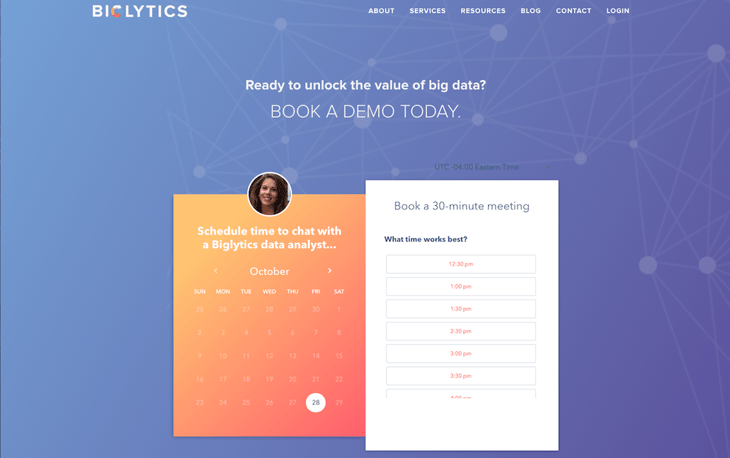
Meetings booked through a landing page cut down a sales rep’s prospecting time, and links direct ROI to your agency’s efforts. It’s a win-win.
Prospecting Email Template Creation & Optimization
It’s a common assumption that the marketing team produces the majority of content at a business. It turns out this simply isn’t true: According to Ducurated’s 2016 State of Sales Enablement report, marketing typically produces about 30% of company content, while Sales is responsible for about 40%.
So what kind of content is Sales creating? Sales reps produce hundreds of email templates each year, including emails for these use cases:
- Connect email
- Bringing a decision maker into the conversation
- Scheduling a demo
- Asking for a referral
Good templates radically improve prospecting speed, while poorly crafted templates quickly destroy credibility. Chances are, your client has both good and bad email templates floating around their sales teams.
Conducting a review of sales email templates and surfacing the highest performing content to all team members can quickly improve the efficiency of a sales organization.
When creating and auditing sales templates, use a software that provides open and click-through rates data of individual emails. Look for copy trends among the highest performing content.

Email trends change significantly over time. Agencies should set up a retainer-based service with clients to review email template performance every quarter.
What sales services does your agency offer? Let us know in the comment section below.


Growing Businesses Need a Growth Stack

When Dharmesh Shah and I started HubSpot 10 years ago, we had a clear goal: We wanted to make it easier for marketers to adapt to a changing world. Inbound marketing was the vehicle, and our mission was to bring all the tools you need to attract, convert, and close new customers together in one place.
But here’s the thing — change is constant when it comes to people. The places buyers spend their time, the expectations they have, and the things marketers and sellers need to do to be successful in 2016 are totally different than just a decade before. I’ve actually spent the last couple of months channeling my “inner anthropologist” to better grok how people live, work, shop, and buy, talking to people in all sorts of roles and with all sorts of backgrounds in the process.
However, it isn’t just the buyer who has changed. Smart marketers and smart sellers are a lot different than they were back when we started HubSpot. And this is what’s been driving our product direction over the past year.
Marketers and Salespeople Are Evolving
Ten years ago, we started out building for marketers who needed help getting the right tools matched up with the right strategy, because it was darned tough to do, and few people had the skills to do it.
But the marketer of today has evolved. Many of the folks I encounter are a lot savvier. They are digital natives who lean in on technology whereas 10 years ago they were often more timid. This idea of building a software “stack” — a connected set of tools that helps you do your marketing — is a more integral part of marketers’ day-to-day.
And this shift isn’t exclusive to marketers. Ten years ago, the VP of Sales made the call on a CRM system, their only piece of technology. Today, sales teams are also getting in on the same game of building their “stack.” When I watch savvy reps at work, they are testing new prospecting tools, tweaking their approach with tracked email templates, and using a bunch of additional point tools to be more effective. What it takes to be successful at sales is changing, and tech-savvy sales teams are winning the day.
The Challenges of Building Your Stack
Of course, this shift brings a new set of challenges along with it. When every team that touches the customer is out building their own stack, and there are new tools every day to kick the tires on, the familiar challenge of connecting the dots between all these pieces is actually getting harder.
There are two ways this usually plays out. In some companies, Marketing, Sales, and Customer Service have gone down different roads, building their own “stacks” that exist separately. Each team gets the gratification of doing what they want, but the customer loses in the end — with little continuity between touch points, it often feels like the left hand doesn’t know what the right hand is doing.
The second scenario is one of technical integrations. Someone on the team recognizes how important it is to integrate, and sets out to tie all the disparate tools and systems together. This is a noble pursuit, and one that makes sense for companies of a certain size and scale.
The trouble with this approach is that it literally never ends. Each new tool adds a new integration into the mix, and integrations come in all shapes, sizes, and degrees of quality. Some are great, some are superficial, and some require constant babysitting. Before long, managing integrations is the full time job of a growing ops team, or the worst nightmare of a small team with better things to spend their time on.
Building Your “Growth Stack”
Seeing these shifts in marketers, salespeople, and how each group uses and adopts technology has been fascinating. I experience these shifts firsthand with many of the folks I see getting started with HubSpot today.
One thing I’ve noticed is that more and more of these folks have “seen the movie” before. They’ve felt the pain of ignoring integration, or they’ve been on a team that ended up in an ops nightmare trying to do it themselves. This time around, they want to avoid that outcome at all costs.
I also see more and more teams that recognize the importance of Sales and Marketing working together. Even five years ago, the idea of Sales and Marketing alignment was a distant ideal for most people. Today, more teams seek opportunities to work together as a larger growth team.
And when these teams consider tools, they don’t build a sales stack and a marketing stack. They build a growth stack: an interconnected set of tools used to drive growth that share a common foundation.
Grow Your Business with HubSpot as the Foundation
Over the past few years, we’ve been hammering away to make our CRM, sales tools, and marketing platform an awesome triad to help our customers power their growth. In the years to come, our priorities won’t change. We’ll be aiming to build the best possible growth stack in the world — a foundation that supports and accelerates any business’ growth — and working to make it easier for you to add on other pieces if and when you need them through powerful integrations in our HubSpot Connect platform.
However, making our tools better is only one part of the equation. They also need to be accessible to as many people as possible — from sophisticated teams all the way down to companies that are just getting started. This was the driving force behind our announcement of HubSpot Marketing Free, a dynamic set of tools to help you collect leads and context from your website. Together with our free CRM and free sales tools, it’s possible for any team to start building their business on our growth stack without spending a penny.
We truly believe that we can give millions of companies back the time, the money, and the mental bandwidth they used to spend on worrying about their tools, and this will free them up to focus on growth. If this sounds like a shift your team could benefit from, learn more about building your growth stack with HubSpot using our free marketing, sales, or CRM tools, or see some of the dozens of other tools we announced today.

Topics Over Keywords: A Simple Framework for More Effective Content Creation

Content marketing has seen a lot of changes over the past few years, in particular around the way that marketers have went about actually developing their content. A lot of this has come down to the rapidly evolving search engine landscape, as well as a huge shift in the way that people are discovering content.
All that said, I still hear the same pain points coming from content producers that I did over five years ago:
“I struggle to measure the ROI of the content I create.”
“We create great content but we still don’t seem to rank high in Google for our target keywords.”
“So, I’ve done my keyword research. Now what?”
As a response to these problems — in particular the second one — a lot of marketers will respond with increased content output. Unfortunately, creating larger volumes of the same underperforming content will often result in the same underwhelming results — just at a greater expense.
The answer to these problems spans way beyond the number of blog posts being pushed out each week; the real problem lies in the way that most content strategies are being developed.
The Search Engines Are Changing
Updates to the way that the search engines are processing and evaluating content have been tied heavily to the approaches that content publishers have been taking to get results.
One of the ways in which content producers will evaluate the performance of content is by looking at keyword rankings within the search engines. There’s been a lot of debate around the actual credibility of keyword rankings as a metric, and the reason for this largely stems from the fact that rank changes depending on context.
To put it simply, depending on how and where you’re searching from, you’ll see different search results.

A simple search for the term, “where to eat pizza” illustrates this perfectly. If you’re searching for this query from Boston then you’ll receive a completely different set results compared to someone searching in San Francisco. In fact, the results page for this query probably has thousands of different variations at any one moment in time.
With this in mind, how do you accurately determine your ranking for this keyword?
Outside of keyword ranking problems, the search engines have also been dictating how content should be structured, most notably with the increased appearance of featured snippets.

Google has been rolling out more and more featured snippets within the search results that try to answer the question that the searcher has without needing to navigate through to the content.
The reality is that content ranking within the featured snippet section often gets a much greater share of the traffic for the given query when compared to non-featured snippet SERPs.
Publishers now have to restructure their content to try and appear within these featured snippets, of which Wikipedia reigns supreme — owning an estimated 17.2% of all featured snippets.
On a more general level, Google in particular has been making big investments in machine learning and has introduced ‘RankBrain’ into the core algorithm it uses to index and rank content. Ultimately, RankBrain enables Google to better understand the intent behind specific queries without the search query explicitly stating them — all with the goal of providing more relevant results to the searcher.
This leads nicely onto the next big change in search: the searcher.
The Searcher is Changing
More significant than the way in which the search engines themselves are evolving is the way that the searcher is communicating with the search engines.
Amplified by the rise of mobile and voice search, queries have become more and more conversational. Google’s updates over the past 2-3 years have focused on understanding these types of queries better through natural language processing, most notably with the rollout of Hummingbird.
Google’s CEO, Sundar Pichai, announced in May that that 20% of queries on its mobile app and on Android devices are voice searches.
The takeaway here for marketers? The traditional view of ‘keywords’ in search has changed. Where there were maybe 10-20 ‘big keywords’ that would be sought after for ranking within a topic, there are now hundreds or thousands of long-tail variations that are regularly searched within a topic.
Content Strategy in 2017 and Beyond
Considering the advancements in the ways that both the search engines are evolving and the way that searchers are communicating with them, there needs to be a shift in the way we align our content strategies — especially if organic search is a channel you’re focused on.
The way that we approach this at HubSpot is to look at our visibility across a topic, as opposed to a specific keyword. Through building content within topic clusters, we’re able to capture a large amount of search traffic across an ever-increasing pool of relevant keywords/phrases, as well as creating a strong affinity of a topic against our brand.

A great example of this is around “inbound sales,” an area that we’ve been covering a lot. You can see from Google’s autocomplete section that there’s a number of big links into HubSpot — our Inbound Sales Day, Certification, and Methodology being the top three, as well as a direct mention of the HubSpot brand.
We’ve managed to align our brand against huge volumes of topics that directly relate to our buyer personas, and as a result we generate millions of relevant visits to our web properties.
What is a Topic Cluster?
The basic premise behind building a content program in topic clusters is to enable a deeper coverage across a range of core topic areas, whilst creating an efficient information architecture in the process.
That sounds more complex than it is in reality.
What I’m saying here is that through aligning sets of webpages into topic clusters, you can manage the internal linking between each more efficiently and also provide a better user experience for visitors.

Building a solid information architecture is incredibly important for ranking well in organic search across a broad topic area. Creating hyper-focused clusters of content geared around a specific topic will not only help solve for that, but it’ll enable you to keep focused on creating content that your buyer persona actually cares about.
The typical way that I structure a topic cluster of content is with one larger piece of content that focuses around broadly covering the core topic, otherwise known as pillar content. Linking into the pillar content is a range of content that covers individual, more specific subtopics, otherwise known as cluster content. The cluster content will link back to the core pillar and often in between other cluster content within the same topic.
Here’s an example to illustrate this:
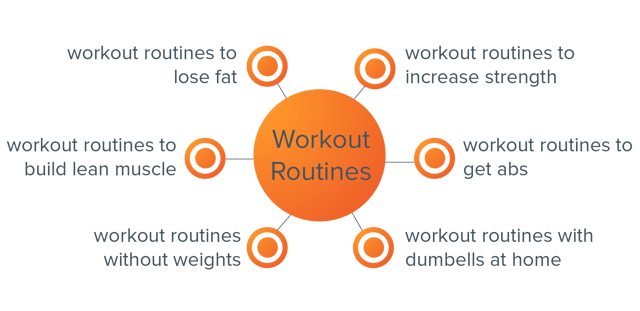
In the above example, the core topic is “workout routines.” Each of the surrounding subtopics focuses on a more specific branch of the core topic, for example, “workout routines to build lean muscle”.
The role of the pillar content is to cover the core topic broadly and also perform well at converting visitors into leads (or whatever your conversion goal is). The cluster content that is built for each of the subtopics will focus on gaining greater topic visibility and funneling traffic through to the pillar content in order for them to convert.
The beauty of this model is that you can spend a lot more time optimizing your pillar content for conversions and your cluster content for traffic. This saves a lot of time on the traditional model of optimizing each individual post. It also makes it easier for you to give a positive user experience whilst sending a bunch of positive signals to the search engines.
More time and resources are often spent on pillar content than on the supporting cluster content. Due to the fact that they’re all interlinked, all of the content within any given topic cluster will receive a boost when one page performs well.
An example of pillar content that we’ve produced at HubSpot would be our Blog Topic Generator tool.
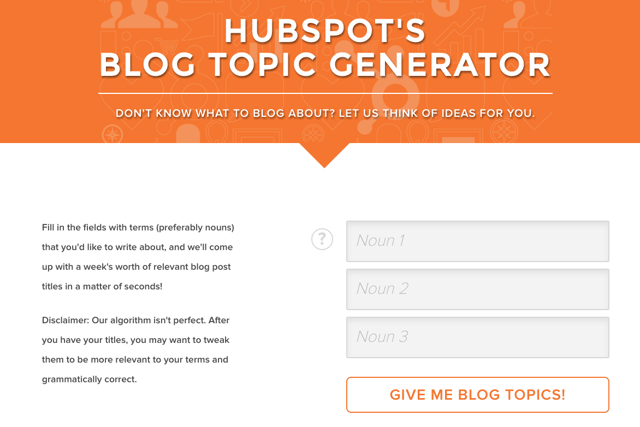
This pillar content brings in a substantial amount of new leads every month and gets a heap load of traffic. Tools work particularly well for pillar content because they’re often evergreen content and get shared a lot.
We’ve built out a wide range of cluster content that ties into specific subtopics. An example of this would be our blog post titled, “How to Think Up a Year’s Worth of Blog Post Topics in an Hour,” which has an internal link pointing to the Blog Topic Generator tool.
This content will drive traffic to the pillar content and push positive link signals to the search engines in the process, increasing both the organic search visibility and leads generated from the overall topic cluster.
The Process for Creating a Topic Cluster
When it comes to actually mapping out topic clusters, there’s a general process that I’ve found to work particularly well. I’ve simplified it down and listed it below so that you can get started:
- Map out 5-10 of the core problems that your buyer persona has (use surveys, run interviews, and do some secondary research within online communities).
- Group each of the problems into broad topic areas.
- Build out each of the core topic with subtopics using keyword research.
- Map out content ideas that align with each of the core topics and corresponding subtopics.
- Validate each idea with industry and competitive research.
- Create, measure, and refine.
This is a very simplistic overview but can work as a light framework for prioritizing content ideation and production. I tend to find that actually visualizing each topic group into topic clusters works particularly well.

How to Measure the Success of Your Topic Cluster
One of the most common content marketing questions that I’m asked is, “how do I measure the success of a piece of content?”
The answer to this question is complicated because for the most part it’s not a great idea to evaluate the success of your campaign on a content-by-content basis. Just looking at the success of one blog post is difficult at the best of times, but more often than not the definition of success is too narrow to account for indirect benefits that it has.
A good example of this would be with more brand-driven content. The focus here isn’t around generating sales or even capturing email addresses, but instead it can be around elevating the brand, attracting new talent, or even earning backlinks/press coverage.

If we based the success of our “Our Story” page on the number of leads it generated, it would be performing terribly. On the flip side, this page has over 5,000 backlinks from external websites and gets a huge amount of traffic from potential hires looking to join our company.
Luckily, this problem can be solved by evaluating success on a topic cluster level instead.
Measuring the entire topic cluster against all of your core business metrics will enable you to include residual benefits coming from content that doesn’t align with direct conversion goals. Let’s say one of your blog posts is a study with a bunch of original data that gets thousands of backlinks — this page will pass on authority across all the pages in the topic cluster and grow the search visibility across the whole topic cluster. That’s difficult to measure in isolation, but can be done on a topic cluster level.
Using this framework for measurement, you’ll be able to understand the following:
- Which topics perform better at driving traffic to your web properties
- Which topics earn you the most leads
- Which topics drive the most revenue to the business
- Which topics earn the most backlinks/coverage
Search Engines Aren’t Searching for Your Content, People Are
What this all works towards is ensuring that you’re actually creating content that people want to see, as opposed to content that’s designed specifically for the search engines. Don’t forget, search engines are pretty smart. In most cases, they don’t require you to ever mention a specific keyword in the copy of your content to understand that it’s relevant.
Shifting your focus to building content on a keyword-by-keyword basis and moving to owning topics is going to help you create better content, increase your visibility in the search engines and provide a much more positive experience for visitors.
What questions do you have about this framework? Share them in the comments below.