
Inbound Marketing for Independent Schools
Today nearly a quarter of all K-12 schools in this country are private schools—that’s over 30,000 schools. With 5 million seats to fill each year, these stats demonstrate the urgency for marketers attract their share of prospective parents, and nurturing them along to their child’s enrollment.
Every student goes through her own enrollment journey, but the inbound marketing journey phases are the same for every prospect. A key to inbound success is understanding each of these phases and what different inbound marketing strategies and tactics are needed in each.
Getting Noticed: Attracting Qualified Prospective Parents
Parents can’t enroll their children if they don’t know you’re out there. The first phase is getting attention for your school, but not just from anyone. You want to make sure you attract parents of students (prospects) who are looking for an alternative to public education, who have children who will thrive at your school, and who are going to ultimately help better your school.
To make sure you’re attracting the right prospects, you need to understand, deeply, who they are. These are your personas, which you’ll write up in detailed descriptions for fictionalized versions of your ideal parents. You may have more than one persona for your school. For example, parents looking to enroll their child in a private school right from kindergarten, might have different questions and needs than one looking to transfer their students in for 8th grade. One may be curious about after-school care, while the other might care more about whether or not their child has been adequately prepped for success
When you do research to build your personas, talk with your academic and career counselors, admissions folks, current students, local libraries, even other schools if possible. You want to learn what questions and concerns your ideal parents have when they start looking for an independent school.
The information you discover isn’t just for your personas. It’s also the foundation of SEO strategy, to guide you in the selection of what keywords and phrases will generate the right kind of organic traffic to your website and blog. The right keywords help keep your traffic targeted.
Are you trying to increase awareness for your best-in-class soccer program for the state of Maine? Then search phrases like “youth soccer in Maine” and “Maine soccer leagues for children” may need to be part of your keyword list.
Do What Your School Does Best – Educate Prospects
You want to convert your website and blog visitors into prospects you can nurture. A visitor becomes a prospect when you start learning enough about them to push out personalized content. The best way to do this is offer them some remarkable content for which they’re willing to exchange their email address.
Remarkable content has to provide detailed, actionable answers to the specific questions prospects have when deciding whether to go to an independent school versus a public school, how to apply, or how to decide what sort of school or program best suits them.
Whether your school is co-ed or single sex, day school or boarding school, you’re driven by a unique philosophy, set of values, and approach to teaching. Your content is a vehicle to showcase what makes you different, and why students might be a good fit for the qualities your school is known for.
Return to your personas and what you learned about them during your research. You should see a broad range of concerns, questions, and interests you can dig into. Set out to create remarkable content that educates your prospects about their most pressing questions.
Getting Those Applications and Enrollments
A prospect can spend a lot of time in the education phase. Use your content and its carefully selected topics to nurture prospects towards inquiries, applications, or enrollments. To do this, nudge prospects along with content that starts answering the questions they have about your specific independent school.
You’re still educating them, but now you’re educating about what they can expect at your school and why your school is a good option for them. This is also the time to start “closing” on your best prospects.
Include calls-to-action (CTAs) on your blog posts, emails, and other content geared towards prospects in this phase that start building offline connections between them and your school. Strong CTAs for this phase include inviting them for on-campus tours and meetings with career and academic counselors and financial aid advisors.
Making this pivot successful requires good timing and persistence. Identify behavioral triggers that indicate a prospect’s high readiness to fix their short list of schools. You can use email series and other automated workflows to drip the right mix of content and CTAs to move a prospect towards application and then on to enrollment.
Create Your School’s Best Ambassadors
Congratulations! Your inbound marketing program has resulted in a full enrollment class of exactly the kind of students you want.
Your work isn’t done.
These students and their parents are an invaluable resource. Use surveys to find what their preferences and interests are. Learn about what the specific motivators were that lead them to choose your school over others. Do you need to refine your personas based on what you learned?
They’re also great content sources. Delighted parents and students can write blog posts, post at-school videos, and share your school’s content through their own social media profiles. So don’t forget to continue to publish remarkable content that appeals to their new questions and challenges now that they’re enrolled.
The Never-Ending Cycle
As you well know, there’s always another semester and new classes to fill. The more you execute on an inbound marketing strategy, the more you’ll learn about what works, what your best prospects respond to, and what can (and should) be discarded. Use this never-ending cycle of new prospects to keep improving the content and lead nurture flows you implement to enroll your new students.
Should Marketers Use Pop-Up Forms? A Comprehensive Analysis
As inbound marketers, we care about creating lovable experiences for our website visitors — but we also want to generate as many leads as we can for our sales teams. Most of the time we can do both without any problem. But when it comes to pop-up forms, conflict does emerge.
Pop-ups are everywhere these days. Over the past few years, pop-up forms have re-emerged as a popular marketing tactic for promoting content, driving blog subscriptions, growing email lists, and fueling lead generation.
Some pop-ups are fairly benign and you hardly notice them. Others are distracting, and quite frankly, downright poopy (see the example below).
Pop-ups have become so prevalent that even Google has had to weigh in, announcing that they will begin to penalize websites that use what they call “intrusive interstitials” (we call them “crappy popups”).
So the million dollar question for inbound marketers is this: Should we be using pop-up forms? Before we dive in and attempt to answer this question, let’s take a step back and re-acclimate ourselves with the world of pop-ups.
What Is a Pop-Up Form?
According to Wikipedia, the first ever pop-up ad appeared in the late 1990s on the web hosting website Tripod.com. In their early days, pop-ups were primarily used by third-party advertisers, and they were particularly cringe-worthy. Do you remember the first time a brightly colored pop-up jumped out on your screen, alerting you that you’d won some sort of content or prize? I know I do. And as far as I can remember, I never collected any of those fabulous prizes.
Over time, consumers and web browsers alike got better at hiding or ignoring these types of pop-ups, and eventually, advertisers gave up. Nowadays you’ll rarely see a sketchy third-party pop-up — unless you find yourself on a particularly sketchy website. (Watch a webinar on how to advertise effectively in the world of ad blockers and social media here.)
For a time, pop-up forms largely disappeared from the internet. But then they came back. Only this time it wasn’t third-party advertisers that were using them … it was marketers like you and me.
Pop-ups come in many shapes and sizes, but the most prominent types are:
- Welcome mats: Full screen pop-ups that slide above page content
- Overlay modals: Center screen pop-ups that appear on top of page content
- Top banners: Small banners at the very top of the page
- Slide-in boxes: Small boxes that slide in from the side/bottom of the page
Here’s a graphic depicting what each of these four pop-ups looks like on a web page:
As more and more marketers have started using pop-up forms, a mini-industry of pop-up providers has emerged, offering bells and whistles that were never available before. Most notably, pop-up tools have proliferated the types of triggers that prompt a pop-up to appear.
Among the most popular pop-up triggers are:
- Page entrance: Pop-up appears when the visitor first gets to the page
- Page scroll: Pop-up appears when the visitor scrolls to a certain point on the page
- Element interaction: Pop-up appears when the visitor clicks on or hovers over a specific element
- Time on page: Pop-up appears when the visitor has been on the page for a specific amount of time
- Exit intent: Pop-up appears when the visitor scrolls towards the top of the page to leave
Now that we know a little more about pop-up forms, let’s get back to the core question: Should marketers be using them?
And in order to properly answer that question, we need to consider two slightly more specific but related questions:
- Do they work?
- Is it possible create inboundy pop-up forms that don’t, well, suck?
Let’s dig in.
Do Pop-Up Forms Work?
I’ll answer this one right off the bat: The answer is yes. Pop-up forms do work, and this is the main reason so many marketers are using them.
But how much better do they perform than traditional forms? In one experiment, AWeber found that a pop-up form converted 1375% better than traditional forms for driving blog subscriptions (see the images below). In addition, according to research conducted by SumoMe, the top performing 10% of pop-up forms convert at a whopping 9.3%. Now I don’t know about you, but an additional 9.3% conversion rate across my website sounds pretty good to me.
Source: AWeber
The numbers don’t lie: Pop-up forms work. However, is that worth sacrificing the experience that a visitor has on your site? The inbound answer is no. User experience trumps all else.
But what if you didn’t have to sacrifice performance for experience? What if you could create user-friendly pop-ups that didn’t suck?
Is There Such a Thing as an Inbound Pop-Up?
If you ask someone how they feel about pop-ups, they’re likely to offer an emotional response that loosely resembles a child eating vegetables (I call this expression “blegh”).
People hate the idea of pop-ups. Most pop-ups out there are annoying. What’s more, the pop-ups that annoy you the most are the ones you’ll remember the longest.
But here’s the thing: not all pop-ups are bad. Pop-ups can be used for good, and they can be a healthy part of an inbound strategy.
Just think about email marketing for a second. Email is another example of a channel that has been heavily abused. We’ve all gotten some crappy emails throughout the years. But as inbound marketers, we know to use email responsibly and to only send contextualized email that adds value to people’s lives.
The same goes for pop-ups. When used correctly, they can actually enhance the experience a user has on your website, as well as boost your conversion rates.
But how do we make sure that our pop-ups are helpful and not spammy? Here are some guidelines.
4 Tips for Crafting High-Converting Pop-ups (That Don’t Suck)
1) Offer something relevant and valuable.
The problem with most pop-ups is they get in the way of the visitor’s experience on a website, rather than enhance it. Oftentimes this is because what’s being offered in the pop-up is either not valuable to the visitor, or it has nothing to do with the page they’re on.
To boost engagement with your pop-up as well as enhance the experience that someone has on your site, be sure to offer something that is both valuable and relevant to them, given the page that they’re on. For example, if I were writing a blog post on social media, I would offer a free ebook on the same topic:
2) Think about the way people engage with your pages.
Another common mistake marketers make with pop-ups is having them appear at the wrong time, which adds to the annoyance factor. Be strategic about the timing and trigger of your pop-ups. Think about the way that visitors interact with certain types of pages on your site.
For instance, when someone engages with a blog post, they do so by scrolling down the page as they read the content. If you want to catch your visitors while they’re most engaged, then you should customize your pop-up to appear when someone has scrolled halfway down the page.
Similarly, you might find that people who stay on your product or pricing pages for more than 30 seconds are highly engaged because they’re taking the time to read through and consider their options. In this scenario, you could use a time-based pop-up that appears when a visitor has been on the page for a specific number of seconds.
To better understand exactly how your visitors engage with different pages on your site, try looking into Google Analytics data, such as bounce rate and average time on page. Better yet, use a tool like HotJar or Crazy Egg to record users on your site to build heat maps of where they click and scroll. This will give you a better sense of how people engage with your content.
3) Use language that’s specific, actionable, and human.
Most pop-up forms have a fairly basic layout. You get a headline, some body copy, and maybe an image. In other words, you don’t have a lot of real estate to work with.
This means it’s super important to nail the copy on your pop-up form. In order to do that make sure your copy is specific, actionable, and human:
- Specific: Specify exactly what a visitor is going to get if they click on your pop-up. Don’t tell them it’s a guide; tell them it’s a 10-page guide with actionable tips. Don’t encourage them to join your email list; ask if they’d be okay with getting two to three emails on a given topic per week.
- Actionable: Let visitors know exactly what you’d like them to do. Instead of “Click Here,” try “Download our Free Guide,” or better yet, “Get my Free Guide.” Craft a compelling call-to-action that will inspire your visitors to take action.
- Human: Remind visitors that there’s a real person behind the pop-up form. Use colloquial language to make your forms friendly. Instead of “Join our email list,” try “Mind if we email you twice a week?” Instead of “Subscribe to our blog,” try “We’d be happy to notify you whenever we publish new articles.”
4) Don’t ruin the mobile experience.
In an effort to improve mobile user experience, Google recently announced that they were going to start penalizing websites that use what they call “obtrusive interstitials” — in other words, pop-ups that mess with the user experience. Now I don’t know about you, but I certainly don’t want my Google rankings to go down from using pop-up forms.
To ensure a user-friendly mobile experience and avoid being penalized by Google, be sure exclude your pop-up forms for mobile, or use pop-ups that don’t take up the entire screen of the page on mobile devices. Most pop-up tools already offer this type of functionality, but if what you’re currently using doesn’t, you may need to find a new solution.
Need a Free Pop-Up Tool?
So there you have it. To sum up: Pop-up forms do work, they can be inboundy, and you should be using them.
If you’re looking for a good free tool to get started with pop-up forms, we’d recommend that you try Leadin. We built it ourselves to help marketers generate more leads across their entire website without sacrificing the user experience.
What are your thoughts on pop-up forms? Do you think that inbound marketers should be using them? What pop-up tool would you recommend? Share your thoughts in the comments.
The Empathic Manager’s Guide to Preventing Team Burnout
Marketing and ad agencies have a major talent retention problem on their hands.
According to a recent study from LinkedIn and 4A’s, there was a 25% net talent loss at ad agencies globally compared with competitive industries such as tech and commerce in 2015.
Advertising agencies also ranked dead last among competitive industries in terms of work/life balance and long-term strategic vision, and close to the bottom for compensation and benefits, strong career path, job security, and making employees feel their contributions are valued.
It seems like agencies are failing across the board to fully support the wellbeing of their employees, and many agency professionals have had enough with the industry’s exhausting cycle of competition and burnout.
As Michael Farmer, a veteran advertising consultant, writes in Madison Avenue Manslaughter, “Through benign neglect of growing creative workloads, and reluctance to tackle clients over declining client fees, agency CEOs are presiding over the slow decline and over-stretching of a diminishing pool of burned-out creative assets.“
With this systemic problem hanging over our heads, is there anything managers can do on a daily basis to prevent team burnout on the ground floor? We’ve compiled a list of simple, everyday changes managers can make to help keep their teams engaged, motivated, and as protected as possible from the dreaded agency burnout epidemic.
How Managers Can Prevent Team Burnout
1) Ditch Multitasking and Help Employees Truly Focus
If you find your team scrolling mindlessly through Facebook after lunch or staring blankly at their stuffed inboxes at the end of the day, it’s a pretty good indication that your team is suffering from a multitasking overload.
Mutitasking is deeply embedded in the fast-paced, high-stress agency environment, but the frequent stress and fractured attention span caused by constant multitasking might be fatally impacting productivity and morale. Basically, humans really suck at multitasking. Employees are frequently asked to split their attention and creative energy between roughly 200 various tasks on a daily basis, which means virtually nothing actually ends up getting any real attention.
The solution? Say goodbye to multitasking and hello to your new best friend: monotasking. Monotasking is exactly what it sounds like: focusing on a single task at hand instead of tackling your monstrous to-do list all at once. And it just might be the perfectly obvious antidote to your team’s steadily declining motivation and seeming inability to focus.
A 2016 University of California, Irvine study found that people who work online all day are more likely to expend their brain’s natural capacity for focus — thanks to the tendency to multitask. Once employees hit their focus wall, they have difficulty feeling engaged or motivated. That sounds a lot like burnout.
So how can managers encourage monotasking on their teams? Start by creating clear project schedules that help employees balance multiple accounts at once without constantly switching back and forth. Talk with employees about how they focus best, and tailor your expectations to better accommodate each employee’s unique needs.
Yes, there are always client deadlines to consider, but your team will actually be more productive and engaged if you can cultivate an environment that helps employees work without constantly switching gears.
2) Discuss Career Growth on a Regular Basis
A disconcerting 54% of people who left the advertising industry said a major reason was because they felt there wasn’t sufficient opportunity for advancement.
In order to feel truly valued within an organization, employees need the room and support to better themselves and advance their careers. Without career growth, everyday tasks lose their purpose, and employees feel like work is just something to drudge through.
Part of the issue is organizational: Agencies need to offer employees more opportunities to advance. But managers can help employees better navigate the treacherous agency terrain by being more transparent about opportunities and how they can be achieved.
Talking about career advancement shouldn’t be something that only takes place on a yearly or even quarterly basis. The more frequently managers bring up career advancement and long-term goals, the more supported employees will feel in their career paths. Simply discussing where employees want to be in the future can have a major impact on how valued people feel, and can help bring a real sense of purpose to their work.
3) Encourage Recharge Periods
Much like the smartphone you can’t seem to stop checking, humans need to be recharged. It’s just not in our nature to be constantly tuned in, and when we try to marathon a ton of work at once without stopping for periodic breathers, we actually end up in an unproductive and unhappy state of “continuous partial attention.”
As Linda Stone, the former head of Microsoft University, writes on her website, “In a 24/7, always-on world, continuous partial attention used as our dominant attention mode contributes to a feeling of overwhelm, over-stimulation and to a sense of being unfulfilled. We are so accessible, we’re inaccessible.”
Managers can help by ascribing to a more results-oriented workplace philosophy which recognizes gaps in productivity are necessary and healthy. Taking breaks shouldn’t be demonized or looked down upon as a sign of weakness. In fact, managers should check in with their team members to make sure they’re taking adequate time to recharge.
The measurement of an employee’s performance shouldn’t be based on how late into the night they check their email or how many all-nighters they’re capable of pulling before they collapse. It should be judged primarily on the output of their work.
4) Don’t Overlook Small Victories
A study from University of Michigan Business School found that teams performed best when managers gave six times as much positive feedback as negative feedback. When employees received significantly more positive feedback on their work, they were more likely to feel valued, respected, and motivated to improve their performance. And these factors are all key in beating burnout.
In workplaces today, managers are more likely to point out negative feedback or withhold feedback altogether than offer employees praise for their work. “Criticism is vitally important,” Alexander Kjerulf, a Denmark-based workplace happiness researcher, told CNN. “We need to tell people what they do well and what they can do better, but many workplaces either give no feedback or only give criticism. This is a shame because we learn so much from being told what we get right.”
Managers dealing with stressed out teams should work hard to bring attention to everyday victories, letting their employees know their work isn’t going unnoticed.
5) Set a Positive Example with Your Own Behavior
Science tells us that stress can be contagious, but according to Harvard Business Review, the reverse can be true as well: “When any member of a team experiences wellbeing, the effect seems to spread across the entire team.”
Managers are in a unique position to set the tone for their team’s work by exemplifying positive behaviors in their own day-to-day projects and interactions. If you slave away at your computer for 12 hours a day and never take a break, your team members will see this as an example of what to strive for, and mirror your own unhealthy behaviors.
It may seem simple, but check in with yourself regularly to make sure you’re leading by example. If you’re feeling burnt out, chances are your team is feeling the burn as well, and it’s time to implement some changes.
How to Write a Job Ad That Excites Candidates
As a direct response copywriter, I specialize in making readers take a specific action. I write a variety of copy, including articles, landing pages, sales emails, and job advertisements.
In fact, I’ve written hundreds of job ads over my career, as one of my first gigs was for a big employment website, where I created several ads a day. Ads that had one ultimate purpose: to compel readers to hit the “APPLY NOW” button.
My job was to make people want to press that button. My words were supposed to make them feel excited about the prospect of being in the role they were reading about. If I could do that, consistently, I was lightning in a bottle.
To get better, I read direct response copywriting books and hand-copied successful sales letters. And my job, naturally, provided me with plenty of practice. Then, one day, I opened an email from my boss: “Your visitor-to-application conversion rate is twice what it was this time last year,” read the note. “Nice work.”
This article is about how I achieved that conversion rate. Keep reading to learn the strategies and best practices I used to grip candidates, exciting them enough to take action.
How to Write a Job Ad
You want to write a job ad that consistently drives candidates to fill out an application. Of course, you also want qualified applicants, people that meet your requirements.
Here’s how to attract the right people to your open position:
1) Study your target candidate.
You might’ve heard that people buy on emotion first, and then rationalize their purchases using logic.
Applying for a job, in that sense, is a lot like making a purchase. Pressing the “APPLY NOW” button is an emotionally charged decision.
When writing your job ad, tap into those emotions by learning everything you can about your target candidate (i.e., the person you want to be interviewing). What are his or her professional goals and aspirations? What makes him or her happy?
Create a target candidate persona, or a composite of your ideal employee. (Download these buyer persona templates to get started.) Use the information you acquire to make potent promises that 1) you know you can keep and 2) your target candidate wants to hear.
2) Mind your SEO.
Every day, the job hunt leads millions of people to search millions of keywords. So, yes, relevant keywords are still important, especially when writing job ads.
In your quest to be unique and desired, don’t make up a new, creative name for an established role. In other words, don’t call your open content marketing position an “Attention Ninja” or “Audience Crafter.”
Call it what it is: a “Content Marketing Specialist.” If you’re in the B2B space with clients all over the world, for instance, add a few more adjectives: “Global B2B Content Marketing Specialist.”
Post the position under a recognizable, keyword-friendly title because that’s what candidates will be searching.
3) Follow a scannable, digestible format.
Before candidates settle into your ad, they’re first going to scan it. And if it’s not formatted using big, bold, clear, and concise subheads to make the scanning process effortless, they’ll move on.
The easier your ad is to scan, the more likely it is to garner attention. Attention that ultimately leads to action.
Open your ad with a “Company Summary” paragraph followed by these subheads, or sections, in this order:
- Overview
- Benefits
- Requirements
- Responsibilities
Here’s a breakdown of each section along with example paragraphs that, when combined, will form a “Content Marketing Specialist” job description for Security Software Co., a shamelessly made-up company:
a) Open with a benefits-rich overview.
Every ad must start with a concise description, or overview, of the role. It should be snappy and compelling — and it’s clear, quick explanation of the role should be complemented by the job’s big-picture benefits.
General Electric, for example, did a nice job with the latter in their branding campaign commercials.
People inherently want to be part of something bigger than themselves. Appeal to that desire by helping candidates envision the impact of their work.
For example, if you’re hiring a software developer, explain the mark that software will leave on others. Will it help them beat traffic? Will it help them communicate better with their family? Will it help them get clean drinking water every day? Be specific. The more specific you are, the more compelling your message will be.
Example:
As the Content Marketing Specialist for Security Software Co., you’ll create articles, infographics, and eBooks that build an engaged audience. Your goal will be to drive thousands of people to subscribe to our newsletter and follow us on LinkedIn. Your success will expand Security Software’s global reach – helping millions of parents protect their children from online predators – while simultaneously developing your personal brand as a foremost expert in our space.”
b) After the overview, lead with even more benefits.
Now that you have the candidate’s attention, draw him or her deeper into the ad with a section dedicated to your company’s benefits package, a topic employees care about. But know, there’s a correct way and a wrong way to write a benefits bullet …
Use examples to help candidates envision the benefit, not just read it. Like this:
- The wrong way: “Heated parking garage.”
- The right way: “Arrive and leave work comfortably, thanks to a heated garage.”
Example:
At Security Software, we ask a lot of our employees, which is why we give so much in return. In addition to your competitive salary, medical/dental/vision plan, and matching 401(k), we’ll shower you with perks, including:
-
Dress: Wear anything you like to the office – and be as comfortable at work as you are in your own living room.
-
Flexibility: Two days a week, feel free to skip the commute and hit your deadlines from home.
-
Food: Save hundreds of dollars on food each year thanks to our well-stocked, healthy kitchen.
-
Location: On the days you
are in the office, get here quickly thanks to our highly accessible central location. -
Wellness: Stretch away the stress every morning in our in-house yoga studio.”
c) Keep your requirements clear and concise.
This section will be your ad’s most sterile, so don’t close with it. Stick it in the middle, sandwiched between two sections that highlight promise and opportunity.
Keep your list of requirements only as long as it needs to be. You don’t want to scare great candidates away with extraneous requisites. You also don’t want to engage and inspire unqualified people with a shortlist.
Example:
Not everyone can be a Content Marketing Specialist. To be seriously considered for the role, please have the following in regards to:
-
Experience: At least 3 years in a similar role with comparable goals and responsibilities (security and/or software background,
preferred). -
Education: Bachelor’s degree in English, Marketing, Communications, or a similar field,
preferred. -
Skills: You
must be an excellent writer, someone who understands how to frame a message in a clear, concise, and compelling way. You
must also understand the mechanics of an efficient, effective Marketing Automation campaign (HubSpot experience,
preferred). -
Characteristics: This is an autonomous position, so you should be self-sufficient and self-motivated. It’s also a creative role, so you must be able to gracefully receive criticism and feedback about your work.
d) Use strong verbs to describe responsibilities.
Responsibilities are the job. They’re the work, the paycheck. That said, responsibilities can also generate excitement and promise in a passionate candidate.
Begin each bullet with a unique, yet fitting, verb. For example, the role doesn’t “manage” people, it “shapes” them; the role doesn’t “oversee” projects, it “enables” their success. See the difference? One word can offer a fresh perspective, altering the reader’s frame of mind.
Example:
As Security Software’s sole Content Marketer, you’ll meet the initiative’s strategic needs on your own, experimenting, learning, and adjusting as you go. Throughout your journey to grow our brand’s audience and reach, you’ll be responsible for:
-
Sculpting informative, entertaining, digestible articles that audiences can’t stop reading.
-
Designing beautiful, rich infographics that are as engaging as they are shareable.
-
Publishing easy-to-skim, value-driven eBooks for download in exchange for business-email addresses.
-
Crafting persuasive, laser-focused landing pages that compel your target audience to take one valuable action.
-
Purchasing targeted ad spend on well-performing social media platforms.
-
Pulling prospects through each stage of our marketing funnel, gradually warming them up for a productive conversation with sales.
The Final Product
Here’s what our example job ad for Security Software Co. looks like when stitched together (plus a standard “Company Summary” paragraph plugged in at the beginning):
Content Marketing Specialist
[company summary]
OVERVIEW:
As the Content Marketing Specialist for Security Software Co., you’ll create articles, infographics, and eBooks that build an engaged audience. Your goal will be to drive thousands of people to subscribe to our newsletter and follow us on LinkedIn. Your success will expand Security Software’s global reach – helping millions of parents protect their children from online predators – while simultaneously developing your personal brand as a foremost expert in our space.
BENEFITS:
At Security Software, we ask a lot of our employees, which is why we give so much in return. In addition to your competitive salary, medical/dental/vision plan, and matching 401(k), we’ll shower you with perks, including:
- Dress: Wear anything you like to the office – and be as comfortable at work as you are in your own living room.
- Flexibility: Two days a week, feel free to skip the commute and hit your deadlines from home.
- Food: Save hundreds of dollars on food each year thanks to our well-stocked, healthy kitchen.
- Location: On the days you are in the office, get here quickly thanks to our highly accessible central location.
- Wellness: Stretch away the stress every morning in our in-house yoga studio.
REQUIREMENTS:
Not everyone can be a Content Marketing Specialist. To be seriously considered for the role, please have the following in regards to:
- Experience: At least 3 years in a similar role with comparable goals and responsibilities (security and/or software background, preferred).
- Education: Bachelor’s degree in English, Marketing, Communications, or a similar field, preferred.
- Skills: You must be an excellent writer, someone who understands how to frame a message in a clear, concise, and compelling way. You must also understand the mechanics of an efficient, effective Marketing Automation campaign (HubSpot experience, preferred).
- Characteristics: This is an autonomous position, so you should be self-sufficient and self-motivated. It’s also a creative role, so you have to be able to graceful receive criticism and feedback about your work.
RESPONSIBILITIES:
As Security Software’s sole Content Marketer, you’ll meet the initiative’s strategic needs on your own, experimenting, learning, and adjusting as you go. Along your journey to grow our brand’s audience and reach, you’ll be responsible for:
- Sculpting informative, entertaining, digestible articles that audiences can’t stop reading.
- Designing beautiful, rich infographics that are as engaging as they are shareable.
- Publishing easy-to-skim, value-driven eBooks for download in exchange for business-email addresses.
- Crafting persuasive, laser-focused landing pages that compel your target audience to take one valuable action.
- Purchasing targeted ad spend on well-performing social media platforms.
- Pulling prospects through each stage of our marketing funnel, gradually warming them up for a productive conversation with sales.
APPLY NOW
The Final Thought
This ad, for all intents and purposes, is a generic example. It’s designed to illustrate, at a high level, the techniques that make candidates feel something when they read a job ad. That said, it’s important to first use your knowledge of the role to create an accurate ad, one that reflects your company’s culture and specific needs. Then use the tips above to build excitement.
Good luck — although something tells me you have this one in the bag.
What tips do you have for writing effective job descriptions? Share them in the comments.
Early Birds vs. Night Owls: When’s the Best Time of Day to Write? [Infographic]
While many people dread the sound of their morning alarm, an early start to the day could actually be the best thing for your writing.
To shed some light on this concept, the folks at Grammarly analyzed over one billion words corrected with the help of their writing app, and gathered some fascinating insights about how time of day impacts writing ability.
Here are just a few of their findings:
- Misspelled words made up more than half of all email-writing mistakes.
- Writers were three times as likely to make spelling and grammar errors in social media posts compared to any other type of writing.
- Apostrophe mistakes were the most common.
Do you notice yourself making more writing errors at a certain time of day? Check out the full infographic below to learn more about the rest of their observations.
20 Creative Agencies You Should Follow on Instagram
Instagram has evolved into a perfect visual platform for agencies, filled with photos of office parties, company outings, and creatives hard at work behind their Macs. And while there were more than a few pictures of agency pups and craft beers, Instagram has also become a place where agencies can share behind-the-scenes shots of their latest work and highlight their accomplishments.
While there probably aren’t that many CMOs who troll Instagram looking for their next agency partner, there is little competition and even more opportunity to make it your agency’s platform of choice for attracting new talent and clients — a differentiator when it comes to that next visual campaign.
If you are looking for some inspiration or just want some “inside” looks at a few agencies, then check out this ultimate — yet not exhaustive — list of ad agencies to follow on Instagram:
20 Creative Agencies To Follow on Instagram
1) Huge: @hugeinc
This meticulously curated Instagram from Huge is chock full of high-quality photography, graphic design inspiration, and quirky snaps of daily office antics. A must-follow if you want a glimpse of what life is like at a top agency.
2) Motherlondon: @motherlondon
Mother London, the world’s leading independent creative agency network, has a unique approach to Instagram. Each week, they hand over the reins to a different creative, allowing them to showcase their work and highlight their unique design perspective. The result is a truly inspiring feed that’s sure to inject a little inspiration into your daily life.
3) ustwo: @ustwo
Even though ustwo, a digital product studio, has worked with major brands like Google, Adidas, and Ford, their Instagram presence is surprisingly personal. Take a scroll through their gallery and you’ll find colorful photos of office events, team outings, and even birthdays alongside glimpses of their latest work.
4) Wolff Olins: @wolffolins
Wolff Olins‘ Instagram gives followers a glimpse at the agency’s work-hard-play-hard approach to creative strategy. Most recently, they shared pictures of their office’s own “olympic games”, which involved a cornhole contest and mini basketball hoops.
5) Carrot Creative: @carrotcreative
If you subscribe to the notion that you can never see too many pictures of adorable dogs or awesome events, then Carrot Creative’s Instagram is for you. VICE’s full service digital agency serves up plenty of both in their frequent updates, along with photos of their team and their traveling flag.
6) Red Antler: @redantler
Brooklyn-based agency Red Antler is the epitome of cool and inventive New York charm, and their Instagram reflects this identity. Follow along for design inspiration, office culture, and photos of their work with startups.
7) Skirt PR: @skirtpr
The folks at Skirt PR know their way around a glamorous party. Whether it’s a cool boutique opening, a cozy cafe gathering, or a champagne celebration, you can follow along with the action on their Instagram. Their feed is also a colorful source of design inspiration — perfect for a mid-week pick-me-up.
8) Agency V CPH: @agencyvcph
If you ever feel like your life could use more Scandinavian minimalism, then you should add Agency V CPH to your list of accounts to follow. The Copenhagen-based agency shares pictures of sleek interiors, style inspiration from their clients, and city snapshots from the rainy streets of Copenhagen.
9) SPARK: @sparkbrand
SPARK‘s creative team takes followers behind the scenes and on location as they shoot and edit ads for brands like Hilton, Visit Florida, and The Dalí Museum. Their account is also worth a follow for the illustrations and other design work they regularly share.
10) BBDO San Francisco: @bbdosf
As their Instagram bio proudly declares, BBDO San Francisco is “all about The Work The Work The Work.” Their account showcases their recent campaigns, high-profile events (such as Cannes), and their team’s creative process — which involves bowling nights.
11) Fred & Farid Paris: @fredfaridparis
We’re big fans of Fred & Farid’s Snapchat presence, and their Instagram delivers top-notch content as well. The Paris-based agency’s approach to Instagram is highly personal. They share shots of daily city life, events, and their team on and off-duty.
12) Martin Agency: @martinagency
You’ve seen Martin Agency’s impressive work for Geico, Chevrolet, and Oreos, but you probably didn’t know they have an affinity for flannel shirts and a love of street art. Martin Agency’s Instagram is an intimate look at how employees at one of the world’s most influential agencies work day-to-day.
13) Salted Stone: @saltedstone
This agency’s Instagram following may be small in comparison to some of the other accounts features here, but the quality of their content speaks for itself. Salted Stone, a California-based digital agency, uses Instagram to share behind-the-scenes peeks at their latest projects, industry events, and favorite lunch spots.
14) Talk Shop Media: @talkshopmedia
No, your eyes don’t deceive you — That’s really Prince William and the Duchess of Cambridge chowing down on some treats from one of Talk Shop Media’s clients. This digital marketing agency specializes in influencer relations, and their Instagram is like having a free pass to all the coolest events.
15) Goodby Silverstein & Partners: @goodby_silverstein
Margaret Johnson, chief creative officer at Goodby Silverstein & Partners, was recently honored on Business Insider’s 30 Most Creative People in Advertising list. Her agency’s Instagram account gives followers the opportunity to see how Johnson and her team produce major global campaigns.
16) RPA Advertising: @rpa_advertising
RPA Advertising’s Instagram account makes the daily office grind look pretty darn fun. The Santa Monica-based agency recently hosted a summer concert series, and — based on their feed — they keep the office kitchen stocked with plenty of healthy snacks.
17) Colle + McVoy: @collemcvoy
Dogs and design? Count us in. Colle + McVoy’s Instagram account puts the spotlight on their design work and company culture.
18) hzdg: @hzdg
hzdg’s Instagram account is a veritable treasure trove of design inspiration, ranging from their own work to the work of designers and artists their team admires. They even recently took followers on a virtual tour of the world’s most colorful places.
19) Social Distillery: @socialdistillery
Social Distillery is an Austin, Texas-based social media agency specializing in digital communications and consumer engagement. They may only have nine employees on their current company roster, but their Instagram account makes a big impression with snapshots of their energetic team and latest work.
20) st8mnt: @st8mnt
Last but certainly not least is st8mt, a Nashville-based branding agency that boasts powerful design chops and a laid-back company culture. Their Instagram is full of their recent work and company events. You could say it really makes, well, a statement.
How does your agency use Instagram? Share your account with us in the comments.
Editor’s Note: This post was originally published in July 2014 and has been updated for freshness, accuracy, and comprehensiveness.
How to Find a Great Mentor at Any Stage of Your Career
Have you ever had your mind blown by a little kid’s wisdom?
More often than not, they tend to have surprisingly astute yet simple observations in life. (Case in point — noting to my Dad, at age two, that my Mom “keeps the money in her purse” when I was told he couldn’t buy a toy I wanted.)
While it might be a stretch to call kids our mentors, the occasional profoundness of children reminds us that youth doesn’t always preclude wisdom. And the same goes for mentorship. It doesn’t have to be limited to kids, teens, and people early in their careers. As we progress in life, that guidance shouldn’t disappear — there isn’t an age that deems us unfit to be mentored.
But when it comes to being mentored later in our careers, many of us aren’t sure where to begin. There are many ways to go about finding a mentor at any age, though, and we’re here to suggest a few. (And to learn more about finding a marketing mentor, check out these tips from HubSpot Academy.)
How to Find a Mentor at Any Stage of Your Career
1) Ditch your preconceived notions of experience.
We tend to believe that mentors are supposed to be older, wiser, and more experienced. Today, that logic is a bit flawed — we live in a time when being professionally experienced means many things.
Some younger generations are more experienced in jobs that didn’t exist a decade ago. And then there are those who are more advanced and know the broad spectrum of certain career paths. There’s an upside to learning and teaching both. As it turns out, we all need guidance.
New York Times assignment editor Phyllis Korkki recently covered this phenomenon, describing how, in her mid-50s, her 27-year-old Social Strategy Editor made her better at her job. In an act of reverse mentorship, the younger colleague taught Korkki how to use Snapchat, which she says, “stretched me as a journalist and a person.”
I, too, was hesitant to jump of the Snapchat train at first. But when I started this job and befriended one of my slightly younger colleagues — one of whom brilliantly explains Snapchat here — I decided that it might be a good idea to figure it out. And lucky for me, she was more than happy to help.
That wasn’t all my colleague taught me, though. I’ve actually learned a lot from her in just a few short months — including how to toss any age- or experience-related connotations around mentorship away.
2) Know that mentorship goes both ways.
When I asked my colleague, Staff Writer Aja Frost, about her thoughts on being a mentee at any point in life, she provided some interesting insights.
“I think everyone should simultaneously seek mentorship and give it,” she told me. “Being both makes you better at both. If you know the type of mentorship you like to accept, you can also dole out that type.”
Korkki touches on this concept, noting that the only thing that could have improved the experience was if she, too, had mentored her younger colleague. It wasn’t until she had grasped Snapchat well enough to take over the New York Times account for a day that she asked her mentor, “What do I have to offer?”
So really, the best mentorships are balanced. It can be hard to ask for help, and to remember to offer it in return. But don’t hesitate to surface your own strengths and offer guidance in return — that “give and take” approach helps both parties see the value in the relationship. It becomes clear that that the investment of time is worthwhile.
Not to mention, helping someone out makes you feel good. As my colleague Adrienne Ober put it, “Being a mentor can be a huge boost to your own confidence. When people ask me questions, I go, ‘Oh, wow. You want to know what I think?”
3) Leverage your own network.
A few years ago, I was in the midst of a very difficult career decision and didn’t know who to ask for advice. It wasn’t until several weeks that I realized I had an entire network — former clients, supervisors, and colleagues — to call upon for mentorship. Why hadn’t I turned to them earlier?
It turns out that most of us suffer from something called inattentional blindness, which is essentially the psychological term for not being able to see what’s right in front of us, so to speak. So when we’re particularly engaged in a decision or situation that’s occupying most of our time, inattentional blindness could explain why we miss helpful resources that are actually quite readily accessible — like our own respective networks.
Once you take stock of your network, you might be surprised how well-received a request for advice can be. And unless you’ve burned every professional bridge you’ve ever known, there’s likely someone in your life whose advice you can seek. They might even be able to introduce you to someone in their network that fits your criteria.
4) Know what it is that you need.
When seeking a mentor, it’s important that you’re (at the very least) prepared to answer one pivotal question: “So, what do you want?”
Be sure to have some goals in mind when you seek out this kind of guidance. Knowing that will achieve two things — getting the information you need, and being able to seek out the right kind of mentor.
Take my above example of when I sought mentorship within my own network to help with a difficult decision — to quit a bad job without having another one lined up. I didn’t want to be shut down with a hard “no.” But I also didn’t want a quick, impractical “yes.” I needed someone who could pragmatically walk through the pros and cons, and evaluate options that I hadn’t thought of. (There it is again — inattentional blindness.)
When you look for a mentor, make sure you have a comprehensive purpose in mind. Think of the difficult questions you haven’t been able to ask. Having those criteria in mind will help you find the right person to provide the guidance you need.
5) Attach the right parameters to “success.”
In addition to experienced, wise, and older, we tend to think of the best mentors as successful. But there’s a problem — like “experience,” “success” today takes many different forms.
Our reasons for seeking advice are diverse, and with them come varied signs of success. Some traditional metrics are outdated — having great wealth, finding a spouse, and settling down in a big house isn’t everyone’s idea of accomplishment. In fact, most people value happiness at work over a big salary — almost 70% would take a pay cut for a job that they were passionate about.
Maybe that’s what you need in a mentor — someone who has taken risks and can help make yours more calculated. Or maybe you’re not sure what it is that’s going to make you happy, and need someone to objectively work that out.
The point is, don’t discount a potential mentor simply because his or her life doesn’t fit the mold of what’s stereotypically deemed successful. In fact, if someone is truly happy at work — which only 38% of people say they are — that, to me, is a sign of success.
It’s Your Turn.
Ready to get out there and start building these valuable relationships? You’ve got this. But remember, mentorship is just that — a relationship.
Show gratitude for what your mentor brings to the table. But don’t ignore what you have to offer — ask how you can be of service, too. Even if you’re an expert on a given topic, chances are, you have something you can teach.
And don’t forget to pay it forward. Even if there isn’t an occasion when your mentor asks you for help, plenty of others could use it. That could be anyone — not just other professionals. Check out the National Mentoring Partnership to learn how to work with kids at an earlier stage.
How did you meet your best mentors? Let us know in the comments.
How to Detect, Repair & Profit From Underperforming Content
As a marketer, you’re used to leveraging a variety of channels to promote your business, up to and including content marketing.
According to HubSpot’s annual State of Inbound report, 60% of marketers reported “blog content creation” as one of their top priorities — with interactive content creation (41%), long-form content creation (33%), and visual content creation (33%) not far behind.
Unfortunately, not every piece of content you create is going to be a winner. There are millions of blog posts being published every day, and many of those posts will never see a lick of traffic.
Sure, it’s discouraging to see content underperform, but the real issue arises when you leave that underperforming content on the table. To prevent that, I’m going to walk you through how to identify, reposition, and optimize that lackluster content to help your business start generating more views and leads.
Is the Content Really Failing?
Before we dive in, it’s important to first make the distinction between the content that is actually underperforming and the content that hasn’t ramped up or gained traction yet.
HubSpot’s Principal Marketing Manager of Optimization, Pamela Vaughan, did some extensive research into HubSpot’s seemingly-underperforming content, and what she found was really interesting. (Download this ebook for an in-depth explanation of Vaughan’s research.)
Vaughan’s analysis was intended to determine which of their posts were the most influential in generating leads, and which posts weren’t pulling their weight. In doing so, she discovered that 76% of HubSpot’s monthly blog views came from old posts (anything published prior to that month), and that 92% of their blog-generated leads came from old posts.
The most important point you should take from her study is that it can take time — sometimes several months — for content to gain traction. Before you flag content as underperforming, you need to set realistic time scales as part of your strategy, KPIs, and measurement methodology for success.
If you already have a fair amount of content, you can use metrics over the life of those content pieces to create performance benchmarks for other current pieces and any new additions.
How to Identify Underperforming Content
Before you can flag any performance issues, you need to understand the components of 10X content that contribute to better performance and higher engagement. This type of content is generally:
- High quality
- Entertaining
- Solutions based
- Fresh
- Non-promotional
- Educational
- Thought leading/innovative
- Highly relevant
It might seem easy to hit a lot of those points — and you may feel like your content includes all of these components — but it’s actually not as easy as it might appear.
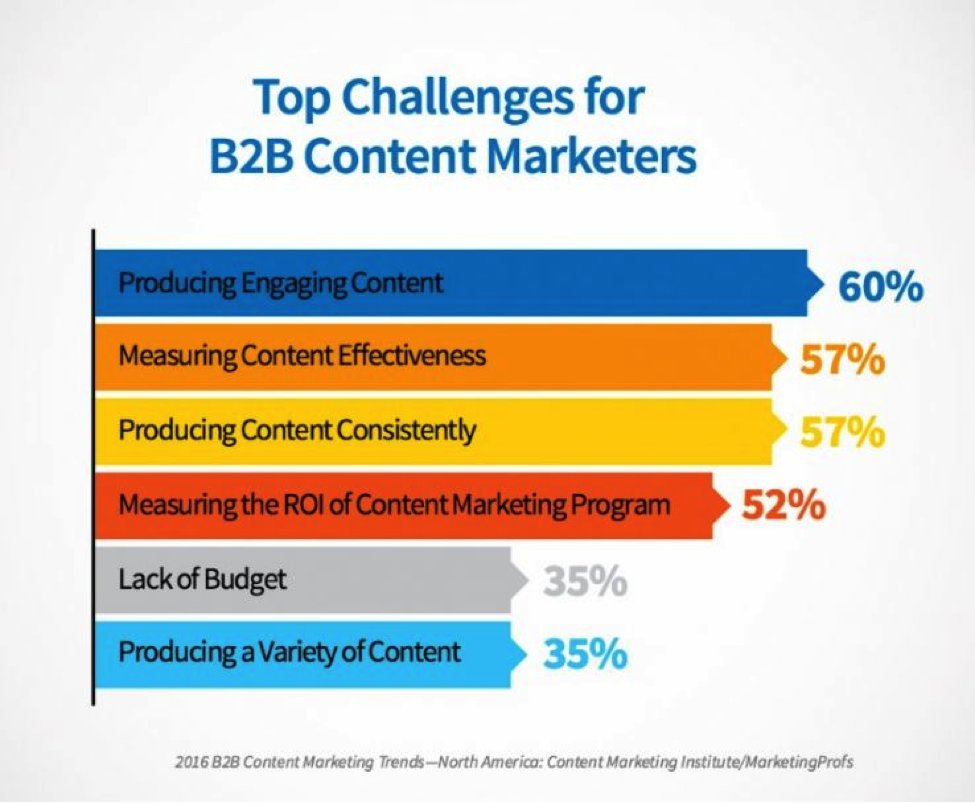
Roughly 60% of marketers still struggle with creating engaging content, even when including many of the components above — and the problem goes well beyond just the traffic a piece of content is getting.
Source: CMI
So how do you identify underperforming content? Look for the following:
- Loss of organic traffic. Sometimes, a post will gain traction — even a substantial amount — and then suddenly lose its traffic. This can happen in the wake of social promotion, a loss of referral links on high traffic sites, or a shift in organic search rank.
- No direct engagement. Even a well-trafficked post could have poor direct engagement. This could point back to an issue with a call-to-action, or perhaps concerns that the content doesn’t match the user’s search intent.
- No organic traffic. It’s frustrating to publish a post and hear crickets. Organic search can be one of your greatest traffic sources, but not if your content is poorly optimized.
- Little to no social engagement. Limited shares on social media are a sign that there’s an issue with the content, especially if you’re getting steady traffic to your article or post.
- Poor post metrics. Another indicator of underperforming content is a low on-page time/session duration per page, with a high-exit or drop-off rate.Ideally you want people to linger, showing that they’re reading a long-form post in full. You also want the reader to visit other pages, as opposed to using that same landing page as an exit page or bouncing from the site without taking other actions.
- No follow through to content despite social promotion. If you’re seeing a fair number of shares, but you’re not seeing follow through from an extended audience, you may want to consider why the conversion on shares is so low.
The Solution? Historical Optimization.
Every piece of underperforming content can be made into a center-stage star with a few tweaks and adjustments. In the above mentioned study from Pamela Vaughan around HubSpot’s content, historical optimization of underperforming content helped to double the number of monthly leads generated by old posts. (Again, you can read more on that in this ebook.)
Once you’ve identified a piece of underperforming content, here are some things you can do to give it a boost:
1) Improve long-tail keyword use.
If organic visibility is an issue, or if you’re seeing poor post engagement as a result of traffic, try improving the optimization. Find long-tail keywords that better match user intent against the context of the article. (New to keyword research? Start with this beginner’s guide.)
2) Optimize headlines to boost CTR.
Google uses over 200 ranking factors to rank results based on search query and its perception of user intent. Despite that, clickthrough behavior carries a significant weight in how Google ranks content.
Improve your headlines to make them more compelling in order to garner more clickthroughs in organic search. This will contribute to a gradual increase in your position within the search results. (Download this ebook for data-driven tips on writing catchy headlines.)
Need a second opinion on a headline? Check out Title Tester. This testing tool makes it easy to create headline polls that’ll help you decide on the most clickable option.
3) Create compelling meta content.
The SEO value of meta content has greatly diminished in recent years, but there’s still value to be had. As in the case of the headline or title of your content, it can have a profound impact on user engagement and clickthrough rate. Write it like your sales copy to boost engagement. (Or, steal tips from this article.)
4) Adjust content to match user intent.
You may have hit on a fantastic topic but perhaps the way you addressed it missed some key points, creating a mismatch in content vs. search intent.
See if there’s something else the audience is looking for regarding your topic and find ways to adjust your existing content to include new or better targeted information. For example, a reader might not be interested in how to write Instagram captions, but they could be interested in how to earn more followers on Instagram.
5) Add internal links and cross link content.
Sometimes, a piece of content doesn’t garner a lot of engagement because it’s all “me, me, me.”
Without external links or reliable sources your audience might just feel like it is merely opinion and conjecture. External links can add credibility and authority to your content. (Check out this list of 33 white hat ways to build backlinks to get started.)
6) Consolidate content.
If you have multiple pieces of content seeing little traffic, try combining them into a more comprehensive piece that packs greater value. Then, redirect links from the most underperforming pieces to the new consolidated piece.
7) Cluster content.
HubSpot’s Matt Barby talks about cluster content in a piece for Search Engine Journal that I highly recommend checking out. The idea is that a topic cluster is a collection of semantically relevant content pieces that individually cover smaller themes within an overarching topic.
“Any big piece of content that I’m targeting against hyper-competitive search terms will be marked as pillar content. Then a range of content will be created covering subtopics related to the main pillar that internally link to it,” according to Barby.
Source: Search Engine Journal
8) Add visual elements to content.
When dealing with low engagement, make sure you’re leveraging visual assets within your content. According to research from Xerox, visuals can increase people’s willingness to read a piece of content by 80%.
Whether it’s images or video, use it in every post and use it often. According to Buzzsumo, articles with an image once every 100 words or so get double the number of social shares than articles with fewer images. (Download 195+ visual design templates to get you started here.)
9) Include the almighty call-to-action.
If you’re suffering from low engagement, look to your call-to-action. Make sure you’re telling your audience exactly what you want them to do (share, comment, opt in, etc.) once they finish reading your post. (You can start improving your conversions with these 50 customizable call-to-action templates.)
Getting Started
Ultimately, one of the best ways to deal with underperforming content is to have a strategy that prevents it in the first place. Make sure your content includes all the most important components and create a plan for promotion as part of your strategy.
Remember to consider the time it takes for content to gain traction among your audience — it varies for everyone.
Use your past analytics as a model to monitor future content, and be proactive about historical optimization in the future to consistently keep up the engagement and performance of all of your content.
How do you correct underperforming content? Share your tips in the comments below.
How to Create Social Media Buttons for All the Top Social Networks
Social media is an extremely valuable tool for promoting your marketing content.
But with so many social networks providing their own individual content sharing and follow buttons, it’s often difficult to know which social media button to use for what purpose.
To address this, we’ve put together a comprehensive guide to help you understand the differences between the share and follow buttons for six of the biggest social networks (Twitter, Facebook, LinkedIn, YouTube, Instagram, and Pinterest), as well as how to implement them on your website, blog, and other content.
Jump to instructions for: Twitter | Facebook | LinkedIn | YouTube | Pinterest | Instagram
The Ultimate Cheat Sheet for Creating Social Media Sharing Buttons
Differentiating between social media sharing buttons and social media follow buttons lets you identify which type of button you should be using for what purpose.
It’s first step in understanding the nuances of all the various social media buttons available to you. Let’s clear that up right now.
Social Media Follow Buttons
These buttons serve to promote your business’ presence on various social networks and help you generate fans/followers for those particular accounts. By placing these buttons on your business’ website, you can help to create visibility for your social media accounts and easily extend your reach there.
You can put these buttons anywhere on your website, but we recommend at least placing these buttons on your website’s ‘About Us’ page and your blog’s homepage/sidebar. The Twitter Follow Button, Facebook Follow Button, LinkedIn Company Follow Plugin, and YouTube Subscribe Button (and more) that we’ll cover in this article all serve as social media follow buttons.
Social Media Share Links/Buttons
These links and buttons enable your website visitors and content viewers to easily share your content with their social media connections and networks. Adding these buttons to your content allows you to expand the reach of your content to new audiences and generate new visitors back to your website.
You should add social media sharing links/buttons to every piece of content you create, including landing pages, web pages, individual blog articles, email content, etc. The Tweet/Share Button, Facebook Like and Share Buttons, and LinkedIn Share Button (and more) that we’ll cover in this article all serve as social media sharing buttons.
Now, let’s dive into the most important social media buttons available for each of the top six social networks. (HubSpot customers: Many of these buttons come out of the box with HubSpot’s Social Media Apps.)
Social Media Buttons for Twitter
1) Twitter Follow Button
What It’s For:
The Twitter Follow Button is great for generating new followers for your Twitter account. Users can start following you on Twitter with just one click — without ever having to leave your site.
How to Add a Twitter Follow Button:
Visit https://publish.twitter.com/# and select “Twitter Buttons” to customize your button’s featured account (i.e. the account you want people to follow), size, and language. Then copy and paste the HTML code it generates where you want the button to appear on your website. (Note: For more customization options, such as showing your follower count next to the button, check out Twitter’s documentation here.)
See it in action. Follow HubSpot on Twitter:
2) Twitter Share Button
What It’s For:
Use this button to enable site visitors to easily share content (e.g. blog posts, landing pages, other web pages, etc.) with their networks on Twitter, extending the reach of your content to their connections.
How to Add a Share Button:
Visit https://publish.twitter.com/# to customize the look of the button, the text and URL within the tweet it generates, its language, and the option to add a via attribution, @mention, and hashtag. We recommend adding your company’s Twitter username to increase your account’s reach and generate new followers. Once customized, grab the HTML code for your new button and place it on your site where you want the button to appear. (Note: For more customization options, check out Twitter’s documentation here.)
See it in action. Tweet this blog post:
3) Twitter Hashtag Button
What It’s For:
This button is great for encouraging visitors to tweet about certain hashtags you’re promoting, like for events or specific marketing campaigns. Add these buttons to pages for these campaigns or events to spread and promote the event and its hashtag. (For more information about hashtag use, check out this blog post.)
How to Add a Twitter Hashtag Button:
Visit https://publish.twitter.com/# to customize your hashtag button. For example, if you’re promoting an event with a hashtag, you can grab the HTML code and place it your event’s website or registration page.
See it in action. Tweet about HubSpot’s annual marketing and sales event, INBOUND:
4) Twitter Mention Button
What It’s For:
Use this button to encourage website visitors to communicate with you via Twitter. Add this button to pages on your site like your ‘Contact Us,’ ‘About Us,’ or ‘Help’ pages. It’s great for customer support.
How to Add a Twitter Mention Button:
Visit https://publish.twitter.com/# to customize your button. Then grab the HTML code and paste it into your website’s HTML where you want the button to appear.
See it in action. Tweet a message to HubSpot:
5) Twitter Message Button
What It’s For:
Use this button to helps users connect with you via a private direct Twitter message. This is another great Twitter button to add to your site’s ‘Contact Us’ or ‘Customer Service’ pages so customers can easily connect with you for problem-solving.
How to Add a Twitter Message Button:
Visit https://publish.twitter.com/# to customize your button. Then grab the HTML code and paste it into your website’s HTML where you want the button to appear.
See it in action. Send a direct message to HubSpot:
6) Pre-populated ‘Tweet This’ Anchor Text Links
What They’re For:
Have you ever wanted to create an anchor text link that pre-populates a specific Twitter message for your visitors to share? We call these links ‘Tweet This’ links, and at HubSpot, we use them in blog articles a lot (click here for a great example).
Usually, these tweet links are used on landing pages to promote offers using specific messaging, and within content itself such as in blog posts. Similar to the official Tweet Button, ‘Tweet This’ links enable marketers to have more control over the message a visitor shares about their content on Twitter.
How to Add a ‘Tweet This’ Anchor Text CTA:
Luckily, there’s a great, free tool to help you easily create ‘Tweet This’ links for your content. Simply visit http://clicktotweet.com, enter the message you want to populate the tweet, and copy/paste the generated URL into your anchor text (e.g., “Tweet This!”).
As a best practice, include a URL in the tweet message to direct people back to the original piece of content you’re trying to promote, and be sure to shorten the URL to save room for the tweet copy. It’s also a great idea to include your business’ @username in the tweet to help increase reach.
See One in Action:
(Remember, you can customize the anchor text however you like.)
6) Twitter Website Widgets
What They’re For:
Twitter also enables you to create dynamic widgets as a way to showcase your Twitter activity on your website. Create a …
- User Timeline Widget to show your most recent Twitter updates.
- Search Widget to show search results in real time. (Tip: Use this to showcase tweets for a hashtag you’re promoting.)
- Favorites Widget to highlight tweets you’ve marked as favorites. (Tip: Favorite only testimonials for your business and add this widget to your website’s case studies or testimonials page.)
- Collections Widget to display hand-picked tweets about a specific topic. (Tip: Create a collection of positive tweets about the annual event you host and embed it on your events page.)
- List Widget to showcase tweets from users on particular Twitter Lists you’ve generated (Tip: Create a Twitter list of your business’ employees and add this widget to your website’s careers page.).
How to Add a Twitter Website Widget:
Visit https://twitter.com/settings/widgets/new, click ‘Create New,’ select the type of widget you’d like to create, and customize your widget’s settings, preferences, appearance, and dimensions. Then grab the HTML code and place it on your website where you want the widget to display.
See One in Action (Example Shown Is the User Timeline Widget):
Social Media Buttons for Facebook
1) Facebook Follow Button (Formerly Called the Subscribe Button)
What It’s For:
Like Twitter’s Follow Button, the Facebook Follow Button enables you to increase your Facebook reach by making it easy for your site visitors to Like your business’ Facebook Page with just one click. The Follow Button displays your page’s number of Likes as well as faces of people who already like your page, using social proof to amplify its effectiveness.
How to Add a Facebook Follow Button:
Visit http://ift.tt/RHsj6F to customize your button. Then generate the code (available in HTML5, XFBML, IFRAME, or a URL), and place it on your website where you want your Follow Button to appear.
How They Look:
See it in action. Follow HubSpot on Facebook:
2) Facebook Page Plugin
What It’s For:
The Facebook Page Plugin enables you to promote your business’ Facebook Page on your website/blog, highlight other users who have already Liked your page, display your follower count, and feature recent posts on your page. The box also allows visitors to like your Facebook Business Page with just one click — without leaving your site — enabling you to promote your Facebook presence and easily increase your page’s Likes.
How to Add a Facebook Page Plugin:
To generate a Facebook Like Box for your website, visit http://ift.tt/1HTwNuG. Include the vanity URL for your Facebook Page as well as your customization preferences. Then generate the code (available in HTML5, XFBML, IFRAME, or a URL), and place it on your website where you want it to appear.
See It in Action:
3) Facebook Send Button
What It’s For:
The Facebook Send Button enables users to share your content with specific friends, either via a private Facebook Message, to the group timeline of one of their Facebook Groups, or as an email to any email address. These messages consist of a link to the URL configured in the Send Button, a title, image, and short description of the link.
How to Add a Facebook Send Button:
To generate a Facebook Send Button, visit http://ift.tt/1jaORGY and specify the URL you want people to share as well as the color scheme and font. Then generate the code, and paste it into your site where you want the button to appear. (Note: The send button is only available in HTML5 or XFBML, and it requires the JavaScript SDK.)
See it in action. Send this blog post:
4) Facebook Like Button
What It’s For:
Facebook’s Like Button is a button that enables users to easily give your content a virtual thumbs up. By clicking the Like Button, a story also appears on the user’s Facebook Timeline and in their friends’ News Feeds with a link back to your content, whether it’s a blog post or a specific landing page. Use this button to make it easy for visitors to endorse your content and share it with their Facebook connections, but keep in mind this button doesn’t allow them to add personalized messages to links before sharing them. To allow users to add a personalized message, use the Facebook Share Button (see below).
How to Add a Facebook Like Button:
Visit http://ift.tt/1jGR5ie to customize your Like Button and grab the code (available in HTML5, XFBML, IFRAME, or a URL) to place on your website.
How They Look
See it in action. Click to like this blog post!
5) Facebook Share Button
What It’s For:
Facebook’s Share Button acts similarly to the Like Button (sharing your content on their Timeline and in friends’ News Feeds), but it also gives users the option of adding a comment or message to the link when sharing it. This button also allows them to share the content in other ways — in Facebook Groups and in Facebook Messages to specific users.
How to Add a Facebook Share Button:
To generate a Facebook Share Button, visit http://ift.tt/1bXGyrk and specify the URL you want people to share as well as the width. Then generate the code, and paste it into your site where you want the button to appear. (Note: The share button is only available in HTML5 or XFBML, and it requires the JavaScript SDK.)
See it in action. Click to share this blog post!
6) Facebook Anchor Text Share Links
What They’re For:
There may be times when you prefer to use an anchor text share link over a button. These links are easy to create and can be added to web pages, blog articles, landing pages, or within content like ebooks and whitepapers.
How to Add Facebook Anchor Text Share Links:
To create your own Facebook share links, replace the orange highlighted URL below with the URL of the content you want to promote. Then link the full URL to the anchor text you want to appear in your content.
http://www.facebook.com/share.php?u=http://bit.ly/vOKpgC
See One in Action:
More Facebook Buttons: We’ve covered the most commonly used social media buttons for your business here, but to find all of Facebook’s official social media plugins in one place, visit http://ift.tt/sAVUDA.
Social Media Buttons for LinkedIn
1) LinkedIn Follow Company Plugin
What It’s For:
The LinkedIn Follow Company Plugin, similar to Twitter and Facebook’s follow buttons, makes it easy for visitors to follow your Company Page on LinkedIn. This enables you to increase your business’ reach on LinkedIn.
How to Add a LinkedIn Follow Company Plugin:
Visit http://ift.tt/L1UKSe! to configure your button. There are a few different styles to choose from, with options to show your follower count above, to the right, or not at all. Then grab the code for your site.
How They Look
See it in action. Follow HubSpot on LinkedIn:
2) LinkedIn Company Profile Plugin
What It’s For:
If you want something more robust than the Follow Company Plugin, LinkedIn’s Company Profile Plugin is a good alternative. Users will not only be able to follow your company via the plugin, but they’ll also see an at-a-glance overview of your company, which includes your company summary, location, logo, and number of employees.
How to Add a LinkedIn Company Profile Plugin:
Build your Company Profile Plugin by visiting http://ift.tt/y4548A, entering your company name, and selecting your desired display mode. You can choose to display everything in-line (see example below), or go for a hover effect that expands the simple follow button to show more information about your company. You can also choose whether you want visitors to see a list of their LinkedIn connections who work at your company. Then grab the code to embed the plugin on your site.
See It in Action (In-line Display Mode):
Note: For personal brands, LinkedIn’s Member Profile Plugin offers similar functionality. Check it out here.
3) LinkedIn Share Button
What It’s For:
Adding LinkedIn’s Share Button enables visitors to easily share your content with their connections on LinkedIn, whether it be a blog post, a landing page, or another web page. Like Facebook’s Like and Share Buttons and Twitter’s Tweet Button, incorporating this button can help extend the reach of your content to the LinkedIn audience and drive traffic back to your site.
How to Add a LinkedIn Share Button:
To create and install this button, visit http://ift.tt/1A5Z7ob, specify the URL you want to drive traffic to, and choose your button’s style. Similar to LinkedIn’s Follow Company Plugin, you can choose to show the share count above, to the right, or not at all. Then generate your code and add it to your site where you want the button to display.
How They Look:
See it in action. Share this blog post on LinkedIn:
More LinkedIn Buttons: Although we’ve covered the most commonly used buttons above, you can find all of LinkedIn’s official social media buttons and plugins in one place at http://ift.tt/1079Lc1.
Social Media Buttons for YouTube
1) YouTube Subscribe Button
What It’s For:
This button is an easy way for organization to promote their YouTube video channels. You can embed this button on your homepage or ‘Contact Us’ page to increase the reach of the content you promote on your channel and to increase your subscriber base.
How to Add a YouTube Subscribe Button:
To create a YouTube Subscribe Button, visit http://ift.tt/12fOC7t, enter the name of your company’s YouTube channel, select a button size and color theme, decide whether you want to display your logo, and decide whether you want to display your follower count shown or hidden. Then, copy and paste the code onto your website where you’d like the button to appear.
How They Look:
See it in action. Subscribe to HubSpot’s YouTube channel:
Social Media Buttons for Pinterest
1) Pinterest Follow Button
What It’s For:
Just like the other popular social networks, Pinterest also offers a Follow Button to enable you to promote your Pinterest presence and generate new followers for your account.
How to Add a Pinterest Follow Button:
Visit http://ift.tt/2e52qNp, and configure your button by typing in your Pinterest account’s URL and account name. Click ‘Build It’ to generate the code, and paste that into your website.
See it in action. Follow HubSpot on Pinterest:
2) Pin It Button
What It’s For:
This is Pinterest’s share button, enabling users to share your content on Pinterest and expand its reach. The Pin It button is great for visual content. Place these buttons next to images, infographics, and other visual content on your site.
How to Add a Pin It Button:
Visit http://ift.tt/11aISZ2 to create your Pin It Button. Specify the URL where the image lives, the image URL, and select the design specs of the pin. Then, copy the generated embed code to use on your website.
How They Look:
See it in action. Pin this blog post:

More Pinterest Buttons: Other Pinterest widgets include a Profile Widget for showing a preview of your pins, a Board Widget for showing off specific pinboards, and a Pin Widget for showing off specific pins. Build them at http://ift.tt/1uZVyic.
Social Media Buttons for Instagram
1) View on Instagram Badge
What It’s For:
Instagram offers a View on Instagram badge for organizations to promote their accounts on their blogs and websites. The badge also helps organizations promote their social media accounts without web visitors having to navigate using their mobile devices, which was the only means of accessing Instagram until 2013. The badges keep visitors looking at your content and engaging with you on the same web browser.
How to Add an Instagram Badge:
Visit http://ift.tt/Y3p9um and log into your Instagram account. Select the style of badge you want to display on your website or blog, copy the generated embed code, and paste it onto your blog or website. You can also download the Instagram camera icon if you want to design your own custom View on Instagram badge.
How They Look:
See it in action. View HubSpot’s Instagram:

Note to Sharers: Social Media Terms of Service
Before modifying social media buttons on your website, take a look at the Terms of Service for Facebook, Twitter, LinkedIn, Pinterest, YouTube, and Instagram. Modifying logos and branding could result in your website being penalized, so when in doubt, use the exact logos populated by the widgets we’ve listed above. Happy sharing!
Editor’s Note: This post was originally published in December 2011 and has been updated for accuracy and comprehensiveness.
The Modern Nonprofit’s Guide to SEO
SEO can be a funny thing. Part of SEO’s stupendous value is that a well-optimized webpage can keep generating quality traffic to your nonprofit’s online presence years after it was first published. It’s your little worker bee that’s always buzzing along making honey in the background.
It also means your SEO work is never done. Pages can always be better optimized. They also need to be refreshed to reflect changes in your keyword strategy or to adapt to changes in Google’s SERP priorities, which happen constantly.
Your SEO might be awesome right now. That’s terrific. But that doesn’t mean it also can’t get even better.
Upping the Ante in Your On-Page SEO
You have the most control over your on-page SEO, which makes it a great place start. First thing to do is to analyze what you currently have going on.
If it’s been awhile since you took a look at your keyword list, time for a fresh look. Perhaps in the last few years, your constituents were most concerned with improving their professional certification and credentials. But now, they may have greater concerns about their options for health insurance. Who knows? But that’s precisely the point.
Take a close look at what new issues people may be emailing you about. What are your constituents talking about on social media? Find out what new questions and concerns they have. Keep an eye out for whether they’re asking similar questions but in different ways. For example, the credit card space is increasingly competitive with a lot of free comparison tools out there. A credit union may want to look into whether repositioning its credit card content and offers with more relevant keywords could bring in more qualified traffic.
Brainstorm a new list of keywords based on what you learn. Use it to refresh existing content and build a new topic list. Start publishing content that reflects your potential constituents’ new priorities.
A second way to do some ground analysis is to grade your website’s current SEO status. HubSpot’s Website Grader will point out some quick wins and areas that need further development. If your pages load slowly, or your site isn’t optimized for mobile, the Grader will let you know. It will also provide some direct SEO tips where it thinks a page is falling short.
Google constantly changes its SEO algorithm and tag properties. Google recently pushed organic results further down the page by inserting a fourth paid ad spot. As compensation (of sorts), it expanded the character count for titles and meta descriptions. You may want to rework all (or just some) of your organization’s webpage titles and meta description tags to keep up with the changes.
Also review pages to ensure they’re optimized around one choice keyword, and that all your possible tags and headings are SEO-optimized. Do your blog posts tend to be long stretches of text? Write keyword optimized headers (and tag them appropriately — H1, H2, etc.) for a collection of your most relevant posts. Google reads images – do you have alt-text for all of your images? (BTW – that alt-text for images Is used by voice recognition systems for reading aloud your pages. As hands-free laws are becoming more strictly enforced, this tag will become important as people rely more on “Siri” and her counterparts to read your organization’s webpages to them while driving, etc.)
Getting Those Off-Page Backlinks
You know you need backlinks to validate your website and blog’s authority. You put social sharing icons on all your pages to help that. But if you want to take your backlink SEO strategy to the next level, you need to get pro-active.
Test out including some context-specific sharing CTA by your social icons. If you have a blog post reviewing popular professional resources that members of your trade organization might use, you can add copy at the end of the post specifically encouraging them to share this list with their colleagues. “Share this on Facebook: Fellow welders – heads up! Get the new Guide to OSHA Certification Standards for Welding Equipment [yourURL]. Will save you tons of $$!”
You can also set up an influencer program. Influencers are people who regularly share content to people who fit your target market. You can start your search for influencers at home by looking at your constituents, board members, and corporate partners to find people with some social media traction.
Don’t overlook people who aren’t yet part of your organization’s family, such as bloggers who write about your industry and relevant online publications. Do some social listening to find bloggers and sites that are also using your keywords or talking about the same issues as your organization.
Reach out to them individually. See if they’ll write a post for you, or interview one of your association’s executives on a hot topic, or write a review on a piece of your organization’s content that would be of particular interest to them. Many online publications are starving for new content. They’re always on the lookout for posts or new content for their sites.
Are you getting into video yet? Video has begun as the next major shift in online consuming habits. Start your YouTube channel with whatever video content you already have: talks at events, constituent testimonials, education videos. Like a blog post, each video has its own set of SEO tags you can use so it gets found. Each video is also another source to link back to your website or blog. Videos are also highly shareable, which means other people will be generating back links for you as well.
SEO is the Gift that Keeps on Giving
An effective SEO strategy continues to generate traffic and returns that far outpace its low cost long after you first implemented it. Yet to maximize your returns and keep your new content on track, revising your SEO strategy is a wise investment.
Never be content. With the constant changes in your persona preferences and the search quirks of the Google gods, you can always find ways to build on your past SEO success.