
How to Write Good Instagram Captions: 8 Tips for Perfecting Your Copy
At the end of the day, Instagram is all about the visuals. The quality of your photos will be the differentiating factor when it comes to gaining Instagram followers, getting them interested in your brand and what it’s about, and showing off the human side of your business.
But the hard work doesn’t end once you’ve taken that beautiful photo and edited it to perfection. The caption of your post is where you can give a voice to that visual content.
It’s where you can explain what the photo is about, tell your followers to take action, or crack a joke that makes your content all the more delightful and shareable.
If you think of the caption on your Instagram posts as an afterthought, then you’re losing out on an opportunity to engage and delight your followers in ways you can’t with just a visual. Here are some tips to help you write better Instagram captions.
8 Tips for Writing Great Instagram Captions
1) Write several drafts first.
Ever thought of the perfect joke after it was a liiiittle too late to tell it? We’ve all had a similar feeling when we come up with the perfect Instagram caption once we’ve already published the post.
The lesson? Don’t rush the process. Instead, write a few ideas for captions down, sit on them for a bit, poll coworkers on which one is best, and generally take your time.
You might be asking yourself at this point, “But aren’t timeliness and chronology important on Instagram?” They can be, depending on the subject of your post. For example, professional Instagrammer Patrick Janelle says he uses Instagram as a kind of chronological journey of his activities and lifestyle. He likes to post in real time to document what he’s doing at a given moment.
But thanks to the impending Instagram feed algorithm change, the level of engagement your posts receive will soon matter more than chronology. Soon, our Instagram feeds will be ordered to show the moments Instagram thinks we’ll care about the most. The visibility of your posts in your followers’ feeds will depend on the number of Likes and comments a post has, your relationship with the user posting, and other factors.
That’s why it’s important to take your time constructing a great caption that’ll keep your followers around, delight them enough to share with their friends, and encourage them to engage with your content.
2) Front-load the important stuff.
The maximum character count for an Instagram caption (2,200 characters) is basically a formality. But the important thing to note is that captions cut off in users’ feeds after three to four lines of text.
That doesn’t mean you should keep your captions super short so users can see 100% of it without having to click “more.” Instead, frontload your captions with the important content or text calls-to-action — and leave any hashtags, @mentions, or extraneous information for the end.
Here’s an example of an enticing, front-loaded caption from coffee-based skincare company Frank Body:
3) Include a call-to-action.
The best way to increase the shareability of your Instagram post and engage your followers is to have some sort of call-to-action in the captions of your photos. That means using action verbs to prompt people to do something, instead of just passively scrolling by. We found that verbs generate more shares on Twitter than nouns and adjectives — the same can be true for Instagram.
For example, you might say, “double-tap if you find this funny” or “share your story in the comments.”
Here are a few other action-based ideas to get you started:
Ask a question.
Encourage people to comment with their own experiences. You might be able to draw on these experiences to shape your Instagram strategy moving forward, or to come up with new content ideas. To increase engagement and delight your followers even more, respond to users’ answers to make it like a conversation.
H&M: “All you need for a weekend get-away. Where would you go?”
Lorna Jane: “Be you, everyone else is taken. Today’s inspo inspired by our leading lady @ljclarkson – how are you finding your BELIEVE today?”
Direct people to a link in your bio.
Clickable URLs aren’t allowed anywhere except the single “website” box in your bio. That’s why optimized Instagram profiles update that URL frequently to point to their latest blog content, YouTube videos, products, or offers — and then refer to that link in their Instagram captions.
For example, are you running a contest, or want to increase subscribers to your blog? Just change the link, and then post a photo that mentions the new link in its caption.
Pro tip: Use shortened links that include UTM tracking codes so you can see how much of your traffic came from your Instagram page. (Learn how to create UTM codes to track your URLs here.)
To change the link in your bio, go to your profile page and click “Edit Profile.”
Then, simply insert the URL of your choosing into the URL box.
Invite people to tag their friends.
Encourage your followers to share your post with friends by inviting them to tag their friends. Here are a few examples of fun, clever ways brands have asked followers to tag friends.
Frooti: “It’s scrabble day! Tag some friends you’d like to play with.”
H&M: “Planning for a luxe escape with your bestie? Tag your travel partner in crime!”
HubSpot: “Coffee with coworkers make Friday mornings that much brighter. Tag your office coffee buddy – and better yet, take a break!”
Invite people to enter a contest.
Contests are great for increasing engagement and brand exposure on Instagram.
Simply invite people to post their own pictures and tag them in the caption using a hashtag, like BuzzFeed Tasty does below.
Consider including the contest’s official rules in your caption for folks who are interested, and even a link in your bio.
4) Limit yourself to 0-4 hashtags.
On Instagram, a hashtag behaves the same way as it does on Twitter and Facebook: It ties the conversations of different users into one stream. As long as your account is public, anyone who does a search for that hashtag may find your Instagram post. (Read this blog post to learn more about how hashtags work on Instagram, Twitter, and Facebook.)
Hashtags are great for connecting users who aren’t otherwise connected to one another, but who are talking about — and interested — in the same topics, events, brands, and so on. They’re also a great way to add some fun and coy humor to your posts, like FOMU did below.
But: Use hashtags sparingly.
Some Instagram users include a string of searchable hashtags as a way to get more followers — but the fact is, it looks spammy to the followers you do have. If you use a ton of hashtags, people will notice, and they will think it’s lame. Limit your hashtags to three or four, tops.
And remember, you don’t have to include any at all if you don’t want to. You don’t need a hashtag to have an awesome Instagram caption. Here’s an example of a good caption with no hashtag from Starbucks:
Use hashtags at the end of your caption.
Unless the hashtagged phrase fits naturally into a sentence, don’t list any hashtags until the very end of the caption. That way, the part of your caption that’s more appealing to humans will come first, making it more user-friendly.
Plus, if your caption is long enough to get cut off, the hashtags that are there to connect people (as opposed to delight people) will be hidden. So the hashtags in this caption:
Will be hidden from folks scrolling by in their Instagram feeds — which is totally fine, since they’re just there for search reasons.
Pro tip: Need inspiration for a hashtag that’s already popular? Instagram will suggest hashtags to you based on their popularity when you open up a new post and type out the # symbol followed by an incomplete search. Here’s an example of that in action:
5) Meld your brand voice with Instagram’s lighthearted tone.
Every social network has a different tone that works best. While serious, jargon-heavy copy may work well on LinkedIn, for example, that same copy won’t work as well on Instagram. The best Instagram posts tend to have a lighthearted, fun tone, showing off the more authentic, human, and personable side of brands.
That’s why you’ll want to adapt your brand voice for Instagram’s more lighthearted tone. This’ll be easier for brands whose brand voices are already lighthearted and fun, like Wistia’s.
For others with a more serious brand voice, find a balance between sincerity and relatability.
Being relatively consistent in your Instagram voice can help you build your brand on the channel. For example, think about how long you’ll typically want most of your posts to be. Do you want to be a storyteller who writes a paragraph or more?
Or do you need the space to write out instructions, or a recipe?
Or do you favor a minimalist approach with just a few words?
When in doubt, be punny. Cleverness tends to perform quite well on social media, especially Instagram. People love when brands crack a joke or include a play on words. JetBlue, for example, is always an excellent source of puns:
Here’s another one from Chobani:
If you’re experience caption writer’s block, the Wall Street Journal‘s Elizabeth Holmes suggests playing a word association game or brainstorming with a friend.
6) Use emojis.
Emojis, the cartoon-like emoticons available to most smartphone users, can add some personality to an Instagram caption. That’s why a lot of brands use them in their captions — even the more “serious” brands.
There are a lot of different ways to use emojis in your posts. For example, you can use them at the beginning of post to catch people’s eye, like this:
You can also use them in the middle of sentences to replace words, or at the end of a post as a sort of “punchline,” like this:
7) Cross-promote your other social channels.
You can also use your caption to cross-promote your other social media accounts. This is a great way to let your followers know where else on social media they can find you — so that your Instagram followers can become your Twitter followers, your Facebook fans, your Snapchat audience, and so on.
For example, you might promote a campaign that’s taking place on another channel, like Coca-Cola did here:
Pro Tip: If you have a Snapchat account, Snapcodes are perfect for cross channel promotion on your other social media profiles. Every Snapchat user has a unique Snapcode, which is an image that looks like the Snapchat logo but with a unique pattern of dots. To follow you on Snapchat, all users will have to do to is open the Snapchat app, take a photo of your Snapcode, and tap their screen.
Here’s an example from WeWork:
8) When in doubt, keep it brief.
Depending on your audience, your captions might need to be longer than a few words or a sentence. For example, if you’re a food company, you might post entire recipes in your captions — and that’s OK, as long as you’re front-loading the caption with the most important information (like the name of the recipe) so it doesn’t get cut off.
But if you’re not sure what your brand voice is yet, a good rule of thumb is to keep it brief. Some of the best Instagram captions are short punchlines, or in some way make their point quickly and let the visual content do most of the talking.
Coca-Cola: “Goodbye, tan lines. Hello #SpringBreak.”
WeWork: “Every day.”
BuzzFeed Tasty: “Whip it good.”
As you test out different types of posts on Instagram, keep track of how different post types work — including your captions. Instagram doesn’t have a whole lot to offer in terms of analytics, so you’ll have to do this manually. Try listing each post on a spreadsheet and keeping track of its URL, the time it was posted, how many Likes and comments it got, and the types of feedback you’re getting from your followers.
What are your tips for writing the perfect Instagram caption? Share them with us in the comments below.
7 Ways Leaders Can Inspire Innovation Across Teams
Innovation in the workplace poses a unique challenge: Growth requires your employees to take risks, yet chasing unproven ideas can often mean fundamentally risking your job.
While many companies find success confining innovation to specific departments or innovation labs, this can often limit the flow of ideas and constrain the development of new products.
When it comes to tackling innovation, leaders must carefully build a culture that tolerates change and provides the freedom to explore big ideas. To help you get started, check out the seven tips below.
7 Ways Leaders Can Inspire Innovation Across Teams
1) Find your tolerance for growth.
Let’s hit the obvious truth first: Not all companies are built for explosive growth.
While enterprise leaders (and employees) may envy the nimble, adaptable cultures of early stage companies, legacy structures and processes provide tremendous value for many corporations. Unfortunately, strict frameworks can end up stifling innovation rather than fostering it.
To combat this, leaders of all types need to fully understand their growth journey and what it takes to get there. To do so, it’s helpful to have CEOs and boards collaborate to establish a tolerance for growth and create cadences for employees to work within.
Remember: The push for innovation should be tailored to the needs of each particular company and team, not on the performance of a competitor.
2) Craft the right story.
The case for innovation can be made from the C-suite, but employees will drive it forward — and they’ll need a reason to create and chase new ideas.
Inspiring innovation requires a compelling story that resonates across every department in your company. That story starts with company values that reflect a dedication to innovation and real-world impact.
Effective storytelling means giving your managers and staff a big problem to solve, not simply pushing little innovation projects here and there. For example, GE Healthcare pushes the narrative that everything its people do and build is to make the world a healthier, better place. And this notion is reflected across all of their accounts, assets, and efforts:
Our commitment: ‘Ensure healthy lives and promote well-being for all, at all ages’ #WHA69 https://t.co/vs9SwPRKhf http://pic.twitter.com/OmYlPu04oi
— GE Healthcare (@GEHealthcare)
May 26, 2016
Once you have a big idea or problem to fall in love with, your innovation projects can be productized. This larger structure offers a way to create strong leaders and gives managers context to approve and encourage new ideas.
3) Rethink your team structures.
Speaking of managers, they’re often the group most likely to derail any cultural shift — particularly one that requires taking risks. While the C-suite might have a tolerance for risk, entrenched management and salespeople may have a much different comfort zone. To break through the management firewall, you need to either incentivize risk, or simply rethink your overall structure.
Nearly four years ago, my digital agency — 352 Inc. — radically altered our team structures and processes. In doing so, we built cross-functional web development teams (designers, developers, and strategists collaborating on a single client project to completion) and adopted a lean startup methodology across the company. While the process was key, we also eliminated most of our management hierarchy — turning project managers into servant leaders.
This shift fully empowered our teams to communicate directly with clients, manage relationships, and build a solution that best fit the needs of the project. By removing the barriers to employee-owned innovation, we’ve seen higher quality work, happier clients, and more productive teams.
4) Measure employees on value-based metrics.
Unfortunately, you can’t expect employees to pursue innovation just because you’ve said it’s important to the business. For innovation to stick across the company, it needs to be a job requirement rather than a suggestion.
While your story should encourage employee buy-in, performance reviews should include a focus on innovation. Employees should be measured and rewarded for the risks they take — even if they don’t necessarily pan out.
Once you have these metrics in place, you’ll need to provide a way for staff to truly pursue innovation. This leads me to my next point …
5) Structure innovation time for maximum impact.
Just like finding your tolerance for growth, most companies will need to find a way to give employees structured time to focus on creating actual, working products.
At 352, we’ve embraced hackathons as a good way to create and validate new product ideas. During our hackathons, we encourage employees to build a functioning product with a marketing plan and launch strategy in just three days. Finished products are judged by industry leaders and their peers within the company for market viability and utility.
In the past two years, we’ve launched three of these products into their own businesses, rewarding employees with ownership in the ideas they build.
The lesson? While brainstorming and whiteboarding have their place in the innovation process, be sure that your teams actually have time to turn those ideas into a reality.
6) Look outside your own walls.
Even the most nimble organizations can suffer from red tape, compliance requirements, and legacy workflows. And while a large IT structure has obvious benefits, it can also constrain and slow innovation. Luckily, external innovation partners — like startups and agencies — can focus on a single problem and quickly develop a solution.
In 2014, an internal Cox Automotive startup group approached us to help build a web app that allowed anonymous negotiation for a new car purchase. Rather than struggling through internal development red tape, we rapidly built the product with cutting-edge, open-source technology.
Once we’d validated the product with actual end-users, we worked alongside their internal IT team to build compliance standards and infrastructure requirements. This flexibility to work outside the typical chain of command allowed the opportunity for the app to find product/market fit and grow with actual customers much quicker than an internal innovation team could achieve.
7) Celebrate and encourage learning.
The celebration of failure is in vogue throughout Silicon Valley, but that’s often shortsighted. It’s vital to be entrepreneurial, but innovators that come from more traditional industries can quickly fail themselves out of a job unless they focus on the lessons that failure brings.
A culture of learning fast, rather than failing fast, will ultimately drive sustainable innovation.
Getting Started
At the end of the day, inspiring a culture of change and innovation requires strong storytelling, employee empowerment, and a willingness to look outside your organization to find answers.
Innovation won’t happen overnight, but it will have long-term impact when managed well by visionary leaders.
What do you do to encourage innovation in the workplace? Share you thoughts in the comments below.
Fantastic Copywriting Examples: 13 Companies With Truly Creative Copywriters
You all know the Old Spice guy, right?
The years-old “The Man Your Man Could Smell Like” campaign was memorable for many reasons, but one of them was that it gave Old Spice a voice — voice that came through in every video, commercial, tagline, Facebook update, tweet … you name it.
And do you know who is behind all of that marketing collateral?
Copywriters. The ability to find the exact right words to tell your company’s story isn’t an easy feat, and it’s even harder to do so consistently.
So when we come across companies that are doing it successfully, we think their copywriters deserve a pat on the back (and a raise?). Take a look at some of the companies we think have stellar copywriting, and if you’re looking, maybe get some inspiration for your own brand, too.
13 Brands That Are Skilled at Writing Copy
1) UrbanDaddy
UrbanDaddy has mastered the art of getting me to open emails. And when I click into them, they don’t disappoint.
This is the copy from an email they sent me with the subject line, “Fun.”:
There are a couple things in this email that caught my eye.
First of all, there’s no long preamble. The writers get straight to the point — a wise choice for something as simple as a rubber band gun lest the reader feel cheated reading sentence after sentence for something so common.
Secondly, take a look at the purposeful sentence structure. This copywriter eschews conventional grammar rules by combining run-on sentences and traditional product promotion copy in sentences like:
Lock and load with Elastic Precision, a Kansas City-based workshop that manufactures high-powered weaponry except not at all because they actually just shoot rubber bands, now available online.”
Keep reading, and you see a conversational tone that mildly mocks the silliness of the product, but also loops the reader in on something kinda fun.
And then, of course, they close with badgers. And how can you go wrong with badgers?
Best of all, UrbanDaddy’s unique tone is found in every single piece of copy they publish — from emails, to homepage copy, even to their editorial policy:
This company clearly knows its audience, which jokes to crack, and has kept it consistent across all their assets.
2) Moosejaw
Not many brands are brave enough to touch the actual products they’re selling with unconventional copy … but Moosejaw isn’t afraid to have a little fun.
The outdoor apparel outlet store uses humor as a way to sell their products without being overly forward about it. By appealing to people’s emotions, they’re more engaging and memorable.
Here are a few examples:
Same goes for the call-to-action buttons that show up when you hover your mouse over a product photo — like this one, which reads, “Look This Cool.”
Does their brand voice carry over to the product descriptions, you ask? See for yourself:
If you think the brilliant copy stops at their homepage, think again. They extend it to their return policy, too. Here, they do a great job of not sacrificing clarity for humor. Their copywriters successfully made people laugh while still being helpful.
3) First Round Capital
While a sign of great copywriting is making people smile, another is making people feel understood. The copywriters at First Round do a phenomenal job at letting the value of their offerings for their customers sell themselves.
For example, they hold over 80 events every year connecting their community together. Instead of just explaining that they have events and then listing them out, they begin that section of their website with a simple statement that hits close to home with many entrepreneurs: “Starting a company is lonely.”
Using words like “imperfect,” “safety net,” and “vulnerable” encourages readers to let their guards down and feel understood by the brand and their community.
Plus, you’ve gotta love that last line about stick-on name tags. Those things get stuck in my hair.
4) Trello
Do you know what Trello is? If the answer is no, then behold the copywriting on their website. Their product description — like most of the copy on their site — is crystal clear:
And then check out how clear this explainer content is:
Some of the use case clarity can be attributed to how smart the product is, but I think copywriters deserve some credit for communicating it clearly, too. They call it like it is, which ultimately makes it really easy to grasp.
And I couldn’t write about the copywriting talent at Trello without including the microcopy on their log in page:
Each time you refresh the login page, you see a different, equally clever example email belonging to a fictional character, like Ender from Ender’s Game and Dana Scully from The X-Files — a great example of nostalgia marketing. This is a small detail, but nonetheless a reminder that there are real humans behind the website and product’s design. Delightful microcopy like this kinda feels like I just shared a private joke with someone at the company.
5) Velocity Partners
No post from me about excellent copywriting would be complete without mentioning the folks at Velocity Partners. A B2B marketing agency out of the U.K., we’ve featured co-founder Doug Kessler’s SlideShares (like this one on why marketers need to rise above the deluge of “crappy” content) time and again on this blog because he’s the master of word economy.
What is “word economy”? It’s taking care that every word you use is the right word. It means getting your point across concisely and not dwelling on the details when you don’t have to. In a world of shortening attention spans, this is the ultimate goal when communicating your message.
And since we’re talking about word economy, I’ll shut up and let you check out one of Kessler’s SlideShares for yourself:
Whereas SlideShares are typically mostly visual, Kessler’s is heavily focused on copy: The design stays constant, and only the text changes. But the copy is engaging and compelling enough for him to pull that off. Why? Because he uses simple words so his readers understand what he’s trying to say without any effort. He writes like he speaks, and it reads like a story, making it easy to flip through in SlideShare form.
The copy on Velocity Partners’ homepage stood out to me, too. Check out, for example, how humble they are when introducing their case studies:
I also like how casual and honest they kept their email subscription call-to-action. The header is especially eye-catching — and it plays off of the popular SlideShare about crappy content we mentioned earlier.
In fact, Velocity Partners’ Harendra Kapur recently wrote a blog post on what goes in to great B2B writing — starting with this disclaimer, of course.
6) Intrepid Travel
The copywriters at Intrepid Travel, a Melbourne-based adventure travel company, are on this list because they understand where the intersection of interesting and informational lies.
I love seeing copy that is totally and utterly functional — that delivers critical information, but is so pleasant to read that you actually keep reading. Quite a feat on the internet these days.
Take a look at their company description, package names, and package descriptions below for some examples of this fantastically functional copywriting in action:
Of course, they do benefit from quite a lovely subject matter, but still — hats off you to, Intrepid Travel.
7) Cultivated Wit
The copywriters over at the “comedy company” Cultivated Wit do a great job of embracing their own brand of quirk throughout their site. They already have one of the best “About” pages in the game, but their delightful copy is spread throughout their site — sometimes in the most unexpected of places.
For example, take a look at the copy around contact information at the very bottom of their homepage:
This section of the homepage is an afterthought at best for most companies. But for these folks, it was an opportunity to have a little fun.
They also have two, unique email subscription calls-to-action on different pages of their website. They’re very different, but both equally funny and delightful. Here’s one from the homepage:
And one from the “About” page:
8) Cards Against Humanity
You may or may not be familiar with Cards Against Humanity, the self-declared “party game for horrible people.” It’s a card game — one that’s simultaneously entertaining and inappropriate. The copywriting on the cards themselves are guaranteed to make you laugh.
The brand voice is very distinctive, and can seem a little abrasive, and even a little offensive. But that’s their whole shtick: They’re not trying to appeal to everyone, and that’s perfectly okay. What they do do a great job of doing is appealing to their target audience.
One look at their FAQ page and you’ll see what I mean:
Here’s a sneak peek into some of the answers to these questions. You’ll see they make fun of both themselves and the reader — which is exactly what the card game is about.
9) R/GA
With the exception or UrbanDaddy, I’ve been focusing a lot on site copy so far, so I wanted to check out some examples of excellent social media copywriting.
I know you all like to see some more B2B examples in here, too, so I surfaced one of the best examples of the holy grail: Twitter copy, from a B2B company, that’s funny. Behold, some recent highlights from the R/GA Twitter account:
HOW CAN I RELAX WITH ALL THESE WEEDS http://pic.twitter.com/T1x78HnPhr
— R/GA (@RGA)
May 24, 2016
Your extended family going all caps with the Facebook posts like, hey we’re all just people here and I’ve got some OPINIONS
— R/GA (@RGA)
May 24, 2016
Imagine living in a time when horrible music wasn’t pumped into every square inch of public/commercial space.
— R/GA (@RGA)
May 19, 2016
Just saw a list of top tech talent referred to as “poachables,” which sounds delicious. Like sophisticated Lunchables.
— R/GA (@RGA)
May 16, 2016
If only audience segments knew how they were referred to in strategy decks.
— R/GA (@RGA)
May 11, 2016
10) innocent
Check out U.K.-based drink makers innocent, and you’ll see a language, style, and tone that matches their philosophy, product, and even their branding and design. It’s all just clean, straightforward, and simple. And believe it or not, simple is a really, really hard thing to nail in copywriting.
This stands out best on their “Things We Make” page. (Isn’t that page name even beautifully simple?)
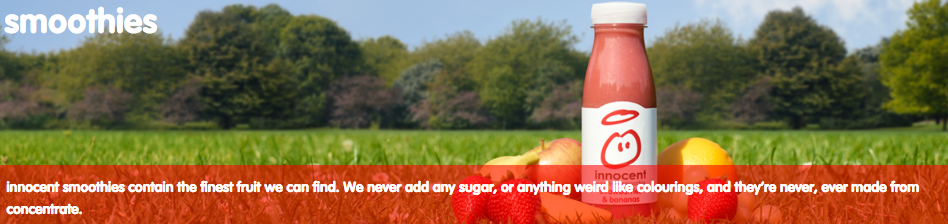
This same straightforward-but-charming copywriting philosophy extends to their site navigation:
Their meta description is pretty awesome, too:
And my personal favorite:
11) GymIt
I’ve always loved the copy at GymIt. In fact, I check their site and social profiles all the time to see if they’ve freshened anything up. Luckily, they’re no one-trick pony. They continue to keep their site fresh with captivating copy.
Here are some of my favorites, all of which hit on the pain points of gym-goers that they try to solve — and actually do solve with their customer-friendly policies.
I can vouch for that one. I know how much of a hassle it is to move far away from your gym — and how refreshing it must be to be able to walk in and just … quit.
All of this rolls up to their philosophy, espoused eloquently on their “About” page, that gyms should just be about working out:
Talk about having an understanding of their core audience. The copy both in its value proposition and across its marketing materials reflects a deep understanding of their customers.
And how did their copywriters choose to make sure everyone knew what this new gym franchise was about if they didn’t read that “About” page? This tagline:
Doesn’t get much clearer than that.
12) ModCloth
ModCloth is a brand that has always had an excellent grasp of their buyer persona, and it comes through in their pun-filled copywriting. All of their products are silly plays on words — check out this screen grab of some of their new arrivals, for example:
Dive into their product description copy, and it’s equally joyous, evocative, and clever — just like their customers. Often, it’ll also tell the story of what you’ll do while wearing their items:
After reading their descriptions, one can imagine what their life would be like if they owned this product. That’s Copywriting 101, but so few brands can actually pull it off like the folks at ModCloth do.
13) Ann Handley
When it comes to building up your own personal brand, it can be easy to get a little too self-promotional. That’s where the copywriting on your site can make a big difference.
On Ann Handley’s personal website, she added bits of microcopy that shows that, despite her many accomplishments (like being a best-selling author and award-winning speaker), she still doesn’t take herself too seriously.
Check out her email subscription call-to-action, for example:
What other brands have great copywriters? Share with us in the comments.
Editor’s Note: This post was originally published in July 2012 and has been updated for freshness, accuracy, and comprehensiveness.
4 Mistakes to Avoid When Scaling Your Content Marketing [Infographic]
It’s all too common for marketers to equate scaling content with simply producing more content, regardless of quality. But that approach is flawed, as it becomes increasingly difficult to achieve more visibility when your content isn’t all that great.
How can you scale your content marketing while keeping up with the evolving standards for quality? Well, we’d be doing you a disservice if we told you it was going to be easy. The truth is, you’ll likely run into a handful of challenges.
To learn more about some of the common mistakes marketers make when scaling their content, check out the infographic below from the folks at CopyPress. You’ll learn everything from when outsourcing can be beneficial for your team, to why more traffic doesn’t necessarily mean more leads.

11 Useful Photoshop Tutorials That’ll Help You Work Faster
There’s no doubt that Photoshop is an incredibly powerful tool for marketers. Photoshop has thousands of features, tools, settings, and shortcuts that have drastically changed and shaped graphic design and photo editing over the last few decades.
With the sophistication of today’s design capabilities, however, comes the hassle of learning and staying up-to-date on Photoshop’s features.
Whether you’re a Photoshop wiz, a self-taught intermediate designer, or someone just starting out, there will always be more tricks and hacks to learn.
Luckily, we’ve compiled a list of 11 video tutorials for Photoshoppers at various levels to speed up your workflow. Some videos are better suited for beginners, while other videos are tailored towards people with more experience. So take a look, find the tutorials that are best suited for you, and use them to learn some helpful new tips and tricks.
11 Useful Photoshop Tutorials That’ll Speed Up Your Workflow
1) 10 Things Beginner’s Want to Know How to Do (Adobe Photoshop)
Time: 46 min
Many of you likely recognize the value of Photoshop and other design software skills, but when it comes to self-teaching a new skill like Photoshop, it’s hard to know where to begin. Luckily, this 46-minute tutorial is a great way to get started.
Created by the Adobe Photoshop team, this tutorial feels more like a free webinar class: You have a friendly teacher who shows you the basics of how Photoshop works with Adobe Bridge, and then shows you ten basic techniques to get you going.
Tips in this video include removing blemishes in photos, working with Photoshop’s layers, cropping, editing image colors, removing parts of an image, and more.
2) Design Tools and Workflow Tips (Adobe Photoshop)
Time: 7 min
There’s no better teacher than the maker, right? This second tutorial, hosted on Adobe’s Helpx site, gives quick basic tips for a better workflow. If you’re a self-taught designer, I highly recommend this video for a simple brush up.
The teacher starts out by taking you through quick grids and explaining how to maximize efficiency in your workspace. Then, he gives you helpful tips on placing elements (smart objects, linked files, etc.) and using clipping masks.
The best part of the tutorial is the way it quickly and visually touches on how Photoshop interacts with other Adobe products such as Typekit and Illustrator. The teacher quickly produces a magazine page on the screen by showing you different elements of Illustrator and Photoshop, making it easy to follow and easy to generate design ideas from.
3) Top 10 Photoshop Keyboard Shortcuts (Graphics Geeks)
Time: 3 min
Part of speeding up your process is simply knowing and using the multitude of keyboard shortcuts available for the Photoshop software.
Luckily, Graphic Geeks put together this handy tutorial featuring their top 10 photo editing shortcuts in action. It covers toggling through layer blending modes, creating inverted masks, using clipping layers, transforming layers, resizing brushes, zooming in and out, previewing soft selections, duplicating layers, fading brush strokes, and sampling colors directly on the canvas.
Want even more tips and tricks? Check out this blog post for a list of 66 Photoshop keyboard shortcuts.
4) How to Use the Crop Tool (Lynda.com)
Time: 5 min
There are plenty of ways to crop images on Photoshop, and if you compare your cropping method to someone else’s, you might realize they do it differently than you do. Part of this is because Photoshop’s crop tools have changed throughout its different versions.
If you want to learn how to use the latest crop tool (as of Adobe CC) — which allows you to hide cropped pixels instead of permanently deleting them — this tutorial walks you through it.
This tutorial serves as part of a series by Lynda.com — an excellent resource for extended Photoshop lessons.
5) How to Use the Undo/Redo Tool, Steps, and History (Sterling Teaches)
Time: 5 min
If you’ve worked with Photoshop much at all, you’ve probably already realized that the undo/redo features don’t quite work the same way as they do in programs like Word, Illustrator, or InDesign. Instead, Photoshop’s undo/redo feature automatically sets to only undo one step. To go back through multiple steps, you have to use the history panel, and even the history panel is limited in the number of steps it remembers.
Photoshop is capable, however, of going back through older steps — it just doesn’t always seem like it at first. This tutorial walks you through how to use Photoshop’s undo/redo tools, and how to set up your history panel to remember more steps than it does automatically.
6) How to Use the Rotate View Tool (Creative Bloq)
Time: 2 min
Ever been working on an image that you just wish you could flip upside down like you could a sheet of paper? If you didn’t know already, with Photoshop, you can!
This two-minute tool tutorial by Creative Bloq walks you through this simple tool and shows you how to use it practice.
Don’t forget to browse through other videos on Creative Bloq’s “Two-Minute Tool” series to quickly increase your capabilities with tools you may not have used previously! Creative Bloq keeps their tutorial videos clear, quick, and straight to the point so you don’t have to waste time searching for the information you want to know.
7) How to Sharpen Images (Kelvin Designs)
Time: 16 min
As a photo editing and graphic design tool, it makes sense that Photoshop has hundreds of ways to sharpen, edit, change, and manipulate the look and feel of images. But it also means you may not know the best way to edit an image while maintaining the best quality.
This mid-length tutorial by Kelvin Designs takes you through the basics of sharpening images and why some ways are better than others. Your teacher will also give you tips on maintaining the quality of the images while explaining which tools work better for certain types of images.
As an added bonus, Kelvin Designs linked the source files used in the video for you to download and follow along on your own computer. If you’re more of a hands-on learner, this might be a great tutorial for you.
8) How to Use Step & Repeat Patterns (Photoshop Tutorials by Phlearn)
Time: 15 min
For many graphic designers, creating and using patterns is a fairly frequent task. While there are multiple ways to create patterns — one of which is by hand — Photoshop actually has a simplified trick for making pattern building much easier than measuring, copying, pasting, and repeating over and over again.
In this video, the teacher — Aaron Nace — takes you through the basics of building patterns. Nace has tons of tutorials for Photoshop and Lightroom, so make sure to check them out.
(Pro tip: This video has a pretty long introduction, so skip to 1:37 if you want to cut to the chase.)
9) How to Create and Batch an Action (Photoshop Tutorials by Phlearn)
Time: 8 min
Ever wish you could just record a series of steps in Photoshop and apply those steps to a bunch of different files? Like cropping images to a certain size or a building a customer filter to use on lots of images? As it turns out, with Photoshop’s Action tool, you can.
In the second Phlearn tutorial featured in this post, Nace how to batch edit photos using the Action tool. What I love about this tutorial is that he gives you ideas for other ways to use the Action tool even as he uses it primarily to set a custom filter for a group of wedding photos.
10) How to Create a Custom Brush (Larry Lourcey)
Time: 5 min
There are numerous times when designers have to place a watermark, logo, or some other standardized feature on images repeatedly throughout their work. While placing the image into the document as a layer works just fine, it’s helpful to have those features already loaded into your workspace.
That’s where creating custom brushes for things like logos and watermarks is a super handy way to speed up your workflow. In this tutorial, Larry Loucey from PhotoEducationOnline.com teaches you how to create custom brushes so you can load logos, watermarks, etc. into your workspace.
Doing this allows you to easily transform and place your logos/watermarks from your brushes panel onto your designs without having to search through your computer files each time.
11) How to Create and Use Masks (Tutvid)
Time: 3 min
Layer masks tend to play a big role in many graphic design processes. Essentially, a layer mask allows you to apply something — a color, shape, etc. — to a specific part of an image, rather than the entire thing.
In this speedy tutorial, Tutvid.com dives into not only what masking is, but how to do it quickly. He uses the example of a car to show how a mask can be used to manipulate the car’s color from red to green.
If you haven’t already given masking a try, definitely check out this tutorial.
What other Photoshop skills do you want to learn? Share them with us below.
10 Excellent Examples of Video Marketing on Facebook
Over recent years, the criteria for engagement on social media has evolved from announcing your brand or product to finding a way to tell a story.
Quality branded video campaigns allow companies to project said story in some really creative and unique ways. Whether you’re spreading brand awareness, announcing a new product, or launching a company, great branded video makes customers feel an emotional connection. And that emotional reaction can be really powerful.
In fact, a recent survey by eZanga found that 30% of respondents were less likely to skip video content if it was humorous. And research by Dr. Karen Nelson-Field found that 65% of videos that elicited a feeling of exhilaration were most remembered.
When it comes to finding the right platform to promote your video, Facebook is a strong contender. In fact, just this past January it announced that platform now sees 100 million hours of daily video watch time. So to help inspire your video marketing efforts on Facebook, I put together a list of 10 clever examples from brands like Apple, LG, BMW, and more. Check them out below.
10 Excellent Examples of Video Marketing on Facebook
1) #TAYLORvsTREADMILL | Apple
When it comes to storytelling and connecting with an audience, Apple is among the marketing elite. Recently, they teamed up with the biggest voice in the anti-streaming movement to promote their new subscription music service, Apple Music.
What’s great about this video is that Apple and Taylor Swift managed to create something that is relatable — regardless of her celebrity status. Everyone knows someone who has fallen while running on the treadmill, and there’s something even more hilarious about knowing that this happened to Swift, too.
3) #DayItForward | Chevrolet
Chevrolet has always been quick to adopt new marketing advances and incorporate them into their strategy. For the #DayItForward campaign, Chevrolet launched multiple videos on Leap Day to promote goodwill and of course, a positive brand image.
Rather than leveraging humor like the Apple video, it provokes empathy with viewers. Who doesn’t get the warm fuzzies when watching videos of people giving back? Now, those sentimental feelings translate with consumers when thinking about Chevrolet.
“The Chevy #DayItForward campaign resonated strongly with its audience because it was at once entertaining and informative while being tastefully branded,” said the CEO of Philo Media, Kevin Allodi. “Celebrity talent helps draw people in, but to keep them engaged you have to deliver authentic storytelling.”
4) Story for a Cause | Unicef
Over the past few years, you’ve likely seen a ton of media coverage surrounding the Syrian refugee crisis. The political debate that ensued prompted Unicef to create a video that transforms the headlines into a story that tugs at the heartstrings of its viewers.
The video turns the political issue into a humanizing and heartbreaking story, that’s meant to shine a positive light on a global issue. This is a powerful example of using a current controversial event to spread brand awareness and a positive message.
Note: While this video has been well received by many, it’s important that brands are incredibly careful and thoughtful when creating content around a controversial issue.
5) #LikeAGirl | Always
Always is perfectly in tune with their audience when it comes to their advertising campaigns. The newest video in the series reaches out to a younger demographic by raising a concerning question about the gender bias in emojis.
While Always does incorporate a controversial topic into the story, the newest #LikeAGirl video was a success because of their use of supporting stats. Using the stats and accompanying them with concerns from the girls featured in the video packs a powerful message that leaves little room for criticism.
6) #LowBatteryAnxiety | LG
The mobile device market is extremely competitive. LG’s newest video campaign strives to stand out in a market dominated by Samsung and Apple. They achieve their goal by telling a story that is hilariously relatable.
Low battery anxiety is real, people. There’s something about a phone’s battery diving into the single digits that send people into panic mode. LG used the relatable crisis and exaggerated it to create a video that features a dramatic support group that helps people cope with anxiety driven by a low battery. People love to make fun of themselves and LG tapped into the perfect scenario for this campaign.
7) Groups | Facebook
Since the conception of Facebook, the social networking service has evolved from a collegiate platform to one for the whole family. The company has become infused in our society, making FOMO, or the fear of missing out, a real thing.
Meeting friends, and sharing your life with those friends, is the business of Facebook. The platform’s ‘Groups’ video perfectly portrays how it helps people connect with others who share similar interests. It creatively identifies how users can benefit from using Facebook by providing a clearly defined problem and a beginning, middle, and end.
2) Save a Bro You Know | Organic Valley
In Organic Valley’s new video campaign, they embraced their “inner bro” in an effort to promote their new line of protein drinks.
What’s great about this video is that it hilariously (yet, not maliciously) pokes fun at the target audience, while also identifying the downfalls of their competitors’ products. Not to mention, they cleverly found a way to increase their share count and views by having users send the video to other “bros” they know on Facebook and other social channels. By urging viewers to rally support for this faux cause, Organic Valley was able to expand the reach of the video and get more out of their investment.
8) #LoveAtFirstTaste | Knorr
Food is said to be the one thing that is always certain to bring families together. In their latest video campaign, Knorr — a spices and seasonings company — suggests that food and all its flavor has the ability to not only bring families together, but also help people find love.
With this genius video, Knorr found a way to connect with a huge audience — garnering over 31 million views in a single week. Everyone loves food and most everyone has experienced love or the desire to be loved. By connecting their product with a human emotion, the video resonates even further with its audience — all while promoting a positive brand image.
Knorr even created an accompanying quiz for viewers, to help them find their own unique flavor profile to assist in their quest for love … or just great recipes.
9) Tea vs. Photo | ROC Live Life Loud
Roc Live Life Loud, a speaker and headphone brand by Cristiano Ronaldo and Monster, uses Real Madrid’s star forward to their full advantage in Tea vs. Photo.
While the campaign is obviously centered around Cristiano Ronaldo and has little to do with the brand itself, there’s something to be said about the tasteful product placement in the video. It shows a prime example of how the most successful video ads focus more on the story, than the product itself.
10) #EyesOnGiGi | BMW
Using new innovative technology is a great way to stand out from the competition and captivate an audience. BMW took advantage of Facebook’s latest 360 video technology for their most recent campaign featuring model Gigi Hadid.
Sometimes companies struggle when advertising with new technology. However, BMW does a perfect job of utilizing the 360 video by making the content interactive. (Not to mention, having Gigi Hadid as part of the campaign never hurts.) But what really makes this campaign a success is its interactive game that drives viewers to the website to play and share with friends and family.
What’s your favorite Facebook video ad? Share your thoughts in the comments.
10 Free Apps Worth Checking Out on the Google App Marketplace
In today’s world, everything needs to be faster, easier, and free to get our attention. I sometimes wonder how anyone got anything done in the days before the internet.
While on one hand it’s a little scary to realise how much we depend on digital apps to run a business, on the other hand, it also makes our lives a whole lot easier.
Just take a scroll through Google’s Apps Marketplace. You’ll find everything from reporting tools, to accounting software, to business card creators. And as of this week, you can even find HubSpot CRM there.
While we were busy admiring our new listing, we decided to round up a few of the most helpful free tools we also came across. Check them out below.
(Note: While some of the apps on this list do offer paid options with more advanced features, each of them has a free option available.)
The Top 10 Free Apps on the Google App Marketplace
1) Kami
- What is it? A cloud-based all-in-one document viewer and markup tool.
- What does it do? Kami allows you to view, annotate, share, and collaborate on your files on Chrome.
- How can you use it? This tool is particularly useful for folks that frequently collaborate with team members or partners on content or the creation of formal documents such as co-marketing agreements, as it makes it easy to communicate edits.
[Find it on the Google App Marketplace]
2) Mindomo
- What is it? A mind mapping and concept building tool.
- What does it do? Mindomo allows you to visually outline complex concepts, tasks, ideas, and other related information in a structured form.
- How can I use it? When it comes to planning out a marketing campaign, you need to think about content assets, promotional channels, budget allocation, and coordination of a hundred different things to get it to launch. This tool can help to organise your ideas and ensure a smooth transition from concept to campaign.
[Find it on the Google App Marketplace]
3) Weekdone Weekly Reporting
- What is it? A simple and fast reporting tool for teams.
- What does it do? It quickly generates team reports for managers to review.
- How can I use it? Sometimes it can be hard for managers to spend time with every employee to discuss how things are going. With this free tool you simply fill in your progress, plans, and problems in minutes and it will send an automatic email report to your manager.
[Find it on the Google App Marketplace]
4) SurveyLegend
- What is it? A free survey tool.
- What does it do? SurveyLegend allows you to create mobile-ready online surveys and forms on your tablet or PC.
- How can I use it? Whether you want to ask for customer feedback, perform buyer persona research, or collect data for a cool piece of content you’re working on, surveys are a part of a marketer’s life. This app allows you to create engaging surveys without installing software and offers real-time results.
[Find it on the Google App Marketplace]
5) LucidPress
- What is it? A free design tool.
- What does it do? The tool allows you to easily create brochures, newsletters, magazines, reports, and more without any design programs or skills.
- How can I use it? Now you can create stunning visual content for print, mobile, or web without relying on your designer or freelancer.
[Find it on the Google Apps Marketplace]
6) Save Emails (Google Sheets Add-on)
- What is it? A tool that stores email content.
- What does it do? This free tool downloads email messages and file attachments from Gmail and automatically saves them to Google Drive as searchable pdf files.
- How can I use it? You can use the add-on to easily backup important emails, video files, large images, Microsoft Office documents, travel receipts, and other emails from Gmail to your Google Drive.
[Find it on the Google Apps Marketplace]
7) Zipbooks
- What is it? A free accounting software.
- What does it do? It looks after things like time tracking, online invoicing, project management, and auto-billing so you can stay more organised.
- How can I use it? With this tool, you can become more efficient in your project management with clients, freelancers, or agencies. It should also help you with budget allocation and keeping tabs on important information to send to your finance department.
[Find it on the Google Apps Marketplace]
8) HubSpot CRM
- What is it? A free customer relationship management system.
- What does it do? HubSpot CRM keeps track of all of your contacts (prospects, customers, and past customers) and their interactions with your company across the buyer’s journey.
- How can I use it? This free CRM makes it really easy to add, nurture, and track customers along the buyer’s journey. It provides a deals dashboard, call recording, and email templates. It also integrates with the HubSpot Marketing Platform for valuable sales and marketing alignment.
[Find it on the Google Apps Marketplace]
9) GQueues
- What is it? A task management tool.
- What does it do? GQueues is a collaborative online task manager for Google and Google Apps users.
- How can I use it? With just a couple of clicks, your emails, web pages, and anything else of interest are added to your task list. Your tasks then appear in your Google Calendar and in your task list on the right-hand side of your calendar.
[Find it on the Google Apps Marketplace]
10) LogoMix
- What is it? An app to create business cards.
- What does it do? This app enables you to design and print new business cards quickly and easily.
- How can I use it? With just a few clicks you can design some slick, on-brand business cards without needing to bother your designer. Although this app is not 100% free, your first batch of business cards is, and they are a very low price after that to get more printed.
[Find it on the Google Apps Marketplace]
What app are you most excited to try out? Share your thoughts below.
How to Get Featured on the First Page of SlideShare [SlideShare]
Very meta, we know.
When it comes to SlideShare marketing, there’s no better feeling than seeing your prized presentation featured on the SlideShare homepage.
In addition to giving a boost to your self-esteem, landing a presentation on the first page of SlideShare will give your performance metrics a boost.
With 70 million people checking out the SlideShare website monthly, it’s no surprise that nabbing one of those coveted “featured” spots has the potential to send your presentation’s views, likes, and shares into overdrive.
Of course, talking about earning a place on the SlideShare homepage is one thing. Actually doing it? Not so easy. As is the case with many marketing channels, there’s no magic formula that can guarantee success. That being said, the team at Venngage recently reached out to some SlideShare pros to gather their tips for reaching the SlideShare homepage. Check out their advice in the presentation below.
Know any other tips for landing your presentation on the SlideShare homepage? Leave a comment below.
Facebook Cover Photo Do’s and Don’ts [+Pre-Sized Cover Photo Templates]
When people arrive at your Facebook Page, where do you think they first look?
I’ll give you some hints. It’s a visual piece of content that sits at the top of your page. Its dimensions are 851 pixels wide by 315 pixels tall. It takes up almost a quarter of the screen on most desktop browsers.
That’s right — it’s your Facebook cover photo.
Since it’s one of the most noticeable parts of your page, it’s crucial that you follow Facebook cover photo best practices.
Whether you’re using Facebook to generate leads, close your next sale, or create a customer community, knowing how to make and optimize your cover photo is very important. Read on to learn what you should (and shouldn’t) do in your cover photo.
(You’ll also get cover photo templates for Twitter, LinkedIn, YouTube, and Google+ with your cover photo template download!)
11 Best Practices for Your Facebook Cover Image
1) Do abide by Facebook’s cover photo guidelines.
It seems like a no-brainer, but obeying Facebook guidelines is crucial to your Facebook Page existing in the first place. I’d highly suggest reading through the full Page Guidelines, but here are a few important things to keep in mind for your cover photo:
- Your cover is public.
- Covers can’t be deceptive, misleading, or infringe on anyone else’s copyright.
- You can’t encourage people to upload your cover to their personal timelines.
If you get caught violating the above terms, Facebook could take action against your Page. And while Facebook doesn’t explicitly say what will happen if you violate their Page guidelines, it’s probably not smart to get your Facebook Page taken down over a cover photo infraction, so read the guidelines in full and adhere to them.
2) Do make sure your Facebook cover photo size is right: 851 px wide by 315 px tall.
You don’t want to spend all this time designing a cover photo … only to have it look weird when you upload it to Facebook.
Make sure your cover photo will look fabulous from the get-go by making sure it’s the right dimensions: 851 pixels wide and 315 pixels tall.
If you upload an image smaller than those dimensions, Facebook will stretch it to fit the right size, as long as it’s at least 399 pixels wide and 150 pixels tall.
If you want a no-hassle way to make sure your cover photos are the right size, download our pre-sized template for Facebook cover photos here.
3) Don’t worry about the old “20% text” rule, but still try to stay visual.
Back in 2013, Facebook removed any reference to the 20% rule on text in cover photos … but that doesn’t mean you should go wild with using text in your cover photo. The previous rule said that only 20% of your cover photo could be text. Personally, I thought that was way too restrictive for marketers, but the sentiment behind the rule was a good one.
If you’re going to use text in your cover photo, keep that text concise. Your photo will be much more informative and engaging.
4) Keep the image simple, with a clear focal point.
Think of your cover photo as the portion of your Page that’s “above the fold.” If it’s distracting or poor quality, people will be more likely to click off the page.
Many of the best Facebook cover photos include a single subject as the focal point. They also use negative white (i.e., empty space) as an advantage to make the subject, any copy on there, and other elements unique to Facebook (like the CTA button on Facebook business Pages) stand out even more.
Here’s an example from Makr:
And another from J.Crew:
5) Don’t hide content behind your profile picture.
Because of the way profile pictures are featured on Facebook Pages, there’s a section of your cover photo that won’t appear unless you click on it. Your Page name and the buttons on the bottom right also cover portions of your photo.
Check out the example below from NikeWomen. The portions highlighted in red are the parts of the cover photo that aren’t immediately viewable to your Facebook Fans.
According to Facebook’s Help page, on desktop computers, the profile picture is located 16 pixels from the left edge of the cover photo, and 176 pixels from the top of the cover photo.
That being said, you can also use this hidden space to your advantage — maybe even hiding an Easter egg behind the profile picture for a contest. But typically, keeping that space clear is a good best practice.
6) Don’t put important content on the bottom of your photo, either.
Your profile photo isn’t the only part of your cover photo that will be partially hidden on your main Page. You’ll also want to avoid putting important content or key parts of your image on the bottom of your photo where the name of your Page and CTA buttons are.
We recommend drawing an imaginary line about halfway up your profile picture, and keeping important content (like text or hashtags) above that.
You can see what I mean in HubSpot’s cover photo below, where we’ve placed the text above the “HubSpot” name.
7) Do right-align the objects in your cover photo.
Since your profile picture is on left, you want to add some balance to your Facebook cover photo design by having the focus of the image be on the right.
Take a look at these cover photos. Which one looks more aesthetically pleasing?
Right-aligned focus:
Left-aligned focus:
Doesn’t the right-aligned cover photo look better? The biggest design elements (the profile picture, the text, and the beer) are evenly spaced. In the Samsung cover photo, your attention goes immediately to the left side of the page, completely missing the name of the product on the upper right side.
Not only is adding balance a crucial element of design, but it also allows for your cover photos to be more visually effective on mobile. Which brings me to my next point …
8) Do keep mobile users in mind.
In April 2016, Facebook reported that over half of its user base (54.2%) access the social network exclusively from mobile devices. That’s huge — and it’s exactly why it’s so important to keep mobile users top-of-mind when designing your Facebook cover photo.
On mobile, a much larger portion of your cover photo is blocked out because the profile picture and the Page name are on top of the cover photo.
Image Credit: Twelveskip
Let’s take a look at a real-life example. Below, take a look at what Adobe’s Facebook Page looks like in a desktop browser versus on Facebook’s mobile app.
Desktop:
Mobile:
Notice that the sides of the photo are cut off on mobile. Whereas your cover photo displays at 851 pixels wide by 315 pixels tall on desktop, it displays only the center 640 pixels wide by 360 pixels tall on smartphones. Take a look at this Facebook help document for more information.
Notice, by the way, how the text in Adobe’s cover photo is cut off on the right-hand side. While it looks best to right-align your visual elements, be careful not to put important content so far to the right that it gets cut off on mobile.
9) Do integrate the cover photo design with other parts of your Facebook Page.
If you really want to get creative with your cover photo, try integrating its design with other parts of your Facebook Page. You could make your profile picture and cover photo one big canvas, or use some design elements to draw attention to different functionalities of your Facebook Page.
Below are some ideas of what these cover photo integrations might look like.
Combine your profile picture and cover photo.
With a little creativity and some design tweaks, you can make your profile picture and cover photo appear as if they’re two parts of one canvas. Check out one of Paris’ cover photos for a subtle but compelling way to do that.
Note: Since cover photos display differently on mobile and on desktop, you’ll have to choose one format to design your cover photo and profile combination for. Since cover photos are much more noticeable on desktop, I’d suggest prioritizing that layout for your cover photo and profile picture combination design.
Draw attention to the buttons on right.
Following the best practices mentioned above, WeddingWire places all of its important text to the right of their cover photo — not only achieving a good design aesthetic, but also drawing attention to the main calls-to-action on the Page: Like, Follow, and Message.
Note: While it might seem like a good idea to add directional cues like an arrow to get people to click on the CTA buttons, note that those CTA buttons don’t appear the same way on the mobile app. In other words, it might be confusing to mobile users if you integrate the cover photo design with the buttons.
10) Do include a shortened link in your cover photo description that aligns with your page CTA.
If you want to use your cover photo to support your page CTA, make sure your cover photo description also includes a text CTA and link to the same offer. This way, any time people view your cover photo directly, they can access the download link.
Here’s this practice in action on HubSpot’s Facebook Page:
Make sure you shorten your links and add UTM codes so you can track clicks on them. Shortening and tracking features are available in the HubSpot Marketing Platform and in tools like bitly.
(If you want to learn more about how to write effective call-to-action copy for your cover photo description, click here to download our free ebook on creating compelling CTAs.)
11) Do pin a related post right below your Facebook cover image.
Have you ever “pinned” a post to your Facebook Page’s Timeline? Basically, pinning a post allows you to highlight a typical Facebook post on the top of your Timeline for seven days. It’s signified by a small yellow flag on the top right of the post, like on Refinery29’s Page below:
How does this relate to optimizing your Facebook cover photo? Well, if you’re spending time aligning your Facebook Page CTA, your cover photo design, and your cover photo description copy, you should also make sure to post about the same thing directly to your page, and pin that post to the top of your Timeline.
That way, you’re giving people one very clear call-to-action when they arrive to your page (albeit in several different locations) — which should help conversions.
To pin a Facebook post: Simply publish the post to Facebook, then click the downward arrow on the top right corner of the post and choose “Pin to Top.”
Want to see how HubSpot uses Facebook? Like our Facebook Page here.
Editor’s Note: This post was originally published in September 2013, and has been updated for freshness, accuracy, and comprehensiveness.
9 Resources to Help You Become a Better Leader

Some things in life are relatively straightforward to learn.
Want to knit a scarf? Head the local craft store, pick up a book, and get to work. Sure, your gauge might be all over the place and your transitions between balls of yarn might be haphazard, but you’ll still end up with something good enough to keep you warm during the winter.
Learning to lead others isn’t so linear.
Sure, you can pick up a book to get you started, but that’s all it will be — a start. You’ve got to read, and listen, and ask questions, and make mistakes, and course-correct, and then you might be at a “good enough” level.
If you’re on that leadership development path and looking for some more materials to help you along that journey, we’ve got you covered. Below are some of our favorite podcasts, tools, tips, and resources to become a better leader.
9 Resources to Help You Become a Better Leader
1) Bill Walton on The Growth Show
Even if you’re not a basketball fan, you can learn something from Bill Walton. The NBA legend worked alongside two of the most prominent leaders in basketball: John Wooden, his basketball coach at UCLA, and Larry Bird, his teammate on the Celtics. In this episode of HubSpot’s podcast, The Growth Show, you’ll hear more on what made those leaders so special — and apply those insights to your own career.
2) Speaking.io
While public speaking isn’t a requirement for being a strong leader, it certainly can help you differentiate yourself at work. Whether you’ve got to nail a presentation in front of a room of execs or you’re worried about presenting an idea to your manager in your next 1:1, knowing how to frame your idea and effectively communicate it to your audience is incredibly important.
This resource is a near one-stop-shop for public speaking tips. Check it out to get advice on everything from developing your idea, to designing your slides, to actually delivering your presentation.
3) Daring Greatly, by Brené Brown
Though it can be tempting to feel like you have to master everything to be a leader, the most exceptional leaders embrace their vulnerability — and use it to their advantage.
If you’re struggling with being vulnerable with your team, look no further than Brené Brown’s book, Daring Greatly: How the Courage to Be Vulnerable Transforms the Way We Live, Love, Parent, and Lead. In the book, Brené Brown dives into a decade of research to unveil the power of vulnerability, and gives tips on how you can open up more in your own life.
4) The Radical Candor Framework
Think about the hardest piece of feedback you’ve ever gotten. Chances are, it was rough to receive … but you were better in the end for it.
That’s exactly what happened to Kim Scott. After an important presentation, Scott’s boss, Sheryl Sandberg — yes, that Sheryl — had some feedback. Harsh feedback. The kind of feedback that stings. But because Scott knew that Sandberg was coming from a compassionate place when giving the feedback, Scott accepted it, moved on, and became better.
Scott took this pivotal interaction and used it to develop a framework for giving better feedback at work. No matter what stage of your career you’re in, I’d highly suggest taking the time to read her framework.
(We also had the pleasure of having Kim Scott on The Growth Show. If you’re interested in hearing more about her perspective on leadership, listen to her episode below.)
5) CareerLark
Speaking of feedback: While you’re putting all the advice from all of these books, blogs, podcasts, and frameworks into practice, don’t you wish someone would give you feedback on how you’re doing?
Enter CareerLark, a Slack bot that helps you seek out on-the-fly advice on skills you’re most interested in improving.
Here’s how it works. Let’s say the skill you’d like to get better at is public speaking. You could use CareerLark to ping your boss after your next big presentation to get real-time feedback on how it went — all through Slack.
Micro-feedback in real-time? Great for your skill development (and great practice for your boss, too).
6) Advice From Real People
Sometimes, getting feedback from someone who isn’t in your company or industry can be the most enlightening. If you’re looking to step outside your bubble, here are a few apps to help:
- RealTalk: This app features interviews and advice from real people in tons of different industries. Learn what it’s really like to be in a job — it could help you better benchmark your own experiences and uncover new ways of thinking.
- Advice.vc: Even if you’re not in a startup, turning to a venture capitalist (VC) for advice could get you through the trickier situations at work. For $20 (which gets donated to charity, not pocketed), ask a VC expert about a problem you’re facing, and get help finding a solution.
- Glassbreakers: If you’re a woman struggling to find a mentor in your industry, check out this tool. It’ll match you with another brilliant woman in your space who could give you great advice about developing your leadership skills.
7) Online Courses
So far, the leadership resources largely have to do with management and communication … but that’s not the only way to level up in your career.
Sometimes, it’s about becoming really, really good at a certain part of your job (or a skill that you want to be part of your job one day). For that to happen, you just need to hunker down and learn it.
An online course can be a great way to do just that. While where you find an online class differs greatly by the skill you’re looking to develop, here are a few places I’d recommend checking out if you want to improve your marketing-related skills:
- Inbound Certification: If you want a deep dive into some of the most important aspects of marketing today, check out our free certification.
- Design Lab: Want to up your design skills? Check out Design Labs. You’ll be given real assignments to build your knowledge — and a mentor to help you through each one.
- Codecademy: Learn to code — for free — at Codecademy. This is especially helpful if you’re the type of person who learns best through lots of hands-on experience.
- Lynda’s Excel Courses: If you’re interested in advancing your data analysis skills, you’re gonna have to learn how to use Excel. Period. Check out Lynda’s Excel courses for more help.
8) Industry-Specific Slack Communities
Many of us are on Slack all day to communicate with our coworkers, but there are lots of opportunities to use the platform to connect and learn from folks outside our company. In fact, many industries have Slack groups you can join to talk about the latest trends and get advice on problems you’re facing. (Or lurk in the background like I do to absorb as much information as possible.)
To find a community to join, I’d recommend checking out these two resources:
9) The Next Five
Maybe the resources above haven’t appealed to you. Maybe you’re at a loss for what kind of skills you want to develop. Maybe you’re not even convinced you want to be a leader in your field at all … but you aren’t sure what to do next.
If you’re already doing a little soul searching, you should take a few minutes to check out The Next Five. It’s a free assessment that can help you identify the next step in your career.
Bonus: Your “diagnosis” will come with looooots more resources to help you make meaningful progress toward that new goal. (Because the only thing better than nine leadership resources is tailored resources to your specific situation … am I right?)
What are some of the most helpful leadership resources you’ve come across? Share your favorites in the comments.