
Creating a New Dashboard for Your Reports? Ask These 26 Questions First
As marketers, it’s pivotal that we measure our work.
How many leads are we generating? What are our best channels? How quickly are our leads closing? And perhaps most importantly, how much revenue are our leads bringing in?
There are lots of metrics that matter. While we all wish otherwise, there’s no silver bullet report — no single metric that sums up all of our efforts. That’s where dashboards come in.
The basic concept of a dashboard? Take a series of reports and put them next to each other. Sounds simple enough. Creating a dashboard is easy. However, creating a great audience-aware dashboard that can be easily iterated on over time is not so easy. In fact, dynamic marketing dashboards take a lot of planning and forethought.
Not sure where to start? It’s all about asking the right questions.
26 Questions to Ask Before Creating Your Next Marketing Dashboard
1) Why is the dashboard being created?
If you’re a fan of Simon Sinek, you’re familiar with the concept of “starting with why.” (If you’re not, check out his TED talk, then come right back.)
Make sure you’re creating a dashboard for the right reasons. For example, are you creating a dashboard when a single report would do the trick?
2) Who is the dashboard for?
Will you be presenting to your CEO? The VP of Sales? The Board of Trustees? Your Social Media team? In marketing, we construct our content with our buyer personas in mind. When creating a dashboard, keep your audience in mind.
3) What questions do they need answered?
The CEO is on the hook for the company’s bottom line. She likely cares less about your inputs (how many hours you put in, how you titled your blog posts) and more about your outcomes and big-picture results. Other members of your organization value other components of your reports.
Before creating your dashboard, write down a few of the questions your audience needs to answer — chances are, they’ll be asking them come presentation time.
4) How much time do they have to review the numbers?
Will they review the numbers for fifteen minutes? Or spend an entire three-hour meeting poring over them? The answer to this question determines how many reports your dashboard should include. If your audience won’t spend much time with the data, only include the two or three most impactful reports.
5) What language do they speak?
We’re not talking about English, Spanish, or Arabic. Think about what type of vocabulary they’re familiar with. More importantly, which words don’t they know? Do they know what a Marketing Qualified is? How familiar are they with the concept of Organic Search?
If you don’t ask this question, you run the risk of presenting data that will go over the head of your audience. Not sure where to start? Read through emails your audience has sent you in the past, or ask your teammates.
6) How data-savvy are they?
As marketers, many of us geek out over web analytics. Does your audience? If you’re speaking to someone who doesn’t love data as much as you do, stick to simpler reports.
7) Do they need to know the story behind the data?
If so, be ready to tell it.
8) How nitpicky do they get?
Make sure you can explain any data inaccuracies or outliers. If “No value” or “Encrypted Keywords” appears in the data, be ready to discuss.
9) What tools do you have at your disposal?
Does your company use a marketing analytics tool? Google Analytics? Excel? A whiteboard?
10) How much time can you block off?
Hold yourself accountable for building the dashboard. Don’t save it until the last minute.
11) What format should it be in?
Should the dashboard be housed in an online tool? Should it live in Excel? Does it need to be presented as a slideshow at the next board meeting?
12) What other members of the organization do you need on your team?
Do you have a business operations team that controls certain tools? Does the sales team hold the keys to revenue data? Align yourself with internal stakeholders, and set proper expectations on what you need and when you need it.
13) Which metrics should the dashboard include?
Every organization values different KPIs. Use your answers to questions three and five to get going in the right direction. If you’re not sure where to begin, raw data and conversion rates on visits, leads, and customers are a great starting point.
14) What should the dashboard not include?
When we set goals at HubSpot, we identify both positive and negative aspects — things we’ll commit to accomplishing, and others that we’ll intentionally exclude from focus. Are there certain metrics that you’re deprioritizing?
15) Does the dashboard need more than just visuals?
Will every member of your audience be presented the information on your dashboard in a live session? Often, it’s constructive to add additional context to your dashboards with help text.
16) What time frame makes the most sense?
For some organizations, monthly check-ins work best; for others, quarterly works better. Think back to question two. For the questions your audience is asking, how often do they need answers?
17) Which report is most important?
Prioritize the report with the biggest impact — make it the biggest, and place it front and center on your dashboard.
18) What types of graphs fit the data best?
If you’re plotting trends over time, use line and area charts. If you’re comparing values, try a bar or column visual instead.
Here’s a quick example. Take a look at the two charts below. The same data is presented, but notice how the second graph shows a more compelling trend in MQL growth over time.
Before:
After:
Not sure how to choose chart types? Here’s a great resource to get you started.
19) Do you have benchmarks or goals to include?
Does it make sense to plot your data compared to a previous time period, or to a goal you set in the past? Do you have competitive data to use as a benchmark?
20) Does the dashboard need to be segmented?
Reporting on all your data is valuable, but it often doesn’t tell the full story. For example, if your marketing team is divided into personas or countries, find a way to present each segment’s unique data.
21) What actions do you want to drive out of each report?
Never run a report just for the sake of it — for each data point you highlight, make sure you have a tangible strategic takeaway to share with your team. Don’t walk away from the report with nothing at all.
22) Do you need more than one version of the dashboard?
If you have more than one audience, create unique variations that speak to each one’s most pressing questions.
23) Who owns the dashboard?
Are you charged with creating the dashboard every month? If you win a free trip to Hawaii next month and are out of the office, who will create the dashboard?
24) Who can access it?
Make sure that every member of the team who needs to see the dashboard has the correct level of access within your tool of choice. On the flipside, keep unwanted sets of eyes out of the data by customizing permissions.
25) How will you distribute it?
If your system allows, set up an automated email at your chosen frequency to save yourself the manual send each time. At HubSpot, the marketing team receives a lead generation dashboard at noon each day with month-to-date data. Depending on the time frame your team chose in question 16, pick the cadence that makes the most sense.
26) Does your process need to be repeatable? How will you iterate on it?
If you need to recreate your dashboard in the future, make it easy on yourself by documenting the process in a Google doc or internal Wiki page. Note the parts that were trickiest and jot down specific instructions for next time.
What else do you keep in mind when creating marketing dashboards? Share your thoughts in the comments.
16 of the Best Website Homepage Design Examples
You never get a second chance to make a first impression — that’s why your homepage is undoubtedly one of the most important web pages on your website.
For any given company, the homepage is its virtual front door. If a new visitor doesn’t like what they see, their knee-jerk reaction is to hit the “back” button.
That’s right — unfortunately, a lot of people still judge a book by its cover.
What makes a website’s homepage design brilliant instead of blah? Well, it takes more than looks alone — it also has to work well. That’s why the most brilliant homepages on this list don’t just score high in beauty, but also in brains.
But before we dive into the 16 examples, let’s dissect some of the best practices of homepage design.
What Makes a Good Website Homepage Design
All of the homepage designs shown here utilize a combination of the following elements. Not every page is perfect, but the best homepage designs get many of these right:
1) It clearly answers “Who I am,” “What I do,” and/or “What can you (the visitor) do here.”
If you’re a well-known brand or company (i.e., Coca Cola) you may be able to get away with not having to describe who you are and what you do; but the reality is, most businesses still need to answer these questions so that each visitor knows they are in the “right place.”
Steven Krugg sums it up best in his best-selling book, Don’t Make Me Think: If visitors can’t identify what it is you do within seconds, they won’t stick around long.
2) It resonates with the target audience.
A homepage needs to be narrowly focused — speaking to the right people in their language. The best homepages avoid “corporate gobbledygook,” and eliminate the fluff.
3) It communicates a compelling value proposition.
When a visitor arrives on your homepage, it needs to compel them to stick around. The homepage is the best place to nail your value proposition so that prospects choose to stay on your website and not navigate to your competitors’.
4) It’s optimized for multiple devices.
All the homepages listed here are highly usable, meaning they are easy to navigate and there aren’t “flashy” objects that get in the way of browsing, such as flash banners, animations, pop-ups, or overly-complicated and unnecessary elements. Many of them are also mobile-optimized, which is an incredibly important must-have in today’s mobile world.
5) It includes calls-to-action (CTAs).
Every homepage listed here effectively uses primary and secondary calls-to-action to direct visitors to the next logical step. Examples include “Free Trial,” “Schedule a Demo,” “Buy Now,” or “Learn More.” (Here are 30 examples of great CTAs for more inspiration.)
Remember, the goal of the homepage is to compel visitors to dig deeper into your website and move them further down the funnel. CTAs tell them what to do next so they don’t get overwhelmed or lost. More importantly, CTAs turn your homepage into a sales- or lead-generation engine, and not just brochure-wear.
6) It’s always changing.
The best homepages aren’t always static. Some of them, like Whitehouse.gov, are constantly changing to reflect the needs, problems, and questions of their visitors. Some homepages also change from A/B testing or dynamic content.
7) It employs great overall design.
A well-designed page is important to building trust, communicating value, and navigating visitors to the next step. As such, these homepages effectively use layout, CTA placement, whitespace, colors, fonts, and other supporting elements.
Now, get ready to learn about excellent homepage design through the following 16 real-life examples.
Website Design Inspiration: 16 of the Best Homepage Designs
1) FreshBooks
Why It’s Brilliant
- It’s easy to consume. There is much debate on whether short or long homepages work better. If you choose to do the latter, you need to make it easy to scroll and read — and that’s exactly what this site does. It almost acts like a story.
- There’s great use of contrast and positioning with the primary calls-to-action — it’s clear what the company wants you to convert on when you arrive.
- The copy used in the calls-to-action “Try it Free for 30 Days” is very compelling.
- The subheadline is also great: “Join 5 million people using FreshBooks to painlessly send invoices, track time and capture expenses.” It zeros in on a common pain point for freelancers and small businesses (FreshBooks’ target audience) — typically accounting software is often “painfully complex.”
2) Airbnb
Why It’s Brilliant
- The homepage is gorgeous on its own: It greets you with a full-screen video of beautiful, high-definition footage of travelers doing activities as if they’re locals, from cooking in the kitchen to buying local cheeses to driving a moped through the streets. It’s very human and authentic.
- It includes the destination and date search form that most visitors come looking for, right up front, guiding visitors to the logical next step.
- The search form is “smart,” meaning it’ll auto-fill the user’s last search if they’re logged in.
- The primary call-to-action (“Search”) contrasts with the background and stands out; but the secondary call-to-action for hosts is visible above the fold, too.
3) Mint
Why It’s Brilliant
- It’s a super simple design with a strong, no-jargon headline and sub-headline.
- The homepage gives off a secure but easy-going vibe, which is important for a product that handles financial information.
- It also contains simple, direct, and compelling call-to-action copy: “Sign up free.” The CTA design is also brilliant — the secured lock icon hits home the safety message once again.
4) Dropbox (Consumer)
Why It’s Brilliant
- Dropbox’s homepage and website is the ultimate example of simplicity. It limits its use of copy and visuals, and embraces whitespace.
- It’s difficult to tell from the static screenshot above, but this site captures your attention with its subtle use of whimsical animation in that graphic.
- Their sub-headline is simple, yet powerful: “Get to all your files from anywhere, on any device, and share them with anyone.” No need to decode jargon to figure out what Dropbox really does.
- It has a focus on one primary call-to-action, “Sign up for free.” But the Google-enabled sign-up feature reduces friction for visitors who hate completing long registration forms.
5) Dropbox (Business)
Why It’s Briliant
- It’s a great example of providing a different website experience for a different audience. Unlike their main homepage, which was originally built for the consumer side (above), their business users require more information and additional proof points that Dropbox for Business a safe and scalable solution for companies (a perception issue that Dropbox addresses on their homepage directly).
- Dropbox continues to carry over it’s simple design and branding. It includes only what is important: A large, relevant image with supporting copy, and a “Try free for 30 days” call-to-action button
6) Whitehouse.gov
Why It’s Brilliant
- Building a website that supports an entire nation is no easy task. Whitehouse.gov is a constantly changing to reflect top concerns and priorities — the homepage alone has gone through hundreds of revisions. Testing and optimization is a key component to a brilliant homepage design.
- What’s particularly great about Whitehouse.gov is that it is completely unlike most government-related websites. It has a clean design and fosters a community.
- It’s fairly easy to find what you’re looking for when you land here. And if you can’t find it immediately, there’s even a handy search box.
7) 4 Rivers Smokehouse
Why It’s Brilliant
- Drool. That’s what I think when I arrive at the website for 4 Rivers Smokehouse. Combined with great photography, the headline “Brisket. 18 years to master. Yours to savor.” sounds like an experience worth trying.
- The parallax scrolling guides you on a tour through their services, menu, and people having a great time — a great use of this popular design trend.
- The only negative? I don’t live close enough to this place. Boo.
8) Cobb Pediatric Therapy Services
Why It’s Brilliant
- The headline and subheadline appeal to the visitors’ emotional side: “Work With a Company That Gets It”; “Trust us. We’ve been there too! We’ll find jobs where you can thrive.” That value proposition is unique and compelling.
- It’s hard to tell from the screenshot above, but the headline is on a rotating carousel that caters to specific personas, from job applicants to people searching for a therapist for their schools.
- There are several pathways visitors can take when they arrive on the page, but the calls-to-action are positioned well, worded simply, and contrast with the rest of the page.
9) Jill Konrath
Why It’s Brilliant
- It’s simple and gets straight to the point. From the headline and sub-headline, it’s clear exactly what Jill Konrath does (and how she can help your business).
- It also gives easy access to Jill’s thought leadership materials, which is important to establishing her credibility as a keynote speaker.
- It’s easy to subscribe to the newsletter and get in touch — two of her primary calls-to-action.
- It includes news outlet logos and testimonials as social proof.
10) Evernote
Why It’s Brilliant
- Over the years, Evernote has turned from a simple note-saving app into a suite of business products. This isn’t always easy to convey on a homepage, but Evernote does a nice job packaging many potential messages into a few key benefits.
- This homepage is uses a combination of rich, muted colors in the video and their signature bright green and white highlights to make conversion paths stand out.
- Following a simple headline (“Remember Everything”), the eye path then leads you to their call-to-action, “Sign Up For Free.”
11) Telerik
Why It’s Brilliant
- “Stuffy enterprise” isn’t the feeling you get when you arrive at Telerik’s website. For a company that offers many technology products, their bold colors, fun designs, and videography give off a Google-like vibe. Just one important aspect to making visitors feel welcome and letting them know they’re dealing with real people.
- I love the simple, high-level overview to their six product offers. It’s very clear way of communicating what the company does and how people can learn more.
- The copy is lightweight and easy to read. They speak the language of their customers.
12) Boxbee
Why It’s Brilliant
- The headline is a call-to-action directed straight for their target audience: entrepreneurs in the storage industry.
- It has a very clean and simple design. The design highlights the headline, and then immediately shows the primary call-to-action — not much else.
- That primary call-to-action is in a highly contrasting color, making it stand out.
13) eWedding
Why It’s Brilliant
- For those love birds planning their big day, eWedding is a great destination to building a custom wedding website. The homepage isn’t cluttered and only includes the necessary elements to get people to starting building their websites.
- The sub-headline “Over 750,000 wedding websites built!” is great social proof.
- They’ve included excellent product visuals, a great headline, and a call-to-action that reduces friction with the copy, “Start website.”
14) Basecamp
Why It’s Brilliant
- For a long time, Basecamp has had brilliant homepages, and here you can see why. They often feature awesome headlines and clever cartoons.
- The call-to-action is bold and above the fold.
- In this example, the company chose a more blog-like homepage (or single page site approach), which provides much more information on the product.
15) charity: water
Why It’s Brilliant
- This isn’t your typical non-profit website. Lots of visuals, creative copy, and use of interactive web design make this stand out.
- The animated headline is a great way to capture multiple messages on one line.
- Great use of video and photography, particularly in capturing emotion that causes action.
16) TechValidate
Why It’s Brilliant
- This homepage is beautifully designed. I particularly love their use of white space, contrasting colors, and customer-centric design.
- The headline is clear and compelling, as are the calls-to-action.
- There’s also a great information hierarchy, making it easy to scan and understand the page quickly.
What do you think of these homepages? What are your favorites? Share your thoughts with us in the comments.
Editor’s Note: This post was originally published in January 2013 and has been updated for accuracy and comprehensiveness.
A Guide to Growing and Engaging your Membership Base [New Ebook]
Just as cars are fueled by gas, or a plant is feed by the sun, associations are powered by their members.
But what does an association do when they can’t attract as many new members as they need to support their cause? Or their current members’ engagement has plateaued?
Inbound marketing isn’t an overnight fix, but it is a long-term and highly efficient solve to these problems. To help you learn more about how it works, we teamed up with The Campaign Workshop to bring you Sign Me Up! A Guide to Growing and Engaging Your Membership Base.
In this free ebook, we cover:
- The basics of content and inbound marketing for nonprofits
- Tips for brainstorming and writing content your audience will love
- The channels and strategies you need to get your content found online
- How to use content to drive online conversions and learn more about constituents
- Techniques to tap into your current member-base to create and share content
- Ways to get your whole team on-board with the inbound methodology
You can download the free ebook here >>
Want to share this ebook with your nonprofit network? Click here to Tweet it out!
9 Questions to Ask Before Creating Another Social Media Account
The social landscape today looks a lot different than it did last year … or even last month. As soon as your figure out a successful strategy on one channel, another one shows up and begins to demand your attention.
Sound familiar?
For a lot of marketers, determining exactly where and when to spend your precious resources (read: bandwidth and money) can be a challenge. That’s why it helps to have a plan in place for considering your options.
At HubSpot, we’ve developed a series of questions to help folks determine if it’s really time to create a new social media account. So if you’re struggling to figure out whether or not you’re ready to expand your social presence, take some time to run through the list below. We’ve got a feeling it’ll help.
9 Questions to Ask Before Creating Another Social Media Account
1) Is my persona on this network?
Different social networks have different user bases — even the major ones. For example, 72% of adult internet users are on Facebook, while only 25% are on LinkedIn, according to Pew Research Center. Each of those networks attract users for different reasons, and cater to different user behavior.
Just because a network is hot right now, doesn’t mean you should be using it. The key is to figure out where your personas are engaging on social media and figure out a strategy for connecting with them there. (Don’t have personas yet? Check out our persona templates to get started.)
Note: Keep in mind that the personas you’re targeting might differ between departments. For example, your recruiting department may be looking to engage with different folks than your marketing department.
2) Will this account fill a need that is different from one of my other accounts?
If you have a social channel for your company already, you likely already have an audience that’s interested in receiving your content and updates. Congrats, that’s hard work.
When you start a new account, you are building that audience all over. Don’t do the work for nothing. Unless there is specific content that your audience cannot receive in the original area, or there is a need to serve a new user base, there might not be reason enough to create another account.
In other words, don’t create a need for a new segment if it isn’t already there. Creating a new account should be to drive a business need, not to create one from scratch.
3) Do I have the time required to build an account?
If you are going to have a handle represent your brand it is important for that handle to be meeting the expectations of the customers. Most commonly that means building a sizable following and consistently posting to the account. Otherwise, the handle can look inconsistent with your other handles — or worse, dormant.
That being said, it takes time to build and publish to a new account (multiple hours a week for several weeks). This is a laborious process that requires a big time commitment in order to be successful. Before committing to your new account, take a look at the calendar and see what your team can realistically handle.
4) Do I have the time required to monitor the account?
This is the one that surprises most people. When you open up a direct channel of communication, your audience will use it. Being able to monitor an account is imperative for a good brand experience. This expectation of service can be great if you’re looking to start a support account, but trickier if your account has primarily a marketing function.
Keep in mind that expectations will be different depending on the network you’re considering. On Twitter, 70% of surveyed users expect a response from brands, and 53% want that response in under an hour. Brands that don’t respond actually hurt their brand reputation. Facebook is also encouraging faster responses by giving brands who respond to 90% of messages within 5 minutes a “very responsive” icon on their pages.
While you may have a slightly longer grace period for brand comments (like on Facebook or Instagram), when people are reaching out to you directly on an account, they are doing it because they want a rapid response.
Check out this handy guide to learn how to monitor your social media effectively.
5) What is the plan for content planning/creating?
This may be the most time-consuming part of your social strategy, but some (myself included) would say it’s the most important. Content is what will keep your social channel front of mind, and it’s also what will bring in the views, interactions, and leads. Suffice to say, when creating a channel you should have a plan for sustained content creation.
When thinking about your new social channel, consider where you will be getting the material and how you’ll be able to sustain this to create multiple posts a week. Remember, this content should also serve a unique function from your existing accounts.
6) How many posts/week am I able to commit to this account?
Posting consistency is key. Once you have a content plan, be sure that you’re able to keep up a consistent posting schedule as well. After all, your accounts aren’t doing much for you if you’re not posting from them. Dormant accounts also can give off the impression that you don’t care, or can’t commit to brand followers.
Exactly how often you post is dependent on network and industry, but you should plan to have at least 1-2 Facebook posts a week, and 4-5 on Twitter (if not more). For some of the quieter networks with less links to click (think: Snapchat, Instagram, etc.), you can manage posting a couple of times a month, rather than weekly.
Need help figuring out a posting schedule? Check out our templates.
7) Do I have budget to help build/scale this account?
Money talks on social media. This is an unfortunate truth we are seeing more and more often. While you don’t really need budget to build out an account, a little spend can go a long way for boosting posts or putting yourself in front of new followers — especially on algorithm-dependent networks such as Facebook.
If you choose to put your money behind advertising in social, watch it carefully. Define goals beforehand, and put it into a network that is really worthwhile for you. Each network has a slightly different way of handling paid advertising. For more on how to navigate paid social advertising, check out this free guide or click on any of the respective links below:
(Note: Snapchat ads can be quite expensive. You may want to consider an on-demand geofilter instead).
8) What is the goal of this account? How will I know if it’s successful?
When you’re launching any initiative it’s important to know what value it will bring you, how you know you should double down on your efforts, or when you may want to cut and run.
Whether your success is measured in leads, applicants, or share of voice, knowing your goals can help you prioritize your time and report your wins back to your team more effectively.
9) Why is time spent on this social account more valuable than time spent doing these other things?
If you’re feeling good about the questions above, you’ve hopefully determined that creating a new social account will take you a healthy (but totally worthwhile) amount of time. Now you have to ask yourself: Am I best spending my time creating content for this specific channel, or should I consider other marketing tactics (running experiments, optimizing emails, hosting events, etc.)?
At the end of the day, it comes down to you and your team. Specifically, to whether or not you can create and sustain a new account to a degree that feels worthwhile to your company. If these questions have you planning a run for the hills, perhaps a new account is not the right fit. At least not right now. On the other hand, if they have you feeling excited about the content you’ll post with this account, or the goals you’ll be trying to hit, sounds like you have some creating to do.
How many social accounts does your company have? Which ones are most effective? Share your thoughts in the comments.
How to Stay Focused in the Age of Distractions [Infographic]
While most of those “survivalist” reality TV shows — like Survivor and Naked and Afraid — send contestants to exotic, tropical locations, the producers of those shows are really missing out on an exceptionally chaotic destination: the office.
True, in the office you don’t have to worry about building a shelter (that’s usually provided) or getting swallowed whole by an anaconda, but there are other dangers office workers have to face. And one of the most intimidating? The dreaded distraction.
Tweets. Facebook messages. Texts. Snapchats. That annoying coworker who is always bugging you with their personal problems (for the last time, Tyler, I don’t care that your cat has eczema). Office distractions are everywhere. But in addition to being annoying, they can wreak havoc on our productivity. Fortunately, the team at On Stride Financial created the infographic below, which offers several tips and tricks for dealing with distractions.

Know any other tips for avoiding distractions and staying focused? Leave a comment below.
A Simple Guide to Mastering the Basics of Effective Social Media Advertising
Have you ever had any formal or informal paid advertising training or education? If you have, you’re one of the lucky few.
Most marketers are presented with a chunk of their company’s marketing budget one day and told to “run some ads.” Don’t let the costs scare you, paid social advertising is incredibly measurable, and can produce real ROI. From managing your budget to choosing channels and measuring success, learn how to get started with paid advertising.
1) How Do I Manage My Budget?
One of the most daunting things about social media advertising is the fact that you are dropping cold hard cash on your campaigns. There are also a huge amount of channels and ad formats you can use — don’t get stuck in the details. Before launching your ad campaigns, align your marketing objectives with your advertising strategy.
If your goal is to drive traffic and leads, top of the funnel content such as blog posts, free tools, or meatier content gated behind a lead generation form should be used. This type of promotion is more light touch and cheaper.
If your objective is to convert leads further down the funnel to marketing qualified leads for your sales team or customers, middle and bottom of the funnel content like free trials or purchase offers should be promoted via retargeting. This type of promotion is higher commitment than reading a blog post, so it will be more expensive.
Use this paid advertising budget template to map out your costs before your launch and update it throughout avoid end of the month panic!
2) What Channels Should I Advertise On?
The landscape of paid social advertising is constantly changing; new technologies, channels and formats are released weekly.
There is no one size fits all answer to the channels you should leverage. Ultimately, testing different channels is the best way to determine what works to meet your objectives.
There are many social networks you can advertise on, but here are four of the most common:
With over 1.4 billion users and over 900 million visits a day — Facebook has the largest audience available, which makes it a fit for businesses large and small. But volume is not everything in social ads. The real advantage of Facebook lies in the amount of granular data available to target users.
Demographic Targeting:
You can target based on education, employment, household, and lifestyle details. Categories include location, gender, age, language, education, ethnic affinity, generation, household composition, life events, politics, relationship status, parental status, and work. Zero in on whoever your audience may be: friends of couples who recently got engaged, new fathers, postgraduate students, women who work in engineering — the possibilities are endless.
Interest Targeting:
Allows advertisers to target people based on their interests, activities, pages liked, and closely related topics. Top level categories include business, entertainment, family & relationships, fitness & wellness, food & drink, shopping, fashion, sports, hobbies, and technology. The level of detail available means you can target very specific interests like bodybuilding, tattoos, or heavy metal music.
Behavior Targeting:
Target based on purchase behavior or intent, device usage and more. Categories include digital activities, expats, travel, mobile device users, and events. Behaviors like Chrome users, Facebook Page administrators, and business travelers can be used to segment your audience.
Custom Audiences:
Custom audiences allow you to layer Facebook data on top of your business data. Advertisers can upload lists of customer (or potential customer) email addresses, phone numbers, or user ids and target these specific lists of people. Pixel based targeting of website or webpage visits is also possible. Advertisers can create “lookalike” audiences from your custom audiences to target similar Facebook users who have a higher propensity to convert.
Instagram is growing in popularity with advertisers every day and presents a huge new opportunity for anyone running social advertising campaigns. Now boasting 400 million users, as of April 2016, Instagram is a more popular channel than Twitter or Snapchat.
Advertisers must use their Facebook ad account to create Instagram ad campaigns. In fact, the option to promote your ad on Instagram only appears at the advert set level in Facebook:
Despite the fact that you can easily select the same ads to be shown on Facebook and Instagram at this level, you should keep your ads separate. The two platforms are very different and you should think about how the audience and experience differs.
Instagram is a visually driven platform, so make sure your ads look authentic and fit in with the user-generated content that exists in your audience’s feed.
Instagram is often seen as better fit for lifestyle and creative industries like fashion, food and fitness. Don’t let that assumption deter you from trying Instagram, B2B brands have seen success, too.
Twitter’s ad platform is not as advanced as Facebook. Demographic and interest based targeting options are available, but they are more limited than other platforms.
Demographic Targeting:
Basic options only available here — age, language and location.
Behavioral Targeting:
Behavioral targeting exists for the U.S. only at the moment. Options include retail, lifestyle, finance, technology, travel, and more.
Interest Targeting:
Categories include health, beauty, business, careers, hobbies, society, sport, and more. One thing to keep in mind — if you were promoting a piece of content on SEO, the closest you could get is the Marketing topic as a whole. The options are not as granular as other platforms.
Follower Targeting:
Targeting specific Twitter accounts and followers means that you can build lists of industry or regional influencers to create niche audiences.
Keyword Targeting:
One of Twitter’s major advantages is the ability to target specific keywords and hashtags. Advertisers can target people who have tweeted using a specific hashtag with their ads. This allows very specific, targeted content to be delivered to people who are actively engaging with a topic on Twitter.
LinkedIn is an obvious choice for B2B companies due to its professional user base. If you segment your audience based on their professional information, like role, company, industry, etc., you can be very confident in relying on LinkedIn data to be up-to-date and relevant. If professional information is not an important part of your buyer persona, LinkedIn probably isn’t the best fit for you.
While the ad platform is not as advanced as others in some respects (due to the lack of behavioral and interest targeting), the professional data is hugely valuable for certain industries.
Targeting:
Criteria available includes language, location, industry, company, job title/function, and membership for specific LinkedIn groups.
Costs tend to be higher on LinkedIn than other networks, but conversions and quality can be higher than other networks and can provide valuable leads for some industries.
For example, here at HubSpot, we promoted an industry-specific piece of content — The Little Book of Inbound for Finance Marketers — on both LinkedIn and Facebook. The cost per click (CPC) of the LinkedIn campaign was 4x the Facebook CPC. Clicks cost a lot on LinkedIn, but what about actual conversions? LinkedIn traffic converted 52% better than Facebook traffic and LinkedIn conversions were half the cost of Facebook conversions. LinkedIn was the clear winner in terms of targeting and channel “fit” in this case.
3) How to Create Ads that Convert
Make It Relevant:
Social advertising is different to Adwords search advertising. Your Adwords campaigns are centered around demand fulfillment — targeting specific keywords that people are searching for right now. Social advertising is about demand generation, fulfilling a need your audience has even though they are not actively searching for it.
Let’s take this example — this ad appeared on my Facebook newsfeed:
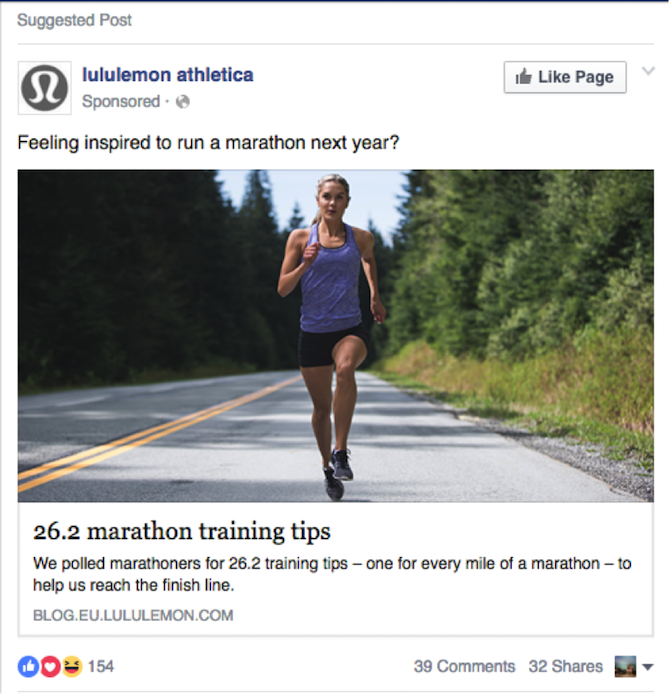
I am training for a marathon at the moment, so this is totally relevant to me! I was not actively searching for marathon training tips, but the advertisers have clearly targeted interests and demographics (it’s also a female centric ad) to present me with content that will stand out to me when scrolling through my newsfeed.
Make It Visual
The image is often to most important element of a social ad — it’s responsible for capturing your audience’s attention when they are browsing a social network.
Take a look at the two below Instagram ads:
The first is from DaPulse and the second from Squarespace. While the DaPulse ad has a beautiful design, it’s clearly an ad, and doesn’t quite fit in with the visually focused Instagram feed. The Squarespace ad captures my attention. It looks like it belongs in my feed and I’m interested in what it is about before reading any copy. The image suits the visual theme that exists on Instagram and elicits and emotive reaction from the user.
Create Copy That Converts
Ad copy is limited and you have to make every character count, when you are writing your ad copy make sure to:
- Be compelling
- Communicate your value proposition
- Be Actionable
Take this example from Inbound.org:
- Be compelling : I’m going to enjoy life more? Sign me up!
- Communicate your value proposition: The community of intelligent marketers is what makes inbound.org an incredible resource.
- Be Actionable : Asking a direct question ”Will you?” challenges me to take action.
Some days it’s tough to write compelling copy – when I get stuck, I follow this process for inspiration:
- Use Answerthepublic to map out questions people are asking about your topic.
- Use BuzzSumo to find content that people are sharing around your topic.
- Read Buzzfeed to draw inspiration from the amazingly clickable headlines.
4) How Do You Measure Success?
Paid social advertising has a multitude of metrics you can (and should) monitor. Impressions, clickthrough rate (CTR), cost per click (CPC), likes, shares, frequency, relevance, and much more. Since this can be overwhelming when you’re new to social media advertising, it’s vital to make sure you are focusing in on the metrics that matter most to your campaigns.
The three most important metrics to monitor that tell you how your campaigns are really performing are clickthrough rate, cost per conversion and conversion rate.
Clickthrough Rate (CTR)
This is a measure of the number of clicks your ad has to the number of impressions it received (clicks/Impressions). Your CTR indicates the relevance of your content to your audience and the quality of the traffic. If you have a low CTR, try narrowing your targeting or creating new ad designs.
Cost Per Conversion (CPC)
Every campaign should have one core conversion goal (signups, app install, downloads, visits to blog post). To calculate, divide the amount of money you have spent divided by the number of conversions resulted. This gives you views to whether your campaigns are profitable and allows you to project future spend.
Conversion Rate
Looking at the conversion rate of the visits to your landing page from your ads gives a good idea of the quality of the clicks you are receiving and the performance of your landing page. You can also benchmark your social ad traffic against the conversion rate of traffic from other sources.
The paid social advertising landscape is always evolving, to be a superstar paid marketer you need to be reactive to new channels, tactics and formats on an ongoing basis. This field is mastered through research, experience and testing – not through formal learning environments. Ready to start creating your own social advertising campaigns?
7 New Twitter Features You May Have Missed
In an industry fixated on rapid growth, any slow down in user acquisition or monitization sounds alarms. And Twitter, whether it likes it or not, has been sounding a lot of them lately.
Not only is it facing stagnant monthly active user growth, but the revenue generated from those users has disappointed a market accustomed to steady tech progression. In the face of a negative narrative, the company has been quick to take action and has focused predominantly on changes geared toward the user.
Over the last six months, Twitter has made a collection of changes, small and big, to drive user engagement and improve the overall onboarding and experience of the platform.
We know how tough it can be to keep up with these types of updates, which is why we put together a handful of the more notable features and changes below. Marketers, take note.
7 New Twitter Features You May Have Missed
1) The 140-Character Count Loophole
As far as debates go, Twitter’s 140-character limit is about as contentious as the oxford comma. Some say the character limit on tweets is essential to Twitter’s identity. It secures Twitter in place as one of the fastest available ways for ideas to spread. Others are ready to see it lifted, arguing that removing the 140-character cap would open Twitter up for a new and engaging range of content and possibly new users. One area where the pain of the character cap is particularly sharp is in adding media to your tweets.
By default, media links can take up 23 characters in a tweet, which is about 16% of your allotted characters. No small portion. That said, images are a boon for interactivity on your tweets: HubSpot conducted a study and found that tweets with images resulted in 18% more clickthroughs and 150% more retweets.
Image Credit: HubSpot & MDM
This week Twitter announced that soon media (e.g., images, polls, videos) attached to tweets will no longer count against your 140-character count. The same rule would apply to the @handle when replying to someone else’s tweet.
This update makes a couple of changes to the way replies and retweets are handled. Users will no longer have to add a character prior to a reply — for example, “.@meghkeaney” — to ensure their reply is seen by all followers. Not to mention, users will be able to retweet their own content if they want to add a thought to a previous post.
2) Accessible Images
Back in October, Twitter CEO Jack Dorsey made a public appeal to developers to submit ideas for product enhancements:
Developers on Twitter: please tweet your ideas and requests using hashtag #helloworld. We’re listening!
— Jack (@jack)
October 21, 2015
One of the ideas generated out of that invitation focused on making Twitter more accessible to users who are visually impaired. In other words, people using Twitter’s iOS and Android apps can now add alt text descriptions to images within tweets. Websites have long used alt text to help visually impaired visitors understand the messages conveyed by images using assistive technology like a screen reader or Braille display.
Accessible images has to be set up at the user level, a drawback for it gaining mass adoption, but it’s easy enough to set up. In an Android or iOS device, go to your Twitter settings (the gear icon) and follow these steps:
- Tap Accessibility.
- Next to Compose image descriptions, turn that feature on.
- From there, when you add an image to your tweet just tap Add description to insert descriptive text.
Adding accessibility may seem like a win for a small population, but it’s a best practice across the board for businesses and organizations looking to grow their audience and do the right thing.
3) The Connect Tab
In the early days of Twitter a friend who had just joined told me she didn’t get it. She had followed a bunch of news organizations and recommended accounts but it just felt like a news ticker to her.
“When does this get interesting?” she asked.
It was only when I sent her a custom list of people to follow whom I knew she’d like that the value started appearing. If Twitter wants to expand its user base — as a world of investors keep telling them they must — it needs to make it easier to get to that first moment of value.
This May, Twitter took the hint and reimagined the experience of finding people to follow. They released the Connect tab, a new feature that allows you to scan your contacts for people to follow and provides custom recommendations based on your location, activity, existing follower profile, and major interest accounts.
Image Credit: Twitter
Lizzy Plaugic, news editor at The Verge, calls this a smart move for Twitter: “If you’re one of Twitter’s many users who only follows 30 random kids you went to high school with, your timeline is probably stagnant and uninteresting,” she says. “By bumping up the number of people you follow, Twitter is hoping to make your feed something you actually want to look at.”
4) ‘Go Live’ Button for Periscope
Facebook has bet big on live streaming video, giving it its own tab in the mobile app and prioritizing live streams within the newsfeed. As a result of this and the natural appeal of the feature, live streaming videos see 10x the engagement on Facebook as other posts.
Twitter, which acquired Periscope last year, has been slower to prioritize this type of format. All signs point to that changing however. Beginning with Android phones, (see Android fans, sometimes you get things first) a small percentage of users will begin to see a “go live” button when they compose tweets. This button connects to Periscope and enables users to broadcast directly through Twitter.
This feature expands the content types marketers and content creators have to play with. Instead of having a “Tweetstorm” or a complicated Twitter Q&A, user can use live streaming to compile and publish longer form thoughts and responses. This also keeps the clutter down on Twitter feeds and can garner engagement in a live — and arguably more compelling — video format.
The ability to quickly go live is important for Twitter. In a recent earnings statement, the company explained: “We’re focused on what Twitter does best: live. Twitter is live: live commentary, live connections, live conversations. Whether it’s breaking news, entertainment, sports, or everyday topics, hearing about and watching a live event unfold is the fastest way to understand the power of Twitter.”
5) Native GIF Search
Even though this list isn’t weighted for significance, it took real willpower not to place this at number one. As someone whose reliance on GIFs is beyond description, this feature release was a big one for me. In 2015, people shared more than 100 million GIFs on Twitter. When you think about the steps it previously took to share an animated image on Twitter, that number is even more impressive.
Previously you had to leave Twitter, search for the appropriate GIF on any number of GIF search engines, save that image, go back to Twitter, recompose your tweet, and finally, upload the image. Today, with Twitter’s new GIF feature, you just click a button and conduct the search there. No saving or uploading needed.
Image Credit: Twitter
(By the way, if you like GIFs, I highly recommend this post by my colleague. It’s a fascinating history and analysis on why exactly GIFs became so popular.)
6) The Switch to Uncropped Photos
Twitter may have started as a text-based platform, but images are the source of some of its top engagement. That’s why the news that Twitter had adjusted its image size requirements to not force-crop most images came with such praise. The resulting experience means that Twitter is more visual and engaging right off the bat. See the before and after shots provided by Twitter below:
Image Credit: Twitter
Along with the uncropped photo update, Twitter also introduced a new view for multi-photo displays. This update allows users to see even more of the individual photos included in a collage.
Image Credit: Twitter
7) Increased Anti-harassment Features
One of the most serious complaints against Twitter is how easily harassment can spread and exacerbate on the network. Historically, tweets aimed at threatening or scaring individuals on Twitter have gone unfettered and caused a number of users to delete their accounts or even fear for their safety. In the last six months, Twitter has begun to respond to harassment and threats on the network with a series of features and services aimed a keeping people safe. These additions include:
- Clearer definition of abusive behavior in the platform’s terms of service
- Stronger functionality for blocking, muting, and reporting abuse
- The launch of the Twitter Safety Center and the Trust and Safety Council
These updates are critical to ensuring Twitter stays a welcoming place for all users. In a leaked memo last year, former Twitter CEO Dick Costello underscored the importance of this move, saying:
I’m frankly ashamed of how poorly we’ve dealt with this issue during my tenure as CEO. It’s absurd. There’s no excuse for it. I take full responsibility for not being more aggressive on this front. It’s nobody else’s fault but mine, and it’s embarrassing.
We’re going to start kicking these people off right and left and making sure that when they issue their ridiculous attacks, nobody hears them. Everybody on the leadership team knows this is vital.”
In all the punditry on the current and future state of Twitter, most of the narrative to this point has focused on the competition. Twitter’s response, however, has been largely focused on its users. While some of these updates may seem small, in aggregate they signal a move to a much more intuitive user experience, fed largely by user feedback. Time will tell if this focus on fan-favorite features amounts to a measurable increase in usage and revenue.
What do you think about Twitter’s latest features? What else would you like to see? Share you thoughts in the comments.
How to Learn Anything Faster
How long does it take to acquire a new skill?
If you’ve read Malcolm Gladwell’s best-selling book Outliers, you might have heard the number “10,000 hours” floating around. According to Gladwell, who was referring to a 1993 study published by the American Psychological Association, it takes 10,000 hours of deliberate practice to become an expert.
But that number has largely been misinterpreted, according to Josh Kaufman in a TED talk he gave in 2013. The key word in Gladwell’s book is “expert.”
It doesn’t take 10,000 hours to learn something. It takes 10,000 hours to become a tip-top performer in a highly competitive field. That 1993 study was looking at professional athletes and world-class chess players, not people who want to learn how to play Taylor Swift songs on the guitar. (And thank goodness, because most of us don’t have that kind of time.)
The real key to learning something quickly is to take a deliberate, intelligent approach to your learning. To help you get a better sense of what that approach looks like, check out the 10 steps outlined below.
(In the spirit of learning how to advance your skills, check out HubSpot Academy’s “World Certification Week” — a week of inspiring and educational talks broadcast on Google Hangouts.)
How to Learn Anything Faster
First thing’s first: You’ll need to get specific about the skill you’d like to learn. “Writing” by itself is a little vague. Do you want to learn to write poems? Blog posts? Essays? Books? Same with “rowing” — do you want to row on a team, or by yourself? Each of these are a little different, and would require you to take different steps.
Once you’ve got a specific skill in mind, follow these steps to learn it quickly.
1) Break the skill into parts, and practice the most important parts first.
Deconstructing a skill into smaller pieces doesn’t just make it seem more manageable; it also lets you distinguish the most important things you’ll need to learn.
“Most of the things we think of as skills are actually big bundles of skills that require all sorts of different things,” said Kaufman in his TED talk. “The more you can break apart the skill, the more you’re able to decide, ‘What are the parts of the skill that will actually help me get to what I want?'”
Then, you can practice those things first. The result? You’ll be able to improve your performance in less time.
For example, let’s say you want to learn how to play the guitar. You can break that skill down into components like reading music, proper posture, proper finger placement, learning scales, learning chords, finger picking, and so on.
So which are the most important? You might argue that learning common chords and the finger placement for those chords are two of the most important skills, since knowing only a few chords means you’ll be able to play a ton of songs.
If you’re not sure what the most important parts of your skill are, then reserve that piece for the next step.
2) Learn from an actual expert.
No matter what skill you want to accomplish, there’s likely someone out there who’s already good at it. The fastest way to get good at something yourself is to find a person who’s already getting the results you want, figure out how they got to where they are, and model your own journey after theirs.
“It doesn’t matter what your age, gender or background is — modeling gives you the capacity to fast track your dreams and achieve more in a much shorter period of time,” wrote Tony Robbins, a motivational speaker and self-help author, in his book Power Talk.
Here’s where you might sign up for lessons, ask to go to coffee with a friend or coworker who’s already good at the skill you’re looking for, watch a film that follows an expert’s journey, and so on. There are a ton of different possibilities for how to learn from someone who has already gotten where you want to be — and thanks to the internet, you have a world of resources available to you.
If you don’t know anyone personally who’s an expert at the skill you want to learn, then you’ll have to do some research. Use your network. Spend some time searching online and you’ll likely start seeing names come up over and over again, who you can then study up on. You can also literally search for experts online using “expert search engines” like ExpertiseFinder.com.
3) Learn from multiple sources.
Studies show that the more different ways you experience a piece of information, the more likely you are to retain it. Why? Because different media activate different parts of our brains — and when several different parts of our brains are working at once, we can retain knowledge better and remember things more quickly.
So don’t just read books and articles related to your skill. Try listening to podcasts, watching videos, using apps to practice, and even jotting down notes as you learn.
But learning things in theory is only a part of building a new skill. Which brings me to my next point …
4) Spend one-third of your time researching, and two-thirds of your time practicing.
You can only learn so much about how to do a skill from researching it. You can spend all the time you want reading about how to shoot a soccer ball, but when you get out there on the pitch, don’t expect to have a perfect shot on your first try. You know what they say: Practice makes perfect.
But if you’re starting from scratch, you’ve obviously got to do some research first, otherwise you won’t know where to begin. So what’s the right ratio between practice and research?
Dan Coyle, author of The Talent Code and The Little Book of Talent, suggests using what he calls the “rule of two-thirds.” It means you should spend only one-third of your time studying up on something, and the other two-thirds of your time actually doing it.
“Our brains evolved to learn by doing things, not by hearing about them,” Coyle told TIME Magazine. “This is one of the reasons that, for a lot of skills, it’s much better to spend about two thirds of your time testing yourself on it rather than absorbing it. … If you want to, say, memorize a passage, it’s better to spend 30% of your time reading it, and the other 70% of your time testing yourself on that knowledge.”
Kaufman suggests learning enough in theory to be able to recognize mistakes and self-correct. Once you reach that point, you can move on to focusing most of your time practicing.
5) Pre-commit to practicing for at least 20 hours.
Remember that it doesn’t take 10,000 to get good at something; it takes 10,000 hours to become a tip-top performer in a highly competitive field. To get good at something, Kaufman says it takes about 20 hours of focused, deliberate practice. So once you get into the practicing phase, make a commitment to practice for at least 20 hours before even thinking about quitting.
Now, 20 hours is a lot less than 10,000 hours, but it’s still a big time commitment to carve out our busy lives. It’s the equivalent of about 40 minutes per day for a month.
That time commitment is the part where people have the most trouble — but it’s also the key to success. It’s not necessarily fun to practice the same skill over and over again, day after day. People tend to hit what Kaufman calls “the frustration barrier,” which is when we feel like we aren’t improving quickly despite committing a lot of time and effort. This is where we lose confidence — and it’s where we tend to quit.
That frustration is a barrier to progress. But if you pre-commit to spending at least 20 hours practicing the skill, you’ll have a much better shot at sticking it out through those moments of frustration.
6) Get immediate feedback on your performance.
Once you get into the practicing phase, make sure you’re seeking feedback on your performance and correcting mistakes before they become ingrained.
According to Gladwell in his book Outliers, what really separated the Beatles from other bands at the time wasn’t just practicing; it was that they got in front of live audiences as much as they could in order to get immediate feedback on their performance.
Feedback can come from a mentor, a coach, a friend — from many different sources, depending on the skill you’re learning. But the point of it is for you to learn where you’re making mistakes that you don’t know you’re making, and learn correct or alternative strategies. The quicker you’re able to get feedback and correct your form and mistakes, the quicker you’ll improve.
7) Give yourself deadlines.
If you’ve done some reading on productivity, you may have heard of Parkinson’s Law. It goes like this:
Work expands so as to fill the time available for its completion.”
Remember that paper in college you had all semester to write, and yet you ended up writing the whole thing the weekend before it was due? Yeah, that was Parkinson’s Law.
The trick to turning Parkinson’s Law in your favor is to set deadlines for yourself. When you give yourself less time to get something done, it’ll make you do it more efficiently. In other words, you need to kick your own butt a little bit.
I’ve found that the most effective way to do this is to plan something in advance that’ll require me to practice beforehand. For example, when I decided I wanted to become a better and more experienced public speaker, I planned several speaking events in different cities months in advance. Instead of procrastinating, having actual events on the calendar — ones that I couldn’t get out of, seeing as they were in front of live audiences in different cities — forced me to spend time preparing and learning.
Or, you can do what this woman did: Take videos of your progress over time, and publish a time lapse at the end. Take a look:
Looking for ways to put pressure on yourself in shorter periods of time? Try using the Pomodoro technique, a time management technique based on periods of distraction-free work followed by short breaks. Free tools like e.ggtimer.com and Tomato Timer are especially helpful.
8) Focus, focus, focus.
To learn quickly, it’ll be important to commit your full focus and attention to the time you spend researching and practicing your skill. These days, that’s easier said than done thanks to our short attention spans and constantly buzzing devices.
Multitasking is a common bad habit we’re all guilty of, but research shows it can make us a lot less effective and increase mistakes — not to mention stress. If you think you’re an exception, consider this: Only 2% of the population is actually capable of multitasking effectively. For the other 98%, all it does is cause us to be 40% less productive and make 50% more mistakes than non-multitaskers.
To help you stay focused when you’re working on your skill, start by putting away your cell phone and removing notifications from your computer if you’re using it. The Pomodoro technique can also be helpful here (see #6).
9) Get enough sleep.
Sleep plays a big role in our ability to learn new information and skills. When we’re awake, new situations and stimuli can prevent new memories from consolidating in our minds. But when we’re asleep, we’re better at consolidating new memories. One study from a German research lab found that sleep helps our memory formation most if you know you will need the information later — like when studying notecards for a test.
In fact, some scientists believe the brain can actually change its own structure and organization in response to changes within our bodies and in our environment, like when we’re learning a new skill.
This is a theory called the brain plasticity theory, and it suggests those all-important structural and organizational changes in our brain take place when we’re asleep. Without adequate sleep, we have a hard time learning something new because our brain doesn’t have the opportunity to review and “absorb” the new information.
When you get enough sleep while you’re learning a new skill, you’ll be able to consolidate those memories faster and make fewer mistakes overall.
10) Don’t quit after the honeymoon phase.
Remember when I talked about those moments of frustration in #5 when people tend to quit? This is what Seth Godin calls “The Dip.” People quit because they run out of time, run out of money, get scared, don’t take it seriously, or lose interest.
When we experience the opportunity to learn something new, we enter what many people call the “honeymoon phase.” This is where we experience releases of dopamine as we experience new things. In other words, we’re hardwired to appreciate and seek out novelty because it makes us feel good.
But when the “honeymoon phase” fades, well … that’s when we experience “the dip.” Our progress slows, we get frustrated, and many of us quit.
This is exactly why we pre-committed to 20 hours of practice before we quit. Make sure you keep track of that time to help motivate you when you feel a dip coming, and fight through it. Commitment through these moments of weakness are game-changers when it comes to getting good at a new skill.
What are your tips for learning new skills quickly? Share your experiences with us in the comments.
How to Design and Validate CRO Experiments [Free Template + Calculator]
Creating new content on a regular basis isn’t always easy — especially when you’re on a small team. That’s why conversion rate optimization (CRO) is such a valuable practice for marketers to master. Because with the help of CRO, you can optimize the content and pages you already have to generate new leads.
Just how powerful is it? During the 2008 presidential election, the Obama campaign website saw an improvement of over 40% in sign-up rate after running a few conversion experiments. By the numbers, this optimization led to over 2.8 million additional sign-ups and $60 million in additional donations. That’s a huge impact.
While experimentation can seem like a big project to take on, learning how to get it right can pay off in big ways. That’s why Leadin partnered up with SnapApp to bring you the tools you need to start optimizing your website for more conversions.
First, use our experiment template to map out your experiment and start gathering data. Then, plug the results into the simple statistical significance calculator to determine if your experiment has yielded significant results. If it has, finish up the experiment template with your learnings and conclusions, and share the results with your team.
Ready to tackle CRO? You can check out the experiment template here. And the statistical significance calculator here.
If you have great results, tweet at @HubSpot and @Snap_App with your winning experiments!
Is Predictive Intelligence the Future of B2B Marketing?
In the last century, the world saw a massive revolution of innovation.
Beyond modern marvels such as digital advancements and the evolution of the smartphone, artificial intelligence is gradually changing society and how people navigate their lives. Machine learning is gradually being integrated into nearly every aspect of life.
It’s already used in machine translation, email spam filters, ATM check depositing and facial recognition – and that’s just what an average person uses day-to-day.
Predictive intelligence is making businesses more efficient, effective and successful. B2B companies deploying predictive intelligence for marketing activities are closer to the holy grail of understanding each individual customer – and personalizing all content to their needs and interests.
Technology not far from artificial intelligence is making a significant impact on the marketing industry. In fact, 86% of marketing executives have already indicated they have seen a positive return on investment in marketing technology and predictive analytics. The future of B2B marketing will focus on predictive analysis and intelligence, and have a major impact on lead scoring and content targeting.
The Transformation of Lead Scoring
Lead scoring is essentially a points system used to determine where your prospects are in the buying journey. The idea is to look at customers uniquely for a better understanding of what they looking for, what you can provide them with – and if they’re likely to make a purchase.
Manually scoring leads, with this helpful guide, can be an excellent introduction to the strategy of fully comprehending customers. Assigning this responsibility to your B2B marketing team brings consistency, reliability and focus to a personalization approach.
Beyond manual lead scoring lies predictive lead scoring. This is a proactive way to accelerate the sales process by determining which customers are ideal based on past behaviors and purchasing history.
This takes into account other technologies, such as CRM or marketing automation, and demographic information to predict whom sales and marketing should be nurturing closely. Still done semi-manually, this method uses the insight from traditional lead scoring and blends it with modern ways of working.
In terms of the future of B2B marketing, predictive lead scoring using predictive intelligence is yet one step further. This is even more accurate than basic lead scoring, because of its correlation between patterns discovered in both a company’s first-party data and general third-party trends.
It has also become the standard for most companies, especially technology-based businesses. A 2014 study revealed 90% of users agree predictive lead scoring provides more value than traditional approaches. The comprehensive nature of looking at customers holistically and integrating that insight into how you communicate with them can fast track your marketing efforts.
Given that artificial intelligence can predict the status of hundreds of prospects in a matter of minutes, marketers have everything to gain by using this technology.
A recent Gartner study concluded that predictive intelligence is a must-have for B2B marketing leaders. Just as marketing automation is being adopted widely within the marketing industry, predictive lead scoring is likely to follow.
The immediacy of reaching customers, understanding their needs and effectively determining their value to your company has created a necessary place for predictive intelligence in lead scoring.
The Power of Personalized Content Targeting
Predictive intelligence, an important component of predictive analytics, is also critical in learning which pieces of content to target to which customers. After predictive lead scoring reveals where each customer is and might be headed in the buying journey, you can glean insights from predictive analytics for establishing the tone, material and style of content each prospect will respond to most fervently.
An algorithm that determines the factors influencing a prospect can also pull the appropriate content. Just as you would send additional white papers to a manually-scored lead with interest in more in-depth material, this algorithm identifies the many customers to whom whitepapers would apply.
Sending the right content is just as important as creating it in the first place. Predictive analytics also leads to informed idea generation and content development.
Using predictive analytics in your content marketing takes careful consideration, but can be done successfully if you know the right data points to use and what to integrate into your existing strategy.
Seeing what content receives the most engagement and is most worthwhile to your prospects helps you tailor future content to those interests. Even with predictive analytics on your side to help you gain incredibly beneficial insights, it still takes a human to use the insight wisely and proactively.
Marketing professionals who work based on data, emotions and customer connections are the whole package in targeting content most effectively.
A.I. and the Future of B2B Marketing
Although artificial intelligence is not quite at the point of thinking, processing and completing tasks at the speed of a human brain, developments in the science of machine learning are getting closer to a complete takeover of this technology.
The existing uses of artificial intelligence within marketing is a good indication that the future of B2B marketing is bright – and that lead scoring and content targeting will be perfected as the technology matures.
With an already efficient system of analyzing data from thousands of sources to make sense of a single customer, predictive intelligence is making it possible for even small B2B companies to grow at rapid rates and expand their potential faster than traditional methods.