
The Benefits of Exercise on Creativity
We’ve all been there – you wake up ready to take on the day and sip your morning coffee while listening to some upbeat jazz music. You’re feeling pretty good. As your day progresses, you hit the afternoon slump – or worse, dare I say it, the morning slump. Regardless of your line of work, this can be debilitating to your creativity, not to mention your mindset and motivation.

First things first: what is creativity, exactly?
Here’s what Merriam-Webster says…
Of course, “creativity” can mean different things to different people. To me, creativity is the process of coming up with new ideas and the ability to think outside the box, but I think it also includes taking something that already exists and adding flair and uniqueness to it. While it can mean different things, it also is found in many situations, from work to your personal life and everywhere in between.
That new way you taught your daughter to tie her shoes? Creative.
The way you defused a sticky situation with a customer? Also creative.
The route you took to maneuver around the traffic jam this morning? You guessed it… creative.
Everyone has the opportunity to be creative, but unfortunately, “desk jobs” are the norm nowadays for many people whose jobs require a daily boost of creativity – from marketers, writers, and bloggers to artists, designers, professors, and architects.
A desk job usually means you’re sitting for extended periods of time throughout the day, unless you’re a lucky standing-desk-user. Some even “work through lunch” to supposedly get more done and leave work earlier at the end of the day. Doing this might seem like a good idea, but the reality is, it actually hinders your creativity – not to mention, it’s unhealthy.
Research has found that exercising on a regular basis, especially walking or some other type of aerobic exercise, can help foster creativity. According to technology consultant, Nilofer Merchant,
“Walking meetings not only liberate the butt, they liberate the creative juices.”
A study recently conducted at Stanford found that creative thinking improves while a person is walking and during the short time after they return. Similarly, researchers from another study noted that regular exercise is associated with improved divergent and convergent thinking, two major components of creative thinking.
During this study, a person’s creative output increased 60% when they were walking, as opposed to sitting. Forward-thinking Steve Jobs was famous for his “walking meetings,” a Silicon Valley tradition that Mark Zuckerberg has continued.
So, if it works, why not take advantage of it? In addition to walking meetings, there are exercises you can do at your desk – creatively named “deskercises” – as well as some you can do around the office and lunch time exercise outings you can take, either solo or with a group of your coworkers.
Now, I know what you’re thinking…
“Deskercises will make me look ridiculous!”
or maybe,
“Gross, I’m going to get all sweaty in the middle of my work day.”
Fear not – you don’t have to be dripping in sweat to reap the creative benefits of exercising at work, and there are at least a few deskercises you can do without getting weird looks from your coworkers. Here’s a list of 10 things you can do to stay active while you’re working:
1) Deskercise: The Swivel
It’s good for your core – as long as you have a swiveling desk chair. Keep your back straight, put your fingertips on the edge of your desk, lift your feet up, and twist your chair from side to side.
2) Deskercise: Make ‘Em Touch
Find yourself hunching over? Sit up straight enough that your shoulder blades meet in the middle of your back (I’ll bet at least half of you sat up straighter as you read that sentence). If you can’t stay sitting like that for very long, change it into a 10-second squeeze exercise. Push your shoulder blades together and hold for 10 seconds, then release and repeat. You’ll have the best posture in the office, guaranteed.
3) Deskercise: The Exercise Ball
Replace your desk chair with an exercise ball – engage your core and improve your balance. Warning: careful how you choose to move on the exercise ball, as they can make some unpleasant noises (and then you will get weird looks from your coworkers).
4) Stand App
So focused on your work that you forget to stand up? Stand will help remind you – the app sends notifications each hour, straight to your desktop. No excuses.
5) Take the Stairs
This one’s pretty simple. If you can, take the stairs. While you’ll get a little bit of cardio in and stretch your legs, you’ll also miss the awkward elevator silence. It’s a win-win.
6) Rise to the Challenge
Dealing with a pesky printer or scanner that always seems to take forever? While you’re waiting, stand up and do calf raises. Rise up to your tippy toes, hold for a second or two, and lower yourself back down. Repeat until your printing or scanning is done – disclaimer: you might be sore, depending on how bad your printer is.
7) The Friendly Coworker
Do a lap around the office, or go from floor to floor to visit people in other departments. A simple change of scenery and engaging with colleagues who are doing work different enough from yours might spark an idea you can use when you venture back to your desk. Not to mention, you might make new friends!
8) Exercise Outing: Yoga – Don’t Hate, Meditate
Yoga in the park seems to be the new thing, and oftentimes happens around lunch time – Google “yoga in the park” to see if there’s a meet-up in your area. Or, if you’re not an outdoorsy type, stores like lululemon, prAna, and Athleta offer complimentary classes each week!
9) Exercise Outing: Hit the Ground Running
You may want to leave time to shower after this one. I’ve found that going for a lunch time run refuels and reenergizes me, allowing me to focus better throughout the second half of my work day. And by “run,” I really mean jog.
10) Exercise Outing: Opt Outside
Just get out there. Whether your office is near a great outdoor location – a park, lake, beach, mountains, you name it – or it’s in the middle of a bustling city, there’s bound to be something to explore. Walk to the nearby park and have a lunch picnic, adventure around the lake, or walk down a street you’ve never been to before.
So, the next time you find yourself hitting that morning or afternoon slump, get up and move around! You don’t have to run six miles to spark your creativity – you can do something as simple as an inconspicuous deskercise or make your next meeting a walking one.
What do you do to stay active throughout the day? Do you think it helps your creative process? We’d love to know – share with us in the comments.
Actor, Producer, and Podcast Host Alec Baldwin Joins #INBOUND16’s Keynote Lineup
From teaching us our ABCs — “always be closing” — in 1992’s Glengarry Glen Ross, to explaining how he can tackle tough problems with his A.S.S. methodology — “analyze, strategize, succeed” — on the hit comedy series 30 Rock, Alec Baldwin’s characters have always had a strong foothold in the business world.
The real Alec Baldwin, as it turns out, also has a lot of business wisdom (and life lessons) to share. And for the past few years he’s been sharing that wisdom on Here’s The Thing, a podcast he’s been hosting since 2011.
But before we get ahead of ourselves here, let’s make this official: We’re happy to announce that Mr. Baldwin will be joining us at this year’s INBOUND event as a keynote speaker.
Here are some of the key reasons why we’re excited to have Baldwin at INBOUND 2016:
- He hosts the WNYC Studios-produced podcast Here’s The Thing. On the podcast, Baldwin interviews artists, performers, and policy makers and goes behind the scenes (e.g., inside offices, apartments, and dressing rooms) to better understand what makes people tick.
- In addition to being an accomplished stage, film, and TV actor, Baldwin serves on the boards of several organizations, including The Hamptons International Film Festival, The New York Philharmonic, The Roundabout Theatre Company, and Guild Hall of East Hampton. He’s also an active supporter of The Actors Fund and The Public Theatre/New York Shakespeare Festival.
Also on board for INBOUND 2016: Author and advisor Kim Scott and social media trailblazer Gary Vaynerchuk. Scott is the author of Radical Candor: How To Be a Kickass Boss Without Losing your Humanity, and has previously worked with companies like Twitter, Apple, Google, and Dropbox. In addition to being the CEO of VaynerMedia, Vaynerchuk is a prolific public speaker, author, and host of the The #AskGaryVee Show. You can see the full announcement post over at INBOUND.com.
How to Write a Marketing Email: 10 Tips for Writing Compelling Email Copy
Email marketing has come a long way in just the past few years. But with all the fancy new functionality brands are utilizing, you know what’s kind of funny? A well-written, plain-text email can perform just as well (if not better) than a highly designed email with tons of bells and whistles.
In fact, no matter how fancy your marketing emails look, if they’re devoid of well-written content, your subscribers will stop opening — and start deleting — your messages.
So, how do you write a great marketing email? It all comes down to a few copywriting best practices that you should apply to both the subject line of your message and the message body itself.
Download our free email guide here for more tips on creating engaging and effective emails.
Next time you draft a message for a lead nurturing campaign or just a one-time email send, ask yourself whether your copy meets all of these guidelines first.
10 Email Copywriting Tips for Writing Better Marketing Emails
We’ll start with copywriting tips for better subject lines, followed by copywriting tips for the bodies of your emails.
How to Write a Subject Line
Part of writing effective email copy is nailing the subject line. The subject line is like the gatekeeper of your email: No one gets to read your stellar email copy if they aren’t interested enough to open your email in the first place.
That interest is garnered almost wholly on the subject line of the email (with the sender name playing a role, as well). We’ve written a few blog posts about crafting email subject lines, including one on the anatomy of a great subject line and one showing 18 examples of awesome subject lines from brands. Here’s a distillation of what you need to know to write some excellent copy.
1) Use actionable language.
With email subject lines, using actionable language doesn’t necessarily mean using verbs, although it certainly helps. OpenTable, for example, sent me an email that said “Take Mom to Brunch” in the subject line. This is one way to use actionable language effectively in email subject lines: by incorporating a verb (like “take,” “download,” “reserve,” “ask,” “buy,” etc.), the reader knows exactly what they can do in the email.
But there are ways to use actionable language without relying on verbs, which gives you more room to play around with wording. What it comes down to is using language that makes it clear to the recipient what they can do with the information in the email, should they choose to open it. In other words, keep the value for the user top-of-mind.
For example, I once got an email from TicketMaster with the subject line “Don’t Miss Bruce Springsteen and the E Street Band.” They didn’t order me to purchase tickets by saying “Purchase Tickets Tomorrow for Bruce Springsteen and the E Street Band,” though such a subject line may have performed just as well. The original subject line worked well because it was clear what I could do with the information in that email — ensure I’m prepared for the 10:00 AM sale time so I could snag my tickets. (Which I did, thanks to that email!)
2) Personalize when possible.
Emails that are highly segmented tend to have higher performance levels — such as open rate and clickthrough rate — than emails that aren’t personalized. According to a study by Direct Marketing Association, segmented and targeted emails generated 58% of all revenue for the marketers surveyed, and 36% of revenues were driven by emails sent to specific target selections.
This isn’t exactly surprising. After all, the more segmented your email list, the better able you are to personalize the subject line and provide relevant content to that email recipient.
So ask yourself: Is there a way to make your email subject line more personal? And I’m not talking about the dynamic field where you insert someone’s [FIRSTNAME] — email recipients stopped being impressed by that fancy functionality some time ago.
Consider this scenario instead: You’re a realtor with a huge database of clients …
- Some of them are looking to rent, while others prefer to buy.
- Their ideal location ranges across several cities and zip codes.
- They all have different price points with which they’re comfortable.
- Some are looking for a studio, while others want a mansion.
- You even know that a group of them will only accept homes that have been renovated in the past 5 years.
You certainly wouldn’t do a blanket email send across all of these different segments of your list, would you?
And your email subject line wouldn’t be the same, either. You might have one subject line that says, “Renovated 1BR Apartment for Rent in Cambridge: Schedule a Viewing,” and another that says, “RSVP: Open House Sunday for Colonial House in Sudbury.” Each subject line speaks to the radically different needs of two radically different list segments.
3) Prioritize clarity, and only then think about “catchiness.”
Write a subject line that is clear first, and catchy second. In marketing copy, clarity should always, always, always be your first priority. If, after you’ve drafted a clear subject line, you can also make it catchy, funny, cute, whimsical, whatever, then go for it. But never sacrifice clarity for the entertainment value.
UrbanDaddy is an example of a company that excels at writing subject lines that are always clear, and sometimes also catchy, funny, or entertaining. Take a look at the subject lines of some of the emails I’ve received from them:
UD | A Hotel in the Middle of the Ocean
UD | Nunchucks. Made from Beer Cans. Finally.
UD | Getting Everyone Together: Now Less Obnoxious
UD | A Grill the Size of a Foosball Table
UD | It’s Ice Cream. It’s Beer. It’s Beer Ice Cream.
UD | Here’s a Private Bahamian Island. Do Your Thing.
Some of these subject lines either make the recipients chuckle or are bizarre enough to pique your interest. But it is always extremely clear what you will get when you open the email.
… Which brings us to our next point.
4) Align your subject line copy and email copy.
You might already know how crucial it is for your call-to-action copy and your landing page offer to align. Well, it’s no different when crafting your email subject line and email message.
What your email subject line promises, the email message should deliver. Why? It’s not just because it’s responsible — it’s also because when readers don’t get what they’re actually promised in the subject line, click-through rates plummet. (And, in the long term, so will your email open rates.)
Back in 2011, we performed a test of our own. We sent the same email with two different subject lines to two different groups of people:
- “54 New Data Slides for Your Marketing Decks”: 26% click-through rate
- “Get Key Marketing Trends From the Marketing Data Box”: 10.4% click-through rate
The first subject line, which was straightforward and much more accurate had a better click-through rate by 15.4% over the second subject line, which was more vague and less accurate.
The key takeaway here? A high email open rate means nothing without any clickthroughs.
How to Write an Email
Now that you’ve crafted a stellar email subject line, you have your audience’s full attention on the body of your email message. So, how do you craft copy that will get them clicking? Here are the important components you need to know!
5) Establish relevancy.
Just like the email subject line should strive to establish relevancy through personalization, so should the copy in the message of the email.
Again, it takes more than just a dynamic name tag for your email copy to convince readers that what’s inside is relevant to them. So use the very beginning of the email to explain how you know each other.
Below is an example of an email sent by Warby Parker to a colleague of mine. (By the way, the subject line was very clever: “Uh-oh, your prescription is expiring.”)
Take a look at that first paragraph, called out in red. Right off the bat, the marketers at Warby Parker tell the reader why they’re being emailed (their prescription is expiring soon) and that this email is meant to help them find a new pair of glasses before that expiration date.
Imagine if this email didn’t have that first paragraph, and started instead with what is currently the second paragraph: “Getting a new prescription can be a hassle. Luckily, it’s easy to make an appointment with an optometrist at our Newbury Street Store or through our friends at ZocDoc.”
… Why are you emailing me about a prescription? Why would I want your advice? How do you know I live near Newbury Street? By reminding the recipient that they gave Warby Parker their prescription information in the past, there’s a greater likelihood that that person will click through and redeem the offer in this email.
6) Write in the second person.
Writing in the second person means using the pronouns “you,” “your,” and “yours.” For example, “Before you leave in the morning, remember to bring your jacket.” It means you orient the copy towards the reader, not yourself.
Take a look at the copy in this email from Zappos, for example:
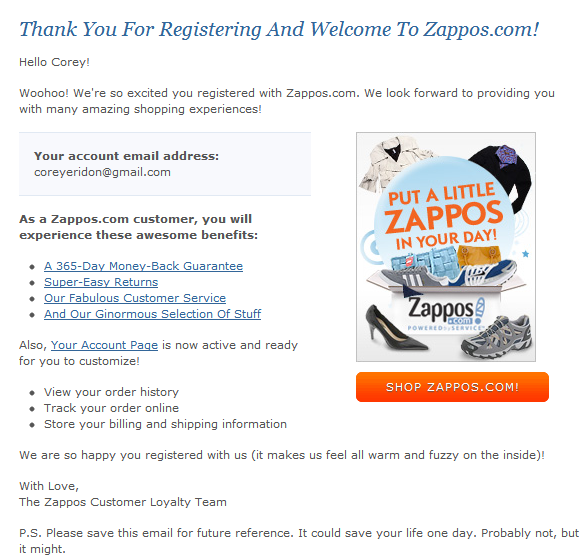
Now, count how many times this email says “You” instead of “we” or “I.” Okay okay, we won’t make you count: The words “you” and “your” appear 12 times, while “we,” “our,” and “we’re” appear only 5 times.
That’s a nice balance of second person language that keeps the focus on the customer, not the brand. This is a subtle tactic that helps you stay value-oriented, but this next step I’m about to cover is crucial to hitting the point home.
7) Talk about benefits, not features.
You know the value of your email. But does your recipient? No, not yet. And it’s your job to explain it.
The problem is, many emails only explain the feature they are offering, not the benefit. Take a look at the copy in two separate ecommerce emails I’ve received. Which one is touting the feature, and which is touting the benefit?
If you guessed email B, you’re right. Email A throws a 30% off discount directly in your face, but doesn’t explain the value behind it. What does 30% off a GoDaddy product do for my goals? Will it let me adjust a small business’ expenditures on infrastructure costs, freeing up money for a new hire? That benefit is far more tangible than 30% off an undisclosed cost.
Compare that with Email B from Banana Republic. The goal of this email is to sell shorts, but the copy isn’t just shoving shorts down the recipient’s throat. I mean, they’re shorts … big deal, right? They’ve identified what makes these shorts worthwhile: their versatility. They allow a man to lounge around the house and then go out in the city while putting minimal effort into changing his outfit. How convenient! How easy! How versatile!
The copy translates the benefit of buying those shorts, but the copy (or lack thereof) in GoDaddy’s email doesn’t explain the benefit of redeeming a generic 30% off offer.
8) Be brief.
One of the worst mistakes email copywriters make is trying to shove the entire story into the email message. Think about when you open a marketing email in your inbox. Do you read every single word in there? Probably not. It’s more likely that you scan for important points so you can glean the overall message, and decide whether you want to take any action.
So if you’re sending email with hundreds of words of copy, you’re making it much more difficult for recipients to decide whether they want to click through — simply because they can’t quickly sift through all of the information in your email.
Instead, find a way to summarize what the reader will get in a compelling way, and let them click through to a page on your website for more information.
Take a look at how the folks over at Postmates drafted a brief email encouraging readers to click through for a limited-time offer:
Postmates doesn’t wait to get to the point. After a brief, friendly hello, they get right down to the purpose of the email: telling customers about their new “free lattes on-demand” promotion. After introducing the concept, they offer a few of the essential details, then get right to the call-to-action.
Keeping your message on-point is the key to writing brief email copy. What’s the point you’re trying to make with your email? If you know the action your email is supposed to drive — recipient orders free lattes on-demand, recipient remembers to buy their Bruce Springsteen tickets, recipient gets motivated to work out — then you’ll have a much easier time drafting succinct email copy that remains focused on that one end goal.
If writing succinct email copy isn’t enough of a motivator for you to narrow down your goals, remember that having just one primary call-to-action in your email marketing results in better clickthrough rates than emails with competing calls-to-action.
9) Be lovable.
Just because emails are meant to inform doesn’t mean they can’t also delight. In some cases, email can be a great avenue for letting your brand’s personality shine, helping you build a meaningful relationship with the folks on your email lists. After all, providing a lovable experience for people begins and ends with how you communicate with them.
Check out the example below from the folks over at Death to Stock Photos. The point of the email is to apologize for an email they’d sent the previous day, which promoted a product that sold out way too quickly, didn’t ship internationally, and generally gave a lot of their customers a poor experience.
Notice the part of the email that’s called out in red. Using concise, personable language, they explain what happened, apologize for the mistake, say what they learned from it and how they’ll prevent it from happening in the future, and give the recipient several options for following up.
The format of this portion of the email is optimized for the large number of recipients who are likely skimming the email. The bold text and one-sentence paragraphs make it easy to follow. Finally, they aren’t afraid to add some personality using phrases like “Give us a wavvveeee” to humanize their brand. The result? Recipients are probably much more open to forgiving them for the honest mistake.
10) Use actionable language in your call-to-action.
That’s right: Emails have calls-to-action, too. Well, the good ones do. First and foremost, your email call-to-action should be extremely easy to identify. Remember: People scan their emails. If there’s one thing you want your recipient to pick up on, it’s your call-to-action.
If you’re sending an HTML email, you may decide to include a button, like this AmazonLocal email did below.
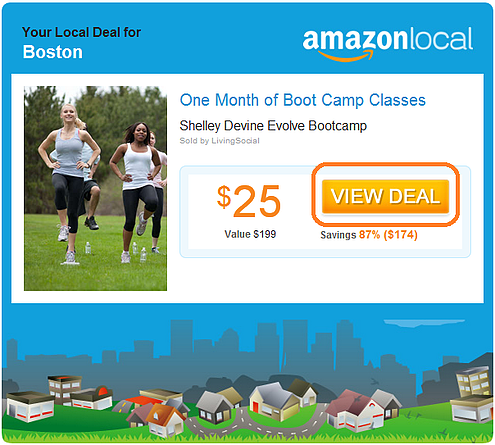
There are two qualities that make this call-to-action button effective:
- Great design: First, notice how the large, bright orange button stands out from the blue design; that call-to-action certainly isn’t hard to find.
- Great copy: The copy on the button is just as important. Your call-to-action button should include language that is succinct, clear, and action-oriented. This AmazonLocal button tells you in very few words what you can do using verbs — you can view the deal showcased in the email.
But it’s also crucial to spend some time optimizing your plain-text emails for clear calls-to-action. No matter how fancy your HTML email are, not all email clients will render your images, and not all email recipients will choose to display your images. In fact, we studied whether HTML emails or plain-text emails performed best and found that, while people say they prefer HTML-based and image-based emails, in reality, simpler emails perform best — and plain-text emails perform best of all.
Take a look at how one of our emails makes use of linked anchor text to draw recipients’ attention toward the calls-to-action:
The message doesn’t many graphics or colors added compared to most HTML emails. As such, the hyperlinked calls-to-action garner even more attention. When readers scan through the text and focus in on things like bolded words, images, and hyperlinked text, reiterating the same offer over and over hammers home for them exactly what you want them to do — redeem your offer by clicking your call-to-action.
What else do you think makes for effective email marketing copy? Share with us in the comments.
Editor’s Note: This post was originally published in May 2012 and has been updated for freshness, accuracy, and comprehensiveness.
4 Ways to Use Student Advocacy to Increase Applications for Your School
Content marketing presents two great challenges: Feeding the content beast and successfully using it to develop a trusting relationship with your prospects. Your students can help your inbound strategy meet both challenges.
In fact, your students are one of your school’s greatest natural resources for inbound marketing content. They have a first-hand perspective. They know how to speak to your prospect authentically. They’re social and they love to share.
They’re probably ready to be some of your school’s most effective ambassadors if you just ask. Why not ask them to write content for different marketing campaigns? Here are four ways you can invite your students to share their experiences with future students.
1) Social Media Warriors
Students can post content on their own profiles and accounts as part of an organized social media campaign. If you have some branded hashtags or priority hashtags you use to increase awareness, run a side campaign to let students know about them. Don’t have any? Create some. Have some student advocates set off a to get one of your hashtags trending.
Having students advocate for your school via their own profiles can be especially helpful in accessing some of the social media chat apps popular with teens where your school may not have its own presence. They can also be resources on the booming niche of ask-and-answer social apps. Student social media activity on their own accounts also expands the reach of your school to prospective students who don’t already have your school on their radar.
Students can also participate directly in your school’s social media accounts. You can let students use one of your social media accounts to promote an event. They could, for instance, run a Q&A on Twitter or Facebook.
They’re also perfect for running with “Day in the Life” campaigns. They can create Snapchat stories, Facebook albums, or completely take over your school’s Instagram account for a day. Make it more fun and exciting — inject a sense of urgency with a competition among departments or student activity groups to see which one can get the most traction.
2) Emails
Your email nurturing campaigns are your workhorses, moving curious prospects into the applicant bucket. Have a campaign with emails signed by actual students. You can use an email alias so the email looks like it’s being sent from students without exposing their email addresses to the world. Using an email alias keeps the email in your marketing system so you can track its metrics and see who’s interacting with it.
Connect student-written emails to specific questions or actions by prospective students. How about a student-written email that gets sent out after someone schedules a campus tour online? Students can share their favorite not-to-be-missed places on campus. Or a student’s email can tell a personal story, perhaps about their own decision process that lead them to enroll at your school. (That’ll be great intel for you as well!).
In a previous post, you learned . With custom lists in place, you can create emails in which various students speak to their particular challenge or interest. Include a CTA where they can hear more from these students or others with similar interests and experiences.
And a link to a blog post perhaps…
3) Guest Blog Posts
You always need fresh, fantastic blog content, right? Pick some topics from your editorial calendar or from the concerns list for some of your student personas. Ask students who are actively involved in addressing those concerns, or majoring in subjects that relate to them to write articles for your blog. They’ll always have something new to add to the topic, even if just it’s an expression of their personal experience.
You can also ask student advocates for topic suggestions. They will probably know about hot topics that haven’t bubbled up yet to you. Are students frustrated with their generation’s reputation as bad future employees? Maybe they want to talk about a new food program they started to help working students with families.
Promote select student-written blog posts with an email sent to the relevant segment of your email list. Once you have a collection of student-written blog posts, curate them into “Student Voices” eBook or Flipboard.
Remember that sending too much email can be a problem too! You don’t want to be viewed as intrusive or pushy. You want to be friendly and helpful. Be sure to time your emails with that in mind.
4) Rotating Content Forum
Create spaces on your website and newsletter for rotating content written by students. Make it a regular feature. Does your school have a website section covering research happening at your school? Carve out a section where a student who’s participating in one of the research projects talks about his work on it, or his thoughts why this research is important.
On your campus life section, have a monthly spotlight on one of your school’s student-run organizations. You know students are already posting social media content while attending school events. Reserve a section that shares screenshots of some of their best posts.
In time, readers will start to anticipate each new student contribution. Every update will be another opportunity to get some more social media and email content promotion out of it. And of course, these are prime content for repurposing as well.
Peers Trust Their Peers
Word of mouth marketing is a powerful tool. We know that people put a high degree of trust in online reviews. It only makes sense. People want to hear from people like themselves who’ve been there and done that.
But don’t leave it to chance. Design a strategy for what sort of student-created content works in your current marketing framework and how you’ll go about getting it.
From the perspective of a potential applicant, no one has more credibility on life at your school than your current students. Their voices drive prospects through the fast lane of relationship-building. So clear the way. Make it easy. Most of all — make it fun!
Content Marketing A to Z: 40 Tips, Tricks & Tactics for Mastering Content Creation and Promotion [Infographic]
Whether you’re a seasoned content marketing connoisseur or you’re just getting your content marketing sea legs, it’s never a bad idea to review the basics.
From doing keyword research, to guest blogging, to sharing content across different social platforms, there are a lot of different levers content marketers can pull. In their new infographic, “A to Z of Content Marketing: A 40 Point Content Marketing Checklist,” the team at PageTraffic helps us understand all of the different content marketing tactics and channels available.
While your company may not need to use all of the options you see below, being familiar with them can definitely help inform your overall content strategy.

Have any content marketing tips or tricks you’d like to share? Leave a comment below!
How a Knowledge Discovery Program Elevates Your Content Curation
Marketers need to keep their pipeline full of the most relevant and cutting-edge content that will effectively speak to their audience and convert them into qualified leads. The problem; however, is that curating that content takes a lot of time — and if you’re manually searching the web for new ideas, it’s likely that you’re missing some impactful gems.
Content curation tools can help speed up your searching by serving you relevant articles based on pre-selected keywords; however, these tools are missing one vital component of a sound content curation program: internal content.
A strong marketer is equipped with the content ammo they need to excel. Ideally, they’ll leverage the collective intelligence of their organization (Sharepoint, databases, etc.), and integrate that with relevant content from external sources (web, blogs, social, etc.) and premium subscriptions.
The key reason that knowledge discovery promotes this notion is that it naturally allows for an integrated approach to identifying, capturing, evaluating, retrieving, and sharing all of an enterprise’s information assets. Knowledge discovery is the ability to find the right information and deliver it to the right people at the right time, reinventing how organizations discover, collaborate, and share knowledge. By using a knowledge discovery tool, marketers can pull the most relevant content from three primary sources:
- The web – Blogs, social media, etc.
- Premium subscriptions – Paid access to premium content (Forrester and Gartner)
- Internal content – Sharepoints, databases, wikis, etc.
With all of this awesome knowledge at your disposal, not only will you keep your pipeline full, but you’ll be able to ramp up onboarding, training, and continued learning.
Knowing that you need to curate relevant content from a number of sources is one thing, but identifying the most relevant content on an ongoing basis is a whole other beast. Knowledge management is a long-time need, but marketers need to do more than simply “manage” knowledge. Being able to discover and use the knowledge in context is the key.
So, how can you pull the right information at the right time without spending hours upon hours digging through data? Using a knowledge discovery platform is the best way to understand novel topics deeply and quickly. Not only will this help you keep up with current trends, but it will help you gain a competitive advantage. With capabilities like competitive monitoring and faster contextual discovery of knowledge, getting a leg up on your competitors is inevitable.
There are a number of tools in the KM marketplace. Software like SmartSupport and Confluence help organizations find, share, and collaborate on information, connecting people with the answers they need. Brainspace for Enterprise is the only knowledge discovery tool that allows business users to discover the latest and most relevant content from any internal or external sources, spearheading innovation.
Marketers that leverage these tools will continuously receive internal and external content relevant to their industry, roles, and competitors — which will help them elevate their skillsets and capitalize on strategic marketing opportunities for their organization. Teams will then be able to:
- Understand novel topics deeply and fast
- Keep up on current trends
- Continuously learn and develop
- Gain competitive advantage
Knowledge discovery increases the level of connectedness between people in organizations, thus accelerating innovation. If your company is striving to innovate, they’ll be onboard with implementing KM tools.
If marketers striving to unlock the knowledge trapped within their organizations leverage knowledge discovery, they’ll have all the best content they need, in real time. Knowledge for onboarding, content curation, continued education, competitive monitoring, and other “everyday” marketing tasks will be right in the palm of their hands, saving countless hours of inefficient searching. So, if you think it’s about time to reinvent yourself as a content curator, start discovering!
If you’re interested in a more in-depth review of how knowledge management and discovery can be leveraged for marketing success, continue learning now with this eBook, 4 Ways to Leverage Knowledge Management for Marketing Success.
How the News Feed Algorithms Work on Facebook, Twitter & Instagram
You’re connected with hundreds of people — maybe even thousands — on Facebook, Twitter, and Instagram. But when you log in to each of these social networks, it’s likely that you don’t want to be bombarded by every single update from every single connection. That’d be pretty overwhelming, wouldn’t it?
That’s how the folks from each of these social networks feel — and they’ve done a ton of user research to validate that feeling. In fact, that’s exactly why the news feeds — and the algorithms behind them — exist.
All three of today’s most popular social networks have gravitated toward an algorithm-based feed in the effort to create better experiences for their users. It started with Facebook in 2006, and then Twitter nine years later in 2015. In the coming months, Instagram will join the other two in switching from a chronological feed to an algorithm-based feed, too, according to an official announcement.
Trouble is, each algorithm works differently. What’s worse, they’re constantly changing, making it hard for marketers like us to keep up. To help get it all straight, we’ve put together this simple guide on how the news feed works on the three most popular social networks: Facebook, Twitter, and Instagram. Let’s dive in.
(Note: Keep in mind that the algorithms are constantly changing. We’ll continue to write about major social algorithm changes as they happen.)
Facebook’s News Feed Algorithm
“Our goal is to build the perfect personalized newspaper for every person in the world,” Facebook CEO Mark Zuckerberg said in a public Q&A in 2014. “We’re trying to personalize it and show you the stuff that’s going to be most interesting to you.”
That’s what Facebook’s News Feed has been about since the very beginning. According to Zuckerberg, each of us gets exposed to more than 1,500 stories each day, but an average user only gets to see about 100 stories a day on their News Feed.
To give these users the best experience possible, Zuckerberg and his team of engineers are constantly learning user behavior and picking up signals that show what kind of content each user is most interested in. (And if you’re curious to learn more, read this blog post for 20 fascinating things you probably didn’t know about Facebook’s News Feed.)
How It Works
The Like button has always been the epicenter of Facebook’s user experience — not only because we see it on everyone’s posts, but also because it allows us to personalize our own experience (and influence everyone else’s). Since it was first introduced in November 2007, it’s helped Facebook’s engineers figure out which posts were delighting users, boring them, offending them, and so on.
Nowadays, the algorithm that governs Facebook’s News Feed has grown to be much more sophisticated. It isn’t just about the Like button anymore — and not just because reaction buttons are now in the mix. In fact, Facebook’s algorithm is by far the most complicated of the three social networks covered in this post.
Here’s a quick rundown of the most important things Facebook’s algorithm takes into account.
Relevancy Score
When picking posts for each person who logs on to Facebook, the News Feed algorithm takes into account literally hundreds of variables — and can predict whether a given user will Like, click, comment, share, hide, or even mark a post as spam.
More specifically, the algorithm predicts each of these outcomes with a certain degree of confidence. This prediction is quantified into a single number called a “relevancy score” that’s specific both to you and to that post.
Once every post that could potentially show up in your feed has been assigned a relevancy score, Facebook’s sorting algorithm ranks them and puts them in the order they end up appearing in your feed. This means that every time you log in, the post you see at the very top of your News Feed was chosen over thousands of others as the one most likely to make you react and engage.
Ads are given relevancy scores, too, so that Facebook can show users only the ads that could matter most to them. Again, this is supposed to give users a better experience — but it’s also helpful for the businesses that are paying for the ads. It’s calculated based on the positive feedback (video views, conversions, etc.) and negative feedback Facebook expects an ad to receive from its target audience. (Learn more about relevancy score for Facebook ads here.)
Prioritizing Friends
Before 2015, Facebook was predicting what users want to see on the News Feed based on more indirect signals, like Likes, comments, and shares of others. Eventually, they added options for users to filter out posts they don’t want to see. But what about helping boost the posts users do want to see?
Through studies and surveys, they found that many users were concerned they were missing important updates from friends they cared about the most. In response to these concerns, they began changing the News Feed algorithm to give more control to the users themselves.
It started in April 2015, when they began giving priority (in the form of higher relevancy scores) to posts from friends over the Pages they follow and promotional posts. Later that year, in July, they introduced the “See First” feature, which lets you actually hand-pick which accounts — whether friends or followed Pages — you want to see first at the top of your News Feed.
Now, when you select a person or page to “see first,” their posts will appear at the top of your News Feed. (Note: Selecting people to “see first” is different than selecting them as a close friend: When you select a person as a close friend, you’ll just receive notifications when they post something new.)
To select people or pages to “see first”: First, click the downward facing arrow in the top-right corner of any Facebook page and select “News Feed Preferences.”
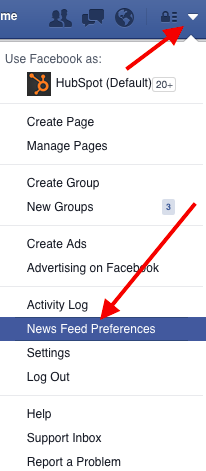
In the window that appears, click “Prioritize who to see first.” Then, select the people or pages you’d like to, see first on your feed.
Time Spent on a Post
Starting in June 2015, Facebook started monitoring how much time users spend viewing certain posts. Of course, the time you spend on a post can vary depending on your internet speed, the length of the post, and so on — and the folks at Facebook are aware of that.
However, they have found that if people are spending a lot more time on a particular post in their feed than the majority of other posts they look at, then it’s a good sign the content was relevant to them.
How does this play out in the feed? If you spend more time on a particular post, Facebook is more likely to show that post on your friends’ News Feeds.
Video Engagement
In summer 2015, Facebook surveyed users on how they interacted with video on their News Feeds and found that that many people who were interested in a given video didn’t necessarily Like it, comment on it, or share it with their friends. Since engagement is one of the primary ways Facebook measures people’s interest in posts, they had to come up with other ways to figure out whether people enjoyed the videos they were seeing.
To help do that, they started monitoring other forms of video engagement — like turning on the audio, switching to full-screen mode, or enabling high definition. So if you turn up the volume on a video or make it full-screen, the algorithm will interpret that as you enjoying the video, and will show you similar videos higher up in your feed.
The update doesn’t mean users will see more videos in their News Feed — only those who already engage more with video-related content.
Facebook’s algorithm is very, very complex, but we hope that gives you a good idea of what it considers important. Now, let’s move on to Twitter.
Twitter’s Timeline Algorithm
Whereas Facebook makes most of the decisions for you on what will show up in your Facebook News Feed, Twitter’s historically taken a very different approach with what they call the “Timeline.”
Your Timeline is the stream of tweets from the users you follow that shows up on your account home page when you first log in. It used to be that your Timeline was made up of every single tweet from every user you follow, in chronological order. But the folks at Twitter found that, similarly to what was happening on Facebook, users felt like they were missing all the best tweets from the people they care about most.
“We wanted to change that feeling of missing out,” said Twitter Product Manager Michelle Haq, “which is why we decided to go after that problem.”
The changes they made to the algorithm aren’t nearly as platform-changing as the one Facebook has made, but it is a departure from the real-time element that has defined Twitter from the beginning.
How It Works
The engineers at Twitter have attempted two different approaches for surfacing the “best” tweets first on your Timeline: the “While You Were Away” feature, and the even newer “Show me the best Tweets first” feature.
The “While You Were Away” Feature
This feature was added in 2015 as a first attempt to rid users of whatever FOMO (fear of missing out) they may have been feeling from the chronological nature of the original Timeline.
Basically, it’s a recap of some of the best tweets you may not have seen otherwise. How do these tweets make the cut? According to TechCrunch, it’s determined by “user engagement” — although they don’t get any more specific than that.
You can’t turn off the feature, but how often you see it depends on how often you use Twitter. The recaps pop up more frequently for users who check the app “only once in a while,” according to Twitter Product Manager Paul Rosania in the official announcement.
“Our goal is to help you keep up — or catch up — with your world, no matter how much time you spend on Twitter,” wrote Rosania. “With a few improvements to the home timeline we think we can do a better job of delivering on that promise without compromising the real time nature of Twitter.”
The “Show Me the Best Tweets First” Feature
The “Show me the best Tweets first” feature, introduced in February 2016, is a little more similar to Facebook’s News Feed. Why? Because it actually changes the content on your Timeline based on a tweet’s relevancy, rather than listing tweets chronologically.
By default, Twitter’s algorithm puts the tweets it thinks you’ll find most interesting at the top of your Timeline, still recent and in reverse chronological order. These tweets are chosen based on accounts you interact with most, tweets you engage with, and much more, according to Twitter’s Support page.
The rest of the tweets will be displayed right underneath, also in reverse chronological order. Unlike the “While you were away” feature, these “best tweets” won’t be highlighted or indicated in any way — so you won’t be able to tell where the “best tweets” stop and the rest of the tweets begin. According to Wired, while there’s no limit to how many “best tweets” will be out of order at the top, Haq says the average is about a dozen.
There are two ways to remove these “best tweets” from the top of your Timeline. One is a quick fix: You can always refresh your Timeline to see all new tweets at the top in the totally live way you might have been used to seeing in the past.
But if you want to always see your Timeline live, then Twitter does allow you to opt of this feature if you’d like — unlike Facebook’s News Feed.
To opt out of this feature: Go to your profile settings. In the “Account” tab, scroll down to “Content” and look for “Timeline.” Toggle the box next to “Show me the best Tweets first” to change the setting.
Is Twitter Moving Away From Real-Time?
Do these changes mean Twitter’s moving away from an emphasis on real-time updates? Twitter CEO Jack Dorsay says no. Check out his tweet below, where he assures customers that real-time Twitter is here to stay.
I *love* real-time. We love the live stream. It’s us. And we’re going to continue to refine it to make Twitter feel more, not less, live!
— Jack (@jack)
February 6, 2016
But many users are still concerned. For reassurance, I like the way David Pierce put it in his article for Wired: “Facebook asks you to trust its ability to surface everything you want and need; Twitter’s been a more understandable haven. It’s certainly possible (though exceedingly unlikely) that Twitter could switch to a fully algorithmic timeline in the future, but this is not that.”
This is something we’ll have to keep an eye on.
The Instagram Feed’s Algorithm
Of the three social networks in this post, Instagram is the newest to an algorithm-run feed. Although Facebook acquired Instagram in 2012, it didn’t fiddle with catering content to specific users until April 2014, when they tweaked the “Explore” tab to display posts specifically tailored to each user. Before that change, the “Explore” tab had only showed the most popular posts across all Instagram users instead of specific users.
Even more recently, there have been rumblings about an impending change to Instagram’s algorithm that’ll alter your Instagram feed pretty drastically. A post to Instagram’s official blog on March 15, 2016 said, “To improve your experience, your feed will soon be ordered to show the moments we believe you will care about the most.”
As with Facebook, the goal of this change is to improve user experience. After all, Instagram reports that people miss 70% of the content on their Instagram feeds on average.
How It Works
The folks at Instagram say they want to focus first on optimizing order. In other words, all the posts will still be there, just in a different order. The algorithm will likely order the content on your feed based on the following factors:
1) The number of Likes and comments a post has.
An Instagram spokesman told Tech Insider that it won’t be a popularity contest. That being said, the number of Likes and comments a post gets will be given some weight.
2) Your relationships with the user posting.
If you tend to Like photos from certain accounts, or regularly leave comments on pictures from those accounts, then Instagram will likely show you more posts from them.
3) The timeliness of the post.
To maintain some emphasis on chronology, the time at which the photo was posted will have some determination of where it shows up in your feed so you’re seeing timely posts.
4) What you share directly with users (and who those users are).
What posts you share directly with other users — and who those users are — will make it more likely that you’ll see posts from those users in your feed.
When Will These Changes Roll Out?
How soon are we talking, here? According to Instagram’s blog post on March 15, 2016, the change will roll out to users over the next few months.
Here’s a tweet update from Instagram’s official Twitter account on March 28, 2016:
We’re listening and we assure you nothing is changing with your feed right now. We promise to let you know when changes roll out broadly.
— Instagram (@instagram)
March 28, 2016
Again, it’s likely that the first sign of a change will be a change in the chronology of posts, so keep an eye out for that as you scroll through Instagram over the next few months.
It’s All About Content Quality
The key takeaway for brands and individuals alike is this: At the end of the day, it all comes down to the quality of your posts.
These algorithms are meant to filter out the irrelevant and the poor quality posts so that the highest-quality stuff is what gets through and gets shown to users. Control over what users see and don’t see is shared between the social platform and the user — some more equally than others.
The big lesson for marketers like us is to remember that it’s our job to post content to social that’s interesting, entertaining, helpful, and/or relevant to our audience. This means picking relevant topics, writing delightful copy, and posting compelling images and videos. (Download these 100 social media image templates for help in the visual content department.)
That way, your posts have a better chance of getting shown to users — so you can continue to inspire, delight, and educate them.
How to Use Medium: A Beginner’s Guide to Writing, Publishing & Promoting on the Platform
What do the White House, Sports Illustrated, and my cousin Jimmy all have in common?
They all publish content on Medium.
For the White House, that content includes State of the Union addresses and policy announcements. Sports Illustrated, meanwhile, manages a sports news publication called The Cauldron. My cousin Jimmy? He publishes an ongoing series on advanced cat grooming techniques.
And that, my friends, is Medium in microcosm: It’s a social publishing platform that is open to all and home to a diverse array of stories, ideas, and perspectives. As Medium founder (and Blogger creator/Twitter co-founder) Ev Williams wrote when he first launched the platform in 2012:
Medium is not about who you are or whom you know, but about what you have to say.”
To help emphasize the importance of what it is you’re saying, the overall design of Medium is minimalistic, featuring lots of white space and limited formatting options. Want to change the header typeface to Comic Sans? You can’t. Medium won’t allow for such atrocities of design.
But that’s just one of many little nuances that come with the territory for Medium users. In fact, if you’re just getting started on the platform, there’s a fair amount to learn before you hit publish. Let’s get into it …
How to Use Medium: The Beginner’s Guide for Marketers
As a marketer, Medium presents an opportunity for you to reach a new audience with your content. But it’s important to understand that this isn’t just another Twitter, or Facebook. According to Williams, you can think of Twitter as “what’s happening,” you can think of traditional news as “what’s happened,” and you can think of Medium as “what really happened.” The platform is geared toward sharing longer-form, more well-thought-out content. (But of course, given the open-to-all nature of Medium, that isn’t the only type of content you find there.)
Whether you’re looking into Medium for its publishing capabilities or you simply want to learn more about the platform before you set up an account and start exploring, you’ve come to the right place. Click on a link in the table of contents below to jump ahead to the section you’re looking for, or keep scrolling to read the full guide.
1) Getting Started With Medium
a. Creating an Account
b. Following People, Publications & Tags
2) How to Interact With Medium Content
a. Recommending, Sharing & Bookmarking
b. Highlighting
c. Writing Responses
3) How to Write & Publish on Medium
a. Formatting Text
b. Adding Images & Media
c. Sharing Drafts & Publishing
d. Measuring Results
1) Getting Started With Medium
a. Creating an Account
While it’s true that anyone can view Medium content (regardless of whether or not they have a Medium account), in order to publish and interact with folks on the platform, you need to have an account and be logged in.
Fortunately, you can create an account in less than a minute by going to Medium.com and clicking the “Get started” button in the center of the page (or the “Sign in / Sign up” link at the top of the page). From there you’ll have four different sign-up options to choose from: Twitter, Facebook, Google, and email.
My recommendation: Sign up for Medium using Twitter or Facebook. That way all of your existing connections from Twitter/Facebook who are on Medium will automatically be following your account once it’s created. This saves you the trouble of having to build up a new audience entirely from scratch. Also, regardless of the option you go with to start, you can always link your Twitter or Facebook to your Medium account later via the Settings menu.
The Settings menu is also where you can update your username/profile page URL. If you sign up with Twitter, your profile page URL, by default, will be http://ift.tt/1p0oXM1. But you’re free to change it. From the Settings menu you can also control what email notifications you receive from Medium. (You’ll learn about what triggers these notifications in the sections to follow.)
The other main things to remember when it comes to setup? Adding a profile photo and writing up a short (160-character max) bio for your Medium profile page. (Note: If you sign up using Twitter, your Twitter profile photo and bio will be automatically synced to your Medium account.)
b. Following People, Publications, & Tags
With a Twitter feed, the content that’s surfaced comes primarily from the accounts of the people and organizations you follow.
With a Medium feed, the content that’s surfaced comes not only from the accounts of the people and organizations you follow, but also from the publications and tags you follow. What’s more, when you search for content on Medium, people, publications, and tags all show up in the results.
Medium publications are collections of stories based around a common theme. Anyone can create them — yourself included — and the way they work is fairly straightforward. As the creator of a publication, you’re an editor by default, which means you have the ability to a) add writers to your publication, b) edit and publish the stories that are submitted by your writers, and c) review the metrics for all of the stories that are part of your publication. As the publication’s creator, you’ll also have the ability to appoint new editors (so they can do all of that stuff I just mentioned).
To get a better sense of what Medium publications are all about and what types of stories appear in them, check out this earlier post I wrote: “8 Medium Publications You Should Be Following.”
Now, on to tags.
Tags are sort of like the hashtags of the Medium ecosystem. Or, as the Medium team puts it, tags are “a way of organizing and discovering content” on the platform.
When you publish a story on Medium, you get the option to add up to three tags, which appear at the bottom of your story. Clicking a tag brings you to a page where you can see more stories with the same tag, as well as some suggestions for other tags you might be interested in.
The main benefit of following tags is that it can help personalize your Medium experience. Instead of surfacing content based solely on your social graph (i.e., the people/publications you follow), Medium uses tags to surface content that’s based on your specific interests as well. For example, if you’re into baseball, you could follow the “baseball” tag. Into “small fluffy dog breeds”? Yep, there’s a tag for that (granted only one story has been published under it).
So far in this introduction to Medium, we’ve acted mostly as passive observers. We’ve set up an account, and started following some accounts, publications, and tags. In the next section, we’ll dive into the more interactive aspects of Medium.
2) How to Interact With Medium Content
a. Recommending, Sharing & Bookmarking
The “Recommend” is the “Like” of the Medium world. It’s a way to show you that you appreciate the content that someone has shared.
When reading a story on Medium, there are two places where you can recommend it: At the bottom of the actual story …
Or on the nav bar that appears at the bottom of the screen when you scroll back up in a story …
In either case, you’ll need to click on that green heart outline icon you see. Once clicked, the heart will change from an outline to solid green. To see the full list of people who’ve recommended a story, you can click on that little number you see next to the heart.
When you recommend a story, the writer, by default, will receive an email notification. (But that’s something you can control in Settings). The more recommends a story receives, the more likely it will be to get shared around the Medium network. Stories that receive the most recommends within a given time period get featured on Medium’s “Top stories” page, which is updated on an hourly basis.
In the same two locations where you can recommend a story, you can also share that story to Twitter or Facebook (by clicking that little arrow icon), and you can bookmark the story for later reading by clicking the bookmark icon (which turns solid once clicked).
Once you bookmark a story, it will appear on your “Bookmarks” page, which you can access from Medium’s homepage.
b. Highlighting
In addition to recommending, sharing, and bookmarking Medium stories, you can unlock a second level of interaction by selecting a section of text with your cursor. Once you’ve highlighted some text, a pop-up menu will appear that gives you four options:
- Highlight: Clicking the highlighter icon will put a green highlight around the text you’ve selected, which is visible to your Medium followers. By default, a story’s writer will receive a notification when a section of that story is highlighted.
- Response: Clicking the speech bubble icon will allow you to write a response to the story you’re reading. The section of text you’ve highlighted will appear at the top of your response. (More on responses in a second!)
- Text Shot: Clicking the Twitter icon will generate a “Text Shot,” which is a tweet that automatically pulls in the text you’ve highlighted as a screenshot.
- Private Note: Clicking the lock icon will allow you to send the writer of the story a private note. (Note: This functionality can be turned on and off in your account settings.)
c. Writing Responses
Unlike traditional blog comments, Medium responses are treated as individual stories. That means in addition to appearing at the bottoms of the stories you respond to, the responses you write are documented on your profile page, and have the potential to take off and get highly circulated just like traditional stories.
As a newcomer to Medium, writing responses can be a great way to engage with people on the platform without having to commit to writing a full-blown story. It can also help you come up with ideas for your first story when you do decide to write it.
3) How to Write & Publish on Medium
a. Formatting Text
From the Medium homepage, there are two places where you can access the Medium editor and start writing or laying out a story: via the “Write here … ” prompt near the center of the page and via the “Write a story” link at the top of the page.
As you’ll likely discover, writing in Medium’s editor is highly intuitive and — from a stylistic perspective — nearly impossible to screw up.
By highlighting text, you can unveil several basic formatting options, including bold, italics, and hyperlinking. You can also designate text as an H1 …
Or as an H2 …
And you can choose between two different styles of blockquote. Option A:
And Option B:
Of course, if you really want to get fancy, you can use Medium’s drop caps function. Know those enlarged, stylized letters you sometimes see at the beginning of sentences? Those are drop caps. According to the Medium team, they’re useful for “pacing, starting a new chapter, or just a little typographical delight.”
Another option for creating some separation between different sections of a story in Medium is to use a part, or separator. In order to insert one, you’ll first need to click that little plus icon that appears when you’re on an empty line of your story.
Clicking that plus icon will open up a menu with four options. The one on the far right — the icon with the two little lines — is the separator.
Here’s what it looks like on the page:
b. Adding Images & Media
Adding images, videos, and other media (e.g., tweets) to your Medium story can be as simple as copying and pasting their URLs into Medium’s editor. The editor, in most cases, can automatically recognize the media’s format and render it accordingly.
Alternatively, you can click on the plus icon to open the same menu you used to insert the separator in the previous step. From there, you can upload an image from your computer, insert a URL to a video, or insert the embed code to another type of media using the corresponding icons.
Depending on the specific size of the image you upload, you’ll have up to four different size options to choose from for displaying that image. These size options, which will appear in a pop-up menu after you insert an image, include left-aligned, center-aligned, wide (where the image width exceeds the width of the text) and full-width.
By default, Medium will display the formatting option that best fits the dimensions of the image you insert.
c. Sharing Drafts & Publishing
When you’ve finished your story and are happy with how everything looks, head up to the top nav where you’ll find two links: “Share” and “Publish.”
Clicking “Share” will generate a link to the draft of your story, which you can share with anyone — even if they don’t have a Medium account. And (as you can read in the screenshot below) the people you share the draft with will also have the option of leaving you notes.
Clicking the “Publish” button, meanwhile, will open a menu where you can select up to three tags for your story. Medium will recommend some tags by default, but you can also search for tags and create new ones by simply entering text.
Once you’ve selected tags for your story, you can hit the “Publish” button to share your story with the world.
d. Measuring Results
In order to see how your stories (and responses) are performing, you can go to the “Stats” page using the URL medium.com/me/stats. You can also navigate to the “Stats” page via the dropdown menu at the top right of the Medium homepage.
When you arrive on the “Stats” page, you’ll first see the aggregate number of views, reads, and recommends your stories and responses have received over the past 30 days. There’s also a graph that provides day-by-day granularity. By hovering over a column on the graph, you can view metrics for the specific day that column corresponds to.
If you keep scrolling down the page, you’ll be able to view the individual stats for each of your stories. Specifically, Medium provides data on views, reads, read ratio, and recommends.
Here’s a quick rundown on what those metrics mean:
- Views: The number of people who visited a story’s page.
- Reads: An estimate of how many visitors read a story all the way through.
- Read Ratio: The percentage of visitors that ends up reading an entire story (i.e., the difference between reads and views). According to Ev Williams, this ratio is an important factor in determining how a story gets ranked/surfaced on Medium.
- Recommends: The number of recommends a story receives.
Thanks for following along.
Remember, this was just an introductory look at how to use Medium. There are several more features and options we haven’t covered, but we’ll do so in future posts.
Anything specific you’d like to learn about Medium? Have any Medium tips you’d like to share? Leave a comment below.
5 Communication Strategies to Grow Your Nonprofit’s Monthly Giving Program
There are serious advantages that come with a healthy recurring giving program. While revenue from one-time gifts tends to be inconsistent throughout the year, monthly donations provide a stable and predictable source of income. This makes it easier for organizations to plan and invest in their programs, even during down months.
And, given that retaining donors is cheaper than acquiring new ones, growing your recurring giving program is super cost-effective. Plus, monthly donors have much higher retention rates than one-time donors. This gives you the opportunity to build lasting relationships with your donors, which can translate into larger support down the road.
The first step to increasing monthly gifts is to refine the way you approach and communicate with your donors. To help you get started, here are some quick wins.
Five Marketing Strategies You Can Use to Grow Your Recurring Giving Program
1) Invite Donors into the Inner Circle
Incentivize supporters to donate monthly by highlighting your recurring giving program as a special community of esteemed donors. This lets donors know you recognize those who make the big commitment.
For instance, Generosity.org, a nonprofit that provides clean water solutions to developing countries, refers to their recurring giving program as the “Generous Society.”
Their communications channels, including their website, videos, and email appeals, invite supporters to become “members” of this marked community. By giving the program a distinctive title and status, the organization presents a recurring gift as a way to gain entry to this “special” group.
Consider framing your appeals as an invitation into your inner circle of committed supporters. This should be reflected on your website and in your emails. By becoming a monthly donor, they can join an honorary group that impacts your nonprofit’s growth tremendously.
To further incentivize their membership, promote “perks” that monthly donors would receive. These can be special updates about your program’s progress, reflecting the unique access they gain as your most dedicated supporters. Promising this information also proves your organization’s commitment to being transparent about how supporters’ gifts will be used. Generosity.org, for instance, incentivizes and builds trust with prospective monthly donors by showing what they’ll receive as special proof of their impact, right on their website.
2 ) Start With the Impact
Communicating the impact of a recurring gift is key to harnessing monthly support. Supporters want to be certain their contributions will make a difference, so you need to explain exactly why their gift is important and what it will accomplish.
When visitors hit your website, they should be able to quickly understand where their monthly dollars are going. An excellent way to communicate this is by using visual content. Since images are engaging and easy to digest, try whipping up a graphic that illustrates the power of a monthly donation.
To raise funds for their disaster relief efforts, Team Rubicon created this cool visual to show how different monthly gift amounts affect their operations. Donors can have a hard time comprehending a monthly donation’s long-term impact, so a visual can help make that concrete connection.
3) Ask Major Donors to Break Apart their Gifts
Many organizations will have donors who make large gifts a few times a year, usually during major campaigns and the holiday season. Because these supporters give in bulk, nonprofits hesitate to approach them for recurring donations on top of these big gifts. These particular donors, however, make a great batch of potential monthly givers. You just need to be smart about your approach.
Try this: rather than asking them for more donations, just ask them to break apart their large gifts into smaller, monthly installments.
While this adjustment doesn’t necessarily boost their level of support, it still creates a steadier stream of revenue for your organization. And, because recurring donors have higher retention rates, the switch can increase your donors’ chances of sticking around for the long haul.
To communicate with these donors, follow these steps:
- Identify the large donors within your community—you can do this by defining the threshold they hit, whether it’s an average gift size of $300, $500, or more. Then use your CRM to pull a list of these contacts.
- Pick up the phone and reach out to each one individually, or send a personalized email at the very least.
- Thank them for their support.
- Summarize how much they’ve personally given over the year and demonstrate how their support has impacted your programs.
- Then, pitch the idea of breaking apart their annual gifts into smaller, monthly installments.
- Explain how these regular donations will help build a predictable income flow, enabling your organization to budget and execute for long-term impact.
4) Leverage Social Proof
Becoming a monthly donor is a pretty big commitment. So how else can you convince supporters it’s worth doing?
By showing that others are doing it too.
Leveraging social proof is a classic, effective marketing technique to attract people to your brand. By showing that other people have already chosen to join your recurring giving program, you can validate its credibility and motivate others to join an established community.
Employ numbers on your website to demonstrate the host of people supporting your cause. Watsi, a nonprofit that enables people to directly fund healthcare for underserved patients, uses this method on their landing page. The page counts off the host of people who’ve committed to donating monthly, encouraging site visitors to be the next donor.
On top of hard numbers, try using visual content, like live progress bars or feeds, to quickly display a growing community. Here, Possible Health – a nonprofit that delivers high-quality healthcare to disadvantaged communities worldwide – uses a progress bar that displays how many people have hopped aboard the program. Each new monthly funder, or “Possibilist”, can see how their membership impacts a larger community, including its progress toward unlocking corporate gifts.
5) Deliver Special Email Communications for Monthly Donors
In order to nurture the relationships you create, you need to talk to them in a way that continues to reflect their standout role and value.
This means you need to up your email game. Your first step is to create a separate email list for your recurring donors. Instead of receiving all your general appeals, these contacts should receive progress updates, impact stories, and messages that thank and celebrate their support.
Take it a step further by creating a quarterly or bi-annual newsletter, e-magazine, or report specifically for your recurring giving program members. Remember, they are part of a special group that deserves extra attention. It’s important to make them feel like you set them apart for their extra support. Unique communications like these can go a long way in boosting donor satisfaction and trust.
After they’ve given for a significant period of time, you can reach out and ask donors to upgrade their monthly gift amounts. Remember to personalize these asks and reinforce the good work they’re doing.
Tip: while it doesn’t make sense to constantly send general appeals to your monthly givers, don’t be afraid to reach out to them during your major annual campaigns. These supporters care enough about your programs to make a monthly gift commitment; they might be the most willing to make an additional one-time gift and increase their impact.
Nurturing a solid group of monthly donors can do wonders for your nonprofit. The reliable income will help improve your long-term vision and planning, and cut fundraising costs. Because they invest monthly into your programs, recurring donors can also become loyal, lifelong advocates of your mission. With some strategic planning, effective marketing, and intentional communication, you’ll be well on your way to growing a robust recurring giving program.
16 Video Marketing Statistics Every Marketer Should Know [SlideShare]
For many marketers, video is one of the most illusive content formats. Yes, we know video exists, and some of us have even dabbled in producing videos for our companies before. But when it comes to proving the value of video marketing, there definitely seems to be a knowledge gap.
Can putting a video on a landing page help increase that page’s conversion rate? Can adding videos to your blog posts help drive more traffic? Can using video in your marketing actually have a measurable effect on revenue?
Fortunately, Adelie Studios has uncovered some data that can answer these questions. And they recently shared that data their latest SlideShare. Check it out below.
Know any other video marketing statistics (or tips) you’d like to share? Leave a comment below.