
How to Write Compelling Copy: 7 Tips for Writing Content That Converts
Copy is writing that sells, so by definition, it has to be compelling.
Does your copy also have to be concise? Yes. Does it have to be clear? Absolutely. Brevity and clarity will ensure that your message is digestible, which is important if you want your words to be read and understood with ease. That said, the clearest, most concise copy ever written is still a bust if it doesn’t compel its readers to act.
Compelling copy fascinates its target audience and drives them to pull the trigger on a CTA. It does this by capturing their attention, unearthing a pain they’re desperate to assuage, and presenting a mutually valuable, solution-driven call-to-action.
If your goal is to write clear, concise copy, then you can train yourself to do that. Just follow a few guidelines and, of course, practice. But if you want to write compelling copy, then you have to do a lot of research and even more critical thinking.
Let’s break it down …
How to Write Compelling Copy
Before you start that next sales email or landing page, try some of the tips below. Working through them will take some time and thought, but the effort will be worth it when you walk away knowing exactly how to frame your message to achieve the best response.
1) Get to know your target prospect.
The most effective fishermen vary their bait depending on the fish they aim to catch. They know that bass, for example, go after earthworms. Carp love corn. Crappie respond well to rubber lures. Fishermen also adjust their technique depending on the time of day, the water conditions, and the season. They soak up as much information as possible about the fish and it’s environment, ultimately using their learnings to attract and, hopefully, hook.
As it happens, marketers operate similarly, learning as much as they can about their target prospects before casting them their message. Doing so makes it easier to highlight irresistible benefits throughout their copy. Benefits that relieve ultra-specific pain points, making the offer all the more compelling to the right audience.
To accurately and efficiently isolate your target prospect’s problems (which will illuminate the benefits most fascinating to them) start by answering a series of questions about their personal background, their company and the position they hold, and their challenges, goals, and shopping preferences. In other words, create a buyer persona. As a result, you’ll amass an abundance of invaluable information that you can then use to attract attention and inspire action.
2) Exploit the psychology of exclusivity.
If you want more buzz than you can handle, make your prospects feel special. Tell them they’ve been “hand-selected” or “randomly picked” to receive your offer. Isolate them … but in a good way. Make them feel important. People love feeling important.
In fact, self-esteem, or how we view ourselves, is near the top of Maslow’s Hierarchy of Needs. That’s how important feeling important is to people. It’s a need marketers have been exploiting for decades …
In an article for Fast Company, Robert Rosenthal points us to this U.S. Marines tagline: “The Few. The Proud.” And this American Express tagline: “Membership has its privileges.”
The folks at Google played the exclusivity card, too, creating a frenzy when they launched a soft beta of Google+ and invited only a select few users to create a profile. Google’s marketing team wasn’t trying to be mean, they were trying to create desire (that compels) out of thin air. And they succeeded. Psychology’s good for that.
3) Make it emotional.
When it comes to converting a prospect, the features of your product or service will only get you so far. Why? Because features appeal to your prospect’s logical brain. And purchases aren’t driven by logic. They hinge on emotion, which explains why good commercials make us want to laugh or cry or pick up the phone to call home.
For example, Dove’s “Real Beauty” campaign was so powerful and thought provoking that it went viral before such a thing even existed. The campaign has been active for over a decade, resonating with millions of women who were left feeling empowered by its message: you are not defined by your makeup.
Image Credit: Ad Fuel
That sentiment created countless emotional moments. Those emotions, then, were what drove Dove’s “Real Beauty” campaign to its celebrated (and well-deserved) success.
(And when those moments weren’t compelling people to reach for Dove soap, they were driving a new social perspective, which is an entirely separate accomplishment.)
4) Draw analogies and metaphors.
A confusing or dull message is rarely compelling, mainly because people don’t pay much attention to what they don’t perceive to be valuable. If you think about it, most things in life boil down to value. It’s a potent human driver. Therefore, as a copywriter, your job is to first and foremost figure out the value in what you’re selling and then put it into clear, concise, and compelling words.
The latter is almost always harder to do. And if you’re new to copywriting, it could feel almost impossible, like trying to thread a needle while wearing hockey gloves. That’s where analogies and metaphors can lend a hand. They’re especially effective at putting concepts into perspective.
Here are a few examples of metaphorical taglines from The Houston Chronicle:
- Tropicana: “Your Daily Ray of Sunshine.”
- Werther’s Original Popcorn: “It’s What Comfort Tastes Like.”
- Burger King: “Subservient Chicken.”
See how these brands combine two starkly different concepts to tell a story or create an image? You can do that in your copy, too. As long as your juxtaposition makes sense — as long as it connects the dots and isn’t trite — you’re likely doing your reader a favor by helping them experience your offer in a fresh, descriptive, and interesting way.
5) Avoid weasel words.
Weasel words are used by people who want their statements to maintain some plausible deniability. Politicians trying to avoid making any definitive comments, for instance, would use weasel words. Copywriters use them a lot, too, especially if their product’s promise is weak or loose. For example:
- “Viva Hand Cream fights dryness.” (i.e., you might not win.)
- “Reduce hair loss with Thick & Lush!” (i.e., you won’t cure it.)
- “Rent from as little as…” (i.e., you’re probably going to spend more.)
These words are named after weasels because of the way the little guys eat their eggs: puncturing a small hole and sucking out the contents, leaving the egg appearing intact but, nevertheless, very much empty. Ever held an empty egg? It’s fragile and delicate, right? Given the slightest bit of pressure, if feels like it would collapse.
Is that how you want your copy to come across? Weak and listless, like ants floating in a puddle? Of course not. So avoid the weasel words when you can. Your writing will be stronger, more authoritative, and more compelling for it.
6) Create urgency.
The more relaxed and comfortable we are physically, the less eager we are to move. Nobody plops down in their favorite La-Z-Boy, puts their feet up, cracks a beer, and thinks, I can’t wait to get up. No. People don’t like moving when they’re in a comfy position.
Same goes for people in a comfortable state of mind. Therefore, if your copy leaves readers with the impression that your offer will always be there, patiently waiting for them to pull the trigger, they may use that as a justification to not convert on your call-to-action. They’ll sleep on it, consider their options, and weigh the pros and cons. And after all that, they may very well do nothing at all because you gave them the chance to talk themselves out of it.
Next time, create some urgency. Set a deadline, using time-sensitive language like “This offer ends tomorrow,” or “Last chance,” or “These savings won’t last forever.” You can also play the scarcity card, reminding them that “There are only a few seats left” or that “Supplies are limited.”
The point is to make your prospects feel uneasy about waiting. Strange as it sounds, the more uncomfortable they are, the more likely it is they’ll be compelled to act.
7) Tailor your CTA.
When you want more brown rice at Chipotle, just ask.
When you want a five and five singles back instead of a ten, go ahead and ask.
When you look at them and everything turns to color and you want to spend your life with them, ask. Ask them to take that next step with you, and maybe they’ll smile and say “yes.” Hopefully, they do.
But you gotta ask. Whether you’re at Chipotle, in line at the grocery store, or in love, if you want something, typically, you have to ask for it. Why would copy be any different? That’s why a CTA, or a call-to-action, is one of the most compelling elements your copy can possess — as long as it’s well-executed.
In other words, don’t settle for the standard “Click now” copy every time. Instead, strive to make your CTAs simple and potent; creative and forthright. Most importantly, make sure to play to your audience. For example:
- If you’re going after an experimental SaaS audience,
then give them a “Start your free trial now” CTA. - If you know your target persona to be curious and discovery-oriented,
then give them a “See how it works” CTA.
Click here to dive deeper into these and 14 other call-to-action formulas that make people want to click.
Now, are you going to compel everyone?
You won’t. Not even close. But don’t let that bother you. Copywriting, like any craft, is honed over time. So keep failing. Keep stubbing your toes on the hurdles. That’s natural.
What isn’t natural is writing effective copy that converts. That’s where these tips and techniques can help. Practice them and, over time, you’ll steadily compel more people to take action more often. Until one day, these techniques will become part of you, engrained in your skillset.
And then you’ll be dangerous on cue.
What are your best tips for crafting compelling copy? Share them below.
Overcoming Content Overload: 4 Tactical Ways to Create Content That Stands Out
We’re kind of having a problem in content marketing right now. You see, everyone is creating content.
In fact, according to Content Marketing Institute’s annual survey, 88% of B2B respondents are using content marketing. But this is just a statistical percentage. It gives no indication of the sheer volume of content that is being produced.
And that volume is enormous.
With the avalanche of content, it’s hard to stand out. And it’s especially challenging when you look at your dwindling marketing budget, the burnout of your bloggers, and the massive confusion over trying to calculate the ROI of content marketing.
What’s a marketer to do? Let’s explore some options below.
4 Tactical Ways to Create Content That Stands Out
1) Do more.
One possible solution is to do more content marketing.
Yes. You heard me correctly. More.
More matters, and here’s why.
Let’s look at the simple mechanics of search engine optimization. SEO has changed from its haphazard days of link tiers and keyword stuffing, but several key facets of it have not changed.
This hasn’t changed:
- The more content you produce …
- The more Google and other search engines index …
- The more likely you are to rank for certain keywords …
I’m assuming, of course, that your content is solid, authoritative, long-form content that provides value to users.
Don’t forget about Google’s fresh factor algorithm feature:
Image Credit: Web-sta
Newer content performs better in the search engines, leading to higher rates of organic traffic, leads, conversions, and so on.
Plus, you have the issue of adding content that is part of the fresh algorithm:
Image Credit: Web-sta
All things being equal, a website with more (quality) content added to it will likely perform better in search engines. But there’s the user side of it, too. You must consistently produce content on a regular basis in order to keep users interested.
If you’re putting out great content all the time, it keeps users coming back for more — assuming quality and value don’t suffer. This concept has fueled my increase in guest blogging and personal blogging. As a result, I’ve dramatically increased my output over the past 12 months, and my numbers are reflecting the change.
However, there is a dark side to the “more is better” theory. As I mentioned before, this approach only works when the quality of the content remains high. If you allow your quality, focus, and strategy to degrade, then you’ll hurt yourself in the long run.
So let’s talk about that. How do you find your successful sweet spot in a world where everyone’s doing content marketing? You can’t just do more. You have to do better.
Let me explain this …
2) Do better.
“Do better” is a rather shallow recommendation, so I’m going to give you a few tactical points that should help clarify my point. By the time you’re finished reading this section, you’ll know exactly how to do content marketing better.
First, let me get some of the “boring” stuff out of the way. I believe that you need to assess the state of content marketing in order to rise above the competition and overcome content marketing’s weaknesses.
Cue the data.
Truth: Many organizations still don’t know what a “successful content marketing program looks like.”
Image Credit: CMI
Another truth: A lot of organizations don’t have a documented content marketing strategy.
Image Credit: CMI
According to CMI’s data, the best content marketers know what they’re doing and they use a variety of content marketing methods: the “most effective” B2Bs use 15 content marketing methods, as opposed to the “least effective” B2Bs, which use 11.
Ask yourself these questions:
- Do you know what a “successful” content marketing program looks like? If the answer is no, then define it.
- Do you have a documented content marketing strategy? If the answer is no, then define and document it.
- Are you using multiple methods of content marketing?
Based on these general shortcomings in the content marketing industry as a whole, there are several things that you can do to gain a competitive edge. Now that that is out of the way, here’s how you do content marketing better:
- Add more visual content. Visual content is a powerful way to boost the engagement, effectiveness, and potency of your content.
Image Credit: Quick Sprout
- Add more live methods. Live marketing methods are becoming increasingly important. Here are three live methods that you can use at a minimal cost and at a maximum effectiveness: Periscope, webinars, and Facebook Live.
- Add more unique data. This is a big one. Stop regurgitating all the data that you’ve heard. Come up with some of your own! Using your own data, statistics, studies, and results is a powerful way to attract more interest.
- Create alternative means of consuming content. Content consumers are shifting in the way that they engage with content. The Internet of Things (IoT) and wearable technology have created a stir, and it’s up to us to react accordingly.
- Build more social communities. There used to be a time when your brand Facebook page updates would be visible, engaged with, and acted upon … but then Facebook’s algorithm changed. Luckily, consumers still crave engagement and involvement in groups, especially exclusive places where the content is powerful, unique, and targeted.
My point here is that there are a lot of ways to do better with your content marketing. There are a ton of organizations out there that are wandering around in the content marketing arena with an unclear strategy, an unfocused process, and an arsenal of ineffective tactics. To those organizations, consider the above suggestions to help your raise the bar.
3) Be focused.
Don’t just do content marketing … do content marketing with a focused objective.
What’s the objective?
You and your organization have to define it as a clear and practicable goal. Generally speaking, most businesses want:
- More leads
- More revenue
- More customers
- More engagement
If you’ve been “doing content marketing” without a goal, then it’s no wonder you’re frustrated with your efforts. I recommend re-focusing your efforts on a goal. While the ultimate goal to focus on is often revenue, your secondary goals will differ based on the nature of your organization.
Maybe you’re looking for customers to request a proposal. If so, hone in on that goal and use content marketing to reach it.
Image Credit: Mijital
Maybe you’re simply looking to generate customers who are giving you their money.
Image Credit: Kuno Creative
Want to know whether or not you should keep doing content marketing? Ask yourself this: Has it made a bottom-line difference in your business’s revenue. Is it making you money?
4) Keep on doing.
So, how do you achieve success in a world where everyone’s doing content marketing?
You keep on doing it.
Maybe you’re not getting the results you once did. Maybe you’re frustrated with your lack of success. Maybe you’re confused about methods. Maybe it’s hard to keep up with the changing tactics, technology, and manifestations of content.
But, maybe, that’s okay.
Nobody said that marketing was going to be easy. Content marketing doesn’t deliver the quick results that we wish it would. When it does though, the rewards are vindicating.
Instead of quitting altogether, give it some time. Keep on doing it in a deliberate and strategic way!
Change is a Good Thing
Content marketing is changing. There’s no doubt about that. And the important questions that we need to answer are:
- How is it changing?
- What should we do as a result?
I’m convinced that content marketing is going to be around for a long time. Therefore, I’m committed to continue doing it, whatever that looks like. What about you?
How is content marketing changing for you? What will you do as a result? Share your thoughts below.
The Future of Advertising Is Native Social Commerce
Remember when ecommerce was the go-to tactic for increasing brand awareness, finding new customers, and boosting sales? Remember when you could just list products on your site and advertise your cheapest, stripped down offer and people would buy from you in droves?
Newsflash: The golden era has come to an end. Using ecommerce to drive sales is a lot more complicated than it used to be. If it was still a straightforward process, companies like Target wouldn’t see a decline in sales.
The underlying reason? Today’s shoppers are skeptic of pure play tactics. They see value in connecting and acquiring rather than reliance on a brand’s library of products. As a result, they are looking for shopping destinations or inspirational sites.
Perhaps that’s why brands are agog over social commerce.
For those unaware, it is the concept of utilizing social networks to increase sales transactions. Actionable marketing expert Heidi Cohen defines it as the maturation and evolution of social media meets shopping.
A Diamond In The Rough
Social media hasn’t just changed the way people communicate; it has significantly changed the way they purchase. They can seek peer advice and interact with brands before making purchase decisions. But most important, it has reduced the friction on their path to purchase.
Think about how you would enable consumers to purchase items via social media. Would you post a link to your store in the content feed? Create an ad and link it to the landing page that features your offerings? (A standard funnel may be anywhere between 8-16 screens.)
Or would you prefer selling directly via social networks?
As consumers migrate to social networks for online purchases, Twitter, Facebook and others are fine tuning their platforms to align with the shift in online consumption and facilitate sellers. That’s why Instagram, Pinterest, Facebook and Twitter have added “shop now” or “buy now” buttons to their platforms. The aim is to facilitate retailers in simplifying the buying process from these networks.
eMarketer revealed that social commerce revenue has grown from $5 billion in 2011 to eclipsing $30 billion in 2015. And here are interesting finds about commerce on specific social networks:
- With the Facebook buy button, retailers can either let shoppers check out their products directly on Facebook, or take them to their websites. It can bring a 5-10% incremental lift in revenue.
- Golden State Warriors offered $35 commemorative T-shirts to their followers after they won the NBA championships via a Twitter buy button. It resulted in $125,000 of merchandise sales.
- Instagram advertisers can use 4 CTA buttons: Install Now (for apps), Sign Up, Shop Now, and Learn More. A survey by GlobalWebIndex revealed that 49% of Instagram users would welcome buy buttons.
- 93% Pinterest users plan purchases via the platform. In Q4, 2015, it was reported that Pinterest has 60 million buyable pins. Pinterest also reports an average of 90% first time buyers, making it an attractive channel for customer acquisition.
The findings indicate that the time is ripe for brands to increase revenue with buy buttons.
Native Social Commerce Sets Stage Advertisers
Social commerce environments showcase how a blended model – advertising and shopping – can work together. They’re enabling merchants to set up native storefronts, add buy buttons, and utilize hashtags to initiate a sale. Continued success will be contingent on native social ads that offer value without tarnishing the user experience.
To create and maintain natural affinity with the audience on each platform, there are tactical level opportunities that brands can utilize to become even more contextual. Here’s how to delve in:
1) Facebook
On Facebook, you can curate a shop where people on Facebook can make purchases without ever needing to leave the platform.
This native buying experience can severely shorten the purchasing funnel, requiring users to go through half as many screens to make a purchase. Credit card information can also be stored, enabling one click buying without too much hassle for the merchant.
While it’s tempting to for merchants to just list existing inventory on Facebook, merchants should consider the benefits of a “Facebook Exclusive” strategy – for instance, by incorporating dropshipping into your supply chain, you can tap into trending topics and create timely, on brand sales opportunities that are native and relevant to the Facebook environment.
2) Twitter
With Twitter ads, you can make a sale within the platform as you interact with target audiences in real-time. For instance, you can create a sponsored tweet that features the buy now button and use geographic targeting to reach audiences near your locality. This is particularly useful for local businesses who’re looking to tap into neighborhood audiences.
Another strategy is to relate sponsored tweets to an event-based keyword or hashtag which offers a special price or limited-time discounts on merchandise. Think the impact of sponsored tweets selling merchandise once #GameofThrones or #TheWalkingDead comes back on the air.
Twitter’s buy now button also works for retargeting campaigns. With it, you can deliver ads to visitors who came to your website and spent time on a product page, or abandoned the shopping cart after adding items to it.
3) Instagram
On Instagram, you can create video ads, carousel ads, or photo ads depending on your campaign goal and budget. But make sure to offer a native experience. If your audience sees a post that gives a feel of an ad, chances are they’ll ignore it regardless of the shop now CTA. Successful ad campaigns feature ads that blend in with organic content rather than disrupting the overall Instagram experience.
For targeting, you can utilize your premade Facebook ad targeting. This means that Facebook categories, behaviors, and interests targeting can all be used for ad targeting on Instagram. Moreover, these ads can be cross-promoted quickly between Instagram and Facebook, making it easy to reach both platform’s audiences. And as for Twitter ads, you can use event-based or popular hashtags to reach relevant audiences.
4) Pinterest
Pinterest buyable pins may result in more bang for your buck. That’s because the half-life of a Pinterest pin is 3.5 months, whereas the half-life of a Facebook post and a tweet are 90 minutes and 24 minutes respectively.
Successful buyable pins campaigns target specific interests, groups and timely events. When creating buyable pins, select keywords that are directly or indirectly related to your online storefront.
To optimize the buyable pin, curate/create a blend of high-quality images and write keyword-relevant captions. Where Pinterest differs from other social networks is that it allows you to use only one hashtag, so consider that piece of the puzzle wisely.
Note: Shopify merchants can use their admin dashboard to add Facebook, Twitter and Pinterest sales channels. On Facebook, they can create a native store to sell directly to consumers.
Will Social Commerce Transform Local Businesses?
Local businesses, whose primary marketing tactic has been word-of-mouth, could use social commerce to personalize the customer experience. Buy buttons will enable them to sell to customers in nearby locations and in-store. Also, when rush delivery services like UberRUSH become more mainstream, retailers will be able to leverage the connectivity and speed of social networks to increase sales transactions.
When you place an UberRUSH order, an Uber driver shows up at your retail outlet or warehouse, picks up the ordered item, and delivers it promptly to the customer. You can combine this service with social commerce. For instance, if you’re selling swimsuit apparel, you can create social media ads and target vacationers based on their beach location, with the promise of quick delivery of swimsuit, sunscreen, scuba gear, and other beach essentials.
The same tactic can be used for targeting people at community festivals, family events, and concerts; these are low hanging fruits when it comes to utilizing UberRUSH to measurably boost sales and improve the customer experience. Imagine what it might be like at a special event where you use social media ads to promote products (with the buy now/shop now button) and promise rush delivery.
At the end of the day, blending the convenience of social shopping and speed while providing a highly personalized experience via targeted ads is key for the future of social commerce.
If It Doesn’t Sell, It Isn’t Creative: 5 Maxims from the Golden Age of Advertising Every Marketer Should Memorize
The Golden Age of Advertising, that twenty-year spell running through the fifties and sixties, changed how we market everything, pushing beyond merely being clever or descriptive to thinking through how the audience interacts with an ad, and how empirical research can drive its development.
The revolution pioneered by William Bernbach of BBDO and David Ogilvy of Ogilvy-Mather continues to affect how we market, with a much more pervasive presence in our lives than the marketer’s obsession with Mad Men. The lessons learned during that period provided the foundation for everything we do as inbounders.
And, like any good marketer, they enshrined those lessons in quotable, quippy headlines that are easy to remember and fun to say.
“Word of mouth is the best medium of all.” – William Bernbach
The genius behind the Volkswagen “Lemon” campaign laid out one of the core principles behind inbound marketing: that nothing sells as well as word of mouth. Most of the heavy lifting is done by getting your name out there, building your brand by having personality, being engaging and entertaining and, yes, delighting your audience.
That’s something inbound is always trying to achieve: becoming the person or business everyone thinks of first, the one that people talk about and default to, whenever a particular product or service is needed. Bernbach knew that emphasizing creativity, intelligence, and wit would build that positive word of mouth, and could even redeem a product that the public might have already written off.
Look at the Volkswagen campaign; by reclaiming an oft-repeated criticism, he found the opportunity to get people to talk about the car’s quality. And suddenly, everyone was talking about Volkwagen’s industrious little car, building mindshare and driving sales. Pun very very much intended.
This is is something inbound marketers always need to keep in mind. Building word of mouth is ultimately the goal of all inbound marketing, because it drives traffic to a client’s website more effectively than any ad campaign ever could. That’s the end of every inbound campaign: not to make the sale, but to create a brand ambassador who will fill the sales funnel for you.
“If it doesn’t sell, it isn’t creative.” – David Ogilvy
At the same time, creativity isn’t the only measure, and word of mouth that doesn’t translate into sales doesn’t do anybody any good.
As marketers, we’re necessarily creatives. We’re writers and designers with a love for the clever turn of phrase or the well-placed pun. But the most creative, clever, insightful ad in the world, if it isn’t talking to the right people or hitting the right pain points, isn’t worth making.
Ogilvy was the master of the end-game, and he always emphasized that advertising and marketing had a job to do, and that job wasn’t to be funny. He’d be funny if, and only if, that was the best way to sell the product. And sometimes it is! But sometimes it isn’t.
It’s a trap we’ve all fallen into, getting too caught up in our own cleverness and losing sight of the goal we were trying to achieve. I’ve certainly championed some less-than-ideal concepts because I hadn’t been able to separate myself from the work, and forgotten what we were trying to accomplish.
So always keep the end goal in mind rather than falling in love with your own ideas or copy. That can mean that your emails may have fewer rhetorical flourishes, and may seem to be more formulaic than you’d like; but for the truly creative person, constraints open up new ways to accomplish the goal. Think of marketing copy as a genre with its own rules – and its own goals beyond being beautiful.
“It’s not the ink, it’s the think.” – David Ogilvy
In very much the same vein, Ogilvy placed a great emphasis on data-driven, research-oriented marketing that knew what it was doing. Everything depended on planning and strategy.
It‘s so easy to think about what we do as delivering a bunch of stuff – emails, content offers, infographics. But we’re not just a machine that makes deliverables – they have to be couched in a coherent, well-thought-out, comprehensive strategy that serves the end goal. Without that planning – without the think – the ink isn’t going to do anyone any good. Instead, it’ll just be a bunch of emails sent out into the void, to nobody in particular, in the hopes of maybe getting some sales (maybe).
That’s no help to anyone.
Take the time to plan ahead. Build a content strategy and editorial calendar that aligns with your client’s seasonal goals, or even anticipates them. Plan through your email campaigns so that they both lead a reader to the sale, but are easy to drop into midway through. What you are trying to accomplish is much more important than the things you’re delivering, and you need to think through every element of your campaigns to make sure they’re working.
“Our job is to bring the dead facts to life.” – William Bernbach
But for all Ogilvy’s emphasis on fact-driven, research-oriented marketing, Bernbach knew something just as powerful: nobody wants a list of features. Those have their place, but facts need to be made compelling.
Ogilvy himself put this into practice with a 1963 ad for Rolls-Royce, with a simple headline: “At 60 miles an hour the loudest noise in this new Rolls-Royce comes from the electric clock.” A fascinating teaser that communicates much of the car’s value – and it comes straight from a massive technical document he stayed up all night studying. A dead fact – the decibel rating of the engine – brought to life by putting it in the right context.
Fact-driven, research-oriented, technically accurate, and compelling in its own right.
As marketers, this is part of our job. Not to communicate the facts, but to bring them to life, to make them sing – by presenting them just so. Sure, your computer has the fastest processor, but what does that mean to the people you want to use it? This is where the right kind of creativity comes in: in the service of, and in illumination of, those dead facts.
This context informs everything, and can bring the dullest truths to the brightest sheen.
“Properly-practiced creativity can make one ad do the work of ten.” – William Bernbach
So, one of the things that I’ve been thinking about a lot is homepage design. My agency recently launched a comprehensive website redesign, and properly designing the homepage was a major concern. We went through several different concepts, all of them beautiful and creative – but none of which were exactly what we needed.
A great website is, in many ways, a great ad; it communicates your value to your audience, showing them that you’re worth their time. But if your priority is having a beautiful website instead of an effective one, it’s only going to get in your way.
An ad or a website isn’t measured by how clever it is, or how beautiful, but by whether it’s shutting the door on your clients or sealing the deal. And the right creative is the creative that makes your project more effective. Not more beautiful. Not funnier. But better at doing the job you’ve intended for it to do.
“Always leave them wanting more.” – P.T. Barnum
While this isn’t Bernbach or Ogilvy, this maxim from legendary showman P.T. Barnum sums up how every marketing communication should end: not by closing the door, but opening it wider. The end of an email, blog, content offer, white paper, podcast, or anything else should always leave your audience clamoring for more content, more information, more engagement.
We call it “delight,” and it’s an oft-neglected part of inbound marketing. But it’s the most important part.
Because if you leave them wanting more, they’ll come back.
They’ll always come back.
Google’s Removing Right-Side Ads, But How Will It Impact Organic Search Results?
Google has been known to change their logo in fun, surprising ways for their Google Doodles, but major changes to the actual search engine results page (SERP) occur far less often. That’s why their recent decision to remove ads from the right-hand side of their desktop SERPs making big news.
What exactly did they change? By removing ads from the right side of the results pages, they’ve decreased the maximum amount of ads you can see from eleven all the way down to seven. This means fewer clicks for folks who advertise on these pages who aren’t in one of the top three or four paid positions — and a potential impact on organic traffic for competitive auctions.
In response to this change, marketers are asking: Does it impact organic search — and if so, how? How does it influence advertising? What can marketers do about the changes?
First, let’s go over what exactly Google changed and why they changed it, and then we’ll dig into the answers to these questions.
The Change: Before vs. After
Before this big change, Google display ads used to show up in three places: above, below, and to the right of organic search results.
Now, with the recent changes, they’ve removed one of those three ad locations altogether: the one on the right side of the search engine results page.
In some cases, they also may increase the number of ads that appear above the organic search results from three to four. This only happens for what Google is calling “highly commercial queries,” which is when Google is confident a user’s intention is to make a purchase.
The ads that appear below search organic results will stay put, and aren’t affected by the change. Product Listing Ads (PLAs), though, may still stick around on the right-hand side.
Here’s an example of what a SERP looks like now:
Why Did Google Make This Change?
This move does a couple of things for Google. Mainly, it creates a cleaner user experience when someone completes a search.
By including fewer options, it also provides a more cohesive experience between mobile and desktop search — which is something Google’s been prioritizing for a while, especially with last year’s major algorithm change.
For the first time last year, mobile search queries surpassed queries coming from desktop. To stay in front of this trend, Google’s product teams often build a product starting with the mobile experience or mobile first.
The overwhelming majority of paid clicks also come from ads above organic results. By eliminating the right-side ads from the SERP, Google is able to clean up the page without removing a frequently used ad unit.
Will This Impact Marketers’ Organic Results?
Yes it will — although it’s hard to say how exactly. While fewer ads could increase organic traffic, a fourth ad above organic results could also push results down the page to a point that lowers traffic.
When you consider that the further down a result appears in SERPs, the lower the clickthrough rate it receives, it’s reasonable for us to assume there’s going to be a negative impact on organic traffic.
While some users are savvy to ads, they’re becoming more and more like organic listings; the only thing differentiating them is the small yellow “Ad” label that can be easily missed.
It’s also important to remember that this is one of many significant changes to the SERPs in the past few years. The introduction of the Featured Snippet and Knowledge Graph results created even more distractions from the traditional blue links that represent organic results. As marketers, you should be paying attention to the types of results that are being displayed in SERPs for keywords that you’re trying to rank organically for so that you can provide content that’s formatted optimally.
This is something we’ll be keeping our eye on. Regardless of the result, the need for great content and a smart keyword strategy is more important than ever.
What Can Marketers & Advertisers Do About These Changes?
Less ads above the fold mean it’s going to be harder to maintain the same amount of impressions and clicks you’re used to. It could also mean higher CPCs as bidding wars happen for those coveted top spots. If you’re bidding in a competitive auction and aren’t willing or able to achieve positions one through four you may want to ask yourself if those keywords are worth your time at all.
If you want to stay on course through these changes, here’s what we suggest:
1) Review how your ads appear in Google’s SERPs.
If you currently have live Google search campaigns preview your new results by navigating to the Tools tab and then clicking on “Ad Preview and Diagnosis”. Here you can review search results by location, language, device and domain. To learn more about how to use this tool, read these instructions from Google.
2) Review your average position in search results for a given keyword.
Keep in mind that to maintain high impressions and clicks on your ads, you’ll need an average position higher than three or four depending on the keyword. If you’re lower than three or four you’ll be pushed below organic results or worse, the “no man’s land” known as the second page results. You can find the “Avg. Pos.” metric in the Keywords tab of AdWords.
3) Increase your average position in search results for relevant keywords.
There are two main ways to increase your average position: increase your bid, or improve your Quality Score. Google determines Ad Rank based on your bid vs. the competition, everyone else bidding on that keyword, as well as Quality Score, which is based on how relevant your ad and landing page are to the search term that triggered the results. To move up fast, increase your bid and quality score.
While it’s a good idea to aim for those top spots, you shouldn’t necessarily feel pressure to achieve number one. Too high of a bid, and the resulting clicks may generate less profit for your business than the ads cost. This is bad. Always use CPA (Cost per Acquisition or Conversion) as your trump metric. Focusing on this over position or CTR will keep your campaigns profitable as you bid for those top spots. Conversion metrics always win over click metrics.
Google is pretty deliberate with these kinds of changes and consults a mountain of data before doing so. We expect the change to stick and for Google to focus on the user above all else.
And remember, these changes have made it even more important that you’re optimizing for the top organic spot, as well as the Knowledge Graph. While ad real estate being removed from the right side could seem like a good move for marketers focused on organic search, it could also have the impact of moving organic results further down the page. Those with a top organic spot, or a spot in the Knowledge Graph, will have a better shot at those organic clickthroughs than anyone else.
What do you think about Google’s decision to remove right-side ads? Share your thoughts in the comments section below.
How to Easily Plan & Track Your Email Marketing Campaigns [Free Email Planning Template]
If you’ve ever planned an email marketing campaign, you might have wanted to pull your hair out at least once or twice.
Maybe you didn’t have enough time to properly segment your lists, so you knew your clickthrough rate was gonna totally suck. Or you were planning several email campaigns at once, so keeping track of all the details for each was kind of like trying to juggle while skateboarding while accomplishing your 50-squats-a-day goal.
Sound familiar?
Download the free email planning and tracking template here.
Email marketing requires a lot of attention to detail. Sometimes it’s just plain tricky to stay organized, especially when you have so many tasks to keep track of and get done everyday — email campaign planning being only one of them. Keep on reading to learn how you can get your email marketing organized.
Organizing Your Email Marketing Campaign Strategy
The best way to prevent mediocre email marketing is to get organized. When you’re having difficulty managing all the moving parts of your email campaigns, it’s hard to be proactive and strategic about what you send, which ultimately means your campaigns will be far less fruitful in terms of generating opens, clicks, and qualified leads.
The problem gets worse the more email campaigns you need to plan and send. To get organized here at HubSpot, our email marketers came up with what we think is a pretty neat email marketing planning template that helps us (and hopefully you, too) keep track of which emails you’re sending to whom, the various A/B tests you’re conducting, and the high-level results of each email you’ve sent. We use it as an all-in-one checklist, a calendar, and a communication tool.
Since it’s based in Excel, you and your team can customize it and use it with HubSpot or any other email platform.
Let’s explore how it works, shall we?
How to Plan Your Email Campaigns & Track Results
First, you’ll want to go download your own copy of the template so you can follow along as we walk you through how it can help you be more strategic about what you’re sending.
Once you’ve downloaded and opened your Email Marketing Planning Template in Excel, you’ll notice it contains three tabs. The template itself, which we’ll explore in this post, resides in the “Email Planning Template” tab.
You’ll quickly discover that the Email Planning Template tab is divided into three sections:
- Email Planning (green cells)
- A/B Testing Planning & Results (red cells)
- Email Results Tracking (yellow cells)
Each of the three sections contains columns for the 25 details you should plan for or keep track of in the planning, testing, and results stages of email marketing, which I’ll list in a second.
Keep Track of These 25 Details When Planning an Email Send
To make sure you’ve dotted all your i’s and crossed all your t’s before you press that irreversible “send” button, the planning template will help you think through the 25 details below.
Email Planning
This is where you’ll record the logistics of each email, like when it’s being sent out and who’s sending it. Here’s what you will record in this section:
-
Email Send Date: When does this email need to land in your prospects’ inboxes? In the template, Column A contains the week of the month (Week 1 – Week 4), and each week contains 3 rows to help you plan 3 email sends per week. If your company sends more than 3 emails per week, you can insert additional rows as needed.
-
Email Topic: What your email is about. Ex: New Ebook or Monthly Email Newsletter.
-
Owner: Who on your team is crafting this email?
-
Status: Ex: Not Started, In Progress, Ready to Test, Scheduled, Sent.
-
Subject Line: Which subject line are you going to use to entice recipients to open your email?
-
Email Draft Link: Copy and paste the link to your email draft here from your email software for you to keep track of or your team to review.
-
Goal: What do you hope to accomplish with this email? Ex: Lead generation, clickthroughs, event sign-ups.
-
Target Segment / Persona: Who did you create this email for? Ex: Corporate Executives in mid-sized to large companies.
-
Send List: Name of your email list, such as “Corporate Executives Interested in Social Media Topics.”
-
Suppression List(s): Names of lists you want to exclude from your send. Ex: Unengaged Leads and/or Corporate Executives from SMBs.
-
Personalization Tokens: Which elements of your email are you going to personalize for the recipient? Ex: Name, Company Name.
-
Link to Image File: Paste the link to any image file you need to use.
-
Link to Landing Page(s) or Other Assets: Which webpage(s) are you trying to drive the recipient to?
-
Mailto Link: If you’re encouraging email forwarding, then create and paste your Mailto link in the template.
-
Social Share Links or Buttons: If you want email recipients to tweet or share an element of your email, create and keep track of the social sharing links (ex: using ClickToTweet).
A/B Testing Planning & Results
There are numerous ways to A/B test your emails. You can test your subject lines, your image, your call-to-action layout, the placement of social sharing links and buttons … pretty much any element you want. Here, you’ll record the A/B test(s) you did on each email.
-
A/B Test Description – Describe any A/B test you’re conducting with this email send and which metrics you’ll be using to gauge success.
-
Summary of A/B Test Results – What were the results? Which variation won?
Email Results Tracking
How did your email do? You’ll record the results in this section.
-
Total Emails Sent: How many email addresses did you send your email to?
-
Total Emails Delivered: Of the email addresses you sent your email to, how many successfully landed in an inbox?
-
Total Emails Opened: Of the email addresses you sent your email to, how many were opened?
-
Total Clicks: How many unique individuals clicked a link in your email?
-
Deliverability: Automatically calculates Total Emails Delivered / Total Emails Sent. Above 95% is ideal, but hard to achieve if your list(s) are purchased. (And you shouldn’t be purchasing lists in the first place.)
-
Open Rate: Automatically calculates Total Emails Opened / Total Emails Delivered. An open rate of 20% would mean that out of every 10 emails delivered, 2 were actually opened.
-
Clickthrough Rate: Automatically calclates the percent of recipients who clicked a link in your email out of total emails opened.
-
Leads Generated: How many new potential business contacts did you get from email recipients filing out the form on your landing page?
-
Other Metric: Plug in your own metric based on your campaign goals.
Customize the Template to Fit Your Needs
We realize not every company will send email the same way. We encourage you to customize the template however you see fit for your individual needs and your organization’s goals.
Since frequency, timing, messaging, content, design, and other elements of email marketing will all vary, feel free to adjust the template by hiding certain columns if you don’t need them (as shown below), or by adding in new ones we didn’t account for.
You can also right-click on the “Email Planning Template” tab and select “Rename” to name the template after the current month.
Once a new month starts, you can duplicate the “Email Planning Template” tab by right clicking on it, selecting “Move or Copy,” selecting the “Make Copy” checkmark, and then renaming the tab for the current month.
And Voilà!
With great planning and organization, you won’t overlook major details, your team will be kept in the loop, you can better track your results, and — because you’ve thought through all you need to when planning campaigns — your emails perform better, too.
Editor’s Note: This post was originally published in August 2014 and has been updated and for freshness, accuracy, and comprehensiveness.
From Email Metrics to Inbound Marketing: Taking Advertising Options to the Next Level
When it comes to email marketing, one of the biggest challenges that media companies face today is the ability to translate insight into action. The reason? When publishers deploy email campaigns, it’s usually to deliver some value to the advertising side of the business. There may be partners who are sponsoring newsletters, or marketing teams may be looking for added-value ways to drive more traffic to display ads.
But these systems are quickly losing their efficacy. The media industry is in flux, programmatic ad revenues are declining, and revenue teams are struggling to find new sources of profitability. They’re carving out new products for advertisers (i.e. native ads), launching creative monetization channels, and even building their own ecommerce platforms. They’re also repurposing their existing assets, like their in-house creative teams, into services-based revenue arms.
Within this context, email is a low-hanging area of opportunity that’s universally accessible to almost every media company. In addition to delivering content to and engaging audiences, this channel is an invaluable source of data that can be repurposed into new revenue initiatives. Email is one of the most direct ways for organizations to reach their audiences on a 1:1 basis, which means that it is a rich source of information for research and new product development.
3 steps to Translate Your Advertiser Data into Additional Sources of Value
1) Uncover Your Most Valuable Audiences
Connections are the currency of digital media today. Advertisers and audiences alike are looking for deeper, more positive interactions from their networks online. But it can be tough to differentiate a substantive connection from a superficial one when your success metrics are limited to pageviews, time on site, and bounce rates. That’s where email enters the picture.
Media companies can identify their most engaged audiences through their email subscriber lists. Who’s opening newsletters regularly? What content are these individuals reading? Are they clicking on ads?
The answers to these questions will give you the insights you need to generate more advertiser value. At a basic level, you can change your advertisers a premium for reaching your most engaged audiences. You can also develop and deploy custom campaigns that meet a very specific marketing goal. Because you’ll likely be marketing to the same engaged user base at multiple touch points, you’ll also create more predictability in terms of the ROI that you can expect to deliver to your advertisers.
It pays to identify—and market to—your most engaged audiences.
2) Create a Comprehensive Conversion Picture
Your email marketing data exists as part of an ecosystem with your social, mobile, and web analytics. When evaluating engagement with your newsletter, make sure that you look at the overall picture: how audiences are moving between channels and how these engagement patterns translate into results for advertisers.
This information can help your company create unique targeting and campaign concepts that stand apart from other media companies. One compelling example to model here is BuzzFeed. This publisher has created a unique UX that it uses to deliver custom native ad products. And because its model is so tailored to its content and audiences, the company is able to predict and replicate results. The company’s secret? It’s no secret at all—it’s data from its massive inventory of engaging content.
Think of your media experience as a puzzle. As important as email marketing data is, it’s only part of the overall picture. Know how everything fits together into one comprehensive conversion picture.
3) Focus on Optimizations
In addition to helping build new products and revenue streams, your email marketing data can also help you improve upon what’s already working. Use your email marketing data to study engagement on a granular level. What pieces of content are your audiences finding most helpful? How much time are they spending with it? On which social channels are your subscribers sharing your content, and how much traction is it getting?
Use this information to optimize the already-successful programs that you have in place for your advertiser programs. For instance, you could:
- Use your newsletter data to recommend content topics for your advertisers’ native ad campaigns
- Build additional targeted email lists
- Add more granularity to your audience segments
- Make improvements to your messaging
- Trigger workflows
Share this optimization data with your advertisers, and they’ll be blown away. In a media world where the majority of publishers are still dependent on clicks and eyeballs, you’ll be well positioned to offer something different and of value.
Last But Not Least
If you’re not sure where to get started or how to fully utilize your email marketing data, talk to your advertisers. Ask what solutions and optimizations they’d like to see on the market. Take this information, and evaluate where your own email marketing data fits into the picture. After all, the industry is learning, growing, and evolving together.
Is Your Mobile Website Stressing People Out? A Simple Guide to Improving Page Load Time
When is the last time you visited a website on your smartphone and had to wait for the page to load?
According to Akamai, 73% of mobile users say they’ve encountered a website that was slow to load. Many times, this happens when users aren’t on WiFi and are relying on a cellular connection.
But when it takes a few seconds for a webpage to load, time seems to slow to a crawl. The longer that website takes to load, the more frustrated we become. And who could blame us? Shouldn’t mobile websites load just as fast as their desktop counterparts?
Yes, they should. Your mobile website included.
So, how are mobile websites performing today? To find a benchmark, HubSpot Research conducted a study analyzing the performance of over 26,000 websites. Not only does the study paint a not-so-pretty picture of how many business’ mobile websites are performing today, but it also uncovered exactly how slow loading times affect more than your bottom line — they affect the visitors’ heart rate.
Let’s dive in to some of the results from this study, why slow loading times are so bad, and how you can make your website faster.
How is Your Mobile Website Performing?
Chances are, it’s barely passing.
According to HubSpot Research’s study, most websites are not performing so well. In fact, the average load time we found in looking at these websites was almost four seconds — which, by itself, is enough to cause many visitors to bounce and look elsewhere.
There are a lot of reasons why websites got a D- grade on average for performance in the study. One of the top contributors to slow load times are images and videos. Often, it’s because images or videos have not been optimized for a webpage — and especially not for a mobile data connection.
Take a moment to think about that beautiful, high-resolution image you probably have on your website’s homepage. It’s just the perfect representation of your brand or product, isn’t it?
Well, that image probably looks great, but its large file size could be causing your website to load slowly — thereby giving your mobile visitors a poor user experience.
Why Fast Loading Times Matter
Before we get to how to make your website load faster, let’s talk a little more about why fast loading times matter.
Slow Loading Times Stress Out Your Visitors
It makes sense that slow loading time would frustrate your site visitors and affect conversion rate and brand perception. But did you know it actually leads to increased heart rate and stress levels? According to a 2016 Ericsson Mobility study, single website loading delays lead to a 38% increase in heart rate, on average.
It’s hard to quantify a 38% increase in heart rate — especially if you don’t monitor it actively. So think of the last time you did something stressful, like watching an horror movie. The delay in mobile load times is roughly equivalent to how you felt watching that horror movie.
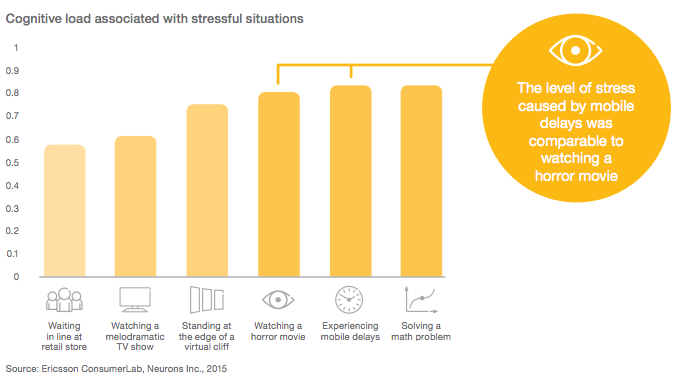
As marketers, that’s not the way we want visitors feeling when accessing our content or evaluating our product or service.
Visitors May Blame You for Their Bad Experience
In some cases, when website visitors experience a delay in loading time, they blame their cellular provider for bad service. But the longer the delay, the more the blame for the delay turns to you: the content provider.
In the same Ericsson study, the researchers ran a Net Promoter Score (NPS) survey for customers, which asked them at what point they transfer blame from their mobile service providers to the content provider.
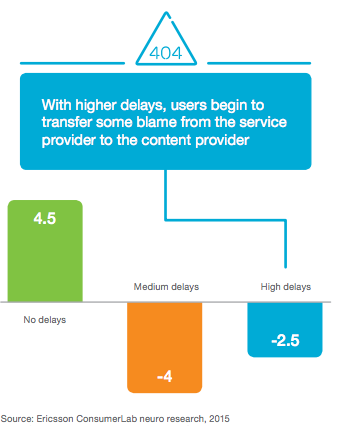
For customers in the study that experienced no delay loading a mobile website, their NPS score increased drastically (by 4.5 points) for their mobile service provider. But customers that experienced some delays started to place blame on the service provider; and the longer the delay, the less they blamed the actual provider, and the more they pointed a finger at the folks behind the website itself.
Slow Videos Seems to Be the Most Stressful
The use of large imagery and background video has become more common in website design lately. Videos are great assets and bring life to your content — but it turns out they can also be pretty stressful.
The researchers at Ericsson found that a YouTube video that had even a two-second delay in loading increased viewers’ stress levels by 3%; and once a video started playing, just a single pause caused stress levels to increase another 15%:
This added stress brings us right back to that horror movie — a feeling we certainly don’t want to leave visitors with.
Knowing how much load time delays can affect visitors physiologically, what can we do to make our mobile websites faster and give them a better experience?
5 Ways to Make Your Mobile Website Faster
There’s a lot that goes into website performance, but let’s cover the top five factors that play a role in your mobile website loading quickly.
1) Determine how your mobile website is setup.
Do you have a separate mobile website (such as m.exampledomain.com) or does your website use responsive design?
Google recommends using responsive design as their preferred methodology and based on how your mobile website is setup there are performance optimizations that your team can investigate. Read this blog post to learn how to test your website for mobile-friendliness.
2) Compress your images.
Remember that beautiful product or brand image I mentioned above that could actually be slowing down your website? If you compress that image, you could take seconds off your page’s load time. Because websites generally have a significant number of images, this is often the largest reason for slow load times — so we recommend addressing this first.
For example, let’s say your product image is displayed on a page as 500 x 500 pixels, but the actual size of the image file is 3500 x 3500 pixels. That image probably weighs a few megabytes (MB), and in many websites, the visitors browser will be forced to load the 3500-pixel version of the image first, and then resize it properly to its smaller version — all during the loading process. On desktop connections this happens constantly, but generally, it happens so quickly we don’t notice it.
But on mobile — especially on a cellular connection — the full-size image can take a long time to load, which can really frustrate users. To fix this, consider resizing, cropping, and then compressing your images. (HubSpot customers don’t need to worry about compressing their images — images uploaded to HubSpot’s software are automatically compressed. For non-HubSpot customers, tools like TinyPNG will help you reduce an image’s file size.)
We also recommending saving images in a format like JPG that’s relatively lightweight, good for your pages, and won’t bloat the user’s experience.
3) Minify all code, especially JavaScript.
“Minifying code” is the process of removing unnecessary characters without affecting the website’s functionality. It has a significant impact on time it takes for a website’s code to be processed, thereby making your website load faster across any device, whether desktop or mobile.
To minify your code, you’ll likely want to get someone from your website team or development team involved because it does involve directly changing the code on your website. It’s even better if you can remove some JavaScript (or other code) from the mobile versions of webpages to speed them up further. (To learn more about minifying code, check out these instructions from Elegant Themes.)
4) Load videos in the background (or not at all).
Videos are likely the largest resource on your pages, and will take the longest to load on mobile. If the video is not critical for the user experience, consider hiding it in the background — or not even loading it at all. By hiding videos in the background, they’ll loading will help with the perception of your website loading quickly but may not ultimately solve an issue of a slow-loading mobile website.
How do you make a video load in the background? You or a member of your development team could insert some CSS into the code so that the video won’t show up at all when the visitor lands on the website.
If your website includes long videos that describe your product or service, you could try using a call-to-action instead of putting the video directly on the website so mobile-specific visitors can, for example, email the video to themselves and view it later. This saves time in the near-term, and also makes the mobile experience vastly better for visitors.
(Note: If you choose to create CTAs for mobile users, think about the spacing around your text boxes and images to make sure your webpage is legible and easy to interact with, regardless of which device your visitors are using to access your page. Buttons that are difficult to interact with on a small screen could lead to a frustrating user experience.)
5) Take advantage of the cache and speed benefits of a Content Delivery Network (CDN).
Content Delivery Networks (CDNs) help cache and load content on servers in different locations so that, no matter where on the internet the visitor is coming from and which device they’re using, they’ll have a faster — and better — user experience. If your website isn’t on a CDN, you could be missing out on a number of performance benefits that we would strongly recommend.
(HubSpot customers: The HubSpot Website Platform uses responsive design, has automatic image compression, and is backed by our CDN for loading your website really quickly — so you don’t need to worry about these things. In fact, according to Yottaa, an independent Internet Performance company websites on HubSpot load faster than on other content management systems.)
There’s a lot at stake for marketers in ensuring our websites not only look great, but function and perform great as well. A fast-loading mobile site will ensure your visitors don’t bounce from your site, and that they won’t experience levels of stress similar to watching a horror movie. You can use the tips above right away to dive in and to start improving performance of your desktop and mobile website.
Can Computers Teach Us How to Write? How WriteLab Developed an Algorithm for Better Writing [Podcast]
Most of us know that learning to write can be a painful process.
You spend hours honing a piece that you hope and pray will be good. You get it to a point where you think it’s passable, and then pass it off to a friend or colleague for editing and feedback help.
They send back their comments. (Sometimes, they’re harsh … but you know it’ll make you a better writer.) You make changes to your piece. Then, you rinse and repeat with new pieces until you’re consistently producing high quality work.
This whole process isn’t easy — nor is it quick. But what if technology could speed it up — without sacrificing the quality of feedback needed to grow as a writer?
That’s precisely what WriteLab is trying to build. Using algorithms and machine learning, their tool analyzes someone’s writing and gives the writer tips on how to improve it.
On this episode of The Growth Show, WriteLab’s Co-Founder & CEO Matthew Ramirez joins HubSpot’s CMO Kipp Bodnar to talk about the lessons and challenges his company has encountered when addressing such an audacious — and important — problem.
To listen to the episode, click “play” in the player below, or download the episode on iTunes:
Check out the latest recaps of The Growth Show episodes by clicking here.
9 Reasons Why TrueView is a Brilliant Platform for Inbound Marketers
YouTube is a big business. There are over a billion people — that’s almost a third of all internet users — watching hundreds of millions of hours of YouTube videos every day.
Clearly, YouTube’s TrueView ad platform presents a massive opportunity for marketers and brands. Campaigns in TrueView are set up and managed using AdWords, which makes it versatile in terms of targeting settings and ad formats. Not to mention, ads are less intrusive from a viewer’s perspective. The benefits of using TrueView as an ad platform are abundant.
The two main options for running campaigns are in-stream ads (usually linking to your website and offering additional calls-to-action), which are shown before or during a video, and in-display ads (usually linking to a video) targeting keywords, which appear in the search results or in the side panel next to videos.
There are multiple advantages of running TrueView ads as part of your inbound marketing strategy, including:
1) YouTube advertising is young and low cost
The relatively low cost of advertising on YouTube, in its infancy stage, means you can test out the flexible campaign settings and targeting options at your liberty. In contrast, when TrueView ads become more expensive in the future, advertisers will spend more money on experiments that fall flat. Get on board early, so you can learn the ropes before the market becomes saturated.
2) It’s pretty native
Native advertising is a growing trend right now, and TrueView ads have the potential to appear very naturally on the YouTube platform. After all, people came to the website to watch videos.
In-display ads in particular, which can appear as suggested videos or search results, sit comfortably beside YouTube’s non-ad content.
In-stream ads, on the other hand, can be more intrusive, so they should be well-targeted and engaging to encourage viewers to watch them rather than skip.
3) For the most part, you’ll only pay for engaged viewers
The viewer has the option to skip your in-stream ads after five seconds, but you only pay when a whole clip or 30 seconds of the clip is viewed — whichever is shortest — or when a viewer engages with your video, if that interaction comes first.
Likewise with in-display ads, you pay for clicks rather than impressions. As a result, you will usually only pay for those viewers who are interested in your message.
4) Earned conversions are free
A viewer doesn’t need to watch the full video or click an ad in order to convert. In the days following an impression, they may decide to visit your website and later convert of their own accord.
Make a strong first impression with your ad and your messaging will stick, whether they continue watching to the end or not.
Ads shown to users which weren’t viewed or clicked on, but later convert, are earned views. These conversions aren’t charged for, so enjoy the free marketing!
5) Targeting can be very granular
Using your AdWords account, it’s possible to target certain types of user (based on demographic categories like age group and gender), as well as categories of video and specific channels, so your ad gets shown only to the types of people likely to engage and convert.
You can also target specific keywords to help you reach relevant audiences, and combine keywords with other targeting settings to zoom in on smaller subsets of YouTube users. For example, you might choose to target females aged between 18 and 24 who search for “bedroom makeover”.
6) Ads can be highly contextual
It’s possible to advertise new and different content within your own videos which cover a specific topic. This could mean advertising short form content like a snippet of or an intro to a webinar and giving viewers the option to click a call-to-action to view the full video. This way, you’re benefiting from the opportunity to advertise a relevant video to viewers who are already engaged with the topic.
7) There are multiple ad formats
TrueView is a very flexible platform when it comes to ad formats. For example, it’s possible to show banner ads as an overlay on videos, as well as showing banner ads next to videos as part of a Display Network campaign.
For both in-stream ads and your longer videos, there are options to add cards (clickable overlays which point viewers to more video content, playlists or offers), CTAs and links to your website within the video display. This encourages viewers to continue engaging with your content and discover more about your brand and content.
8) Push whatever content you want
A new webinar, your latest eBook, tutorials, some client testimonials or a product launch… the list is endless as to what you can promote via both in-stream and in-display ads. As long as you have the resources to make a video or presentation, you’re ready to go.
9) Run remarketing campaigns
TrueView ads offer the same targeting that’s available on Google’s Display Network or their remarketing platform; they allow you to push new content and messaging to new and relevant audiences via their internet history, as well as people already affiliated with your brand, to encourage them to revisit, reengage and convert.
You can export your AdWords email list, so as long as your contacts are signed into YouTube, they will be shown specific ads depending on your settings. For improved relevance, segment your remarketing list into buyer persona and buyer’s journey stage, to make sure the right people are getting hit with the right messaging at the right time.
By linking your YouTube account to your AdWords account, you can even create remarketing lists based on the videos people have watched. This can be used to create a funnel where each ad in a sequence helps to push your viewers through the buyer’s journey.
TrueView Makes Sense for Inbound Marketers
There are so many reasons why inbound marketers should use TrueView to get their brand and messaging in front of YouTube’s viewer base. Whether it’s the cost efficiency, versatility, engagement levels or non-intrusiveness of TrueView ads that initially draws you in, you’re bound to find more benefits once you explore the platform in more detail.
As with many things (and marketing tools are no exception), you’ve got to try it to love it. For a helping hand, download our best practices eBook.
CTA