
How to Spend Less Time on Email: 12 Tips for Keeping Your Inbox Under Control
Managing your email inbox can feel like playing a never-ending game of whack-a-mole. Just when you think you’ve gotten to inbox zero and start doing your little victory dance … up pop another email. And another one.
What’s worse, the sheer volume of email we get often exceeds the time we can afford to deal with it. This becomes a bigger issue when we let our guilt get the better of us — the guilt that comes with not responding right away, responding curtly, or not responding at all.
But the fact is, there are more important things on our to-do lists than email. Want to spend less time living in your inbox, and more time doing the stuff that actually matters? Here are 12 tips to get you started.
12 Tips For Better Email Management
1) Unsubscribe. Ruthlessly.
The easiest way to maintain inbox zero? Get less email. The very first step to achieve an emptier inbox is unsubscribing from every single email list that doesn’t provide you with value on a regular basis.
In fact, my recommendation is to unsubscribe from everything. Take a few days to let it sink in, and then re-subscribe only to the newsletters you really, truly miss. In this step, you might consider converting any daily digests you used to follow to weekly ones.
While unsubscribing manually from tens — hundreds? — of newsletters one by one sounds tedious, there are tools out there that can help you do it in just a few clicks. Unroll.me is my personal favorite: It’s a free tool that lets you mass unsubscribe from all the newsletters you don’t read. You can either unsubscribe from everything at once (my recommendation), or you can pick and choose. Read this blog post to learn more about how it works.
2) Remove yourself from any internal company and business threads you don’t need to be on.
Once you’ve unsubscribed from external newsletters, it’s time to evaluate the internal emails you receive on a regular basis. Do you really need to get email notifications every time the sales team closes or deal, or every time someone on the marketing team reports a bug?
If the answer isn’t a definitive “yes,” do yourself a favor and remove yourself from whatever alias or list you’re on. If that makes you wildly uncomfortable, compromise by creating a folder in your email client and send those emails to that folder automatically. (To set at up, you can create filters in Gmail or rules in Outlook.)
3) Understand — and embrace — that you can’t respond to everything.
Part of maintaining a manageable inbox — and your sanity — is to change the way you think about email a little bit. Only you can decide what deserves your very limited time and attention. When it comes to email, understand that there’s simply no way you’ll be able to respond to every single email that arrives in your inbox, let alone read them all.
I love the way Merlin Mann puts it: “Stop thinking of emails like precious family heirlooms, and start treating ’em like pints of milk. Perishable, time-stamped milk that becomes a little less fresh every day until it smells kind of funny and just needs to be dumped. Believe me, there will always be more coming.”
So if you’re looking at an email and know in your heart of hearts you’re never going to respond to it, archive it. Better yet, delete it. As Mann says, “Trust your instincts, listen to them, and stop trying to be perfect.”
4) Keep your replies brief whenever possible.
When you do have to reply to an email, you’ll find that in most cases, you don’t need to craft the perfect response. Often, a few sentences will do; in some cases, a few words. If you let an email with an action item sit for a few days, a quick “Do you still need this?” email might end up saving you a lot of time.
Don’t feel guilty about sending succinct emails. If you’re concerned your brevity will be taken the wrong way, give a heads-up to the folks you exchange emails with the most. Tell them that, in your effort to spend less time on email and more time on your actual work, you plan to cut down word count in your emails.
The better you get at deleting emails you don’t need to read or respond to, the more time you’ll have to write the emails that warrant those long responses.
5) Use pre-written replies.
Which types of emails do you find yourself typing out over and over, without really needing to customize them?
I, for example, often find myself referring people to HubSpot’s guest blogging guidelines page. I used to write one-off emails to folks, meaning I’d have to craft a few sentences, find and copy the link, and so on. Now, I give myself ten minutes back in my day by sending pre-written replies via Gmail’s “canned responses” feature.
Gmail, Outlook, and other email clients offer canned responses. Below are instructions for setting up and using them in Gmail.
To Set Up Canned Responses in Gmail:
- Click the gear icon in the upper right-hand corner and choose “Settings.”
- Click the “Labs” tab, find Canned Responses at the top, and click “Enable.” Scroll down and click “Save Changes.”
To create a canned response, compose a new email and click the little arrow in the bottom right-hand corner of the new email. Choose “Canned responses,” and then “New canned response.” From there, you can name your new canned response, write it, and save it. Anytime you want to use it, simply go back to that little arrow, choose “Canned responses,” and click on the one you’d like to use. (Learn more on Google’s website.)
To Set Up Canned Responses in Outlook:
In Outlook, the best option I could find was to set up your canned responses as “Signatures.” That way, when you reply to an email, you can choose the appropriate “signature” and the whole canned reply will appear. Here’s how to do that:
- On the Outlook menu, click “Preferences.” Under “E-mail,” click “Signatures.”
- Click the plus icon to add a new signature.
- A new signature will appear under “Signature name” with the label “Untitled.” Double-click “Untitled,” and then type in a new name for your canned response.
- In the right pane, type the text that you want to include in the signature — in other words, type in your canned response.
Once you create the canned response as a signature, you can add it to a new email by clicking in the message body, choosing the “Message” tab, clicking “Signatures,” and choosing a signature from the list. (Learn more on Outlook’s support page.)
6) Employ a one-click rule.
This rule might seem simplistic, but it’s a huge time-saver. The “one click” refers to a single click to open an email once. Once it’s open, decide exactly what you want to do with it right then and there: Reply, forward, send to a folder, archive, and/or delete.
The point here is to not open an email, read it, and then decide to deal with it later and move on. That’s the bad habit that’ll guarantee you a clogged inbox and more stress down the road.
7) Triage emails using “special stars” in Gmail.
If you use Gmail and your goal is to get to inbox zero and maintain it, then I’d like to direct you to the email system that’s changed the way I do email. Here are the full instructions. This works great in conjunction with the one-click rule we just talked about.
The premise is this: In Gmail, you’ll set up multiple inboxes and give each of them a name, like “Needs Action/Reply” and “Awaiting Response.” Your general inbox will then appear on the left, and your labeled inboxes (which Gmail calls “panes”) will appear on the right, like so:
You’ll use what Gmail calls “special stars” — kind of like Gmail’s labels, but better — to categorize every single email that comes into your inbox.
Every time you get a new email in your inbox, you’ll want to:
- Reply to the ones you can right away.
- Label the emails you need to deal with later by marking them with the appropriate special star.
- Archive or delete any emails you don’t need to deal with.
In the end, you’ll archive everything. Your inbox will stay at zero, and everything else will either be in its designated pane, archived, or deleted.
Use Outlook?
SimplyFile is a free organizational tool that’ll help you categorize emails using folders. When an email comes in, all you have to do is drag it into the appropriate folder. You can organize both messages you’re receiving in your inbox, as well as messages you’re sending — which you can file as you send them.
Image Credit: SimplyFile
8) Delegate emails to others using a collaboration tool.
Sometimes, you might find that you receive emails that are better handled by someone else. In these cases, you could either forward the email, or you can streamline the process by quickly sharing the email with someone on your team using an email collaboration tool.
There are a number of email collaboration tools out there to choose from. If you use Gmail, Hiver is a great choice: It lets you share Gmail labels (and therefore share folders) with other users, which you can use to assign tasks, delegate emails, and even track their status if you want to. If you need to add a quick note explaining what’s going on in an email thread, you can do that right in the tool.
Image Credit: Hiver
9) Use the “yesterbox” approach.
“Yesterbox” is a methodology for managing your inbox created by Zappos CEO Tony Hsieh. This approach is kind of like inbox zero, except you’re working off all the emails from yesterday and treating them like today’s to-do list.
The basic premise is this: Every morning, you have a fixed number of emails to answer instead of an endless flood of new emails coming in. Once you finish dealing with yesterday’s emails, you’re done with email for the day. Here are the full instructions.
Like Klinger’s methodology from #7, you’ll categorize incoming emails into folders labeled “Yesterbox,” “Today,” “Action Required,” “Awaiting Response,” and so on. As new emails come in, you’ll label them accordingly. But as for actually dealing with these emails — that’s left for a specific time on your calendar that you’ve designated for handling yesterday’s emails. In the end, your Yeseterbox is a to-do list with static tasks.
It’s that freeing sense of completion that makes this method so appealing — but be wary that if your job requires you to tackle emails as they come in, this may not be the best method for you.
10) Set up filters when you go on vacation.
Vacations are awesome, but coming back to a jam-packed inbox is … not so awesome. One way to manage your email workflow while you’re gone for long periods of time is to set up filters.
This is an approach HubSpot’s Director of Marketing Rebecca Corliss found worked really well for her when she went on her month-long sabbatical. Corliss was working in Gmail, but you can adapt this method for most email clients. In short, here’s what she did:
- She created a new folder for her vacation (“Spain Sabbatical 2015”).
- She set up a filter that recognized any emails being sent to *@hubspot.com. By putting the asterisk there instead of her actual email, she was able to capture not only emails that were sent to her work email address, but also emails sent to the company aliases she was on.
- She added a second filter that deleted irrelevant emails — for example, all the daily and weekly digests she expected to receive, like metrics updates.
- When she returned, she strategically handled all her unread emails. For example, she searched for emails she wanted to respond to first by conducting key searches for her manager’s email address.
Once these more time-sensitive messages are addressed, she blocked time to go through the remaining emails and respond only to the ones that were absolutely necessary. Here are the full instructions.
11) Block time to get back to inbox zero.
Dedicating specific chunks of time to get back to inbox zero isn’t just for when you return from vacation. It should be something you tackle in short batches on a daily basis, and in larger chunks every week or so, depending how much new email you receive.
The purpose of batching email? So you aren’t handling emails as they arrive. That can be a serious productivity killer, and can pull you away from projects and tasks that are more important than a perfectly clean inbox.
On a daily basis, limit yourself to dealing with new emails during fixed periods each day. For example, HubSpot Demand Generation Manager Amanda Sibley physically blocks off an hour in the morning and an hour in the evening on her calendar for getting her inbox in order. Do what works for you.
12) Use keyboard shortcuts.
To make the process of reading, replying to, archiving, and deleting emails a lot faster (and generally more enjoyable), take advantage of any keyboard shortcuts your email client offers. Here are tips for keyboard shortcuts in Gmail and Outlook. If you use a different email client, do a quick Google search for the name of your email client + “keyboard shortcuts.”
Keyboard Shortcuts in Gmail:
First thing’s first: You’ll need to activate keyboard shortcuts. To do this:
- Click the gear icon in the upper right-hand corner and choose “Settings.”
- Click the “General” tab, find “Keyboard shortcuts,” and select “Keyboard shortcuts on.” Scroll down and click “Save Changes.”
- Then, go back to “Settings” via that gear icon, click on the “Labs” tab, and find “Custom keyboard shortcuts” (by Alan S). Choose “Enable.” Scroll down and click “Save Changes.”
Once custom keyboard shortcuts are turned on, a new tab will appear in your Settings called “Keyboard Shortcuts.” Head over there to learn the default keyboard shortcuts and customize them if you’d like.
Keyboard Shortcuts in Outlook:
Outlook doesn’t let you customize keyboard shortcuts, but they have a heck of a lot to choose from. Here’s the full list, and below are some favorites:
- Create a new message: ⌘ + N (Mac); Ctrl + N (PC)
- Send an open message: ⌘ + Return (Mac); Ctrl + Return (PC)
- Save an open message and store it in Drafts: ⌘ + S (Mac); Ctrl + S (PC)
- Forward a message: ⌘ + J (Mac); Ctrl + J (PC)
- Display the next message: Control + ]
- Display the previous message: Control + [
- Delete the selected message: Delete
- Mark selected messages as read: ⌘ + T (Mac); Ctrl + T (PC)
Looking for more ideas for gaining and maintaining control of your email? Here are 11 inbox organization tools to try, as well as four solutions to getting “inbox zero” based on your personality.
What other ways have you gotten to inbox zero? Share with us in the comments.
The Anatomy of a Profitable Ecommerce Rewards Program [Infographic]
85% of ecommerce brands are looking to add value to customers beyond discounts and promotions. Yet, 97% of rewards programs are transaction-based.
Giving discounts to attract customers is often a knee-jerk reaction to boost sales. But competing on price is a race to the bottom. Most ecommerce businesses can’t survive by giving deep discounts to one-time customers. To succeed in the long term, you have to shift your focus to customer retention.
Loyalty programs can drive high margin repeat business, but most programs fail to add value to the customer experience. To get real value from your customer loyalty program, you need to go beyond the discounts.
Rewarding your customer for engagement or shared values creates a powerful connection that results in loyalty and repeat business.
The infographic below from Selfstartr shows that loyalty programs are often misunderstood by brands. The anatomy of a profitable rewards program is one that avoids discount hunters and focuses on building relationships.

Marketing Must-Do’s For Helping a New Educational Program Take Off
Launching a new program at your school is a huge and exciting undertaking. Yet it isn’t merely about creating the new curriculum, or finding the right faculty to deliver the program. Your biggest responsibility is finding students for it and getting them to enroll.
You’ve been thinking a lot about how to market this new program. The good news is you’ve got building blocks already in place that you can leverage. All it takes is uncovering them and suddenly you’ve got a launching off point for your marketing efforts.
Here’s our list of inbound marketing priorities so you can make the most of these building blocks as the foundation of your new assets designed to promote the new program.
Marketing Must-Do’s Checklist for Promoting a New Program
Build Personas Specific for the Program
A new program is definitely one of those events that should trigger new persona development. Start with some of the information you already know about the persona of your institution’s general ideal student. Then do your research to refine the personas for this program. Talk to:
- The program director or manager who created the program and got it approved. They will certainly have an on-the-ground view of the type of student the program was created for and what their needs and priorities are.
- The admissions officer responsible for the program, who can provide perspective on what questions potential applicants are asking and what factors loom largest as they make their enrollment decision.
- Academic and career counselors who are steering prospective and current students into the right programs suited to their interests, abilities, and strengths. These can be counselors both at your school and at some of your feeder schools.
Don’t overlook the students themselves, or their parents! Research social media to hear from students enrolled in similar programs, or talking about enrolling. Visit relevant blogs and forums to read through the comments section. Note the language they’re using, as well as the concerns and preferences they express about researching and selecting the right school or program. For more info on creating personas for your school, check out this post.
Craft Messages that Resonate with your Personas
Personas in hand, you job now turns to content creation. Here’s how to take the personas you’ve developed, and put them to work:
- Clarify where your new program fits in your school’s current landscape. Does it fill a gap? Or expand a popular study area that needs fresh, new challenges?
- Use how the program is related to, or different from, other school programs, to give prospective students a context that’s appealing to them. For example, let’s say you have two different programs you want to feature, astronomy and history. Your messages would be different for each. You could tout technology in the classroom for one, and access to online research tools for the other.
- Review what you’ve learned about your past messaging for related or similar areas. Now you’re not starting from scratch wondering what language, style, and content will engage prospective students.
- Align your new, very specific messaging for the new program, with the established message priorities you’ve set for the school at large. In other words, make sure the two messages don’t conflict or contradict each other. If one of your key messages for the school is to tell the stories of your instructors’ real-word expertise and experience, then show how that applies in your new program.
- Outline the flow of the main messages you want to deliver at each stage of the enrollment cycle, including the messages designed to draw prospective students into the next phase.
Develop Unique Content that Drives Eyes and Enrollments
Put your new personas and messaging at the center of all the content developed specifically for this program.
- Select your primary persona. Do you need to quickly start showing enrollment? Then select the persona most likely to be looking at your initial enrollment date.
- Build your smart lists criteria so you know exactly what information you want to capture about website visitors showing interest in this program.
Create Content For Each Stage in the Enrollment Journey
Generate Awareness
- Research and create your working list of SEO keywords
- Will you run a PPC campaign to raise awareness?
- Set up program page within school website
- Does any aspect of the program lend itself to a creating a microsite? If it’s filling a gap, what gap is it filling? Does it prepare students for a field expected to have high job growth over the next decade? A microsite exploring an issue that attracts people interested in the area of study — and provides an opportunity to get them into your contact database — may be worth the investment.
- Write up a list of blog topics and create your editorial calendar. Use your research from the persona stage for keywords to create your topic list, and consider setting up a category tag for the program.
Convert Strangers into Leads
- What is your key piece of premium content that will convert visitors into contacts? Look to your persona research to find the most compelling question to answer.
- Set up the download form on the program’s webpage. Do you want to create a separate landing page for the premium content offer as well?
- Outline an email nurture campaign that will move contacts into actors. What different actions do you want them to take? Read about the practicums available in the program? Set up an interview appointment? Go to a “meet and greet” with the program faculty?
- What criteria move a contact to the smart list ready to receive application CTAs?
- Develop your follow-up sequence to move accepted applicants to enrolled student.
You can find some email tips for the admissions process here.
Leverage Existing Assets and Channels
There are lots of ways you can take existing content and re-use it, again and again, as well as ways to draw people’s attention to your programs. Here are three sure-fire cost-effective ways to do that:
- Add special announcements on every relevant asset with a link to the program webpage or landing page:
- Website homepage
- Community newsletter(s) to students, faculty and alumni → get your word of mouth network going!
- Rotate announcements focusing on your different messages through your social media channels. What fun, attention-grabbing content can you create specifically for social media? Does your school have an active Snapchat channel? Have one of the program faculty or student in a related program create a Story showing their day on campus.
Freshen up some older blog posts that will interest these personas.
- Insert a program keyword into the text.
- Tag it with the program’s category.
- Add a new CTA offering premium content related to the program for download.
- Add a link to the program’s webpage.
- Re-promote and distribute these posts with applicable keywords and hashtags.
Audit your existing content to find repurposing material
- Look at content for a related area of interest or addressing similar concerns and priorities expressed by this program’s personas; prioritize content with a track record of success
- Re-promote and distribute content as-is with new hashtags and headlines
- Re-work the content, or pieces of it, customizing it as a new piece of content for the program
Our “must-do” checklist is part to-do list/ part issues to consider. Step through the entire list to design a campaign plan that will attract the attention of the right applicants and hook them in with awesome, informative content they can’t bear to ignore.
Are Your Employees Happy? Here Are 10 Feedback Tools to Help You Find Out
This post originally appeared on Agency Post. To read more content like this, subscribe to Agency Post.
Having trouble attracting and retaining top talent? You’re not alone.
With competition for talent increasing, a lot of businesses are renewing their focus on company culture and employee engagement. But for a company culture to exist, management must be focused on employee happiness — and this isn’t an easy task.
Deloitte outlined 20 engagement factors companies need to consider and excel at to keep employees engaged. And most organizations are starting from a place of weakness: Gallup found in 2014 that 13% of all employees are “highly engaged” and 26% are “actively disengaged.”
To start, businesses need a better idea of how happy, fulfilled, challenged, and dedicated employees are. They need to understand the health of their company culture and how employees perceive the organization. They also need a system for eliciting feedback and tracking satisfaction and issues over time. Only with this information can leadership address issues, make changes, and improve their employee engagement.
To get you started gathering this information, we’ve put together a list of some of the best employee feedback and culture tools. Check them out to see which one might help you make improvements in your own office.
10 Employee Review & Feedback Tools to Consider
1) 15Five
Employees take 15 minutes to answer a survey from their managers, and managers need five minutes to review: That’s the basic idea behind the platform. But the tool provides a lot of other useful features. Managers can create custom survey questions (15Five provides a library of valuable question prompts), set different reviewers for different employees, and send along answers to other people in the organization who need to see the feedback or would be responsible for enacting change, such as a hiring rep. You can create groups within the system if you manage multiple teams, which allows you to ask company-wide while also team-specific questions. The app also has a section for goals and accomplishments so that employees can list out the important tasks they plan to accomplish by next week, helping to keep people accountable.
2) Culture Amp
Culture Amp provides tools to run performance reviews and pulse and culture surveys, and managers can review data based on the lifecycle stage of their employees — from candidates to onboarding to exit — or by demographics or time frame. It also has a reporting feature that performs a driver analysis, so you can see the most important “drivers” for engagement and happiness. Account managers of the system can set up teams, so that personalized questions are sent to specific employees and only the right managers have access to the reports.
3) TinyPulse
TinyPulse makes it easy to create staff pulse surveys so that you know exactly how engaged and happy your team members are. The platform sends out one question per week — they recommend sending yes or no, scale or NPS, or open-ended questions. Answers are anonymous, and managers can pull insightful reports by teams. In addition, employees can send colleagues “cheers” to show their appreciation and send suggestions for improvements to the company and its policies. It’s a simple app, but it’s all you need to stay current on the health of your company culture. (Full disclosure: HubSpot is a TinyPulse customer.)
4) Weekdone
Weekdone is an advanced employee feedback and progress tracking platform. The default is to have employees fill out information about their plans for the week, progress on projects, and problems. It can also be customized with specific questions and prompts. Weekdone integrates with Asana, Basecamp, and JIRA, allowing managers to better analyze the progress and productivity of team members. It also provides reporting on alignment between the employee’s objectives and the company’s goals.
5) Subcurrent
For those teams that ignore email but have plenty to say on Slack, this integration is an easy way to quickly get an opinion on a company event or policy. You simply log in with Slack, type the poll command, and then you receive a unique URL to customize your poll. There are paid options for turning anonymity off, asking open-ended questions, or for allowing users to select more than one option.
6) Impraise
This is a full-featured employee review, feedback, and peer praise platform. Impraise can help managers set up reviews and ask key employees for quantitative and qualitative feedback on a staff member, as well as gather feedback on their own management performance from their direct reports. A unique feature is its key strengths dashboard, where employees and managers can list out the skills for the employee’s role and then track feedback on that skill and measure the proficiency of the employee over time, providing them with a roadmap for professional development.
7) RoundPegg
RoundPegg is a custom survey tool that polls your team members on eight areas — such as job fit, expectations, growth and development, trust, etc. — that have been shown to align with employee engagement. It then provides you with recommendations to improve your score in weak and failing areas based on the culture types of your employees. You can use the tool to send short pulse surveys for feedback on an initiative or to gauge happiness and satisfaction. The company also offers products and services aligned with hiring for culture fit and determining your company’s individual culture.
8) Reflektive
Managers can conduct yearly, quarterly, or even monthly performance reviews through the platform. It also has a feature where you list company and team goals so that your direct reports always know what they should be working towards. Employees can provide feedback to other team members through Reflektive, in addition to being able to provide responses to manager-controlled morale polls.
9) 6Q
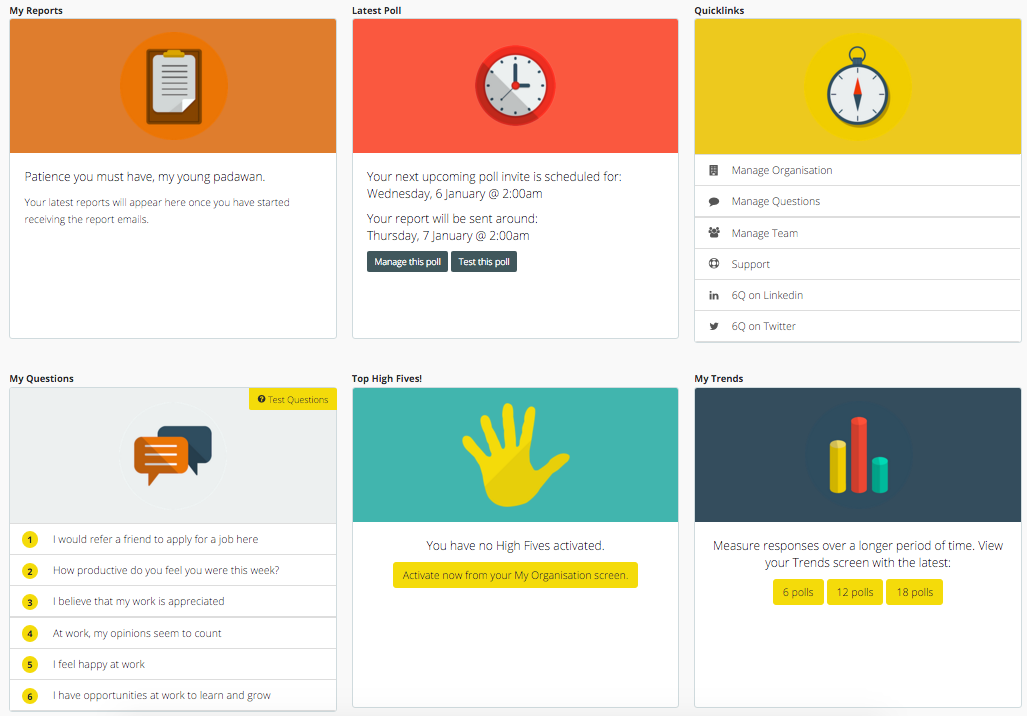
Washington-based agency BAM Creative designed this tool that lets managers ask six questions each week. Supervisors can choose from a question bank or add their own prompts. Employees can send virtual “high fives” to their peers to recognize a job well done, and the platform lets you pull reports on past survey questions to get a better idea of how employee engagement is trending.
10) Hppy
Hppy helps you understand what factors are affecting your employees’ moods and tracks them over time. Managers can customize questions, but users can only reply with on of three moods: happy, ok, or sad. Managers can request meetings from the app if they notice a downward or worrying trend in an employee’s responses, and you can send thank-you cards to staff to motivate and inspire their work. Managers can also calculate their team’s or company’s HppyIndex or happiness index and use this in reports or display it on a screen in your office.
How do you collect employee feedback? Share your best tips in the comments section below.
The Top 8 Design Trends to Watch This Year [Infographic]
The past few years have been exciting ones for great design.
Some of the web design trends from last year have proven themselves popular enough to stick around in 2016, like flat design, background videos, and robust mobile app design. More importantly, we’ve seen the rise of a few new trends that marketers and designers alike need to stay on top of, such as card-based interface design.
Which design trends should we be keeping an eye out for this year? Catch up on what’s popular in the design world — and what’s shaping up to be the next big thing — with this infographic from Coastal Creative.
38 Visual Content Marketing Statistics You Should Know in 2016
At the beginning of every year, we like to read through some of the major reports on inbound marketing, content marketing, social media, and online behavior.
At the risk of sounding like a broken record, it’s honestly amazing how fast things can change in twelve short months — and 2015 was certainly no exception.
Download our full collection of do-it-yourself templates for designing stunning visual content here.
This past year, we’ve seen the importance of visual content emphasized by the changes that occurred across almost every major social network, including Facebook, Twitter, Instagram, and Pinterest. At the same time, both video and infographics have become powerful tools for brands looking to communicate more easily with their readers.
To help you keep pace with these trends, let’s take a look at some statistics that demonstrate the impact visual content has on reach, engagement, and sales.
38 Stats You Should Know About Visual Content Marketing in 2016
General Visual Content Stats
1) Researchers found that colored visuals increase people’s willingness to read a piece of content by 80%. Tweet this stat! (Source)
2) When people hear information, they’re likely to remember only 10% of that information three days later. However, if a relevant image is paired with that same information, people retained 65% of the information three days later. Tweet this stat! (Source)
3) 46% of marketers say photography is critical to their current marketing and storytelling strategies. Tweet this stat! (Source)
Image Credit: CMO Council
4) 34% of marketers selected visual assets as their most important content, behind blogging (45%) and before videos (19%). Tweet this stat! (Source)
5) 65% of senior marketing executives believe that visual assets (photos, video, illustrations and infographics) are core to how their brand story is communicated. Tweet this stat! (Source)
6) Content with relevant images gets 94% more views than content without relevant images. Tweet this stat! (Source)
Image Credit: QuickSprout
7) Only 27% of marketers have a process in place to aggregate, organize, and manage the visual assets being used across their marketing teams. Tweet this stat! (Source)
8) 39% of marketers believe that more of their budget should be allocated to the acquisition or creation of compelling visual assets. Tweet this stat! (Source)
9) 73% of content creators plan to prioritize creating more engaging content in 2016, and 55% plan to prioritize creating visual content. Tweet this stat! (Source)
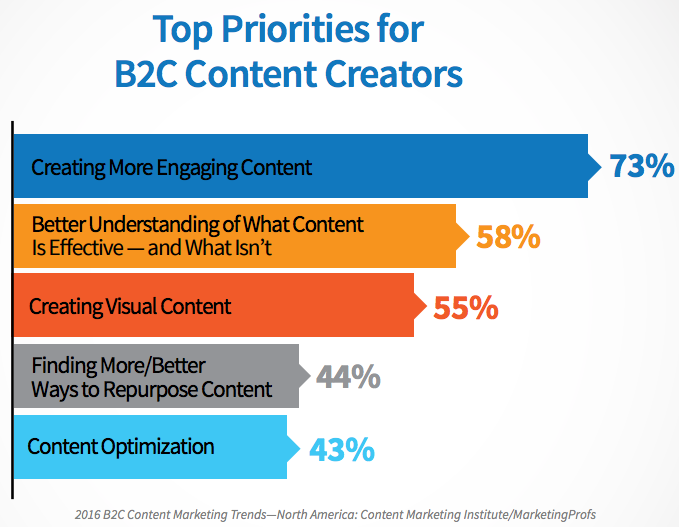
Image Credit: Content Marketing Institute
Video Stats
10) 51.9% of marketing professionals worldwide name video as the type of content with the best ROI. Tweet this stat! (Source)
11) Shoppers who view video are 1.81X more likely to purchase than non-viewers. Tweet this stat! (Source)
12) Using the word “video” in an email subject line boosts open rates by 19%, click-through rates by 65% and reduces unsubscribes by 26%. Tweet this stat! (Source)
13) Midway through 2015, mobile video plays exceeded 44% — up 74% from 2014 and up a whopping 844% since 2012. Tweet this stat! (Source)
Image Credit: Ooyala
14) Between April 2015 and November 2015, the amount of average daily video views on Facebook doubled from 4 billion video views per day to 8 billion. Tweet this stat! (Source)
15) In July 2015, Periscope users were watching 40 years’ worth of videos every day. Tweet this stat! (Source)
Image Credit: FastCompany
16) In Q2 of 2015, mobile phones (34%) and tablets (15%) combined for 49% of video ad impressions — up from 38% in Q1 of 2015. Publishers saw PC impressions drop from 62% to 50% in the previous quarter. Tweet this stat! (Source)
17) Syndacast predicts 74% of all internet traffic in 2017 will be video. Tweet this stat! (Source)
Image Credit: Syndacast
Infographic Stats
18) Eye-tracking studies show internet readers pay close attention to information-carrying images. In fact, when the images are relevant, readers spend more time looking at the images than they do reading text on the page. Tweet this stat! (Source)
19) Infographics are Liked and shared on social media 3X more than other any other type of content. Tweet this stat! (Source)
20) Infographics were the B2B content marketing tactic with the biggest increase from 2014 to 2015, up from 51% to 62%. Tweet this stat! (Source)
21) People following directions with text and illustrations do 323% better than people following directions without illustrations. Tweet this stat! (Source)
Image Credit: NeoMam
22) 60% of marketers predict the use of infographics will increase in 2016 compared to 2015. Tweet this stat! (Source)
Image Credit: CMO Council
Social Media Stats
23) Visual content is more than 40X more likely to get shared on social media than other types of content. Tweet this stat! (Source)
24) Articles with an image once every 75-100 words got double the number of social shares than articles with fewer images. Tweet this stat! (Source)
25) 71% of online marketers use visual assets in their social media marketing. Tweet this stat! (Source)
26) B2C marketers place more importance on visual content than B2B marketers — and a whopping 40% of B2C marketers say visual content is the most important type of content. Tweet this stat! (Source)
27) Facebook posts with images see 2.3X more engagement than those without images. Tweet this stat! (Source)
Image Credit: BuzzSumo
28) Buffer reported that for its user base, tweets with images received 150% more retweets than tweets without images. Tweet this stat! (Source)
Image Credit: QuickSprout
29) The Instagram community has grown to more than 400 million as of September 2015. Tweet this stat! (Source)
30) On Instagram, photos showing faces get 38% more Likes than photos not showing faces. Tweet this stat! (Source)
31) Organic engagement on Facebook more than doubled in 2015, while organic engagement on Instagram almost halved. Tweet this stat! (Source)
Image Credit: Forrester Research
32) The average engagement per Instagram post has grown by 416% over 2 years. Tweet this stat! (Source)
33) 52% of teens use Instagram, and nearly as many (41%) use Snapchat. Tweet this stat! (Source)
Image Credit: Pew Research Center
34) Snapchat has 100 million daily users, 65% of whom upload photos using the app. Tweet this stat! (Source)
35) Women continue to dominate Pinterest: 44% of online women use Pinterest compared with 16% of online men. Tweet this stat! (Source)
Image Credit: Pew Research Center
36) Shopify users referred by Pinterest spend an average of $80 compared to the Facebook referral average of $40. Tweet this stat! (Source)
37) Pins on Pinterest have viral potential: Over 80% of pins are re-pins compared to 1.4% of tweets retweeted. Tweet this stat! (Source)
38) 88% of consumers have purchased a product they pinned, and 49% have purchased 5 or more products they’ve pinned. Tweet this stat! (Source)
Image Credit: Jeff Bullas
How do you plan to incorporate more visual and interactive content into your 2016 marketing strategy? Share with us in the comments.
Editor’s Note: This post was originally published in January 2015 and has been updated for accuracy and comprehensiveness.
A Nonprofit’s Guide to Building Audience Personas
If you’ve found your way to this blog post, you’re probably well acquainted with the concept of a customer persona (but if you do happen to be looking for a quick refresher, check out this free template that we put together in mid-2015).
The challenge is that you probably haven’t come across a definitive resource for nonprofits. Why? These organizations think about their communities, audiences, and stakeholders much differently from typical for-profit companies.
But if you think about it, the strategies for the two groups should be more aligned than they are different. Here’s why: Consumers are consumers, no matter the context. The same buyers in a B2B context will be retail shoppers and supporters of causes.
Organizations, no matter the type or size, all have growth goals. In the for-profit world, growth is tied to metrics like subscriber counts, sales over time, revenue per customer, etc. In the nonprofit world, it’s all about memberships and donations. Revenue is still an important part of the nonprofit equation—organizations just raise and utilize money in different forms.
The process of developing customer personas, as a result, will be similar between nonprofit and for-profit sectors. At the same time, you’ll want to pay attention to some important nuances. The following steps will help you strike the right balance:
1) Interview Your Stakeholders
Your customer persona process should always begin with qualitative research. In the business world, this concept—a system for interviewing and analyzing data from your company’s target audience—is known as customer development and incorporates a blend of field research, anthropology, and ethnographic analysis.
The idea, from a corporate standpoint, makes sense: instead of making assumptions, rely on your key customers and stakeholders to guide you. Conduct interviews to make sure that your messaging and value proposition are making an impact. Make sure to consult multiple perspectives and talk with donors, volunteers, past members, new members, and long-time members, too. You’ll want this blend to see multiple, hidden sides to your customers’ stories. Here’s a quick checklist to get you up and running with your qualitative interviews:
- Take a look through your community database. Identify patterns based on common attributes, and create groupings.
- Recruit a few people from each of those groups (maybe 2-3). Schedule 30-45 minute calls with individuals who opt-in: keep reaching out to new contacts until your bandwidth is full.
- Record your calls so that you can analyze patterns and introduce new groups that you may not have noticed.
The beauty of this process? It will create a rough blueprint for your customer personas. The ‘groupings’ that you come up with will be your personas. The attributes of those individuals will help you tailor your marketing messaging.
Persona development is that straightforward.
2) Sanity Check Your Data
In addition to the qualitative research that you’re conducting, you’ve probably collected a lot of information about your members and stakeholders–particularly details around what made them become active.
You’ll want to keep in mind, however, that not all data is fact. Why? The answer boils down to two words that you probably haven’t heard since college: selection bias. The groups that opt into your organization are very different from the population as a whole. But how so?
One way to answer this question is to cross-check your data with industry publications and trend reports. To get started, take a look at the sector-specific reports that your donors and leadership team are already consulting.
And if you’re not sure where to start? Take a look at government resources: The Census Bureau, Bureau of Labor Statistics, and Centers for Disease Control (CDC) are great places to find information. Your goal here shouldn’t be to validate your numbers: instead, understand your organization’s greater story, and focus on the nuance.
3) Understand ‘Negative Personas’
By now–based on internal and external data that you’ve gathered, analyzed, and vetted, you’ll understand who makes a strong member within your nonprofit’s community. You’ll also know who doesn’t.
It’s critical that you identify these ‘negative personas’ early. They’re a waste of energy, time, and money for your organization to chase: if you’re actively marketing to these negative personas, you’re likely facing some severe opportunity costs.
Understand your ‘negative personas’ so that you can focus on more of the good ones. As a nonprofit, especially, your teams have limited bandwidth. Make sure that you’re investing your efforts in the areas with the highest ROI.
Now Comes the Fun Part
Steps 1-3, as simple as they seem, will ensure that no detail falls through the cracks when you’re defining your audience personas. In addition to the patterns you’ve uncovered, you’ll want to incorporate demographic and psychographic variables that are relevant (i.e. if you’re aiming to reach audiences in a specific age bracket or geography who have a particular interest-base).
With the right personas in place, you’ll have a natural way to tailor your messaging. The best part? You won’t even need to think about your strategy: you’ll just imagine that you’re talking to your most engaged audiences, in person.
What could be better?
With the right planning and forethought, your personas can supercharge your messaging. Make sure to give your research and exploration process, steps 1-3, the attention that it deserves.
Why Overworking Is Bad For Your Health (And Who’s to Blame)
There’s no doubt that technology has simplified the way we carry out our day-to-day routines. Computers help us do things faster, emails and text messages let us always be in touch, and the internet makes it easy to find the answer to any question with just a quick Google search.
While being constantly plugged in can make us feel safe, connected, and in-the-know — both at work and at home — it also means we never really clock out.
It’s one thing to pull a long day every once in a while to finish a project or deal with a crisis, but it’s another to routinely stay late at the office or work into the night. That’s chronic overwork — and it can have extremely negative impacts on your health, happiness, and overall quality of life.
But working overtime has become the norm for most people. It’s one of those things everyone kinda knows is bad for us, but no one really listens. Trouble is, failure to prioritize a healthy balance isn’t just bad for the employees — it’s actually bad for employers, too. Read on to learn exactly why it’s bad for our health and our performance at work, and who’s to blame.
Why Overworking is Bad For Your Health
There are numerous research studies out there showing the overwork — and the resulting stress — can lead to all matter of health problems.
It impairs your sleep.
A wide body of research has shown that overwork can negatively impact your sleep — whether it’s the resulting stress, the staring at the computer screen, or just not having enough time to unwind before hitting the hay. This can cause us to build up what’s called “sleep debt,” which is kind of like being overdrawn at a bank. Chronic sleep debt raises the risk of obesity, heart disease, stroke, and diabetes. In the short-term, lack of sleep can have significant effects on the hippocampus, an area of the brain involved in memory creation and consolidation.
The fact is, most of us get tired more easily than we think we do. Think you’re one of those “lucky people” who can get by fine with only five or six hours of sleep? The Wall Street Journal reports that for every 100 people who think they’re a member of this “sleepless elite,” only five actually are. Only 1–3% of people can actually pull off sleeping five or six hours a night without their performance suffering
It gets in the way of good habits.
Working too much can take a toll on the body and brain in two main ways — by boosting stress and by getting in the way of exercise, healthy eating, and other good habits.
For example, when you’re overtired, you rely more on caffeine to get you through the day, you tend to make unhealthy food choices and working out becomes a thing of the past. A study in the journal Nature Communications found that when people are overtired, healthy food choices tend to go out the window for two reasons. First, it slows activity in the areas of our brains responsible for ranking different foods based on what we want and need. Secondly, it causes an increase in the brain’s amygdala, which is responsible for controlling the salience of food. Over time, poor food choices can lead to weight gain and even obesity.
It’s really bad for your heart.
A long-running study of more than 10,000 civil servants in London found that white-collar workers who worked three or more hours longer than a normal, seven-hour day had a 60% higher risk of heart-related problems than white-collar workers who didn’t work overtime. Examples of heart-related problems included death due to heart disease, non-fatal heart attacks, and angina, a condition caused by low blood supply to the heart.
A follow-up study of over 22,000 participants found that people who worked long hours were 40% more likely to suffer from coronary heart disease than those who worked standard hours.
What about overworking might be causing heart disease, specifically?
Research suggests that it might have something to do with your personality. In fact, the “Type A vs. Type B” personality test was originally aimed to determine how likely it was that a person would develop coronary heart disease. Considering Type A folks tend to be more competitive, tense, time-oriented, and stressed out — which is often intensified by overworking — their personality type is often associated with a higher risk.
It can cause heavy drinking.
In 2015, the Finnish Institute of Occupational Health published the largest ever study of the correlation between working patterns and alcohol consumption. In the study, a group of researchers put together a dataset of over 330,000 workers across 14 different countries.
They found that 48 hours of work per week was the magic number: When people worked more than 48 hours per week, they were more likely to engage in “increased risky alcohol use.” Risky alcohol use was defined as more than 14 drinks per week for women and more than 21 drinks per week for men.
They also found that people who worked long hours were 11% more likely to be heavier drinkers than those who worked normal hours, regardless of gender.
It can lead to type 2 diabetes in low-income workers.
In 2015, a group of researchers investigated the role of long working hours as a risk factor for type 2 diabetes. They found that the link between longer working hours and type 2 diabetes is apparent in individuals in the low socioeconomic status groups. This was true regardless of age, sex, obesity, and physical activity, and remained even when they excluded shift workers from the analysis. Another study showed an association between long hours and type 2 diabetes in low-income workers.
Overall, these findings show how strong of a relationship a person’s mental state can have on physical health.
Why Overworking is Bad for Business
If better health and happiness isn’t enough of an incentive to do something about chronic overwork, it turns out overworking can have a legitimately negative impact on a business’ bottom line. Sarah Green Carmichael of Harvard Business Review calls the story of overwork “the story of diminishing returns”: keep overworking, and you’ll keep making avoidable mistakes and getting lost in the weeds — all while not actually producing more.
More input doesn’t necessarily mean more output.
Do longer work hours equate to more work getting done? From time to time, yes — but not when “overtime” becomes “all the time.”
Research by the Business Roundtable found employees saw short-term gains when they pushed their workweek to 60 or 70 hours for a few weeks at a time if, for example, they needed to meet a critical production deadline. But increasing the number of hours worked in the office from 40 to 60 hours doesn’t result in more output: “In fact, the numbers may typically be something closer to 25–30% more work in 50% more time,” writes Sara Robinson for Salon.
Why? Robinson explains that most people do their best work between hours two and six of working in a given day. By the end of an eight-hour day, their best work tends to be behind them — and by hour nine, fatigue begins to set in and productivity levels drop. They won’t be able to deliver to their full potential — especially if they aren’t invigorated by something like a rare, critical deadline — and they’ll end the day completely exhausted.
Interestingly, one study out of Boston University’s Questrom School of Business found that managers actually couldn’t tell the difference between employees who actually worked 80 hours per week and those who just pretended to. What’s more, managers tended to punish employees who were transparent about working less — but there was no evidence that those employees actually accomplished less, nor were there any signs that the overworking employees accomplished more.
You’re more likely to make mistakes.
Speaking of exhaustion, researchers have found that overwork — and the resulting stress and exhaustion — can make it far more difficult to do everything that a modern office requires, including interpersonal communication, making judgment calls, reading people, or managing one’s own emotional reactions.
You lose sight of the bigger picture.
Ever heard of the term “goal reactivation?” According to a 2011 study from the University of Illinois, people can easily lose focus and get lost in the weeds of a task or project if they work on it continuously without stopping.
The breaks we take to recharge, eat meals, or spend time with the people we love help us step back from our work and stay mindful of how our work contributes to our goals. The study cites that these things reliably contribute to overall better performance at work.
Who’s to Blame?
Chronically overworking isn’t fun. It doesn’t feel good to realize you have to work through yet another family dinner or relaxing weekend. So why do people do it? Is it because our bosses told us to? Or because we want to make more money? Or do we have some deep-seated psychological need? In her article for Harvard Business Review, Carmichael asks, “who’s to blame?”
Our managers?
In many cultures, bosses want and expect employees to put in long days, make themselves available on email 24/7, and work nights, weekends, and during vacation without protest. In this version, writes Carmichael, we overwork because we’re told to. This is especially evident in the three countries in which employees work the longest hours of all advanced countries in the world: America, South Korea, and Japan.
… Or ourselves?
But most of us can’t place all the blame on others. More often than not, working long hours is a way for us to prove something to ourselves.
Maybe working late makes us feel ambitious or important. Maybe it’s because we think it’s the only way to get a promotion, make more money, or avoid falling behind. Maybe we straight up feel guilty when we get up and leave at 5:00 P.M. Several studies have even shown some of us consider work a safe haven — a place in which we feel confident and in control as compared with stresses outside the office.
And who could blame us? More and more, working beyond normal business hours has become something people brag about. In some cases, it becomes an addiction.
“We live in a competitive society,” writes Laura Vanderkam for The Wall Street Journal, “and so by lamenting our overwork and sleep deprivation — even if that requires workweek inflation and claiming our worst nights are typical — we show that we are dedicated to our jobs and our families.”
Sometimes, working long hours can feel rewarding — even invigorating. Other times, especially when we make a habit out of it, it can make us feel stressed, mad, lonely, and generally unhealthy. The key is paying attention to how it makes you feel. If it’s interfering with your mental, physical, or emotional help, it may be time to reprioritize.
11 Intelligent Examples of Inbound-y Ads in the Real World
How are your paid ad campaigns? Are you impressed or do you wish you could give them a shot of espresso? If it’s the latter then you should consider making your paid ads inbound-y. Wait, did you ask, what are inbound-y ads? Good question, well let’s start from the beginning.
Traditionally, paid advertising was considered to be incompatible with inbound marketing. As you will have probably experienced, many paid ads can be unhelpful and fail to satisfy the needs of the user conducting the search:
Interruptive, unexpected ads are certainly not inbound-y
However, it’s possible to create paid ads that satisfy the needs of the user. By creating an ad that incorporates the inbound methodology, you can create an ‘inbound-y’ ad.
Hold Up, What Exactly is an ‘Inbound-y’ Ad?
When HubSpot realised 53% of their customers were using PPC alongside inbound marketing, they considered if it was possible to create ‘inbound-y’ ads.
PPC + Inbound = Inbound-y Ads!
We’ve determined the following criteria for classifying inbound-y ads:
- The ad is shown to the right people, at the right time
- The ad presents a direct solution to a search query
- The ad moves the searcher further down the Buyer’s Journey
At least two of the above must be true for the ad to be considered ‘inbound-y’.
So, What Are The Benefits?
Combining the inbound methodology with your paid search strategy allows you to understand your audience and create extremely effective ads that will engage at all stages of the Buyer’s Journey. Moreover, ads that are inbound-y are smarter and will be more inviting to people searching online rather than traditional interruptive paid searches.
We’ve scoured the web and collected 11 smart examples so you can see some inbound-centric paid advertisements in action.
1) EA Access
This EA Access ad was seen on the user’s Facebook account after they had preordered the Xbox One game FIFA 16. The buyer had reached the buying stage of the journey by pre-ordering. This ad then retargeted all customers who pre-ordered the game to offer them an exclusive opportunity to upgrade their purchase and gain early access to play before everyone else.
Inbound-y ads such as this one are far more intelligent than the interruptive and un-targeted ads we have been used to in the past. As with this example, they are created to engage with the right audience and offer helpful and timely information that encourages the searcher along the Buyer’s Journey.
2) The Blog Starter
To find this inbound-y ad, the user searched the term ‘blogging’, into Google. Rather than offering opportunities to build their own blog, The Blog Starter ad offered a free step-by-step guide to learn all about blogging. As the user is at the beginning of the buyer’s journey, they just want to know more about it rather than get started themselves, so this ad is attracting visitors with useful information.
This ad directs the user to a FREE step-by-step beginner’s guide on how to make a blog. This is valuable content that answers many preliminary questions people have before they create a blog. It’s inbound-y because it appears at the right time, to the right people and offers helpful information to educate the searcher.
3) Yext
To see this ad, the searcher visited the Yext website and signed up for an online demo. Then through effective retargeting, this ad appeared in their Facebook newsfeed, offering a free gift for the searcher to come back to the website. As the user has visited the website previously, the ad is immediately more relevant which means that the viewer will more likely be interested in this incentive to visit the site again.
This is a great example of bottom of the funnel lead nurturing as this inbound-y ad attempts to close the deal and does so in a relevant format, at the right time.
4) Contently
As a suggested post, this ad from Contently appeared in the news feed of a user who is interested in content marketing. Rather than bombarding every Facebook user, this ad appears in front of the right audience only. In this case, the user works in content marketing so the topic of this type of ad was certainly relevant.
This sponsored ad is inherently inbound-y as it’s offering useful content about SEO, bringing the reader in at the top of the funnel and moving the searcher further down the buyer’s journey.
5) AO.com, Currys and others
Here, the user knows exactly what they want. They aren’t looking for blogs to help them decide what size or type of television they want, they are looking to buy a TV. The 32” curved TV ads by AO.com, Currys (and the others) are further examples of inbound-y advertisements. They are satisfying the user’s exact need by showing the exact television size rather than trying to catch the searcher’s attention with a different size or type of television.
6) Internet Advertising Bureau UK
When the user saw this advert on LinkedIn it was a result of visiting Internet Advertising Bureau’s (IAB) website and signing up to their newsletter. This ad retargeted the user and invited them to listen to a webinar discussion about the future of video in marketing. As the user has signed up to IAB, the ad is relevant to them and attracts them to the website with insightful information – making this ad inbound-y.
7) Money Advice Service
After making a search query about buying a house, this ad offers all the information to questions people will likely have when buying a property. The ad is perfect for visitors at the beginning of the buyer’s journey. At this point in time, they are lacking information and don’t want to be hassled by house sellers, they just want to increase their knowledge.
This inbound-y ad offers all the insightful information first time home buyers would need to attract them to the website.
8) Intercom.io
This Facebook ad appeared on the user’s sidebar after they had been searching for more information online on how to improve their business’ marketing strategy. At this stage, the user is still looking for information so this ad by Intercom, a marketing software company, is a perfect example of an inbound-y ad in action. It attracts the user to the site with valuable information and will hopefully guide them onto the next stage of the buyer’s journey.
9) Michael Hyatt – Virtual Mentor
This Facebook ad is inbound-y as it appeared in front of relevant people. As the user follows Jeff Goins on Facebook, this invitation to join their FREE online event was a great top of the funnel offer. The ad is being shown to the right people and encourages them along the buyer’s journey as the free session offered insightful and valuable information.
10) Gum Gum
Another inbound-y advert found on LinkedIn. The user follows GumGum on LinkedIn and has been to their website before. By retargeting the user with paid advertising, GumGum’s inbound-y ad works to attract the user to the site with valuable information in the form of a free guide. After the user downloads the guide they are directed further down the journey.
11) WordStream
After visiting WordStream on multiple occasions, this user saw this inbound-y ad whilst surfing the internet. As the user had visited WordStream before this isn’t a random advert to them, it’s relevant to their interests. This ad is inbound-y because it targets people who have already visited their website and is offering valuable information in the form of a free guide to encourage them to visit the site again and hopefully move them further down the buyer’s journey.
Convinced?
If you’re convinced ads can be inbound-y and want to jump straight in, make sure you read our amazing eBook first. In the eBook you will find 5 simple steps you can take to reduce your PPC investment without sacrificing the success of the campaign.
Download the FREE eBook:
Are You a Micromanager? Take This Quiz to Find Out [Infographic]
Ever heard the term “helicopter parents”? They’re the hyper-present, overbearing parents who take pay excessively close attention to their kids’ experiences and problems.
Well, helicopter parents are to their kids what micromanagers are to the people they manage. While being engaged in your colleagues’ lives is important, micromanaging their every move can backfire. Overinvolvement often sends the underlying message that you don’t trust that they can successfully accomplish anything on their own. That can take a serious toll on self-confidence.
Other consequences of micromanaging include inhibiting their growth, slowing their productivity, increasing their anxiety, and making them feel like they need to wait to be told what to do.
So, what do you think: Are you a micromanager? Take the quiz below from Wrike, and then total your points to find out whether you’re a micromanager, a team player, or someone who’s being micromanaged yourself.