
How to Manage Your Entire Marketing Budget [Free Budget Planner Templates]
Here’s a hypothetical for you: Let’s say your company has decided to invest in a website redesign so you can improve lead generation, and you’re responsible for managing the project. Naturally, one of the first questions you have is, “How much is this website redesign going to cost?”
The answer, of course, is “it depends.” Are you simply switching to a new template and adding some new CTAs, or are you migrating your entire site to a new platform?
If only there were a way to organize your answers to all of these questions; a place where you could enter in estimated costs for all of your line items, and then compare your projected budget to what you actually end up spending …
Good news! Our latest offer, 8 Free Budget Planner Templates to Manage Your Marketing Spend, has got you covered. Included in our eight budget templates bundle is a template to manage your website redesign … as well as templates for both Excel and Google Sheets to help you track your content budget, paid advertising budget, event budget, and more.
Click here to download your 8 free marketing budget templates.
Here’s a peek:
Aligning Your Budget With Your Marketing Goals
What you spend and where you spend it will depend on what you’re trying to accomplish. This is especially true when it comes to paid advertising like search and display ads, social media ads, and so on.
HubSpot’s demand generation marketer Jessica Webb says this about how your costs can change when focusing on lead generation vs. lead conversion: “The majority of money you spend on paid efforts is usually calculated based on volume of clicks or impressions. Because of this, you’ll often want to put more budget toward campaigns with higher-volume offers and audiences.”
“An example, a tweet or Facebook ad promoting a lead generation offer that leans more top of the funnel will likely receive more clicks than something that falls more toward the middle or bottom of the funnel,” she explains.
Your paid advertising costs will also change depending on how wide of an audience you are attempting to reach. “You can look at Twitter advertising as an example,” Webb explains. “You have to option to target your campaigns based on users’ interests or keywords searched for. Interests are a much broader category, whereas smaller pockets of users are searching for any given keyword, therefore your interests-based audience is going to be much larger and require a larger budget.”
To keep better track of your paid advertising efforts, download the Paid Advertising Budget Template (included in the 8 Budget Templates to Manage Your Marketing Spend).
Beware Hidden Costs
One of the great advantages to having and maintaining a budget spreadsheet is that it helps you avoid those end-of-the-quarter or end-of-the-year freak outs when you realize, “Whoa … what did I spend all that money on?”
In many cases, unanticipated costs can force marketers to fork over cash that they didn’t plan on spending. Product marketing offers a perfect example. According HubSpot’s VP of Marketing Meghan Keaney Anderson, it’s easy to forget that successfully marketing your products and services requires more than just promotion.
“When people allocate budget for product marketing they tend to think in terms of product launches and promotional activities,” Anderson explains. “That’s certainly an important part of it, but another area of focus to remember is setting aside resources to conduct research and message testing long before the product ever goes to market. Having conversations with customers about the pain points your product will ultimately address is critical to shaping the messaging and having a successful launch.”
To better manage your product marketing efforts, download the Product Marketing Budget Template (included in the 8 Budget Templates to Manage Your Marketing Spend).
Remember Where Your Priorities Lie
Marketing is overflowing with add-ons and extras, upsells, and “premium” versions. One of the best ways to assess what’s nice to have versus what’s absolutely necessary is to (you guessed it) organize all of your expenses. By keeping tabs on where your budget is being allocated, and cross-checking that spending with the results you’re getting, it will be much easier to figure out what should keep getting budget and what should get kicked to the curb.
For an example, let’s look to the world of public relations. In PR, there are countless tools to which you can allocate budget, which could leave you overspending where it doesn’t matter — and underspending where it does.
“Tools abound to help PR practitioners not only create and distribute great content and find and target key stakeholders, but to ultimately measure reach and effectiveness,” says Nathaniel Eberle, HubSpot’s Director of PR & Brand. “The key is making sure you’re laser-focused on who you’re setting out reach and influence, then ensuring that your budget supports how they’ll most likely want to receive (and share) your key messages.
“As the media and digital landscape evolves at breakneck speed, continually reassessing the tools, services, and programs you’re employing is a great way to determine real-time ROI of your overall spend. Today’s measurement tool may be worthless to you tomorrow.”
To get better at prioritizing your PR line items, download the PR Budget Template (included in the 8 Budget Templates to Manage Your Marketing Spend).
It’s Not All About the Benjamins
When you open up these budget templates and check out all the various expenses detailed in them, don’t fret if you can’t tick every box. I’m not advocating for an “always spend more” approach to marketing. I’m advocating for an “always spend smart” approach. The expenses listed out aren’t mandatory — they’re just meant to guide your thinking and to help ensure that you haven’t overlooked any hidden costs.
With that in mind, here’s the full list of budget templates included in the bundle.
The 8 Marketing Budget Templates You Need to Manage Your Marketing Spend
With the 8 Free Budget Planner Templates to Manage Your Marketing Spend, you’ll be able to manage all of the moving pieces of your budget at a monthly and quarterly level. Use the Excel version of the templates to keep all of your budgets in one place. When you download the zip file, you’ll find a separate file for each marketing team, as well as a Master Budget Template to maintain a high-level view of your overall expenses.
Interested in sharing your marketing budget across a larger team? Try the Google Sheets version of the same eight templates to share access with other Gmail users. For the Google Sheets templates, each team budget is found in a separate tab of the same Google Sheet. No matter which version you choose, each budget is optimized with the same line items, tips, and graphs. Read on to learn how to use each budget template.
1) Master Marketing Budget Template
Download the Master Marketing Budget Template here.
While it’s helpful to have individual budget templates for specific marketing departments and activities, it’s also nice to be able to take a step back and see the bigger picture. The Master Marketing Budget Template let’s you do just that: It’s the place where you can collect the totals from the other seven templates in the bundle and see all of your expenses in one place.
2) Product Marketing Budget Template
Download the Product Marketing Budget Template here.
This template will guide you step-by-step through the process of budgeting for a product launch. From determining product/market fit, to running user testing sessions, to promoting your finished product, our Product Marketing Budget Template will help ensure you don’t overlook any important expenses.
3) Content Budget Template
Download the Content Budget Template here.
The budget required for creating and promoting content can vary greatly from organization to organization. For example, while some organizations keep most of their content operations in-house, others rely more heavily on freelancers and contractors. And while some use many different software products, publishing tools, and services, others take a much simpler approach.
Our Content Budget Template is designed to cover as many content-related bases as possible. So, if you see any expenses listed that don’t apply to your organization, go ahead and delete them. (That’s the beauty of spreadsheets: You can customize them to your specific needs.)
4) Paid Advertising Budget Template
Download the Paid Advertising Budget Template here.
Paid advertising: Does it really qualify as an inbound marketing tactic/channel? That is a loaded question, my friends, and one that I don’t have room to answer in-depth in this post. What I can tell you for sure is that you can do paid advertising in an “inboundy” way — i.e. by targeting specific buyer personas and using paid advertising as a supplement to your organic efforts to help drive awareness and conversion opportunities.
Measuring the effectiveness of your paid advertising campaigns is also paramount to doing things the inbound way. Using our Paid Advertising Budget Template, you can keep tabs on your monthly (and quarterly) ad spending, and then cross-reference the amounts with your lead-generation metrics to determine your cost-per-lead.
5) Public Relations Budget Template
Download the Public Relations Budget Template here.
Public relations expenses amount to more than just paying for press releases. From reputation monitoring software, to traveling (e.g., to events and tradeshows) to applying for awards, there are many PR costs that can be all too easy to overlook.
To ensure you’re accounting for all of your organization’s PR-related expenses, check out our Public Relations Budget Template.
6) Branding & Creative Budget Template
Download the Creative Budget Template here.
In order to produce high-quality, innovative graphics, videos, and other content, the branding and creative teams of today need more than just Photoshop … a lot more. One of the largest — and often most overlooked — expenses is storage.
If your organization is producing a lot of video, storage is especially important. Because as it turns out, when budgeting for video storage, you shouldn’t be thinking on a megabyte (MB) or even a gigabyte (GB) scale, but on a terabyte (TB) scale. FYI: 1 terabyte = 1 trillion bytes. You can keep track of all your storage costs (and other branding and creative costs) using our free template.
7) Website Redesign Budget Template
Download the Website Redesign Budget Template here.
Budgeting for a website redesign can be seriously tricky. With so many moving pieces to consider, there is a lot of room for underestimating or miscalculating costs. We created our Website Redesign Budget Template so you can keep all of your redesign-related expenses in one convenient location.
Unsure if your current website is right for a redesign? Check out this HubSpot research report: Does Your Website Make the Grade? Chances Are, It’s Barely Passing.
8) Event Budget Template
Download the Event Budget Template here.
When planning an event, the associated costs can seem obvious at first. There’s the venue to consider, of course. And the P.A. system and microphones. And then the costs associated with booking and bringing in presenters/performers. That’s pretty much it, right?
Wrong.
For example, does the venue come with tables/chairs, or will you have to rent those separately? Do you want your attendees to wear name tags, and if so, will you be printing out the name tags ahead of time or will attendees be writing their own names on blank tags? If the latter, have you factored in the pens or markers you’ll need to accommodate that? As you can see, planning for an event can lead you down many rabbit holes.
Use our Event Budget Template to stay organized.
How do you manage your business expenses? Let us know if there’s a budget template we missed that you’d find helpful.
Editor’s Note: This post was originally published in March 2014 and has been updated for accuracy and comprehensiveness.
18 Brilliant Examples of Holiday Marketing Campaigns
Every holiday season, it’s like the floodgates burst open: All of a sudden, there are holiday marketing campaigns everywhere. Every business is trying to cash in on the spending frenzy with emails, social media posts, television advertisements, and other related efforts.
While these campaigns can sometimes seem out of control, many brands out there actually do their holiday marketing very, very well.
How? They create campaigns that delight customers. They evoke emotions and promote sharing. And sometimes, they connect people with their loved ones or partner with a charitable organization.
Great holiday marketing campaigns come in many different shapes and sizes. Check out our roundup of 18 examples of delightful holiday marketing campaigns, and use these ideas to fuel your own holiday marketing ideas.
18 Brilliant Examples of Holiday Marketing Campaigns
1) Coca-Cola: Drinkable Place Cards
What better way to celebrate your loved ones at the holiday dinner party than with personalized Coke bottles? Coca-Cola’s been selling cans and bottles with people’s names on them since they first launched their “Share a Coke” campaign in Australia in 2011 — and they’ve seen a rises in sales ever since. The drinkable place cards serve as a holiday-themed promotion of the larger “Share a Coke” campaign, and a great representation of another use case for their product.
Drinkable “place cards” are a refreshing way to eliminate confusion. https://t.co/PTnehlbyrO http://pic.twitter.com/su0Rn72x63
— Coca-Cola (@CocaCola)
November 7, 2015
2) REI: #OptOutside
It started with a letter addressed to its 5.5 million members. The letter announced plans to close outdoor retail company REI’s doors on Black Friday (the day after Thanksgiving in the U.S.) at all of its retail locations, headquarters, and distribution centers. Instead, they invited their community to join employees in taking Black Friday off from work — and from shopping — to do what they love most: being outside.
To help inspire people for what to do with their day off, REI’s #OptOutside microsite featured hiking trails and adventure ideas. When the campaign was over, they sent the email below thanking their members for opting to spend time outdoors and with friends and family, rather than shopping in stores and online.
[Click here to see the full email]
3) Dollar Shave Club: Has a Face
Here’s a great example of a simple, funny graphic that’s perfect for social media. Dollar Shave Club used this graphic in a sponsored Facebook post to show their razors are great gifts for any guy — because any guy with a face could use one, whether it’s your husband or your yoga teacher.
You can easily create graphics just like this one using PowerPoint. Here are 30 free PowerPoint templates you can download, which include detailed instructions on how to use the templates to create compelling visuals for social.
4) Hinge: OK to Get Down?
Their timing couldn’t have been better: I received this email from the dating app Hinge on a Thursday, the night before HubSpot’s holiday party — and the night before many other companies chose to have their holiday parties, too. The design of the email is as simple as can be. It’s really the hilarious copy that makes this email so great. Here’s to making good choices!
[Click here to see the full email]
5) Lagavulin: Nick Offerman’s Yule Log
Actor, writer, and humorist Nick Offerman loves his whisky. He’s sung about it before, and this time, he’s filmed a Yule Log video for Lagavulin, his favorite whisky brand. What’s the video of, you ask? It’s 45 minutes straight of Offerman sitting in a leather chair next to a crackling fire … looking calmly at the camera.
“This is smart branding on Lagavulin’s part,” writes Kristina Monllos for AdWeek. “Creating an extended ad that can serve as a conversation starter—should consumers swap the traditional Yule Log video for Offerman’s at parties—will also get everyone talking about the brand.”
I’ve must say, this might rival Netflix’s “Yule Log” trailer from 2013.
6) JetBlue: How to Be a Thankful Traveler
Airliner JetBlue is renowned for its punny marketing emails, and its Thanksgiving promo email didn’t disappoint. It started with the cheeky, clickable subject line: “Family, friends, food & flying – all of our favorite F words!” Inside, they somehow fit 12 puns into one email. See if you can spot them all.
[Click here to see the full email]
7) Oreo: Design a Pack of Oreos
Oreo continues to pump out fresh, innovative, and fun marketing content, despite having one core product since its debut in 1912. This year, Christmas started early for them: On November 11, they tweeted out an invitation to design and personalize a pack of Oreos for friends and family members. The design variations themselves are pretty simple, but the idea of pimping out an otherwise traditional-looking pack of Oreos is a cool idea and would make for a thoughtful gift.
Design a pack of Oreo cookies this holiday season. Act fast before supplies run out. https://t.co/W3WRy9OTPu http://pic.twitter.com/TKu3DeAwCw
— Oreo Cookie (@Oreo)
November 11, 2015
8) Edeka: Wihnachtsclip – #heimkommen
Here’s a tearjerker for you from German supermarket Edeka. Their TV advertisement “Wihnachtsclip – #HeimKommen,” which translates from German to “Christmas Carol – #Homecoming,” is all about realizing what really matters around the holidays: spending time with family and the people you love.
In the ad, an elderly man prepares to spend yet another Christmas alone, since his kids usually cancel their planned visits last-minute. Then, the ad shows his various grown children receiving letters saying their father has passed away. When they arrive at home, though, they’re surprised to be greeted by their very alive and very healthy-looking father. He says, “How else could I have brought you all together?”
Other than the delicious-looking meal they share at the very end, there’s no hint that Edeka is a supermarket — but you can bet it’s emotional and shareworthy. The ad garnered 33.5 million views on YouTube within a week of posting.
9) HubSpot: #HolidayHub
Microsites are great ways to highlight a specific campaign or target a specific buyer persona. Here’s an example of a holiday-themed microsite HubSpot created, highlighting our #HolidayHub campaign and targeting ecommerce customers. (Check out a few more ingenious microsites in this blog post.) The site is filled with holiday marketing resources, which isn’t a far cry from the type of content we publish to our normal website — except this time, it’s themed.
The animated snow effect was created using HTML5 Canvas and JavaScript. You can learn how to implement an animated snow effect on HubSpot’s Design blog. Alternatively, you could create an animated GIF to create a feeling of animation: Here’s a beginner’s tutorial for creating an animated GIF in Photoshop.
10) Starbucks: Starbucks for Life
You’ve gotta love a good sweepstakes — especially if it involves coffee. For the second year in a row, Starbucks is holding a “Starbucks For Life” sweepstakes for their rewards members. Five lucky people will win one beverage and one food item each day for the next thirty years. (Hey, don’t shortchange me on my lifespan, here!)
Chances are, a sweepstakes like this that’s open to members only does wonders for prompting new sign-ups. Plus, it encourages members to buy Starbucks drinks more often: Registered rewards members get a code each time they make a Starbucks purchase using their rewards card, after which they can log in to StarbucksForLife.com and play a “game” where they enter the code. At the end of the game, they’ll learn whether they won. Not bad.
Here’s one of the handful of cute GIFs Starbucks created to supplement the campaign (which you can easily create on your own):
Image Credit: Starbucks
11) Spotify: A Year in Music
One great way to celebrate a year gone by is by doing a roundup. From the homepage of their “A Year in Music” microsite, you can either log in and see what your own, personal year in music sounds like, or you can opt to not log in and see what an average Spotify user’s year looked like. You can browse popular music from the year by genre, country, or both — which is a great way for Spotify to help its users discover new music. (Full disclosure: I just emerged from a rabbit hole of Turkish pop.)
It’s been quite a year. Find out how you soundtracked 2015: http://spoti.fi/1jOz587
Posted by
Spotify on
Wednesday, December 9, 2015
12) Food52: Holiday Cookies from Around the World
What does a single product look like around the globe? That’s the question Food52 answers with this marketing email, featuring a whimsical graphic followed by photos and stories behind 46 favorite cookie recipes from all over the globe. In the full email, these recipes are followed by gift ideas for bakers including call-to-action buttons for buying cookie cutter sets, mixing bowls, and other fun tools from Food52.
[Click here to see the full email]
13) HBO: 12 Days of HBO NOW
‘Tis the season of sharing, is it not? Well, the folks at HBO came up with a cool idea for letting their users share something that’s seemingly intangible: TV episodes. They’re releasing 12 episodes from their best television shows and letting users share them with an unlimited number of people — probably with the hop that recipients get addicted and want in on HBO NOW. Here’s what that marketing email looked like:
[Click here to see the full email]
14) John Lewis: Man on the Moon
What was that? You weren’t done crying your eyes out after the Edeka ad? No worries: Here’s another touching advertisement, this time from U.K.-based department store John Lewis. As part of the campaign, John Lewis partnered with Age UK, an organization that helps some of the million older people who go for extended periods without speaking to anyone. You can donate to Age UK via the advertisement’s accompanying website.
15) Aldi: Telescope Christmas
If you liked the John Lewis “Man on the Moon” ad, then you might get a kick out of this UK ad for Aldi supermarkets. The ad pokes fun at the type of telescope the man on the moon uses to gaze at Earth, showing that Aldi offers many different kinds to choose from. The ad’s tagline? “Aldi prices are anything but astronomical.”
16) Zazzle: Haha Holidays
Consumers get a lot of emails from ecommerce businesses showcasing gift ideas from their websites. Here’s an example of one of these emails done well. In particular, they do a great job of grouping types or categories of products to make all their options seem much less daunting.
[Click here to see the full email.]
17) Mulberry: #MulberryMiracle
In the battleground that is Christmas advertisements, Mulberry stands out by giving the traditional Christmas Nativity story a twist. In their comedic ad, Mulberry pokes fun at themselves — especially with this line near the end: “Guys, it’s just a bag.”
18) Nudo Adopt: Final Christmas Delivery Dates
While many ecommerce emails showcase all the different things you can buy from a company, Nudo Adopt took a different approach. The premise of their business is letting customers “adopt” an olive tree in Italy and have its olive oil delivered to their doorstep. To ensure a delivery by Christmas, shipping dates are super important. This is why the holiday marketing email highlights the specific dates customers need to make a purchase by, by region.
An added bonus? A pair of eye-catching emojis in the subject line.
What are your favorite holiday marketing campaigns? Share with us in the comments.
Long Live Britney & Pepsi: 10 of the Most Memorable Celebrity Sponsorship Deals
This post originally appeared on Agency Post. To read more content like this, subscribe to Agency Post.
Nike recently announced that it has signed a “lifetime” deal with LeBron James, who has been a brand spokesperson for the company for the past 12 years. The deal, the first of its kind for the brand and possibly the “largest single-athlete guarantee in company history,” is reported to be worth at least $60 million per year.
James, who is only 30 years old, is predicted to make $1 billion from the Nike deal by the time he is 70. And even if this number decreases, the partnership will still be one of the largest and most well-known partnerships between a celebrity and a brand.
Celebrity and athlete endorsement deals have been increasingly seen as risky bets for brands due to cases of arrests, violence, and scandals involving spokespersons, yet brands are still willing to take a chance on high profile personalities who can bring additional exposure and some extra buzz.
We looked back at some of the more memorable brand partnerships to see how a little star power can fuel the success of a brand. Check out some of our favorites below.
10 of the Most Memorable Celebrity Sponsorship Deals
1) William Shatner & Priceline
Captain Kirk has starred in the travel site’s ads since 1997. He even was killed off in one ad in 2012, but Priceline brought him back soon after. Now, he stars with Kaley Cuoco, his “secret” daughter, creating a Negotiator dynasty for the brand.
2) Michael Jackson & Pepsi
Jackson signed a $5 million deal with Pepsi at the height of his career, shortly after Thriller was released. The partnership has become infamous due to a freak accident during the filming of a commercial that set fire to Jackson’s hair and led to second- and third-degree burns on his scalp.
3) Brooke Shields & Calvin Klein
The 15-year-old actress raised eyebrows and attracted attention when she said, “You want to know what comes between me and my Calvins? Nothing.” This wasn’t Shields’ first foray into advertising. She was in an Ivory Snow commercial when she was just 11-months-old.
4) David Beckham & Adidas
Beckham is another athlete who signed a “lifetime” deal to secure his faithfulness to a brand. His 2003 contract with Adidas is reported to be worth $160.8 million of which he received $80 million upfront.
5) Tiger Woods & Nike
Woods has been a Nike spokesperson since 1996, and in 2001, he signed a $100 million deal spanning five years — one of the most expensive sponsorship deals in history. According to Lottoland, Woods made $600,000 playing golf from June 2014 to 2015, while he raked in $50 million in endorsement deals.
6) Michael Jordan & Hanes
Jordan has been a spokesperson for Hanes for more than 25 years, appearing with Charlie Sheen and Cuba Gooding Jr. over the years.
In addition, Jordan’s deal with Nike brings him $100 million in earnings each year as the Jordan Brand commands 58% of the $4.2 billion U.S. basketball shoe market. However, it’s his “boxers or briefs” commercial for Hanes that is his most memorable commercial moment.
7) Fabio Lanzoni & I Can’t Believe It’s Not Butter!
The popular romance novel cover star was also the spokesperson for the butter substitute brand in the 1980s and ’90s. Fabio has recently made a comeback to the commercial world: He challenged Old Spice’s Isaiah Mustafa to a duel in Mano a Mano in el Baño.
8) George Foreman & George Foreman Grill
Image via ABC News
The boxing champion transitioned into becoming the spokesperson for a new indoor cooking and grilling appliance from Salton in the mid-90s. Since then, there have been more than 100 million George Foreman Grills sold. The founders of the company bought out Foreman in 1999, paying him more than $137 million in cash and stock.
9) Catherine Zeta-Jones & T-Mobile
Zeta-Jones landed this $20 million deal with the telecommunications company when the brand was launching in the U.S. in 2002. The brand renewed the relationship in 2009 right before introducing us to the “T-Mobile girl.”
10) Britney Spears & Pepsi
A Pepsi partnership makes another appearance on this list, but the brand’s celebrity-fueled work has produced some of the most iconic moments in advertising. Spears’ was at the top of her career when she made a $8 million deal with the soda maker.
What are your favorite celebrity-brand pairings? Let us know in the comments!
16 Creative Email Subject Lines To Help You Restart Stalled Conversations
This post originally appeared on HubSpot’s Sales Blog. To read more content like this, subscribe to Sales.
Business emails: Easy to send, difficult to perfect.
Professionals receive an average of 88 business-related emails a day, according to the Radicati Group’s 2015 Email Statistics Report. So how are you supposed to stand out?
Answer: Your subject line.
Short and to the point, they either act as a tantalizing teaser or a reason to send your email straight to the trash folder.
Just because someone opened and responded to your first email doesn’t mean you’re guaranteed to keep the conversation going. So what happens if your contact goes silent? Below are 16 email subject lines you can use to restart a stalled conversation without getting lost in the noise.
16 Creative Email Subject Lines That Restart Stalled Conversations
1) “Closing the loop”
The header of Blair Enns’ trusty breakup email, this subject line isn’t attached to a big ask or even a small one. It just states a fact — you’re wrapping the relationship professionally, unless the recipient tells you not to.
2) “Re: <your last email>”
Instead of counting on the fact that your recipient remembers your name and what you were talking about, build your previous interactions right into your subject line when attempting to re-engage by replying to your last email. According to a ContactMonkey study, sales emails with “Re:” as the subject line are opened 92% of the time.
3) “Should I stay or should I go?”
A straightforward question + a pop culture reference = gold.
4) “Here’s that [resource] you were looking for”
If the person you were emailing with requested specific resources and then never responded, follow up with a new tidbit of information to keep them interested.
5) “Persistence or harassment?”
A little self-awareness goes a long way. Even if you don’t intend to bother your recipient, their threshold for annoyance might just be low — simply acknowledging this can get you back in their good graces.
6) “Am I off base?”
This subject line invites your recipient to redirect your conversation toward a topic that’s useful for them … or end your relationship altogether. Either way, you get closure.
7) “Are you seeing someone else?”
Has your prospect gone with a competitor and just hasn’t bothered to tell you? Give them an off ramp so you can restart the deal or mark it closed-lost. (Note of caution: Use only if your prospect appreciates cheekiness.)
8) “Still on track for [goal]?”
Creating a sense of urgency is always helpful for spurring action. Provided you’ve had a conversation about their goals before, remind your recipient of the reason they were speaking to you in the first place.
9) “Only X weeks left to achieve [goal]”
A more urgent version of the above, use this subject line if you also discussed a timeline accompanying their goals. There’s nothing like an impending deadline to get someone moving.
10) “This will only take 26 seconds”
As a rule of thumb, the shorter the email, the better — your recipients are busy people. Show them you’re aware their time is valuable by outlining exactly how long it will take them to read your email. Keep the ask simple so they can respond quickly as well.
11) “Any questions, <name>?”
People love the sound (or the look) of their own name. Get their attention by including their name in your subject line, and then ask how you can help.
12) “The ball’s in your court”
Another breakup email subject line, this one lets your recipient know right off the bat that your relationship is in their hands.
13) “?”
This subject line is simply intriguing — what do you want? To find out, they’ll have to click.
14) “Some thoughts on [problem]”
Even if your recipient isn’t ready to connect or move forward with your relationship right now, help with their business pain will always be welcome. Sometimes offering your insights is enough to keep the conversation going.
15) “<Name>?”
A spin on #11, this subject line is short, sweet, and to the point. Where are they? Hopefully they’ll tell you.
16) “ 🙁 ”
If a picture is worth 1,000 words, how much is an emoji? Definitely at least one email click. (Again, only use if you’re in an industry that’s comfortable with a little informality.)
What sales email subject lines do you use to re-engage prospects gone cold? Let us know in the comments below.
Social Media for Homebuilders: 10 Great Brands to Follow
As Marketers, we strive to write valuable content, stand out from our competitors and target our audience in a unique and creative way. Leveraging social media is a great way to achieve all three of those goals.
However, if your client is a homebuilder, or a similarly unique brand it may be challenging to know what exactly to post, and how to differentiate yourself from other brands. Check out these 10 homebuilder brands that found creative ways to leverage social media.
1) Lennar Homes – Facebook
Social media is best for just that: being social. Lennar Homes is the perfect example. Their Facebook page is personal – it’s not just beautiful pictures of amazing homes. They share pictures of first-time homeowners and other big milestones.
Not only can this increase their reach by tagging people and accordingly showing up in more relevant newsfeeds, but it also increases engagement. Neuromarketer Martin Lindstrom is willing to bet that “90% of all decisions are made subconsciously” with our emotions and seeing pictures of happy families elicits emotions way more than a picture of a beautiful spiral staircase ever will.
2) David Weekley – Instagram
Social media offers companies the unique opportunity to give behind the scenes looks and sneak peeks to those who opt to follow them. This is an incentive, initially, to follow the company. The more a user views this social media platform, however, the more the company gains a sort of brand leadership relationship with the potential client.
David Weekley Homes does a great job of utilizing not only images of the homes they build but also scenery of the area and a quick video tour of a recently built home. This adds another level of helpfulness and intrigue to potential clients viewing their profile.
According to Social Media Today, “online video has proven to be the most engaging and compelling form of content for social media users who watch and share thousands of them every single minute” – you don’t want to be missing out.
3) Fischer Homes – Houzz
Another advantage to social media is the ability to connect with potential clients on a more meaningful level. On Houzz, for example, a homebuilder can follow anyone who is following them. This creates an opportunity to gain insight into what other information that user has available on Houzz and also to open a dialogue.
Fischer Homes, for example, is following not only design studios and construction companies. They are following homeowners. With this simple strategy, Fischer Homes is able to collaborate on projects with people who are openly creating project boards on Houzz – practically begging for a remodeler or homebuilder to reach out to them!
4) Habitat for Humanity International – Twitter
Looking for a great example of how to engage on Twitter? Check out Habitat for Humanity International. It’s easy to shoot out a couple tweets and cross your fingers that you’ll become an overnight sensation.
But unless you’re Lady Gaga, this probably won’t get you very far. Habitat is great at using hashtags to draw already interested viewers in, posting correctly sized images for these viewers to connect with and relate to, and then a link to their blog to pull people to their website.
According to Buffer, “tweets with images receive 18% more clicks, 89% more favorites and 150% more retweets.” The ultimate goal of social media is to pull a potential client to your website to learn more about you and why you are the right decision for them. Habitat for Humanity International does just that.
5) Pulte Homes – Facebook
Another great way to engage with people through Facebook is by responding to their comments. Think of it this way: each person who engages with something you post on social media is the same as someone engaging with you in person.
If someone told you they loved a fireplace you designed to your face, would you reply? Treat social media as an opportunity to have conversations with people you may not reach on a daily basis. Pulte Homes does a great job of interacting with anyone who comments on their Facebook page, developing relationships and trust with each touch.
6) Wallmark Custom Homes – Pinterest
Pinterest is a largely untapped platform that offers the opportunity to reach an estimated 100 million users searching for pictographic ideas, inspiration, and information. In the homebuilding and remodeling industries in particular, this is the perfect place to showcase some of your finest work.
Beyond just posting your own work, however, Pinterest is an excellent way to interact directly with users who are “pinning” on boards for their own upcoming projects. You can also remain relevant by pinning images of upcoming holidays (for example, Thanksgiving decorations or recipes).
Keeping up with what’s trending will help you get noticed by those looking for trending topics. Wallmark Custom Homes does a great job of creating relevant boards with trending topics and resonant boards with their own images from projects.
7) Reed Design Build – Houzz
Another way to interact with users on Houzz is through responses to comments. Houzz is like the love child of Pinterest and Facebook – it lends itself to building interactive projects with users as well as comments and rating.
Reed Design Build does an excellent job of responding to comments and garnering reviews. Both show not only how much they care about their potential clients by answering their questions but also how much they care about their past customers by collecting several 5-star ratings.
8) Shea Homes – Pinterest
Pinterest can be a tricky platform to remain sticky. Without someone directly seeking out your brand in the search, it can be a challenge to put out content that will be found. Take a page out of Shea Homes’ book.
This home builder produces several boards pertaining largely to relevant and trending topics in an effort to remain top of mind for those searching for related topics. Once they draw someone to their profile, however, they have several powerful boards outlining their brand. One board is even filled with pins to their own blog, spanning over 75+ topics of interest for home buyers.
Shea Homes is harnessing the power of external links to build their SEO and increasing the number of places they can be found by potentially interested customers with their Pinterest strategy. According to Moz, “Top SEOs believe that external links are the most important source of ranking power,” so this is not a strategy to be overlooked!
9) Toll Brothers – Instagram
Instagram might not be your top-product-selling platform as a Marketer, but it just may be your top-brand-selling platform. This app gives you unique experience of connecting with your audience in a visually captivating manner.
Toll Brothers is particularly strong on Instagram, utilizing not only a hashtag (#TollLife) but also the regram capability to discover when people are talking about them and to then highlight these shared images. This brand cleverly takes the hashtag to the next level; when someone posts a picture on Instagram with their hashtag, Toll Brothers reposts (“regrams” for all you fluent Insta-tongues) the picture on their own profile as a feature.
This strategy generates excitement around the brand and around producing powerful photography surrounding the brand. Some might call this free marketing and publicity, actually, by letting those utilizing the brand speak for themselves.
10) Drees Homes – Twitter
So, I mentioned hashtags. Let’s talk about them. Drees Homes is hitting this strategy out of the park! By inviting anyone who encounters their brand to use the hashtag #LivingTheDrees, Drees Homes is not only showcasing their creativity in hashtag development but also their commitment to starting a conversation around their brand.
With continual upkeep, Drees Homes manages to keep their hashtags relevant and fun, including #HappyHollyDrees for the holiday season for example. I wish I lived in a Drees home just so I could interact on their online community with all of their fun hashtags and customer features! And, according to Sprout Social, “Seeing as how they’ve been integrated into most of the popular social media platforms, and social media has entered almost every facet of our lives,” hashtags are here to stay. So #EmbraceTheHashtag!
Social media strategy is not something that works alone in a vacuum. Each platform has a unique audience and should accordingly be treated as a different opportunity. In building your social media strategy, keep in mind that it takes continual upkeep and honing, and that it works best with a comprehensive marketing plan to get the most out of each touch point.
Starting a social media strategy for your own homebuilding or remodeling business? Check out this free eBook:
47 Compelling Stats to Inform Your Holiday Marketing Strategy [SlideShare]
This year, the holiday shopping season looks promising for both B2C and B2B retailers. According to predictions from eMarketer, U.S. sales are expected to increase 5.7% year-over-year, reaching $885.70 billion. For ecommerce retailers, the year-over-year increase jumps to 13.9%, totaling $79.5 billion.
What does this mean for you? Shoppers will likely have omnichannel expectations for your brand.
Whether they shop in store, on their mobile, or even a mix of both, consumers will reward retailers who help them through the chaos of the season. This means being everywhere your customers are, while providing a seamless experience between each shopping channel.
Curious about the best ways to attract new business during the holidays? Check out the latest trends in holiday shopping and tips to apply them to your marketing plans in our SlideShare below: 47 Stats for Remarkable Holiday Marketing in 2015.
(Want to be sure your holiday marketing plans stack up to the stats? For a complete checklist, download this free holiday trends guide.)
How have recent trends influenced your holdiay marketing strategy? Share your success stories in the comments below.
Magnify Your Millennial Exposure This Holiday Season
The holiday season.
A phrase which once elicited thoughts of decking the halls, glowing candles and lights, snow-blanketed pines, and a meal with family and friends as we patiently awaited the arrival of the bearded gift-bringer, now brings up one word before all those other phrases.
Sales.
Walmart 2014 sales were $343 million, Target’s totaled $72.6 million and Amazon’s reached $49 million. Their combined marketing budgets are larger than the GDP of 23.5 percent of all countries in the world.
So, how do you get the attention of consumers bombarded with major corporate advertising from dawn till dusk?
First Things First … Who Are ‘Millennials’ Anyway?
At 75 million strong, accounting for more than 25 percent of the current U.S. population and managing $2.45 trillion in buying power, the likelihood your customers are Millennials is relatively high. With this in mind, the following three facts are crucial in developing your brand outreach and sales this holiday season:
1) A whopping four out of five Millennials shop directly from their mobile devices.
2) A recent survey found Millennials don’t trust typical advertising.
3) Millennials will not wait for longer than five seconds for a page to load.
What Can I Do to Maximize Exposure and Sales to Millennial Consumers?
Above all else, you need to deliver your relevant message through their preferred channel (mobile), by having a mobile-optimized site. Is your site built with Flash? More than 42 percent of mobile users aren’t going to see your site because Flash isn’t compatible with iPhones.
In addition, 90 percent of Millennials say that positive online reviews influence their buying decision. We are no longer in a world where brands tell us who they are. We are skeptical and know that it’s easy enough to just “Google it” to find out what other people think. There is no hiding what’s really going on anymore, and brands lacking strong customer service or quality goods and services will quickly fall susceptible to the scrutiny of their customers. So be honest, because consumers are making a list, and they’re checking it more than twice. They’ll easily find out who is naughty or nice.
Hark! The Twitter Hashtags Sing!
Eighty-nine percent of consumers say interaction with a brand on social media has an impact on their purchase. However, this doesn’t mean brands should post on social media just for the sake of posting. Your approach to social interaction needs to embrace what makes your brand unique, all while being sure to cater to your audience by responding to questions and concerns, and promoting the expansion of your fanbase.
So, do you hear what I hear?
Show anyone browsing your company on social media proof of your trust through pictures and reviews from past customers. It’s one thing to say you’re the best at X, it’s another to show firsthand accounts as proof that #yourbrandrocks.
A Support and Information Carol
“Online reviews? Bah, humbug,” exclaimed Scrooge as he chose to ignore his audience yet again. Like Scrooge, however, you have the ability to make amends if you’re not already collecting reviews or aren’t using them to their maximum potential.
Building credibility by including authentic user-generated content is a proven approach to giving those interested in doing business with your company the validation they may need to go from browsing to purchasing. Having authentic customer quotes peppered throughout your site at key points, such as landing pages, home pages and purchase pages, helps your potential buyer to believe in you. Just like a child on Christmas, some evidence Santa came keeps the belief alive. (Seriously, though, how does he eat so many cookies?)
Working with third-party review sites also gives the ever-hungry Google search algorithm the digital fodder it needs to give your site an SEO boost and get your name further associated with your business vertical.
It’s easier for you to create personal relationships with your customers than the retail giants. Yes, Amazon is convenient for a lot of things, but not everything is available through Amazon. Moreover, Amazon and similar sites lack a human element. Being disappointed your order can no longer be fulfilled is a serious bummer, like getting a bunny suit instead of a Red Ryder BB gun for Hannukah. It makes it all the worse when you receive a robotic email to let you know.
Smaller companies have the ability to foster relationships with their customers through personal messaging and sympathy. You don’t need to wait for customer issues to arise either. Try a personal post-purchase touch of sending a “Thank you” note, or asking for feedback. A smile goes a long way.
How to Make an Animated GIF in Photoshop [Tutorial]
If you’ve spent any time on the internet at all, you’ve probably come in contact with an animated GIF. It’s an image file that allows you to feature animated images that makes it seem like the image is moving. Think of them as a hybrid between a still image and a video.
Why are GIFs great additions to your marketing? They’re easy to consume, provide a new way to capture your viewers’ attention, and can have a serious emotional impact. Considering content that makes us feel something encourages us to share, these tiny animations are worth experimenting with.
The best part about GIFs is that they aren’t too hard to make. If you have access to Photoshop and a few minutes to spare, you can create an animated GIF in no time by following the steps below.
In this tutorial, I’m using the Creative Cloud 2015 version of Photoshop, but the steps should be similar in other versions.
Click here to download our free guide to designing high-quality graphics.
How to Create an Animated GIF in Photoshop
Here’s an example of an animated GIF you might make using this tutorial:
Alright, let’s get started!
Step 1: Upload your images to Photoshop.
If you already have images created …
Gather the images you want in a separate folder. To upload them into Photoshop, click File > Scripts > Load Files Into Stack.
Then, select Browse and choose which files you’d like to use in your GIF, then click OK.
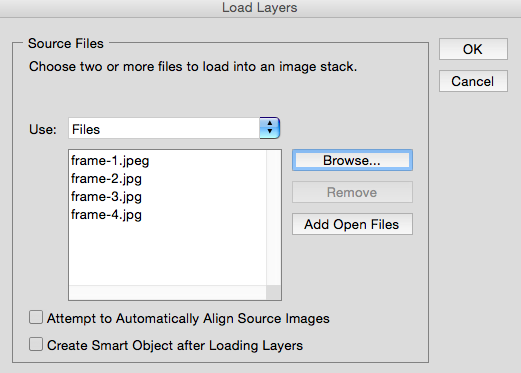
Photoshop will then create a separate layer for each image you’ve selected. Once you’ve done that, skip to step two.
If you don’t already have the series of images created …
Create each frame of the animated GIF as a different Photoshop layer. To add a new layer, chose Layer > New > Layer.
Be sure to name your layers so you can keep track of them easily when you make your GIF. To name a layer, go to the Layer panel on the bottom right of your screen, double-click on the default layer name, and type in the name you want to change it to. Press Enter when you’re finished.
Once you have your layers in there and you’ve named them all, you’re ready for step two.
Pro Tip: If you want to combine layers so they appear in a single frame in your GIF, turn visibility on for the layers you want to merge (by clicking on the “eye” to the left of each layer name so only the eyes for the layers you want to merge are open). Next, press Shift + Command + Option + E (Mac) or Shift + Ctrl + Alt + E (Windows). Photoshop will create a new layer containing the merged content, which you should also rename.
Step 2: Open up the Timeline window.
To open Timeline, go to the top navigation, choose Window > Timeline. The Timeline will let you turn different layers on and off for different periods of time, thereby turning your static image into a GIF.
The Timeline window will appear at the bottom of your screen. Here’s what it looks like:
Step 3: In the Timeline window, click “Create Frame Animation.”
If it’s not automatically selected, choose it from the dropdown menu — but then be sure to actually click it, otherwise the frame animation options won’t show up.
Now, your Timeline should look something like this:
Step 4: Create a new layer for each new frame.
To do this, first select all your layers by going to the top navigation menu and choosing Select > All Layers.
Then, click the menu icon on the right of the Timeline screen.
From the dropdown menu that appears, choose Create new layer for each new frame.
Step 5: Open the same menu icon on the right, and choose “Make Frames From Layers.”
This will make each layer a frame of your GIF.
Step 6: Under each frame, select how long it should appear for before switching to the next frame.
To do this, click the time below each frame and choose how long you’d like it to appear. In our case, we chose 0.5 seconds per frame.
Step 7: At the bottom of the toolbar, select how many times you’d like it to loop.
The default will say Once, but you can loop it as many times as you want, including Forever. Click Other if you’d like to specify a custom number of repetitions.
Step 8: Preview your GIF by pressing the play icon.
Step 9: Save your GIF to use online.
Satisfied with your GIF? Save it to use online by going to the top navigation bar and clicking File > Export > Save for Web (Legacy).
Next, choose the type of GIF file you’d like to save it as under the Preset dropdown. If you have a GIF with gradients, choose Dithered GIFs to prevent color banding. If your image employs a lot of solid colors, you may opt for no dither.
The number next to the GIF file determines how large (and how precise) the GIF colors will be compared to the original JPEGs or PNGs. According to Adobe, a higher dithering percentage translates to the appearance of more colors and detail — but it increases the file size.
Click Save at the bottom to save the file to your computer. Now you’re ready to upload this GIF to use in your marketing!
Upload the GIF file into any place online that you’d put an image, and it should play seamlessly. Here’s what the final product might look like:
How to Use GIFs in Your Marketing
1) On social media.
Pinterest was the first to enable animated GIFs, followed by Twitter. And by the summer of 2015, Facebook also jumped on the GIF bandwagon. On any of these social feeds, animated GIFs can be a great way to stand out in a crowded News Feed.
For example, check out how Samsung used a GIF to promote a product:
You just HAVE to send one more GIF on Twitter before your phone dies? Switch to Ultra Power Saving Mode. #GALAXYS5 http://pic.twitter.com/nvGXD5IE22
— Samsung Mobile (@SamsungMobile)
June 18, 2014
Want to include animated GIFs in your own social media posts?
- Click here for instructions for Twitter.
- Click here for instructions for Facebook.
- Click here for instructions for Pinterest.
2) In your emails.
Animated GIFs display in email the same way a regular image does. So why not spruce up your emails by replacing still images with animated ones?
Not only could this help capture recipients’ attention from novelty alone, but it could also have a direct impact on your bottom line. An A/B test conducted by BlueFly concluded that emails featuring an animated GIF pulled in 12% more revenue than their non-animated version.
Make use of GIFs by showcasing products, making event announcements, or otherwise enticing readers. Check out the GIF below from women’s clothing shop Ann Taylor LOFT: They made a present look like it’s shaking to create intrigue and get recipients to click through to “unwrap” their gift.
Image Credit: Litmus
3) In blog posts.
Your blog post doesn’t have to be about animated GIFs or structured like a BuzzFeed-style listicle to include GIFs. (Although we do love a good dose of silly listicle GIFs every once in a while.)
For example, my colleague Ginny Soskey created a simple, animated GIF to explain the definition of a call-to-action for this blog post.
Here’s another example of an animated GIF from our post on office kitchen recipes:
How will you use GIFs in your marketing? Share with us in the comments.
Editor’s Note: This post was originally published in September 2013 and has been updated for freshness, accuracy, and comprehensiveness.
How to Use Data to Create More Relevant Content
Content marketers don’t just write, they write with purpose.
While it may seem like a small distinction, it can mean the difference between wasting time and investing time in creating content that will deliver rankings, leads, and sales long after it’s published.
In fact, research reveals that B2B companies who blog receive 67% more leads than those who don’t. But they aren’t just blogging about anything. They’re blogging about the topics that matter to their audience — topics that their audience already searches for.
How do they inform their strategies? Data.
To help you figure out how to use data to inform your own content ideation process, I’ve come up with a plan. Below I’ve detailed step-by-step instructions for conducting keyword research, selecting the right content format, and coming up with more strategic content topics and ideas.
1) Conducting Keyword Research
A lot of people make the mistake of simply blogging and hoping for results, but the first thing you need to understand is how keywords define your audience.
Aside from long tail and short tail keywords, there are four types of keywords you should know about:
- Brand phrases. Brand terms go here. You should include your brand name, product names, or any trademarks associated with your brand.
- Product (or service) phrases. The main terms people would use to find your product or service.
- Buyer-intent keywords. The keywords that convert for your business. These phrases might include terms like “buy,” “compare,” or “best.”
- Related keywords. Phrases that are closely related to your niche and have good search volume.
The majority of your link building and content efforts should be focused on buyer-intent keywords and keywords closely related to your product or service.
How to Build a Keyword List
What keywords would people use to find your products or services?
As you think of this question start jotting down keywords you would use. Afterwards, add these keywords to a spreadsheet. You’ll add more information to this spreadsheet later.
To make sure nothing valuable slips through the cracks, follow this list of helpful tips and tricks:
Step #1: Use suggested searches to uncover more keyword ideas.
Once you figure out your main keywords, type each one into Google and look at the suggestions at the bottom of the page. These suggestions are based on actual searches people are typing into Google.
Step #2: Look at the titles that come up on the 1st page of Google.
The next step is looking at the search results for your main keywords. Be sure to make note of the titles and meta description language you see on the first page.
Step #3: Steal phrases from Google AdWords.
Pay special attention to the ads higher up on the page. Google grades every ad with a Quality Score. This score is a mix of relevancy, bid amount, and ad performance. In other words, the ads that get the most clicks show higher on the page.
Add any new keyword phrases you see to your spreadsheet. These phrases already have proven clickthrough rates, so you may want to consider incorporating them into your strategy.
Step #4: Use Soovle and Übersuggest to get keyword ideas.
There are a couple free tools you can use to get keyword suggestions to help you expand your list (which you’ll refine later).
Soovle pulls keyword ideas from Google, Bing, Yahoo, Answers.com, Amazon, and Wikipedia. All you need to do is type in your main keyword and let the results appear.
You can download the keyword ideas by clicking on the icon in the top, left corner.
Übersuggest will give you a long list of keyword suggestions as well:
After you enter your keyword, click Select all keywords.
Next, scroll down the page and click Get on the right of the page.
You’ll see this screen next:
Add the suggestions from Soolve and Übersuggest to your list and move on to the next step.
Step #5: Use a keyword tool to find search volume.
If you’re a HubSpot customer, you can use the Keywords App to uncover the monthly search volume for specific keywords. To access the Keywords App, click on Reports > Keywords.
Once you add a keyword, be sure to log the search volume in your spreadsheet.
If you’re not a HubSpot customer, you can check out Keyword Planner to uncover this information. To do so, select the Get search volume data and trends option. Then, paste your keyword list into the field below and click Get search volume.
By now you should have a mix of keywords that range from buyer-intent keywords to terms closely related to what you offer. The next step will be coming up with content ideas matched to each keyword.
2) Identifying the Right Content Format
Wouldn’t it be helpful to already know the type of content that resonates with your audience?
With BuzzSumo, you can analyze content from your own site, your competitors, or even just around a specific keyword. You can also do things like:
- Find the most shared content by keyword
- Analyze the best days to publish for your industry
- Learn what type of content performs the best for your niche
- See how many words your posts should be
- Understand what post format works the best (list, how to, why, etc.)
What this information allows you to do is reverse engineer what’s popular and use that information to define your strategy.
How to Use BuzzSumo to Determine Content Formats
How you conduct this research is determined by the type of BuzzSumo account you have. While you can distill a lot more information with a paid account, it’s possible to uncover valuable insights with the free version too.
If you’re using the Pro version …
First, under the Content Research tab click on Content Analysis and enter your most important keyword.
Once the results come up you’ll see a treasure trove of data. Repeat the process for a handful of keywords that get the most search traffic. You’ll want to be sure to add any new keywords you see to your list and take notes along the way.
While you sort through the data, ask yourself the following questions:
How long should my blog post be?
What type of blog post performs the best for my audience?
What day of the week should I publish my blog post?
What social networks should I focus on the most?
Asking these questions when using the tool will help you uncover a ton of useful insight to incorporate into your content marketing plan.
If you’re using the free version …
While the functionality of BuzzSumo’s free version is not as robust, it’s still very possible to uncover some valuable information by conducting a similar search. Although, the process requires more manual work.
To uncover format insights, click Most Shared under the Content Research tab and insert a keyword. Then, using the filtering criteria on the left-hand side, adjust the content type to focus on one specific format, such as infographics.
Analyze and make note of the social share numbers on the right. You’ll want to consider both total shares and individual platform shares.
Repeat this process for several different content types.
Then, compare the results to see which formats are earning the most shares. You may find that infographics gain a lot of social attention, while interviews receive very little. Use this information to inform your strategy when selecting a content format.
3) Generating Content Ideas
One of the most difficult aspects of creating content is coming up with ideas and making sure you stay on topic.
If you’re having a hard time visualizing your strategy, you might want to consider breaking it down into “chunks” that need to be accomplished in order to hit your goals. Outlining your content calendar with this strategy helps you:
- Create a content-rich site that laser targets your keywords
- Rank higher in search for your target keywords
- Spend less time thinking about what to write
- Spend more time actually producing content
Now remember that spreadsheet you recorded your keywords and search volume in? It’s time to build that out a little. You’ll want to add three columns: title, sources, and notes. Then, follow the steps below to fill them in.
(Want to take the easy way out? Steal this Google spreadsheet I created for you.)
How to Fill In Your Content Calendar
Step #1: Analyze content ranking on the 1st page.
The first step is understanding the competition. To do so, all you need to do is enter your keyword in Google and look at the results on the first page.
Here are a few questions you can ask yourself:
- What titles or meta descriptions catch your eye?
- What type of content is ranking?
- Are there any gaps that you can fill?
Start thinking about what you can create to add more value or cover the topic from a different angle — you should be able to pull ideas from what you see.
One method that works no matter what industry you are in is Brian Dean’s Skyscraper Technique — you simply outdo your opponent by improving on what they have already done. To see an example of this technique in action, check out this blog post.
Step #2: Search Quora, Reddit, and forums for more ideas.
Online communities like Quora and Reddit are good places to source information from. You’ll often times find people asking questions about your industry or niche. To leverage that, simply create content around these discussions.
For example, say I want to see what questions people are asking about SEO services on Quora. All I need to do is use this search query (site:quora.com + “seo services”) and look at the results.
Then, it’s just a matter of creating content around those search queries like I’ve done here.
Step #3: Use BuzzSumo to see what has already worked.
As I mentioned above, BuzzSumo is a great tool for discovering content insights.
To help facilitate blog ideas, open up BuzzSumo again, go to the Content Research tab, and then click on Most Shared.
Enter your keyword and you will see a list of posts, sorted by social shares. You can analyze these posts and use them to get post ideas.
Step #4: Use headline analyzer to test your headline.
Headlines with strong emotional sentiment help increase click-through rates and shareability. Powerful language — language that conveys emotion — makes people want to read and share your content.
CoSchedule’s Headline Analyzer benchmarks your headline against millions of data points to give you an idea of how well it will perform on social media.
Putting It All Together
If you’ve followed this guide to the end, you now have a spreadsheet full of blog titles on topics closely tied to your most important keywords. You can prioritize what to write first by targeting buyer intent keywords and then moving to keywords with the largest search volume.
Now, all you need to do is start writing.
How does your company use data to inform the content creation process? Share your tips in the comments section below.
How Will the Recent LinkedIn Group Changes Impact B2B Marketing?
If you’re a B2B marketing professional, chances are you’ve already heard about all the changes that LinkedIn plans to introduce to its Groups feature.
Unfortunately, over the years, Groups have built up a poor reputation online. Once hailed as the most valuable social media channel for B2B lead generation, with time, they’ve became over-populated with promotional posts and too much spam.
Hopefully, that’s about to change. The biggest announcement to date is that LinkedIn recently made all of their Groups (over 2 million!) private. The goal of this is to encourage more meaningful conversations, based on user feedback.
So, what do the new Groups mean for your B2B marketing strategy?
Increased Privacy
The new Groups will increase your privacy level online, so you can have in-depth conversations without worrying that what you write will be available for anyone to read.
In fact, the new privacy setting makes it impossible for content to be indexed by search engines. As a result, if you’re talking about sensitive information within your LinkedIn Group, this content will stay private and cannot be found by anyone searching on Google.
B2B Marketing Implication: These increased privacy settings offer you new opportunities to engage with your groups in a much more meaningful way. You can now provide exclusive announcements, information, or offers to your groups that may not have made sense to promote openly.
Vetted Members
Prior to the update, LinkedIn Group members were divided into two – public ones, which anyone could join, and private ones, where membership requests needed to be approved by an administrator. The open nature of the public Groups led to many of the posts being promotional, which turned off many members from participating, and ultimately led to hundreds of posts with no engagement.
With the recent changes, all members will need to be vouched for in order to gain admission. Joining a LinkedIn group now requires either an invitation or approval of your request.
So, all of your Group members will need to keep their credentials up-to-date to show that they are valuable contributors.
B2B Marketing Implication: Moving forward, you’ll be able to have professional and detailed conversations only with individuals who fit your detailed guidelines. This will result in smaller groups with much higher levels of engagement as members don’t need to worry about sifting through dozens of spam posts.
New Groups App
LinkedIn also announced a new app specifically for Groups—similar to Facebook’s messenger app. The app is standalone and offers a slew of features, which show engaging discussions, highlights, and compelling content.
The algorithm that LinkedIn uses for its mobile app makes sure that you’ll see the Group content that matters most to you, not just anything that’s being discussed.
The app will also make it easier to discover new and interesting groups and people based on your industry experience, previous Group memberships, and more. So now, your marketing department will have an easier time keeping up on the latest LinkedIn news and conversations.
B2B Marketing Implication: With Facebook Messenger and the revamp of Twitter Direct Messages, there has been a major push for social networks to help their users create an ongoing communication. This new app will give you the option to have lengthier conversations with your group members that will lead to deeper engagement.
Updated Features
Users within Groups can now tag someone in their posts using @mention, although you cannot tag individuals who do not belong to the group. It’s also possible to add images to posts now, and the design is cleaner and less spam-like.
For your social media marketing, these updates will make it easier to get your ideas across and connect with specific companies or individuals by mentioning them directly. It stops the run-around and allows you to be direct.
B2B Marketing Implication: A relationship doesn’t form after commenting on one post. This new feature allows you to target specific group members to help build your relationship up with multiple communications. Just be sure the members you are @mentioning will have a genuine interest in the topic.
Recruiting Tools
The final update to LinkedIn Groups is the ability to recruit individuals without distracting from the important conversations. LinkedIn made this possible by creating a special tab within Group pages that can be used as a hub for job discussions.
So, if your company has joined a manufacturing group and you have an opening for a new warehouse manager, you can post your job ad within a page made for that type of discussion so you can be sure it won’t get lost in the hustle and bustle of the other conversations.
B2B Marketing Implication: LinkedIn has become so much more than a job search site, but that is still a major focus of the network. Putting this important information in its own tab greatly increases the likeliness recruiters will find candidates and also prevents that recruitment from getting in the way of the day to day engagement these new LinkedIn Groups are expected to encourage.
Whether you liked or used the old LinkedIn Groups, the new and improved release could be a game changer for your B2B company.
Now, you can use LinkedIn to have meaningful and private conversations with current and potential clients without worrying that your discussions will make it to the wider web. And the new updates have made conversing easier than ever, saving your marketing department time and frustration.
Interested in learning more from Penguin Strategies? Check out their on demand webinar, How to Make Sure No One Converts on Your Blog.