
What No One Tells You About Your Career When You’re 22
I don’t know about you, but I rarely feel like I’m 22. I do, however, work with a lot of 22-year-olds who are smart, interesting, dynamic, and absurdly high-energy.
While it depresses me they don’t understand my Saved by the Bell references, their ideas and achievements are truly remarkable.
And approximately once a week, I get a request from one of them to talk about “careers” — a topic that they know they should care or think about, but don’t know what to actually do with.
Below is a compilation of the career guidance I’ll usually give them. (And even if you’re not 22, the advice can still apply.)
The Career Advice No One Tells You When You’re 22
1) Solve for growth.
Early in your working life, you’re defined by the company you keep, so choose wisely. It’s very easy to pick the company with the biggest name or the biggest paycheck, but I recommend following our Co-Founder Dharmesh Shah’s advice: Solve for growth.
How does the company you’re working for (or considering joining) prioritize growth, both personally and professionally? How does the team you’ll be working for plan to grow in the coming year, and what do the prospects look like for growth for the broader company?
Far too many people pick companies based on their current reputation rather than their possible growth, but you get far more career credit for being the fifth employee at LinkedIn after its explosive growth than you do for being the 5000th employee at Radio Shack before it stops growing entirely.
2) Don’t fire back on feedback.
When you put your heart and soul into your work (as many young people do), you tend to take feedback personally — whether it’s good or bad.
When you get positive feedback, for example, you tend to think that you’re the best marketer or salesperson in the world. And when you get your work criticized in any way, shape, or form — you also tend to take it to heart.
To combat this gut reaction, I always suggest letting feedback “soak” for 24 hours. It allows you to think about what’s true and what isn’t — and how you can use it to grow, regardless of where it falls on that spectrum.
This time for reflection also allows you to have productive conversations with your manager. If you’re personally hurt, offended, or angry, you’re no longer listening. You’ve shut down. If you actually take the time to absorb feedback, you’re going to have a conversation with your manager that will actually help you get to the next level.
3) Find the Tina(s) to your Amy.
A lot of people talk about how developing friendships at work can improve your personal life, but these relationships can also have a huge impact on your career path. Just look at Tina Fey and Amy Pohler — they’re best friends who also push each other to achieve amazing things in their respective careers.
I’ve been lucky enough to find several of my “Amys” at HubSpot (yes, I’m Tina in this scenario, as she’s my spirit animal). Last year, I worked with VP of Operations Alison Elworthy and VP of Product Brad Coffey to prep HubSpot for our IPO — a huge milestone for the company.
The kicker? None of us had prepped a company for an IPO before, and the stakes were high. So we leaned on each other. Because of our strong friendship outside work, we were able to improve our ideas, get feedback, and iterate on messaging and strategy.
So instead of thinking of your work friends as company for happy hour (although that’s important too), seek out peers at work who challenge you, who can help you learn, and who think differently than you do. Just because someone’s a peer at your company doesn’t mean you can’t learn a ton from them — finding a “Tina” or “Amy” who can give you honest, constructive feedback and champion your efforts is incredibly valuable to your career growth.
4) Always be learning.
In my opinion, people overthink the role of formal mentorship in building their career. Instead of identifying one person to learn from and ask questions of, make that your daily practice. Write down what you see, know, and observe about what works and what doesn’t: You don’t think you’ll forget it as you evolve in your career, but you will. Having it written down somewhere will help you maintain perspective. Identify people you admire and learn from them, but don’t wait for a formal mentorship relationship to do so.
Carve out time in your week to prioritize your own learning. Even if you just watch a TED talk or read a few pages of a new book, ensuring that you have time in your schedule to stretch your horizons makes it much more likely you’ll do the same for the rest of your career.
5) Lean in to your weaknesses.
At any part of your career, you need to learn new things — and for that to be relatively painless later in your career, you need to build that habit now.
So instead of running away from things you’re not good at, lean into them.
Great writer but not very technical? Learning even a little bit of code or the ins-and-outs of Photoshop will help you significantly.
Fantastic at detail but have trouble seeing the big picture? Ask one of your peers who is great at project management how she juggles priorities.
It’s very easy to fall back on your natural talents or training, but you’ll be well served if you invest the time and effort to push yourself on your greatest areas of weakness early and often in your career.
6) The best way to network is delivering remarkable work.
Far too many people treat networking as an extracurricular activity like running or playing guitar. In reality, the best form of networking is absolutely crushing results in your job — and doing so pays dividends for the rest of your career.
That’s not to say networking isn’t important; it absolutely is. Just don’t be so fascinated with climbing the corporate ladder that you’re not delivering what it takes to get up there.
7) Learn to sell.
Do I mean you need to become a sales rep to be successful? Nope. (But that’s awesome if you are.)
What I mean is you need to learn to sell your ideas, expertise, or vision. Make presenting yourself and your ideas something that helps you stand out from the pack.
Selling yourself doesn’t have to be public speaking. It can also be using data creatively to sell your idea, designing beautiful materials to sell your product, or collaborating with your peers to get buy-in on an initiative you want your organization to prioritize.
The key is to learn how to sell your ideas and your input as early in your career as possible — doing so helps your personal and professional brand and builds your comfort level with expanding your influence and ideas.
8) Rack up results, not recognition.
The biggest complaint I hear from folks new to the workforce is that another person got credit for their work and “that’s not fair.” It is incredibly frustrating when other people get credit for your blood, sweat, and tears, but guess what: Life isn’t always fair, and neither is work.
However, I can tell you that over time, fortune rewards those who rack up results instead of focusing on getting credit. Instead of obsessing over recognition and credit, obsess over results. Your career will thank you for it later.
9) It’s not your manager’s job to manage your career.
Your boss is your manager at work — not a mind reader, fortuneteller, or psychologist. He or she can and should support you in your professional goals, but the only person in the driver’s seat of your career is you.
Manage it proactively by asking for what you want, making it clear what interests you, and eating up feedback for breakfast, lunch, and dinner — doing so will make you a better employee and a better leader, regardless of whether you stay at a company for 10 months or 10 years.
Which leads me to my next point …
10) Write down specific goals.
I did this early on in my career, but took a hiatus for several years. Then, this year I decided to try it again. I literally created a vision board for what I wanted to achieve professionally in 2015.
Turns out, writing down specific goals works as well in your 30s as it does in your 20s.
The research is abundantly clear: If you write down your goals, you’re much more likely to achieve them. Stating what you want to be when you “grow up” — even if you’re not sharing your aspirations with another soul — makes you much more likely to be diligent about achieving your goals.
A lot of young folks are not exactly sure what they want to be, and that’s okay. Instead, write down more of what you want to do, what you think you might aspire to, or someone you want to be more like. All of those things are going to help you inch closer and closer to your aspirations.
11) Tackle the big stuff.
Develop a nose early for what’s important in your business — what’s a top priority, why, and what projects can actively support that priority. Raise your hands for those projects. They are high risk, but high reward, and the work you do on them can impact your career for decades to come. Be thoughtful, diligent, and tenacious: Managers notice employees who aren’t afraid of the big stuff, and your teammates will always want to be in a bunker with someone who can tackle a big challenge.
12) Use social to your advantage.
Most 22-year-olds think of social media as a way to connect with friends, but it’s a powerful lever in getting future employers to notice you.
First and foremost, delete or make private any photos or comments about how great your years of partying in college were. Second, set a calendar reminder every quarter to update your LinkedIn profile with recent results so your online resume is always current and fresh. Finally, share content from companies and people you admire: If imitation is the sincerest form of flattery, social sharing is a close second — it can go a long way to getting you noticed.
13) Learn to rebound.
Jack Welch, who I was lucky enough to have as a professor at MIT Sloan, is famous for having failed early in his career at GE. His quote, which I come back to often is, “Your career isn’t always linear. But what matters is how well you get back on the horse.” If a project didn’t go your way or an internship didn’t turn out as planned, don’t get down on yourself — get on with it. Your success is heavily predicated on your ability to bounce back from challenges, so the earlier you learn to reset your attitude after a setback, the better.
14) Embrace your vulnerability.
When you’re young, you’re often so focused on doing well at your job that you want to seem invincible. To admit failure or ask for help seems like a massive weakness, so you avoid it at all costs.
But the ability to recognize and admit the not-so-perfect parts of yourself helps you become significantly more reflective and self-aware — key skills that will help you move up the ladder.
Brené Brown, a vulnerability researcher and author of one of the most popular TED talks of all time, has a quote on this subject that always stuck with me: “Imperfections are not inadequacies; they are reminders that we’re all in this together.” By realizing that even successful people have imperfections, you become free to admit your own shortcomings — and work to overcome them.
Humility and vulnerability feel like threats to your career when you’re 22, but they are actually powerful weapons for growing yourself as a professional (and human being).
15) Get the gratitude bug early.
I realize I sound ancient saying this (I’m cool with that), but people remember gratitude in a way that outperforms other emotions or motivators. Take the time to thank people who interviewed you, people who made time to share what they know with you, and people whose influence helped you succeed. Be gracious in your praise of others and your kindness toward people who help you: People notice and remember this for years to come.
It used to be that signing on with a new company meant years (if not decades) of your life, but now that people switch jobs every few years, managing your career has become both more important and more challenging. Options seem infinite, grad school seems necessary, and far too early you start comparing your career trajectory to that of others, worried that you’re being left behind or left out. Instead of overthinking your next job, your next decision, or your next networking event, focus on being remarkable at your job, tackling your weaknesses head-on, and being someone who isn’t afraid to take on tasks that other people find terrifying. The rest of it will work itself out, I promise.
What other advice would you give to someone starting out in their career? Let us know in the comments.
Editor’s Note: This post was originally published in December 2014 and has been updated to reflect even more great advice as of October 2015.
13 Ways to Be More Productive When You Sleep & Wake Up
Ah, the perennial desire to be more productive.
For better or for worse, we’re always looking for new ways to do more, and do it faster. What can we knock off the day’s to-do list during our commute? What music should we listen to at work to make us work smarter? What foods should we eat to stimulate brain activity?
While it might seem far-fetched to say you can be more productive in your sleep, hear me out …
Getting the best rest possible and then taking advantage of the first few hours of your day will boost your productivity for the rest of the day, making you an overall happier and more energetic person. Here are 13 hacks for optimizing that valuable, underutilized time.
How to Make Sleep More Productive
Nothing kills productivity like a bad night’s sleep. According to a study from the Journal of Occupational and Environmental Medicine, sleep-related reductions in productivity cost $3,156 per employee with insomnia, and averaged about $2,500 for those with less severe sleep problems. Here are a few ways to increase the quality of your sleep.
1) Exercise that morning or afternoon.
According to the National Sleep Foundation, exercising in the morning or afternoon can help you fall asleep faster that evening — and then sleep more deeply once you do fall asleep. Regular aerobic exercise has been proven to improve sleep quality and leads to fewer depressive symptoms, more vitality, and less sleepiness during the daytime.
There’s a reason they don’t include nighttime, though: They warn that vigorous exercise before bedtime can actually reverse those good effects of exercise.
2) Avoid eating heavy meals late in the day.
Some studies have shown that food is processed differently at different times of day. Avoid eating a big meal within two to three hours of bedtime, otherwise your body will be busy trying to process those calories rather than resting.
A grumbling stomach won’t help you fall asleep either, though — so don’t deprive yourself if you’re hungry. Just keep in mind that some foods are more conducive to a better night’s sleep than others, like chamomile tea, warm milk, and turkey. Other, lesser-known foods that help you fall asleep are broccoli, bananas, kiwi, tart cherries, and halibut, according to Sleep Expert Dr. Michael Breus.
“The data suggests a high-carb, low-protein snack (under 250 calories) is a good choice,” Dr. Breus told Yahoo! Food. “I suggest cheese and crackers, or even a bowl of oatmeal.”
3) Set an alarm for a time that’s a multiple of 90 minutes in the future.
We all have circadian biological rhythms (a.k.a. “body clocks”) that regulate the timing of periods of sleepiness and wakefulness throughout the day — and also periods of deep and light sleep throughout the night. Every 90 minutes that you’re asleep, you go through two periods of REM sleep, separated by one period of non-REM sleep.
So, to get the most out of your sleep time and be the most comfortably alert when you wake up, you’ll want to sleep for multiples of 90 minutes.
“Studies show that the length of sleep is not what causes us to be refreshed upon waking, writes the folks at the Center for Applied Cognitive Studies. “The key factor is the number of complete sleep cycles we enjoy.”
In other words, someone who only sleeps for four 90-minute cycles (six hours total) will actually feel more rested than someone who’s slept for eight hours. (Learn more about sleep cycles in this blog post.)
4) Develop a regular sleeping pattern.
If you go to bed at about the same time each night and keep your alarm set for about the same time each morning, you’ll find it easier both to fall asleep and wake up.
“Go to bed at the same time and do the same activities every night before bed,” says Dr. Heidi Connolly, the chief of pediatric sleep medicine at the University of Rochester Medical Center. “Your body is getting a cue that it’s time to fall asleep.”
5) Don’t check your phone before going to sleep.
Here’s one most of us are guilty of: Checking our phones (or tablets, or computers) right before hitting the hay. But studies have shown that people who stare at a backlit screen right before bed report lower-quality sleep — even when they get just as much sleep as someone who didn’t look at their electronics before bed.
Why? Because the presence and absence of light tell our brains whether or not they should release the sleep hormone melatonin that makes you tired, according to the National Sleep Foundation. The LED lighting emitted by the screens on our electronic devices is similar to daylight, which can trick our brains — making us stay away for longer and disrupt our sleeping patterns.
By unplugging during the 30-60 minutes before bed, we’re priming our brains for sleep much better — which leads to better quality sleep and a happier time waking up.
6) Start visualizing.
Falling asleep is easier said than done for most of us. Even if you’ve exercised, eaten the right foods, and put your electronics away before bedtime, you might still find yourself struggling to drift off — and knowing the minutes are ticking by and you’ll probably be exhausted in the morning is never a good feeling.
One way to help fall asleep faster is through visualization techniques. Use your imagination to make up a story or picture a certain scenario. For example, I sometimes pick a type of candy — like Reese’s Peanut Butter Cups — and then visualize some elaborate, fictional story about how they’re made. Here’s another visualization exercise from LifeHacker, which explores using “Blue Energy.”
“The brain doesn’t always know the difference between pretend and real,” Dr. Kathy Doner told Health.com. “If you watch a scary movie, your adrenaline might go up, just as if you imagine eating something vividly enough, you might start to salivate.”
7) Get enough sleep for you.
The number of hours you need to sleep each night varies from person to person. Why? It has to do with your “chronotype,” — your natural tendency to be sleepier and more awake at certain times of day. It also affects when and for how long you need to sleep.
If we’re looking at the average number of hours of sleep we need, though, it depends on factors like age:
Image Credit: HubSpot & Market Domination Media
By sleeping better and in ways that make sense for our bodies, we’ll be more productive throughout the rest of the day.
How to Make Waking Up More Productive
For a lot of us, mornings are a manic rush of hitting snooze as long as we can afford to, followed by running around and getting out the door as quickly as humanly possible. But it doesn’t have to be that way. Mornings are totally underutilized times to get in the right mindset for the day and cross a few things off your list, undistracted, which will set you up for success during the remainder of the day. Here are some ideas for making your morning routine more productive.
8) Avoid the earth-shattering buzzer alarm.
If anything sets the tone for the rest of your day, it’s the sound of your alarm. Are you using one of those earth-shattering buzzer sounds? Talk about a horrifying way to start your day.
My favorite idea for an alarm sound comes from Lifehacker:
Put one alarm clock on your nightstand, the other across the room and make sure they’re in sync. Set the alarm clock on your nightstand to go off at, let’s say, 6:30 a.m., if that is when you need to get up. I set that one to use the radio, and make sure it is loud enough to wake me up, but not too loud (I don’t want to wake my wife on purpose). The second alarm clock on the dresser is set to go off exactly one minute later, but using that dreadful buzzer. So, when my alarm goes off in the morning, it doesn’t startle me like the buzzer. Then, I know I have about 60 seconds to get up and turn the other one off before I hear a buzzing sound. At that point, I am out of bed, and no buzzer.”
9) Wake up a little earlier than usual if you’re working on a creative project.
I love this quote from Buffer: “The creative mind is an early riser … and the editing mind sleeps in.”
A study of the brain showed that we are most prone to creative thinking right when we wake up. Why? Because our prefrontal cortex is most active just after waking up, while the more analytical parts of the brain (our “editing mind”) become more and more active as the day goes on.
So, if you’re working on a creative project, you might want to wake up an hour or so earlier to give yourself time to unlock those creative parts of the brain. If you’re concerned about getting enough sleep, try going to bed an hour earlier so you won’t be too tired.
Image Credit: BuzzFeed
10) Let there be light.
Turning off your electronics before you go to bed so you aren’t staring at light in the darkness helps tell your brain the get ready for bed. Likewise, waking up in the light helps wake up your brain. Again, we all have our own circadian rhythms — and these rhythms are deeply influenced by the presence and absence of light.
Let in light in the morning by leaving your curtains or blinds open when you go to sleep. If that isn’t an option, try an artificial sun lamp, like this one from Philips. Some of them are connected to alarm clocks that get gradually lighter and lighter as you approach your wake-up time, making you less groggy when your alarm finally goes off.
Image Credit: Philips
11) Develop a morning routine.
My morning routine starts with washing my face, brushing my teeth, and making a cup of coffee. Some of you might start with meditation, or picking out the day’s outfit, or doing a bunch of push ups.
Whatever you choose to do, repeating the ritual will make it a habit, and the brain loves habits. The more often you “do” a habit, the more your brain will get used to doing it — and the less effort and energy it’ll take for you to do it in the future.
According to Tony Schwartz, President and CEO of The Energy Project, the best way to get things done “is to make them more automatic so they require less energy.” He advises his clients to develop rituals; highly specific behaviors done at precise times that, over time, become so automatic that they require no conscious will or discipline. (Read this blog post to learn more about developing productivity rituals.)
12) Wait to check your email.
We understand that some jobs require you to check email in the morning, but you should avoid making it one of the very first things you do when you wake up — especially if you’ll be online the rest of the day.
Instead, spend the first part of your waking hours doing something that doesn’t involve email, like taking a shower, putting on coffee, or working on a creative project. As Richard Whately said, “Lose an hour in the morning, and you will be all day hunting for it.”
13) Eat a nutritious breakfast.
Why do so many people skip breakfast in the mornings? Oftentimes, it’s because they don’t have enough time to eat it, or at least to make it nutritious. But depriving yourself of food altogether or rushing to work with a bagel-to-go isn’t going to give you the energy you need to stay focused at work.
Take time in the morning to eat a healthy breakfast. Foods that boost productivity include eggs, bananas, yogurt, and blueberries. Check out the graphic below for some of the science behind why these foods are good for productivity, and click here to see the full infographic on the perfect diet for productivity.
Image Credit: HubSpot & Market Domination Media
What other productivity hacks for sleeping and waking up can you add to the list? Share with us in the comments.
The Anatomy of the Perfect Profile Photo For Facebook, Twitter, LinkedIn & More [Infographic]
If a picture really does “speak 1,000 words,” then what does your profile photo say about you?
Before you go uploading any old photo online to serve as a representation of yourself, it’s important that you put some thought into the selection process.
Sure, you might want to show off your awesome tan from the cruise you just went on, but is that shot of you sporting sunglasses with an umbrella drink in hand really the best option?
To help steer you in the right direction, check out the following infographic from the folks at PhotoFeeler. After getting their users to rate 800 photos on scales of competence, likeability, and influence, they’re sharing some interesting data to support what works (and what doesn’t) when it comes to profile photos.

21 Essential Strategies for Growing Your Business With Inbound Marketing [Infographic]
From content creation, SEO, and social media to lead generation, lead management, and analytics, marketers who follow the inbound methodology have a lot of different channels and tactics to manage and master.
But the great thing about inbound marketing is that it pays off over time. It sets businesses up to get found by their target buyers more easily, and then helps them through every single stage of the buying process — from stranger to brand advocates.
Which of these channels and tactics are involved in which stage of the buying process? What do inbound marketers need to do — and when — to attract, convert, close, and delight?
Check out the infographic below from ELIV8 to learn about 21 inbound marketing strategies that can help move future customers down the funnel and accelerate the growth of your business. (And click here for an interactive guide to inbound marketing.)

How have these inbound marketing strategies helped you grow your business? Share with us in the comments.
5 Tips to Help Make a Killer Marketing Video
Creating a video (or video series) to help market your product or service is a no-brainer. It’s an easy, shareable way to communicate your company’s core message.
Chances are though, you don’t have the in-house resources to create a clip or much time to waste on learning video editing software yourself.
If you don’t have a ton of experience in video production, it may seem like your only options are to pay a lot of money for someone else to do it, or hack together a bad video on your own.
Good news: there’s a third option. Even with limited resources, companies launch with great video campaigns all the time. Read this post and take away five tips to create a great video to market your business.
1) Showcase Your Personality
Whatever it is you’re producing, you’re likely not the first one to do so. The number one marketing challenge you’ll face during launch is standing out from competitors in your field. What sets your productivity app or hilarious slogan t-shirt or handcrafted eco-friendly wooden rocking horse apart from the pack?
Approximately zero potential customers will likely read your thousand-word written explanation about why your wooden rocking horse is more eco-friendly than the next guy’s. Visual content is much more digestible, accessible, and shareable to the average person. Infinite bonus points if you can figure out a way to showcase the personality of your product (or your company, or just yourself) in a way that’s relatable and memorable.
Have you ever made a purchase just because you loved the personality of the brand? Chances are, it was a piece of visual content—perhaps a video—that you instantly connected with because it was just so likable. Aim to create that kind of video content. If people decide they like you, they’ll show you by becoming customers.
How to do it
Be honest with yourself about your on-camera skills. Is your business partner more charismatic? Put him or her in front of the camera, instead. Talking into a mic and speaking to an unseen audience may seem easy, but it often is not. Do several takes, upload them all, and edit out awkward pauses. Practice trimming and splitting clips until your transitions look natural.
People love to learn about the personality of a brand by getting a glimpse behind the curtain. If you’re making a physical product, some footage of the manufacturing process is an excellent way to make your product relatable. Don’t be afraid to whip out your cell phone if you’re missing a moment, be it putting the final touches on a great-looking product or your lead developer falling asleep at his desk.
Example: Dollar Shave Club
2) Explain What You’re Doing
Have you ever joked about being married to your work? Like a regular marriage, you’re incredibly familiar with your “spouse”. You know things about each other that no one else knows.
You know your product better than anyone else. That’s great, but you may make the mistake of assuming everyone else knows the ins and outs of your product, too. Don’t jump right to marketing Awesome Thing About My Product #5 just because you assume Things 1 through 4 are obvious.
Take a look at your product as if you know nothing about what it is, what it does, or what kinds of problems it can solve. Tell yourself the story of your product as if you know nothing. Then, take that story and tell it to everyone else.
How to do it
If you’re marketing a digital product, it’s time to learn how to create a quality screen capture video. Demonstrate the typical use of your product, but don’t jump right into it—use screen capture to demonstrate a problem or pain point that your product solves. If the viewer can identify with the problem you’re showing them on-screen, they’ll be much more engaged when you introduce your product. Use repetition, and don’t go too fast. This is the first time they’re seeing your product in action, and you want to give the viewer the chance to experience the full effect of its genius.
If your product is physical, focus on showing them what your product does and how it can help. Think about demo videos or commercials you’ve seen for popular pieces of technology. They don’t spend two or three minutes talking about battery life and storage capacity. They use that valuable video real estate to show the product in action, being used as the average consumer wants to use it.
Be helpful in your video, and err on the side of over-explaining. Use captions or video annotations (think Pop-Up Video) to explain anything that isn’t obvious, or use them to supplement your voice over narration.
Example: PadMapper
3) Add Some Value
Believe it or not, not everyone will want to sit through your video, even if it is short. Why should they? There are millions of other videos on the Internet, and some of them even have cats in them.
Figure out what value your video is going to offer to your audience. Does it tell a great story? Does it explain how to solve a problem? Does it give them an insider reward, like a discount code or a clickable link to a free trial? Or is it just three minutes of you ranting into the camera about why non-eco-friendly wooden rocking horses are the worst thing ever invented?
Add some value to your video, and watch it get shared beyond just your inner circle of friends and fellow rocking horse enthusiasts. Believe it or not, most people are altruistic—if they see a clear benefit to be gained from watching your video, they’ll want to share that benefit with their friends and connections.
How to do it
Think back to the last video you shared. Why did you share it? Chances are, if you’re like most people, you wanted to establish your authority on the topic. You wanted to be the first to present that piece of information to the people in your circle. It’s why most content is shared—for the social cred.
You can give people the social credibility they want by creating smart, informative videos for them to share. If your product solves a problem, present the solution in a way that sounds revolutionary. For example, if your product speeds up a task that your target customer must perform often, use picture-in-picture editing features to demonstrate how much quicker they can accomplish the task using your product. It’s great to tell someone that they can save 30 seconds searching for the best rate on their next flight, but if you can show the typical process side-by-side with your innovation, you can actually make them sit through those 30 seconds. It will be excruciating. They will buy your app.
If you decide to go with a more tangible benefit such as a discount code or a free trial, make it easy for the viewer to get. Put a clickable link right in your video. Don’t tell them to go to another website (or do anything else at all). They won’t do it, and you’ll lose that opportunity. Keep it simple if you want your videos to convert leads.
Example: Moov
4) Tell A Story (That Goes Somewhere)
Think back to high school English class, when you learned about the components of a story—there’s an introduction, conflict, climax, and resolution. If you leave out any of these crucial parts, you’re left with a collection of sentences that have been smashed together for no apparent reason.
Not only should you tell a coherent story (and this will require some pre-planning, writing, and editing), but you should make sure it goes somewhere. A nice, tidy ending is great, but building suspense is better. Are you going to produce another video to continue the story? If so, why should your viewers be excited to watch it?
How to do it
You thought this would be all visuals? You’re going to have to write. If you don’t plan your story, it won’t materialize out of the ether. Make a plan for your video content, and look beyond video number one.
Rather than one explainer video, is your product suited to a series of instructional videos? Can you help people create something with your product? Break that “something” into pieces, and create a series of short videos. You can even record the entire series in one go, and use an easy editing tool to break the footage out into logical sections. Keeping your audience waiting for more (as long as it’s great content) is an excellent way to stay top-of-mind.
If you’re more of a storyteller, you can keep a video series looking cohesive (and cut down on your workload) by reusing clips. Remind your viewers of the product benefits you explored last time, and build on the story you’ve already told. Just be sure to store your edited video somewhere safe—the cloud is your best bet—so you don’t have to repeat all your hard work each time you make a new video.
Even if your story doesn’t end at the end of the video, that chapter does. Make sure you leave your viewer with something concrete to do. There should be a call-to-action at the end of every video, even if you set an expectation that another video will follow. You never know when a viewer will disengage from your content, so give them opportunities to become a customer or subscriber while you have their attention.
The Example: WatchSuperFoods
5) Get It Out There
You’ve created a great piece of video content that showcases your personality, explains what you’re doing, has a clear benefit, and tells a great story. What do you do next?
Okay, this one is painfully obvious—you promote the heck out of it. We don’t have to tell you why you want to do this step. We do, however, want to help you do it well.
How to do it
The best way to ensure people watch your video is to give it a great title. Regardless of how the saying goes, nearly everyone does judge a book by its cover. After Google, YouTube is the second-largest search engine in the world. You put a ton of research and consideration into your landing page titles—do the same for your video, or your clickthroughs will be dismal. Same goes for your description and tags. Try using hashtags in your title to ensure you’re getting found with the right keywords.
Speaking of covers, you’re going to want to put some time into selecting the right thumbnail for your video. This is all the potential viewer will see before they decide whether or not to hit the “play” button, so make that one image extra-compelling.
Export your video to more than one platform. Some people watch on YouTube, some will only watch videos on Facebook. Don’t limit yourself to one platform, or you’ll miss out on a huge number of potential viewers.
This should go without saying, but don’t put out a bad-looking video. You don’t need a huge budget and a team of professionals to make a great video anymore. Learn how to use the editing tools you have to work with and export your finished product in HD, and there’s no reason your video can’t look pro.
That’s it! With these five tips in mind, you can market your business like a seasoned video producer. Go forth and convert!
How to Use LinkedIn: 35 LinkedIn Tips for Professional Networking, Business & Marketing
With more than 380 million members, LinkedIn is the most popular social network for professionals and one of the top social networks overall. But are you using LinkedIn to its fullest potential?
With new social networks sprouting up constantly, LinkedIn is a platform that often gets underutilized or put on the back burner. But the truth is, LinkedIn can be extremely powerful — especially when you’re aware of all the platform’s hidden features that don’t get nearly as much attention as they deserve.
So to help you learn how to use LinkedIn effectively, this post is chock full of LinkedIn tips you may be overlooking … but definitely shouldn’t.
Download the full guide here to learn how to use LinkedIn for professional networking, business, and marketing.
What Is LinkedIn?
About LinkedIn
Before we dive in, here’s a quick little primer on LinkedIn for those of you who may be new to the social network. LinkedIn launched in 2003 and is currently the third most popular social network in terms of unique monthly visitors — right behind Facebook and Twitter. Think Facebook, but with a more professional feel and a ton more features. The social network is primarily centered around careers, and it enables users to connect and share content with other professionals, including colleagues as well as potential employers, business partners, and new employees. If you’re a business on LinkedIn, it can also be a fantastic marketing tool.
Now, are you ready for a treasure trove of LinkedIn tips? Let’s get our hands dirty …
We’ve divided our ultimate list into three main categories depending on your goals for using LinkedIn. First we’ll share several LinkedIn profile tips so you can optimize your personal LinkedIn presence. Then we’ll share tips for how to use LinkedIn for professional networking, and lastly how to use LinkedIn for business and marketing. Click these links to jump to individual sections.
LinkedIn Profile Tips
1) Customize your public profile URL.
Make your personal profile look more professional (and much easier to share) by customizing your LinkedIn public profile URL. Instead of a URL with a million confusing numbers at the end, it will look nice and clean like this: http://ift.tt/WKXu1Q. Customize your URL by clicking here and modifying your public profile URL on the right-hand side.
2) Add a LinkedIn background photo to your personal profile.
In June 2014, LinkedIn finally jumped on the cover photo bandwagon and starting rolling out the ability for users to add a background photo to their personal profiles. Give your LinkedIn profile a little bit more personality by adding a background photo of your own. Just keep in mind LinkedIn is a professional social network, so choose your photo accordingly.
To add a background photo to your profile, click Profile >> Edit Profile in LinkedIn’s top navigation, then click Add a background photo at the top of your page (or modify an existing background photo by hovering over it and clicking Edit Background). LinkedIn specifies that your cover photo must be a JPG, PNG, or GIF file under 8MG in size and should have a resolution of 1400 x 425 pixels for the best look. Download our free guide to using LinkedIn to get a background photo template in PowerPoint optimized for these dimensions.
Check out how Sam Mallikarjunan, head of growth for HubSpot Labs, uses his background photo:
3) Create a Profile Badge for your personal website or blog.
If you have your own personal website or blog, you can promote your personal LinkedIn presence and help grow your professional network by adding a Profile Badge that links to your public LinkedIn profile. LinkedIn has several different badge designs to choose from, and you can configure your own here.
4) Optimize the anchor text for the blog/website links on your LinkedIn profile.
Instead of using the default anchor text links in the Websites list within your LinkedIn profile’s Contact Info section, you can choose to modify the anchor text to make those links more appealing to people who view your profile. So if you want to increase clicks on the website links you display there, change those links’ anchor text to something more attention-grabbing than the standard options LinkedIn provides.
For example, if you want to include a link to your blog, rather than choosing LinkedIn’s standard “Blog” anchor text, customize it to include keywords that indicate what your blog is about (for example, “HubSpot’s Marketing Blog“). Each profile can display up to three website links like this, and they can be customized by editing your profile (click Profile >> Edit Profile from the site’s top navigation), clicking the Contact Info section, clicking the pencil icon next to your website links, and selecting Other in the drop-down menu.
5) Search engine optimize your LinkedIn profile.
You can also optimize your profile to get found by people searching LinkedIn for key terms you want to get found for. Add these keywords to various sections of your profile such as your headline or in your summary.
6) Show work samples.
Did you know LinkedIn allows you to add a variety of media such as videos, images, documents, links, and presentations to the Summary, Education, and Experience sections of your LinkedIn profile? This enables you to showcase different projects, provide samples of your work, and better optimize your LinkedIn profile. Learn more about adding, removing, and rearranging work samples here.
7) Add, remove, and rearrange entire sections of your profile.
LinkedIn also enables you to reorder entire sections of your profile in any way you prefer. When in edit mode, simply hover your mouse over the double-sided arrow in each section. Your mouse will turn into a four-arrowed icon, at which point you can click, then drag and drop to another position on your profile.
You can also customize your profile with sections that apply only to you. Find a full list of sections to add to and remove from your profile here.
8) Take advantage of Saved Searches.
LinkedIn allows users to save up to ten job searches and three people searches. After conducting a search, clicking the Save search option at the top right allows you to save a search and easily run it again later. You can also choose to receive weekly or monthly reminders (+ daily for job searches) via email once new members in the network or jobs match your saved search criteria.
9) Quickly convert your LinkedIn profile into a resume.
Job seeking is one of the most common — and beneficial — uses of LinkedIn. Were you aware that LinkedIn enables you to turn your profile into a resume-friendly format in seconds with its Resume Builder tool? Just choose a resume template, edit it, and export it as a PDF that you can print, email, and share.
10) Find a job through via LinkedIn’s job postings.
Now that you’ve generated that awesome new resume from LinkedIn’s Resume Builder tool, you can use it — and LinkedIn Jobs — to help you land an awesome new position. Using its Advanced search feature, LinkedIn allows you to search for jobs by keyword, title, industry, location, company, function, experience level, and more. It even suggests jobs you might be interested in based on a brief survey that gauges your job preferences relating to location, company size, and industry.
You can also save job searches like we suggested in tip #8 to get alerted when new job openings are posted, too!
11) Get endorsed for your skills.
Back in 2012, LinkedIn launched a feature called Endorsements, which enables users to endorse their connections for skills they’ve listed in the Skills section of their profile — or recommend ones they haven’t yet listed. These endorsements then show up on your profile within that same Skills section, as you can see in the screenshot below.
Okay, so you can’t guarantee your connections will endorse you for those skills, but because it’s so easy for your LinkedIn contacts to do (all they have to do is click on the + sign next to a particular skill on your profile), you’ll find that many of them will do it anyway. Just make sure your profile is complete and you’ve spent the time to list the skills you want your contacts to endorse you for. It will definitely give your profile a bit of a credibility boost.
You can also remove endorsements if you find people are endorsing you for skills that don’t accurately describe your strengths — or are just plain silly or bizarre, like “fire eating.”
How to Use LinkedIn for Professional Networking/Business Networking
12) Use Open Profile to send messages to people you’re not connected to.
With the exception of your fellow group members (more on this in tip #18), LinkedIn only allows you to send messages to people who you share a first-degree connection with. But did you know some people let you send them messages anyway, even if you’re not connected? The ability to be part of the Open Profile network is only available to premium account holders, but it allows those users to be available for messaging by any other LinkedIn member (regardless of their LinkedIn membership level) if they choose to be.
To send an Open Profile message, visit the member’s profile and click Send an InMail. If you don’t see this option, hover over the down arrow in the top section of the user’s profile and select Send an InMail. (For premium account holders, click the Send [member’s name] a Message button.)
13) Check your Network Updates (or share your own).
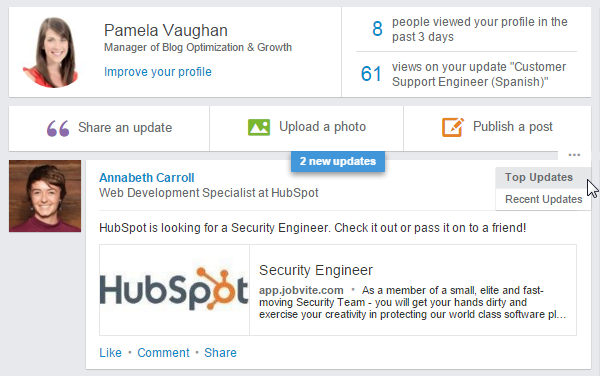
Found on your LinkedIn homepage, Network Updates are essentially LinkedIn’s version of the Facebook News Feed. Check this feed periodically for a quick snapshot of what your connections are up to and sharing, or share updates of your own, such as noteworthy content related to your industry/career, content you’ve created yourself, etc. You can also sort by Top Updates or Recent Updates to filter your feed in one way or the other.
14) Be identifiable.
Allow others to see who you are if you view their profile. To enable this, visit your Settings (click your thumbnail image in the top right and click Manage next to Privacy & Settings) and click Select what others see when you’ve viewed their profile under Profile >> Privacy Controls. Make sure you check off the Your name and headline (Recommended) option. This allows you to take advantage of the next feature on our list …
15) Check out who’s viewed your LinkedIn profile.
How? With the Who’s Viewed Your Profile feature, of course! This tool, which is accessible in the main navigation via the Profile dropdown, enables you to identify which other LinkedIn users have visited your profile page (so yeah, exactly what it sounds like). In fact, LinkedIn gave this coveted creeper feature a facelift in February 2014, so the information it provides is even better than ever. You can also see how you stack up against the profile views for your connections, people in your company, and other professionals like you.
Has someone been checking out your profile that you might want to connect with? This might be the “in” you’ve been waiting for to connect. (Remember, if you don’t make yourself identifiable via tip #14 above, you won’t have access to this feature. It’s a two-way street!)
And if you’re interested in trying to boost the number of views to your own LinkedIn profile, we wrote a little tutorial about how to do just that here.
16) Export connections.
Want to transfer your LinkedIn connections to another contact management system? Luckily, LinkedIn enables you to easily export your connections. Click Connections in LinkedIn’s top navigation, click the settings gear icon in the top right, and click Export LinkedIn Connections under Advanced Settings on the right. You’ll have the option of either exporting them as a .CSV or .VCF file.
17) Easily find new connections — or connect with old ones!
Speaking of connections, the Connections tab in the top navigation offers a variety of other tools to grow and connect with contacts in your professional network. Click Add Connections in the drop-down menu to import contacts from your email accounts and get suggestions for other connections, connect with other alumni from your alma mater using the Find Alumni feature, and use the Keep in Touch feature to stay in touch with current connections, keep track of your communications, and get notifications when contacts in your network change jobs, have birthdays, or when you’ve fallen out of touch. LinkedIn even has a Connected mobile app so you can take advantage of these features on the go.
18) Leverage the perks of LinkedIn Groups.
Did you know that if you’re a member of the same group as another user, you can bypass the need to be a first-degree connection in order to message them? As long as you’ve been a member of LinkedIn for at least 30 days and a member of the particular group for at least 4 days, LinkedIn allows you to send up to 15 free 1:1 messages to fellow group members per month (across all groups you belong to). (Note: Your 15 message allotment excludes any back-and-forth replies that are the result of an original message. Learn more about LinkedIn’s specifications for communicating with fellow group members here.)
In addition, group members are also able to view the profiles of other members of the same group without being connected. Join more groups to enable more messaging and profile viewership capabilities.
For those of you who have been leveraging LinkedIn Groups for a while, you may be aware that LinkedIn recently made some pretty big changes. Groups are now private and membership must be approved (though once you’re in, your conversations no longer require moderation), and there is no longer a promotions tab or subgroups. Learn more about LinkedIn’s changes to Groups here.
19) Take advantage of Advanced Search options.
LinkedIn’s Advanced Search feature provides a much richer search experience. For example, say you want to find out if you’re connected to anyone who works at a specific company. Type the company name in the company field in Advanced Search, then filter the results by “Relationship” to see if you have any first- or second-degree connections to any employees.
20) Share your LinkedIn status updates on Twitter.
Ever since the big LinkedIn/Twitter breakup of 2012, you can no longer automatically sync your tweets to publish on LinkedIn (or even selectively by using the hashtags #in or #li in specific tweets). But don’t fret — as long as you add your Twitter account to LinkedIn, the opposite is still possible. So if you’re ever posting an update to LinkedIn that you’d also like your Twitter followers to see, you can easily syndicate that update to Twitter by selecting the Public + Twitter option in the Share with dropdown within the LinkedIn update composer.
21) Leverage @mentions in your status updates.
In 2013, LinkedIn rolled out the ability to tag or @mention other users and companies in status updates — much like the way it works on Facebook, Twitter, and Instagram. Want another LinkedIn user or company to see your status update? Include the @ symbol immediately followed by the user’s/company’s name in your status update. As a result, that user/company will get alerted that you mentioned them, and their name will also link to their profile/page in the status update itself.
How to Use LinkedIn for Business & Marketing
22) Optimize your LinkedIn Company Page.
The design of LinkedIn Company Pages has changed a lot over the years. Make sure yours is set up correctly and optimized for the latest layout, featuring a compelling and high-quality banner image (see examples of awesome LinkedIn Company Page banner images here). We’ve published an entire free guide about how to optimize your page for the latest design, and you can also view some examples of fantastic LinkedIn Company Pages here. Here’s how HubSpot’s Company Page currently looks, featuring our recently released 2015 State of Inbound Report …
Keep in mind that as of April 2014, LinkedIn no longer supports the Products & Services tab on Company Pages. This means you may want to set up and take advantage of LinkedIn’s Showcase Pages instead, which leads us to our next tip …
23) Create targeted LinkedIn Showcase Pages.
LinkedIn Showcase Pages are niche pages that branch off your main Company Page. Think of them as extensions of your main Company Page that allow you to promote specific products or cater to your individual marketing personas, providing a more personalized experience for your Company Page visitors. LinkedIn users can also follow specific Showcase Pages without having to follow a company’s main page or its other Showcase Pages, allowing your business to tailor the page closely to the audience specific to the page.
To create a Showcase Page, click the Edit dropdown at the top right of your Company Page and choose Create a Showcase Page. LinkedIn allows you to create up to 10 Showcase Pages per each parent Company Page. Find more information about Showcase Pages here.
24) Post Company Status Updates (and target them!).
Make the most of your LinkedIn Company Page by publishing Company Status Updates for all your page followers to see. This will give LinkedIn users even more reason to follow your Company Page, growing your LinkedIn reach. To learn how to enable LinkedIn Company Status Updates, read this post. Then learn how to create successful LinkedIn status updates in this blog post.
Been using Company Status Updates for a while? Why not step it up a notch and leverage the power of segmentation with LinkedIn’s targeting options, which enable you to target your status updates to specific users. As long as the target audience consists of at least 100 users, Company Page administrators can target their updates using criteria like company size, industry, job function, seniority, geography, language, or by including/excluding company employees. These targeted updates will appear on the Company/Showcase Page itself for those users as well as in the users’ Network Updates feed on their LinkedIn homepage.
25) Use LinkedIn Pulse to keep track of industry news.
Pulse is an awesome section of LinkedIn where you can discover popular articles and trending content tailored to your interests. You can find it under Interests in LinkedIn’s top navigation.
Browse Top Posts to monitor the most popular content on LinkedIn Pulse, or click the Discover more link found via the hamburger menu to find and follow specific influencer contributors, publishers, or topic-related channels to stay on top of news and stories in your industry. You can also sign up for daily or weekly email summary notifications of Pulse news (found in the Updates and news section of your Email frequency settings), or instant notifications when influencers you’re following post something new.
26) Check out LinkedIn’s Content Marketing Score & Trending Content resources.
If you’re a LinkedIn Business Solutions customer, you can learn how impactful your organic and paid LinkedIn content is with the Content Marketing Score and Trending Content resources. Your Content Marketing Score measures user engagement with your Sponsored Updates, Company Pages, LinkedIn Groups, employee updates, and Influencer posts (when applicable). It then provides recommendations for how you can improve your score, and thus the effectiveness of your LinkedIn content.
You also can get a sense of which types of content are most popular on LinkedIn in your industry with LinkedIn’s Trending Content resource. It highlights the most popular content being shared on LinkedIn for various audiences and topic segments. Monitor this to understand what content your company should be creating and sharing on LinkedIn to generate the most engagement.
To learn more about these resources, Business Solutions customers can contact their LinkedIn account executives.
27) Use LinkedIn to generate leads.
In an internal study of HubSpot’s customer base, we found that traffic from LinkedIn generated the highest visitor-to-lead conversion rate (2.74%) of the top social networks, almost 3 times higher than both Twitter (.69%) and Facebook (.77%). So yes — LinkedIn can help you generate leads. To get the most out of LinkedIn for lead generation, promote and share links to your blog posts and landing pages in your Company Status Updates, where appropriate in LinkedIn Groups, on your Showcase Pages, and in calls-to-action placed in posts you publish via LinkedIn’s publishing platform, Pulse (see tip #31 coming up).
28) Experiment with LinkedIn Ads and Sponsored Updates.
If you’re looking to complement your organic LinkedIn marketing efforts with some paid advertising, LinkedIn Ads are a smart choice. One of the biggest benefits of LinkedIn advertising? The targeting options! LinkedIn’s PPC ads let you target specific job titles, job functions, industries, or company size, to name a few — you know, the people who are more likely to want/need what you sell.
If you want to get started with LinkedIn’s advertising platform, check out our free guide to advertising on LinkedIn here.
29) Create your own industry LinkedIn Group, and join other relevant groups.
Consider creating a LinkedIn Group of your very own, like HubSpot did with our popular Inbound Marketers Group. Create a group based on a relevant industry-related topic, and become a LinkedIn Group administrator. You can then use this group to establish yourself as a thought leader in your industry, grow a community of advocates, generate new marketing content ideas, and even generate new leads (more on that next)! You should also consider joining (and getting executives from your business to join) other relevant groups and participating in discussions to exhibit thought leadership in your industry.
30) Email your LinkedIn Group.
“Generate new leads’from that group, you say?” That’s right! One of the perks of managing a LinkedIn Group is the fact that you can literally email the members of your group — up to once per week. These emails take the form of LinkedIn Announcements, which are messages sent directly to the email inboxes of group members (if they’ve enabled messages from groups in their settings).
This is a prime opportunity for generating leads from LinkedIn, particularly if you’ve built up a robust group of users. In fact, at HubSpot, our best performing LinkedIn lead gen days are usually the days on which we’ve sent a LinkedIn Announcement. Here’s how to get the most out of your LinkedIn Group emails.
31) Experiment with publishing content on Pulse (LinkedIn’s publishing platform).
Good news! You no longer have to be a LinkedIn Influencer to publish new articles to LinkedIn Pulse. Publishing is available to all users, ever since a February 2014 feature announcement. Experiment with how this feature can support your marketing goals by creating content for the platform and promoting it via your Company Page. For example, you could experiment with syndicating content from your business blog to LinkedIn Pulse and using it to promote subscription to your full blog.
To publish an article, click the Publish a post button on your LinkedIn homepage, or access Pulse via the Interests dropdown in the main LinkedIn navigation and click the Publish a post button in the top right corner of the page.
Use the main navigation to navigate to Pulse:
Or publish directly via your LinkedIn homepage:
For more tips about publishing on LinkedIn Pulse, check out this blog post. And if you’re looking for some inspiration, check out some popular LinkedIn Pulse articles here.
32) Recruit new talent via LinkedIn Careers.
Looking to fill a position or two on your marketing team — or another department within your company, for that matter? Then be sure to build out the Careers section of your Company Page, which you can use to promote your available job openings. For more robust customization options for your Careers section, you can also purchase a Silver or Gold Careers package, which allows you to add a large, clickable cover image that can be transformed into a call-to-action.
This image can direct users to a specific job, a list of jobs and opportunities located on your website, or examples of your company’s culture. The Silver or Gold packages also enables dynamic, customizable modules (that display different version of the page based on viewers’ LinkedIn profiles), analytics about who is viewing the page, direct links to recruiters, video content, etc.
The look and feel of your Careers page depends on what information and images you choose to include, such as a list of jobs, people at your company, a summary section for your careers, what employees are saying about working at your company, and recent updates. Furthermore, if you’re actively recruiting candidates with specific skills and expertise, don’t forget about LinkedIn’s Advanced Search feature (see tip #19 above).
33) Use LinkedIn for sales prospecting and social selling.
LinkedIn can be a powerful tool for sales professionals, too! Some of the LinkedIn features we’ve already touched upon in this cheat sheet — e.g. Saved Searches (tip #8), LinkedIn Groups (tip #18 and #30), Skills (tip #11), etc. — can also be great tools for sales prospecting and social selling. Check out this post on our Sales Blog to learn more about how to use LinkedIn for social selling, and this post to learn how to send a great sales message on LinkedIn. (Then subscribe to our Sales Blog for more great social selling content here.)
34) Add the Company Follow and LinkedIn share buttons to your website/content.
Promote your company’s LinkedIn presence and help grow the reach of your Company Page by adding the Company Follow button to your website. Also consider adding the LinkedIn Share button to your various content assets like blog posts, emails, and landing pages to extend the reach of your content to LinkedIn users. To learn how to build and use these buttons and more, check out our cheat sheet for creating social media buttons.
35) Analyze your LinkedIn marketing performance with the Analytics tab on your Company Page.
So … how are your LinkedIn marketing efforts faring? Use the Analytics tab for Company Pages to evaluate the performance of your Company Page. This tab offers data about the effectiveness of your page’s status updates, engagement, and reach, as well as information about your page’s followers — demographics, where they came from, how your following has grown over time, how your data compares to other companies, etc.
Access your page’s analytics by clicking the Analytics tab in the top navigation of your Company Page. For even more analytics about how your LinkedIn marketing efforts are helping you generate traffic, leads, and customers, you’ll need a closed-loop marketing analytics tool like HubSpot.
Want to see how HubSpot uses LinkedIn? Follow our LinkedIn Company Page here.
Editor’s Note: This post was originally published in August 2011 and has been updated to reflect the latest LinkedIn features as of October 2015.
Setting Your Publishing App Up For Success
So you’ve just invested time, money, and a lot of faith in a new publishing app. If all goes as planned, it’ll increase content consumption, give you a new channel for advertisers, and build loyalty among your readers. But what about getting people to use it in the first place? Just because you build it, doesn’t mean they will come.
With 1.2 million apps in the iTunes Store, getting eyeballs and driving adoption rates to your own app can feel just as hard as building the app itself. Sending out one launch email to your database won’t be enough.
So how can you drive adoption rates as well as increase engagement levels of the users who’ve already downloaded your app?
Increasing Publishing App Adoption
The first step is to convince people that your app is worth downloading in the first place. To help your app stand out from the rest, start by…
- Making the benefits clear: In order for anyone to want to download any app, they need to understand what’s in it for them. Why shouldn’t someone just visit your site for content? Make the benefits, relevance, and value-add abundantly clear to your readers by clearly listing the extra functionality or features that your app provides. Will they be getting exclusive content on the app? Will articles be served to them based on their preferences? Can they enjoy content offline? Or without ads? All of these should be talking points you incorporate in the app store, on your website, and in email communication.
- Using smart content: Fish where the fish are. Use smart content to your advantage to highlight app download calls-to-action to anyone visiting your website via a mobile device. This catches people in the very behavior—reading on their mobile—that warrants the use of your new app. The same techniques can be used for email. Consider smart content that allows you to add a special PS to any email read on a smartphone or tablet.
- Getting social: Analyze your company’s performance on each social channel you use to determine where users are most engaged. From there, ramp up on organic content promoting your app, or consider running app-install ads to extend your reach. Focus targeting on users who are on mobile, already follow or like your account, and have interests relevant to your publication. For more on what to consider before launching an app-install campaign, check out this post.
- Using segmentation: If a certain set of on-site actions indicate download intent, use those to your advantage and create audience segments and workflow lists based on those criteria. Then set up CTAs “retargeting” those groups.
Increasing Engagement with Publishing Apps
How many times have you downloaded an app, only to stick in a folder and forget about it several days later? Don’t let your app be forgotten. Instead…
- Keep content fresh: For readers to use an app on a regular basis, they need to feel like they’re getting new, updated content each time they log in. Put an editorial calendar in place, and give your development team deadlines to ensure regular, consistent content gets shared. Use analytics to understand users’ average time between repeat visits, and use that to inform your calendar.
- Don’t stop promoting: Don’t stop promotion efforts right after you launch your app. Continue app promotion on your website, social accounts, and in email, highlighting any updates, upgrades, or new content. Fatigued users can be re-invigorated by the promise of something new.
- Use workflows: Use app data and user behavior to create re-engagement workflows with email. For example, you could send users who have download your app an automatic feedback survey after one week, or have a set of social ads displayed to readers who haven’t logged in after a certain amount of time.
- Answer FAQs: Give readers a tool to help them navigate your app more easily, and ensure they have something to reference to use the app to their fullest advantage. This can come in a variety of formats, from FAQs to in-app tutorials. You’ve worked hard to get users. Don’t let a poor in-app experience or unrealized features to be the reason people don’t come back.
- Pay attention to analytics: Regularly measure how readers are using your app. Which features do they engage with most? Which articles lead to reading other articles? What keeps users engaged the longest? Take these findings into account when you are planning to release new content or develop upgrades for your app.
Increasing adoption rates and engagement with your app shouldn’t be an afterthought, but it also doesn’t need to be an overwhelming process. By using what you have in place and putting together a sound release strategy, you’ll increase your ability to attract and keep app users.
Most Websites Are Failing Optimization 101. Is Yours? [New Data]
Chances are, your website’s performance is high on your list of priorities. It’s an asset that works around the clock to draw in visitor, convert them, and help you hit your goals, after all.
But have you ever stopped to wonder how your website stacks up when it comes to performance, mobile optimization, SEO, or security?
Thanks to HubSpot Research’s latest report, Does Your Website Make the Grade? Chances Are, It’s Barely Passing, you can generate a better understanding of whether or not your website is making the grade, keeping pace with the average, or trailing far behind.
In this report, we analyzed over 26,000 websites using our Website Grader tool, and the results … well, they’re nothing to write home about. In fact, websites today scored just 60 points out of 100 for the key factors that determine website success. Take a look for yourself:
For more insights, check out (and share) some of these noteworthy takeaways for our research:
- The average load time for the reviewed websites was 3.9 seconds. [
Tweet This]
- Only 77% of the reviewed websites had page titles, 61% had heading tags, and just 42% had meta descriptions. [
- The website review process revealed that only 1 in 5 websites have SSL. [
See the detailed breakdown of our website benchmark data and how to improve your website by downloading Does Your Website Make the Grade? Chances Are, It’s Barely Passing and then find out what grade your site gets here.
How to Create an Effective Sales and Marketing SLA
The alignment of an organization’s sales and marketing efforts is a crucial strategic imperative for companies that desire sustainable growth. Despite the evidence of improved business performance, it’s still a rarity to find an organization that has and maintains full alignment. The good news is that the issue is getting far more attention than ever before, and more organizations are making progress.
A major cause for the overall lack of progress is that while the issue of alignment is getting more strategic attention from executives, it’s still getting very little focus in terms of tactical and structural changes that need to be made within an organization to sustain the goal.
While talk and will power can improve results in the short run, structural change is required to sustain the effort and to gain the benefits of such a pursuit. It is for this reason that the development of a documented service level agreement (SLA) between sales and marketing is so important.
HubSpot’s 2015 State of Inbound Marketing report highlighted three compelling advantages for companies that maintain their SLA:
- Companies with an active SLA are 34% more likely to experience greater year-over-year ROI than those companies that aren’t.
- They’re 21% more likely to get greater budget allocations.
- They’re 31% more likely to be hiring additional salespeople to meet demand.
Why SLAs Are So Important
Having been involved in creating many SLAs (for both my company and with clients) I can attest to the fact that while creating them can be difficult (they require a lot of thinking and working through details), the impact is significant. It is said that great communication is communicating not so that you can be understood, but so that you cannot be misunderstood. SLAs make that possible.
It is also said that Wwhat gets measured gets done, and what gets measured and monitored gets done faster. An SLA formalizes the measurement and monitoring processes that ensure progress and results.
Creating An Effective Sales & Marketing SLA
The process starts by bringing together the leaders of all disciplines into the same room to discuss roles, responsibilities, process, targets and accountability. At a minimum, a marketing and a sales leader need to be involved. As the sales development role continues to mature and grow, the leader of that group should be involved as well.
1) Defining Your Buyer Personas/Ideal Client Profile
As with everything else in your demand generation process, your service level agreement starts by clearly defining and communicating the criteria for who you are trying to attract. The more specific and clear the definition is, the better.
When you shortcut this step (and many organizations do) you leave far too much open to the interpretation of individuals. Let’s face it, salespeople and marketers are naturally opportunistic. Without formalizing, your profile definitions will drift and your demand generation process will get bogged down.
2) Standardize Lead Definitions
I regularly assess sales development and sales processes. One of the first questions I ask is to define what a lead is, and, further, to define each stage of an organization’s funnel. The answers almost always start with, “Well, uhm, well that’s a, uhm, good question. You see it kind of depends…”
At a minimum you must clearly define what qualified, marketing qualified and sales qualified leads are. This will force the participants to get into the minutia, but it’s critical to make your process scalable and sustainable.
3) Set Clear Goals
When setting goals, you should consider the maturity/ramp up of your team members and functional areas, past results and lead generation drivers. This is not the time to pull numbers out of the air and to make them motivating. Your goals must be based on real life situations.
The marketing team (and, if you have one, the sales development team) should be assigned goals around how many leads should be sourced, targets for each phase of the funnel and how many sales qualified leads (SQLs) should be turned over to the sales team.
All teams that are party to the SLA should meet every month to review results and update goals.
4) Define How The Handoff Occurs
Increasing lead velocity is truly a team effort. The handoff is a place where otherwise excellent demand generation processes blow up. You must determine if and how your SDRs will specialize, what determines when a lead is moved to that team and how leads are then handed off to the new sales team.
This is why you must have clear lead definitions. Without them your team will be dealing with too much ambiguity to sustain alignment and growth.
5) Establish Protocols For Managing Leads
The biggest, most common complaint I hear from salespeople and marketers is that the other group doesn’t know how to manage leads. This is the section of the SLA that eliminates that concern.
Clearly lay out how a lead should be treated – when, how often and how many times they should be “touched.” Closing the loop is also important. How should a sales accepted lead be reported as well as a sales rejected lead. Closed loop reporting is crucial to improving your processes.
6) Track, Measure & Assess Performance Metrics
Your SLA should clearly define the key performance indicators everybody will use to assess the progress and effectiveness of your demand generation processes. Tracking should be used to highlight performance issues/opportunities with individual contributors and to highlight and accelerate learning so that everyone is always improving.
7) Standardize the SLA Review Process
Determine the period of time that you will conduct a comprehensive review of the assumptions, processes and targets laid out in your SLA. For most companies a review of the SLA every six months is sufficient. For high-growth companies, we recommend reviewing quarterly.
Creating an SLA is a challenging task but one that is well worth the effort. Clearly defining and communicating the expectations of your sales and marketing teams will go a long way in helping to meet or exceed the revenue goals you have established.
5 Emotions to Tap So You Can Move Products on Cyber Monday
Emotions are always high during the holiday season, and that puts you, the ecommerce vendor, in a very pleasant situation. Emotions often lead to purchases, especially if you target those emotions responsibly. Knowing which emotions to invoke can lead to some seriously amazing sales. Let’s take a look at which will fill carts on your ecommerce site.
Love
Well, this probably seems pretty obvious. We buy gifts for people during this time of year because we love them and want them to be happy. Sometimes, amid the hustle and bustle and rampant spending and grumpy shoppers, we forget that we’re doing this all out of love.
With your content, remind buyers of the reason for the season. Commercials and articles that tug at the heartstrings also tug at the purse strings.
Instant Gratification
With so many tasks to check off the list before the big day arrives, shoppers are looking for anything that makes their job easier. Your offers during this time should focus on how you can take the stress out of their holiday shopping. Give them what they need as quickly and as easily as possible.
Instant online savings offers are definitely a great start. What if you offered discounted overnight or two-day shipping for certain spending thresholds? Free two-day shipping with a certain purchase amount can go a long way toward boosting those average order values.
Trust
Buyers often step way outside their comfort zones during this time of year. After all, they’re making purchases for the people they love and not for themselves. What does the doting wife know about the necessary products for her husband’s beer-brewing hobby? What does the loving mother know about the equipment needed for her son’s computer-building activities?
With content that addresses their questions and gives them the answers they need, you build trust that other online retailers might not pursue. By showing these buyers that you’re more interested in their trust and loyalty than in their dollar, you might just convince them to spend more.
Fear
Well, prompting fear during such a warm and fuzzy time of year doesn’t seem like the best tactic. However, if you can show buyers that your quantities are limited, they might jump into action to make sure they get one.
This has been a major product mover in the past, especially with toys. Companies that carry the hottest toys of the year get a lot of money and mileage out of promoting those coveted gifts. Anyone remember Tickle-Me Elmo? Or Beanie Babies?
Value
Even during the season of spending, consumers have to be a little frugal. After all, they can buy more gifts if they save money on their purchases. You can tap into this desire for savings with some great offers.
Any way that you can help your buyers save money is a great way to get them to complete their purchases. For instance, a discount coupon for spending over a certain amount in their email may get them to your website. Then show them bundling options that might save them even more money if they’re willing to buy a few more products while they’re there. A final offer might be free or discounted shipping if they meet a certain purchase amount. With that kind of value available, they might just shop with you for everyone on their list.
With these emotions at the forefront of your marketing strategies, you’re set to have the best holiday season yet.