Which Instagram Story Formats Really Engage Viewers [New Research]
In 2021, Instagram reported over 500 million users viewed Stories.
Since launching in 2016, the Stories feature alone has made Instagram more popular than other Story and mobile video platform competitors including Snapchat, TikTok, and its owner’s own platform: Facebook Stories.

Even if you’ve already published a handful of branded Stories, you still might want to up your game by making them even more engaging. After all, Stories can provide great benefits related to audience engagement, brand awareness, and even purchase-related conversions.
Despite the growing number of benefits that Instagram Stories offers brands, crafting good content still takes time, energy, and brainstorming. Even when you put your best efforts into creating a Story, you might still find that it falls flat, sees a high drop-off, or shows other signs of low engagement.
As you build your social media content strategy for 2022, you might be asking yourself, “What type of Instagram Story format do people actually engage with?”
In this post, I’ll highlight what consumers said about their favorite Instagram Story formats, the trends marketers are noticing, and show you examples along the way.
Which Formats Marketers Are Leveraging [HubSpot Blog Data]
The HubSpot Blog surveyed over 1,000 marketers to learn more about their marketing strategies in 2022. According to this survey, 78% of marketers leverage Instagram Stories in their roles. Of those who use Instagram Stories, 43% post on behalf of their brand multiple times per week. The marketers in this survey note audience viewership of Instagram Stories declines after four to six Instagram Story pages.
According to the marketers we surveyed, here are the most common Instagram Story types subjects that result in the greatest ROI.
Content That Reflects Brand Values
Per the HubSpot Blog survey, 18% of marketers indicated Instagram Story content that reflected their brand’s values produced the greatest ROI. Considering 71% of consumers want to buy from brands that align with their personal values, this piece of data isn’t surprising.
When companies are upfront about their core values related to topics such as diversity, inclusion, sustainability, and human rights, buyers are able to quickly determine a brand’s stance on a particular topic.
Similarly, it’s important that consumers know why your brand exists, and how you can serve them. Regularly incorporating your company’s mission and vision into your content can also help your audience feel more connected to your brand.
Product-Focused Content
Consumers want to see your product in action! Whether it is through regular demonstrations by your team, user-generated content from other happy customers, or positive reviews, product-related content can deliver positive results. When crafting Instagram Stories, find creative ways to present your products that appeal to your audience.
Interactive Content
On Instagram Stories, interactive frames have a specific call-to-action or way viewers can get involved from within the app. This often includes using Instagram’s Poll or Quiz sticker, inviting users to share a specific piece of content themselves, or a game. Here’s an example from @fentybeauty, who used Instagram’s slide feature to poll their audience.

Trendy Content
Trend-related content entails coverage of a recent cultural moment or news story. This type of content can range from informative (breaking news) to humorous (posting a meme related to a recent event). Trendy content is well-suited for Instagram Stories because of it is best consumed quickly and while relevant. Unlike a feed post that can take days to reach an audience, the 24-hour period an Instagram Story is live can be a great place to share content that is only relevant for a short period of time.
Now that we know what content marketers are prioritizing in Instagram Stories, let’s look at what formats consumers prefer and engage with most often.
Which Format Consumers Are Actually Watching
While some brands and users post Stories focused purely on interactive features, others might post visual storytelling content such as short narratives or longer video stories that feel more like documentaries.
But, which one of the many Instagram Story formats is most intriguing to people? To get to the bottom of which Story style is most engaging, I surveyed 350 people using Lucid software to learn more about their favorite Story formats, sound preferences, and ideal Story length.
I asked consumers, “Which Instagram Story are you most likely to tap all the way through until the end?”
At this point, you may have your own predictions of how people might have voted. While research says that interactive stickers, such as Quizzes, Polls, or Questions are highly engaging, you might also be thinking about the times you’ve tapped through an influencer or brand’s behind-the-scenes videos via their Story. So which, ultimately did people choose?
Stories centered around Quiz or Poll stickers were one of the most popular formats with 15% of the votes. However, 35% of consumers actually prefer short narratives with a mix of photos, text, and videos.
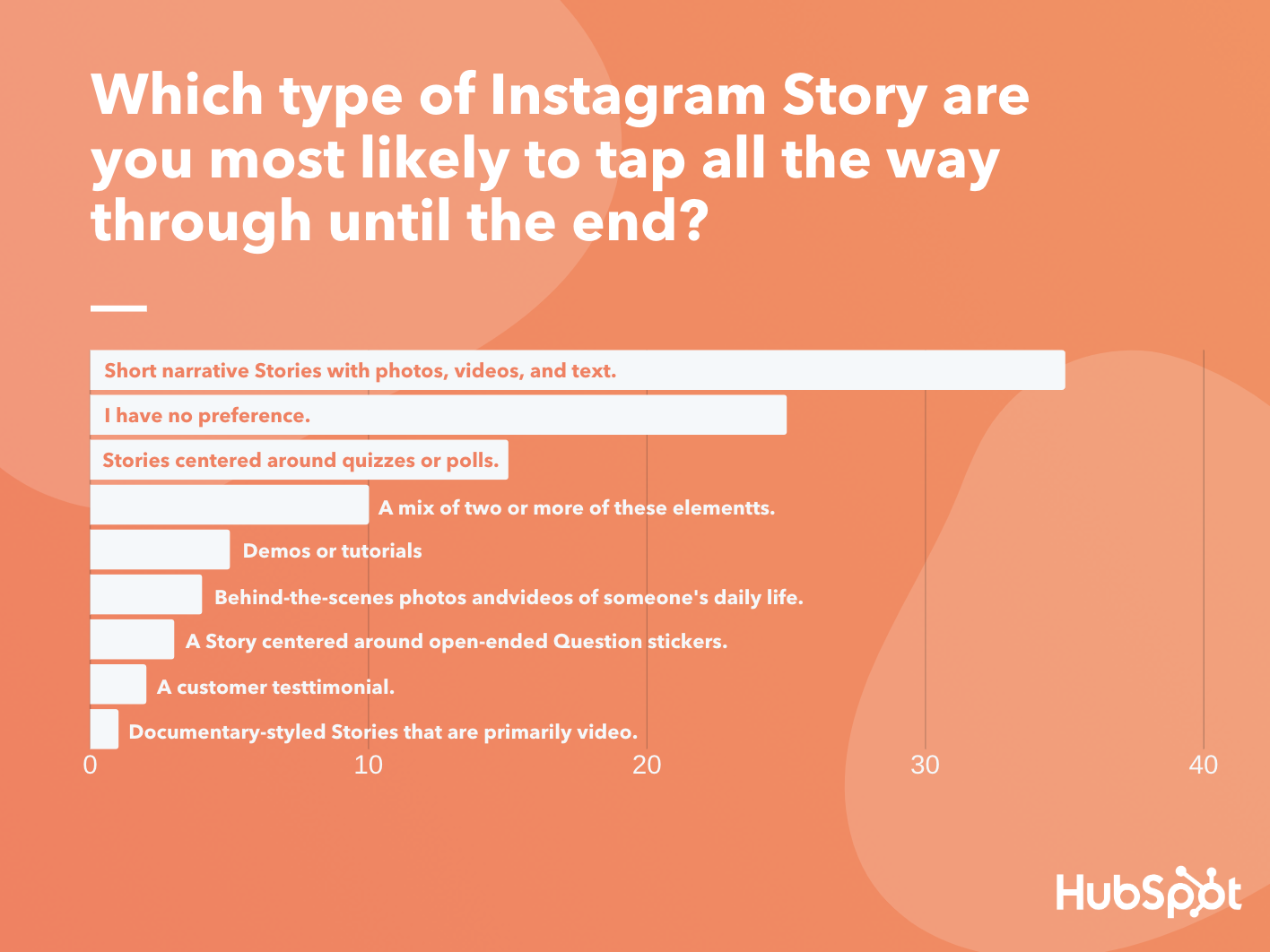
Data Source: Lucid Software
Short Narrative Stories
Short narratives are basically articles translated for a more visual audience. They rely on brief paragraphs and bullet points of text, accompanied by related visuals, to tell a story in a few cohesive short slides. Here’s a great example of a short story that swipes up to a longer piece of web content from Harvard Business Review:
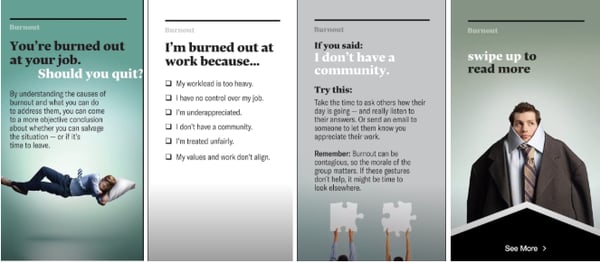
This strategy is a great way to get more eyes on your blog content without asking people to leave the Instagram app.
Aside from informing your audience of a topic related to your industry, you can also take a note from HBR and other publishers by using Stories as a traffic generator. In the example above, HBR — which has a verified account — has adapted a long-form article into a short Story and included the full post at the end as a swipe-up link.
With this tactic, the Instagram Story serves as a teaser as viewers who are very interested in the topic can swipe up to read more about it on HBR.org.
Quiz or Poll-Centered Stories
Another strong Story format uses Quiz or Poll stickers. Essentially, these Stories feel like they are just created to quiz the viewer by including the Quiz sticker on most pages, or brands can leverage Stories with polls primarily on each page to get their audience’s insights on a topic.
These Stories are intriguing and entertaining to viewers because it allows them to test themselves and learn about a new topic interactively, or vote in a poll and see what other audiences think about a certain topic or theme. Here’s an example of an interactive Story from HubSpot which centered around a Poll-styled quiz and revealed the answers at the end.
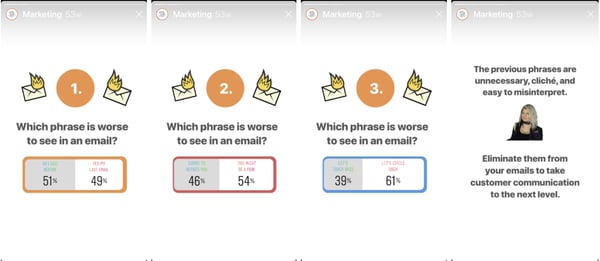
While you can also use an actual Quiz sticker, which will immediately tell viewers quiz questions, HubSpot’s strategy also works as it allows viewers to get a glimpse at what others guessed and see a rundown of the actual answers at the end. This might keep viewers engaged, entertained, and in the Story for longer if they know that there will be a payoff on the last page.
While fewer people voted for Stories centered around Question stickers, this feature could still be a great feature to experiment with as it can help you interact with and learn more about your audience in a more open-ended way that Polls.
Here’s an example of a Question sticker in a HubSpot Story. After this page, the Story went on to share the answers that viewers submitted.
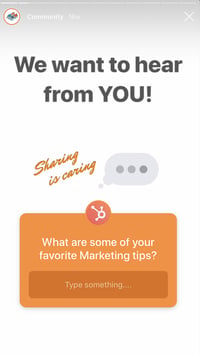
Although open-ended questions seem like a great way to learn about and interact with your audience, keep in mind that viewers will need to take time to fill out answers rather than simply tapping on a Poll or Quiz sticker. This means that if your audience isn’t as interested in the topic or question, you might run into issues getting responses.
If you’d like to learn more about how to use and leverage the Instagram Questions sticker in your Stories, check out this helpful guide which includes examples of brands that used the feature successfully.
Demos and Tutorials
Brands can also leverage tutorials and demos, which was the fifth most popular Story style. This tactic might be especially helpful if you’re interested in ecommerce or purchase-related conversions as a growing number of people prefer to learn more about products via video. Here’s an example of a tutorial from Kylie Cosmetics, where CEO Kylie Jenner puts on a new lip liner from the brand.

Story formats that include demos or tutorials can be advantageous to brands because it allows them to show off how their products work. Additionally, if you have over 10,000 followers or are a verified user, you can link these Stories to your ecommerce site or a purchasing page for the products shown. This way, if a viewer is impressed by a tutorial or demo, they can simply swipe up to learn more about or purchase the product.
A Mix of Content
Because many people don’t have a preference or prefer a mix of multiple elements in Instagram Stories, be sure to add a bit of variation to your content strategy. For example, brainstorm ways to add interactive features, such as Quiz or Poll stickers to narratives, tutorials, or other types of Story content. This will add an extra layer of engaging content to a Story that might already be interesting to viewers.
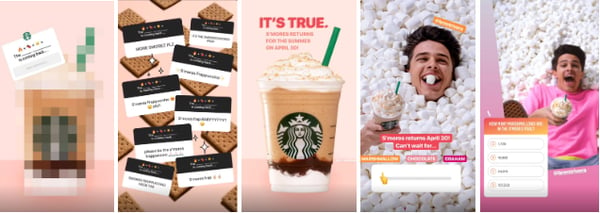
Here’s an example of a Story from Starbucks that mixes in storytelling and interactive stickers to announce the return of a popular seasonal beverage:
Other Instagram Story Formats
When it came to the Story styles with lower rankings, consumers were actually less interested in behind-the-scenes content, mini-documentaries, and Stories that center around customer testimonials.
This might hint that marketers on these platforms might want to be thinking more creatively when launching content on Instagram Stories. Rather than just focusing on your product or customer testimonials, you might want to test out creating informative short narratives or interactive Stories that relate strongly to your brand. While this will engage Instagram audiences, it might also show off your company’s expertise in its industry.
While this poll deemed a few Story formats less engaging, I still encourage you to mix things up and experiment with some of these styles just in case they work for you. Here are a few to try.
Customer Testimonials
Although customer testimonials aren’t as interesting to consumers, this doesn’t mean that you should scratch them entirely. In fact, they’re still a commonly used tactic in many brands and industries, despite consumer preferences. For example, a number of companies, like Planet Fitness, have built their strategy around testimonials. Here’s an example:
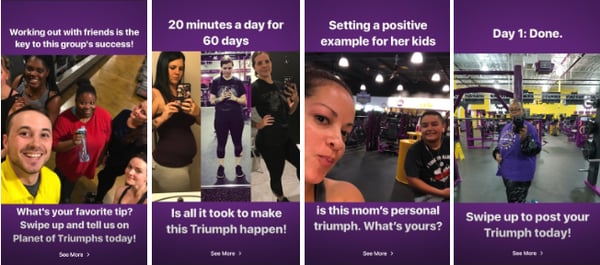
In the above scenario, the customer testimonial strategy works for Planet Fitness because it helps gym prospects feel less intimidated and more motivated to take on physical fitness after seeing a customer’s success story.
Behind-the-Scenes Stories
No, behind-the-scenes Stories don’t necessarily talk about your product front and center, but they can give prospects an idea of what your company is like, the inner workings of your industry, and a look at the staff that customers could work with.
Behind-the-scenes videos allow you to show off how hardworking or relatable your business might be, which might make viewers feel more comfortable working with you.
One example of a brand that uses this technique is the NBA. The basketball league regularly shares videos of professional basketball players behind the scenes at games or celebrations. In the image below, they shared an Instagram Story video of basketball players taking a photo with the rapper Drake:

Mini-Documentaries
Like narrative-style Instagram content, mini-documentaries tell journalistic stories that are slightly more complex and primarily centered on video — like a documentary that you tap through.
These are often higher-quality and incredibly informative, so they are more prominently used by publishers such as National Geographic. Here’s just the beginning of a long documentary-styled Story where NatGeo visits NASA’s offices to uncover facts about the first moon landing:

If you’re a small to medium-sized business that’s just ramping up your Instagram strategy, you might want to stick to a short narrative Story, like the ones noted at the beginning of this post. These will allow you to similarly show a combination of videos, photos, and text without as much production time and effort. However, if you’re a content creator or feel like covering an event or newsworthy topic in your industry might boost brand awareness, you might want to experiment with this longer-form, in-depth visual storytelling style.
Ideal Story Length
For years, social media managers have been trying to determine how long the perfect Instagram Story should be. This has been such a major question that marketing blogs and publications have done further research on the matter.
If you’re a small to medium-sized business marketer, Story length is a valid thing to consider, especially if you have low time or resources. While you ideally want to engage people with low dropoff throughout your entire Story, you might not want to spend time making incredibly long pieces of content with multiple pages if you know people in your industry usually only tap through a small number of pages.
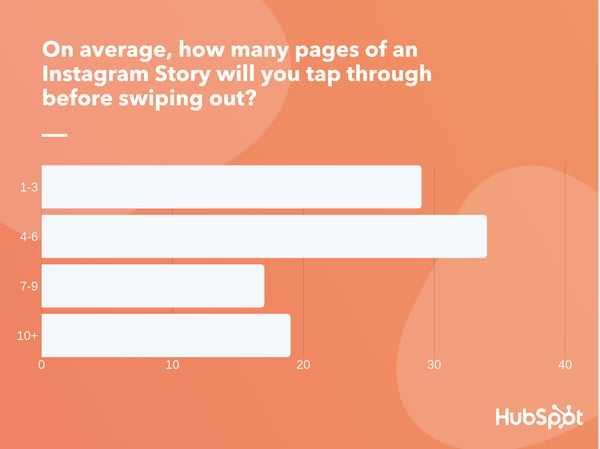
So, what exactly is a good Story length? To get some added insight on this, I surveyed the 350 consumers and asked them, “On average, how many pages of an Instagram Story will you tap through before swiping out?”
Before looking at the results, you might think “The ideal Story should be as short as possible,” simply because it’s content on a fast-paced social media platform. But, then, you might also remember that a number of publications, like Harvard Business Publishing and The Washington Post have leveraged Stories as a way to share long-form content.
So, which approach is right and which is wrong?’
It seems that there are solid themes in ideal Story length, however, there still might not be an ideal number of pages in this type of content.
According to the poll, 63% of consumers will tap through six pages or less, with 34% saying they tap through four to six pages on average. This data aligns with the feedback we got from marketers through our HubSpot Blog survey. However, more than one-third of consumers will tap through stories with more than seven pages, with 20% saying they’ll tap through 10 or more.
Data Source: Lucid Software
The results above are similar to research published by Buffer which noted that Stories made up of seven or fewer pages are the most engaging. However, the fact that a large chunk of Lucid respondents will watch beyond seven pages hints that you might not need to shrink down your content to ensure that it’s seen.
When determining the best Story length for your audience, we encourage you to consider the age group of your audience, the type of topics they engage with, and how fast-paced their lifestyles might be. If you have an idea for a great topic that your audience will love and is compatible with interactive Story features, you might be able to get away with a longer Story.
If you have a topic that you worry might feel dry or too complex to explain on Stories, you might want to format this as a smaller Story with a sticker linked to longer-form content.
As you start posting regular Instagram Stories, you should also experiment with both long and short Stories. Then, look at the drop-off rate of each Story. If many people seem to drop out of one long story but not another, this might be due to the topic or the writing rather than the length. However, if people regularly drop out of your longer-form Stories around a certain page number, you might want to limit your Story content to that number of pages.
Telling an Engaging Visual Story
Regardless of what topic you’re publishing a Story about, or which format you decide on using, make sure it informs the audience about something they care about, provides entertainment value, and highlights your brand’s credibility in your industry.
If you’re unsure about how you can leverage Instagram Stories to better market your brand, it can be helpful to look at examples from similar companies in your industry.

YouTube vs. Vimeo: Which Video Platform is Best for Your Business? [New Data]
While YouTube is obviously the largest video hosting platform on the web, it might not be the best choice for every business.

There are other factors to consider when choosing a home for your video marketing — such as cost, tech support, and video and audio quality — to name a few.
To help you find the best fit for your company’s unique needs, we compared YouTube directly against the smaller, more niche platform Vimeo across a number of factors. Read on to see the results, and decide for yourself.
Number of Users
Winner: YouTube
There’s no real competition here. YouTube commands an audience of over two billion monthly users — almost half of the entire internet-using population. Vimeo’s 230 million monthly viewers and 1.9 million paid subscribers seem insignificant in contrast. For maximum reach, choose YouTube.
Search Optimization
Winner: YouTube
YouTube leaves Vimeo in the dust here. YouTube is the second largest search engine on the internet, right after parent company Google. If you’re planning to create a video tailored to a specific search query, (e.g., how to pick a font for your website), your video belongs on YouTube. Not only will it appear in search results directly on YouTube, but Google also seems to favor videos from YouTube over those posted on other platforms.
Mobile
Winner: YouTube
70% of all YouTube views come from mobile, and the YouTube mobile app is absolutely dominating the mobile streaming space — outranking even formidable competitors like Netflix, Hulu, and Twitch.
Videos uploaded to Vimeo and YouTube are both optimized automatically for mobile, but YouTube offers more opportunities for mobile discovery and reach.
Cost
Winner: YouTube
YouTube is free — even for businesses. But you might be wondering if Vimeo is as well.
Is Vimeo free to use?
Vimeo operates on a tiered pricing model, ranging from a free basic plan to a $75/month package that includes unlimited live streaming.
Vimeo Pro vs YouTube
While Vimeo does have a free basic plan, it limits you to 500MB maximum storage per week.
If you’re okay with paying some money, you can get a Vimeo Pro plan. With Vimeo Pro, you’ll have access to support, advanced analytics, and professional privacy.
On the other hand, you can have unlimited storage for free on YouTube.
Support
Winner: Vimeo
With their paid packages, Vimeo offers several levels of technical support that could be a game-changer for businesses with little video expertise. YouTube offers plenty of free help documentation and access to a (rather crowded) support community. Still, if you’re seeking higher-touch, personalized support on-demand, a paid Vimeo account is the better option.
Storage
Winner: YouTube
YouTube offers unlimited, free storage for all accounts, while Vimeo charges for storage on a tiered basis. The basic, free Vimeo account option gives you 500MB of storage per week. With their highest level, $75/month package, you can store 7TB total with no weekly limits.
No Pre-Roll Ads
Winner: Vimeo
If you upload your videos to YouTube, there’s a good chance a pre-roll ad will play before it, which has the potential to deter some viewers from sticking around. Vimeo currently doesn’t allow ads, and it doesn’t look like they’ll be changing this policy anytime soon.
Running Ad Campaigns
Winner: YouTube
If you’re thinking of running your own ads on a video platform, you can’t beat YouTube (You also can’t purchase ad space on Vimeo, even if you wanted to, because they don’t allow it.)
YouTube offers an advanced, user-friendly ads platform, as well as personalized support from a “YouTube Advertising Expert” when you spend $10 a day on ads.
Community
Winner: Vimeo
User numbers don’t tell the entire story. With such a massive audience on YouTube, the environment is naturally more competitive. It’s easier for your video to get drowned out by thousands of others if you aren’t planning to feature it somewhere off YouTube. Vimeo’s smaller, more community-driven platform might be a better option if you’re hoping to tap into an existing creative niche, or get featured on their hand-curated staff picks page.
Advanced Privacy Options
Winner: Vimeo
Both YouTube and Vimeo give you the option to set videos to private or public (the default setting on YouTube is public), but Vimeo offers a handful of more nuanced, specific privacy options if that serves your interests. You can add a password protection option to videos, share a video only with people who follow your account, or even hide it from the Vimeo community — which could be useful if you plan on embedding the video on your website and want it to be viewable in only one place.
Customizable Player
Winner: Vimeo
Vimeo’s sleek embedded player offers a number of useful customization options that YouTube can’t match, including hex color customization and the ability to include a custom player logo (on Business and PRO accounts). Plus, when you change the default customization options on your account, all previously embedded videos will update to reflect the changes automatically, with no need to go back and tinker with any code.
Analytics
Winner: YouTube
YouTube takes the win here because all their analytics — ranging from basic statistics like views to more advanced options — are completely free. Vimeo also offers powerful analytics tools to evaluate performance, but you’ll have to pay to access everything but basic stats.
Video Quality
Winner: Vimeo
When it comes to video quality, Vimeo beats out YouTube. In a test done by Medium, Vimeo’s video quality was crisp, clean, and easier to read. On the other hand, the same video on YouTube was blurry, making it much harder to follow.
Audio Quality
Winner: Vimeo
Again, when it comes to quality, Vimeo comes out on top. Sound quality is higher on Vimeo because the platform supports 320Kbps. However, to enjoy higher-quality videos and audio, you’ll need to be subscribed to one of the paid plans.
Live Streaming
Winner: YouTube
Both Vimeo and YouTube have live streaming options, however, YouTube is the clear winner here because it’s free. Vimeo offers live streaming with a paid plan. However, with Vimeo, you can upload new versions of the video and keep on using the same URL and upload higher quality recorded versions of a live stream, which you can edit before posting.
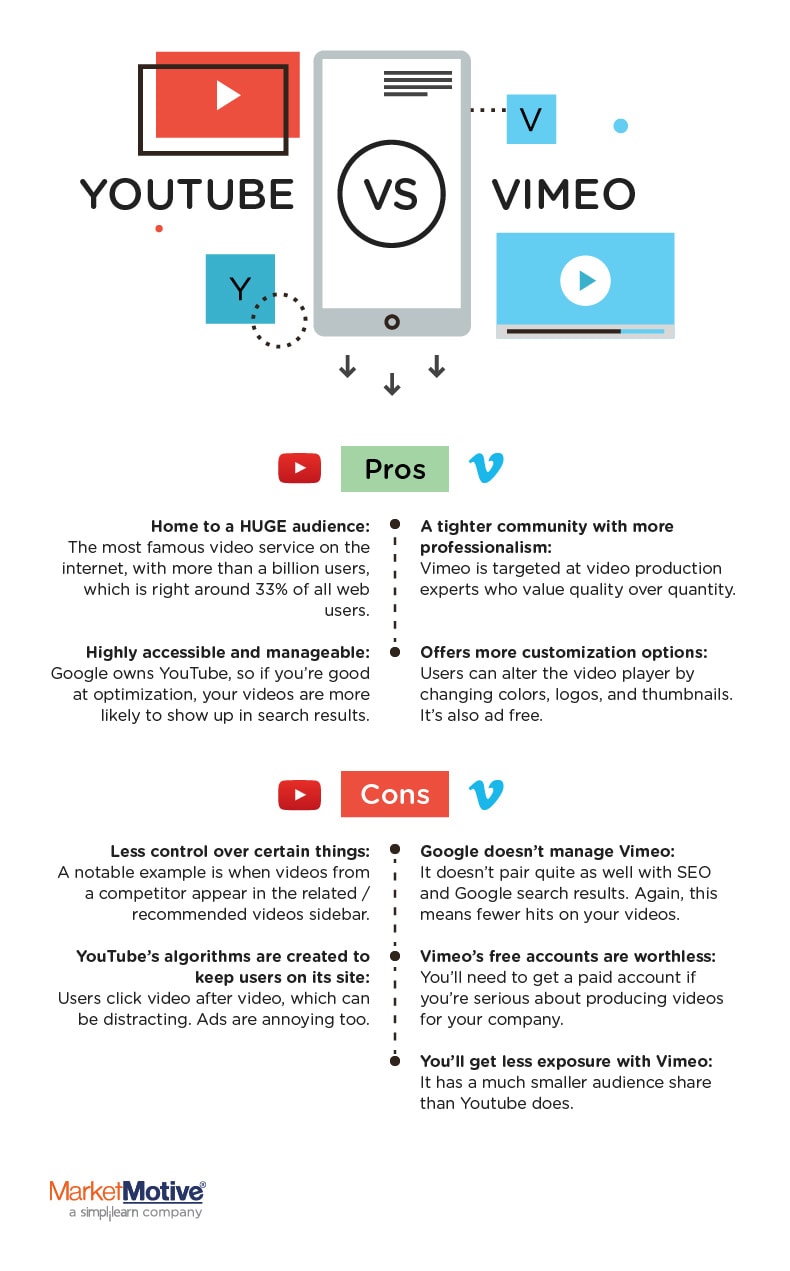
So which one should you choose?
It depends on what exactly you want to accomplish with your videos. If you’re looking for a creative community where you can connect with other video creators and gain some exposure in a specific niche, Vimeo is a better place to start sharing your content. If you have business goals that revolve heavily around search optimization and ads, YouTube is your best bet.

15 of the Best Women@INBOUND Quotes to Inspire You Today
INBOUND is a key milestone for professionals in industries spanning across marketing, sales, customer success, revenue operations, and more.
For Women’s History Month, the INBOUND team is excited to highlight some of the most impactful quotes from the incredibly talented women who have graced our stages over the past 10 years.
Providing opportunities that go beyond having a seat at the table to actually having a voice is how we will continue to transform the future of business.
Let’s dive in.
Sign Up to Speak at INBOUND 2022
15 Inspirational Quotes from Past INBOUND Women Speakers
1. “Fail is the F word for business. If failure is not an option, neither is success.” — Beth Comstock, Advisor & Author
2. “It is human emotion that drives all of our decision making. It’s what drives us to be our best selves.” — Bozoma St. John, Chief Marketing Officer, Netflix
3. “Vulnerability is the birthplace of innovation, creativity, and change.” — Brené Brown, Professor, Author, Podcast Host
4. “Maybe it’s not about getting the part. It’s about forging your own path through the wilderness. You chart a different course.” — Brit Marling, Actress
5. “I define talent in a particular way, I don’t look for polish as much as I look for promise.” — Chimamanda Ngozi Adichie, Writer
6. “Ignorance, at this point, can only be willful.” — Emily Chang, Executive Producer, Bloomberg Technology
7. “It is the quality of our relationships that determines the quality of our lives.”— Esther Perel, Psychotherapist
8. “Your best mentors are your peers, because you will rise together.” — Joanna Coles, Former Chief Content Officer, Hearst Magazines
9. “Nothing great has ever come out of a lot of easy days.” — Leila Janah, CEO of Samasource
10. “Don’t ask if your dream is crazy, ask if it’s crazy enough.” — Lena Waithe, Actress
11. “Time is the most important thing we have. Every minute of your life should be spent doing what you want to.” — Payal Kadakia, Entrepreneur
12. “What’s the point of being a woman in power if you can’t help women in power?” — Shonda Rhimes, Television Producer, Screenwriter, Author
13. “You don’t have to lower your standards. There are people who share your values and have the skills to do the job well, you just need to take the time to look for them.” — Tarana Burke, American Activist
14. “If I were to give one piece of business advice to my younger self it would be respect your workers and fight for change.” — Judith Heumann, American Disability Rights Activist
15. “Start before you’re ready. No idea is ever going to be 100% perfect, the timing is never going to be 100% right, I’m a big believer that if you jump in and get started, you’ll find your way and if you start today, imagine where you could be in just one year.” — Sarah Paiji Yoo, Founder/CEO of Blueland

How to Insert a Checkbox in Excel in 4 Easy Steps
Adding a checkbox to your workbook may sound simple but it can expand the possibilities of what you can do in Excel.
From checklists to graphs, there’s so much you can do. However, it starts with the checkbox.

Learn everything you need to know about checkboxes below.
How to Insert a Checkbox in Excel
-
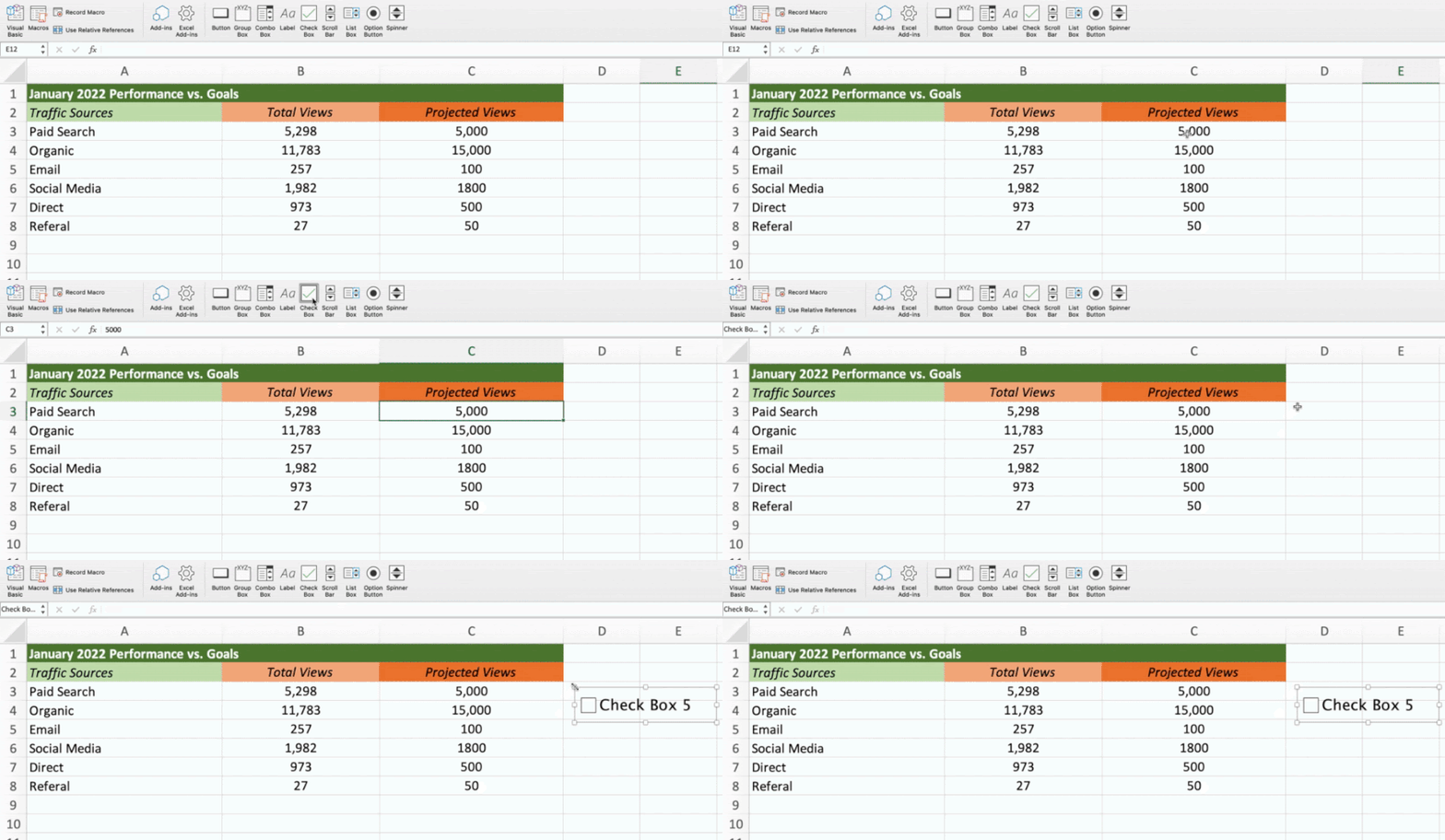
Add the developer tab to your Ribbon.

-
Navigate to the Developer tab and locate the “Checkbox” option.

-
Select the cell where you want to add the checkbox control then click the checkbox.
-
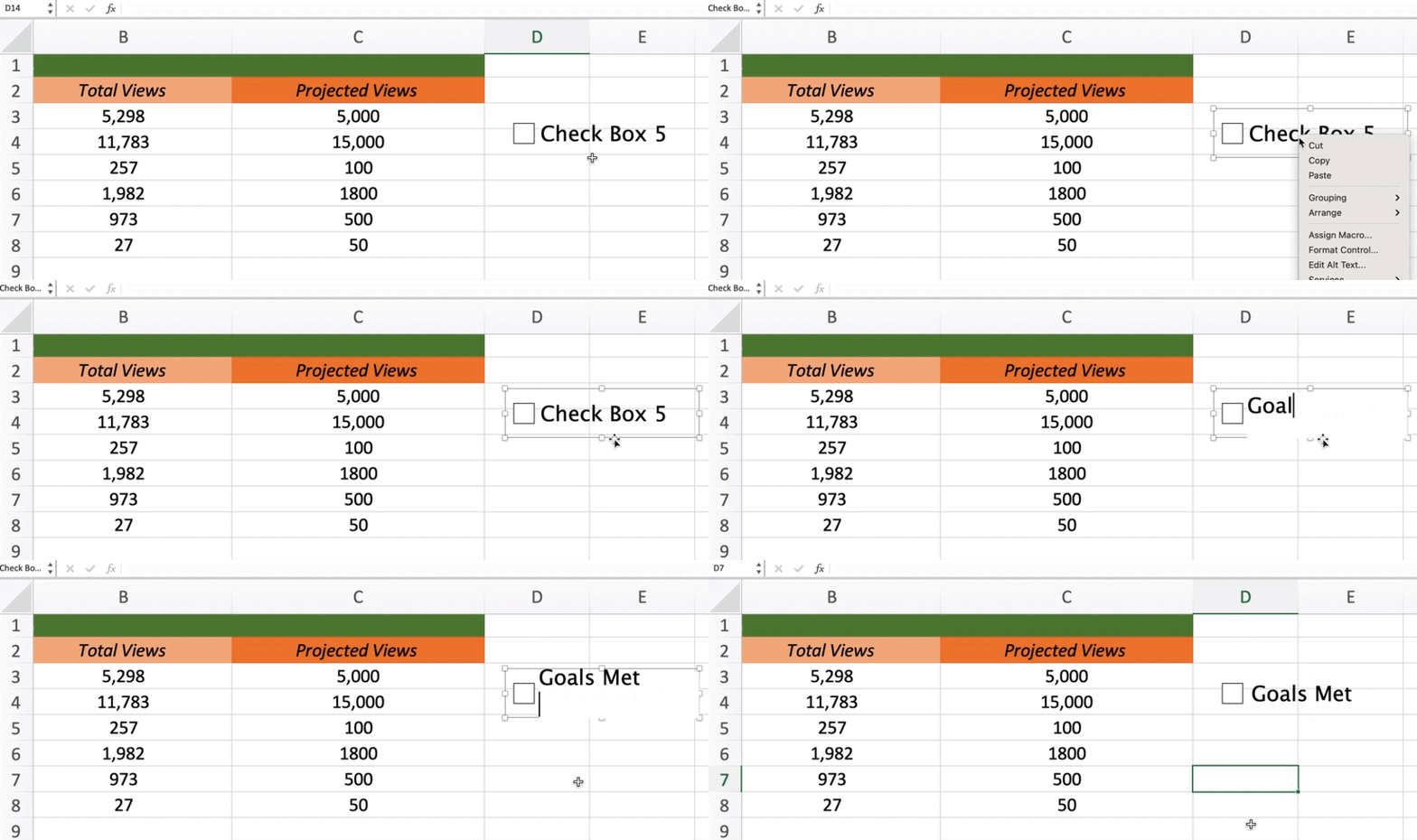
Right-click the checkbox to edit the text and adjust sizing.
To do this on Windows, click File > Options > Customize Ribbon. Then, select the Developer checkbox and click “save.” On IOS, click Excel > Preferences > Ribbon & Toolbar > Main Tabs. Then, select the Developer checkbox and save.
On Windows, there are a few extra steps to see the checkbox option. Under the Developer tab, click “Insert” and under “Form Controls,” click the checkbox icon.
Note: Currently, you cannot use checkboxes in the web version of Excel. If you upload a workbook with these controls, you’ll first have to disable them to start editing.
How to Format a Checkbox in Excel
-
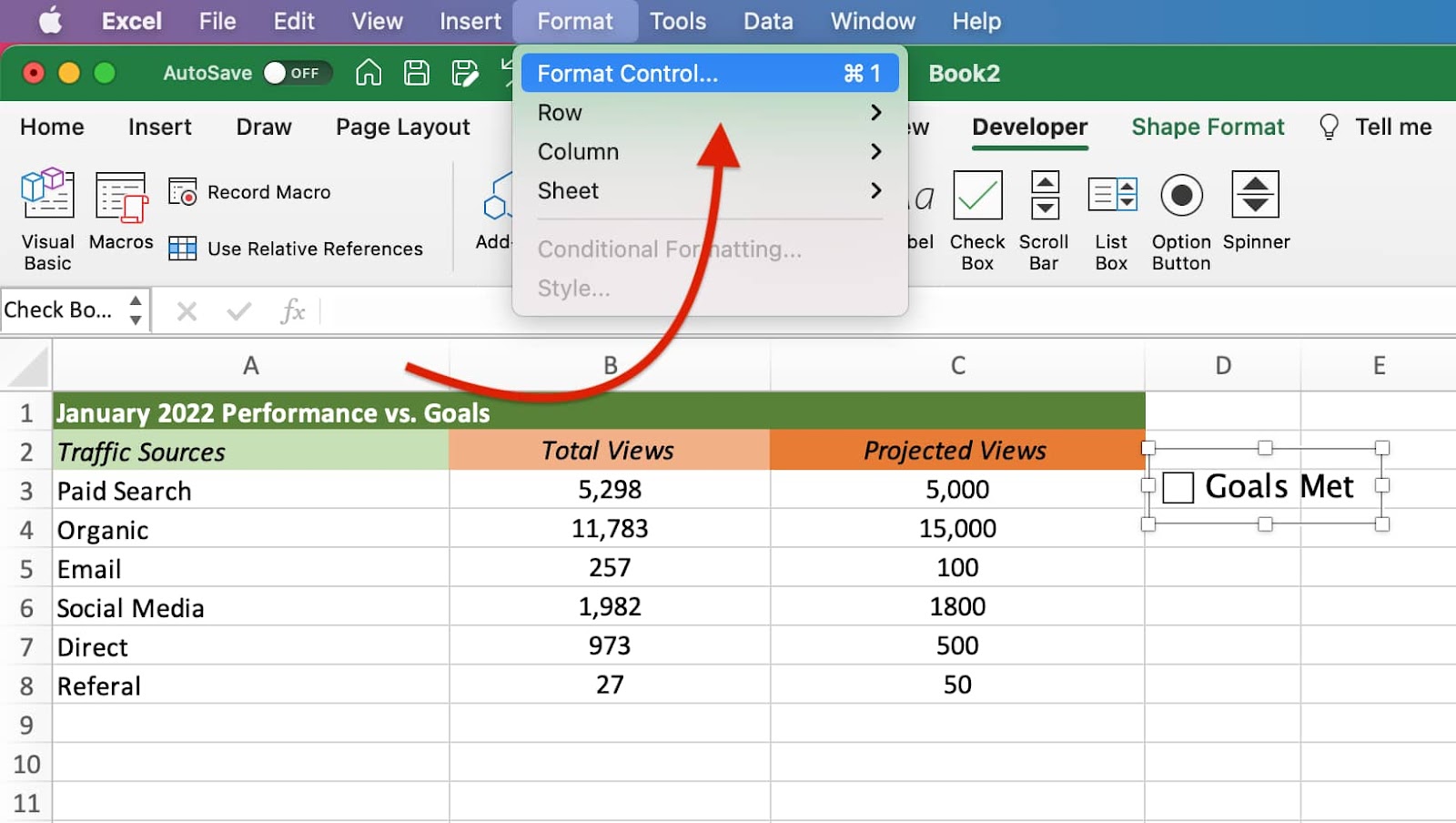
Open up the format control.
-
Modify the value and cell link, then click “OK.”
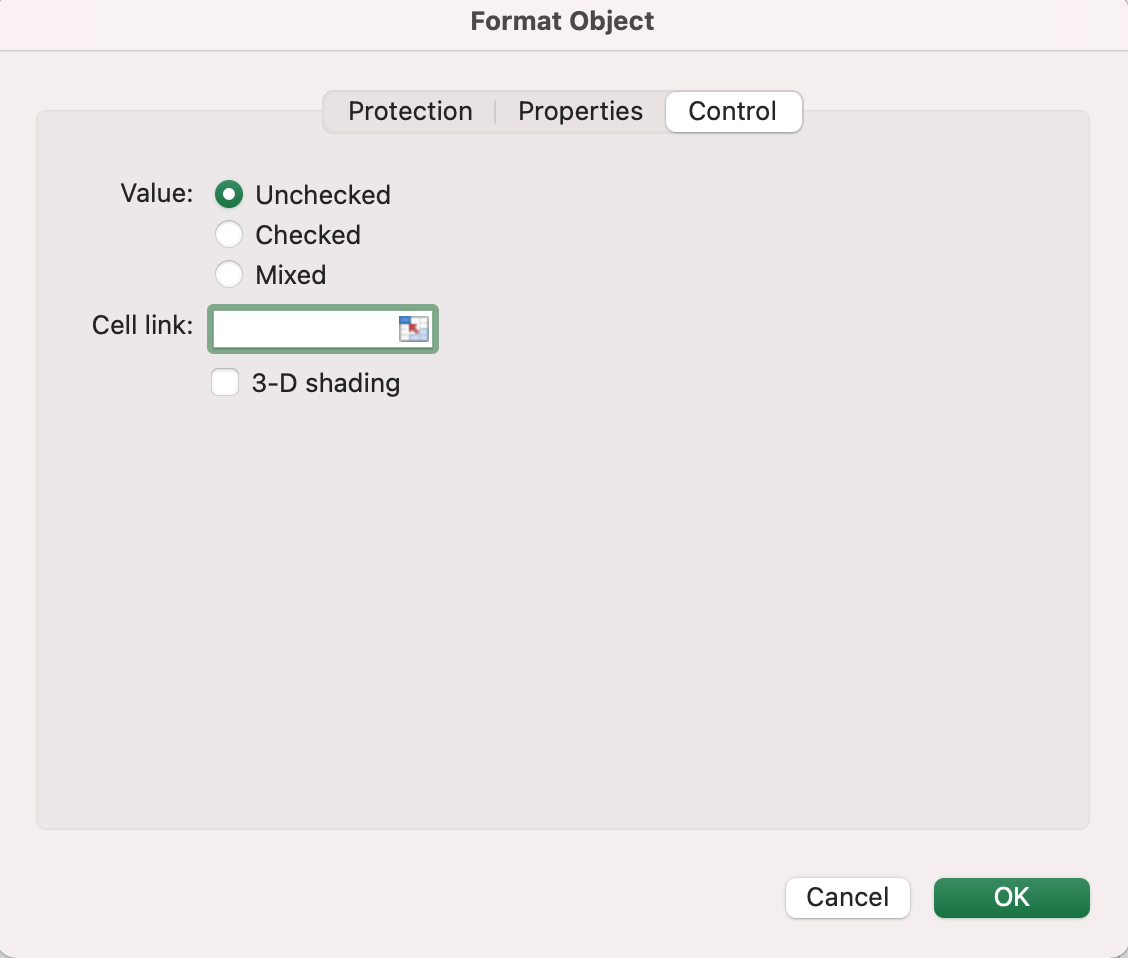
To access it on Windows, right-click the checkbox and select “Format Control.” On IOS, navigate to the “Format” tab and select “Format Control.”
With value, there are three options:
- Unchecked – This displays a box that is unchecked and returns a “FALSE” statement.
- Checked – This displays a box that is checked and returns a “TRUE” statement.
- Mixed – This will leave the checkbox empty as neither a true or false statement until an action is taken.
As for the cell link, this contains the checkbox status (true or false) of the cell it’s referencing.
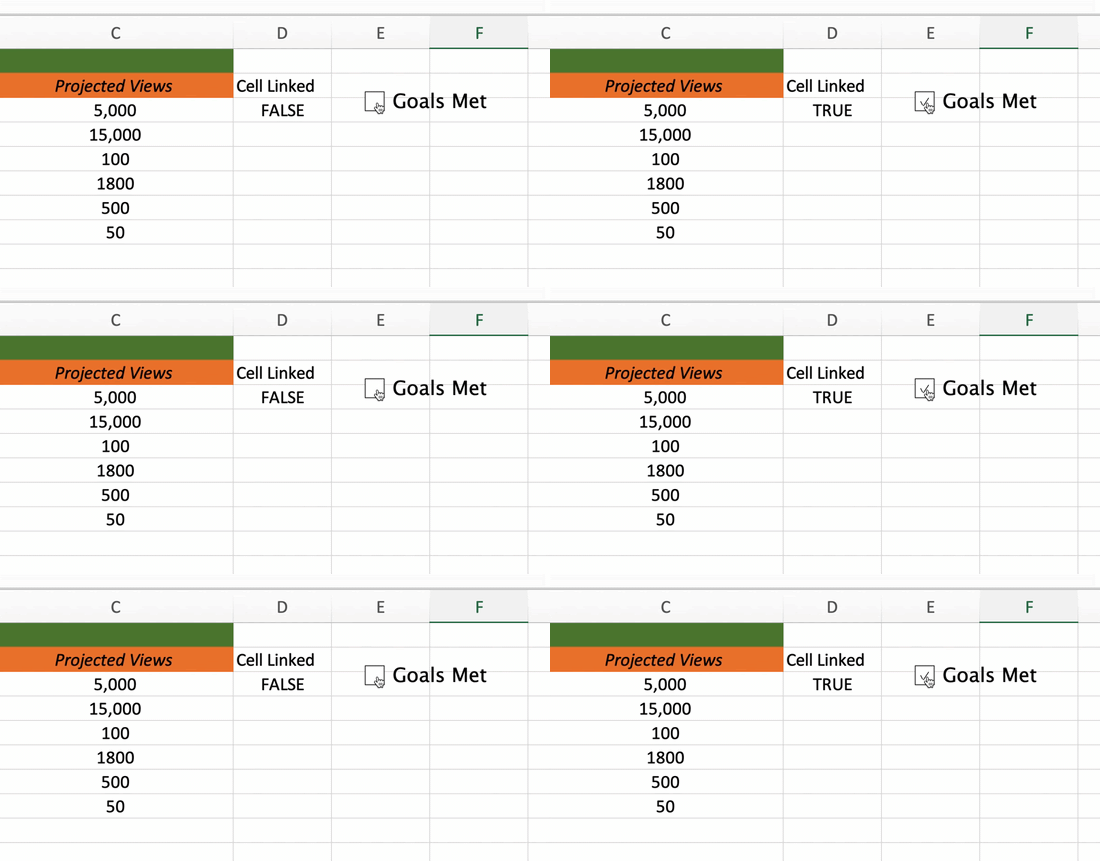
Now that you have those details down, you can start fully customizing your checkbox.
How to Delete A Checkbox in Excel
Deleting a checkbox in Excel is a simple two-step process:
- Right-click the checkbox.
- Click “delete” on your keyboard.

RFIs: The Simple Guide to Writing a Request for Information
Large corporations and government agencies don’t shop around for the best contractors and freelancers the same way a SaaS company or a small business might.
Rather than relying on word of mouth, a quick Google search, or a Facebook ad, these organizations follow a procurement process that ensures fair business practices and quality results.

As a preliminary step in the procurement process, an RFI gives a company or organization the information it needs to move forward with an RFP and RFQ. But what exactly is an RFI and what does this acronym stand for?
RFIs are important because they reduce blind spots and empower your team to make better decisions. With more information at your disposal, you can understand the marketplace and get a better sense of the questions you’ll need to ask as you move forward in the procurement process.
How does an RFI work?
Step 1: The buyer develops the RFI.
RFIs are written documents with the goal of collecting information from sellers. This information can be used to help buyers make a purchasing decision. The questions that are included in an RFI are specific and straightforward so that the sellers understand what the buyer is asking for.
Sellers can find an RFI on the company’s website, in databases like Procore, and government web pages like grants.gov.
Step 2: Sellers draft responses to the RFI.
Once a seller finds an RFI, they have a window of time specified by the buyer in which to complete it.
The information that is collected in the RFI is organized in such a way that it can be compared and contrasted against the information that other sellers submit.
Step 3: The buyer reviews all the sellers’ responses.
After the deadline for RFIs closes, the buyer reviews all of the responses submitted by the sellers. In this step, the buyer is looking for information about the companies, the products or services they offer, its history and background, and other factors that can impact how well the seller can deliver on the project.
Note: Price, budget, timeline, and other specific information aren’t covered in an RFI since it’s a part of step one in the overall procurement process.
Step 4: The buyer moves onto the next stage in the procurement process — the RFP.
After the buyer has determined which of the RFI submissions meets the preliminary qualifications for the project, they’ll move on to the next step in the process which is an RFP (Request for Proposal).
An RFI is the initial step a company takes to solicit information from potential sellers, as described above. Its main objective is to obtain information, not to make a final decision. Once the RFIs are submitted, the company will review them and shortlist the best options, armed with more insight. Then, they’ll send an RFP to that short list of sellers that satisfied the requirements of the RFI.
A Request for Proposal is a formal request for the selected vendors or sellers to respond to a specific contract opportunity. The document specifies the scope and price so potential sellers can put together a bid for the work.
These bids are then compared to understand each seller‘s strengths and weaknesses, and the best fit is chosen. RFPs are a decision document, so the questions are more targeted and specific.
After an RFP, the company may be contacted with an RFQ or Request for Quote that breaks down the project even further into specific cost structures and deliverables.
Request for Information Template
And RFI is similar to an RFP, but with less detail. Download the template below and use the short, one-page version of the request for proposal to draft your RFI. Once you’ve downloaded your free copy, follow along with the steps below to learn how to write an RFI.

How to Write an RFI
Creating your first RFI can be overwhelming. What should you ask for? What information does the seller need to know? To help answer those questions, use this simple guide to get the most out of the RFI process.
1. Draft an overview or statement of need.
Outline your goals and objectives, along with some general information about your company. This section should be short and provide an overview of your project to someone with no background information.
2. Add context about your organization.
Including additional information about your organization can help the seller tailor their response to your needs. You may want to mention which department is leading the project, who your customers are, and what your company values are, among other things.
3. Finalize the details.
What problem are you looking to solve? What information do you need? Here’s where you can detail what you’re looking for. Include any additional information a seller might need to know to develop a thorough RFI response. That may include:
- Any necessary skills and credentials the respondent may need to be successful
- Timelines or general scope
- What you’re not looking for
4. Mention information about the process.
Explain how interested parties should respond to the RFI. Attach a response template if you have one, outline any deadlines, and note if and when you’ll reply to respondents after the RFIs have been gathered. You may want to mention any evaluation criteria you’ll use when creating the shortlist for RFPs.
Best Practices for RFI Documentation
The more thoughtful you are about your RFI document, the better quality responses you will get back. Instead of casually emailing a sales rep and asking for information, creating RFI documentation will ensure that you get exactly the information you need. In that document, be sure to:
- Clearly state the information you’re requesting.
- Be specific about how and when you want to receive seller responses.
- Keep an open mind so that sellers can provide additional information that they think is relevant.
- Be brief and respectful of the sellers’ time.
RFI Examples
Need more inspiration? Read through the following examples of RFIs for more ideas on what to include in yours. These three RFIs all come from different industries and have different needs, so they are a good overview of the options available to you.
1. U.S. General Services Administration
In 2021, the U.S. General Services Administration collaborated with the U.S. Department of Energy to issue an RFI supporting a project to reduce commercial building greenhouse gas emissions. The overall goal that the GSA and DOE were aiming to reach was net-zero carbon emissions within these buildings and the RFI focused on three specific areas that would allow this goal to be achieved. Sellers who had technology to meet the requirements of this RFI were required to propose measurable success criteria across several categories.

In addition to the RFI requirements on the webpage, the GSA and DOE hosted a webinar, provided an FAQ, and made the presentation slides from the webinar available on the webpage so that all sellers had access to the information they’d need to submit the best response.
What makes this RFI example stand out is that it’s kept up to date frequently. New information is added frequently. When the deadline is passed, that is notated clearly at the top of the RFI so sellers can move on to other requests that are accepting submissions. This is a great example of the best practice we mentioned earlier about respecting the sellers’ time when asking for RFI submissions.
2. NASA
When NASA retires parts of their space shuttles, they like to display them at museums or other educational institutions. To gauge interest and understand the potential options for an upcoming retired part, they opened up an RFI. Here’s a sample of the document:
“This RFI is being used to gather market research for NASA to make decisions regarding development of strategies for placement of Space Shuttle Orbiters and Space Shuttle Main Engines (SSMEs) for public display after conclusion of the SSP. NASA is seeking information from educational institutions, science museums, and other appropriate organizations about the community’s ability to acquire and display a Space Shuttle Orbiter after the vehicles are retired from flight status.”
We like this RFI example because it provides a straightforward overview of the purpose of the RFI, and outlines what NASA wants to learn from the process.
3. Government of Canada
Government websites are a great place to find RFI examples because they are required to make all procurement processes publicly available. The following example is from an RFI for financial planning software.
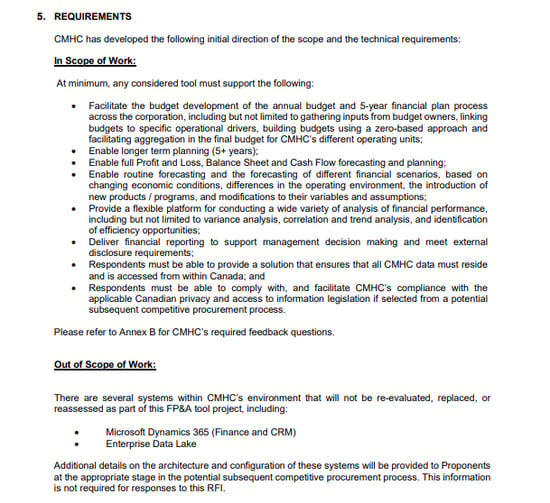
The requirements section of this RFI is a great example of how to explain what you do and don’t need in the responses. While the government of Canada is looking for financial planning software, they will be keeping their CRM and data lake provider.
4. University of Ottawa
In the following RFI except, the University of Ottawa is looking for an ERP integration solution. What’s unique about this RFI is how they want to receive responses. Rather than collecting written responses or documents, the U of O is scheduling strategy discussions with suppliers. This is a unique way to gather information, but helpful when you don’t have enough knowledge in the area to put together a scope of work yet.
“The University of Ottawa (University) is issuing this Request for Information (RFI) to schedule strategy discussions (via a conference call) from interested Suppliers with experience in ERP Integrations.
The intent of these discussions is to obtain feedback from Suppliers to assist the University in developing a more accurate Scope of Work and overall approach for an upcoming Request For Proposal (RFP) for ERP Integration solutions.”
Request for Success
Every RFI will be unique to your organization and the information you require. Use the template above as a guide to creating an RFI that will save you time in evaluating potential solutions.
With the right information being sent your way, all you need to do is read up! You’ll be well on your way to procuring the best solution for your team’s needs.
Editor’s note: This post was originally published in April 2021 and has been updated for comprehensiveness.

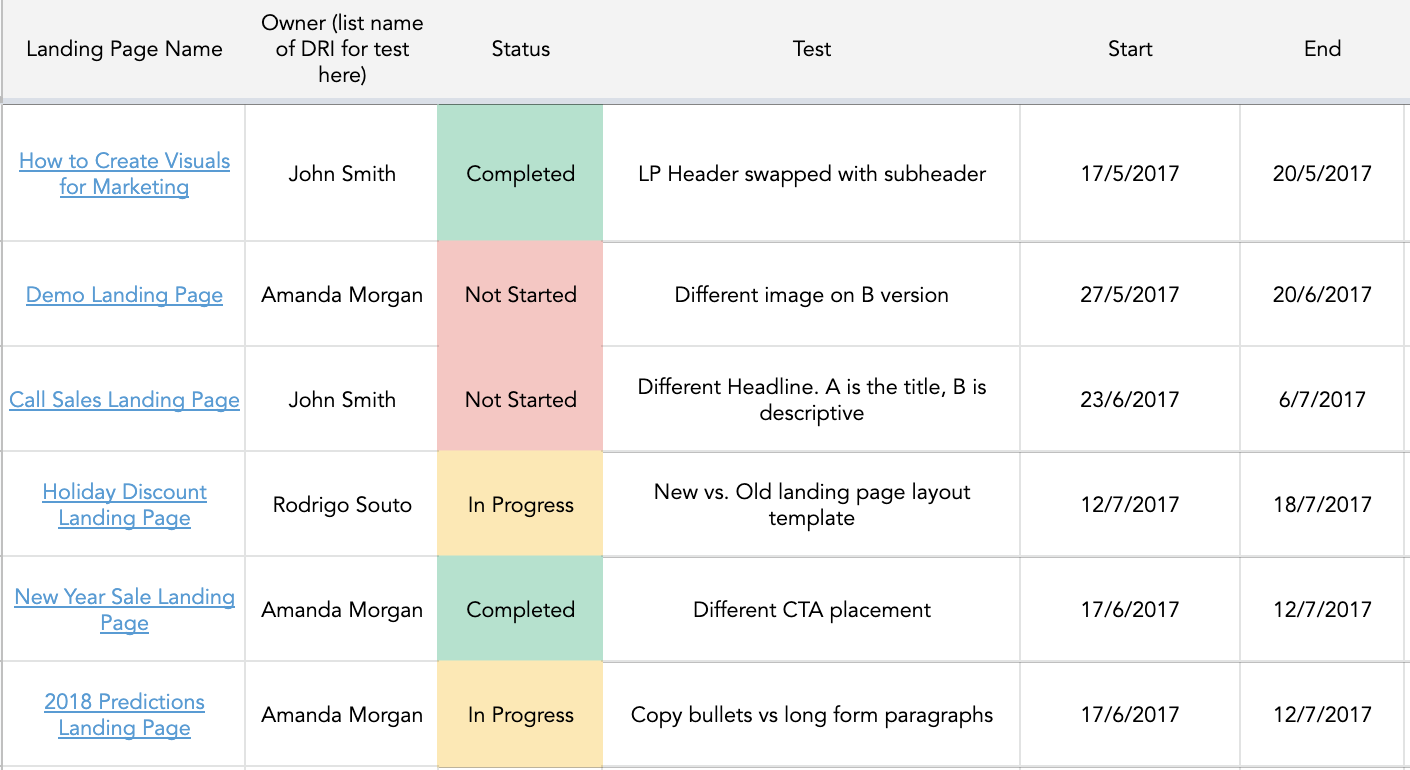
How to Do A/B Testing: 15 Steps for the Perfect Split Test
When marketers like us create landing pages, write email copy, or design call-to-action buttons, it can be tempting to use our intuition to predict what will make people click and connect.
However, you’re much better off conducting A/B testing than basing marketing decisions off of a “feeling”, as this can be detrimental to your results.

Keep reading to learn how to conduct the entire A/B testing process before, during, and after data collection so you can make the best decisions from your results.
A/B testing can be valuable because different audiences behave, well, differently. Something that works for one company may not necessarily work for another. In fact, conversion rate optimization (CRO) experts hate the term “best practices” because it may not actually be the best practice for you. But, this kind of testing can be complex if you’re not careful.
Let’s go over how A/B testing works to ensure that you don’t make incorrect assumptions about what your audience likes.
How does A/B testing Work?
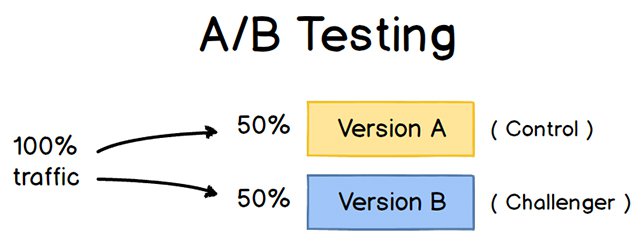
To run an A/B test, you need to create two different versions of one piece of content, with changes to a single variable. Then, you’ll show these two versions to two similarly sized audiences and analyze which one performed better over a specific period of time (long enough to make accurate conclusions about your results).
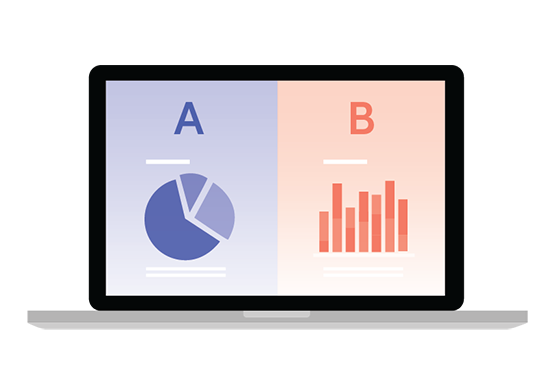
A/B testing helps marketers observe how one version of a piece of marketing content performs alongside another. Here are two types of A/B tests you might conduct in an effort to increase your website’s conversion rate:
Example 1: User Experience Test
Perhaps you want to see if moving a certain call-to-action (CTA) button to the top of your homepage instead of keeping it in the sidebar will improve its click-through rate.
To A/B test this theory, you’d create another, alternative web page that uses the new CTA placement. The existing design with the sidebar CTA — or the “control” — is Version A. Version B with the CTA at the top is the “challenger.” Then, you’d test these two versions by showing each of them to a predetermined percentage of site visitors. Ideally, the percentage of visitors seeing either version is the same.
Learn how to easily A/B test a component of your website with HubSpot’s Marketing Hub.
Example 2: Design Test
Perhaps you want to find out if changing the color of your call-to-action (CTA) button can increase its click-through rate.
To A/B test this theory, you’d design an alternative CTA button with a different button color that leads to the same landing page as the control. If you usually use a red call-to-action button in your marketing content, and the green variation receives more clicks after your A/B test, this could merit changing the default color of your call-to-action buttons to green from now on.
To learn more about A/B testing, download our free introductory guide here.
A/B Testing in Marketing
A/B testing has a multitude of benefits to a marketing team, depending on what it is you decide to test. Above all, though, these tests are valuable to a business because they’re low in cost but high in reward.
Let’s say you employ a content creator with a salary of $50,000/year. This content creator publishes five articles per week for the company blog, totaling 260 articles per year. If the average post on the company’s blog generates 10 leads, you could say it costs just over $192 to generate 10 leads for the business ($50,000 salary ÷ 260 articles = $192 per article). That’s a solid chunk of change.
Now, if you ask this content creator to spend two days developing an A/B test on one article, instead of writing two articles in that time period, you might burn $192 because you’re publishing one fewer article. But if that A/B test finds you can increase each article’s conversion rate from 10 to 20 leads, you just spent $192 to potentially double the number of customers your business gets from your blog.
If the test fails, of course, you lost $192 — but now you can make your next A/B test even more educated. If that second test succeeds in doubling your blog’s conversion rate, you ultimately spent $384 to potentially double your company’s revenue. No matter how many times your A/B test fails, its eventual success will almost always outweigh the cost to conduct it.
There are many types of split tests you can run to make the experiment worth it in the end. Here are some common goals marketers have for their business when A/B testing:
- Increased Website Traffic: Testing different blog post titles or webpage titles can change the number of people who click on that hyperlinked title to get to your website. This can increase website traffic as a result.
- Higher Conversion Rate: Testing different locations, colors, or even anchor text on your CTAs can change the number of people who click these CTAs to get to a landing page. This can increase the number of people who fill out forms on your website, submit their contact info to you, and “convert” into a lead.
- Lower Bounce Rate: If your website visitors leave (or “bounce”) quickly after visiting your website, testing different blog post introductions, fonts, or featured images can reduce this bounce rate and retain more visitors.
- Lower Cart Abandonment: Ecommerce businesses see an average of 70% of customers leave their website with items in their shopping cart. This is known as “shopping cart abandonment” and is, of course, detrimental to any online store. Testing different product photos, check-out page designs, and even where shipping costs are displayed can lower this abandonment rate.
Now, let’s walk through the checklist for setting up, running, and measuring an A/B test.
How to Conduct A/B Testing
Follow along with our free A/B testing kit with everything you need to run A/B testing including a test tracking template, a how-to guide for instruction and inspiration, and a statistical significance calculator to see if your tests were wins, losses, or inconclusive.
Before the A/B Test
Let’s cover the steps to take before you start your A/B test.
1. Pick one variable to test.
As you optimize your web pages and emails, you might find there are a number of variables you want to test. But to evaluate how effective a change is, you’ll want to isolate one “independent variable” and measure its performance. Otherwise, you can’t be sure which variable was responsible for changes in performance.
You can test more than one variable for a single web page or email — just be sure you’re testing them one at a time.
To determine your variable, look at the elements in your marketing resources and their possible alternatives for design, wording, and layout. Other things you might test include email subject lines, sender names, and different ways to personalize your emails.
Keep in mind that even simple changes, like changing the image in your email or the words on your call-to-action button, can drive big improvements. In fact, these sorts of changes are usually easier to measure than the bigger ones.
Note: There are some times when it makes more sense to test multiple variables rather than a single variable. This is a process called multivariate testing. If you’re wondering whether you should run an A/B test versus a multivariate test, here’s a helpful article from Optimizely that compares the two processes.
2. Identify your goal.
Although you’ll measure several metrics during any one test, choose a primary metric to focus on before you run the test. In fact, do it before you even set up the second variation. This is your “dependent variable,” which changes based on how you manipulate the independent variable.
Think about where you want this dependent variable to be at the end of the split test. You might even state an official hypothesis and examine your results based on this prediction.
If you wait until afterward to think about which metrics are important to you, what your goals are, and how the changes you’re proposing might affect user behavior, then you might not set up the test in the most effective way.
3. Create a ‘control’ and a ‘challenger.’
You now have your independent variable, your dependent variable, and your desired outcome. Use this information to set up the unaltered version of whatever you’re testing as your control scenario. If you’re testing a web page, this is the unaltered page as it exists already. If you’re testing a landing page, this would be the landing page design and copy you would normally use.
From there, build a challenger — the altered website, landing page, or email that you’ll test against your control. For example, if you’re wondering whether adding a testimonial to a landing page would make a difference in conversions, set up your control page with no testimonials. Then, create your challenger with a testimonial.
4. Split your sample groups equally and randomly.
For tests where you have more control over the audience — like with emails — you need to test with two or more audiences that are equal in order to have conclusive results.
How you do this will vary depending on the A/B testing tool you use. If you’re a HubSpot Enterprise customer conducting an A/B test on an email, for example, HubSpot will automatically split traffic to your variations so that each variation gets a random sampling of visitors.
5. Determine your sample size (if applicable).
How you determine your sample size will also vary depending on your A/B testing tool, as well as the type of A/B test you’re running.
If you’re A/B testing an email, you’ll probably want to send an A/B test to a subset of your list that is large enough to achieve statistically significant results. Eventually, you’ll pick a winner and send the winning variation on to the rest of the list. (See “The Science of Split Testing” ebook at the end of this article for more on calculating your sample size.)
If you’re a HubSpot Enterprise customer, you’ll have some help determining the size of your sample group using a slider. It’ll let you do a 50/50 A/B test of any sample size — although all other sample splits require a list of at least 1,000 recipients.
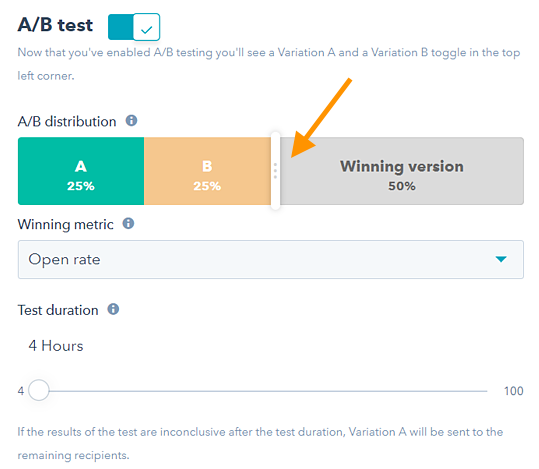
If you’re testing something that doesn’t have a finite audience, like a web page, then how long you keep your test running will directly affect your sample size. You’ll need to let your test run long enough to obtain a substantial number of views. Otherwise, it will be hard to tell whether there was a statistically significant difference between variations.
6. Decide how significant your results need to be.
Once you’ve picked your goal metric, think about how significant your results need to be to justify choosing one variation over another. Statistical significance is a super important part of the A/B testing process that’s often misunderstood. If you need a refresher, I recommend reading this blog post on statistical significance from a marketing standpoint.
The higher the percentage of your confidence level, the more sure you can be about your results. In most cases, you’ll want a confidence level of 95% minimum — preferably even 98% — especially if it was a time-intensive experiment to set up. However, sometimes it makes sense to use a lower confidence rate if you don’t need the test to be as stringent.
Matt Rheault, a senior software engineer at HubSpot, likes to think of statistical significance like placing a bet. What odds are you comfortable placing a bet on? Saying “I’m 80% sure this is the right design and I’m willing to bet everything on it” is similar to running an A/B test to 80% significance and then declaring a winner.
Rheault also says you’ll likely want a higher confidence threshold when testing for something that only slightly improves conversion rate. Why? Because random variance is more likely to play a bigger role.
“An example where we could feel safer lowering our confidence threshold is an experiment that will likely improve conversion rate by 10% or more, such as a redesigned hero section,” he explained.
“The takeaway here is that the more radical the change, the less scientific we need to be process-wise. The more specific the change (button color, microcopy, etc.), the more scientific we should be because the change is less likely to have a large and noticeable impact on conversion rate.”
7. Make sure you’re only running one test at a time on any campaign.
Testing more than one thing for a single campaign — even if it’s not on the same exact asset — can complicate results. For example, if you A/B test an email campaign that directs to a landing page at the same time that you’re A/B testing that landing page, how can you know which change caused the increase in leads?
During the A/B Test
Let’s cover the steps to take during your A/B test.
8. Use an A/B testing tool.
To do an A/B test on your website or in an email, you’ll need to use an A/B testing tool. If you’re a HubSpot Enterprise customer, the HubSpot software has features that let you A/B test emails (learn how here), calls-to-action (learn how here), and landing pages (learn how here).
For non-HubSpot Enterprise customers, other options include Google Analytics, which lets you A/B test up to 10 full versions of a single web page and compare their performance using a random sample of users.
9. Test both variations simultaneously.
Timing plays a significant role in your marketing campaign’s results, whether it’s time of day, day of the week, or month of the year. If you were to run Version A during one month and Version B a month later, how would you know whether the performance change was caused by the different design or the different month?
When you run A/B tests, you’ll need to run the two variations at the same time, otherwise you may be left second-guessing your results.
The only exception here is if you’re testing timing itself, like finding the optimal times for sending out emails. This is a great thing to test because depending on what your business offers and who your subscribers are, the optimal time for subscriber engagement can vary significantly by industry and target market.
10. Give the A/B test enough time to produce useful data.
Again, you’ll want to make sure that you let your test run long enough to obtain a substantial sample size. Otherwise, it’ll be hard to tell whether there was a statistically significant difference between the two variations.
How long is long enough? Depending on your company and how you execute the A/B test, getting statistically significant results could happen in hours … or days … or weeks. A big part of how long it takes to get statistically significant results is how much traffic you get — so if your business doesn’t get a lot of traffic to your website, it’ll take much longer for you to run an A/B test.
Read this blog post to learn more about sample size and timing.
11. Ask for feedback from real users.
A/B testing has a lot to do with quantitative data … but that won’t necessarily help you understand why people take certain actions over others. While you’re running your A/B test, why not collect qualitative feedback from real users?
One of the best ways to ask people for their opinions is through a survey or poll. You might add an exit survey on your site that asks visitors why they didn’t click on a certain CTA, or one on your thank-you pages that asks visitors why they clicked a button or filled out a form.
You might find, for example, that a lot of people clicked on a call-to-action leading them to an ebook, but once they saw the price, they didn’t convert. That kind of information will give you a lot of insight into why your users are behaving in certain ways.
After the A/B Test
Finally, let’s cover the steps to take after your A/B test.
12. Focus on your goal metric.
Again, although you’ll be measuring multiple metrics, keep your focus on that primary goal metric when you do your analysis.
For example, if you tested two variations of an email and chose leads as your primary metric, don’t get caught up on open rate or click-through rate. You might see a high click-through rate and poor conversion rates, in which case you might end up choosing the variation that had a lower click-through rate in the end.
13. Measure the significance of your results using our A/B testing calculator.
Now that you’ve determined which variation performs the best, it’s time to determine whether your results are statistically significant. In other words, are they enough to justify a change?
To find out, you’ll need to conduct a test of statistical significance. You could do that manually … or you could just plug in the results from your experiment to our free A/B testing calculator.
For each variation you tested, you’ll be prompted to input the total number of tries, like emails sent or impressions seen. Then, enter the number of goals it completed — generally you’ll look at clicks, but this could also be other types of conversions.

The calculator will spit out the confidence level your data produces for the winning variation. Then, measure that number against the value you chose to determine statistical significance.
14. Take action based on your results.
If one variation is statistically better than the other, you have a winner. Complete your test by disabling the losing variation in your A/B testing tool.
If neither variation is statistically better, you’ve just learned that the variable you tested didn’t impact results, and you’ll have to mark the test as inconclusive. In this case, stick with the original variation, or run another test. You can use the failed data to help you figure out a new iteration on your new test.
While A/B tests help you impact results on a case-by-case basis, you can also apply the lessons you learn from each test and apply it to future efforts.
For example, if you’ve conducted A/B tests in your email marketing and have repeatedly found that using numbers in email subject lines generates better clickthrough rates, you might want to consider using that tactic in more of your emails.
15. Plan your next A/B test.
The A/B test you just finished may have helped you discover a new way to make your marketing content more effective — but don’t stop there. There’s always room for more optimization.
You can even try conducting an A/B test on another feature of the same web page or email you just did a test on. For example, if you just tested a headline on a landing page, why not do a new test on body copy? Or a color scheme? Or images? Always keep an eye out for opportunities to increase conversion rates and leads.
You can use HubSpot’s A/B Test Tracking Kit to plan and organize your experiments.
How to Read A/B Testing Results
As a marketer, you know the value of automation. Given this, you likely use software that handles the A/B test calculations for you — a huge help. But, after the calculations are done, you need to know how to read your results. Let’s go over how.
1. Check your goal metric.
The first step in reading your A/B test results is looking at your goal metric, which is usually conversion rate. After you’ve plugged your results into your A/B testing calculator, you’ll get two results for each version you’re testing. You’ll also get a significant result for each of your variations.
2. Compare your conversion rates.
By looking at your results, you’ll likely be able to tell if one of your variations performed better than the other. However, the true test of success is whether the results you have are statistically significant. This means that one variation performed better than the other at a significant level because, say, the CTA text was more compelling.
Say, for example, Variation A had a 16.04% conversion rate and variation B had a 16.02% conversion rate, and your confidence interval of statistical significance is 95%. Variation A has a higher conversion rate, but the results are not statistically significant, meaning that Variation A won’t significantly improve your overall conversion rate.
3. Segment your audiences for further insights.
Regardless of significance, it’s valuable to break down your results by audience segment to understand how each key area responded to your variations. Common variables for segmenting audiences are:
- Visitor type, or which version performed best for new visitors versus repeat visitors.
- Device type, or which version performed best on mobile versus desktop.
- Traffic source, or which version performed best based on where traffic to your two variations originated.
Let’s go over some examples of A/B experiments you could run for your business.
A/B Testing Examples
We’ve discussed how A/B tests are used in marketing and how to conduct one — but how do they actually look in practice?
As you might guess, we run many A/B tests to increase engagement and drive conversions across our platform. Here are five examples of A/B tests to inspire your own experiments.
1. Site Search
Site search bars help users quickly find what they’re after on a particular website. HubSpot found from previous analysis that visitors who interacted with its site search bar were more likely to convert on a blog post. So, we ran an A/B test in an attempt to increase engagement with the search bar.
In this test, search bar functionality was the independent variable and views on the content offer thank you page was the dependent variable. We used one control condition and three challenger conditions in the experiment.
In the control condition (variant A), the search bar remained unchanged.

In variant B, the search bar was made larger and more visually prominent, and the placeholder text was set to “search by topic.”

Variant C appeared identical to variant B, but only searched the HubSpot Blog rather than the entire website.
In variant D, the search bar was made larger but the placeholder text was set to “search the blog.” This variant also searched only the HubSpot Blog

We found variant D to be the most effective: It increased conversions by 3.4% over the control and increased the percentage of users who used the search bar by 6.5%.
2. Mobile CTAs
HubSpot uses several CTAs for content offers in our blog posts, including ones in the body of posts as well as at the bottom of the page. We test these CTAs extensively for optimize their performance.
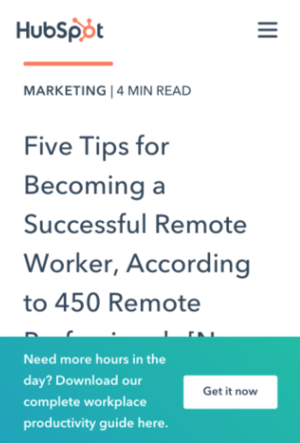
For our mobile users, we ran an A/B test to see which type of bottom-of-page CTA converted best. For our independent variable, we altered the design of the CTA bar. Specifically, we used one control and three challengers in our test. For our dependent variables, we used pageviews on the CTA thank you page and CTA clicks.
The control condition included our normal placement of CTAs at the bottom of posts. In variant B, the CTA had no close or minimize option.
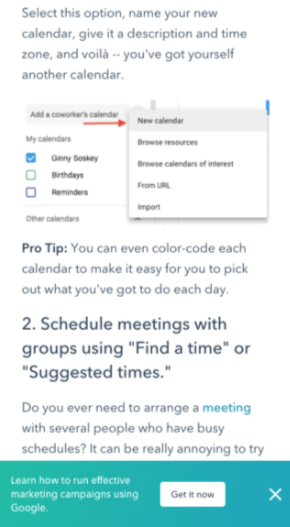
 In variant C, mobile readers could close the CTA by tapping an X icon. Once it was closed out, it wouldn’t reappear.
In variant D, we included an option to minimize the CTA with an up/down caret.
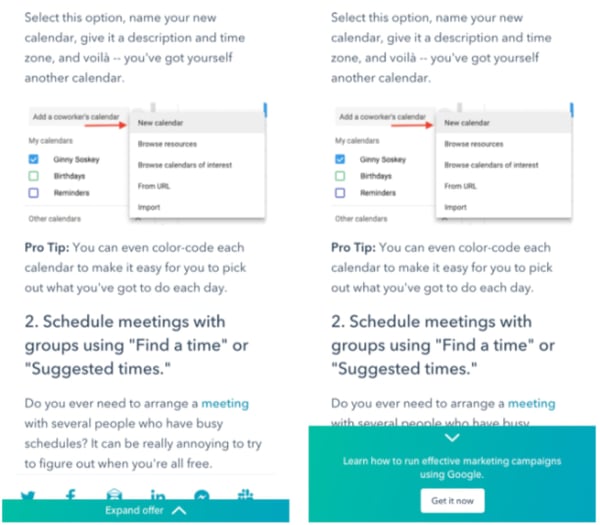
Our tests found all variants to be successful. Variant D was the most successful, with a 14.6% increase in conversions over the control. This was followed by variant C with an 11.4% increase and variant B with a 7.9% increase.
3. Author CTAs
In another CTA experiment, HubSpot tested whether adding the word “free” and other descriptive language to author CTAs at the top of blog posts would increase content leads. Past research suggested that using “free” in CTA text would drive more conversions and that text specifying the type of content offered would be helpful for SEO and accessibility.
In the test, the independent variable was CTA text and the main dependent variable was conversion rate on the content offer form.
In the control condition, author CTA text was unchanged (see the orange button in the image below).

In variant B, the word “free” was added to the CTA text.
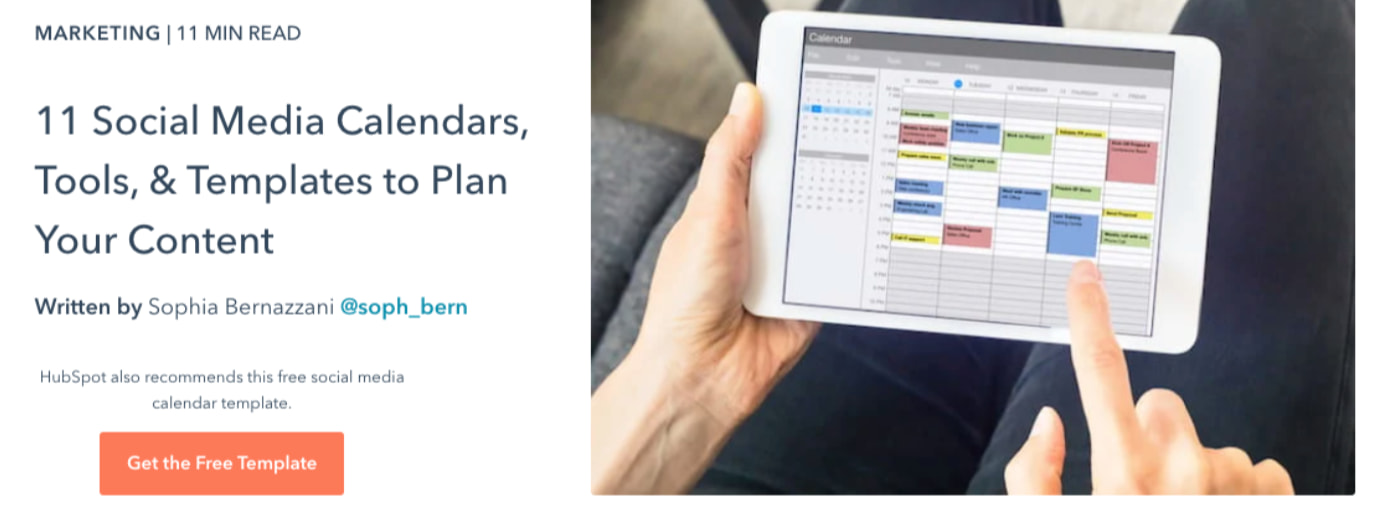
In variant C, descriptive wording was added to the CTA text in addition to “free.”
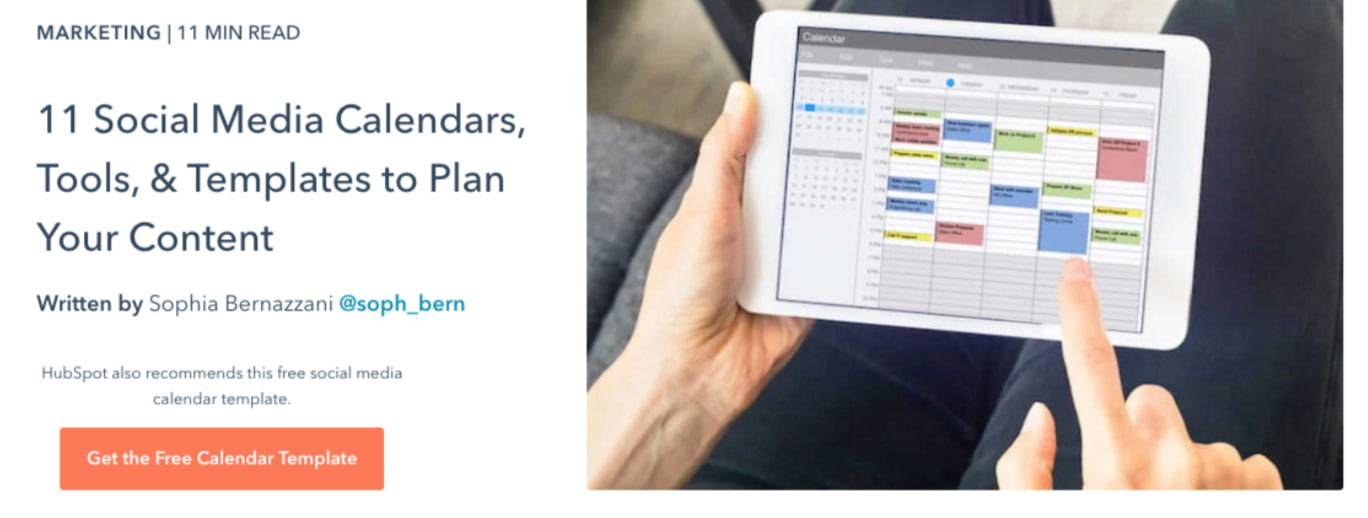
Interestingly, variant B saw a loss in form submissions, down by 14% compared to the control. This was unexpected, since including “free” in content offer text is widely considered a best practice.
Meanwhile, form submissions in variant C outperformed the control by 4%. It was concluded that adding descriptive text to the author CTA helped users understand the offer and thus made them more likely to download.
4. Blog Table of Contents
To help users better navigate the blog, HubSpot tested a new Table of Contents (TOC) module. The goal was to improve user experience by presenting readers with their desired content more quickly. We also tested whether adding a CTA to this TOC module would increase conversions.
The independent variable of this A/B test was the inclusion and type of TOC module in blog posts, and the dependent variables were conversion rate on content offer form submissions and clicks on the CTA inside the TOC module.
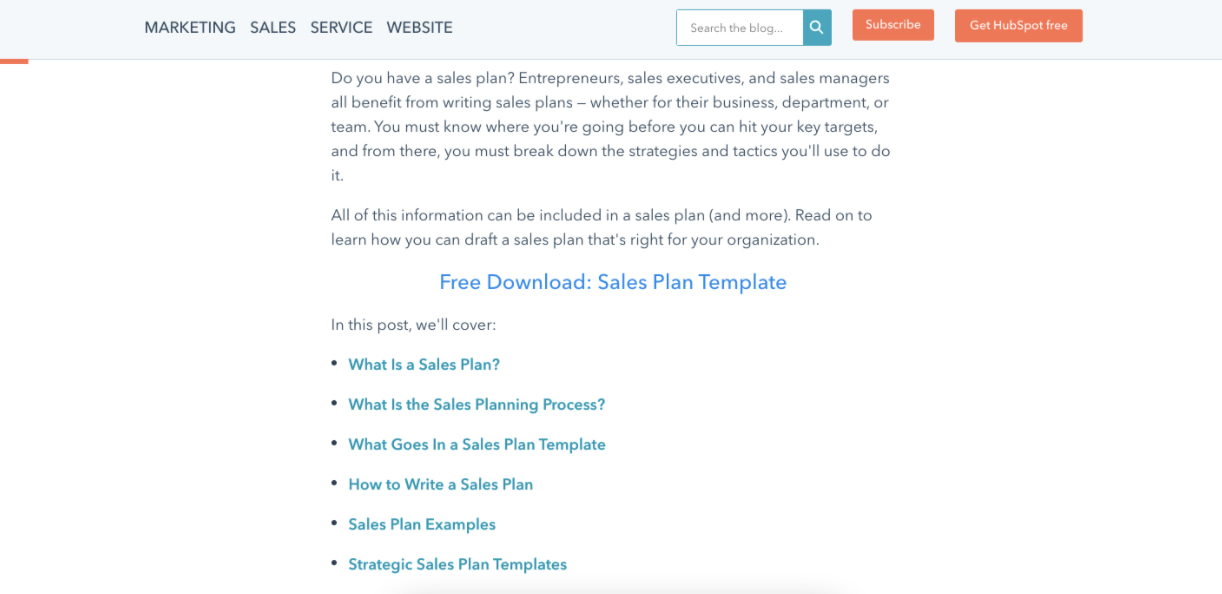
The control condition did not include the new TOC module —control posts either had no table of contents, or a simple bulleted list of anchor links within the body of the post near the top of the article (pictured below).
In variant B, the new TOC module was added to blog posts. This module was sticky, meaning it remained onscreen as users scrolled down the page. Variant B also included a content offer CTA at the bottom of the module.
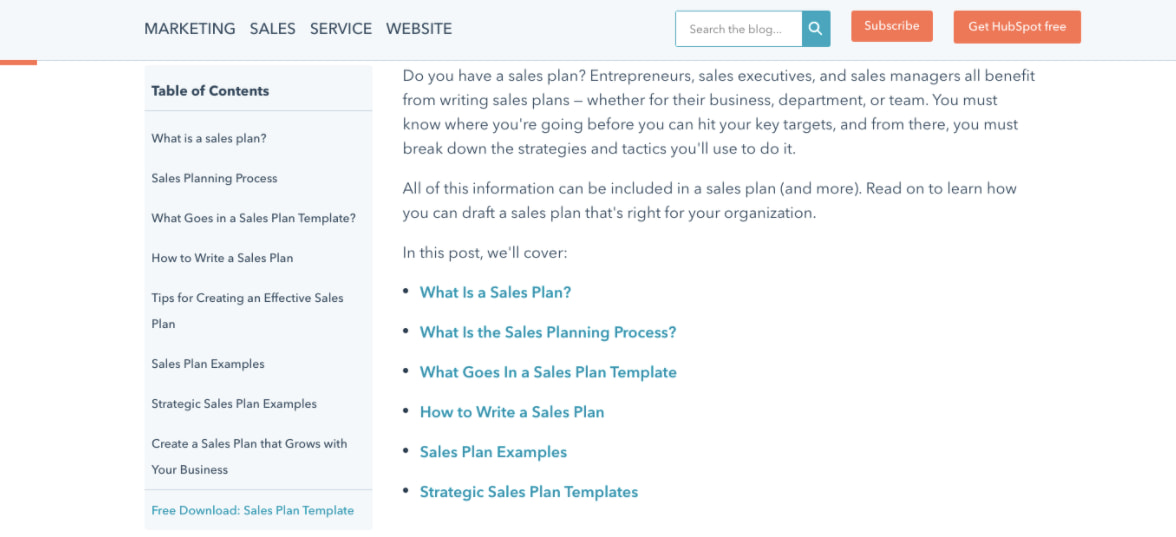
Variant C included an identical module to variant B but with the CTA removed.
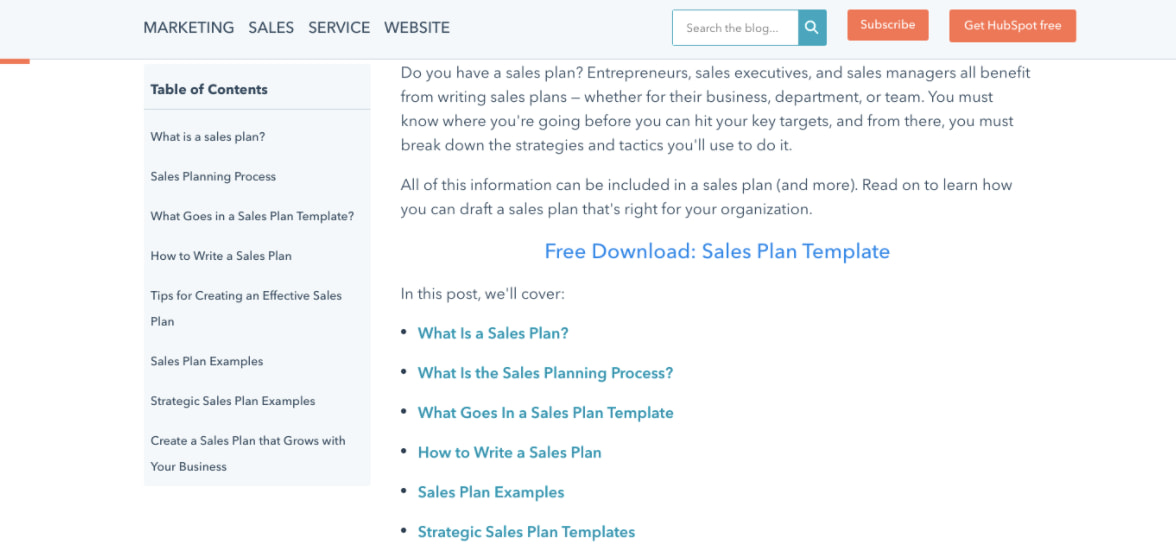
Both variants B and C did not increase the conversion rate on blog posts. The control condition outperformed variant B by 7% and performed equally with variant C. Also, few users interacted with the new TOC module or the CTA inside the module.
5. Review Notifications
To determine the best way of gathering customer reviews, we ran a split test of email notifications versus in-app notifications. Here, the independent variable was the type of notification and the dependent variable was the percentage of those who left a review out of all those who opened the notification.
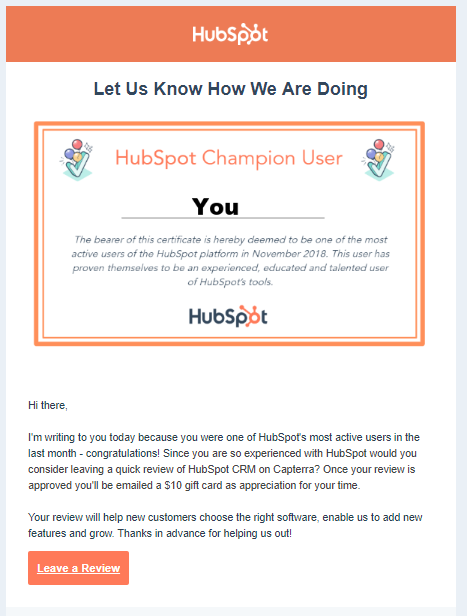
In the control, HubSpot sent a plain text email notification asking users to leave a review. In variant B, HubSpot sent an email with a certificate image including the user’s name.
For variant C, HubSpot sent users an in app-notification.
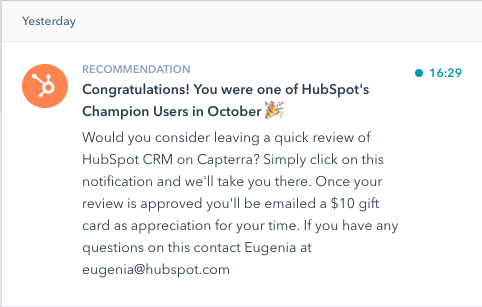
Ultimately, both emails performed similarly and outperformed the in-app notifications. About 25% of users who opened an email left a review versus the 10.3% who opened in-app notifications. Emails were also more often opened by users.
Start A/B Testing Today
A/B testing allows you to get to the truth of what content and marketing your audience wants to see. Learn how to best carry out some of the steps above using the free e-book below.
Editor’s note: This post was originally published in May 2016 and has been updated for comprehensiveness.

Mastering Facebook Ads In 2022 Through Incrementality
There are many resources out there telling you how to optimize your Facebook ads to scale your business’s growth. And while I’m sure they can help in some aspects, you’re probably optimizing your campaigns based on the wrong metrics.
In 2022, Facebook has 1.79 billion daily users. There are plenty of opportunities to create Facebook ads that will drive impressions, link clicks, leads, and more. However, these metrics only scratch the surface of how much impact your Facebook ads can truly have on your business.

As more industry experts focus their media buying on incremental gains, marketers can better measure their Facebook ads’ positive, negative, or neutral impact on their business.
What is incrementality in Facebook Ads?
Incrementality allows marketers to understand how Facebook ads impact their business. Often, advertisers make optimizations to campaigns based on certain metrics, which can dramatically affect the end goal.
It’s crucial for businesses to identify what’s working and what isn’t — especially since Facebook’s ad revenue worldwide was $84.2 billion in 2020. Whether you have a large or small Facebook advertising budget, you want to make sure it’s generating results.
Advertisers can measure incrementality by using control tests and comparing the results from those exposed to an ad versus those who have not. Once the tests have been completed, the results can help your business make smarter decisions on your Facebook ads and optimize your campaigns accordingly.
Why should marketers track incremental return on ad spend (iROAS)?
One minute you’re a marketer, and the next, you’re a data analyst. All jokes aside, information overload is very real in 2022. With all of this data available, there’s the assumption that it should be easy for marketers to pinpoint the best audience to target, understand what point they are at in the Facebook sales funnel, and the best methods to convert them.
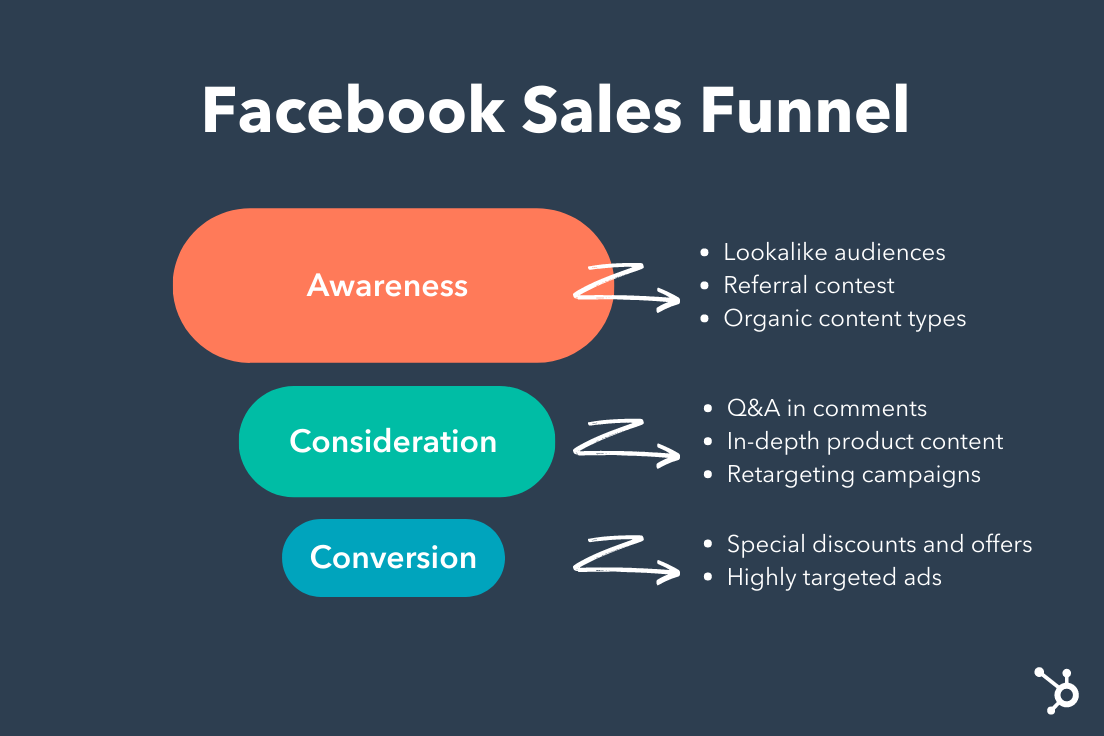
However, data dumps and compiling all of this information is incredibly time-consuming. And as digital marketing continues to expand, time is not always on our side. Businesses need to refocus their efforts from heavy reliance on data collection to doubling down on finding the right data—that can assist in smart optimizations and actionable insights to fuel your Facebook campaign’s bottom line.
How to Calculate Incremental Return on Ad Spend
The method for calculating iROAS is different for every publisher. The most methodical approach is by applying a holdout to your Facebook campaign. The holdout on your campaign will act as a control group for Facebook users that will not see your ads. The remaining group of users will be the test audience for your Facebook campaign.
After the test is complete, marketers can compare the results from the test group to the control group. The difference in the results will be your conversion lift, representing the incremental impacts on your conversions.
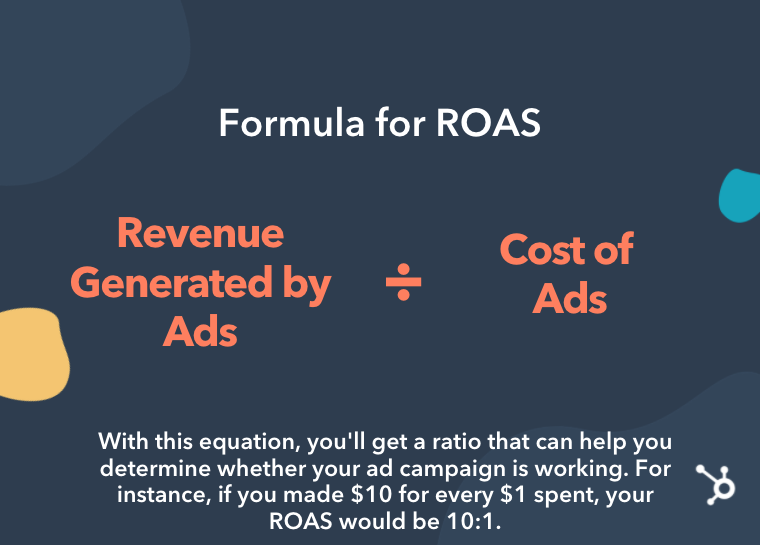 iROAS is calculated similarly to ROAS, which is revenue divided by cost. However, this measurement allows your business to understand which Facebook campaigns are working and which aren’t. The calculation for iROAS is Incremental Revenue / Ad Spend = iROAS.
In the YouTube video below, HubSpot details how to determine ad spend by understanding the bidding system used by ad networks.
3 Simple Ways to Increase Your Facebook’s Ads Incrementality in 2022
Frequently data dumps fail due to the sheer amount of information available. Marketers may find many valid insights, but the delivery of this information can get lost in translation — especially if there is no clear direction. Brands looking to increase their Facebook ads incrementality should work with a leading marketing agency with proven experience.
However, if you’re looking to get started on your own, below we’ll walk you through the top three ways to increase your Facebook ad’s incrementality to exceed your 2022 growth goals.
1. Audience Targeting
Facebook users at the top of the funnel versus the bottom will yield very different incrementality results. For example, you will see very different results if you’re using a 5% lookalike audience of customers who purchased in the last month vs. remarketing to customers who purchased in the last few years.
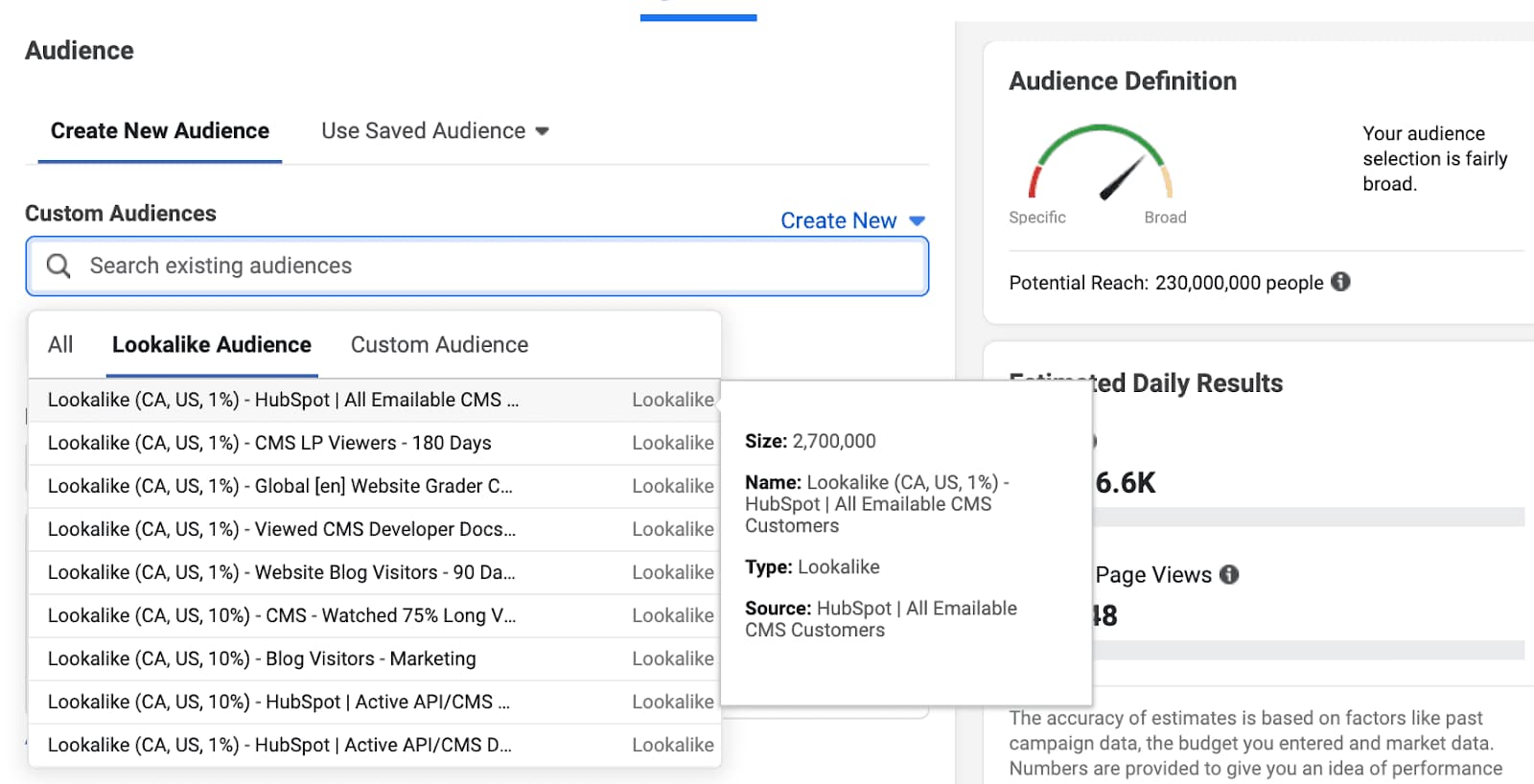 Targeting new customers should be your most incremental audience segment since they would not have converted and made the purchase had it not been for your Facebook ad.
This can also affect your bid strategies and budgets for remarketing audiences. For example, a customer who has purchased from you recently may not need a Facebook ad to prompt another purchase — this will depend on your product or service buying situation.
Three Class of Buying Situations:
- Routine decision-making: involves purchases that require very little thought after the original decision has been made. Such as gum, a chocolate bar, or a soft drink.
- Limited decision-making: involves purchasing products that require a moderate amount of time and effort to compare models and brands before making a choice. This could be comparing which phone you are planning to upgrade to.
- Extensive decision-making: involves an extensive consumer decision regarding whether or not to purchase a product. Examples include cars, homes, and education.
2. Ad Creative
I’m sure every marketer has heard about the study that found that the average attention span has decreased from 12 seconds to 8 seconds—while a goldfish holds a 9-second attention span. There is so much noise and clutter on social media that often, consumers will scroll right past your ad.
Advertisers need to create Facebook ads that grab the viewers’ attention and drive action. Facebook ad creative is one of the top ways to increase your incrementality.
Learn from the best! We’ve collected the 50 best Facebook ads to inspire your next campaign. Check out this exclusive lookbook to get a head start on crafting the perfect ad to drive incremental revenue.
3. Facebook Placements
There are several placements for advertisers across Facebook, Instagram, Messenger, and Audience Network. But, not every placement works with every type of campaign.
For example, an ad on audience network may spark brand awareness or interest but not drive an immediate conversion. The same goes for device targeting, often people are in discovery mode on mobile but complete the transaction on desktop.
Most advertisers still recommend combining placements to maximize the results, but it is beneficial to understand where your most incremental audience is.

What is Context Marketing? Why It Matters in 2022 [+Examples]
While it’s fair to say most marketers are on-board with the importance of content marketing, there’s still an aspect of marketing that doesn’t get as much love: context marketing.
Whether you know what context marketing means or not, I’m willing to bet you want to deliver the right campaigns to the right customers at the right time. That’s what context marketing is all about.
Here, we’re going to introduce the concept of context marketing and dive into strategies you can use to implement it into your overall marketing strategy.

My favorite context marketing definition is delivering the right content, to the right people, at the right time.
Let me explain what I mean by context a little more, though. When you have context around something, you have a larger, more telling picture — you know, those little details that lend more clarity to things that would otherwise be pretty general, unspecific, and, well, uninteresting.
The best marketers leverage context about their audience, leads, and customers in their content marketing. They create audience profiles and buyer personas and use that information to create more effective marketing and advertising campaigns.
Now that we have a basic understanding of context marketing, you might be wondering what the difference is between content marketing and context marketing. Let’s take a look below.
A marketer using context would know more about a lead than her first name. They might also know what industry she works in, what kind of content she likes best, through which channel she prefers to consume content, whether she’s currently using another solution to meet her needs, and whether her company has budget at this time of year.
As a marketer, if you were asked to “market” to someone, and all you were given was a first name and the type of company your lead works at, wouldn’t your first question be … what else do we know about her? Probably, if you want to do your job way better.
That’s the idea behind context marketing: Using what you know about your contacts to provide supremely relevant, targeted, and personalized marketing.
Why is context marketing important?
Context marketing is important for many reasons, but there are two top ones that make its importance even more salient. Let’s go over them below.
Context marketing converts better.
When you’re creating marketing that’s targeted at people’s point of need, it stands to reason that marketing will perform much better for you, because you aren’t delivering marketing content that’s misaligned with their interests or stage in the buyer’s journey.
Think about it: If you know that a B2B lead is getting a new budget in January and it’s December, you’re able to send her insanely targeted content that addresses her needs — like, say, an offer for a custom demo of your product with a rep that specializes in the finance industry. That’s content that she’s pretty likely to convert on, especially if she’s downloaded a buying guide and visited your product pages.
Hot tip: Keeping track of your prospect’s activity using marketing automation software will make context marketing easier. You’ll know which products your prospect is most interested in and how many times they’ve visited your website.
Context marketing increases retention.
When you have context around your relationship with a contact, you’re able to provide more personalized and relevant marketing content that’s targeted to their needs.
This is great for two reasons: Personalized and relevant marketing is the foundation for creating content people love and engage with. What’s more, personalized and relevant marketing is typically not the kind of marketing that annoys people into clicking “unsubscribe”. If they feel like you’re out to solve their problems specifically, customers are much more likely to stay with you.
Why not use the context around your relationships with your contacts to create marketing that they love and convert on? Let’s take a look at how you can get started.
How to Start Context Marketing
Alright, how does this “context marketing” theory manifest itself? What would it look like for you, as a marketer? With the help of marketing automation software, here are some examples of where you’d actually use the principle of “context” in your marketing.
1. Create specific offers for specific posts and pages.
One easy way you can start context marketing? Create offers that extend the value of your website. Bonus points if these offers answer a specific pain point or problem that a customer is trying to solve for when visiting that page.
Most blog posts in HubSpot’s library feature an offer that’s directly related to the topic of the article. For instance, in our blog post about creating a marketing plan, you can download a marketing plan template — which is something that someone wanting to create a marketing plan might need.
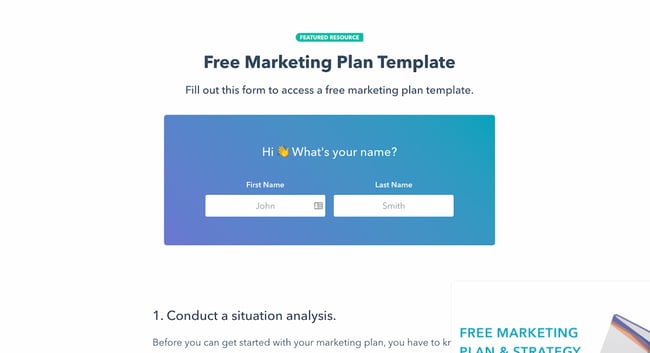
Come up with content offers that will benefit your readers and website visitors depending on the page they’re visiting. For instance, if you sell hiking shoes and you’re writing a blog post about going on a solo hiking trip, you might feature an offer for downloading a solo hiking checklist.
2. Add smart calls-to-action (CTAs) to your website.
You can take personalized offers to the next level by featuring smart calls-to-action. Let’s say you have a variety of offers you want to use to convert traffic into leads, leads into qualified leads, and qualified leads into customers.
To increase your lead conversion rates, you probably don’t want leads visiting a case study webpage (typically an action you’d perform further along in your buyer’s journey), and finding a CTA leading them to a blog post (which is meant for people earlier in the buyer’s journey).
However, not everyone who visits a case study page on your website is necessarily ready to talk to a salesperson. You don’t want to turn them away, either, by offering a CTA that’s too pushy.
Fortunately, with smart CTAs, you can actually surface a CTA that automatically aligns with the visitor’s stage in the sales cycle … or any other host of criteria you want to set. Think industry, business type, location, and past activity/behaviors.
For instance, if you have already downloaded an offer from HubSpot, you might see this CTA on certain social-media-related posts:
But if you haven’t downloaded an offer before, you’ll see the default CTA:
This type of smart content can help you capture your audience’s information at all stages of their buyer’s journey.
Hot tip: HubSpot’s marketing automation software lets you easily create a smart calls-to-action with little technical knowledge.
3. Create smart forms that shorten the conversion cycle.
Smart forms know if someone has already filled out the form fields you’re asking for. If you use smart forms, for instance, your site visitors won’t see “First Name” and “Last Name” every time they fill out a form — instead, they’ll answer those questions once, and then never again.
This will help you glean new information about your leads each time they fill out a form, instead of just more of the same stuff. It also helps you create a more seamless, personalized user experience that leverages prior interactions with your website as context.
Here’s one example from HubSpot Academy. This is what I see when I’m logged into the HubSpot CRM:
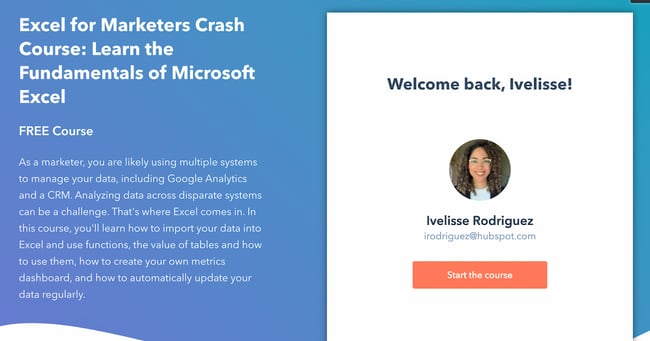
The form knows I’m a current HubSpot customer and doesn’t require me to create a new account. I only have to click one button: “Start the Course.”
But this is what I see when I’m not logged in:
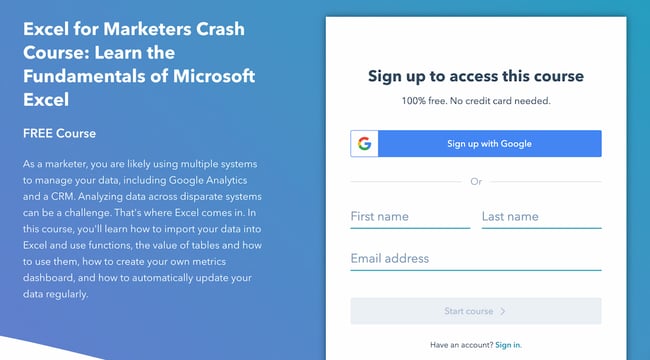
Ultimately, smart forms will help you gather even more context about your visitors, leads, and customers, and help increase conversion rates over time.
Hot tip: You can easily create smart forms inside HubSpot’s marketing automation software.
4. Leverage dynamic email content and workflows.
Your forms and offers aren’t the only things that need to be smart. Your email database — especially if you want to maintain your space in people’s coveted inboxes — needs to be segmented into highly targeted lists, as well.
I happen to be subscribed to Grammarly emails on both my work and personal emails. Because I only use the Grammarly Chrome extension at work, I receive emails like this:
 In my personal account, however, I use Grammarly’s web app regularly and review thousands of words for a personal project. Here’s the email I get:
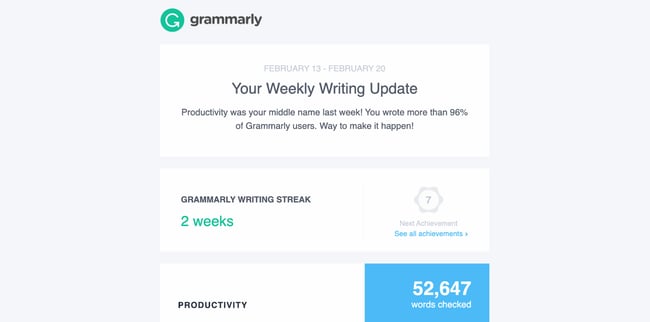 Throughout the email, Grammarly prompts you to upgrade to the premium version and take advantage of its other tools. Because I don’t use the Chrome extension in my personal email account, it includes a call-to-action to install the extension. It’s delightful to receive an email that uses my account activity as context.
Beyond email segmentation, your email lists need to be smart enough to know when to pull in a contact, and certain information you have in your database about that contact, into your email marketing campaigns.
Remember, a great context marketer delivers the right content, to the right person, at the right time. So to send emails that are contextually relevant, you need to use their activity and background to deliver personalized content that delights them and prompts them to convert.
Context Marketing Examples
While context marketing may sound complicated, it’s actually quite simple in practice. In fact, as a customer, you may have seen or enjoyed context marketing yourself. Let’s take a look at some examples.
1. Google’s Product Ads Carousel
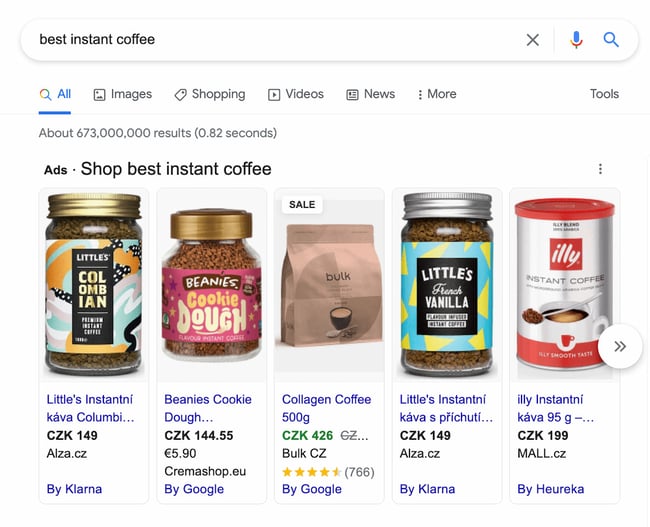
Have you ever looked up a product on Google and see a carousel at the top (as opposed to just the plain search results)? The products you see are typically ads for the exact same thing you searched for.
This is a prime contextual marketing example. Google uses your behavior and search query to deliver ads that are contextually relevant. Imagine if, when searching for instant coffee, Google delivers ads for french presses instead. While you might be interested in French presses and even searched for them before, you’re looking for instant coffee right now.
That’s why it’s important to answer for your customer’s specific pain points and queries, and to do so at the right time. And you don’t have to be a highly sophisticated search engine to do so. Remember those offers we spoke about in the previous sections? That can function in the same way as Google’s product carousels.
2. Asana’s New Feature Pop-Up
There’s no more powerful place to carry out contextual marketing than right within your own product, website, or store. Asana’s example shows that you can upsell customers easily by marketing a new feature and prompting them to try it for free.
This is an excellent example of contextual marketing because you wouldn’t be interested in trying this new feature unless you were a current Asana user. For instance, if Asana had placed this pop-up on their homepage, they likely wouldn’t have much success with it. But because it pops up after you log in, you’re more likely to say, “Sure, I’ll try it.”
You can achieve something similar by instituting a website personalization campaign. When people visit your product page, for instance, they might see a popup to schedule a meeting with a salesperson. But when they’re on the blog, they might see a popup to subscribe. These simple changes can help you capture more leads and use the context from their activity to deliver an offer they won’t resist.
3. LinkedIn Company Page Sidebar Ad
When you visit a company page on LinkedIn, it provides a little sidebar ad that prompts you to find roles at that company that match your skills.
LinkedIn does this because it knows that you might be open to opportunities even if you don’t list it on your profile. And if you’re looking at a company page, you might be interested in working at that firm. LinkedIn uses this context to deliver a relevant ad that you can’t help but click on.
Another reason this is such a great example is that it also lists a job title that relates to yours. So if you’re a financial advisor and are looking at JP Morgan Chase’s company page, LinkedIn will automatically advertise financial advisor roles at the firm.
Context Marketing is the Next Evolution of Content Marketing
Without context, you risk reaching the wrong people at the wrong time. Begin using context in all of your marketing and advertising campaigns, and you’ll see an exponential increase in conversions, helping you exceed your lead acquisition goals and increase revenue at your company.
Editor’s note: This post was originally published in March 2013 and has been updated for comprehensiveness.

How 500 Marketers are Leveraging Instagram Shopping Tools [Data]
Does anyone remember the days when all we saw on Instagram were poorly lit pictures our friends took and memes we didn’t want our parents to see on Facebook? Well, we’re long gone from then.
The platform has evolved from a simple image-sharing social platform to a money-making content curation one. With the addition of Instagram’s shopping tools, it’s steering more toward ecommerce and less on the social aspect.

So what does that mean for brands? We surveyed over 500 marketers to learn more about their Instagram strategy. Find out below what we found out as it relates to the social platform’s shopping tools.
The Benefits and Challenges of Instagram’s Shopping Tools
When we asked marketers the biggest benefit of using Instagram’s shopping tools, their number one answer was the increased product discoverability.
In the past, users had to navigate to a brand’s website to get product or service details. Today, they can learn everything they need to know about it. In addition, Instagram’s “wishlist” feature also allows users to save products they like to a specific folder on the app.
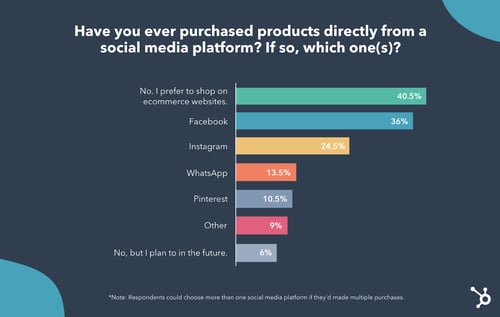
The second biggest benefit is the simplified shopping experience. Gone are the days when you need to leave the app to make the purchase. You can discover a brand and make a purchase all in the same breath. This means a more enjoyable process for consumers, which can lead to more purchases for brands.
Another key advantage Instagram’s shopping tools offer is the ability to easily partner with influencers.
Currently, creators can tag easily the products they’re promoting and send traffic directly to the brand’s Shop page.
In addition, Instagram is currently testing an affiliate program, in which influencers have their own Shop page.
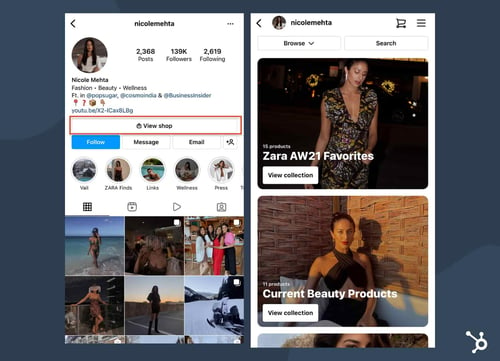
This allows users to easily find products recommended by their favorite influencers and make a purchase seamlessly.
Now, onto the not-so-great obstacles of Instagram’s shopping tools.
The biggest thing marketers surveyed complained about is supply-chain issues following many purchases. Since the pandemic, this has been a common hurdle for many businesses, as manufacturers deal with month- or year-long backlogs.
Another concern marketers are facing is not generating enough revenue from utilizing Instagram’s shopping tools or having access to certain features.
37% of marketers also complained about Instagram’s selling fees, which is currently 5% per shipment, or a flat fee of $0.40 for shipments of $8.00 or less. For brands, this is an additional cost that they could avoid by directing traffic to their website instead.
Another big concern is the loss of user data. When Instagram serves as the end-to-end platform, brands can lose valuable data to inform future strategies.
Now that you know the pros and cons of the shopping tools, let’s break down how marketers are using them.
How Marketers Leverage Instagram Shopping Tools
From the marketers we surveyed in our HubSpot Blog Research, 32% currently leverage Instagram Shops in their marketing strategy, and 48% plan to increase their investment in 2022.
While some brands tried the shopping tools as soon as it was introduced, others are just now diving in. In fact, 36% of marketers will be increasing their investment in Instagram Shops for the first time this year.
Meanwhile, 14% of marketers will be prioritizing Instagram Shops above all other features in 2022.
However, one thing to note is that when compared to all the features available on Instagram, marketers say its shopping tools don’t offer a high ROI when it comes to leads. Posting content and going live offer much better results.
With that said, while it may not be ideal for driving leads, it may work well for meeting other marketing goals.
Out of all shopping features available on Instagram (Shop tab, product tagging, guides, Live shopping), the Shop tab is the most used tool by 47% of marketers surveyed.
However, in terms of ROI, it’s in the #2 spot. What’s on top? Instagram Shopping from Creators, which allows influencers to tag the products they’re using in an image or video.
As for shopping tools by format: It looks like in-feed shopping, Stories shopping, and Guides shopping are used at the same rate by over one in three marketers.
How Marketers Approach Product Launches on Instagram
One of the most interesting findings from our research is that for many brands, Instagram’s shopping tools are their sole ecommerce platform.
In fact, 41% of marketers surveyed said most of the brands they work with use the platform’s shopping tools exclusively. The other 59% say their brands have a presence outside of the social platform via an ecommerce website.
So the question is, how do Instagram’s shopping tools impact a product launch? One in four marketers says it’s much better to launch a product exclusively on the platform.
In fact, 83% of marketers surveyed say they have worked with a brand that launched a product exclusively on the platform.
Conversely, 15% say launching a product/service exclusively on Instagram is worse than launching elsewhere.
We’ve covered a lot here. One fact that’s clear is that more marketers will invest in Instagram’s shopping tools than they have in the past. What works well for one brand may not work for another, based on the audience, the audience, and more.
So, don’t be afraid to experiment with all the features and analyze your data to figure out what offers the best return on investment for your company.

3 Roles Marketing Leaders Plan to Recruit in 2022 [New Research + Expert Insights]
The new year can be an exciting time to consider how you might expand your team to reach new goals in 2022.
But it can also be stressful for that very same reason. With a limited budget, how can you ensure you’re making the right hire?
HubSpot’s Blog Research uncovered the top three roles marketers are planning on hiring in 2022. Let’s explore why those three roles matter, according to experts.

The Top 3 Roles Marketing Leaders Plan to Hire in 2022
1. Creative Director
Nowadays, brands are expected to create top-notch content across platforms. To successfully reach new audiences and increase sales, you’ll want to have strong social media, content marketing, and video marketing strategies — to name a few.
As Wistia’s Creative Director, Adam Day, puts it, “In the context of today’s media landscape, the opportunity for brands to express themselves through multiple mediums is more attainable than ever — and consumers are demanding more than ever, too.”
Day adds, “It’s not just about blog posts anymore. Video consumption, alone, is up 121% from 2019, and in a recent survey of Wistia customers, we learned that most companies are increasing their production budgets by more than 10% this year. Businesses need someone who can oversee the creative execution of all this work while maintaining the consistency and quality it takes to have a world-class brand.”
That’s all well and good. But what, exactly, does a creative director do?
“A great creative director develops a clear and engaging visual identity for your brand,” Mark Tanner, Co-Founder and COO of Qwilr, told me. “Visual consistency communicates professionalism, attention to detail, and builds buyer confidence in a brand’s capabilities.”
Tanner told me, “The creative director should ‘own’ how a brand is represented across all visual assets, from your website to ads to product brochures to sales proposals.”
Tanner continues, “And if you think the impact of a creative director is limited to aesthetics, think again. According to a study by McKinsey, design-driven companies consistently outperform their competitors, demonstrating the ROI potential of a good design experience.”
A creative director can ultimately help your business hit its sales goals by ensuring your marketing materials are highly optimized, effective, and on-brand.
As Tanner told me, “One out of three buyers are influenced by the quality of your sales materials, and that influence can either be positive, or cause your buyer to go with your competition, instead. It’s no wonder the U.S. Bureau of Labor Statistics projects creative director demand to grow by 11%, faster than the average for all occupations.”
Among other things, you can expect a creative director to guide your overarching content strategy; build and manage a successful production process; lead, inspire, and nurture your creative team to drive brand direction forward; and own specific KPIs related to content marketing.
Jenny Coppola, Head of Brand & Communications at Teamwork, says, “Creative directors should focus on ensuring that all brand touchpoints are cohesive and consistent, both visually and in terms of messaging, while also shepherding the idea of experimentation and concerted risk-taking within the team.”
Coppola says, “Your team’s creative director should always be thinking ahead to what the future could look like for the brand and the market as a whole, which means pushing ideas further and challenging the status quo of what’s expected.”
Coppola adds, “Equally as important, creative directors should be close to the customer, understanding what makes them tick inside and out. Knowing your target customer and being able to see the world through their eyes is the best way to build a brand that resonates with them.”
If you can only hire one new marketer in 2022, you’ll want to strongly consider the importance of having a creative director if you don’t already have one. Even a small but mighty team of marketers needs a creative director to nurture their strengths and guide the overarching vision.
Additionally, if your business works with freelancers, agencies, or contractors, a creative director can help streamline those processes and ensure consistency across marketing channels.
2. Creative Assistant
The second most-voted for role in 2022 is a creative assistant.
If you already have someone in a director-level or manager-level role, it makes sense to consider how you might help alleviate some of their responsibilities by hiring an assistant.
A creative assistant is an entry-level professional who will create promotional materials for your brand — those materials could include promotional videos, advertising campaigns, press releases, or social media posts.
A creative assistant will also help your creative director or manager by handling the day-to-day creation of specific marketing materials — for instance, they might write copy, produce designs or infographics, or conduct market research to identify future trends and campaign ideas.
A creative assistant can be a strategic, long-term play for your team. A creative assistant is an entry-level position, which means it’s someone who is often new to the field of marketing.
You might hire a creative assistant with impressive design skills, or a strong knowledge of the various social media platforms, and foster his or her growth on your team.
Simply put, a creative assistant is a hire who will continue to grow on your team and could ultimately have a strong impact on the future of your brand’s marketing strategy.
3. Content Marketing Manager
“Let’s face it,” Dan Seavers, Talkwalker’s Content Marketing Manager, told me,
“Consumers are rapidly changing. They are savvier, smarter, and more active in their research. And they no longer want to be sold to. They want to be educated, entertained, excited, enthralled, anything … but not sold to.”
Seavers told me that this shift in consumer behavior has led to content marketing as an essential component for any business’ bottom line.
And a strong content marketing strategy needs a content marketing manager.
Why? Well, as Seavers puts it, “To do [content marketing] properly, you need content. A lot of content. We’re talking blogs, videos, podcasts, tweets, reports, case studies, TikTok dances, and more — all weaved into an epic journey that leads consumers from discovery to purchase.”
Unbounce’s VP of Marketing, Meg Sakakibara, agrees that a content marketing manager is vital for any marketing team.
Sakakibara says, “Content marketing managers are critical for brands today that need a voice that cuts through the noise, builds trust, and ensures content isn’t just a pleasant accessory — it drives conversions.”
Sakakibara adds, “After analyzing the most influential elements for conversion in 40,000 landing pages, Unbounce found that copy influenced conversion more than 2X as much as design did. Content isn’t just the king/queen — it’s the whole kingdom. By investing in content marketing and new technologies like Unbounce’s Conversion Intelligence Platform, people are using content and optimization to convert more leads, sales, and sign-ups to win in this competitive space.”
So what should you look for in a content marketing manager?
Among other things, an effective content marketing manager will execute digital content strategies across platforms, drive traffic and engagement, have a deep understanding of what types of content perform best on which channels, and consistently evaluate how each campaign performs — and shift when necessary.
Additionally, Seaver told me, “To be good, your content marketing manager should always have one eye on your consumers’ ecosystem. Where do they cluster online? What do they talk about? What are they looking for in a product? What problem do they have that you can solve? Their content strategy will answer all of these questions, piece by piece. Slowly building that brand and consumer relationship from awareness — to having your consumers wonder how they can go on without you.”
Finally, a good content marketing manager needs to be a strong fit for your brand and goals. Content marketing is about delivering unique value to your intended audiences — which means your marketing manager needs to know, inside and out, who your target audience is and what they care about.
As Microsoft’s Group Marketing Manager Nora Xu puts it, “It goes beyond a single touchpoint with an action to purchase your product, to a flywheel of inspirational and educational content that meets them where they are. On the Microsoft Advertising brand marketing team, I look for people who can get into the mindset of our audience and create content that makes them feel seen and connected with our brand.”
Ultimately, you know what’s best for your business needs. Take a careful look at your team’s current strengths, and aim to identify a role that can help fill in the gaps.
Once you’re ready to begin the recruitment process, take a look at these 17 marketing job descriptions to attract the right hire.