7 Pieces of Content Your Audience Really Wants to See [New Data]
Consumer preferences are constantly evolving, which keeps things interesting.

To help you prepare your strategies to meet audience needs, this post will dive deep into our State of Consumer Trends Report findings on consumer preferences, discuss how marketers currently measure up to those preferences and outline what you can do to better meet consumer needs.
What types of content are memorable to consumers?
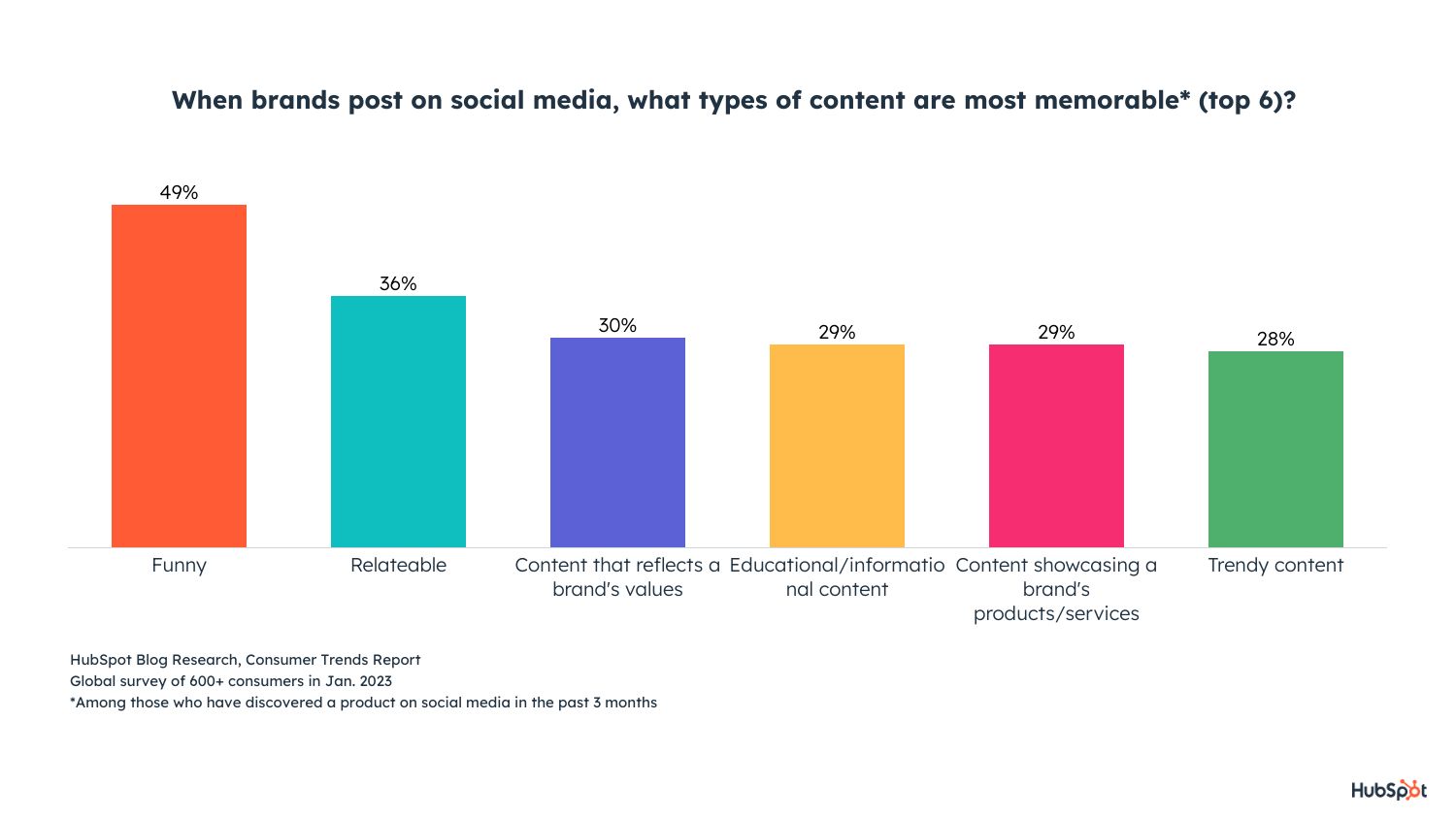
According to our Consumer Trends Survey, the most interesting and memorable content brands can share is funny content, relatable content, and content that reflects brand values.
1. Funny content
49% of consumers say that funny content is the most interesting and memorable.
How Marketers Measure Up
According to our 2023 Social Media Marketing Report, 36% of marketers already share funny content on social media. Half of those already leveraging it plan to increase their investments in it in 2023 (speaking directly to consumer interests), and it’ll be the second most invested in content type in 2023.
What can marketers do?
Funny content can be anything from sending emails with a witty subject line or using a trending meme format and relating it to your business.
For example, McDonald’s made a Tweet saying, “it’s easier to get these snack wraps than it is to get tickets,” during the rush of people trying to get tickets to Taylor Swift’s upcoming tour. The snack wrap is no longer available on the menu, so it was a lighthearted and funny contribution to a timely global conversation.
Another valuable opportunity is to create funny video content, which is actually the most likely to go viral.

2. Relatable content
36% of consumers say relatable content is the second most interesting and memorable content brands can share on social media. Almost 70% of consumers also say that social media content being authentic and relatable is more important than polished, high-quality content.
How Marketers Measure Up:
42% of marketers already share relatable content, and they say it is the second most effective type of content to share on social media.

What can marketers do?
Relatable content reminds your audiences of their lives, experiences, and needs. To be relatable to your audience, you need to understand them. Who are they? What are their pain points? What are their preferences?
Knowing the ins and outs of who they help you create content that relates to them as individuals. Consumers also want to build relationships with their favorite brands, so feeling like they can relate to your business and your business’ story can foster the connection they’re looking for.
A great way to build relatability is content that expresses your brand values.
3. Content that reflects brand values.
Content that reflects your brand values is the third most interesting and memorable content to consumers. This makes sense as consumers, now more than ever, care about doing business with brands that share the same value systems and support the same causes that they do.
How Marketers Measure Up
30% of marketers are creating content that reflects their brand values, so there is room for improvement.
45% of marketers share this kind of content on social media, and 16% plan to leverage it for the first time in 2023. Of marketers that do share it, 89% plan to maintain or increase their investments in it and say it has the 5th highest ROI of any trend.

What can marketers do?
48% of U.S. adults say brands need to do more about social advocacy, and the most important issues are racial justice, climate change, and LGBTQ+ rights.
With this in mind, share your brand’s values on social media — let them know what you care about and what you do to take a stand. Consumers will know what you care for, and you’ll draw in people who share similar interests and can turn curious browsers into paying customers if they find they truly relate to you.
It’s essential to be genuine in these efforts, as consumers aren’t shy to call out brands that they feel are making empty promises or untrue statements.
What types of content do consumers prefer for learning about products and services?
When learning about products and their features, consumers prefer searching the internet, retail stores and word-of-mouth tied for second place, and television ads in third place. Gen Z is the only generation with a different first preference, which is learning about a product and its features through social media.
With this in mind, marketers can do things like
- Creating an effective SEO keyword strategy to reach users browsing the internet.
- Using high-quality images and visuals for in-store advertisements to attract visitor attention.
- Ask for customer reviews and make it easy for customers to leave reviews so they can learn from others’ opinions about your business.
Under this same question, learning about a product and its features on social media came in fourth place. Among consumers with this preference, they like feed posts, ads or sponsored content, and short-form videos (like TikToks or Reels).
However, splitting these preferences up by generation paints a different picture.
- Gen Z’s top preference for learning is short-form video, story posts, or from an influencer they follow.
- Millennials prefer short-form video, ads or sponsored content, and feed posts.
- Gen Xers prefer feed posts, online communities, and short-form video.
- Baby Boomers prefer ads or sponsored content, feed posts, and online communities.

How do marketers measure up?
Here’s how marketers currently measure up to consumer preference:
- Marketers most often leverage short-form video as part of their social media strategies (58%) — third place in general overall, but especially important to Gen Z and Millennials.
- 1 in 4 marketers currently leverage influencer marketing, and 89% of marketers who currently use it will increase or maintain their investment — especially important to the second-place preference for ads and sponsored content and Gen Zs desire to learn from influencers.
- 20% of social media marketers post daily, 22% a few times a day, and 34% post several times a week, ensuring that their content is seen when people browse their feeds — feed posts are the top way consumers want to learn on social media.
What can marketers do?
Pay attention to the top three preferences for learning about products, and go from there.
- Consumers like to see feed posts, so create a consistent posting schedule to remain top of mind and increase the likelihood of your products being seen.
- Consumers want to see ads or sponsored content, so you can run ads on your social profiles like paid partnerships, influencer campaigns, or paid ads (like a Facebook News Feed ad).
- Consumers also want to see short-form videos, so create TikToks, YouTube Shorts, etc. — snackable content for any platform. (Wyzowl’s Video Marketing Report found that 93% of marketers say video increases user understanding, so it’ll pay off).
Also, be mindful of generational differences if your target audience is primarily part of a specific generation.
For example, if Gen Z and Millennials are your primary audiences, you could focus on short-form video and making a presence on platforms that cater to it. If your audience is Baby Boomers or Gen Xers, you could create online communities in the channels they’re already in to speak to their needs.
Data-Driven Marketers Stay Ahead of the Curve
Data-driven marketers will win in 2023, so compare the consumer preferences in this post against what your own business is doing, identify areas of opportunity, and solve for your customer.

How to Structure a Marketing Dream Team for Any Size Company
As industries prepare to make changes to marketing personnel in the coming months, marketing department restructures are on the horizon. If you’re facing the pressure to grow revenue through marketing while keeping headcount to a minimum, you’re in luck.
We’ve cracked the code on how to structure a high-performing marketing team, and now, I’m going to share those insights with you.

In this post, I’ll walk you through what a marketing team structure looks like for small, midsized, and enterprise businesses, which structure will work best for you, and how to make your first or next marketing hire.
Marketing Team Sizes
First, let’s define what we mean by different company sizes. You may not agree with all of them, and that’s OK; we’re only using these numbers to establish a common lexicon in this guide.
- Small to Medium Sized Business (SMB): 5-100 Employees
- Midsized Business: 101-1,000 Employees
- Enterprise: 1,000+ employees (not including the massive Fortune 500 orgs)
Now that we’ve agreed on sizes, let’s talk about the marketing department structures you have to choose from.
How to Structure a Marketing Department
Here, I’m outlining three types of marketing department structures. These are dependent upon how large and how predictable your business is. Midsize companies with less predictable revenue forecasts may find a team structured by specific marketing disciplines will work better for them, while enterprise organizations with more predictable revenue forecasts can use a structure that has more opportunity for experimentation.
1. Marketing Department Structure by Discipline

Marketing departments that are structured by discipline are the most common. You’ll see these structures in midsized companies where marketing owns a revenue number and is responsible for driving leads and contributing to the pipeline of the business. These teams will collaborate to execute campaigns frequently throughout the year in order to hit the company’s revenue goals.
Here are some of the most common teams within the marketing department that are structured by discipline:
Social Media
Skills needed: Content creation, graphic design, social media management, project management, data analytics, and storytelling

Your social media team will create and execute social media marketing efforts. This team will need to have knowledge of how to make engaging content to drive brand awareness, generate leads, and connect with audiences.
To properly perform these job functions, your social media team should have a working knowledge of creating, scheduling, and measuring the performance of social content.
Basic graphic design skills or knowledge of design tools like Canva or Adobe will be necessary for the content creation side, while social media management tools will help teams track performance, measure success, and schedule content.
Teams also need to be comfortable with customer service, as social media teams will be the ones responding to customers who engage through social media tags or posts. They will also be communicating to customers through content copy, blog posts, and comment sections, so an understanding of the company voice and ideal customer is key.
To help small teams, social media management software provides marketers with the tools they need to execute an entire social media strategy, such as the tools within HubSpot’s Marketing Hub.
Social media structure by team size:
SMBs with a team member dedicated to marketing should have a general comfortability with basic marketing practices and social media experience to build an online presence. If you can afford multiple marketing roles, start specializing in marketing functions like social media manager, which can be its own role.
Enterprise teams can structure their social media team by having specialists and managers to lead and oversee social media strategy, as well as roles for day-to-day social media activities, such as creating Instagram Stories and Posts, video editing for Facebook, and content management.
Potential roles:
- Head Account Manager
- Social Media Specialist
- Content Creator
- Social Media Analyst
Content Marketing
Skills needed: Writing, editing, organization, graphic design, project management, SEO, HTML, and storytelling

Your content creators will be the ones making sure your brand has enough content to tell a cohesive, compelling story. The content they produce will be useful in every facet of your marketing functions, from video to blog posts.
Content creators are skilled writers; they usually know how to create a solid blog post or webinar. They also have to be keen on editing — their blogs, videos, and social media content depend on it.
This team will be the go-to for the production of high-quality multimedia assets for your business, including podcasts, videos, ebooks, or other materials as needed. They may have to work on projects with other teams to make sure the messaging is correct, so your content creators should be ready to collaborate with others.
When building this team, make sure that your content creators are familiar with online management software, like HubSpot’s Marketing Hub. This makes their job easier. Instead of having to analyze data from multiple different sources, online software keeps all of that data in one place.
Content structure by team size:
In a startup, your content creation team might also be your social media and product marketing team. Though the roles are similar, content marketers need to have good organization and time-management skills in a fast-paced environment, so make sure the person you hire can work autonomously and in a team setting.
Hire a content creator who understands the story of your brand and brand voice. Their methods of sharing your voice through video, podcast, or ebooks should ultimately incentivize prospects to learn more about your business.
Larger companies hiring for a content creation team can hire by skill or by the needs of other teams. For example, Social Media Agencies need content creators for every client or group of clients.
Potential roles:
-
Head of Content
-
Video Producer
-
Staff Writer
-
Content Creator
-
Jr. Content Creator
Product
Skills needed: Research, analysis, strategic planning, cross-functionality, writing, customer service, a creative problem-solving mindset, technical knowledge, pricing strategy, and solving for the customer

This team is so important because they will communicate the features and benefits of your product to the customer. They’ll organize and drive the messages of a product and how it connects to your brand and the customer.
Product marketers identify target audiences to communicate with through product pages and ad copy. In addition, product marketers need to be star planners with keen attention to detail, as they will be planning campaigns for your products or services.
When you hire a product marketer, look for someone who demonstrates a deep understanding of overall marketing functions since, for start-ups, they might be your only marketer. They need to know how to research, analyze metrics, use that knowledge to plan future campaigns and target the customer’s needs in all of your business’s marketing materials.
In order to bring a product to life, a product marketer needs to know how to build an effective product page, and include content that will highlight that. They need to be able to present their strategies to other decision-makers and have plans for every strategy.
Product structure by team size:
The product marketer you hire as a small business owner is likely your only marketer, or the one leading marketing efforts with another team member. Hire someone with a background or demonstrated knowledge in writing, presenting marketing, and business.
Remember, the product marketer will communicate the product’s usefulness to customers, so the team member’s skills should be robust. If you are hiring for a larger team, then, you can have a little more flexibility. You can hire product marketers by product stack, so for instance, phones and personal laptops could be product stacks for a tech company.
You can structure your product marketing team by specialty, as well—a role based solely on developing copy or producing strategy, for example.
Potential roles:
- Brand Specialist
- Product Marketing Specialist
Search Engine Optimization
Skills needed: Writing, editing, problem-solving, experience with programming and technical thinking, analytics, spreadsheets, drive, and the ability to adapt

The SEO team will mainly be driving traffic to your webpages by optimizing content and ensuring your brand is aware of the keywords necessary to rank on the SERPs for topics related to your product or service. Occasionally, they’re also required to lend expertise to make business decisions. To accomplish these goals, SEO teams need to be made up of individuals with strong technical, programming, and writing skills.
Some SEO functions require writing, editing, and proofreading content to optimize it for audiences. This is where having a strong writing background will come in handy. SEO teams should be excellent problem-solvers and think about how to optimize content specifically for search engines.
These hires should be comfortable finding and implementing keywords, which will improve how high your business ranks on Google. They will also have to develop strategies for link building and develop a basic SEO protocol for the company.
In addition, SEO specialists should be fluent in analytics software to ensure they’re able to incorporate the lessons from those metrics into their overall strategy.
SEO structure by team size:
If you work for a small company, your SEO strategist might be melded with another role. If that’s the case, make sure that the SEO functions are being carried out by someone who has an understanding of analytics and optimizing content for search engines, as well as conducting thorough keyword research..
In other words, if they can’t speak Google or Bing’s language, they probably aren’t the right fit.
Comprehending analytics and optimizing content for SEO purposes will help your business rank on search engines and reach new prospects, or nurture leads until they’re ready to purchase..
For businesses that are large enough to build a team, hire for different specialties within SEO. For instance, you can hire for historical optimization, link-building management, or raising webpage traffic.
From there, you can hire project managers and team managers who are experts in the field of SEO and can offer seasoned advice to other team members, as well as manage multiple SEO projects at once.
Potential roles:
- SEO Strategist
- Senior SEO Strategist
- Historical Optimization Writer
Website
Skills needed: Programming, Creative Suite programs, interpersonal communication, Website and email design, user-experience orientation, content management software, understanding of web standards and best practices, and SEO

Of course, any business needs a website. And as your company grows, you may find the need to hire someone full-time to maintain your website. This team will be responsible for all things dot com, so you should hire a creative proficient in web design, web strategy, and optimization.
Your web design team will use their mastery of programming and web design tools to create and maintain the message your website is conveying. They will work closely with product marketing and content teams on web page execution, so the ability to collaborate across teams is essential.
They will be the point of contact for someone who runs into a problem on your website and should be able to fix any technical issues that may arise. You should trust your web design team to create a user experience that keeps customers coming back.
Website structure by team size:
The general function of a web designer is to make the web page experience seamless, optimized, and engaging for every visitor. They’ll use their expertise to deliver a delightful experience to customers who interact with your business’s web pages.
You can structure your web design by need, but if you can afford to build out an entire team, you can start hiring Senior Web Developers to bring your site up to current standards and maintain it, while Associate level hires can assist with those job duties as your design team grows.
Potential roles:
- Web Developer
- Senior Web Developer
- UX / UI Designer
- Front-end Web Developer
- Web Designer
- Visual UX Developer
- Graphic Design Specialist
Acquisition
Skills needed: Customer centricity, written and verbal communication, solution-driven mindset, and attention to detail

Though the entire marketing team should be customer-obsessed, your Acquisition team will be made up of those who live and breathe methods for delighting the customer through every step of their buyer’s journey.
Acquisition hires are the first contact with customers — they will introduce audiences to your brand. Your acquisition team will communicate to the customer as a representative and advocate for the company, and need excellent customer-facing skills and company knowledge to do so.
Another skill valued in an acquisition team is attention to detail; these teams have to be experts in how products can help customers and capitalize on little moments that can enhance the customer experience.
The biggest question for an Acquisition team to answer is, “How can we delight the customer for every stage of the buyer’s journey?” and projects should reflect that. For instance, creating compelling content offers and tracking the performance of these CTAs will be essential for teams to make impactful strategies for driving growth.
Acquisition structure by team size:
For companies whose members don’t have the resources to build a full Acquisition team, make sure the team member you designate for acquisition can effectively communicate your brand. They should know how to delight customers every step of the way.
If you’re building a team for a larger company, hire for an Acquisition team with roles that are either exclusively customer-facing or exclusively non-customer-facing. Individual hires will be able to focus their job functions based on their interaction with customers.
For example, someone in a non-customer-facing acquisition role could have duties such as developing CTAs and content offers, so writing experience and an understanding of basic graphic design practices are critical. Customer-facing roles, then, will onboard customers, source and contact them, and identify and ease pain points they might have in their journey.
Potential roles:
- Lead Acquisition Specialist
- Customer Acquisition Specialist
- Content Acquisition Manager
2. Marketing Department Structure by Function

A slightly more traditional organization structure than the product structure above, the functional department structure leans heavily on the nuts and bolts of what makes great marketing work. This structure is similar to that of a bare-bones agency. It includes the pillars of taking a campaign from ideation to completion.
The functional marketing department structure works well for small teams that have limited headcount, resources, budget, and bandwidth. A team like this may be made up of a few full-time folks, part-time people, or it could be staffed completely by contractors.
For this structure, it’s common that your marketing department won’t own a revenue number and attribution won’t be too important (non-profits, very small service-based companies). If you’re a marketer who wears many hats and needs to hire folks with a similar work ethic, try this structure.
Operations
Skills needed: workflows, automation, written and verbal communication skills, problem-solving, team-building
Your operations team is responsible for managing the technical aspects of your marketing efforts. They’ll maintain the tech stack, handle marketing automation, manage email marketing workflows, and schedule and produce webinars.
Potential roles:
- Marketing Ops Specialist
- Email Marketer
Creative
Skills needed: graphic design, written communication, video production, photography, copywriting, front-end web design
The creative team is in charge of what your clients or customers see when they come across your brand. This team will take on graphic design, copywriting, video production, and some web design.
Potential roles:
- Graphic design
- Copywriter
Project Management
Skills needed: organization, project management, agile framework, budgeting, time management, written and verbal communication
To keep everything on schedule, within budget, and within scope, the project management team will step in. The individuals in this role will typically coordinate with both operations and creativity in order to keep things moving. They’ll manage vendors, contractors, and freelancers and also work as an event planner if needed.
Potential roles:
- Project manager
- Event planner
- Vendor manager
- Procurement specialist
3. Marketing Department Structure by Product

This marketing department structure organizes marketing teams by product. You might be thinking, “But marketing doesn’t own a product?” and that is true in the literal sense of the term, but when you think of marketing as a figurative product, you can better organize people around that product’s goals.
This approach works well for enterprise teams with predictable revenue patterns that don’t need to run frequent, stand-alone marketing campaigns to generate business. If there’s a proven marketing system in place to generate demand for the business, you can leverage a product-style marketing structure to grow in new, innovative ways. Global teams may also appreciate this structure because it reduces role redundancy across regions and gives hiring managers an opportunity to recruit talent globally.
There are three typical “products” within this type of marketing structure, plus one emerging “product” that can help differentiate your business if it makes sense within your industry.
Brand Team
Skills needed: strategic thinking, written and verbal communication, creativity, copywriting, social media management, customer journey mapping, and buyer journey mapping

Brand includes everything about your business and distills it in such a way that potential, new, and existing customers can relate to it and external entities can appreciate it. When you’re thinking about building your marketing team around brand as a product, consider these ideas:
- Who would be responsible for the brand strategy?
- Who would be responsible for the way the brand looks, sounds, reacts, and shares ideas?
- Who would be responsible for influencing the brand in other parts of the business?
- Who would be responsible for the day-to-day championing of the brand?
Growth Team
Skills needed: Content marketing, content strategy, SEO, copywriting, web design, UI/UX design, and HTML

Growth marketing is responsible for generating demand and leads for the business either in existing or new markets. When you’re thinking about building your marketing team around growth as a product, consider these ideas:
- Who determines how much we grow, how fast we grow, and in which markets we grow?
- In which channels do growth opportunities exist?
- What is the short and long-term payoff of the growth strategy?
Acquisition Team
Skills needed: conversion rate optimization, UI / UX design, HTML, content development, content design, and data analysis

Once you’ve drawn the audience in and you’ve set growth goals, you’ll look to your acquisition “product” to secure leads and fill the pipeline for sales. When you’re thinking about building your marketing team around acquisition as a product, consider these ideas:
- Who would be responsible for the acquisition strategy?
- Who will be responsible for lead scoring and lead nurturing?
- How will the team attribute success?
Media Team
Skills needed: Video production, video editing, public speaking, creative writing, research, data analysis, and journalism

This emerging marketing “product” can and should encompass each of the three mentioned above, but it does so with an emphasis on the audience experience. Media products are best built when your brand product has a strong foothold in the market. When you’re thinking about building your marketing team around media as a product, consider these ideas:
- Is my company’s brand well-respected and sought after for thought leadership, publishing opportunities with highly-respected institutions, and generally regarded for setting the industry standard?
- Are both customers and non-customers engaging with existing marketing content from my company?
- Do the decision-makers within my industry consume media regularly enough to make this “product” worthwhile?
Types of Marketing Team Roles & Positions
Any successful marketing department structure needs a leadership and individual contributor hierarchy. How deep or wide you choose to organize your team is up to you, but here are the primary roles (in total or in part) you can expect to see in any marketing team.
Use this list to ascertain which roles you already have on your team, who in your company you can prepare for these roles, and who you should hire next.
Marketing People Leader Roles
1. Chief Marketing Officer (CMO)
Decision-making, owning the vision, and championing the team culture is the job of the CMO. This role sets the tone and standard for the entire marketing team and makes the call when the structure needs to change. The CMO reports to the CEO of the company with regard to how marketing is contributing to the business’s bottom line.
2. Vice President of Marketing
Setting the strategy for the marketing department at a high level is the responsibility of the VP. VPs may have ownership of specific products, functions, or disciplines which shapes the details of what this role looks like. They’ll have directors as direct reports and will interface regularly with skip-level reports.
3. Director of Marketing
You may see this role called a “Head of” instead of a director. The director of marketing is closely tied to their specific team which could be the entire marketing department at smaller companies or a subteam, like social media, for larger orgs. Their duties consist of putting the strategy from the VP into an actionable plan that managers can rally their teams around.
4. Marketing Manager
Marketing managers are people leaders on the front lines who manage individual contributors. Their day-to-day consists of weekly check-ins with direct reports and the director of marketing. They’re responsible for guiding their team toward meeting the goals and KPIs of the strategy.
Marketing Individual Contributor Roles
1. Marketing Consultant
A marketing consultant is typically an expert in a specific discipline like SEO or content creation. They are hired as a freelancer, contractor, or even on a part-time basis to help marketing teams reach their goals. Marketing consultants are critical to the mission of the team, but their expertise is needed in a limited capacity. If you don’t need a full-time hire on your marketing team, but would like to explore new channels, strategies, and tactics, consider bringing on a marketing consultant.
2. Principal Marketer
This individual contributor role is one of the highest-level full-time roles an individual contributor can attain in their career. These individuals are masters of their discipline rather than a jack of all trades. Internal and external team members look to them for guidance and industry-standard best practices. They may have more than a decade of experience in their discipline, but oftentimes, they have even more experience in other areas of marketing under their belt.
3. Senior Marketer
A senior marketer is one step below the principal marketer. They’re honing their skills in a specific discipline, but they may take on projects with a wider scope to build other soft and hard skills. They’re savvy with the latest trends in the marketing space and can serve as a mentor to junior members of the team.
4. Marketing Specialist
A marketing specialist plays more of a generalist role on the team. If the principal marketer is a master of one, the marketing specialist is a jack of all trades. They’re encouraged to explore a wide variety of marketing disciplines to gain an understanding of how tactics work together to achieve the strategy. From there, they’ll develop their skill set in one area of marketing that they’ll use to guide the rest of their careers.
5. Marketing Coordinator/ Marketing Associate
A marketing associate is an entry level position for recent graduates or new marketing professionals who want to change careers. They’ll take on ad-hoc assignments in various marketing departments and begin to build relationships with more senior team members. They may have an interest in one area of marketing, but they’ll work on several projects to become familiar with marketing as a whole.
6. Marketing Intern
The marketing intern is a temporary employee that is completing a degree of some kind, usually in an area of marketing or communications. They’ll explore various disciplines during their time in the company and learn how to apply the marketing lessons they learn in class to real-world situations. They may be offered a full-time position as a marketing associate or coordinator upon graduation.
How to Build a Marketing Team
1. Create a hiring strategy.
Before you can hire anyone, you need to put a strategy in place for building your marketing team.
You’ll need a clear understanding of your organization’s hierarchy. Consider how the roles within these teams overlap. For example, think about how the Acquisition and Content teams will work together.
2. Write the job descriptions.
After that, you can start to write the job descriptions and begin recruiting.
You can post jobs on your website, or on job boards like Indeed. When the applications begin rolling in, you can start to interview and vet your candidates.
It’s important that the people you hire mesh well with your team, so don’t hesitate to ask marketing friends for referrals.
Additionally, pay attention to LinkedIn connections while you’re vetting potential candidates in case you have a mutual connection. Leadership skills and the ability to fit in with your company’s culture are key here.
Plus, keep in mind that you want to hire experts. Your team should have experience and know what they’re doing.
3. Source candidates.
Before you begin recruiting candidates from external sources, look to your current team to see if anyone is interested in a marketing career. Not only does an internal candidate give you an opportunity to help someone progress their career, it saves you time and resources that you’d otherwise spend looking for external talent and getting them up to speed on your business.
If you’ve exhausted your internal talent pool or you need a more specialized skill set, there are several resources available to make this happen. Look to recruiters, headhunters, and candidate sources to help with the search. You can also browse candidate collectives or private membership groups like Black Marketers Association of America to list your job posting.
4. Extend an offer.
There’s a lot of discourse about how to interview for top marketing talent. How many interviews are too many? How do you know which candidate is the right fit? How long should the process take? We know that can be a challenge for small and large companies alike, so use this free resource to understand what you need to ask to evaluate your candidates objectively.
Once you’re ready to extend an offer, consider all the variables: their experience, their interview performance, their formal marketing training (courses, degrees, certifications), and any special skills that will help round out your team.
Use this information to craft a fair offer that aligns what they bring to the table with what the market demands. Be prepared for negotiations and questions about commonly overlooked benefits like insurance, on-call responsibilities, and professional development allowances.
5. Onboard the team.
After you’ve hired your team, you aren’t done building a great team. Building a great team continues long after the hiring process. For example, your onboarding process should help your employees understand the team culture.
Over time, building a great team is about documenting your goals, identifying gaps, and iterating on your process.
Build Your Marketing Dream Team
Hiring the best talent will require knowing the best skills for each role. Even if you’re hiring for a startup or small business and only have resources for 1-2 marketing roles at the moment, it’s still helpful to know the most transferable skills that will help you hire people who can grow into new roles in the future.
When you start with the right structure for your business type, put the right steps in place for hiring, and get the team aligned on a common vision, you’ll have a marketing team that will make even some fortune 100 companies envious.
Editor’s note: This post was originally published in November 2014 and has been updated for comprehensiveness.


22 LinkedIn Hacks That’ll Make You More Productive [SlideShare]

This post originally appeared on HubSpot’s Sales Blog. To read more content like this, subscribe to Sales.
Once considered a social platform solely for networking, LinkedIn has proven itself invaluable for a wide range of other uses: marketing, recruiting, sales prospecting, hiring, and research, among others. There’s a lot you can do with LinkedIn, so getting up-to-speed on and nailing the basic functions is a worthwhile exercise in itself.
But little did you know the social media platform also contains a variety of secret capabilities that can make you that much more efficient and effective. I’ll give an example. Want to send a message to someone you’re not connected with, but you’re out of InMails? Here’s how:

Prospecting just got a whole lot easier — and that’s just the beginning.
In this SlideShare, we’ve collected 22 of the most useful — and hidden — hacks in LinkedIn, including:
- How to hide your connections from competitors
- How to get a tailored lead list delivered directly to your inbox weekly or daily
- How to find prospects you already have something in common with
- How to customize your connection request on a mobile device
Take a look to upgrade your LinkedIn status from pro to hacker. (And check out this post for the ultimate cheat sheet to mastering LinkedIn.)
Have any other LinkedIn hacks up your sleeve? Share them with us in the comments!

5 Steps to Create an Outstanding Marketing Plan [Free Templates]
Do you take a good, hard look at your team’s marketing strategy every year?
You should. Without an annual marketing plan, things can get messy — and it’s nearly impossible to put a number on the budget you’ll need to secure for the projects, hiring, and outsourcing you’ll encounter over the course of a year if you don’t have a plan.

To make your plan’s creation easier, we’ve put together a list of what to include in your plan and a few different planning templates where you can easily fill in the blanks.
To start, let’s dive into how to create a marketing plan and then take a look at what a high-level marketing plan has inside.
In this article, we’re going to discuss:
- What a High-Level Marketing Plan Includes
- How to Create a Marketing Plan
- Marketing Plan Templates You Can Use
- Simplified Marketing Plan Template
- Plus — Social Media Plan Templates
Marketing Plan Outline

Download This Marketing Plan Outline for Free
The below marketing plan outline will help you create an effective plan that easily generates buy-in from stakeholders and effectively guides your marketing efforts.
Marketing plans can get quite granular to reflect the industry you’re in, whether you’re selling to consumers (B2C) or other businesses (B2B), and how big your digital presence is. Nonetheless, here are the elements every effective marketing plan includes:
1. Business Summary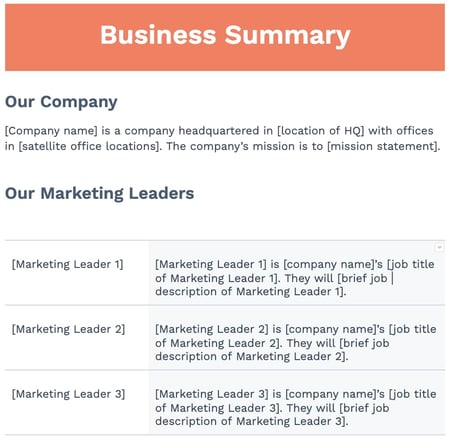
In a marketing plan, your business summary is exactly what it sounds like: a summary of the organization. It’s essential to include this information so that all stakeholders, including your direct reports, learn about your company in detail before delving into the more strategic components of your plan. Even if you’re presenting this plan to people who’ve been in the company for a while, it doesn’t hurt to get everyone on the same page.
Most business summaries include:
-
The company name
-
Where it’s headquartered
-
Its mission statement
Our marketing plan outline also includes information on marketing leadership, which is especially helpful for companies with large marketing teams.
2. SWOT Analysis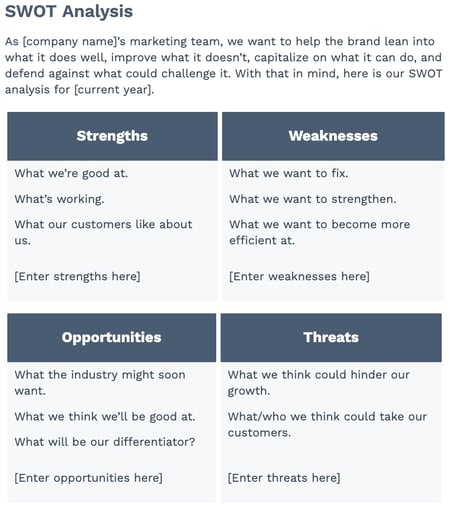
Your marketing plan’s business summary also includes a SWOT analysis, which stands for the business’s strengths, weaknesses, opportunities, and threats. It’s essential to include this information so you can create targeted strategies that help you capitalize on your strengths and improve upon your weaknesses.
However, be patient with your business’ SWOT analysis; you’ll write most of it as you conduct your market research and create your strategy. Feel free to come back to this section periodically, adjusting it as you discover more information about your own business and your competition.
3. Business Initiatives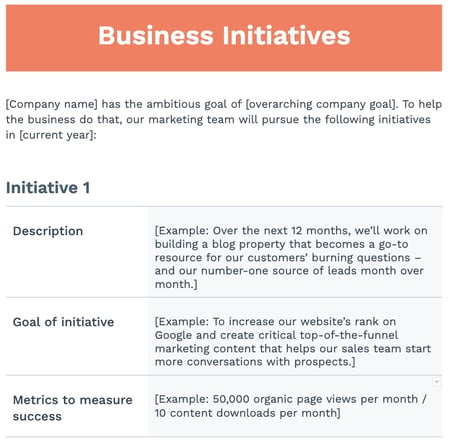
The business initiatives element of a marketing plan helps you segment the various goals of your department. Be careful not to include big-picture company initiatives, which you’d normally find in a business plan. This section of your marketing plan should outline the projects that are specific to marketing. You’ll also describe the goals of those projects and how those goals will be measured.
Every initiative should follow the SMART method for goal-making. They should be specific, measurable, attainable, relevant, and time-bound.
4. Customer Analysis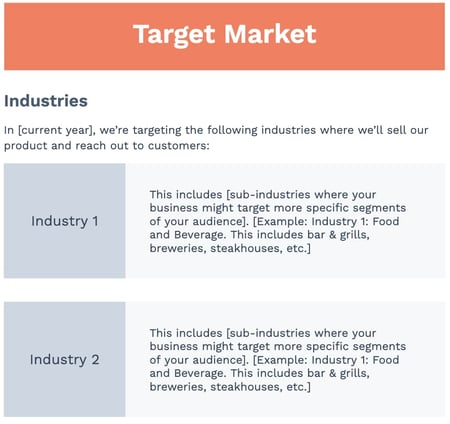
In this part of the marketing plan outline, you get plenty of space to share all the data you collected during your market research. If your company has already done a thorough market research study, this section of your marketing plan might be easier to put together. Either way, try to do your research before synthesizing it in a shareable document like this one.
Ultimately, this element of your marketing plan will help you describe the industry you’re selling to and your buyer persona. A buyer persona is a semi-fictional description of your ideal customer, focusing on traits like:
-
Age
-
Location
-
Title
-
Goals
-
Personal challenges
-
Pains
-
Triggering event
5. Competitor Analysis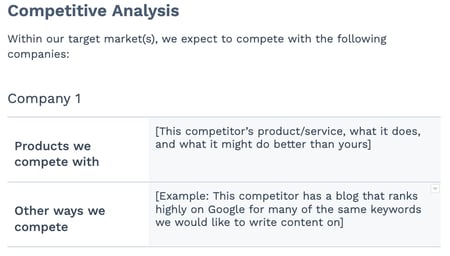
Including a competitive analysis is essential when creating a marketing plan. Your buyer persona has choices when it comes to solving their problems, choices in both the types of solutions they consider and the providers that can administer those solutions. In your market research, you should consider your competition, what they do well, and where the gaps are that you can potentially fill. This can include:
-
Positioning
-
Market share
-
Offerings
-
Pricing
Our marketing plan template includes space to list out the specific products you compete with, as well as other facets of the other company’s strategy, such as their blogging efforts or customer service reputation. Keep this part of your plan simple — your full competitive analysis should be done separately. Here are a few competitive analysis templates to get started.
6. Market Strategy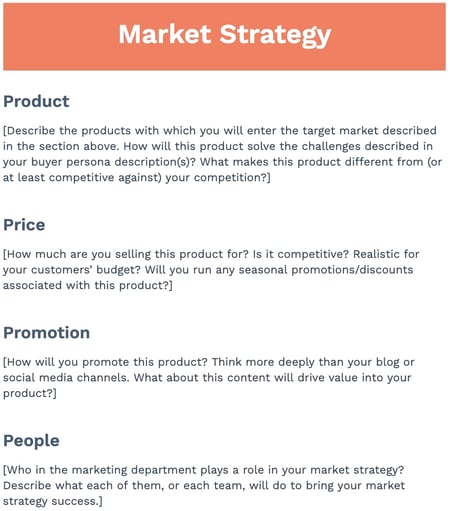
Your market strategy uses the information included in the above sections to describe how your company should approach the market. What will your business offer your buyer
personas that your competitors aren’t already offering them?
As you fill out the section, use the insights from your SWOT analysis, your competitive analysis, and your market research to create targeted, effective descriptions that will help you secure buy-in for your later tactics and strategies. For instance, if you found that one of your competitors employs stronger social media marketing strategies, you might add “We’ll post 3 times per week on our social media profiles” under “Promotion.”
In our full-length marketing plan outline, the market strategy section contains the “seven Ps of marketing” (or the “extended marketing mix”):
-
Product
-
Price
-
Place
-
Promotion
-
People
-
Process
-
Physical Evidence
(You’ll learn more about these seven sub-components inside our free marketing plan template, which you can download below.)
7. Budget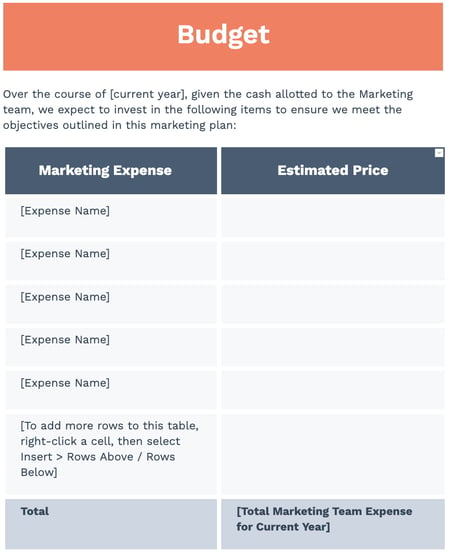
Don’t mistake the marketing budget element of your plan with your product’s price or other company financials. Your budget describes how much money the business has allotted the marketing team to pursue the initiatives and goals outlined in the elements above.
Depending on how many individual expenses you have, you should consider itemizing this budget by what specifically you’ll spend your budget on. Example marketing expenses include:
-
Outsourcing costs to a marketing agency and/or other providers
-
Marketing software
-
Paid promotions
-
Events (those you’ll host and/or attend)
Knowing the budget and doing analysis on the marketing channels you want to invest in, you should be able to come up with a plan for how much budget to invest in which tactics based on expected ROI. From there, you’ll be able to come up with financial projections for the year. These won’t be 100% accurate but can help with executive planning.
Remember: Your marketing plan only includes a summary of the costs. We recommend keeping a separate document or Excel sheet to help you calculate your budget much more effectively. Here’s a marketing budget template to get started.
8. Marketing Channels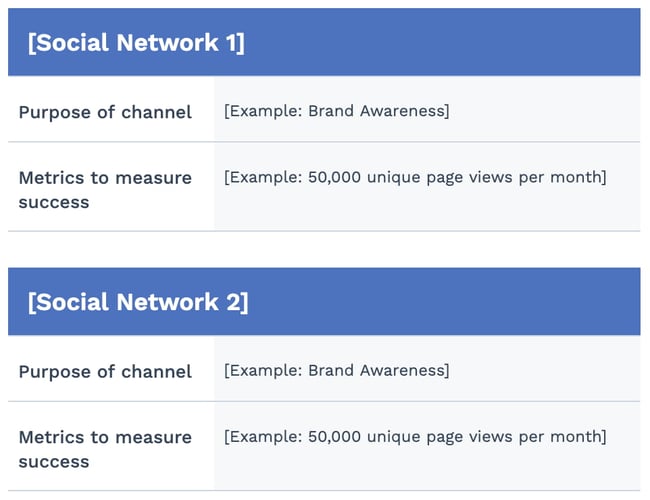
Your marketing plan should also include a list of your marketing channels. While your company might promote the product itself using certain ad space, your marketing channels are where you’ll publish the content that educates your buyers, generates leads, and spreads awareness of your brand.
If you publish (or intend to publish) on social media, this is the place to talk about it. Use the Marketing Channels section of your marketing plan to map out which social networks you want to launch a business page on, what you’ll use this social network for, and how you’ll measure your success on this network. Part of this section’s purpose is to prove to your superiors, both inside and outside the marketing department, that these channels will serve to grow the business.
Businesses with extensive social media presences might even consider elaborating on their social strategy in a separate social media plan template.
9. Marketing Technology

Last, but certainly not least, your marketing plan should include an overview of the tools you’ll include in your marketing technology (MarTech) stack. These are the tools that will help you achieve the goals you outlined in the previous sections. Since all types of marketing software usually need a generous investment from your company’s leadership, it’s essential to connect them to a potential ROI for your business.
For each tool, describe what exactly you’ll use it for, and be sure that it’s a strategy that you’ve mentioned elsewhere. For instance, we wouldn’t recommend listing an advertising management tool if you didn’t list “PPC Advertising” under “Marketing Channels.”
1. Conduct a situation analysis.
Before you can get started with your marketing plan, you have to know your current situation.
What are your strengths, weaknesses, opportunities, and threats? Conducting a basic SWOT analysis is the first step to creating a marketing plan.
Additionally, you should also have an understanding of the current market. How do you compare to your competitors? Doing a competitor analysis should help you with this step.
Think about how other products are better than yours. Plus, consider the gaps in a competitor’s approach. What are they missing? What can you offer that’ll give you a competitive advantage? Think about what sets you apart.
Answering questions like this should help you figure out what your customer wants, which brings us to step number two.
2. Define your target audience.
Once you better understand the market and your company’s situation, make sure you know who your target audience is.
If your company already has buyer personas, this step might just mean you have to refine your current personas.
If you don’t have a buyer persona, you should create one. To do this, you might have to conduct market research.
Your buyer persona should include demographic information such as age, gender, and income. However, it will also include psychographic information such as pain points and goals. What drives your audience? What problems do they have that your product or service can fix?
Once you have this information written out, it’ll help you define your goals, which brings us to step number three.
3. Write SMART goals.
My mother always used to tell me, “You can’t go somewhere unless you have a road map.” Now, for me, someone who’s geographically challenged, that was literal advice.
However, it can also be applied metaphorically to marketing. You can’t improve your ROI unless you know what your goals are.
After you’ve figured out your current situation and know your audience, you can begin to define your SMART goals.
SMART goals are specific, measurable, attainable, relevant, and time-bound. This means that all your goals should be specific and include a time frame for which you want to complete them.
For example, your goal could be to increase your Instagram followers by 15% in three months. Depending on your overall marketing goals, this should be relevant and attainable. Additionally, this goal is specific, measurable, and time-bound.
Before you start any tactic, you should write out your goals. Then, you can begin to analyze which tactics will help you achieve that goal. That brings us to step number four.
4. Analyze your tactics.
At this point, you’ve written down your goals based on your target audience and current situation.
Now, you have to figure out what tactics will help you achieve your goals. Plus, what are the right channels and action items to focus on?
For example, if your goal is to increase your Instagram followers by 15% in three months, your tactics might include hosting a giveaway, responding to every comment, and posting three times on Instagram per week.
Once you know your goals, brainstorming several tactics to achieve those goals should be easy.
However, while writing your tactics, you have to keep your budget in mind, which brings us to step number five.
5. Set your budget.
Before you can begin implementing any of the ideas that you’ve come up with in the steps above, you have to know your budget.
For example, your tactics might include social media advertising. However, if you don’t have the budget for that, then you might not be able to achieve your goals.
While you’re writing out your tactics, be sure to note an estimated budget. You can include the time it’ll take to complete each tactic in addition to the assets you might need to purchase, such as ad space.
Now that you know how to create your marketing plan, let’s dive into creating a marketing campaign outline that will help you reach the goals outlined plan.
Marketing Plan Timeline
Rolling out a new marketing plan is a big lift. To make sure things are running smoothly with all of your projects, you’ll want to create a timeline that maps out when each project is happening.
A marketing plan timeline allows your team to view all projects, campaigns, events, and other related tasks in one place — along with their deadlines. This ensures everyone on your team knows what’s due, when it’s due, and what’s up next in the pipeline. Typically these plans cover marketing efforts for the entire year, but some companies may operate on a bi-annual or quarterly basis.
Once you’ve completed your analysis, research, and set goals, it’s time to set deadlines for your assignments. From new blog posts and content initiatives to product launches, everything will need a deadline. Take into account any holidays or events taking place over the course of the year.
While setting deadlines for the entire year may seem daunting, start by estimating how long you think each task will take and set a deadline accordingly. Track the time it actually takes for you to complete similar types of projects. Once you’ve completed a few of them, you’ll have a better idea of how long each takes and will be able to set more accurate deadlines.
For each project, you’ll want to build in time for:
- Brainstorming: This is the first phase where your idea comes to life in a project outline. Decide what you want to achieve and which stakeholders need to be involved to meet your goal. Set a due date and set up any necessary meetings.
- Planning: This can include determining the project’s scope, figuring out how much budget will be allocated for it, finalizing deadlines and who is working on each task. Map out any campaigns needed for each project (social media, PR, sales promotions, landing pages, events, etc.).
- Execution: This third phase is all about your project launch. Decide on a date to launch and monitor the progress of the project. Set up a system for tracking metrics and KPIs.
- Analysis: In this final phase you will analyze all of your performance data to see whether or not your marketing efforts paid off. Did you meet your goals? Did you complete your projects on time and within budget?
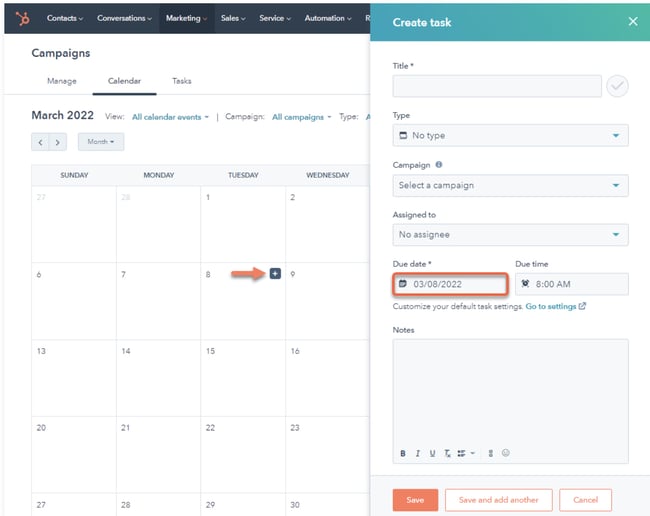 All projects and their deadlines should be in a central location where your team can access them whether that’s a calendar like HubSpot’s tool, shared document, or project management tool.
One-Page Marketing Plan Template
As demonstrated above, a marketing plan can be a long document. When you want to share information with stakeholders or simply want an overview of your plan for quick reference, having a shorter version on hand can be helpful. A one-page marketing plan can be the solution, and we’ll discuss its elements below.
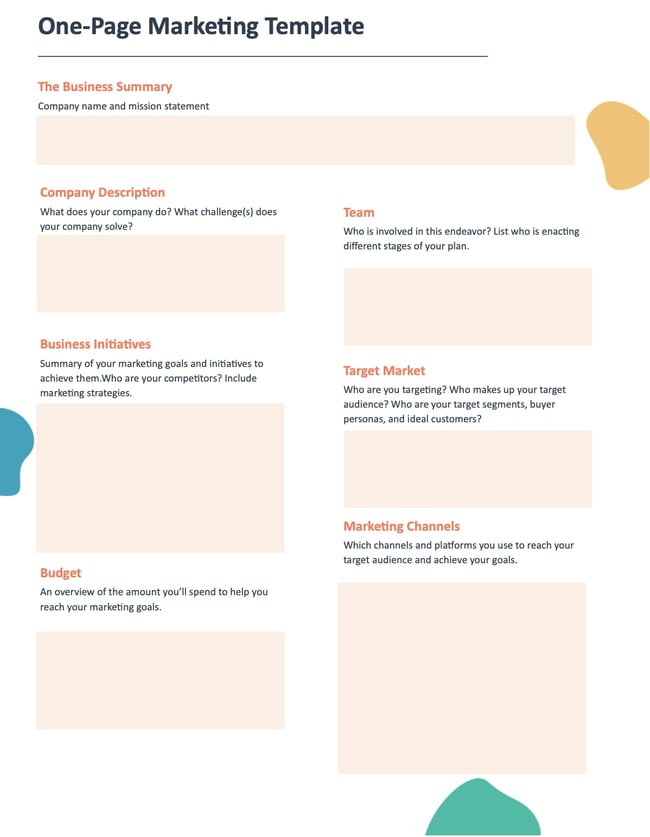
1. Business Summary
Include your company name, list the names of individuals responsible for enacting the different stages of your plan, and a brief mission statement.
Example
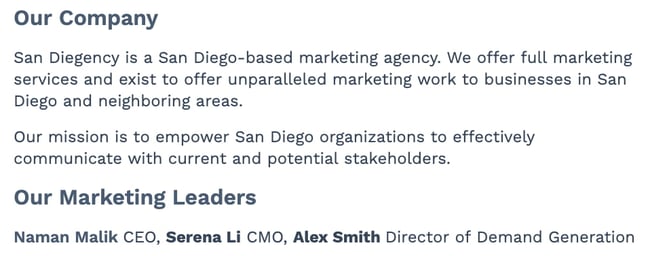
2. Business Initiatives
Include your company name, list the names of individuals responsible for enacting the different stages of your plan, and a brief mission statement.
Example
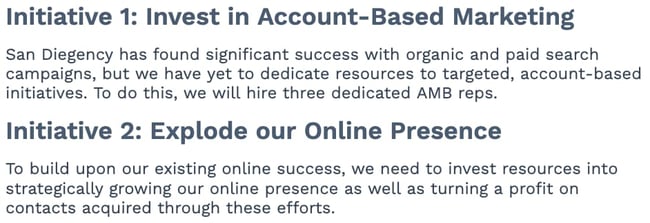
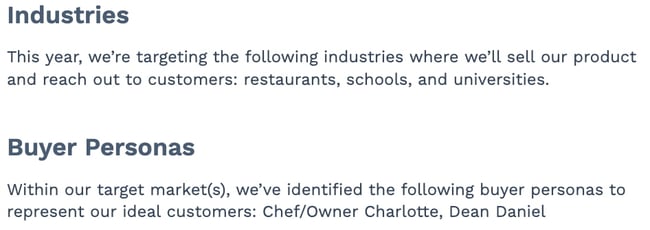
3. Target Market
Outline your target audience(s) that your efforts will reach. You can include a brief overview of your industry and buyer personas.
Example
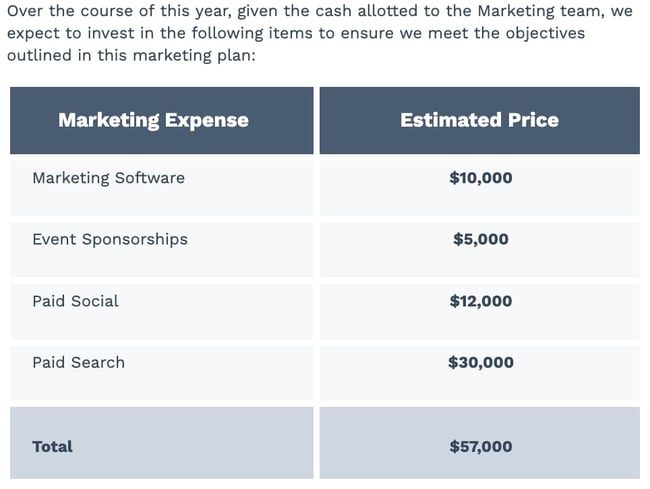
4. Budget
This is an overview of the money you’ll spend to help you meet your marketing goals. Create a good estimate of how much you’ll spend on each facet of your marketing program.
Example
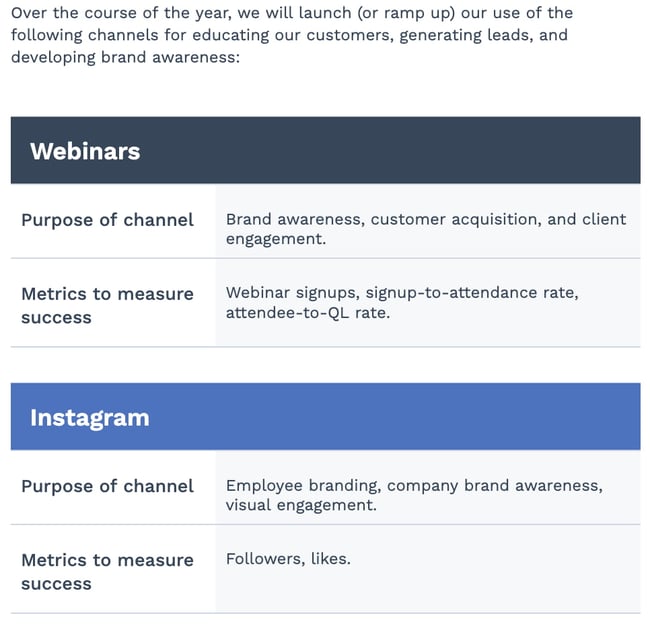
5. Marketing Channels
List the channels you’ll use to achieve your marketing goals. Describe why you’re using each channel and what you want to accomplish so everyone is on the same page.
Example
Free Marketing Plan Template [Word]
Now that you know what to include in your marketing plan, it’s time to grab your marketing plan template and see how best to organize the six elements explained above. The following marketing plan template opens directly in Microsoft Word, so you can edit each section as you see fit:

Download your marketing plan template here.
Marketing Campaign Template
Your marketing plan is a high-level view of the different marketing strategies you’ll use to meet your business objectives. A marketing campaign template is a focused plan that will help achieve those marketing goals.
A marketing campaign template should include the following key components:
- Goals and KPIs: Identify the end goal for each of the individual campaigns you’ll run and the metrics you will use to measure the results of your campaign when it ends. For example, conversion rates, sales, sign-ups, etc.
- Channels: Identify the different channels you’ll use to enact your marketing campaign to reach your audience. Maybe you run a social media campaign on Twitter to raise brand awareness or a direct mail campaign to notify your audience of upcoming sales.
- Budget: Identify the budget you’ll need to run your campaign and how it will be distributed, like the amount you’ll spend on creating content or ad placements in different areas. Having these numbers also helps you later on when you quantify the success of your campaign, like ROI.
- Content: Identify the type of content you’ll create and distribute during your campaigns—for example, blog posts, video ads, email newsletters, etc.
- Teams and DRIs: Identify the teams and people that will be part of enacting your marketing plan from start to finish, like those responsible for creating your marketing assets, budgets, or analyzing metrics once campaigns are complete.
- Design: Identify what your marketing campaigns will look like and how you’ll use design elements to attract your audience. It’s important to note that your design should directly relate to the purpose of your campaign.
| column header | column header | column header | column header |
Digital Marketing Plan Template
A digital marketing plan is similar to a marketing campaign plan, but, as the name suggests, it’s tailored to the campaigns that you run online. Let’s go over the key components of a digital marketing plan template to help you stay on track to meet your goals.
- Objectives: The goals for your digital marketing and what you’re hoping to accomplish, like driving more traffic to your website. Maybe you want to drive more traffic to your website, or
- Budget: Identify how much it will cost to run your digital marketing campaign and how the money will be distributed. For example, ad placement on different social media sites costs money, and so does creating your assets.
- Target audience: Which segments of your audience are you hoping to reach with this campaign? It’s essential to identify the audiences you want to reach with your digital marketing, as different channels house different audience segments.
- Channels: Identifies the channels that are central to your digital marketing campaign.
- Timeline: Explains the length of time your digital campaigns will run, from how long it should take to create your assets to the final day of the campaign.
Many people use social media in their digital campaigns, and below we’ll discuss some ideas you can use for inspiration.
Social Media Marketing Plan Templates
As marketing departments grow, so will their presence on social media. And as their social media presence grows, so will their need to measure, plan, and re-plan what types of content they want to publish across each network.
If you’re looking for a way to deepen your social media marketing strategy — even further than the marketing plan template above — the following collection of social media marketing plan templates is perfect for you:
Download 10 social media reporting templates here.
In the above collection of marketing plan templates, you’ll get to fill in the following contents (and more) to suit your company:
- Annual social media budget tracking
- Weekly social media themes
- Required social media image dimension key
- Pie chart on social media traffic sorted by platform
- Social media post calendar and publish time
Below, let’s review the social media reporting templates, and what you’ll find in each one.
1. Social Media Questions
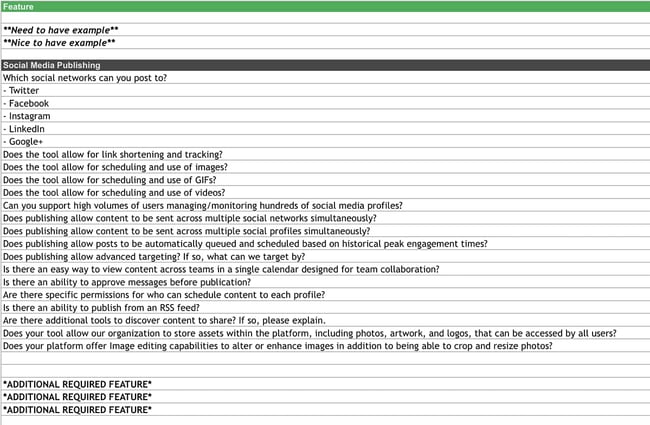
This template lists out questions to help you decide which social media management platform you should use.
Once you know what social media tactics you’re going to implement in your marketing plan, it’s time to figure out what channels are right for you. This template will help you do that.
2. Facebook Live Schedule
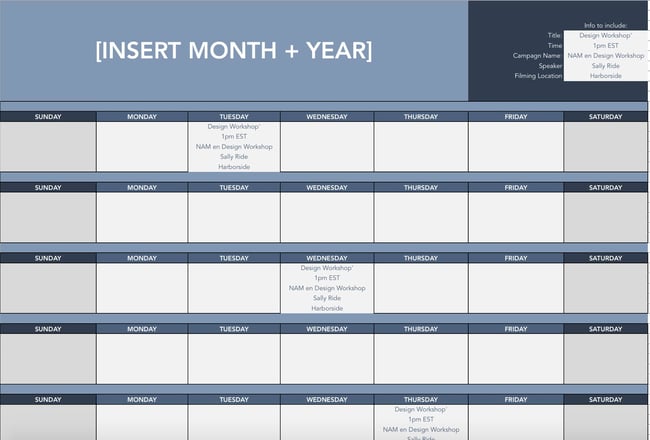
If Facebook Live is one of the marketing tactics in your plan, this template will help you design an editorial calendar. With this template, you can organize what Facebook live’s you want to do and when.
Once you’ve decided on dates, you can color code your FB calendar and coordinate with your editorial calendar so everyone can see what lives are running in relation to other campaigns.
3. Instagram Post Log
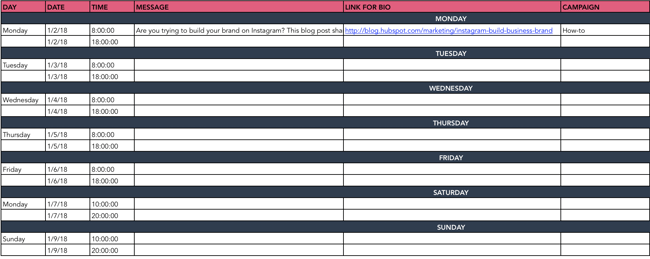
Are you going to begin using Instagram regularly? Do you want to increase your following? With this template, you can organize your Instagram posts, so everyone on your team knows what posts are going live and when.
Additionally, you can organize your assets and campaigns on this doc. Use this doc to collaborate with your team on messaging, landing pages linked in your bio, and campaign rollout.
4. Paid Social Media Template
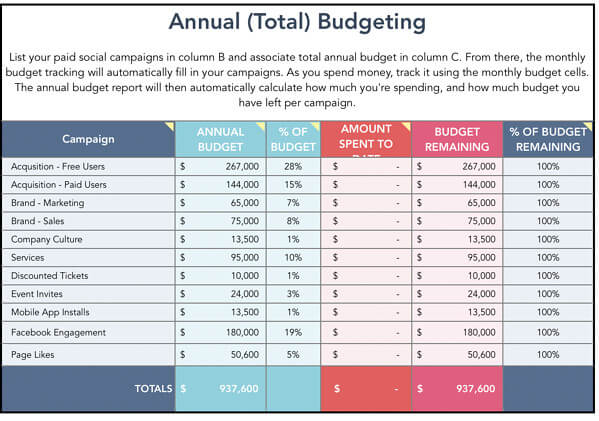
With this template, you can organize your annual and monthly budget for your paid social media calendar.
You’ll want to use this in conjunction with your marketing plan budget to make sure you are not overspending and funds are allocated appropriately.
5. Social Media Audit
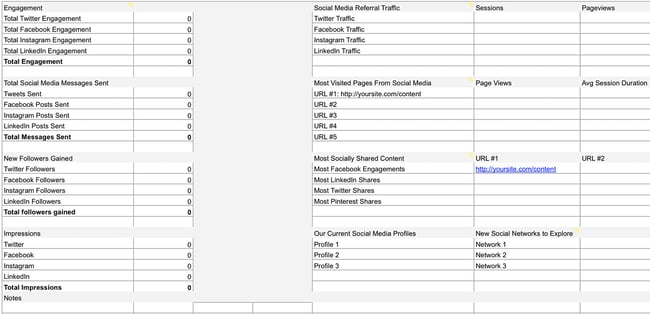
Conducting a social media audit? You can use this template to help you gather the right analytics. Tracking the results of your marketing efforts is key to determining ROI.
Use this template to track each of your campaigns to determine what worked and what didn’t. From there, you can allocate funds for the strategies that deliver the results you want.
6. Social Media Editorial Calendar
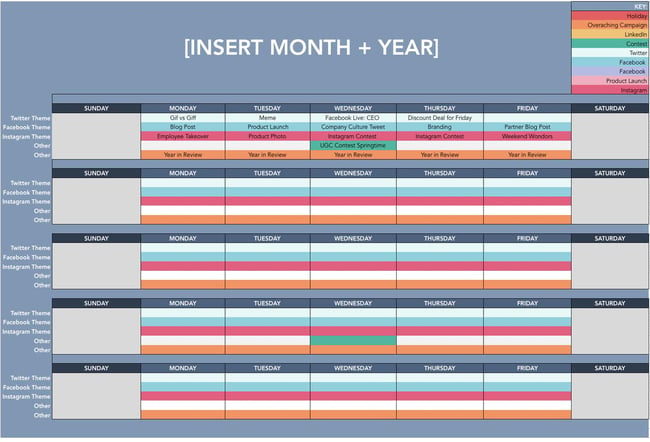
With this template, you can organize your social media editorial calendar. For example, you can include social media posts for each platform, so your team knows what’s going live on any given day.
7. Social Media Image Sizes
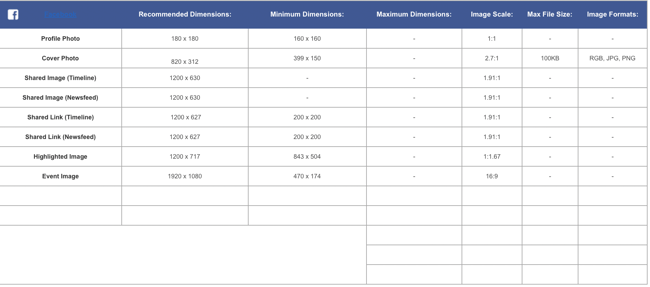
With this template, your team can have the latest social media image sizes handy. This template includes image sizes for all major social media platforms, including Facebook, Instagram, and Twitter.
Having a resource like this readily available for your team ensures that everyone is on the same page regarding image sizes and prevents delays.
8. Social Media Marketing Proposal
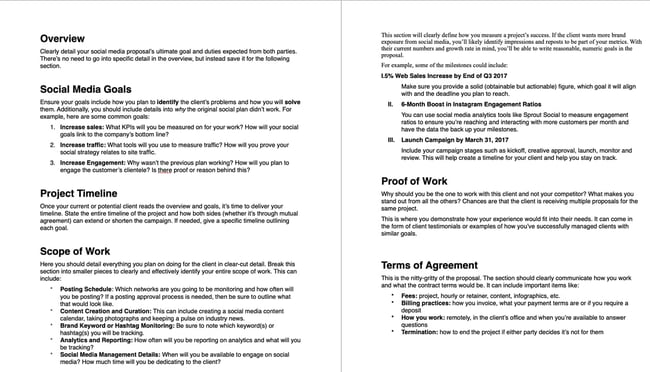
With this template, you can create an entire social media marketing proposal. This will outline the social media goals, the scope of the work, and the tactics that you plan to implement.
Think of this proposal as more of a deep dive into the marketing channel section of your marketing plan.
9. Social Media Reporting Template

With this template, you’ll gain access to a slide deck that includes templates for social media reporting. If you plan to implement social media in your marketing plan, these reporting templates can help you track your progress.
If using the social media audit above, you can add all of your data here once it’s been collected.
10. Hashtag Holidays
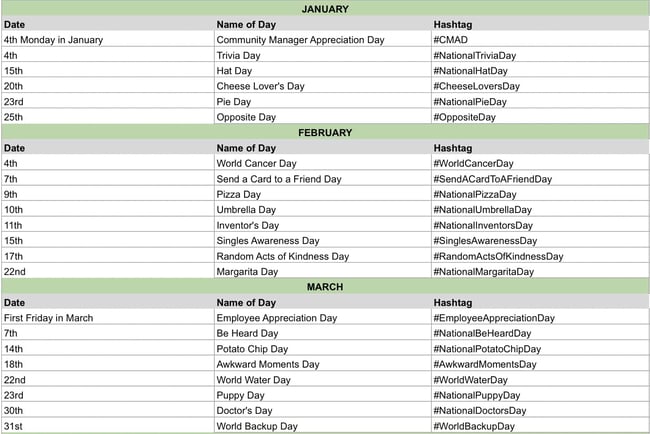 If you’re going to lean into social media in your marketing plan, you can use hashtag holidays to generate ideas.
These holidays are a great way to fill out your social media publishing schedule. With this template, you’ll get a list of all the hashtag holidays for the year.
Once you’ve come up with content ideas, you can add them to your social media calendar.
Simple Marketing Plan Template
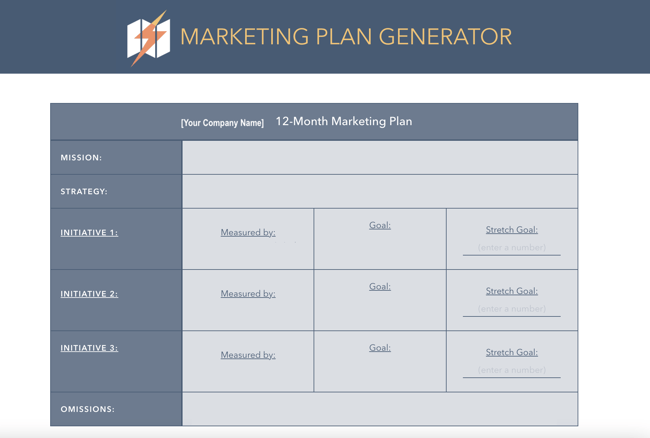
Of course, this type of planning takes a lot of time and effort. So if you’re strapped for time before the holidays, give our new Marketing Plan Generator a try.
This tool simplifies yearly planning by asking prompted questions to help guide your process. You’ll be asked to input information about:
Try our free Marketing Plan Generator here.
- Your annual marketing mission statement, which is what your marketing is focused on for the year.
- The strategy that you’ll take with your marketing throughout the year to accomplish your marketing goals.
- Three main marketing initiatives that you’ll focus on during the year (i.e., brand awareness or building a high-quality pipeline) metrics you’ll use to measure your success.
- Your target goals for those marketing initiatives like generating 100 leads per week.
- Marketing initiatives that are not aligned with your current strategy to stay focused on your goals and activities that will help you be successful.
Once you input all information, the tool will spit out a table (as shown in the image below) that you can use to guide your processes.
Pro Tip: If the tool doesn’t work, clear your browser’s cache or access it in incognito mode.
Start the Marketing Planning Process Today
The best way to set up your marketing plan for the year is to start with quick wins first, that way you can ramp up fast and set yourself (and your team) up to hit more challenging goals and take on more sophisticated projects by Q4. So, what do you say? Are you ready to give it a spin?
Editor’s note: This post was originally published in December 2016 and has been updated for comprehensiveness.


How to Write a Listicle [+ Examples and Ideas]
We’ve all been there. You click on a listicle that touts amazing insights and simple tips, only to be presented with worthless clickbait. Listicles often have a bad reputation for being low-quality and providing little value to their readers.

However, when done right, a listicle can get both clicks and share helpful insights. These well-written listicles can play an important role in your content strategy.
In fact, this post about listicles is primarily a list post itself. Here, we’re going to dive into what a listicle is, how to write a high-quality article, and listicle ideas to help you generate engaging content for your readers.
What is a listicle?
Simply put, a listicle is an article written in list format. Each list item will typically include a few sentences or multiple paragraphs to educate or delight readers. For example, you might read a fun listicle, like “The Top 10 Movies of 2020,” or a more informational one, like “7 Steps to Build a Website.”
1. Make sure your content makes sense in list format.
Before you begin writing your listicle, research to ensure your topic fits into a list format.
If you search for your intended keyword and find most marketers are creating “Ultimate Guides” on the topic, it’s better to avoid a listicle format.

For instance, perhaps you need to write about “Instagram Marketing.”
While you’d initially planned on titling the piece “10 Best Instagram Marketing Tips,” your research has uncovered plenty of other angles you’d like to include, such as “why Instagram marketing is important” and “how to create compelling content on Instagram.”
These sections might fit better in an “Ultimate Guide to Instagram Marketing” instead of a listicle.
If you choose to create a listicle, each list item must match the topic. To create a high-quality listicle, your content must be consistent and parallel.
If you’re writing a list of best practices, you should only have best practices in your list — sneaking examples will confuse your audience.
Remember: You can always create another listicle for examples later on.
2. Include valuable takeaways — no fluff!
The most significant indicator of a lousy list post is one that contains a ton of fluff and no tangible, valuable takeaways for the reader. Here’s an example of what we mean:
3 Ways to Improve Your Social Media Marketing
- Be unique! Do something to stand out from your competitors.
- Take risks. Try out-of-the-box ideas.
- Measure results! Use your analytics to tell you what’s working.
What a fantastic list post! I’ve learned absolutely nothing. Of course, you should do all these things in your social media marketing. But it needs to tell you how to do them.
Your listicle should give readers more than just a list of things to do and expect them to figure out how to do them themselves. It should also include valuable content that tells readers how to do each step.
An excellent list post nixes the fluff and concretely explains each item in detail. Not every tip will be new to your reader.
However, if they walk away thinking, “Well, I already put numbers 3, 4, and 6 into practice, but I can’t believe I’ve been missing out on numbers 1, 2, and 5!” — then you’ve probably got yourself a high-quality list.
Some listicles are meant to be more fun, but you can still include valuable takeaways. For example, the “Top Ten Best Ads of 2020” can be primarily visual, but it’s still essential you include advice your readers can use to create better ads for themselves.
Featured Resource: Listicle Blog Post Template

3. Link to more in-depth information when necessary.
One of the ways you can add value is to direct readers to other resources when necessary.
Great list posts are comprehensive, so they can get long and unwieldy. If this is the case, consider pointing your readers to another place for more in-depth information.
For example, we recently wrote a list post entitled “Email Deliverability: 5 Quick & Effective Ways to Increase It.” The last tip in the list was “Check to see your emails’ legality” and mentioned GDPR, which could be a blog post in itself. In fact, it already is.
Giving our readers enough information for that section to be truly helpful would have involved copying and pasting the entirety of our GDPR post into our listicle. That wouldn’t have been the most beneficial choice (and also might’ve hurt our SEO).
Instead, we explained the tip in a moderate amount of detail and then directed readers to the other post where they could find more in-depth information if they needed it.

Feel free to do this in your own listicles. If you have to link to an external resource because you haven’t written the post yourself — excellent.
You’ve just passed off some link love, and you also now have another article idea for your blogging backlog.
4. Explain list items using relatable examples.
Sometimes one of the best ways to adequately explain a point on your list is to use an example to support it. Of course, real examples are ideal, but sometimes even a hypothetical one works just as great.
When selecting or creating an example, keep it as relatable as possible to your readers. This can be tricky if your blog’s audience comprises a variety of readers from different industries or businesses (like ours). The key here is to keep your examples general so everyone can relate.
For instance, in HubSpot’s listicle “17 Fun (Not Cheesy) Ice Breaker Games Your Employees Will Enjoy,” item 24 (Two Truths and a Lie) needed clarification for readers who haven’t played the game before.
To illustrate the game, I provided a personal example using a hypothetical example:

Ideally, most readers will find this example helpful for understanding the game’s premise and how it works. Plus, it makes the content more interesting to read.
5. Number your items.
This is an easy one. If you’re writing a listicle — especially when you use a number in the title of your list post — number your list items.
This is particularly important when you have a long list because readers want to gauge their progress as they’re reading through the list (i.e., “only halfway to go” or “I’m almost done!”).
Readers may also like to reference particular points on a list later or share them with others.
Being able to refer to a specific number rather than saying, “I think it’s near the bottom of the list” or “It’s the fourth bullet point down” is a much more user-friendly experience for your blog audience.
Make things easy for your readers.
6. Include an appropriate number of list items.
While talking about numbers, let’s clear up some misconceptions about them. Listicle writers believe you should choose a number before writing your list and ensure you have enough points to fit that number.
We disagree.
Sitting down and saying you’re going to write a list of 14 items makes no sense. What if only 11 solid, valuable items make up the list? Should you come up with three lower-quality items to achieve your goal of 14?
Just be comprehensive. For example, this very listicle how-to post includes ten steps for writing a listicle because that’s how many I thought were individually valuable and indicative of a high-quality list post for this particular subject.
Originally I had brainstormed 11, but as I started writing, I cut one out because it wasn’t that different from another point, and they could easily be represented as one.
As we mentioned before, listicles can quickly become unwieldy. So when you start drafting your listicle, decide how granular you want to make your topic. This will help make your list more manageable. The title you craft can also help you stay focused.
For example, if you work for a plumbing company and want to write a listicle about how you can unclog a drain. You might stick to “The Top 4 Ways to Unclog a Drain,” rather than writing a long list post covering “The 50 Different Ways to Unclog a Drain.”
Furthermore, conduct tests and research to glean some best practices for your list posts. An internal study of our blog revealed that posts for which the title indicated six items or fewer didn’t perform as well as when the title indicated the list contained seven or more items.
The lesson? While we sometimes still write lists posts containing six or fewer items, we don’t include the number in the title for those posts. We might try to title it “Why Every Marketer Needs a CRM” instead of “3 Reasons Every Marketer Needs a CRM.”
7. Use category buckets for longer lists.
When we published “34 Millennial Stats That Marketers Need to Know,” we broke up the statistics into five sections:
- “General Stats and Market Opportunities.”
- “Social Media & Digital Habits.”
- “Behaviors and Financial Factors.”
- “Education and Work.”
- And “Political and Societal Views.”
- If some of our readers don’t care about the average millennial’s financial situation, they can quickly scan the post and avoid that section. Perfect!
If some of our readers don’t care about the average millennial’s financial situation, they can quickly scan the post and avoid that section. Perfect!
If your listicle seems long or unruly, consider breaking it into subcategories to help readers scan for what they’re looking for and feel more relaxed at first glance.
8. Logically order each step.
Like any other post you write, your list should flow and tell a story. How you do this will depend on the subject and contents of your list, but here are some great organizational structures to choose from:
- Alphabetical (great for glossaries).
- Chronological (great for step-by-step guides).,
- Popularity/importance, like most to least or least to most (great for top 10/20/50 lists).
Another best practice is to emphasize your strongest points at the beginning, middle, and end of your list to keep readers engaged throughout the article.
When I sat down and brainstormed this list, it was just that — a brainstormed list. It was unorganized and all over the place. I rearranged the furniture once I’d identified all the points I wanted to include.
Sometimes your list points will practically arrange themselves (e.g., “5 Steps to Do X”), and sometimes there won’t be as obvious a story (e.g., “20 Ways to Do Y”). Just put the time into figuring it out and ordering your items as logically as possible.
9. Make sure your listicle is consistent.
I’m not as strict about this one as some listicle purists, but your listicle should have a consistent and parallel look. Failing to do so only confuses readers.
Here are some helpful guidelines to consider:
- Try to keep sections similar in length.
- Use the same header style to highlight your list items, and make sure they stand out.
- Make sure your list item headers are written in a parallel fashion (i.e., if it’s a list of action items, each should be led with a verb).
- Finally, use images and bullet points to break up text when appropriate.
10. Have a clear and catchy title.
As we mentioned at the beginning of this post, one of the reasons people have always loved listicles is because they know exactly what — and how much — they’ll get out of them.
There is no guesswork involved, and your expectations are very clear for your readers. Make sure your title epitomizes that.
A compelling listicle title should accomplish three things to entice readers actually to read the post:
- Capture the readers’ attention
- Clearly indicate the value or what the reader will learn
- Suggest how much they will learn with a number.
For example, consider this post, “5 Steps to Create an Outstanding Marketing Plan [Free Templates].” Do you wonder what this post will be about? Not at all.
You know that you’ll learn how to create a marketing plan (in 5 steps), and you’ll have templates if you need help.
Listicle Examples
As marketers, we’re often tasked with writing about drier topics to educate our viewers and attract leads. A listicle can help the reader scan for the information they need and feel less overwhelmed by the amount of content.
Let’s explore a few examples to inspire you.
1. HubSpot’s “6 Secrets to Achieving Work-Life Balance, According to HubSpot Marketing Managers“

This post from HubSpot explores how you can achieve work/life balance, so you can be your best self every day.
What we love: This post includes plenty of quotes from marketing managers explaining their secrets. Quotes are a great way to provide value to your readers.
2. Buzzfeed’s “24 Of The Most Anticipated LGBTQ+ Books Of 2023“

When it comes to book reviews, Buzzfeed knows the right formula. The site creates listicles of both recent releases, as well as titles that will be hitting shelves soon.
What we love: Each item on this list includes a release date for the book, as well as a summary. The listicle also links to where readers can order the book.
3. Southern Living’s “Soups To Make Every Month Of 2023“

When it comes to cooking, what’s in season changes every month. Southern Living blends the best of a cooking calendar and a listicle for this collection of soup recipes.
What we love: This list makes use of clever organization, ordering recipes by month. And with 12 recipes highlighted, this listicle is easy to digest.
4. UpgradedPoints’ “The 12 Best Websites for Booking Flights at the Cheapest Prices”

UpgradedPoints created a listicle to help travelers save on their next vacation. This article gathers sites that offer flight discounts, including a list of pros and cons for each.
What we love: At the end of each list item, the author includes a “hot tip” that can help readers save even more. By using icons and distinct colors with this text, this tidbit draws readers in.
5. Polygon’s “The Best Super Bowl Commercials of 2023“

Whether or not you watched the big game, everyone at the office will be talking about the commercials. Polygon gathers the ads everyone will be discussing in this article.
What we love: It’s not enough to describe the ad. People need to see it. This post breaks up chunks of text with videos of the ads themselves.
Now that we’ve explored some examples, let’s dive into some ideas you can use to create yours.
Listicle Ideas
Finally, let’s explore some listicle ideas to help your marketing team brainstorm highly engaging content for your readers.
We’ll explore a few more tactical pieces you might write for an ecommerce, B2C, or B2B company, but we’ll also dive into some fun, “trendier” ideas if you work for a publication looking to expand your reach.
Listicle Ideas For Ecommerce or B2C Companies
- 14 Essential Ways to Build a Timeless Wardrobe
- How to Apply Black Lipstick in Three Easy Steps
- 20 Things You’ll Need in Your First Apartment
- 13 Things You Should Know Before Buying a Sofa
- The 7 Best Sustainable Furniture Companies
Listicle Ideas For B2B Companies
- How to Choose a CRM in 4 Easy Steps
- The 11 Best Website Builders
- 5 Steps to Creating a Marketing Playbook
- 3 Steps to Create a Better About Us Page
- 7 Communication Channels Your Team Needs in 2023
- 12 Marketers Tell Us Their Favorite Marketing Campaigns of 2023
Listicle Ideas For Publications Looking to Trend Online
- How to Make These 3 Meals With Only 5 Ingredients
- 10 Cool Gadgets You’ll Definitely Need This Summer
- 7 Hilarious Videos Trending on YouTube Right Now
- How to Become an Entrepreneur, According to 11 Successful Ones
- If You’re a Leader, You Need to Accept Some Harsh Truths. These Seven CEOs Explain Why.
There you have it! Remember that listicles should serve the same purpose as any other marketing content — to attract the right audience to your products or services.
Sit down with your team and brainstorm challenges your readers might be facing, and then decide whether that challenge can be solved with a step-by-step guide or a list of tools (that includes yours).
Now, you’re well on your way to having more listicles in your content strategy. Happy planning!


Ecommerce Conversion Rates Across Industries (And How to Raise Yours)
Ecommerce conversion rates are the ultimate top-line metric for online store owners. With this data, you can see if the changes you make to your site positively or negatively impact how many visitors become customers.
Download Now: Ecommerce Conversion Rate Calculator
Although crucial, there’s often confusion around what’s considered a reasonable conversion rate. Before you evaluate if your ecommerce conversion rate is good or bad, you must evaluate how your performance measures against your industry’s standard.
In this article, you’ll learn the ins and outs of ecommerce conversion rates, conversion rate benchmarks across industries, and how you can improve your results. Let’s dig in.
For example, suppose 30 out of 1,000 visitors to your online shop made purchases.
To calculate your ecommerce CVR, take the total number of people who completed checkout (30) and divide that by the total number of site visitors in the same time frame (1,000). In this case, your ecommerce CVR would be 30/1000 = 0.03 = 3%.
Today, many ecommerce retailers sell across multiple platforms. You’ll need to aggregate your site visits and conversions in one place.
You can leverage a tracking spreadsheet or find a technology solution to keep a pulse on your performance across platforms.
We’ve put together a free ecommerce conversion rate tracker that you can download here, along with an ecommerce marketing and sales plan template in our Ecommerce Planning Kit.
Featured Resource: Ecommerce Conversion Rate Tracker
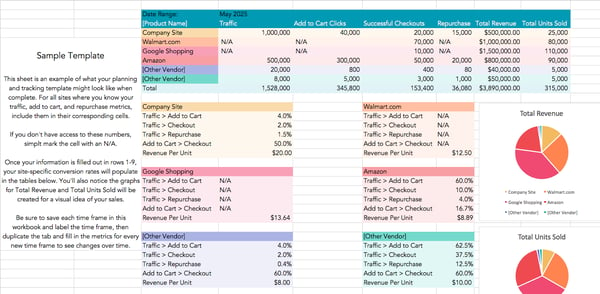
Why is your ecommerce conversion rate important?
Your ecommerce conversion rate is crucial to the success of your online shop.
For example, you could bring in 50,000 views per month to your website through ads. If the user experience on your website is poor or your product descriptions aren’t effectively communicating value, you might only end up with a small percentage of that traffic converting into customers.
Ecommerce CVR is also a valuable metric to track over time to see how the improvements you’re making to your website, product categorizations, product descriptions, checkout process, or any other aspects of your online store are actually impacting your business’s bottom line.
What’s a good ecommerce conversion rate?
Don’t compare your ecommerce CVR to an overall benchmark that aggregates CVRs across industries. CVRs vary wildly across ecommerce sectors. Try to find conversion rates for your category or industry to use as a benchmark.
Looking at numbers isn’t all you need to do. Conduct a cost-benefit analysis and ensure that you make more money than you spend by selling your products online. From there, focus your time on optimizing your site beyond where it currently stands.
If you have one category of items with an excellent conversion rate, you can also aim to bring all categories up to that standard. With that approach, you can count on the CVR benchmark reflecting your specific target persona, not anyone else’s.
If you’re starting from scratch, see below for industry-specific benchmarks backed by recent research.
Ecommerce Conversion Rate Benchmarks by Industry
The numbers below come from IRP Commerce, which constantly collects data across many industries and ShippyPro. The numbers were most recently updated in December 2022.
- Agriculture: 0.62% – 1.41%
- Arts and Crafts: 3.84% – 4.07%
- Baby and Child: 0.87% – 1.43%
- Cars and Motorcycling: 1.35% – 0.65%
- Electrical and Commercial Equipment: 2.49% – 1.31%
- Fashion, Clothing, and Accessories: 1.01% – 2.20%
- Food and Drink: 1.00% – 2.01%
- Health and Wellbeing: 1.87% – 4.20%
- Home Accessories and Giftware: 1.55% – 2.34%
- Kitchen and Home Appliances: 1.72% – 3.00%
- Pet Care: 2.53% – 2.20%
- Sports and Recreation: 1.18 – 1.62%
1. Put explainer videos on your product pages.
It can be challenging to get a sense of sizing, fit, and material quality from photos. Video tends to demonstrate more detail. Add videos that show your product from various angles and allow people to see them in action.
You’ll also want to account for the increasing number of people who prefer to consume video over text.
2. Give your visitors a clearer set of product images.
There’s nothing more frustrating than wanting to look at the small details of the item you’re considering buying online only to find out that you can’t zoom in.
Your ecommerce site should include images of your product from different angles and allow prospective buyers to zoom in on the product images. Doing so allows these potential customers to have a more accurate sense of your product before purchase.
3. Tighten your copy.
Ensure your product descriptions are grammatically correct, easy to understand, and properly structured. It’s vital to keep your ideal buyer in mind as you write your product description.
In some cases, retailers may have a couple of identical products that are differentiated only by size. While the product specifications should reflect the different product dimensions, it’s okay to leave the copy describing the product’s use as is.
On the other hand, if you’re selling something like body care products, you might write an entirely new copy to describe who each product is suitable for, the different sensory elements of the product, and the look and feel of each.
At a baseline, always include product measurements, material specifications, warranty information, and any other information that would be crucial for buying your product. With this information, you won’t lose a prospective customer who is wondering about a key detail.
4. Add a chat feature to your website.
You simply can’t answer every question that anyone will ever have in your product description. However, since you want to do everything you can to convince someone to buy your product while they’re already on your site, consider chat as another avenue.
Chat can be a powerful tool for bridging the gap between your product descriptions and the information an individual needs to buy.
Customers can ask questions about your brand, shipping policies, and anything else non-product-specific without leaving the web page of the product they’re close to buying.
5. Test different call-to-action (CTA) placements, options, and wording.
Altering your CTAs is a classic method of optimizing a website’s conversion rate. Switching up the copy within your CTAs, the options people have for the next place they can go, or the prominence of those CTAs can be low-effort, high-impact ways to encourage people to buy.
Studies have found that while the majority of CTA tests don’t produce statistically significant results, the ones that do create enormous impact, with on-page conversion lifts averaging 49%.
You won’t know what conversion rates you’ll see until you start experimenting with each little aspect of your site.
6. Add social proof with stellar customer reviews.
It’s becoming increasingly easy for companies with cheap, low-quality products to deliver comparable on-site experiences and images. This convinces buyers that their products are the same as the others in the market, just less expensive.
However, the one element that’s hard to fake is customer reviews. Allow your customers to leave reviews of your products to prove their quality. If you’ve got great reviews, consider moving them higher on the product pages. Social proof can positively impact prospective customers’ buying decisions.
If you don’t have a solution that allows customers to leave reviews automatically, collect quotes from people who’ve bought from you before. Add several to each of your product descriptions.
Remember that you can always run A/B tests by tweaking your testimonial’s design and placement. You’ll soon find out what works best.
7. Offer free shipping.
We’ll admit that offering free shipping isn’t the cheapest option. However, the ROI can be enormous. Many people choose to go to a local store when it’s significantly cheaper to drive 15 minutes than pay $5-10 for shipping.
Free shipping reduces the perceived barriers to ordering something online. That means that you likely end up with more people making purchases. The revenue from those additional customers may compensate for the losses incurred by paying for their shipping.
You can also set a minimum purchase amount before free shipping applies to an order. You’ll incentivize your customers to spend a little more on products to avoid paying the shipping costs.
8. Tweak your checkout process.
You can make dozens of small changes to the user experience of your checkout process. Two of our favorites are eliminating unnecessary fields and adding a progress bar.
While collecting additional information about your buyers during the checkout process is tempting, additional questions lengthen the amount of time it takes to buy. Many people might not be that patient.
Progress bars can have two advantages.
- First, they can reduce buyers’ concern that they don’t have the time to complete the checkout process at the moment.
- Second, they give people a sense of accomplishment after each step they’ve completed, building positive momentum toward completing their purchase.
9. Allow guest checkout.
Allowing people to create an account makes sense for repeat buyers. But if you require people to make an account to make their first purchase, you may lose potential customers. Additionally, some people are averse to saving personal information online.
Trustpilot reports that requiring account creation at checkout is the second-biggest reason why people abandon carts, coming in just below having to pay for shipping.
Those who become repeat buyers will create an account eventually if they feel comfortable saving their information. In the meantime, don’t add extra steps to the checkout process for people ready to buy.
10. Add additional payment options.
A study from the Merchant Payments Ecosystem revealed that 50% of consumers would end a transaction if they couldn’t find their preferred payment method.
Consider running a survey to understand your customers’ preferred payment methods and add the one that’s most convenient for them.
By meeting your customers where they are, you’re potentially removing a nuisance (i.e., walking to another room to get a different credit card) or a complete blocker (i.e., not having access to any of the available payment methods). You’ll also create an easier user experience.
Improve your conversion rates.
By tracking relevant website metrics, you can discover what your current conversion rate is.
Find the right tools to help optimize your conversion rate. Then, experiment to see what yields results.

30 Best Bots for Marketers in 2023
A marketer’s job can feel never-ending, especially when you have multiple daily tasks and campaigns to manage independently. Whether you have to guide a team, communicate with customers, or run a campaign — your to-do list can be exhausting.
Fortunately, there’s a way to automate some of your tasks — bots!
Here’s a list of bot software you can use to automate parts of the marketing process, so you can spend less time on repetitive tasks and more time running your business.

Best Facebook Messenger Chatbots
Here are the best chatbots available for Facebook messenger.
1. Boletia
Boletia is a customer support tool that allows event planners to streamline their businesses. With Boletia, you can automate your ticket sales and make the purchasing process effortless for your customers.
The Facebook integration lets you buy and sell event tickets through Facebook Messenger.
Platforms: Messenger
Functions: Customer Support
Price: Free
Language: Spanish

2. BrighterMonday Uganda
BrighterMonday is an online job search tool that helps jobseekers in Uganda find relevant local employment opportunities.
The BrighterMonday Messenger integration allows you to speed up your job search by asking the BrighterMonday chatbot on Messenger.
Platforms: Messenger
Functions: HR
Price: Free
Language: English

3. Dashbot.io
Dashbot.io is a bot analytics platform that helps bot developers increase user engagement. Dashbot.io gathers information about your bot to help you create better, more discoverable bots.
The Dashbot.io chatbot is a conversational bot directory that allows you to discover unique bots you’ve never heard of via Facebook Messenger.
Platforms: Messenger, Slack, Kik, Web
Functions: Analytics
Price: Paid
Language: English

Image source
4. Faqbot
Faqbot is an automated 24-hour customer and sales support bot for answering frequently asked questions. The few seconds it takes to set it up will allow Faqbot to help your customers while you get some rest.
The Facebook integration lets you turn your static FAQ page into a streamlined conversation via Facebook Messenger.
Platforms: Messenger
Functions: Customer Support
Price: Paid
Language: English

5. GoHire
GoHire is an online recruitment and branding tool that streamlines hiring and outsourcing talent. GoHire makes managing candidates and scheduling interviews fast and simple – no paperwork or confusing spreadsheets.
The integrations allow you to communicate directly with recruiters and job candidates via Messenger, SMS, and web chat.
Platforms: Messenger, SMS, Web
Functions: HR
Price: Free
Language: English

Best Discord Bot
This bot below is excellent for elevating your Discord activity.
6. MEE6
MEE6 is a Discord bot that offers a suite of features to enhance your Discord server. With MEE6, you can stay on top of internet trends, create custom commands, automate processes, and more.
Platforms: Discord
Functions: Communication
Price: Free
Language: English

Best Marketing Chat Bots
Need advice ahead of your next marketing campaign? Need a way to schedule your ads automatically? These bots can provide the solutions you need.
7. About Chatbots
About Chatbots is a community for chatbot developers on Facebook to share information. FB Messenger Chatbots is a great marketing tool for bot developers who want to promote their Messenger chatbot.
You can also connect with About Chatbots on Facebook to get regular updates via Messenger from the Facebook chatbot community.
Platforms: Messenger
Functions: Marketing
Price: Free
Language: English

8. Opesta
Opesta is a Facebook Messenger program for building your marketing bots. Opesta is easy to use and has everything you need to generate leads, follow up and deliver your products, and you don’t need coding skills to make it work.
The Opesta Messenger integration allows you to build your marketing chatbot for Facebook Messenger.
Platforms: Messenger
Functions: Marketing
Price: Free
Language: English

9. Revealbot
Reveal is a marketing automation tool for Facebook ads. Save time planning and scheduling your ads; provide the rules and let Reveal do all the work.
The Slack integration lets you get notifications and access your Instagram and Facebook campaigns in Slack.
Platforms: Slack
Functions: Marketing
Price: Free
Language: English

10. Surveybot
Surveybot is a marketing tool for creating and distributing fun, informal surveys to your customers and audience. You don’t need any coding skills – anyone can use Surveybot.
All you have to do is let Surveychat guide you through the survey-building process via Facebook Messenger.
Platforms: Messenger
Functions: Marketing
Price: Paid
Language: English

11. Brand24
Brand24 is a marketing app that lets you see what people say about your brand to take advantage of new sales opportunities. Charts and feeds are available for analysis of brand mentions.
The Slack integration saves you time and enhances collaboration by allowing you to quickly assign tasks to the right people so you can take care of issues before they become big problems.
Platforms: Slack
Functions: Marketing
Price: Paid
Language: English

12. Brandfolder
Brandfolder is a digital brand asset management platform that lets you monitor how various brand assets are used. Having all your brand assets in one location makes it easier to manage them.
The Slack integration puts all brand asset activity in one channel for easy collaboration and monitoring.
Platforms: Slack
Functions: Marketing
Price: Free
Language: English

13. Autopilot
Autopilot is an app that allows you to personalize and automate your customer experience, giving you more time to focus on other aspects of business without sacrificing customer satisfaction.
The Slack integration lets you automate messages to your team regarding your customer experience.
Platforms: Slack
Functions: Marketing
Price: Free
Language: English

14. ChatKwik
ChatKwik is a conversational marketing software that works with Slack to keep customer conversations organized to serve your customers better. The Slack integration lets you directly chat with customers in your Slack channel.
It also lets you learn where new prospects come from and generate more leads.
Platforms: Slack
Functions: Marketing
Price: Free
Language: English

15. Customer.io
Customer.io is a messaging automation tool that allows you to craft and easily send out awesome messages to your customers. From personalization to segmentation, Customer.io has any device you need to connect with your customers truly.
The Slack integration lets your team receive notifications about your customers’ activity.
Platforms: Slack
Functions: Marketing
Price: Free
Language: English

16. GetResponse
GetResponse is a comprehensive online marketing platform that can streamline your online marketing efforts and help you grow your business.
The Slack integration lets you customize notifications for different marketing metrics and channels so that you stay ahead of the game.
Platforms: Slack
Functions: Marketing
Price: Free
Language: English

Best HR Chat Bots
Managing a team can be difficult, so here are some bots that can help keep your team motivated and on track.
17. HeyTaco
Show your coworkers how much you appreciate them with HeyTaco. HeyTaco is a fun way to celebrate your team members and inspire productivity with friendly competition.
The Slack and Discord integrations allow you to give your team praise and recognition without leaving Slack or Discord.
Platforms: Slack, Microsoft Teams
Functions: Communication
Price: Paid
Language: English

18. Breezy
Breezy HR streamlines hiring and onboarding new people to your team. Use Breezy HR to discover, vet, and hire candidates that suit your company’s culture without wasting time or getting lost in paperwork.
The Slack integration allows you to rate candidates, view available positions, and get HR updates in Slack.
Platforms: Slack
Functions: HR
Price: Paid
Language: English

19. Sage HR
Sage HR is an HR tool that automates attendance tracking and employee leave scheduling. Sage HR is convenient, straightforward, and fast. The Slack integration lets you track your team’s time off and absence requests via Slack.
Platforms: Slack
Functions: HR
Price: Paid
Language: English

20. Calamari
No more HR scheduling complications; Calamari is an HR tool that manages team attendance, sick days, vacations, and work-related travel.
It takes zero effort. The Calamari-Slack integration allows you to request time off, clock in, clock out and check presence without leaving Slack.
Platforms: Slack
Functions: HR
Price: Free
Language: English, French, German, Polish, Spanish

21. ChiefOnboarding
Give new hires a warm and comprehensive welcome to their new team with the ChiefOnboarding Slack app. ChiefOnboarding simplifies the onboarding experience and is a great help for new hires.
The Slack integration enables you to get reminders, tasks, and tips from ChiefOnboarding via Slack.
Platforms: Slack
Functions: HR
Price: Paid
Language: English

22. Fortay
Fortay is a new analytics Slack bot that helps you keep your team on track. Fortay uses AI to assess employee engagement and analyze team culture in real time. This integration lets you learn about your coworkers and make your team happy without leaving Slack.
Platforms: Slack
Functions: HR
Price: Free
Language: English

23. Icebreakers
Get to know your coworkers with Icebreakers, an HR chatbot for building team culture. Icebreakers is a fun and modern way to make your team comfortable and invigorated.
Installing Icebreakers only takes a few seconds, and then you can exchange enjoyable getting-to-know-you questions and answers with your Slack team.
Platforms: Slack
Functions: HR
Price: Free
Language: English

24. Karma
Make your workplace more fun and more productive with Karma. Karma is a team management and analytics bot that tracks your team’s accomplishments and performance while promoting friendly competition. The Slack integration lets you view your team performance stats and reward high-achieving coworkers.
Platforms: Slack, Microsoft Teams, Telegram
Functions: HR
Price: Paid
Language: English

25. Zenefits
Zenefits is a comprehensive digital HR platform for small to medium-sized businesses. Zenefits streamlines weeks of accumulated repetitive administrative tasks and handles team requests for you. Zenefits is so friendly you might start thinking it’s a human.
The Slack integration allows you to enjoy the perks of Zenefits right in your Slack channel.
Platforms: Slack
Functions: HR
Price: Paid
Language: English

26. Charlie
Charlie is HR software that streamlines your HR processes by organizing employee data into one convenient location. Whether you need to track employee time off, quickly onboard new employees, or grow and develop your team, Charlie has all the necessary resources.
Platforms: Slack
Functions: HR
Price: Free
Language: English

27. Donut
Donut is an HR application that fosters trust among your team and onboarding new employees faster so everyone works better together. The Slack integration lets you sort pairings based on different customizable factors for optimal rapport-building.
Platforms: Slack
Functions: HR
Price: Free
Language: English

28. Duuoo
Duuoo is a performance management software that allows you to continuously manage employee performance so you can proactively address any issues that may arise. The Slack integration uses notifications to help you keep track of meetings and agreements in your Slack channel.
Platforms: Slack
Functions: HR
Price: Free
Language: English

29. Geekbot
Geekbot is a bot that allows you to have effective meetings without everyone being physically present. The Slack integration lets you stay updated quickly on the status of various tasks that different teams handle.
Platforms: Slack
Functions: HR
Price: Paid
Language: English

30. Koan
Koan is an application meant to help strengthen the bonds within your team. This app will help build your team with features like goal-setting and reflection.
The Slack integration lets you manage all your Koan data without leaving Slack and keep your team updated.
Platforms: Slack
Functions: HR
Price: Paid
Language: English

You can focus on strategizing and executing your next marketing campaign by delegating certain tasks to automated bots. Maybe it isn’t such a scary idea to let the robots take over sometimes.


Deep Learning vs. Machine Learning: What Marketers Need to Know
Artificial intelligence continues to be a hot topic within the marketing industry. The market for AI in marketing will likely grow to $107.5 billion by 2028, up from $15.84 billion in 2021.
As the technology’s role in marketing expands, you’ve probably heard the terms “deep learning” and “machine learning,” — but what do these terms mean? Here’s what marketers need to know about deep learning and machine learning.
3 Common Ways Marketers Use Machine Learning
3 Common Ways Marketers Use Deep Learning
The Difference Between Machine Learning and Deep Learning
An example of machine learning is speech recognition. Machine learning can translate speech into text; software applications can convert live voice and speech recordings into text files.
Voice search, voice dialing, and appliance control are all examples of machine learning in speech recognition.
So if you’ve ever listened to your favorite song by saying, “Alexa, play ____,” you can thank machine learning for the capability.
3 Common Ways Marketers Use Machine Learning
Here are some ways machine learning is often implemented in marketing strategies.
1. Predictive Recommendations
Predictive recommendation machines rely on data to predict what content or services a user would enjoy. A well-known example is Netflix’s AI system that recommends movies and shows based on what a user has already watched.
The AI reportedly saves Netflix $1 billion annually through decreased churn and higher retention.
2. Churn Prediction
Some companies use machine learning to predict when a customer is about to churn so the company can take action before the customer leaves.
They achieve this by examining demographics, past user actions, and other data to predict future behavior.
For example, if a customer’s behavior indicates they may end their subscription to a music stream. In that case, the service may offer an exclusive deal — such as a temporarily discounted subscription rate — to keep them from churning.
This type of machine learning helps companies keep high retention rates, which leads to increased revenue.
3. Lead Scoring
Leading scoring predicts which leads are likely to convert into customers. This form of machine learning helps sales teams avoid manually sorting and reviewing thousands of leads every month.
Teams can use a lead scoring model to automatically identify and prioritize the most promising, thus boosting productivity while reducing costs.
What is Deep Learning?
Deep learning is a discipline of machine learning that uses algorithms and data to mimic the human brain to train a model. This discipline uses neural networks to learn a specific task.
The neural networks comprise interconnected neurons that process data in the human brain and computers.
3 Common Ways Marketers Use Deep Learning
Here are some ways marketers use deep learning in their strategies.
1. Segmentation
Deep learning models can find patterns in data to initiate advanced segmentation. This allows marketers to easily and quickly identify the target audience for a campaign and predict potential leads.
2. Hyper-personalization
Deep learning can develop personalization engines that help marketers streamline the process of delivering hyper-personalized content.
Examples of hyper-personalized materials are websites that show content that varies depending on who’s browsing or push notifications for customers who leave without making a purchase.
3. Predicting Customer Behavior
Marketers can use deep learning to predict a customer’s actions by tracking how they move through the brand’s website and how often they purchase.
In doing so, AI can tell companies which products and services are in demand and should be the focus of future campaigns.
The Difference Between Machine Learning and Deep Learning
Machine learning is a subset of artificial intelligence, while deep learning is a subset of machine learning.
Machine learning means computers learn from data using algorithms to learn and act without being programmed — in other words, without human intervention. And deep learning uses algorithms and neural networks to train a model.
The image below illustrates the relationship between artificial intelligence, machine learning, and deep learning.

Machine learning can also train on smaller data sets, while deep learning requires large amounts of data.
Deep learning improves via its environment and by learning from past mistakes, but machine learning requires more human intervention to learn and correct itself.
Here are some other key differences between machine learning and deep learning:
- Machine learning requires shorter training but can result in lower accuracy.
- Deep learning requires higher training and results in higher accuracy.
- Machine learning makes straightforward, linear correlations.
- Deep learning makes complex, non-linear correlations.
As artificial intelligence further integrates into various industries and our daily lives, marketers must understand its basic principles and learn how to leverage it for their brands.
Both deep learning and machine learning will create new possibilities in marketing by streamlining tedious processes and predicting audience behavior.
AI can help marketers improve their strategies and ensure they’re always on trend with consumers.

14 Real-Life Examples of CTA Copy YOU Should Copy
Moving people to act is a challenging task. With just a few words, CTA copy needs to show that you see where your audience is coming from and empathize with their issues. That CTA (call-to-action) must also motivate them to move toward a solution.
If the CTA copy you craft doesn’t keep your visitors’ attention, it can hurt your click-through rate, lead conversions, and ultimately, sales.

So, a CTA needs to inspire, encourage, and coax a person into action, but not bore, scold, or distract. Clearly, writing CTAs is a tricky balance of skill, influence, and awareness. But how can you write the perfect CTA copy on your own?
Keep reading or skip to a section to learn:
- What is CTA copy?
- Real-Life Examples of CTA Copy YOU Should Copy
- How to Write CTA Copy That Converts
When marketers think about call-to-action (CTA) creation, the first thing many of them tend to focus on is design. And while CTA design is critical to initially drawing the attention of your visitors, it’s CTA copy that has to be compelling enough to get them clicking.
Bring your calls-to-action to life with HubSpot’s 28 Free CTA Templates. Simply add your own copy, adjust designs as needed, save as an image, and upload to your CMS.

Looking at CTA examples can also help when you’re writing. The following examples can inspire you and compel your visitors to click and convert.
Real-Life Examples of CTA Copy YOU Should Copy
1. HubSpot

HubSpot is all about growing better, and visitors quickly get that message from the call-to-action at the top of the page. Then, the copy outlines how HubSpot can help your business grow better.
The next CTA is highlighted with a button, “Start free or get a demo.” This gives you two different choices with a single click, meeting the needs of many different users with a single action.
2. Kate Spade

This compelling CTA asks readers to “treat yourself” and “shop self-gifting.” The contrast of traditional Valentine’s day terms like “romancing” and “heart” with a unique statement makes this CTA stand out. It also highlights a specific audience that’s often ignored on this holiday, inviting them to flip through and “make the moment all about you.”
3. KLM
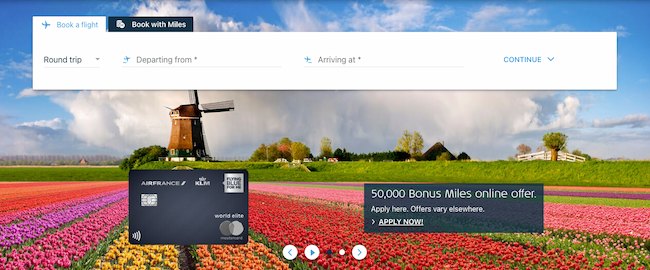
The language of this call-to-action (“50,000 Bonus Miles online offer”) is written in a way that gives visitors context even if they skim over the copy listed below it. The bottom line of text uses punctuation and uppercase letters to emphasize urgency. It’s effective because it’s both specific and action-oriented.
4. Duolingo

The copy of the call-to-action button here is so descriptive that visitors can move immediately into action, either getting started or continuing to use the app. This straightforward CTA tells you exactly what this app does and why you want to use it. Remember — sometimes being to the point is all you need to drive conversions.
5. Eventbrite

The text outside the call-to-action button here serves to create an incentive. The best time to find an event is now, so there’s absolutely no reason why you shouldn’t just go ahead and find one. While this app is best known for creating events online, this CTA shows that Eventbrite also invests in promoting events posted on the app, creating more reasons to use the platform.
6. American Red Cross

This is an inspirational CTA example. It starts by reminding each individual who visits the site of their potential impact with one phrase — “You Can Make a Difference.” Then, it outlines how a financial gift can help. This framework creates an experience that feels more inspiring and less transactional, while still supporting the goal of collecting donations.
7. AWS
In this example, the text above the call-to-action — “Start Building on AWS Today” — gives specific details about the action visitors will be taking if they click. It reveals the ‘how’ of “Get Started for Free” too, with detailed sections for builders and decision makers. This copy clearly sets expectations before conversion so visitors know exactly what they’ll get in return for their click.
8. GoTo
This CTA starts with “One solution. So many ways to stay connected.” It goes on to describe the value of their cloud phone system. Then GoTo uses CTA buttons to clarify exactly what visitors will get after their click(s): either “See Plans and Pricing” or “Get a Demo.” The lesson is simple, if your button text is short and simple, clarifying copy can give visitors an extra boost to click.
9. Fitbit

In this example, the CTA copy tackles the problem of decision overload. Some companies use a CTA to compare their products to a competitor, then offer their best product as the best choice. Instead, this CTA assumes that the issue isn’t whether to purchase from Fitbit, but which Fitbit product to buy.
The CTA copy calls out a problem in a friendly way — “Trouble choosing? We’ve got you covered.” Then, it offers an immediate solution — “Start the quiz.” While some customers have complicated problems, you can simplify by looking at your ideas from your customers’ perspective.
10. Turbo Tax
When a web page offers many different choices, you may need to display more than one CTA. Each CTA needs to be powerful by itself, conveying a compelling and targeted offer through both visuals and copy. In this example, the language of the calls-to-action here gives readers solid context around three distinct offers.
11. Secureworks

This call-to-action gives visitors enough information to take the next step without needing to give away much background information. This text is a teaser that tempts people to keep reading, making a subject that can sometimes seem boring (cybersecurity) more enticing.
12. On24
The main call-to-action in this example urges action. Then, the text above each follow-up CTA highlights details about each offer. This language offers clarity and sets expectations for the visitor, eliminating any guesswork.
13. Upwork

This CTA starts with a motivational message — “How work should work” — then shifts the focus to direct action. The CTA buttons offer two different ways to engage. First, a CTA that asks visitors to start using the platform for hiring. Next, a CTA for people who aren’t sure how to hire and may have a longer buyer journey before they start using the platform.
14. Citizen Group
Simple doesn’t mean boring. This example offers creative CTA copy that aligns with the voice of the organization. CTAs like “Building Citizen Brands,” “Connecting Through Culture,” and “Let the Work Speak” offer a clear idea of what visitors will find after clicking. At the same time, the tone and voice of each CTA feels unique to this brand and makes the act of clicking more exciting.
Check out this post for more clickable call-to-action examples.
CTA copy is often the shortest copy on the page, so to some, it can be mystifying that it’s often the copy that takes the longest to write. A call-to-action is like a bumblebee, with its big body and tiny wings. It carries a heavy load with just a few carefully chosen words.
To create a CTA that makes the most of every blog, landing page, email, and button, check out these tips.
1. Use active language.
Using active voice puts the reader in the center of the action. It also helps cut down on wordiness. An example of active voice is, “Jack eats cherries to stay fit.”
In contrast, passive voice talks about action in a more roundabout way. For example, “The cherries were eaten by Jack for fitness.”
A writing tool like Hemingway Editor can help you test your copy for active voice.
2. Make your message specific.
CTA copy needs to be original, eye-catching, and drive action. That is a lot of work for a small number of words. So, to meet conversion goals with your CTAs, be specific.
Specific copy focuses on a single focused topic. Then, it uses language that makes it easy to visualize both the problem at hand and how the CTA offer can help.
If you’re not sure whether your language is specific enough, ask a few friends or colleagues to quickly scan your copy. If they all come up with the same meaning, chances are your CTA copy is specific enough. But if your proofreaders come back with different ideas about your offer and meaning, you probably want to rewrite your CTA.
3. Short and simple copy is best.
CTA copy should be easy to scan and understand. People tend to scan when they read online, and CTAs should draw their eye and be quick to take in.
Positive language with simple word choices can also help you create more effective CTAs. Check out this post for more tips on how to write clickable copy.
4. Avoid cliches and trends.
If you’re not sure what to write for your CTA it can be tempting to mimic what competitors are doing or to add a familiar cliche. It’s easy to understand why you’d do this, but it may impact your conversions.
Cliches are easy to remember because you’ve heard them so many times. Jumping on what competitors are doing might make readers think your business lacks creativity.
These approaches to writing copy may give your CTAs meanings that you don’t intend. They’re also something your reader has seen or heard before, so they’re likely to skim over and ignore your call to action.
Instead, use your CTA to tell an authentic story or make an interesting point. This will spark curiosity, and make your reader more likely to engage.
5. Focus on practical value.
Online readers are often searching to solve a problem. And the most effective CTAs make it quick and easy to see that you are offering a solution to that problem.
There are many ways to entice a reader to take a desired action. But being direct can be surprisingly effective. You can often get readers to do what you want them to do by offering a practical solution to a specific problem.
More resources:
6. Connect your CTA to your other copy.
Context is essential when you’re building trust with a customer. For example, say you’re at a dog show. If you’re selling dog food, you have a good chance of making a sale. But if you sell cat food, you may not have as much luck. You might even draw negative attention.
CTA copy needs to align with its context too. If you’re writing a landing page for a product, the action you want users to take needs to match the intention that brought that person to the page. Then the CTA copy you write needs to combine the content of the landing page with that offer.
To do this, use phrases and emotional words that match the two pieces of content that you’re connecting with your CTA. Then, edit your copy to emphasize why that connection is useful to your reader.
This post offers more dos and don’ts for CTA copy.
7. Target a specific audience.
You might have a broad target audience. But CTA copy needs to connect with that audience at a particular moment in their journey to drive conversions.
It’s important to know who you’re speaking to. Is it a new visitor to your site arriving from a referral page? Is it a current customer who’s looking for answers? Or a lead hoping to take the next step toward a purchase?
Take some time to look at your content and offer from a target user’s perspective, then write a CTA that will connect to them at the right moment.
8. Test your CTAs for results.
While you can jump into a new CTA and gauge your results by looking at your conversion data, there’s a less risky way to try out new calls to action.
The most popular way to test CTA copy is with A/B testing. You can test CTA performance on different landing pages, with unique designs, or test different versions of CTA copy.
This testing approach isolates one variable at a time so that you can see how the copy of your CTA is impacting performance. Then you can make changes to optimize your CTAs.
Write Copy That Inspires People to Take Action
When it works a CTA can transform your buyer journey, drive conversions, and fuel business growth. But a lackluster CTA can damage your brand reputation, product sales, and more.
CTA copy is how you connect your marketing and sales content to the value your business offers. Writing this copy is both a craft and an art. It takes practice, research, and hours of effort to put together just the right message.
Use the tips and examples in this post to develop your CTA know-how. Then, track your results to refine your skills and keep learning.
Editor’s note: This post was originally published in July 2012 and has been updated for comprehensiveness.

Twitter Marketing in 2023: The Ultimate Guide
Twitter is a social networking tool and search engine in which I can typically find the latest information about virtually any topic. This also includes updates from the companies and businesses I care about.
Businesses, like HubSpot, are able to market on Twitter to engage users and followers, increase brand awareness, boost conversions, and more (we’ll discuss the “more” shortly). No matter what, Twitter makes it easy to distribute content with countless users.
The thought of reaching hundreds of millions of leads through a free social media platform sounds intriguing, right? But how do you actually ensure you’re generating fantastic content those people will want to interact with?
In this guide, we’ll answer that question along with some others, including what a Twitter marketing strategy is, how you can use Twitter for your business, and what tips and tricks you can implement to help you improve your marketing efforts on the platform.
Let’s get started.
What is a Twitter marketing strategy?
A Twitter marketing strategy is a plan centered around creating, publishing, and distributing content for your buyer personas, audience, and followers through Twitter. The goal of this type of strategy is to attract new followers and leads, boost conversions, improve brand recognition, and increase sales.
Creating a Twitter marketing strategy will require you to follow the same steps you would if you were creating any other social media marketing strategy.
- Research your buyer personas and audience
- Create unique and engaging content
- Organize a schedule for your posts
- Analyze your impact and results
So, you might be wondering what makes Twitter unique. Why would you want to actually invest the time in creating a profile and content for the platform?

What makes Twitter unique?
Twitter is a great marketing tool for a number of reasons. The platform …
… is free to use.
… allows you to share and promote branded content in seconds.
… expands your reach.
… allows you to provide quick customer service and support.
… works as a search engine tool for you to search for your competitors and their marketing content to see which tactics they’re using.
… can be used as a search engine tool for prospects to find and learn about your company.
… allows you to converse with your followers, share the latest updates about your company, and address your audience.
Now that we’ve reviewed what a Twitter marketing strategy is and what makes the platform unique, let’s cover the ways in which you can use Twitter for your business. These tips will help you boost conversions, create lasting relationships with your followers, and improve your brand awareness.
As you begin using Twitter for your business, there are some steps you’ll want to take to ensure you reach your target audience. Depending on your goals, company size, and industry, you may or may not choose to work through each of the following steps (or you may have already completed some of them), so tailor them to your needs.
Learn how to use Twitter for business to better share, engage, and market on the platform.
1. Customize and brand your profile.
When someone looks at your company’s Twitter profile, you want them to automatically know it’s yours. You should therefore customize and brand your Twitter profile with your logo, colors, and any other recognizable and memorable details you want to incorporate. There are a few locations in which you can customize your profile.
- Handle: Your Twitter handle is your username (for example, our handle is @hubspot) — this should include your company’s name so your followers, customers, and fans can easily search and find you on the platform. You create your Twitter handle when you sign up for an account.
- Header: The header on your Twitter profile is your background image. You might choose to create a unique image for your header, use your logo, or another branded image.
- Profile picture: Your Twitter profile picture represents your company’s every move, interaction, post, and tweet on the platform. It’s the image that sits above your bio and might include a picture of your logo, company’s initials, or CEO.
- Bio: A Twitter bio provides everyone who visits your profile with a brief synopsis of what they’re about to see in 160 characters or less. It might include your mission statement, a blurb about what your company does, or something humorous and engaging.
- Website URL: Beneath your profile picture and bio, there’s a location where you can include your URL to direct traffic straight to your website.
- Birthday: In the same location as your URL, you can insert your company’s birthday — or the day when the company was founded — so your audience gets to know your business on a more personal level.
 Image Source
2. Create Twitter Lists.
A Twitter List — which any user has the ability to create and view — is an organized group of Twitter accounts you’ve selected and put together in specific categories. For example, at HubSpot, lists include Leadership Experts, Top Marketing Experts, Top Business Podcasters, and more. When you open a Twitter List, you only see tweets posted by the accounts on the list.
Twitter Lists are great if you want to follow only specific accounts. You might segment your lists into groups such as business inspiration, competitors, and target audience so you’re able to easily review their posts, interactions, and content.
3. Host a Twitter Chat.
You can schedule and host a Twitter chat to engage your followers, discuss a topic, create a sense of community, and ask your audience for their opinions or input on something you’re working on.
To host a Twitter Chat (or TweetChat), you’ll need to choose a topic, set a time and date for the chat to occur, and create a hashtag for the chat. You can share this information with your followers in a tweet, on your website, in your Twitter bio, and wherever else you choose.
Everyone who wants to participate in the Twitter Chat should then be able to view all responses, questions, and comments regarding your topic of choice by searching your unique hashtag, as well as sharing their own comments and thoughts by adding the hashtag to their tweets.
Twitter Chats promote interaction and engagement on your profile and get people talking about your brand. It also creates a more personal experience between your audience members and your business.

4. Advertise on Twitter.
Advertising through Twitter is a great way to reach your audience. This will make your tweets easily discoverable by thousands of people, helping you increase your influence and following. You can do this through promoted ads (tweets) or Twitter Ads.
Promoted Tweets
Promoted ads or tweets make your regular tweets appear in the Twitter streams or Twitter search results of specific users. This is a great option for anyone looking to get more people on a specific webpage. Your business will pay a monthly fee as long as you’re promoting a tweet.
Twitter will put your promoted tweets in a daily campaign targeting the type of audience you want to reach as previously indicated in your settings. All Twitter users have the ability to interact and engage with promoted tweets the same way they would with your organic content.
Twitter Ads
Twitter Ads is a great option if you’re using different types of tweets to achieve one goal for your business. It’s ideal if you’re looking to grow your base of followers and brand awareness significantly through the platform.
Your business can decide between different objectives when it comes to your Twitter ads, including app installs, video views, and website conversions, as well as audience targeting for your campaigns. This decision will impact the price you’ll need to pay to run your ad.
5. Drive traffic to your website.
Twitter can help you direct traffic to your website — there are a number of ways to include your website’s URL on your profile as well as add links to your web pages and blogs in your tweets. Here are some ways you can use the platform to direct traffic to your website to help you increase your conversions and sales.
- Add your website URL beneath your bio on your Twitter profile.
- Incorporate links to your website in your tweets.
- Retweet any content that includes direct links to your website and/ or blogs other people have shared.
- Embed tweets on your website with a Twitter Timeline.
- Set up Twitter Ads to drive users to a specific landing page on your site.
6. Use Twitter Moments.
Twitter Moments are collections of tweets about a specific topic or event. They’re like a “best of” collection of tweets regarding your topic of choice. For example, Twitter’s Moments section includes “Today”, “News”, “Entertainment”, and “Fun.”
You can also create your own section of Moments for your followers to view on your profile.
You might organize your Twitter Moments into groups of tweets to help you market your business’ events and campaigns or related industry news. They also help with your marketing tactics by providing your business with an engaging way to promote the discussion of specific topics and/ or events that matter to your company to help you share your brand image with audience members.
7. Buy a Twitter Blue subscription to potentially get verified.
You might choose to get your Twitter profile verified depending on the size of your company and your industry. Previously, businesses and public figures applied for a verified blue checkmark, but now you can get a similar checkmark by subscribing to Twitter Blue.
Anyone can get a Twitter Blue subscription, but Twitter will double-check your account to ensure you meet eligibility criteria. Once Twitter verifies your profile, a badge with a checkmark will appear next to your handle. This symbolizes an authentic account.

Being verified prevents your audience members from following and being confused by impersonator accounts or accounts with similar content, usernames, and handles to yours. A verified account also makes your business look more legitimate and trustworthy.
8. Focus on building your follower count.
Needless to say, the more Twitter followers you have, the more people there are looking at and interacting with your content. You’ll have a better chance to improve brand awareness and direct more traffic to your website when you build your follower count on Twitter.
Learn how to get more Twitter followers, fast.
There are a number of ways you can increase your follower count on Twitter — here are some to get you started:
- Ensure your content is shareable.
- Use unique hashtags.
- Create engaging content (giveaways, contests, questions, surveys).
- Enlist the help of Twitter (social media) influencers.
- Include links to your Twitter profile on your website.
- Interact with your current followers and retweet their content so they’re more likely to do the same for you.
Now that we’ve reviewed how to use Twitter for business, let’s cover some tips and tricks you can apply to your profile to improve your marketing efforts on the platform.
The following Twitter marketing tips are universal, meaning they’re applicable to any type of business, in every industry.
1. Use keyword targeting in your Twitter Ads.
Keyword targeting on Twitter is component of Twitter Ads. Keyword targeting allows you to engage Twitter users through the different words and phrases you’ve included in your content and they’ve searched for on the platform. This means you’re able to reach your target audience at the exact time your business, content, and services are most relevant to them.
On Twitter, there are two types of keyword targeting you can use including search and timeline.
Search Keyword Targeting
Search keyword targeting allows you to make your tweets show up for users who are searching for the topics that you determined relate to your business. For example, if you sell gluten free cookies, you can target users searching for tweets about baking, cookies, gluten intolerance, or Celiac Disease.
Timeline Keyword Targeting
Timeline keyword targeting allows you to act on users’ specific feelings, thoughts, actions, and emotions they’ve tweeted about. For example, if you’re a running gear company, you might target keywords and phrases users tweet about such as, “running a race”, “race day tips”, or “training for a marathon”.
2. Implement hashtags.
Tweets with hashtags generate more engagement than tweets without them.
Adding hashtags to your tweets is a great way to expand your influence on Twitter. However, there are some guidelines you’ll want to stick to when using hashtags to ensure that you reach the largest number of people possible.
- Create a hashtag that’s unique to your business so your followers and target audience can easily find you and your content.
- Create relevant and memorable hashtags for other groups of tweets such as ones related to a specific campaign you’re running.
- Use Twitter Analytics to review your most successful hashtags so you can ensure their use in future tweets.
- Don’t overuse hashtags — this may feel and look spammy to your audience (not to mention it isn’t aesthetically pleasing).
3. Organize a content sharing schedule.
As you grow your base of followers, you’ll need to post on a regular basis to ensure they stay engaged with your business and content. Not only do you want to tweet regularly, but you also want to tweet at the right times of the day. Here are some details about the best times (on average) for businesses to share their Twitter content:
- Between 8–10 AM and 6–9 PM (in correlation with commuter schedules) on weekdays
- Around noon or between 5–6 PM on any day of the week
- For B2C companies, the best days to tweet are weekends
- For B2B companies, the best days to tweet are weekdays
In terms of how often you should post your content on Twitter, there’s no real rule — it’s more about ensuring the content you’re sharing has a purpose and meaning. You can also review Twitter Analytics to take a deep dive into what your engagement looks like on the days you post more or less content to determine what’s working well for your specific audience.
Once you’ve determined when and how often you’re going to post your content, you can enlist the help of a social media management tool. This will allow you to both create your tweets and schedule them in advance so you can focus on other tasks you have to complete.
Here are a few examples of popular social media scheduling tools you can use for your Twitter marketing strategy:
- Twitter Analytics allows you to analyze your tweets, understand which content is helping your business grow, and learn about your followers.
- HubSpot has a social tool which allows you to schedule posts in advance, connect directly with your audience, and understand how your Twitter interactions are helping your business’ bottom line.
- Sprout Social provides you with a range of features to help you reach your target audience and buyer personas through Twitter including platform analytics, engagement tools, scheduling capabilities, and details about the type of content your audience wants.
4. Create a Twitter campaign.
Social media marketing campaigns of any kind are a great way to reach your audience, drive sales, and increase your website traffic. You can create a social media marketing campaign specifically for Twitter to target users and increase your base of followers all while raising your brand awareness through the platform.
To create a Twitter marketing campaign, you’ll want to follow the same steps you would with any type of social media marketing campaign.
- Research your competition
- Determine how you’ll appeal to your target audience
- Choose the type of content you’ll create
- Share and promote your content
- Analyze your results
5. Write a strong profile bio.
Writing a strong and memorable bio for your Twitter profile is crucial. This is because your Twitter bio is the first thing a profile visitor will read about your company — it’s your written introduction and should briefly explain what visitors can expect from your page and content. You only have 160 characters to do this, so choose your words wisely to ensure your bio successfully represents your brand and reflects who you are as a company.
6. Use images and videos.
When possible, try to include quality videos and photos in your tweets. It’s been proven that tweets with images outperform tweets strictly made of text. Photos and images provide an eye-catching and engaging element in your content as Twitter users scroll through their feeds. Videos are proven to actually outperform tweets with images as well. In fact, tweets with videos are likely to get an average of six times the amount of engagement than tweets without them.
Videos and images are a great way to show your audience your product line or how to use an item you sell as well as make your content feel more personal. Plus, images and videos in tweets are proven to help you increase your engagement — and who wouldn’t want that?
7. Interact with your followers.
Remembering to engage with your followers as your business grows and Twitter follower count increases is crucial. This will help you create experiences for your followers and audience members that feel personal and keep them coming back to your profile all while fostering a sense of brand loyalty. For example, if someone retweets your post or comments on your tweet, you can “Like” that person’s interaction or even tweet back to them with a response.
8. Share media mentions.
If your business is mentioned in the media, share the article, video, URL, or image on Twitter. It’ll make your business feel more legitimate to anyone checking out your profile as well as show prospective followers how many other people already know about your company and are enjoying your products and services.
This is an exciting way to broadcast your success to your audience. It also provides you with a way to incorporate backlinks in your tweets which, when clicked, take your audience members to the original source of the mention. Meaning you’ll also drive traffic to the website of the media outlet that mentioned you, likely boosting their follower count and/ or brand recognition. This could potentially help you become mentioned, shared, or featured in one of their pieces of content again in the future.
9. Keep an eye on your competitors’ Twitter accounts.
Twitter is a great way to keep an eye on your competitors’ marketing efforts. You can follow them or simply search them to see what they’re posting. You can also view basic details about their engagement such as their number of retweets, comments, and responses. This is a simple way to see some of the Twitter marketing strategies your competitors are implementing and whether or not they’re working.
10. Focus on followers’ interests and needs when creating content.
If you want to reach your audience members and ensure your content resonates with them, you’ll need to focus on their interests and needs— whether that’s in relation to the way you share content, what you share, or how you present it.
When you meet the needs of your target audience and buyer personas, they’ll be more likely to continue to follow and interact with your company. As you study your buyer personas and target audience, you’ll be able to determine the type of content they’re likely looking for you to share. Additionally, you can always tweet questions, send out surveys, ask for feedback, or even create a Twitter Chat to get more ideas about the type of content your audience is looking for from your business and Twitter profile.
11. Promote your events.
Twitter is a great way to promote your business’ events. Similar to the way you might for a Twitter campaign, you can create a unique hashtag for various events (such as launch parties, giveaways, and contests) or schedule a variety of tweets (using one of your social media management tools) to promote any special occasion your company is hosting. This way, audience members — whether or not they’re your followers — will have the opportunity to learn about your event and get all of the details they need to sign up, be in attendance, or participate.
12. Check your direct messages regularly.
Like other social media platforms, Twitter provides users with a Direct Message inbox where they can contact you in a private message regarding any questions, concerns, or comments they have. So, be sure to check your inbox regularly as this can contribute to the type of customer service and support your business is known for, as well as the type of care you provide your followers and customers.
13. Keep track of your analytics.
With all of the work you’re putting into your business’ Twitter marketing, you’ll want to ensure your efforts are successful in reaching your goals, whether they’re related to directing more traffic to your website, increasing conversions, or improving brand awareness.
You can determine your Twitter marketing success in these areas (and many more) by analyzing your work. To do this, you’ll want to consider which metrics matter to you and then determine how you’re going to track them.
Which Metrics to Track on Twitter
Due to every business being unique and having different goals, you might not be interested in tracking all of the following Twitter metrics (or you might be looking to track additional metrics). However, we’ve compiled the following list of possible metrics for you to consider to get you started.
- Engagement: Look at the number of retweets, follows, replies, favorites, and click-throughs your tweets get (including all hashtags and links they include).
- Impressions: Review the number of times your tweets appeared on one of your audience members’ timelines (whether or not they’re actually following you).
- Hashtags: Look at which of your hashtags are being used most frequently by your audience and followers.
- Top tweets: Review your tweets with the most engagement.
- Contributors: Keep up with the level of success each of your contributors — the people you give admin access to on your account — are having with their tweets so you can implement some of their tactics more regularly or remove them completely.
How to Track Twitter Analytics
There are a number of social media management tools with analytics features automatically built in. This is convenient for those of you who were already planning on choosing a management tool to assist with the scheduling of your posts. However, one of the most common analytics tools for Twitter is the one created specifically for the platform: Twitter Analytics.
Twitter Analytics
Twitter Analytics helps you understand how your content impacts your audience and the ways in which your activity on the platform can help you grow your business. The tool is free, accessible to all users, and includes information about your Twitter engagement rate, impressions, tweet activity, and information about your followers.
Depending on your business’ needs, you have the ability to incorporate Twitter Ads (if you pay for the option) data in Twitter Analytics as well. Lastly, there are a number of other third-party resources and apps you can download and use along with Twitter Analytics to take a deeper look at specific types of data such as detailed hashtag performance information or how other Twitter handles in your industry are doing.
Start Marketing on Twitter
Twitter is a powerful marketing tool and social media platform any business can take advantage of. It has the ability to help you direct more traffic to your website, improve brand awareness, engage your audience, create personal relationships with your followers and customers, boost conversions, and increase your sales. So, consider the Twitter for business tactics as well as the marketing tips and tricks mentioned above and get started sharing content on Twitter to help you grow your business today.
Editor’s note: This post was originally published in March 2013 and has been updated for comprehensiveness.