Which Social Media Metrics Are Marketers Tracking? [New Research]
We get it: Social media metrics are important. Getting data and ROI is really important. However, if you spend too much time trying to figure out which metrics are important for your business, you won’t have any time to analyze and act upon them.
That’s why we’ve made a list of the social media metrics that are essential to track, so you don’t miss out on important numbers that can help you later. These metrics will give you insight into customers, how to track ROI, improve your brand presence online, and walk away with happier customers.
Social Media Metrics are imperative to social strategy. They give you an inside look at how your channels are performing and how you are perceived by your target audience. They can also give provide you with ways to improve upon your strategy.

1. Audience growth rate
To measure your audience growth rate, begin by selecting a reporting period. Then, calculate your new followers over that specific period. After that, you’d need to divide your new followers by your total followers.
So let’s say your brand’s Twitter account has 6,000 followers in September, at the end of Q3. For Q4, you want to measure your audience growth rate from October 1st to December 31st. If by December 31st, you have 8,657 followers, then your audience growth rate for Q4 is 69%.
2. Social Media Impressions
Let’s say you decided to run a paid ad campaign across your company’s key social media platforms. Do you know how many people came across your ad? Social media impressions measure how many users were exposed to your content, and it’s a metric worth tracking.
Understanding your social media impressions is important because this data can provide valuable insight into how far your ad spend can go and can help inform future paid ad spend so you can maximize your budget.
However, even if paid ads aren’t a part of your strategy, you may still want to look into how many impressions your social media content is gathering over time. This data can tell you how different types of content are resonating with your audience across platforms.
It’s also worth noting that each social media platform measures impressions differently. For example, on Twitter, each user that sees a tweet is considered an impression. On Facebook, each time a paid ad is seen on screen, it is considered an impression. Instagram counts an impression each time a user views a piece of content (such as a static post, story, Reel, or IGTV). On TikTok, there is not an “impressions” measurement defined in the app’s analytics section, however, for your own data you could consider each video view an impression.
3. Social Media Conversion Rate
Your conversion rate is made up of the number of visitors to your website that take your desired action. This might mean that they downloaded your eBook, signed up for your newsletter, or clicked “Play” on your podcast. Conversion rates show how relevant your content is to your audience.
If you want to calculate the conversion rate, start by making sure your call-to-action link is trackable. You can do this by using a free, online URL shortener like Bitly. Next, analyze your campaign to identify the number of clicks and conversions your page has gained.
After that, divide your conversions by total clicks and multiply it by conversion rate. If your webpage has about 750 clicks and 200 conversions, then your conversion rate is 26.6%. Keep in mind that conversion rate numbers are not mutually exclusive, and can be low even if traffic is high.
4. Social share of voice
How many people are talking about your brand on social channels? Let’s find out.
Your social share of voice measures this data and shows how visible your brand is on social media. Finding these numbers could tell you whether you need to update your social strategy or not.
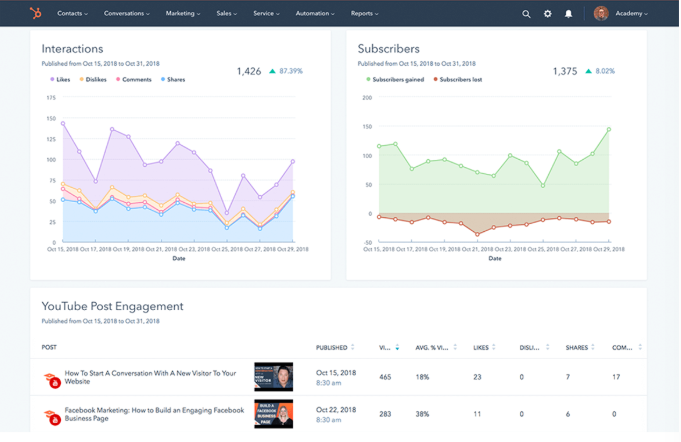
To calculate your social share of voice, measure your mentions across your social networks. Hint: Your social media analytics tools can be helpful when calculating this number. Next, add your mentions in tandem with the mentions of competitors, which can be tracked using an online social media tool like Sprout Social. This gives you the total industry number of mentions. Here is an example of what metrics of engagement would look like:
After you divide your brand mentions by the total industry number, multiply this number by 100 to get the social share of voice percentage.
Let’s put this in perspective. Over a week, your brand has been mentioned directly and indirectly 100 times. Three competitors have 500 mentions, plus yours equals 600. Taking 100 divided by 600 and multiplying that number by 100 means your Social Share of Voice is 16.67%.
5. Social Media Engagement Rate
According to Kelly Hendrickson, Senior Manager of Social Media at HubSpot, engagement is a crucial metric for understanding social media performance.
She says, “No matter the scale of your business or social audience, quality engagement is what I always focus on. Where best-in-class social media marketing is a delicate balance behind providing your audience value while meeting business needs, your engagement rate is an indicator if you’re tipping the scales in the wrong direction. Audience first.”
Social media engagement is the total number of likes, comments, shares, and general interactions a piece of content or social media account receives relative to the size of the audience. Having a large following isn’t useful if the audience isn’t regularly interacting with the content they follow.
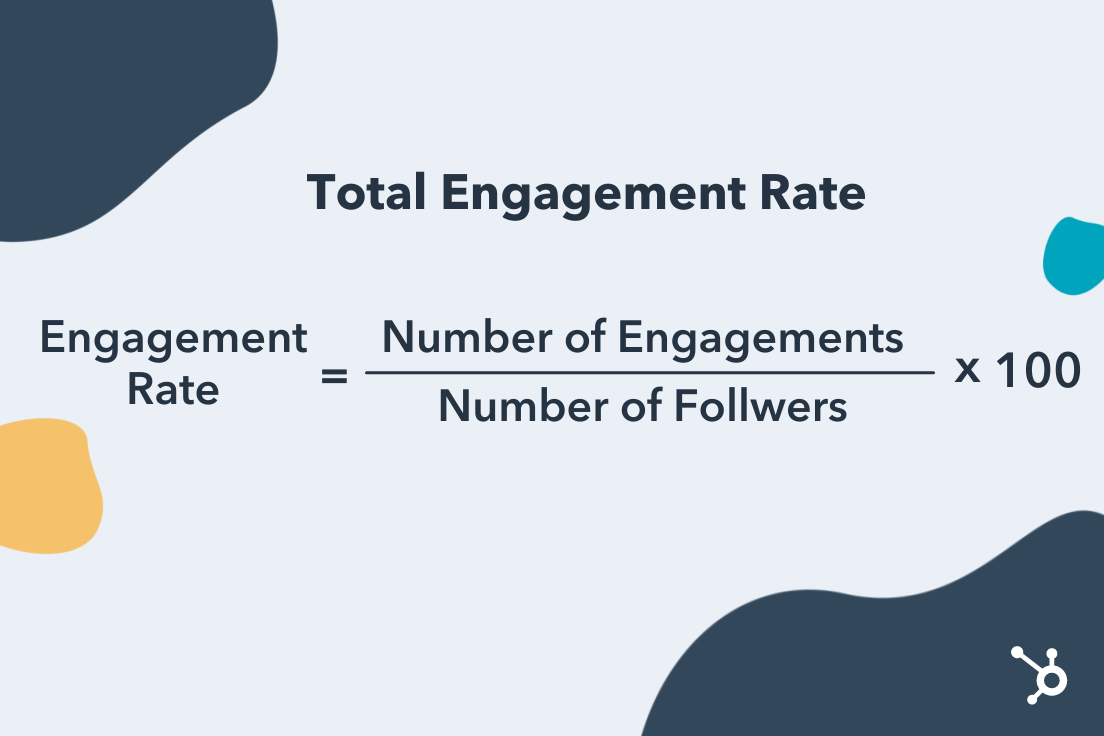
To measure the overall engagement rate of a social media account, you can use the following formula:
Engagement Rate = Number of Engagements / Number of Followers x 100
Here’s how each major social media platform measures engagement:
- Instagram: Likes, Shares, Saves, Comments, Direct Messages
- Facebook: Click-throughs, Comments, Reactions, Shares
- TikTok: Likes, Comments, Shares
- Twitter: Likes, Comments, Retweets
- Pinterest: Pins, Likes, Comments
- LinkedIn: Reactions, Comments, Shares, Click-throughs
- YouTube: Likes and Dislikes, Comments, Shares
6. Keywords
Tracking keywords can grow your social share of voice and audience growth rate. Keywords are certain words that search engines identify and target based on what audiences are searching for. A marketer in the tech industry might see the keywords, “Media Marketing,” and “Tech Channels.”
By tracking keywords, you can optimize your content to rank higher on search engines and grow your audience. You can track keywords by using social media analytics software, like Google Analytics or SEMrush.
7. Customer response rate
Customers love to engage with brands via social media.
In fact, in a survey done by Sprout Social, 74% of respondents engage with brands they follow on social media. Whether they’re asking your customer service team questions or leaving your business reviews, make sure you’re answering as many mentions as possible on social media. To track how you’re doing here, check your customer response rate.
To calculate your customer response rate, divide the number of responses you give to your followers/customers by the number of people who engaged with your brand and multiply this by 100.
For example, if you measured a week of engagement, and the number of customers who engaged with your brand was 50, and you responded to half of them, your customer response rate would be 50%.
8. ROI data
This is the big metric, the one you want to see from day one. Depending on your company and industry, ROIs can differ greatly. For social media, you probably want to know if the time and money you’ve spent on social media is turning into customers, sales, or brand awareness.
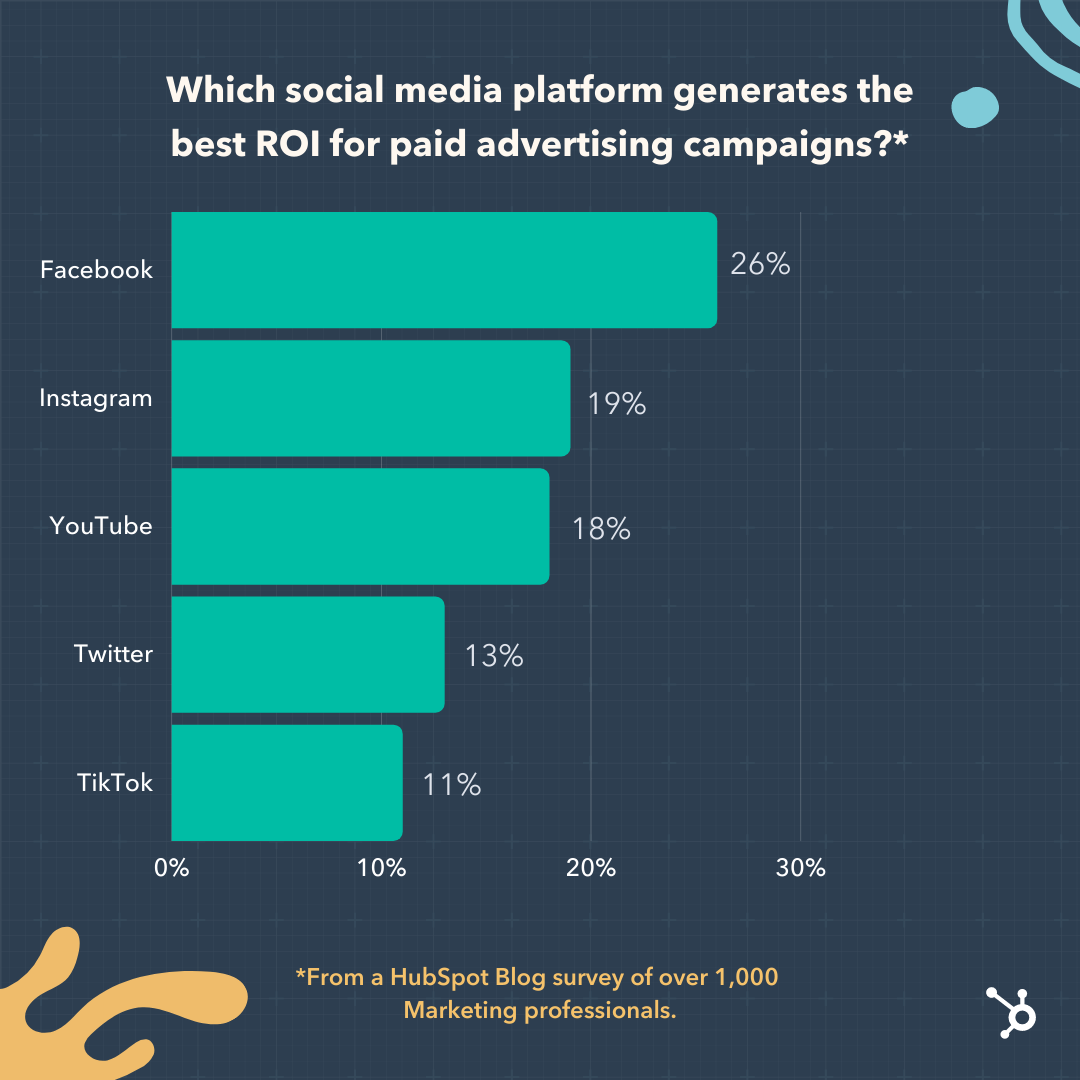
According to a group of 1,000 marketers surveyed by the HubSpot Blog, the following social media platforms generated the biggest ROI for paid advertising campaigns:
- Facebook (26%)
- Instagram (19%)
- YouTube (18%)
- Twitter (13%)
- TikTok (11%)
 In that same survey, marketers said the following metrics were their primary markers of measuring social media ROI in 2022:
- Traffic to Their Website (35%)
- Impressions/Views (31%)
- Clicks (31%)
- Sales (30%)
- Likes/Comments (28%)
Since ROI looks different from one business to the next and calculations are based on your business goals, not every formula will look the same. But, use this formula to figure out a basic ROI. Let’s say you made $1500 in revenue from social media ads or eCommerce and your investment was $500. Your ROI is revenue subtracted from investment (1500 minus 500), which makes your profit $1,000 and your ROI 200%.
9. Channel reports
Keeping track of social media data is important so that you know where and how to focus your strategy. For instance, if one of your accounts just isn’t hitting their numbers, a report would let you know and allow you to proactively step in and troubleshoot.
If you need an update about say, channel performance, and follower counts, consider conducting a social media audit or using a social media analytics tool that conducts an audit for you.
10. Cost-per-click (CPC)
This is an important metric if you’re investing in social media. Cost-per-click (CPC) is what you pay per click on a sponsored social media post, like a banner ad. CPC is helpful when determining if your investment is worth continuing.
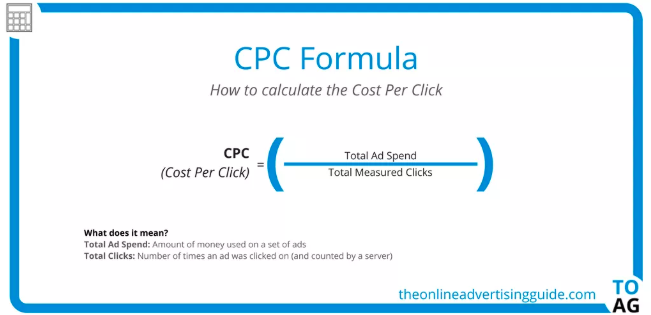
Here is the CPC Formula from The Online Advertising Guide. To view this as an example, say you want to calculate the CPC of your latest round of ads. Divide the total money spent on your ads by the total number of times the ad was clicked on.
11. Net promoter score (NPS)
Net Promoter Score (NPS®) measures customers that are loyal to your brand. It’s the answer you’re looking for when asking customers how likely they are to recommend your business to a friend. Tracking NPS is easier than it seems.
There are three categories that go into tracking NPS. When you ask customers to rate your business 1-10, scorers that answer 9-10 are “Promoters.” “Passives” score 7-8, and “Detractors” are 0-6.
Identifying your NPS is as simple as subtracting “Detractors” from “Promoters” and dividing that by the number of total respondents. Then, multiply that number by 100. So, if you have 50 “Promoters” and 10 “Detractors” from a survey with 70 respondents, your NPS would be 57%.
12. Influencer Campaign Metrics
If your company leverages influencer marketing, you’ll want to measure the effectiveness of your influencer marketing efforts to inform future campaign strategies.
According to the same HubSpot Blog study, the marketers said the most important metrics for measuring the effectiveness of an influencer campaign are:
- Revenue/Sales (40%)
- Brand Awareness (37%)
- Impressions/Views (33%)
- Brand mentions/Hashtag Use (33%)
- Clicks (32%)
As you define the objectives of your influencer marketing campaigns, keep these metrics in mind.
13. Traffic to Brand’s Website
Depending on the nature of your business and the social media platforms your company focuses on, increasing traffic to your website could be a top priority. 41% of marketers surveyed by the HubSpot Blog said traffic to their website is a high-priority metric. If your company relies on web traffic as part of its business strategy, you’ll want to consider measuring how many of your page views are coming directly from social media.
Key platforms for this focus include Facebook, Twitter, and Pinterest. You can use a web traffic tool such as Google Analytics to measure how much of your traffic is coming from organic social media.
14. Audience Insights
Earlier we discussed the importance of understanding your audience growth rate. But how much do you know about the audience you already have? Understanding your followers can help you hone in on finding the right target audience, empowering you to share content that resonates with them resulting in higher engagement and increased ROI.
Key audience demographics to consider include:
- Age
- Location
- Gender
- Education Level
- Job Title
- Marital Status
- Number of People in Household
These demographics can be found on social media platforms such as Instagram, Facebook, and TikTok.
Tracking metrics can sometimes be easy. Sometimes, businesses realize that it’s worth the investment to invest in social media tracking tools to help them run more smoothly.
To learn more about which social media metrics are most important for your own business, check out our video on how to set social media goals:
Next, we’re going to get into some tools that can help you track these metrics.
1. Keyhole
Price: $179/month
Why it’s great: Social listening metrics
Keyhole allows you to see impressions, engagements, reach, and posts that either your accounts or hashtags are getting in a graph format. Keyhole also tracks the demographics of your customers and breaks down their engagement.
When you use Keyhole, all of your accounts are displayed on your dashboard, as pictured below.
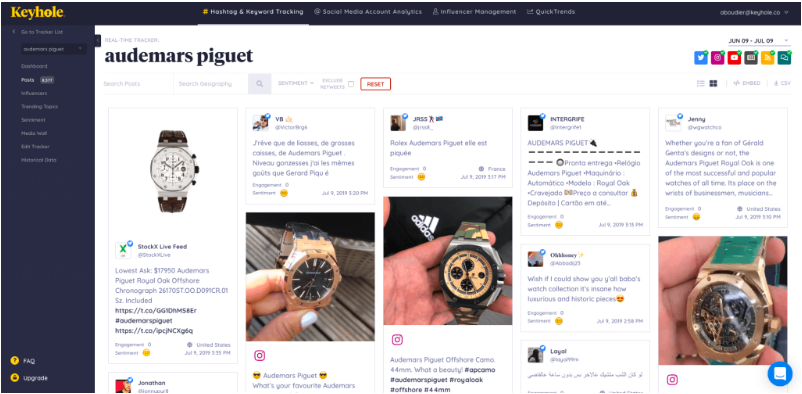
The software shows you what type of content catches the eye of your consumers and provides suggestions on how to improve social presence.
2. Meltwater
Price: By contact
Why it’s great: Timely reporting from dashboard
Meltwater’s program tracks your accounts in real-time, which is accessible from the dashboard of its users. You can also get metrics on your brand’s impact on the web. Meltwater lets you see your insights and user-generated content in one place, like the photo below.
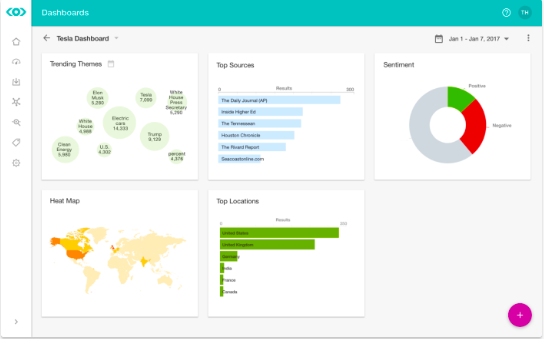
This photo shows where a brand is trending around the world, which themes are trending the most, and SEO results in a couple of different graphs. Meltwater combs the internet for mentions of your brand and even suggests influencers to connect with.
3. NetBase
Price: $300-$1,000/month
Why it’s great: Global insights + tracking
NetBase provides analytics on conversations happening with your brand from around the world. They provide real-time analytics and give you insights that’ll help you track ROI. Like in this photo below, NetBase provides you with data about how your campaigns carry weight with customers.
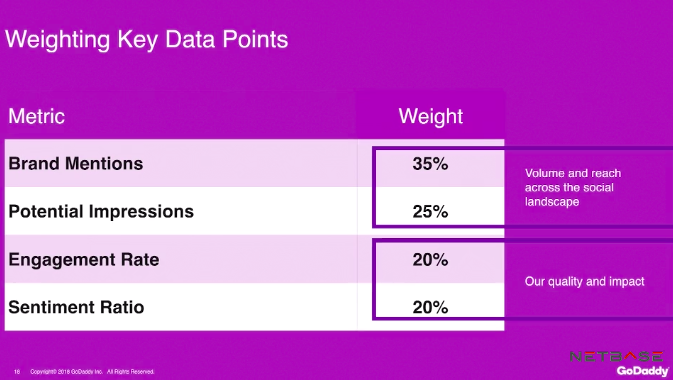
With Netbase, you can track the performance of a campaign and specific elements about certain campaigns that make them stand out. This metric analysis from GoDaddy shows their impact and engagement with customers, as well as the audience they’ve reached.
4. quintly
Price: $300/mo
Why it’s great: See competitor performance
When using quintly, you can not only track your social media performance but gain insight into the performance of your competitors. This will help you see what you can do to improve your campaigns and what your competitors are doing that works. This photo is an example of the insights the software provides.
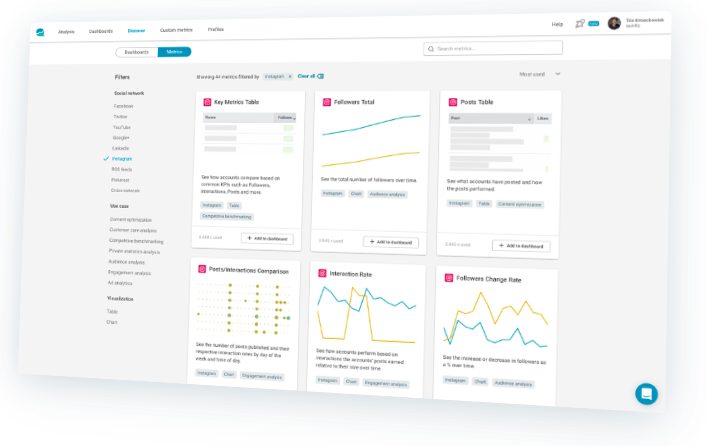
Quintly is also great for agencies with multiple clients. They can use it to manage the accounts of their clients and track their social media pages. Quintly also has reporting and benchmark data to measure campaigns.


3 Tests Our Content Team Ran in 2021 & How They Impacted 2022 Planning
2021 was a big year for the HubSpot content team.
Our team grew, we faced challenges, and we had some fun with experiments.
Experiments can teach you a lot about your audience and help you unlock growth opportunities. Here are some experiments we ran in 2021 and what we learned from them.

Conversion Rate Optimization
In January 2021, the web strategy team decided to run a form optimization experiment to understand how altering our forms would affect our users, ahead of a blog redesign.
When evaluating the current form, the team found that it was breaking several best practices relating to user experience (UX). For instance, the form used asterisks when all fields were required and users were unable to tab through the fields, taking longer to go through the form.
This issue with the UX was further validated with high dropoff rates on offer pages. This meant that a secondary goal was clear: Improve the user experience of the forms on our content offer pages, which would then improve our conversion rate.
With every experiment comes a hypothesis and this one had two, one for each goal:
- By redesigning the forms, we will learn the best approach to form design ahead of the blog redesign.
- By optimizing content offer forms’ design and functionality, we will improve the user experience and increase user clarity, which will lead to an increase in content leads’ CVR.
When it came to designing the experiment, the team chose an A/B/C/D/E test, leading 20% of traffic to each of the five treatments:
- 20% would see A, the control – a modal form.
- 20% would see B – a redesigned, standard version of the form.
- 20% would see C – the split-screen with a two-column form.
- 20% would see D – the multi-step form.
- 20% would see E – the split-screen with single-column form.
Wondering how they came up with these variants? User testing. Earlier in the year, the team had already gathered valuable insights from a user test, in which they learned about users’ preferences and expectations when using forms.
They used this data to design their experiment, something that Principal Marketing Manager at HubSpot Rebecca Hinton says highly contributed to their success.
The test ran on the top 20 converting offer pages and had to run for two weeks to get a reliable sample size for each variant and launched only 33% of traffic to mitigate risk to content lead goals. It ramped up to 60% of traffic during the experiment.
The primary metric used in this experiment was the conversion rate on the content offer form submission and the second was engagement.
“What we found is that displaying a multi-step form vastly outperformed the other treatments we tested, showing a 20% improvement over the control,” said Hinton.
It’s worth noting that the winning variant, D, had a much higher conversion on mobile than it did on desktop. However, the multi-step form performed well on both device types.
“The multi-step form was so successful that we’ve decided to implement it ahead of the pages being redesigned, so we can capitalize on its strong performance,” said Hinton.
A key takeaway here is that one test can (and should) inform another. If you collect user data for a particular feature or project, make sure you keep good documentation as that can serve a purpose later on.
Channel Promotions
Back in June 2021, HubSpot community manager Jenni Kim, then marketing manager on the Channel Promotions team, ran an experiment to explore opportunities for cross-promotion between the YouTube team and the blog team.
Kim described both channels as having an on-and-off relationship, crossing paths from time to time covering the same content and even collaborating at times. However, there was no consistency. This experiment would assess the value of embedding YouTube videos from HubSpot’s channel into relevant blog posts.
The hypothesis was that adding videos to blog posts would enhance the blog reader’s experience and drive meaningful growth for both channels.
Setting up this experiment required cross-collaboration between YouTube, Blog, and SEO teams to design a process while keeping in mind content lead goals, user reading experience, and SEO implications.
Now, let’s dive into the specifics.
One consideration they had to make was which YouTube videos would go and where. Here’s the breakdown they settled on:
- Existing Blog Post + Existing YouTube Video (9 blog posts, 9 videos)
- Existing Blog Post + New YouTube Video (6 blog posts, 3 videos)
- New Blog Post + Existing YouTube Video (4 blog posts, 4 videos)
- New Blog Post + New YouTube Video (5 blog posts, 3 videos)
They found that using existing blog posts and videos would offer the most clear results, as you could compare pre- and post-experiment metrics.
Key metrics:
- Total organic clicks (TOC) – The blog traffic coming in from the web results tab on Google
- Total organic clicks from the video tab – The blog traffic coming in specifically from the video tab on the SERP.
- Content leads/CVR – The number of viewers who converted through a blog post by signing up for an offer and the view-to-lead conversion rate on the blog on a post-level.
- Organic video views – Videos that came directly from the blog post embed.
The experiment ran for roughly three months, as that would be enough time to measure the SEO impact.
The results found that embedding YouTube videos into relevant blog posts had a positive impact on both YouTube views, contributing 15% of total views. Leads and CVR stayed consistent, which is considered a win, as the experiment didn’t negatively impact conversion.
As for TOC from the video tab, an average of 8% of clicks came from this section – making it a solid SEO opportunity for both channels.
The most challenging part for Kim was the adaptability they needed to exercise to start this experiment.
“A lot of the teams were all working pretty independently,” said Kim, “So, we had to understand everyone’s processes and then try to find that middle point to bring everyone together.”
As a result of this experiment, both teams developed a sustainable collaborative process to help both teams generate more traffic.
Audience Growth
When it comes to blogging, one of the most important metrics is organic traffic. This refers to the non-paid traffic that comes from search engines.
On the HubSpot Blog, the team also leverages non-organic content coming from sources like email, social media, and other websites.
Pamela Bump, senior marketing manager responsible for audience growth on the blog team, shares that the HubSpot Blogs already had incredible success from our non-organic content, creating clickable, shareable blog posts with original research, quotes from experts, and insights on industry trends.
“Not only did our non-organic program help to increase our non-search traffic, but we also were able to write posts that eventually began to rank on search because we were ahead of trends,” said Bump.
To capitalize on this success, Bump led an experiment to create hybrid posts, combining the shareability of non-organic content with the SEO of organic content.
“The goal of this experiment was to see if our blog posts could pull in the sudden bursts in traffic from non-search channels that non-organic blog posts achieve soon after publishing,” Bump said, “while also gaining more evergreen traffic over time search as these posts begin to rank on search result pages.”
She called this the “Hybrid Effect.”
“These assignments were laid out by both myself and our SEO strategist and combined SEO elements, like keyword optimizations and search-driven formatting,” said Bump, “while still including non-organic elements like quotes from experts, original data, news mentions, and trend coverage.”
The result? In the first year of testing hybrid content, Bump says it has led to huge benefits for the blog, pulling in strong numbers comparable to organic traffic.
“The average views we get from hybrids in their first month is about 10% lower than that of non-organic piece,” said Bump. “However, it can be more than 30% higher than the first month’s traffic of a completely organic piece of content.”
In the long term, Bump says that the average hybrids and non-organic piece published in 2021 only had about a 1,000 to 2,000 view difference while gaining more keywords on average than a non-organic piece and gaining faster traffic than an organic piece in its first year.
Because of this success, the team has made the hybrid model a permanent strategy on the blog team.
“In 2022, we plan to increase our investment in hybrid content by 10% while also training writers on how to optimize organic pieces with non-organic elements for hybrid growth,” said Bump.
In every experiment mentioned above, there’s something to learn – whether it’s the importance of collaboration or the value of historical data. If there’s an experiment you’ve been thinking of running, take this as your sign and use these insights to guide you.


How the Pandemic Changed Social Media: 6 Quarantine Trends Here to Stay [Data + Expert Insights]
At the beginning of the lockdown, many of us were unable to see family or friends. All social plans were cancelled — practically overnight.
And, in the midst of so much stress and chaos, many felt more alone than ever.
Which is why people turned to social media in an effort to find a sense of connection and community.
Social media became a refuge — a place to post authentic, relatable content and form relationships virtually when in-person wasn’t an option.
And as Lala Fevrier, Wayfair’s Senior Associate for Influencer Marketing, puts it, “When restaurants, schools, and businesses shut down, the only place left with a 24/7 open sign for communication and creativity was social media.”
All of which is to say: Quarantine, and the pandemic at-large, greatly impacted social media. And those changes have permanently shifted users’ expectations and preferences when it comes to their social platforms.
Here, we’ll explore six trends we’ve seen as a result of the pandemic — and why they’re here to stay.

How The Pandemic Changed Social Media
1. Quarantine increased time spent on social media, as well as social users worldwide.
Between 2019 to 2021, the amount of social media users worldwide increased by 11% — from roughly 3.4 billion in 2019 to 3.78 billion in 2021.
As lockdown orders went into effect, many sought out new opportunities to connect with friends and family. In fact, we saw a 5% jump in global users from 2019 to 2020 alone.
People were also bored, which significantly increased the time spent on social media apps. Consider, for instance, the sudden popularity of bread baking in March, or the random challenges across social apps, like the “flip the switch” challenge that exploded on TikTok in 2020:
I know this boredom first-hand: During the beginning of the pandemic, I spent roughly 4 hours each day on Instagram. Rather than grabbing dinner with friends after work or chatting with colleagues on my lunch break, I scrolled through people’s IG Stories.
I’m not alone. In the U.S., social media users jumped from spending 56 minutes per day on social media in 2019 to 65 minutes in 2020 and 2021. And, globally, people spent 145 minutes per day on social media in 2020. (It’s important to note: That number has decreased to 142 minutes per day in 2021, suggesting a slight decline in social media use as some of the world re-opens.)
Social media became a place to escape the turmoil of the real world. Along with a spike in social media users, engagement increased on certain platforms, as well. On Instagram, for instance, the average engagement rate for brands increased by roughly 6% in 2020.
For Sarah White (@thecoastalyogi), a Boston-based fitness instructor and influencer, the pandemic was a catalyst for her to launch virtual offerings and leverage social media as an opportunity to create a strong sense of community.
White told me, “Virtual offerings were a side of my business I had considered, but had never seen a need for until March of 2020. Since then, my virtual subscriptions have become a major part of my business and are the primary way I interact with my clients.”
White adds, “My Instagram is my primary source of marketing so my posting has definitely increased. I am intentional about answering every message I receive from clients as I know it’s this type of relationship-building that differentiates a following from a community.”
2. Quarantine impacted video consumption.
2020 was an impressive year for video. In fact, media uploads increased by a staggering 80% year-over-year — peaking at 103,603 video uploads on April 22.
The minutes people spent watching videos in 2020 also increased by 85%.
The pandemic greatly impacted how quickly video rose in popularity. It’s now the most popular type of content, and has been for two years in a row.
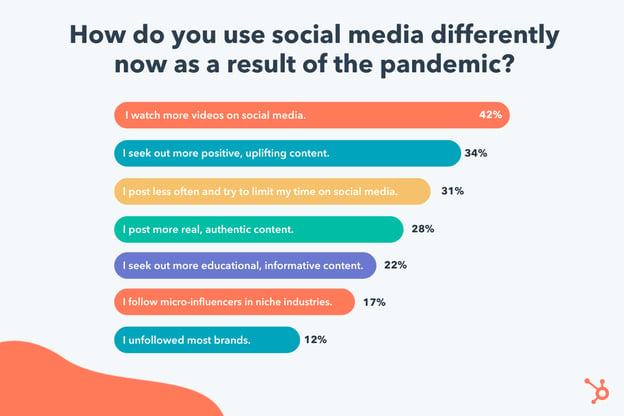
Additionally, in a HubSpot Blog survey, 42% of respondents said “I watch more videos on social media” in response to the question, “How do you use social media differently now as a result of the pandemic?”
In particular, TikTok, the popular short-form video platform, saw exponential growth as a result of the pandemic. This can be attributed, in large part, to the authenticity of the content produced on TikTok.
As HubSpot’s Senior Social Media Strategy Manager Leslie Green puts it, “A huge platform shift that happened during the pandemic was that tastemakers and culture shifters were born on TikTok — not Instagram. TikTok lifted the hyper-filtered veil off of social with short-form, intimate, and authentic video content.”
Green adds, “TikTok, largely due to it’s For You Page, became a place where anyone could be found. And in the last year many small creators blew up because they were able to create content that spoke poignantly to people’s lived experiences and feelings.”
If your business hasn’t considered it already, 2022 is a good time to test out new types of short-form video content to see how it resonates with your audience.
Another increasingly popular option for video is live streaming.
Mari Smith, Premier Facebook Marketing Expert (often referred to as the ‘Queen of Facebook’) and Top Social Media Thought Leader, suggests brands lean more heavily into live streaming in 2022.
Smith says, “Embracing live streaming — whether Facebook, Instagram or LinkedIn Live — can go a long way towards creating more intimate relationships with your followers. Think of your live videos as ‘mini webinars’ and always strive to add nuggets of valuable, educational (and/or entertaining!) content, before adding your call-to-action.”
In 2022, consider testing different platforms and content types — such as TikToks, Instagram Stories, YouTube videos, or Facebook live streams — to find out which video format performs best with your audience.
3. The pandemic impacted the best times to post on social.
Nowadays, many people work from home and have chosen remote work as their preferred lifestyle moving forward.
Suffice to say, the pandemic permanently shifted people’s work schedules.
And, as the typical 9-to-5 work hours changed as a result of the pandemic, social media peak hours adjusted, too.
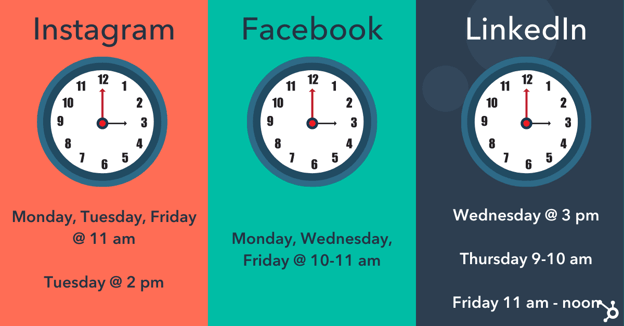
For instance, Sprout Social found the new best times to post on Facbook are Monday, Wednesday, and Friday from 10–11 a.m.; Monday, Tuesday and Friday at 11 a.m. and Tuesday at 2 p.m. are the best times to post on Instagram.
And currently, the best times to post on LinkedIn are Wednesday at 3 p.m, Thursday at 9–10 a.m., and Friday from 11 a.m.-noon.
It’s important to consider how the pandemic changed the way people work, and when. For instance, now that I’m working from home, I take a regular social media break every day around 10 a.m. while I eat my breakfast, since I don’t have colleagues around to chat with.
In 2022, you’ll want to conduct your own tests to determine which times are most popular with your audience — and on which channels.
4. The pandemic impacted the most popular types of content.
During the stress and uncertainty of quarantine and the beginning of the pandemic, many turned to social media to escape the real world. Which is why fun, lighthearted types of content won out.
In fact, in 2020, roughly half (42%) of Gen Zers said they wanted content described as fun — which surpassed Gen Zers’ interest in romantic content (29%) and exciting content (27%).
As boredom as a result of quarantining ensued, social media consumers wanted bright, playful, light-hearted content to cheer them up.
Even now, two years later, 34% of HubSpot Blog Survey respondents said they still seek out more positive and uplifting content than they did pre-pandemic.
Along with more colorful, lighthearted content, we also saw an increase in authentic, user-generated content in 2020. Between March and April, during peak lockdown period, a Lightricks study found Americans spent over 90% more time using apps to create and edit images, videos, and visual content.
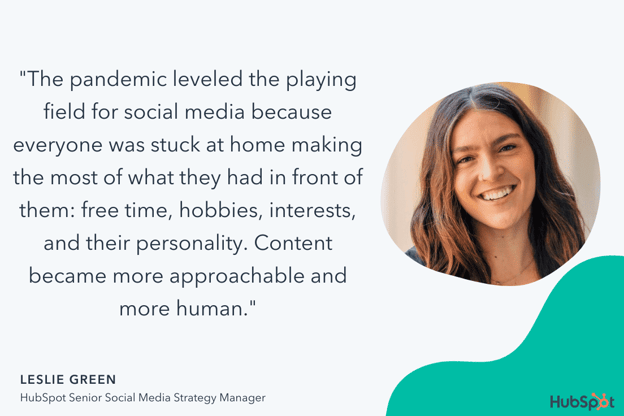
Green says, “The pandemic leveled the playing field for social media because everyone was stuck at home making the most of what they had in front of them: free time, hobbies, interests, and their personality. Content became more approachable and more human. Every day users created posts that spoke to real lived experiences rather than a curated image.”
Neal Schaffer, Digital & Social Media Marketing Consultant, Speaker, and Author, agrees that the pandemic shifted the types of content that perform best.
He says, “One major impact that COVID had on social media was in keeping content real. When we couldn’t go out for photo shoots, it required celebrities to turn their homes into studios and influencers to post more of their raw selves.”
Schaffer says, “As human beings, we sought out people who were having similar experiences to us … This made social media content more raw, believable, and authentic — and, as a result, further democratized content creation by lowering the threshold of what was required to create content.”
Schaffer adds, “Combine this with the popularity of short-form video, and a whole new generation of content creators was born.”
I’d argue we’re all better off in a world in which social media users post authentic, non-filtered images to depict the realities of life. These #real posts help audiences feel less alone, and can foster a much stronger sense of community.
Which is why it’s vital your team focuses on creating more authentic, behind-the-scenes content in 2022. In fact, many of you already plan to — HubSpot’s Blog Research found 79% of B2B and 54% of B2C plan on increasing investments in authentic/behind the scenes content in 2022.
5. Quarantine sped up influencer marketing’s popularity.
Influencer marketing grew exponentially as a result of the pandemic.
The influencer marketing industry went from $1.7 billion in 2016 to $9.7 billion in 2020 — a staggering 470% increase — and is expected to jump to $13.8 billion in 2021.
I spoke with Jesse Leimgruber, CEO of influencer marketing agency NeoReach, to learn his perspective on how the pandemic impacted the influencer marketing industry.
Leimgruber told me, “The pandemic boosted the creator economy into the spotlight. Millions of new creators joined the scene, and many found new ways to earn and support their craft. This extra attention on social media allowed influencers to earn money and turn a hobby into a profession.”
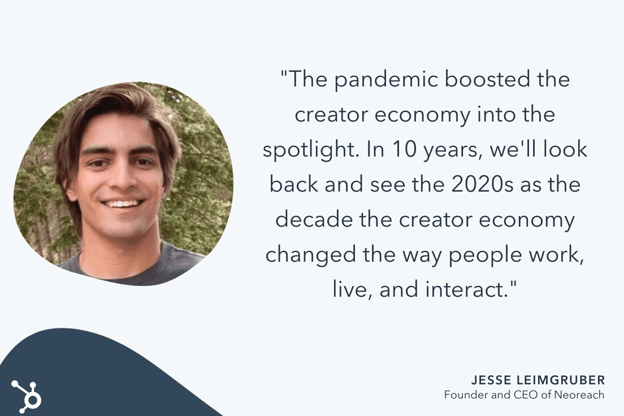
He adds, “Sponsored posts, partnerships, merch sales and fan donations have proliferated in the last two years. Venture dollars into the creator economy are at an all-time high, and public interest in the space is just getting started. In 10 years, we’ll look back and see the 2020s as the decade the creator economy changed the way people work, live, and interact.”
At the beginning of quarantine, we saw brands pull away from influencer marketing as the economy became more uncertain and volatile. This makes sense: As a relatively new form of marketing, influencer marketing can seem like a riskier investment to teams struggling to stay afloat.
However, as the world adjusted to lockdowns and remote work, influencer marketing began rising again in popularity. Influencer campaigns increased by 37% between Q2 and Q3 of 2020, and rose by an additional 34% between Q3 and Q4.
And influencer marketing’s popularity isn’t slowing down. In 2021, sponsored content increased by almost 27%.
Wayfair’s Lala Fevrier agrees that the creator economy has skyrocketed — and, she adds, this creator economy is largely made up of Gen Z influencers.
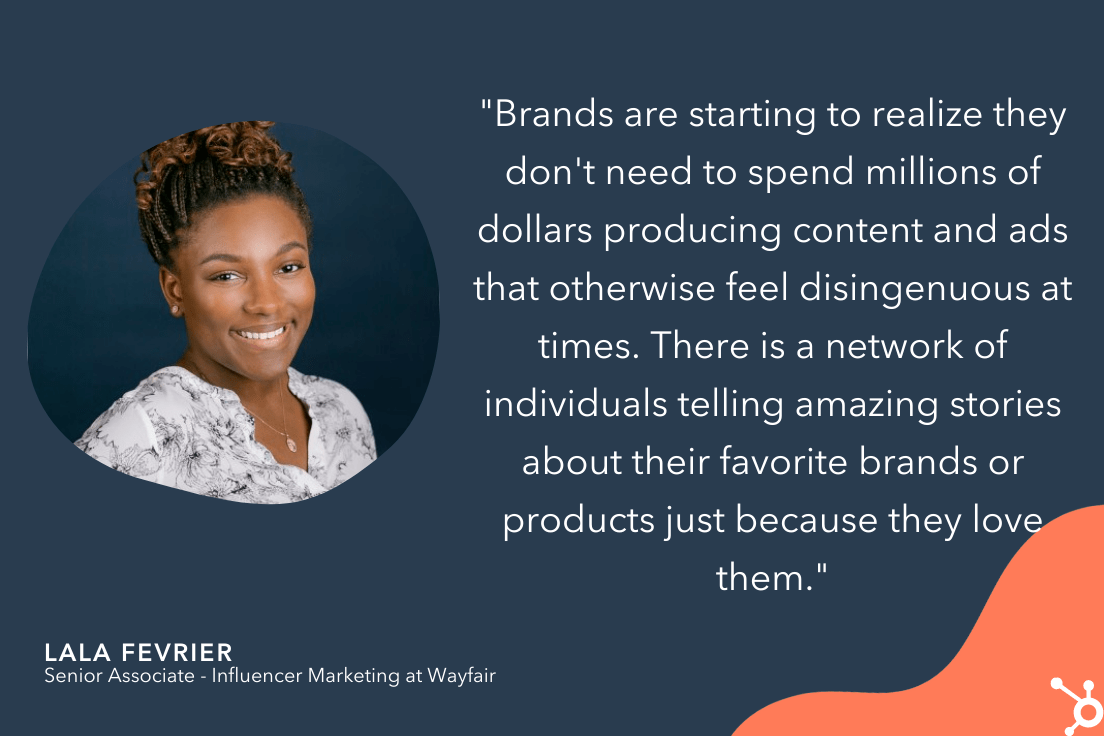
Fevrier says, “The largest group to take advantage of social media’s accessibility is Gen Z influencers. Because of their efforts, brands are starting to realize they don’t need to spend millions of dollars producing content and ads that otherwise feel disingenuous at times. There is a network of individuals telling amazing stories about their favorite brands or products just because they love them.”
If you’re interested in getting started with influencer marketing, consider the power of micro-influencers to engage directly with your intended audience and see more ROI than you might with a bigger celebrity. HubSpot’s Blog Research surveyed marketers who already work with influencers, and found 67% of them work with micro-influencers (10K-100K followers/subscribers), followed by 58% who work with macro-influencers (100K-1M followers/subscribers).
6. The pandemic increased the need for community — and new platforms are rising, as a result.
Being stuck at home made it difficult — if not impossible — to feel a sense of community.
Pre-pandemic, many people turned to the office, fitness classes, parks, or other public spaces to feel connected to a larger group.
Overnight, those were no longer an option.
Fortunately, when used correctly, social media can fill in the gaps and help serve the fundamental human need of connection.
As Mari Smith told me: “You absolutely cannot beat the power of building a fiercely loyal community where members bond with one another — and with you.”
Smith adds, “Certainly, [community] can be cultivated over time through a Facebook Group linked to your Facebook Page. However, community platforms are on the rise as users and leaders alike seek out different platforms on which to build and join tribes.”
Smith says, “I surveyed my Facebook audience in October last year on this topic. Both Mighty Networks and Circle are growing in popularity in terms of an alternative to Facebook Groups. I predict we’ll see a slight rise this year in community leaders choosing to migrate away from Facebook towards one of these other platforms in order to cater to their tribe members who’ve lost trust in Facebook.”
Facebook Groups is still a viable option for creating a stronger sense of community and building relationships with your prospects and customers, but in 2022, you’ll see brands experiment with other community-building platforms.
In 2021, social media became the #1 channel used in marketing. It’s vital you learn how to pivot with these trends to continue to see growth and success across platforms.
The good news? Social media users are craving authenticity now more than ever. So the more your brand can lean into its own uniqueness, the better.

12 Best Pricing Page Examples To Inspire Your Own Design
Your pricing page is a prime opportunity to take control of the price conversation and make it even easier for people to buy.
Searching for a product’s price is a natural part of a customer’s buying decision. The majority of people who have made it down the funnel far enough to consider buying from you will likely look at your pricing page.
What does a great pricing page look like? To inspire you, we break down the must-haves of a good pricing page and share the best examples of pricing page design. Check them out below.

What makes a great pricing page?
If your pricing page isn’t well-designed and user-friendly, you risk losing people before they click the “Buy Now” button. You’ll notice the best pricing pages have clean layouts, use simple language that speaks to the customer, and aim to inspire trust between the business and the user.
Let’s take a look at the must-have features of a high-performing pricing page.
User-Friendly Layout
The best pricing pages are easy for users to navigate. This doesn’t mean you need to design your pricing page in the same way you would a landing page, which are often pared down for the purpose of getting a form submission.
You can still include plenty of information in your pricing page, but the fonts, colors, links, and buttons must be easy to follow with the eye. Even if you have multiple products and packages — like HubSpot does — it should be clear where users have to click to see the pricing for their desired product.
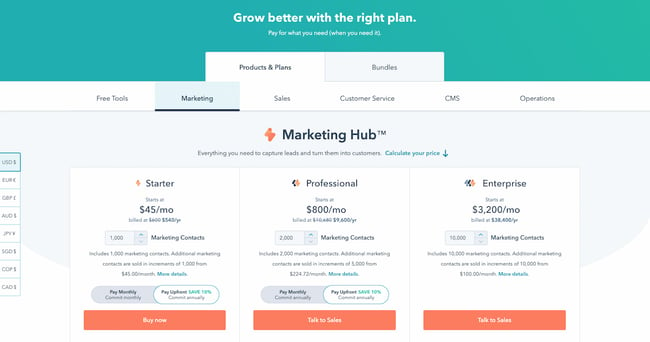
Remember to keep important information above the fold, such as a value proposition and at least one call-to-action button.
Hot tip: Interested in learning more about marketing terms such as “above the fold” and “call-to-action”? Check out our podcast below, and make sure to follow for more useful content.
Simple Language
The pricing page can be a good place to get fancy with jargon, especially if your target customer is an advanced professional in their field. But for at least one package, consider keeping the information accessible and jargon-free — so that someone who’s not an expert in the field can tell which package would work best for their team.
You can toy with this rule depending on the package, too. For instance, on HubSpot’s pricing page, the starter package for Marketing Hub uses extremely simple language. “Forms,” “email marketing,” and “live chat” are easy to understand. Non-marketers will immediately know what they would get out of a starter subscription.
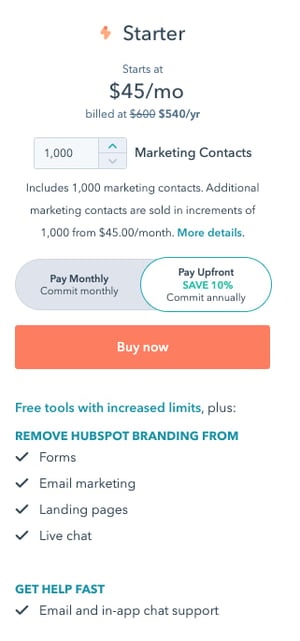
For the professional package, however, the story is different. “ABM tools and automation,” “A/B testing,” and “Omni-channel marketing automation” are highly specialized terms that only the most experienced marketers will understand.
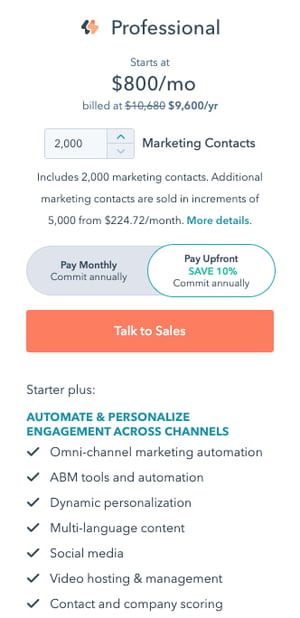
Your language will differentiate your packages and make it clear to a user which one they should choose.
Crystal Clear Pricing
The best pricing pages have clear packages that accommodate a wide variety of company sizes and budgets. Or, if you serve primarily enterprise firms, you’ll make it clear through your language that you only serve that segment. Instead of including pricing, for instance, you might instead include a “Talk to sales” button so that enterprise buyers can get a quote.
Consider including both monthly and yearly subscription terms, especially if you sell a SaaS product. If you’d like to acquire customers abroad, give users the ability to see pricing in their local currency, too. These small changes will ensure that there are no barriers to conversion. Remember to A/B test your pricing to find out what works best for your customers.
Ready to look at some of the best pricing pages online? We’ve curated the best ones below.
Pricing Page Examples
1. HubSpot
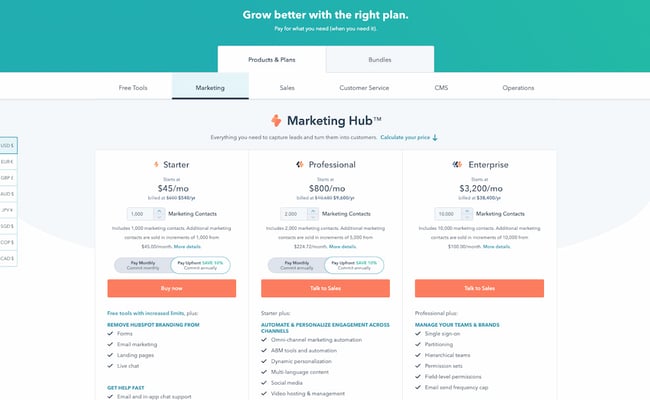
The HubSpot CRM platform is comprised of five products: Marketing Hub, Sales Hub, Service Hub, CMS Hub, and Operations Hub. The pricing page, however, keeps it simple by offering each one individually, giving users a chance to choose the one that most applies to their needs. If users are interested in a bundle, they can toggle the tab at the top to get bundle pricing.
Note the differences in call-to-action buttons, too. Everyone can get immediately started with a Starter subscription through the self-service “Buy now” button. But if you’re interested in a more advanced suite, the page prompts users to “Talk to sales” instead.
This is an excellent example to copy if you sell multiple products within one suite, and especially if you serve a wide range of customers, starting from freelancers all the way to enterprise companies. The calls-to-action should be different for each one.
2. Box
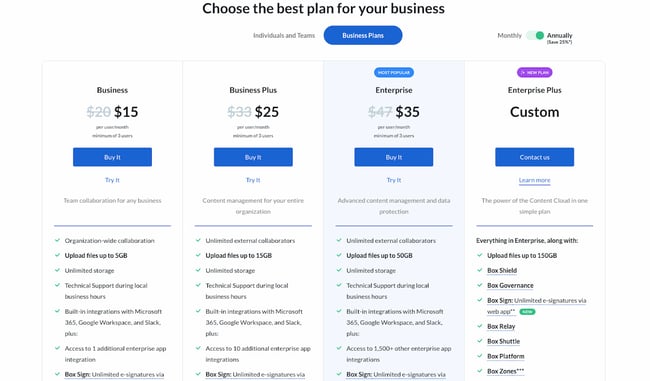
Box’s pricing page is informative, intuitive, and actionable — starting with the heading right at the top of the page, which prompts users to “choose the best plan” for their business. One thing they did really well was allowing users to choose their buyer persona by offering two call-to-action buttons at the top: “Individuals and Teams” and “Business Plans.” This makes the user experience far simpler. After all, if you’re thinking about buying Box for your business, there’s really no reason you’d need to see the personal pricing plans (and vice versa).
Another thing they do well is highlight the most cost-effective option on the page — not only by labeling it “Most Popular,” but also by designing that option to pop out. That’s a great way to generate more click-throughs on that package.
3. Zendesk
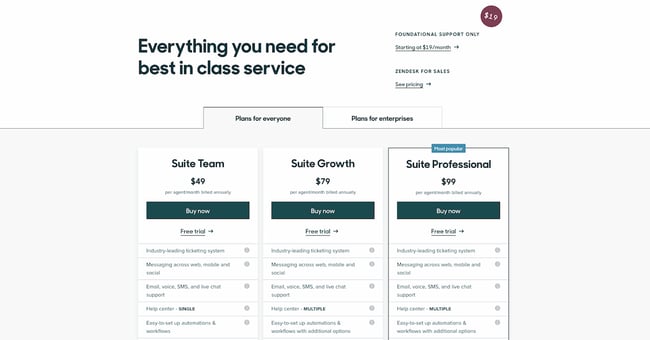
The first thing you see when you arrive at Zendesk’s pricing page is the header text: “Everything you need for best in class service.” Pricing pages can sometimes make users a little uncomfortable, and it’s reassuring copy like this that builds trust between a business and its prospects.
We love that the pricing page is divided among several sections: “Plans for everyone,” “Plans for enterprises,” and “Frequently asked questions, answered.” Providing a lot of information like this on your pricing page is really helpful for your users, but it can be hard to do it in a way that doesn’t confuse people or create clutter on the webpage. Dividing the information into clearly marked tabs and sections is a great way to make the information manageable for your users.
Finally, if you scroll down a little on Zendesk’s pricing page, you can find a prompt to see the plans compared. We love how they show the full list of features and what you get with each plan — all without the user navigating away from the page. This sort of transparency help your salespeople sell the right product to the right customers, which ultimately helps satisfy customers long-term and reduce churn.
4. Detectify
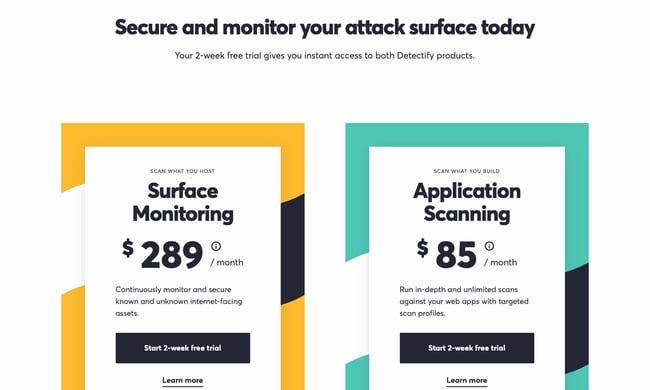
Detectify’s pricing page design is a little out of the ordinary, but it makes for a really cool user experience. Users can choose between two simple options, depending on their use case. Users can either buy a security subscription for websites they’re hosting, or for applications they’re building. This works really well for a single product with a price that only changes depending on what you’re using it for.
Plus, we’re suckers for simple calls-to-action. Both of the buttons prompt the user to start a free trial, making it simple for visitors to understand what they need to do.
5. Wistia
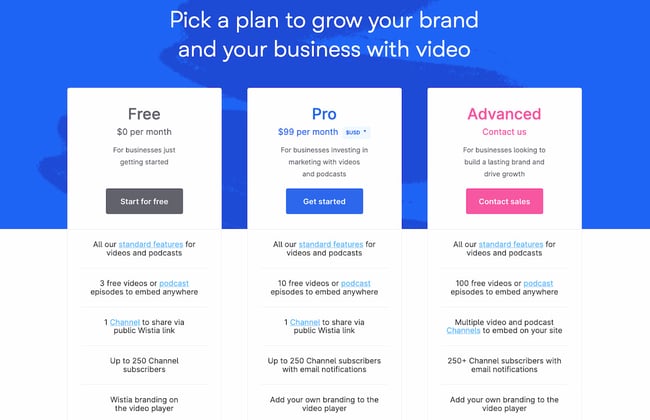
Like any page on your website, design is just as important as the information you provide. Wistia has one of the most visually pleasing pricing pages we’ve seen thanks to a nice, clean, and colorful layout, and whimsical lines that align with their playful brand.
They also use language that makes it easy for visitors to find a pricing plan that suits their needs. Under each option, they provide a short description of the ideal customer for that option. For example, the Pro version is “For businesses investing in marketing with videos and podcasts.”
Finally, we love that the amount of videos you can create is included in the feature comparison. Why? Because it clearly states the value of each subscription; there’s no guessing. Wistia successfully speaks their customers’ language.
6. Casper
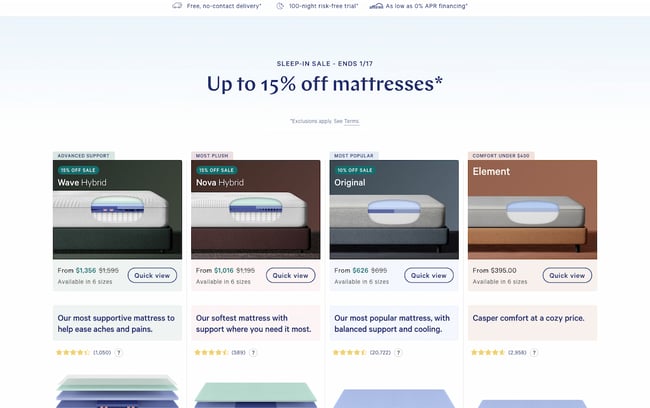
Thanks to minimal copy and great use of negative space (i.e. the blank space surrounding objects in design), this page is both well-designed and easy to follow. But what we really love on this page is their well-worded refund policy: “After you buy your mattress online, we’ll ship it for free. If you’re not in love, we have a 100-night trial. We’ll pick it up and give you a full refund after the 30-Night Adjustment Period. “
The fact that the company will go to a dissatisfied customer’s house and pick up the mattress for no charge, along with giving a full refund, is a great testimonial to their dedication to customer service. This serves as a way to build trust with prospects before they even buy, and is sure to help create advocates down the road.
If you have a refund policy, be sure to include it on the pricing page to reassure users who may be on the fence about buying.
7. Squarespace
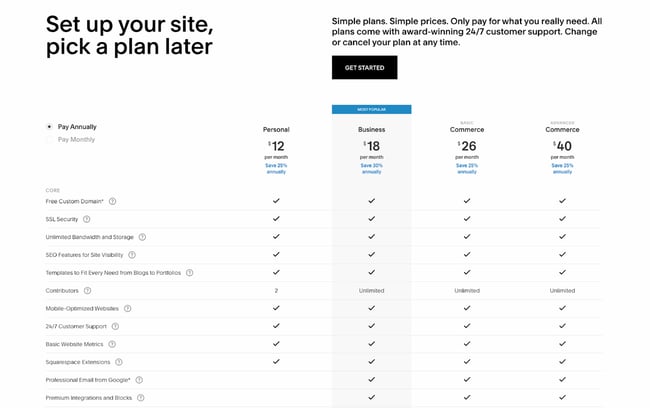
Like Zendesk, Squarespace employs strong header copy: “Set up your site, pick a plan later.” Right away, they’re reassuring users that they don’t have to pay just to try it out; visitors can immediately try the platform by clicking the “Get Started” button.
We also love that they include frequently asked questions right on the same page as the pricing matrix. That way, users can get many of their questions answered without having to dig for answers.
8. Ticketleap
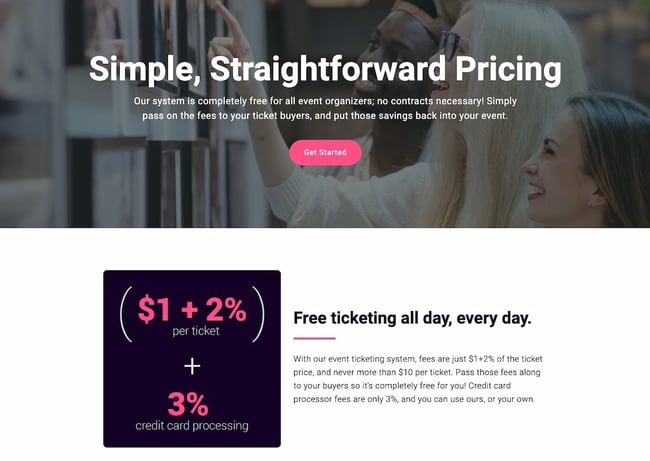
Here’s another take on header copy from Ticketleap that captures users’ attention right away. When you arrive at their pricing page, the first thing you see are the words “Simple, Straightforward Pricing.” This phrasing aims to make users feel like Tickleap is on their side — they won’t get secretly up-charged once they sign up on the platform.
Later down the page, users can calculate how much they would pay for Ticketleap and get the simple pricing they were promised at the top of the page.
9. Slack
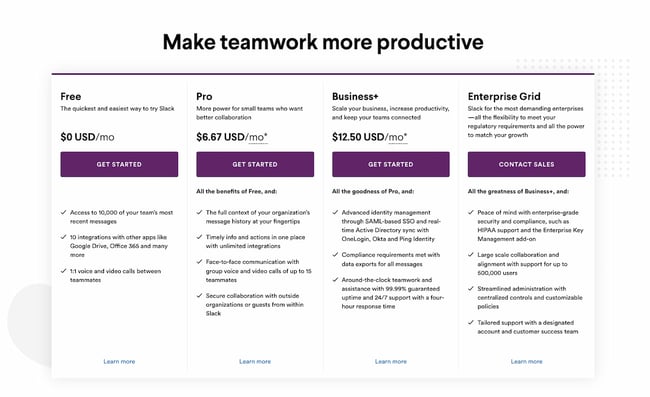
Slack’s pricing page is another example of great page design. The pricing options are within a simple, easy-to-scan table that is pleasing to the eye, and their feature comparison is easy to skim. Notice that their Enterprise Grid subscription prompts users to “Contact Sales.” This is a great way to prompt high-caliber customers to get an account manager and work out a custom solution.
Finally, although the header copy is simple, it effortlessly conveys Slack’s value proposition. The app will help your company “make teamwork more productive” — and more productive teams result in an increased ROI.
10. BombBomb
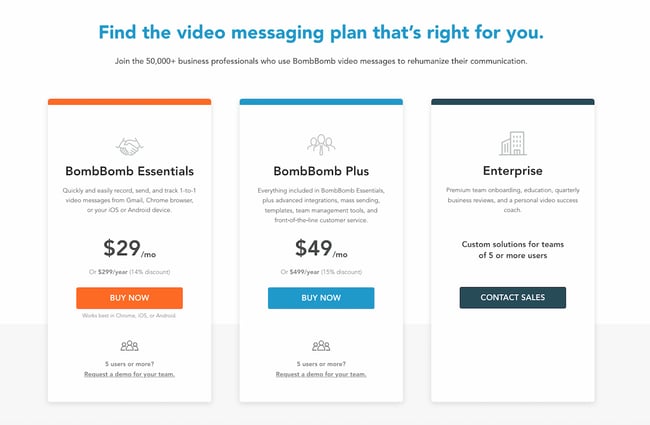
The folks at BombBomb took a different approach than most. The very first thing you see when you land on their pricing page is a large header saying “Find the video messaging plan that’s right for you,” along with a simple three-column chart on the packages that are available. Only when you scroll down do you see the individual features for each subscription.
This is a great example of a business designing its pricing page based on specific goals. If your goal is to keep it simple while increasing sign-ups, this is one way to help your cause. Take note of the reassuring subheader copy, too: “Join the 50,000+ business professionals who use BombBomb video messages to rehumanize their communication.” From that, you know that others have benefited from using this product, too.
11. Pagevamp
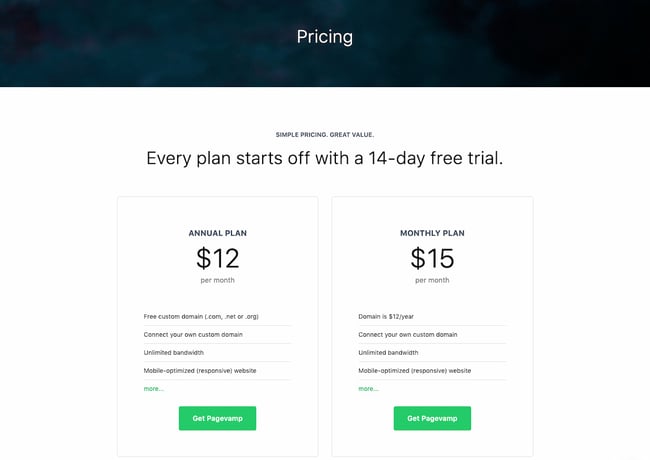
Trust elements are great additions to any pricing page. Pagevamp took the cue and placed their trial policy right at the beginning of the page, which says that “Every plan starts off with a 14-day free trial.” Copy like this might prime a user to look at the price packages and think to themselves, Hey, if I don’t like the product, I don’t have to commit.
While no one wants their customers to churn, you increase the value of your product by providing a free trial. If you force customers to sign a yearly contract without a trial, you’re essentially saying, “I know you’ll want out, so I’m locking you in for a year.” That’s a poor policy that might generate short-term revenue but create unhappy customers and poor word-of-mouth down the line.
12. Acquia
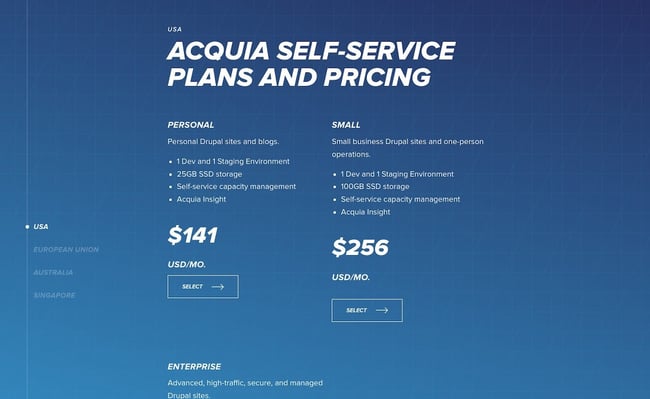
The simpler your business’ pricing page, the better user experience you’ll offer — but this gets harder the more complex your product and pricing model. Acquia is one such company, but they do a great job in this example. When you land on the page, you don’t see the product’s pricing. Instead, you get information on choosing the right self-service option for you.
You also have the option to contact Acquia directly and get an agent to help you pick the right product. This is important if you offer a complex product that might stump professionals who don’t specialize in your field.
As you scroll down, you can then see pricing depending on the region where you’re located. For each one, you get two options: a “Personal” self-service option or “Small” self-service option. Enterprise businesses also have the ability to get in contact with the sales team. This makes it easy to select a package depending on your background and buyer persona; again, there’s no need to guess.
The Right Pricing Page Design Will Boost Conversions
Take your time building your pricing page — it’s one of the most important factors in a customer’s buying decision. Test it repeatedly, change elements and colors, and keep the design user-friendly and clean. In no time, your company will see more leads come in through the pricing page, increasing conversions and boosting your revenue.
Editor’s note: This post was originally published in December 2015 and has been updated for comprehensiveness.


20 Social Media Marketing Myths to Leave Behind in 2022
Like any major marketing strategy of the past decade, social media has had plenty of time to accumulate some big myths.
And despite the fact that data has disproven a number of marketing myths today, some marketers will still hold onto a few, simply because it’s hard to keep up-to-date on what’s really going on with social media.
To help you separate fact from fiction, I put my MythBusters hat on and drudged up some of the most common social media myths out there. Let’s dive into some social media myths we’ve all probably heard from colleagues or friends and why you need to leave these old ways of thinking behind.
20 Social Media Myths to Leave Behind in 2022
1. My customers aren’t on social media.
In 2021, over 3.7 billion people worldwide are active on social media. Today, it seems like there’s a social platform for everything and everyone. While family and friends connect on sites like Facebook, Instagram, or Twitter, professionals are networking on LinkedIn.
Odds are, at least one social media platform has an audience that will align with your brand. Not sure which one is the best for you? Check out this blog post to explore which social platform(s) are best-suited for your brand — and which probably won’t work for your needs.
2. You should join every single social media network immediately.
Just because I can name a lot of social networks, it doesn’t mean I should set up a profile on all of them.
By all means, research other social networks. Set up a company profile or page and give ’em the old college try. But you may find that some aren’t really worth your time. If that’s the case, consider removing your profile and move on. You should only devote time and resources to the platforms that align most with your audience and marketing tactics.
The best marketers use data to identify which marketing activities yield the best results — if a social network isn’t helping you out, cut it loose.
3. Pinterest is only for B2C organizations.
Pinterest is totally awesome for B2C marketers, to be sure. But usually, when someone says a channel is only for B2C, the B2B marketer in me takes that as a challenge to prove it’s not so.
Turns out some of my colleagues feel the same way because one of them wrote an entire guide to using Pinterest for business. You can also check out the accounts of brands like GE, Microsoft, Econsultancy, and yours truly for some B2B Pinterest inspiration!
4. You should only try to get fans and followers that will become customers.
Quality is important, yes, but don’t underestimate the power of a large social reach. Remember some of these points next time you bemoan acquiring a fan or follower that lives outside of your sales territory or target demographic:
- More fans and followers means you’re gaining access to their fans and followers.
- If they’re an influencer, their clout transfers to you by association.
- When they share your content, your SEO improves.
- They may still refer business your way.
Of course, that doesn’t mean you shouldn’t also target a specific, high-converting audience on your social channels — to figure out your ideal target audience on social media, check out this post.
5. You should only schedule posts during the workweek.
While you shouldn’t force your social media manager to work on the weekends, you certainly can schedule posts or launch social media ads on the weekends ahead of time — and, depending on your audience, it might be a good idea.
Of course, you’ll need to identify when your audience uses certain social platforms the most. While pique social media engagement times occur around the middle of the week, most platforms also have high engagement times during the weekends and evenings as well.
6. You’ll have amazing social media engagement if you ask your friends and family “Like” every post.
You can’t just have your mom and uncle Like every post you put up on Facebook. Although it might feel like you see a lot of posts that your friends or family members like, Facebook and other social media algorithms are a bit more sophisticated than that when it comes to determining which posts get seen.
To get social media feeds to favor your content, you’ll need a variety of people interacting with your content — both to grow your reach, and to show up in users’ news feeds.
So, rather than encouraging just your friends or family members to Like or heart your posts, encourage your followers to Like, comment, or share to encourage further discussion and spread your brand awareness.
7. You have to respond to social activity immediately.
There’s no doubt a speedy response is appreciated, but it isn’t always required. People understand that you’re running a business. There are other things going on. If you get back in a timely manner, but not in mere seconds, it’s alright.
There are exceptions, of course. For instance, Verizon runs a few Twitter accounts. One is @VerizonSupport. While Verizon will share blog posts and educational marketing materials on this Twitter, it also uses it to respond to questions or concerns from prospects or customers.
Because Verizon’s support account is for customer service rather than marketing, reps who manage this channel should be responding immediately to inquiries.
Another example could be if you’re running a social media account that receives a complaint that is public to all users and could hurt your credibility. In that scenario, you should consult your service team as soon as possible and write a thoughtful reply that shows you’re taking the feedback seriously.
8. Social media is only about engaging conversation — and not a place to share branded content.
It’s not that conversations aren’t important. You can’t just ignore your fans. But, while it’s beneficial to stimulate conversations and discussions with your audience, it’s not the only point to social media marketing.
Aside from allowing you to virtually connect with people, social media is a lead generator, a non-organic traffic tool, and a great place to share your best content.
If you publish valuable posts, they might not always stimulate conversation, but they could lead people to your website and products.
9. Social media marketing tactics don’t drive bottom-line results.
Piggybacking off of the last myth, you can actually generate value beyond just “engagement” and “brand equity” from social media. Social media drives leads and customers, period.
Don’t believe me? Here are a few stats you should know:
- 34% of consumers use social media to learn about brands and their products and services.
- Facebook ads are used by 70% of marketers, and there were 10 million active advertisers on the platform in Q3 2021.
- 83% of people use Instagram to discover new products and services and 87% said they took a specific action, like making a purchase, after seeing product information.
- 64% of buyers would rather send a brand a message on social media than call for customer service.
- 43% of Gen Z consumers have made a native purchase from a social media platform.
- 75% of Millennials say social media helps them engage with companies and brands.
- 79% of people say that user-generated content on social media significantly impacts their purchasing decisions.
Ultimately, particularly through advertising or influencer marketing strategies, social media can be a viable opportunity for increasing sales. (Just check my bank account every time I scroll Instagram and “Swipe Up to Buy”.)
10. It looks tacky to seem relatable as a brand on social media.
The content you publish on social media should always keep your target audience in mind — but that doesn’t mean you can’t also publish content that shows your brand’s personality. Or, frankly, even your community manager’s personality.
There are people behind your company; don’t be afraid to show that with your own special brand of humor, pictures of people that work at your company, and links to news content that you find particularly entertaining … even if it’s not directly related to your industry.
11. Hashtags are essential for every post.
You know those tweets that look like this?
Love this article on #socialmedia #marketing that talks about #pinterest and has an image of a #puppy #lol
The point of hashtags is that they join together common conversation threads. So while it’s nice to have a hashtag for an event, like a webinar or a trade show, don’t lose your mind if it doesn’t become a trending topic. It’s not necessarily going to blow your leads goal out of the water if it does … think of hashtags as a way to be more user-friendly for those following the hashtag, not a way to make all your marketing dreams come true.
12. Social media monitoring takes forever.
One social media monitoring scenario: Glue your eyes to your computer screen, open five tabs for each of your social networks, chug three espressos, click between tabs, and hit refresh like a maniac.
Alternate social media monitoring scenario: Use social media monitoring software that alerts you when important terms are mentioned; check back to your accounts briefly every hour or two to see if you need to respond to anyone, follow someone back, etc.
That second one takes you, in aggregate, maybe 30 minutes a day. No big deal. Everybody breathe. Everything’s gonna be alright.
13. Social media managers should be new graduates or have years of experience.
This isn’t just a myth. It’s actually an ageist theory that should be completely abandoned — if it hasn’t been already.
Being good at social media marketing, or any job for that matter, has absolutely nothing to do with how young or old you are. You can learn the tools and strategies at any age, and make mistakes at any age, too.
Instead of considering a social media manager’s age range, look for the candidate who’s both creative and analytically-minded enough to manage your presence. To learn more about how to hire the best social media manager for your brand, check out this post.
14. Only young people use social media.
Think that the only people on social media are Gen Z and millennials? Think again.
Consider this: 40% of internet users age 46 to 55 are on LinkedIn by the end of 2020; roughly 55% of Facebook users are over the age of 35 as of 2021; and in 2020, over 70% of 45-64-year-old U.S. internet users watched videos on YouTube.
More than likely, your audience (at any age!) is on social media — the key is figuring out which one they prefer the most.
15. Newer platforms, like Snapchat and TikTok, aren’t worth taking seriously.
Snapchat and TikTok are both mobile social media apps that have pulled in millennials and Gen Z due to their unique platforms. While Snapchat thrives on ephemeral content, AR filters, and Bitmoji features, TikTok highlights goofy, fun, or musical 10 to 60-second videos similar to Vines.
Despite the fact that these platforms pull in odd content created by users, it doesn’t necessarily mean that brands can’t use the apps to gain credibility and awareness.
At this point, a plethora of brands — from publishers to B2C companies — have created profiles or ads for TikTok. One of the most surprising and oldest brands to build a TikTok strategy is The Washington Post. Although the publication has a very formal social media presence on other platforms, they use TikTok to highlight the funny, yet human, side of working in a newsroom.
Similarly, a number of larger businesses have also launched paid promotions or long-form Stories on Snapchat Discover. To learn more about these companies and the content they’ve launched, check out this blog post.
At this point, you can certainly take any popular social media platform seriously. But, as we noted when debunking previous myths in this post, you should identify which platforms best match your audience and your goals before spending time and money to build a strategy for them.
16. You don’t have enough content to have a social media channel.
The thing with social media is that it moves really fast. What’s posted today might very well be forgotten about tomorrow. It’s easy to think of this as a problem by saying, “I don’t have enough content to post.” But, alternatively, you could just repurpose content or re-share great content regularly.
According to HubSpot blog research, 91% of marketers surveyed say their company re-purposes content across various social media channels.
If the topic your post discusses is evergreen, it will almost always be useful, even if you repurpose or repost it later. This doesn’t mean you should share the exact same link and update commentary day after day, but if a few weeks go by and you want to re-promote something, go for it. Just do your loyal fans a favor and find a new interesting nugget of information to call out in your update.
17. Social media gives people a venue to publicly bash your company.
The truth is, angry customers already have plenty of venues: word of mouth, Google reviews, Yelp reviews, and many other places on the internet that will allow them to give feedback when they aren’t happy. Not creating a Facebook page simply for fear of negative feedback isn’t protecting you from an angry wrath.
Instead, get ahead of the conversation by being aware when negative reviews are taking place, reading them, responding to the customer, and coming up with solutions for their problems. Additionally, when customers are pleased, encourage them to share their positive stories.
18. Social media is too “fluffy” to have solid metrics around.
Again, social media isn’t about fluffy things we talked about earlier, like “brand equity” and “engaging conversation.”
Yes, those things happen, but it doesn’t mean you can’t measure the effectiveness of your social media activities.
With HubSpot marketing tools, you can identify exactly how much traffic social media drives to your website, how many leads social media generates, and how many of those leads become customers.
From there, you can even calculate things like the average cost-per-lead and customer — across individual social media networks, and in aggregate — just like you do with every other marketing channel (right?).
19. Social media is completely free marketing.
It’s free to join, but it’s still a resource investment. Even if you are posting for free, you’ll likely need to pay an employee to manage your channels and build strategies. And, as your social media strategy grows more successful, you might decide to up time and money investments.
Luckily, social media is still one of the most affordable ways to boost audiences, brand awareness, and ultimately leads. This makes the investment worth your while.
20. It’s best to stick with the same social media strategies that have worked in the past.
According to a survey of over 1,000 marketers for the HubSpot blog, 80% of respondents said their company’s social media strategy would be changing from 2021 to 2022 – and for good reason.
Social media platforms are constantly changing, and recycling the same goals over and over could be doing your company a disservice.
For example, in 2020, Instagram launched its Reels feature to give users a short-form video option reminiscent of TikTok. By mid-2021, the platform announced Reels would be prioritized in its infamous algorithm and would be pushed to wider audiences over static image posts.
Companies that were still relying on an early 2020 strategy that didn’t include Reels or short-form video may miss out on a good opportunity to get their content seen by a wider audience.
The social media strategies that worked in the past may not be effective today, and social media teams that can remain agile and ready to pivot may be in a better position to succeed in the ever-changing social media landscape.
Navigating Social Media Marketing
Now that you’ve learned about the falsehoods and myths behind social media, it’s time to start looking at the actual research-back tactics that could make your brand successful on a given network.
For more data that backs why you need a social media marketing strategy in 2022, check out this list of stats. For tactical advice on various social media tactics and platforms, read our Ultimate Guide to Social Media Marketing.
Editor’s Note: This post was originally published in October 2012 but was updated for comprehensiveness and freshness.

The Quick & Easy Guide To Freezing Rows in Excel
Without freezing rows or columns in your Excel spreadsheet, everything moves when you scroll through the page, as shown in the gif below.
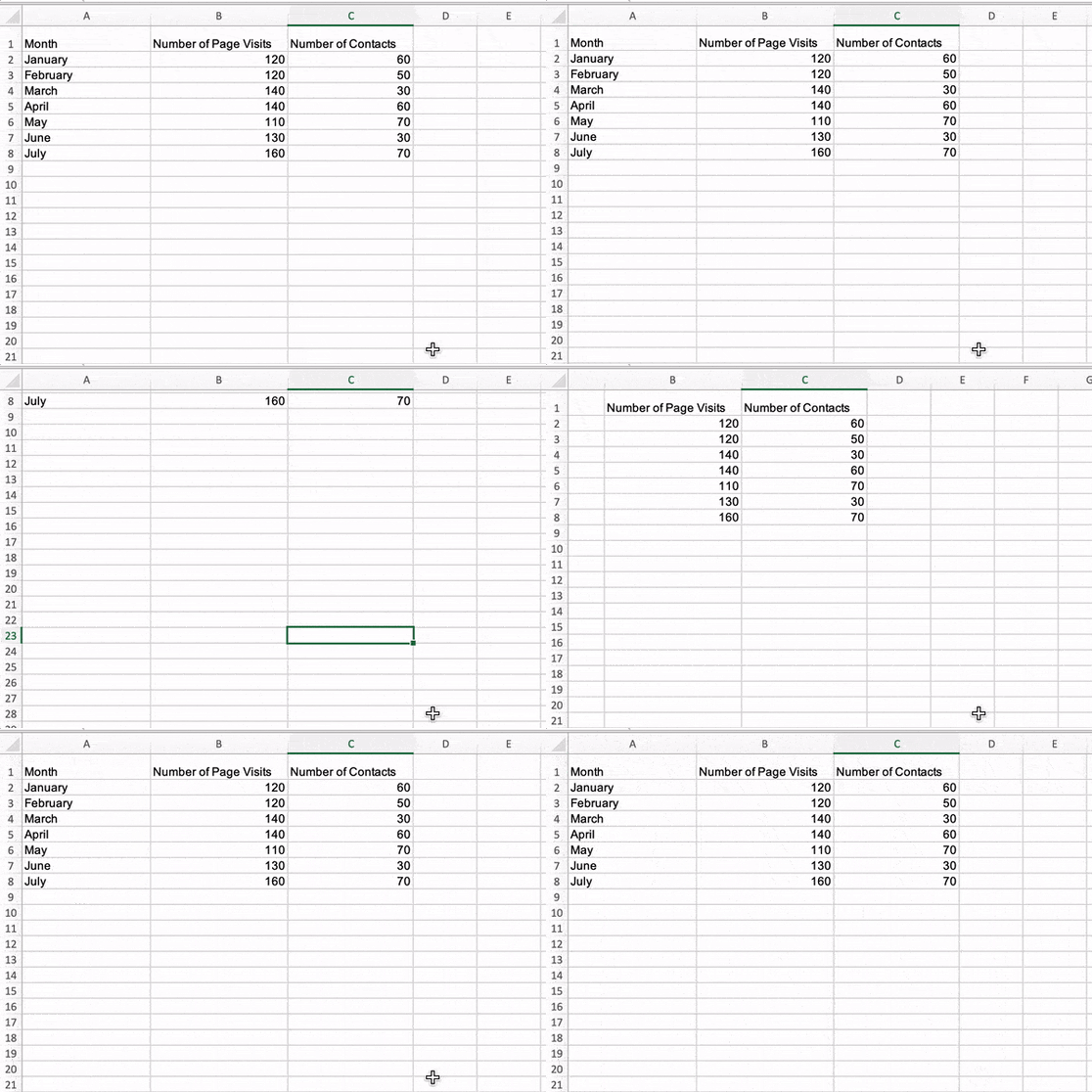 This can be frustrating if you can’t always see key data markers that explain what data is what, like column headers or row titles.
As with many things on Excel, there are tricks that help you make your spreadsheets easier to read, like the freeze function. In this post, learn how to freeze rows and columns in Excel to ensure that, when you scroll around, you’ll always be able to view the key data points that matter most.

How to Freeze a Top Row in Excel
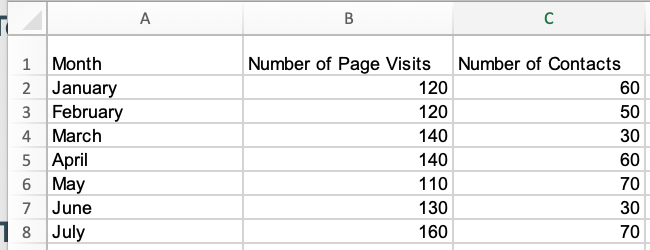
The image below is the sample data set I’ll use to run through the explanations in this piece.
1. To freeze the top row in an Excel spreadsheet, navigate to the header toolbar and select
View, as shown in the image below.
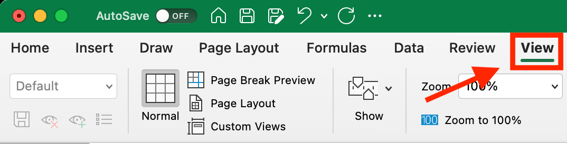
2. When the
View menu options appear, Click
Freeze Top Row, outlined in red in the image below.
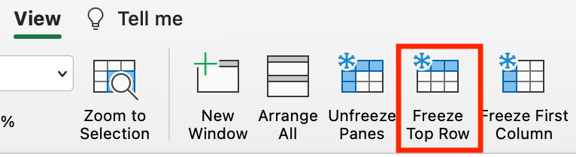
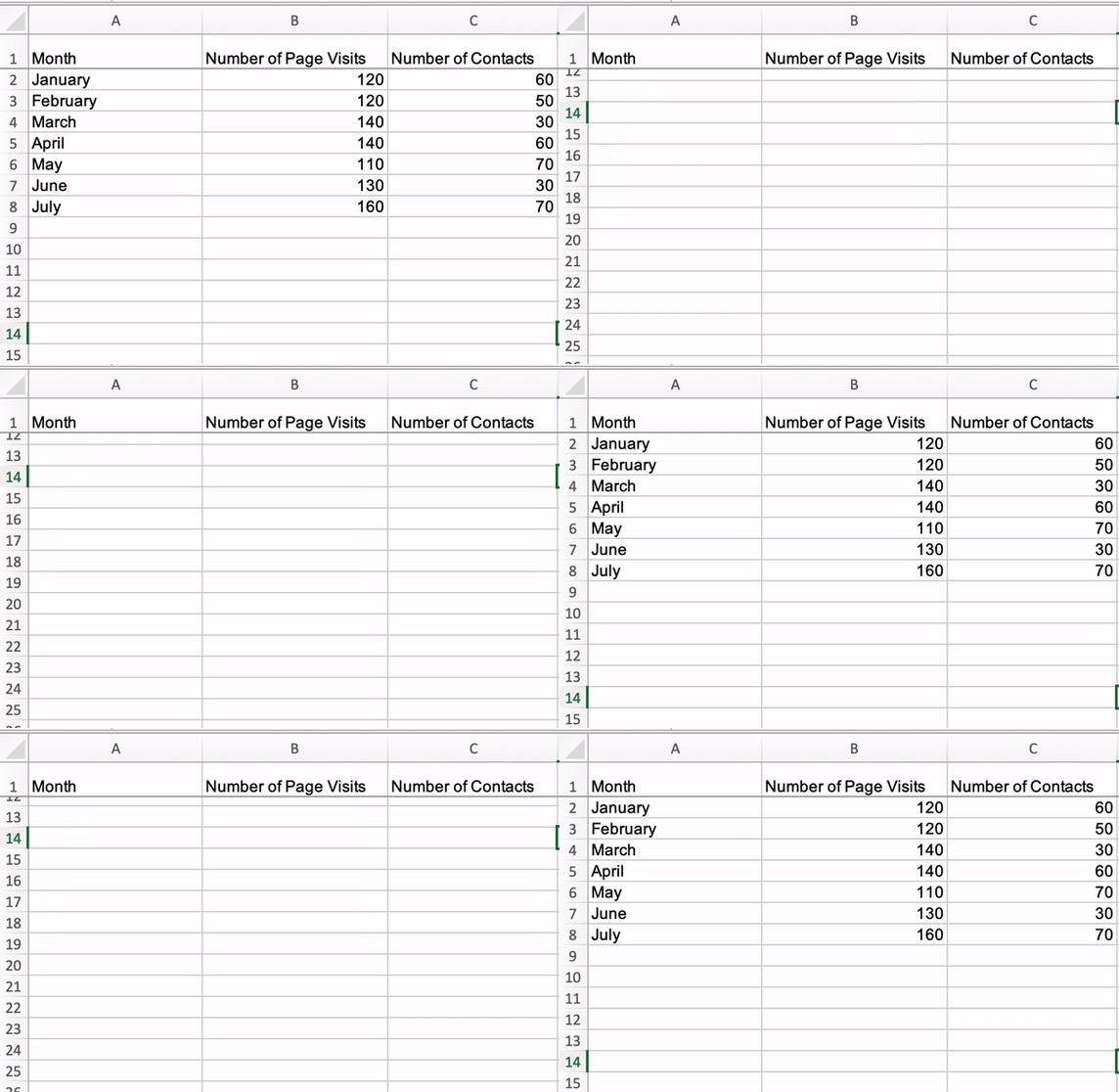
Once selected, everything in the top row of your Excel spreadsheet (row 1) will be frozen, and you can scroll up and down in your spreadsheet, but the top rows won’t move, as shown in the gif below.
How to Freeze a Specific Row in Excel
While excel has native functions for freezing the top row of a data set and the first column of a data set, there are additional steps to take to freeze other elements of your data set that aren’t those two things.
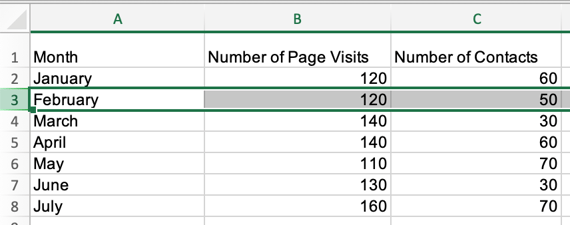
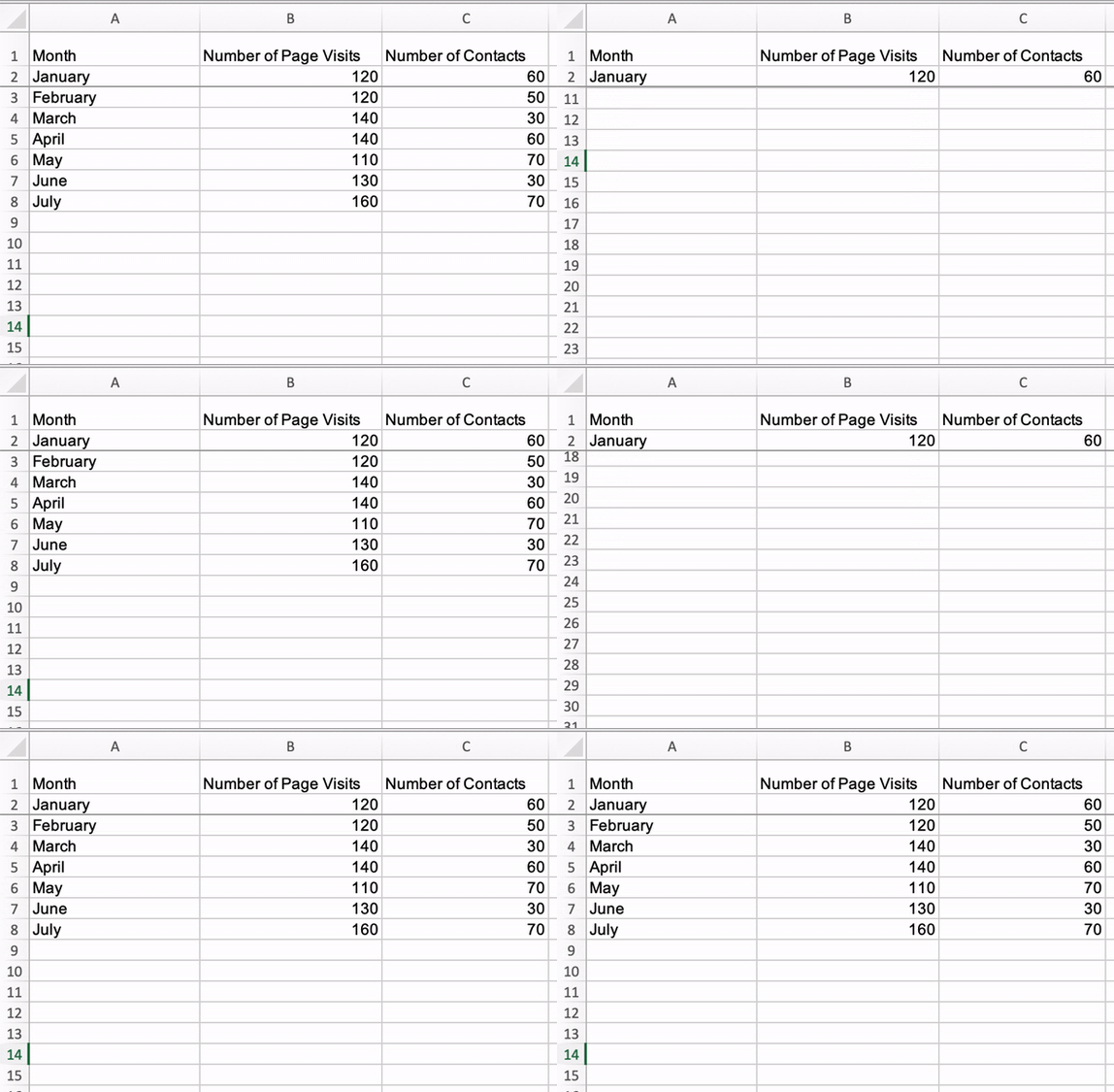
1. To freeze a specific row in Excel, select the row number immediately underneath the one you want frozen. For this example, I’m selecting row number three to freeze row number two.
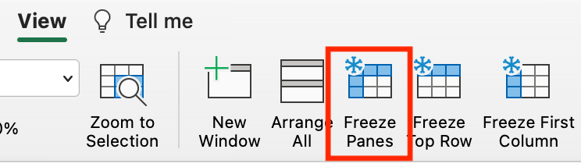
2. After selecting your row, navigate to View in the header toolbar and select Freeze Panes.
 Once selected, you’ll be able to scroll up and down through your spreadsheet and always see row two.
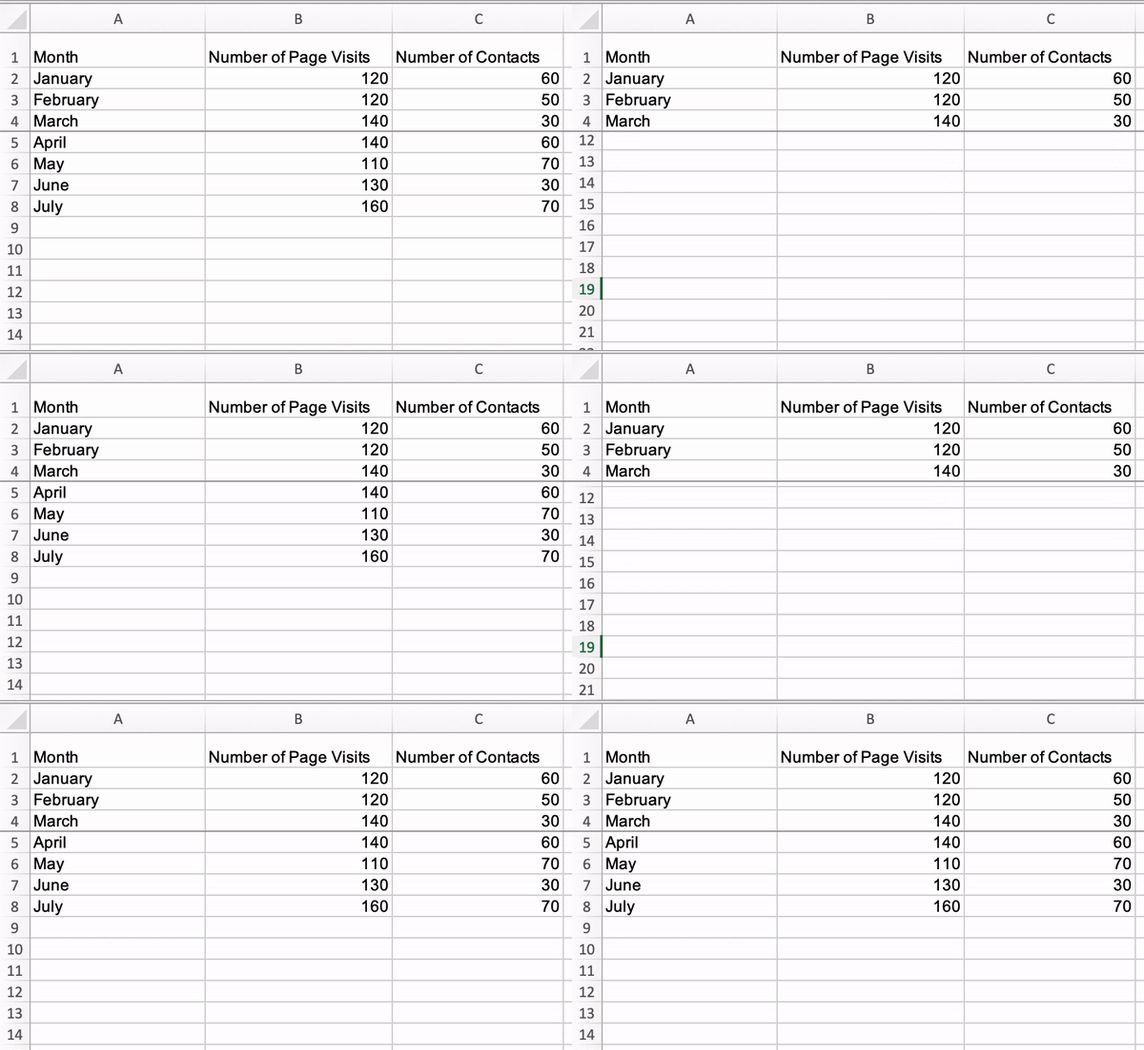
 Note that using the Freeze Panes function to freeze rows also freezes every row above the row you initially selected. For example, in the gif below, I selected row five which also freeze rows four, three, two, and one.
How to Freeze the First Column in Excel
1. To freeze the first column of your Excel spreadsheet (column A), navigate to the Excel header toolbar, select View, and click Freeze First Column.
Once selected, you’ll be able to scroll side to side within your sheet, and the first column of your data set will always be visible, as shown in the image below.

How to Freeze a Specific Column in Excel
1. If you want to freeze a specific column in excel, select the column letter that is immediately next to the column you want frozen and click Freeze Panes in the View header menu.
Once selected, you can scroll side to side through your entire data set and continue to see those columns. In the gif below, I’ve frozen columns A and B.
 Using the freeze function in Excel makes your spreadsheets easier to understand, as you can ensure that critical rows and columns are always visible as you scroll through your data.

How to Write a Blog Post: A Step-by-Step Guide [+ Free Blog Post Templates]
If you’ve ever read a blog post, you’ve consumed content from a thought leader that is an expert in their industry. Chances are if the blog post was written effectively, you came away with helpful knowledge and a positive opinion about the writer or brand that produced the content.
Anyone can connect with their audience through blogging and enjoy the myriad benefits that blogging provides: organic traffic from search engines, promotional content for social media, and recognition from a new audience you haven’t tapped into yet.

If you’ve heard about blogging but are a beginner and don’t know where to start, the time for excuses is over because we’ll cover how to write and manage your business’s blog as well as provide helpful templates to simplify your blogging efforts.
Let’s get started with an important question.
Blogging may mean different things depending on your niche — so let’s begin with this definition.
Blog posts allow you and your business to publish insights, thoughts, and stories on your website about any topic. They can help you boost brand awareness, credibility, conversions, and revenue. Most importantly, they can help you drive traffic to your website.
But in order to begin making posts for a blog — you have to learn how to start one, first. Let’s dive in.
1. Understand your audience.
Before you start writing your blog post, make sure you have a clear understanding of your target audience.
Ask questions like: What do they want to know about? What will resonate with them?
This is where the process of creating buyer personas comes in handy. Consider what you know about your buyer personas and their interests while you’re coming up with a topic for your blog post.
For instance, if your readers are millennials looking to start a business, you probably don’t need to provide them with information about getting started on social media — most of them already have that down.
You might, however, want to give them information about how to adjust their social media approach (for example — from what may be a casual, personal approach to a more business-savvy, networking-focused approach). That kind of tweak is what helps you publish content about the topics your audience really wants and needs.
Don’t have buyer personas in place for your business? Here are a few resources to help you get started:
- Create Buyer Personas for Your Business [Free Template]
- Guide: How to Create Detailed Buyer Personas for Your Business
- [Free Tool] Make My Persona: Buyer Persona Generator
2. Check out your competition.
What better way to draw inspiration than to look at your well-established competition?
It’s worth taking a look at popular, highly reviewed blogs because their strategy and execution is what got them to grow in credibility. The purpose of doing this isn’t to copy these elements, but to gain better insight into what readers appreciate in a quality blog.
There are multiple angles you should look at when doing a competitive analysis:
- Visuals: Look at the blog’s branding, color palette, and theme.
- Copy: Analyze the tone and writing style of the competition to see what readers respond well to.
- Topics: See what subject matter their readers enjoy interacting with.
3. Determine what topics you’ll cover.
Before you write anything, pick a topic you’d like to write about. The topic can be pretty general to start as you find your desired niche in blogging.
Some ways to choose topics to cover include asking yourself questions like:
- Who do I want to write to?
- How well do I understand this topic?
- Is this topic relevant?
4. Identify your unique angle.
What perspective do you bring that makes you stand out from the crowd? This is key to determining the trajectory of your blog’s future and there’s many avenues to choose in the process.
- What unique experience makes you a trusted expert or thought leader on the topic?
- What problem will you solve for readers?
- Will you share your opinions on trending debates?
- Teach your readers how to do something?
- Compare or share original research?
It’s up to you to decide the unique angle you’ll take on topics.
5. Name your blog.
This is your opportunity to get creative and make a name that gives readers an idea of what to expect from your blog. Some tips on how to choose your blog name include:
- Keep your blog name easy to say and spell.
- Link your blog name to your brand message.
- Consider what your target audience is looking for.
If you still need more assistance, try using a blog name generator.
Make sure the name you come up with isn’t already taken as it could lessen your visibility and confuse readers looking for your content.
6. Create your blog domain.
A domain is a part of the web address nomenclature someone would use to find your website or a page of your website online.
Your blog’s domain will look like this: www.yourblog.com. The name between the two periods is up to you, as long as this domain name doesn’t yet exist on the internet.
Want to create a subdomain for your blog? If you already own a cooking business at www.yourcompany.com, you might create a blog that looks like this: blog.yourcompany.com. In other words, your blog’s subdomain will live in its own section of yourcompany.com.
Some CMS platforms offer subdomains as a free service, where your blog lives on the CMS, rather than your business’s website. For example, it might look like this: yourblog.contentmanagementsystem.com. However, to create a subdomain that belongs to your company website, register the subdomain with a website host.
Most website hosting services charge very little to host an original domain — in fact, website costs can be as inexpensive as $3 per month when you commit to a 36-month term.
Here are five popular web hosting services to choose from:
7. Choose a CMS and set up your blog.
A CMS (content management system) is a software application that allows users to build and maintain a website without having to code it from scratch. CMS platforms can manage domains (where you create your website) and subdomains (where you create a webpage that connects to an existing website).
HubSpot customers host web content via CMS Hub. Another popular option is a self-hosted WordPress website on a hosting site such as WP Engine. Whether you create a domain or a subdomain to start your blog, you’ll need to choose a web hosting service after you pick a CMS.
8. Customize the look of your blog.
Once you have your domain name set up, customize the appearance of your blog to reflect the theme of the content you plan on creating and your brand.
For example, if you’re writing about sustainability and the environment, green might be a color to keep in mind while designing your blog.
If you already manage a website and are writing the first post for that existing website, ensure the article is consistent with the website in appearance and subject matter. Two ways to do this are including your:
- Logo: This can be your business’s name and logo — it will remind blog readers of who’s publishing the content. (How heavily you want to brand your blog, however, is up to you.)
- “About” Page: You might already have an “About” blurb describing yourself or your business. Your blog’s “About” section is an extension of this higher-level statement. Think of it as your blog’s mission statement, which serves to support your company’s goals.
9. Write your first blog post.
Once you have your blog set up, the only thing missing is the content. While the design and layout are fun and functionally necessary, it’s the content that will draw your readers in and keep them coming back. So how do you actually go about writing one of these engaging and informational pieces?
Writing Your First Blog Post
You’ve got the technical and practical tidbits down — now it’s time to write your very first blog post. And nope, this isn’t the space to introduce yourself and your new blog (i.e. “Welcome to my blog! This is the topic I’ll be covering. Here are my social media handles. Will you please follow?”).
Start with “low-hanging fruit,” writing about a highly specific topic that serves a small segment of your target audience.
That seems unintuitive, right? If more people are searching for a term or a topic, that should mean more readers for you.
But that’s not true. If you choose a general and highly searched topic that’s been covered by major competitors or more established brands, it’s unlikely that your post will rank on the first page of search engine results pages (SERPs). Give your newly born blog a chance by choosing a topic that few bloggers have written about.
Let’s walk through this process.
1. Choose a topic you’re passionate and knowledgeable about.
Before you write anything, pick a topic for your blog post. The topic can be pretty general to start. For example, if you’re a company that sells a CRM for small-to-enterprise businesses, your post might be about the importance of using a single software to keep your marketing, sales, and service teams aligned.
Pro tip: You may not want to jump into a “how-to” article for your first blog post.
Why?
Your credibility hasn’t been established yet. Before teaching others how to do something, you’ll first want to show that you’re a leader in your field and an authoritative source.
For instance, if you’re a plumber writing your first post, you won’t yet write a post titled “How to Replace the Piping System in your Bathroom.” First, you’d write about modern faucet setups, or tell a particular success story you had rescuing a faucet before it flooded a customer’s house.
Here are four other types of blog posts you could start with:
- List (“Listicle”): 5 ways to fix a leaky faucet
- Curated Collection: 10 faucet and sink brands to consider today
- SlideShare Presentation: 5 types of faucets to replace your old one (with pictures)
- News Piece: New study shows X% of people don’t replace their faucet frequently enough
If you’re having trouble coming up with topic ideas, a good topic brainstorming session should help. In the post I’ve linked, my colleague walks you through a helpful process for turning one idea into many. Similar to the “leaky faucet” examples above, you would “iterate off old topics to come up with unique and compelling new topics.”
This can be done by:
- Changing the topic scope
- Adjusting your time frame
- Choosing a new audience
- Taking a positive/negative approach
- Introducing a new format
And if you’re still stuck, let’s take a look at some first blog post idea examples.
First Blog Post Ideas
The Difference Between [Niche Topic] and [Niche Topic], Explained by a [Niche Expert]
- The Difference Between SEM and SEO, Explained by a Marketing Expert
- The Difference Between Sedans and Coupes, Explained by a Car Mechanic
- The Difference Between Baking and Broiling, Explained by a Professional Baker
The 10 Best and Worst [Niche Tools] for [Niche Activity]
- The 10 Best and Worst Writing Software for Fiction Writing
- The 10 Best and Worst CRMs for Nurturing Prospects
- The 10 Best and Worst Family Cars for Cross-Country Roadtrips
8 [Niche Activity] Common Mistakes (+ Ways to Fix Them)
- 8 Non-Fiction Writing Common Mistakes (+ Ways to Fix Them)
- 8 Salmon Broiling Common Mistakes (+ Ways to Fix Them)
- 8 Car Maintenance Common Mistakes (+ Ways to Fix Them)
9 Proven Tips for [Niche Activity]
- 9 Proven Tips for Checking Plumbing Problems under Your Kitchen Sink
- 9 Proven Tips for Writing a Non-Fiction Bestseller
- 9 Proven Tips for Doing DIY Car Maintenance
Why We/I Switched from [Niche Tool] to [Niche Tool] (Comparison)
- Why We Switched from Pipedrive to HubSpot (Comparison)
- Why I Switched from Microsoft Word to Scrivener (Comparison)
- Why We Switched from iMacs to Surface Studio (Comparison)
[Niche Tool] vs [Niche Tool]: Which [Tool] is Best for You?
- Zendesk vs Freshcaller: Which Call Software is Best for You?
- Air Fryer vs Convection Oven: Which One is Best for You?
- Mazda Miata vs Toyota Supra: Which Sports Car is Best for You?
The Ultimate Roundup of [Niche Activity] Tips and Tricks
- The Ultimate Roundup of Novel Writing Tips and Tricks
- The Ultimate Roundup of Macaroon Baking Tips and Tricks
- The Ultimate Roundup of Solo Traveling Tips and Tricks
Want some real examples of blog posts? See what your first blog post can look like based on the topic you choose and the audience you’re targeting.
2. Target a low-volume keyword to optimize around.
Finding a keyword with low searches in Google (we recommend sticking to about 10 to 150 monthly searches). These topics offer less competition and should therefore allow your new blog post to rank more easily.
To choose a topic, you can either do a traditional brainstorming session or carry out keyword research. We suggest the latter because you can actually see how many people are looking for that topic.
Now, don’t be intimidated by the term “keyword research.” It’s not just for marketers, but for new bloggers, too. And it’s really easy to do.
To jumpstart your keyword research, first begin by identifying the general topic of your blog.
Say you’re a plumber. Your general, high-level topic might be “plumbing” (67K monthly searches).
Next, put this term into a keyword research tool such as:
When you run this term through the tool, a list of related keywords will appear. Scan the list and choose one with a lower search volume. For this example, we’ll use “under sink plumbing” (1.4K monthly searches).
Run that keyword in the keyword research tool again. Look at the related keywords. Find one with a lower search volume. Do that again.
For this example, we’ll settle on “plumbing problems under kitchen sink” (10 monthly searches). That’s the topic for our first post.
TLDR; Choose a low-volume, low-competition keyword that will ensure your first post ranks.
For more help on keyword research, here are more resources you can use:
- How to Do Keyword Research for SEO: A Beginner’s Guide
- How to Perform Keyword Research and Rank
- Top Tools For Finding Long-Tail Keywords
3. Google the term to understand your audience’s search intent.
You’ve got your topic — now, you need to check that the user’s search intent would be fulfilled by a blog post.
What does that mean?
If someone is looking for “plumbing problems under a kitchen sink,” they might be looking for a tutorial, a diagram, an article, or a product that can fix the issue. If they’re looking for the first three, you’re good — that can be covered in a blog post. A product, however, is different, and your blog post won’t rank.
How do you double-check search intent?
Google the term and look at the results. If other articles and blog posts rank for that term, you’re good to go. If you only find product pages or listicles from major publications, then find a new topic to cover in your first post.
Consider the term “under sink plumbing bathroom” (30 monthly searches). It seemed like a perfect fit because it had low monthly searches.
Upon Googling the term, we found product carousels, product pages from Home Depot and Lowes, and guides written by major publications. (You’ll also want to avoid topics that have been covered by major publications, at least for now.)
TLDR; Before writing your first blog post about a low-volume topic, double-check the user intent by Googling the keyword. Also, don’t forget to take a look at who’s written about that topic so far. If you see a major brand, consider writing about another topic.
4. Find questions and terms related to that topic.
You’ve got a highly unique topic that’s been covered by just a few people so far. It’s time to flesh it out by covering related or adjacent topics.
Use the following tools:
- Answer the Public: When you place your keyword into this tool, it will give you a list of questions related to that term.
- Google: Google is your best friend. Search for the term and look under “People also ask” and “People also search for.” Be sure to touch upon those topics in the post.
You can also use these keyword research tools we mentioned above in step one.
5. Come up with a working title.
You might come up with a few different working titles — in other words, iterations of approaching that topic to help you focus your writing.
For example, you may decide to narrow your topic to “Tools for Fixing Leaky Faucets” or “Common Causes of Leaky Faucets.” A working title is specific and will guide your post so you can start writing.
Let’s take a real post as an example: “How to Choose a Solid Topic for Your Next Blog Post.”
Appropriate, right? The topic, in this case, was probably “blogging.” Then the working title may have been something like, “The Process for Selecting a Blog Post Topic.” And the final title ended up being “How to Choose a Solid Topic for Your Next Blog Post.”
See that evolution from topic, to working title, to final title? Even though the working title may not end up being the final title (more on that in a moment), it still provides enough information so you can focus your blog post on something more specific than a generic, overwhelming topic.
6. Create an outline.
Sometimes, blog posts can have an overwhelming amount of information — for the reader and the writer. The trick is to organize the info in a way so readers aren’t intimidated by length or amount of content. This organization can take multiple forms — sections, lists, tips — whatever’s most appropriate. But it must be organized!
Featured Resource: 6 Free Blog Post Templates
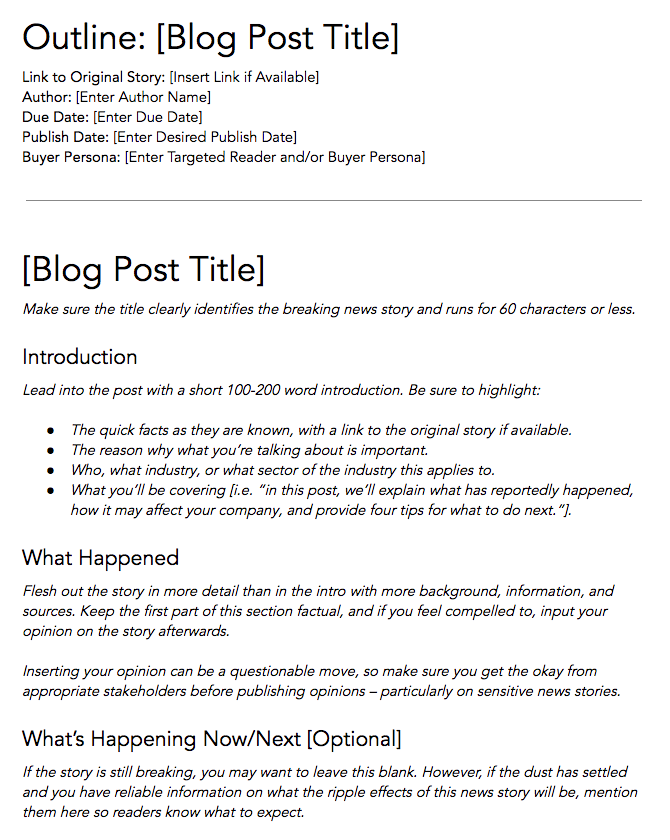
Download These Templates for Free
Let’s take a look at the post, “How to Use Snapchat: A Detailed Look Into HubSpot’s Snapchat Strategy.” There’s a lot of content in the piece, so it’s broken up into a few sections using descriptive headers. The major sections are separated into subsections that go into more detail, making the content easier to read.
To complete this step, all you really need to do is outline your post. This way, before you start writing, you’ll know which points you want to cover and the best order to do so. And to make things even easier, you can download and use our free blog post templates, which are pre-organized for six of the most common blogs. Just fill in the blanks!
7. Write an intro (and make it captivating).
We’ve written more specifically about writing captivating introductions in the post “How to Write an Introduction,” but let’s review, shall we?
First, grab the reader’s attention. If you lose the reader in the first few paragraphs — or even sentences — of the introduction, they’ll stop reading (even before they’ve given your post a fair shake). You can do this in a number of ways: tell a story or a joke, be empathetic, or grip the reader with an interesting fact or statistic.
Then, describe the purpose of your post and explain how it will address a problem the reader may be experiencing. This will give the reader a reason to continue reading and show them how the post will help them improve their work or lives.
Here’s an example of an intro we think does a good job of attracting a reader’s attention right away:
“Blink. Blink. Blink. It’s the dreaded cursor-on-a-blank-screen experience that all writers — amateur or professional, aspiring or experienced — know and dread. And of all times for it to occur, it seems to plague us the most when trying to write an introduction.”
8. Build out each section of your outline.
The next step — but not the last — is actually writing the content. We can’t forget about that, of course.
Now that you have your outline or template, you’re ready to fill in the blanks. Use your outline as a guide and expand on all points as needed. Write about what you already know, and if necessary, conduct additional research to gather more information, examples, and data to back up your points, while providing proper attribution when incorporating external sources. When you do, always try to find accurate and compelling data to use in your post.
If you’re having trouble stringing sentences together, you’re not alone. Finding your “flow” can be challenging for a lot of folks. Luckily, there are a ton of tools you can lean on to help you improve your writing. Here are a few to get you started:
- Power Thesaurus: Stuck on a word? Power Thesaurus is a crowdsourced tool that provides users with a number of alternative word choices from a community of writers.
- ZenPen: If you’re having trouble staying focused, check out this distraction-free writing tool. ZenPen creates a minimalist “writing zone” designed to help you get words down without having to fuss with formatting right away.
- Cliché Finder: Feeling like your writing might be coming off a little cheesy? Identify instances where you can be more specific using this handy cliché tool.
You can also refer to our complete list of tools for improving your writing skills. And if you’re looking for more direction, the following resources are chock-full of valuable writing advice:
- Copywriting 101: 6 Traits of Excellent Copy Readers Will Remember
- How to Write Compelling Copy: 7 Tips for Writing Content That Converts
- How to Write With Clarity: 9 Tips for Simplifying Your Message
- The Kurt Vonnegut Guide to Great Copywriting: 8 Rules That Apply to Anyone
- Your Blog Posts Are Boring: 9 Tips for Making Your Writing More Interesting
9. Publish and promote your first post any way you can.
As a new blogger, you likely don’t have a social media following yet. Thankfully, you don’t need a huge following before you can create a promotion strategy.
A promotion strategy is your master plan for how you create, post, and engage with your social media content. It helps you take advantage of social and digital technologies to share your business, or in this case, your content. Having a solid promotional strategy offers your audience from different marketing channels more ways to find your blog posts.
Here are more blog post promotion resources:
- 12 Tried-and-True Ways to Promote Your Blog Posts
- 10 Sites You Can Use for Free Blog Promotion
- 9 Link Building Email Outreach Templates That Actually Work
- Inbound Link Building 101: 34 Ways to Build Backlinks for SEO
- 11 Creative (But 100% White Hat!) Ways to Earn Backlinks
What makes a good blog post?
Before you write a blog, make sure you know the answers to questions like, “Why would someone keep reading this entire blog post?” and “What makes our audience come back for more?”
To start, a good blog post is interesting and educational. Blogs should answer questions and help readers resolve a challenge they’re experiencing — and you have to do so in an interesting way.
It’s not enough just to answer someone’s questions — you also have to provide actionable steps while being engaging. For instance, your introduction should hook the reader and make them want to continue reading your post. Then, use examples to keep your readers interested in what you have to say.
Remember, a good blog post is interesting to read and provides educational content to audience members.
(Want to learn how to apply blogging and other forms of content marketing to your business?
Check out HubSpot Academy’s free content marketing course.)
Quick Blog Writing Tips
- Conduct research if necessary to convey your point.
- Make your content skimmable; break it into digestible chunks.
- Include interesting quotes or facts for emphasis on the subject.
- Paint a full picture with images, graphics or video.
- Use Grammarly to catch mistakes.
- If you don’t know where to start, start by telling a story.
- Reference social media posts.
- Each sentence should convey a single idea.
While you have several tools and tips already, we wanted to provide you with some formatting guidelines to use before you publish your own.
1. Include H2s to arrange ideas.
When you begin typing your blog content, it’s important that you divide paragraphs into sections that make it easier for the reader to find what they need.
If you’re just starting out, then focus on the overarching H2s you want to talk about, and you’ll be able to branch off into subheaders and more naturally as you continue.
2. Center your images.
This is a simple practice that can help your content look more professional with little effort. Centering your images keeps the reader’s attention drawn to the subject — not searching for elsewhere.
Centering also looks better when translating from PC to mobile devices. As formatting transitions to small screens or windows, a centered image will remain the focal point.
3. Add alt text.
So those images you centered earlier, make sure you have descriptive alt text for them, too.
Image alt text allows search engines, like Google, to crawl and rank your blog post better than pages lacking the element. It also leads readers to your blog post if the keywords included are what they searched for in the first place.
Besides SERP features, image alt text is beneficial to readers by providing more accessibility. Image alt text allows people to better visualize images when they can’t see them, and with assistive technology, can be auditorially read aloud for people to enjoy.
4. Keep your sentences short and concise.
When you begin working on the body of your blog post, make sure readers can clearly understand what you’re trying to accomplish.
You shouldn’t feel pressure to elongate your post with unnecessary details, and chances are that if you keep it concise, readers will derive more value from your work.
5. Use media with a purpose.
Break up the monotony of your blog post with some multimedia content where seen fit.
Your reader will enjoy visiting a blog page with images, videos, polls, audio or slideshows as opposed to a page of black and white text.
It also makes it more interactive and improves your on-page search engine optimization (SEO).
Now, do you want some real examples of blog posts? See what your first blog post can look like based on the topic you choose and the audience you’re targeting.
1. List-Based Blog Post
List-Based Post Example: 17 Blogging Mistakes to Avoid in 2021, According to HubSpot Bloggers

List-based posts are sometimes called “listicles,” a mix of the words “list” and “article.” These are articles that deliver information in the form of a list. A listicle uses sub-headers to break down the blog post into individual pieces, helping readers skim and digest your content more easily.
As you can see in the example from our blog, listicles can offer various tips and methods for solving a problem.
2. Thought Leadership Post
Example: How HubSpot’s Customers Are Shaping the Next Normal
Thought leadership posts allow you to share your expertise on a particular subject matter and share firsthand knowledge with your readers.
These pieces — which can be written in the first person, like the post shown above — help you build trust with your audience so people take your blog seriously as you continue to write for it.
3. Curated Collection Post
Example: 8 Examples of Evolution in Action

Curated collections are a special type of listicle blog post. Rather than sharing tips or methods for doing something, this type of blog post shares a list of real examples that all have something in common in order to prove a larger point.
In the example post above, Listverse shares eight real examples of evolution in action among eight different animals — starting with the peppered moth.
4. SlideShare Presentation
Example: The HubSpot Culture Code
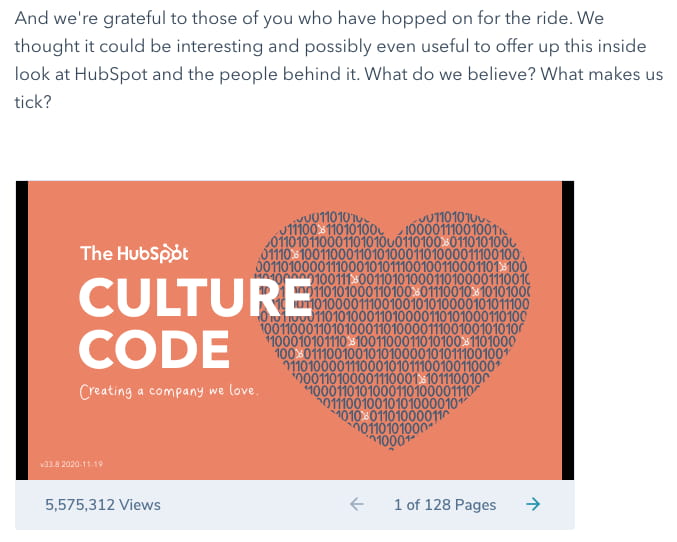
SlideShare is a presentation tool that helps publishers package a lot of information into easily shareable slides. Think of it like a PowerPoint, but for the web. With this in mind, SlideShare blog posts help you promote your SlideShare so that it can generate a steady stream of visitors.
Unlike blogs, SlideShare decks don’t often rank well on search engines, so they need a platform for getting their message out there to the people who are looking for it. By embedding and summarizing your SlideShare on a blog post, you can share a great deal of information and give it a chance to rank on Google at the same time.
Need some SlideShare ideas? In the example above, we turned our company’s “Culture Code” into a SlideShare presentation that anyone can look through and take lessons from, and then promoted it in a blog post.
5. Newsjacking Post
Example: Ivy Goes Mobile With New App for Designers

“Newsjacking” is a nickname for “hijacking” your blog to break important news related to your industry. Therefore, the newsjack post is a type of article whose sole purpose is to garner consumers’ attention and, while offering them timeless professional advice, prove your blog is a trusted resource for learning about the big things that happen in your industry.
The newsjack example above was published by Houzz, a home decor merchant and interior design resource, about a new mobile app that was launched just for interior designers. Houzz didn’t launch the app, but the news of its launching is no less important to Houzz’s audience.
6. Infographic Post
Example: The Key Benefits of Studying Online [Infographic]
For example, when you’re looking to share a lot of statistical information (without boring or confusing your readers), building this data into a well-designed, even engaging infographic can keep your readers engaged with your content. It also helps readers remember the information long after they leave your website.
7. How-to Post
Example: How to Write a Blog Post: A Step-by-Step Guide
For this example, you need not look any further than the blog post you’re reading right now! How-to guides like this one help solve a problem for your readers. They’re like a cookbook for your industry, walking your audience through a project step by step to improve their literacy on the subject.
The more posts like this you create, the more equipped your readers will be to work with you and invest in the services you offer.
8. Guest Post
Example: Your Bookmarkable Guide to Social Media Image Sizes in 2021 [Infographic]

Additionally, these posts give your blog variety in topic and viewpoint. If your customer has a problem you can’t solve, a guest post is a great solution.
If you begin accepting guest posts, set up editorial guidelines to ensure they’re up to the same standards as your posts.
So we’ve gone through the different types of blog posts you can make, but how do you consistently make quality blog posts that your viewers will enjoy?
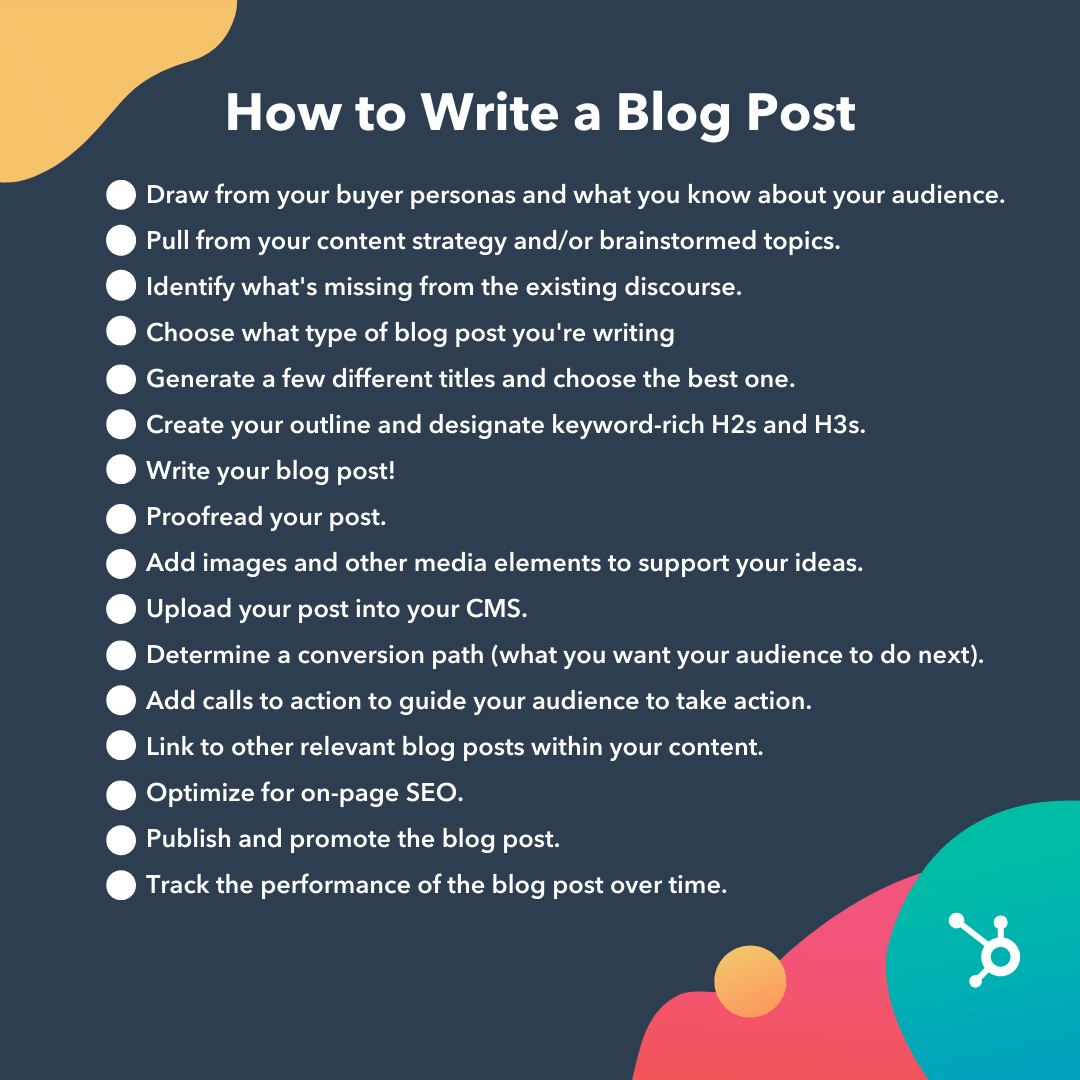
1. Draw from your buyer personas and what you know about your audience.
Before you start writing your blog post, make sure you have a clear understanding of your target audience.
Ask questions like: What do they want to know about? What will resonate with them?
This is where the process of creating buyer personas comes in handy. Consider what you know about your buyer personas and their interests while you’re coming up with a topic for your blog post.
For instance, if your readers are millennials looking to start a business, you probably don’t need to provide them with information about getting started in social media — most of them already have that down.
You might, however, want to give them information about how to adjust their social media approach (for example — from what may be a casual, personal approach to a more business-savvy, networking-focused approach). That kind of tweak is what helps you publish content about the topics your audience really wants and needs.
Don’t have buyer personas in place for your business? Here are a few resources to help you get started:
- Create Buyer Personas for Your Business [Free Template]
- Guide: How to Create Detailed Buyer Personas for Your Business
- [Free Tool] Make My Persona: Buyer Persona Generator
2. Pull from your content strategy and/or brainstormed topics.
If you already have a pre-existing portfolio to look back on, it would benefit you to pull from those brainstormed post ideas or previous content strategy.
3. Identify what’s missing from the existing discourse.
Fill in the gaps of the existing discourse in the topic of your choosing.
You want to meet a need that hasn’t already been met in your topic cluster. Otherwise, you run the risk of writing content for topics that are already over-saturated. It’s hard to beat saturated search queries when you’re trying to rank against high authority publications — but not impossible if your content is answering the queries the competition hasn’t.
4. Choose what type of blog post you’re writing.
There are several types of blog posts you can create, and they each have different formats to follow.
Six of the most common formats include:
- The List-Based Post
- The “What Is” Post
- The Pillar Page Post (“Ultimate Guide”)
- The Newsjacking Post
- The Infographic Post
- The “How-To” Post
Save time and download six blog post templates for free.
5. Generate a few different titles and choose the best one.
Your blog title should tell readers what to expect, yet it should leave them wanting to know more — confusing, right?
This is why when you’re coming up with a blog post title that you should brainstorm multiple ones instead of just one.
6. Create your outline and designate keyword-rich H2s and H3s.
When outlining, you need to center your main ideas with keyword-rich H2s and H3s. These are going to be your headers and subheaders that readers typically search for, and the information that Google crawls when indexing and ranking content.
7. Write your blog post!
We already told you how to build out your outline earlier in the post, so we’ll quickly go over the main points once more.
You’ve already outlined your main headings and subheadings, so now’s the time to add the body.
Write about what you already know, and if necessary, conduct additional research to gather more information, examples, and data to back up your points, while providing proper attribution when incorporating external sources. When you do, always try to find accurate and compelling data to use in your post.
This is also your opportunity to show personality in your writing. Blog posts don’t have to be strictly informational, they can be filled with interesting anecdotes and even humor if it serves a purpose in expressing your ideas. It also factors into creating and maintaining your blog’s brand voice.
Don’t be discouraged if you’re having trouble stringing sentences together, you’re not alone. Finding your “flow” can be challenging, but there are many tools to ease the process.
8. Proofread your post.
The editing process is an important part of blogging — don’t overlook it.
Ask a grammar-conscious co-worker to copy edit and proofread your post. You may also consider enlisting the help of The Ultimate Editing Checklist or using a free grammar checker like Grammarly.
If you’re looking to brush up on your self-editing skills, turn to these helpful posts for some tips and tricks to get you started:
- How to Become a (Better) Editor: 13 Editorial Tips
- How to Become a More Efficient Editor: 12 Ways to Speed Up the Editorial Process
- 10 Simple Edits That’ll Instantly Improve Any Piece of Writing
9. Add images and other media elements to support your ideas.
When you’re finished checking for grammar, shift your focus to adding other elements to the blog post than text. There’s much more to making a good blog post than copy, here’s some following elements to add in support of your ideas:
Featured Image
Choose a visually appealing and relevant image for your post. As social networks treat content with images more prominently, visuals are more responsible than ever for the success of your blog content.

For help selecting an image for your post, read “How to Select the Perfect Image for Your Next Blog Post” and pay close attention to the section about copyright law.
Visual Appearance
No one likes an unattractive blog post. And it’s not just pictures that make a post visually appealing — it’s the formatting and organization of the post, too.
In a well-formatted and visually-appealing blog post, you’ll notice that header and sub-headers are used to break up large blocks of text — and those headers are styled consistently.
Here’s an example of what that looks like:
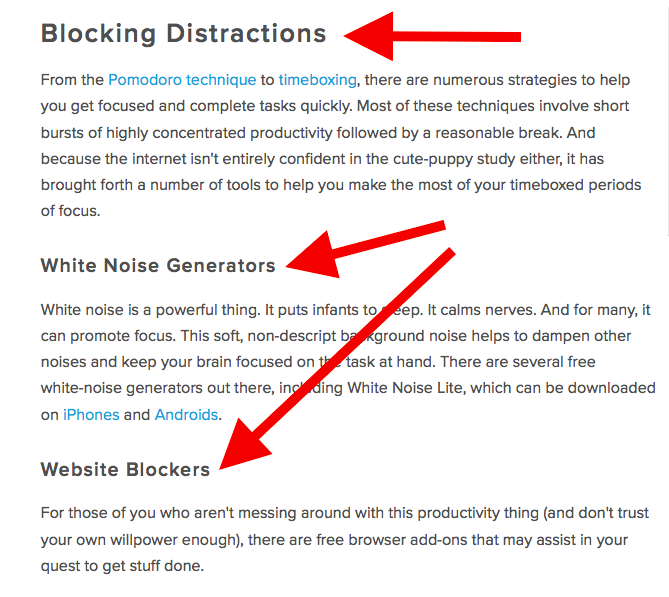
Screenshots should always have a similar, defined border so they don’t appear as if they’re floating in space — that style should stay consistent from post to post.
Maintaining this consistency makes your content look more professional and easier on the eyes.
Topics and Tags
Tags are specific, public-facing keywords that describe a post. They also allow readers to browse for more content in the same category on your blog. Refrain from adding a laundry list of tags to each post. Instead, put some thought into a blog tagging strategy.
Think of tags as “topics” or “categories,” and choose 10-20 tags that represent all the main topics you want to cover on your blog. Then stick to those.
10. Upload your post into your CMS.
You filled out your blog post with all the optimized content you can, now is the time to publish it in your content management system.
You can opt to post your content immediately, save it as a draft, or schedule when you want it to be posted live in case you adhere to a posting schedule.
11. Determine a conversion path (what you want your audience to do next).
A conversion path is a process by which an anonymous website visitor becomes a known lead. It sounds simple enough, but creating an effective conversion path requires a clear understanding of your target audience and their needs.
Having a conversion path is important because when you share your content on the web, you should have an idea of what your audience should do next, or in other words, provide them with a path forward.
The HubSpot Flywheel model is a great example of this as it shows how our organization gains and maintains leads.
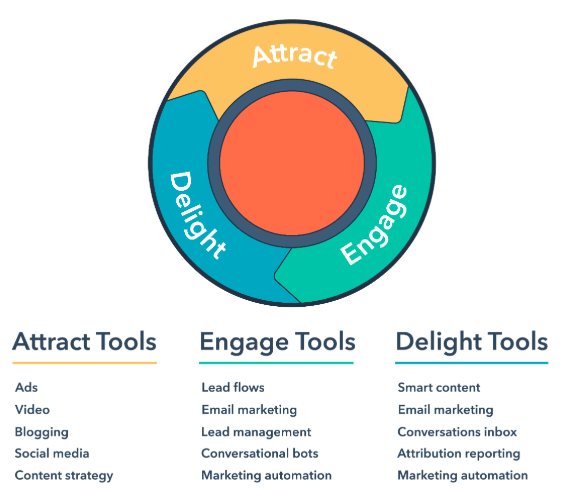
12. Add calls to action to guide your audience to take action.
Call to action (CTA) are a part of a webpage, advertisement, or piece of content that encourages the audience to do something. You can add them to your blog post to guide your reader with “next steps” or a conversion path.
Different types of call to actions include asking readers to:
- Subscribe to your newsletter to see when you publish more content.
- Join an online community in your blog domain.
- Learn more about a topic with downloadable content.
- Try something for free or discount to convert readers to customers.
To get a better idea of how to make a CTA that readers want to click, we have a whole list of effective call to action examples for you to check out.
13. Link to other relevant blog posts within your content.
When you’re completing your blog post, you should link relevant content throughout it. An effective way to do this is to link within the same content cluster.
Keeping relevant content throughout your post can provide your readers with more helpful information, and potentially boost search engine rankings with corresponding longtail keywords.
But we’ll talk more about how to improve your ranking in the next step.
14. Optimize for on-page SEO.
After you finish writing, go back and optimize the on-page elements of your post.
Don’t obsess over how many keywords to include. If there are opportunities to incorporate keywords you’re targeting, and it won’t impact reader experience, do it. If you can make your URL shorter and more keyword-friendly, go for it. But don’t cram keywords or shoot for some arbitrary keyword density — Google’s smarter than that!
Here’s a little blog SEO reminder about what you should review and optimize:
-
Write your meta description.
Meta descriptions are the descriptions below the post’s page title on Google’s search results pages. They provide searchers with a short summary of the post before clicking into it. They are ideally between 150-160 characters and start with a verb, such as “Learn,” “Read,” or “Discover.”
While meta descriptions no longer factor into Google’s keyword ranking algorithm, they give searchers a snapshot of what they’ll get from reading the post and help improve your clickthrough rate from search.
-
Optimize your page title and headers.
Most blogging software uses your post title as your page title, which is the most important on-page SEO element at your disposal. But if you’ve followed our formula so far, you should already have a working title that will naturally include keywords or phrases your target audience is interested in.
Don’t over-complicate your title by trying to fit in keywords where they don’t naturally belong. With that said, if there are clear opportunities to add keywords you’re targeting to your post title and headers, feel free to take them. Also, try to keep your headlines short — ideally, under 65 characters — so they don’t get truncated in the search engine results.
-
Consider anchor text best practices as you interlink to other pages.
Anchor text is the word or words that link to another page — either on your website or on another website. Carefully select which keywords you want to link to other pages on your site because search engines take that into consideration when ranking your page for certain keywords.
It’s also important to consider which pages you link to. Consider linking pages that you want to rank for a specific keyword. You could end up getting it to rank on Google’s first page of results instead of its second page — and that isn’t small potatoes!
-
Write alt text for all of your images.
Alt text conveys the “why” of an image as it relates to the content of your blog post to Google. By adding alt text correlating to the topic clusters and keywords of the post, Google can better direct users’ searches to you.
-
Check that all images are compressed for page speed.
When Google crawls different websites, a page’s load speed holds weight in page ranking. Make sure the images you include throughout the page aren’t unnecessarily large to shorten the duration it takes to load.
Use apps like Squoosh to minimize the size of your images without losing the quality.
-
Ensure that your blog post is mobile friendly.
More than 60% of organic visits are carried out on a mobile device. As such, having a website with a responsive design is critical. In addition to making sure your website’s visitors (including your blog’s visitors) have the best experience possible, optimizing for mobile will score your website some SEO points.
15. Publish and promote the blog post.
Share your post across all the marketing channels in your repertoire. The further the reach, the more of a possibility that readers will find it.
Channels to expand your blog post promotion strategy include:
- Social Media Marketing: Sharing your content on the most popular social media networks like Twitter, Instagram, TikTok, etc.
- Email Marketing: Sharing the newest post with your email subscribers to find.
- Boosted Posts or Paid Ads: Allocating budget toward advertisement on search engines inorganically.
- Word of Mouth Marketing: Actively influencing people to read your content organically.
16. Track the performance of the blog post over time.
Your post is published for the world to see, make sure you’re keeping an eye on its performance over time so you can see if your blog post strategy is working well enough for your goals.
There’s a plethora of website traffic analysis tools that you can take advantage of to better understand your audience’s behavior on your blog posts.
Ready to blog?
Blogging can help you build brand awareness, become a thought-leader and expert in your industry, attract qualified leads, and boost conversions. Follow the steps and tips we covered above to begin publishing and enhancing your blog today.
Editor’s note: This post was originally published in October 2013 and has been updated for comprehensiveness.


What Is An Email CTR? How to Calculate and Improve It
An effective email marketing campaign has the ability to strengthen your brand, engage existing and potential customers, and move them to action.
At the very least, emails will keep you front and center in your audience’s mind. Since email is one of the more personal touchpoints you can use to build rapport with your customers, you have a greater opportunity to make your emails meaningful and successful.

Email marketing has sustained its popularity due to its ease, low expense, and effectiveness. According to Litmus, four out of five marketers would rather give up social media than email marketing. But how do you measure success for email marketing campaigns?
One key metric email marketers can use to determine how well their email campaigns are performing is the click-through rate (CTR).
Ideally, your email subscribers aren’t haphazardly clicking on links. No, you want them to take intentional action from your emails.
Maybe you want them to buy your product. Or (if you’re a nonprofit) to donate to your cause. Perhaps you want them to sign up for your latest program, or even just take a survey so you can learn more about their needs. The point is that just about every email you send out will have some sort of call-to-action that often requires recipients to click on a link and head to a website to carry out that desired action.
That action of clicking on a link in your email and heading somewhere else is what contributes to your CTR. The same applies to pay-per-click (PPC) marketing where you pay each time your link is clicked from an ad impression.
CTR Formula
Now that you understand what a click-through rate is and why it’s so important to your marketing efforts, how do you actually calculate it?
How to Calculate Email CTR
For email, the CTR formula is as follows:
CTR = Number of People Who Clicked A Link / Number of Emails Delivered Successfully x 100
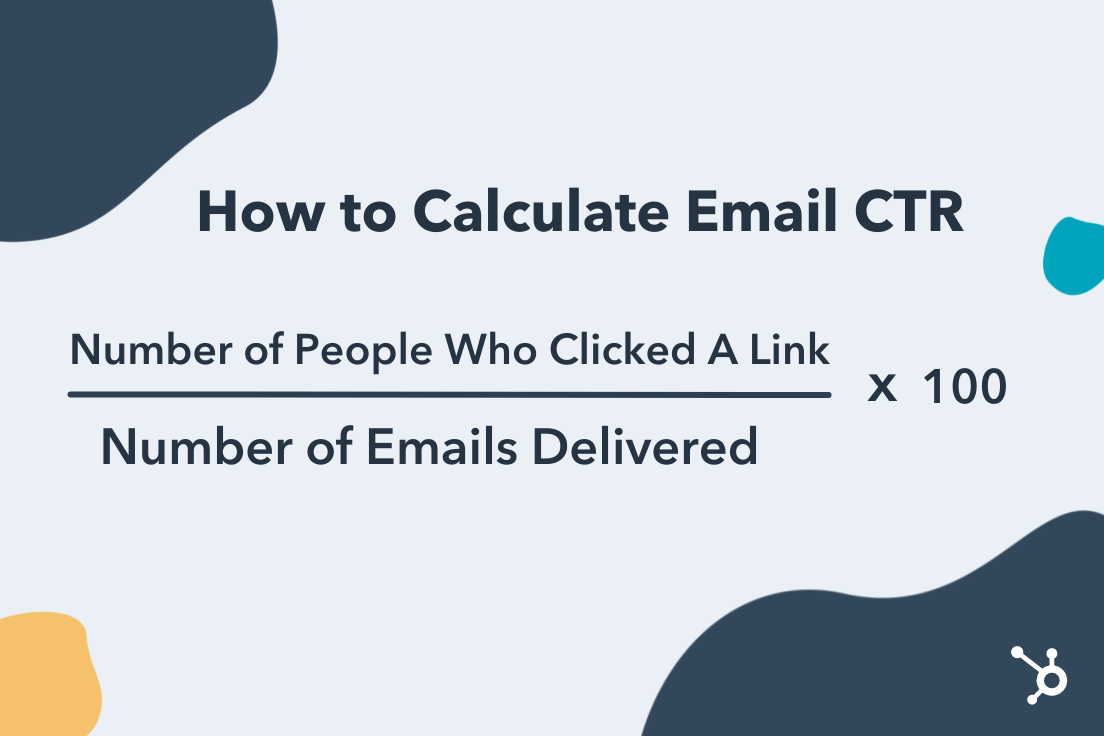
Let’s say you sent an email to a list of 110 people and 100 were delivered successfully to their recipients. Of those 100 recipients, 35 of them clicked on your CTA and were sent to a new page. Using this data, here’s how you would calculate your CTR:
CTR = 35 People Clicked A Link / 100 Delivered Emails x 100 = 35%
How to Calculate CTR for PPC
Here’s the formula you would use to calculate the click-through rate of a PPC campaign:
CTR = Number of People Who Clicked on Ad / Number of Ad Impressions x 100
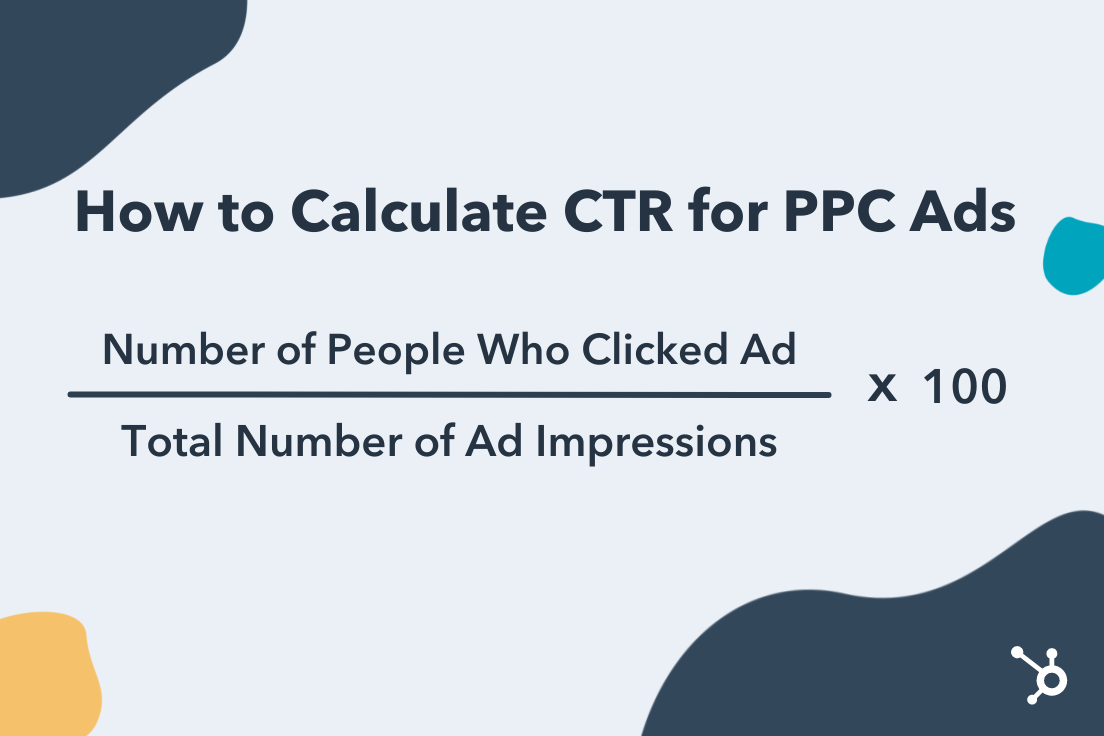
Using this formula, if 200 people saw your ad and 20 people clicked on it, you’d be looking at a CTR of 10%.
What is a good click-through rate?
The appropriate CTR for your business will depend on your industry, budget, campaign objectives, and audience size. Let’s look at what the research has to say.
Average CTR
According to MailChimp, the average email click-through rate across industries is 2.91%. Industries that had some of the highest click-through rates included Government (3.99%), Media and Publishing (4.62%), Home and Garden (3.03%), and Hobbies (5.01%).
For PPC click-through rates, the average across industries is around 2%.
Improve Your Click-Through Rate
Once you’ve calculated your CTR and compared it to industry standards, you may want to take steps to improve it and create more successful email and PPC campaigns. There’s a small possibility that you’ll receive feedback from customers regarding your campaigns, which means that most of your information will come from testing.
First, take a look at your old email campaigns. Gather them into two categories: those that performed well (had relatively high CTR) and those that saw little success (relatively low CTR). Take time to analyze these messages and note any major differences or patterns.
You’ll want to examine:
- Ad Copy: Can it be shorter? More personable? Easier to understand? Aim to use language that resonates with your audience which may deviate from industry lingo.
- Design: Are your emails visually appealing and inviting? Is it clear what next step the reader is supposed to take?
- Call-to-Action: How clear is your CTA? Experiment with placement and language to see what works for your audience. Also, consider limiting CTAs and links to one or two per email. When presented with too many choices, readers may get overwhelmed or confused.
You’ll also want to step into the mind of your audience. Just because you’ve created an impressive email or ad, doesn’t mean that it’s appealing to the people you are trying to attract.
A good email service provider will offer A/B testing so you can send one variation to one segment of your audience, a second variation to the other segment, and then compare the CTR to see which one performed better.
Whether you pay by the click or pay very little for a monthly subscription to an email service provider, you are still spending time and putting forth the effort to reach your audience and convert them into customers. You want a return on your investment. you want your marketing efforts to pay off.
Ensuring that your ads and email campaigns are effectively written and designed and that they reach the right audience, will help you build and sustain the customer base you’re looking for. In order to determine that, you’ll need to get familiar with your current click-through rates, and optimize your content to create the best possible outcome.

The Ultimate Guide to Performance Management: 5-Step Process and Best Practices
Peter Drucker once described customers as the “most important stakeholders.” While this may be true, your customers are dependent on one thing.
No, it’s not your product (though that’s definitely important). It’s actually your employees. Without your employees, products won’t get made, customers won’t learn about those products, and there will be no one there to sell or deliver those products, or provide customer service to them after they’ve purchased.

While your customers may be your most important stakeholders, in a business or organization, your employees are your biggest asset. Their performance, mindset, attitude, and loyalty can make or break your company’s performance and determine whether or not you will have any customers to sell to.
Because of this, you will want to ensure that your employees are meeting expectations, and improving in necessary areas. Performance management aims to foster the best possible employees so your organization can thrive well into the future.
What is performance management?
Performance management is a process that allows managers to assess their employees’ work and support of business objectives. The goal of performance management is to track and improve the skills employees need to perform their necessary job duties.
Elements of performance management include giving performance appraisals, utilizing key performance indicators (KPIs) and management dashboards, peer review, 360-degree feedback (multiple individuals from managers to subordinates assist), and the use of employee management software.
A similar term, performance appraisal, also focuses on goals and self-improvement, but is focused on the individual and does not take the strategic goals of the organization into account.
Performance management is not only important to the organization, it’s essential for the individual as many growth opportunities including bonuses, promotions, and ultimately dismissals, are tied to this process.
Effective Performance Management
Effective performance management will look different depending on your specific industry and your organizational goals. However, there are two approaches you can take to get started.
Behavioral Approach
This works well when your employees work (and achieve) as part of a team and measuring individual results is difficult to do. In this approach, you evaluate your employees based on their behaviors and effort. Feedback looks like identifying current behaviors, communicating desired future behaviors, and providing training or coaching to bridge the gap between where they are and where you would like them to be.
Results-oriented Approach
This approach is ideal when performance metrics are easy to quantify such as meeting a sales quota, clocking billable hours, or reaching certain call statistics. In this approach, you focus on the quality and quantity of the end result.
Performance Management Process
A performance management plan consists of a five-step process. Let’s take a closer look at the five steps.

1. Plan
While employees’ goals and responsibilities are outlined in the job description when they come on board, it’s essential to review this information with them regularly. Clearly set and communicated goals will help your employees understand what is expected of them and when they are falling behind.
2. Monitor
Management should be monitoring their employees’ performance continuously. If you only check in once or twice a year, a slight veer off the prescribed path could have lasting impacts on one’s performance. That’s why staying in constant communication with your employees, and keeping an open environment for feedback is essential all year long.
3. Develop
If you have identified areas of improvement for your employee, you can work with them to provide training, mentoring, educational courses, or other materials that can help them get back on track or fill any skill gaps.
4. Rate
Without a rating scale, it can be difficult to recognize whether employees are improving from their development plan. Additionally, with a rating scale that is communicated to employees, they know where they currently stand, and what is needed to move them to the next level of performance.
5. Reward
While every step of the process is necessary, the reward may be the most important. Positively reinforce employees who are hitting their goals or working towards them. Recognize them for their hard work and for striving to be better and do better for the organization.
This can be in the form of bonuses, thank you cards with token gifts, public recognition, or through an employee rewards program. It not only inspires the employee who is being recognized but motivates others who may need an extra incentive.
Remember that the performance management process is a cycle that must be continuously employed throughout an individual’s time at your organization.
You’re never “done” with performance management and this should be conveyed to your employees when they join the company, and then communicated to them throughout their employment. Without open communication throughout the process, employees may become complacent in their lackluster job performance or disengaged.
Performance Management Best Practices
This concept and process have been around for years and thankfully, there’s no need to reinvent the wheel. There are a number of performance management best practices that you can incorporate into your plan.
- Re-evaluate goals regularly. If there’s anything the COVID-19 pandemic has taught us, it’s that societal shifts can demand a new approach to business. Goals may need to change and clinging to old decisions in a new world could cause you to penalize (and lose) good employees.
- Employ SMART goals. In order to be achievable, goals must be clearly defined and communicated, and Specific, Measurable, Actionable, Relevant, and Time-bound. Employees will be more likely to achieve goals when they are properly crafted.
- Utilize the objectives and key results methodology. The OKR methodology can help your team set, communicate, and track organizational goals. This will foster accountability among your employees.
- Have performance conversations throughout the year. Performance management conversations should not reveal any surprising information to the employee or manager. Ideally, managers are having open conversations with their team members about performance throughout the year, and performance reviews should serve as a check-in documenting performance over a specified time period. When you communicate regularly with each of your employees, they learn to expect constructive feedback and look forward to these encounters.
- Standardize and automate your process. All employees should follow the same performance management process, and be held to an even standard. In addition to making the process fair, there comes a tipping point when you may have too many employees to manage throughout a continuous cycle, and having a set process and automated software solution to manage performance reviews can be a helpful asset.
While creating a performance management plan in your organization will take some time and effort, it’s a necessary process for a thriving organization. Knowing which employees are excelling in their roles and reaching (or exceeding) goals, which employees need more support is priceless information.


What is the LinkedIn Pixel — and How Does it Work?
Social media platform LinkedIn has more than 800 million members, and has carved out a niche for itself among giants like Facebook and Twitter for its ability to connect job seekers and employers across the globe.
Less talked about, however, is the potential of this work-focused networking site for marketing, advertising, and sales opportunities. While it’s true that the primary purpose of LinkedIn is streamlining employment and recruitment efforts, the platform also supports more social connections and in turn, opens the door for targeted campaigns that speak to the needs of its specific user base.
The challenge? Measuring the impact of these efforts. Sure, visitors might see your ads on LinkedIn, but what then? How do you know if they subsequently stopped by your website, signed up for your newsletter, or actually made a purchase?
This is the purpose of the LinkedIn Insight Tag, more commonly called the LinkedIn Pixel. Here’s what you need to know about what it is, what it does, how it works, and why it matters for your website.
Worth noting? This isn’t a piece of third-party code — it’s provided by LinkedIn directly and is designed to streamline the process of connecting ads campaign data with LinkedIn user information. According to the platform’s official LinkedIn Insight FAQ, the tag shouldn’t impact website performance since it’s both lightweight and designed to load asynchronously with other web elements to reduce resource demands.
In effect, the LinkedIn Pixel works like a beacon that lets the platform keep sight of users after they click through onto your website and then provides a detailed report to help you measure the impact of your campaigns.
Of course, it’s worth mentioning the obvious caveat here: Always make sure you’re up-front about the use of the LinkedIn Pixel on your site. While user agreements with LinkedIn provide the legal framework to make using this Pixel possible without users having to opt-in on every webpage, it’s a good idea to be straightforward about your policies around data collection and use.
Otherwise, post-Pixel contacts may not go as planned if visitors start asking questions about where you got their information — and don’t like the answers.
Part of this process comes from basic website engagement metrics. Overall statistics about how many unique visitors your site sees each day, how many newsletter or email signups occur, and how many users move from browsing to cart to purchase all impact your broader marketing approach.
When it comes to drilling down and pinpointing target market segments, meanwhile, tools such as the LinkedIn Pixel are critical. Here’s why: As noted above, the social nature of LinkedIn skews toward business and employment, which means that marketing campaigns must take this perspective into account when designing any ads or promotions. While general data about conversions and customer contacts offers a generalized view of success across all platforms, it doesn’t tell marketing teams if LinkedIn-specific ads are effective.
The LinkedIn Pixel makes it possible to segment traffic and determine where visitors are coming from, in turn allowing your teams to see how many click-throughs and referrals come from LinkedIn and how many are from the web at large.
Ready to get the LinkedIn Insight Tag up and running on your website? Follow this step-by-step guide.
Now, let’s explore each step in more detail.
1. Sign into your Campaign Manager.
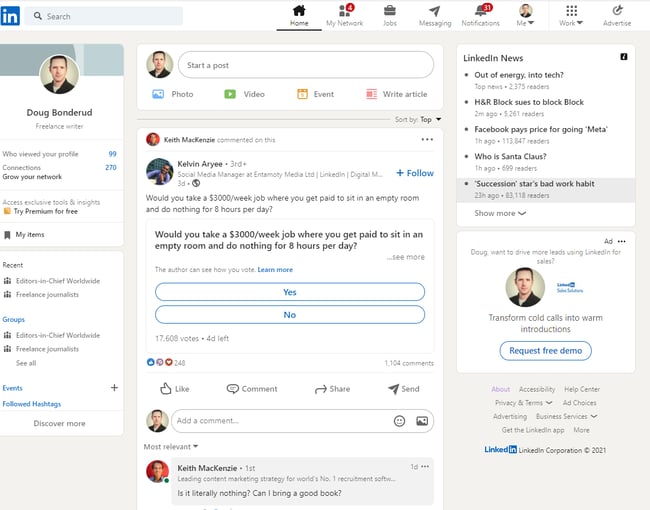 First, sign into your Campaign Manager. To do this, head to your personal or company LinkedIn profile and look for Advertise in the upper right-hand corner. Click it, and you’ll be taken to the Campaign Manager page.
2. Select Your Ad Account.
Now you need to select your ad account. In the example image below, there’s only one ad account but if you have more than one, make sure you’re selecting the one that’s associated with the right campaign and website.
3. Click on the Account Assets dropdown.
Once you’ve selected your account, look for the Account Assets tab on the right-hand side of the top navigation menu. Click it to get the next dropdown menu and select Insight Tag.
4. Select Install my Insight Tag.
If you don’t have any Insight Tags installed, click on the blue button that says Install my Insight Tag.
5. Decide how you’ll install the tag.
You have three options when it comes to installing your tag: You can do it yourself, send the tag to a developer or use a tag manager — such as Google, Adobe, or Tealium — to install the tag.
6. Copy the tag.
If you decide to do it yourself, click I will install the tag myself and then copy the code in the code box that appears.
7. Add the code to every page.
Now you need to paste the Insight Code tag on every page in your domain. LinkedIn recommends pasting it just above the closing HTML <body> tag in the global footer.
8. Check that the process worked.
Finally, head back to the Insight Tab page in your Campaign Manager and make sure your domains are listed. As noted by LinkedIn, this could take anywhere from a few minutes up to 24 hours.
Linking Outside the Box
The LinkedIn Pixel makes it possible to connect ad campaign performance with LinkedIn-referred traffic, in turn making it possible to better understand how your ads are performing and also allowing you to follow up with LinkedIn users to help drive increased conversions.
Ready to start linking outside the box? Opt for the LinkedIn Insight Tag.