
Welcome to My Blog
Will Marketers Return to Offices in 2021? What Companies Need to Know [Data + Expert Tips]
Back in 2018, I chose to work at HubSpot because I loved HubSpot’s content, and its culture.
Oh — and the smoothie bar, waffle Wednesdays, and ping pong tables didn’t hurt, either.
Office space has undeniably seen a change in recent years. Open-floor plans have become increasingly popular, as have standing desks, beer on-tap, game rooms, and even greenhouse spaces. As this decade came to a close, many of my closest friends chose jobs based, at least in part, on office vibe.
And yet, it’s long been said that remote work is the future. In fact, HubSpot has been touting the benefits of remote work since 2012 in its Culture Code, which states: “Work isn’t a place we go, it’s a thing we do.”
In 2020, that premonition became a reality as the pandemic forced an entire global workforce to shift to remote work practically overnight.
And now, as the dust settles and employees find new, innovative ways to work productively from home, many businesses are wondering: Do we even need an office, anymore?
Let’s explore how marketers across the U.S. feel about remote work in 2021, and whether remote work is just a current necessity — or the new long-term reality.

Will employees return to the office?
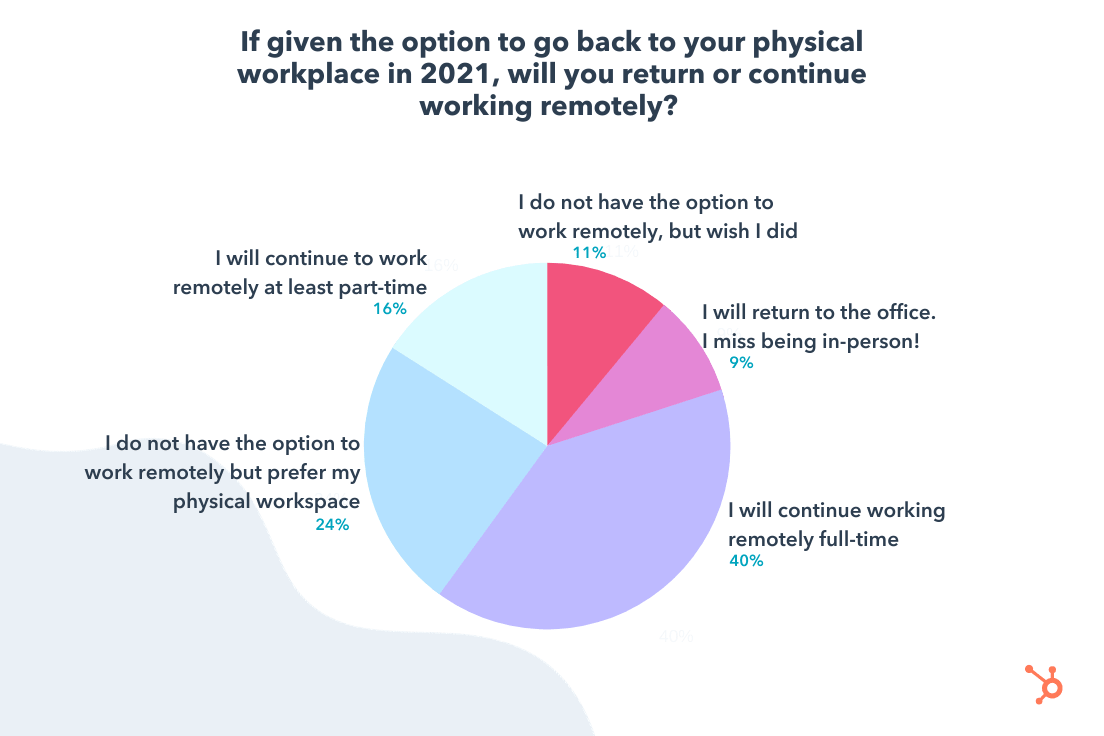
To explore whether or not employees will return to the office in 2021 (if they’re permitted to do so), I started by surveying 496 marketers and asked the question: If given the option to go back to your physical workplace in 2021, will you return or continue to work remotely?
The results were split roughly in half. 40% of marketers will continue to work remotely full-time — and the remaining 11% don’t have the option to work remotely, but wish they did.
However, that leaves 49% of marketers who do want the option to work in an office space, at least part-time.
Let’s break down that 49% for a second: out of that 49%, 24% of marketers don’t have the option to work remote, but prefer their office space anyway; 9% want to return to the office as soon as it’s possible to do so; and 16% prefer a flexible schedule so they have the option to do either.
Other research supports this trend. Pew Research Center surveyed over 10,000 U.S. adults and found 54% of workers want to continue working from home after the pandemic ends. A third echoed they’d like to work remotely at least partially — while just 11% said they’d like to return to the office full-time.
HubSpot’s employee data highlights this shift as well, with many employees now preferring remote work over in-office — in fact, two-thirds of HubSpot employees plan to work remotely more often even after offices re-open, and approximately 16% plan to shift to fully-remote for the first time.
I spoke with Meaghan Williams, HubSpot’s Remote Work and Inclusion Program Manager, to get a better sense as to why many marketers may want to remain remote even after the pandemic has ended. She told me: “Before COVID-19 forced everyone to work from home, a ‘work from home day’ for an office-based employee was often scheduled on a day where perhaps they had appointments, deliveries, or weren’t feeling well.”
“‘Work from home’ quickly became equated with low productivity, distraction, and working from one’s couch. With the long-term commitment to working from home, I suspect many folks have found a way to carve out a productive work space, create a routine, and make the most of their working hours to enable more productivity.”
Williams says, “Working remotely is not for everyone, but for some, the ability to focus without the distraction of the office or freedom to be able to jump on your laptop when creativity strikes (rather than try to hold onto the idea while sitting in traffic!) may have them hooked on remote for the long-haul.”
Of course, logistics will factor into an employee’s decision to return to an office, as well. For instance, many businesses are selling their office spaces and subsequently forcing employees to become fully-remote; alternatively, some companies are relocating to satellite offices, or simply reducing the amount of office locations they own globally.
Ultimately, the data suggests that many employees will want to remain remote after the pandemic has ended, but others will prefer having the option to return to an office.
Which poses a unique challenge: How can companies meet all its employees needs, when those needs seem split so evenly down the middle?
Many companies (HubSpot included), will be increasingly interested in creating a hybrid experience — meaning, employees will have the option to remain fully-remote, return to the office full-time, or experience a little of both.
Let’s dive deeper into what this data means for marketing managers, next.
What the Data Means for Marketing Managers
If you’re in a management position, you’ll likely find that many of your employees want to remain remote even after the pandemic has ended.
Remote life has its perks. For instance, Vrnda LeValley, a Customer Training Manager at HubSpot, told me, “I plan on staying totally virtual because I enjoy using my commute time to meditate and mentally prepare for my day. Additionally, I love the flexibility to work from anywhere.”
“I like that working remotely frees up my ability to select places to live that truly support the inclusive and diverse experience that is so important when establishing a sense of community and belonging.”
Additionally, Leslie Green, HubSpot’s Senior Social Media Campaign Manager, says, “I decided to move to a fully remote employee during the pandemic to be closer to my network and to choose my home, not based off my job, but where I actually want to live. Being near my network and in a city (Austin) that fits my lifestyle allows me to ‘show up to work’ as my best self daily.”
Remote life offers employees the flexibility to work where, when, and how they want; and it enables companies to attract talent from across the globe without barriers like physical proximity to an office remaining a factor in hiring decisions.
However, there are certain challenges you’ll face when leading a remote team — many challenges of which have been highlighted during the 2020 pandemic-activated shuffle. Let’s dive into a few of those, now.
1. Marketing managers will need to invest in high-quality remote tools and platforms.
If you’re managing a remote team, you’ve likely come across some unique challenges regarding communication and technology.
For instance, 39% of employees believe their transition to remote work would be improved with better remote tools and platforms to communicate and collaborate.
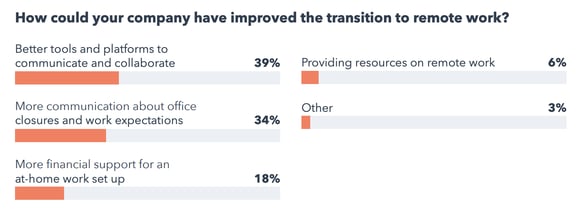
High-quality video conferencing tools, messaging platforms, and task and project management software are necessary for ensuring your team continues to perform well regardless of where they work in 2021 and beyond.
Additionally, collaboration tools like Google Suite or Microsoft Office Teams can help you align your team on your company’s vision and the specific functions your team needs to complete to help your company grow over the next year.
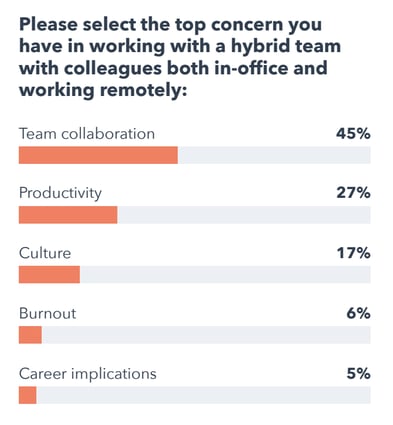
With 45% of remote employees worrying about team collaboration when it comes to working with colleagues both in-office and remote, it’s critical you continue to invest in tools that help you create alignment regardless of where each team member works.
2. Marketing managers should continue prioritizing remote employees’ growth.
As a manager, it’s critical you ensure your employees feel they’re continuing to grow in their roles even when fully-remote.
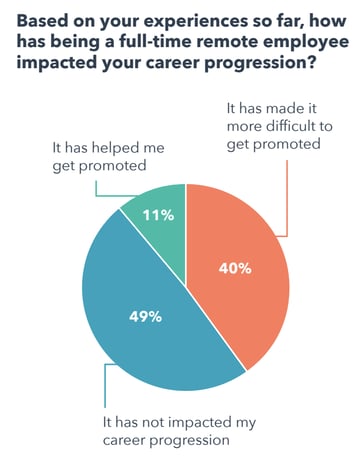
Seeking out unique growth and development opportunities might feel more difficult when working remote than in-person — in fact, 40% of remote employees feel remote life has negatively impacted their career progression:
To continue facilitating your employees’ growth over the long-haul, it’s critical you set up yearly or bi-yearly performance and career growth conversations, even when working remotely.
Additionally, consider how you might implement task-tracking or project management documentation to stay on-top of your employees’ progress when you ask them to perform certain marketing activities, since you no longer have the privilege of watching them excel in-person.
Standardizing the tools you use to track your team’s progress can help you quickly identify high-performers on your team and reward them accordingly.
3. Marketers need to lead with empathy.
Your team is dealing with a highly-stressful and difficult time — and not just professionally.
Many team members are likely juggling childcare, mental health stressors as a result of the pandemic, and other major deterrents to their daily work. In fact, 46% of employees surveyed say their work performance has been negatively impacted due to changes at home as a result of COVID-19:
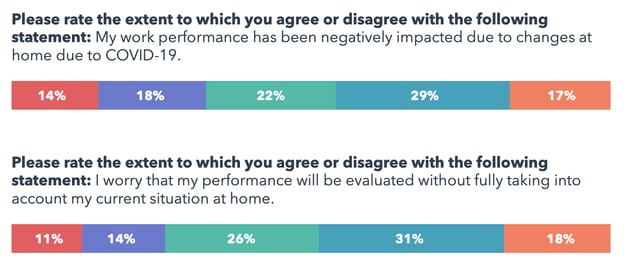
Additionally, roughly 50% of employees worry their performance will be evaluated without taking those challenges into account.
A good manager leads with empathy — when having weekly discussions with your employees or even performance reviews, it’s vital you take the time to understand outside factors that could contribute to less-than-ideal performance, and keep those factors in-mind when evaluating your employees’ performance.
Additionally, understanding your employees’ situation could help you recognize areas you might be able to support them as their leader. For instance, if you know an employee is on “childcare duty” in the mornings, it’s important you take the extra step to ensure you’re not Slacking them during that time or scheduling meetings they can’t attend.
These small details could go a long way towards creating a healthier, more productive work-life balance for all your employees.
While these tips should help you as you learn to lead a remote team, you’ll likely come across some unique challenges as offices reopen and businesses segue into a hybrid workplace. Next, let’s explore some expert tips on how you can create — and embrace — a hybrid workplace for the long-term.
Expert Tips on Creating Hybrid Workplaces
To explore how businesses can create hybrid workplaces in 2021 and beyond, I spoke with Eimear Marrinan, HubSpot’s Director of Culture.
She told me: “One of the biggest things to consider is how to effectively create a culture that enables productivity and, ultimately, engagement in a hybrid work model.”
Marrinan adds, “Being proactive in thinking critically about your culture will make or break many organizations this year.”
When you’re beginning to consider how you might create a hybrid workplace, there are a few factors Marrinan encourages leaders to keep in-mind. These include:
- Create a truly inclusive environment, one that is equitable regardless of location. That means being really purposeful and intentional about how you engage with employees — tactical things like holding team meetings or offsites virtually if not all employees are in-office, leaning into virtually inclusive events and programmings so the experience is the same regardless of where you sit, and making sure any perks and benefits are location-agnostic and not dependant on an office location. For instance, we announced at HubSpot in 2021 and 2022 any new benefits and perks can be enjoyed regardless of location.
- Culture is not tied to an office — it is rooted in an organizations values and behaviors. Making sure that you have the right values and behaviors in-place to begin with becomes so important as organizations shift to hybrid. Bring your culture back to the basics, and consider the fundamentals — e.g. having a culture of flexibility, adaptability, and empathy.
- Ask your employees for feedback. At HubSpot, we invest in seeking feedback from our employees upfront regarding what they value, what they want, and what concerns they have. Listen to your employees — and not only listen, but act on the feedback. This is new for so many companies, so we can’t just assume we know all the answers … we most certainly don’t.
Tamara Lilian, HubSpot’s Manager of Culture and Experience, echoes Marrinan’s advice, adding, “Creating an effective hybrid workplace will take full commitment from the business, along with adaptability and empathy. No matter how strong your in-office experience was prior, this culture you value so deeply will not translate to a hybrid world on its own.”
Let’s explore a few other tips when it comes to creating a hybrid workplace, from marketers and leaders in the industry working to embrace the hybrid experience.
1. Make intentional decisions with the hybrid experience at the forefront of your mind.
Tamara Lilian, HubSpot’s Manager of Culture and Experience, suggests making intentional decisions from the get-go to ensure remote work isn’t just an afterthought in your planning: “Before you create any experience for your employees in a hybrid world, you first need to nail being proactive versus reactive, and really be intentional on your approach to the experience.”
She adds, “Zoom links, considering timezones, and being mindful of an employees work-from-home environment can no longer be an afterthought — these have to be built into your approach from day one.”
To truly invest in a hybrid environment, it’s vital you make decisions without preference towards those at-home or in-office. Instead, you’ll want to create an experience your employees can enjoy from anywhere.
2. Shift your current employee offerings to meet their new needs, and include employees in your process.
A few years ago, most of HubSpot’s onboarding trainings were in-person, which meant you needed to fly to an office and stay in a hotel to attend them.
Now, the trainings are entirely remote.
It’s critical, as you move to a hybrid model, that you figure out how to shift your current offerings so they can offer equal value regardless of a person’s physical location.
Lilian asks, “How can you shift your current offerings to meet your employees’ needs in a hybrid world — for instance, perhaps you consider how you can pivot your growth and development offerings to more of a self-serve model where folks can engage with resources when and where is best for them, and not on your timezone or schedule.”
3. Allow flexibility in your employees’ schedules.
Ivelisse Rodriguez, a Historical Optimization Specialist at HubSpot, urges employers to encourage flexibility when switching to a hybrid workplace.
She told me, “One of the principal benefits of being remote is the ability to create a unique work schedule. When companies remain inflexible — i.e. expecting employees to log in exactly at 9 AM or constantly checking in on them on Slack to see if they’re online — they take away one of the principal benefits of being remote.”
“Remote workers lose social contact, office banter, and in-person camaraderie, but the flexibility makes up for that. Stay flexible, trust your employees to get their work done, and don’t get obsessed with someone’s ‘online’ status. Whether they’re online or not has no bearing on whether they’re actually getting work done.”
4. Remote workers shouldn’t be the exception to the rule.
HubSpot’s Senior Director of Creative, Dmitry Shamis, told me: “I was remote before the pandemic, but something I learned during the last year is that remote doesn’t have to be the exception to the rule.”
“I used to travel the office once a month thinking it was a must for keeping the team together and showing people that I’m accessible, and now that there’s no office I realize how much time I wasted with TSA, weather delays, hotel check-ins, etc. — plus, how much forced activity needed to happen when I was around.”
“From here on out, I think when the team does get together (and keeps it virtually inclusive), it will be a lot more genuine. People need to learn not to lean on a physical office space as a crutch — there are better ways to connect with people regardless of location.”
5. Encourage your employees to take advantage of the perks of remote meetings.
Stephanie Worley, Microsoft Advertising’s Global Brand Storytelling Leader, told me how important it is for her and her team to set boundaries regarding work and home life: “People are certainly working long hours these days. In my role at Microsoft Advertising, I spend my day connecting with colleagues, customers, and partners around the world. Microsoft Teams has become the glue that connects us and supports our conversations and collaborations through video calls, chat, and sharing documents.”
She adds, “One thing we’ve realized during this pandemic is that without the normal work transitions of a commute, walking between meetings and walking to the break room, we can easily sit in front of our desks from early morning to late in the night if we don’t set some boundaries for ourselves.”
Additionally, she says she’s personally found it helpful to take some meetings outside for the fresh air and new perspective: “Microsoft Teams is mobile, which allows us to participate in meetings and collaborate with peers from anywhere. I have begun a new practice of taking a walk during meetings. A daily walk during a meeting helps me get out, get some fresh air, exercise, and stimulate some more creative thinking.”
As your team adjusts to a hybrid setup, consider encouraging each employee to switch up where they take meetings. Whether you’re in-office or remote, a hybrid team gives you all the flexibility to take meetings on-the-go.
6. If feasible, offer at-home stipends. Additionally, prioritize your employees’ mental health as they adjust to this new normal.
Christina Mautz, Chief Marketing Officer & Head of Sales at Moz, shared a few critical components she’s used to help her team adjust over the past year.
She told me, “Moz operated as a remote-first company prior to any changes mandated by the pandemic. We’ve found employees work best when office culture prioritizes things like accountability, empathy, and transparency. Those values are so much more important than asking our teams to be at their desk for a set amount of hours per day.”
“That being said, ‘remote work’ means different things to many different people. The young colleague who is fresh out of college may not have a dedicated office space in their home, while new or working parents might feel the conflict of juggling day-to-day tasks against sharing the same space with their virtual-learning children. To help, Moz offers stipends for home internet, mobile phone service, plus a $500 home office reimbursement.”
Above all, she notes the importance of prioritizing your employees’ mental health: “We’ve addressed the many life-changing experiences we’ve all lived through publicly and made sure our employees know they can speak with HR and leadership openly. We’ve also reminded Mozzers of our Employee Assistance Program that provides mental health benefits for those in need.”
“And, while it might seem easier to work remotely compared to commuting to the office, our team managers encourage employees to take care that work (because it’s now happening at home) doesn’t take over. As a global office across many time zones, not every question gets an immediate answer. Project progress and KPIs still rest on shoulders; but, as an organization, we’ve shared that we know our staff can’t go at 100% all the time.”
Moz’s CMO told me, “Each of these components are intended to help our employees thrive in whatever ‘office’ they are in — during these isolating times, and long after.”
The good news? This “new normal” is offering companies the chance to truly redefine their values and enable employees to make their own decisions regarding where, when, and how they perform best.
The companies that come out on top will be the companies that listen and grow with these global changes to continuously improve workplace culture.
Trust us: Your employees will thank you.


Epic Games antitrust complaint filed against Apple in Europe, after US and Australia

An Epic Games antitrust complaint has been filed against Apple in Europe, following similar ones in the US and Australia.
In this latest one, Epic claims that “Apple has not just harmed but completely eliminated competition” in iOS and iPadOS apps…
The post Epic Games antitrust complaint filed against Apple in Europe, after US and Australia appeared first on 9to5Mac.
Have Long & Unproductive Meetings? Try a Stand-Up Instead
We’ve all been in meetings that were about 30 minutes too long.
We laugh at “this could’ve been an email” GIFs, sigh, and continue with our days.
Yet, the truth is, unnecessary meetings are costing us way more than just time. Doodle’s 2019 State of Meetings Report estimated that poorly organized meetings are costing U.S. companies $399 billion.

One to two unnecessary meetings a week might seem insignificant, but when you consider a whole year’s worth of meetings, the impact is considerable.
As more companies move toward remote work, the number of meetings are also increasing. So, how can teams ensure their meetings stay productive? Stand-ups are one way to solve that.
To understand why stand-ups exist, you first have to understand the agile methodology.
For a long time, many companies were using a waterfall model for projects. This meant that teams would tackle projects one stage at a time and assume that requirements would stay the same through development. The issue with the waterfall approach is that:
- Teams are not always aligned.
- Unclear requirements often delay progress.
- Testing only begins after development is done.
Agile is built around iterative development, which makes teams more involved in the project’s progress. Teams work in sprints and through stand-ups, issues are addressed quickly and efficiently.
Stand-ups are typically daily. However, some teams have them on a less frequent basis. To maintain the benefits of the process, a stand-up meeting shouldn’t happen less than once a week. The main reason is that it makes it harder to track everyone’s progress and address roadblocks as they appear.
We also know that business priorities can change quickly. Having stand-ups too far apart can create information gaps between teams and slow delivery timelines.
Stand-Up Meeting Format
During a stand-up meeting, each team member should answer the following questions:
- What have you worked on since the last meeting?
- What are you working on now?
- Are there any blockers impeding your progress?
Regular updates help team members and leaders track everyone’s progress and assess what needs to be done to meet sprint goals.
Let’s use my role as a writer on a blog team as an example.
During a stand-up, here’s what I would say: “Yesterday, I finished writing X article and completed my second draft for Y article. Today, I will work on uploading Y article to the content management system (CMS) and will draft two outlines for new articles. My current obstacle is that I lost access to the CMS and need to connect with someone from IT to regain access.”
From there, my manager could suggest connecting me with a specific engineer on the IT side and follow up with me after the stand-up. Following this format gives everyone involved in the meeting a clear overview of what you’re working on and how that will affect the sprint.
Stand-Up Meeting Best Practices
1. Keep the meeting short.
If your stand-up meeting is an hour, you’re doing it wrong. This type of meeting is meant to keep all team members synced up. It is not a meeting to plan, problem-solve, or brainstorm.
Ideally, your stand-up will be between five and 15 minutes. While that may sound short, it works out well when everyone stays on task. That’s why everyone should prepare what they will say beforehand and stick to the script.
To keep the meetings productive, have your scrum master or team lead keep track of time and step in whenever necessary to move things along.
2. Follow-up after the meeting.
As mentioned before, stand-up meetings have very defined goals: to know everyone’s main focus and determine roadblocks that may affect the sprint.
Once issues have been identified, follow-up meetings with smaller team members can be scheduled to address them, whether it’s to brainstorm solutions or resolve them.
For instance, let’s say during your stand-up, your team’s UX designer says they have a roadblock with the app design requirements and need more instruction from the product owner. While it’s great to mention the issue, the stand-up is not the time to get into the details. Skip the problem solving and save that for a follow-up meeting with said product owner.
3. Keep it consistent.
Imagine attending a meeting every day and having no idea what to expect. It’s unsettling at best, chaotic at the worst. For stand-up meetings, three things must stay the same:
- The agenda – There are only three main areas a stand-up should cover: yesterday’s outcomes, today’s priorities, and current obstacles.
- The frequency of the meeting – If the meetings are irregular, how will team members stay on the same page? When you skip meeting days, things can fall through the cracks and lead to more issues down the sprint.
- The time length – Fifteen minutes is the magic number for stand-ups. Make them much longer and it turns them into something else that likely won’t be as productive.
Stand-Up Meeting Ideas
1. Actually stand up.
Have you ever let out a sigh when first sitting down for a meeting? Not because you’re dreading it but because you know it’s going to be a long one and you’re getting comfortable.
Well, that’s exactly what you want to avoid during a stand-up meeting. The reason why they are called stand-ups is that they’re meant to be quick. So quick, in fact, that you could be standing up. If your team is having trouble staying on task, take the no-chairs approach.
Have everyone stand up while each person presents. This will help ensure everyone gets to the point and doesn’t stray off-topic.
2. Use a prop.
Instead of following the go-around-the-table order, have someone start with a prop, like a ball or squeaky toy. Once they’ve presented, they’ll throw it to someone else. It will continue going around the room until everyone has gone.
Props can be very useful during meetings, as they help attendees stay engaged. The anticipation of receiving the prop next can keep everyone on their toes. It’s easy to drift off when you know your turn isn’t for another 10 minutes. This strategy encourages focus while making things fun.
3. Incorporate an icebreaker.
Most stand-ups happen daily. However, if your team conducts them less often, it may be helpful to use an icebreaker to loosen everyone up.
It can be a joke, riddle, question, or GIF. On HubSpot’s blog team, we have a rotating team member ask a question to start the meeting off. Past questions have ranged from, “What is your dream vacation?” to “What would be the name of your memoir in six words?”
It starts every meeting off on a lighthearted note before getting to the nitty-gritty work details.
4. Use a messaging system for asynchronous stand-ups.
If you have team members in different time zones, you may not be able to find a time that works for everyone. That’s where messaging software like Slack or Microsoft Teams come in handy.
To set it up, build a bot or purchase an external bot tool (like GeekBot) that allows you to:
- Send daily prompts to your team based on their working hours.
- Collect their answers and send them to the team channel.
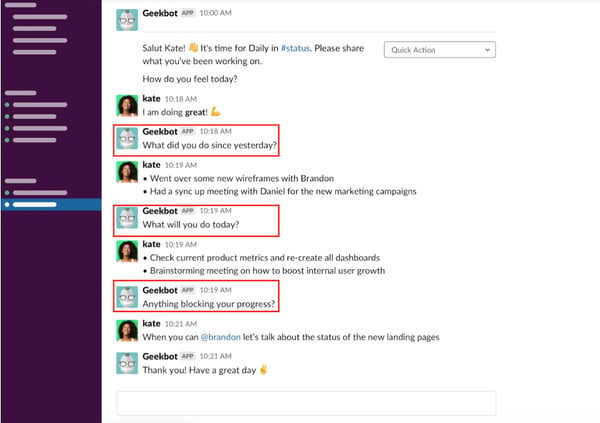
What’s great about this approach is that it keeps everyone on the same page while working within their schedules. The automation is also a huge time saver and streamlines the process.
Text-based stand-ups also help everyone stay on task. Face-to-face meetings, whether in person or virtual, can easily stray off-topic and be huge time wasters. By limiting the number of questions members get, it helps stick to the point and get the key information needed for the stand-up.
On that same note, they prevent side discussions that can steer the conversation off track. Team members can direct message each other or start a thread that won’t disrupt the flow of information.
Following the stand-up format may not remove the need for longer meetings. However, it can improve communication between your teams and keep everyone aligned on the goals of your projects.

Music streaming services pay $424 million in licensing fees, $163 million coming from Apple

The Mechanical Licensing Collective (The MLC) announced today that it has received a total of $424,384,787 in licensing fees from all music streaming services, which includes Apple Music, Spotify, and Amazon Music. Apple was responsible for $163,338,890 — which is the largest amount paid by all companies.
The post Music streaming services pay $424 million in licensing fees, $163 million coming from Apple appeared first on 9to5Mac.
App Store will require apps offering vaccination proof to be submitted by health authorities
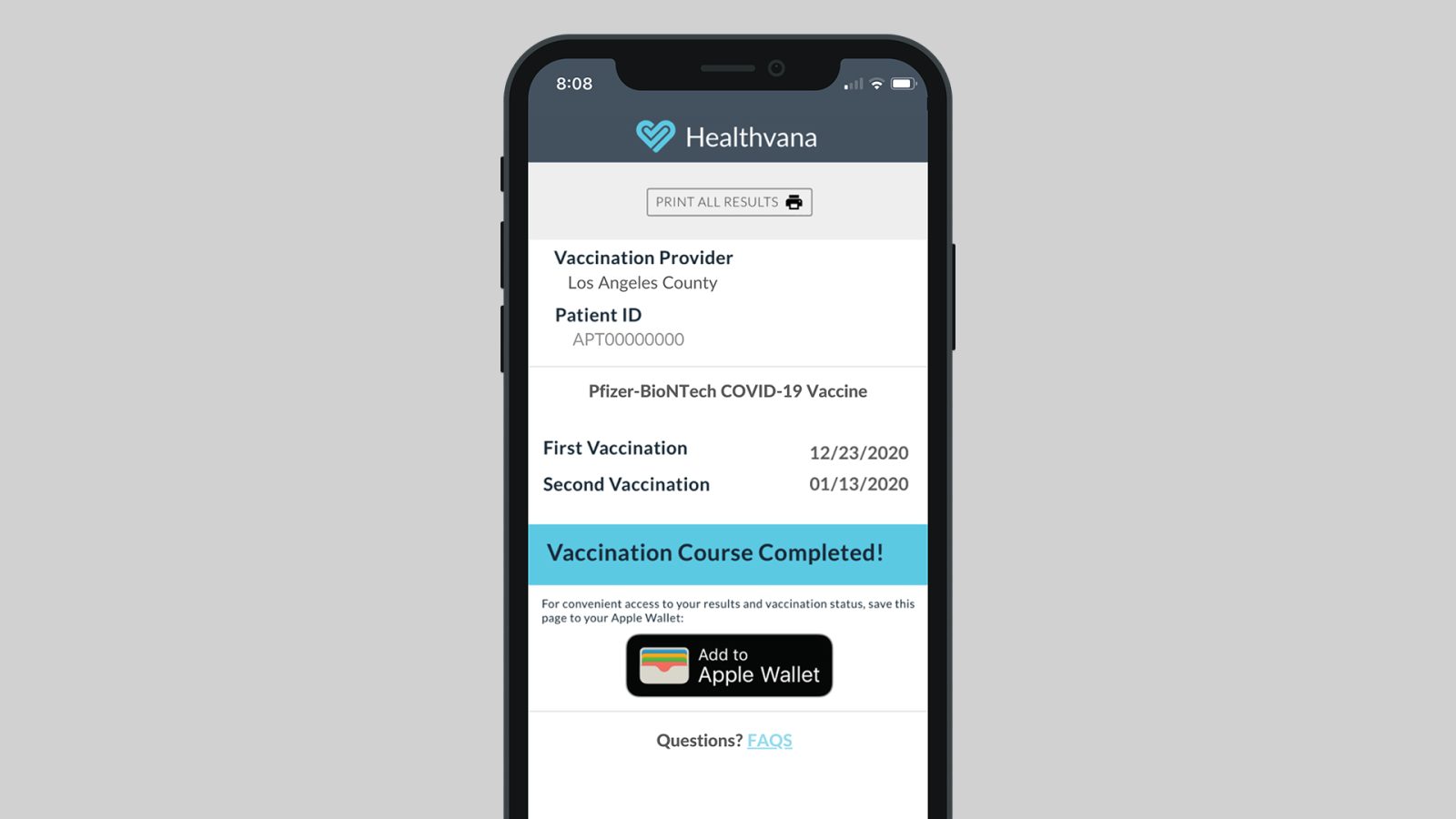
The vaccination against COVID-19 has started in several countries around the world, and we have already seen some apps that let users prove that they have taken the vaccine with just their iPhones. Now Apple is tightening the App Store rules to ensure that apps offering proof of vaccination are only submitted by health authorities.
The post App Store will require apps offering vaccination proof to be submitted by health authorities appeared first on 9to5Mac.
Apple will soon be able to repair iPhone 12’s rear glass without replacing the entire device

When an iPhone or other Apple device experiences hardware failures, Apple technicians perform an analysis of the device to determine whether it can be easily repaired or if the device must be entirely replaced. However, the company will soon be able to repair things like Face ID sensors and even cracked rear glass on iPhone 12 models without replacing the device.
The post Apple will soon be able to repair iPhone 12’s rear glass without replacing the entire device appeared first on 9to5Mac.
iOS 14.5 adds new Shortcuts actions for taking screenshots, changing orientation lock, more
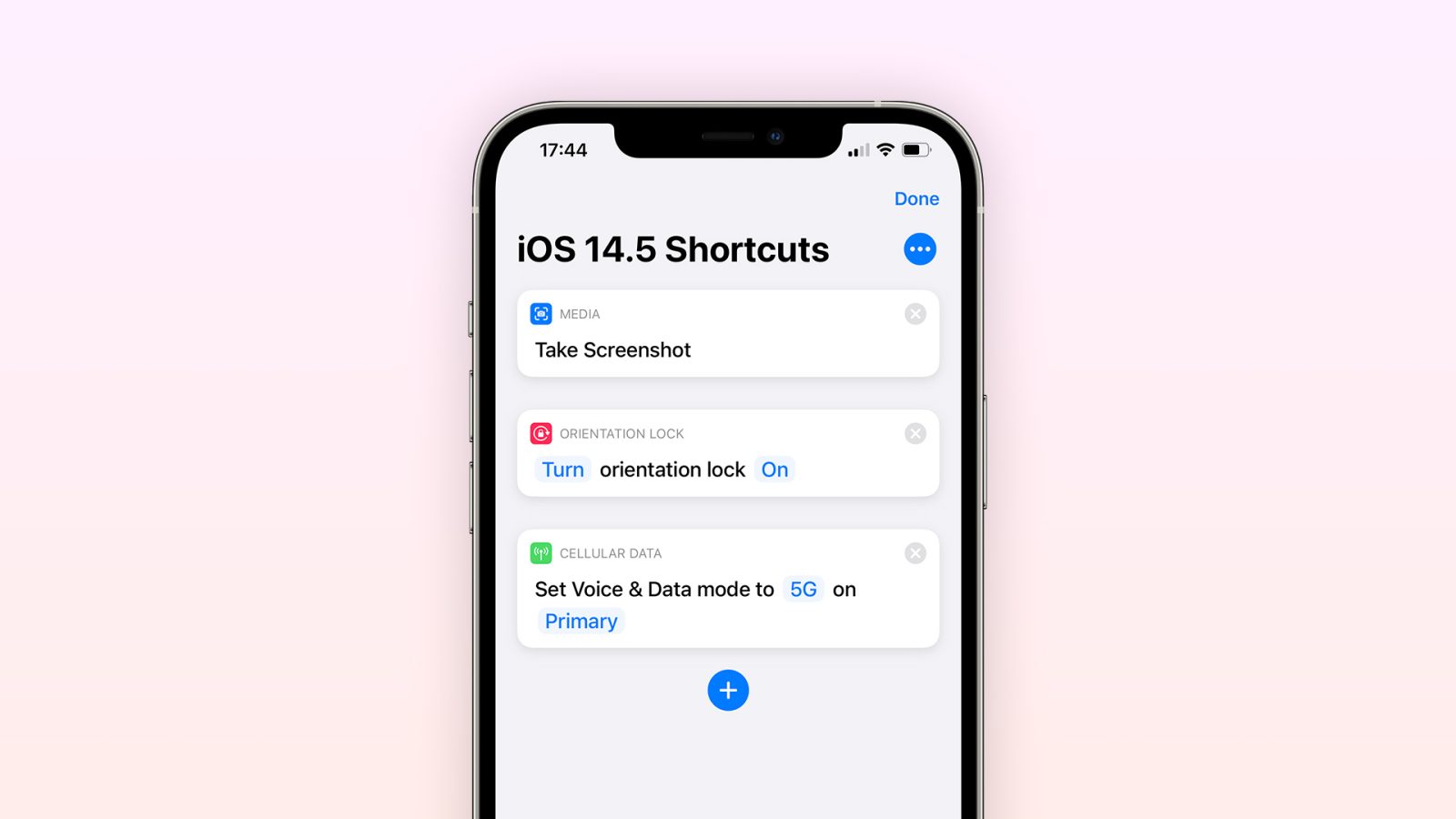
iOS 14.5 beta has been surprising us with several new features, including new options to unlock the iPhone using the Apple Watch, changing the default music player for Siri, and more. With the release of iOS 14.5 beta 2 earlier today, Apple added new actions to the Shortcuts app for taking screenshots, changing orientation lock, and even changing cellular data mode.
The post iOS 14.5 adds new Shortcuts actions for taking screenshots, changing orientation lock, more appeared first on 9to5Mac.
North Dakota senate votes down anti-App Store bill first given to lawmaker by Epic Games lobbyist

Last week we heard Apple’s take on a new North Dakota Senate bill that would have forced the company to allow iPhone owners to sideload apps and use alternative in-app payment options. Just today, the state’s senate has voted down the proposal but similar legislation is under consideration in Arizona and Georgia. It’s also come to light where the North Dakota bill draft legislation came from – an Epic Games lobbyist.
The post North Dakota senate votes down anti-App Store bill first given to lawmaker by Epic Games lobbyist appeared first on 9to5Mac.
Apple debuts new ‘Shared Values’ webpage telling the stories of individual employees
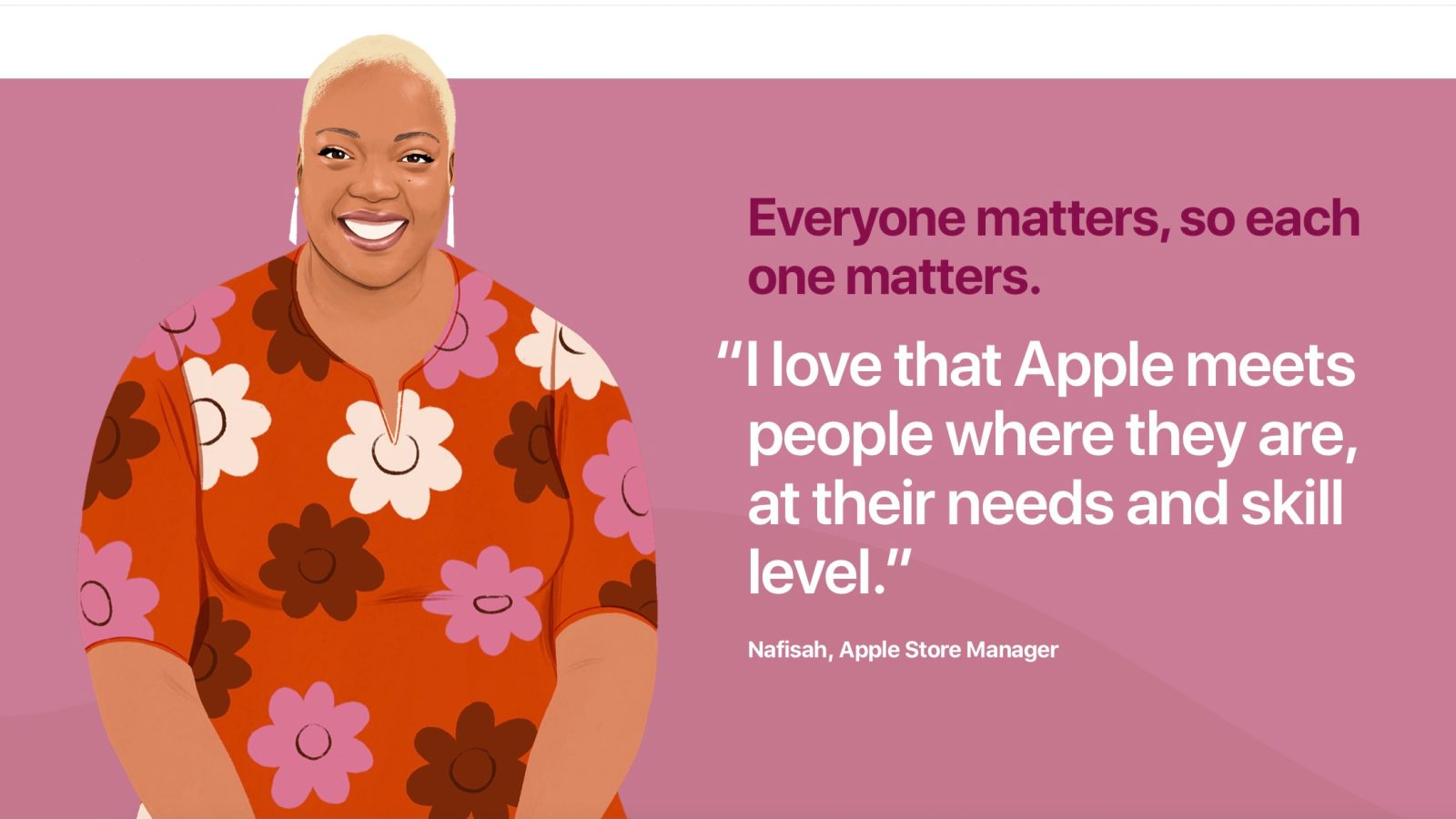
Apple has published a new “Shared Values” webpage today as part of its “Jobs at Apple” website. The new page tells the stories of Apple employees across various teams, including Apple Retail, Operations, Machine Learning, and more.
The post Apple debuts new ‘Shared Values’ webpage telling the stories of individual employees appeared first on 9to5Mac.
What’s new in iOS 14.5 beta 2? Music app changes, new emoji, more
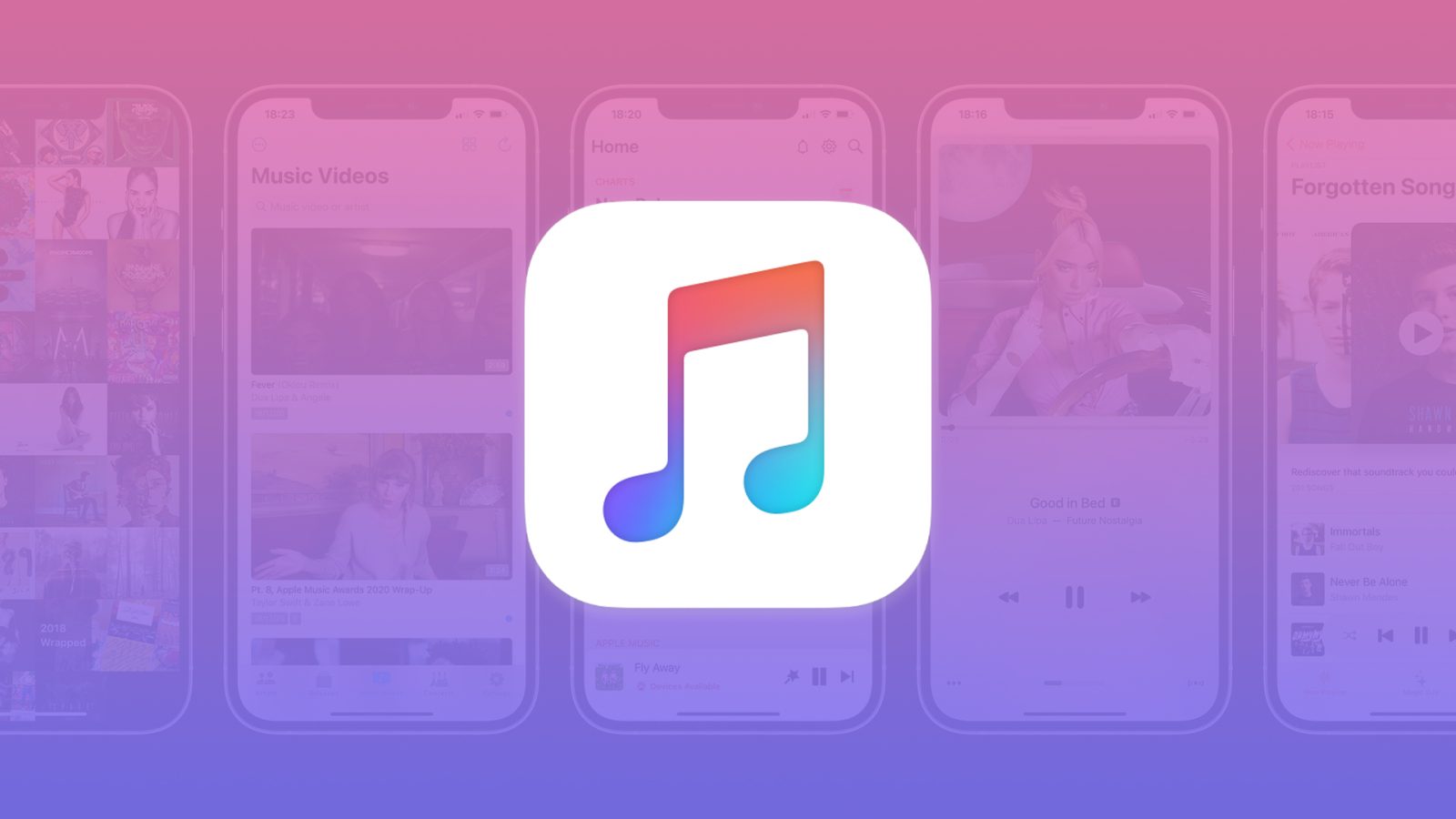
Apple has officially released the second beta of iOS 14.5 to developers, and it includes a handful of new changes and features compared to iOS 14.5 beta 1. There are changes to the Music app, new emoji, and more.
The post What’s new in iOS 14.5 beta 2? Music app changes, new emoji, more appeared first on 9to5Mac.
iOS 14.5 adds over 200 new emoji to iPhone, including AirPods Max-inspired headphone design
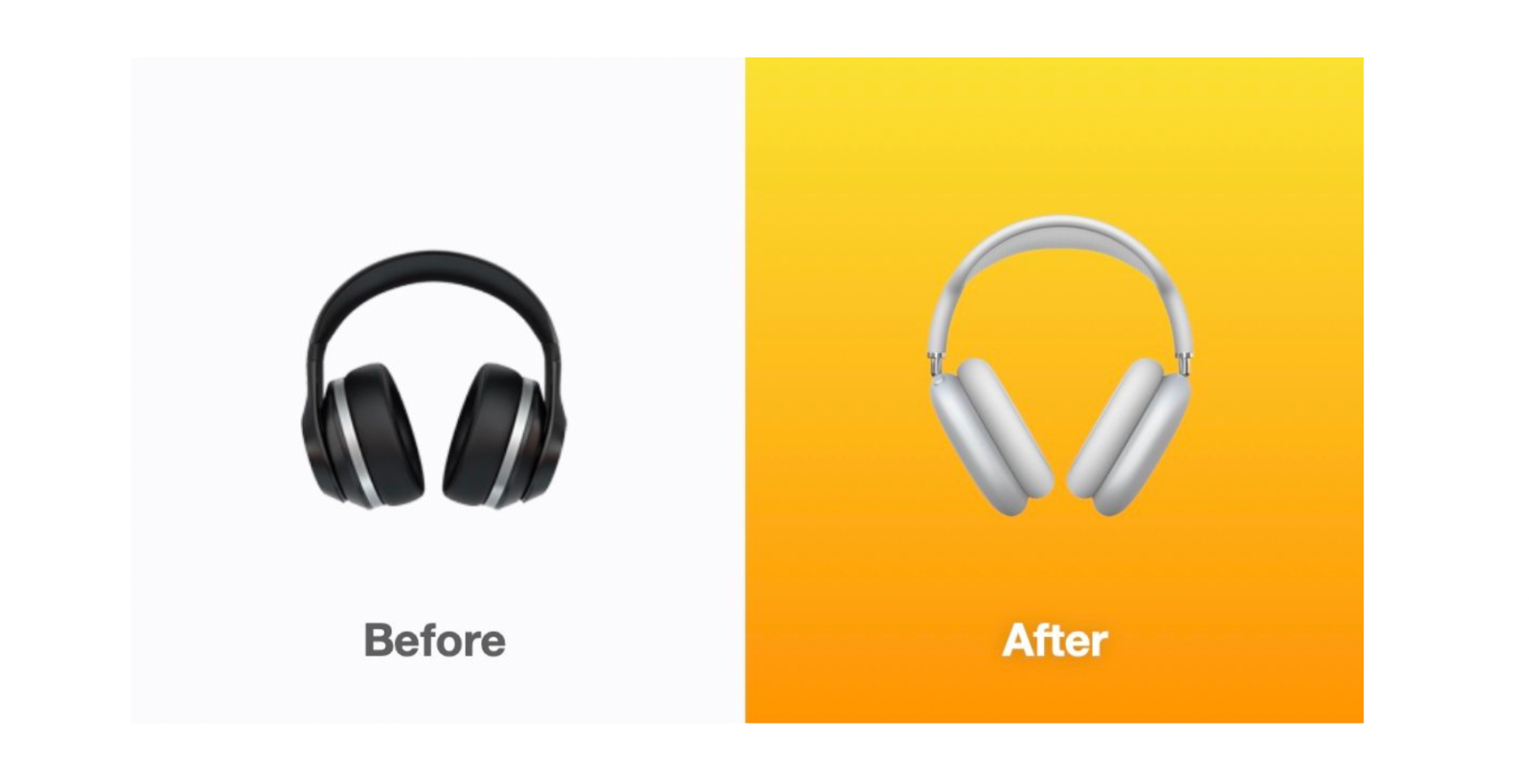
Apple released iOS 14.5 beta 2 for developers today and one of the changes that will certainly get a lot of attention is over 200 new emoji. Follow along below for a look at everything coming with the latest iOS beta update.
The post iOS 14.5 adds over 200 new emoji to iPhone, including AirPods Max-inspired headphone design appeared first on 9to5Mac.
Apple expanding iPad microphone privacy feature compatibility in iOS 14.5

Apple introduced a privacy feature for iPad Pro last year that physically disconnects the microphone when compatible cases are closed. Apple will soon expand this privacy feature to work through software more iPad models that don’t support mic hardware disconnection.
The post Apple expanding iPad microphone privacy feature compatibility in iOS 14.5 appeared first on 9to5Mac.
Deep dive looks at how Thread could be the future of HomeKit
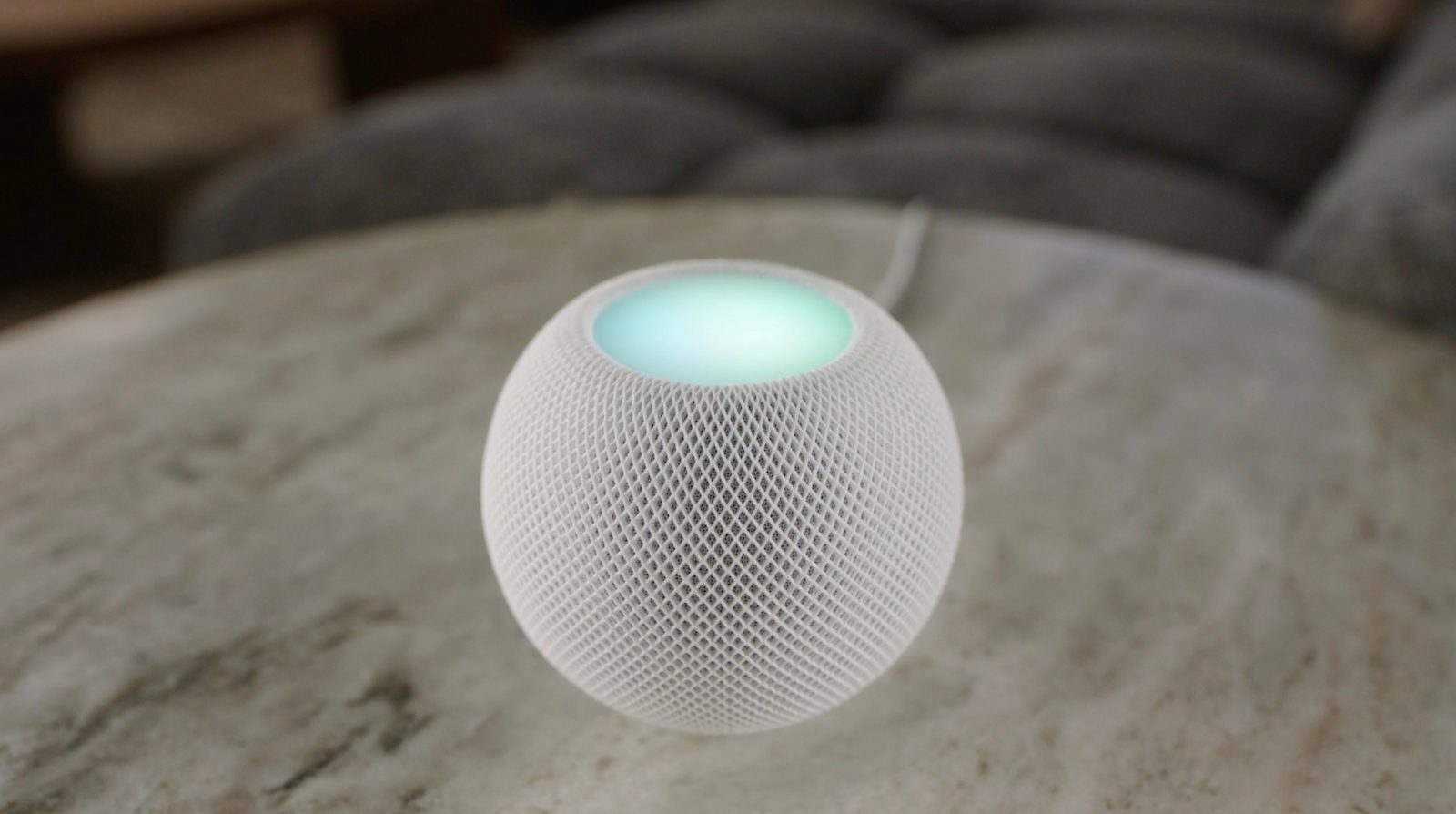
Thread has emerged over the last year as the latest way for smart home devices to communicate. Apple built-in support for the protocol with the HomePod mini and we’re seeing a variety of third-party smart home products from Eve and Nanoleaf introduce support. Now Eve has shared a nice deep dive on Thread, the advantages of the P2P smart home device protocol, and why it could be the future of HomeKit.
The post Deep dive looks at how Thread could be the future of HomeKit appeared first on 9to5Mac.
Apple Card adds exclusive deals on health apps for American Heart Month
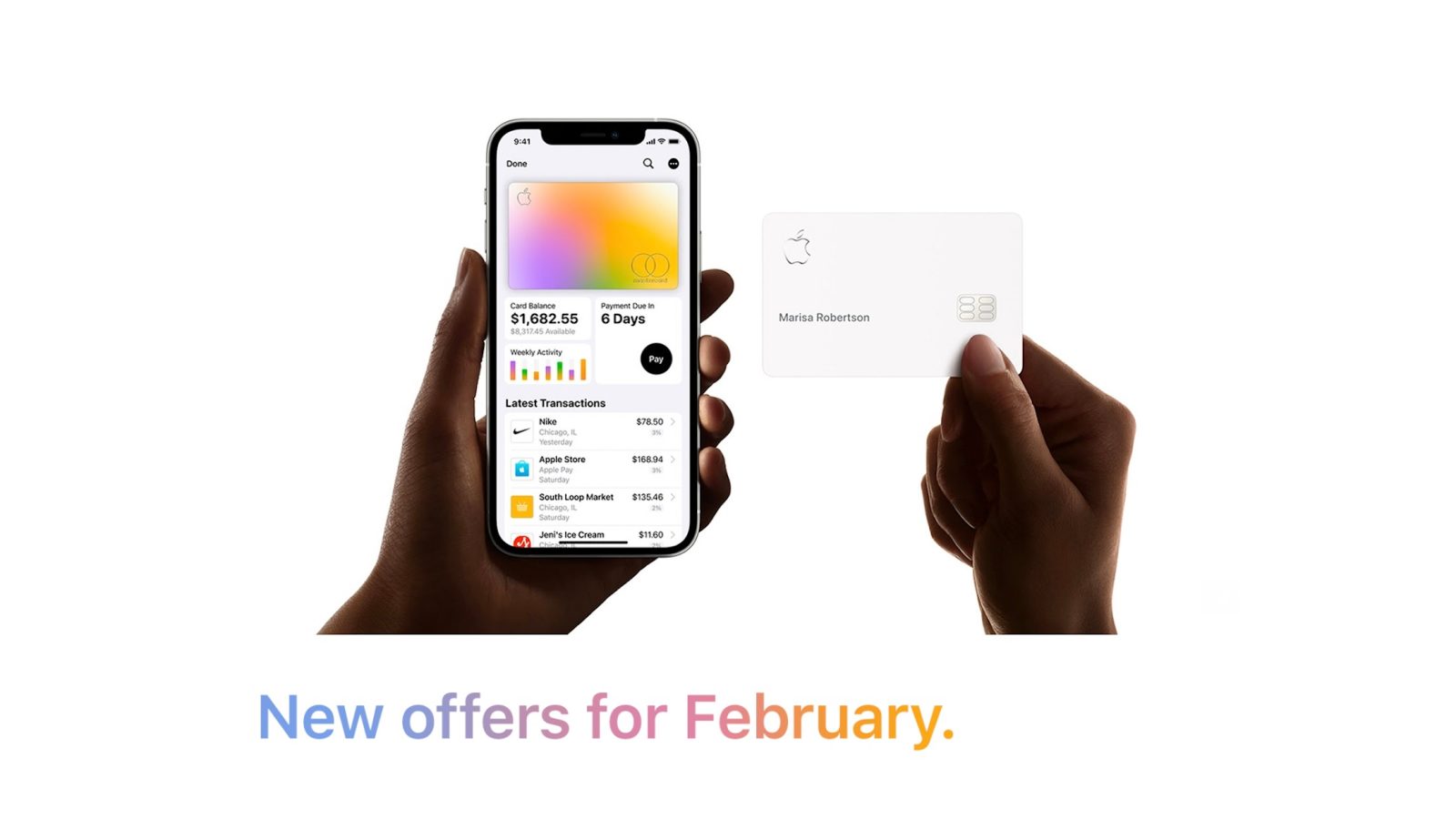
In honor of American Heart Month this February, Apple is adding a handful of limited-time new benefits to Apple Card. This includes savings on popular apps such as Strava, Sleep Cycle, and more. Apple announced the new promotions in an email today to Apple Card holders.
The post Apple Card adds exclusive deals on health apps for American Heart Month appeared first on 9to5Mac.
Apple releases watchOS 7.4 beta 2 for Apple Watch to developers
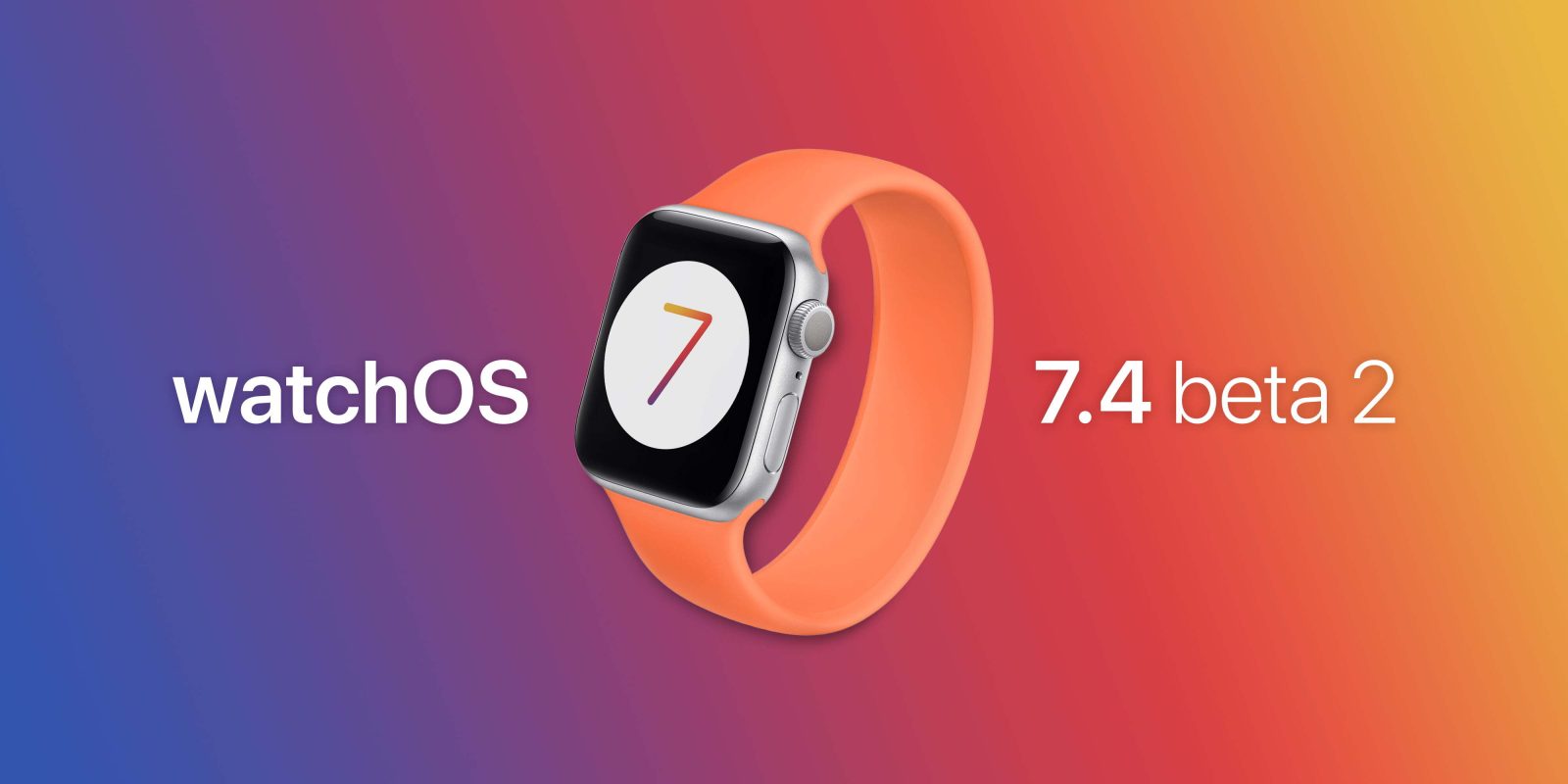
Alongside the release of iOS 14.5 beta 2 today, Apple is also releasing the second developer beta of watchOS 7.4. This update includes the corresponding watchOS features to unlock your iPhone with your Apple Watch while wearing a mask.
The post Apple releases watchOS 7.4 beta 2 for Apple Watch to developers appeared first on 9to5Mac.
iOS 14.5 beta 2 now available with Apple Watch Unlock, new Apple Maps features, more

iOS 14.5 beta 2 is rolling out today to developers alongside the second beta of iPadOS 14.5. The update, which includes includes a variety of new features for iPhone users, was first released over two weeks ago on February. Head below for everything you need to know.
The post iOS 14.5 beta 2 now available with Apple Watch Unlock, new Apple Maps features, more appeared first on 9to5Mac.
Deals: Apple Watch Series 6 $69 off, Speck iPhone 12 cases from $20, more

Today’s best deals are headlined by Apple Watch Series 6 models at $69 off, as well as Speck iPhone 12 cases starting at $20 and Plugable’s 7-in-1 USB-C Hub for $22. Hit the jump for all that and more in the latest 9to5Toys Lunch Break.
The post Deals: Apple Watch Series 6 $69 off, Speck iPhone 12 cases from $20, more appeared first on 9to5Mac.
How to turn off iPhone without the power button

Have a broken Top or Side button? Follow along for how to turn off iPhone without the power button. We’ll also look at how to use AssistiveTouch to lock your iPhone screen and more.
The post How to turn off iPhone without the power button appeared first on 9to5Mac.