
Welcome to My Blog
The 11 Best Cover Letter Examples: What They Got Right
Let’s face it: A job search is, typically, anything but fun.
It’s almost as if it carries its own five stages of grief. At first, there’s denial of its demoralizing nature. Then comes the anger over either radio silence or rejection from prospective employers. Of course, there’s bargaining — “I promise to never complain about work again, if I can find a new job!”
That’s often followed by depression and the idea that one is simply just unhireable. Then, there’s acceptance: “This is awful, but I have to keep trying, anyway.”
But we have good news. It is possible to have a little fun with your job search — and maybe even make yourself a better candidate in the process. The magic, it turns out, could be in your cover letter.
It may be true that only 35% of recruiters admit that cover letters do not materially influence the hiring process for them, but that doesn’t mean yours has to contribute to that statistic. In fact, it might be that cover letters are deemed insignificant because so few of them stand out. Here’s an opportunity for you to exercise your creativity at the earliest stage of the recruitment process.
Personalization, after all, goes beyond replacing the title and company name in each letter you send to recruiters.
What does that look like in practice, and how can you make your cover letter stand out? We found six examples from job seekers who decided to do things a bit differently.
Note: Some of these cover letters contain real company names and NSFW language that we’ve covered up.
Best Cover Letter Examples
1. The Cover Letter That Explains ‘Why,’ Not Just ‘How’
We’ve already covered the importance of addressing how you’ll best execute a certain role in your cover letter. But there’s another question you might want to answer: Why the heck do you want to work here?
The Muse, a career guidance site, says that it’s often best to lead with the why — especially if it makes a good story. We advise against blathering on and on, but a brief tale that illuminates your desire to work for that particular employer can really make you stand out.
Source: The Muse
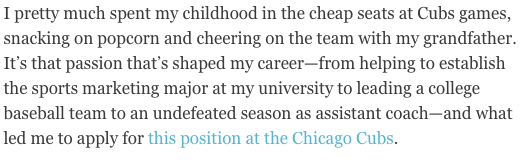
Here’s another instance of the power of personalization. The author of this cover letter clearly has a passion for this prospective employer — the Chicago Cubs — and if she’s lying about it, well, that probably would eventually be revealed in an interview.
Make sure your story is nonfiction, and relatable according to each job. While we love a good tale of childhood baseball games, an introduction like this one probably wouldn’t be fitting in a cover letter for, say, a software company. But a story of how the hours you spent playing with DOS games as a kid led to your passion for coding? Sure, we’d find that fitting.
If you’re really passionate about a particular job opening, think about where that deep interest is rooted. Then, tell your hiring manager about it in a few sentences.
2. The ‘We’re Meant for Each Other’ Cover Letter
This cover letter example is a special one because it was submitted to us here at HubSpot. What does the letter do well? It makes a connection with us before we’ve even met the letter’s author.
.png)
“Content Marketing Certified” indicates the applicant has taken the content marketing certification course in our HubSpot Academy (you can take the same course here). Our “records” indicate he/she did indeed give an interview with us before — and was a HubSpot customer.
The cover letter sang references to a relationship we didn’t even know we had with the candidate.
The letter ends with a charming pitch for why, despite him/her not getting hired previously, our interests complement each other this time around.
(Yes, the applicant was hired).
3. The Cover Letter with H.E.A.R.T.
HubSpot has a lot of H.E.A.R.T. — Humble, Empathetic, Adaptable, Remarkable, Transparent. Our Culture Code is the foundation of the company’s culture, the driving force behind our mission to help millions grow better, and serves as the scaffolding for our hiring practices. Recruiters at HubSpot look for applicants that demonstrate how they embody the Culture Code and job description, paying extra attention to cover letters that are super custom to HubSpot.
In another HubSpot submission, a HubSpot applicant writes about how she found out about HubSpot, why she likes the company, and how her professional experience aligns with H.E.A.R.T.
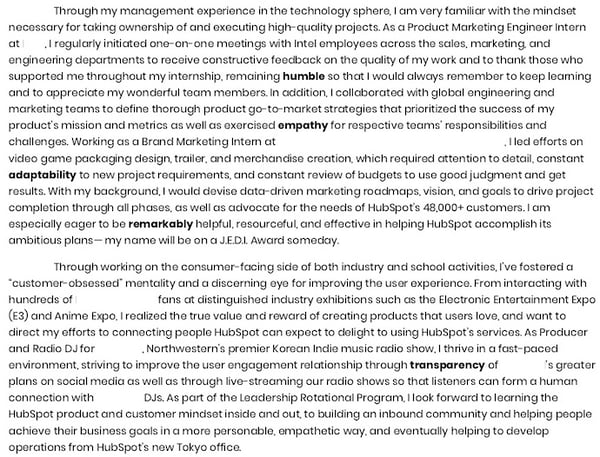
HubSpot’s recruiting team was impressed with her dedication to the company and how she went beyond what was asked for by link her portfolio in her closing paragraph.
Short Cover Letter Examples
4. The Short-and-Sweet Cover Letter
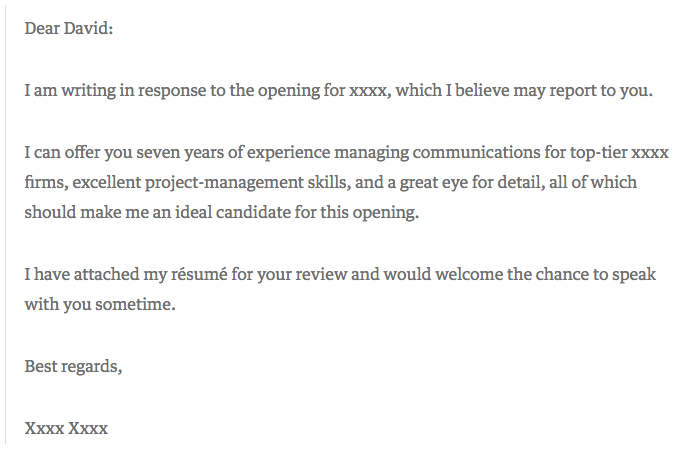
In 2009, David Silverman penned an article for Harvard Business Review titled, “The Best Cover Letter I Ever Received.” That letter contained three complete sentences, as follows:
Source: Harvard Business Review
One might argue that this particular letter is less than outstanding. It’s brief, to say the least, and the author doesn’t go into a ton of detail about what makes him or her qualified for the job in question. But that’s what Silverman likes about it — the fact that the applicant only included the pieces of information that would matter the most to the recipient.
“The writer of this letter took the time to think through what would be relevant to me,” writes Silverman. “Instead of scattering lots of facts in hopes that one was relevant, the candidate offered up an opinion as to which experiences I should focus on.”
When you apply for a job, start by determining two things:
- Who might oversee the role — that’s often included in the description, under “reports to.” Address your letter to that individual.
- Figure out what problems this role is meant to solve for that person. Then, concisely phrase in your cover letter how and why your experience can and will resolve those problems.
The key here is research — by looking into who you’ll be reporting to and learning more about that person’s leadership style, you’ll be better prepared to tailor your cover letter to focus on how you provide solutions for her.
5. The Short Story
Basha Coleman began her cover letter with a short story. The goal of this short story is two-fold:
- Detail the experience she already has with the organization.
- Stand out to the hiring team.
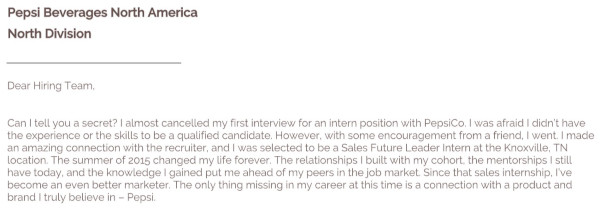
You’ll notice that her short story follows a typical narrative arc: It has a conflict/obstacle, a turning point, and a positive outcome, all created with a goal to emphasize a theme or point. In this case, Coleman is emphasizing her existing affinity with the brand and her triumphs within the program so that she can continue on her career path.
6. The Bare Bones Cover Letter
In today’s job market, cover letters aren’t always necessary. Even though many recruiters won’t ask for or even read them, cover letters can still be effective and convey personality to a reader. Writing a strong cover letter can help you better convey your interest in the position and company.
This template from The Balance Careers puts together the essential components of a short cover letter: excitement about the position, your qualifications, and a call-to-action for the recruiter to follow up with you. Combining these central aspects in a well-written, compelling narrative will go a long way in convincing readers to hire you.
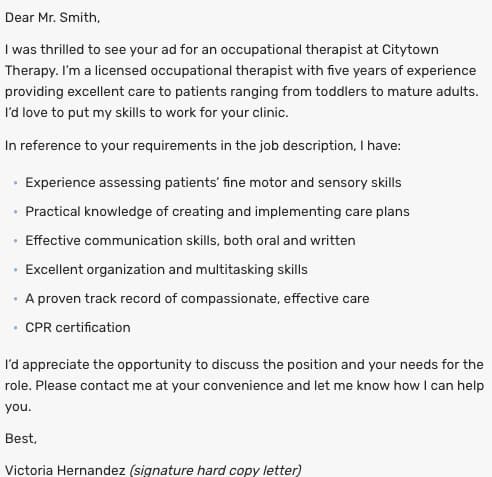
Source: The Balance Careers
7. The Breezy Follow-Up
In this cover letter, Amanda Edens is following the instructions the hiring manager gave by forwarding an email with resume and writing samples attached.
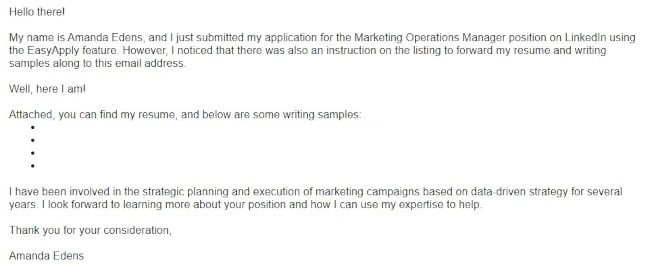 Edens knows that the body of the email is prime real estate to get the hiring manager’s attention, but she also doesn’t want to overwhelm the recipient with too much information since a cover letter was not requested. This short cover letter is the result. You’ll notice that she uses casual and breezy language to convey personality and enthusiasm, and she keeps her paragraphs succinct.
Not only does Amanda provide links to relevant writing samples that are live on the web, but she also closes with a strong final paragraph that:
- Summarizes the expertise she has relevant to the posting
- Emphasizes that she doesn’t want to simply get a job but rather help the organization accomplish their goals
Creative Cover Letter Examples
8. The Brutally Honest Cover Letter
Then, there are the occasions when your future boss might appreciate honesty — in its purest form. Livestream CEO Jesse Hertzberg, by his own admission, is one of those people, which might be why he called this example “the best cover letter” (which he received while he was with Squarespace):
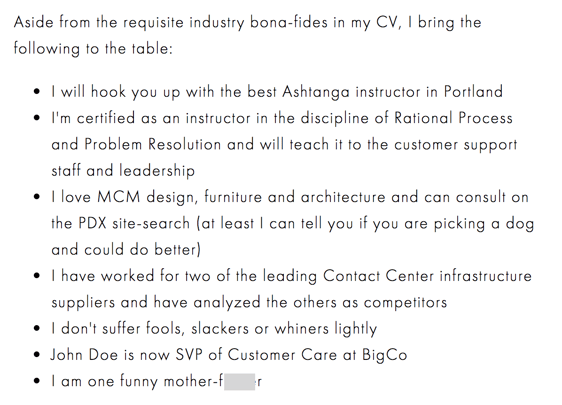
Source: Title Needed
As Hertzberg says in the blog post elaborating on this excerpt — it’s not appropriate for every job or company. But if you happen to be sure that the corporate culture of this prospective employer gets a kick out of a complete lack of filter, then there’s a chance that the hiring manager might appreciate your candor.
“Remember that I’m reading these all day long,” Hertzberg writes. “You need to quickly convince me I should keep reading. You need to stand out.”
9. The Straw (Wo)man Cover Letter
When I was in the throes of my own job search and reached one of the later stages, a friend said to me, “For the next job you apply for, you should just submit a picture of yourself a stick figure that somehow represents you working there.”
Et voilà:
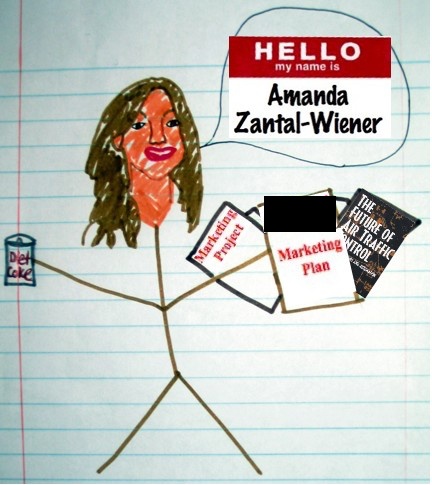
I never did end up working for the recipient of this particular piece of art, but it did result in an interview. Again, be careful where you send a cover letter like this one — if it doesn’t match the company’s culture, it might be interpreted as you not taking the opportunity seriously.
Be sure to pair it with a little bit of explanatory text, too. For example, when I submitted this picture-as-a-cover letter, I also wrote, “Perhaps I took the ‘sense of humor’ alluded to in your job description a bit too seriously.”
10. The Overconfident Cover Letter
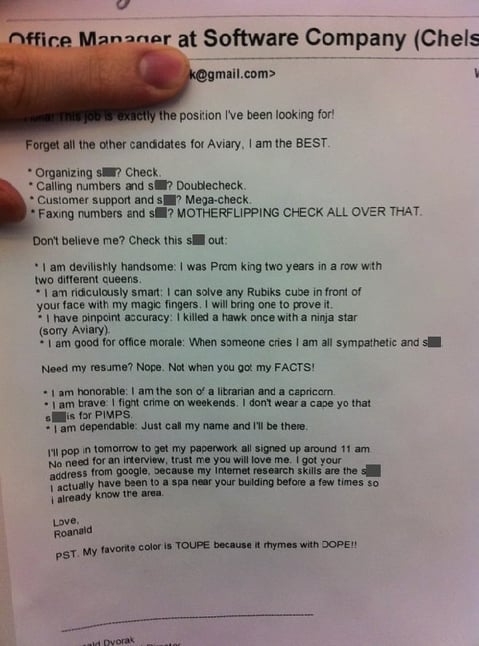
I’ll admit that I considered leaving out this example. It’s rife with profanity, vanity, and arrogance. But maybe, in some settings, that’s the right way to do a cover letter.
A few years ago, Huffington Post published this note as an example of how to “get noticed” and “get hired for your dream job”:
Source: Huffington Post
Here’s the thing: if the Aviary cited in this letter is the same Aviary I researched upon discovering it, then, well, I’m not sure this tone was the best approach. I read the company’s blog and looked at the careers site, and neither one indicates that the culture encourages this — or lowercasing proper nouns like “Google,” for which I personally cannot forgive the applicant…
However, Aviary was acquired by Adobe in 2014, and this letter was written in 2011. So while it’s possible that the brand was a bit more relaxed at that time, we wouldn’t suggest submitting a letter with that tone to the company today. That’s not to say it would go unappreciated elsewhere — Doug Kessler frequently discusses the marketers and brands that value colorful language, for example.
The point is, this example further illustrates the importance of research. Make sure you understand the culture of the company to which you’re applying before you send a completely unfiltered cover letter — if you don’t, there’s a good chance it’ll completely miss the mark.
11. The Interactive Cover Letter
When designer Rachel McBee applied for a job with the Denver Broncos, she didn’t just write a personalized cover letter — she designed an entire digital, interactive microsite:
Source: Rachel McBee
This cover letter — if you can even call it that — checks off all of the boxes we’ve discussed here in a remarkable way. It concisely addresses and organizes what many hiring managers hope to see in any cover letter: how her skills lend themselves to the role, why she wants the job, and how to contact her.
She even includes a “traditional” body of text at the bottom, with a form that allows the reader to easily get in touch with her.
Take Cover
We’d like to add another stage to the job search: experimentation.
In today’s competitive landscape, it’s so easy to feel defeated, less-than-good-enough, or like giving up your job search. But don’t let the process become so monotonous. Have fun discovering the qualitative data we’ve discussed here — then, have even more by getting creative with your cover letter composition.
We certainly can’t guarantee that every prospective employer will respond positively — or at all — to even the most unique, compelling cover letter. But the one that’s right for you will. That’s why it’s important not to copy these examples. That defeats the purpose of personalization.
So get creative. And, by the way — we’re hiring.
Editor’s note: This post was originally published in October 2020 and has been updated for comprehensiveness.

15 Creative Examples of Branded Pop-Up Shops
Marketers spend a lot of time trying to nail down abstract concepts. They’re tasked with turning brainstorming sessions and comments sourced during focus groups into campaigns that sum up everything about a brand’s identity in a neat, tidy, and most importantly, interesting way.
But what if a consumer could walk into a room and fully experience your brand with all their senses? Pop-up events offer just that — the chance for consumers to get up close and personal with their favorite companies in a truly immersive setting. In this article, we’ll cover:
- What is a pop-up shop?
- Pop-up shop ideas
- How to do a pop-up shop
- How to market a pop-up shop
- Examples of pop-up shops for inspiration
Consumers love the lure of exclusivity, and brands love the unmatched opportunity for experimentation.
Pop-Up Shop Ideas
Your goals will dictate the type of pop-up experience you want to create and how you’ll implement it.
1. Temporary Retail Space
If you’re transitioning your business from online to brick-and-mortar, a pop-up shop is a way to simulate the retail experience and gain valuable insights into considerations such as operations and demand… without the risk of commitment and overhead.
2. One-Time Event
Even if you’re not testing the local retail market, an event-style pop-up where the press and public can attend can generate a ton of buzz for your brand. By leveraging the exclusivity of the occasion, you can use the event to pique interest. Make it a party!
3. Immersive Experience
A physical space gives you the opportunity for customers to see, feel, and experience your brand. With that in mind, you can use your pop-up shop to provide a unique, immersive environment. That might mean interactive displays or other unexpected physical elements that add a wow factor.
How to Do a Pop-Up Shop
It’s an undertaking to pull off a successful pop-up, requiring a lot of planning, scouting, and marketing leading up to a launch. Here are the main steps you’ll want to consider as you set up:
1. Evaluate your goals and select a theme.
Are you testing the market for a more permanent location? Or are you generating buzz? Knowing your goals will help you determine what kind of space to look for, what type of pop-up shop to run (see above), what supplies to purchase, and how to market and operate it.
2. Scout for a location.
Because your pop-up is temporary (to start, anyway), you don’t have the benefit of word-of-mouth or brand/location recognition. That means you’ll need to choose a location with plenty of foot traffic to maximize your impact.
This consideration, of course, needs to be balanced with the cost of renting the space and the availability of a short-term lease.
Good places to consider include:
- Outdoor stands or kiosks
- Empty storefronts
- Art or gallery spaces
- Marketplace or tradeshow booths
You can also use services such as Peerspace or We Are Pop Up to scout locations.
3. Shop for fixtures and supplies.
Once you know where you’re setting up shop and how long you’ll be there, you can plan your space. This includes purchasing fixtures such as shelving as well as any supplies/decor to pull off your theme.
4. Plan the launch and opening.
Because your pop-up is a fleeting experience, you don’t get the benefit of long-term clientele building. Its success hinges on the marketing leading up to the launch (more on that later) as well as the momentum earned on that day. For this reason, you’ll want to give yourself enough lead time before the opening to generate interest and also create an experience that will get people talking.
4. Launch and enjoy.
Remember, the purpose of a pop-up shop is connecting with your customers. Sure, it’s all about your brand, but your brand is for them. Your intricate planning sets the stage for an incredible experience, but so does your interactions with them. Be prepared to provide a level of service that has your customers spreading the word, coming back, and remembering your brand once you’ve gone.
5. Analyze and determine what went well.
Take a look at the foot traffic you got, the sales you made, the revenue you generated, and the social media engagement you received.
What worked, and what didn’t? What was your ROI? Is it worth opening a permanent shop or repeating the experience elsewhere? What would you do differently?
Pop-Up Marketing
1. Don’t be afraid to do PR.
The media will be your friend in getting the word out. Reach out to local publications to see if you can earn a feature and draft a press release to see if you can earn coverage. It may even be worthwhile to send exclusive invites to a few journalists for the date of your launch.
2. Reach out to local influencers and bloggers.
Influencers and bloggers may have smaller reach than traditional media outlets, but their followings will likely be highly targeted and engaged. Find out how much promotion might be, and don’t be afraid to offer perks!
3. Create an event on Facebook.
Promote to your existing Facebook followers by creating a Facebook event and inviting them. This will spread awareness to your existing fans and increase the reach of your pop-up marketing efforts.
4. Advertise on Facebook.
Facebook has advanced targeting options for audience type and geographical area, making it an ideal channel to spread the word to prospects who don’t know you yet. Read more about how to create a Facebook ad.
5. Email your database.
Tap into your existing customer base and let them know about your pop-up with email marketing. Your campaign will be even more successful if you can segment your database and target your customers in the area.
6. Leverage direct mail.
One of the best ways to promote a local event is through direct mail campaigns to residents in the nearest zip codes. Mailers function as invites to the general public. You’ll also be able to push the promotions you’re running.
7. Generate buzz and FOMO with promotions.
FOMO (fear of missing out) can motivate buyers to show up and engage. You can tap into this with exciting promotional strategies such as contests, freebies, discounts, and door-buster deals.
8. Put out signage.
Signage will help you get the attention of nearby foot traffic, so invest in flyers, banners, and window clings that are attractive and catch the eyes of passers-by.
To inspire your next branded experience, we’ve curated a list of these innovative and visually stunning pop-up events.
15 Examples of Next-Level Pop-Up Events
1. COS Los Angeles
Experimental architecture firm Snarkitecture was inspired by mirrored surfaces and simple silhouettes when designing this temporary retail space for LA-based fashion label COS. The folks at Snarkitecture transformed an empty industrial space into two identical, monochromatic rooms — one white and one pale pink — leaving the focus on two racks of minimal clothing. The reflected space “creates an unexpected and altered world for visitors to experience and share.“


Image Credit: Snarkitecture
2. BarkShop Live
Shouldn’t your dog be able to shop for his own toys? Bark & Co, the ecommerce company behind BarkBox, certainly thinks so. For one week in June 2016, the dog-centric retailer set up shop in Manhattan, inviting dogs and their owners to try out their squeaky, bouncy, and chewy offerings in-person. The lucky pups in attendance were fitted with RFID-enabled vests, which tracked the toys they played with the most. Owners were then able to view and purchase their dogs’ favorite playthings directly from the event’s custom mobile app.
Video from Digiday
3. Glossier Summer Fridays Showroom
In Summer 2015, online makeup and skincare brand Glossier styled a floor of its Manhattan headquarters as a temporary retail showroom — the closest thing to stepping into its beautifully curated Instagram feed. The space offered Glossier products for sale, but as founder Emily Weiss explained, selling tubes of moisturizer and lip balm wasn’t necessarily the pop-up’s top priority. “It’s not really just a store,” Weiss said in an interview with Racked. “It’s almost like this is a giant mood board for the company we’re hoping to build.”
Created under the direction of set designer Marguerite Wade, the penthouse featured custom floral arrangements by Meta Flora and an installation by multi-media artist Grace Villamil.



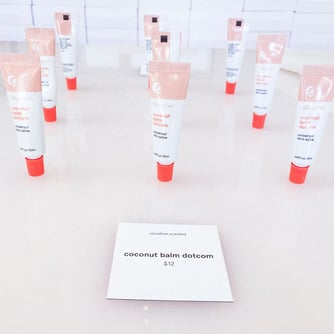
Image Credit: Glossier
4. Fast Food Aid
Creative directors Ikkyu and Junya Sato of Kaibutsu design studio noticed that young adults in Harajuku had a serious fast food problem — and they decided to do something about it. To promote organic food chain Dohtonbori, they launched Fast Food Aid, a pharmacy-inspired vitamin pop-up that offers a selection of health supplements aimed at junk food lovers. And all it will cost you is a receipt from a fast food place.
After a guilty indulgence, exchange your receipt for a customized bottle of supplements that will replenish the nutrients missed at your last meal. Each canister is aimed at a particular junk food — ramen, pizza, hamburger, etc., — to make sure your system gets what it needs.
Although Dohtonbori isn’t actually selling anything for profit at the shop, its been able to educate visitors about health and wellness, hopefully driving them to opt for healthier food options in the future — like Dohtonbori’s own restaurant.

Image Credit: Fast Food Aid
5. Pantone Café
What does color taste like? If anyone knows the answer to that question, it’s Pantone. The world’s most well-known color company has been running a pop-up café in Monaco for the past two summers, selling a minimal menu of pastries, lunch options, coffees, and fresh juices — all branded with Pantone’s signature color swatches.
So does this mean Pantone is permanently branching out into cuisine? Not quite. The seasonal eatery is perfect Instagram-bait, and it has successfully generated a ton of buzz in the press. It’s a perfect example of a pop-up event enabling a company to take creative risks with its brand by stepping outside of its typical business model.

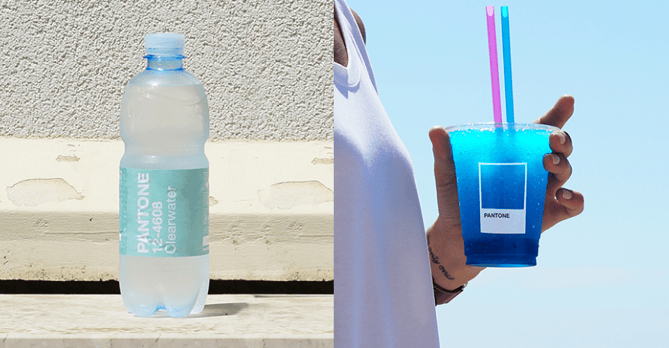
Image Credit: Pantone Café
6. Real Life At Work
To offer passersby a glimpse into its world, London-based ad agency Wieden+Kennedy invited graphic artist Emily Forgot to transform the front window of its office into an imaginative, cartoon-inspired pop-up workspace. Using exaggerated monochrome imagery, Forgot crafted a whimsical office scene from paper, complete with a typewriter and a clock that ran backward.
For a few weeks, real agency employees took turns “working” in the window. The whole thing was then broadcast live via webcam on the agency’s website for anyone who was curious enough to watch. The pop-up was a unique way for W+K to shrug off the stereotype of the ad agency that takes itself too seriously — plus it was a creative chance for the team to engage with the community.

Image Credit: Wieden + Kennedy London
7. Früt
How do you make inexpensive, packaged underwear appeal to high-end consumers? Just create a “luxury” lingerie pop-up with a fake, fancy-sounding name. CP+B Boulder helped client Fruit of the Loom open up an intentionally pretentious and ludicrously over-priced boutique for its underwear, complete with colorful intimates hanging from over-the-top tree displays. Früt sold only Fruit of the Loom undergarments, but shoppers who usually wouldn’t deign to buy the brand were lured in by the high-end guise.

Image Credit: Wieden+Kennedy London
8. Organic Valley Coffee Shop
In a clever shot aimed at the artisanal coffee movement, creative branding agency Humanaut opened up a pop-up cafe to promote its client Organic Valley’s new coffee creamer. The temporary Manhattan storefront adhered to all of the typical hipster tropes — a minimal logo featuring arrows and X’s, modern glass mugs, and trendy sizes — Lil Bit, Double, and Lotta. And they cast a real Organic Valley farmer as the shop’s folksy proprietor.
There was one catch: The shop only sold measured portions of half-and-half. You ordered your creamer at the counter from a barista and added your coffee separately. The spoof was a major success. Unperturbed by the irony, New Yorkers lined up to order shots of plain cream for $2 a pop. “No one had a problem paying $2 for a pour of organic half-and-half,” said Humanaut’s creative chief David Littlejohn. “In the end, the idea wasn’t as crazy as we thought it was.”
Video Credit: Organic Valley
9. 5-Minute Internship
Solve, a Minneapolis-based creative agency, wanted to re-vamp its summer intern hiring process to attract recruits who can really think on their feet. So naturally, they created a portable, small-scale replica of their office — complete with a receptionist-staffed micro lobby — and set off on an epic college-campus road trip.
Students at participating campuses were given a 5-minute challenge based on their area of interest — and those who performed the best were invited to interview on the spot. The pop-up event tripled the amount of applications the agency received to its internship position.

Image Credit: Adweek
10. The Picture House
Capitalizing on the Instagram food photography craze, Birdseye opened up a temporary restaurant in London where diners could settle their bill with an Instagram post — all they had to do was take a snap of their meal and add the hashtag #BirdsEyeInspirations. The event was a creative social media experiment that helped generate free publicity for the frozen food company’s Inspirations line of products. Branding agency Slice was behind the world’s first pay-by-picture pop up.

Image Credit: Slice
11. The Period Shop
For one weekend, Kotex launched a pop-up in New York aimed at alleviating negativity and spreading love for women during their periods. The store, which was developed by ad agency Organic, featured ice cream, manicures, chocolate, comfy clothing, and Kotex U products for sale. Women were invited to browse the brightly colored offerings and share their experiences. And it was all for a good cause, too. Proceeds were donated to a women’s homeless shelter.
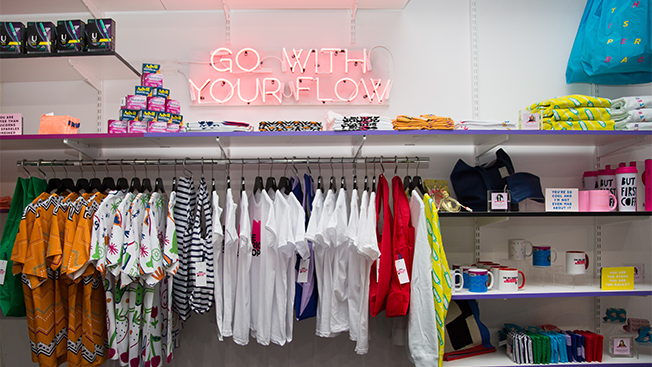
Image Credit: Adweek
12. Birchbox’s Tour
Pop-ups give online retailers the chance to show off their goods in person, interact directly with their fans, and take their brand to the next level. Birchbox — which sells subscription boxes of curated beauty products — went on a national tour in 2015, opening up temporary brick-and-mortar stores in multiple cities. In addition to selling beauty products, they offered manicures and astrology readings to entice beauty-lovers inside.
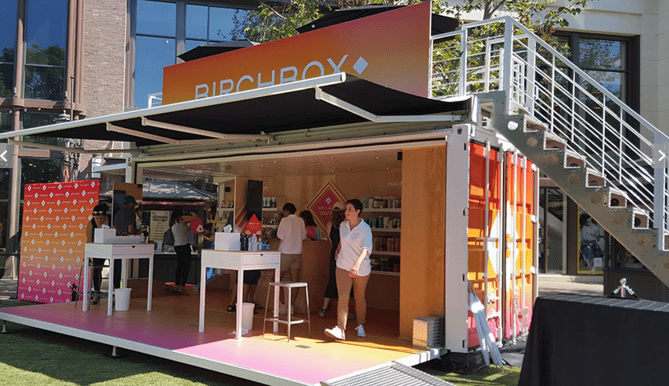
Image Credit: Racked LA
13. Fendi Spring/Summer 2016 Flower Shop
The mobile flower shop that botanical designer Azuma Makoto created for Fendi is proof that not all pop-ups need to be large scale productions. The artist adorned a three-wheeled Italian vehicle with an intricate floral display and outfitted the side of the truck as an open storefront. The vendor/driver sold limited edition Fendi bags and vases of Makoto’s floral arrangements to promote the fashion label’s 2016 Spring/Summer collection.

Image Credit: My Modern Met
14. Arnsdorf
What’s a designer to do when they’re facing a tight budget? Experiment with creative materials. This pop-up retail space for Australian clothier Arnsdorf was created by using 154 pairs of neutral-colored pantyhose, and the effect is otherworldly.


Image Credit: Fast Company
15. The Poundshop
This design collective is a recurring pop-up platform for artists to offer their goods for affordable prices. “The aim of The Poundshop is to spread design to a wider audience by making it accessible through price and engagement,” the website explains.
The pop-up shops are just as visually interesting as the art they sell.

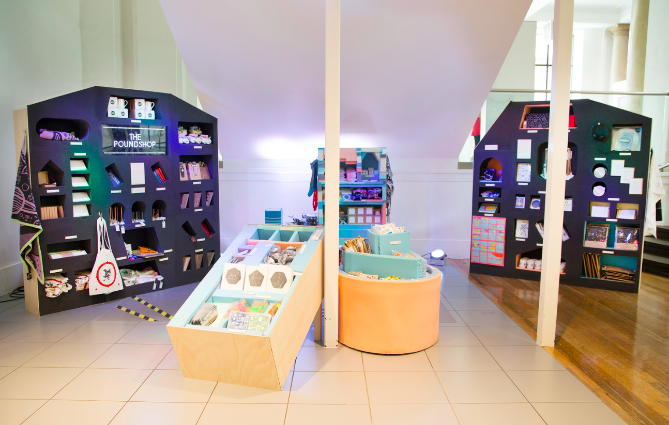
Image Credit: The Poundshop
With a little planning and a lot of preparation, you can make a splash with a pop-up that delights your customers and spreads interest in your brand.
Editor’s note: This post was originally published in July 2018 and has been updated for comprehensiveness.

20 Nerdy Valentine’s Day Gifts for the Marketer in Your Life
Roses are red, violets are blue, Valentine’s Day is coming … and you didn’t think this one through.
If you’re shopping for a marketer, picking out a gift can be even more intimidating. We love trends, creativity, but also practicality! So — do you go the creative and funny route, and buy us something that can help us in the office? Or, do you embrace a pop culture trend we’ve been raving about?
With everyone’s favorite “Hallmark holiday” right around the corner, we had a hunch that some of you might have forgotten to pick up something special for a friend, family member, or special someone who works in the marketing world.
Rather than letting you default to a box of chocolates, we’ve come up with a list of creative, useful gifts that are sure to impress. Now, we’ll be the first to admit that some of them are kind of nerdy … but aren’t we all a little nerdy, after all?
We’ve accounted for all types of budgets by listing the gifts in ascending order by price. All the following items might not ship in time for the big day, but you can still use the following list as inspiration for a last-minute in-person shopping trip.
Top 20 Nerdy Valentine’s Day Gifts
-
The Gift of Nothing
-
Heart Headphone Splitter
-
Catnip Chocolate Covered Strawberries
-
Cable Labels
-
Seed Money
-
Bluetooth Beanie
-
Snapchat Bitmoji Merchandise
-
Chili Herb Infuser
-
Plant-o-Gram
-
Spicy Honey
-
Sushi Slippers
-
Heart Beat Camera Strap
-
Potato Parcels
-
Star Wars Cookie Jar
-
LED Globe-Shaped
-
Red Converse Sneakers
-
FujiFilm Mini Instant Film Camera
-
Smart Water Bottle
-
Canon Ivy Mini Photo Printer
-
Smart Ring
20 Nerdy Valentine’s Day Gifts for That Special Someone
1. The Gift of Nothing
Price: $1+ (from various websites)
Just started a fling with someone and think a gag gift would be appropriate? Maybe you should give your special someone the gift of — well — nothing. Yes, this is an actual prop you can buy. There’s even multiple video unboxings online. Check this one out:
The best part? If this product actually does “something,” you can return it for a full refund.
2. Heart Headphone Splitter
Price: $5.00
This festive headphone splitter allows you to plug your headphones into one of the dual aux inputs, leaving the other open for a friend or special someone. The best part? It comes on a handy keychain so you can bring it with you everywhere.

3. Catnip Chocolate Covered Strawberries
Price: $6.00+
Now, I’m a dog person … but I work closely enough with a few hardcore cat ladies to know that in order to win them over, you’ve got to win over their cat first. And these catnip chocolate-covered strawberries are sure to do the trick.

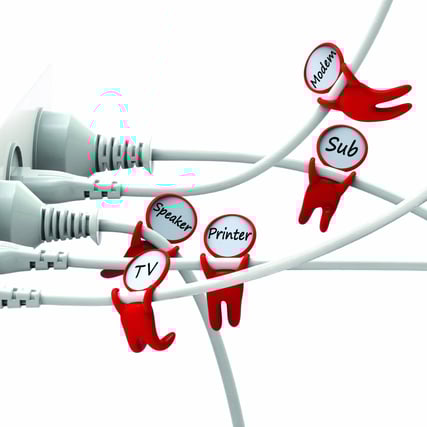
4. Cable Labels
Price: $9.99
Give the gift of organization this Valentine’s Day with these adorable little “cord huggers.” They cling onto wires to make it easy to sort through that tangled mess behind monitor or under your desk.
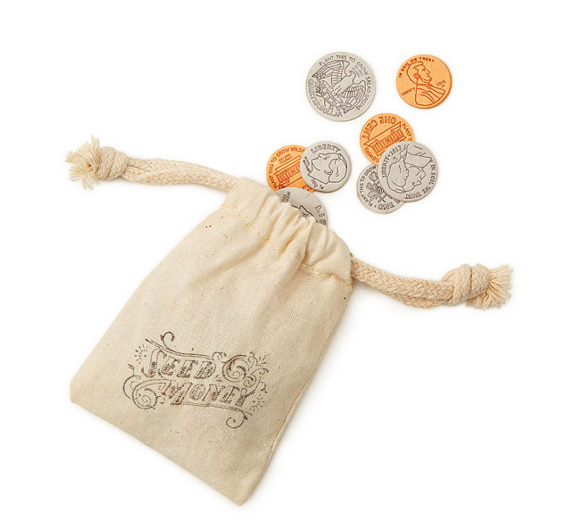
5. Seed Money
Price: $9.99
For the pun-lover, I present to you: seed money. Cleverly disguised as change, these coins are minted from handmade paper embedded with seeds. Plant them, water them, and watch your investment grow. (Get it?)
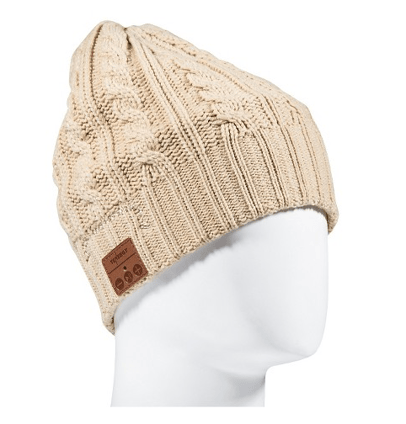
6. Bluetooth Beanie
Price: $12.91
This beanie will keep your head warm while keeping your ears happy. Thanks to the built-in microphone, your special someone can talk hands free for up to six hours. Pretty cool, right?
7. Snapchat Bitmoji Merchandise
Price: Varies
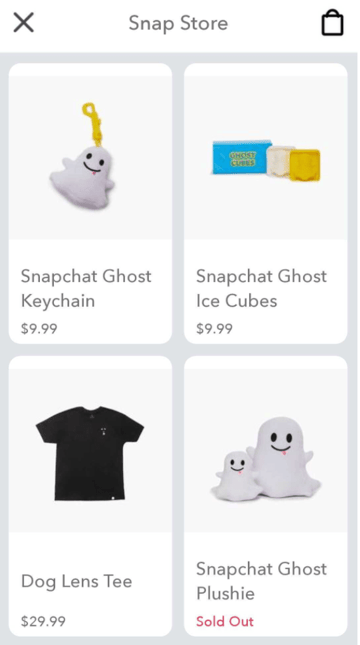
If you’re friends with a millennial marketer, they’ve probably used Snapchat or at least have created a Bitmoji. If so, you can visit the merchandise store on the Snapchat app and purchase shirts, cups, or other products with you and your friend’s Bitmojis on them.
To do this, all you have to do is go into your Snapchat app, tap your face icon in the corner to get to your profile, then scroll down and press the “Shop Bitmoji Merch” button to see the available merchandise. Once you click on an item, you can select your friends emoji to have a picture of both of you appear on an item.
8. Chili Herb Infuser
Price: $13.70
Enhance the flavor of your favorite soup or stew with this chili-shaped herb infuser. This reusable pepper holds all of your herbs together so that you don’t have to worry about having a pesky piece of green stuff between your teeth.

9. Plant-o-Gram
Price: $13.99
Flowers are great, but why not opt for the gift that keeps on giving? Long after the petals on that overpriced bouquet of roses have shriveled up, this unique air plant will still be thriving. Plus, it comes in a festive package with a personalized message of up to 100 words.

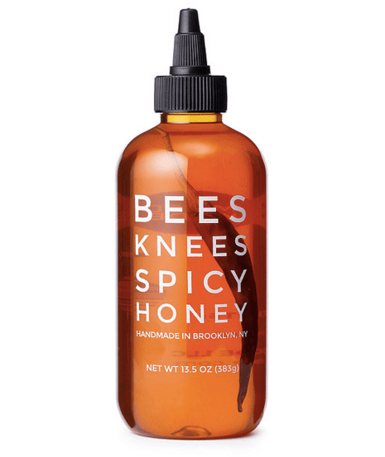
10. Spicy Honey
Price: $15.00
Serving as the perfect blend of raw honey from independent beekeepers in the Hudson Valley and specially selected chili peppers, this sweet and spicy treat is sure to delight your valentine.
11. Sushi Slippers
Price: $15.99
Nothing says I love you quite like faux fish for your feet. In all seriousness, this is the perfect gift for the sushi-lover in your life. And it’s guaranteed to make them feel all warm and fuzzy … at least from the ankle down.
12. Heart Beat Camera Strap
Price: $19.95
Help your valentine keep their camera close to heart with this unique camera strap. Embroidered with a healthy heart rate design, this strap will remind your valentine just how much you care.

13. Potato Parcels
Price: $20-$40
Does your special someone love potatoes and weird gifts? There are a few services, one being Potato Parcel, that will allow you to put a message or an image of your face on a potato and send it to someone. While the price varies based on the content printed on the potato and the distance you send it, this is sure to be a memorably weird gift.
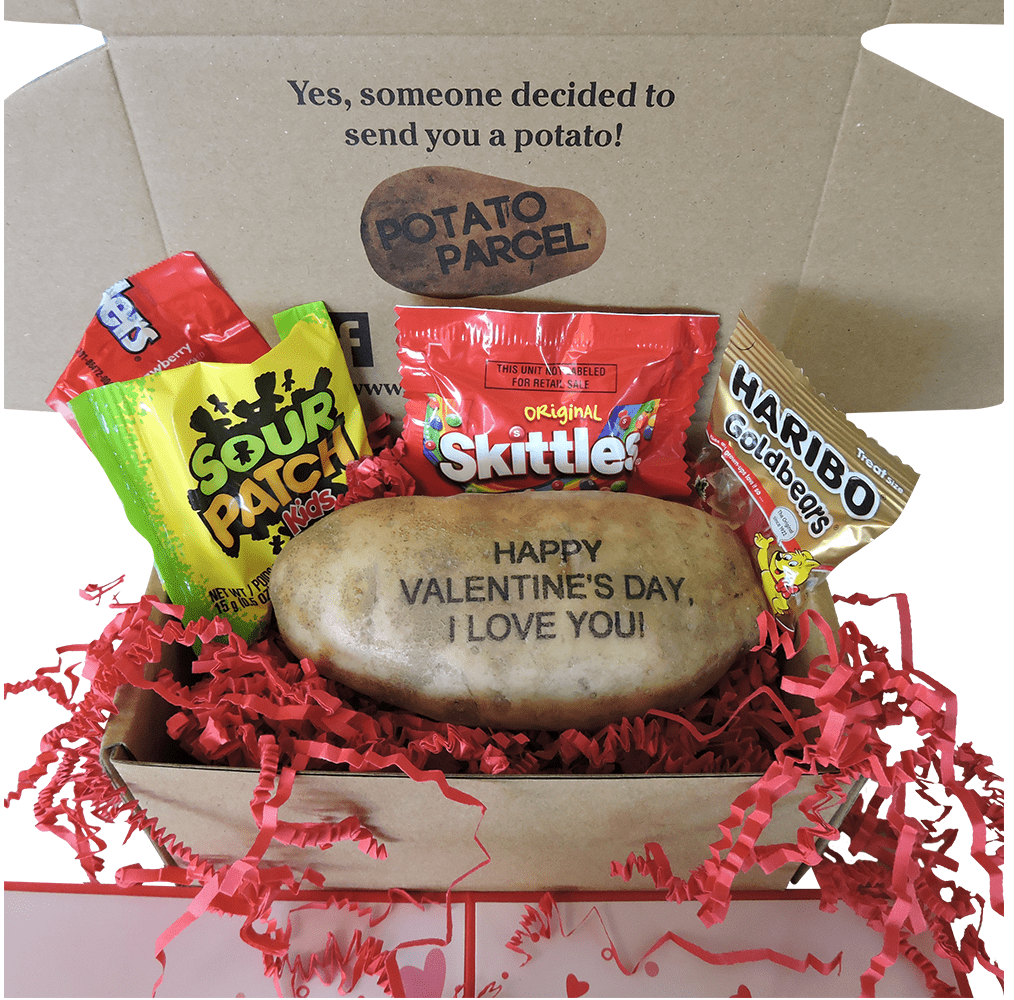
Source: Potato Parcel
14. Star Wars Cookie Jar
Price: $24.99
Step 1: Buy the cookie jar.
Step 2: Bake cookies.
Step 3: Place cookies in the cookie jar.
That’s it.
 15. LED Globe-Shaped
Price: $34.99
This awesome speaker proves that there’s more than one way to gift a cool rock on Valentine’s Day. Perfect for the office or the great at parties, this gadget allows you to bring your favorite tunes wherever you find yourself.
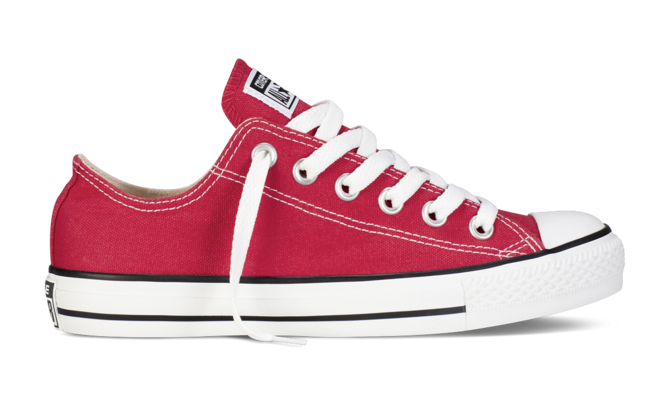
16. Red Converse Sneakers
Price: $35.00
These iconic sneakers make the perfect gift for both men and women. Not only are they comfortable and durable, but the festive pop of color will add a little somethin’ somethin’ to any outfit.
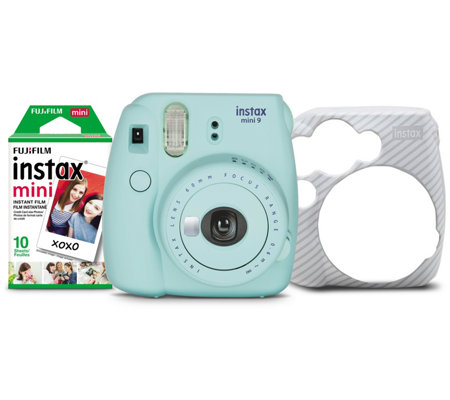
17. FujiFilm Mini Instant Film Camera
Price: $49.96
Give the gift of nostalgia with this instant color film camera. Simply point, shoot, and shake it like a Polaroid picture to preserve memories with your special someone.
18. Smart Water Bottle
Price: $60.00
Show your valentine how much you care by keeping them hydrated … in a cool way. This Bluetooth water bottle from Hidrate Spark pairs with an app on your phone to track your water intake. The bottle will glow to remind you to drink more in order to hit your goal.

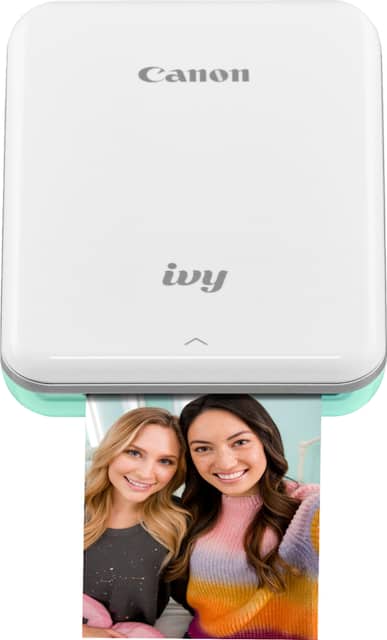
19. Canon Ivy Mini Photo Printer
Price: $99.99
The days of taking photos with filmed cameras and getting them developed in a dark room have come and gone. But our digital lifestyle doesn’t mean we have to give up on print photography. In fact, there are a number of photo printers that allow you to connect your smartphone and print photos from your device.
And, if you’re shopping for a digital marketer, especially in the millennial generation, they probably have plenty of photos that they’d love to print out and treasure — even after the endorphins of Instagram Likes have worn off.
20. Smart Ring
Price: $125-$195
Believe it or not, this fancy ring doubles as a really cool piece of technology. Integrated with over 80 apps on iOS and Android, users can set custom color and vibration patterns via the corresponding app to receive notifications through the ring.

Think Like a Marketer When Buying For One
As marketers, we love to create campaigns around buyer personas. We research out target prospect, what they’re interested in, and create content that attempts to engage or delight them. If you’re buying something for friend or loved one, think like a marketer.
Take note of their interests, hobbies, and what you have in common to determine which gifts will be the most appropriate and interesting to them.
Editor’s note; This blog post was first published in February 2018, but was updated February 2021 for comprehensiveness and freshness.

Everything You Need to Know About Green Marketing [Examples & Expert Tips]
Did you know that 49% of global respondents say they’re inclined to pay higher-than-average prices for products with high-quality/safety standards, which consumers often associate with strong sustainability practices?
Additionally, consumers are willing to open their wallets for products that are organic (41%), made with sustainable materials (38%), or deliver on socially responsible claims (30%).
In fact, the U.S. sustainability market is on track to reach $150 billion in 2021.
That, in addition to it being better for the environment, is why several companies have gone or are going green in the future.
As marketers, if you work at a green company, all the sustainable things your company does should be marketed.
Today, let’s learn more about green marketing, the best strategies to use, and some examples to inspire your own green marketing campaigns.
With green marketing, the products are usually made in a sustainable way, do not contain toxic materials, are produced with recycled or renewable materials, don’t have excessive packaging, and are designed to be recycled.
When a company can make their products in a way that’s eco-friendly, it shows that they’re committed to sustainability and social responsibility. Plus, it helps with brand reputation. When you make your products in an environmentally friendly way, you can focus on green marketing to let everyone know that you’re making an effort to help the environment.
Also, this could save you money in packaging and energy usage in the long run. While many companies don’t go green because the upfront cost is usually more expensive, they might not realize that it’ll generate savings in the long run.
However, it’s important to note that you can’t just market something as green if it’s not. There are regulations and legal standards for green marketing.
Speaking of, let’s dive into the differences between green marketing and greenwashing.
Greenwashing will ultimately be damaging to a company’s reputation because consumers will find out that the company or products are not as green as they’re promoting them to be.
To be certain you’re buying a green product, look for real certifications listed on the packaging. If you’re a company and want to promote your sustainability, you need to get actual certification that you can place on your product and website.
Once you have real certifications (and know that you’re truly trying to help the environment instead of going green for profits), then you can use these strategies to help your green marketing efforts.
Green Marketing Strategies
1. Get certified.
There are several third-party green business certifications that can help you market your sustainability practices.
To get certified, research the different certifications, including Green America, Green Business Certification Inc., or Green Seal.
Usually, you will need to meet a certain level of standards and send in an application. These certifications help substantiate your claims that you’re a green business.
2. Advertise your green message.
Once you have the certification and you’re the real deal, it’s time to get the word out. You can write blogs, post about going green on your social media, add the certification stickers to your website, etc.
Promoting your sustainability efforts will help build your brand and customer loyalty from eco-conscious consumers.
3. Incorporate sustainability into your culture.
Don’t just fall into the green marketing trap without really committing to the cause. You should incorporate green practices into your company culture. Every employee should know that you want to make things as eco-friendly as possible.
4. Support eco-friendly programs and initiatives.
When your company goes to donate to charity or support local programs and initiatives, make sure you choose ones that are green. It helps with your consistent brand message and it will support a cause you care about.
1. Go paperless.
One of the environment’s nemeses is paper. A great way to go green is to reduce the amount of paper that you use.
Mike Volpe, CEO of Lola.com, says, “The response rate for most direct mail is 2%. That means that 98% of your direct mail is wasted. Plus, in addition to the environmental impact of the 50 pieces you send for every 1 lead, there is the impact of the trucks and other transportation used to move all that mail around. If your audience really cares about the environment, send them an email, and let them know that you are not using snail mail for marketing.”
2. Don’t forget about your giveaway prizes.
If you’re ever running a giveaway, you might forget that you’re a green company and want to support eco-friendly products. That would be a mistake. The prizes you give away should also support your mission of going green.
Volpe added, “If you want to engage with your market of environmentally conscious consumers, try changing your prizes to something they will actually care about. Perhaps a donation in their name to a global charity or purchase a parcel of rainforest to be protected in their name? If your market truly cares about the issue, this will be a great tool to provide more focus to your contest marketing efforts.”
3. Make all your events green.
If you’re throwing a brand event, it needs to be sustainable.
Robin Lickliter, a Chief Experience Officer at Brightest Sparks Marketing, says, “Consider LEED-certified buildings, provide incentives to use public transportation, and consider LED lighting.”
These are great ways to keep your brand green even when you want to throw an event.
Green Marketing Examples
1. Starbucks
Starbucks is known as being a leader in sustainability. The company invests and donates money in several environmental programs. In fact, Starbucks committed over $140 million to the development of renewable energy sources.
2. Patagonia
Patagonia has made it known through green marketing that they support environmental activism.
On their site, they say “We’re part of a movement for change. From supporting youth fighting against oil drilling to suing the president, we take action on the most pressing environmental issues facing our world. Connect with environmental groups through Patagonia Action Works and take action to protect people and the planet.”
3. Ben and Jerry’s
Ben and Jerry’s actively markets the social issues that the company cares about through their website on their Values page. They regularly write blogs and discuss why it’s important to commit to environmentally friendly business practices.
With green marketing, you can let your target audience know that you care about the same issues they do. You can improve your brand reputation, while also investing and donating to a cause that you care about.

How to Create an Amazing Webinar in 2021
Creating a webinar is one of the best ways to engage with potential customers in an increasingly remote world.
Since the rise of remote work, people rely on technology for education and social interaction more than ever. This means more Zoom meetings instead of in-person meetings, more walks to a home office instead of commutes to a high-rise, and of course, more webinars instead of live events.
The B2B webinar platform BrightTalk reported a 76% increase in video, webinar, and virtual events uploaded to their platform from March to June 2020. From April 2019 to April 2020, ON24 saw a 167% increase in monthly usage of its webinar platform. If there was ever a time to create a webinar, it’s now.
Are webinars dead?
In a word: no. While webinars may seem outdated, especially compared to social media trends that emphasize brevity over substance, they have proven to be invaluable in the time of social distancing.
It wasn’t always this way. A few years ago, we were afraid that webinars were a thing of the past. While nearly half of consumers reported wanting to see more videos in the future, we found that “Research content” and “Online courses,” both of which would fall under the webinar umbrella, ranked at the bottom.
However, the majority of companies are moving toward a telecommuting model, and the trend shows no sign of slowing down. The new “working from home economy” guarantees that webinars remain a cornerstone of companies’ marketing and sales strategies.
Because companies are turning to webinars to replace their live events, the market is experiencing an over-saturation. It’s even more difficult to make your virtual event stand out from the pack. Luckily, HubSpot and GoToWebinar teamed up to bring you the ultimate webinar planning kit that can help you create a compelling, effective webinar.
Ready to host an online event that will engage potential customers and drive lead generation? Follow these steps to make a great webinar that works in 2021.
1. Brainstorm the right topic.
Before you can get started on making your webinar, you’ll have to decide the topic you want to speak about.
The topic you choose should answer questions that your audience typically asks and preferably be highly specific. For example, if you’re hosting a webinar on email marketing, you can choose to focus on subject lines in particular.
Overall, your webinar should provide value to your audience. Think about your company as a whole and your unique value proposition. What topics are you an expert on? What topics can you provide value on? Consider choosing an educational topic, as this type of content performs really well.
Align the topic with the goal of your sales team. A successful webinar hinges on sales and marketing alignment. If the marketing team creates content that isn’t helping their sales conversations, it won’t be a successful effort for driving high-quality leads to sales.
Luckily, you have experts at your disposal for coming up with content ideas that will actually compliment and aid the sales conversation: the reps themselves.
Instead of guessing what your sales team might want a webinar to be focused on, ask them. Get reps’ buy-in for a webinar before you plan it. Set up a meeting to discover new content ideas and to find out what pain points they need to help solve. This will go a long way for ensuring sales’ follow up with registrants is seamless once the webinar is over.
2. Choose a webinar format.
When considering how to structure your webinar, you have countless options. Panel discussions, Q&A’s, single-speaker presentations, and interviews are the four most common types. Other formats include product demos and case studies.
For panel discussions, you can invite industry experts to discuss a niche, current topic within your industry.
For Q&A’s, you need only the product experts in your team to answer your customers’ questions.
Interviews are also a great choice. You can either choose an industry expert or a current customer to interview them on their experience with your company.
3. Pick a webinar tool.
There are many webinar hosting platforms you can use to create your webinar. Popular platforms include ClickMeeting, GoToWebinar, and Zoom.
When you’re researching a tool to use, consider your objectives. How many people do you think will attend? Do you need a tool that could allow over 1,000 attendees? How much does it cost? And how easy is it to use? These are questions that you should look into when deciding on what webinar tool to use.
Additionally, you’ll want to make sure the tool can handle the type of webinar you want to host — can it handle video chatting for panels or Q&A webinars? The right tool for you will depend on the overall objectives of your event.
4. Assign roles to your team members.
After choosing the platform, you want to assign roles in your team. Typically, you’d need to choose four people:
The organizer handles all facets of planning, from ideation to content creation. They are usually the primary contact in the webinar platform.
The presenter is the subject matter expert, either on your team or in the industry, who’s going to present on the topic you’ve chosen.
The moderator is required for panel discussions, but not for single-speaker presentations. This person will help stimulate conversation for panel participants. You can also assign a moderator if you expect to receive a lot of questions from attendees.
Assistants are the team members who are at hand in case of a tech or another type of emergency. If there’s no sound, an assistant can step in to resolve this problem. Like moderators, assistants can also manage the chat box during the event.
5. Produce the content.
Once you find a tool and you know the topic you want to present on, it’s time to create the content depending on the type of webinar you want to host. Will it be a PowerPoint and talking head presentation? Or perhaps you want to do a live panel Q&A? Either way, you’ll have to produce the content and prepare for the big day.
For example, if you’re creating a PowerPoint, you’ll need to create your slide deck. Make sure that the slides emphasize your points, but don’t include a script. These slides should be visually appealing and include interesting graphics, such as images or GIFs.
If you’re hosting a discussion-style webinar, plan out your speakers, gather audience questions, and prepare any other questions you might have so you can prioritize your time during the webinar.
6. Select the right day and time.
To select a time and date for your webinar, you’ll want to consider where your audience lives. Use tools like Google Analytics to see where people are, so you can choose a convenient day and time zone.
ON24 reports that Wednesdays and Thursdays are the best days to host webinars, with 11 AM being the best time. Another popular time is 10 AM. Both are great for a wide range of time zones, and should avoid most commute times or work hours. Typically, these times avoid conflicts for the greatest number of people.
However, if your audience is solely in the United States, then you wouldn’t need to worry about global time zones. Instead, you can focus on planning a time when most people aren’t commuting. For example, early afternoon or after work hours are generally good times.
7. Practice your webinar before the event.
Practice is essential for a successful webinar. Many things can go wrong on the day of the event, but by preparing, you can avoid technological mishaps.
Practicing can also help you get acquainted with the platform if you’ve never used it before.
We highly encourage creating a fake event on your webinar platform. Publish it, send a link to another one of your team members, and practice as if it was a real webinar. Your team member would watch it as an attendee, which would tell you what the presentation looks like on the other end.
8. Promote your webinar.
Now that you’ve done the backend work, it’s time to ensure you have people who want to attend.
To promote your webinar, you can create a landing page where people can sign up and then distribute and promote that link in several ways.
For example, consider running ads through social media and search engines. Additionally, you’ll want to use free promotion tactics — you can post on your own accounts, on your website, and send an email to your subscribers. It’s important to use your own follower base to get people interested.
Reminder emails are also helpful. Consider sending “Don’t Miss Out” or “Seats Are Filling Up” emails as the day gets closer.
And when people do sign up, you’ll want to remind them leading up to the day. You should send them the webinar link about an hour before so it’s top of mind, and they don’t have to go looking for the link in their registration email.
9. Follow-up with your audience.
Webinars are obviously a great sales opportunity, and you don’t want people to leave your webinar and never think of you again.
That’s why you’ll want to send them a thank you email and gather feedback from attendees so you can plan better webinars in the future.
Remember that attendees generally like to have a recording. If you send them a link to the recording afterwards, they don’t have to take fervent notes during the webinar. This also means you can send it to registrants who wanted to attend but weren’t able to.
Once you’ve come up with relevant content topics for your webinar and set up the event, it’s time to get that webinar in front of as many eyes as possible.
With webinars, it’s not just about generating initial excitement; you have to build excitement and encourage engagement once the webinar goes live.
1. Set up a search-engine optimized landing page.
The first step in your webinar promotion strategy is to create an optimized landing page that can organically jumpstart registrations.
This landing page should have a target keyword in the title, a sign-up form, and optimized copy. Ideally, the form should integrate with your other marketing and sales tools, automatically turning registrants into contacts or prospects.
2. Promote your webinar to current subscribers and contacts via email.
Now that you have a landing page to direct users to, it’s time to target your first attendees: people who already know about your company and customers who have engaged with you in the past.
After sending a personalized email to your contacts, take the following steps:
-
Create automated email reminders that will be sent to prospects who have been invited but not yet registered.
- Create manual email templates reps can send in their one-on-one communication with prospects.
- Set up an automated email to notify reps when one of their prospects has registered for your webinar. This will help them engage and close those prospects down the road.
3. Promote your webinar via LinkedIn and other social media platforms.
LinkedIn is an excellent platform to promote webinars. Webinars are usually created for other businesses, and LinkedIn is the ultimate B2B marketing platform.
LinkedIn now has an option for virtual events, which allows you to add the webinar access link. Registrants can also jumpstart discussions on the event page, giving you potential topics to address during the presentation or Q&A.
You can also advertise the webinar through display ads on Google, Instagram, and Facebook, though we encourage keeping the bulk of your investment on LinkedIn.
4. Send reminder emails to registrants.
Once you’ve gotten registrants, that doesn’t mean they’ll show up. After all, if you promote a webinar one to two weeks in advance, a portion of your registrants are likely to forget when the live date comes around.
Remember to send out reminder emails the day before and day-of the live event to ensure a high live attendance rate.
5. Offer a certificate of completion, professional development hours, or continuing education credits.
An easy way to entice registrations is to offer something in return. Certificates of completion, PDHs, and CEUs are credentials that attendees will want to receive after the webinar. This also entices people to stay until the end.
Certificates of completion can be offered to virtually any professional. Industries such as engineering, architecture, software engineering, and marketing require professionals to continue their training after starting their careers.
6. Consider co-marketing the webinar.
Try your hand at co-marketing. One of the best ways to get new expertise, generate interest for a piece of content, and expand the reach of a campaign is to run a co-marketed webinar.
Instead of running a webinar with speakers internally, try working with another company that’s going after a similar buyer persona and bring their expertise into the conversation.
Doing so creates more interesting content and gives you the opportunity to get your webinar in front of another company’s established audience.
7. Survey participants after the webinar.
The only way to get better is to know how you can improve. By sending an after-event survey, you can refine your next webinar. Hosting a better event can help you confidently market it to prospects.
In this survey, you can include a link to the next webinar that you’re hosting, driving registrations for that event.
8. Deliver necessary information to sales.
A huge part of the pre- and post-webinar process is making sure the right information gets delivered to sales. That’s why GoToWebinar and HubSpot recommend creating one webinar hub that’s easily accessible by sales with the following information:
- On-demand recordings of all webinars.
- A calendar with past and future webinars.
- Documentation that details the webinars goals, title, target persona, funnel stage, key points, speakers and logistics.
- Promotional and follow-up emails.
- Collection of graphic and text CTAs sales reps can drop into their communications.
- Mechanism to collect suggestions from sales reps for new topic suggestions and general feedback.
Once the webinar is done, however, it’s time to make sure the sales reps are ready to close those leads. Send a follow up email to your reps and include the following information:
- Leads who registered
- Leads who attended
- Leads who registered but didn’t attend
- Leads who never registered
- New SQL leads from post-webinar lead scores
- Any other relevant webinar data
- Send email templates sales can use to send to leads based on their webinar behavior. Include other relevant content they can use to continue to nurture leads in the coming weeks.
Putting the extra effort in will go a long way toward making sure the webinar is a success from both a sales and marketing standpoint.
Useful Webinar Creation Tips
Not sure how to set your webinar apart from the rest? No worries.
Single-speaker presentations are admittedly overdone. In a time when webinars are ubiquitous, it’s even more important to use different tactics to engage your viewers.
Think about ways to mix up how the information in your webinar is presented. Here are some tips:
- Discussion-style webinars work really well. We’ve found that unscripted, discussion-style webinars to be quite effective at engaging our audience. In many of our live events, we’ve foregone the slides completely and instead brought two speakers together and had a host ask live questions on air. It’s effective for both encouraging Twitter participation via a hashtag and keeping the content conversational, but informative.
- Answer your customers’ questions throughout the event. Try building a webinar around your prospects’ questions. Send a call for questions to be answered live on-air. This will help build engagement and excitement for what’s to come. Hopefully, the people asking questions will be more likely to show up day-of too.
- Engage prospects beforehand by adding interactive features in the webinar sign-up page. You can also use a landing page, like this, that includes a voting feature for people to upvote their top questions. This will also help you prioritize the material your audience is most interested in.
Webinars Statistics
According to ON24, 68% of marketers say webinars are one of the best ways to tie marketing activity to revenue. Webinars can also help generate quality leads. Why?
- They are highly engaging. According to GoToWebinar, the average webinar attendee viewing time is 57 minutes.
- They work across the entire customer journey. From thought-leadership panel discussions to weekly live demos, webinars are a dynamic and effective way to move prospects down the funnel from awareness to closed deal and beyond.
- They generate high-quality leads for sales. Webinars come with a ton of information about your prospects that you can use to identify high-quality, sales-ready leads. With each webinar registrant, you can collect lead and engagement data that your sales team can use to initiate personalized outreach.
- They bring consumers to you for a variety of reasons. 27% of consumers watch a webinar that teaches them more about a passion or a hobby, while 24% reported watching webinars for the entertainment value. 18% of consumers watch webinars to further their knowledge about their profession. Nearly a quarter reported watching webinars for all of the above.
- They give you the opportunity to teach something specific about your product or the industry. 30% of consumers report feeling more engaged when a webinar teaches them something new. And when it’s about your product, it’s safe to assume that they’re highly interested in converting.
- They’re seeing an increase in attendee conversion. ON24 reported a 61% increase in registrant-to-attendee conversion in April 2020. In 2019, it was 55%.
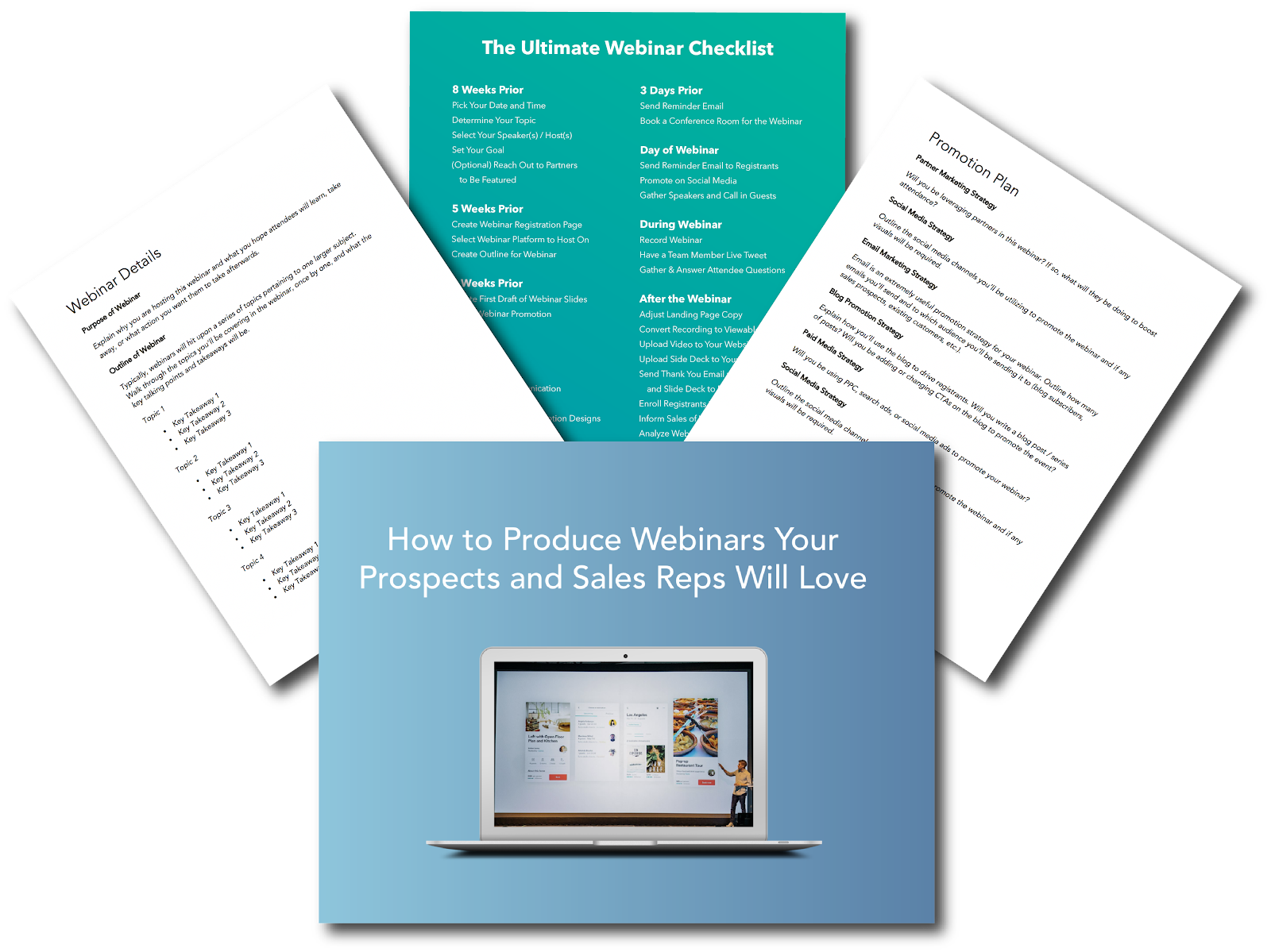
We know planning and promoting a webinar can be difficult if you’ve never done it before. That’s why we’ve compiled a guide, template, and checklist for you to get your webinar off the ground — whether it’s your first or fortieth. Click here to download the kit for free.
It’s All About Alignment
Webinars are seeing a timely resurgence. They’re not just an effective marketing tool; they’re also effective sales tools — but only if your sales team has the information, content, and tools to use them to move prospects down the funnel and close deals.
Creating the kind of alignment you need to make this all a success isn’t easy. That’s why HubSpot and GotoWebinar made this ultimate guide for creating a successful webinar and included a checklist to guide you through pre, ongoing, and post webinar communications.
Editor’s note: This post was originally published in February 2018 and was updated in January 2021 for comprehensiveness.

31 Blog Writing Prompts to Break Your Writer’s Block
You’ve finally found time in your schedule to sit down and write a new blog post. But when you settle in, your hands hover over the keyboard. Nothing comes to mind. You stare at a blank screen in exasperation as the minutes slowly slip away.
Whether you write for a living or as a hobby, you’ll experience writer’s block at some point. The first thing to do is realize you’re not alone. Everyone hits a wall that’s tough to work around. Sometimes all it takes to get started is a few terrible sentences, inspiring blog writing prompts, or a blogging course.
The point is, you have to find a way to break the block and let the words flow again. As Maya Angelou said, “Nothing will work unless you do.”
31 Blog Writing Prompts
-
Write about values that matter to you.
-
Explain a problem in your industry and offer a solution.
-
Describe a time you were challenged and how you faced it.
-
Write about the idea of self-care and what it means to you.
-
Recount a tough lesson you’ve learned lately.
-
Tell a story about one of the following words: success, fulfillment, growth, achievement.
-
Write about how a mentor has changed your perspective.
-
Describe an event you remember from childhood and how it shaped your career.
-
Share a relationship that impacted you.
-
Write about the goals you’d like to work toward in the next five years.
-
Reveal a superpower you’d love to have and what you’d do with it.
-
Describe your definition of happiness.
-
Write about your opinion of the world.
-
Share a list of your best career tips.
-
Discuss how flaws can be seen as strengths.
-
Write about a time when you were incredibly happy or sad.
-
Share the most recent thing you’ve learned about yourself.
-
Choose three of your beliefs and why they matter to you.
-
Dive into life lessons you believe everyone can benefit from learning.
-
Describe your daily routines and how they impact you.
-
Imagine your own secret lair and explain what’s inside.
-
Tell a story about achievement.
-
Describe the trip of a lifetime.
-
Share your ideal way to spend a favorite holiday.
-
Choose three photos with different scenes and create a story to tie them together.
-
Write about the ups and down of your first job.
-
Select a cause you’re passionate about and explain why it matters.
-
Pick one of your dreams, and describe how you’d bring it to life.
-
Write about a person you admire.
-
Explain what makes you feel fragile or strong.
-
Write about something intangible: faith, magic, energy, power, or creativity.
So when you draw a blank, grab a fresh cup of coffee or tea and try your hand at blog writing prompts below. Choose one or two that stand out to you. Then, spend 10-15 minutes writing down whatever comes to mind.
If you can’t think of anything in the first 30 seconds, move onto another one. The goal is to find an idea that interests you enough to write about freely, without feeling pressured to be perfect.

9 of the Best Infographic Examples of 2020
There’s a whole lot to like about well-designed infographics: beautiful typography, succinct messaging, clever layouts, bold graphics.
Not to mention that people follow directions 323% better with text and illustrations than without illustrations.
As the fourth most used type of content marketing, infographics pop up all over the place — from social posts to whitepapers. But don’t be fooled. They require just as much strategic thinking as a blog post or video.
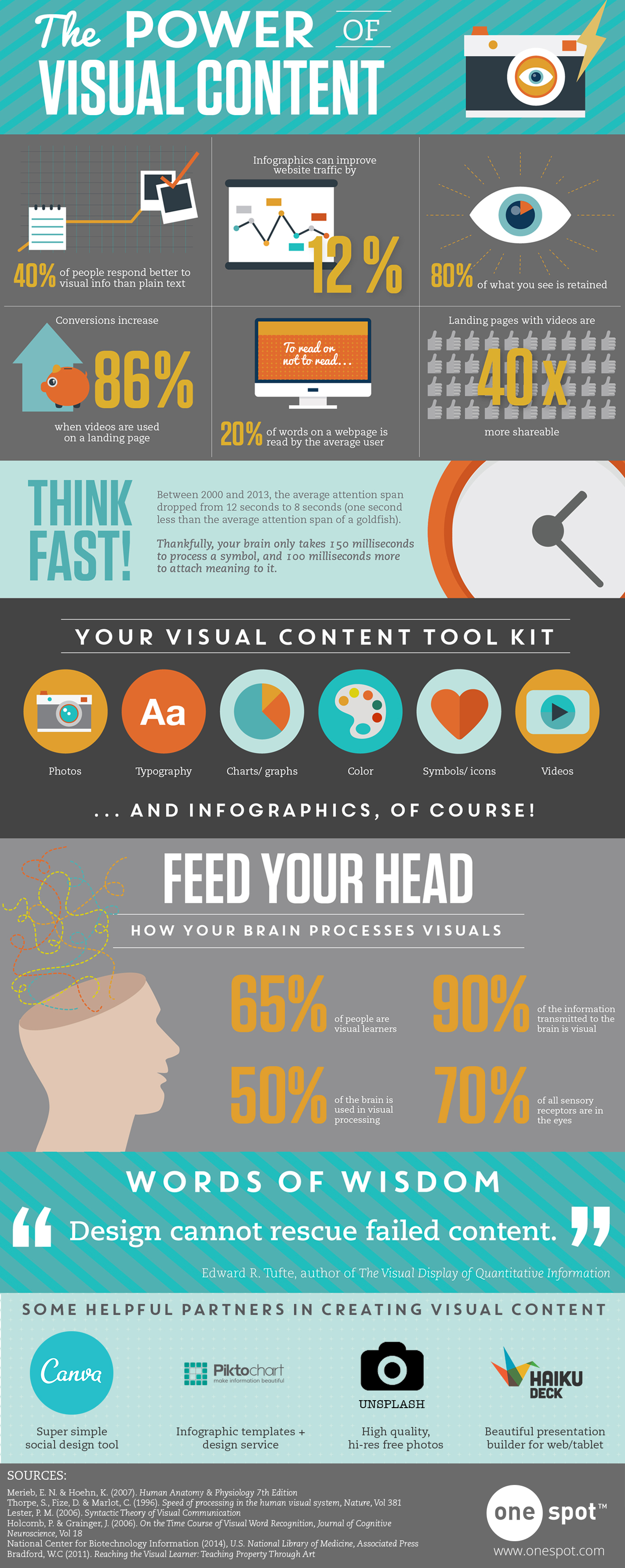
Yet, as this list of the best infographic examples shows, the effort is absolutely worthwhile. Adding them to your marketing strategy can increase web traffic by 12% and help you stay competitive in the B2B crowd, where 65% of marketers use infographics.
Luckily, there are numerous resources to create beautiful infographics of your own.
To help inspire your next visual creation, here are a handful of stunning branded infographics to kickstart your creativity.
9 of the Best Infographic Examples of 2020
1. How SMB sales teams are keeping up in 2020, by Zendesk
We all know 2020 led to massive changes in the way we work, buy, and enjoy leisure time. But this infographic by Zendesk hones in on a specific group (SMB sales teams) to show how they keep up with the times.
Through research-backed data, clear visuals, and concise copy, the main point comes across crystal clear: Know customers’ expectations to meet them where they are.
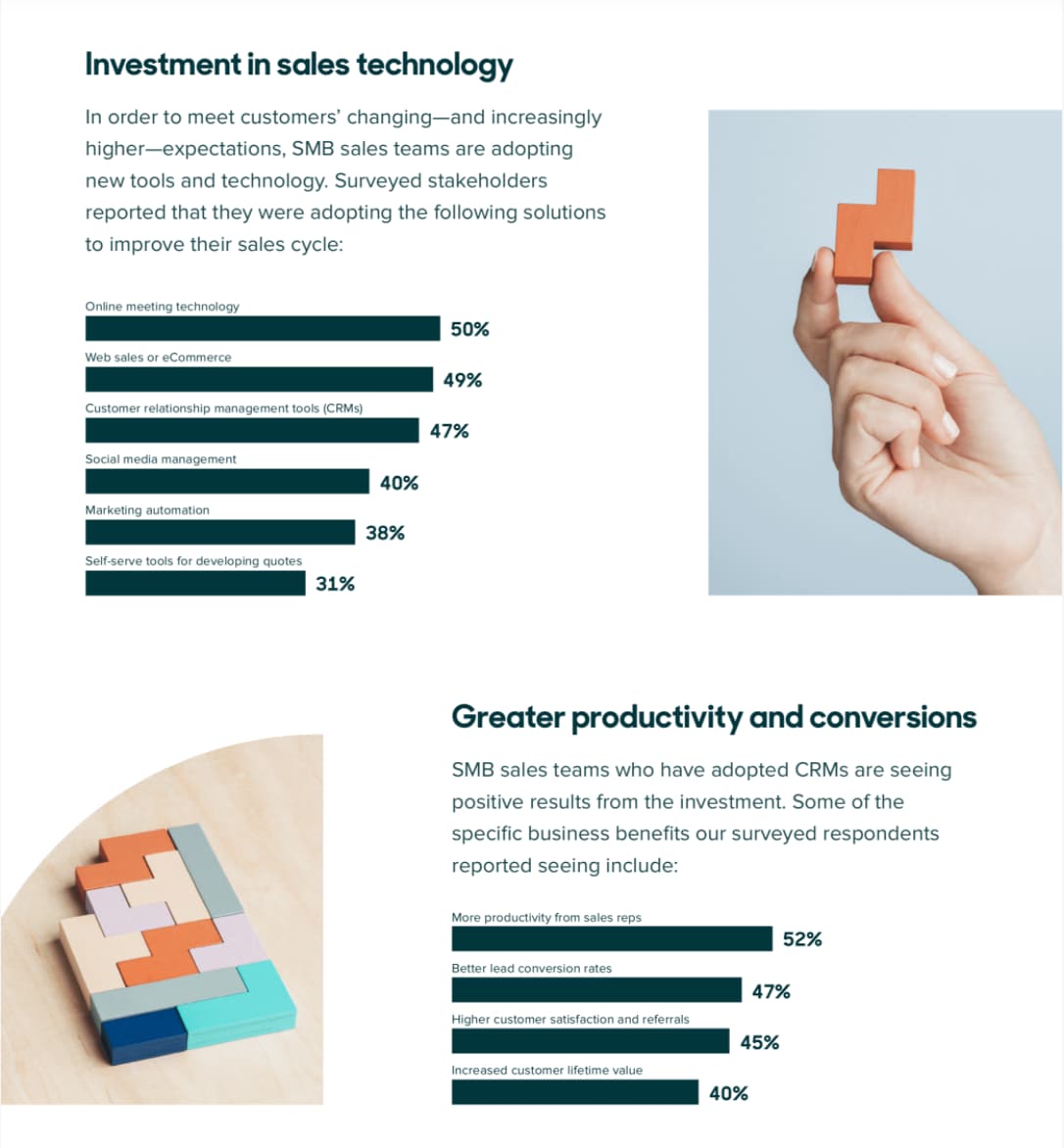
This infographic does a good job following one theme from start to finish. Readers can answer “What’s the point?” within the first few sentences — a best practice, according to CoSchedule.
This helps focus your infographic, so you don’t cram too much information or too many topics into one piece. Which is why Zendesk flowed from the research and stats to how SMB sales teams are adopting new technology to keep up.
They even include the benefits of CRM technology, like a 52% increase in productivity from sales reps. Of course, the benefits align with the customer service software Zendesk offers, making the infographic a good sales tool for their own team.
2. Response to COVID-19, by the U.S Food and Drug Administration
It wouldn’t be a 2020 round-up without mentioning the global pandemic that kept many of us at home for months. The bright spot? There are infographics galore educating people on how to properly wash their hands and social distance.
The U.S Food and Drug Administration (FDA) also relied on this visual medium to share how their regulatory department addressed COVID-19.
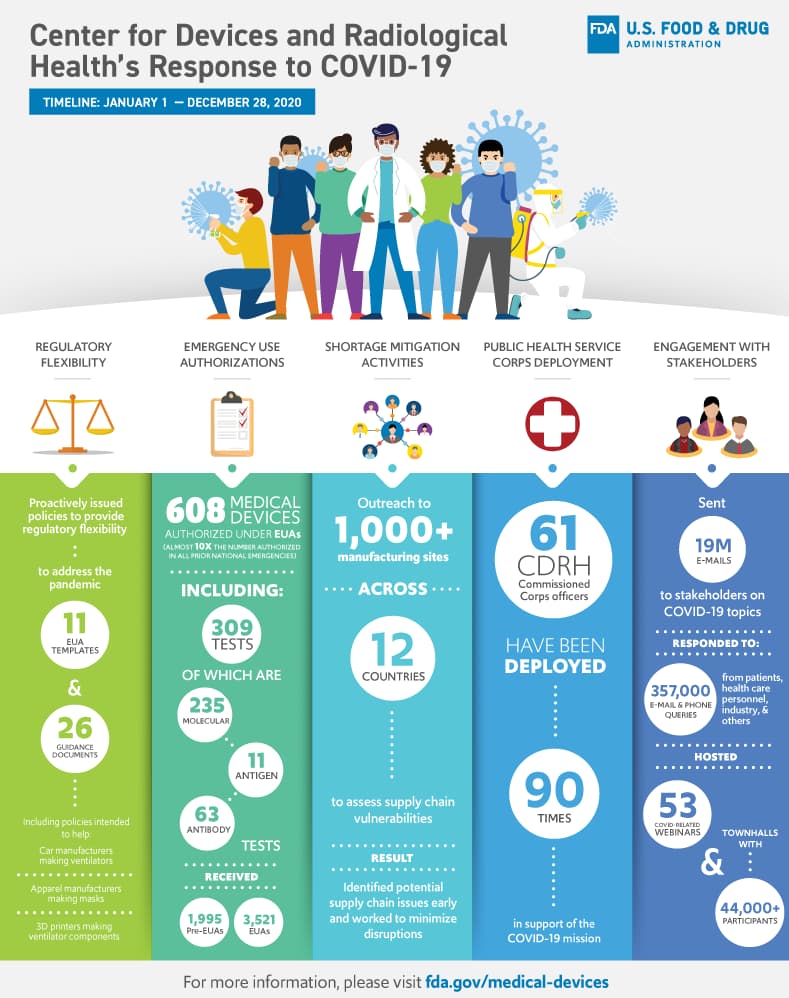
This infographic example made the list for several reasons. First, to show how infographics can be used to highlight impact, instead of sharing step-by-step instructions or research-oriented content.
The impact of each action is organized into separate columns and given a distinct color to help your eyes track from top to bottom. While this flow breaks the typical left to right reading pattern, it’s not distracting or difficult to follow.
The healthcare worker graphics at the top of the page nods to those on the frontlines, the colors align with the brand, important numbers are easy to read, and the page isn’t crowded with text.
So the next time you need to explain the fruits of your labors to your boss, help win them over with an impact-driven infographic.
3. Content Marketing in Times of Uncertainty, by LinkedIn
In uncertain times, more than eight out of 10 people want brands to act as a news source, foster a sense of community, and provide educational resources. Whew.
As a content marketer, those are major expectations to live up to. LinkedIn realized the changing global landscape would alter customer expectations, and, as a result, content marketing strategies. So the team put together this handy infographic to help marketers focus on what matters most.
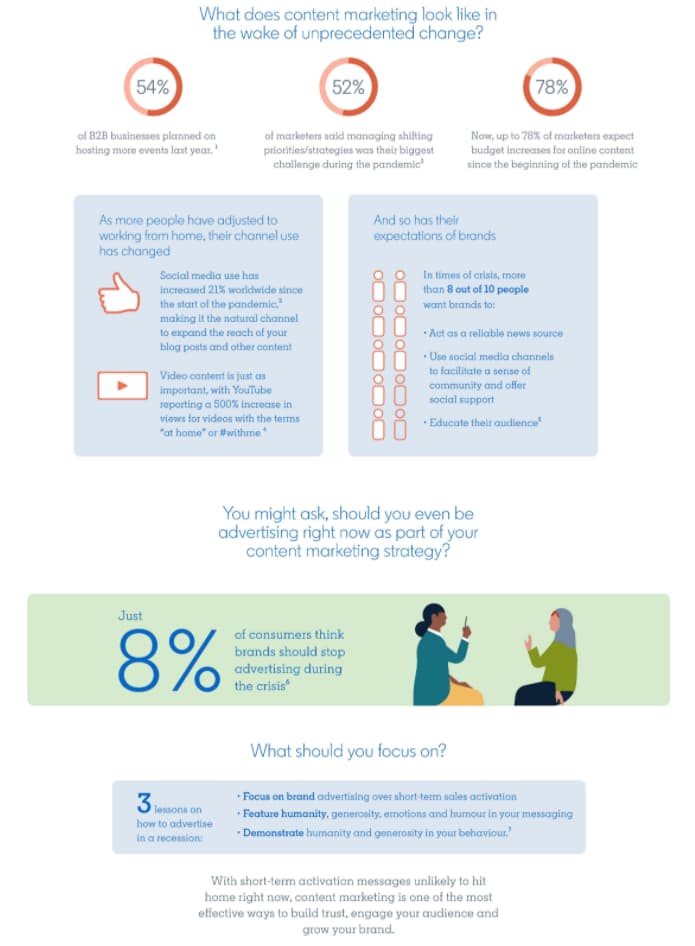
This infographic example features a number of design elements from LinkedIn’s current brand. The graphics adhere to their primary and complementary color scheme, include diverse characters, and relate to the work-from-home times.
They also use color block banners to add visual interest and break up chunks of text. But my favorite part? The ruler graphic on how to measure ROI and show why your efforts are worthwhile.
4. Pianeta plastica, by Manuel Bortoletti for GEDI Gruppo
“Che bello” is the first thought that comes to mind for this design. The stunning data visualizations, oceanic color scheme, and easy-to-understand layout let the visuals do the talking. Visme explains how an infographic follows this essential best practice if it makes sense with all of the text removed.
That may seem impossible, but designer Manuel Bortoletti pulls it off with informative maps accompanied by clear keys and a bar graph that uses oil tankers to inform readers about how oil circulates the globe.
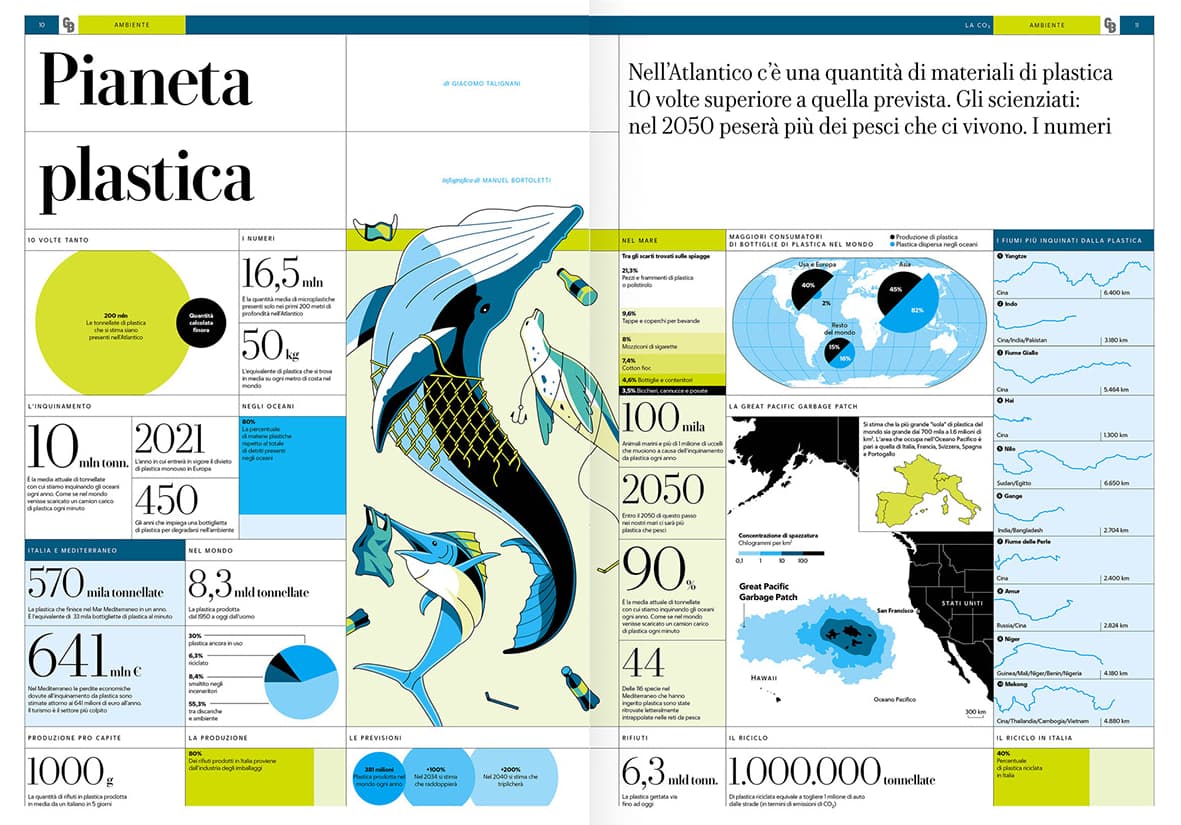
Even with my incredibly limited Italian, I understand that the main point of the piece is to inform readers about the impact of the Great Pacific Garbage Patch. And since this infographic was designed for the Italian media outlet GEDI Gruppo, it stays on-brand with a more formal editorial tone.
5. How to Properly Wear a Mask, by John Hopkins Medicine
Education is the crux of an infographic. And when you have mere seconds to capture people’s increasingly narrow attention span, the information better be easy to learn.
That’s why one of the best infographic examples comes from John Hopkins Medicine. They designed an infographic to share tips on a crucial COVID-19 procedure: wearing a mask.
Is covering your nose important? You bet. What about wearing a bandana as a mask? No way. Hopkins uses a combination of straightforward graphics and copy to make the do’s and don’ts very clear.
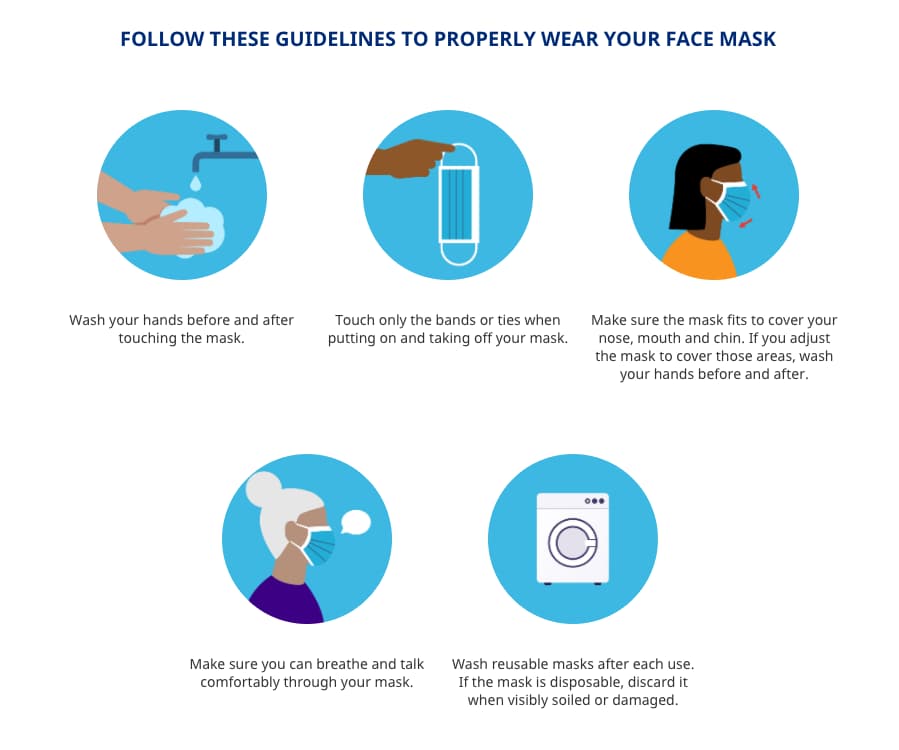
As a renowned medical institution, they have the experience and authority to educate people on this topic, so it’s both fitting for their brand and helpful for everyone’s health. A true win-win.
6. How to Be Productive While Working From Home, by bannersnack
Working from home isn’t the pajama party many people (used to) imagine. As offices closed and thousands of people turned dining tables into home office spaces, bannersnack created this infographic to help its employees transition to a different way of working. As a freelancer who’s been working remotely for the past five years, I found it full of practical tips and technology.
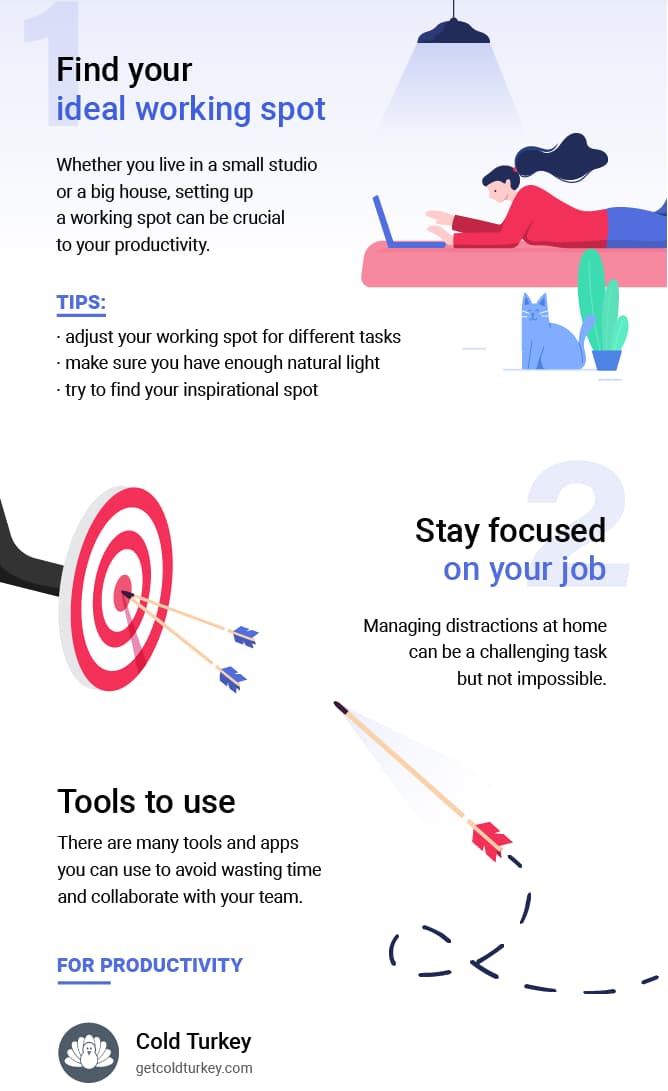
Beyond basic elements like brand colors, bannersnack includes information people can immediately put to use. While it’s easy to stay planted on your couch all day, they recommend finding multiple workspaces for different tasks. An inspirational spot for creative thinking, and another for deep work and crunched deadlines.
Tips like this may seem small once you’ve been working remotely for a while, but for newcomers, it’s one less thing you have to learn yourself while adjusting to a different routine.
7. 45 Slack Tricks That Will Impress Your Boss, by Net Credit
A tool as powerful as Slack has many features most people will never use, yet this infographic makes it easy to look like the cool “Slack-er” at the company. Even if you’ve only mastered the /giphy shortcut until now.
Net Credit starts with a handful of stats to inform readers and give an idea of Slack’s scope. Who knew people spend 50 million hours on the platform in one week? I’m intrigued and want to keep reading.
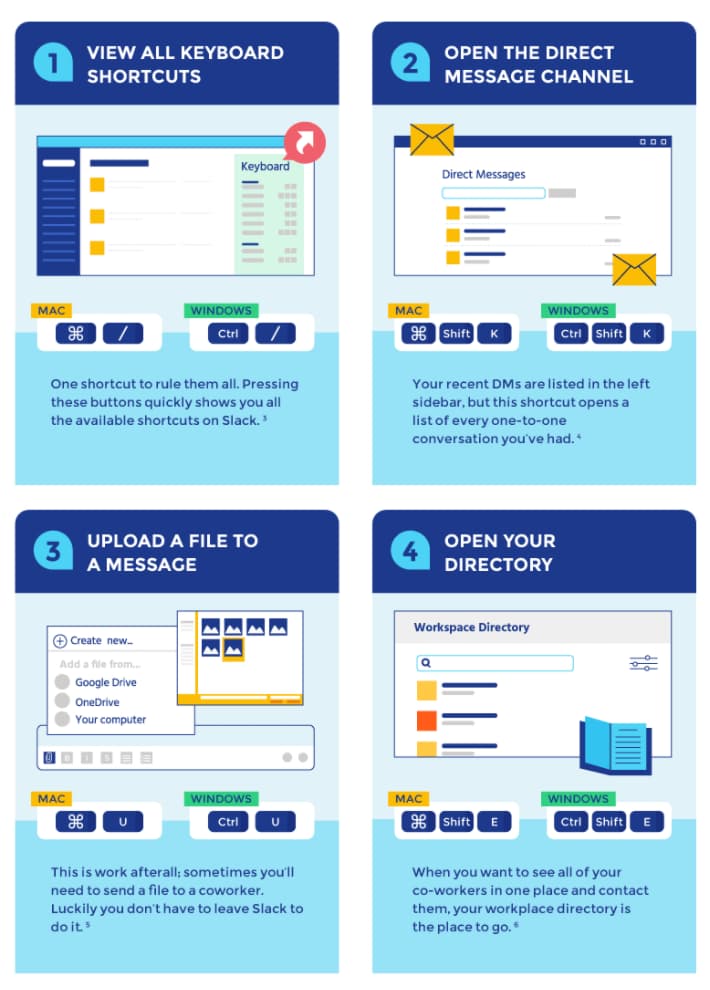
As you scroll down the graphic, you see a combination of direct headlines “Read Channel Highlight” followed by text instructions and visual cues. As a visual learner, I appreciate how these cues mirror the actual interface.
Each section is organized to help you find what you’re looking for, whether it’s “#channel” or “message” tips. Finance may be Net Credit’s bread and butter, but this infographic shows how their team is adaptable and helpful — exactly what you want in a financial partner.
8. The Sustainable Development Goals Report, by the United Nations
Infographics are a great way to add visual flavor to otherwise dry content, like annual reports and whitepapers.
What stands out in this infographic example is how it can be used as one visual or divided into 17 sections — one for each Sustainable Development Goal. This allows the content team to choose which type of content best fits the target audience.
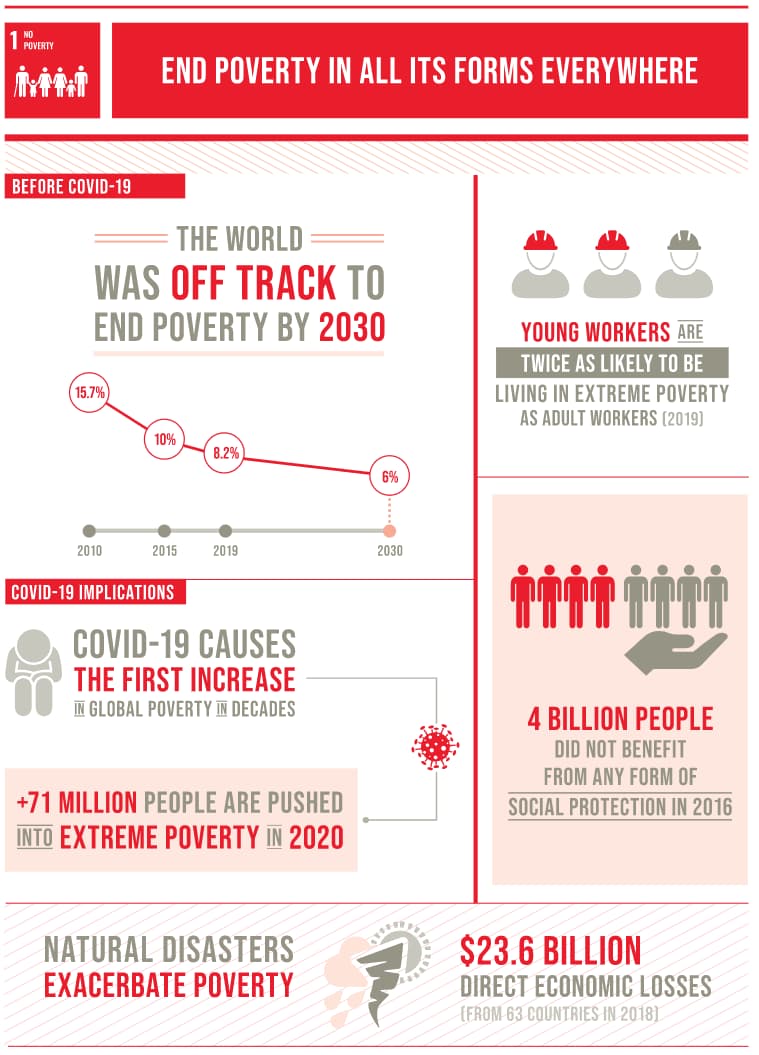
If the UN is speaking to organizations that empower women and girls, they can share the “Gender Equality” graphic. But a non-profit that promotes all of the UN goals will likely be interested in the entire design.
While a lot of information is packed into each graphic, it’s never overwhelming. Each goal is clearly separate from the other with bold headers and distinct colors, which are also used to differentiate the goals across all of the UN’s marketing efforts.
9. Tech’s Bizarre Beginnings & Lucrative Pivots, by Visual Capitalist
The beauty of infographics? They can be used by dozens of industries for hundreds of different purposes. But the best ones are often unexpected.
Take this graphic designed by Visual Capitalist. It reveals the wild origin stories of some of the biggest tech companies today. I personally had no idea YouTube began as a video dating site with the tagline “Tune In. Hook Up.”
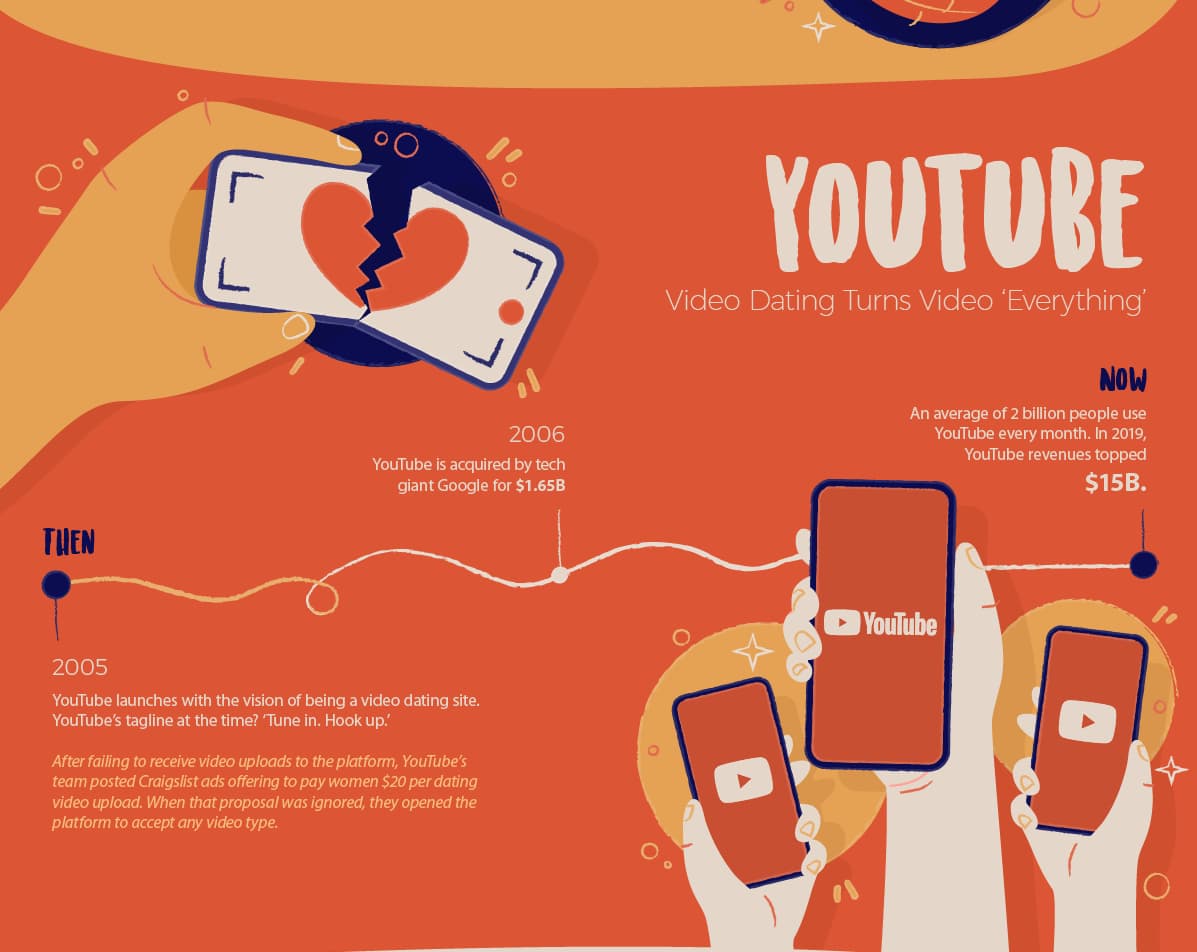
As a growing online publication that focuses on data and technology news, Visual Capitalist’s audience is likely interested in stories around company pivots that led to success.
That information, coupled with a simple timeline structure, fun graphics, and hard-hitting metrics, make it tough to look away from this infographic. Plus, we all need reminders that it’s not where you start, but where you’re going.
Now that your creativity is sparked, it’s the perfect time to start creating your own infographics. If you’re ready to jump into the design phase, learn how to make infographics in Powerpoint, check out these templates, or discover how to create an interactive infographic.
If you’re in the planning phase, begin by getting buy-in from your boss with these convincing infographic stats and conducting research that will make your infographic both informative and beautiful.

The Future of Advertising [Expert Predictions & Data]
In a world of banner blindness, I’m sure you’re concerned about the future of advertising. If you’re in marketing, I’ll bet it’s one of your bigger concerns.
But it’s a new dawn and it’s a new day. And as technology and advertising continue to evolve, so will your strategies.
Below, let’s dive into the future of digital, mobile, video, and TV advertising.
Future of Digital Advertising
Let’s start out with some stats:
- 91% of respondents agree ads are more intrusive today compared to two to three years ago, and 87% agree there are more ads in general (HubSpot)
- 42% of consumers feel that ads across digital media are irrelevant to their needs, an increase of 10% since last quarter (RevJet)
- 73% of consumers dislike companies with repetitive messaging, representing a 15% increase in negative sentiment quarter over quarter (RevJet)
- 62% of companies have, or plan to have, an omni-channel marketing strategy (AdWeek)
- Conversion rates actually increase the more users see an ad within remarketing campaigns (WordStream)
- Nearly all ad buyers expect digital advertising to comprise more than 50 percent of their total marketing budget in two years (Accenture)
- Today, buyers and sellers on average use programmatic for only 17 percent of their inventory. Within two years, that will more than double (Accenture)
- Digital advertisers believe automation would have an impact on achieving their goals (Forrester)
- Consumers are are more likely to engage with brands that advertise beside legitimate content, are less likely to engage with brands that advertise next to false, objectionable or inflammatory content, would stop using a brand or product if they viewed the brand’s advertising next to false, objectionable or inflammatory content, and believe that advertisers bear responsibility for ensuring their digital ads run beside trustworthy content (The Harris Poll)
So what does this mean for the future of digital advertising? Essentially, it means that ads continue to need to be personalized. Once you have the consent of your consumers to use their data, you need to use that data effectively so you can create the right ads.
Additionally, you shouldn’t just focus on one area of advertising. You should have an omni-channel, multi-device approach.
When you’re going back to the drawing board for your digital advertising strategies, remember that remarketing continues to be a good strategy to reach users and programmatic advertising is on the rise.
Now that we’ve looked at digital advertising as a whole, let’s dive into more specifics. What will mobile advertising look like in the future?
Future of Mobile Advertising
Here are the stats:
- 85% of advertisers and 72% of publishers are currently utilizing programmatic advertising (IAB)
- Nearly 80% of programmatic ad spend will go to mobile—rather than desktop—ads (eMarketer)
- When asked to specify which mobile ad types were annoying, 73% said ads that pop over the entire screen were the worst (HubSpot)
- Mobile users value search ads compared to others likely because they’re relevant to their information needs (HubSpot)
- Twitter ads are 11% more effective than TV ads during live events. (Twitter)
- In 2019, mobile advertising spending worldwide amounted to 189 billion U.S. dollars and it is expected to surpass 240 billion dollars by 2022 (Statista)
- Mobile advertising has been rapidly growing in the past couple of years, but it is expected to slow down to about 10.4 percent by the end of 2022 (Statista)
At the end of the day, programmatic mobile ad spend is increasing, as in-app ads dominate. Automation in mobile advertising will continue to rise as well.
Additionally, when it comes to mobile advertising, you might want to consider search ads instead of banner ads, since they create a better user experience.
Now, let’s take a closer look at video advertising.
Future of Video Advertising
Let’s look at the stats:
- Consumers do not find value in watching video ads if they don’t have to. 100% of respondents reported they will always skip ads when given the opportunity (RevJet)
- The pandemic has overwhelmingly increased the amount of online video people watch (Wyzowl)
- Marketers feel more positive about the return on investment offered by video than ever, as it continues to strongly influence traffic, leads, sales, and audience understanding (Wyzowl)
- 87% of video marketers reported that video gives them a positive ROI — a world away from the lowly 33% who felt that way in 2015 (Wyzowl)
- In 2019, video was the #1 form of media used in content strategy, overtaking blogs and infographics. (HubSpot)
Video remains to be one of the most powerful advertising tools. And it’s continuing to rise, even in the face of the pandemic.
Before we sign off, let’s review what the future of TV advertising looks like.
Future of TV Advertising
The stats:
- Programmatic TV will represent a third of global TB ad revenue (PwC)
- It is expected that TV advertising revenue in the United States will grow from 71 billion U.S. dollars in 2018 to 72 billion in 2023 (Statista)
- Global TV ad revenue is projected to increase from 173 billion U.S. dollars to 192 billion between 2018 and 2022 (Statista)
Even though TV advertising might seem like it would decline, it’s actually projected to increase. However, it’s important to note that the future of TV advertising is going to look programmatic.
Without a doubt, the future of advertising is going to look interesting, because as technology continues to evolve, so will our marketing strategies.

How to Sell Out Your Next Event [+Tips From INBOUND Marketers]
Ticket sales tip #1: Get John Legend to speak at your event.
Just kidding.
Or not.
We really did invite John Legend to speak at one of our INBOUND events, but the truth is, you don’t need an A-lister to get people to attend. All of it comes down to planning — and part of that planning means driving ticket sales.
With online events being on the rise and remote work becoming the norm, it may seem easier than ever to reach a lot of people online. But the question remains the same. How do you get people to come to your event?
We’re going to share some of our secrets with you that helps us drive ticket sales for INBOUND every year. Ready to maximize the ROI for your next event?
1. Reward last year’s attendees.
If you have an annual event, the first thing you should do is announce the event to last year’s attendees. The people who came the year before may be your biggest supporters and are more likely to immediately purchase the tickets, even if you don’t have all the details for the event hammered out quite yet. Show that you appreciate them by offering them a special discount for signing up early and quickly.
And don’t worry about emailing each person manually. Rather, use an email marketing service to send a personalized email to your contacts and prospects. Aside from using options like MailChimp, Emma, or ConstantContact, you can also use Marketing Hub to reach out to previous attendees.
2. Offer early bird pricing and sell tickets on a scarcity model.
Have at least two different types of pricing: early bird and regular. You can even have more than one type of early bird pricing to encourage people to buy before the prices increase. This sense of urgency will encourage people to buy sooner.
Consider structuring early bird pricing with a table plugin on your event website. Our INBOUND marketers recommend highlighting the distinct difference between an early bird and regular ticket, making it irresistible for people to sign up. Add a date limit, too.
Isabella Kirsch, INBOUND Marketing Manager, says, “We like to create urgency with the pricing structure to engage our audience early on. It’s important to know what you’re relying on as your lever. In a waterfall structure, for example, registrants are aware of price change dates through calendar reminders from your email team. In a scarcity system, tickets run out based on allocated amounts per price tier.”
Which one is most successful?
“We’ve done a lot of testing with both models and found both can have success,” Isabella says. “If you are establishing an event, changing the price on certain dates is a nice route because customers can be prepared and are compelled to act before the price increases. If you’re already getting a lot of buzz, the scarcity model gets people eager to buy early, since they don’t know when the current price is going to run out!”
3. Ask early registrants to write blog posts.
The people who register for your event first will be among your biggest supporters — that means they’re also good candidates to write blog posts for you to help promote the conference.
For our first INBOUND event ever, we had the first registrant write a blog post, and in the following year, we invited a previous attendee to write about their experience. Why?
Instead of hearing from the HubSpot team why we thought our event was great, these posts let you hear why it’s a can’t-miss opportunity from actual attendees. Third-party endorsements will always carry more weight, and don’t forget the power of social proof. When we see other people are going to an event, we want to attend, too!
Consider inviting them to write on places other than your blog. They can use outlets such as Medium, LinkedIn, and even their own company blog to write about their experience or expectations for the event.
4. Don’t just promote your conference; promote the location!
In-person events are on pause for now, but they’ll return in time. When you plan an in-person conference, remember that the event’s location is prime marketing material.
People interested in your conference don’t just want to hear about the event, they want to hear about the city where it will be hosted. Frankly, the location of conferences can be one of the biggest draw for potential attendees — it’s kind of hard to say no to an event in a cool, beautiful city.
Promote other attractions near your conference that may interest attendees. If you can get discounted rates to some of those attractions, that’s even more of an incentive for people to attend your conference!
Holding the event online? We recommend offering local perks that can help people rediscover where they live. Consider partnering with local breweries, regional restaurant chains, or other attractions to offer discounts to your attendees. Alternatively, you can partner with social-distancing-friendly service providers such as GrubHub to offer a free meal delivery (either during the event or after).
5. Get in touch with industry organizations to help promote.
In every industry, there are professional organizations who would be more than happy to help you promote your event. Get in touch with them, tell them about your event, provide email copy, and make it easy for them to promote on your behalf. This will help get your event in front of thousands of more qualified people that you wouldn’t normally have access to.
Other business-related organizations, such as chambers of commerce, will be happy to list your event for free, especially if you offer discounts to their members. Additional organizations to consider are regional, national, and international associations focused on a specific facet of your vertical.
For HubSpot, one such organization would be the American Marketing Association, since one of our primary products is a marketing automation platform.
Every organization will be different. Some will agree to post your event for free, while others might require you to become a member. Others might not have a calendar at all, and instead will encourage your conference to become a sponsor of their organization. This is a great way to promote the event to a wide range of professionals. It will also help you build backlinks to your event website, which will improve your SEO.
6. Use LinkedIn for promotions targeted to your industry.
LinkedIn Company Pages, Events, and Groups are a great way to contact people in your industry who may be interested in your event. Take advantage of the ability to promote your event to thousands of relevant people in your industry, on a social network built for networking — you know, the reason people go to events.
Creating an event page on LinkedIn also gives attendees the opportunity to post questions and network with each other. On groups related to your vertical, you can post periodically (but not too often) about this amazing event that you’re hosting. If you’d like your efforts to truly pay off, consider offering discounts to group members who share your post.
7. Start contests within your company.
Don’t forget about the giant network you have right within your office’s four walls — your employees. Encourage them to promote your event to the leads and customers they talk to through some friendly competition.
Incentivize ticket sales by offering prizes to whoever sells the most tickets (give everyone a unique discount code so you can track it!), or you could even reward a full team for working together to sell tickets.
Make it easy for your team to reach out to prospects by creating an email template that everyone can use.
8. Consistently update social media accounts.
Social media accounts should have weekly updates with information about your conference, including links to the event’s registration page. Give your network a compelling reason to attend your conference in those updates, and a link to the registration page to close the deal.
Consider posting quotes from your speakers, which will advertise the amazing people whom you’ve invited. Another fun thing to consider is engaging with pop culture through carefully chosen challenges and “memes.” A well-placed pop culture reference can help you look current. Again, choose these very carefully. We’d provide an example, but trends change so rapidly that it would look outdated within the week!
9. Purchase paid ads on social media.
Leveraging your paid advertising options on social media is another way to target people in your industry. Use targeted ads to promote to your industry with links directly to the registration page. If you need help getting started, here is a guide for executing a Facebook ad campaign, and a guide for executing a LinkedIn ad campaign.
The cost for these ads is on a pay-per-click (PCC) basis, meaning that you’ll only be charged when people click. It’s therefore budget-friendly, and you can also easily take a look at key performance indicators (KPIs) such as sign-ups. To set up an ad, you’ll need a unique landing page with a form to sign up for the event and some great copy that will entice people to register.
10. Leverage event sponsors for promotion.
Your sponsors will want to help you with promotion, because more attendees means more facetime with more people. But they’re busy. Really busy. So the easier you make event promotion on them, the more likely it is they’ll actually do it. Provide sponsors with templated email copy and discount codes so it’s easy to promote to their lists.
If you don’t yet have event sponsors, it’s simple to find a few, especially if you offer something in return. First, be sure to set up a “Sponsorship” or “Partnership” page on your event website. Most potential sponsors will want to choose between different levels, and some would also prefer a custom sponsorship option.
Being “visible” in front of five hundred people might not be enough for sponsors to join. Because it’s difficult to measure ROI on visibility alone, consider sprinkling more concrete perks such as a spot in your newsletter, a guest post on your company blog, and a backlink from the sponsorship page. Tip: Consider making this a do-follow link, too — if your sponsors are SEO-savvy, they’ll take a look at the structure of the link they’re getting.
Here’s the way our INBOUND marketers do it:
11. Sprinkle calls-to-action throughout your website.
Your homepage should have a promotion to your conference. Your login page (if you have one) should have a promotion to your conference. Your blog should have banners promoting your conference.
If you’re planning a huge event, most pages on your website should have links to your conference site, making it easy for anyone to find information about your event and register. Our tip: these calls-to-action should be bold, easy-to-find buttons in a color that’s difficult to miss.
And these CTAs shouldn’t be catch-all, either; rather, they should be targeted and highly tailored — especially for virtual events. An in-person experience allows attendees to pick and choose the talks they want to attend. Virtual events have a set schedule, meaning you must tailor the call-to-action and make your value proposition clear.
“Marketing is human first,” says Andréa Hudson, HubSpot’s Senior Marketing Manager of Global Events. “When we went virtual for INBOUND, leading with empathy was a huge part of our strategy. When you’re responsible for scaling an industry event from 26K in-person to 70K+ digitally, it’s extremely important to prioritize your value proposition and tailor that to your audience.”
12. Issue different types of passes.
Some people may not be able to attend your whole event, whether they’re unavailable for the full duration, can’t be away from the office for so long, or can’t swing the hotel costs. Issuing different types of passes helps accommodate those people and drive more ticket sales.
Consider passes like a student pass, a keynote pass, or a premier pass. Other options include basic, plus, and pro passes. At our INBOUND event, we have two options: the Digital pass and the Content pass, which gives attendees additional access to more content and information.
13. Promote the “fun stuff.”
Anyone heard of Cyndi Lauper? Anyone? Announcing a headliner performer will drive a lot of ticket sales as well as get people excited for more than just the content you’ll have during your conference sessions.
But you don’t have to spend thousands or even hundreds of thousands of dollars inviting a headliner, either. If you’re in a highly specialized industry, consider inviting a prominent industry expert who will entice professionals to attend.
You can also promote other fun stuff such as social activities. The main reason people attend conferences is for the beneficial content, sure, but promoting the parties and some of the nighttime activities definitely helps. I mean, who doesn’t like to party?
For online events, you can host a digital happy hour where drinks are welcome. Other ideas include scheduling trivia games, Jeopardy games, and wellness sessions that can help attendees decompress between presentations. Online zumba lessons, anyone?
14. Gamify the act of event promotion and ticket sales.
Host contests or games with your network to promote your conference and drive ticket sales. During your webinars, for example, you could take advantage of the large audience to promote the conference by giving away free tickets to whoever tweeted the most with your webinar hashtag. Everyone loves a little friendly competition, and you’ll certainly love the free promotion of your event!
15. Ask your speakers to write blog posts promoting their sessions.
The success of an event all comes down to its content. Reach out to speakers and ask them to write guest blog posts that promote their sessions, and give a sneak preview of what they’ll be discussing.
It’s a win-win — they get more attendees excited about their session, and you get free content (that your guest blogger will likely promote to their network) to drive ticket sales.
Virtual Event Marketing Tips
Getting people to buy tickets is one thing. Getting them to be aware of the event in the first place is another (seriously, it’s hard!).
This is especially difficult for digital events, which can’t rely on physical modes of marketing such as bus wrapping and event swag. Stickers, mugs, t-shirts, and bus wraps were previously excellent ways to promote events.
In an increasingly remote environment, you’ll need to think of new ways to get the word out. For most companies, virtual events are the only choice. But don’t be discouraged: hosting a virtual event has tangible benefits over in-person conferences. “Unlike physical events, virtual events, such as live streams or webinars, enable your brand to gain awareness from international audiences,” says Pamela Bump, Manager of Audience Growth at HubSpot.
Ready to reach a lot more people and get more registrations for your virtual event? Here are three easy promotion tips that you can implement right now.
1. Create a unique event hashtag.
Using a hashtag will stimulate conversations on Twitter, Facebook, and other social media sites. This hashtag can be used by everyone involved in your event — from speakers to sponsors to actual attendees.
It’s up to you whether to include the year after the name of the event (#Event versus #Event20XX). We do like to include the year so that all posts relate specifically to that year’s sessions, speakers, and offerings.
Your event should also have its own unique social media profiles. While we encourage you to promote the event through your company’s social media, consider making unique Twitter, Facebook, and Instagram accounts for the conference. This will create a unique brand voice and give attendees an account to tag in their posts. It can also help you separate event-related news from company news.
2. Create an online community.
Part of the reason people go to events is to network. Virtual events may seem exempt from this rule, because attendees are sitting in front of a screen rather than interacting in person. By creating an online community, you’re re-integrating this necessary element into your event.
It’s free, too. Facebook groups, LinkedIn groups, and Slack channels are all fantastic ways to put your attendees in front of each other. Even more, these groups make it easy for attendees to invite other professionals in their network, increasing awareness and driving registrations.
Our INBOUND marketers take a community-first approach when promoting the event. We want to make sure that attendees know they’re not just a face in front of a screen, but a member of an international community.
3. Create an email drip campaign.
Drive more registrations with an email drip campaign that reminds your contacts to sign up for the event. For those who’ve already done business with you before, consider providing a unique discount code to thank them for their loyalty.
The emails should align with email marketing best practices. Include a compelling subject line, a clear heading, a few lines of succinct copy, and an unmissable call-to-action.
Hitting Attendance Goals for Virtual Events
Every year, more than 25,000 people attend INBOUND. Our marketing campaigns are aggressive, but with good reason: we’re one hundred percent confident that this event will enrich attendees’ professional lives. We know they’ll walk away with valuable knowledge that can help them advance their careers.
To hit attendance goals for your virtual event, you mustn’t be shy or humble. The value you bring to your attendees can’t be found elsewhere. That’s why you’re investing thousands upon thousands of dollars to create an event that educates, entertains, and provides value.
We also can’t overstate the importance of using data to create varied campaigns that address different stages of the buyer’s journey. “Tactically, the marketing mix needs to be dynamic and impactful,” says Andréa Hudson. “There is no turn-key, blanketed approach in achieving a sell out. Digging into the data and making informed decisions based on that data is the only way to exceed your targets.”
Here are a few of our tips for hitting attendance goals at your next event.
1. Look into the KPIs of previous events you’ve held.
To better market your event, you’ll want to know how your previous event marketing tactics fared. If you’ve held an event previously, take a look at the data so you can improve this next one.
Some helpful historical data to look into would be:
- Number of registrants
- Number of attendees
- Conversion rates on your event’s landing page
- Conversion rates in social ads
- Email open and click-through-rates
- Number of leads
- Generated revenue
- Individual session registrations
- Session feedback
Based on the data you gather, you can make more sophisticated decisions about your landing page design, your social copy, and pricing strategy.
2. Identify your target attendees and tailor the agenda to them.
This is a really important step. If you know who you’re targeting the event to, you can create marketing campaigns that highlight the specific value you bring to them. As a result, you’ll get a higher number of registrations, better engagement, and higher attendance rates.
Alternatively, you can create an agenda first, then identify the type of buyer who would be compelled to buy a ticket. You should identify both psychographic and demographic information of your target audience to better align your messaging.
3. Create an event marketing plan.
Now that you have your historical data and target buyers, it’s time to create a marketing plan. There will be four principal tenets: website, organic social, paid social, and email.
On your company website, be sure to include consistent calls-to-action to visit the event website (preferably, it would take visitors straight to a landing page where they can sign up).
On your event website, be sure to clarify your value proposition. For example, including a list of your speakers makes it clear that you’re committed to offering valuable content.
Launch ads on the best social media platform for your industry (if it’s a B2B event, for example, you’d likely opt for LinkedIn).
An email campaign is also crucial for providing event reminders and invites to buy tickets.
4. Provide sneak previews of the content.
Many of us love to know what we’re in for before making a purchasing decision. By providing sneak previews through email and social — and even on your website — you’re giving potential attendees a taste of what they’ll get if they purchase a ticket.
Your speakers can film a “session trailer” telling more about the information they’ll share during their talks. One thing we do at INBOUND? We give access to notable content from previous years. That way, people can see the value they would get should they choose to attend.
5. Provide on-demand recordings.
Why? Some potential attendees may be too busy to attend a live virtual event, and if you only offer a live option, you’d be discouraging those who would prefer to watch the sessions on their own time. This would open up your event for more people and thus increase registrations.
6. Give corporate discounts or group discounts.
What better way to increase attendance than by inviting groups to purchase tickets? Many organizations buy passes for entire teams. Some companies take their entire workforce to events. This is a sure-fire way to sell tens and even hundreds of tickets at a time.
7. Prioritize accessibility.
Closed captioning, live sign language interpreters, and assistive technologies will make your event enticing to more registrants. Dedicate one or two team members who are ready to provide support should an attendee have a problem with accessibility or require accommodations.
Be sure to also include a form on your website for accessibility requests, and provide written and visual materials ahead of time in widely-used file formats. Your accessibility initiatives should be driven by inclusive design principles.
If you make your event inaccessible, you’re ignoring a segment of your target audience. Don’t forget to advertise your options for accessibility, which would make it known to potential buyers that they will have the necessary accommodations to attend.
Sell Out Your Next Event
If we could leave you with one last tip, it would be to brag. Brag about your speakers, brag about your sessions, and brag about the amazing tools your attendees will walk away with after the event. After all, people are investing on a ticket. You want them to know they’ll receive a worthwhile return on their investment.
Editor’s note: This post was originally published in August 2012 and has been updated for comprehensiveness and accuracy.

Can Facebook Ads Influence Integration Adoption? Here’s What We Found.
This post is a part of Made @ HubSpot, an internal thought leadership series through which we extract lessons from experiments conducted by our very own HubSpotters.
Platforms are embedded in our daily lives — whether we realize it or not.
Have you recently … ordered food from a service like GrubHub or made a reservation using OpenTable? Booked a ride using Lyft? Used your phone to check your email? All of these seamless interactions require systems to talk to each other via open platforms.
What about at work? How many tools do you use to do your job? Do you spend a lot of time updating disparate systems, or do you use a connected stack of technologies to keep things up-to-date? If it’s the latter, you have a platform to thank for your saved time.
A platform makes it possible to connect tools, teams, data, and processes under one digital roof. It’s the nucleus of all systems and allows you to connect all your favorite tools seamlessly using integrations. An integration allows disparate systems to talk to each other. By joining tools via integrations, a change made in System A automatically carries through to System B.
Leveraging platforms and integrations hasn’t always been commonplace. A couple of years ago, HubSpot Research found that 82% of salespeople and marketers lost up to an hour per day managing siloed tools — a costly mistake.
Today, employees recognize that integrating technologies to do their jobs isn’t an option but a requirement. Individual employees are opting to connect their tools and, on average, leverage eight apps to do their job.
Employees and businesses alike run on connected applications. Okta found that it’s small-mid sized customers (defined as companies with less than 2,000 employees) average 73 apps — up 38% from last year. While larger customers (companies with over 2,000 employees) leverage closer to 130 apps — up 68% from the past year.
From personal life to work, platforms have become a staple in our day-to-day. These platforms are well-oiled machines that initiate seamless connections between technologies. Today, the consumer not only anticipates but also expects their systems to connect — raising the bar for companies to make it possible.
But more tools shouldn’t mean more friction. At HubSpot, we want to help our customers connect their tools on our platform to reduce friction and grow better. Customers should have tools and solutions to solve their needs, regardless of if HubSpot built them. Connecting tools allows for uniform data, processes, and experiences. This year, we’re experimenting with ways to expose integrations to our customers to increase adoption.
However, as a platform scales, it becomes increasingly tricky for customers to navigate exhaustive lists of integrations and identify what’s relevant to them. We recognized this at HubSpot and began experimenting with paid ads to see if this could be a valuable distribution channel to our customers.
Our Experiment on Paid Integration Ads
At the end of Q4, the Platform Marketing team decided to use some leftover budget to try a channel we hadn’t yet proven viable for integration adoption — paid ads.
We hypothesized that we could influence the adoption of an integration through paid ads. To test our hypothesis, we ran a retargeting campaign for three integrations on Facebook. The ads were surfaced to HubSpot’s retargetable audience.
These ads featured three HubSpot-built integrations: Slack, WordPress, and Eventbrite. We selected these integrations because they are natively built (built by HubSpot) and structured in a way that allowed us to measure multi-touch attribution.
By leveraging Google Tag Manager on the in-app integration directory, custom UTM parameters, and funnel reports, we were able to measure all steps from viewing the ad to installing the integration. Before launching the campaign, we tested our Google Analytics custom funnel reports by completing all actions — including installing the integrations to make sure they worked as designed.
Before running the campaign, we made the conscious decision to split our budget evenly across all three integration ads — regardless if one ad outperformed the others. We did this to minimize variables for the experiment.
Because we ran ads through November and December, we decreased spending from $130 dollars a day to $5 a day on and around holidays. We did this to “pause” the campaign on days where the ads would get lost in the noise, as this data could skew overall results.
Lastly, we determined our success metrics. Because we didn’t have apples-to-apples benchmark data for integration paid ads, we worked with our paid team to establish reasonably similar benchmark data. While it wasn’t a direct comparison, we were curious to see how ads could influence multi-step actions. We evaluated our performance based on click-through rates (CTR), cost per click (CPC), and cost per acquisition.
Experiment Results
The integration ads surpassed our benchmark data for click-through rate (CTR), cost per click (CPC), and cost per acquisition at the 7-, 30-, and 44-day marks — supporting our initial hypothesis and prediction.
The 30-day CTR for our integration ads was higher than the 7-day and 30-day CTR for the benchmark data, which is surprising as we expected the audience to become more fatigued over time.
Fatigue can be measured by the frequency a user views the same ad. For example, at HubSpot, we look at if a viewer has seen the same ad over 2.5 times within 30 days, which we consider high. Additionally, we kept an eye out for an increasing cost per acquisition.
Paid ads for these integrations was attractive to our retargetable audience and a legitimate acquisition point for HubSpot. It helped us influence adoption of integrations — resulting in hundreds of installs in the featured technologies. It also provided us with a data point we’ve been curious to see — the cost of an install.
When considering the value and acquisition cost of an install, it’s helpful to understand the impact on the business. At HubSpot, our customers with integrated stacks of technologies tend to be more successful — and they stick around.
This makes sense — as the more apps installed, the higher the likelihood someone will stick around. This is a common finding among platform companies.
On a recent trip to San Francisco HubSpot’s VP of Platform Ecosystem Scott Brinker found that “a common pattern on platforms is that the more apps a customer integrates into their system, the higher their retention rate will be — for both the platform and the apps integrated into it.”
Connecting their tools allows customers to access all their data in one core system while staying flexible and adaptable to their needs as they grow.
Since HubSpot doesn’t currently charge integrators to be part of our ecosystem, spending money to drive a net new install may seem counterintuitive. When weighing the long-term benefits of an install for customer value and retention, we are able to determine what is a reasonable cost per install. The experiment cost was worth the insight, as it allowed us to gain a baseline understanding of the cost per acquisition of an integration install.
Ultimately you can determine if the long-term value outweighs the upfront cost. (While directional value is a good baseline, you’d ideally look to lifetime value [LTV] to establish actual value.)
What This Means for HubSpot — and For You
Our experiment with paid ads outperformed our expectations and helped us reach a larger audience than we anticipated. It became clear that this was and is a viable channel for us to increase adoption of integrations and better understand the cost per integration install.
Future looking, we could alter who we target to see how it impacts CTR. We could leverage enrichment software like Datanyze or Clearbit to see if users have tools and cross-reference install data to create a list of folks using tools we integrate with but have yet to connect to. Alternatively, we could leverage this data to target a group of users going through onboarding to encourage them to connect existing tools to HubSpot.
Additionally, we could look through the required steps to connect an integration and consider how we could reduce them to simplify the process for our users and potentially increase our CTR.
Not a platform company? No problem. This retargeting campaigns can be leveraged to evaluate other valuable actions for your users, such as sign-ups, free trials, or event registration.

How to Analyze Facebook Data to Understand Your Audience
With over 2.7 billion monthly active users and 1.82 billion daily users, Facebook is the largest social network in the world. What began as a way for college students to network has become an essential marketing tool for more than 90 million small businesses.
All of those users generate a lot of data.
To help companies harness the massive amount of information created within the platform, Facebook released their Insights tool, which shares data about the best day to post, the ideal time to post, and what posts are performing well.
If you’re marketing on Facebook, understanding how all those numbers relate to your business and audience can be confusing at first.
But worry not. This post explains how to analyze Facebook data to get valuable metrics about who’s coming to your page and clicking around. By the end, you’ll have a better understanding of how Insights can help you connect with both current and potential customers.
Running a new Facebook Business Page? Find everything you need to know to elevate your paid and organic efforts in this Facebook Marketing Course.
How to Analyze Facebook Data
Facebook Insights is separated into two main categories: Audience Insights and Page Insights.
- Audience Insights gives metrics about your Facebook audience, which helps you create relevant content, improve ad targeting, and attract more people to your Page.
- Page Insights shows analytics for your Page, so you can see which posts are performing well and which aren’t.
This post focuses on Audience Insights, to help you understand both existing and potential customers. For an in-depth look at how to gather information from Page Insights, check out this guide to Facebook Marketing.
To access the data gold mine in Audience Insights, you first have to create a business Page. Once your Page is set up, navigate to Audience Insights by clicking Analyze and Report in your Business Tools menu. Now comes the sleuthing. Pull up your company’s target audience profile for reference, because it’s time to do research.
Step 1: Choose your audience.
A pop-up will appear and ask you to pick between the following options:
- Everyone on Facebook: Start here for information to refine your target audience or attract new people to your Page.
- People connected to your Page: Click this one to learn more about everyone who likes your Page to see if your target audience is showing up.
This part requires some strategy. Are you using Insights to build a buyer persona, see if your strategy is attracting the right people, learn about your audience’s interests, or something else entirely? By having a goal in mind, it’s easier to put the information to use.
Step 2: Filter to fit your goals.
With your goal set, it’s time to narrow down the audience. You can filter based on:
- Location
- Age and gender
- Interests
- Page connections
1. Location
Knowing where in the world your audience lives is helpful for many reasons. If you’re an online shop looking to expand, maybe you want to learn whether a specific country is interested in your products.
If your company has a physical location, select your city for relevant local metrics. And if you’re not bound to any location constraints, keep it open by including countries worldwide.
2. Age and gender
All Facebook users must be 18 years and older, so keep that in mind when evaluating audiences. If you have a specific buyer persona you’re researching, filter according to that age range.
But if you’re looking to expand your audience, it’s worthwhile to extend your age range or consider both genders to see if you’re missing out on potential customers.
3. Interests
This is where filtering gets fun — and a little complicated. Keep your search broad by selecting a handful of common interests, like food and reading, or select dozens of interests for a focused pool of people.
You have freedom to play with drop down filters or type anything that comes to mind into the search bar. Cooking, Entertainment, Adventure, Flying, Tech, Cake.
The list goes on, so let your imagination run wild. Just keep an eye on the number of people in your audience as you refine. If it drops below 1,000 people, Facebook won’t populate the data.
4. Page Connections
This filter shows the top “liked” Pages by people within your audience profile. If you’re scouting for competitors, this can let you know who to watch. Maybe you’re looking for content inspiration, and browsing connected Pages will give you ideas for a campaign collaboration or promotional giveaway. Either way, it’s good to know what other Pages pop up in your audience’s newsfeed.
Step 3: Understand your audience.
Sound the applause — you’ve filtered down your audience profile. Now it’s time to dig in further to four categories: Demographics, Page Likes, Location, and Activity.
Demographics
Facebook Insights lets you go beyond the basics to see audience information including Language, Relationship Status, Education, Job Titles, and Market Segments. Let’s say you’re a new food blogger targeting men ages 18-32.
If you plug in that information, you can get a detailed look at what your audience does for work, how educated they are, or even whether they’re primarily cooking for one or more people.
If your ideal audience turns out to largely be single with time-consuming office jobs, this can help focus your content strategy.
Maybe your audience would like a post about easy lunch ideas for work or meals that are even better as leftovers. I’m generalizing here, but the more you dig into demographics, the more data you have to hone your marketing efforts.
Page Likes
Similar to the Interests filter, this option shows what your audience likes. Check out the Top Categories to learn what people care about the most, with options like Movies, Charities, Companies, Music, Public Figures, News and Media, and Products.
Maybe those men whipping up meals for one are interested in TV series like “The Chef Show” or “Chef’s Table.” If you were to create a blog post round-up of your favorite cooking shows or episodes, it would likely do well among that audience. The key here is to look at what content is relevant both in and out of your industry to review competitors and connected interests.
Location
Use this filter to explore the top countries, cities, and languages of your audience profile. Say you’re based in the United States but discover your audience has a major presence in Montreal, Canada.
It could be worth adjusting your marketing efforts to include content that speaks to both Americans and Canadians. And if you do expand your audience, you may even consider adding a French language option to your website to cater to Québécois customers.
Activity
See how active your audience is compared to the average Facebook user. The most important information in this section is the activity within the past 30 days, broken down by actions like Comments, Posts Liked, Posts Shared, and Ads Clicked.
Maybe you’re interested in running Facebook Ads but are unsure if anyone in your audience would click. With the Activity data, you have a better idea of how many people would take action. For a more detailed look at how to analyze Facebook Ad performance, take a look at this guide to Facebook Advertising.
Explore more Facebook Insights
Now you can wield the power of Audience Insights to help you build buyer personas, hone in your target audience, and expand your customer reach. But if you’re on a research roll, you can explore more metrics under Page Insights to see how your content is performing, what people are resonating with, and what posts to promote.
So the next time you question whether you’re attracting the right followers or are looking for out-of-the-box ideas to engage your audience, pull up Facebook Insights and put the data to work.

Vimeo’s 4 Tips for Generating Leads from Video
As a marketer, you’re often tasked with accomplishing two main goals: making beautiful content that builds your brand recognition and tells your story … and generating qualified leads that will help you grow your business.
Traditional marketing ethos may consider those to be two different streams of work — crafting impactful video ads, and digging up lower-funnel users — but it doesn’t have to be that way. If you’re not using video as part of your lead generation tactics, you’re missing out on a serious opportunity to create impactful content that directly translates to more leads for your business.
Megha Muchhala, Product Marketing Manager at Vimeo, shares some key insights on how to integrate your video efforts with your lead generation tactics.
Vimeo’s Tips for Generating Leads Straight from Video
We all know how useful including video on a landing page or an email campaign can be in boosting your conversion rates, but there are also optimizations you can make to your videos themselves that will give you a marketing edge.
1. Add customizable contact forms.
Rather than simply relying on CTAs to boost your follows or website traffic, marketers should utilize in-video contact forms to capture specific information from leads. This can be as simple as gathering their email, or more detailed to capture demographic information, short answers to collect personal insight, or other actionable data.
Include these forms on videos embedded throughout your digital ecosystem across your website, landing pages, and even blogs to passively build qualified leads, fast.
2. Use a multi-step format.
While you’ve probably heard of multi-step forms before, it’s possible you have yet to use one. That’s a shame, because it’s a format that’s been shown to increase form conversion by up to 52.9%.
 A multi-step form is one that breaks a longer contact form up into a more digestible series of questions, which should boost user experience and, in turn, increase conversions.
Using a multi-step form reduces friction and helps you wait to ask for more user guarded information (like an email address) until the user is already a few steps into the process.
3. Optimize it for any platform.
You always want your user experience to stay tip-top no matter how they’re viewing your video content. We know you take the care to create videos in different formats and aspect ratios depending on your hosting plans, and your contact forms should be no different. Utilize a contact form that displays on mobile and desktop to ensure you’re capturing all potential leads.
4. Get creative with your placement.
There are pros and cons to dropping contact forms at any point throughout your video, and the right choice generally depends on what kind of content you’re sharing.
If you’re offering premium or long-form content, gating your video with a contact form right up front is a great way to boost leads. If you’re telling a shorter form story, placing a contact form in the middle or just before a climax can be incredibly effective in terms of incentivizing information sharing.
And while placing your contact form at the end of the video can be risky (considering 50% of viewers stop watching a video after one minute), it can also generate the most qualified leads: those who’ve watched all the way to the end are the most likely to be engaged with your brand or story anyway. Whatever you choose, we recommend setting up a few A/B tests to determine the best placement. A little testing can go a long way!
And speaking of placement, consider your video distribution when deciding your form messaging and placement. Audiences watching a video on your blog are likely far more invested (and thus likely to share some honest info and opinions) than those catching a video on your homepage. Alter your messaging accordingly!
Some Final Tips
Now that you know about the joys of in-video lead capture, let’s review some final tips to make the most of your tactics.
1. Don’t ask for too much too early.
Make sure to consider the sales funnel when optimizing your contact forms. If you know video is your main acquisition tool (meaning, the first piece of your brand consumers see before becoming fans), know that they might not be so willing to share lots of information with you upfront.
Customize your asks as they relate to steps in the funnel: users who are brand loyalists are a lot quicker to give up info than those who’ve just spotted you via a sponsored ad.
2. Remember to nurture your leads.
Leads are great, but if you don’t engage them, they’re pretty much useless. When capturing leads via contact forms, sync them to your email service provider to make it easy to nurture them. (Just so you know: Vimeo users can automatically sync their leads directly into their HubSpot account, making it simpler than ever to connect with your prospective customers.)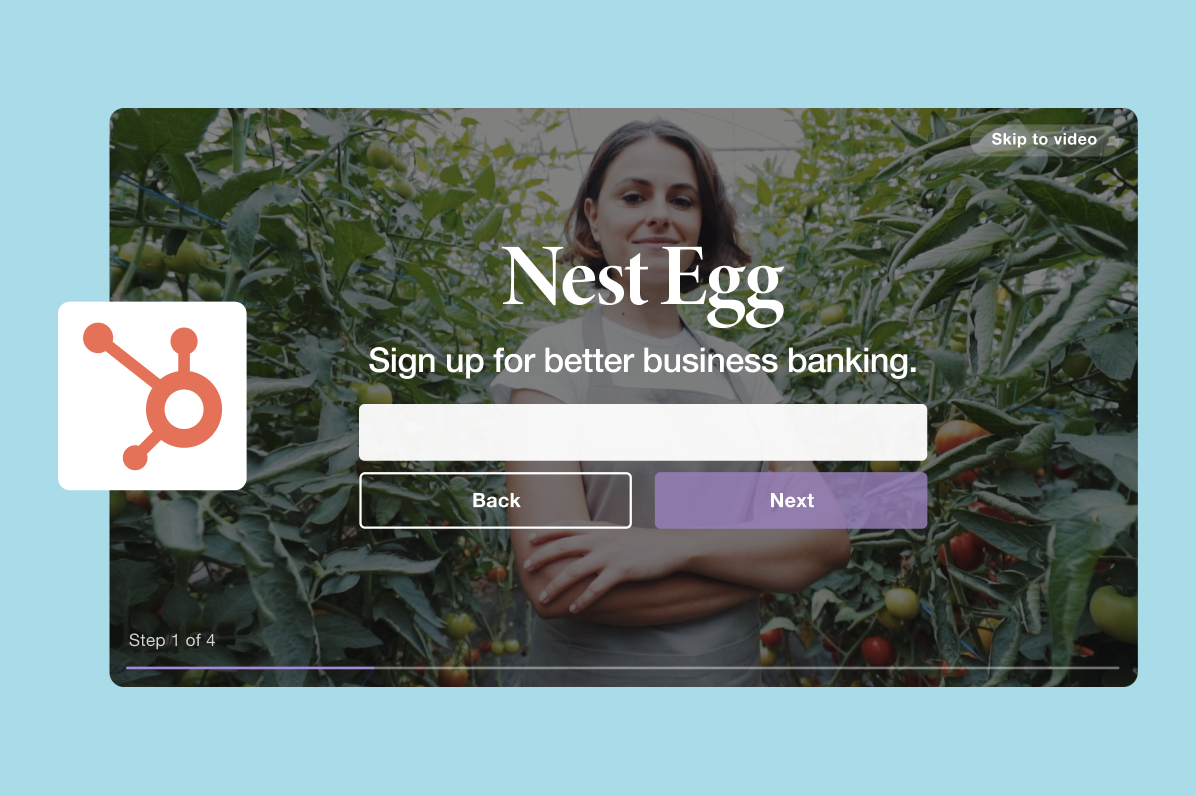 Then, keep them engaged! Develop follow-up email campaigns around specific prominent demographics and use your gleaned data to make them even more engaging. Even better, further increase your click-through by embedding GIFs of your videos in your follow-up email campaigns to stand out and get noticed by leads.
3. Always keep SEO in-mind.
Your ability to generate leads in your video doesn’t mean a whole lot if no one watches your content. SEO can be a massively helpful organic discovery tool to send users to your business. Take the extra time to optimize your website, landing page, and video itself for maximum discoverability.

12 of the Best AI Chatbots for 2021
Whether it’s on Facebook Messenger, their website, or even text messaging, more and more brands are leveraging chatbots to service their customers, market their brand, and even sell their products.
But even though most chatbots can handle moderately sophisticated conversations, like welcome conversations and product discovery interactions, the if/then logic that powers their conversational capabilities can be limiting. For instance, if a customer asks a unique yet pressing question that you didn’t account for when designing your chatbot’s logic, there’s no way it can answer their question, which hangs your customer out to dry and ultimately leaves them dissatisfied with your customer service.
Fortunately, the next advancement in chatbot technology that can solve this problem is gaining steam — AI-powered chatbots.
By leveraging machine learning and NLP, AI-powered chatbots can understand the intent behind your customers’ requests, account for each customer’s entire conversation history when it interacts with them, and respond to their questions in a natural, human way.
If you’re currently using a standard chatbot, but want to upgrade to an AI-powered one, we’ve put together a list of the best AI chatbots for 2021. Read on to find the right one for you.
1. HubSpot
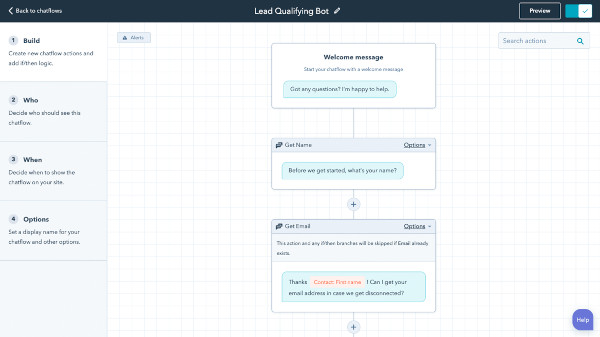
HubSpot has an easy and powerful chat builder software that allows you to automate and scale live chat conversations. Your customers will be able to get answers to frequently asked questions, book meetings, and navigate the site. At the same time, their answers are saved in your CRM, allowing you to qualify leads and trigger automation. Keep in mind that HubSpot’s chat builder software doesn’t quite fall under the category of “AI chatbot” because it uses a rule-based system. However, HubSpot does have code snippets, allowing you to leverage the powerful AI of third-party NLP-driven bots such as Dialogflow.
Because HubSpot is a CRM platform, using the HubSpot chatbot in conjunction with code snippets gives you the advantage of easy integration across your marketing, sales, and service tools.
2. Intercom
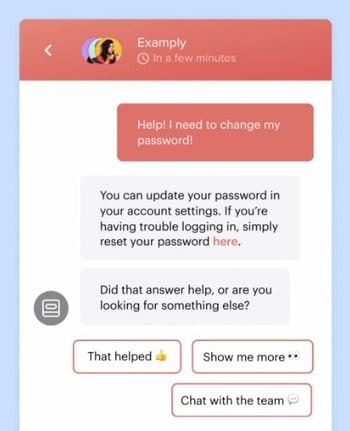
Intercom is software that supports live chat, chat bots, and more to provide messenger-based experiences for prospects. Using machine learning and behavioral data, Intercom can answer up to 33% of queries and provide a personalized experience along the way.
3. Watson Assistant
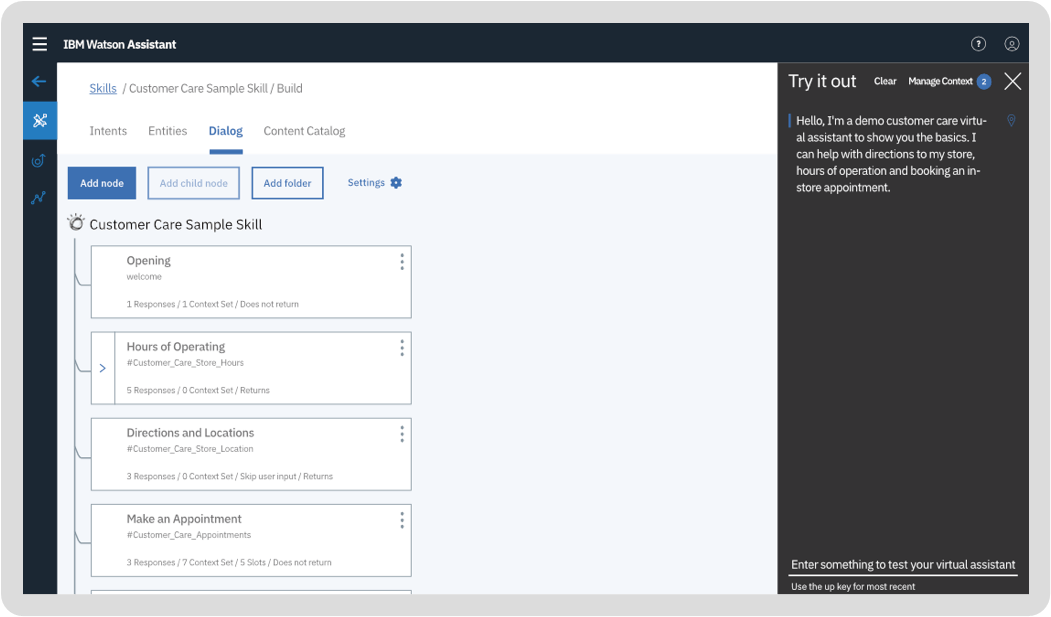
Developed by one of the leaders in the AI space, IBM, Watson Assistant is one of the most advanced AI-powered chatbots on the market. Pre-trained with content from your specific industry, Watson Assistant can understand your historical chat or call logs, search for an answer in your knowledge base, ask customers for more clarity, direct them to human representatives, and even give you training recommendations to hone its conversational abilities.
Watson Assistant can run on your website, messaging channels, customer service tools, and mobile app. The chatbot also comes with a visual dialog editor, so you don’t need any coding experience to develop it.
4. Drift
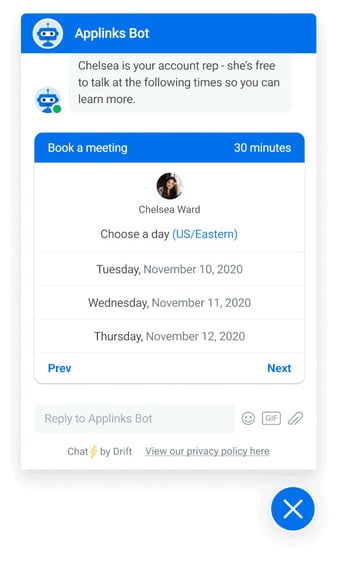
Drift provides conversational marketing and sales software powered by both automation (rule-based) and artificial intelligence (NLP). According to their website, “Drift’s conversational AI is trained on over 6 billion conversations to identify the patterns that engage and convert visitors into qualified pipeline.” This means the machine learning that the chatbot comes with is already pre-trained and ready to go.
5. Bold360
-14.png?width=400&name=pasted%20image%200%20(1)-14.png)
Trusted by customers like Intuit, Edible Arrangements, and Vodafone, Bold360 patented its own natural language processing technology to help brands build chatbots that can understand your customers’ intent without the need of keyword matching and learn how to deliver the most accurate answers to them.
Bold360’s conversational AI can interpret complex language, remember the context of an entire conversation, and reply to customers with natural responses. Customers can even buy your products through the chatbot. You can also give your chatbot its own personality and run it on most messaging channels.
6. Zendesk Chat
Zendesk offers live chat and chatbots as part of their Zendesk Chat service. Built with powerful automation combined with the technology of Answer Bot and Flow Builder for creating AI-powered conversation flows, it allows you to configure your chatbot to answer common customer questions without writing code.
7. Salesforce Einstein
Salesforce Einstein is AI technology that uses predictive intelligence and machine learning to power many Salesforce features, including Salesforce’s Service Cloud and chatbot offerings. It is capable of solving customer queries with its intelligent conversational features, and you can count on it for triage and routing and data-driven insights.
8. Rulai
-11.png)
Armed with deep-learning based natural language understanding and adaptive multi-taking capabilities, Ruali, an AI-powered chatbot for enterprise brands, can understand the context of a conversation, predict user behavior, grasp customer preferences, take actions, switch to different tasks, and ask customers for more clarification.
Rulai also integrates with most messaging channels, customer service software, enterprise business software, and cloud storage platforms. You can either build a Ruali chatbot from scratch with its drag-and-drop design console and let its AI adapt to your customers or you can implement a pre-trained chatbot that has been fed data from your specific industry.
9. LivePerson
-10.png)
By collecting over 20 years of messaging transcript data and feeding it to their AI-powered chatbot, LivePerson can automate almost every industry’s messaging and integrate with most messaging channels like your website, mobile app, Apple Business Chat, text messaging, Google Rich Business messaging, Line, Facebook Messenger, WhatsApp, and Google AdLingo.
LivePerson’s BotStudio also lets you build chatbots from scratch, without any coding knowledge, and its analytics dashboard can track metrics like real-time sentiment, bot containment rate, bot conversation time, total conversation time, average order value, and bot contained sales, allowing you to grasp the impact your chatbot has had on your business’ bottom line.
10. Inbenta
-9.png?width=450&name=pasted%20image%200%20(4)-9.png)
Designed specifically for enterprise brands, Inbenta’s chatbot leverages machine learning and its own natural language processing engine to detect the context of each customer conversation and accurately answer their questions. Inbenta also offers a dialog manager, which allows you to craft custom conversation flows and paths.
Additionally, when Inbenta’s chatbot realizes that one of your customers needs to talk to a human, it’ll escalate the conversation to the appropriate support agent. To make your chatbot seem more human, you create a custom avatar for it, too.
11. Ada
.png)
Trusted by customers like Medium, Shopify, and MailChimp, Ada is an AI-powered chatbot that features a drag-and-drop builder that you can use to train it, add GIFs to certain messages, and store customer data.
Ada can also integrate with most messaging channels and customer service software, send personalized content to your customers, ask for customer feedback, and report on your bots’ time, effort, and cost savings. According to their website, Ada has saved their customers over $100 million in savings and 1 billion minutes of customer service effort.
12. Vergic
-5.png?width=350&name=pasted%20image%200%20(5)-5.png)
Vergic offers an AI-powered chatbot that can serve as your businesses’ first line of customer support, handle transactional chats, and transfer more complicated problems to your actual customer service agents. It’s like a hybrid chatbot that can boost your employees’ productivity.
By leveraging natural language processing and natural language understanding, Vergic can also perform sentiment analysis, share documents, highlight pages, manage conversational workflows, and report on chatbot analytics.
Editor’s note: This post was originally published in March 2019 and has been updated for comprehensiveness.

How to Do Market Research: A Guide and Template
Today’s consumers have a lot of power. They can research your product or service and make purchase decisions entirely on their own.
Moreover, rather than talking to one of your sales reps, they’re more likely to ask for referrals from members of their networks or read online reviews.
With this in mind, have you adapted your marketing strategy to complement the way today’s consumers research, shop, and buy?
To do just that, you must have a deep understanding of who your buyers are, your specific market, and what influences the purchase decisions and behavior of your target audience members.
Enter: Market Research.
Whether you’re new to market research, this guide will provide you with a blueprint for conducting a thorough study of your market, target audience, competition, and more.
What is market research?
Market research is the process of gathering information about your business’s buyers personas, target audience, and customers to determine how viable and successful your product or service would be, and/or is, among these people.
Why do market research?
Market research allows you to meet your buyer where they are. As our world (both digital and analog) becomes louder and demands more and more of our attention, this proves invaluable. By understanding your buyer’s problems, pain points, and desired solutions, you can aptly craft your product or service to naturally appeal to them.
Market research also provides insight into a wide variety of things that impact your bottom line including:
- Where your target audience and current customers conduct their product or service research
- Which of your competitors your target audience looks to for information, options, or purchases
- What’s trending in your industry and in the eyes of your buyer
- Who makes up your market and what their challenges are
- What influences purchases and conversions among your target audience
As you begin honing in on your market research, you’ll likely hear about primary and secondary market research. The easiest way to think about primary and secondary research is to envision to umbrellas sitting beneath market research: one for primary market research and one for secondary market research.
Beneath these two umbrellas sits a number of different types of market research, which we’ll highlight below. Defining which of the two umbrellas your market research fits beneath isn’t necessarily crucial, although some marketers prefer to make the distinction.
So, in case you encounter a marketer who wants to define your types of market research as primary or secondary — or if you’re one of them — let’s cover the definitions of the two categories next. Then, we’ll look at the different types of market research in the following section.
Primary vs. Secondary Research
There are two main types of market research that your business can conduct to collect actionable information on your products including primary research and secondary research.
Primary Research
Primary research is the pursuit of first-hand information about your market and the customers within your market. It’s useful when segmenting your market and establishing your buyer personas. Primary market research tends to fall into one of two buckets: exploratory and specific research.
Exploratory Primary Research
This kind of primary market research is less concerned with measurable customer trends and more about potential problems that would be worth tackling as a team. It normally takes place as a first step — before any specific research has been performed — and may involve open-ended interviews or surveys with small numbers of people.
Specific Primary Research
Specific primary market research often follows exploratory research and is used to dive into issues or opportunities the business has already identified as important. In specific research, the business can take a smaller or more precise segment of their audience and ask questions aimed at solving a suspected problem.
Secondary Research
Secondary research is all the data and public records you have at your disposal to draw conclusions from(e.g. trend reports, market statistics, industry content, and sales data you already have on your business). Secondary research is particularly useful for analyzing your competitors. The main buckets your secondary market research will fall into include:
Public Sources
These sources are your first and most-accessible layer of material when conducting secondary market research. They’re often free to find and review — lots of bang for your buck here.
Government statistics are one of the most common types of public sources according to Entrepreneur. Two U.S. examples of public market data are the U.S. Census Bureau and the Bureau of Labor & Statistics, both of which offer helpful information on the state of various industries nationwide.
Commercial Sources
These sources often come in the form of market reports, consisting of industry insight compiled by a research agency like Pew, Gartner, or Forrester. Because this info is so portable and distributable, it typically costs money to download and obtain.
Internal Sources
Internal sources deserve more credit for supporting market research than they generally get. Why? This is the market data your organization already has!
Average revenue per sale, customer retention rates, and other historical data on the health of old and new accounts can all help you draw conclusions on what your buyers might want right now.
Now that we’ve covered these overarching market research categories, let’s get more specific and look at the various types of market research you might choose to conduct.
1. Interviews
Interviews allow for face-to-face discussions (in-person and virtual) so you can allow for a natural flow or conversation and watch your interviewee’s body language while doing so.
2. Focus Groups
Focus groups provide you with a handful of carefully-selected people that you can have test out your product, watch a demo, provide feedback, and/or answer specific questions.
3. Product/Service Use Research
Product or service use research offers insight into how and why your audience uses your product or service, and specific features of that item. This type of market research also gives you an idea of the product or service’s usability for your target audience.
4. Observation-Based Research
Observation-based research allows you to sit back and watch the ways in which your target audience members go about using your product or service, what works well in terms of UX, what roadblocks they hit, and which aspects of it could be easier for them to use and apply.
5. Buyer Persona Research
Buyer persona research gives you a realistic look at who makes up your target audience, what their challenges are, why they want your product or service, what they need from your business and brand, and more.
6. Market Segmentation Research
Market segmentation research allows you to categorize your target audience into different groups (or segments) based on specific and defining characteristics — this way, you can determine effective ways to meet their needs, understand their pain points and expectations, learn about their goals, and more.
7. Pricing Research
Pricing research gives you an idea of what similar products or services in your market sell for, what your target audience expects to pay — and is willing to pay — for whatever it is you sell, and what’s a fair price for you to list your product or service at. All of this information will help you define your pricing strategy.
8. Competitive Analysis
Competitive analyses are valuable because they give you a deep understanding of the competition in your market and industry. You can learn about what’s doing well in your industry, what your target audience is already going for in terms of products like yours, which of your competitors should you work to keep up with and surpass, and how you can clearly separate yourself from the competition.
9. Customer Satisfaction and Loyalty Research
Customer satisfaction and loyalty research give you a look into how you can get current customers to return for more business and what will motivate them to do so (e.g. loyalty programs, rewards, remarkable customer service). This research will help you discover the most-effective ways to promote delight among your customers.
10. Brand Awareness Research
Brand awareness research tells you about what your target audience knows about and recognizes from your brand. It tells you about the associations your audience members make when they think about your business and what they believe you’re all about.
11. Campaign Research
Campaign research entails looking into your past campaigns and analyzing their success among your target audience and current customers. It requires experimentation and then a deep dive into what reached and resonated with your audience so you can keep those elements in mind for your future campaigns and hone in on the aspects of what you do that matters most to those people.
Now that you know about the categories and types of market research, let’s review how you can conduct your market research.
Here’s how to do market research step-by-step.
1. Define your buyer persona.
Before you dive into how customers in your industry make buying decisions, you must first understand who they are.
This is where your buyer personas come in handy. Buyer personas — sometimes referred to as marketing personas — are fictional, generalized representations of your ideal customers.

They help you visualize your audience, streamline your communications, and inform your strategy. Some key characteristics you should be keen on including in your buyer persona are:
- Age
- Gender
- Location
- Job title(s)
- Job titles
- Family size
- Income
- Major challenges
The idea is to use your persona as a guideline for how to effectively reach and learn about the real audience members in your industry. Also, you may find that your business lends itself to more than one persona — that’s fine! You just need to be thoughtful about each specific persona when you’re optimizing and planning your content and campaigns.
To get started with creating your personas, check out these free templates, as well as this helpful tool.
2. Identify a persona group to engage.
Now that you know who your buyer personas are, use that information to help you identify a group to engage to conduct your market research with — this should be a representative sample of your target customers so you can better understand their actual characteristics, challenges, and buying habits.
The group you identify to engage should also be made of people who recently made a purchase or purposefully decided not to make one. Here are some more guidelines and tips to help you get the right participants for your research.
How to Identify the Right People to Engage for Market Research
When choosing who to engage for your market research, start by focusing on people who have the characteristics that apply to your buyer persona. You should also:
Aim for 10 participants per buyer persona.
We recommend focusing on one persona, but if you feel it’s necessary to research multiple personas, be sure to recruit a separate sample group for each one.
Select people who have recently interacted with you.
You may want to focus on people that have completed an evaluation within the past six months — or up to a year if you have a longer sales cycle or niche market. You’ll be asking very detailed questions so it’s important that their experience is fresh.
Gather a mix of participants.
You want to recruit people who have purchased your product, purchased a competitor’s product, and decided not to purchase anything at all. While your customers will be the easiest to find and recruit, sourcing information from those who aren’t customers (yet!) will help you develop a balanced view of your market.
Here are some more details on how to select this mix of participants:
- Pull a list of customers who made a recent purchase. As we mentioned before, this is usually the easiest set of buyers to recruit. If you’re using a CRM system, you can run a report of deals that closed within the past six months and filter it for the characteristics you’re looking for. Otherwise, you can work with your sales team to get a list of appropriate accounts from them.
- Pull a list of customers who were in an active evaluation, but didn’t make a purchase. You should get a mix of buyers who either purchased from a competitor or decided not to make a purchase. Again, you can get this list from your CRM or from whatever system your Sales team uses to track deals.
- Call for participants on social media. Try reaching out to the folks that follow you on social media, but decided not to buy from you. There’s a chance that some of them will be willing to talk to you and tell you why they ultimately decided not to buy your product.
- Leverage your own network. Get the word out to your coworkers, former colleagues, and LinkedIn connections that you’re conducting a study. Even if your direct connections don’t qualify, some of them will likely have a coworker, friend, or family member who does.
- Choose an incentive. Time is precious, so you’ll need to think about how you will motivate someone to spend 30-45 minutes on you and your study. On a tight budget? You can reward participants for free by giving them exclusive access to content. Another option? Send a simple handwritten ‘thank you’ note once the study is complete.
3. Prepare research questions for your market research participants.
The best way to make sure you get the most out of your conversations is to be prepared. You should always create a discussion guide — whether it’s for a focus group, online survey, or a phone interview — to make sure you cover all of the top-of-mind questions and use your time wisely.
(Note: This is not intended to be a script. The discussions should be natural and conversational, so we encourage you to go out of order or probe into certain areas as you see fit.)
Your discussion guide should be in an outline format, with a time allotment and open-ended questions for each section.
Wait, all open-ended questions?
Yes — this is a golden rule of market research. You never want to “lead the witness” by asking yes and no questions, as that puts you at risk of unintentionally swaying their thoughts by leading with your own hypothesis. Asking open-ended questions also helps you avoid one-word answers (which aren’t very helpful for you).
Example Outline of a 30-Minute Survey
Here’s a general outline for a 30-minute survey for one B2B buyer. You can use these as talking points for an in-person interview, or as questions posed on a digital form to administer as a survey to your target customers.
Background Information (5 Minutes)
Ask the buyer to give you a little background information (their title, how long they’ve been with the company, and so on). Then, ask a fun/easy question to warm things up (first concert attended, favorite restaurant in town, last vacation, etc.).
Remember, you want to get to know your buyers in pretty specific ways. You might be able to capture basic information such as age, location, and job title from your contact list, there are some personal and professional challenges you can really only learn by asking.
Here are some other key background questions to ask your target audience:
- Describe how your team is structured.
- Tell me about your personal job responsibilities.
- What are the team’s goals and how do you measure them?
- What has been your biggest challenge in the past year?
Now, make a transition to acknowledge the specific purchase or interaction they made that led to you including them in the study. The next three stages of the buyer’s journey will focus specifically on that purchase.
Awareness (5 Minutes)
Here, you want to understand how they first realized they had a problem that needed to be solved without getting into whether or not they knew about your brand yet.
- Think back to when you first realized you needed a [name the product/service category, but not yours specifically]. What challenges were you facing at the time?
- How did you know that something in this category could help you?
- How familiar were you with different options on the market?
Consideration (10 Minutes)
Now you want to get very specific about how and where the buyer researched potential solutions. Plan to interject to ask for more details.
- What was the first thing you did to research potential solutions? How helpful was this source?
- Where did you go to find more information?
If they don’t come up organically, ask about search engines, websites visited, people consulted, and so on. Probe, as appropriate, with some of the following questions:
- How did you find that source?
- How did you use vendor websites?
- What words specifically did you search on Google?
- How helpful was it? How could it be better?
- Who provided the most (and least) helpful information? What did that look like?
- Tell me about your experiences with the sales people from each vendor.
Decision (10 Minutes)
- Which of the sources you described above was the most influential in driving your decision?
- What, if any, criteria did you establish to compare the alternatives?
- What vendors made it to the short list and what were the pros/cons of each?
- Who else was involved in the final decision? What role did each of these people play?
- What factors ultimately influenced your final purchasing decision?
Closing
Here, you want to wrap up and understand what could have been better for the buyer.
- Ask them what their ideal buying process would look like. How would it differ from what they experienced?
- Allow time for further questions on their end.
- Don’t forget to thank them for their time and confirm their address to send a thank-you note or incentive.
4. List your primary competitors.
List your primary competitors — keep in mind listing the competition isn’t always as simple as Company X versus Company Y.
Sometimes, a division of a company might compete with your main product or service, even though that company’s brand might put more effort in another area.
For example. Apple is known for its laptops and mobile devices but Apple Music competes with Spotify over its music streaming service.
From a content standpoint, you might compete with a blog, YouTube channel, or similar publication for inbound website visitors — even though their products don’t overlap with yours at all.
And a toothpaste company might compete with magazines like Health.com or Prevention on certain blog topics related to health and hygiene even though the magazines don’t actually sell oral care products.
Identifying Industry Competitors
To identify competitors whose products or services overlap with yours, determine which industry or industries you’re pursuing. Start high-level, using terms like education, construction, media & entertainment, food service, healthcare, retail, financial services, telecommunications, and agriculture.
The list goes on, but find an industry term that you identify with, and use it to create a list of companies that also belong to this industry. You can build your list the following ways:
- Review your industry quadrant on G2 Crowd: In certain industries, this is your best first step in secondary market research. G2 Crowd aggregates user ratings and social data to create “quadrants,” where you can see companies plotted as contenders, leaders, niche, and high performers in their respective industries. G2 Crowd specializes in digital content, IT services, HR, ecommerce, and related business services.
- Download a market report: Companies like Forrester and Gartner offer both free and gated market forecasts every year on the vendors who are leading their industry. On Forrester’s website, for example, you can select “Latest Research” from the navigation bar and browse Forrester’s latest material using a variety of criteria to narrow your search. These reports are good assets to save on your computer.
- Search using social media: Believe it or not, social networks make great company directories if you use the search bar correctly. On LinkedIn, for example, select the search bar and enter the name of the industry you’re pursuing. Then, under “More,” select “Companies” to narrow your results to just the businesses that include this or a similar industry term on their LinkedIn profile.
Identifying Content Competitors
Search engines are your best friends in this area of secondary market research. To find the online publications with which you compete, take the overarching industry term you identified in the section above, and come up with a handful of more specific industry terms your company identifies with.
A catering business, for example, might generally be a “food service” company, but also consider itself a vendor in “event catering,” “cake catering,” “baked goods,” and more.
Once you have this list, do the following:
- Google it: Don’t underestimate the value in seeing which websites come up when you run a search on Google for the industry terms that describe your company. You might find a mix of product developers, blogs, magazines, and more.
- Compare your search results against your buyer persona: Remember the buyer persona you created during the primary research stage, earlier in this article? Use it to examine how likely a publication you found through Google could steal website traffic from you. If the content the website publishes seems like the stuff your buyer persona would want to see, it’s a potential competitor, and should be added to your list of competitors.
After a series of similar Google searches for the industry terms you identify with, look for repetition in the website domains that have come up.
Examine the first two or three results pages for each search you conducted. These websites are clearly respected for the content they create in your industry, and should be watched carefully as you build your own library of videos, reports, web pages, and blog posts.
5. Summarize your findings.
Feeling overwhelmed by the notes you took? We suggest looking for common themes that will help you tell a story and create a list of action items.
To make the process easier, try using your favorite presentation software to make a report, as it will make it easy to add in quotes, diagrams, or call clips.
Feel free to add your own flair, but the following outline should help you craft a clear summary:
- Background: Your goals and why you conducted this study.
- Participants: Who you talked to. A table works well so you can break groups down by persona and customer/prospect.
- Executive Summary: What were the most interesting things you learned? What do you plan to do about it?
- Awareness: Describe the common triggers that lead someone to enter into an evaluation. (Quotes can be very powerful.)
- Consideration: Provide the main themes you uncovered, as well as the detailed sources buyers use when conducting their evaluation.
- Decision: Paint the picture of how a decision is really made by including the people at the center of influence and any product features or information that can make or break a deal.
- Action Plan: Your analysis probably uncovered a few campaigns you can run to get your brand in front of buyers earlier and/or more effectively. Provide your list of priorities, a timeline, and the impact it will have on your business.
Lastly, let’s review a resource that can help you compile everything we just discussed in a simple yet effective way (plus, it’s free!).
Market Research Report Template
Within a market research kit, there are a number of critical pieces of information for your business’s success. Let’s take a look at what those different kit elements are next.
Pro Tip: Upon downloading HubSpot’s free Market Research Kit, you’ll receive editable templates for each of the given parts of the kit as well as instructions on how to use the templates and kit, and a mock presentation that you can edit and customize.
Download HubSpot’s free, editable market research report template here.
1. Five Forces Analysis Template
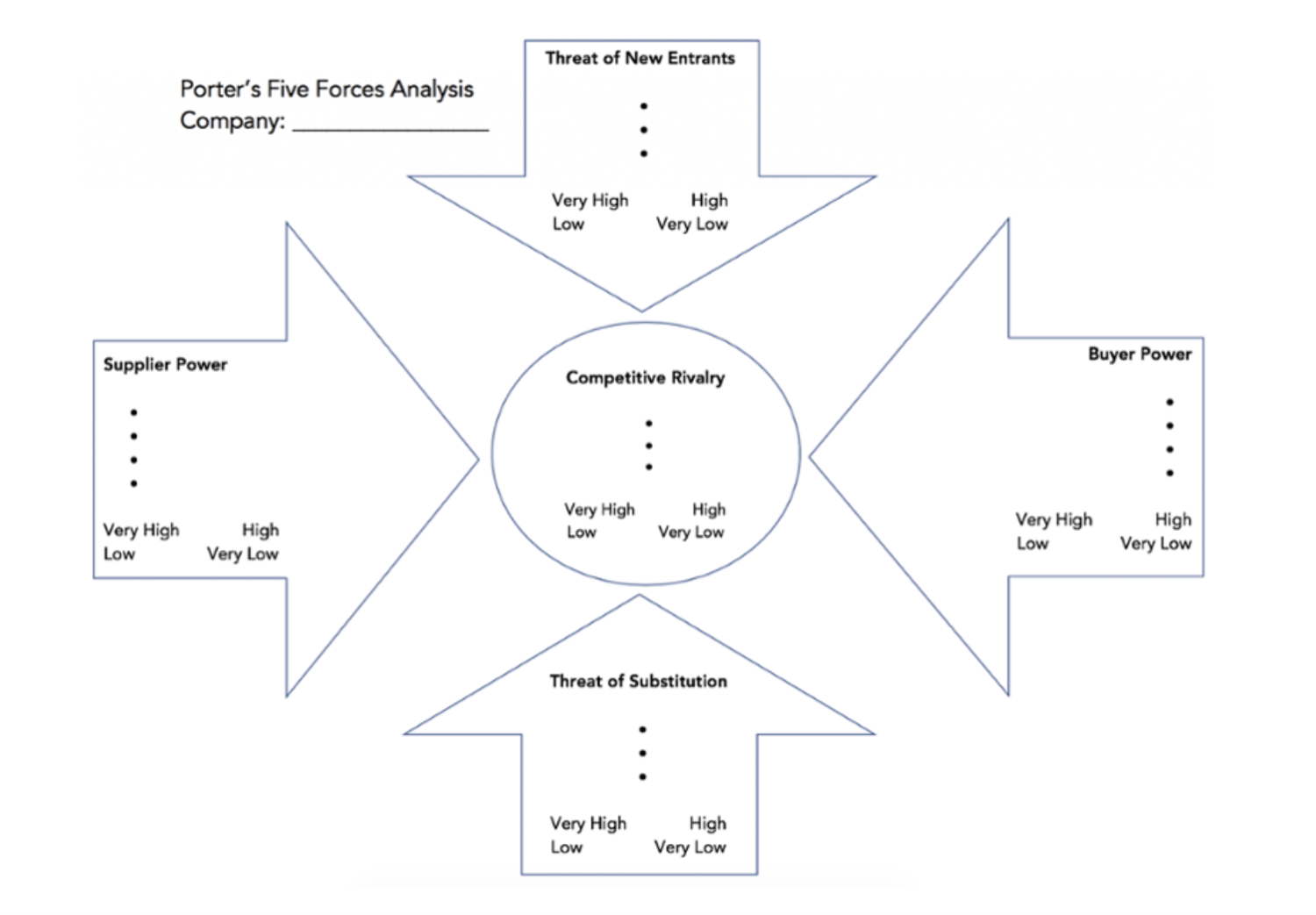
Use Porter’s Five Forces Model to understand an industry by analyzing five different criteria and how high the power, threat, or rivalry in each area is — here are the five criteria:
- Competitive rivalry
- Threat of new entrants
- Threat of substitution
- Buyer power
- Supplier power
Download a free, editable Five Forces Analysis template here.
2. SWOT Analysis Template
SWOT (Strengths, Weaknesses, Opportunities, Threats) analysis looks at your internal strengths and weaknesses, and your external opportunities and threats within the market.
3. Market Survey Template
Both market surveys and focus groups (which we’ll cover in the next section) help you uncover important information about your buyer personas, target audience, current customers, market, competition, and more (e.g. demand for your product or service, potential pricing, impressions of your branding, etc.).
Surveys should contain a variety of question types, like multiple choice, rankings, and open-ended responses. Ask quantitative and short-answer questions to save you time and to more easily draw conclusions. (Save longer questions that will warrant more detailed responses for your focus groups.)
Here are some categories of questions you should ask via survey:
- Demographic questions
- Business questions
- Competitor questions
- Industry questions
- Brand questions
- Product questions
4. Focus Group Template
Focus groups are an opportunity to collect in-depth, qualitative data from your real customers or members of your target audience. You should ask your focus group participants open-ended questions. While doing so, keep these tips top of mind:
- Set a limit for the number of questions you’re asking (after all, they’re open-ended).
- Provide participants with a prototype or demonstration.
- Ask participants how they feel about your price.
- Ask participants about your competition.
- Offer participants time at the end of the session for final comments, questions, or concerns.
Conduct Market Research to Grow Better
Conducting market research can be a very eye-opening experience. Even if you think you know your buyers pretty well, completing the study will likely uncover new channels and messaging tips to help improve your interactions.
Editor’s note: This post was originally published in March 2016 and has been updated for comprehensiveness.

26 About Us & About Me Pages + Templates to Make Your Own
Building a website is, in many ways, an exercise of willpower. It’s tempting to get distracted by the bells and whistles of the design process, and forget all about creating compelling content.
It’s that compelling content that’s crucial to making inbound marketing work for your business.
So how do you balance your remarkable content creation with your web design needs? It all starts with the “About Us” page.
For a remarkable About page, all you need to do is figure out your company’s unique identity, and then share it with the world. Easy, right? Of course not. Your “About Us” page is one of the most important pages on your website, and it needs to be well crafted. This profile also happens to be one of the most commonly overlooked pages, which is why you should make it stand out.
The good news? It can be done. In fact, there are some companies out there with remarkable “About Us” pages, the elements of which you can emulate on your own website.
By the end of this post, you’ll be introduced to:
- The best About Us page examples (and what makes them great)
- The best About Me page examples (and what makes them great)
- Tips on how to write your About page
- The best About page templates (across multiple platforms)
1. Yellow Leaf Hammocks
Why the “About Us” Page Rocks: It tells us a story.
When you have a great story about how your product or service was built to change lives, share it. The “About Us” page is a great place for it to live, too. Good stories humanize your brand, providing context and meaning for your product. What’s more, good stories are sticky — which means people are more likely to connect with them and pass them on.
Yellow Leaf Hammocks tells users about its product by describing how the hammocks empower artisan weavers and their families. The company breaks down different pieces of the story into sections that combine words and easily digestible graphics, painting a picture instead of big chunks of text. They’re clear about why they’re different: “Not a Charity,” the page reads. And then: “This is the basis for a brighter future, built on a hand up, not a handout.”
Every company has a story to tell, so break out your storytelling skills from that random English class you took years ago and put them to work on your “About Us” page. Using descriptive and emotive copy and gorgeous graphics, an “About Us” page with a story works harder for your business than a generic one.
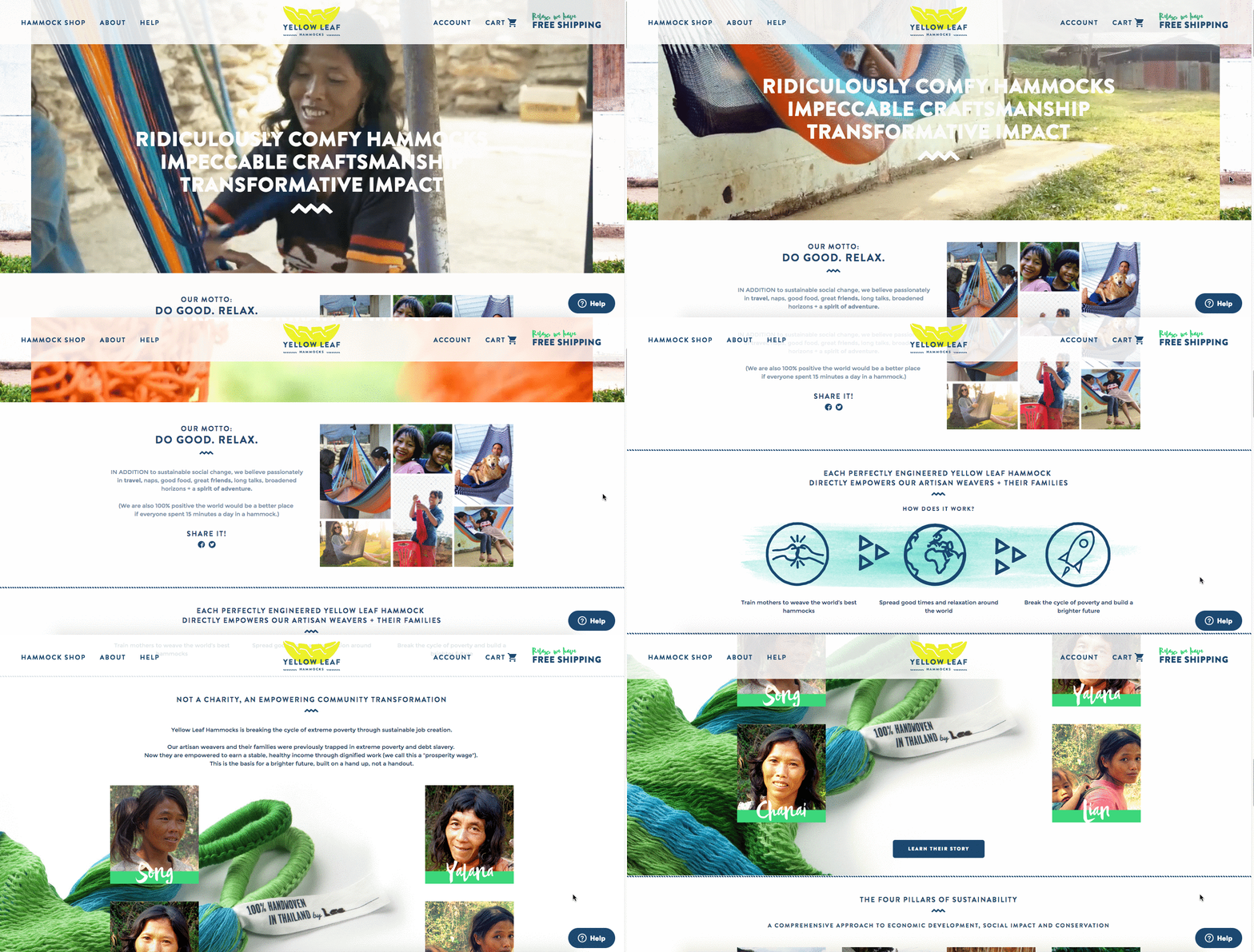
2. Eight Hour Day
Why the “About Us” Page Rocks: It’s human.
People tend to think that “About Us” pages have to sound formal to gain credibility and trust. But most people find it easier to trust real human beings, rather than a description that sounds like it came from an automaton. Trying to sound too professional on your “About Us” page results in stiff, “safe” copy and design — the perfect way to make sure your company blends in with the masses.
Instead, Eight Hour Day showcases the people behind the company and humanizes its brand. Introducing the founders by name and featuring the photos of them on the “About Us” page drives home the point that Nathan and Katie are — as they so astutely put it — “two individuals with a passion for creativity — creativity makes us happy.”
When you’re designing your “About Us” page, avoid industry jargon and replace it with an authentic voice — yours — to describe your product or service. Sure, it needs to be polished and free of errors, but it should always sound friendly and real.
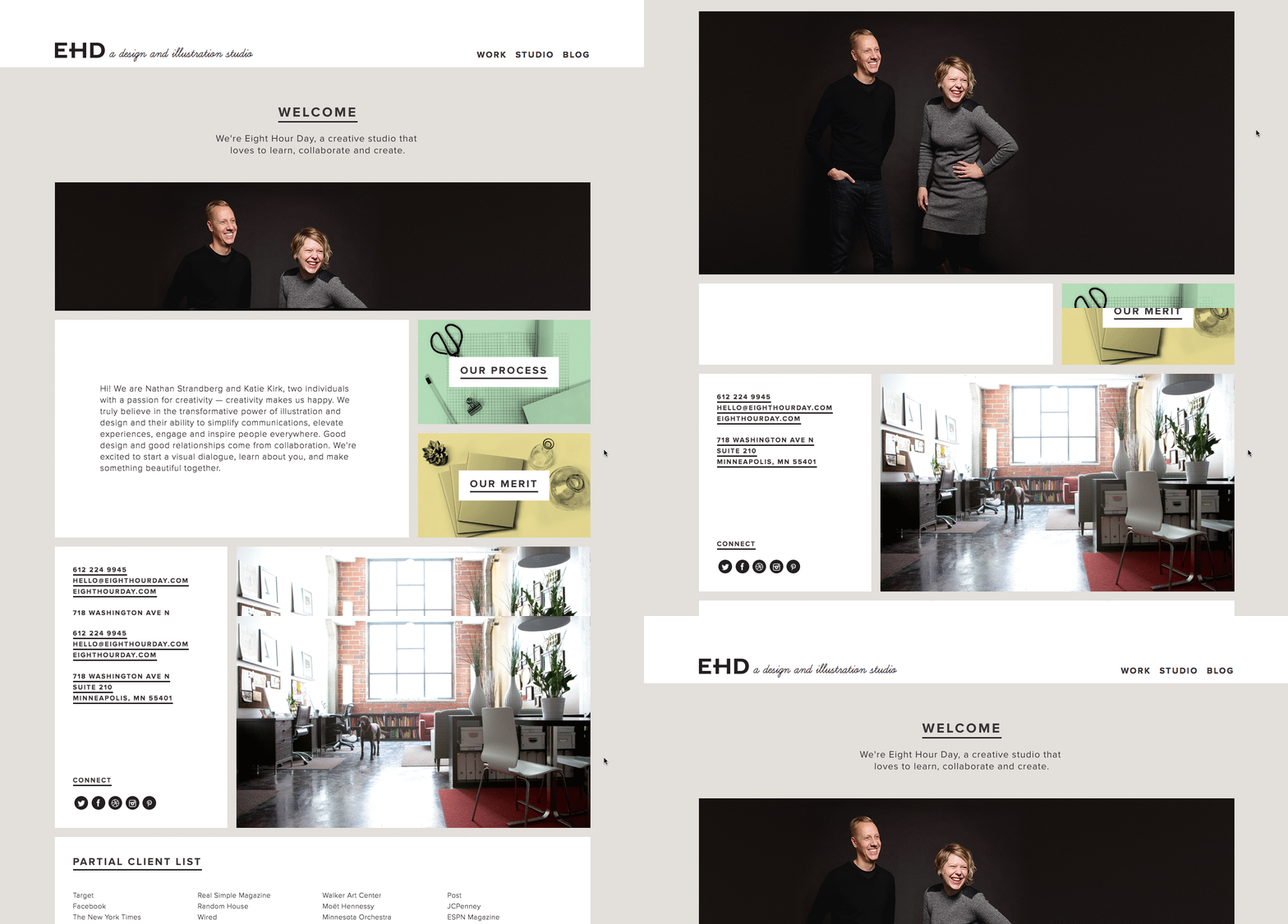
3. Apptopia
Why the “About Us” Page Rocks: It skips the business babble.
We know — no industry jargon. If you think it makes you sound super smart on your “About Us” page, think again. People want and appreciate straight talk about what your business does. After all, if people can’t figure out what you do, how will they know they need your product or service?
So, skip the industry lingo — that’s what Apptopia does on its “About Us” page. The startup’s simple but polished language effectively communicates the company’s offering while still allowing the Average Joe to understand it.
The moral of the story: Try to get rid of jargon on your “About Us” page whenever possible. Use short and punchy sentences to explain complex products and ideas in a way that isn’t patronizing, but rather, is empathetic.
4. Moz
Why the “About Us” Page Rocks: It’s humble.
Instead of following the classic “About Us” script and writing a few paragraphs about the company’s mission and origins, try something different — there are plenty of ways to make your brand more compelling to someone who doesn’t know about you.
Take Moz, for example. A lot has happened since it was founded in 2004, so the company chose to share those milestones using a fun and clean design that incorporates clear headers, concise blurbs, and little graphics to break up the text.
We especially love the humble references to how Moz received funding, how it switched its brand positioning — and most importantly, how it switched back to its original model. This speaks volumes to the value honesty and humbleness can play to your customers. Don’t be afraid to talk about your ups and downs; your customers will trust what you say that much more.
5. Yokel Local
Why the “About Us” Page Rocks: Personality, personality, personality.
Yokel Local does a few things well on their About Us page: They call out who they work with, they tell their story and mission, and they showcase the team behind the brand. This last element is key because Yokel Local knows that their “vibe” wins over prospective clients. After all, when you hire an agency, you’re hiring its people. And people have personality.
Because “Yokel Local” is a bit of a kooky name that gives people pause, they poke fun at it by providing the definition, which then leads into photos of the team at work (and at play), the agency’s story, their mission and values, and the people who make the magic happen. This magic is included all over the about page as their employees make goofy faces, wear ugly Christmas sweaters, and work/play hard.
6. Nike
Why the About Us Page Rocks: It knows its audience.
Nike might seem like a company that’s too big to inspire smaller businesses. You might even wonder if Nike even still has an “About Us” page. As a matter of fact, it does, and it hasn’t forgotten the company’s roots.
Nike began on the campus of the University of Oregon by the hand of the college’s track coach, Bill Bowerman. And even though he no longer works at the company, one of his beloved quotes still brands the bottom of Nike’s “About Us” page below: “If you have a body, you are an athlete.”
This bold sentence, referenced by the asterisked “Athlete” in the words right above it, sheds important light on Nike’s audience. The brand may be big today, but Nike is all about the rising stars — who Nike depends on to, according to the rest of its “About Us” page, “expand human potential.”
The takeaway for marketers? Know your audience, and make it obvious to that audience the instant they read about you on your website.
7. Refinery29
Why the “About Us” Page Rocks: It tells you what’s most important.
Here’s another instance where any area of your website — not just the “About Us” page — is an opportunity to break the mold.
Many companies add just a simple mission statement or company profile, but people often don’t want to ready a wall of text explaining what you do. So, Refinery29 broke it down to convey the intangible qualities that are tough to include in a basic “About Us” page.
Although Refinery29 does introduce its page with a description of its business, its goes out on a bang — four bangs, to be exact. The organization is on a “mission,” sure, but there’s also an “essence” of Refinery29, a “promise” it keeps, and a “vibe” it gives off.
These aren’t company traits you’d think to include when starting out, but they’re what your customers often make gut decisions on when buying.
8. Bulldog Skincare
Why the “About Us” Page Rocks: It’s lovable and memorable.
What’s the difference between “average” marketing and lovable marketing? It’s the difference between creating generic webpages that provide great information, but in a straightforward, black-and-white kind of way — versus creating webpages that provide great information and are infused with color, personality, and stay true to a company’s unique brand voice. When you create lovable marketing, you can start a movement of brand evangelists and advocates who will help you grow.
Where does this fit into a company’s “About Us” page? The folks at Bulldog, a men’s skincare company that was named for the colloquial “man’s best friend” — a dog — could have typed up a few paragraphs about where the brand came from and how they were one of the first in the space to redefine and eliminate stereotypes around men’s grooming. But that text alone would have been a bit, well, average.
Instead, the “About Us” page is pithy, colorful, and leads with the lovable mug of an adorable bulldog — fitting the name and the brand. And it states the purpose of the products — to help customers from waking up with the (admittedly adorable) wrinkly face you see when you visit Bulldog’s website.
Play on your own words — it’s okay to have fun and pun with your brand, as it helps to inject personality and humor into your “About Us” page. It primes visitors for a story in a way that makes them immediately feel something. That’s how you create memorable, lovable marketing.
9. Doomtree
Why the “About Us” Page Rocks: Its shows, tells, and has a soundtrack.
One minute of video is worth 1.8 million words, according to Forrester Research’s Dr. James McQuivey. But what about audio and visual, too, all combined with a really cool story? Well, that’s one way to tell your story in an engaging way — through multimedia.
Doomtree is built on a bit of an innovative concept: That a group of talented artists can each have thriving solo careers, but can still come together on a regular basis to create great music. It’s not a band — it’s a crew. It’s an unconventional concept with an equally interesting backstory that “started as a mess of friends in Minneapolis, fooling around after school, trying to make music without reading the manual.” And as soon as you arrive on Doomtree’s ‘About Us’ page, you’re greeted with big, bold photos of those friends.
As you scroll down, users are treated to even more interaction with the crew’s tracks and music videos. That makes sense, because it gives visitors an instant sample of Doomtree’s product. What’s more, the entire “About Us” page is responsive, including the video. That’s important — not only because it offers site visitors a great mobile experience, but also for Google search ranking — especially now that such mobile usage has surpassed desktop.
10. Acciyo
Why the “About Us” Page Rocks: It gets at their prospect’s pain… with a fun pop culture tie-in.
Acciyo is a company committed to “empowering news readers to tack back control of their news diets.” With that in mind, their big headline gets to the heart of their prospects’ pain: “Reading the news today is like opening a book at chapter three: You’re instantly lost.” This headline implies that Acciyo will help eliminate that “lost” feeling and get clarity on the news that their audiences consumes.
Best of all, it asserts this simply and elegantly with a Harry Potter tie-in. The headline’s concept deals with books, then asserts that the name was derived from Harry Potter, and lays out the team members as “Wizards Behind the Magic” with their Hogwarts Houses proudly displayed.
This provides the About Page with a cohesive theme that visitors can relate to while adding a touch of personality.
11. Ceros
Why the “About Us” Page Rocks: It’s interactive and funny.
Ceros’ About Us page is interactive and engaging. As you scroll, the text slowly moves up the page, with bold — and humorous — statistics, like “4 beers on tap”. Additionally, Ceros’ uses images of their impressive, unique office space to further personalize the page.
Best of all, Ceros’ keeps the text on the page short-and-sweet, with powerful statements like “We exist to unlock creativity”. The Culture section further demonstrates Ceros’ playful brand voice, with core values like “We wear our chicken suits”.
12. Marketive
Why the “About Us” Page Rocks: It’s compelling, with fun scrollable features.
Rarely have I seen a more powerful opening statement than the one Marketive uses in their About Us page: “Got a solid product? We tell your target audience that you exist.”
Additionally, Marketive’s About Us page displays original designs rather than photos to support the text, and the page is simply fun to scroll through. Plus, I appreciated Marketive’s layout — starting with what they do, moving into which types of industries they help, and ending with the company’s earlier milestones.
The interactive milestone calendar at the bottom is especially impressive. It authentically represents some humble beginnings (including two unsuccessful startups that inspired present-day Marketive), and features a fun scroll element that highlights various dates throughout the calendar.
13. Sweet Loren’s
Why the “About Us” Page Rocks: It’s playful and reflects the brand’s personality.
Start-to-finish, Sweet Loren’s About Us page is playful, engaging, and colorful. The page starts with a 60-second video, and even incorporates cookie dough-scooping gifs. As you scroll, you’ll move through some of Sweet Loren’s impressive values, including inclusivity and refusing to compromise.
Best of all, Sweet Loren’s yummy products are last on the page, ensuring you’re fully primed to purchase only after learning about Sweet Loren’s mission and differentiating factor: creating non-GMO, gluten-free, plant-based, and delicious cookie dough.
14. TalEx
Why the “About Us” Page Rocks: It focuses on social responsibility.
TalEx has an interesting origin story, in which two women left a major recruiting firm to build their own and ended up landing AOL as a major client of theirs — which was previously their old employers’ client.
TalEx has since seen unprecedented growth at 4,900% in the three years since it began. You’ll learn all this and more on their About Us page, but what really makes their page stand out is the company’s emphasis on social responsibility, which takes up nearly half the page and explains the company’s dedication to giving 5% of its net profit annually to various philanthropic organizations.
15. SkinnyDipped
Why the “About Us” Page Rocks: It’s authentic and down-to-earth.
SkinnyDipped’s About Us page features a few sweet, polaroid images of the employees (including three of the co-founders as young children), and a moving nod to Josh Dickerson, a family friend whose death inspired the family to start the business.
Their About Us page is well-written and inspiring — for instance, they write, “We decided to start a business … That it would be centered around food was obvious. For us—family, friends, food and love are all tangled up.” By the time you finish reading their story (and the individual employee bios), you’ll be as impressed by SkinnyDipped’s brand values as you are by their delicious products.
16. LoveBug Probiotics
Why the “About Us” Page Rocks: It’s playful and informative.
LoveBug Probiotics’ About Us page features an image of the founder’s four young children wearing “Chief Fun Officer”, “Chief Giggle Officer”, “Chief Silly Officer” and “Chief Humor Officer” t-shirts. I’ll admit — there aren’t many About Us pages with cuter introductions than that.
The page effectively includes all the information you’d need on the company to make an informed purchasing decision — including how the founder came up with the idea, her personal ties to her vision, the science behind her probiotics, and even an opportunity to find local stores that carry LoveBug probiotics.
Plus, while the products are science-backed, the About Us page doesn’t confuse visitors with difficult-to-understand facts: instead, the page is simple, straightforward, and helpful.
17. Brown and Coconut
Why the “About Us” Page Rocks: It’s simple and no-fuss.
Sometimes, simpler is better — as is the case with Brown and Coconut’s About Us page, which features a photo of the two co-founders alongside a few paragraphs of text, outlining the purpose and vision behind Brown and Coconut.
Plus, the opening sentence is incredibly relatable and draws the reader in: “After years of suffering from severe acne and frustrated by the lack of effectiveness and further damage they experienced with popular skin care products, Brown and Coconut founders and sisters, Letisha and Zeena Brown embarked on a journey to heal their skin from the inside out.”
What I liked best about this About Us page is the simple, no-fuss language they used to describe their business. Plus, rather than ending with a CTA directing visitors to their products, the co-founders instead choose to include a CTA to follow their business on Instagram, promoting a likely more effective, long-term lead generation strategy that starts with brand awareness.
18. Kuno Creative
Why the “About Us” Page Rocks: It focuses on people rather than products.
Kuno Creative’s About Us page effectively focuses on what makes the company different: its people. While the first paragraph describes the origin of the digital marketing agency, the majority of the page is taken up by black-and-white shots of all its employees along with descriptions of each member, like a modern day yearbook.
Plus, the page looks sleek and clean, with plenty of white space and large blue lettering to draw attention without overwhelming visitors. If you’re unsure what you want to include in your About Us page, consider taking note of how Kuno Creative focuses on its people, rather than its product, in the About Us page — a great way to humanize your brand.
1. Joe Payton
Why the “About Me” Page Rocks: It’s confident, creative, and easy to skim.
“About Us” pages might encompass the values of more than one person or entity, but they’re no more important to the image of a business than your personal about page. Take Joe Payton’s “About Me” page, below.
Not only does Joe’s illustrative self-portrait give him a personal brand that customers will remember, but it also demonstrates his expertise as a designer and animator. His website visitors can learn not just what he does, but why he does it, in an easily digestible way. Being able to express his values as a creative professional in such a well-organized page is something to be desired by anyone creating their own about page.
2. Kero One
Why the “About Me” Page Rocks: It’s multilingual.
Kero One is a hip-hop artist and DJ from San Francisco, and his “About Me” page carries a valuable lesson to personal brands who cater to more than one audience — especially if those audiences speak different languages.
Kero One’s story starts at his childhood, when he was six years old and first discovered a passion for hip-hop. Knowing how old and genuine his love for the genre is adds tremendous value to his own music in the eyes of his listeners.
While this entrepreneur’s childhood interests help to deepen his audience, the second screenshot below helps Kero One widen it. His “About Me” page first tells his story in English, then in Japanese, then in Korean, then in Chinese. Accommodating these Southeast Asian audiences makes his brand more inclusive of all the audiences he identifies with.
…
3. Aja Frost
Why the “About Me” Page Rocks: It’s data-driven.
Alright, we might be biased in highlighting this professional, as Aja is our very own SEO strategist at HubSpot. Nonetheless, the ingenuity she brings to the company isn’t lost on her website’s “About Me” page.
Being a data-driven professional, Aja knows her own clients as a freelance writer and strategist don’t just want to see what she’s written — they want to see how her content has performed. With that in mind, her “About Me” page tells a story of her career growth, which peaks — no pun intended — at an impressive line graph showing the result of an SEO strategy she implemented for the HubSpot Blog. (The graph’s sharp decline at September simply indicates when she stopped collecting data.)
Following the impressive chart, Aja closes out her about page with a personal note on what she does in her spare time — always a good way to humanize yourself in the eyes of your potential customers.
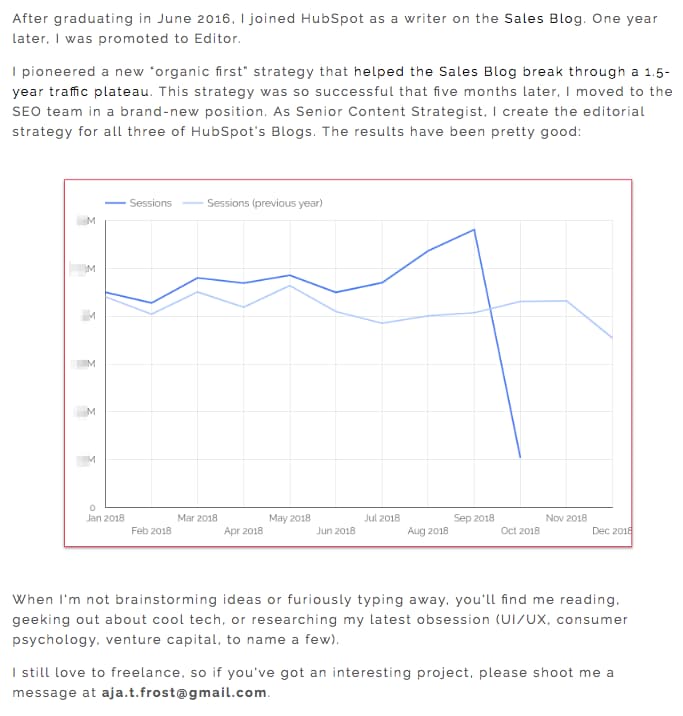
4. Madison Butler
Why the “About Me” Page Rocks: It welcomes the audience into a conversation.
Madison Butler is an HR change maker “committed to deconstructing the status quo and rebuilding corporate America, one organization at a time.” She does this through her DEI work and her advocacy.
The About page, which doubles as the site’s homepage, calls this out at the very top in one bold statement: “I’m here to ensure organizations know how to make space for everyone.” It’s simple, effective, and to-the-point. Then, “You belong here.” This second sentence in the headline underscores the inclusivity of Butler’s mission and work. It’s even emphasized further where the phrase is repeated in the footer.
5. Sara Dietschy
Why the “About Me” Page Rocks: It has variety but still aligns with her personal brand.
This professional YouTube content creator has an eclectic collection of videos related to technology and culture, and expresses that diversity all over her “About Me” page.
In addition to the vibrant self-portrait at the top of the page, Sara’s first sentence tells you just how many people subscribe to her channel: 350,000. This is an important number to know for her potential video advertisers and collaborators who want to know how much exposure they’d get by working with her or advertising on her channel.
The colored tiles lining the page — starting with the red one, as shown below — also do a terrific job segmenting her work by the types of projects she takes up and for whom she’s done them. That Intel logo in the second photo of Sara, below, is sure to turn some visitors’ heads as they’re perusing her website.
6. ShaDrena
Why the “About Me” Page Works: The combination of brand voice and monochrome palette breaks the mold.
ShaDrena is a graphic artist whose mission is to “visually build creative rebellious brands beyond a logo.” She exemplifies this mission for her own brand on her About page.
In three sections — About, Bio, and Random Facts — the audience gets the full ShaDrena experience, which is more than just design. It’s also about voice and personality. As a self-described “creative hustler,” “rule breaker,” and “designer of dope brands,” the language ShaDrena uses on her site comes across as edgy and authentic, a perfect way to make copy mirror personality.
All of this is presented in blacks, whites, and grays when it’s not common to see monochrome color palettes, which subverts the expectations one would have for a graphic designer.
7. Marc Ensign
Why the “About Me” Page Rocks: It’s funny but professional.
This branding expert does two things super well on his about page: He takes his work seriously, but doesn’t take himself too seriously. Marketers know there’s value to keeping a casual tone in the content they create, but in order to attract customers, you need to prove you have discipline and integrity. That’s a tough balance to get right.
Marc Ensign nails that balance between friendly and formal with a confident opening statement, followed by an amusing smiley photo of himself to set an inviting tone.
8. Miracle Inameti-Archibong
Why the “About Me” Section Rocks: It has dynamic angles and clear storytelling.
With excellent design that emphasizes her copy, Miracle Inameti-Archibong’s site is a masterclass at how to do a one-page website well. The content is presented with large clear images, cool and bold colors, dynamic angles and blocks, and simple typography.
This design supports the story in her About Me section, which spans over a decade but is clearly laid out in just four sentences. The reader knows her career span without being overwhelmed with too much information. That’s when she dives further into her expertise and the meat of the About section, which is thoughtfully paired with testimonials on the right that provide social proof for it.
How to Write an About Page
- Establish a mission statement.
- Outline our company story.
- Reveal how you’ve evolved.
- State your “aha!” moment.
- Explain who you serve.
- Explain what you’re offering them.
- Cite examples of who you’ve served.
- Describe your values.
It’s tough to establish one all-encompassing template for your “About Us” page — there are just so many ways you can go about telling your company story. But, per the real “About Us” pages we’ve just highlighted, there are some steps you should keep in mind when getting started.
Here are five steps to writing an “About Us” page based on some of the things that impressed us about the examples above.
1. Establish a mission statement.
Your “About Us” page can and will be much longer than a single mission statement, but in order to draw people in, you need to succinctly state your goal in the industry up front. What are you here to do? Why should your website visitors care?
2. Outline your company story.
You might not have a long history of changes and growth your company has endured (yet), but it’s a nice touch to talk about where you came from in your “About Us” page. So, isolate the milestones prior your company’s founding, and use them to give readers some backstory on your current venture.
3. Reveal how you’ve evolved.
Even if you’re a young company, there’s no shame in admitting your business strategy — or even personal way of thinking — has changed since you began. In fact, in about pages, these evolutions can improve the story you tell to website visitors.
About pages are perfect spaces to talk about where you started, how you’ve grown, and the ideals that have helped your organization mature. Use these moments to further your company story and show people that you’re always ready to change and adapt to the needs of your industry.
4. State your “aha!” moment.
Every good company was founded on an idea — something the current marketplace might not yet offer. What was your idea? Use this “Aha!” moment as a pivot point when telling your company story. What was a challenge you faced while developing your company? How did this challenge or discovery shape what you are today?
5. Explain who you serve.
As much as you want as many eyeballs on your “About Us” page as possible, you won’t do business with every single one of them. That’s why it’s crucial that you identify and mention your core customer. Who should care you exist? Which eyeballs are you here to serve?
6. Explain what you’re offering them.
As you’re explaining who you serve, make it clear what it is you’re offering. Too often companies generalize their product or service in the language of their website, making it hard to understand what it is the customer is actually paying for. They’re afraid literal explanations of their products aren’t interesting enough, or will sound unappealing in writing. And that’s a fair concern.
However, by investing just a sentence or two into telling your potential customers exactly what they’ll receive can keep them on your website for longer and interested in learning more.
7. Cite examples of who you’ve served.
Got some loyal customers in your portfolio? Use your about page to let the world know who already trusts and benefits from your work.
Knowing about your company’s past successes can influence your prospects’ purchasing decisions because they will be able to envision their success in the success of your past customers. Even if you don’t yet have case studies to expand on the problems you’ve helped buyers solve, it’s in your interest to briefly mention who you’ve done this for. And your about page is the perfect platform for it.
8. Describe your values.
Customers want to be treated like human beings. For that to happen, they need to feel that they’re being treated by human beings. When finishing your “About Us” page, describe who you are as a person or a team, and what your personal values are. What’s your company culture like? What bigger picture in life drives your business?
An LED lightbulb maker might sell 10 different lamp styles, for example, but that might not be the most important characteristic to its primary audience. Maybe this lightbulb developer was founded on a commitment to environmental protection, and every bulb the company makes was built by people who are dedicated to making the world more energy-efficient.
Keep in mind a secondary audience of your company’s “About Us” page consists of your future employees. This is another reason describing your personal values is a good idea — the key to your job candidates’ hearts is to show them you have one too.
About Us Page Templates That Rock
Copy is an important element of an About page. However, you’ll also want to keep user experience in mind as you showcase your brand story and identity to the world. Here are some of the top About Us and About Me page templates to use or draw inspiration from:
1. Sodium v2 (HubSpot)
Tell your prospects about you using bold color and by telling your story. This template can help with that with its bold color (that can be customized) and timeline-like layout. Website visitors will know where you’ve come and where you’re going.
2. Touraza Template (WordPress)
If you want something with a little flavor, the Touraza template is a good choice. With the “meet the team” section near the top with geometric designs and striking typography, you’ll be able to showcase the humans behind your brand.
3. Logan Template (Shopify)
This template makes use of large images in a modern layout to break up the ample white space. The result: A clean and enjoyable reading experience. The top of the page puts the brand story (or other introductory text) first, supported by a large image that speaks for itself. The pops of color can be customized to your brand style, drawing emphasis to the most important elements you want to highlight.
4. Mercuric Modular Premium (HubSpot)
Make a statement with a stylish slider and smooth 3D animations. This template can be edited using user-friendly modules and other effects to catch your website visitors’ attention. It comes with counter boxes, progress bars, and animated images for you to customize. There’s also a full template pack for the other pages of your site.
5. Coax Template (WordPress)
The advantage of the Coax template is that it’s powered by Elementor, a page builder that makes customization easy. Even if you want to keep some of the defaults, though, this template is beautiful, letting the typography and copy take center stage. Ideal for a personal brand, you can choose to lay out your content similarly to a resume with big subheads on the left and descriptive text on the right.
6. Clean (HubSpot)
This template is 100% drag-and-drop ready, making setup a breeze. With an elegant header and overlay, you’ll make a great first impression as you tell your brand story. Zero coding is required, it’s completely customizable, and it’s backed by a 100% happiness guarantee.
7. Negocis (HubSpot)
Do you think that your story is best told visually? This template supports icons and other elements that appeal to website visitors who want to understand your impact. It features image sliders, social sharing buttons, and more.
At this point, we hope that creating an “About Us” page doesn’t seem like a daunting task — rather, we hope you’re ready to have some fun with it. With a good story to tell, creative copy, humility, and digestible visuals, you’re on your way to an eye-catching user experience.
Even better? You’re becoming part of the exception — and standing out from a sea of “About Us” pages. What makes you different? We’re eager to learn more … about you.
Editor’s note: This post was originally published in October 2020 and has been updated for comprehensiveness.

How to Develop a Content Strategy: A Start-to-Finish Guide
Whether you’re just starting out with content marketing or you’ve been using the same approach for a while, it never hurts to revisit your content strategy plan — to make sure it’s up-to-date, innovative, and engaging for your prospects and customers, no matter when or how they intend to buy.
The first step to getting a leg up on the competition — and actively engaging your audience — is to have a solid, smart content marketing plan in place.
If you’re having trouble planning for the upcoming year or need some fresh ideas to include in your plan, read on.
In this post, we’ll dive into what content strategy is, why your business needs a content marketing plan, and what steps you need to take to create your strategy. Plus, we’ll explore some examples of effective content marketing strategies for inspiration.
What is content strategy?
A content strategy is a strategy that takes your business goals, and then uses content as a primary means to achieve those goals.
For instance, your business goals might include increasing brand awareness (to ultimately drive more revenue) — to achieve this goal, you might implement a content strategy that focuses on SEO to increase website visibility on the SERPs and drive traffic to your products or services.
New business owners might assume a content strategy is a ‘nice-to-have’, but not entirely necessary early on. However, producing high-quality content to meet business needs can help companies build trust with new audiences and, ultimately, succeed over the long-haul.
In essence, a good content strategy is often the foundation of your attract and delight stages in a buyers’ journey. Along with attracting new prospects to your brand, you might also use a content strategy for sales enablement and overall customer satisfaction.
Plus, with 70% of marketers actively investing in content marketing, it’s often critical you develop a good content strategy to compete in your industry.
When you develop a content strategy, there are a few questions to answer. Let’s dive into those, now.
1. Who will be reading your content?
Who’s the target audience for your content? For how many audiences are you creating content? Just as your business might have more than one type of customer, your content strategy can cater to more than one type of reader or viewer.
Using a variety of content types and channels will help you deliver different content to each type of audience you have in mind and engage everyone your company does business with.
2. What problem will you be solving for your audience(s)?
Ideally, your product or service solves a problem you know your audience has. By the same token, your content coaches and educates your audience through this problem as they begin to identify and address it.
A sound content strategy supports people on both sides of your product: those who are still figuring out what their main challenges are, and those who are already using your product to overcome these challenges. Your content reinforces the solution(s) you’re offering and makes your customers more qualified users of your product.
3. What makes you unique?
Your competitors likely have a similar product as yours, which means your potential customers need to know what makes yours better — or, at least, different. This is where content comes in.
In order to prove why you’re worth buying from, you need to prove why you’re worth listening to.
4. What content formats will you focus on?
What forms will your content take? Infographics? Videos? Blog posts? Having identified the topics you want to take a position on, you’ll need to determine which formats to budget for so you can best express that position.
5. What channels will you publish on?
Just as you can create content in different formats, you’ll also have different channels you can publish to. Channels can include owned properties, such as your website and blog; and social media properties, such as Facebook and Twitter. We’ll talk more about social media content strategy in the step-by-step guide later in this article.
6. How will you manage content creation and publication?
Figuring out how you’ll create and publish all your content can be a daunting task. It’s important for a content strategy to know who’s creating what, where it’s being published, and when it’s going live.
Today’s content strategies prevent clutter by managing content from a topic standpoint — as explained in the video above. When planning a content editorial calendar around topics, you can easily visualize your company’s message and assert yourself as an authority in your market over time.
Why Marketers Need to Create a Content Marketing Strategy
Content marketing helps businesses prepare and plan for reliable and cost-effective sources of website traffic and new leads. If you can create just one blog post that gets a steady amount of organic traffic, an embedded link to an e-book or free tool will continue generating leads for you as time goes on — long after you click Publish.
HubSpot’s blog team found this to be key to increasing traffic to the Sales Blog over time — read about their blog strategy here.
The reliable source of traffic and leads from your evergreen content will give you the flexibility to experiment with other marketing tactics to generate revenue, such as sponsored content, social media advertising, and distributed content. Plus, your content will not only help attract leads — it will also help educate your target prospects and generate awareness for your brand.
How to Create a Content Marketing Strategy
Now, let’s dive in to learn the specifics of how to create a content marketing plan. Curious how HubSpot Head of Content SEO Aja Frost puts together our content strategy? Check out the video below before jumping into the tactical list.
1. Define your goal.
What’s your aim for developing a content marketing plan? Why do you want to produce content and create a content marketing plan? Know your goals before you begin planning, and you’ll have an easier time determining what’s best for your strategy.
Download this goal planning template for help figuring out the right content goals.
2. Conduct persona research.
To develop a successful plan, you need to clearly define your content’s target audience — also known as your buyer persona.
This is especially important for those who are starting out or are new to marketing. By knowing your target audience, you can produce more relevant and valuable content that they’ll want to read and convert on.
If you’re an experienced marketer, your target may have changed. Do you want to target a new group of people or expand your current target market? Do you want to keep the same target audience? Revisiting your audience parameters by conducting market research each year is crucial to growing your audience.
3. Run a content audit.
Most people start out with blog posts, but if you want to venture out and try producing other content pieces, consider which ones you want to make.
For instance, if you’ve been doing weekly blog posts for the past year, creating an ebook that distills all your blog posts into one ultimate guide would be one way to offer information in a different format. We’ll go over several different types of content you can use further down on the list.
If you’ve been in business for a while, review your content marketing efforts and the results from it in the last year by running a content audit. Figure out what you can do differently in the upcoming year and set new goals to reach. Now is a great time to align your team’s goals with the rest of your organization’s goals.
4. Choose a content management system.
Have a system in place where you can create, manage, and track your content, otherwise known as a content management system (CMS). A few vital parts of content management include content creation, content publication, and content analytics.
With HubSpot CMS, you can plan, produce, publish, and measure your results all in one place. Another popular CMS is WordPress, to which you can add the HubSpot WordPress plugin for free web forms, live chat, CRM access, email marketing, and analytics.
5. Brainstorm content ideas.
Now, it’s time to start coming up with ideas for your next content project.
Here are some tools to get the wheels turning:
HubSpot’s Website Grader
HubSpot’s Website Grader is a great tool to use when you want to see where you’re at with your digital marketing. From your blogging efforts to your social media marketing, Website Grader grades vital areas of your marketing and sends you a detailed report to help you optimize and improve each area.
With this tool, you can figure out how to make your website more SEO-friendly and discover new content ideas.
BlogAbout
Get your mind gears going with IMPACT’s unique content idea generator, BlogAbout. This tool works a bit like Mad Libs, but instead of joke sentences, it shows you common headline formats with blanks where you can fill in the subject you have in mind.
This brainstorming technique helps you put general ideas in contexts that would be appealing to your target audience. Once you have a headline you like, BlogAbout lets you add it to your “Notebook” so you can save your best ideas.
HubSpot’s Blog Ideas Generator
Get blog post ideas for an entire year with HubSpot’s Blog Ideas Generator. All you need to do is enter general topics or terms you’d like to write about, and this content idea generator does all the work for you.
Feedly
The Feedly RSS feed is a wonderful way to keep track of trendy topics in your industry and find content ideas at the same time.
BuzzSumo
Discover popular content and content ideas at BuzzSumo. This company offers a number of market research tools, one of which uses social media shares to determine if a piece of content is popular and well-liked. In turn, this information helps you see which content ideas would do well if you were to create content about them.
Blog Post Headline Analyzer
CoSchedule’s Blog Post Headline Analyzer tool analyzes headlines and titles and provides feedback on length, word choice, grammar, and keyword search volume. If you have an idea in mind, run a few title options through the Headline Analyzer to see how you could make it stronger, and to move your idea further along in the brainstorming process.
6. Determine which types of content you want to create.
There are a variety of options out there for content you can create. In the following section, we’ll discuss some of the most popular content formats marketers are creating, including some tools and templates to get you started.
7. Publish and manage your content.
Your marketing plan should go beyond the types of content you’ll create — it should also cover you’ll organize your content. With the help of an editorial calendar, you’ll be on the right track for publishing a well-balanced and diverse content library on your website. Then, create a social media content calendar so you can promote and manage your content on other sites.
Many of the ideas you think of will be evergreen — they’re just as relevant months from now as they are today. That being said, you shouldn’t ignore timely topics either. While they may not be the bulk of your editorial calendar, they can help you generate spikes of traffic.
Most people count on incorporating popular holidays such as New Year’s and Thanksgiving in their marketing efforts, but you don’t have to limit yourself to these important marketing dates.
If there are niche holidays that might appeal to your audience, it could be worth publishing content on your blog or on social media. Check out this ultimate list of social media holidays — keep an eye on it when you’re planning your calendar.
Content Strategy Examples
To understand what a content strategy is, it’s probably helpful if we explore some examples of real-life content strategies based off a few various business goals.
To start, let’s explore an example of a content strategy used for SEO purposes (with the ultimate goal of attracting new prospects to a website).
I’m a huge fan of Evernote’s blog, which offers a wealth of knowledge around the topic of productivity. The blog post, How To Stay Disciplined When Times Are Tough, made me laugh out loud — and then incentivized me to grab a pen and write down some of the tips I liked best.
But why is a company that sells a note-taking app writing about discipline?
Because it’s how I found their website, when I searched “How to stay disciplined” on Google.
Evernote is a good example of a content strategy used to attract new leads. People interested in reading content related to productivity are likely the same people interested in downloading Evernote’s note-taking product (because what’s better than a to-do list for helping you stay on-task?).
On the contrary, if Evernote’s marketing team simply created content for the sake of increasing traffic — like publishing “Our 10 Favorite Beyonce Songs” — it wouldn’t be considered a content strategy at all; it would just be content.
A strategy needs to align content with business goals — in Evernote’s case, the strategy aligns content (blog posts on productivity) with the business goal of attracting leads (people interested in note-taking) to their site.
Let’s take a look at another example to see how a good content strategy can help businesses with sales enablement.
Consider the following scenario: a prospect calls a sales representative at Wistia and asks questions related to Wistia’s video hosting service. As the Wistia sales rep speaks with her, he learns her business is using a few other tools to convert leads into sales … including Intercom.
Bingo.
Once the call ends, the sales rep sends the prospect a follow-up email with a blog post about Wistia’s integration with Intercom, which enables Intercom users to further personalize messages to prospects based off video-watching data they collect through Wistia.
This is a prime example of how you might use a content strategy as a sales enablement tool. On the surface, it might seem odd that Wistia has dedicated content regarding another business’ tool. However, this content is a great resource for Wistia’s sales team, particularly when prospects have concerns regarding how Wistia’s product can integrate with their existing software or processes.
Now that we’ve explored a few examples of content strategies, let’s dive into different types of content marketing.
These are the eight most popular types of content marketing you can create for your readers and customers.
1. Blog Posts
If you haven’t already noticed, you’re currently reading a blog post. Blog posts live on a website and should be published regularly in order to attract new visitors.
Posts should provide valuable content for your audience that makes them inclined to share posts on social media and across other websites. We recommend that blog posts be between 1,000 and 2,000 words in length, but you should experiment to see if your audience prefers longer or shorter reads.
Check out our free blog post templates for writing great how-to, listicle, curation, SlideShare presentation, and newsjacking posts on your own blog.
2. Ebooks
Ebooks are lead-generation tools that potential customers can download after submitting a lead form with their contact information. They’re typically longer, more in-depth, and published less frequently than blog posts, which are written to attract visitors to a website.
Ebooks are the next step in the inbound marketing process: After reading a blog post (such as this one), visitors might want more information.
This is where calls-to-action (CTAs) come into play, directing people to a landing page where they can submit their contact information and download an ebook to learn more valuable information for their business. In turn, the business producing the ebook has a new lead for the sales team to contact.
3. Case Studies
Case studies are your opportunity to tell the story of a customer who succeeded in solving a problem by working with you. A case study is perhaps your most versatile type of content marketing because it can take many different forms — some of which are on this list. That’s right, case studies can take the form of a blog post, ebook, podcast … even an infographic.
Your goal in a case study is to show the people who are considering your product that the proof is in the pudding. Before choosing a customer for a case study, you should determine which form the testimonial will take and the area of your business to which you’re trying to drive value.
4. Templates
Templates are a handy content format to try because they generate leads for you while providing tremendous value to your audience. When you provide your audience with template tools to save them time and help them succeed, they’re more likely to keep engaging with your content in the future.
5. Infographics
Infographics can organize and visualize data in a more compelling way than words alone. These are great content formats to use if you’re trying to share a lot of data in a way that is clear and easy to understand.
If you’re ready to get started, get our templates for creating beautiful infographics in less than an hour.
6. Videos
Videos are a highly engaging content medium and are shareable across social media platforms and websites alike. Videos require a bigger investment of time and resources than written content, but as visual marketing increases in popularity — after all, it’s 40X more likely to get shared on social media than other types of content — it’s a medium worth experimenting with.
HubSpot Research recently found that video is the most preferred form of content. Video also captures people’s attention more than any other content format.
7. Podcasts
Starting a podcast will help audiences find your brand if they don’t have time or interest in reading content every day. The number of podcast listeners is growing — in 2018, nearly one-third of the U.S. population has listened to a podcast in the last month.
If you have interesting people to interview or conversations to host, consider podcasting as another content format to experiment with. (Here’s our comprehensive guide to starting a podcast.)
8. Social Media
Once you’ve been regularly publishing content on your own site for a while, it might be time to start thinking about distributing your content on other sites. This could mean repurposing content into new formats and publishing them on your blog, creating original content specifically for external sites or publishing website content on various social networks.
Posting on social media, however, is pivotal to amplifying your brand’s reach and delivering your content to your customers where you know they spend their time. Social networks on which businesses often post include:
When launching a business account on any of the social networks above, it’s important to post the type of content your followers expect to see. On Instagram, for example, users want photos, videos, and graphics that reflect current events, show off user-generated content, or even go behind the scenes of your organization.
On Facebook, your options for what to post open up a bit: Not only can you share your blog posts and website content, but you can also post native Facebook videos, product promotions, and original memes that resonate with your customers. You can also interact with other businesses that have a similar audience as your own.
While the goal on social media sites like Instagram or Snapchat is to connect more intimately with your audience, your goal on platforms like Facebook and Twitter is to expand that audience, drive traffic toward your website, and start conversations in your industry. Do some basic market research to discover which platforms your buyers are on, and mold your content to their expectations.
When you’re ready for more ideas, there are a plethora of different content types to diversify your content marketing.
It takes time, organization, and creativity to grow a successful content marketing strategy. From building the foundation of your content marketing plan to adding tools to better manage your content, setting up your strategy for the new year won’t be a hassle if you follow the steps and explore the resources here.
For additional guidance, use HubSpot’s Marketing Plan Generator to create a 12-month strategy in just a few minutes.
Happy creating!
Editor’s note: This post was originally published in September 2018 and has been updated for comprehensiveness.

18 Beautiful New Ebook Templates [Free Download]
Did you know that landing pages have the highest conversion rate at 23% than other types of signup forms? It’s true, but landing pages don’t convert visitors to leads all by themselves. If they don’t have attractive and compelling offers behind them, they won’t generate the leads your sales team is looking for.
That’s why it’s so important to create valuable content people want to download, and then package it in a way that’s visually appealing to your readers. An ebook is a practical content choice that delivers so much value to your audience that they won’t mind submitting a lead form to download it. WP Forms reports that ebooks are the most popular lead magnet amongst subscribers, with 27.7% of marketers using them.
Adding ebooks to your content archive can be a worthwhile effort, but it’ll take work. While every step of creating an ebook is critical, a substantial step of the ebook development process is creating a design that helps tell the story in the copy. A professional and functional design makes the copy more readable to your audience, thus making it more likely that they’ll refer back to it and maybe even share it with a friend.
We know not every team has someone in-house who can (or has time to) whip up a slick, shareable ebook design. But we have good news: You don’t need to be a designer by trade to design beautiful ebooks yourself. With the right resources and approach, you can deliver valuable content to your audience in a fraction of the time.
A few years ago. we created ebook templates to help make this process easier for you. They were so popular that we decided to revamp the offer and include PowerPoint, Adobe Indesign, and Google Slides formats. We hope these templates minimize the time you spend on the details of design, allowing you to concentrate on writing valuable, lead-generating content your readers will love.
Start With One of These Free Ebook Templates
Each of these templates is sure to organize your content into a readable, shareable ebook that your readers will enjoy. Each one is complete with a table of contents, chapter page, copy pages, and a call-to-action page at the end. Here is a preview of some of the ebooks you’ll find in the template bundle:
1. Artistic Theme
For the marketer, salesperson, or designer who needs to communicate a vision from high-level strategy to detail, the Artistic theme template is a smart choice. This template uses white space to set boundaries between sections, giving your ebook a clean, uncluttered charm. Colorful headers with serif fonts, eye-catching graphics, and stunning images will make your ebook come to life. The Artistic theme includes several unique layout options including light and heavy text pages, photo layouts, and more so that the design is fresh from one page to another.
The Artistic Theme Ebook Template is best for:
- Marketing Content
- Target Audience Personas
- Sales Tips and Tricks
2. Professional Theme
Appeal to the professional yet bold aesthetic, the Professional theme ebook template. Image-based title pages and thick, bold fonts draw attention to headlines and big ideas while body pages with room for photos make it perfect for a showcase or inspiration guide. The Professional template is made with the visual communicator in mind. Social media experts, event planners, and web designers — this one is for you!
The Professional Theme Ebook Template is best for:
- Social Media Guidelines
- Event Planning
- Web Design Content
3. Honeycomb Theme
Your ebook is sure to get the crowd buzzing with this honeycomb-inspired design. The hexagonal shapes in the background are neutral-colored in the original ebook template, but adding in your brand colors can make these hives look sweet. Inside, you’ll find page layouts for quotes and captioned photos, making it a good choice for ebooks with a healthy balance of imagery and copy.
The Honeycomb Theme Ebook template is best for:
- Recipe Books
- Customer Service Guidelines
- Technology Best Practices
4. Triad Theme
Great for educational workbooks that include heavy visual designs, the Triad theme provides plenty of space to organize your content on every page. The triangular shapes in this template give your ebook a sense of direction that keeps the reader moving forward. The bold complementary colors jump right off the page and grab your attention, but this template can be edited to incorporate your brand colors.
The Triad Theme Ebook Template is best for:
- Educational Workbooks
- Educational Presentations
- Seminar Courses
With these polished templates, you’ll be able to:
- Create beautifully designed ebooks without either the cost of a designer or experience with InDesign/Illustrator/Photoshop.
- Choose from six different ebook designs across three different platforms (Adobe InDesign, PowerPoint, and Google Slides), and even add your own brand colors for a custom look.
- Spend more time writing awesome content and less time getting the layout right.
- Use all of the stock images provided in the templates, free of charge.
- Save your ebooks as professional and attractive PDF files that are ready for download.
Start Creating Your Ebook For Free
Ebooks are one of the most popular content offerings available to consumers, but the effort required to make them can deter content creators from starting the process. These templates make designing your ebook simple so you can spend more time sharing your big ideas with the world.
Editor’s note: This post was originally published in July 2019 and has been updated for comprehensiveness.

How to Create an Infographic in Under an Hour [+ Free Templates]
Wouldn’t it be great if creating infographics was as simple as writing regular old text-based blog posts? Unfortunately, making visual content like this usually takes a lot more time, effort, and let’s face it — skill — than the written word. Usually.
But considering the popularity and effectiveness of visual content in marketing today, you can’t just afford to throw in the towel.
That’s why we decided to take all the pain and suffering out of infographic creation. Seriously — don’t give up just yet. You, too, can create infographics that are professional-looking, high-quality, and completed in under an hour. I’m going to prove it. First things first:
Then, all you have to do is provide the content to use inside them. Easy as that. In fact, I’m going to show you just how easy it is to make your own infographic by demonstrating with one of our 15 infographic templates in PowerPoint (pictured above). Then, I’ll explain exactly what I did so you get a sense of how easy it really is.
How to Make an Infographic
- Identify the audience for your infographic.
- Collect your content and relevant data.
- Choose your desired infographic template.
- Download your template to PowerPoint.
- Customize your infographic.
- Include a footer with your sources and logo.
- Add an embed code and Pinterest button, and publish it.
1. Identify the audience for your infographic.
Infographics don’t sell themselves on design alone. You need to deliver “info” that’s just as compelling as the “graphic,” and to do that, you need to know the audience your infographic intends to reach.
According to Harvard Business Review, there are five possible audiences that can change how you choose and visualize your data: novice, generalist, managerial, expert, and executive. Start by comparing your infographic’s ideal reader with one of these five audiences — which one applies to your reader?
When thinking about the data you want to visualize, let the five audiences above dictate how advanced your data will be. A “novice” audience, for example, might need data whose meaning is more obvious at first blush. An “expert” might be more interested in getting into the weeds of your numbers and posing theories around them. An “executive” has more in common with a novice audience in that they only have time for the simplest or most critical information, and the affect it’ll have on the business.
2. Collect your content and relevant data.
Using the audience you’ve chosen above, your next step is to organize all the content and data you’ll use in the infographic. You can either collect third-party data or use your own original data. If you use third-party data, just be sure you properly cite your sources — just like in any other good piece of content.
- Choosing your data: Compelling data needs to be “comprehensive” enough to give your readers proper context around the data you’re presenting. For example, a spike in website traffic from one month to the next doesn’t mean much — until, say, you reveal that traffic was on a steady decline over the previous three months. Suddenly you have a story of how you were able to reverse a downward trend.
- Organizing your data: When collecting your data, make sure you know what story you want to tell through this information. Data for the sake of data won’t add value to your infographic at all.
- Citing your sources: To keep your infographic uncluttered by a ton of different source URLs, a great way to cite your sources is to include a simple URL at the bottom of your infographic that links to a page on your site. You can also list the individual stats used in your infographic, and their sources — such as the landing page to the full offer on which you’re basing this free infographic.
That way, your infographic looks clean and professional, yet people will still be able to access the sources no matter where the infographic gets shared or embedded. It may also even drive visitors back to your site.
3. Choose your desired infographic template.
Your next step is to choose an infographic template appropriate for representing that data. The important thing is to choose a template that specifically works for the type of data set/content you want to present. As you saw pictured above, you can download our 15 infographic templates in PowerPoint and choose whichever template you’d like.
Some of your template options in the offer linked above include a timeline, flowchart, side-by-side comparison, and a data-driven infographic. Here are some basic ideas for choosing an infographic template that suits the story you want your data to tell:
- Side-by-side comparison infographic: This infographic design can help prove the advantage of one concept over another, or simply explain the differences between two competing entities.
- Flowchart infographic: This design is perfect for presenting a new workflow for your organization, or how a linear or cyclical process works across your industry.
- Timeline infographic: This design can tell a chronological story, or history, of a business, industry, product, or concept.
- Graph-based infographic: This design is suitable for content creators publishing a high volume of data and statistical information, making it a good fit for expert-level audiences, too.
- Image-heavy infographic: This design caters to content creators who are trying to reveal trends and information from shapes, designs, or photography — rather than just numbers and figures.
4. Download your template to PowerPoint.
For the sake of time (remember, our mission is to create an infographic in under an hour), I’m going to create an infographic based on a compilation of steps and best practices we put together in our guide, How to Run an Inbound Marketing Campaign in 2018. For this, I’ve picked the “World’s Greatest Timeline” infographic template from our collection of infographic templates, which is helpful for my data set since it will allow me to outline each step of the campaign creation process in order.
 5. Customize your infographic
Obviously, this is the most time-consuming part — but it’s also the most fun. Simply come up with a catchy title, plug in your data/content, and adjust your font sizes and formatting. Feel free to switch up the graphics and colors, too, so they’re relevant to your brand and the data you’re providing. To customize the look of the infographic even more, you might add or change up the colors or font styles.
In this example, you’ll notice that I’ve inputted my text and changed the font colors to HubSpot’s signature orange and dark blue:
You’re not limited by what the template includes, either. You can use the tools in PowerPoint’s software to create bar graphs, pie charts, and other visuals to support your data. (Note: Download our free infographic templates for a cheat sheet for using PowerPoint’s various features and tools.)
6. Include a footer with your sources and logo.
Finally, I included a link to my source (which can be found here), as well as the HubSpot logo so people know who created the infographic if it gets shared in social media or embedded on other websites — which is definitely something you want, since one of the main benefits of creating infographics is their shareability.
7. Add embed code and a Pinterest button, and publish it.
The only thing left to do is to publish and promote your awesome new infographic. As I mentioned earlier, we recommend using your blog to publish it (including your list of sources), including a Pinterest button for visitors to easily “pin” your infographic on Pinterest, and create and add an embed code for visitors to share it on their own websites and blogs, as we did above.

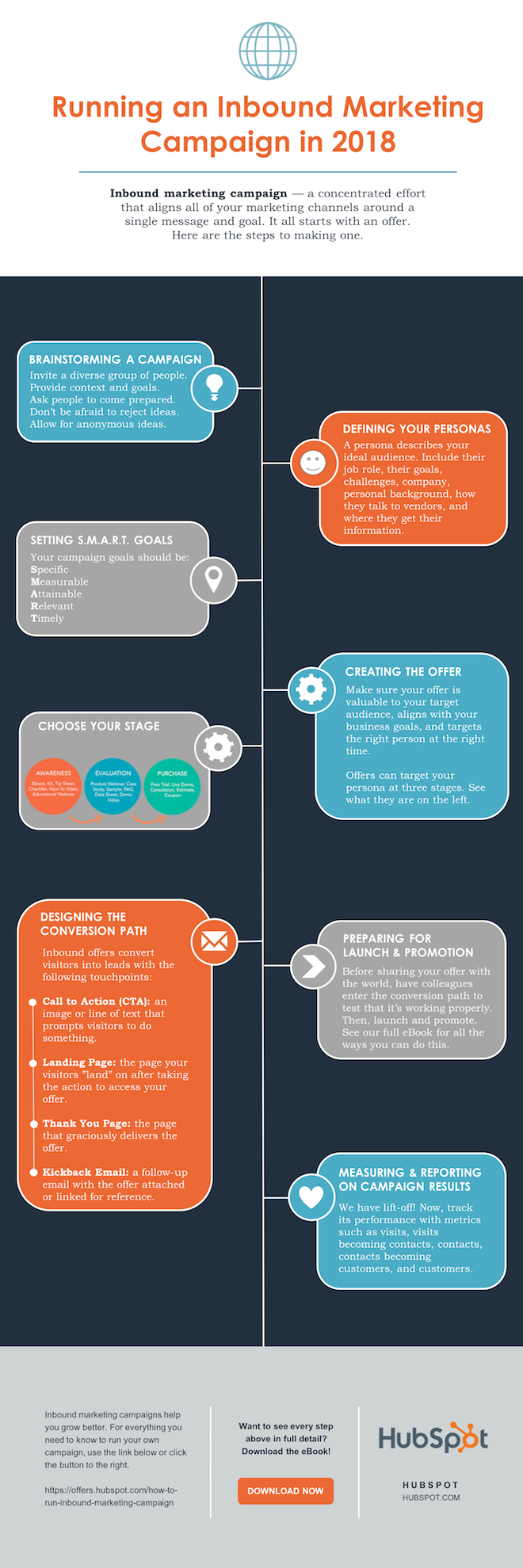
Share This Image On Your Site
<p><strong>Please include attribution to blog.hubspot.com with this graphic.</strong><br /><br /><a href=’https://ift.tt/2Hw9RZq src=’https://ift.tt/2oi2Lio’ alt=’free_infographic_template_custom-1′ width=’660px’ border=’0′ /></a></p>
That’s it! This whole thing took me under an hour to put together — much shorter than it would’ve taken me if I’d started from scratch (not to mention more professional looking… and less expensive than hiring a designer).
That’s it! This whole thing took me under an hour to put together — much less time (not to mention more professional looking) than it would’ve taken me if I’d started from scratch. Plus, it’s less expensive than hiring a designer and using the resources you might want to save for larger campaigns.
Editor’s note: This post was originally published in May 2020 and has been updated for comprehensiveness.
