
Welcome to My Blog
18 Examples of Brilliant Email Marketing Campaigns [Template]
On any given day, most of our email inboxes are flooded with a barrage of automated email newsletters that do little else besides giving us another task to do on our commutes to work — namely, marking them all as unread without reading or unsubscribing altogether.
It may not seem like a good idea to add to all the noise. However, according to Constant Contact, the average ROI for email marketing is $38 for every $1 spent. Needless to say, email is an important component of a marketing strategy, and its success relies largely on how well you craft your email campaigns.
What is an email marketing campaign?
An email marketing campaign consists of planned content distributed via email with the goal of accomplishing a specific goal for the organization. It’s important that an email campaign’s recipients have opted in to receive this content and that each piece offers something valuable.
Here are some examples of different purposes your email campaign may set out to accomplish:
- Traffic generation – Email can be an effective promotion channel for the high-value content you create on your website.
- Awareness – Not everyone who opts into your email list is ready for a purchasing decision. You can use email marketing to stay top of mind while providing the educational content that is most relevant to them.
- Lead nurturing – As you stay top of mind, you may also consider ways to identify the leads you have with the highest purchase intent and provide conversion-focused content that “nurtures” them toward a sale (or at least toward becoming sales-ready).
- Revenue generation – You can create email marketing campaigns for your existing customers to promote upsell and cross-sell opportunities. You can also create campaigns to capture a sales conversion from leads who are close to a purchasing decision. (One example might be creating “abandon cart” campaigns for recovering lost sales conversions.)
The options for effective email marketing are endless. Want some quick advice? Check out these 10 email marketing tips in 60 seconds:
Ready to take a deeper dive? Effective email marketing campaigns need to be cleverly written to attract attention in busy inboxes. Let’s get into how to create an effective email marketing campaign of your own.
1. Understand who you’re emailing.
Have you ever heard the saying from Meredith Hill, “When you speak to everyone, you speak to no one”? What Hill is getting at here is that if you’re watering down your message to apply to your entire audience, you’re leaving opportunity on the table — opportunity for creating high-value, specific, relevant content that speaks directly to the recipient.
With this in mind, the key to a great email marketing campaign is identifying your audience and using email segmentation to ensure you’re delivering to the right people at the right time. If you can accomplish this and build it into your strategy, you can get more creative and specific with your messaging.
2. Create a goal for the campaign.
Even with email marketing being a relatively low-risk and high-reward activity, you don’t want to send emails for emails’ sake. In other words, you won’t be successful simply because you marked it from your to-do list.
Instead, you should be intentional about what you want to get from your emails because that will help you target the right audience and build the right emails. For example, if you know you want to nurture leads from MQL to SQL, you can create a segment of MQLs and create content that is educational and persuasive enough to move them closer to a buying decision.
3. Outline the email or emails that will be included in the campaign.
Once you know who you’re emailing and why, it’s time to strategize how to move them from A (where they are) to B (where you want them to be, the goal of the campaign).
Keep in mind that you can’t expect a single email to do everything. Your email campaign can be made up of multiple emails, so consider taking your email recipients on a journey with each email serving a single purpose. This will increase the odds of each email being successful in its role toward reaching your goal. After all, “A confused mind says no.”
For example, if you’re doing a lead nurturing campaign, you might have a few educational emails to take them from the awareness stage to the consideration stage before providing more conversion-focused content.
The longer the buying process and sales cycle, the more emails you’ll need.
4. Spend time on the subject lines.
No one gets to the body content of your email unless they first click the subject line. That’s why it’s so important to consider your subject lines carefully: They’re like gatekeepers for the rest of your information.
Check out our article on the best tips for writing email subject lines.
5. Write copy that’s suited for them.
Once you know the purpose of each email you’re sending and you have the subject lines, you can write the copy that will engage your list. Consider where your audience is in their buying journey and provide the type of content that they’ll find useful. For example, it doesn’t make sense to promote products if you’re emailing a segment of subscribers who are largely in the awareness stage of the buying journey.
6. Use a comprehensive email builder.
Once you’ve written the copy for your emails, you’ll want to build them out in the email software client you’re intending to use.
There are several options depending on your needs, including HubSpot, MailChimp, Pabbly Email Marketing and Constant Contact.
With a comprehensive email builder, you can create, optimize, and personalize your own email campaigns without needing any technical or graphic design experience.
7. Include personalization elements and excellent imagery.
Marketing emails need to be personalized to the reader and filled with interesting graphics.
Few people want to read emails that are addressed “Dear Sir/Madam” — as opposed to their first or last name — and even fewer people want to read an email that simply gives them a wall of text. Visuals help your recipients quickly understand the point of the email.
8. Include calls-to-action where appropriate.
Remember, if you’re taking up your audience’s time — and inbox space — with another email, your message must have a point to it. Consider what you want your email recipients to take away from the email.
In most cases, you’ll want to add a call-to-action (CTA) for them to take further action.
Your goal behind the CTA may vary depending on the audience’s buyer’s journey stage and what you want to accomplish with your email campaign. For example, you may simply want to engage them further with another piece of content, or you might want to get them to make a purchase.
Regardless of what it is, you should follow CTA best practices such as making the ask with clear language and emphasizing it with contrasting design elements.
9. Test your emails and make sure they work on all devices.
Once your emails are built out, check them over before hitting the send button. Effective email marketing campaigns are designed for all devices on which users can read their emails — desktop, tablet, and mobile. Consider sending them as a test to a colleague and checking them across multiple devices and email clients.
Want a quick refresher on how to master marketing email? Check out this helpful video:
Now that you know how to responsibly wield email marketing, grab some inspiration from the masterful email marketing campaigns below.
But first, download the planning template you’ll need to craft your own lovable email marketing campaign.
1. charity: water
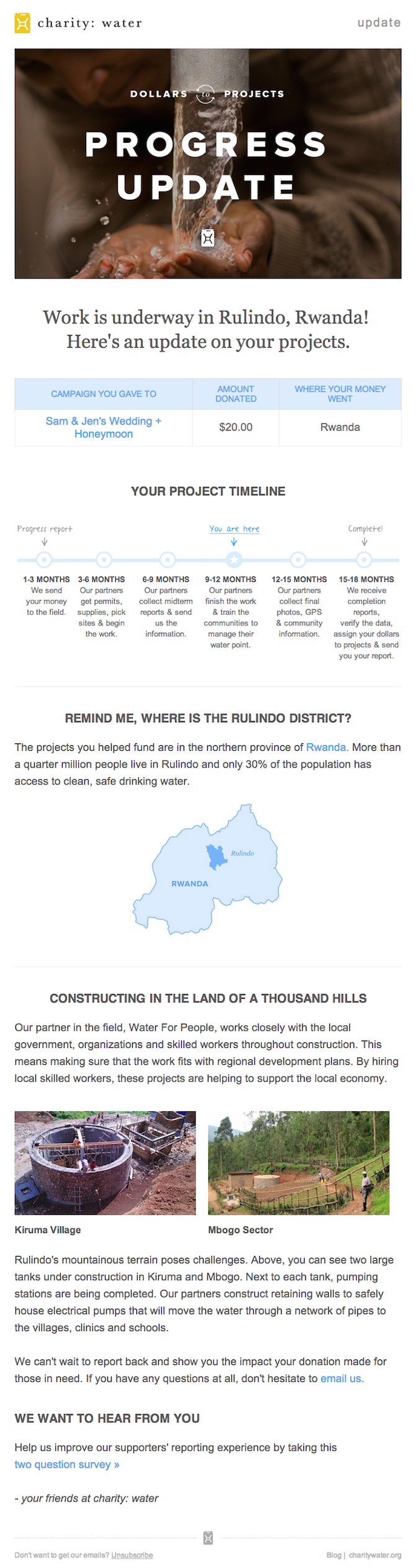
Marketing Campaign: Donation Progress Update
When people talk about email marketing, lots of them forget to mention transactional emails. These are the automated emails you get in your inbox after taking a certain action on a website. This could be anything from filling out a form, to purchasing a product, to updating you on the progress of your order. Often, these are plain text emails that marketers set and forget.
Well, charity: water took an alternate route. Once someone donates to a charity: water project, her money takes a long journey. Most charities don’t tell you about that journey at all — charity: water uses automated emails to show donors how their money is making an impact over time. With the project timeline and accompanying table, you don’t even really need to read the email — you know immediately where you are in the whole process so you can move onto other things in your inbox.
2. Brooks Sports
Marketing Campaign: Desiree Linden’s Boston Marathon Victory
When Desiree Linden won the 2018 Boston Marathon, she became the first American woman to win the race in more than 30 years. To her shoe and apparel sponsor, Brooks Sports, it was an opportunity to celebrate their long partnership together. The resulting email campaign focuses almost entirely on the Olympic marathoner’s amazing accomplishment.
Email campaigns like this one allow companies to demonstrate their loyalties and add value to the products their best users have chosen. The blue CTA button at the bottom of the email reads, “See Desiree’s go-to gear.” What better products to call attention to than the stuff worn by America’s latest legend?
After Desiree’s victory, everyone knew her name. Brooks Sports struck while the iron was hot with a proud email that was sure to be opened and forwarded.

3. BuzzFeed
Marketing Campaign: ‘BuzzFeed Today’ Newsletter
I already have a soft spot for BuzzFeed content, but that isn’t the only reason I fell in love with its emails.
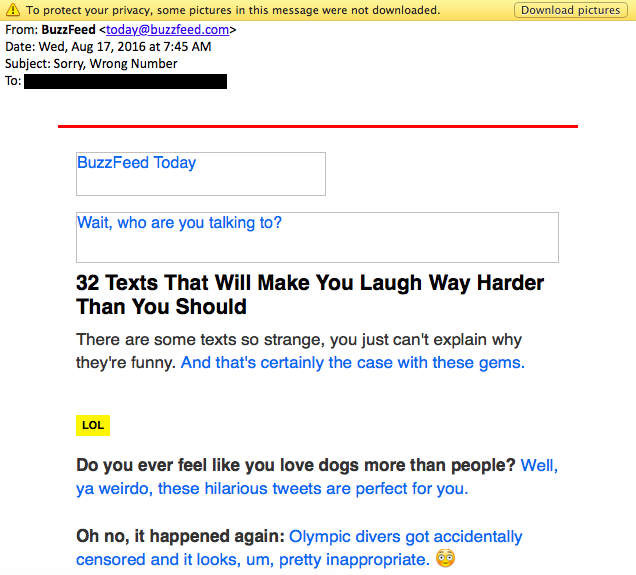
First of all, BuzzFeed has awesome subject lines and preview text. They are always short and punchy — which fits in perfectly with the rest of BuzzFeed’s content. I especially love how the preview text will accompany the subject line. For example, if the subject line is a question, the preview text is the answer. Or if the subject line is a command (like the one below), the preview text seems like the next logical thought right after it:

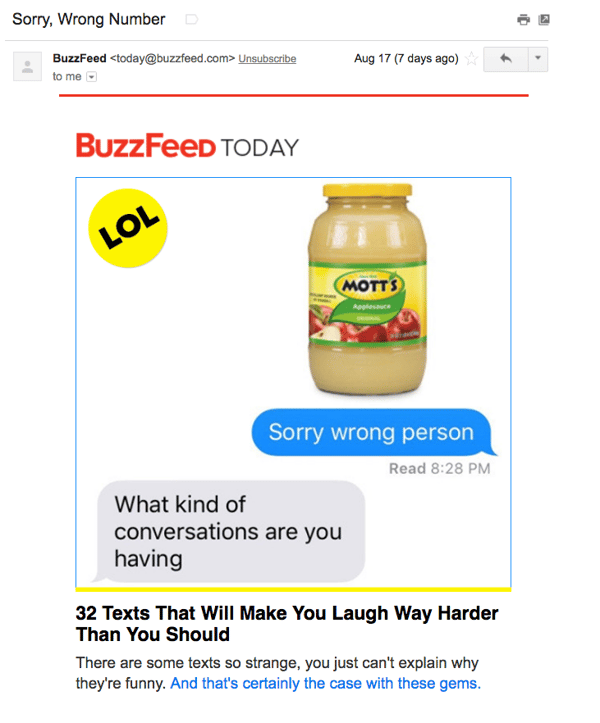
Once you open up an email from BuzzFeed, the copy is equally awesome. Just take a look at that glorious alt text action happening where the images should be. The email still conveys what it is supposed to convey — and looks great — whether you use an image or not. That’s definitely something to admire.
Without images:
With images:
4. Uber
Marketing Campaign: Calendar Integration
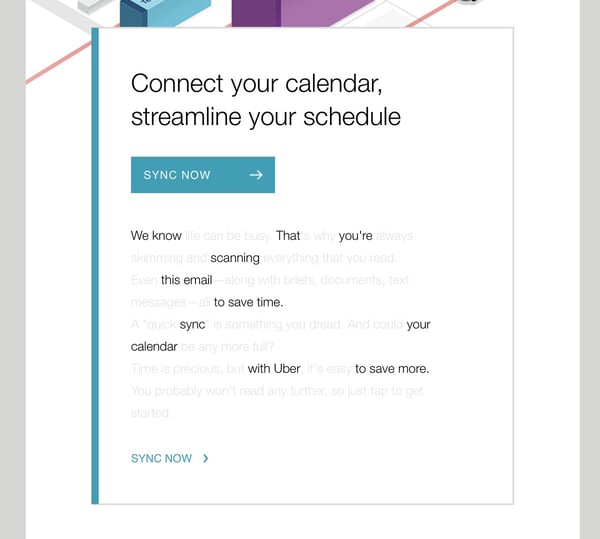
The beauty of Uber‘s emails is in their simplicity. Email subscribers are alerted to deals and promotions with emails like the one you see below. We love how brief the initial description is, paired with a very clear CTA — perfect for subscribers who are quickly skimming the email.
For the people who want to learn more, these are followed by a more detailed (but still pleasingly simple), step-by-step explanation of how the deal works.
We also love how consistent the design of Uber’s emails is with its brand. Like its app, website, social media photos, and other parts of the visual branding, the emails are represented by bright colors and geometric patterns. All of its communications and marketing assets tell the brand’s story — and brand consistency is one tactic Uber’s nailed in order to gain brand loyalty.
Check out the clever copywriting and email design at work in this example:
5. TheSkimm
Marketing Campaign: Subscription Anniversary
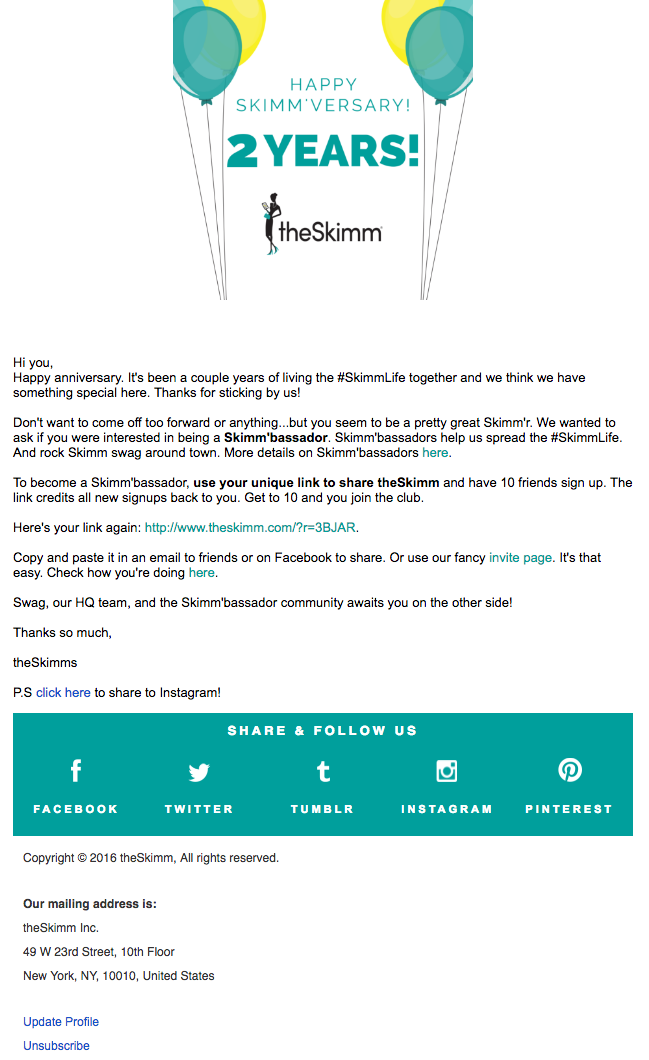
We love TheSkimm’s daily newsletter — especially its clean design and its short, punchy paragraphs. But newsletters aren’t TheSkimm’s only strength when it comes to email. Check out its subscriber engagement email below, which rewarded one of their subscribers for being subscribed for two years.
Emails triggered by milestones, like anniversaries and birthdays, are fun to get — who doesn’t like to celebrate a special occasion? The beauty of anniversary emails, in particular, is that they don’t require subscribers to input any extra data, and they can work for a variety of senders. Plus, the timeframe can be modified based on the business model.
Here, the folks at TheSkimm took it a step further by asking Mineo if she’d like to earn the title of brand ambassador as a loyal subscriber — which would require her to share the link with ten friends, of course.
6. Mom and Dad Money
Marketing Campaign: Get to Know Your Subscribers
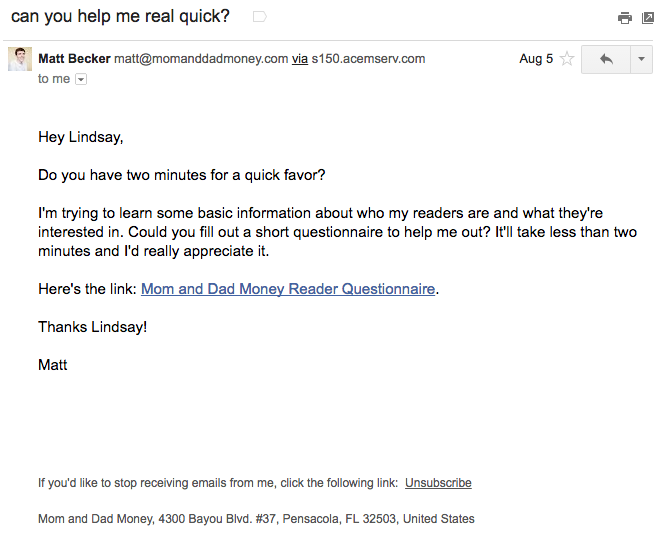
Think you know all about the people who are reading your marketing emails? How much of what you “know” about them is based on assumptions? The strongest buyer personas are based on insights you gather from your actual readership, through surveys, interviews, and so on — in addition to the market research.
That’s exactly what Matt Becker of Mom and Dad Money does — and he does it very, very well.
Here’s an example of an email I once received from this brand. Design-wise, it’s nothing special — but that’s the point. It reads just like an email from a friend or colleague asking for a quick favor.
Not only was this initial email great, but his response to my answers was even better: Within a few days of responding to the questionnaire, I received a long and detailed personal email from Matt thanking me for filling out the questionnaire and offering a ton of helpful advice and links to resources specifically catered to my answers. I was very impressed by his business acumen, communication skills, and obvious dedication to his readers.
7. Birchbox
Marketing Campaign: Co-marketing Promotion
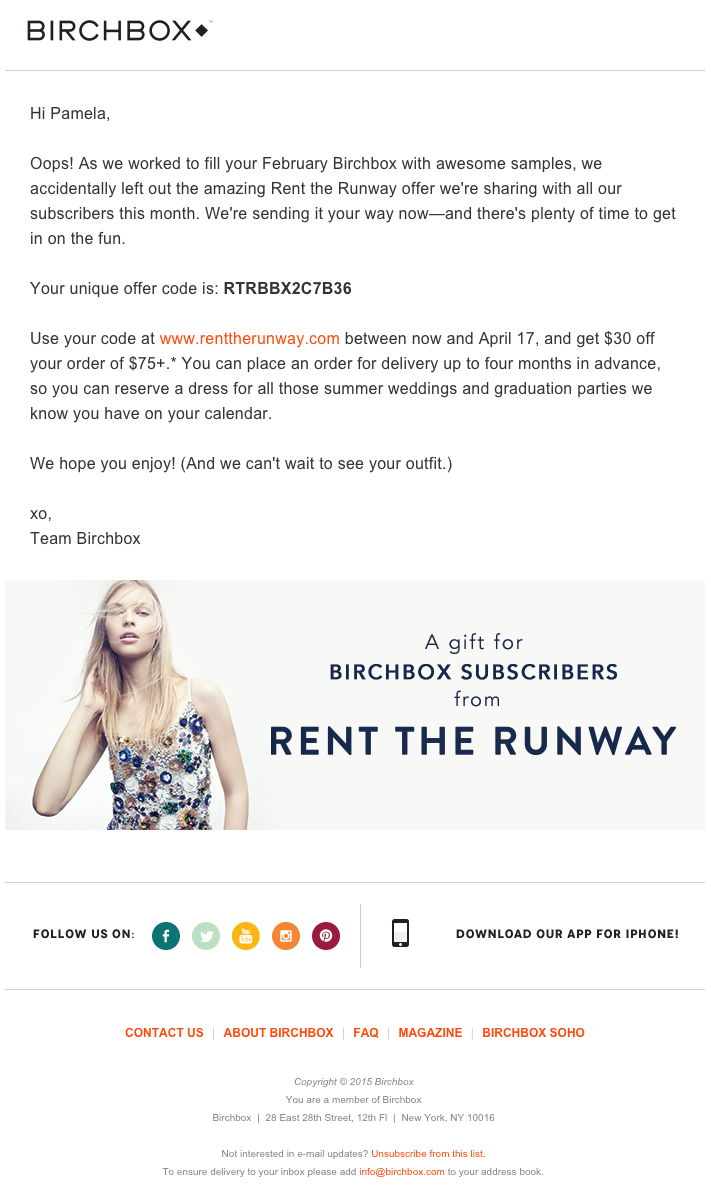
The subject line of this email from beauty product subscription service Birchbox got my colleague Pam Vaughan clicking. It read: “We Forgot Something in Your February Box!” Of course, if you read the email copy below, Birchbox didn’t actually forget to put that discount code in her box — but it was certainly a clever way to get her attention.
As it turned out, the discount code was actually a bonus promo for Rent the Runway, a dress rental company that likely fits the interest profile of most Birchbox customers — which certainly didn’t disappoint. That’s a great co-marketing partnership right there.
8. Postmates
Marketing Campaign: New Product
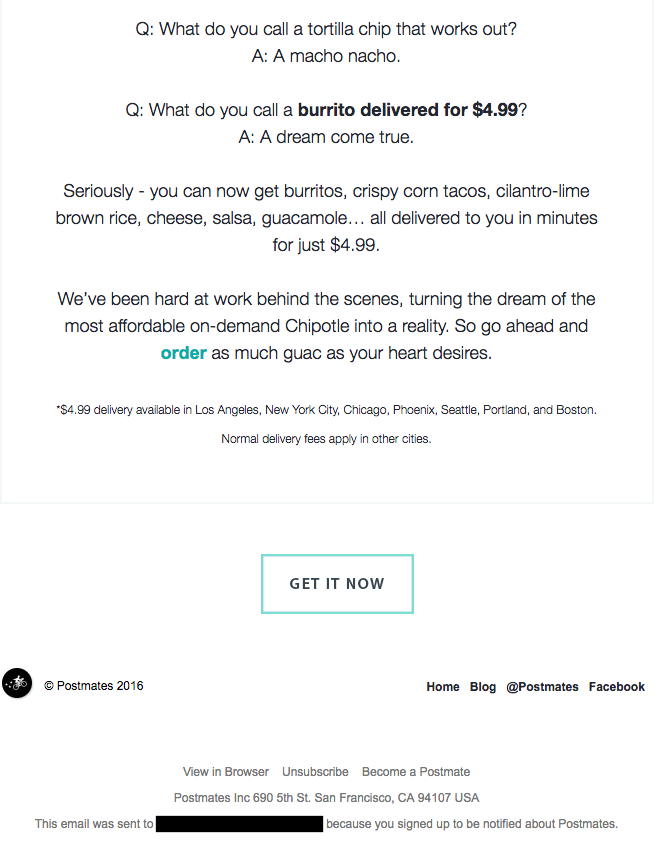
I have to say, I’m a sucker for GIFs. They’re easy to consume, they catch your eye, and they have an emotional impact — like the fun GIF in one of Postmates‘ emails that’s not only delightful to watch, but also makes you crave some delicious Chipotle.
You, too, can use animated GIFs in your marketing to show a fun header, draw people’s eyes to a certain part of the email, or display your products and services in action.

9. Dropbox
Marketing Campaign: User Reengagement
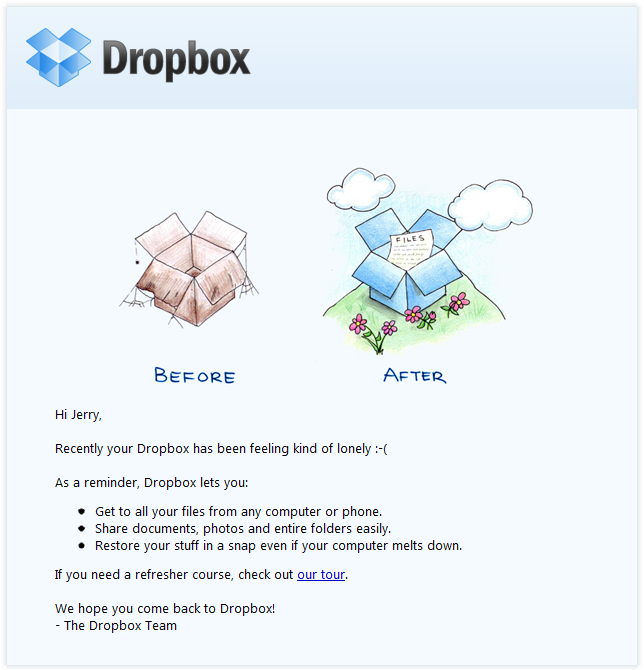
You might think it’d be hard to love an email from a company whose product you haven’t been using. But Dropbox found a way to make its “come back to us!” email cute and funny, thanks to a pair of whimsical cartoons and an emoticon.
Plus, the email was kept short and sweet, to emphasize the message that Dropox didn’t want to intrude — it just wants to remind the recipient that the brand exists, and why it could be helpful. When sending these types of email, you might include an incentive for recipients to come back to using your service, like a limited-time coupon.
10. InVision App
Marketing Campaign: Weekly Blog Newsletter
Every week, the folks at InVision send a roundup of their best blog content, their favorite design links from the week, and a new opportunity to win a free t-shirt. (Seriously. They give away a new design every week.) They also sometimes have fun survey questions where they crowdsource for their blog. This week’s, for example, asked subscribers what they would do if the internet didn’t exist.
Not only is InVision’s newsletter a great mix of content, but I also love the nice balance between images and text, making it really easy to read and mobile-friendly — which is especially important, because its newsletters are so long (below is just an excerpt). We like the clever copy on the call-to-action (CTA) buttons, too.

11. Warby Parker
Marketing Campaign: Product Renewal
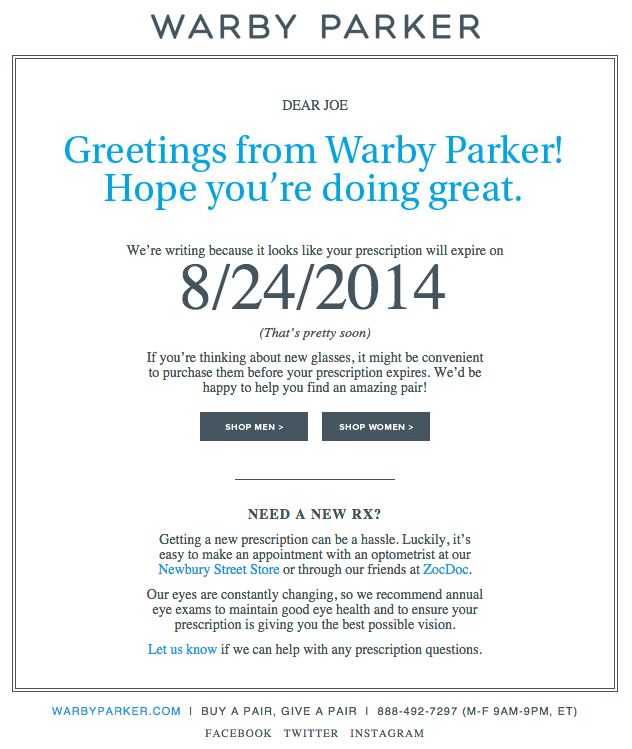
What goes better with a new prescription than a new pair of glasses? The folks at Warby Parker made that connection very clear in their email to a friend of mine back in 2014. It’s an older email, but it’s such a good example of personalized email marketing that I had to include it in here.
The subject line was: “Uh-oh, your prescription is expiring.” What a clever email trigger. And you’ve gotta love the reminder that your prescription needs updating.
Speaking of which, check out the clever co-marketing at the bottom of the email: If you don’t know where to go to renew your subscription, the information for an optometrist is right in the email. Now there’s no excuse not to shop for new glasses!
12. Cook Smarts
Marketing Campaign: Weekly Product Newsletter
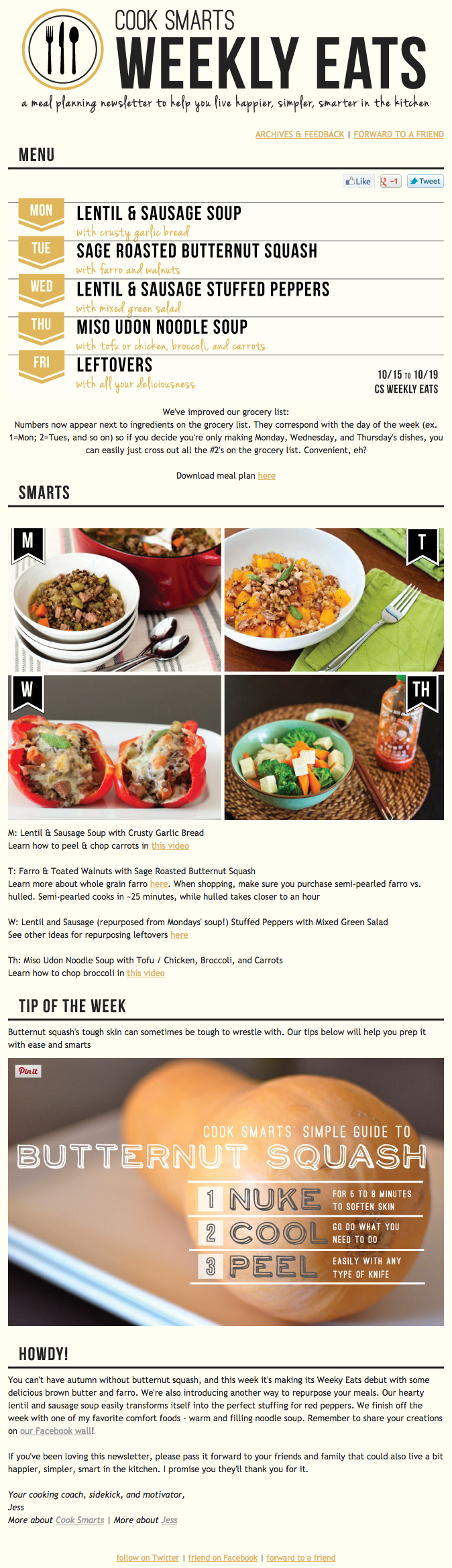
I’ve been a huge fan of Cook Smarts‘ “Weekly Eats” newsletter for a while. The company sends yummy recipes in the form of a meal plan to my inbox every week. But I didn’t just include it because of its delicious recipes — I’m truly a fan of its emails.
I especially love the layout of Cook Smarts’ emails: Each message features three distinct sections: one for the menu, one for kitchen how-to’s, and one for the tips. That means you don’t have to go hunting to find the most interesting part of its blog posts — you know exactly where to look after an email or two.
I also love Cook Smarts’ “Forward to a Friend” CTA in the top-right of the email. Emails are super shareable over — you guessed it — email, so you should also think about reminding your subscribers to forward your emails to friends, family, or coworkers.
13. HireVue
Marketing Campaign: Customer Retention
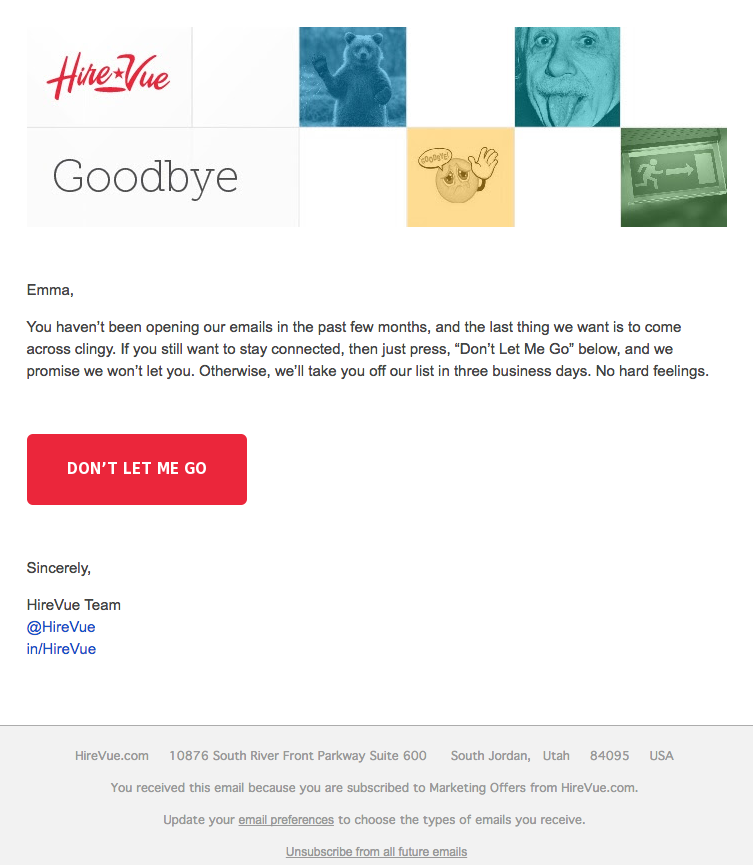
“Saying goodbye is never easy to do… So, we thought we’d give you a chance to rethink things.” That was the subject of this automated unsubscribe email from HireVue. We love the simple, guilt-free messaging here, from the funny header images to the great CTA button copy.
Not only are the design and copy here top-notch, but we applaud the folks at HireVue for sending automated unsubscribe emails in the first place. It’s smart to purge your subscriber lists of folks who aren’t opening your email lists, because low open rates can seriously hurt email deliverability.
14. Paperless Post
Marketing Campaign: Mother’s Day Promotion
When you think of “holiday email marketing,” your mind might jump straight to Christmas, but there are other holidays sprinkled throughout the rest of the year that you can create campaigns around. (Download these email marketing planning templates to keep yourself organized throughout the year.)
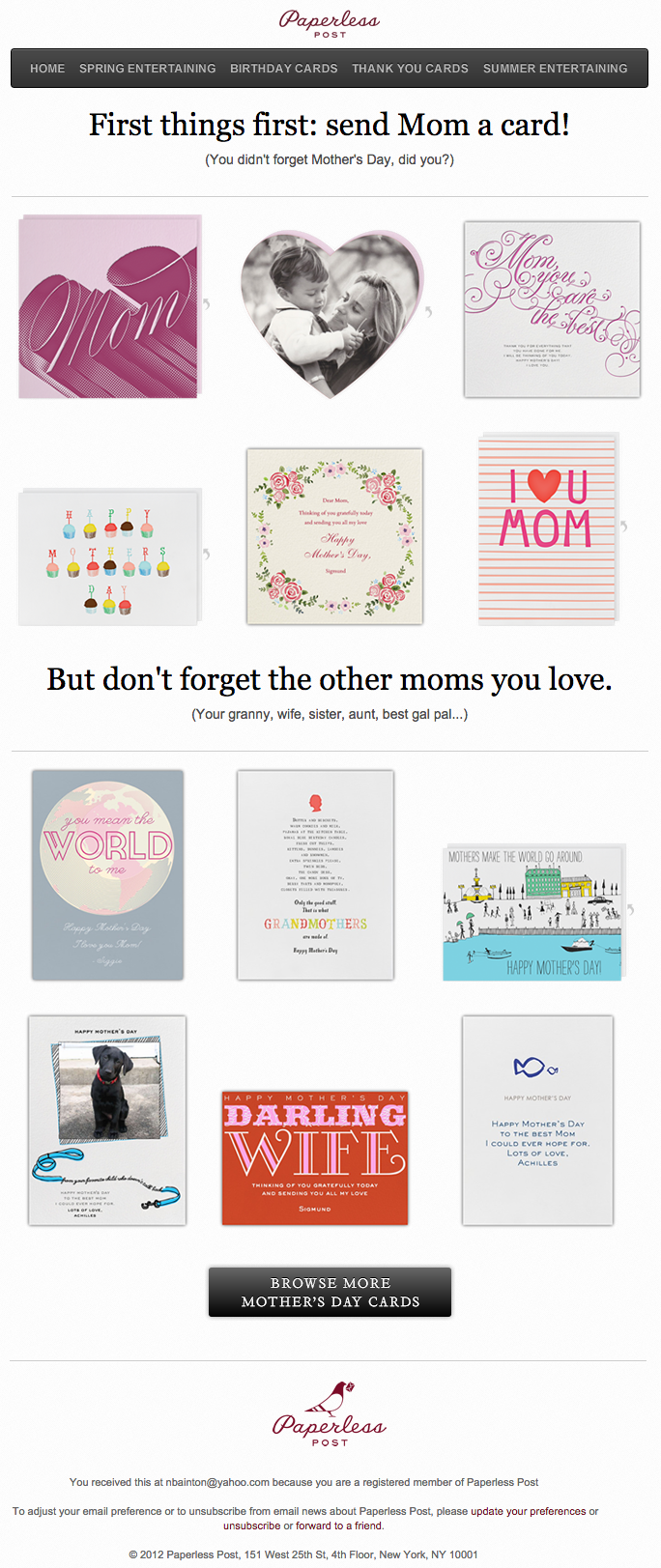
Take the email below from Paperless Post, for example. I love the header of this email: It provides a clear CTA that includes a sense of urgency. Then, the subheader asks a question that forces recipients to think to themselves, “Wait, when is Mother’s Day again? Did I buy Mom a card?” Below this copy, the simple grid design is both easy to scan and quite visually appealing. Each card picture is a CTA in and of itself — click on any one of them, and you’ll be taken to a purchase page.
15. Stitcher
Marketing Campaign: Recommended for You
As humans, we tend to crave personalized experiences. So when emails appear to be created especially for you, you feel special — you’re not just getting what everyone else is getting. You might even feel like the company sending you the email knows you in some way, and that it cares about your preferences and making you happy.
That’s why I love on-demand podcast/radio show app Stitcher‘s “Recommended For You” emails. I tend to listen to episodes from the same podcast instead of branching out to new ones. But Stitcher wants me to discover (and subscribe to) all the other awesome content it has — and I probably wouldn’t without this encouragement.
I think this email also makes quite a brilliant use of responsive design. The colors are bright, and it’s not too hard to scroll and click — notice the CTAs are large enough for me to hit with my thumbs. Also, the mobile email actually has features that make sense for recipients who are on their mobile device. Check out the CTA at the bottom of the email, for example: The “Open Stitcher Radio” button prompts the app to open on your phone.

16. RCN
Marketing Campaign: Storm Update
Internet providers and bad weather are natural enemies. You’d think telecommunications companies wouldn’t want to call attention to storm-induced power outages — the one thing that sets off customers’ impatience. Then, there’s RCN.
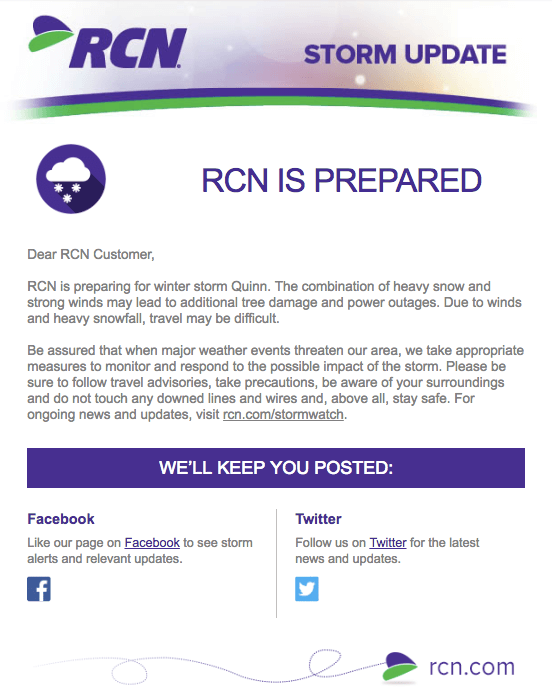
RCN, a cable and wireless internet service, turned this email marketing campaign into a weather forecast just for its customers. This “storm update” got the company out ahead of an event that threatened its service, while allowing its users to get the weather updates they need right from the company they count on for Wi-Fi.
As you can see below, the email even advises personal safety — a nice touch of care to go with the promise of responsive service. At the bottom of the email, RCN also took the opportunity to highlight its social media channels, which the company appropriately uses to keep users informed of network outages.
17. Trulia
Marketing Campaign: Moving Trends
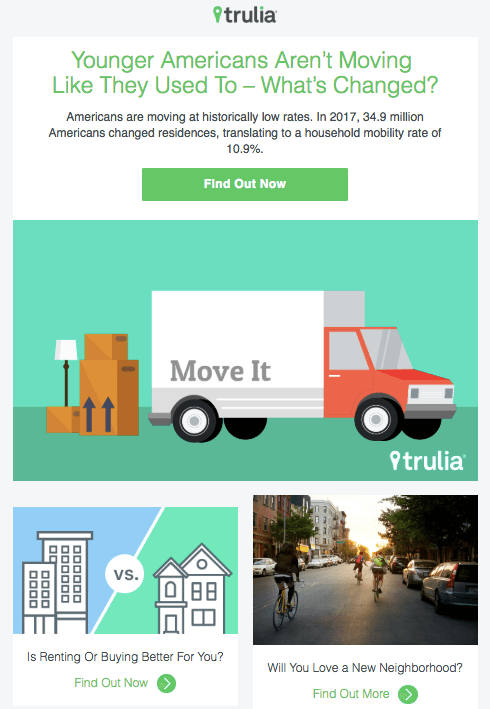
I’m a huge advocate of thought leadership. To me, some of the best companies gain customer loyalty by becoming the go-to source for expertise on a given topic. Trulia — a property search engine for buyers, sellers, and renters — is that expert in the real estate biz. How do I know? Just read their emails, much like the one below.
“Why aren’t millennials moving?” The subject line of this email campaign reads before citing interesting data about relocation trends in the U.S. Trulia doesn’t benefit from people who choose not to move, but the company does benefit from having its fingers on the pulse of the industry — and showing it cares which way the real estate winds are blowing.
18. RedBubble
Marketing Campaign: Featured Artist
This email marketing campaign crushes it, and for so many reasons.
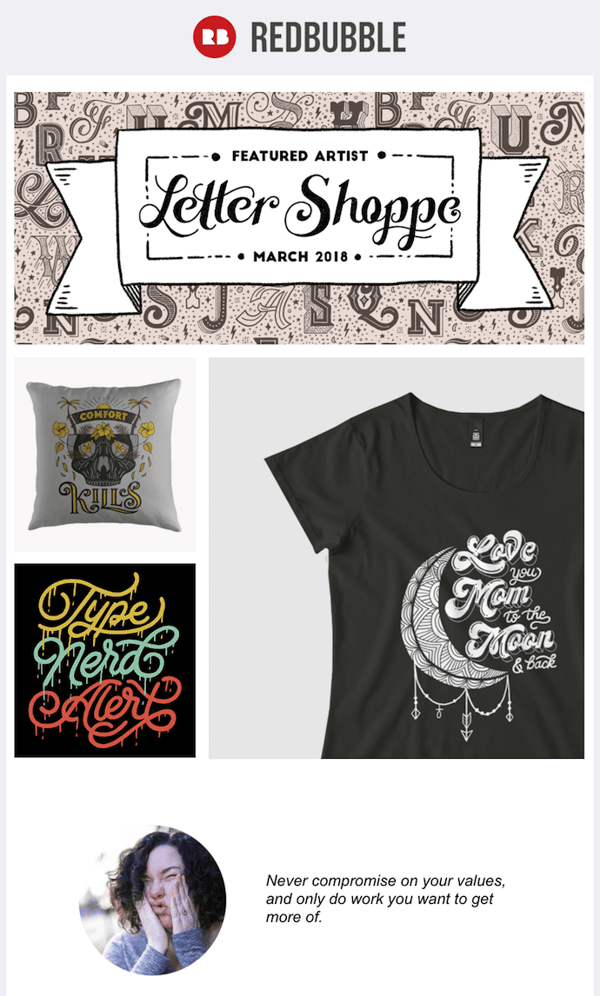
Not only is the design below super eye-catching — without looking cluttered — but the artwork is user-made. RedBubble sells merchandise featuring designs from artists all over the world. This presents a golden opportunity to feature popular submissions across the RedBubble community.
The example below showcases artwork from “Letter Shoppe,” and when that artist sees RedBubble featuring her content, she’s more likely to forward it to friends and colleagues.
In addition to linking to Letter Shoppe’s designs (available on merchandise that is ultimately sold by RedBubble), the email campaign includes an endearing quote by the Featured Artist: “Never compromise on your values, and only do work you want to get more of.” RedBubble’s customers are likely to agree — and open other emails in this campaign for more inspiring quotes.
These are just some of our favorite emails. Don’t just follow best practice when it comes to your marketing emails. Every email you send from your work email address also can be optimized to convert with a little planning.
Editor’s note: This post was originally published in October 2013 and has been updated for comprehensiveness.

The 6 Best Thank You Page Examples of 2021
… Not exactly the message you want your customers inferring from your website’s Thank You Pages, is it?
Thank You pages are effective opportunities to demonstrate appreciation towards your leads, prospects, and customers for taking a desired action — and even potentially convert users or increase sales through additional CTAs.
Here, we’ll explore six different purposes of a Thank You page, along with six stunning examples of Thank You pages to inspire your own designs in 2021 and beyond.
Let’s dive in.
What is a Thank You page?
Your customers and leads see your Thank You Page immediately after completing a form or making a purchase on your web page. It acts similarly to a confirmation email — except viewers don’t have to choose to open it.
Think of a Thank You page as both the last step in your conversion process and the first step for customer retention.
The Thank You Page presents a prime opportunity to turn a lead into a customer — or a customer into a brand advocate. The best way to do this? Make the next step(s) in the buyer or user journey:
- … Obvious and clear
- … Immediate
- And exciting or desirable.
What is the benefit of a Thank You page?
Think of it this way: you may never have an easier, more natural opportunity to give a customer something that pleasantly surprises them and precisely fits what they want.
How do you know what your customer wants? They just told you exactly what they want, by following a call-to-action on your site.
After someone follows the CTA on a landing page, take them to step two in their journey before they click away. Show customers you’re ready to deliver value time and time again.
For instance, if a customer makes a purchase on your site, use the Thank You page as an opportunity to add value through additional resources or content — which will build trust and delight customers.
Alternatively, you might use a form Thank You page as an opportunity to provide leads with next steps. If the lead downloaded a Social Media Calendar ebook, the Thank You page can list out alternative social media resources you’d like to provide.
To see this in-action, let’s explore Thank You page examples, next.
Thank You Page Examples
1. Purpose: Contact Form Completion
Confirm to your customer that they completed their intended action successfully – and remind them what you will (and won’t) do with their information. Build trust and let them know you’re on their side.
Let consumers know you’re interested in delivering value … and won’t be emailing them just for the sake of it.
This is your best chance to convince consumers your brand is different, and it comes long before they run across one of your messages in their inbox.
Best Contact Form Thank You Page
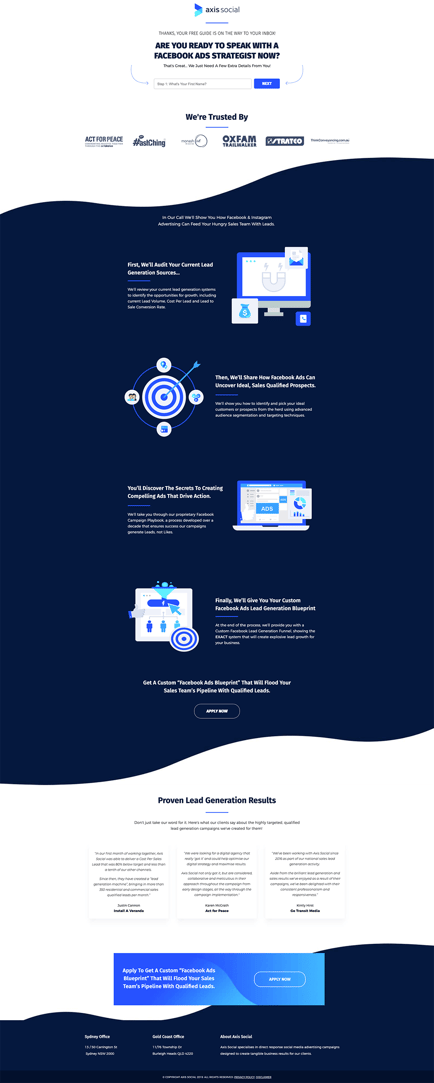
Axis Social tells a big, layered story on their Thank You page for new contact form sign-ups. Thanks to careful layout and crisp design, they manage to push their primary CTA while also reinforcing social validation and trusted partners.
2. Purpose: Downloadable
You likely have an ebook or other lead generation downloadable send automatically via email. However, it’s still best to offer a download link to the originally-requested item right on your Thank You Page, as well.
This can keep your customer engaged on your site and increase the likelihood they’ll open and engage with your materials right away.
Best Thank You Page for Downloadables
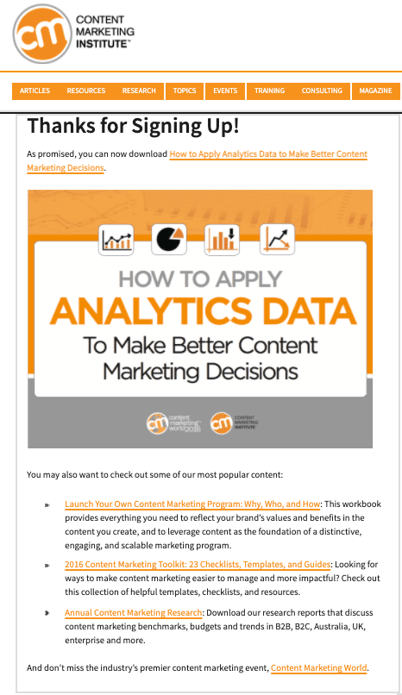
The Content Marketing Institute incorporates both native download links and curated suggestions for additional on-site content into their Thank You Pages. (It’s almost like they do this kind of thing for a living …)
3. Purpose: Purchase Confirmation Pages
The post-sale confirmation page is an often-missed opportunity to surface similar, related, or complementary products.
To increase effectiveness, you’ll want to customize these recommendations with an aligning offer — such as a coupon, rewards program, etc.
If customers can create an account with your site, but also have the option of checking out as a guest, the confirmation page is also a great opportunity to prompt a free account creation.
Best Purchase Thank You Page
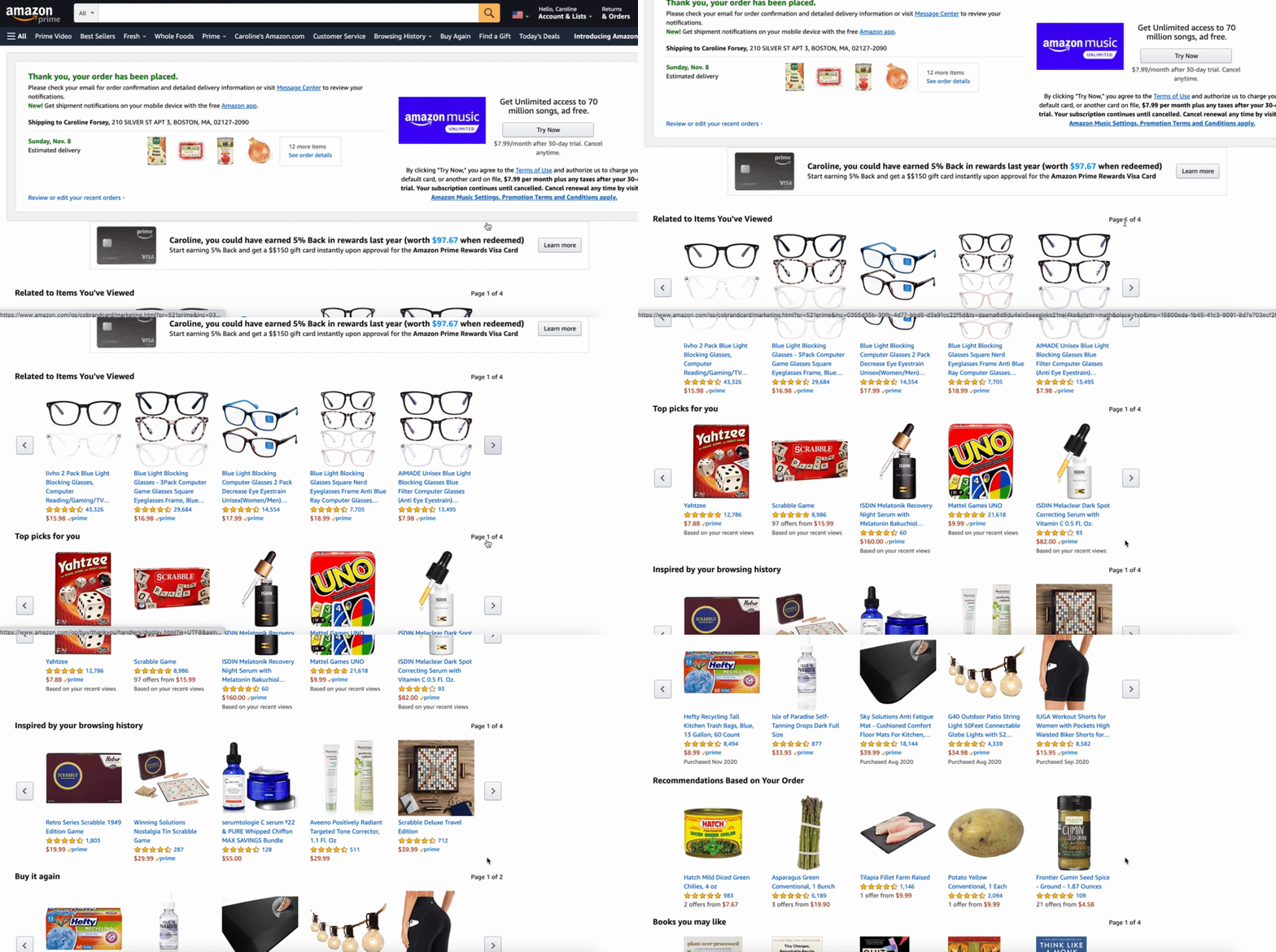
Few companies can even begin to approach the level of customer data that Amazon collects, stores, and leverages across their businesses. This quality of information – and the company’s essentially limitless supply of items and store listings – makes the purchase confirmation page incredibly effective (and, as a consumer, quite difficult to resist).
4. Purpose: Appointments and Reservations
When you’ve got someone newly signed up for an appointment, the Thank You Page provides a ready-made opportunity to expand or extend the conversation with them. Encouraging viewers to follow or engage with your organization on social is a natural next step.
Best Thank You Page for an Appointment or Booking
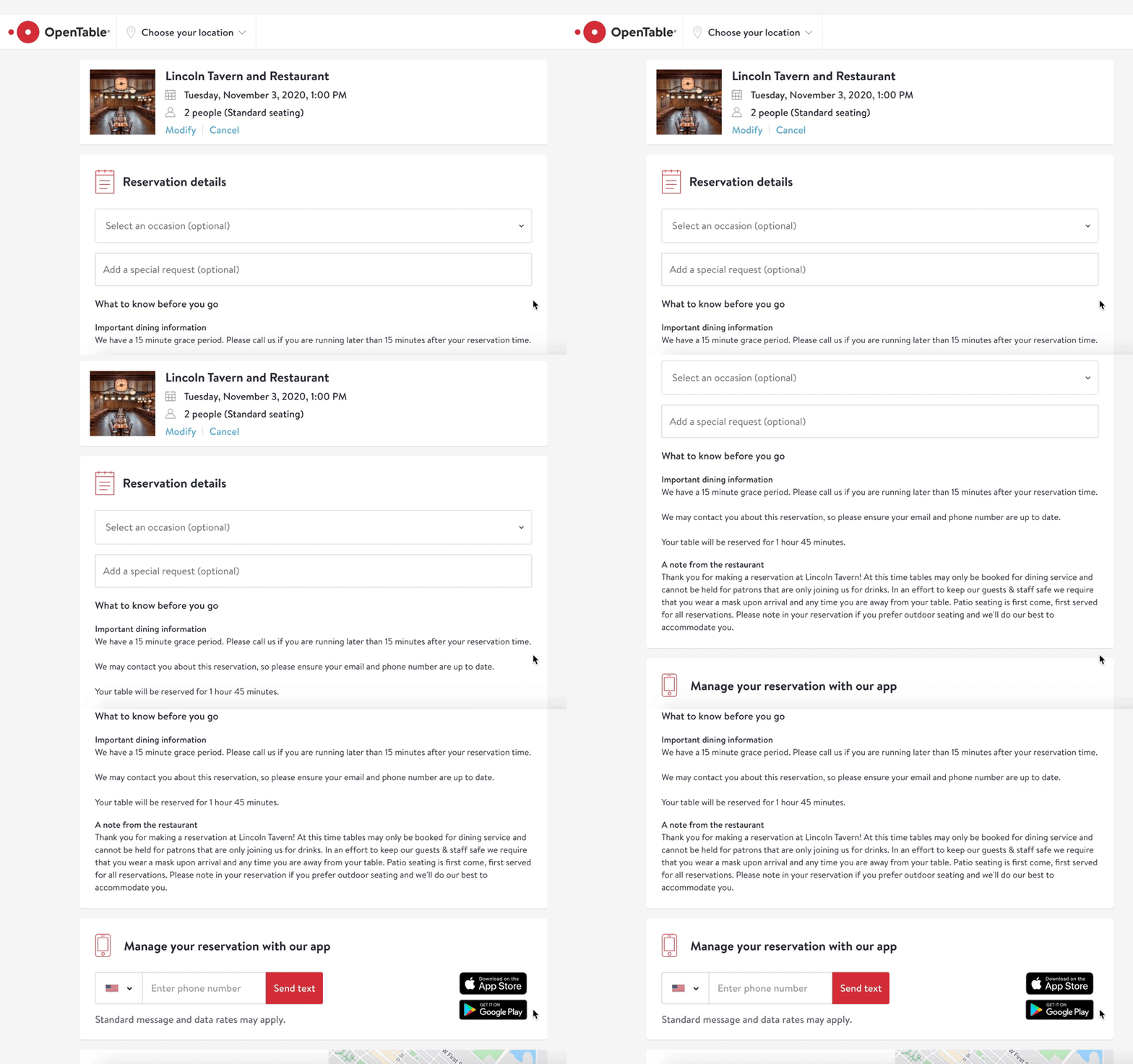
OpenTable incentivizes users to download the app once they’ve made an appointment so they can track and modify changes from within the app itself. The Thank You page also includes helpful notes about what to know before arriving at the restaurant.
5. Purpose: Account Creation Thank You Pages
This is a prime opportunity to usher your lead seamlessly into your onboarding or account setup process.
You’ll want to make it so easy they don’t even think about clicking away.
You know how hard you had to work to get them to this point in the first place. Why not capitalize at the start by moving them a step or two along in your retention lifecycle journey?
Best Account Creation Thank You Page
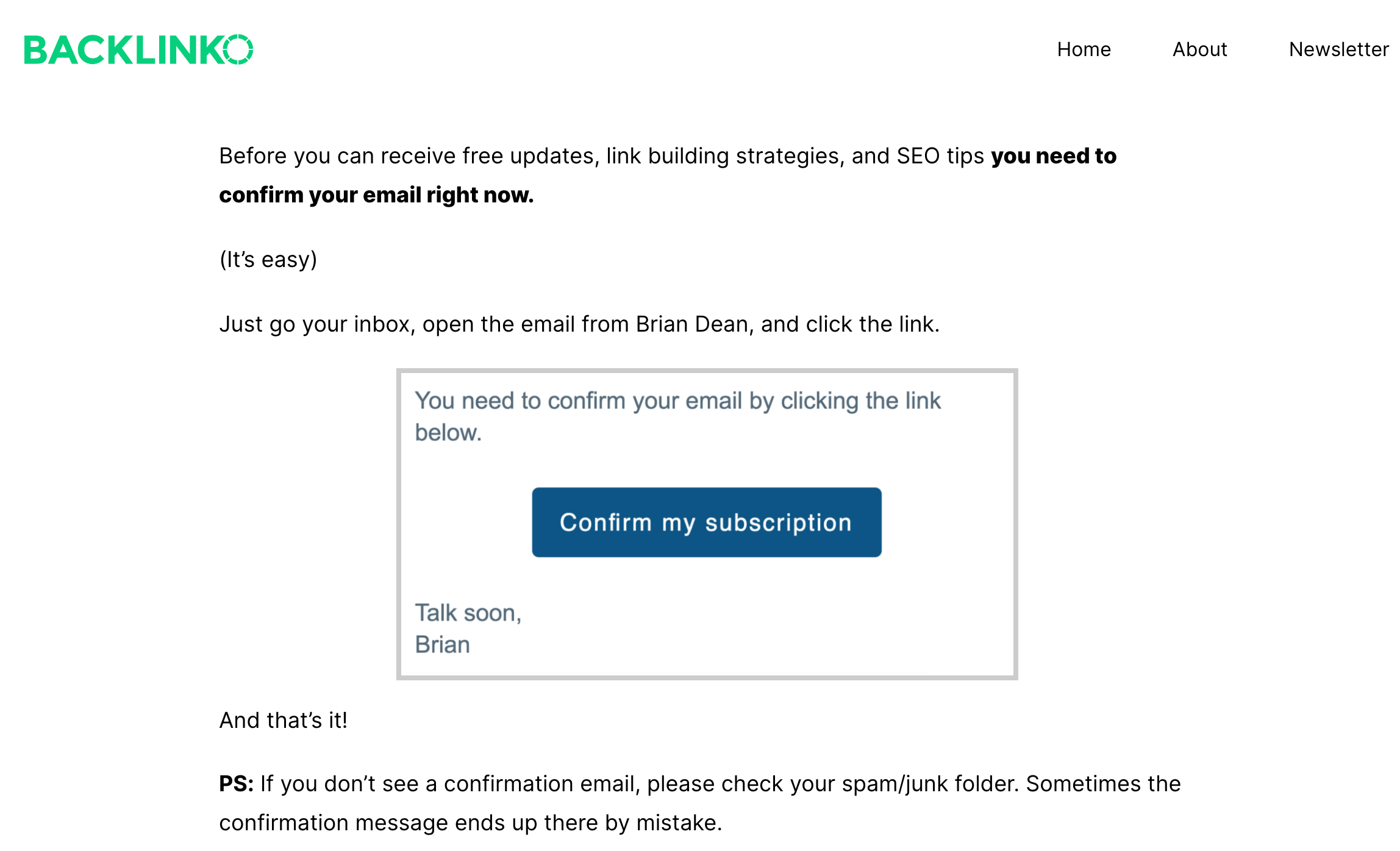
Backlinko goes above and beyond in laying out the next steps for their leads. They’ve infused their page’s messaging with urgency, but also friendliness and approachability.
6. Purpose: Donation Thank You Pages
A donor isn’t ‘buying’ a product in the same way most other customers are, but they’re undoubtedly looking for some element of reassurance, affirmation, appreciation, or — at the very least — some confirmation that their contribution is making a positive impact and being well spent.
For nonprofits, political campaigns, and other donor-soliciting sites, use the Thank You Page to provide a window into each donation’s impact, right from the start.
Additionally, it never hurts if you can anticipate and answer questions about your efficacy before they’re even asked.
Best Donor Thank You Page
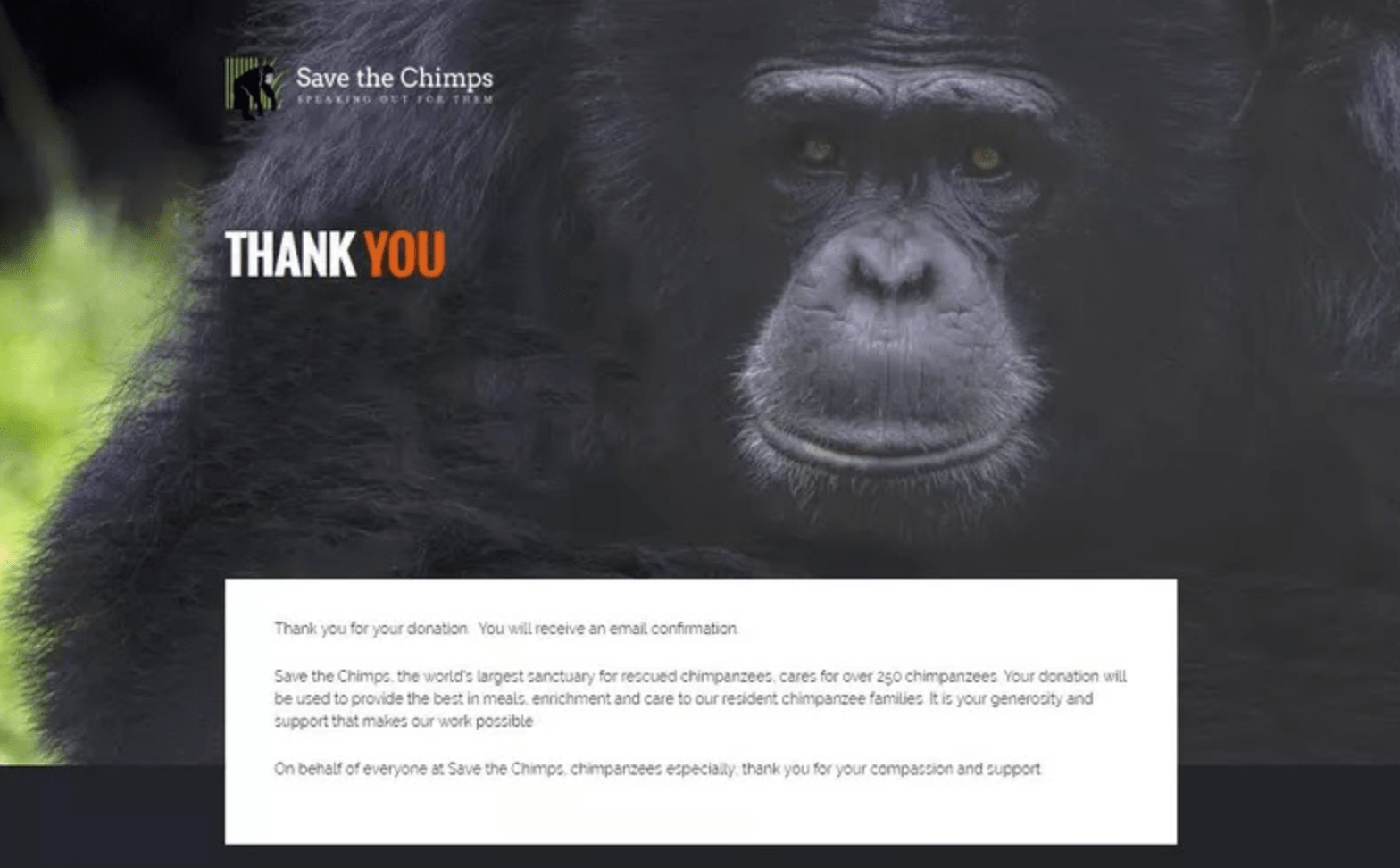
Save the Chimps nails the impact of storytelling on their donor Thank You page, putting the chimps — the organization’s beneficiaries — front-and-center.

What Is YouTube CPM? [+ Why It Matters]
With over two billion monthly active YouTube users, YouTube is an undeniably powerful channel for advertising — which means, if you’re a YouTube creator, there are plenty of opportunities for you to make money off the platform.
For instance, if advertisers pay to display ads on your videos, you can increase revenue in the form of CPM.
Along with increasing your revenue, CPM is a strong indicator that your content is valuable, and helps you identify businesses with whom you may want to partner down the road.
Whether you’ve been a YouTube creator for years or are just starting out, CPM is an important metric to understand to ensure you’re maximizing YouTube’s potential as a revenue generator.
Here, we’ll explore what CPM is, how it’s calculated, and what makes a “good CPM”.
What is CPM, and how is it calculated?
CPM, or cost per 1,000 impressions, is the cost an advertiser needs to pay on YouTube for every 1,000 impressions their ads receive on your video.
CPM varies depending on how much an advertiser pays to display the ad. Ad price on YouTube depends on a range of factors, including bidding price, type of ad, and consistency.
So, for instance, let’s assume an advertiser is paying $9 for an ad, and the ad was seen 5,000 times on your video. To calculate CPM, you’d divide 9 by 5,000 = $0.0018, then multiply $0.0018 by 1,000.
The CPA, then, is $1.80. You’ll receive 55% of that $1.80 — since YouTube takes a percentage of the CPA, as well (45%, to be exact). So if you make $1.80 CPA off an ad, you’ll only keep $0.99.
Additionally, there’s another type of CPM: playback-based CPM. Rather than calculating the cost the advertiser pays for 1,000 impressions, playback-based CPM calculates the cost an advertiser pays for 1,000 video playbacks where an ad is displayed.
There are free calculators available online, if you don’t want to calculate your CPM manually. And while individual videos’ CPMs might seem small (like the $0.99 made, above), it can add up to a hefty monthly earning if plenty of businesses see your videos as consistently worthwhile platforms for their promotions.
Why is CPM important?
As a YouTube creator, CPM is an important metric for analyzing which of your videos are most valuable to advertisers. Since advertising is the primary method for monetization on YouTube, this is critical information.
To make a full-time career out of YouTube, it’s critical you know which videos can be monetized so you can create a more efficient, long-term strategy to target those types of topics.
For instance, perhaps you create YouTube videos for beauty, health, and wellness — but you find, in particular, “Drugstore Makeup Tutorials” receive the highest CPMs. This might suggest you should create more content that aligns with that topic.
Additionally, you might find one business in particular consistently advertises on your videos. If the brand aligns with your own values, you might reach out directly to discuss other YouTube partnership opportunities, like affiliate marketing.
Average CPM on YouTube
CPM varies greatly depending on how much an advertiser pays to distribute an ad on your video.
For instance, let’s say an advertiser pays $10 for an ad that plays on your video, which has 1,000 views. If that’s the case, you’d make $10 CPM (10/1,000 x 1,000). Of course, then, you’ll need to take 45% off that total — making your earnings around $5.
However, in most cases, the videos on which businesses choose to advertise will have more than 1,000 views, making your earnings closer to $7-$10.
Jilliian Hope, HubSpot’s Senior Manager of Brand Advertising, agrees, telling me her team typically sees an average of $7 to $10 from past campaigns.
However, CPM varies by country. For instance, one source reports the United States has an average 0.38 CPM, while Spain is 4.38, Switzerland is 3.87, and Mauritius is as high as 7.05. This means the amount of money you make off YouTube depends, in part, on your geography.
Highest CPM on YouTube
The highest CPM varies by country, but here’s a list of the five highest CPA rates by country, as reported by one source:
- Maldives: $15.47
- Guadeloupe: $10.97
- Denmark: $10.61
- Poland: $9.23
- Pakistan: $7.54
Additionally, certain niche topics will ultimately have higher CPMs. Industries that a) perform well on YouTube and b) are incredibly profitable, will perform better in terms of CPM. These industries include:
- Makeup
- Retail
- Health
- Finance
- Technology
As a brand, you should use CPM as a metric to help you identify which topics seem most valuable to advertisers, since those topics likely provide the most opportunity for monetization.
Rather than looking for “quick tricks” to increase your CPM, however, you’ll want to play the long-game by creating a comprehensive YouTube strategy that helps you increase sales, reach new audiences, and grow brand awareness.

A Plain-English Guide to Market Research
In some circles, market research is a catch-all term for asking the industry what it wants. “Do we know what the demand is for this product? Who’s even looking for our services? Let me do some market research to find out,” someone might say.
But what does that actually mean?
Here’s a simple definition of market research that encompasses all the possible goals of this practice, in fewer than 100 words:
Market Research Definition
Market research is the process of examining an industry’s buyers, the product these buyers want, and where they’re currently getting it. By engaging the right people and data, a business can use this research to position itself in the market and predict where the market will go in the future.
Market research can answer various questions about the state of an industry, but it’s hardly a crystal ball that marketers can rely on for insights on their customers. Market researchers investigate several areas of the market, and it can take weeks or even months to paint an accurate picture of the business landscape.
However, researching just one of those areas can make you more intuitive to who your buyers are and how to deliver value that no other business is offering them right now.
Certainly you can make sound judgment calls based on your experience in the industry and your existing customers. However, keep in mind that market research offers benefits beyond those strategies. There are two things to consider:
- Your competitors also have experienced individuals in the industry and a customer base. It’s very possible that your immediate resources are, in many ways, equal to those of your competition’s immediate resources. Seeking a larger sample size for answers can provide a better edge.
- Your customers don’t represent the attitudes of an entire market. They represent the attitudes of the part of the market that is already drawn to your brand.
Here are some examples of insights you can gain from market research:
- Consumer attitudes about a particular topic, pain, product, or brand
- Whether there’s demand for the business initiatives you’re investing in
- Where to advertise or sell to (geographically or online)
- Unaddressed or underserved customer needs that can be flipped into selling opportunity
- Attitudes about pricing for a particular product or service
Getting answers to these questions based on real data can help you make sound business decisions and minimize risk.
Types of Market Research
To give you an idea of how extensive market research can get, consider that it can either be qualitative or quantitative in nature — depending on the studies you conduct and what you’re trying to learn about your industry. Qualitative research is concerned with public opinion, and explores how the market feels about the products currently available in that market. Quantitative research is concerned with data, and looks for relevant trends in the information that’s gathered from public records.
Let’s talk about four different types of market research studies you can conduct, a potential goal of each one, and how these studies help you better understand your market.
Interviews
Qualitative information
Interviews are the personal, one-on-one conversations you can have with the buyers in your industry. You can conduct interviews in person or over the phone.
Your interviewees can answer questions about themselves to help you design your buyer personas. These buyer personas describe your ideal customer’s age, family size, budget, job title, the challenges they face at work, and similar aspects of their lifestyle. Having this buyer profile in hand can shape your entire marketing strategy, from the features you add to your product to the content you publish on your website.
Focus Groups
Qualitative information
Focus groups are similar to interviews, but in this case, you’re assembling a large group of people for one shared interview. A focus group consists of people who have at least one element of your buyer persona in common — age or job title, for instance.
This type of market research can give you ideas for product differentiation, or the qualities of your product that make it unique in the marketplace. Consider asking your focus group questions about (and showing them examples of) your services, and ultimately use the group’s feedback to make these services better.
Surveys
Quantitative information
Surveys are a form of quantitative research, and you can distribute them over the phone, via email, or through an online survey. A survey could cater to people who’ve downloaded content from your website or interacted with a member of your business.
Enough completed surveys can help you determine your customer satisfaction level. This denotes how happy your customers are with what you’re selling them. You might include questions like, “How well did we solve your problem?” and “Would you recommend our product to a friend?”
Secondary Data
Quantitative information
The interviews, focus groups, and surveys are all sources of primary data. Secondary data, on the other hand, is the public information — online and offline — that characterizes your industry. This includes competitor websites, social media business pages, trade magazines, market reports, and even census data published by the government.
If you examine enough secondary data, you can learn how much brand awareness you have in the marketplace compared to the companies that provide the same product or service as you.
The market research you perform doesn’t have to include every source of information described above. What data you collect will depend on the needs of your business and what you might be most interested in at the moment.
Editor’s note: This post was originally published in July 2018 and has been updated for comprehensiveness.

What’s a Conversational Landing Page (& How Do You Create One)?
Marketers have found that conversational experiences on landing pages (such as chatbots and live chat) convert three-to-four times more than a traditional landing page. Additionally, a report from Juniper Research predicts that by 2023, the adoption of chatbots across the retail, banking, and healthcare sectors will save businesses $11 billion annually.
So, what do these conversational experiences entail and how should chatbots be incorporated on your landing pages to increase conversions while saving your team time and resources?
Conversational Landing Pages
In this blog post, we’ll talk about what conversational landing pages are, what makes them unique, and how to create one of your own.
Let’s dive in.
Automate and scale conversations on your website with HubSpot’s Chatbot Builder Software.
A conversational landing page may also answer visitor inquiries, resolve challenges, share specific offers, and guide customers to whatever it is they need via chatbot or live chat.
If your landing page only includes a chatbot for visitors to interact with, you may customize the bot so it can detect complex issues that require the support of a human — then, the bot can direct visitors to live chat.
What makes conversational landing pages unique?
In addition to conversational landing pages, there are two other main types of landing pages that are used to engage visitors: traditional landing pages and hybrid landing pages.
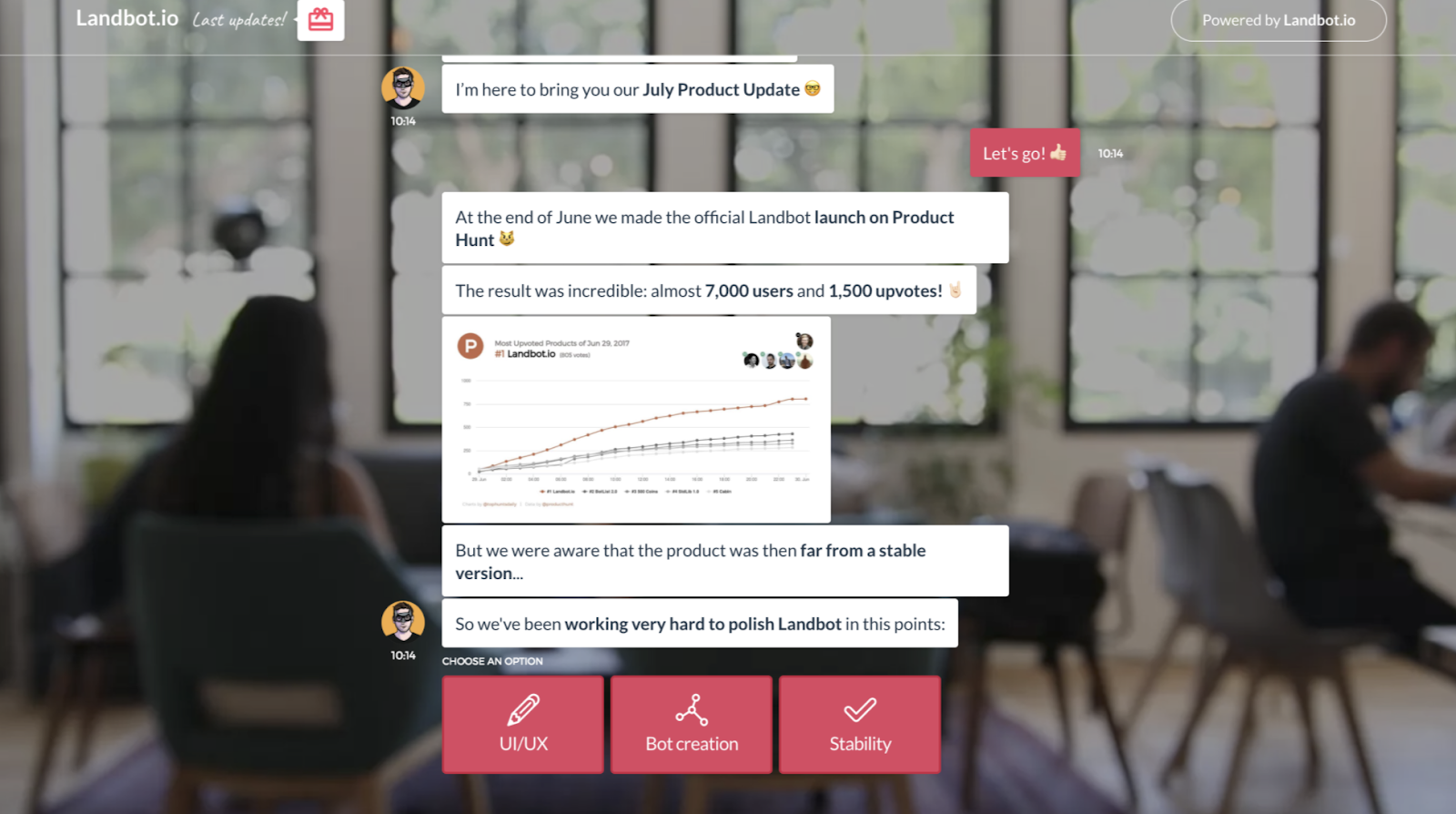
A conversational landing page looks something like this, with the chatbot conversation filling up the entire screen for the visitor:
A traditional landing page is one that engages visitors with a traditional lead generation form. The lead generation form is placed among other content on the landing page. It asks for information from visitors (e.g. name, email address, zip code) in exchange for something (e.g. discount code, subscription, or trial).

A hybrid landing page combines features from both a conversational and a traditional landing page — it’s essentially a traditional landing page with a chatbot (which can be expanded or be minimized) embedded on the page.

Now that you’ve seen these other two types of landing pages, you may be wondering, “Why should the chatbot/ live chat conversation be the only thing on a conversational web page?”
Fair question.
By making a contextual, chatbot conversation the only thing on a web page, you establish a personal, one-on-one feel that traditional and hybrid landing pages don’t provide. This allows you to more easily promote new offers, close more deals, and increase conversion rates.
How do you create a conversational landing page?
When creating a conversational landing page, you’ll work through many of the same steps — or, at the very least, similar steps — to those you’d follow when creating any other landing page.
1. Set a goal for your conversational landing page.
The main goal of your conversational landing page is to engage visitors. But that doesn’t mean you can’t also set more specific targets for engagement if you’d like to — this is a good way to establish a single focus for your page in order to make it as effective as possible.
Here are some examples of conversational landing page goals:
- Provide highly-accessible customer support.
- Share special offers.
- Convert and upsell leads and customers.
- Get to know your audience on a personal level and apply that information to campaigns, buyer personas, sales, and more.
- Collect feedback to improve upon your product/ service, customer experience, and buyer’s journey.
2. Tailor the chatbot to your buyer personas and customers.
Your chatbot should cater to your specific audience. With a chatbot builder — like HubSpot — you can customize your chatbot and use it to qualify leads, book meetings, and create responses to FAQs. You can also configure your chatbot so that it guides an individual with a more complex reason for reaching out to live chat/ a rep. The bot can also create support tickets and add contact data to your lists and workflows to automate tasks and save your team time.
3. Use clear, action-oriented language.
The point of your conversational landing page is to engage and interact with your visitors as well as support their needs, challenges, and goals. It’d be very difficult to do this if your landing page was cluttered, unclear, hard to understand, or difficult to navigate.
So, when working to determine what text you’ll include on your conversational landing page, remember less is more — meaning, your chatbot and any other text on your page should be concise, conversational, and straightforward. This will allow your visitors to have efficient and simple interactions with your brand.
4. Design and brand your page and make it memorable.
Your landing page should be on-brand, thoughtfully-designed, and beautiful — this will contribute to a positive experience on your page for visitors. This step is also when you should ensure your conversational landing page opens in a new tab (this is how the chat will fill up the entire screen).
A landing page tool like HubSpot, which has a drag-and-drop builder and pre-made templates, makes the process of designing a landing page simple, even if you don’t have any website or coding knowledge.
Here are some other landing page elements to consider when designing a memorable page:
- Font
- Colors
- Animations
- Images
- Videos
- Bot/ live chat design
- CTA buttons
5. Ensure your landing page’s chatbot resolves customer issues and guides them to solutions.
The point of your conversational landing page is to engage visitors in a way that’s beneficial to them (and your business). To ensure your chatbot resolves customer queries and guides users to the solutions they need, customize your bot’s messaging, purpose, and goal.
HubSpot’s Chatbot Builder makes this easy — the builder allows you to select a bot template based on your goal and use the visual editor to customize the bot so it complements that goal and your brand. Customize the bot’s copy and the types of questions it asks visitors. If your conversational landing page doesn’t include live chat on it, then you may configure the bot at this time so it directs visitors with complex issues to your live chat.
Additionally, personalize bot conversations with the help of your all-in-one HubSpot CRM — the chatbot will pull contact record information from your CRM to create a personalized experience for customers on your conversational landing page. Then, after any conversation with a visitor, their contact record will be updated again with any new details.
6. Promote your conversational landing page.
What good is a landing page without any visitors on it?
To make sure your audience and customers know about your conversational landing page, promote it — share links to it on your social media profiles, add a CTA to your main landing page that guides visitors who want to interact with a chatbot to the landing page, and add a link to it on your website’s “Contact” page. This will increase engagement, encourage customers to interact with you, and efficiently and effectively provide the support your visitors are looking for — all while saving you time.
It’s also a great way to proactively inform your customers and site visitors of where and how they can interact with you and get support.
7. Test and analyze your conversational landing page.
To ensure your conversational landing page is as effective as possible, test different variations of the page to see what works best for your site visitors and increases conversions.
To do this, A/B (or split) test variations of your page (and chatbot) — swap out and test colors, font, messaging, and CTA buttons to determine which combination does the best job of attracting, engaging, converting, and delighting customers.
Begin converting more visitors and delighting customers today with an engaging and memorable conversational landing page.

How We Prioritized Which Review Sites We Care About at HubSpot
This post is a part of Made @ HubSpot, an internal thought leadership series through which we extract lessons from experiments conducted by our very own HubSpotters.
HubSpot CEO Brian Halligan has said it many times: More businesses die each day from overeating than from starvation. They spread themselves across so many different priorities that it becomes impossible to gain major traction with any of them.
The same is true when it comes to managing customer reviews for your business. There are so many different places a business can be reviewed today that keeping them all in order can feel a bit like a game of Whac-a-mole.
(A few examples would be G2, Gartner Peer Insights, and Capterra.)
This was the problem we faced at HubSpot. If we tried to give the same care and attention to every single review site, we’d only have a minimal impact on each site. While it was important for us to read and consider every piece of feedback, it was also crucial for us to understand which sites were going to have the most impact in moving HubSpot’s mission forward: helping millions of organizations grow better.
However, how exactly could we determine which sites were likely to have the greatest impact? We needed to figure out which sites were wholesome brand-builders and which were just tasty distractions.
This is why I developed HubSpot’s “Customer and User Review Scoring Algorithm”. I designed the algorithm so we could objectively consider dozens of different criteria that assess the importance of various third-party sites. With this algorithm, we could determine how to focus our efforts over the coming months.
The Components of the Customer and User Review Scoring Algorithm
I realized that, for our specific business (as an inside sales-based SaaS company), there were three primary scores necessary to gain a full perspective of the review sites in our orbit:
- Health Score: How positively is HubSpot currently represented on this site?
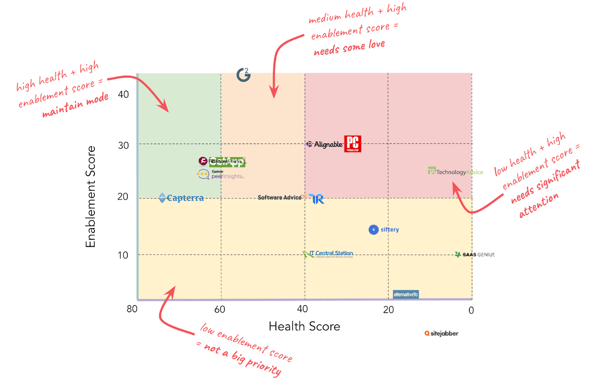
- Sales Enablement Score: How important is this site to sales enablement?
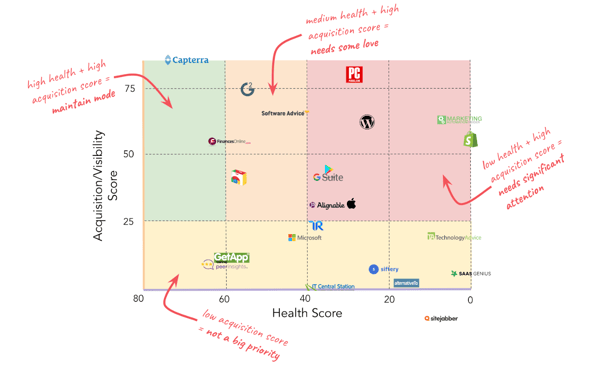
- Acquisition/Visibility Score: How important is this site to the acquisition of new users or the general perception of HubSpot and its products?
For each score, I chose a variety of criteria I could measure (see below) and scored each site against the criteria. I was then able to weigh the criteria against each other so that criteria we deemed more important would have a greater influence over the score.
For example, we determined that our review rating (out of 5) on each review site was more important than the overall number of reviews we had on each site.
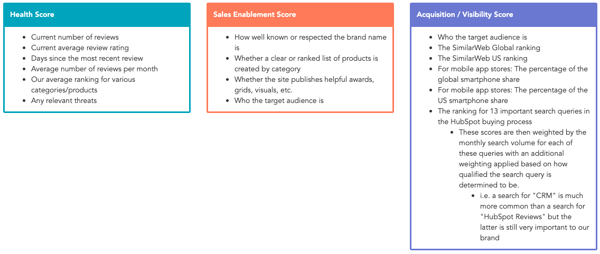
See above all of the criteria I used to create each score, and click here to see an example Google Sheets template of the scoring rubric.
Leveraging the Customer and User Review Scoring Algorithm
To truly understand each score and how the different review sites stacked up against each other, I plotted the data on two different grids. This process allowed us to see the Sales Enablement Score and Acquisition/Visibility Score each plotted against the Health Score.
The grids below represent what this looked like for HubSpot a couple of years ago. The colors of the grid correspond to how much attention should be devoted to improving HubSpot’s health on the given site (see the corresponding notes in red).
The Sales Enablement Grid — English Focused
 The Acquisition/Visibility Grid — English Focused
Armed with objective data and these handy grids, I was not only able to better direct my own review-oriented efforts, but I was also able to gain much better alignment and buy-in from other teams that leverage or impact customer reviews.
As a result of the campaigns that came out of this research, we were able to drive hundreds of five-star reviews, bring up our star rating on our goal sites, and influence countless deals.
If you’re looking to spin your business’s flywheel and acquire new customers, then a positive online reputation is a must-have. Approaching these reviews can feel a bit intimidating simply because of the sheer volume of websites, but fear not! Armed with this scoring system you can boil down the ocean and focus your attention purely on what matters.
Check out this template to get started today!

14 Essential Features for Taking Payments on Your Website
There are a lot of things I used to buy in person that I now buy online. I wouldn’t call myself lazy, but it’s just so much easier to carry a box of paper towels from my doorstep into my apartment than it is to carry it down the street from my local grocery store.
And I’m not alone. Whether it’s because of the larger selection, better pricing, convenience, or something else, a lot more people are buying stuff online nowadays instead of in person. Despite the growing number of online shoppers, people are still wary of the setbacks of paying for stuff online. In particular, people still get nervous about giving their personal and credit card information to online retailers.
If you’re an ecommerce business, a big part of attracting and delighting your customers will be providing them with a stable, reliable, secure, and smooth online shopping experience. That starts with creating your payment gateway.
How to Create a Payment Gateway
A payment gateway is a technological front-end component of payment processing that bridges the gap between your business’s financials and the customer’s financials during a transaction. To get an understanding of what I mean, it helps to know how payment processing works.
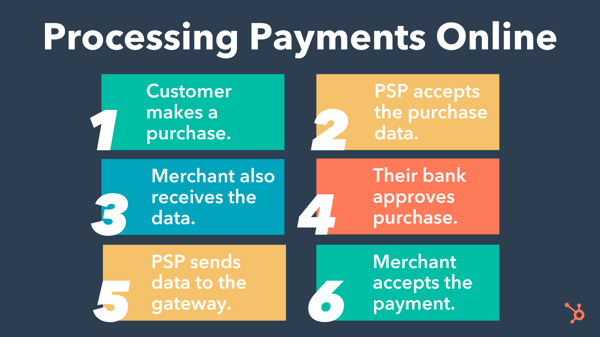
On one hand, the customer’s financial institution must approve or deny the purchase. On the other, your payment service provider (PSP) and merchant account need this data to process the transaction and receive payment. Coordinating these moving parts is your payment gateway.
Here’s how to set it up.
1. Open a merchant account.
A merchant account is a type of business account that accepts payments of multiple types, including credit cards. Funds from online purchases land in your merchant account after they’ve been processed, and you’ll then be able to transfer them into your business banking account.
In order to create a payment gateway, it helps to already have a merchant account set up as it will be the final destination for funds from successful transactions.
2. Choose a payment service provider (PSP).
While the gateway acts as the front-end of payment processing for a transaction (i.e. the interface that customers directly interact with), the payment service provider facilitates the transaction on the back-end, passing financial data across all the moving parts. In order to create a payment gateway for your customers to interact with, you must first set up a PSP to hook it up to.
3. Decide whether you want to build or buy your payment gateway.
You have the option to build a payment gateway yourself (custom) or partner with a provider to get one “out of the box.”
Custom builds may be able to suit a wider range of your unique needs and save on transaction fees. However, it may be costly to develop and maintain.
An “out of the box” payment gateway is quicker to set up, but you’ll want to ensure that it comes with all of the features that you need. Some may even come with PSP functionality, which saves you time during the setup.
Top gateway providers in the industry include Authorize.Net, Stripe, and PayPal.
If you plan to take payments on your website, then be sure you’re checking everything off from the list below.
Essential Features for Taking Payments on Your Website
1. Multiple Login Options
While it’s more convenient for your marketing to require shoppers to create an account before placing an order, it doesn’t always benefit your customers. You might lose people along the way if you don’t give them the option to check out as a guest. Remember: You can always ask them to create an account once they’ve bought from you and feel a little closer to your brand.
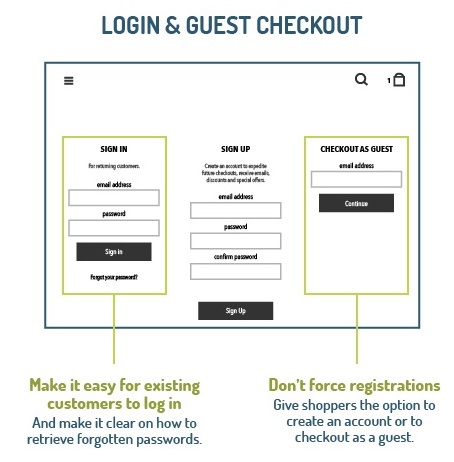
Image Credit: VWO
You should also think about offering shoppers the option of logging in with one of their social media profiles, like Facebook or Twitter. This can reduce registration friction because it makes the login process a lot faster. Make sure you add that you’ll never post without the customer’s permission, if applicable.
The caveat of allowing a social login? It’s the one connection shoppers will have to log in — and if anything changes about that connection (the terms of service for the social network change or they delete their account on the network), their ability to log into your site will change, too. So if you’re allowing people to authenticate with social logins, figure out other ways ask for more contact information.
2. Authentication/Login Layers
Customers who do have an account with you want to know that their information is safe — even if they forget their login information. To give them peace of mind, be sure to require several verification layers before you restore their login information. For example, if a customer forgets her password, your site could require various security questions before sending an email to a pre-determined email address.
3. PCI Compliance
The PCI Security Standards Council (PCI SSC) defines a series of specific Data Security Standards (DSS) that are relevant to all merchants, regardless of revenue and credit card transaction volumes.
If you host and manage your own ecommerce platform, it’s your responsibility to ensure PCI compliance at the required compliance level, which is based on credit or debit card transaction volume over a 12-month period. Most SaaS shopping carts will have PCI compliance built in.
4. Integrated Payment Processor
While you can get away with payment processors like PayPal, Stripe, Google Pay, and Amazon Pay if you have a very small website and a low number of transactions, it’s much better to integrate a payment process directly into your website.
With some processors, online shoppers get redirected off your website to a pay site that doesn’t look like yours — which disrupts their experience, visually disconnects them from your brand, and can be confusing or nerve-racking and prompt them to abandon their cart.
An integrated payment solution that processes your customers’ information on your own server allows for more flexibility and customization. Plus, it’s a much smoother experience for your customers.
An integrated payment page will require an SSL certificate to ensure a secure connection. Which brings me to my next point…
5. SSL Certificate
Every ecommerce website needs an SSL certificate to protect customers’ personal and credit card information. SSL is the standard security technology that makes sure all data passed between a web server and a browser remain private.
Without it, hackers can steal your customers’ information — and online shoppers won’t feel safe submitting their information on your website. Online shoppers will be able to tell your website’s secure when they see an “https://” at the beginning of your URL, as opposed to just “http://”.
Read our article to learn how to get an SSL certificate on your website.
6. Credit Card Logos and Security Seals
Speaking of keeping online shoppers at ease, you might want to add credit card logos and security seals to your website to reassure shoppers that your site is a secure, trusted place to do business. Make them visible at least in the shopping cart and checkout phases of your site, or even try integrating them into the footer of your website.
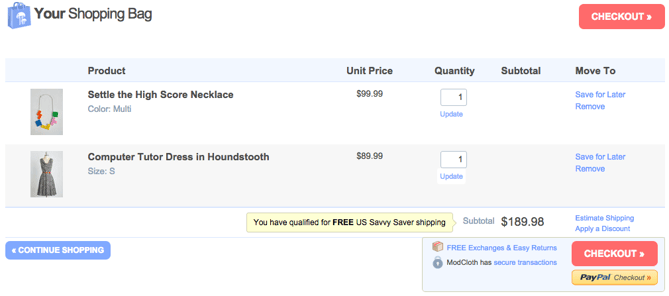
7. Checkout Buttons
The less time customers have to spend looking for an option to check out, the sooner they’ll take action and buy. We recommend putting checkout calls-to-action — in a color that really stands out — at the top and bottom of your web pages.
Check out this checkout button example from ModCloth (no pun intended):
Want a little button design help? Click here to see get free call-to-action templates.
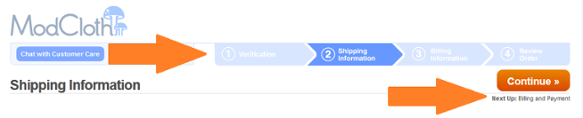
8. Visual Checkout Process
If you need to spread the checkout process across multiple pages, give shoppers a visual indicator of how far they’ve progressed and how long they have left to go. Again, ModCloth does this particularly well:
9. Return & Refund Policy
Shoppers don’t get to physically look at or feel a product before they purchase it online, which can make some people nervous and disincentivize them to buy. To help mitigate this, make your return and refund policy readily available. Consider making it part of the checkout process and even putting it in the footer of your website.
Be sure your policy is succinct, informative, engaging, and easy to understand. Say whether the customer will get a refund or an in-store credit, stipulate a timeframe for returns, define the condition you expect the product to be in, and disclose any fees up-front — like who will cover the cost of shipping.
10. Clear Path to Your Contact Information
Online shoppers want to know they can easily reach your company for support — especially if they’re first-time customers. If you don’t give them a clear path to your contact information, they may either hesitate to buy from you, or they may not get the support they need to complete a transaction.
Include contact information like a phone number (with availability hours), email address, street address, and social media accounts. Preferably, list this information as text (not as an image) so it’ll get picked up by search engines in local searches. Some retailers also like to offer live chat options — just be sure that you’ve integrated it with your customer records so you can build smarter marketing campaigns in the future.
11. Detailed Confirmation Page Before Checkout
Before allowing online shoppers to check out, you’ll want to take them to a detailed confirmation page before finishing the transaction. This page should let them review their cart, give them the option to change the quantity or remove items, include a final price (including tax and shipping), and indicate when the items will be shipped.
12. Optimized Checkout Page Design
The best checkout pages are functional, secure, attractive, and easy to use and navigate. The last thing you need is someone with purchasing intent getting cold feet at the last moment simply because they can’t use your system or don’t have faith in it.
13. Mobile Payments
Buyers don’t just buy on desktop. They also buy on mobile, so your payment gateway must be responsible and easy to navigate for mobile users too. If your have a mobile app, you may also need additional functionality to process payments on iOS and Android.
14. Confirmation Email
Finally, you’ll want to create a confirmation email that includes the order number, the product, payment, and shipping information, and your return and refund policy — just in case. If possible, use a real “from” email address (instead of noreply@company.com) that can be answered by a member of your customer support staff. You’ll also want to make the order confirmation page easy to print. This is the time when you can offer guest customers the option to sign up for an account, too.
Setting up your ecommerce business is exciting, even if all the details can be a little overwhelming. With a little bit of planning, you’ll be well on your way to processing ecommerce transactions left and right.
Editor’s note: This post was originally published in September 2015 and has been updated for comprehensiveness.

How to Use WordPress: Ultimate Guide to Building a WordPress Website
The thought of creating your own website may seem overwhelming.
You might even think this task is impossible for anyone but a developer or a person with a background in web design.
Well, I have good news for you — there’s a software out there that’s so easy to use, virtually anyone can successfully create a unique and professional-looking website for their business, blog, or portfolio. It’s called WordPress.
But how?
This ultimate guide will cover a basic step-by-step process of creating your own WordPress website as well as a list of tips and tricks to remember while working with WordPress.
But first, let’s answer the question most people have when they begin thinking about their new WordPress website: What is the difference between WordPress.org and WordPress.com?
WordPress.org vs. WordPress.com
The difference between WordPress.org and WordPress.com has to do with who is actually hosting your website.
You host your own website or blog on WordPress.org, through a third-party hosting provider. You also have to download your WordPress software, buy a domain name on a third-party site, and manage your server. It’s a much more hands-on experience than with WordPress.com.
WordPress.com offers to host your website for you. You also don’t need to download any software or manage a server. If you choose WordPress.com, your website’s URL will look like this: https://ift.tt/1Pt8449. However, you have the option to also upgrade your WordPress.com account and buy a custom domain from a third-party provider (meaning your URL will look like this: www.mywebsite.com).
How to Choose Between WordPress.org or WordPress.com
You may be wondering whether WordPress.org or WordPress.com would be a better fit. Let’s review a few more of the pros and cons that come with both options, so you can make an informed decision.
WordPress.org is ideal if you want full power over customizing and controlling your website. However, there is a lot more responsibility that comes with managing a WordPress.org website. You have to purchase and set up your own domain name, upload and install plugins and a theme, edit your website’s code, and manage your website’s security. WordPress.org is free to use, but you have to pay for everything else that goes into having a website.
WordPress.com is preferable if you’re looking for an all-in-one option that has most of the hard work done for you. You’ll never need to manage your server, pay for your hosting, or buy a domain. There are also a number of customization options that come with a WordPress.com plan to help you make your website look the way you want it to.
WordPress.com has a free and paid version. If you stick with the free version, you can’t upload any custom themes or plugins, and you will have a WordPress subdomain. However, there is always the option to pay for premium upgrades and other plans that provide you with even more features and control, as well as the option to buy a custom domain through a third-party site.
WordPress for Beginners: How to Use WordPress
There are a number of ways for you to create your dream website with WordPress. Users generally find the software easy to use, but getting started can be understandably intimidating if you’re completely new to the process. That’s why we have built this “WordPress for Beginners” guide. Want a quick introduction before you dive deep? Check out this helpful video:
For even more resources, we’ve also compiled some of the best websites for learning about WordPress — these can be incredibly valuable sources of information as you start you journey.
Below, we will take a closer look at how to start creating your website.
WordPress is by far the most popular CMS today. Its ease of use and versatility enable the majority of users and business owners to create a website that works for their needs. Here’s how you can do the same.
1. Select a WordPress plan (WordPress.com only).
To begin creating your website, select a WordPress plan. As stated earlier, with WordPress.org you only have one (free) plan option — but it requires you to buy your domain, hosting provider, plugins, themes, and everything else related to your WordPress site.
With WordPress.com, you’ll have to choose between the five plans they offer.
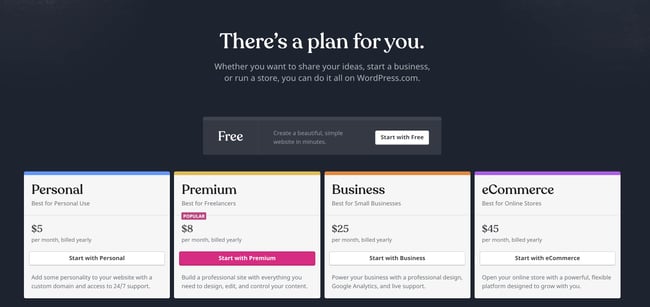
The main differences between these plans are the monthly fee, types of site customization, and the access you get to marketing tools.
2. Set up your domain name and hosting provider.
Setting up your domain name and choosing your hosting provider for WordPress typically happen around the same time in the website creation process.
Before we talk about how to complete those tasks, let’s discuss the difference between your domain name and hosting provider.
Think about your domain name as your home address — it’s how your visitors are able to locate your website on the Internet. You domain name will look something like this: www.example.com.
Your hosting provider is like your house — it’s where your website files are actually stored. Without a hosting provider, your site wouldn’t have space on a server to “live.” Some of the best WordPressing hosting providers include WP Engine, Bluehost, and Kinsta.
How to pick domain and hosting providers
Again, WordPress.org requires you to create your own domain and find a third-party hosting provider for your website. WordPress.com allows you to decide whether or not you want a custom domain depending on the plan you choose, but it takes care of the hosting for you.
Your hosting provider is important because it impacts your website’s speed, security, and reliability. There are hundreds of providers to choose from, which is why we put together a list of 22 of the best WordPress hosting providers to help you decide what will work best for you. All of these providers meet WordPress’ three hosting requirements:
- PHP version 7.4 or greater
- MySQL version 5.6 or greater OR MariaDB version 10.1 or greater.
- HTTPS support
When considering hosting providers for your WordPress site, make sure they meet all of the above criteria.
domain registrar of choice. If you are new to WordPress.com but have already purchased and created a domain name elsewhere, no problem — you’ll have the option to
transfer or
map it to your WordPress website.
not yet have a domain or hosting provider. Here’s how to start creating your website with the popular hosting service Bluehost.
First, head to Bluehost’s website and click Get Started.
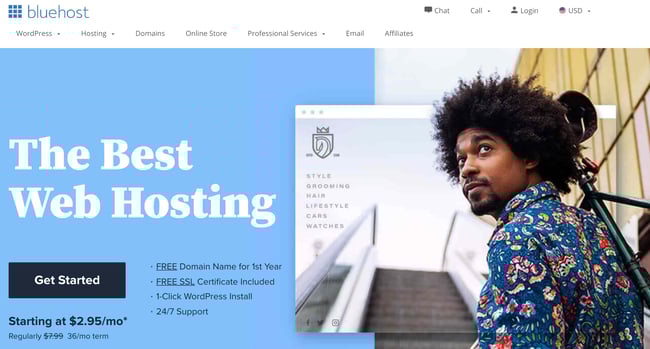
From here, you’ll be taken to Bluehost’s pricing page to choose from four plans.
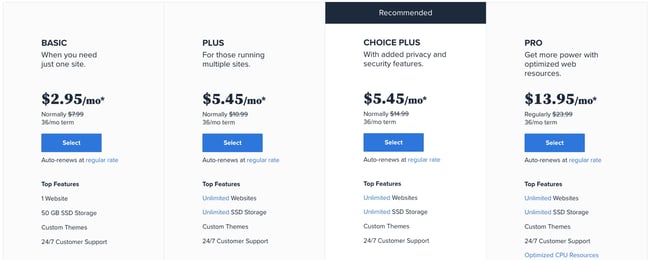
Once you choose your plan and click Select, you’ll be taken to another page to sign up with a domain name.
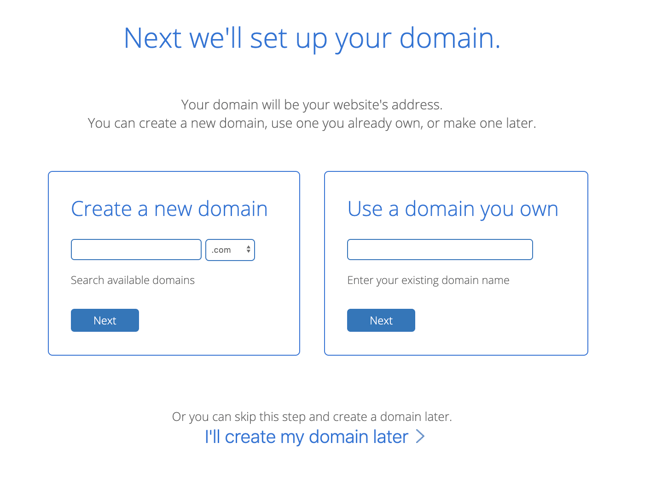
Once you select your domain name, you’ll be brought to a page to complete your account and billing information for your purchase.
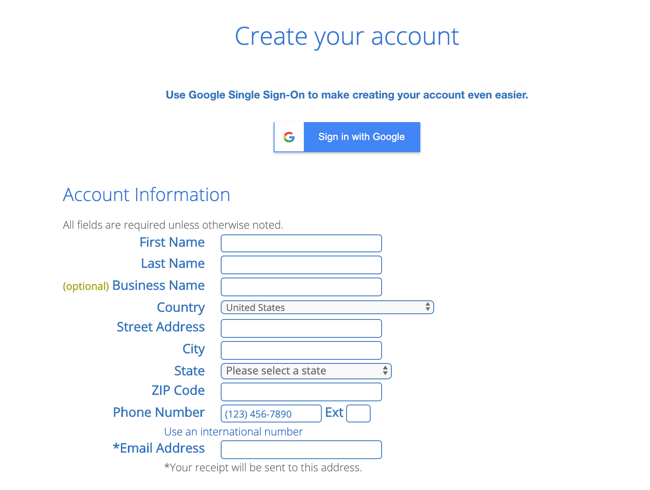
After confirming your account and purchasing your domain, you will gain access to your hosting dashboard where you’ll be able to install the WordPress CMS.
3. Install WordPress.
If you are using a hosting provider outside of WordPress, you’ll need to install the CMS to connect your new domain to your website.
This time, let’s use GoDaddy as an example. (Don’t worry, no matter the hosting provider you choose, this process looks similar.)
Note: If you choose to use a managed WordPress hosting service like WP Engine or Kinsta, you won’t need to go through this process, as those services were built specifically for WordPress and will have WordPress installed for you.
To start, log into your GoDaddy account, click Web Hosting, and then Manage. You will be brought to a screen with your account details.
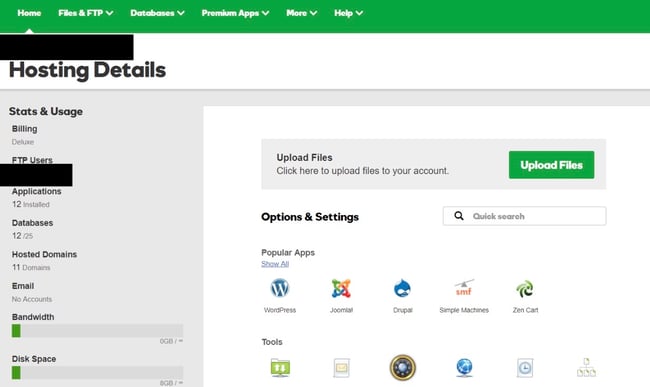
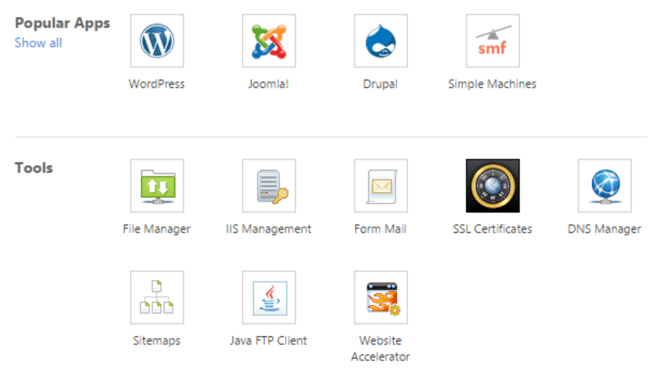
Scroll down and under Options & Settings, you will see an area titled Popular Apps. Click on the WordPress app to begin the installation.
After installing WordPress, you’ll need to answer a few questions about the domain you want to use, the directory where you want to install WordPress, and your admin information.
After about 24 hours, your website will be installed to your hosting account, and GoDaddy will send you an email confirmation.
Now that you have your domain set up and WordPress installed, you’ll next need to set up your “Primary Domain” within WordPress, so your visitors see your website when they search your domain.
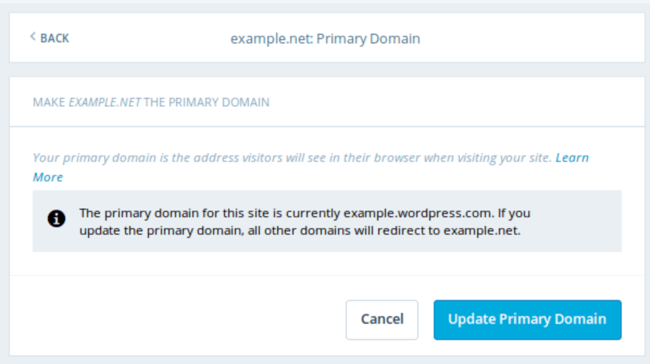
In WordPress, go to My Site and click Domains. Select the custom domain you want to make your primary domain.
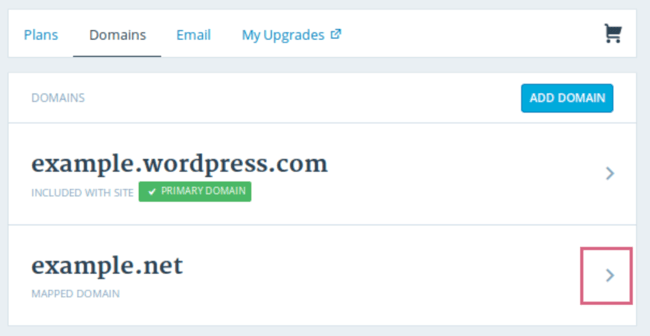
Then, click Make Primary.
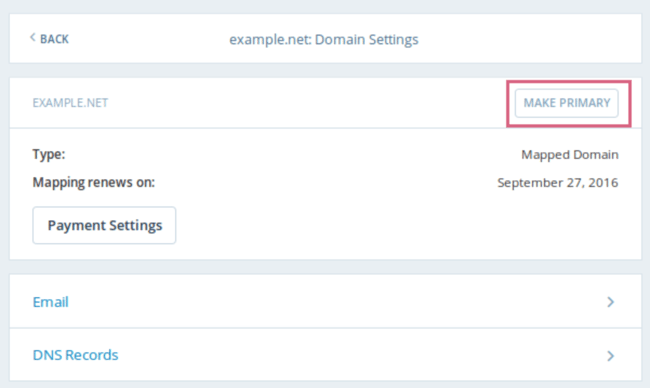
Confirm you meant to make this change by clicking Update Primary Domain.
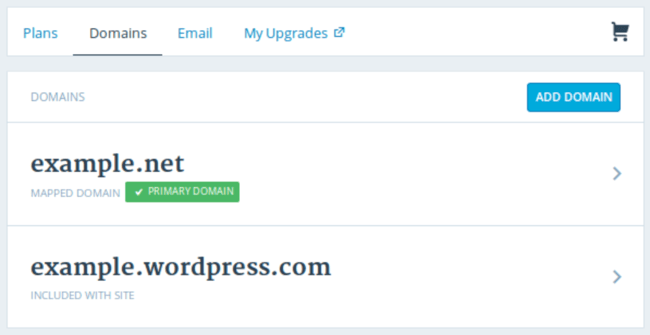
Verify the update was successful by looking for a green box with a checkmark that says Primary Domain.
Now, on to step four: making your website look nice.
4. Choose your theme.
You can customize your WordPress website using WordPress’ many themes and templates, each of which contains a multitude of layouts, formatting styles, colors, fonts, and other visual options.
WordPress automatically applies a default theme that looks rather plain. You can keep it, but your website visitors may not be so impressed. A custom WordPress theme, whether it’s paid or free, will make your website look appealing and professional to your buyer personas.
Similar to the wide range of hosting providers available, there are also hundreds of themes and templates to choose from. To help you out, we’ve put together a guide to 20 of our favorite themes and templates and categorized them by purpose. Whether you’re looking for a theme versatile enough for multiple different business types, or one suitable for your ecommerce site, portfolio, blog, or business, there’s a theme that will work for your specific needs. On top of your theme, you can further customize your pages with a builder tool like Elementor.
To find a theme that works best for you in WordPress.org, head to your admin dashboard. Click Appearance, then Themes. You’ll be brought to another screen where you can browse available themes or search for a specific one you have in mind.
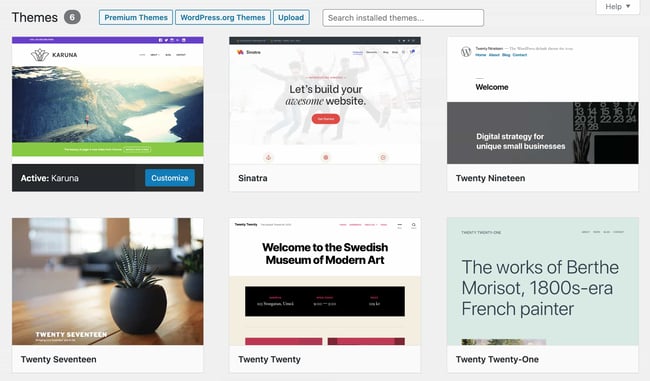
Once you find the perfect theme, simply install it to begin customizing. Each theme has different steps required during the customization process, so be sure to follow them closely. If a theme has a website (often accessible through the WordPress theme and template library), check for documentation as you work through the customization process.
5. Add posts and pages to your website.
When you add content to your WordPress website, it’s usually displayed in the form of posts and pages.
Posts (or “dynamic pages”) are typically used for blogs and portfolios because they automatically place your newest website content at the top of your featured content. Pages are static, which is why they appeal more to business owners — the added content stays in the same place.
Posts and pages are the main post types in WordPress. Additionally, there are other native post types, as well as custom post types. For now, we can just stick to pages and posts.
Start by deciding whether you want a post or page to serve as the homepage (or any page) of your website. To add a post to your website, go to the admin dashboard, click Posts and then Add New.
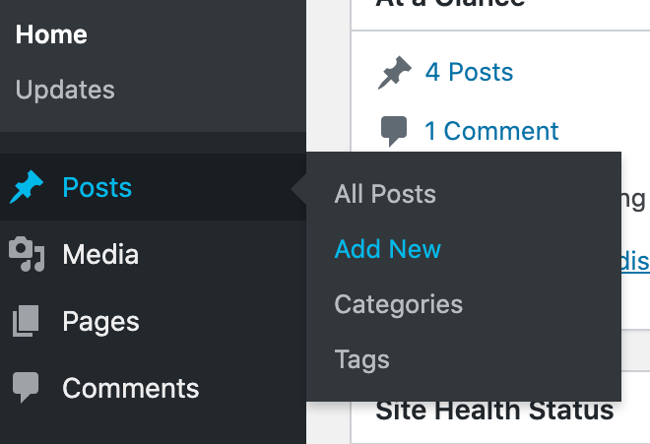
You can add a title for your post, place photos, change the format, and insert page elements via blocks and shortcodes. Click Save Draft to save your changes as a draft, or click Publish to immediately take the post live.
Adding a page to your website is a similar process. In your admin area, click Pages, then Add New.
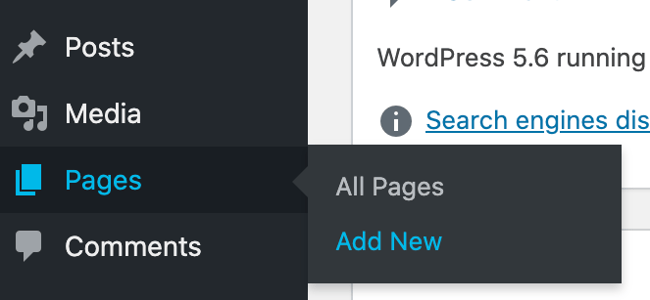
First, add a title to your page. Next, you can insert photos, embed videos, and add content. Follow the same steps to create multiple pages for your website. When finished, click Save Draft or Publish.
6. Customize your website.
Beyond the theme you choose, there are a number of ways to further customize your website. Let’s review a few options.
First, let’s customize your site title. From your admin dashboard, select Settings > General. Here, add your website title and tagline. You can also toggle other basic site information like you URL, email, time zone, and more.
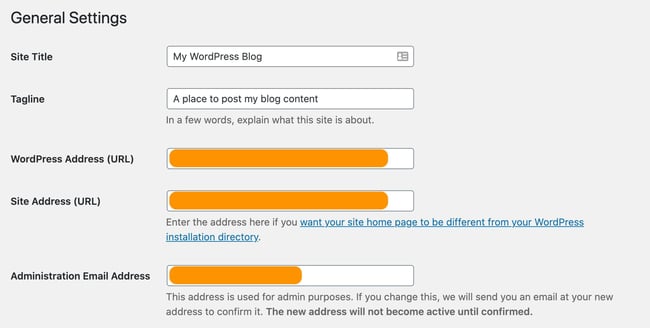
Next, let’s customize your reading sections. Under Settings > Reading, you can change your home page to a static page.

Consider this if you’re a business owner who prefers having content remain in one place on your website. Consider using a dynamic page if you’re a blogger who prefers having your newest content appear at the top of your pages. This way, your visitors can easily find your latest posts.
The navigation bar is customizable, too. This enables your visitors to easily find information on your website.
Add a navigation bar by going to your admin dashboard, clicking Appearance and then Menus.
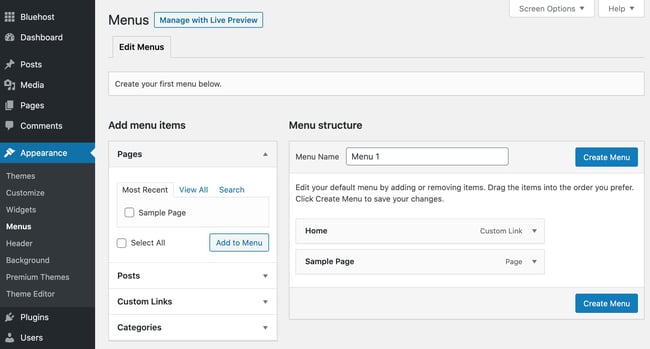
From here, you can determine how you want your bar to look, how many pages you want to include, what you want to title those pages, and what order you want them to be listed in.
Of course, this is just a fraction of what you can do in the dashboard — click here for more information on your WordPress site settings and customization options.
7. Install plugins.
Plugins are pieces of software that add functionality to your WordPress website and enhance the user experience. With over 55,000 available plugins, there are options for most every type of website and user. Some of the most popular plugins available include:
- HubSpot WordPress Plugin: Easily add pop-ups, forms, and live chat to your WordPress website. And as an added bonus, pair this plugin, or other CRM plugins, with your HubSpot CRM.
- The Events Calendar: An effortless events calendar that makes scheduling events from your site easy.
- Yoast SEO: The go-to plugin to help you with on-page SEO. This app makes sure you’re following best practices before you push your site live.
- TablePress: Need a table on your site? Look no further.
- The SEO Framework: Another plugin that can help you master SEO on your site.
To begin installation, head to the Plugins section in your admin dashboard. This shows you all the plugins currently installed on your site. Depending on your host, you might have several plugins installed already. Note that for a plugin to work you must activate it after installing.
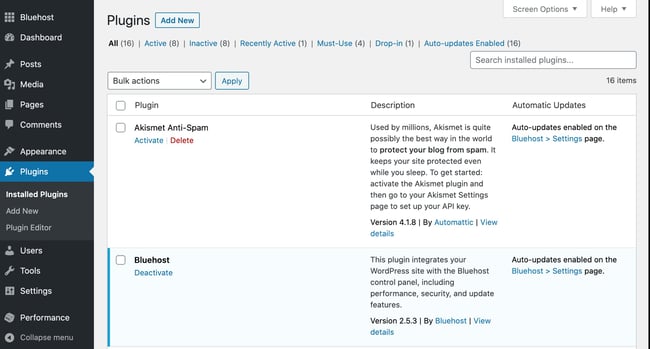
To add a new plugin, click Add New. Search for your desired plugin and then click Install Now, wait a few seconds, then click Activate.
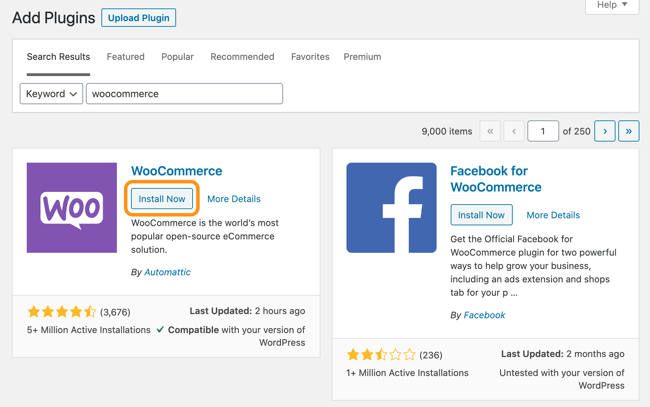
Get the WordPress CRM plugin that helps you organize, track, and nurture your leads.
8. Optimize your website to increase page speed.
Website performance is a critical part of the user experience. If a page takes too long to load, your visitors will move quickly to another site. You don’t want to frustrate visitors with slow speeds.
You can improve your website’s performance by enabling browser caching. Browser caching is the process of temporarily storing your website’s data on your visitors’ browsers. That way, your content doesn’t need to be sent from the web server for it to appear in the browser, which increases the website speed.
To enable caching for your website, install and activate a caching plugin with the process described above.
9. Get inspired from WordPress website examples.
As you begin to customize your website, you may feel overwhelmed by all the options you have. Instead of starting completely from scratch, it helps to grab some inspiration from other exemplary WordPress websites. Here are some of our favorites:
99% Invisible is a popular podcast that focuses on design and architecture. Their website is sleek, modern, and offers easy navigation for visitors to quickly access each podcast episode.
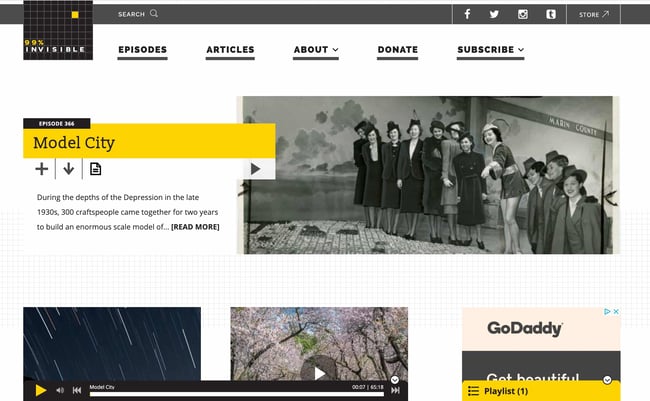
The Houston Zoo’s website displays its main attraction on the homepage. The magnifying glass icon on the top menu bar makes searching the site effortless.
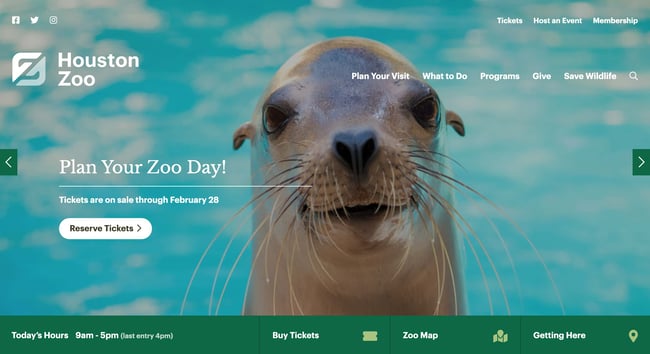
Awesome Motive, the creators behind several WordPress projects, engages their visitors with a polished, yet simple website. It features subtle animation to grab people’s attention.
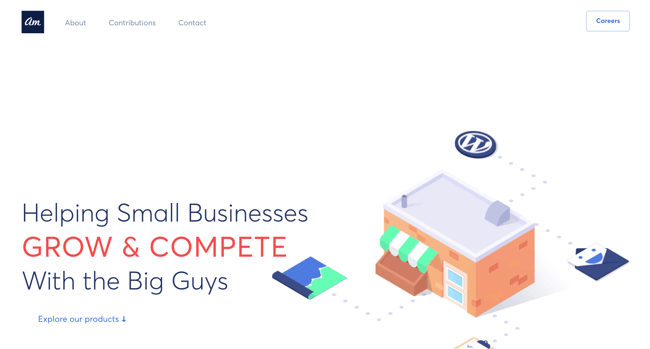
WordPress Website Tips and Tricks
There are a number of WordPress tips and tricks to make your website as impactful and user-friendly as possible — we’ve listed 20 of them below to help you do just that.
1. Focus on the basics and create a great user experience with a WordPress theme that complements your business and website content.
2. Use dashes and not underscores when naming your files in WordPress. Google looks as underscores as joiners, meaning your file will look like one big word. That won’t help you with your SEO. Use dashes to make it obvious there are separate words. (For example, use https://ift.tt/2CWyE97, not https://ift.tt/2P8AhYz).
3. Use WordPress’ online support for any questions or concerns you may have while creating or using your website. There are a number of forums and ways to reach out to WordPress experts listed on their website.
4. Use Image Alt Text to your advantage. Image Alt Text can be used to improve your SEO and Google rankings.
5. Keep your sidebar as organized as possible. Stick to the essentials and think about what your website visitors and buyer personas really need quick and easy access to.
6. Back up your website regularly, so if you ever lose access or have technological difficulties, you have everything you need to completely restore your content. There are a number of plugins, such as Snapshot Pro, made specifically for backing up your WordPress content.
7. Learn and understand SEO basics to ensure your website is completely optimized so you can boost your conversions.
8. Create a custom homepage. As mentioned earlier, WordPress will provide you with a default homepage. Take the time to create your own with a theme that works for your business — remember, this is your visitor’s first impression of your business, blog, or portfolio.
9. Keep an eye on your website’s performance and know what is and isn’t working for your visitors. There are a number of useful WordPress plugins, as well as Google Analytics software, to help with this performance.
10. Include an “About Us” page on your website to show your visitors you’re a trustworthy person and/or business. “About Us” pages are known to be the second most-visited pages on websites (after homepages) — so introducing yourself is important.
11. Make sure your site is secure to ensure there are no hackers gaining entry. Again, there are plenty of plugins such as WP Defender to help you with security.
12. Create custom permalinks. Permalinks are the permanent URLs that you plan to keep static for the foreseeable future. They’re important because they improve user experience and enhance your WordPress website SEO.
13. Create a custom navigation bar (as we reviewed earlier) to make your site easy to use for your visitors.
14. Include excerpts on your blog posts so people don’t land on your blog page and see your entire piece at once. By only including excerpts on your blog page, you make room to list all of your blogs in one location. Visitors can then read the excerpts and click-through to read the posts they are most interested in.
15. Structure your website in a way that makes sense for your business, visitors, and buyer personas. For example, use posts if you’re a blogger and use pages if you’re a business owner.
16. Remove “Comment” and “Share” buttons from specific pages of your website. You don’t need (or want) a “Comment” or “Share” button on your “About Us” page, or any of your service pages for that matter.
17. Consider what your website looks like on mobile. It’s no secret people are searching the Internet while on their phones, tablets, and other mobile devices these days. Consider using a plugin to help you achieve a responsive, mobile WordPress design.
18. Use visuals and video content when possible to break up the text on your website pages.
19. Update your WordPress site and plugins regularly. WordPress will tell you when updates are released. This will keep your website looking fresh and working efficiently.
20. Use social proof to show your new website visitors how many other people have already viewed your site and content. There are plugins to help you do this in a matter of minutes.
21. Pick a CRM that works with your WordPress site. A CRM can help you keep track of the way users are interacting with your website and company. Here’s a list of some of the best WordPress CRM options.
Build a Website With WordPress
Having a great website matters. It’s how you connect with your visitors and leads, create a positive first impression with new users, and boost conversions. The good news is creating your own website doesn’t have to be a daunting process…at least not with WordPress.
The easy-to-use CMS offers completely customizable plans suitable for all needs. With no prior knowledge necessary, you can start building your own site for your business, blog, portfolio, or online store immediately.

How to Create a Facebook Group for Your Business [+ Why You Should]
Facebook groups have helped me find roommates in Boston, potential dog breeders for a family pet, and women’s networking opportunities in the nearby area.
In short: Facebook groups are undeniably valuable.
Recently, companies have taken advantage of groups for their own benefits, as well — Peloton, for instance, uses groups to connect its users and facilitate a space where people can share exercise plans, training methods, and workout schedules with one another.
Other brands, including National Geographic and Instant Pot, have followed suit, creating their own community-focused groups to inspire action, encourage engagement, and increase brand loyalty.
Even HubSpot recently created its own private group, Marketer to Marketer.
If you’re considering creating a Facebook group for your own company, you’ll want to keep reading. Here, we’ll explore the differences between Facebook groups and Pages, how to create a Facebook group, and whether or not it’s worth the effort.
Let’s dive in.
Should I create a Facebook group for my business?
To determine whether a Facebook group is a good idea for your business, let’s start with the differences between a Facebook group and a Facebook Page.
Most businesses should have a Facebook Page. A Page enables you to advertise on Facebook, and it’s a public-facing profile to post company-relevant updates and announcements to Facebook users at-large.
If you’re a nonprofit organization, a Page also enables you to post a ‘Donate’ button to increase donations from the Facebook community.
Considering 1.56 billion people are on Facebook, it’s vital your business has a Facebook Page to increase brand awareness, advertise to new audiences, collect audience insights, and even chat with users looking for customer service.
As Gary Vaynerchuk told HubSpot’s CEO Brian Halligan, “… You can’t be alive in the game without a Facebook.”
All of which is to say: Having a Facebook Page is a requirement for getting your business active on one of the largest social media platforms.
A Facebook group, on the other hand, is much smaller-scale and typically more exclusive than a Page. For instance, with a group, you’re able to set up open membership, membership upon approval, or even membership by invitation only. Then, once members are accepted into your group, they’re able to freely post and engage with one another.
Simply put, a Facebook Page is company-focused, while a Facebook group is community-focused.
A group is a good idea if you’re interested in connecting your customers or leads to one another, you want to facilitate a sense of community surrounding your brand, or you’re hoping to showcase your brand as a thought leader in the industry.
However, a group is not a good idea if you want to use it to raise awareness about your products or services, or simply use it to post company announcements.
People want to join groups in which they feel a sense of belonging and connection with fellow group members, and to learn about an industry at-large — which takes effort, resources, and time to ensure your team can deliver.
If you don’t feel you have the resources to cultivate a valuable, engaging Facebook group, it might be best to wait until you do.
However, if you’ve determined a Facebook group is the right decision for your own business, let’s explore how you can create one.
How to Create a Facebook Group for Your Business
1. On your company’s Facebook homepage, click “Groups” on the left-hand side.
2. Click the “+ Create New Group”.
3. Type in a Group Name, and then choose your privacy (Public versus Private). You also have the option to invite Facebook friends immediately if you’d like. Then, click “Create”.
4. Click “Edit” on your cover photo to choose from Facebook photos, illustrations, or upload a photo from your computer.
5. Add a description to your Group so people know what your group is about. Additionally, if you want to create a private group for customers, you can copy-and-paste customer email addresses into your “Invite” box.
And that’s it! Your Facebook Group is now ready-to-go.
However, to encourage strong retention and engagement, you’ll want to be an active community lead. To pin posts, create a poll in the group, and more, keep reading.
How to Pin a Post in a Facebook Group
A pinned post is a post that will remain at the top of your group’s timeline for seven days (unless you unpin before then).
This is important if you’ve posted content to encourage engagement. For instance, if you’ve posted an Ask Me Anything, you might want to pin that post to ensure users can find it easily even once group members start posting their own content on the timeline.
Additionally, if you’ve posted to welcome new members to the community and provide some necessary information on your group, you might want to keep that post pinned to ensure new users have the right context as soon as they jump into your group for the first time (of course, you’ll also want to provide context in your description, as well).
1. To pin a post, you’ll first need to type your message into the “What’s on your mind” box, and then click “Post”.
2. Once the post is published, click the three dots at the top right of your post and select “Mark as announcement”:
 And that’s it! Your post is now pinned to the top of your timeline for the next seven days.
Next, let’s dive into how you can create a poll in your new group.
How to Create a Poll in a Facebook Group
1. To create a poll in a Facebook group, start by clicking into the “What’s on your mind?” box. Then, click on the three dots that say “More”:
2. Next, click “Poll” out of your menu options.
3. Type your poll question into the text space, and then add your individual options into each text box. Click “Poll options” to fine-tune your poll. When you’re ready, click “Post” to immediately publish your poll.
How to Create a Private Facebook Group
1. You have the option to create a Private or Public Facebook group when you’re first creating a group:
 2. However, if you created a public Facebook group and now want to make it private, you can do that by clicking “Settings” under “Manage Group” (from within your group):
 3. Next, click the pencil besides “Privacy” and click on the “Private” bubble (Note: It takes three days to change a group from public to private):
 To learn more about the benefits of having a private Facebook group, read about how HubSpot made the decision to make its own private Facebook group — plus, why the social team feels the Facebook group is critical for faciliating deeper, more meaningful connections between HubSpot users and the industry as a whole.
And that’s it! You’re now on your way to engaging with leads, prospects, or customers directly within your Facebook group to increase brand loyalty and value.
If you’re looking for inspiration before designing your own Facebook group, take a look at 9 of The Best Facebook Groups We’ve Ever Seen.

How To Make a Vlog [Step by Step]
I will argue with alarming confidence (and no actual data) that 90’s kids were the original vloggers.
When I was about 14 years old, someone handed me a digital camera that I spent hours talking to. I would take my audience (AKA me) on my teen adventures and say things like, “Hey guys, it’s Martina. Today, my cousin and I are going over to her friend’s house.” Exciting stuff. Thankfully, that footage never saw the light of day.
When YouTube first launched, people like me finally had a platform to share stories, entertain, and educate. But then, vlogging evolved into what we know it as today: a sustainable income source for influencers and an effective content marketing tool for brands.
So, how do you start vlogging? We’ll cover that and more here.
1. Feel out the competition and find your niche.
Before you pull out your camera and start filming, you’ll have to do some strategizing. It starts with finding your niche.
This means narrowing down what your vlog will cover based on your brand, audience, and demand.
Starting with your audience: Does vlogging align with your user persona? This is critical, as you want to meet your audience where they are. Imagine creating these high-quality videos for YouTube, but your ideal customer lives on Facebook and prefers short-form videos. In this case, you would have wasted time and resources. So, start by reviewing your persona and ensuring this venture is a worthy investment.
Here are additional steps you should take to narrow down your niche:
- Confirm the demand for your content – Use tools like Google Trends and Google Keyword Planner to double-check the interest in the type of content you will be producing. This is a useful step to generate video ideas during the initial planning phase as well as later on, when the channel is live.
- Check out your competition – How many brands are currently creating the content you’d like to produce? To get your answer, head to YouTube, put your keywords in the search bar and go through the videos on the results page. This will tell you how saturated the market is and the difficulty level to stand out.
- Brainstorm your approach – Once you know who your competitors are, analyze their content and develop a fresh, unique approach to fit your audience.
2. Develop a content strategy.
Now that you’ve found your niche, here comes the fun part: content planning.
Just as you would for a blog or social media account, you want to break down your content ideas. Start with broad topic clusters and work your way down to specific videos. If you’re having trouble, HubSpot’s Business Blogging course can serve as a great foundation for structuring your content.
From there, you can group your ideas into series, which work great on vlogging channels. Think of them as segments on a TV show. They fall under the broader topic but only cover something specific. For instance, let’s say Tasty wants to start a food vlog. There are several subseries they could have, including:
- Recipe series.
- Food shopping series.
- Cooking accessories series.
- Food tasting series.
Social listening will also help you keep your ear to the ground and generate new content ideas.
With vlogging, there’s an additional layer of planning involved. Will you need any props for filming? Do you need to be at a particular location? All of this will call for advanced planning to ensure filming goes smoothly.
Once you know what topics you will cover, tackle the less concrete areas. What will be your channel’s aesthetic and style? Is it light and airy or dark and moody? It’s important your vlog channel matches your overall brand. So, go back to your brand identity and use that as your guide to design your channel.
3. Invest in your equipment.
Having a successful vlog isn’t only about having great content. It’s also about having the right equipment to produce high-quality videos. Every video you produce needs:
- A camera that captures in-focus subjects.
- Clear and crisp audio.
- Lighting to match the brand’s aesthetic.
- A non-distracting background that supports the foreground.
If you’re on a budget, here are a few essentials to get you going:
- A ring light or softbox for lighting.
- A lav mic for audio.
- A phone with a camera.
- A phone stand or tripod.
- A backdrop, if you want an empty background.
As your channel grows, you can invest in additional equipment.
4. Film and produce in batches.
One of the benefits of content planning is that you can then film multiple vlogs at once. Batch filming will save you hours of set up and make scheduling a breeze.
Start by looking at the content you plan on filming over the next few weeks. Then, see which ones can be filmed together.
Keep in mind that not every series will allow for batch-filming. For instance, if some of your vlogs will consist of behind-the-scenes footage, this strategy won’t work. Batch filming works best for videos within the same series with little to no change in the setting, like talking head vlogs.
Once you know which ones you will film, it’s just a matter of scheduling.
5. Optimize your vlog channel.
Once you’ve filmed and edited your video, there’s another step to complete before it’s ready to be published.
The first is making a thumbnail. It’s one way viewers will decide if they want to watch your video. While you can simply take a screengrab from your vlog and use that as your thumbnail, you’ll likely want to stand out with a custom thumbnail.
YouTube’s Creator Academy recommends these following specs for your thumbnail: 1280 x 720 pixels (16:9 ratio) with a resolution up to 2MB.
Next up is your video title. It’s key to gaining your audience’s interest and for SEO. Whenever you’re writing one, keep these tips in mind:
- Include your main keyword in your title.
- Keep your title under 70 characters.
- Use numbers and eye-catching words to grab attention. I.e.: “X Ways to Boost Your Brand Awareness.”
Don’t forget about your video tags and descriptions. View these as additional SEO opportunities to rank higher for search queries and help audiences find your content.
6. Upload consistently.
Vlogging is a slow and steady venture that requires consistency. Yes, it’s important to have high-quality content but you can lose your audience if you don’t maintain a regular publishing schedule.
Think of your favorite TV shows. Isn’t it the worst when you’re expecting a new episode but it doesn’t air because of a football game or holiday? Well, it’s the same for vlogging.
Audiences expect consistency. When they don’t get it, they’re more likely to seek out other brands.
7. Analyze your metrics and optimize.
Once your channel begins generating views and subscribers, you can analyze your metrics to review each video’s performance.
Metrics like average watch time and audience retention can tell you if your content is resonating with your audience. Re-watches can help you identify subtopics of interest and develop more content ideas.
Impressions and click-through-rate (CTR) will tell you how attractive your thumbnail and title are. If the rate is low, you may need to try different titling strategies or use a different thumbnail template.
As with any venture, there’s trial and error involved. Analyzing your vlogs’ performance will give you the data you need to grow your channel.
1. Get familiar with the vlogging style.
There are two main types of vlog styles:
- The documentary-style “talking head” where the vlogger sits in front of a static camera and discusses a topic for educational and/or entertainment purposes. Brands often use this for how-to videos.
- The “come-with-me” style where the vlogger takes the audience with them to various locations. When showing behind-the-scenes or a day in the life, this style is very popular.
If the video requires it, you can also combine these two styles within one video. You can also use the styles interchangeably from one video to the next.
One mistake brands can make is take their approach to social media videos and TV, and apply it to vlogging. Vlogging audiences tend to look for longer videos that go in depth on a given topic, unlike the short, viral-friendly content you’d typically see on TikTok or Instagram.
With audiences craving more authenticity from brands, vlogs are a great opportunity to show the faces behind your brand and engage with subscribers.
2. Build from a three-act story approach.
A vlog typically follows a similar storytelling format to a blog. When a viewer lands on your video, they expect an introduction to the topic followed by a deep dive. It then ends with a recap of what was discussed and a call to action.
Following this simple story structure will help you develop the content for each section of the video without straying off course. Writing video scripts is another way to make sure you cover key points in your video.
Pro-tip: Use a teleprompter app to deliver your script seamlessly without looking rehearsed.
3. Encourage viewers to engage with your vlog.
Comments, likes, shares are some of the ways your audience can engage with you on your vlog channel. But how do you encourage that behavior? It starts with your video.
Your video should include ways for your viewers to join the discussion. A simple call out like “Tell us your thoughts on X in the comment section,” or “Put a thumbs up if you agree,” urges your viewers to jump in.
Incorporating subscribers’ comments or suggestions in your future videos is another way to encourage participation and drive your engagement rate up.
4. Vlog from your phone (if that’s your style).
Depending on your budget and the style you’re going for, you can choose between vlogging from your phone or camera.
Vlogging with a phone can give a more intimate and informal look to your vlog. It’s often used to show behind-the-scenes footage or when taking the audience on an adventure with you. However, you do sacrifice image quality when filming from a phone.
If you’re on a budget, a phone will do. As your vlog channel grows, it’s worth investing in a lightweight camera that works in different lighting conditions and has key features like image stabilization and mic inputs.
How to Edit a Vlog
Use video editing software.
When filming a vlog, you’ll inevitably pause from time to time, make mistakes, or need to reshoot something. This is where editing comes in handy.
Editing videos allows you to cut down your video to keep the most important parts. There are many video editing software available ranging in price, ease of use, and features. The most popular options include:
- iMovie(free) – This is a great beginner option if you are on a budget and own an Apple product. This software has basic editing capabilities with a sound and music library.
- Apple Final Cut Pro(One-time fee of $299.99) – If you want to take your editing to the next level, this is a great option. It offers a large array of templates, plugins, and audio mixing settings.
- Adobe Premiere Pro(Starts at $239.88/year) – With features like scene edit detection and virtual reality editing, Premiere is one of the best editing tools on the market. It’s ideal for brands who are producing videos frequently and require advanced editing features.
Create an intro.
A good vlogging intro serves the same purpose as your favorite show’s theme song. It helps build a connection with your audience and helps maintain consistency.
There are a few different approaches you can take with your intro. Some brands keep it simple with a simple frame of their logo while others prefer intros that give more context into the channel with voice-overs or animation.
Whatever you choose, be sure to use that intro in every video you publish.
Add sounds and music in the background.
Think of a scary movie without any terrifying music to build up the moment. Not the same, right?
Sounds and music are subtle touches that can keep your audience engaged in your content.
One thing to keep in mind is that YouTube is very strict about the use of copyrighted material. You must use royalty-free music or risk having a muted video your audience can’t enjoy.
Thankfully, there are several free music libraries online to find royalty-free music, including YouTube Audio Library and ccMixter.
Be sure to check the fine print before downloading, as some sites require you to credit the artist on your video. If you want a wider selection of music, you will likely need to subscribe to a royalty-free music library platform.
How to Start a Vlog Channel
Pick a Vlogging Platform
YouTube
YouTube is the second largest search engine behind Google and the most popular vlogging platform. According to the Pew Research Center, 73% of adults report using it, most users between 18 and 49 years of age.
So, naturally, it’s where most brands and influencers launch their channel. The platform also allows its content creators to monetize their videos with ads, offering an additional source of revenue.
YouTube is also one of the most lenient platforms when it comes to video length. Users can post videos up to 12 hours. But, like I tell myself when I’m tempted to eat a bag of gummy bears: even though you can, doesn’t mean you should.So, while the option is there, most brands should probably stick to videos under 30 minutes.
Find the steps to create a YouTube channel here.
IGTV
As soon as Instagram launched IGTV, it became another vlogging platform. Users can categorize their IGTV videos by series, which makes it easy to navigate. However, unlike YouTube, content creators are restricted to 20-minute videos.
A major benefit to this platform is the fact that it’s an all-in-one experience. Followers can scroll down a brand’s timeline to see their pictures and videos as well as shop their products.
With Instagram being an influencer hub, brands could benefit from collaborating with influencers for IGTV vlogs.
Vimeo
Although less popular, some brands use Vimeo to post their vlogs. Back in 2019, the site had a reported 170 million active monthly users. One benefit of using this platform is that there’s less competition, making it easier to stand out.
What Makes a Vlog Successful
According to a report by CNET, 70% of the videos users watch are recommended by the platform’s algorithm. So, getting on the algorithm’s proverbial good side is a great advantage.
The first tip for success is creating content that matches your audience’s interests. Google reported that when deciding what to watch, YouTube viewers choose interest over production value at 1.6 times the rate.
Some publishers report that the algorithm favors longer videos. However, spokespeople from YouTube have said it doesn’t prioritize by length, but instead by interest. The better a video performs, the more likely it will get recommended.
So, by focusing on creating high-quality content that aligns with your audience, you can have a highly successful vlog that’s engaging and drives traffic to your brand.

7 Call-to-Action (CTA) Tools to Help You Increase Conversions
When you create and add a compelling call-to-action (CTA) to any content — such as a website, blog post, or social media profile — you have the potential to convert more visitors into qualified leads and customers. That’s because a well-crafted CTA helps increase conversions and, therefore, prospects, customers, and revenue.
Call-to-Action Tools
Call-to-action tools, or CTA tools, exist to make the process of creating and adding CTAs to your website, blog, or social media posts simple.
You may already have access to a CTA creator/generator in your current business tools, such as your Marketing Software. If that’s not the case, consider using any of the following CTA tools to efficiently create and add CTAs where you need them most.
Here are seven tools for generating CTAs so can begin increasing conversions.
1. HubSpot Calls-to-Action
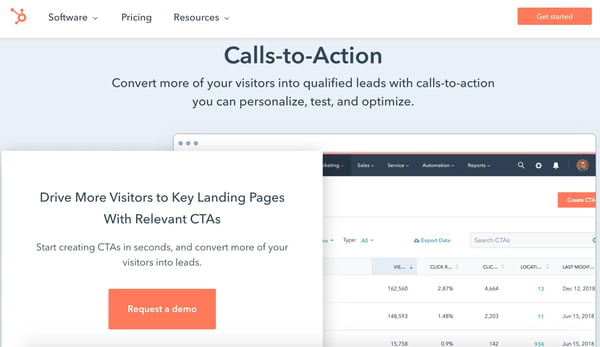
HubSpot’s Calls-to-Action tool allows you to create, personalize, test, and optimize CTAs that drive qualified leads to your landing pages in seconds. The easy-to-use CTA builder doesn’t require a designer and helps you make CTA buttons or CTA pop-ups. You can also upload custom button design or image-based CTAs of your own.
When personalizing CTAs, HubSpot provides useful information about individuals from your contact database (e.g. industry, lifecycle stage) to help you tailor the CTA to them. Or, if you’re targeting anonymous visitors, use other helpful details like their location or language.
Once your CTAs are complete, add them to web pages, landing pages, blog articles, or emails. Then, A/B test, analyze, and optimize your CTA’s and their performance — you can easily manage all of your CTA data from a single dashboard in HubSpot that displays views, clicks, and conversions.
2. Wishpond
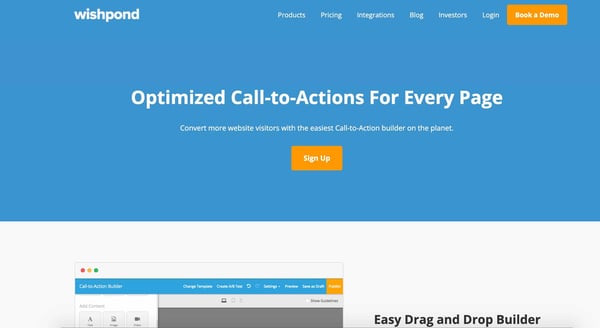
With Wishpond, create and optimize CTAs for web and landing pages with a drag-and-drop builder and over 20 templates. A/B and/or multivariate test versions of your CTAs to determine which does the best job of converting visitors.
Advanced tracking provides insight into which CTAs are most effective among your visitors. Meanwhile, marketing automation assists with customer segmentation (once visitors have converted, thanks to your CTA, of course) and sending emails. Wishpond also integrates with over 40 different tools to make tasks (such as data analysis, closing deals, and team-wide collaboration) simple.
3. Sniply
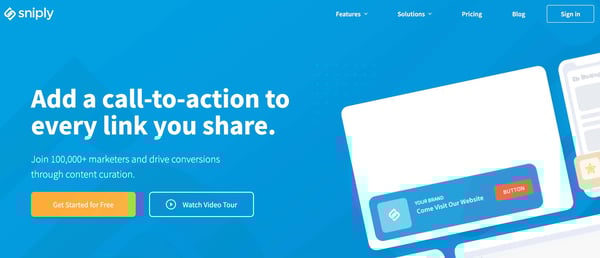
With Sniply, add CTAs to the links you share (e.g. web page, blog article, social media post) — in other words, overlay a customized CTA on any content.
Simply enter any URL that you want to include a CTA (this can be one of your own URLs or one from a third-party site). Sniply will then generate a slightly different, shareable URL for you. Once your audience clicks on the new URL, your CTA will be visible on the page.
Customize a CTA’s look (color, text, size), type (banner, pop-up), and placement on the page. Then, monitor your results and track CTA engagement from within Sniply to better understand how your audience interacts with your CTAs.
4. ClickMinded
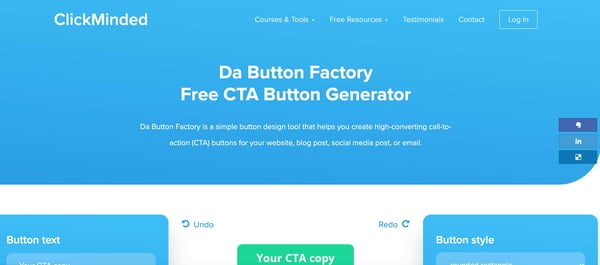
ClickMinded’s Da Button Factory is a free tool for generating CTAs that you can add to your website, social media post, email, or blog article. Decide what you want your CTA to say and look like by selecting button text, font, style, color, background, and size — then, the tool will generate your CTA.
Once you’re ready to implement your new CTA, opt to either download the image file or implement the button as HTML + CSS.
5. Canva
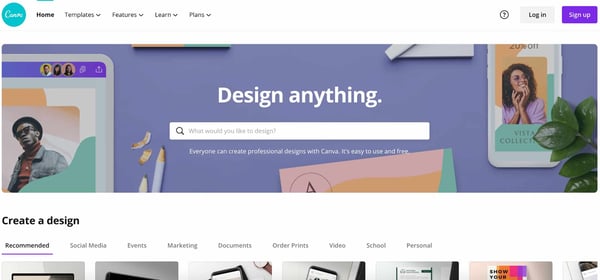
Canva is an easy-to-use graphic design software with drag-and-drop features and a variety of pre-built templates that you can customize — if you’re looking to design something from scratch, you can easily do that in Canva by simply selecting your own dimensions.
Canva does not currently have a specific template for CTAs, however, it’s easy to build your own. After selecting the dimensions for your CTA, design and brand the button in any way you want. The Canva dashboard is easy to navigate, even for those without any design knowledge.
Once your CTA design is complete, download the final product and upload it to your content management system (CMS) so you can insert the CTA on a landing or web page.
6. ImageFu
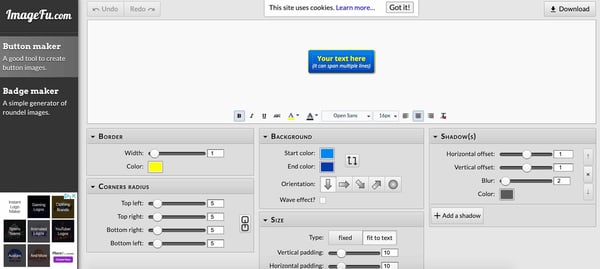
ImageFu is a button and badge generator — the tool can create CTAs in seconds. Simply type the text you want to appear in your CTA button (this can span multiple lines) and customize it to your liking. Select your border, background, shadow, corners (type and radius), and size. Then, download the CTA and save it to your device so can add it to your CMS and insert it onto a web page.
7. ButtonOptimizer
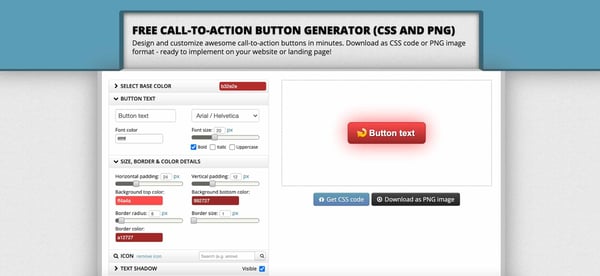
ButtonOptimizer is a free CTA generator that helps you customize CTA buttons for your website or landing page. Select the base color of your CTA as well as the text, size, border, icon, and shadow. Once you’re satisfied with the look of your CTA, the tool will prompt you to decide whether you want to download it as a PNG file or CSS code so you can then insert it on your site.

How to Monetize Your Brand’s Blog, According to HubSpot’s Blog Leaders
Whether you’re running a personal blog or managing the official blog on your company’s website, monetizing your work is entirely possible — it just takes a good amount of time and effort.
While there’s no exact formula to start making money, there are some tried and true strategies you can start experimenting with to see what works best for your content, your business model, and your audience.
Below, we’ll dive into some of these monetization ideas and get advice from HubSpot’s own blog leaders.
How Do Blogs Make Money?
Before we dive into the monetization strategies, you might be wondering, “How will my blog make money?” Well, your blog can make money in several ways including lead generation, affiliate marketing, brand partnerships, collaborations, or advertising. To find out more, you can learn about the types of blogs that make money and see which strategy would work best for your blog.
Now that we know a few ways that blogs can make money, let’s dive into the top monetization strategies for your blog.
1. Map blog posts to specific conversion points.
As a company, you can use your blog to drive leads and conversions.
AJ Beltis, a marketing manager on HubSpot’s channel monetization team, says, “Conversion is the foundation of blog monetization. Whether it’s an ecommerce purchase, a demo request, or a content offer download, it’s imperative to have your blog posts point to an intentional, related next step in the buyer’s journey.”
So, you might be asking yourself, “How can I do that?”
Beltis’ advice is to ask yourself what somebody reading this specific blog post would want or need from your company. Then, you should create the assets you’ll need to make that conversion happen in the form of website pages, forms, or content. After that, you’ll naturally place your calls-to-action to that next step in the blog post so readers are reminded about what your recommended next step is.
“By placing these CTAs in appropriate sections of the blog, you’re more likely to capture the attention of readers with high intent. This process puts more readers on the path to become paying customers for your business,” Beltis adds.
2. Include information about your product or service in your blog posts — but do so sparingly, and thoughtfully.
When you’re writing blog posts, it’s important that each post isn’t just a sales tactic. Your blog posts should provide educational content that anyone could benefit from, not just your customers.
However, that doesn’t mean you shouldn’t ever mention your product or service.
According to Caroline Forsey, the editor of the HubSpot Marketing Blog, “If you’re writing content about the best tools for X, and your product or service is a good solution to that user’s search query, I’d highly recommend including it in your total roundup of tools to increase exposure and, ideally, drive more leads and customers towards your product. This is one of the most effective ways to monetize your blog for the long-term, particularly since that same piece of content might provide your business with leads 3-5 years into the future.”
Again, this doesn’t mean you should always and only promote your own product or service.
Forsey adds, “You risk damaging your blog’s reputation if you do this too often, or outside of the appropriate context. Readers don’t want to see a random ‘buy my product!’ CTA in a piece of content irrelevant to your product — and, if they feel like your content is actually just a gimmick or hidden advertisement, they’ll distrust your brand as a whole.”
To avoid this, Forsey suggests only mentioning your product or service where it makes sense, and in a list of other tools you’d suggest for businesses so they feel you’re arming them with useful information so they can make their own decision best-suited for their needs.
“Trust me: if readers enjoy reading your content and feel your brand is genuinely helpful, they’ll give your product or service a second look,” she says.
3. Build a lead funnel for your product.
If you work at a B2B company or have a long sales cycle, reading a blog post is usually a customer’s first and furthest interaction from their actual purchase. But it’s also arguably the most important stage of the inbound funnel. Attracting your audience’s attention with helpful, educational, or entertaining content creates a larger pool of people to convert into leads and close as customers. In other words, your blog marks the start of a relationship with your customers.
Lestraundra Alfred, the manager editor of the HubSpot Sales Blog, says, “If you’re looking to gain exposure from your blog, your content should help bridge the gap between the problem the reader is trying to solve and your product, which can serve as a solution. By creating content that your ideal customer is searching for and interested in, you can build a solid community of readers who are a great fit for your product, and when nurtured, can turn into customers for your business.”
Ideally, you’ll want to craft compelling blog content that your audience can discover easily through a Google search or social media. You can also pay to amplify your distribution on Facebook, which has the best targeting tools out of all the social media sites and is cost effective, or through paid search, which can thrust you to the top of a high-volume Google SERP, although some keywords are expensive.
After people start reading your blog content more, and want to read it on consistent basis, they’ll sign up for your blog’s email subscription. Once strangers to your brand, they’re now regular visitors.
When these visitors read enough blog posts, you can entice them to download conversion offers like Beltis mentioned above. Then, you can then nurture qualified leads with more blog posts and lead generators through email or Facebook ads. Consistently educating them and helping them solve their problems will build their trust, making it more likely they’ll move to the middle of your funnel when they’re ready. And once you see them researching your product or service by reading case studies, requesting a demo, or trying to contact sales, you can move them to the bottom of the funnel, where sales will qualify their fit as a customer.
Sales will close some of these leads into customers, and they’ll be thanking you when they do. Your blog introduced their customers to your brand.
4. Offer sponsored content opportunities to other brands.
Publishers like BuzzFeed and The Dodo produce content that floods social media every day. And they make money by helping other brands do it too.
Brands will collaborate with their video production, social media, and analytics teams to craft posts and videos that follow their formula for virality. Publishers also distribute this sponsored content to their massive social media and website followings. This content is similar to the publishers’ native content, so their audience will enjoy reading it, exposing their clients to a huge, engaged, and new viewership and boosting their followings and audience engagement.
If your blog generates a significant amount of traffic, you can leverage your editorial expertise and audience reach to help smaller brands tell captivating stories to a bigger and better viewership.
Doing sponsored content right can pay huge dividends for your brand. Not only does it create another revenue stream, but partnering with other marketing minds can help your team unleash unprecedented amounts of creativity. In fact, T Brand Studio, the New York Times native ad business, crafted paid posts that captured as much engagement as some of nytimes.com’s highest-performing articles.
5. Provide coaching services.
Your blog posts can serve as a teaser for how much your readers can learn from you about a certain subject matter. Because if you write about enhancing certain skills like selling, social savviness, sports, cooking, and music, your blog posts can only teach your readers so much. They need to practice these skills in real life to see substantial improvement.
But if your readers practice these skills on their own, they’ll only get so much better. If they really want to improve, training with a coach will guide them toward success faster than anything else. Think about it. What would improve your basketball skills the most? Reading Michael Jordan’s book about shooting and practicing his tips by yourself? Or reading his book and then taking shooting lessons with him?
If you’re running a personal brand, as a coach, your blog is your most important marketing asset. It helps your potential clients improve themselves while giving them a glimpse into what life would be like if they actually achieved one of their life-long goals. Your blog inspires readers to strive for their dreams. And when they’re more motivated to reach their potential, they’ll usually want an expert directing them toward greatness, not just themselves.
6. Market your freelance writing skills.
If you’re a freelance blogger, you need to show potential clients that you can write compelling content. To do this, you could try to attract their attention with your previous work, but you usually don’t have control over those topics. So what if they don’t pique their interest?
The best way to show potential clients you can write compelling content is by engaging them with your own content. When you start a blog, you have access to your post’s performance metrics and complete control over the topics you cover. This allows you to write content that you know your target audience will devour, attracting more and more potential clients to your blog. And once they realize they rely on you for content marketing advice, they’ll know they can trust you to help them improve their own content marketing.
For instance, Eddie Shleyner, a freelance copywriter and content marketer, markets his business called VeryGoodCopy by writing articles about copywriting, content marketing, and psychology. His articles are so engaging and insightful that organizations like The North Face, Geico, and Mercedes Benz hire him to write articles, eBooks, landing pages, website copy, and email campaigns.
7. Participate in affiliate marketing.
Affiliate marketing is one of the best ways to monetize a blog when you don’t sell a product or service. It’s a relatively simple process too. You’ll partner with an ecommerce platform or businesses that have affiliate programs and pick out relevant products to promote on your blog. Your partners will then send you custom links to their product pages that can track customers referred by your blog. And if someone clicks on the link and buys the product, you’ll earn a commission.
One of the most popular affiliate marketing programs is Amazon Associates. You can choose from over one million of Amazon’s ecommerce products to advertise on your blog, and you can earn up to 10% in commission.
Out of all the ways you can make money blogging, affiliate marketing requires the least amount of time, money, and resources. You don’t have to build, market, or sell a product or service and inserting affiliate links in your blog posts doesn’t cost any money. All you have to do is wait for people to click on them and buy something.
Start Making Money with Your Blog
Choosing your monetization strategy will depend on the type of blog you’re running and the type of product or service you offer. To up-level your blog, learn how to set yourself up for success and avoid the top blogging mistakes.
Editor’s note: This post was originally published in March 2018 and has been updated for comprehensiveness.

16 of the Best Professional Bio Examples We’ve Ever Seen [+ Bio Templates]
Does your professional bio make a statement?
In this article, we have great professional bio examples you should compare yours to — and a series of free bio templates you can use to make it perfect.
If you’re anything like me, you probably don’t think about your professional bio until you’re suddenly asked to “shoot one over via email.” You have approximately one afternoon to come up with it, and that’s when you scramble, and the bio ends up reading like this:
Rodney Erickson is a content marketing professional at HubSpot, an inbound marketing and sales platform that helps companies attract visitors, convert leads, and close customers. Previously, Rodney worked as a marketing manager for a tech software startup. He graduated with honors from Columbia University with a dual degree in Business Administration and Creative Writing.”
Woof, that was dull. Are you still with me? I swear, not even adding a tidbit about his cats would liven that bio up.
To be fair, in certain contexts, your professional bio does need to be more formal, like Mr. Erickson’s up there. But in many cases, writing a readable bio — even conversational — is a really good thing. That means dropping that traditional format of listing your accomplishments like a robot and cramming as much professional-sounding jargon in there as you can.
How to Write a Bio
Download a free, editable short professional bio template.
Download a free, editable long professional bio template.
Writing a professional bio that captures your brand and what you offer to your audience can help you grow better. But doing it right is just as important. Here’s how to write a bio, step-by-step.
1. Create an ‘About’ page for your website or profile.
Before you can publish your professional bio, you need a living space for it. Here are a few to consider (some of these you might already have in place):
- Facebook Business page
- LinkedIn profile
- Instagram account
- Personal website
- Personal blog
- Industry website
- Industry blog byline
As you’ll see in the professional bio examples below, the length and tone of your bio will differ depending on which of the above platforms you choose to be on. Instagram, for example, allows only 150 characters of bio space, whereas you can write virtually as much as you want on your personal website — or even your Facebook Business page. But once created, this bio should represent who you are in the eyes of your audience.
2. Begin writing your bio with your first and last name.
If your readers don’t remember anything else about your bio, make sure they remember your name. For that reason, it’s a good idea for your first and last name to be the first two words of your professional bio. Even if your name is printed above this bio (hint: it should), this is a rare moment where it’s okay to be redundant.
For example, if I were writing my own bio, I might start it like this:
Lindsay Kolowich
Lindsay Kolowich is a Senior Marketing Manager at HubSpot.
3. Mention any associated brand name you might use.
Will your professional bio represent yourself, or a business you work for? Make sure the brand you want to be associated with is mentioned in your bio. If you’re a freelancer, perhaps you have a personal business name or pseudonym you advertise to your clients. Here are a few examples:
- Lindsay Kolowich Marketing
- SEO Lindsay
- Kolowich Consulting
- Content by Kolowich (what do you think … too cheesy?)
Maybe you founded your own company, and you want its name to be separate from your real name. Don’t be afraid to keep it simple: “Lindsay Kolowich is the founder and CEO of Kolowich Consulting.”
4. State your current position and what you do.
Whether you’re the author of a novel or a mid-level specialist, use the next few lines of your bio to describe what you do in that position. Don’t assume your audience will naturally know what your job title entails. Make your primary responsibilities known to the reader, helping them paint a picture of who you are during the day and what you have to offer the industry.
5. Include at least one professional accomplishment.
Just as a business touts its client successes in the form of case studies, your professional bio should let your own audience know what you’ve already achieved. What have you done for yourself — as well as for others — that makes you a valuable player in your industry?
6. Describe your values and how they inform your career.
Why do you do what you do? What might make your contribution to the market different than your colleagues? Better yet, what values do you and your colleagues share that would make your business a worthwhile investment to others? Start to wrap up your professional bio by simply explaining what gets you up in the morning.
7. Briefly tell your readers who you are outside of work.
Transition from describing your values in work to describing who you are outside of work. This may include:
- Your family
- Your hometown
- Sports you play
- Hobbies and interests
- Favorite music and travel destinations
- Side hustles you’re working on
People like connecting with other people. The more transparent you are about who you are personally, the more likable you’ll be to the people reading about who you are professionally.
8. Consider adding humor or a personal story to add flavor to your professional bio.
End your professional bio on a good note — or, more specifically, a funny note. Leaving your audience with something quirky or uniquely you can ensure they’ll leave your website with a pleasant impression of you.
It’s important to follow the steps above when writing your bio, but don’t obsess over any one section. Remember, the people reading your bio are suffering from information fatigue. If you don’t hook ’em in the first line, you’ll lose them quickly.
(P.S. Want to give your professional brand a boost? Take one of HubSpot Academy’s free certification courses. In just one weekend, you can add a line to your resume and bio that’s coveted by over 60,000 marketers.)
Why Good Bios Are Important for a Professional
Alright, I know what you may be thinking … So what? It’s just a bio. I mean, how many people read professional bios, anyway?
The answer: A lot of people. More importantly, though, there’s no way to tell exactly who is reading it — and you always want it to be ready for when the right people come across it. And when they do, you want it to catch their eye. In a good way.
You see, while your resume is only useful for when you’re actively applying for specific positions, your professional bio is much more visible. It can live on your LinkedIn profile, your company’s website, your guest blog posts, your speaker profiles, your Twitter bio, and many other places.
And, most importantly, it’s the tool that you can leverage most when you’re networking.
Bottom line? People will read your professional bio. Whether they remember it, and whether it makes them care about you, is a matter of how well you present yourself to your intended audience.
So, what does a top-notch professional bio look like?
Below, we’ve curated some of the best real professional bio examples we’ve ever seen on Twitter, Instagram, Facebook, LinkedIn, and the various websites where you might describe yourself.
Check ’em out, and use them as inspiration when crafting your own.
The Best Professional Bio Examples We’ve Ever Seen
1. Chimamanda Ngozi Adichie
Bio Platform: Personal Website
Chimamanda Ngozi Adichie begins her professional bio with an invitation into her world. In just one sentence, she describes the depth and breadth of her body of work as it has been translated into thirty languages and several publications.
Along with her notable writing career, Chimamanda showcases her speaking career which introduces readers to a well-rounded view of who she is as a professional. From there, her bio seamlessly flows into her recent work and a glimpse into how and where she spends her personal time – the United States and Nigeria.
Finally, Chimamanda’s bio ends with a call-to-action to read a more detailed biography, giving the reader a choice to read the information available about her life and career.
2. Ann Handley
Bio Platform: Personal Website
If you’re a marketer, you’ve likely heard of Ann Handley. Her list of credentials is lengthy, and if she really wanted to, she could go on and on and on about her accomplishments.
But when people list out all their accomplishments in their bios, they risk sounding a little egotistical. Sure, you might impress a handful of people with all those laurels, but many people who read your bio will end up feeling either intimidated or annoyed. Think about it: Is that how you want the majority of your readers to feel when they read your bio?
To minimize the egoism that comes with talking about yourself, think about how you can list out your accomplishments without sounding like you’re bragging. Ann does this really well, choosing a tone in her bio that’s more approachable.
It starts with the excerpt in the footer of her personal website. Give it a quick read, paying close attention to the opening and closing lines:
“This is Ann Handley’s website, and this is a bit of copy about her … That’s not giving you a lot of detail, is it? So read more here.” This is the kind of simple, friendly language that invites the reader in rather than shutting them out.
Follow the link and you’ll be led to a page dedicated to a fuller bio, which she’s divided into two parts: a “short version” (literally a bulleted list of key facts) and a “long version,” which includes traditional paragraphs. There’s something in there for everyone.
3. Rebecca Bollwitt
Bio platform: Instagram
Instagram is a notoriously difficult platform on which to write a good bio. Similar to Twitter, you simply don’t have room for a professional bio that includes everything about you. And because Instagram is primarily a mobile app, many viewers are reading about you passively on their mobile device.
Instagram’s limited bio space requires you to highlight just your most important qualities, and blogging icon Rebecca Bollwitt does so in her own Instagram bio in an excellent way.
Rebecca’s brand name is Miss604, and cleverly uses emojis in her Instagram bio to tell visitors exactly what makes her a valuable content creator. Take a look in the screenshot below.
Starting with a trophy emoji, Miss604 says she’s BC’s most award-winning blogger. I haven’t even looked at her pictures yet and the introduction of her bio has already sucked me in.
The rest of her bio follows suit, breaking up the text with an appropriate emoji and a perfect collection of nouns to tell me who she is as a person. She even links out to her husband’s Instagram account after the heart emoji (an adorable addition), and assures her followers that all of her pictures are authentically hers.
Take a lesson from Miss604, and show your personal side. Just because you’re branding yourself as a professional doesn’t mean you have to take your human being hat off. Often your most personal attributes make for the best professional bio content.
4. Mark Gallion
Bio Platform: Twitter
As a venture capitalist and an executive at several start-ups, Mark Gallion has different versions of his bio all over the internet. You can imagine some are more formal than others. But when it comes to his Twitter bio, he carefully phrased his information in a way that helps him connect with his audience — specifically, through the use of humor.
Why would he choose humor when he runs four start-ups and constantly seeks funding for them? Well, Mark’s tactic is totally intentional: it’s a lever he pulls to refresh his brand while maintaining his already impressive and established identity as an entrepreneur.
Mark leverages his Twitter bio because it’s place where he can be human. And it helps him relate to his followers and potential investors.
When crafting your own Twitter bio, consider your audience and the personal brand you’re trying to create for yourself. Use it as an opportunity to be relatable. (And check out this list of amusing Twitter bios for inspiration.)
5. Chime Mmeje
Bio Platform: LinkedIn
A bio with a hook is sure to keep you reading. Chima Mmeje is a freelance SEO copywriter who’s “extremely good at one thing”: helping companies rank for their target keywords. By leading with a strong hook that aligns with her target audience’s marketing needs, she’s able to keep readers engaged.
What comes next is a unique differentiator in a professional bio. Instead of listing accolades, Chima shares a few wins she’s secured for her clients. This nifty section does two things: it builds the readers’ confidence in her ability to deliver results and it’s a practical way to name-drop her clients in a professional bio.
In the body of her professional bio, Chima briefly lists her process at a high level, giving her potential clients a birds-eye view of what they can expect when they book her services.
The simple call to action “Drop a message” in her email inbox is a casual invitation to learn more about her services.
6. DJ Nexus
Bio Platform: Facebook
This New England-based DJ has single-handedly captured the Likes of more than 2,000 people in and beyond Boston, MA. And even if you don’t listen to the type of music he produces, it’s hard not to listen to his compelling Facebook bio.
Stage-named DJ Nexus, Jamerson’s professional bio makes use of nearly every Page field inside the About tab. Right away, his audience knows which genres he plays in, where he’s from, and who else he’s worked with. The latter — under “Affiliation,” as shown in the screenshot below — is unique and seldom mentioned in professional bios today.
Our favorite part about DJ Nexus’s bio? His tagline, under “About” — “Quiet during the day. QUITE LOUD at night!” DJ Nexus tells you when he works in an awesome way. I got goosebumps just imagining a dance club he might play his music in.
DJ Nexus’s bio brilliance doesn’t stop there.
The great thing about Facebook Business Pages is that you can write as much as you want without overwhelming your Page visitors. For those who just want Jamerson’s basic info, they have the four categories shown above. For those who want to learn more about him, he tells an excellent story of his career. Here’s just a preview of his story, below:
In this story, DJ Nexus describes both when he “became known as DJ Nexus” and a company he founded shortly afterward — all before going to college. This is a terrific lesson for Facebook Businesses today: customers want to learn about you, and as Facebook increasingly becomes a place for meaningful interactions, there’s no better place to tell your story than on your Facebook Business Page.
7. Lena Axelsson
Bio Platform: Industry Website
When it all comes down to it, your professional bio is no different than any other piece of persuasive copy — no matter where it lives. One of the most common mistakes people make is thinking of it as its own beast, separate from other pieces of writing. If you think about it that way, you’re far more likely to write something painfully uninteresting.
When you sit down to write your professional bio and you’re watching that cursor blinking on the screen, think about how you would introduce a blog post. You don’t just dive right into the meat of the thing, now, do you? No. You start with an introduction.
The best bios are often concise (around 200–300 words), so you don’t have a lot of room to play around. But a single sentence that tees your reader up and provides context for the accomplishments that follow could make the rest of your bio that much more persuasive.
Take Lena Axelsson’s bio, for instance. She’s a marriage and family therapist — a job where empathy and compassion are a big part of the job description. That’s why she chooses to open her bio with a great introductory sentence: “When human beings experience trauma or severe life stressors, it is not uncommon for their lives to unravel.”

Then, she goes into why she’s passionate about her job, how she helps her clients, and how she caters her approach to each individual patient. The necessary educational information is left for the end, after the reader has been hooked.
Your bio doesn’t have to be super serious, nor does it have to start with a joke. This bio shows how you can capture your reader’s attention by being empathetic and showing how that empathy shapes a valuable professional.
8. Mark Levy
Bio Platform: Personal Website
Mark Levy is a small business owner who’s taken a more traditional approach to the professional bio on his website — but in a way that takes care to speak to his intended audience.
What we love about his bio is the way he’s set it up: On his business’ “About” page, he’s listed two biographies, which he’s labeled “Mark Levy’s Biography #1” and “Mark Levy’s Biography #2.”
Click here to see the full version.
Like Ann, Mark’s given his readers two different options. The first biography is a “short version,” which includes a combination of bullet points listing his credentials and a few short paragraphs.
The second is the “long version,” which is actually even more interesting than the first one. Why? Because it reads like a story — a compelling one, at that. In fact, it gets really funny at parts.
The second sentence of the bio reads: “He was frightened of public school, loved playing baseball and football, ran home to watch ape films on the 4:30 Movie, listened to The Jam and The Buzzcocks, and read magic trick books.”
Here’s another excerpt from the middle:
Of course, the fantastic copywriting isn’t a surprise, given that this guy wrote several books. But the conversational tone and entertaining copy let his quirky personality (and great writing skills) shine.
9. Audra Simpson
Bio Platform: Personal Website
With a classic take on the professional bio, Audra Simpson crafts a brief overview of her career in just a couple of paragraphs. The “why” behind her work is emphasized in the first half of her bio before transitioning to the way she carries out that work in practice.

The second half of her bio combines her bodies of work and the awards she’s won for each from the year 2014 to 2020. This subtle timeline gives readers a picture of her experience in the field of political anthropology without listing her resume in detail.
Audra’s professional bio is an example for those of us with several years of experience to communicate, but a strict word-limit to write within.
10. Corey Wainwright
Bio Platform: Blog Byline
Corey Wainwright is the director of content here at HubSpot. She’s written content for HubSpot’s Marketing Blog for years, and her blog author bio has caught my eye since before I ever started working for HubSpot. (Back then, it started with, “Corey just took a cool vacation.”)
What I love most about Corey’s bio is that it’s a great example of how to deliver information about yourself without taking things too seriously. And in this context, that’s totally appropriate.
Despite having a number of impressive accomplishments under her belt, she simply doesn’t like displaying them publicly. So, she prefers making her author bio a little more “light.”
Her bio (pictured below) reads, “Corey is a Bruce Springsteen fan who does content marketing, in that order.”
It works in this particular context because, at HubSpot, our blog authors often prefer to make themselves as friendly and approachable as possible — while letting the content speak for itself.
It helps that authors’ social media accounts are located right below our names and above our pictures. For folks who really do want a list of Corey’s credentials, they can click the LinkedIn button to go to her LinkedIn page. (You can read this blog post to learn how to create social media buttons and add them to your website.)
11. Marie Mikhail
Bio Platform: LinkedIn
Marie Mikhail checks off nearly every box for what makes an excellent bio. A professional recruiter, she expresses her “passion for recruiting” upfront, in the first sentence, while using that sentence to hook her profile visitors into a brief story of her background.
But there are a lot of recruiters out there, and Marie knows that. So, to differentiate herself, she closes the first paragraph of her bio explaining that she likes “getting people excited about the things [she’s] excited about.” It’s a well-put value proposition that sets her apart from the rest of the HR industry.
Marie Mikhail finishes off her bio by including a smooth mixture of professional skills, such as her Spanish fluency; and personal interests, such as podcasting and Star Wars (she mentions the latter with just the right amount of humor).
12. Wonbo Woo
Bio Platform: Personal Website
Wonbo Woo is the executive producer of WIRED’s video content, and he has a number of impressive credits to his name. What does this mean for his professional bio? He has to prioritize. With this in mind, Wonbo opens his bio with the most eye-catching details first (if the image below is hard to read, click it to see the full copy).
Not only does Wonbo’s bio start strong, but he also takes readers on a suspenseful journey through some of his most harrowing assignments — where he was when news broke and how he responded. You can see this quality below.
 The accomplished journalist concludes his gripping bio as strong as it began, measuring his experience by the number of states, countries, and continents to which he’s traveled in his career. See how this looks above. All in all, it’s a fantastically concise bio for as much detail as it holds.
13. Van Jones
Bio Platform: Twitter
Someone who’s known for a variety of talents and skills may find it difficult to capture who they are in a professional bio. When limited to just over 100 characters on Twitter, the feat is nearly impossible. But Van Jones effortlessly explains who he is and why it matters to everyone who visits his Twitter profile.
He starts his professional bio with a token of personalization and prioritization of his values. By mentioning that he is a dad first, we recognize what’s important to him in his long list of successes. As we’ve seen in other bios, sharing who we are outside of work makes us more personable and should find its way into your bio, if possible. Van leaves plenty of room to share a variety of professional experiences in his bio including CEO of REFORM and his 2020 Emmy award.
What’s great about Van’s Twitter bio is his ability to link valuable offerings to his readers. He invites us to check out his latest book and has his website reformalliance.com linked at the top.
14. Chris Burkard
Bio Platform: LinkedIn
If you’re writing your bio but having trouble figuring out how to showcase your accomplishments without boasting, photographer Burkard’s LinkedIn bio is a great example for inspiration.
Written in third-person, his bio tells a fluid story, starting with his ultimate mission — “capture stories that inspire humans to consider their relationship with nature” — before diving into more tangible accolades (giving a TED talk, publishing books, etc.).
Best of all, rather than using his bio as an opportunity to brag, he instead ties his talents into how he hopes to help others, writing, “Through social media Chris strives to share his vision … and inspire [his followers] to explore for themselves.” I wouldn’t necessarily be inclined to follow Chris if his bio had simply read “I post beautiful images” … but inspire me to travel? Now that’s something I can get behind.
Lastly, he ends on a humble, sweet note, writing “He is happiest wth his wife Breanne raising their two sons”. Don’t be afraid to inject some personal information into your bio — it could help you seem more approachable as a result.
15. Megan Gilmore
Bio Platform: Instagram
Megan Gilmore is a best-selling cookbook author, and she often posts healthy recipes on her Instagram page to inspire followers’ to realize that you don’t have to sacrifice taste for the sake of health.
Fortunately, you glean most of this information immediately from her Instagram bio, which is short and to-the-point: “Best-selling cookbook author + former fast-food junkie + mom of 2. I like to make healthy food as easy as possible.” Her “former fast-food junkie” call-out shows followers she’s relatable (and that her recipes are likely delicious yet healthy alternatives), and by mentioning she’s a mother, you get the sense that her recipes really will actually be quick and easy.
Plus, Gilmore includes a CTA link within her Instagram bio that leads followers to free, ready-to-use recipes. You might be thinking — Why would she do that, since it discourages people from buying her book? But that couldn’t be further from the truth.
By giving her followers the chance to try out her recipes, she’s slowly turning leads into customers. After I tried a few of her Instagram recipes and loved them, I decided to go ahead and buy her book, knowing I’d like more of what she had to offer.
16. Lisa Quine
Bio Platform: Portfolio Website
Although a picture is worth 1,000 words, a portfolio is quite different from a professional bio. While this might present a challenge for creative professionals who specialize in visual art to tell their stories, Lisa Quine quantifies her creativity to give her professional bio balance. Throughout her bio, you’ll notice the number of murals she’s completed and a brief timeline of her career thus far which helps paint the picture of who she is as a professional.

Lisa’s bio checks the box on nearly all of our recommendations for a great bio. She begins with her full name, her location, and what she does best. From there, she gets creative by appropriately mentioning the brands she’s worked with and highlights some of her favorite projects. With a third-person approach to the writing, this bio invites the reader behind a metaphorical door to meet Lisa as a professional, traveler, learner, wife, and mother.
Create Your Own Professional Bio
Prim and proper, relaxed, or studded with accomplishments, your bio is a reflection of your best professional self. Your professional bio will often precede your physical presence. Before people meet you for the first time, they’ll probably read your bio. Whether you’re creating an about page for your website or social media profile, one thing’s for sure, you’ll want to put your best foot forward with a top-notch professional bio.
Editor’s Note: This post was originally published in November 2019 and has been updated for accuracy and comprehensiveness.

13 Graphic Design Trends to Use in 2021 — and Two to Avoid
2020 was — in a word — unprecedented.
The only thing nearly as unprecedented as the events of the year itself? The number of times 2020 was described as “unprecedented.”
With the conclusion of a year unlike any other, it’s natural to seek out new looks and approaches.
Desires for new and different –– but also reassuring and less overwhelming –– experiences will exert significant influence over customer appetites in 2021, including in visual communications and graphic design.
Here, let’s dive into the graphic design trends you’ll see in 2021. Plus, what design techniques you’ll want to avoid.
2021 Graphic Design Trends
Current graphic design trends for 2021 offer opportunities to update your brand’s aesthetic, earn customers’ attention, and unlock greater results.
These trends fall into three dominant themes or moods: socially-conscious design, dissonance, and optimism.
Within each theme, there are a number of design techniques and styles you’re going to see artists and brands employ.
You’re going to want to see this –– and not just because it means 2020 is over.
1. Socially-Conscious Design
Design and culture are integrally connected. Designer and author Robert L. Peters makes it clear where he thinks real change begins: “Design creates culture. Culture shapes values. Values determine the future.”
To strive for a better future, it helps to visualize it.
Social unrest and movements for anti-racism have captured national attention, and every brand and business has to take notice and evaluate where they stand.
Socially conscious design gained traction throughout the past year, and it’s poised for even greater impact in 2021. Within the theme of socially conscious design, key trends include authentic representation, sustainability, and celebrating diversity and imperfection.
2. Authentic Representation
Nike’s instantly-iconic ad featuring Colin Kaepernick exemplifies the push for authenticity and design that includes diverse voices and perspectives.
After widespread protests following the killings of George Floyd and Breonna Taylor in 2020, Nike spoke up again, unveiling “For Once, Don’t Do It” – subverting the brand’s instantly-recognizable tagline.
You’ll continue to see brands pushing boundaries in 2021 when it comes to creating authentic, meaningful, and deeply powerful content over more superficial designs.
3. Diversity and Imperfection
The trend to more socially-conscious design aligns with broader cultural pushes to make all forms of media more diverse, inclusive, and affirming of all our various identities and imperfections.
DesignStudio applies these values and approaches in their authentic, intentionally ‘imperfect’ rebrand for insurance company Getsafe. 
4. Sustainability
Sure, humans had a rough 2020, but the Earth didn’t fare much better.
And with all our time spent indoors, we had ample time to cultivate awareness (okay, anxiety) about climate change and other environmental issues. This –– plus the near-universal experiences of cabin fever after a year filled with pandemic-related lockdowns –– has sustainability featuring prominently in graphic design in 2021.
As consumers think about waste and their environmental footprint more than ever before, brands dealing in physical goods are especially sensitive to potential tension. Expect to see more and more packaging designs that emphasize sustainability through natural iconography, neutral color palettes, and eco-conscious materials.
5. Natural and Manufactured Juxtaposition
Global lockdowns have disrupted our connections to our environment.
Graphic design is leaning into this tension through regular juxtaposition of the natural and the manufacture, earth and metal, organic and inanimate.
Gucci played with all of these themes when launching their Gucci Bloom fragrance, creating a gamified virtual experience for visitors to explore an animated garden:

Exploring contrasts and intersections between these forces is especially appealing for spaces hardest hit by the pandemic. Industries like fashion and travel will emphasize elements conveying solidity and technological progress while also reinforcing connections to nature through floral and herbal patterns, cheery hues, and blue skies.
These elements bring a sense of destination, movement, and outdoor exploration –– even when there’s nowhere to go.
6. Color Trends in Graphic Design
Socially conscious design is interesting and impactful –– but it’s also mentally demanding. As people have found themselves spending more and more time at home grappling with monumental and unfamiliar stressors, tastes in color have shifted to hues that are proven to reduce anxiety and promote a sense of ease.
Unsurprisingly, organic and natural shades can provide welcome respite for people who stare at walls and screens all day. For best results, move past standard browns and greys. Understated oranges and teals evoke warmth and comfort, while providing more energy and optimism than their more drab neutral peers.

These color trends are influencing interior design for homes and workplaces, as luxury paint brand Farrow & Ball reports.
Gone: dramatic accent walls and high contrast color schemes. In: calm and muted tones.
For paint companies, at least, pandemic-related quarantines have them seeing another earth tone: green. Revenue for Farrow & Ball, for instance, was up 20% compared to a year prior.
7. Dissonance
While some design currents aim to push society forward or distract from all sorts of stress we’re under, other impulses in graphic design reflect our chaotic, tumultuous present moment.
Designs that embrace uncertainty often appear relatable to people living in unpredictable circumstances.
8. Color Blur
One trend playing up the theme of dissonance melds color and texture by adding grains and/or gradients. Such blending or layering adds depth and tactility to rendered or printed images.
With darker, brighter color schemes, color blur adds a level of broodiness, implying a depth of emotion and feeling, as well as a sense of three-dimensional space.
For a more disconcerting effect, pair a color blur or gradient with distorted text, as well.
9. Outsized Typography
Another dissonant trend in graphic design intentionally misplaces typography in ways that defy expectations and flout design conventions. Images cut off or obscure portions of text or unpolished elements disrupt sleek designs, among other glaring “errors” that catch the eye.
Exaggerated sizes and violating conventional hierarchies, this approach plays with both scale and alignment – two of the basic elements of graphic design. The effect: arresting and memorable.

Designer Danielo Silveira‘s designs for Puma “This is My Flow” uses these concepts with visually stunning results.
Hype and buzz-focused streetwear brands employ these techniques with a studied nonchalance, leaving the uninitiated viewer feeling off balance –– and rewarding their die-hard fans for being in the know.
10. Surrealism
“The real is intertwined with the surreal, and in no year was that more deeply felt than in 2020” — 99designs.com
I feel this. Don’t you?
Considering how mixed up –– and messed up –– day-to-day life often seems, it’s no wonder graphic design is exploring imagery that bends the edges of reality.
What does that mean, if you’re not a Salvador Dali-afficionado or modern art critic? Well, you should probably prepare yourself to make sense of more images like this one:

11. Optimism and Reassurance
You’re not alone if you’re yearning for reassuring, optimistic visual experiences.
The third and final big theme in graphic design for 2021 reflects a common desire for brighter, more familiar, comfortable days.
12. Retro-futurism
Retro-futurism represents the first trend within this broader inclination towards optimistic design in 2021.
No, this isn’t another new sub-genre of music known only to the most avant-garde of your college dorm mates. Retro-futurism refers to designs that take symbols and approaches from the past and present them “mashed up with elements of the imagined future.”
Think: NASA’s worm logo and “space-age” designs. These forms, originating in the forward-looking decades around the first moon landing. This type of design manages to feel both new and familiar at the same time. It reinforces humanity’s confidence in the potential of technology and interstellar flight.

Yes, nostalgia promises to do well in 2021. Colors and shapes that seem both vintage and tech-inspired blend reassurance with a sense of progress.
13. Symbol Revival
In an environment where so much is routinely challenged or called into question, graphic design offers key tools to connect with the universal and the uniquely human elements within us all. Carefully-chosen and constructed symbols possess this potential –– for communication that transcends language.
The simple, powerful imagery of a square peg fitting into a round hole makes a strong statement in the brand identity Pentagram’s Paula Scher designed for the Mental Health Coalition.
Here, a symbol typically used to connote exclusion or ill-fittedness is reclaimed as a visual metaphor for inclusivity and acceptance. It’s socially conscious, reflective, and also calling the viewer towards a better future –– and you can look forward to much more graphic design like in in 2021.
Graphic Design Trend to Avoid: Faking Authenticity
The ‘trend’ you definitely want to avoid: swerving away from allyship to co-opt complex and painful issues as if they’re just more trends to copy.
Nike, Glossier –– these brands had already taken proactive anti-racist stances, embracing this as a prominent part of their identity. They can speak authentically about related events and issues.
Many chose to amplify or echo similar messages to reflect their own values or affirm a call for change. This is well and good. Opportunism? Not so much.
In short: make sure your design accurately, and authentically, reflects your values.
(If you decide to reexamine your values, more power to you –– but work on your values first, and hold off on pressing ‘send’ on some trendy graphic.)
How to Keep Up with Graphic Design Trends
Designers gravitate towards visually-driven platforms like Instagram, or Behance — Adobe’s proprietary social media platform geared to showcase creative work. Instagram, as the most visually-driven of the ubiquitous social media platforms, offers a wealth of opportunities to observe, learn from, and keep up with graphic design trends.
You can easily see broad trends and also drill down into specific skills or minutiae of the field through keyword searches and following hashtags. Interested in hand-lettering styled after 1950’s tattooing? You’ve come to the right place.
YouTube is also an invaluable resource for designers of all stripes and skill levels. You may never make it out from the rabbit hole of top 10 lists, design techniques, and how-to guides –– but you sure will learn a lot while you’re down there.
Pick a Timeless Design to Ensure It Lasts
Before you go and apply all the 2021 graphic design trends in making delightful and chaotic – but somehow calm and reassuring and progressive –– imagery, there’s one word of warning to take with you. Employ trends sparingly and with care, or risk becoming a quickly-outdated caricature.
This is especially true in logo design, where you’ll need to avoid looking outdated –– and perhaps even worse to constantly change your primary branding. Go for something modern, but timeless, and make design decisions with your organizational values in mind.
Strike this balance well to benefit and learn from 2021 trends while not putting yourself on course to need a rebrand in 2022.
What to Expect from Graphic Design in 2021
In 2021, graphic design will continue to both draw inspiration from and exert influence to change culture. Perhaps it will be as tumultuous and unpredictable as 2020 (although we can certainly hope not).
One thing about 2021 is certain, though. For the foreseeable future, Adobe‘s Photoshop team deserves credit for calling the trend most likely to carry over from 2020 into the new year:

How to Get on Board With the Digital Transformation [+ Examples]
Ten years ago, I couldn’t have cared less if the new burger place downtown had a website. Now, I don’t trust one that doesn’t. If your business is online, you’re a part of the digital transformation. But it’s not enough these days to just “be online.” Businesses that will thrive in 2021 that are operating online — and the COVID-19 pandemic has proved this.
Consumer buying behavior has drastically changed — today, most consumers are purchasing products online, including almost 70% of millennials. In 2019, nearly two-thirds of businesses ( 64% ) had a website. If you don’t have one, you could be falling behind your online competition.
So, while it’s a great step to have a website and a Facebook page, there’s more to the transformation than just having an online presence — technology should be ever-present in all of your business operations. This piece will explore the digital transformation, why businesses are getting on board, and outline the roadmap for enacting one for your business. We’ll also give some real-life success stories from companies that have bought into the digital transformation.
Essentially, a digital transformation fundamentally changes how businesses provide value to their customers and streamline their processes. It’s a reminder that materials and processes your company uses during day-to-day operations, no matter how big or small, might need a new medium — technology. Let’s take a look at why this transformation exists in the first place, with particular reference to the present pandemic.
Why do businesses undergo a digital transformation?
Simply put, things are often easier when they’re online. New technology makes website building more accessible and creates more opportunities for businesses to connect with their audiences. A digital shift also saves time. You may already be using some methods of digital strategy, like Standard Operating Procedures (SOPs) , social media scheduling tools, and instant messaging apps; these are all examples of small digital transformations that replace paper instructions, outbound marketing, and an extra trip to your managers’ desk.
A shift to digital processes also makes it easier to conduct overall large-scale business tasks. For instance, online databases that sort and catalog customer information, and automation tools that take over day-to-day activities and allow employees to focus their efforts on more pressing tasks.
Customers have also begun to expect the businesses they interact with to have some sort of digital presence, whether it’s an optimized Google My Business profile for easy access to mapping instructions or an automated chatbot that can answer their questions over Facebook Messenger .
In addition, the COVID-19 pandemic has further proven and accelerated the need for businesses to get on board with a digital transformation. As companies around the world were forced to pivot to providing service online or at a distance from their customers, having digital tools at their disposal was, and is, critical to survival.
Many businesses have adopted different online practices during the pandemic, like providing digital customer service . It’s likely that, as a result of the pandemic and general trends, customers will expect that they’ll be able to conduct business online with their favorite brands.
70% of businesses today are finding that the digital shift is worth it, and these businesses either have a digital strategy in place, or are earnestly working towards one.
As a whole, 70% of businesses today are finding that the digital shift is worth it. These businesses either have a digital strategy in place or are earnestly working towards one. Whether you’re already one of these businesses or you’re hoping to begin your journey, let’s go over three critical questions that you can use as a roadmap for implementing your strategy.
Digital Transformation Strategy
Business leaders are faced with a variety of options for enacting a digital transformation. As technology becomes more commonplace, there are a significant number of tools to choose from. While it may be exciting (and overwhelming) to imagine all of the possible upgrades you can make to your business, a digital transformation strategy will help you become more focused.
This strategy is essentially a structured way to move through the process, how you get from point A (pre-transformation) to point B (post-transformation). Let’s go over some guiding questions and additional requirements to help you create a viable digital transformation strategy.
1. Why do we need a transformation?
Like all plans and strategies you’ve created for your business, designing your roadmap begins with identifying your purpose. You can start this process by uncovering the challenges your business faces that have significantly impacted success or processes that you feel may become easier with technology. This could be anything from day-to-day automation tasks like sending out email newsletters or more essential business needs like data collection and storage.
You may also be hoping to address multiple challenges at once. For example, say your business has had trouble handling customer service requests because you’re using different platforms to store customer data and communicate with customers. Reps may have difficulty accessing a client’s history with your company because they need to sift through other records and jump between platforms to find the information they need. This takes time, and clients may report being frustrated by how long it takes to resolve their issues.
In this case, the answer to why do we need a transformation? is that your customer service team struggles to give customers the experiences they desire because of long wait times and a disorganized data storage system. Whatever your reasons are, identifying the challenges that expose the need for a digital transformation makes it easier to create further goals and metrics that will define your process’s success.
2. What do I need to achieve to transform?
As mentioned above, the challenges and pain points you’ve identified answer why you need to transform. Once you have this why, it becomes easier to figure out what needs to be done and what steps you need to take to overcome the challenges you’ve outlined.
Aim to come up with metrics or objectives you can use to guide yourself and your teams through this process, including workflows, identifying key stakeholders, and assigning critical tasks. If you have multiple pain points, come up with at least one objective or goal for each one of them.
When you identify these objectives, come up with a time frame in which they should be met to succeed in your transformation. Continuing with the previous example, your challenge is that reps don’t have access to a summary of client history. Your objective can be that, over the course of the year, you want a streamlined process for inputting and cataloging customer information and a less than one minute wait time for accessing customer records during service interactions. With this goal in mind, you know what you need to achieve to say that you’ve transformed your process. With this, it becomes easier to identify the tools that will assist you along the way.
3. What do I need to change to meet these goals?
The final question involves researching and identifying the technology you’ll need to successfully transform. Some of these may be middle-of-the-road tools that help you reach your end goal, while others may be the permanent solution you implement and use forever.
Using the same example as before, you’ll want to know the tools you’ll need to use to begin the process of transferring the data you already have into the tool that your representatives will use to access customer data within the timeframe you laid out. This could mean that your initial tool is a simple data integration platform that you’ll use to merge existing data from your different sources. After this, maybe you’ll need a sorting tool that catalogs and organizes data into business-relevant categories, and this data will be further integrated into a Customer Relationship Platform (CRM) that all of your representatives have access to during customer interactions.
4. Get company wide buy-in.
A digital transformation affects all areas of your business. Given this, it’s critical that you obtain company wide buy-in , from packing and fulfillment to C-Suite executives. You can’t just say “Okay we’re doing this!” and expect a seamless process, though. This is why this principle comes after the first three guiding questions — inspire buy-in using the understandings you’ve previously gathered.
One of the first things you should do is present teams with a clear why statement that explains the reasons your business needs to undergo a digital transformation. Along with the why statement, present a value proposition to explain the benefits the business (and employees) will obtain from this transformation. Maybe you can share sample projections you’ve come up with or a case study you’ve created based on market research and competitive analysis (which we’ll cover below).
Lastly, you should let them know that it’s an involved process. You’re not demanding that they get on board and deal with it — you want them to participate in the process. They can pose questions, offer suggestions, or simply ask about their new tasks.
5. Research industry and market competitors.
As with most new projects, it’s important to understand what your competitors are doing. Conducting a competitive analysis can help you do this, as you’ll generate a well-rounded picture of how they’re performing.
The results of your research will likely give you an understanding of how they do their business, if they’ve implemented and succeeded in a digital transformation, and uncover possible areas for your business to outperform them. It’s also important to conduct overall market research to understand what trends your industry is experiencing to understand how you compare, or as a means of inspiration to further guide your process.
6. Create a budget.
A digital transformation is a costly process, especially if it’s a complete overhaul of your current methods. Once you understand your purpose and outline how you’ll need to change, create a budget . This budget should address all possible expenses you’ll encounter throughout the process: software costs for transitional and permanent tools, any costs to hire new talent, employee training for new processes, and allocation of funds for any unexpected costs.
The unexpected costs section of your budget may be the most important, as a digital transformation is based on change. These changes are likely new, so you’ll want to be prepared if any issues arise from adaptation difficulties along the way.
7. Create a digital transformation roadmap.
Once you have all necessary information, the next step is to implement your strategy. Specifically, as mentioned above, how you’ll get from point A to point B. A digital transformation roadmap is the way to do this, and we’ll outline the steps below.
Digital Transformation Roadmap
After you’ve created your strategy, a detailed plan will guide you through implementation. HubSpot offers a free template that will help you schedule and work through a digital transformation roadmap, broken down into seven weeks.
Firstly, this template comes with a checklist that you can fill in with the information you’ve gathered while creating your strategy. You can input benefits, what you need to achieve to transform, the tools you’ll need to transform, and key stakeholders for your business. Having all information in one place makes it easier to refer back to a common document as you navigate through your process.
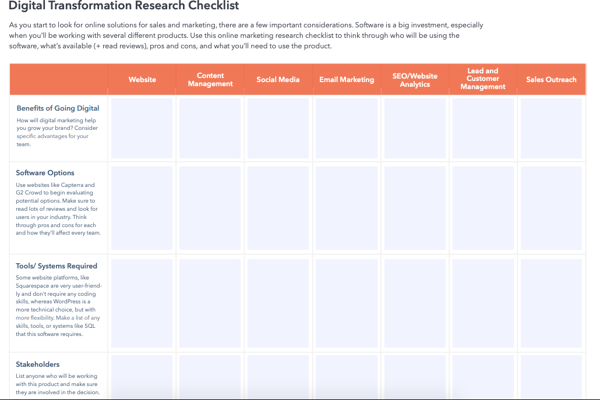
Week one is all about gathering existing sales and marketing materials on paper, while week two dives into transferring your business online, and so on. These small steps are designed to fit into your busy schedule and help you remain organized as you transition.
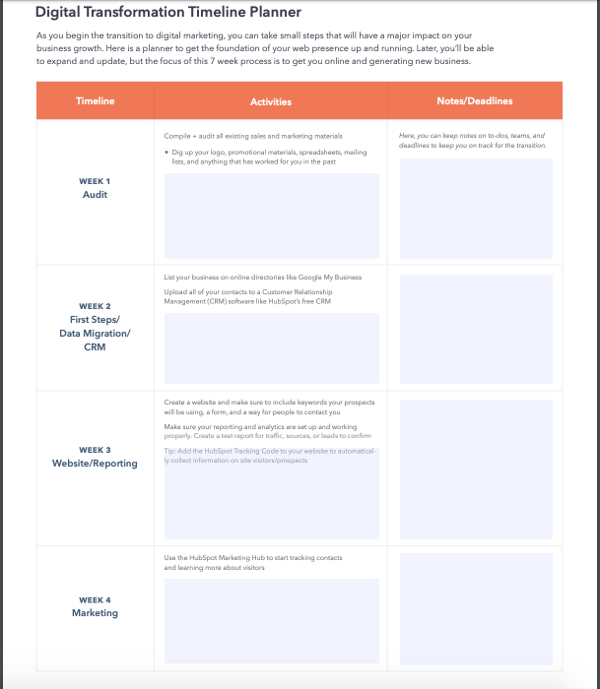
Week two is all about data migration. A free CRM, like HubSpot, can help you input business data, customer profiles, into an easy to access database.
During weeks three and four, you should have a functioning website and marketing resources that will help you learn more about your visitors and their behavior.
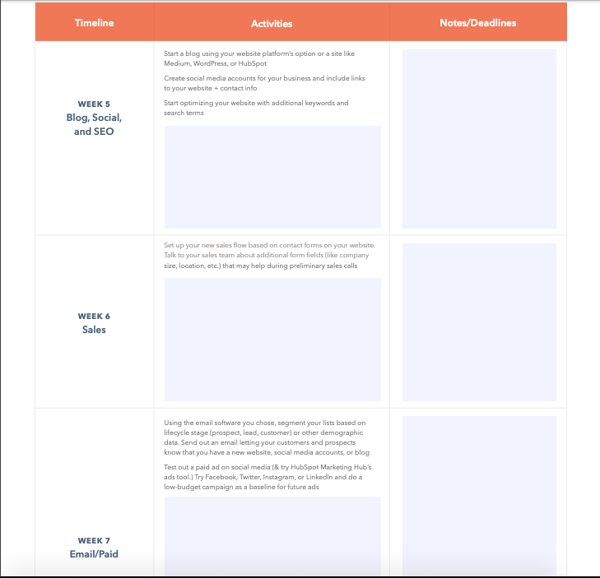
The latter half of the weekly plan ramps up your online presence. Using this template can help you organize your new digital shift by area to avoid doing one huge push all at once and confusing employees.
Creating a blog during week five will help you find your target audience online. Posts should be about your target market (if you’re a tech marketing company, posts should center around the intersection between the two) to demonstrate your expertise. This will build your reputation as a thought leader in your industry.
By week six, you should set up a sales flow that will digitize your sales process. Online sales tools allow you to keep track of all your contacts, log your conversations, and keep tabs on-call schedules and upcoming meetings.
Email and paid ads should be rocking-and-rollin’ by week seven. The email software you choose will help you through the process of sending automated emails to subscribers and let you test out paid ad software.
In a month and a half, most of your business processes will be digital.
Best of all, this template can be tailored to meet your business’ transformation individual needs and gives you the wiggle room to expand as your business continues to scale — but as a starting point, it gets you up and running.
Once you’ve created your digital roadmap, it becomes easier to go more in-depth into your processes and create a finalized list of the technology you’ll need to succeed in your transformation. Below, we’ll go over some popular digital transformation tools to consider using.
Digital Transformation Tools
Depending on your overall transformation goals, there are multiple platforms available to help you succeed and meet your objectives. However, there are various multipurpose tools that can benefit all types of businesses, and we’ll go over a few of them below.
1. Instant Messaging
Instead of having a meeting or a long email thread for a quick message, consider using a company-wide instant messaging tool for quick and easy communications. Some instant messaging services are made for corporate settings, like Slack or Flock .
With these services, you can file share, direct message, and create channels where teams can collaborate and discuss projects. Think of it as the office water cooler — just online.
2. Application Tools
Are you looking for new talent? The best candidates (especially ones who prefer to work digitally) are online. For instance, LinkedIn, a site for professional networking, is an excellent source for recruiting candidates:
Using LinkedIn’s template will help you post a listing, and you can use LinkedIn’s industries function to ensure it’s shared with relevant candidates. LinkedIn will alert you of new entries and send you their applications, making the selection process an online breeze. This is an alternative to collecting application materials via email, where it might be difficult to structure, organize, and compile applications.
3. Sales Management
Software is available to help manage many facets of your business, including sales. This software enables you to manage calls, pipelines, reporting, and follow-up resources to help your process migrate smoothly online.
For instance, as shown above, HubSpot’s Sales Hub can be used to organize all of your sales materials online. Within the platform, you can manage deals, filter contacts, and create different tasks using a dashboard to help you keep track of your sales processes.
4. Standard Operating Procedures (SOPs)
If you have certain aspects of your day-to-day that require multiple steps typically written down on paper, transfer it online. This will reduce paper trail and make the processes shareable and accessible to all employees.
Online SOP software makes it easy to list procedures and job functions, which can be beneficial for onboarding and employee training. To make a smooth transition to your new digital tool, consider talking to employees and asking them to contribute and collaborate with you in the process. The image below is an example of a digital SOP workflow management tool by Process.st .
5. Customer Relationship Management (CRM) Software
A CRM is going to be your best friend when shifting to an all-digital business. Whether your goals are to transform the customer experience, streamline sales, or digitize your marketing process, a CRM will make these processes more straightforward and even automate repetitive tasks. HubSpot’s free CRM offers three hubs that give you an all-in-one business platform designed for scalable growth.
HubSpot’s free CRM offers three hubs that give you an all-in-one business platform experience. From customer service reps to sales leaders and business owners, this free CRM helps you fully transfer your business online and drive growth.
6. Video Chat Software
Is your team out of town but you need to schedule a meeting? Are your representatives transitioning to a remote, work-from-home model but you still want to maintain a collaborative environment? Use video chat software to meet virtually and maintain employee connections.
Software like Skype for Business and Zoom offer free web-chatting services for professional use.
Skype has automatic subtitle settings and 1:1 capabilities, and the option to host multiple people on calls at once. Most software also has mobile applications to make sure you’re accessible and able to meet at any point during the workday.
Though these tools are designed to make your life easier, you may be confused about how they can apply to your business. Thankfully, many companies that are joining the digital revolution are doing so because they have similar needs. Below, we’ll go over digital transformation trends that you can use to further guide your process and understand how to apply the tools to meet your business needs.
Digital Transformation Trends
As the digital world grows, many businesses are jumping on the transformation trend. Whether you already have your own plan or you’re hoping to get inspiration for a future transformation, let’s go over digital transformation trends to look out for in 2021.
Rapid Adoption of a Digital Operating Model
COVID-19 has required businesses to quickly adapt to online models. As the pandemic could not have been predicted, many businesses were left scrambling to scale their processes as in-person, and on-site business models became unsafe. Most industries needed to rise to the occasion unless they simply could not adapt to a work-from-home or work-from-online model.
For example, customer service businesses found themselves needing to integrate online processes to successfully meet customer needs, like chatbots to answer routine and simple questions. Restaurants and grocery stores offering food services were forced to adapt to online food and grocery delivery options to continue to safely provide nourishment to customers.
As COVID-19 related outbreaks become controlled, the need to adapt won’t die out but instead will become a requirement. Businesses will need to continue to utilize the new tools they’ve adapted or create detailed plans for future unpredictable circumstances that may force them to adapt quickly.
AI and Machine Learning
Consumers are expecting personalized experiences now more than ever. Personalized experiences are also a driving factor of customer loyalty, as 41% of customers have reported switching companies because of poor personalization . This doesn’t just mean that customers want you to refer to them by their name when they call you on the phone; they want your business to know what they want before they know they want it.
Because of this, a popular transformation trend is the adoption of AI and Machine Learning tools that contribute to personalized and customer-tailored experiences. A typical example of this is the algorithms on Netflix. It analyzes your previous watch history, likes and dislikes, and content ratings to figure out what you’re most likely to enjoy and recommends new content. This process works, as approximately 80% of the TV shows people watch on Netflix are discovered through recommendations.
However, outside of providing different experiences for your customers, AI and Machine Learning can also involve streamlining rote processes that your employees do themselves, like cleaning up and organizing your data or using a social media scheduling tool to post and analyze your social profiles. McKinsey has predicted that, across the board, this kind of automation can increase productivity by 14% annually.
Location-Adaptable Technology
Also influenced by COVID-19, businesses in 2020 have realized how important it is to have an arsenal of tools available that will allow their employees to work remotely whenever necessary. Some of these tools are familiar options, like Google Suite, Microsoft Office Teams, and Trello, but additional tools have gained popularity throughout 2020.
Ring Central is one of these tools, as it enables calls to your business line to be forwarded to mobile phones, or remote working employees. This is extremely beneficial for customer experience focused businesses. Zoom is another tool that has become a communication powerhouse over the last few months. It is an easy-to-use desktop platform for scheduling, hosting, and recording company meetings.
All in all, COVID-19 has shown us that working from home is a valuable modell for businesses to consider, both during and after the pandemic. Some businesses have already committed to continuing this practice as time goes on. For example, Google has pushed back planned office returned dates to September 2021 and has said that the company will be testing a flexible workweek model where employees can split their workweek between working from home and participating in office collaboration days.
Application Programming Interface (API) Security
As processes become digital, it becomes even more important to protect the private, sensitive information you store within your company platforms. Given this, a recent digital transformation trend is an increased need for API security.
In short, the APIs you’re using are the products you’ve implemented due to your digital transformation strategy, like Slack. Slack is a tool that can house business communications between internal teams and business employees. You’re likely using Slack to send out private information that is business-sensitive, but how are you going to ensure that this data isn’t taken advantage of?API security.
API security involves using safety measures that ensure your sensitive information is secure and safe from hackers or external threats, like encryption services and two-factor authentication. While these measures are essential for your business information, API security is also important to consumers.
For them, this means that the information you collect from them is stored securely and also safe from external threats. This means that if they enter banking information on your site to make a purchase, they want that information safe from malware. If you have an app that they’ve downloaded onto their phone, they want to know that the app is secure, and no third-party has access to this information. 84% of customers are more loyal to companies with robust security, so it’s worth adapting these processes.
Given the trends mentioned above, it’s clear that digital transformation is something to focus on for 2021 if you haven’t already begun the process for your business. Or, if you have, maybe you’re hoping to address a different business challenge and start a new process entirely. Whatever your desires are, let’s go over four real-life examples of brands that have gone digital in a notable way.
1. Nike
Nike, a sportswear company, has focused their digital transformation strategy on mobile devices. Rather than needing to visit a store and consult with an in-person employee, their mobile application uses machine learning and AI algorithms to study customer preferences and previous purchases to recommend products they may enjoy.
The company also created a scanning tool where customers can scan their feet and the AI uses 13 data points to recommend the best pair of shoes. This automation eliminates the need to obtain recommendations from an in-store employee, so users can make decisions at home and spend less time in stores because they already know what they want.
During the pandemic, this tool has become especially useful as customers can get shoe recommendations and make purchases online, ensuring the safety of in-house employees and other visitors.
2. Wepow
Wepow is a Human Resources tech company. They have enacted a digital transformation to digitize the application and hiring process. Like Nike, the company has used AI and machine learning to analyze data to make it easier for employers and applications to connect digitally through online video interviewing and online applications.
During the pandemic, businesses like this have become a beneficial resource as an alternative to in-person interviewing as remote work and safety requirements do not allow for in-house interviewing.
3. Target
Target, a U.S. based department store, has spent the past eight years enacting a digital transformation that bridges the gap between in-person and Ecommerce shopping.
Many of their stores have been remodeled and equipped with new technology like self-checkout kiosks and in-store scanners to obtain information about products they’re interested in rather than asking for help from a store attendant. As a result, employees spend less time on rote processes and focus on customer service needs that can’t be solved with a digital tool.
A transformation that has become increasingly beneficial during COVID-19 is their online shopping and curbside pickup option. Even though customers may be shying away from visiting a store, they may not want to wait for a shipped item to arrive at their house. Curbside pickup allows them to order everything they need online and seamlessly pick up their items at a physical Target location without leaving their car and entering a store.
4. Museo Nacional Thyssen-Borenmisza
Part of the allure of visiting a museum is the ability to aimlessly walk through exhibits and lose track of time. This desire hasn’t changed, but unfortunately, health and safety regulations have limited or gotten rid of the ability to safely browse your favorite galleries.
Museo Nacional Thyssen-Borenmisza, an art museum in Madrid, has risen to the occasion and undergone a digital transformation that allows art enthusiasts to continue enjoying what the museum has to offer from the comfort of their own home. They’ve digitized some of their most popular galleries and created an online museum walkthrough for interested visitors to explore and immerse themselves in the art.
Join In on the Digital Transformation
Digital transformation is digital because technology is used to solve traditional business problems and enhance the customer experience. For most businesses, some sort of digital presence has always been essential. However, recent health and safety requirements have shown that now, more than ever, businesses must have the ability to rise to the occasion and meet customers online.
To make sure that you’re one of these businesses, take the time to create a digital transformation roadmap, research the necessary tools, and understand the trends that have inspired other businesses to change. Being prepared now sets you up for success, regardless of what the future holds.

19 Brilliant Examples of Holiday Marketing Campaigns
Every year, as soon as Halloween is behind us, it seems like the floodgates open. Without warning, there are holiday marketing campaigns everywhere, with countless businesses rushing to cash in on a spending frenzy. There are holiday emails, social media posts, and TV ads — oh, my.
It might seem like holiday marketing is out of control. But some brands do it very, very well.
How? Well, these brands create campaigns that actually delight customers instead of adding to holiday “noise.” They evoke emotions and promote sharing, sometimes even connecting people with their loved ones, or partnering with a charitable organization.
Great holiday marketing campaigns come in many different shapes and sizes. Check out our favorites below, and use these ideas to fuel your own holiday marketing ideas.
1. Walkers: All Mariah Carey Wants for Christmas
While the holiday season is a time for caring and sharing, Walkers shows musician Mariah Carey doing the exact opposite. After filming a music video for her famous song, “All I Want for Christmas Is You,” Mariah Carey gets angry with an elf for taking her Walkers chips. To fend him off, she sings a highnote which makes him block his ears and let go of the chips.
This is a hilarious commercial because it shows that the only thing you might not want to share on Christmas is Walkers products. It also shows how even stars, like Carey, enjoy the brand.
2. Coca-Cola Canada:Give Something Only You Can Give
In a recent holiday commercial, Coca-Cola brings us the story of a dad doing everything possible to deliver his daughter’s letter to Santa.
The dad enjoys a Coke while deciding what to do with the letter. We can sense that he’s not sure whether he’ll get there in time.
We see him sail through a sea, hike through a forest, ride across a desert, and climb a snowy mountain as he searches for Santa. Finally, he gets there, but Santa’s closed for Christmas. Just when we think the situation’s hopeless, Santa saves the day by cruising in on a Coca-Cola-branded truck and taking the dad home.
His little girl’s wish? For him to be home for Christmas. (This ad will definitely make you cry.)
While we’re always tempted to give expensive gifts, the best thing that you can give to your loved ones is your presence and time.
This installment is just one of the latest in the Coca-Cola company’s legendary holiday marketing campaigns — I mean, who doesn’t love the annual debut of the Coke-drinking polar bears?
3. Microsoft: Find Your Joy
The year 2020 was difficult for many of us. We spent more time on Zoom than ever before, and we heavily relied on technology to distract us from the COVID-19 pandemic. But that doesn’t mean we still shouldn’t celebrate the holidays and make the most out of it with our loved ones and pets.
Microsoft’s holiday commercial takes a fun spin on this theme. The commercial begins with a puppy named Rufus. Rufus longs to play and approaches each member of the family, but everyone, from the mother to the grandpa, is enjoying a Microsoft product and doesn’t pay attention.
Rufus grabs his best bud, a puppy from next door. Together, they go on an imaginary adventure involving the games and activities their humans had been enjoying. The ad not only showcases Microsoft’s offerings, but reminds us to cherish our loved ones (and to pay attention to our pets!).
4. Macy’s: In Dad’s Shoes
Macy’s campaign offers a new spin on what might be considered an overdone gift: socks.
“In Dad’s Shoes” takes a little girl through a “Freaky Friday”-like adventure, where she finds herself literally walking in her dad’s shoes for a day. Even though we see her as the daughter, everyone else, from neighbors to passerby, greets her as if she’s her dad.
Throughout the ad, she realizes how much work her dad does and how many places he frequents throughout the course of the day. He spends a lot of time walking. That’s how she gets an idea for what she’ll get him: socks. We all know that you can’t get anywhere without a good pair of socks.
We love that Macy’s showcases a simple gift borne out of empathy. This ad tells us that gifting doesn’t have to be complicated, expensive, or over-the-top.
5. Airbnb: Airbnb Hosts Ring Our Opening Bell
This is a great example of an ad that doesn’t explicitly allude to the holidays, but rather emphasizes the value of community and gratitude.
Airbnb celebrates the season by thanking its four million hosts for opening their homes to strangers all over the world. The video shows various hosts from different countries ringing the bell and opening the door. We go from the United States to Japan, from Kenya to New Zealand, from Brazil to Spain. (We love that each of these countries were listed in their original languages!)
This campaign demonstrates that you don’t need string lights or artificial trees to create an amazing campaign that embodies the holiday spirit. You can uplift your company’s values, celebrate your wins, and appreciate those who’ve played a role in your success.
6. Amazon: The Show Must Go On
If you lived through the 2020 pandemic (which you most likely did if you’re reading this), then you know how much it derailed any and all plans. Being quarantined keeps us from achieving things, it turns out. Unless it requires alone time.
In this ad, Amazon effectively punches us in the gut with the story of a ballerina who was chosen to play the lead in her dance school’s winter show. The girl is thrilled to be chosen, but as the months pass and the pandemic gains traction, the event is canceled. Ballet classes are moved online. The girl’s initial thrill fades, a feeling we can all relate to.
Her little sister remedies the situation by putting together a DIY event next to their apartment building. All of the tenants look down on her as she dances. The event is socially-distant, and the girl gets to dance the ballet she’d been practicing for since the beginning of the year.
What we love most is Amazon’s tasteful product placement. Rather than showing everyone ordering all supplies from Amazon, the ad showcases the purchase of a single product: a flashlight. The flashlight is the critical piece that allowed the tenants to watch the show from their balconies.
7. Woodie’s: #WereAllHomemakers
This one made us cry. Woodie’s, an Irish home improvement store, reminds us of what the holidays are about through the story of Mrs. Higgins, an elderly woman who’s beloved in her neighborhood.
Throughout the ad, we see multiple people greet her. Neighbors and passersby are fond of her. Even the rowdy teens who loiter in front of her house love her. She has one problem: the door that leads to her yard is missing a hinge. In the United Kingdom, homes typically have a fence with a gate. Every time she leaves and comes home, she struggles opening and closing that door, as one corner drags across the ground.
When Mrs. Higgins comes home on one particularly snowy day, she finds that her door opens smoothly. The picture focuses on the new hinge that had been installed.
Who fixed it? It turns out it was a one of the teenagers who loitered in front of her home. With this advertisement, Woodie’s not only subverted expectations but also effectively communicated what’s so wonderful about the holidays.
8. Hinge: See What We’re Thankful For
This holiday season, what are you thankful for? Recently, dating app Hinge sent around an email posing the same question to its members, using the opportunity to talk about its recent rebrand and subsequent growth — something for which Hinge itself has enormous gratitude, according to the email.
The timing for this sort of marketing is impeccable. The holidays are notorious for the sentimentality they invoke among the masses, and the desire to spend them with “someone special.”
Hinge used this email to harness the holiday spirit and redirect attention to an app that helps people find meaningful relationships, instead of, well, shorter-term alternatives.
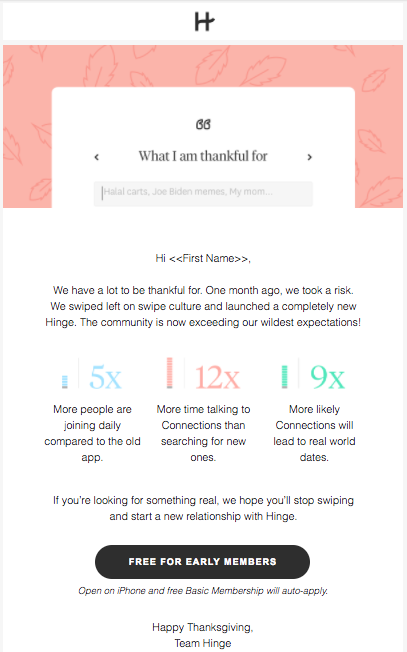
[Click here to see the full email]
9. Lagavulin: Nick Offerman’s Yule Log
This one is an oldie but a goodie. Actor, writer, and humorist Nick Offerman loves his whisky. He’s sung about it before, and during a previous holiday season, he joined his favorite whisky brand, Lagavulin, to film a 45-minute video of — wait for it — Offerman sitting in a leather chair next to a crackling fire, drinking whisky and looking calmly at the camera. Where do we sign up for that gig?
“This is smart branding on Lagavulin’s part,” Kristina Monllos wrote for AdWeek. “Creating an extended ad that can serve as a conversation starter — should consumers swap the traditional Yule Log video for Offerman’s at parties — will also get everyone talking about the brand.”
Since the video was initially released, a new 10-hour version of it became available. Consider it our gift to you.
10. BarkPost: Yappy Thanksgiving Eve
Holidays are traditionally a time to be spent with family. For many of us, that includes our dogs.
BarkPost is no stranger to marketing campaigns that help “dog ruvers” include their furry friends into day-to-day life. In November, the pet-friendly brand showed how to do that at Thanksgiving, with a clever email that included holiday-themed cartoons and videos, feeding safety tips, and other holiday survival techniques — which, of course, involve your dog.
Plus, check out that adorable call to action at the bottom of the email: “Stop getting cute dogs in your email. Unsubscribe.” I mean, who would want to unsubscribe from that?

11. reMarkable: Keep Your Goals for the New Year
You may not have heard of reMarkable, but no matter: this company is the definition of cool and simple. Their single offering is a tablet that acts as a “digital notebook.” When you jot anything down, the reMarkable tablet automatically turns your writing into typed notes. Pretty cool, huh?
In its New Year email ad, reMarkable embodied the simplicity of its product by creating an equally simple campaign. In the email, they entice you to splurge with a $50 discount. Everyone knows that New Years is a time to make plans, set goals, and get your things in order.
reMarkable presents its product as the way to do that. They want to help you save time, which will help you spend more time with your loved ones and pets in the upcoming year. And who likes transferring notes from a notebook to a tablet?
12. Kool-Aid: All I Really Want for Christmas feat. Lil John
In a music-video styled ad, rapper Lil John quietly sits down to drink a glass of Kool-Aid as the Kool-Aid man smashes through his wall. At that moment, the bass drops as a festive musical video begins showing Lil John rapping in front of a family Christmas gathering. The video goes on to show Lil John, the Kool-Aid Man, and Santa dancing along with shots of holiday food, presents, and Lil John’s Christmas list.
By launching a full-fledged music video with a prominent rapper, Kool-Aid both entertains prospects and demonstrates how “Kool” their brand is. Along with being humorous and entertaining, this ad also reminds you that you can still drink Kool-Aid during a time of the year where you’re mostly thinking about hot beverages.
13. Resy: Where to Spend New Year’s Eve
Don’t want to cook for New Year’s Eve? We don’t want to, either—mostly because washing dishes is a chore.
That’s what Resy bets on in a recent New Year email campaign. In a short but effective email, the company invites its subscribers to the best places to dine in the San Francisco Bay Area for the New Year. (If you’re not in San Francisco, you have the option to look for local eateries near you, also curated.) Like OpenTable, Resy allows you to make effortless reservations for you and your loved ones.
We love that this simple email keeps the focus on what we can do to celebrate New Year’s Eve. And what better way to do that than through delicious, local food that we don’t have to cook ourselves?
14. Erste Group Bank: #EdgarsChristmas #believeinlove #believeinchristmas
You might not recognize this company, but you’d definitely recognize their holiday ad from 2018. Remember the cute porcupine who couldn’t get any friends because his spikes were, well, spiky? The short film has more than fifty million views on YouTube and touched millions of people’s hearts on other social media platforms.
Erste Group Bank did it again during their 2020 holiday campaign. This time, they made it just a little bit more clear what they offer: loans that can help you purchase something that may feel out of reach, but that may help bring your family together.
The ad begins with a granddaughter handing her grandfather his hearing aids. Throughout the video, the grandfather seems unhappy. We later find out that it’s because he’s been wanting to play music, but has no way to because he doesn’t own a piano.
The granddaughter purchases a piano for him. In the end, the grandfather gets to play a song he’d written for his mother. The entire family joins in, and they play the song together.
15. Sonos + Spotify: #PlaylistPotluck
One great way to celebrate the holiday season is with an event. And with events typically come music. Spotify is aware of that tradition, which is why it created #PlaylistPotluck.
It started with a partnership with Sonos. The brands got together to turn playlists into something like a potluck in which everyone contributes something to bring the event together (the tagline of the campaign is “One home. One host. Everyone brings a dish.”) Only, instead of contributing food or drink, everyone contributes a tune to a collaborative playlist.
Oh, look. That feature is available with Spotify!
The idea is delightfully interactive. Instead of using traditional invitations, guests RSVP to the potluck by adding songs to the collaborative playlist. And the cherry on top? Both brands also partnered with the PBS series “Mind of a Chef” for a televised holiday special, in which various celebrity chefs will be using the feature for their own meals.
What we love about this campaign is the fact that it incorporates several different elements and media formats to make it cohesive — a speaker system, a music-streaming app, and a televised special. Plus, if you participate, you’re entered for a chance to win your very own dinner party, hosted by a world-renowned chef. Bon appetit — and rock on.
16. Google: Santa Tracker
While Google’s Santa Tracker has been around for a few years now — and we recommend checking out the back story here — its features have evolved over time. Now there are interactive mini-games such as “Santa Selfie,” “Wrap Battle,” and “Build & Bolt.” Additionally, you can watch delightful short films such as “A Day at the Museum,” so you can see what Santa’s day-to-day looks like.
It’s hard to narrow down what makes the Santa Tracker so delightful, but if we had to summarize it, we’d say this — it combines the holiday wonder of a belief in Santa with real-life technology. What a wonderful way to teach kids about the web, while also allowing them to be kids. (Although, we adults certainly appreciate it, too.)
Google even introduced a B2B element of the Santa Tracker by sharing the code with developers and releasing other elements of the tool as open source. Why make all of that information public? To inspire developers to create their “own magical experiences based on all the interesting and exciting components that came together to make Santa Tracker,” writes Google’s Developer Programs Engineer Sam Thorogood.
Up until Christmas Eve each year, visitors can have a peek at the “North Pole,” to see what Santa’s elves are up to as the holiday approaches.
17. Disney: From Our Family to Yours
Culture, history, and holiday cheer come together in this holiday advertisement from Disney. The media giant takes advantage of their long-standing name to take us back to 1940, when a young girl gets her first Mickey Mouse plush toy.
As the video goes on, we see the little girl grow older until she becomes a grandma. She hands down the plush toy to her granddaughter, who doesn’t appreciate it as much as she becomes a young adult.
The granddaughter realizes how much it means to her grandma and restores the toy back to its former glory. We definitely did not cry when the grandma opened her holiday gift and saw her old toy fixed and restored.
We expected something quite touching from Disney, and this one did not disappoint. We especially love how Filipino culture has been showcased to three million viewers and counting.
18. Black Owned Everything: Jingles and Things (with “Jingle Jangle: A Christmas Journey”)
Black Owned Everything, an Instagram curator of Black-owned businesses and brands, creates the perfect gift guide in Jingles and Things.
Done in partnership with Netflix and the musical “Jingle Jangle: A Christmas Journey,” Jingles and Things curates the very best gifts for the holiday season, including items ranging from fragrance to dishware to dolls. There’s truly something for everyone here—and the best part is that we can support Black businesses while completing our holiday shopping.
Zerina Akers, the owner and head curator of Black Owned Everything, introduces us to the shop by explaining that it’s not just a marketplace but an inclusive platform. There’s nothing more that encapsulates the holiday spirit than inclusivity, community, and belonging, and we love that Jingles and Things uplifts that theme.
19. Heathrow Airport: The Heathrow Bears Return
This adorable holiday commercial from Heathrow Airport shows the journey of two grandparent teddy bears as they decide to pack up, leave their sunny home, and go visit their teddy-bear grandchildren for Christmas. At the end, you see the bears reunite with their family in London’s Heathrow Airport.
For many, these bears are both nostalgic and relatable. They remind you of the bears you might have played with as a child and the average grandparents. At the end, when you see the teddy bears join their family, you might also remember the happiness you felt when your grandparents came and brought you gifts or hugs during the holidays.
This commercial is a sequel to a similar commercial the Heathrow launched a year before, titled “Coming Home for Christmas”. This ad follows the bears riding and exiting the plane to meet up with their family at a Heathrow Airport Gate:
This series of commercials has all the great aspects of an ad campaign because it’s relatable, nostalgic, and incredibly heartwarming.
Go Forth and Be Merry
Out of all the things that we appreciate about these campaigns, there might be one thing we like the most — the fact that they put the fun back in holidays. This season, don’t let the stress get to you. Have a laugh or a cry with these examples, and please, be merry.
From our family to yours, happy holidays.
Editor’s Note: This post was originally published in December 2015 and was updated in January 2021 for freshness, accuracy, and comprehensiveness.

The State of Video Marketing in 2021 [New Data]
It’s well established that video has been one of the breakout trends in the marketing world for the past decade.
But how is that assertion standing up to the twists and turns of a global pandemic?
The challenges — and changes — brought about by this most surreal year have affected us all.
At Wyzowl, we’ve released an annual State of Video Marketing survey every year since 2015, charting usage, spend, channels and opinions among video marketers and consumers.
We recently released our seventh State of Video Marketing report and, in light of the chaos of the past year, it’s perhaps our most fascinating set of findings yet.
Our research suggests:
- Video remains a key priority for marketers with usage and spend both, overall, increasing slightly throughout 2020, and plans to increase again in the next 12 months.
- The pandemic has impacted the video marketing landscape in contrasting ways – while video is generally seen as a more necessary tool by both marketers and consumers, many have seen budgets restricted and plans shelved.
- The pandemic has overwhelmingly increased the amount of online video people watch.
- Marketers feel more positive about the return on investment offered by video than ever, as it continues to strongly influence traffic, leads, sales, and audience understanding.
- Consumers continue to use video as an integral part of their journey with brands, and are excited to see even more video content in the year ahead.
About the Survey
Wyzowl’s State of Video Marketing Survey is an annual report, now in its seventh iteration. Every year, we ask a range of questions — many of them the same from year-to-year — to evaluate how the video marketing landscape is changing and growing.
This time round, our survey was taken by a sample of 813 unique respondents (our highest ever sample) consisting of professional marketers and consumers.
The key findings …
86% of businesses use video as a marketing tool, up slightly from 85% in 2019.
This is the high point in a general story of video usage growing which can be traced back to 2016 (the first time we asked this particular question in this way.)
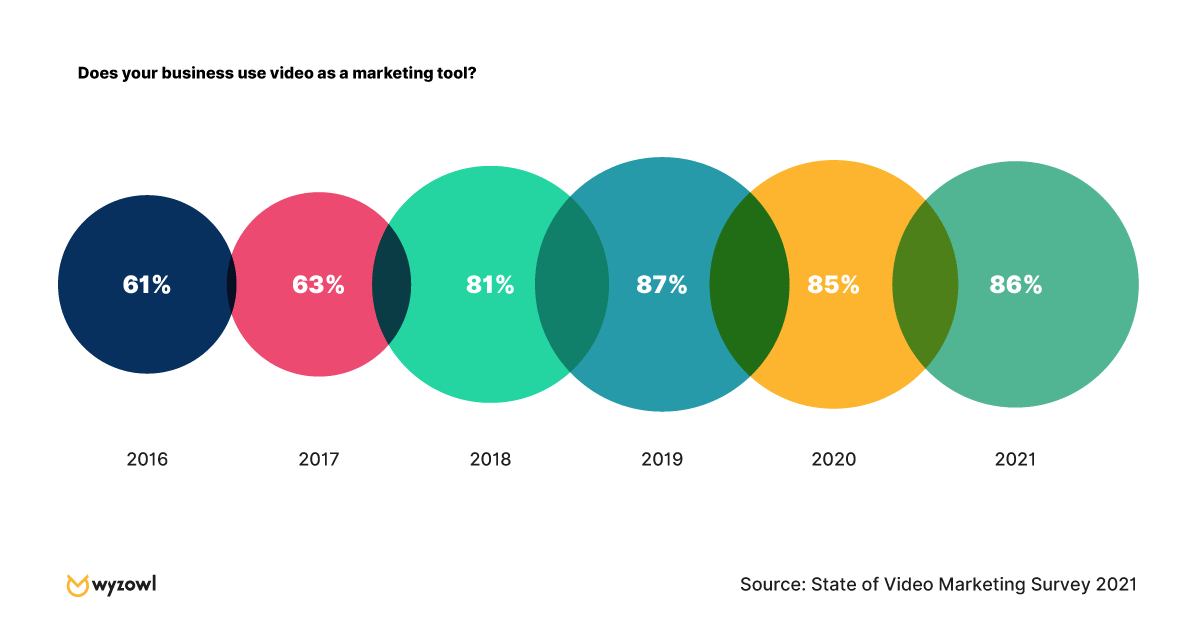
What’s more, 93% of marketers who use video say that it’s an important part of their marketing strategy — an increase from 92% in 2020, making this the highest percentage of any year since 2015.
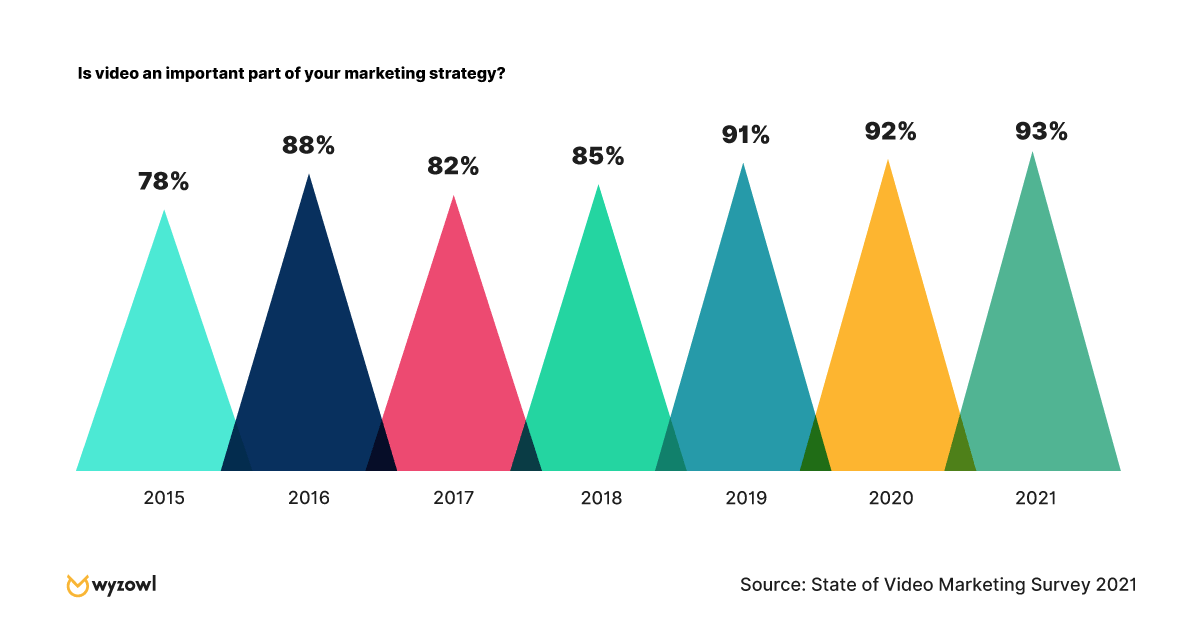
Perhaps most strikingly, 87% of video marketers reported that video gives them a positive ROI — a world away from the lowly 33% who felt that way in 2015. This could well be attributed to greater understanding of how to use video, as well as how to track and quantify its impact
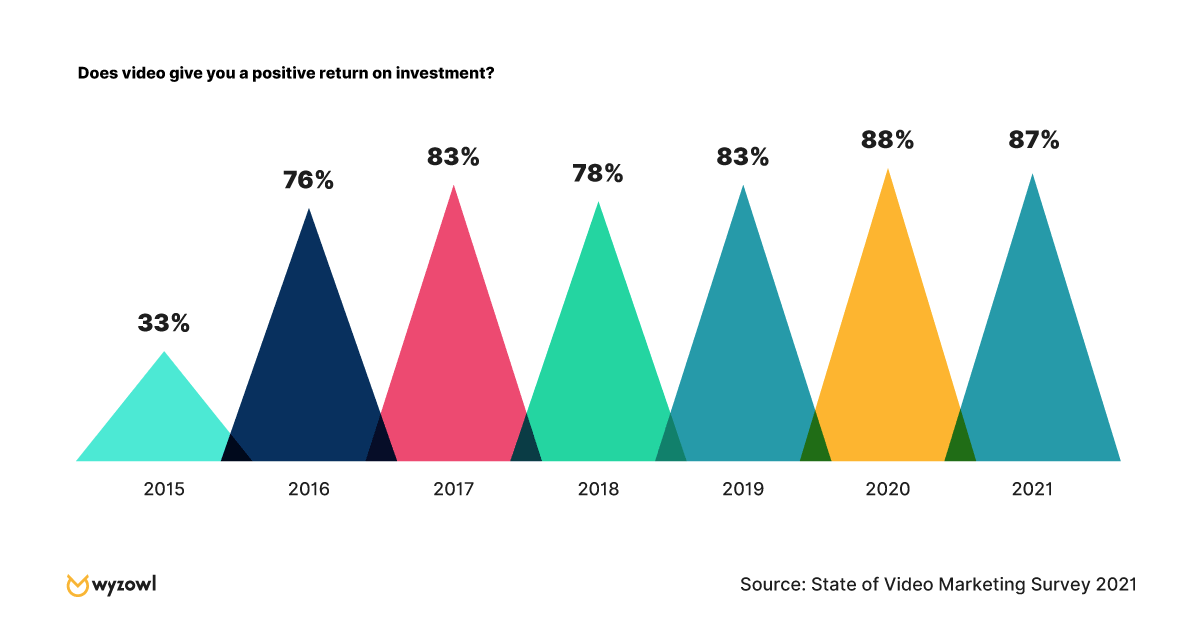
Pandemic Impact
So what about the impact of the global pandemic?
Let’s begin with the fact that 91% of marketers feel the pandemic has made video more important for brands.
A fairly considerable 40% of video marketers said their plans to create video were affected by the events of the last year — with around 74% of these saying they were more likely to use video, and 26% saying it was less likely.
Around 60% of video marketers say they expect their budget to be affected for 2021, with around 70% of those people expecting a higher video marketing budget, and the other 30% expecting it to be lower.
68% of consumers say the pandemic has impacted the amount of video content they’ve watched online, with the overwhelming majority (96%) saying this has increased.
Looking forward …
All the signs suggest that usage and spend are on course to continue their growth in 2021.
More than 99% of current video marketers told us they’ll continue using video in 2021, and 96% plan to increase or maintain their spend (again, up slightly from 95% last year.)
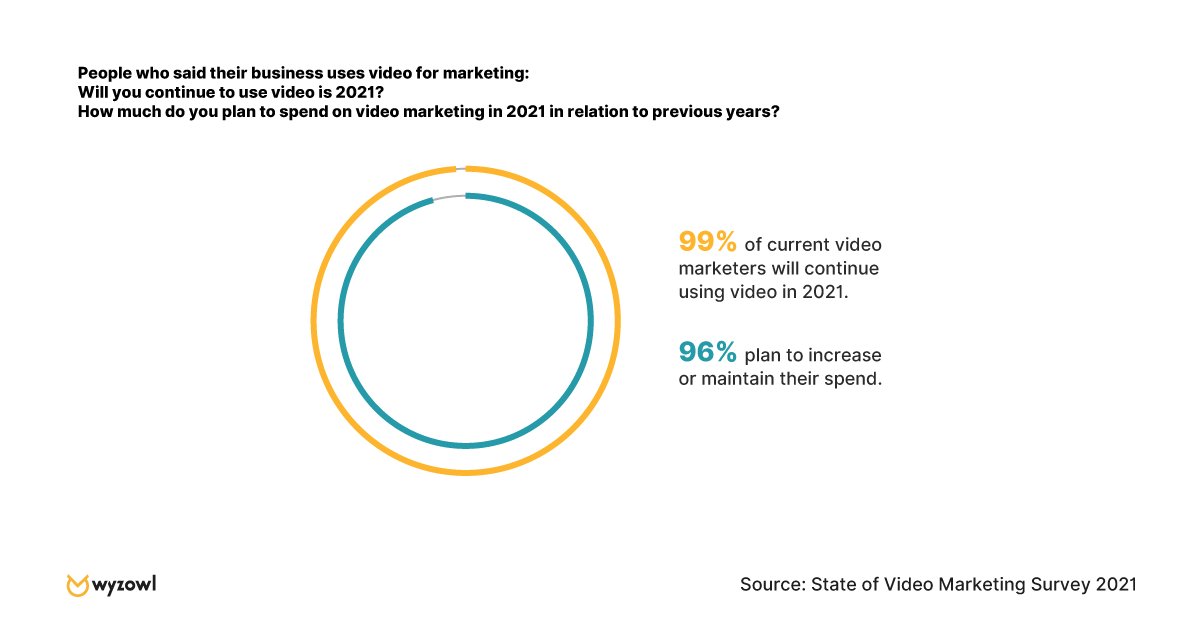
What’s more, from the people who told us they don’t currently use video, 69% told us they expect to start in 2020. (This is 10% higher than last year’s figure of 59%.)
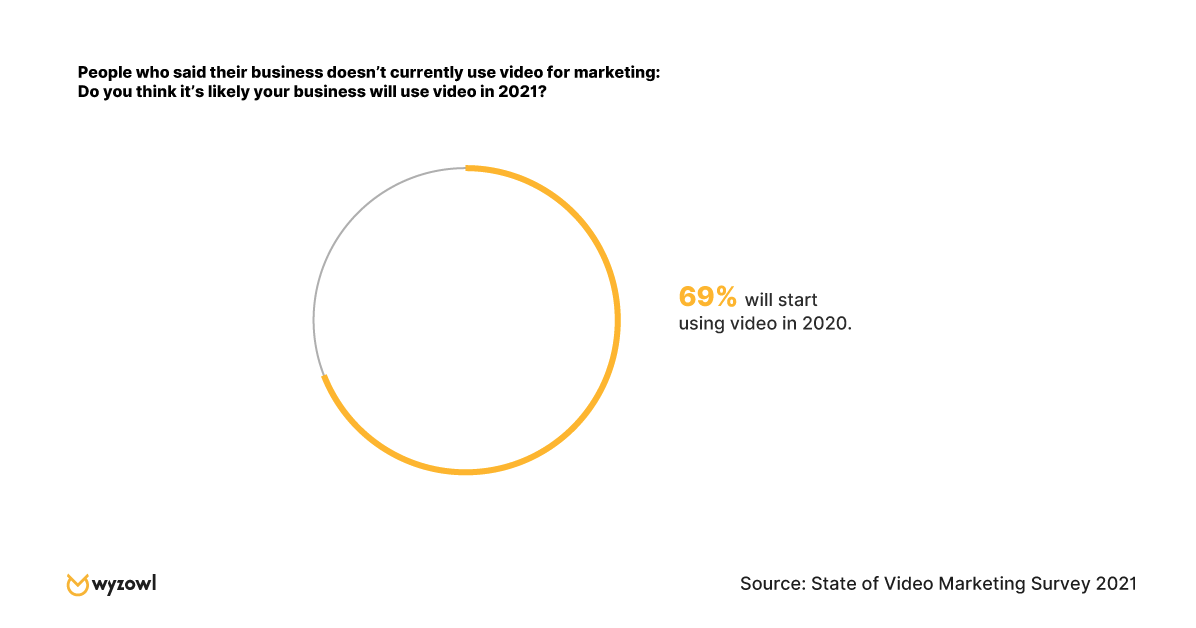
The net result of this is that we can all expect to see more noise and competition for audience attention in the coming 12 months.
Of course, while this is a challenge, it isn’t an insurmountable one. It simply raises the bar in terms of content quality. Video needs to be well-planned, and very well-executed.
The big opportunities …
You’d be forgiven for looking at these numbers and feeling that video might be on the verge of reaching saturation point. Most of the data around usage, spend, and consumer opinion are in the 80s and 90s — where they’ve held, consistently, for a number of years.
But the good news is that there still seems to be underutilized opportunities for marketers to explore around video.
Unsurprisingly, YouTube and Facebook are the most widely used platforms among video marketers — used by 87% and 70%, respectively.
But some of the lesser-used video tactics also seem to be reaping real results for video marketers.
Most notably, perhaps given global events and an increased desire for remote connection, 2020 seems to have been the year of the webinar. In 2019, just 46% used webinars — but in 2020, this rose significantly to 62%.
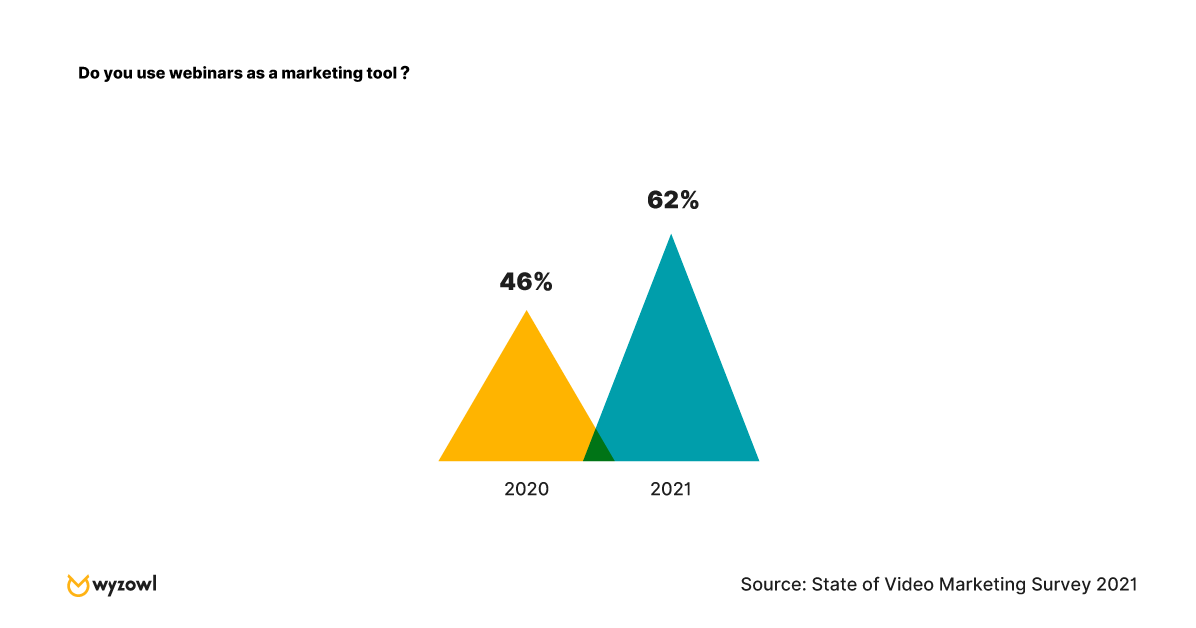

What’s more, an overwhelming 91% of webinar marketers say they’ve been a success, making it the most effective video marketing channel of all those listed.
To Sum Up
The events of 2020 did, and are doing, little to slow the rise of video.
In many ways, with people being isolated in their homes, and some teams working with less budgeting and resources than pre-pandemic, the demand (and consumption) of video has been accelerated.
Video looks set to continue its ten-year overnight success story into the coming decade. These stats paint a picture of a media type that’s almost universally popular among both marketers and their audiences, helping achieve a number of incredibly important goals.
You can check out the full report — with plenty more data points — and get a downloadable version by visiting Wyzowl’s State of Video Marketing 2021 page.

How to Use Schema Markup to Improve Your Website’s Structure
Just like when I first watched The Matrix, when I initially heard the term “schema markup,” I was intimidated by the technical know-how I felt I needed to understand it.
However, just like the movie, understanding schema markup isn’t as difficult as you might think.
As a marketer, schema markup is important because you want to make it as easy as possible for search engines to crawl your website.
The easier it is for Google to understand your site, the higher in search engines your website can appear.
Below, let’s review what schema markup is, where to add it, and how it can improve your website’s structure.
What Is Schema Markup?
Schema markup is code you can add to your website that helps search engines return better results for users. Essentially, it gives vital information to search engines to include in your listing that can improve visibility online, as well as click-through rates.
In 2011, top search engines including Google, Yahoo, Bing, and Yandex collaborated to create schema.org, which is a “collaborative, community activity with a mission to create, maintain, and promote schemas for structured data on the Internet, on web pages, in email messages, and beyond.”
Ultimately, schema markup is a form of microdata. According to Wikipedia, “microdata is an HTML specification used to nest metadata within existing content on web pages. Search engines, web crawlers, and browsers can extract and process microdata from a web page and use it to provide a richer browsing experience for users.”
For instance, schema markup will create an enhanced description — sometimes referred to as a rich snippet — which will appear in search results.
As a result of using microdata, your website’s structure will be simple and easy for search engines to crawl, making it easier to appear higher in search results.
1. iPhone 11 Example
Below is an example of a search engine results page featuring listings with and without schema markup data. As you can see, three of the top four results for the iPhone 11 have schema markup data including ratings, reviews, and price.
Although T-Mobile and Tom’s Guide are the third and fourth listing down, using schema markup microdata can improve its click-through-rate. Plus, it helps the listing stand out from the rest.
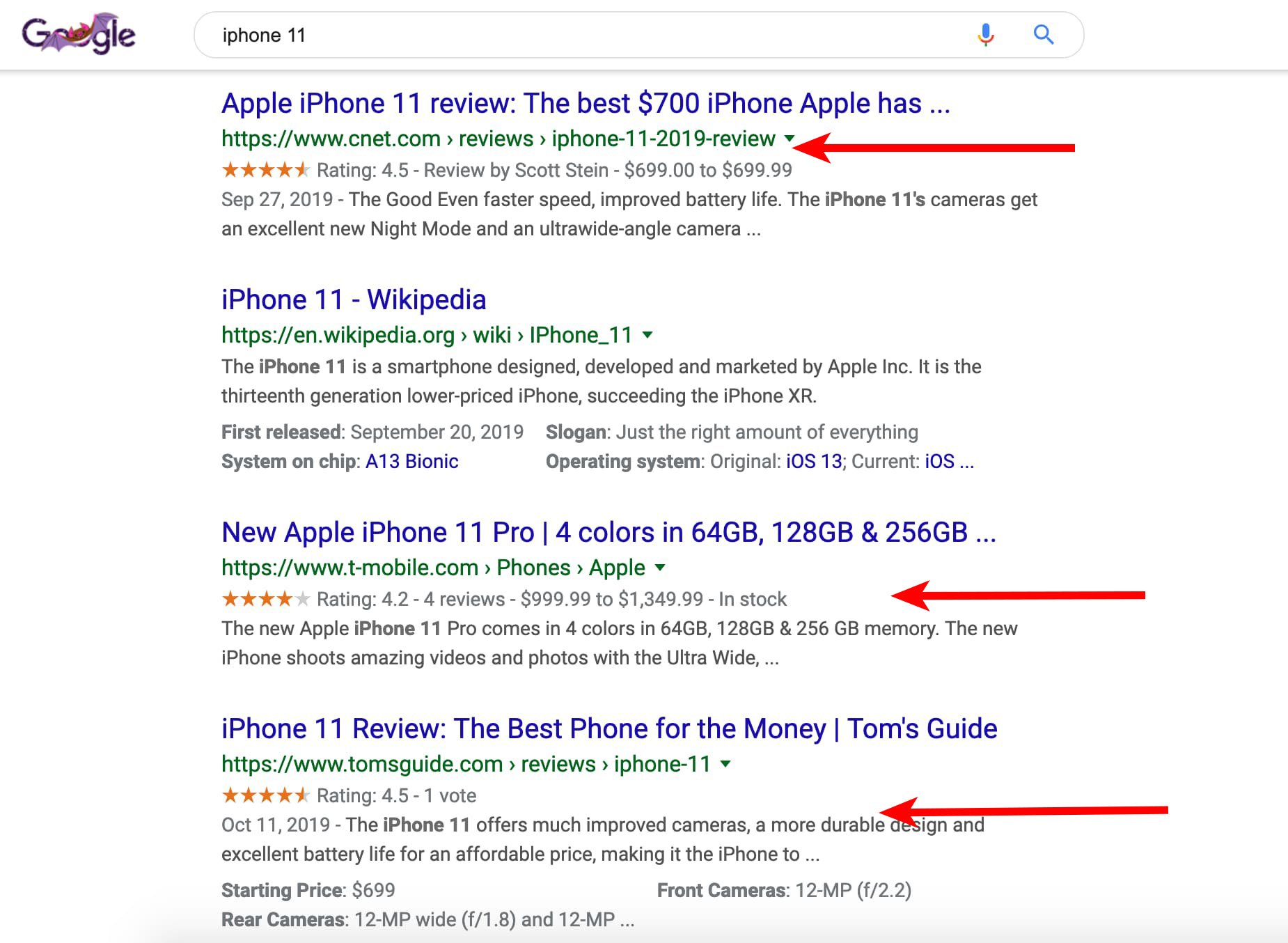
2. Betabrand Example
However, the one from Amazon includes ratings and reviews.
Again, including this type of information helps search engines provide more information that can persuade users to click on your listing.
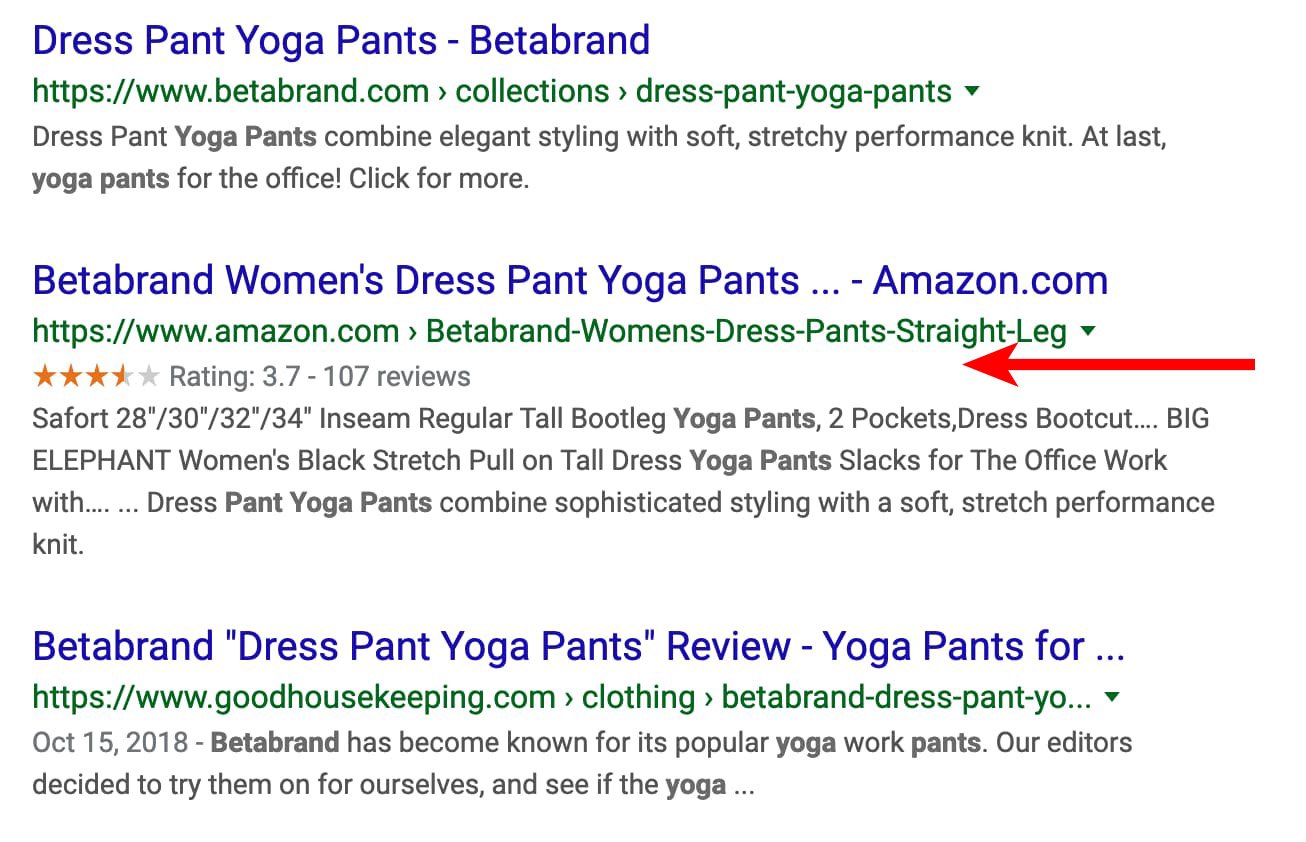
3. Booking.com Example
If someone is searching for and might be staying in that hotel they can learn how close it is to the airport, the average cost, and the ratings.
Where to Add Schema Markup
You can add a variety of microdata depending on your service or product.
For example, you can include:
- Reviews
- Star ratings
- Pricing
- Availability
- Events
- Location
- Price range
- Payment options
- Store hours
The options are endless. No matter what service or product you sell, you can use schema markup to enhance your search engine listings.
So, how do you add schema markup to your site?
Schema Markup Generator
The process is actually pretty simple. All you need to do is use a schema markup generator.
Step 1: Go to Google’s Structured Data Markup Helper
Step 2: Select the type of listing you want to add schema markup to. Then, copy and paste the URL in the form field.
Step 3: Add schema markup data on the right pane by filling in the information you want to show up.
Step 4: Hit “Create HTML” button.
Step 5: Copy and paste the yellow, highlighted code. This is your schema markup code. Alternatively, you can hit the “Download” button to grab the code.
Step 6: Paste the code into your content management system.
Once you’ve gone through this process, you’ll want to then test your schema markup to make sure it shows up correctly in search engines.
If you use HubSpot, you can actually use a Schema Helper integration to add schema markup to your posts.
Below, let’s review how to test your listing.
Schema Markup Tester
Now that you’ve added the schema markup code to your site, it’s time to test it out. You can do this by using the Google Structured Data Testing Tool.
You can test your schema markup two ways: by URL or code.
To test the URL, all you need to do is copy and paste the URL of the webpage you want to see. Then, the tool will showcase a preview of your listing.
To test the code, you can copy and paste the code the structured data markup tool generated for you. Again, a preview of your listing will appear.
While schema markup may seem technically intimidating, it’s actually a simple process. By using schema markup code, you can increase the visibility of your search engine listings and improve click-through-rates.
