
Welcome to My Blog
The 5 Types of Social Media and Pros & Cons of Each
Marketers commonly use social media to increase brand awareness, generate leads, and improve traffic. If you’re tasked with starting a social media strategy for your company, you might be wondering which type of platforms you should be on. Your platform choice will likely change based on your audience.
The list of social media platforms is growing, and well-known platforms like Facebook are always evolving and adding new features. With a greater and greater need for a social presence and an overwhelming amount of platform choices, it can be hard to pick which social channels to use.
You might not want to spread yourself too thin by managing a channel on every imaginable platform, but you also don’t want to miss great brand-awareness opportunities.
To help you make informed decisions about which platforms to use, this post will guide you through some of the core types of social media, examples of platforms within each category, and the pros and cons that each type might present. By the end, you should have a much clearer idea of what kind of social media strategy will work for your business.
Social Networking
Examples of Major Platforms
- Facebook: 2.6 billion monthly active users
- Twitter: 166 million daily active users
- LinkedIn: 160 million users in the U.S. alone
Social networking is possibly the most traditional form of social media.
Platforms like Facebook, Twitter, and LinkedIn are often called “networking” platforms because they allow user accounts to interact with each other in a variety of different ways.
Professional Uses
If you’re a small business, like a restaurant, a platform like Facebook could be a great place to start your social strategy. With Facebook, you can build a business profile that includes links to your website and details about your menu.
Once your profile is all set up, you can post regular updates about your business, “like” other pages, and answer customer post comments or messages. Business profiles also allow other Facebook users to give you reviews.
For companies looking to offer a professional service, B2B or publishing companies, LinkedIn is another great way to grow your following. LinkedIn emphasizes career-related networking.
Brands looking to build an audience of professionals from a certain industry can create a business profile there, categorize it with an industry type, and then use posts and messaging to publish updates. They can also use messaging and comment features to interact with their audiences, or users who comment on their posts.
A Twitter account could be helpful to companies in a wide spectrum of industries, from entertainment to e-commerce. This platform similarly allows you to create a profile where you can list and link company information.
You can then use Twitter to post about company updates, tag companies or customers in posts, retweet positive customer tweets, and respond to customer questions via tweet or direct messages. Like Facebook, you can also post content like photos or videos.
On all three networks, users can easily communicate with others through simple actions like tagging, hashtagging, commenting, private messaging, reacting to posts, and re-sharing content.
Aside from social interaction, newsfeeds on common social networking platforms are designed to show off a mix of text and visuals, rather than one primary content type.
This flexibility makes social networking platforms easy to begin a social strategy on because you can experiment with different forms of content before branching out to platforms that require more specific content types.
Here’s an example of Facebook’s newsfeed:
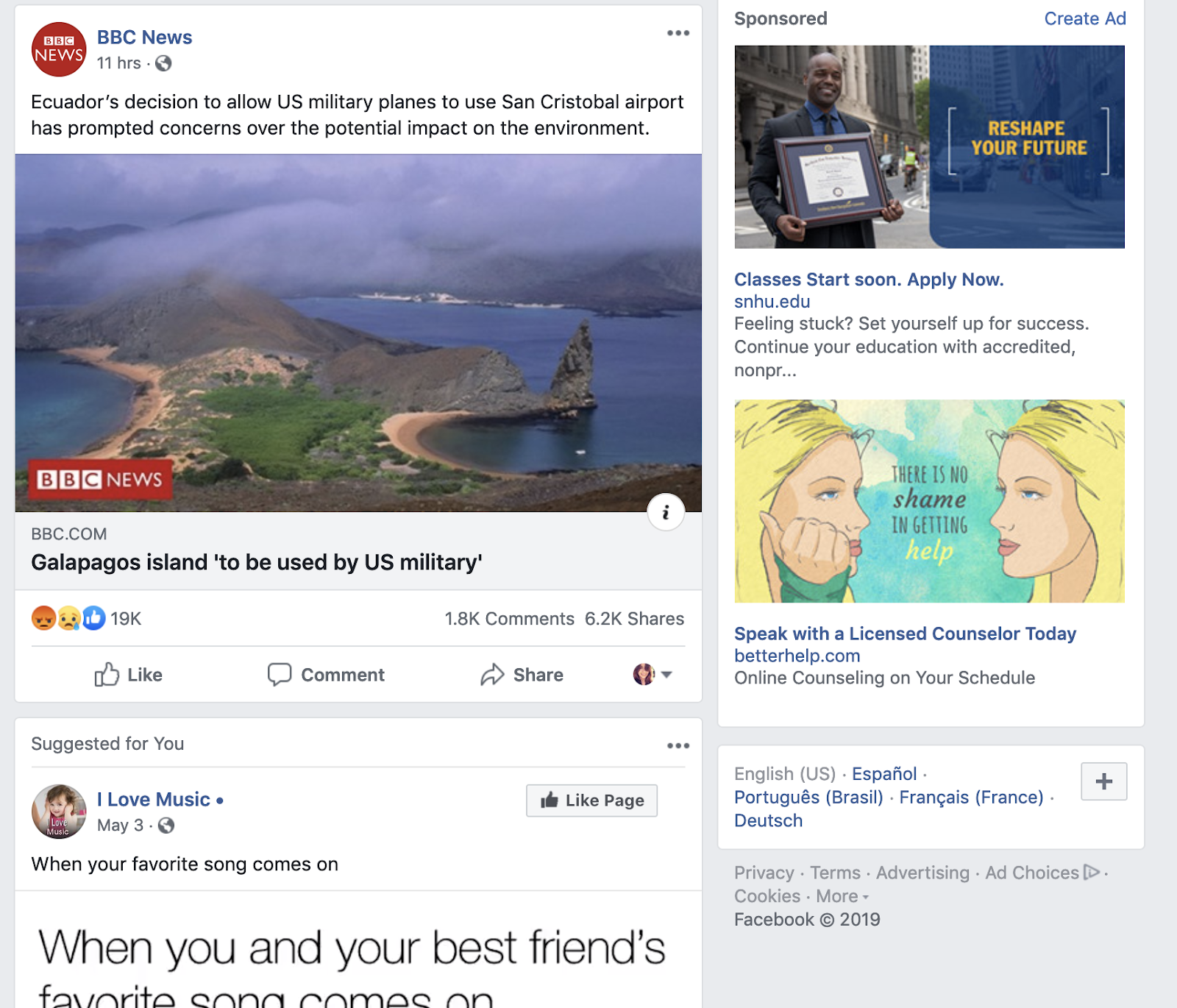
For those who want to dabble in video or graphics, these platforms could be a great place to test this new content. With the growth of video marketing, many have begun to launch more advanced features like Facebook Stories and Twitter’s live streams.
Platforms like Facebook and Twitter have also started to encourage native video and photo uploads more heavily. Recently, Facebook even adjusted its algorithms to favor live video and image uploads. This has caused these types of native content to gain greater user engagement.
If you’re still not sure where to get started, check out our beginner’s guides for Facebook, Twitter, and LinkedIn.
Pros and Cons
Pros
- Facebook, Twitter and LinkedIn are some of the most prominently used forms of social media
- Social networking sites often integrate with scheduling tools like HubSpot, Hootsuite, and TweetDeck software
- All platforms have capabilities for photo and video.
Cons
- Those interested in just posting links may have a harder time getting engagement than those uploading photo and video.
- Some platforms, like Facebook, put individual user posts higher than business posts in newsfeeds.
Photo Sharing
Examples of Major Platforms
- Instagram: 1 billion monthly active users
- Pinterest: 367 million monthly active users
Two of the biggest platforms that specialize in photo sharing are Instagram and Pinterest.
Instagram offers a visual feed with posts showing photos and short videos followed by a caption. Users can also post live video or create Instagram Stories that disappear after one day. Like the social networking platforms above, users can interact with others through tags, likes, comments, or direct message.
Professional Uses
This platform would be helpful to companies like restaurants or stores that want to photograph and display and update followers about their food, goods, or products in a crisp, clean way.
Instagram has become a home to influencer marketing, as 93% of influencer campaigns took place on the platform in 2018. It also offers opportunities for advertising and ecommerce because of its highly-visual layout.
Unlike some social platforms, Instagram emphasize visuals and doesn’t allow link sharing directly in posts. Basic users on Instagram can only share links in their bio. Verified users, or accounts with over 10,000 followers, can post links in their Stories.
To show you how visual the platform is, here’s a look at Instagram’s search feed:

Although basic users have minimal linking options, Instagram has tried to make the platform even more friendly for ecommerce businesses with the addition of Shoppable posts.
Pinterest is well-suited for ecommerce companies, such as those who sell home goods, and businesses that would like a place to share crisp standalone product images with links.
It similarly offers a photo-based feed with posts that can include a photo and short description. Unlike Instagram, it allows all users to link directly to websites or product landing pages in posts.
One interesting aspect of the platform is that users can heart posts from others, or assign them to a themed “board.” For example, users might make boards centered around topics like “Inspirational Quotes” or “Bedroom products.”
Once a board is created, other users can also follow it. A business could potentially make a board with their own product posts, or find their products on another user’s board.
Here’s an example of what a board looks like:

Before getting started on one or both of these platforms, you’ll want to determine whether your goal is to gain brand awareness or link-based traffic.
While Instagram and Pinterest can both be helpful tools for product shots and brand awareness, Instagram’s active audience is much larger than Pinterest’s. Instagram has also hosted over 25 million business profiles.
When choosing a platform, you may want to consider your content-related bandwidth. Both require visual imagery, but you might also need to include video creation within your Instagram strategy. Here’s a great guide that demonstrates what it takes to gain followers on Instagram.
Pros and Cons
Pros
- Platforms like Instagram help with brand awareness. Approximately 60% of people say they’ve learned about products or services on Instagram.
- Pinterest and Instagram provide an outlet for showing off visual content or product shots.
- Platforms like Instagram also allow you to experiment with visual or short video content
Cons
- Upkeep on these platforms might require a photo budget or dedicated production time.
- Some platforms, like Instagram, require you to post from a mobile app.
Video Sharing
Examples of Major Platforms
- Youtube: Over 2 billion monthly active users
- Vimeo: 240 million monthly viewers
Professional Uses
Roughly 88% of marketers say video gives them a strong ROI and 90% feel the level of video competition has increased. Adding a video platform to your social strategy could make your brand look relevant and keep you up to speed with your competitors.
Video can be helpful to a wide range of industries. While a restaurant could have a vlog with cooking tips, a technology company might focus its video strategy around product demos.
To help you pin down a strategy that’s right for your industry and service, check out our video marketing guide.
When it comes to long-form video, Youtube and Vimeo are the leading platforms. While Youtube has the bigger audience base and better SEO capabilities, Vimeo’s smaller platform is very community driven.
Youtube also seems to have better opportunities for advertisers and monetization, while Vimeo offers viewers the perk of no pre-roll ads.
For a longer list of similarities and differences, check out this head-to-head piece where we compare the business capabilities of Vimeo and YouTube.
Along with Youtube and Vimeo, the more traditional social networking platforms have also begun to embrace video marketing more aggressively. In the last few years, Facebook launched Facebook Stories and Facebook Live, and added a tab on their mobile app dedicated to video. Meanwhile, Twitter has allowed users to launch live video streams which are powered by its Periscope software.
Pros and Cons
Pros
- Videos can be longer than on other social platforms.
- Both platforms have website linking capabilities.
- Platforms like Youtube and Vimeo often offer analytics.
- Both Youtube and Vimeo have search optimization features.
Cons
- Content might take more time and money to create.
- These platforms require more backend tasks like SEO.
Interactive Media
Examples of Major Platforms
- Snapchat: 229 daily active users
- TikTok: 100 million monthly active users in the U.S. alone
Apps like Snapchat and TikTok allow users to share photos and videos, they also have a variety of unique interactive and highly experimental features. These two apps include AR/VR filters, musical overlays, and interactive games. Their audience bases are also prominently Gen-Z.
Professional Uses
Because mainly large companies are just starting to experiment with these new applications, marketers who are just beginning a social strategy don’t need to prioritize these interactive apps before traditional social networking platforms.
The large companies on these platforms tend to produce high production-level content. Brands with large followings might also publish Snapchat Stories, or videos that are curated from fans. Without a high-budget or giant online following, these strategies might be difficult for a company that’s just starting out on social.
Brands and influencers on these apps tend to cater their content to the platforms’ younger audiences. For example, on Snapchat, you might see stories that present beauty tutorials, wellness tips, news, or trendy new products.
If you’re really interested in interactive media, there are still a few viable ways you could get involved with Snapchat or TikTok.
While major brands, like VICE and BuzzFeed have become Snapchat Discover partners, the average business can still create a Snapchat business account that can be searched and friended by users. This account allows you to send publish temporary stories, just like individual accounts can. However, those with a business account can also purchase ad space.
Here’s a comprehensive video that explains how to use Snapchat:
If you’ve set up an account, check out this guide to getting started on Snapchat.
TikTok, an app based around short, repetitive clips — similar to Vine — offers five types of advertising options for businesses. While large businesses may find value in all five, smaller businesses may lean more towards “In-Feed Ads.” These ads are 9-15 second clips that can be skipped by the user.
Guess is one notable brand that has used its account to create trending campaigns with trendy hashtags. Universal Pictures has also had influencers create posts to promote its films.
If you do test out these platforms, you might want to make sure your industry and content fits in with the young age demographic. You should also try to properly estimate the time and money that might go into keeping these accounts up to date and relevant.
Pros and Cons
Pros
- These platforms are very creative and experimental.
- They have young audiences, which can help brands better target Gen-Z.
- Stories can be used to give your following a behind-the-scenes look at your brand.
Cons
- Producing regular content could be expensive and time-consuming.
- Business accounts aren’t promoted up-front on the Snapchat interface. You may want to promote your channel on your website or other social channels because users will need to search for you with your Snapcode or username.
- Snapchat and TikTok are limited to mobile and aren’t as easy to use.
Blogging/Community
Examples of Major Platforms
- Tumblr
Tumblr and Reddit both allow users to post about interesting niche topics, like memes, events, politics, and pop-culture. When users publish a post, these platforms allow other users to share them or add to the conversation with their own commentary.
Professional Uses
Both blogging and community building platforms could be helpful to those who want to encourage discussion around very niche industries or topics. For example, on these platforms, you might see discussion about anything from alternative health to machine learning.
By blogging, you can write posts about topics in your company’s industry and link them to your product or site. While many people have a blog on their website, platforms like Tumblr might be great to use if you haven’t set this feature up — or just want to see what others in your industry are blogging about.
With a discussion site like Reddit, you could share a link or a post about a specific topic on a discussion board related to your industry and see how users respond. You could also start your own board if a topic you’re looking to encourage discussion on doesn’t have one yet.
These two platforms specifically encourage web chatter and post shares from users that care about the same topics.
Both also allow users to follow you or subscribe to your blogs or Reddit boards so your content could show up on their feeds. Here’s an example of what Reddit’s feed looks like.
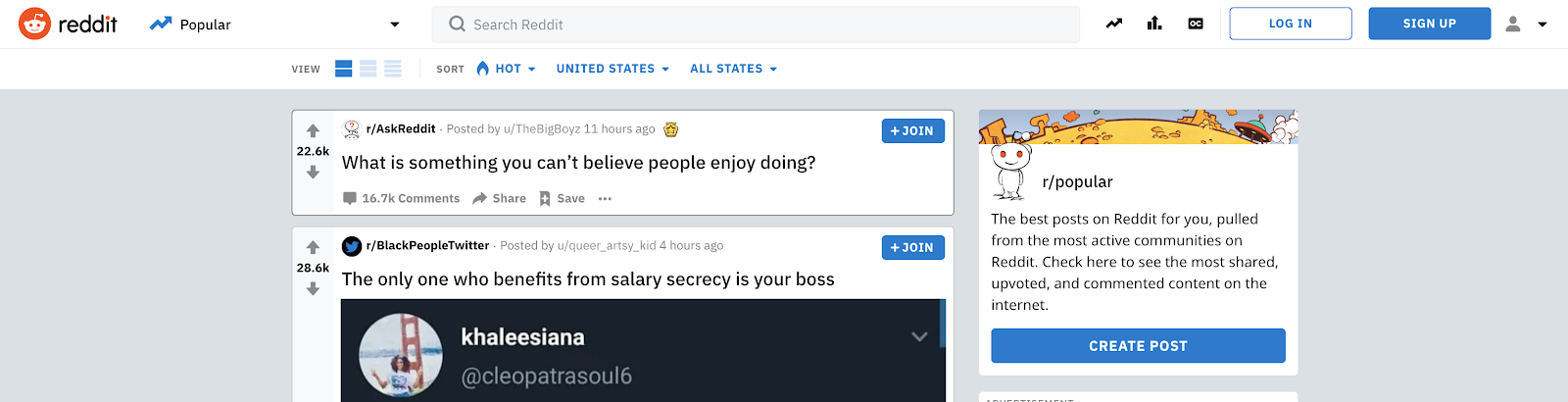
When someone publishes something on Reddit, other users can up-vote or down-vote it. Up-voting makes a post show up higher in Reddit feeds while down-voting does the opposite.
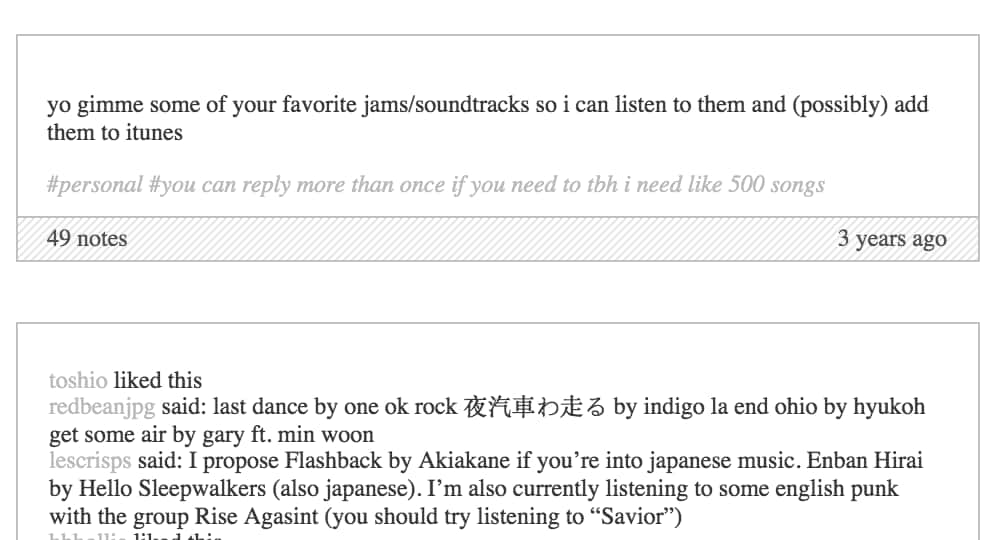
On Tumblr, the feeds are organized by time. However, a post can show up higher when it is re-shared by other users. When a user shares or interacts with your Tumblr content, they give it a note. When they reshare, they have the option to post a comment with the post that gets added to a thread.
Here’s an example of how notes and threads can be used to encourage discussion:
Pros and Cons
Pros
- Both platforms allow you to share text posts, photos, and videos about your business, brand, or individual thoughts.
- These platforms enable you to start conversations about a topic.
- Both platforms allow linking to outside websites.
Cons
- Longer blog posts might take time to craft or write.
- Getting downvoted on Reddit or no reaction from Tumblr users means your posts may go unseen.
- Your audience might be too niche or limited to just those on the specific platform you use.
A Few Things to Consider
Before you start logging in and setting up your accounts on a bunch of platforms, be sure to consider these factors:
- How much time do you have to devote to strategizing around a social platform?
- Do you have resources for creating graphics or videos?
- Do your goals involve boosting brand awareness, or traffic and revenue?
- Will you need an additional staff member to run this platform, or will it be easy to maintain?
Once you’re on a platform or two, be sure to stay in the know of how it’s changing and what marketers are doing. For a current outlook, check out our Ultimate Guide to Social Media Marketing.

The ‘Ethics’ You Didn’t Know Existed in Design
Just the other day, I was Googling something in a rush and came across a blog post that I thought would give me all the information I needed.
But, when I clicked on the page and tried to start reading the post, the entire screen went dark and a giant “Subscribe to our email” CTA popped up — completely interrupting my experience.
I looked around for a “No thanks” button or an “X”, but I almost couldn’t find one. Just before I went to click the back arrow, I noticed a very faint, tiny “X” that was nearly the same color as the CTA background. It was obvious that this site’s designers wanted to trick visitors into signing up for an email list before reading their content.
Not only did this CTA almost backfire by causing me to bounce off the site, but it also made me judge the brand’s morals.
Although some business people might not think a code of ethics matters in design, it does.
In this post, I’ll explain what design ethics is, what guidelines ethical designers might use, and a few tips for avoiding questionable design ethics.
Why are ethics in design important?
One of the best places to highlight your brand’s mission, as well as its ethical values, is in your marketing and designs. After all, these are the areas of your company that prospects and customers might see most.
While ethics, inclusivity, and accessibility are not necessarily always top of mind for some busy marketers or designers,, it’s incredibly important to review any public-facing projects from an ethical perspective.
Today, more than ever, consumers are paying attention to the moral standards of brands. Research shows 62% of consumers are attracted to brands that have strong, authentic ethical values.
When companies are considered ethical, consumers trust them, feel like the brand cares about their experience, and identify with the company. On the other hand, when brands use tactics that feel unethical, consumers lose trust in the brand which could lead to less brand loyalty or purchases.
Ultimately, every aspect of your brand’s design contributes to the message you’re putting out. If you want to create content and that demonstrates your company’s values, you should regularly review your brand’s design ethics.
Ethics in Graphic Design
When creating marketing content like landing pages, web experiences, or other visuals, ethical graphic designers consider a handful of guidelines. Here are just a few:
1. Designs should not be misleading.
You should aim for your designs to engage people and nurture them towards converting. Your designs shouldn’t mislead, pressure, or coerce audiences into doing or thinking something.
In the intro, I noted a website I visited that tried to pressure me into signing up for email before I was even able to read their content. This just one of many sneaky dark pattern design techniques.
While it’s not uncommon or unethical to create colorful or embellished designs that draw attention away from an “X” or opt-out button, dark pattern designs happen when designers make an obvious and conscious effort to trick visitors into doing something, such as giving out personal information.
For example, making the “X” nearly invisible and darkening content behind a pop-up ad so visitors think they need to convert or subscribe to email list to see content is a dark pattern technique. You might also see similar techniques in spammy emails where the unsubscribe link is hidden or made illegibly small so you can’t easily find it.
While it’s understandable that you want to get as many people as possible on a promotional email list, tricking visitors into subscribing for something is not the answer.
Why? If the contact didn’t want to get signed up for the email, they might complain about the sneaky design, mark the email as spam, and unsubscribe immediately. If they aren’t annoyed to the point of unsubscribing, they might not engage with the email because they weren’t expecting it or were never interested in promotional content in the first place. This, in turn, could negatively impact email performance and future deliverability.
Ultimately, sneaking consent from visitors isn’t likely to create major engagement or brand loyalty. So, if you must use a similar tactic or an automatically checked box in your design, make sure the text is large enough so visitors can see it and easily uncheck the box if they aren’t interested in your offering.
2. Designs shouldn’t hurt the user experience.
We’ve all been on a website where an ad or full-page CTA blocked the content we wanted to see. Sometimes, this gets so annoying, it causes us to leave websites entirely.
When we bounce off a website with too many pop-ups or design glitches, the site not only loses visitors and credibility, but it also loses SEO strength.
Designers should make sure they’re creating experiences that nurture an audience member into doing something rather than force-feeding them an offer or advertisement. To do this, they should be asking themselves, “How can I design valuable online experiences that help visitors rather than shamelessly selling products to them?”
At HubSpot, we encourage companies to nurture leads rather than using unethical or desperate marketing tactics to trick them into signing up for something. Our natural lead nurturing approach can be seen right on our blog.
Each HubSpot blog post includes unintrusive CTAs at the bottom of the page, as well as a slide-in CTA that appears when the reader has scrolled passed a certain point in the post. Here’s what the bottom of a post looks like:
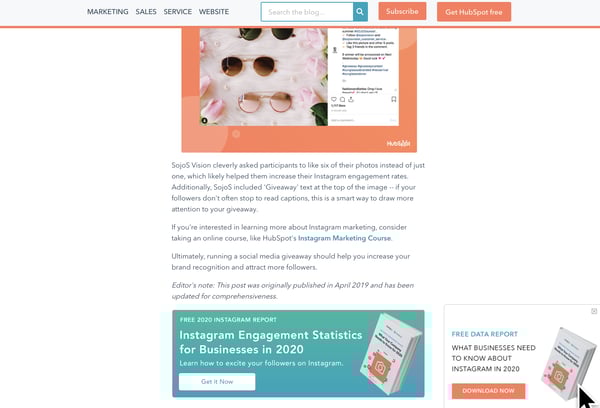
Not only do these CTAs fit smoothly within our blog design (and don’t cover up the content), but they also relate to the content we’re posting. This way, the reader gets a taste of our expertise in our blog content. Then, they can choose to dive deeper into our offers.
With unintrusive CTAs like this, we primarily send offerings to contacts that want them most, are likely to download more free resources, and might turn into qualified leads later on.
3. Messaging, disclaimers, and policies are clear and legible.
In the design below, another example of dark pattern design, the disclaimer, “Your subscription will renew automatically. You can cancel at any time,” is so small you might not notice it.
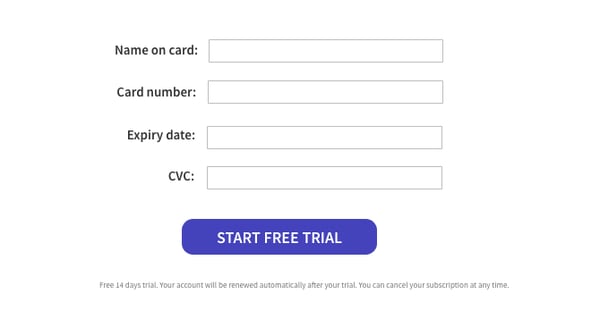
Because of this, visitors might give credit card information not realizing that they’ll be charged without being asked at the end of their free trial. Ultimately, when someone’s card is surprisingly charged for a service they didn’t want because they didn’t see this message, they might get annoyed with the brand, unsubscribe, and potentially complain about the small text.
On the other hand, if your text is legible and understandable, you might only receive the customers that understand free-trial policies, are serious about your service, and won’t rush to complain if they forget to cancel their subscription before the credit card charge.
4. Use proper representation and embrace inclusion, whenever possible.
Ethical designers always ask, “Does this design accurately represent groups of people discussed?”
Between 2011 and 2015, Access Icon embraced inclusive design ethics when they revamped the International Symbol of Access — often seen on accessible parking spots or wheelchair-accessible bathrooms — to better represent people with disabilities.
While the original symbol showed a simple stick figure sitting in a static wheelchair, the new symbol shows a person’s arms moving with their body tilted forward as if they’re actively moving or speeding in their wheelchair.

The new design came after a 2011 Boston-based street campaign, where Access Icon members placed a moving body over the static body on accessibility signs.

Although Access Icon did not intend to replace or criticize the original symbol, created in the 1950s, the organization wanted the new version to create an “occasion for asking questions about disability and the built environment, in the largest sense. Who has access—physically, yes, but moreover, to education, to meaningful citizenship, to political rights?”
Between 2012 and 2015, state governments, cities, major companies, and local businesses around the world adopted the symbol.
By refining this design, the group aimed to accurately represent people with disabilities as mobile, energetic, and empowered, rather than as static, less mobile figures. Ultimately, they realized the original design wrongly depicted those with disabilities and created a new design that solved for it.
Ethics in the Design of Technology
Design ethics doesn’t just stop with imagery or website UX. Tech products, software, and other tools also need ethical designers to create smooth, pleasant, and trustworthy experiences for customers. While technical or product designers think about the ethical guidelines noted above, there are a few additional standards they might follow:
1. Designs should be accessible.
In recent years, accessibility has been a major topic in the world of tech and product design. Although you might not realize it, people with varying accessibility needs might be using your product. And, when your product is accessible to more people, more people can use it and buy it.
One recent example of an accessible technology design was Microsoft’s Xbox Adaptive Controller.
After learning that children with physical disabilities, such as missing limbs, were having trouble playing Xbox video games with the console’s controllers, Microsoft developed an adaptive touchpad controller, which enabled people with multiple types of disabilities to play games with their friends.

Aside from two circular touchpads, which replace small controller buttons, the Xbox Adaptive Controller features large programmable buttons and can connect to external switches, buttons, mounts, or joysticks that make gaming more accessible for users.
The process of designing the controller was highlighted in a Super Bowl ad called, “We All Win,” which you can watch below:
On a smaller scale, accessible technological design could also involve including accessibility tools and symbols within your software interface or web page.
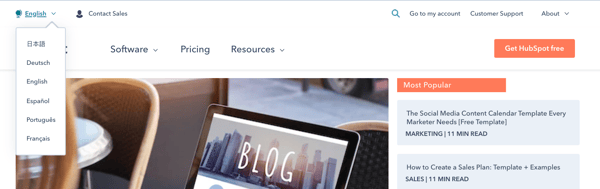
For example, some brands might offer an accessibility icon at the bottom of their website where you can click to adjust settings for a smoother experience if you have a disability. Or, to make their site or UX accessible to people in other countries, websites, like HubSpot’s offer an icon and menu that allow you to toggle between languages:
2. Designs should promote safety and security.
In 2020, many people are thinking about data security as many are buying smart devices and software for workspaces and their homes. With many devices listening to our voices, logging our lifestyle habits, and even recording health data, some worry that this information could be sold, stolen, or used unethically later on.
Because of data concerns, many tech firms are emphasizing security in their overall product design.
For example, when smart home devices with virtual assistants initially hit store shelves, consumers panicked when they learned that some devices, such as Amazon’s Echo, would surreptitiously record them.
To make consumers feel more secure with Echo devices in their homes, Amazon designed each device with a very visible mute button on them. When the button is pressed, the Echo’s light ring and the button turn orange to visibly show people that the device has deactivated recording.

While this button might make Echo owners feel secure at home, it might also ease the nerves of prospects who see it in product shots or Echo ads before purchasing it.
3. Consider or respond to unexpected ethical dilemmas.
If you’re helping to design a new piece of technology, you should consider all of the potential ethical dilemmas it could create and create a design that could either solve for them or ease your audience’s concerns.
In 2018, Netflix was forced to address a design strategy on its platform when a recommendation algorithm was panned across the web.
The algorithm in question, which Netflix called, “Artwork Personalization,” aimed to show users show thumbnails based on the design traits of thumbnails they’d previously clicked. While it sounded like an interesting personalization experiment, consumers quickly argued that this personalization was racially targeting users.
Specifically, some users noted seeing primarily content recommendations with white people in thumbnails while some BIPOC users saw mostly thumbnails that showed people of color. While Netflix denied that the algorithm targeted users by race, the news went viral.
In this scenario, had Netflix designers and developers researched their design tweaks or audited it from an ethical perspective, they might have been able to tweak the algorithm before launch.
How to Promote Design Ethics
If this post has inspired you to develop a new ethical standard for your designs, here are a few next steps you can take.
Audit Your Past Designs
Even if your designs have been successful in the past, it’s still good to re-audit them to ensure that they continue to promote design ethics. For example, you can look at your website or product’s design to ensure that they’re accessible, easy to comprehend, and inclusive to all potential web visitors.
Review Your Current Projects.
Whether you’re working on a product, website, graphic, or software-related design, reviewing it from a design ethics perspective might lead to a successful launch with fewer risks of complaints or concerns from the public.
Pivot if Needed
Sometimes a design tactic you once embraced is now considered out of date. For example, a design symbol that used to be culturally acceptable or valuable might now be seen as a misrepresentation or offensive. When you notice things like this changing, it’s smart to adjust or modernize your design tactics.
Want to learn more about design and ethics? Check out this post for additional information on dark-pattern design or this post on ethics in modern marketing.

Facebook Shops: What Is It and How Brands Can Use It
This year, brands are increasingly bringing shopping experiences online.
But, as businesses develop online strategies, they might find that launching a fully-fledged ecommerce website is easier said than done. While many tools make this process easier than it was in past decades, launching a successful online store still requires time, money, a web strategy, and a handful of other resources that smaller businesses might not have.
Luckily, tech giants like Facebook are actively launching tools that aim to help smaller brands convert social media followers into customers.
One of the Facebook corporation’s newest ecommerce tools is called Facebook Shops. According to Facebook, Shops enables businesses to easily create a “mobile shopping experience for their audiences.” But, what exactly does this experience look like?
In this post, I’ll walk you through what Facebook Shops is and how marketers can leverage it to boost social media-driven sales in 2020 and beyond.
According to Facebook, setting up a Shop is simple and can be done on a desktop. Once a Shop is created, Facebook or Instagram Business Page followers on desktop or mobile platforms can visit the same universal store and make purchases from the app’s they’re on.
On top of linking to business pages on Instagram and Facebook, Shops can also be integrated into a Facebook Business account’s Messenger or a WhatsApp Business account so audiences on all major Facebook platforms can make purchases.
Below is a short demo video that highlights what a Facebook Shop looks like to customers on a Facebook-owned platform and how they can use it to make purchases.
Why Facebook Launched Shops
Before 2020, brands were already looking for ways to scalably make sales online. But, the need for digital transformation grew even stronger during the COVID-19 pandemic when many brick-and-mortar stores were forced to close or move their offerings online.
According to a Facebook announcement, the 2020 landscape was a motivating factor in the launch of Shops.
“Right now many small businesses are struggling, and with stores closing, more are looking to bring their business online. Our goal is to make shopping seamless and empower anyone from a small business owner to a global brand to use our apps to connect with customers,” Facebook noted in an announcement. “That’s why we’re launching Facebook Shops and investing in features across our apps that inspire people to shop and make buying and selling online easier.”
Now that you know what Facebook Shops is and why Facebook launched the tool, you might be interested in using it for your own business.
If so, below is a quick step-by-step guide for setting up your first Facebook Shop.
How to Use Facebook Shops
1. Make sure you’ve fulfilled all the Facebook Shops requirements.
Although creating a Facebook Shop is free for all businesses, Facebook Shops still has a few requirements. To set up a Facebook Shop for your brand, you must:
- Have a Facebook Business Page and/or an Instagram Business account that you have Business Manager admin privileges for.
- Have manager privileges for your brand’s Facebook catalog.
One thing to keep in mind is that while you do need to admin either an Instagram or Facebook Business Page, you can have one or the other and still create a Facebook Shop. This means that you don’t necessarily need a Facebook Business account to take advantage of this tool.
2. Go to Facebook Commerce Manager to access Facebook Shops
To start setting up your Facebook Shop, go to Facebook Commerce Manager and click the large “Get Started” CTA at the top of the page. From there, you’ll be given a few settings-related questions, such as, “Choose how you want customers to make purchases.”
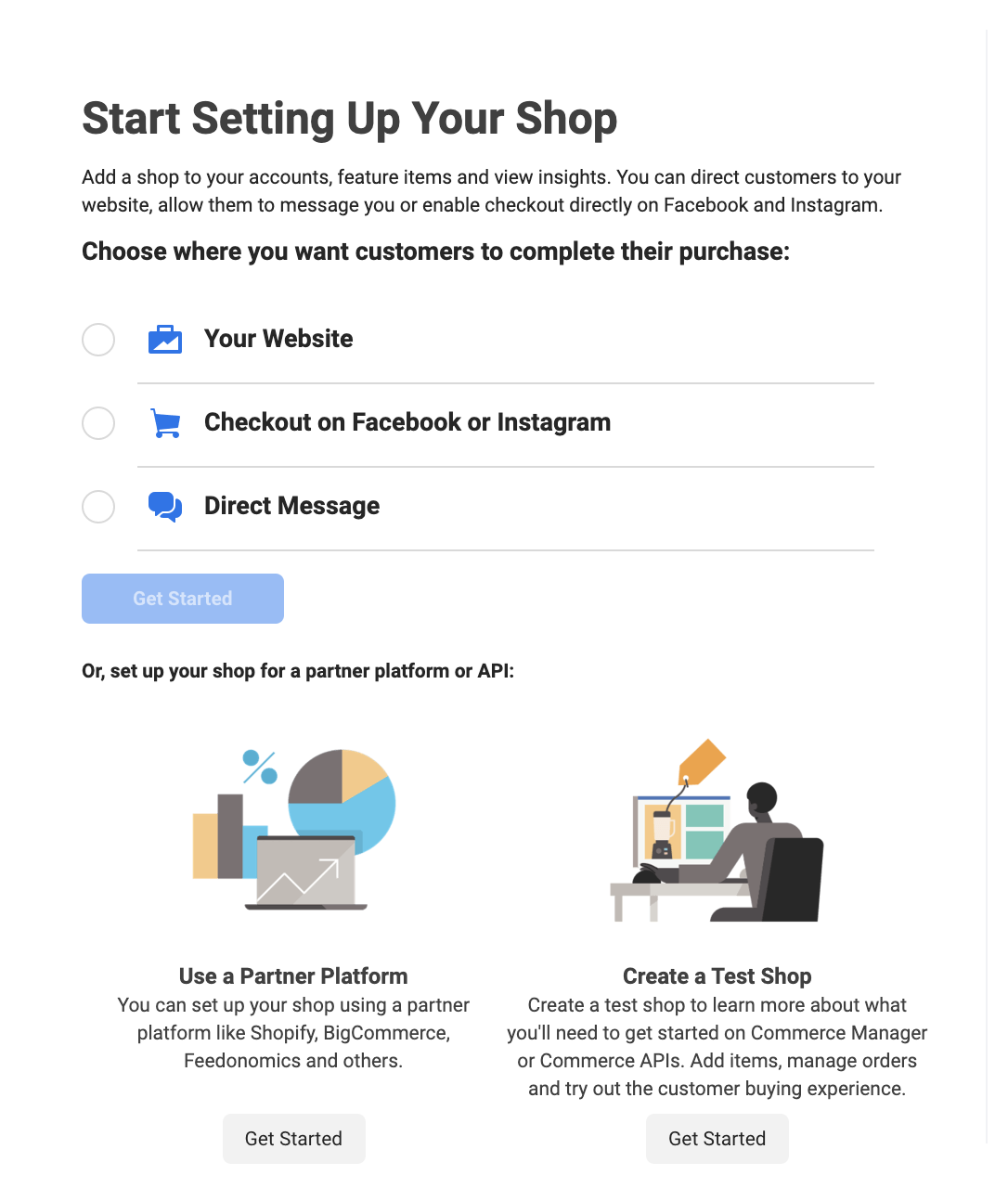
At this point in the process, you can link an ecommerce website or API you’ve already set up and direct customers there to purchase your items or have them make buy items directly through Facebook, Instagram, or direct messages.
3. Add business information.
In this step of Shop creation, Facebook will ask you a few questions about your business, such as what category it belongs in, its location, and your preferred contact information. During this step, you’ll also be able to include an overall business description.
4. Add your products and shipping information.
As you continue to follow the simple prompts given by Facebook Shops, you’ll be asked to add products either one by one via a simple product listing form or in bulk with a spreadsheet list upload:
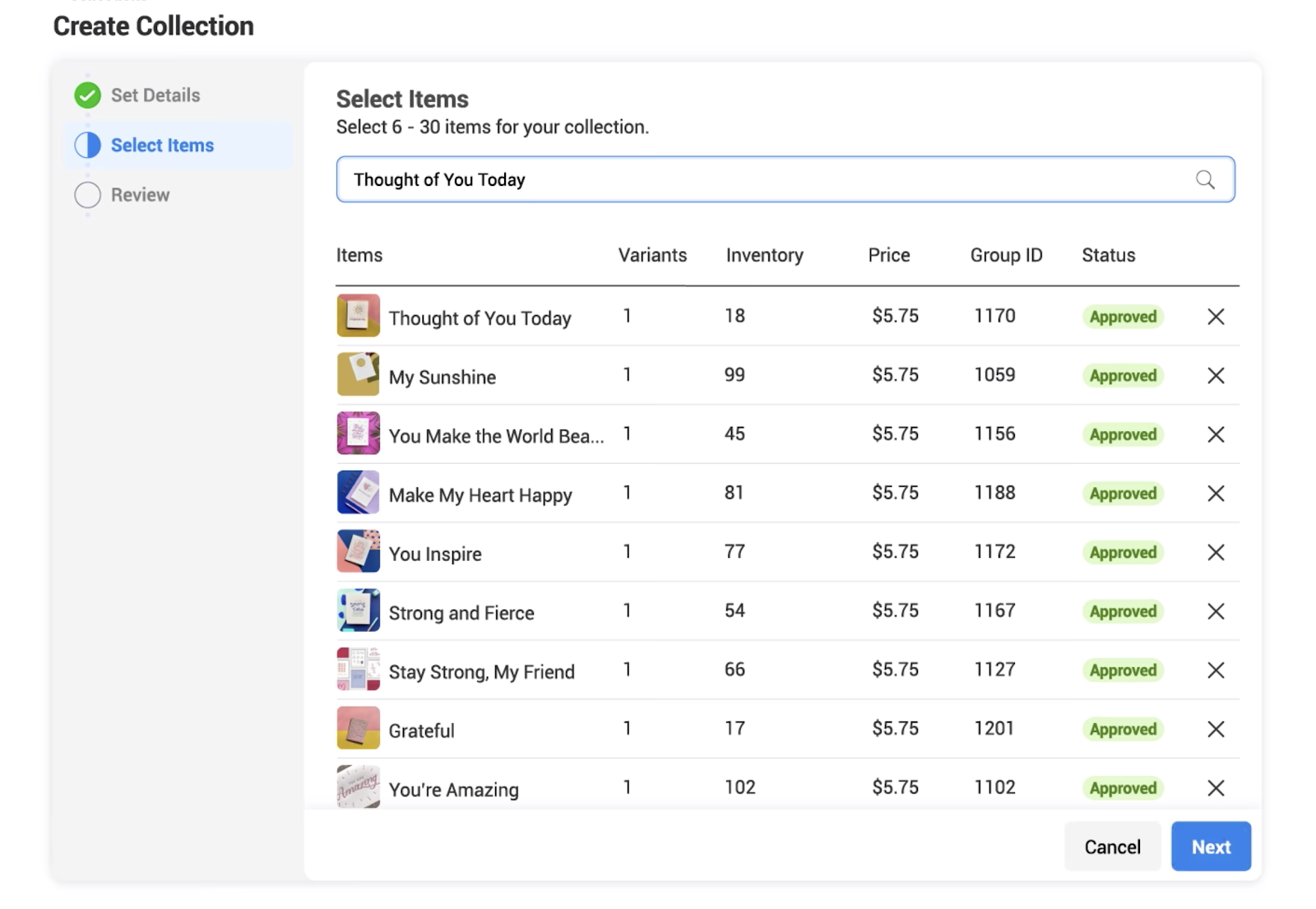
After you add products, you’ll be able to add or update product descriptions, images, or other important information. You can also enter shipping information as well.
While Facebook Shops will prompt you to add products before launching your store, you can still add, remove, or edit product listings later on.
5. Add banking and tax information.
If you don’t have an ecommerce store and want to do all of your sales through Facebook or Instagram, you’ll be prompted to give information about the bank account where your purchase revenue will go.
You’ll also have to give your company’s tax information and agree to Facebook Shops policies before setting up your shop.
6. Customize your Shop.
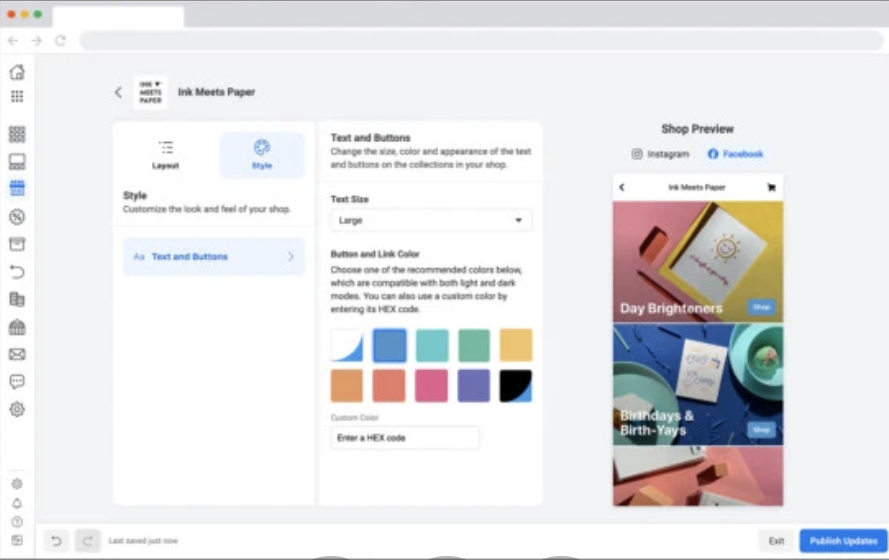
Once all of the logistical information is filled in, you can take the fun and creative step of designing your mobile store. Facebook Shops allows you to make basic tweaks to the layout and style of your Shop. As you make edits, such as adjusting text styles or button colors, you’ll see them on a mobile preview screen to the right.
Here’s a look at the Shops customization page. As you can see, it’s simple and easy to understand, even for marketers with less design experience.
7. Edit products or group them into “Collections.”
Made a mistake with one of your product descriptions or need to add a new product shot? Facebook Shops allows you to edit or remove product listings, even after your mini-store is launched.
Additionally, If you have products that were launched together or with a similar theme, such as a summer line of clothing, you can group products as “Collections” on Facebook Shops. To add a “Collection,” simply click “Layout” on the Shops customization page, then click “Add Collection” under the Featured Collections sidebar.
Once you create a Collection, you can add products to it from its Collection page or by editing the product’s listing.
8. Launch and promote your Shop.
When you feel like your Shop is ready for business, publish it. When you do so, be sure to share about it on Facebook, Instagram, or other social media platforms to ensure you gain initial visitors.
What Brands Should Keep in Mind With Facebook Shops
Facebook Shops might be a great option for brands that want to dabble in ecommerce for the first time or expand their strategy to major social networks.
In fact, in the case study video below, a small printing brand called Ink Meets Paper shares how Shops helped them expand their ecommerce strategy while getting sales from Instagram and Facebook followers, with a small amount of effort required.
While Facebook Shops and other ecommerce platforms might be beneficial to your brand and revenue, there are still a few things you’ll want to keep in mind before launching any online store or service:
- Promote the shopping experience: If audiences don’t know about your products or your brand, they might not find your Facebook Shop or ecommerce platform. That’s why it’s important to promote your Shop, product deals, and brand as you would with any other online store.
- Prepare for high demand: If you have a great listing of products, people might rush to buy them. But, if your team can’t respond quickly enough to customer demand, delayed orders or other snags could cause shoppers to avoid your Facebook Shop in the future. Prepare to respond to good purchasing outcomes and high demand, as well as poor outcomes.
- Brand consistency is still important: Although Facebook Shops exists on a social media platform, that doesn’t mean you shouldn’t stay on-brand. If your Facebook Shop’s style, images, and layout look unprofessional or inconsistent with your website or Facebook Business page, people might distrust it or be less willing to give your Shop their payment information.
If you’re building or revamping your overall ecommerce strategy, bookmark this ultimate guide to ecommerce. If you’re interested in learning more about how brands are pivoting to ecommerce in 2020, check out this piece.

Corporate Image: Why Your Brand’s Public Perception Matters More Than Ever Now
In 2019, Contently, a content marketing software company that connects freelancers with enterprise brands, made a controversial move — in an effort to increase profitability and, in turn, provide more creative opportunities to their freelancers, the company announced that they’d begin charging freelancers a mandatory service fee for every assignment they book.
As you might already know, the response wasn’t great. Many freelancers messaged the company and explained the fee could hamper their earning potential, or even end their freelance careers.
Fortunately, the freelancers’ feedback didn’t go unnoticed or unrewarded. As a result of the honest feedback, Contently’s CEO Joe Coleman announced via Twitter that the company had decided not to implement the new service fee.
Contently’s realization that they weren’t prioritizing the needs of their customers ultimately helped save — and even enhance — their corporate image.
Here, let’s dive into what corporate image is, and why it matters. Plus, five ways you can bolster your own corporate image today.
What is corporate image?
Your company’s corporate image is your brand’s public perception. You can help shape it by telling the public what kind of company you are through marketing and advertising.
But what really sculpts your corporate image is your company’s actions, like performing well financially, developing innovative products and services, following ethical business practices, actually operating by your values, appropriately responding to company criticism, providing tremendous customer service, treating your employees with dignity and respect, and attracting elite talent.
All of these actions fuel the flywheel of your brand’s word-of-mouth marketing, which is the most effective and trusted form of marketing, especially when the internet has enabled every brand to scream for your audience’s attention today.
Developing a stellar corporate image also opens up more opportunities for customer testimonials, case studies, product reviews, and awards that can provide the social proof needed to earn new customers’ trust.
Why Corporate Image Is More Important Than Ever Before
Nowadays, most people support brands that share the same values as them.
In fact, brand values is often a critical factor in someone’s purchasing decision. For instance, 83% of millennials find it important to purchase from companies that align with their values.
Additionally, Weber Shandwick, one of the world’s leading global public relations firms, found that global executives, on average, attribute 63% of their company’s market value to their company’s overall reputation.
More than likely, you already know this on a quantitative level, as well. Consider, for instance, the last time you made a purchase on a product or service for which you could have found a cheaper alternative.
Perhaps you purchased a new iPhone, or splurged on that Patagonia jacket you’ve wanted for a while.
Ultimately, you likely made that purchasing decision, at least in part, due to the brand’s reputation and overall image.
That is why corporate image matters — it can influence whether consumers’ want to buy from you, and can increase brand loyalty when people feel your values align with their own.
Next, let’s dive into how you can boost your own corporate image.
How to Improve Corporate Image
1. Identify your company’s purpose.
If you truly want to build a loyal following for your brand and, in turn, strengthen your reputation, your company’s core message should focus on your purpose — not how you make your product or what your product is.
This notion, that people buy the “why” behind your organization — not the “what” or “how” — isn’t just some idealistic trend catching fire in the business world today, though. It’s actually rooted in human biology.
The most primal part of the brain is called the limbic system, and it controls all decision making. It also happens to control all our emotions and feelings. So, resonating with your audience will also appeal to the part of the brain that’s responsible for action. In other words, if you can evoke emotion, you can drive behavior.
Conveying a clear and convincing purpose through all your brand’s actions will forge the emotional connection required to persuade an audience to support you. And the more people who support you, the stronger your reputation will become.
2. Make sure you can walk the walk.
Sometimes, brands that want to reap the rewards of being a mission-driven company don’t actually adhere to the values they claim they’re so passionate about. But even though being aquasi-mission-driven company can attract new customers, once they uncover your hypocrisy, it’s almost impossible to retain them.
A Yale psychology study suggests that highlighting your morality is essentially a short-cut to high status. But if people realize you don’t actually possess the traits that shot you up the social ladder, they’ll lose trust in you and respond harshly to your deception.
Before you start boasting about your company’s dedication to putting the customer first, make sure your actions are actually aligned with these values, or that you have a plan in place to do so.
3. Own your mistakes.
Even the smartest brands make mistakes. But what separates the great companies from the good ones is their ability to admit that their wrong and change course in light of new information. Unfortunately, a lot of companies won’t admit their mistakes or change their minds, even if it’s the right choice, because they have too much pride or don’t want to seem weak.
However, admitting you’re wrong actually requires a lot more strength than sticking to something that hurts your customers just because you’ve invested a lot of time or effort into an initiative. By owning your mistake and correcting it — instead of blaming the issue on external factors — your customers will understand the rationale behind your decision and appreciate your honesty and humbleness.
Just like Contently, making a mistake that hurts you customers can spark harsh backlash and even start a trending Twitter hashtag that undermines your brand’s integrity. But, ultimately, you can still earn back your customers’ trust and support if you put your pride aside and own and correct your mistakes.
4. Offer the best customer service possible.
For many customers, one of the first interactions they’ll have with your brand is through a customer service representative — so customer service plays an undeniably critical role in corporate image.
Customer service representatives can demonstrate your company values in both their actions and words. For instance, consider Glossier’s customer service department (known as the gTEAM), who are responsible for responding to customer messages on social media and creating personalized experiences for each customer who reaches out.
This type of authentic, customer-first attitude is a small example of a bigger Glossier core value: “Devoted to the Customer”. Ultimately, each interaction your customer has with your company has the power to form their entire perception of your brand — and those customers will share both positive and negative feedback with friends. For this reason, customer service is a vital component to consider when improving corporate image.
5. Make sure your website and social media presence reflect your current corporate image.
Corporate images change over time. Just consider HubSpot’s Culture Code, which has been updated over 25 times since it was first created — while the values have stayed the same, the messaging has required adjustments to reflect HubSpot’s most up-to-date corporate image.
As your organization grows, as consumer preferences and industries change, and as you learn more about what makes your customers happy, your priorities or vision might shift slightly. To reflect the most relevant, accurate version of your corporate image, then, it’s critical you maintain a strong social media and website presence.
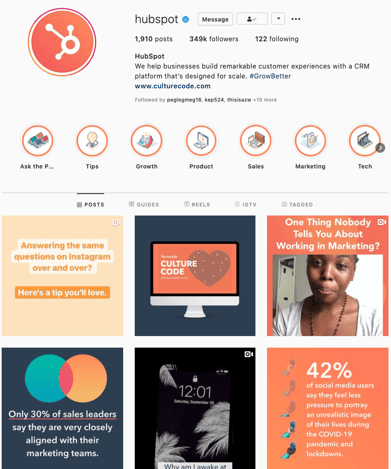
Oftentimes, social media is the first opportunity people have to discover your brand — and they’ll likely make a snap judgment of your entire image as a result of a few images or videos at the top of your feed. So make them count.
 Similarly, your website is your digital storefront. In much the same way you might repaint your house every few years and add fresh flowers to the pots outside, you’ll want to update your website regularly for freshness.
Take a look at your website and consider whether it truly reflects your current corporate image. If not, consider whether a complete redesign is necessary, or whether a few small tweaks could do the job.
Ultimately, creating a strong, positive corporate image can’t happen in a vacuum. You’ll need to align all aspects of your company — from marketing to sales and service and operations — under a strong vision and mission statement, and ensure leadership walks the walk when it comes to inspiring employees.
A strong corporate image will look different for each organization, but ultimately, corporate image can be the difference between a good company, and a great one.

What Is an API? The Answer in 300 Words or Less
When the marketing industry first shifted from outbound to inbound marketing, many marketers dropped their old roles of content interrupters for new ones as content creators.
But that shift is still producing aftershocks, and to keep up with your competitors today, you need to understand what APIs are, how they integrate with your content strategy, and the social insight they bring to your website.
Don’t worry — APIs might seem complicated, but by the end of this post, you’ll know how they work and what using them entails.Here’s a brief definition of an API, followed by some key information on how to make one work for your business.
What is an API?
An API, short for application programming interface, is a series of rules. To be even clearer, it is an information middleman. APIs allow for an application to extract information from a piece of software and use that information in their own application, or sometimes for data analysis.
In the plainest terms, an API is a blueprint that enables “your stuff” to talk to and work with “their stuff.” Your stuff, in this case, is known as the API endpoint.
Sound confusing? Don’t worry — we’ll walk through an example below.
API Endpoint Example
Let’s say you want to stream public tweets in real-time so that you can stay informed on a specific topic of interest or on current trends in the world. Then you could use Twitter’s filtered stream endpoint. Its URL is: https://api.twitter.com/2/tweets/search/stream
Technically, an API endpoint need only be referred to with the end path of the resource URL. The base path, which is common to all endpoints, is https://api.twitter.com. Because that stays the same, there’s no need to keep listing it. You can instead just list the endpoint: /2/tweets/search/stream.
How to Test an API Endpoint
There are several online tools available for testing an API endpoint. For the sake of this post, we’ll walk through how to set up a test using cURL. cURL is a command-line tool for transferring data that supports multiple protocols, including HTTP. It is able to make requests, get data, and send data — making it the perfect tool for requesting information from APIs.
Let’s use an example from Twitter’s own documentation. Say, you want to stay informed on the Twitter API. Then you will want to get tweets from major accounts like @TwitterDev and @TwitterAPI as soon as they’re posted. And maybe you only want tweets that contain links to articles or documentation so you’re getting as much context as possible.
In that case, using the filtered stream endpoint is the perfect choice. But in order for the endpoint to know what kind of tweets to send you, you’ll have to define filtering criteria. Otherwise, you’d just be asking to see every tweet posted in real-time.
Filtering criteria will be applied to the endpoint in the form of rules. To build these rules, you’ll need a set of operators. For this example, you can use two operators — from: and has:links — in order to only see tweets from certain accounts and that contain links. To instruct the filtered stream endpoint to only show tweets from the accounts @Twitterdev and @TwitterApi that contain links, you’d use the following rule: “from:twitterdev from:twitterapi has:links”
To request this information from the filtered stream endpoint, you need to include the correct HTTP request to tell the API what action to take. There are four main options. Take a look at a brief description of each below:
- GET: retrieve a resource
- POST: create a resource
- PUT: update an existing resource
- DELETE: remove a resource
For this example, you’ll use the POST request. In addition to including the rule mentioned above in your request, you’ll include the content type and authorization. Below the content type is defined as “application/json” so the request is rendered in the lightweight data format JavaScript Object Notation (JSON). To authenticate your request, you’ll have to replace the placeholder text $BEARER_TOKEN with your app’s unique Bearer Token, which can be generated in your developer portal.
Why are APIs important?
One of the first questions many marketers ask is: Why do all of these businesses share their data openly, for free?
Normally, the answer is: scale. As software companies grow, the staff within those companies quickly realize they have more ideas than they have time and resources to develop them.
By creating APIs, companies let third-party developers create applications that can improve usage and adoption of the main platform. In that way, a business can build an ecosystem that becomes dependent on the data from their API — a dynamic that often leads to additional revenue opportunities.
How to Use an API
Understanding the value of a particular API is essentially about understanding what information is available through an API and how it can be accessed. To find out what a particular API can do for you, you can do one of two things.
- Ask a web developer to look at an API and discuss it with you.
- Do the research on your own. If you don’t have access or budget to use a web developer, this is an appealing option. But don’t panic — many online services have good API documentation.
API Documentation
Let’s take a quick look at Twitter’s API reference index as an example.
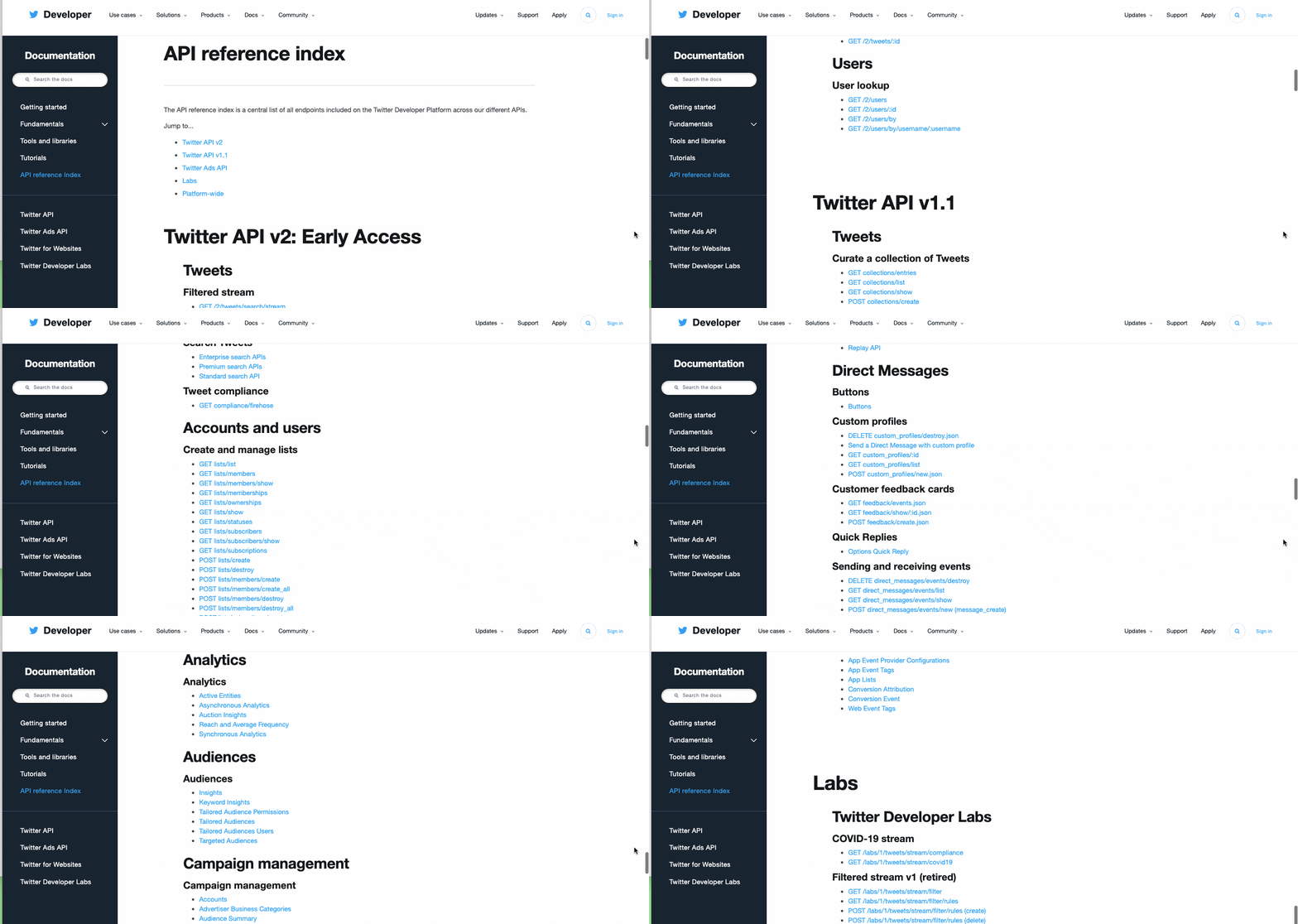
Much of Twitter’s growth has been because of outside developers, and the first Twitter API started as a basic wiki. Since then, it has evolved into a detailed index of APIs that a savvy marketer can use to determine what information might be available to a developer in the form of an API — and how to include this API on your website.
Looking at the screenshot above, you can see there are multiple categories of information available to outside developers. Once you select an API you’re interested in, you can click on it to see what information is available through this API. Check out Twitter’s Tweet Timeline API endpoint below.
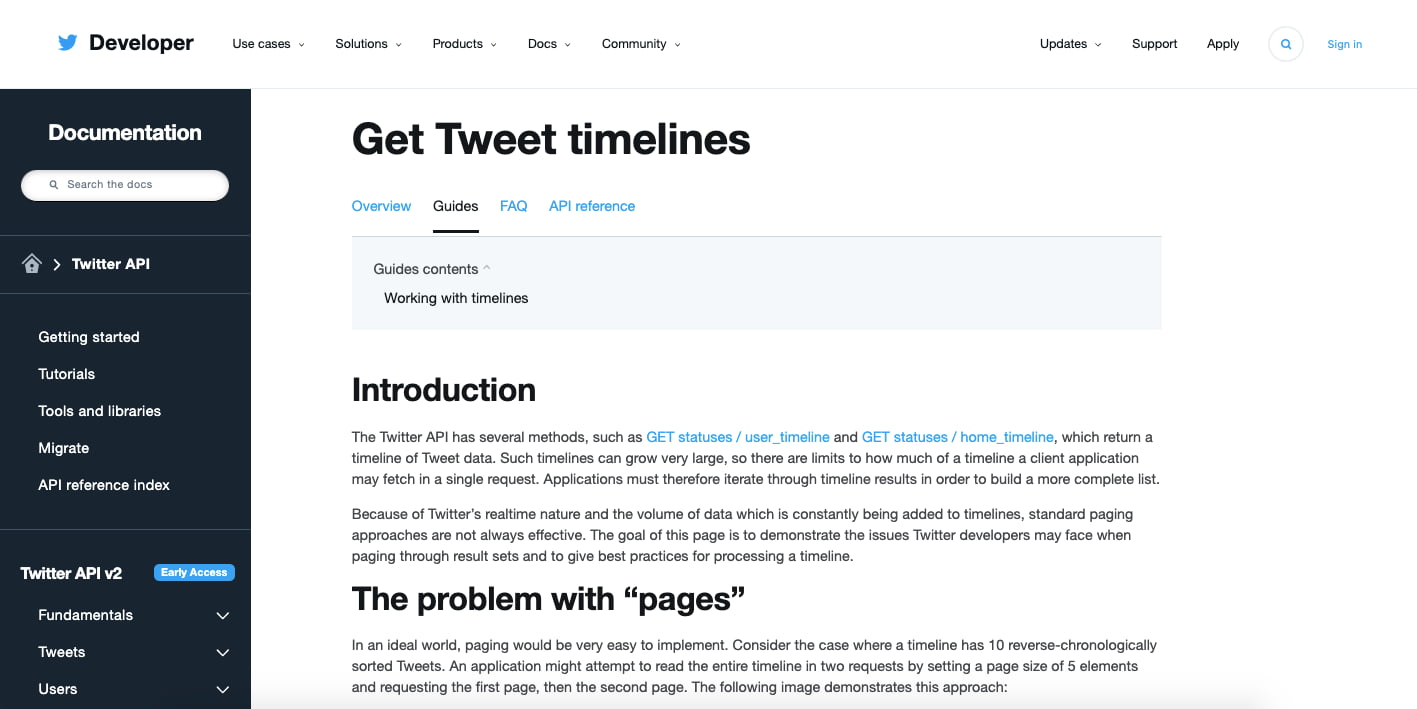
In the API documentation above, Twitter’s Tweet Timeline API explains how you can take a brief collection of recent tweets from a specific user’s timeline and display them, in clickable form, on your own website. The API documentation includes tweet volume limitations, the API’s resource URL, as well as what you can and cannot choose to display through this API.
Applying the API to Your Website
If you add the API’s resource URL to the backend of your website, it’ll return the information you called for to the frontend of your website. Here’s what this looks like on the New York Road Runners website, helping them promote the New York City Marathon (with a few custom design modifications):
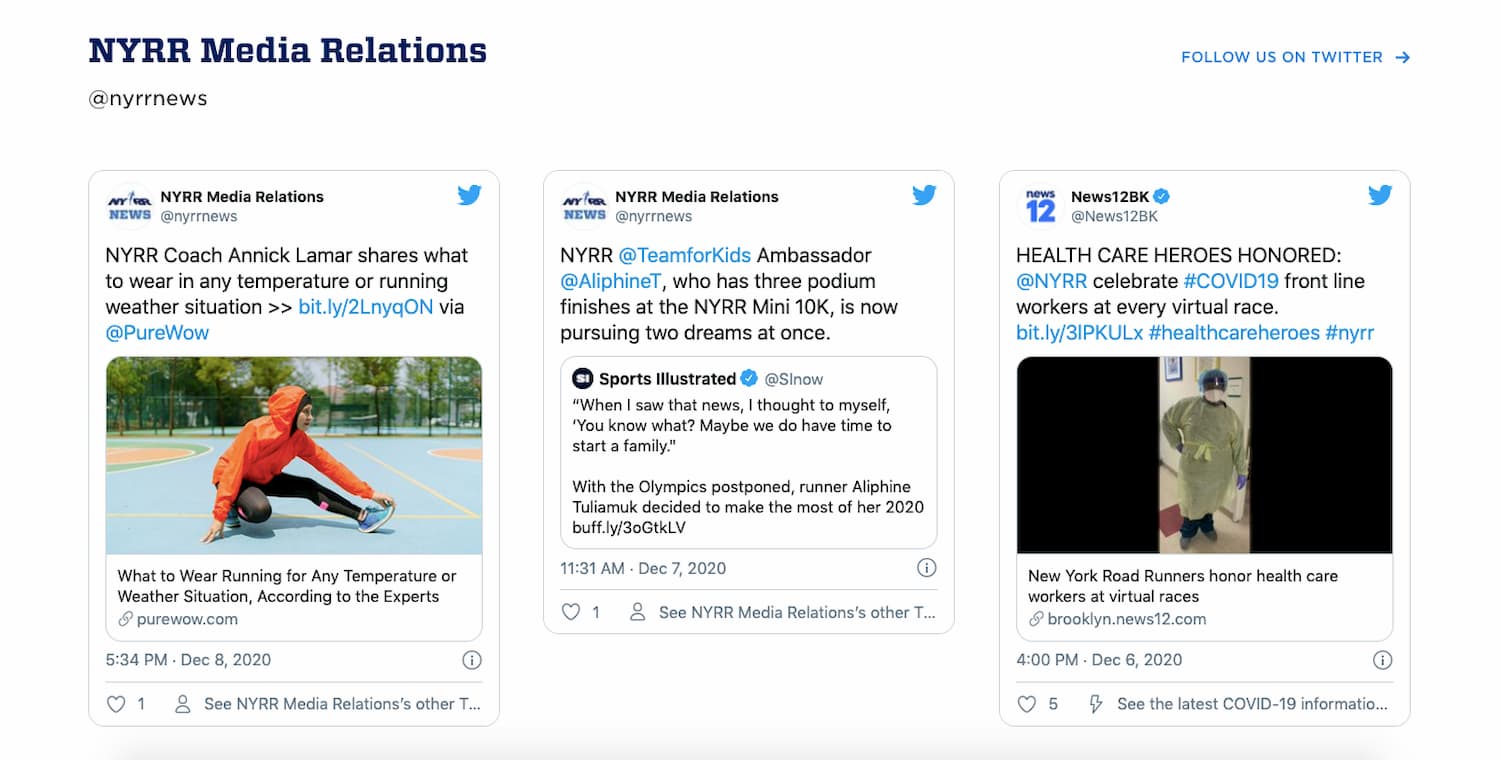
You can also check out the HubSpot API documention to see how you can build applications and integrations using data from HubSpot.
One last caveat: In order to officially use a developer’s API, you might also need to be assigned an API key.
Think of your API key as your authentication token, declaring you a member of a developer’s community. In effect, this token identifies what you’re using the API for, and verifies that you’ve been given permission to carry out this project by the API’s owner.
Rest assured, your API key does not give the developer access to personal information about you.
APIs as a Marketing Platform
Marketing in an inbound world is about companies developing useful applications and services to sustain customer retention. Brands will need to move away from intermittently dropping in advertisements to become conduits of consumer communications.
In that process, APIs facilitate the data needed to provide solutions to customer problems.
API Examples
Understanding what information is available through an API will help your determine if it is worth working with a developer to pursue the project further. Here are two examples.
Twitter Mentions
If you wanted to show tweets on your website that included mentions on Twitter to articles from your blog, you’d need to understand if you could request tweets with only specific URLs from the Twitter API.
YouTube Video Embedding
When you right-click a YouTube video on youtube.com, and select “Copy Embed Code,” you’re essentially requesting to use YouTube’s API on your website. YouTube makes it easy for the public to embed YouTube videos to play directly on other websites.
API Terms of Service
No matter the project, it’s critical that you actually read and understand the terms of service for an API you’re considering for your website.
Most APIs have certain usage restrictions. If you don’t take the time to understand the restrictions of an API you’re interested in, you could invest more time and money in developing a marketing asset that’s rendered useless once the API provider determines you’ve violated the API’s terms of service (and revokes your access).
For this reason, most APIs have “call limits.”
What is an API call?
An API call, also known as an API request, is an instance of a website owner “calling” for the use of a developer’s API. Saving the API, logins to the developer’s website, and queries about the application all count as API calls.
With this in mind, an API call limit is the number of times you can request information about an API from a web service within a given time period. Again, please read the terms of use for any APIs you are thinking about using. These documents should clearly detail any limitations as well as appropriate use of the program.
The Future of APIs in Business
Developing on the APIs of existing web services is only the beginning. We live in a world that now expects open and available content for all — the natural progression of this is for publishers themselves to release their own APIs, so that their customers can develop applications as a result.
API sharing applies to all businesses — not just those that are web-based, but rather anyone who has a web-based tool or component of their organization. Obviously, this concept could cause hurdles for some organizations, especially from the legal department. It’s up to you to find out which APIs are most valuable and how you can lawfully and sustainably use them.
Editor’s note: This post was originally published in March 2013 and has been updated for comprehensiveness.

How to Create a Revenue-Generating Google Ads Campaign
The trouble with search engine optimization (SEO) is that it takes a long time to work and doesn’t come with any guarantees. Pay-per-click (PPC) advertising, on the other hand, can provide results a lot faster.
For companies that have no organic presence and need ROI fast, a paid ad is sometimes your best bet for driving traffic to (and conversions from) your website.
The problem is that your competitors are using the same search terms and keywords you will. Not only do you need to know how to build a campaign through Google Ads, but you also need to know how to stand out from the crowd.
What is a Google Ads Campaign?
Google Ads is a pay-per-click (PPC) system for advertising in the search engine results pages (SERPs) on Google. You can create Campaigns, which are used to organize groups of similar ads. Your Google Ads account can have one or many campaigns running at a time.
Each campaign then includes multiple ad groups, which house your keywords ad text, and landing pages.
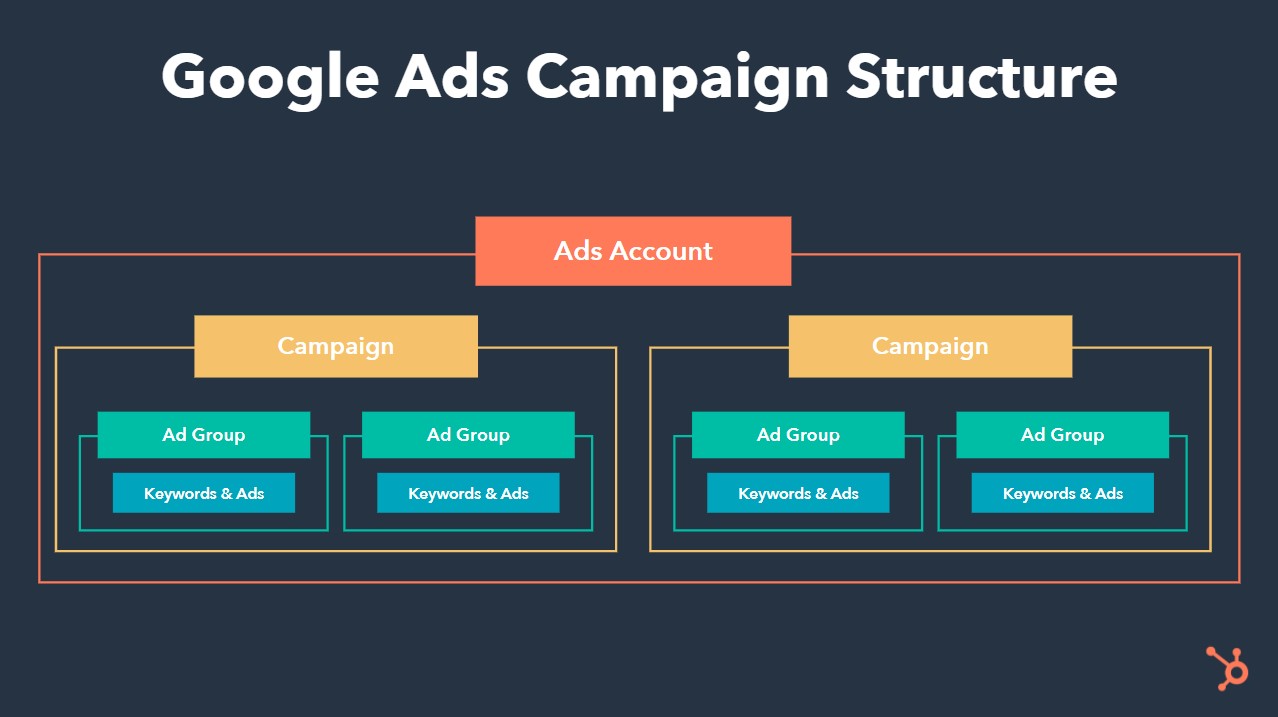
The advantage of structuring your Ads account with campaigns is that you can target different audiences (for better personalization), be more intentional with your bidding, and even run different tests without affecting your main campaigns.
For example, let’s say your organization sells two products. One is a more lucrative opportunity, and the other is less important to your company goals but still requires some spend. By using separate campaigns, each of these products get their own ads, and you can put more of your budget toward bidding on the more lucrative product without the less lucrative one eating up all your spend.
For more information on how ad spend works, check out our ultimate guide to Google Ads.
Let’s continue on with a few real examples of Google Ads campaigns — a service formerly known as Google AdWords — and then throw in some pro tips for succeeding with your own search engine marketing (SEM) strategy. By the time we’re done, you’ll be an expert.
AdWords Examples
- New Breed Marketing: what is inbound marketing
- Nettitude: cybersecurity
- Rock Content: content marketing course
- Destination Canada: cheap holiday destinations
- FM Training: LEED certification online
- LeftLane Sports: hiking boots for women
1. New Breed Marketing
Search term: what is inbound marketing

Links to:
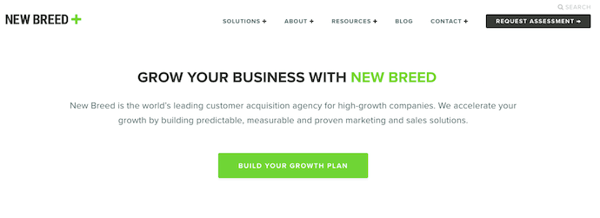
Some searchers are experiencing a pain that’s led them on a path to purchase, but they may not be clear on what it is that will solve that pain. That’s the thinking behind the first Google Ads campaign example above.
New Breed Marketing, an agency partner of HubSpot, is an inbound marketing service provider. Because New Breed’s customers might not know what they’re signing up for with “inbound marketing,” the company sought to define the term for them — helping buyers confirm that inbound marketing is indeed what they’re looking for.
New Breed Marketing’s Google Ads result above is as simple as search engine marketing gets. The meta description is just one sentence long but indicates to searchers that inbound marketing is a “process” to be invested in.
Meanwhile, the blue link, called a Site Extension, itself promises to explain inbound marketing in the form of a downloadable “guide.” This ensures those who click through to the website are prepared to submit their contact information and become a lead in exchange for that guide. Remember, Google Ads campaigns cost you money every time somebody clicks on one of your ads — you need to get something out of those clicks.
2. Nettitude
Search term: cybersecurity

Links to:
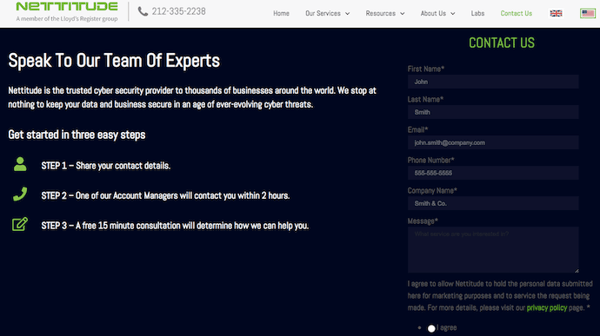
In general, the broader the search term, the less likely the searcher will want to buy something right away (a pay-per-click concept called “match types“). In the Ads campaign above, however, Nettitude bid on a broad, one-word search term — “cybersecurity.”
While this broad search term doesn’t target a specific searcher, the details of their Google Ad ensures the link can satisfy many different types of searchers no matter what their interest was when they typed in the word.
Nettitude’s AdWords campaign, above, does two things well:
First, its meta-description has several value propositions that most cybersecurity customers would be receptive to. This includes a “2 hour response time” and a “free initial consultation” to make a prospect’s initial outreach convenient and low-commitment.
Second, the ad displays a phone number directly on the page. When you bid on a search term that yields such a broad, diverse group of people, getting them on the phone is often the easiest way to nurture their interest so they don’t wander off to another search result and forget about you.
3. Rock Content
Search term: content marketing course
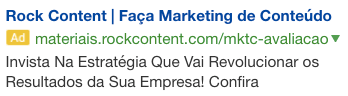 Links to:
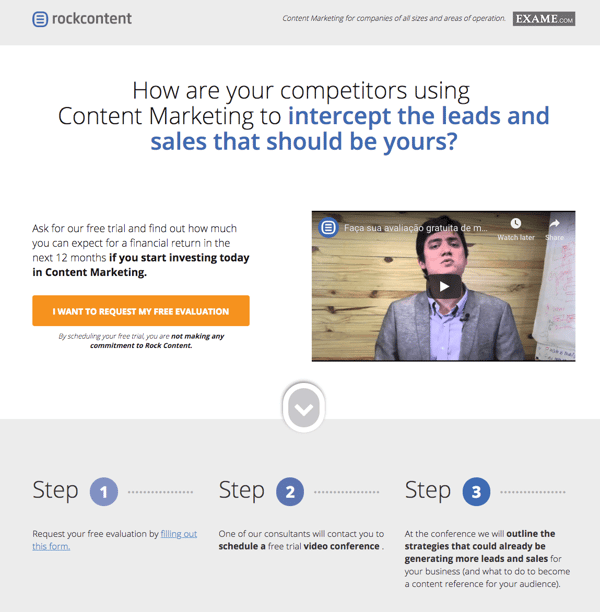
Rock Content, an agency partner of HubSpot, is a content marketing service based in Brazil.
Its Ads campaign bid on a search term that’s only somewhat related to the service Rock Content is offering on its landing page. Here’s why it works.
The search term “content marketing course” is intent on finding classes that help marketers increase their content marketing knowledge. Rock Content looks to pivot searchers from taking a class for improving their content knowledge to entering an “evaluation” for determining how much they already know.
This evaluation might not satisfy every searcher, but it is a smart way of pivoting their interest to a related service and introducing them to Rock Content’s offerings at the same time.
4. Destination Canada
Search term: cheap holiday destinations

Links to:
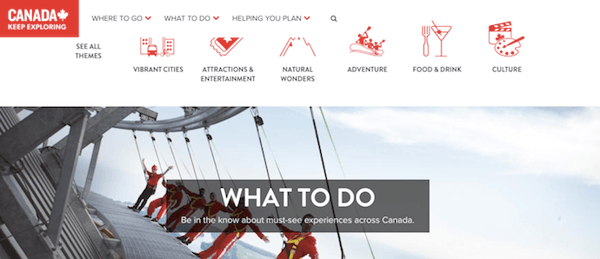
Canada Destination’s Google Ads campaign above uses a searcher’s general interest in taking a holiday trip to advertise all the fun parts of Canada. Similar to the third example on this list, the strategy is to pivot off of a broad search term to drive value into its own offering. It’s not a casual article, but it’s also not a flight itinerary — that middle-of-the-funnel space is what makes this campaign work so well.
The link above also uses two sub-links beneath the main Site Extension, highlighting the key subjects covered in the website to maximize the ad’s click-through rate.
When people search for “cheap holiday destinations,” it can be hard to gauge their level of interest just right. When launching a Google Ads campaign, you don’t want your ad to be too broad to convert customers, but you also don’t want to be so close to the cash register that your searchers aren’t ready for what you’re offering them. Canada Destination’s digital tour of the country captures that middle ground perfectly, holding users’ interest without chasing them away with overly specific content.
5. FM Training
Search term: leed certification online
 Links to:
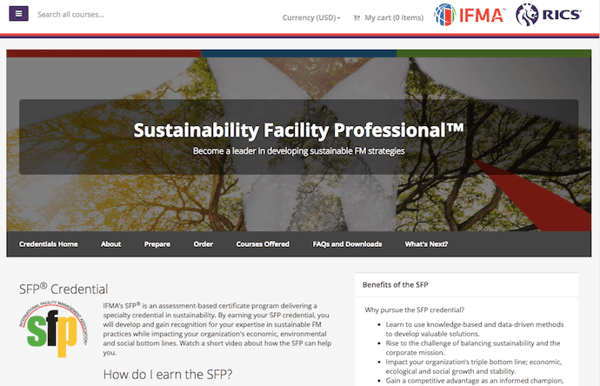
FM Training is a certification hub for facility managers (FMs), the same people who work to make their building facilities LEED-certified. Lots of coursework can go into earning this certification, but it can be a challenge to find curricula that caters to these professionals.
FM Training’s Ads campaign makes sure FMs know they’ve come to the right place.
While the five Site Extensions beneath the ad help users jump directly to the information they’re most interested in, the first sentence of the meta-description is what really reaches out to this audience: “FMs …” — the audience is clearly stated in terms they’d understand — “… see a salary increase of 6% or more within 1 yr.” The ad uses the limited space it has to send a message designed to encourage clicks and make the ad worth the investment.
6. LeftLane Sports
Search term: hiking boots for women
 Links to:
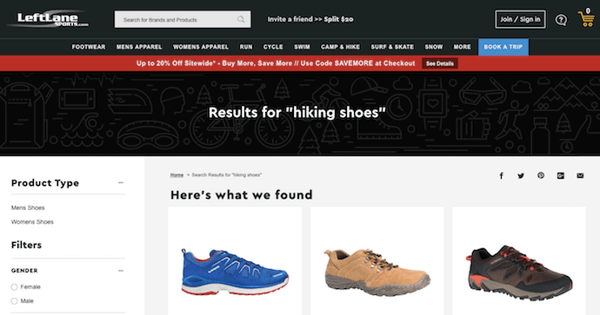
This campaign by LeftLane Sports is an example of local business advertising done right. The company doesn’t even need people to click on the link to make money from it.
If prospects in the Boston area search for “hiking boots for women,” they won’t just see a paid result by LeftLane Sports; they’ll see where the brand’s nearest storefront is and how long they’re open. It’s the perfect way to drive website traffic to the appropriate product pages and promote a local presence in the process.
How to Create a Google Ads Campaign
- Get a Google Ads account.
- Set your Campaign Goals.
- Complete the “Describe your business” section.
- Designate your geographic area.
- Set up keyword themes.
- Write your ad.
- Set your ad budget.
- Complete the “Budget and review” section.
- Double check your double check.
- Set up billing.
- Hit Submit.
1. Get a Google Ads account.
Before you can do anything, you’ll need to visit the Google Ads website and sign up for an account.
As part of signing up for a Google Ads account, Google will automatically take you through the process of creating your first campaign, so be prepared with your financial information. Google takes its fee with each click, so your banking credentials are required during the setup process.
Note: There’s no need to worry about getting charged for ad spend as you get started with Google Ads and set up your first campaign. You can always turn it off once you get through the registration process.
2. Set your Campaign Goals.
The Google interface will prompt you to select a goal type from the following three options:
- Get more calls
- Get more website sales or signups
- Get more visits to your physical location
This goal will be tied to your advertising campaign, so you’ll want to choose the one that most closely represents the results you want to see.
3. Complete the “Describe your business” section.
Google will then prompt you to enter your business name and website as important information that “describes your business.” This information is used to help predict your audience and is also used for the actual ad’s creation.
4. Designate your geographic area.
In this section, you’ll designate where you want your ads to appear. This is particularly helpful for local businesses.
At the same time, if you are an online shop, you may be less concerned about geographic constraints. It’s still not a bad idea to consider where, exactly, the majority of your audience lives. If you don’t know, you may want to back up a step and consider your buyer personas first. Why spend money advertising to people in the Midwest if the bulk of your customers live in the Northeast?
You can also reach other countries if your company serves international buyers. Just be sure you’re prepared for any of the buyers who come your way as a result of your ads. You might pay a lot of money for visitors who can’t make a purchase if you’re not careful.
5. Set up keyword themes.
Google will determine different themes based on your website content. You can customize your keywords based on their suggestions as a jumping off point for your campaign.
Keep in mind you’ll be competing against many other companies for the same audience when choosing keywords for which you want your ad to show up. Take some time to think of the keywords that will reach people who are ready to buy.
For instance, instead of using “luxury shoes” in your PPC ad, you can use keywords such as “red leather heels.” Maybe you’ll miss out on people who are looking for shoes of all types, but you’ll snag those who have a particular shoe in mind. They’ll be more likely to make a purchase if your ad leads to a landing page with red leather heels, and that will more than pay for their click.
You can also use negative keywords and save a lot of money on your clicks. These tell Google what you don’t want your ad to show up for. In other words, you can use keywords such as red leather heels, not stilettos.
6. Write your ad.
This is the most important aspect of your Google Ads education. The copy you use is what will convince potential buyers to click. You want to attract plenty of people, yes, but you also want those people to buy. If they don’t buy, you pay anyway.
In this section, you’re setting up the headlines and meta descriptions for your first ad(s). Note that you can choose to set up multiple ads in a single campaign, though Google starts you off with one.
For each add you create, you have three considerations:
- Headline
- Description
- Destination URL
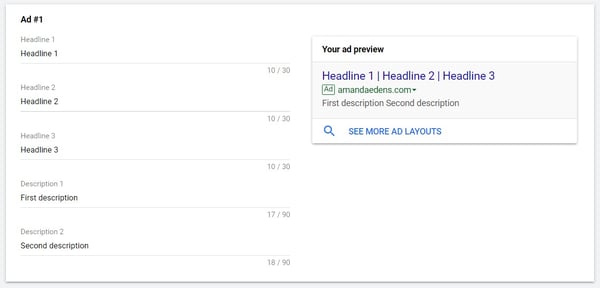
Headline
Start with a great headline that uses search terms that will reach your niche. Google splits the headline up into three sections of 30 characters each, so make each character count. You might even need to use abbreviations, or you can search for shorter synonyms.
Description
After the headline, you get another 90 characters for the first description. Use this space to highlight any benefits. How will the product solve your buyers’ pains? Then, in the second description, you can capitalize on a feature.
Be ready to change these if you notice your ad isn’t gaining a lot of traction, and don’t be afraid to experiment.
Destination URL
This is where you can choose where clicks on your ad go to. Just choose the page you want them to land on and paste the URL in the field.
7. Set your ad budget.
Here, you’ll be designating your daily budget.
You want to include enough money to make a difference, but you really don’t want to break the bank. You can manually set the bids for clicks, which gives you more control. This also means your ads will stop showing once your budget is spent. That means you won’t end up with a shocker of a bill later.
Once you start to review the results from your campaign, you can always adjust the budget.
8. Complete the “Budget and review” section.
In this section, you’ll be reviewing your campaign settings. It’s best to double check each of the following:
- Your daily budget
- Your monthly budget
- The impressions you’ll get for that budget
- The clicks you should expect based on the impressions
- The location you’re targeting
9. Double check your double check.
It’s always a good idea to check over everything one more time before you set your ad in motion. Is everything spelled correctly? You’ll miss out on keyword searches if there’s a typo one of them. When you’re sure you did everything correctly, then take a deep breath and move on to the next step.
10. Set up billing.
Because Google charges per click, it needs the payment information during the Google Ads account setup. By providing your payment information, you’re giving Google the ability to charge accrued advertising costs from your campaign.
11. Hit Submit.
By doing so, you’ve set up your first Google Ads campaign.
To create additional campaigns, perhaps with different or tighter keyword groups, you’ll want to select Campaigns from the page menu on the left. Then, click the blue plus button and choose New campaign. The Google interface will walk you through the additional steps.
Beyond setting everything up correctly, you’ll also want to A/B test your results often. Change headlines, introduce new features, focus on different benefits — and then take note of the number of conversions. There’s always a way to make your ad perform better.
How to Cancel a Google Ads Campaign
To cancel a Google Ads campaign, first sign in to your Google Ads account. Then, follow the instructions below:
- Click Campaigns from the menu on the left side.
- Find the campaign you want to cancel.
- Click the checkbox next to that campaign.
- Click Edit from the drop-down menu that appears.
- Click Pause to place the campaign on hold or Remove to permanently stop the campaign.
You can select the checkbox on multiple campaigns for a bulk edit.
Now that you know how to set up and cancel Google Ads campaigns, there’s nothing holding you back from getting started with the many things that PPC offers you.
Editor’s note: This post was originally published in March 2020 and has been updated for comprehensiveness.

The Step-by-Step Guide to Creating a Complete Marketing Strategy in 2021
How many times have you seen a killer marketing campaign and thought to yourself, “Wow, I wish I would’ve thought of that!”
(Glossier, I’m looking at you.)
We’ve all been there.
The truth is, when you’re just starting out, it can be tough to know whether your strategy is as comprehensive and powerful as it could be.
To help ease some of that uncertainty, we’ve created this guide that’ll show you step-by-step how to create a marketing strategy that leaves no stone unturned.
Let’s dive into the five critical components of a complete marketing strategy in 2019, followed by some examples for further inspiration.
1. Build a marketing plan.
Wait, I have to make a plan for my strategy? What’s the difference? Your marketing strategy provides an overview behind the reasons why your marketing team will need certain resources, take certain actions, and set certain goals over the year. Your marketing plan is the specific actions you’ll take to achieve that strategy.
Not sure where to start? This free marketing plan template can help.
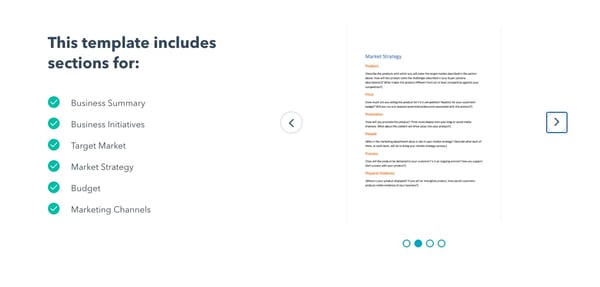
The right template can help you build a marketing plan that identifies your budget for the year, the initiatives your marketing organization needs to tackle, and the marketing channels you’ll use to implement those initiatives. And it will tie everything back to a business summary, to keep you aligned with overarching company goals.
2. Create buyer personas.
If you can’t define who your audience is in one sentence, now’s the chance to do it. A buyer persona is an example of your ideal customer.
For example, a store like Macy’s could define a buyer persona as Budgeting Belinda, a stylish working-class woman in her 30’s living in a suburb, looking to fill her closet with designer deals at low prices.
With this description, Macy’s Marketing department can picture Budgeting Belinda and work with a clear definition in-mind.
Buyer personas have critical demographic and psychographic information — including age, job title, income, location, interests, and challenges. Notice how Belinda has all of those attributes in her description.
You don’t have to create your buyer persona with a pen and paper. In fact, HubSpot offers a free template you can use to make your own (and it’s really fun). Buyer personas should be at the core of building your strategy.
3. Identify goals.
Your marketing strategy goals should coincide with your business goals. For example, if one of your business goals is to have 300 people attend your annual conference in three months, your goal as a marketer should be along the lines of boosting online RSVPs by 10% at the end of the month.
Other marketing goals might be to increase brand awareness or generate high-quality leads. You might also want to grow or maintain thought leadership in your industry or increase customer value. Whatever your goals, identify what they are and how your marketing organization can work to achieve them over the next year.
4. Select the appropriate tools.
Once you have your goals identified, make sure you have the right tools to measure the success of those goals. Online software like social media schedulers gives you analytics to help you keep track of what your audience likes and doesn’t. Alternatively, you might consider Google Analytics to measure blog and web page performance.
Additionally, it will be helpful if you make your goals SMART — to do so, take a look at How to Write a SMART Goal [+ Free SMART Goal Template]. Here are a few tools that can help you track and measure the success of your marketing goals:
Trello
Trello keeps your marketing team on track and openly communicating about the projects they’re working on. Create boards for individual campaigns, editorial calendars, or quarterly goals.
Built-in workflows and automation capabilities keep communication streamlined, and simplicity keeps your marketing team focused on the work that matters.
Pricing: Free; Business Class, $9.99/user/month; Enterprise, $17.50/user/month for 100 users
Monday.com
 Everything on Monday.com starts with a board or visually driven table. Create and customize workflows for your team and keep groups, items, sub-items, and updates synced in real time.
You can also transform data pulled from timeline and Gantt views to track your projects on Monday.com and ensure deadlines have been met. Plus, with more than 40 integrations — from SurveyMonkey to Mailchimp and, of course, HubSpot — you can visualize your data and ensure your whole company is collaborating.
Pricing: Basic, $8/month/seat; Standard, $10/month/seat; Pro, $16/month/seat; Enterprise, contact for pricing
SEMRush
 SEO continues to be a huge factor in the successful ranking of your website. SEMrush allows you to run a technical SEO audit, track daily rankings, analyze your competitor’s SEO strategy, research millions of keywords, and even source ideas for earning more organic traffic.
But the benefits don’t stop at SEO. Use SEMRush for PPC, building and measuring an effective social media strategy, content planning, and even market research.
Pricing: Pro, $99.95/month; Guru, $199.95/month; Business, $399.95/month
BuzzSumo
BuzzSumo allows you to analyze data to enhance and lead your marketing strategy, all while exploring high-performing content in your industry to increase engagement. Use the platform to identify influencers who may help your brand reach, and monitor comments and trends to make the most of every turn.
They also have tools to help with crisis management and video marketing as your needs evolve.
Pricing: Pro, $99/month; Plus, $179/month; Large, $299/month; Enterprise, $499+/month
Crazy Egg
 Need to optimize your website this year? Consider getting started with Crazy Egg. You’ll be able to identify “attention hotspots” on your product pages, track ad campaign traffic on your site, and understand if shoppers are clicking where you want them to. You can even make sure your “buy now” buttons are in the best place.
Crazy Egg also offers recordings, A/B testing, and more to help ensure your website is offering the best user experience and the best return.
Pricing: Basic, $24/month; Standard, $49/month; Plus, $99/month; Pro, $249/month; Custom options available upon request
5. Account for existing resources.
Decide what you already have in your arsenal that can help you create your strategy. To streamline this process, think of your assets in three categories — paid, owned, and earned media.
Paid Media
Recall that paid media means any channel you spend money on to attract your target audience. Twitter, Facebook, and LinkedIn offer paid media options that boost your exposure.
Owned Media
Owned media is any of the media you create — blog posts, ebooks, images, and infographics that your marketing team has created are examples of owned media.
Earned Media
Earned media is another way to say user-generated content. Shares on social media, tweets about your business, and photos posted on Instagram mentioning your company are all examples of earned media.
Gather your materials in these areas and consolidate them all in a single vehicle so you’ll have a clear vision of what you have and how you can integrate the three channels together to maximize your strategy.
For example, if you already have a blog that’s rolling out weekly content in your niche (owned media), you might consider promoting your blog posts on Twitter (paid media), which customers’ might then re-tweet (earned media). Ultimately, that will help you create a better, more well-rounded strategy.
The free option? Tweet it from your company’s Twitter or post it on Instagram and use relevant hashtags to spread it.
If you have resources that don’t fit into your goals, nix it. This is a great time to clean house or identify gaps in your materials.
6. Audit and plan media campaigns.
Cleaning house segues straight into this step. Now, you must decide which content is going to help you. Focus on your owned media and marketing goals. For instance, will updating the CTAs at the end of your blog posts help you increase RSVPs to your event?
Next, look at your buyer personas. Let’s say you work for a video editing software company. If one of your persona’s challenges is adding clean sound effects to their videos but you don’t have any content that reflects that, make a 15-second demo video for Instagram to show how great your product is at solving that challenge.
Finally, create a content creation plan. The plan should include the title, goals, format, and channel for each piece of content. Be sure to include which challenge it’s solving for your buyer persona.
For ideas on content creation or a more in-depth look at how to create a content plan, check out our post, The Ultimate Guide to Content Creation.
7. Bring it to fruition
At this point, your market research and planning should help you visualize how your strategy will be executed (and by which teams).
The final step is to bring that all together — to put actions into your planning. Create a document that maps out the steps you need to take to execute your campaign. In other words, define your strategy.
Think long-term when creating this document. A standard strategy document is 12 months. This structured timeline should be the home base for your strategic marketing efforts.
To paint an example, let’s go back to the video software company.
Maybe in January, you will launch a software update that improves the exportation process for users. In April, you want to publish an ebook that explains editing terms to your buyer personas, and in September, you plan to launch an integration with other software.
Remember, your digital strategy is unique to your business, so the document should be, as well. As long as the strategy includes all of the necessary information, you’ll be all set to take your company’s brand from okay to outstanding.
Now that we’ve explored five critical steps of a complete marketing strategy, let’s look at some “Why didn’t I think of that?” strategies to inspire your own.
Examples of Successful Marketing Strategies
1. Regal Movies
Digital strategy: Owned media
Regal Movies took the Halloween spirit to a new level, even re-naming their Twitter to reflect the spirit of the season. This “Monster Madness” poll is a fun, interactive way to get followers invested in Regal’s content:
Regal’s tweet is an example of owned media because the company was in full control of the answers followers gave (and, apparently, American Werewolf didn’t stand a chance). Regal effectively kept true to their brand by using only classic movies in their poll,, while still putting a modern spin on it.
This is also a good example of how retweets don’t necessarily equal success. While four retweets isn’t that big of a deal, check out the votes: 461. That means there were over 400 interactions with a single tweet.
2. Taco Bell
Digital strategy: User-generated content, earned media
Real love is taking your engagement photos at your favorite fast food Mexican restaurant — right? User-generated content is one of the best ways to gain traction in your strategy — it demonstrates your appreciation for loyal customers, and also incentivizes other users’ to promote your products for the chance at a similar shout-out. Plus, sometimes the content your brand-lovers create is really, really good:
Oh, you sure did. 👏❤️ https://t.co/TXflZvxVxR
— Taco Bell (@tacobell)
September 26, 2019
It’s not every day someone takes engagement photos at a fast-food restaurant, and Taco Bell jumped at this earned media opportunity. Earned media is at work here because this couple is saying they love baja blasts and crunchwraps as much as they love each other — so it must be delicious.
3. Small Girls PR
Digital strategy: Event marketing
Wait, is that Keke Palmer?
Small Girls PR is a boutique PR company based in New York, and one of the company’s talents is throwing amazing events for their clients, like Olay. This event recap carousel on Instagram is an effective event marketing example.
Event marketing is a fantastic opportunity to boost awareness for your brand. Not every business needs to throw lavish events, either. Event marketing can be as simple as the last company outing you had at your team’s favorite brewery.
Posting a quick recap on Instagram sheds light on your business’s culture, and demonstrates your appreciation for your employees’, ideally incentivizing others to apply.
4. Diesel Cafe
Digital strategy: Word of mouth
Boston-local cafe Diesel Cafe is more than just a great location to get vegan bagels. It also rocks at word-of-mouth marketing. In fact, Diesel even has a website dedicated to it — a place where fans can submit letters about the fun times they’ve had at the cafe:
Check your company’s Yelp climate. Are people giving you nice reviews? Showcasing some of them on your social channels is an effective opportunity to provide social proof that your products or services are a worthwhile investment, since people typically trust peers more than ads.
5. Target
Digital strategy: Paid media, Twitter cards
If you’ve got the budget for paid media, take full advantage of it. Paid media is when you pay social channels, like Twitter, to promote your content on their site. By doing this, your content reaches new audiences you might not be able to reach organically:
Get wrapped up in soft sweaters and fleece-lined jean jackets.
— Target (@Target)
October 11, 2019
An inclusive ad from Target about fall shopping uses Twitter cards to promote their brand and offer easier ways to shop — simply click on the photo, and you’re redirected to a purchase page. More social channels are offering ways for shoppers to purchase in-app or close to it, driving sales and boosting exposure for brands.
Ultimately, creating a complete marketing strategy isn’t something that can happen overnight. It takes time, hard work, and dedication to ensure you’re reaching your ideal audience, whenever and wherever they want to be reached.
Stick with it (and use some of the resources we’ve included in this post), and over time, research and customer feedback will help you refine your strategy to ensure you’re spending most of your time on the marketing channels your audience cares most about.
Editor’s note: This post was originally publishing in October 2019. It has been updated for freshness and accuracy.

The Pros and Cons of Blog Comments [+ Does It Matter for SEO?]
As any blog owner will tell you, “Should I enable comments on my blog?” is one of the first questions you’ll ask yourself as your content starts to grow.
There are plenty of benefits to enabling comments on your blog, including an opportunity to engage with your readers, grow a stronger community, and learn what your readers think about each piece of content you publish.
But there are also plenty of drawbacks — there’s a reason many major marketing blogs including Search Engine Land, SEMrush, and Buffer don’t allow comments (and, for the record, at HubSpot we don’t either).
If you’re wondering whether comments make sense for your own blog, keep reading. We’ll explore the pros and cons of blog comments, and whether they truly deliver enough SEO advantages to make them worthwhile.
Blog Comments and SEO
At HubSpot, we’ve run tests to determine whether blog comments actually lead to an increase in traffic or conversions.
In fact, a colleague of mine analyzed over 100,000 blog posts and came to the conclusion: “There is no correlation between the number of comments on a post and the number of views that post got … There’s also no correlation between comments and the number of links that post got.”
And, as HubSpot’s SEO Head of Content Aja Frost told me: “Many blogs develop thriving communities through their comment sections, such as Cup of Jo, Ask a Manager, the New York Times, etc.”
Frost adds, “Having a thriving community can be good for SEO, because it increases your direct traffic (which has a knock-on effect on organic), market awareness, etc. But only if your commenters are truly engaged.”
Frost says, “If you can build a robust community, organic traffic may follow, but I wouldn’t turn on a comment section for SEO’s sake.”
Additionally, it’s also important to note — while it may have been true a few years ago, it’s no longer true that backlinking to your website in another blog’s comment section will increase your website’s search ranking.
Ultimately, Google caught onto the black hat technique where people were stuffing blog comments sections with irrelevant links for the SEO benefit, and Google now gives much lower priority to user-generated comments on websites.
All of which is to say — leaving a comment on another blog post linking back to your website is ultimately not worth the effort. There are plenty of more legitimate, powerful opportunities to increase your SEO that I’d recommend instead.
Next, let’s dive into a few examples of businesses that do have blog comments enabled, and the potential benefits of including a comments section on your own blog beyond SEO.
Blog Comment Examples
1. Backlinko
Brian Dean’s blog, Backlinko, is a popular and trusted source for SEO tips and expert advice. Trusted by major brands including Disney, Amazon, and IBM, Backlinko provides actionable content on a range of SEO-related topics.
Dean’s blog also enables comments — and his readers love to engage. Take a look at the comments section for one of his recent posts, “Landing Pages: The Definitive Guide”:
It’s clear that Dean cares about the comments his readers leave — in fact, he typically responds to most of them. Best of all, the comments often include actionable, tactical tips that readers can use to further their knowledge on the subject.
In a world where social proof matters, Dean has proven there is a responsible way to use blog comments to increase a blog’s value and effectiveness.
2. Cup of Jo
The popular women’s lifestyle site — which covers topics ranging from food and style to travel and parenting — has an incredibly active community of readers, and I’ll be honest … the comments section is almost as exciting to me as the blog’s content itself.
Take, for instance, the blog post on parenting Screen Time Rules. The short piece is only four paragraphs long — and yet, there are over 400 comments on the post from a range of perspectives:

Ultimately, Cup of Jo has facilitated a strong, vibrant community of people eager to share their own opinions on the topic at-hand — so the comments section is a viable and necessary component of the blog, and in this case, adds value to the site.
3. Moz
One of the most popular digital marketing and SEO blogs around, Moz has built a community of experts eager to weigh in and provide industry insights to help digital marketers and SEO strategists.
This strong sense of community is likely why Moz has chosen to keep comments enabled on their blog:
Wisely, the company also includes a CTA for commenters to refer to Moz’s community etiquette guidelines before posting a comment. While this won’t prevent all spam from getting through, it helps Moz outline the do’s and don’ts of their public forum for well-intentioned commenters.
There are other plenty of other examples of publications with comments sections, including Neil Patel, Web Search Social, and even the New York Times.
Ultimately, however, the decision to enable comments on your blog largely depends on your own business goals. Comments can foster a stronger sense of community and enable readers to learn from each other.
However, even with the help of spam filter services, you still run the risk of providing a space for people to post offensive or defamatory content, off-topic remarks, or promotional content linking back to inappropriate or irrelevant links.
If you feel the benefits outweigh these risks, you’ll want to hire a community manager or create a process for thoughtfully removing content that doesn’t feel relevant to the conversation at-hand.
Should you allow comments on your blog?
It’s up to you whether the benefits outweigh the risks when it comes to allowing comments on your blog.
For certain use cases and brands, comments are a necessary aspect of building a strong community and encouraging friendly discourse.
On the other hand, facilitating healthy discussions, deleting spam, and answering both on-topic and off-topic questions posted by your readers might be more effort than it’s worth.
If that’s the case, perhaps you want to explore using one of your social channels as an alternative option for encouraging engagement from readers, as Buffer does:

For HubSpot, we decided we wanted to steer those types of conversations to a more public forum, which is why, rather than enabling comments on our blog posts, we’ll post our blog posts on our social channels with questions to facilitate effective conversations with marketers across industries.
Of course, that doesn’t mean that decision works for every brand. Brian Dean is a good example of that, as demonstrated above — the comments left on Dean’s blog posts are often just as useful as the content itself, since readers’ can share personal experiences and help other readers’ grow their businesses through shared challenges and successes.
If you’re unsure whether you should enable comments or not, you can always include a comments section for a few months and then reassessing whether the comments are productive and engaging. If not, consider how you might get creative with facilitating engagement and growing your blog audience through other methods.

How to Develop a Niche Marketing Strategy that Drives Growth
As of March 2020, over 804,390 businesses in the U.S. were less than one year old. Combine that with the 31.7 million small businesses vying for customers, and the competition seems even more fierce. So how can you possibly create a marketing strategy that stands out? Diving into a specific niche is the way to set your business apart.
Let’s look at how a handful of businesses use niche marketing to their advantage, before walking through the steps to create your own growth-generating strategy.
5 Examples of a Niche Marketing Strategy
1. Flylow Gear
With 9.2 million skiers and snowboarders in the U.S, the pool of potential customers seems wide enough for all to share. But popular brands like Patagonia and The North Face can be found in almost every sports shop, making it hard to convince customers to seek out smaller brands with fewer offerings.
Flylow Gear figured out how to fight through the noise. Instead of targeting all customers interested in winter gear, their niche marketing strategy focuses on backcountry skiers looking for no-nonsense, quality gear. Their products are featured in all the right places — like Powder magazine — to reach their ideal buyers. Even their confirmation emails share that they’re a small, mountain-based crew of dedicated skiers.
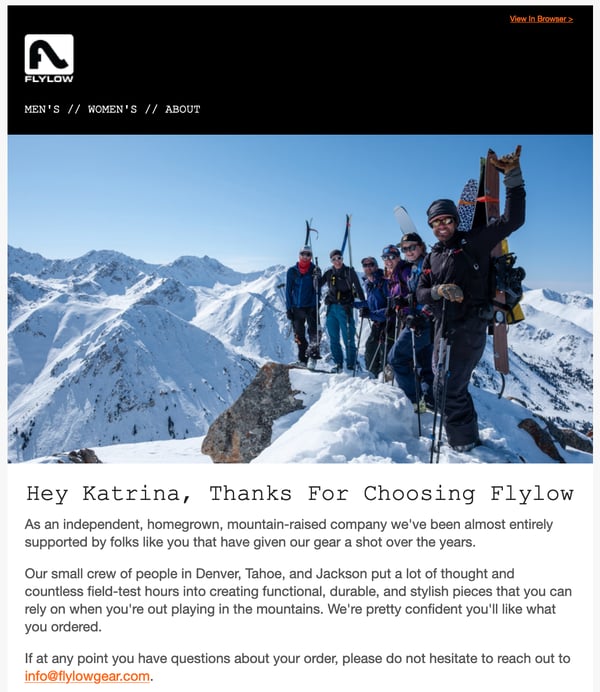
2. Octavia Elizabeth Jewelry
For ethically-minded consumers searching for jewelry, the most important factor is knowing about raw materials sourcing and product creation. That’s because this $300 billion dollar industry has come under fire for using child labor and causing extensive environmental harm.
Octavia Elizabeth understands the need for responsible jewelry. The company’s commitment to fair working conditions, legitimate living wages, and ethical production are clearly stated on its website.
Not only has Octavia Elizabeth honed in on customers looking for sustainably-sourced, handmade jewelry who are willing to pay a higher price, the brand has also elevated its niche offering by associating itself with celebrity clientele.

3. Natural Dog Company
Research estimates Americans will spend $99 billion on their pets in 2020 alone. So how can a pet-focused business stand out amongst the thousands of memory foam beds, custom carry-on bags, and dog-friendly ice creams saturating the market?
Natural Dog Company caters to a very specific kind of pet owner: the eco-conscious consumer who pampers their pooch. By giving their organic and all-natural skin care products names like PAWdicure Pack and offering discount codes for free dog treats, they put pups first — which is exactly what their customers do.

4. Pimsleur
Learning a new language can be a struggle, and the options for doing so are definitely overwhelming. Will you really be speaking like a Parisian after spending $1,000 on a program?
Rather than making promises of perfect grammar and flawless accents, Pimsleur focuses on learners who need to improve their speaking and listening skills. The program includes a 30-minute audio lesson every day, with each conversation building off the previous ones. While not the most innovative language-learning app, its audio-first approach is great for customers looking to improve their conversational skills.
5. Photographers Without Borders
It’s one thing to entice people to buy a product, but it’s another thing entirely to attract donors for a nonprofit. While this type of organization may not seem like the right fit for a niche marketing strategy, it’s essential for bringing in donations and volunteers.
Photographers Without Borders has partnered with major organizations like Adobe, Sony, and Patagonia by honing in on a particular marketing technique: storytelling.
By prioritizing ethical storytelling, whether in a social media post, email newsletter, or online webinar, the organization has built a reputation for producing high-quality work that address the 17 UN Sustainable Development Goals and UNDRIP. Plus, their Code of Ethics makes it clear what type of community members and partners they’re aiming to attract.

Developing a Niche Marketing Strategy
Now that you have a better grasp on how brands from all types of industries create strategies that drive growth, it’s time to shape your own.
Step 1: Know your competition.
Developing a niche marketing strategy is impossible without scoping out your competition. That’s because it’s crucial to understand your unique selling proposition — what you do differently that makes customers choose your company over another.
Maybe you design ceramic dishware that can’t be found anywhere else, or maybe you’ve developed a tool that makes it easier for marketers to send emails. Whatever is it, find your speciality and craft a story around it.
Step 2: Narrow down your niche market.
Airbnb Co-founder Brian Chesky is famous for having said, “Build something 100 people love, not something 1 million people kind of like.” Put simply, it’s better to reach a small group of people who sing praises about your company, rather than a large group who thinks it’s just okay.
You can do this by honing in on the right niche market for your business. While this takes time and thought, it’s worth the effort to find loyal customers who will gladly choose you over competitors.
For instance, Thirdlove is the first underwear company to offer bras in half-size cups. Through their inclusive sizing options and emphasis on body diversity, they’ve built a loyal community of over 327,000 Instagram followers.
Step 3: Go where your buyers are.
If your ideal customer spends all of their time scrolling on Facebook, it wouldn’t make sense to develop a niche marketing strategy around email campaigns. Enter market research.
You already know who your buyers are, but research helps you go deeper to find out where they shop, how they find products, and what influences their purchase decisions. Once you have that information, you’ll get the most return for your marketing dollars.
Step 4: Listen to the word on the street.
Everyone has problems that need solutions. If you listen to people’s thoughts about a certain product or service, you can find opportunities to fill in the gaps.
David Barnett did just that when he engineered a solution for constantly tangled headphones. What started out as two buttons glued to the back of a phone case quickly turned into Popsockets, a company that brought in $169 million in revenue just seven years after its founding.
Step 5: Create a unique brand.
Once you’ve defined your unique selling point, outlined your buyer persona, found out where to reach them, and listened to their problems — all that’s left is to build a brand identity. A well-defined brand will help you develop a niche marketing strategy that’s authentic to you and attracts ideal customers.
For instance, Etsy’s position as the marketplace for independent artists has attracted more than 138 million buyers. In a 2020 TV commercial, the brand touched on the pandemic and used emotional marketing tactics to encourage support for small businesses that sell through the platform.
Creating a niche marketing strategy that drives growth for your business is more than creating a social media ad or sending a weekly email promotion. If you take the time to learn about your customers and differentiate your brand, you can develop a strategy that attracts the right buyers and helps you hit your growth goals.

The Evolution of Content Marketing: How It’s Changed and Where It’s Going in the Next Decade
A sound content marketing strategy is one of the better ways a business can help shape its brand identity, garner interest from prospects, and retain an engaged audience. It lets you establish authority in your space, project legitimacy, and build trust between you and who you’re trying to reach.
As you can assume, it’s well worth understanding. But that’s easier said than done. Content marketing isn’t static. The landscape of the practice is constantly changing. It doesn’t look the same now as it did ten years ago, and in ten years it won’t look the same as it does now.
It’s a difficult topic to pin down — one with a fascinating past and an exciting future. Out of both genuine interest and forward-thinking practicality, it’s important to understand both where it’s been and where it’s going.
Here, we’ll get some perspective on both. We’re going to take a look at how content marketing has evolved in the past decade, and how it’s going to evolve in the next one.
How Content Marketing Evolved in the Past Decade
Google changed the game.
In 2011, Google conducted its landmark Zero Moment of Truth (ZMOT) study. It found that 88% of shoppers use what’s known as a Zero Moment of Truth — a discovery and awareness stage in a buying cycle where a consumer researches a product before buying it. Google’s research also indicated that word of mouth was a definitive factor in swaying that moment.
The study provides a unique point of reference in the context of content marketing’s evolution. It captures the essence of how and why businesses needed to focus on content marketing at the beginning of the 2010s.
It was tacit evidence that companies’ stories were being told online — well beyond the control of their marketing departments — and it was in their best interest to help shape those conversations.
The ZMOT study highlighted the need for sound Search Engine Optimization (SEO). Ranking for relevant keywords on search engines became all but essential to bolstering a company’s online presence and holding up during consumers’ Zero Moments of Truth.
But that study wasn’t the only bombshell Google dropped in the early 2010s. Around the time the study came out, Google’s search ranking algorithm changed to discourage “keyword stuffing” — the practice of repetitively loading a webpage with specific keywords to try to sway search engine rankings.
The change represented what is still a continuous effort by Google to provide users with positive, helpful online experiences. And it did just that. The shift that set the stage for businesses to focus on producing more high-quality, meaningful content.
Social media rose.
But content marketing’s evolution wasn’t exclusively linked to search engines. Social media’s meteoric rise to prominence — one of the most disruptive trends in human history — also had a profound impact on the practice. As these platforms developed into mainstays of everyday life, they presented new challenges for content marketers.
As social media evolved, it popularized a different kind of content consumption than search engines. The difference boiled down to a matter of “pointed versus passive.”
Consumers use search engines to find content more pointedly. Generally speaking, when you use a search engine, you’re looking for a specific answer or a specific subject. Social media allowed users to consume content more passively on their preferred platforms. The content you see on your Facebook feed is finding its way to you — not the other way around.
That trend incentivized the creation of more shareable, attention-grabbing content that could easily be spread across social media channels.
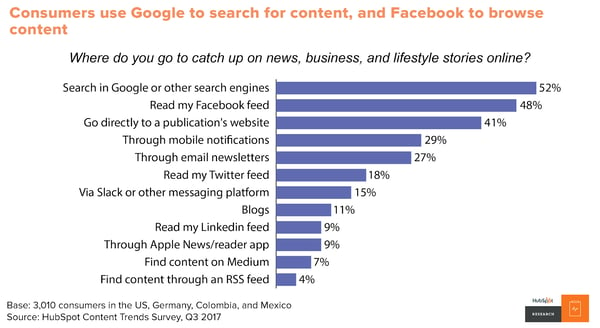
Video made a push.
Video also emerged as one of the prevailing content marketing mediums as the decade progressed, particularly among younger consumers. By 2017, over 50% of consumers wanted to see videos from brands they supported — more than any other kind of content.
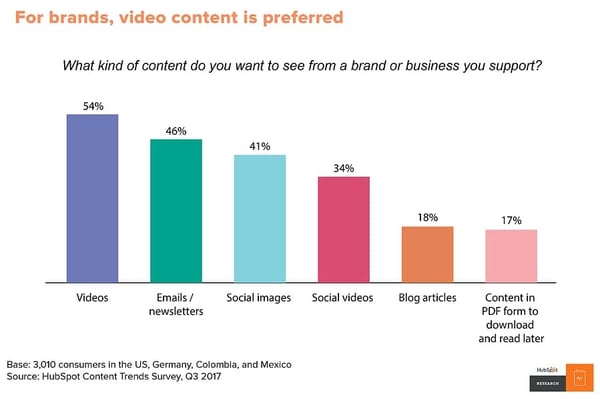
Video is inherently engaging. Generally speaking, it’s easier to follow than blog posts, email newsletters, or ebooks. Gradually, audiences took to it more and more as the decade progressed. By the end of the 2010s, platforms like YouTube were central to the landscape of content marketing.
Obviously, content marketing underwent several shifts in the 2010s, but as I said at the beginning of this article, the practice isn’t — and will never be — static. There are still plenty of changes to come.
How Content Marketing Will Evolve in the Next Decade
Video content will continue to rule.
As I just mentioned, video was emerging as one of the most — if not the most — important mediums for content marketing at the end of this past decade. There’s no indication that that trend is stopping anytime soon.
As of 2020, 85% of businesses use video as a marketing tool — up 24% from 2016. And 92% of marketers who use it consider it an important part of their marketing strategy. It’s already a staple in several companies’ content marketing operations, and research indicates that base is going to expand.
According to a survey by Wyzowl, 59% of marketers who weren’t using video in 2019 expected to be using it throughout 2020.
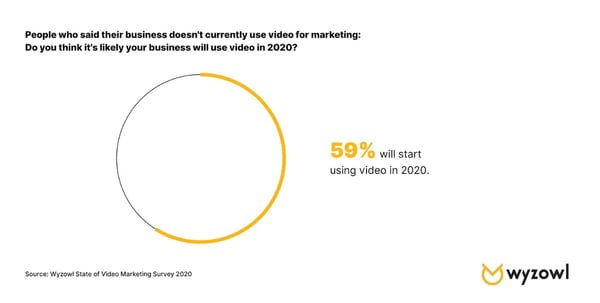
All told, it looks like the exploration and expansion of video as the preeminent medium for content marketing is going to continue. The priority for marketers is going to be a matter of standing out.
That could mean emphasizing the quality of the content you produce — ensuring it’s enriching, well-crafted, and relevant to viewers. You could also try looking to emerging platforms like TikTok.
No matter how individual producers and companies manage to innovate when it comes to video marketing, the medium is going to be a mainstay in the evolution of content marketing going forward.
Adjusting for mobile will be essential and present new opportunities.
According to Statista, global mobile data traffic in 2022 will be seven times larger than it was in 2017. Mobile device usage is increasing astronomically, and it’s in every content marketer’s best interest to keep pace with that trend.
In 2019, 61% of Google searches took place on a mobile device, and that trend is showing no signs of slowing down. Having a website optimized for mobile devices will be central to successful SEO efforts. And a lot of the content you create will need to fit that bill as well.
Blogs should be easily navigable on smartphones. Readily accessible video content that your audience can watch on mobile devices will be a big help as well. Prospects and customers will need to be able to get as much out of your mobile resources as your desktop ones.
This shift towards mobile will also present new opportunities through emerging kinds of media. More novel mobile technology — like virtual and augmented reality — will have a very real place in the future of content marketing.
As people continue to rely more on their mobile devices, content marketers will have to as well.
Successful content will be more empathetic, purposeful, and customer-first.
Google’s ranking algorithm aims to prioritize the content that will mean the most to searchers. Ideally, by Google’s standards, the first ranking search result for any keyword is the one that best addresses whatever users are searching for. And in all likelihood, they’ll keep tinkering with their process in pursuit of that interest.
While there’s no telling exactly how the algorithm might change going forward, one fact remains — marketers need to focus on high-quality content that will register with consumers. That means understanding your audience and putting considerable effort into how to reach them best.
As HubSpot Senior Content Strategist Amanda Zantal-Wiener puts it, “Where I’m starting to see content turning a corner is in the area of empathy. In the years to come, marketers are going to start creating more content that’s truly created in the mindset of putting themselves in the shoes of others — be it their customers, prospects, partners, or someone else within their audiences. They’ll ask questions like, ‘What does my audience need from me right now? What can I create that’s truly going to help them?’ That’s going to become a requirement for marketers when they begin brainstorming content.”
Research, outreach, and community engagement will become even more important in the context of content creation. Content marketing is trending towards audience enrichment as opposed to product promotion. If this shifting tide holds true, content marketing will continue to become more targeted, purposeful, and customer-centric as the practice evolves.
If there’s anything to take away from understanding the previous and upcoming evolutions of content marketing it’s this — don’t get too comfortable. New trends and challenges are always emerging, and it will always be in your best interest to stay abreast of them.
And above all else, focus on consistently creating high-quality content that your audience will always be able to get something out of.
Editor’s note: This post was originally published in May 2020 and has been updated for comprehensiveness.

20 Stats That Make the Case for Co-Marketing Today and in the Future
As a billionaire inventor and CEO, the fictional Tony Stark, also known as Marvel’s Iron Man, worked his way to the top of the corporate ladder while repeatedly saving the world on the side.
Despite Stark’s impressive achievements, his career success and robotic super-suit weren’t what made him a legend.
In fact, Stark’s best Marvel Comics storylines began when he joined The Avengers to save the entire universe.
Although Stark was fully capable of saving Earth alone in his super-suit, he knew teaming up with other superheroes would allow him to save multiple planets.
Marketers can learn a lot from Tony Stark.
While our brands might be capable of reaching basic targets all on their own, pooling marketing resources, combining skill sets, and jointly creating campaigns with other non-competing companies could help us reach much broader audiences. This tactic is known as co-marketing.
Although co-marketing can be incredibly beneficial to you and your partner’s brands, it will still take time, planning, and coordination when it comes to finding a co-marketing partner and launching mutually beneficial campaigns.
Like any good marketer considering a new tactic, you’ll want to know that co-marketing can be effective before devoting resources to it. And yes, you’ll likely want to research more than just the superhero analogy I’ve made above.
To help you make the case for co-marketing, here’s a list of 20 statistics that prove why you should consider this strategy.
20 Co-Marketing Stats to Know in 2020
The State of Co-Marketing in 2020
- After seeing co-marketed campaigns, 68% of consumers are able to make buying decisions before even speaking to sales representatives. (PartnerPath, 2019)
- Virtually all companies surveyed in 2018 were already active in internet marketing partnerships and affiliate programs. The few that weren’t were active planning to be in the next 12 months. (Partnerize, 2018)
- 54% of companies say partnerships drive more than 20% of total company revenue. (Partnerize, 2018)
- 34% of marketers say that co-marketing or brand partnerships are the most effective ways to increase an email subscriber list. (Ascend2, 2017)
- 74% of companies say partnerships and affiliate marketing campaigns are a high or very high priority for their businesses. (Partnerize, 2018)
- In 2018, just 5% of companies said they’d invested less in partnerships than in 2017. (Partnerize, 2018)
- More than half of respondents in a 2018 partnership survey said partnerships were driving more customers and sales in that year than in 2017. (Partnerize, 2018)
Partnership and Co-Marketing Tactics
- Brand partnerships that leverage digital channels see 4X the pipeline of non-digital partnerships. (Impact, 2019)
- 84% of vendors with brand partners offer money to those partners for co-marketing expenses. (PartnerPath, 2019)
- 30% of vendors will offer co-marketing reimbursement if their brand partner can prove ROI. (PartnerPath, 2019)
- Roughly 11% of marketers say “partnership posts” are their brand’s most engaging type of social media content. (HubSpot, 2020)
- Many brands prioritize large partnerships, versus thousands of smaller partnerships. Roughly 34% of leading brands have 50 to 99 partners, while 67% of brands have less than 100. (Partnerize, 2018)
- Only 2% of brands surveyed by Partnerize in 2018 partner with more than 1,000 brands. (Partnerize, 2018)
- In 2018, 33% of CEOs said they planned to prioritize strategic partnerships, which could involve co-marketing partnerships, in 2019. (KPMG, 2018)
- The top brand leader priorities include finding more partners (27%) and strengthening relationships with existing partners (23%). (Partnerize, 2018)
Co-Marketing and Brand Partnership Success Stories
- The Yeezy shoe line, a collaboration between Adidas and Kanye West, enabled Adidas’ net annual rose by 19.5% to $1.9 billion in 2019. (Bloomberg, 2019)
- Buffer and Social Chain’s Brand 2019 Brand and Social Media Report resulted in 17,000 download page visits in just one week and more than 3,000 shares across social media. These results were higher than an average article shared on either of their sites. (Quuu, 2019)
- When Estée Lauder and a top U.S. retailer created joint Google Ads that promoted the retailer and the brand’s fragrance products, the average ad click share rose by 70%. (Google, 2020)
- In 2018, Coors Light teamed up with National Geographic to launch a series of video ads taking place in Iceland. The campaign reached 10.5 million people and resulted in a 6.8 percent lift in brand favorability. (Facebook, 2018)
- In a recent case study, a gaming app company partnered with another brand in a cross-promotional campaign that was coordinated by Aarki — a mobile marketing agency. The gaming app received a 32% rise in downloads shortly after remarketing ads to the partnering brand’s contact list on social media. (Aarki, 2020)
The Benefits of Co-Marketing
Co-marketing can provide a long list of benefits, especially if you want to pool your resources to create a large-scale marketing campaign. Along with the statistical benefits seen above, there are a number of other qualitative perks such as:
- Audience exposure: Through co-marketing and cross-promotion, your content or brand information will be shared with your audiences as well as your brand partner’s. This enables your brand to gain increased reach. For example, when local or online stores launch Google Ads showing that they carry Estée Lauder fragrances, fans of the perfume brand might visit or follow that store for the first time.
- Increased trust and favorability: If a prospect trusts the brand you partner with, they might trust you when that brand promotes your name, logo, or content. For example, when Adidas teamed up with Kanye West to create the Yeezy line, people might have bought a pair of Yeezys because they trusted Adidas’ quality and West’s sense of style.
- Cost-effective content: When you team up with another brand, you might be able to make an agreement where you split time or production costs, or you can trade one brand strength for another. For example, if you’re a small brand partnering with a larger brand, you might be able to utilize the bigger brand’s budget and gain more exposure on their channels. Meanwhile, the bigger brand might be able to leverage your niche social media audience..
Now that you’ve learned about the benefits and stats related to co-marketing, get inspiration from these successful real-world examples of the tactic. For more on how to find the right co-marketing partner, check out this handy guide.
Editor’s note: This post was originally published in September 2020 and has been updated for comprehensiveness.

Experts Share Their Top 8 Holiday Email Marketing Tips for 2020
Ready or not, the holidays are right around the corner. And that means it’s time for email marketers to start planning one of their biggest email campaigns of the year.
To help you prep for all the holiday madness to come, the team at Uplers asked a group of seasoned email experts and industry insiders to share their insights on Holiday Email Marketing Tips and Trends for 2020.
Check out their advice for holiday email trends below, and get inspired to tackle your company’s holiday campaign with style.
The Top 8 Holiday Email Marketing Tips of 2020
1. Start planning way before you think you should.
Planning well in advance goes a long way, giving you enough time to ensure your email really stands out.
“Do get started on your holiday email marketing strategy and planning early,” advises Christopher Donald, the President of Operations & Managing Partner at InboxArmy. “Create planning, creative, production, and deployment calendars to better execute your campaigns. Don’t wait until the last minute to decide what to do.”
2. Focus on the customer, not an aggressive sales agenda.
Marketers send more emails than usual during the holiday season, but it’s important to remember that there’s a real person at the other end of your email communication. The holidays are a busy, hectic time for everyone (not just marketers!) and they probably won’t appreciate having their inbox flooded with hard-sell emails. Respect their time, and adopt a helpful, customer-centric approach.
Kara Trivunovic, VP/GM Client Services, Global Industry Evangelist at Epsilon, believes you need to find out what the subscriber expects from you during the holidays rather than driving your agenda of selling.
It’s the holiday season, after all, so you can’t just pen down some sales-oriented copy and call it a day. Tap into your subscribers’ emotions, and focus the copy on how you can help them spread joy through the gifts they can buy from you. Even a simple holiday greeting can go a long way in building trust with your customers.
For instance, take a look at this email from Kennebunk-based yoga and barre studio The Daily Sweat, which expresses gratitude towards consumers and wishes recipients’ a happy and safe holiday season:
3. Interactivity and fallback go hand in hand.
Visual, interactive elements like GIFs, cinemagraphs, and gamification will add interest and flair to your holiday messages this year.
Interactivity in emails is an engagement tactic that will help to drive attention and generate excitement during this holiday season, according to Uplers Director Jaymin Bhuptani.
Innovate content with the help of a drop-down Menu, Accordion, Slider, Flip Effect or maybe gamification in your email. However, with limited email client compatibility, it is essential that you provide fallback support, says Lauren Gentile, VP Creative, Digital solutions at Epsilon. And yes, test, test, and test some more before you send out the emails.
4. Segment and rule.
Segmenting your lists to ensure the content appeals to the recipient is essential all year long, but it becomes even more important during the holidays, when emotions run high.
If you’ve been keeping track of information like what your subscribers browse for on your website and what they’ve purchased from you, segmenting will not seem like a Herculean task. The better you know your subscribers’ preferences the better you can segment them and send targeted emails during the holidays, which will ultimately lead to better, more qualified conversions.
“Data is obviously key all year round, but when it comes to the holiday season, focusing your efforts on key customer groups could be more fruitful and a better use of resources,” explains Tink Taylor, the Founder and President of Dotmailer.
5. Get personal.
According to Shanon Strahl, Senior Digital Marketing Leader at Shaw + Scott, personalization will play a pivotal role in the success of your email campaign this holiday season.
Dynamic content created on the basis of subscribers’ likes and needs is bound to create a great impression of your brand in the minds of the subscriber and also generate a better ROI for you.
Customize your offers and deals according to the behavioral data you have at hand, or if you don’t have any, ask them what they like or what they would like to see in your holiday emails.
Update the content of your triggered emails. What if someone is signing up to receive your emails around the holiday season? You wouldn’t want to send them your regular welcome template, would you? Don’t let your new subscriber miss out on the holiday fever and holiday-specific promotions.
6. Take the responsive route (it’s not just an ‘option’ anymore!).
Imagine a subscriber opens your email on a smartphone or iPad and sees a broken design. This is certainly not the user experience you are wanting to provide, especially not during the peak holiday season! What if the subscriber unsubscribes?
Dennis Dayman, Chief Privacy Officer at ReturnPath, is of the opinion that since 46% emails are now opened on mobile devices, there’s no option but to create a responsive design. If you’ve never designed a responsive email before and don’t have a developer at your disposal, these tips can help you keep it streamlined and simple:
- Single column layout
- Minimalist design
- User-friendly navigation and CTA buttons
- Compact images with proper alt-text
7. Get real with real-time content.
The use of real-time content is increasing, powered by the robust technology to support its integration into emails. “Real-time content can let your emails reflect changes in inventory, among other benefits, which is a major concern for holiday shopping,” explains Ryan Phelan, Vice President, Marketing Insights at Adestra. “Having more control over the message means we can make email a more realistic experience instead of the moment-in-time experience it is now.”
Adding a dynamic countdown timer is a great way to create urgency in emails, and there’s no better time to use them than the holidays. Use a timer to promote your sales, shipping deadlines, etc.
Take a look at this countdown timer in Joybird’s email. Doesn’t it create urgency?
8. Break the boundaries of email and go social.
Your subscribers are looking for gifts for their loved ones (and maybe even themselves too!). But as any holiday shopper knows, you need to browse around for the perfect gift. Offer your subscribers multiple ways to connect and stay in touch, reminding them of your product at every stage of the shopping season.
“Combine social media with email marketing and you’re onto a winner! However, don’t hijack any trending hashtags without robust prior planning and outcome analysis,” advises Sam Hurley, Founder, OPTIM-EYEZ.
For instance, this holiday-themed Harpoon Brewery email includes its social buttons, so subscribers can connect with them on the platform of their choice.
 Ultimately, you’ll want to drive additional value and a sense of empathy for email subscribers this holiday season for a lasting effect year-round. From all of us here at HubSpot, happy holidays.

31 Secret Santa Gift Ideas Your Coworkers Will Love
They see you when you’re Slacking. They know when you come in late. They know if you’ve been bad or good, so be good for your work’s Secret Santa exchange …
But that’s not how the song — or the Secret Santa exchange — really goes …
You spend all day with your coworkers, but come time for your annual gift exchange, you’re stuck trying to figure out exactly what Suzie will want that’s also in your price range.
We want to help, so we’ve compiled a list of awesome Secret Santa gift ideas that are bound to meet all different budgets and personality types. From hot sauce kits to leather mouse pads, this roundup should take some of the stress out of your shopping experience.
31 Secret Santa Gift Ideas for Your Coworkers
$10 and Under
1. Engraved Pencil Set
Price: $8.00
Whether you type your notes or take them by hand, these hand stamped pencils are just plain cool. The sets come in a variety of different themes — from motivational words to Harry Potter references — and they’re guaranteed to make putting together a to-do list a lot more fun.
Willing to chip in a few extra bucks? Pair a set of these pencils with a journal for a thoughtful and practical gift.

2. Toaster Grilled Cheese Bags
Price: $9.99
While almost every office has a toaster, few have a stovetop. This rules fresh, delicious grilled cheese off the list of lunch options … or does it? When you give the gift of toaster grilled cheese bags, your recipient can toast up the perfect sandwich in minutes. The reusable, Teflon-coated bags can also be used for heating up other foods like pastries and leftover pizza.
Got a gluten-free coworker? They can even protect their food from cross contamination using these handy bags.

3. Printed Socks
Price: $8.00
Nothing beats a great pair of socks, am I right? Not only does everyone need them, but there’s also such a wide variety of options available online that you’re bound to find a pair for any and every personality.
Know of a few pizza lovers in the office? This pepperoni-clad pair would make the perfect gift.
4. Sushi Pushpins
Price: $9.00
Shopping for the office sushi addict? Look no further than this trendy desk trinket.
Stuck in a maki cushion, each pearl-shaped fish egg is a pushpin in disguise. Pin up your favorite notes, photos, and menus using these handy tacks — or just admire the holder on your desk.

5. Waterproof Notepad
Price: $7.00
You never know when your next great idea is going to strike. In fact, it might even be the shower.
With a waterproof notepad from AquaNotes, you can jot down important shower notes before they slip your mind — perfect for whipping up impromptu grocery or to-do lists.

6. Tech Cloth
Price: $9.99
Between oil, dust, spills, and smudges, our devices take a beating. But with a Smart Cloth on hand, you can polish up the screen on your smartphone, tablet, camera, or computer without having to worry about scratching the surface. No liquids or sprays needed.
You can even toss The Smart Cloth in the wash, making it easy to keep germ-free.

7. Reusable To Go Box
Price: $9.99
There’s no shame in brown bagging your lunch at work, but why opt for a brown bag when you can reheat last night’s homemade Pad Thai in style?
This eco-friendly container is reusable, microwavable, and dishwasher safe. What more could you want?
8. Portable Hot Sauce
Price: $9.99
Coming from a hot sauce addict, there’s nothing worse than suffering through a bland meal without access to your favorite spicy condiment.
Thanks to this convenient set of Sriracha2Go key chains, you can carry a personal stash of the good stuff around with you at all times. Simply toss it in your purse or attach it to your keys to ensure you’ve got access to heat when you need it most.

9. Dry Erase Sheets
Price: $6.16
Use these sheets as an impromptu discussion tool, a place to post motivational quotes, or a home for your to-do list. Each sheet has a full-adhesive backing that leaves behind no residue, making them easy and convenient to tack up in the office or at home.
10. Cord Keeper
Price: $9.99
While the world of technology continues to push us in the direction of a more wireless world, we’ve all got a pair of standard headphones we keep holding on to — no matter how tangled the cord gets.
Lucky for all of us, these handmade cord “wontons” exist to help keep our headphones, USB cords, and other accessory wires nice and neat. They come in a pack of three, so you can throw one in your car, keep one on your desk, and toss one in your bag.

$25 and Under
11. Salsa Grow Kit
Price: $12.00
Got a coworker with a green thumb? Gift them this awesome salsa growing kit, complete with six seed packets for Roma tomatoes, jalapeños, verde tomatillos, cilantro, scallions, and beefsteak tomatoes.
Once the seeds sprout in the recycled egg carton planter, transfer them into larger pots until they’re ready for picking.

12. Wine Infused Coffee
Price: $19.95
Gift hunting for a coffee drinker who also loves wines? Why not pick up a bag of Merlot-infused coffee beans.
This brew is made with 100% Arabica beans that are aged in oak wine barrels. Serving as the perfect post-meal treat, this unique gift will be a hit with any adventurous coffee enthusiast.
13. Plant Nanny
Price: $16.95
Don’t let the burden of watering plants keep your coworker from taking time off to relax and recharge. With the help of these terracotta watering stakes, they can throw on their OOO message and hit the road without having to hire a plant sitter.
How does it work? It’s simple: The stakes house a recycled bottle that’s designed to release just enough water to keep plants alive and well.

14. Smartphone Card Game
Price: $19.99
The name of the game is “Game of Phones.” And the rules are pretty straightforward: Grab your smartphone and have one player (the judge for the round) draw a card. Everyone else gets 60 seconds to dig up a funny response to the prompt on the card using their phone. It’s like a digital scavenger hunt — and it’s bound to be hilarious.
This one’s perfect for anyone who loves to host friends or family for game night.

15. Travel Cup
Price: $14.99–$19.99 (+$3.99 for travel lid)
There are a ton of travel mugs out there to choose from, but Tervis tumblers seem to offer it all: customization, portable cooling, self-warming system, dishwasher armor, and a lifetime guarantee.
Whether you’re buying a gift for an avid golfer, shopper, foodie, or Patriots super fan, there’s bound to be a Tervis that lines up with their interests and personality.

16. Adult Coloring Book
Price: $12.18 (Paperback)
Coloring isn’t just for kids anymore. Believe it or not, this trendy hobby offers more than a dose of nostalgia — adult coloring books are actually believed to relieve stress, too. In fact, while The American Art Association doesn’t think these books are enough to replace therapy for those who need it, it does support the use of coloring books for “pleasure and self-care.”
There are a wide variety of books to choose from, but we recommend “Color Me Calm” by Lacy Mucklow: a Zen coloring book that supports meditation and relaxation. Trust us, your stressed out deskmate will thank you.

17. Fruit Infuser Water Bottle
Price: $18.65
Stay hydrated and enjoy the sweet taste of your favorite fruits with this handy water bottle from Fruitzola.
Fill the inside tube with fruit or a combination of your choice — strawberries, lemons, kiwis, watermelon, and mint all work well — and enjoy the taste of fresh, flavored H20 all day.

18. Musical Pillow
Price: $19.19
For many, listening to music, a meditation app, or a podcast before bed can make it easier to drift off to sleep. Trouble is, it’s tough to get comfortable with a pair of headphones in.
Enter: The Sound Asleep Pillow.
Deep inside this unique pillow lies a built-in speaker that connects to your phone or music player via a headphone jack. The coolest part? The sound from the speaker is only audible to the person resting their head on it, which is great if you don’t want to disturb your spouse or significant other.

19. Espresso Sampler
Price: $23.00
Treat your coworker to this four-part specialty espresso sampler from Seattle’s world-renowned roasters. Each sampler comes with tasting notes, roaster profiles, and brewing tips. (If you’re lucky, maybe they’ll share.)

$50 and Under
20. Smartphone Projector
Price: $31.95
Transform your smartphone into a big screen projector with this retro-inspired cardboard structure. Simply slide your device into the compartment for an instant cinema-like feel.
You can make this gift even better by throwing in a box of popcorn to complete the viewing experience.

21. Make Your Own Hot Sauce Kit
Price: $34.95
Whether you’re making chili for a rainy day, wings for the big game, or tacos for Tuesday’s dinner, a little homemade hot sauce can make all the difference.
With this awesome kit, recipients can whip up six signature sauces that are seasoned to their exact liking. The kit even includes customizable labels for a fun, personalized touch.

22. Bottle Loft
Price: $38.00
Seriously, how cool is this? These handy storage strips adhere to the ceiling of your refrigerator and can hold up to a six pack of bottles of your choice. Plus, the magnets are super strong: they can hold over 3X the weight of an average 12 oz. bottle.
With all the space you’ll save, you’ll have plenty of room for snacks. It’s the perfect gift for your office beer enthusiast.

23. Leather Mouse Pad
Price: $36.00
Looking for a sophisticated, practical gift option? Grab a leather mouse pad from Ugmonk’s shop.
Not only does this sleek pad provide a smooth surface for your mouse, but the leather is also known to weather and darken slowly over time to take on a one-of-a-kind look. How cool.

24. Gourmet Marshmallows
Price: $30.00
Step your hot chocolate game up with a box of gourmet marshmallows. From boozy flavors like bourbon to sweet flavors like eggnog, these handcrafted marshmallows are good enough to eat straight from the box.

25. Streaming Stick
Price: $49.99
The Roku Streaming Stick works with any television that has an HDMI port, and offers over 1,200 apps, including Netflix, HBO Go, Hulu Plus, Pandora, and many more. It’s a perfect gift for nearly any coworker.
26. Tea Drops
Price: $34.00
Enjoy hot and fresh tea on the go thanks to these dissolvable, pressed tea drops. Made from just a few simple ingredients — finely-sourced tea, sugar, and spices — these tiny morsels are perfect for a busy coworker looking for an easy, healthy beverage to sip on.
This particular sampler set includes five drops of each of the following flavors: citrus ginger, vanilla white, rose earl grey, sweet peppermint, and matcha green tea.

27. Insulated Stainless Steel Water Bottle
Price: $35.00 (17 oz.) / $45.00 (25 oz.)
We’ll admit it, we actually have a crush on this water bottle from S’well. Yes, a water bottle crush. Not only is it sleek and stylish — it comes in tons of colors and prints — but it’s non-toxic, non-leaching, vacuum sealed, and BPA free.
What’s more, it keeps your drinks cold for 24 hours, and hot for 12.

28. Wireless Speaker
Price: $39.99
Wireless speakers are the perfect gift for anyone in your office. Whether they use it to listen to podcasts while they cook, bring tunes to the beach, or create a custom surround sound movie experience, this little Jam Plus speaker packs a big punch. (Full disclosure: I love this speaker so much I bought another one … and one for my brother.)

29. Cacti Coasters
Price: $31.00
Help your coworkers keep their desk nice and neat with this buildable set of cacti coasters.
The set comes complete with six green leaf coasters that you can mix and match to create different landscapes within the pot. Build them up or stack them close, they’re there when you need a place to put your drink — and still look really cool when you don’t.

30. Mobile Lens Kit
Price: $26.00
If you pulled your social media manager’s name out of the Secret Santa hat, we’ve got just the thing: Help them up their Instagram game with this handy mobile lens kit. The kit includes fisheye, wide angle, and macro lenses, complete with a universal clip that’s compatible with most smartphones and tablets.

31. Couch Cup Holder
Price: $23.00
Here’s an idea you might not know existed, but that everyone you work with can benefit from. With as much time as we spend curled up on a couch this season, you’d think more upholstery would have built-in drink holders. Until they do, buy a CouchCoaster. This item costs less than $25 and fits over most couch and chair arms.

Pollyanna Gift Ideas
Now, we don’t recommend “pollyanna gift” exchanges for every workplace — especially those with tight-knit friendships. Sometimes you want to pair up with a colleague who just you know will love what you get them.
Pollyanna gifts are a bit more unpredictable than the classic Secret Santa, but can be fun if you go in with an open mind. Also known as Yankee Swap, this version of Secret Santa calls for each employee to purchase an item that could be of common interest to everyone participating. Then, each person wraps their purchased gift in gift wrap and places it underneath the Christmas tree. One by one, each person is given the opportunity to open a new gift from under the tree or claim a gift that was already opened by somebody else.
It’s not the most personal gift-giving ritual, but with a grab-bag of generic gifts to choose from, nobody really gets hurt (tip: it’s encouraged to go into this game with a price limit, wherein nobody spends more than a certain amount on the gift they buy).
Here are some pollyanna gift ideas for your colleagues if this is more your company’s style.
- Insulated thermos
- Deck of cards
- Cast iron skillet
- Incense kit
- Carabiner kit
- Scented candle
- Selfie stick
- Wooden cutting board
- French press coffee maker
- Apple App Store Gift Card
- Leather notebook
No matter what you get and what you give this Christmas, it’s time to have as much fun with your colleagues this month as you do with your family on December 25. From all of us at HubSpot, have a safe and merry Christmas, happy holidays, and a happy New Year.
Editor’s note: This post was originally published in December 2015 and has been updated for comprehensiveness.

Most Consumers Changed Brands in 2020: Research Explains Why
Now that 2020’s global pandemic has taught most of the world how to live and work completely from home, marketers planning their 2021 strategy are asking one big question:
“Will this uncertain time change the way people spend money?”
McKinsey — which recently polled consumers in over 48 countries about their 2020 spending habits — says, “Yes.”
One of the biggest findings in the McKinsey study was that 75% of consumers have changed brands at least once during the pandemic.
McKinsey’s research also noted four other key shifts in consumer spending behavior that could majorly impact brands in the near or far future.
In this blog post, we’ll walk you through all five shifts noted in the McKinsey study, while giving our insights on how marketers and brands can navigate them.
How Purchasing Behaviors are Changing in 2020
1. Brand loyalty is being tested.
At the beginning of the pandemic, as entire cities began to close non-essential businesses, consumers raced to stores or hopped online to order essential products they’d need in the coming months. This caused a major disruption in supply chains and product shortages around the world.
And, even in the earliest days of the pandemic, consumers were paying heavy attention to how companies handled shortages and bursts in product demand.
While some brands saw an influx of new customers that they once lost to bigger competitors, other companies lost customers to because they simply couldn’t keep up with a high demand.
“Over 60% of global consumers have changed shopping behavior, many of them for convenience and value. In the US, the percentage was 75%,” the McKinsey study notes.
When it comes brand shifts outside the U.S., a whopping 91% of Indian consumers and 82% of Chinese consumers say they’ve changed brands at least once since the beginning of the pandemic.
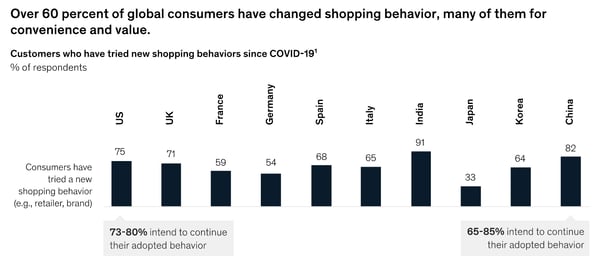
According to McKinsey, the top three reasons consumers changed their habits or brands were value, availability, and convenience.
As you can guess from the data points above, the risk of losing a customer to another brand is higher than usual in 2020. Even if a product appears essential or valuable to a prospect, they might not buy it if another brand can deliver a similar item faster.
How Brands are Navigating
At this point, some large brands are working to better align teams to ensure that products can be discovered, ordered, and delivered quickly — even in times of high demand. Meanwhile, some smaller brands are making their products more available online and in-stores to prospective customers who can’t get an item quickly enough from brands they’ve used in the past.
According to a post from Repsly, which included data from anonymous name brands, companies that thrived in 2020 used data and company-wide communication strategies to identify areas at risk of high product demand around March and continued to align with teams including marketing, service, and supply chain teams to ensure their shelves and warehouses stayed stocked.
In another recent report from McKinsey, researchers similarly predict that successful high-demand brands will develop an integrated approach between their supply teams, sales, and marketing departments. McKinsey also discourages brands from raising prices in times of high demand and focusing on other vital business and customer experience strategies instead.
“Operational concerns may be even more important than pricing strategy, including stabilizing the supply chain, keeping products on the shelves, addressing customers’ urgent needs, and maintaining quality,” the McKinsey report explains.
2. Consumers aren’t rushing to grab their wallets.
Before the pandemic, Gen Z was the major age group that prioritized essential products over other purchases. Meanwhile, other generations were more likely to splurge on products based on their brand name or non-essential perks.
But, after business closures and financial uncertainty related to the pandemic, consumers in all generations are reconsidering spending habits.
Even as cities, businesses, and workplaces slowly reopen, shoppers plan to stay cautious about their budgets.
In the U.S. alone, 40% of consumers say they’ll continue to be mindful of where they spend money, while 31% plan to buy less expensive versions of items to save money. And, whenever they make those purchases, 21% of consumers aim to do more brand and product research than they had for pre-pandemic purchases.
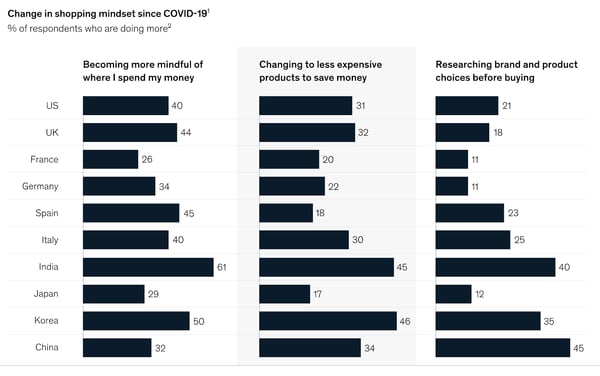
How Brands are Navigating
While consumers might have made purchases with motives related to fun, entertainment, brand name, or other perks before the pandemic, many are now more budget-conscious than ever.
For the most part, consumers are primarily zoning in on essential product purchases. And, if someone does buy a less essential product, such as an item that entertains them, they’ll do thorough research to ensure they’re getting the best value for their money.
At this point, many essential and non-essential product companies have caught on to consumer budget concerns and have begun to leverage online marketing strategies to ensure that consumers can discover their products, learn about their value, and determine that they’re worth purchasing.
Particularly, companies that sell essential products have created campaigns, advertisements, and messaging reminding consumers of how important the items are. Meanwhile, companies that sell less essential items are getting creative to identify new value propositions for their products or brands.
For example, in the ad below, Procter & Gamble acknowledges the COVID-19 crisis, explains how it will be donating products to families and philanthropies in need, emphasizes the importance of their household and health items, and reminds viewers of how its brand has helped consumers disinfect their homes for generations:
https://www.youtube.com/watch?v=M4xF40TnlS0
The P&G ad is effective because it highlights that the brand offers affordable and available products that people trust for cleanliness, shows how the company is actively aiming to help people impacted by the pandemic, and reminds audiences of how essential its products are to global households.
In another example, Ice Breakers, a mint company that sells products that might be considered less essential, made an ad to highlight how eating mints before you put on a mask can prevent smelling your breath.
https://www.youtube.com/watch?v=yXU7JFKaSJQ
While the P&G campaign acknowledges why its brand’s products are essential to people around the globe, the Ice Breakers ad cleverly places new value into a non-essential mint product that people might not be rushing out to buy at this time.
3. Shoppers need ecommerce.
McKinsey notes that “most [product] categories have seen more than 10 percent growth in their online customer base during the pandemic.”
Additionally, across most product categories, at least 30% of U.S. and U.K. consumers expect to make even more online purchases after the pandemic.
How Brands are Navigating
While many bigger brands are amping up their ecommerce strategies, a few prominent tech giants have begun to offer solutions that can help smaller or medium-sized brands, such as boutiques, retailers, or restaurants, generate revenue online.
For example, Facebook recently launched a tool called Facebook Shops, which enables any company with a Facebook or Instagram Business page to create a mini-online store that links with all platforms owned by the social media brand. Meanwhile, meal delivery apps like DoorDash temporarily reduced commissions of local restaurant orders so those business owners could sell food virtually while earning fee-free revenue for each order.
4. Health plays a role in purchasing decisions.
With the pandemic impacting thousands of Americans, people began to consider their health and safety more than ever before — even when purchasing products.
In the past, health-conscious consumers might have glanced at back labels of various products, the interest in health and safety has gotten even deeper. Now, they might ask, “What’s the packaging process for these products?”, “Are the cashiers in the grocery store given PPE?”, or “How are businesses actively preventing the spread of germs?”
While health and safety of consumers and brand employees might not be the biggest purchasing motivator, it’s one people are thinking about much more in 2020.
Ultimately, when big or small businesses take action to show that they genuinely care about people, consumers might identify with, trust, and value them more.
How Brands are Navigating
Although it might sound easy to buy an ad spot with a commercial that simply says, “Our brand cares about you,” this approach might not convince your audiences that the message is authentic.
Many of the brands that are thriving in this time demonstrate how they care, rather than just saying it.
For example, as global mask shortages occurred in the early days of the pandemic, fashion companies like Louis Vuitton and Burberry diverted clothing production to make face coverings.
Aside from creating PPE, other companies have donated to causes related to the pandemic or taking extra steps to keep their customers and staff safe.
Target, which is considered an essential business, has been publishing online content about how the company’s aiming to help customers, employees, and communities at this time.
Rather than centering its YouTube page around content that highlights products, sales, and deals, Target features a playlist aimed to help shoppers and communities during COVID-19.
Along with health and safety tips related to shopping, videos on the playlist explain how Target is working to create safe in-store experiences and smooth online shopping options for customers.
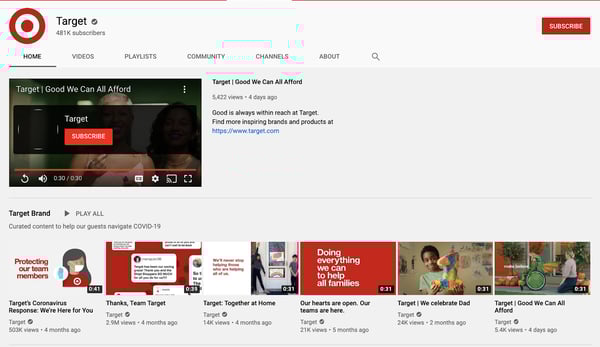
Aside from creating videos on how the chain is aiming to help customers navigate COVID-19, the brand has also created a $10 million pandemic relief fund which dedicates $1 million to assisting Target employees. This demonstrates that Target is taking action to help its community, customers, and employees who work in essential in-store roles.
5. Shoppers have become homebodies.
According to the survey, 70% of consumers don’t want to resume activities or work outside of their homes just yet, despite pushes to reopen the economy. If they won’t leave home to work, travel, or dine out, McKinsey notes that many won’t leave home to shop either.
When looking into the near future, “More than 3 out of 4 [consumers] who adjusted their behaviors due to the pandemic said that easing government restrictions will not change their cautious behaviors. Consumers are following guidance from medical experts for reassurance,” notes McKinsey.
How Brands are Navigating
Brands can’t just assume that people will flock back to stores as businesses reopen. While some consumers might not feel comfortable or safe leaving the house immediately after a pandemic, others won’t want to shop in physical stores because they know they can buy almost any product they want online.
At this point, successful brands are trying to continue to meet customers where they are, even if they don’t leave the house.
While some brands are building out online stores and digital services, others that don’t sell a physical product are launching online events or virtual experiences to gain awareness, continue to generate revenue, and delight their customers.
One example of a brand that made an in-person experience into a virtual offering was an animal sanctuary called Sweet Farm. When the California-based farm, which runs on donation revenue, closed to the public amidst the pandemic, its owners created a virtual offering where businesses or individuals could pay $65 to $750 for a farm animal to guest star in their virtual hang out or meeting.
The campaign was cleverly titled, “Goat-2-Meeting,” a play on GoToMeeting — a popular video meeting software.

According to Sweet Farm, the campaign, which began in March, was so successful that there was a waitlist for animal meet and greets by April, Sweet Farm has also partnered with more sanctuaries to increase meeting availability and share donation revenue with other organizations that care for animals.
How Marketers Can Navigate 2021 — and Beyond
This year, marketers and businesses were tested by the global pandemic and economic landscape. As you consider what’s next for your brand, keep these consumer behavior trends in mind:
Consumers crave value and availability.
More than ever, consumers will choose to shop from a company because of product value and availability, rather than brand loyalty. Business owners who’ve relied on loyalty and credibility to make sales should also monitor their supply chain and pricing to ensure that their products are worth the price and accessible to customers. Meanwhile, lesser-known brands can use a competitive analysis or other tactics to learn where they can help consumers that are struggling to find affordable or high-demand products.
Digital transformation is key.
Brands can no longer assume a billboard or foot traffic will generate vital revenue. At this point, many companies that were once mostly physical are building online stores, leveraging different online channels for marketing, and thinking outside of the box to create virtual offerings that will delight and retain customers.
“Human” brands will reap benefits.
In 2020, customers began to care more about how businesses treated employees, how they kept customers safe, and how companies stepped up to help others in times of uncertainty. Ultimately, brands with leaders who genuinely care about people will get better reviews, word of mouth, and positive awareness than brands that throw caution to the wind.
Looking to learn more about how businesses are evolving in 2020? Below you’ll find content from HubSpot’s Adapt 2020 series:
- Adapt 2020: An Educational Series
- 5 Ways Go-to-Market Strategies Will Change in the Post-Pandemic Economy
- 4 Pivots Companies are Making in Light of COVID-19 [New Data]

What Is a Micro Niche … and Do You Need One?
A micro niche is a business offering that’s highly specific. You may also encounter the term sub-niche to describe these laser-focused products or services. Micro niches drill down from niches, which are already segmented out from a larger market.
Here are a few quick examples to clarify the difference between a market, a niche, and a micro niche:
- Market, outdoor gear; Niche, camping supplies; Micro Niche, high-end mountaineering tents
- Market, tech; Niche, social media platforms; Micro Niche, social platforms targeted to specific interests, such as Ravelry for knitters
- Market, beauty supplies; Niche, cosmetics; Micro Niche, organic vegan cosmetics
Micro niches generally have more adjectives attached (not just ‘food truck,’ but ‘artisan grilled cheese truck featuring locally sourced cheese and bread’) and have a highly specific audience in mind (people who love grilled cheese with fancy additions).
Would your business benefit from a micro niche?
Among the greatest benefits of micro niches is that they pre-qualify customers and clients early in the marketing funnel. People who are looking for outdoor gear may be looking for anything from hiking boots to fly-fishing rods to harnesses for mountain climbing. But people searching specifically for camping supplies can have very different ‘wants’ as well. They may prioritize:
- Affordability
- Ease of use
- Eco-friendly production
- Aesthetics
- Better, best glamping quality
- Mountain-ready ruggedness
Often there will be an overlap of preferred qualities. But if your niche is producing and selling high-quality mountaineering tents, you won’t have to worry about capturing the attention of frugal families or people who want a luxurious camping experience.
The other benefits of a micro niche branch off from there. They include:
- A passionate customer community. People interested in high-quality tents are often interested in clear topic areas related to your offering. This makes it easier to create a content strategy for organic traffic; there’s less guessing what will appeal to your customers. People who want exceptional quality tents for hiking are knowledgeable already. They would likely be interested in a blog or podcast offering specific, expert, or off-the-beaten path advice and recommendations.
- Less competition. In broad markets and even niches, gaining visibility and brand awareness can be a challenge. In a micro niche, it’s easier to earn attention and differentiate yourself because you have fewer competitors. You still have to specify your unique value in the space and clarify that among your discerning audience.
- Brand loyalty. While this isn’t a given and requires meeting the demands of your audience, a sub-niche can foster long-term interest. That’s because micro niches are built on expertise, passion, and customization. It’s more challenging to bring a personal touch to broad markets
Companies can start up with a single micro niche. For example, Bite offers sustainable toothpaste tablets called ‘bits,’ mouthwash bits, floss, and toothbrushes through a subscription plan. Their focus is zero-waste, plastic-free, vegan, and cruelty-free production.
Drybar is another micro niche company that carved a customer base from the hair salon industry. The ‘want’ they leveraged was people interested in a ‘just-from-the-salon’ look between full haircuts and coloring.
Alternatively, companies can add a micro niche after establishing their brand in a larger niche market. The mattress company, Casper, added dog beds to their niche offering. Mattresses, for most of us, are large and infrequent purchases. Although dog beds have a far smaller price point, dog owners are likely to replace them more often. Offering dog beds is also a way to introduce a new audience to the overall Casper brand and the quality of its craftsmanship.
How to discover the best micro niche(s) for your business
1. Identify your strengths.
To discover a micro niche worth developing, start by looking at your strengths — either as an individual, a team, or a company. You’re more likely to find sustainable success in areas that excite you and your team.
Consider a business offering employee recruitment support to companies. Perhaps their team excels when recruiting executives or helping mid-career changers climb the ladder? This could spark a micro niche B2B offering, such as mid-level leadership development services or executive compensation consulting.
2. Focus on the problem.
What issues need solving in your industry or your life? Think about the times you’ve thought “If only we had _____ ” to help with a common problem in day-to-day life, at work, or with a recreational activity. Fill in that blank for a promising micro-niche business idea. Problems you face are likely issues for others as well. Brainstorm different problems and creative solutions, and see which one gets you and trusted peers the most excited.
3. Do your micro-niche market research.
You want to make sure your micro niche has a customer base. Here are some areas on which to focus your research:
- Informal and formal market research. Talk with friends and family about consumer ideas, or reach out to industry peers about business services needs. If you have the budget, send out email or social media surveys about the topic to gauge interest.
- Google Trends. This tool can help you discover micro niches within larger niches, and the overall interest in your micro niche. Search various terms related to your sub-niche and then explore the related topics and queries. You can also find out regional variations in interest.
- Social media and industry organizations. Explore hashtags on social media related to your sub-niche or industry. Also check out associations, professional groups, and organizations within your target industry. What are they discussing or excited about? Do you notice an emerging area of expertise? Do you notice a missing link in the discussions that might be an opportunity?
For example, a search for ‘mountain tent’ reveals strong (and unsurprising) regional interest in Colorado and Idaho. It also shares that ‘hyperlite mountain gear’ is a related topic, which can guide your product development and future marketing content.
4. Check out the competition.
It’s possible you’ll have a eureka moment and land on an untapped idea. But, more often, you’ll find your skills and interests lead you to micro niches with existing businesses. Now, you’ll have to toggle back to research and brainstorming mode. Here’s what you’ll need to figure out:
- Is the market big enough for the two, four, or 15 of you?
- How can you differentiate yourself from the competition? With white-glove service? With a lower or higher price point?
- Where are they falling short?
- How can you do better?
5. Test the waters.
You don’t have to dive into the deep end immediately. It’s smart to test the waters first with a single product offering. The apparel company Bombas launched in 2013 with a single product: comfortable performance socks. It has expanded to other items of clothing, but socks remain at the center of the brand.
Another way to test your idea is with a landing page, which is a simple process with drag-and-drop tools like HubSpot’s Landing Page Builder. Once you have a personalized landing page, begin advertising your product or service with paid search and social media ads. Your proof-of-concept is in the pudding — if the pudding were steady traffic, completed email forms, inbound sales calls, and product pre-orders.
On the landing page, and in your ads, use keywords that clearly define your offering. This way you draw people with authentic interest or buying intent in your micro niche.
6. Trust your instincts.
If you dream up a product or service idea that hasn’t been done before, or hasn’t been done particularly well, in your opinion, consider trusting your gut.
- The company Untuckit was built on the simple premise that men wanted button-front shirts that looked neat untucked, and they were hard to find.
- The e-commerce store Lefty’s sells common kitchen, gardening, school, and work tools designed specifically for people who are left handed.
- Olive & June is a nail polish company that sells kits that make home manicures easy and fun. Their kits come with a holder for your phone, so you can watch a video while your polish dries.
These micro-niche companies often have one thing in common: When they hit the market, people often wonder how the products or services weren’t available before. Find your micro niche, and follow these steps to bring your business to life.

The 5 Types of Social Media and Pros & Cons of Each
Marketers commonly use social media to increase brand awareness, generate leads, and improve traffic. If you’re tasked with starting a social media strategy for your company, you might be wondering which type of platforms you should be on. Your platform choice will likely change based on your audience.
The list of social media platforms is growing, and well-known platforms like Facebook are always evolving and adding new features. With a greater and greater need for a social presence and an overwhelming amount of platform choices, it can be hard to pick which social channels to use.
You might not want to spread yourself too thin by managing a channel on every imaginable platform, but you also don’t want to miss great brand-awareness opportunities.
To help you make informed decisions about which platforms to use, this post will guide you through some of the core types of social media, examples of platforms within each category, and the pros and cons that each type might present. By the end, you should have a much clearer idea of what kind of social media strategy will work for your business.
Social Networking
Examples of Major Platforms
- Facebook: 2.6 billion monthly active users
- Twitter: 166 million daily active users
- LinkedIn: 160 million users in the U.S. alone
Social networking is possibly the most traditional form of social media.
Platforms like Facebook, Twitter, and LinkedIn are often called “networking” platforms because they allow user accounts to interact with each other in a variety of different ways.
Professional Uses
If you’re a small business, like a restaurant, a platform like Facebook could be a great place to start your social strategy. With Facebook, you can build a business profile that includes links to your website and details about your menu.
Once your profile is all set up, you can post regular updates about your business, “like” other pages, and answer customer post comments or messages. Business profiles also allow other Facebook users to give you reviews.
For companies looking to offer a professional service, B2B or publishing companies, LinkedIn is another great way to grow your following. LinkedIn emphasizes career-related networking.
Brands looking to build an audience of professionals from a certain industry can create a business profile there, categorize it with an industry type, and then use posts and messaging to publish updates. They can also use messaging and comment features to interact with their audiences, or users who comment on their posts.
A Twitter account could be helpful to companies in a wide spectrum of industries, from entertainment to e-commerce. This platform similarly allows you to create a profile where you can list and link company information.
You can then use Twitter to post about company updates, tag companies or customers in posts, retweet positive customer tweets, and respond to customer questions via tweet or direct messages. Like Facebook, you can also post content like photos or videos.
On all three networks, users can easily communicate with others through simple actions like tagging, hashtagging, commenting, private messaging, reacting to posts, and re-sharing content.
Aside from social interaction, newsfeeds on common social networking platforms are designed to show off a mix of text and visuals, rather than one primary content type.
This flexibility makes social networking platforms easy to begin a social strategy on because you can experiment with different forms of content before branching out to platforms that require more specific content types.
Here’s an example of Facebook’s newsfeed:
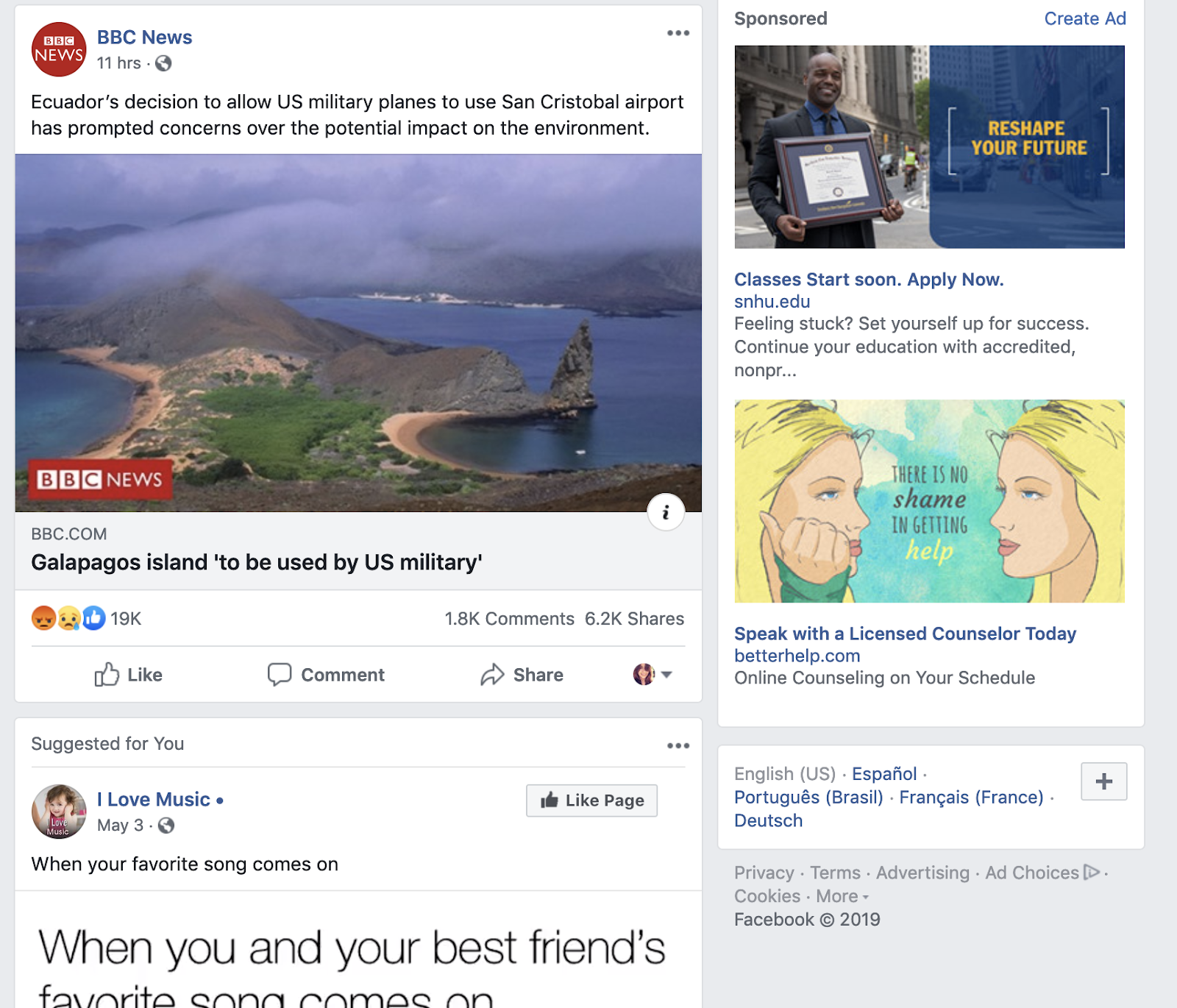
For those who want to dabble in video or graphics, these platforms could be a great place to test this new content. With the growth of video marketing, many have begun to launch more advanced features like Facebook Stories and Twitter’s live streams.
Platforms like Facebook and Twitter have also started to encourage native video and photo uploads more heavily. Recently, Facebook even adjusted its algorithms to favor live video and image uploads. This has caused these types of native content to gain greater user engagement.
If you’re still not sure where to get started, check out our beginner’s guides for Facebook, Twitter, and LinkedIn.
Pros and Cons
Pros
- Facebook, Twitter and LinkedIn are some of the most prominently used forms of social media
- Social networking sites often integrate with scheduling tools like HubSpot, Hootsuite, and TweetDeck software
- All platforms have capabilities for photo and video.
Cons
- Those interested in just posting links may have a harder time getting engagement than those uploading photo and video.
- Some platforms, like Facebook, put individual user posts higher than business posts in newsfeeds.
Photo Sharing
Examples of Major Platforms
- Instagram: 1 billion monthly active users
- Pinterest: 367 million monthly active users
Two of the biggest platforms that specialize in photo sharing are Instagram and Pinterest.
Instagram offers a visual feed with posts showing photos and short videos followed by a caption. Users can also post live video or create Instagram Stories that disappear after one day. Like the social networking platforms above, users can interact with others through tags, likes, comments, or direct message.
Professional Uses
This platform would be helpful to companies like restaurants or stores that want to photograph and display and update followers about their food, goods, or products in a crisp, clean way.
Instagram has become a home to influencer marketing, as 93% of influencer campaigns took place on the platform in 2018. It also offers opportunities for advertising and ecommerce because of its highly-visual layout.
Unlike some social platforms, Instagram emphasize visuals and doesn’t allow link sharing directly in posts. Basic users on Instagram can only share links in their bio. Verified users, or accounts with over 10,000 followers, can post links in their Stories.
To show you how visual the platform is, here’s a look at Instagram’s search feed:

Although basic users have minimal linking options, Instagram has tried to make the platform even more friendly for ecommerce businesses with the addition of Shoppable posts.
Pinterest is well-suited for ecommerce companies, such as those who sell home goods, and businesses that would like a place to share crisp standalone product images with links.
It similarly offers a photo-based feed with posts that can include a photo and short description. Unlike Instagram, it allows all users to link directly to websites or product landing pages in posts.
One interesting aspect of the platform is that users can heart posts from others, or assign them to a themed “board.” For example, users might make boards centered around topics like “Inspirational Quotes” or “Bedroom products.”
Once a board is created, other users can also follow it. A business could potentially make a board with their own product posts, or find their products on another user’s board.
Here’s an example of what a board looks like:

Before getting started on one or both of these platforms, you’ll want to determine whether your goal is to gain brand awareness or link-based traffic.
While Instagram and Pinterest can both be helpful tools for product shots and brand awareness, Instagram’s active audience is much larger than Pinterest’s. Instagram has also hosted over 25 million business profiles.
When choosing a platform, you may want to consider your content-related bandwidth. Both require visual imagery, but you might also need to include video creation within your Instagram strategy. Here’s a great guide that demonstrates what it takes to gain followers on Instagram.
Pros and Cons
Pros
- Platforms like Instagram help with brand awareness. Approximately 60% of people say they’ve learned about products or services on Instagram.
- Pinterest and Instagram provide an outlet for showing off visual content or product shots.
- Platforms like Instagram also allow you to experiment with visual or short video content
Cons
- Upkeep on these platforms might require a photo budget or dedicated production time.
- Some platforms, like Instagram, require you to post from a mobile app.
Video Sharing
Examples of Major Platforms
- Youtube: Over 2 billion monthly active users
- Vimeo: 240 million monthly viewers
Professional Uses
Roughly 88% of marketers say video gives them a strong ROI and 90% feel the level of video competition has increased. Adding a video platform to your social strategy could make your brand look relevant and keep you up to speed with your competitors.
Video can be helpful to a wide range of industries. While a restaurant could have a vlog with cooking tips, a technology company might focus its video strategy around product demos.
To help you pin down a strategy that’s right for your industry and service, check out our video marketing guide.
When it comes to long-form video, Youtube and Vimeo are the leading platforms. While Youtube has the bigger audience base and better SEO capabilities, Vimeo’s smaller platform is very community driven.
Youtube also seems to have better opportunities for advertisers and monetization, while Vimeo offers viewers the perk of no pre-roll ads.
For a longer list of similarities and differences, check out this head-to-head piece where we compare the business capabilities of Vimeo and YouTube.
Along with Youtube and Vimeo, the more traditional social networking platforms have also begun to embrace video marketing more aggressively. In the last few years, Facebook launched Facebook Stories and Facebook Live, and added a tab on their mobile app dedicated to video. Meanwhile, Twitter has allowed users to launch live video streams which are powered by its Periscope software.
Pros and Cons
Pros
- Videos can be longer than on other social platforms.
- Both platforms have website linking capabilities.
- Platforms like Youtube and Vimeo often offer analytics.
- Both Youtube and Vimeo have search optimization features.
Cons
- Content might take more time and money to create.
- These platforms require more backend tasks like SEO.
Interactive Media
Examples of Major Platforms
- Snapchat: 229 daily active users
- TikTok: 100 million monthly active users in the U.S. alone
Apps like Snapchat and TikTok allow users to share photos and videos, they also have a variety of unique interactive and highly experimental features. These two apps include AR/VR filters, musical overlays, and interactive games. Their audience bases are also prominently Gen-Z.
Professional Uses
Because mainly large companies are just starting to experiment with these new applications, marketers who are just beginning a social strategy don’t need to prioritize these interactive apps before traditional social networking platforms.
The large companies on these platforms tend to produce high production-level content. Brands with large followings might also publish Snapchat Stories, or videos that are curated from fans. Without a high-budget or giant online following, these strategies might be difficult for a company that’s just starting out on social.
Brands and influencers on these apps tend to cater their content to the platforms’ younger audiences. For example, on Snapchat, you might see stories that present beauty tutorials, wellness tips, news, or trendy new products.
If you’re really interested in interactive media, there are still a few viable ways you could get involved with Snapchat or TikTok.
While major brands, like VICE and BuzzFeed have become Snapchat Discover partners, the average business can still create a Snapchat business account that can be searched and friended by users. This account allows you to send publish temporary stories, just like individual accounts can. However, those with a business account can also purchase ad space.
Here’s a comprehensive video that explains how to use Snapchat:
If you’ve set up an account, check out this guide to getting started on Snapchat.
TikTok, an app based around short, repetitive clips — similar to Vine — offers five types of advertising options for businesses. While large businesses may find value in all five, smaller businesses may lean more towards “In-Feed Ads.” These ads are 9-15 second clips that can be skipped by the user.
Guess is one notable brand that has used its account to create trending campaigns with trendy hashtags. Universal Pictures has also had influencers create posts to promote its films.
If you do test out these platforms, you might want to make sure your industry and content fits in with the young age demographic. You should also try to properly estimate the time and money that might go into keeping these accounts up to date and relevant.
Pros and Cons
Pros
- These platforms are very creative and experimental.
- They have young audiences, which can help brands better target Gen-Z.
- Stories can be used to give your following a behind-the-scenes look at your brand.
Cons
- Producing regular content could be expensive and time-consuming.
- Business accounts aren’t promoted up-front on the Snapchat interface. You may want to promote your channel on your website or other social channels because users will need to search for you with your Snapcode or username.
- Snapchat and TikTok are limited to mobile and aren’t as easy to use.
Blogging/Community
Examples of Major Platforms
- Tumblr
Tumblr and Reddit both allow users to post about interesting niche topics, like memes, events, politics, and pop-culture. When users publish a post, these platforms allow other users to share them or add to the conversation with their own commentary.
Professional Uses
Both blogging and community building platforms could be helpful to those who want to encourage discussion around very niche industries or topics. For example, on these platforms, you might see discussion about anything from alternative health to machine learning.
By blogging, you can write posts about topics in your company’s industry and link them to your product or site. While many people have a blog on their website, platforms like Tumblr might be great to use if you haven’t set this feature up — or just want to see what others in your industry are blogging about.
With a discussion site like Reddit, you could share a link or a post about a specific topic on a discussion board related to your industry and see how users respond. You could also start your own board if a topic you’re looking to encourage discussion on doesn’t have one yet.
These two platforms specifically encourage web chatter and post shares from users that care about the same topics.
Both also allow users to follow you or subscribe to your blogs or Reddit boards so your content could show up on their feeds. Here’s an example of what Reddit’s feed looks like.
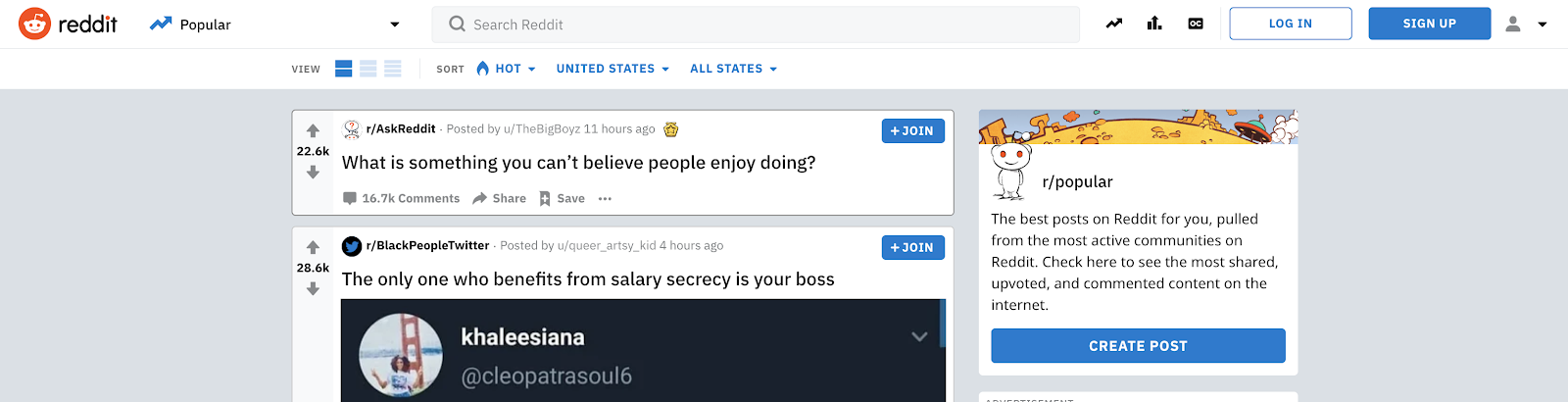
When someone publishes something on Reddit, other users can up-vote or down-vote it. Up-voting makes a post show up higher in Reddit feeds while down-voting does the opposite.
On Tumblr, the feeds are organized by time. However, a post can show up higher when it is re-shared by other users. When a user shares or interacts with your Tumblr content, they give it a note. When they reshare, they have the option to post a comment with the post that gets added to a thread.
Here’s an example of how notes and threads can be used to encourage discussion:
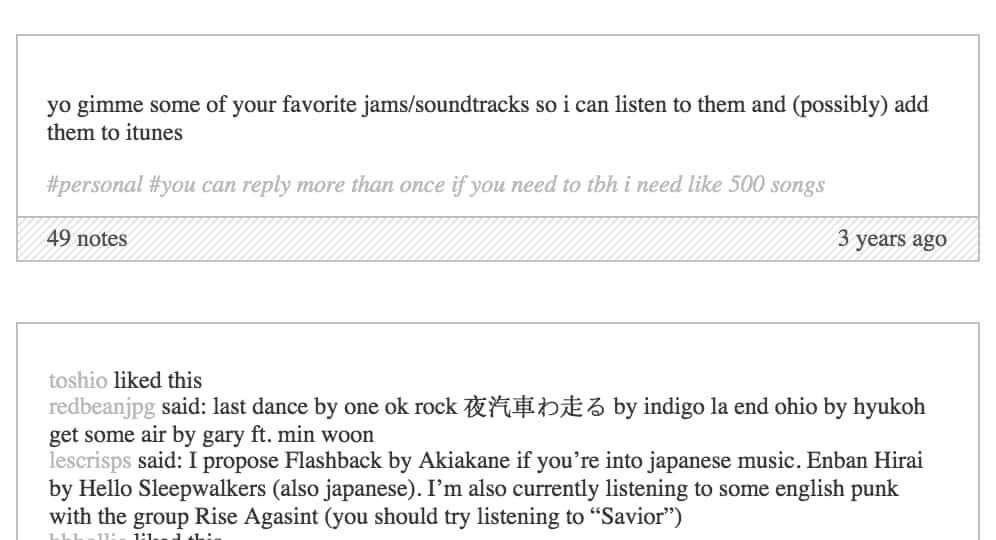
Pros and Cons
Pros
- Both platforms allow you to share text posts, photos, and videos about your business, brand, or individual thoughts.
- These platforms enable you to start conversations about a topic.
- Both platforms allow linking to outside websites.
Cons
- Longer blog posts might take time to craft or write.
- Getting downvoted on Reddit or no reaction from Tumblr users means your posts may go unseen.
- Your audience might be too niche or limited to just those on the specific platform you use.
A Few Things to Consider
Before you start logging in and setting up your accounts on a bunch of platforms, be sure to consider these factors:
- How much time do you have to devote to strategizing around a social platform?
- Do you have resources for creating graphics or videos?
- Do your goals involve boosting brand awareness, or traffic and revenue?
- Will you need an additional staff member to run this platform, or will it be easy to maintain?
Once you’re on a platform or two, be sure to stay in the know of how it’s changing and what marketers are doing. For a current outlook, check out our Ultimate Guide to Social Media Marketing.

Removing Gatekeepers From Your Marketing
Every marketer has run into one of these roadblocks before:
- They wanted to create an ads audience off of recently closed lost deals, but didn’t have access to the customer data in their CRM.
- They needed to change some of the copy on their homepage, but their developers couldn’t fit it into their next sprint.
- They needed a quick graphic to illustrate a point they were making in a blog post, but their design team was wrapped up in other projects.
In these scenarios, marketers aren’t held back by a lack of good ideas. Instead, marketers are struggling with gatekeepers.
Gatekeepers are unnecessary areas of friction within your growth machine that prevent marketers from providing customers with the best experience possible.
Gatekeepers can be anything from unusable data that’s spread across different tools, to a CMS or design solution that’s powerful but requires technical expertise to use.
When marketers encounter a gatekeeper, the customer experience inevitably suffers.
Take your website, for instance. HubSpot research shows that a business website is the most used distribution channel for marketers today.
When trying to provide your customers with an amazing experience, nothing is more important than your website. But when asked who is responsible for keeping a website up to date, many marketers pointed to their IT team as owners of their company’s site.
This is a classic example of gatekeepers inserting unnecessary friction into your marketing. Your IT team isn’t goaled on generating leads, or how customers perceive your brand — so when marketers approach them with an update that needs to be made to their website, it isn’t prioritized.
Inevitably, your customers’ experience suffers. Imagine if your IT team owned your email marketing, or your social media accounts — how might your customer experience suffer as a result?
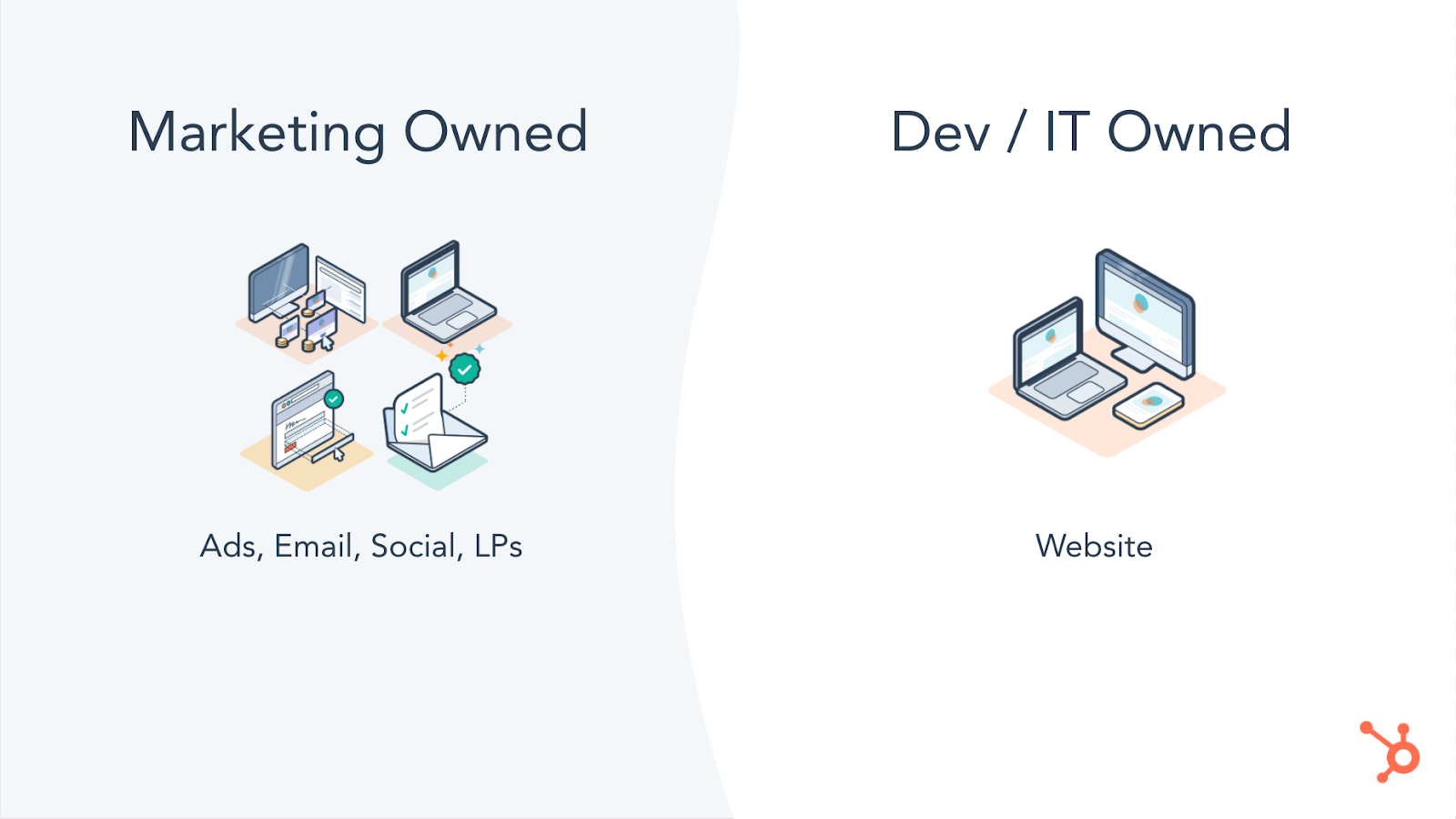
Marketers at growing companies need to be the owner of their organization’s growth machine. This used to be a given, but as customer journeys have gotten more complex, so have the systems we use to reach our customers.
We’ve added unnecessary complexity into our internal processes and tools — to the point where only specific people within your organization have access to data that could be used to improve a campaign or the technical ability to update content as needed.
Today’s fastest growing companies are doing three things:
1. They’re leveraging customer data across all their marketing channels.
2. They’re optimizing their marketing efforts by leveraging comprehensive reporting.
And maybe most importantly,
3. They’re putting marketers in the driver’s seat — removing gatekeepers at every turn so they can act quickly and decisively to best serve their customers.
The need for a clear owner of your business’ growth machine has only been heightened by the global pandemic. As external factors force leaders to pivot quickly at a time where collaboration and strategic planning is more difficult than ever before, gatekeepers cannot be tolerated.
By leveraging tools that centralize your data, remove gatekeepers, and make it easy to see what’s resonating with your audience, you’ll make it easy for your marketers to iterate on the customer experience.
Take stock of your current tech stack. What systems do only certain teams have access to? Is that team best-suited to understand what your customers are looking for from your brand? Are gatekeepers forcing you to make unnecessary tradeoffs between using a powerful tool and one that will empower your marketers to take ownership of your organization’s growth machine?
Answering these questions will help ensure that you’re able to adapt to whatever 2020 (or 2021) has in store for you.

How COVID-19 Changed the Way We Think About Office Technology [New Research]
The recent COVID-19 pandemic has changed how we think about a lot of things.
From the size of our weddings and special events to the comfort level of our pajamas and stay-at-home clothes, we’ve reconsidered the size, shape, and necessity of many, many elements in our lives.
Work is one of these elements, if not the main one. We’ve asked ourselves (and our employers) questions like:
- “Can I get as much done at home as I would in the office?”
- “How do I stay connected to my team if we’re all remote?”, and
- “Is it really necessary to have as many meetings as I did before?”
While we’ve all found different answers to these questions, one thing is consistent: COVID-19 has forced us to learn how to stay connected, motivated, and productive in new ways.
Canva + HubSpot Marketing Survey
In October, we teamed up with Canva to better understand how the COVID-19 pandemic has affected marketing leaders, their resources, and their teams. We surveyed 502 marketing leaders (mostly senior-level marketing managers, directors, VPs, and CMOs) from across the United States and asked them how COVID-19 has affected their teams, processes, and priorities.
The results are in, and our findings are pointing towards a new way of thinking about work — especially the tools and technologies we use to get stuff done.
Download the research here, and keep reading to unpack some of our most important findings.
How COVID-19 Changed the Way We Think and Use Office Technology
It’s no surprise that the COVID-19 pandemic has massively impacted where we now work. Out of 500+ marketing leaders, 73% reported that they’ve been working remotely for over three months.
This will likely be the “new normal” for some. A recent Gartner poll revealed that 48% of employees will likely work remotely at least part of the time after COVID-19, versus 30% doing so before the pandemic.
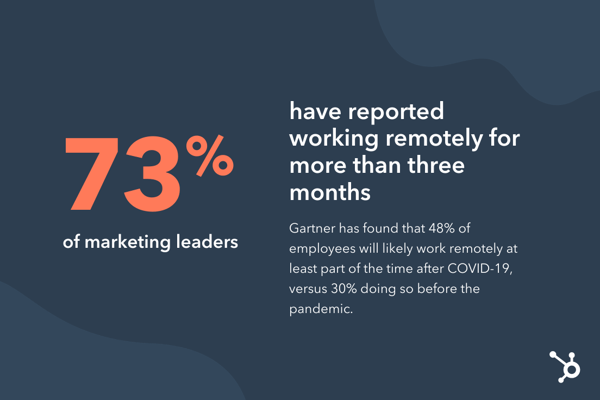
But COVID-19 hasn’t just affected where we work — it has also changed how we work. Many of the respondents reported new challenges in their day-to-day projects and processes:
- Decision-making: Over 50% agreed that their team’s ability to make decisions has been negatively impacted.
- Planning: 72% agreed that their planning process has been more difficult, and over 70% have seen their planning framework dramatically change with the impact of COVID.
- Feedback: Over 70% agreed that it’s become more difficult to give and receive effective feedback while working remotely.
- Productivity: Over 66% agreed that their team’s productivity has dropped, and nearly 50% said they’ve struggled to motivate their teams.
If you resonate with these findings, you’re not alone. It’s clear the COVID-19 has been tough all around, regardless of your team size or industry. Let’s unpack some more detailed trends — and potentially permanent changes — we’re seeing as a result of the COVID-19 pandemic.
Some organizations are outsourcing more marketing projects.
Gartner found that the COVID-19 pandemic has led 32% of organizations to replace full-time employees with contingent workers and contractors.
We see some of this reflected in our survey respondents’ post-pandemic resource planning:
| Resource | Pre-Pandemic | Post-Pandemic |
| Growth marketing | Majority in-house (64%) | Shift to more in-house (68%) |
| Design | Majority outsourced (48%) | Small shift to even more outsourced |
| Content marketing | Majority in-house (48%) | Evened out |
| Web development | Majority outsourced (50%) | Shift to more in-house |
| Social media marketing | Majority in-house (50%) | Shift to more outsourced |
| Media buying | Majority in-house (51%) | No change |
| Affiliate marketing | Majority in-house (55%) | Shift to more in-house (58%) |
| SEO | Majority in-house (55%) | Shift to more outsourced |
| PR | Majority in-house (55%) | No change |
Why might this be? For one, outsourcing is a common cost-saving measure. It can also help meet demand.
50% of respondents reported that it’s been more difficult for their teams to come up with creative content — perhaps outsourcing projects like content marketing and design has helped teams maintain their production cadence during times of stress and burnout (which we’ll explain below).
However, hiring contractors and external agency services requires increased communication and collaboration.
Gone are the days when we could walk across the hall for a chat at a coworker’s desk or host in-person meetings with agencies. During the pandemic, we’ve learned to replace these conversations with quick messages or video calls — most likely using a tool like Slack or Zoom.
Our respondents would agree. 75% reported that instant messaging platforms like Slack were “good” and “exceptional” at supporting collaboration. 72% rated the same for the level of usability for these tools.
If companies and teams weren’t using an instant messaging platform before the pandemic, it’s highly likely that they are now. The need for a tool like this also arises when outsourcing projects. It’s more important than ever to stay aligned — especially when working with third-party contractors.
For those keeping marketing in-house, new tools are needed.
You’ll see in the table above that many of our survey respondents still reported keeping or shifting many resources in-house. This could also be in an effort to save money and meet demand — by using new tools and technologies to compensate for a lack of labor.
For example, 44% of respondents reported that their need for new visual assets and graphic design has increased since the start of the pandemic. 39% reported the demand has mostly stayed the same.
Regardless, this is a vast majority of marketers who need to maintain or boost their graphic design production — in the middle of a pandemic, no less. A similar number of respondents (38%) reported that their graphic design software did a “neutral,” “poor,” or “terrible” job of supporting collaboration within their team.
This presents a unique opportunity to use office technology and tools like Canva — to support increased customer demand while saving costs and supporting remote collaboration.
Another set of respondents (50%) reported seeing traffic to their website increase and the need for regular updates also increase. Our study also revealed that 16% of marketers find the usability and collaboration of their website content management system (CMS) either “neutral,” “poor,” or “terrible.”
For those keeping website management in-house, incorporating a tool like HubSpot CMS can vastly improve your team’s remote collaboration and productivity — all while meeting the increased demand from your customers (which is a good thing!).
Organizations are using technology to monitor and support employees.
We’ve confirmed so far that marketing teams have been pressed for productivity and collaboration while being asked to create more creative content to meet customer needs, employer demand — all in an ever-changing, pandemic-soaked market.
While office technology has never been more critical, neither has recognizing and acknowledging the barriers COVID-19 has created, such as an increased team workload and employee burnout (17%).
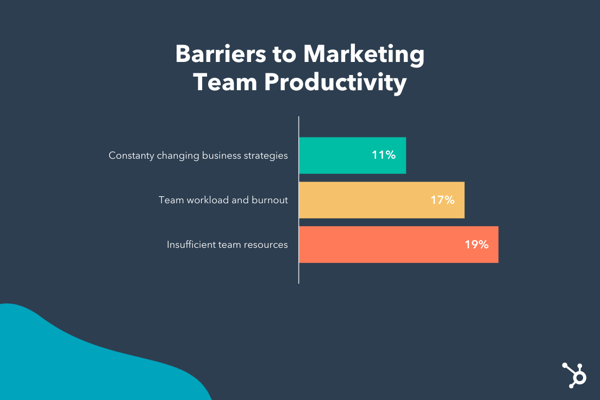
This rise in employee burnout has led to more discussion around the responsibility of employers to their staff. A Deloitte study found that, as the “pandemic has put more hours into the working day,” organizations should do more than just foster open dialogue and open practices around well-being. Gartner agrees — they theorize that COVID-19 has expanded employee expectations of their employer as a “social safety net.”
Technology has come in handy for non-work related needs, too. Zoom has equipped teams to host online happy hours, virtual holiday parties, and even team-building activities. Companies are also sponsoring free telehealth and virtual therapy sessions.
Gartner also found that, in a less digital sense, employers are also offering “support includ[ing] enhanced sick leave, financial assistance, adjusted hours of operation and child care provisions.”
The COVID-19 pandemic has changed how employers use office technology to understand not only the employee experience but also remote employee performance. A Gartner study found that 16% of employers are using tools to monitor employees through virtual clocking in and out, tracking work computer usage, and observing employee emails or internal communications.
This trend started well before the pandemic, but it will continue to grow in popularity as more folks opt to permanently work remotely.
Over to You
As large and difficult as these COVID-19 shifts have been, for the time being, they are here to stay.
Listen to these emerging trends and invest in new processes, tools, and technology in 2021. Doing so will help you combat these challenges and better motivate, monitor, and equip your remote teams. Remember, it’s your responsibility to help them be productive at home, stay connected to their teams, and make room for how the pandemic is affecting their personal lives, too.
