
Welcome to My Blog
How to Use Pinterest Advertising to Promote Products and Attract Customers
Pinterest is often undervalued by social media marketers and considered an unnecessary component of a marketing strategy — unfortunately, if this isn’t the case for your team, you could be missing out on a major source of traffic and income.
Pinterest offers plenty of unique opportunities for marketers to reach leads and influence consumer purchasing behavior. In fact, Pinners are 7x more influential than any other platform along their purchasing journey.

If you’re interested in exploring how Pinterest advertising can help you attract customers, keep reading.
Pinterest Advertising
With over 442 million monthly active users, Pinterest is a great place for businesses to advertise products. Ads show up on users’ feeds and searches in the same format as a regular Pin, making the experience unobtrusive for users while putting your content right in front of them.
There is a large potential reach when you create ads for Pinterest audiences — and, best of all, users are also actively searching the site for products like yours to buy.
Why Advertise on Pinterest
-
The reach can be incredible. If your content is engaging and valuable, it can be re-pinned again and again to different users’ boards and continue to drive consumers back to your website.
-
Pins have a much longer lifespan than Tweets or Instagram posts. This longevity makes them a particularly powerful asset. Pins can show up in a user’s feed months after initially posted.
-
Pinterest drives purchases. According to Pinterest’s Feed Optimization Playbook, 83% of weekly “Pinners” have made a purchase based on content they saw from brands on Pinterest.
All of which is to say — a paid advertising strategy for Pinterest isn’t such a bad idea, and could help bolster your organic presence by gaining traction with potential buyers, and improving brand recognition.
Pinterest Ad Types
There are a few ways to promote your content on Pinterest. To determine which ad format is best for your business, it’s important to know the goals of your campaign and the attributes of each Pinterest promotion format.
1. Try On Product Pins
Accessory and beauty businesses have a new way to interact with users through Ads. Pinterest’s Try on feature uses augmented reality to enable users on the app to virtually try on products using Pinterest Lens. This feature will combine your content with their technology to create a virtual fitting room for users.
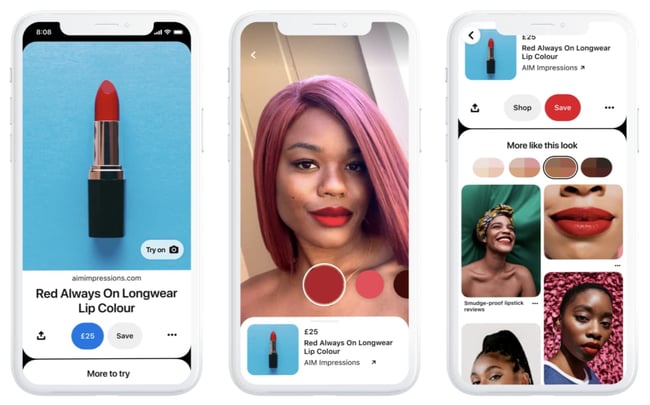
Businesses will need to go through their Pinterest account manager to get set up and must already have a product catalog uploaded.
2. Idea Pins
Idea Pins are Pinterest’s multi-page video format that allows creators to make their video content shoppable. Creators can partner with brands to utilize affiliate links and sponsored content.
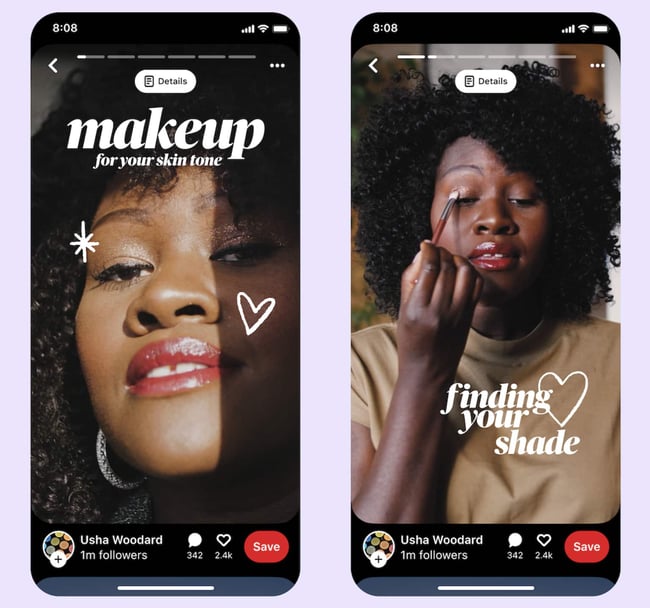
These are similar to Instagram Stories, but with a bevy of publishing tools. Ideal Pins come with:
-
Video recording and editing for up to 20 pages of content
-
Voice over recording so creators can add their own personal voice
-
Ghost mode transition tools (for before & after videos)
-
Detail pages for instructions or ingredients
-
Multi-draft save feature
-
Topic and user tagging
The new feature has already proven to be a standout for Pinners garnering 9x more comments than traditional pins. Pinners are 89% more likely to exhibit shopping intent on products tagged in Idea Pins than on standalone Product Pins.
3. Promoted Pins
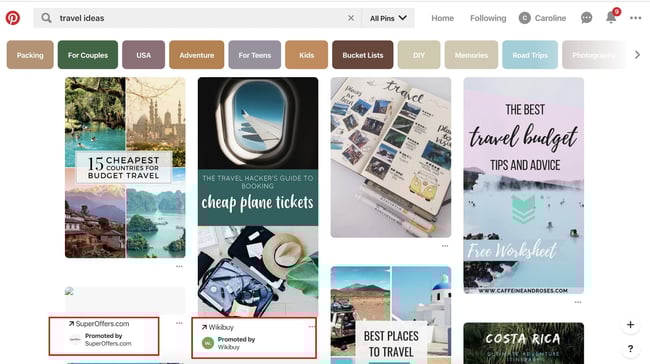
At first glance, Promoted Pins look and act just like a regular static Pin, but they have a small “Promoted” label to set them apart. Promoted Pins are boosted and targeted to reach more people. Users can even pin your Promoted Pins to their boards, share them, and comment on them.
Once a user shares a Promoted Pin, the “Promoted” label disappears, and subsequent re-pins are considered earned media — meaning, after the first pin, organic exposure to the content is free.
Here are some guidelines to follow when creating a Promoted Pin advertisement:
- The file has to be PNG or JPEG.
- Your content cannot go over 10 MB.
- There is a description copy limit of 500 characters.
- Your aspect ratio must be 2:3 and should be vertically oriented.
4. Video Pins
Promoted Video Pins are exactly like Promoted Pins — except the static image is replaced with a video.
Seven out of 10 Pinners say Pinterest is where they go to find new products, making video a great medium to reach and engage potential customers. Therefore, just as with Idea Pins, Pinterest and video advertising go hand-in-hand.
Pinterest offers two options for video sizing: max-width, or standard. Standard videos are the same size as regular Pins and cost less than a max-width Pin, which spreads across a user’s entire feed.
No matter what size you choose, Pinterest videos auto-play once they’re 50 percent in view. Plus, the Promoted Video Pins have a conversion optimization option to better serve advertisers with traffic or conversion goals. This new option brings the user to a landing page on the advertiser’s website, as well as a close-up of the video.
Here are some guidelines to follow when creating a Promoted Video Pin advertisement:
- The file has to be either an MP4 or MOV.
- Your video cannot exceed 2 GB.
- The video must meet a minimum of four seconds, and cannot go over 15 minutes.
- Your aspect ratio must fall between 1:91:1 and 1:2.
- There is a description copy limit of 500 characters.
- Make sure to create a video that’s not dependent on audio for greater accessibility and for those who scroll with sound off.
5. Carousels
Promoted Carousels contain up to five images that users can swipe through. Carousels are used to give a deeper brand story within one Pin.
This feature behaves the same as other Pins, except it will have dots beneath the images that signal additional content. Each carousel image can be different and have a different title, description, and link to another landing page.
Here are some guidelines to follow when creating a Promoted Carousel advertisement:
- File type: PNG or JPEG
- Ideal aspect ratio: 1:1 or 2:3
- File size: Max 10 MB
- Title copy: Max 100 characters
- Description copy: Max 500 characters
6. Collections
Collection ads appear as a combination of one larger, hero image (or video) followed by three smaller, secondary photos. When a user taps on a collection ad, they’re taken to a full-screen experience where they can view the hero image and up to 24 secondary images.
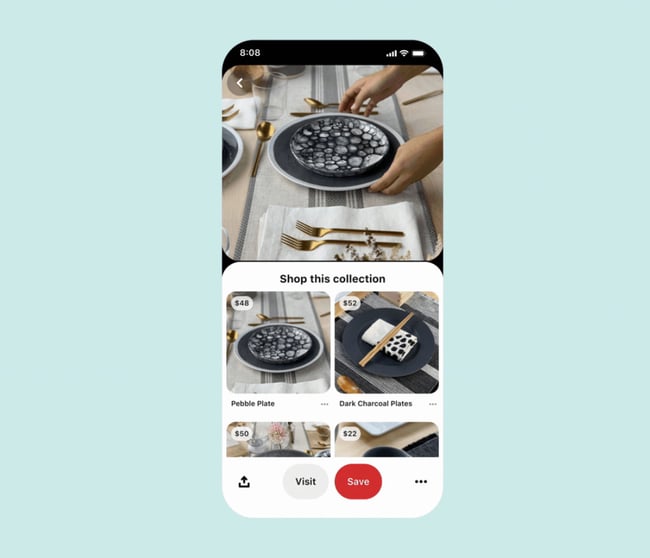
They’re a great way to showcase a variety of products in one ad. Plus, they are easy to create using the catalog feature. Just select the product groups you’d like to feature from your catalog and Pinterest create an ad that displays the most relevant products for the user from your product feed.
Currently, collections ads can only be created on desktop and are targeted to users on the mobile app.
7. Shopping
Pinterest shopping ads let you target customers early while they’re just browsing. Like Collections, these ads are created by pulling from your product catalog. When a user clicks on your image or video, it takes them directly to a link where they can purchase the product.
Simply set up your product groups in catalog and Pinterest will use your product data to show relevant products to users. With this feature, there’s no need to set up any additional targeting.
Curious about how to advertise on Pinterest? We’ll walk through all the steps next.
1. Create a business account.
First you’ll need to create a Pinterest business account. This will give you access to all of their ad tools and features. You also have the option to convert your personal account to a business one once you’ve logged in.
2. Choose your campaign objective.
Each of your Pinterest campaigns starts with an objective. Choosing your campaign goal is what determines what ad formats are available to you. There are several categories to choose from — Build Awareness, Consideration, Conversions, and more.
If you’re not sure what you need, you can select one of the goals listed in the short questionnaire pictured below to get started.
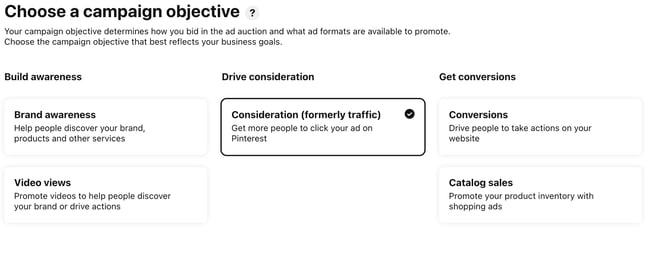 Conversion optimization is a campaign objective that optimizes your advertisements for specific actions outside of clicks. Now, advertisers have a way to directly inspire people to take action — like leading a user to an online checkout or newsletter sign-up with no extra steps.
If you want people to discover your business, choose Brand awareness for standard Pins or Video views for Promoted Video Pins as your campaign objective. For these two objectives, you can set a maximum cost for every 1,000 impressions your ad receives.
If your Pinterest goals are to drive qualified leads to your website or improve traffic, choose Traffic or App install for your campaign objective.
For these campaigns, you set a maximum cost-per-click — which means you are only charged when people click through your Promoted Pin to visit your website.
3. Set your campaign budget.
If you want to spend your campaign money evenly over a specific time period, select lifetime. Select daily to choose the amount spent each day. You’ll have to automatically adjust the budgets based on how long you want your ad to deliver.
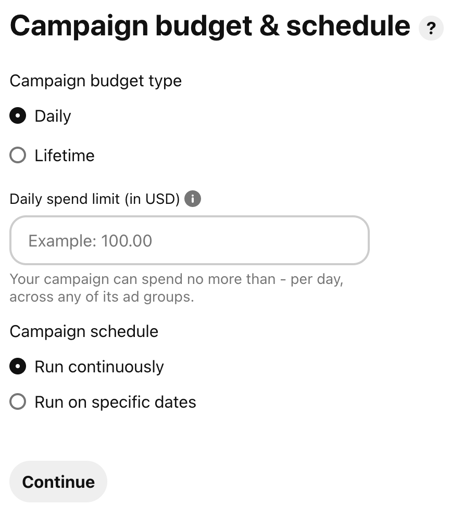
Next, you’ll set a maximum bid. A bid determines the highest amount of money you’d like to pay for an action, like an engagement or click, on Pinterest. Pinterest will recommend an amount for you depending on your target audience, and what competitors are spending.
Make sure your budget for Pinterest ads reflect your overall marketing goals and the importance of the platform for your business.
4. Create an Ad group.
With Ad groups you can lump together related ads within the same campaign and track them.
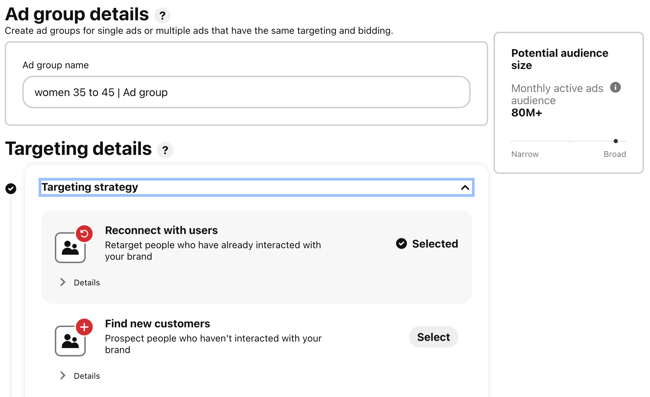 For example you could create a beauty campaign with one ad group for “women 35 to 45” and another for “women under 30” and see which performs better.
5. Choose your target audience.
Targeting allows you to reach people who are searching for your content and who are ready to actively engage. Targeting is an important part of promoted ads because, without it, you’ll have less interest.
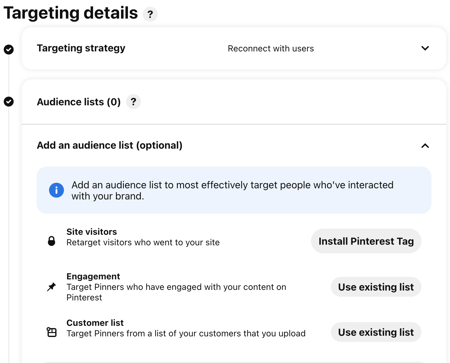
Pinterest has several targeting options that you can use singularly or combine together for a unique targeting approach.
- Audiences combine your customer knowledge with behavioral insights from Pinterest. If someone has recently bought something from your site or engaged with your Pinterest content, this allows you to target that person for an ad.
- Keywords show your ad to someone who is searching for that kind of content. If you set specific keywords like “tropical vacation” or “apple pie recipes”, your ads will target people searching for those things.
- Interests target people based on the types of content they regularly engage with. Your apple pie recipe ads would most likely be served to people who have an interest in baking or preparing for Thanksgiving.
- Expanded will provide you with additional interest and keywords based on your ad’s content and who you’re trying to reach.
- Demographics allows you to select a specific location, language, device, or gender.
- Placements gives you the option to choose where your ad is delivered. If you don’t want your promoted Pins to show up when someone is browsing, and only appear in search results, you can specify that here.
6. Design your ad.
Now it’s time to create an ad. For this you can use an image that you have already pinned or start with the template below.
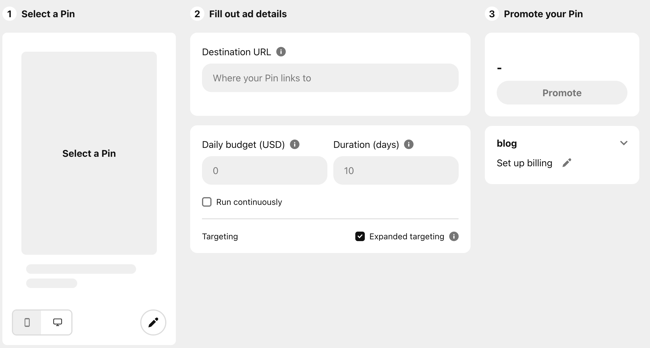
7. Maximize your SEO efforts.
By adding an interest and keywords to your descriptions, they become more relevant to people who are actively searching for that content. Keep in mind that hashtags don’t add any ranking value.
On Pinterest, categories of interest are already sorted and categorized. You should explore the available topics that are relevant to your business and target those queries — if you need inspiration, check out the seven categories that do exceptionally well on Pinterest.
Your boards also provide an opportunity for SEO. Boards inform Pinterest’s search engine on how to categorize your Pins, which improves visibility. Focusing on both will support your SEO efforts.
8. Add value.
Endless product promotions on a Pinterest feed aren’t the best way to get an audience’s attention — and keep it. More than likely, you’ll just become a disruption and get unfollowed. You have to add value to every touchpoint with your customer for them to engage with your content.
To add value on Pinterest, try adding Pins that your audience will want to engage with that don’t include your product or business. You might offer added value by showcasing services or interests that compliment your own.
For example, if you sell cars, share content about upkeep or car accessories. Alternatively, if you’re running a Pinterest page for a coffee shop, try Pinning playlist ideas for people to listen to while they work. There is plenty of content available to curate for your audience’s benefit.
9. Mix up your content.
If you’re busy targeting your content to a persona, you’ll miss out on the organic connections and interests of your audience. While helpful for first steps, personas don’t give you everything you need to know about the people who are interacting with your ads.
Keep your content seasonal and relevant. Yes, it is good to make evergreen content — but don’t miss out on pop culture or holiday opportunities to spark interest.
10. Monitor campaign performance.
Finally, you need to keep an eye on your campaign performance to determine the success of your ads, or why they didn’t perform as you expected.
When you’re in Pinterest Ads Manager, click on Analytics and you’ll be shown an overview of all your campaigns and key metrics. These metrics include impressions, total clicks, earned cost-per-impression, effective cost-per-click, and more.
Every campaign has the opportunity to increase brand awareness or inspire purchases. After looking at your analytics, you can determine whether or not you need to widen your audience, increase your budget, or try a different ad format. Pinterest advertisements are not an exact science, so experiments are key to being successful on the platform.
Now that the logistics are out of the way, check out the Pinterest ad examples below for inspiration.
Pinterest Ad Examples
Each of these ads is an example of Pinterest advertising done right with actionable tips that you can take away as you create your own:
1. Ulta
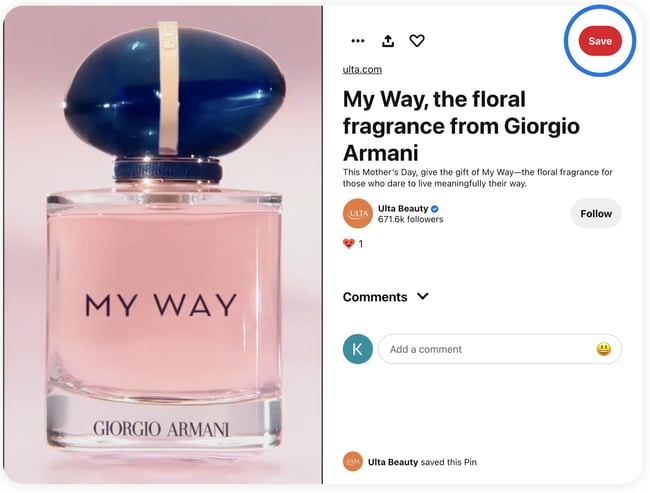
Pinterest is an excellent platform for beauty brands to showcase their products. This video ad from Ulta takes advantage of seasonality in the weeks leading up to Mother’s Day, creating an ad that is captivating and timely.
2. Ruggable

In this ad, the image speaks for itself, which lends well to the visual nature of the Pinterest platform. The rug is front and center in an attractive home space that draws the eye (and probably triggers the shopping tendencies of those who like decorating). It does come with a catchy tagline: “Back to Homeschool.” Because who needs a back-to-school sale to buy cool stuff?
3. Love Sweat Fitness

A big audience on Pinterest is the foodies who love to find and share recipes. Love Sweat Fitness, a fitness brand, is appealing to that crowd with easy and healthy holiday sides. The best part of the ad is how it combines high-quality imagery with attractive typography.
4. Acuity Scheduling
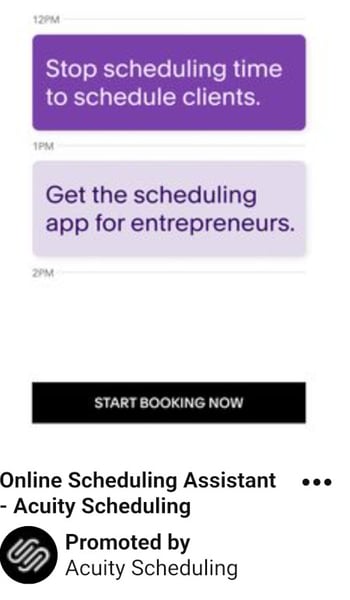
One thing to take away from this ad is that Pinterest advertising isn’t just for home goods, recipes, and ecommerce. Those in the B2B space can definitely take advantage of the advertising opportunities… and who knows, your audience might be browsing for home goods, too.
This ad sets up the value proposition in a text format and gets right at the heart of the audience’s pains: “Stop scheduling time to schedule clients.” They then pair it with a call-to-action: “Start Booking Now.”
5. Torrid
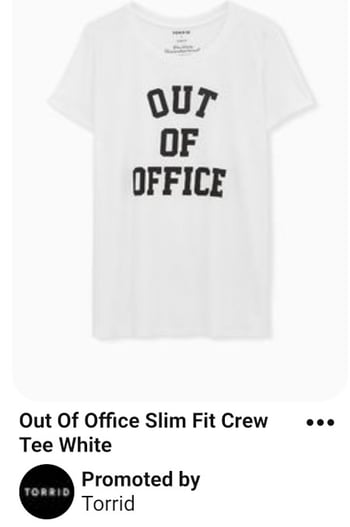
In this Pinterest ad, Torrid is using retargeting options to put their products in front of people who already visited the Torrid website. After visiting this product’s page on torrid.com, the ad “followed” me to Pinterest to stay top of mind and earn the sale.
Create Your Pinterest Campaign
Now that you have seen what Pinterest ads can look like, take the inspiration from the examples above and put it to action on your own advertising efforts.
Editor’s note: This post was originally published in April 2019 and has been updated for comprehensiveness.


Apple exec who left the company due to in-person work policy now returning to Google

Earlier this month, Apple’s director of machine learning, Ian Goodfellow, left the company due to his disagreement with the in-person work policy. Now it seems that Goodfellow is returning to Google, the company he worked at before joining Apple.
The post Apple exec who left the company due to in-person work policy now returning to Google appeared first on 9to5Mac.
How to Find your Dream Job in 2022
Finding a new job is a job in itself. It takes time and effort to apply, interview, and eventually land a position — even when you’re completely qualified.
It took me close to nine months from the moment I decided it was time to start searching for a new role to my first day at HubSpot.

Long story short, searching for a new job or finding your dream career isn’t always an easy process. It can be stressful, time-consuming, and difficult. But, no fear — that’s why we’ve created this guide. Follow along, and the process will feel significantly less intimidating no matter your industry, job experience, or career goals.
Depending on your specific situation, you may not need to walk through each of the following steps. This list is here to simply guide you through the beginning stages of your job hunt, so feel free to modify it as needed.
1. Consider your personality.
Your personality reveals a lot about yourself, such as what you enjoy doing, what makes you happy, and how you like to communicate — even the types of jobs you’d likely succeed in. There are a number of ways to incorporate your personality traits and characteristics in your job search.
Take one of the many online personality tests to learn more about your specific traits and discover the types of roles those traits would make you an ideal fit for. This is also helpful when thinking about the type of work environment you’d be most productive in.
Your personality helps you narrow your search in other ways, too — for example, if your results come back with details about you being shy, introspective, and reserved, research ideal jobs for introverts.
2. Think about your skills.
Your skill set is a list of your abilities — such as problem-solving, decision-making, and the ability to work under pressure. In addition to using your skillset to help you determine the type of job you’d be good at, it’s often something listed on a resume — so, listing your skills is a useful exercise for that reason as well.
Also, consider your transferable skills. These are skills that can be transferred from one role to the next, even if they aren’t in the same field. If you are switching industries or roles figuring out how your transferable skills would apply to a new position is key. Some transferable skills include:
- Project management
- Public speaking
- Relationship building
- Analytics and reporting
If you need more guidance, you can learn more about your specific skill set and how it plays a part in the type of career you’d be an ideal fit for by taking a career aptitude test.
3. Reflect on your background.
Your previous work experience and education — or your background — can also help you determine a career path you’d be suited for.
For example, I studied journalism in college and worked at a local news station after graduation. However, after a year, I decided I wanted to leave the industry. My background — which was writing and content-focused — made me an ideal candidate for a position on the HubSpot Blog.
If your background doesn’t align with your newfound career interests, that’s OK, too! However, this may require a little more research on your end about how you can transition to a new career. You may need to go back to school for a master’s degree, get a certification of some kind, or work in an entry-level position in your new field of interest.
4. Brainstorm your career goals.
Brainstorm your personal and career goals to help you determine the ideal next step for you. Think about things like work-life balance, salary, and your goals for the next 5-10 years. This will help you narrow down your search — different industries and positions have a range of standards when it comes to factors like flexibility, culture, and career growth.
5. Create a list of your dream companies.
Whether or not you’re sure about a specific opportunity, create a list of your dream companies you think you’d enjoy working for. This is a great way to keep track of opportunities at the companies you’re most interested in and remain goal-oriented.
You can then tailor your cover letter as well as career highlights and skillset on your resume to fit the requirements and expectations of specific opportunities at your top-choice companies.
6. Consider companies similar to your dream companies.
Consider companies comparable to those on your list of top picks, too. For example, if your goal is to work in marketing at Nike, consider applying for a similar position at a newer, growing company in the same industry like NOBULL.
By being open-minded and realistic about how you’re going to reach your end goal (such as working at Nike), you’ll avoid locking yourself into one, narrow career path option all while gaining valuable experience along the way.
7. Network professionally.
Whether you’re looking to stay in your current industry or pave a completely new path in another, professional networking is critical. These days, many of the offers job seekers receive are a result of networking.
Networking can help you get your foot in the door at a company of interest, gain a new and valuable reference in the industry, and determine whether or not you really want to move into a specific role.
8. Clean up your social media accounts.
Today, recruiters, hiring teams, and department leaders at virtually every company will take the time to research candidates online, including on social media platforms, prior to determining whether or not they want to request an interview.
This means you’ll want to ensure your social media accounts are private or remove pictures, videos, and/or comments that may lead a hiring manager to believe you aren’t a good fit for outreach. After all, the last thing you’d want is for the hiring manager at your dream company to disregard your experience due to something they find on your Instagram or Facebook profile.
9. Update your LinkedIn profile.
Did you know there are over 800 million LinkedIn users? Included in that impressive number are job seekers, businesses, and recruiters looking to fill positions, as well as people who are content with their current roles.
With all of this exposure, it’s important to make sure your LinkedIn profile is up-to-date and accurately represents your current and past experiences. Be sure to describe — in detail — information about your current and past roles, promotions, notable mentions, education, awards, and anything else you feel is worth sharing. Initiate and accept connections to expand your network to receive endorsements for your skills, experiences, and traits.
No matter if you’re in need of a new role, members of your professional network as well as recruiters, hiring managers, and employers will be able to view your LinkedIn profile and reach out to you if they choose. Who knows — maybe you didn’t even realize you were missing out on applying to your dream job.
Learn how to use LinkedIn for professional networking, business, and marketing.
10. Prepare your resume.
Once you’ve narrowed down the type of role you want, be sure that the skills on your resume mirror what companies are asking for and tailor each resume you submit to their specific needs. Focus not only on listing your job duties but the results achieved thanks to your actions. Let’s say you were a call center representative in a previous role. You could say:
“Answered 50+ calls per shift.”
A more effective statement would be:
“Answered 50+ calls per shift, decreasing customer hold times by 30% and improving overall customer satisfaction.”
The second statement has more impact because it details exactly how your actions improved company operations and provided benefits to customers.
Prepare your resume at the beginning of your job search to ensure your latest and most relevant work experience is available to recruiters and hiring managers for review.
Without a strong and recently updated resume, the companies you apply to won’t have reason to take you seriously. Additionally, pay attention to the details when it comes to your resume including font and which skills of yours you choose to share with specific companies — this is how you’re going to make an impactful first impression that sticks with hiring managers as they review the resumes of other applicants.
Note: When in doubt, try updating your resume with a template to achieve a professional look and feel sure to blow hiring managers away.
How to Find a Job You Love
Now that we’ve reviewed which steps to take in the first stages of your job search, you might be wondering how to find a job you’re truly passionate about — one you love. That’s why we’ve compiled this collection of tips and tricks to help you find your dream career.
1. Get specific about what you want.
In order to find your dream career, you’ll need to get very specific about what that looks like. Ask yourself:
- What is my ideal role? Name it if you already have that nailed down.
- Do I prefer a company that is environmentally or socially responsible?
- Is there a particular company, or company size I prefer?
- What are my work/life balance requirements?
- What is my ideal salary?
- What is my ideal career progression?
- Do I already possess the skills I need for this role or do I need to skill up?
Aim high. You are trying to find your dream career, after all. Once you’ve made a list of all the attributes you’re looking for in your next role, you’ll be able to filter out anything that doesn’t fall within those requirements.
2. Use job search sites.
Today, job search sites, or job search engines, are one of the most common ways to find a new position. These sites provide you with valuable information about companies and positions including location, industry, salary, necessary qualifications, culture, and more.
Other benefits to using a job search site include the ability to upload your resume and cover letter for quick and easy application submission. They also provide you with the option to receive an alert when a new opportunity, that fits the criteria you share, becomes available.
There are a number of popular job search sites, used by millions of people around the world, with these capabilities (and more). Here are six of the most common to get you started:
- LinkedIn isn’t just a professional networking site — it’s also a job search site. The platform will take you through a series of steps to help you begin and narrow your job hunt. You can view position openings while employers can read your resume, view your LinkedIn profile, and Connect.
- Tech Ladies is a free job board and supportive online community dedicated to helping women learn, grow, and extend opportunities in the tech industry. Simply upload your resume to their job board and apply directly through the site.
- Glassdoor gives you access to job listings, employee reviews, interview tips, salary information, and more. You can post your resume so hiring managers can contact you directly and the site includes a feature in which you can view interview questions specific companies tend to ask — which is a great interview prep technique.
- Indeed provides you with access to new job listings, company reviews, and accurate salary information. The site also allows you to post your resume so recruiters and employers can easily reach out.
- CareerBuilder gives you the opportunity to search for a new job based on specific criteria including your experience, location, or skill set. Upload your resume so employers can recruit you. The site will also review your profile and recommend jobs to help you find the right match.
- Monster allows you to upload your resume for a free assessment to ensure everything looks perfect. The site has a variety of other resources such as opportunities to receive professional interview advice as well as access to the latest — and most popular — job listings, salary information, and company reviews.
- Craigslist is a straightforward and simplistic job search site. Employers post their latest job listings and you can sift through them by location and/or one of the site’s 20+ industry types.
3. Check company websites for openings of interest.
Maybe you heard about an opening at your dream company or an opportunity at a specific business of interest that you want to learn more about. If this is the case, go directly to the website of the given company you’re interested in to review their career opportunities and job descriptions. If they provide a career newsletter that sends new job openings, subscribe to that, too.
Rather than looking for positions that meet more general criteria, this is a great option for those who know they want a specific company’s name on their resume or culture to be a part of.
4. Craft unique cover letters.
Your cover letter accompanies your resume to persuade employers into believing you’re worth their time and consideration so they bring you in for an interview. Your cover letters should describe why you’re a great fit for the position you apply for. And when paired with your resume, a recruiter should understand why you’re qualified for the opportunity.
Save time and use templates to craft your perfect cover letter.
Now, you may be thinking: Not all companies require cover letters.
And that’s true — some companies openly say cover letters are your choice. If this is the case, it’s up to your discretion as to whether or not you want to send one in. (Personally, I always choose to take the time to tell potential employers about the reasons why I am taking their hiring process and a specific opportunity seriously, but that’s just my prerogative.) If you send in a cover letter, ensure it’s concise, well-written, and helps you stand out among other applicants.
5. Prepare for every interview.
Needless to say, nailing your interview is a critical component to receiving a job offer. Although interviews are often high-pressure experiences for job-seekers, thoroughly preparing for them is a great way to relieve some of the stress.
Practice answering interview questions using the STAR method. STAR stands for Situation, Task, Action, and Results. The method works by having candidates craft their answers to describe a situation, the required task, their chosen action, and the result of that action, putting their past work experience into context.
To help you prepare, review the following commonly-asked interview questions and consider your responses.
- Tell me about yourself.
- What are the reasons for leaving your last job?
- Where do you see yourself in five years?
- What motivates you?
- What makes you unique?
- What is your greatest weakness?
You can also use other resources for interview prep like the Search Interview Questions feature on Glassdoor or blogs about the job search process in a specific industry.
6. Determine the most important parts of a position to you and look for them in your search.
What’s important to you in a company and position?
Is it flexibility in terms of work hours?
Do you require the ability to work remotely full or part-time, or do you want to go into an office every day? Refer back to your dream career must-haves list.
Do you care about the size of the team you’ll be on?
Think about these types of questions when determining which opportunities to apply for so you can ensure the company and position are right for you — and vice versa — before spending time on the application.
For example, if a top-rated workplace culture is important to your application process, review the websites of the companies you’re considering to learn about their culture-related initiatives. Take a look at HubSpot to understand what I mean — HubSpot’s unique Culture Code is explained on their career page as well as in many other locations throughout the company website and Blog. This allows applicants to learn about the importance of workplace culture to the company and its employees as well as how it plays a part in the interview and hiring processes.
7. Think about how you’ll manage an offer.
The final part of your hunt for the perfect position is also the most exciting — accepting an offer!
Once you receive a job offer, be sure to get all of the details about the position, including salary, benefits, and expected start date (along with any other important details).
Remember, it’s normal — and often expected — to ask for some time to consider an offer upon receipt so you have the opportunity to think about and review it in detail before officially accepting it. If you ask, a hiring manager may give you a day, two days, or even a full work week to make a decision.
Don’t be afraid to decline an offer if the specific opportunity isn’t the right fit for you. Other offers will come around — be patient and wait for the one that makes you excited.
Also, you may choose to negotiate your starting salary upon receiving your offer. There are professional and realistic ways to negotiate your salary that you can follow to ensure the process goes smoothly.
Lastly, give your current employer two weeks’ notice — this will allow them to begin searching for your replacement if necessary or at least provide them with a cushion in terms of time to make any necessary adjustments.
How to Find a Remote Job
Today, remote work has become increasingly popular. With technology that allows you to collaborate with team members in real-time from anywhere in the world, instant message, and meet via video chat, remote work has become a more common perk offered by businesses across all industries.
Whether you’d like to become a digital nomad, or you’re looking for a position that’s part-time or full-time remote, there’s an option for you. So, let’s take a look at how you can find your dream remote position.
Note: When searching for a remote job, you can follow most of the same steps that you would if you were looking for a non-remote job — as we reviewed above. However, instead of using the job sites we mentioned earlier, you’ll want to use job sites specifically created for posting and identifying remote opportunities.
But before you review those sites, take some time to think about the pros and cons of a remote position.
Pros and Cons of Remote Work
Now, it’s important to remember that depending on your point of view, work style, career goals, and preferences, you may find some of the following points to be under the incorrect column in your eyes — that’s totally fine … it’s all a matter of perspective.
|
Pros of Remote Work |
Cons of Remote Work |
|
Flexible hours |
Lack of office space or work-related events to attend with colleagues |
|
Ability to work from anywhere |
More distractions |
|
No commute |
Possibility of feeling lonely or unmotivated |
|
Increases employee retention and loyalty (by providing this option for employees upon being hired or later in one’s career) |
Little work-day structure |
|
Increases size of talent pool which is a positive for businesses looking for the best possible candidates |
Can make team communication difficult |
Remote Job Search Sites
Now, back to those job search sites specific for remote opportunities we mentioned — here are a few of the most popular options for you to pull from.
Note: If you’re looking for a part-time remote position, you might want to focus on applying for freelance opportunities.
- AngelList is a startup community. The site includes a job finder in which users can search specifically for remote work in the world of startups. There are also a number of articles published on AngelList’s Blog which provide insight into remote work, remote culture, and related opportunities for users to learn from and use for inspiration.
- FlexJobs lists a wide range of flexible (hence their name) opportunities on their site including part and full-time positions that are either partially or completely remote. As a job seeker, you have the support of the company’s trained researchers who work to identify and screen these positions to ensure they’re legitimate and worthwhile (no matter if you are entry-level or an executive).
- WeWorkRemotely offers a wide range of categories and industries for job seekers to browse and learn about remote opportunities. They have a number of resources on their site for users to educate themselves with as well as determine which specific type of remote positions would be ideal for their career goals.
Begin Your Job Search
Starting the job search process can be overwhelming at times. So, remember to use job search sites to narrow your search and take advantage of the wide array of resources available to job seekers today to help identify the right opportunities for you. Then, prepare for your interviews and remember to be patient — that dream job of yours might just be around the corner.
Editor’s note: This post was originally published in February 2019 and has been updated for comprehensiveness.

Wallet app not showing latest Apple Card and Apple Pay transactions [U: Fixed]

Update: Apple says the issue has now been resolved.
Apple Card – Resolved Issue. Some users may have experienced delays in receiving transaction notifications.
Apple recently released iOS 15.5 with some new features and improvements. However, it seems that the update has been causing some problems for users when it comes to the Wallet app. More specifically, there have been complaints about the app not showing the latest Apple Card and Apple Pay transactions.
The post Wallet app not showing latest Apple Card and Apple Pay transactions [U: Fixed] appeared first on 9to5Mac.
Swift Playgrounds 4.1 adds content on SwiftUI, animating shapes, and making a camera
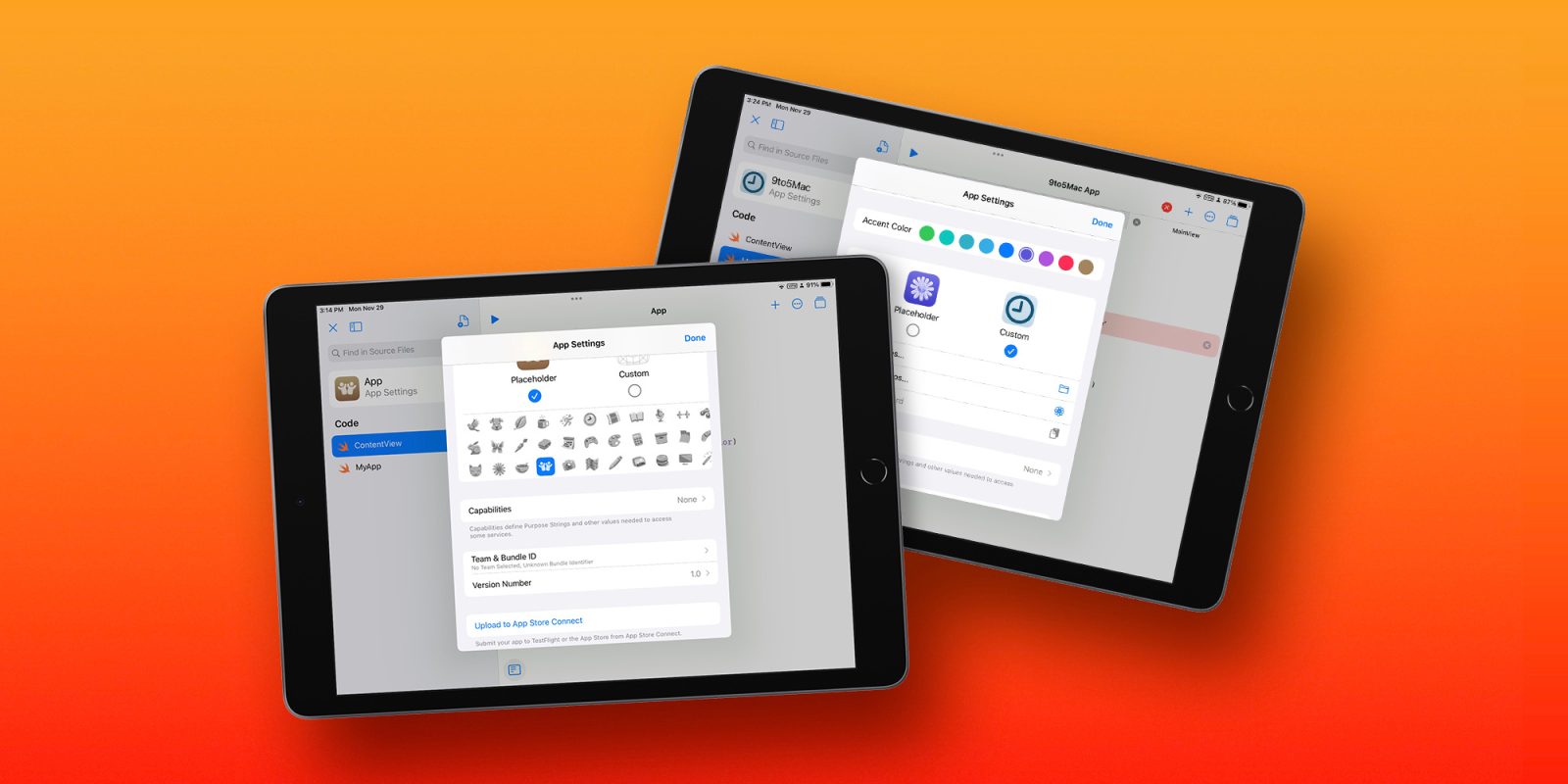
Apple’s Swift Playgrounds 4 app released last year as a way for developers and students to learn its Swift programming language. The beginner-friendly app is a way to “learn real coding the fun way,” says Apple. Today, the app received its version 4.1 update for iPad and Mac devices.
The post Swift Playgrounds 4.1 adds content on SwiftUI, animating shapes, and making a camera appeared first on 9to5Mac.
Instagram testing new Stories layout that hides excessive posts

Instagram Stories has certainly become a hit, and some people really enjoy sharing everything they’re doing through these 24-hour photos and videos. However, the social network is now testing a new Stories layout that hides excessive posts – which is bad news for creators.
The post Instagram testing new Stories layout that hides excessive posts appeared first on 9to5Mac.
Apple hit with lawsuit over ‘ear-shattering’ Amber Alert volume through AirPods Pro

Apple is facing a new lawsuit from a family that claims their son’s hearing was permanently damaged when an Amber Alert played through his AirPods Pro at an excessive volume. In a press release published by Paranjpe Mahadass Ruemke Law Firm, the parents explained that their son was watching Netflix on his iPhone when an Amber Alert played at an “ear-shattering” volume and he will now be required to “wear a hearing aid for the rest of his life.”
The post Apple hit with lawsuit over ‘ear-shattering’ Amber Alert volume through AirPods Pro appeared first on 9to5Mac.
Apple Music streaming Harry Styles concert on Friday in live performance push

Starting this week, Apple Music is livestreaming some concerts from major artists as part of Apple Music Live. This new feature kicks off with a Harry Styles concert Friday, alongside the release of his third album, Harry’s House.
The post Apple Music streaming Harry Styles concert on Friday in live performance push appeared first on 9to5Mac.
Canon R5 C top features – a better video workflow that plays nicer with Macs [Video]

Up until recently, I’d been using the Canon R5 as my day-to-day camera for photos and videos. Although I was able to make it work, things like overheating made it a little less than ideal for recording long form content, such as the in-depth video walkthroughs of iOS updates that I like to do. Canon’s recently released R5 C addresses the overheating problems, but also provides quite a few enhancements that Mac users, and Canon enthusiasts in general will appreciate.
The post Canon R5 C top features – a better video workflow that plays nicer with Macs [Video] appeared first on 9to5Mac.
Atlanta retail employees accuse Apple of union busting, possibly breaking labor laws

Last month, Apple Store employees in Atlanta began the process of unionizing; today those same employees are accusing the tech giant of union busting. The Communications Workers of America is accusing Apple of violating the National Labor Relations Act. The company has been reportedly holding captive audience meetings to counter an ongoing union drive at the Cumberland Mall store.
The post Atlanta retail employees accuse Apple of union busting, possibly breaking labor laws appeared first on 9to5Mac.
Apple delays stricter in-person work requirements, citing increase in COVID-19 cases

Apple is once again pausing its return to in-person plans due to an increase in COVID-19 cases. The company had originally said that employees would be required to work in-person three days per week starting next week on May 23, but it is now delaying that requirement.
Notably, the company has also not set a new date for when the requirement will go into effect. Employees are still expected to work two days per week in person though.
The post Apple delays stricter in-person work requirements, citing increase in COVID-19 cases appeared first on 9to5Mac.
9to5Mac Daily: May 17, 2022 – New accessibility features, foldable screen rumors

Listen to a recap of the top stories of the day from 9to5Mac. 9to5Mac Daily is available on iTunes and Apple’s Podcasts app, Stitcher, TuneIn, Google Play, or through our dedicated RSS feed for Overcast and other podcast players.
Enjoy the podcast? Shop or check out our merch to support 9to5Mac Daily!
The post 9to5Mac Daily: May 17, 2022 – New accessibility features, foldable screen rumors appeared first on 9to5Mac.
How to use ‘Switch to Android’ for iPhone and transfer your data from iOS [Video]
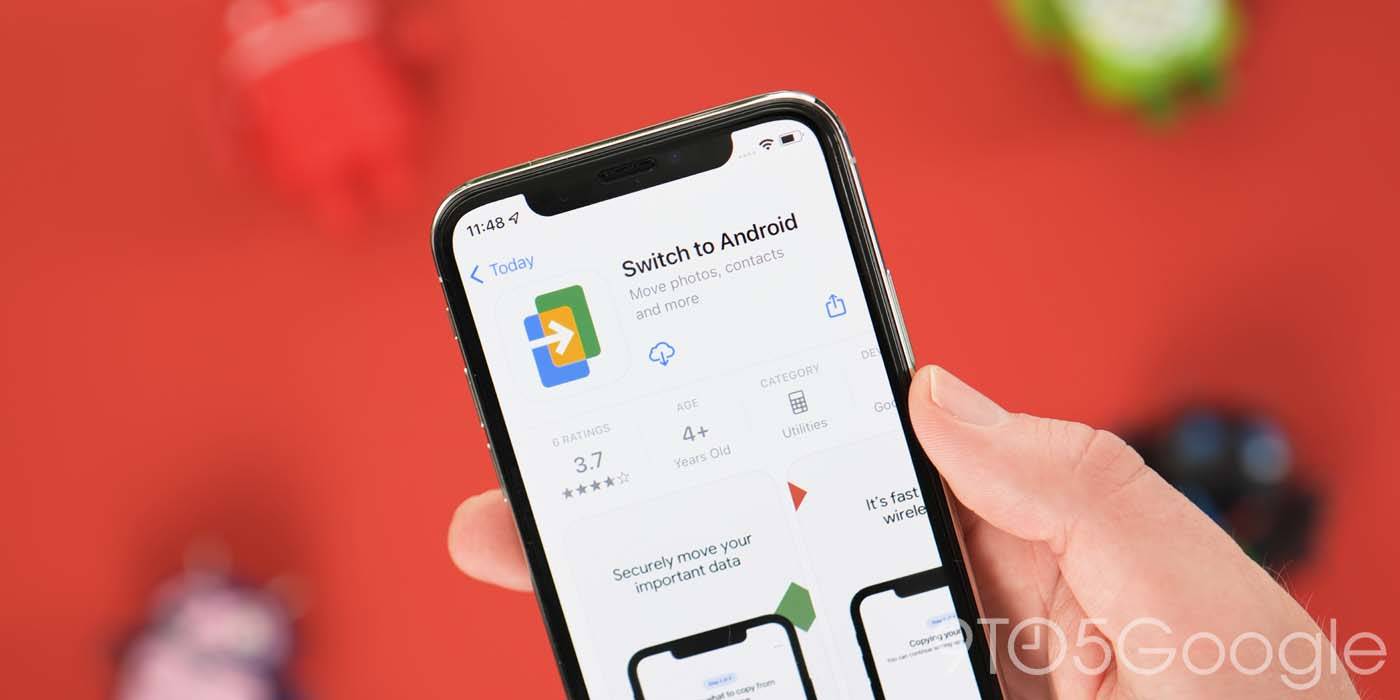
Since Android 12, you’ve been able to quickly sync all of your important data from an old iPhone to a new Google Pixel or Android device via cable. “Switch to Android” is a great option for those lacking a cable, and here’s how to use it.
The post How to use ‘Switch to Android’ for iPhone and transfer your data from iOS [Video] appeared first on 9to5Mac.
Nomad launches ‘Sport Band Slim’ for Apple Watch, an upgrade over Apple’s Sport Band [Hands-on]

Nomad is out today with a new take on its Sport Band for Apple Watch. The Sport Band Slim is a cleaner and lighter-weight option for Apple Watch and has some features above and beyond Apple’s own Sport Band.
The post Nomad launches ‘Sport Band Slim’ for Apple Watch, an upgrade over Apple’s Sport Band [Hands-on] appeared first on 9to5Mac.
Deals: iPad mini 6 sees $100 discount, Anker iPhone accessories from $8, more

All of today’s best deals are now headlined by Anker’s latest iPhone accessory sale from $8. That’s alongside a $100 discount on Apple’s new iPad mini 6 and a series of Twelve South aluminum MacBook stands from $31. Hit the jump for all that and more in the latest 9to5Toys Lunch Break.
The post Deals: iPad mini 6 sees $100 discount, Anker iPhone accessories from $8, more appeared first on 9to5Mac.
Fetch Rewards app: Earn free gift cards for Apple, Amazon, and Best Buy with everyday purchases
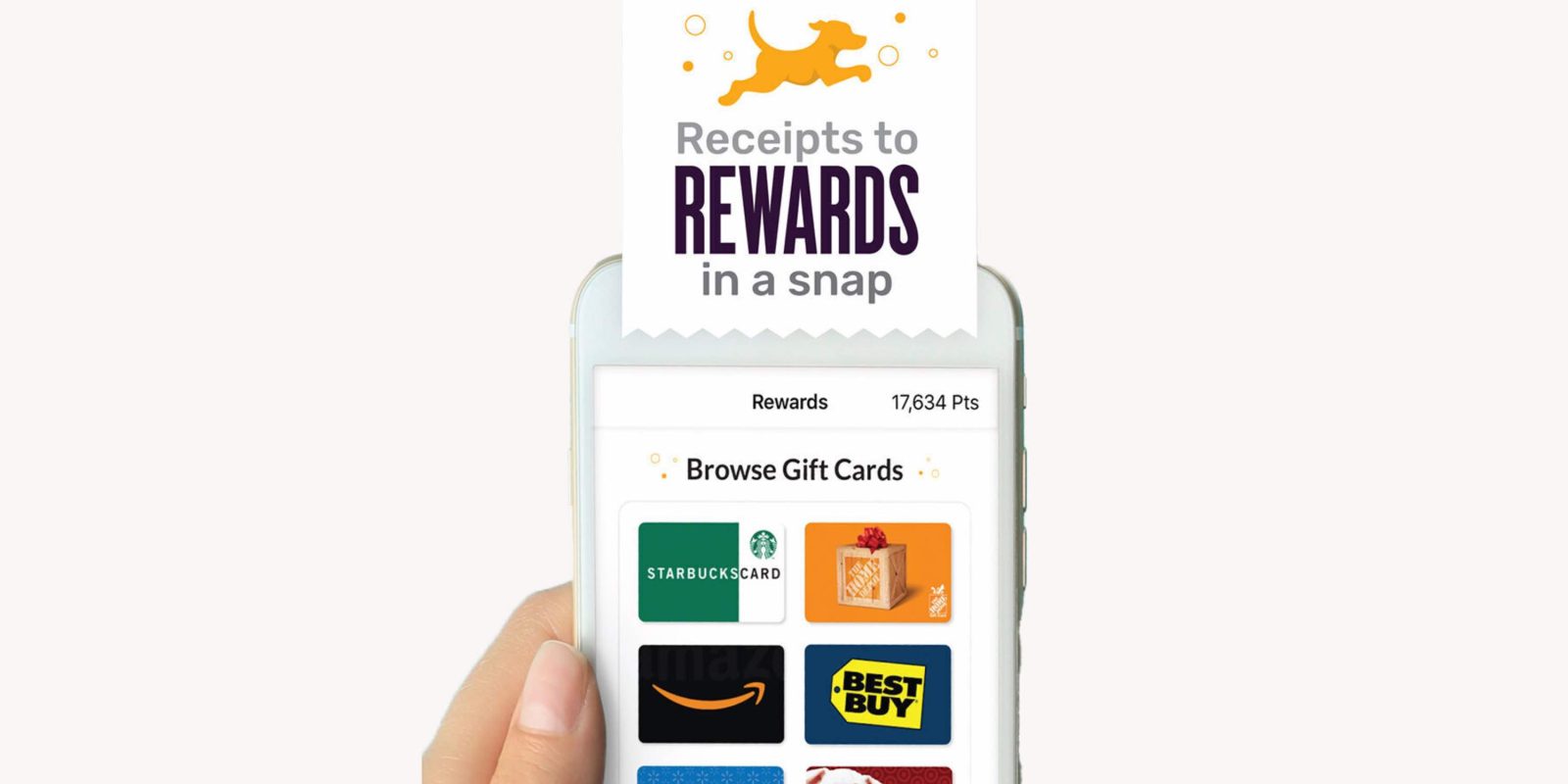
Wouldn’t it be great if you could earn rewards you actually want on any purchase from any store or restaurant? Fetch Rewards does just that by letting you scan your receipts to transform them into valuable free gift cards for Apple, Amazon, Best Buy, Starbucks, and more.
The post Fetch Rewards app: Earn free gift cards for Apple, Amazon, and Best Buy with everyday purchases appeared first on 9to5Mac.
How to fix the Magic Keyboard connection rejected message

Seeing a “Magic Keyboard connection rejected” message when trying to use it with your Mac? Follow along with several quick steps to fix this issue.
The post How to fix the Magic Keyboard connection rejected message appeared first on 9to5Mac.
Apple celebrates Accessibility Awareness Day with Fitness+, live sessions, shortcut suggestions, more
Apple is celebrating Accessibility Awareness Day this entire week with new content for Apple lovers of varying abilities. There’s a lot to check out this week from Fitness+, Apple Maps, Apple Music, and more.
The post Apple celebrates Accessibility Awareness Day with Fitness+, live sessions, shortcut suggestions, more appeared first on 9to5Mac.