
Welcome to My Blog
The Decline of Organic Facebook Reach & How to Adjust to the Algorithm
If you’ve been managing a Facebook Business Page over the past few years, you’ve likely noticed a drop in how many of your fans have been viewing and interacting with the organic posts you publish to that page.
There are two reasons for this.
Why Your Organic Reach Has Declined on Facebook
More Ad Content Competing for News Feed Space
This observed decline in organic Facebook reach began in 2014, when Brian Boland, Facebook’s VP of Advertising Technology (at the time), said Facebook is simply managing more ad content than it used to, and News Feed space is thus more competitive among marketers.
Boland, now Facebook’s VP of Publisher Solutions, is right. There’s simply too much content being published on Facebook, making visibility in the News Feed increasingly competitive. And Facebook strives to show people the content that is most relevant to them, as opposed to surfacing all the content available.
Facebook’s 2018 News Feed Change
More recently, you might’ve noticed a greater dip in the organic reach of your Facebook content because of an important change to Facebook’s News Feed algorithm.
In January 2018, according to Facebook’s Head of News Feed Adam Mosseri, Facebook began to “shift ranking to make News Feed more about connecting with people and less about consuming media in isolation.”
As a result, marketing content was poised to take a backseat to content by friends and family — a value that Facebook says it originally had, and that it’s trying to return to.
The good news in all of this is that there’s a lot you can do to counteract these changes, like being more selective about what you publish, paying attention to when you publish, and putting money behind your posts (a.k.a. “boosting” them).
Download our free Facebook guide here for more tips on maximizing your Facebook reach.
Before we dive into how you can improve your Facebook Page’s organic reach and reengage your Facebook followers, let’s explore exactly how Facebook’s News Feed algorithm works. Then, we’ll see how various algorithm changes — including its 2018 update — have affected the reach of a marketer.
How Facebook’s News Feed Algorithm Works
When Facebook first launched News Feed back in 2006, the algorithm was pretty basic. Different post formats were assigned different point values — so a post with just text might be worth one point, while a post with a link in it might be worth two points, and so on. By multiplying the post format point value by the number of people interacting with a given post, Facebook could generate a ranking system for determining the order in which posts would appear.
As the years rolled on, the News Feed algorithm evolved to factor in the recency of posts, as well as the relationship between the person doing the posting and the person interacting with said post. This iteration of the algorithm was known as EdgeRank. But in 2011, Facebook abandoned EdgeRank for a more complex algorithm that incorporates machine learning.
That machine learning-based algorithm is what’s responsible for surfacing content on your News Feed today. Unlike its predecessors, which assigned generic point values to post formats, the current algorithm adapts to individual user preferences. So, for example, if you never, ever, interact with photos in your News Feed, Facebook’s algorithm will pick up on that and show you fewer photos over time.
On the other hand, Facebook has identified for marketers the content formats that drive engagement and sharing — native and live videos. Facebook ranks live videos higher in the News Feed, as well as videos with higher watch and completion rates and videos that are clicked on or unmuted as signals of viewer interest.
Ultimately, there are thousands of factors that inform Facebook’s algorithm of a meaningful interaction. These factors range from using trigger words that indicate important events (e.g., “congratulations”) to whether or not you’ve actually clicked a link in a post before liking it.
Today, Facebook rewards the content that produces these interactions the best: person-to-person content. Facebook’s end goal here isn’t just to match News Feed content to the individual interests of each user — it’s to display News Feed content that reveals connections between each user.
As Facebook’s Head of News Feed Research Lauren Scissors said in a 2018 press release:
“Interacting with people … is associated with a greater sense of well-being. And the benefits [to the content creator] are even stronger when you’re close to the person, and when the interaction requires some effort.”
What Is Facebook Reach and How Has It Changed?
Facebook defines organic reach as “how many people you can reach for free on Facebook by posting to your Page.” Prior to 2012, that number used to be much, much higher than it is now.
2007-2012: Fan Pages
From the moment “Fan Pages” launched in 2007, anyone could create a Page for their company or organization, start collecting fans, and post unlimited messages to their fan bases with the assumption that they would see those messages.
When 2012 rolled around, Page managers learned that only a fraction of their Facebook fans — 16% on average — were seeing their Page posts in their News Feeds. And that fraction got significantly smaller in 2014.
2014: Organic Reach Plummets
A study from Edgerank Checker found that between February 2012 and March 2014, organic reach for the average Facebook Page dropped from 16% to 6.5%. Research from Social@Ogilvy, meanwhile, suggests that for Pages with more than 500,000 Likes, organic reach could be as low as 2%.
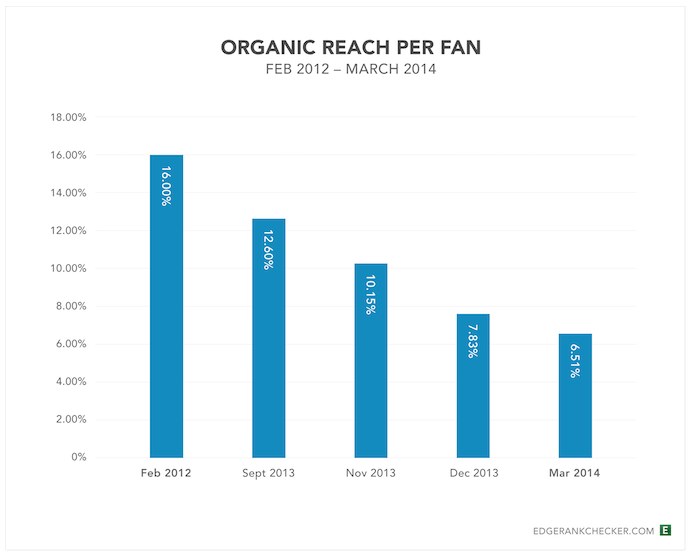 Image via Biznology
Based on the figures above, that means a Page with 10,000 fans could expect just 650 of them to actually see that Page’s posts in their News Feeds. For a Page with 1 million fans, about 20,000 would end up seeing posts (based on the 2% figure).
2016: Reintroducing Friend and Family Content
SocialFlow analyzed more than 3,000 posts by publishers on Facebook and found that organic reach dropped 42% between January and May 2016.
Then, later in 2016, Facebook adjusted its News Feed algorithm again, to further prioritize content from friends and family over Pages. This likely makes News Feed’s current condition less surprising …
In the blog post announcing the algorithm change, Facebook Engineering Director Lars Backstrom warned that Pages could anticipate a dip in organic reach — which could leave reach lower than that earlier 2% estimate, in some cases.
After this algorithm adjustment, SocialFlow adjusted the decline in organic reach — which had dropped further. Between January and July 2016, publishers saw a 52% decline in organic reach on Facebook.
2017: Explore Alternative News Feed
Facebook’s biggest algorithm update for 2017 wasn’t an algorithm update, but rather a new News Feed entirely.
In October of that year, Facebook tested an ad-free News Feed that users could switch to, dedicated to publisher content rather than personal content. To brands, it clearly foreshadowed a Facebook that separated Pages content from friends and family content. Today, that “alternative News Feed” is known as the “Pages” option on the lefthand sidebar of a user’s News Feed.
Just days after Facebook launched this alternative News Feed test, a social media manager for a newspaper in Slovakia reported that 60 of the largest media pages in the country saw their likes, comments, and shares decrease fourfold.
2018: Reinforcing That Commitment to Friends and Family
Facebook’s recent incident of data misuse by analytics firm, Cambridge Analytica, prompted Facebook to deeply address the privacy of users who don’t want their personal information exploited in various ways.
But this process was preceded by a similar yet unrelated News Feed update to focus less on content from Pages and more from a user’s friends and family. This update to Facebook’s News Feed algorithm doesn’t eliminate Page content from News Feeds entirely, but this update does set different priorities for which content gets prime News Feed real estate.
According to a private Facebook webinar hosted in January 2018, those priorities are:
- If the content is shared over Facebook Messenger.
- If the content is Liked or commented on.
- If the content receives multiple replies.
- “Meaningful interactions” between users.
Shares and comments, in particular, are considered “active” interactions, which Facebook considers more “meaningful” when slotting content on a user’s News Feed. For that reason, the company notes that video watch time, referral traffic, and organic reach might decrease this year if the content doesn’t doesn’t stir up a meaningful interaction.
Should You Increase Your Paid Content on Facebook?
Fewer people seeing your Page’s organic posts on Facebook means fewer clicks, comments, and shares. And having fewer of those interactions means fewer conversions, leads, and customers. But this is only the case if your content doesn’t attract comments and shares to begin with.
So, why would Facebook decide to decrease organic post visibility in favor of friend and family content in the first place? How can a marketer create content that competes with the natural appeal of a friend’s new baby picture?
Meaningful Content vs. Paid Content
We already touched on Facebook’s official response to the first question in the introduction: There are simply too many Pages producing too much content for too many fans, which means competition for visibility on the News Feed is high. What’s more, Facebook is trying to make sure people are only seeing the best content — the stuff that is most relevant to them.
Some publishers have cracked the code when it comes to engagement on Facebook: by publishing and broadcasting video. (And we’ll get into that later in the post.) But many in the marketing world suspect that Facebook had (and still has) an ulterior motive: to get people to start spending more on ads and “promoted” content.
So, should you invest in more ads and paid content to get the exposure you want?
Is Paid Content Worth It?
As Facebook has evolved into more of a paid marketing platform than an organic one, Page managers are realizing they’re now expected to pay for ads yet again to reach those newly acquired Fans, even if those Fans have seemingly elected to see a brand’s posts by liking their Page in the first place.
From Facebook’s perspective, it’s simply not an ideal user experience to flood the News Feed with posts just because a Page has lots of Likes and is publishing prolifically.
Nowadays, Facebook is encouraging marketers to look at their fan bases as a way to make paid advertising more effective rather than using it as a free broadcast channel. Additionally, Facebook says you should assume organic reach will eventually arrive at zero. So, if you really want to reach your target audience on Facebook, you’ll need to supplement your organic efforts with some paid advertising.
Should you trust Facebook? Are paid ads on Facebook worth it? They can be — especially if they’re part of a longer content campaign, and can stimulate interest in a story that users might not see otherwise. Learn more about how to advertise on Facebook effectively in Step 8 further down in this article.
How to Deal With Declining Organic Reach on Facebook
Now that you’ve got a better understanding of how Facebook surfaces content, let’s explore some tips for dealing with the decline in organic Page reach.
1. Be more selective about what you post.
Marketers have to switch gears from untargeted, frequent publishing to targeted, selective publishing. The goal is no longer to spray and pray — it’s to get as much interaction from a single post as possible.
Each post published to a brand Page can be targeted to a specific audience regardless of whether or not it’s sponsored, which may improve overall interaction with that post among other people who are likely to find it more interesting and relevant.
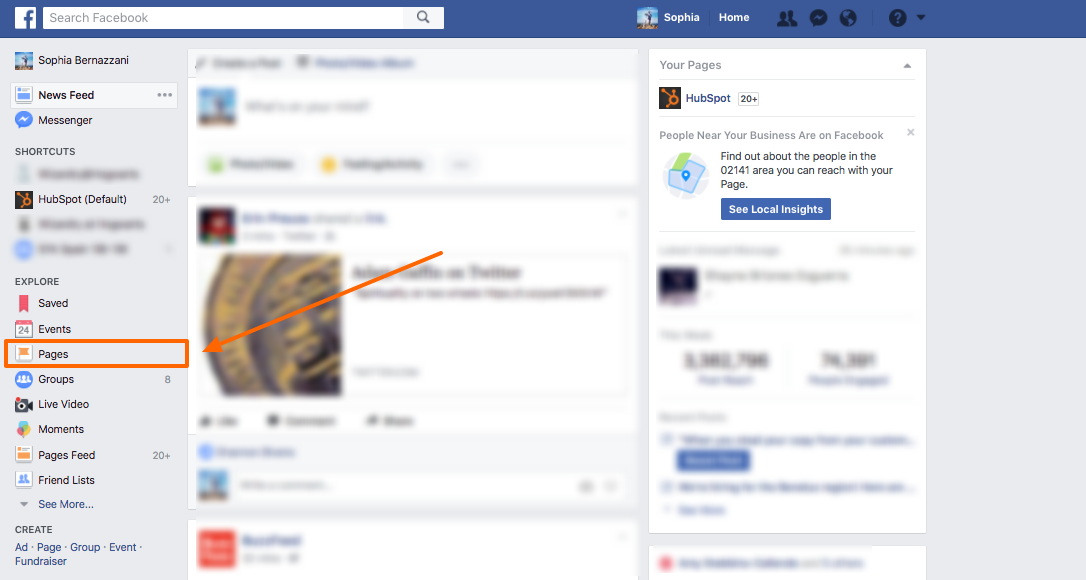
2. Remind your Fans they can go to Pages Feed on the left sidebar of their News Feed to see content from Pages they’ve Liked.
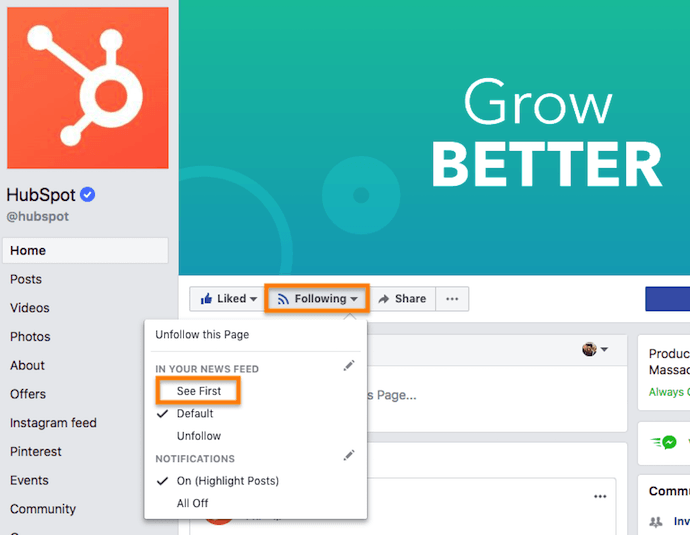
3. Educate your super fans that they can update their notification settings from your page.
4. Encourage fans to engage with your posts when they do see them, so they see more of them.
This can be as simple as adding a reminder to “Please Like and share” at the end of your posts.
5. Share engaging videos on Facebook.
Videos on Facebook are engaging and make visitors more likely to stop, watch, and maybe even unmute when they spot them in the News Feed. Use videos with captions, animations, and engaging visuals to draw in Facebook users’ attention.
According to a recent study by quintly, native Facebook videos have an 186% higher engagement rate and are shared more than 1000% more than videos linked to from other hosting sites. Take the extra steps to publish videos for the platforms you’re promoting them on for best results — distribute your content on Facebook, YouTube, and other social platforms you’re trying to leverage.
6. Broadcast on Facebook Live.
If you’re not already doing so, start broadcasting on Facebook Live. Users spend 3X more time watching live broadcasts than traditional videos on the platform, so start experimenting with live content if you’re concerned about your organic reach. Advertise what you’re doing on different platforms to generate buzz, broadcast for several minutes (at least) to help your broadcast get surfaced in the News Feed, and share authentic, behind-the-scenes content to attract and interest your viewers.
To learn more about Facebook Live broadcasting strategies, check out our free guide.
7. Re-allocate your time and effort toward your owned assets.
Since the only constant with Facebook (and the larger digital media landscape) is change, it’s always safest to focus on the digital channels you entirely own and control — your website and blog. Spend the vast majority of your effort creating content (blog posts and long-form content such as ebooks, case studies, or videos) that will continue to garner inbound traffic, leads, and customers long after they’re first created. If you have time and budget, share those assets to Facebook for additional reach.
8. Start treating Facebook like a paid ad platform.
If you’re going to pay-to-play, get your targeting right. Once you’ve built an audience of relevant fans, focus on advertising the content assets you’ve created — blog posts, ebooks, etc. — and use ads to amplify them to targeted users. Remember: It’s likely only a matter of time before organic reach hits zero, so you might as well hone your paid strategy now, which brings me to one final recommendation …
9. If you do advertise, go beyond the basics.
Facebook’s targeting capabilities have gotten considerably better over the past few years. You can now pay to reach your ideal persona based on demographics, interests, web behavior, and more. Additionally, there are a bunch of tools and features that can help you maximize the effectiveness of your campaigns, including:
- Conversion Tracking: Track the actions of site visitors after viewing your Facebook ad.
- Custom Audiences: Target Facebook ads based on your email list.
- Lookalike Audiences: Target Facebook users similar to your customers.
- Audience Insights: Learn about your existing Facebook audience to better target your ads.
- Website Custom Audiences: Target Facebook users who have visited your website before.
- Facebook Exchange: Place retargeted ads on Facebook for users who’ve visited a certain product or service page on your site.
- Lots of Customizable Reporting: Create reports based on metrics that matter most for your business.
To learn more about how you can improve your Facebook Page’s reach, check out our free guide: How to Attract Customers with Facebook.


Petition calls on Apple to recall & replace failing butterfly MacBook Pro keyboards

Apple’s butterfly keyboard design has been a polarizing change since it was introduced. Some users love it, while others have had numerous issues. Now, a new Change.org petition aims to face Apple to recall the butterfly keyboard and replace it with a “different working keyboard.”
How to hide the Dock on the Mac

The Dock is a key part of your experience on the Mac, it lets you quickly launch apps and folders, as well as gives you access to the Finder. However, the Dock may be taking up too much space depending on how many apps and folders you have loaded in there.
Instagram launches new payments platform for making purchases directly in the app

Amid its ongoing battle with Snapchat, Instagram is now looking to become a larger player in the commerce industry. According to a report from TechCrunch, Instagram has started rolling out a feature that would allow users to make purchases directly in the Instagram application…
Top 10 Best To Do List Apps to Simplify Your Task Management in 2018
You know the phrase, “One man’s trash is another man’s treasure”? That’s how I feel about to-do lists.
After all, how you track your tasks depends entirely on the person. Are you looking for a simple interface, or are you hoping to color-code and categorize hundreds of tasks at once? Is this to-do list for yourself, you and your family, or you and your entire team? How much do aesthetics matter?
There are hundreds of to-do list tools out there, but some of them are just plain better than others. To help you separate the really solid ones from the rest, we’ve curated a list of 10 of the best to-do list tools below, including short descriptions to help you determine which may be right for you.
Best To Do List Apps
- Wunderlist
- Todoist
- Trello
- ToodleDo
- Any.DO
- Things
- TickTick
- Google Keep
- OmniFocus
- Habitica
Top 10 Task Management Tools to Download in 2018
1. Wunderlist
Price: Free
iOS | Android | Chrome
Wunderlist was my best to-do list app of 2017. Well, it’s remained my favorite this year — especially now that both its Basic and Pro versions are now free to access (Wunderlist Pro used to cost $4.99/month).
This app is such a powerful productivity tool that Microsoft bought it in 2015, The Verge named it best to-do list app the year before, and Apple named it App of the Year the year before that. And unless you want features like unlimited task delegation and file uploads, the free version offers just about everything you’ll likely need.
In a nutshell, Wunderlist lets you create to-do lists you can then share with friends, family, or coworkers — who will have editing capabilities of their own. And the user experience (UX) doesn’t get messy, even when both people are working on a list at the same time. When I use Wunderlist to share a grocery list with my roommate, for example, we’ll sometimes go to the grocery store together and tackle the list simultaneously. And it’s actually fun to check things off and watch her check things off at the same time.
Finally, it’s sleekly designed and very user-friendly. Adding and checking off list items is simple and intuitive, as is adding and checking off sub-tasks, adding a due date, adding any reminders you may want, and so on.
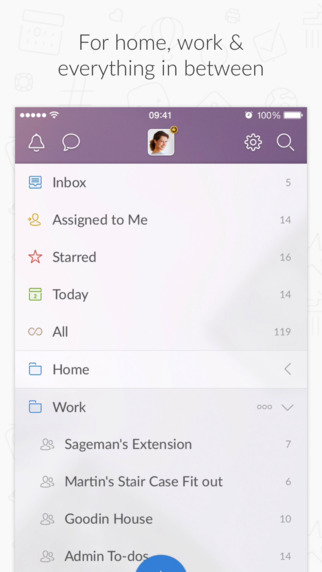
Image Credit: AppAdvice
Earlier this year, the service integrated with Slack to show its tasks and notifications in the work-collaboration tool while its users chatted in real time. To enable integration with Slack, here’s what you need to do:
- Sign in to Slack. Click on your company name in the top left corner, then choose “Configure Integrations” from the dropdown menu.
- Under “All Integrations,” find “Wunderlist” and click “Add.”
- Select or create a Slack channel, and then click on “Add Wunderlist Integration.”
- Once you’ve authenticated Wunderlist, all you have to do is choose a list from your Wunderlist and click on “Save Integration.” Boom, done.
2. Todoist
Price: Free for Basic, $29/yr. for Premium
iOS | Android | Chrome
Although Todoist has been around for a while, it’s become especially powerful in just the last few years. This tool includes a ton of great features that let you organize tasks by date, color-code them, and so on.
The free version has fewer features than Wunderlist’s free version, but it’s very well-designed and user-friendly. You can create sub-tasks and dependencies, projects, and sub-projects. You can attach due dates to these tasks, prioritize them using a color-coding system, categorize them, and more. The premium account costs $29 per year and includes push notifications, email reminders, labels, and filters.
Todoist is available for (and looks great on) every major platform: the web, iOS and Android apps, desktop apps for Windows and OSX, add-ons for Firefox and Chrome, plug-ins for email apps like Gmail, Thunderbird, and Outlook, and more. Not to mention, it integrates with services like Google Drive, Sunrise Calendar, and IFTTT.
3. Trello
Price: Free for Basic, $8.33/user per mo. for Business Class, or $20.83/user per yr. for Enterprise
iOS | Android | Chrome
Trello is the online project management tool that our blogging team uses here at HubSpot. It lets you drag, drop, color-code, and manipulate to-do list items in a way that many of the other tools on this list don’t.
You can arrange larger projects into “boards,” under which you can add all sorts of lists to break down that bigger project into sub-projects. Under each list, you can add what they call “Cards,” which are items in a list. You can add a due date, a checklist, notes, attachments, and color-coded labels to each card. You can also drag and drop cards between lists and boards.
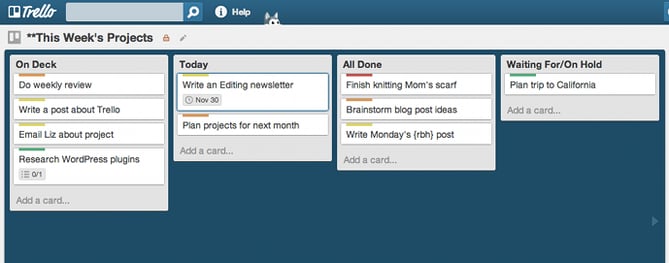
Image Credit: Cloud Couch
My favorite thing about Trello is that it lets you visualize your to-do list in a way that’s easy to follow — including a calendar view. In the calendar view, you can see what your upcoming tasks look like a week or a month at a time. You can also drag and drop cards between calendar days to change their due dates.
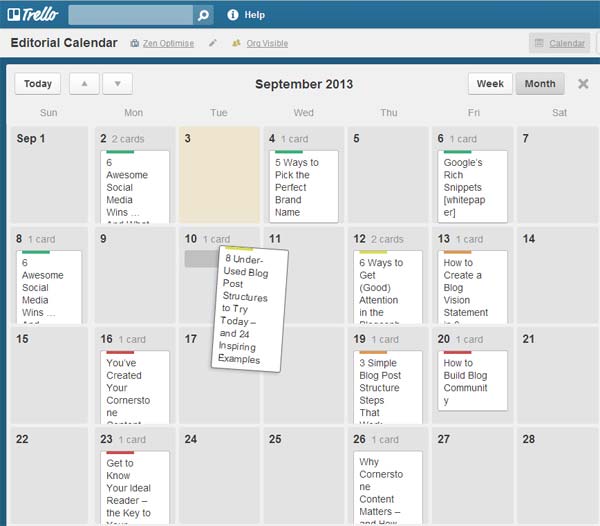
Image Credit: BlueGlass
The free version lets you create unlimited boards, lists, cards, members, checklists, attachments, and so on, and allows integration with Box, Google Drive, and Dropbox. The paid versions allow for more storage, more customization, stricter privacy options, and other added features.
4. ToodleDo
Price: Free
iOS | Android | Chrome
Here’s a task management tool some of the most organized people in my life swear by. ToodleDo is a very user-friendly tool for organizing simple to-do lists on your iOS and Android devices and on the web. It’s heavily focused on tasks, and that’s what the tool does best. Under each task, you can sub-tasks, additional notes, priority ratings, due dates, and reminders. You can also organize your tasks into different folders.
While it used to lack some of the aesthetic that other apps (especially Wunderlist) do well, it recently went through a redesign that did wonders for its design. Here’s a before and after shot, with the updated version on the right:
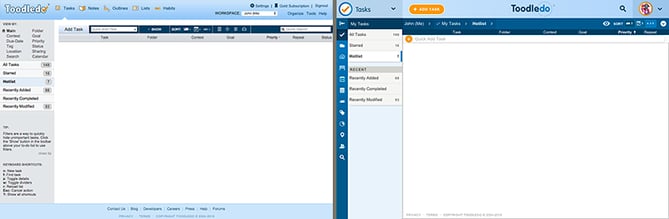 Image Credit: ToodleDo
Although it’s mostly for task management, there are also sections of the tool where you can take notes, create outlines, and even track your habits, like in the screenshot below. You can also share your lists, collaborate with others, and assign tasks to anyone you’d like.
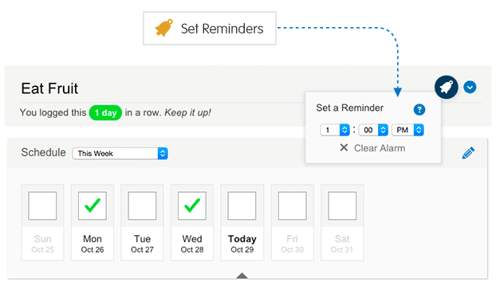
Image Credit: ToodleDo
5. Any.DO
Price: Free for Basic, $2.09/mo. for Premium
iOS | Android | Chrome
Any.Do is one of the more beautifully designed apps on this list. It offers all of the features you’d want in a to-do list app, including drag-and-drop and swipe-to-complete, but there are a few things that make it stand out.
For example, its key differentiator is “the moment” — a push notification you get each morning telling you to plan your day. There are also a few other cool and delightful features in there, like voice entry and the ability to shake your device to clear finished tasks.
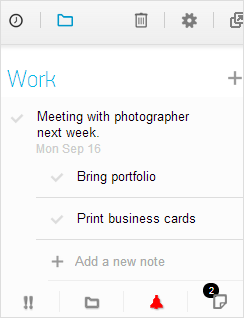
Image Credit: Tech Norms
It’s designed for the iPhone but can be used on iPad, as well as on the web and desktop with full syncing. Lifehacker named the app its favorite to-do app for iPhone, although the folks there admit it isn’t as intuitive or as robust in terms of features as other apps like Wunderlist and Todoist. It also has a Chrome extension with a four-star rating and over 2,000 reviews. Here’s a video that’ll walk you through its user interface and capabilities:
Any.DO Moment from Any.DO on Vimeo.
6. Things
Price: $9.99
iOS | Chrome
“‘Things’ might be the prettiest to-do list app ever,” reads a review from WIRED. “It doesn’t shout in your face about all the work you have to do today. It’s more like a clean, crisp piece of paper, ready whenever you need it.”
That sums up the user experience pretty well. Now known as Things 3, this third-generation task manager is intuitive, well designed, and very simple.
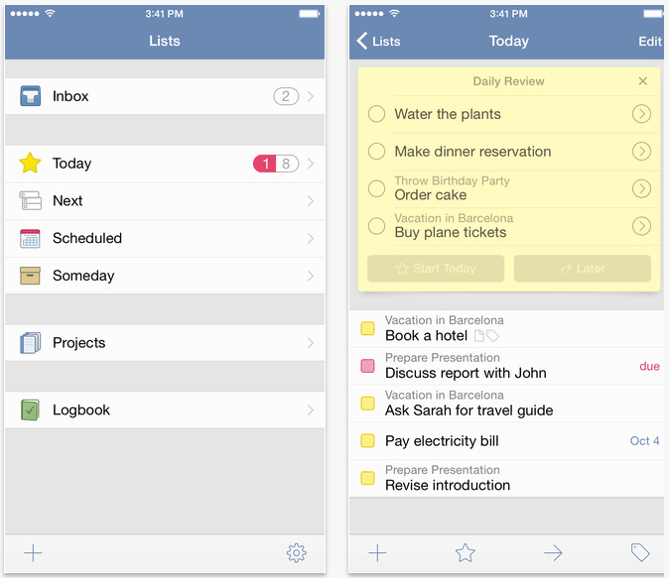
Image Credit: Things
For some, though, its simplicity might be a big turnoff. A review from The Verge says, “Things is still for individuals — there’s no easy way to collaborate with colleagues on your projects.”
It’s also not the most intuitive to due dates if you describe a particular task with the time to completion; if you say “next Wednesday” in the task description, you’ll have to set the corresponding deadline manually.
Nonetheless, if all you want in a to-do app is a beautiful design and the ability to organize simple tasks and lists — and you have $10 to spare — then Things could be a good bet. If you like the idea of checking things off on your Apple Watch, it also offers full Apple Watch Support. Otherwise, you might be better off going with something more complex.
7. TickTick
Price: Free for Basic, $1.99/mo. or $19.99/yr. for Pro
iOS | Android | Chrome
TickTick is a relatively new player, but it has a lot of potential. Like many of the other tools on this list, you can add new tasks, sub-tasks, set deadlines and custom reminders, and share with other users. You can also set recurring to-do list items for every day, a specific number of days, a week, a month, and so on.
The Pro version has a great calendar view where you can see what your to-do list looks like on a daily or weekly basis and get ahead of the game. You can drag tasks to change the order, and drop tasks into the calendar on the bottom left to set a due date. It also has revision history and an “experimental labs” feature.
In addition to its mobile apps, TickTick now offers Windows and Mac web apps as well. This to-do tool has a beautiful interface with a solid — and growing — feature list. Keep an eye out for updates and check out TickTick plans here.
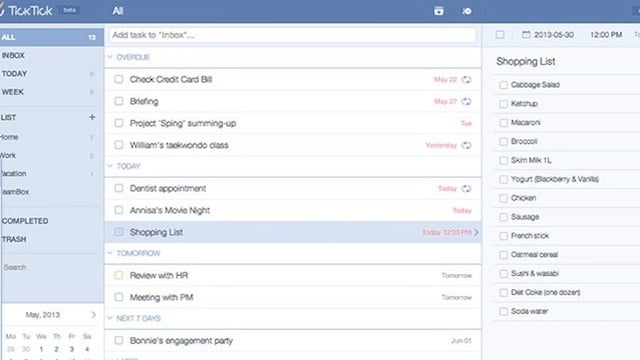 Image Credit: Lifehacker
8. Google Keep
Price: Free
iOS | Android | Chrome
Google Keep has existed under the radar for a long time, but it’s actually a great tool if you’re looking for a place to quickly make and save lists and notes and access them across multiple devices.
At its core, Google Keep is a simple notepad that connects to Google Drive, where you can keep checklists, photos, voice notes, and other text notes that sync across multiple devices as well as the cloud.
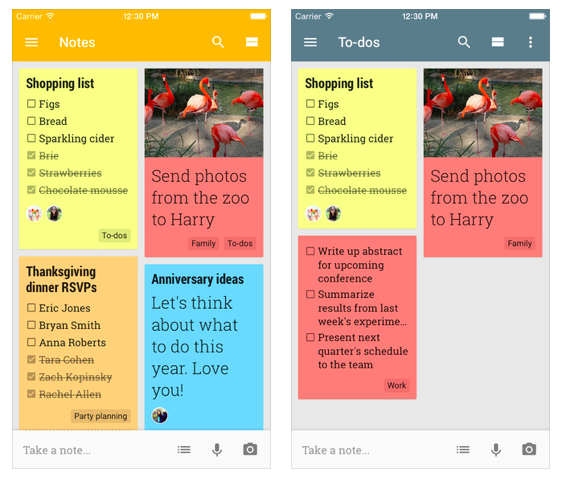
Image Credit: ShareChair
Google Keep doesn’t have nearly as many features as other to-do list apps, and its design isn’t as regimented — but if you’re an avid Google Drive user and like to create and edit lists on-the-go, then this could be a great option for you. You can learn more in this video:
9. OmniFocus
Price: $39.99 for Standard, $79.99 for Pro
iOS | Chrome
Don’t let the price tag deter you: If you’re an iOS user with a lot of different projects and tasks to track, and you’re looking for an app that organizes all these items in a super comprehensive way, then you’ll want to check this out.
This app’s latest product is OmniFocus 2. On its home screen, you’ll find a forecast summary of your upcoming to-do’s, as well as color-coded badges that show you what needs attention at-a-glance. Whenever you think of a new to-do list item or task, you can quickly enter them into your “Inbox,” during or after which you can apply this item to a specific folder, list, or context.
While most people would prefer something a little simpler, this is a great option for power users that are cool with a bit of a learning curve.
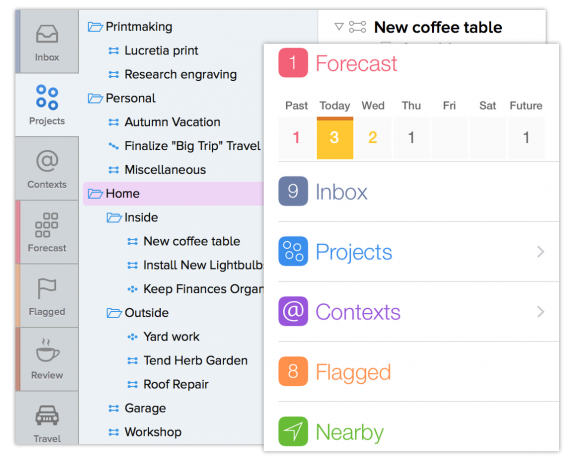
Image Credit: OmniGroup
10. Habitica
Price: Free
iOS | Android | Chrome
This one is for the video game lovers among us — or anyone interested in quite literally “gamifying” their life. Formerly HabitRPG, Habitica is a habit-building app available on iOS and Google Play that turns your to-do list items and projects into a medieval-themed, role-playing game.
You can level up your character when you succeed, earn money to buy weapons and armor, and defeat enemies — just by crossing things off your real list of tasks.
If you miss deadlines or fail to cross things off, you’ll take hits to your health and your character will lose progress. You can categorize your achievements into folders like “School & Work,” “Health & Fitness,” and more.
If you’re looking for a tool that’ll simply help you build good habits and encourage you to cross things off your to-do list, Habitica is a good option for you. Plus, you can compete with your friends to help hold yourself accountable. Get a better idea of how it works in this video:
Ready to download one of the task list apps above? Put all your projects on the app of your choosing, then download the free guide below to learn how to stay on track during the day.

Twitter says bug caused user passwords to be stored in plaintext internal log

Twitter today has detailed an internal bug that saw passwords be stored in an internal unmasked log. While Twitter says that it sees no signs of breach or misuse, it’s recommending that users “consider changing” their passwords…
How to customize iPhone camera settings for a smoother experience

Depending on how you use your iPhone camera, you might find yourself changing modes and settings every time you open the iOS Camera app. Follow along for how to customize your camera for a more efficient and seamless workflow.
August Smart Locks upgraded with new Auto-Connect location-aware feature

August has released a new location-based feature for its latest smart locks today called Auto-Connect.
Popular podcast player Pocket Casts purchased by group including NPR and ‘This American Life’

The popular cross-platform podcast player, Pocket Casts, has been purchased by a collective including NPR, This American Life, and public radio stations out of New York and Chicago.
GymKit makes Canada debut, Life Fitness equipment at Equinox works with Apple Watch

Apple GymKit is now available for Apple Watch users in Canada. Life Fitness equipment at the Equinox fitness club in Toronto now lets members pair Apple Watch to easily sync up fitness data during workouts.
Hands-on: Controlling AirPlay 2 playback on Apple TV from Siri on iPhone with iOS 11.4 beta

While AirPlay 2 still hasn’t shipped, the feature is shaping up to be quite impressive in recent betas. Most notable is the ability to control audio playback on one device from Siri on another device, a feature we wrote about last fall that recently started working in beta…
Google now supporting iOS Mail, Calendar, and Contacts apps in its Advanced Protection Program

Last year, Google was taking steps to further safeguard its services. Better known as Advanced Protection Program, the company is looking to protect users data in Gmail, Google Calendar, and Google Drive.
9to5Toys Lunch Break: Apple Watch Series 3 $279, Pad & Quill Accessory Sale 25% off, Herman Miller 15% off, more

Keep up with the best gear and deals on the web by signing up for the 9to5Toys Newsletter. Also, be sure to check us out on: Twitter, RSS Feed, Facebook, Google+ and Safari push notifications. more…
20 years of iMac: Behind the scenes of Apple’s ‘Simplicity Shootout’ video

Twenty years ago this Sunday, Apple introduced the first iMac to the world, a radically inventive computer that reshaped the consumer market and helped re-establish Apple as the industry leader in design and usability. Yesterday, we documented the iMac’s design evolution from 1998 through today.
Sonos holding media event in San Francisco on June 6, upgraded sound bar with Alexa control possible

Sonos has invited media to a special event held in San Francisco on June 6 where it will likely unveil a new smart sound bar. The invitation received by 9to5Mac shows a table full of various entertainment system remotes with ‘You’re better than this’ as the tagline.
Apple invites you to apply for one of 400 free places at this year’s Apple Developer Academy

Apple is inviting would-be developers and entrepreneurs to apply for one of 400 free places at this year’s Apple Developer Academy.
Open to students from anywhere in the world, tuition is fully sponsored by Apple, with no cost to students – who also receive a free Mac and iPhone, along with support for their living expenses in Naples, Italy …
Net neutrality not dead yet as Democratic senator attempts long-shot arcane procedure to save it

You might have thought net neutrality was dead – at least, outside of a few states defying the FCC to pass their own laws or rules. But one senator believes that there is still a chance to save it, using an arcane congressional procedure …
IDC figures put iPhone growth into perspective as smartphone shipments fall 2.9%

The good news announced in Apple’s Q2 earnings report may have focused more on revenue and profit than growing iPhone sales, but the company did still achieve year-on-year growth of 3%.
The latest numbers from IDC on global smartphone shipments put that achievement into perspective, drawing comparisons with Samsung and others …