Welcome to My Blog
How to Develop a Content Strategy in 7 Steps: A Start-to-Finish Guide
Whether you’re just starting out with content marketing or you’ve been using the same approach for a while, it never hurts to revisit your content strategy plan and make sure it’s up-to-date, innovative, and engaging for your prospects and customers – no matter when or how they intend to buy.

If you’re having trouble planning for the upcoming year or need some fresh ideas to include in your plan, read on.
In this post, we’ll dive into what content strategy is, why your business needs a content marketing plan, and what steps you need to take to create your strategy. Plus, we’ll explore some examples of effective content marketing strategies for inspiration.
Say your business goals include increasing brand awareness. To achieve this, you might implement a content strategy that focuses on SEO to increase your website’s visibility on the search engine results pages (SERPs) and drive traffic to your products or services.
New business owners might assume a content strategy is a nice-to-have, but not necessary early on. However, producing high-quality content can be invaluable in building trust with new audiences and succeeding in the long haul.
In essence, a good content strategy is the foundation of your Attract and Delight stages in a buyer’s journey that follows the inbound marketing framework. Along with attracting prospects to your brand, you can leverage a content strategy for sales enablement and customer satisfaction.
Plus, with 70% of marketers actively investing in content marketing, it’s critical that you develop a good content strategy to compete in your industry.
When you develop a content strategy, there are a few questions to answer. Let’s dive into those, now.
1. Who will be reading your content?
Who’s the target audience for your content? For how many audiences are you creating content?
Just as your business might have more than one type of customer, your content strategy can cater to more than one type of user.
Using a variety of content types and channels will help you deliver content that’s tailored to each persona.
2. What problem will you be solving for your audience(s)?
Ideally, your product or service solves a problem you know your audience has. By the same token, your content coaches and educates your audience through this problem as they begin to identify and address it.
A sound content strategy supports people on both sides of your product: those who are still figuring out what their main challenges are, and those who are already using your product to overcome these challenges.
Your content reinforces the solution(s) you’re offering and helps you build credibility with your target audience.
3. What makes you unique?
Your competitors likely have a similar product as yours, which means your potential customers need to know what makes yours better — or, at least, different.
Maybe your main asset is that your company has been established for many years. Or perhaps you have a unique brand voice that makes you stand out from your competitors.
To prove why you’re worth buying from, you need to prove why you’re worth listening to. Once you figure that out, permeate that message in your content.
4. What content formats will you focus on?
To figure out what formats to focus on, you need to meet your audience where they are.
While you may to tempted to launch a podcast since it’s grown so much in the last few years, or launch a YouTube channel, find out first where your audience lives.
Otherwise, you may waste time creating content that either won’t reach your audience or capture their attention.
Once you identify the best formats, start creating a budget to assess what resources you can allocate to execute this strategy.
5. What channels will you publish on?
Just as you can create content in different formats, you’ll also have various channels you can publish to, from your website to social media.
This, again, will reflect where your audience lives. If your audience prefers long-form video content, you may opt to publish your content on YouTube. If you have a younger audience that likes quick content, you may opt for TikTok and Instagram.
We’ll talk more about social media content strategy in the step-by-step guide later in this article.
6. How will you manage content creation and publication?
Figuring out how you’ll create and publish all your content can be a daunting task.
Before you execute, it’s important to establish:
- Who’s creating what.
- Where it’s being published.
- When it’s going live.
In a small team, this may be easy enough as you may be the sole decision-maker. As your company grows, you may need to collaborate with several content teams to figure out an effective process.
Today’s content strategies prevent clutter by managing content from a topic standpoint — as explained in the video above. When planning a content editorial calendar around topics, you can easily visualize your company’s message and assert yourself as an authority in your market over time.
Why Marketers Need to Create a Content Marketing Strategy
Content marketing helps businesses prepare and plan for reliable and cost-effective sources of website traffic and new leads.
If you can create just one blog post that gets a steady amount of organic traffic, an embedded link to an e-book or free tool will continue generating leads for you as time goes on — long after you click “Publish.”
HubSpot’s blog team found this to be key to increasing traffic to the Sales Blog over time – read about our blog strategy here.
The reliable source of traffic and leads from your evergreen content will give you the flexibility to experiment with other marketing tactics to generate revenue, such as sponsored content, social media advertising, and distributed content.
Plus, your content won’t just help attract leads, it will also educate your prospects and generate awareness for your brand.
Now, let’s dive in to learn the specifics of how to create a content marketing plan. Curious how our former HubSpot Head of Content SEO Aja Frost put together our content strategy? Here it is.
.png?width=500&name=how-to-create-a-content-strategy%20(1).png)
1. Define your goal.
What’s your aim for developing a content marketing plan? Why do you want to produce content and create a content marketing plan?
Know your goals before you begin planning, and you’ll have an easier time determining what’s best for your strategy.
Download this goal planning template for help figuring out the right content goals.
2. Conduct persona research.
To develop a successful plan, you need to clearly define your content’s target audience — also known as your buyer persona.
This is especially important for those who are starting out or are new to marketing. By knowing your target audience, you can produce more relevant and valuable content that they’ll want to read and convert on.
If you’re an experienced marketer, your target may have changed. Do you want to target a new group of people or expand your current target market? Do you want to keep the same target audience? Revisiting your audience parameters by conducting market research each year is crucial to growing your audience.
Featured Tool: Buyer Persona Generator
3. Run a content audit.
Early on, most brands start with blog posts. If you want to venture out into different formats, you can run a content audit to assess your top-performing and lowest-performing content. Then, use that information to inform which direction you take next.
If you’ve been in business for a while, you should review your content marketing efforts and the results from it in the last year.
Figure out what you can do differently in the upcoming year and set new goals. Now is a great time to align your team’s goals with the rest of your organization’s goals.
Whatever stage you’re in, a content audit will help you determine what resonates best with your audience, identify gaps in your topic clusters, and brainstorm fresh content ideas.
4. Choose a content management system.
A few vital parts of content management include content creation, content publication, and content analytics.
You want to invest in a CMS to create, manage, and track your content in an easy and sustainable way.
With the HubSpot CMS, you can plan, produce, publish, and measure your results all in one place.
Another popular CMS is WordPress, to which you can add the HubSpot WordPress plugin for free web forms, live chat, CRM access, email marketing, and analytics.
5. Determine which type of content you want to create.
There are a variety of options out there for content you can create, from written content like ebooks and blog posts to audio content like podcasts.
In the next section, we’ll discuss some of the most popular content formats marketers are creating, including some tools and templates to get you started.
6. Brainstorm content ideas.
Now, it’s time to start coming up with ideas for your next content project.
Here are some tools to get the juices flowing.
1. Feedly
The Feedly RSS feed is a wonderful way to track trendy topics in your industry and find content ideas at the same time.
You start by telling the software what topics you’re most interested in and its AI tool will do the rest.
You won’t need to scour the internet to find new content ideas anymore. Instead, you can go through your curated list, compiled from news sites, newsletters, and social media.
2. BuzzSumo
Want to discover popular content and content ideas? This company offers a number of market research tools, one of which uses social media shares to determine if a piece of content is popular and well-liked.
This information helps you see which content ideas would do well if you were to create content about them.
3. BlogAbout
Get your mind gears going with IMPACT’s blog title generator. This tool works a bit like Mad Libs, but instead of joke sentences, it shows you common headline formats with blanks where you can fill in the subject you have in mind.
This brainstorming technique helps you put general ideas in contexts that would be appealing to your target audience. Once you have a headline you like, BlogAbout lets you add it to your “Notebook” so you can save your best ideas.
4. CoSchedule Headline Analyzer
You can get blog post ideas for an entire year with HubSpot’s Blog Ideas Generator. All you need to do is enter general topics or terms you’d like to write about, and this content idea generator does all the work for you.
This tool analyzes headlines and titles and provides feedback on length, word choice, grammar, and keyword search volume.
If you have an idea in mind, run a few title options through the Headline Analyzer to see how you could make it stronger, and to move your idea further along in the brainstorming process.
5. HubSpot’s Website Grader
This is a great tool to use when you want to see where you’re at with your website and SEO efforts. The Website Grader grades you on vital areas of your website performance and sends you a detailed report to help you optimize.
With this tool, you can figure out how to make your website more SEO-friendly and discover areas of improvement.
7. Publish and manage your content.
Your marketing plan should go beyond the types of content you’ll create – it should also cover you’ll organize your content.
With the help of an editorial calendar, you’ll be on the right track for publishing a well-balanced and diverse content library on your website. Then, create a social media content calendar to promote and manage your content on other sites.
Featured Tool: Free Editorial Calendar Templates

Many of the ideas you think of will be evergreen (i.e.: just as relevant months or years from now as they are today). That being said, you shouldn’t ignore timely topics either. While they may not be the bulk of your editorial calendar, they can help you generate spikes of traffic.
Most people count on incorporating popular holidays, like New Year’s, in their marketing efforts, but you don’t have to limit yourself to these important marketing dates.
If there are niche holidays that might appeal to your audience, it could be worth publishing content on your blog or on social media. Check out this ultimate list of social media holidays — keep an eye on it when you’re planning your calendar.
Content Marketing Strategy Templates and Examples
To understand what a content strategy is, let’s explore some examples of real-life content strategies based on a few various business goals.
Let’s start with Evernote, a note-taking app, that developed an SEO-driven content strategy to attract new prospects to their website.
I’m a huge fan of Evernote’s blog, which offers a wealth of knowledge around the topic of productivity. The blog post, How To Stay Disciplined When Times Are Tough, made me laugh out loud – and incentivized me to grab a pen and write down some of the tips I liked best.
But why is a company that sells a note-taking app writing about discipline?
Because it’s how I found their website when I searched “How to stay disciplined” on Google.
People interested in reading content related to productivity are likely the same people interested in downloading Evernote’s note-taking product.
On the contrary, if Evernote’s marketing team simply created content for the sake of increasing traffic – like publishing “Our 10 Favorite Beyonce Songs” – it wouldn’t be considered a content strategy at all, it would just be content.
A strategy needs to align content with business goals. In Evernote’s case, the strategy aligns content (blog posts on productivity) with the business goal of attracting leads (people interested in note-taking) to their site.
Let’s take a look at another example to see how a good content strategy can help businesses with sales enablement.
Consider the following scenario: A prospect calls a sales representative at Wistia and asks questions related to Wistia’s video hosting service. As the Wistia sales rep speaks with her, he learns her business is using a few other tools to convert leads into sales, including Intercom.
Bingo.
Once the call ends, the sales rep sends the prospect a follow-up email with a blog post about Wistia’s integration with Intercom, which enables Intercom users to further personalize messages to prospects based on video-watching data they collect through Wistia.
This is a prime example of how you might use a content strategy as a sales enablement tool.
On the surface, it might seem odd that Wistia has dedicated content regarding another business’ tool. However, this content is a great resource for Wistia’s sales team, particularly when prospects have concerns regarding how Wistia’s product can integrate with their existing software or processes.
Now that we’ve explored a few examples of content strategies, let’s dive into the types of content marketing assets you can develop.
These are the eight most popular types of content marketing you can create for your readers and customers.
1. Blog Posts
If you haven’t already noticed, you’re currently reading a blog post. Blog posts live on a website and should be published regularly in order to attract new visitors.
Posts should provide valuable content for your audience that makes them inclined to share posts on social media and across other websites.
We recommend that blog posts be between 1,000 and 2,000 words in length, but you should experiment to see if your audience prefers longer or shorter reads.
Featured Tool: 6 Free Blog Post Templates

Check out our free blog post templates for writing great how-to, listicle, curation, SlideShare presentation, and newsjacking posts on your own blog.
2. Ebooks
Ebooks are lead generation tools that website visitors download after submitting a lead form with their contact information. They’re typically longer, more in-depth, and published less frequently than blog posts, which are written to attract visitors to a website.
But ebooks aren’t only effective for the top of the funnel.
As Nora Leary, Growth Director at Ironpaper, Inc., notes, “Ebooks serve different purposes at varying stages in the buyer’s journey.”
She told me, “Awareness-level ebooks help educate the prospect about a certain pain point and are an excellent lead capture tool. The content should remain introductory and informational.”
Leary adds, “Ebooks can convert leads in the funnel by offering them useful tools as prospects consider their needs more in-depth. An ebook here might dive deeper into a particular problem and solution options and include templates or calculators.
[Lastly,] ebooks further down the funnel should become more personalized and offer more sales content. Comparison guides or an ebook of case studies are beneficial for prospects at this stage.”
Ebooks are the next step in the inbound marketing process: After reading a blog post. such as this one, visitors might want more information.
This is where calls-to-action (CTAs) come into play, directing people to a landing page where they can submit their contact information and download an ebook to learn more valuable information for their business. In turn, the business producing the ebook has a new lead for the sales team to contact.
Featured Tool: 18 Free Ebook Templates

3. Case Studies
A case study allows you to tell a customer story and build credibility in the process.
A case study is perhaps your most versatile type of content marketing because it can take many different forms — some of which are on this list. That’s right, case studies can take the form of a blog post, ebook, podcast, even an infographic.
The goal is to demonstrate how your product helped real-life companies succeed. Before choosing a customer for a case study, you should determine to which business area you’re trying to drive value.
Featured Tool: 3 Free Case Study Templates
4. Templates
Templates are effective content marketing examples to try because they generate leads while offering tremendous value to your audience.
When you provide your audience with template tools to save them time and help them succeed, they’re more likely to engage with your content in the future.
5. Infographics
Infographics can organize and visualize data in a more compelling way than words alone.
These are great content formats to use if you’re trying to share a lot of data in a way that is clear and easy to understand.
Featured Tool: 15 Free Infographic Templates
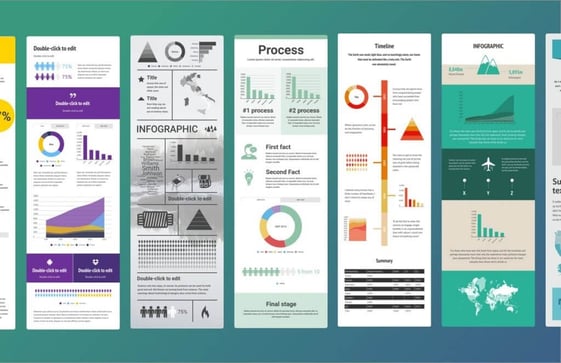
If you’re ready to get started, get our templates for creating beautiful infographics in less than an hour.
6. Videos
Videos are a highly engaging content medium and are shareable across social media platforms and websites alike.
Videos require a bigger investment of time and resources than written content, but as visual content continues to offer big ROI, it’s a medium worth exploring.
Featured Tool: Free Video Marketing Starter Pack + Templates
7. Podcasts
Starting a podcast will help audiences find your brand if they don’t have time or interest in reading content every day.
The number of podcast listeners is growing — in 2021, there was a 10% year-over-year increase in U.S. podcast listeners.
If you have interesting people to interview or conversations to host, consider podcasting as another content format to experiment with.
Featured Tool: How to Start a Podcast [Guide + Templates]

8. Social Media
Once you’ve been regularly publishing content on your own site for a while, start thinking about a social media strategy to distribute your content on social media.
In addition to sharing your content, you can also repurpose it into new formats and create original content specifically for each platform.
Posting on social media is pivotal to amplifying your brand’s reach and delivering your content to your customers where you know they spend their time. Popular social networks include:
When launching a business account on any of the social networks above, adjust your content to the platform.
On Instagram, for example, users want aesthetically pleasing visuals. With feeds, IGTV, Stories, you have a lot of room to play with. TikTok, on the other hand, appeals to a younger demographic that wants trendy, funny, and creative short-form video.
Do some market research to discover which platforms your buyers are on, and mold your content to their expectations.
It takes time, organization, and creativity to grow a successful content marketing strategy. From building the foundation of your content marketing plan to adding tools to better manage your content, setting up your strategy for the new year won’t be a hassle if you follow the steps and explore the resources here.
Editor’s note: This post was originally published in September 2018 and has been updated for comprehensiveness.

How HubSpot’s Email Team is Responding to iOS 15
As email marketers, one of the key metrics we use to determine if our audience is actually reading our content is the open rate.
Tracking email opens allows us to determine whether our subject lines are resonating with our audience. If we can’t get them to open an email, we can’t get them to click and move further along the buyer’s journey.
With the rollout of Apple iOS 15’s new privacy protection features, our open rates are in jeopardy. But is that a bad thing?
Let’s start with some information about how this new feature will work.

How Apple’s Email Privacy Protection Feature Works
After updating an iOS device to iOS 15, upon opening the Apple Mail app you will see a popup asking whether you’d like to “Protect Mail activity.”
If you select the “Protect Mail activity” option, Apple will first route your emails through a proxy server to pre-load message content, including tracking pixels, before it makes it to your inbox.
What does that mean for you?
According to Apple, “Mail Privacy Protection hides your IP address, so senders can’t link it to your other online activity or determine your location. And it prevents senders from seeing if and when you’ve opened their email.”
What does this mean for email marketers?
Mail privacy protection affects any email opened from the Apple Mail app on any device, no matter which email service is used such as Gmail or a work address. However, this will not affect other email apps used on Apple devices like the Gmail app on an iPhone for example.
If you’re an email marketer, you might still be wondering how this change will impact your strategy. To help, we decided to highlight the steps our email team is taking to adjust our strategy and process around these email privacy protection features.
Here are a few of the steps we’re taking and we encourage you to join us
How HubSpot Email Marketers Are Responding to iOS 15
1. Take stock of current processes.
Before Apple’s iOS 15 changes went live, we audited all of our existing email programs.
To begin, we wanted to understand the potential impact this change was going to have on the business. Using HubSpot’s email reporting tools we were able to assess the portion of our database that uses Apple Mail clients. Understanding this number is important to gauge how big of an impact these IOS changes will have on our ability to see accurate email performance data moving forward.
Next, we documented which subject lines resonate best with each of our personas.
While we follow email subject line best practices, as most email marketers know that only gets you so far. Things like character count and action-oriented language are only guardrails used to guide our subject line writing. From there we’ve experimented heavily with language, structure, and yes — even emojis — to find what resonates with each of our personas.
This documentation provides my team with a library of subject lines and guardrails that we can use moving forward in a world without accurate Open Data.
Finally, we documented email benchmarks for all of our programs. While the privacy update will only impact Opens, that means all other metrics utilizing open data will be impacted too — such as clickthrough rate which is measured by total clicks/total opens. These benchmarks will enable us to measure the impact that this IOS change will have across all of our email metrics.
2. Open up email reporting.
When reporting on email performance one of the first metrics considered is open rate. How successful were we at getting our recipients to open our email? Well, that’s about to change.
Email marketers are going to have to shift their focus to stable metrics like clicks, click rate (clicks / delivered emails), and conversion rate moving forward. This is our plan.
While this change may be painful, we believe it’s the right course of action. Looking at clicks and conversions is much more closely tied to how your database is engaging with your email programs.
Driving action via a CTA click and the following conversion is the ultimate goal of most emails sent today. Focussing on clicks and conversions will enable marketers to better optimize their programs to drive real engagement for their database.
However, open rates will not be going away. They will just be — different. It will still be important to track open rates over time for your email programs. We will need to establish new benchmarks after the IOS update is rolled out broadly. From there we will still be able to do subject line testing and see if we can improve Open rates over the new benchmark.
3. Stay the (automated) course.
While a few things are changing for us in how we think about reporting and subject line experimentation, our overarching strategy doesn’t follow suit.
At HubSpot, we’ve never relied on open data to segment or personalize our automated email programs. I know this goes against the tried and true drip campaign logic, which relies heavily on whether a contact opened an email. We instead focus our segmentation and personalization on the behaviors our contacts are taking on our website and within our app.
We’ve found this behavioral segmentation to be the most successful when trying to connect with our audience.
Take our email onboarding experience for example.
We have a welcome email that we send to every contact when they sign up for HubSpot that is filled with getting started resources.
The next email contacts receive is not based on how they interacted with our welcome email but rather how they have interacted with our product. Depending on the tools they have (or haven’t) used, we will send them a personalized email suggesting the next tool to explore.
We will stay the course here and focus on behavior over email interaction.
4. Understand the impact on your strategies.
According to Litmus, if Apple Mail audiences opt into Mail Privacy Protection, marketers could face the following issues:
- Any audience cohort, segmentation, or targeting based on the last open date would be rendered useless — especially critical for purging unengaged contacts.
- Automated flows and journeys that rely on someone opening an email would need to get re-engineered.
- A/B testing subject lines (or anything else) using opens to determine the winner or to automatically send out the winner won’t work anymore.
- Send time optimization would become inaccurate.
- Countdown timers might show outdated times as the cached version was pulled at email send time — not opened time.
- Other content powered by opens such as local weather or nearest store location also wouldn’t be accurate.
- Some interactive emails that reference external CSS might not work.
5. Weigh alternatives.
Although some elements of email marketing will be more challenging with IOS 15 in play, marketers can still use some creative alternatives to continue to send subscribers interesting and engaging content.
For example, although you might not be able to optimize for send time as well without proper open-tracking, you can still manually analyze email performance based on send time, or send emails based on send times that receive the best global performance across industries.
Additionally, while you might not be able to automate location-specific banners or weather reports for Apple users, you can still use zip code information that they’ve submitted on previous forms to send them location-based content.
While these alternatives might not be perfect or easy to streamline with automation, they can still give your audiences a somewhat personalized email experience.
6. Explore additional tools.
While HubSpot’s product team is continuing to watch and respond to how iOS 15 impacts email marketing tools, there are also additional tools and integrations you can use with HubSpot’s email platform to create stunning emails.
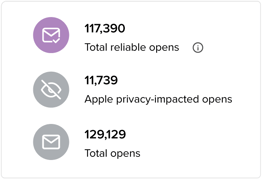
For example, Litmus is a paid tool that allows HubSpot users to track their HubSpot emails. According to a recent post from the company, it allows users to view “reliable opens” as well as the total number of Apple-privacy-impacted opens, which can help email marketers determine how big the impact of Apple’s IOS changes are.
What’s Next?
First and foremost, don’t panic! While iOS 15 will force email marketers to pivot strategy and process, it most certainly does not mean that email marketing is going away.
Apple’s launch of iOS 15 and its Email Privacy Protection Feature is indicative of a larger shift that we’re seeing in the digital marketing space. More and more Individuals are taking a larger interest in how their personal information is being collected, stored, and used. We will continue to see this trend grow as more businesses put protections in place for their customers.
As email marketers, it’s our responsibility to honor the inbox of every contact in our database with a personalized experience. With iOS 15, personalization has become harder.
As data protection continues to grow and evolve, personalization will become even more difficult. The best thing we can do moving forward is to stay informed and adjust our strategies accordingly. Because at the end of the day, email marketing is really about providing value to the Human’s on the other end of that Inbox.
Want to get more background on Apple’s privacy move? Check out this post. To learn more about how this move could impact your processes within HubSpot’s email tool specifically, follow this community thread.

5 Underrated Social Media Strategies You Should Start Using Today
When it comes to social media strategy, most brands know some of the top strategies: Post high-quality content, monitor your brand perception, engage with your audience.
![Download Now: Social Media Trends in 2021 [Free Report]](https://no-cache.hubspot.com/cta/default/53/3dc1dfd9-2cb4-4498-8c57-19dbb5671820.png)
But ever wonder if there are some strategies your social media team has been overlooking?
In this article, we’ll cover some strategies you may not have considered, with some data to support their effectiveness.
1. Leverage small, nano, and micro-influencers.
A 2021 State of User Generated Content report revealed that most marketers (93%) agree that consumers trust content created by people way more than brands.
People trust each other considerably more than they trust brands, and that’s why 75% of marketers are working with small to micro-influencers with followers ranging from 500 to 25,000, according to the study.
Why not mega influencers with millions of followers? Well, besides cost, some brands worry that as influencers become more celebrity-like and grow in popularity, they lose some of their influence – ironically enough.
As a result, brands are working more with small, blue-checkless content creators with great engagement and true influencers in their community. In 2018, an eMarketer study revealed that micro-influencers (between 10K-100K followers) were considered most effective.
User-generated content (UGC) will continue to be a great lead and revenue driver on social media. However, the shift toward smaller influencers may be the more effective (and affordable) way to increase brand awareness.
2. Stick to platform-specific content.
With so many different platforms to post on, it’s very easy to get overwhelmed.
Brands often try to batch-post their content by posting the same content on multiple platforms at once. For instance, the same video may go on Facebook, Instagram Reels, and TikTok.
While it may be a time-saver, it may hurt your brand in the long run. The competition between each social media platform is fiercer than ever before.
In Feb. 2021, Instagram announced it would deprioritize Reels with the TikTok trademark in it.
The trademark shows up when a TikTok user saves a video that was uploaded to the platform. Because TikTok is a direct competitor to Instagram Reels, the brand wants to promote the use of its own short-form software and keep users on its network.
This speaks to a larger effort from social media platforms to differentiate themselves from one another. In that same spirit, brands should follow a specific strategy for each platform, as consumer behavior differs from one site to the next.
3. Show the people behind your brand.
When I went on vacation a few weeks ago, my friends and I spent an hour discussing our favorite Black-owned brands, as Black women do.
One brand I highlighted was the luxury purse brand Anima Iris. I hadn’t even purchased from the brand but I was already loyal and I was eager to spread the word.
A few weeks later, I noticed that one of my friends kept sharing new content from Anima Iris with me. I mentioned that I loved how invested she became in the brand.
She responded, “It’s because I’m invested in her.” The “her” she was referring to is the company’s CEO, Wilglory Tanjong, who was incredibly visible on the brand’s social media.
In fact, the majority of the brand’s social media posts feature the CEO and her journey. Tanjong shares everything from new leathers she’s considering using to her struggle in raising capital.
What’s the point of the story? Well, brands often underestimate the power of transparency.
Back in 2018, a Sprout Social study revealed that 70% of consumers feel more connected to a brand when its CEO is active on social. They listed three reasons why:
- It feels like there are real people behind the brand.
- Consumers like learning about the leadership team.
- Consumers feel the CEO offers valuable insight into the brand itself.
This transparency has helped Tanjong build a community of loyal followers who are invested in her brand and engage frequently with her content.
Marketers often think of data privacy and social responsibility. But it’s also company culture, employees, processes, and everything in between.
In a 2020 study by Havas, consumers shared that they (58%) want brands to be more transparent and honest and their company, including their processes and products.
Transparency builds trust and allows you to speak directly with your audience. What’s better than that?
4. Focus on community, not promotion.
Social media builds brand awareness, true. However, too often, brands focus on output without considering community building.
Annabelle Nyst, senior content strategist on the HubSpot social team, encourages companies to create a community-focused social strategy.
“So many brands see social media as a vessel for promoting themselves and their owned content, without really giving too much thought to engaging or growing their community,” said Nyst.
She adds that brands should be proactive about participating in conversations, finding their facts, monitoring their brand perception, and celebrating UGC.
Takeaway: Get your audience invested in your brand and you’ll have an easier time getting them excited about your products or services.
5. Go live.
Live streaming allows brands to connect with their audience in real-time. In some instances, consumers prefer it over other content channels.
Back in 2017, Livestream found that 80% of consumers prefer watching a brand’s live video than read a blog post or see a social post.
In 2021, 28% of marketers planned to use it in their video marketing strategy, according to Wyzowl.
Other reasons to go live include:
- The ability to repurpose the live content into other posts.
- The ideas you get generate from connecting directly with your audience.
- The trust you can build by showing the faces behind your brand.
Social media is a beast that isn’t going anywhere anytime soon. Don’t be afraid to experiment, as that will help you better understand your audience and identify effective strategies.


What Makes an Ad Memorable? [New Data]
Think about the last commercial you remember.
What about it made it memorable? That’s the answer every advertiser wants to know. I tend to remember ads that are funny and/or relatable, but is it the same for most consumers?

Let’s see what recent data suggests about memorable ads and discuss some tips for your next campaign.
Why Consumers Remember Ads
We surveyed 281 U.S. consumers and asked them to think back to a recent ad they saw and what made it memorable. Respondents could only select a single answer.
Here are the results.
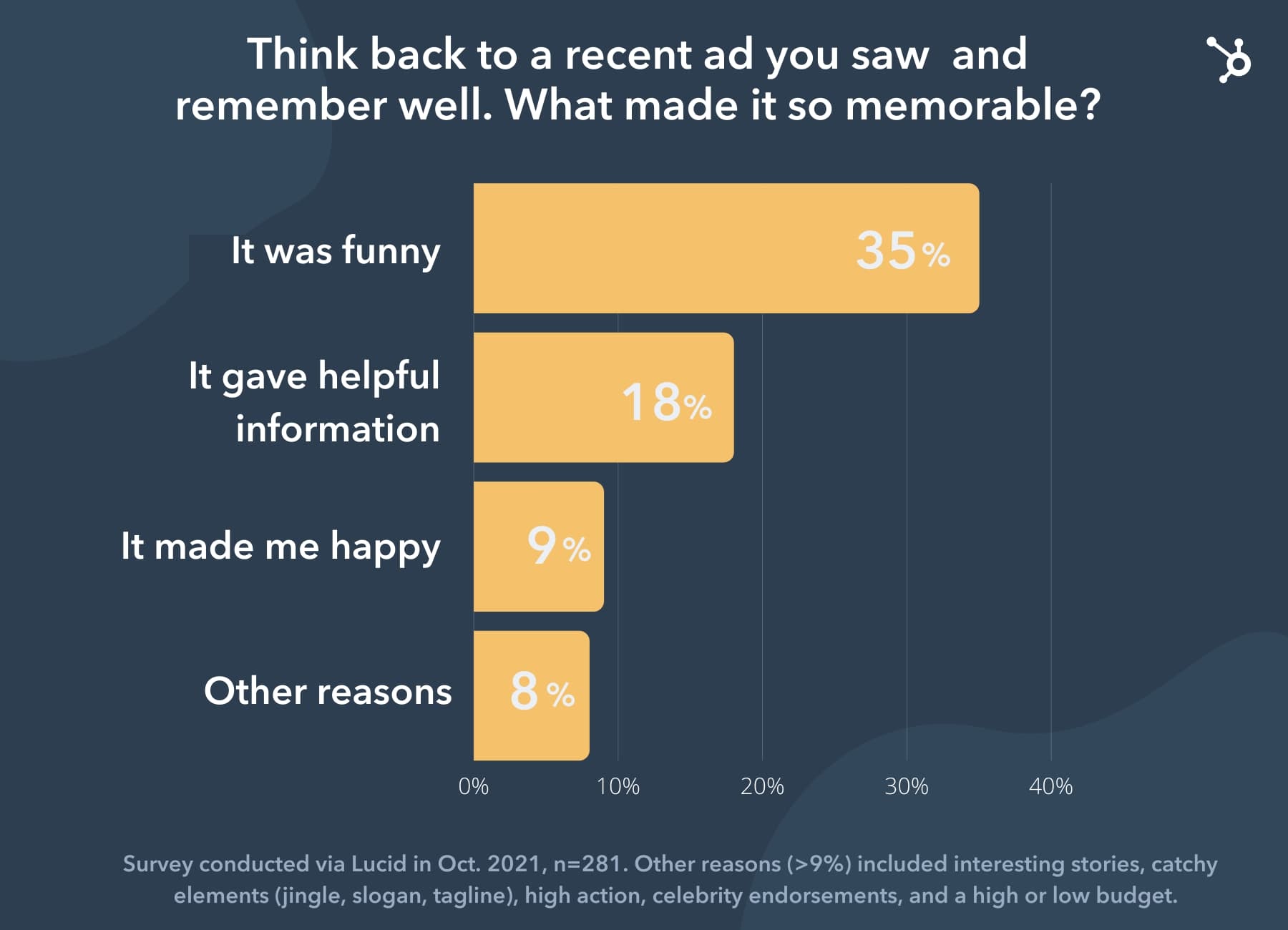
Our research found that funny commercials were the number one reason why respondents recalled ads.
The second highest response was the value respondents ascribed to the information presented in the commercial.
The remaining options each made up less than 8% of the answers. Some remembered the ad because the product featured seemed valuable (7%), the ad told an interesting story (4%), or had a catchy element like a jingle or tagline (4%).
Additional reasons included:
- It featured interesting characters (3%)
- It was high action (3%)
- It made them sad (2%)
- It related to a topic I’m interested in (2%)
- it featured a celebrity or expert they knew (2%)
This survey also revealed that the least popular reason for ad recall was ad quality –meaning if it looked high budget (1%) or low budget (1%).
Insurance provider The General is a great example of how ads that are viewed as low budget can negatively affect brand perception.
CEO Tiku Raval revealed to AdWeek recently that the nature of its ads led consumers to believe they weren’t a reputable and credible company. Because of this, the brand recently overhauled its ad strategy with a fresh, new look.
The brand didn’t do this silently, they tackled the elephant in the room and addressed that misconception in its newest ads.
Now back to the research.
Eight percent of respondents said they remembered the ad for other reasons. One could be that the ad used fear, as that is a common tactic used in commercials. Particularly those that aim to change user habits or invite them to take action, like voting or smoking.
Now that we’ve gone through the results of the survey, let’s cover two of the most popular (and effective) devices used in advertising today and how they work to engage consumers.
The Use of Humor In Advertising
In my round-up of the top YouTube ads of the last two years, five out of nine ads that ranked were funny.
Our research revealed that ad recall was the strongest in ads that used humor. This supports research from a 2018 advertising survey by Clutch which showed that consumers prefer (and remember) ads that make them laugh.
Similarly, six out of nine ads that received an “A” grade in Kellogg’s 2021 School Super Bowl Advertising Review were humorous.
So, the question is why? Well, humor – when done right – brings people together through shared experiences. In fact, that’s what meme marketing is based on.
It allows people to forget their stresses.
The thing with humor is that you have to do it right. Otherwise, you risk facing a PR crisis.
Thinking back to 2020, at the height of the COVID-19 crisis, many brands halted ads and avoided humorous ads altogether, as many consumers found it inappropriate.
While the pandemic was extremely difficult to navigate, there were some moments of levity that could lend themselves well to advertisements.
Executive Creative Director Dave Hannenken from the advertising agency Hoffman York, wrote an article in which he highlighted some shared experiences we had during the pandemic. Working from home, baking banana bread, spending more time with kids and pets.
To get humor right, it’s all about finding a common ground and expanding upon it. Once you start zeroing in on something too unique and personal, that’s when you can land in the hot seat.
The Use of Education in Advertising
At the beginning of the buyer’s journey, consumers aren’t aware of the solutions to their problems. They may be aware of the challenges they face, but that may also be further down in the journey.
What we do know is that education can be an effective tool in building trust with your target audience and helping them move down the funnel.
Data from a 2018 Clutch advertising survey revealed that consumers want ads to teach them something. Fifty-one percent of respondents said they disliked an ad because it was uninformative.
Viewers want to leave an ad knowing about the product, the brand, and even the industry.
Education-driven ads can work particularly well for sustainability-conscious brands who share facts about the environment in their ads and explain what their company is doing to address it.
They appeal to consumers who value social responsibility and make purchasing decisions based on that – which is about 46% of consumers, according to a 2019 report.
Education can also be effective in ads that aim to promote an action or change a behavior.
While humor is a great way to grab their attention, it’s not the only way to captivate an audience. Creating compelling and memorable ads requires knowing your audience, understanding their challenges, and finding common ground that will resonate with them.


How to Set Up Google Analytics for WordPress
Have you ever wondered what people actually do when they enter your WordPress website?
Have you thought about which website pages they tend to stay on longest, what campaigns bring them there, and which of your website pages convert the best?
Google Analytics can help you understand all of this information and more. By simply installing a Google Analytics plugin on your WordPress website, you can start collecting this data immediately. With help from a plugin, adding Google Analytics to WordPress is a painless process.
If you’d rather not install a plugin for this purpose, there are other ways to integrate Google Analytics with your website too — as long as you’re comfortable with code.
In this guide, we’ll walk you through how to install Google Analytics in WordPress with two different methods. In a handful of steps, you can uncover insights about your website visitors — including what is and isn’t working for them — to improve the user experience, increase conversions, and learn about your audience.

Google Analytics for WordPress: What Can You Track?
Whether you’re looking for details about who is visiting your site, what they’re doing while on your site, or how long they’re staying on specific pages, Google Analytics provides you with the report you need. The tool allows you to track many interactions between your website and visitors.
Let’s review some more of the specific types of reporting Google Analytics provides:
Real-time Activity
Realtime reports show you current activity on your website, including where visitors enter your website and the actions they take on your site. You can also see how users are getting to your site, what pages they’re visiting, and whether they’re converting. This report is useful for monitoring the immediate results of a campaign, social media post, or real-world event.
Acquisition
Acquisition reports will help you understand where your visitors are coming from. This information is helpful when setting up your marketing campaigns because it can show you exactly what’s working best for your acquired visitors. It also tells you which users are new and which are returning.
Engagement
Engagement reports help you understand how users are interacting with your website. It includes page views, scrolling activity, time-on-page, interactions with media, and other important events. Google Analytics groups user activity by sessions — a session can be understood as a single visit to your website.
This report also tracks conversion rates. You can compare them to your goal and understand which CTAs are working. You’ll learn more about which CTAs and landing pages on your site are successful and what keeps your visitors most engaged.
Monetization
Monetization reports track your revenue from purchases, subscriptions, and advertisements on your site. It also shows you how users move through the checkout process and how they engage with your product pages.
Retention
Retention reports monitor how well your website retains visitors — in other words, how often users return to your website after their first visit, and for how long. You can also view retention by cohort. A cohort is a group of users that share a characteristic, like the date of their first session.
Demographics
The demographics report will help you understand who your visitors are. It reports users by age, language, location, gender, and topics of interest.
Tech
Tech reports show you the technology that visitors use to access your website, including device category (desktop, mobile, or tablet) and accessing application (web browser or mobile application). This information can help guide your optimization efforts based on which technologies your users prefer.
Analytics Specific to Your Plugin
In addition to the plethora of information that you receive from Google Analytics, your chosen plugin will also provide you with unique insights. For example, let’s review what ExactMetrics provides. Some of these insights and features come standard with other analytics plugins in the WordPress library as well.
In-Depth Performance Reports. These reports provide you with in-depth performance details, such as bounce rates, referrals, page views, organic searches, and more, for each post and page on your website so you can segment your analytical data in a way that makes sense for your website and business.
Real-Time Stats. You’ll be able to review real-time statistics any time you open the plugin. Some of these stats include the current number of visitors on your website, your acquisition channels, and the source of your current traffic.
Custom Dimension Tracking. You can create custom dimensions to get specific data that matters to you and your business. For example, you can create custom dimension tracking about certain events and types of user engagement that are important to you.
Set Permissions Based On User Roles. If you have a large team, or team of people with different qualifications and needs when it comes to your analytics, you can set permissions based on user roles. This way you can ensure only the right people can make changes.
How to Set Up Google Analytics for WordPress
To add Google Analytics to your WordPress site, you can either go with a plugin or opt for a manual approach. We’ll review both methods, starting with the plugin.
But, whichever method you choose, make sure you have an active Google Analytics account. To sign up for Google Analytics, first create a Google account. If you already have a Google account, you’re off to a great start because that’s the only way you can use Google Analytics.
Sign in to your Google account, then head to the Google Analytics sign-up page and click Start measuring.
-2.jpeg?width=650&name=google%20analytics%20wordpress%20(update)-2.jpeg)
On the Account Setup page, fill in the necessary information. Your Account Name will be the Google Analytics profile name for your website. You can choose whatever name you like, but we recommend using your business name.
Next, check your preferred boxes under Account Data Sharing Settings to control how Google may share your data, then click Next.
Under Property Setup, provide a name for your first Google Analytics property. You can make this your website’s domain name for now. Click Next.
Finally, under About your business, you can provide additional information about your company. This section is optional. To complete setup, click Create.
You’ll now be taken to your analytics dashboard. On this screen, under Choose a platform, click Web (since you’re tracking a website).
-3.png?width=650&name=google%20analytics%20wordpress%20(update)-3.png)
You’ll be asked to set up a data stream, which is a source of data from a website or an app. Fill in the required fields and click Create stream. This provides you with a measurement ID, a string of characters you’ll use to send your website tracking data to Google Analytics. If you go with a plugin, you may need to add this information to the plugin, so it’s a good idea to keep this tab open.
.png?width=650&name=google%20analytics%20wordpress%20(update).png)
Now that your Google Analytics account is ready, let’s learn how to link it to your WordPress site with a plugin.
Set Up Google Analytics With a WordPress Plugin
Depending on the Google Analytics plugin you choose, setup may differ slightly. For the sake of this example, we’re going to review how to set up the ExactMetrics plugin. Whichever plugin option you end up picking for your site, the process will look fairly similar.
First, you’ll need to install and activate ExactMetrics on your site. (Not sure how? See our guide to installing WordPress plugins.) Once that’s done, select the new ExactMetrics option from your WordPress dashboard, then click Launch Setup Wizard.
-1.png?width=650&name=google%20analytics%20wordpress%20(update)-1.png)
Click through the setup screens until you’re prompted to sign in to Google and grant the plugin your desired permissions. Then, on the Connect Google Analytics to Your Website screen, choose the view you created previously and click Complete Connection.
After clicking through some additional screens, you’ll be ready to use Google Analytics with WordPress. View your analytics under ExactMetrics > Reports.
-1.jpeg?width=650&name=google%20analytics%20wordpress%20(update)-1.jpeg)
Some plugins may require you to insert the tracking code yourself if they don’t come with the same level of automation. You can find this tracking information by going to your Google Analytics admin tab (the cog icon in the bottom left corner of the dashboard), then choosing Data Streams under the desired account and property.
-2.png?width=300&name=google%20analytics%20wordpress%20(update)-2.png)
Then, click your data stream. You’ll see your Measurement ID in the top right corner. Further down under Tagging Instruction, you’ll also see your Global Site Tag, a block of code to add analytics to your website in the <head> section of your HTML.
The easiest way to add this script to your HTML is with the Insert Headers and Footers plugin — this lets you add tracking code without directly modifying your files, which could break your site.
Set Up Google Analytics Without a WordPress Plugin
Those who would rather not use a plugin and are comfortable editing WordPress theme files directly can choose this next method instead. Before continuing, back up your WordPress site in case something goes wrong in the process.
Since this method also requires you to change theme files, we also recommend making your edits to a child theme so that you can update the parent theme without losing your modifications.
To get your tracking code, go to your Google Analytics admin tab (the cog icon in the bottom left corner of the dashboard) and choose Data Streams under the desired account and property. Select the data stream you want, then scroll down to Tagging Instruction. Open the Global Site Tag accordion and copy the code.
-3.jpeg?width=650&name=google%20analytics%20wordpress%20(update)-3.jpeg)
Next, you’ll paste this code into your active theme’s header.php file. Edit this file however you prefer — you can download the file and re-upload it to your server, or edit the file through WordPress under Appearance > Theme Editor.
In header.php, paste your tracking code just above the closing </head> tag (pictured below) and save your changes.
.jpeg?width=650&name=google%20analytics%20wordpress%20(update).jpeg)
This code will send tracking information from your website to Google Analytics.
Use Google Analytics to understand your WordPress site.
Google Analytics provides you with insights and data that can help you drastically improve the state of your website. You can learn more about what your visitors enjoy and discover more about who they are, so you can continue to tailor your content to their needs.
With WordPress, installing Google Analytics on your website is quick and easy. In just minutes, you can start collecting the information that you need to enhance user experience and increase conversions on your WordPress website.
Editor’s note: This post was originally published in November 2018and has been updated for comprehensiveness.

The Best Free Business Budget Worksheets
Keeping track of expenses as a business owner can be taxing. You have to document every detail to make sure you stay within your spending limits while promoting your products or services, delivering on promises, and developing new offerings.
A business budget worksheet can help you stay organized.
Having a template to work from will cut down on the time it takes to write down the details of a budget, help you prioritize projects and allocate resources to get them done, and reveal trends of the money you spend versus the results achieved.

Depending on the complexity of your company, you may need to oversee a number of individual budgets while managing the overall spend. The business budget worksheets below range from specific templates — from product marketing to website redesign — to comprehensive ones that cover all aspects of your marketing plan.
Let’s dive in so you can take control of your budget like never before.
How to Write a Business Budget
1. Use Budget Templates
Creating a business budget from scratch can be overwhelming—you need to capture the details of each month’s projected budget, actual spend, and the cumulative total of each.
If you’ve never written a business budget or are looking for a specific marketing worksheet, you can start with HubSpot’s Marketing Budget Templates. This download includes eight well-designed and detailed templates to easily manage your finances, with options for Microsoft Excel or Google Sheets. A quick overview explains how to use each template so you can easily start filling in your own information.

2. Set Your Strategy and Goals
To make the most of your budget, you have to know what goals you want to achieve and the strategy to get there. If you’re working to bring in more sales (a goal) and plan to improve your website to attract leads (the strategy), you’ll have to put funds towards the redesign project.
Check out these strategic planning models that can help map out your long-term goals if your business is just getting off the ground. That way, your budget will reflect the financial resources needed to accomplish your objectives.
3. Gather the Numbers
Every company has different needs, so no one budget will be exactly the same. A branding and creative budget, for example, will have vastly different line items than a website redesign budget.
No matter what budget you’re putting together, you’ll need all of the relevant expenses for a comprehensive overview. Here are the basic numbers you may want to include:
- Revenue projections: Consider your historical financial performance and projected growth income.
- Fixed-cost projections: The costs that don’t change (i.e. employee compensation, office rent, business software, insurance, and utilities).
- Variable-cost projections: The costs that may change month-to-month (i.e. overtime compensation, supply costs, or software that varies by usage).
- Annual project expenses: The cumulative costs of implementing all of your company goals for the year.
- Individual project expenses: The costs associated with each project, which should be tracked in individual budget worksheets.
- Target profit margin: A ratio that reveals how much money a company makes. Knowing your bottom line — and including it in your budget — is a helpful reminder of what you hope to achieve within the year and a good benchmark when analyzing your monthly financial trends.
Depending on the budget, you can also include cash, inventory, accounts receivable, net fixed assets, or long-term debt.
How to Manage a Business Budget
No budget is an island. All companies are impacted by poorly-managed budgets, especially a small business just starting out.
When your budget is just one piece of the puzzle, you’ll likely need to get it approved by a manager or executive team before spending any money. If you’re running a business on your own or with a small team, it’s smart to find a trusted colleague or financial expert to look over your numbers. They may be able to point out areas to cut costs, reallocate funds, or create larger profit margins.
Want to make sure you’re on track? Figure out how much you should put aside for a marketing budget that meets your goals.
Once your budget is in place, checking in on it once a year isn’t enough — you need to review it monthly (at minimum) to make sure your expenses aren’t out of control. Once you set your annual budget, revisit it at the beginning and end of every month. If you like to be in the know, you can even set a time to review it mid-month to double-check that everything is on track.
When a new project pops up, simply add it to your existing business budget worksheet and make adjustments to the overall expenses. The same thing applies if you wind up dropping a project. Company priorities change constantly, and your budget needs to adapt along with the shifts.
Business Budget Worksheets for Small Businesses
You poured through past financial records, made future projections, mapped out your upcoming projects, and have all of the information you need to build a well-rounded budget. Now it’s time to choose the best business budget worksheet for your goals. Luckily, all of these options make it simple to stay on top of your finances.
HubSpot Marketing Budget Templates
If you want a worksheet for each marketing niche, HubSpot has you covered. One download gives you access to eight budget templates: a master marketing sheet, product marketing, content, paid advertising, public relations, branding and creative, website redesign, and events.

Small Business Budget Templates
Simplicity is the theme of these business budget worksheets by Smartsheet. Each Excel template is free to download, with options for multiple products, business expenses, startups, and more.

Business Expense Template
Need a polished business expense budget? Microsoft Office has you covered with this well-designed Excel template that outlines costs for employees, marketing, office space, travel, and training. Just fill in the blanks and send it for approval.

Year-Over-Year Budget Template
For a simple look at how your incomes and expenses change from year to year, this Excel template from Quickbooks is all you need.

Freelance Budget Templates
Working for yourself often means combining personal and business expenses. That’s why these Excel templates from Business Load include income projections alongside personal costs. You can even budget what you’ll contribute to taxes, your 401k, and emergency fund all in the same sheet—because you likely have more than enough to manage.

Sample Business Budget Worksheet
Personally, I’d rather endure the monotony of writing lines than spend all day organizing numbers in a blank spreadsheet. But having an example to work from makes it easier to make sure everything is on track. If you share that mindset, here’s a filled-in sample of a business budget worksheet to get you started.

The sample shows the budget needed for a website redesign project, with each expense categorized to keep it organized and easy to read. You can see where the budget went over (UX testing) and where savings happened (CMS software).
Setting up your own business budget using these templates is so quick and easy, you can have your numbers in order in no time. The sooner you begin, the better off your budget (and business) will be in the months and years to come.


What is a Data Warehouse? Everything You Need to Know
As a marketer or business analyst, you know that data is an important part of your success. And the way you store and organize your data will either make your job easier or harder.
There are many ways that you can store data, one of them being data warehousing. This is an excellent option for businesses that need to look at a large amount of data from multiple sources. Today, let’s learn what a data warehouse is and how it can help you analyze your data.
![Download Now: 2021 State of RevOps [Free Report]](https://no-cache.hubspot.com/cta/default/53/78dd9e0f-e514-4c88-835a-a8bbff930a4c.png)
With a data warehouse, you can perform queries and look at historical data over time to improve decision-making. The main people in a company who will use data warehouses are data scientists and business analysts.
A data warehouse will get data from multiple sources, including relational databases or transactional systems. To access the data, analysts will use business intelligence tools to analyze, data mine, make visualizations, and conduct reporting. As data continues to evolve, it’s imperative for businesses to use data to stay competitive.
What is the ultimate outcome of a data warehouse?
The ultimate outcome of a data warehouse is to extract insights, monitor performance, and improve decision-making. By using reports, dashboards, and visualizations, analysts have all the tools they need to make the right decisions.
Benefits of Using a Data Warehouse
1. Historical data.
One of the main benefits of data warehouses is the ability to look at a large amount of historical data over time. With a data warehouse, you can consolidate a large amount of data from many sources to better inform your business decisions. Looking at historical data will allow you to analyze trends over time and strategize effectively.
2. Data from multiple sources.
Additionally, with a data warehouse, you’ll be getting data from multiple sources so you’ll have a more complete picture when it comes time to analyze the information. With something like a data mart, you only get data from a single subject, as opposed to data warehouses that are meant to process and organize data from multiple sources.
3. Stability.
Data warehouses are also more stable sources of data that you can use to look at data at a high level or a granular level. This gives you the flexibility to look at data closely and perform queries quickly. A data warehouse will have high-quality data because it’s coming from multiple sources, it’s consistent and more accurate.
What Data Warehouses are Not
When you first hear the term “data warehouse,” you might think of a few other data terms like “data lake,” “database,” or “data mart.” However, those things are different because they have a more limited scope. While they might perform a similar function, the structure is different. Let’s dive in below.
Data Lake vs. Data Warehouse
A data lake stores unfiltered data from multiple sources to be used for a specific purpose. This means that you’re looking at raw data from something like social media or an app. The datasets are built at the time of analysis. This is low-cost storage for unformatted, unstructured data.
On the other hand, data warehouses are used to analyze and process data. In a data warehouse, the data has already been gathered and contextualized and is ready for analysis. Ultimately, it’s a more advanced data storage tool that can use large amounts of historical data.
Data Mart vs. Data Warehouse
A data mart is a subset of a data warehouse. Usually, they’re designed to easily deliver specific data to a specific user for a specific application. Data marts are single subject in nature, while data warehouses cover multiple subjects.
Database vs. Data Warehouse
Databases are often confused with data warehouses because they serve a similar purpose. However, the difference is that databases are not meant to perform analytics on a large collection of data. Databases are used to record and retrieve data while data warehouses are meant to analyze large amounts of data sets. Think about it like this: data warehouses store data from multiple databases.
Data Warehouse Architecture
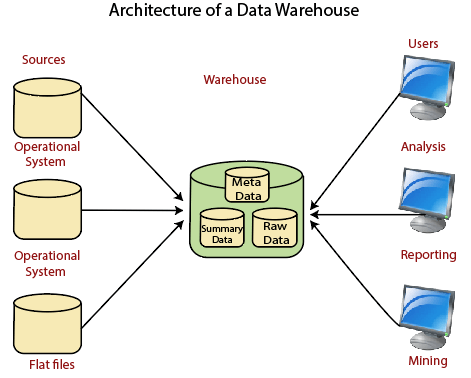
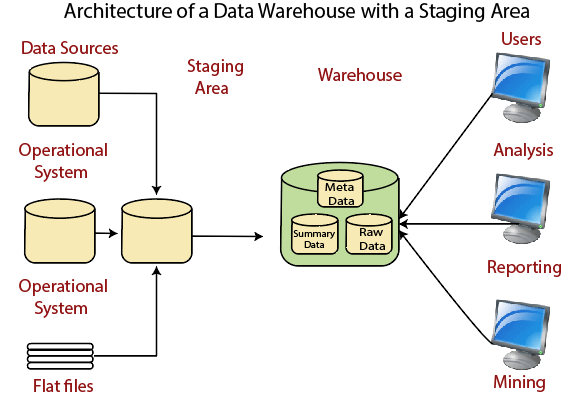
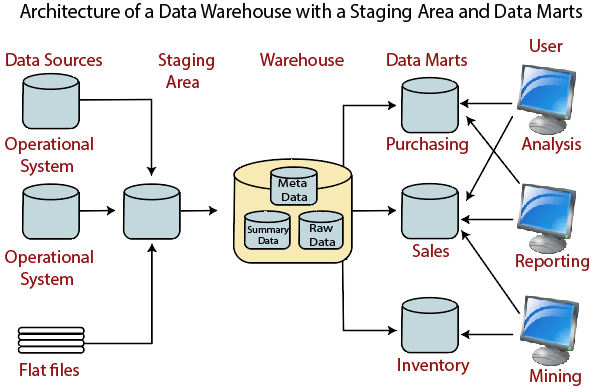
A data warehouse architecture is a method you use to organize, communicate, and present your data.
You can use a basic architecture, a staging area, or a staging area and data marts.
This means that you can have a data warehouse get its data and then have the users look at reporting and analysis. Or you can have the data broken down into data marts before users look at the analysis and reporting.
The staging area you see in some of the images below is used to clean and process data before putting it in a warehouse. This simplifies data preparation. To get an idea of what each of these looks like, take a look at the images below.
Data Warehouse Software
1. Snowflake Data Warehouse
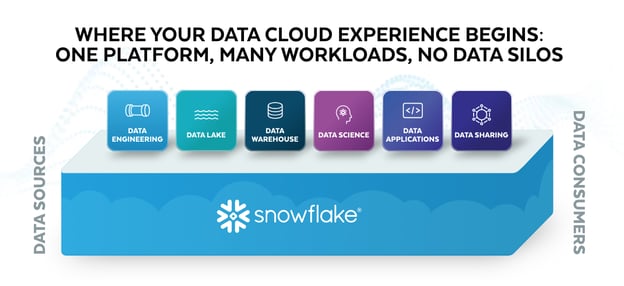
Snowflake data warehouse is a data platform built on the cloud infrastructure. This is a great option for businesses that don’t have the resources to support in-house servers.
With Snowflake, users can pay for storage and share data easily. You can mobilize data seamlessly across public clouds as data consumers, data providers, and data service providers. This software will help you democratize data analytics across your business so all users with varying expertise can make data-informed decisions.
2. MarkLogic
With this data warehouse solution, you can perform complex search operations with different types of data including documents, relationships, and metadata. MarkLogic is a fully managed, fully automated cloud service to integrate data from silos.
3. Oracle
Oracle Autonomous Data Warehouse is a fully managed database tuned and optimized for data warehouse workloads with the performance of Oracle Database. It delivers a new, comprehensive cloud experience for data warehousing that is easy, fast, and elastic.
While data solutions might seem overwhelming, they’re important for your day-to-day business decisions. With a data warehouse, you can simplify your data storage, management, and analytics.

How Many Visitors Should Your Site Get?
Whether you’re working with an online business or a brick-and-mortar bolstered by an online presence, one question is destined to come up: how many visitors should your site get?
Some tracking software makes it easy to gather metrics, but what does it all mean? A screen of numbers doesn’t magically transform into a successful marketing strategy and more visitors. Understanding and interpreting your site’s analytics (users, sessions, bounce rate, etc.) is the key to building, adjusting, and implementing the proper plan for growth.![→ Download Now: SEO Starter Pack [Free Kit]](https://no-cache.hubspot.com/cta/default/53/1d7211ac-7b1b-4405-b940-54b8acedb26e.png)
To understand how many visitors your site should get, you will need to:
- determine how many visitors are typical to websites in your industry
- establish a goal based on the variables (industry, size, user experience) of the company
- create a reasonable plan with actionable steps to execute a successful marketing strategy
How many visitors does a website typically get?
It depends. With the number of websites available on the web, it would be impossible to narrow this question down to one answer. Fortunately, there are tools and resources to help you make an educated guess.
Before diving into monthly website visitors, it could help to understand the breakdown of website traffic. As of 2019, the statistical data platform Statista outlined the distribution of worldwide website traffic by its source. The breakdown is as follows:
- Direct (55%)
- Search (29%)
- Referral (13%)
- Social (2.5%)
- Paid Search (0.5%)
As you analyze other companies and industries, you can assume that typically, over half of their visits come from direct searches. Most visitors are landing on a particular webpage because they typed the URL into the address bar. Understanding that more than half (55%) of visitors come from direct traffic and more than a quarter (29%) come from search engine result pages (SERPs), use this knowledge when combing through the metrics of other companies.
How do you find these statistics? Platforms such as SimilarWeb, SEMRush, Ahrefs, and Alexa offer website traffic information for many domains. While these websites will push out an impressive list of metrics, take this information with a grain of salt. Unless the information is coming from the company, and even then, you can’t assume that the data is foolproof.
The following table compares traffic breakdowns from SimilarWeb (SW) and SEMRush (SEM) for five companies.
|
Company |
Total Visits |
Pages Per Visit |
Bounce Rate |
|||
|
SW |
SEM |
SW |
SEM |
SW |
SEM |
|
|
Black Enterprise |
2.48M |
1.6M |
1.42 |
1.57 |
79.08% |
67.32% |
|
Hello Fresh |
9.47M |
8.3M |
5.81 |
3.41 |
43.43% |
47.84% |
|
Alibaba |
101.19M |
66.2M |
5.23 |
3.99 |
43.38% |
49.84 |
|
Amazon |
2.65B |
3.3B |
8.66 |
7.05 |
35.54% |
37.49% |
|
Youtube |
35.11B |
20.8B |
11.4 |
3.75 |
20.96% |
48.22% |
You’ll find that the same website differs in every single metric provided by Similar Web and SEMRush. While you can’t assume which platform is more accurate than the other, you can use a combination of information from different sources to make an educated guess and average.
Amazon (amazon.com) and Youtube (youtube.com) are two of the most visited websites globally. While SimilarWeb doesn’t offer monthly visitor data with their free version, SEMRush does. For August 2021, the platform lists Amazon and Youtube domains with 669.2M and 1.6B unique monthly visitors, respectively. To clarify, 1.6 billion different people made their way onto the Youtube website in August 2021 — according to SEMRush.
While the numbers will vary, you can still create a snapshot of how many visitors a website typically gets. Unfortunately, it is harder to find this information for small and medium-sized businesses versus large corporations.
How do you scale this information to your business? There are a series of factors to consider when determining how many visitors your site should get and setting a “good” number as your goal.
How many unique visitors per month is good?
The answer to this question depends on a few factors. First, are you evaluating a B2B, B2C, or hybrid company? B2B companies have a target audience of other businesses and organizations. B2C companies target direct consumers. One can infer that the potential for more unique monthly visitors for B2C companies is greater than that of B2B companies simply because their target audience is exponentially larger. B2B companies use niche marketing to sell particular products or services to a specific group of businesses while B2C companies focus their strategy on the needs, interests, and challenges of people in their everyday lives.
Taking note of the business model, determining how many monthly unique visitors is “good” for your company depends on your answers to the following questions:
- What is the standard in your industry?
- How much content do you produce?
- How well is your content strategy working?
- What is the search volume for your targeted topics?
- How competitive are your target keywords?
What is the standard in your industry?
To make an accurate guess of where your company should be, determine the industry standard. To do this, evaluate your competition. Using tools like the previously mentioned SimilarWeb and SEMRush, you can create a general overview of your competitors, and use these statistics to establish an average for your industry.
How much content do you produce?
The more content you have available on your site, the more opportunities you create for visitors to find it. How much new content are you producing? One? Three? Five or more? The size of your team will affect the amount of content you’re able to create. If you find that you’re unable to produce new content, consider expanding the size of your team to meet your needs.
How well is your content strategy working?
To fix something, you need to know if it’s broken. Evaluate whether your content strategy is working. Are you ranking for your keywords? Have you seen an increase in views over the last few months? Where is the bulk of your traffic coming from? Once you can determine how your site is currently performing, you can take active steps to create an effective content strategy.
What is the search volume for your targeted topics?
Search volume for your targeted topics is directly related to the demand for that information, product, or service. High search volume can mean more visitors; however, this is directly affected by the competitiveness of your keywords.
How competitive are your target keywords?
A combination of these factors affects your website’s unique visitors per month, but it boils down to competition. The more competitive your target keywords, the harder it is to rank on the first page of a SERP. The more competitive the industry, the greater the chances of having potential website visitors split among the competition.
Other factors that can affect your number of unique visitors per month are security, accessibility, mobile-friendly web pages, and user experience.
Security
Establishing a safe and secure website with an SSL certificate can boost your reputation and relationship with future consumers. Not only does it mean less time worrying about potential security incidents, but it allows your visitors to insert their information into your systems with confidence.
Accessibility
Fifteen percent of the world’s population are persons with disabilities. Many still use the web, and businesses must ensure that their content is accessible. Accessibility is not a feature, and making your website convenient to all visitors is not a bonus but a necessity.
Mobile-Friendliness
If your site isn’t mobile-friendly for cell phone users, you’re cutting off a large portion of potential visitors. In 2019, the World Advertising Research Center (WARC) estimated that around 2 billion people accessed the internet via only their smartphones. The report also stated that this number will be equivalent to 3.7 billion people (or 72.6%) by 2025.
User Experience
Click-through rate and bounce rate are metrics that help determine the user experience on your website. Evaluate them together. While a high click-through rate is positive, a high bounce rate is negative. Click-through rate is the percentage of people who visit your page after it comes up in a search. Bounce rate is the percentage of people who arrive and leave your web page quickly after landing on it. A high bounce rate sends search engines a signal that your content isn’t relevant to the users and negatively affects your rank.
Once you can evaluate your industry, website, and content strategy, the next step is to set goals and execute them.
Setting Reasonable Goals For Website Traffic
Focus on the word “reasonable.” A goal to reach 10,000 monthly visitors next month might not be a stretch if you garnered 9,000 visitors this month; however, if your website receives an average of 2,500 monthly visitors, this goal might be less probable. Setting a realistic and attainable goal is the key to creating the proper marketing strategy for your business.
Define Your Goal
First, define your goal. Analyze your current metrics and that of your competitors. Let’s use HelloFresh and other meal kit delivery services as an example. The company’s direct competitors include Home Chef, Blue Apron, and Sunbasket. The ranking for their monthly unique visitors, according to SEMRush, is as follows for August 2021:
- HelloFresh (4.9 Million)
- Home Chef (2 Million)
- Blue Apron (1.2 Million)
- Sunbasket (696.6K)
As previously mentioned, do not analyze these numbers as fact. They are a guide. If a new meal kit delivery service looked at the monthly unique visitors for these companies, they’d get an average of 2.1 million monthly views. Now, this can be a goal for the future but not the immediate future.
A monthly goal for a small business receiving 5000 unique monthly visitors could be 10% or 500 new visitors. Set goals with a content plan in mind. With this goal in place, you can use it to determine the success of your content strategy.
Build a Content Plan Around MSV
Monthly search volume (MSV) is the number of times a specific keyword is entered into a search engine each month. MSV allows you to anticipate the amount of traffic available for a particular keyword term. Armed with this knowledge, you’ll be able to gauge which keywords are worth targeting for your content strategy. You’ll also be able to assess the needs of potential clients and customers and cater your content to them.
Some free online keyword tools that help calculate MSV include Google Keyword Planner, Ahrefs Keyword Generator, and Answer the Public.
Determine a Publishing Cadence
In conjunction with creating your content strategy, lay out a schedule. How often you update your website is key to attracting more visitors because you increase the number of opportunities to land on your page. At the bare minimum, you want to post new content to your website every week. The amount of content is, of course, dependent on the size of your team and audience. The more resources you have, the more content you can create. The larger your audience, the more content you should create.
While determining a publishing cadence is necessary, it is equally important to stick to it and remain consistent.
Assess Your Performance
The first step to assessing your goals is having a data reporting software set up. Once you do, it’s time to see if your unique monthly visitors increased. Whether or not you met your goal, ask yourself the following questions to review your progress:
- Did your unique monthly visitors increase or decrease? By what percent?
- Are you ranking for targeted keywords?
- Was there a trend (increase or decrease) in visitors across your industry?
An increase or decrease in your unique monthly visitors isn’t enough to gauge the complete success of your goal or content strategy. Are you ranking for your targeted keywords? If yes, your content strategy is working, and your location in SERPs can lead to further increases in the future. If not, reassess and adopt new SEO methods for growth.
When assessing your performance, it might also be necessary to measure factors out of your control, for example, industry trends. Was there a mutual dip in unique monthly views among you and your competitors? It is possible that your keyword MSV wasn’t as high as in previous months. A decrease in MSV for your keywords is out of your control. However, it is your responsibility to pivot and discover what your target audience is searching for.
How many visitors should your site get?
In content strategy and marketing, consistency is key. How many visitors should your site get? Ultimately, it comes down to how consistent you are in the tips featured above. Do you keep up with industry best practices to guide your knowledge on MSV? Do you periodically evaluate your content to boost your SEO? Are you updating your information to guide your goals?
There is no magic number when it comes to monthly website visitors. Evaluate your website and use your current metrics to determine where you want to be in one, six, or 12 months from now. Changes rarely happen overnight. Set reasonable goals with realistic timelines, and you’ll eventually see growth.
Editor’s note: This post was originally published in September 2009 and has been updated for comprehensiveness.


What is a YouTube Pre Roll Ad [+9 Examples to Inspire You]
Even if you aren’t completely sure what a pre roll ad is, odds are you’ve seen a few of them.
Click on any YouTube video and, more often than not, a short advert will automatically play before the video. This is known as a pre roll ad. Here’s an example:

For consumers, these ads can feel like a digital thorn in the side. But for marketers, these short adverts can pack a powerful punch in terms of brand awareness and ad recall.
![→ Access Now: Video Marketing Starter Pack [Free Kit]](https://no-cache.hubspot.com/cta/default/53/8f27c677-d952-4663-8787-bf65c6a1ecf2.png)
Let’s learn more about pre rolls ads, how to get these ads on YouTube, and look at some effective examples in action.
There are three main types of pre roll ads on YouTube:
- Bumper: Available in select markets, bump ads are non-skippable, six-second ads.
- Skippable: In a skippable video ad, viewers are given a choice to skip the ad after the initial five seconds. In order to work, these ads must be more than 12 seconds long.
- Non-skippable: In a non-skippable video ad, viewers are not given a choice to skip the ad. These ads can be a maximum of 15 seconds.
There are many benefits to incorporating pre roll ads in your digital marketing strategy. To start, let’s look at the medium — YouTube.
YouTube is the second most popular website in the world (behind Google, which owns YouTube). In fact, users worldwide collectively consume 1 billion hours worth of videos on it each day.
Yes, you read that right — 1 billion hours in a single day.
With so many people watching, it’s the perfect opportunity to engage with potential customers. Just a handful of seconds is enough to expose viewers to a brand and create an impression — making it a great addition to your “top of the funnel” marketing strategy.
Second, one of the biggest hurdles for marketers is reaching the right people at the right time. YouTube makes this process easy with targeting. Powered by Google Ads, you can target your audience by interests, topics, demographics, geography, keywords, and language.
For example, suppose you own a yoga studio and you currently offer a free yoga class for new members. You could target your audience by their location and demographics, and select categories that mirror their interests, such as “Health & Fitness” or “Yoga Lovers” (psst: these are actual categories from Google Adwords).
Perhaps the biggest hurdle to pre roll adverts is, well, making them. Here are nine examples to help you brainstorm the best way to delight your YouTube viewers without getting in the way of their chosen video.
9 Exceptional Pre Roll Ads on YouTube
1. Lyft
Campaign: #HowtoHuman
If you’re like me, you’ve fumbled through a few post-lockdown conversations in your day-to-day life. Lyft decided to showcase these awkward encounters under a humorous lens for their campaign #HowtoHuman.
In this ad, we hear the internal monologue of a man who isn’t sure how to talk to his Lyft driver after a year in hibernation (“Just say hello! Maybe wassup? Or howdy there?”).
The advert is not only funny, but it also leans into the category of “how to” videos that are popular on YouTube. But what really makes this advert shine is its relatability. We’ve all felt out of practice with day-to-day interactions — so why not laugh about it.
2. The General
Campaign: Driving Without Insurance is a Bad Idea
What happens if you get a tattoo with a cold? Watch this six-second advert to find out (hint: it’s not pretty).
Just like getting a tattoo with a cold is a bad idea, so is driving without insurance. The General does a stellar job in conveying this message with humor and a touch of absurdity. If you have a few more seconds to spare, check out the extended version of this ad featuring the legend himself, Shaq.
3. Dove
Campaign: #WashtoCare
Many call-to-actions ask you to click a button, subscribe to a newsletter, or visit a website. But have you ever been called to wash your hands?
Dove‘s #WashtoCare campaign conveys a poignant message: the act of washing your hands is actually an act of compassion for yourself, your loved ones, and the world.
Dove’s ad is not only timely, but also hits at a simple truth about today’s consumers: they are belief-driven. Increasingly, consumers want to see brands improve the world along with making a profit. Dove aligns with this shift, stating, “Washing your hands is the best way to show you care. No matter what soap you use.”
4. Domino’s Pizza
Campaign: #FreesNotFees
We all know giveaways are a great way to delight customers and increase engagement, and Domino‘s does just that for its #FreeNotFees campaign.
The ad pinpoints a common pain point for customers — ordering food, navigating to the checkout, and feeling slighted by all of the hidden fees. By flipping the experience on its head (offering surprise freebies instead), viewers are enticed to order from Domino’s the next time dinner rolls around.
Of course, the close-up of the gooey chocolate lava cake doesn’t hurt, either.
5. Sketchers
Campaign: You’ll Never Want to Stop Walking
Imagine walking for days upon days and… enjoying it. According to Sketchers, that dream could become a reality with their GO WALK 6 shoes.
Viewers are left with one question: could the shoes really be that comfortable? It’s the sense of intrigue that makes the advert so engaging. Of course, the distressed husband, the oblivious wife, and the tumbleweed rolling in the background make for a funny lasting impression, too.
6. Vistaprint
Campaign: Ready for Anything
Small business owners are often warned to “be ready for anything.” But what if that “anything” was a large asteroid about to hit the Earth? That’s the premise of Vistaprint‘s Ready for Anything advert.
The ad starts with a business owner opening a package of brochures and stickers for her new yoga studio. Before you know it, the asteroid scorches right through the studio.
In an extreme act of adaptability, the business owner buys a new batch of marketing materials from Vistaprint — this time for a hot yoga studio.
While funny and ludicrous, the ad also reflects on the importance of adaptability and resilience in business. Vistaprint wants you to know that it will be a steadfast partner in times of uncertainty, and such honesty signals confidence and builds trust.
7. Chewy
Campaign: All the moments
Do you know the saying, “Look good, feel good?” That extends to our pets, too.
While videos of cute, soapy dogs in the bathtub play on screen, Chewy artfully narrates its breadth of products, from shampoos and toothbrushes to grooming tools. In the last few seconds, we shuffle through a variety of homes, all of which have a blue Chewy box sitting on the front stoop.
Sure, there’s some psychology to adding animals to ads. But where Chewy exceeds is capturing both the excitement of getting a package delivered with the love we have for our pets. Sounds like a winning combo.
8. H&M
Campaign: #HMConscious
What makes H&M different from other fashion brands at the mall? All it takes is one listen to this ad to find out.
This ad is effective because it shines a light on H&M’s unique selling proposition (USP): to create great fashion in a sustainable way. And in the age of fast fashion, this USP certainly takes a loud stance.
Remember, some of the most effective ads don’t push consumers to buy or do something. Sometimes, simply sharing your brand story and what makes you different from the rest can be just as powerful.
9. Mercedes-Benz
Campaign: Mercedes-AMG GT S
Mercedes-Benz targets the Singapore market in this bumper ad for a new two-door sports car. The video uses swift video cuts and a roaring engine to engage its viewers’ senses. This way, its audience can actually see and hear the intensity of reaching 60 MPH in only 3.8 seconds.
Pre roll ad rates
How much does a pre roll ad cost? Like most other types of online advertising, it depends.
The cost of YouTube ads is based on views. Each view can cost between $0.10 and $0.30, depending on your industry and target keywords.
You set yourself a budget of what you are willing to spend per day, which can be as little or as much as you want. For instance, a business may allot $10 per day for its YouTube advertising budget, and then raise or lower this rate according to its goals.
YouTube will also ask you to set a maximum figure you are willing to pay per day. This means you can avoid any surprises should you find more people watching your ad than anticipated.
And remember, you only pay when somebody engages with your ad. For example, a viewer may watch your skippable ad for 30 seconds, or click on your website. If no action is taken, you don’t pay. Not a bad deal, right?
How to Get Pre Roll Ads on YouTube
By now, you probably have a few ideas for a pre roll ad. Now let’s outline the steps to bring your idea to YouTube.
1. Shoot a video and upload it to YouTube.
To state the obvious, you first need to create a video that will become the pre roll ad. Once the video is shot and edited, upload it to your YouTube channel (not your personal account).
2. Create a new campaign in Google Ads.
Now you’re ready to create a new campaign in Google Ads. First, go to your Google Ads account. If you don’t have one, you can sign up through Gmail.
In the dashboard, select “+New Campaign.”
Next, you will be prompted to select a goal, such as leads or website traffic. Choose whatever goal you’d prefer.
Under campaign type, select video. Now you have the option to choose a campaign subtype, including a bumper ad, a skippable ad, or a non-skippable ad.

Lastly, enter a name for your campaign.
3. Define your budget.
It’s time to crunch the numbers. You can set your budget per day or for the entire campaign. Setting a daily budget can help ensure you have an even distribution of your ad spend throughout your campaign.
Then, input the start and end date. Some marketers leave the end date open and stop the campaign manually when needed.
4. Select where your pre roll ad will (and will not) play
Now it’s time to decide where your pre roll ad will (and will not) play. These options are known as networks. Since we want the ad to appear in videos on YouTube, select “YouTube videos.”
Next, choose the locations of the users you want to target. You can also exclude certain locations.
Lastly, choose the languages that your target audience speaks.
5. Choose your targets.
Here comes the fun part — choosing your targets.
In this step, you have the opportunity to target your audience based on demographics, including gender, age, parental status, and household income.
Further refine your audience using the Audiences section. Here you can choose the type of videos most relevant to your ad by inputting keywords and topics, such as Finance, Health, or Food & Drink.
As in our earlier example, if you are the owner of a yoga studio running a new membership deal, you could choose Health or Beauty & Fitness as a topic.
You can also choose specific Placements for where you want your ad to play. This means you can target specific videos and channels on YouTube, such as those that feature yoga workouts.
It’s a good idea to run multiple campaigns to target different groups of users to see who is most engaged, rather than including everyone you want to target in one single campaign.
6. Place a bid
Next, determine the max price you will pay for each view. On YouTube, a view is when someone watches your ad for at least 30 seconds (or in its entirety for videos under 30 seconds). You can always increase or decrease this figure later.
7. Create the Pre Roll Ad
At last, your ad is ready to run. Well, almost.
Remember the video you created in step one? Now it’s time to copy and paste its URL into Google Adwords. Then, select the video ad format, such as a bumper ad or skippable in-stream ad.
Next, input the URL where you want people to go when they click your ad. This could be a custom landing page or the homepage of your website.
Finally, you have the option to create a call-to-action button that appears over your pre roll ad, and a companion banner that appears to the right of the YouTube video.
Once you’re satisfied with your ad, click Create Campaign.
Final Thoughts
As a part of a video marketing campaign, pre roll ads are effective vehicles to boost brand awareness and ad recall. And, when done correctly, you can provide an interesting or entertaining break to viewers, who may convert to customers.

9 A/B Testing Examples From Real Businesses
Whether you’re looking to increase revenue, sign-ups, social shares, or engagement, A/B testing and optimization can help you get there.But for many marketers out there, the tough part about A/B testing is often finding the right test to drive the biggest impact — especially when you’re just getting started.
So, what’s the recipe for high-impact success?
Truthfully, there is no one-size-fits-all recipe. What works for one business won’t work for another — and vice versa.
But just because you can’t replicate the same test and expect the same result doesn’t mean you can’t get inspired by other companies’ tests.
In this post, let’s review how an hypothesis will get you started with your testing, and review excellent examples from real businesses using A/B testing. While the same tests may not get you the same results, they can get you inspired to run creative tests of your own.

A/B Testing Hypothesis Examples
A hypothesis can make or break your experiment, especially when it comes to A/B testing. When creating your hypothesis, you want to make sure that it is:
- Focused on one specific problem you want to solve or understand
- Able to be proven or disproven
- Focused on making an impact (bringing higher conversion rates, lower bounce rate, etc.)
When creating a hypothesis, following the “If, then” structure can be helpful, where if you changed a specific variable, then a particular result would happen. Here are some examples of what that would look like in an A/B Testing Hypothesis:
- Shortening contact submission forms to only contain required fields would increase the number of sign-ups.
- Changing the call-to-action text from “Download now” to “Download this free guide” would increase the number of downloads.
- Reducing the frequency of mobile app notifications from 5 times per day to 2 times per day will increase mobile app retention rates.
- Using featured images that are more contextually related to our blog posts will contribute to a lower bounce rate.
- Greeting customers by name in emails will increase the total number of clicks.
Let’s go over some real-life examples of A/B testing to prepare you for your own.
1. HubSpot’s Site Search
Most websites contain a search bar at the top of the page that gives users the ability to search for a specific topic or term.
Based on previous data, HubSpot found that non-bounce desktop users who engage with search have a 163.8% higher blog lead conversion rate than those who do not. However, only a very small percent of blog traffic interacts with the search bar. That’s why HubSpot decided to test the visual prominence and functionality of the site search bar.
HubSpot used three variants for this test, using offer thank you page views as the primary metric.
For variant A, the site search bar increased visual prominence and altered the placeholder text to “search by topic.”

For variant B, the search bar had increased visual prominence, the placeholder text was altered to “search by topic,” and the search function searched the blog, rather than the whole site.
For variant C, the search bar had increased visual prominence, the placeholder text was changed to “search the blog,” and the search function searched the blog, rather than the whole site.

As a result, HubSpot found that all three variants increased the conversion rate. However, variant C showed a 3.4% increase in conversion rate and a 6.46% increase in users who engage in the search bar.
2. Groove’s Landing Page Design
Every marketer will have to build a landing page at some point. But building a landing page that’ll convert is hard.
Groove experienced that first hand when the company learned one of its landing pages was only converting at 2.3%.
However, Groove wasn’t sure why the page wasn’t converting. To figure it out, its team went on a journey. They looked up resources and talked to marketing experts to figure out why their site wasn’t working.
That’s when the company learned that the messaging was all wrong. To figure out how to appeal to its customers, Groove decided to reach out and actually talk to real users.
Then, when the team rebuilt their landing page, they focused on copy first, and design second. Only when the copy was completely finished and approved did they start the visual aspect of designing.
Overall, the tweaks to messaging ultimately doubled their conversions to 4.7%.
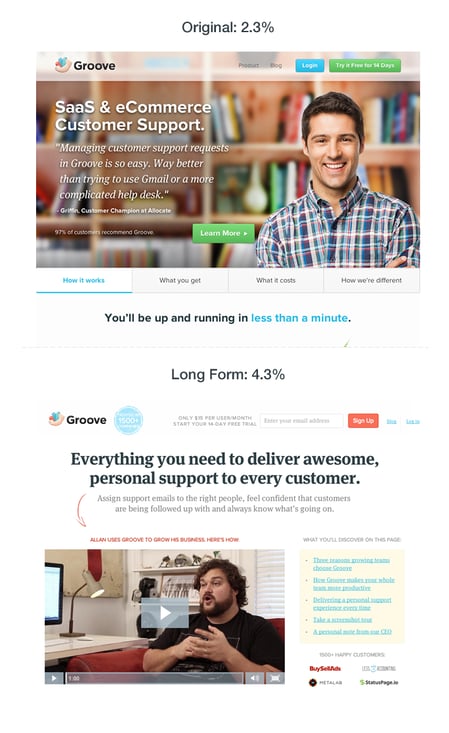
3. Csek Creative Homepage Design
The copy on your homepage is important because it helps users decide whether they want to continue looking deeper into your site.
In this example, a digital agency decided to test the tagline on its homepage. Ultimately, the goal was to decrease the bounce rate.
Before the A/B test, Csek’s tagline read: “Csek Creative is a Kelowna based digital agency that delivers the results that make business sense.”
To make the copy less vague and more explanatory of the services it offered, Csek Creative changed the verbiage to: “Csek Creative is a digital agency that helps companies with their online and offline marketing needs.”
Expecting minor results, this change actually resulted in an 8.2% increase in click-throughs to other pages on the site.
4. Humana’s Site Banners
Many landing pages showcase large banners at the top of the page. That’s valuable real estate, and if the banner isn’t optimal, it could end up doing more harm than good.
That’s why Humana, a healthcare insurance provider, decided to test its landing page banners.
In the control, Humana had been using a banner that displayed a lot of copy, a weak CTA, and no clear and concise message.

However, for variation B the company decided to simplify the message. This variation ended up receiving 433% more clickthroughs than the control.

Humana didn’t stop there. Once variant B became successful, the company decided to make it the new control and wanted to test the CTA.
With variation C, Humana switched the CTA language to include language that was a harder sell, such as “Shop.” The company decided this would be a good approach because customers signing up for Medicare have a limited window to make a decision.

The change in language resulted in a 192% increase in clickthrough.
Email A/B Testing Example
5. HubSpot’s Email vs. In-App Notification Center
Gathering reviews from users isn’t always an easy task. That’s why HubSpot decided to A/B test ways to reach out to customers. The methods tested? In-app notifications versus email.
HubSpot decided to send an in-app notification and email alerting users that they were the champion user of the month and would receive a $10 gift card if they left a review on the Capterra site.
For variant A, HubSpot sent a plain text email to users.
 For variant B, HubSpot used a certification, templated email.
For variant C, HubSpot sent an in-app notification.
HubSpot found that unlike with emails, in-app notifications are often overlooked or missed by users. The emails outperformed in-app notifications by 1.4x. From both emails, 24.9% of those who opened the email left a review, compared to 10.3% of those who opened the in-app notification.
6. Unbounce’s Tweet vs. Email CTA
On most landing pages, marketers typically ask users for an email address to deliver their content offers.
However, Unbounce decided to test whether customers would rather give an email address or just tweet about a product.
Both options have pros and cons for the company. Asking for an email address means your company can build a list of potential prospects while asking people to tweet can build viral momentum and increase social exposure.
The first landing page in this A/B test asked users to give their email address in exchange for an ebook.
The second landing page asked users to send a tweet in exchange for the ebook.
Overall, people far preferred giving out an email address. In the end, the email landing page had a 24% conversion lift.
Mobile A/B Testing Example
7. HubSpot’s Mobile Calls-to-Action
HubSpot uses several different calls-to-action in its blog posts. For instance, on this blog, you’ll notice anchor text in the introduction, a graphic CTA at the bottom, and a slide-in CTA when you scroll through the post.
However, on mobile, these CTAs might seem intrusive. That’s why HubSpot tested mobile CTAs.
Previous A/B tests revealed that HubSpot’s mobile audience was 44% more likely to click through to an offer landing page and 18% more likely to convert on the offer if all CTAs were stripped from blog posts and there was only one CTA bar at the bottom of the page with no ability to exit.
So, HubSpot decided to test different versions of the bottom-of-the-page CTA bar, using thank you page views as the primary metric and CTA clicks as the secondary metric.
HubSpot used four variants for this test.
For variant A, the control, the traditional placement of CTAs remained unchanged.
For variant B, the CTA had a maximize/minimize option so readers could dismiss the CTA. This could be accomplished by an up/down caret.
For variant C, the CTA had an X that would completely dismiss the CTA from the post. At this point, there would be no formal CTA on the blog.
For variant D, the CTA had no X or minimize/maximize option.
Overall, variant B saw a 7.9% increase, variant C saw an 11.4% decrease, and variant D saw a 14.6% increase.
From those numbers, HubSpot was able to project that using variant D on mobile would lead to about 1,300 additional submissions each month.
8. Houseparty’s Mobile Onboarding Design
Houseparty is a social app where users can have face-to-face conversations with their close friends. The business had a goal to incrementally improve the functionality and design of the app without causing significant dips in metrics, so it opted to use multiple A/B tests.
One of the things Houseparty aimed to improve was the onboarding funnel and how users are prompted to add friends through push notifications. Originally, users received permission requests to access their phone contacts with little context, and most users clicked “Don’t Allow” (as shown in the image below), making it difficult to connect with friends on the app.
After running A/B tests to improve this experience for customers, Houseparty notifies users of pop-up notifications and their context before they occur to understand why giving access is important (as shown in the image below).
The final version, which was A/B tested, found that users sent 2X more friend requests on their first day, and there was a 15% increase in permissions to access contacts.
9. HelloFresh Menu Display
HelloFresh is a meal kit subscription service that delivers recipes to global users. As its user base grew, its recipe count grew, but it became more difficult for users to navigate through the app and find what they needed.
The business set out to redesign its menu pages for a seamless user experience while also drawing attention to upselling opportunities. HelloFresh ran an experiment that compared the impact of the original control menu display to a new version. The image below shows the control menu display.
And the image below displays the variant and final version, which contributed to a 7% increase in upselling revenue.
A/B Testing Takeaways for Marketers
A lot of different factors can go into A/B testing, depending on your business needs. However, there are a few key things to keep in mind:
- Every A/B test should start with a hypothesis focused on one specific problem that you can test.
- Ensure you’re testing a control variable (your original version) and a treatment variable (a new version that you think will perform better).
- You can test various things, like landing pages, CTAs, emails, or mobile app designs.
- The best way to understand if your results mean something is to determine statistical significance once the experiment is over.
- There are a variety of goals to focus on for A/B testing (increased site traffic, lower bounce rates, etc.), but they should be testable and able to be supported or disproven.
- When testing, ensure you’re splitting your sample groups equally and randomly, so your data is viable and not due to chance.
- Take action based on the results you obtain.
These companies all saw these amazing results because they started testing. If you want to get the same results, you’ve got to get started, too. For more information, be sure to check out the on-demand webinar “Optimize Your Online Marketing Channels,” hosted by Optimizely and HubSpot.
Editor’s note: This post was originally published in October 2014 and has been updated for comprehensiveness.


The Ultimate Guide to LinkedIn Groups
You know LinkedIn — the professional, polished, responsible sibling of the social media sphere. Considering the social network has 722 million+ members, you almost certainly already have a profile.
What’s unique about this social network is that its users are focused on professional connections. This means LinkedIn users are primed for social selling, and there are ample opportunities to find, connect, and build relationships with potential prospects on the network.
![Free Guide: How to Use LinkedIn for Business, Marketing, and Networking [Download Now]](https://no-cache.hubspot.com/cta/default/53/ddd33609-1733-44d2-a811-a5435b201ffe.png)
LinkedIn Groups are a great way to connect with people within your industry and get the most out of this massive network. Let’s explore what they are, how to join one, and some best practices to follow.
Groups represent a targeted opportunity to build your personal brand and professional community on LinkedIn.
Only members of a given group can view, post, or comment on conversations within that group. Groups can set their own admissions criteria and establish admins as gatekeepers.
By default, your Group affiliations show up at the bottom of your LinkedIn Profile under the ‘Interests’ section. You can edit the visibility for specific groups –– just one of the many ways to customize how your LinkedIn profile represents your personal and professional brand.
Unlisted Groups don’t appear in search results, and only fellow group members will see the group’s information on your Profile. These more private communities require a direct link or admin invitation for access.
Best Practices for Navigating LinkedIn Groups
To get the most out of LinkedIn Groups communities, be a good community member. Consider that your Golden Rule in this ecosystem. Let your work and your insight speak for themselves –– avoiding blatant self-promotion or outright spam.
Other best practices for becoming a valued group member include:
- Contribute first – Bring value to the group. This builds trust and offers greater value to you long-term as well. Jumping in with an off-topic post or link to your own content is a great way to get banned or panned [/ignored].
- Listen and engage – Unless you’re the Group’s founder and creator, remember that you’re joining an ongoing conversation. Take some time to listen and observe. Pay attention to topics, tone, and who the group recognizes as experts or authorities. Try liking and commenting on a few posts before you spout off some contrarian or opposing views.
- Encourage discussion – Ask questions. Then listen and respond, seeking to further the conversation.
- Keep it professional – People are on the platform for work, remember? If you wouldn’t say it to a colleague or your boss in person, don’t say it here.
- Think before you link – LinkedIn is pretty clear about this. Any URL to commercial sites that try to sell a product or service will be reported and removed, as will those redirecting to inappropriate/spam-like content.
- Use a tool – Want to capitalize on the time you spend acclimating yourself to a LinkedIn Group and its particular community? Consider Leadjet. It’s a browser extension that helps salespeople work faster and more efficiently. You can also leverage HubSpot’s integration with LinkedIn’s Sales Navigator to keep track of your LinkedIn prospects.
-
Look for Groups directly in the Search bar, just as you would find connections, companies, or anything else on LinkedIn.
-
On the search results page, click on the “Groups” filter option.
-
Look through the groups and click on the ones you’re interested in joining.
If you’re not sure which group you want to join and want to browse through all the available groups on LinkedIn, try the LinkedIn Groups Directory.
It’s essentially a shortcut to the Groups search results page and allows you to browse over 2 million active Groups.
The downside of this option is that you cannot filter your results by industry, region, interests, or connections.
How to Join Groups on LinkedIn
You can join a Group on LinkedIn by click “Request to Join” on a Group’s home or profile page.
Your request goes directly to the Group Admins, who evaluate your fit for the Group.
If a connection invites you to join a group, simply click ‘Accept’ on the invite from your inbox or notifications screen, just as you would a standard Connection request.
Where are my Groups on LinkedIn?
You can find the Groups you belong to by clicking on the ‘Work’ grid on your Navigation bar, or visiting linkedin.com/groups.
LinkedIn Groups impact the appearance of your LinkedIn Profile in several ways.
As mentioned, people looking at Groups can see which of their connections are already members. As seen in the example below.

Additionally, the ‘Interests’ section at the bottom portion of your Profile displays your interests, which includes your Group memberships.
If you’ve been on LinkedIn for a while, you may have some outdated or inactive Group memberships. You can curate what displays on your Profile by leaving Groups that no longer interest you.
Want to continue receiving messages from certain Groups but don’t want them to appear on your profile? There’s a feature for that.
On the page listing all of your Group affiliations, click the three dots to the right of any Group listing and select “Update your settings.”

Once you land on that page, toggle “Display group on profile” to “No,” which maintains your membership but hides it from the ‘Interests’ section of your profile.
This ensures that only fellow members or people searching directly for that Group can potentially see your affiliation.
Unlisted Groups, on the other hand, are not publicly searchable and will not appear on your profile, except to other Group members. Potential members can only see or access the Group after receiving an invitation from a current member or Admin.
Best Groups to Join on LinkedIn
Whatever your industry, role, or goal for joining LinkedIn Groups, there’s likely no shortage of curated recommendations for the best Groups.
Start by looking for groups that match your industry and interests by searching for relevant titles, keywords, or phrases.
It’s also helpful to think beyond immediate or explicit professional affiliations. Don’t limit yourself to only joining groups directly related to your industry. Alumni groups are often both particularly active and helpful – especially if you’re trying to break into a new field or build relationships in a new region.
Seek out groups that your ideal customers belong to. Then, be an active, engaged member of the groups you join to maximize the potential for meaningful networking and social selling.
Get started with one or two groups in your industry, and another based on where you went to school or personal interests.
Think of them as digital versions of groups and spaces you’d consider visiting offline, too. Begin observing the conversations, looking for ways to contribute, and assessing how you might fit into the Group’s community.
Editor’s Note: This post was originally published in January 2021 and has been updated for comprehensiveness.

How COVID-19 Impacted Customer Service & What’s Next [Data + Expert Tips]
We all know the importance of customer service for retaining customers and scaling a business — and it’s only increasing in value over time.
Consider, for instance, what happened when I called CorePower Yoga’s customer service team last week to complain about an incorrect charge to my account. What could’ve been a stressful and frustrating experience turned into me actually upgrading my membership.
That’s the power of good customer service — it’s where your customers’ loyalty starts, or ends.
Unfortunately, the past two years have been anything but easy on customer service teams. While customers’ expectations for customer service hit an all-time high, customer service reps simultaneously saw more difficult calls and increased escalations in 2020.
HubSpot’s Industry Data, for instance, shows a consistent rise in support tickets since the beginning of the pandemic — from 6% in March of 2020 to over 90% as of August 2021:
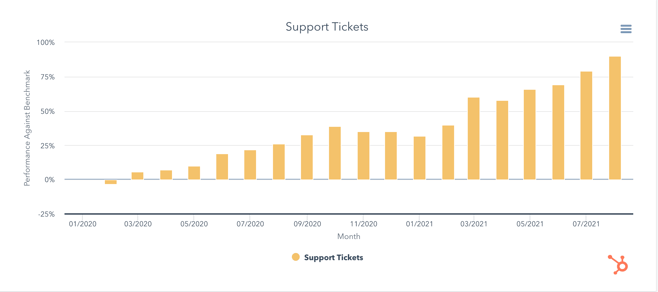
However, as customers’ challenges and requests increased exponentially as a result of the pandemic, most service teams were still struggling to adjust to a fully remote setup. (Imagine the stress of a conversation with an unhappy customer from your kitchen table, where you might lack a strong phone connection or easy access to peers for help. Yikes.)
All of which is to say: COVID-19 had a strong impact on customer service, and in 2022 and beyond we’ll continue to see the ramifications of the pandemic on what customers expect from customer service, and how service reps will need to adjust to handle those new expectations.
Here, I spoke with six experts in the customer service industry to gather insights into the future of customer service. Let’s dive in.
![→ Free Download: 5 Customer Survey Templates [Access Now]](https://no-cache.hubspot.com/cta/default/53/9d36416b-3b0d-470c-a707-269296bb8683.png)
How COVID-19 Impacted Customer Service
1. Service reps needed to adjust business offerings to meet new customer demands.
Microsoft’s Worldwide Support Leader Kirsten Gudmundson told me it’s vital service teams learn to adjust to their customers’ unique needs, which might be different than they were pre-pandemic.
“Listen, learn, evolve — quickly,” Gudmundson told me. “During the pandemic, our customers’ needs were evolving at warp speed as many had to quickly go through a digital transformation to stay relevant.”
Gudmundson adds, “It was imperative that we actively listened and adjusted our offerings to meet new customer demands and identified innovative ways to engage with customers.”
The pandemic required all businesses to re-route existing strategies and refocus their efforts. If you work for a B2B customer service team, then, it’s important to keep in-mind that part of your job is exhibiting patience and empathy when working with your customers.
Additionally, the ‘rule book’ you followed pre-pandemic might not work anymore. Part of the challenge of the service industry today is having the flexibility to alter your approach — and your business offerings — as you identify better ways to serve your customers.
As Gudmundson points out, “By making it easy for customers to get support and proactively providing services, we gave customers peace of mind, which allowed them to focus on this critical pivot point for their business.”
2. Burnout across service organizations increased.
According to a 2020 Gallup report, 76% of employees experience burnout on the job at least sometimes, and 28% say they are burned out ‘very often’ or ‘always’ at work.
Burnout has increased dramatically as a result of the pandemic. Work-life balance has blurred significantly. Additionally, some employees feel pressure to remain online to prove their working to their managers — and still others need to adjust to working from home while also taking care of their children or dealing with other household responsibilities.
Unfortunately, service employees are particularly at-risk of burnout. As researcher Kristina Hultgren writes, “call centre jobs are notorious worldwide for their high levels of turnover, absenteeism, employee burnout and emotional exhaustion.”
Kevan Gammage, Global Director of Customer Support at Brandwatch, told me he’s seen burnout increase for his own team after joining Brandwatch at the beginning of 2021.
“For us, the pandemic has been a bit of a ride,” Gammage says. “It seems like customers have been reasonable in understanding that our team is also impacted by COVID, but that only carries so far.”
“Our reps have certainly had to work under more pressure in general, and burnout has been a constant threat in our world. For example, our team has seen the type of tickets we get become much more technical in nature and subject.”
To deal with burnout, Gammage told me he’s needed to become more intentional about how he creates a connected environment for the team, even if that environment is fully remote.
Additionally, he told me, “We do our best to avoid burnout by encouraging our folks to take advantage of unlimited vacation. We also like to give the team specific self-development time to work on things that are more personal, like self-development or mentoring from teams they aspire to work in. So far, so good — but we have to continue to be creative for the team.”
3. Customers became more familiar with communication tools like Zoom and Google Meets.
Fatima Sbeih, Beautiful.ai’s Director of Customer Success, told me her team’s customer support requests nearly doubled at the beginning of the pandemic.
Sbeih says, “As a remote collaboration tool, new users adopted Beautiful.ai early in the pandemic as they transitioned to working from home. As a result, [our] customer support requests nearly doubled, leading to longer response times and adjusting priority levels for support tickets. This — coupled with the inherent collaboration challenges of remote work — resulted in a backlog of tasks.”
Sbeih told me, “Clear and concise internal communication became an even higher priority than before, as did the mental health of my team to ensure everyone felt supported.”
To ensure strong internal communication on your own support team, consider investing in powerful customer service tools, such as HubSpot for help desk software or JIRA for bug reporting.
Sbeih told me one of the most notable improvements to customer service that she’s seen has been a more geographically diverse talent pool that aligns with customers’ timezones. She notes that this has decreased wait times for first-time responses, and allowed for calls to be scheduled within business hours for each team.
As your team became more comfortable with remote software in 2020, so did your customers. This is a major benefit for remote support teams, as customers are more efficient at submitting and responding to requests on communication platforms outside of traditional phone calls.
As Sbeih puts it, “customers became more comfortable with communication tools like Zoom and Google Meets, enabling easier assistance.”
4. Remote support coaching became a requirement.
As people adjusted to this ‘new normal’, tensions were high. Along with the daily challenges they faced at their companies, customers also dealt with the extreme pressures of a global pandemic.
All of which is to say: 2020 wasn’t an easy year for anyone in a customer-facing role.
As HubSpot’s Team Lead of Customer Support in Berlin Takeaki Fujita puts it, “customer-facing teams were on the frontline for managing customer frustrations — which can be stressful for customer support teams to manage.”
Additionally, Fujita points out that the loneliness and isolation of a remote lifestyle can also impact the productivity of support reps. “Without teammates ‘on the floor’ for guidance, support escalations can increase if the rep feels stuck with no one to turn to for help … and this can slow down how quickly we can manage customer queries as a result.”

To mitigate the loneliness and frustration for your team, you might consider offering remote coaching for your support reps. As Fujita told me, championing collaboration within and across teams, encouraging transparency, and keeping communication channels open is vital for enabling reps to share knowledge and learn from one another.
Fujita adds, “Empowering reps with recurring virtual support and proactive coaching can lay the foundations for effective, personalized support interactions, which can only help our customers to grow better.”
5. Service reps needed to develop or nurture a stronger sense of empathy in their customer interactions.
When a customer is calling a customer service representative, they’re usually facing a challenging, frustrating, or disruptive situation. In 2020, it became increasingly important for service reps to lead with empathy in their conversations with customers.
As Moz’s Customer Support Lead Natalie Alexis puts it, “Early on, we saw an increase in customers seeking help for their businesses to survive. To better assist those dealing with the impact of the pandemic, our services had to evolve so we aimed to lead with more empathy in our interactions — this brought a sense of camaraderie with our customers.”
“But as the pandemic has persisted,” Alexis adds, “we’ve seen the impacts of the sustained stress on our customers. We’ve continued to focus on providing empathic service while acknowledging the increasingly stressful times we live in.”
Empathy is the ability to put yourself in someone else’s shoes. This is particularly critical for customer support reps. To help your team develop empathy, consider how you might show them what your customers experience on a daily basis.
If you sell software, for instance, you’ll want to ensure your customer support reps have all been trained in how to use your software — the challenges they experience as they learn how to use your tools will help them understand and relate to your customers’ challenges, as well.
Alnaica Augustave, an EMEA Customer Specialist at HubSpot, agrees that empathy has never been more critical in the support industry. She says, “COVID-19 has had an impact on customer service — particularly in the way of working and interacting with customers to have open communication and listening.”
Augustave adds, “We have seen an increase in customer service volume shifts with COVID-19, and in order to reduce customer frustration and anxiety, we have adjusted our infrastructure and focused on listening, increasing our empathy during this period.”
So … What’s Next?
Gammage told me that the pandemic has forced his support organization to learn how to roll with the punches — and this flexibility is going to remain necessary moving forward.
As Gammage puts it, “Going forward, I think that the expectations of customers will still be high, but reps should expect to have even more touchpoints with customers.”
You’ll want to ensure your customers are offered diverse options when it comes to getting in touch with your support team — for instance, perhaps you offer live chat, Messenger on Facebook or Instagram, SMS text messages, and a phone line. To streamline these processes, consider a tool like MobileMonkey, which enables you to see all customer messages in one place.
Additionally, as the remote customer support world continues to evolve, it’s vital you remain open to change and willing to adjust your team’s processes to fit the new needs of your customers.
As Sbeih told me, “Customer service has been, and will continue to be, successful in remote and hybrid environments. Work-from-home flexibility, retention, productivity, and work-life balance will continue to see improvements. However, the adjustment will remain a challenge for those who aren’t self-starters and may require extra support.”
Ultimately, it’s imperative your team listen to your customers and iterate over time to continue providing reliable, helpful solutions to their problems.
Remember: Your business’ success starts and ends with good support, so it’s vital you invest in your support team for the long-haul, particularly as the world adjusts to a world post-pandemic.


What Is First Contentful Paint? + An Action Plan to Improve It
If you could improve your website’s performance by 10%, would you?
Site performance scoring is a complex web of metrics, and First Contentful Paint (FCP) is just one factor Google considers when evaluating page load speed. Responsible for 10% of a website’s overall performance score, FCP plays an important role in creating a positive user experience for visitors.
A site’s First Contentful Paint (FCP) is the total time it takes a page to load from the moment the request is sent to the point that any content is rendered on the screen.
The higher the FCP score, the slower the content loads. When visitors think a page takes too long to load, it can be a major red flag. In a study by Top Designs Firms, 42% of people said they would leave a poorly functioning website.
But a low FCP score shows that the page is loading quickly, which means content will be delivered sooner. And fast-loading content is one way to keep visitors scrolling your site. In fact, Deloitte found that a 0.1-second improvement in load time increased conversions by 8.4% for retail sites and 10.1% for travel sites.
When a millisecond makes a difference, it’s best to do whatever you can to improve your site speed. So let’s take a look at how to lower FCP to make your site as fast and user-friendly as possible.
What is First Contentful Paint?
First Contentful Paint (FCP) is the amount of time it takes for a user to see the first content on a website, whether it’s images, text, logos, background graphics, or non-white <canvas> elements. FCP evaluates how users experience a website’s page load speed by measuring what people actually perceive, rather than the results of a speed test tool.
In the timeline below, you can see FCP play out in the second frame when the first text and image elements appear on the screen.

First Contentful Paint is one of six metrics tracked in the Google Lighthouse Performance report, along with Time to Interactive, Speed Index, Total Blocking Time, Largest Contentful Paint, and Cumulative Layout Shift. Each metric measures an aspect of page load speed.

First Contentful Paint is an important metric for judging the page load timeline because it marks the point where a user can see that something is happening on the screen. Without this reassurance, a user might leave the page to browse a faster website.
First Contentful Paint differs from the Core Web Vitals Largest Contentful Paint (LCP) because LCP measures the time it takes for the largest element on a website to become visible. On the other hand, FCP measures the first element to load, which isn’t necessarily the largest element.
A quick LCP helps assure people that the main content is useful to them. But a fast FCP reassures people that something is happening on the page, which can keep them around long enough for the rest of the page to load.
How to Test First Contentful Paint
FCP can be measured in the lab (pre-release) and in the field (real-world users).
Testing FCP in the lab is a good way to work out issues before your site goes live, but it isn’t the most accurate way to evaluate performance. That’s where field testing comes in, showing you how people interact with your site when there are differences in devices, network connections, and user interactions.
You can use the following tools to test First Contentful Paint:
Field Tools
- PageSpeed Insights
- Chrome User Experience Report
- Search Console (Speed Report)
- web-vitals JavaScript library
Lab Tools
For this article, let’s walk through what it looks like to run a test with Lighthouse – an open-source, automated tool for improving the quality of web pages. (If you’ve never run this audit before, follow the link for easy step-by-step instructions).
Once you run the test for a given URL, Lighthouse opens a new tab to share the site performance overview. In the example below, the site is performing well in SEO and Accessibility but needs work on Performance and Best Practices.

Going deeper, the audit also gives scores for each of the six performance metrics, including First Contentful Paint (FCP). In the test shown below, the FCP score is 2.5 seconds – a time that “needs improvement.”

But you need to know what makes a “good” score in order to improve FCP.
The Ideal First Contentful Paint Speed
Google recommends a First Contentful Paint scoring of 1.8 seconds or less in order to provide your site visitors with a good browsing experience.

But what determines your FCP score?
Like all things Google, there’s a method to the metric. Your FCP score is determined by comparing your site’s FCP time to FCP times for real sites, using data from the HTTP Archive. You can dive deeper to see how Lighthouse determines thresholds and metric scores.
When evaluating your FCP score, Google says “a good threshold to measure is the 75th percentile of page loads, segmented across mobile and desktop devices.” This helps get an accurate representation of the user experience.
If your site has a poor FCP score, there are steps you can take to shave off seconds and create a faster site that visitors want to scroll through. But first, let’s explore what leads to a poor score.
What Causes High First Contentful Paint
Large text files, slow server response time, and multiple page redirects can all contribute to a high First Contentful Paint score. If you have a high First Contentful Paint (FCP), it’s likely due to one of these factors:
- Slow font load time
- Slow server response times (TTFB)
- High request counts and large transfer sizes
- Render-blocking resources
- Unused or inefficient CSS
- Script-based elements above the fold
- Lazy loading above the fold
- Not inlining images above the fold
- Excessive DOM size
- Multiple page redirects
But keep in mind, the Lighthouse Performance score is a weighted average of all the metric scores – and the FCP makes up 10% of that total. As a result, the heavily weighted scores will have a larger impact on your overall Performance scoring. Here’s a look at how the other Lighthouse metrics are weighted:

If your overall Performance score needs improvement, it can be best to spend time optimizing for Total Blocking Time or Largest Contentful Paint before tackling First Contentful Paint. As you implement good development practices across the site, it’s likely your FCP score will lower.
But if you want to improve FCP, you can take a few targeted steps to move from a red to a green score.
How to Improve First Contentful Paint
It’s not always simple to improve a First Contentful Paint (FCP) score. But with the right action plan in place, it’s easier to prioritize the major errors that have the greatest impact. Let’s break down how to go about it.
1. Create a list of high-priority issues.
The first step to lowering the FCP score for any site is to run the list of lab and field tests shared above to understand exactly what you need to work on.
Let’s hop back into the Lighthouse performance report from earlier. If the FCP score “needs improvement,” it’s best to reference the opportunities or diagnostics recommendations in the report. To see all of the recommendations, toggle to the “All” tab. Or for recommendations specific to the First Contentful Paint (FCP) score, toggle to the “FCP” tab.

The above test shares two opportunities to improve FCP: eliminate render-blocking resources and ensure text remains visible during the Webfont load.
By learning the top issues affecting FCP, you’ll have a list of where to focus and what to fix.
2. Learn what to ignore.
Another helpful feature of the Lighthouse performance report is letting you know what you don’t need to focus on. This list is generated under the “Passed audits” section of the performance report.

While it’s okay to ignore these non-issues, know that Google constantly updates the metrics used to evaluate page load speed. It’s good practice to routinely run tests to ensure site performance is on track – you may need to prioritize a “passed audit” one day.
3. Work with your web team to fix issues.
Once you know what issues to pay attention to, it’s simply a matter of taking action to improve the ones impacting First Contentful Paint (FCP).
This post won’t get into the weeds of web development. But these detailed guides from Google are excellent resources for understanding each factor that affects page speed and performance. If one is impacting your FCP score, you can take a look to learn how to fix the issue.
- Eliminate render-blocking resources
- Minify CSS
- Remove unused CSS
- Pre-connect to required origins
- Reduce server response times (TTFB)
- Avoid multiple page redirects
- Preload key requests
- Avoid enormous network payloads
- Serve static assets with an efficient cache policy
- Avoid an excessive DOM size
- Minimize critical request depth
- Ensure text remains visible during Webfont load
- Keep request counts low and transfer sizes small
Whether your First Contentful Paint (FCP) score is showing red, yellow, or green, there are always improvements to be made. It’s the fun – and sometimes, frustrating – part of web development.
But remember, small changes can have a big impact. Reducing server response times, compressing images, and being aware of the elements above the fold can lower your FCP score, speed up your site, and ensure site visitors have a faster, longer browsing experience.

What is Information Design + How It Can Help You as a Marketer
Think about the last time you flipped through a confusing instruction manual. Where does that piece go? How do these parts fit together? If the instructions are subpar, you get frustrated and wind up looking for an explainer video some random person posted online.
If we can follow the storyline, we understand. If not, we get lost in the chaos. Information design aims to avoid confusion by presenting data in a way that’s easy to understand.
As a marketer, information design makes it simpler to share complex ideas — whether you’re distributing an annual report or getting buy-in for a new campaign. In this post, we’ll walk through the basics of information design, how to put it to use, and the tools you need to start applying it to your work.
![Download Now: 150+ Content Creation Templates [Free Kit]](https://no-cache.hubspot.com/cta/default/53/5478fa12-4cc3-4140-ba96-bc103eeb873e.png)
Information design is integral to everyday life. For example, we follow a recipe to whip up a meal or navigate a museum using signs and exhibit explanations. When used effectively, it can help people complete a task, solve a problem, understand complex data, or follow a set of directions.
You may be thinking that information design sounds a lot like data visualization. While both are tied to graphic design and a core set of design principles, key differences set them apart.
| information design | data visualization |
| Tells a story, which gives the data purpose. | Presents raw data in a visually appealing way but doesn’t provide purpose. |
| Uses logic and patterns that are easily understood by an audience. | Allows viewers to make their own conclusions, and aims to spark a specific reaction. |
| Provides conclusions, so the viewer doesn’t have to make their own assumptions. | Constantly evolves as new data becomes available. |
| Examples: How-to infographics, instruction manuals, or analytics reports that provide conclusions or predictions. | Examples: Analytics dashboards, demographic graphs, or performance charts. |
Confused? You’re not the only one. The nuances between the two can be challenging to discern. The main thing to remember is that information design is about effectiveness and function, while data visualization is more about visual appeal and aesthetics. Both enhance a viewer’s ability to comprehend data, but only information design weaves storytelling into the mix.
Luckily, a set of principles exists that will help you turn complex information into attractive, coherent content.
Information Design Principles
Most fields have a set of guidelines to keep processes clear and consistent. For example, writers follow style guides, engineers adhere to code standards, and information designers practice design thinking.
Design thinking is a process for creative problem solving that puts people first. Like UX design, which considers the users’ needs above all else, information design principles are human-centered and give designers a process to follow. The goal is to ensure people don’t feel overwhelmed or confused as they navigate information.
While the principles are listed in a particular order below, know that this process isn’t always linear. You may have to repeat a step or jump back and forth between two to clarify information. Like all guidelines, you have to find what works for your situation and intention.
1. Empathize.
It’s essential to understand a problem before creating the solution. That’s why the first step in information design is about setting aside any assumptions so you can focus on users and their needs.
Start by getting curious. Ask questions, observe your audience’s behaviors, engage people in conversation, and empathize to understand their true motivations or problems. Use interviews, surveys, focus groups, or polls to learn what solution people really need. The aim is to understand how people may interact with the final design to make it as effective as possible — but know the design will only be as good as the information you collect.
2. Define the core problem.
Once you’ve collected information from your target audience, you need to synthesize it and define the core problem to be solved. Ideally, you center it around the people you’re aiming to help instead of your own needs.
For example, say you want to create a product page for a new portable speaker that your company will release. You may say, “We want to hit our sales goal, so we need to make a product page that’s focused on converting people into customers.” Instead, think about your customers and redefine the problem as, “People are looking for a speaker that can go anywhere, have great sound, and last for years.”
Defining the problem with your audience in mind changes the way designers, writers, and marketers approach the solution. And it often sparks creative ideas, which leads right into the next stage.
3. Ideate and brainstorm.
Not all ideas have the same impact. That’s why it’s essential to encourage everyone involved in the information design process to flex their creativity in this phase.
Give your tried-and-true brainstorming techniques a go, but don’t be afraid to experiment with new methods. Techniques like mind-mapping, brainwriting, free association, S.C.A.M.P.E.R, and storyboarding can stimulate ideas. Get as many ideas as you can for both the design and the story right from the start.
Once you’ve condensed your ideas down to a carefully curated list, map out your story outline to get a feel for how people will interact with and understand your design. This outline will serve as the foundation for the first iterations.
4. Prototype your ideas.
You likely landed on one or two strong ideas for the story and design. The prototype phase is where you expand upon those ideas to identify the best possible solution.
Prototypes are typically low-cost, simplified iterations, so don’t spend all of your resources perfecting the first version. Instead, focus on the visual hierarchy to make your story stand out. Then, before moving on to the next step, share the prototype with people involved in the project to make sure the information is accurate, precise, engaging, and easily understood.
5. Test your designs.
When your design is robust enough to explain your idea, it’s time to share it and collect feedback. Send it to teammates within your company who may provide insight or gather a group of people in your audience.
Take note of everyone’s reactions. Are they confused by the storyline or design? Do they know what steps to take? Is the information clear and accurate? Do people read or watch to the end?
Give people a few days to sit with the prototype and gather feedback. When you feel you have enough information, make any necessary tweaks. You may have to repeat this step multiple times because, often, the feedback inspires you to redefine the problem and rethink your story.
Information Design Examples
While there’s a particular way to approach information design, the design possibilities are near endless. Let’s look at some ways it’s used in business and marketing to help spark your ideas.
1. Media Economy Report Vol.13, Bureau Oberhaeuser
Industry trends don’t have to be a bore. This report from MAGNA GLOBAL acts as a thought leadership piece to share insights on where the eCommerce industry is heading and how the customer experience is changing. A blend of copy and well-designed graphics gives an overview of forces affecting the industry, highlights key takeaways, and provides predictions on how eCommerce will evolve.
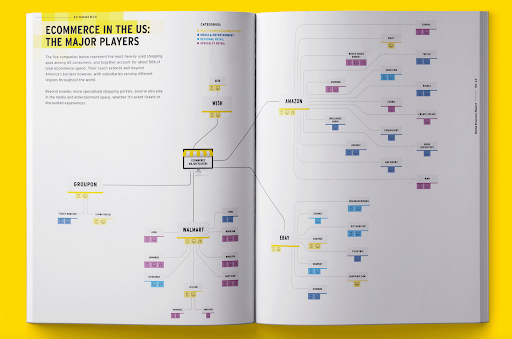
2. Advanced Keyword Research Tutorial, Brian Dean
Information design can go beyond written content. This explainer video from Backlinko gives life to the standard “how-to” post with a visually appealing design, animation, and clear instructions. If you want to experiment with content beyond blog posts, infographics, or reports, a video may be just the content for your next information design project.
3. The Deal Machine, Elisabetta Calabritto
Mergers and acquisitions require a lot of research, but this design makes reading about the challenges companies face downright enjoyable. It’s an excellent example of how information design isn’t just about interpreting charts and visualizing studies—it also incorporates graphic elements that delight the eyes. Large quote blocks, relevant images, and color influence how people comprehend information, so make sure to consider the visual flow when creating your design.
4. Not Another State of Marketing Report, HubSpot
Marketing is constantly evolving, and people need to keep up with the latest trends, strategies, and stats. HubSpot knows this. Their annual report reflects their industry expertise, with chapters dedicated to each marketing niche. Need to know the latest SEO strategies? Skip to Chapter Four. This example is a lesson in knowing your audience, providing the data they need, and packaging it up in a design that’s easy on the eyes.
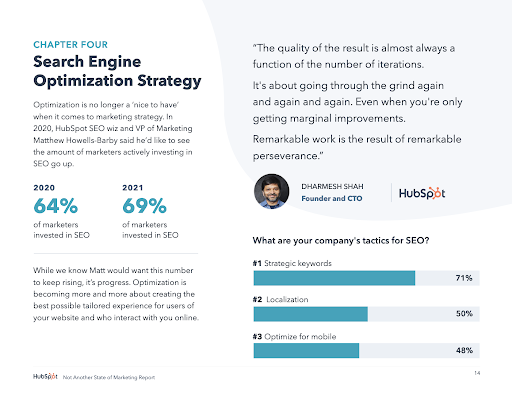
5. Click & Collect: Reinventing Online Grocery Experience, Netguru
Case studies are necessary for educating your audience and providing proof that your product or service works. Netguru did a great job creating a case study that’s simple to scan and fun to scroll through. Interactive graphics catch your eye and explain how the product works. But my favorite moment had to be learning how the automated guided vehicles work.
Information Design Tools
Everyone has their favorite tools, whether it be for note-taking, project management, graphic design, or content management. If your specialty is marketing, the following tools can help you put together cohesive, attractive content — without having to learn complex software.
Certain tools are more intricate than others, though, so loop in your design team if necessary. They are the experts, after all! Here are some valuable tools to consider:
- Canva: A graphic design platform that is simple for non-designers to quickly get the hang of to create presentations, infographics, reports, and more.
- Visme: Ideal for both experienced designers and newbies, this graphic design platform gives a variety of templates so you can create videos, infographics, documents, charts, and graphics.
- Crello: Full of trendy templates, Crello is a graphic design tool with layouts for social media posts, marketing materials, presentations, and more. It also features a collection of royalty-free photos so you can spice up your information design documents.
- Adobe Creative Cloud: A must-have for creatives, Adobe CC offers supreme control over your creations. Photoshop, InDesign, Illustrator, and Premiere provide powerful tools for starting a design entirely from scratch.
- Procreate: This app is for artists who create digital paintings (think animations, graphics, and more). It’s more for designers than for marketers, but it’s perfect for those who prefer to work by hand before converting their work into programs like Adobe CC.
In a world where people are constantly bombarded with information, focusing on clear communication can improve conversions, increase customer satisfaction, and help you hit your goals. Effective information design makes it easy for people to gain insights and learn about your company. With the right data, story, and tools in hand, you can design content that’s just right for your audience—and hopefully prevent the frustration that comes from an incomprehensible set of instructions.


10 of the Best Ad Management Tools for 2021
Time is one of the most valuable resources we have — that’s why efficiency is something so many people strive for. The good news is that there are a plethora of marketing tools available today with the power to help you boost productivity and streamline monotonous processes or tasks — ad management tools are among the many options.
In this blog post, we’ll talk about what ad management is, outline high-quality ad management software, and explain why they’re beneficial for all businesses.

What is advertising management?
Advertising management is overseeing different marketing activities and responsible individuals to ensure that campaigns are running effectively and target marketings are being reached.
Depending on your business needs, advertising management can focus on various metrics that contribute to campaign success, like ROI or conversions or media placements that make sense for where your target audiences are.
As there is often a lot to keep track of, many teams choose to use advertising management tools, which we’ll cover below.
Advertising Management Software
What are ad management tools?
Ad (advertising) management software and tools have the power to streamline and automate different aspects of advertising, including ad and campaign planning, collaboration, execution, sharing, monitoring, and analysis.
Why use ad management tools?
Ad management tools have many benefits. Here are some examples:
- Save advertisers and marketers valuable time.
- Improve productivity and efficiency.
- Make collaboration simple.
- Run cross-channel campaigns with ease.
- Optimize your campaign structure.
- Create insightful and customized reports with powerful analytics and reporting tools.
- Visualize your data in a way that makes sense for your business and goals.
- Increase the chances of successful ads and campaigns among your target audience.
Now, let’s review seven powerful ad management tools, meant for different types of ads, goals, and teams.
10 Best Ad Management Tools
1. HubSpot Ad Management Software
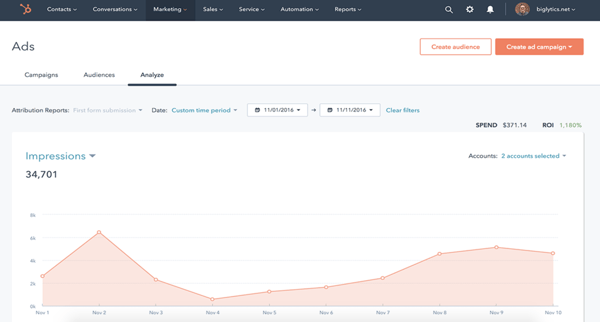
HubSpot’s Ad Management & Tracking software helps you with your inbound marketing strategy and campaigns. You can run all of your campaigns out of this tool from start to finish — meaning, the HubSpot supports ad creation, management, and reporting across different networks.
Other unique and notable features you get from HubSpot’s Ad Tracking Software are:
- Automate ad targeting using Lists that will sync your leads and audience for targeting opportunities.
- Manage ad campaigns on Facebook, Instagram, LinkedIn, and Google.
- Report on ROI and leads from the platforms you share your ads on (e.g., LinkedIn, Google).
- Understand audience behavior by identifying which contacts took action and engaged with your ads.
- Align ads with your other marketing efforts — this is simple because HubSpot Ads live with Marketing Hub.
- Use data from your HubSpot CRM to inform your campaigns and help you determine which ads are most likely to convert contacts into paying customers.
Price of HubSpot Ad Tracking Software
Free, or you can start with/ upgrade to a paid plan depending on your needs and goals.
2. AdRoll
AdRoll is a platform for ecommerce businesses that focuses on ads, email marketing, AI-based product recommendations, and cross-channel measurement. The platform acts as a home base for all of your business’s marketing and advertising activity. Here are some of AdRoll’s other notable capabilities:
- Personalize dynamic ads using AI-powered product recommendations to target your audience members.
- Share targeted videos and display ads to foster emotional connections with your audience.
- Create relevant product offers, dynamic ads, emails, and other forms of outreach using data you’ve collected about your customers along with AdRoll’s 1.2 billion shopper profiles.
- Use advanced measurement and attribution to identify growth opportunities and determine customer lifetime value (CLV).
- Target your audience with paid digital media and account-based ad campaigns by integrating AdRoll with your CRM.
Price of AdRoll
Plans range from $0-$19 depending on your needs.
3. RollWorks
RollWorks is an account-based platform meant to help you identify target accounts, engage them via ads and various channels, and measure your impact and success in doing so. The tool can identify target accounts, prioritize target accounts, automate various sales tasks, and account-based advertising. Here are some more things you can do with RollWorks:
- Reach and engage highly-qualified accounts with ads, lead-gen tactics, and targeted account-based marketing (ABM) programs.
- Use account-based ads to identify your target audience and encourage those people to visit your website.
- Create retargeting ads to bring leads back to your site.
- Integrate RollWorks with your HubSpot CRM to reach contacts that matter most to your business and view RollWorks data within the CRM.
- Use dynamic messages to personalize your ads and make them relevant.
- Automate your sales emails and follow-ups to save time and increase chances of engagement.
- Easily track the success of your campaigns, account-based programs, sales automation sequences.
Price of RollWorks
The Starter plan costs $975 per month, and you can upgrade from there.
4. Influ2

Influ2 is a person-based ad platform meant specifically for B2B. With the tool, show your ads to specific people and then measure the success of the ads among those targeted. Here are some other things you can do with Influ2:
- Select individuals to see your ads so they’re highly-relevant and targeted.
- Improve brand awareness and recognition by only displaying curated ads and information to hand-selected audience members.
- Connect Influ2 with your HubSpot CRM to sync contacts and targeting efforts with Sales and Marketing.
- Use the Name-by-Name Tracker feature to see the names, emails, titles, companies, LinkedIn profiles of the people who interact with your ads.
- Determine the best time to reach out to a prospect by tracking their engagement via views and clicks.
- Keep your current customers engaged with person-based ads by offering relevant and informative content when they need it.
Price of Influ2
Contact Influ2 for demo and quote.
5. Adstream
Adstream is an all-in-one digital asset management and ad delivery solution for broadcasters, publishers, and online services. It’s a Connectivity Suite, meaning it integrates and connects all aspects of your marketing including digital asset management and delivery, traffic management, media automation, and analytics. Here are some more notable capabilities:
- Use a single workflow across marketing teams for total transparency and easy collaboration while organizing, creating, and sharing digital content.
- Distribute your digital content among Adstream’s 79,000 global media destinations that the platform can connect you to.
- Auto-adjust your content so it suits the different areas it’s being shared in around the world.
- Add your incoming ads to the Traffic Management Inbox — here, you can easily review those ads as well as make edits, approve, and send them to another individual or team (e.g. Production).
- Automate different workflows, or aspects of your workflows, to increase efficiency such as processes related to clearance or usage rights.
- Measure the success of your digital campaigns and processes behind them with analytics, real-time reports, and tracking.
Price of Adstream
Contact Adstream for a quote.
6. 6Sense
6Sense is an account-engagement platform with account-based advertising capabilities. The platform uses AI, big data, and machine learning to help you understand and identify your target audience’s buying behavior, prioritize sales and marketing accounts, and create and share personalized and engaging campaigns/ content. Let’s look at some more features:
- Engage your target audience members at scale with highly relevant, unique, cross-channel messages.
- Use account data to create targeted display ads that help you reach key players at target accounts.
- Align Sales and Marketing as a single revenue team on the platform to accurately measure your account-based success.
- Segment data about your target accounts for insight into the success of your campaigns among those specific accounts.
- Use AI to help you predict prospect and account behavior throughout the buyer’s journey so you know when to target them with your ads, campaigns, and personalized messaging.
- Refer to the platform’s Intent Data to discover which accounts are in the market for a product or service like yours with buying signals on first and third-party websites.
Price of 6Sense
Contact 6Sense for pricing information.
7. Celtra
Celtra is a cloud-based software that automates creative production. With the platform, all aspects of collaboration will be streamlined and more efficient thanks to its cloud-based nature — team members can design, approve, and share digital assets among markets, campaigns, and more. Here are some more features to be aware of:
- Use the Ad Builder’s templates to design unique and branded ads without any code — these ads can include ecommerce features as well as video and animation.
- Get real-time reports that include over 100 metrics and dimensions to better understand the success of your creative work, campaigns, and ads.
- Build user-friendly ad products to help you engage prospects.
- Customize your ad products to suit your business with features like shoppable video, product galleries, and text and graphic overlays.
- Gain access to Celtra’s support team and hundreds of on-demand videos and tutorials to help you achieve your goals on the platform.
Price of Celtra
Contact Celtra for pricing information.
8. Smartly.io
Smartly.io is an ad management software for social media advertising. Its automated tool will help you build effective advertisements and experiences for your audiences on the social channels that matter most to your business. Algorithms also help you optimize your creative assets based on audience data, and you can bulk-update your ads in real-time. Some additional features to know:
- Algorithms browse through your product catalog and data sources to create custom creative templates with copy variations based on target audience data.
- Custom KPIs and attribution windows for tracking performance and obtaining actionable insights that help you make effective decisions backed by data.
- Modular creative testing to ensure that you use the right kinds of ads in the right channels.
Price of Smartly.io
Smartly.io offers a self-service plan or a fully-managed plan; both charge a percentage fee of media spend. Contact Smartly.io for specific information.
9. Marin Software
Marin Software is an all-in-one platform for advertisers to manage search, social, and ecommerce ad spend. Its automated tools help you identify growth opportunities for search ads across major search engines, align your social channels to drive growth, and integrate your product feeds to optimize shopping campaigns. Let’s look at some more features:
- Measure, analyze, and optimize all ad spend with first and third-party data to help you maximize ROI with informed targeting.
- Automated process for position-based bidding in search engines.
- Multi-channel advertising insights in one unified dashboard.
- The option to use managed services where in-house experts partner with you to drive results.
Price of Marin Software
Contact Marin Software for pricing.
10. StackAdapt
StackAdapt is a self-service advertising platform that digs deep into your business data to get unique insights that help you develop and deliver high-impact campaigns to your target audiences. It’s best for creative ad management, as its high-quality creative studio helps you match the most effective creative assets with campaign KPIs on a platform-by-platform basis. Here are some more things you can do with StackAdapt:
- Multi-channel targeting for native, display, video, and audio ads
- Access to a large ecosystem of media partners and publishers to advertise on.
- Preview all ads on desktop or mobile, across 500+ publishers, and 23 different verticals to optimize them before sharing with your audiences.
- Machine learning and AI automate performance decisions, so your campaigns are most effective.
- Customizable reporting stack to help you obtain the most critical metrics.
Price of StackAdapt
Contact StackAdapt for pricing.
Grow Better With Ad Management Tools
Your marketing team is bound to grow better with an effective ad management tool — don’t be afraid to experiment with various options to find the one that meets your needs and goals.

Instagram Promotions: How to Create One in Minutes + 3 Best Practices
Instagram marketing can be a hit or miss. Especially as you start implementing your social media strategy, it might take a while for your posts to start performing well.
When it does, your first instinct is to figure out what worked well and replicate it in future posts – a great move. What you can also do is boost your post to double down on its performance with a broader audience.

Find out how Instagram promotions work, how to set one up, and best practices to keep in mind when running one.
How are Instagram promotions different from ads?
Promotions give a second life to posts that have already been viewed and likely performed well. Ads, on the other hand, feature new content and are used as part of a campaign.
With a promotion, the goal is to reach a broader audience for more brand awareness and engagement. Or perhaps you want higher conversions on a particular post.
With an ad, however, you’re likely targeting a specific audience with a particular message in mind.
Whether it’s an ad or a promotion, it will show up the same way on Instagram with the “sponsored” label under the account name.
Instagram Promotion Goals
There are three main goals you can have when running an Instagram promotion:
- More profile visits
- More direct messages
- More website visits
The goal you choose will determine where users are led after clicking on the CTA. While the first two goals will keep users on the social platform, the third will lead users to your landing page (LP).
Knowing your goal ahead of time is key to preparing your assets and having a plan for the influx in traffic, whether it’s on your profile, your DMs, or LP.
The first thing to know about running an Instagram ad is that you must have a business account. However, you may not have to link your Instagram account to a Facebook account to run the ad, a previous requirement up until June 2020, if this will be your first promotion.
1. Access the post you want to promote and click on the “Promote” button.

For Stories or Highlights, access your archive, select the post and select ‘Boost.’
2. Select a goal.
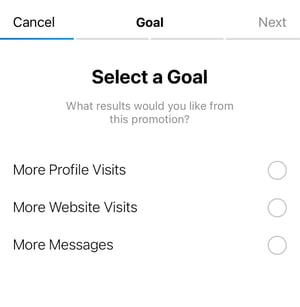
If you select “More Website Visits,” you’ll have to choose a destination for your users as well as your action button, i.e. your CTA. Here are the six button options:
- Learn More
- Shop Now
- Watch More
- Contact Us
- Book Now
- Sign Up
3. Define your audience.
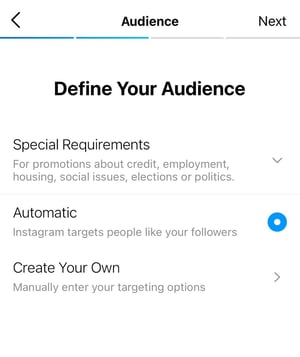
When you choose “Automatic,” Instagram will simply target users who match your current followers’ interests and demographics, specifically those who have engaged with your content before. With the “Create Your Own” option, you can filter your audience by location, interest, age, and gender.
4. Set up a daily budget and a promotion duration.
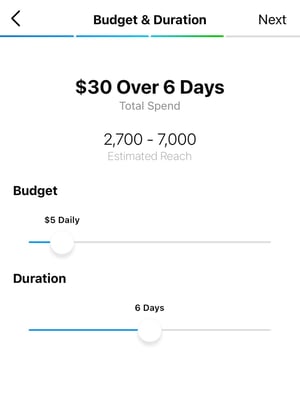
Your daily budget range from $1 to $1,000 and the promotion can last anywhere from 24 hours to 30 days. Instagram recommends starting with a least $5 to reach a good pool of users.
5. Review your promotion and click “Create promotion.”
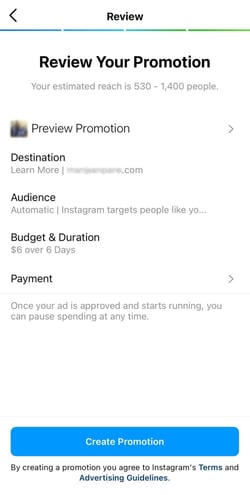
One thing to note is that Instagram will run your promotion on feeds, Stories, and the Explore tab – regardless of where it was originally published. Based on initial data, it will determine to run it where it performs best.
Once you submit your ad, it will go through an approval process, which usually takes 24 hours.
Best Practices for Building a Good Instagram Promotion
1. Promote top-performing content.
While you may be tempted to promote posts that need a little love, resist the urge. You may end up wasting money on a post that doesn’t have great potential.
If your brand is considering boost a one-off post, focus instead on posts with already high engagement.
Why? Well, these posts have already performed well with your followers. This is a good indication that they may perform well with the audience you haven’t yet reached.
2. Make sure your landing page is mobile-friendly.
Instagram is a mobile-first application.
As such, if you’re taking users to a website, make sure it offers a good user experience for mobile users. If not, you’ll end up with a high bounce rate and a low return on ad spend (ROAS).
A few things to keep in mind when designing for mobile:
- Have a single-column layout – This makes the page much easier to scan and navigate.
- Avoid too many images and videos – They may up too much space and crowd the site. And they can cause slower loading speeds.
- Keep your copy short – What seems like perfectly spaced paragraphs on a desktop can easily become overwhelming on mobile.
3. Know your goal is ahead of time.
It’s important that you prepare your Instagram profile and/or landing page ahead of your promotion.
You want to make sure you’re ready to convert those users once they’ve clicked on your ad. Otherwise, what’s the point?
If your goal was to get more profile visits, be sure to have a visually appealing grid, a descriptive bio, and updated contact information.
If you’re hoping for more messages, consider adding a question in your ad to encourage conversation.
The earlier you start preparing, the more ideas you can develop to attract and convert your target audience.

13 Examples of Meme Marketing + 4 Best Practices to Follow
My social media feeds are made up of 90% memes.
They’re usually posted by people I follow but every once in a while, a brand will post a meme and add their own spin on it. When it’s done right, those are the brands whose content I engage with the most.
What was once considered a trend reserved for Millennials and Gen Z has now evolved into an effective way for brands to engage with their audience.
Let’s talk about what meme marketing is, how you can leverage it, and see examples of brands getting it right.
A quick background on memes – they’re concepts, behaviors, or ideas that spread on the internet. A meme can be any type of media format, including a GIF, video, text-post, or basic image.

The truly successful memes spread like wildfire. That’s exactly why marketers want to leverage these already viral pieces of creative for their own marketing.
Another benefit to meme marketing is that it’s low effort. Most of the work has already been done: It’s being shared all over social media and it has a clear concept. All you have to do is fit the meme to your brand and hit “post.”
Furthermore, memes help bring communities together. Not only are users tempted to like and comment on them, but they also want to share them.
Now that we know the benefits of using meme marketing, let’s get to a few examples of brand memes in the wild.
Meme Marketing Examples
1. Kai Collective

Black wojak memes started spreading on the interwebs in the fall of 2020. It wasn’t until December of the same year that it went viral, with users creating their own version of the hilarious meme.
Kai Collective was one of them.
The concept behind this particular meme– I say particular because there are multiple variations of this meme – is simple: One Black girl meets another Black girl, they bond over something and become friends.
Kai Collective made its own version of this meme to highlight its product, a print top. Instead of simply adding the text, they took it one step further by adding their clothing and making it a truly custom meme.
2. The Living Potion

When rapper Drake released the cover for his “Certified Lover Boy” album, it instantly went viral.
The artist had accomplished his goal of creating a meme-able cover and the public took no time to create their own versions.
This perfume brand not only included its product in the meme but also labeled each one for even better recall.
It’s a great example of how to use a meme that is fun but also ties back to your brand.
3. Netflix’s Strong Black Lead

One thing Netflix’s social media team is great at? Creating their own memes.
The brand will often take the concept behind a popular meme and recreate it with their own image.
Netflix leverages its extensive media library to (re)create relevant, funny memes like the one above.
4. Ruka Hair

A meme list wouldn’t be complete without Oprah Winfrey.
This one came from from the highly viewed special “Oprah with Meghan and Harry.”
In addition to the iconic line – and quite possibly best follow-up interview question of all time – “Were you silent or were you silenced?” this image quickly made its rounds on social media.
It shows Winfrey raising her hands up in disapproval and looking away.
Haircare brand Ruka Hair created its own version of the meme to point out a major pain point for gel users.
Memes are so popular because they’re relatable. If your brand is brainstorming meme ideas, think of your user persona. What are some challenges they deal with? How are they approaching those challenges?
You’ll probably find a humorous, meme-worthy answer.
5. Diamond Express Travels

The rapper Drake has been the face of quite a few memes. That’s likely what inspired his latest album cover, as referenced above.
The original meme shows him avoiding or disliking something he’s presented, then agreeing with the new option he’s presented.
In actuality, this was taken from a music video the artist shot as he was dancing. But we’ll save the meme origin stories for another time.
Travel agency Diamond Express Travels uses the meme to highlight a pain point many travelers may have: The burden of planning and booking your own vacation.
Another thing to note is their logo addition.
Because of how shareable memes are, brands are encouraged to add their logo or name on a meme to ensure they remain top of mind when their post spreads.
6. Hydrop.io

I’ve seen this meme die down and come back to life many times over the past few years.
One look at the picture and you understand exactly what’s going on: The man featured in the middle is distracted by someone who walks past him while he is with someone else.
Hydrop.io, a water company based in India, created this meme to depict how its target audience views various types of water. And, they dive further into this idea in the caption by highlighting the benefits of alkaline water.
Sometimes, the meme speaks for itself. In this case, you can use it to supplement a message you want to share to your audience.
7. Black Rooster Taqueria

Sometimes, one Oprah meme isn’t enough.
Here’s another example of how the interview that attracted 17.1 million viewers resulted in multiple memes for our enjoyment.
In this case, Mexican restaurant Black Rooster Taqueria took a simple approach to share its value proposition: Why deal with bland, cold flour tortillas when you could get fresh, authentic corn tortillas?
If you’re just discovering this brand, this meme tells us a little bit about them while garnering a quick laugh.
8. Mypsomagen

The Met Gala is the unofficial meme generator.
Every year, you can expect to see dozens of memes created from celebrity looks at this star-studded event.
This one features sisters Kendall Jenner and Kim Kardashian and works in multiple contexts, before-and-afters, light and darkness, positives and negatives.
Biotech company Mypsomagen cleverly promoted its product kit Gutbiome+ with this meme.
When done right, a meme should get your audience laughing and interested in engaging with your brand.
9. Clean Skin Club

Another popular figure in memes is none other than politician Bernie Sanders.
When he’s not floating around the internet for seeming completely unenthused at the 2020 presidential inauguration,
I’m not quite sure what caused this meme to go viral, but once it did, everyone was changing the end of this sentence to match their own demands.
For brands, it works as a fun way to speak directly to your audience and ask them to take a particular action.
10. Purity Coffee

Memes can emerge from just about any image, no matter how old or high-quality it is. If one social media user creates something funny from it, it has the potential to spread and be used worldwide.
This meme came from the 2002 Star Wars film, “Episode II – Attack of the Clones.”
It shows a conversation between two people as one says something that brings happiness and excitement to the other. That is until they realize it may not be so great after all.
Coffee brand Purity Coffee not only educates its audience on an issue they may not be aware of but also boosts its own value in the process.
As shown in this example, memes offer a great opportunity to highlight issues that your brand helps resolve or address.
11. Yappy

This meme is an oldie but a goodie.
From solving cliffhangers from TV dramas to developing conspiracy theories, this meme works in many different contexts.
In this example, pet store brand Yappy pokes fun at its core audience, likely animal lovers who have a constant desire to adopt pets.
When you know and understand your user persona, you can create memes that really resonate with your audience, leading to higher engagement rates.
12. Telfar

If you can’t find a meme that fits your brand, make one. That’s exactly what luxury purse brand Telfar did.
They took two still frames from the 2004 movie, “White Chicks,” and replaced part of the original line with its own.
It fits perfectly in this case and is a great example of how to leverage existing media for your own use.
13. Anima Iris

The phrase, “How It Started…How It’s Going” took over Twitter for the better part of 2020.
The great thing about it is that it ages pretty well, unlike most memes which have a short shelf life. It’s a trend that brands can take part in to share their origin story.
Luxury purse brand Anima Iris shared pictures of its CEO in the early stages of the brand to where it is today.
This type of trend allows your brand to connect with your audience and invite users to learn more about you.
Meme marketing is a surefire way to build community and potentially grow your brand awareness. With this in mind, you want to make sure you’re doing it right.
1. Stay on brand.
As with any marketing strategy, you want to make sure your meme feels authentic to your brand. The thing with trends is that everyone wants to jump on and make sure they don’t miss the train.
The thing is, not every viral meme will be a good fit for your brand. Be selective about which memes you create and which ones you let go of.
2. Don’t be offensive.
On that same note, make sure your meme isn’t offensive.
Brands can get themselves in hot water when they join in on the meme fun without thinking through the implications. Here are a few questions to ask before you join in. Does the meme:
- Make fun of a particular group or community?
- Include insults, slurs, or charged words?
- Rely on the use of suggestive imagery or language?
If you answer “yes” to any of these questions, you may want to reconsider its use.
3. Follow the unofficial meme rules.
There’s nothing worse than a meme done wrong.
It’s like when parents use teenage slang in the wrong context, it’s cringy and makes you stand out like a sore thumb.
Here are the guidelines to keep in mind:
- Keep it short and sweet.
- Use easy-to-read, large text.
- Make sure your meme is still recognizable after customizing it.
- Don’t try to change the meaning of the meme, that may confuse users.
- Avoid including CTAs in your meme.
4. Strike while the iron is hot.
Ideally, you want to share your meme as it peaks, not when it’s already made its rounds.
Because once interest has died down, you may not get the traction you want from your audience.
Whenever it makes sense for your brand, use meme marketing. It’s a simple but creative way to share your brand narrative while engaging your audience.

Inbound Marketing vs. Outbound Marketing
When I talk with most marketers about how they generate leads and fill the top of their sales funnel, most say outbound marketing.
However, a lot of innovative and successful businesses are actually embracing the art of inbound marketing.
So, what’s the difference between inbound and outbound? This post will walk you through it along with the benefits and drawbacks of each strategy.

From email blasts to outsourced telemarketing, I call these methods “outbound marketing” because marketers push their messages out far and wide hoping that it resonates with that needle in the haystack.
I think outbound marketing techniques are getting less and less effective over time for two reasons.
First, your average human today is inundated with at least 2,000 outbound marketing interruptions per day and is figuring out more and more creative ways to block them out, including ad blocker browser extensions, caller ID, email spam filtering, and more.
Second, the cost of learning something new or shopping online using search engines, blogs, and social media is now much lower than going to a seminar at the Marriott or flying to a trade show in Las Vegas.
Inbound vs. Outbound Marketing
Inbound marketing is a strategy where you create content or social media tactics that spread brand awareness so people learn about you, might go to your website for information, show interest in your product, and potentially make a purchase.
While some outbound strategies take lots of time and effort and may yield no leads, inbound strategies allow you to engage an audience of people that you can more easily qualify as a prospect of lead.
The best analogy I can come up with is that traditional marketers looking to garner interest from new potential customers are like lions hunting in the jungle for elephants.
The elephants used to be in the jungle in the ’80s and ’90s when they learned their trade, but they don’t seem to be there anymore. They have all migrated to the watering holes on the savannah – the internet in our case.
So, rather than continuing to hunt in the jungle, I recommend setting up shop at the watering hole or turning your website into its own watering hole.
Transforming Your Marketing from Outbound to Inbound
Rather than doing outbound marketing to the masses of people who are trying to block you out, I advocate for inbound marketing, where you help yourself be visible to people already interested in your industry.
To do this, you need to set your website up like a “hub” for your industry. One that attracts visitors naturally through search engines, blogging, and social media.
I believe most marketers today spend 90% of their efforts on outbound marketing and 10% on inbound marketing, and I advocate that those ratios flip.
To do so, follow the “Attract, Engage, Delight” model.
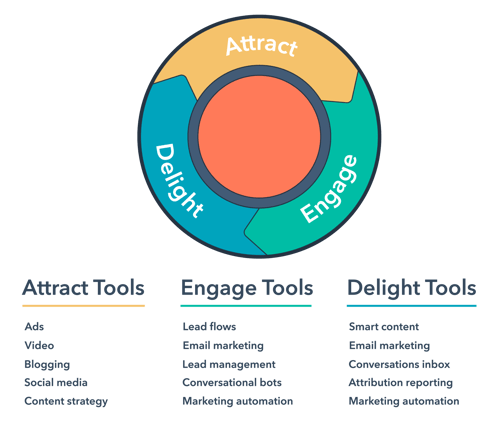
To attract your audience, develop a strong content strategy.
You want to have content for every stage in the marketing funnel. For consumers in the awareness stage, social media and ads will work great to introduce users to your brand and product.
Blogging will position you as a credible and trustworthy source within your industry and allow your target audience to find you.
During this process, it’s also important to develop an SEO strategy to ensure your website is optimized for search.
Once visitors turn into leads, you can nurture them through email marketing, conversational chatbots, and automated workflows.
In the “Delight” stage, your goal is to ensure your audience can easily connect with your sales and service teams, and resolve their issues quickly.
Inbound marketing is all about meeting your audience where they’re at. You’ll quickly find that your marketing efforts are performing better and helping your brand grow.
Editor’s Note: This post was originally published in 2010 but has been updated for comprehensiveness.