Welcome to My Blog
Cloud Integration: 6 Best Cloud Integration Platforms & Tools
Cloud-based applications make it possible for marketing teams to connect with customers, conduct critical research, and make data-driven decisions that can help boost ROI.
The challenge? With other business departments using their own sets of cloud apps and services, silos quickly emerge. And this departmental disconnect is growing as application volumes increase: Recent survey data found that large businesses use 175 cloud-based apps on average, while smaller companies deploy 73 on average.
Cloud integration platforms offer a way to bridge this digital divide by making it possible for IT teams to monitor and manage disparate applications from a single, centralized system. In this post, we’ll cover what cloud integration is and the best tools you can use to break down departmental silos.

Cloud Integration: When and How
As noted by research firm Gartner, the software-as-a-service (SaaS) solutions market is on track to reach more than $122 billion in 2021, fueled in large part by the demand for agile and flexible applications that let teams work anywhere, anytime.
The more applications your business uses everyday, the more complicated your IT environment becomes. As a result, it’s often worth deploying cloud integration platforms as soon as possible — companies can get familiar with key features and functions before application volumes begin to scale up exponentially.
Integration itself can be handled in-house by deploying infrastructure and services that support cloud connections, but this approach is time-consuming and costly, even for large enterprises. Cloud integration platforms, meanwhile, are designed to streamline this connective process and reduce the amount of lead time required for deployment.
Benefits of Cloud Integration
Deploying cloud integration platforms provides several benefits for businesses, including:
Improved Collaboration
Silos are problematic for small businesses — if marketing teams are using one set of applications and data, while product development, production and HR teams are using another, the results can range from mismatched business objectives that limit ROI to duplicated work that reduces total efficiency.
Cloud integration platforms offer a way to connect disparate applications and departments, making it possible for teams to leverage and collaborate on the same data in real-time.
Increased Visibility
Companies also benefit from increased visibility when using cloud integration platforms. By unifying application environments under a single solution, IT teams can easily see what’s happening, when, and why. As a result, companies are better prepared to deal with application conflicts or team requirements as they arise, rather than after the fact.
Enhanced Cost Control
Cloud applications left unchecked and unmonitored come with significant costs over time, especially if they’re continually collecting or using data. Cloud integration makes it possible for businesses to see what’s running on their network and evaluate how often applications are used, allowing them to better manage and monitor overall technology costs.
Potential Pitfalls of Cloud Integration
Generally speaking, cloud integration platforms streamline the deployment, use, and monitoring of cloud-based applications. The evolution of this market vertical means that substantive challenges are few and far between, but there is a potential pitfall that businesses must address: Choosing the right platform.
With a host of options now available and each offering a different mix of features and functions, it’s easy to get bogged down in the details. The result? Businesses may end up selecting a platform that performs adequately rather than exceptionally given their specific mix of applications, services, and staff needs.
Need some help finding your best fit? Let’s break down the top cloud integration platforms, as rated by trusted review site G2.
1. JitterBit
G2 Rating: 4.7/5.0 (228 Reviews)
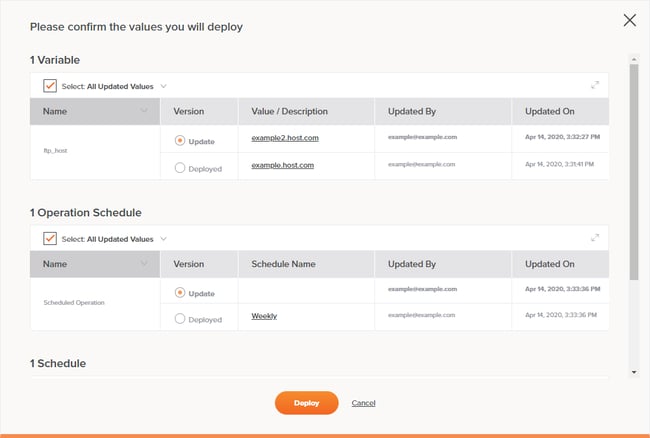 As one of the leaders in the iPaaS space, JitterBit lets you fuse thousands of SaaS, cloud, and on-premises applications into one interface. You can also leverage their pre-built templates and workflows to automate your business processes. Additionally, you can create new application programming interfaces (APIs) from your existing enterprise applications or data on their API platform. You can even blend your newly created APIs with external APIs to roll out new business solutions.
What we like:
Jitterbit is all about making it easy for companies to connect applications and APIs in days rather than weeks. The solution is used by thousands of companies worldwide and includes powerful app and API integration tools that empower businesses to not only streamline key processes but collect intelligence data on-demand.
2. Operations Hub
G2 Rating: 4.6/5.0 (297 Reviews)
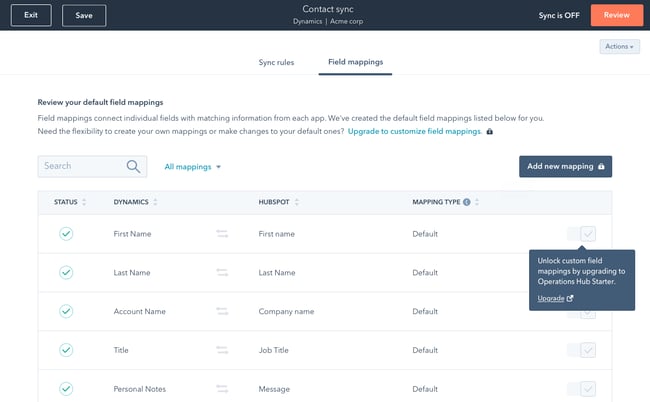
Operations Hub leverages intelligent 2-way sync technology from PieSync to update any customer’s information in one app after it changes in the other. The cloud integration platform also gives you complete control over the apps you choose to sync, consolidates customer information from multiple apps, and stores and updates all your data in one place so you can access it and make the most accurate data-driven decisions for your business.
What We Like
Sure, we’re a bit biased, but the fact remains that Operations Hub is one of the best-reviewed cloud integration solutions on G2. With a host of tools including data sync, data quality automation, and the ability to slice and dice data on-demand, Operations Hub has everything you need to run — and grow — your business.
3. Zapier
G2 Rating: 4.5/5.0 (729 Reviews)
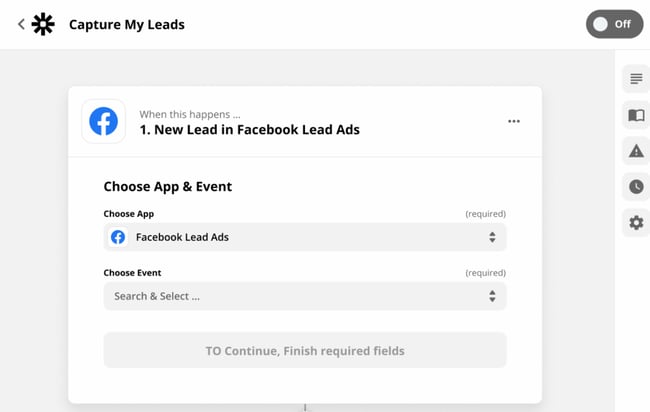 With the ability to connect to and share data with over 1,000 web apps, like Facebook, QuickBooks, and Google Drive, Zapier can automate almost any type of business process. All you have to do is build a workflow in their editor, pick the apps you want to include in your workflow, and watch your apps work together without additional intervention.
What We Like
Zapier is based on three key principles: Integrate, automate and innovate. Integration links web apps in just a few clicks, automation passes data between applications using workflows called “Zaps,” and innovation lets you build better processes with no code required. All told? It’s a win-win-win.
4. MuleSoft Anypoint Platform
G2 Rating: 4.5/5.0 (495 Reviews)
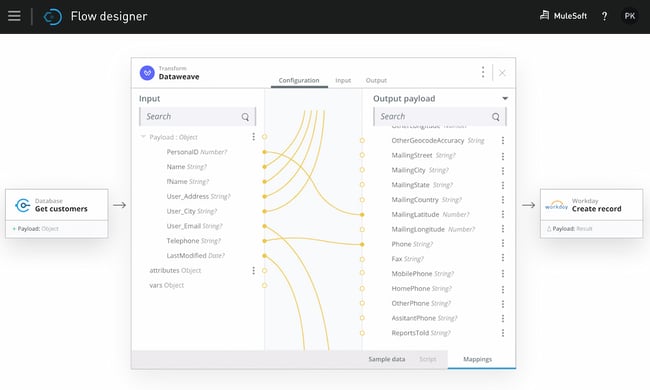 Trusted by over 1,600 enterprise companies, MuleSoft Anypoint Platform lets you manage all your APIs and integrations on one platform. You can also build and integrate your APIs; integrate with any application, data, or device; deploy on-premises integrations to the cloud without rewriting any code; and protect your data and administer access to employees by leveraging edge gateways and encryption.
What We Like
Mulesoft is all about speed and simplicity. Reusable API assets make it easy to create app integrations with just a few clicks, and machine-learning recommendations help automatically transform data. Plus, businesses get real-time visibility into APIs and integrations from a single interface.
5. IBM App Connect
G2 Rating: 4.3/5.0 (207 Reviews)
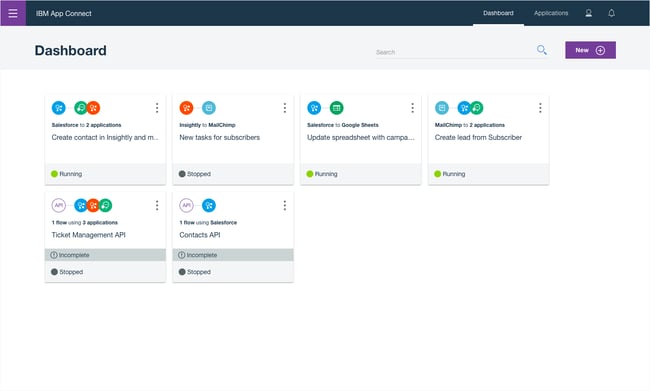 With IBM App Connect, you can integrate your data between on-premises and cloud-based applications, build APIs on an intuitive, code-free interface, and build workflows that automate your business processes within different apps. You can also deploy IBM App Connect in any cloud or on-premises environment.
What We Like
Part of the appeal here is that IBM has long been a leader in the technology integrations and operations space, but it’s the specifics of the solution that really set it apart. Using prebuilt app connectors and agile integration architecture (AIA), organizations can easily connect all apps across all environments for maximum operational flexibility.
6. Dell Boomi
G2 Rating: 4.2/5.0 (222 Reviews)
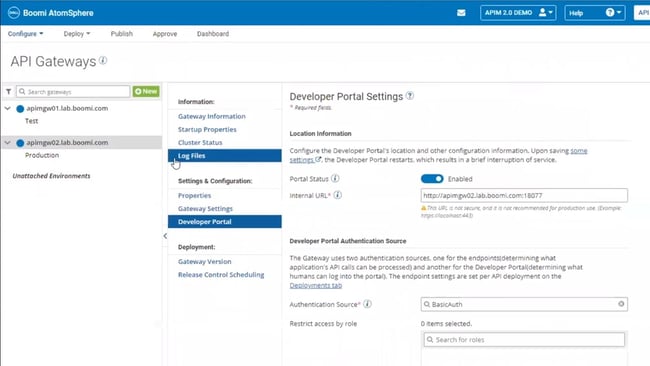 Trusted by over 8,000 brands, Dell Boomi lets you fuse all your digital platforms into one. By uniting all your data, applications, and processes, Boomi essentially stores all of your technology systems and assets in one place. With Boomi, you can also manage your APIs, maintain the quality of your data, build workflows with minimal coding knowledge, and develop applications.
What We Like
With more than 15,000 customers worldwide, Boomi remains one of the top cloud integration platforms. The Dell solution focuses on three key areas: Data, systems, and people. It promises instant integration of all three to help accelerate and simplify cloud-based operations.
Making the Most of Cloud Integration
Cloud integration platforms can help streamline and simplify application management across your small business. More importantly, they can help break down operational silos by providing a way for teams to collaborate and connect regardless of how, when, or where they use company data. This will empower your team to deliver actionable insights and make the most of cloud-based applications at scale.
Editor’s note: This post was originally published in May 2019 and has been updated for comprehensiveness.

LinkedIn vs. Facebook: Which Is Best for Your Business?
The slew of social media channels available today can paralyze even the savviest business owners.
Where do you start? Which one is best? How do you avoid wasting time on channels that won’t bring in a solid ROI? The struggle is real.

Facebook and LinkedIn are two of the biggest social media platforms and provide a number of opportunities to reach your audience. This leaves us with this question: Which one should you focus your efforts on?
We’ll cover the pros and cons of each platform below.
LinkedIn vs. Facebook for Business
Let’s recap quickly.
At its core, LinkedIn is a professional network that was initially created as a corporate recruitment platform. Now, it boasts many features similar to traditional social media sites, including status updates, blogging capabilities, and private messages.
It’s also the most effective platform when it comes to delivering content and securing audience engagement.
Facebook, on the other hand, was specifically designed as a place for people to share and communicate. The “sharing” element is its most prominent selling point, but there are still plenty of other features that allow businesses to effectively reach their audiences.
In fact, one survey by Facebook found that 74% of American consumers use the platform to discover new products and brands.
LinkedIn and Facebook both have the Groups feature that allows you to connect with other like-minded people, and they both have powerful ad setups.
So with similar features, what are the key differences between the two? We’ll cover those here.
Numbers-wise, Facebook wins hands down.
Facebook has an astounding 2.8 billion monthly active users (MAU) across the world, which makes LinkedIn’s 64.7 million MAU seem small in comparison.
On both platforms, the biggest age group is 25- to 34-year-olds, according to 2021 data from Statista. However, Facebook has a wider range of users with roughly 10% falling below 18 years old or above 64 years old.
This is because LinkedIn caters mostly to professionals looking to network whereas Facebook hosts the everyday consumer.
Furthermore, the 2020 State of Marketing Report by HubSpot revealed that marketers see the highest return on investment from Facebook, with LinkedIn being the 4th highest out of 8 platforms.
LinkedIn is a stronger B2B platform.
As mentioned before, LinkedIn is a go-to spot for business-driven individuals. As such, it’s a great platform for business-to-business brands.
Here’s a breakdown of why:
- It’s easy to identify key decision-makers (and reach them in ads).
- Social selling is embedded into the platform.
- It’s easier to network as the platform was built specifically for that purpose.
In fact, eMarketer reported that LinkedIn occupies the largest share of B2B display ad spending at 32%. But we’ll talk more about ads in this section.
Facebook may work better for brands that want to reach consumers directly. In addition, you gain access to ten times more prospects and have a great place to generate brand awareness and engagement. So, while Facebook leads in numbers, LinkedIn takes the win when it comes to generating tangible leads.
Thought leadership happens more organically on LinkedIn.
Thought leadership is one way brands are gaining credibility as well as visibility. According to a 2020 Thought Leadership Report by Survey Monkey, 66% of marketers consider it a top priority within their marketing team.
A thought leader’s role is to educate, encourage conversation and drive action. The same study shows that thought leadership programs help with lead generation and brand awareness efforts by increasing website traffic, media mentions, subscribers, and more.
When it comes to thought leadership articles, LinkedIn has a leg up. The platform is already designed for business conversations. As such, brands can have more success with thought leadership content compared to Facebook.
So, here’s a quick recap:
- Facebook pros: Large user base, proven ROI
- Facebook cons: Isn’t the best for B2B marketing
- LinkedIn pros: Business-driven platform, social selling and networking tools, great opportunities for thought leadership
- LinkedIn cons: Smaller user base
Now that we’ve taken a general look at the two platforms, let’s take a more detailed look at some of the key features they have for businesses.
LinkedIn Groups vs. Facebook Groups
The Groups feature on both LinkedIn and Facebook gives businesses the chance to mingle and connect with prospects and other like-minded businesses.
However, it’s critical to keep in mind people’s motives when they’re on different sites. When users are engaging with others in LinkedIn Groups, there’s a high chance they’re in a work-related mindset in some capacity.
In Facebook Groups, on the other hand, people are more likely to share their personal opinions on everything – from lifestyle and food to politics and hobbies.
So, when determining which Groups feature is best for you, think about the audience you’re targeting.
For instance, if you’re targeting general consumers with an interest in cooking because you’re selling the latest food blender, Facebook Groups is probably the way to go.
However, if you’re selling a high-priced service for top-tier management personnel, LinkedIn Groups might be a better bet.
Finally, let’s touch on the ads aspect of both platforms.
In terms of variety, both platforms have reached pretty equal footing.
While Facebook has boasted a diverse range of ad types for years (we’re talking canvas, carousel, video, dynamic, and lead ads just to name a few), LinkedIn now also offers several ad formats, including video, carousel, lead, dynamic, and Sponsored InMail ads.
Each offers a user-friendly ad manager. This means that you can start organizing your creative assets on a content marketing platform like Casted, then build your ad in just a few steps on either LinkedIn or Facebook.
Targeting-wise, if you think Facebook has the capability of reaching more people, you’re right. However, this doesn’t mean that LinkedIn doesn’t have powerful targeting capabilities.
Both platforms are centered around user input and serve up ads and content relevant to the information their members give them.
On both Facebook and LinkedIn, you can target users based on job title, household income, company, location, and age on both platforms. Where Facebook has the upper hand is that you can dig a little deeper on Facebook, targeting users depending on their life milestones, behavior, and other personalized information.
In addition, both platforms allow brands to use source audiences to reach consumers who are similar to their current audience. Facebook calls it “Lookalike Audience” while LinkedIn has named it “Audience Expansion.”
Lastly, it’s important to consider the cost.
Typically, you get more for your money on Facebook. According to WebFX, the average cost-per-click for a LinkedIn ad is a whopping $5.26, compared to just $0.97 with Facebook.
However, a higher cost doesn’t necessarily translate to a higher return on ad spend (ROAS).
Who Wins? You Decide
While LinkedIn and Facebook do share common features, it’s clear their purpose and audiences are quite different.
Which one you decide to use depends entirely on what industry you’re in, who you’re trying to reach, and your marketing goals.
It’s also important to note that you don’t necessarily have to choose. Perhaps you use LinkedIn for a targeted lead generation campaign, while you use Facebook to increase brand awareness and engage with your customers.
Editor’s Note: This post was originally published in August 2019 and has been updated for comprehensiveness.


310 Best Instagram Captions: Good, Cool, Funny, & Cute IG Quotes
If you’re anything like me, you take about four minutes choosing a filter for your Instagram photo, and about four hours deciding on a caption.
Worst of all, after much creative effort and advice from friends, I’m usually barely able to write a caption that goes beyond, “Had a fun day with friends!”
And I’m a writer — go figure.
Next time you’re contemplating a witty line of text to go with your Instagram photo, take a look at our complete list of captions that suit any mood or occasion you’ll be sharing with the world. You can also customize these captions to make them perfect for your feed.
Want more inspiration? Check out our Instagram page to see how we incorporate fun, witty, and engaging captions into our social media content.

You can incorporate many of these captions into an Instagram business strategy (just make sure your audience would find your caption funny, clever, or the right amount of sassy).
Click one of the following links to jump to a section:
- Business Instagram Captions
- Quote Instagram Captions
- Funny Instagram Captions
- Clever Instagram Captions
- Cute Instagram Captions
- Sassy Instagram Captions
- Song Lyrics for Instagram Captions
- Holiday Instagram Captions
- Seasonal Instagram Captions
- Selfie Instagram Captions
- Vacation Instagram Captions
Business Instagram Captions

- Good evening, [city]! We’re in town for [event] at Booth [#]. Stop by and say hi!
- “If you’re offered a seat on a rocket ship, don’t ask what seat. Just get on.” -Sheryl Sandberg, COO of Facebook
- Our [#]-person squad completed the [road race name]! And we did it all for the post-run sneaker selfie. 👟
- We got product in the pipeline … check back for an exciting announcement on [date]!
- Diversity isn’t a recruitment metric — it’s an ingredient for success. At [company], we thrive on the unique backgrounds, experiences, and perspectives of our people.
- Spot the CEO. 😉
- At [company name], our best asset is our people.
- We had a great time with our customers at [meeting/event]! @[client/partner], you guys rock.
- Thrilled to have [customer] at our office today! Come back any time. 😊
- [Company name] is off for [holiday]! We hope you all have a safe long weekend.
- Big things have small beginnings. [Company]’s HQ began right here.
- “It is better to fail in originality than to succeed in imitation.” –Herman Melville
- How many [company name] employees does it take to spell “TEAM”?
- Want to work with these awesome people, working on a lot of awesome things? We’re hiring! Click the link in our bio to see our current openings.
- Check, check, one, two … is this thing on? [Company name] is now on Instagram! Follow us to learn about our culture, product, and (awesome) people.
- Tired of [customer pain point]? We’ve got good news. Click the link in our bio to learn about [product]’s latest feature.
- [Company] presents our latest product — made with love just for you. ❤️ Link in bio to learn more.
- Stop wasting time with [customer pain point]. Our [product] will help you achieve [X] more efficiently — just ask our current customers. Check out our latest case study here: [Link]
- Handmade in [location] and delivered to your door. That’s the [Company] promise.
- When life gives you lemons, you make lemonade. When [company name] gives you [type of product], you make money.
Quote Instagram Captions
- “The greatest glory in living lies not in never falling, but in rising every time we fall.” –Nelson Mandela
- “Always remember that you are absolutely unique. Just like everyone else.” -Margaret Mead
- “You change the world by being yourself.” -Yoko Ono
- “In the end, it’s not the years in your life that count. It’s the life in your years.” -Abraham Lincoln
- “What I know for sure is that speaking your truth is the most powerful tool we all have.” – Oprah Winfrey
- “The purpose of our lives is to be happy.” -Dalai Lama
- “You only live once, but if you do it right, once is enough.” -Mae West
- “Live in the sunshine, swim the sea, drink the wild air.” -Ralph Waldo Emerson
- “I would rather die of passion than of boredom.” -Vincent van Gogh
- “Success isn’t about the end result, it’s about what you learn along the way.” -Vera Wang
- “It does not matter how slowly you go as long as you do not stop.” -Confucius
- “Everything you’ve ever wanted is on the other side of fear.” -George Addair
- “You become what you believe.” -Oprah Winfrey
- “Believe you can and you’re halfway there.” -Theodore Roosevelt
- “The way to get started is to quit talking and begin doing.” -Walt Disney
- “Love the life you live. Live the life you love.” -Bob Marley
- “My mission in life is not merely to survive, but to thrive; and to do so with some passion, some compassion, some humor, and some style.” -Maya Angelou
- “Embrace what makes you unique, even if it makes others uncomfortable.” – Janelle Monae
- “Success is a collection of problems solved.” – I.M. Pei
- “To be beautiful means to be yourself. You don’t need to be accepted by others. You need to accept yourself.” -Thich Nhat Hanh
- “In a gentle way, you can shake the world.” -Gandhi
- “I dream. Sometimes I think that’s the only right thing to do.” -Haruki Murakami
- “We become what we think about.” -Earl Nightingale
- “Success is not final, failure is not fatal: it is the courage to continue that counts.” –Winston Churchill
- “You are never too old to set another goal or to dream a new dream.” -C.S. Lewis
- “If you are depressed you are living in the past. If you are anxious you are living in the future. If you are at peace you are living in the present.” -Lao Tzu
- “Life is like riding a bicycle. To keep your balance, you must keep moving.” -Albert Einstein
- “If you are working on something that you really care about, you don’t have to be pushed. The vision pulls you.” -Steve Jobs
- “Security is mostly a superstition. Life is either a daring adventure or nothing.” – Helen Keller
- “Stay true to yourself and never let what somebody else says distract you from your goals.” -Michelle Obama
Funny Instagram Captions
- My favorite exercise is a cross between a lunge and a crunch … I call it lunch.
- I need a six-month holiday, twice a year.
- We tried to be normal once. Worst two minutes of our lives!
- There are 16-year-olds competing at the Olympics and some of us (me) still push on “pull” doors.
- That awkward moment when you’re wearing Nike’s and you can’t do it.
- I’m just a girl, standing in front of a salad, asking it to be a cupcake.
- What if we told you … you can eat without posting it on Instagram?
- I know the voices in my head aren’t real, but sometimes their ideas are just too good to ignore.
- We don’t know what’s tighter: Our jeans or our company culture.
- Friday … Our second-favorite F word.
- We don’t care what people think of us. Unless they’re our customers. We definitely care what customers think of us.
- All you need is love … and investors. All you need is love and investors.
- Hi, we’re [company name]. We build amazing apps and eat amazing apps.
- They say “Do what you love and money will come to you.” Let’s see what happens, I just ordered tamales.
- My favorite subject in school was recess.
- No thoughts brain empty just tacos and cats.
- [Food item] so good it’s got me weak in the knees.
- The best part about waking up is going to sleep eighteen hours later.
- The older you get, the better you get, unless you’re a banana.
- Bring the alcohol! Because no great story started with someone eating a salad.
- Don’t worry if plan A fails. There are 25 more letters in the alphabet.
- If you’re not supposed to eat at night, why is there a light bulb in the refrigerator?
- First rule of Sundays: If you can’t reach it from your couch, you don’t need it.
- If you fall, I will be there. Signed, Floor.
- The first thing I do after coming to work is logging off.
- I used to think I was indecisive, but now I am not so sure.
- Friends buy you lunch. Best friends eat your lunch.
- Darn it, just accidentally had another thought again.
- My goal this weekend is to move… just enough so people don’t think I’m dead.
- You think nothing is impossible? Try getting me out of bed before 12 PM.
Clever Instagram Captions

- Patience — what you have when there are too many witnesses.
- Maybe she’s born with it, maybe it’s the Clarendon filter.
- “Life is short.” False — it’s the longest thing you do.
- Happy Sunday! There may be no excuse for laziness, but I’m still looking.
- Rejection is just redirection.
- Better an “oops” than a “what if.”
- Anyone looking for a heart? Selling mine for $2. (Used, good condition)
- The world is changed by your example, not your opinion.
- Seven billion smiles and these are my favorite.
- Stop working hard and start working smart.
- I found your nose. It was in my business.
- Imposter complex is just a byproduct of success.
- Life is simple. It’s just not easy.
- The best times begin at the end of your comfort zone. So you can catch me on the opposite end of the end of my comfort zone.
- When nothing goes right, go left.
- “Success is making those who believed in you look brilliant.” -Dharmesh Shah
- “If you can’t convince them, confuse them.” -Harry Truman
- The world changes by your example, not your opinion. So get acting right.
- It’s always a good idea to be on the right side of history.
- When you learn, teach. When you get, give.
- Don’t quit your daydream.
- Legend has it that if you look hard enough you’ll see the weekend approaching!
- It’s time to make new memories. But first, five tequila shots.
- I’m on a seafood diet. I see food, I eat it.
- Sorry I didn’t get back to your text. I was too busy converting oxygen into CO2.
- Living on Earth is expensive, but it does include a free trip around the sun.
- “Arguing with a fool proves there are two.” -Doris M. Smith
- Well, enough about me. Let’s talk about you. What do you think about me?
- We’re all one more minute closer to dying. What’s one more shot going to do?
- There’s a pot of gold at the end of the rainbow. If you find it, let me know so I can get some.
Cute Instagram Captions
- Don’t give up on your dreams. Keep sleeping.
- My fave sound is you snoring next to me.
- Here’s to a hundred more years with you.
- Happiness is watching you do what you love 💗 Hopefully that’s me.
- I like you more than [food]. And I looove [food].
- Wearing a onesie to bed just in case my SO steals the covers again.
- Cuddle time with the pup 💞
- Just showing off my [item] a little. Be jealous.
- Always wear cute pajamas to bed; you never know who you’ll meet in your dreams.
- You got me like 🥴️
- I’d move to [state] for you. And I hate [state].
- 🥺️ 👉👈
- I have no idea what I was doing before you came around. Sleeping, probably.
- No one can touch my books or my tacos 😤
- Not me standing there like🧍♂️
- Don’t mind me while I drink my tea 🍵
- Did someone say [something you like]? 🏃💨
- They say elephants have a perfect memory. So do I when it comes to you.
- My pup is the salsa to my whole enchilada.
- I hate it when I’m singing a song and the artist gets the words wrong.
- Being an adult is like folding a fitted sheet. No one really knows how.
- Here’s a 🥇 for being the cutest human to walk this earth.
- Me before you: 🌱 Me after you: 🌻
- 🤟
- Just got that Friday feeling.
- Are you a timekeeper? ‘Cause time slows down when I’m with you.
- I can’t see heaven being much better than this.
- I’m not lazy, I’m on energy-saving mode.
- My pillow is my best friend (sorry, [best friend’s name])
- A day doing [activity] is a day well-spent.
Sassy Instagram Captions
- What’s a queen without her king? Historically speaking, more powerful.
- Be a little more you, and a lot less them.
- We’re an acquired taste. If you don’t like us, acquire some taste.
- Well-behaved people don’t make it into history books.
- Be sunshine mixed with a little hurricane.
- We got 99 problems, but an awesome marketing team ain’t one.
- Sometimes you just need to do a thing called “what you want.”
- You can’t do epic stuff with bad people. And we got the best in the biz.
- It’s not called being bossy, it’s called having leadership skills.
- You did not wake up today to be mediocre.
- A bad attitude is like a flat tire. You can’t go anywhere until you change it.
- We’re entrepreneurs. They call us dreamers, but we’re the ones who never sleep.
- All of us have the capacity to light up a room. Some when they enter, others when they leave it.
- Brains are awesome. I wish everybody would have one.
- Common sense is like deodorant. The people who need it most never use it.
- You see that? That’s my patience leaving.
- I’ll have you know, I’ve completed plenty of marathons. [Show 1], [Show 2], and [Show 3], to name a few.
- Everyone has that one annoying friend. If you don’t have one, then it’s probably you.
- Above: A photo of me pretending to be listening.
- Oh, you sent me an email? Expect a response in approximately never.
- Everyone is entitled to be stupid, but some abuse the privilege.
- If you like me, raise your hand. If not, then raise your standard.
- If you don’t succeed the first time, then burn all the evidence you tried.
- Underestimate me. That’ll be fun.
- I like my coffee how I like myself: Dark, bitter and too hot for you.
- People say I act like I don’t care. It’s not an act.
- They say good things take time … that’s why I’m always late.
- Focused. Intelligent. Motivated. Oh, and cute.
- “The question isn’t who is going to let me: it’s who is going to stop me.” -Ayn Rand
- It’s okay if you don’t like me. Not everyone has good taste.
Song Lyrics for Instagram Captions

- “I’m gonna live like tomorrow doesn’t exist.” — Sia, “Chandelier”
- “I live for the nights that I can’t remember, with the people that I won’t forget.” — Drake, “Show Me a Good Time”
- “I hope you never lose your sense of wonder.” — Lee Ann Womack, “I Hope You Dance”
- “You may say I’m a dreamer, but I’m not the only one.” — John Lennon, “Imagine”
- “If you give, you begin to live.” — Dave Matthews Band, “You Might Die Trying”
- “Outlining my findings, using life as a stencil.” — Kero One, “In All the Wrong Places”
- “Feeling good living better.” — Drake, “Over My Dead Body”
- “Say oh, got this feeling that you can’t fight, like this city is on fire tonight.” — OneRepublic, “Good Life”
- “Time makes you bolder.” — Fleetwood Mac, “Landslide”
- “If I fail, if I succeed, at least I’ll live as I believe.” — Whitney Houston, “The Greatest Love of All”
- “The rest of the world was in black and white, but we were in screaming color.” — Taylor Swift, “Out of the Woods”
- “Lightning strikes every time she moves.” — Calvin Harris, “This Is What You Came For”
- “We aren’t ever getting older.” — Chainsmokers, “Closer”
- “Sing with me, sing for the years, sing for the laughter, sing for the tears.” — Aerosmith, “Dream On”
- “Life is good.” — Future & Drake, “Life is Good”
- “Life without dreaming is a life without meaning.” – Wale, “Aston Martin Music”
- “But like the sun, know you know I find my way back ‘round.” — J. Cole, “Crooked Smile”
- “I will overcome any hurdle or obstacle that’s in my path.” — OutKast, “Knowing”
Holiday Instagram Captions
New Year’s Instagram Captions
- “Always bear in mind that your own resolution to succeed is more important than any other.” — Abraham Lincoln
- Didn’t make it to midnight.
- Resolutions are made to be broken.
- Ringing in the new year — like a bell.
- “Tomorrow is the first blank page of a 365-page book. Write a good one.” — Brad Paisley
- New year, same me.
- Time to show off my bubbly personality.
- Any excuse to wear glitter.
- Starting off the year on the right foot.
- There are 12 months ahead of us to make a difference.
- Day 1 of 365
- Sip, sip, hooray!
Valentine’s Day Instagram Captions

- Roses are red. Violets are blue. Consider this post my Valentine to you.
- Don’t tell me you love me. Tell me you’re outside with pizza.
- All I need is you. (And maybe wine + chocolate too.)
- “You can’t blame gravity for falling in love.” — Albert Einstein
- 99% of my socks are single, and you don’t see them crying about it.
- I will do anything for love. Except that. And that. Or that. Or…
- Sorry, I’m in a relationship with tacos.
- “All the single ladies…” — Beyonce, “Single Ladies”
- In love with my best friend.
- I’m better when I’m with you.
Halloween Instagram Captions
- Creepin’ it real.
- I brake for Reese’s Peanut Butter Cups.
- “When the spooks have a midnight jamboree, they break it up with fiendish glee…” — The Legend of Sleepy Hollow (1949)
- You’re just my (blood) type.
- How to eat candy corn: don’t.
- #squadghouls
- Double, double toil and trouble; Fire burn and cauldron bubble.
- Driving me batty.
- “Scary hours.” — Drake
Thankgiving
- I’m wearing my elastic pants.
- “For those of you who cannot be with family this Thanksgiving, please resist the urge to brag.” — Andy Borowitz
- On a veggie diet this Thanksgiving: Carrot cake and pumpkin pie.
- “Be thankful for what you have; you’ll end up having more. If you concentrate on what you don’t have, you will never, ever have enough.” — Oprah Winfrey
- I think, therefore I cran.
- Bad day to be a turkey.
- Need fuel for Black Friday.
- “Okay, guys. I have exactly 28 minutes before I have to baste again.” — Monica
- Grateful. Thankful. Blessed.
- Who made the potato salad?
- There’s always something to be thankful for.
Christmas & Hannukah Instagram Captions
- You sleigh me.
- Fa la la la llama.
- “O Christmas tree, O Christmas tree, your ornaments are history.” — The Cat
- “It’s not what’s under the Christmas tree that matters. It’s who’s around it.” — Charles M. Schulz
- Dear Santa, let’s not talk about this.
- Rebel Without a Claus
- Doesn’t Santa have anything better to do than watch us while we’re sleeping?
- All I want for Christmas is you (and wine would be nice).
- To all you cotton-headed ninny-mugginses out there.
- Drop it like a top.
- Wishing you a latke love this Hanukkah.
- I want to eat 8 latkes for the calories of one.
- One little candle can light up an entire room.
- Keep calm and spin that dreidel.
- Deck the halls with matzo balls!
- It’s Christmas time and I’m the gift.
- The best gift is to be present with the ones you love.
Seasonal Instagram Captions
Spring Instagram Captions
- Hello, spring!
- “And I think to myself, what a wonderful world.” — Louis Armstrong
- April showers bring May flowers.
- I think I just experienced all the seasons in a single day.
- I love allergy season, said no one ever.
- Currently soaking up the sun and smelling the roses. Please leave a message after the beep.
- I owe a lot to the inventor of flip-flops.
- “Here comes the sun, and I say… It’s all right.” — The Beatles
- “Warm winds in the springtime.” — SZA, “Warm Winds”
- Springing into the new season.
Summer Instagram Captions

- “Live in the sunshine. Swim in the sea. Drink in the wild air.” — Ralph Waldo Emerson
- Life’s a beach.
- School’s out, sun’s out, guns out.
- “A little bit of summer is what the whole year is all about.” — John Mayer
- 90% happy, 10% burnt.
- Girls just want to have sun.
- “Summer lovin’ had me a blast, summer lovin’ happened so fast.” — Grease
- Happiness is a cold popsicle.
- Life is better by the pool.
- “Summertime and the livin’ is easy.” — Ella Fitzgerald, “Summertime”
- “Here comes the sun, and I say… It’s all right.” — The Beatles, “Here Comes the Sun”
Fall Instagram Captions
- My favorite color is October.
- “Wild is the music of autumnal winds amongst the faded woods.” — William Wordsworth
- My favorite kind of weather.
- It’s never too early for pumpkin spice.
- Meet me in the corn maze.
- Crisp air. Apple cider. Flaming foliage.
- Pumpkin spice and everything nice.
- “Anyone who thinks fallen leaves are dead has never watched them dancing on a windy day.” — Shira Tamir
- Leaves are falling, and autumn is calling.
- “Days in the sun and nights in the rain. Summer is over, simple and plain.” — Drake & Majid Jordan, “Summer’s Over”
- Falling never felt so good.
Winter Instagram Captions
- “In the depths of winter, I finally learned that within me there lay an invincible summer.” — Albert Camus
- If it’s snowing, I’m not going.
- Cozy nights. Good books. Hot chocolate.
- Do you want to build a snowman?
- Running on caffeine and holiday cheer.
- “Winter is not a season; it’s a celebration.” — Anamika Mishra
- Merry and brrrrrrright.
- Having snow much fun.
- ‘Tis the season to be freezin’.
- “Timb’ laces get tighter and parka hoods flip up.” — Drake, “Come Winter”
Selfie Instagram Captions

- Me, myself, and I.
- Be yourself, there’s no one better.
- It’s the happiness for me.
- Smile! The happiness is right under your nose.
- My favorite filter is reality.
- Self-care selfie!
Conquer the world one smile at a time. - It’s a great day to have a great day.
- The greatest gift you can give someone is a smile.
- Self-love is the best love.
- “But she looked powerful. She wore the sun like a shiny pin on the side of her hair.” –Lilian Li
- I don’t need a hair stylist. My pillow gives me a new hairstyle every morning.
Vacation Instagram Captions
- A chance to get away from the everyday.
- Work. Save. Travel. Repeat.
- Staycation loading…
- Collect the moments, not the materials.
- Another destination off the bucket list.
- An adventure to fill the soul.
- The scenic route is always better.
- I need a six-month vacation, twice a year.
- Be back never.
- Catch flights, not feelings.
Capture the Feeling with an Instagram Caption
Even though an image is worth 1,000 words, a well-written caption couldn’t hurt. These days, the caption can make just as much of a statement as the image! For all of the occasions that are worthy of a post to your feed, use one of the quotes from this list and customize it to make it your own.
Editor’s note: This post was originally published in June 2020 and has been updated for comprehensiveness.

Editor’s note: This post was originally published in June 2019 and has been updated for comprehensiveness.


How Apple’s iOS 15 Could Impact Email Marketers
As one of the HubSpot Blog’s email marketers, one of the key metrics I use to measure email success is open rate.
When an open rate is high, it hints that your subject line did its job to pull readers, you’re sending emails at the most engaging time of day, or your subscribers are eagerly waiting to get your content in their inbox. When it’s low, it signals that your email subscribers might not even be reading your content.
But, now, the way email marketers leverage open rates could change as soon as this month with Apple’s incoming iOS 15 privacy features.
At Apple’s Worldwide Developers Conference in June, the company announced a rollout of a handful of new iOS 15 privacy features that will include:
- Mail Privacy Protection (Free): According to reports from Litmus, those with early access to iOS 15, and other tech journalists, Apple Mail will allow users to opt in to mail privacy features that mask IP addresses and block third parties from tracking email opens or other IP data.
- iCloud+ (Subscription): An iCloud subscription with additional privacy features including a VPN-like Private Relay feature, which prevents sites from tracking Safari users who opt-in and allows users to see which websites they’re sending information to.
- Hide My Email (within iCloud+): An email address-cloaking feature that enables users to give sites a “fake” email address. While promotional emails sent from the brand to the fake address will still go to someone’s inbox and shouldn’t impact important communication, brands will not be able to see the person’s real address unless the contact shares it.
While the paid features might not create a huge impact for marketers because they require users to buy a service, the free Apple Mail privacy feature has already caused a stir in the marketing community.
So far, all Apple has said about this feature is, “In the Mail app, Mail Privacy Protection stops senders from using invisible pixels to collect information about the user. The new feature helps users prevent senders from knowing when they open an email and masks their IP address so it can’t be linked to other online activity or used to determine their location.”
Although Apple hasn’t explicitly said whether Mail Privacy Protection will be an opt-in or automatic feature, some iOS testers have shared images showing the Mail app prompts them to turn Mail Privacy Protection on when they enter the app:
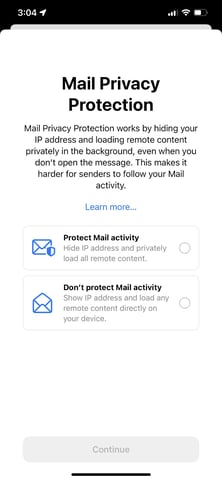
At this point, marketing experts say this feature could specifically impact the tracking of open rates and email-based A/B testing.
Although this move might seem scary, it isn’t surprising as it follows a trend of internet privacy rollouts from tech giants. Most recently, Apple’s iOS 14.5 update limited mobile app tracking by requiring users to opt into sharing information when they opened an app after downloading it. Meanwhile, Google has been building out its Privacy Sandbox while preparing advertisers and marketers for Chrome’s phase-out of third-party cookies in 2022.
When it comes to Apple’s iOS 15 pivots specifically, marketers aren’t only unsurprised, but many — including members of the HubSpot team — believe this will be a positive change for user experience.
“From its inception, HubSpot has been relentlessly focused on helping businesses match the way they market and sell to the way people want to shop and buy. Our founders developed the philosophy of inbound marketing in the early 2000s, and Apple’s moves only serve to reinforce these trends,” says Will DeKrey, HubSpot’s Group Product Manager of Campaigns.
“Buyers get to be in charge of the data they share; not sellers. And big corporations shouldn’t get to create markets for tracking and selling personal data, giving them an information advantage over smaller businesses,” DeKrey says.
“This means that each individual company, large or small, will need to get better and better at building trusted relationships with their audience, earning the right to learn who they are and what they’re interested in.”
“What’s true about people today is that they want BOTH privacy AND personalization. They still want content that is targeted and messaging that speaks to their interests. Given Apple’s changes, email marketers will likely need to focus even more on creating remarkably relevant content that drives their audiences to take action, versus experimenting with headlines just to see if they can get a click,” DeKrey explains.
“Personalization isn’t going away. Conversion optimization isn’t going away. A/B testing isn’t going away. But each of these will need to be more focused on building deeper relationships and more meaningful actions,” concludes DeKrey
Although Apple’s recent open tracking pivot could be great for iOS users who’d like to feel more secure, we know that email marketers still have a lot of questions.
To help email marketers navigate the potential changes that could happen, here are a few tips and strategies teams can consider as the iOS 15 rollout gets closer.

How Email Marketers Can Navigate Apple’s Open Privacy Changes
1. Continue following updates from Apple.
Although Apple’s iOS 15 features are starting to roll out, there’s still a lot that we’re still learning about how it could impact the ways we work with email.
As the feature continues to roll out, HubSpot’s own email product team will be looking into the change and considering solutions if there will be a major open rate impact.
“On the HubSpot email product team, we’re going to take time to consider what the next best steps are for our customers. In this ever-evolving email landscape, our priority will be to support our marketers in continuing to create highly impactful emails and get the most value from our email tool,” said Shane Janssens, Email Product Manager at HubSpot, this summer.
As we know more about these new features and how they could impact HubSpot email analytics, we’ll continue to update this post with more information and links to helpful resources to keep you in the know.
2. Remember, this change won’t impact all email readers.
Although Apple Mail and Apple mobile devices make up over 35% of the email provider market share globally, Google, Outlook, and other email providers haven’t announced similar privacy moves, which means their open and IP data could still provide solid tracking information for email marketers.
While you should be wary that other companies, like Google or Microsoft, could follow suit on email privacy, it’s important to remember that you’ll still get open data from them for the time being and can still make some judgments on the success of opens from these email providers.
3. Consider adjusting open-rate goals.
Although open rates aren’t going away any time soon, a large chunk of email audiences might become untrackable. Because of this, you might need to lower or pivot your open rate goals to determine what your new low, average, and high open rates are.
If your goals are set by a manager above you, it will be important to audit and communicate how many opens you usually get from iOS users to help your manager and your team estimate how they could change after the rollout. You might also want to consider tracking your email open rates for a month or so after the rollout to see what new averages look like based on hard data.
4. Leverage other email marketing data.
While open rate is a key email marketing KPI at many companies, it’s certainly not the only data you can use to determine if your email content is successful. In fact, when sending HubSpot Blog emails, the open rate is just one of many metrics I look at. Here are a few others that I plan to continue to zone in on, even if open rates are impacted:
- Clicks and click-through rates: If you share links to content, such as blogs, product pages, and offers in email, the number of clicks and your click-through rates give you insights on how many or how often email readers engaged with and clicked on your content. High clicks or click-throughs can hint that your content was very engaging while lower clicks or click-throughs could hint that readers were less interested or skimming through your email.
- Traffic to your site: With software like HubSpot, or the use of tracking URLs, you can determine how much traffic came to your website from one single email — or which pieces of content sent the most visitors to your site. Ultimately, if you’re trying to build your audiences, get people to make purchases, or aiming to increase offer downloads, you’ll need to send people to your website. Good email traffic hints that you’re successfully getting visitors where they need to go with your content.
- Clickmaps: Many email providers, like HubSpot, allow you to see which content people clicked most or least in the email. This can help you see which content within your email was most and least clickable,
- Unsubscribe rates: While these usually don’t vary much, a spiked unsubscribe rate could indicate that an aspect of your email strategy (such as the content you sent or the frequency of emails) caused you to lose more audience members than usual. Meanwhile, a consistently low unsubscribe rate hints that you’re continuing to retain or even gain subscribers.
- Survey or email persona research: Aside from metrics you can gain from your email marketing platform, you can also leverage other strategies, like surveys or polls to learn more about your subscribers’ interests, what they’d like to see more of, and where you can improve your content.
On top of leveraging KPIs that are less impacted by Apple’s change, you can also use email tools or benchmark reports to see how your email rates compare to that of other brands in your industry.
For example, HubSpot users can leverage HubSpot’s Email Health Tool to compare your open, click-through, unsubscribe, and bounce rates against our benchmarks.
Evolving Your Content for a More Private World
Apple’s announcement is not the only privacy pivot that’s impacted digital marketers — and in 2021 — it certainly won’t be the last.
Although the world might be changing in a way that poses some challenges for digital and email marketers, that doesn’t mean you can’t continue to innovate your strategy to meet prospects or audiences where they are.
While open rates are certainly important, there are many other ways to get to know your email subscribers, learn from KPIs, and continue to create great content for them.
Looking for more information on how email could change, or the HubSpot Email tools? Check out this HubSpot Community post.

What is an A/A Test & Do You Really Need to Use It?
What’s worse than working with no data?
Working with “bad” data.
As marketers, we love to test headlines, call-to-actions, and keywords (to name a few). One of the ways we do this is by running A/B tests.

As a refresher, A/B testing is the process of splitting an audience to test a number of variations of a campaign and determining which performs better.
But A/B testing isn’t foolproof.
In fact, it’s a complicated process. You often have to rely on testing software to pull the data, and there’s a high probability of receiving a false positive. If you’re not careful, you could make incorrect assumptions about what makes people click.
So how can you ensure your A/B test is operating correctly? This is where A/A testing comes in. Think of it as a test to the test.
The idea behind an A/A test is that the experience is the same for each group, therefore the expected KPI (Key Performance Indicator) will also be the same for each group.
For example, if 20% of group A fills out a form on a landing page, the expected result is that 20% of group B (who are interacting with an identical version of the landing page) will do the same.
Differences Between an A/A Test and an A/B Test
Performing an A/A test is similar to that of an A/B test; an audience is divided into two similarly sized groups, but instead of directing each group to different variations of content, each group interacts with identical versions of the same piece of content.
Here’s another way to think about it: have you ever heard the idiom, “Comparing apples to oranges”? An A/B test does exactly that — compares two different variants of a piece of content to see which performs better. An A/A test compares an apple to, well, an identical apple.
When running an A/B test, you program a testing tool to change or hide some part of the content. This is not necessary for an A/A test.
An A/A test also requires a larger sample size than an A/B test to prove a significant bias. And, due to such a large sample size, these tests take much longer to complete.
How to Do A/A Testing
Exactly how you do an A/A will vary depending on the testing tool you use. If you’re a HubSpot Enterprise customer conducting an A/A or A/B test on an email, for example, HubSpot will automatically split traffic to your variations so that each variation receives a random sampling of visitors.
Let’s cover the steps to run an A/A test.
1. Create two identical versions of a piece of content — the control and the variant.
Once your content is created, identify two groups of the same sample size you would like to conduct the test with.
2. Identify your KPI.
A KPI is a measure of performance over a period of time. For example, your KPI could be the number of visitors who click on a call-to-action.
3. Using your testing tool, split your audience equally and randomly, and send one group to the control and the other group to the variant.
Run the test until the control and variation hit a determined number of visitors.
4. Track the KPI for both groups.
Because both groups are sent to identical pieces of content, they should behave the same. Therefore, the expected result will be inconclusive.
A/A Test Uses
A/A testing is primarily used when an organization implements a new A/B testing software or reconfigures a current one.
You can run an A/A test to accomplish the following:
1. To check the accuracy of an A/B testing software.
The intended result of an A/A test is that the audience reacts similarly to the same piece of content.
But what if they don’t?
Here’s an example: Company XYZ is running an A/A test on a new landing page. Two groups are sent to two identical versions of the landing page (the control and the variant). Group A has a conversion rate of 8%, while Group B has a rate of 2%.
In theory, the conversion rate should be identical. When there is no difference between the control and the variant, the expected result will be inconclusive. Yet, sometimes a “winner” is declared on two identical versions.
When this happens, it is essential to evaluate the testing platform. The tool may have been misconfigured, or it could be ineffective.
2. To set a baseline conversion rate for future A/B tests.
Let’s imagine that Company XYZ runs another A/A test on the landing page. This time, the results of Group A and Group B are identical — both groups achieve an 8% conversion rate.
Therefore, 8% is the baseline conversion rate. With this in mind, the company can run future A/B tests with the goal of exceeding this rate.
If, for example, the company runs an A/B test on a new version of the landing page and receives a conversion rate of 8.02%, the result is not statistically significant.
A/A Testing: Do You Really Need to Use It?
To run an A/A test, or not — that is the question. And the answer will depend on who you ask. There is no denying that A/A testing is a hotly debated topic.
Perhaps the most prevalent argument against A/A testing boils down to one factor: time.
A/A testing takes a considerable amount of time to run. In fact, A/A tests typically require a much larger sample size than A/B tests. When testing two identical versions, you need a large sample size to prove a significant bias. Therefore, the test will take more time to complete, and this may eat into time spent running other valuable tests.
However, it makes sense to run an A/A test in some cases, especially if you are uncertain about a new A/B testing software and want additional proof that it’s both functional and accurate. A/A tests are a low-risk method to ensure your tests are set up properly.
A/A testing can help you prepare for a successful AB testing program, provide data benchmarks, and identify any discrepancies in your data.
Although A/A tests have utility, running such a test should be a relatively rare occurrence. While A/A test can run a “health check” on a new A/B tool or software, it may not be worth optimizing every minor alteration to your website or marketing campaign due to the considerable amount of time it takes to run.


When Is the Best Time to Post on Instagram in 2021? [Cheat Sheet]
To build a sizable Instagram following, you need to create compelling content that your audience actually craves. But if you don’t post your content at the right time, most of them will never see it.So how do you figure out the optimal post time for your specific audience? The best way to find an ideal posting time is by testing the timing of your posts to see which post time generates the most audience engagement.
If you lack the resources or time to conduct your own tests, Sprout Social, a social media management platform with over 20,000 customers, has you covered. In 2020, their team analyzed customer data to see what time and day their social media posts generated the most engagement. Here’s what they found.
![New Data: Instagram Engagement Report [2021 Version]](https://no-cache.hubspot.com/cta/default/53/9294dd33-9827-4b39-8fc2-b7fbece7fdb9.png)
Global Instagram Engagement
If 2020 taught us anything, it’s that our worlds are more interconnected than ever before on a global scale. Our social media strategies have to reflect this new way of life in order for our businesses to meet their goals.
The chart below shows the global engagement on Instagram by the time of day and day of the week. Note: The time is in CDT. That means you wouldn’t post at 11 AM for every timezone individually — 11 AM CDT works just fine across posts published for a global audience.
Need a visual to strategize around? Check out this Sprout Social chart which shows Global Instagram Engagement hotspots.
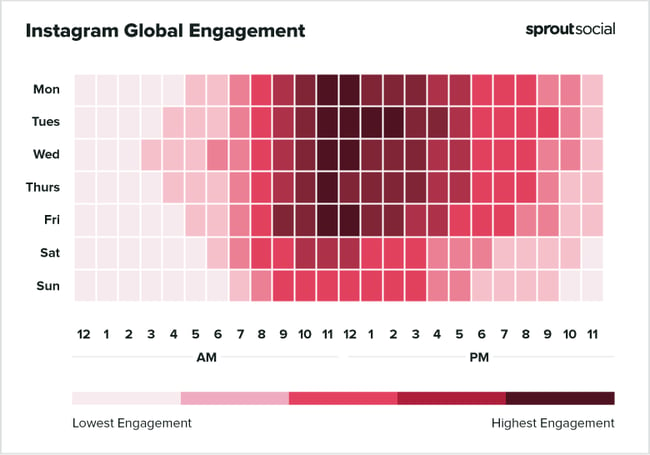
Sprout Social went into even more detail about the best times to post on Instagram, including the best times for post engagement. We’ve summarized the key findings from their report into a quick cheatsheet that you can reference later.
Best Time to Post to Instagram Cheatsheet
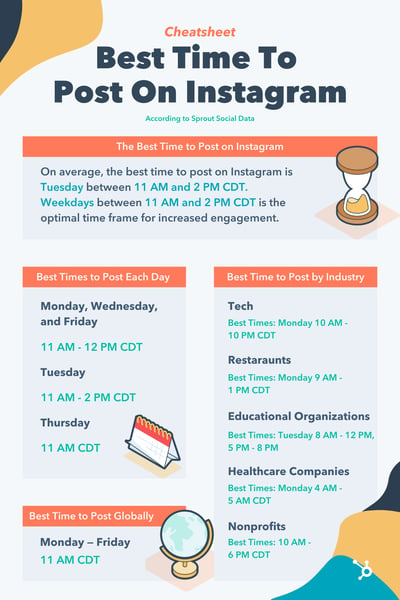
The day of the week on which you post can change how much engagement you get during that same time.
Why? Think about the little differences in your daily mood and routine — the ones you might not realize you have — and how they affect your behavior. The same goes for everyone following your Instagram account.
As much as we don’t like to admit it, many of us check our social media first thing in the morning to catch up on the night before. Then, it’s time for a lunch break scroll. Finally, we take one last look at what our friends and favorite brands are up to before bed. It makes sense that the heaviest engagement hours align with the way our audiences live their lives.
Here’s another look at the best times to post on Instagram each day as well as some additional insights from Sprout Social:
Best Time to Post on Instagram Each Day
- Monday, Wednesday, and Friday, 11 AM – 12 PM CDT – Consider that most of your followers are taking a lunch break around this time and will be more likely to scroll through Instagram to catch up on the latest from their friends, favorite brands, and influencers. During these time periods, share content that is easy to engage with and share.
- Tuesday, 11 AM – 2 PM CDT – Similar to the above, lunch breaks are common around these hours. However, the longer timeframe can be a fitting opportunity to share long-form content like IG TV videos or even go live on Instagram.
- Thursday, 11 AM CDT – For these shorter lunch breaks on Thursdays, try posting Instagram stories with engagement boosters like polls, questions, and quizzes to get quick responses that users will come back to read later on.
When scheduling posts for Instagram, the same hours may not work for each day. Consider both the day of the week and the industry you’re in (we’ll talk about the latter in just a minute).
Pro Tip: Post to Instagram between 7 AM and 10:30 AM CDT from Monday to Friday. You’ll get the most consistent engagement that way because your content will have time to pick up views and shares leading into the peak engagement hours around 11 AM CDT.
Best Time to Post on Instagram by Industry
The general data above about optimal post timing is a great starting point for growing an engaged Instagram audience. But if you want to get more granular, here are the best times to post on Instagram if your organization is in the technology, restaurant, education, healthcare, and non-profit industries, according to Sprout Social’s research.
Best Times to Post on Instagram for Technology Companies
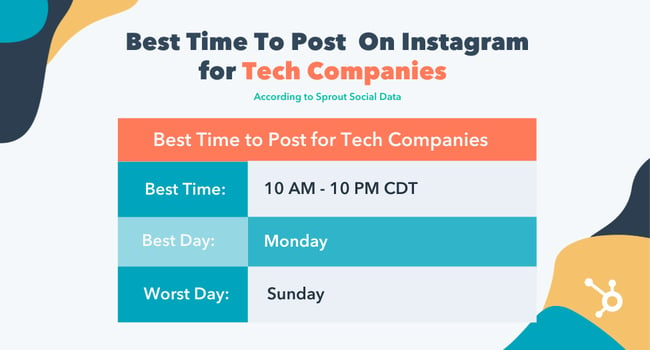
- Best Time: Monday 10:00 AM – 10:00 PM CDT
- Most Consistent Engagement: Monday – Friday, 8:00 AM – 6:00 PM CDT
- Best Day: Monday
- Worst Day: Sunday
Best Times to Post on Instagram for Restaurants
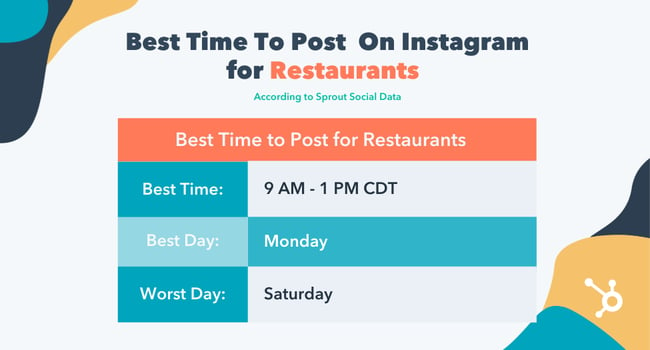
- Best Time: Monday 9 AM – 1 PM
- Most Consistent Engagement: Monday 9 AM – 1 PM
- Best Day: Monday
- Worst Day: Saturday
Best Times to Post on Instagram for Educational Organizations
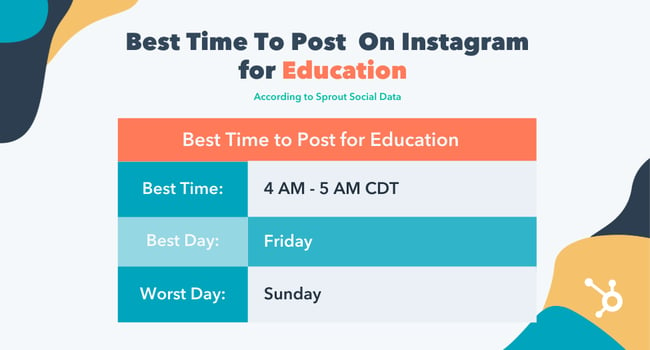
- Best Times: Friday 4:00 AM – 5:00 AM, Thursday 2:00 PM CDT
- Most Consistent Engagement: Friday 4:00 AM – 1:00 PM CDT
- Best Day: Friday
- Worst Day: Sunday
Best Times to Post on Instagram for Healthcare Companies
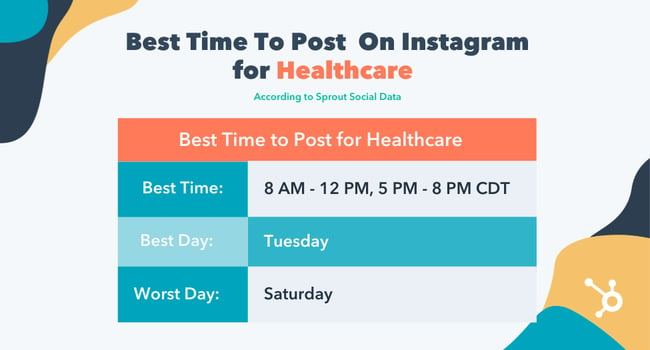
- Best Times: Tuesday 8 AM – 12 PM, 5 PM – 8 PM
- Most Consistent Engagement: Sunday, 8:00 AM – 9:00 AM CDT
- Best Day: Monday, Tuesday
- Worst Day: Saturday
Best Times to Post on Instagram for Nonprofit Organizations
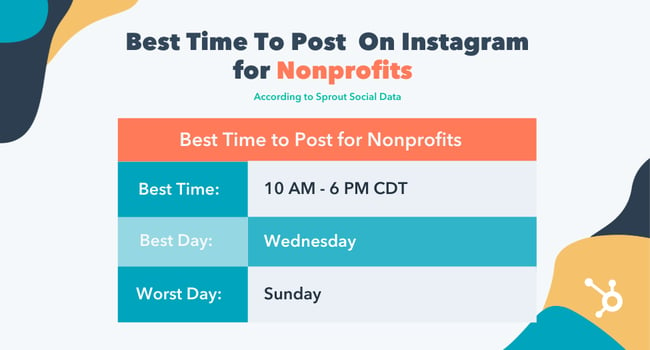
- Best Time: Wednesday 10 AM – 6 PM CDT
- Most Consistent Engagement: Monday to Friday from 11:00 AM to 8:00 PM CDT
- Best Day: Wednesday
- Worst Day: Sunday
Boost Instagram Engagement on Your Schedule
Organic Instagram engagement and a scheduled posting schedule go hand in hand. Each industry has natural peaks and valleys of engagement throughout the day which means your Instagram strategy should flow with them. Use this helpful cheat sheet to plan your social media calendar for next quarter and watch your engagement rate soar.
Editor’s note: This post was originally published in February 2021 and has been updated for comprehensiveness.


Want to Be a Better Manager? Work on These 7 Management Skills
You’ve worked hard to become a manager and now you feel ill-prepared. Or perhaps you’ve been in your role for a while and feel stuck, stagnant.
The imposter syndrome sets in and you’re not sure how to succeed in this role.
![→ Click here to download leadership lessons from HubSpot founder, Dharmesh Shah [Free Guide].](https://no-cache.hubspot.com/cta/default/53/4e634041-e1ce-4a85-8e65-aea12fc10b84.png)
Management skills aren’t innate, they’re learned over time so the work is never fully done. Succeeding as a manager is a fluid dance that requires a willingness to learn.
If you’ve already identified areas of improvement, this article will offer actionable tips. If you have no idea where to start, you will learn the top management skills every people manager needs and the ways to refine the ones you already have.
Types of Management Skills
There are three facets of management skills that every leader will need to succeed in their role.
The first is interpersonal skills. How are you with people?
Are you able to build relationships with leaders, peers, and direct reports? Would they describe you as trustworthy and reliable?
To be a great manager, you have to hone the skills to navigate conversations within – and outside of – your team. On a personal level, interpersonal skills will allow you to empathize, celebrate and motivate those around you.
The next facet of management is the strategic facet. As a leader, you’ll be tasked with identifying roadblocks, problem-solving and developing strategies to improve efficiency. This can be anything from helping your team improve its workflow to providing an innovative way to reach customers.
As for the technical piece, think of this as the foundational piece. It includes software knowledge, the ability to operate certain machinery, expertise in equipment used at your company.
To be a great manager, you should aim to be strong in all three management areas. Start by ranking yourself in each area and identify which one(s) you should focus on improving.
Read the following section on what steps to tackle next.
Developing Management Skills
So you’ve identified some management areas you want to want on. So how do you actually develop them? There are three main ways:
- Training – This is the first thing you should do once you know what you want to work on. Ideally, your company offers internal training to help leaders like you improve their skills. You can also seek out training programs online and reach out to your business network.
- Mentorship – A mentor is a valuable asset to have when learning how to model new behaviors and skills. With a mentor by your side, you can discover new ways to do things, get feedback on your process, and brainstorm ideas.
- Experience – Nothing beats experience. While getting training and a mentor is great, going through your own experiences is the best way to learn. While it isn’t always the easiest route, as you can hit roadblocks and make mistakes, you’ll likely face unique situations that will prepare you well for the future.
Top People Management Skills Every Leader Needs
As a people manager, you have to be multi-faceted – able to support your team, colleagues, and leaders all at once.
Here are the top skills you’ll need to succeed:
- Communicator
- Motivator
- Able to take accountability
- Business-minded and strategic
- Problem-solver and decision-maker
- Organized and willing to delegate
- Trustworthy and reliable
Your team will look to you for guidance and support, your peers will look to you for collaboration and your leaders will look to you for strategic thinking and an innovative spirit.
1. Get to know your team.
In an ideal world, you would use the same approach to manage your team. In reality, everyone operates differently and requires a different management style.
To know what works best for your team, you have to get to know them. You’ll find that each person varies in how they communicate, receive feedback, want recognition, address conflicts, and more.
So, how do you get to know them?
- Have weekly 1-on-1s.
- Conduct personality assessments and surveys.
- Have non-work activities on a regular basis, like a weekly watercooler or a monthly game night.
- Ask them about themselves, like “What are your goals for the next 6 months?”, “How do you prefer to be recognized?”.
- Host team-building activities.
Once you understand which approach to take, you’ll build a stronger relationship with your team and be equipped to handle any roadblocks down the line.
2. Be empathetic.
Now more than ever, employees want empathetic managers and leaders.
A 2021 State of Workplace Empathy Study, administered by software company Businessolver, revealed that only 1 in 4 employees believed empathy in their organizations was “sufficient.”
The same study revealed that while the majority of CEOs recognize the positive impact an empathetic culture has on business, 68% still fear they’ll be less respected if they show empathy.
The same study “84% of CEOs and 70% of employees believe empathy drives better business outcomes” however 68% of CEOs say they fear they will be less respected if they show empathy in the workplace, up 31 points from last year.”
However, one study suggests that couldn’t be further from the truth.
According to the 2020 Empathy in the Workplace study by the Center for Creative Leadership, leaders see managers who show more empathy to their direct reports as better performers than those who show less or little empathy.
How do you show empathy? Here are a few ways:
- Get training on cultivating psychological safety at the workplace.
- Practice active listening.
- Go behind the words and focus on their meaning or intent.
- Validate your team’s feelings and concerns.
- Offer resources.
3. Build trust.
Trust is a core pillar of any workplace environment.
In 2017, Harvard Business Review reported that employees who work in a culture of trust are more productive and have higher energy levels. High-trust organizations also have better employee retention rates.
The key thing to remember here is that trust is a two-way street. Employees must trust their managers to support and guide them. However, managers must also instill trust in their team.
Otherwise, you’re left with a micromanager who’s unwilling to delegate and empower their team.
Building trust takes time, but here are some tactics you can start using today:
- Be transparent about the reasons behind your decisions, address mistakes and setbacks, be clear about your goals and vision.
- Follow-up on conversations you’ve had with your team. It will show that you listen and take action.
- Make yourself available to your team, whether it’s by having an open-door policy, setting office hours, having regular 1-on-1s.
4. Uplift and celebrate your team.
When I spoke to 5 HubSpot managers on their management journey, they shared one common belief: A key part of their role involved taking a backseat to allow their team to step into the spotlight.
This can take many forms. One way to uplift your team is by identifying high-visibility opportunities. For instance, your direct report suggested using the audio and video content platform Casted for an upcoming project.
Instead of relaying the message to the DRI, you could find a way for your direct report to collaborate on the project.
Start by checking in with your team to understand their goals and from there, you can find opportunities that will help them meet their objectives.
Another way to uplift your team is by recognizing their performance.
One thing to keep in mind is that not everyone likes recognition the same way.
Some employees may like public recognition while others prefer private, quieter celebrations. This goes back to knowing your team and understanding how they operate.
5. Learn how to manage your time.
Time management is a skill you should master, whether you’re a team lead or an individual contributor.
As a manager, it’s particularly important because you’re responsible for more than just your work. As such, you’ll need to organize your time in a way that factors in your tasks as well as time to support your team.
6. Cultivate self-awareness.
Do you know what your strengths and weaknesses are?
Some of us never think about them outside of job interviews, but it’s important to check in with yourself on a regular basis.
This self-assessment will allow you to identify areas of improvement and seek out resources to be a better manager for your team.
7. Lean on your peers and mentors.
You’ve done everything you can on your end to become a better manager. That’s great – now lean on those around you.
Your peers can offer insight into their strategies and thought processes to help you on your own. A mentor will have a breadth of knowledge and experience that you can learn from to grow as a manager.
In fact, one 2019 CNBC/Survey Monkey survey found that employees are more likely to be satisfied with their job when they have a mentor than those who don’t.
We naturally tend to stay in our comfort zone and seek out information that validates our current beliefs and biases. By seeking out guidance from others, you widen your lens and gain an opportunity to do things differently.
Improving your management skills won’t happen overnight. However, if you stay in tune with your team’s needs and maintain a willingness to learn, you’re well on your way.

What is Expert Power and How Can You Develop It?
Have you heard the expression that it takes 10,000 hours of deliberate practice to make you an expert?
That’s approximately 417 days if you were practicing 24 hours a day. Since that’s impossible, calculating about 3-4 hours a day of deliberate practice, it would take around 8-10 years to be considered an expert at something.
Yet, perceived expertise is different. Much of the time we consider people at our company experts in a certain field, even if they haven’t been in that field for 10 years yet.
That’s because they have expert power.
In this post, we’ll discuss what expert power is and how you can develop it as a leader.

Examples of Expert Power
If you work in a corporate setting, those who are at the director level or above often have expert power since they’ve risen to their position presumably because of their extensive knowledge and experience. Many times those who have expert power are in positions of leadership, however, this doesn’t always have to be the case.
Expert power is situational and anyone can have it in different areas. As a millennial, growing up with technology, I’m often perceived as an expert in social media. After talking to me and hearing me discuss my love of reality TV, I’m usually given expert power in pop culture as well.
On the other hand, if I was talking to my uncle, who is in a high leadership position in finance, I would have no expert power in that scenario. Expert power can switch dynamics depending on the subject matter.
When you have expert power at work, you’ll stand out in your career, rise the ranks to leadership, and display confidence in your area of expertise because of your high skill level.
With expert power, you’ll be trusted with high-pressure decisions and you’ll feel more confident in your ability to make those decisions because of your expertise. Now, let’s discuss the benefits of having expert power.
Benefits of Expert Power
1. Streamlined business decisions.
With expert power comes the ability to make more informed, streamlined decisions for your company. The longer you do something, and the more you focus on your education in that area, the better decisions you’ll make, and the more confident you’ll be in those decisions.
For example, when I was first getting started in writing, my process wasn’t refined or streamlined. It took me much longer to complete writing tasks. Now that I’ve been a writer for over 10 years, I can write much quicker, and make better decisions in my writing. I know when I’m researching what to include and what not to include. That confidence and ability come with time, continuously working with my mentors and managers on my skills, and getting consistent feedback.
When you have expert power in a certain area, your decisions are more streamlined, quicker, confident, and efficient.
2. Opportunity for career advancement.
One of the main benefits of expert power in the workplace is the ability to advance your career (hopefully at an accelerated pace). When you’re getting started in your career, a great thing to do is spend a lot of time learning and developing your expertise.
Once it becomes clear that you’re focused on a certain area and developing certain skills, you’ll have perceived expert power and be able to advance your career. Personally, I’ve been able to achieve promotions and advance my career because of my expert power in writing.
3. Developed leadership skills.
Besides gaining confidence and being able to further your career, you’ll also be developing your leadership skills, which will be a huge benefit to your career. While I might not have expert power in something like engineering, I’m confident in my ability to lead a team of writers, because I’ve worked on enough teams and been doing this for a certain amount of time.
However, it’s important to note that just because you’re an expert in a certain field doesn’t mean you’ll necessarily be a good leader. That’s why it’s important to continue developing expert power and leadership skills. Let’s dive into how to do that below.
1. Deliberate practice.
Becoming an expert in your field doesn’t mean that you can just show up and achieve expertise through osmosis. You have to be deliberately practicing and studying. This means that the first step to developing expert power is to practice, practice, practice. Whether it’s a tactical skill like construction or a conceptual skill like business strategy, you need to immerse yourself in the world. This means you might have to work an entry-level job to gain real-world experience in your industry.
2. Work with mentors and leaders.
The best way to continue developing your expert power is to work with mentors and leaders from who you can learn. Having a mentor means soaking up their knowledge, asking them for tips and advice, discussing what’s going well in your career and what isn’t going well, and then just listening. Expertise comes from experience and you can benefit from listening to the stories of other people’s experiences. Additionally, you’ll gain leadership skills by studying how your mentors lead others.
3. Volunteer your expertise.
Whatever level of expertise you have, don’t be afraid to share it. If you work in a corporate setting and are a developing business leader, share your experiences and what you’ve learned when your team is discussing strategy. Don’t be afraid to enter those conversations. Not only will people begin to realize that you’re an expert in a certain area, but you’ll also learn a lot from other people’s feedback.
4. Never stop being a student in your industry.
To be an expert in something you also have to be a student in that industry. If you stop being a student, then your expertise will expire. You should read books, stay up to date with the news and trends in your field, and volunteer for projects at your workplace so you can soak up knowledge. That’s how you’ll truly develop expert power and maintain it.
5. Keep your credibility.
You’ll only have expert power if you have credibility in your field. Maintaining your ethics and reliability is of vast importance because expert power only comes to those who can be trusted to make strategic business decisions on an ongoing basis. If your expertise is haphazard you won’t have perceived power from those around you.
6. Work in a fast-paced environment.
A great way to develop expert power is to work in a fast-paced environment and learn to make strategic, decisive choices quickly. This means keeping yourself cool, calm, and collected in the face of a critical situation. With this experience, you’ll develop excellent expert power and leadership skills.
7. Lead with HEART.
At HubSpot, our culture is defined by having HEART — Humble, Empathetic, Adaptable, Remarkable, Transparent. We have a culture of amazing, growth-minded people whose values include using good judgment and solving for the customer. These traits will help you develop expert power because you’ll be remarkable in your industry, but also humble enough to adapt and listen to those who have expert power in areas that you don’t.
8. Be solution-oriented.
Something I’m always trying to develop as an aspiring business leader is to be solution-oriented. When you come to your manager with a problem, have a few solutions ready as well. This will help you develop your expert power because you’ll get immediate feedback from your manager on your solutions. They’ll be able to tell you from their experience if those solutions will work, and then you’ll level up your expertise with every problem you face.
Expert power is something that is hugely important for aspiring business leaders because it’s this power that gives you the ability to lead with confidence and humility. With those two things, you’ll be successful in whatever industry you choose.


Are Employees More or Less Productive Than They Were in 2020? How Marketers Can Navigate [New Data]
2020 was a whirlwind year for managers.
For instance, among her own personal experiences learning how to work in a pandemic, my manager also needed to demonstrate empathy for employees who had stresses that interfered with their ability to work at their best.
She adjusted deadlines, re-defined team goals, and created new standards for success that enabled her employees to perform well while also dealing with everything else they had on their plates — including childcare, health concerns, and, well, a global pandemic.
Amidst the stresses of 2020, you’d be hard pressed to find a manager who didn’t make exceptions for her employees as they settled into this “new normal”.
But now, as we near the end of 2021, most of us have fully adjusted. I’ve ordered an at-home monitor and standing desk; my teammates and I regularly touch-base during our weekly Zoom meetings; and, in some respects, I’m more productive at home than I ever was in the office. (“Meet at the Smoothie Bar?” “Sure! Be there in five.”)
Which leads me to question: Are employees more productive now than they were in 2020? And, if they’re not, how can leaders respond to this potentially long-term shift in productivity levels?
Here, we conducted a survey to determine whether employees have become more or less productive than they were in 2020. We also asked respondents whether their work environment impacts their productivity — plus, how managers can boost their team’s productivity in the current landscape.
Let’s dive in.
Are employees more of less productive in 2021 than they were in 2020?
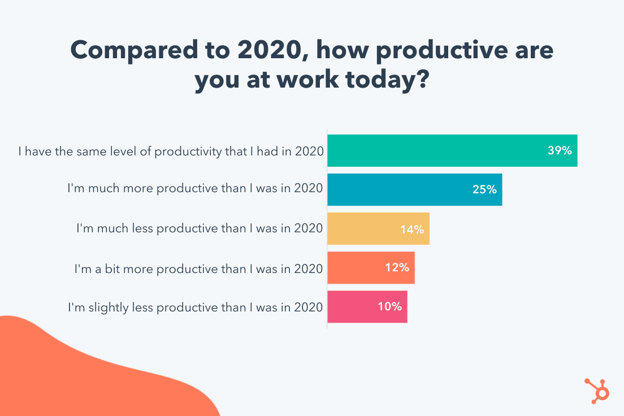
For starters, roughly 40% of our respondents say they have the same level of productivity in 2021 as they did in 2020.
This makes sense. Most of our workspaces haven’t shifted too drastically since 2020. For instance, we had a whooping 71% of U.S. employees working from home during the peak of the coronavirus in 2020 … but the number of full-time remote employees in the United States is still expected to double in 2021, as reported by Enterprise Technology Research.
This means, now that employees have fully adjusted to their new remote lifestyle, it makes sense that we’ll see similar productivity levels in 2021 that we saw in 2020.
Additionally, one-fourth of our respondents feel even more productive in 2021 than they did one year ago.
To Charlene Strain, HubSpot’s Associate Marketing Manager for Global Co-Marketing Acquisition & Partnerships, this shift to a more productive workplace makes sense.
Strain says, “I believe employees are more productive than they were in 2020, since we have settled into a more cohesive routine in 2021 than we had in 2020.”
She adds, “Whether that’s figuring out a better work-life balance, taking a step back to think about what makes us happy at work, vocalizing wins and concerns, or bringing more of our authentic selves to the workplace — it has all contributed to an improved personal and team morale over the past year.”
In 2020, surveys found employees were more productive when they worked remotely than they’d been in the office … so it’s impressive that some employees’ have built upon that momentum to become even more productive this year than they were last.
However, a combined 24% of employees felt they were either much less productive than they’d been in 2020, or at least slightly less productive.
So … While some employees are feeling better than ever, why are others’ motivation dwindling?
As Karla Cook, Senior Manager of HubSpot’s Blog Program, notes: “There are a lot of valid reasons why employees might be feeling less productive and burnt out right now. We’ve had high expectations for things to simply ‘return to normal’ in 2021, but obviously that hasn’t been the case for many of us.”
Cook adds, “I think we’re all collectively realizing there isn’t a switch we can flip on in our brains to go back to ‘normal work mode’, and that can cause some feelings of inadequate productivity.”
Many of us expected the stresses and challenges outside of work to disappear with the new year. We likely expected to ‘hit the ground running’ in our roles, but as we’ve seen, it hasn’t quite turned out like that — the old way of life, and work, doesn’t seem to be returning anytime soon.
All of that might result in unrealistic expectations to perform at pre-pandemic levels. As Cook puts it, “There’s pressure to return to a pre-pandemic level of work and way of life, or even go above and beyond that, and I think that’s backfiring in a lot of cases and making a lot of people feel like they aren’t doing enough.”
Perhaps the decrease in productivity also has to do with varying work preferences. For those who say they work more effectively from home — and who have an at-home setup conducive to remote work — it makes sense that they’ve reported increased productivity since the pandemic.
But there are others, like myself, who thrive on office culture. These workers need the energetic buzz of people around them, as well as a separate space outside their apartments to truly dial into their work.
It’s worth noting that some employees might also not have the physical infrastructure to support a fully productive at-home office — perhaps, for instance, you have employees who need to work odd hours because they’re taking care of children at home. Alternatively, maybe some of your employees have no choice but to work in distracting common spaces with other roommates.
Data supports the notion that a work environment has a strong impact on productivity. As shown in the graph below, 25% of workers report feeling more productive in a physical workspace than they do while working from home. This means some of your employees might be more productive than ever in 2021 — while others might still struggle to find their remote rhythm.
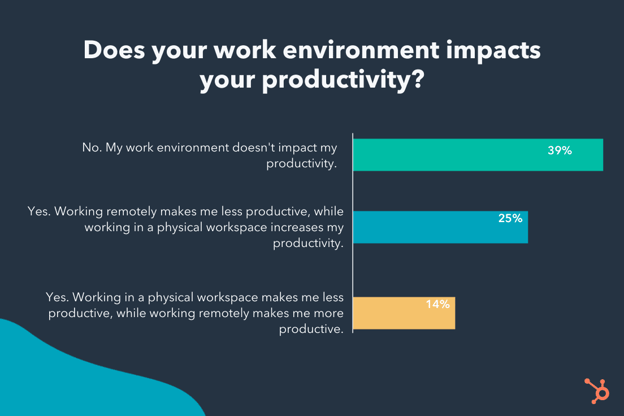
If you do manage a team that feels they’re less productive now than they were in 2020, you’re in luck.
Here, I spoke with seven HubSpot Managers to learn why employees might be struggling to work in this current landscape, as well as tips for boosting productivity for 2022 and beyond.
How Managers Can Respond to Changing Productivity Levels
1. Find daily or weekly activities your team can do together.
On the Blog team, we host weekly ice breakers during our team stand-up every Monday.
There might be a similar activity you can conduct with your own team to promote relationship-building and give your employees a chance to have some fun.
As Strain told me, “To boost team productivity, especially remotely, I’d suggest having a daily and/or weekly ‘question of the day’ where each team member gets to ask a silly, fun, or more serious question via Slack or email. This helps the group get to know each other and take a break from the work day.”
Alternatively, consider creating a team playlist for your team when working remotely. Music can be a great promoter of productivity, and it adds an element of camaraderie if you’re able to get your whole team involved.
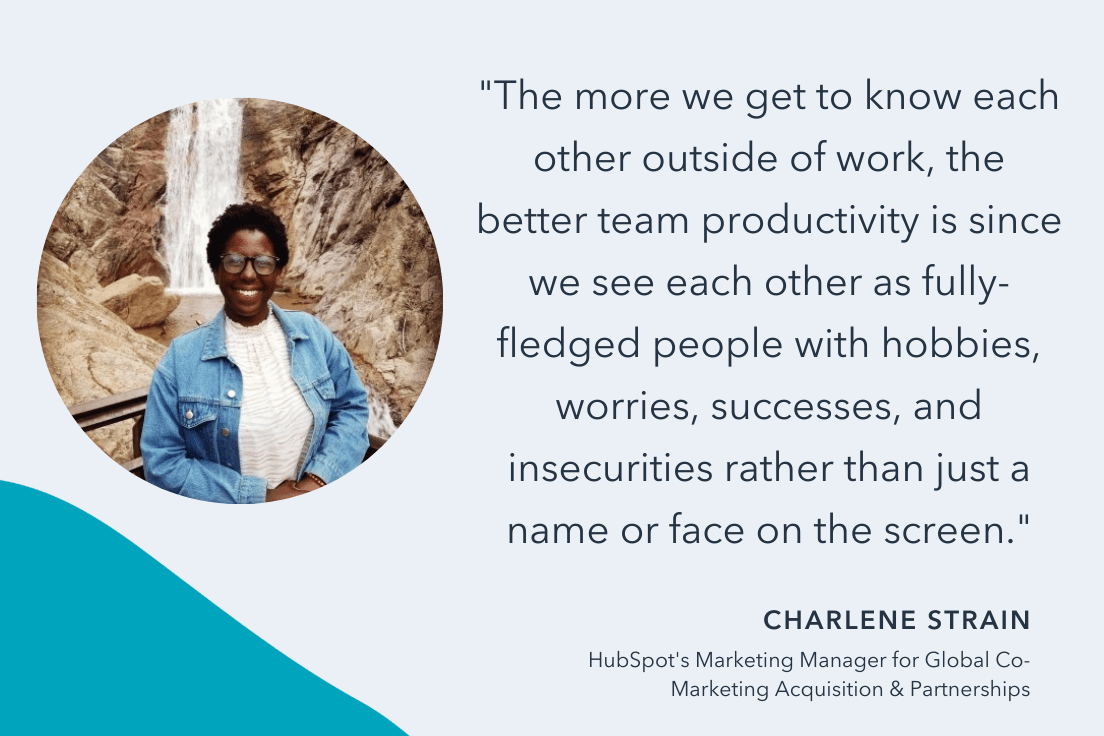
“Having a weekly playlist in terms of theme, artist, genre, or decade — which everyone contributes to or comments on while working — is a great way to boost team morale,” Strain told me.
She adds, “Alternatively, weekly team activities like two truths and a lie, maps of where we’ve traveled, etc. are also great opportunities for promoting productivity.”
This might seem counterintuitive — Like,Wait, you want me to encourage my team to play games as a way of boosting productivity? But, in reality, building a strong team culture is a critical component for increasing productivity, as it helps your employees feel more engaged at work and increases team morale.
As Strain puts it, “The more we get to know each other outside of work, the better team productivity is since we see each other as fully-fledged people with hobbies, worries, successes, and insecurities rather than just a name or face on the screen.”
2. Paint a clear vision for your team’s future.
Clint Fontanella, a Marketing Manager on HubSpot’s Blog team, argues that employees are more productive in 2021 than they were in 2020 based on HubSpot’s industry benchmark data.
As he points out, “Since early 2021, ad spend continues to increase, conversations have skyrocketed, web traffic remains high, and sales email and call volume continues to climb. To me, this means that sales teams are trying to play catch-up from last year and are aggressively reaching out to contacts via email, phone, and live chat to do so.”
“Marketing teams,” He adds, “are also working hard to meet the sales team’s demand by increasing their ad spend and capitalizing on rising web traffic to acquire new contacts. If we compare contact growth from 2020 to 2021, it’s significantly higher than last year.”
So — amidst all that newfound demand, how do you spark optimal productivity? Fontanella says it comes down to painting a clear vision for your team’s future.
He told me, “We’ve talked a lot about uncertainty this past year, but industries are slowly becoming more stable. Employees had to adapt to a new working world, and now that they’ve adjusted, you need to paint an attainable future for them to work towards rather than ambiguity and uncertainty.”
Fontanella encourages managers to “set a team goal, explain how you’ll achieve it, and keep employees updated as you reach new milestones along the way.”
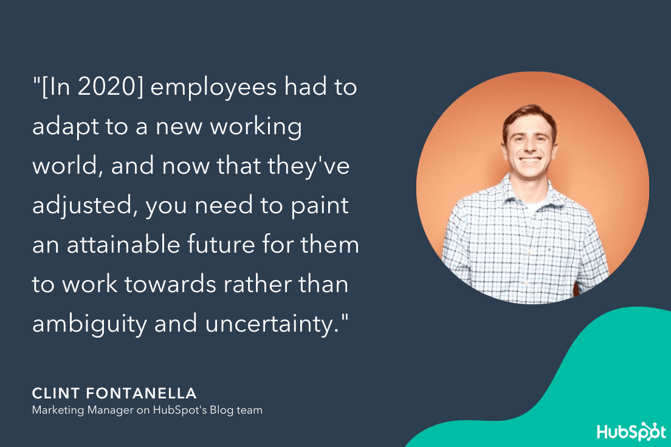
3. Foster both trust and boundaries.
It can be difficult, but a fully remote team requires an additional level of trust to operate effectively.
If you’re leading a team in an office space, it’s easy enough to check-in on colleagues, monitor who’s working (and when), and have daily in-person interactions to understand what each team member is working on.
A lot of this disappears with remote work – and that’s okay. Knowing when and where your employees work doesn’t translate to knowing how well they work. As HubSpot’s Culture Code states, “Results matter more than the hours we work, [and] results matter more than where we produce them.”
To lead a productive remote team, then, trust and clear expectations are key.
As Team Manager of Content Conversion Carly Williams says, “For me, keeping my remote team productive boils down to two things: trust and boundaries.”
“A lack of trust often leads to micromanagement, which can be really demotivating for employees. To avoid this, I stay out of the way by setting clear expectations and creating accountability.”
“As for boundaries,” Williams adds, “I’m conscious of the fact that working hours becomes blurred in a remote environment. To avoid overworking and burnout, I lead by example and avoid sending late night emails or Slack messages. I also encourage my team to take a minimum of one mental health day a month (outside of regular vacation time) to step out of their work routines and recharge.”
If you can create trust and autonomy amongst your team, you’ll likely see the outcomes you want. To do this, ensure your expectations are clear, and set healthy boundaries for your team by setting them for yourself.
Additionally, consider creating team-accessible dashboards or a shared Google Doc so team members can report on their progress without requiring constant check-ins.
4. Focus less on productivity — and more on individual well-being.
While it can be tempting to pretend nothing has changed, ignoring the reality of our current lives is detrimental to your ability to effectively lead your team.
As Meg Prater, HubSpot’s Senior Manager of Content, told me — “While the pandemic, at times, has seemed less bleak or more hopeful in 2021, the landscape has changed rapidly. Employees who are struggling to keep unvaccinated children safe while sending them back to school, experiencing mental burnout at 18+ months living in this new but unbalanced normal, and evaluating everyday decisions for risk, are tired.”
Prater adds, “For a lot of us, not feeling like we’re giving 100% at our jobs for sustained periods of time is demoralizing. Asking people, amongst all of that, to perform at a pre-pandemic level is exhausting.”
Fortunately, you shouldn’t have to. Adjusting to this new normal requires empathy and learning how to manage human-to-human.
Rather than constantly focusing on output, consider how you might alter your approach to develop trust within your team and show employees you care about their well-being.
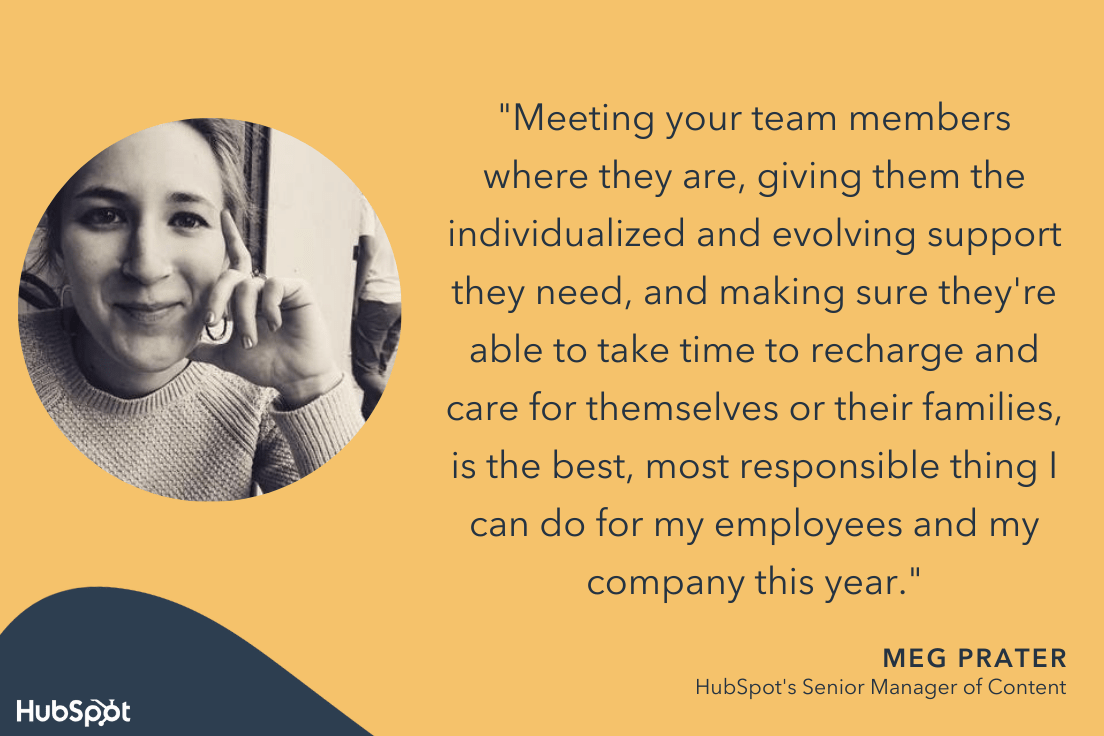
As Prater puts it, “For managers, I think the weight of checking in with employees throughout 2020 and 2021, attempting to keep morale at a new normal level, and managing results can be really difficult and draining.”
She adds, “I’d recommend focusing less on productivity, and focusing more on individual professional well-being. Meeting your team members where they are, giving them the individualized and evolving support they need, and making sure they’re able to take time to recharge and care for themselves or their families, is the best, most responsible thing I can do for my employees and my company this year.”
To demonstrate your investment in your employees’ professional well-being, ensure you’re creating space for your direct reports to vocalize how they’re feeling about their workload, or just how they’re feeling in general.
Understanding their challenges can help you ensure you’re providing them with the support they need to do their jobs at optimal levels.
5. Bring your team together to share challenges and offer solutions.
Matt Eonta, HubSpot’s Senior Manager of Project Management, believes the early pandemic days “actually energized a lot of folks who were looking for a stable, known quantity to spend time on and pour themselves into. People often seek that in times of uncertainty.”
He adds, “Coupled with a lot of collaborative, interactive, and culture-focused programming, work — and the desire to be productive and successful at it — drove a lot of people in 2020, even if their home environments and obligations weren’t always conducive to that.”
During such a tumultuous and stressful time, checking work emails or diving into a project with colleagues likely fueled a sense of control that people weren’t getting from the outside world.
In 2021, however, we see that some employees’ energy levels compared to 2020 are fading — fast. As Eonta puts it, “Into 2021, it seems some folks are finding that unsustainable. This isn’t the two week or two month work-from-home mandate some expected. We’re on month 18, and sustaining that energy is difficult.”
Fortunately, there are solutions to re-igniting some of the energy managers saw from their direct reports in 2020.
For his team, Eonta describes his commitment to investing in collaboration, storytelling, and shared experiences. “At an individual level, nearly everyone gets energy from solving problems and helping others.”
“When our team comes together and shares more of what they’re working on, the problems they face, and solutions they’re investing in — it really fosters some energetic, exciting, and uplifting conversations among the larger group.”
Eonta adds, “It also sets a bar for the team and builds connections we may not have known were there, especially given our inability to collocate.”
It’s important to note: Sustaining a work-at-all-costs mentality isn’t healthy, or even possible. So if your employees are simply re-calibrating back into their pre-pandemic selves when it comes to productivity, that might not be such a bad thing.
6. Set clear expectations.
Being a strong leader has always depended on setting and managing your employees expectations — and Karla Cook believes that has never been more true.
She told me, “It’s always important as a manager to set very clear expectations around individual and team performance with your employees, but in times where a lot is uncertain, it becomes even more critical.”
“As a manager,” Cook adds, “you should be providing a lot of stability and structure around work, and checking in with your team regularly to make sure they understand what is needed from them, how they’re doing, and how their contributions plug into the bigger-team picture.”
To create structure around expectations, perhaps you let your employees know in weekly 1:1s how they’re performing in their roles, or highlight team performance against goals in a monthly email.
Alternatively, perhaps you discuss expectations — and how your employees are performing against those expectations — in regular performance reviews.
Whatever the case, to ensure optimal productivity, you want to be clear and specific when outlining the expectations you have for your team, and how it impacts the business at-large.
7. Acknowledge that productivity looks different for every individual.
I have a colleague who works non-stop from 9 a.m. to 4 p.m. She sits at her desk as she eats her lunch, and keeps her phone in her purse to avoid distractions. Then, at abruptly 4 p.m. every day, she leaves to attend a workout class, grab dinner, and head home.
On the other end, I have another colleague who logs on around 10 a.m. and works until 6 p.m., but he takes regular breaks for lunch, afternoon workouts, or brief morning walks.
Both of these colleagues are exceptionally productive and hardworking — but the ways in which they achieve productivity look vastly different.
As HubSpot’s Marketing Blog Manager Lestraundra Alfred told me, “The past two years have been challenging for many people, and what we considered ‘productive’ pre-2020 just isn’t relevant. I’ve learned ‘productivity’ is relative to the employee.”

She adds, “Everyone has a different style and workflow that changes depending on what they’re working on, the social climate, and personal matters they may be going through.”
So … what’s the solution here?
Alfred says, “Learning to support my team’s productivity levels based on where they’re at and how they work — not my definition of productivity — has helped build trust and accountability.”
Ultimately, as a manager, it’s vital you trust your employees enough to give them the autonomy to choose where, when, and how they’re most productive.
Additionally, it’s critical you take the time to assess whether your team’s productivity levels compared to 2020 are actually a real concern here.
Perhaps, as Eonta pointed out, your team threw themselves into work in unsustainable ways in 2020 to avoid the harsh realities of a pandemic — and are simply re-calibrating back to a workflow that is more conducive to long-term professional and personal success.
Alternatively, maybe the pandemic put work-life balance into perspective for your employees.
Whatever the case, it’s vital you take the time as a leader to discover the root cause of your employees productivity levels if you feel they’re performing below expectations, but keep in mind they’re people, too — and 2021, just like 2020, was anything but normal.
If you focus on building trust and psychological safety with your team, you’ll be able to figure out long-term solutions to performance and productivity together.

The Death of the Third-Party Cookie: What Marketers Need to Know About Google’s 2022 Phase-Out
What do marketers and Sesame Street monsters have in common? They LOVE cookies.
For years, brands have been using them to track website visitors, improve the user experience, and collect data that helps us target ads to the right audiences. We also use them to learn about what our visitors are checking out online when they aren’t on our websites.
But the way we use cookies and Google ad-tracking tools could change dramatically with Google’s efforts to phase phase out the third-party cookie on Chrome browsers by 2022.
The third-party phase-out was initially announced in February 2020, but Google accelerated buzz around it this month when they announced that they won’t be building “alternate identifiers to track individuals as they browse across the web, nor will we use them in our products.”
“We realize this means other providers may offer a level of user identity for ad tracking across the web that we will not — like PII graphs based on people’s email addresses,” a Google post wrote.
“We don’t believe these solutions will meet rising consumer expectations for privacy, nor will they stand up to rapidly evolving regulatory restrictions, and therefore aren’t a sustainable long term investment. Instead, our web products will be powered by privacy-preserving APIs which prevent individual tracking while still delivering results for advertisers and publishers,” says Google.
 How Marketers and Advertisers are Reacting to Google’s Phase-Out
While numerous advertising agencies criticized Google’s pivot, companies like GetApp have begun to research potential marketing impact. In a recent survey. GetApp, which provided HubSpot with exclusive data, discovered that:
- 41% of marketers believe their biggest challenge will be their inability to track the right data.
- 44% of marketers predict a need to increase their spending by 5% to 25% in order to reach the same goals as 2021.
- 23% of marketing experts plan on investing in email marketing software due to Google’s new policy.
Below, I’ll note a brief history of how the third-party cookie phase-out, and Google’s pivots for tracking security, came to be. Then I’ll highlight a few things marketers should keep in mind as we get closer to 2022.
A Brief History of the Third-Party Cookie Phase-Out
While you might be seeing this news for the first time, we’ve been following it since 2020 and just recently updated this post to reflect Google’s most recent statements.
In February of last year, a Google blog post announced the phaseout ang gave initial reasoning for the pivot. Like the statement noted in the intro, Google similarly explained that this move was being done to protect users asking for more privacy.
“Users are demanding greater privacy–including transparency, choice, and control over how their data is used–and it’s clear the web ecosystem needs to evolve to meet these increasing demands,” the post wrote.
Although Firefox and Safari had already phased out the third-party cookie, Google’s post said that its changes will happen over the course of two years as the tech company works with advertisers to ensure that this pivot doesn’t destroy the online advertising business.
“Some browsers have reacted to these concerns by blocking third-party cookies, but we believe this has unintended consequences that can negatively impact both users and the web ecosystem,” the blog post notes. “By undermining the business model of many ad-supported websites, blunt approaches to cookies encourage the use of opaque techniques such as fingerprinting (an invasive workaround to replace cookies), which can actually reduce user privacy and control. We believe that we as a community can, and must, do better.”
Although Chrome isn’t the first browser to phase out the third-party cookie, it’s the biggest. In late 2019, Google Chrome made up more than 56% of the web browser market. Chrome also accounts for more than half of all global web traffic.
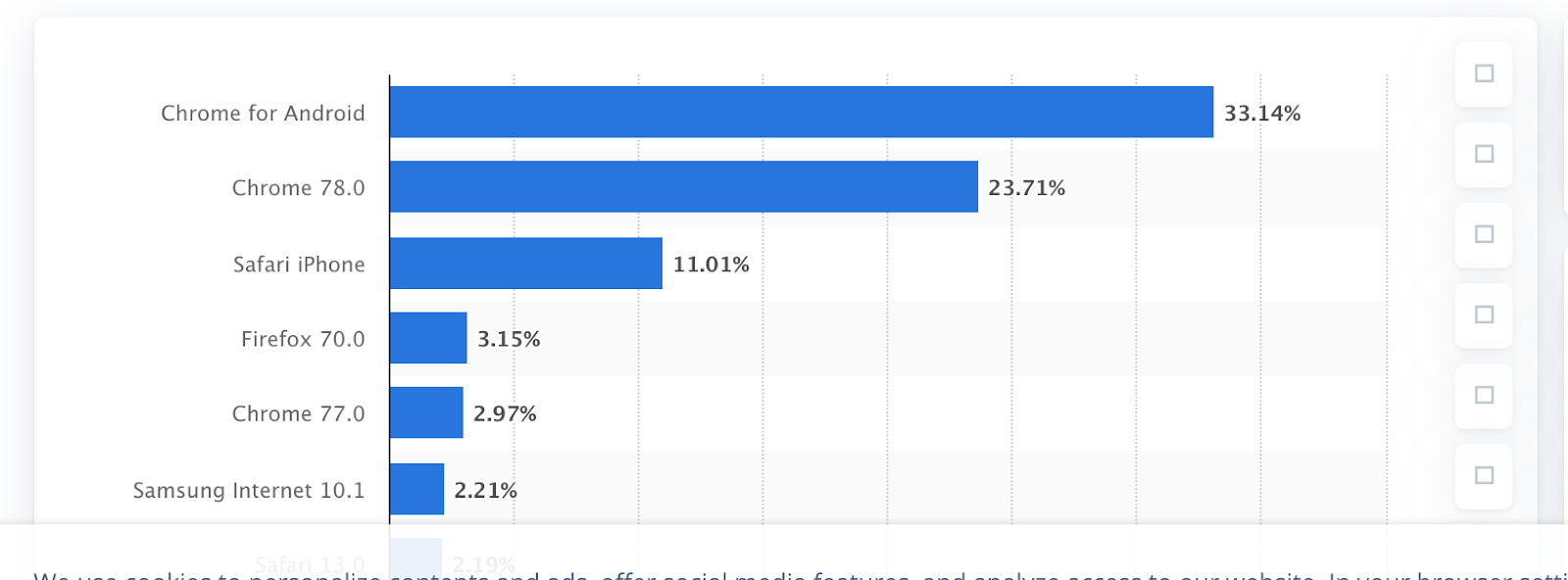
Source: Statista
Meanwhile, Safari and Firefox, which have blocked third-party cookies since 2013, come in a distant second and third place, respectively.
Because Chrome, Safari, and Firefox will all no longer support this type of data tracking by 2022, publications like Digiday are calling Google’s phase-out the “death of the third-party cookie.”
What happens next?
As with any major shift involving privacy, data, and advertising, business experts and publications have been frantically buzzing about how the phase out and Google’s rejection of ad-tracking will change the way we do business online.
But, do we really need to panic?
The truth is, Google Chrome’s privacy efforts could heavily impact some areas of the marketing and advertising space, while other tactics will still stay pretty much the same.
However, if you’re an advertiser or a marketer who’s thrived on third-party data or individual data for pinpointed online audience targeting strategies, you might be worried about how you’ll navigate this pivot.
Although some big changes might be underway, new alternatives are also emerging. To help you prepare for a world without third-party cookies, here are four things you should keep in mind about the latest cookie phase-out.
5 Things to Know About Google’s Cookie Phase-Out and Privacy Pivots
1. Google isn’t banning all cookies.
If you’re thinking that all your cookie-fueled marketing strategies will soon be rendered obsolete, take a breath.
So far, Google says it’s only planning to phase out the third-party cookie on its browsers. However, first-party cookies that track basic data about your own website’s visitors are still safe.
In fact, in Google’s 2021 announcement, the tech giant called first-party relationships “vital.” So, ultimately, any first-party data you gain from your website’s visitors on all browsers will still remain in-tact.
Still not sure about the difference between first-party and third-party cookies? Here’s a quick breakdown.
First-Party Cookies
A first-party cookie is a code that gets generated and stored on your website visitor’s computer by default when they visit your site. This cookie is often used for user experience as it is responsible for remembering passwords, basic data about the visitor, and other preferences.
With a first-party cookie, you can learn about what a user did while visiting your website, see how often they visit it, and gain other basic analytics that can help you develop or automate an effective marketing strategy around them. However, you can’t see data related to your visitor’s behavior on other websites that aren’t affiliated with your domain.
Ever wonder how Amazon always remembers your login information, the language you speak, the items in your cart, and other key things that make your user experience so smooth? This is because Amazon uses first-party cookies to remember these basic details.
On the other hand, if you’re a marketer running a website on a CMS, you’ll have access to analytics dashboards that track first-party cookie data. For example, you’ll usually be able to see basic analytics, such as the number of web sessions on a page, the number of pages people click on during a visit, basic browser types, geographical demographics, or even referring websites where visitors clicked a link to your site’s URL. However, this data doesn’t inform you of everything your visitors do online.
Third-Party Cookies
Third-party cookies are tracking codes that are placed on a web visitor’s computer after being generated by another website other than your own. When a web visitor visits your site and others, the third-party cookie tracks this information and sends it to the third-party who created the cookie — which might be an advertiser.
If you’re an advertiser, third-party cookie data allows you to learn about your web visitor’s overall online behaviors, such as websites they frequently visit, purchases, and interests that they’ve shown on various websites. With this detailed data, you can build robust visitor profiles. With all of this data, you can then create a retargeting list that can be used to send ads to your past visitors or people with similar web profiles.
Want to visualize how third-party cookie data might work? Say you research a particular smart TV on Amazon. Then, you go to another site later in the day and see an ad Amazon advertisement for the same exact product. If you aren’t on an Amazon-owned site, it’s very possible that this advertisement was triggered by third-party cookie data.
While first-party cookies are accepted automatically, visitors must be informed that they are accepting a third-party cookie due to the amount of data that companies can retain from them.
The bottom line? If you’re just aiming to track your website’s visitors’ behaviors, preferences, and basic demographics only while they’re on your website, you probably won’t be deeply impacted by this change.
However, if you’re a marketer that relies on robust data for online advertising, pop-up ads, or a pinpointed audience-targeting strategy, you’ll need to continue to follow the news around this phase-out, and consider alternative first-party strategies, as the phase-out nears.
2. Many marketers saw the cookie phase-out coming.
While the “death of the third-party cookie” might seem shocking, it certainly wasn’t a surprise.
Recently, governments around the world have been investigating and cracking down on data privacy issues. For example, in an October 2019 shakeup, Europe’s highest court ruled that users in the EU must actively consent to all analytics cookies when they log on to a website. If not, the website can’t drop analytics or web tracking cookies on the user’s browser.
The GDPR ruling means that websites can no longer rely on implicit opt-in (meaning, a website displays a cookie banner but the user continues to browser. Websites must not capture opt-in consent before any analytics or web tracking cookies are placed on a browser.

If your website only catered to local or domestic users outside of the affected countries, you might not have been impacted. However, international websites took a major reporting hit as numbers from Google Analytics — which relies on cookies — started to appear inaccurately low.
For international brands that relied on Google Analytics, this was a scary reminder that data-driven brands are vulnerable to software-related issues. It also showed us how governance and privacy regulations could dramatically impact our strategies.
Earlier, in August, Google announced it was developing a “Privacy Sandbox.” Although Google didn’t have a product created when they announced the move, a blog post explained that the tool that could allow marketers to continue to publish and circulate ads to the right audiences without having the same amount of user data.
“We’ve started sharing our preliminary ideas for a Privacy Sandbox — a secure environment for personalization that also protects user privacy,” wrote Justin Schuh, Director of Chrome Engineering, in the Google blog post. “Some ideas include new approaches to ensure that ads continue to be relevant for users, but user data shared with websites and advertisers would be minimized by anonymously aggregating user information, and keeping much more user information on-device only. Our goal is to create a set of standards that is more consistent with users’ expectations of privacy.”
In a January 2020 interview with Digiday, Amit Kotecha, a marketing director at data management platform provider Permutive, explained the key features of the proposed Sandbox:
“The most significant item in the Privacy Sandbox is Google’s proposal to move all user data into the [Chrome] browser where it will be stored and processed,” said Kotecha. “This means that data stays on the user’s device and is privacy compliant. This is now table stakes and the gold standard for privacy.”
Between the Privacy Sandbox and GDPR rulings that impacted data tracking, it’s become apparent to marketers that the third-party cookie was at risk of governance or other tech company changeups that could render it obsolete. This was so apparent that advertising software firms and publishers were already contemplating alternative solutions before the official news of Google’s cookie phase-out broke.
At this point, data management firms, like Permutive, are looking at creating alternative tools for advertisers that more heavily leverage first-party cookies and lump visitor profiles into more anonymous “segments” similar to what Google’s Privacy Sandbox is predicted to do.
3. Marketers aren’t just concerned about data.
While the elimination of third-party cookies on Chrome will be inconvenient to some, marketers are also concerned about Google’s reasoning behind the phase-out.
Without Chrome-based third-party cookie data, you’ll still be able to leverage and target Google Ads, which will be powered by Google Chrome’s first-party cookies and the Privacy Sandbox tools. However, some ad software and platforms that require third-party data will take a huge hit without support from Chrome.
“This move, while good for consumer privacy (in theory) is likely going to hurt most of the third-party ad platforms that utilize these cookies to generate revenue,” says Matthew Howells-Barby, HubSpot’s Director of Acquisition.
“The big question behind all of this for me is what’s motivating Google to phase third-party cookies out? Is it to improve privacy for the end-user or is it to gain a further grip on the ad market by forcing the adoption of Chrome’s own first-party cookie, which would likely result in many of those dollars being previously spent on third-party platforms to move in Google’s bottom line.”
Howells-Barby isn’t the only marketer to voice these concerns. In fact, in a joint statement, the Association of National Advertising and the American Association of Advertising Agencies called the tech giant out for disrupting healthy competition in the advertising space.
“Google’s decision to block third-party cookies in Chrome could have major competitive impacts for digital businesses, consumer services, and technological innovation,” the statement said. “It would threaten to substantially disrupt much of the infrastructure of today’s Internet without providing any viable alternative, and it may choke off the economic oxygen from advertising that startups and emerging companies need to survive.”
Later in the statement, the two advertising groups urged Google to push back the third-party cookie “moratorium” until effective and meaningful opportunities were made available to advertisers.
4. Google won’t stop tracking people entirely.
While Google will not invest in tech that tracks people at an individual level, it will still be investing in alternatives. Along with Google’s Privacy Sandbox development, the company has already seen successful advertising results from FloC, a technology that tracks groups of people rather than individuals.
“Our latest tests of FLoC show one way to effectively take third-party cookies out of the advertising equation and instead hide individuals within large crowds of people with common interests,” Google’s recent announcement explained.
“Chrome intends to make FLoC-based cohorts available for public testing through origin trials with its next release this month, and we expect to begin testing FLoC-based cohorts with advertisers in Google Ads in Q2. Chrome also will offer the first iteration of new user controls in April and will expand on these controls in future releases, as more proposals reach the origin trial stage, and they receive more feedback from end users and the industry,” the post added.
5. This move still opens the door for innovation in advertising
While things look grim for one type of cookie, this might not be a bad thing for skilled and adaptable brands.
Although this move does cause concern, Google and other browsers have still taken a stand for user privacy. As privacy laws continue to arise, this might be a great opportunity to look at other less-vulnerable advertising alternatives just incase another governance renders one of your marketing tactics or processes as obsolete.
Why? As a marketer with an innovative mindset, you should always be asking yourself questions like, “Are we too reliant on this technology?” or “What happens if and when our strategy gets regulated?” Innovative marketers will be able to come up with more clever alternatives and ads that identify with the masses — aside from just hyper-targeted content or annoying pop-ups.
Another area that could be innovated is the way we leverage and use data. As noted above, data management platforms are now looking to create alternative tools that help advertisers track data in a way that makes the most out of the third-party cookie. While these options might be different from your third-party cookie solutions or require some new strategizing, they would still allow you to target and learn about relevant audiences without getting intrusive.
How to Prepare for Google’s Third-Party Phase-Out
Don’t panic. At this point, marketers, advertisers, and data engineers alike are actively looking for solutions to determine what will happen next. And, because the third-party cookie was already weakened by Safari and Firefox ad blocking, it likely wasn’t the strongest advertising tool anymore anyway.
Right now, the best thing to do as a marketer is to continue to stay up-to-date with news related to third-party cookies and other data privacy moves that could impact your business.
If your advertising strategies rely on third-party data, start considering alternatives now. As you continue to follow the news related to the phase-out, you should also vet any software or solutions that can help you better transition away from this type of cookie.
For example, although marketers are wary of Google’s move, the tech giant’s Privacy Sandbox and could still serve as valuable alternatives for ad targeting. You could also consider strategies or software that can better help you leverage first-party data.
Additionally, you could also revitalize older strategies, like contextual advertising. While third-party data allowed you to place ads directly in front of people who matched certain user profiles, contextual advertising allows you to circulate PPC ads on websites that rank for similar keywords as your ad. This way, if you’re selling sports apparel, your PPC ad could show up on sports-oriented websites.
Lastly, to make your brand as safe as possible from future governance or monopoly-related policies, brainstorm even more basic strategies that you can still use to reach your audiences even without cookies, hyper-targeted ads, or mass amounts of data. This will allow you to be less vulnerable to technology, even when you can benefit from the latest tracking software.
Disclaimer: This blog post is not legal advice for your company to use in complying with EU data privacy laws like the GDPR. Instead, it provides background information to help you better understand the GDPR. This legal information is not the same as legal advice, where an attorney applies the law to your specific circumstances, so we insist that you consult an attorney if you’d like advice on your interpretation of this information or its accuracy.
In a nutshell, you may not rely on this as legal advice, or as a recommendation of any particular legal understanding.
Editor’s Note: This blog post was originally published in February 2020 but was updated to reflect current announcements from Google in September 2021.


7 Reasons Scale-Ups Earn Investments, According to HubSpot’s Founder
Every successful company starts with a single idea.
It’s how those ideas are approached, molded, and questioned that dictate whether or not they go on to evolve into a startup.
However, reaching startup-dom doesn’t complete the lifecycle of these ideas. Instead, becoming a startup is the moment when ideas begin to grow into something actionable, driven by a collection of intentional goals.
And as all of us who have lived the startup life know — when you’re a startup, more often than not your goal is simple: to survive.
I like to think of being a startup as treading water. Succeeding as a startup requires constant motion to ensure you can find product-market-fit, drive early customer growth, and build a baseline product all at the same time. The moment you stop moving is the moment you lose traction.
And this is all before you’ve even begun to scale.
Fortunately, there comes a point where you’ve treaded water long enough to reach your first lifeboat: Investments.
That’s where it gets exciting.
As startups move from idea mode to scaleup mode, there are a number of signs I look for in order to determine if I’m going to invest. Of course, not every scaleup has to get every one of these signs right to be worthy of investment, but the more positive signals a scaleup has to offer, the higher the odds of long-term success for that organization.
So, what is the secret sauce that these special startups have?

7 Signs that a Scaling Company is Worth the Investment
While scaling is a universal concept, the act of scaling efficiently rarely looks exactly the same for all companies.
Instead, each scale-up encounters their own unique trials, speed bumps, and roadblocks on the path to sustainable growth. When I am looking for scaling companies to invest in, I always take into account the individual circumstances of each company in the context of their growth to see whether or not they have set themselves up for long-term success.
As an investor, these are the core values I’ve seen that have proven to be present at companies with growth potential.
1. There’s evidence of customer happiness.
The customer experience doesn’t lie. In fact, it’s become a key part of GTM strategies at companies like HubSpot, which are investing in Chief Customer Officers and finding more ways to serve the customer across the organization. That’s all to say — the customer should be at the center of every decision.
For evidence of customer happiness, take a look at the NPS (Net Promoter Score) and other customer satisfaction scores of the company in question. If the results are in the green, you’re looking at a scale-up that is already making a positive impact on their customers. If instead the results are in the red, investors take warning.
Another way to determine customer happiness is to look for low or decreasing churn. A company’s retention rates are the first sign that they are either a fan favorite, or a stepping stone that customers take on their way to a more prepared company.
2. The organization’s primary roles have great people.
In the early years of a startup — when the primary focus is on the product — other roles like sales, marketing, and operations aren’t typically fully staffed. However, this practice doesn’t cut it when it comes to scaling.
When you’re a scale-up, these roles should be filled with amazing people. If not, there should at least be a plan in place to hire them.
After all, the potential of a scale-up lies in the potential of the people who are dedicated to its growth.
Without staffing all of the necessary teams with top talent, you could be unknowingly stunting your company’s growth. In the early days at HubSpot, Brian and I surrounded ourselves with people who were smarter than us, and invested in people we believed in. (Somehow they weren’t all developers, like I requested … but I digress …). Those investments paid off, big time, and we’re still surrounded by those people today.
3. Unit economics are stable and sustainable.
Of course, no one expects scale-ups to already come with an impressive ROI. A vanity metric or single data point isn’t exactly enough to convince an investor that your scale-up is worth their time and money. Instead, what I look for is stability and sustainability.
To be primed for viable growth, your customer lifetime value should be some multiple (usually 3+) of your customer acquisition cost. What this number will tell me is that your company is not only desirable by your customers, but that you already have what it takes to retain them and continue to gain value from them as they grow with you over time.
Scalability and sustainability are two sides of the same coin. With the ability to establish sustainable unit economics early on in your lifespan of startup-hood, you’ll be primed to scale when the time comes.
4. The culture of the organization is well-articulated.
Company culture is not something that appears overnight. Instead, it’s embedded in every decision your company makes and in the people who work at your organization. Every organization has their own specific company culture, but some are better at articulating theirs than others.
Company culture encompasses your mission, vision, and values and is the mark of a company with what speaker and author Angela Duckworth has coined as “grit.” Grit is “the power of passion and perseverance,” which translates nicely to what makes startups successful — having a clearly defined passion, and the perseverance to achieve the long-term vision.
Of course, to be effective, your company culture doesn’t need to be composed in a slide deck with 128 slides, but it should be written down. This way, when potential investors like myself take a look at your scale-up, we won’t have to spend our time guessing the motives and shared vision that drives your organization. Instead, we will be able to see how your culture guides decision-making across your organization.
It’s a good idea to begin defining your culture sooner rather than later. Company culture provides a stable jumping-off point for most of your initiatives, including recruitment, retention, and alignment. The greater understanding you have of your culture, the more efficiently you’ll be able to create a shared vision for your organization.
If your company culture could use a tune-up, take a look at HubSpot’s Ultimate Guide to Company Culture.
5. There’s a strong focus on creating customer value.
There’s a reason why I’m so intent on investing in companies who keep a close eye on their customer value. By continuously integrating customer feedback and preferences into your scale-up, you’ll be more prepared to proactively create customer value, as opposed to operating in a purely reactive state.
The companies that succeed today are no longer those that just delight their customers sometimes, but rather those that consistently find ways to exceed expectations and create a personalized experience.
Ultimately, the best way to maintain a strong focus on creating customer value is to open up a line of dialogue between yourself and your customers. If you haven’t yet, take this as a sign to begin establishing your means of gathering customer input.
Start by asking yourself questions like:
- How is your team getting customer input and acting on it?
- Beyond customer support, who else is focused on the customer?
- Is there a customer success team?
- Have you defined the voice of your customers?
- How is your customer involved or represented in your business’ decision-making?
6. The company has a strong strategic planning process, and knows how to determine product priorities.
Remember what I said earlier about the importance of creating sustainable systems? The important thing isn’t that the planning process works seamlessly and is already primed to scale.
The emphasis is on the fact that there is a process and mechanism in place for making these decisions at all.
Trust me: A disorganized planning and priority-setting process makes it impossible to scale.
The process of scaling is all about proactively setting your company up for future successes. When you have a clearly defined planning process, you’re communicating to any potential investors that you are looking to the future and priming to scale.
As an aside, while you’re evaluating your processes, take a look at your systems. Are they built for scaling organizations? Will it be easy to upgrade when you’re ready?
7. The organization has an engaged workforce.
Last, but certainly not least, the final sign that a company is scaling sustainably and worth investing in is the satisfaction of their employees.
An unhappy workforce is a red flag (for new hires and investors alike). Not only should a company have a process for regularly collecting employee feedback, but they should also have a proven record of responding to and acting on the results of the feedback they collect.
A handful of disengaged or unsatisfied employees is typical, but a collection of them becomes a trend to be prevented at all costs. If you experience high turnover rates, you’ll want to fix that quickly — it’s impossible to scale without investing in the long-term growth and development of your employees.
At HubSpot, we have an eNPS (employee NPS) survey that we conduct every quarter for all employees. This way, we are consistently in tune with their needs and preferences, so we can provide employees with the supportive work environment they deserve. We read and evaluate every comment and are constantly looking for ways to improve our employees’ experience.
To begin conducting comprehensive employee surveys of your own, here is Everything You Need to Know About eNPS.
And there you have it! The secret sauce I’ve noticed in startups with real potential to scale, and what they did to stand out.
Whether I am actively looking for new companies to invest in or not, I always have my antenna up to notice exciting new scale-ups. To invest in sustainable models that support growth at your organization while prioritizing your customer experience, download our guide to Scaling Sales Operations for Customer-Centered Growth.


How to Build and Scale a High-Performance Marketing Team, According to Leaders Who’ve Done It
In 2020, I started using Headspace.
And, as it turns out, so did everyone else.
The meditation app, which was first launched back in 2012, initially generated roughly $30 million in revenue and, as of 2017, had 40,000 subscribers.
Today, the app has over 2 million users, and is valued at $320 million dollars. How’s that for growth?
But, when any company scales that quickly, it begs the question: Will the business survive, and even thrive under its newfound success? Or will it crumble?
Perhaps your company is experiencing similar growth, and your marketing team is feeling the growing pains. Or, maybe your business is brand new, and you’re focused on effectively building a strong marketing team for the first time.
Whichever the case, the challenges that come along with building or scaling a marketing team can be detrimental to an organization if handled poorly. Which is why I sat down with marketing leaders at Google, Microsoft, Wistia, Canva, and Typeform to learn their tips for successfully building or scaling a team — so that you’re ready when it’s your time to grow.
Let’s dive in.
Tips for Building an Effective Marketing Team
1. Hire with diversity, equity, and inclusion in mind.
There are countless benefits to diversity in the workplace – for instance, did you know organizations with a diverse leadership team have 19% higher revenue on average than companies with less diverse leaders?
Or, how about the fact that diverse teams can solve problems faster than cognitively similar people?
Suffice to say, diversity matters.
When building an effective marketing team, it’s critical to consider diversity, equity, and inclusion from the very beginning.
As Google’s Global Head of SMB Partnerships Marketing, Elana Chan, told me, “Hiring is the most important thing you’ll do as a leader — and that also means you need to think about DEI. It’s easy when we’re running fast to just ask people in our own networks to apply for open positions, but it’s worth it to diversify. Every study and even my own experience has proven that diversification and different points of view are important.”
Chan adds, “It takes longer to hire people who are outside of your natural network, but it’s worth it. You’ll get the right people for the job and also set the right tone across your organization. It’s important to walk the talk when it comes to DEI, not just when it’s convenient.”
When you’re first building out your team, you’ll want to ensure you incorporate DEI into your recruitment plans. To do this, consider writing inclusive job descriptions, advertise roles through diverse channels, and standardize your interview process.
You might also try using recruitment technology like Greenhouse Inclusion to reduce the risks of unconscious bias when interviewing.
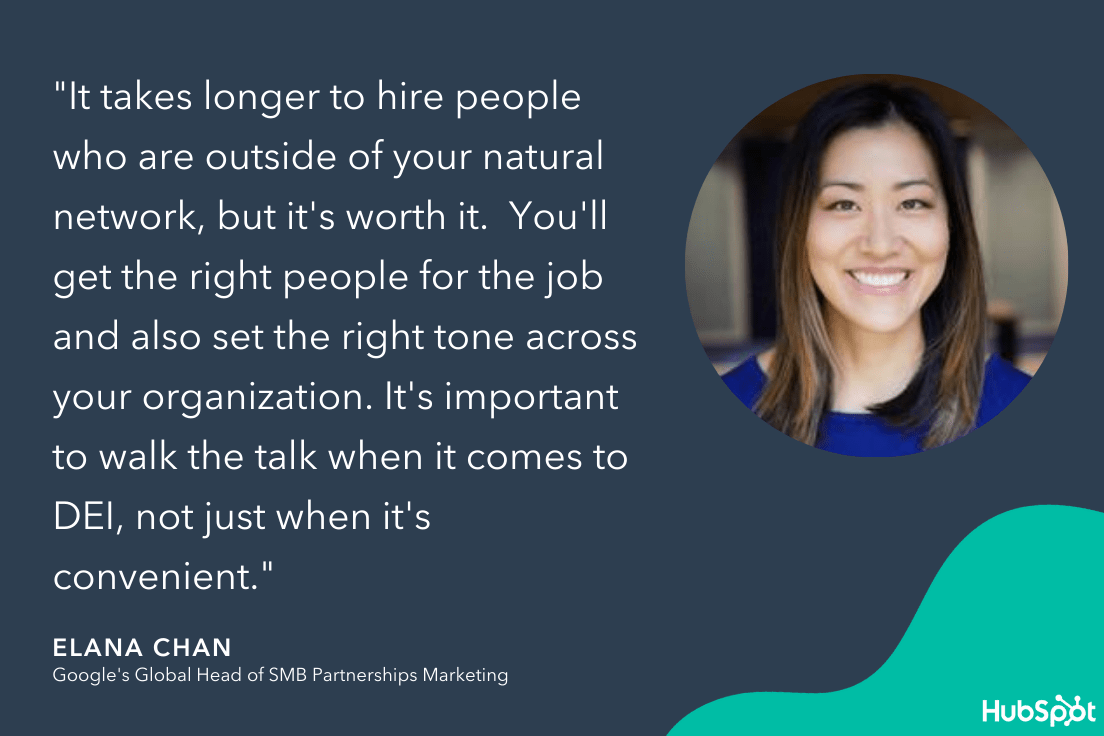
2. Hire people who are hungry enough to try anything.
If you’re just starting out, you don’t have unlimited budget to hire a slew of marketers who specialize in various marketing activities. Instead, you likely only have the budget for a handful of marketers — or perhaps even just one.
So … how do you make that one hire count?
Above all else, Wistia co-founder and CEO Chris Savage believes it’s important to consider how driven your first marketing hire is.
He told me, “You want to find someone who is extremely hungry, and can make their own things — whether that is video, written content, or audio. Whichever assets your team needs, if you can find someone who can be both the creator and manager of those assets, then you unlock the ability to try things much more easily.”
“At Wistia,” he adds, “I hired a lot of misfits who were so hungry that they were willing to try anything. Maybe on paper it didn’t make sense, but in reality, it was incredible.”
For instance, perhaps your marketing team has identified YouTube as a viable opportunity to reach new audiences and convert those users into leads. If that’s the case, consider hiring someone with experience creating video — along with a strong desire to learn quickly, and try new things.
3. Hire a marketing customer experience (CX) leader.
When asked what the most crucial early hire on a marketing team is, John Cosley, Senior Director of Global Brand Marketing at Microsoft Advertising, told me: “Two years ago, I would have said a marketing data scientist — someone who can analyze datasets and help their organizations better understand their customers and identify future opportunities, as well as advise on marketing tactics and analysis methodologies.”
“Fast forward to today,” He adds, “And I would say that the marketing customer experience (CX) leader is the most crucial early hire in scaling a marketing team. Consumer journeys have increasingly become digital and multi-modal and expectations have increased around privacy and trust, personalization, and quality.”
If you’re interested in creating a customer experience strategy for your business, take a look at How to Define a Customer Experience (CX) Strategy.
Ultimately, a customer experience is about putting the customer first. As Cosley told me, “Consumers are more likely to value a brand that values them, so it has become critical for brands today to prioritize the customer experience all the way through the purchasing funnel.”
4. Hire early.
Hiring as you’re scaling can be a bit like trying to build a plane while you’re flying it.
It can be difficult and messy to get new hires up-to-speed at the same time you need them to perform optimally so your consumers don’t feel the friction. To minimize these challenges, consider hiring months ahead of when you’ll need certain roles filled.
As Francois Bondiguel, Canva’s Global Head of B2B Marketing & Growth, told me, “A big challenge that many face as they scale is getting the organizational structure and strategy right. This includes hiring the right people, and ensuring they have leaders in place to guide them through this transformative phase and help them remove roadblocks so they can move fast.”
“On that note,” Bondiguel adds, “it’s important for key hires to be brought in early to ensure they are properly onboarded prior to projects ramping up. This helps avoid placing unrealistic pressure on new team members as well as the broader group.”
To do this effectively, take a look at your team’s long-term vision, and brainstorm which role(s) will need to be filled to get your team to the next level.
5. Use one data set to guide your entire department.
When you’re first starting out, I’m willing to bet your lean startup team understands the importance of making data-based decisions … but they likely also work in silos.
Maybe you have two content strategists who focus on lead generation numbers. Then, perhaps you have another social media marketer who focuses on cost-per-acquisition.
The issue? “When you’re operating in silos, there are also data silos,” Chan tells me. “Which means you can never pull the same number across teams. That’s a mistake. If you start off providing your team with a unified data set, then it’s easier to grow together. It’s much harder to merge data sets later, and then it becomes politics to determine the right numbers to use.”
To fix this, ensure you have a unified system for collecting and analyzing data even when your team is small. Consider using a CRM to store your data in one place, or creating a department dashboard in Google Analytics.
Whatever the case, it’s vital you provide your team with a centralized location so your data processes can grow with you as you scale.
6. Focus on customer retention in the beginning, rather than just customer acquisition.
When you start to see your list of customers growing, it can be tempting to want more, more, more.
But as a startup, you need to be careful. If you focus exclusively on acquiring new customers, you forget one of your strongest weapons — your existing customers.
As Typeform’s VP of Growth, Jim Kim, told me, “Many SaaS-based startups … focus exclusively on customer acquisition and tend to neglect customer retention until they see issues with the customer base size growing.”
Kim adds, “By focusing early on efforts to engage and retain the base of customers already acquired, the startup develops a more holistic understanding of the customers they serve, and can gain insights into the things customers really care about that can then be added to the acquisition activities.”
To prevent customer churn, you’ll want to build out an incredible customer support strategy that enables your existing customers to get their needs met. Additionally, consider how you might provide value beyond the purchase, or create a personalized customer experience so your customers know you care about them.
As Kim points out, “It’s an obvious point, but in my experience, it’s hard to remember that retention can actually be a faster way to grow the customer base than new acquisition and usually has a higher marketing ROI, since it’s (generally) cheaper to keep a customer than find a new one.”
Tips for Scaling Your Marketing Team
1. Don’t stifle the energy of a startup.
As you begin to scale, the workplace inevitably changes. Before, conversations happened casually across office desks, or when grabbing a cup of coffee — now, there are formal meetings with agendas.
And, while you could previously test out a new idea without necessarily requiring buy-in from leadership, now you’re expected to follow stricter processes, which limits the experiments you can try.
And yet, one thing shouldn’t change as you scale.
As Chan puts it, “It’s important not to stifle the energy of a startup. That’s the exciting part of being where you are, and I think the acknowledgement that you’re building the car as you’re driving it is okay — and fun.”
Chan adds, “At Google we have a saying: ‘Operating at the edge of chaos’. If you imagine a frontier, one side is not enough chaos, and the other side is too much chaos. If there’s too much chaos, no one knows what’s happening, and nothing gets done. But if there’s not enough chaos, then there’s no innovation and you’re not moving forward.”
“It’s your job as a leader to operate as closely to this frontier as possible, and I think in a startup that’s even more true.”
When you begin to scale, you’re going to need to implement more formal processes. But these processes shouldn’t restrict your employees from taking risks, testing out new ideas, and pushing the boundaries of your marketing efforts.
Consider, as you scale, how you can protect that “startup energy” at all costs.
2. Stick with what’s working.
As you begin to scale, you’re probably looking for new growth opportunities. And, at this point, it might feel like the sky is the limit — your business is rapidly growing, so why not take some risks?
But, while certain risks are inevitable, it’s not a good idea to expand too far beyond what’s already working.
As Savage told me, “If you’re a startup that’s making progress in terms of bringing in customers and getting them to use your product or service, then it’s easy to think, ‘Okay, I have one channel that’s working … now let’s add a channel on top of that, and another channel on top, and that’s how I’ll scale.’ Like, PR is working, why not add paid advertising on top?”
The mistake, Savage says, is that there are often one or two channels you end up underestimating in terms of growth potential. If your content is performing exceedingly well and driving leads for the business, it’s not necessarily a good idea to pivot away from content. Instead, you want to ask yourself — How much more can we expand with our content?
“There’s good advice in personal finance,” Savage says, “which states that most wealth is built through a concentration of risk, and it’s maintained through a distribution of risk — so, basically, if you want to become wealthy, you need to take just a few big risks.”
“It’s the same thing when scaling customer acquisition … There are a few big things you can do. It’s very important to go big on the things that are already working.”
Rather than investing in social media, digital marketing, video, PR, and blogging all at once, consider which channels drive the most leads for your business. Those are the channels that got you this far, and those are likely the same channels that will get you even further if you focus your efforts.
3. Treat your culture as a business priority.
It’s easy enough to foster and maintain a strong culture when you’re a small team. But, as you scale and expand your team, it can get harder to protect the culture that attracted employees to your office in the first place.
And while culture might just sound like a buzzword used to replace beer garden and yearly ski trips, it’s not.
In reality, culture is vital to your business’ success — in fact, companies with strong cultures are 1.5X more likely to report average revenue growth of more than 15% over three years.
As Cosley told me: “In any growing organization, the key to success is embracing and honoring the culture to which you aspire. It’s likely what made your company a great place to work and attracted the high-quality talent that is driving your growth.”
Cosley adds, “It’s not hard for core values and cultural priorities to erode or even get lost during expansion if that work is not made a priority. As you scale, you’ll want to think and act intentionally about how your culture grows with you, how you define and memorialize it, how it impacts your hiring and onboarding, how you train your leadership, and how you evaluate performance.”
Keep in mind — whether or not you’ve actively fostered it, your company already has a culture … it just might not be a strong one. And strong cultures can both attract and retain employees for the long-run, so it’s an important business initiative to take the time to create one that aligns with your values and purpose.
Additionally, Cosley notes, “Culture is not one-dimensional. You need to consider it across areas such as retention and hiring, diversity and inclusion, and employee engagement. And culture is contagious. Not only does it deliver more positive outcomes and business results, it helps with critical talent retention, and can lower the cost and time to acquire new talent.”
“Treating your culture as a business priority is essential. Without doing so, it could be detrimental to your organization’s potential.”
To ensure your culture grows with your organization as you scale, take a look at HubSpot’s Ultimate Guide to Company Culture.
4. Institutionalize key values on your team.
To build a strong team culture, Chan recommends institutionalizing key values.
For instance, perhaps you value autonomy, empathy, adaptability, or intellectual growth. As a leader, it’s vital you use these values as foundational building blocks on which your team can grow.
Chan told me, “For me, learning and intellectual curiosity are really important, so I say to my team, ‘You’re responsible for making the person next to you smarter’. And that creates the onus on bringing your own best game because everyone around you is so incredibly talented — so how are you being additive, collaborative, and innovative from within that culture? You owe it to each other to be your best.”
5. Praise what’s right … and punish what’s wrong.
Once you’ve identified the values that matter to your organization, it’s vital you encourage those values in each of your employees.
When providing performance reviews, for instance, take the time to identify where employees have demonstrated key team values, and where they might still be lacking.
As Savage told me, “The way you scale it is, you praise the right stuff and punish the wrong stuff. It’s that simple — most culture is modeled. You need the most senior people to act the way you believe you should be acting, and if you do that, it permeates the building.”
As an example, let’s say you value risk-taking on your team. If that’s the case, you’ll want to praise your team when they take risks, and even praise the failure that might result from those risks.
Alternatively, if you’re in a mode where you’re risk-averse and looking for optimization of processes, you’d want to praise actions that demonstrate risk management.
6. Hire for the future — not just today.
Finally, when you’re scaling, you want to consider who you can hire today that will continue to meet the needs of your business even as those needs change over time.
For instance, when I was first hired at a startup, I was hired to create blog content. Fast-forward six months, and I was additionally tasked with creating a podcast, and increasing the subscriptions to an email newsletter. As the business scaled, my role changed quickly. So it’s vital you hire with the future in-mind.
When asked about the biggest challenge leaders face when scaling, Kim told me, “[It’s] the challenge to balance long-term and short-term hiring. For a larger, more established business, scaling a team is not as challenging. The roles are already clearly defined, and there is likely already someone doing that job. It’s easy to hire for a role like this.
“But,” Kim adds, “when the team is trying to scale, the roles may be less clear and transitory. What you think you need today could be wildly different tomorrow. Balancing the needs of today, while keeping an eye out on how things might change in the future is something that’s extremely hard to do.”
Hiring and recruiting isn’t an easy task, but to ensure you’re hiring for the future, you’ll want to take the time to determine someone’s work ethic, flexibility, and ability to shift roles as the needs change. And, as mentioned above, you’ll want to find someone who’s hungry to be there.
7. Create processes for effective communication.
As your team scales, it becomes even more important to ensure you have processes in-place to ensure fair, effective cross-team communication.
For instance, perhaps you’ve noticed your meetings have become opportunities for your most extroverted employees to share their successes, while the majority of your team stays silent.
To combat this, consider creating a meeting agenda or slide deck, so people know what they need to share, and when.
As Bondiguel puts it, “Another challenge is communication. You need to put good processes in place (access to documents, meeting cadence, etc.) to ensure the entire team has all the information and context they need to perform and do their best work. This has never been more important as teams adapt to hybrid work environments.”
And there you have it. Whether you’re officially in the scaling phase or still in the startup phase, these tips should help you ensure you’re building a strong foundation for the future.

How to Create Landing Pages for Real Estate [+Examples]
When people are looking to buy or rent a new house, what’s the first thing they do? That’s right, they go online.
In fact, 51% of home searches start on the internet. People search Zillow, Apartments.com, Redfin, and local real estate websites.
Additionally, people also turn to the internet when they want to value their home or learn more about the real estate market.
All this to say that when it’s time to generate leads in the real estate industry, posting online and creating a landing page is the first step.
In this post, we’ll discuss how to create a landing page for real estate and review sample real estate landing pages to inspire your own.

1. Choose the type of landing page you need.
Before you can get started, it’s important to understand the different types of real estate landing pages.
The three main types include:
- Home valuation: This type of landing page lets users type in their address and get a quick idea of how much their home is worth.
- Buying/selling websites: These websites are where buyers and sellers go to place listings online, including Zillow or Redfin.
- Free content: This landing page is usually targeted toward those who want to start working in the real estate industry or are in the beginning stages of buying/selling. You can place free content on a landing page to get leads to download the offer so when the time comes to buy or sell, they think of you.
Depending on the type of landing page you need, the process and design will be a little different.
2. Use a simple lead capture form and search function.
When creating a landing page for real estate, the goal is to gain leads through a lead capture form asking for information (whether it be a name, email, or phone number). The first step to doing this is to have simple search functionality that is front and center in your design for home buying/selling or home valuation.
If you’re creating a landing page for free content, you won’t need a search function, but you will need a lead capture form that is simple and easy to use (this should also be a large part of your design that is easy to see).
The simplicity of the search function or lead capture form will make your call to action (CTA) stand out and get people searching through your site.
With Zillow, the home page has a simple search function so homebuyers can search for houses in a certain area. This keeps the site clean and it gets straight to the point — no distractions.

3. Always pay attention to curb appeal.
Everyone knows that curb appeal is important when it comes to buying or selling a home. The same holds true for your landing page. Use clear, crisp imagery that inspires home buyers to imagine their new life in the house you’re selling. When this happens, buyers are more likely to convert.
The visual design of your landing page is even more important than most landing pages. If people don’t like the design of the landing page, they might not even like the house because they can’t see past the poor web design.
4. Write honest copy.
The copy you write for each house should be honest. You’ll want to include detailed information and use descriptive adjectives that will paint a picture for prospective buyers. But don’t embellish.
When people start visiting your house they’ll see what’s true and what isn’t. If you aren’t being honest in your copy, then people won’t want to work with you because they can’t trust you. You should use short copy that’s punchy and to the point.
Buying or selling a home is a major financial and life decision. Trust is of the utmost importance between you and your prospective leads.
5. Include testimonials.
Although most home buying efforts begin online, most people hire real estate agents through referrals. In fact, 42% of sellers who use real estate agents find these agents through referrals and 82% of all real estate transactions come from referrals. This means that customer testimonials and reviews are very important. On your landing page, include testimonials so visitors know they can trust you.
It’s a particularly good idea to place testimonials near your CTA, so it motivates people to click on your form.
You can also place badges or awards on your landing pages to instill a sense of professionalism and credibility.
6. Highlight the benefits of your offer.
Depending on the type of landing page, you might need to highlight the benefit of your content offer. For example, if you have a home valuation calculator, it’s important to write copy that emphasizes why this will give a seller more power in the process. Or if you’re giving away a free checklist or ebook, explain how it helps people in the process of buying or selling.
This is how you’ll communicate your value with your leads, which will inspire them to convert.
7. Be personal.
The intent of your landing page is important. Your landing page will look different if it’s a home valuation, buying/selling, or content offer page. The point of creating a landing page is to create a personal experience for those interested in certain offers.
That’s why landing pages are different from your everyday website. These pages keep customers focused on going down the path they want: searching for a home, getting in contact with an agent, etc.
Additionally, the design of your landing page should be personalized to the experience of the viewer. This means that your page should be optimized for mobile, tablet, and desktop experiences. You might also have an app that will help your visitors come back anytime they’re looking for a home.
Best Real Estate Landing Pages
1. Redfin Home Valuation Landing Page
Talk about a simple landing page. This is a no-fuss home valuation landing page that lets visitors get a real-time estimate of how much their home is worth.
This landing page is a good example of being simple, using short, punchy text and engaging graphics to draw attention to the simple CTA of entering a home address.
2. Hill Realty Group
This is a great example of a realty group’s home search landing page. First, it focuses on the curb appeal of the properties and areas that it sells houses in. Then, it includes a simple property search where you can include your location, bed and bath requirements, etc.

3. The H. Williams Group
This is a sample real estate landing page with a content offer. This realtor has a simple lead capture form enticing visitors to download her guide to Alexandria. This is a great content offer because people looking for a guide to the area are most likely going to move there and may contact her to be their realtor.
Additionally, this page is great because all the focus is on the simple capture form. The design is sleek and simple, with a logo, picture, headline, and capture form. That’s it. That’s why this landing page works.

Creating a real estate landing page is very important for marketing your listings or offers. That’s why it’s important to create a landing page that will convert visitors into buyers.

6 Analytical Skills Marketers Need and How to Improve Them
If you’ve ever tried to solve a Rubix Cube, you’ve put your analytical skills to the test. Making the colors match up requires problem-solving, logical reasoning, and pattern recognition.
While the majority of marketers will never make it to the next speedcubing competition, the skills you learn with puzzles like this are essential to a successful marketing career.
In today’s workforce, nearly one in four workers have a job in which analytical skills are considered the most important factor. Companies want to hire for these skills because it shows a candidate’s ability to think logically and use data to inform decision-making. In fact, Indeed found the most in-demand skills for employers — and several analytical skills top the list.
That’s why it’s important to know how analytical skills apply to your career and what you can do to develop these skills over time.
As a marketer, being able to understand problems and provide solutions is essential to a long, successful career. It means you can take a critical lens to the details of a problem to fully understand it. This helps you notice trends, understand the steps needed to take action, and offer novel solutions. But that doesn’t mean you have to throw creativity out the door. Using analytical skills to problem solve can look like a structured, methodical approach or a more creative one.
We’ll explore the various types of analytical skills later on, but first, let’s look at how analytical skills differ from critical thinking skills.

Analytical Skills vs. Critical Thinking
A person who uses logic to find patterns, brainstorm, analyze data, and make decisions based on that information has analytical skills. One of the skills required to do that is critical thinking.
In other words, critical thinking is just one of many skills you need to be an analytical thinker.
You probably use critical thinking more often than you imagine, like when you:
- Question whether a piece of information is a fact or an opinion.
- Break problems down to understand the reasoning behind them.
- Draw conclusions from data, rather than a gut feeling.
- Make intentional, rational, and goal-oriented decisions.
Marketers who have strong critical thinking skills make reasonable, logical judgments and think through every decision. They provide facts and logical arguments to back their choices, which leads to smart decisions and improves company success.
While each role has its own analytical skill requirements, there are several that will benefit any marketer throughout their career.
Example of Analytical Skills
If you’re looking for a marketing role that leans towards analytics, such as a market research analyst position, it’s best to develop analytical skills specific to that position and your desired industry. Analytical skills are soft skills, so you’ll also want to develop hard role-specific technical skills.
For an analyst, that means mastering technical skills like Google Analytics and statistical software, while also having analytical skills such as creating data collection methods and presenting findings to senior leadership.
But across the board, all marketers can benefit from developing these in-demand analytical skills.
1. Critical Thinking
Any position across all levels of a company can benefit from critical thinking skills. It’s the ability to question an idea or examine why a problem exists. This can lead you to tackle issues others thought impossible and understand whether resolving a problem is worth the time, money, and effort. Critical thinking can take many forms in marketing, such as:
- Decision-making
- Content and brand auditing
- Prioritization
- Troubleshooting
- Case analysis
- Correlation
- Data interpretation
- Judgment
- Market research analysis
2. Data Analysis
Neil Hoyne, Chief Measurement Strategist at Google, once said, “The companies that are going to win are the ones who are using data, not guessing.”
Interpreting data is more than collecting and reading information — it’s making sense of what’s before you by connecting patterns and recognizing trends. Strong data analysis skills allow you to pull insights from a large volume of data, which you can share with key decision-makers. This skill can show up in marketing role requirements in a few common ways.
- ROI analysis
- SWOT analysis
- Data visualization
- Pattern recognition
- Process analysis
- Industry and market research
- Presentation skills
- Measuring customer satisfaction
- Marketing analytics
- Customer segmentation strategies
- Predictive analysis
3. Creative Thinking
I once had a manager who was known for saying, “The first answer isn’t the answer.” She knew the role creativity played in problem-solving and pushed our team to view a possible solution from all angles. Marketers with this analytical skill work to find out-of-the-box solutions and patterns that others brush past. And if you need any more convincing, ‘creativity’ ranks on Indeed’s top 20 list of most in-demand skills for today’s workforce. At work, creative skills involve:
- Brainstorming
- Collaboration
- Adaptability
- Budgeting
- Search engine optimization (SEO)
- Strategic planning
- Organizational restructuring
- Predictive modeling
- Campaign development
- Branding
4. Communication
Employers consistently rank communication as a must-have skill — and for good reason. Being able to explain your idea for a project or give feedback is essential as a marketing professional.
Communicating clearly helps you keep everyone on the same page when rolling out a campaign or diffuse a problem with a deadline when it (inevitably) arises. Strong communication skills needed in marketing include:
- Written and verbal communication
- Body language
- Interpersonal skills
- Active listening
- Conducting presentations
- Reporting
- Confidence and clarity of expression
- Sharing feedback
- Responsiveness
- Delegating responsibilities
- Respect and empathy
5. Problem-solving
Deciding how to respond to a harsh customer comment on social media. Distributing an advertising budget. Prioritizing which roles to hire for as a growing team.
All of these situations require analytical problem-solving skills, and all will pop up through a marketing career. Here are the problem-solving skills every marketer can benefit from developing:
- Research
- Data collection
- Prioritization
- Checking for accuracy
- Risk-taking
- Attention to detail
- Dependability
- Team-building
- Logic and reasoning
- Organization
- Crisis management
6. Collaboration
Good collaboration skills can improve your working relationships, help you accomplish tasks on time, and reach your short- and long-term goals.
And nearly every marketing team has to collaborate with sales, product, business development, and creative teams to get anything done, knowing how to create synergy with your colleagues will make work smoother and more enjoyable.
The most common collaboration skills for marketers today are:
- Persuasion
- Adaptability
- Time management
- Responsiveness
- Negotiation
- Giving and receiving feedback
- Emotional intelligence
- Open-mindedness
- Process improvement
- Adapting to change
- Networking
How to Improve Analytical Skills
Developing analytical skills takes time and effort. Unlike technical skills that have a structured approach to follow, analytical skills are more difficult to define and develop. There’s a process to learn how to use Google Analytics for SEO, but the steps to become an effective communicator are more fuzzy and undefined.
Fortunately, analytical skills can be honed. Here how you can go about boosting your skills and contributing to your company’s productivity and success.
Take courses, certifications, or on the job training.
Infinite resources exist both in-person and online that can help you improve your analytical skills. Universities and online companies like Coursera offer online schooling, HubSpot Academy offers free certification courses, and many companies provide stipends for continuing education.
Start by identifying which skills you want to improve and do research to find the resources that are right for your skill set and budget.
Find a mentor.
You likely know someone who is an excellent negotiator or always crafts the perfect email. Noticing how these people approach a situation and problem solve can help you hone your skills. Take notes, save examples, and apply their process to your work.
To take it a step further, ask them to chat over coffee or a phone call to discuss how they developed their skill. They can likely point you in the right direction or provide guidance on what you need to do to excel at the skill.
Try practice problems.
Role-playing is incredibly effective when working to improve analytical skills. Instead of simply reading a case study about an innovative digital media campaign, find a tool to help you develop your brainstorming skills.
Depending on the skill, you can find a practice book or an online resource to walk you through various mental models and scenarios. Work on an idea, and then present it to a trusted colleague or mentor to get feedback.
Play games to improve your analytical skills.
Spending hours on your phone playing Sudoku has more benefits than the personal satisfaction of beating your top score. Games that test your mental agility and memorization can improve your ability to think logically and challenge norms. While game trends are constantly changing, there are several classics that have withstood the test of time.
- Sudoku
- Jigsaw puzzles
- Board games (i.e. Scrabble, Settlers of Catan, Splendor, Pictionary, and Bananagrams)
- Computer or mobile games (i.e. Lumosity, Elevate, and Peak)
- Chess
- Crossword puzzles
Analytical Skills for Your Resume
Once you gain or improve your analytical skills, make sure to update your resume to reflect those strengths. Your resume should include a list of 10 to 20 skills, with a mix of both hard and soft skills. Note at least five to 10 analytical skills so potential employers know you have the knowledge to get your job done.
When choosing which skills to highlight, look to the job requirements section. A role may involve managing the company’s social media accounts, but this typically includes collaborating with multiple teams to get the content and analytics you need to do that successfully. Showcasing a blend of technical and analytical skills is what makes you a competitive candidate.
As your career develops, you’ll likely need to keep your analytical skills sharp. Be proactive by practicing and paying attention to people who have the skills you want to acquire, and you’ll be on your way to solving complex problems with ease.

The Best Integrated Marketing Campaigns, According to HubSpot Marketers
Integrated marketing is any marketing campaign that uses multiple channels in execution. For example, you might see a popular new donut flavor in a commercial, then drive past the donut shop to see posters of the donut. And if you flip through Instagram once you get to your destination, you might see a GIF on your feed, displaying the donut.
This style of marketing is great for boosting leads and brand awareness. Using multiple sources to deliver the same campaign diversifies the audience that interacts with its content. In this post, let’s look at some recent integrated marketing campaigns that delivered a great experience for customers and leads alike.

Best Integrated Marketing Campaigns
1. Hyundai Elantra
Channels: Spotify, Website
A great example of an integrated marketing campaign comes from the 2021 Hyundai Elantra award-winning campaign.
To increase brand awareness among the younger, millennial demographic, Hyundai partnered with Spotify and musicians in LA, Miami, and NYC to give customers an insider’s guide of the city.
The city guides were made available to audiences everywhere through Spotify podcasts, where drivers could follow along from place to place by listening to the podcast.
These guides were audio, video, and even a microsite that housed itineraries and stop descriptions.
As an associate marketing manager at HubSpot, I think this is a great campaign that utilizes the right channels for the audience that Hyundai is trying to reach.
2. “Fatima,” the movie
Channels: Facebook Premiere, other social media channels
In 2020, McKinney and Picturehouse teamed up to launch a new film, Fatima, the historical drama of the Virgin Mary’s appearances to three children in Fátima, Portugal, over a hundred years ago.
The companies developed social content to inspire, connect and elevate the film’s key themes. It was a social campaign that included more than 200 pieces of content reaching 14 million people.
But one month before the movie’s release, the world and Fatima were put on pause due to COVID-19. To keep people interested and engagement up for another four months, the companies created “Together In Spirit,” a virtual pilgrimage transporting people to the Shrine at Fátima. The campaign videos got more than 27 million views.
At a time when everyone was isolated, the goal of the broadcast was to provide a message of hope, and in the process, it became the best-performing Facebook Premiere event in motion picture history.
3. Hulu’s HAHA Awards
Channels: Twitter, LinkedIn, YouTube, Website
One of my favorite integrated marketing campaigns to come along is the launch of Hulu’s HAHA Awards. HAHA is a clever acronym, standing for “Hilarious Animated Hulu Awards,” which I love.
Initially, I saw the commercial during a regular ad break while watching — of course — Hulu:
Because there’s no awards show for animated content, the team at Hulu decided to change that — and get fans involved. Fans can vote for the awards on Twitter and Hulu’s website.
I appreciate that anyone with a Twitter account can participate in voting, regardless of if they are Hulu customers. Some of the categories are popular TV shows, like Archer and Bob Burgers, so the masses can vote. Additionally, people without a Twitter or Hulu account can vote, just by visiting the website.
The tactic of using YouTube to introduce the campaign, as well as alternate methods of voting, makes this campaign a chance for Hulu to delight customers and earn more quality leads from social media.
4. Victoria Monet’s “Audience”
Channels: Instagram, Facebook, Billboards
For the single, “Experience,” R&B singers Victoria Monet and Khalid collaborated with Spotify for a release campaign. The campaign included online and in-person marketing tactics and is the favorite campaign of HubSpot staff writer Jay Fuchs.
In Canada, there was a billboard put up in Toronto, promoting the song’s Spotify release. In response, Monet posted a picture on Instagram to share with her fans and promote the single:
The use of online and in-person marketing methods makes this integrated campaign one that can be seen from anywhere. From the billboard in Canada to international Facebook and Instagram fans, the release of “Experience” was anticipated globally. In fact, in one month, the single became Monet’s most popular song on the streaming service.
5. Gillette, “The Best Men Can Be”
Channels: Website, YouTube
“In 2019, Gillette launched its campaign, ‘The Best Men Can Be’. The campaign included an inspiring video, a landing page that celebrates male advocates and leaders in the community, and a hashtag, #thebestmencanbe, to encourage user participation across social channels,” says HubSpot Marketing Manager, Caroline Forsey.
“The campaign, created in response to the #metoo movement, urged men to hold themselves to a higher standard,” says Forsey. In the corresponding ad for the movement, viewers are shown hypothetical real-life instances of men stepping in to be themselves, and making positive change in their community. To heighten awareness of the movement, the landing page highlights real accounts of men upholding the hashtag Gillette created.
“While the campaign received some backlash from both stakeholders and consumers, I think it was worth the price because it redefined the shaving brand as a relevant, values-oriented brand. For me personally, I shared the ad with all my male friends and family members, and it sparked a discussion — which, really, is what marketing is all about,” Forsey commented.
Gillette’s tactic of getting their customers involved proved to be successful in the moment and long-term. Discussions, like the one Forsey had with men in her life, were happening nationwide. In fact, my university class had one about the campaign. This integrated campaign, boosted by real accounts, was proven to be not only successful but valuable.
6. REI, #RecreateResponsibly
Channels: Website, Instagram
Outdoor activity is at the core of REI’s products. REI sells camping essentials, such as tents, clothes, and insulated containers. In 2020, REI partnered with several groups in Washington state that aim to preserve wildlife and nature, making it the favorite campaign of HubSpot marketing manager, Clint Fontanella.
Outdoor Alliance, The Outdoor Industry Association, and national parks came together for the #RecreateResponsibly campaign. The point of which was to educate the public about how to stay safe when venturing outdoors, with the main content player being graphics similar to the one below:
This graphic was shared on social media to spread awareness of tips to responsibly venture outdoors to avoid health concerns. #RecreateResponsibly‘s hashtag asks followers to share the tips in real-life situations, shared by REI’s Instagram.
With the hashtag and partnerships, the campaign is also boosted by related blog posts on REI’s website. Posts like this one offer ways to stay safe while traveling.
The hashtag has been used by The National Park Service, Colorado Parks and Wildlife, and Los Angeles National Forest, and brings awareness to large audiences. The partnerships and REI’s content share an educational message and an interactive component — making this campaign diverse and engaging.
7. Melt Cosmetics, “She’s in Parties”
Channels: Website, Instagram, Facebook
“She’s in Parties” is the name of an eyeshadow palette from Melt Cosmetics. Says staff writer Rebecca Riserbato, “The purple palette sparked a hashtag of the same name on Instagram. On the landing page for the collection, there’s a section dedicated to Instagram posts with the hashtag.”
The campaign inspired a purple theme, which took over the company’s Facebook and Instagram accounts. Along with this social media content, influencers who were sent the palette began to upload their reviews on YouTube.
For this launch, a variety of social tactics were used. A matching social campaign, user-generated hashtag, YouTube recommendations, and a revolving landing page were all contributions to where the campaign was distributed. When you know where your audience spends their time, like the team at Melt, you can reach them with a diverse, omnichannel strategy.
8. Brew Dr. Kombucha, “Love Wins”
Channels: Website, Instagram
“In May 2020, Brew Dr. Kombucha released its signature kombucha with limited-edition colorful, rainbow-wrapping for Pride Month,” Forsey recalls. “The wrapping has the lifeline number to The Trevor Project printed directly on it — the company partnered with The Trevor Project and supports the organization through proceeds of its limited-edition kombucha.”
“Along with the limited-edition wrapping, the company created a dedicated landing page for #LoveWins, and supported Pride Month with the #LoveWins hashtag across its social channels.”
Forsey continues, “Ultimately, I chose this campaign as one of my favorite integrated campaigns of 2020 because I was inspired to see this brand uplift and inspire communities while giving proceeds back to an incredibly worthy cause.”
The brand chose a social movement that was important to them, Pride, and celebrated it with this integrated campaign. This tactic brings awareness to a social cause, a respected organization, and enhances a celebration.
9. The New York Times, “The Truth Is Hard”
Channels: Commercial, Facebook, Billboard
In early 2018, the newspaper The New York Times was struggling. With dwindling subscriptions and dwindling trust in the news from the general public, the team behind the famous publication had to figure out how to build widespread trust.
That’s where “The Truth Is Hard” came in — it was a campaign designed to offer transparency. “I think the best advertising not only gets you to pause and pay attention at the moment but also encourages the viewer to take action and learn more after the fact,” says Alicia Collins, senior brand manager.
“The New York Times’ ‘The Truth Is Hard’ campaign does that. It tells a clear and impactful story, and demonstrates the value and importance of journalism right away.”
Following a tribute to journalism at the 2018 Oscars, the campaign began. The Times aired a minimalist film to display the clarity of newsprint, and challenged viewers to think about what truth means to them.
Refugee crises, sickness, and wars — the second phase dove deep into conveying what journalists endure in order to deliver the most accurate coverage. And, with a paid media campaign on Facebook, Twitter, and Instagram, all of this content was broadcast for the world to see.

This campaign earned the Times their highest number of new subscriptions since the paywall started, increasing signups by 100%. The multiple channels used by the news source to restore their image to the public worked and made this integrated campaign a win.
Get Started With Integrated Marketing Campaigns
Integrated marketing campaigns can help increase brand awareness, generate leads, and delight your customers. The best integrated marketing campaigns have an omnichannel approach, encourage audience engagement, and hopefully improve your brand reputation.
And the only way to truly create an integrated marketing campaign is to have a marketing plan template to help you identify the right channels, budget, and strategy for your campaign.


How to Write a Creative Brief in 11 Simple Steps [Examples + Template]
The first step in any successful project is drawing up a game plan with a clear objective. It’s one of the reasons marketers love creative briefs.
A creative brief acts as a roadmap that takes a project from ideation to completion. It ensures the scope, timeline, key stakeholders, and purpose of the project are communicated clearly. The creative brief is the single source of truth for everyone working on a project. If questions come up or tasks become unclear, the creative brief will steer things in the right direction.
If you’re just starting out in a creative role, taking on your first gig as a designer or consultant, or you simply want to get better at writing creative briefs, this article has everything you need to know to write the most effective creative briefs.

Whether you’re a consultant pitching a creative brief to a client, or a project manager presenting a brief to your team, start by speaking with the project stakeholders. These discussions will help you understand the company’s mission, project goals, and challenges your team faces. Then, you’ll have enough information to write a compelling brief that focuses on what’s really important to your company or client.
The idea of a creative brief sounds simple, but it can be hard to wrap a lot of important details into just a few pages. Therefore, a creative brief is typically made of eight sections that can fit on one to two pages.
Creative briefs are pretty standard documents within just about every marketing, advertising, or design team. But the format of every company’s creative brief might vary slightly to suit the needs of the project or client. Below is a simple outline that will be the foundation of your creative brief. It includes the most important steps in the creative process and information that’ll be relevant to stakeholders involved in the project.
Once you’re fully informed and ready to write, use the following steps to draft yours. To make it even easier, I’ve included a fill-in-the-blank template in the last step.
Follow Along with HubSpot’s Free Creative Brief Templates

1. Decide on a name for the project.
The first step in developing a creative brief is deciding on a project name. This might sound simple, but it’s one of the most critical components of a creative brief. If you’re building a campaign around a brand new product or service, the campaign name will be the first time many members of your team will be introduced to it. Referring to the campaign (and therefore product or service) by the correct name prevents the game of telephone from happening. Without a specific and clear campaign name, people will make up their own terminology which can alter the intent of the campaign.
To create a project or campaign name for your creative brief, keep it creative and brief. A few words or a short sentence should work just fine. If you’re launching a product, identify what the call to action will be for the target audience, then center the name around that. Here are a few examples of fictional campaign names:
- The Search for Adventure Campaign- A scavenger hunt-themed amusement park.
- The Don’t Forget Your Memories Campaign – A photo frame company.
- The “What’s hotter than Pepperco hot sauce?” Campaign – A hot sauce brand.
2. Write about the brand and summarize the project’s background.
Another simple, yet essential section is the company background. If you work in an agency setting, this is non-negotiable as your team is likely handling several client campaigns at once. However, if you’re developing a creative brief for an in-house project, you’ll still want to include this part. New hires on your team, freelancers, and vendors will appreciate the background that your internal team is already privy to.
The company background shouldn’t be a general history of the company or a copied and pasted paragraph from the about page. Instead, tailor this to the project at hand. Set the scene with one or two sentences that sum up the brand’s mission. Follow this with a few sentences that give background on the brand and what led to the development of the project.
While some creatives have put this information all together in a quick paragraph, others separate it with headers like “Brand Statement” and “Background.”
Here are some questions to consider when writing a company background for your creative brief:
- Has the company launched a campaign like this before?
- Why is the company choosing to launch this campaign right now?
- What’s happening in the market and how will this campaign respond to it?
3. Highlight the project objective.
Here is where the creative brief gets more specific. The project objective should briefly explain the purpose of the project, the timeline, and the audience it’ll target. This can be done in a sentence or two, but you can get creative and stylize it in sections.
This part of the creative brief will be helpful in emphasizing why the project needs to happen. The goal aspects will help you and your team align on the project’s expectations. If the company or client hasn’t identified any major challenges, you can focus this section on goals and objectives. Explain what a successful project looks like and how it will benefit the company.
Pro Tip: Writing a project objective is very similar to writing a goal, so take a look at this blog post for more detail on goal and objective writing.
Here’s an example of a sample creative brief for PayPal that offers separate sections for “The Problem” and “The Goal”:
4. Describe the target audience.
Next, it’s time to define the target audience for the project. This is the segment of your market that will directly benefit from the product or service being launched. You can take audience segmentation a step further by identifying a primary and secondary audience. Doing so will give your team more freedom to explore creative ideas that might resonate with one group more than the other.
When crafting the target audience section, be sure to include the following:
- Demographics – Simple demographic information gives your team insight into exactly who the audience is. This includes data points like age, income, education, ethnicity, and occupation.
- Behaviors – Buying behaviors, trends, and other customer history make up the target audience behaviors. These provide important context to the creative brief because they explain where the customer is in their buyer journey.
- Psychographics – This is how the audience thinks and feels about your brand and the product or service you sell, in general.
- Geographics – Digital, physical, and hybrid campaigns will benefit from having geographics stated explicitly in the creative brief so that media buyers can price ad slots in each market.
Pro Tip: Your creative brief shouldn’t be too long, and this section can take up quite a bit of space. To make this section more digestible, consider using buyer personas.
Here’s how the sample brief for PayPal noted above thoughtfully explains a new product’s target audience:
5. Interpret the competitive landscape.
Knowing what your competitors are doing is advantageous for the whole team. You can use competitive data to come up with ideas that haven’t been tried yet, learn from their failed projects, or build a project that improves on a strategy they’ve used in the past.
Include a quick list of competitors with similar product or service offerings. Briefly list a few things your company has in common with them, how your brand has differentiated itself already, and a few areas where this project can help you get ahead.
6. Prepare the key message.
The key message can be the most difficult part of the creative brief to develop because just about every stakeholder will have a different opinion of what it should be. To get buy-in faster, try this simple trick. Ask yourself “We’re launching this project, so what?” The so what? is your key message. It explains why your target audience should stop what they’re doing and pay attention to your campaign.
The key message includes the pain point, what the audience’s experience might be like without the pain point, and the benefit they’ll receive as a result of your company’s solution. This framework places the customer in the spotlight of the campaign. Instead of telling them what this product or service could do for them, it positions them as the main character in the journey from problem to solution.
7. Choose the key consumer benefit.
If you’re launching a new product, there are likely several features and benefits that the target audience will experience when they decide to purchase it. However, it’s very difficult to structure a campaign around several different features. That’s why marketers and creatives use something called a key consumer benefit (KCB) in the creative brief to keep everyone aligned on the primary benefit being communicated. To choose the right KCB, you’ll want to get input from the project stakeholders and rely on consumer data to guide the decision.
Pro Tip: Your KCB won’t always be the fanciest feature of your product. The benefit that solves the biggest problem for your audience is a great choice for the KCB.
8. Select an attitude.
The tone and voice of your campaign create the overall attitude and that should be consistent throughout every creative element that’s being developed. Identifying a few adjectives that describe the attitude of the campaign can help copywriters draft copy that sends the correct message within the right context. Graphic designers can use colors and techniques to portray the tone and voice as well.
In this section of the brief, you should also note the appropriate voice for your audience. While some audiences, like those in the business world, prefer more formal language, others might engage more with a casual, relatable tone. To substantiate your decision to choose a particular brand voice and tone, you could write something like, “Our brand voice is a casual and carefree tone because it speaks to younger Gen-Z audiences.”
Pro tip: Use a thesaurus to find specific words that evoke nuanced emotions and attitudes for a hyper-targeted campaign.
9. Determine the best call to action.
Finally, your audience needs something to do once they see your campaign. The good thing about CTAs is that they don’t have to be physical actions. A CTA could have a goal to change thoughts and perceptions about your brand which doesn’t require the audience to do anything at all.
Your creative brief might include several different CTAs, especially if you have a primary and secondary target audience. But it’s a good idea to have one primary CTA that drives the project objective we talked about earlier.
10. Draft the distribution plan.
When the project is done, you’ll need to make sure your audience actually sees it. List a few channels or platforms on which you plan to announce the launch, as well as any promotional content you plan to create.
When drafting this section, think about your target audience. Don’t waste time on a promotional strategy that they won’t see. For example, if you’re promoting a project to Gen-Z, you’ll want to invest in social media rather than billboards or newspaper ads.
11. Share the creative brief with stakeholders.
Once you’ve drafted a creative brief, share it with the team you’ll be working with. You’ll also want to circulate it around the company via Slack, email, or presentations. If you’re a consultant working outside of a client’s company, encourage your clients to share the brief internally.
As you or your clients spread awareness, you should be open to answering questions or taking feedback from colleagues in case they have any great ideas. This strategy will improve team alignment, increase support of the project, and ensure that all of your colleagues are on the same page.
Creative Brief Template
Having trouble with the flow and organization of your brief? Here’s a simple template that could help. Copy and paste it into a document and fill in the blanks. You can also add to it or adjust it as needed for your project.
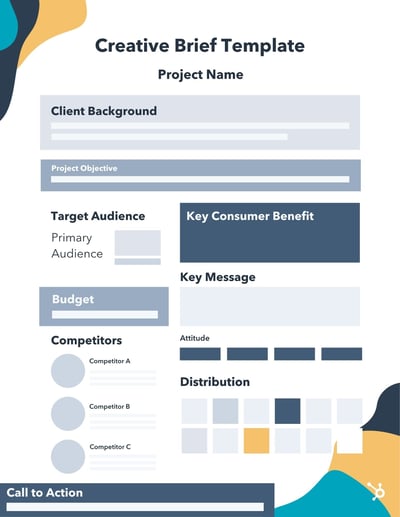
Download More Creative Brief Templates
[Inset company or client logo at the top along with the project name.]
COMPANY BACKGROUND:
For ___ years, ______ [Brand Name] has been serving customers in the ____________ [group/job field/geographical area] with ____________________ [product or service].
[Brand Name] has made achievements including __________,__________, and ___________. We have also launched marketing campaigns that have touched on ____________,________, and ____________. With the launch of _________ [project name] they hope to ___________.
PROJECT OBJECTIVE:
With this project, the company aims to solve problems related to ____________________, while also expanding on ___________ and improving on _____________.
TARGET AUDIENCE:
Our target audience is ____ [gender], in the age range of _ and _, and live areas like ____, _____, and ______. They enjoy _____, dislike ______, and might work in fields like _____, _____, and _____. They want more of ________ and their daily pain points include ________.
Their favorite products might include _______ and ______. They learn about these products through channels including ________, _________, and _______.
COMPETITORS:
Our three biggest competitors [are/will be] ________, ________, and _______. These competitors offer _____, ______, and ______. We are ahead of them in _____ and ______, but we are behind when it comes to product offerings like __________ and _________.
KEY MESSAGE:
The target audience is experiencing __________ [pain point], but with our newest project ___________, they’ll get to experience _________ [new experience without the pain point]. That’s what makes ______ [solution] an unrivaled solution within the market.
KEY CONSUMER BENEFIT:
________
ATTITUDE:
[Include three to five adjectives that describe the tone and voice of the project.]
CALL TO ACTION:
When the target audience sees our campaign, they will [feel/think/do] _________.
DISTRIBUTION:
We will promote the launch on platforms and channels that our demographic regularly engages with. These will include ________, ________, and _______.
We will also release content including _______, _______, and ________ to gain attention from our audience and inform them of the project.
Below are a few messages we will use:
- _________________________________________________.
- _________________________________________________.
- _________________________________________________.
Types of Creative Briefs [+ Examples]
Creative briefs serve several purposes in the communications field. Marketers, designers, and advertisers use them differently. Depending on your role, your team, and the project you’re working on, one might be more effective than the other. Below are some of the most common types of creative briefs used across industries today plus examples of what they might look like.
Marketing Creative Briefs
A marketing creative brief is most commonly used to bring campaigns to market. This type of creative brief can be used for both new and existing campaigns. Broad business goals and strategies to accomplish them are usually included in this type of creative brief. It’s also not uncommon to see revenue goals and a budget included in a marketing creative brief.
Simple Marketing Creative Brief Example
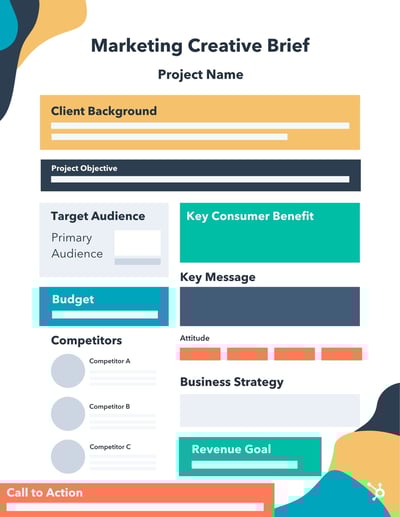
Product Design Creative Briefs
Product design creative briefs outline the go-to-market strategy for a new product or feature launch. Product marketers are responsible for developing this type of brief. Developed in conjunction with the product manager, the product design creative brief will describe the features and benefits of the product and how the audience will benefit from them. Unique features of this type of creative brief include product documentation and product descriptions.
Product Design Creative Brief Example
Advertising Agency Creative Briefs
Advertising agencies develop creative briefs often for the various clients they serve. These briefs are concise and include the client’s brand guidelines as well as the specific project guidelines. A budget may also be included in the brief so that all teams can make wise decisions about the tactics they recommend for the client. An account manager or supervisor develops the creative brief and shares it with client stakeholders before the agency begins working on the project.
Advertising Agency Creative Brief Example
Streamline Projects with a Creative Brief
Scope creep happens to the best of us. Projects get bigger, stakeholders are added, and the objective of the project seems to morph as time goes on. Streamline your next product launch or marketing and advertising campaign with a creative brief. As a result, you’ll find that your team is more aligned with the project’s goals. We’ve even provided free creative brief templates to get you started — download them below.
Editor’s note: This post was originally published in July 2019 and has been updated for comprehensiveness.


How to Make Instagram Story Highlights [+Engage Your Audience]
Did you know that ⅓ of the most viewed Instagram Stories are from businesses? Customers want to see what businesses are posting about on “Stories,” however, as you probably know, those are only viewable for 24 hours.
But what if your audience wants to save those Stories and come back to them later (whether for a link or to reference something)? This is why Instagram added the “Highlights” feature several years ago.
With this tool, brands can save Stories so that customers can look at them whenever they want, indefinitely.
In this post, we’ll walk you through how to make an Instagram Story Highlight, and then dive into expert tips on how to use the feature to engage your audience.

1. Tap on the plus sign from your profile.
The first step in creating an Instagram Highlight is to tap on the plus sign in the top right corner of the screen when you’re on your profile.

2. Select Story Highlight
Then, you’ll want to select “Story Highlight.”

3. Choose the Story you want to add.
At this point, it’s time to choose what Stories you want to save to your highlight. You can choose one or several. Then, hit “Next.”
4. Pick a cover photo and add a name for your highlight.
Lastly, you’ll choose a cover photo and then add a name for your highlight. Then, click “Add.” To add more Stories over time, you can tap and hold the highlight and then select “Edit Highlight.”
As time goes on and you want to reorder or archive your Instagram Story highlights, you can select “Edit Highlight” and then choose the Story you want to delete. Then, you can click on “Edit Highlight,” go to your Instagram Story archives and select the post again. This will now add that post again, making it at the front of your highlights thread.

Once you’ve gone through these steps, your Instagram Story highlight will be visible on your profile. But, you might be wondering what picture you should use for your highlight cover/icon. Let’s dive in below.
Instagram Story Highlights Cover
The last step of adding a highlight is selecting a name and image/icon. Visually, the best thing to do is create icons that are matching. For example, the HubSpot Academy Instagram account uses similar icons for its highlights.
As you can see, the icons follow a certain format, are visually appealing, and match the theme of the rest of the feed.
Before you create your highlights in the app, it’s important to choose the name and design the icons that you want.
As you’re designing the icons, you’ll use square dimensions. It’s actually very similar in size to the profile picture size. Make sure your icons have an aspect ratio of 1:1 and use dimensions like 2000 x 2000 pixels.
Now that you know how to make an Instagram Story highlight, you might be wondering what the best practices are. Let’s review some of the best ways you can use this feature to engage with your audience.
1. Promote your products.
With Instagram highlights, you can promote your best-selling products. Perhaps you design an icon to look like your product, and then name it your product name. In that highlight, you can show reviews for specific products, photos, features, benefits, and more.
Jenni Kim, a marketing manager at HubSpot, says, “Brainstorm your highlights into the topics most relevant to what your audience is looking for to give an overview of what your social brand offers! The highlights act as a compilation or mini archive for your past stories, so it’s a perfect way to showcase your past content in a way that’s useful to your audience as they learn more about your brand.”
This is a great way to engage your audience on Instagram and increase the chances that your followers will purchase from you.
2. Add blog posts.
The best way to engage with your audience through highlights is to post engaging content that your followers want to come back to.
For instance, you can add blog post links and save the most recent and relevant content on the highlight. This will help give your audience an easy place to access your top blog posts, even if they’re reading the posts after you’ve already promoted them on social media.
3. Show interviews.
Another great way to engage with your audience through highlights is to post interviews with your employees, leadership, or customers. Or, if you post interview content on your blogs, you can film those interviews and save them to your interviews highlight. This will showcase your series and help you educate your audience.
Interview content is typically very engaging because it’s interesting while being informative. It gives a behind-the-scenes look at how others do what they do.
4. Reveal behind-the-scenes footage.
Speaking of behind the scenes, one of the best types of content to post on highlights is BTS footage. Whether you’re an individual brand or a company, showing the behind-the-scenes footage is a fun way for customers to see how you do what you do. You can showcase behind-the-scenes footage of product production or of a photoshoot ad campaign.
This type of footage is engaging and helps your audience connect with your brand. By saving this footage on your highlights, you’ll extend the engagement and hopefully develop interested and long-term viewers who keep coming back for more.
5. Include events.
When it comes to promoting events, saving information on your Instagram highlights is a great way to make sure customers and followers have all the information they need at their fingertips.
This helps engage the people who are attending your event (because they’ll want to come back to this highlight for information) and promote the event to those who haven’t heard of it (if people are looking at your profile, they’ll see that you’re having an event).
6. Save links.
Of course one of the top ways to get followers to purchase products from you on social media is to add links to your social media pages. If you’re an influencer or company, you can save these most asked-for links to a highlight. This makes it easy for users to find a product from you and purchase it.
7. Showcase your culture.
Instagram highlights can be used to showcase fun, exciting video footage that reveals what your company culture is like. Perhaps you have someone on your culture team take videos of morale-boosting events.
Or maybe you start a takeover series like HubSpot has on our HubSpot Life Instagram account. With this highlight, we engage our audience every day with a different employee takeover. This employee will basically post a “day in the life” on Stories that day and you can save those to your highlights for whenever people are researching what your company culture is like.
8. Answer FAQs.
When users have questions, they go to social media. A great way to engage those customers is to have a FAQ highlight where you discuss any/all the top questions that users ask.
9. Incorporate reviews and testimonials.
We all know that people purchase products that have great reviews and testimonials. In fact, it’s one of the top elements that impact purchasing decisions. That’s why it’s a good idea to engage those users who are researching your product by looking at social media with a “Reviews and Testimonials” highlight.
10. Give tips/tricks.
Educating your audience is one of the best ways to provide value on social media. Save your tips and tricks to a highlight to continue educating and engaging with your audience on Instagram.
11. Display sales and discounts.
How do you get the word out about current sales and discounts? One way to do this is through Instagram story highlights. You can save all this information on a highlight so that customers know they can always check this highlight before making a purchase. Again, this keeps users coming back to your profile and engaging with your content.
12. Show case studies.
Depending on your product, people might want to see case studies or use cases for your product. When potential customers go online and look at your social media, that highlight will get them to click and see how other people are using your product or service.
Instagram Story Highlights are a great way to keep important information easily accessible for your audience on your social media. With this feature, you can use your Stories (one of the most popular Instagram features) as a part of your long-term social media strategy.

What is Data as a Service (DaaS)?
“The Cloud.”
It’s a concept that has grown wildly within the past 20-40 years as technology evolves. But if you’re like me, you might not know what it really means.
The cloud refers to how and where data is stored and where it isn’t. It allows software and services to run on the internet, instead of only locally on one device, because the data is stored remotely across a variety of different servers.
With this technology, companies have begun storing data online and modernizing their infrastructure, data management, storage, and analytics.
While data management, analytics, and integration can sound like intimidating topics (especially to those of us that aren’t mathematically inclined), it’s so important for analyzing, strategizing, and increasing reliability in data for your marketing efforts.
In this post, let’s review what data as a service (DaaS) means and look at some DaaS companies to understand it better.
![Download Now: 2021 State of RevOps [Free Report]](https://no-cache.hubspot.com/cta/default/53/78dd9e0f-e514-4c88-835a-a8bbff930a4c.png)
DaaS companies focus on helping customers use their data in the most strategic, efficient way. Additionally, they help customers store their data and have impeccable search functions to make creating data reports easier.
As we continue to get more data and insights into what works and doesn’t, data-driven decision-making is becoming more and more popular among businesses.
DaaS is similar to software as a service (SaaS), which are companies that offer software online and via the cloud, instead of needing to download or install a program. There’s also IaaS (Infrastructure as a Service) and PaaS (Platform as a Service).
Any “as a service” company is using the cloud to manage business resources. And while SaaS is a popular term that many people know, not as many people are familiar with DaaS. This is partially because data continues to get more advanced, with more storage capabilities and better analytics as the cloud evolves.
DaaS companies usually are priced based on the amount of data storage that a business wants to purchase. Data is measured using the megabyte model.
When businesses have an excess of data and aren’t sure how to maintain it, DaaS is a popular solution. By using DaaS software, companies can immediately store and manage their data and will have greater flexibility when it comes to scaling up.
By now, you might be wondering, “What are the benefits of using a DaaS platform?”
Well, one of the main advantages of using a DaaS platform instead of storing data physically on-site is automated maintenance. The DaaS provider will automatically manage data and keep the tools and services up-to-date.
Additionally, DaaS is more cost-effective and will lead to more agile decision-making and faster innovation. This is because data will be the center of the business and used for strategic decision-making and data management.
With a data-driven culture, an organization will be able to innovate and grow at high rates because its ideas and initiatives are informed by trustworthy data.
For example, a company can use a cloud-based DaaS solution to manage compliance and scaling requirements, making it easier to adjust operations to fluctuating demands.
So, what does this look like in action? And what are some examples of a DaaS company? Let’s dive in below.
Data as a Service (DaaS) Companies
1. Snowflake
Snowflake is a DaaS company that provides data warehousing, data lake, data sharing, and data exchange capabilities. This was one of the first modern DaaS companies to provide data as a service products. With this platform, your company can store and analyze both structured and semi-structured data for business insights.
2. SAP Hana
SAP Hana is a high-performance in-memory database that provides advanced analytics on multimodel data, on-premise, and in the cloud. With this platform, you can build data solutions with modern architectures and gain business-ready insights in real-time.
3. Oracle DaaS
Oracle DaaS is a subscription-based marketing intelligence platform that leverages Oracle’s acquisitions of Datalogix and BlueKai. Oracle DaaS for Marketing provides anonymous multi-channel data for marketers, and Oracle DaaS for Social provides social and enterprise data.
As technology continues to evolve, managing, storing, and analyzing data will become increasingly important. And while it might seem confusing, DaaS companies can help simplify this process and make it easier to understand.