
Welcome to My Blog
What Marketers Need to Know About YouTube Shorts
Did you know that the first video published on YouTube was only 18-seconds long?
Since launching in 2005, the video giant’s founders have learned time and time again that content doesn’t need to be long to engage audiences.
Now, following a five-month beta test — as well as the success of TikTok, Instagram Reels, and other viral video platforms — YouTube will soon roll out a global short-form video feature of its own.
YouTube Shorts — a YouTube app feature that rivals TikTok and Instagram Reels — began its first round of testing in India last September. The beta feature enables users to see and create 15-second videos with musical overlays.
Even in its most basic beta form, the Shorts feature has already seen solid performance in India. In late February, Google and Alphabet CEO Sundar Pichai announced that videos on the India-based Shorts player receive 3.5 billion cumulative daily views.
When You Can Access YouTube Shorts
YouTube users — at least in the U.S. — could see Shorts appear any day now.
A recent post from YouTube’s Chief Product Officer Niel Mohan mentioned that Shorts is expected to be released in the U.S. in March.
While there’s no word on a global launch yet, Pichai recently told the press, “We are looking forward to expanding Shorts to more countries this year.”
As the full launch of YouTube Shorts inches closer, marketers are likely wondering how they’ll take advantage of this video feature, what the final platform will look like, if it will have similar virality to TikTok, and how it could help brands better engage with YouTube’s more than 2 billion active users.
The truth is, as short-form video platforms grow more and more popular, it’s hard to know which will rise above the others. And, because the YouTube Shorts could evolve between now and its official launch, we can’t fully predict what using it will be like.
However, because YouTube already houses millions of hours of branded content, YouTube Shorts could be worth your time — especially if you already have a video strategy on the platform.
Below, I’ll walk through the basics ofYouTube Shorts, and what opportunities it could provide for marketers upon its official launch.

When explaining why YouTube decided to launch Shorts, a blog post from the tech giant read, “Every month, 2 billion viewers come to YouTube to laugh, learn and connect. Creators have built entire businesses on YouTube, and we want to enable the next generation of mobile creators to also grow a community on YouTube with Shorts.”
“User-generated short videos were born on YouTube starting with our first upload, a short 18-second video called ‘Me at the zoo.’ As technology advances, creators and artists can now take advantage of the incredible power of smartphones to easily create and publish high-quality content wherever they are in the world,” the YouTube post added. “People can be entertained and informed by bite-sized content in the spare minutes of the day. — That’s why we’re excited to announce that we are building YouTube Shorts.”
What YouTube Shorts Could Look Like
YouTube Shorts is currently in beta form, as YouTube plans to add more features in the coming months. While we don’t know what Shorts will look like for certain when it launches globally, I dug up screenshots of the Indian beta feature to help marketers envision the potential user experience.
Creating YouTube Shorts
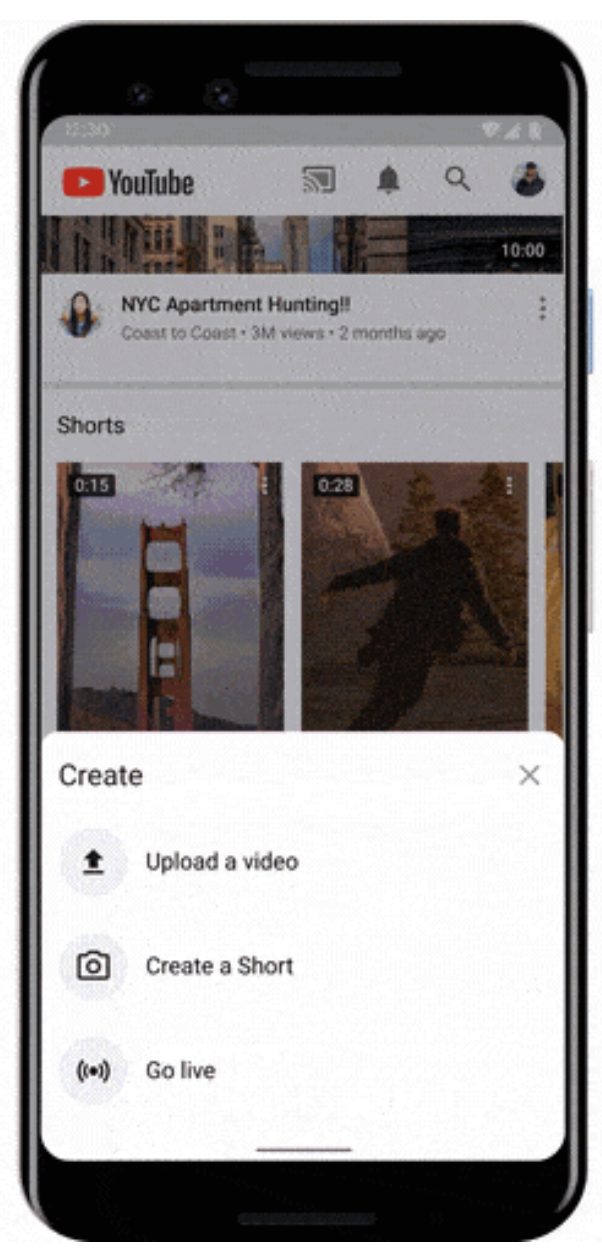
When Shorts is available, creators will likely be able to produce them by going to their home screen, tapping the “+” icon on the lower navigation, and selecting “Create a Short” from the menu that appears. Below is a screenshot from YouTube:
When you tap Create, the Shorts creation interface will be similar to that of Instagram Stories in that it opens to a camera screen that allows you to:
- Record segments of a 15-second clip or a full 15-second video.
- Upload pre-created content from a camera roll.
- Film a “short” with back or front-facing cameras.
- Adjust video speed.
- Set a recording timer.
- Pick sounds for musical overlays.
While YouTube says it plans to expand on the features shown above, here’s a quick screenshot of what the platform looks like at the moment:

Watching YouTube Shorts
Before the Shorts beta test, YouTube had already been testing a section of its site where shorter videos were placed. While Shorts doesn’t seem to have a dedicated spot on the YouTube homepage for beta testers yet, videos could show up under the “Short videos” shelf shown in the screenshot below:

When watching a Short, viewers in India can tap icons on the bottom of the screen to “Like,” “Dislike,” or comment on the video. If they enjoy what they see, they can also tap the “SUBSCRIBE” button in the upper left corner next to the YouTube channel icon to follow the video creator.

After a viewer finishes a Short, they can swipe their finger to see a feed of more Shorts from other creators. This seems quite similar to the vertical video feeds you’ll see on TikTok.
What Makes YouTube Shorts Different from Its Competitors
As a marketer, seeing every social media platform launch Stories or short-form video features might be overwhelming. And, now that so many have come out, you might be asking yourself, “Will YouTube Shorts provide more opportunities than Instagram Reels or TikTok?”
Well, we still don’t know yet. However, we think YouTube Shorts will be worth watching. Here are a few reasons why.
1. Short-form creators could see a bigger reach.
While Gen Z users flooded TikTok, causing its astounding early growth, YouTube, the second largest website globally, will launch Shorts to more than 2 billion monthly active users.
Rather than wondering, “Will YouTube Shorts get awareness?”, you can ask yourself, “How do I tap into YouTube’s huge audience with Shorts?”
According to Nelson Chacon, HubSpot’s Principal YouTube Content Strategist, you’ll want to know which segment of YouTube’s huge audience you’ll want to market to before producing Shorts — or any other YouTube video for that matter. Additionally, if you have a solid subscriber list, you’ll want to continue to create content that’s still relevant to them — even if it’s shorter-form.
“Your subscribers know your channel for its content and Youtube, as a platform, works best with consistency,” Chacon says.
For example, if you regularly create long-form content related to your product or industry and find that it engages your audiences, Chacon notes that you can use Shorts to create “quick tutorials” or “step-by-step videos” around those content topics.
2. Brands in most industries could leverage Shorts.
Because TikTok has a somewhat niche user-base filled with younger consumers, some types of brands, such as B2B companies, might have a harder time growing awareness there. While YouTube shares similar popularity with young adults, the content on its huge platform is so vast that it brings in people from all sorts of age groups, countries, industries, and niches.
Ultimately, there’s a video for everyone on YouTube. With Shorts, more brands will be able to engage with audiences from a much wider range of audience targets.
For example, while a B2B brand might have difficulty connecting with Gen Z consumers on TikTok, they might be able to connect with professionals looking for industry-related content on Shorts. Similarly, if you target older generations, such as Gen X, your short-form content might get more engagement on YouTube than TikTok.
3. YouTube Shorts could be less vulnerable than other viral platforms.
This summer and throughout the fall of 2020, TikTok was threatened with bans and censorship regulations.
Why is this concerning? If you’re a marketer who spends time mastering content strategies on a social media app, a ban or regulation of that app could mean that the content you’ve worked so hard on might never be seen.
However, because YouTube’s one of the oldest and most successful online platforms, and it’s owned by the publicly-traded Alphabet, it might be seen as more trustworthy to governments around that world than viral apps that provide less public data security information — like TikTok.
4. Shorts could provide long-term benefits.
While Instagram Stories and Reels content to expire by default after 24 hours, some YouTube Shorts beta testers say Shorts don’t disappear from YouTube — which could help grow long-term YouTube awareness.
For example, if a person who prefers short-form content stumbles upon your YouTube page, they can see all of your short videos, rather than only being able to access your longer content. Or, if someone’s in a rush and searching for a quick how-to video related to something you’ve filmed, they might find and watch your short videos on that topic — even if you published them months ago.
How to Prepare for YouTube Shorts
While we aren’t sure when Shorts will launch, it’s not too early to consider how you could implement it into your social media or video marketing strategy. Here are a few quick tips to keep in mind.
- Optimize Short YouTube Videos: Chacon says global creators should begin to add, “#shorts” to descriptions of videos that are 60 seconds or less. Although YouTube hasn’t launched Shorts globally, this hashtag still increases the chances of short videos appearing “on the Shorts shelf of the app.”
- Identify Short-Form Topics: Are there any topics your team creates content around that could be distilled into a few quick tips, steps, or data points? If so, you might be able to repurpose this information by creating a Short.
- Audit Your Short-Form Videos: Have you created Instagram Reels, TikTok’s, or other social media videos that would only need a few light tweaks to engage your YouTube audience? If so, you could test them on Shorts when the platform launches.
To learn more about YouTube Marketing, check out our Ultimate Guide — or download the free resource below.


RFQ vs. RFP: What’s the Difference?
Have you ever shopped for something online, compared prices, and read reviews until you knew you were making the right decision?
That’s similar to what businesses do when they need to purchase something as well, except it’s a slightly more formal process.
In the business world, the process includes having vendors or companies submit RFPs (request for proposal) or RFQs (request for quote) so you can compare their products and services.
These documents help businesses decide which vendor they want to buy from. It’s similar to when we, as consumers, shop online and look at prices and reviews to compare, say, new phones.
Below, we’ll discuss everything you need to know about RFQs — from what they are, to how to write one, to how it’s different from an RFP.

In an RFQ, you’ll find a vendor’s costs, payment terms, and product specs or details. Most businesses use an RFQ when they know exactly what they’re looking for, the budget they want to spend, and are ready to make a purchase.
If you know what type of features you want to see, you plan to choose a vendor based on price, and you don’t need a service plan or supported contract, an RFQ might be right for you. When you have a bunch of RFQs, you can properly evaluate all the solutions based on price, quickly.
Now, what’s the difference between an RFQ and an RFP?
While an RFP gives more detailed information on the service itself, an RFQ mainly answers how much it costs. An RFQ implies this is a simple, on-demand purchase as opposed to a longer term project that will have a longer buying process.
So, now you might be wondering what this looks like in action. Let’s review below.
1. Preparation
As a company, if you want to use an RFQ, you first need to decide if you want to open the bidding to any vendor, or choose a select group of vendors.
If you’re going to send RFQs to several vendors, you need to decide which vendors you want to send the RFQ template to. You might make this decision based on reputation or people you’ve worked with before.
If you want the bid to be open to all vendors, you can use a procurement software to simplify this process — this will post the RFQ document on your website, allow vendors to upload, ask questions, etc. Plus, this will keep all the RFQs in one place, easy to review, and contact all the vendors that you say no to (more on this later).
Then, you need to create the RFQ document (see template below). This should detail a list of requirements, including a list of products (features required), quantity or duration, date of delivery, and payment terms. If you don’t use a standard template, then companies might give you different information and you can’t compare apples to apples.
Also, ideally you’ve included an introduction to your company, what you need, the deadline to submit, and how to submit. Introducing the problem you’re trying to solve will make it easier for sellers to recognize if this is a good fit.
As a vendor, when it comes time to fill out an RFQ, you need to look at the template that was sent to you, and start gathering all the information. How much will those products cost? Is it in the right currency? Did you include your contact information? As a vendor, your work is now done, unless you’re chosen of course.
2. Review
Now that you’ve sent your RFQ documents to your list of vendors, it’s time to wait until the deadline. When you start receiving the RFQs back, you can review them. Which company gave you the best price? Which company can provide all the products/services you need?
This process will be easier if you used a standard template and asked everyone for the same information. If this was thought out, and you included all the details you need in the template, then this process should be quick.
3. Choose and Close
Once you decide, you can either email everyone the decision, or use the software mentioned above to send out notifications and alert vendors who submitted an RFQ.
It’s best practice to wait to alert the vendors that didn’t get chosen until the one you did choose signs the contract and the deal is closed.
When you let vendors know they weren’t chosen, thank them for their time. It’s important that when you choose a vendor, you aren’t burning bridges with the other vendors because you might need to use them in the future.
RFQ Template
Below is a list of information that you might ask for in an RFQ. You can separate the document into buyer information, seller information, and review and evaluation.
Buyer Information
- Company Name
- Company Description
- Product Details and Goals
- Contact Information – name, title, phone, email of the point person
Seller Information
- Product Details — name and specs
- Product Quantity
- Delivery Requirements
- Product Price
Review and Evaluation
- Evaluation Method
- Timeline
- Terms and Conditions
- Submission Requirements and Instructions
If your company is deciding between multiple vendors, you know what you want, and it basically comes down to price, an RFQ might be the way to go.

The Plain English Guide to Demand-Side Platforms (DSP)
As a marketer, you might be focused on creating organic content most of the time. But you should keep in mind that paid advertising is just as important.
When you manage the paid ads for your business, you can go through individual ad managers such as Google Ads or Facebook Ads. However, that’s not the only option. You can also use demand-side platforms (DSP), which are automated, as a way to purchase and manage your online ads.
In fact, did you know that in 2020 $46.86 billion, or 88.7% of all US mobile display ad dollars, were transacted via automated means?
This means that a majority of marketers paid ads used DSPs as a way of purchasing, managing, and tracking online advertising.
Below, let’s review all the basics about DSP advertising.

With a DSP, you can purchase mobile ads on apps, banner ads on search engines, and video ads on Facebook, Instagram, Google, and even more platforms. Instead of using both Google Ads and Facebook Ads, for instance, you can purchase those ads in one place on a DSP.
The purpose of this is to make ad buying faster, cheaper, and more efficient. Now, let’s dive into how DSP platforms work and why you should use one.
DSP Advertising
So, you might be thinking, “How do DSPs work?”
DSP’s work by using programmatic advertising, which is the buying and selling of ads in real-time through an automated system. With real-time bidding, ad placements are auctioned off in milliseconds.
When you get started with DSP advertising, you’ll need to begin strategizing how much you want to spend. Think about what an effective cost per click and cost per action might be. This will help you set up your online ads so the platform knows how much to spend in any given auction.
The best DSP platforms will allow you to include multiple rich media ads, including video, images, and animation.
Now you might be wondering, “Why would I use a DSP?”
The main reason is that it makes your digital ad experience easier and more cost-effective. You can control, track, and maximize all your digital ads in one place. This means you can manage an entire ad campaign across sites on one dashboard. For example, you can show someone an ad on Google, then show them ads on Facebook, and then across other sites they visit all in one campaign. Before DSPs, those would be separate campaigns on Google and Facebook Ads.
This means you can advertise on many networks, including all the major publishers, in addition to more. With the amount of networks, you’ll have a more global reach.
Additionally, DSPs often partner with third-party data providers, giving you better tracking and reporting capabilities than a single network usually provides. And in the planning process, the targeting options are more personalized, meaning you can get better conversion rates.
When you’re choosing a platform to work with, you’ll want to look at how many ad exchanges the DSP has access to because that affects how many people you can reach. Plus, you’ll want to consider cost, training (full service or self service), support, and ease of use.
Now that you know more about DSP advertising and how it works, let’s discuss the platforms that can help you do it.
Top Demand-Side Platforms
1. Centro
Centro is an omni-channel DSP built to generate better outcomes for your ad campaigns. One of the best features is that it uses AI machine learning to automatically analyze data from numerous campaign parameters to optimize your ads.
With this DSP, you’ll be able to target hyper-local audiences across devices and multiple touchpoints. You’ll also get access to the industry’s leading exchanges, along with 25,000+ audience segments across over 30 different data providers.
2. Google Marketing Platform
Google Marketing Platform is Google’s unified advertising and analytics platform for smarter marketing and better results. This DSP has several products for both small businesses and enterprise companies, including Campaign Manager 360.
With this product, you can save time with cross-channel ad management to maximize insights and optimize media and creative performance across all your digital campaigns. The flexibility is the standout feature on this DSP. You can use third-party features and integrations so you can choose the capabilities that best help you manage and measure your campaigns.
3. Knorex
Knorex is a universal advertising platform that automates personalized marketing across channels, devices, and ad formats. You can market on Google Search, Facebook, Instagram, and LinkedIn all in one place.
This DSP also uses AI to learn from past data to predict and adjust ad budget dynamically in real-time to drive higher efficiency.
4. Jampp
Jampp is a DSP that leverages unique contextual and behavioral signals to deliver customers and in-app purchases through programmatic advertising.
The key features of this platform are user acquisition, app retargeting, geolocated ads, dynamic ads, and predictive bidding. This is mainly a mobile user acquisition and app retargeting DSP where you can focus on mobile first ads.
5. Smadex
Smadex is a mobile DSP engineered for growth. The platform uses a combination of its own programmatic advertising technology, machine learning, and first-party data.
With this platform, you can reach global audiences at scale and re-engage audiences with its retargeting capabilities.
When you choose a DSP, make sure you understand how many inventory sources it accesses, which third-party data integrations it offers, and what targeting criteria is available. To successfully run programmatic ads on a DSP, you’ll need to reach global audiences with personalized ads.

The Beginner’s Guide to the Competitive Matrix [Template]
Have you ever been playing a game with your loved ones and you have to look around to suss out the competition?
Whether you currently own or you’ re looking to start your own business, you need to do the same thing.
A competitive analysis will help you identify your competitors and research their products, sales, and marketing strategies. By doing this, you’ ll learn your place in the market, how to differentiate yourself from your competition, and how to improve on their processes.
Below, let’ s learn what a competitive matrix is, and review some templates and examples.
![Access Now: 10 Competitive Analysis Tempates [Free Download]](https://no-cache.hubspot.com/cta/default/53/b3ec18aa-f4b2-45e9-851f-6d359263e671.png)
Before you dive into the world of competitive matrices, it’ s important to understand that there are different types that you can use to compare your company to your competitors:
- Features and benefits analysis
- SWOT analysis
- Competitive strategic overview
- Content marketing strategies
- Review tracking
Essentially, you can use a competitive matrix to compare any characteristics of your company with a competitor.
Sometimes these matrices will be more visual in nature (a plotted graph), but sometimes it’ s just an excel doc with the information listed in columns.
The goal of the competitive matrix is to be able to see at a glance the competitive landscape and your position in the marketplace. This will help you see gaps in the marketplace and hone in on your unique value proposition.
Perhaps, after looking at a competitive matrix, you brainstorm new product ideas, or new tools or features that you hadn’ t considered before. Or maybe you come out of it with a ton of ideas on how to improve your content marketing strategy.
Regardless, you can use a competitive matrix for a lot of reasons. You can use it to develop new ideas, or you can use it to train sales staff on how to differentiate your company from the competition.
After figuring out what you’ re going to do with the information, make sure you write down your ideas, develop KPIs, and regularly conduct this analysis so you can stay up to date with your strategy.
Now that you know what a competitive matrix is and how to use one, let’s review some templates that you can use for your own strategy.
Competitive Matrix Templates
1. Two-Feature Competitive Landscape Chart
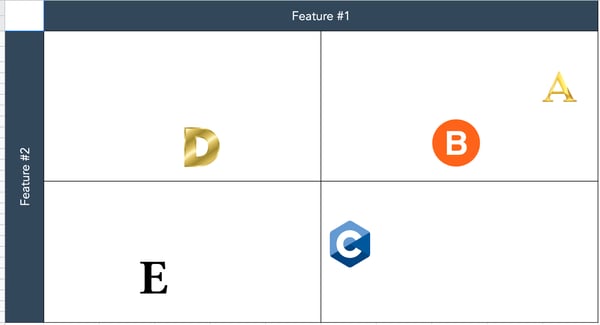
One type of competitive matrix you can do is a simple comparison of features. You can use this information to plot where your company is compared to competitors.
The features could be something like price or customization potential. Then, you’ d place the logos of each company (including yours) on the graph depending on how well a company executes a certain feature. The point of this matrix is to visualize who does what better, so you can see what you have to work on and how to differentiate yourself against the competition.
2. Content Marketing Analysis Template
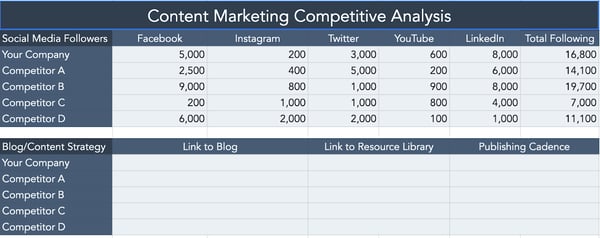
As a content marketer, this is my favorite template. With this template, you can compare social media followers, blog strategy, email strategy, SEO, etc. This will help you decide where you need to focus your content strategy — should you place an emphasis on Twitter, rather than Facebook? If you download this template, it also includes a graph and more strategies to analyze.
3. SWOT Analysis Template
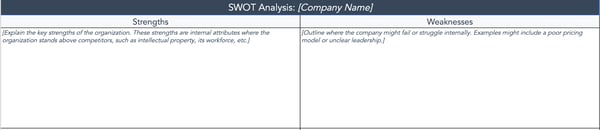
A basic competitive matrix is the SWOT analysis. Conducting a SWOT analysis will help you identify areas where you could improve. You should conduct a SWOT analysis for yourself, but also for your competition. Knowing what weaknesses your competition has will help your sales reps and help you make improvements in those areas.
4. Review Tracker
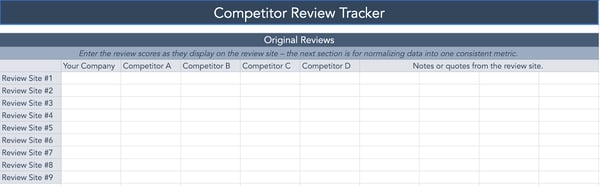
A review tracker matrix will help you see at a glance the types of reviews you get versus your competitors. It’ s important not to forget about reviews because they can have a big impact on a business. With this template, you can also use a scoring system to normalize the averages.
After reviewing those templates, it’ s time to see what a competitive matrix looks like in action. Let’ s see some examples below.
Competitive Matrix Examples
1. HubSpot
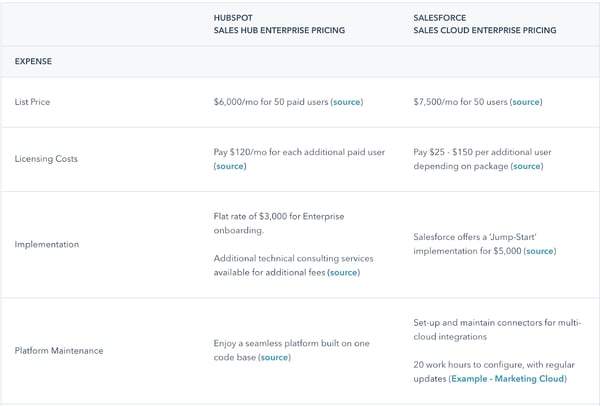
This is a public HubSpot competitive matrix comparing the overall pricing of our CRM versus Salesforce. This is a standard matrix that’s meant to help people see the difference between the CRMs at a glance.
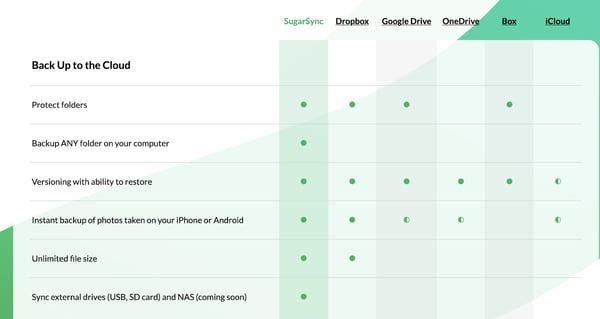
2. SugarSync
This is a great example of what a feature matrix might look like. SugarSync compares its feature offerings against the competition in an easy-to-understand visualization.
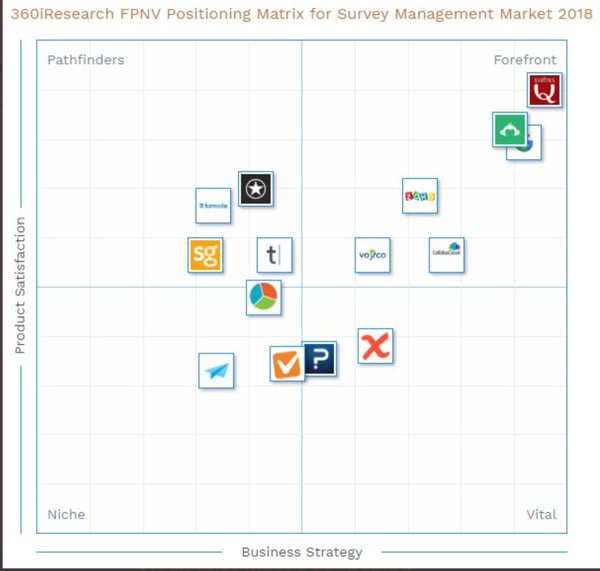
3. 360iResearch
In this example, 360iResearch reports on survey management software. This is a plotted graph showing which companies have the best product satisfaction and business strategy.
Competitive matrices are great tools to help you uncover how you’ re different from your competitors. You can learn your unique value proposition and identify areas for improvement.

7 Best Marketing Attribution Software for 2021
Determining which parts of your marketing efforts drive conversions and sales can be one of the messiest areas of marketing. But it’s also one of the most important — assuming you want to increase ROI, revenue, brand awareness, conversions, campaign success, and more.
This is where marketing attribution comes into play. In this blog post, we’ll cover the definition of marketing attribution, the three main types of marketing attribution, and seven marketing attribution reporting software.
![→ Free Download: Free Marketing Reporting Templates [Access Now]](https://no-cache.hubspot.com/cta/default/53/0d883e85-c2e5-49bb-bef2-bfddb500d84b.png)
Here are four examples of the benefits of marketing attribution:
- Determine the most effective areas to focus your marketing efforts and budget.
- Understand your target audience and their needs.
- Improve your chances of reaching and resonating with your audience with personalized experiences.
- Increase ROI.
Three Types of Marketing Attribution and Software
No matter which benefit you’re trying to derive from marketing attribution, there are three main categories of marketing attribution — keep these in mind when setting your attribution goals and deciding which software is ideal for you.
1. Multi-Touch Attribution (MTA)
Multi-touch attribution identifies which of many possible customer touchpoints is responsible for a sale. It’s important to realize that while most MTA programs include some channel data, they’re designed to test specific touchpoints.
For instance, a multi-touch marketing attribution tool may evaluate your touchpoints in the following ways:
- First-Touch Model: A first-touch model assigns all of the credit to the first webpage or digital asset that led a customer to your site. This model is great for understanding what brings people to your door.
- Last-Touch Model: Last-touch attribution is the inverse of first-touch. It gives 100% of the credit to the last thing a customer sees before making a purchase. This model is great for evaluating bottom-of-the-funnel content like CTAs and landing pages, but it’s not much help at the start or in the middle.
- Last-Interaction Model: The last-interaction model often overlaps with the last-touch model we just reviewed, but it differs in an important way — last-interaction modeling gives all credit to the last touchpoint that produces a conversion. For instance, in the last-touch model, the final blog post a customer viewed would get the credit, whereas it would not in the last-interaction model.
- First-and-Last Model: Unlike the three prior models, the first-and-last attribution framework splits the credit. Automation platform Ontraport recommends this model because the first and last touchpoints tend to stick out in a customer’s mind.
- Simple-Decay Model: This model gives the most credit to the last touchpoint and progressively less to prior ones. The question is whether those weights correspond accurately to the customer’s experience.
Any attribution model is better than none. However, MTA models can contain gaps and undue assumptions. For example, a customer might have seen a television ad or received a friend’s recommendation that digital tracking could not account for.
Multi-touch attribution is also getting more difficult thanks to platform restrictions. Google, Amazon, and Facebook — the three largest ad networks — have placed limitations on cross-platform tagging. Pixel-based solutions face similar limitations due to Mozilla and Apple’s past browser updates, which eliminate tracking pixels for speed and security reasons.
2. Marketing Mix Modeling
Marketing (or media) mix modeling takes a more difficult approach than MTA. Rather than using a tag or pixel to follow the individual user around the web, MMM uses multivariate regressions to predict how much of an impact certain sales and marketing tactics had on customer behavior.
A top-down model, MMM takes into account historical data from online and offline sources. It attempts to account for external influences, such as seasonality, pricing data, and broader economic conditions. MMM is popular at enterprise companies — and because it requires a boatload of data and complex algorithms, the space is somewhat dominated by enterprise vendors with roots outside of marketing.
3. Multi-channel Attribution (MCA)
Multi-channel (sometimes called cross-channel) attribution is a blend of the MTA and MMM camps. Multi-channel attribution uses individual-level data, but it attempts to evaluate certain tactics, like marketing mix modeling.
MCA seeks to paint a full picture of how a consumer’s online and offline activities lead to the sale. In the simplest MCA model, any channel that the customer accessed en route to the sale gets the credit.
If a customer searches for a product via desktop, reads a blog post on mobile, visits a physical store, and then finally purchases after a social media referral, each channel gets weighted credit depending on the amount of time that user spent on it.
Tools like tracking pixels allow marketers to evaluate channels like search, social media, and ad retargeting. Additionally, people-based attribution techniques tie channel and touchpoint data to individual customers.
Today, the challenge is connecting customers’ online and offline behavior. How can you do it? Here are four techniques:
- Foot Traffic: Mobile marketing companies use beacon technology — or, in Foursquare’s case, decision-making engines — to determine where smartphone users are. Mobile device IDs are then matched with customer profile data to give credit to certain campaigns.
- Point-of-Sale Data: When a user makes a credit card purchase at a physical location, the credit provider works with a data company to give credit for the purchase to prior channels.
- Customer Panels: Some companies ask users to opt-in via an app that transmits data about their location or offline behaviors back to the marketing team.
- Multi-Source Matching: Simply looking at a purchase, a location, or declared data won’t tell you the whole story. That’s why companies that invest in MCA cross-check data for the an accurate picture of which offline channels a customer might have engaged with. For example, companies can use point-of-sale data to begin tracking customer behavior and use those numbers to influence a future campaign.
Now, let’s dive into seven examples of marketing attribution software to help you with attribution reporting, analysis, and more.
1. HubSpot Marketing Analytics Software & Dashboard
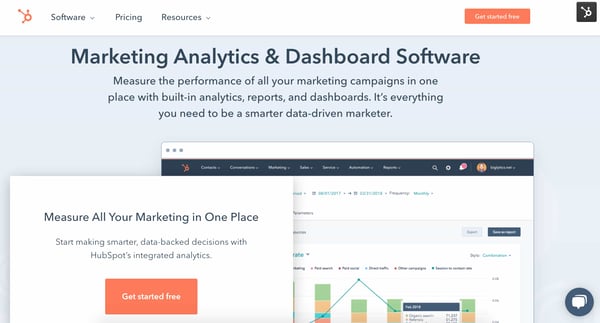
HubSpot’s Marketing Analytics & Dashboard software measures and analyzes the performance of your campaigns and marketing efforts with built-in analytics, reports, and dashboards. With HubSpot, all of your CRM data and Marketing Software data are located in one place, at your fingertips — no SQL or coding required. This allows you to identify, review, organize, and share your marketing attribution data (among many other types of data) from your all-in-one CRM platform with ease.
HubSpot offers granular Attribution Reporting for Contact Attribution and Revenue Attribution.
In terms of Contact Attribution Reporting, each customer interaction — and any revenue generated from that interaction — is recorded in that contact’s record. This is also helpful because it helps ensure everyone is getting credit for their work.
As for Revenue Attribution Reporting, you can pinpoint the specific channels that are hitting or surpassing their goals — and which channels need improvement — this way, you can identify the areas in which you should focus your attention and budget.
In addition, HubSpot has some other notable features that have the power to make marketing attribution reporting— and other marketing work and reporting — simple.
There’s a Custom Report Builder which brings together all of your data so you can access contact, company, and deal data plus your landing page, blog, and email data, all in one place. Custom Objects are available to provide data that’s unique to your business in order to create new segments and create custom reports, campaigns, and workflows.
Reporting dashboards are customizable and flexible — they have pre-built, drag-and-drop templates that you can share from HubSpot or via email or Slack. (You can also create dashboards from scratch if you prefer.)
Behavioral Events track custom interactions that are unique to your business and indicate when a customer is ready to move to the next stage of the buyer’s journey. Lastly, Account Based Marketing (ABM) closes the gap between Marketing and Sales so you’re able to close more high-value target accounts.
2. Ruler Analytics
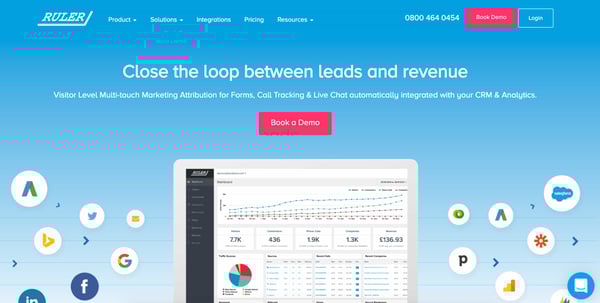
Ruler Analytics is a marketing attribution and call tracking software — it has closed-loop marketing attribution, meaning it gives you access to all of your revenue and conversions in a single location.
This multi-channel marketing attribution platform comes with online and offline conversion tracking to help you determine the return on ad spend (ROAS), identify which campaigns, channels, and keywords are leading to conversions, and get a better understanding of your customer journey.
Compare various rule-based models including first click, last click, and linear attribution. You can also map your customer journey to identify the marketing channels that are causing visitors to find your business, make purchases, and convert in other ways (e.g. complete an online form or chat with a sales rep).
You can pull customer data from any form submission and automatically match it to the marketing source it came from. Integrate your data with Google Analytics using Ruler’s Google Analytics and Google Adwords integration, and upload your marketing attribution.
3. Branch
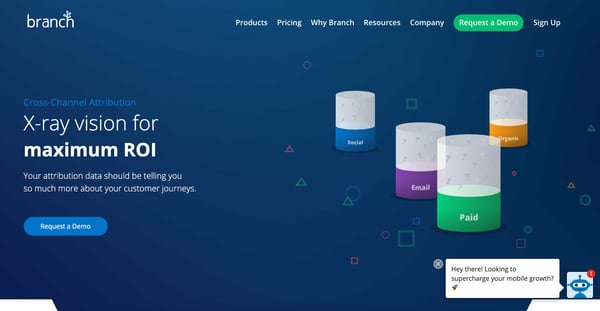
Branch is a cross-channel attribution and mobile linking platform that offers insight into all of your team’s marketing efforts. The tool connects customer touchpoints from all of your channels with conversions that occur on any platform.
The tool’s Predictive Modeling feature is anonymous and uses historical attributions to identify accurate attribution when there’s no universal ID — this is helpful because, “Apple killed the IDFA.” The IDFA was an identifier for advertisers that worked in a similar way to tracking cookies on browsers.
Branch also tracks referral and ads attribution as well as measures email, web, and social media marketing success. Use cross-platform, cross-channel cohort analysis for comparisons of all of your marketing campaigns and compare attribution across all of your channels including email, ads, social media, and web.
Branch displays your data on analytics dashboards and segments that data by device, platform, channel, campaign, conversion events (e.g. installs), or metrics (e.g. clicks).
4. Active Campaign
ActiveCampaign is a customer experience automation platform with attribution reporting capabilities. ActiveCampaign’s Attribution Reporting allows you to identify which traffic sources and touchpoints make your leads convert.
The tool’s contact records include lists that are updated with all conversions a contact makes and the specific touchpoints that played a role in that conversion. There’s a Segment Builder that tells you which traffic source (e.g. ad or campaign) a contact who converted actually visited your website from.
You can set up automatic triggers to take actions once a contact has converted in a specific way, as well as create attributed values for your conversions. For instance, if one in 10 customers who completes the web form on your landing page spends $500, you may set the attributed value for a web form conversion as $50.
Use ActiveCampaign to identify attribution from a wide range of traffic sources that are both paid and organic. In terms of paid touchpoints, ActiveCampaign can help you track Facebook Ads, AdWords, and more. As for organic touchpoints, ActiveCampaign can help you track product reviews on 1) any site aside from your own, 2) blog posts by guest contributors, 3) social media posts, or 4) a response on Quora.
Set up a two-way sync between HubSpot and ActiveCampaign with the integration.
5. C3 Metrics
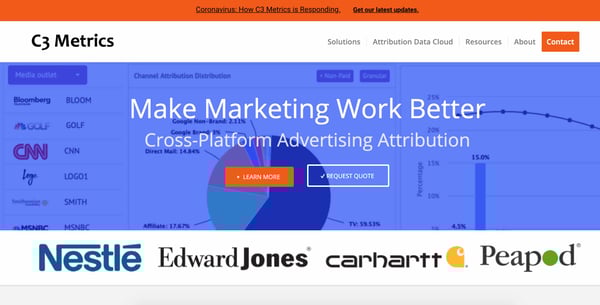
C3 Metrics is an attribution reporting tool that focuses on enterprise cross-platform advertising attribution. The tool offers attribution solutions for businesses across a range of industries including ecommerce, automotive, financial services, pharma, and travel. Additionally, there’s the C3 Metrics Attribution Data Cloud that works across digital, TV, radio, and direct mail.
Use the tool’s Marketing Mix Modeling (MMM) which considers external factors, such as competition or changing industry trends, when pulling attribution data. You can also connect users anonymously cross-device and cross-platform with ease, and analyze attribution with online reporting dashboards and offline reports that can be delivered when you want them.
6. Windsor.ai
Windsor.ai is a multi-touch marketing attribution software that integrates all of your marketing data and metrics and runs attribution models. The tool measures ROI from attribution across multiple channels, campaigns, and keywords.
Multi-touch attribution modeling maps and optimizes the customer journey and determines how and where you should be spending your budget. Windsor.ai also provides your(ROAS) for all touchpoints by combining multi-touch attribution with customer journey data that’s matched to cost-data.
Use the Keyword Optimization tool, Google Ads Optimization tool, and the TV Ads Performance tool to enhance all of different channels and touchpoints for your unique target audience. You can also access and pull marketing and CRM data from any tool with one of Windsor.ai’s many integrations and APIs.
7. Attribution
Attribution is an enterprise multi-touch attribution software that identifies the specific impact of your marketing funnel’s touchpoints. There are features ideal for both B2C marketers looking to optimize marketing ROI and B2B marketers looking to streamline the path to purchase. The tool’s automated data collection feature organizes all of your online and offline touchpoints and combines that information with your budget spend.
Use this tool to manage affiliate marketing, report on and improve partner performance, and compare affiliate performance to the performance of your other marketing touchpoints and channels. You can also build automated attribution models with machine learning algorithms that surface any patterns in your data and touchpoints.
Use Attribution’s dashboards and reports to segment your data by campaign, touchpoint, or channel, and sync all of that data to your other software (e.g. CRM, marketing tool, business intelligence tool).
Get multi-touch attribution for HubSpot with the Attribution integration.
Determine what your marketing attribution goals are, what types of reports would be most helpful for your business, and begin using one of the many marketing attribution tools available today to grow better with data-driven marketing.
Editor’s note: This post was originally published in December 2019 and has been updated for comprehensiveness.

The Ultimate Guide to Advertising in 2021
When you hear the word advertising, what comes to mind?
Do you think of banner ads on your favorite website? Those hilarious Super Bowl commercials? The billboards along the highway or posters in the subway stations?
While most of us have a pretty good idea of what advertising looks like, we often struggle to nail down exactly what it means — and how to do it well.
From the printing press to pop-up ads, advertising has certainly changed with the times. Despite this, though, the need for advertising hasn’t changed, and neither have the techniques and best practices that make for quality advertising. That’s what we’ll cover in this guide.

Good advertising is designed to be extremely influential, memorable, and, at times, risqué. But, how does advertising actually work?
How does advertising work?
Advertising works by breaking through the clutter and noise of everyday life, disrupting the viewer’s attention, and demanding their focus.
Depending on the goals of your ad campaign, advertising can go to work for your company in a variety of ways:
-
To raise awareness of your brand
-
To drive potential customers to your business
-
To promote sales for both new and existing products
-
To introduce a new product or service to the market
-
To differentiate your product from your competitors’
Advertising can also be executed in various ways. Radio commercials, billboards, branded t-shirts, and social media endorsements all count as advertising — as we’ll discuss later on in this guide.
What are advertisers?
Advertisers are the people at a company who are responsible for advertising a product or service. “Advertiser” can also refer to a company or organization that’s paying for advertising on a billboard, in a magazine, or through a website or mobile application.
All advertisers are marketers, but not all marketers are advertisers. Let’s dig deeper in the differences between advertising and marketing.
Advertising is a subset of marketing, which is the umbrella term for communicating with your audience.
Marketing includes a number of different channels, such as social media, email marketing, public relations, SEO, and paid advertising.
Alternatively, advertising is just one component of marketing.
A company’s overarching marketing strategy will typically include an advertising plan. The advertising portion zooms in on the specific process of creating and publishing the persuasive messages to get customers to take action.
A Brief History of Advertising
Advertising is one of the oldest segments of business, save for currency and trade. Once products and services arose, so did the need to make them known.
The oldest confirmed piece of advertising dates back to 3,000 B.C. Technically, it was a print ad from ancient Egypt promoting the capture and return of an escaped slave.
Incidentally, the ad also mentioned the slave owner’s shop — a rug business — which inherently advertised his storefront, too. The slave was never caught, but the rug owner did discover a brand new method of bringing in traffic: advertising.
Let’s fast-forward about 4,000 years. Here’s a brief look at the past five centuries of advertising:
1472: The first poster advertisement is placed on church doors in London.
1650: The first newspaper ad — a reward for 12 stolen horses — is published. (What’s with these reward-based advertisements?)
1704: The Boston News-Letter prompts its readers to place ads in its paper.
1870: The Powers style of ad copy is born. This style packed a punch — it was short, to-the-point, truthful, and convincing. Powers said the focus should be on why the consumer should buy your product or service — a message that still resonates for good reason today.
1880: Postcards become one of the hottest new ways to reach customers.
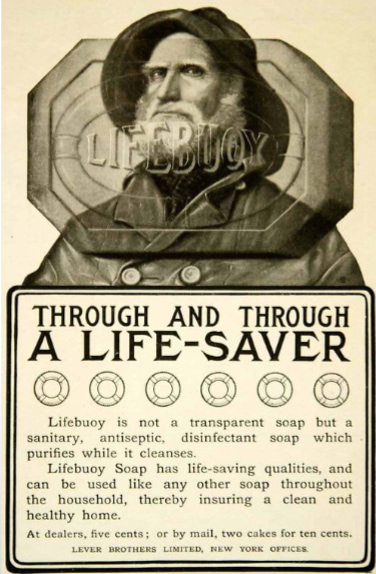
1902: Unilever creates the “longest client-agency relationship in advertising history” when it hires J. Walter Thompson Company to advertise its Lifebuoy Soap.
1902: Mellins Food advertises its brand on 25 airship flights, becoming the first brand to take this approach.

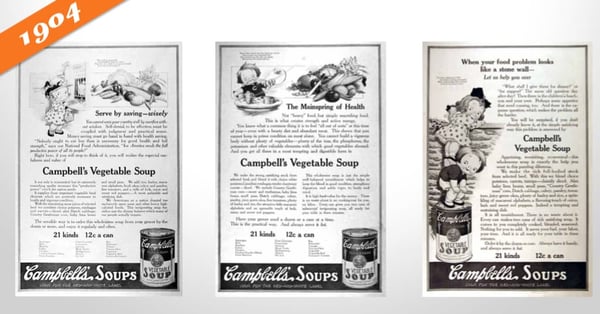
1904: The Campbell’s Kids are created, piloting the change in advertisement focus from a single ad to an entire campaign.
1922: Radio ads are born, and businesses purchase 10 mins for $100. Two years later brands would increase their investment by sponsoring an entire radio show, a concept that would eventually become known as “sponsored content.”
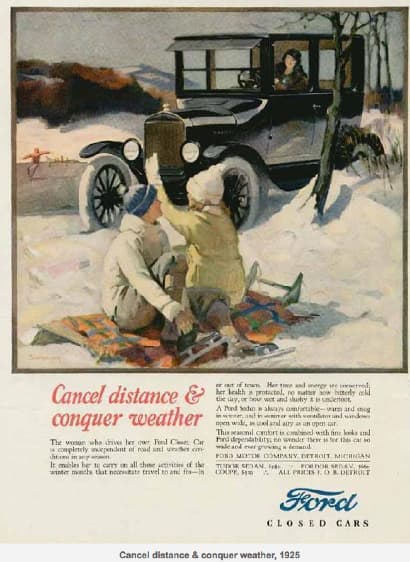
1925: Advertisers start to appeal to emotions, focusing on what pleasure customers would receive from their product or service. This old Ford ad exemplifies this perfectly.
1975: VCRs are introduced, and consumers begin to record shows and, therefore, skip advertisements.
1990: Computers become more popular and accessible at home, with over 5 million homes connected to the internet.
1994: The first email spam campaign launches. Banner ads are also introduced.
1995: Search engines like Yahoo! and Alta Vista are born. Ask Jeeves and Google would follow in 1997 and 1998, respectively.
2005: YouTube and Facebook (for college students only) launch.
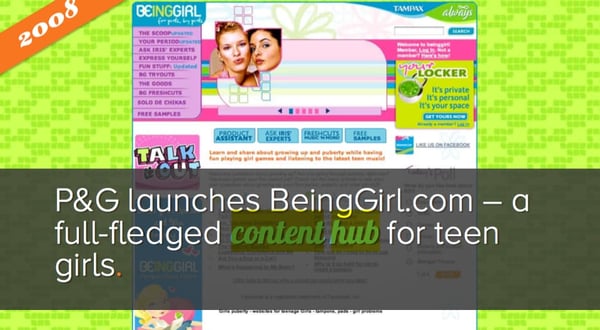
2008: Brands start to realize the importance of having an online presence for their potential customers. Procter and Gamble pilot the concept of the content hub with BeingGirl.com.
2012: Online videos reach almost 170 million viewers.
2013: Sites like Pinterest and Instagram join the social network scene.
2020: Advertising soars on digital platforms including social media, podcasts, pay-per-click (PPC), and more. Customer data plays a larger role in advertising targeting and retargeting. Lastly, a rapid increase in mobile devices sees a boost in mobile ads and SMS marketing.
History teaches us that advertising is an ever-changing concept, just like shopping habits and how and where consumers spend their time.
Whereas almost 140 years ago, postcards were the newest form of advertising, brands today are building chatbots for Facebook Messenger and integrating artificial intelligence into their marketing and sales platforms.
Things in the advertising world move fast. Now, let’s take a look at how advertising methods have changed and what marketers and advertisers are using today.
Advertising can look like many different things. Here are the different formats and channels that advertisers have been using over the years.
1. Print Advertising
Print advertising refers to posters, bulletins, flyers, and other physically-printed promotions. It also refers to newspaper and magazine ads.
How we design and consume print advertising has changed over the years, but it’s been a steadfast advertising medium — especially as digital advertising has evolved (which we’ll cover next).
Unlike digital media, print advertising can’t be tracked and analyzed as clearly. Fortunately, brands have found brilliant ways to incorporate print advertising into broader digital campaigns.
2. Billboards and Public Transit Ads
Billboard advertising encompasses print advertising on a much larger scale. Due to their size, the design, placement, and cost of billboard and public transit ads are different than typical print advertising.
For example, billboards are typically designed with few to no words so that viewers have time to process the message while passing by in a car or train. Also, these ads are used for brand awareness, so they usually only include a brand name or phone number (versus a website).
3. TV Commercials
TV commercials are short advertisements developed and paid for by companies and organizations looking to capture the audience of a TV show or network program. TV ads have been around since the invention of the television and have since changed drastically with the birth of streaming TV.
TV ads have a wide reach (millions) and provide viewers with a multi-sensory ad experience — something print ads and some digital ads can’t quite do. Alternatively, TV ads are expensive, avoidable by your audience, and hard to target as accurately as other channels.
4. Radio
Radio advertising refers to spoken advertising spots aired on radio channels between music and other programs. This method dates back to 1920 when commercial radio first aired.
Radio advertising is particularly powerful for local and regional advertising. Nowadays, podcast advertising is a similar but more effective method, especially for national audiences.
5. Event Advertising
Events (both in-person and virtual) are opportunities to connect with your audience while promoting your brand and products. You can host your own event (as HubSpot does with INBOUND) in the form of a conference, webinar, roundtable, or luncheon.
Another form of event advertising is by sponsoring an event or purchasing a booth at a conference or trade show. This is less expensive than hosting your own event, but you still get to engage audience members and promote your brand.
6. Direct Mail
Direct mail advertising includes postcards, pamphlets, and catalogues mailed directly to the homes of your target audience. A direct mail advertising strategy is more personal than others on this list, but it’s also very costly. (Consider the cost of postage alone.)
Another direct mail strategy is electronic mail, typically through the form of email newsletters or promotions. This overlaps with our next section — digital advertising. That’s what we’ll unpack next.
Digital Advertising: How to Advertise Online
As of today, there are over 4 billion people using the internet. This number is up 300% from 2005. Point being, internet usage is skyrocketing, and it’s not stopping.
If you’re not advertising online, you’re behind the curve. Not only does the internet offer you direct access to more than half the global population — including more than half of your target audience — but it also provides so many different channels on which to advertise.
Marketers now have the flexibility to reach their target audiences on multiple fronts, in multiple ways, for multiple budgets. There are also a number of tools (many of which are free) that can help you execute your advertising strategy.
Here are the most common ways to advertise online:
Paid Search Advertising
Whether Google, Yahoo, or Bing, all search engines have their own paid advertising. This is referred to as pay-per-click, or PPC, and involves bidding on keywords and placing ads at the top or sides of search results.
When someone performs a query using one of those search engines, advertisers have the ability to display ads above organic search results. That’s what makes PPC so powerful — it gives your advertisements prime real estate in front of people already searching for relevant topics.
Here’s an example on Google:
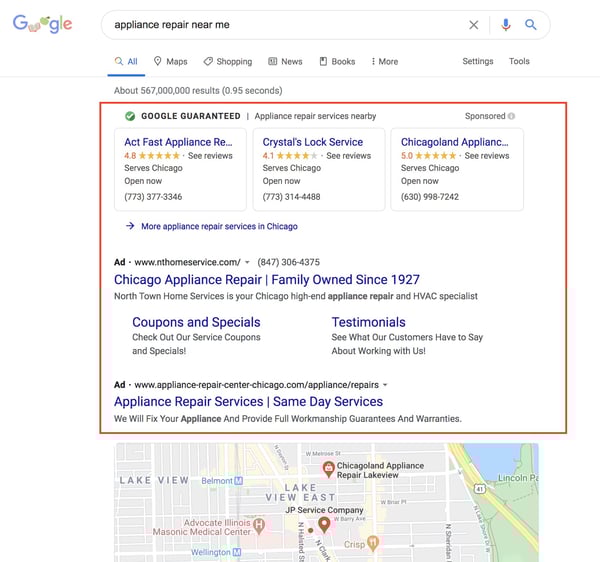
The top listings in the red box are advertisements. Organic search results, those that came up as a result of SEO, were below the map snippet.
Social Media Advertising
Social media platforms know how valuable their content is, and that’s why they offer the option to sponsor or boost posts. Social media ads put your message in front of your target audience and encourage them to engage, click-through, and buy.
More and more, social media sites are prioritizing ad space over organic content because, well, it brings in more revenue.
Whether you’re a budding or brand new business, consider running some social media advertisements. These will not only advertise your products and services but also promote your social media pages and grow your following.
Platforms like Facebook, Instagram, LinkedIn, and Twitter each have their own version of ads like these.
Here’s how they appear on their respective feeds:
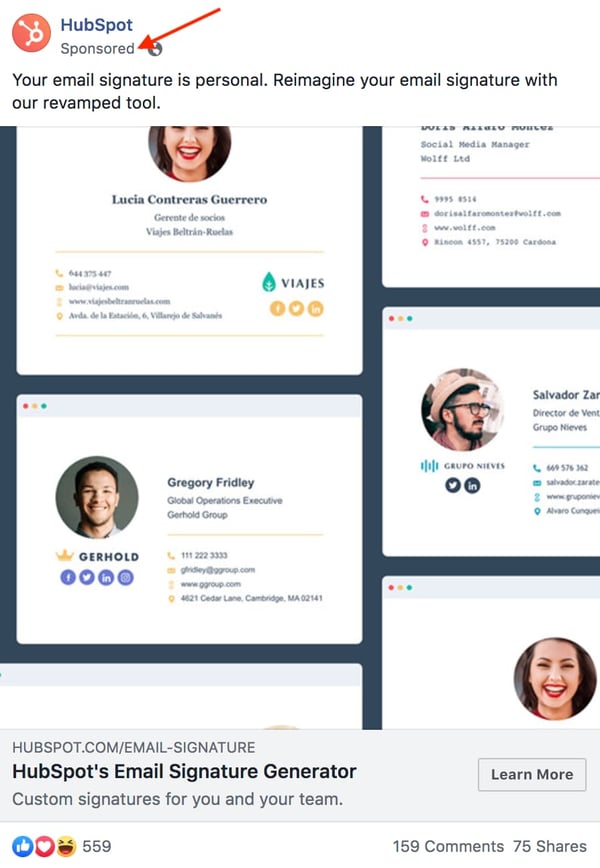
Download our free lookbook of 50 Facebook Ad Examples We Actually Clicked.

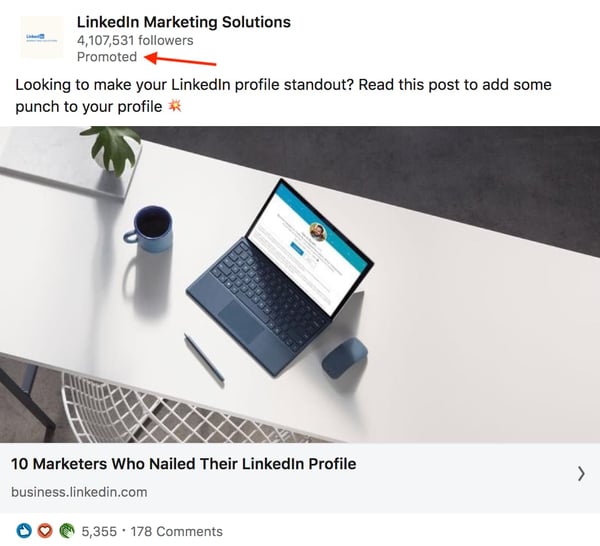
Download our free guide on How to Run Successful LinkedIn Ads.
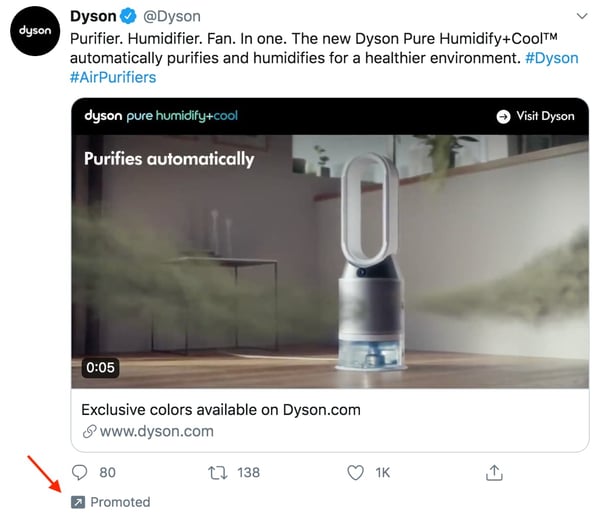
Download our free guide on How to Use Twitter for Business.
Native Ads and Sponsored Content
Sponsored content has been around since 1922, when brands would sponsor entire radio shows. Today, sponsored content refers more to native ads and blog or article content subsidized by brands.
Have you ever read a Buzzfeed article that heavily referenced or recommended a certain product or service? It was likely sponsored by a certain brand.
Check out this article, 10 Reasons To Put Away Your Phone On Your Next Trip, promoted by agoda, a hotel or destination booking site. Does it blatantly promote agoda’s services? No. Its primary purpose is to entertain and inform, although agoda is referenced a few times throughout the content.
At the top, the byline reflects agoda’s sponsorship, just before the content starts. And, as you scroll down the page, another ad sits within the content.
Sponsored content is a great way to promote your brand in content your audience is already familiar with.
Banner and Display Ads
Banner and display ads are an extension of search ads and follow a similar PPC model. But instead of a text-based ad, consumers see a more visual advertisement.
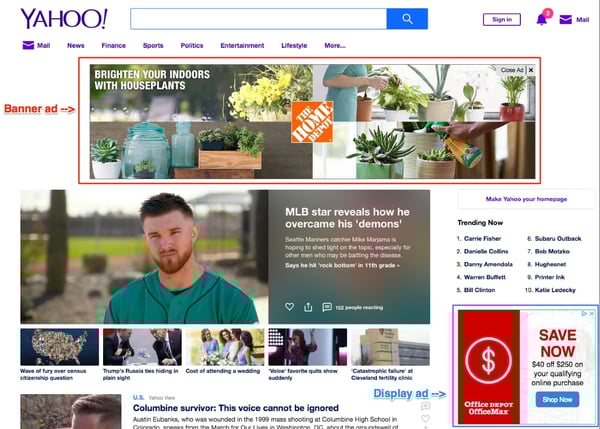
Banner ads are typically the horizontal boxes on top of a web page, whereas display ads are smaller in nature and shown on the side (like in the screenshot above).
Whether you opt for traditional print ads in magazines or subway stations or choose online promotion on social media or search engines, there are a few rules that make for great advertising. Below are some advertising best practices to apply to all your ads.
Advertising Best Practices
There are a lot of best practices, tips, and tricks when it comes to advertising. It’s an art that’s been perfected over the years, and with the rise of modern advertising and new media, best practices continue to manifest.
In this section, though, we’re going to cover five famous advertising concepts that still work today — regardless of what advertising method or medium you’re using.
When used correctly, these advertising techniques will do wonders for your brand and products.
Appeal to emotions.
While you may not consider the ASPCA a business, their unforgettable Sarah McLachlan commercial is the perfect example of using emotional appeal to entice people to take action.
For most of us, the images in that commercial are hard to watch — we may even turn away. But since it tugs at our heartstrings, we’re more likely to donate to animals in need after seeing the horrors they’re going through.
Studies show that people rely on emotions, rather than information, to make brand decisions. Emotional responses to ads influence a person’s intent to buy more than the actual ad content.
Whether you try to evoke happiness, sadness, fear, or anger, appealing to emotions can help your target audience feel your message — not simply read or hear it.
Create positive associations.
When consumers associate your product with a feeling of happiness, state of achievement, or accomplished goal, they’re more likely to take notice, remember your product or service, and make a purchase.
Actually, you’ve probably been on the receiving end of this before without even realizing it. Have you ever seen your favorite celebrity or Instagram influencer posing with a product or brand and found that you wanted to be, do, or look the same? Companies create this subconscious connection in advertising hoping that you associate your positive feelings with the product or service they’re promoting.
Catchy songs like “Nationwide is on your side” is an example of helping people associate friendliness with the Nationwide brand. Coca-Cola has a brand advertising campaign that associates their product with friends, family, and fun. When you consider what refreshments to serve at a party or bring on a picnic, Coca-Cola wants you to think of them.
As you create your advertisements, consider what feelings, desires, or goals with which you want your brand to be associated. Weave these feelings or goals into your advertisements through stories or videos. Look for influencers who align with your brand’s core values and demeanor and include them to promote positive association.
Establish a bandwagon effect.
People want to fit in. It’s human nature. Neither you nor I are immune to it.
And it’s this base human desire that makes the bandwagon effect so effective. People don’t want to be left out. They find value in their peers’ opinions, and they certainly don’t want to be the only ones not using the latest and greatest product.
Brands like Maybelline understand this concept well and use it to their advertising advantage. One tube of their top-selling mascara is purchased every two seconds, a statistic that establishes social proof and further supports their claim of “America’s Favorite Mascara.”
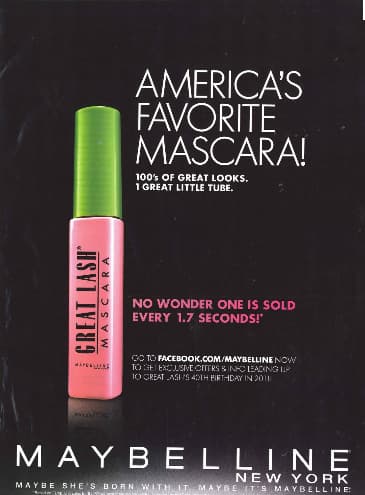
Use customer testimonials, survey data, or shareable content to advertise your brand as one worth following or buying into. Take another approach by promoting a discount for sharing your brand with a friend or family member — so your audience will do the selling for you. Either way, use your advertising to create an inclusive environment people will want to join.
Focus on benefits over features.
Features and benefits are two very different things. Features are the details of the product or service you’re selling, such as the measurements of a couch or the ingredients of a protein bar. Benefits, on the other hand, explain why a person should buy a couch or protein bar from you and how their life would, well, benefit from such a purchase.
Advertising should focus on the benefit your product or service brings, not explain what you’re physically selling.
Consider how Southwest Airlines advertises. Instead of explaining, line by line, what a Business Select ticket offers, Southwest paints a picture of what life would be like if you made a purchase. In this advertisement, they focus on the benefits.
-jpg.jpeg?width=600&name=advertising-southwest%20(1)-jpg.jpeg)
Rather than wasting precious ad space on your product specifications or service details, talk about the ways a purchase might positively impact your customers. If you do it right, your creative, benefit-packed advertisement would then inspire them to research the features on their own.
Leverage storytelling.
Not unlike our desire to fit in is our penchant for a good story. Storytelling helps paint a bigger picture of a brand or company, not simply promote a single product or service. Also, when stories resonate with someone, it’s far easier to motivate him or her to take action.
Storytelling is the one technique you should try to infuse in all your advertising. In fact, if you haven’t started crafting your brand’s overall story, you should definitely do so. Research shows that stories that illustrate a brand as “necessary, believable, and integral” are the most effective for engaging and influencing consumers.
Dove employs storytelling in its campaign partnership with Operation Homefront. The videos feature real stories of military men and their families being reunited. The advertisements don’t directly promote Dove products but instead tell the Dove brand story (and pull on a few heartstrings, too).
Determining your brand story will help you learn how to best discuss your brand in all marketing efforts, not just advertising.
Next, let’s take a look at some of the most memorable ad campaigns, a few of which put these best practices in action.
Five Memorable Ad Campaigns
The best advertisements are the best teachers. Whether it’s the copywriting, design, medium, or target audience, well-executed campaigns can always teach you something new about advertising or positioning.
(Consider Westinghouse Electric’s “We Can Do It” ad …)
Here are five campaigns that left a noticeable mark on advertising history.
1. Nike: Just Do It
In the late 1980s, Nike launched its “Just Do It” campaign.
At the time, Reebok was outselling Nike, and Nike needed to act fast to compete against the sneaker conglomerate.
But it wasn’t just the three-word phrase that earned global attention. Their new ad campaign also focused on real people wearing and working out in their products, as opposed to simply featuring clothes and sneakers themselves.
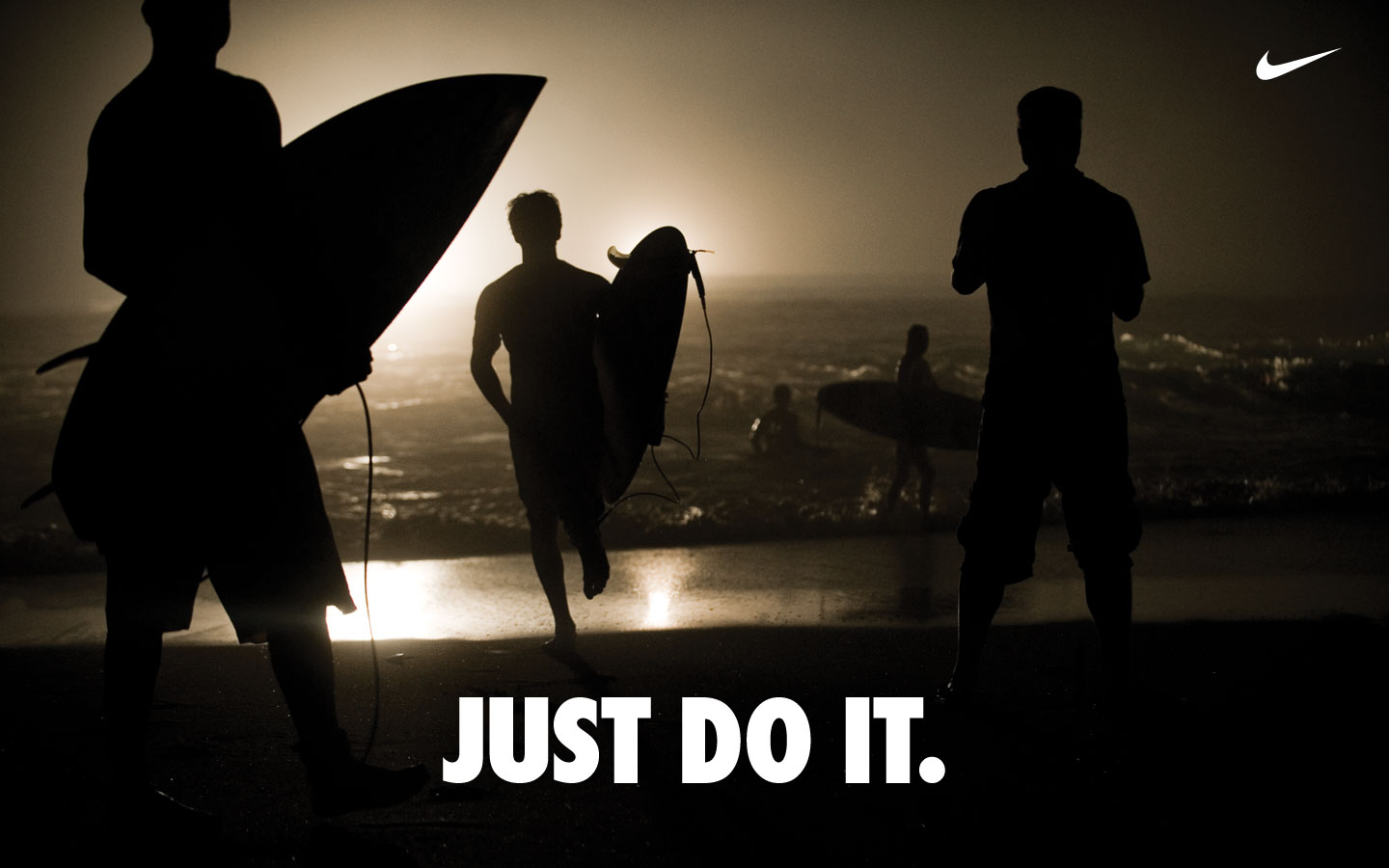
This powerful combination of people plus product helped Nike go from $800 million in 1988 to $9.2 billion just 10 years later.
2. The Absolut Vodka Bottle
Did you know Absolut’s “Bottles in the Wild” ad series is the longest uninterrupted campaign in history?
The campaign was Absolut’s attempt to grow their name internationally, especially throughout the United States. It featured the Absolut bottle in different cities and countries worldwide.
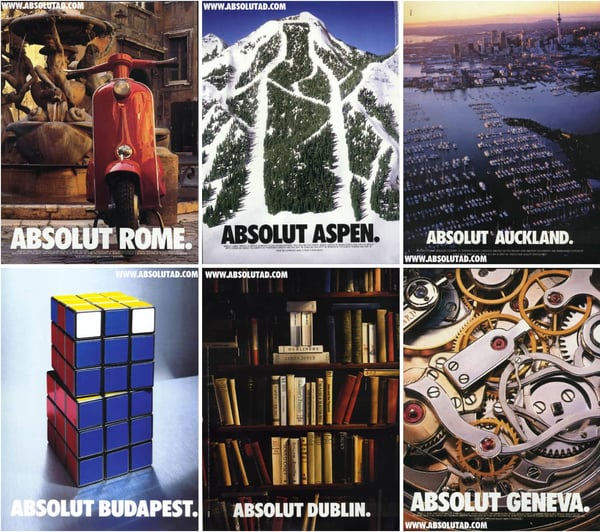
It launched in 1985 and ran until 2000 — lasting an impressive 25 years.
Absolut’s campaign helped grow the company from a tiny slice of the vodka market share (2.5%) to over half the U.S. imported market share.
To this day, the Absolut brand is the fourth largest spirit company, thanks to its focus on the overall story, not just the product itself.
3. Miller Lite
The folks at Miller Lite used differentiation to reach their goal: to get “real men” to willingly drink light beers. With their “Great Taste, Less Filling” campaign, they maintained a leading position in the light beer market for several decades after this first campaign aired.
-jpg.jpeg?width=600&name=advertising-miller%20(1)-jpg.jpeg)
4. Volkswagen
Though Volkswagen has officially discontinued its production of Beetles, its iconic “Think Small” campaign will be forever ingrained in advertising history.
Doyle Dane & Bernbach (DDB) advertising agency knew it had to change the mind of consumers if it wanted to compete with industry leaders. So, VW admitted that though the Beetle was, in fact, tiny, it was still a force to be reckoned with and worth a purchase.
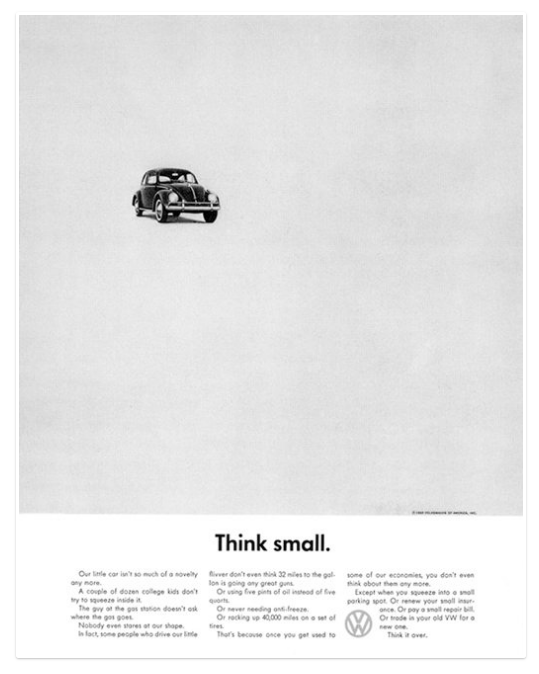
Authenticity and honesty went a long way in this seemingly small campaign.
5. Dos Equis
With its edgy, cool, and sophisticated aesthetic, it’s no surprise “The Most Interesting Man in the World” campaign put Dos Equis on the map.
This campaign created a positive association between the Dos Equis beer and the feeling of sophistication and poise. Sales quickly jumped by 22% after the campaign launched.

Even more impressive was how Dos Equis found success in a time when craft beers grabbed a foothold in the market and imported beer took a 4% hit. This campaign was a major component of that success.
To learn how to grab the attention of your audience, learn from the professionals. These campaigns are a great example of how brands have used real stories, real people, and real talk to grow their businesses.
Advertising Helps You Grow Better
Equipped with a dense, dynamic history, advertising is an incredible tool to add to your marketing tool box.
Between print ads, radio sponsorship, TV commercials, and social media promotion, the opportunities to advertise and promote your brand are endless.
To best connect and engage with your audience, speak your customer’s language, appeal to their emotions, and tap into their desire to be a part of a community, create a clear and authentic brand story to illustrate how your brand aligns with their values.
By applying these tried and true practices to your advertising, you’ll build a magnetic brand that attracts customers, establishes a following, and generates revenue.
Do this and your brand will grow into a household name that stands the test of time — just like advertising itself.
Editor’s note: This post was originally published in July 2018 and has been updated for comprehensiveness.


How to Manage Your Entire Marketing Budget [Free Budget Planner Templates]
Let’s say your company decided to invest in a website redesign to improve lead generation, and you’re responsible for managing the project.
Naturally, one of the first questions you ask is, “How much is this website redesign going to cost?”
The answer, of course, is “it depends.” Are you simply switching to a new template and adding some new CTAs, or are you migrating your entire website to a new platform?
If only there were a way to organize your answers to all of these questions — a place where you could enter in estimated costs for all of your line items, and then compare your projected marketing budget to what you actually end up spending.Good news: Marketing budget templates can help.
Included in our eight marketing budget templates bundle is a template to manage your website redesign … as well as templates for both Excel and Google Sheets to help you track your content budget, paid advertising budget, event budget, and more.
Additionally, in this guide, we discuss how to manage your entire marketing budget from start to finish.

Marketing Budget for Small Business
Marketing budgets are especially important for small businesses. Small business owners may lack the experience drawing up budgets; moreover, it’s critical that these companies keep costs as low and lean as possible as they scale.
Ironically, you need marketing to scale. Without it, it’s hard to sell your products and services. In addition to the budgeting templates provided below, check out some of our free offers and courses to mitigate your company’s marketing costs.
Yet marketing budgets can be difficult to establish for companies of all sizes. How much should a company spend on marketing?
Well, digital media makes up more than half of both U.S. and global advertising spend. This includes initiatives that cater to audiences on desktop computers, search engines, video streaming platforms, social media, and mobile devices.
Given the success marketers have seen in it, you might consider planning to spend at least half of your marketing budget on some of these digital channels.
Let’s talk about other ways to allocate your marketing budget.
Marketing Costs
As you build a budget, here are a few items you’ll want to keep in mind when planning your marketing budget allocation:
- Software: When it comes to digital and even print media, you may need software to create your marketing campaigns, or handle your daily processes.
- Freelancers: If you have a temporary campaign or want to test out a new marketing strategy, you might want to hire a short term freelancer before bringing on a full-timer.
- New personnel: When you do hire full-time employees, you’ll want to budget costs including their computer, technology, benefits, and onboarding-related needs.
- Advertising: Budget how much money you’ll spend on paid opportunities such as physical ads, native ads, sponsored content, search engine ads, and social media promotions.
- Content creation: When you create content such as videos, photos, or even blog posts, you’ll need to put paid time into it. Budget how much money will go into creating this content so you can adjust accordingly based on its return on investment.
Spreadsheet knowledge alone won’t help you understand how you’ll spend your marketing money this year. Creating a sound marketing budget starts with knowing what purpose this budget will serve and which marketing teams it will represent.
1. Know your buyer’s journey.
Your buyer’s journey is the steps your audience takes as they ‘journey’ from prospect to paying customer. Knowing your buyer’s journey allows you to understand how your audience interacts with your marketing — and where to set your goals and budget to better reach your customers.
Ask yourself these questions as you define your buyer’s journey:
- How do your leads and customers typically discover your products?
- What do they need to know before they make a purchase?
- How many site visits do you see per month?
- How many leads are you generating per month, and how many of these convert to paying customers?
- What is the cost of generating new leads and then converting them to customers?
- What’s the typical value/revenue of each lead?
This process should point out what marketing tactics are (and aren’t working), where you should alter your marketing goals, and where you can focus your marketing budget.
2. Align your budget with your marketing goals.
What you spend and where you spend it will depend on what you’re trying to accomplish.
So, when starting to create your marketing budget, make sure you’re only spending money on the things required by your current marketing goals — goals set based on your audience and their journey from prospect to customer. These could include:
- Display ads to promote a new product you’re launching this year.
- Sponsored social media posts to generate followers on your new Facebook page.
- Paid search engine ads to drive traffic (and purchases) to a specific product page.
- Contract bloggers to get more organic search traffic to your company’s website.
Former Demand Generation Marketer at HubSpot and current Senior Product Marketer at Atlassian, Jessica Webb, says this about how your costs can change when focusing on lead generation vs. lead conversion: “The majority of the money you spend on paid efforts is usually calculated based on volume of clicks or impressions. Because of this, you’ll often want to put more budget toward campaigns with higher-volume offers and audiences.”
“For example, a tweet or Facebook ad promoting a lead generation offer that leans more top of the funnel will likely receive more clicks than something that falls more toward the middle or bottom of the funnel,” she explains.
Your paid advertising costs will also change depending on how wide of an audience you are attempting to reach.
“You can look at Twitter advertising as an example,” Webb says. “You have to option to target your campaigns based on users’ interests or keywords searched for. Interests are a much broader category, whereas smaller pockets of users are searching for any given keyword, therefore your interests-based audience is going to be much larger and require a larger budget.”
3. Beware of hidden marketing costs.
One of the great advantages to having and maintaining a budget spreadsheet is that it helps you avoid those end-of-the-quarter or end-of-the-year freak-outs when you realize, “Whoa … what did I spend all that money on?”
In many cases, unanticipated costs can force marketers to fork over cash that they didn’t plan on spending. Product marketing offers a perfect example. According HubSpot’s VP of Marketing Meghan Keaney Anderson, it’s easy to forget that successfully marketing your products and services requires more than just promotion.
“When people allocate budget for product marketing, they tend to think in terms of product launches and promotional activities,” Anderson explains.
“That’s certainly an important part of it, but another area of focus to remember is setting aside resources to conduct research and message testing long before the product ever goes to market. Having conversations with customers about the pain points your product will ultimately address is critical to shaping the messaging and having a successful launch.”
4. Remember where your priorities lie.
Marketing is overflowing with add-ons and extras, upsells, and “premium” versions. One of the best ways to assess what’s nice to have versus what’s absolutely necessary is to (you guessed it) organize all of your expenses.
By keeping tabs on where your budget is being allocated, and cross-checking that spending with the results you’re getting, it will be much easier to figure out what should keep getting budget and what should get kicked to the curb.
For example, let’s look to the world of public relations. In PR, there are countless tools to which you can allocate budget, which could leave you overspending where it doesn’t matter — and underspending where it does.
“Tools abound to help PR practitioners not only create and distribute great content and find and target key stakeholders, but to ultimately measure reach and effectiveness,” says Nathaniel Eberle, HubSpot’s former Director of PR & Brand and LogMeIn’s current Director of Global Brand Management.
“The key is making sure you’re laser-focused on who you’re setting out to reach and influence, then ensuring that your budget supports how they’ll most likely want to receive (and share) your key messages.
“As the media and digital landscape evolves at breakneck speed, continually reassessing the tools, services, and programs you’re employing is a great way to determine real-time ROI of your overall spend. Today’s measurement tool may be worthless to you tomorrow.”
5. Spend your budget smartly.
When you open up these budget templates and check out all the various expenses detailed in them, don’t fret if you can’t tick every box. I’m not advocating for an “always spend more” approach to marketing.
I’m advocating for an “always spend smart” approach. The expenses listed out aren’t mandatory — they’re just meant to guide your thinking and to help ensure that you haven’t overlooked any hidden costs.
6. Prepare to measure ROI.
When you put a certain amount of money into a certain area, you’ll want to determine if your budgeting helped you or hurt you as you plan out future budgets. The best way to do this is by measuring ROI — or return on investment.
If you’re the money you spend on one item results in your company making more in return, you may want to increase budget in the next year. If your money went nowhere, you should examine your budget.
8 Marketing Budget Templates You Need to Manage Your Marketing Spend
With the 8 Free Budget Planner Templates to Manage Your Marketing Spend, you’ll be able to manage all of the moving pieces of your budget at a monthly and quarterly level.
Use the Excel version of the templates to keep all of your budgets in one place. When you download the zip file, you’ll find a separate file for each marketing team, as well as a Master Budget Template to maintain a high-level view of your overall expenses.
Interested in sharing your marketing budget across a larger team? Try the Google Sheets version of our templates to share access with other Gmail users. For the Google Sheets templates, each team budget is found in a separate tab of the same Google Sheet.
No matter which version you choose, each budget is optimized with the same line items, tips, and graphs. Read on to learn how to use each budget template.
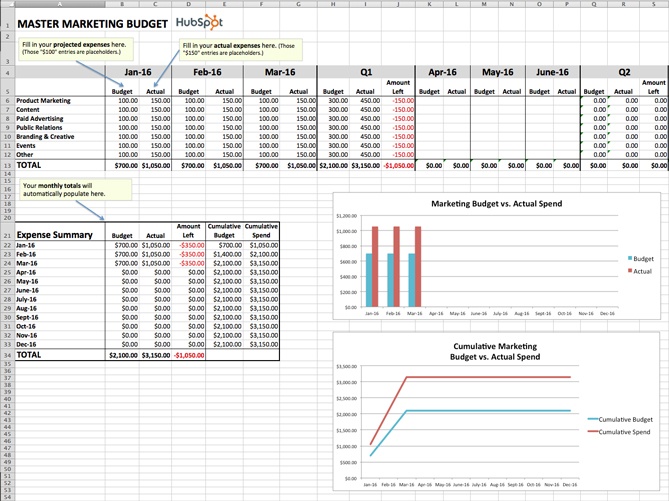
1. Master Marketing Budget Template
Download the Master Marketing Budget Template here.
While it’s helpful to have individual budget templates for specific marketing departments and activities, it’s also nice to be able to take a step back and see the bigger picture.
The Master Marketing Budget Template lets you do just that: It’s the place where you can collect the totals from the other seven templates in the bundle and see all of your expenses in one place.
2. Product Marketing Budget Template
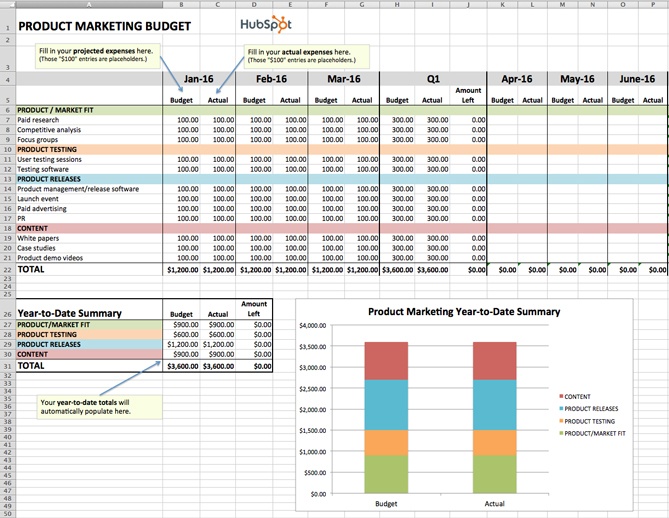
Download the Product Marketing Budget Template here.
This template will guide you step-by-step through the process of budgeting for a product launch. From determining product/market fit, to running user testing sessions, to promoting your finished product, our Product Marketing Budget Template will help ensure you don’t overlook any important expenses.
3. Content Budget Template
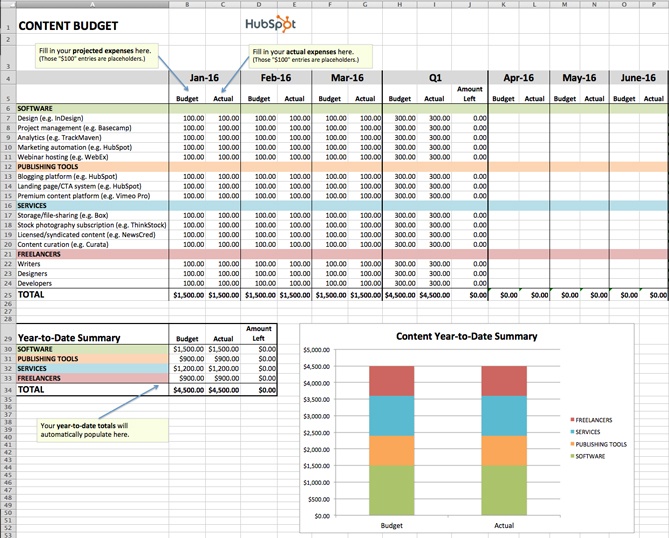
Download the Content Budget Template here.
The budget required for creating and promoting content can vary greatly from organization to organization. For example, while some organizations keep most of their content operations in-house, others rely more heavily on freelancers and contractors. And while some use many different software products, publishing tools, and services, others take a much simpler approach.
Our Content Budget Template is designed to cover as many content-related bases as possible. So, if you see any expenses listed that don’t apply to your organization, go ahead and delete them. (That’s the beauty of Excel spreadsheets: You can customize them to your specific needs.)
4. Paid Advertising Budget Template
Download the Paid Advertising Budget Template here.
Paid advertising: Does it really qualify as an inbound marketing tactic/channel? That is a loaded question, my friends, and one that I don’t have room to answer in-depth in this post.
What I can tell you for sure is that you can do paid advertising in an “inboundy” way — i.e. by targeting specific buyer personas and using paid advertising as a supplement to your organic efforts to help drive awareness and conversion opportunities.
Measuring the effectiveness of your paid advertising campaigns is also paramount to doing things the inbound way. Using our Paid Advertising Budget Template, you can keep tabs on your monthly (and quarterly) ad spending, and then cross-reference the amounts with your lead-generation metrics to determine your cost-per-lead.
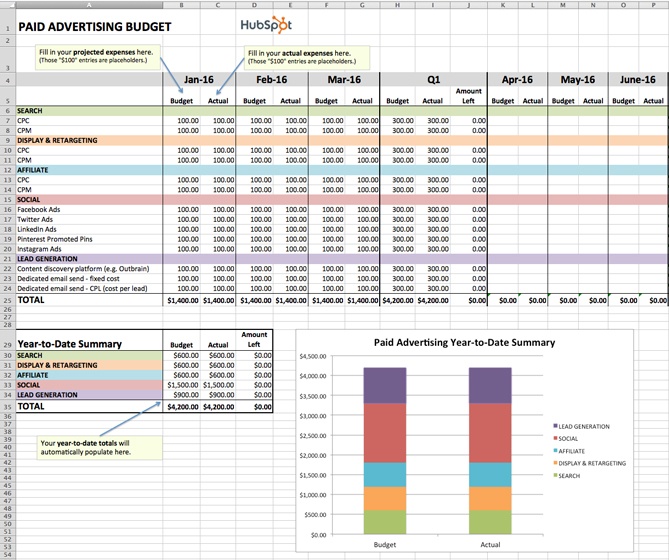
5. Public Relations Budget Template
Download the Public Relations Budget Template here.
Public relations expenses amount to more than just paying for press releases. From reputation monitoring software, to traveling (e.g., to events and trade shows), to applying for awards, there are many PR costs that can be all too easy to overlook.
To ensure you’re accounting for all of your organization’s PR-related expenses, check out our Public Relations Budget Template.
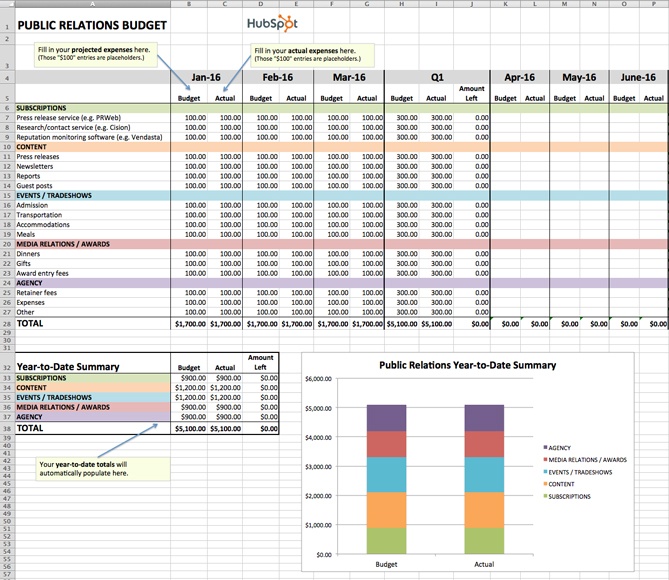
6. Branding & Creative Budget Template
Download the Creative Budget Template here.
In order to produce high-quality, innovative graphics, videos, and other content, the branding and creative teams of today need more than just Photoshop … a lot more. One of the largest — and often most overlooked — expenses is storage.
If your organization is producing a lot of video, storage is especially important. Because as it turns out, when budgeting for video storage, you shouldn’t be thinking on a megabyte (MB) or even a gigabyte (GB) scale, but on a terabyte (TB) scale. FYI: 1 terabyte = 1 trillion bytes. You can keep track of all your storage costs (and other branding and creative costs) using our free template.
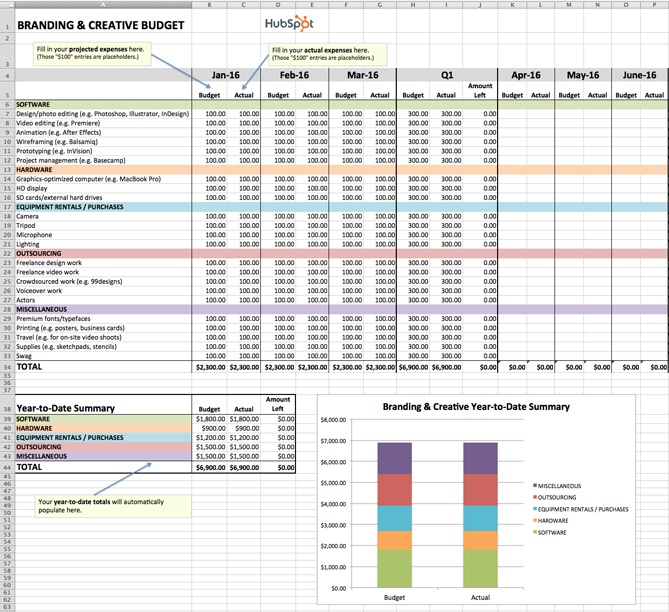
7. Website Redesign Budget Template
Download the Website Redesign Budget Template here.
Budgeting for a website redesign can be seriously tricky. With so many moving pieces to consider, there is a lot of room for underestimating or miscalculating costs. We created our Website Redesign Budget Template so you can keep all of your redesign-related expenses in one convenient location.
Unsure if your current website is right for a redesign? Check out this HubSpot research report: Does Your Website Make the Grade? Chances Are, It’s Barely Passing.
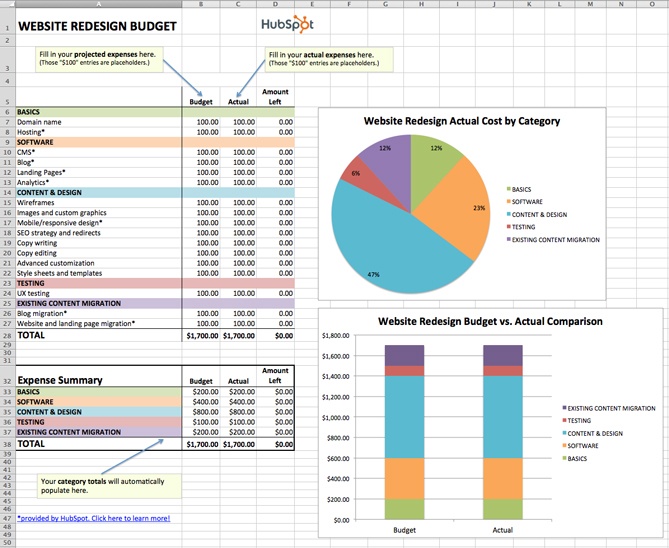
8. Event Budget Template
Download the Event Budget Template here.
When planning an event, the associated costs can seem obvious at first. There’s the venue to consider, of course. And the P.A. system and microphones. And then the costs associated with booking and bringing in presenters/performers. That’s pretty much it, right?
Wrong.
For example, does the venue come with tables/chairs, or will you have to rent those separately? Do you want your attendees to wear name tags, and if so, will you be printing out the name tags ahead of time or will attendees be writing their own names on blank tags?
If the latter, have you factored in the pens or markers you’ll need to accommodate that? As you can see, planning for an event can lead you down many rabbit holes.
Use our Event Budget Template to stay organized.
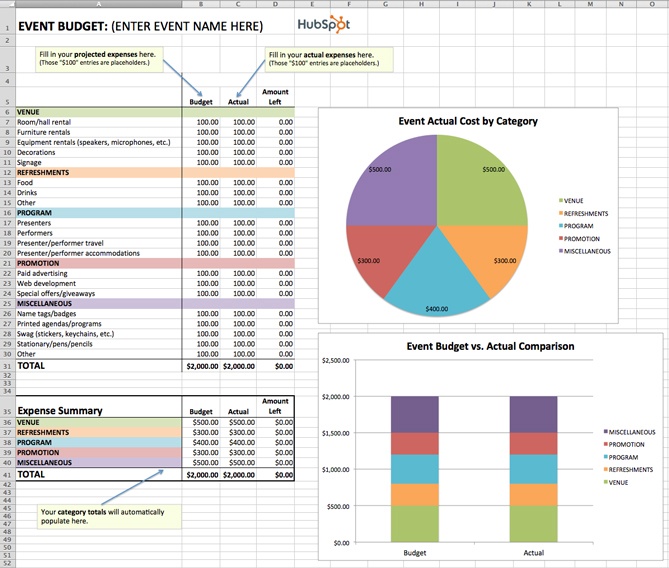
Sample Marketing Budget
With your chosen template downloaded, it’s time to consider which digital channels to allot a budget for. Hint: There’s no right answer — it’ll depend the market research you do to figure out where your specific audience spends most of its time.
If you find your buyer prefers learning and consuming content in the form of video, for example, you might invest more of your money in YouTube advertising.
Advertising Budget Example
Here’s a small sample budget for a quarter’s worth of expenses by a hypothetical company that has decided to invest heavily in video marketing. This template was created using the Master Budget Template, the first template listed in the section above.
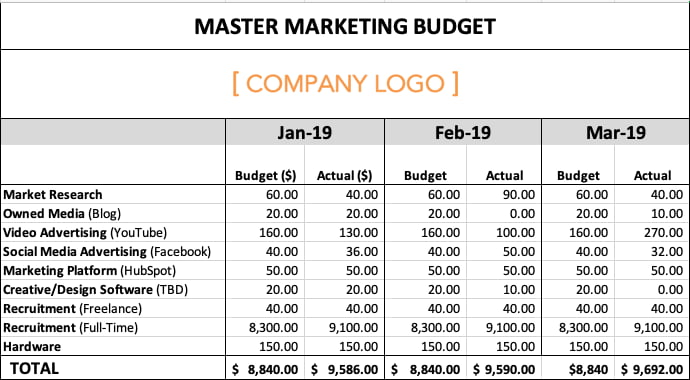
Based on the figures above, video advertising’s total expenses for the quarter exceeded budget by $20, while full-time recruitment’s total expenses exceeded budget by $2,400. This means the company is trending over budget for the first three months of the year.
Why might this happen? Perhaps a pay-per-click (PPC) campaign on YouTube received more clicks by viewers than expected, and a sharp video-savvy job candidate negotiated a higher salary.
Based on the difference between this company’s planned spend and actual spend, their budget template produced the following graph: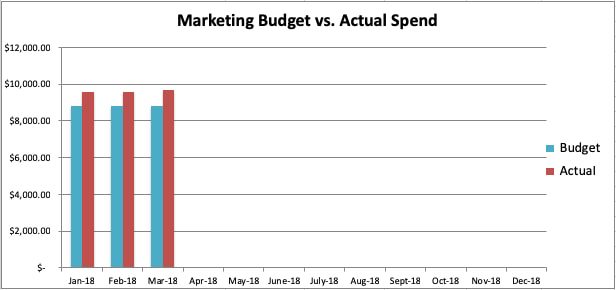
Go now, and plan wisely — your marketing staff is counting on you.
Editor’s Note: This blog post was originally published in December 2015 and has been updated for comprehensiveness.


The Ultimate Guide to Branding in 2021
Products are never just products, right?
Coca-Cola is more than a soda. Starbucks is more than a coffee. Ray-Ban is more than a pair of sunglasses. Glossier is more than a tube of concealer.
Interacting with these products provide experiences, and we buy them with that experience in mind. Better yet, the companies that create and market them know exactly the experience they want you to have when you make (or consider) a purchase. That’s why they create a brand.
From the language in their Instagram caption to the color palette on their latest billboard to the material used in their packaging, companies who create strong brands know that their brand needs to live everywhere. They know their names extend far beyond the label.
The result? These brands are known, loved, and chosen out of a long lineup of options.
Who doesn’t want that? I know I do. That’s why we built this guide — to equip you to create and manage a strong brand that’ll help your business be admired, remembered, and preferred.
Use the links below to jump ahead to sections of interest, and don’t forget to bookmark this guide for later.

What’s a brand?
Before I dive into the importance of branding and how to build a brand, let’s go back to basics: What is a brand?
A brand is a feature or set of features that distinguish one organization from another. A brand is typically comprised of a name, tagline, logo or symbol, design, brand voice, and more. It also refers to the overall experience a customer undergoes when interacting with a business — as a shopper, customer, social media follower, or mere passerby.
What is branding?
Branding is the process of researching, developing, and applying a distinctive feature or set of features to your organization so that consumers can begin to associate your brand with your products or services.
Branding is an iterative process and requires getting in touch with the heart of your customers and your business. It’s important for a variety of reasons — I dive into these next.
Branding can be the deciding factor for consumers when they make a purchase decision. In a 2015 global Nielsen survey, almost 60% of shoppers said they actively buy from brands they know, and 21% said they bought a product because they liked the brand.
Branding gives your business an identity beyond its product or service. It gives consumers something to relate to and connect with.
Branding makes your business memorable. It’s the face of your company and helps consumers distinguish your business across every medium (which I discuss later).
Branding supports your marketing and advertising efforts. It helps your promotion pack that extra punch with added recognition and impact.
Branding brings your employees pride. When you brand your company, you’re not only giving your business identity, you’re also creating a reputable, highly-regarded workplace. Strong branding brings in strong employees.
Branding Terms to Know
Here are some other brand-related buzzwords you should know. They further demonstrate the importance and value of branding your business.
Brand awareness
Brand awareness refers to how familiar the general public and your target audience is with your brand. High brand awareness leads to brands being referred to as “trending,” “buzzworthy, or “popular.” Brand awareness is important because consumers can’t consider purchasing from your brand if they’re not aware of it.
👉🏼 Strong branding makes your business known.
Brand extension
Brand extensions are when companies “extend” their brand to develop new products in new industries and markets. Consider Honda lawn mowers or Martha Stewart bedding. Brand extensions allow companies (or individuals) to leverage brand awareness and equity to create more revenue streams and diversify product lines.
👉🏼 Strong branding brings in more money.
Brand identity
Brand identity is the personality of your business and the promise you make to your customers. It’s what you want your customers to walk away with after they interact with your brand. Your brand identity is typically comprised of your values, how you communicate your product or service, and what you want people to feel when they interact with it.
👉🏼 Strong branding gives your business more than a name.
Brand management
Brand management refers to the process of creating and maintaining your brand. It includes managing the tangible elements of your brand (style guide, packaging, color palette) and the intangible elements (how it’s perceived by your target audience and customer base). Your brand is a living, breathing asset, and it should be managed as such.
👉🏼 Strong branding requires consistent upkeep.
Brand recognition
Brand recognition is how well a consumer (ideally in your target audience) can recognize and identify your brand without seeing your business name — through your logo, tagline, jingle, packaging, or advertising. This concept goes hand-in-hand with brand recall, which is the ability to think of a brand without any visual or auditory identifiers.
👉🏼 Strong branding keeps your business top-of-mind.
Real-life brand example: Want to test your brand knowledge? Take this Logo Quiz by Business Insider to see how well you know your corporate brands. This is brand recognition at work.

Brand trust
Brand trust refers to how strongly customers and consumers believe in your brand. Do you deliver on your marketing promises? Do your salespeople and customer service go above and beyond? These things can create trust among your customers, which is important in a world where a mere 25% of people feel confident in large businesses.
👉🏼 Strong branding builds trust with your customers.
Brand valuation
Brand valuation is the commercial valuation of your brand derived from consumer perception, recognition, and trust. This concept goes hand-in-hand with brand equity. A powerful brand can make your business invaluable to investors, shareholders, and potential buyers.
👉🏼 Strong branding increases your business’s value.
Want to build an effective, measurable brand? Download our free guide on How to Build a Brand in 2019.
Here’s how you can create a brand — or begin the process of rebranding your current one.
There’s a lot that goes into a brand, and there’s a lot to consider when building a strong one. So, grab a notebook and jot down ideas as you move through this section. Recognize that branding is an iterative process, so you might be repeating some of these steps as you brainstorm and build your brand.
1. Determine your target audience
Branding leads to awareness, recognition, trust, and revenue. We’ve talked about that. But let’s take a step back and understand where those stem from: consumers. And not just any consumers — your target audience and customers.
If your brand doesn’t resonate with your audience, it won’t lead to that awareness, recognition, trust, and revenue. That’s where target market research comes in.
Before pressing pen to paper (or cursor to digital document), you must understand to whom your branding will be speaking. Who does your product serve? Who is your ideal customer? Why did you create your business in the first place?
What you learn about your target market and buyer personas will influence your branding decisions down the line, so make this step your first priority.

Download our free Persona Templates to easily organize your target audience research and strengthen your marketing.
2. Establish your mission statement
Let’s return to a question I asked in the previous step: Why did you create your business? Answering this will help you build your mission statement, which defines your purpose and passion as an organization.
Before you can craft a brand that your audience recognizes, values, and trusts, you must be able to communicate the purpose that your business provides. Then, every part of your brand (logo, tagline, imagery, voice, and personality) can reflect that mission and vision.
Your mission statement is a building block of your brand manifesto, which encompasses why your organization exists and why people should care about your brand.
Download our free guide to Defining Inspiring Mission and Vision Statements and learn the ins-and-outs of two of the most valuable strategic planning elements for businesses.
3. Define your unique values, qualities, and benefits
There are probably lots of businesses in your industry and niche. It’s easy to focus on your competition (and there’s a time and place for competitive analysis), but, for now, let’s focus on you.
What’s one thing that your business has that no one else can mimic (er, legally)? Your brand.
Because of that, you must ensure that your brand is comprised of and inspired by elements that are solely yours: the values, benefits, and qualities that make your company unique.
Take a moment to jot down a list of what sets your business apart from others. I’m not talking about product features (like appearance, components, or capabilities); I’m referring to how your products or services improve lives and contribute to success.
Real-life brand example: Alani Nutrition
You’ve probably never heard of Alani Nu; they’re a nutrition company based in my hometown of Louisville, Kentucky. I order their vitamins because 1) they’re proven to work, and 2) I trust and respect the brand (and it’s gorgeous!). On their website, they’ve clearly and simply outlined their unique values and benefits as part of their overall brand. Highlighting these makes it easy for customers like me to trust their products and choose them over competitors.
4. Create your visual assets
At this point, you should understand your target audience, your mission statement, and the unique qualities that make up your business.
If you can say with confidence that you’ve mastered these steps, it’s time to move onto one of the more exciting parts of branding — the visual design. We’re talking about your logo, color palette, typography (fonts), iconography, and other visual components.
As you create these elements, build a set of brand guidelines (or a brand style guide) to govern the composition and use of your visual assets. This will ensure that whoever uses your new branding does so accurately and consistently. Check out HubSpot’s brand guidelines for reference.
Note: Design can be just as intimidating as it is exciting. Consider hiring a professional with logo and identity design experience or starting with a few helpful design templates.
5. Find your brand voice
Next, consider the auditory component of your brand. What would your brand sound like if you had a conversation with it, or if it texted you?
How you communicate with your target market is also considered part of your branding. You want to define a brand voice that connects and resonates with your audience — otherwise, they probably won’t pay attention. Because of that, don’t hesitate to return to step one to get familiar with to whom you’re speaking.
From your advertising campaigns and social media captions to your blog posts and brand story, ensure your tone is consistent throughout all of your written content. Give your audience a chance to get familiar with your brand and learn to recognize the sound of your voice. Better yet, master a fun, entertaining voice, and your customers will look forward to your social media and email updates.
Real-life brand example: MailChimp
MailChimp is a great example of a brand that speaks with a clear, consistent tone. When I used their free plan for my small business, I always chuckled when receiving their emails and working in their interface. From its web copy to its email blasts and social media captions, MailChimp has established a brand voice and personality that is personable, fun, and accessible — it can be hard to explain the technical parts of a software product (like A/B testing), but MailChimp has mastered that, too.
6. Put your branding to work
Your brand only works if you do. Once you finish designing and creating your new brand (or rebrand) integrate it throughout every inch of your business. Pay extra attention to ensure it’s displayed anywhere your business touches customers. Here are a handful of tips for applying your brand across your organization.
Website
Splash your logo, color palette, and typography across your website. Don’t use anything but your predefined assets in your brand guidelines. Your website is a major part of your company identity — if it doesn’t reflect your brand, it will only provide a jarring customer experience. Also, be sure that all web copy, calls-to-action, and product descriptions reflect your brand voice.
Social media
All profile photos, cover art, and branded imagery should reflect your brand. Consider putting your logo as your profile photo — this will make it easier for customers to recognize your business. As with your website, be sure all profile information, posts, and captions reflect your brand voice.
Packaging
If you have a physical products business, your product is probably the most tangible way that customers interact with your brand. For that reason, your packaging should reflect your new branding — in its design, colors, size, and feel.
Real-life brand example: Chobani
I love Chobani yogurt (confession: I’m eating it right now). Their new branding immediately tells me that they produce authentic, healthy Greek yogurt. That’s one of the main reasons I buy Chobani. Recently, I realized that their yogurt packages are made with a very earthy, textured material — an intentional decision that supports the overall experience they’ve paired with purchasing and eating the Chobani brand.

Advertising
Because advertisements (digital and print) are often used to establish brand awareness and introduce consumers to your brand, it’s critical that they reflect your branding. In fact, your branding should make the ad creation process easier — with your brand style guide, you already know how your ads should appear and what type of copy to write.
Sales and customer service
A brand is only as powerful as the people behind it, and if your people aren’t putting your brand to work, it won’t work for you. Moreover, your brand applies to more than your marketing. Inform your sales and customer service folks of your brand guidelines and tell them to use it, especially when they engage directly with customers. Whether they are sharing a branded product demo or answering customer support inquiries, encourage them to use your logo, tagline, imagery, and brand voice.
Treat your brand as a person
To best wrap your head around the branding process, think of your brand as a person. Your brand should have an identity (who it is), personality (how it behaves), and experience (how it’s remembered).
Ask yourself these questions about your brand:
- How would your brand introduce itself? If it had to describe its appearance, how would it do so?
- How would your brand talk about your products or services? Would it be serious and professional, or would it be humorous and edgy?
- What would someone say about your brand after “meeting” it for the first time? What are a few sentences they’d use to describe it?
The purpose of branding is to create relationships with your customers. The easiest way to do this is to treat your brand as a person and understand that you want your customers to do the same.
Real-life brand example: Whiskey Riff
Whiskey Riff is another brand you’re probably not familiar with. It’s a two-man media company based here in Chicago that’s dubbed themselves “the most entertaining country music site ever”. I’m a fan because I love country music, enjoy their written and podcast content, and proudly wear some of their awesome apparel.
If Whiskey Riff was a person, here’s how I’d think it would answer the questions above:
- “Hey, I’m Whiskey Riff. I love country music and, you guessed it, Whiskey. My logo was inspired by the Y in the circle on the Chicago Theater marquee, and I’m adorned with horizontal red stripes and stars — which represent the American and Chicago flags.”
- “I publish in-your-face content about what’s going on in country music today. If you don’t like it, don’t read it. My podcast featured my founders interviewing country music artists and telling hilarious stories. Check out my apparel line; my t-shirts, tanks, hats, and accessories can be seen at country music festivals (and on stages) nationwide.”
- “Whiskey Riff is like that first shot of Jack Daniels — that much-needed, refreshing drink after a long day. Its a break from that cookie-cutter way of life, and you immediately appreciate — and trust — its candidness. There’s absolutely nothing like it in the industry.”
Prioritize consistency
Inconsistency is the number one branding mistake that companies make. Inconsistency undermines your brand and confuses your customers. Recognizable, valuable brands prioritize consistency — and they reap the benefits. When your brand is a unified presence across mediums and platforms, customers can easily get familiar with, recognize, and come to prefer your brand over time. Brand guidelines can help with this initiative.
Build and follow a brand strategy
A brand strategy is more than your brand guidelines; it’s a plan with specific, long-term goals that can be achieved as your brand evolves. These goals typically revolve around your brand’s purpose, emotion, flexibility, competitive awareness, and employee involvement.
Remember how I said that branding is a continuous process? There’s a lot that goes into it. A brand strategy can help you turn that process into a well-oiled practice that keeps your brand moving toward success and recognition.
Don’t let inspiration turn into imitation
Competitive analysis is important. Not only does it educate you on where your competition stands and how they are excelling, but it can also give you ideas on how you can improve or further set apart your brand.
However, be conscious to not fall into an imitation trap. Keep your competitive research limited and focus on what your organization brings to the table. Just because a competitor (or two) has branded their company in a certain way doesn’t mean that you have to follow suit. New, unique, provocative brands are memorable brands.
Use branding to hire
Strong branding makes your employees proud. I know I’m proud to be associated with HubSpot, much less work there. Leverage your branding to attract talented people. If hiring is a strong initiative for your organization, dedicate some of your resources to employer branding. Employer branding is how you market your company to job seekers and current employees. If you’re publically proud of your organization, others will be, too.
Ready, Set, Brand
Branding is your organization’s name, logo, color palette, voice, and imagery. It’s also more. It’s that intangible feeling your customers have when they interact with your brand. You know … that experience we talked about in the beginning.
That’s how powerhouse brands deviate from all the others. The tangible components contribute to this — a gorgeous logo, a clever tagline, an authentic manifesto, and a clear brand voice — but truly strong brands thrive when they focus on the big picture of their brand. Get to the heart and soul of your target audience and your organization, and a successful brand will follow.


Facebook Lookalike Audiences: What Marketers Need to Know
If you’ve ever been in charge of running ads for a business, I’ll bet you’ve wondered how to get cold audiences to interact with your ads. It’s the age-old problem of online advertising.
With Facebook ads, one of the best ways to target a cold audience that is likely to interact with you is to use lookalike audiences.
Don’t worry if you’ve heard of this concept, but have been slightly worried about getting started with the process. I know I thought the process would be more complex when I was working at an agency. Lucky for us, it’s actually really simple.
Below, let’s learn everything you need to know to get started with Facebook lookalike audiences.

So, how does it work?
How does Facebook create lookalike audiences?
Well, Facebook will look at your custom list of people (called a source audience), then match emails with those Facebook profiles, and then find users who have similar interests or are in a similar demographic.
With a lookalike audience, you can reach a cold audience that is highly targeted (reaching only the top 1% of people who most closely match your custom list) and more likely to convert than other audiences because they’re similar to your warm audiences.
When you create a lookalike audience, you’ll be able to maximize your reach and improve your cost per acquisition for new leads since you’re targeting warmer audiences.
Additionally, when Facebook is creating the lookalike audiences that your ad will show up for, it makes sure to exclude anyone from the source audience (the list you uploaded).
You can use several lookalike audiences even for one ad set, that way your ad can show up to people who are similar to your web visitors as well as your email list.
Now, how do you create a lookalike audience?
1. Go to Audiences.
The first step is to log on to Facebook Ads. Then, click the nine dots in the left-hand corner, and click “Audiences.”
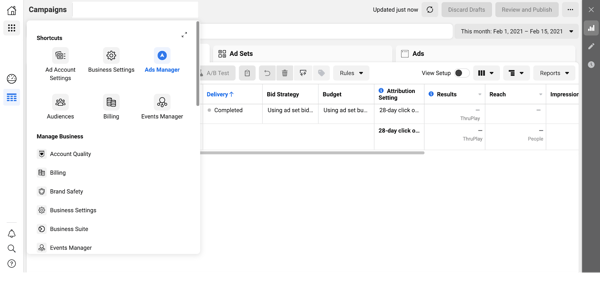
2. Select Create Audience and choose Lookalike Audience.
Now, click the blue button that says “Create Audience” and then scroll down to “Lookalike Audience.”
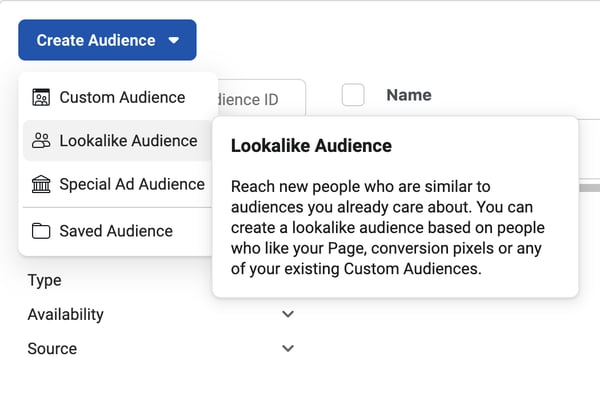
3. Upload your source audience.
This step is where the magic happens. Now it’s time to upload your custom audience source. You can upload a .txt or .csv file or choose a Facebook source. This audience source can be from:
- An email list
- Website visitors (based on a Facebook pixel you’ll need to install on your site)
- App activity
- A customer list
- Facebook sources (people who have watched your videos, filled out a form, Instagram followers)
To determine which source you want to use, think about your goals. Are you trying to get new email subscribers? Then maybe your email list would be best. If you’re trying to increase sales, maybe you should use your website visitors list.
Either way, it’s important to think about the goal of your ad before you choose your source audience.

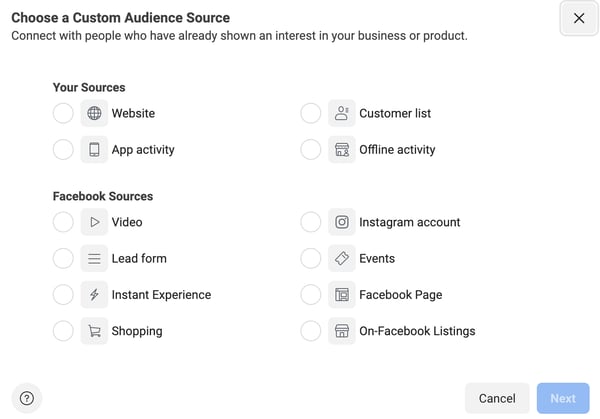
4. Choose the country you’d like to find a similar set of people in.
Once you’ve uploaded a list, choose the country that you want to target. This doesn’t mean that people in your source audience need to be from this country. This is just the country or countries you want to target for the ad.

5. Decide your audience size.
Now, you can select your audience size. For example, if you choose 1%, then the people you target will include people who are most similar to your lookalike source. If you increase the percentage, then you increase your audience size. The bigger the audience size, the less precise the matching details are.
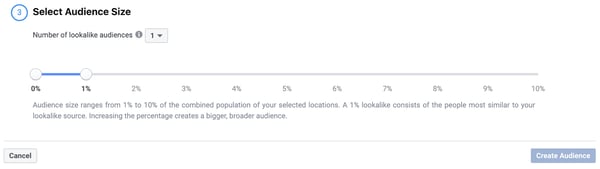
6. Click Create Audience.
Last but not least, click the blue button that says “Create Audience.” It might take up to a day for the audience to be created. But once your lookalike audience is being used, it will refresh every 3-7 days as long as you have ads that are currently targeting it.
Once you’re done creating your lookalike audience, you can set even more parameters by going into the Power Editor tool and choosing a specific age, gender, location, etc.
Before I set you off to the races, though, let’s first discuss some of the requirements of creating a Facebook lookalike audience.
Facebook Lookalike Audience Minimum Size
To create a Facebook lookalike audience, your source audience needs to include at least 100 people from a single country. Additionally, it’s recommended that your source audience contain 1,000 to 50,000 people. You can also create up to 500 lookalike audiences from a single source audience.
If you’re looking to create a Facebook ad, using lookalike audiences is one of the best ways to target cold audiences. These audiences will be more likely to engage with your ad based on their similarities to your other audiences.
If you’re a HubSpot customer, you can use HubSpot’s ads tool to manage your digital ads, including ones run on Facebook.

2021 YouTube Demographics [New Data]
Chances are, you’ve probably spent an afternoon falling down a rabbit hole of YouTube videos.
I certainly have, and I think I’d be pretty embarrassed to see the total amount of time I’ve spent on the platform.
While it’s a great source of entertainment, YouTube has also proved itself to be a valuable tool for marketers. In fact, 70% of viewers bought from a brand after seeing content on YouTube. And, with a global user base of more than 2 billion people, it’s also safe to assume that your target audience is on the platform.
However, just as it is for all social networks, building a presence on YouTube requires understanding which segments of your audience are already there. Having that information makes it easier to create content that speaks to their interests, maximize ROI, and achieve general marketing success. In this post, we’ll go over key YouTube statistics you need to know for 2021 to help you succeed in your marketing efforts.
2021 YouTube Demographics
Below, we’ll go over the most critical YouTube statistics that show marketers how global audiences are using the platform.
General YouTube User Demographics
- YouTube is the second most visited website in the world. (Hootsuite)
- YouTube accounts for more than 25% of total worldwide mobile traffic. (Sandvine)
- YouTube has 2+ billion users, making up almost one-third of the entire internet. (YouTube for Press)
- These 2+ billion users are present in over 100 countries and consume content in 80 different languages. (YouTube for Press)
- YouTube users watch one billion hours of content daily. (Hootsuite)
- YouTube is the second most popular channel for businesses sharing video content. (Buffer)
- 70% of viewers bought from a brand after seeing content on YouTube. (Google Ads)
- YouTube will make 5.6 billion in advertising revenue in 2021 in the U.S. (eMarketer)
- YouTube is the top video streaming app, and the average user spends 23.2 hours per month watching content. (App Annie)
- The most popular YouTube search query is “song.” (Hootsuite)
- The most popular YouTube video is Pinkfong’s Kids Songs & Stories Baby Shark Dance, with 7.85 billion views. (Statista)
- The three most popular videos on YouTube are commentary videos (like vlogs), product reviews (like unboxings), and how-to/tutorial style videos. (MediaKix)
- Global users watched over 100 billion hours of gaming content in 2020. (YouTube)
- YouTube TV ended Q3 2020 with 3 million subscribers. (Alphabet)
- 70% of people used YouTube to exercise in 2020. (YouTube)
- Livestreams on YouTube grew 45% in the first half of 2020. (YouTube)
YouTube Age Demographics
- In Q3 2020, 77% of 15-to-25-year-olds and 70% of 45-to-64-year-olds in the U.S. used YouTube. (Statista)
- 21.2% of YouTube’s global audience is between 25 and 34, and 17% is between 35 and 44. (Hootsuite)
- 80% of U.S. parents with a child age 11 or younger say their child watches videos on YouTube, and 53% of those children use the platform daily. (Pew Research Center)
- Outside of China, 77% of Gen Z, 75% of millennials, 61% of Gen X, and 44% of Baby Boomers visit YouTube daily. (GlobalWebIndex)
- 18-to-34-year-olds use YouTube to view video content on their TVs 7.9% more often than basic cable and 14.5% than premium cable. (Variety)
- 46% of Gen Z and Millennials in the U.S. and UK say they’ve watched a virtual event on YouTube. (GlobalWebIndex)
YouTube Gender Demographics
Please note that audience data for individuals who do not identify as cisgender men and women is not reported.
- 45.8% of YouTube’s total advertising audience is female. (Hootsuite)
- 54.2% of YouTube’s total advertising audience is male. (Hootsuite)
- Male and female internet users in the United States use YouTube at equal levels. (Statista)
YouTube Geography Demographics
- As of February 2021, 16.6% of YouTube site visits come from the United States, 9.4% comes from India, and 4.9% comes from Japan. (Alexa)
- YouTube has launched local versions of the platform in more than 100 countries. (YouTube for Press)
- eMarketer predicts that the number of YouTube users in India will reach 342 million in 2021. (eMarketer)
- 86% of U.S. viewers say they often use YouTube to learn new things. (Think With Google)
Let Data Drive Your YouTube Strategy
Use these statistics to create a YouTube marketing strategy that speaks to your audience’s interests, drives revenue, and increases conversions.


Save Time With Agile Email Marketing: Everything You Need To Know
“Hey, would you mind sending a follow-up email?”
You’re already barely keeping up with your workload when you get the dreaded, last-minute email request.
With everything else on your plate, you now need to pause to get that second email out the door, and then play catch-up with everything else on your plate…
Sound familiar?
We know you’re constantly being asked to send more emails with less resources.
And sometimes, it’s unavoidable. When your business’ and subscribers’ needs change, you must be able to adapt quickly to stay relevant or risk your email marketing program suffering.
But that doesn’t mean it has to be so difficult.
Enter agile email marketing.
Here, let’s break down what agile email marketing means, why it matters, and how you can use it to scale and send more effective emails faster — without breaking a sweat.

What is agile email marketing, anyway?
Agile email marketing is a way to be flexible and adapt to change by focusing on data and your subscribers’ needs while using a modular process so you can send effective emails faster.
Before diving deeper into agile email marketing, we first have to mention the agile methodology.
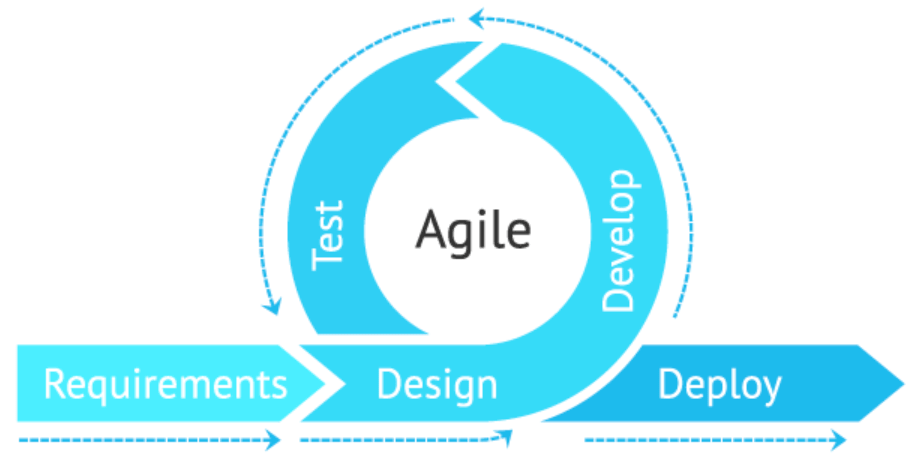
The agile methodology is a project management process that started in software development, giving teams the flexibility to adapt and respond to changes quickly. This way, teams could constantly improve and innovate, staying on top of their users’ needs and beating their competition to market.
There are many ways this agility is possible, but the three things we carry over into agile email marketing are:
- Focusing on customer needs
- Making data-driven decisions
- Collaborating across teams
So while agile email marketing doesn’t require using the agile methodology, it takes its essence to create a more efficient way to send emails.
In other words, agile email marketing helps you prioritize your emails, gets all stakeholders on the same page, and maximizes your teams and resources to streamline your production process. With teamwork and a clear understanding of goals, you won’t bat an eye at last-minute email sends or changing priorities.
Sound too good to be true?
Agile email marketing does require a shift in mindset — instead of planning the big campaigns you’re used to, you’ll need to plan for iterative change in a test-and-learn environment.
For example, instead of mapping out and creating all the emails in your entire welcome or onboarding journey, start small with only the first email. Do some A/B testing to figure out what your audience is most receptive to, optimize, and use what you learn to continue building out the rest of your nurture journey — one email at a time.
Your goal is progress, not perfection. But don’t worry, this shift isn’t all or nothing. Even the smallest steps toward changing how you think about emails and the workflow to become agile can have huge payoffs, as I’ll explain next.
Why Being Agile is Critical to Success
Sure, email professionals may seem like magicians, but emails aren’t done with the wave of a wand. There’s a lot that goes on under the hood. 52% of marketers spend two weeks or more to complete a single email from conception to hitting the send button.
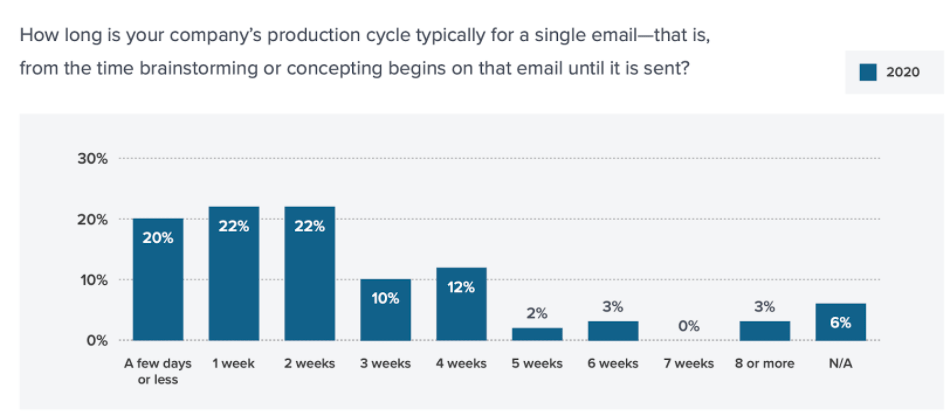
Source: Litmus’ 2020 State of Email Workflows
Not to mention, 55% of marketers are juggling at least six emails at a time. So it’s never “just” one more email.
The traditional email marketing process uses linear and interdependent steps. You can’t move forward without completing the step before. For example, you need to write copy before creating imagery, or have design done before coding the email.
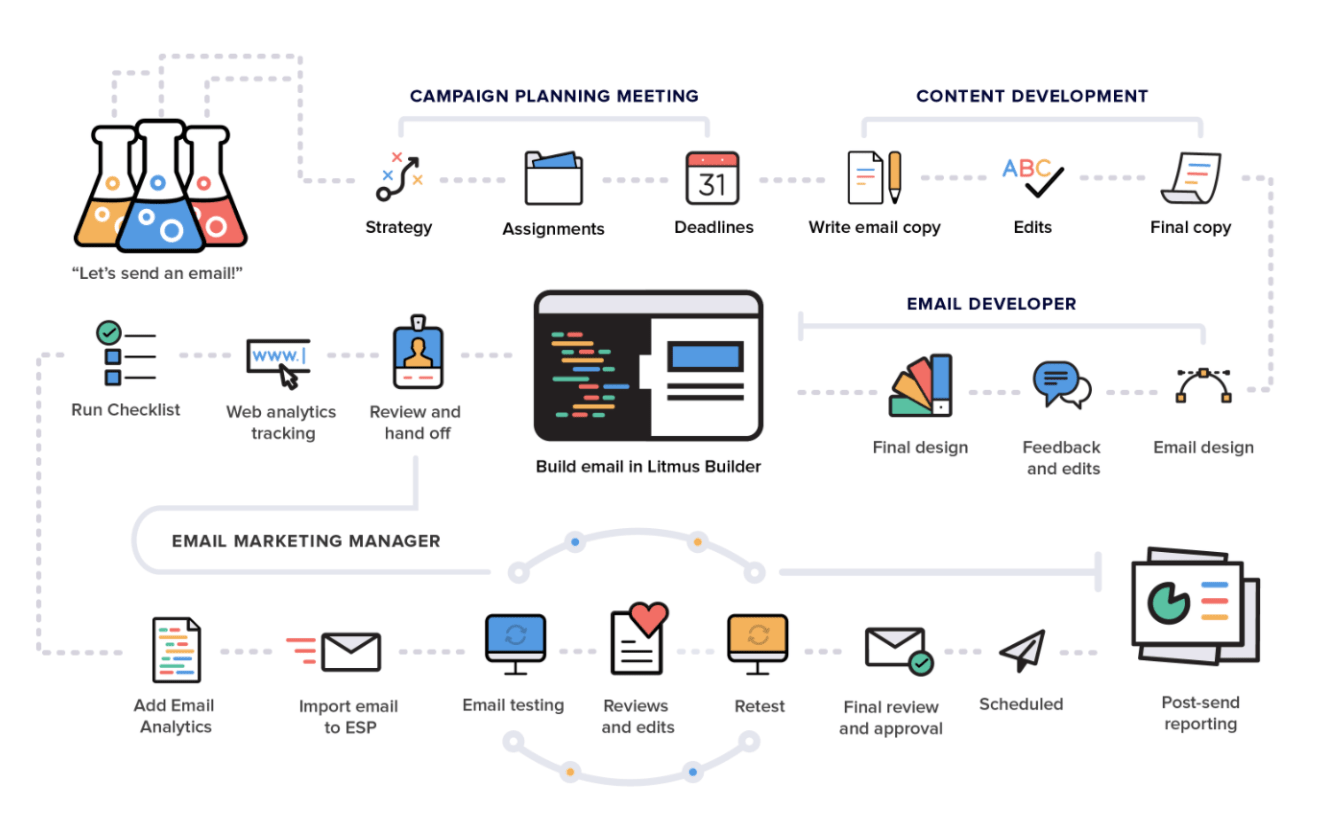
Look at that process! It’s no wonder it can take a long time to create and send an email.
But this pace can hurt your email marketing program — or worse, your brand reputation. Things can change in an instant … Think natural disasters, a health crisis, the socio-political climate, rules and regulations, etc. If you can’t adapt, your email campaign may fall flat or even offend and turn away your subscribers.
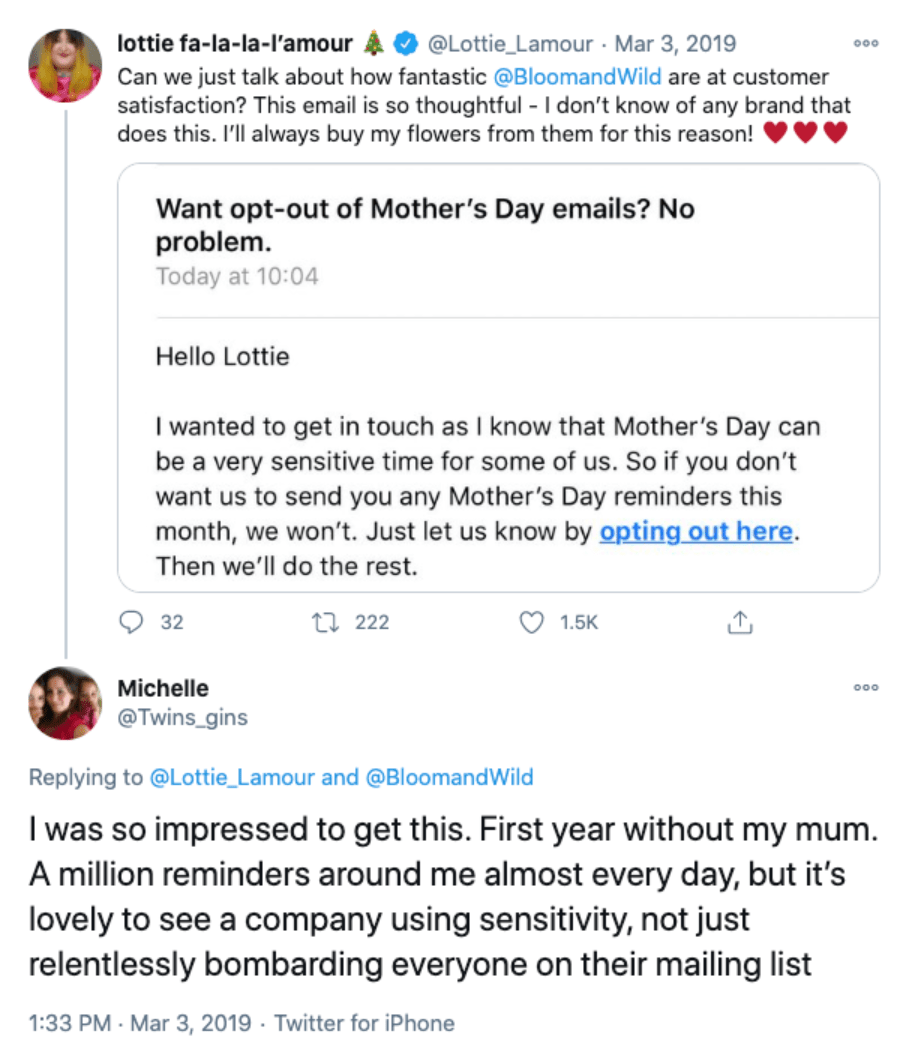
Empathy is crucial, and being agile keeps you attuned to your subscribers’ needs so you can pivot at a moment’s notice — and keep your customers for the long-haul. This also gives your work purpose.
You know you’re always delivering the highest value work instead of falling into the trap of the sunk cost fallacy: continuing work that’s not relevant or worth it anymore simply because of what you’ve already invested in it. Your work is no longer about you, it’s about your subscribers!
Even if you’re in no rush, if your competitor is just one day ahead of you, that can put you at a significant disadvantage. An agile email marketing workflow gives you greater speed to market which can be just the edge you need for campaign success.
How to Make Your Email Workflow Agile
So how do you go from a linear email workflow to an agile one?
You’ll first need to start with your audience and put them at the center of your campaigns, make data-driven decisions, and collaborate across roles and teams.
With these tenets in mind, you can begin building a new workflow that allows many parts of your email marketing process to be either automated or done in tandem, as shown in this agile email workflow chart:
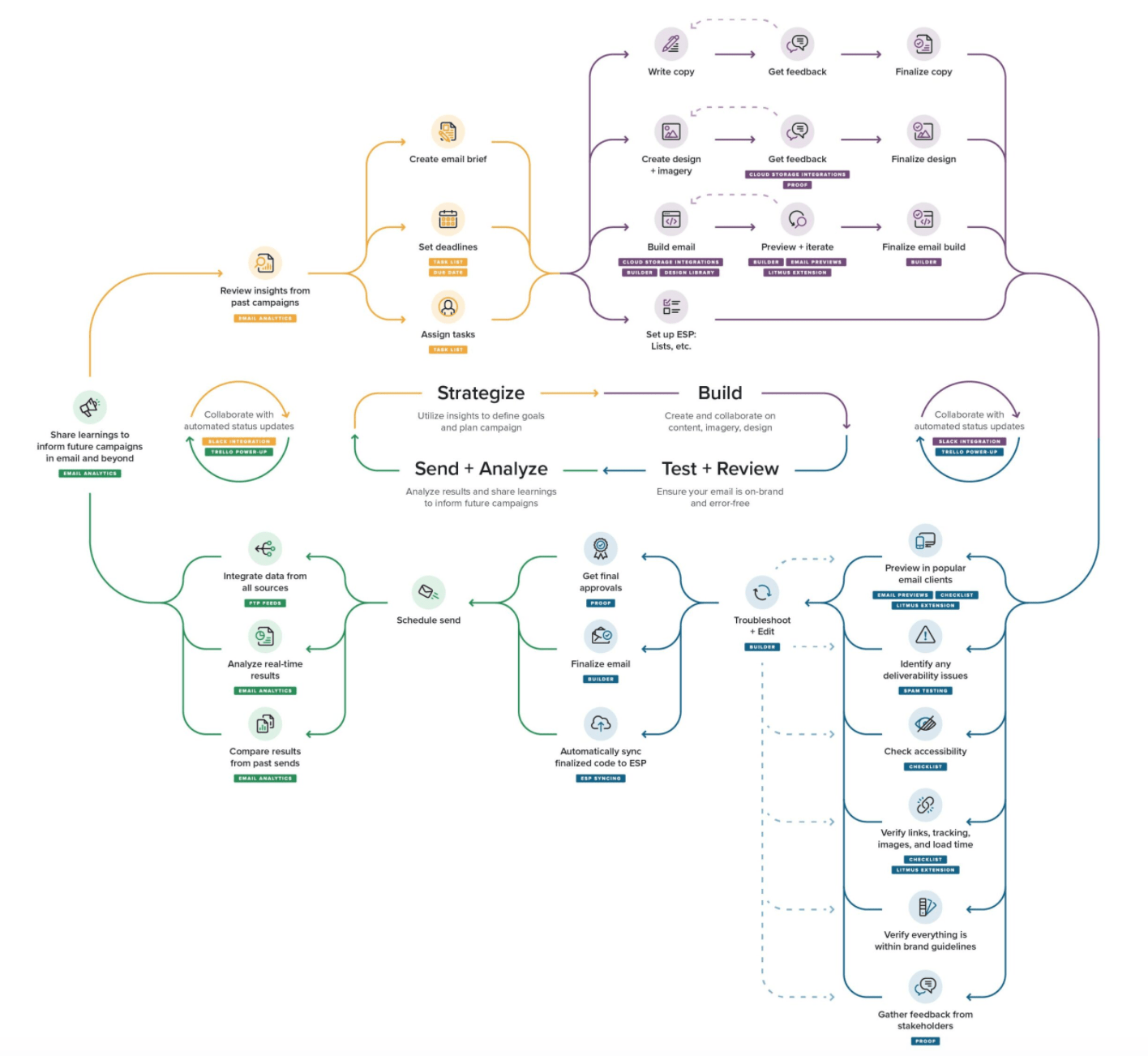
Ready? Let’s dive into how you can go agile.
1. Get your team and tools in place.
Crucial to the success of agile email marketing is your people and your tools. Without this strong foundation, you’ll more likely face challenges with adoption.
Make an assessment of the skills and tools needed so you know who to tap to join you and how you can get emails done together.
Cross-Team Collaboration
One of the cornerstones of agile email marketing is cross-team collaboration, which means taking advantage of a wide variety of existing roles and skills already within your company to create and send emails.
That’s right: You don’t have to hire new people or have a large, dedicated email team. Instead, by leveraging other people’s strengths and, if needed, running through email marketing best practices to hone their craft specifically for email, you can work efficiently as a team. Make sure you communicate your needs and get everyone on board, first!
The skills you need will depend on your email marketing program, but the main ones to consider are:
- Strategy
- Copywriting
- Design
- Development
- Operations
- Analysis
In one scenario, for instance, you might want to pull people from your content and website teams to help with copywriting, design, and development.
Tools and Technology
The second part of an agile email marketing foundation is the tools.
Make an assessment of your current technology and review the rest of the agile email workflow steps below to see where your gaps are. Do you have what you need to send emails, simplify and automate steps in your process, and collaborate effectively across teams?
At the very least, you need an email marketing tool and a collaboration tool.
2. Align on email strategy.
With your team and tools in place, you need to make sure everyone — including reviewers and approvers — is on the same page, setting your team up for success as you all work toward a common goal.
A solid strategy ensures copy, design, and development are aligned. Without alignment, there can be miscommunication and confusion. And this can slow you down or throw your email off track, resulting in even more work and time wasted. Not agile at all.
If putting together an email marketing brief stresses you out, know that it doesn’t have to be complicated or extensive. As long as you have these basics, you’re golden:
- Define your email’s purpose, goal, and audience.
- Define your content strategy for getting opens and clicks.
- Define the hierarchy of your email’s copy and images.
Remember the key to being agile is your subscribers. When their needs intersect with your business’ needs, you get… magic.
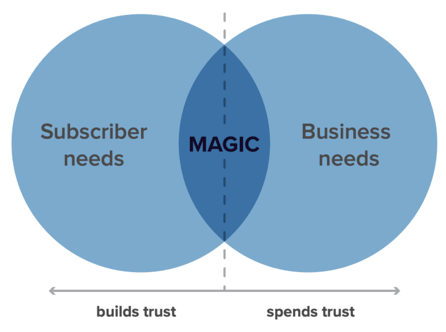
If you find that your email doesn’t meet your subscribers’ needs, consider changing your email — or not sending it at all.
Continuous improvement is essential to being agile, and you can re-center your email around your subscribers by learning from the past and present to inform your future strategy.
You can extract insights from industry news or your email marketing tools to identify design improvement opportunities or improve segmentation, targeting, and personalization.
Now that everyone’s expectations are set and in sync, email production can begin.
3. Write, design, and build at the same time.
The time it takes to write, design, and build an email adds up in a linear process. When they’re each done in tandem, it’s like cutting production time by over 50%.
The secret? Standardized email design and a visual email editor.
Creating every email from scratch is a huge waste of time. And if you want to ensure brand consistency and reduce errors, standardized emails are the way to go.
There are a few ways of doing this, in order of complexity:
- Snippets: reusable lines of code for commonly used elements like HTML buttons or hyperlinks so you don’t have to code the same thing over and over again.
- Partials: reusable lines of code for globally-used content blocks like your header and footer so any updates made to them are automatically applied across every email.
- Templates: reusable coded emails with a set layout on which to simply add or replace copy, images, and links.
- Design systems: a collection of reusable email components with a guide on how they can be mixed and matched to create more flexible — yet still standardized — email designs.
This doesn’t mean you have to settle for boring, ho-hum designs. You can still be creative in your imagery and in how different reusable components come together to create an email.
Standardized email design and development not only frees up your time for innovation, but also sets the stage for being able to write, design, and build at the same time within a visual email editor.
Once a template has been defined for your email, then you already have the specifications for the copy that needs to be written and the images that need to be created. Then, it’s a matter of plugging them into your email template.
Loaded with your email snippets, partials, and/or template, a visual email editor tool can then empower everyone to work on their part of the production process at the same time and collaborate along the way.
Images can be created based on the content outline in your email marketing brief from step two, while the copy is being written. Copy can even be written within your visual email editor to help ensure it’ll fit inside the design, making copy edits a breeze.
Even if you don’t have a visual email editor, development can begin with placeholder images and text. With everyone on the same page on strategy, there’s no need to wait for design and copy first.
4. Collect feedback in one place.
With email strategy alignment across all stakeholders, the review process should be less painful. Still, juggling feedback can be difficult coming from different people across different tools. What if there are contradicting comments? Or you miss an important piece of feedback altogether?
This time-saving tip is simple: Consolidate everyone’s feedback in one place.
Stop sending individual screenshots or test emails. Share one email test with stakeholders in a single location so everyone’s collaborating together.
First, you’ll need to grab the URL in the “view in browser” or “view online” link of your email. You can also create a web-based version of your email to share. The important thing is that you have an email where people can test links and interactive elements.
Then, pick a single spot — not an email thread — to share your email for feedback. This could be as part of a group message in your communication tool or as a single task in your project management tool.
You could collect feedback in those same places. Or you might find it faster and easier to create a separate spreadsheet to track feedback, conversations on specific comments, as well as progress on implementing feedback.
The key thing is that all reviewers and approvers are together and can see each other’s feedback.
There are also tools made specifically for collaboration where you can not only share a live version of your email, but also leave feedback directly on it, check off when changes are made, and track approvals.
5. Analyze & share insights.
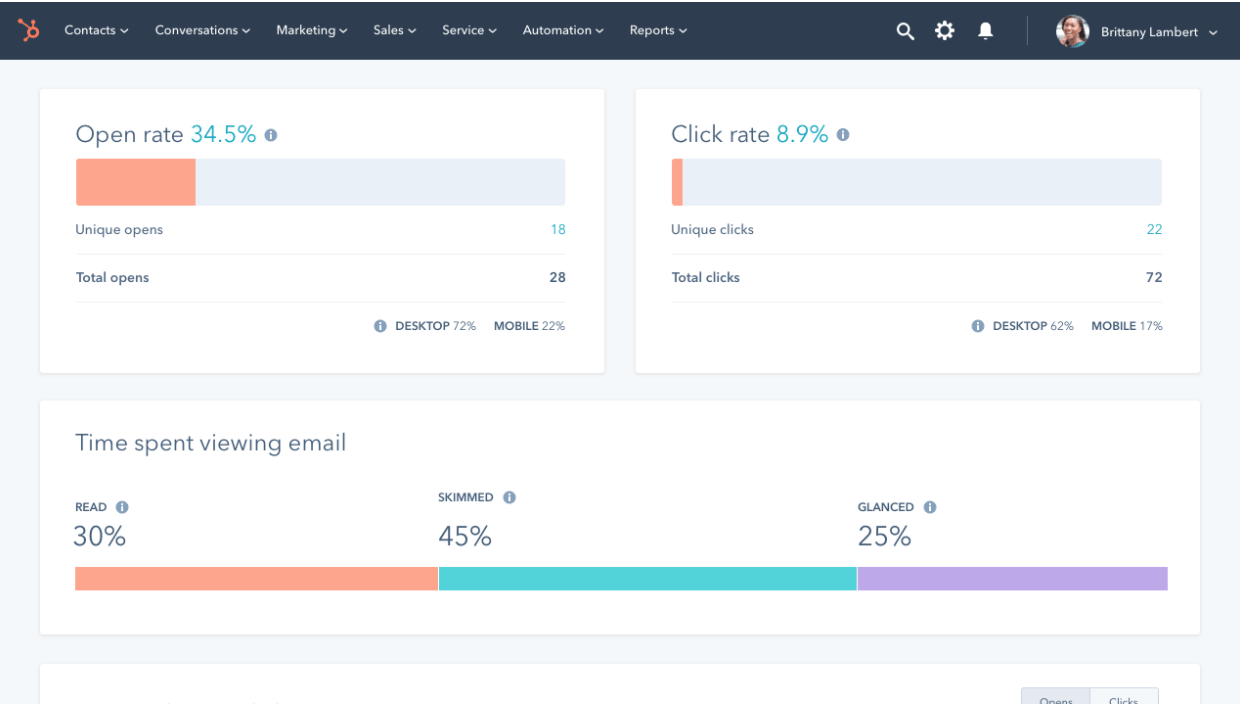
After your email is sent, see how it’s performing so you can evolve to meet your subscribers’ needs. In the agile methodology world, you might consider this the end of a sprint, working in small increments to improve the success of your emails.
The email marketing metrics you should look at depends on your goal. Your email marketing tools will provide at least the basics — opens, clicks, and unsubscribes — and may even provide deeper engagement-level metrics like how long someone spent reading your email (read rate) or how many people shared your email (forward rate).
If you’re tempted to skip this step, don’t.
Email analysis tends to be what people skip if they’re short on time. Onto the next email, right? In the long run, though, this hurts your email marketing program.
It might be hard to believe, but analyzing your emails will actually save you time. It’s what makes agile email marketing work in the first place. If you remember, I mentioned that being agile relies on data, whether that’s internal (e.g. email performance) or external (e.g. the news).
Data is how you can keep a pulse on your subscribers’ preferences, and how those preferences might change over time.
It gives you the power to say no to the emails that don’t matter. Otherwise, you’re shooting in the dark and wasting time on emails your subscribers don’t care about. And this affects your company’s brand reputation, and bottom line.
Final Thoughts on Going Agile
Remember, even achieving some agility in your email workflow has its rewards, like giving your team some time back or being able to quickly flex to your subscribers.
While there’s nothing wrong with the linear email marketing process —completing one step at a time — you won’t be able to move as fast in today’s ever-changing environment. To rise above your competition and ensure you always meet your subscribers where they are, you need speed and efficiency. That’s where agile email marketing comes in.
Make sure you have the right team and tools in place with everyone on the same page on strategy. Then you can be off and running to create great emails in no time.
So the next time someone asks if you can send just one more email, you can confidently say ‘No’ (because it’s not the right fit for your subscribers), or embrace it with open arms (because it is the right fit for your subscribers). Either way, it won’t be your workflow holding you back.

Why You Should Use Early Bird Registration for Your Next Event
A few years ago on Thanksgiving, my entire family flew to my sister’s house, except for me. I couldn’t afford the plane ticket, so I stayed home. When I looked at their pictures on Facebook, I was upset that I missed out on the trip.
That concept is called the fear of missing out (FOMO). FOMO, while upsetting when I missed my family trip, is actually a great marketing tool to use when you’re planning an event.
Usually, people don’t start registering for events until the last minute. As a marketer, you’re probably wondering, “How can I get them to register earlier?”
A great way to sell more tickets faster is to use FOMO as a way of motivating your audience to buy tickets through early bird registration.
Today, let’s learn how early bird registration can help you sell more tickets to your events.
![Download free resources for executing your best event yet. [Free Kit]](https://no-cache.hubspot.com/cta/default/53/7ad084e3-bb2d-429e-9cbd-2b09416729f1.png)
The idea behind early bird registration is that people won’t want to miss out on a deal. Plus, this tactic taps into your audience’s sense of urgency. So if you have people on the fence about whether or not they want to go to your event, then an early bird registration might be all you need to nudge them in the right direction.
However, for an early bird discount to work, it needs to be of great value. The package shouldn’t just be slightly cheaper. In addition to the discount, maybe early bird registrants get access to more content, or perhaps the discount is really steep. Either way, it needs to be worth it, otherwise, people won’t feel like they’re missing out if they don’t partake.
Ultimately, this means you can sell more tickets and attract more people to your events.
Additionally, using early bird registration could help you project how much interest there is in your event and your marketing materials. If you have a hard time getting people to buy early bird tickets, then perhaps you need to switch up your marketing tactics before the event. It’s kind of like a test run for your promotional plan.
If all goes well, you’ll also get attendees excited about your event and give them time to talk about it on social to help you spread the word.
To get people excited about early bird tickets, you can promote your keynote speakers, and market the value of the event. What will people get by attending your event?
Now that we know more about what early registration is and why you should use this tactic, let’s dive into the logistics of running early bird registration.
How long should early bird registration last?
For early bird registrations, you can set a certain time period or you can limit the number of purchasers. For example, you can have the early bird discount available during the first week of sales or you can only offer a discount to the first fifty registrants.
Additionally, you might consider only offering early bird discounts to members or subscribers. This is a great benefit and encourages people to sign up for your service. Or you can reward repeat attendees. If you hold an event every year, perhaps repeat customers can get access to early bird discounts before anyone else.
When you’re strategizing about how long the early bird registration will last and what the package should include, it’s important to factor in how many tickets you can sell at a reduced price without hurting your profits. So before you decide on the time frame or the number of tickets, think about your projected attendance.
When your early bird registration ends, it’s time to take advantage of the momentum you’ve built. Use the marketing materials that were successful for a big push before the event.
Early bird registration is a great way to accelerate and improve your sales for your next event. By utilizing urgency, relying on scarcity, making early bird registrants feel like VIPs, and creating a fear of missing out, you’ll create buzz and excitement around your event.

15 Strategies To Get YouTube Subscribers
In the SaaS industry, the most successful companies prioritize the retention of their existing customers over the acquisition of new customers. Why? Because SaaS companies charge a monthly subscription, so in order to turn a profit, they need their customers paying them for many months in a row. If they can’t retain their customers for X amount of months, they’ll ultimately lose money by acquiring them.
In content marketing, the same principle applies. Retaining your audience’s attention positively impacts your brand a lot more than merely acquiring attention.
When an audience engages with your content for long periods of time on a consistent basis, they can easily turn into a loyal tribe that’s passionate about your work and recommends your brand to all their friends. In other words, staying laser-focused on retaining attention is actually the best strategy for acquiring new attention because your current customers are providing so much word-of-mouth marketing — it’s like a flywheel.
On YouTube, you retain attention by attracting subscribers to your channel. Subscribers are your most loyal fans and made a public commitment to your brand, content, and values. They’re also most likely to be fervent brand evangelists.
In regard to benefiting your YouTube channel, subscribers are crucial because YouTube will send them notifications about your new videos and feature your videos on their homepage. This means they’ll see your videos more frequently, which will help you generate more engagement.
Subscribers also watch twice as much video as non-subscribers, so the more subscribers you have, the more watch time your videos will accumulate, and the more likely YouTube will rank them higher on search and feature them in the related section.
Additionally, YouTube keeps track of the number of viewers who subscribe to your channel right after watching one of your videos. So if one of your videos generates a lot of new subscribers, they’ll reward it with higher rankings and more features in the related section.
To help you grow your YouTube subscription, we’ve fleshed out these strategies that will help you retain attention on the video platform — and not just acquire it.
1. Craft amazing content.
Today, we work in an industry where a lot of people prioritize gaming the system over crafting the best content possible. Fortunately, in regard to their algorithm, YouTube has caught on to this hollow tactic. Their algorithm rewards engagement instead of using only vanity metrics like views and clicks, so creators are incentivized to produce videos that their audience actually enjoys watching.
To craft the most engaging videos for your YouTube channel, consider measuring your videos’ performance against engagement metrics, like watch time, average watch percentage, average view duration, audience retention, and average session duration. Then, analyze this data to figure out which topics and videos generate the most engagement. Once you pinpoint these videos, you can solely focus on creating the content that viewers are most likely to engage with, helping you rake in more subscribers.
2. Use playlists to increase engagement.
Placing your videos in playlists is an extremely effective way to organize your videos in a digestible fashion. They help your viewers easily consume videos about their favorite topics and prompts them to keep watching your content.
One way to get your viewers to watch the majority of your playlists is by starting your playlists with the videos that have the highest audience retention rate and ending them with the videos that have the lowest audience retention rate.
Even better, you could create a binge-able series or show and place entire seasons of it in a playlist. And just like your favorite Netflix show, your playlists can entice your viewers to watch entire seasons of your series, subscribe to your channel, and get excited for your show’s next season.
3. Add a subscription CTA to the end of your videos.
It seems obvious, but adding a subscription CTA to the end of your videos is one of the best ways to generate more YouTube subscribers. After your viewers watch your entire video, they’ll determine if they want to keep watching more of your videos, so to maximize your subscriber growth using CTAs, consider keeping them at the end.
Additionally, if you want more subscribers, just ask. At the end of your video when you include a CTA, ask your viewers to subscribe. This reminds them that you have more exciting content they’ll want to watch.
4. Optimize your videos.
To attract subscribers to your YouTube channel, you first need to be able to get found on YouTube. To start ranking, consider optimizing your videos and channel for popular search queries by placing relevant keywords in your videos’ titles, tags, descriptions, SRT files (which are transcriptions), video files, and thumbnail files.
You should also check out the most popular queries guiding viewers to your videos, which you can find on YouTube’s Search Report. If these queries are slightly different than your video’s topic, consider updating your video to fill these content gaps and adding these keywords to your metadata. If there’s a stark difference between your topics and the queries guiding viewers to your videos, consider making brand new videos about these popular queries.
5. Create beautiful thumbnails.
Another factor that can affect your search ranking on YouTube, and in turn, your subscriber growth are your videos’ thumbnails. Since a video’s click-through rate is one of the most important ranking factors in YouTube’s search algorithm, especially during its first hour on the platform, an eye-catching thumbnail can make a huge difference in ranking number one for a query and not ranking at all.
If your video has an ordinary or sub-par thumbnail, though, it won’t persuade anyone to click through, prompting YouTube to deem the video irrelevant and decide not to rank it in their search results or distribute it through the “Recommended Videos” feed.
To create a striking thumbnail, consider including a talking head. People are naturally drawn to human faces because it’s an ingrained survival mechanism to help us quickly gauge someone’s emotions and determine if they’re a friend or foe. Also, consider contrasting the colors of your thumbnail’s foreground and background to really make it pop.
6. Interact with your audience.
One of the main best practices to retain and acquire new YouTube subscribers is to interact with your audience. You should reply to every comment if you can, even if it’s just liking it. When a viewer watches your videos and scrolls to see your content, they’ll be excited to see that you engage with your audience and have created a community. In fact, it might make them want to join your community and get them to subscribe.
Interacting with your audience will also generate word of mouth and engagement. The more that your audience engages with you, the higher you’ll rank, and the more people will find your content.
7. Promote your videos in your other content.
Whether you have a blog or other social media platforms, it’s important to promote your YouTube videos in your other content. When you post a video, you should also promote it on social media to get your audience to watch it.
Additionally, if you have a blog, you can embed your YouTube videos as complementary content. This will help you increase your views, and tap into the audience you’ve already created. If someone follows you on Instagram, or reads your blog, they’re probably interested in what you have to say. Don’t be afraid to cross-promote on other channels to get more subscribers.
8. Release videos consistently.
One important factor in getting YouTube subscribers that isn’t discussed as much in the influencer industry is trust. When you’re creating content, your audience needs to trust you. They have to trust that you’re going to release quality content, consistently. Otherwise, why would they subscribe?
To build this trust, it’s important that your audience can rely on you. You should release your videos on a consistent basis. This doesn’t mean you need to value quantity over quality. Whatever your publishing schedule is doesn’t matter as much as being consistent with it. Whether you post once a week or twice a month.
9. Be creative.
As we mentioned above, when you’re creating YouTube videos, it’s important to optimize your content and keep in mind what your audience is searching for. However, that doesn’t mean all your videos need to be tied to a keyword.
Sometimes it’s okay to stray and just produce creative content that’s not necessarily supported by keywords. This content can be trendy, or rely on thought leaders. Regardless, don’t be afraid to use content that strays from the organic search strategy. This will help create buzz and hopefully convert viewers into subscribers.
10. Partner with other channels.
When the influencer industry began, brands recognized that they could leverage other people’s audience to market or promote their products. The same principles apply in YouTube. If you partner with other YouTube creators, you can use each other’s audience to promote your channel.
If you do this, make sure you choose channels that align with your audience’s interests, wants, and needs. It might not make sense, for instance, for a B2B company to parter with a B2C company. Your audiences should be similar enough that someone who subscribes to their channel might also be interested in your channel.
11. Make an engaging channel trailer.
After watching an engaging or interesting YouTube video, a viewer might click on your profile to see what your channel is about. In this short time period, you need to close the sale. One of the first things viewers see when they click on a channel is the trailer video. That’s why it’s important to create an engaging, fun channel trailer.
With this trailer, you can get a viewer to go from a casual viewer to a subscriber. In your trailer video, make sure you give your elevator pitch. Why should someone subscribe to your channel? What kind of content will they see?
12. Run YouTube advertising campaigns.
An oldie but a goodie. To promote your YouTube channel, run paid advertising campaigns. You can run banner or display ads promoting your channel across platforms. This will help you get the word out about your channel, get more views, rank higher, and hopefully get a few subscribers as well.
13. Produce subscriber only content.
You know how marketers create lead magnets to entice readers or viewers to download a piece of content? To get more YouTube subscribers, apply the same principle here. You can create specific lead magnetics to get people to subscribe.
For instance, perhaps every subscriber gets a free ebook. Or maybe it’s a template. Whatever it is, think of what will be helpful to your audience and might get them to subscribe to get it.
14. Pick a niche.
As with all content you produce, your YouTube videos should be highly targeted toward your audience. Pick a niche and a theme, and stick with it. While you might have a broad theme, you can create smaller subtopics and create several videos for those topics. Think of it like the pillar/cluster model for blog writing. While your blog will focus on one niche, like marketing, there are several pillar topics that you cover and cluster topics as well.
Using this model will help you create valuable content consistently. It’ll be easier to come up with targeted, personalized video ideas for your audience if you know what they want to see.
15. Know your audience.
Again, this is a classic marketing tip. On any channel you’re creating content on, you need to know your audience. For YouTube, think about whether your audience wants to watch long or short videos. This might vary by industry, so do some research to see what type of YouTube videos and what format your audience is looking for.
How to See Your Subscribers on YouTube
To see your YouTube subscribers, all you need to do is log on to your account, click your profile photo in the top right, and click “Your Channel.” From there, you should be able to see how many subscribers you have underneath your channel name.
It’s important to continue tracking this number as you’re trying to grow your YouTube channel. Now, let’s get into the discussion about buying YouTube subscribers and why you should never do it.
Buying YouTube Subscribers
First and foremost, let’s start with the fact that you should never buy YouTube subscribers. To start, it’s against the Terms of Service with YouTube, so your account will likely be suspended or terminated if you’re caught.
Second, buying YouTube subscribers will ultimately end up hurting your channel regardless of if you’re caught or not. Bought subscribers aren’t going to engage with your content, and after maybe one video, they won’t watch it either. Having a million subscribers doesn’t matter if only 50 people are actually watching the videos and engaging with your content. Those types of numbers are major red flags both for YouTube, but also for your average viewer.
Similar to the best SaaS companies, the top YouTube channels focus on building a subscriber base that can’t get enough of their videos and watches them on a consistent basis. Retaining attention has always been imperative to successful content marketing. Now, it’s time we actually prioritize it over acquiring as many darting eyeballs as possible.

How to Create a Sensible Social Media Strategy for Your Business
Many businesses find social media overwhelming — there are so many networks available, and they’re always adding new features for you to learn and integrate into your plan.
If you don’t have a full-time team of social media experts at your disposal, your success depends on creating a simple and sensible strategy that fits your resources and goals.
By the end of this guide, you’ll know how to develop a social media strategy that’ll not only drive traffic but will also quell that overwhelming feeling you get anytime you open Instagram or Twitter.
![Download Now: Social Media Trends in 2021 [Free Report]](https://no-cache.hubspot.com/cta/default/53/3dc1dfd9-2cb4-4498-8c57-19dbb5671820.png)
What is a social media strategy?
Your social media strategy is your master plan for how you create, post, and engage with your social media content.
It encompasses your social content guidelines, posting cadence, social media marketing campaigns, creative plans, and engagement strategy.
Why You Need a Social Media Strategy
The top three challenges that social media marketers face include reaching their audience, measuring ROI, and reaching business goals.
Crafting a social media strategy can help tackle these challenges and more. Social media strategies also equip you to set goals and guardrails, track their performance, and tweak your benchmarks over time. Without a starting point, you can’t measure what’s working and how to shift your activity to hit your goals.
A social media strategy also helps you set expectations for broader team involvement and get everyone aligned on what they should (and shouldn’t) do on your social networks.
Let’s unpack how to start building a social media strategy from scratch.
1. Define your target audience.
If you haven’t already identified and documented your buyer personas, start by defining the key demographics of the audience you’re trying to reach — age, gender, occupation, income, hobbies and interests, etc.
Consider their challenges and what problems they’re solving daily. Focus on no more than four types of people that represent the majority of your buyers. Don’t get hung up on the exceptions or outliers, or you’ll never get started!
2. Start blogging.
Fresh content is the linchpin of a successful social strategy, so commit to creating new, quality content on a consistent basis. Compile a list of common questions from prospects and commit to addressing these questions with at least one new blog post per week.
3. Create educational content.
Create downloadable content like ebooks, checklists, videos, and infographics that address your buyer’s pains. If your content is truly helpful, people will likely share it on social media and extend your reach.
4. Focus on a few key social channels.
Most startups and small businesses don’t have the bandwidth to establish and sustain a quality social media presence on every single channel. It’s also overwhelming to learn the rules of engagement on a bunch of different networks at one time.
Here’s a video by HubSpot Academy explaining the social channels on which you can post content for your business.
So, start small. Research key networks to learn where your target audience is spending time and focus your effort on building, nurturing, and sustaining a community there before moving on to another channel.
5. Develop a recipe card to guide you.
Social media isn’t an exact science (and doesn’t work the same for every business or industry). To see results for your business, establish a consistent posting and engagement schedule.
Develop a reasonable recipe card — one you can actually stick to and get your team to follow. Set goals for your posting and engagement frequency and hold yourself accountable to following your recipe.
Manage and plan your social media content with our free handy calendar guide and template.
6. Measure your results.
There are countless things to track on your social media channels. Start by looking at how much traffic your social accounts are driving to your website or blog.
Watch your posts to see what people are responding to, and look for trends related to particular topics or keywords that generate more interest than others. Once you get an idea of your average traffic and post performance, set goals for key metrics and keep a scorecard to measure your progress.
Be sure to choose metrics that are easy to gather – if it’s too time-consuming to track, you’ll fall off the wagon! Examples of simple metrics (to start with) include net new fans and followers, number of interactions, and visits to your website from social.
7. Adjust your tactics.
Social media won’t start working overnight. It takes time to build a following, establish your brand, and start seeing results. Experiment a bit to find the right combination of channels, content, and messaging that works for your audience.
Over time, you’ll be able to adjust your recipe card, content, and personas based on the information you’re gathering — which will help you fine tune your strategy and generate more consistent results.
Social Media Marketing Strategy
Social media is a multipurpose business asset. It connects you with your audience, and it also promotes your products, services, and brand. Both functions are equally important.
Building a social media strategy for marketing is a bit different than the process we discussed above. How so? For example, your benchmarks and goals may be more specific to metrics you track for other marketing efforts.
When using social media to market your business, ensure the experience on your social networks is a positive, consistent one. All imagery and content on your social media accounts should be consistent with those on your website, blog, and other digital real estate.
Pay close attention to any questions or comments your audience posts, and be quick to address those (as that engagement could make or break a conversion or purchase).
Take a look at these social media marketing examples of what to stop, start, and keep doing in 2021.
Lastly, align the content you post and how you post it with marketing campaigns you’re running on other channels (e.g., email or ads). This brings us to our next section …
Social Media Content Strategy
Content is the crux of any social media strategy. Without content, you can’t engage with your audience, promote your products, or measure performance.
The somewhat fleeting (and brief) nature of social media may lead you to believe that you don’t have to plan its content as much as you do for, say, your emails or blogs. That’s untrue. Social media content may not be as static as your landing pages or blog content, but it’s still equally important for engaging your audience and representing your brand as a whole.
For that reason, you should also have a social media content strategy. This should include:
- Posting guidelines and specs for each network on which you’re active (e.g., share GIFs on Twitter but avoid on Facebook)
- Target audience nuances per network (e.g., the younger segment of your audience is more active on Instagram than LinkedIn)
- Repurposing plans for long-form content from your blog, podcast, e-books, etc.
- Who on your team is allowed to post and who’s responsible for engaging followers
- The companies, publications, and individuals you’ll repost (and those who you won’t/can’t)
For more on creating a content strategy for social media, here’s a helpful video by HubSpot’s Aja Frost.
Social Media Strategy Templates
Social media is overwhelming; I get it. Starting your strategy from scratch is even more overwhelming, which is why we developed 10 free social media templates to help.
In the free download, you’ll receive:
- Scheduling templates for every channel, since social media channels aren’t one-size-fits-all
- Complete calendar of hashtag holidays, so you never forget to participate with new, fun content
- Social auditing template to track your followers, engagement rates, and more
- A social media content calendar to organize campaigns across every channel
- A social reporting template to track your monthly social successes
- A paid social template to help you manage and optimize your paid budget
Time to Get Social
Still feel like social media is overwhelming? That’s OK; I’m not sure that feeling every fully fades. You can certainly diminish it, though, by leveraging the tips in this guide and the free templates above. Remember: Tackle one social network at a time, prioritize your audience, and focus the content that works. You’ll see results and traffic in no time.


US lawmakers detail 3 ways to address Apple, Google, Facebook, and Amazon antitrust concerns

The US House Judiciary Committee held a major hearing on big tech antitrust concerns last summer. That included testimony from Tim Cook, Sundar Pichai, Jeff Bezos, and Mark Zuckerberg. Now the Antitrust subcommittee has met again today and revealed more details on how legislation that could be proposed as early as this spring could aim to reform big tech like Apple.
The post US lawmakers detail 3 ways to address Apple, Google, Facebook, and Amazon antitrust concerns appeared first on 9to5Mac.
Apple training Siri to detect and adapt to users who stutter using research and podcast catalog

Apple is investigating ways to enhance its Siri voice assistant for users with atypical speech patterns, the company confirms to the Wall Street Journal. According to the report, Apple is leveraging its podcast library for speech samples that could train Siri to adapt to users who speak with a stutter.
The post Apple training Siri to detect and adapt to users who stutter using research and podcast catalog appeared first on 9to5Mac.
Studio Dumbar shares animated map created by Today at Apple artists around the world

On February 18, hundreds of creatives from across the world joined the teams from Apple, It’s Nice That, and Studio Dumbar to build a collaborative world map animated with iPads, iPhones, and Macs. The interactive map is now available to explore.
The post Studio Dumbar shares animated map created by Today at Apple artists around the world appeared first on 9to5Mac.
Twitter reveals ‘Super Follow’ paid service, new groups feature, more at Analyst Day event
During an Analyst event today, Twitter revealed at least part of the paid subscription service it’s been working on for some time. It’s called “Super Follow” and will allow users to get exclusive content, deals, and community access to creators for $4.99/month. Other announcements include the testing of a new groups feature, “Safety mode,” company growth goals, and more.
The post Twitter reveals ‘Super Follow’ paid service, new groups feature, more at Analyst Day event appeared first on 9to5Mac.