
Welcome to My Blog
How To Download & Repurpose Your Facebook Live Content
Your brand’s team went on Facebook Live and now the live has ended. Instead of leaving that footage to collect dust in your video library, you can repurpose it.
Think of live content like an item of clothing in your closet. You wouldn’t wear a shirt once and throw it out, right? That’s because you know you can style it in many different ways depending on the look and feel you’re going for.

Live content follows the same idea. You may think that once your live Facebook video has ended, it’s no longer usable. But in fact, you can use that same video to produce 10 more pieces of content. It’s all about reframing it to fit your goals.
With that in mind, let’s dive into how to download your live videos on Facebook and extend their shelf life.
Can you download Facebook Live videos?
Yes, you can download Facebook Live videos but only on a computer. Facebook does not currently allow users to download their live videos to their phones or other mobile devices.
The first thing you can do after downloading your video is share it on your timeline for followers who may have missed the live session. You can then use a transcription app, like Descript, to get a written version of the content, adding to your audio and visual formats. From there, you can brainstorm ways to extend the video’s shelf life.
The main benefit of repurposing live content is saving time and money.
“Live can be a great way for businesses who are light on resources to make video content. While lives can be complicated, they can also be as simple as a person in front of a camera,” says Kelly Hendrickson, social media marketing manager at HubSpot. “The biggest benefit of a live is the low cost and low production needs.”
You can save a lot on production costs by re-using past footage and building from it instead of starting from scratch.
Tips On Repurposing Your Facebook Live Content
1. Don’t force it.
Repurposing content only works if it’s valuable to your audience.
Hendrickson highlights that the question to ask when repurposing any content is, “Is this valuable to my audience?” With live content, there’s a second layer to it. You now have to ask if live content is the most effective way for your audience to get this value.
“There is a balance between providing value in the most digestible way and creating content in a sustainable way for your business,” she says. “If your audience could take the value easier in a still image or a quick text post, that will be a better option.”
She also adds that before you decide to use the live content to create another video, dig into your data.
“If the answer isn’t video, don’t force it because the algorithms won’t give you brownie points for putting your best effort forward,” Hendrickson says. “They are going to serve your audience what performs best for them.”
While you may know where your audience consumes media, they may have different expectations and behaviors on each platform. So, before scheduling that post on social, make sure it aligns with what your audience is looking for.
2. Get usage rights from talent.
Before you start repurposing, make sure your team has gotten prior approval from the talent featured in the live video.
“You often cannot repurpose live content without a contract from the talent who agrees to this, either going into the live record or after the fact,” says Jamee Sheehy, director of video at HubSpot. “If someone has agreed to one live piece of content and then there’s 20 different cut downs of it from Instagram to YouTube, that’s not a good thing, you need to agree on usage.”
The contract should include the following details:
- The timeframe of the usage – Usage rights can range anywhere from one to 12 months.
- Where the content will be repurposed – Brands will need to specify if the content will be used for organic social media posts, paid social campaigns or on digital marketing channels.
Once you have these details ironed out, it’s important to share them with your marketing team to ensure compliance across all channels.
3. Create a blog post.
One of the best ways to repurpose live Facebook videos is by creating blog posts from the key points discussed during the live.
For instance, let’s say Bike World sells bicycles and hosts a live with an influencer known for their outdoor adventures. Let’s say you mainly discussed bikepacking tips, biking communities and the best biking trails in the world during the live. You can take each topic and turn it into a blog post for your audience, including quotes from that influencer.
You could also include a video and/or audio snippets in the article to add more depth to your posts.
4. Get snippets for social media.
Just because your live video was originally on Facebook doesn’t mean it has to stay there.
You can reformat your content to fit on other platforms where your audience lives, like Instagram or TikTok. Instead of reposting the full video, take snippets of the best moments from the video.
“During a live, you’re there for the live feel, the random trailing off topics, the moments. Find the substance of the talk and edit to those,” said Sheehy. “Once you make an edit out of that, add graphics to fill out the story if something got lost in translation, or to add something that wasn’t talked about in the live.”
One thing to keep in mind when repurposing content on other platforms is formatting. You want to make sure you adapt the video frame to the platform so it fits the screen accordingly. For instance, the dimensions for Facebook Live videos are different from those on Instagram Reels. As such, you’ll need to create a platform-specific version.
You may also need to adapt the content for the platform. While a video snippet with cool graphics may work well for a short TikTok video, that approach may not work so well on Twitter. For that platform, it may be better to write out a stand-out quote from the video instead, as it’s a text-heavy app.
To generate the best results, you’ll have to adapt the content to the platform.
5. Use the audio for a podcast.
What better way to use audio than incorporate it into a podcast? It’s one of the most popular ways people are consuming information these days.
While your video may not work well as a full podcast episode, you can use snippets from the video to include in your podcast series. For instance, if you interviewed someone in your live video and your podcast series has an interview segment, it could be a great way to integrate that audio.
However, if the audio from your live isn’t so great or the conversation relies heavily on visual elements, a podcast may not be appropriate.
6. Upload to YouTube.
If you want your live video to be easily accessible to your audience for a long time, upload the video to YouTube.
Similar to social media, it allows those who are newly introduced to your YouTube channel to freely explore your past content. They’ll also get to enjoy the off-the-cuff feel that you only get through live videos.
Keep in mind that YouTube has strict copyright rules. If your live video features music or other content not permitted under fair use laws, you may have to edit that out of your video before uploading it.
In most cases, it’s best to plan out what content you will repurpose before you start your live video. That will give you direction on what to cover during your live to maximize the material you’ll get to use on other platforms.


5G is slow because ‘it uses leftover odds and ends of 4G spectrum’

If your experience has been that 5G is slow compared to the speeds we’ve been promised in all the marketing hype, that’s no surprise, according to experts – especially in the case of Verizon and AT&T …
The post 5G is slow because ‘it uses leftover odds and ends of 4G spectrum’ appeared first on 9to5Mac.
Anker beats Apple to market, new iPhone 12 MagSafe-compatible battery pack now available
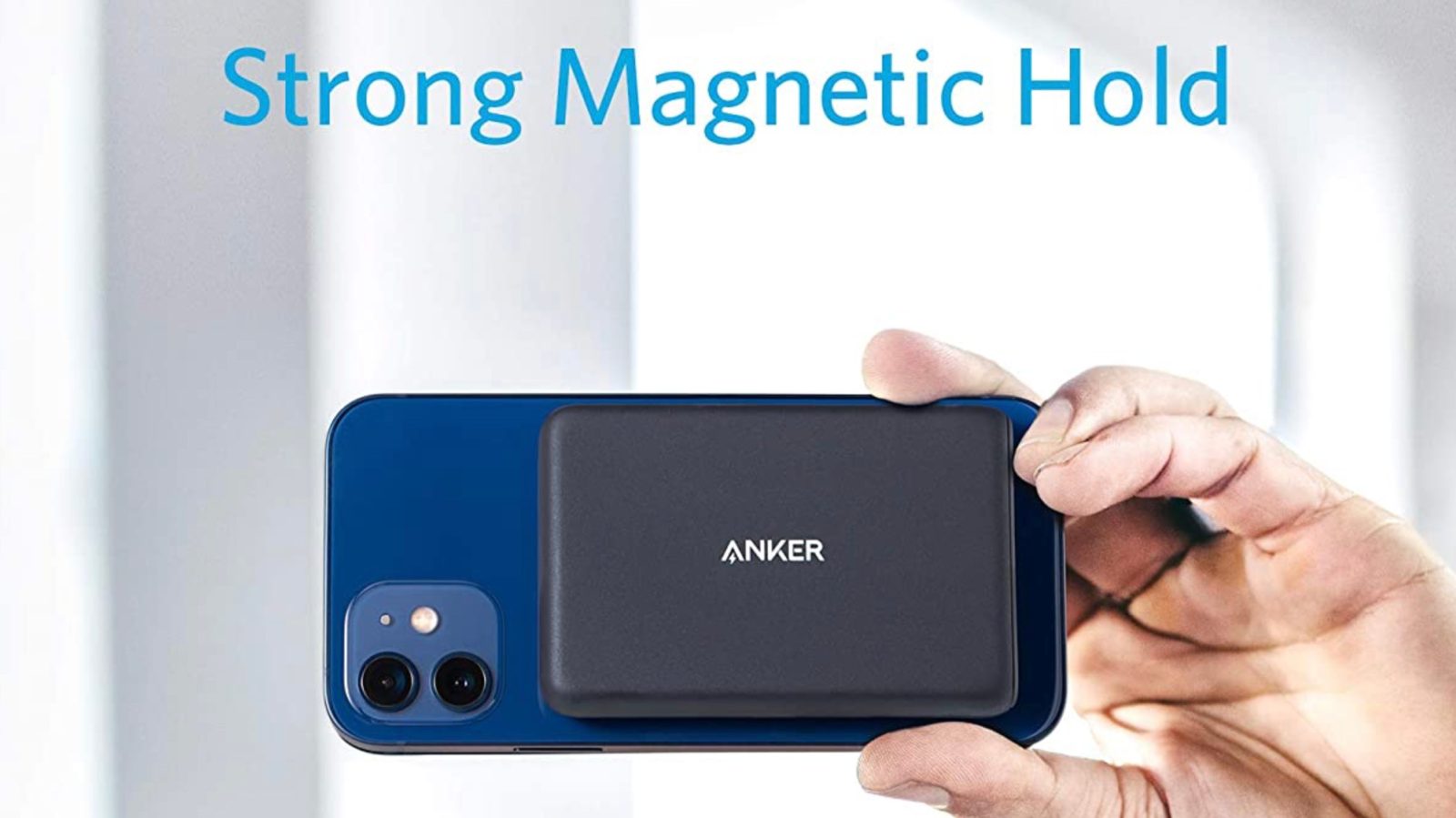
The popular accessory maker Anker has officially released a new MagSafe-compatible wireless power bank for iPhone 12 users. This comes as rumors suggest Apple is developing its own similar accessory, but that it has faced some roadblocks in development. The Anker accessory was first teased at CES last month and is now available to order.
The post Anker beats Apple to market, new iPhone 12 MagSafe-compatible battery pack now available appeared first on 9to5Mac.
Yelp updates its iOS apps with new features to help restaurants manage takeout
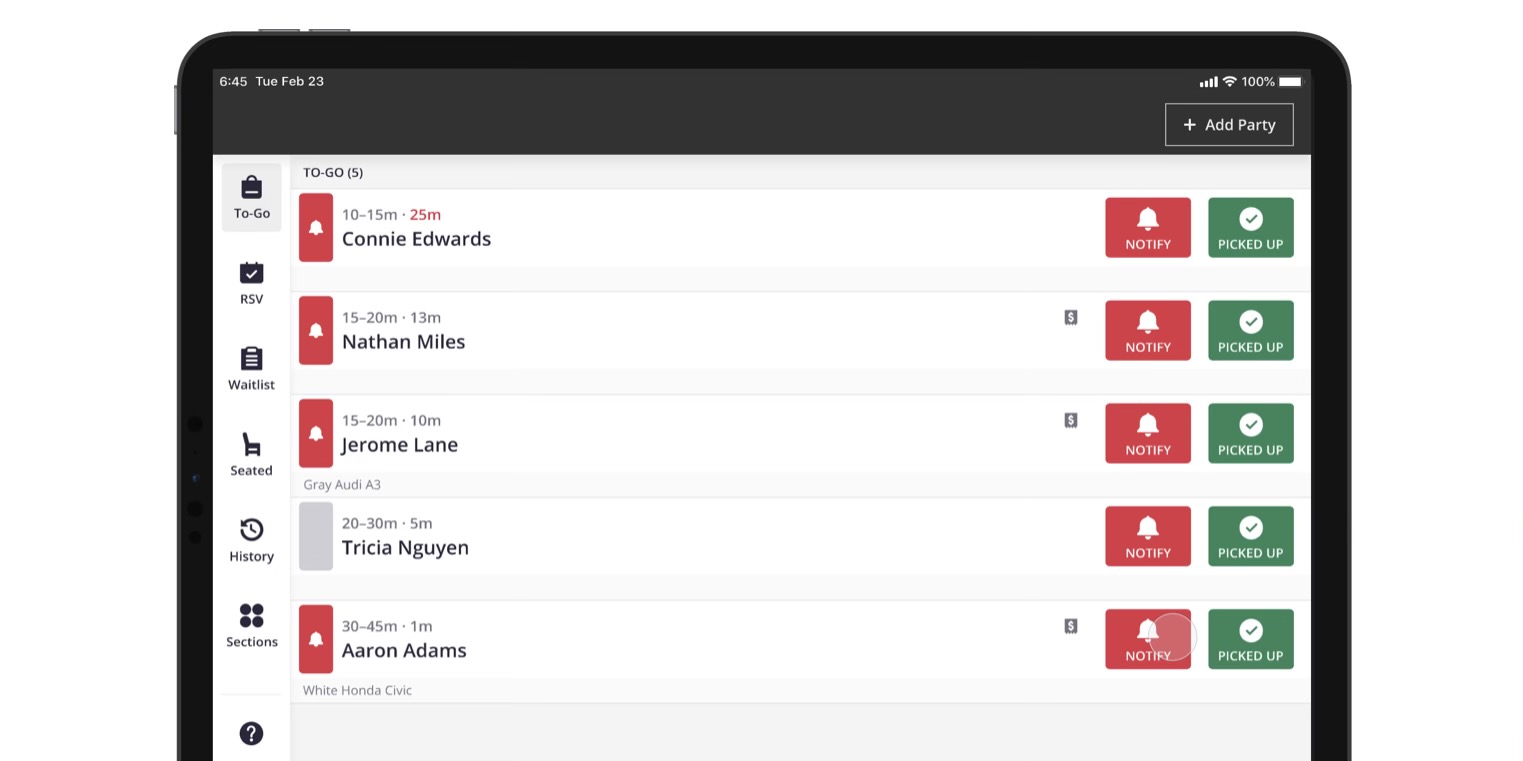
The pandemic has been particularly challenging for restaurants and Yelp is out today with updates to its its apps like Yelp Waitlist and more to help with the worldwide shift we’ve seen toward takeout.
The post Yelp updates its iOS apps with new features to help restaurants manage takeout appeared first on 9to5Mac.
Apple tells Epic Games it doesn’t have Scott Forstall’s phone number

Apple has claimed to Epic Games that it doesn’t have Scott Forstall’s phone number.
Epic is seemingly not content with being able to question Apple CEO Tim Cook for seven hours: The company also wants to do the same to former iOS SVP Scott Forstall. But it has so far been unable to contact him, and Apple says it can’t help as it doesn’t have his current phone number!
The hilarious development in the antitrust case is revealed in court papers…
The post Apple tells Epic Games it doesn’t have Scott Forstall’s phone number appeared first on 9to5Mac.
9to5Mac Daily: February 23, 2021 – MacBook Pro connectivity, more
Listen to a recap of the top stories of the day from 9to5Mac. 9to5Mac Daily is available on iTunes and Apple’s Podcasts app, Stitcher, TuneIn, Google Play, or through our dedicated RSS feed for Overcast and other podcast players.
Sponsored by Appfigures: To get the latest scoop on the newest apps and games, sign up for the Appfigures ‘This Week in Apps’ newsletter right here.
The post 9to5Mac Daily: February 23, 2021 – MacBook Pro connectivity, more appeared first on 9to5Mac.
Opinion: 2021 MacBook Pro ports could be an IO dream or nightmare
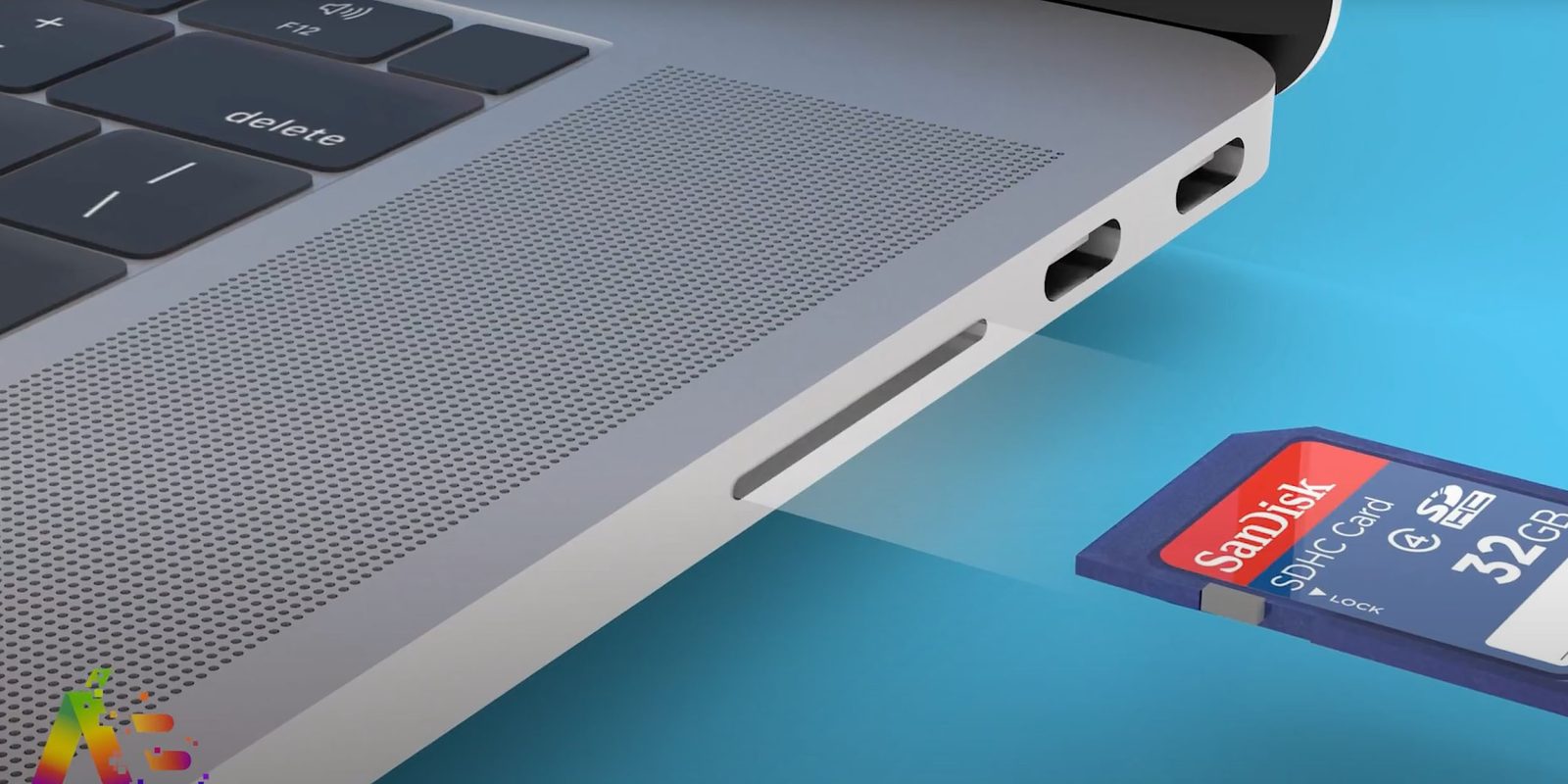
Based on recent supply-chain reports, the 2021 MacBook Pro ports could turn out to be either an IO dream or nightmare.
We today got a more detailed report about what to expect in terms of 2021 MacBook Pro ports, with noted Apple analyst Ming-Chi Kuo saying we should expect both an HDMI port and an SD card slot. Coupled to his earlier report of a new MagSafe power port, that’s a pretty dramatic change to the current models, which have just USB-C ports and a headphone socket.
But whether that’s an IO dream or nightmare depends on how Apple plans to implement the change…
The post Opinion: 2021 MacBook Pro ports could be an IO dream or nightmare appeared first on 9to5Mac.
Apple Pay arrives in Mexico with Citibanamex and Banorte cards

Update: Now available for American Express cardholders as well.
Seven years since the original launch of Apple Pay in the US, the service continues its worldwide expansion with Mexico. Starting today, Citibanamex (part of Citibank group) and Banorte clients can add their cards to the iPhone’s Wallet. Mexico has been waiting a long time for Apple Pay.
The post Apple Pay arrives in Mexico with Citibanamex and Banorte cards appeared first on 9to5Mac.
More supply-chain evidence of upcoming mini-LED iPad Pro

We’ve been hearing reports of a mini-LED iPad Pro for well over a year now, with almost all of them specifically pointing to the display tech first appearing in the 12.9-inch model. The latest supply-chain support for this comes in a new report today.
What’s been rather less consistent are suggestions of when we might expect to see the launch, with reports initially indicating Q4 2020 but more recently predicting the first or second quarter of this year…
The post More supply-chain evidence of upcoming mini-LED iPad Pro appeared first on 9to5Mac.
Kuo: New form factor MacBook Pro to feature HDMI port and SD card slot

In January, Ming Chi Kuo excited fans of Apple’s pro laptops with news that the 2021 MacBook Pro would feature a new design, Apple Silicon, and the return of MagSafe and more IO ports.
The analyst has followed up on that report today to be slightly more specific: he expects Apple’s 2021 MacBook Pro models to feature a HDMI port and a SD card slot. As a reminder, the current 16-inch MacBook Pro only features Thunderbolt 3 USB-C ports and a headphone jack in terms of connectivity.
The post Kuo: New form factor MacBook Pro to feature HDMI port and SD card slot appeared first on 9to5Mac.
Can you use MacBook Pro chargers for iPhone and iPad fast charging?

Recommendations to fast-charge iPhone or iPad often include picking up the $20 20W power adapter from Apple or similar from a third-party. But what if you already have a higher-powered USB-C charger from your MacBook Pro or MacBook Air? Follow along for which iPhones and iPads you can fast charge with Apple’s MacBook chargers.
The post Can you use MacBook Pro chargers for iPhone and iPad fast charging? appeared first on 9to5Mac.
Interactive: Explore the new Apple Cherry Creek in Denver

Apple welcomed customers to the all-new Apple Cherry Creek in Denver, Colorado today. The new store has a beautiful design unique to Denver with panoramic views of the city.
The post Interactive: Explore the new Apple Cherry Creek in Denver appeared first on 9to5Mac.
Billie Eilish teaming up with Apple Music for live performance ahead of documentary debut on TV+

Billie Eilish and Apple have been collaborating for a few years now, and the company announced today the artist is going to perform live on Thursday, February 25, in the Apple Music app, the Apple TV app, and on YouTube. This comes before the premiere of her documentary on Apple TV+, The World’s a Little Blurry.
The post Billie Eilish teaming up with Apple Music for live performance ahead of documentary debut on TV+ appeared first on 9to5Mac.
Leslie Jordan will soon be hosting his own show on Apple Music

The 65-year-old actor and writer Leslie Jordan will soon be hosting his own weekly show on Apple Music. Known for his role on Will & Grace and more recently for posting funny videos on Instagram, Jordan will star in “Hunker Down Radio” on the Apple Music Country radio station.
The post Leslie Jordan will soon be hosting his own show on Apple Music appeared first on 9to5Mac.
First M1 MacBook Pros now available from Apple Refurbished Store

If you were waiting for a great discount before buying a new M1 Mac, Apple has begun selling the M1 MacBook Pro for the first time in the Apple Refurbished Store. Customers can save up to $230 when buying a refurbished Mac M1 compared to the retail price.
The post First M1 MacBook Pros now available from Apple Refurbished Store appeared first on 9to5Mac.
Should you buy the iPad Air or the 11-inch iPad Pro?

The 2020 iPad Air is a compelling tablet and will be the top pick for a lot of users. However, while it matches and even surpasses the 2020 11-inch iPad Pro in a variety of aspects, the latter still holds the upper hand when it comes to certain use cases. Let’s look at some important factors to help you decide if you should buy iPad Air or the 11-inch iPad Pro.
Update: Something important to keep in mind, a 2021 iPad Pro refresh may arrive as soon as March.
The post Should you buy the iPad Air or the 11-inch iPad Pro? appeared first on 9to5Mac.
[Update: Leaked pictures] What to expect from the rumored AirPods 3 and AirPods Pro 2 updates

Following the introduction of AirPods Max in December, Apple reportedly has updates on the way for the rest of its AirPods lineup in 2021. This year, we expect Apple to introduce a new version of its incredibly popular AirPods and AirPods Pro, bringing major changes to both of them. Here’s everything we know so far.
The post [Update: Leaked pictures] What to expect from the rumored AirPods 3 and AirPods Pro 2 updates appeared first on 9to5Mac.
Twitter relaunches ‘review before you tweet’ prompt on iOS to discourage offensive replies
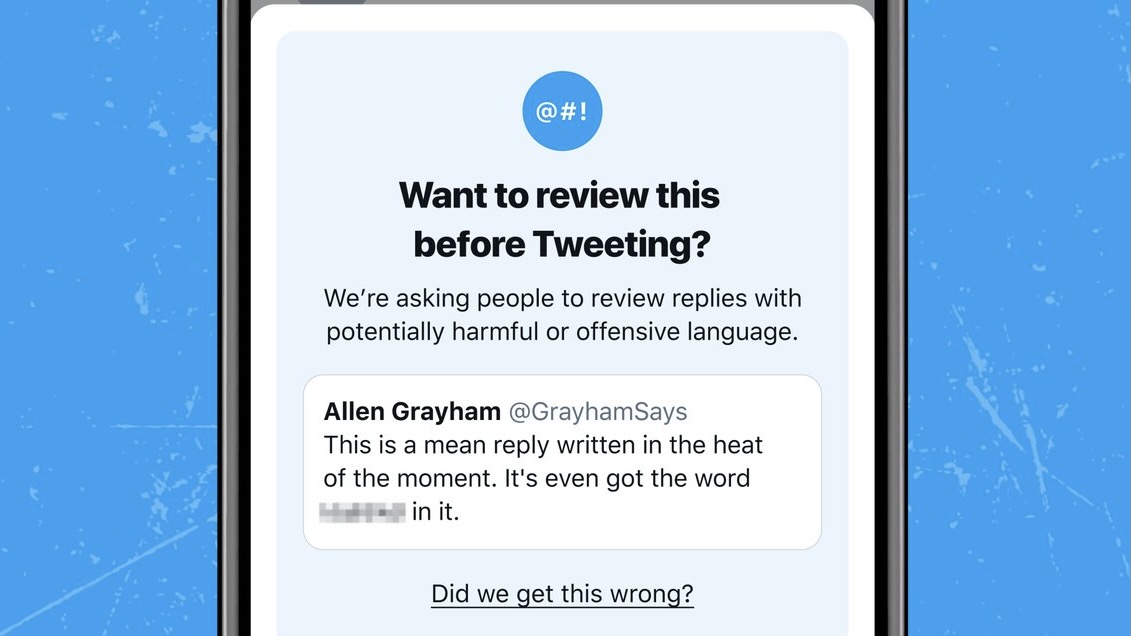
Back in May of 2020, Twitter started testing a feature on iOS aimed at helping users rethink a reply before hitting the send button when it might contain offensive language. After pausing the testing, Twitter has announced today that it has relaunched the experiment.
The post Twitter relaunches ‘review before you tweet’ prompt on iOS to discourage offensive replies appeared first on 9to5Mac.