
Welcome to My Blog
Email Delivery vs. Deliverability: What’s the Difference?
We spend hours planning out every detail of each campaign, crafting the perfect copy and agonizing over fonts, colors, and spacing. We talk through our personas, target audiences, and messaging. We build emails from scratch or lovingly modify templates so that we’re putting our best foot forward with our email marketing campaigns.
With all the blood, sweat, and tears that go into our emails, there’s nothing more heartbreaking than finding out the message never made it to our subscribers. No matter how carefully we plan our campaign strategy, design, and development, if the email doesn’t reach the inbox, it doesn’t matter.
Making it into the inbox is one of the more ambiguous, misunderstood elements of sending great email. Marketers often mix up a key distinction: delivery vs. deliverability. Though the terms are often used interchangeably, they have very different meanings.
Email Deliverability vs. Email Delivery
Let’s start with the basics: What are we even talking about? Here are the simple definitions:
- Delivery refers to whether or not a receiver accepts your email. This comes before the inbox or spam folder distinction. Can the message physically be accepted in the first place?
- Deliverability or Inbox Placement refers to where that message ends up once it is accepted; in other words, the inbox, spam folder, or another folder.
When it comes to understanding the difference between delivery and deliverability, ask yourself these questions:
- Can a receiver accept your message?
- Does it get to the inbox?
Let’s dive into both.
Can a receiver accept your message?
At its core, delivery refers to whether or not a receiver accepts the message you’ve sent. This comes before the spam folder is ever considered. Does the domain or email address exist? Is your IP address blocked?
Imagine your email is a busy business traveler on her way to a conference. Successful delivery would mean that the traveler arrived at the correct airport. (If anyone from New York has accidentally gone to LaGuardia instead of JFK, you know how these types of mix-ups happen!) She then proved her identity with a ticket and passport, and airport security verified her as safe to pass through security to her departure gate.
Similarly, when an email is successfully delivered, that simply means it made it to the intended recipient’s mailbox — and that could be in the inbox or the spam folder.
Did your email get to the inbox?
Also known as inbox placement, deliverability refers to where that message ends up once it’s accepted. Did it get to the inbox?
Let’s return to our travel metaphor. Our traveler has made it through security to the correct gate and now needs to get to her destination.
Deliverability is akin to where the traveler’s flight ultimately arrives. While most travelers safely get to their departure gate (delivery), weather or other mishaps may reroute them, for example, from Dallas to Houston (deliverability).
Deliverability consists of three parts:
- Identification: This is the set of protocols that prove you are who you say you are when you send an email, such as Sender Policy Framework (SPF), DomainKeys Identified Mail (DKIM), and Domain-Based Message Authentication, Reporting, and Conformance (DMARC). Each of these terms function like your passport, license, or background check. Are you Jane Doe, the hard-nosed lawyer from upstate New York? Or Jane Doe, the collegiate swim coach from southern California? Your ability to get on the correct flight to your intended destination hinges on your identity.
- Reputation: Your sender reputation is essentially a score that signals how trustworthy you are. Each organization and internet service provider (ISP) might have different scores for you. Generating positive subscriber behavior, like engaging with your email or marking you as a trusted sender, is the best way to boost your sender reputation — which you can do by sending relevant, personal emails to your subscribers.
- Content: Is your message appropriate for your audience? Is it relevant? Are you combining copy like “Make money fast!” and “Work from home” with poor sending practices like buying an email list (noooooo!) or preventing unsubscribes? Using excessive exclamation points, weird formatting, and URL shorteners can all impact your email’s deliverability based on your previous sending patterns. Think about it from your subscribers’ perspective. If you receive an email with the subject line, “MAKE MONEY TODAY!!!!”, are you really going to open it? Tailor your message to what your subscribers care about to make the most impact.
Identification and reputation account for most of the reason an email lands in the inbox or the spam folder. Think about waiting in line for an airport security screening. If you don’t have a ticket, you won’t make it past the first desk. And if you’re on the no-fly list, you’re not going anywhere.
Delivery issues mean that something may be wrong with your infrastructure, you’ve got faulty email addresses on your list, or you’ve received enough negative user interaction to warrant a block. Deliverability issues indicate that your sending and permission practices might be out of whack, or your email list is generally disinterested in your content.
How to Make It to the Inbox
Now that you know the difference between email delivery and deliverability, what does this mean for your marketing strategy? Here are three best practices to ensure your messages make it to subscribers’ inboxes.
1) Make your list squeaky clean.
Even though we love permission-based marketing, when it comes to emails, permission can expire. A large number of inactive subscribers can dramatically impact your deliverability because they offset your engagement metrics. Consider removing or suppressing inactive customers after a set time or automating a re-confirmation campaign.
If you’re having deliverability issues, it’s possible your list includes spam traps, which look like real email addresses, but are used to identify spammers. Sending to one can indicate poor list hygiene or spammy acquisition practices, like buying and renting lists or scraping email addresses off the internet.
Removing invalid emails on a regular basis and re-confirming your inactive subscribers can help declutter your list.
2) Make it easy to unsubscribe.
It’s a common myth that unsubscribes are bad, but there’s no evidence that unsubscribes and unsubscribe rates via the direct unsubscribe link in your email affect your deliverability. In fact, it can actually help by boosting your subscriber engagement and cleaning up your email list. If you’re sending targeted campaigns to people who want to receive your emails, then you’re bound to increase opens and clicks, and decrease your bounces.
Don’t hide your unsubscribe button. Make it clear and easy to find in your email, whether that be in the footer or at the top. Streamline the unsubscribe process so that it’s one step — otherwise, you’re fighting a losing battle against the dreaded “report as spam” flag.
3) Make your emails personal and relevant.
Marketers and subscribers often define spam differently. Subscribers don’t think in terms of spam filter testing or algorithms, but in terms of relevance. Are you sending content that matters to them? This is ultimately the most important question to ask yourself before hitting “send” on any email.
Email is one of the most personal channels in a marketer’s arsenal. Sending emails that resonate with your audience and leverage the 1:1 nature of the medium won’t just positively impact your deliverability; it will also boost reader engagement and build better relationships with your audience as well.
6 Ways to Improve Your Facebook Ads
Want to improve your Facebook ad performance? Wondering which metrics to look at? Using key insights from Facebook to see how users respond to and engage with your ads can help you optimize your campaigns. In this article, you’ll discover six ways Facebook ad metrics can help you improve your Facebook ads. Export Your Facebook […]
This post 6 Ways to Improve Your Facebook Ads first appeared on .
– Your Guide to the Social Media Jungle
from http://ift.tt/29Hyd6d
via socialmediaexaminer
The 21 Most Innovative & Creative Ads of the Past Year
The landscape of content is evolving. In an age where most advertisements fall victim to the “skip” button, it takes something truly creative to make people pay attention.
It’s no longer enough to simply create a straightforward ad — to shine, content must make us laugh, cry, think, and believe.
There is no bigger stage for celebrating advertising that moves us than the Cannes Lions International Festival of Creativity.
This year’s recipients blur the line between marketing and art, delivering pieces of content that push the boundaries of media.
Get inspired by 21 of the best below.
Grand Prix Winners of the 2016 Cannes Lions International Festivity of Creativity
Film
Shoplifters
London-based communications agency adam&eveDDB mashed-up real security cam footage of shoplifters at Harvey Nichols stores with delightfully devious cartoon characters to create this extended spot for the retailer’s freebie rewards app. (Spoiler alert: All the thieves get caught.)
Film Craft
Phelps
This gritty piece from Under Armour offers a peek into Michael Phelp’s demanding training regimen as the champion swimmer prepares for his final Olympic Games this summer. Aptly set to The Last Goodbye by The Kills, the ad was produced by New York-based agency Droga5 and directed by Epoch’s Martin de Thurah.
Titanium
#OptOutside
Venables Bell & Partners created this rebellious campaign for outdoor lifestyle brand REI, urging consumers to skip the mall and instead spend time outdoors on Black Friday. The call to ignore retail’s biggest holiday was whole-heartedly answered by the hundreds of National Parks that opened for free on Black Friday in direct response to the campaign.
Integrated
FU 2016
With the 2016 presidential election rapidly approaching, advertising agency Bartle Bogle Hegarty saw an opportunity to insert Netflix’s political drama House of Cards into the conversation. This ad took the show’s main antihero, Frank Underwood, and cast him as a presidential candidate.
PR
The Organic Effect
To highlight the positive impact that eating organic food can have on overall health, the Swedish Environmental Research Institute IVL and its client, supermarket chain Coop, documented a family as they switched to a fully organic diet.
Creative Data
The Next Rembrandt
After analyzing more than 160,000 fragments from Rembrandt’s paintings, ING and JWT Amsterdam 3D-printed a completely new piece of work in the revered Dutch artist’s distinct style.
Cyber
Justino
Get your tissues out for this one — Spanish agency Leo Burnett Madrid gives us the touching story of a night watchman in a mannequin factory who forms a connection with the day-time staff by arranging the mannequins in charming displays. When his colleagues win the lottery jackpot without him, something truly touching takes place. The Pixar-style tale was an ad for Anuncio Loteria de Navidad, the annual Christmas lottery in Spain.
Product Design
Jacquard Wearable Fabric
In a big step for the internet of things, the Google-owned Advanced Technology and Product Group (ATAP) developed a fabric that could reasonably be described as nothing short of magical. Comprised of a special, conductive yarn, Jacquard fabric has the ability to turn everyday items of clothing into touchscreen surfaces.
Media and Print & Publishing
McWhopper
This campaign from Burger King ended up bringing home the top prize in two categories after the original print ad launched an ongoing conversation in the media. Styled as an open letter to fast food rival McDonald’s, Burger King invited the golden arches to “end the beef … with beef” at at proposed pop-up restaurant in Atlanta. Even though McDonald’s turned its fellow burger chain down, the Cannes judges thought that the campaign by Y&R New Zealand delivered.
Design
Life is Electric
Dentsu Inc. Tokyo’s campaign for Panasonic poses the question: Can you see electricity? In a series of short films, they present simple but visually stunning metaphors which attempt to address the question.
Pharma
Breathless Choir
How do you maintain a love for singing when every breath is a battle? To promote Phillip’s SimplyGo Mini, an oxygen device, Ogilvy & Mather London took 18 people with breathing problems and helped them learn to sing without wasting breath.
Outdoor
Brewtroleum
Drink more beer, save the planet. This is premise of DB Export’s initiative to make biofuel from brewery byproducts. The ad, produced by Auckland-based Colenso BBDO, is actually a real project — the yeast slurry-recycled fuel is apparently sold at every Gull gas station in New Zealand, giving consumers an eco-friendly excuse to pick up a DB six pack.
Glass
6 Pack Band
To combat discrimination against transgender people in India, Unilever tea brand Brooke Bond Red Label decided the best tool at its disposal was song and dance. And so the first transgender pop group, 6 Pack Band, was born. The group’s creative covers of popular songs such as Happy blew up on social media in India and around the world.
Mobile
New York Times T Brand Studio
In an effort to bring news stories to life in vivid virtual reality, the New York Times took full advantage of Google Cardboard, a low cost VR viewing device. The news giant delivered Google Cardboard to the doorsteps of more than 1 million newspaper subscribers, inviting them to view stories live in 360-degree VR. Check out Displaced, a VR story about child displacement below.
Innovation
Google DeepMind AlphaGo
AlphaGo is Google’s latest and greatest foray into artificial intelligence. The gaming bot, designed by experts at the Google-owned DeepMind in the U.K., managed to best the European grandmaster champion of Go in five out of five games. This is no small feat for AI — Go is considered the world’s most complex and strategic board game, with more game play options than there are atoms in the universe.
Creative Effectiveness
Monty’s Christmas
We dare you not to shed a happy tear at the heartwarming Christmas ad that adam&eveDDB spun up for U.K. department store John Lewis. This commercial hits all the right notes for optimal holiday cheer — childhood magic, true love, and an adorably plump penguin.
Digital Craft
Recollection
For their tenth anniversary, French music company Because Music enlisted the help of 84.Paris to build an interactive, multi-media experience celebrating its artists. The project invites users to click, drag, and tap to change the music on this creative retrospective tour.
Radio
KFC’s The Everyman Meal
This radio ad from Ogilvy & Mather Johannesburg presents a series of hesitant men confessing their un-manly traits (“I like cherry chapstick” and “I like Pinterest”) while a deep-voiced narrator reassures them that they’re still men.
Direct
The Swedish Number
If you ever find yourself pondering a trip to Sweden and in desperate need of a tip about night clubs, ice fishing, or meatballs, the Swedish Tourism Association has you covered. Launched to celebrate 250 years since the abolition of censorship in Sweden, The Swedish Number is a simple phone number anyone can call to be connected with a random “Telephone Ambassador” in Sweden.
Health and Wellness
Project Literacy
In an effort to put global illiteracy on millennials’ radar, FCB Inferno produced an alternative version of the alphabet song for Pearson. The video pulls the curtain back on 26 shocking consequences of illiteracy — one world evil for each letter of the alphabet.
For Good
Unfairy Tales
This series of animated shorts from 180LA and UNICEF start out like fairy tales, but reality slowly creeps in; each tale is a real story from a Syrian refugee child, prompting the conclusion that, “some stories were never meant for children.”
How to Easily Create Your Own Video Show
Looking for ways to position yourself as an industry expert? Have you considered using video to increase your visibility? Using video to give your own take on news and stories that are relevant to your industry can help you build influence with peers, prospects, and customers. In this article, you’ll discover how to use video […]
This post How to Easily Create Your Own Video Show first appeared on .
– Your Guide to the Social Media Jungle
from http://ift.tt/29qWbS9
via socialmediaexaminer
Blind Apple engineer speaks on the company’s deep commitment to accessibility features
Apple has always been vocal about its commitment to accessibility features for its products, and now a member of the company’s accessibility design and quality team is speaking up on just how committed Apple is. A new profile from Mashable details Jordyn Castor, a 22-year-old, blind engineer.
Filed under: Apple
This week’s top stories: iOS 10 & macOS Sierra public betas, Pokémon Go, iPhone 7 leaks & more
Snapchat Memories Allows Republishing of Content: This Week in Social Media
Welcome to our weekly edition of what’s hot in social media news. To help you stay up to date with social media, here are some of the news items that caught our attention. What’s New This Week Snapchat Introduces Memories Feature: “Memories is a new way to save Snaps and Stories on Snapchat.” This new […]
This post Snapchat Memories Allows Republishing of Content: This Week in Social Media first appeared on .
– Your Guide to the Social Media Jungle
from http://ift.tt/29qb42a
via socialmediaexaminer
Apple makes searchable WWDC 2016 video transcripts available
How-To: Use Final Cut Pro X’s proxy media feature to edit 4K video on the MacBook [Video]
I love my 2016 MacBook for a variety of reasons, but there are still some areas where its Core M processor struggles to keep up. When it comes to exporting 4K video, the MacBook shines due to Intel Quick Sync Video hardware encoding. Editing 4K video, however, is much more taxing on the MacBook, especially when employing various effects and color correction.
Thankfully, Final Cut Pro X has built-in features that allow users to edit 4K video on even the most anemic of systems. In this post, we’ll show you how to leverage proxy media in order to successfully edit video on an underpowered Mac. more…
Filed under: Apple
Apple Music for Android updated with playback + sorting issue fixes
Apple Music for Android — one of Apple’s three apps on Google’s platform — has an update today that includes fixes for both playback and sorting issues. Here’s the change log for version 0.9.11:
Filed under: Apple
9to5Toys Lunch Break: Stainless Steel Apple Watch Band $20, Affinity Mac Photo Editor $40, Pebble Time $85, more
Keep up with the best gear and deals on the web by signing up for the 9to5Toys Newsletter. Also, be sure to check us out on: Twitter, RSS Feed, Facebook, Google+ and Safari push notifications.
TODAY’S CAN’T MISS DEALS:
Here’s a stainless steel Apple Watch band in Silver or Space Gray for $20 Prime shipped (Reg. $26)
Bring Nomad’s handsome Italian Leather Apple Watch Bands to your wrist for as low as $80 shipped
Grab the best Mac app from 2015 Affinity Photo for $40 (Reg. $50)
Add a Pebble Time Smartwatch to your wrist for $85 shipped (Reg. $110+)
Get an Apple Watch Sport 38mm in your choice of three colors (refurb) for $210 (Orig. $349)
Dragon Dictation for Mac V5: $90 w/ code DRAGON (Orig. $200)
Parallels Desktop 11: Run Windows/Android/Linux/anything seamlessly on your Mac: $40 (50% off) shipped or less
Apple’s latest 13-inch MacBook Air is on sale for as little as $750 shipped w/ .edu (Reg. $999)
Apple’s 15-inch Retina MacBook Pro brings power and a beautiful display to your work: $1,600 shipped (Reg. $1,999)
App Store Free App of the Week: LOOPIMAL music making app goes free for the first time (Reg. $3)
Apple offering free download of sketching app Procreate via Apple Store app
One of the best sniper titles on the App Store just went 50% off: Hitman Sniper $1 (Reg. $2)
Cable management can be frustrating, here’s a few simple (and inexpensive) products I use to keep it under control
Short Lightning cables are more useful than you’d think, here are the best MFi options
Apple’s Thunderbolt Display is dead: These are the best 4K & 5K displays for Mac
Skip your pockets, the LD West gun-style iPhone holsters turn your whole life into an 80’s cop show
MORE NEW GEAR FROM TODAY:
Daily Deals: Polaroid Cube 1080p HD Camera $65, 1Byone Thin Indoor HDTV Antenna $10, more
- Aukey water-resistant Bluetooth Speaker $20 Prime shipped (Reg. $25), more
- Games/Apps: Uncharted 4 + 1yr. PS Plus $80, FIFA 16 from $16, Table Tennis Touch $1, more
- Amazon is giving away $5 credits when you download the Facetune App for Android
- Amazon is discounting a slew of Adidas training gear today with prices starting at $11
- Stay connected while traveling w/ 6-months of free Boingo Wi-Fi access (Android device req’d)
- Save 25% on a subscription to Adobe’s Creative Cloud Photography plan: $7.50/mo or $90/yr
- Amazon has everything you need to start your own band: Marshall Micro Amp $38, more
- Don’t be shy! Some of the best Amazon Prime Day deals are reserved for those who speak up
- Your cat will love you forever if you buy him this best-selling heated kitty-bed for under $15
Amazon has a ton of $1 movie rentals ahead of Prime Day: The Great Gatsby, Oceans 11, more wp.me/p1xTlR-Ttu https://t.co/QEBZW70or1
—
9to5Toys (@9to5toys) July 08, 2016
MORE DEALS STILL ALIVE:
Mophie iPhone 5/s/SE 1500mAh Battery Case: $15 (Reg. $25)
Filed under: Apple
Apple’s ‘iOS Developer Academy’ begins in Oct. at Università di Napoli Federico II
Apple’s new European iOS App Development Center, announced back in January, is about to officially launch as the Università di Napoli Federico II in Naples today confirms it has partnered with Apple on the initiative (via Macerkopf).
When Apple first announced its plans for the new development center, the first of its kind to offer training for app developers in Europe, it didn’t say which school it would be partnering with to push the specialized curriculum. Today it confirmed the Università di Napoli Federico II will play host to the “iOS Developer Academy” with a dedicated facility that will offer Apple’s specialized app development training to a couple hundred students.
The program will begin in October and last nine months.
Filed under: Apple
Facebook testing end-to-end encryption in Messenger, branded Secret Conversations
Facebook Messenger is the latest app to adopt end-to-end encryption for its chats, ensuring that conversations cannot be accessed even by Facebook. It’s just in testing so far, but the company says that it will be made available more widely in the course of the summer.
We are starting to test the ability to create one-to-one secret conversations in Messenger that will be end-to-end encrypted and which can only be read on one device of the person you’re communicating with. That means the messages are intended just for you and the other person — not anyone else, including us.
While Apple uses end-to-end encryption as standard for both iMessages and FaceTime, and WhatsApp followed suit in April, Facebook is taking a slightly different approach …
Filed under: Apple
Pokémon player shot at while hunting in the woods – or stages a poor-taste prank [Video]
Will ‘Memories’ Kill Snapchat as We Know It?
Over the past three years, Snapchat has been slowly moving away from its original concept: a place for creating and sharing ephemeral content that disappears immediately after being shared. With the introduction of Stories in 2013, a feature that allows photos and videos to be visible for 24 hours, the app started inching away from that mission.
This week, Snapchat took a giant leap away from its initial premise by introducing Memories. The new feature enables users to share content after the initial photo has been taken, allowing for a more curated (and less instantaneous) experience.
But is this too far away from the Snapchat its core user base loves? Will Snapchat shoot itself in the foot by trying to capture a broader audience?
Here’s everything you need to know about Memories, and what it might mean for the future of the social app.
What’s New in Snapchat Memories
Memories contains four sections: Snaps you’ve taken, Stories you’ve posted, Camera Roll (photos from your phone’s camera), and “My Eyes Only” — a passcode-protected folder for “personal” Snaps. You can access Memories by swiping up from your Camera screen.
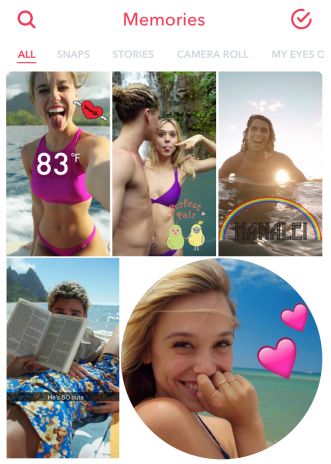
Save a Snap you’ve taken within the Snapchat interface by tapping the icon in the lower left of the screen. The saved photo will now be available in the “Snaps” section of Memories. Any filters, doodles, or stickers you’ve added will still be available to edit later.
Memories cuts out the middle man: your phone’s built-in photo library. As part of the Chat 2.0 rollout back in March, Snapchat introduced the ability for users to upload photos from their phone’s photo library to a private message. Memories’ Camera Roll took things a significant step further by building a replacement to your photo library — and Snapchat’s Camera Roll is far better (at least in this social media manager’s opinion).
The search feature rivals Google’s Photos app, allowing you to search by location, date, stickers, emoji, or even objects (for example “sunset” or “surfing”). The “Taken Nearby” section allows you to browse all photos taken within the same physical area, like your home or favorite neighborhood spots.
TBT fans will love “Flashbacks” — a feature similar to Timehop or Facebook’s “On This Day” — which surfaces Snaps taken on this date in the past.
The album within Memories might also be useful to replace and/or supplement a traditional phone backup for your photos. Lost your phone but forgot to backup to the cloud? All your Snaps will still be intact, safely tied to your account. Though photos from your camera roll won’t be automatically backed up using Memories, you can manually move them over. The camera roll is directly accessible without leaving Snapchat.
Snapchat Memories does extend an olive branch to real-time purists if you look closely: Any Snaps that are more than 24 hours old are displayed with a round white frame, signaling to followers that it’s from the past (see the sushi Snap below.)
Finally, the last feature of Memories — “My Eyes Only” — allows users to lock photos more personal in nature behind a passcode. Any Snaps you don’t want others to see can be stored here. (Some things never change.)
Memories will be rolling out to iOS and Android users over the next month.
Why Memories Changes Everything for Snapchat
Uploading photos seems like a relatively small change, but it is indicative of a larger shift in how users will interact with the platform.
Uploads will allow sharing content from other sites, or sharing of highly polished content. Previously, it could be tricky to assemble a coherent and compelling story on the fly. Memories solves for this problem by allowing users to go back and retroactively curate and share their story, moment by moment.
This is a significant shift away from the Snapchat of the past. Snapchat’s distinguishing value proposition has always been a place to share unpolished, unedited moments of your life. Unlike Instagram or Facebook, there’s no emphasis on perfection. Through drawings and stickers, Snapchat encourages users to be silly and light-hearted. The implementation of Memories could fundamentally change this behavior, as users are no longer limited to the Snapchat editorial functionality.
Memories also has crucial implications for Snapchat’s user base. By abandoning their original mission to cater to the masses, Snapchat is cementing its position as a top messaging app and real competitor to the bigger social networks.
Moments will be most appealing to those outside the traditional 18-24 Snapchat demographic. Snapchat knows that in order to capture the “early majority,” they need to win this audience.
People who are more “unplugged” than the typical Snapchat user will also appreciate the ability to snap a photo and deal with the sharing later. In addition, creating a more permanent record of photos makes the app more user-friendly and the functionality easier to understand for the less digitally-native population.
More than 50% of new Snapchat users are over the age of 25, and that audience is growing 2x faster than users under 25. By watering down their previously laser-focused mission, the app will appeal to a wider audience, albeit at the risk of alienating their current audience. Time will tell whether it was a risk worth taking.
Will Memories Kill Snapchat’s Spark?
As many other social networks have done before, Snapchat is attempting to cement its status by widening its net. In this case, they’re trying to become the all-in-one destination for conversation.
This move is the latest of several to pull the platform away from the one thing that separates them from other social networks. In a crusade to take on messaging apps like Facebook and Whatsapp, Snapchat could lose their spark — the “it factor” that helped them rise to popularity so quickly.
In six months, we could be struggling to find any major differentiators between social networks, and this is likely what Snapchat is aiming for. By incorporating Facebook-like features into their platform, they’re betting on users making Snapchat a larger and larger part of their online presence and communication habits. They’re banking on becoming the first widely-adopted social platform for voice, video, photo, and text communication.
However, in turning their attention away from their core audience and broadening their vision, it wouldn’t be a surprise if young users quickly move on to the next big platform that isn’t infiltrated by advertisers.
The Ephemeral Era of Snapchat Is Over
When Snapchat released Stories back in October of 2013, they described the feature as “fun and ephemeral, just like Snapchat.”
The word “ephemeral” was noticeably absent from Wednesday’s blog post announcing Memories. While fun may still be central to Snapchat’s mission, it’s clear they’re moving on from their transient roots.
What do you think of Memories? Do you think Memories will help or hurt Snapchat in the long run? Let us know your thoughts in the comments.
Apple Pay/contactless payment users are better tippers – Square data
Data from businesses using Square’s mobile payment terminal revealed that those using Apple Pay and other forms of contactless payment are better tippers than those using conventional cards. The company found that while 67% of swipe card customers added a tip, the number jumped to 73% for NFC payments.
Filed under: Apple
Tim Cook tweets about ‘senseless killings’ this week: ‘we must do better’
Smartphone Video Excellence: How to Film Like a Pro
Do you record videos with your smartphone? Want to make them look really professional? To talk about how to do video like a pro from your smartphone, I interview Justin Brown. More About This Show The Social Media Marketing podcast is an on-demand talk radio show from Social Media Examiner. It’s designed to help busy marketers and […]
This post Smartphone Video Excellence: How to Film Like a Pro first appeared on .
– Your Guide to the Social Media Jungle
from http://ift.tt/29FBK4e
via socialmediaexaminer