
Welcome to My Blog
10 Little Ways to Make Your Data Far More Compelling
It’s that time again. You’ve spent countless hours creating and executing a campaign, and now you’re finally ready to present the results to your boss. You’ve rehearsed your presentation meticulously, and feel great about the whole deck … except that one slide that shows a report that doesn’t quite make sense.
Even though the rest of your data is compelling, you know your boss will somehow find a way to focus on the one chart that isn’t. And while you might not always like it, we’d argue that the most important part of any campaign comes after all the work has been done. In other words, that one chart really does matter.
Sure, it’s easy enough to make simple charts, but to really take your next reporting to the next level and present the true impact of your work, you need to be laser-focused on the details. To help make your next presentation even better, we’ve put together a list of 10 quick and easy reporting tweaks to get you started. More specifically, we’ll walk you through how to make these changes using both Excel and HubSpot’s Reporting Add-on below each example.
10 Ways to Make Your Data More Compelling
1) Change your chart type.
Not all marketing data is created equal, so it can’t all be presented in exactly the same way. If you want to compare values — for example, you want to determine whether your latest webinar or trade show generated more MQLs — you’ll want to use a column or bar graph. If you want to show your team trends in data over time, use a line or area graph.
Here’s an example of how choosing a different chart type can clarify your report.
Before: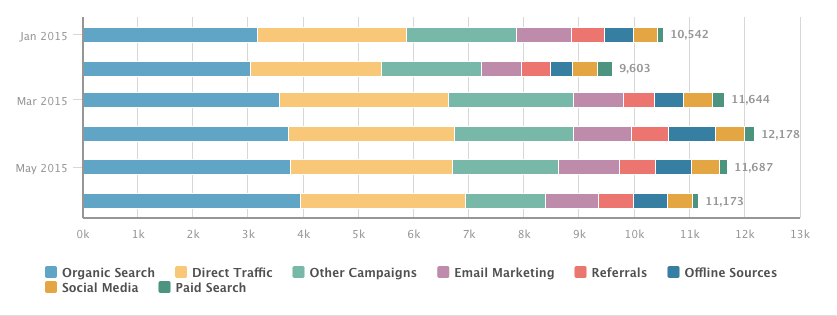
After:
While both reports show the same data — the number of MQLs generated over time, broken down by original source — the second variation, an area chart, gives the viewer a much better sense of how MQL flow has varied over time.
How do I make this change in Excel?
Follow these simple instructions to change your chart type in Excel. Not sure which chart type to choose? To get a sense of your options, take a look at this help document from Microsoft.
How do I make this change in HubSpot?
In HubSpot’s Reporting Add-on, start by selecting the report you want to edit. Then, use the toolbar on the right to choose your desired visualization.
2) Plot performance against your previous benchmarks.
Let’s say you just published an awesome new ebook. To your delight, your lead generation numbers spike as a result. Fantastic! However, your boss always asks the tough questions: Growing leads is good, but is it out of the ordinary?
How can you update your report to show your boss how your lead generation data compares to the norm? Add an additional data series to your report that shows the same metric over a previous timeframe.
In the example below, you’ll see contact growth over time — with and without the previous month’s data overlaid.
Before:
After:
Adding the additional context provides a better snapshot into how your performance compares to the recent past.
How do I make this change in Excel?
There are several ways to approach plotting previous benchmarks in Excel. However, it’s often easiest to add an additional column of data that represents past performance, and plot that alongside the current time period. Find out a bit more about that approach here.
How do I make this change in HubSpot?
In HubSpot’s Dashboard, use the filter at the top of the screen to plot any time period against a past benchmark. The tool defaults to this month vs. last month, but feel free to customize the data around your organization’s reporting cadence.
3) Change the order of your data.
Even if all the right data is included in your chart, it’s pivotal that it’s arranged in a logical and intuitive way. Order your categories alphabetically, sequentially, or by value.
In the example below, we chart the speed of our sales cycle, broken down by original marketing source. With this report, we’re seeking to understand which sources bring in the fastest-closing leads, as well as which source’s leads close the slowest.
Before:
After:
See the difference? If the data is randomly arranged, it’s much harder to glean strategic takeaways.
How do I make this change in Excel?
Excel makes it easy to change the order of your data. Follow Microsoft’s instructions here.
How do I make this change in HubSpot?
In HubSpot’s Reporting Add-on, start by selecting the report you want to edit. Then, use the section labeled “Order by” to customize the sequence of values or categories.
4) Show data markers.
If you’re plotting a trend over time, it’s often helpful to add line markers, which show the stepwise change in the data between intervals. In the example below, we’re plotting MQL growth over a specific week, broken down by original source. Adding markers helps to clarify the discrete jumps in the data between days, making it easier to draw conclusions about what worked over time.
Before:
After:
How do I make this change in Excel?
To add data markers to your line chart in Excel, use these instructions.
How do I make this change in HubSpot?
In HubSpot’s Reporting Add-on, start by selecting the report you want to edit. Then, uncheck the box labeled “Hide Line Markers” to make the change.
5) Display cumulative data.
If you’d like your chart to show aggregate growth, plot it cumulatively. In the example below, the takeaway from the first chart might be “we generated more MQLs in the second half of the date range.” In the second, the overall impact of MQL generation is more apparent: over 1,500 MQLs were generated, with accelerated growth over time.
Before:
After:
How do I make this change in Excel?
While there’s not a single solution to creating a cumulative chart in Excel, this article walks you through one way to tackle it.
How do I make this change in HubSpot?
In HubSpot’s Reporting Add-on, start by selecting the report you want to edit. Then, check the box labeled “Cumulative” to transform your chart.
6) Remove superfluous numbers.
Not all data is imperative to show. Remove unnecessary data points in situations where your properties aren’t as clean as you’d like, or where certain responses aren’t relevant to the questions your team is asking.
Just remember to be tactful in cleaning up your reports. Don’t remove data just because it doesn’t tell the story you’d like it to.
Before:
After:
How do I make this change in Excel?
To add and remove data from your charts in Excel, use these helpful tips from Office’s tutorials.
How do I make this change in HubSpot?
In HubSpot’s Reporting Add-on, start by selecting the report you want to edit. Then, click on the data categories beneath your chart to show or hide the data in your report.
7) Plot a goal line.
Raw data is great, but it doesn’t always tell the whole story. Let’s say you generated 500 MQLs this month. Nice work … but so what? How does that compare to what you had hoped to achieve? Adding a goal line helps your team drill into your performance compared to expectations.
Before:
After:
How do I make this change in Excel?
Similar to the second example, there are several ways to solve this problem. However, it’s most easily done with an extra column of data representing your company’s goal.
How do I make this change in HubSpot?
In HubSpot’s Reporting Add-on, start by selecting the report you want to edit. Then, select the “Include Monthly Goal” checkbox to add your goal line. Note that plotting a goal line is only possible when viewing a current date range in area and line charts.
8) Stack your data.
Too much data can be overwhelming. Stacked visualizations make it easier to spot trends in totals across categories, whereas grouped charts are better for comparing individual values within categories. Depending on the question you’re trying to answer, choose the type of report that makes the most sense.
Imagine you’re plotting your leads by month, broken down by their industry, and your goal is to compare industry lead generation within individual months. Here’s a question you might run into: Did we generate more leads from Higher Education or Biotechnology in April?
In a stacked bar chart, it would be hard to get a sense of the relationship between those two industries in a given month. In this case, it’s better to use a grouped bar chart, where the magnitude of individual values within the time periods are more apparent. On the other hand, if you wanted to focus on how individual industries contributed to overall lead generation (with an emphasis on total leads), a stacked chart would show aggregate totals much more clearly.
Before:
After:
How do I make this change in Excel?
Generate a stacked column chart in Excel with these easy instructions..
How do I make this change in HubSpot?
In HubSpot’s Reporting Add-on, start by selecting the report you want to edit. Then, select the “Stacked” checkbox to implement a stacked chart.
9) Change your color scheme.
Not all of us are artists. But most of us can tell when a color scheme just doesn’t work. If you’re presenting a set of data with several options, choose a color scheme that shows a clear distinction between the options. Otherwise, the data is rendered meaningless.
Not sure what makes for an effective color scheme? Find out all you need to know here.
Before:
After:
How do I make this change in Excel?
Excel makes it easy to change your color scheme. Follow these steps, and your colors will be popping in no time.
How do I make this change in HubSpot?
In HubSpot’s Reporting Add-on, start by selecting the report you want to edit. Then, make a selection from the “Colors” dropdown.
Pro Tip: Use different colors to differentiate between categories of reports on your dashboards. For example, you might make data relating to deals or opportunities green, while shading marketing-related reports blue or yellow.
10) Flip your axes.
Switching your X and Y axes can enable your chart tell an entirely different story. In the example below, we’ve plotted Original Source Type against Lifecycle Stage for a set of contacts.
In the “before” snapshot, a key takeaway might be that the majority of contacts generated through Offline Sources ended up as customers. However, it’s difficult to know what proportion of the Customer lifecycle stage came from Offline Sources.
Flipping the chart around enables us to drill into that additional context. The “after” image gives us a better understanding of how big of a role Offline Sources played in generating Customers. While both charts provide actionable takeaways, it’s important to consider the question you were hoping to answer to begin with. Often times, the opposite axis orientation might provide you with the best answer.
Before:
After:
How do I make this change in Excel?
Stack Overflow provides a quick and easy process for switching your axes without manually changing your data.
How do I make this change in HubSpot?
In HubSpot’s Reporting Add-on, start by selecting the report you want to edit. Then, swap the values of the report configuration dropdowns. For the above example, here’s how you’d make the change:
↓
Now you’re ready to make your data pop and take your reporting to the next level. Here’s hoping you’ll never again have to present a chart to your boss that doesn’t quite make sense!
Which tweak did we miss? Let us know in the comments below.
New Research Reveals Paid Social Media Effectiveness
Do you know where to spend your social media marketing dollars? Wondering what works for other businesses? In this article you’ll discover recent insights on the effectiveness of paid social media marketing. #1: Majority of B2C Marketers Find Promoted Social Posts and Ads Effective In fall 2015, the Content Marketing Institute (with MarketingProfs) surveyed 3,714 […]
This post New Research Reveals Paid Social Media Effectiveness first appeared on .
– Your Guide to the Social Media Jungle
from http://ift.tt/1UdMl4W
via socialmediaexaminer
First purported iPhone 7 case leaks surface: resembles iPhone 6s, no headphone jack
It has begun. The first images of purported iPhone 7 case leaks have started to appear online today. If true, the new iPhone will look very similar to the iPhone 6s and iPhone 6 with curved corners and a flat back. Notably, this case does not include a hole for a 3.5 mm headphone jack — reinforcing rumors that Apple will drop it in favor of Bluetooth or Lightning headphones.
On the bottom of the phone, it appears to feature only a Lightning port surrounded by two speaker grilles, which likely means the phone will include some kind of stereo sound output. Aside from the lack of a headphone port, it’s hard to see any other major differences from the case leak. More images after the break, via @OnLeaks …
Filed under: AAPL Company, iOS, iOS Devices, Tech Industry Tagged: Apple, case, case leaks, iPhone, iPhone 7, iPhone 7 Pro, leak, Lightning, no headphone jack
How to get a Sonos-like whole-home speaker setup on a budget
Sonos speakers offer some of the best features in the game, but they come with one drawback: it’s expensive to get the whole-home setup that people love so much. The cheapest speaker, the Sonos Play:1 comes in at $200, while the Play:3 runs $299, and the Play:5 goes for $499. And remember, to get that whole-home setup, you’ll have to buy at least two speakers. While the Sonos speakers definitely offer the added benefit of being easy to use, it’s hard to justify spending so much if you’re living on a budget. Thankfully, there are a couple of other ways to get a whole-home speaker setup at a fraction of the cost…
Filed under:
How-To, iOS Devices Tagged: Airport Express, Apple, Apple Music, how to, Sonos
Take Your Online Store from Average to Elite with Retention Marketing
Gone are the days when you could simply set up an online store, run a few ads, and start watching the money roll in. Today’s ecommerce landscape is a battlefield and the majority of stores are slugging it out to be average. However, there are stores that have figured out how to rise from mediocrity and into the ecommerce elite. These stores know how to use retention marketing!
Today’s Average Store
Stores are different across industries, markets, and countries, so we’re going to work with averages from different studies to help create our baseline.
Average Ecommerce Store’s Order Value: $78.00
Recently, there has been a huge focus on growing an ecommerce store’s revenue. While this looks good on paper, you need to dig deeper than just revenue numbers. You need to look at the profit you are keeping from each sale. You may be saying “This is pretty obvious!” yet big companies fall into this trap of chasing revenue without regards to profit all the time.
Average Ecommerce Store’s Profit Margin: 35%
According to a study from MarketingSherpa, the average American ecommerce site has an average profit margin of 35%. In this benchmark situation, that means that the average store is profiting $27.30 per order. Not bad.
Average Profit Per Order: $27.30
However, there is one pesky cost that will always eat away at your profits. That is your customer acquisition cost. It is not cheap to attract someone to your online store (which you surely know!). One study has the median acquisition cost at $12.00. This seems a little low, but let’s use it for argument’s sake.
Average Cost to Acquire a Customer: $12.00
This is the thorn in the side of every ecommerce merchant, trying to keep profit margins up and acquisition costs down. And, the cost to acquire a customer is also on the rise. As acquisition costs rise, traditional thinking in ecommerce starts to become less sustainable.
Profit to the Merchant: $15.30
In the current landscape (our baseline) this ecommerce store would make $15.30 on every order. This number is after accounting for the price paid for acquisition. Again, this is a hypothetical situation, but this merchant has made $15.30 on a $78.00 order. That is 20% of the sale price, and you haven’t even shipped it yet!
Depending on your shipping costs, this scenario can get you caught in a rat race.
Growing Your Store
The above scenario is a bit like treading water. You’re likely doing OK and making a couple of dollars per order, but if your costs vary significantly, you could be losing money. Even so, no one wants to spend 90 cents to make a dollar.
Many stores make the mistake of continuing like this while they grow a following and customer base. The problem: many stores continue in this mindset forever and never truly scale. If you want to achieve real growth, you need your investment in acquisition to go further. If you want to be elite you need retention marketing.
Becoming Elite Through Retention
Attracting each new customer to your store is increasingly not easy, nor cheap. You want to get the most out of each acquisition investment you make. Retention marketing is a way to get more value out of each acquisition. It is how to make it in the ecommerce world.
In the average store scenario above our merchant is making $15.30 before shipping. Let’s say it is closer to $5.00 when it finally makes it to the customer’s door. This may seem lackluster at best. Where this becomes a viable strategy, is when you treat each new customer/order as the beginning of a longer relationship. This relationship is known as customer lifetime value.
Repeat Customers Spend 3X More Per Order
Customers that return for a repeat purchase are way more valuable to your store. A study by Adobe found that repeat purchases spend three times more than first time buyers. WOW! Let’s use our original example and turn that purchase into a repeat one. A $78.00 purchase would become a $234.00 one. This already is looking good, but it gets better.
Average Order Value From a Repeat Customer: $234.00
Remember that $12.00 acquisition cost? Well, you won’t need to pay that again for this purchase. With the right retention tools (email, support, loyalty programs, etc.) you will have a retention cost, rather than an acquisition one. The good news is that retaining a customer costs seven times less than acquiring one. That means our $12.00 is now $1.70.
Cost to Retain an Existing Customer: $1.70
With this increase in order value, and decrease in retention cost, you now have a much more profitable order. This second purchase creates $80.20 in profit.
Profit to Merchant: $80.20
If you want to seriously grow your store, you need to focus on getting customers to come back. Going after new customers is important, but you need to follow that up with an effort to retain them. If you are always hunting for new customers you will not be able to grow sustainably. It is that simple.
Retained Customers Get Even Better
If the above was not good enough, it get better. Here are a few other facts about repeat purchasers that you should know.
They Share Your Store More
Your repeat customers can easily become some of your best marketers. The more a customer shops at your store, the more people they refer to you. Basically the more invested in your store/brand they become, the more they want to tell their friends.
Bain & Company conducted a study that found as number of purchases increase, so does the amount of people referred. The story here is that looking after your existing customers can actually net you some new ones. A referral is also the most trusted form of advertising according to Nielsen.
They Spend More at Key Times
Repeat customer spend more in general, but they also spend more during the busiest times of the year. A study by Adobe found that repeat customers spend more during the holidays than first time purchasers.
While all shoppers spend more during the holidays (17% more), a store’s repeat customer base spends even more. If a shopper has made a purchase before the holiday season and comes back during it, they spend 25% more than normal.
The takeaway here is that you need to get your retention strategy together sooner rather than later, and well before the holidays approach.
Review: Pad & Quill’s new super slim wood & Kevlar iPhone case
A couple of readers have asked me about the super slim wood case I’ve had on my iPhone in photos accompanying recent reviews. The case is Minnesota-based Pad & Quill’s latest, and it’s a wood and Kevlar mix that makes for one of the thinnest and strongest natural wood cases around.
Filed under: Reviews Tagged: case, dupont kevlar aramid fiber, iPhone, Kevlar, Pad & Quill, rosewood, walnut, Wood, zebra
OWC introduces Aura PCIe flash storage upgrades for late model MacBook Pros and MacBook Airs
Today, aftermarket Mac upgrade specialists OWC announced that the long-awaited PCIe flash storage upgrades for late model Mac laptops are now available. MacBook Pro, as far back as the Late-2013 product cycle, and MacBook Air, as far back as the Mid-2013 product cycle, are eligible to upgrade. Upgrades include a 480GB or a 1TB PCIe-based flash storage solution.
Considering that many of these Macs shipped with anemic 128GB or 256GB SSDs, this can be considered a major upgrade. For instance, with MacBook Airs that featured 128GB of flash storage space, a 1TB upgrade equals 8x the storage space, a significant increase in eligible storage. more…
Filed under: Mac Tagged: Flash storage, MacBook Air, MacBook Pro with Retina display, OWC, PCIe SSD, SSD, Storage, Upgrade
15 Ways to Drive More Home Page Conversions Without Reinventing the Wheel
If you’re serious about generating leads through your website, you’ll probably have several landing pages set up for a variety of content offers, with multiple conversion paths for visitors to take. That’s great, but it’s surprising how many people miss relatively straightforward opportunities to drive conversions on their home page.
Think about it – your home page is almost certainly the most visited page on your site. But how many people arrive and bounce straight off? If you can keep them there and push that conversion rate up by just a couple of percentage points – that’s potentially a big increase in leads.
Many home pages underperform because people are reluctant to change them. The design, layout and content were probably settled on following hours of discussion involving multiple contributors during the initial website project. So there can be some anxiety about tweaking that formula. Understandably, because the home page is so important, some people just won’t want to mess around with it once it’s done.
However, there’s no need to treat your home page like a sacred text – and making changes doesn’t have to be a huge project. This list contains 15 things you can do to drive more conversions on your home page without reinventing the wheel. And by sharing the rationale for such changes with your colleagues, you should be able to ease any lingering doubts.
1) Put people on your home page
Think carefully about the images on your home page. If you don’t include images of people actually using your product or service (or looking like they need to), it could be difficult for others to imagine themselves doing so. Using images of people in industries and scenarios that your prospects will recognise and identify with is a simple way to add the human element to your business, and could be the simple prompt a visitor needs to click your ‘contact us’ button or another CTA.
2) Avoid poor stock photos
Putting people on the home page doesn’t mean using the first stock photo you find. Be careful about the images you select – many of those available in stock image libraries are bland and cheesy. A poorly chosen image will quickly send visitors away. You need images that relate to your target industries, will resonate with your prospects and most importantly inspire action.
3) Use emotional language on your home page
Don’t overdo it, but rewriting the copy on your home page to provoke an emotional response in your visitors is a good way to increase conversions. The first step is to think about your potential customers and identify their emotional needs. You can then write copy that taps into those emotions. HubSpot recently shared this list of emotional words that could help you to get started.
4) Show your product on your home page
It’s surprising how many businesses don’t show their product on their home page. If you’re a huge organization with a strong brand, you probably don’t need to. But if you’re struggling to convert people on the home page, this could be a reason for your problem.
Software firms are some of the worst offenders here. People want to know what your product looks like – can they see themselves or their colleagues using it? They shouldn’t have to delve further into your site to find out what it’s like. Including a few screenshots is a simple way to give people an initial idea of your user experience.
5) Get to your value proposition quickly
Research has shown that a large percentage of website visitors will leave between zero and eight seconds of landing on the page. You only have a few seconds to get your unique value proposition across, why people should do business with you and the benefit of it. You need to make this clear with a simple, punchy and jargon-free headline at the top of your home page.
6) Try different CTAs on your home page
Don’t be afraid to experiment with different calls to action on the home page. You don’t always have to offer content to generate leads. Sometimes you may instinctively feel that the home page is just too early on in the user journey to justify pushing your white papers and guides. But sticking to a generic ‘contact us’ or similar CTA probably won’t set your conversion rate alight.
Think about what your visitors are likely to respond to and experiment.
One of our software reseller customers recently boosted conversions by changing a home page CTA to ‘Request a demo’. Their prospects were clearly engaged by the prospect of signing up for a demo, rather than just making contact.
7) Use testimonials/social proof on your home page
Social proof and testimonials build trust. You need them on your home page, not tucked away in a corner of your site. Select a few of your best quotes from satisfied customers, with names and photographs if possible. You can also link through to full case studies if appropriate.
This kind of content can be particularly persuasive for prospects who shortlist your product alongside several others and are looking for a reason to make a decision. Putting it on the home page shows you can afford to be open and transparent about what existing customers think.
8) Keep your forms simple and short
Forms on the home page should be as short as possible. You can use a larger number of fields on your landing page forms for high-value content offers, but remember that many people arriving on the home page are engaging with your business for the first time. Don’t give them a reason to leave, which they almost definitely will if faced with a form that looks time-consuming.
Think carefully about what you really need on your forms and remove anything that is surplus to requirements.
9) Include a great content offer
Many people will want to find out more about you before they download some content, but there’s nothing to stop you from promoting a really great white paper or downloadable guide on the home page. Choose the content offer that best represents the current focus of the business and create an outstanding CTA to tempt visitors into downloading.
Don’t forget that your navigation also needs a clear link to a resources/download center, where people who aren’t yet ready to download can see the content you have to offer.
10) Add a video
Video can be a powerful conversion tool for your home page. According to Crazy Egg, people who watch a video of your product are as much as 85% more likely to buy.
For IT and software companies, demo and walkthrough videos are particularly effective. You can’t explain all the features of your software in text on your home page, and few people would take the time to read it anyway. A video can explain what your software does and why it’s better than the competitors all in less than a minute. Due to the abundance of screen capture and recording tools now available, making this kind of video is also relatively cheap and straightforward.
11) Don’t use a slider/carousel
The use of home page sliders, also known as carousels, was identified as “one of the most prevalent design flaws in B2B websites” by Search Engine Land in 2013. They were right, but there are still too many sites clinging on to this feature – and it can damage conversions.
Sliders are problematic from a number of different standpoints, including SEO (multiple slides means multiple H1 tags to dilute your keyword relevance) and website performance (slides featuring hi-res images typically increase page load times). The potential result is that either people don’t find your site in the first place, or they’ll get frustrated and leave before you even have a chance to convert them.
12) Optimize your home page for search
More traffic to your home page means more conversion opportunities, so don’t treat SEO as a separate job best left to your technical colleagues. Before you convert, you need to get found – so your home page has to be optimized for search.
Identify your main keyword, plus supporting keywords and phrases, and follow SEO best practices with the content on your home page. It’s important not to neglect any aspect of your page, from the meta description to the H1 tags and image alt tags.
13) Put CTAs above and below the fold
Placing a call to action below the fold (where visitors must scroll down to see it) can seem counter-intuitive. After all, you want people to see your CTA button and click it straight away to maximise conversions, right?
Of course that makes sense, but several tests including those highlighted here by Kissmetrics, show how some pages with CTAs placed below the fold have out-converted pages with a CTA right at the top. The key thing is not the placement of the CTA in itself, but where it is placed in relation to the copy on your page.
Do you need to explain the benefits of your product in more depth before asking your visitor to click? Or can you convince them with one or two lines of copy and a well-chosen image? These are the things you need to consider when placing CTAs on the home page.
14) Make it fast
You simply can’t afford a home page that doesn’t load quickly. The impact of a slow page on conversions can be huge. One Aberdeen Group survey found that a single second delay in page load time typically results in 11% fewer page views, a 16% customer satisfaction rate and a 7% loss in conversions.
15) Test everything
The final point goes back to one of my original recommendations. Unless your conversion rate is already sky-high, don’t treat your home page like it’s set in stone. Test different approaches, different headline copy, an alternative CTA placement, a new image style or form. Monitor your results. Keep working at it and you’ll see a much better return.
See, that wasn’t so bad, wasn’t it? The truth is that no homepage is perfect and you shouldn’t worry about trying new things, especially when the benefits far outweigh the risks. The trick is to understand that improving your homepage conversion rate doesn’t have to be a huge project.
All you have to do is start small and focus on a few of the areas above for some quick wins. Maybe add a video, hone your emotive language, try a couple of different CTAs, and then continue optimising from there. Pretty soon you’ll have a homepage that swaps bounce rates for greater user engagement and helps improves conversions across the board.
Google Docs apps add much-needed iPad Pro support, but still lack iOS 9 multitasking
Google is on a roll lately with readying its iOS apps for the 12.9-inch iPad Pro announced last September and released last November.
Google’s YouTube app gained native resolution two weeks ago, but lacked iOS 9 multitasking features like Split View and Picture-in-Picture, then yesterday we saw Google Photos update with iPad Pro support in an update that actually includes Split View and Slide Over features.
Now it’s the Google Docs apps turn, at least to start, as the latest version of Google Docs for iOS adds native resolution support for the iPad Pro. more…
Filed under: Apps Tagged: Google Docs
Digitimes: Apple planning 5.8-inch OLED iPhone for 2017/2018
Following a report last week that said Apple is looking to release an OLED iPhone sometime in 2017, Digitimes today reports that the company is planning a 5.8-inch OLED device (via The Motley Fool). While the report should be taken with a grain of salt considering the source, it claims that Apple is pushing to release the larger device sometime in 2018, or perhaps even earlier in 2017, which lines up with last week’s report.
Filed under: iOS Devices Tagged: iPhone, iPhone 7 Pro, iPhone PRO, OLED, rumor
9to5Toys Lunch Break: iPad Pro $670, Logitech Wireless Solar Keyboard for Mac $38, The Room Three $2
Keep up with the best gear and deals on the web by signing up for the 9to5Toys Newsletter. Also, be sure to check us out on: Twitter, RSS Feed, Facebook, Google+ and Safari push notifications.
TODAY’S CAN’T MISS DEALS
Apple iPad Pro Wi-Fi 32GB: $670 shipped (Reg. $799)
Apple iPad Pro 128GB Wi-Fi + Cellular: $930 shipped (Reg. $1,079)
Apple iPad Pro 128GB Wi-Fi: $800 shipped (Reg. $949)
Amazon Gold Box – Logitech accessories up to 60% off: Solar Keyboard for Mac $38, Bluetooth mouse $21 + more
The Room Three mystery-puzzler for iOS gets its very first price drop: $2 (Reg. $5)
App Store Free App of the Week: Toca Kitchen 2 goes free for the first time ($2 value)
Dr. Seuss Birthday iOS/Android App Sale from $1 ea: The Lorax, One Fish Two Fish, Horton Hears a Who!, many more
Get a $100 iTunes Gift Card for just $80 delivered via email from PayPal (20% savings)
Save $50-$100 on Apple Watch and get a free $50 gift card
Giveaway: Outfit your Apple Watch with one of Throne’s handmade leather bands ($330 value)
MORE NEW GEAR FROM TODAY:
Solartab: Powerful Solar Panel/13,000mAh dual USB battery in iPad form factor: $94 shipped ($35 off)
- Storage: Samsung 850 Pro 512GB 2.5-inch Internal SSD $199, Seagate 5TB Desktop HDD $120
- Asus Chromebit turns any HDMI display into a Chrome OS computer for $70 shipped
- Magazine bundles w/ titles from $3.50/yr: Wired, Dwell, GQ, ESPN, many more
- Media: $4.75 Blu-ray Sale – Gangs of New York, Cast Away, Dark Shadows
- Power banks: OLALA 4000mAh w/ Micro USB cable $9 (Reg. $13)
- UE’s highly-rated MEGABOOM Bluetooth Speaker for $200 shipped (Reg. $270)
- Daily Deals: Sharp AQUOS 43-inch 4K Smart LED UHDTV $450, more
- Grab a free short stack at IHOP in celebration of National Pancake Day
- New Nintendo Select title pre-orders now 20% off from $16 shipped
MORE DEALS STILL ALIVE:
Gift cards up to 20% off w/ email delivery: Best Buy, Panda Express, Michael’s, Applebee’s, many more
Put an extra 256GB in your MacBook Air or Retina Pro w/ Transcend’s JetDrive Lite: $139 (Reg. $155)
- This TP-Link 802.11n Wireless Travel Router is a no-brainer at $8 shipped (Orig. $40)
- Toshiba 1TB USB 3.0 HDD w/ 16GB Flash Drive + 16GB microSD card $50 (~$82 value)
- PNY’s LEGO USB Flash Drives: 16GB $7 (Reg. $13), 32GB $13 Prime shipped (Reg. $20)
- Amazon’s best-selling Kindle e-readers $20 off, deals as low as $60 w/ free shipping
- Canon Rebel T5 DSLR w/ 18-55mm & 75-300mm Lens Kit (refurb) $260, more
- Big screen 1080p 60Hz HDTVs: Insignia 50-inch $300, Toshiba 49-inch $300
- Mackie 5-inch studio monitor speakers w/ Bluetooth streaming (pair) $200 (Reg. $250)
- Mpow’s iPhone 6/s magnetic car mount is down to just $5 shipped today
- Bluetooth Headphones: Senbowe sweatproof earbuds $10 (Reg. $19), more
- Pebble Time Round Smartwatch $180 (Reg. $200+), Gear S2 $249 (Reg. $300), more
- Disney finally shares Blu-ray combo pack release details for Star Wars: The Force Awakens
- Logitech’s popular MX Mouse lineup is on sale today: Anywhere 2 from $53 (Reg. $70+)
- Macphun’s Intensify CK (Pro) image manipulation app for Mac: $40 (Reg. $60)
12-inch MacBook now $300 off: 256GB $1,000, 512GB $1,300 + extra $50 savings w/ .edu email
Apple Mac Pro 12-core Xeon/64GB/1TB: $8,799 (Reg. $9,599), more
NEW PRODUCTS & MORE:
The new DODOcase Virtual Reality kit for iPhone and Android hits Indiegogo
Amazon launches more affordable Echo Dot and Amazon Tap Bluetooth speaker
- New Normal blends style and PowerBeats-like design for a new take on wireless earbuds
- LEGO releases four new Minecraft sets
- How-to: Save up to $10/month on your cable bill by buying this $40 DOCSIS 3.0 Modem
- This attractive Kickstarter timepiece blocks out your schedule on its watch face
- DJI’s Phantom 4 drone is coming later this month with a new obstacle avoidance system
- Grovemade’s new wooden MacBook Dock offers a Made in America home for your device
- Brooklyn’s own Grado Labs introduces its first Made for iPhone earbuds w/ Siri control
Filed under: Tips and Tricks
How-To: Disable iOS SpringBoard animations and make your Home screen feel faster [Video]
One of the things that makes iOS special is its SpringBoard animations. The animations help orient the user around iOS using 3D space.
But not everyone is a fan of iOS’ animations — some for purely aesthetic reasons and others for health reasons. With this in mind, Apple has provided a way to reduce the animations using the Reduce Motion switch found in the Accessibility settings. Even with that option available, some wish to take the reduction of animations even further and disable them altogether.
Up until now, many of the available options for disabling animations relied on jailbreaking. But a new iOS glitch found by a redditor makes it possible to completely get rid of SpringBoard animations until you reboot your iPhone. Watch our step-by-step video walkthrough inside to see how. more…
Filed under:
How-To, iOS Devices Tagged: accessibility, animations, Assistive Touch, glitch, jailbreak tweak, noslowanimations, spotlight search, SpringBoard, video
Multiple iOS apps found to be harvesting Snapchat user credentials
Users of third-party Snapchat apps may want to delete them and change their passwords on the social media platform as soon as possible. New discoveries revealed today point to the fact that multiple third-party Snapchat apps are sending copies of user credentials over non-secure connections to their own servers.
more…
Filed under: Apps, iOS, iOS Devices Tagged: App Transport Security, Apps, iOS, Quick Upload, rdar, Security, SnapBox, Snapchat, Snapix, third-party apps, Verify.Ly, Will Strafach
Opinion: Why the final e-book ruling was right in theory but wrong in practice
Well, the e-book case that began in 2012 when the US government accused Apple of price-fixing finally ended yesterday when the Supreme Court declined to hear Apple’s appeal. That left the original ruling intact, meaning that Apple is officially guilty of anti-competitive behavior and will have to fork out $450M in compensation.
There’s no doubt in my mind that the correct result was reached in law. Apple did deliberately set out to fix prices, it did strike secret deals, and it did intend to manipulate the e-book market. Emails from Steve Jobs confirmed the government’s claim that Apple struck the deals in the belief that consumers would end up paying more for e-books.
Throw in with Apple and see if we can all make a go of this to create a real mainstream ebooks market at $12.99 and $14.99. [Up from the typical $9.99 at the time.]
So far, so good. If you’d brought that evidence to me at the time Apple did the deals, I’d have agreed with the government that the company’s behavior was both illegal and morally wrong. But I’d argue that by the time the case was finally brought to court, it was already abundantly clear that it was not in the public interest to pursue it …
Filed under: AAPL Company, Opinion Tagged: AAPL, Amazon, Apple Inc, ebook trial, ebooks, IBooks, Opinion, Steve Jobs
Yoink: A great utility for moving files around OS X [Video]
Yoink is a utility available on the Mac App Store that I find to be extremely useful. When you begin dragging a file on a Mac with Yoink installed, the utility’s interface appears on the side of the screen. Yoink serves as a temporary holding area for files on your Mac as you move them between apps, folders, and wherever else in the Finder.
There are few apps that I consider to be must-haves on OS X, but Yoink is certainly one of them. Moving files around the Mac is easier with Yoink installed, especially if you make the most of using full screen apps. Watch our video walkthrough inside to see how. more…
Filed under:
How-To, Apps, Mac Tagged: Apps, apps & updates, Mac, Mac App Store, Mac OS X, OS X
ExxonMobil rolls out Apple Pay to 6000 gas stations from today – but you’ll need an app to use it
If you’ve been wanting to pay for your gas at ExxonMobile stations using Apple Pay, the good news is that you now can, reports CNET.
Apple Pay went live Tuesday in more than 6,000 Exxon and Mobil-branded gas stations across 46 US states. The service will be added to about 2,000 more stores by mid-year and will be available in nearly all of the company’s 10,000 locations by the end of 2016.
But if you were expecting to just wave your iPhone or Apple Watch at a reader on the pump, that’s not quite how it works …
Filed under: Apple Pay Tagged: Apple pay, Chevron, ExxonMobil, Gas stations
Apple patent granted today may solve the mystery of company’s plans for liquid metal
When Apple signed an exclusive deal to use the superstrong alloy liquidmetal way back in 2010, there was a lot of speculation about how Apple might use it. The only immediate answer we saw was in the SIM ejection tool supplied with iPhones.
While some had expected Apple to use liquidmetal for product casings, the high cost of the material seemed to rule that out, at least in the short-term. There’s also been no sign of the super long-lasting batteries some had suggested.
But Apple clearly does have a use for it beyond SIM eject tools, last year renewing those exclusive rights – and a patent granted to the company today suggests one possible reason why …
Filed under: iOS Devices Tagged: Apple Inc, home button, iPhone, Liquidmetal, Patent
Women in the Workplace: 10 Smart Ways to Shatter the Glass Ceiling
When I was in the fourth grade, one of my teachers encouraged me to audition for a children’s news program that would provide a “young perspective” on current events and happenings around the city.
Shortly after I’d started to prepare for the audition, my parents got a call from one of the producers. As it turns out, they were actually looking for two boys to co-host the program, however, they’d still consider me for the field reporter role.
That’s when I remember my dad saying, “Katie, if you want the hosting job, go get it. Tell them why you want it and show them you deserve it — don’t just take third place because that’s what on the table.”
So I completed my audition, making it clear that I wanted to be considered as a co-host. In the end, the producers decided to have three young men and two young women rotate the hosting duties. I was one of them.
Why am I sharing this story about my short tenure hosting on public television in Vancouver, Canada?
Well, while the gig didn’t turn out to be a smashing success, it was my first ever exposure to the fact that the world is full of impressions about the types of people who “should” or “could” inherit certain roles. And in the spirit of International Women’s Day, it serves as a great reminder for women of all ages and in all places that glass ceiling of all sizes and shapes are meant to be broken.
Looking for more inspiration? Check out the ten tips below. From harnessing vulnerability to learning how to rebound, these strategies can be used to help you defy the odds and advance yourself both personally and professionally.
10 Smart Ways to Shatter the Glass Ceiling
1) Do great things before you’re ready.
One of the characteristics that helps young women succeed in school often holds us back when it comes to work: we want to feel certain we can do a great job before we sign up for a task.
On one hand, this is noble. However, on the other hand, it means we can be easily left behind — not as a result of aptitude, but rather attitude.
For wisdom on this topic, I look to the great philosopher Amy Poehler, who wrote:
Great people do things before they’re ready. They do things before they know they can do it. Doing what you’re afraid of, getting out of your comfort zone, taking risks like that –that’s what life is.”
So if you’ve been waiting to raise your hand, to ask for that promotion, to offer to lead a project, or to pitch your idea, don’t wait longer. The most remarkable people in the world don’t wait until the stars align to tackle things they scare them, so don’t be afraid of the deep end. Dive in.
2) Stop treating vulnerability like a weakness.
Early in my career I associated success with perfection. Never let them see you sweat was a constant refrain in my head, as was Steve Martin’s epic quote: “Be so good they can’t ignore you.”
The honest truth is that great entrepreneurs and great leaders guide teams that stumble and fail on occasion, and that your success as a leader is more defined by your response to those failures than their very existence. To that end, I think women and men can benefit significantly from following Brené Brown’s advice:
Believing that you’re enough is what gives you the courage to be authentic, vulnerable, and imperfect.”
Check your infallibility at the door and embrace imperfection in pursuit of excellence, not in spite of it. (Check out this post for even more awesome advice from Brené Brown.)
3) Believe there is enough sun for everyone.
Narrow views of company diversity and inclusion protocols suggest that there is a finite amount of power and achievement in the world and that efforts to expand opportunities for women come at the expense of men. In fact, research shows that teams with more women perform better and that companies with more diverse composition deliver higher returns.
With this in mind, take a look at this quote from actress Tracee Ellis Ross that I keep on my wall:
I cheer for people. I was raised to believe there is enough sunlight for everyone.”
The sooner we eliminate the notion that power is a limited resource, the faster we’ll create room for more diverse voices at the table — and for more women on board.
4) Check your assumptions at the door.
It’s sad to say in 2016, but our female engineers are still regularly bypassed for technical questions at external recruiting events. Not to mention, nearly every woman I have ever worked with who occupies a leadership position has been mistaken for an assistant at some point in her tenure.
Everyone has unconscious biases they bring to work, and it can be challenging to even notice them, let alone alter them. However, instead of denying them, it’s important that we consider how we can learn from these sources of un bias and indentify improvements as they relate to gender.
Maybe it’s in job descriptions you write, the candidates you choose to interview, or the assumptions you make about people at networking events. All of us have room for improvement, so take a hard look at one area that needs work and invest some time and energy each week to actively address it.
5) Set the bar high.
When I ask many young women what they want to achieve, they often mention an incremental next step to their current role — a stark contrast to young men, who typically share a stretch goal for a top job or leadership position. For this (and many other reasons), HubSpot is running a program specifically focused on educating and empowering women to consider board leadership roles and encouraging companies to identify and engage with female board members.
Regardless of how you choose to do this at your company, within your family, or on your team, share examples of women leading the way in the biggest ways possible. Doing so not only stretches women’s ambition and imagination, but it also encourages both men and women to think differently about what executive leadership at the highest level looks, sounds, and behaves like.
6) Learn how to rebound.
I’ve been lucky to have some really great moments in my career. But then again, I’ve also had some rough stretches ranging from a particularly challenging dynamic with an old boss to some really harsh feedback from a senior executive.
Most of the successful leaders I know can share war stories of career moments gone amuck, and yet when you’re in the eye of the storm, you feel like you’re the only one who has ever botched something so poorly.
If you’re feeling lost or in the middle of a challenging career stretch, my suggestion is to solicit perspective from someone you trust, objectively identify where the biggest holes are — whether they are team flaws, plan flaws, or personal flaws — and develop a plan to address them. People often ignore inflection points and instead wait for career boiling points. However, I think learning to take a hit and come back swinging builds not only your resilience, but your respect in an organization, too.
7) Build a network you can learn from.
The old expression that “your network is your net worth” is cliché, but studies show time and time again that individuals with large open networks succeed at a much higher rate than those with smaller, more closed networks.
While our busy schedules can make it difficult to find time to attend networking events, there’s no doubt that these opportunities are worth penciling in. When you consider that having a diverse and well-connected extended network can not just help you grow your brand, but also your business, your reach, and your potential opportunities down the line, it’s easier to prioritize.
Having trouble getting started? Approach your next event with a goal of building ten net new connections you can learn something from in the next six months — doing so will keep you focused on your personal growth while expanding your horizons.
(Check out this article for my best advice on how to network like a pro.)
8) Show your work.
Because women are more likely to be humble when it comes to accomplishments, we often deprioritize sharing exhibits of our work externally in meaningful ways. For example, if you’re a designer, when was the last time you updated your personal portfolio online? If you’re in marketing, when was the last time you published a blog post on your own experience or insights? It’s likely that these things have taken a backseat to other team priorities.
To combat this, block out a half hour each month to update your LinkedIn profile, post to Medium to share your own perspectives, or create and publish something you truly love. Doing so will make you easier to find for career opportunities and more easily identifiable both within and outside your organization as a force to be reckoned with.
9) Practice giving and receiving feedback.
Giving and receiving tough feedback can be a real hurdle to growth, both as a manager and as an individual contributor. However, the sooner you can master digesting constructive feedback and giving it out to your teammates, the faster you’ll grow personally and professionally.
Kim Scott describes candor in feedback more effectively than anyone I’ve seen, so spend time thinking about how you can optimize your own feedback channels and systems to maximize learning and collaboration and minimize drama and politics. Doing so will help you grow as a leader and get you much more comfortable delivering tough news, difficult feedback, and authoritative coaching, all of which are critical to senior leadership positions long-term.
(Check out this episode of The Growth Show for more insight from Kim Scott.)
10) Forget about “having it all.”
Many women I know strive for personal and professional success, amazing friendships, fulfilling relationships, close-knit families, rapidly growing career tracks, and of course an Oprah-like closet to boot. However, the concept is dangerous, not just for its elusiveness, but because it’s also one of the many reasons that women often waste time tearing down each other instead of building one another up.
When you’re convinced perfection is the primary goal, you become overly focused on elements of it that you’re missing. Instead of focusing on perfection, strive for growth on the things that matter most to you. What matters most to you may change over time, and that’s just fine. Spend less time focusing on getting into a specific lane or fitting someone else’s framework and more time investing in what feels authentic to you in terms of your goals and growth.
Women in the Workplace
I always advise women to rely on two senses when it comes to gender equality in the workplace: a sense of confidence and a sense of humor.
Confidence is imperative for knowing that you can and should resist people’s stereotypes of what you are capable of doing, and actively solicit people who help you question the status quo in that regard (thanks Mom and Dad!).
Humor is imperative for not letting those incidents where someone underestimates you get you down and make you bitter. So assume best intention, take things in stride, and create a network of people who help you stay positive — even when you’re underestimated or passed over. Doing these things will help you effectively to address it equality, while harnessing your energy positively.
Although the glass ceiling still exists — particularly in executive leadership roles — there are a whole lot more holes in it. One of the reasons I’m so energized by millennial women is that I truly believe this generation has the ability to continue the great work the generation before us did with regard to access and impact. I look forward to seeing some serious dents in the coming years based on your contributions.
What are your favorite tips for shattering the glass ceiling? Share them with us in the comments section below.