
Welcome to My Blog
24 Awesome Facebook, LinkedIn, Twitter, Instagram & Pinterest Features You Didn’t Know Existed
Social media networks are continuously adding cool little features here and there, and it can be tough to keep up — especially if there’s no big announcement.
For instance, did you know you can add life events and milestones to your personal and business Pages on Facebook? That you can remove certain users’ tweets from your Twitter feed without having to officially unfollow them? That you can add hidden relationship notes to your LinkedIn connections? (That one’s my favorite.)
Download the ultimate guide to LinkedIn here for more pro tips for using LinkedIn.
There are so many cool things our favorite social networks can do that may have fallen through the cracks. To help you discover these hidden treasures, we rounded up 20 of the lesser-known features on Facebook, Twitter, LinkedIn, Instagram, and Pinterest. Check ’em out.
Hidden Facebook Features
Download our free Facebook guide here for tips on using Facebook for business.
1) Publish a life event or milestone.
Get a new job? A new pet? A new roommate? Now, there’s a way to tell the world about some of your major life updates by adding a Life Event to your timeline.
To add a Life Event: All you have to do is go to your personal Facebook Page and click “Life Event” to the right of “Status” in the status update box.
As you can see, these can get really specific. Once you click into a category, you can add details like a title, dates, people you were with, and photos. Like a normal status update or photo, you can choose to share it with friends, specific groups or people, or the world.
For businesses, Facebook lets you add what they call Milestones, which can be anything: receiving a round of funding, reaching a certain number of employees … you name it.
To add a Milestone: Simply choose “Offer, Event +” to the right of “Status” in the status update box.
2) Save links for later.
Ever seen articles in your News Feed you wished you could bookmark for later? Well, you can. Facebook recently added a feature that allows users to save links to articles, events, TV shows, music, and more to read later. All you have to do is click that little downward arrow on the top right-hand corner of the article in your Feed, then choose the “Save” option.
To view the things you’ve saved, go to your home page and choose “Saved” in the left-hand column. (Or go straight to http://ift.tt/1nwhlyo.)
3) “Unfollow” people or pages so you never see their posts.
Do you have that one person — or couple of people — whose Facebook posts just drive you nuts? I have a few Facebook “friends” of my own whose daily gym selfies, love proclamations, and political rants make me roll my eyes.
If you don’t want to commit to unfriending these people entirely, what you can do is unfollow them to hide their posts. FOREVER. (Er, at least until you reconnect with them later. We’ll get to how to do that in a second.) Better yet, they won’t know if you’ve chosen to unfollow them. There are two ways to unfollow a person, page, or group:
a) To unfollow directly from the News Feed: Click on the top right of their story, and select “Unfollow.”
b) To unfollow from your News Feed preferences: Click in the top-right corner of any Facebook page and select “News Feed Preferences.” In the window that appears, click “Unfollow people to hide their posts.”
To reconnect with a person, page, or group that you unfollowed in the past: Click in the top-right corner of any Facebook page and select “News Feed Preferences.” In the window that appears, click “Reconnect with people you unfollowed” and select whomever you’d like to reconnect with.
4) Find targeted conversations.
The search bar at the top of your Facebook Page isn’t just for searching for names. (Or Pages, groups, events, and apps.) Now, you can type in a few keywords to search for old News Feed posts, both on desktop and mobile. (Learn more about the Facebook Graph Search update here.)
5) Poll people in a group or event.
Although Facebook removed the polling feature from business Pages’ status updates, you can still poll users in groups and events. Choose the “Create Poll” tab inside the status update bar. Click “Add Poll Options” to enter multiple-choice options. Use this to ask your audience for feedback about event location or execution, content you’ve posted, and so on.
6) Edit photos directly in the Facebook mobile app.
If you’re looking for a quick photo fix on mobile, you can edit photos to some degree right in the Facebook app. Enhance the photo, apply a filter, add text or stickers, doodle, or crop/rotate the photo.
To edit photos in the Facebook app: Once you’ve uploaded a photo, press the “Edit” button that appears in the bottom left-hand corner of the photo to bring up these options on the bottom of your screen.
7) Reorder the sections on your business Page.
Want the “Photos” section to be above “About” on your business Page? No problem — just hover your mouse over the section head of any one of your sections until a small pencil appears. Click the pencil and choose “Manage Sections.”
From there, you can drag to reorder.
Hidden LinkedIn Features
Download our ultimate guide to LinkedIn here for more tips on using LinkedIn for networking, business, and marketing.
8) Add hidden relationship notes.
Like I said, this is my favorite little-known feature of LinkedIn. You can add relationship notes, reminders, and a note on how you met (and who introduced you) for any one of your connections. To get to this feature, click “Relationship” right under the person’s profile picture. No one else can access the information you put in there.
9) Embed media files on your profile.
Break up your text-heavy profile and showcase your work by adding media like images, documents, links, SlideShares, videos, and audio to your profile. To add these media files, log in to your account, go to the “Summary” section of your page, and click on the media icon to upload a file.
Using Embedly, LinkedIn lets you embed content like full videos, images, and other media files from over 300 content providers.
10) Save a job search (or ten).
Searching for a job on LinkedIn usually takes more than one login session. You can search for a job by clicking the “Jobs” tab on LinkedIn. Once you’ve performed a search, you can save the search by clicking the “Save Search” link in the top right-hand corner of the page. You can save up to 10 job searches at a time.
11) Create a Showcase Page.
Showcase Pages are niche pages branched off of a main company page that allow that company to promote specific products or market to a specific buyer persona. Microsoft, for example, has showcase pages for Office, Dynamics, and other products:
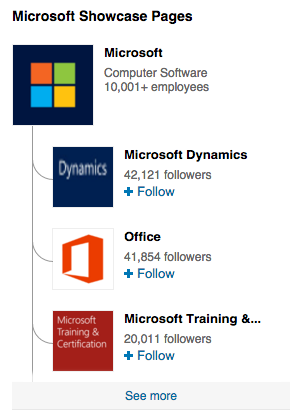
If your goal is to keep LinkedIn content relevant, personal, and interesting for specific buyer personas, Showcase Pages could be a great addition to your social media strategy. (If you want to learn more, here’s a beginner’s guide to Showcase Pages.)
Hidden Twitter Features
Download our free guide to Twitter here to learn how to grow your Twitter following.
12) Find out who’s unfollowed you.
Using http://ift.tt/dO5XA7, you can actually find out who’s unfollowed your Twitter account. This is especially useful for brands that are building their Twitter presence and experimenting with different approaches like voice, posting time, and so on. If you find a lot of important and relevant people are unfollowing you (such as influencers in your industry), then you know you need to change something in your Twitter strategy.
13) Mute users to stop seeing their tweets without having to unfollow them.
You just learned that you can figure out who’s unfollowed you. Knowing that, how do you remove certain users’ tweets from your Twitter feed without having to unfollow them? By “muting” their account. This can help your feed become more manageable without hurting anyone’s feelings.
To “mute” someone’s account: Simply go to their Twitter profile and click the gear icon next to the “Following” button, and choose “Mute” from the dropdown menu.
14) Analyze your tweets for free.
Almost everyone with a Twitter account now has free access to data about their timeline activity and followers with Twitter Analytics. The dashboard gives you data on impressions, engagement, link clicks, retweets, favorites, and replies. You can even export this data into an Excel file. (Learn more about Twitter Analytics here.)
15) Research and analyze a hashtag.
Using Topsy.com, you can research different hashtags and see whether users are using it, how often it’s being used over certain periods of time, and more. Some social media managers use it when choosing a hashtag for an upcoming event.
For example, here at HubSpot, our social media manager was once choosing between #watchitwednesday and #webinarwednesday. Topsy.com told her #watchitwednesday has historically been used by sports brands and the hip hop community — a very different audience than HubSpot’s. So she went with #webinarwednesday, which hadn’t been used in years and historically had a more business-oriented audience.
16) Tag people in Twitter photos.
Just like on Facebook, you can tag your photos on Twitter — and it doesn’t count against your 140 characters. Once you’ve uploaded a photo to your tweet, click “Who’s in this photo?” and tag up to 10 people.
17) Create a Twitter photo collage.
Choosing between two, three, or even four photos to tweet? Turns out you don’t really have to — you can include up to four individual photos in one tweet that automatically create a collage. Here’s an example of what it looks like with three photos:
If you haven’t seen @fenwaypark‘s instagram photos of #BigAirFenway, they’re INSANE: https://t.co/YKhLgw9rTV http://pic.twitter.com/kvbX7QSTPQ
— Lindsay Kolowich (@lkolo25)
February 11, 2016
This feature is available for both desktop and mobile, and it only involves a few, simple steps. Read this blog post to learn how to create Twitter photo collages.
18) See all the tweets you’ve Liked.
On your own Twitter page, you can see all the tweets you’ve ever Liked. (Everyone else can see these tweets, too.) You can use this as a bookmarking tool, or as a place to look back on tweets you liked on a rainy day.
Hidden Instagram Features
Download our free guide to Instagram here to learn how to use Instagram for business and marketing.
19) Switch among several Instagram accounts without logging out.
It took years for Instagram to add a feature where you can switch between separate accounts quickly and easily without having to manually log out and log back in. But — finally! — you can.
To add an account: Tap the “Options” button (a gear icon on iPhone/iPad and three dots on Android), scroll down, and choose “Add account.” From here, you’ll be prompted to log in to that account.
To switch among accounts: Once you have multiple accounts logged in on the app, you can switch between them by tapping your username at the top of the app. You can also add new accounts from this dropdown menu once you’ve added more than one.
20) Get notifications when certain people post.
If you never want to miss a post from your favorite people again, you’re in luck: Instagram lets you sign up for notifications every time specific users post a new photo.
To turn on notifications for a specific user: Go to that user’s profile and open up one of their posts. Then, click the three dots in the bottom right-hand corner of the post, and choose “Turn on post notifications” from the menu that appears.
(If you followed these instructions and still aren’t receiving notifications, double-check that you’ve allowed notifications from the Instagram app in your phone’s settings.)
21) Reorder the filters, and hide the ones you don’t use.
If you’re a regular Instagram user, you might have a few favorite filters you use all the time, and others you never use at all. To streamline the photo editing process, you can reorder the filters in your editing window and hide the ones you never use.
To reorder or hide filters: Upload a photo and begin editing it, as you would when editing a new post. When you get to the filters page, scroll to the very far right of your filters options and click “Manage.”
To reorder filters: Simply hold your finger down on the three grey lines on the far right of the filter you’d like to move, and drag it to reorder.
To hide filters: Deselect any filters you’d like to hide by tapping on the white check mark to the right of the filter.
When you’re done, exit the filter manager by tapping the “X” on the top right of your screen.
22) Adjust your settings to approve tagged photos before they show up in your profile.
When someone tags a photo or video of you on Instagram, it’ll automatically be added to your profile by default — unless you adjust your settings. If you’d rather approve tagged photos before they make it to your profile, you can change your settings so you manually select which tagged photos appear in your profile.
To add tags manually: Go to your own profile and click the “Options” button (a gear icon on iPhone/iPad and three dots on Android). Select “Add Manually.”
Once you choose to add photos to your profile manually, you’ll still be notified when someone tags you in a photo.
To manually add a tagged photo to your profile: Tap on the photo you were tagged in, then tap your username and select “Show on My Profile.” (If you’d rather not, simply choose “Hide from My Profile” instead.)
Read this blog post for a list of many more features and hacks on Instagram.
Hidden Pinterest Features
Download our free guide to Pinterest here to learn how to use Pinterest for business and marketing.
23) Use trackable links that aren’t marked as spam.
Pinterest tends to block shortened links, so if you’ve been adding tracking cookies to links and shortening them, then your pins are probably not linking anywhere. The good news is you don’t actually need to shorten your trackable links on Pinterest. Unlike social networks like Twitter, the link itself isn’t visible to users — it’s the pins themselves that are linked. So all you need to do is create that long trackable link, and you’re done. (Learn how here.)
24) See who’s pinning from your site.
Ever wondered which specific Pinterest users are pinning from your website? Here’s how: Copy and paste this link into your address bar: http://ift.tt/1yk0J31yourwebsite.com/. Then, change “yourwebsite.com” to your website’s address and press Enter. (For example, to see who’s pinning from HubSpot’s blogs, we’d type in http://ift.tt/1yk0J31blog.hubspot.com/.)
What other hidden features do you know about? Share them with us in the comments.
Editor’s Note: This post was originally published in January 2015 and has been updated for accuracy and comprehensiveness.
Unifying Your Database to Increase Event Registration: Essential Tips
Events are some of the biggest opportunities in media today. Just take a look at companies like O’Reilly and FastCompany that thrive on their abilities to unite crowds together. With a global, worldwide audience, media companies are in a great position to take their brand-building platform to the next level and introduce new revenue streams.
That’s where event marketing enters the picture: it’s the perfect complement to a relationship-focused inbound strategy because it unites a company’s most engaged audiences. Not to mention, as a media company, you have many different distribution opportunities at your disposal. Take a look at this list of 8 tips for getting your event trending on Twitter, as an example.
The beauty of event marketing, however, is also the media industry’s biggest challenge. Until recently, the space has been about reach, not in-depth connections. But more and more, both advertisers and readers are recognizing the benefits of personalized media experiences. While many publishers have massive lists and high website visitor counts, they have little depth of information available. Who exactly are your most engaged readers? This question is deceptively challenging to answer.
In addition to providing a new revenue stream, events also provide a valuable opportunity for media companies to streamline their data. Your event attendees are a subset of your most valuable audience, which means that you can use this group to kickstart any personalization or segmentation initiatives as they relate to your in-house marketing strategy and advertising bundles. Use this checklist to help ensure that your bases are covered:
Pre-Planning:
- Understand who you’re selling to. What are the psychographic characteristics of your most engaged audiences? What are their business pain points, and what made them reach out to your business in the first place?
- Understand their sales and decision cycles when they’re evaluating new products and services. Don’t expect them to be chained to an antiquated idea of a conversion funnel. Get to know how this group makes decisions so that you can piece together your most impactful value proposition to advertisers (and readers, too).
- Figure out any gaps in the market. When audiences register for a conference, you have a prime opportunity to collect additional details. What products and services are your most engaged audiences seeking out but missing? This market intelligence data can help you develop more effective advertising products—maybe even in tandem with your advertisers.
- Start building your segmentation strategy. Event marketing can be a great way to start building a segmentation strategy. Just think about the details that you’ve always wished you were collecting. Start piecing this puzzle together with your event registrations.
- Once you get some basic segmentation building blocks in place, start testing smart CTAs. As segmentation and personalization become more of a strategic priority for marketers, you’ll want to make sure that you have your bases covered. Understand who is visiting your website, opening your email, and re-engaging with your brand? Determining the characteristics of your most engaged audiences will be a great place to start.
Data Collection & Execution:
At this point in your marketing strategy, you’ll be ready to start making real changes to your marketing database. You’ll want to make sure that with your event registration process, you’re tracking data points that translate into action. Examples of variables that you’ll want to track in your database include:
- Website elements that move the needle in terms of sales. You can use this information to fine-tune your messaging. Take a look at the pages on your website that audiences are browsing, for instance, when deciding what sessions to attend at your event.
- Collect demographic data. Chances are, you already have this information in your analytics software. Try to understand who your audiences are.
- See how your database behaves off-email and off-website. Ad networks like Facebook and Twitter are more than just channels for pushing marketing messages. They’re also platforms to collect audience data and to see how your most engages lists interact with the world outside of your platform. Use this information to further strengthen your marketing database: long-term, you’ll deliver more focused, cross-platform value to advertisers as a result.
Extra Resources:
At the end of the day, paths forward will vary from company to company. What’s important is that all of these paths are tracked in one place. That’s why we’ve compiled a final list of resources to help you unify your database for your event marketing campaigns. Here are some helpful materials to help guide your search.
This refresher on ‘what is marketing automation’, so that you can always remember to keep the bigger picture of your engagement goals (and advertising campaigns) in check towards a bigger marketing purpose.
This collection of case studies, which break down the different ways that audiences are using inbound to build segmentation strategies and improve upon their lists. Check out write-ups from different industries (for added inspiration), or look at media-specific examples. Some highlights:
- See how The Press Enterprise created more impactful advertising products with inbound marketing and improved data base segmentations.
- Learn how Cadalyst, a B2B publisher, increased engagement and lead quality through inbound marketing.
For additional information on how a unified database can help you drive up ad revenue, check out our ebook Your Database Sucks.
Famous Last Words
When it comes to working with data, it can be very easy to end up in perpetual exploration mode. Don’t distract yourself, and always stay focused on the revenue goals that you want to achieve with your event registration strategy. Unifying your database will be an invaluable first step towards your biggest value proposition as a media company yet.
By starting small, you’ll be able to optimize the mechanics of your inbound strategy and find new ways to deliver value to advertisers. Let inbound help you achieve your big plans, and let event registrations be the place to start optimizing your database.
Don’t Have a Customer Loyalty Program? Here’s Why They’re Valuable [Infographic]
The first time a new customer buys something from you, it’s an exciting moment. But keeping them as a happy customer — and turning them into an advocate for your brand — takes more than just great service on that first sale. What are you going to do to get that customer to keep buying from you in the future?
One great way to garner happy returning customers is through customer loyalty programs. They’re not just great for your business: customers like them, too: 76% of consumers think that loyalty programs are a part of their relationship with brands — and 83% said loyalty programs make them more likely to continue doing business with certain companies.
What’s the true value of customer loyalty programs, and what are the right and wrong ways to do them?
Check out the infographic below from SelfStartr to learn useful statistics about the value of customer loyalty programs, as well as tips for how to use them to demonstrate both your customers’ loyalty to your business, and your business’ loyalty to your customers. (Read this blog post to for a list of seven customer loyalty programs that have actually added value.)

Snapchat Gains Momentum: New Research
Are you adding Snapchat to your social media marketing? Wondering what Snapchat’s audience responds to? In this article you’ll discover recent insights on Snapchat and how marketers can use the platform to reach targeted audiences with ads and other content. #1: Snapchat Nears Facebook Levels for Daily Video Views In January 2016, Bloomberg News reported […]
This post Snapchat Gains Momentum: New Research first appeared on .
– Your Guide to the Social Media Jungle
from http://ift.tt/1mH0ABV
via socialmediaexaminer
24 Conversion Rate Optimization Tools for Research, Feedback, Analytics & More
Believe it or not, driving traffic to your website — albeit challenging — isn’t enough to sustain your business. In an effort to truly leverage that investment in traffic, marketers must use conversion rate optimization, or CRO, to convince said traffic to complete a desired action.
In some cases, these optimization techniques might be as basic as changing the color of a CTA. In other cases, there’s a lot more that can be improved.
The list below outlines a ton of helpful tools for marketers who are looking to optimize their conversion rates. To help you understand which tools are used for what, we’ve also broken this list into a few major categories: lead capture tools, research tools, analytics tools, mouse tracking and heat maps, feedback tools, and experiment tools.
From high-level changes like landing page and email design and inspiration to in-depth insights on how your visitors navigate through your content, these tools will help you improve the performance of your site.
Ready? Let’s get converting …
Lead Capture Tools
These are the tools that you will use to capture more leads on your site, thus improving your CRO. While most conversion-focused content has a built-in form or CTA, these tools act as additional lead capture mechanisms to boost the number of leads that convert on your content.
1) HelloBar
Price: Free for Basic, $12/mo for Pro, $83/mo for Enterprise
HelloBar is a lead capture tool that allows you to add a popup form to your website to grow your email list, promote your social pages, showcase a sale, or other lead generation strategies. The free version allows you to create one modal that’ll be shown to every tenth visitor. However, premium plans offer more advanced call-to-action options.
2) SumoMe
Price: Free for Basic, $10/mo for Starter, $100/mo for Pro
SumoMe offers a suite of free tools to help you increase your site conversions. For lead capture, it offers a ‘Welcome Mat’ popup CTA, a ‘Smart Bar’ to increase email subscribers, a scroll-triggered box, and a ‘Contact Us’ form. Along with their Google Analytics research tools, the SumoMe suite helps you gain on-page insights and increase your email list.
3) Leadin
Price: Free!
This tool is like Google Analytics meets SumoMe meets a CRM. Sounds cool, right?
Leadin starts with a popup CTA, then syncs with your website’s existing forms to learn about your site visitors and their path through your pages. It gives you in-depth contact insights on both prospects and current contacts in your database. Leadin also pairs its contacts database with a dashboard that shows you on a high-level view of which marketing efforts are paying off and converting, and which ones aren’t.
Research Tools
Before you create any content, you’ll want to call upon these tools to draw inspiration and check out what other smart marketers have seen success with in the past.
4) BuzzSumo
Price: $99/mo for Pro, $299/mo for Agency, $999/mo for Enterprise
The best content is the content that gets shared and linked to the most, right? So what better way to gain preliminary insights than to compile all of the most shared content on your particular topic?
With BuzzSumo, all you have to do is enter the keyword or topic you’re focusing on and it will pull together all of the most shared and linked to content on that topic from the last day, week, month, or year. So if you’re trying to optimize the landing page for your new webinar on cat fashion, all you have to do is enter ‘cat fashion,’ and BuzzSumo will spit out all of the best articles, resources, videos, and more on the fascinating topic of cat couture.
You’ll then be able to dig in and explore some of the key elements that made these pages popular so that you can go back and incorporate them into your own content.
5) SimilarWeb
Price: $199/mo for Basic
Knowing where your website visitors came from can (and should) have a big impact on the type of content you create. With SimilarWeb, you can see where your traffic is coming from, which keywords are fueling your organic traffic, and what other sites are considered most similar to yours.
With this information, you’ll be able to optimize your content for your biggest traffic sources, and dig in to see what competitor sites and doing to drive conversions.
6) LandBook
Price: Free!
If you’re creating a landing page from scratch, getting started can be difficult. Luckily there’s LandBook: a free collection of the web’s best designed landing pages.
With LandBook, you can explore all of the ways that top companies are using elements like copy, positioning, layout, and design to drive conversions. Pick and choose your favorite elements from the LandBook database, and then incorporate them into your own landing page.
7) Really Good Emails
Price: Free!
Today, the average attention span of an adult is eight seconds, which means if you want to get your message across, you’d better know a thing or two about visual communication and design.
Don’t know a thing or two about either? Enter ReallyGoodEmails.
Similar to LandBook (see above), ReallyGoodEmails is a database of the web’s best designed emails from the world’s most innovative companies. Use this as a resource to see how you can design your email to get your message across in the best way possible, as fast as possible.
(Check out this post for even more resources where you can find great marketing examples.)
8) SubjectLine.com
Price: Free!
When sending email, the subject line can either make or break your performance. Before you choose which ones to ship, check them out using this awesome resource. SubjectLine.com has tested over three million subject lines and has a tool to evaluate your potential options. It gives a deliverability and marketing score, plus advice on improving.
Price: Free!
CoSchedule’s headline analyzer gives you a score of 1–100 to gauge how effective your title will be. The score is calculated based on word usage, grammar, vocabulary, which type of headline it is, as well as character and word count.
The tool also shows you what your headline looks in like Google search, in an email subject line, and more. While we still recommend that you always test your headlines, this tool serves as a great litmus test to find out generally how well your headline will perform.
Analytics Tools
These are the tools that you will use to measure and track your content’s performance. You can use them to fully analyze the dips, jumps, and fluctuations in your conversion rate.
10) Kissmetrics
Price: $200/mo for Starter, $700/mo for Basic, $2,000/mo for Pro
Kissmetrics is a complex tool that integrates with your email service provider to make it easy for you to analyze your audience and email them in specific cohorts. With Kissmetrics, you can learn the path that your customers have taken through your website, conduct A/B tests, build data sets (without SQL), and figure out the ROI from your campaigns.
11) Google Analytics
Price: Free for Basic, Contact Sales for Premium
Google Analytics is a free way to track your website visitors. You can see how long it takes visitors to bounce from your pages, if visitors complete goals from a certain path, and which sources are bringing people to your website. What’s great about Google Analytics is that is allows you to see which keywords people are searching to find your page, track which device people are searching for your website on, and uncover demographic data. However, there are no specific emails/contacts associated with your site visitors.
12) HubSpot Website Grader
Price: Free!
Website Grader is a great way to get a quick snapshot of a website’s overall performance. It gives insights on performance factors (including speed, page size, and page requests), mobile responsiveness and appearance, SEO (page titles, meta descriptions, headings, and site map), and security. From there, the tool devises a grade and provides suggestions on how to improve, which makes it easy to come up with some quick wins that’ll help you boost conversions.
Mouse Tracking & Heat Mapping Tools
These are the tools that you will use to see how people are interacting with your content, including how they scroll and where they click.
13) Hotjar
Price: Free for Basic, $29/mo for Pro, $89/mo for Business
Once you’ve nailed the basics like landing pages, CTAs, popups, and content, you’re ready for some more advanced conversion rate optimization.
Hotjar offers heat maps and screen recordings, which enable you to track how much of your page is being viewed, as well as how visitors are navigating your website.
14) Clicktale
Price: Pricing is based on solution (contact sales for a demo)
Clicktale is similar to Hotjar, as it also offers heat maps to help you determine the most valuable real estate on your pages, scroll depth (where is the “fold” on your website?), click tracking, and also link analysis.
Using these tools, you’ll have the information you need to organize content, CTAs, and page design in a way that makes the most sense for engagement.
15) Clicky
Price: Free for Basic, $9.99/mo for Pro, $14.99/mo for Pro Plus, $19.99/mo for Pro Platinum
Clicky gives you real time analytics on the visitors on your website. It tells you where people are accessing your site from, how long they’ve stayed on each page, and how many visitors are actively online. The resource also offers heat maps and scroll tracking.
16) Crazy Egg
Price: $9/mo for Basic, $19/mo for Standard, $49/mo for Plus, $99/mo for Pro
Crazy Egg offers a full suite of heat maps and click tracking, with the additional functionality of being able to segment clicks by source and evaluate link effectiveness. The basic package is fairly inexpensive and gives great insights on how effective each page of your website is.
17) Heatmap.me
Price: Free for Basic, $100/mo for Premium, $200/mo for Enterprise
Heatmap.me is a great free option for anyone looking to start exploring heat maps, responsive web design tests, and real-time page statistics. Heatmap.me can also track dynamic elements on your site in the heat map tool — think: slider bars, photo galleries, and other interactive sections.
Feedback Tools
These are the tools that you will use to engage and receive feedback from your visitors. Feedback tools include surveys, polls, messaging, and user testing programs.
18) Intercom
Price: $49/mo for Basic (in each product- Acquire, Engage, Learn, Support) + package plans
You can use chat tools to both acquire new customers and chat with existing customers. As a CRO tool, you can use Intercom to communicate with website prospects to learn if they need additional help, find out how their experience is going, and learn how you can improve. It also allows you to track leads and use a shared inbox with your team.
19) Qualaroo
Price: $63/mo for Small Business, $199/mo for Professional, $499/mo for Enterprise
Using chat windows doesn’t just have to be for live chat. Qualaroo offers popups to collect live feedback from website viewers. With this information, you can tailor a site experience, target certain customers, and learn what issues people may be experiencing. This tool is extremely helpful at all stages of the funnel, and is especially utilized in the ecommerce space.

20) SurveyMonkey
Price: Free for Basic, $26/mo for Select (month to month), $25/mo for Gold (annual), $85/mo for Platinum
SurveyMonkey has a free option for those just starting out with survey research. You can use this tool to learn demographic information, discover which types of content your prospects and blog subscribers prefer, and get product feedback.

21) Five Second Test
Price: Free for Basic, $99/mo for Pro
UsabilityHub has an awesome community-fueled tool called 5 Second Test that allows users to upload a product, app experience, or design and have the community test it out. You get responses about recall, general feedback, and UI thoughts. This is a great way to get opinions, and they also offer click tests, preference tests, question tests, and navflow tests for other website and UI questions.
Experiment Tools
These are the tools that you will use to manage, plan, and execute A/B and multivariate tests. Some of these tools will help you turn ideas into experiments, while others will help you create the variations and run the actual tests on your site.
22) Optimizely
Price: Free for Starter, $49/mo for Pay As You Go
Testing is hard: It’s hard to come up with a good control group, find a large sample, and determine if your experiment is statistically significant. Luckily, Optimizely helps a lot with all of that … and then some. With Optimizely, you conduct tests across all devices and platforms, then figure out if it is significant or not. The software offers A/B, multiple page, and multivariate tests.
23) ABTesting.net
Price: Free!
Act-On software offers a free A/B testing tool that walks you through the process of trying out your first A/B test of a site page. It helps explain the basics of A/B testing, and allows you to confidently publish your winning variation (if your content management system doesn’t already include an A/B testing tool).
24) Effective Experiments
Price: Free Trial + Contact Sales for Pricing
Effective Experiments is a concise way to track all of your experiments. If you have tons of Excel spreadsheets cross-referenced with Google Analytics data, you are probably going crazy trying to keep track of everything. This tool puts it all in one place and helps you determine statistical significance.
Hopefully you’re armed and ready to start improving conversion rates across your website and marketing efforts. These tools range from free and for beginners to robust and more advanced. Feel out which options seem right for you and soon you’ll be upgrading to the more complex tools when you’ve mastered the basics.
What are your favorite CRO tools? Share anything we missed in the comments section below!
Apple posts public letter in response to FBI iPhone unlock demand: ‘an unprecedented step which threatens the security of our customers’
Apple has just posted an open letter in response to the FBI unlock request for iPhone data in a San Bernardino court case, signed by Tim Cook. Apple says that the FBI court order is an unprecedented step which threatens the security of its customers. With ‘implications far beyond the legal case at hand’ at stake, Apple has posted its public response to start communication with regard to this issue.
Apple says it has complied with valid warrants in regard to the San Bernardino case, but now the FBI has gone too far in Cook’s eyes … asking Apple to create something ‘ too dangerous to create. They have asked us to build a backdoor to the iPhone.’
Cook goes on to say that the court wants Apple to create a special version of the iPhone operating system, which would ignore many key security features. The letter then indicates that this order is unprecedented in history: ‘We can find no precedent for an American company being forced to expose its customers to a greater risk of attack.’
The implications of the government’s demands are chilling. If the government can use the All Writs Act to make it easier to unlock your iPhone, it would have the power to reach into anyone’s device to capture their data. The government could extend this breach of privacy and demand that Apple build surveillance software to intercept your messages, access your health records or financial data, track your location, or even access your phone’s microphone or camera without your knowledge.
According to the letter, the government wants Apple to create a special OS just for this case. Apple says there is no way to guarantee that this custom code will not be used for other cases and that making it would threaten user privacy and set a dangerous precedent for future legal cases. Cook says that the government is effectively asking Apple to hack its own devices and ‘undermine decades of security enhancements that protect our customers’.
Cook explains the FBI is making these demands through the All Writs Act. Right now, the FBI wants Apple to make special iPhone software to enable PIN brute-forcing. But Cook says it could go further, using the same legal justification to get access to messages, health records or even access iPhone camera and microphone without user knowledge.
The letter concludes with Cook claiming the FBI demands compromises freedoms and liberties that ‘the government is meant to protect’.
Filed under: AAPL Company, iOS, iOS Devices, Tech Industry Tagged: FBI, privacy, Security
For more news on AAPL Company, iOS Devices, and Tech Industry continue reading at 9to5Mac.
What do you think? Discuss “Apple posts public letter in response to FBI iPhone unlock demand: ‘an unprecedented step which threatens the security of our customers’” with our community.
Apple stops iPhone 4s & 5c sales in India as it raises ASP with iPhone 5s
As Apple continues to look to India as a market for extraordinary growth, it has now stopped selling the iPhone 4s and iPhone 5c in the country in an effort to raise the average selling prices of its devices and increase profits. The Economic Times reports that Apple made the decision due to its profitability and average selling price being “under strain” in India.
Apple had been selling the iPhone 4s in India for as little as Rs 12,000 ($175 USD), while the iPhone 5c had been available for Rs 20,000 ($292 USD). Now that the company has stopped selling those devices, however, the iPhone 5s is the most affordable device it sells in India at Rs 24,000. Apple dramatically lowered the price of the iPhone 5s in India to accelerate growth last December. This means that Apple no longer sells any smartphones in sub Rs 20,000 market, which is seeing the fastest growth in India. Over time, we should expect to see the iPhone 5se launch in India at around the price of the iPhone 5s, though.
During a company-wide town hall earlier this year, Apple CEO Tim Cook explained that the company believes people will pay more for a better and more capable smartphone, even in countries like India. Essentially, Cook said that Apple’s research proves that there’s no reason to release lower-cost, less feature-packed iPhones in countries like India and China when consumers are willing to pay more to get the latest technology, thus giving Apple higher profit margins and a higher average selling price.
India has been a huge area of interest for Apple over the past year. The company is moving towards opening its own retail stores in the country and is planning a new development center there, as well. During the company’s Q1 2016 earnings call last month, Cook noted that iPhone sales grew 76 percent and revenue grew 38 percent in India during the quarter, signaling the reasoning for Apple’s heightened focus on the country.
Filed under: iOS Devices Tagged: Apple, iPhone 4S, iPhone 5C, iPhone 5s
Visit 9to5Mac to find more special coverage of iOS Devices, Apple, and iPhone 5s.
What do you think? Discuss “Apple stops iPhone 4s & 5c sales in India as it raises ASP with iPhone 5s” with our community.
U.S. judge orders Apple to help FBI access data on San Bernardino gunman’s iPhone 5c
A United States magistrate judge in California has today directed that Apple must help the FBI break into the cell phone of the one go the men behind the fatal attacks in San Bernardino last December, NBC News reports. Last week, FBI Director James Comey complained that the government couldn’t break the encryption on the iPhone used by one of the gunmen.
At the time, it was unclear if the gunman used an iPhone or Android device, but today it has been confirmed that it was the former of the two and is an iPhone 5c. “We still have one of those killers’ phones that we haven’t been able to open. It has been two months and we are still working on it,” Comey said at the time. “I don’t want a back door. I would like people to comply with court orders,” he added.
“Apple has the exclusive technical means which would assist the government in completing its search, but has declined to provide that assistance voluntarily,” the U.S. Attorney’s Office in Los Angeles said in a 40-page filing today.
The filing goes on to say that Apple has to provide “reasonable technical assistance” to recover the gunman’s data and that it has five days to reply if it feels that doing so would be “unreasonably burdensome.”
In the filing, the court presents several methods that could be taken to access the data on the phone and in the gunman’s iCloud account. These methods include disabling the auto-erase function and allowing the FBI to attempt an unlimited number of passcodes to unlock the phone
Despite what the California judge says, Apple still likely won’t be able to access the device’s data. Last October, Apple told a federal judge that it has no way of accessing data on an iPhone that is locked with a passcode and running iOS 8 or later. Apple’s statement at the time came as a response to a request from the U.S. Justice Department asking if the company would help authorities access data on a seized iPhone.
With that said however, the filing claims that Apple has the “exclusive technical means” to allow the FBI to access the data on the smartphone:
“Despite … a warrant authorizing the search,” said prosecutors, “the government has been unable to complete the search because it cannot access the iPhone’s encrypted content. Apple has the exclusive technical means which would assist the government in completing its search, but has declined to provide that assistance voluntarily.”
Apple has long stood firm on its stance to not to give access to user data. Tim Cook has repeatedly spoken out against software backdoors.
Filed under: iOS Devices Tagged: Apple, Government, iPhone, iPhone 5C, Security
For more information about iOS Devices, Apple, and iPhone continue reading at 9to5Mac.
What do you think? Discuss “U.S. judge orders Apple to help FBI access data on San Bernardino gunman’s iPhone 5c” with our community.
Apple begins shipping replacement USB-C cables to Retina MacBook owners
Last week, Apple launched a USB-C cable replacement program, saying that some cables shipped with the 12-inch Retina MacBook were faulty. Thea faulty adapters would result in the MacBook not charging or charging unreliably. Now, the first MacBook customers have started receiving their replacement cables, according to a post on Reddit and Twitter. The user did not request the cable from Apple.
The user says that his USB-C replacement cable was sent via FedEx and included a note from Apple explaining the situation. “A limited number of Apple USB-C charge cables included with MacBook computers may fail due to a design issue,” the note reads. The new cable is identical to the old, aside from the fact that it has been slightly tweaked to prevent the said design issue.
To tell if your USB-C charger is affected, the flawed cable lacks a serial number next to the ‘Designed by Apple in California Assembled in China’ text, while the redesigned cables are branded with a serial number. Look at the graphic below to double-check your cable.
If you provided a product registration process or Apple Online Store purchase, Apple will send you a new cable by the end of February. Otherwise, you’ll have to contact Apple’s support to request a new cable. Specific details on how to do that are available on Apple’s site here.
Let us know when you receive your USB-C replacement cable in the comments.
Filed under: Mac Tagged: 12-inch, Apple, MacBook, Retina MacBook, USB-C
For more information about Apple, Mac, and MacBook continue reading at 9to5Mac.
What do you think? Discuss “Apple begins shipping replacement USB-C cables to Retina MacBook owners” with our community.
Outspoken Apple investor Carl Icahn dumps 7M shares of AAPL stock for $750M
Photo via: Huffington Post
Activist investor Carl Icahn, who on several occasions in the past has published open letters offering advice to Apple on stock related issues, has reportedly cut his stake in the company. CNBC reports that a filing discovered today shows Icahn has cut his shares by approximately 7 million, valued at approximately $750M, to 45.7 million shares as of December 31st, 2015. But it’s unclear exactly the motivation behind the move by Icahn, who has long been an outspoken advocate of the company and its stock performance.
Icahn has been quite vocal about Apple as he continued to increase his stake in the company up until now. The main issue at the heart of Icahn’s prodding of Apple and CEO Tim Cook has been regarding shareholder buybacks and related initiatives that Apple has put more of a focus on in recent years.
As for February last year, Icahn was one of the company’s ten largest shareholders with around $6.5B worth of stock and was publicly boasting about Apple being undervalued as it hit its highest market cap ever. Following the milestone for Apple, Icahn said he had “gained further confidence” in Apple and that he believed “the market should value Apple at $216 per share.” Icahn continued, “This is why we continue to own approximately 53 million shares worth $6.5 billion, and why we have not sold a single share.”
On December 31st, 2015, the day Icahn reportedly reduced his stake in Apple by 7 million shares, the company hit a high of 107.03 per share. It has declined since– around 15%– and today hit a high of 96.85 per share. That’s an almost $100M difference in the stock value on those 7 million shares on the day Icahn sold versus today.
Filed under: iOS Devices
For more information about iOS Devices continue reading at 9to5Mac.
What do you think? Discuss “Outspoken Apple investor Carl Icahn dumps 7M shares of AAPL stock for $750M” with our community.
Entire March issue of Bon Appétit magazine shot exclusively on iPhones
Popular foodie magazine Bon Appétit today revealed that it shot all of the images for its March print issue with an iPhone. The team behind the magazine detailed the process in a post on its website, explaining that instead of using traditional DSLRs like they normally do for print issues, they used iPhones for all of the photography.
Each photographer gave their respective thoughts on the process during an interview, with many of them expressing shock when the decision was revealed to them. Some of them even had to upgrade from older generation iPhones to something more modern. “I needed to upgrade from an iPhone 5 to a 6S, and I had never used anything like it to shoot something for print, so it wasn’t just me putting faith in the phone, but also in the magazine’s idea,” photographer Matt Haas said.
Several of the photographers noted that ditching their traditional camera gear made for a much more liberating experience. Some of them purchased accessories for the iPhone camera, including various lenses, tripod adapters, and even selfie sticks.
One of the photographers, Daymon Gardner, had the following to say on the experience:
“We found an adapter that would click the iPhone onto a tripod. Then, because the iPhone lens is approximately equivalent to a 35 mm lens on a DSLR, we bought a few accessory lenses, one of which made the camera more like a normal lens of around 50 mm. Another was a wide-angle and the third was so good for close-up shots, it would’ve been better suited for taking photos of ants.”
Regarding the overall experience shooting with an iPhone compared to a DSLR, Gardner noted that it kept the entire process “really conversational and loose”. Likewise, Michael Graydon expressed that shooting with an iPhone is the ultimate release of the DSLR associated ego:
“I’ve been a photographer for about 20 years, and I’ve been through 8×10 cameras, film—you name it. In the past, the bigger and scarier-looking the camera you pulled out, the more intense and professional you looked. Now, you have to let go of the ego you attach to the tool, and the iPhone is the ultimate expression of that.”
While the photographers noted differing opinions on the process in the end, they generally agreed that the iPhone has a more than respectable camera. “I can’t quite accomplish the depth of field that I want, even when I do the thing where you touch the screen on the subject and move the slider up,” Gardner noted. “I still prefer to shoot with my Canon, but Mardi Gras just started here in New Orleans, and I’ll definitely have my iPhone with me.”
Haas expressed similar sentiments. “It’s not like I’m going to start doing all my projects with my cell phone, but now I definitely use it more for Instagram,” he said.
Apple has long touted the camera capabilities of the iPhone. The company launched an award-winning ad campaign focused on the iPhone 6 and iPhone 6 Plus camera, and even brought the campaign back recently for the iPhone 6s. The iPhone 7 is excepted to take Apple even further ahead in the camera space, perhaps even incorporating a dual-camera setup.
Filed under: iOS Devices Tagged: Camera, iPhone, iPhone 6, iPhone 6s
Visit 9to5Mac to find more special coverage of iOS Devices, iPhone, and iPhone 6.
What do you think? Discuss “Entire March issue of Bon Appétit magazine shot exclusively on iPhones” with our community.
Hands-on: Real Racing 3 with split-screen multiplayer lands on the new Apple TV [Video]
Real Racing 3 has been around for several years on iOS, but yesterday’s update marked its debut appearance on tvOS and the fourth generation Apple TV. This isn’t the first time that the Real Racing franchise has been associated with Apple’s set top box, as previous versions allowed you to use AirPlay to stream races to the Apple TV while using an iOS device as a controller. Check out our hands-on video with the new racer below:
That was a nice nod to the future, but of course, nothing beats the experience of native code running directly on the Apple TV. Yesterday’s update of Real Racing 3 marked the beginning of a new journey and, as you might imagine given the game’s history, the graphics are impressive. Take a look at our hands-on video walkthrough for the details.
As you can see from the video, Real Racing 3 features some of the best graphics available on the Apple TV thus far. True, Apple’s fourth-gen box packs much more of a punch than previous iterations, but it’s still impressive to see such graphical prowess made possible by a small fanless puck that you can grasp in one hand.
Sadly, since EA has taken over the reigns, Real Racing 3 remains inundated with in-app purchases that look to impede progress whenever possible. It’s playable, but the artificial barriers employed can be off-putting to say the least.
More concerning, though, is the presence of frequent frame rate dips, especially when more than a few cars are on screen at once. At first, I thought that might be the result of resources downloading in the background, but the frame rate problems persisted throughout my entire test drive.
Still, Real Racing 3 can be fun to play, and it even features the ability to enjoy true local split-screen multiplayer with up to four participants. The nice thing about the multiplayer is that you can use spare iPhones and iPads as controllers, in addition to the Siri Remote and third-party controllers. I found that I preferred the motion controls made possible by the Siri Remote, but it’s nice to have the option of going the traditional route as well.
Gamers can also save progress to the cloud, and pick up where they left off on an iOS device. That’s pretty handy, especially if you plan on venturing through the title’s new Daytona 500 features, which includes the Daytona International Speedway and racing legends like Matt Kenseth and Kevin Harvick.
You can download Real Racing 3 for free and begin playing on your Apple TV, iPhone, or iPad today.
Filed under: Apple TV, Apps Tagged: Apple TV, Apple TV apps, Apple TV games, Apps, EA, Games, racing, racing games, Real Racing 3, tvOS
Visit 9to5Mac to find more special coverage of Apps, Apple TV, and Apps.
What do you think? Discuss “Hands-on: Real Racing 3 with split-screen multiplayer lands on the new Apple TV [Video]” with our community.
1Password’s new family plan lets multiple users easily share passwords
1Password, the popular service that allows users to securely store their various passwords, has today announced a new plan for families that makes it considerably more affordable. In a blog post, AgileBits, the company behind the service, detailed 1Password for Families, explaining that the service costs $5 per month for a family of five, while additional people can be added for $1 per month.
1Password for Families allows each family member to have their own private individual 1Password account, but also includes a shared stream of passwords that all members of the family can access. For instance, families that share a Netflix account can store the login information in the shared 1Password for Families account. Wi-Fi logins are another example of a piece of data that would really be useful for families.
The owner of the 1Password for Families account has access to an Admin Console that allows people to be invited to the family, as well as offering tools to manage which family members get to see what information.
As part of 1Password for Families, users get access all of the 1Password apps. The app is available for Mac, Windows, iOS, and Android.
To celebrate the launch of 1Password for Families, AgileBits is offering a handful of early-adopter added perks. If you sign up by March 21st, you’ll get $10 credited to your account (so two free months), 2GB of secure storage for your documents, and the ability to have 7 family members on a 5 person account.
1Password is available for free in the App Store and the first month of use is free. 1Password for Families is an interesting move on the part of AgileBits to get 1Password into the hands of more people. Right now, 1Password is hugely popular among the tech community, but adoption among the general public could pick up considerably with 1Password for Families.
Filed under: Apps Tagged: 1Password, 1Password for Families, AgileBits, app, family plan, Password Management, passwords
Check out 9to5Mac for more breaking coverage of Apps, app, and 1Password.
What do you think? Discuss “1Password’s new family plan lets multiple users easily share passwords” with our community.
Marketing Automation: From Shiny Marketing Gadget to Powerful Sales Tool
25 tips to transform your marketing automation from lead scoring and nurturing to a revenue growth toolset beyond capturing and nurturing leads.
You’re probably familiar with the typical implementation of marketing automation. You might even be part of the 19% of B2B companies which SalesStaff recently reported use the tools – and if so, perhaps you’re among the elite 37% of that group which they found actually leveraged some of the personalization capability which is at the core of today’s marketing automation.
Most commonly, marketing automation is used to automate steps in the process of converting website visitors to contacts and nurturing contacts to leads until they’re ready to be handed off to sales. This allows companies to scale lead generation and nurturing – particularly the “early stage” leads that are common among internet enabled buyers. Online forms, workflows, automated emails, analytics, activity tracking and lead scoring are the tools often used for this.
In more advanced cases, information which is collected directly (e.g. through form responses), indirectly (e.g. through IP address) and inferred (e.g. by observing frequency and duration of visits and types of content being consumed) is used to customize the contact’s experience.
Beyond simple personalization, “smart” content allows every web page and email experience to be customized according to a prospect’s persona, stage in buying journey, specific interests and degree of engagement. Essentially any attribute which can be identified, observed or calculated can be used to customize the visitors experience. If/then branching logic can further refine the automation to contextually match the buyer’s experience to their requirements and preferences.
The Sales Hand-off
The creators and early adopters of marketing automation were naturally tech savvy companies. Their employees were comfortable multi-screening and accustomed to accessing and digging into cloud data, social media profiles and other online resources.
So when a lead reached a sales ready stage, the sales rep to whom it was assigned not only had access to the prospects history, behaviors and insights, but they dug into the details and incorporated them into their sales approach. Needless to say, sales was more effective when reps were informed and respectful of the knowledge which prospects had acquired through their research.
Now ‘mainstream’, marketing automation is attracting the next wave of adopters. These are typically “marketing” folks who recognize the potential of marketing automation to help them improve and scale lead generation. But organizational structure, even echoed in the name of the tool itself, means that the valuable insights marketing collects generally lie fallow beyond the sales handoff.
In many companies the sales reps to whom the leads are assigned either don’t have access to the extensive data marketing has accumulated, or aren’t expected/haven’t been coached on how to leverage them in their sales follow up. As a result, too often a hard won and carefully nurtured lead is squandered through clumsy sales contact. Sometimes it’s not even style, but simple mechanics.
Docurated’s recent report on the state of sales enablement suggests that sales reps often don’t even know where to find the right content to help advance and close deals, and “that they only think about enablement when they absolutely have to.”
These challenges are widely recognized, and organizations have worked to bridge the sales & marketing silos. SLAs between the groups help. Notable successes, though, are found among companies where tech savvy inside sales teams manage the leads as they transition from marketing to sales. That’s a pretty small subset of B2B companies.
Isn’t there a way to improve the process for many more?
The answer is “yes.” But the tools to do so are hiding behind a deceptive name.
Marketing automation has potential to help well beyond the traditional limits of the marketing department’s mandate. Doing so will not only improve top line results, but substantially improve sales & marketing alignment.
Sounds like an implausibly rosy scenario? Let’s dig into the details of how you can make it work. To do that we’ll start with a premise – that if every sales rep had the access and perspective to leverage marketing’s accumulated insights, they’d be far more effective.
Yet we know that sometimes they don’t, and other times they’re resistant to spending the time required to tease those insights from marketing’s data. Why just wish? Using automation you can be a resource, figuratively sitting on the rep’s shoulder, whispering hints as they work a lead. You should:
- proactively push those insights out along with the details in a lead notification
- provide contextual suggestions
- customize notifications to sales management to facilitate appropriate coaching
- extend the process to sales channel when appropriate
All of this is entirely within the capability of the marketing automation tool you’re already running or considering. Obviously the devil is always in the details, and your product/service, market, target buyers, sales reps and other details will impact how you can execute this. But keep in mind that ‘headtrash’ will be a greater hurdle than specific idiosyncrasies of your industry!
To get you thinking about what’s possible, here’s a list of 25 examples to help you unlock the latent potential of the tools you already have.
Include the following info with the lead notification to the rep:
- What search term they found you with (if the keywords are unknown, extrapolate from the words for which their entry page ranks)
- What buyer persona you believe they are
- What buying journey they will likely follow
- Which product pages they viewed (to provide some bracket context)
- A list of content they’ve downloaded/read (not just the first and/or last)
Provide the following insights:
- Based on the persona and journey, remind the rep of the kinds of questions the prospect is likely wrestling with
- Provide bullet points of common decision criteria for that persona
- Explain where you infer they are in their buying journey, what the next steps are likely to be, and how long it’s likely to be before they’re ready to order
- Highlight the business case that is likely to resonate with the lead (vs. features)
- Identify other buying roles that will likely be involved in the process based on journey research
Suggest the following to help the rep engage naturally:
- Provides links to email templates that have been developed for buyers of this type at this stage
- Recommend case studies, webinars, documents and other content that match the persona and stage of journey – and suggest how the rep could introduce it and why the prospect might be interested
- List questions for the rep to ask (including how to sequence and phrase them) that sales management knows will help to advance discussions – and provide interpretive guidance for processing the prospect’s responses
- Highlight how the current prospect situation maps against the company’s “sales process”
- What next steps they might reasonably expect to help them create a series of “yeses”
Engage sales management with these approaches:
- Loop the sales manager in with a digest of key details (e.g. industry, persona, journey stage, business size & product) so they can easily recall other examples (won and lost) to provide coaching tips
- Based on rep strengths and weaknesses, involve management based on criteria (e.g. a decision stage lead with a rep that struggles to close vs. an awareness lead with a rep that’s great at discovery) to optimize management resources
- Provide more frequent/extensive detail for target accounts/industries
- Notify sales management when certain thresholds of unread/unclicked internal emails are hit for specific reps (ignoring the coaching and suggestions)
- Update management on average duration between when you feed reps info and when they actually log some activity in the contact record
Keep the rep engaged:
- In addition to standard site revisit alerts, provide specific prompts for key behaviors (e.g. visit to pricing page, multiple visits over a short duration)
- Prompt the rep to “follow up” but provide contextually relevant suggestions so that they don’t simply revert to lame “touching base” approaches
- As new content is available that matches persona/journey, prompt the rep to share it specifically for that lead (beyond just general FYI)
- Include links to the contact CRM record in every mail so they can easily jump in to review
- Use text message notifications to get their attention when priority is high
Start…and then improve
Caught you….you’re rattling off all the reasons this won’t work in your case. Maybe you’re right. But what’s the downside? Compared to empowered sales, increased revenue and improved sales & marketing alignment?
The reality is that field sales reps in traditional industries are busy, stubborn and resistant to change. So you have a choice: to reinforce stereotypes and compromise company performance by banging the drum of CRM adoption and sales enablement engagement; or push the dots really close together for them in a way that’s intuitive and welcomed by most.
Great companies create frameworks which empower smart, motivated employees. Marketing automation provides an often unrecognized way to naturally anchor field sales activity to the framework that you’ve built and refined.
Like so many aspects of business, including the initial adoption of digital marketing, your success in applying technology to your top line growth is really only limited by your organizational creativity.
Get creative with your “top line growth” automation, then continuously measure and adjust as you already do on the marketing side.
Verizon promo offering free 24GB/year, AT&T pushing BOGO iPhone deal
Verizon today has announced the return of its popular promo that offers users an extra 24GB of data per year for free. The deal is available to users who activate or upgrade to a new phone with a device payment plan on XL or larger Verizon agreements. Verizon’s XL plan starts at $80 per month with 12GB of data (14GB if you include the promo), while the XXL plan runs $100 per month for 18GB of data (20GB with the promo).
Every line on the account is eligible for the deal, which means that if you have four lines on your account, you’ll be getting an extra 96GB of data per year. Verizon touts that the promo runs “for life,” so there’s no need to worry about the carrier abruptly ending the deal and having to worry about managing with less data every month.
The added data is applied on a per-month basis, so you’ll get 2GB of extra usage per line every month. The data simply goes into the pool of data that you already get for your account, meaning that all devices can use the added data.
Whether you’re an existing customer or switching over from another provider with a poor network, you’ll receive 24 GB of bonus data every year when you upgrade or activate a new phone with device payment on XL or larger Verizon Plans. Available for a limited time, the 24 GB of bonus data is added as 2 GB of monthly bonus data and is shareable.
Furthermore, AT&T announced this week that it is offering up to $650 in credits per line to help you switch from a competing carrier. The company details the process in its blog post, noting that you have to switch your line to AT&T, trade-in your current smartphone, and purchase a new one on AT&T Next. Verizon announced a similar deal back in December.
AT&T also continues to push that it is offering a buy-one-get-one-free promo for iPhone purchases. For a limited time, customers who purchase one iPhone can get another one free when adding a second line. The company originally revealed this deal in December, but only now has it started advertising that the iPhone is eligible.
Filed under: iOS Devices, Tips and Tricks Tagged: AT&T, deal, promo, Verizon
Visit 9to5Mac to find more special coverage of iOS Devices, Tips and Tricks, and AT&T.
What do you think? Discuss “Verizon promo offering free 24GB/year, AT&T pushing BOGO iPhone deal” with our community.
9to5Toys Lunch Break: iPhone 6/s Battery Case $15, Nomad Apple Watch Stand $36, Leo’s Fortune for iOS $1, more
Keep up with the best gear and deals on the web by signing up for the 9to5Toys Newsletter. Also, be sure to check us out on: Twitter, RSS Feed, Facebook, Google+ and Safari push notifications.
TODAY’S CAN’T MISS DEALS:
Bestek Apple-certified MFi 3,100mAh 4.7 Inch iPhone 6/6s Battery Case w/2 Color Frames: $15 Prime Shipped
Nomad Apple Watch accessories: aluminum stand from $36 (Reg. $50), Pod Pro 6000mAh battery $60 (Reg. $80), more
Leo’s Fortune on iOS is now available for just $1 (Reg. $5)
Apple Deals:
The latest iPad Pro deal nets you a 128GB Wi-Fi model for the price of a 32GB: $799 shipped (Reg. $949)
Apple iPad Air Wi-Fi 16GB $299 or 64GB $349 shipped (Reg. $399/$449)
Apple iPhone 6s/Plus (Verizon + Sprint) on-contract pricing gets slashed by $200, 64GB now just $100
Many Apple Watch models now $100 off: 38mm Sport $249 w/ free shipping (Reg. $349), more
App Store Free App of the Week: The Mesh puzzler goes free for the first time (Reg. $2)
Download Lara Croft Go, Apple’s Game of the Year 2015, for just $2 (Reg. $5)
Heroes Reborn: Enigma for iOS goes free for the first time as IGN’s Game of the Month (Reg. $5)
Final Fantasy IX is now available for download on iOS/Android
The Martian official iOS/Apple Watch game goes free (up to $3 value)
Apple offering popular iOS video editing app ‘Videoshop’ for free ($2 value)
MORE NEW GEAR FROM TODAY:
USB Power: KMASHI 20,000mAh Quick Charge 2.0 Battery $25 (Reg. $40), 10-ft. Braided MFi Lightning Cable $11, more
- Daily Deals: D-Link AV2000 Gigabit Powerline Starter Kit $60, more
- Aukey 2-in-1 Mini Clip-on SmartPhone Camera Lens Kit $9 Prime shipped (Reg. $15)
- Warhammer 40,000 Deathwatch Tyranid Invasion for iOS goes free for the first time (Reg. $2)
- Games/Apps: Street Fighter V (Prime only) $48, God of War 3 Remaster $20, iOS freebies, more
- Media: Straight Outta Compton HD download $10, Weeds Complete Collection $45, much more
- The popular ad-free version of the Trivia Crack app for Android drops to just $0.10 (Reg. $3)
MORE DEALS STILL ALIVE:
Wrap your iPhone 6/s in this minimal leather wallet case for $15 Prime shipped (Reg. $25), more
Apple iPad Air 2 Smart Cover in 5 colors $15 shipped (Reg. $35), Smart Case $20 shipped (Reg. $70)
iPhone 6/s/Plus Cases from $3 Prime shipped: Dual-Layer w/ Screen Protector $8, more
Beats by Dr. Dre Solo 2 On-Ear Headphones now half off: $100 w/ free shipping (Reg. $200)
Beats by Dr. Dre Solo2 Wireless Headphones Active Collection: $230 (Reg. $300)
Beats Studio 2.0 Over-Ear headphones (multiple colors) $150 (Orig. $300)
- AirPrint 3-in-1 Wireless Color Printers: Epson InkJet $150 (Reg. $200), more
- Prime: 3 months/books of Audible for free ($45 value, new Audible members only)
- Audio-Technica ATH-M50x + FiiO A3 Portable Amp $180 shipped (up to $229 value)
- Enjoy the best of Google Cardboard Virtual Reality Headset: $25 (Orig. $30, CA Tax only)
- Pad & Quill’s leather Lowry Cuff Apple Watch band offers Hermès style for $104 (Reg. $130)
- SanDisk 64GB Wi-Fi Flash Drive for iOS/Android: $35 Prime shipped (Orig. $60), more
- Mackie CR4 speakers (pair) + AT ATH-M40x headphones $170 ($240+ value)
- Google Play Music 1-month subscription w/ YouTube Red access: $5 (Reg. $10)
- Amazon offers rare 25% discount on Kindle Unlimited : 6-months $45 (Reg. $60), more
- Sharp 50-inch 1080p 3x HDMI Smart LED HDTV w/ built-in Roku: $380 (Reg. $500)
- Everything you need to know to get the most out of Amazon’s Prime Pantry service
- RAVPower USB-C/A Charger $38 (Reg. $56), uNu w/ Lightning Cable $12 (Reg. $20)
- QNAP 4-Bay NAS w/ AirPlay: $354 shipped (Orig. $480)
- Microsoft’s new Quantum Break Cirrus White Xbox One Bundle, pre-order now
- Luminid Touch light-up charging cable: $10 (Orig. $20, CA Tax only)
- Get your engines ready: Rocket League is coming to Xbox One next week
- Watch ‘Southpaw’ starring Jake Gyllenhaal & Forest Whitaker for just $0.99 (Reg. $5)
- SizeUp for Mac offers instant window control via keyboard shortcuts: $5 (Orig. $13)
- Sam’s Club Membership + $20 gift card + $21 food credits for $45 ($180 value)
NEW PRODUCTS & MORE:
The new Assault on Hoth LEGO Star Wars kit recreates every detail with flawless execution
The latest Monopoly goes digital with an ATM to manage properties & bank accounts
- Square Enix announces Hitman Go: Definitive Edition for PS4, Vita and PC
- Immersit wants to turn your family room into an IMAX theatre
- Review: Anker’s PowerCore+ gear is some of the best money can buy
- PowerEgg Drone has a unique design w/ a 4K camera
- OMBEE’s modular standing desk turns any table into a upright workstation
- The new Andy Warhol Where’s Waldo book is perfect for any Pop Art connoisseur
- 3Doodler Start reimagines the popular Kickstarter project with a focus on children
- BearTek’s new Smart Gloves offer iPhone/Android controls + GoPro support
- Review: Incase and surfer Kelly Slater team up for the ultimate GoPro-focused backpack
- Review: $13 GRDE Explorer Rugged 10,000mAh Solar dual USB Battery w/ 2 USB lamps
- LEGO strikes gold again w/ its latest Ghostbusters set based on the upcoming film
Filed under: Tips and Tricks Tagged: 9to5Toys, Amazon, app deals, Apple watch, Best Buy, Bestek, Daily Deals, free apps, Gold Box, iPhone battery case, Nomad, video games
Visit 9to5Mac to find more special coverage of Tips and Tricks, Apple watch, and 9to5Toys.
What do you think? Discuss “9to5Toys Lunch Break: iPhone 6/s Battery Case $15, Nomad Apple Watch Stand $36, Leo’s Fortune for iOS $1, more” with our community.
Elgato expands its HomeKit lineup with new Eve Energy sensor for U.S. customers
Elgato already makes several smart sensors for the home, and today it’s adding the Eve Energy accessory for U.S. customers to its lineup. Eve Energy works similarly to other smart plugs: connect it to the wall socket, then power appliances on and off using your smartphone. Eve Energy also doubles as a power meter, however, and there’s HomeKit support as well …
That means you can use Siri on the iPhone, iPad, or Apple Watch to power connected appliances on or off when using Eve Energy. And HomeKit lets you automate actions too using triggers like location and time. Or you can automate actions based on data gathered by other Elgato Eve accessories or HomeKit gear from any brand.
Even without HomeKit, Eve Energy is setup and can be controlled from the Elgato Eve app for iPhone and iPad. I’ve used this app to test other Elgato accessories; it has a nice look and feel plus you can see HomeKit accessories from other brands in it as well.
If you’re looking to gain new insights on exactly how much energy a certain appliance is using, Eve Energy adds a power meter function to the connected switch setup too. This means you can actually see, not just guess, how much power what you have connected to Eve Energy is using. If you automate power on and off based on when you actually need to use the connected appliance, you can hopefully see a real energy savings over time.
The Elgato Eve app lets you visualize energy consumption by day, week, or month. Siri and HomeKit make automating and controlling connected accessories and even creating scenes and triggers possible.
Aside from including a power meter, Eve Energy also varies from other HomeKit switches by using Bluetooth, not Wi-Fi, to connect to your iPhone or iPad. This is a first for HomeKit-enabled plugs.
Wi-Fi networks tend to have greater range than Bluetooth, which caps between 30-60 feet, but the pitch here is that using low-energy Bluetooth frees up network bandwidth as we add more and more Wi-Fi devices to our networks.
For testing, I have Elgato’s Eve Weather and Eve Room HomeKit sensors, which also rely on Bluetooth, and don’t experience any range issues when on Wi-Fi, which may be thanks to the presence of an Apple TV in the mix. Elgato’s Eve Energy likely works similarly which alleviates any concern over range.
You can find Elgato’s Eve Energy accessory for $49.95 and other HomeKit sensors on Amazon and Elgato.com.
Filed under: HomeKit Tagged: Elgato, Eve Energy, homekit, sensor
Visit 9to5Mac to find more special coverage of homekit, HomeKit, and sensor.
What do you think? Discuss “Elgato expands its HomeKit lineup with new Eve Energy sensor for U.S. customers” with our community.
Apple confirms plans to open development center in Hyderabad, India
After earlier reports claiming that Apple was planning to open a new office of sorts in Hyderabad, India, today the company has confirmed to local publications that it will indeed expand in the area with a new development office planned for later this year. Apple’s statement via a report from The Economic Times is below:
“We’ve been investing to expand our operations in India and are thrilled to have passionate customers and a vibrant developer community across the country,” a spokesperson said.
The project itself will see Apple invest around $25 million and, according to the report from The Economic Times, employ around 4,500 people during construction. The new office will ultimately be home to approximately 150 employees, according to Apple’s statement, most of which will be working on the company’s Maps team.
“We are looking forward to opening a new development office in Hyderabad that will be home to over 150 Apple employees supporting maps development.”
Apple added that the new building will include “space for many contractors who will support our ambitious efforts locally.” The location is said to take up around 250,000 square feet at the Tishman Speyer’s WaveRock properties (pictured above).
Apple is set to start work on the new offices later this year, around the same time it will begin preparations for moving employees into its new Campus 2 headquarters in Cupertino.
In recent months the company has expanded with new facilities in many parts of the world including a number of smaller satellite offices in Sweden, Seattle, and Cambridge, England, to name a few.
Filed under: AAPL Company Tagged: Apple, campus 2, hyderabad, India, iOS, iPad, iPhone, local, maps, Office, satellite, tishman speyer, waverock
For more news on AAPL Company, Apple, and iPhone continue reading at 9to5Mac.
What do you think? Discuss “Apple confirms plans to open development center in Hyderabad, India” with our community.