
Welcome to My Blog
Apple acknowledges that third-party home button repairs to iPhone 6 can brick the device
The Guardian reports that Apple has acknowledged growing complaints that third-party repairs to the Touch ID home button of an iPhone 6 can brick the device when iOS is updated, and that it is a deliberate security feature.
There have been growing reports of an ‘error 53‘ following an iOS update to an iPhone 6, leaving the phone dead. A Guardian freelancer was one of those affected.
Freelance photographer and self-confessed Apple addict Antonio Olmos says this happened to his phone a few weeks ago after he upgraded his software. Olmos had previously had his handset repaired while on an assignment for the Guardian in Macedonia […]
He says he thought no more about it, until he was sent the standard notification by Apple inviting him to install the latest software. He accepted the upgrade, but within seconds the phone was displaying “error 53” and was, in effect, dead. When Olmos […] took it to an Apple store in London, staff told him there was nothing they could do, and that his phone was now junk …
iFixit’s Kyle Wiens said that hits on the company’s website showed that a great many iPhone 6 owners had experienced the problem, and that there was no way to fix it.
The ‘error 53’ page on our website has had more than 183,000 hits, suggesting this is a big problem for Apple users. The problem occurs if the repairer changes the home button or the cable. Following the software upgrade the phone in effect checks to make sure it is still using the original components, and if it isn’t, it simply locks out the phone. There is no warning, and there’s no way that I know of to bring it back to life.
Apple has now confirmed to the Guardian that the issue exists and is caused by code designed to protect the Secure Enclave.
We protect fingerprint data using a secure enclave, which is uniquely paired to the Touch ID sensor. When iPhone is serviced by an authorised Apple service provider or Apple retail store for changes that affect the touch ID sensor, the pairing is re-validated. This check ensures the device and the iOS features related to touch ID remain secure. Without this unique pairing, a malicious touch ID sensor could be substituted, thereby gaining access to the secure enclave. When iOS detects that the pairing fails, touch ID, including Apple Pay, is disabled so the device remains secure.
The company did not go as far as acknowledging that there was no possible recovery once the issue has occurred, but simply advised affected users to contact Apple support. We have asked Apple whether it is able to restore or repair affected phones and will update if we get a response.
Filed under: iOS Devices Tagged: Apple Inc, Error 53, Error 53 iPhone, Error 53 iPhone 6, iPhone, iPhone 6, Secure Enclave
For more news on iOS Devices, iPhone, and iPhone 6 continue reading at 9to5Mac.
What do you think? Discuss “Apple acknowledges that third-party home button repairs to iPhone 6 can brick the device” with our community.
BBC iPlayer iOS app updated to support Spotlight search and Handoff between devices
The BBC has updated its iPlayer app for iOS to support Spotlight searches and allow Handoff between devices.
Spotlight support means that you to search for BBC TV shows by swiping down from the homescreen, while Handoff allows you to seamlessly pick up where you left off when switching between devices. The BBC notes that it has also fixed a nasty bug.
In addition to all that good stuff, we’ve also included a fix for a particularly nasty crash on launch, and last but not least, you can now find an entire catalogue of iPlayer programmes for a channel via the A-Z option in the channel page.
The iPlayer app made it onto Apple TV back in December.
BBC iPlayer is a free download from iTunes, but licensing restrictions means that content is limited to UK viewers.
Filed under: Apps Tagged: Apple TV, BBC, BBC iPlayer, iPlayer, iPlayer app, iPlayer Apple TV, iPlayer iPad, iPlayer iPhone
For more news on Apps, Apple TV, and BBC continue reading at 9to5Mac.
What do you think? Discuss “BBC iPlayer iOS app updated to support Spotlight search and Handoff between devices” with our community.
8 TED Talks About Work/Life Balance That’ll Change the Way You Think
Everyone and their mother seems to have a strong opinion about work-life balance.
Some argue that balancing career and lifestyle is necessary for your overall happiness. Others argue that the concept of “balancing” your work and your life, which implies that the two are on par with one another, is plain old wrong. Still others argue the whole thing is completely imaginary and unrealistic, and that we’re making ourselves unhappy by pursuing it in the first place.
But a lot of what we read about it in popular culture barely scratches the surface. There’s a ton of cool, crazy research and science out there that’s uncovered meaningful insights about work-life balance — from how it affects our individual happiness and success to how it should affect the way companies are run.
Curious what the smartest people out there have to say about work-life balance? Check out these eight TED talks that dig in to the more unconventional and uncommonly useful advice when it comes to balancing career and lifestyle.
8 TED Talks About Work/Life Balance That’ll Change the Way You Think
1) “Off-Balance On Purpose: The Future of Engagement and Work-Life Balance” by Dan Thurmon
According to Dan Thurmon, work-life balance is a concept that’s intriguing, and desirable … and also completely unrealistic. We’re told work-life balance is the ultimate goal, and we beat ourselves up in pursuit of it. Maybe if we work hard enough, or if we’re smart enough, then we’ll get to this moment where it all evens out. But he’s here to tell you that perfect balance is something you never attain; in fact, the pursuit of balance will have a negative impact on your life.
In this TED talk, Thurmon liberates us with a new philosophy: Rather than living our lives on-balance, we should live them “off-balance, on purpose.” Being off-balance is our reality, but it’s a good thing because it allows us to learn, grow, love, serve others, and improve ourselves in meaningful ways. The question is, are we off-balance in response to our world, or are we off-balance on purpose?
2) “How to Make Work-Life Balance Work” by Nigel Marsh
Author and marketer Nigel Marsh says work-life balance is too important to leave up to your employer. “If you don’t design your life, someone else will design it for you, and you may just not like their idea of balance,” he says. But being more balanced doesn’t call for a dramatic overhaul of your life — it just means investing in small ways in the right places. Do that, and you can radically transform the quality of your relationships and the quality of your life. You’ll also learn what he thinks an “ideal day” looks like — one balanced between family time, personal time, and productivity.
3) “Work-Life Balance: Balancing Time or Balancing Identity?” by Michelle Ryan
Some argue that many women choose not to go into particular jobs because of the long hours required and the sacrifices that need to be made — thereby making women seem less ambitious and more attracted to the idea of work-life balance than men. But is there really something innate about a desire for work-life balance that women have, or is there something more complex going on here? In her TED talk, Michelle Ryan teaches us about the complexities involved in these decisions and presents cutting-edge research into ambition and work-life balance across the gender divide.
4) “Why Work Doesn’t Happen at Work” by Jason Fried
Jason Fried has been asking people this question for over ten years now: “Where do you go when you really need to get something done?” What he’s found is that the answer is very rarely the office. Instead, people say things like “the porch,” “the kitchen,” “a coffee shop,” or even a time of day, like early morning or late at night. And yet, businesses spend a wild amount of money on their office, and they’re making their employers go to it during a specific period of time. In this TED talk, you’ll learn what the two main offenders are — and what Fried suggests for making the office actually work.
5) “The Power of Time Off” by Stefan Stagmeister
Every seven years, Stefan Sagmeister shuts down his New York studio Sagmeister & Walsh (which designed the album cover for The Rolling Stones’ “Bridges to Babylon,” among many other famous projects), and gives his employees an entire year-long sabbatical. Why? Not just because it’s enjoyable — although that’s certainly true. The main reason, though, is so he and his team can refresh their creative outlook so their work wouldn’t get stale or look the same. In this TED talk, he tells us the origin of this idea, explains the oft-overlooked value of time off, and shows the innovative projects inspired by his time in Bali.
6) “The Happy Secret to Better Work” by Shawn Anchor
Shawn Anchor researches happiness for a living — and he’s found some really, really interesting stuff. Right now, most people believe we need to work hard in order to be happy. But Anchor’s found that this is backwards. Our long-term happiness isn’t predicted by the external world, but by the way our brains process the world — and if we can change our outlook, then we can not only change our happiness, but we can actually change how successful we are at work, at school, and in other parts of our lives. In this TED talk, you’ll learn how happiness inspires us to be more productive — in a talk that’s riddled with funny stories and one-liners.
7) “How to Succeed? Get More Sleep” by Arianna Huffington
According to Arianna Huffington, the single most important thing leaders can do is get enough sleep. To most, this advice is counterintuitive: After all, our society expects leaders to slave away at all hours and work themselves to the bone. But studies have shown that getting enough sleep can have tremendously positive affects on our creativity, ingenuity, confidence, leadership, and decision-making skills. In this TED talk, Huffington teaches us why hard work and long hours, while having a place in business success, should not and cannot be the norm. Instead, we can be more successful at our jobs and happier with our lives through this one, small change.
8) “The Puzzle of Motivation” by Dan Pink
Here’s a TED talk that’s loosely related to work-life balance, more from the managers-to-employees perspective. Most managers’ general line of thinking is this: If we want people to perform better, we reward them — with bonuses, vacations, commissions, and so on. But in this TED talk, Dan Pink tells us what most social scientists know and most managers don’t: Traditional rewards at work aren’t always as effective as we think. The incentives managers think will sharpen employees’ thinking and accelerate their creativity actually does the opposite: dulls thinking, and blocks creativity. And yet, so many businesses build their operating systems entirely around those extrinsic motivators.
Using colorful stories and detailed examples, Pink illustrates why traditional motivators don’t work and actually do harm, forcing people to work insane hours and generally be unhappy at work. Learn instead how businesses can properly motivate their employees and apply our human resources.
What are your favorite TED talks about work-life balance? Share with us in the comments.
How to watch Super Bowl 50 online for free on your MacBook, iPad or Apple TV
Good news for cord-cutters in the U.S.: you can stream this year’s Super Bowl 50 without a cable TV subscription. The Panthers vs Broncos game kicks off at 6.30pm ET/3.30pm PT on Sunday 7th Feb, and watching it on your Apple device is as simple as downloading a free app or using the live web player …
To watch on Apple TV or iPad, download the free CBS Sports App. On a MacBook, use the CBS Sports Live Player on the web.
Only eligible Verizon customers can stream via mobile data, but you’re probably not going to want to do that anyway given the way it would burn through your plan.
While watching the game may be free, things are rather more expensive for the teams. CBS has an interesting feature on just how much each team spends on each position, starting with the Quarterback and Running Back.
Quarterback
Cam Newton has the second-highest cap number on the Panthers. The five-year, $103.8 million contract extension (with $60 million in guarantees) he signed during the offseason gave the Panthers almost $1.7 million of cap relief. Newton’s 2015 cap number prior to the new deal was $14.666 million, the salary of his fifth-year option.
Carolina is fortunate Newton signed an extension. He would be in a position to surpass Aaron Rodgers as the NFL’s highest-paid player at $22 million per year if he had played out his rookie contract. An exclusive franchise tag, which currently projects to $25.94 million for the 2016 league year, would have been necessary. The exclusive tag and his MVP type season would have given him leverage for a long-term deal averaging more than $25 million per year with more than $70 million in guarantees.
Peyton Manning has Denver’s biggest cap charge. This is after taking a $4 million pay cut in the offseason to lower his salary from $19 million to $15 million. Manning earned back $2 million of his $4 million salary reduction with Denver winning the AFC Championship. He will get the other $2 million with a Super Bowl win where he plays at least 70 percent of Denver’s offensive snaps.
Running Back
There’s a huge discrepancy in how the teams invest at running back. Jonathan Stewart signed a five-year, $36.5 million extension (including $23 million guaranteed and worth a maximum of $41.5 million through salary escalators) in 2012. He has the fifth-highest running back cap number this season at $8.3 million. Carolina has the second-highest fullback cap number with Mike Tolbert at $3.425 million. He is one of two NFL fullbacks playing on a contract averaging at least $2.5 million per year. The Panthers also have $4,333,333 in dead money, which is a cap charge for a player no longer on the roster, from releasing DeAngelo Williams last March.
Broncos leading rusher Ronnie Hillman is making $770,000 in the final year of a four-year rookie contract worth $3,000,832. He splits carries with C.J. Anderson, whose $595,018 cap number wasn’t included in the calculations.
Check out the rest of the tally over at the CBS website.
Filed under: Apple TV, Apps Tagged: Super Bowl, super bowl 50, Super Bowl 50 app, Super Bowl 50 Apple TV, Super Bowl 50 iPad, Watch Super Bowl 50 online
For more information about Apps, Apple TV, and Super Bowl continue reading at 9to5Mac.
What do you think? Discuss “How to watch Super Bowl 50 online for free on your MacBook, iPad or Apple TV” with our community.
Final Cut Pro updated with 4k export to Apple devices, multiple YouTube accounts & more
Apple has updated Final Cut Pro to allow 4k video to be exported to compatible Apple devices, with sharing support also added for the iPhone 6s, iPhone 6s Plus, iPad Pro and 4th-gen Apple TV. The sharing window also now supports multiple YouTube accounts …
Canon C300 MkII owners will also be pleased to see support for the camera’s XF-AVC format. Smaller enhancements include the ability to assign both video and audio effects to a keyboard shortcut, faster opening of libraries stored on a SAN and a number of bug fixes.
Companion apps Motion and Compressor have also been updated with similar support for the latest Apple devices as well as the usual bug fixes.
Final Cut Pro costs $299.99 from the Mac App Store.
Image: enter.co
Filed under: Apps Tagged: 4k, 4K video, FCP, Final Cut Pro, Video editing, video editor
For more news on Apps, 4k, and Video editing continue reading at 9to5Mac.
What do you think? Discuss “Final Cut Pro updated with 4k export to Apple devices, multiple YouTube accounts & more” with our community.
What Does Marketing Look Like Around the World? 36 Stats & Trends From 5 Different Regions
It’s hard to generalize about “the state of marketing” in the world when marketing looks and feels different depending on where you are.
Just like location, technologies, culture, and politics affects consumer behavior, it also affects how marketers, well … do marketing. Marketers in Asia-Pacific might find themselves with different priorities, challenges, and practices than marketers in Latin America, or in Europe, or in Australia and New Zealand, and so on.
We wanted to help paint a clearer picture of what marketing looks like in every region of the world — which is why we created our 2015 State of Inbound report. For this report, we surveyed 4,000 marketers and salespeople around the globe to learn about their top marketing tactics, what they find most challenging, how — and whether — they track the ROI of their marketing activities, how long it takes them to write blog posts, etc.
Here are some of our key findings from that global survey, divided by region. Whether you’re building out a global marketing strategy or simply want to get to know marketing in your own region better, there are useful statistics in here for you.
The Regions of the World
Click a category title to jump to a specific region:
- Asia-Pacific (APAC)
- North America (NORTHAM)
- Latin America (LATAM)
- Europe, the Middle East & Africa (EMEA)
- Australia & New Zealand (ANZ)
36 Marketing Stats From Across the Globe
Asia-Pacific (APAC)
1) 72% of marketers in APAC prioritize an inbound approach to marketing. (Click to tweet!)
2) 80% of businesses in APAC with 0–25 employees prioritized inbound marketing over outbound marketing, while 70% of businesses with 26–200 employees and 62% of businesses with 201 or more employees prioritized inbound. (Click to tweet!)
3) While inbound marketing hasn’t caught on as strongly with enterprise in APAC, SMBs with budgets lower than $500,000 overwhelmingly utilize inbound marketing strategies. (Click to tweet!)
4) Both inbound and outbound marketers in APAC agree overwhelmingly that traditional paid ads are the #1 most overrated marketing tactic. (Click to tweet!)
5) Marketers in APAC who measured marketing analytics 2+ times per week were twice as more likely to achieve greater ROI. (Click to tweet!)
6) Marketers in APAC whose teams demonstrated positive ROI were more than twice as likely to receive a higher budget. (Click to tweet!)
7) APAC was on par with the global benchmarks for seeing greater ROI with inbound marketing. (Click to tweet!)
8) Nearly 70% of marketers in APAC say that growing their SEO/organic presence was the most important marketing tactic last year — which means growing traffic is top-of-mind. (Click to tweet!)
9) The top priorities for marketers in APAC are generating contacts/leads and converting them into customers. (Click to tweet!)
Image Credit: HubSpot’s State of Inbound 2015 for Asia
10) Marketers in APAC were, on average, 17% more likely to see tailoring their marketing content to an international audience as a challenge than other regions. (Click to tweet!)
11) Over 50% of marketers in APAC said it takes them 1–3 hours to write a 500-word blog post, while 25% reported that it took them more than four hours per blog post. (Click to tweet!)
North America (NORTHAM)
12) 41% of marketers in North America said the most overrated marketing tactic is traditional outbound marketing (like print ads, outdoor ads, and broadcasts), followed by online paid advertising (16%). (Click to tweet!)
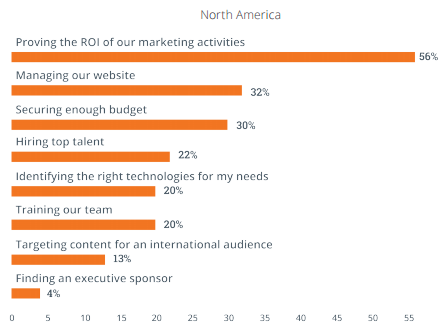
13) Marketers in North America track ROI most reliably, demonstrate more positive ROI, and check marketing analytics most frequently of any other region. (Click to tweet!)
14) North America was the only region where more than half of marketers indicated they check their marketing metrics 3 or more times per week. (Click to tweet!)
15) About half (49%) of marketers in North America saw greater ROI on their marketing efforts last year than in the previous year. (Click to tweet!)
16) In North America, 88% of marketing content is written by staff in-house — which is the most of any region. (Click to tweet!)
Latin America (LATAM)
17) 66% of marketers in Latin America say that growing their SEO/organic presence was the most important marketing tactic last year — which means growing traffic is top-of-mind. (Click to tweet!)
18) More than half of marketers in Latin America don’t track the ROI of their marketing efforts. (Click to tweet!)
19) Almost half (49%) of marketers in Latin America said proving the ROI of marketing activities was their top marketing challenge. (Click to tweet!)
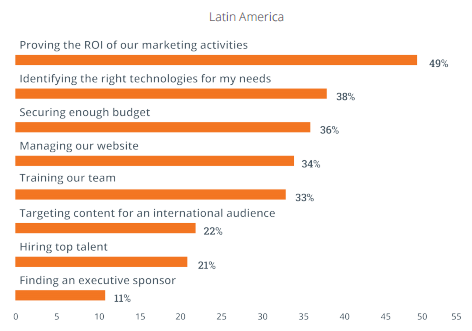
20) Latin America was more challenged by identifying the right marketing technologies than any other region. (Click to tweet!)
21) In Latin America, 61% of marketing content is written by staff in-house, and 29% by executives and 26% by agency partners. (Click to tweet!)
22) 32% of marketers in Latin America spend 1–2 hours writing a typical blog post, followed by 21% of marketers spending 2–3 hours per post, 18% spending less than one hour per post, and 12% spending 4+ hours per post. (Click to tweet!)
23) Latin America was the only region where more marketers reported spending under an hour per post (18%) than marketers who spent 4+ hours per post (12%). (Click to tweet!)
Europe, the Middle East & Africa (EMEA)
24) 70% of marketers in EMEA say that growing their SEO/organic presence was the most important marketing tactic last year — which means growing traffic is top-of-mind. (Click to tweet!)
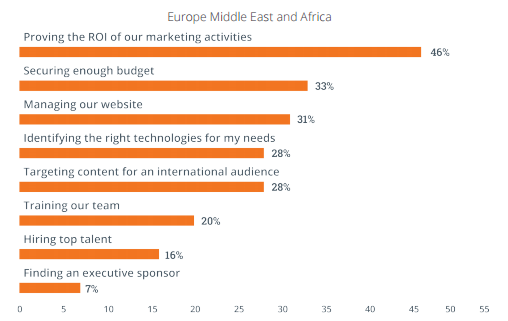
25) The top marketing challenges for marketers in EMEA were proving the ROI of marketing activities (46%) and securing enough budget (33%). (Click to tweet!)
26) Just over one-third (34%) of marketers in EMEA said traditional outbound marketing (like print ads, outdoor ads, and broadcasts) was the most overrated marketing tactic, followed by online paid advertising (13%) and social media (11%). (Click to tweet!)
27) In EMEA, 32% of marketers measured marketing analytics once per week, with 28% measuring their analytics daily. (Click to tweet!)
28) Just over half (51%) of marketers in EMEA track the ROI of their marketing efforts. (Click to tweet!)
29) 35% of marketers in EMEA spend 1–2 hours writing a typical blog post, followed by almost a quarter of marketers spending 2–3 hours per post, 17% spending 4+ hours per post, and 10% spending less than one hour per post. (Click to tweet!)
30) In EMEA, 72% of marketing content is written by staff in-house, followed by 31% written by executives. (Click to tweet!)
Australia & New Zealand (ANZ)
31) 42% of marketers in ANZ said traditional outbound marketing (like print ads, outdoor ads, and broadcasts) was the most overrated marketing tactic. (Click to tweet!)
32) Marketers in ANZ said the second most overrated marketing tactic was social media (14%), followed by online paid advertising (11%). The least overrated marketing tactics were blogging (1%) and collateral development (2%). (Click to tweet!)
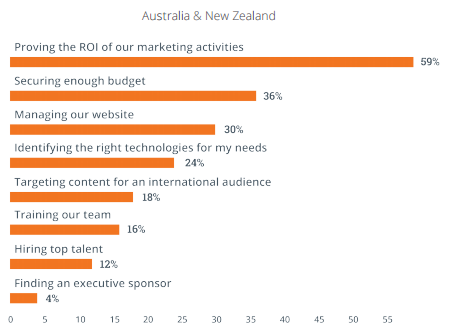
33) The top marketing challenges for marketers in ANZ were proving the ROI of marketing activities (59%) and securing enough budget (36%). (Click to tweet!)
34) 79% of marketers in ANZ said that blog content creation was the most important marketing tactic, followed by growing their SEO/organic presence. (Click to tweet!)
35) In ANZ, 79% of marketing content is written by staff in-house — which is the second most of any region, after North America. (Click to tweet!)
36) 42% of marketers in ANZ spend 1–2 hours writing a typical blog post, followed by 27% of marketers spending 2–3 hours per post, 17% spending 4+ hours per post, and only 5% spending less than one hour per post. (Click to tweet!)
What do you think of these regional marketing trends? Share with us in the comments.
8 Pieces of Marketing Wisdom for the Chinese New Year
It’s that time of the year again: A time when nearly a sixth of the world’s population comes together to celebrate Chinese New Year. And as a global company with employees, customers, agency partners, and subscribers who celebrate this holiday, we decided it was time to get in on the festivities.
In celebration of the Year of the Monkey, we created the Marketing Fortune Generator. This free tool does what you’d expect: it generates your marketing fortune for the new year.
Cheesy? A little. But our hope is that you find it helpful in a fun way. To give you a preview of what you can expect, check out some of our favorite “marketing fortunes” from the generator below.
Want to give it a spin? Click here to try your own luck.
8 Pieces of Marketing Wisdom for the Chinese New Year
1) “Today is the day to write that blog post.”
 Tweet this fortune:
Stop making excuses and start writing, my friend. This is the year of the Monkey, after all, so be clever about your content strategy. To help you, here are some blog post templates that take the guesswork out of how to structure that next piece.
2) “Don’t be afraid to try something different.”
 Tweet this fortune:
It’s easy to stick to the same marketing playbook year after year. But this is your year to try something new — whether it fails or succeeds, you’ll learn something from trying. Not sure where to start? Here are some examples of great marketing campaigns sure to get you inspired.
3) “Fortune favors the bold … headline.”
 Tweet this fortune:
The power is in the headline — it’s what gets people interested in your content. For example, would you be more likely to click on a blog post titled “Marketing Headline Tips” or “13 Types of Blog Headlines that Will Get You More Traffic“?
4) “Smarketing brings success. You will be more aligned with your sales team this year.”
 Tweet this fortune:
Have you heard of the term Smarketing? It’s when sales and marketing are so aligned that even their names become one. How do you achieve this amazing connection? It’s all about frequent and direct communication.
Successful sales and marketing teams talk, and talk often — and they set goals together. When both parties agree on what they owe each other to hit these goals, harmony is achieved.
5) “Create useful information specific to the people your business serves.”
 Tweet this fortune:
Content is great, but it’s not very effective if it doesn’t relate to the people your business serves. Make sure you create buyer personas modeled after your ideal customers before you jump into content creation this year. You’ll see engagement increase.
6) “Create useful information specific to the people your business serves.”
Tweet this fortune: 
Keywords are the key to your content getting found. Don’t monkey around with SEO this year — make sure you optimize your content titles and keep up to date on best SEO practices for 2016. Your website will thank you.
7) “Experiment fearlessly. Try new A/B tests for your emails, landing pages, and social media.”
 Tweet this fortune:
If you’re anything like us over here at HubSpot, you probably love experiments. It’s what keeps marketing fun and exciting. The Year of the Monkey is all about taking chances, trying clever new ideas, and testing your different channels to achieve brilliant results. Make time to A/B test your emails, landing pages and more — you’re likely to increase engagement and other essential marketing metrics.
8) “Fear of failure does not lead to success. Try an out-of-the-box campaign this year.”
 Tweet this fortune:
Most of all, don’t be afraid of failure. This is the year for bold initiatives and having some fun — so get excited about all the marketing possibilities that are just around the corner this Year of the Monkey, and Gong Xi Fa Cai.
Want to learn what your own marketing fortune holds this year? Try the Marketing Fortune Generator.
LinkedIn Mobile: What Marketers Need to Know
Have you tried the updated LinkedIn mobile app? Are you actively using LinkedIn to engage with your network? To discover how to use the LinkedIn mobile app for marketing on the go, I interview Viveka von Rosen. More About This Show The Social Media Marketing podcast is an on-demand talk radio show from Social Media […]
This post LinkedIn Mobile: What Marketers Need to Know first appeared on .
– Your Guide to the Social Media Jungle
from http://ift.tt/20wf4He
via socialmediaexaminer
12 claves y 67 recomendaciones para posicionar tu Blog paso a paso
¿Te gustaría saber cómo estructurar tus publicaciones online y qué tipo de mensaje ofrecerles a tus usuarios? ¿Cómo enganchar al lector y posicionar tu contenido en los buscadores?
A continuación te voy a explicar 12 claves que vas a poder aplicar a tus contenidos inmediatamente y con las que tus lectores notarán una gran diferencia cuando entren en tu blog.
Puesto que muchos de los puntos que te explico son conceptos que deberías tener en cuenta, he puesto un número a cada uno de ellos para que los tomes como 67 recomendaciones necesarias si deseas optimizar tu blog o tu página web.
Entiende a tu lector
Pero antes debes entender algo. La redacción online no es tarea fácil. El lector web no tiene tanto tiempo como el lector de un libro. Necesita encontrar lo que busca enseguida y exige ir al grano. Además, la vista se cansa más rápido delante de una pantalla, por lo que el texto tiene que estar bien estructurado.
Por todo ello la estructura de una publicación es importantísima ya que ayudará al usuario a escanear el contenido de forma más ágil. Es un elemento que no puedes pasar por alto si quieres que tus publicaciones se conviertan en contenidos virales o que los lectores participen con comentarios, dos pruebas de que lo estás haciendo bien.
Sin embargo, la forma no sirve de nada sin el fondo. La estructura de tu artículo es muy importante pero si el fondo es insípido no podrás retener a tus usuarios. De la misma manera, si tu artículo ofrece un contenido útil, original e interesante pero no está bien estructurado, también te encontrarás con una tasa de rebote alta.
Por tanto, es importante pensar en ambas cosas: estructura y contenido. Las dos van dirigidas al usuario, son imprescindibles para darle la mejor experiencia posible.
Clave # 1. Define a tu usuario y piensa en lo que le pueda aportar valor
(1) No escribas por escribir. Define bien a tu usuario, utiliza un mapa de empatía para conocer sus necesidades y crear contenido que le aporte valor.
Sigue este orden:
- Primero piensa en tu público.
- Segundo piensa en el fondo del artículo.
- Y luego piensa en su estructura.
El artículo debe ser útil e interesante para enganchar al público de tu nicho. Por eso es imprescindible saber lo que busca tu usuario.
Este vídeo te puede ayudar a conseguirlo:
Clave # 2: Utiliza palabras clave para que puedan encontrar tu contenido
(2) Para posicionar tu contenido en los buscadores y para que tus usuarios entiendan que es relevante, tienes que utilizar las palabras clave que te interesen dentro del texto para que tus usuarios puedan encontrarlas.
Así pues, los usuarios que te buscan con términos de tu nicho, y parecidos o iguales a los que hayas introducido y resaltado, tendrán más posibilidades de encontrar este contenido.
(3) Sin embargo, cuidado con la densidad de palabras clave que introduces:
- No puedes llenar tu texto de negritas y palabras clave ya que el buscador te puede penalizar por llevar a cabo tal práctica. ¿Cómo? Pues bajando tu posición en el buscador o directamente desindexando tu contenido.
- A partir de 8% de palabras clave en tus textos, estos se pueden enfrentar a alguna penalización.
- De hecho, un texto debería llevar como máximo 7% de palabras clave.
- Lo más correcto es colocar 3% a 5% de palabras clave en tu contenido. Es decir, que 5 de 100 palabras pueden ser palabras clave.
(4) Inserta todos estos términos de forma natural e inteligente siempre pensando en el usuario antes que en los buscadores. Si haces un texto para los buscadores, te puedes quedar con algo casi ilegible y muy poco fluido.
(5) Las palabras clave deberías ubicarlas en 2 tipos de lugares:
a. Sitios principales donde colocar las palabras clave para un mejor posicionamiento
- (6) URL de la página.
- (7) Título de la página.
- (8) Meta descripción de la página (entre 150 y 155 caracteres).
- (9) Meta Keywords (conviene poner entre 3 y 10 meta keywords en una página, aunque los buscadores ya no toman mucho en cuenta esta etiqueta).
- (10) <h1>Título del artículo</h1>.
- (11) Primera frase del primer párrafo (primeras palabras si puede ser).
- (12) <h2>Subtítulo</h2>.
- (13) El texto de anclaje de los enlaces (anchor text).
- (14) La etiqueta “title” de los enlaces (el texto que aparece cuando pasas el ratón sobre el enlace).
- (15) El texto alternativo de las imágenes.
b. Sitios secundarios
- (16) Otros subtítulos <h3>, <h4>, etc.
- (17) Al principio de cualquier otro párrafo.
- (18) Dentro de las listas ordenadas o desordenadas (te lo explico más abajo).
- (19) Nombres de los ficheros (PDF, jpg, etc.).
Te dejo una infografía de redactotexto.com que pone de forma visual algunas de las cosas que hemos visto en este punto:
Clave # 3. Título de la página
(20) El título de la página es el que se encuentra en la pestaña del navegador. Por ejemplo, el título de la página de inicio de Socialancer es “Blog de Redes Sociales y Marketing Online – Socialancer.com”.
En principio, se divide en 2 partes:
- El título de la página.
- El título de la web.
(21) Y debería tener una extensión de 60 a 65 caracteres.
(22) Tiene mucha importancia, ya que aparecerá en los buscadores como primer elemento justo encima de la descripción de la página. Se tiene que crear con detenimiento y aplicación para que llame la atención del público objetivo y para que la página que designa se posicione bien. Por tanto, lo mejor es que lleve la palabra clave principal de la página.
Clave # 4. Título del texto
(23) El título del contenido de una página web debe ser similar pero no igual al título de esta misma página.
Estas son las 8 características que debes tener en cuenta:
- (24) Debe ser corto, contener entre 4 y 10 palabras, y tendría que caber en una línea.
- (25) El título tiene que enganchar al usuario, proporcionarle la necesidad de leer el resto del artículo. Si no seduce, si no llama la atención, difícilmente conseguirás que el usuario se lea el resto del texto.
- (26) Por eso te recomiendo que no utilices adjetivos, preposiciones o adverbios.
- (27) Además, como tiene que ser claro para no confundir al público objetivo, también te invito a que dejes de lado las cursivas, el subrayado y las mayúsculas.
- (28) Su contenido también debe ser explícito y comprensible para describir el asunto del artículo. Por tanto, no es buena idea insertar acrónimos y siglas incomprensibles.
- (29) Es primordial que sea visible para diferenciarlo del resto del texto. La fuente que utilices debe ser mayor que el tamaño del cuerpo del texto.
- (30) El título siempre tiene que ser <h1> para que los buscadores lo encuentren.
- (31) Por último, para posicionar tu contenido, el título debe llevar tu palabra clave principal al principio.
Clave # 5. Introducción que sirve de gancho
(32) Después del título, te aconsejo que haya otro gancho más para acabar de seducir al usuario. Se trata de una introducción corta de un párrafo de 50 palabras.
Debe dar al público una razón de seguir leyendo el artículo indicándole los beneficios que le pueda aportar y sintetizando el resto del contenido de manera clara y directa.
(33) Te sugiero que la pongas en negrita o resaltada con un fondo de otro color.
(34) Los detalles de lo que está explicado en esta introducción se tienen que encontrar en el cuerpo del artículo. Es decir, que se desarrolla de forma mucho más completa en el resto del artículo lo que está explicado en la introducción.
Clave # 6. Técnica de las “5 W”
(35) Para escribir esta introducción y el resto del artículo es importante aplicar una técnica que seguro que has oído mencionar muchas veces pero que no pasa nunca “de moda”: la técnica de las “5 W” (o las 5W y una H) con la que construir una historia en cada uno de tus post:
- Who? – ¿Quién?
- What? – ¿Qué?
- When? – ¿Cuándo?
- Where? – ¿Dónde?
- Why? – ¿Por qué?
- How? – ¿Cómo?
Es la que se suele utilizar en periodismo para las entradillas y para dar veracidad a los artículos, y en un post es perfectamente aplicable porque con ello ayudas al lector a introducirse en la historia que le vas a contar.
Clave # 7. Pirámide invertida
(36) Tienes que escribir lo más importante primero y los datos menos relevantes al final.
El usuario tiene que acceder a la información principal al principio del texto. A medida que avanza en el texto se le proporcionará información menos importante. Se trata del imprescindible concepto de la pirámide invertida que permite que el usuario esté enganchado y quiera seguir leyendo tu contenido.
Clave # 8. Estructura del cuerpo del texto
(37) La información se tiene que organizar en distintos párrafos. Cada párrafo debería desarrollar una idea nueva.
(38) Los párrafos deben ser cortos y llevar frases breves y sencillas. Aproximadamente 20 palabras por frase es lo ideal.
(39) Al igual que en el título del contenido, los acrónimos, los términos enigmáticos y el vocabulario técnico no son recomendables. También te aconsejo que utilices siempre las expresiones más cortas.
(40) El contenido debes adaptarlo a tu público y mantener una coherencia de tono que se ajuste a lo que busca el usuario.
(41) Las tablas o recuadros con cifras clave, citas o datos importantes son una forma visual atractiva de ordenar la información. Cada vez que puedas, utiliza estos elementos llamativos.
(42) Los subtítulos en etiquetas <h2> mantienen la atención del usuario y ayudan a resaltar las ideas principales de cada bloque de párrafos. De hecho, los <h2>, <h3>, <h4> clasifican la información de tal manera que se entiende mejor la distribución del texto.
(43) Y para clasificar elementos y, al mismo tiempo, aumentar la legibilidad del texto, conviene que utilices listas ordenadas por números, como por ejemplo:
- SEO
- SEM
- Content Marketing
O listas que no sigan una prioridad, como:
- SEO
- SEM
- Content Marketing
Clave # 9. Tamaño de la fuente y tipografía
(44) El cuerpo del texto debe tener un tamaño de 10 px a 12 px (o incluso más) para que se pueda visualizar en cualquier dispositivo.
(45) La tipografía tiene que ser perceptible, entendible y legible en todos los navegadores y dispositivos. No utilices grafías confusas que puedan cansar la vista de los usuarios.
Clave # 10. Extensión del texto
(46) La extensión del texto es un elemento fundamental, no solo por posicionamiento en buscadores, sino por coherencia, según el comportamiento del usuario, cuando este vaya navegando por tu página.
Estas son algunas recomendaciones que deberías seguir:
- (47) La página de inicio de un sitio web no debe contener más de 200 palabras.
- (48) Sin embargo, para posicionar correctamente un texto en otros tipos de páginas, conviene que utilices una extensión mínima de 300 palabras.
- (49) Las páginas principales de los apartados del menú principal deberían tener entre 500 y 800 palabras.
- (50) Asimismo, las páginas profundas (las de segundo o tercer nivel) deberían tener entre 300 y 350 palabras.
- (51) Los artículos de blogs es conveniente que tengan un mínimo 400 palabras. Sin embargo, lo mejor es una extensión de 800 a 1000 palabras para las publicaciones en este medio social ya que un blog tiende a explicar cosas de nicho útiles para el usuario. Y cuanto más largo, mejor para darle credibilidad al contenido.
- (52) Si el artículo necesita más extensión, puedes dividirlo en varias publicaciones.
La mayoría de las webs de baja calidad tienen textos pobres y cortos que no sirven de mucho.
(53) No obstante, si no tienes mucho que decir, mejor hacer un texto más corto y relevante que más largo y sin valor añadido.
Clave # 11. Enlaces
(54) Tu contenido tiene que estar enlazado a otros contenidos de interés para tu usuario. Así, le das más valor al usuario ya que complementas tu contenido y le proporcionas otras fuentes para tener acceso a más conocimientos o puntos de vista sobre el tema del que hablas.
(55) Sin embargo, deberías limitar la cantidad de enlaces en la página: 7 enlaces por página es lo ideal.
Aquí van algunas recomendaciones sobre los enlaces:
- (56) El cuerpo del texto debe llevar pocos enlaces ya que pueden distraer. En la medida de lo posible hay que ponerlos al final, debajo del texto.
- (57) El texto de anclaje de los enlaces debe ser explícito y claro para dar una idea de hacia dónde nos lleva el enlace. Textos de anclaje genéricos del tipo “aquí” no son amigables así que no sirven de nada.
- (58) Para que los enlaces sean visibles y directos, los textos de anclaje tendrían que llevar entre 3 y 6 palabras. Así no son muy largos y tampoco son demasiado cortos.
- (59) Es recomendable que cada página contenga diferentes enlaces hacia contenido distinto y único. Los enlaces redundantes no son aconsejables, no aportan valor.
- (60) Para diferenciarlos del texto y mostrar al usuario que son clicables, hay que subrayarlos y darles otro color que el texto en sí.
- (61) Por último, el formato del documento tiene que aparecer si el enlace lleva a un contenido diferente que una página HTML (PDF, Word, Excel, Vídeo, …).
Clave # 12. Imágenes y vídeos
De nuevo algunas ideas relacionadas con imágenes y vídeos que te pueden venir muy bien:
- (62) Las imágenes o los vídeos le dan más fuerza a un texto. Por tanto, tus textos siempre tendrían que llevar una foto o un vídeo cada 400 palabras. Un texto sin ilustraciones no es tan llamativo. No obstante, no añadas cualquier foto o vídeo porque queda bonito. Es imprescindible que tengan un valor informativo que aporta algo más a lo que cuentas en el artículo.
- (63) Las imágenes tienen que llevar un texto alternativo para que los buscadores sepan lo que representan ya que no las pueden leer. Este texto alternativo también le sirve al usuario si la imagen no se carga en el navegador. Así pues, verá el texto alternativo y entenderá de qué va la imagen.
- (64) Asimismo, es interesante saber que si utilizas esta etiqueta Alt como texto de anclaje, te puede posicionar tu página web para la palabra clave utilizada en ese mismo texto de anclaje.
- (65) Un título que aparece cuando el usuario pasa el ratón por la imagen, permite darle una descripción más extensa.
- (66) Una leyenda corta debajo de la imagen es una ayuda más para llamar la atención del usuario.
- (67) Por último, los buscadores tampoco leen ni entienden los vídeos. Para ponérselo fácil y para que comprendan cuál es el asunto del vídeo, una transcripción del audio en formato texto es necesaria.
Conclusión
Esas 12 claves con cada una de las recomendaciones son, a mi modo de ver, las más importantes a la hora de empezar a escribir para un nicho concreto.
Son pautas que no solo te ayudarán a proporcionarle a tu usuario un contenido interesante y bien estructurado sino que también te permitirán posicionarte en los buscadores dentro de tu sector.
¿Añadirías más pautas o crees que existen elementos más importantes para una redacción online correcta? Dame tu punto de vista al respecto.
Imágenes: Shutterstock
from Socialancer.com http://ift.tt/1QJU2Nz
via
Apple begins rolling out screen protector installation program to Japan retail stores
Earlier today we reported that Apple was partnering with one screen protector company, likely Belkin, to offer professional installations of screen protectors done by machines. Now, a report from MacOtakara says that Apple has started rolling out its screen protector installation service in Japan and that it has in fact partnered with Belkin to do so, just as we reported this morning.
Apple Stores in Japan have implemented the Belkin TrueClear Pro system in order to perform the screen protector application process. Belkin details the process in a support document on its website, but it’s relatively simple. First, he Apple employee ensures that all dust and particles are removed from the device’s display and places the iPhone on one side of the machine and the screen protector on the other. Then, the machine is closed, the protector’s wrapping is removed, and the screen protector is aligned perfectly onto the iPhone’s display.
Should a customer feel that an error was made in the screen protector application process, then the Apple Store will redo the process at no additional cost.
The initial cost of the screen protector + application process is between $19 and $37, depending on the material chosen and the size of the phone. The program will rollout to the United States and other markets soon.
Apple this week will also start offering a new broken iPhone upgrade program. This program will allow users with devices that have broken screens to upgrade to newer models by trading in their broken phone.
Read more about both the broken iPhone program and the screen protector installation setup in Mark Gurman’s piece from earlier today.
Filed under: iOS Devices Tagged: Apple, Apple Stores, Belkin, screen protector
Continue reading more about iOS Devices, Apple, and Belkin at 9to5Mac.
What do you think? Discuss “Apple begins rolling out screen protector installation program to Japan retail stores” with our community.
Apple asks Supreme Court not to hear Samsung’s latest appeal, says the case is closed
In the patent battle that feels as if it will never end, Apple has today asked the Supreme Court not to review Samsung’s latest appeals request in the two companies’ ongoing patent feud. Back in December, it was announced that Apple and Samsung had reached a $548 million settlement, but with a catch. Samsung said in its part of the agreement that it reserved the right to reclaim reimbursement should any position of the trial be modified…
Then, Samsung announced that it was taking the legal battle to the U.S. Supreme Court and asked it to hear an appeal of the case. Specifically, Samsung wants the U.S. Supreme Court to review design patents and the notion that lower courts misapplied the law concerning Apple’s design patents.
Apple has now filed an argument with the court in which it argues that the design patents and the damages awarded were already settled issues and not worthy of review by the Supreme Court. The company argues that there is no further reason that this trial should be prolonged (via Re/code):
“Samsung had its day in court — many days, in fact — and the properly instructed jury was well-justified in finding that Samsung copied Apple’s designs and should pay the damages that the statute expressly authorizes,” Apple said on Thursday. “While this litigation may be high-profile, it is legally unexceptional, and Samsung has shown no reason for this Court to prolong it.”
For good measure, Samsung issued a reply to Apple’s statement, saying that should the Supreme Court not step in and stop this design patent precedent from being set, innovation in the tech community could be negatively impacted:
“If the legal precedent in this case stands, innovation could be diminished, competition could be stifled, and opportunistic lawsuits could have negative effects throughout the U.S. economy,” it said in a statement.
While Samsung has already paid Apple its $548 million, Apple would be forced to reimburse Samsung if the Supreme Court changes the verdict. On the other hand, if the Supreme Court does not hear the case, it can finally be put to rest.
Photo credit: REUTERS/Dado Ruvic
Filed under: AAPL Company Tagged: Apple, court, legal, Patent, Samsung
Check out 9to5Mac for more breaking coverage of AAPL Company, Apple, and Samsung.
What do you think? Discuss “Apple asks Supreme Court not to hear Samsung’s latest appeal, says the case is closed” with our community.
Apple said to be in negotiations with the NFL for ‘Thursday Night Football’ streaming rights
According to a new report from Variety, Apple is among the tech companies negotiating with the NFL for digital rights to Thursday Night Football. Earlier this month, the National Football League inked deals with CBS and NBC to divide the TV rights for Thursday games over the next two seasons, but streaming to non-subscribers was not included in that deal.
In addition to Apple, Google, Amazon, and Verizon’s Go90 are also included in the NFL’s talks. Following the announcement of the deal with CBS and NBC, the NFL confirmed that it is “in active discussions with prospective digital partners” and expects to have a deal reached within the next “several weeks.”
One thing to consider is that for users in the United States, the Thursday night games will already be available via streaming from CBS and NBC, depending on who is broadcasting that week’s game. The difference, however, is that those streams would require a cable log-in, whereas a stream from Apple would most likely not. Although, the report notes that Apple is unsure how it would present the games at this point. It’s possible that the games would be included in the company’s rumored web TV streaming service, which has yet to come to fruition.
Last year, Yahoo streamed an NFL game worldwide and attracted 15.2 million unique viewers. Both Yahoo and the NFL were said to be have been pleased with these results.
Should Apple be able to secure streaming rights to Thursday Night Football, it would be a huge win for the company. It has been rumored in the past that Apple has struggled to negotiate with cable providers for its web TV service, but rights to NFL games would certainly add to the mix.
Filed under: AAPL Company, Apple TV Tagged: Apple, Apple TV, NFL, streaming
For more news on AAPL Company, Apple, and Apple TV continue reading at 9to5Mac.
What do you think? Discuss “Apple said to be in negotiations with the NFL for ‘Thursday Night Football’ streaming rights” with our community.
Opinion: How Apple Pay has changed in year one, and what progress year two should bring
We learned this week that Apple Pay has reached a new milestone with 2 million locations accepting the iPhone and Apple Watch-based mobile wallet. This an impressive climb for the service that launched with just over 220,000 locations on board in fall 2014, but what does it look like in everyday use and what’s next for Apple Pay?
For me personally, the Apple Pay rollout was pretty smooth starting in October 2014. I already had an iPhone 6 so I updated the software that turned on Apple Pay and was able to add my debit card. Luckily I already banked with one of the handful of major partners signed up so I could start paying with my iPhone from day one; Apple has since added nearly 1,000 banks and credit unions.
I was also impressed at the number of businesses ready for Apple Pay from day one. I live in a Gulf Coast town in South Mississippi with a population of roughly 18,000 people — it’s not exactly the center of Silicon Valley — and I was able to spot four Apple Pay businesses on day one: McDonalds, Walgreens, Subway, and a local drug storage with contactless-ready terminals.
Now that we’re into year two of Apple Pay, the list of businesses in my own town has expanded.
I wrote a year ago about the awkwardness of using Apple Pay versus swiping a card when it attracts attention or fails, but I’ve had few experiences like those I detailed in the year since.
Walgreens adding their rewards card to Apple Pay has actually made checkout smoother than before. Previously you’d have to type in your phone number or scan a QR barcode from your card or phone. Now it works by waving your iPhone or Apple Watch near the terminal. (You do a separate wave to process your payment; these two steps could be combined, but Walgreens opts for two steps.)
My local grocery store chain updated their payment terminals to accept contactless payments including Apple Pay (but they warn you not to use the chip reader!) so I shop there much more often instead of going to the town over for Walmart which still isn’t on board.
And when I snuck out of the house to pickup breakfast for my wife and myself a few weekends ago only to learn my car battery needed a jump, discovering that I could pay for the battery cables at the local Advanced Auto Parts with Apple Pay turned a rather sour experience into a positive one for me.
A couple of towns over, I’ve used Apple Pay to checkout at both Best Buy and GameStop (and probably RadioShack before they disappeared).
I’m not seeing a rapid increase in adoption in every day business just yet — I’m still swiping my debit card way more than I’d like — but there’s noticeable movement here. Square’s new Apple Pay reader for small businesses should certainly help, too, as the mobile credit card readers are already popular at local cafes, bakeries, and festivals.
Other Apple Pay experiences are still mixed. Target and Starbucks both let me use Apple Pay within their iOS apps to place orders, but I still can’t pay in their stores with Apple Pay. That’s already changed for Starbucks at some locations, however, and Target‘s CEO has expressed desire to support Apple Pay in stores following the last holiday season.
Then there’s the car. I probably wasted way too much gas during Apple Pay’s first week just driving around hunting gas stations that accepted contactless payment methods at the pump (I know, move outside of the U.S. and this is everywhere). Even as new gas stations seemingly pop up regularly, payment terminals at the pump still aren’t a thing around me.
Chevron announced plans to integrate Apple Pay into its pumps last year and has at least a few locations already up, but I don’t happen to live near any. Apple CEO Tim Cook shared that Apple Pay was also coming to Exxon Mobil stations soon, but as an in-app payment method with the Speedpass+ app. We may be all driving (or riding in self-driving) electric Apple Cars before Apple Pay reaches most U.S. gas stations.
Taxis, Uber, and Lyft aren’t really a thing where I live, either, but I’ve used Apple Pay when hitching a ride in various big cities over the last year. Uber and Lyft both let you use Apple Pay in their apps (although Uber’s Apple Watch app is limited without storing a debit card), but I actually prefer paying in cabs with contactless payment terminals. The problem is you can’t always tell which cabs accept Apple Pay, but it does feel cool when they do.
My colleague Benjamin Mayo and I agree on one thing with Apple Pay: the experience is absolutely best at self-checkout terminals. (Well, and anytime I accidentally leave the house without my wallet.) There’s no delay in explaining Apple Pay to cashiers, saying yes, that’s an Apple Watch, or any other awkwardness. I used Apple Pay at the Winn-Dixie grocery store self-checkout line a few towns over before, and the experience is just great.
We’re already deep into Apple Pay’s second year and there appears to be new feature and innovations on the horizon.
Apple’s rumored to be working on a peer-to-peer payment feature that would let you send friends and family cash using Apple Pay, and ATMs are adding NFC readers that will let you withdraw actual cash using your iPhone or Apple Watch in place of a debit card.
Apple’s also continuously adding new banks and credit union partners, which means more and more people are able to use Apple Pay (I’m considering dropping one bank account that I’ve had for years because the bank still isn’t on board). And the iPhone 5se that we’re expecting to see next month will bring Apple Pay to the 4-inch form factor for the first time.
In addition to the 2 million number we learned this week, Tim Cook shared last week that there are 5 million contactless-pay ready terminals in the countries where Apple Pay is available. Speaking of which, Apple Pay has only expanded outside of the U.S. to the U.K. (and Australia plus Canada for American Express cardholders). China’s huge and being planned next,
But it’s clear that the one thing readers (including myself) want to see most from Apple Pay is more places to use it. Okay, that and Apple Pay at drive-throughs of fast food chains that accept Apple Pay.
The move to debit and credit cards with chips and terminals that accept them in the U.S. has been a helpful factor, but there’s plenty of progress left to be made. The funny thing here is that contactless payment terminals are more popular in countries without Apple Pay yet.
So that’s been my Apple Pay experience from launch day to now. Time to go buy some milk with my iPhone.
How has Apple Pay changed for you and what do you want to see in the future? Let us know in the comments.
Filed under: Apple Pay, Opinion Tagged: Apple pay
For more information about Apple pay, Opinion, and Apple Pay continue reading at 9to5Mac.
What do you think? Discuss “Opinion: How Apple Pay has changed in year one, and what progress year two should bring” with our community.
Apple TV gains Siri + universal search for Fox Now, FXNow, and Nat Geo content
When Apple initially announced the fourth-generation Apple TV, the company made a point to focus on a new feature called universal search. This capability allows users to perform a single search using Siri or the Search app and see content across multiple channels. Until today, the feature was limited to Netflix, iTunes, Hulu, PBS, PBS Kids, Showtime, Showtime Anytime, HBO Go and HBO Now, but now, three new apps have gained support for universal search: Nat Geo TV, Fox Now, and FXNow.
With support for universal search having been added to these apps, their content will now appear in search results done using the Siri or Search app interfaces. For instance, if you say “Siri, show me The Simpsons,” Fox Now and FXNow are now listed as options, in addition to Hulu and iTunes. The same goes for saying, “Siri, show me Grandfathered.” Likewise, asking Siri to show you Drugs Inc. will take you to a results page with Hulu, iTunes, and Nat Geo TV listed as sources.
Apple has a webpage dedicated to listing all of the apps that support universal search, but it has yet to be updated to list the additions of Nat Geo, Fox Now, and FXNow. Last October, Tim Cook noted that Apple is working to expand support for universal search beyond its initial key partners to integrate universal search into their respective services.
You can try out universal search on Apple TV by either pressing the Siri button on the Siri Remote or by using the dedicated Search app in tvOS. As time progresses, we should expect to see the feature rollout to even more apps and providers.
Filed under: Apple TV Tagged: Apple TV, FOX Now, FX Now, Nat Geo, universal search
Continue reading more about Apple TV, Apple TV, and universal search at 9to5Mac.
What do you think? Discuss “Apple TV gains Siri + universal search for Fox Now, FXNow, and Nat Geo content” with our community.
How to Prep Your Online Store for a Celebrity Endorsement with the Likes of Beyoncé
Starting up a business is hard work. Any successful entrepreneur will tell you that. What they’ll likely also tell you is that to be truly successful, timing is absolutely everything. Some entrepreneurs may call this aspect of success “luck,” and they’re probably right. The formula to produce luck for you and your company, then, is as simple as identifying your opportunities and putting action behind them. At least, this was the success formula for metallic temporary tattoo company Flash Tattoos when they solidified a collaboration with Beyoncé.
“We were really excited about collaborating with Beyoncé, not only because we are huge fans of hers, but also because the partnership grew organically,” says Kirsten Stoddard, marketing and PR manager at Flash Tattoos. “She was a genuine Flash fan before we even started talking about designing a collection together.”
It’s easy to recognize that a collaboration with Beyoncé will grow your brand awareness and sales. But for online businesses, there’s a lot more to consider behind the scenes when it comes to launching something this large. Downtime or slow load times occur on even the best maintained sites, and loyal customers are always quick to leave if the business doesn’t deliver a great experience to its customer.
Preparing for a Spike in Visitors
“During media events like these, we often see huge spikes of visitors. A large percentage will visit out of curiosity and others will have true buyer’s intent,” says Liam Garcia, Flash Tattoos’ Bigcommerce account manager. “If the experience is compromised due to server performance, businesses can lose sales opportunities generated during and after the event.”
For businesses such as Flash Tattoos, whose site may regularly see some 200,000 visitors a month, any delay in page load time can quickly cause a user to bounce – often to a competing business. Add the expected site traffic bump from launching a partnership with Beyonce, and you may be spelling disaster for a growing brand.
The Cost of Downtime
The data suggests that each and every one of these precautions is necessary. After all, downtime or slow page load speed costs money – and a lot of it. Most cloud-based ecommerce platforms maintain 99% uptime, but that still equals about seven hours of downtime a year. Besides, unexpectedly high traffic load can easily cause even the most trafficked sites to go down – whether you’re on a cloud-based platform or not.
The average cost for downtime incidents increased from $5,211 per minute in 2010 to $8,023 per minute in 2013, an increase of almost 54%. These costs are calculated not just based on sales lost, but on loss of customer trust and negative brand association. All of which studies suggest can rarely be fixed. When it comes to online shopping, just as in life, first impressions matter – and few forget them. Now, consider you’re a growing, but relatively unknown brand with a Beyonce collection to release and you can assume those costs per minute to increase.
Flash Tattoos preparation on its backend paid off, and worked in its favor. It had ten times the normal traffic at the peak of the launch, and its team knew such lofty goals were attainable as a result. For other brands looking to replicate Flash Tattoos’ success, or who are new to partnerships and collaborations, here are a few helpful tips to keep you sane during the process:
Start Early
It’s never too soon to reach out to an influencer you want to work with and start brainstorming ways you could collaborate.
Plan for the Best, Be Prepared for the Worst
It’s inevitable that problems or delays will arise at some point during the process. Just stay positive, come up with creative solutions and keep chugging along. All those exhausting late nights are worth it in the end.
Be Flexible!
Plans can change, and rules can bend: just keep an open mind, and be able to jump on a moment’s notice. You never know what can change in a day.
In all, collaborations are high-stakes initiatives for online businesses, especially those at that pivotal growth stage, where any small misstep can suddenly halt that hockey stick growth. Thoughtful governance around site maintenance for unusually high traffic is absolutely necessary to ensure all of your public-facing work pays off.
Apple Music quietly launches for users in Turkey
Since first launching its new Apple Music subscription streaming service for users last June, and bringing it to China in September, Apple has been slowly bringing it to more countries behind the scenes. Today, Turkey is the latest to get access as the service quietly launches for users in the country.
Local blog macReports got word from Apple about the official launch and the company’s local website in the country is also now advertising the service. Apple Music in Turkey is available for 9.99 TL per month, or 14.99 TL for a family plan with the usual 3-month free trial available. That’s approximately $3 USD for the single user plan compared to the $9.99/month Apple charges users in the US.
To accompany the launch in the country, as noted by macReports, Apple has curated content from loca Turkish artists including Demet Akalın, Gülşen, Teoman, Funda Arar, Ceza, Kaan Tangöze, Göksel, Buray, Merve Özbey, Halil Sezai, Koray Avcı, Ayşe Hatun Önal, Gülben Ergen, Enbe Orkestrası, Fazıl Say, Edis, Deniz Seki, Güliz Ayla and Sıla.
Apple has a website that tracks country availability for Apple Music, but Turkey hasn’t yet been added and some countries listed have yet to get access to Apple Music or all features of the service.
It’s not clear if any other locations might be gaining access to Apple Music today with Turkey, but let us know in the comments if you notice the service launching in your country.
Filed under: iOS Devices Tagged: 9.99 TL, Apple, Apple Music, artists, Demet Akalın, iPhone, plans, pricing, subscription, Turkey
For more information about iOS Devices, Apple, and iPhone continue reading at 9to5Mac.
What do you think? Discuss “Apple Music quietly launches for users in Turkey” with our community.
Apple launching new broken iPhone upgrade, screen protector installation programs
Apple is gearing up to launch a pair of new retail initiatives centered around the iPhone: an upgraded iPhone trade-in program for iPhones with damaged screens, cameras, or buttons, and a new program that allows Apple Retail Stores to install screen protectors on iPhones.
The Apple Store Reuse and Recycle iPhone trade-in program currently allows a customer to bring in an older iPhone model and trade it in for credit toward the purchase of a new iPhone model. The main exception since the launch of the program is that this does not apply toward older iPhones with cracked displays, or broken cameras and buttons. That’s about to change …
Starting this week, the updated program will allow Apple Stores to give credit for iPhone 5s and iPhone 6/6 Plus units with damaged displays, cameras, and buttons within reason. Apple believes that this new program will encourage new iPhone upgrades versus a standard iPhone screen repair.
In some cases, buying a new iPhone could be cheaper when combining subsidies and financing plans with the credit given for the traded-in device. This makes the new program beneficial to both Apple and customers as it will help Apple sell new phones and let customers save more money on an updated device.
Sources say that the current trade-in values for this program are: $50 for a 5s, $200 for a 6, and $250 for a 6 Plus.
Also involving iPhone displays, all Apple Stores will start offering official plastic screen protector installations on iPhones in the coming weeks. The program began rolling out in select stores today.
Apple has partnered with at least one screen protector maker (Belkin) to bring dedicated screen protector installation machines to the back of stores. Before this new program, Apple Stores were told to not perform screen protector installations on customer iPhones given the possibility of the installation of a third-party product not going smoothly.
If the installation via the new machine results in an error, Apple will offer a free screen protector replacement and re-attempt the installation. Above is a video demonstration of a Belkin screen protector machine that is similar to the ones that Apple will begin putting in its retail stores.
Filed under: iOS Devices Tagged: Apple Store, AppleCare, iPhone
Continue reading more about iOS Devices, iPhone, and Apple Store at 9to5Mac.
What do you think? Discuss “Apple launching new broken iPhone upgrade, screen protector installation programs” with our community.
Tim Cook holds company-wide Town Hall, talks iPhone dependence, benefits, pipeline & India
In the days following Apple’s record Q1 earnings announcements, Apple CEO Tim Cook and other top Apple executives held a Town Hall meeting at the Infinite Loop headquarters in Cupertino to reveal new announcements and take attendee questions.
Multiple sources in attendance at the event said that Cook as well as newly appointed Chief Operating Officer Jeff Williams each spoke and made announcements and teases related to new employee benefits, future iPad growth, Apple Watch sales, future retail stores in China, Apple Campus 2, and the future product pipeline.
Cook also fielded questions from the audience, attempting to reduce concerns related to the company’s iPhone dependence, discussing porting more Apple services to Android, growth in India, and releasing cheaper iPhones to appease growing markets.
Cook reportedly began his talk by putting Apple’s revenue announcements in context. He said that Apple sold enough iPhones in the holiday quarter (74.8 million units) to cover the populations of New York, London, Beijing, and Shanghai. Cook also called the Apple Watch one of the “hottest” holiday gifts, and he claimed that sales of the device exceeded those of the original iPhone in its first holiday quarter in 2007.
In response to the slowdown in iPad sales, Cook said he expects iPad revenue growth to return by the end of 2016. Cook noted that he is especially bullish on the iPad line, and sources in attendance said that Cook actually read his presentation notes off of an iPad Pro. Cook also praised the fourth-generation Apple TV by noting that Apple sold more set-top boxes than ever during the holiday quarter.
Moving on to future products, Cook reportedly said that the new Apple TV and the tvOS sets the stage for a “bright” future for Apple in the living room. Apple has been working on a cable-replacement service, but the latest reports have indicated multiple stalls in the process.
Cook also noted his excitement over future products coming out of the software, services, and hardware divisions, while teasing some “far-off” hardware announcements coming beyond this year. Cook said that Apple is using Apple Music on Android as a way of testing the waters for growing its services division through other platforms, opening up the door for more porting in the future.
He also touched upon the new Cupertino Apple Campus 2, noting that Apple employees will likely first begin moving into the new campus by the end of January 2017. He emphasized how important the new theater will be in giving Apple flexibility to hold larger events on its own campus versus relying on places in San Fransisco or San Jose. Cook reportedly called the new campus a “gift” to the future of Apple employees.
Also on the topic of new Apple employee benefits, Cook said that Apple would soon be announcing a pair of time-off benefits for Apple employees.
First, Apple employees will now be granted up to four weeks of paid leave if they need to take care of an ill family member. Additionally, Apple’s extended maternity and paternity benefits from fall 2014 will now be available in most of Apple’s operating countries outside of the United States. Apple Retail head Angela Ahrendts is said to have added that Apple is working on new solutions for retaining employee talent across the company.
Jeff Williams also spoke briefly on the subject, touching upon Apple’s work in the supply chain. Williams reportedly said that Apple will soon announce that all of its smelted metals for products used across 2015 and beyond are either completely conflict-free or coming from smelting partners that are are amid validation for becoming wholly conflict-free.
Lastly, Cook touched upon questions involving Apple’s dependence on the iPhone and how India and other emerging markets play into the company’s future.
Cook is said to have called the iPhone the “greatest business of the future,” noting that Apple has room to grow the iPhone for decades. He menitoned that 4G LTE networks are not in every emerging market, and this gives Apple the opportunity to push its latest devices to regions like India. Cook called India one of Apple’s most important growth areas for the next decade, noting that Apple is in early preparations to bring its retail stores to the country.
Cook said that he continues to to consider China key to Apple’s future and that the company plans to open up its 40th store in China by the end of the summer. He also noted that Apple believes it does not need to release a cheaper, less feature-packed iPhone to appease growing markets. Instead, he said, Apple’s research indicates that people across these regions are willing to spend more for a better experience.
(Top image: Reuters)
Filed under: AAPL Company, iOS Devices Tagged: Android, Angela Ahrendts, Apple Store, Apple watch, china, India, iPad, iPhone, Jeff Williams, Tim Cook, Town Hall
For more information about AAPL Company, iOS Devices, and iPhone continue reading at 9to5Mac.
What do you think? Discuss “Tim Cook holds company-wide Town Hall, talks iPhone dependence, benefits, pipeline & India” with our community.