
Welcome to My Blog
Video: Ford executive is optimistic on Apple Car rumors: ‘I think Apple can do it’
Rumors of Apple Car (codename ‘Project Titan’) continue to swirl and there’s plenty time left for Apple to solidify or change its plans, given the expected launch of the new automobile is still five years away. However, that isn’t stopping car company executives weighing in on the rumors. Whilst GM execs diss the idea of Apple investing in an electric car as a ‘gigantic money pit’, an executive from Ford seems enthused by the prospect. In an interview with Trusted Reviews, Don Butler, Executive Director for Ford Connected Vehicles, said that they welcome competition and thinks technology companies can pull it off.
“We welcome others joining. We welcome the activity that’s in the space. We think it’s exciting. It’s actually changed that we are embracing,” said Butler, speaking to TrustedReviews at the CES 2016 tradeshow in Las Vegas. “So I think Apple can do it. I think Google can do it.”
Watch the full interview in the video after the break …
Regarding autonomy, the Ford exec believes that the industry will reach Level 4 autonomous driving. This means that cars will be able to drive themselves in well-mapped areas in well-mapped conditions, i.e. main roads, highways and cities. He also suggests that companies like Apple or Google could partner with companies like Ford to speed up innovation in the car sector. Today, Ford is a close partner in Apple’s CarPlay system, promising to bring integrations to cars in 2016.
Ford seems to be bullish on the adoption of the technology and the integration with technology companies. However, Dave Anderson, a representative from automotive integration at Nvidia was not as convinced regarding Apple’s entrance. He warned that the process of making cars is arduous and involved, claiming both Apple and Google have a lot more learning to do before they can release their own successful electric vehicles.
It is likely that Apple’s presence in the vehicles industry has grown since it made an appearance at a global car conference in November, leading executives to consider the proposition more seriously. Last week, Elon Musk described Apple’s electric car efforts as an ‘open secret’, claiming it could be compelling. The tangible Apple Car will remain a mystery for the foreseeable future, however.
Filed under: AAPL Company, Apple Car, Tech Industry Tagged: Apple Car, autonomous cars, car, Electric Vehicles, Ford, rumors
Continue reading more about AAPL Company, Tech Industry, and Apple Car at 9to5Mac.
What do you think? Discuss “Video: Ford executive is optimistic on Apple Car rumors: ‘I think Apple can do it’” with our community.
The Handy Character Count Guide for Blog Posts, Facebook Pages & More
When it comes to writing posts and updating profiles for your blog and social media, one of the most common questions folks have is: What’s the character limit on X, Y, or Z? Another common one: What’s the ideal character count for X, Y, or Z?
For example, you probably know the character limit for a tweet is 140. But did you know that a link takes up 24 of those characters, leaving you with 116 characters to play with? Or that the ideal length of a tweet that includes a link is about 120 characters, not the full 140?
While we’ve written before about what perfect posts look like on your blog and various social media networks, we thought it would be helpful to gather the numbers for character limits and ideal character counts all in one place.
Below, you’ll find the short version, followed by a more detailed guide to character limits and ideal character counts for posts on your blog, Facebook, Twitter, LinkedIn, and Instagram. The more detailed version includes links to research studies, our own findings at HubSpot, and advice for how to optimize your posts and profiles.
Length & Character Counts: The Short Version
Click a category title to jump to the detailed version.
1) Blog Posts
- Ideal Headline Length: 8–12 words & under 70 characters.
- Ideal Blog Post Length: 1,600 words or 7 minutes to read.
- Ideal Title Tag Length: 70 characters or fewer.
- Ideal Meta Description Length: 155 characters or fewer.
2) Facebook
- Maximum length of a status update: 63,206 characters.
- Ideal length of a status update: 40 characters.
- Ideal length of a video: 30–45 seconds long.
3) Twitter
- Tweet: 140 characters max.
- Comment with a Retweet: 116 characters max.
- Link in a Tweet: Takes up 24 characters (leaving 116).
- Image/GIF/Video in a Tweet: Takes up 25 characters (leaving 115).
- Link + Image/GIF/Video in a tweet: Takes up 47 characters (leaving 93).
- Ideal Tweet Length: 100 characters without a link; 120 characters with a link.
- Ideal Hashtag Length: Under 11 characters; shorter if you can. Use 1–2 hashtags per tweet.
- Video Duration in a Tweet: Up to 30 seconds long.
4) LinkedIn
- Professional Headline: 120 characters max.
- Summary: 2,000 characters max.
- Position Title: 100 characters max.
- Status Update: 600 characters.
5) Instagram
- Profile Bio: 150 characters max.
- Image Caption: 2,200 characters max, but it cuts off in users’ feeds after 3 lines of text.
A More Detailed Guide to Character Counts
1) Blog Posts
- Ideal Headline Length: 8–12 words & under 70 characters.
- Ideal Blog Post Length: 1,600 words or 7 minutes to read.
- Ideal Title Tag Length: 70 characters or fewer.
- Ideal Meta Description Length: 155 characters or fewer.
Ideal Length of a Headline: 8–12 words and under 70 characters.
The length of your headline depends on what your goals are and where it will appear.
- Do you want this post to rank really well in search? Then keep the title under 70 characters so it doesn’t get cut off in search engine results, and put keywords near the front to make it more attractive in search results.
- Are you trying to optimize your title for social sharing? For it to be tweetable, you won’t want to exceed 116 characters. (That’s the 140-character limit on Twitter, minus the 23 characters a URL takes up in a tweet, minus one for the space between the title and the link.)
In our own analysis at HubSpot, we found that headlines between 8–12 words in length got the most Twitter shares on average, while headlines with either 12 or 14 words got the most Facebook Likes.
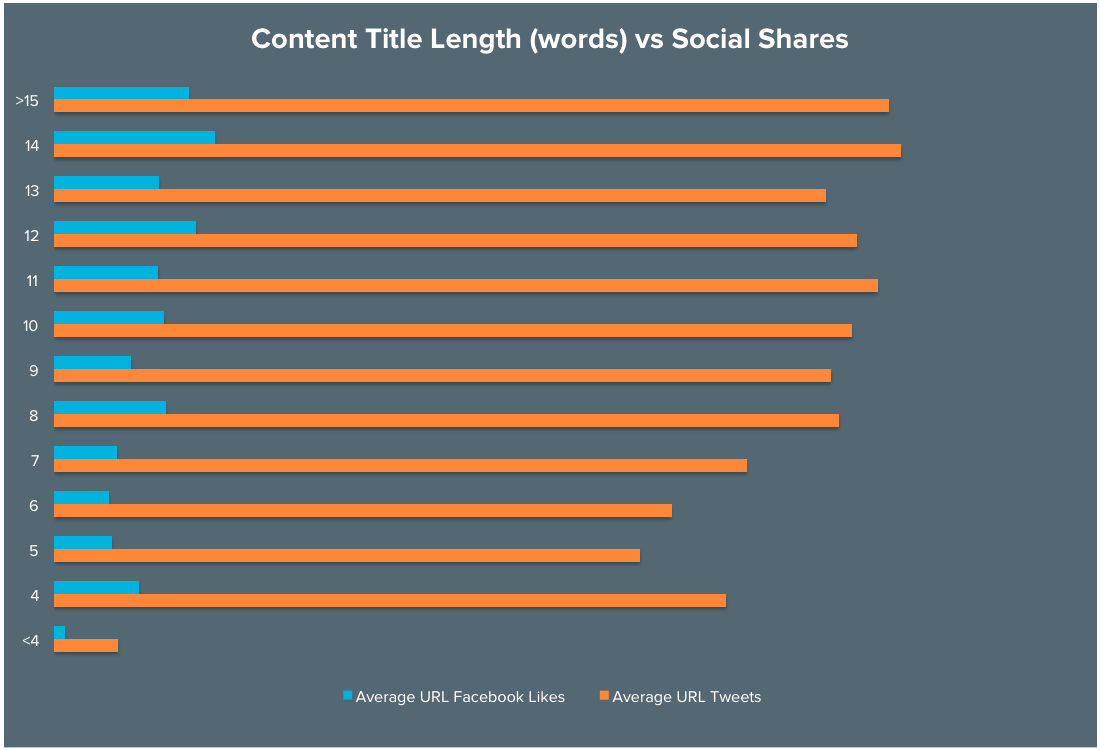
The folks at Outbrain found that headlines with eight words had a 21% higher clickthrough rate than the average title. We recommend testing out headline length to see what works best for your particular audience.
Ideal length of a Blog Post: 1,600 words or 7 minutes to read.
This may not be what you want to hear, but the best answer to the question of how long a blog post should be is: as long as it needs to be. Blog posts vary too greatly in topic, depth, and so on for there to be a single benchmark. It should be as long as it needs to be to serve its purpose, whether that’s thought leadership, driving leads, explaining a new concept, or something else.
That being said, if you want cold, hard numbers, there are a few ways to measure ideal blog post length.
Time to Read: The folks over at Medium measure article length based on how long it takes for a person to read the article. According to their analysis, the post length that captures the most attention on average were posts that took seven minutes to read, which works out to be about 1,600 words.
Image Credit: Medium
Word Count: Here at HubSpot, we recently analyzed the effect of blog post word count from our own blog on organic traffic and found that the sweet spot was 2,250–2,500 words.
We also found articles over 2,500 words got the most social shares and earned the most inbound links.
You might be thinking: There’s a pretty big difference between 1,600 words and 2,250+ words. That’s because of the incredible variation in ideal length for a blog post. We recommend testing out blog post length to see what works best for your particular audience.
Ideal Length of a Title Tag: About 70 characters or fewer.
A title tag is the HTML title element that’s used to describe the topic of a webpage. You’ll find them in the title of a search engine result page (SERP), and in the top bar of an internet browser.
A title tag should be about 70 characters or fewer in length so it doesn’t get cut off in a Google SERP (Search Engine Results Page). This number can vary because Google seems to measure in pixels, not characters. In other words, it appears that they cut off a title tag after a certain width: about 512 pixels. Google will also bold certain keywords used in a search query, which can affect pixel width significantly. So at the end of the day, 70 characters is just a benchmark.
You can double-check the length of your meta description and title tags with this handy tool from SEOmofo.
Ideal Length of a Meta Description: About 155 characters or fewer.
A meta description refers to the HTML attribute that explains the contents of a given webpage. It’s the short description you see on a SERP to “preview” what the page is about.
Like with title tags, Google seems to cut off meta descriptions in SERPs based on pixel width, not character count. Specifically, it seems to cut off a given meta description after about 923 pixels, which ends up being about 155 characters. Again, you can double-check the length of your meta description and title tags with this handy tool from SEOmofo. (Read this blog post to learn more about writing effective meta descriptions.)
2) Facebook
- Maximum length of a status update: 63,206 characters.
- Ideal length of a status update: 40 characters.
- Ideal length of a video: Between 30–45 seconds.
Maximum Length of a Status Update: 63,206 characters.
Most people refer to Facebook’s character limit on status updates as 60,000 characters, but the actual maximum is 63,206. Why? Facebook’s Bob Baldwin, the man who set the limit, wrote in a Facebook comment: “I set the exact limit to something nerdy. Facebook … Face Boo K … hex(FACE) – K … 64206 – 1000 = 63206″. There you have it.
Image Credit: Journalists on Facebook
Ideal Length of a Status Update: About 40 characters.
“The social gurus will throw around the number 40 characters,” says Chelsea Hunersen, HubSpot’s social media and community growth manager. “That data seems to be backed up by BuzzSumo’s ranking of HubSpot’s own Facebook Page, but ideally, you’ll want to use the copy in a status update to provide context for whatever you’re linking to.”
That being said, Hunersen says that from her experience, the copy of the status update itself isn’t as important as the copy in the meta title or meta description that gets pulled in when you insert a link into your post. “Often, people look at the image of the article and then directly down at the meta title and meta description for context clues,” she told me. “A lot of people don’t realize you can change those.”
(Meta titles should be 70 characters or fewer and meta descriptions should be 155 characters or fewer. You can read about these character counts in more detail in the previous section of this post.)
Ideal Length of a Video: Between 30–45 seconds.
While there aren’t too many studies out there on the ideal length of videos on Facebook, best practices for sharing videos on social are to keep it short: Just enough time to deliver a punch, but without forcing users to leave their environment.
According to AdWeek, Facebook’s auto-playback feature makes 30–45-second videos optimal. Here at HubSpot, we’ve found that our best-performing organic videos have come in at about 30 seconds long.
The fonts you pick are incredibly important. Don’t believe us? The proof is in the “papyrus”.That’s a font, btw.
Posted by
HubSpot on
Friday, January 15, 2016
That being said, optimal length can vary depending on the topic. “If you produce something as catchy as BuzzFeed and Refinery29 are putting out there, it can be up to five minutes long,” says Hunersen.
Regardless of the length of your video, Hunersen reminds us that all Facebook videos start without sound, meaning users have to make a concious decision to stop scrolling through their feeds and unmute the video. Facebook videos should be visually compelling from the get-to, make sense without sound, and be engaging enough to encourage the user to stop and watch.
3) Twitter
- Tweet: 140 characters max.
- Comment with a Retweet: 116 characters max.
- Link in a Tweet: Takes up 24 characters (leaving 116).
- Image/GIF/Video in a Tweet: Takes up 25 characters (leaving 115).
- Link + Image/GIF/Video in a tweet: Takes up 47 characters (leaving 93).
- Ideal Tweet Length: 100 characters without a link; 120 characters with a link.
- Ideal Hashtag Length: Under 11 characters; shorter if you can. Use 1–2 hashtags per tweet.
- Video Duration in a Tweet: Up to 30 seconds long.
Max Length of a Tweet: 140 characters.
Max Length of a Comment with a Retweet: 116 characters.
When you use Twitter’s “Retweet with Comment” feature, it means you’ve pressed the rotating arrow icon to retweet a post, and then added a comment in the text box provided. The retweet takes up 24 characters, leaving you with 116 characters for the comment.
“Charisma is not so much getting people to like you as getting people to like themselves when you’re around.” https://t.co/5T0GlvxU6v
— Kirstin Lynde (@KirstinLynde)
January 18, 2016
Link in a Tweet: Takes up 23 characters (leaving 117).
Links account for 92% of all user interaction with tweets, so you’ll definitely want to include them in most (if not all) of the tweets you publish. They’re your strongest chance of gaining views and shares for your content.
Also, remember to include a space between your tweet copy and your link. Not including a space before the link is one of the most common forms of link errors.
Image/GIF/Video in a Tweet: Takes up 24 characters (leaving 116).
Using media in your tweet is a great way to engage your followers. In fact, research shows using images in tweets leads to higher clickthrough rates — as much as 18%.
Images, GIFs, and videos take up the same number of characters in a tweet for Twitter.com and most publishing tools.
(Note: Different publishing tools may have different character counts for links and images. For example, Twitter.com counts an image as 24 characters, but Tweetdeck counts it as 25.)
Loving @HubSpot‘s twitter cover Image right now! ❅ http://pic.twitter.com/IdXzPI1XZi
— Lindsay Kolowich (@lkolo25)
January 19, 2016
Want to add more text to your tweets? One simple hack is to put text in an image, like in the tweet below. Here are some free templates to get you started. (The best ones for Twitter are in the Social Media > Rectangular folder.)
Everlane’s @MPreysman on the simple rationale behind why they moved to Facebook messenger https://t.co/XC3M4IQwlv http://pic.twitter.com/0FlikGQXHY
— Meghan Keaney (@meghkeaney)
January 8, 2016
Link + Image in a Tweet: Takes up 47 characters total (leaving 93).
A link often takes up 23 characters and an image often takes up 24. That’s 47 characters total, leaving you with 93 characters to work with for the rest of the tweet — including that space between the tweet copy and the link.
(Again, note that different publishing tools may have slightly different character counts for links and images.)
To make your mornings easier, start by changing the end of your day. We’ll explain. https://t.co/PVz7UdVPSS http://pic.twitter.com/lZ1FYhseoS
— HubSpot (@HubSpot)
January 19, 2016
Ideal Length of a Tweet: 100–110 characters without a link; 120–130 characters with a link.
The 120-130-character range is the sweet spot for high clickthrough rate, according to an analysis of 200,000 tweets with links. This leaves enough space for people to include a short comment if they choose to manually retweet you.
Ideal Length of a Hashtag: Under 11 characters; shorter if you can.
While Twitter hashtags can technically be any length up to 140 characters, remember that people will want to accompany the hashtag with other copy. Short hashtags are always better. Ideally, your hashtags should be under 11 characters — shorter if you can.
Also, in a single tweet, stick to one or two hashtags, and definitely don’t go over three. Buddy Media found that tweets with hashtags get double the engagement metrics that tweets with no hashtags get — but tweets with one or two hashtags have a 21% higher engagement than tweets with three or more
Video Length in a Tweet: Up to 30 seconds long.
You can post a video on Twitter by importing a video or recording it using the Twitter app. Either way, the maximum length is 30 seconds.
Smartphones & tablets are on th
e rise, while Americans’ ownership of other devices falters. https://t.co/blt5EmYFMy http://pic.twitter.com/eDxr6Uq7WD
— PewResearch Internet (@pewinternet)
December 19, 2015
4) LinkedIn
- Professional Headline: 120 characters max.
- Summary: 2,000 characters max.
- Position Title: 100 characters max.
- Status Update: 600 characters.
Maximum Length of a Professional Headline: 120 characters.
Your professional headline is the brief description about what you do that appears right below your name on LinkedIn.
Maximum Length of a LinkedIn Summary: 2,000 characters.
Maximum Length of a LinkedIn Position Title: 100 characters.
LinkedIn Position Description: Between 200–2,000 characters.
Maximum Length of a LinkedIn Status Update: 600 characters.
Keep in mind that if you update your Twitter status through LinkedIn, you’ll want to keep the character count to 140 characters or fewer.
5) Instagram
- Profile Bio: 150 characters max.
- Image Caption: 2,200 characters max, but it cuts off in users’ feeds after 3 lines of text.
Maximum Length of a Profile Bio: 150 characters.
Max Length of an Instagram Caption: 2,200 characters.
With a maximum of 2,200 characters, Instagram provides an enormous amount of space in their Instagram captions. But it’s worth noting that they recently started capping captions at three lines without users having to click “more” to see the whole thing, if they’re viewing the post in their general feed.
That being said, we don’t recommend keeping your captions super short so users can see 100% of it without having to click “more.” Instead, frontload your captions with the important content or text calls-to-action, and leave any hashtags, @mentions, or extraneous information for the end.
From Ecommerce to Instant Commerce: Innovations That Cut Time Between Buy and Own
The draw of ecommerce has always been convenience. Why leave the house and fight the crowds of shopping malls when you can sit in your pajamas and have your purchases delivered right to your home? The allure is simply too great to ignore, and that’s why some of the biggest brick-and-mortar brands in the world have turned to ecommerce.
Think about it: Walmart, Best Buy, Macy’s, and Target all have healthy online sales. They also offer something a little extra to help buyers get their purchases faster for free. Ordering online for pickup at the store lets buyers skip the wait. A little instant gratification goes a long way, doesn’t it?
In fact, that ability to receive purchases right away was something Amazon couldn’t offer. Without brick-and-mortar stores, there wasn’t a central hub for pickups. But that didn’t slow the ecommerce giant down. They’re still the king of innovation, and they’re determined to stay that way.
Amazon Prime Now
Though not yet available everywhere, Amazon’s Prime Now is definitely a step in the right direction. See, ecommerce shoppers might want instant gratification, but they’d still like to get it while staying at home. The beauty of Prime Now is that shoppers can order whatever they like from the Amazon app and receive it an hour later. The list of products is long and does include grocery items.
Only the larger cities around the country are offering Prime Now, but we’re sure that will change soon. Before long, anyone anywhere will be able to order what they need and receive it within the hour. That’s probably less time than needed to shower and drive to the store.
Still, as forward thinking as Amazon Prime Now is, it may not be the end-all in instant gratification.
How Does 3D Printing Fit?
Amazon did dabble a little in 3D printing for ecommerce, but the technology just wasn’t up to par. However, we can be sure this is coming. Some companies have introduced limited products for 3D printing, with some of the options included being iPhone cases, costume jewelry, and even guitars.
The current technology available just doesn’t lend itself to self-printed products. First, the 3D printers developed for home use can only do so much. Of course, the more a consumer pays for the printer, the better the quality will be. Even then, sizes are limited and require assembly after printing.
Next, there’s the issue with materials needed for printing. While 3D printers can work with various materials, they’re not always easy for the general consumer to find. That limits the types of products that may be purchased and printed. Still, we have a glimpse of the future now. How will the 3D printer change ecommerce when consumers have access to high quality printers and printing materials? Will we even wait for Amazon Prime Now to deliver, or will we print our own products immediately after buying?
As the time between want and own grows ever shorter, these are the questions retailers must ask. Can retailers keep up with consumers who want to print their own products at home rather than wait on a delivery? Only time will tell.
How to Email Really Busy People: 10 Tips for Standing Out in Their Inbox
When you work in marketing, establishing partnerships and building meaningful relationships with influencers comes with the territory.
At CreativeLive, I’m constantly seeking out new business leaders to introduce to our audience. For me, this translates into a high volume of cold emails to people who are extremely busy.
Over the past couple of years, I’ve perfected my email approach and have had the privilege of opening up doors with people like Rand Fishkin, Tim Ferriss, Brian Dean, and more.
However, it didn’t happen overnight. In fact, it wasn’t until I had my own active blog and community of people reaching out to ask for help that I realized how poorly some of my emails must have come across.
After hundreds of emails and countless hours of real-world practice, here are my top ten tips for emailing — and getting a reply from — really busy people.
10 Tips for Emailing Really Busy People
1) Research them.
Don’t make assumptions about the person you’re emailing. Instead, take time to research who they are, what they care about, any organizations or interests you have in common, and what they do for fun outside of work. This type of careful research will afford you many more opportunities to build a connection with them — a connection that’ll get you noticed in a crowded inbox.
Peruse what they share and how they speak on Twitter, LinkedIn, Instagram, on their personal blog, and within articles they’ve written elsewhere online. Then, use this information to craft a more meaningful email content.
2) Perfect the subject line.
Don’t over-think this one. Simplicity wins every time when it comes to reach out subject lines. Avoid potentially spammy or misleading subject lines like, “5 Reasons Why You’ll Want to Read This Post” or “The Best Decision You’ll Make Today.” There’s no quicker way to make sure your emails will never be replied to, than to make your recipient feel like they’ve been tricked into opening them.
Use a subject line that instills curiosity, makes an instant connection, or clearly provides value to your recipient. Here are a few of the subject lines that have worked best for me when reaching out to promote a recent blog post or land a high value guest feature:
- “[Company Name] feature in my post”
- “Your article on [subject of their post that I linked to]”
- “A mutual love for puppies and a quick question”
When crafting the perfect subject line, much of your success will come down to how well you can form an understanding of what motivates your recipient. This is where that research you did in tip #1 comes in. If you pick up something personal, like the fact that they regularly share pictures of their dog on social media, then find a way to incorporate that into your subject line.
If you can genuinely put a smile on someone’s face through your email, you’ve already won half of the battle.
3) Establish relevance.
If your busy recipient isn’t 100% relevant to what you’re reaching out about, pause and reconsider whether you should actually be sending them a message. In order to get them interested in what you have to say, it’s your job to clearly articulate why you’re reaching out in the first place.
If you’re emailing an influencer within your industry to ask for a quote for an upcoming blog post, quickly transition the opening of your email into answering why they’d want to participate. What unique value are they going to add to your project, that’ll compel them to proactively get involved? Use a phrase like, “I really admired your recent post on [enter topic here], and I’m working on a similar project that would greatly benefit from your quick input. Would you be up for answering just one short question for my upcoming piece?”
4) Identify and build a connection.
When seeking to build a connection with someone new, your natural goal is to make them care about you, and want to proactively help what you’re doing. The best way to get someone to care about you is to show them that you clearly care about them first. While the adage of “respect must be earned” has been debated time and time again, it goes without saying that the quickest way to win someone over is by first showing them how much you’re invested in the relationship.
Take note during your research of any uncommon commonalities that’ll give you great talking points with which to start building a connection. This could come in the form of belonging to the same fraternity or sorority, an intersection of professional society memberships, the fact that you attended the same marketing conference, or perhaps a mutual friend. Even something as simple as a shared mutual interest has gone a long way in helping me start a meaningful dialogue.
5) Make them like you.
This may seem like an obvious one, but if your goal is to get someone who you don’t have a strong connection with to take action on your behalf, you’re going to need them to like you. Place yourself in their shoes and imagine the sheer number of superficial requests and demands that are constantly placed on their time. How do you stand a chance of making an impact if they don’t at least admire your approach?
Beyond just building a connection on common ground, I always make sure my reach out emails include an insightful note about a recent project they’ve done. Showing that you care beyond just a quick favor will make a big difference. This all comes back to a core principle in mastering your people skills that I learned from behavioral investigator, Vanessa Van Edwards.
Speaking of people skills, expressing empathy is another effective way to be more likeable over email. Show that you understand how busy they are by adding in a friendly line about how much you’d appreciate a moment of their time. Demonstrating this type of understanding will help you build a stronger connection.
Want more tips on how to be more likable? Check out this helpful post.
6) Inspire reciprocity.
Before you hit send on your email, pause and reflect on exactly how you’re providing value to them, first. If you’re asking for a favor, reaching out with a business opportunity, or seeking to build a long-term relationship, you’ll need to start out by doing something meaningful for them.
“People will help if they owe you for something you did in the past to advance their goals. That’s the rule of reciprocity,” explains Dr. Robert Cialdini.
Think of this as working backwards to achieve your desired end result. If you’re asking them to share an amazing blog post you wrote, how can you increase the likelihood of them actually responding and sharing? To motivate them, try linking to a relevant piece of their content, featuring a tweetable quote from them, or mentioning them as a source of inspiration within your post. By reaching out and letting them know what you’ve done for them, you’ll significantly increase your chances of them wanting to share your post.
7) Convey your authority.
We tend to gravitate toward authoritative figures — it’s simple human nature. It explains why your podcast interview with Tim Ferriss significantly outperformed your episode without any guests at all. It’s the reason why marketers like Neil Patel can land consulting gigs with Google and Amazon, while the majority of other freelance marketers looking to work with name brands get turned away.
Naturally, you don’t want to lead your cold email by gloating about yourself, but your accomplishments — and the authority that comes with them — will be of great use in opening a line of communication. If you plan to publish the post you’re requesting a quote for on a respected website such as Entrepreneur, be sure to mention that. If you’re a contributor to any major publications or industry blogs, include that in your email signature. If you have an active social following, or website that showcases your work, include those links in your email signature as well.
8) Use an appropriate voice and tone.
The same principle of speaking to your audience the way they want to be spoken to, applies with emailing busy people. Write your email in a tone that will resonate with your recipient. This can be difficult without having already formed a relationship, but reviewing the voice and tone they use on their social platforms and within their writing, should give you some helpful insights.
Should you use emojis? Do you refrain from exclamation points? How about using profanity? When used in the right setting, all of these can actually serve to better connect you with your recipient. However, a misjudgment on the delivery of your email will likely result in a guaranteed deletion. I recommend staying away from any extremes in your first emails, while slightly adapting your verbiage to match their communication style.
9) Include a very specific ask.
When I reach out to brands and influencers, I’m always careful to make very clear, exactly what I’m asking for. Assuming you’ve already established relevance and laid the foundation for a connection with your recipient, keep in mind that someone who’s extremely strapped for time doesn’t want to spend more of their precious time trying to determine the point of your email.
For example, when collecting insights for my post on side businesses, I was tasked with emailing marketers at companies like Treehouse, General Assembly, and Etsy. To encourage a response, I made sure that my ask was made known through a very clear, standalone sentence.
Here’s what I start with: “When you have the chance to check out the post, could you make sure I’m citing you properly and linking to the best possible destination?” This gets them engaged in a more genuine way than asking outright if they’ll tweet my article. Once they get back and confirm, or I make any updates, I’ll ask if they think the post would be a good fit to share with their audience. Since I already have them engaged and they’ll feel like they’ve participated in my post, the chances of them championing my article through to their social team go up significantly.
10) Show your appreciation.
Amongst the least successful reach out emails I’ve received from people seeking business advice on my website, are the ones that say things like, “I’ll be waiting for your reply,” and “I’m looking forward to your prompt advice.” It’s not that I’m unwilling to help, rather that I don’t feel they’ll truly appreciate any of the time I do take out of my day to offer thoughtful insights. I get excited to help when I feel like I could possibly make a difference, not when I feel that I’m being strong-armed into abiding by someone’s demand for my time.
Use this principle within your own reach out emails to guide the direction of your request. There’s a huge difference in perception that can be created by including a quick note expressing how thankful you are for their time.
Do you have any tips that help you reach busy people over email? I’d love to hear, please share with me in the comments.
5 Ways to Improve Your Snapchat Marketing
Wondering how you can stand out on Snapchat? Want to know what’s working for others? Taking a cue from businesses that are successfully using Snapchat can help you strengthen your own brand’s presence on the platform. In this article you’ll discover how to improve your marketing on Snapchat. #1: Provide Specialized Content Many brands use Snapchat […]
This post 5 Ways to Improve Your Snapchat Marketing first appeared on .
– Your Guide to the Social Media Jungle
from http://ift.tt/1luDjT4
via socialmediaexaminer
How to Create Shareable Content: 46 Tips From the Experts [Infographic]
It’s not enough just to write some content, publish it, and cross your fingers it does well. Most experts have found it takes a lot of thinking, strategizing, and optimizing to create content that your audience not only reads, but shares with their networks and links back to on their websites.
SEO Expert Steve Wiideman, for example, recommends starting with question-based keywords and prioritizing them by search volume. Erika Heald, VP & Head of Content at Highwire PR, finds that putting together an editorial calendar at the beginning of each quarter makes it easier to vary the types of content she and her team publish. Ryan Hoover, Founder of ProductHunt, reminds us that it’s all about being authentic and adding value to the conversation.
Venngage asked over 140 different experts to share their top tactics for creating addictive, shareable content. Check out the infographic below to learn what they had to say.

Apple Stores planned for India as application is filed with regulators
Apple wanting to expand its presence in India isn’t a new development, but according to a new report from the India Times, the company has recently taken a major step in accomplishing that goal. According to the report, Apple has just filed an application with the Indian government to open its own branded retail stores in the company.
Apple filed the proposal with the department of industrial policy and promotion, or DIPP, which confirmed that it has received the document. “We have just received Apple’s proposal. We are examining it,” DIPP secretary Amitabh Kant stated.
The company reportedly left specific details out of the proposal, only stating that it wishes to operate its own branded retail stores in the country and to sell products online. It’s unclear how large of an investment Apple wants to make in India, although in the past it has expressed its extraordinary interest in the country, citing significant growth in the country as its motive.
The Indian government has been relaxing its requirements on foreign company investments, making it easier for company’s like Apple to establish a presence. In the past, India has required that any company perform a certain percentage of manufacturing in the country if they want to operate retail outlets.
Apple’s relationship with India has been growing over the past few months. CEO Tim Cook met with Indian Prime Minister Narendra Modi back in September to discuss the possibility of Apple increasing its presence in the country. Apple also signed a deal with consumer electronics retail chain Croma that saw Croma build Apple-dedicated retail spaces in six of its retail locations.
Last year, revenue for Apple in India also recently broke a billion dollars thanks to its launch of an aggressive trade-in program. Apple has said in the past that its growth in India is outstripping that of China, and an increase in retail availability would only expedite that process.
Filed under: AAPL Company Tagged: Apple, India, retail, retail stores
For more information about AAPL Company, Apple, and retail continue reading at 9to5Mac.
What do you think? Discuss “Apple Stores planned for India as application is filed with regulators” with our community.
Poll: What rumored iPhone 7 feature excites you the most?
It was only a few months ago that the iPhone 6s and iPhone 6s Plus were made available, but rumors regarding the upcoming iPhone 7 have been circulating for several months now. Rumors have ranged from design changes to new software features to new hardware features and more. While it’s certainly possible that Apple could go all out and introduce every rumored feature with the iPhone 7, it’s likely some of the speculated features are either not real or will be held for future generation devices. So, we want to know, which of the rumored features has you most excited for the iPhone 7? Participate in the poll below and read on as we discuss each of the rumored features…
One of the most often rumored changes suggested for the iPhone 7 is the removal of the headphone port in an effort to make the device even thinner. This would mean that Lightning headphones would be required for users who wanted to a wired solution, although it is expected that Apple would strongly push wireless solution instead. We reported earlier this month that Apple is developing revamped, cord-free Beats ahead of the iPhone 7. The wireless Beats are expected to charge via an accompanying carrying case, as opposed to micro-USB like current Beats headphones. A KGI report suggested that the iPhone 7 will be as thin as the iPod touch at around 6mm.
A considerably sketchy report from November suggested that Apple is testing various iPhone 7 models, each with different features and designs. The report suggested that Apple is testing wireless charging technology, multi-touch Force Touch, dual-cameras, USB-C, and in-display fingerprint recognition. Multi-touch Force Touch/3D Touch would mean that you could press harder with two fingers to bring up different options than what appears when you press harder with one finger, while in-display fingerprint recognition would presumably allow for Apple to eliminate the home button entirely, something that has been tossed around for a long time now. This report should be taken with a pretty decent dose of skepticism, however, so don’t get too attached to any of these features.
Two separate reports have suggested that the iPhone 7 will feature a waterproof design. The first came last September and also mentioned that the device will feature a dust proof design and a “new casing material,” which would make the iPhone 6s the last model to feature the metallic frame. A second source corroborated that report a few weeks ago and added that Apple plans to introduce wireless charging this year. The exact technology remains unclear, but the report suggested that it would be similar to the inductive charging mechanism used with the Apple Watch.
As far as camera technology goes, an Apple patent application suggested that the next iPhone could feature a twin-camera system. A variety of possibilities can be associated with a dual-camera set up, including optical zoom. By fitting two separate camera modules behind the lens, and creating a single lens with both standard and telephoto sections, you’d be able to switch between two different focal lengths. Another possibility is that one camera module could be shooting still images, while the other records video, taking the Live Photos feature of the iPhone 6s to an entirely new level. Theoretically, you could also record normal speed video and slow-mo video at the same time with a twin-camera set up.
Most recently, code discovered in iOS 9 suggested that the iPhone 7 could feature new Li-Fi technology. If you’re like me, you’d probably never heard of Li-Fi until today. Li-Fi is an alternative to WiFi that is said to be 100 times faster and capable of speeds of 224Gbps. It is wireless and uses visible light communication instead of radio frequency waves, allowing it to transfer more information than WiFi.
Other rumored changes have included a 32GB base model, finally getting rid of the overpriced and under-performing 16GB. Some rumors have also suggested that Apple will adopt a new screen technology, although whether or not that appears with the iPhone 7 remains to be seen. A report from November claimed that Apple would begin switching to OLED screens by 2018. Apple is said to be developing thinner and brighter screens in a secret Taiwanese lab, but it’s unclear how far along progress is.
For me personally, I’m most excited about the iPhone 7 potentially being more durable than the iPhone 6s and 6s Plus. I’m no stranger to water damaged devices, so the addition of a fully waterproof coating would certainly be welcomed. The potential new camera technology, however, is also very interesting. While I’m a fan of Live Photos, I feel like a dual-camera set up could take the feature to an entirely new level. One of the iPhone’s biggest selling point has always been its camera and should Apple devote most of its attention to that feature with the iPhone 7, it has a chance to truly knock it out of the park and put the device even farther than other devices on the market.
As always, all of these features are rumors and nothing more. We won’t know what Apple actually has up its sleeve for the iPhone 7 until it officially announces the device later this year. Nevertheless, it’s fun to speculate. Let us know the feature that excites you the most in the poll above and in the comments below!
Filed under: Opinion Tagged: Apple, iPhone 7, Opinion, poll
Visit 9to5Mac to find more special coverage of Apple, Opinion, and iPhone 7.
What do you think? Discuss “Poll: What rumored iPhone 7 feature excites you the most?” with our community.
Microsoft OneDrive for iOS updated w/ iPad Pro & Apple Pencil optimizations
Microsoft today has updated its OneDrive cloud storage app with a handful of new features and capabilities. The update bumps the app to version 6.8 and includes additions like iPad Pro optimization, 3D Touch support, and more.
With iPad Pro optimization, PDF annotations are now pressure sensitive, meaning your writing and drawing will be darker the harder you press on the screen and lighter the softer you press. Furthermore, the Apple Pencil is now supported with improved optimization, as well.
The full changelog is below:
- Your lines have never looked so smooth! PDF annotations are now pressure sensitive, including support for Apple Pencil and 3D Touch displays.
- Plenty of bug fixes and stability improvements.
Microsoft OneDrive is available for free in the App Store.
Filed under: iOS Tagged: Apps, Microsoft, OneDrive, update
Check out 9to5Mac for more breaking coverage of iOS, update, and Microsoft.
What do you think? Discuss “Microsoft OneDrive for iOS updated w/ iPad Pro & Apple Pencil optimizations” with our community.
Apple Watch Hermès collection hitting online stores starting Friday

Originally released back in October, Apple partnered with French leather fashion company Hermès for a lineup of high-end leather bands for the Apple Watch. The Hermès bands, however, have only been available from Apple stores and Hermès stores in big cities like Los Angeles, San Francisco, New York, and Miami. Starting this Friday, however, the Hermès collection will be available online from both Hermes.com and Apple.com (via Fashionista).
All three Hermès bands will be available online. The “Single Tour” band is the most affordable of the three bands, starting at $1,100, and is available in Noir or Fauve in 42mm and an additional Capucine color in 38mm. Next is the “Double Tour,” which starts at $1,250 and comes in Etain, Fauve, Capucine and Bleu Jean. The most expensive band is the “Cuff,” starting at $1,500 and available in brown. In addition to the exclusive bands, the collection includes a stainless steel Watch, with Hermès branding on the back, and a number of special watch faces.
Apple’s partnership with Hermès was negotiated before the Apple Watch was officially announced to the public, Jony Ive reveled in an interview. Apple struck the partnership in an effort to presumably make its Watch appeal to the higher-end of the fashion market and released it only at select stores to further make it an “item” to have in the fashion industry.
Uncompromising craftsmanship. Pioneering innovation. Groundbreaking functionality. Apple Watch Hermès is the culmination of a partnership based on parallel thinking, singular vision and mutual regard. It is a unique timepiece designed with both utility and beauty in mind. With leather straps handmade by Hermès artisans in France and an Hermès watch face reinterpreted by Apple designers in California, Apple Watch Hermès is a product of elegant, artful simplicity — the ultimate tool for modern life.
We reported recently that Apple would available a second-generation Apple Watch during a March event and this expansion of Hermès availability could be the two companies clearing out inventory before the second-gen model is announced.
The Hermès collection will be available online at Apple.com and Hermes.com beginning this Friday, January 22nd.
Filed under: Apple Watch Tagged: Apple watch, bands, hermes
Continue reading more about Apple watch, Apple Watch, and bands at 9to5Mac.
What do you think? Discuss “Apple Watch Hermès collection hitting online stores starting Friday” with our community.
Android running on a Mac: Remix OS 2.0 overview [Video]
Earlier this month, Jide.com released an early alpha version of its new Remix OS. In essence, it’s a multi-window desktop operating system built on Android. It’s an interesting concept, but what makes it truly intriguing is that you can run it off a regular, fast USB 3.0 flash drive on a Windows PC or Mac. I took it for a spin on Mac to see what the initial version is like to use…
As you can probably imagine, running an alpha version of a tweaked mobile operating system on a Mac from a USB drive was about as hit-and-miss as you’d expect. But it wasn’t as terrible as I thought it would be.
All the apps are placed in the pop-up menu which shows up when you click in the bottom left corner, kinda like a Windows Start menu. The bottom bar shows all running apps.
Because there’s no Google Play Services or Play Store installed in the Mac version, you need to install apps by downloading APK files directly. I grabbed a bunch of my most-used apps from APK Mirror.com.
I discovered afterwards there is a method for getting Google Play Services and the Play Store on to Remix OS manually.
Most apps load in their normal portrait mobile screen ratio format, and you can adjust their size and rearrange them on screen as you like. Or, you can make them full screen. Surprisingly, they’re not terrible. Chrome tends to load the mobile versions of web pages as default, but you can force desktop pages to show instead.
The Notification window is accessed by pressing the list icon in the bottom right corner. Once open, you’ll see any notifications you have, as well as gain access to options like the ‘settings’ menu or the ‘screenshot’ function. This lets you manually select an area on display to screenshot, or just snap the entire screen.
There are a couple of hints that this is Android you’re working with, apart from the obvious mobile apps experience. Firstly, there’s the app history Window, which you can access by pressing F4. Secondly, there’s the Android Lollipop Easter Egg, Google’s own version of Flappy Bird which you access by going to Settings>About and then repeatedly clicking the software version until a lollipop fills the screen.
A couple of things I noticed before you go and try it. Firstly, this is a very early alpha release. There are bugs, you will experience lag, and multiple app crashes. Secondly, I noticed that it runs really slowly on my iMac, but quickly on my MacBook Air, suggesting if you want anything close to fast performance from it, you need to use a solid-state based computer. Thirdly, you need a fast USB 3.0 flash drive, or you’ll have a terrible experience.
If you want to try it for yourself (because you’re secretly curious about the Dark Side) but don’t know how to start, head on over to our guide on 9to5Google. The process is pretty simple and can be done by anyone, regardless of your technical ability or knowledge.
Filed under:
How-To, Mac Tagged: Android, Jide, MacBook, Remix OS
For more information about Mac, Android, and MacBook continue reading at 9to5Mac.
What do you think? Discuss “Android running on a Mac: Remix OS 2.0 overview [Video]” with our community.
Apple releases iMovie for Mac 10.1.1 with YouTube sharing fix, stability improvements, more
The same day as it released OS X 10.11.3 to the public, Apple has now pushed an update to its iMovie video editing software. The update bumps the app to version 10.1.1 and includes primarily under-the-hood bug fixes and performance updates, some of which will certainly be welcomed by users.
First off, Apple says the update fixes an issue with YouTube sharing that would prevent a user from signing in if they had multiple accounts. The update also fixes an issue relating to applying White Balance adjustments to clips, as well as one that caused an incorrect display of still images. Another change is that clips are now copied when dragged from the Project Media area to the events area of the Library list.
The full changelog is below:
What’s New in Version 10.1.1
• Resolves an issue with YouTube sharing that could prevent sign in for users with multiple accounts
• Fixes a problem that could prevent White Balance adjustments from being applied to clips
• Sony XAVC S clips captured at 100 fps or 120 fps now play correctly
• Resolves an issue that could lead to incorrect display of still images
• Clips are now copied when dragged from the Project Media container to events in the Library list
• Stability improvements
Back in October, Apple introduced the much larger iMovie 10.1 update that brought 4k video support, as well as support for 1080p video at 60 frames per second. iMovie is available on the Mac App Store.
Filed under: Apps, Mac Tagged: IMovie, iMovie 10.1.1, Mac, OS X, update
Check out 9to5Mac for more breaking coverage of Apps, Mac, and Mac.
What do you think? Discuss “Apple releases iMovie for Mac 10.1.1 with YouTube sharing fix, stability improvements, more” with our community.
Former Chomp co-founder and Apple TV designer Ben Keighran leaving company
Chomp co-founder Ben Keighran is exiting his role at Apple according to a new report out of Re/code:
Ben Keighran, who joined Apple four years ago when it bought a startup he co-founded, says he is leaving soon and eventually intends to start something new. “I want to create not just a killer product, but my own iconic company,” he said.
Keighran joined Apple in 2012 when it bought his firm Chomp to overhaul iTunes and App Store search. Universal search among key media partners is a major feature of the new Apple TV. Chomp’s other co-founder Cathy Edwards joined Apple through that acquisition and worked on Maps Quality before leaving in March 2014.
The report notes that Keighran oversaw “the look and feel of the software on the new Apple TV” and ranked three steps down from Eddy Cue who runs the iTunes team. Here’s to hoping whoever takes Keighran’s place Chomps down on the finicky Siri Remote and creates something a little more ergonomic … kidding, Keighran likely played a key role in Apple TV’s universal search feature through Siri which works pretty well.
It is an interesting pattern to observe Apple employees brought on through company acquisitions leave Apple after the product they were brought on to help make ships to customers. Beats Music’s Ian Rogers comes to mind. My guess is people that create these companies are better suited at creating on their own versus working within a major company like Apple.
Filed under: Apple TV Tagged: Apple TV, Ben Keighran, Cathy Edwards, Chomp, search, Siri, universal search
Visit 9to5Mac to find more special coverage of Apple TV, Siri, and Apple TV.
What do you think? Discuss “Former Chomp co-founder and Apple TV designer Ben Keighran leaving company” with our community.
ESPN president says Apple ‘frustrated’ over building TV service, expects new packages in 2016
It’s easy to miss out on sports entertainment when you cut the cord and just rely on Apple TV, but ESPN president John Skipper tells The Wall Street Journal that may change in 2016. When asked about the potential streaming network Apple reportedly hopes to offer on its set-top box, the ESPN exec says that Apple has been “frustrated” with the process of building a service but that ESPN has been in past talks and continues to work with the company:
WSJ: Does Apple have a path to being a player in the TV industry?
Mr. Skipper: They are creating a significantly advantageous operating system and a great television experience and that television experience is fabulous for sports. We are big proponents of believing it would be a fabulous place to sell some subscriptions. We have ongoing conversations. They have been frustrated by their ability to construct something which works for them with programmers. We continue to try to work with them.
Skipper also discusses services like Sling TV which include ESPN service without a standalone cable subscription, adding that he believes announcements of similar packages to attract new subscribers will come out of 2016.
WSJ: In your view, will the people who sign up for streaming TV services from Sony, Sling TV, and possibly Apple make up for losses in traditional pay TV subscribers?
Mr. Skipper: We think that it can be a significant mover in helping us navigate the next few years. We see the Sling TV numbers, which are significant. We’ve had discussions with Apple. I believe in 2016 there will be further announcements on other kinds of packages….that will get younger subscribers into the market. We don’t think of it as an offset. It was simple before when we had subscription and television ad revenues. Now we’ve got more buckets. We have new direct-to-consumer, digital advertising [revenues].
ESPN currently has a presence on Apple TV, iOS, and the web with its watchESPN app, although it currently requires an active cable subscription to fully unlock. Dish’s Sling TV package includes live ESPN content for a standalone monthly subscription and is available on iPhones, iPads, and the web, but the app experience is subpar and there’s not an official Apple TV channel yet.
While it’s not entirely clear what Skipper is alluding to in his comments, an HBO NOW-like standalone subscription version of ESPN for a monthly rate or inclusion in Apple’s long-rumored web TV package would certainly expand access to sports content for cord cutters and a whole new generation of people who never bought into cable packages. We’ll have to wait and see on this one.
Filed under: Apple TV, Tech Industry Tagged: Apple TV, ESPN, John Skipper, Sports, WatchESPN, web tv
Continue reading more about Tech Industry, Apple TV, and Apple TV at 9to5Mac.
What do you think? Discuss “ESPN president says Apple ‘frustrated’ over building TV service, expects new packages in 2016” with our community.
Why Case Studies are Critical for the Medtech Buyer Persona
 Medtech Marketing’s Secret Weapon
We’re about to enter into one of the most important and fascinating spheres of marketing: the world of medical technology (medtech) marketing, where the marketing material and digital assets don’t just promote products and services, they help introduce devices and technologies that have the power to improve quality of life, advance the world of medicine, and save lives.
This is a different part of the marketing world. One where the case study serves as the ultimate trust builder. How many marketing case studies are written where one of the core questions is, “Can this solution help improve the physical well-being of humanity?”. For medtech marketing, that is the sole goal behind every published case study.
The Power of the Case Study
Case studies are important to the medtech buyer persona because before they make a purchase, they have to know that the solution or device being promoted has been safely and successfully used by others. They want to be assured that the purchasing decisions they make will lead to positive patient outcomes.
For the medtech buyer, the review of the case study is an important investigative stage that does more than just tell a story. In the medical technology world a good case study can provide vital evidence by presenting medical data and testing results.
The medtech buyer looks to case studies for trust signals and peer recommendations in order to make a case for the reliability and credibility of your offerings. They want to know that your solutions have been used in the real world and have produced positive outcomes. Most importantly this persona looks to case studies to help them establish that your product or solution can provide an economic advantage over their existing systems. In the age of value-based healthcare purchasing, this last part is critical.
Medtech Case Studies Must Make a Case with Outcomes-focused Numbers
Case studies for medical technology are more important than in most industries. A cheery testimonial and a good relationship story goes a long way in promoting a business relationship, but for the healthcare industry you have to tell more than a story, you have to show the outcomes.
The medtech buyer has to know that the solution or service offered by the medical technology company will deliver on stated results. This is partly achieved through the use of detailed product data like product specifications, statistics on patient outcomes, and specific information about deployment time.
In the world of healthcare these numbers may dive even deeper than your typical case study. In medical case studies you will potentially see data on patient recovery time, machine calibrations based on bone density, use of a medical device based on capillary size in microns, blood viscoelasticity, or any number of data points related to the minutest measurements of the human body. You don’t see many business case studies touting numbers related to microscopic measurements. These details are very important for case studies in the world of healthcare.
Outcome Focused Case Study: An Example
The patient handling case study section of the medical device manufacturer Stryker encourages people to “learn about the positive impact Stryker products can have on your facility, caregivers and patients.” Outcomes are highlighted in the case study through the presentation of specific statistics about the benefits of the given device. The stats outlined throughout the page promote Stryker’s attention not only to the health of the patient, but also the positive outcomes for the caregivers.
Getting the attention of the medical technology buyer persona, on its own, is a daunting challenge. Gaining their trust and respect without hard numbers and solid science is even harder. Doctors, surgeons, and hospital buyers are looking for statistics and outcomes, not fluff. Case studies present an opportunity for medical technology companies and medical device manufacturers to promote product details that will be essential to final purchasing decisions.
MedTech Buyers Rely on Trust Signals
The medtech buyer has to be ever vigilant in looking out for false claims and overstated outcomes. Statistics, while valuable, can be fabricated. Trust signals are critical, since the outcomes of a new medical technology can potentially influence thousands of lives.
The typical trust signals of case studies take on even greater significance to healthcare professionals. A buyer doesn’t want to just see logos, awards, and quotes. They are going to make deeper judgements based on the company, the credibility of the awards, and the people who are being quoted.
These trust signals let buyers know that someone else at another hospital or clinic has used this technology in the past and has formed an educated and positive opinion of the solution or device. While many industries might be able to get away with a generic case study that presents a positive review from a ‘director of operations at an east coast manufacturing company,’ the medtech buyer is looking for more details. This trust matters because these buying choices have real world implications that are beyond legal and financial repercussions.
Promoting Trust Case Study: Examples
In this Smith-Nephew case study, Dr. Samir Mehta, the Chief of the Orthopaedic Trauma division at the Hospital of the University of Pennsylvania is quoted, creating a sense of authority and trust for readers. In another case study on their Revision Femoral System REDAPT, surgeons Reid B. Brown and Justin Klimish give their input on the reasons they chose the system, the results, and their personal satisfaction. These case studies not only provide the names of the various doctors but also their pictures. Seeing the real faces of the people involved in the case study helps promote trust and shows a willingness of those involved to offer more than just a quote or two, which speaks to their confidence in the technology.
Doctors and medical technology buyers need to gain a deeper level of trust than the typical prospective purchaser. The content that will be most appealing to this persona will not only help them gain trust and prove the efficacy of a given solution, it will also make a case for the overall value of the solution.
Medtech Buyers Look to Case Studies to Establish Value
Given the ramifications of new healthcare laws, the drive for value is at the forefront of the medtech buyer persona’s mind. These value points are shown through a combination of credibility, real world outcomes, and return on investment (ROI). They are looking for points in the case study that can show the key benefits to value-based purchasing:
- Provide positive patient outcomes
- Provide ROI versus current solution
- Reduce operational costs
- Increase productivity
- Lower re-admission rates
- Increase quality of care
- Boost staff and administrative efficiencies
Value Based Purchasing Case Study: Examples
With the increased focus on value-based purchasing, buyers will look for case studies like this one from Siemens, for their Immunoassay Workcell solution. This case study shows how the Siemens solution enhances productivity and reduces operational costs. Specific numbers are cited that show how the solution reduces operator time, increases operator efficiency, and decreases total work time.
Another case study from Intel’s Healthcare IT team specifically addresses how strategic technology initiatives at Presbyterian Healthcare Services helped to reduce readmissions. Reducing readmission rates are extremely important because of the Hospital Readmissions Reduction Program which penalizes hospitals for excessive readmission rates.
The increased importance of value-based purchasing and the rise of Accountable Care Organizations increases the importance of the value-based case study. The financial implications of value-based purchasing mean that doctors and hospitals may risk Medicare payment penalties if they fail to abide by certain purchasing guidelines and meet quality-of-care benchmarks. The buyers in the healthcare space will look for more than just trust signals and statistics, they will increasingly look for specific details on the overall value of the solution, with the goal of decreasing costs and increasing quality-of-care.
Building Customer-centric Content
By providing the medtech buyer with marketing material like product case studies, technical specs, and client testimonials, you start to paint a fuller picture of your products and solutions. Those involved in technology purchasing highly value the case study because they’re focused on procuring solutions that do more than just show ROI, they potentially help save lives.
The medical case study is one of the key learning tools for people in the health care profession. Doctors and health care professionals look to this format regularly to learn about real-world examples that help them better diagnose and treat their patients. Marketing case studies that promote trust cite real world outcomes, show overall value, and help you to show the medtech buyer that you care about the key drivers of their purchasing decisions.
How and Where to Use Case Studies
Is your team using case studies in your medical technology marketing efforts? Arm your sales reps with both printed and digital versions of your case studies and make your case studies both easily accessible and freely available on your website. Your case studies are a vital part of the purchasing decision making. Make sure yours address the key points that they’re looking for when evaluating a medtech solution.
For a comprehensive overview of the medical technology marketing landscape click to acess The Ultimate Guide to Digital Marketing for the Medical Technology Industry.
Apple releases iOS 9.2.1 for iPhone, iPad, and iPod touch
There’s a new iOS 9.2.1 update within the Settings app awaiting all iPhone, iPad, and iPod touch users today. Apple released the first developer beta version of the software update in mid-December after shipping iOS 9.2 earlier in the month. The second iOS 9.2 beta was later released at the start of January. Apple has since started testing iOS 9.3 with developers and public beta testers.
As the version number suggests, iOS 9.2.1 so far hasn’t included any major feature changes or enhancements, and the official release notes only reference bug fixes, security improvements, and an MDM server issue fix.
The software update for iPhone and iPad likely includes fixes for any issues introduced with iOS 9.2 at the beginning of the year. Today’s release may also be timed as to support AT&T’s NumberSync feature, which bridges iPhone numbers with other connected devices like iPads and Macs, although we’ll have to go hands-on before we know for sure. This feature was previously tested in other iOS 9 betas.
As ever, head to the Settings app if and look for the new release in the Software Updates section. Be sure to shout our way if you discover anything new and experience any issues with the latest official software release.
Filed under: iOS Tagged: Apple, iOS 9, iOS 9.2.1, iPad, iPhone, IPod Touch
For more news on Apple, iPhone, and iPad continue reading at 9to5Mac.
What do you think? Discuss “Apple releases iOS 9.2.1 for iPhone, iPad, and iPod touch” with our community.
OS X 10.11.3 hits the Mac App Store for all users
Heads up to all El Capitan users: OS X 10.11.3 is now available through the Mac App Store. Apple released the first developer beta version of the software update in mid-December after shipping OS X 10.11.2 earlier in the month. The second OS X 10.11.3 beta followed at the start of January. Apple has since started testing OS X 10.11.4.
As the version number suggests, OS X 10.11.3 so far hasn’t included any major feature changes or enhancements, although we’ll update our coverage if anything significant is discovered.
The update further addresses any lingering bugs and performance issues hanging around the Mac software. The last OS X El Capitan beta once again saw AT&T’s NumberSync feature for bridging iPhone phone numbers to the Mac return, for example, after the feature was trialled in previous releases.
As ever, head to the Mac App Store and look for the new release in the Updates tab. Be sure to shout our way if you discover anything new and experience any issues with the software.
Filed under: Developers, Mac Tagged: el capitan, Mac App Store, OS X, OS X 10.11.3
For more news on Mac, OS X, and Mac App Store continue reading at 9to5Mac.
What do you think? Discuss “OS X 10.11.3 hits the Mac App Store for all users” with our community.
iOS 9 code suggests iPhone 7 could experiment with Li-Fi tech, likely confirms headphone jack going away
My cheap headphone jack-less iPhone mockup
It’s been widely reported that the iPhone 7 is destined to ditch the dated headphone jack in favor of wireless audio solutions and a Lightning adapter for wired headphones and speakers, and now internal iOS software code seems to all but confirm the rumor. Jailbreaker @kyoufujibaya claims to have discovered a reference to ‘Headphones.have.%sinput.NO.’ within the latest iOS 9.3 beta 1.1 software release, which would appear to be related to the transition from 3.5 mm headphones to alternative solutions on iPhones. The same jailbreaker also has another interesting discovery based on the iPhone’s codebase …
While unconfirmed, my first guess is that the headphone reference could be existing code that lets iOS know if external speakers are connected or disconnected as iOS 9 uses this status for certain Proactive features and much more, although it’s interesting to consider in the context of the iPhone 7 likely losing the current port.
The same jailbreaker shared a purported discovery a few weeks back referencing Li-Fi technology being used with iOS, which suggests Apple could be testing the new technology for future iPhones and iPads. Specifically, @kyoufujibaya recently tweeted a screenshot of the iOS 9.1 codebase highlighting ‘LiFiCapability’ while suggesting the tech could be in testing for the iPhone 7 later this year.
For the uninitiated like myself, here’s an explainer on what exactly Li-Fi technology does:
Li-Fi (Light Fidelity) is a bidirectional, high speed and fully networked wireless communication technology similar to Wi-Fi. The term was coined by Harald Haas[1] and is a form of visible light communication and a subset of optical wireless communications (OWC) and could be a complement to RF communication (Wi-Fi or Cellular network), or even a replacement in contexts of data broadcasting. It is so far measured to be about 100 times faster than some Wi-Fi implementations, reaching speeds of 224 gigabits per second.[2]
It is wireless and uses visible light communication or infra-red and near ultraviolet (instead of radio frequency waves) spectrum, part of optical wireless communications technology, which carries much more information, and has been proposed as a solution to the RF-bandwidth limitations.[3]
As Apple relies on wireless technology in favor of thick, dust-collecting ports, the move to headphone jack-less iPhones with Li-Fi speed connectivity doesn’t seem surprising in the least. Wireless transfer 100x that of Wi-Fi would make for an excellent iPhone keynote slide someday.
As for the new iPhone 7 going headphone jack-less, Mark Gurman has reported that Apple through Beats is developing a new set of truly wireless earbuds that can be charged via their protective carrying case, which in turn gets recharged, that will debut before or around the same time as the new iPhone hardware.
And 9to5Mac readers seem overwhelmingly in favor of Apple moving beyond the headphone jack for what it’s worth. My colleague Ben Lovejoy wrote his take on the likely move last month, agreeing that it’s likely destined for the iPhone 7 and no later than the iPhone 8. And now there’s faster Li-Fi to possibly look forward to as well … I wonder how this potential change could improve AirPlay?
Filed under: Developers, iOS, iOS Devices Tagged: Headphone Jack, iPhone 7, kyoufujibaya, Li-Fi, Lightning, Wi-Fi
Check out 9to5Mac for more breaking coverage of iOS Devices, iOS, and Developers.
What do you think? Discuss “iOS 9 code suggests iPhone 7 could experiment with Li-Fi tech, likely confirms headphone jack going away” with our community.